Save This Manual
For Future Reference
Operators
Manual
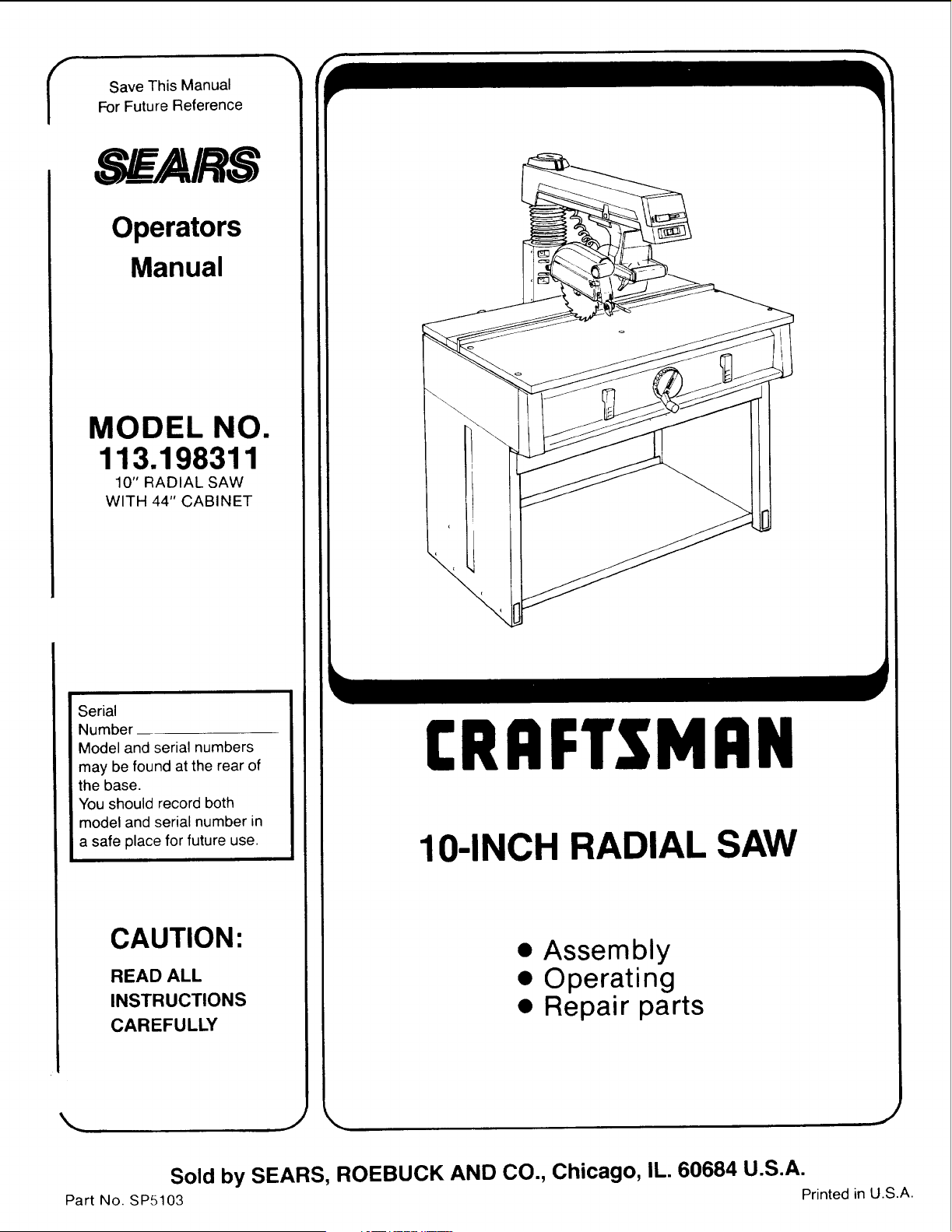
MODEL NO.
113.198311
10" RADIAL SAW
WITH 44" CABINET
Serial
Number
Model and serial numbers
may be found at the rear of
the base.
You should record both
model and serial number in
a safe place for future use.
CAUTION:
READ ALL
INSTRUCTIONS
CAREFULLY
CRRFTgMRN
10-INCH RADIAL SAW
• Assembly
• Operating
• Repair parts
Sold by SEARS, ROEBUCK AND CO., Chicago, IL. 60684 U.S.A.
Part No. SP5103 Printed in U.S.A.
FULL ONE YEAR WARRANTY ON CRAFTSMAN RADIAL SAW
If within one year from the date of purchase, this Craftsman Radial Saw fails due to a defect in material or
workmanship, Sears will repair it, free of charge.
WARRANTY SERVICE IS AVAILABLE BY SIMPLY CONTACTING THE NEAREST SEARS
SERVICE CENTER/DEPARTMENT THROUGHOUT THE UNITED STATES.
This warranty applies only while this product is used in the United States.
This warranty gives you specific legal rights and you may also have other :rights which vary from state to
state.
SEARS, ROEBUCK AND CO., DEPT. 698/731A Sears Tower, Chicago, IL 60684
Table of Contents
Section Title Page Numbers
Safety Information ........................................................... 3-6
Putting Your Saw Together ................................................. 7-18
Location and Function of Controls ........................................ 19-22
Alignment of the Blade ..................................................... 23-38
Electrical Connections ..................................................... 39-40
Crosscutting ............................................................... 41-47
Ripping ................................................................... 48-56
Cutting Accessories ....................................................... 57-60
Recommended Accessories ................................................... 61
Glossary ...................................................................... 62
Helpful Hints ............................................................. 63-64
Maintaining Your Saw .................................................... 65-70
Trouble Shooting ......................................................... 71-75
Parts List .................................................................. 76-91
Safety Information
The operator's manual contains safety infor-
mation, instructions and signs for your protec-
tion against serious injuries, including:
Loss of fingers, hand, arm or leg from contact
with the saw blade.
Eye injuries, including being blinded from
being hit by a thrown workpiece, workpiece
chips or pieces of the saw blade.
Impact injuries, including broken bones and
internal organ damage, from being hit by a
thrown workpiece, workpiece chips or pieces
of the saw blade.
Shock, electrocution, or burn injuries from
contact with wires, motor or other saw parts.
Safety Symbol and Signal Words
The safety information in this manual is high-
lighted by the following safety alert symbol.
Fig. 1 Safety Alert Symbol
The following signal words are used to indi-
cate the level of risk.
'_ DANGER: Means that if the safety infor-
mation is not followed, someone will be
seriously injured or killed.
WARNING: Means that if the safety in-
formation is not followed someone could be
seriously injured or killed.
'_, CAUTION: Means that if the safety in-
formation is not followed someone may be in-
jured.
All of the safety information and cutting
steps are critical to the safe operation of the
radial arm saw.
Major Hazards
1. Workpiece Kickback
Kickback is an uncontrolled grabbing and
throwing of the workpiece during ripping. If
kickback occurs, the workpiece can hit
you hard enough to cause broken bones, in-
ternal organ injury or death. To reduce or
prevent kickback, read and follow the safety
information in the Ripping section of the
manual.
Kickback.
Internal injury can
result.
Use anti-kickback
pawls/spreader.
Fig. 2 Kickback Safety Sign
2. Kickback Followed by Blade Contact
Kickback followed by blade contact can hap-
pen when the saw blade is pinched or bound
by the workpiece during ripping. Kickback
can happen if you reach around the blade to
the end with the anti-kickback pawls, (out-
feed end), and try to hold-down or pull the
workpiece through to complete the cut. Your
fingers, hand, or arm can be cut off by the
blade if the workpiece kicks back.
Kickback, Blade
Contact.
Fingers, hand, arm
can be cut off.
Follow instructions
for Ripping
Fig. 3 Blade Contact Safety Sign
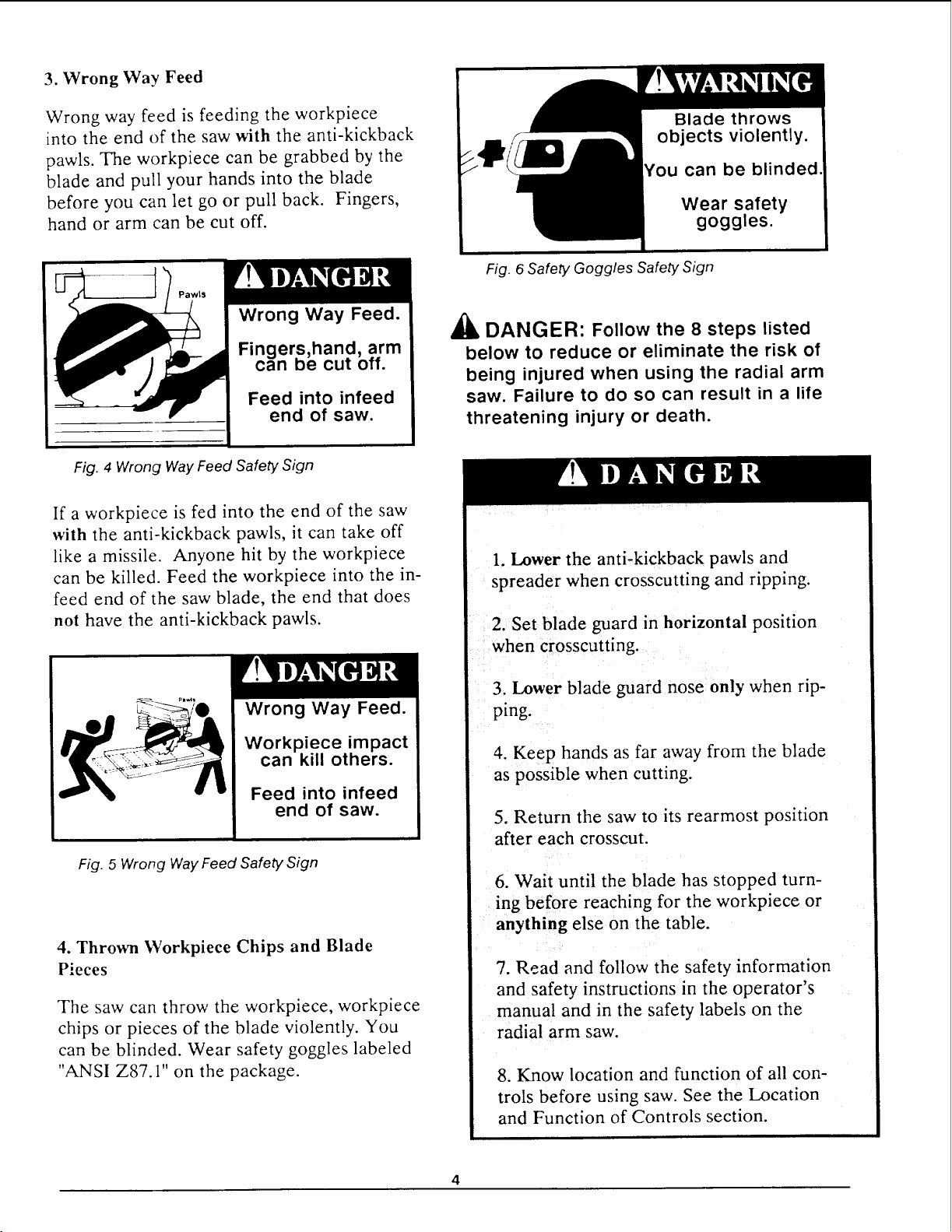
3. Wrong Way Feed
Wrong way feed is feeding the workpiece
into the end of the saw with the anti-kickback
pawls. The workpiece can be grabbed by the
blade and pull your hands into the blade
before you can let go or pull back. Fingers,
hand or arm can be cut off.
can be blinded
Wear safety
goggles.
Wrong Way Feed.
Fingers,hand, arm
can be cut off.
Feed into infeed
end of saw.
Fig. 4 Wrong Way Feed Safety,Sign
If a workpiece is fed into the end of the saw
with the anti-kickback pawls, it can take off
like a missile. Anyone hit by the workpiece
can be killed. Feed the workpiece into the in-
feed end of the saw blade, the end that does
not have the anti-kickback pawls.
Wrong Way Feed.
Workpiece impact
can kill others.
Feed into infeed
end of saw.
Fig. 5 Wrong Way Feed Safety Sign
4. Thrown Workpiece Chips and Blade
Pieces
The saw can throw the workpiece, workpiece
chips or pieces of the blade violently. You
can be blinded. Wear safety goggles labeled
"ANSI Z87.1" on the package.
Fig. 6 Safety Goggles Safety Sign
_i, DANGER: Follow the 8 steps listed
below to reduce or eliminate the risk of
being injured when using the radial arm
saw. Failure to do so can result in a life
threatening injury or death.
1. Lower the anti-kickback pawls and
spreader when crosscutting and ripping.
2. Set blade guard in horizontal position
when crosscutting.
3. Lower blade guard nose only when rip-
ping.
4. Keep hands as far away from the blade
as possible when cutting.
5. Return the saw to its rearmost position
after each crosscut.
6. Wait until the blade has stopped turn-
ing before reaching for the workpiece or
anything else on the table.
7. Read and follow the safety information
and safety instructions in the operator's
manual and in the safety labels on the
radial arm saw.
8. Know location and function of all con-
trols before using saw. See the Location
and Function of Controls section.
4
Personal Safety
1. Wear safety goggles labeled "ANSI Z87.1"
on the package. Do not wear regular glasses,
they are not safety glasses.
2. Wear snug fitting clothes, short sleeve
shirts and nonslip footwear. Cover up or tie
long hair. Do not wear loose, baggy clothes,
gloves, neckties, rings, watches or any other
jewelry.
3. Wear a dust mask, with your safety gog-
gles, if cutting operation is dusty.
4. Wear hearing protectors, ear plugs or
muffs, if you use the saw daily.
5. Keep good footing and balance. Don't over-
reach.
Work Area Safety
1. Keep children, pets and visitors out of the
work area.
2. Make the work area child proof. Remove
the yellow key from the red switch and place
it out of reach and sight. Lock work area.
3. Keep floors dry and free from sawdust, wax
or other slippery materials.
4. Keep work area clean, uncluttered and
well lighted.
5. Use the saw in a dry area. Do not use in
wet or damp area. Do not use outside.
6. Clear the table of all objects (adjusting
wrenches, tools, scraps of wood etc.) except
the workpiece to be cut, fixtures or clamps
before turning the saw on.
7. Do not do layout, assembly or setup work
on the table while the blade is turning.
8. Store items away from the saw. Do not
climb on the saw to reach items. Do not
stand on the table; the saw can tip over.
Saw Safety
1. Keep guards and anti-kickback pawls in
place and in working order.
2. Check for broken or damaged parts before
using saw. A damaged guard or other saw
part should be checked for alignment, bind-
ing, breakage and correct mounting to make
sure they are working properly. Repair or
replace damaged guards or other saw parts.
3. Unplug saw before doing maintenance,
making adjustments, and changing blades and
accessories.
4. Use clamps or vice to hold workpiece
when practical. It's safer than using your
hands and frees them to operate the saw.
5. Do not force the saw, saw blade or acces-
sories to do jobs they are not designed to do.
6. Make sure the yellow key is removed and
the red switch is in the off position before
plugging in the power cord.
7. Cut only wood, woodlike or plastic
materials. Do not cut metal materials.
8. Secure the saw to floor, wall, bench or
table if it slides, tips or walks during use.
9. Feed the workpiece against the direction
of rotation of the blade when ripping.
10. Turn the saw off before leaving work
area. Do not leave the saw until the blade
has stopped.
11. Lock the rip and miter locks before
moving the saw from one location to another.
12. Turn the saw off and remove yellow key if
the blade jams. Do not try to free a jammed
workpiece with the saw on.
13. Turn the saw off if it vibrates excessively
or makes an unfamiliar noise. Correct any
problems before restarting saw.
14.Rip workpieces that are longer than the
diameter of the blade being used.Do not rip
a workpiece that is shorter than the diameter
of the blade being used.
15.Cut only one workpiece at a time. Do
not cut stackedworkpieces or lay them edge
to edgefor cutting.
Workpiece Support Safety
1. Use additional supports for workpieces
which extend beyond the saw table. Large
workpieces can shift, twist, rise from table or
fall after they are cut.
2. Helpers can be hit by a thrown workpiece,
workpiece chips or pieces of the blade. Use
table extensions or other supports. Do not
use helpers.
3. Helpers can cause the workpiece to kick-
back. Do not use other people to support or
assist in feeding or pulling the workpiece.
Use table extensions. See Recommended Ac-
cessories section of the manual.
4. When table extensions over 24 inches wide
are added to either side of the saw, make
sure you either bolt the saw to the floor or
support the outer end of the extension from
the floor with sturdy legs or an outrigger.
Blade Safety
1. Use blades marked for 3450 rpm or higher.
2. Do not use blades larger than l0 inches in
diameter.
3. Keep blade sharp and clean.
4. Do not cycle motor switch on and off rapid-
ly; the blade can loosen.
5. Do not overtighten the blade; the blade
collar can be warped.
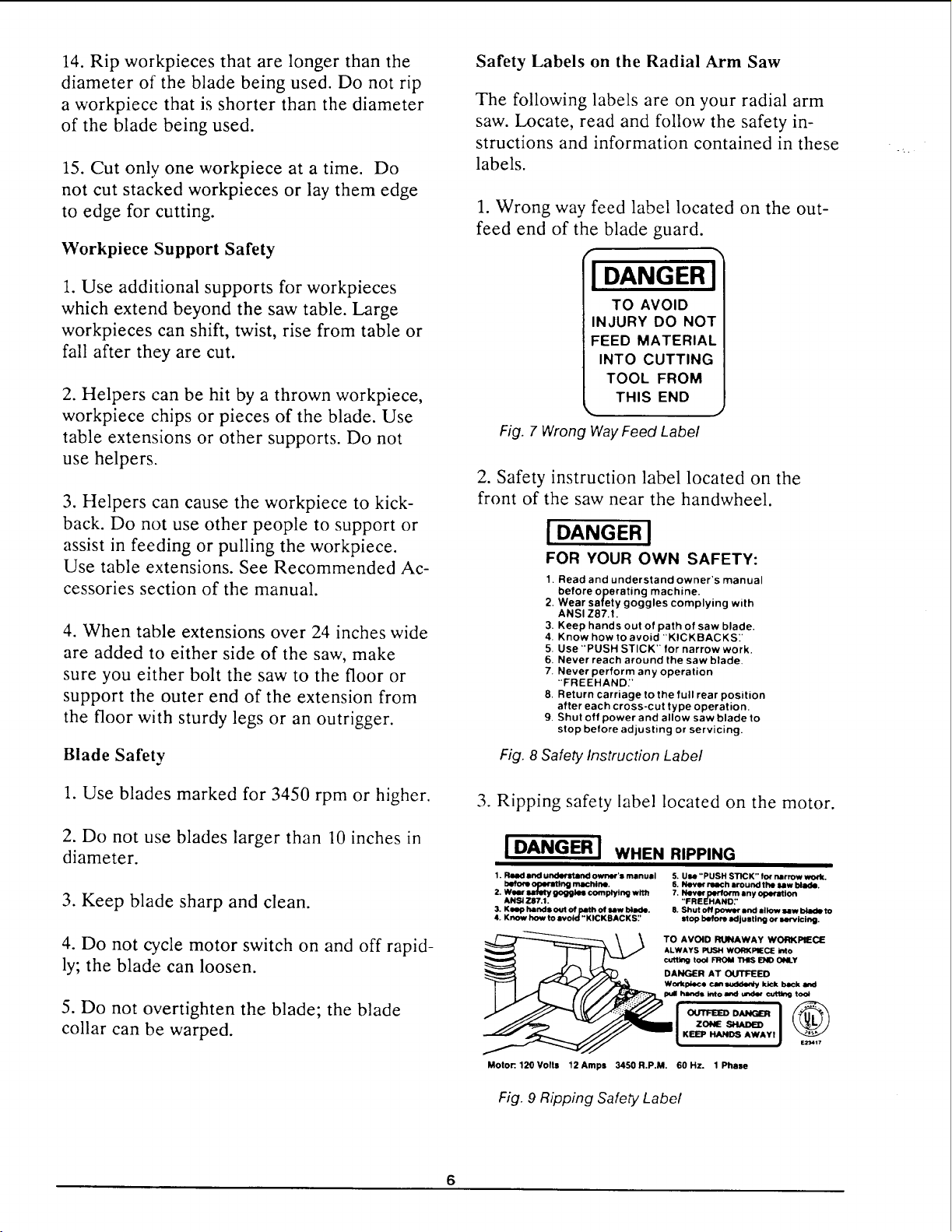
Safety Labels on the Radial Arm Saw
The following labels are on your radial arm
saw. Locate, read and follow the safety in-
structions and information contained in these
labels.
1. Wrong way feed label located on the out-
feed end of the blade guard.
r
I DANGER J
TO AVOID
INJURY DO NOT
FEED MATERIAL
INTO CUTTING
TOOL FROM
THIS END
Fig. 7 Wrong Way Feed Label
2. Safety instruction label located on the
front of the saw near the handwheel.
Fig. 8
[ DANGER I
FOR YOUR OWN SAFETY:
1. Read and understand owner's manual
before operating machine.
2. Wear safety goggles complying with
ANSIZ87.t.
3. Keep hands out of path of saw blade.
4. Know how to avoid "KICKBACKS_'
5. Use "PUSH STICK" for narrow work.
6. Never reach around the saw blade.
7. Never perform any operation
"FREEHAND:'
8. Return carriage to the full rear position
after each cross-cut type operation.
9. Shut off power and allow saw blade to
stop before adjusting or servicing.
Safety Instruction Label
3. Ripping safety label located on the motor.
IDANGERI
WHEN RIPPING
1. Read and understand owner's manual
operaUng m4_blne.
2. Woar salfMy goggles complying with
ANSi 7.87.1.
3. KINIp hands out of path of law bllide.
4. Know how to avoid "KICKBACKS:'
5. Use "PUSH STICK" for narrow work.
6. Nero" roach around the law blade.
7. Never perform any oporatlon
"FREEHAND:'
8. Shut o4/power and allow law blade to
StOp before adjusting o¢ N/'_'lclng.
TO AVOID RUNAWAY WORKPIECE
ALWAYS PUSH WO_,KPIIECE into
cutt_ tool FROM THIS END ONLY
DANGER AT OUTFEED
Wotkpleca can smlck_ kick beck and
, and under out_ too_
ZONE
KEEP HANDS AWAYI
e._d417
Motor:. 120 Volts 12 Amps 3450 R.P.M. 60 Hz. 1 Phase
Fig. 9 Ripping Safety Label
Puttin etherYour Saw To
Your radial arm saw is easy to put together,
however it will take time. Ask a friend to
help, and follow these assembly instructions.
It is important for your safety, and for the
quality of your cuts, that the saw be put
together with care.
'_ WARNING: Plugging the saw in
during assembly can result in electrical
shock or your fingers, hand, or arm be-
ing cut off from blade contact. Do not
plug in the saw at any time during as-
sembly. The saw should only be
plugged in when it is to be used.
A
E
G
F D
J
\
Unpacking/Set up
1. As you unpack, try to keep the contents of
each of the smaller bags together and separate
from the others. This will help you identify and
locate the parts you need during assembly.
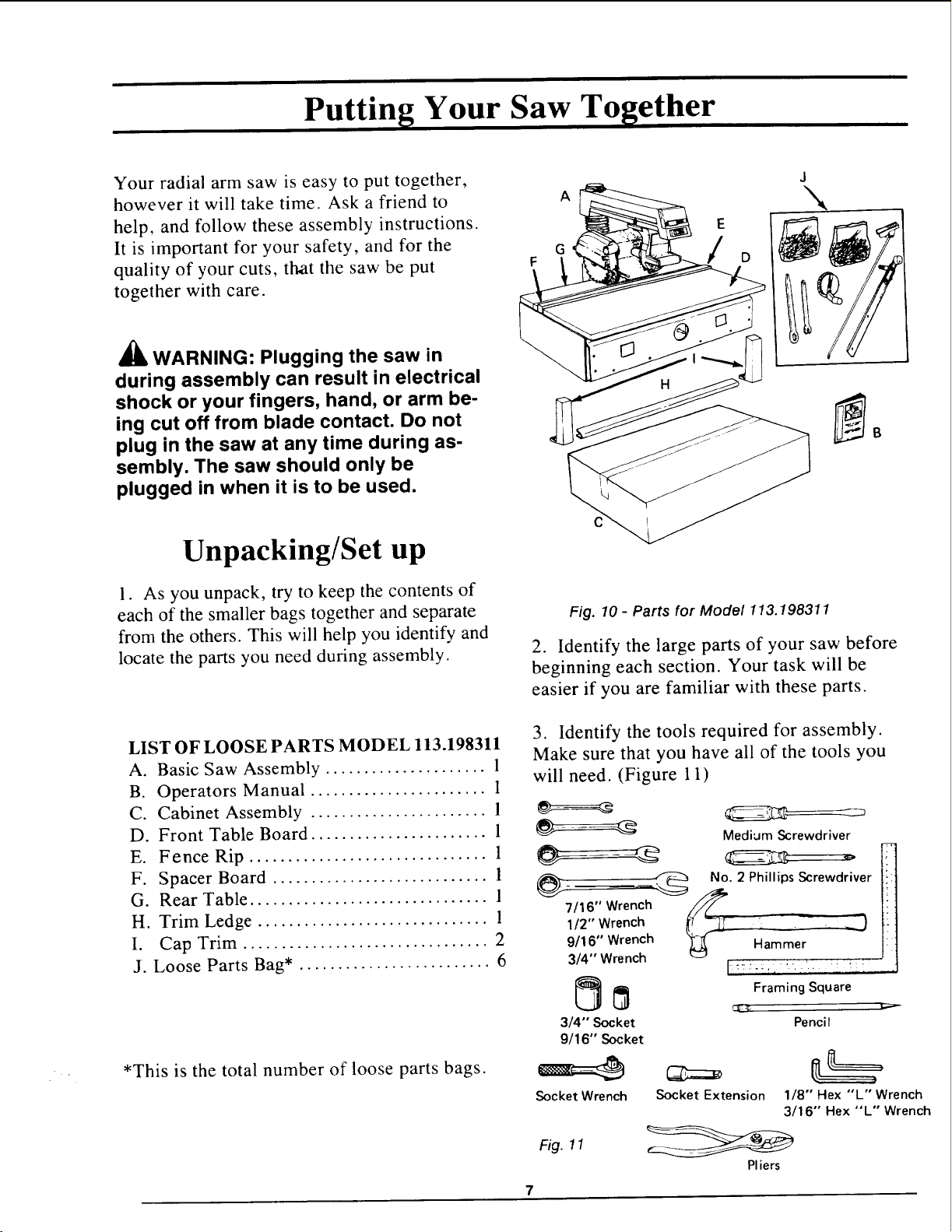
LIST OF LOOSE PARTS MODEL 113.198311
A. Basic Saw Assembly ..................... 1
B. Operators Manual ....................... 1
C. Cabinet Assembly ....................... 1
D. Front Table Board ....................... 1
E. Fence Rip ............................... 1
F. Spacer Board ............................ 1
G. Rear Table ............................... 1
H. Trim Ledge .............................. 1
I. Cap Trim ................................ 2
J. Loose Parts Bag* ......................... 6
*This is the total number of loose parts bags.
Fig. 10- Parts for Model 113.198311
2. Identify the large parts of your saw before
beginning each section. Your task will be
easier if you are familiar with these parts.
3. Identify the tools required for assembly.
Make sure that you have all of the tools you
will need. (Figure 11)
---_=a_ Medium Screwdriver
_7/16,, Wrench _//_ No. 2 Phillips Screwdriver
1/2" Wrench i'( _--]T
llJ
9/16" Wrench Hammer
3/4" Wrench
3/4"' Socket
9/16" Socket
Socket Wrench
Fig. 11
I::.":;, ", " ..i. :_: -
Framing Square
ut_s_
Pe nci I
Socket Extension 1/8" Hex "L" Wrench
3/16" Hex "L" Wrench
Pliers
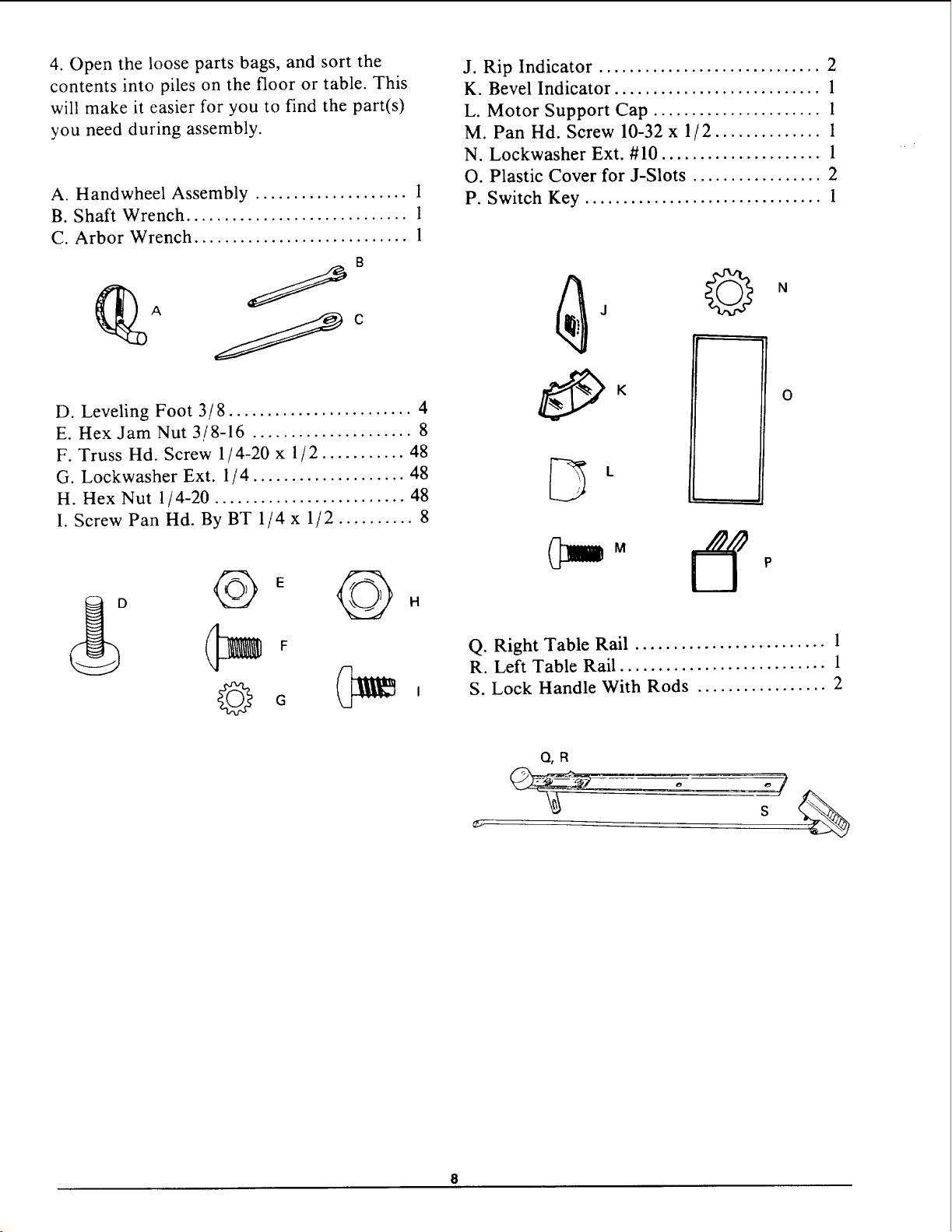
4. Open the loose parts bags, and sort the
contents into piles on the floor or table. This
will make it easier for you to find the part(s)
you need during assembly.
A. Handwheel Assembly .................... 1
B. Shaft Wrench ............................. 1
C. Arbor Wrench ............................ 1
B
D. Leveling Foot 3/8 ........................ 4
E. Hex Jam Nut 3/8-16 ..................... 8
F. Truss Hd. Screw 1/4-20 x 1/2 ........... 48
G. Lockwasher Ext. 1 / 4 .................... 48
H. Hex Nut 1/4-20 ......................... 48
I. Screw Pan Hd. By BT 1/4 x 1/2 .......... 8
©
©
G
J. Rip Indicator ............................. 2
K. Bevel Indicator ........................... 1
L. Motor Support Cap ...................... 1
M. Pan Hd. Screw 10-32 x 1/2 .............. 1
N. Lockwasher Ext. #10 ..................... 1
O. Plastic Cover for J-Slots ................. 2
P. Switch Key ............................... 1
k
M
©
O
Q. Right Table Rail ......................... 1
R. Left Table Rail ........................... 1
S. Lock Handle With Rods ................. 2
Q,R
s
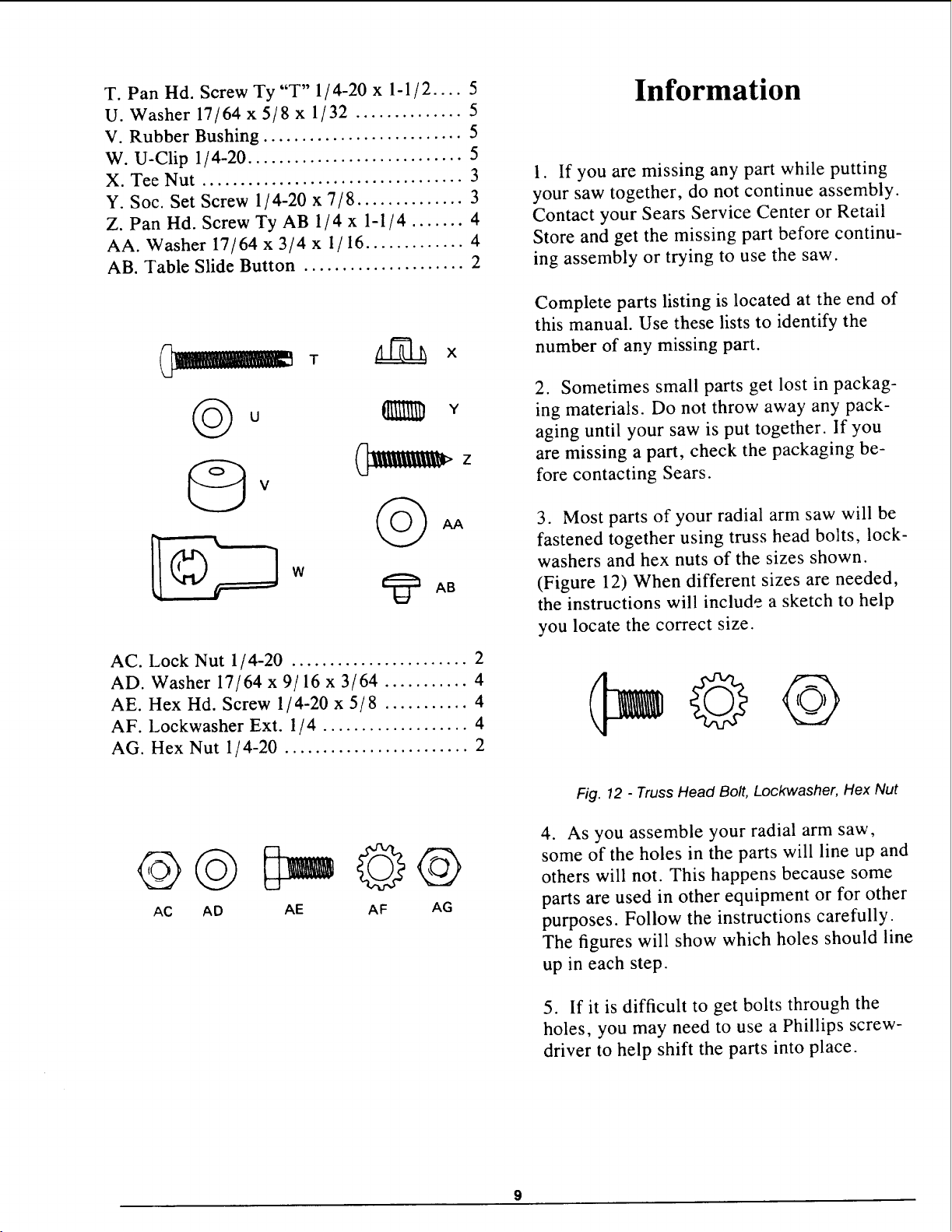
T. Pan Hd. Screw Ty "T" 1/ 4-20 x 1-1 / 2 .... 5
U. Washer 17/64 x 5/8 x 1/32 .............. 5
V. Rubber Bushing .......................... 5
W. U-Clip 1/ 4-20 ............................ 5
X. Tee Nut .................................. 3
Y. Soc. Set Screw 1/4-20 x 7/8 .............. 3
Z. Pan Hd. Screw Ty AB 1/4 x 1-1/4 ....... 4
AA. Washer 17/64 x 3/4 x 1/16 ............. 4
AB. Table Slide Button ..................... 2
Information
1. If you are missing any part while putting
your saw together, do not continue assembly.
Contact your Sears Service Center or Retail
Store and get the missing part before continu-
ing assembly or trying to use the saw.
©u
W
Z
y
iiiii. iiiUil z
AC. Lock Nut 1/4-20 ....................... 2
AD. Washer 17/64 x 9/16 x 3/64 ........... 4
AE. Hex Hd. Screw 1/4-20 x 5/8 ........... 4
AF. Lockwasher Ext. 1/4 ................... 4
AG. Hex Nut 1/ 4-20 ........................ 2
Complete parts listing is located at the end of
this manual. Use these lists to identify the
number of any missing part.
2. Sometimes small parts get lost in packag-
ing materials. Do not throw away any pack-
aging until your saw is put together. If you
are missing a part, check the packaging be-
fore contacting Sears.
3. Most parts of your radial arm saw will be
fastened together using truss head bolts, lock-
washers and hex nuts of the sizes shown.
(Figure 12) When different sizes are needed,
the instructions will include a sketch to help
you locate the correct size.
@@ ©@
AC AD AE AF AG
Fig. 12 - Truss Head Bolt, Lockwasher, Hex Nut
4. As you assemble your radial arm saw,
some of the holes in the parts will line up and
others will not. This happens because some
parts are used in other equipment or for other
purposes. Follow the instructions carefully.
The figures will show which holes should line
up in each step.
5. If it is difficult to get bolts through the
holes, you may need to use a Phillips screw-
driver to help shift the parts into place.
Ao
B.
C.
D.
E.
F.
G.
H.
I.
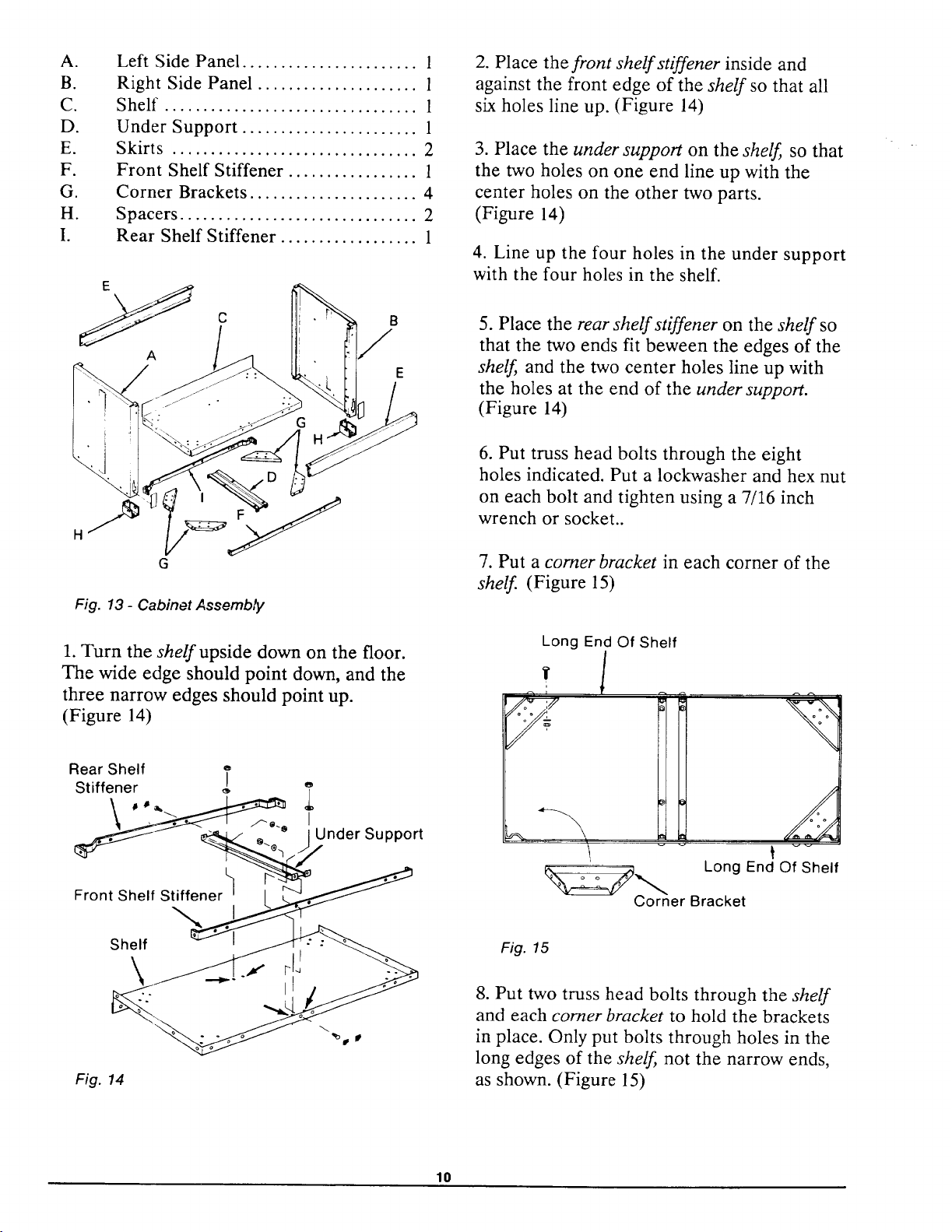
Left Side Panel ....................... 1
Right Side Panel ..................... 1
Shelf ................................. 1
Under Support ....................... 1
Skirts ................................ 2
Front Shelf Stiffener ................. 1
Corner Brackets ...................... 4
Spacers ............................... 2
Rear Shelf Stiffener .................. 1
A
G
Fig. 13 - Cabinet Assembty
1. Turn the shelf upside down on the floor.
The wide edge should point down, and the
three narrow edges should point up.
(Figure 14)
Rear Shelf T
Stiffener _ e
• " Under Support
Front Shelf Stiffener
2. Place the front shelf stiffener inside and
against the front edge of the shelf so that all
six holes line up. (Figure 14)
3. Place the under support on the shelf so that
the two holes on one end line up with the
center holes on the other two parts.
(Figure 14)
4. Line up the four holes in the under support
with the four holes in the shelf.
5. Place the rear shelf stiffener on the shelf so
that the two ends fit beween the edges of the
shelf and the two center holes line up with
the holes at the end of the under support.
(Figure 14)
6. Put truss head bolts through the eight
holes indicated. Put a lockwasher and hex nut
on each bolt and tighten using a 7/16 inch
wrench or socket..
7. Put a comer bracket in each corner of the
shelf (Figure 15)
Long End Of Shelf
, l
r_ ,
Long End Of Shelf
_Co-_rner Bracket
Shelf
\
Fig. 14
Fig. 15
8. Put two truss head bolts through the shelf
and each comer bracket to hold the brackets
in place. Only put bolts through holes in the
long edges of the shelf not the narrow ends,
as shown. (Figure 15)
10
9. Put a lockwasher and hex nut on each bolt
and tighten using a 7/16 inch wrench or
socket.
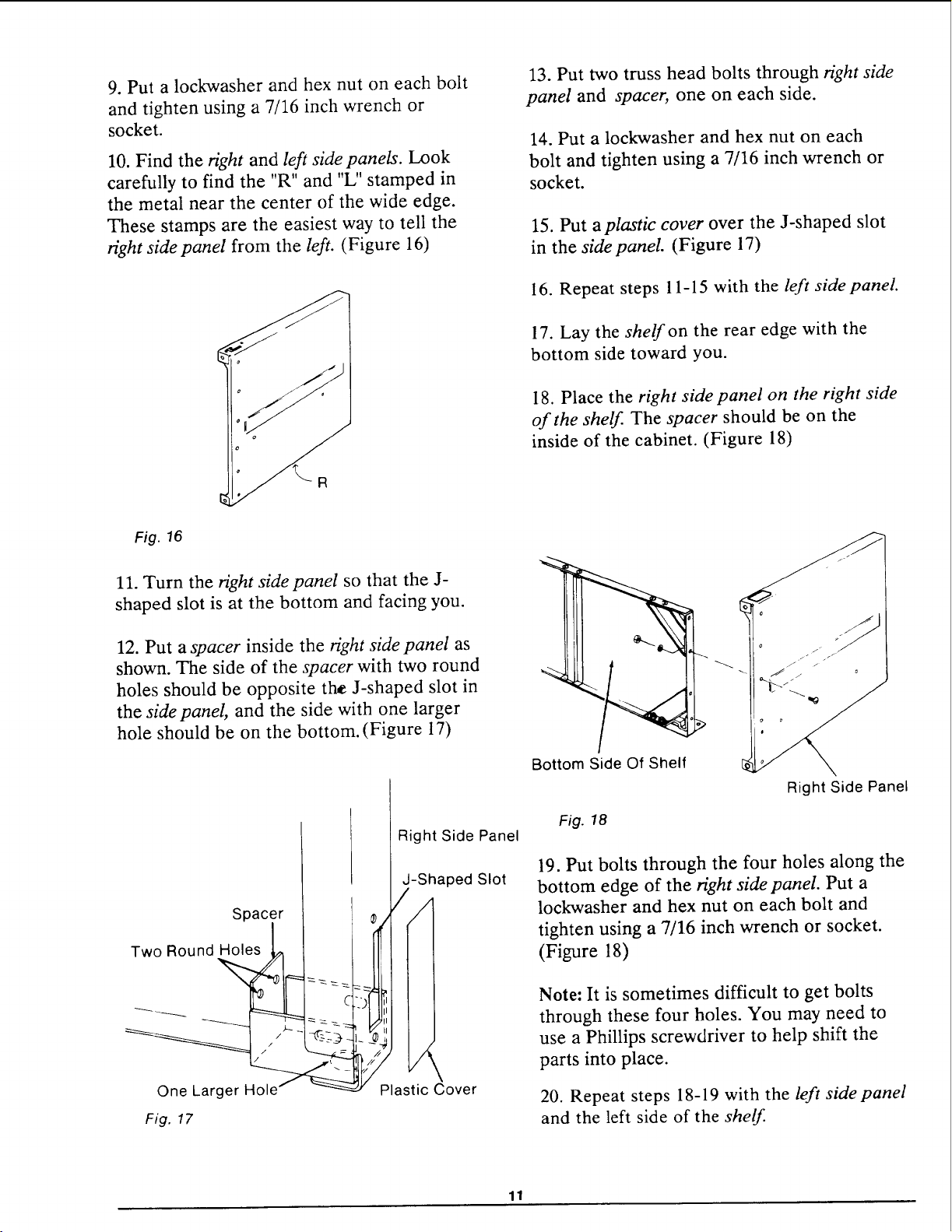
10. Find the right and left side panels. Look
carefully to find the "R" and "L" stamped in
the metal near the center of the wide edge.
These stamps are the easiest way to tell the
right sidepanel from the left. (Figure 16)
13. Put two truss head bolts through right side
panel and spacer, one on each side.
14. Put a lockwasher and hex nut on each
bolt and tighten using a 7/16 inch wrench or
socket.
15. Put a plastic cover over the J-shaped slot
in the side panel. (Figure 17)
16. Repeat steps 11-15 with the left sidepanel.
17. Lay the shelf on the rear edge with the
bottom side toward you.
18. Place the right side panel on the right side
of the shelf. The spacer should be on the
inside of the cabinet. (Figure !8)
Fig. 16
11. Turn the right side panel so that the J-
shaped slot is at the bottom and facing you.
12. Put a spacer inside the right side panel as
shown. The side of the spacer with two round
holes should be opposite the J-shaped slot in
the side panel, and the side with one larger
hole should be on the bottom. (Figure 17)
Spacer
Two Round Holes
Fig. ¢7
Right Side Panel
-Shaped Slot
iI
II
II
Plastic Cover
Bottom Side Of Shelf
Fig. 18
Right Side Panel
19. Put bolts through the four holes along the
bottom edge of the right side panel. Put a
lockwasher and hex nut on each bolt and
tighten using a 7/16 inch wrench or socket.
(Figure 18)
Note: It is sometimes difficult to get bolts
through these four holes. You may need to
use a Phillips screwdriver to help shift the
parts into place.
20. Repeat steps 18-19 with the left sidepanel
and the left side of the shelf.
11
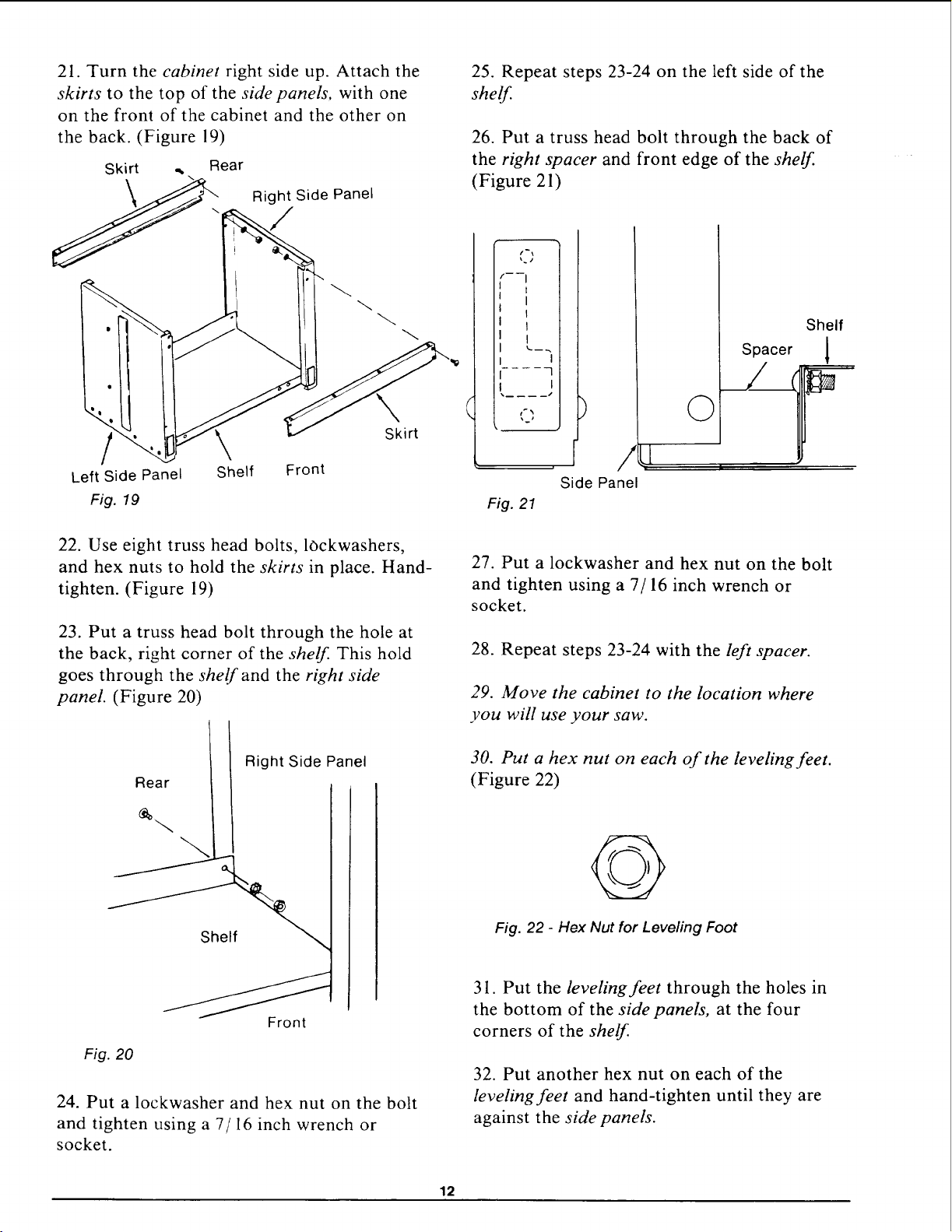
21. Turn the cabinet right side up. Attach the
skirts to the top of the side panels, with one
on the front of the cabinet and the other on
the back. (Figure 19)
Skirt ., Rear
Right Side Panel
/
Left Side Panel
Fig. 19
Shelf Front
Skirt
22. Use eight truss head bolts, lOckwashers,
and hex nuts to hold the skirts in place. Hand-
tighten. (Figure 19)
23. Put a truss head bolt through the hole at
the back, right corner of the shelf. This hold
goes through the shelf and the right side
panel. (Figure 20)
25. Repeat steps 23-24 on the left side of the
shelf.
26. Put a truss head bolt through the back of
the right spacer and front edge of the shelf.
(Figure 21)
t'\
f----i
i i
I I
I.... -3
I I
.... s
tP_
Fig. 21
)
/
Side Panel
©
Spacer
Shelf
1
27. Put a lockwasher and hex nut on the bolt
and tighten using a 7/16 inch wrench or
socket.
28. Repeat steps 23-24 with the left spacer.
29. Move the cabinet to the location where
you will use your saw.
Right Side Panel
Rear
Fig. 20
Front
24. Put a lockwasher and hex nut on the bolt
and tighten using a 7/16 inch wrench or
socket.
30. Put a hex nut on each of the leveling feet.
(Figure 22)
@
Fig. 22 - Hex Nut for Leveling Foot
31. Put the leveling feet through the holes in
the bottom of the side panels, at the four
corners of the shelf.
32. Put another hex nut on each of the
leveling feet and hand-tighten until they are
against the side panels.
12
WARNING: Saw blade can roll for-
ward toward you if the leveling feet are
not correctly adjusted. Workpiece or
saw can move unexpectedly if cabinet
rocks. Fingers, hand, or arm can be cut
off from blade contact. Adjust leveling
feet before using your saw.
33. If the leveling feet raise the front of the
saw slightly higher than the rear, and if the
cabinet does not rock, go to step 39, or
If the leveling feet do not raise the front of the
saw slightly higher than the rear, go to step
34, or
If the cabinet rocks, go to step 34.
34. Loosen the bottom hex nut on the desired
leveling foot using a 9/16 inch wrench.
35. Loosen the top nut by hand.
36. Adjust the lower nut with the 9/16 inch
wrench until the leveling foot is at the desired
height.
37. Tighten the top nut by hand.
38. Repeat steps 34-37 for the other three
leveling feet if necessary.
39. Tighten all four bottom nuts using a 9/16
inch wrench.
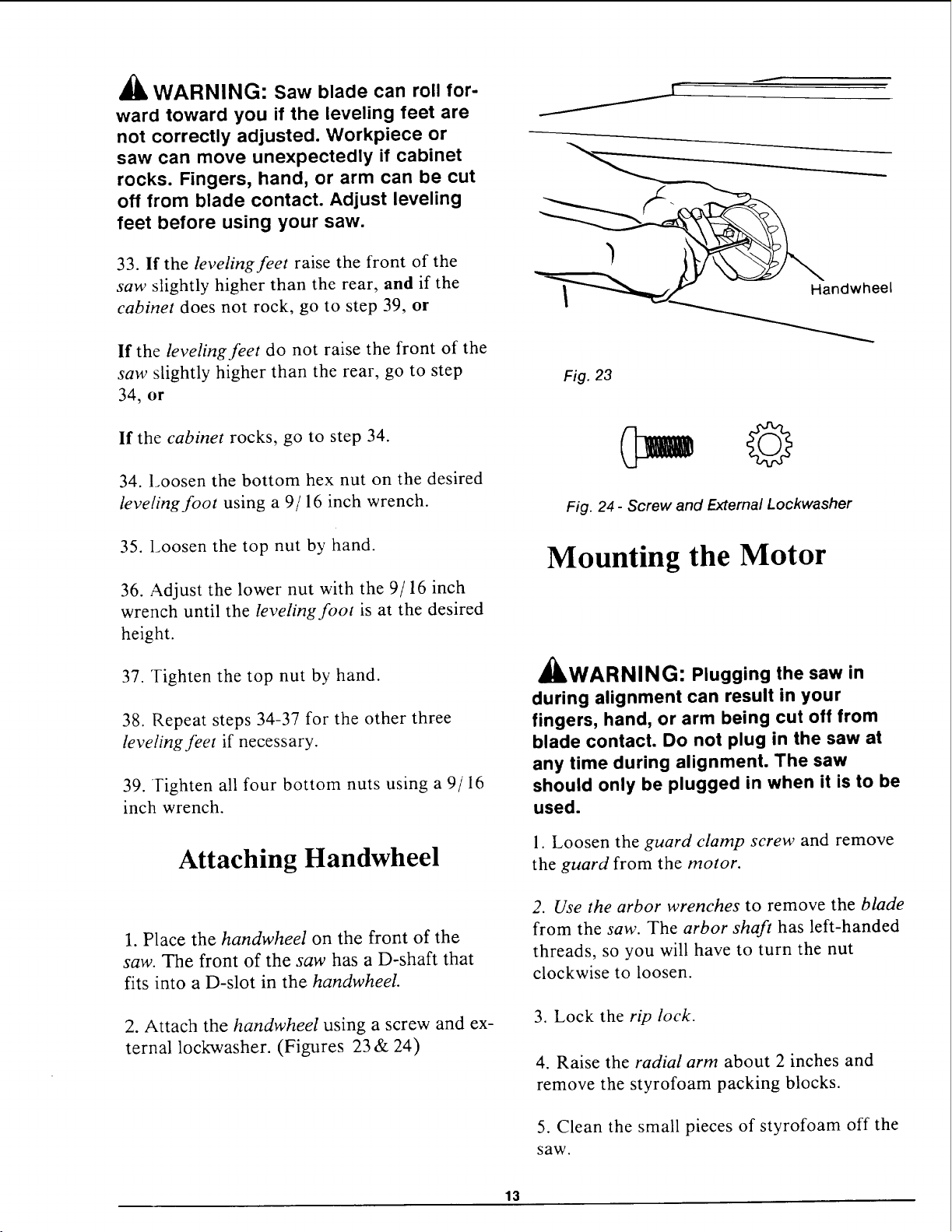
Attaching Handwheel
1. Place the handwheel on the front of the
saw. The front of the saw has a D-shaft that
fits into a D-slot in the handwheeL
2. Attach the handwheel using a screw and ex-
ternal lockwasher. (Figures 23 & 24)
S
Handwheel
Fig. 23
o= ©
Fig. 24 - Screw and External Lockwasher
Mounting the Motor
A H_
JkWARNING: Plugging the saw in
during alignment can result in your
fingers, hand, or arm being cut off from
blade contact. Do not plug in the saw at
any time during alignment. The saw
should only be plugged in when it is to be
used.
1. Loosen the guard clamp screw and remove
the guard from the motor.
2. Use the arbor wrenches to remove the blade
from the saw. The arbor shaft has left-handed
threads, so you will have to turn the nut
clockwise to loosen.
3. Lock the rip lock.
4. Raise the radial arm about 2 inches and
remove the styrofoam packing blocks.
5. Clean the small pieces of styrofoam off the
saw.
13
6. Place the motor on the center channel of
the saw and remove the three table boards and
fence.
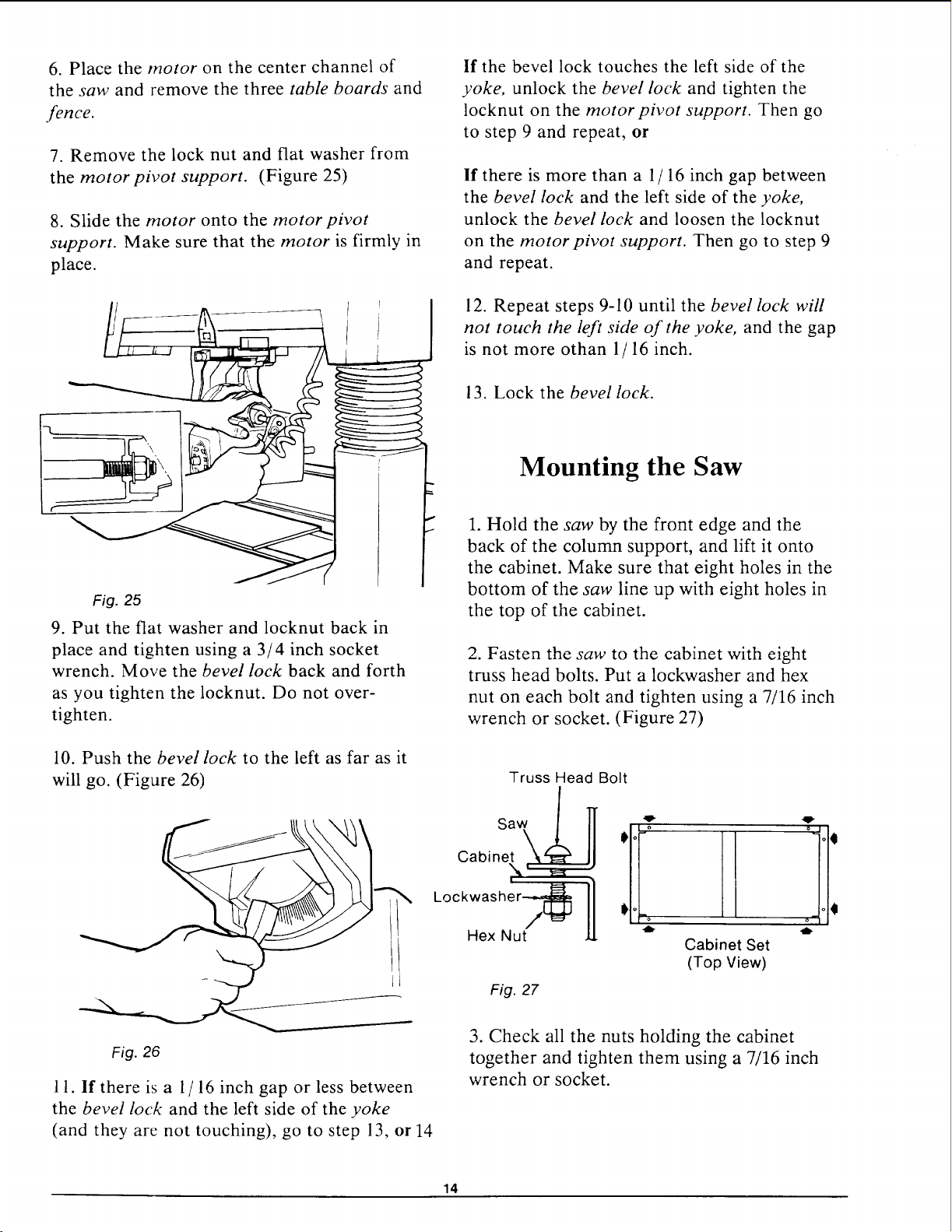
7. Remove the lock nut and flat washer from
the motor pivot support. (Figure 25)
8. Slide the motor onto the motor pivot
support. Make sure that the motor is firmly in
place.
Fig. 25
9. Put the flat washer and locknut back in
place and tighten using a 3/4 inch socket
wrench. Move the bevel lock back and forth
as you tighten the locknut. Do not over-
tighten.
5
10. Push the bevel lock to the left as far as it
will go. (Figure 26)
If the bevel lock touches the left side of the
yoke, unlock the bevel lock and tighten the
locknut on the motor pivot support. Then go
to step 9 and repeat, or
If there is more than a 1/ 16 inch gap between
the bevel lock and the left side of the yoke,
unlock the bevel lock and loosen the locknut
on the motor pivot support. Then go to step 9
and repeat.
12. Repeat steps 9-10 until the bevel lock will
not touch the left side of the yoke, and the gap
is not more othan 1/ 16 inch.
13. Lock the bevel lock.
Mounting the Saw
1. Hold the saw by the front edge and the
back of the column support, and lift it onto
the cabinet. Make sure that eight holes in the
bottom of the saw line up with eight holes in
the top of the cabinet.
2. Fasten the saw to the cabinet with eight
truss head bolts. Put a lockwasher and hex
nut on each bolt and tighten using a 7/16 inch
wrench or socket. (Figure 27)
Truss Head Bolt
Saw/
OaOnet\
"N,'
I
Lockwasher-_
Hex Nut
:11!iI1illl:
Cabinet Set
(Top View)
Fig. 27
Fig. 26
11. If there is a 1/ 16 inch gap or less between
the bevel lock and the left side of the yoke
(and they are not touching), go to step 13, or 14
3. Check all the nuts holding the cabinet
together and tighten them using a 7/16 inch
wrench or socket.
14

Attaching Trim Ledge and
Trim Caps
1. Hold the trim ledge against the front of the
saw.
2. Reach through the top of the saw and use
four screws to fasten the trim ledge in place.
Tighten using a Phillips screwdriver.
(Figures 28 & 29)
Trim Ledge
Fig. 28
Fig. 29 - Phillips Head Screws
3. Hold the right trim cap in place on the
front right side of the cabinet. (Figure 30)
Fig. 30
Trim Cap
4. Reach through the top of the saw and use
two screws to hold the trim cap in place.
Tighten using a Phillips screwdriver.
5. Repeat steps 3-4 with the left trim cap.
Mounting Table Locks
The following parts are used in mounting the
table locks:
A°
B.
C.
D.
E.
F.
G.
H.
I.
J.
Lock Handles with Rods ........... 2
Right Table Rail .................. 1
Left Table Rail ................... 1
Hex Head Bolts 1/4-20x5/8 ......... 4
Lockwashers 1/4 .................. 4
Pan Head Screws 1/4x1-1/4 ......... 4
Hex Nuts 1/4-20 .................. 2
Washer 17/64 x 9/16 x 3/64 ......... 4
Locknuts 1/4-20 ................... 2
Slide Button ...................... 2
A
B,C D
E
Fig. 31- Parts for Table Locks
1. Put a lockwasher on a hex head bolt.
(Figure 32)
Fig. 32 - Lockwasher, Hex Nut, and Hex Head Bolt
2. Lift a lock handle and put the bolt through
the hole in the mounting plate as shown.
(Figure 33)
15
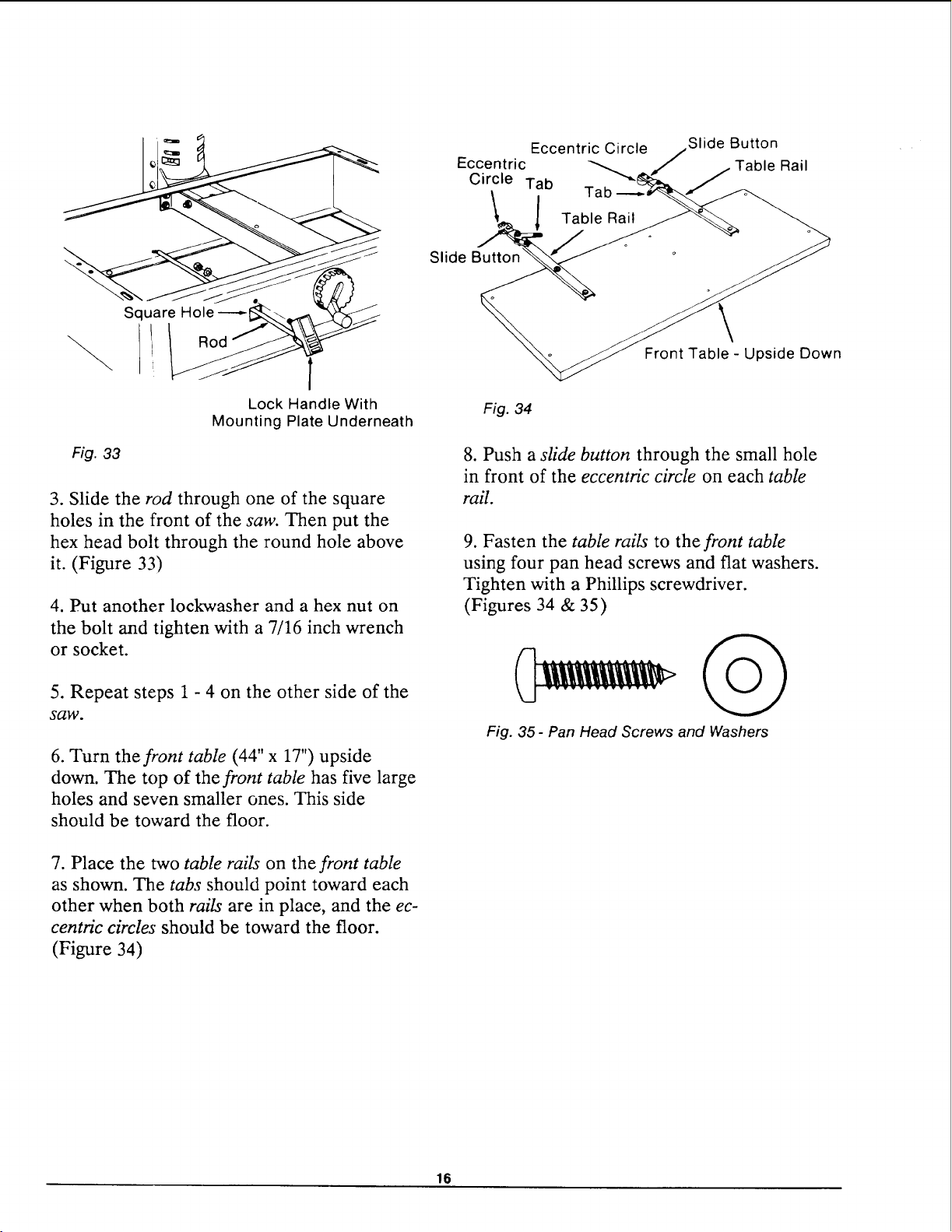
Square Hole----
Fig. 33
Lock Handle With
Mounting Plate Underneath
3. Slide the rod through one of the square
holes in the front of the saw. Then put the
hex head bolt through the round hole above
it. (Figure 33)
4. Put another lockwasher and a hex nut on
the bolt and tighten with a 7/16 inch wrench
or socket.
5. Repeat steps 1 - 4 on the other side of the
saw.
6. Turn the front table (44" x 17") upside
down. The top of the front table has five large
holes and seven smaller ones. This side
should be toward the floor.
7. Place the two table rails on the front table
as shown. The tabs should point toward each
other when both rails are in place, and the ec-
centric circles should be toward the floor.
(Figure 34)
Slide
Eccentric Circle Slide Button
Eccentric Table Rail
Circle Tab "_
Front Table - Upside Down
Fig. 34
8. Push a sfide button through the small hole
in front of the eccentric circle on each table
rail.
9. Fasten the table rails to the front table
using four pan head screws and flat washers.
Tighten with a Phillips screwdriver.
(Figures 34 & 35)
Fig. 35- Pan Head Screws and Washers
16
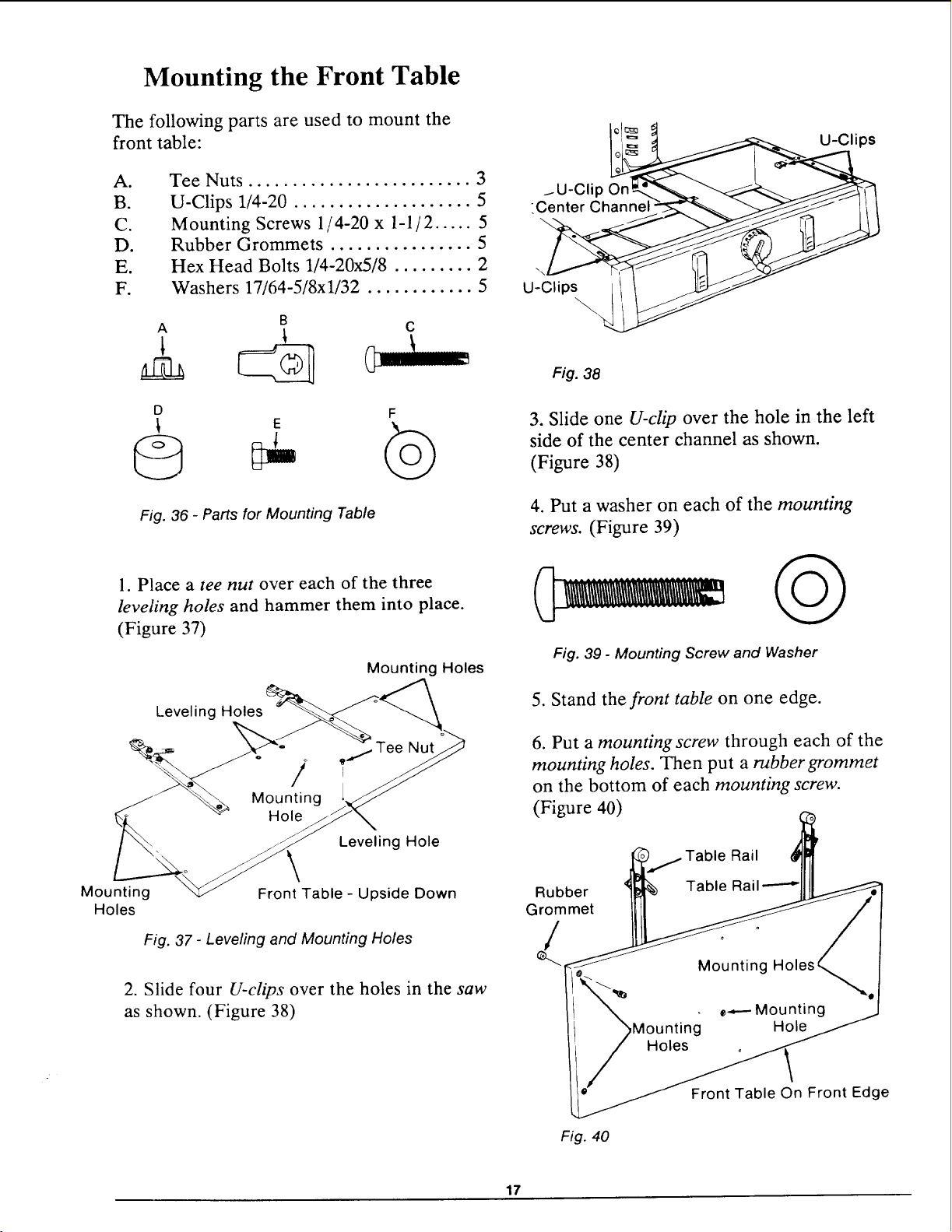
Mounting the Front Table
The following parts are used to mount the
front table:
A.
B.
C.
D.
E.
F.
Tee Nuts ......................... 3
U-Clips 1/4-20 .................... 5
Mounting Screws 1/4-20 x l-l/2 ..... 5
Rubber Grommets ................ 5
Hex Head Bolts 1/4-20x5/8 ......... 2
Washers 17/64-5/8xl/32 ............ 5
B
A C
D F
E
Fig. 36 - Parts for Mounting Table
1. Place a tee nut over each of the three
leveling holes and hammer them into place.
(Figure 37)
Mounting Holes
Leveling Holes
Leveling Hole
Mounting
Holes
Front Table - Upside Down
Fig. 37 - Leveling and Mounting Holes
2. Slide four U-clips over the holes in the saw
as shown. (Figure 38)
Io]==
Fig. 30
3. Slide one U-clip over the hole in the left
side of the center channel as shown.
(Figure 38)
4. Put a washer on each of the mounting
screws. (Figure 39)
Fig. 39 - Mounting Screw and Washer
5. Stand the front table on one edge.
6. Put a mounting screw through each of the
mounting holes. Then put a rubber grommet
on the bottom of each mounting screw.
(Figure 40)
Rubber
Grommet
Table Rail
Front Table On Front Edge
Fig. 40
17
7. Place the front table on the saw so that the
mounting screws line up with the U-clips. The
front table should extend about one inch
beyond the trim caps.
8. Start the mounting screws into the U-clips
using a Phillips screwdriver. Tighten the
screws until the heads are just touching the
table. Make sure that the table is not
squeezing the rubber grommets. Otherwise,
leveling the table later on will be difficult.
9. Start the leveling screws into the leveling
holes using a 1/8 inch Hex-L wrench. Tighten
the screws until they are flush with the table.
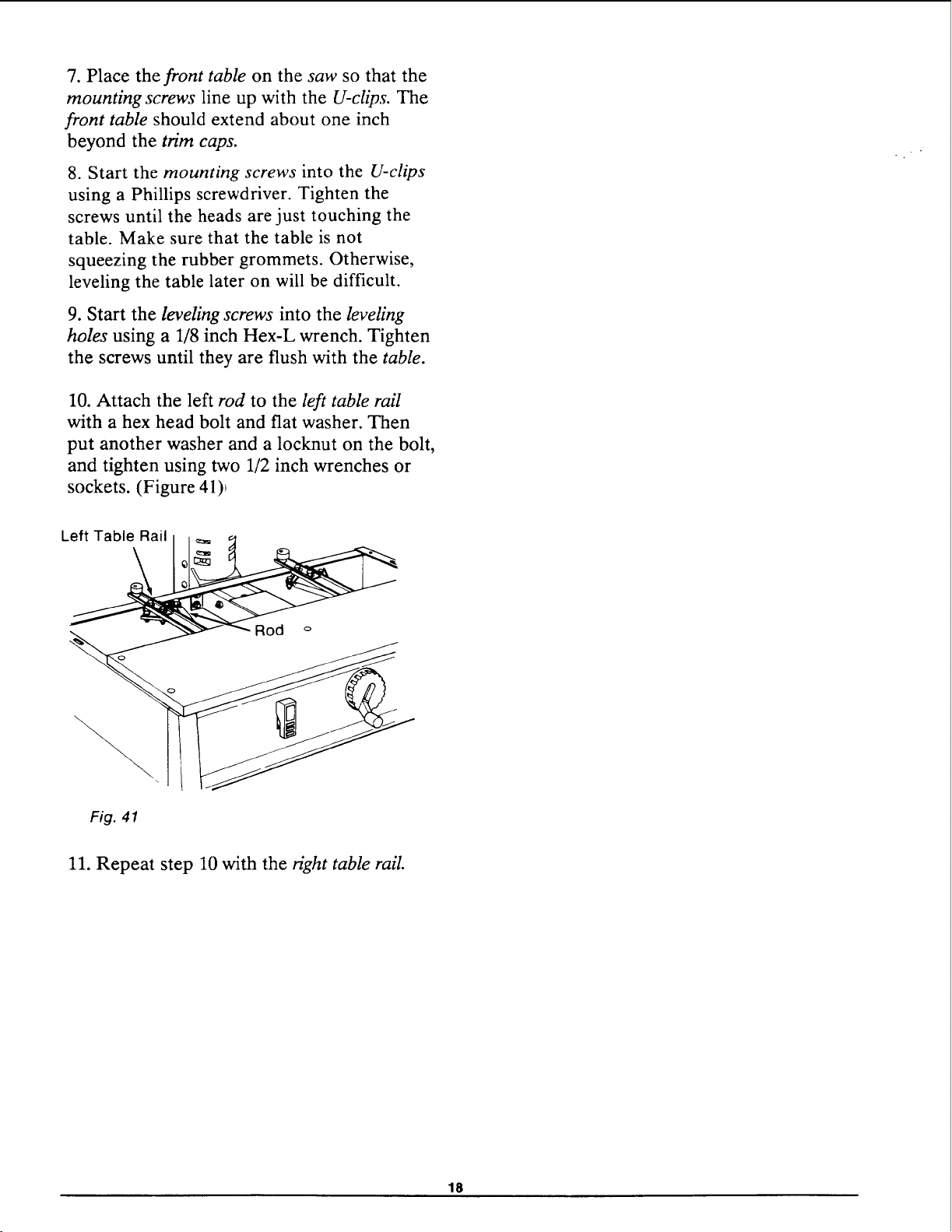
10. Attach the left rod to the left table rail
with a hex head bolt and flat washer. Then
put another washer and a locknut on the bolt,
and tighten using two 1/2 inch wrenches or
sockets. (Figure 41)_
Left Table Rail
\
\
Fig. 41
11. Repeat step 10 with the right table rail.
18
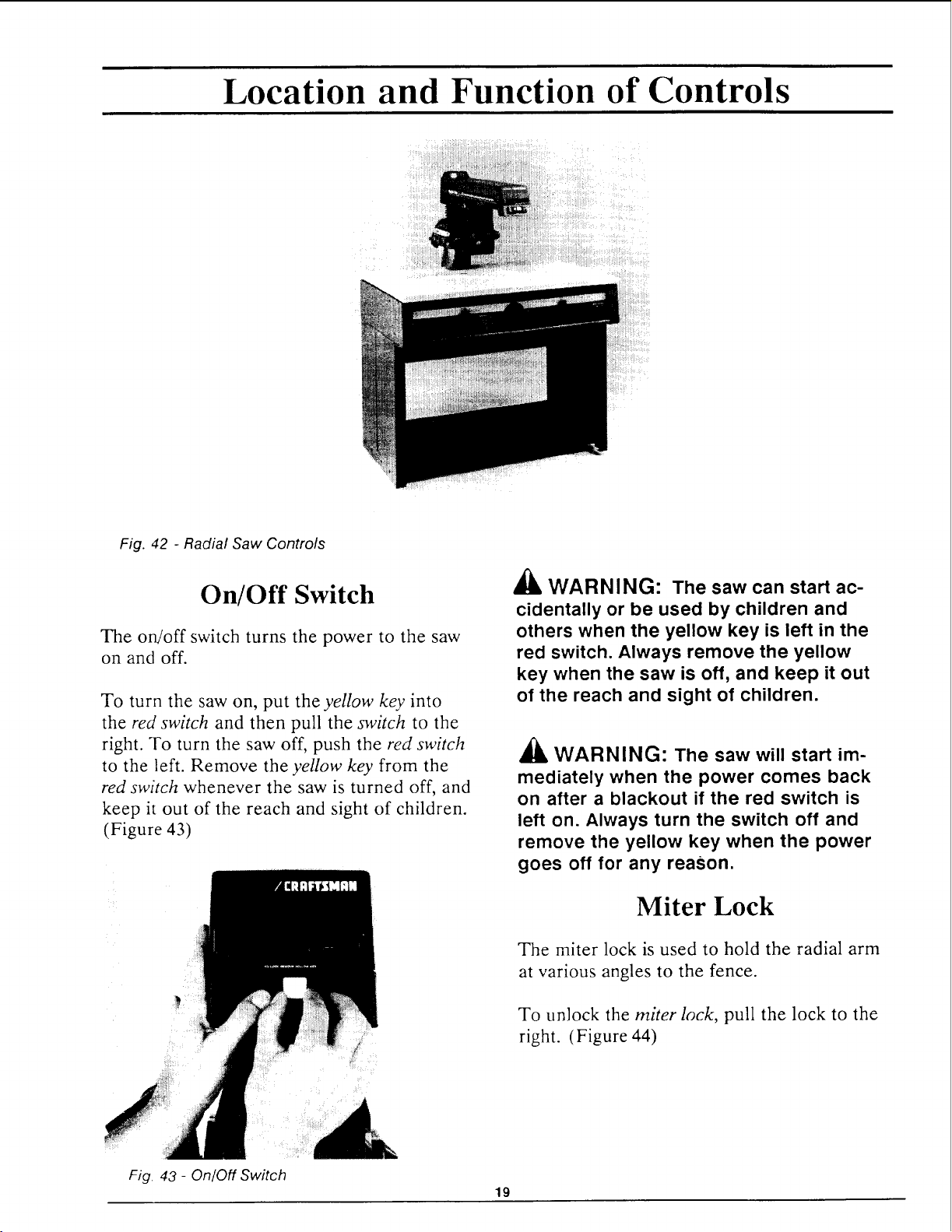
Location and Function of Controls
Fig. 42 - Radial Saw Controls
On/Off Switch
The on!off switch turns the power to the saw
on and off.
To turn the saw on, put the yellow key into
the red switch and then pull the switch to the
right. To turn the saw off, push the red switch
to the left. Remove the yellow key from the
red switch whenever the saw is turned off, and
keep it out of the reach and sight of children.
(Figure 43)
Fig. 43 - On/Off Switch
19
AI& WARNING: The saw can start ac-
cidentally or be used by children and
others when the yellow key is left in the
red switch. Always remove the yellow
key when the saw is off, and keep it out
of the reach and sight of children.
£L
AI& WARNING: The saw will start im-
mediately when the power comes back
on after a blackout if the red switch is
left on. Always turn the switch off and
remove the yellow key when the power
goes off for any reason,
Miter Lock
The miter lock is used to hold the radial arm
at various angles to the fence.
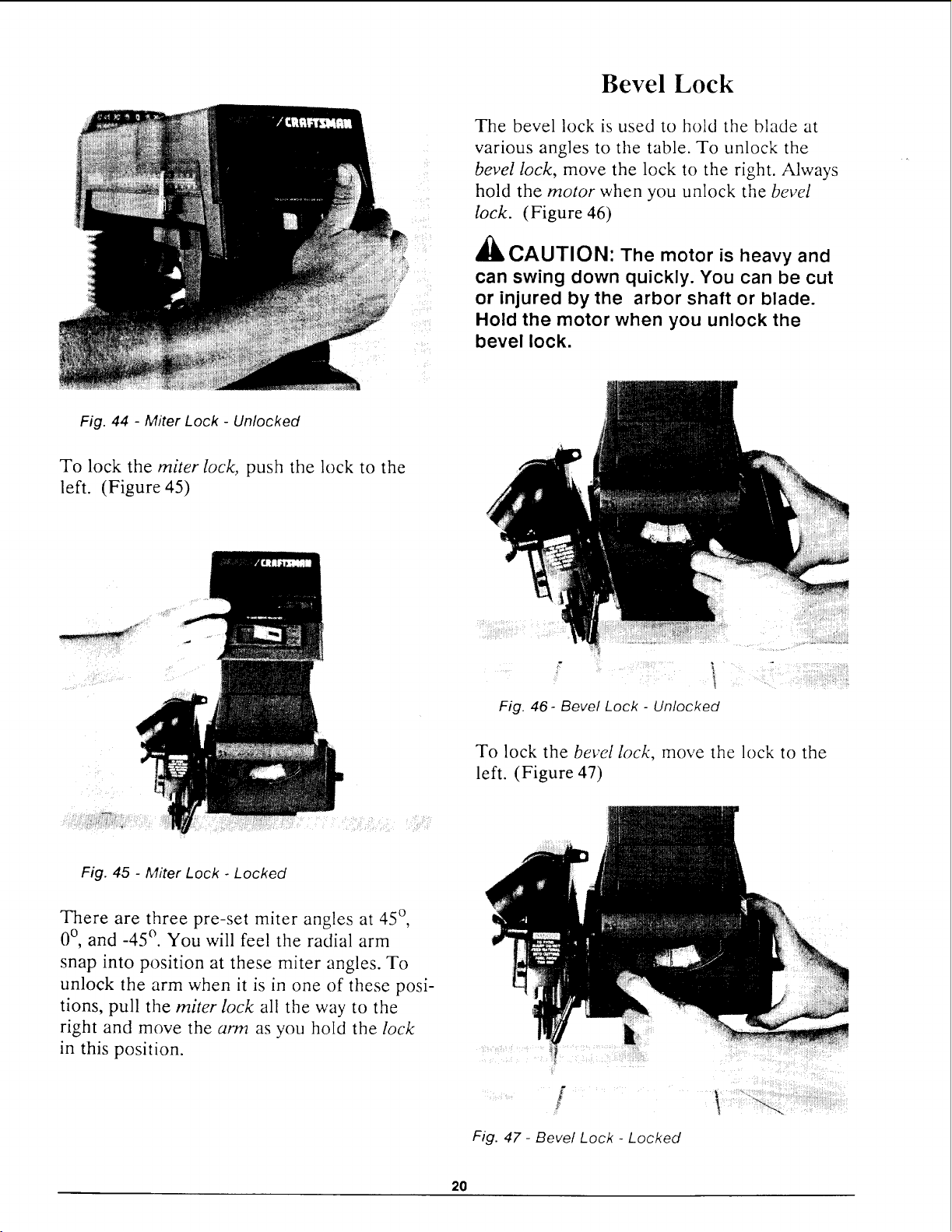
To unlock the miter lock, pull the lock to the
right. (Figure 44)
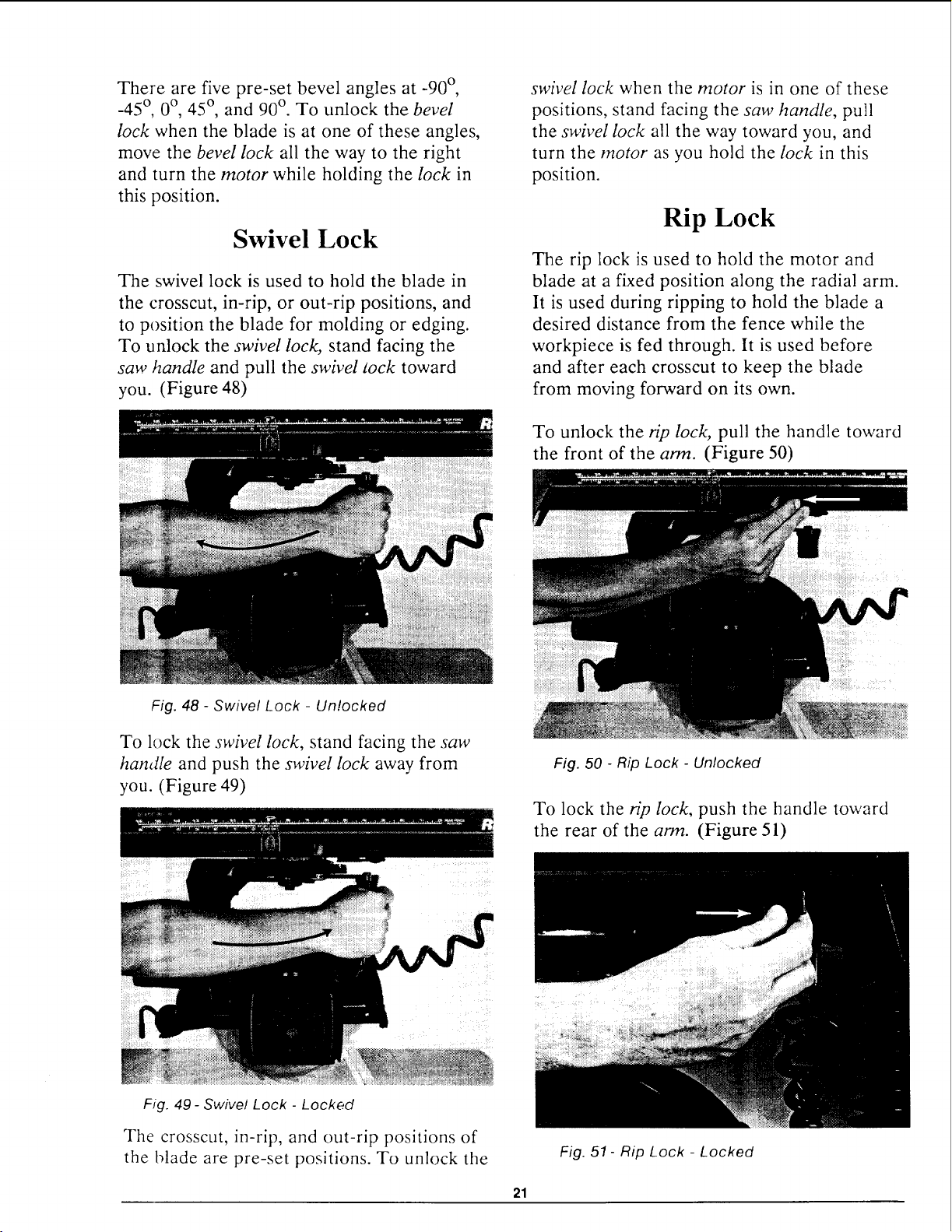
Bevel Lock
The bevel lock is used to hold the blade at
various angles to the table. To unlock the
bevel lock, move the lock to the right. Always
hold the motor when you unlock the bevel
lock. (Figure 46)
'_, CAUTION' The motor is heavy and
can swing down quickly. You can be cut
or injured by the arbor shaft or blade.
Hold the motor when you unlock the
bevel lock.
Fig. 44 - Miter Lock - Unlocked
To lock the miter lock, push the lock to the
left. (Figure 45)
Fig. 46- Bevel Lock - Unlocked
Fig. 45 - Miter Lock - Locked
There are three pre-set miter angles at 45 °,
0°, and -45 °. You will feel the radial arm
snap into position at these miter angles. To
unlock the arm when it is in one of these posi-
tions, pull the miter lock all the way to the
right and move the arm as you hold the lock
in this position.
To lock the bevel lock, move the lock to the
left. (Figure 47)
Fig. 47 - Bevel Lock - Locked
2O
There are five pre-set bevel angles at -90 °,
-45 °, 0 °, 45 °, and 90 °. To unlock the bevel
lock when the blade is at one of these angles,
move the bevel lock all the way to the right
and turn the motor while holding the lock in
this position.
Swivel Lock
The swivel lock is used to hold the blade in
the crosscut, in-rip, or out-rip positions, and
to position the blade for molding or edging.
To unlock the swivel lock, stand facing the
saw handle and pull the swivel sock toward
you. (Figure 48)
Fig. 48 - Swivel Lock - Unlocked
To lock the swivel lock, stand facing the saw
handle and push the swivel lock away from
you. (Figure 49)
swivel lock when the motor is in one of these
positions, stand facing the saw handle, pull
the swivel lock all the way toward you, and
turn the motor as you hold the lock in this
position.
Rip Lock
The rip lock is used to hold the motor and
blade at a fixed position along the radial arm.
It is used during ripping to hold the blade a
desired distance from the fence while the
workpiece is fed through. It is used before
and after each crosscut to keep the blade
from moving forward on its own.
To unlock the rip lock, pull the handle toward
the front of the arm. (Figure 50)
Fig. 50 - Rip Lock - Unlocked
To lock the rip lock, push the handle toward
the rear of the arm. (Figure 51)
Fig. 49- Swivel Lock - Locked
The crosscut, in-rip, and out-rip positions of
the blade are pre-set positions. To unlock the
21
Fig. 51- Rip Lock - Locked
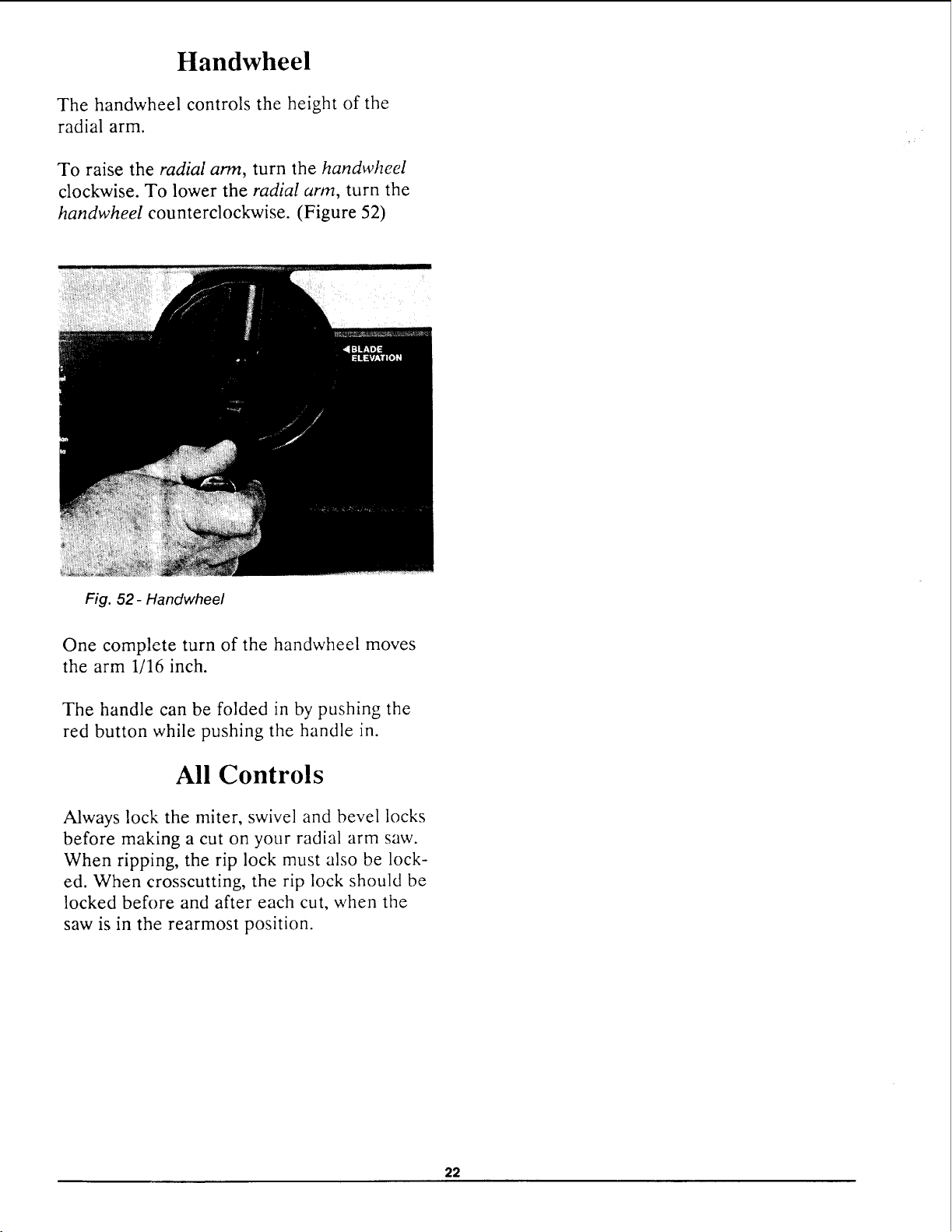
Handwheel
The handwheel controls the height of the
radial arm.
To raise the radial arm, turn the handwheel
clockwise. To lower the radial arm, turn the
handwheel counterclockwise. (Figure 52)
Fig. 52- Handwheel
One complete turn of the handwheel moves
the arm 1/16 inch.
The handle can be folded in by pushing the
red button while pushing the handle in.
All Controls
Always lock the miter, swivel and bevel locks
before making a cut on your radial arm saw.
When ripping, the rip lock must also be lock-
ed. When crosscutting, the rip lock should be
locked before and after each cut, when the
saw is in the rearmost position.
22
Alignment of the Blade
The blade of your radial arm saw must be
aligned properly for two reasons: to make
cuts accurate, and to prevent binding of the
blade and workpiece which can cause jams or
thrown workpieces.
These adjustments must be done in order,
before using your saw for the first time. If
they are not done in order the saw will not
cut accurately. If you miss an adjustment, you
must go back to the adjustment you missed
and repeat all steps from that point on.
These adjustments are like fine tuning a
piece of equipment. Often a series of steps
must be repeated more than once in order to
get the adjustment just right.
WARNING: Plugging the saw in
during alignment can result in your
fingers, hand, or arm being cut off from
blade contact. Do not plug in the saw at
any time during alignment. The saw
should only be plugged in when it is to be
used.
Make sure that the blade and blade guard are
removed from the arbor shaft before begin-
ning to align your saw. Do not install the
blade or blade guard until you are instructed
to do so.
Adjusting Elevation
The goal of this adjustment is to make up-
ward and downward movement of the radial
arm smooth and firm. If the column that sup-
ports the arm is too tight it will be difficult to
move the arm up and down and to get ac-
curate depth of cut. If the column is loose the
blade may "walk" on the workpiece and stall
the motor, or cause a heel in bevel and com-
pound cuts.
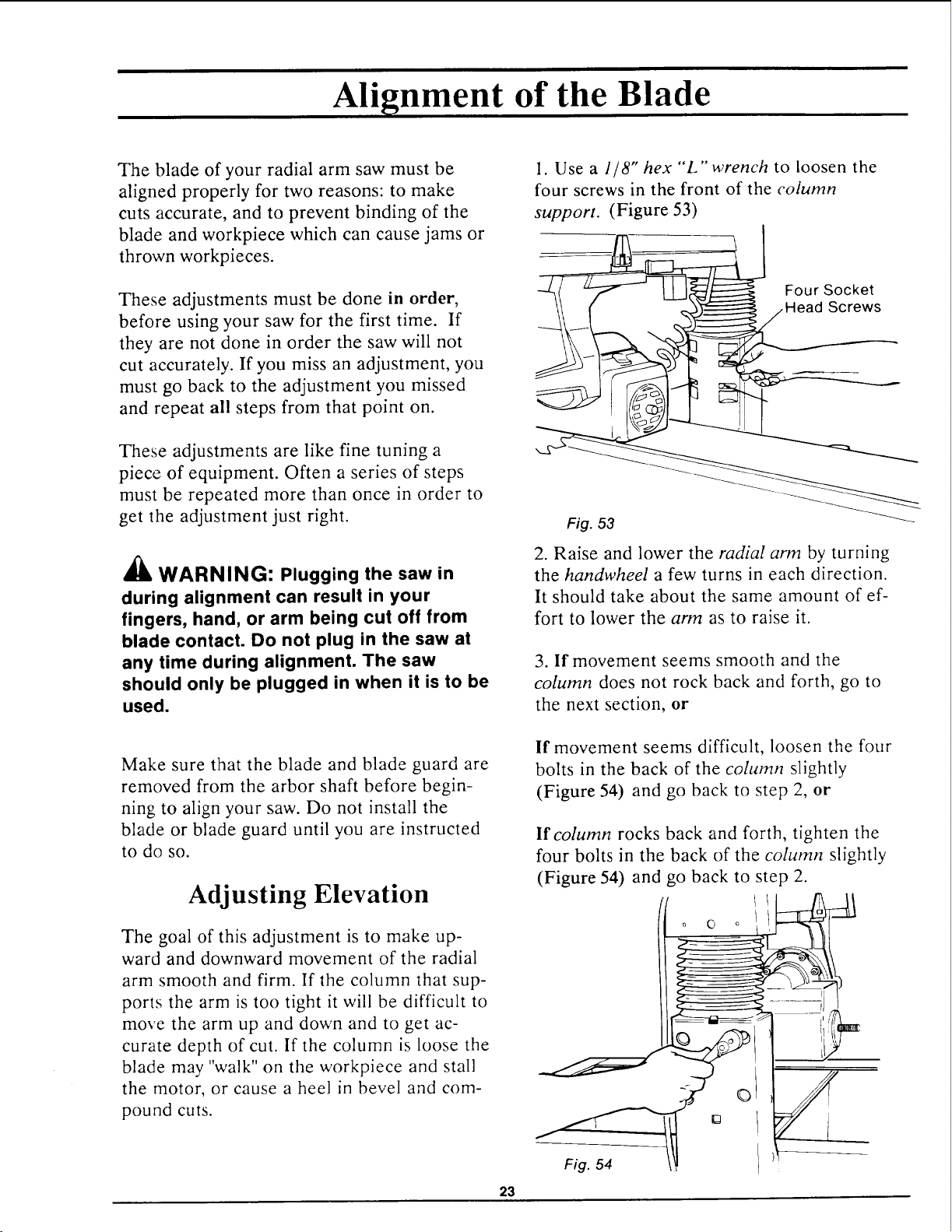
1. Use a 1/8" hex "L"wrench to loosen the
four screws in the front of the column
support. (Figure 53)
Four Socket
2. Raise and lower the radial arm by turning
the handwheel a few turns in each direction.
It should take about the same amount of ef-
fort to lower the arm as to raise it.
3. If movement seems smooth and the
column does not rock back and forth, go to
the next section, or
If movement seems difficult, loosen the four
bolts in the back of the column slightly
(Figure 54) and go back to step 2, or
23
If column rocks back and forth, tighten the
four bolts in the back of the column slightly
(Figure 54) and go back to step 2.
Leveling Front Table.
The goal of this adjustment is to make the
front work table flat and parallel to the radial
arm. In order to do this, you will choose four
points on the table. When these four points
are level, the entire table should be level.
You will use two methods to make the four
points level:
3. Unlock the bevel lock to release the motor.
Hold onto the motor as you do this.
'_ CAUTION: The motor is heavy and
can swing down quickly. You can be cut
or injured if the arbor shaft hits you.
Hold the motor when you unlock the
bevel lock.
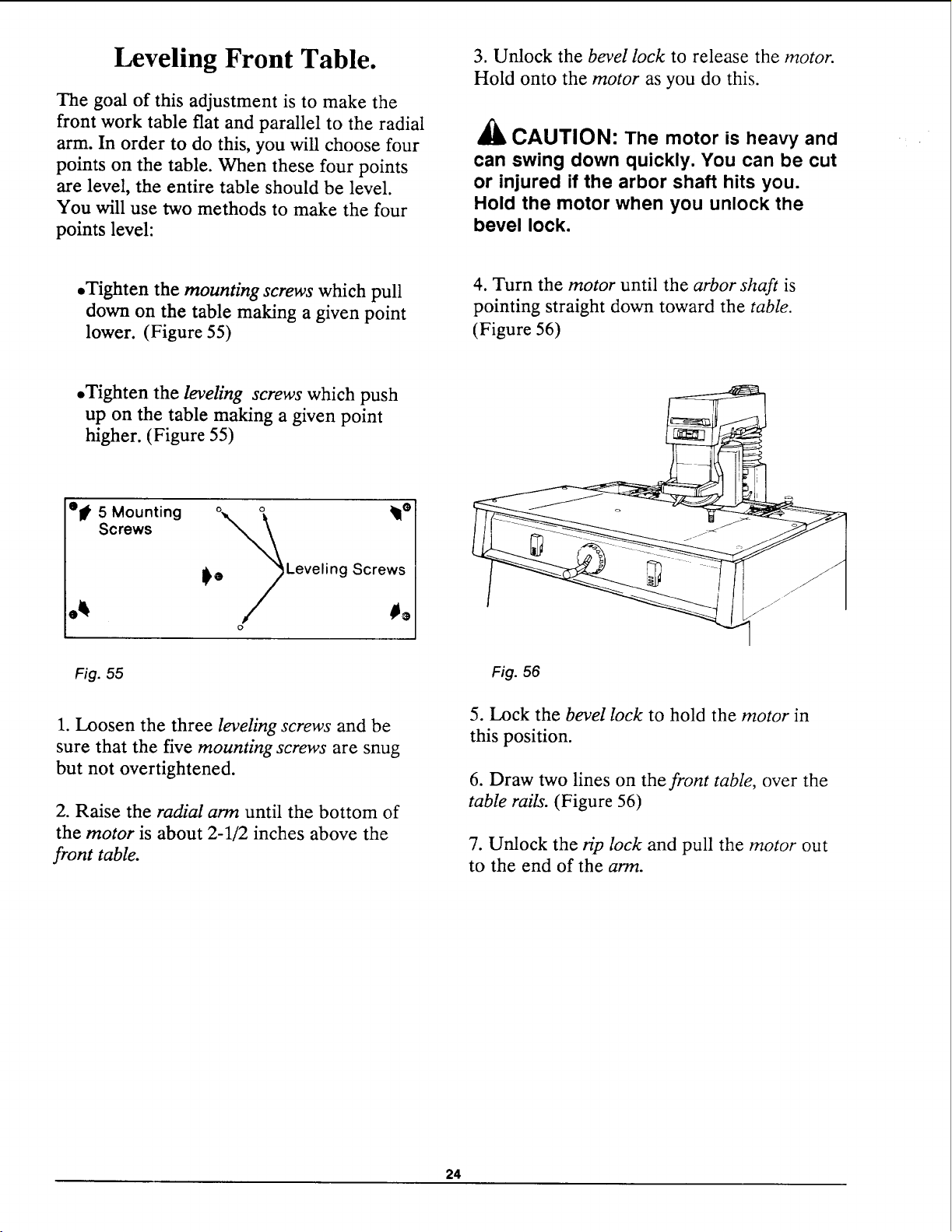
• Tighten the mounting screws which pull
down on the table making a given point
lower. (Figure 55)
4. Turn the motor until the arbor shaft is
pointing straight down toward the table.
(Figure 56)
•Tighten the leveling screws which push
up on the table making a given point
higher. (Figure 55)
et 5 Mounting °e_ _lle
Screws
I_ Leveling Screws
o
Fig. 55
1. Loosen the three leveling screws and be
sure that the five mounting screws are snug
but not overtightened.
2. Raise the radial arm until the bottom of
the motor is about 2-1/2 inches above the
front table.
Fig. 56
5. Lock the bevel lock to hold the motor in
this position.
6. Draw two lines on the front table, over the
table rails. (Figure 56)
7. Unlock the rip lock and pull the motor out
to the end of the arm.
24
8. Unlock the miter lock and swing the arm to
the right until the arbor shaft is over the right
line.
9. Mark the point on the line under the cen-
ter of the arbor shaft.
10. Move the arm and motor until the arbor
shaft is over the right line at the rear of the
front table.
11. Mark the point on the line under the cen-
ter of the arbor shaft.
12. Repeat steps 7-11 on the left side.
13. Label the points A, B, C, and D.
14. Move the arbor shaft over these points
again, and measure the distance between the
table and the bottom of the arbor shaft at
each. Do not change the elevation of the arm
as you move from point to point.
15. Determine which point has the largest dis-
tance between the table and the arbor shaft.
This is the lowest point.
16. Move the arbor shaft over the lowest
point.
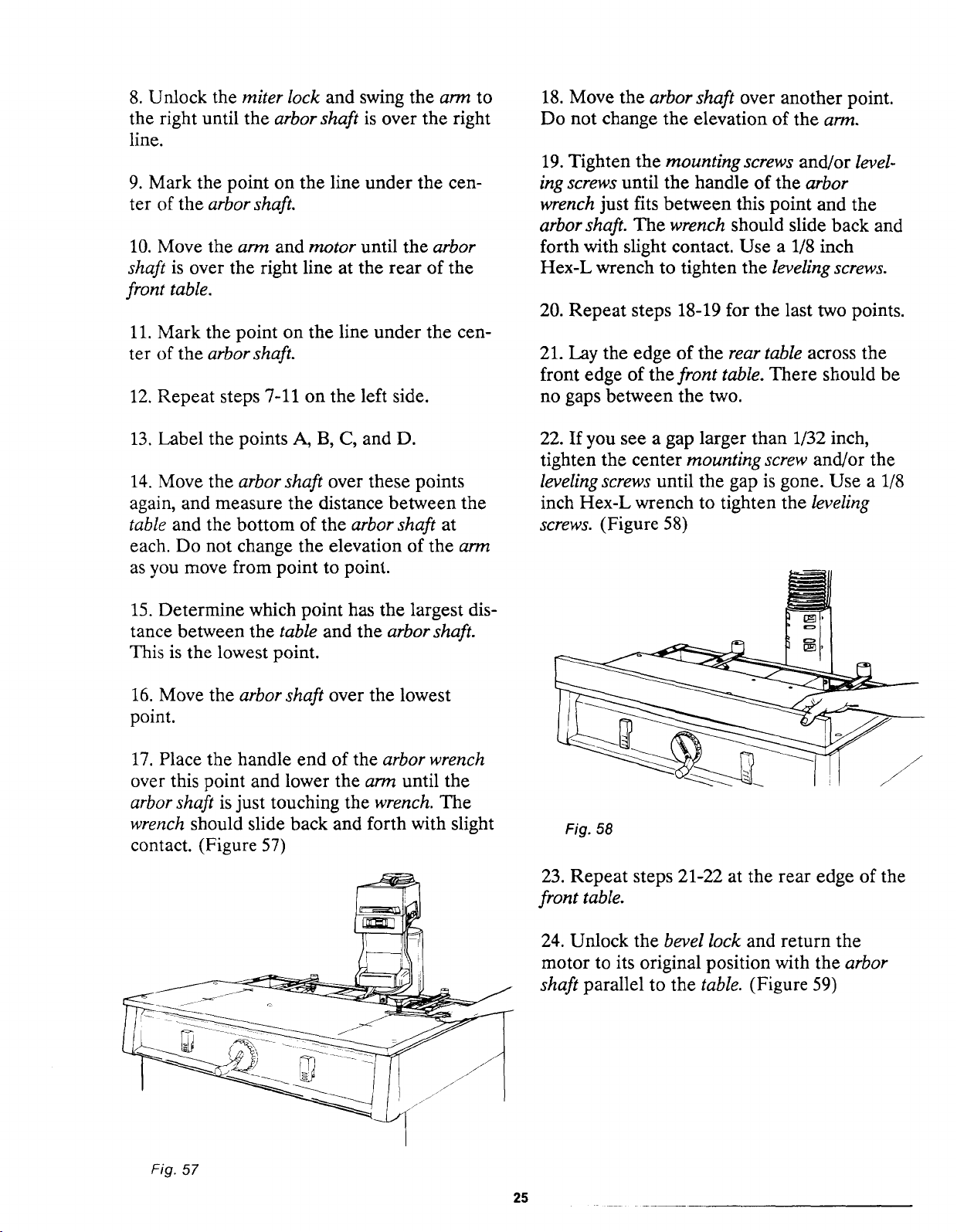
17. Place the handle end of the arbor wrench
over this point and lower the arm until the
arbor shaft is just touching the wrench. The
wrench should slide back and forth with slight
contact. (Figure 57)
18. Move the arbor shaft over another point.
Do not change the elevation of the arm.
19. Tighten the mounting screws and/or level-
ing screws until the handle of the arbor
wrench just fits between this point and the
arbor shaft. The wrench should slide back and
forth with slight contact. Use a 1/8 inch
Hex-L wrench to tighten the leveling screws.
20. Repeat steps 18-19 for the last two points.
21. Lay the edge of the rear table across the
front edge of the front table. There should be
no gaps between the two.
22. If you see a gap larger than 1/32 inch,
tighten the center mounting screw and/or the
leveling screws until the gap is gone. Use a 1/8
inch Hex-L wrench to tighten the leveling
screws. (Figure 58)
Fig. 58
23. Repeat steps 21-22 at the rear edge of the
front table.
24. Unlock the bevel lock and return the
motor to its original position with the arbor
shaft parallel to the table. (Figure 59)
Fig. 57
25
o o
Fig. 59
2. Lock the table locks. If you cannot lock the
table locks, go directly to step 5.
3. Pull up on the fence.
4. If the fence is held firmly, no change is
needed. Go to the next section, or
If the fence is loose and can be pulled out of
position, go to step 5.
5. Unlock the table locks.
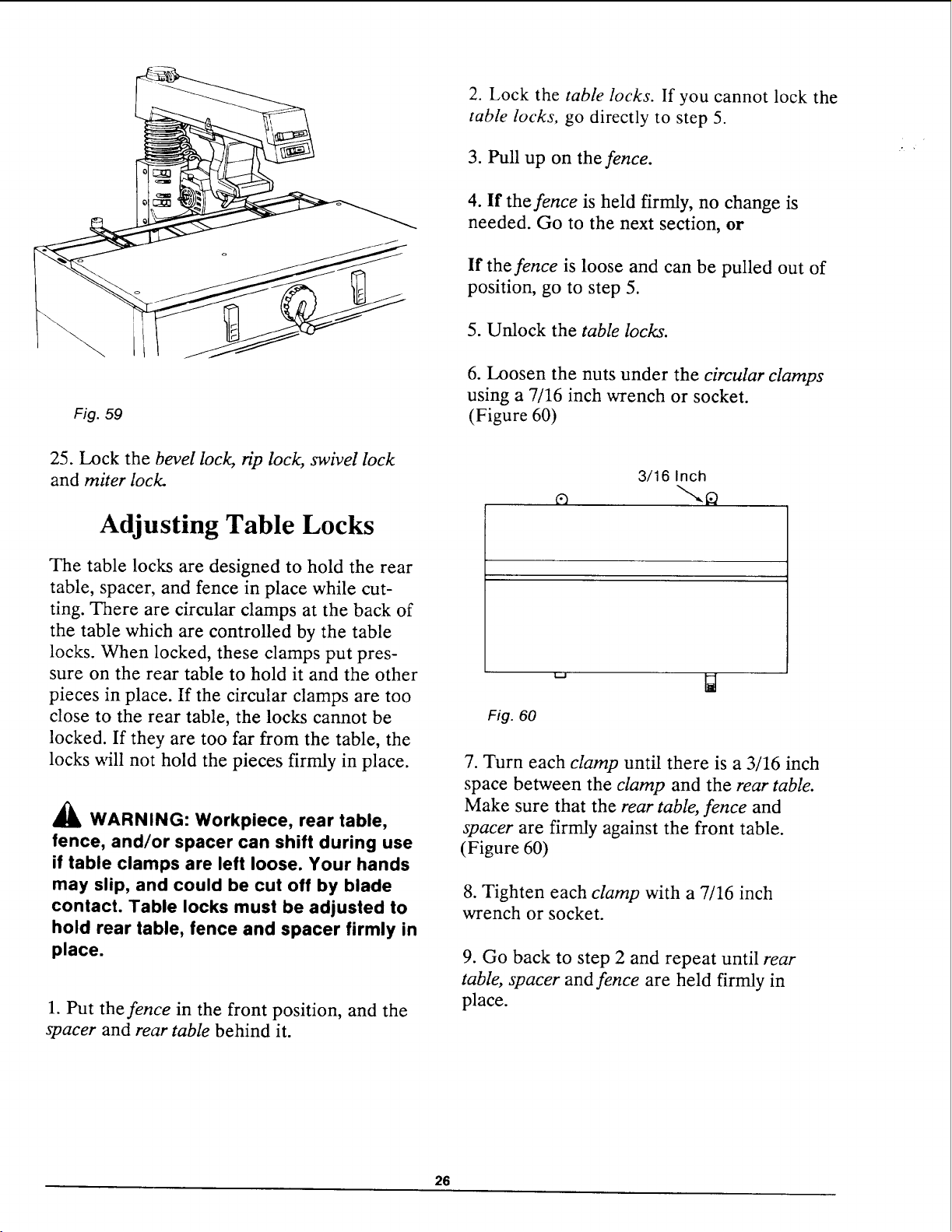
6. Loosen the nuts under the circular clamps
using a 7/16 inch wrench or socket.
(Figure 60)
25. Lock the bevel lock, rip lock, swivel lock
and miter lock.
Adjusting Table Locks
The table locks are designed to hold the rear
table, spacer, and fence in place while cut-
ting. There are circular clamps at the back of
the table which are controlled by the table
locks. When locked, these clamps put pres-
sure on the rear table to hold it and the other
pieces in place. If the circular clamps are too
close to the rear table, the locks cannot be
locked. If they are too far from the table, the
locks will not hold the pieces firmly in place.
_llb WARNING: Workpiece, rear table,
fence, and/or spacer can shift during use
if table clamps are left loose. Your hands
may slip, and could be cut off by blade
contact. Table locks must be adjusted to
hold rear table, fence and spacer firmly in
place.
1. Put the fence in the front position, and the
spacer and rear table behind it.
3/16 Inch
Fig. 60
7. Turn each clamp until there is a 3/16 inch
space between the clamp and the rear table.
Make sure that the rear table, fence and
spacer are firmly against the front table.
(Figure 60)
8. Tighten each clamp with a 7/16 inch
wrench or socket.
9. Go back to step 2 and repeat until rear
table, spacer and fence are held firmly in
place.
26
Squaring Crosscut Travel
The blade must travel perpendieular to the
fence along the radial arm in order for cross-
cuts to be accurate. If the radial arm is not
perpendicular to the fence, there will be a
slight miter angle in all crosscuts.
_l_ WARNING" Plugging in the saw dur-
ing alignment can result in your fingers,
hands, or arm being cut off from blade
contact. Do not plug in the saw at any
time during alignment. The saw should
only be plugged in when it is to be used.
1. Place the radial arm in the 0 ° miter posi-
tion and lock the miter lock.
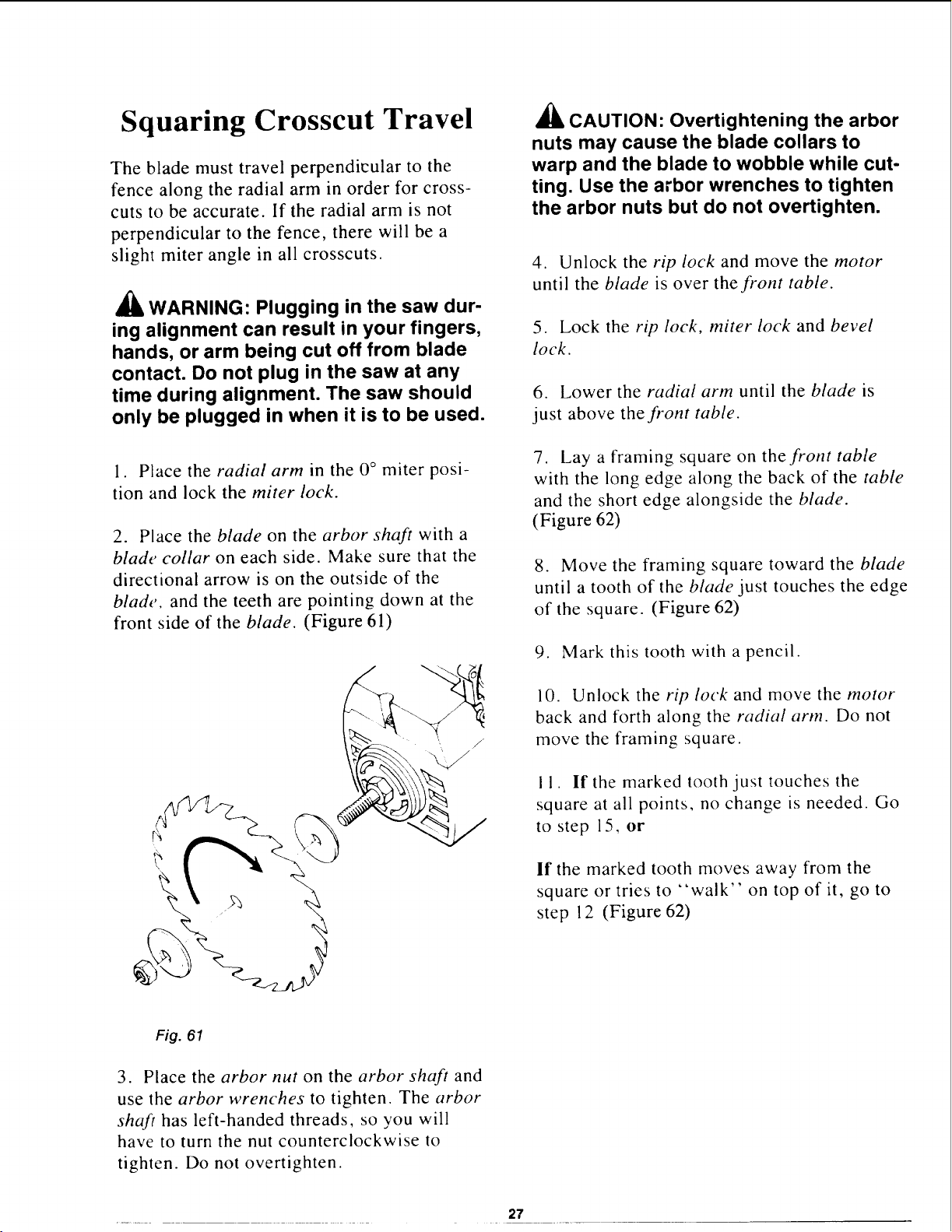
2. Place the blade on the arbor shaft with a
blade collar on each side. Make sure that the
directional arrow is on the outside of the
blade, and the teeth are pointing down at the
front side of the blade. (Figure 61)
_i_ CAUTION: Overtightening the arbor
nuts may cause the blade collars to
warp and the blade to wobble while cut-
ting. Use the arbor wrenches to tighten
the arbor nuts but do not overtighten.
4. Unlock the rip lock and move the motor
until the blade is over the front table.
5. Lock the rip lock, miter lock and bevel
lock.
6. Lower the radial arm until the blade is
just above the front table.
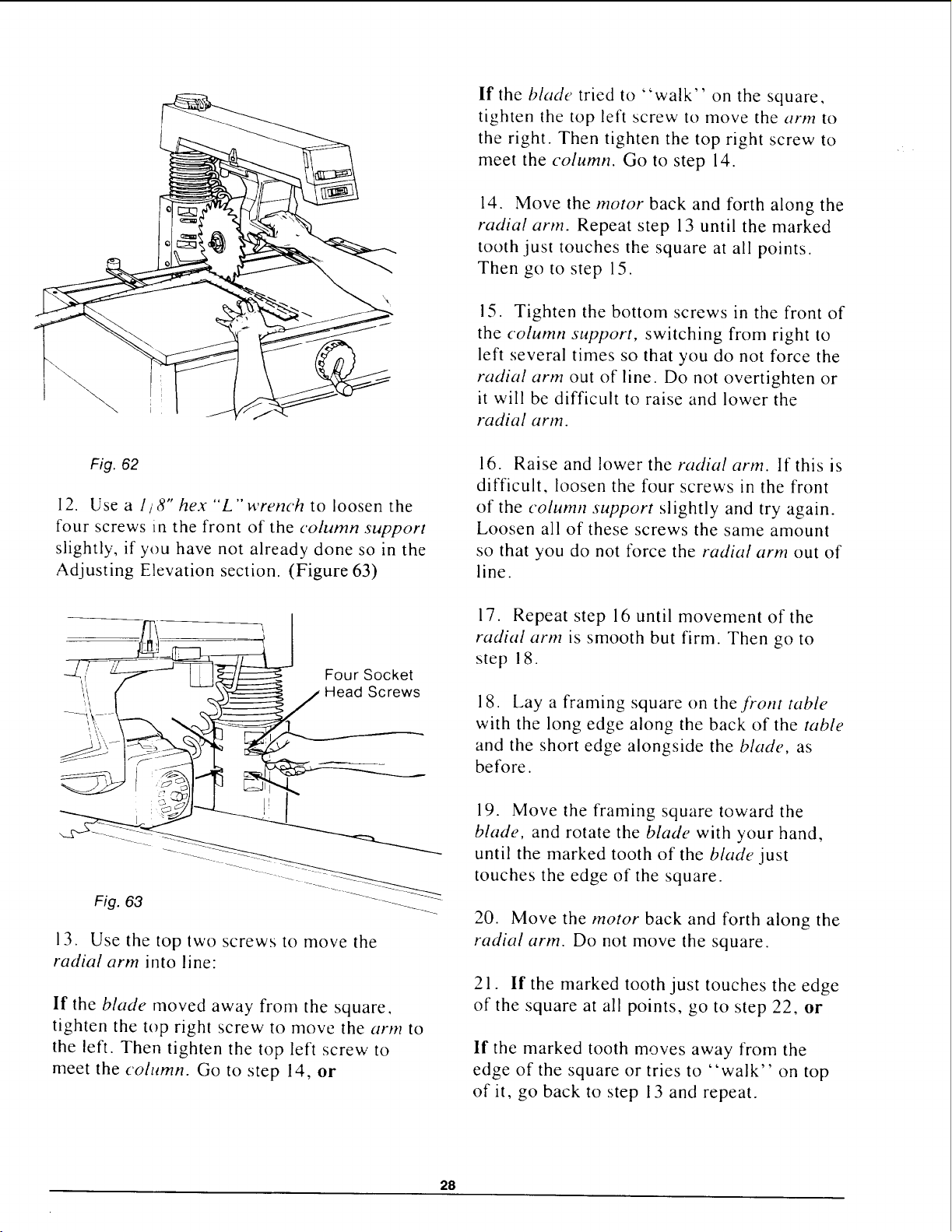
7. Lay a framing square on the front table
with the long edge along the back of the table
and the short edge alongside the blade.
(Figure 62)
8. Move the framing square toward the blade
until a tooth of the blade just touches the edge
of the square. (Figure 62)
9. Mark this tooth with a pencil.
10. Unlock the rip lock and move the motor
back and forth along the radial arm. Do not
move the framing square.
I I. If the marked tooth just touches the
square at all points, no change is needed. Go
to step 15, or
If the marked tooth moves away from the
square or tries to "walk" on top of it, go to
step 12 (Figure 62)
Fig. 61
3. Place the arbor nut on the arbor shaft and
use the arbor wrenches to tighten. The arbor
shaft has left-handed threads, so you will
have to turn the nut counterclockwise to
tighten. Do not overtighten.
27
If the blade tried to "walk" on the square,
tighten the top left screw to move the arm to
the right. Then tighten the top right screw to
meet the column. Go to step 14.
14. Move the motor back and forth along the
radial arm. Repeat step 13 until the marked
tooth just touches the square at all points.
Then go to step 15.
15. Tighten the bottom screws in the front of
the column support, switching from right to
left several times so that you do not force the
radial arm out of line. Do not overtighten or
it will be difficult to raise and lower the
radial arm.
Fig. 62
12. Use a 1/8" hex "L"wrench to loosen the
four screws in the front of the column support
slightly, if you have not already done so in the
Adjusting Elevation section. (Figure 63)
Four Socket
_ / LL_ ,d_ Head Screws
...........................i _LT__L___ __-
Fig. 63 _-----___
13. Use the top two screws to move the
radial arm into line:
If the blade moved away from the square,
tighten the top right screw to move the arm to
the left. Then tighten the top left screw to
meet the column. Go to step 14, or
16. Raise and lower the radial arm. If this is
difficult, loosen the four screws in the front
of the column support slightly and try again.
Loosen all of these screws the same amount
so that you do not force the radial arm out of
line.
17. Repeat step 16 until movement of the
radial arm is smooth but firm. Then go to
step ! 8.
18. Lay a framing square on the front table
with the long edge along the back of the table
and the short edge alongside the blade, as
before.
19. Move the framing square toward the
blade, and rotate the blade with your hand,
until the marked tooth of the blade just
touches the edge of the square.
20. Move the motor back and forth along the
radial arm. Do not move the square.
21. If the marked tooth just touches the edge
of the square at all points, go to step 22, or
If the marked tooth moves away from the
edge of the square or tries to "walk" on top
of it, go back to step 13 and repeat.
28
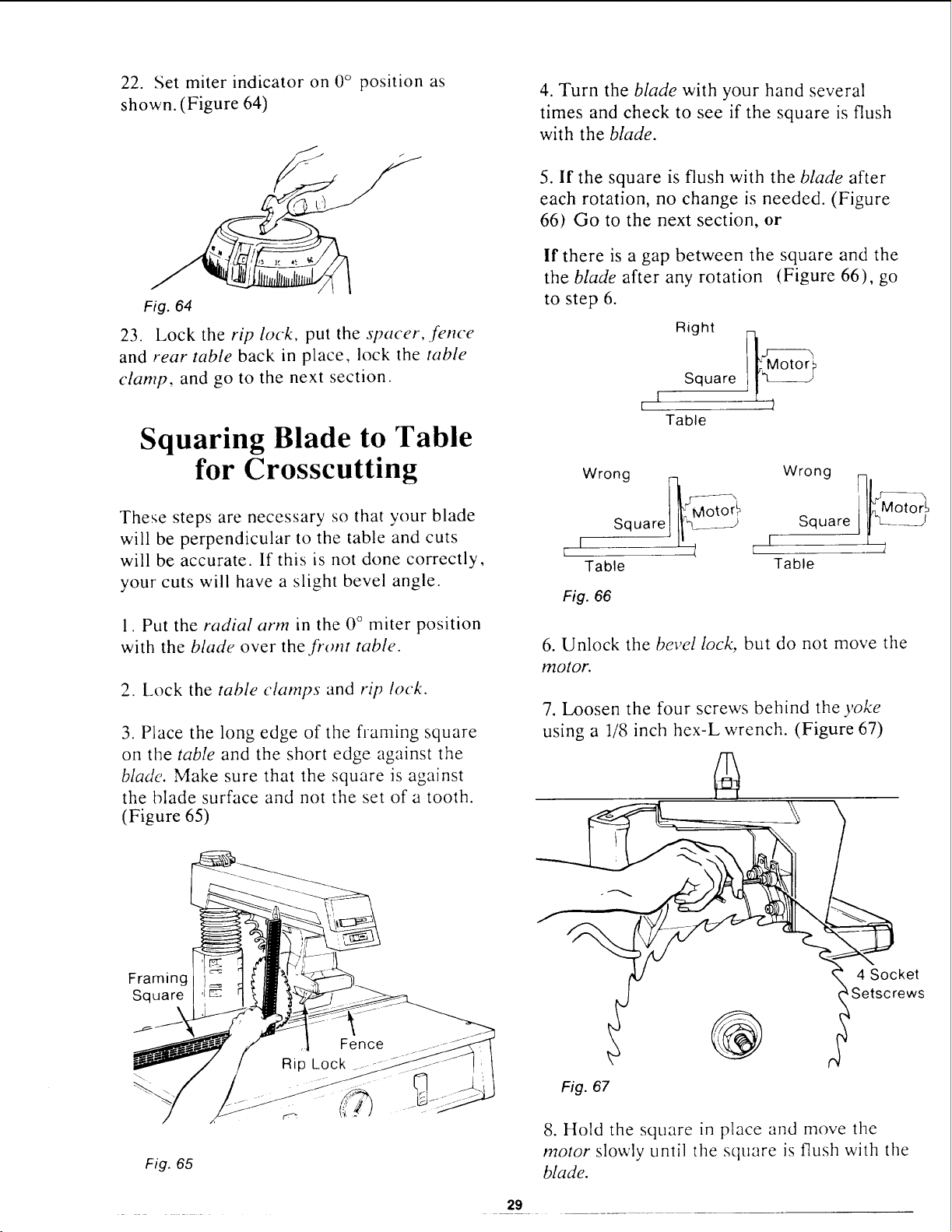
22. Set miter indicator on 0° position as
shown. (Figure 64)
Fig. 64
23. Lock the rip lock, put the spacer, fence
and rear table back in place, lock the table
clamp, and go to the next section.
Squaring Blade to Table
for Crosscutting
These steps are necessary so that your blade
will be perpendicular to the table and cuts
will be accurate. If this is not done correctly,
your cuts will have a slight bevel angle.
1. Put the radial arm in the 0 ° miter position
with the blade over the front table.
2. Lock the table clamps and rip lock.
3. Place the long edge of the flaming square
on the table and the short edge against the
blade. Make sure that the square is against
the blade surface and not the set of a tooth.
(Figure 65)
4. Turn the blade with your hand several
times and check to see if the square is flush
with the blade.
5. If the square is flush with the blade after
each rotation, no change is needed. (Figure
66) Go to the next section, or
If there is a gap between the square and the
the blade after any rotation (Figure 66), go
to step 6.
Right
Square
I
[
Table
Wrong Wrong
Square j II_'L___--_ Square
I --/ r
Table Table
Fig. 66
6. Unlock the bevel lock, but do not move tile
motor.
7. Loosen the four screws behind the yoke
using a 1/8 inch hex-L wrench. (Figure 67)
Framing
Square
Fig. 65
Fig. 67
@
4 Socket
_Setscrews
J
8. Hold the square in place and move the
motor slowly until tile square is flush with tile
blade.
29
9. Hold the motor tightly and lock the bevel
lock. Do not let the motor move out of place.
10. Check the square to make sure that it is
still flush with the blade.
11. Tighten the four screws behind the yoke.
12. Raise the radial arm until the blade is
1-1/2 inches above the table.
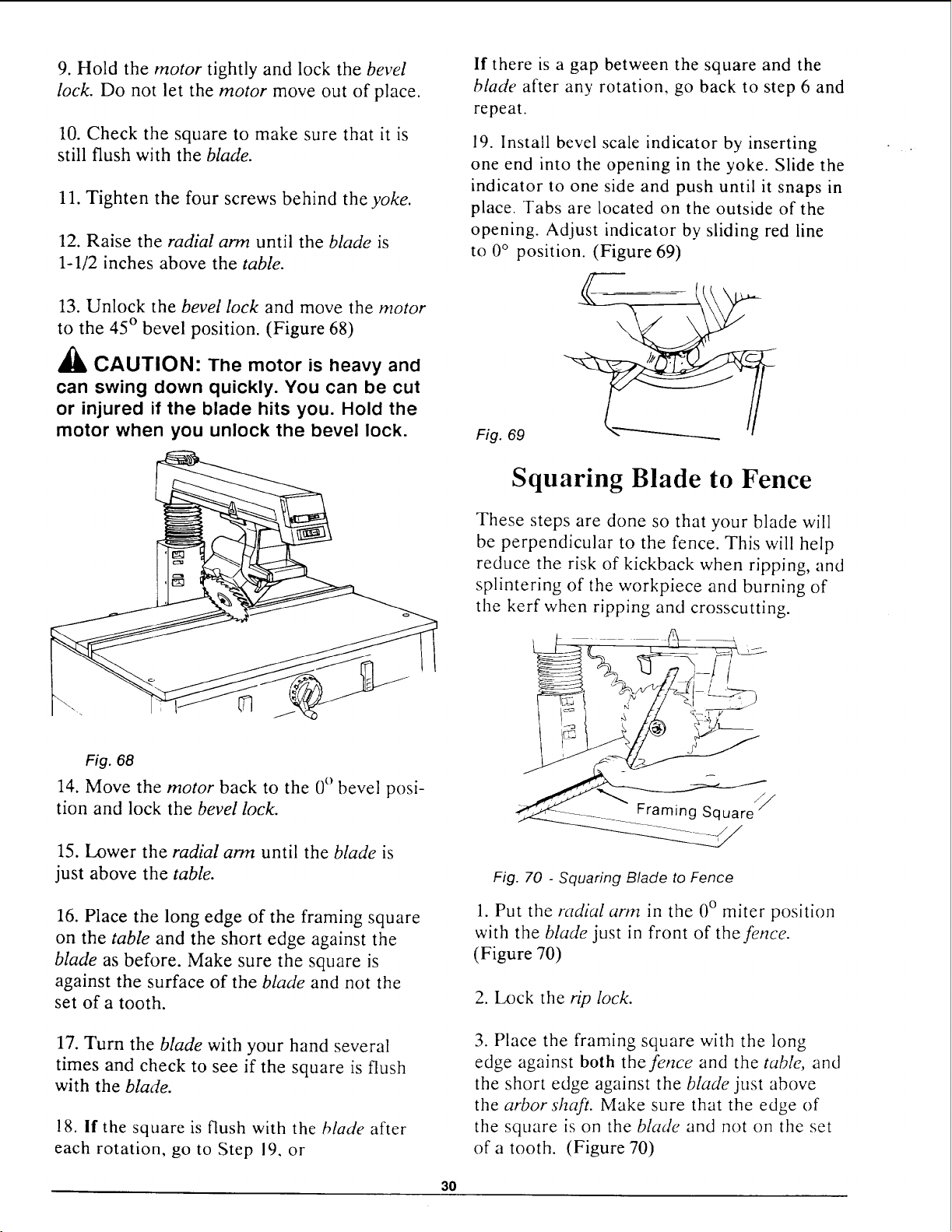
13. Unlock the bevel lock and move the motor
to the 45 ° bevel position. (Figure 68)
_, CAUTION: The motor is heavy and
can swing down quickly. You can be cut
or injured if the blade hits you. Hold the
motor when you unlock the bevel lock.
If there is a gap between the square and the
blade after any rotation, go back to step 6 and
repeat.
19. Install bevel scale indicator by inserting
one end into the opening in the yoke. Slide the
indicator to one side and push until it snaps in
place. Tabs are located on the outside of the
opening. Adjust indicator by sliding red line
to 0 ° position. (Figure 69)
Fig. 69
Fig. 68
14. Move the motor back to the 0° bevel posi-
tion and lock the bevel lock.
15. Lower the radial arm until the blade is
just above the table.
16. Place the long edge of the framing square
on the table and the short edge against the
blade as before. Make sure the square is
against the surface of the blade and not the
set of a tooth.
Squaring Blade to Fence
These steps are done so that your blade will
be perpendicular to the fence. This will help
reduce the risk of kickback when ripping, and
splintering of the workpiece and burning of
the kerf when ripping and crosscutting.
Fig. 70 - Squaring Blade to Fence
1. Put the radial arm in the 0° miter position
with the blade just in front of the fence.
(Figure 70)
2. Lock the rip lock.
17. Turn the blade with your hand several
times and check to see if the square is flush
with the blade.
18. if the square is flush with the blade after
each rotation, go to Step 19, or
3. Place the framing square with the long
edge against both the fence and the table, and
the short edge against the bla&, just above
the arborsh@. Make sure that the edge of
the square is on the blade and not on the set
of a tooth. (Figure 70)
30
4. Turn the blade with your hand several
times and check to see if the square is flush
with the blade.
5. If the square is flush with the blade after
each rotation, no change is needed. (Figure
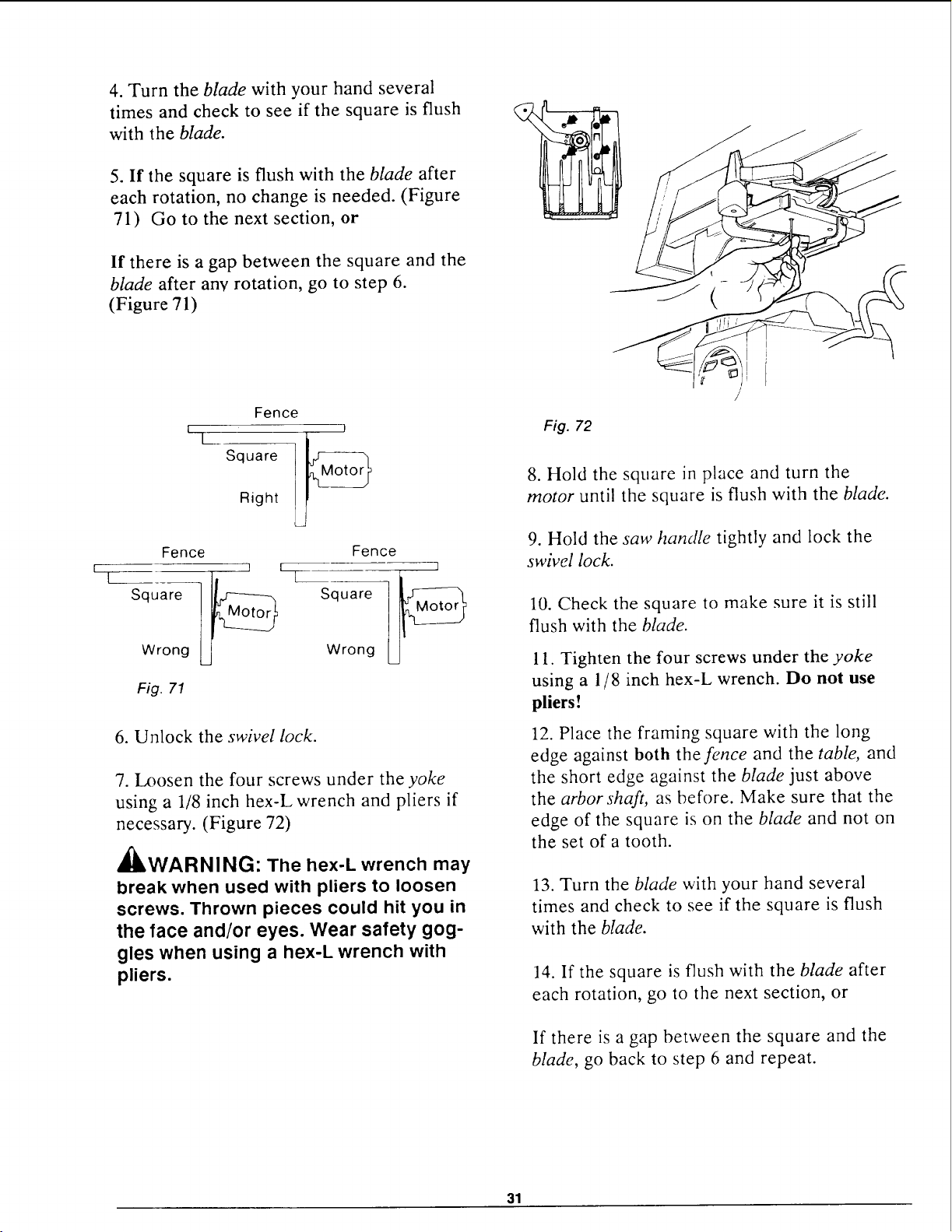
71) Go to the next section, or
If there is a gap between the square and the
blade after any rotation, go to step 6.
(Figure 71)
%
Square
Right
Fence
I
Fence Fence
Square Square
Wrong Wrong
Fig. 71
6. Unlock the swivel lock.
7. Loosen the four screws under the yoke
using a 1/8 inch hex-L wrench and pliers if
necessary. (Figure 72)
l'k _
4ULWARNINL_: The hex-L wrench may
break when used with pliers to loosen
screws. Thrown pieces could hit you in
the face and/or eyes. Wear safety gog-
gles when using a hex-L wrench with
pliers.
Fig. 72
8. Hold the square in place and turn the
motor until the square is flush with the blade.
9. Hold the saw handle tightly and lock the
swivel lock.
10. Check the square to make sure it is still
flush with the blade.
11. Tighten the four screws under the yoke
using a 1/8 inch hex-L wrench. Do not use
pliers!
12. Place the framing square with the long
edge against both the fence and the table, and
the short edge against the blade just above
the arbor shaft, as before. Make sure that the
edge of the square is on the blade and not on
the set of a tooth.
13. Turn the blade with your hand several
times and check to see if the square is flush
with the blade.
14. If the square is flush with the blade after
each rotation, go to the next section, or
If there is a gap between the square and the
blade, go back to step 6 and repeat.
31
Squaring Blade to Table for
Ripping
1. Unlock the swivel lock and turn the motor
to the out-rip position with the motor be-
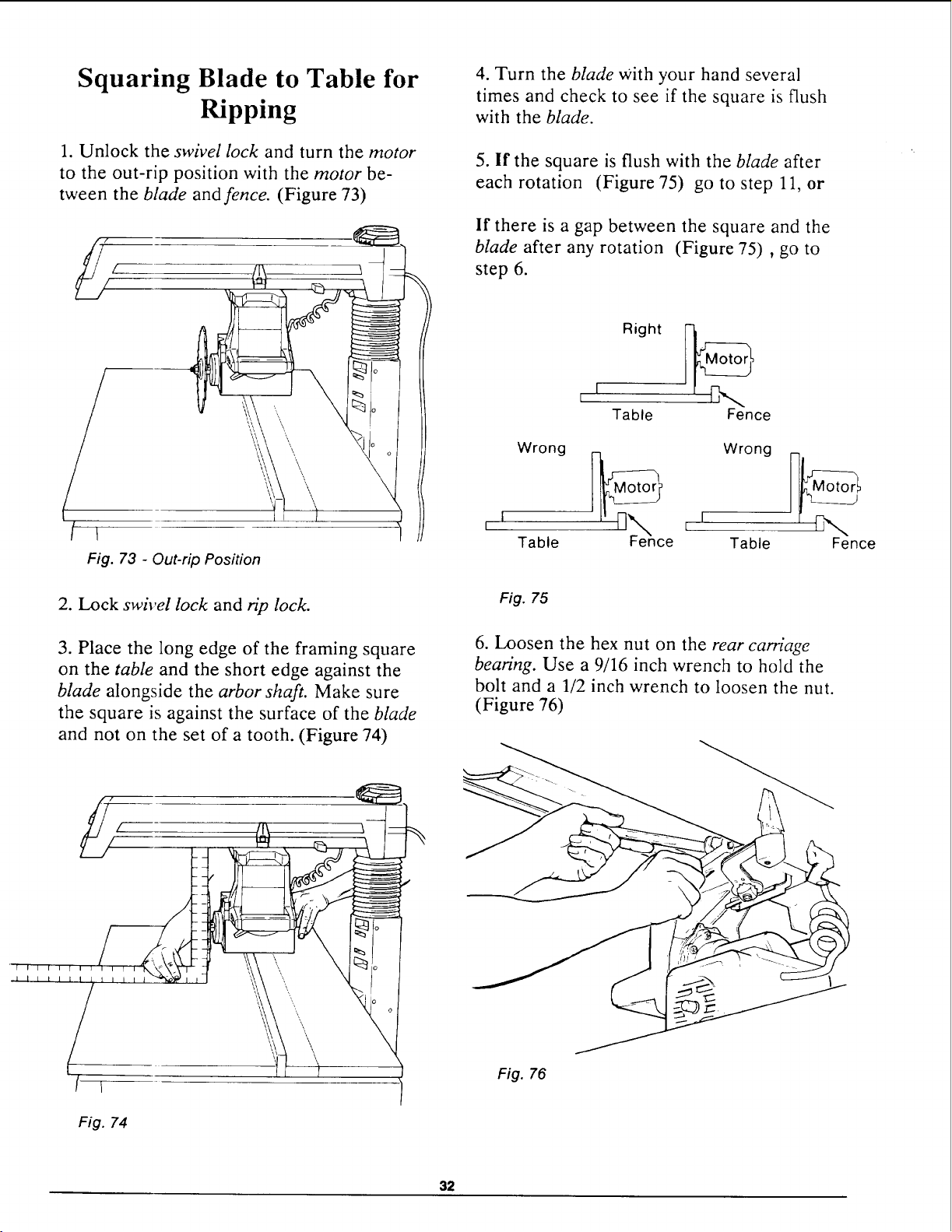
tween the blade and fence. (Figure 73)
/
Fig. 73 - Out-rip Position
2. Lock swivel lock and rip lock.
3. Place the long edge of the framing square
on the table and the short edge against the
blade alongside the arbor shaft. Make sure
the square is against the surface of the blade
and not on the set of a tooth. (Figure 74)
[ I
Fig. 74
4. Turn the blade with your hand several
times and check to see if the square is flush
with the blade.
5. If the square is flush with the blade after
each rotation (Figure 75) go to step 11, or
If there is a gap between the square and the
blade after any rotation (Figure 75), go to
step 6.
L I Right I_
Table Fence
Wrong _M_ Wrong
I l' _k. L I
H_
Table Fence Table Fence
Fig. 75
6. Loosen the hex nut on the rear carriage
bearing. Use a 9/16 inch wrench to hold the
bolt and a 1/2 inch wrench to loosen the nut.
(Figure 76)
Fig. 76
32
7. Hold the square in place and use the 9/16
inch wrench to turn the bolt until the square
is flush with the blade.
8. Hold the bolt firmly, and retighten the hex
nut using a 1/2 inch wrench.
9. Turn the blade several times and check to
see if the square is still flush with the blade.
10. If the square is flush with the blade after
each rotation, go to step 11, or
If there is a gap between the square and the
blade, go back to step 6 and repeat.
11. Unlock the rip lock and move the motor
as far back as it will go.
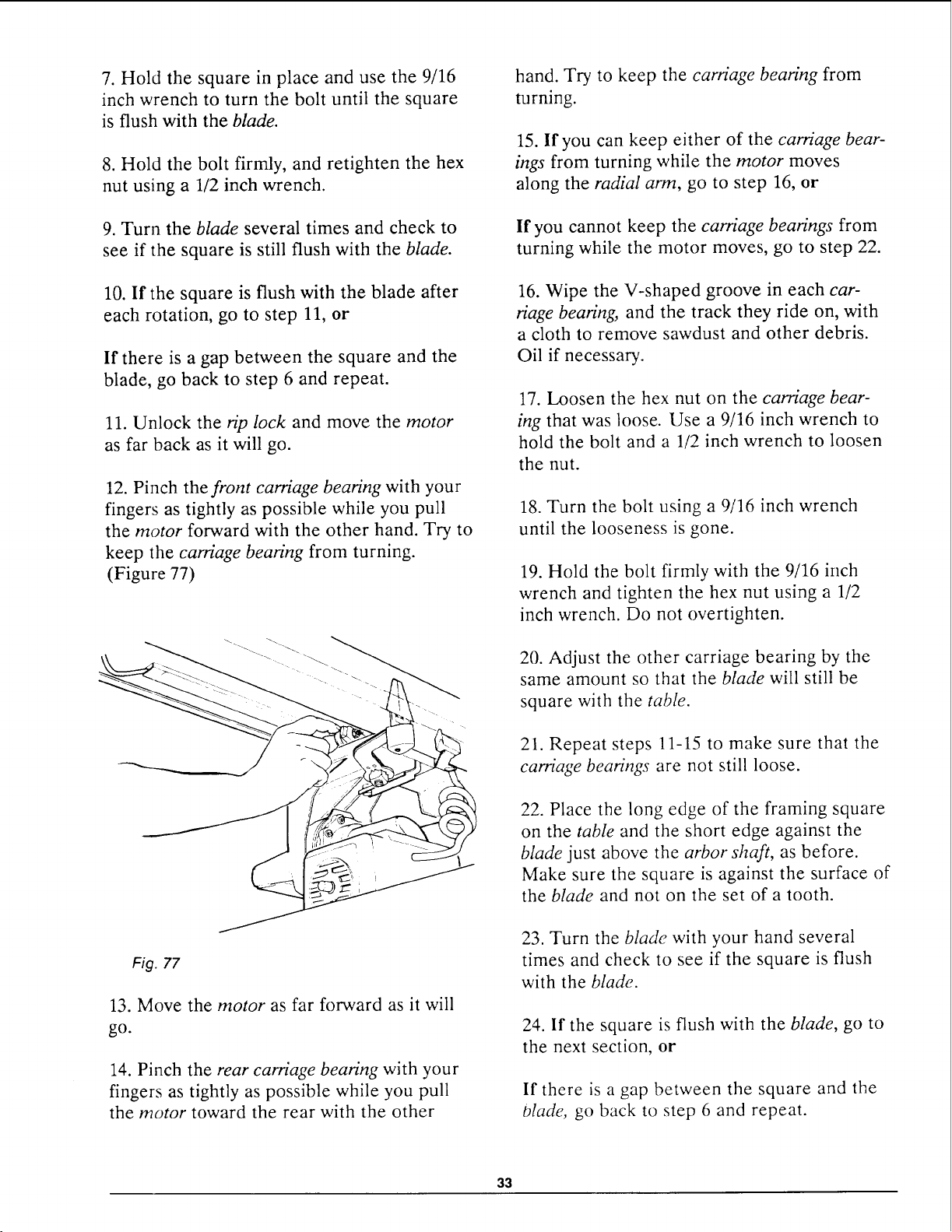
12. Pinch the front carriage bearing with your
fingers as tightly as possible while you pull
the motor forward with the other hand. Try to
keep the carriage bearing from turning.
(Figure 77)
Fig. 77
13. Move the motor as far forward as it will
go.
14. Pinch the rear carriage bearing with your
fingers as tightly as possible while you pull
the motor toward the rear with the other
hand. Try to keep the carriage bearing from
turning.
15. If you can keep either of the carriage bear-
ings from turning while the motor moves
along the radial arm, go to step 16, or
If you cannot keep the carriage bearings from
turning while the motor moves, go to step 22.
16. Wipe the V-shaped groove in each car-
riage bearing, and the track they ride on, with
a cloth to remove sawdust and other debris.
Oil if necessary.
17. Loosen the hex nut on the carriage bear-
ing that was loose. Use a 9/16 inch wrench to
hold the bolt and a 1/2 inch wrench to loosen
the nut.
18. Turn the bolt using a 9/16 inch wrench
until the looseness is gone.
19. Hold the bolt firmly with the 9/16 inch
wrench and tighten the hex nut using a 1/2
inch wrench. Do not overtighten.
20. Adjust the other carriage bearing by the
same amount so that the blade will still be
square with the table.
21. Repeat steps 11-15 to make sure that the
carriage bearings are not still loose.
22. Place the long edge of the framing square
on the table and the short edge against the
blade just above the arbor shaft, as before.
Make sure the square is against the surface of
the blade and not on the set of a tooth.
23. Turn the blade with your hand several
times and check to see if the square is flush
with the blade.
24. If the square is flush with the blade, go to
the next section, or
If there is a gap between the square and the
Olade, go back to step 6 and repeat.
33
Making Blade Parallel to
Table
These steps are done to help prevent the
workpiece from being thrown or damaged
when the saw is used for edging.
/
>,,,,,/--,il _ Ld aYi.._P_
I'1 '_", I I II-_P] -'_ ,r'--%
I I IV'-" I
k___!_, I I LI b ==_! I
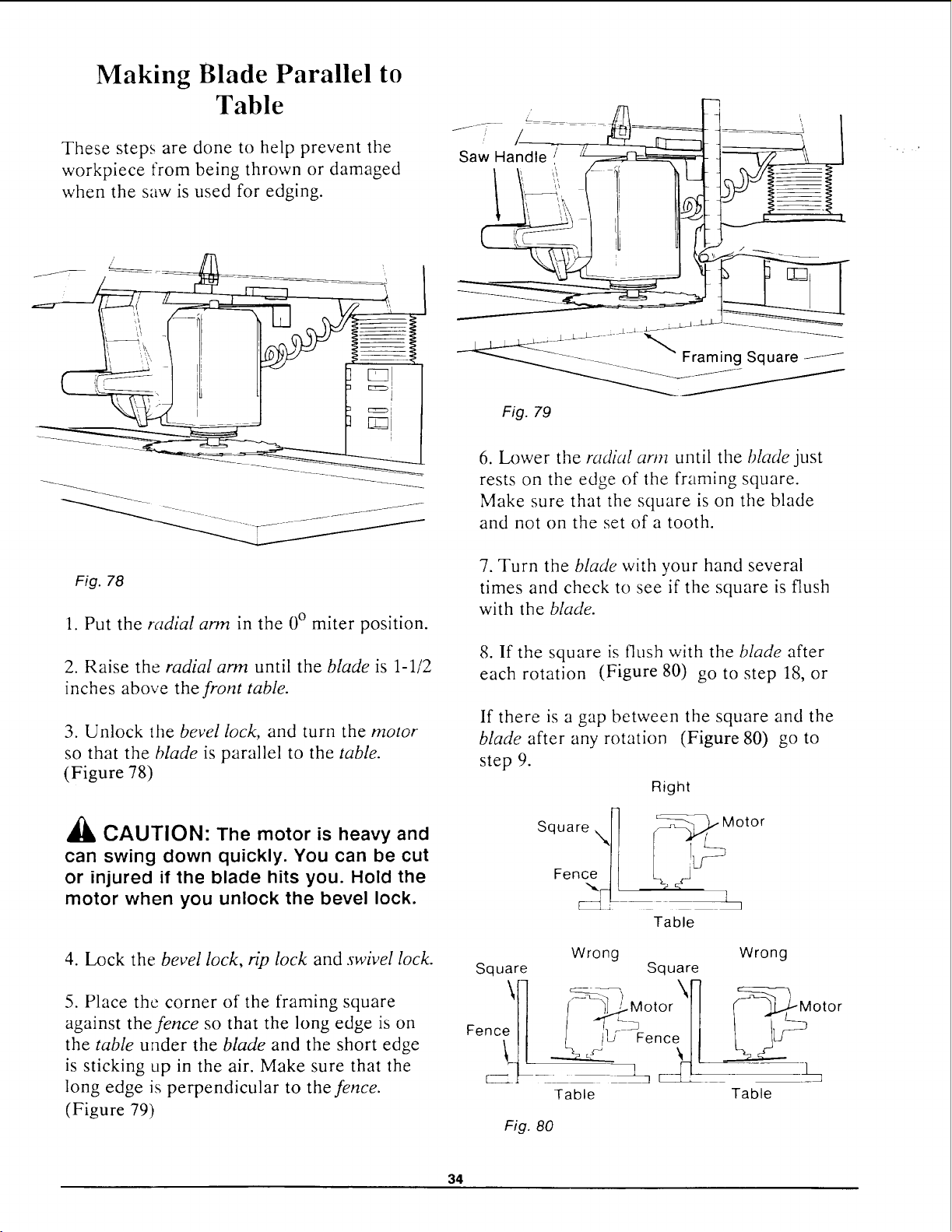
Fig. 78
1. Put the radial arm in the 0 ° miter position.
2. Raise the radial arm until the blade is 1-1/2
inches above the front table.
3. Unlock the bevel lock, and turn the motor
so that the blade is parallel to the table.
(Figure 78)
,_ CAUTION: The motor is heavy and
can swing down quickly. You can be cut
or injured if the blade hits you. Hold the
motor when you unlock the bevel lock.
4. Lock the bevel lock, rip lock and swivel lock.
5. Place the corner of the framing square
against the fence so that the long edge is on
the table under the blade and the short edge
is sticking up in the air. Make sure that the
long edge is perpendicular to the fence.
(Figure 79)
J-;:- /_............ _
Saw Ha
-__ _--_- -: _- _" Framing Square
Fig. 79
6. Lower the radial arm until the blade just
rests on the edge of the framing square.
Make sure that the square is on the blade
and not on the set of a tooth.
7. Turn the blade with your hand several
times and check to see if the square is flush
with the blade.
8. If the square is flush with the blade after
each rotation (Figure 80) go to step 18, or
If there is a gap between the square and the
blade after any rotation (Figure 80) go to
step 9.
Right
Square "X_ _ Motor
Table
Square
Fe_l
Wrong Wrong
Square
/__tOr\nc_i ] __M°t°r
Table Table
Fig. 80
34
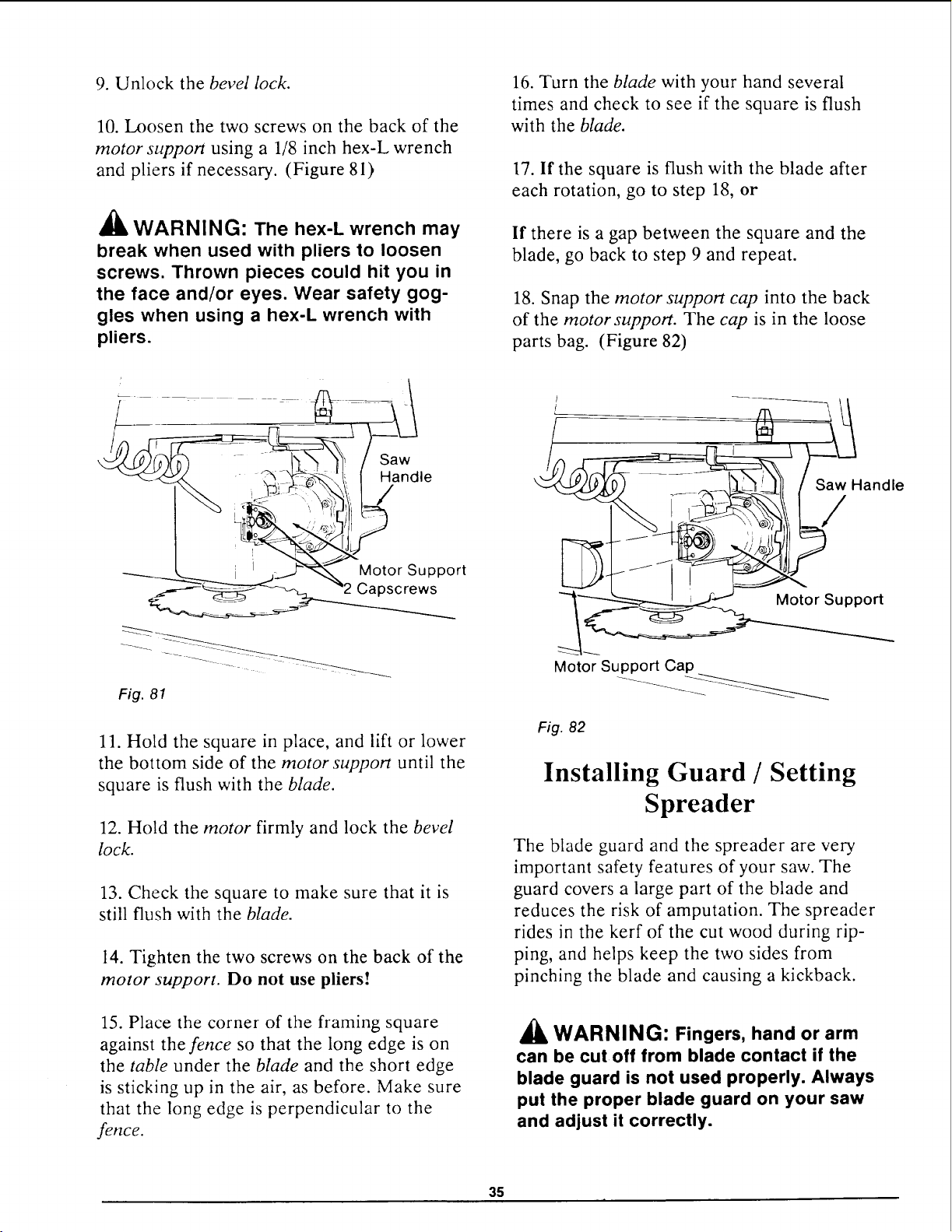
9. Unlock the bevel lock.
10. Loosen the two screws on the back of the
motor support using a 1/8 inch hex-L wrench
and pliers if necessary. (Figure 81)
_l_ WARNING" The hex-L wrench may
break when used with pliers to loosen
screws. Thrown pieces could hit you in
the face and/or eyes. Wear safety gog-
gles when using a hex-L wrench with
pliers.
16. Turn the blade with your hand several
times and check to see if the square is flush
with the blade.
17. If the square is flush with the blade after
each rotation, go to step 18, or
If there is a gap between the square and the
blade, go back to step 9 and repeat.
18. Snap the motor support cap into the back
of the motor support. The cap is in the loose
parts bag. (Figure 82)
Saw
Handle
/
Saw Handle
/
Motor Support
Capscrews
Fig. 81
11. Hold the square in place, and lift or lower
the bottom side of the motor support until the
square is flush with the blade.
12. Hold the motor firmly and lock the bevel
lock.
13. Check the square to make sure that it is
still flush with the blade.
14. Tighten the two screws on the back of the
motor support. Do not use pliers!
15. Place the corner of the framing square
against the fence so that the long edge is on
the table under the blade and the short edge
is sticking up in the air, as before. Make sure
that the long edge is perpendicular to the
fence.
Motor Support
Motor Support Cap
Fig. 82
Installing Guard / Setting
Spreader
The blade guard and the spreader are very
important safety features of your saw. The
guard covers a large part of the blade and
reduces the risk of amputation. The spreader
rides in the kerf of the cut wood during rip-
ping, and helps keep the two sides from
pinching the blade and causing a kickback.
WARNING" Fingers, hand or arm
can be cutoff from blade contact if the
blade guard is not used properly. Always
put the proper blade guard on your saw
and adjust it correctly.
35
/k
WARNING: Kickback can occur if
the spreader is not in line with the
blade. You can be injured or killed. Al-
ways adjust the spreader and make sure
that it is directly in line with the blade.
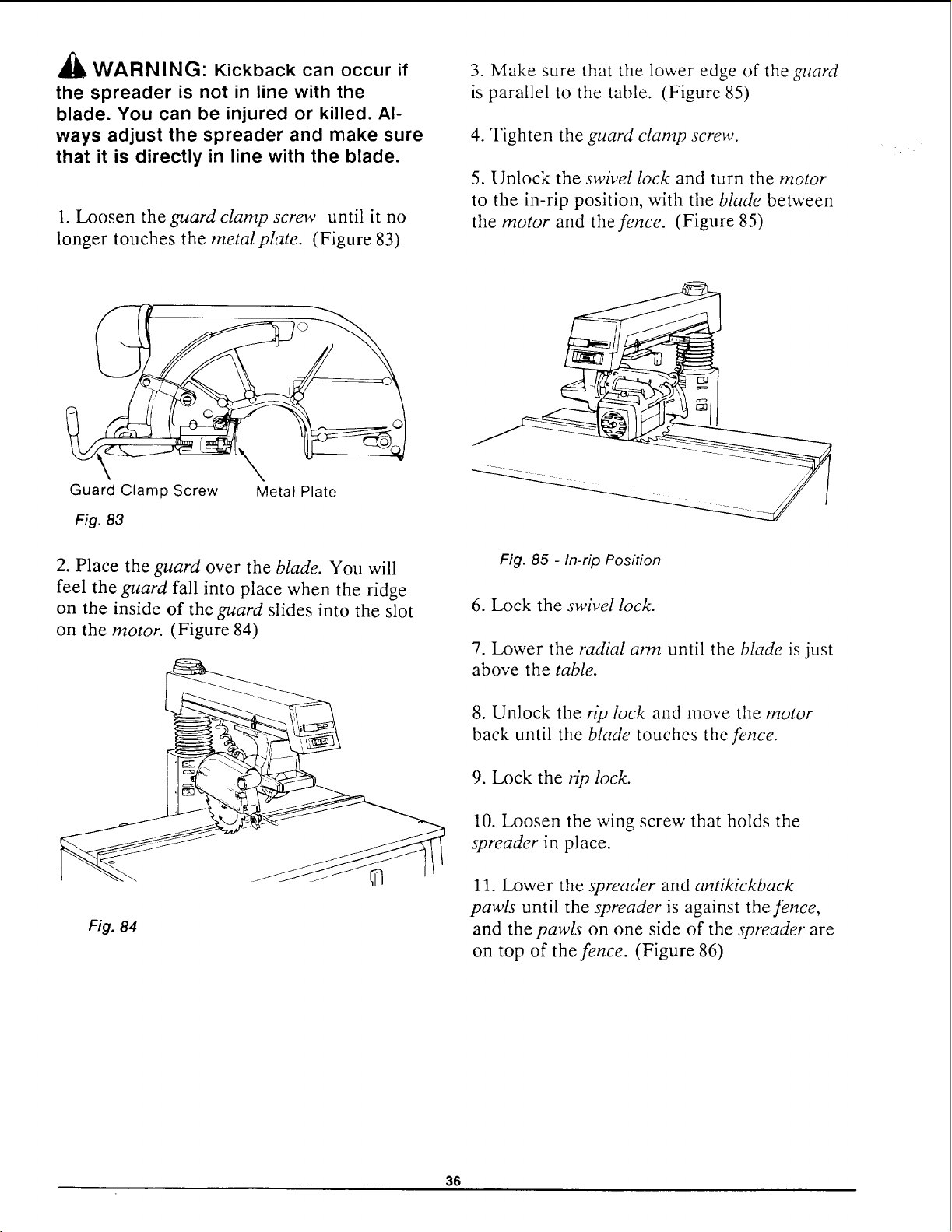
1. Loosen the guard clamp screw until it no
longer touches the metal plate. (Figure 83)
3. Make sure that the lower edge of the guard
is parallel to the table. (Figure 85)
4. Tighten the guard clamp screw.
5. Unlock the swivel lock and turn the motor
to the in-rip position, with the blade between
the motor and the fence. (Figure 85)
Guard Clamp Screw
Fig. 83
,\
Metal Plate
2. Place the guard over the blade. You will
feel the guard fall into place when the ridge
on the inside of the guard slides into the slot
on the motor. (Figure 84)
Fig. 85 - In-rip Position
6. Lock the swivel lock.
7. Lower the radial arm until the blade is just
above the table.
Fig. 84
8. Unlock the rip lock and move the motor
back until the blade touches the fence.
9. Lock the rip lock.
10. Loosen the wing screw that holds the
spreader in place.
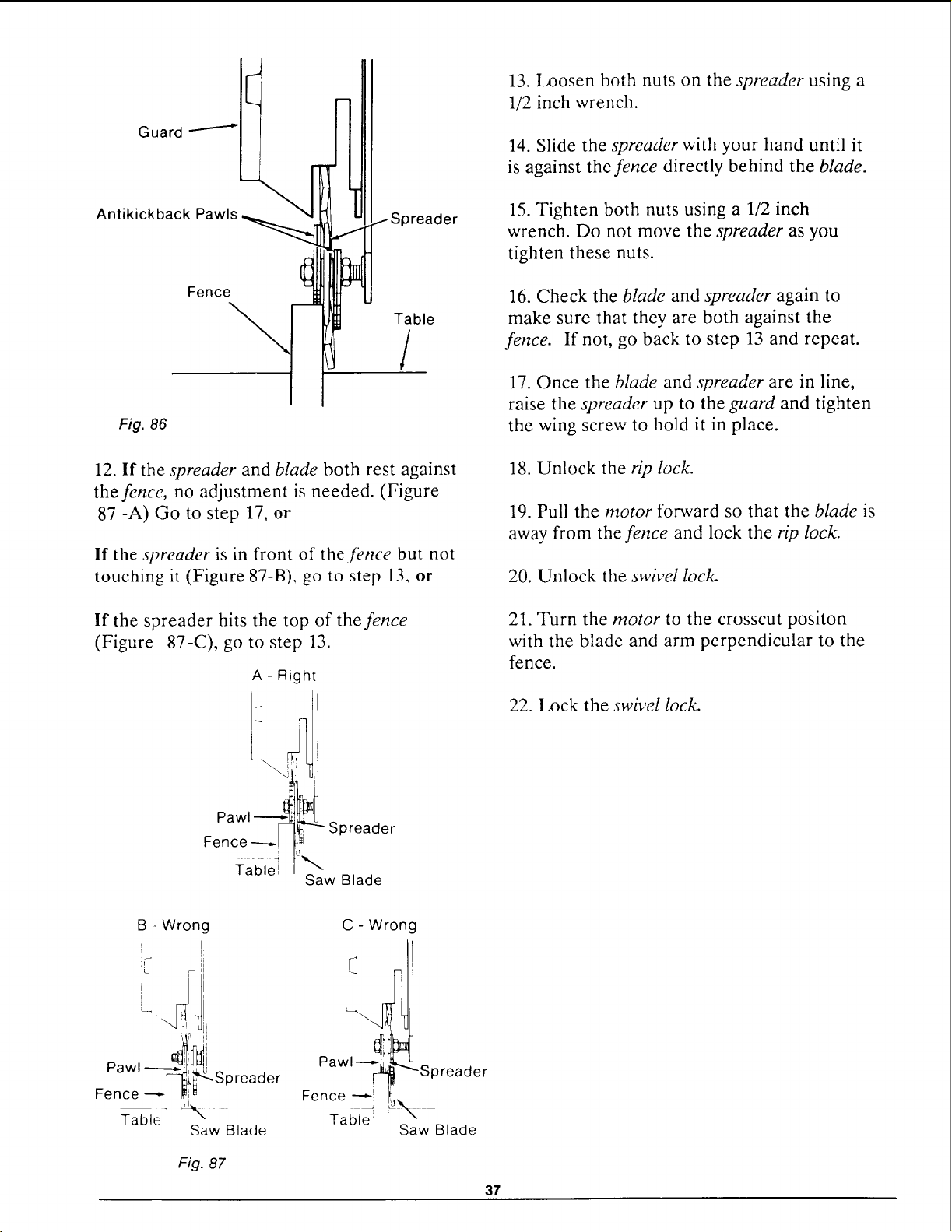
11. Lower the spreader and antikickback
pawls until the spreader is against the fence,
and the pawls on one side of the spreader are
on top of the fence. (Figure 86)
36
ISpreader
Table
/
Fig. 86
12. If the spreader and blade both rest against
the fence, no adjustment is needed. (Figure
87 -A) Go to step 17, or
If the spreader is in front of the .[once but not
touching it (Figure 87-B), go to step 13, or
If the spreader hits the top of the fence
(Figure 87-C), go to step 13.
A - Right
I
Pawl--.--_ _
Fence -----[
...... i
Yablel
Spreader
Saw Blade
13. Loosen both nuts on the spreader using a
1/2 inch wrench.
14. Slide the spreader with your hand until it
is against the fence directly behind the blade.
15. Tighten both nuts using a 1/2 inch
wrench. Do not move the spreader as you
tighten these nuts.
16. Check the blade and spreader again to
make sure that they are both against the
fence. If not, go back to step 13 and repeat.
17. Once the blade and spreader are in line,
raise the spreader up to the guard and tighten
the wing screw to hold it in place.
18. Unlock the rip lock.
19. Pull the motor forward so that the blade is
away from the fence and lock the rip lock.
20. Unlock the swivel lock.
21. Turn the motor to the crosscut positon
with the blade and arm perpendicular to the
fence.
22. Lock the swivel lock.
B - Wron¢
U
Pawl ..__l_ti
_-_i!_Spreader
Fence -_I _ _
Table t
Saw Blade
Fig. 87
C - Wrong
L
Pawl Spreader
Fence
J
Table
Saw Blade
37
Installing and Adjusting Rip Scale Indica-
tors
NOTE: The rip scales indicators are intended
to be used for quick settings. Adjustments
will be necessary for blades of different thick-
nesses. For greater accuracy take direct mea-
surements between blade and fence with ruler
or measuring tape.
1. Locate rip scale indicators in a loose parts
bag and slide indicators onto mounting brack-
ets.
2. Unlock the swivel lock and move the
blade into the OUT-RIP position. Lock the
swivel lock.
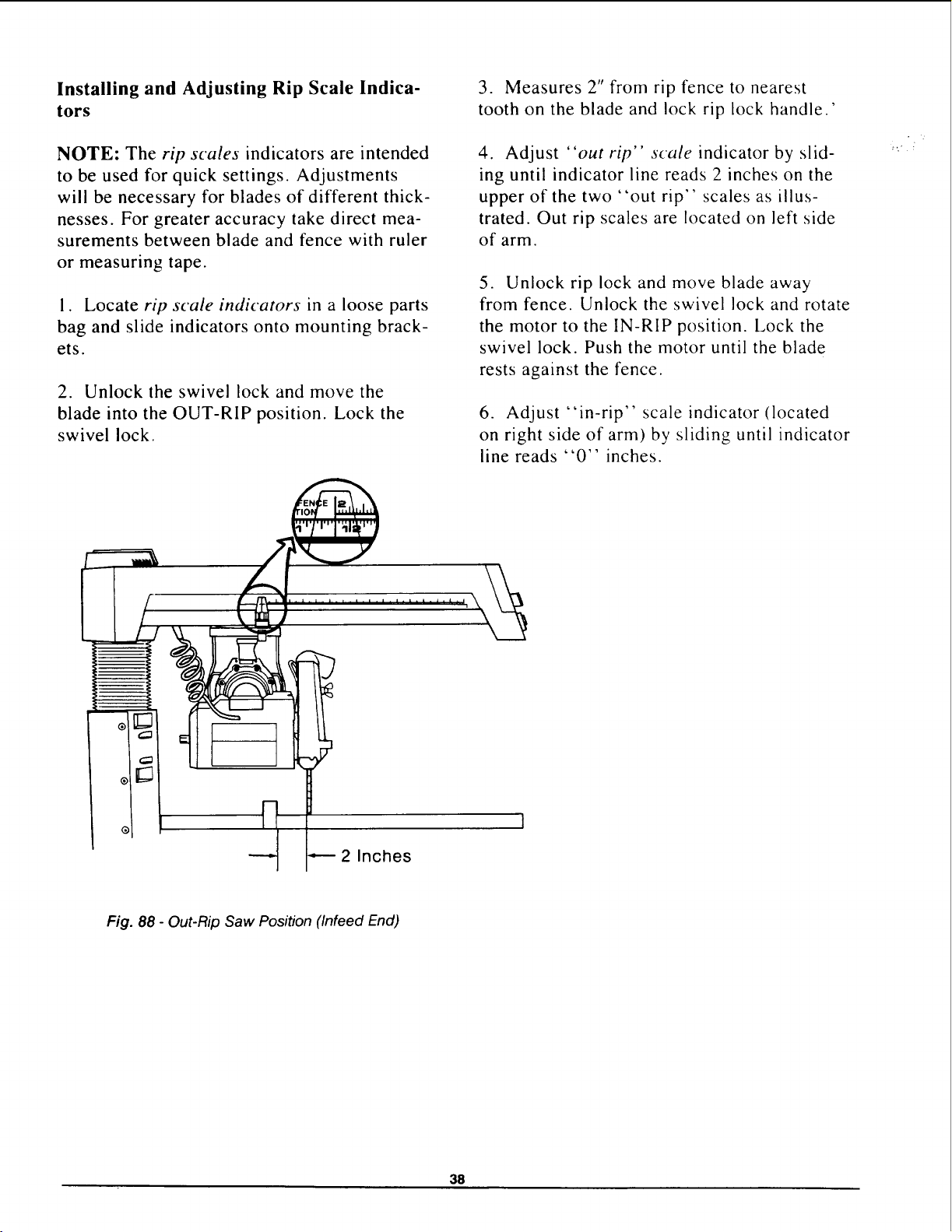
3. Measures 2" from rip fence to nearest
tooth on the blade and lock rip lock handle.'
4. Adjust "out rip" scale indicator by slid-
ing until indicator line reads 2 inches on the
upper of the two "out rip" scales as illus-
trated. Out rip scales are located on left side
of arm.
5. Unlock rip lock and move blade away
from fence. Unlock the swivel lock and rotate
the motor to the IN-RIP position. Lock the
swivel lock. Push the motor until the blade
rests against the fence.
6. Adjust "in-rip" scale indicator (located
on right side of arm) by sliding until indicator
line reads "0" inches.
®1
2 Inches
Fig. 88 - Out-Rip Saw Position (Infeed End)
38
Electrical Connections
Motor Specifications
The AC motor used in this saw is a capacitor-
start, non-reversible type having the following
specifications:
Rated H.P .......................... 1.5
Maximum Developed H.P ............. 2.5
Voltage ........................... 120
Amperes .......................... 11.5
Hertz (cycles) ....................... 60
Phase ........................... Single
RPM ............................. 3450
Rotation of Arbor Shaft ......... Clockwise
Power Supply
_i, WARNING: Your saw is wired at
the factory for 120V operation. Connect
to a 120V, 15-AMP, branch circuit and
use a 15-AMP, time delay fuse or circuit
breaker. Failure to connect in this way
can result in injury from shock or fire.
,_, WARNING: To avoid shock or fire, if
power cord is worn, cut, or damaged in
any way have it replaced immediately.
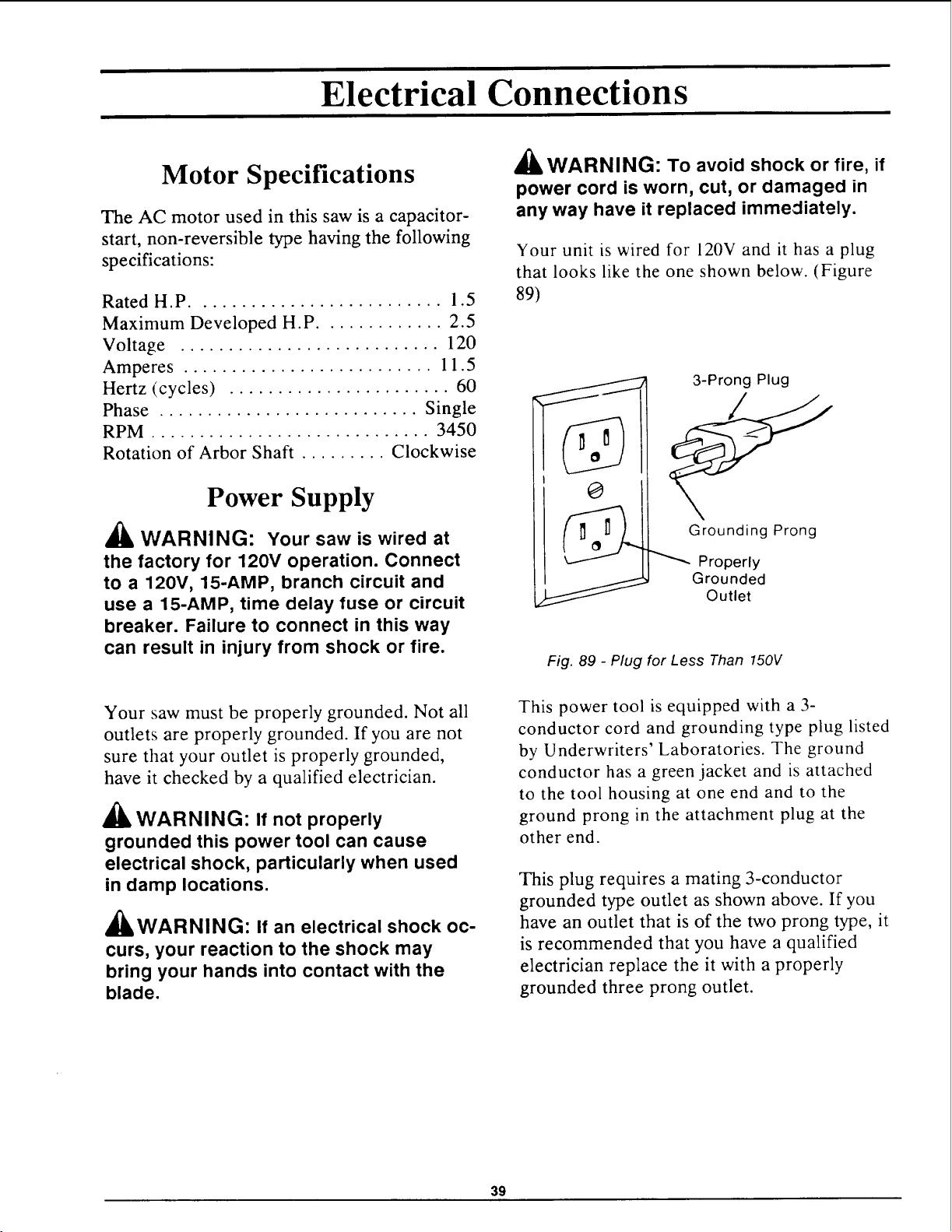
Your unit is wired for 120V and it has a plug
that looks like the one shown below. (Figure
89)
3-Prong Plug
Grounding Prong
Properly
Grounded
Outlet
Fig. 89 - Plug for Less Than 150V
Your saw must be properly grounded. Not all
outlets are properly grounded. If you are not
sure that your outlet is properly grounded,
have it checked by a qualified electrician.
_lb WARNING: If not properly
grounded this power tool can cause
electrical shock, particularly when used
in damp locations.
£L _
A&WARNING: If an electrical shock oc-
curs, your reaction to the shock may
bring your hands into contact with the
blade.
This power tool is equipped with a 3-
conductor cord and grounding type plug listed
by Underwriters' Laboratories. The ground
conductor has a green jacket and is attached
to the tool housing at one end and to the
ground prong in the attachment plug at the
other end.
This plug requires a mating 3-conductor
grounded type outlet as shown above. If you
have an outlet that is of the two prong type, it
is recommended that you have a qualified
electrician replace the it with a properly
grounded three prong outlet.
39
_1_ WARNING: To maintain proper
tool grounding, whenever the outlet you
are planning to use for this power tool
is of the two prong type do not remove
or alter the grounding prong in any man-
ner.
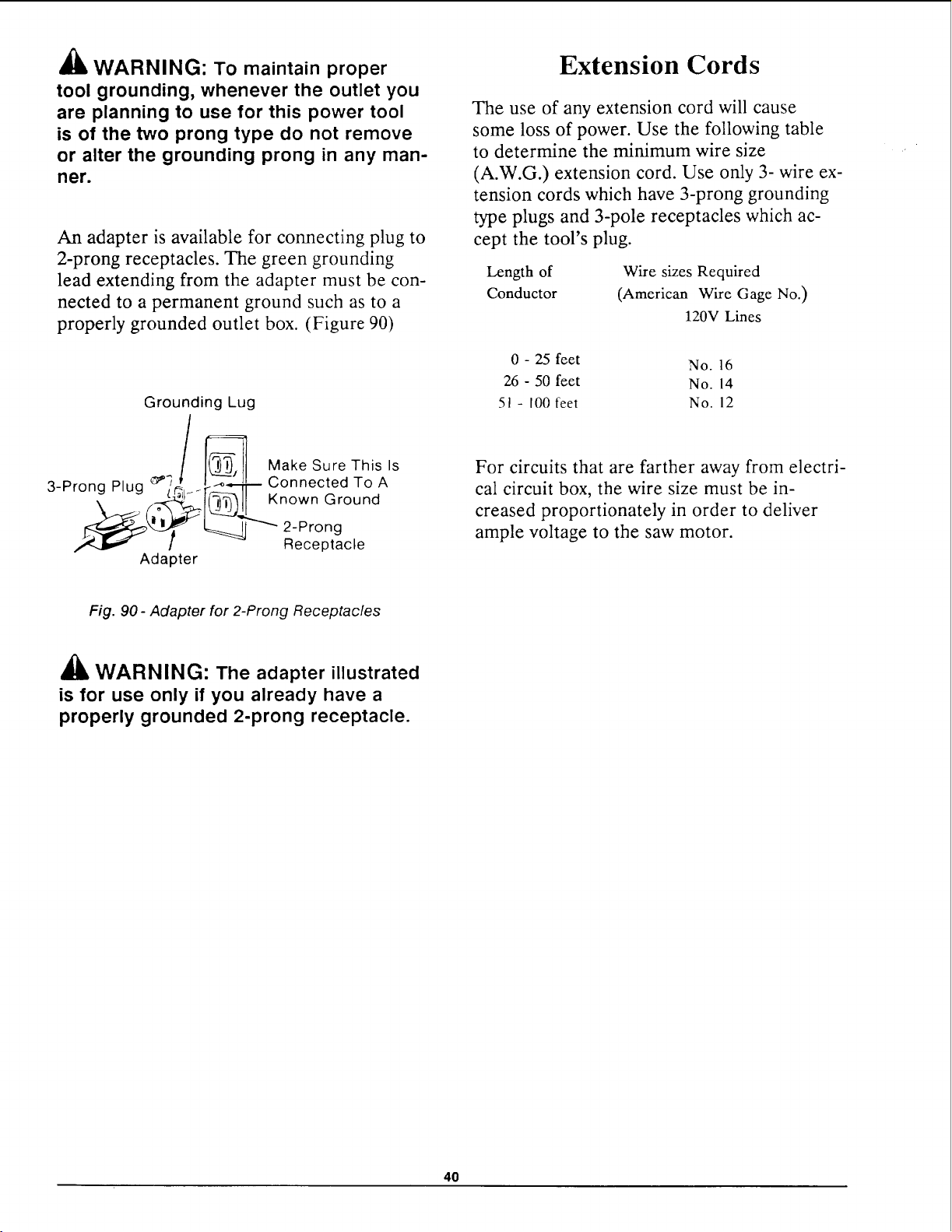
An adapter is available for connecting plug to
2-prong receptacles. The green grounding
lead extending from the adapter must be con-
nected to a permanent ground such as to a
properly grounded outlet box. (Figure 90)
Grounding Lug
/ _ MakeSureZhisls
3-Prong Plug _:_'_ _lr_--":-_'-- Connected To A
_!1_ I_(_')11 Known Ground
__' __"""_ 2-Prong
/ Receptacle
Adapter
Extension Cords
The use of any extension cord will cause
some loss of power. Use the following table
to determine the minimum wire size
(A.W.G.) extension cord. Use only 3- wire ex-
tension cords which have 3-prong grounding
type plugs and 3-pole receptacles which ac-
cept the tool's plug.
Length of
Conductor
Wire sizes Required
(American Wire Gage No.)
120V Lines
0 - 25 feet No. 16
26 - 50 feet No. 14
51- 100 feet No. 12
For circuits that are farther away from electri-
cal circuit box, the wire size must be in-
creased proportionately in order to deliver
ample voltage to the saw motor.
Fig. 90 - Adapter for 2-Prong Receptacles
'_ WARNING: The adapter illustrated
is for use only if you already have a
properly grounded 2-prong receptacle.
4O
Crosscutting
Crosscutting is used to cut a workpiece to
length. The workpiece is held against the
fence. The saw blade is pulled through the
workpiece. Cuts are usually made across the
grain of the workpiece.
Types of Crosscuts
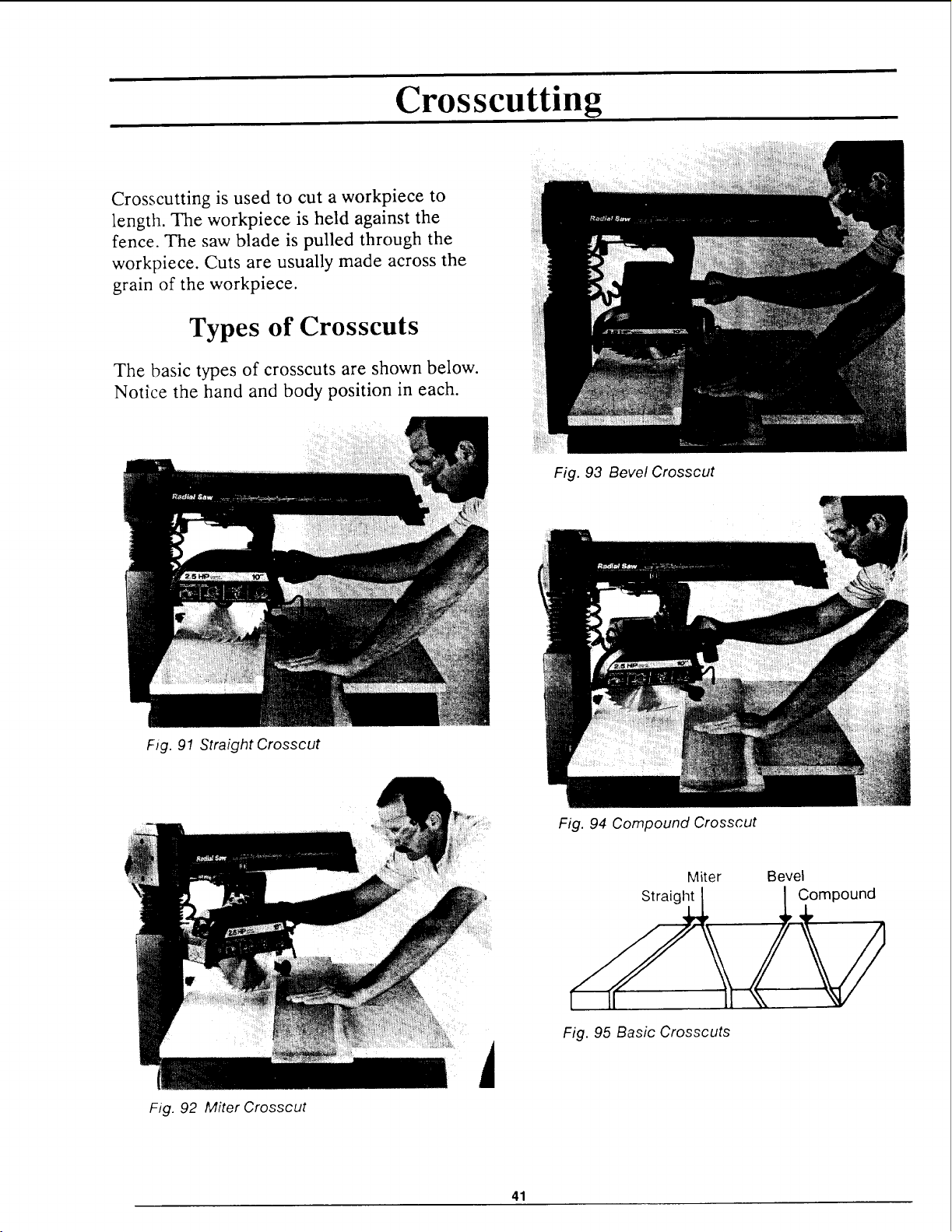
The basic types of crosscuts are shown below.
Notice the hand and body position in each.
Fig. 91 Straight Crosscut
Fig. 93 Bevel Crosscut
Fig. 94 Compound Crosscut
Fig. 92 Miter Crosscut
i
Miter Bevel
Fig. 95 Basic Crosscuts
41
Safety Information for
Crosscutting
Read and follow the safety information below
before making any type of crosscut.
_lb WARNING
1. Set guard and anti-kickback pawls to
proper height to serve as a partial barrier.
2. The saw blade can throw the
workpiece over the fence if the blade is
pushed backwards into workpiece.You
or others can be hit and injured by the
thrown workpiece. Start a crosscut with
the blade in its rearmost position.
3. If the blade is pulled through the
workpiece beyond the middle of the
blade, it can:
• pick up and throw the cut-off sec-
tion of the workpiece which could
hit and injure you or others in the
area, or;
• lift or move the held-down section
of the workpiece and pull your
hand into the blade as the blade
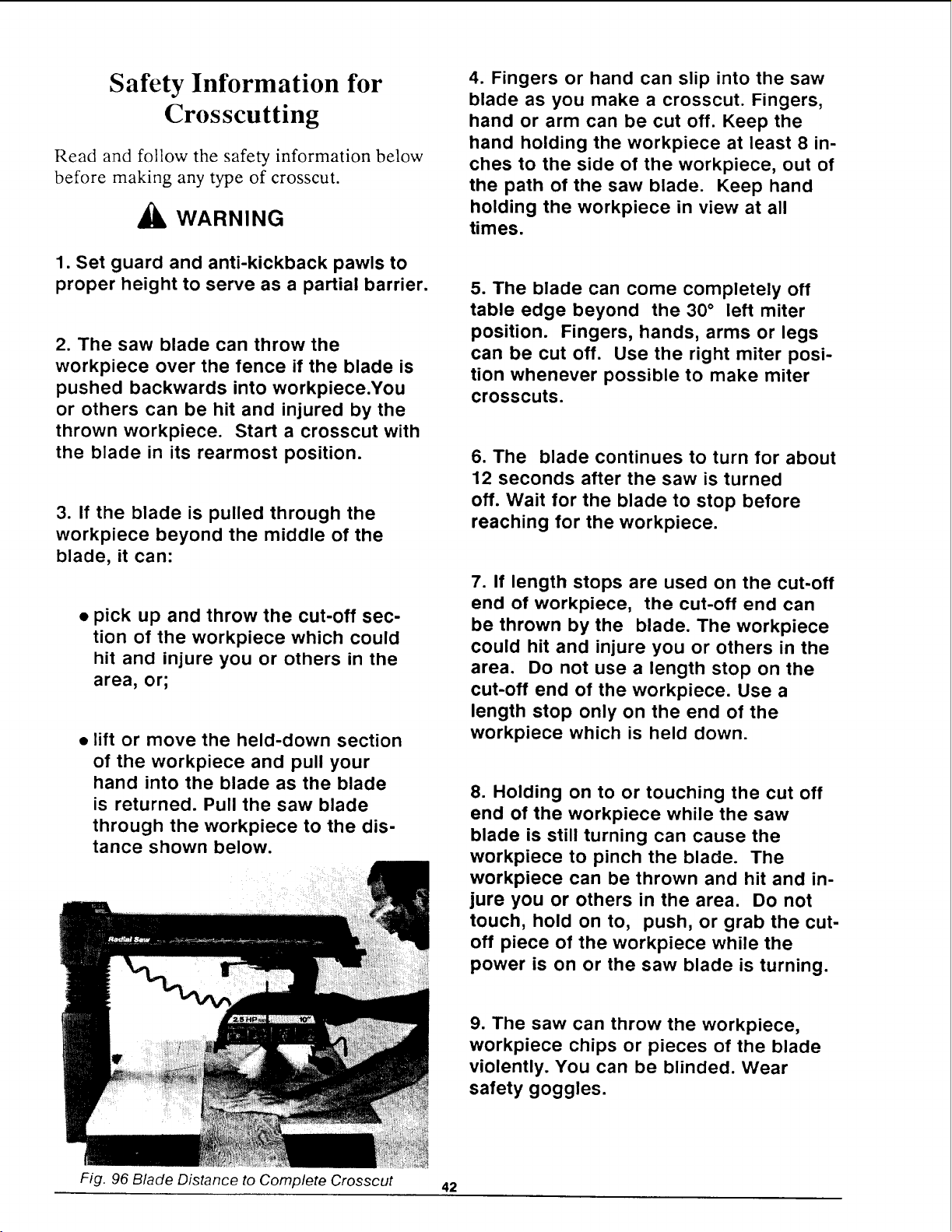
is returned. Pull the saw blade
through the workpiece to the dis-
tance shown below.
4. Fingers or hand can slip into the saw
blade as you make a crosscut. Fingers,
hand or arm can be cut off. Keep the
hand holding the workpiece at least 8 in-
ches to the side of the workpiece, out of
the path of the saw blade. Keep hand
holding the workpiece in view at all
times.
5. The blade can come completely off
table edge beyond the 30 ° left miter
position. Fingers, hands, arms or legs
can be cut off. Use the right miter posi-
tion whenever possible to make miter
crosscuts.
6. The blade continues to turn for about
12 seconds after the saw is turned
off. Wait for the blade to stop before
reaching for the workpiece.
7. If length stops are used on the cut-off
end of workpiece, the cut-off end can
be thrown by the blade. The workpiece
could hit and injure you or others in the
area. Do not use a length stop on the
cut-off end of the workpiece. Use a
length stop only on the end of the
workpiece which is held down.
8. Holding on to or touching the cut off
end of the workpiece while the saw
blade is still turning can cause the
workpiece to pinch the blade. The
workpiece can be thrown and hit and in-
jure you or others in the area. Do not
touch, hold on to, push, or grab the cut-
off piece of the workpiece while the
power is on or the saw blade is turning.
9. The saw can throw the workpiece,
workpiece chips or pieces of the blade
violently. You can be blinded. Wear
safety goggles.
Fig. 96 Blade Distance to Complete Crosscut 42
10. The workpiece cannot be controlled
or held stable enough to do free hand
cutting. The workpiece can be thrown or
slip and pull fingers and hand into the
saw blade. Fingers or hand can be cut
off. Set the radial arm to the desired
cutting angle. Keep workpiece flat on
table and solidly against the fence.
Blade Guard, Anti-Kickback
Pawls and Spreader
The blade guard, anti-kickback pawls and
spreader are designed to reduce or eliminate
the risk of injury from contact with the upper
half of the blade and the leading edge of the
blade when:
11. Saw parts loosen and wear with
use. You or others can be injured. Keep
all parts tight and in working order.
• the guard is in the horizontal position
and;
12. The fence must be of at least equal
height to the workpiece or else the
workpiece can be lifted or thrown and hit
and injure you or others in the area. See
Cutting Accessories section for instruc-
tions to make a fence.
• the pawls and spreader are set to
clear the top of the fence and
workpiece by about 1/8 inch.
The Blade Guard:
13. The blade will try to pull itself
through the workpiece. Be prepared to
hold the saw handle back to keep the
saw blade from coming toward you.
14. Lock rip lock after every crosscut, or
else the blade will suddenly come
toward you when you lower it to make a
crosscut.
15. Whenever the blade is turning, keep
one hand on the saw handle to keep the
saw blade from coming toward you.
16. Cutting more than one workpiece at
a time can cause you to lose control of
the workpieces, which can be thrown
and hit and injure you or others in the
area. Cut only one workpiece at a time.
Do not stack or lay workpieces edge to
edge.
• provides protection from contact with
the upper half of the blade;
• helps keep the workpiece from jam-
ming in the guard and;
• helps catch or deflect workpiece chips
or pieces of the blade.
The Anti-kickback Bar, Pawls and Spreader:
• serve as a partial barrier to provide
protection from contact with the lead-
ing edge of the blade.
£k
A WARNING: To reduce the risk of
contact with the upper half of the blade
and keep the workpiece from jamming
in the guard, set the blade guard in the
horizontal position. Fig. 100.
43
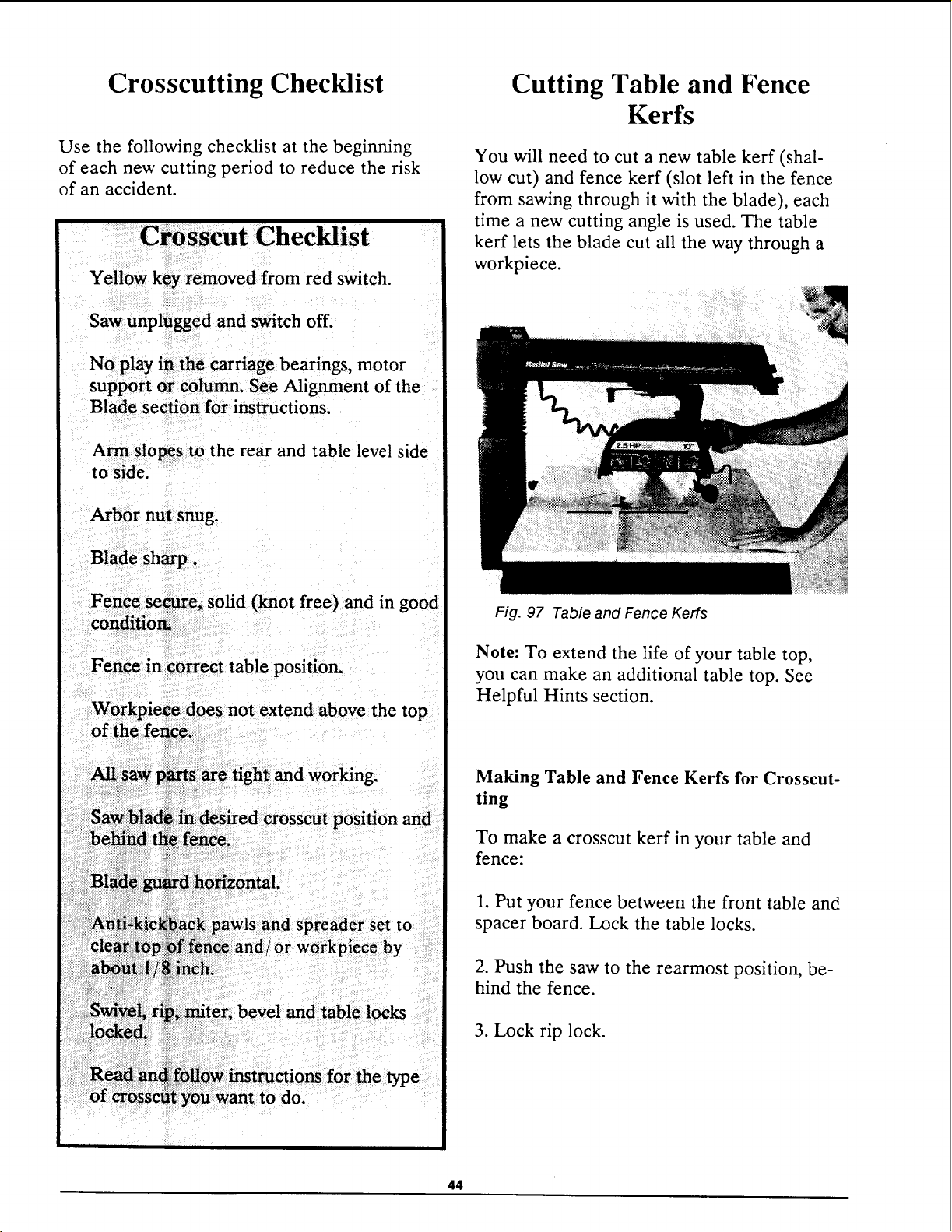
Crosscutting ChecMist
Use the following checklist at the beginning
of each new cutting period to reduce the risk
of an accident.
Yellow key removed from red switch.
Saw unplugged and switch off.
No play in the carriage bearings, motor
support or column. See Alignment of the
Blade section for instructions.
Arm slo_s to the rear and table level side
to side.
Blade sharp.
Fen_.se_re, solid (knot free) and in
eonditiom _ good
• iI
.-ence in correct table position.
not extend above the top
position and
bevel and table locks
to do.
Cutting Table and Fence
Kerfs
You will need to cut a new table kerf (shal-
low cut) and fence kerf (slot left in the fence
from sawing through it with the blade), each
time a new cutting angle is used. The table
kerf lets the blade cut all the way through a
workpiece.
Fig. 97 Table and Fence Kerfs
Note: To extend the life of your table top,
you can make an additional table top. See
Helpful Hints section.
Making Table and Fence Kerfs for Crosscut-
ting
To make a crosscut kerf in your table and
fence:
1. Put your fence between the front table and
spacer board. Lock the table locks.
2. Push the saw to the rearmost position, be-
hind the fence.
3. Lock rip lock.
44
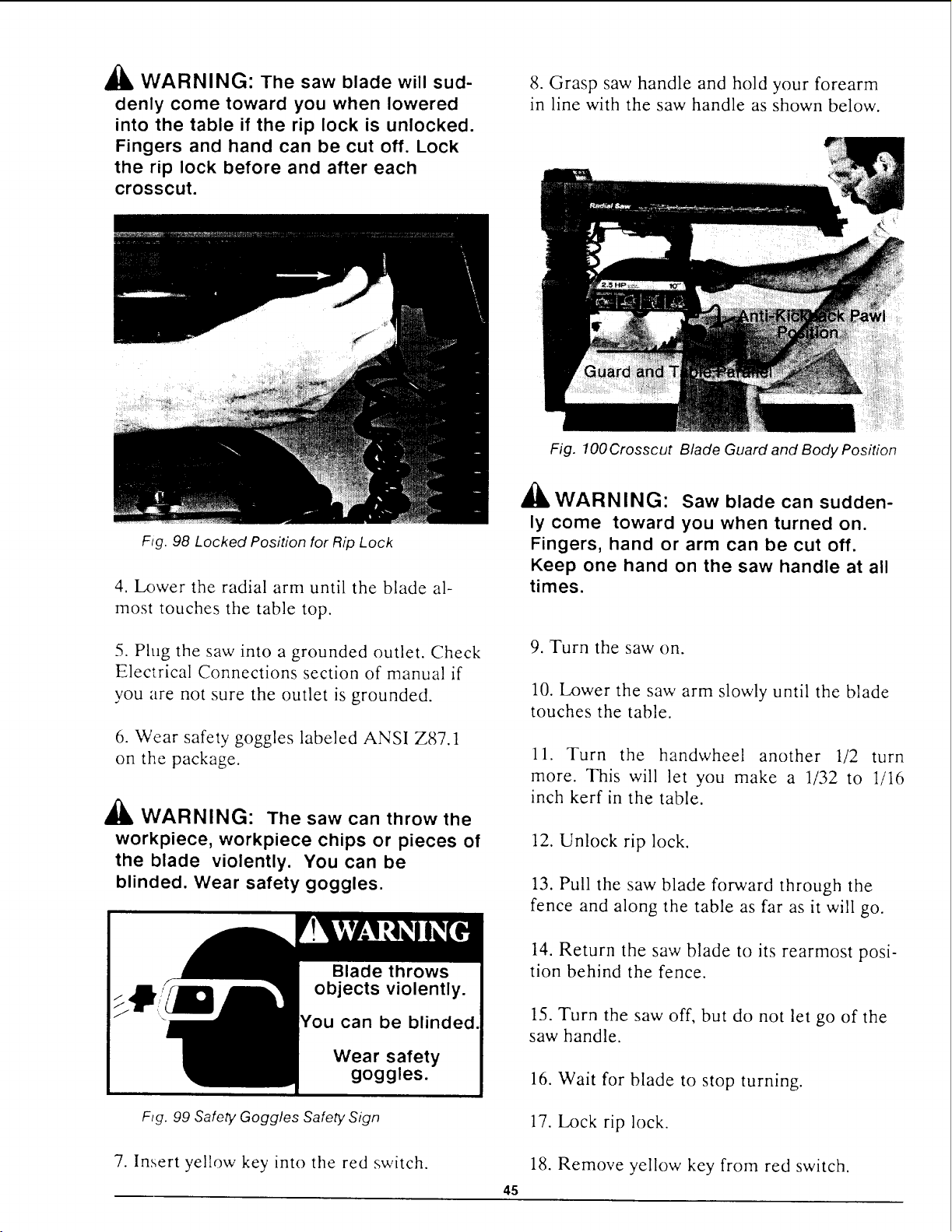
_i, WARNING: The saw blade will sud-
denly come toward you when lowered
into the table if the rip lock is unlocked.
Fingers and hand can be cut off. Lock
the rip lock before and after each
crosscut.
Fig. 98 Locked Position for Rip Lock
8. Grasp saw handle and hold your forearm
in line with the saw handle as shown below.
4. Lower the radial arm until the blade al-
most touches the table top.
5. Plug the saw into a grounded outlet. Check
Electrical Connections section of manual if
you are not sure the outlet is grounded.
6. Wear safety goggles labeled ANSI Z87.1
on the package.
,'k
A WARNING: The saw can throw the
workpiece, workpiece chips or pieces of
the blade violently. You can be
blinded. Wear safety goggles.
Blade throws
objects violently.
Wear safety
goggles.
Fig. 99 Safely Goggles Safely Sign
7. Insert yellow key into the red switch.
Fig. 100 Crosscut Blade Guard and Body Position
I'k
WARNING: Saw blade can sudden-
ly come toward you when turned on.
Fingers, hand or arm can be cut off.
Keep one hand on the saw handle at all
times.
9. Turn the saw on.
10. Lower the saw arm slowly until the blade
touches the table.
11. Turn the handwheel another 1/2 turn
more. This will let you make a 1132 to 1/16
inch kerf in the table.
45
12. Unlock rip lock.
13. Pull the saw blade forward through the
fence and along the table as far as it will go.
14. Return the saw blade to its rearmost posi-
tion behind the fence.
15. Turn the saw off, but do not let go of the
saw handle.
16. Wait for blade to stop turning.
17. Lock rip lock.
18. Remove yellow key from red switch.
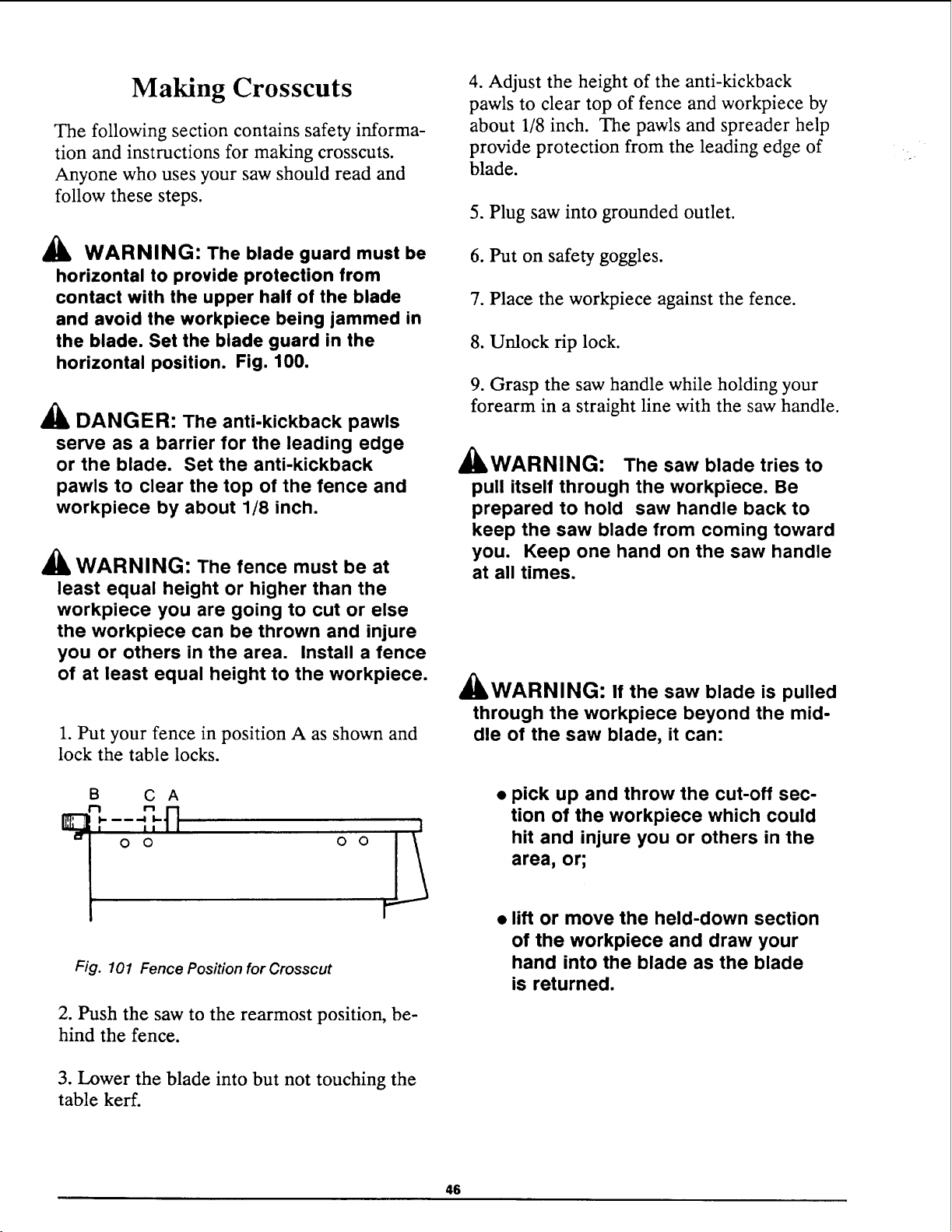
Making Crosscuts
The following section contains safety informa-
tion and instructions for making crosscuts.
Anyone who uses your saw should read and
follow these steps.
WARNING: The blade guard must be
horizontal to provide protection from
contact with the upper half of the blade
and avoid the workpiece being jammed in
the blade. Set the blade guard in the
horizontal position. Fig. 100.
DANGER: The anti-kickback pawls
serve as a barrier for the leading edge
or the blade. Set the anti-kickback
pawls to clear the top of the fence and
workpiece by about 1/8 inch.
A WARNING: The fence must be at
least equal height or higher than the
workpiece you are going to cut or else
the workpiece can be thrown and injure
you or others in the area. Install a fence
of at least equal height to the workpiece.
1. Put your fence in position A as shown and
lock the table locks.
B C A
" ql
i I
Fig. 101 Fence Position for Crosscut
2. Push the saw to the rearmost position, be-
hind the fence.
3. Lower the blade into but not touching the
table kerr.
4. Adjust the height of the anti-kickback
pawls to clear top of fence and workpiece by
about 1/8 inch. The pawls and spreader help
provide protection from the leading edge of
blade.
5. Plug saw into grounded outlet.
6. Put on safety goggles.
7. Place the workpiece against the fence.
8. Unlock rip lock.
9. Grasp the saw handle while holding your
forearm in a straight line with the saw handle.
Zk _
&lkWARNIN(3: The saw blade tries to
pull itself through the workpiece. Be
prepared to hold saw handle back to
keep the saw blade from coming toward
you. Keep one hand on the saw handle
at all times.
A _
&IWARNIN(3: If the saw blade is pulled
through the workpiece beyond the mid-
dle of the saw blade, it can:
• pick up and throw the cut-off sec-
tion of the workpiece which could
hit and injure you or others in the
area, or;
• lift or move the held-down section
of the workpiece and draw your
hand into the blade as the blade
is returned.
46
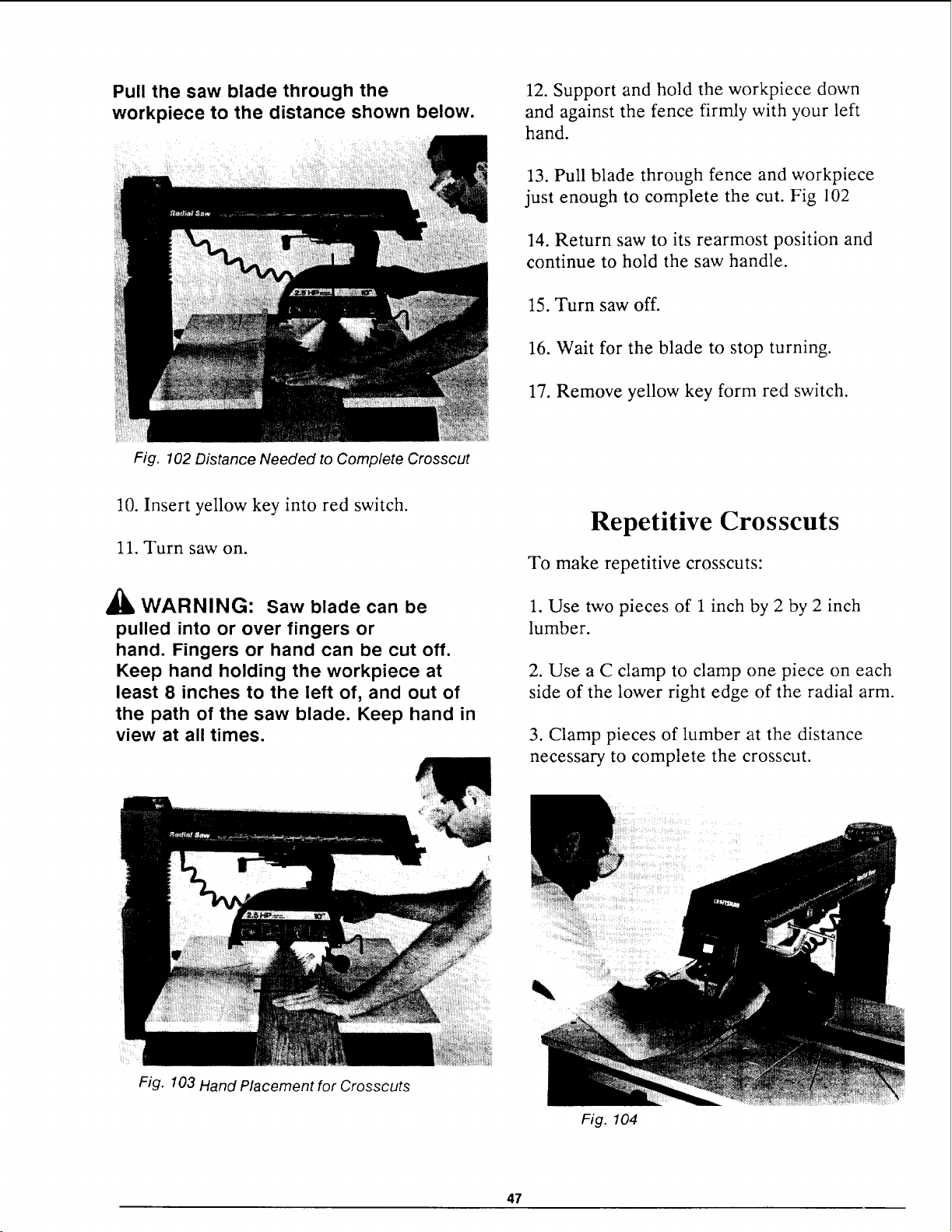
Pull the saw blade through the
workpiece to the distance shown below.
Fig. 102 Distance Needed to Complete Crosscut
12. Support and hold the workpiece down
and against the fence firmly with your left
hand.
13. Pull blade through fence and workpiece
just enough to complete the cut. Fig 102
14. Return saw to its rearmost position and
continue to hold the saw handle.
15. Turn saw off.
16. Wait for the blade to stop turning.
17. Remove yellow key form red switch.
10. Insert yellow key into red switch.
11. Turn saw on.
/X
AlL WARNING: Saw blade can be
pulled into or over fingers or
hand. Fingers or hand can be cut off.
Keep hand holding the workpiece at
least 8 inches to the left of, and out of
the path of the saw blade. Keep hand in
view at all times.
Repetitive Crosscuts
To make repetitive crosscuts:
1. Use two pieces of 1 inch by 2 by 2 inch
lumber.
2. Use a C clamp to clamp one piece on each
side of the lower right edge of the radial arm.
3. Clamp pieces of lumber at the distance
necessary to complete the crosscut.
Fig. 103 Hand Placement for Crosscuts
Fig. 104
47
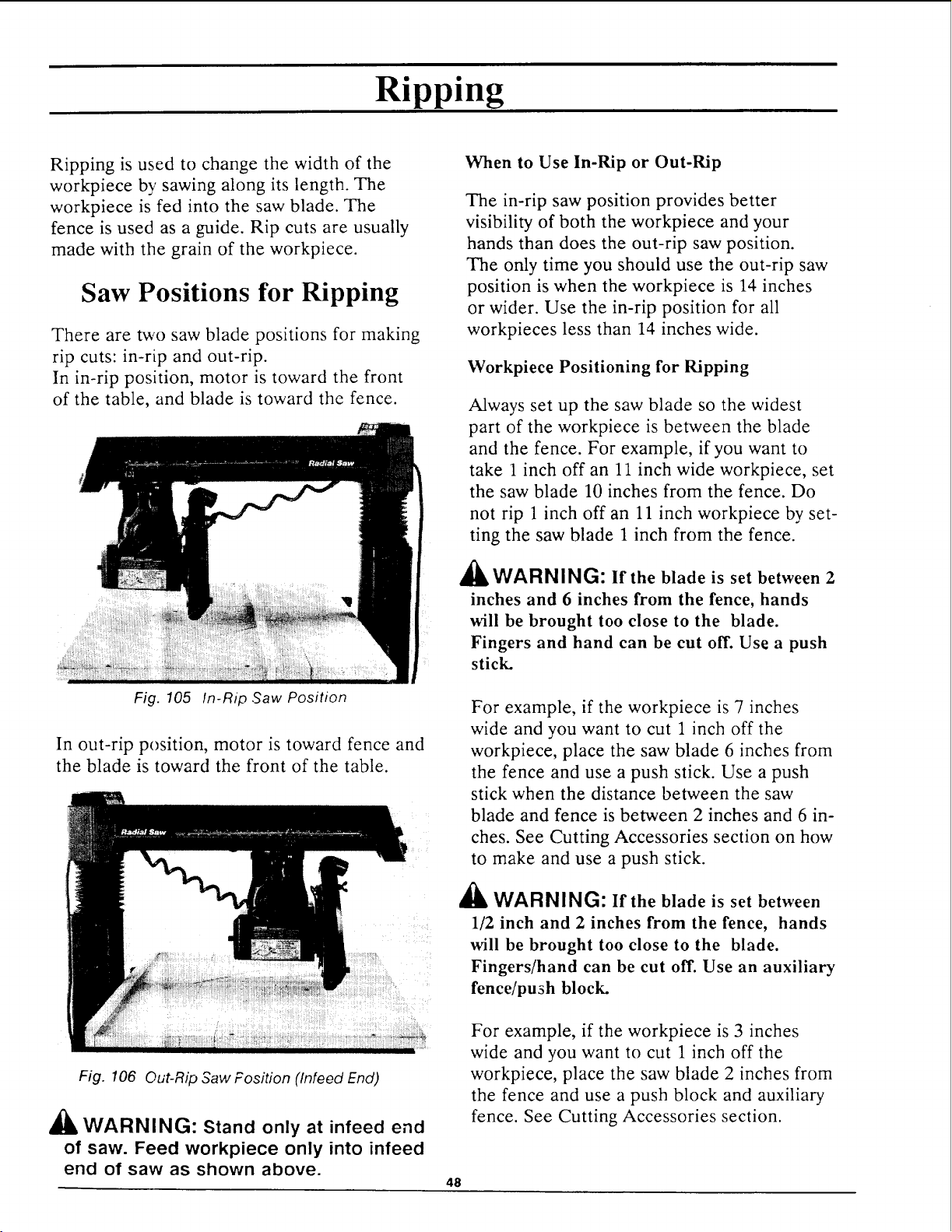
Ripping
Ripping is used to change the width of the
workpiece by sawing along its length. The
workpiece is fed into the saw blade. The
fence is used as a guide. Rip cuts are usually
made with the grain of the workpiece.
Saw Positions for Ripping
There are two saw blade positions for making
rip cuts: in-rip and out-rip.
In in-rip position, motor is toward the front
of the table, and blade is toward the fence.
Fig. 105 In-Rip ,Saw Position
In out-rip position, motor is toward fence and
the blade is toward the front of the table.
Fig. 106 Out-Rip Saw Fosition (Infeed End)
_1_ WARNING: Stand only at infeed end
of saw. Feed workpiece only into infeed
end of saw as shown above.
When to Use In-Rip or Out-Rip
The in-rip saw position provides better
visibility of both the workpiece and your
hands than does the out-rip saw position.
The only time you should use the out-rip saw
position is when the workpiece is 14 inches
or wider. Use the in-rip position for all
workpieces less than 14 inches wide.
Workpiece Positioning for Ripping
Always set up the saw blade so the widest
part of the workpiece is between the blade
and the fence. For example, if you want to
take 1 inch off an 11 inch wide workpiece, set
the saw blade 10 inches from the fence. Do
not rip 1 inch off an 11 inch workpiece by set-
ting the saw blade 1 inch from the fence.
A _
IILWARNINbi: If the blade is set between 2
inches and 6 inches from the fence, hands
will be brought too close to the blade.
Fingers and hand can be cut off. Use a push
stick.
For example, if the workpiece is 7 inches
wide and you want to cut 1 inch off the
workpiece, place the saw blade 6 inches from
the fence and use a push stick. Use a push
stick when the distance between the saw
blade and fence is between 2 inches and 6 in-
ches. See Cutting Accessories section on how
to make and use a push stick.
a_
WARNING: If the blade is set between
1/2 inch and 2 inches from the fence, hands
will be brought too close to the blade.
Fingers/hand can be cut off. Use an auxiliary
fence/push block.
For example, if the workpiece is 3 inches
wide and you want to cut 1 inch off the
workpiece, place the saw blade 2 inches from
the fence and use a push block and auxiliary
fence. See Cutting Accessories section.
48
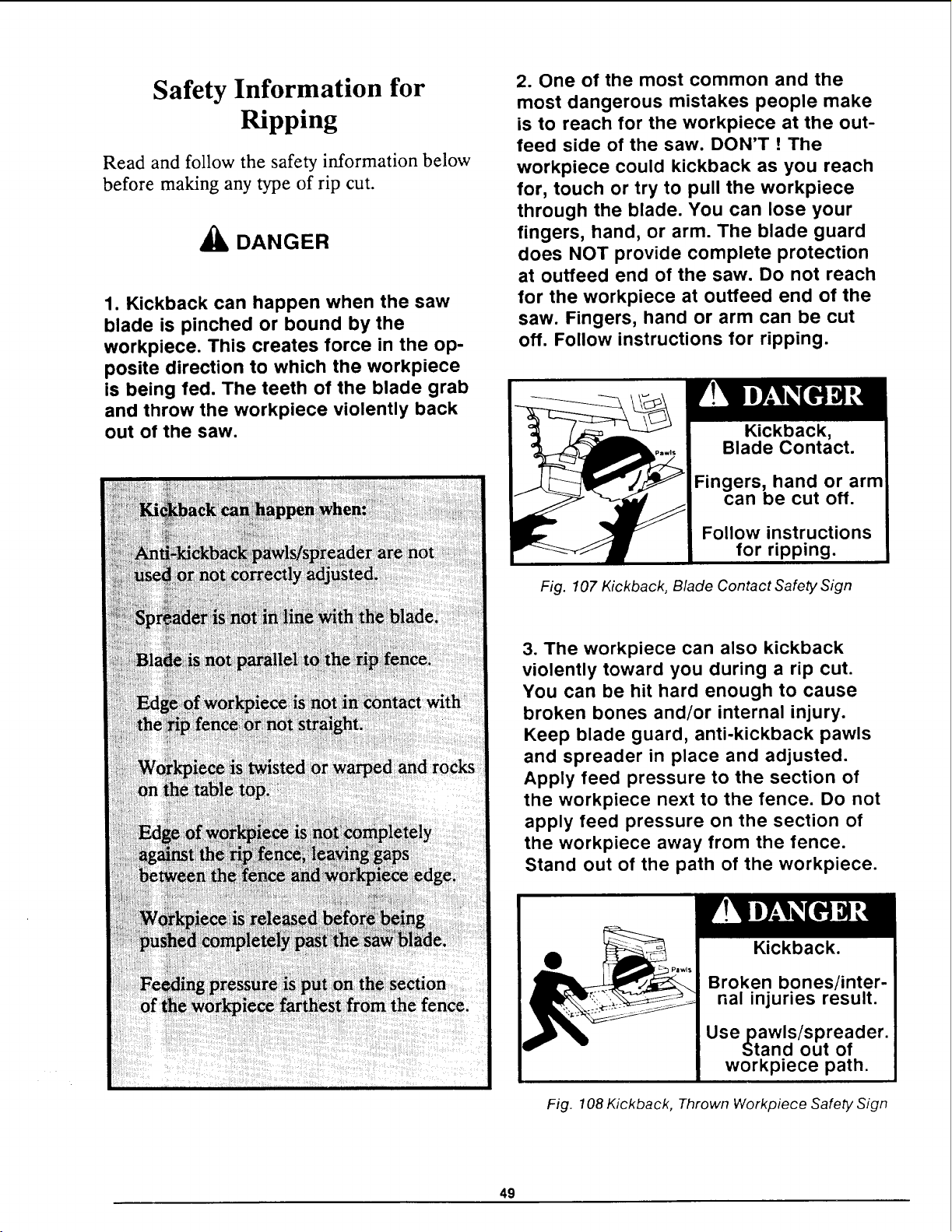
Safety Information for
Ripping
Read and follow the safety information below
before making any type of rip cut.
DANGER
1. Kickback can happen when the saw
blade is pinched or bound by the
workpiece. This creates force in the op-
posite direction to which the workpiece
is being fed. The teeth of the blade grab
and throw the workpiece violently back
out of the saw.
2. One of the most common and the
most dangerous mistakes people make
is to reach for the workpiece at the out-
feed side of the saw. DON'T ! The
workpiece could kickback as you reach
for, touch or try to pull the workpiece
through the blade. You can lose your
fingers, hand, or arm. The blade guard
does NOT provide complete protection
at outfeed end of the saw. Do not reach
for the workpiece at outfeed end of the
saw. Fingers, hand or arm can be cut
off. Follow instructions for ripping.
Kickback,
Blade Contact.
Fingers, hand or arm
can be cut off.
Follow instructions
for ripping.
Fig. 107 Kickback, Blade Contact Safety Sign
3. The workpiece can also kickback
violently toward you during a rip cut.
You can be hit hard enough to cause
broken bones and/or internal injury.
Keep blade guard, anti-kickback pawls
and spreader in place and adjusted.
Apply feed pressure to the section of
the workpiece next to the fence. Do not
apply feed pressure on the section of
the workpiece away from the fence.
Stand out of the path of the workpiece.
Kickback.
Broken bones/inter-
nalinjuriesresult.
Use pawls/spreader.
Stand out of
workpiece path.
Fig. 108 Kickback, Thrown Workpiece Safety Sign
49
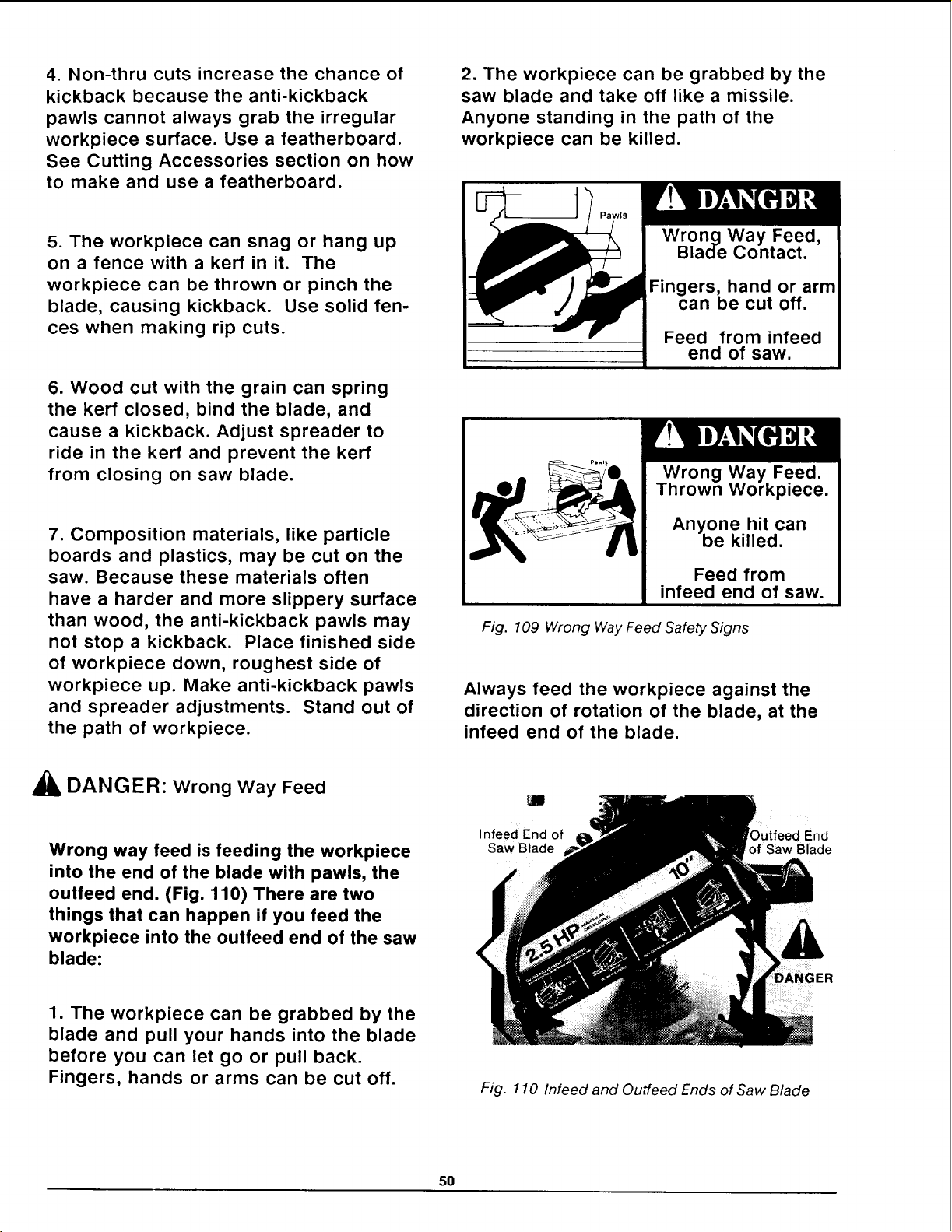
4. Non-thru cuts increase the chance of
kickback because the anti-kickback
pawls cannot always grab the irregular
workpiece surface. Use a featherboard.
See Cutting Accessories section on how
to make and use a featherboard.
5. The workpiece can snag or hang up
on a fence with a kerr in it. The
workpiece can be thrown or pinch the
blade, causing kickback. Use solid fen-
ces when making rip cuts.
6. Wood cut with the grain can spring
the kerr closed, bind the blade, and
cause a kickback. Adjust spreader to
ride in the kerr and prevent the kerr
from closing on saw blade.
7. Composition materials, like particle
boards and plastics, may be cut on the
saw. Because these materials often
have a harder and more slippery surface
than wood, the anti-kickback pawls may
not stop a kickback. Place finished side
of workpiece down, roughest side of
workpiece up. Make anti-kickback pawls
and spreader adjustments. Stand out of
the path of workpiece.
2. The workpiece can be grabbed by the
saw blade and take off like a missile.
Anyone standing in the path of the
workpiece can be killed.
Wrong Way Feed,
Blade Contact.
can be cut off.
Feed from infeed
end of saw.
Wrong Way Feed.
Thrown Workpiece.
Anyone hit can
be killed.
Feed from
infeed end of saw.
Fig. 109 Wrong Way Feed Safety Signs
Always feed the workpiece against the
direction of rotation of the blade, at the
infeed end of the blade.
_1_ DANGER: wrong way Feed
Wrong way feed is feeding the workpiece
into the end of the blade with pawls, the
outfeed end. (Fig. 110) There are two
things that can happen if you feed the
workpiece into the outfeed end of the saw
blade:
1. The workpiece can be grabbed by the
blade and pull your hands into the blade
before you can let go or pull back.
Fingers, hands or arms can be cut off.
Infeed End of Outfeed End
Saw Blade of Saw Blade
"GER
Fig. 110 Infeed and Outfeed Ends of Saw Blade
5O
Blade Guard, Anti-kickback
Pawls and Spreader
The blade guard, anti-kickback pawls and
workpiece spreader are designed to reduce or
eliminate the risk of injury from blade con-
tact, workpiece kickback and wrong way feed.
The Blade Guard:
• serves as a partial barrier to help
keep hands from contacting the blade
at the infeed end of the saw blade.
• helps keep the workpiece from lifting
or fluttering during ripping.
• helps catch or deflect workpiece chips
or pieces of the blade.
The Anti-Kickback Pawls :
• help reduce kickback by grabbing into
and holding the workpiece.
• act as a barrier to provide some
protection from blade contact.
The Spreader:
• helps keep the kerf of the workpiece
open, which helps prevent the blade
from being pinched and causing
workpiece kickback.
• when correctly set, helps reduce or
eliminate the chance of wrong way
feed because it blocks the workpiece
from contacting the saw blade.
'_ WARNING: The anti-kickback pawls
and spreader adjustments must be made
each time a different thickness workpiece
is cut to reduce or eliminate kickback.
Rip Cutting Checklist
Use the following rip cutting checklist at the
beginning of each new cutting period to
reduce the risk of an accident.
Rip Cutting Chec ist
he rearand table level side
Arbor nut snug.
Blade sharp.
Fence secure, solid (knot free), no kerfs.
Fence in correct rip position.
Saw blade desired distance from the fence
for cut.
Swivel, bevel, rip, miter and table
lock locked.
Blade guard, anti-kickback pawls and
6 inches offworkpiece.
Use push block if cutting between 1/2
and 2 inches off workpiece.
Use featherboard if making a non-through
cut and when needed on through cuts.
Read and follow instructions for the type
of rip cut you want to make.
51
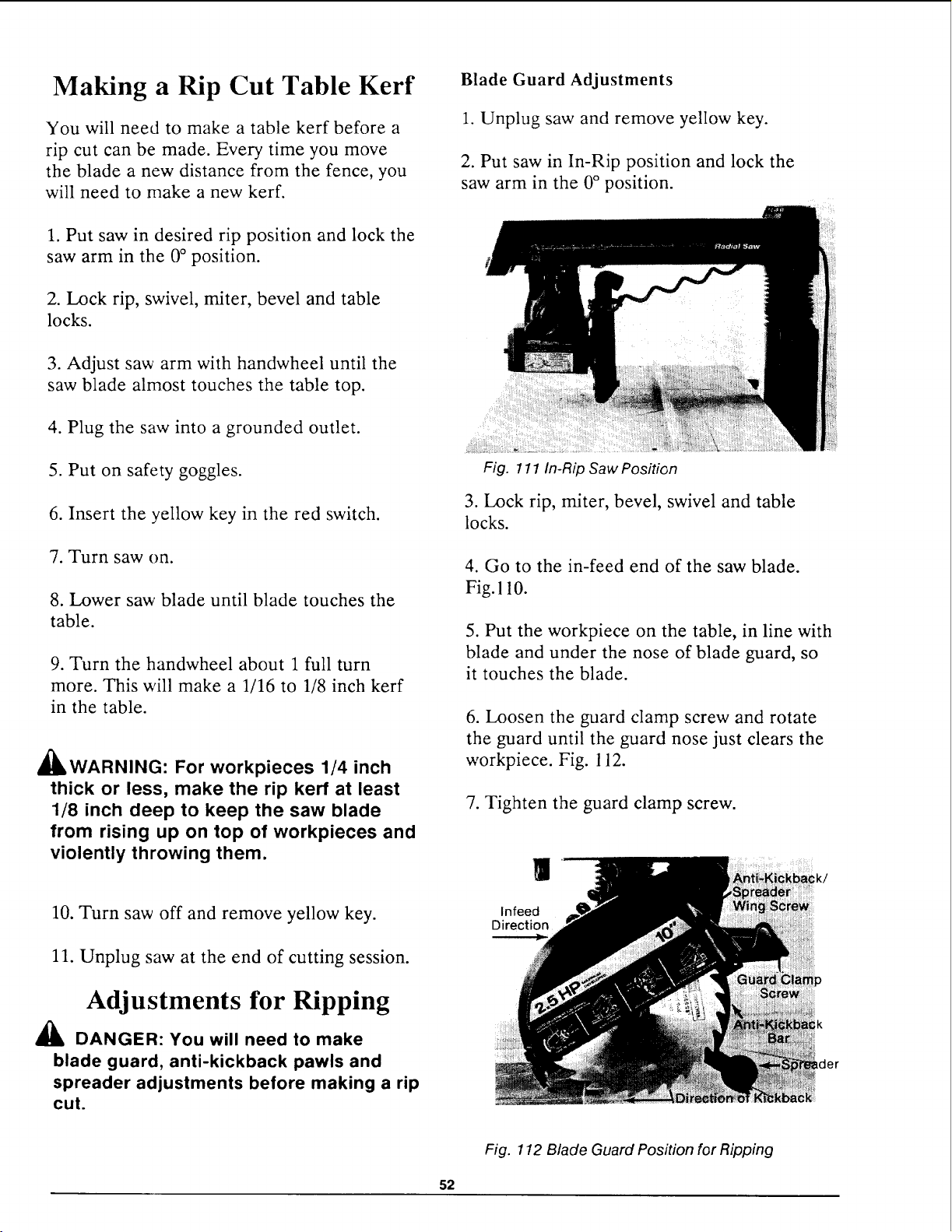
Making a Rip Cut Table Kerf
You will need to make a table kerf before a
rip cut can be made. Every time you move
the blade a new distance from the fence, you
will need to make a new kerf.
1. Put saw in desired rip position and lock the
saw arm in the 0° position.
2. Lock rip, swivel, miter, bevel and table
locks.
Blade Guard Adjustments
1. Unplug saw and remove yellow key.
2. Put saw in In-Rip position and lock the
saw arm in the 0° position.
3. Adjust saw arm with handwheel until the
saw blade almost touches the table top.
4. Plug the saw into a grounded outlet.
5. Put on safety goggles.
6. Insert the yellow key in the red switch.
7. Turn saw on.
8. Lower saw blade until blade touches the
table.
9. Turn the handwheel about 1 full turn
more. This will make a 1/16 to 1/8 inch kerr
in the table.
_WARNING: For workpieces 1/4 inch
thick or less, make the rip kerf at least
1/8 inch deep to keep the saw blade
from rising up on top of workpieces and
violently throwing them.
10. Turn saw off and remove yellow key.
11. Unplug saw at the end of cutting session.
Adjustments for Ripping
DANGER: You will need to make
blade guard, anti-kickback pawls and
spreader adjustments before making a rip
cut.
Fig. 111 In-Rip Saw Position
3. Lock rip, miter, bevel, swivel and table
locks.
4. Go to the in-feed end of the saw blade.
Fig. 110.
5. Put the workpiece on the table, in line with
blade and under the nose of blade guard, so
it touches the blade.
6. Loosen the guard clamp screw and rotate
the guard until the guard nose just clears the
workpiece. Fig. 112.
7. Tighten the guard clamp screw.
|
Infeed
Direction
Lder
Fig. 112 Blade Guard Position for Ripping
52
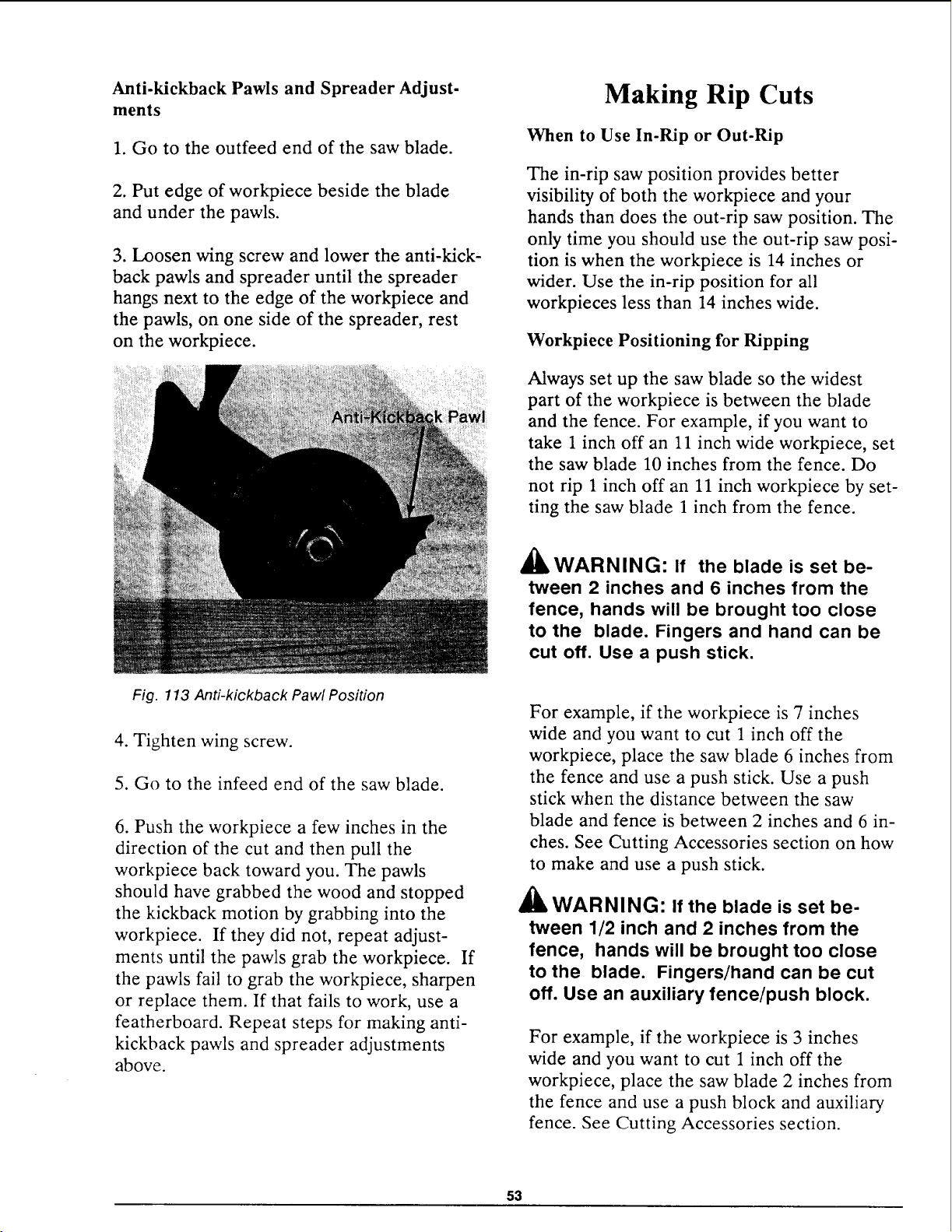
Anti-kickback Pawls and Spreader Adjust-
ments
1. Go to the outfeed end of the saw blade.
2. Put edge of workpiece beside the blade
and under the pawls.
3. Loosen wing screw and lower the anti-kick-
back pawls and spreader until the spreader
hangs next to the edge of the workpiece and
the pawls, on one side of the spreader, rest
on the workpiece.
Making Rip Cuts
When to Use In-Rip or Out-Rip
The in-rip saw position provides better
visibility of both the workpiece and your
hands than does the out-rip saw position. The
only time you should use the out-rip saw posi-
tion is when the workpiece is 14 inches or
wider. Use the in-rip position for all
workpieces less than 14 inches wide.
Workpiece Positioning for Ripping
Always set up the saw blade so the widest
part of the workpiece is between the blade
and the fence. For example, if you want to
take 1 inch off an 11 inch wide workpiece, set
the saw blade 10 inches from the fence. Do
not rip 1 inch off an 11 inch workpiece by set-
ting the saw blade 1 inch from the fence.
A
411WARNING: If the blade is set be-
tween 2 inches and 6 inches from the
fence, hands will be brought too close
to the blade. Fingers and hand can be
cut off. Use a push stick.
Fig. 113 Anti-kickback Pawl Position
4. Tighten wing screw.
5. Go to the infeed end of the saw blade.
6. Push the workpiece a few inches in the
direction of the cut and then pull the
workpiece back toward you. The pawls
should have grabbed the wood and stopped
the kickback motion by grabbing into the
workpiece. If they did not, repeat adjust-
ments until the pawls grab the workpiece. If
the pawls fail to grab the workpiece, sharpen
or replace them. If that fails to work, use a
featherboard. Repeat steps for making anti-
kickback pawls and spreader adjustments
above.
For example, if the workpiece is 7 inches
wide and you want to cut 1 inch off the
workpiece, place the saw blade 6 inches from
the fence and use a push stick. Use a push
stick when the distance between the saw
blade and fence is between 2 inches and 6 in-
ches. See Cutting Accessories section on how
to make and use a push stick.
_lb WARNING" If the blade is set be-
tween 1/2 inch and 2 inches from the
fence, hands will be brought too close
to the blade. Fingers/hand can be cut
off. Use an auxiliary fence/push block.
For example, if the workpiece is 3 inches
wide and you want to cut 1 inch off the
workpiece, place the saw blade 2 inches from
the fence and use a push block and auxiliary
fence. See Cutting Accessories section.
53
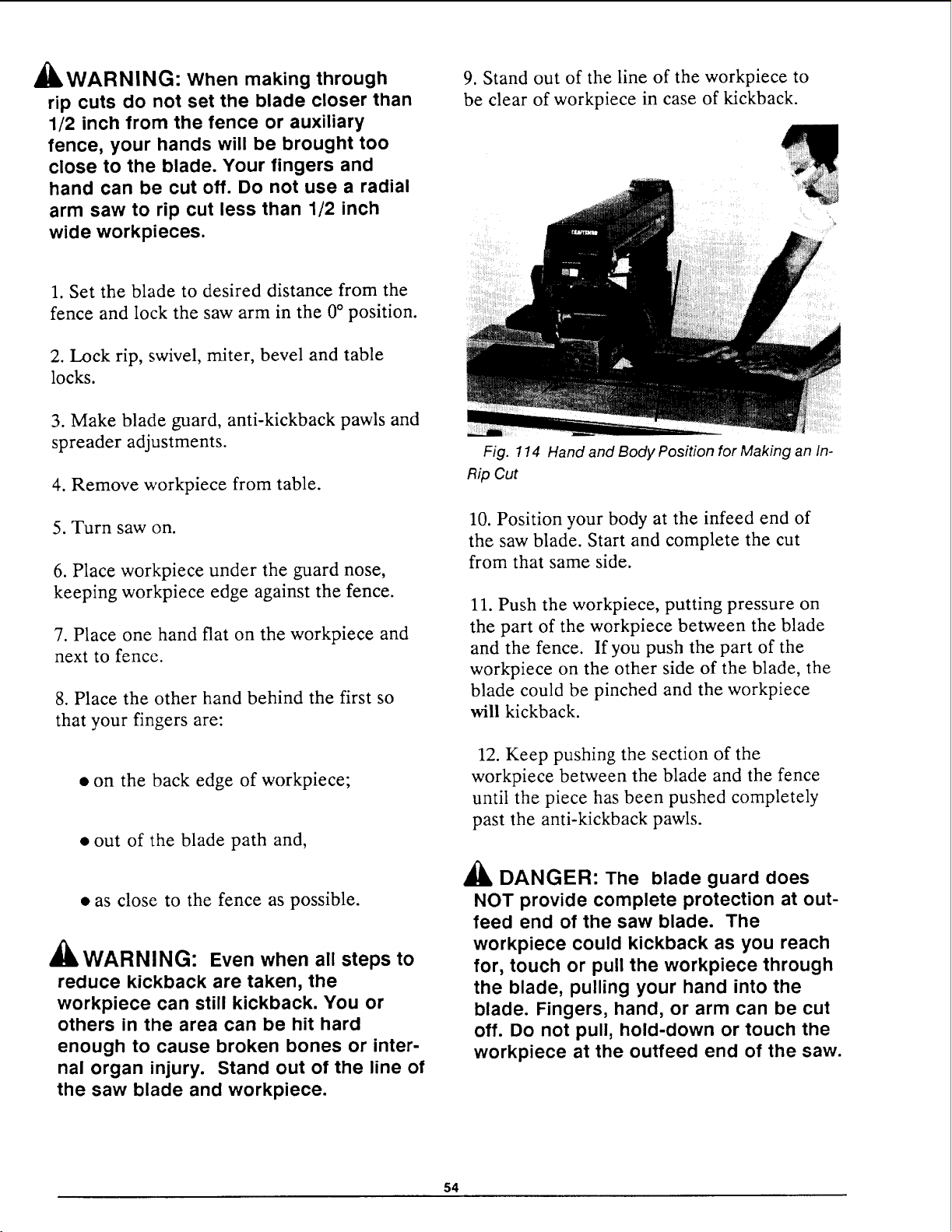
_kWARNING: When making through
rip cuts do not set the blade closer than
1/2 inch from the fence or auxiliary
fence, your hands will be brought too
close to the blade. Your fingers and
hand can be cut off. Do not use a radial
arm saw to rip cut less than 1/2 inch
wide workpieces.
1. Set the blade to desired distance from the
fence and lock the saw arm in the 0° position.
2. Lock rip, swivel, miter, bevel and table
locks.
3. Make blade guard, anti-kickback pawls and
spreader adjustments.
4. Remove workpiece from table.
5. Turn saw on.
6. Place workpiece under the guard nose,
keeping workpiece edge against the fence.
7. Place one hand flat on the workpiece and
next to fence.
8. Place the other hand behind the first so
that your fingers are:
• on the back edge of workpiece;
• out of the blade path and,
• as close to the fence as possible.
a3, _
dUkWARNING: Even when all steps to
reduce kickback are taken, the
workpiece can still kickback. You or
others in the area can be hit hard
enough to cause broken bones or inter-
nal organ injury. Stand out of the line of
the saw blade and workpiece.
9. Stand out of the line of the workpiece to
be clear of workpiece in case of kickback.
Fig. 114 Hand and Body Position for Making an In-
Rip Cut
10. Position your body at the infeed end of
the saw blade. Start and complete the cut
from that same side.
11. Push the workpiece, putting pressure on
the part of the workpiece between the blade
and the fence. If you push the part of the
workpiece on the other side of the blade, the
blade could be pinched and the workpiece
will kickback.
12. Keep pushing the section of the
workpiece between the blade and the fence
until the piece has been pushed completely
past the anti-kickback pawls.
_lb DANGER: The blade guard does
NOT provide complete protection at out-
feed end of the saw blade. The
workpiece could kickback as you reach
for, touch or pull the workpiece through
the blade, pulling your hand into the
blade. Fingers, hand, or arm can be cut
off. Do not pull, hold-down or touch the
workpiece at the outfeed end of the saw.
54
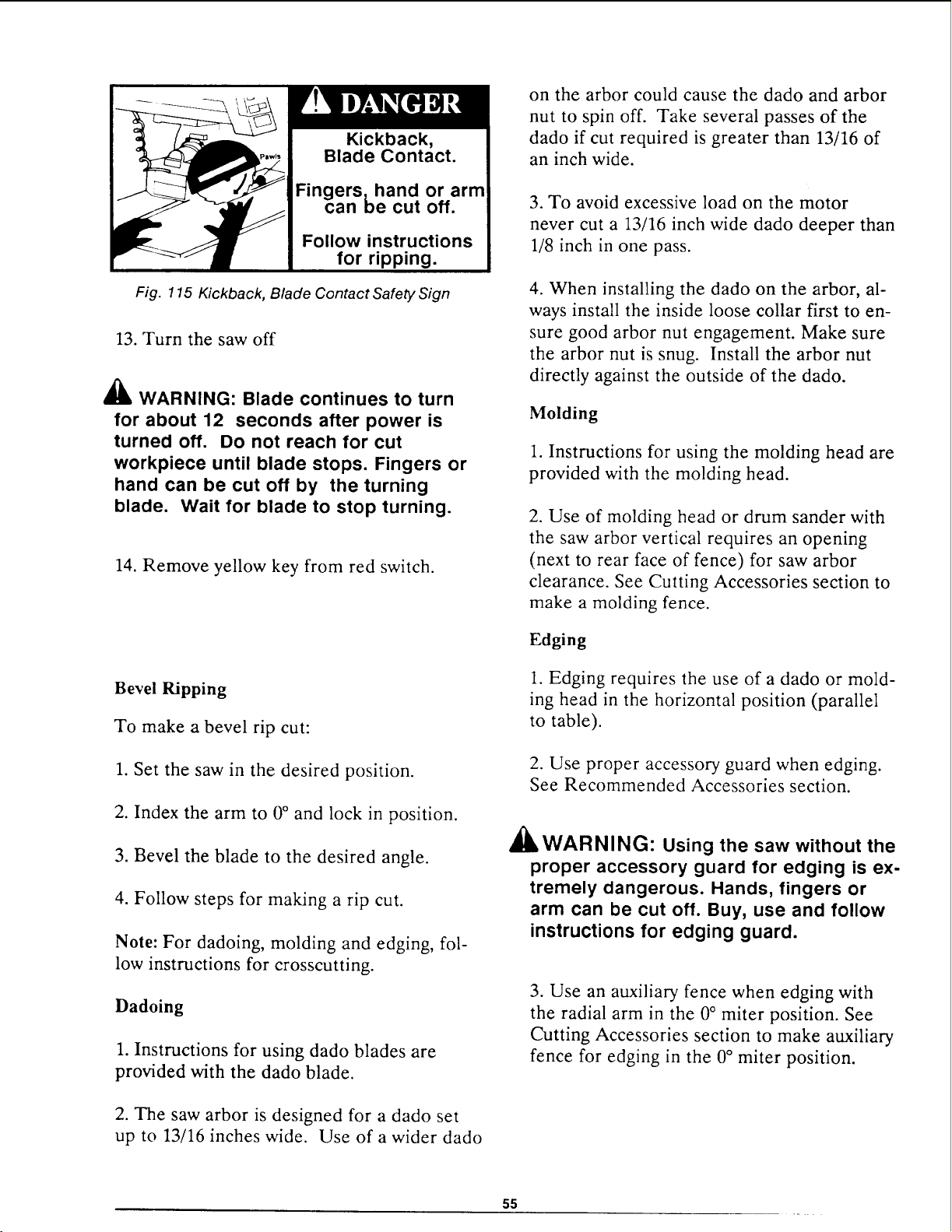
Kickback,
Blade Contact.
Fingers,hand or arm
can be cut off.
Follow instructions
for ripping.
Fig. 115 Kickback, Blade Contact Safety Sign
13. Turn the saw off
_1_ WARNING: Blade continues to turn
for about 12 seconds after power is
turned off. Do not reach for cut
workpiece until blade stops. Fingers or
hand can be cut off by the turning
blade. Wait for blade to stop turning.
14. Remove yellow key from red switch.
Bevel Ripping
To make a bevel rip cut:
1. Set the saw in the desired position.
2. Index the arm to 0 ° and lock in position.
3. Bevel the blade to the desired angle.
4. Follow steps for making a rip cut.
Note: For dadoing, molding and edging, fol-
low instructions for crosscutting.
Dadoing
1. Instructions for using dado blades are
provided with the dado blade.
2. The saw arbor is designed for a dado set
up to 13/16 inches wide. Use of a wider dado
on the arbor could cause the dado and arbor
nut to spin off. Take several passes of the
dado if cut required is greater than 13/16 of
an inch wide.
3. To avoid excessive load on the motor
never cut a 13/16 inch wide dado deeper than
1/8 inch in one pass.
4. When installing the dado on the arbor, al-
ways install the inside loose collar first to en-
sure good arbor nut engagement. Make sure
the arbor nut is snug. Install the arbor nut
directly against the outside of the dado.
Molding
1. Instructions for using the molding head are
provided with the molding head.
2. Use of molding head or drum sander with
the saw arbor vertical requires an opening
(next to rear face of fence) for saw arbor
clearance. See Cutting Accessories section to
make a molding fence.
Edging
1. Edging requires the use of a dado or mold-
ing head in the horizontal position (parallel
to table).
2. Use proper accessory guard when edging.
See Recommended Accessories section.
_WARNING: Using the saw without the
proper accessory guard for edging is ex-
tremely dangerous. Hands, fingers or
arm can be cut off. Buy, use and follow
instructions for edging guard.
3. Use an auxiliary fence when edging with
the radial arm in the 0° miter position. See
Cutting Accessories section to make auxiliary
fence for edging in the 0° miter position.
55
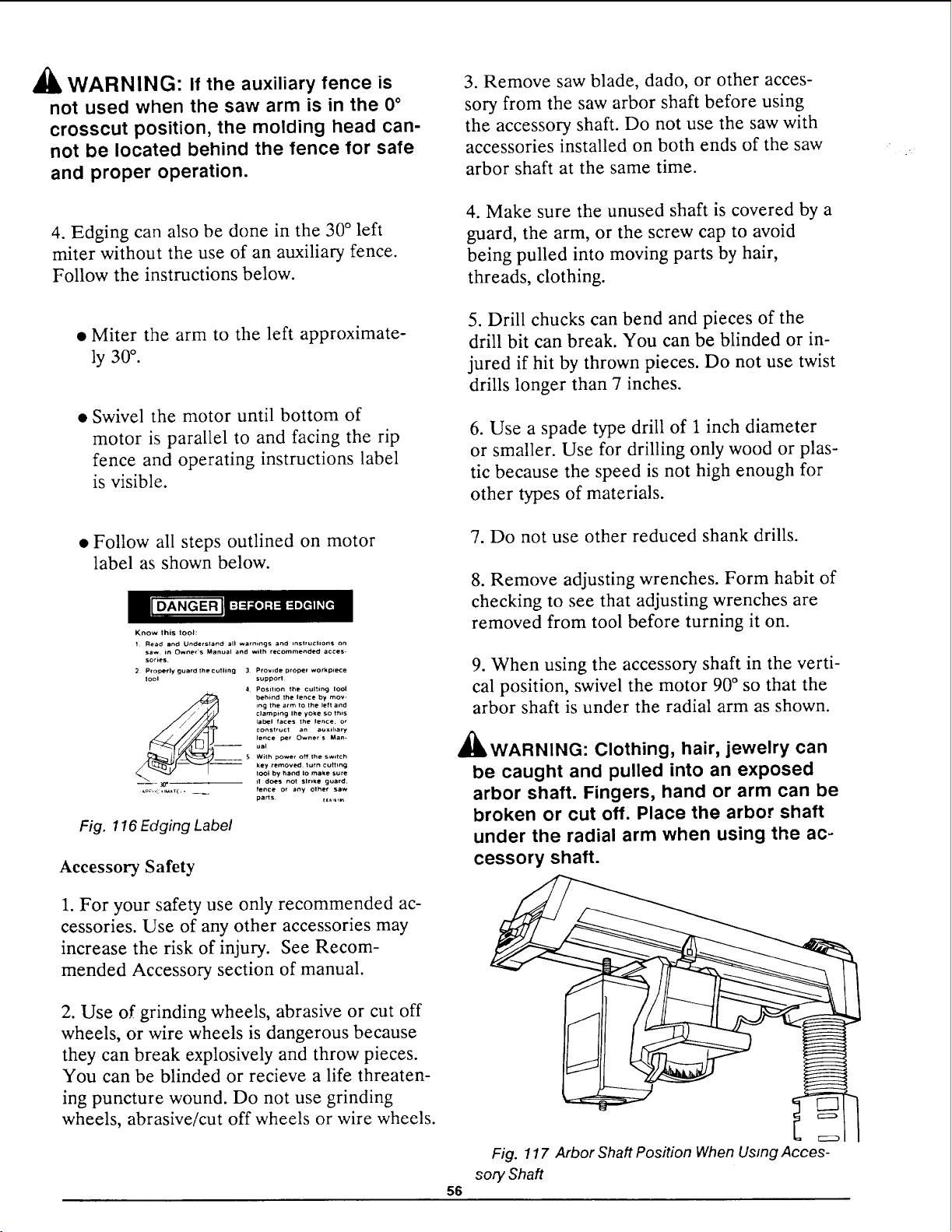
,_ WARNING: If the auxiliary fence is
not used when the saw arm is in the 0°
crosscut position, the molding head can-
not be located behind the fence for safe
and proper operation.
4. Edging can also be done in the 30 ° left
miter without the use of an auxiliary fence.
Follow the instructions below.
3. Remove saw blade, dado, or other acces-
sory from the saw arbor shaft before using
the accessory shaft. Do not use the saw with
accessories installed on both ends of the saw
arbor shaft at the same time.
4. Make sure the unused shaft is covered by a
guard, the arm, or the screw cap to avoid
being pulled into moving parts by hair,
threads, clothing.
• Miter the arm to the left approximate-
ly 30°.
• Swivel the motor until bottom of
motor is parallel to and facing the rip
fence and operating instructions label
is visible.
5. Drill chucks can bend and pieces of the
drill bit can break. You can be blinded or in-
jured if hit by thrown pieces. Do not use twist
drills longer than 7 inches.
6. Use a spade type drill of 1 inch diameter
or smaller. Use for drilling only wood or plas-
tic because the speed is not high enough for
other types of materials.
• Follow all steps outlined on motor
label as shown below.
Know this toot:
1 Read and Understand all warnings and InsIruclion$ on
saw in Owner's Manual and with recommended acces-
series.
2 Properly guard the curling 3 Provide proper workp*ece
tool support
4 Position the culling Iool
behind the lence by mov-
ing the arm tO the left and
clamping Ihe yoke so this
label faces the lence, or
construct an auxlhary
lence per Owners Man-
-- ual
5 With power oHIhe switch
key removed lurn cutting
tool by hand Io make sure
_1_ it does not Slrl_e guard,
fence or any othe¢ saw
parts. _E_,t,I_
Fig. 116 Edging Label
Accessory Safety
1. For your safety use only recommended ac-
cessories. Use of any other accessories may
increase the risk of injury. See Recom-
mended Accessory section of manual.
7. Do not use other reduced shank drills.
8. Remove adjusting wrenches. Form habit of
checking to see that adjusting wrenches are
removed from tool before turning it on.
9. When using the accessory shaft in the verti-
cal position, swivel the motor 90 ° so that the
arbor shaft is under the radial arm as shown.
_,WARNING: Clothing, hair, jewelry can
be caught and pulled into an exposed
arbor shaft. Fingers, hand or arm can be
broken or cut off. Place the arbor shaft
under the radial arm when using the ac-
cessory shaft.
2. Use of grinding wheels, abrasive or cut off
wheels, or wire wheels is dangerous because
they can break explosively and throw pieces.
You can be blinded or recieve a life threaten-
ing puncture wound. Do not use grinding
wheels, abrasive/cut off wheels or wire wheels.
56
Fig. 117 Arbor Shaft Position When Usmg Acces-
sory Shaft
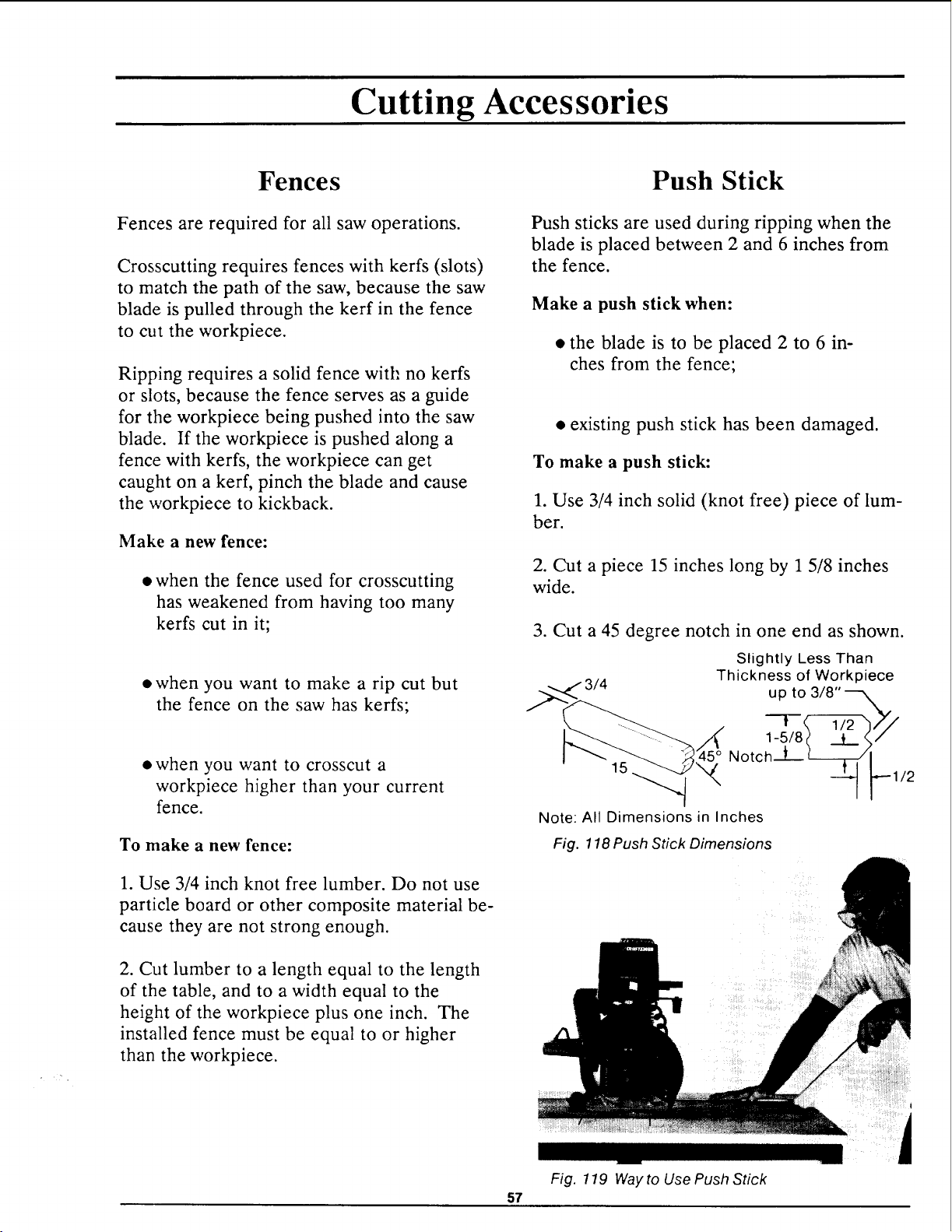
Cutting Accessories
Fences
Fences are required for all saw operations.
Crosscutting requires fences with kerfs (slots)
to match the path of the saw, because the saw
blade is pulled through the kerf in the fence
to cut the workpiece.
Ripping requires a solid fence witt: no kerfs
or slots, because the fence serves as a guide
for the workpiece being pushed into the saw
blade. If the workpiece is pushed along a
fence with kerfs, the workpiece can get
caught on a kerr, pinch the blade and cause
the workpiece to kickback.
Make a new fence:
• when the fence used for crosscutting
has weakened from having too many
kerfs cut in it;
• when you want to make a rip cut but
the fence on the saw has kerfs;
• when you want to crosscut a
workpiece higher than your current
fence.
To make a new fence:
1. Use 3/4 inch knot free lumber. Do not use
particle board or other composite material be-
cause they are not strong enough.
2. Cut lumber to a length equal to the length
of the table, and to a width equal to the
height of the workpiece plus one inch. The
installed fence must be equal to or higher
than the workpiece.
57
Push Stick
Push sticks are used during ripping when the
blade is placed between 2 and 6 inches from
the fence.
Make a push stick when:
• the blade is to be placed 2 to 6 in-
ches from the fence;
• existing push stick has been damaged.
To make a push stick:
1. Use 3/4 inch solid (knot free) piece of lum-
ber.
2. Cut a piece 15 inches long by 1 5/8 inches
wide.
3. Cut a 45 degree notch in one end as shown.
Slightly Less Than
Thickness of Workpiece
up to 3/8"---_.
--!- '2--h_
Notch--L- __._.
15 "_ 1/2
Note: All Dimensions in Inches
Fig. 118 Push Stick Dimensions
Fig. 119 Way to Use Push Stick
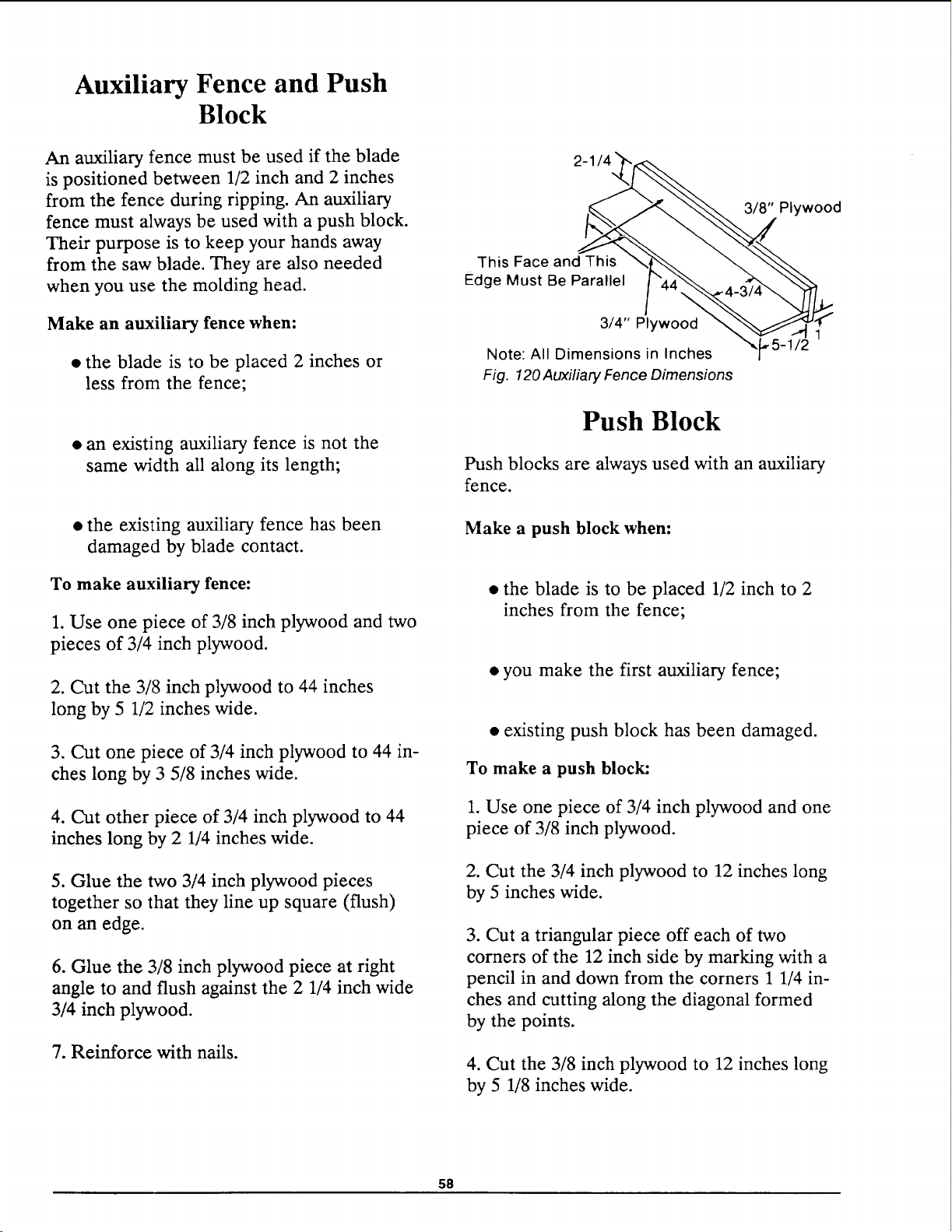
Auxiliary Fence and Push
Block
An auxiliary fence must be used if the blade
is positioned between 1/2 inch and 2 inches
from the fence during ripping. An auxiliary
fence must always be used with a push block.
Their purpose is to keep your hands away
from the saw blade. They are also needed
when you use the molding head.
Make an auxiliary fence when:
• the blade is to be placed 2 inches or
less from the fence;
• an existing auxiliary fence is not the
same width all along its length;
• the existing auxiliary fence has been
damaged by blade contact.
To make auxiliary fence:
1. Use one piece of 3/8 inch plywood and two
pieces of 3/4 inch plywood.
2. Cut the 3/8 inch plywood to 44 inches
long by 5 1/2 inches wide.
3. Cut one piece of 3/4 inch plywood to 44 in-
ches long by 3 5/8 inches wide.
4. Cut other piece of 3/4 inch plywood to 44
inches long by 2 1/4 inches wide.
5. Glue the two 3/4 inch plywood pieces
together so that they line up square (flush)
on an edge.
6. Glue the 3/8 inch plywood piece at right
angle to and flush against the 2 1/4 inch wide
3/4 inch plywood.
7. Reinforce with nails.
3/8" Plywood
This Face and This
Edge Must Be Parallel
3/4" Plywood
Note: All Dimensions in Inches
Fig. 120 Auxiliary Fence Dimensions
Push Block
Push blocks are always used with an auxiliary
fence.
Make a push block when:
• the blade is to be placed 1/2 inch to 2
inches from the fence;
• you make the first auxiliary fence;
• existing push block has been damaged.
To make a push block:
1. Use one piece of 3/4 inch plywood and one
piece of 3/8 inch plywood.
2. Cut the 3/4 inch plywood to 12 inches long
by 5 inches wide.
3. Cut a triangular piece off each of two
corners of the 12 inch side by marking with a
pencil in and down from the corners 1 1/4 in-
ches and cutting along the diagonal formed
by the points.
4. Cut the 3/8 inch plywood to 12 inches long
by 5 1/8 inches wide.
58
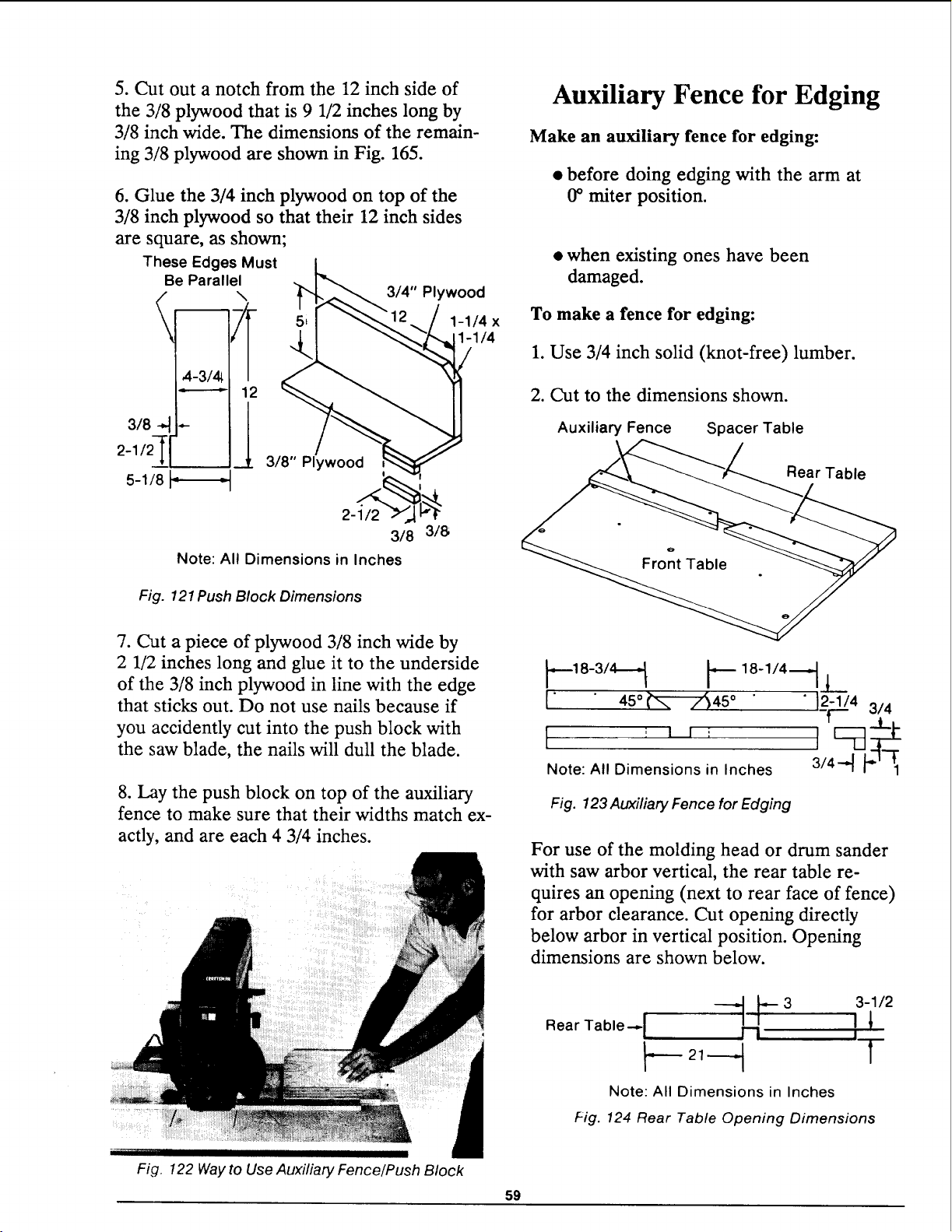
5. Cut out a notch from the 12 inch side of
the 3/8 plywood that is 9 1/2 inches long by
3/8 inch wide. The dimensions of the remain-
ing 3/8 plywood are shown in Fig. 165.
6. Glue the 3/4 inch plywood on top of the
3/8 inch plywood so that their 12 inch sides
are square, as shown;
These Edges Must
Be Parallel
5-1/8 t_ _
3/4" Plywood
1-1/4 x
1-1/4
3/8" Plywood
2-1/2
318 318
Note: All Dimensions in Inches
Fig. 121 Push Block Dimensions
Auxiliary Fence for Edging
Make an auxiliary fence for edging:
• before doing edging with the arm at
0° miter position.
• when existing ones have been
damaged.
To make a fence for edging:
1. Use 3/4 inch solid (knot-free) lumber.
2. Cut to the dimensions shown.
Auxiliary Fence Spacer Table
Rear Table
7. Cut a piece of plywood 3/8 inch wide by
2 1/2 inches long and glue it to the underside
of the 3/8 inch plywood in line with the edge
that sticks out. Do not use nails because if
you accidently cut into the push block with
the saw blade, the nails will dull the blade.
8. Lay the push block on top of the auxiliary
fence to make sure that their widths match ex-
actly, and are each 4 3/4 inches.
l 45° --z545° " 12-1/43/4
T'- ..L.
[ II I F--d l-
Note: All Dimensions in Inches 3/4--_ _'_'-_1
Fig. 123 Auxiliary Fence for Edging
For use of the molding head or drum sander
with saw arbor vertical, the rear table re-
quires an opening (next to rear face of fence)
for arbor clearance. Cut opening directly
below arbor in vertical position. Opening
dimensions are shown below.
Fig. 122 Way to Use Auxiliary Fence/Push Block
59
Rear Table-,. I ---,11._1_--3 j1_3-1/2
I--- T
Note: All Dimensions in Inches
Fig. 124 Rear Table Opening Dimensions
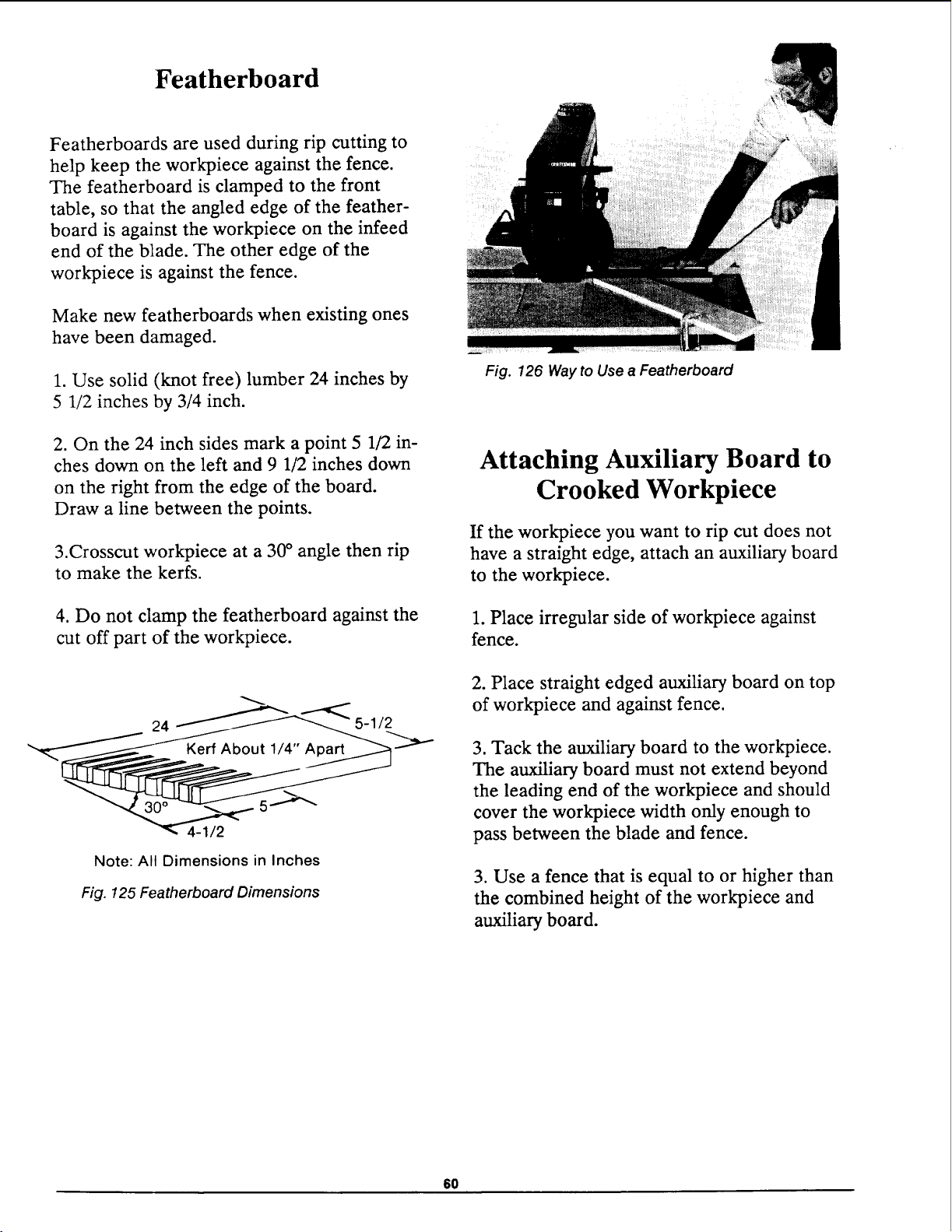
Featherboard
Featherboards are used during rip cutting to
help keep the workpiece against the fence.
The featherboard is clamped to the front
table, so that the angled edge of the feather-
board is against the workpiece on the infeed
end of the blade. The other edge of the
workpiece is against the fence.
Make new featherboards when existing ones
have been damaged.
1. Use solid (knot free) lumber 24 inches by
5 1/2 inches by 3/4 inch.
2. On the 24 inch sides mark a point 5 1/2 in-
ches down on the left and 9 1/2 inches down
on the right from the edge of the board.
Draw a line between the points.
3.Crosscut workpiece at a 30 ° angle then rip
to make the kerfs.
4. Do not clamp the featherboard against the
cut off part of the workpiece.
24 5-112
5.-->-'--
4-1/2
Note: All Dimensions in Inches
Fig. 125 Featherboard Dimensions
_ii_iiiili i i ¸¸....
Fig. 126 Way to Use a Featherboard
Attaching Auxiliary Board to
Crooked Workpiece
If the workpiece you want to rip cut does not
have a straight edge, attach an auxiliary board
to the workpiece.
1. Place irregular side of workpiece against
fence.
2. Place straight edged auxiliary board on top
of workpiece and against fence.
3. Tack the auxiliary board to the workpiece.
The auxiliary board must not extend beyond
the leading end of the workpiece and should
cover the workpiece width only enough to
pass between the blade and fence.
3. Use a fence that is equal to or higher than
the combined height of the workpiece and
auxiliary board.
6O
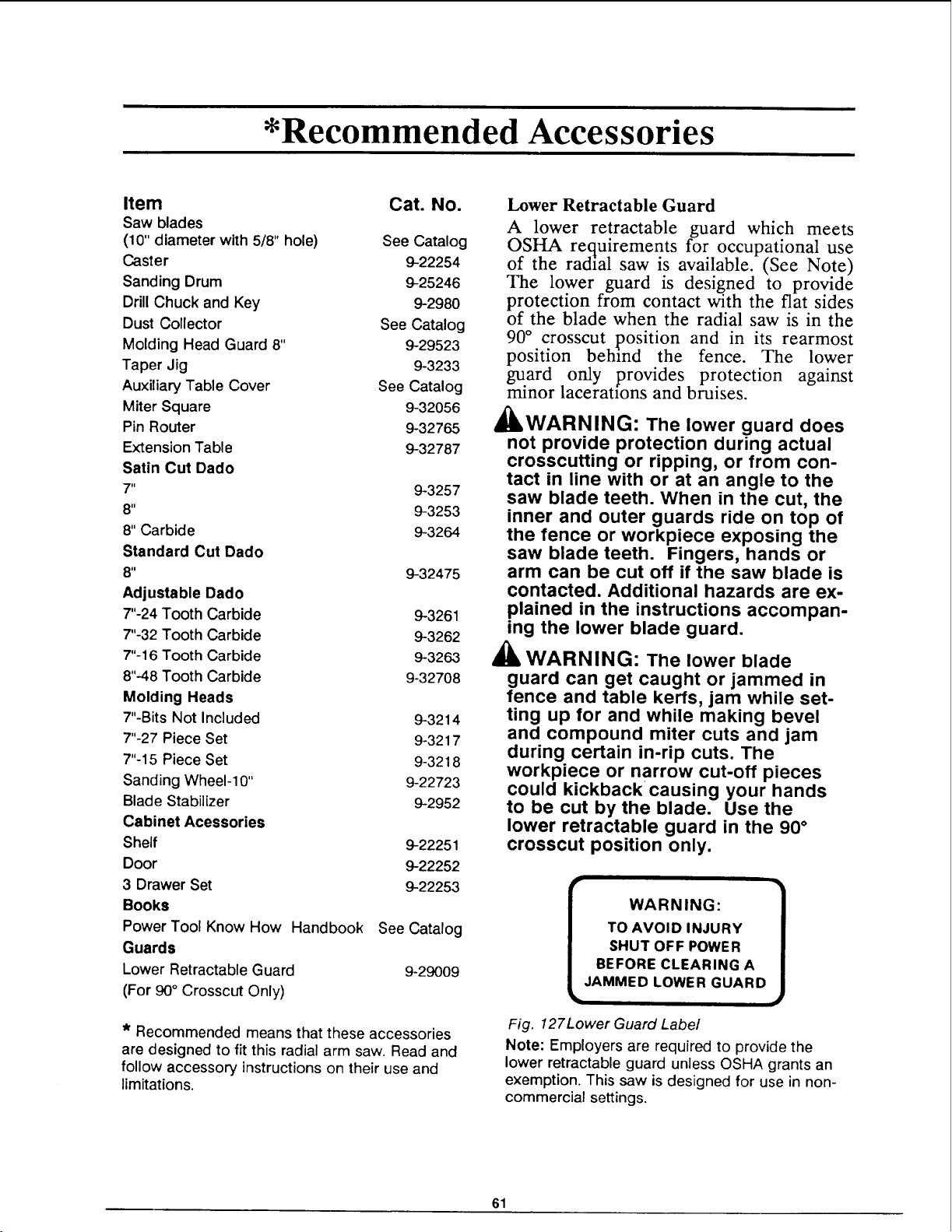
*Recommended Accessories
Item Cat. No.
Saw blades
(10" diameter with 5/8" hole) See Catalog
Caster 9-22254
Sanding Drum 9-25246
Drill Chuck and Key 9-2980
Dust Collector See Catalog
Molding Head Guard 8" 9-29523
Taper Jig 9-3233
Auxiliary Table Cover See Catalog
Miter Square 9-32056
Pin Router 9-32765
Extension Table 9-32787
Satin Cut Dado
7" 9-3257
8" 9-3253
8" Carbide 9-3264
Standard Cut Dado
8" 9-32475
Adjustable Dado
7"-24 Tooth Carbide 9-3261
7"-32 Tooth Carbide 9-3262
7"-16 Tooth Carbide 9-3263
8"-48 Tooth Carbide 9-32708
Molding Heads
7"-Bits Not Included 9-3214
7"-27 Piece Set 9-3217
7"-15 Piece Set 9-3218
Sanding Wheel-10" 9-22723
Blade Stabilizer 9-2952
Cabinet Acessories
Shelf 9-22251
Door 9-22252
3 Drawer Set 9-22253
Books
PowerTool KnowHow Handbook See Catalog
Guards
Lower Retractable Guard 9-29009
(For 90° Crosscut Only)
* Recommended means that these accessories
are designed to fit this radial arm saw. Read and
follow accessory instructions on their use and
limitations.
Lower Retractable Guard
A lower retractable guard which meets
OSHA requirements for occupational use
of the radial saw is available. (See Note)
The lower guard is designed to provide
protection from contact with the fiat sides
of the blade when the radial saw is in the
90 ° crosscut position and in its rearmost
position behind the fence. The lower
guard only provides protection against
minor laceraUons and bruises.
_WARNING: The lower guard does
not provide protection during actual
crosscutting or ripping, or from con-
tact in line with or at an angle to the
saw blade teeth. When in the cut, the
inner and outer guards ride on top of
the fence or workpiece exposing the
saw blade teeth. Fingers, hands or
arm can be cut off if the saw blade is
contacted. Additional hazards are ex-
plained in the instructions accompan-
ing the lower blade guard.
_lb WARNING: The lower blade
guard can get caught or jammed in
fence and table kerfs, jam while set-
ting up for and while making bevel
and compound miter cuts and jam
during certain in-rip cuts. The
workpiece or narrow cut-off pieces
could kickback causing your hands
to be cut by the blade. Use the
lower retractable guard in the 90 °
crosscut position only.
WARNING:
TO AVOID INJURY
SHUT OFF POWER
BEFORE CLEARING A
JAMMED LOWER GUARD
Fig. 127Lower Guard Label
Note: Employers are required to provide the
lower retractable guard unless OSHA grants an
exemption. This saw is designed for use in non-
commercial settings.
61
Glossary
Anti-kickback Pawls: Pivoted objects with
teeth which help prevent workpiece kickback.
Arbor: The bar or shaft that holds the saw
blade.
Bevel: The slanting of the motor and blade to
an angle between 0° and 90 °.
Crosscut: Cutting a workpiece to length.
Dado: Non-through cut which produces a
square sided notch or trough in the workpiece.
Featherboard: Device used to keep
workpiece in contact with the fence during rip-
ping.
Freehand: Performing a cut without the use
of fence, guide or hold-down designed to
prevent the workpiece from moving during
the cutting operation.
Heel: Misalignment of the blade relative to
blade travel path.
Infeed: The end of the saw blade where the
workpiece is fed during ripping; identified by
the absence of pawls.
In-Rip: Positioning the the motor toward the
front of the table, the blade toward the fence.
Kerr: Slot caused by removal of material by
the blade in a through cut, or a shallow slot
produced by the blade in a non-through cut.
Kickback: Uncontrolled throwing of the
workpiece during ripping.
Miter: Positioning the saw arm to the right or
left of 0°.
Molding Cut: Non-through cut which
produces a contoured surface on the
workpiece.
Outfeed: The end of the saw blade where the
rip cut workpiece leaves the saw blade; iden-
tified by presence of pawls.
Out-rip: Positioning the motor toward the
fence, the blade toward the front of the table
during ripping.
Parallel: When two surfaces are the same dis-
tance apart at all points.
Perpendicular: When two surfaces are 90 °
(square) to each other.
Push Block!Auxiliary Fence: Two accessories
used together for ripping a workpiece be-
tween 1/2 inch and 2 inches wide.
Push Stick: Cutting accessory used during rip-
ping a workpiece between 2 inches and 6 in-
ches wide.
Revolutions Per Minute (RPM): Number of
turns completed by an object in one minute.
Ripping: Used to change the width of a
workpiece by cutting along its length.
Spreader: Used during ripping to keep the
kerf from closing and pinching the blade. It
helps prevent kickback.
Workpiece: Object being cut by the saw.
62
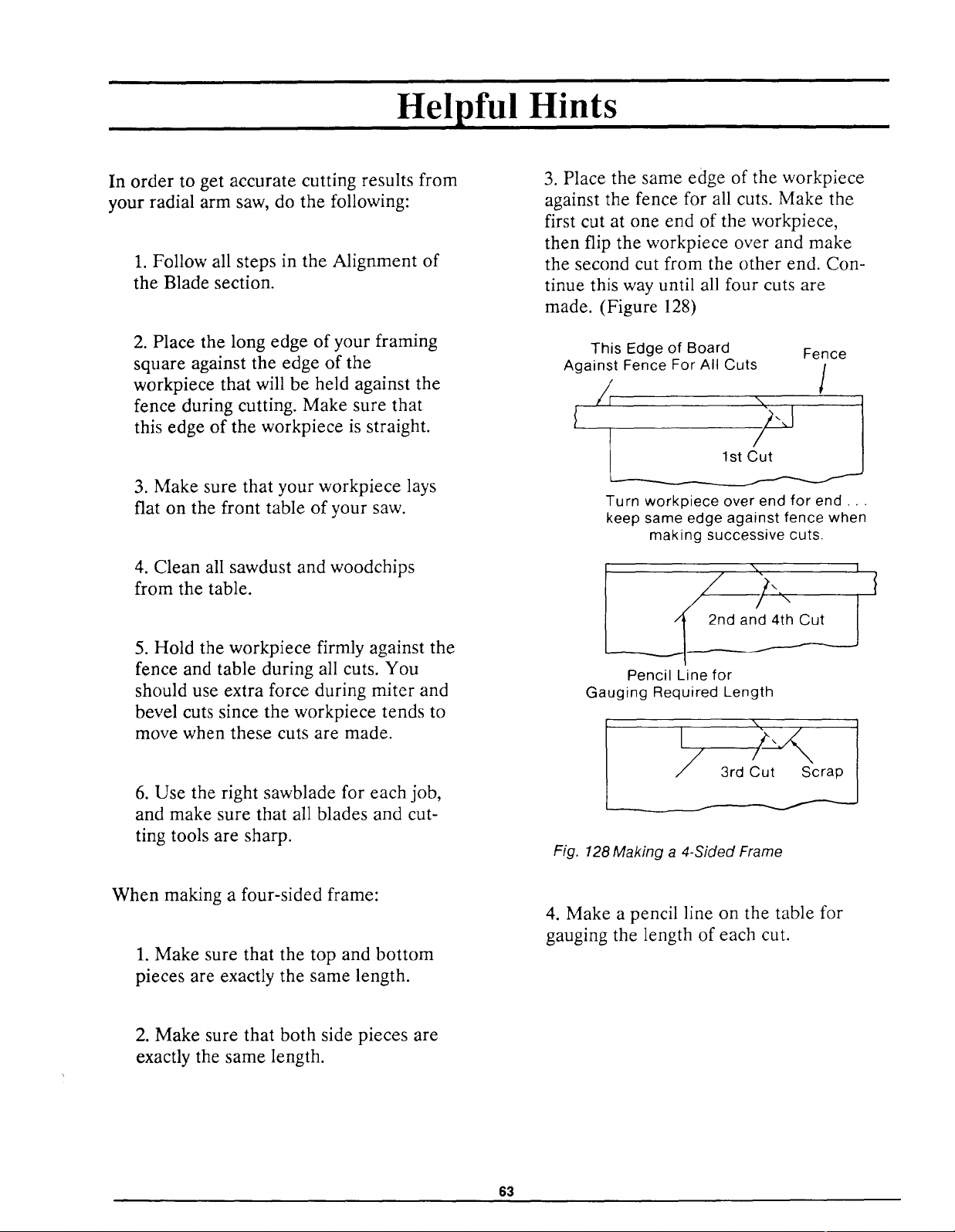
Helpful Hints
In order to get accurate cutting results from
your radial arm saw, do the following:
1. Follow all steps in the Alignment of
the Blade section.
2. Place the long edge of your framing
square against the edge of the
workpiece that will be held against the
fence during cutting. Make sure that
this edge of the workpiece is straight.
3. Make sure that your workpiece lays
flat on the front table of your saw.
4. Clean all sawdust and woodchips
from the table.
5. Hold the workpiece firmly against the
fence and table during all cuts. You
should use extra force during miter and
bevel cuts since the workpiece tends to
move when these cuts are made.
6. Use the right sawblade for each job,
and make sure that all blades and cut-
ting tools are sharp.
3. Place the same edge of the workpiece
against the fence for all cuts. Make the
first cut at one end of the workpiece,
then flip the workpiece over and make
the second cut from the other end. Con-
tinue this way until all four cuts are
made. (Figure 128)
This Edge of Board Fence
Against Fence For All Cuts /
S
1
l /)-,I
Turn workpiece over end for end.,
keep same edge against fence when
making successive cuts.
///,.
2nd and 4th Cut
Pencil Line for
Gauging Required Length
I
_t Scrap
Fig. 128 Making a 4-Sided Frame
When making a four-sided frame:
1. Make sure that the top and bottom
pieces are exactly the same length.
4. Make a pencil line on the table for
gauging the length of each cut.
2. Make sure that both side pieces are
exactly the same length.
63
Motor
To avoid motor damage this motor should be
blown out or vacuumed frequently to prevent
sawdust buildup which will interfere with
normal motor ventilation.
If the motor fails to start, turn the power
switch to the "OFF" position immediately.
Remove the yellow key. UNPLUG THE
TOOL. Check the saw blade to insure that it
turns freely and that its teeth are not wedged
into the table top. After the blade has been
freed, try to start the motor again. If, at this
point, the motor still fails to start, refer to the
"Motor Trouble-Shooting Chart."
If the motor should suddenly stall while cut-
ting wood, the power switch should be turned
off, remove the yellow key and unplug the
power cord. Free the blade from the wood.
The motor may now be restarted and the cut
finished.
Frequently blowing of fuses or tripping of
circuit breakers may result if:
• Motor is overloaded: Overloading can oc-
cur if you feed too rapidly or if saw is mis-
aligned so that the blade heels.
• Motor circuit is fused differently from rec-
ommendations: Always follow instructions
for the proper fuse/breaker. Do not use a
fuse/breaker of greater capacity without
consulting a qualified electrician.
Low voltage: Although the motor is de-
signed for operation on the voltage and fre-
quency specified on the nameplate, normal
loads will be handled safely on voltages not
more than 10% above or below the name-
plate voltage. Heavy loads, however, re-
quire that voltage at motor terminals equal
the voltage specified on nameplate.
• Improper extension cord size.
t 0
64
Maintaining Your Saw
General
l'k _
4UkWARNING: For your own safety,
turn power switch off and remove plug
from power source outlet before main-
taining or lubricating your saw.
When you receive your new Craftsman radial
saw, it requires no lubrication. The radial
saw has been partially aligned and all bear-
ings are lubricated and sealed for life. In
time, however, in order to keep your saw in
perfect working order and accurate, it will be
necessary to lubricate and realign. In fact
your radial saw needs more of a cleaning
than a lubrication.
Replacing Antikickback Pawls
Make sure the teeth of the antikickbackpawls
are always sharp. If they become dull they
must be replaced. With a 1/2 inch wrench or
socket remove the 5/16 hex nut and old
pawls. Reassemble new antikickback pawls
and spreader to the bar. Check spreader for
proper alignment and correct if necessary.
(See Alignment of the Blade, Installing
Guard / Setting Spreader section.)
Cleaning
Periodically remove any heavy build-up of
sawdust that may accumulate on the saw.
The absorbing tendency of sawdust will draw
lubricants away from the areas where they
are needed. Clean the carriage bearings and
track surfaces. If packed sawdust and grease
accumulate repeatedly on carriage bearings
and track inspect the wipers for wear and
replace if necessary. (See Adjustments to
Compensate for Wear, Swivel Lock, later in
this section.)
To avoid motor damage the motor should be
blown out or vacuumed frequently to prevent
sawdust build-up which will interfere with
normal motor ventilation.
Lubrication
Your saw is precision built and should be
kept properly lubricated. Before describing
the various points which may periodically re-
quire lubrication, it is more important to first
mention the points which should not be lubri-
cated.
Do not lubricate the following:
• carriage ball bearings
• motor bearings
• area between the miter locking rings
and the column tube
The carriage ball bearings and motor bearings
are sealed ball bearings which require no
added lubrication.
Do lubricate the following, periodically, using
SAE No 10W-30 automotive engine oil:
• Apply a few drops of oil along the
swivel index pin and the bevel index pin
only if the pins have a tendency to
stick. Swivel to in-rip or out-rip for
easy access to the swivel index pin.
Bevel to 45°and bevel indexpin can be
easily accessed behind the yoke as il-
lustrated. (Figure 129)
65
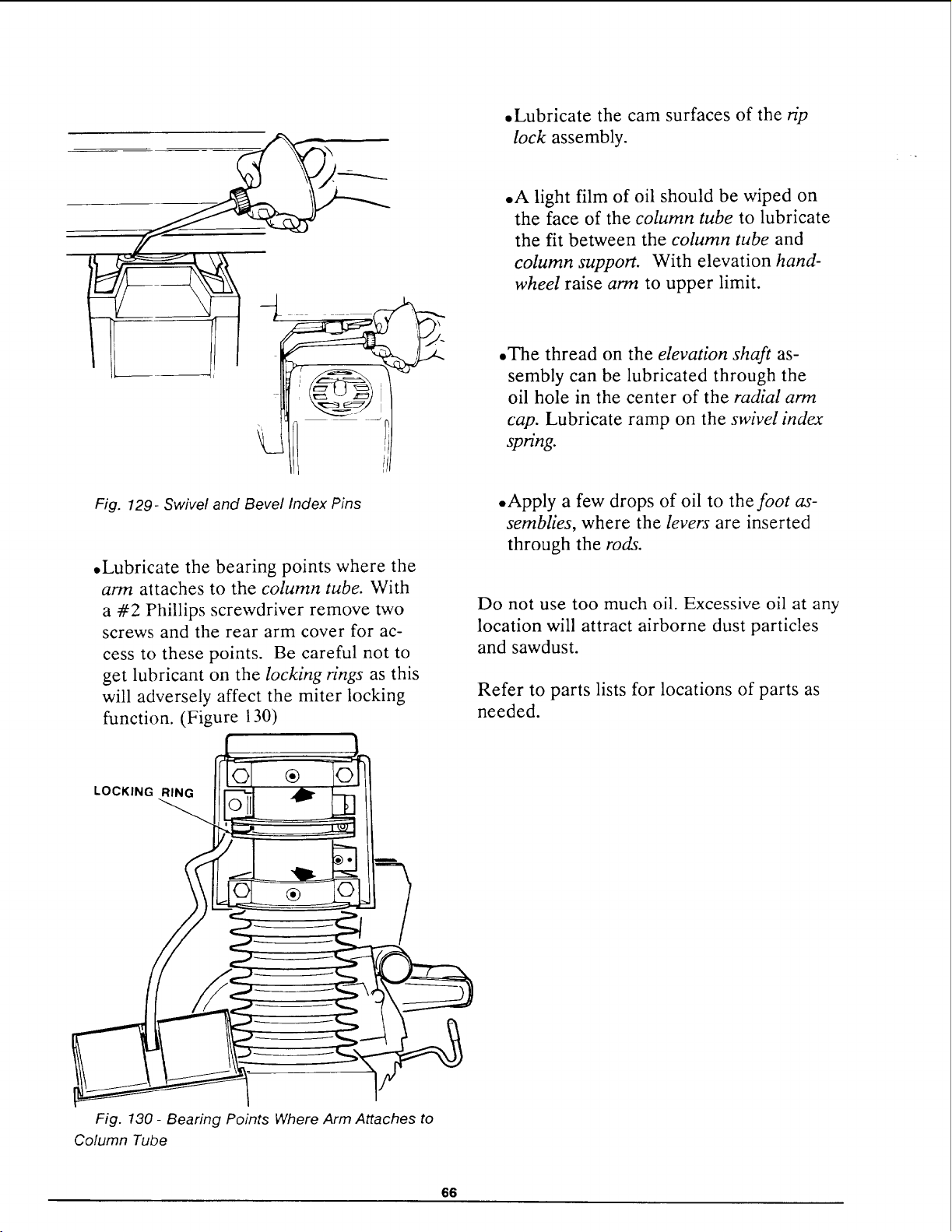
• Lubricate the cam surfaces of the rip
lock assembly.
• A light film of oil should be wiped on
the face of the column tube to lubricate
the fit between the column tube and
column support. With elevation hand-
wheel raise arm to upper limit.
.The thread on the elevation shaft as-
sembly can be lubricated through the
oil hole in the center of the radial arm
cap. Lubricate ramp on the swivel index
spring.
Fig. 129- Swivel and Bevel Index Pins
.Lubricate the bearing points where the
arm attaches to the column tube. With
a #2 Phillips screwdriver remove two
screws and the rear arm cover for ac-
cess to these points. Be careful not to
get lubricant on the locking rings as this
will adversely affect the miter locking
function. (Figure 130)
• Apply a few drops of oil to the foot as-
semblies, where the levers are inserted
through the rods.
Do not use too much oil. Excessive oil at any
location will attract airborne dust particles
and sawdust.
Refer to parts lists for locations of parts as
needed.
LOCKING RING
®
Fig. 130 - Bearing Points Where Arm Attaches to
Column Tube
66
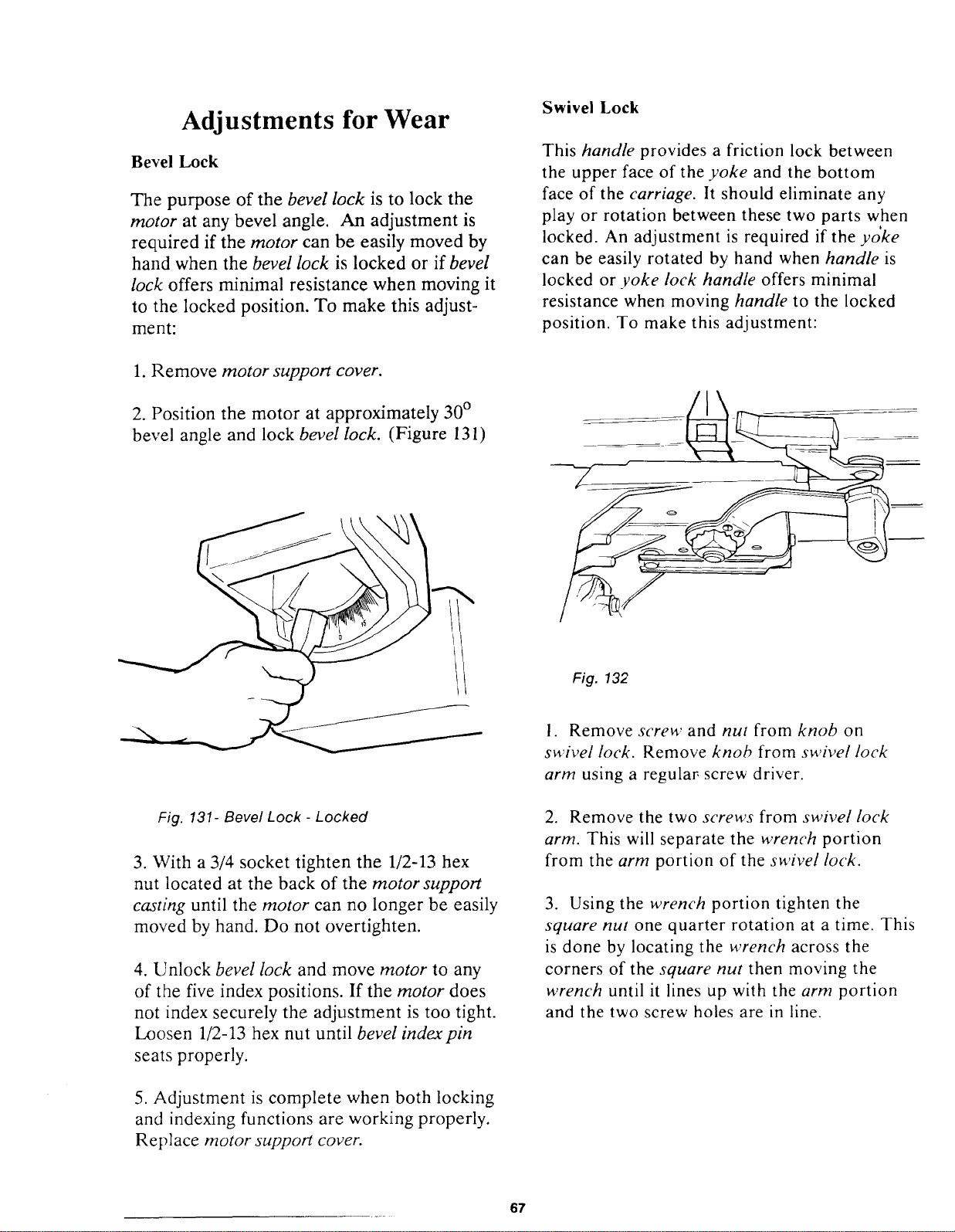
Adjustments for Wear
Bevel Lock
The purpose of the bevel lock is to lock the
motor at any bevel angle. An adjustment is
required if the motor can be easily moved by
hand when the bevel lock is locked or if bevel
lock offers minimal resistance when moving it
to the locked position. To make this adjust-
ment:
Swivel Lock
This handle provides a friction lock between
the upper face of the yoke and the bottom
face of the carriage. It should eliminate any
play or rotation between these two parts when
locked. An adjustment is required if the yoke
can be easily rotated by hand when handle is
locked or yoke lock handle offers minimal
resistance when moving handle to the locked
position. To make this adjustment:
1. Remove motor support cover.
2. Position the motor at approximately 30 °
bevel angle and lock bevel lock. (Figure 131)
Fig. 132
Fig. 131- Bevel Lock - Locked
3. With a 3/4 socket tighten the 1/2-13 hex
nut located at the back of the motor support
casting until the motor can no longer be easily
moved by hand. Do not overtighten.
4. Unlock bevel lock and move motor to any
of the five index positions. If the motor does
not index securely the adjustment is too tight.
Loosen 1/2-13 hex nut until bevel indexpin
seats properly.
5. Adjustment is complete when both locking
and indexing functions are working properly.
Replace motor support cover.
1. Remove screw and nut from knob on
swivel lock. Remove knob from swivel lock
arm using a regular screw driver.
2. Remove the two screws from swivel lock
arm. This will separate the wrench portion
from the arm portion of the swivel lock.
3. Using the wrench portion tighten the
square nut one quarter rotation at a time. This
is done by locating the wrench across the
corners of the square nut then moving the
wrench until it lines up with the arm portion
and the two screw holes are in line.
67
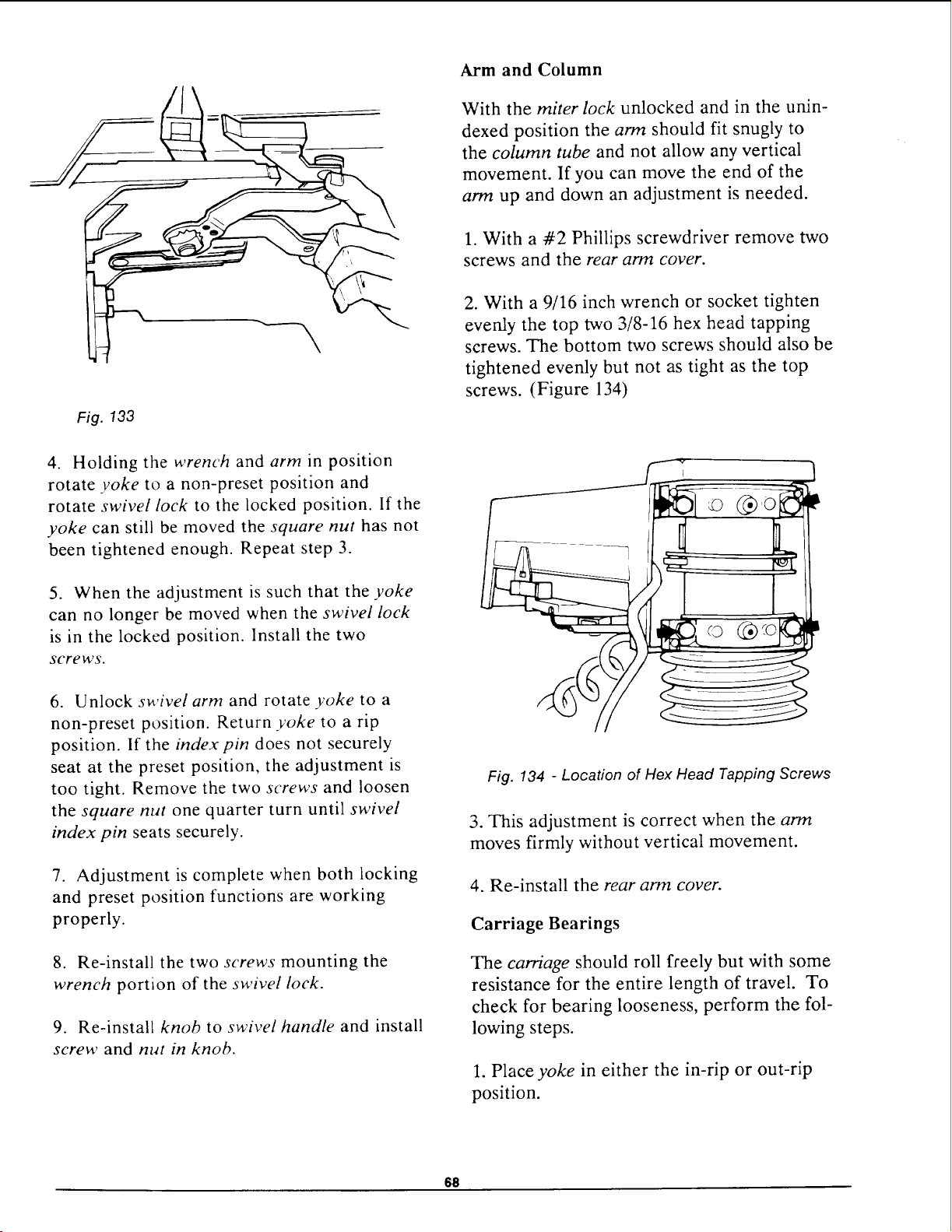
Fig. 133
4. Holding the wrench and arm in position
rotate yoke to a non-preset position and
rotate swivel lock to the locked position. If the
yoke can still be moved the square nut has not
been tightened enough. Repeat step 3.
5. When the adjustment is such that the yoke
can no longer be moved when the swivel lock
is in the locked position. Install the two
screws.
6. Unlock swivel arm and rotate yoke to a
non-preset position. Return yoke to a rip
position. If the index pin does not securely
seat at the preset position, the adjustment is
too tight. Remove the two screws and loosen
the square nut one quarter turn until swivel
index pin seats securely.
7. Adjustment is complete when both locking
and preset position functions are working
properly.
8. Re-install the two screws mounting the
wrench portion of the swivel lock.
9. Re-install knob to swivel handle and install
screw and nut in knob.
Arm and Column
With the miter lock unlocked and in the unin-
dexed position the arm should fit snugly to
the column tube and not allow any vertical
movement. If you can move the end of the
arm up and down an adjustment is needed.
1. With a #2 Phillips screwdriver remove two
screws and the rear arm cover.
2. With a 9/16 inch wrench or socket tighten
evenly the top two 3/8-16 hex head tapping
screws. The bottom two screws should also be
tightened evenly but not as tight as the top
screws. (Figure 134)
© @o
Fig. 134 - Location of Hex Head Tapping Screws
3. This adjustment is correct when the arm
moves firmly without vertical movement.
4. Re-install the rear arm cover.
Carriage Bearings
The carriage should roll freely but with some
resistance for the entire length of travel. To
check for bearing looseness, perform the fol-
lowing steps.
1. Place yoke in either the in-rip or out-rip
position.
611
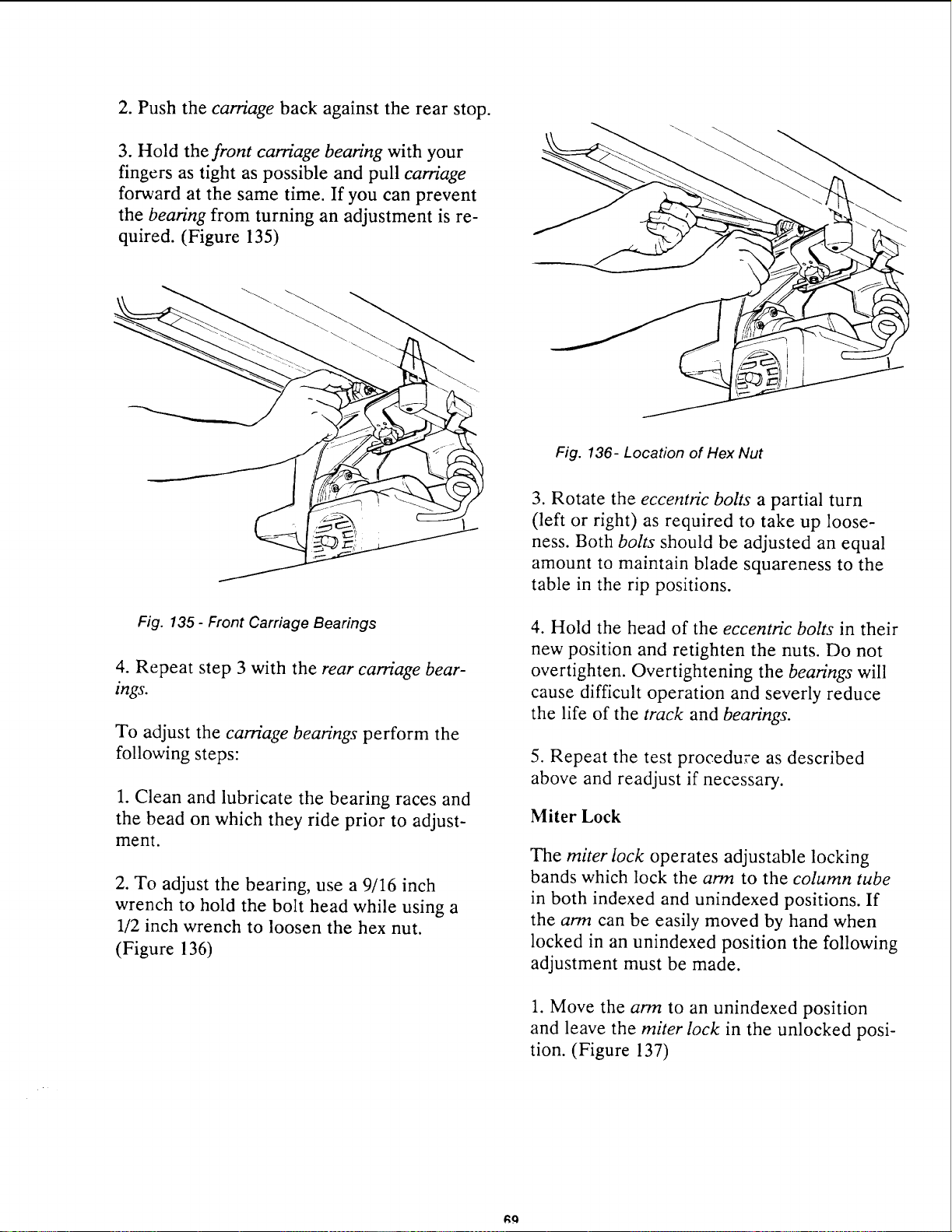
2. Push the carriage back against the rear stop.
3. Hold the front carriage bearing with your
fingers as tight as possible and pull carriage
forward at the same time. If you can prevent
the bearing from turning an adjustment is re-
quired. (Figure 135)
Fig. 135- Front Carriage Bearings
4. Repeat step 3 with the rear carriage bear-
ings.
To adjust the carriage bearings perform the
following steps:
1. Clean and lubricate the bearing races and
the bead on which they ride prior to adjust-
ment.
2. To adjust the bearing, use a 9/16 inch
wrench to hold the bolt head while using a
1/2 inch wrench to loosen the hex nut.
(Figure 136)
Fig. 136- Location of Hex Nut
3. Rotate the eccentric bolts a partial turn
(left or right) as required to take up loose-
ness. Both bolts should be adjusted an equal
amount to maintain blade squareness to the
table in the rip positions.
4. Hold the head of the eccentric bolts in their
new position and retighten the nuts. Do not
overtighten. Overtightening the bearings will
cause difficult operation and severly reduce
the life of the track and bearings.
5. Repeat the test procedure as described
above and readjust if necessary.
Miter Lock
The miter lock operates adjustable locking
bands which lock the arm to the column tube
in both indexed and unindexed positions. If
the arm can be easily moved by hand when
locked in an unindexed position the following
adjustment must be made.
1. Move the arm to an unindexed position
and leave the miter lock in the unlocked posi-
tion. (Figure 137)
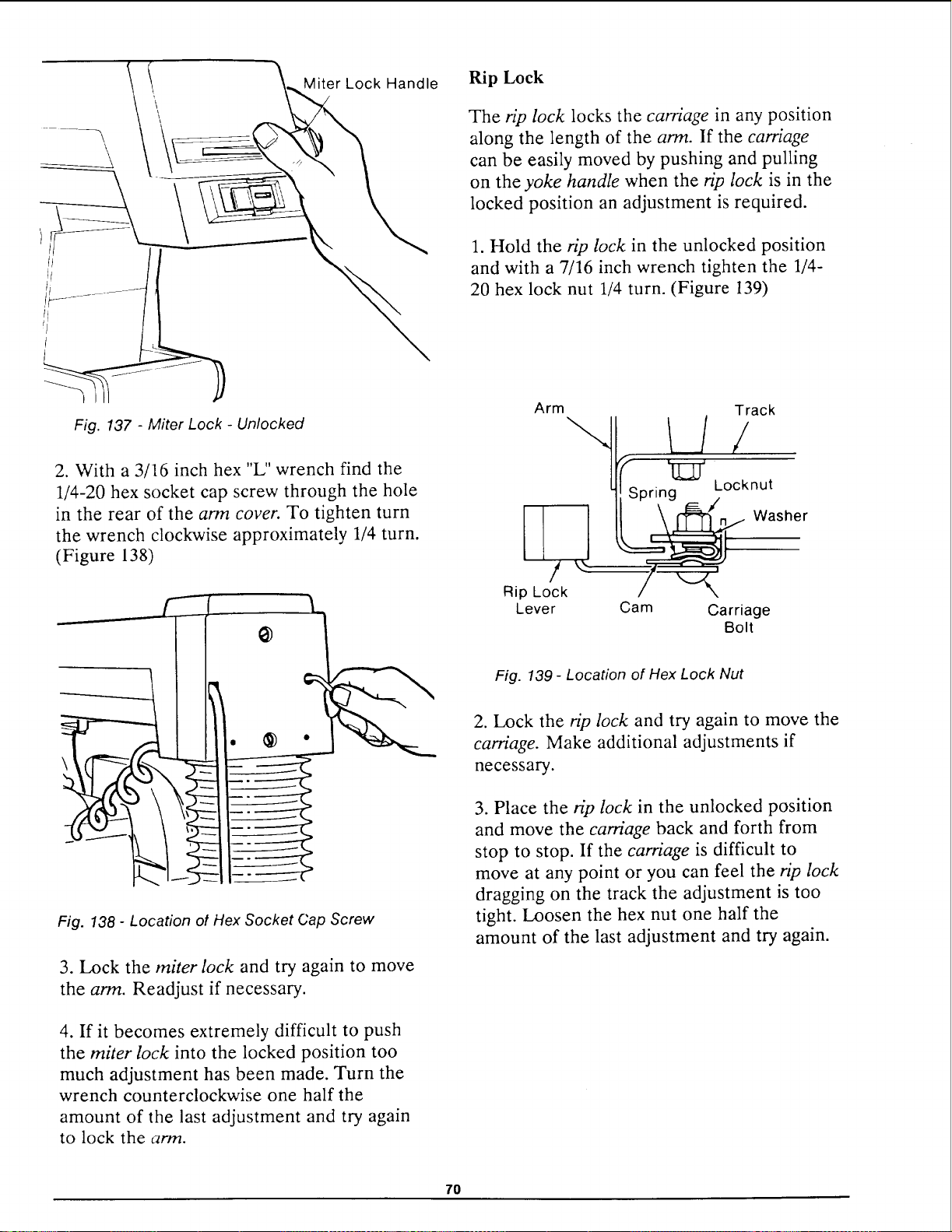
\
\
Miter Lock Handle
Fig. 137 - Miter Lock - Unlocked
2. With a 3/16 inch hex "L" wrench find the
1/4-20 hex socket cap screw through the hole
in the rear of the arm cover. To tighten turn
the wrench clockwise approximately 1/4 turn.
(Figure 138)
\
Fig. 138 - Location ot Hex Socket Cap Screw
3. Lock the miter lock and try again to move
the arm. Readjust if necessary.
4. If it becomes extremely difficult to push
the miter lock into the locked position too
much adjustment has been made. Turn the
wrench counterclockwise one half the
amount of the last adjustment and try again
to lock the arm.
Rip Lock
The rip lock locks the carriage in any position
along the length of the arm. If the carriage
can be easily moved by pushing and pulling
on the yoke handle when the rip lock is in the
locked position an adjustment is required.
1. Hold the rip lock in the unlocked position
and with a 7/16 inch wrench tighten the 1/4-
20 hex lock nut 1/4 turn. (Figure 139)
L!t
Rip Lock
Lever
Track
Spring Locknut
@ Washer
Cam Carriage
Bolt
Fig. 139 - Location of Hex Lock Nut
2. Lock the @ lock and try again to move the
carriage. Make additional adjustments if
necessary.
3. Place the rip lock in the unlocked position
and move the carriage back and forth from
stop to stop. If the carriage is difficult to
move at any point or you can feel the n_p lock
dragging on the track the adjustment is too
tight. Loosen the hex nut one half the
amount of the last adjustment and try again.
7O
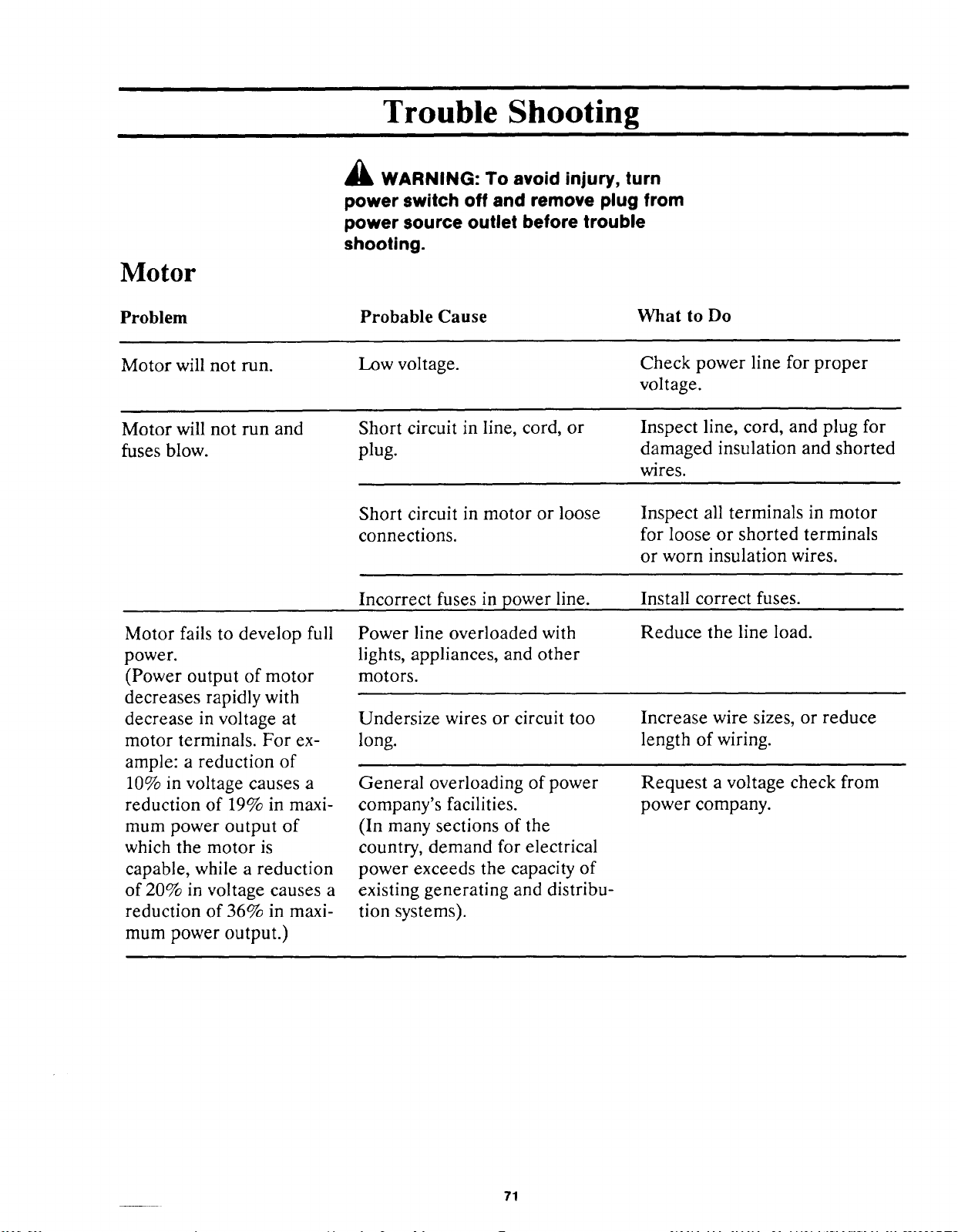
Trouble Shooting
Motor
Problem
A WARNING: To avoid injury, turn
power switch off and remove plug from
power source outlet before trouble
shooting.
Probable Cause
What to Do
Motor will not run.
Low voltage.
Check power line for proper
voltage.
Motor will not run and
fuses blow.
Short circuit in line, cord, or
plug.
Inspect line, cord, and plug for
damaged insulation and shorted
wires.
Short circuit in motor or loose
connections.
Inspect all terminals in motor
for loose or shorted terminals
or worn insulation wires.
Incorrect fuses in power line.
Install correct fuses.
Motor fails to develop full
power.
(Power output of motor
decreases rapidly with
decrease in voltage at
motor terminals. For ex-
ample: a reduction of
10% in voltage causes a
reduction of 19% in maxi-
mum power output of
which the motor is
capable, while a reduction
of 20% in voltage causes a
reduction of 36% in maxi-
mum power output.)
Power line overloaded with
lights, appliances, and other
motors.
Reduce the line load.
Undersize wires or circuit too
long.
Increase wire sizes, or reduce
length of wiring.
General overloading of power
company's facilities.
(In many sections of the
country, demand for electrical
power exceeds the capacity of
existing generating and distribu-
tion systems).
Request a voltage check from
power company.
71
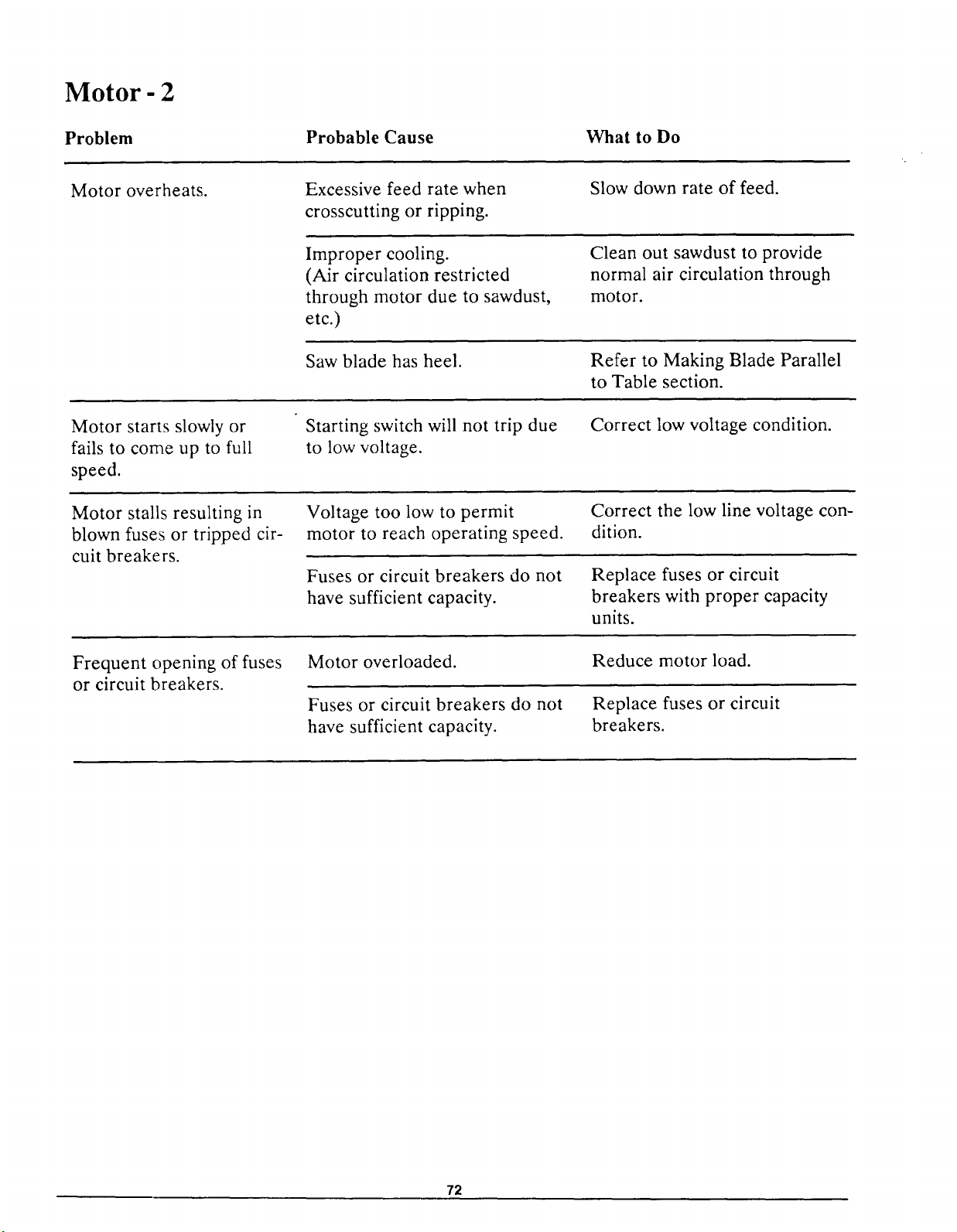
Motor- 2
Problem
Probable Cause What to Do
Motor overheats.
Excessive feed rate when
crosscutting or ripping.
Slow down rate of feed.
Improper cooling.
(Air circulation restricted
through motor due to sawdust,
etc.)
Clean out sawdust to provide
normal air circulation through
motor.
Saw blade has heel.
Refer to Making Blade Parallel
to Table section.
Motor starts slowly or
fails to come up to full
speed.
Starting switch will not trip due
to low voltage.
Correct low voltage condition.
Motor stalls resulting in
blown fuses or tripped cir-
cuit breakers.
Voltage too low to permit
motor to reach operating speed.
Correct the low line voltage con-
dition.
Fuses or circuit breakers do not
have sufficient capacity.
Replace fuses or circuit
breakers with proper capacity
units.
Frequent opening of fuses
or circuit breakers.
Motor overloaded.
Fuses or circuit breakers do not
have sufficient capacity.
Reduce motor load.
Replace fuses or circuit
breakers.
72
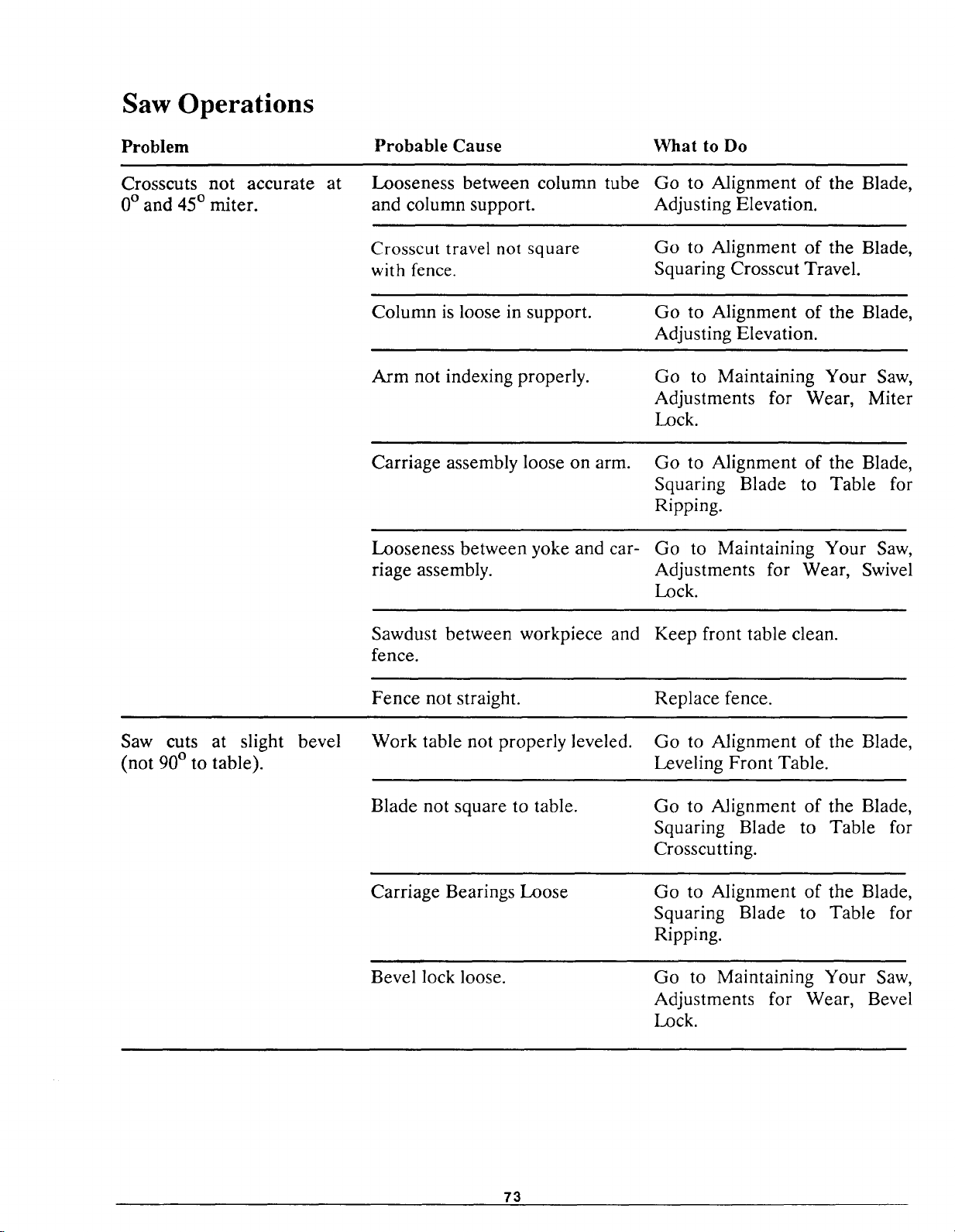
Saw Operations
Problem
Crosscuts not accurate
0° and 45 ° miter.
at
Probable Cause
Looseness between column tube
and column support.
What to Do
Go to Alignment of the Blade,
Adjusting Elevation.
Crosscut travel not square
with fence.
Go to Alignment of the Blade,
Squaring Crosscut Travel.
Column is loose in support. Go to Alignment of the Blade,
Adjusting Elevation.
Arm not indexing properly. Go to Maintaining Your Saw,
Adjustments for Wear, Miter
Lock.
Carriage assembly loose on arm. Go to Alignment of the Blade,
Squaring Blade to Table for
Ripping.
Looseness between yoke and car- Go to Maintaining Your Saw,
riage assembly. Adjustments for Wear, Swivel
Lock.
Sawdust between workpiece and Keep front table clean.
fence.
Fence not straight. Replace fence.
Saw cuts at slight bevel
(not 90 ° to table).
Work table not properly leveled. Go to Alignment of the Blade,
Leveling Front Table.
Blade not square to table. Go to Alignment of the Blade,
Squaring Blade to Table for
Crosscutting.
Carriage Bearings Loose Go to Alignment of the Blade,
Squaring Blade to Table for
Ripping.
Bevel lock loose.
Go to Maintaining Your Saw,
Adjustments for Wear, Bevel
Lock.
73
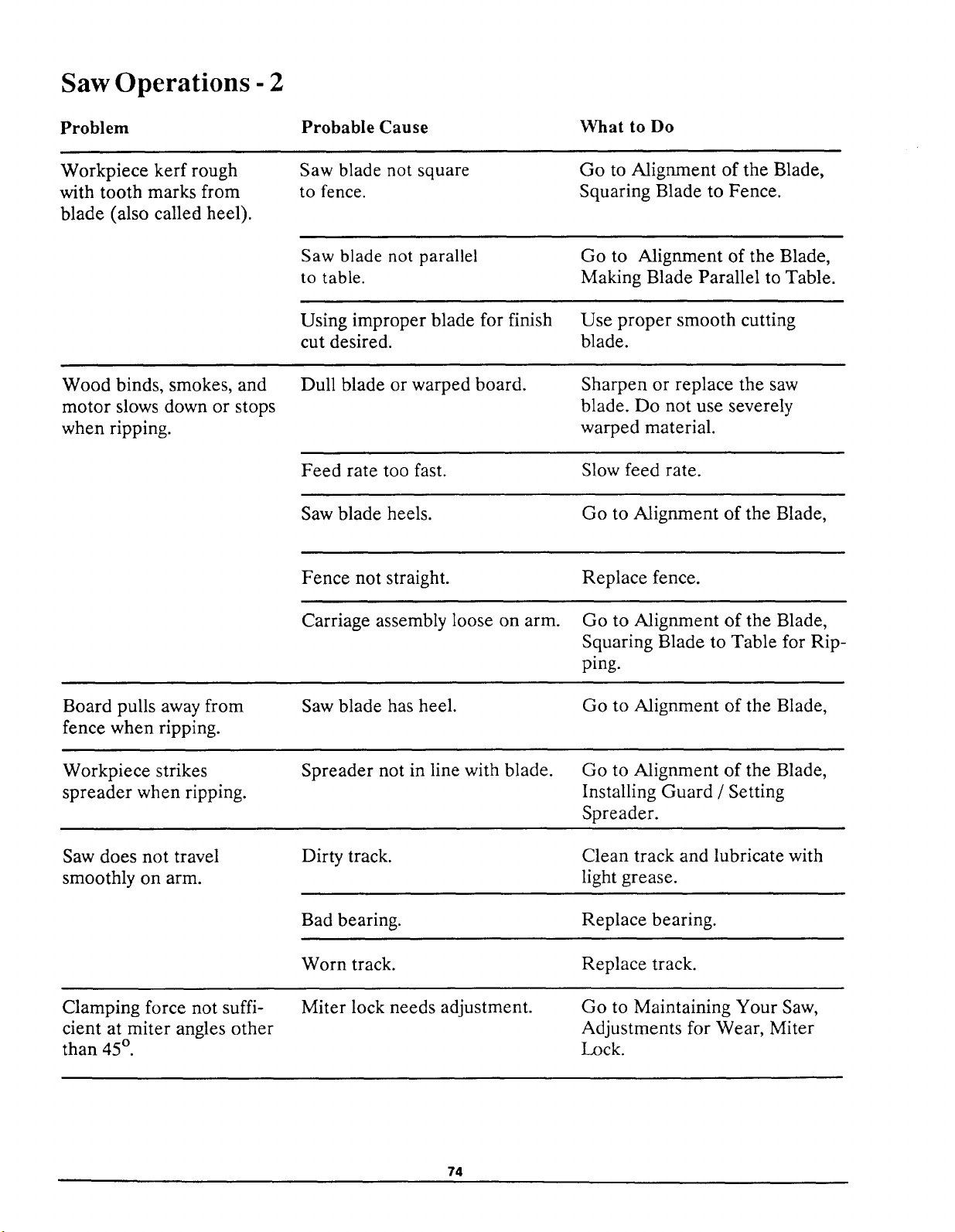
Saw Operations - 2
Problem Probable Cause
What to Do
Workpiece kerf rough
with tooth marks from
blade (also called heel).
Saw blade not square
to fence.
Go to Alignment of the Blade,
Squaring Blade to Fence.
Saw blade not parallel
to table.
Go to Alignment of the Blade,
Making Blade Parallel to Table.
Using improper blade for finish
cut desired.
Use proper smooth cutting
blade.
Wood binds, smokes, and
motor slows down or stops
when ripping.
Dull blade or warped board. Sharpen or replace the saw
blade. Do not use severely
warped material.
Feed rate too fast. Slow feed rate.
Saw blade heels. Go to Alignment of the Blade,
Fence not straight. Replace fence.
Carriage assembly loose on arm. Go to Alignment of the Blade,
Squaring Blade to Table for Rip-
ping.
Board pulls away from
fence when ripping.
Workpiece strikes
spreader when ripping.
Saw does not travel
smoothly on arm.
Clamping force not suffi-
cient at miter angles other
than 45 ° .
Saw blade has heel.
Spreader not in line with blade.
Dirty track.
Bad bearing.
Worn track.
Miter lock needs adjustment.
Go to Alignment of the Blade,
Go to Alignment of the Blade,
Installing Guard / Setting
Spreader.
Clean track and lubricate with
light grease.
Replace bearing.
Replace track.
Go to Maintaining Your Saw,
Adjustments for Wear, Miter
Lock.
74
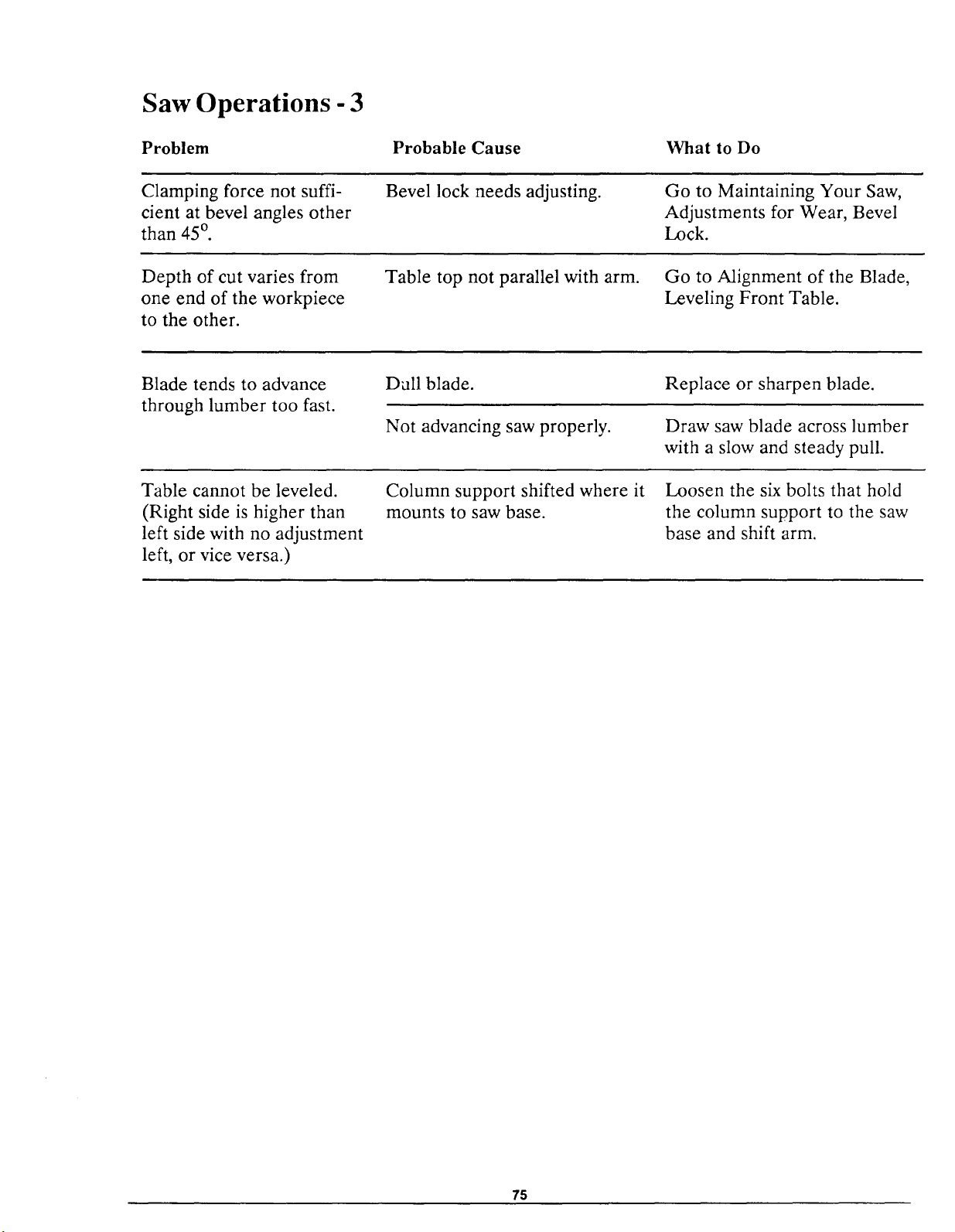
Saw Operations - 3
Problem
Probable Cause What to Do
Clamping force not suffi-
cient at bevel angles other
than 45 o.
Bevel lock needs adjusting. Go to Maintaining Your Saw,
Adjustments for Wear, Bevel
Lock.
Depth of cut varies from
one end of the workpiece
to the other.
Table top not parallel with arm.
Go to Alignment of the Blade,
Leveling Front Table.
Blade tends to advance
through lumber too fast.
Dull blade.
Not advancing saw properly.
Replace or sharpen blade.
Draw saw blade across lumber
with a slow and steady pull.
Table cannot be leveled.
(Right side is higher than
left side with no adjustment
left, or vice versa.)
Column support shifted where it
mounts to saw base.
Loosen the six bolts that hold
the column support to the saw
base and shift arm.
75
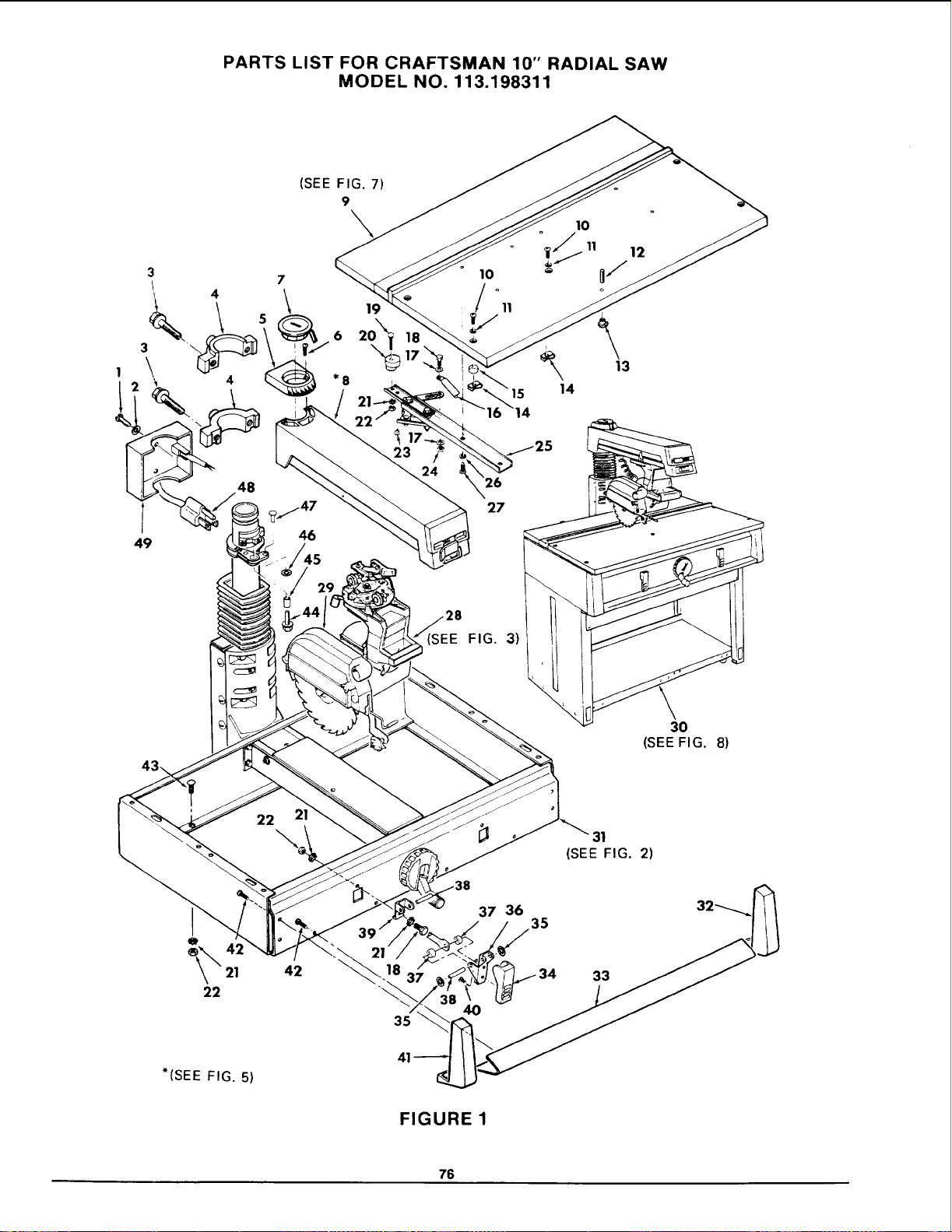
PARTS LIST FOR CRAFTSMAN 10" RADIAL SAW
MODEL NO. 113.198311
1
3
4
3 \
\
%
49
48
(SEE FIG. 7)
9
7 10
19 11
*8
15
27
10
14
12
13
(SEE FIG. 3)
30
(SEEFIG. 8)
22 2
31
(SEE FIG. 2)
21
42
21
35
37 36
35
33
*(SEE FIG. 5)
FIGURE 1
76
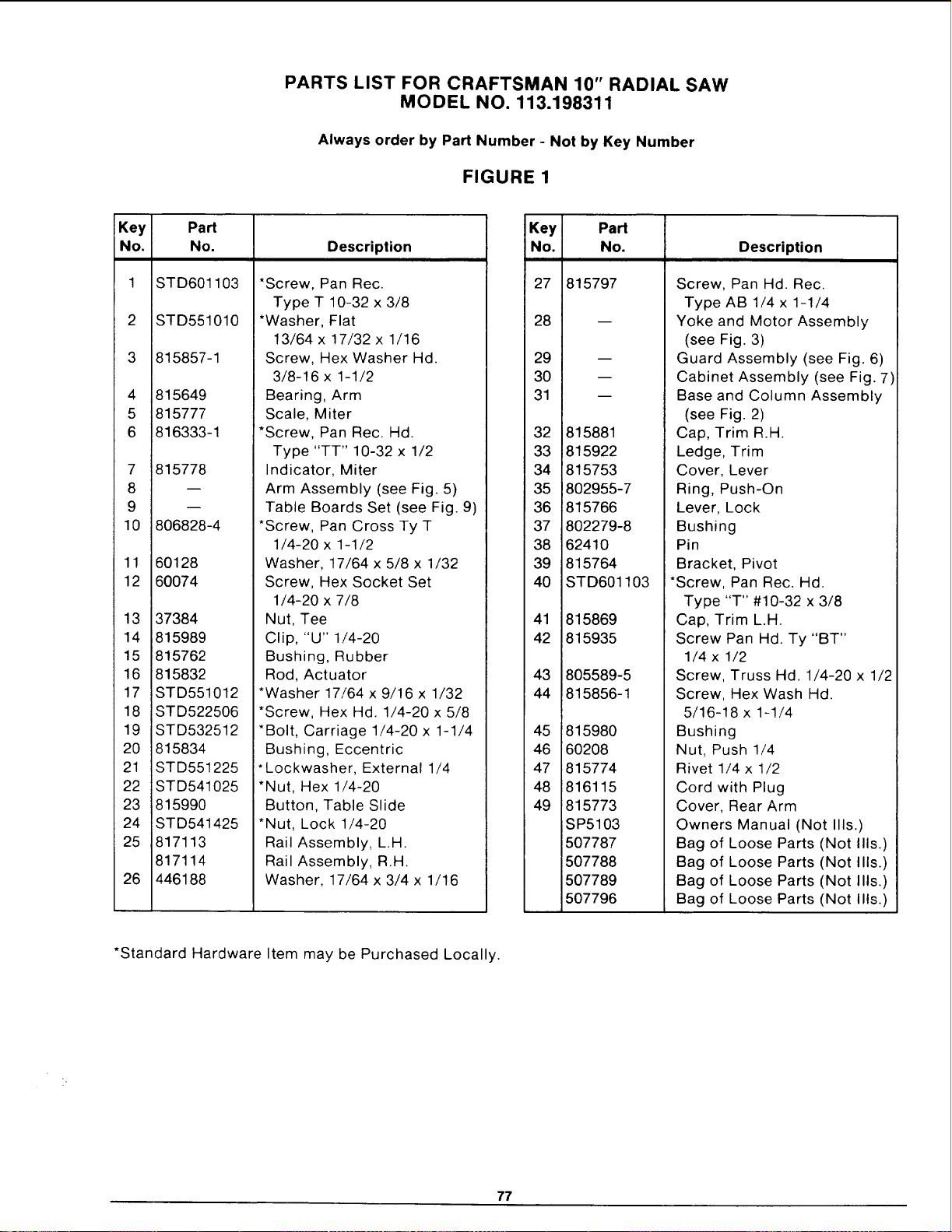
PARTS LIST FOR CRAFTSMAN 10" RADIAL SAW
MODEL NO. 113.198311
Always order by Part Number - Not by Key Number
FIGURE 1
Key Part
No. No. Description
1 STD601103
2 STD551010
3 815857-1
4 815649
5 815777
6 816333-1
7 815778
8
9
10 806828-4
11 60128
12 60074
13 37384
14 815989
15 815762
16 815832
17 STD551012
18 STD522506
19 STD532512
20 815834
21 STD551225
22 STD541025
23 815990
24 STD541425
25 817113
817114
26 446188
*Screw, Pan Rec.
Type T 10-32 x 3/8
*Washer, Flat
13/64 x ! 7/32 x 1/16
Screw, Hex Washer Hd.
3/8-16 x 1-1/2
Bearing, Arm
Scale, Miter
*Screw, Pan Rec. Hd.
Type "TT" 10-32 x 1/2
Indicator, Miter
Arm Assembly (see Fig. 5)
Table Boards Set (see Fig. 9)
*Screw, Pan Cross Ty T
1/4-20 x 1-1/2
Washer, 17/64 x 5/8 x 1/32
Screw, Hex Socket Set
1/4-20 x 7/8
Nut, Tee
Clip, "U" 1/4-20
Bushing, Rubber
Rod, Actuator
*Washer 17/64 x 9/16 x 1/32
*Screw, Hex Hd. 1/4-20 x 5/8
*Bolt, Carriage 1/4-20 x 1-1/4
Bushing, Eccentric
*Lockwasher, External 1/4
*Nut, Hex 1/4-20
Button, Table Slide
*Nut, Lock 1/4-20
Rail Assembly, L.H.
Rail Assembly, R.H
Washer, 17/64 x 3/4 x 1/16
Key Part
No. No. Description
27 815797
28
29
30
31
B
B
D
32 i815881
33 1815922
34 '815753
35 8O2955-7
36 815766
37 802279-8
38 62410
39 815764
40 STD601103
41 815869
42 815935
43 805589-5
44 815856-1
45
46
47
48
49
Screw, Pan Hd. Rec.
Type AB 1/4 x 1-1/4
Yoke and Motor Assembly
(see Fig. 3)
Guard Assembly (see Fig. 6)
Cabinet Assembly (see Fig. 7)
Base and Column Assembly
(see Fig. 2)
Cap, Trim R.H.
Ledge, Trim
Cover, Lever
Ring, Push-On
Lever, Lock
Bushing
Pin
Bracket, Pivot
*Screw, Pan Rec. Hd.
Type "T" #10-32 x 3/8
815980
60208
815774
816115
815773
SP5103
507787
507788
507789
507796
Cap, Trim L.H.
Screw Pan Hd. Ty "BT"
1/4 x 1/2
Screw, Truss Hd. 1/4-20 x 1/2
Screw, Hex Wash Hd.
5/16-18 x 1-1/4
Bushing
Nut, Push 1/4
Rivet 1/4 x 1/2
Cord with Plug
Cover, Rear Arm
Owners Manual (Not Ills.)
Bag of Loose Parts (Not Ills.)
Bag of Loose Parts (Not Ills.)
Bag of Loose Parts (Not Ills.)
Bag of Loose Parts (Not Ills.)
*Standard Hardware Item may be Purchased Locally.
77
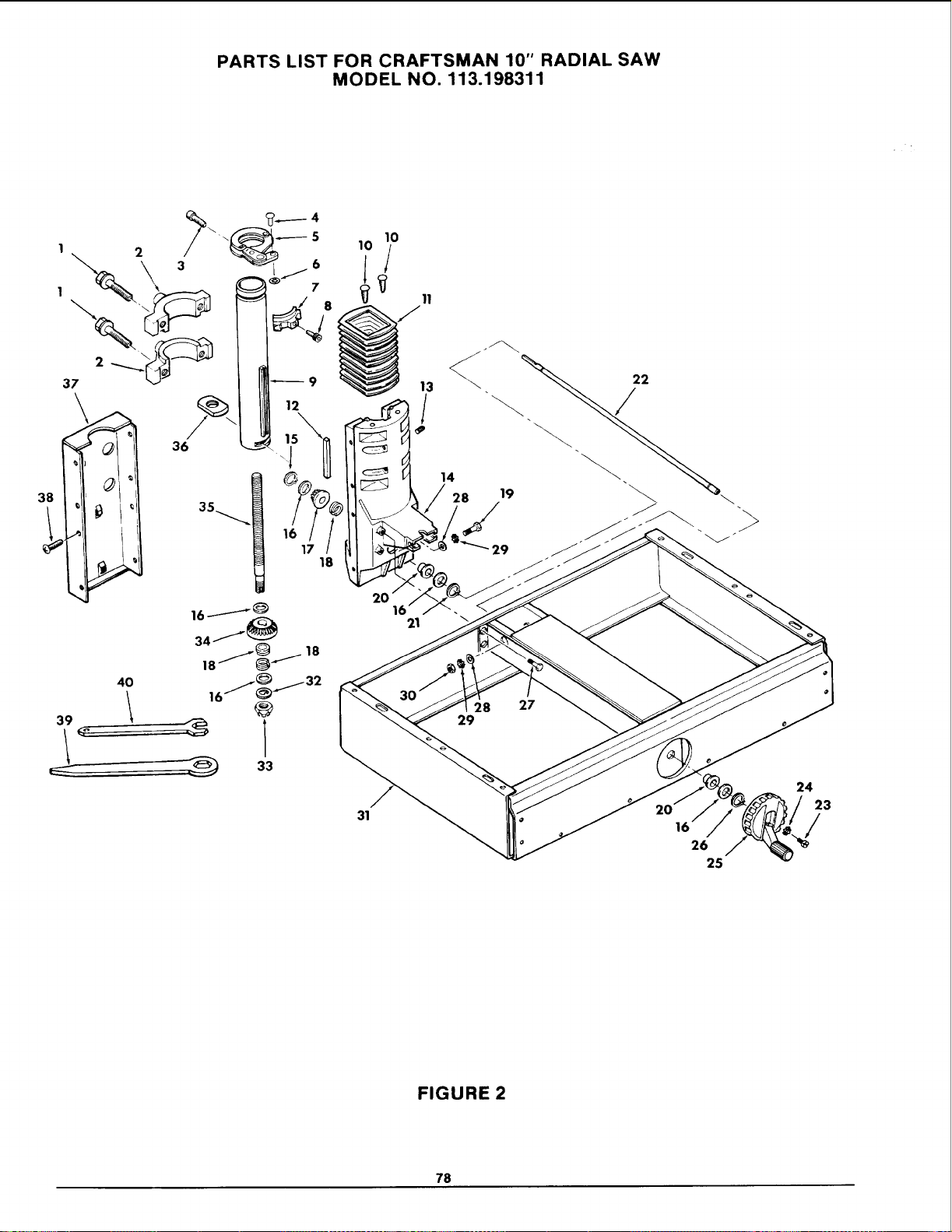
PARTS LIST FOR CRAFTSMAN 10" RADIAL SAW
MODEL NO. 113.198311
2
37
\
38
40
16J_
16/_/32
@
33
10
'iJ
13
/
31
20
16'
21
14
28
S
29
8
29
27
26
25
24
23
/
FIGURE 2
78
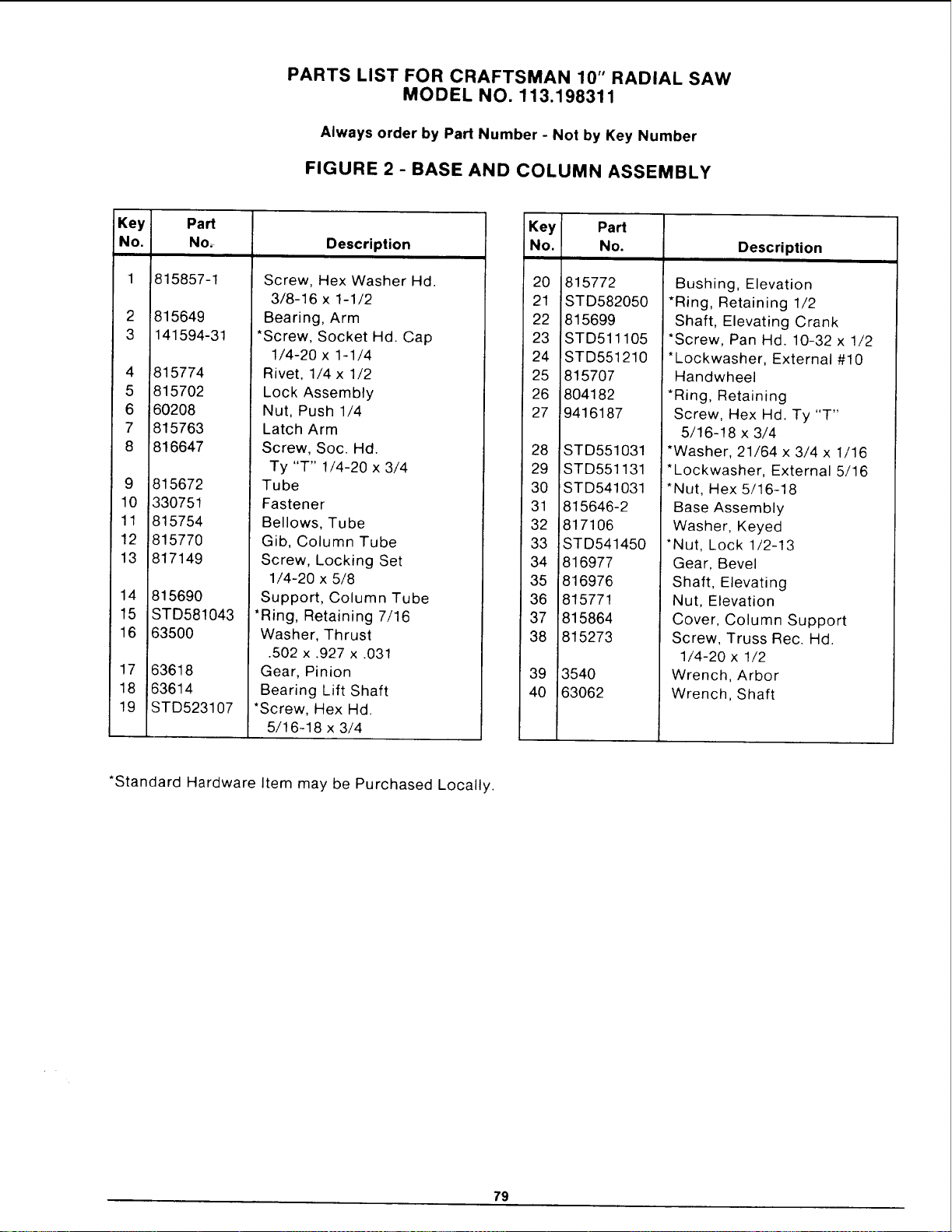
PARTS LIST FOR CRAFTSMAN 10" RADIAL SAW
MODEL NO. 113.198311
Always order by Part Number - Not by Key Number
FIGURE 2 - BASE AND COLUMN ASSEMBLY
Key
No.
2
3
4
5
6
7
8
Part
No=
815857-1
815649
141594-31
815774
815702
602O8
815763
816647
9 815672
10 330751
11 815754
12 815770
13 817149
14 815690
15 STD581043
16 63500
Description
Screw, Hex Washer Hd.
3/8-16 x 1-1/2
Bearing, Arm
*Screw, Socket Hd. Cap
1/4-20 x 1-1/4
17 63618
18 63614
19 STD523107
Rivet, 1/4 x 1/2
Lock Assembly
Nut, Push 1/4
Latch Arm
Screw, Soc. Hal.
Ty "T" 1/4-20 x 3/4
Tube
Fastener
Bellows, Tube
Gib, Column Tube
Screw, Locking Set
1/4-20 x 5/8
Support, Column Tube
*Ring, Retaining 7/16
Washer, Thrust
.502 x .927 x .031
Gear, Pinion
Bearing Lift Shaft
*Screw, Hex Hd.
5/16-18 x 3/4
Key Part
No. No. Description
20 815772
21 STD582050
22 815699
23 STD511105
24 STD551210
25 815707
26 804182
27 9416187
28 STD551031
29 STD551131
30 STD541031
31 815646-2
32 8171O6
33 !STD541450
34 816977
35 816976
36 815771
37 815864
38 815273
39 !3540
40 ,63062
Bushing, Elevation
*Ring, Retaining 1/2
Shaft, Elevating Crank
*Screw, Pan Hd. 10-32 x 1/2
*Lockwasher, External #10
Handwheel
*Ring, Retaining
Screw, Hex Hd. Ty "T"
5/16-18 x 3/4
*Washer, 21/64 x 3/4 x 1/16
I*Lockwasher, External 5/16
*Nut, Hex 5/16-18
Base Assembly
Washer, Keyed
*Nut, Lock 1/2-13
Gear, Bevel
Shaft, Elevating
Nut, Elevation
Cover, Column Support
Screw, Truss Rec. Hd.
1/4-20 x 1/2
Wrench, Arbor
Wrench, Shaft
*Standard Hardware Item may be Purchased Locally.
79
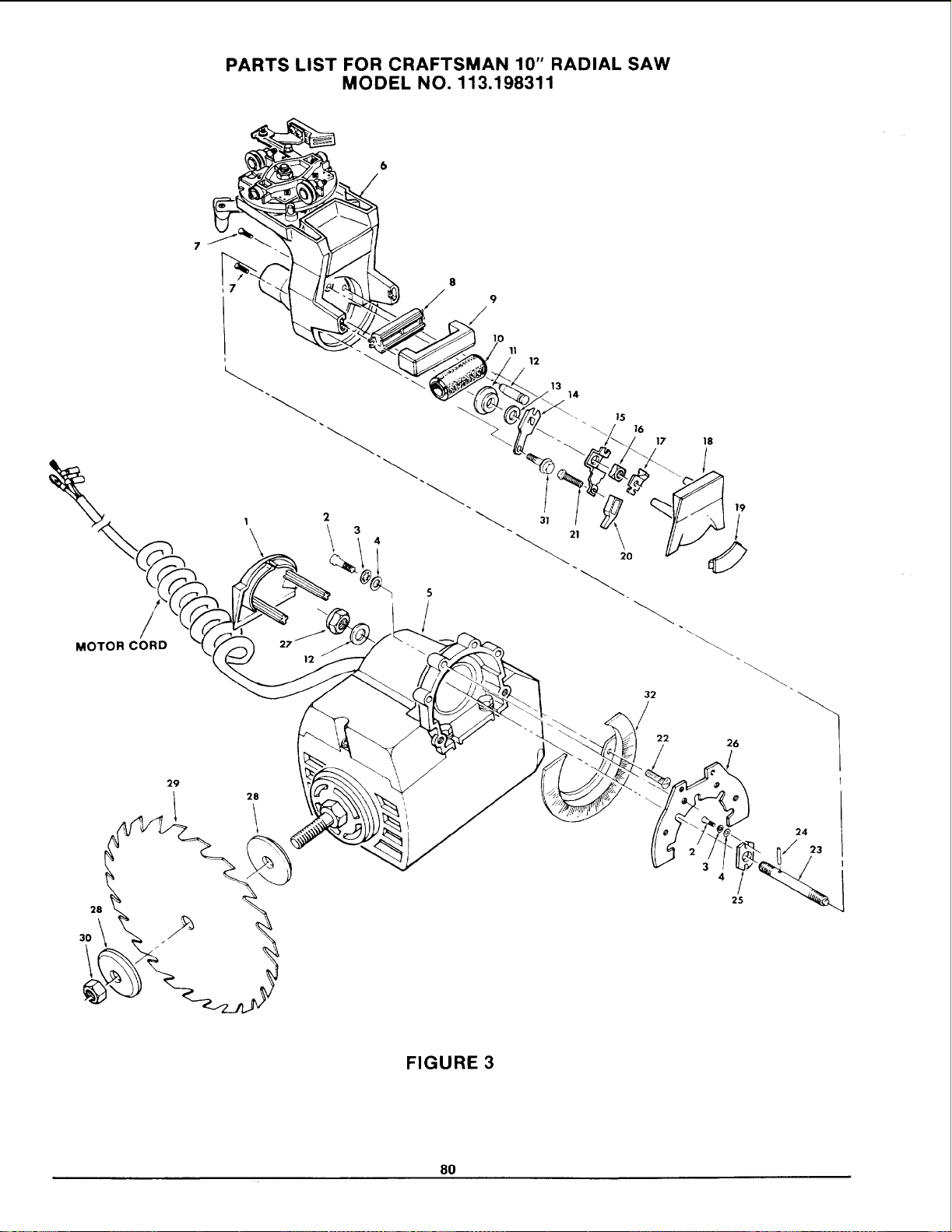
PARTS LIST FOR CRAFTSMAN 10" RADIAL SAW
MODEL NO. 113.198311
8
9
2
MOTOR CORD
12
29
28
i
11
12
13
14
_ 15
\\ 16
/
31
_21 20
32
17 18
22
19
/
0
26
4/
25
24
!3
FIGURE 3
8O
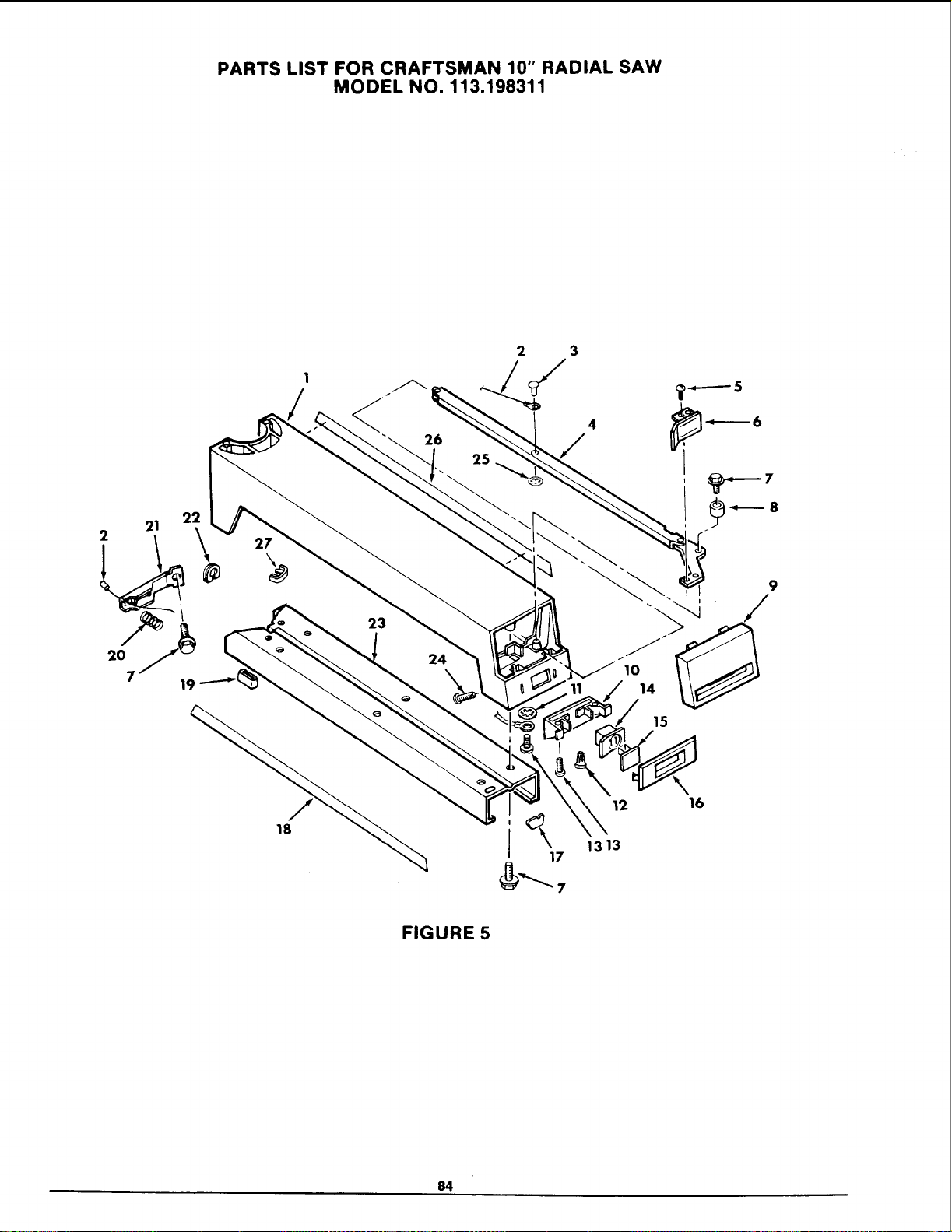
PARTS LIST FOR CRAFTSMAN 10" RADIAL SAW
MODEL NO. 113.198311
2_
21
2
27
18
12 16
1313
FIGURE 5
84
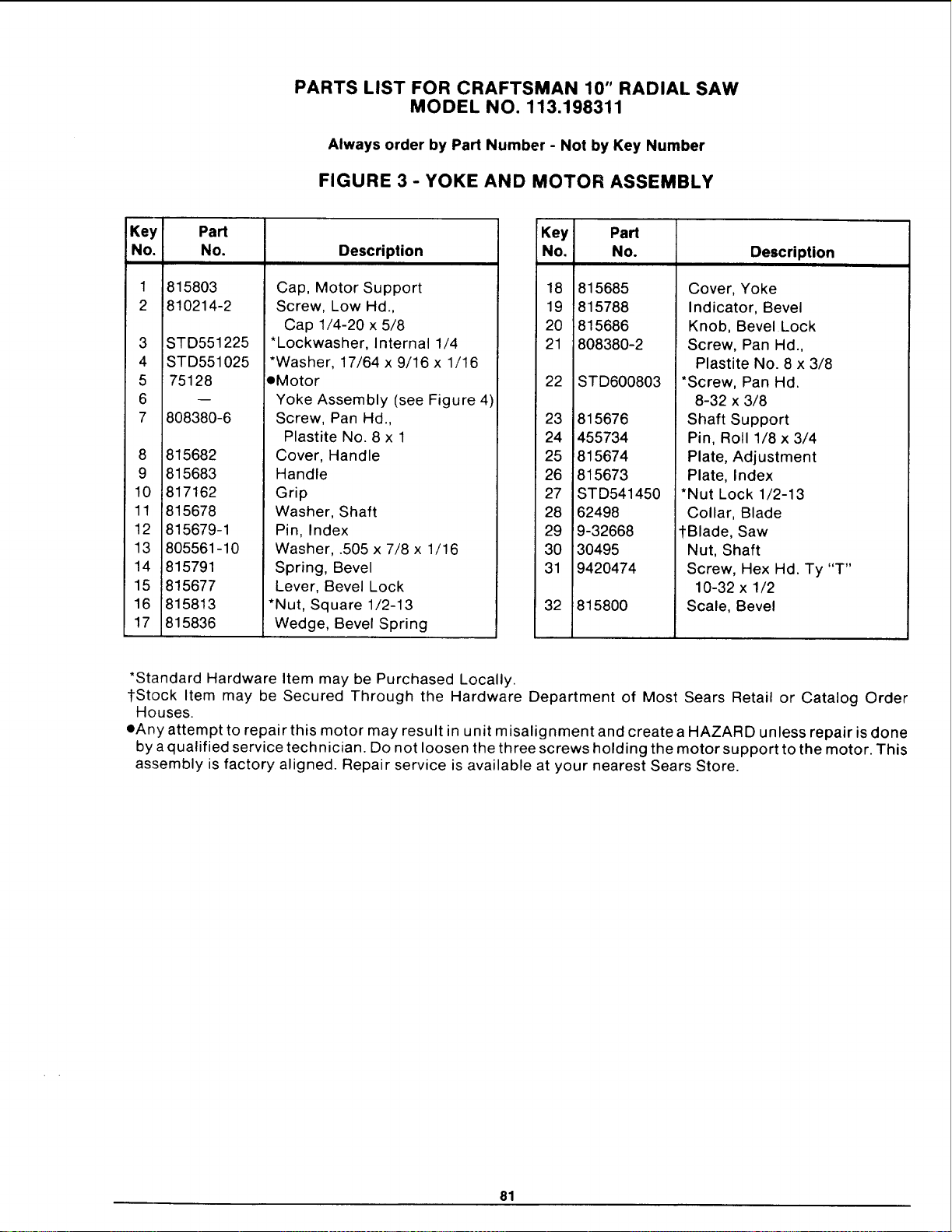
PARTS LIST FOR CRAFTSMAN 10" RADIAL SAW
MODEL NO. 113.198311
Always order by Part Number - Not by Key Number
FIGURE 3 - YOKE AND MOTOR ASSEMBLY
Key Part
No. No. Description
1
2
3
4
5
6
7
8
9
10
11
12
13
14
15
16
17
815803
810214-2
STD551225
STD551025
75128
808380-6
815682
815683
817162
815678
815679-1
805561-10
815791
815677
815813
!815836
Cap, Motor Support
Screw, Low Hal.,
Cap 1/4-20 x 5/8
*Lockwasher, Internal 1/4
*Washer, 17/64 x 9/16 x 1/16
eMotor
Yoke Assembly (see Figure 4)
Screw, Pan Hd.,
Plastite No. 8 x 1
Cover, Handle
Handle
Grip
Washer, Shaft
Pin, Index
Washer, .505 x 7/8 x 1/16
Spring, Bevel
Lever, Bevel Lock
*Nut, Square 1/2-13
Wedge, Bevel Spring
Key
No.
Part
No.
18 815685
19 815788
20 815686
21 808380-2
22 STD600803
23 815676
24 455734
25 815674
26 815673
27 STD541450
28 62498
29 9-32668
3O 30495
31 9420474
32 815800
Description
Cover, Yoke
Indicator, Bevel
Knob, Bevel Lock
Screw, Pan Hd.,
Plastite No. 8 x 3/8
*Screw, Pan Hd.
8-32 x 3/8
Shaft Support
Pin, Roll 1/8 x 3/4
Plate, Adjustment
Plate, Index
*Nut Lock 1/2-13
Collar, Blade
tBlade, Saw
Nut, Shaft
Screw, Hex Hd. Ty "T"
10-32 x 1/2
Scale, Bevel
*Standard Hardware Item may be Purchased Locally.
l-Stock Item may be Secured Through the Hardware Department of Most Sears Retail or Catalog Order
Houses.
eAny attempt to repair this motor may result in unit misalignment and create a HAZARD unless repair is done
by a qualified service technician. Do not loosen the three screws holding the motor support to the motor. This
assembly is factory aligned. Repair service is available at your nearest Sears Store.
81
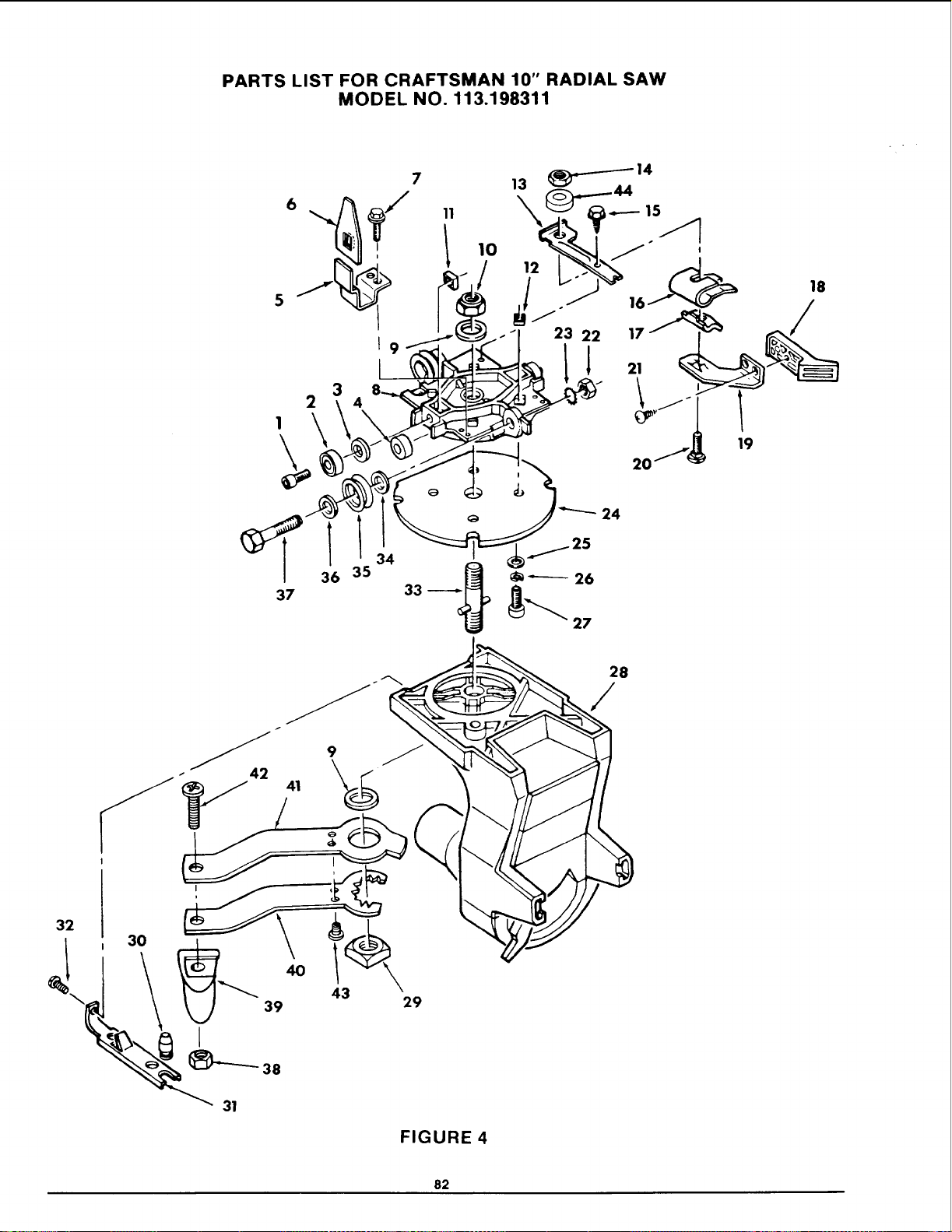
PARTS LIST FOR CRAFTSMAN 10" RADIAL SAW
MODEL NO. 113.198311
6
5
2
I
3
7 13 _14
/
gp
20......_ 19
24
37
36 35
FIGURE 4
28
/
82
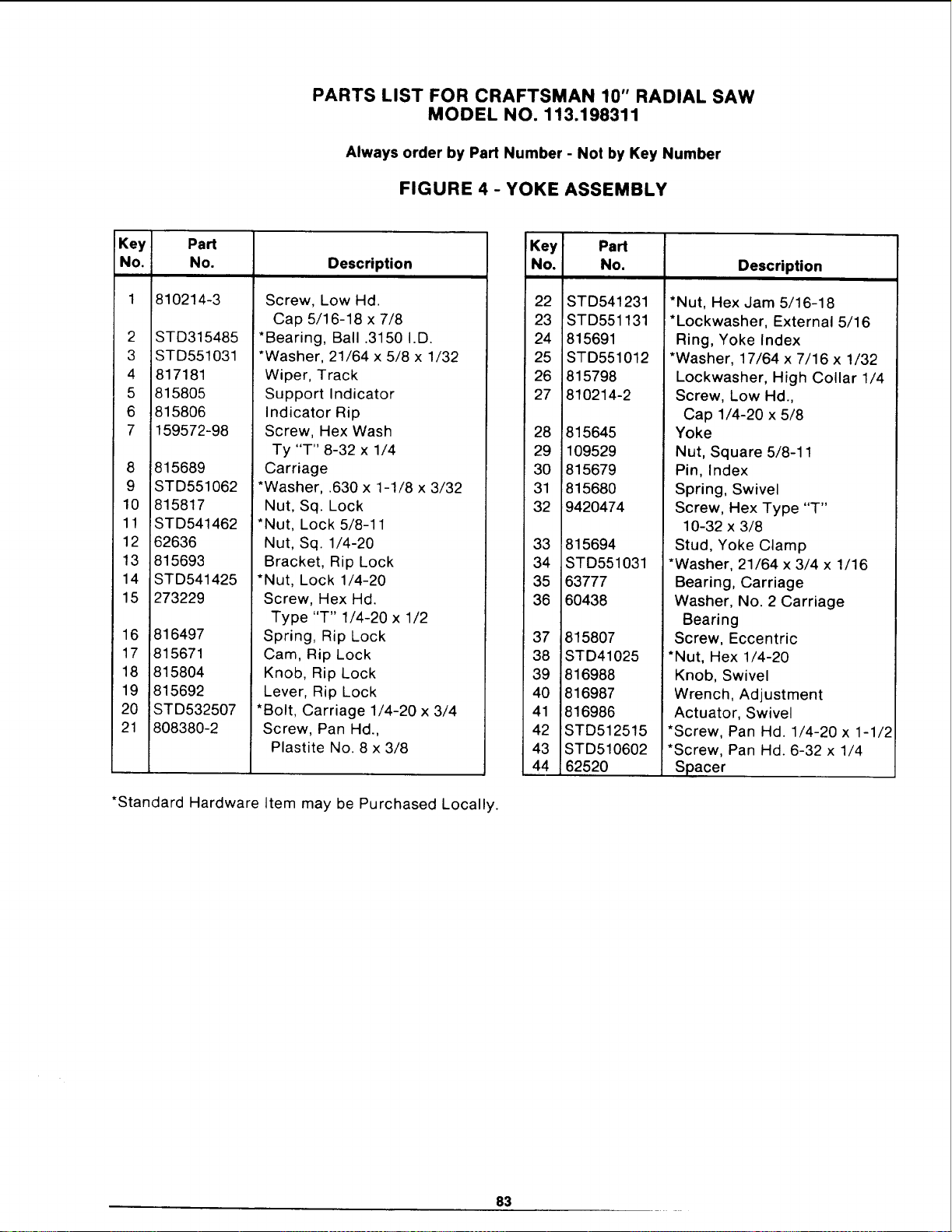
PARTS LIST FOR CRAFTSMAN 10" RADIAL SAW
MODEL NO. 113.198311
Always order by Part Number - Not by Key Number
FIGURE 4- YOKE ASSEMBLY
Key
No.
2
3
4
5
6
7
8
9
10
11
12
13
14
15
Part
No.
810214-3
STD315485
STD551031
817181
815805
815806
159572-98
815689
STD551062
815817
STD541462
62636
815693
STD541425
273229
16 816497
17 815671
18 815804
19 815692
20 STD532507
21 808380-2
Description
Screw, Low Hd.
Cap 5/16-18 x 7/8
*Bearing, Ball .3150 I.D.
*Washer, 21/64 x 5/8 x 1/32
Wiper, Track
Support Indicator
Indicator Rip
Screw, Hex Wash
Ty "T" 8-32 x 1/4
Carriage
*Washer, .630 x 1-1/8 x 3/32
Nut, Sq. Lock
*Nut, Lock 5/8-11
Nut, Sq. 1/4-20
Bracket, Rip Lock
*Nut, Lock 1/4-20
Screw, Hex Hd.
Type "T" 1/4-20 x 1/2
Spring, Rip Lock
Cam, Rip Lock
Knob, Rip Lock
Lever, Rip Lock
*Bolt, Carriage 1/4-20 x 3/4
Screw, Pan Hd.,
Plastite No. 8 x 3/8
*Standard Hardware Item may be Purchased Locally.
Key Part
No. No. Description
22
23
24
25
26
27
STD541231
STD551131
815691
STD551012
815798
810214-2
28 815645
29 109529
3O 815679
31 81568O
32 9420474
33 815694
34 STD551031
35 63777
36 6O438
37 815807
38 STD41025
39 816988
40 816987
41 816986
42 STD512515
43 STD510602
44 62520
*Nut, Hex Jam 5/16-18
*Lockwasher, External 5/16
Ring, Yoke Index
*Washer, 17/64 x 7/16 x 1/32
Lockwasher, High Collar 1/4
Screw, Low Hd.,
Cap 1/4-20 x 5/8
Yoke
Nut, Square 5/8-11
Pin, Index
Spring, Swivel
Screw, Hex Type "T"
10-32 x 3/8
Stud, Yoke Clamp
*Washer, 21/64 x 3/4 x 1/16
Bearing, Carriage
Washer, No. 2 Carriage
Bearing
Screw, Eccentric
*Nut, Hex 1/4-20
Knob, Swivel
Wrench, Adjustment
Actuator, Swivel
*Screw, Pan Hd. 1/4-20 x 1-1/2
*Screw, Pan Hd. 6-32 x 1/4
Spacer
83
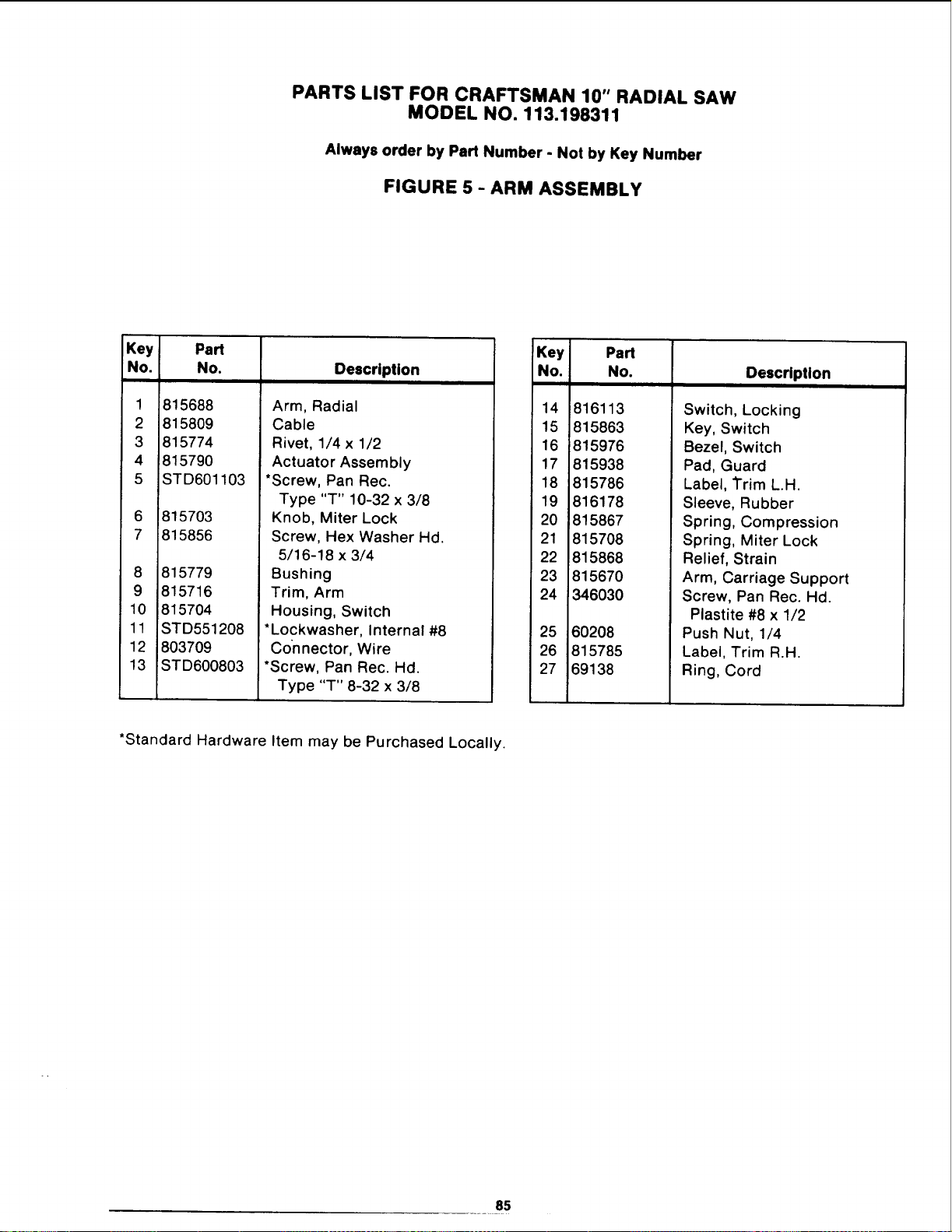
PARTS LIST FOR CRAFTSMAN 10" RADIAL SAW
MODEL NO. 113.198311
Always order by Part Number - Not by Key Number
FIGURE 5 - ARM ASSEMBLY
Key
No.
1
2
3
4
5
6
7
Part
No.
815688
815809
815774
815790
STD601103
815703
815856
8 815779
9 815716
10 815704
11 STD551208
12 803709
13 STD600803
Description
i
Arm, Radial
Cable
Rivet, 1/4 x 1/2
Actuator Assembly
*Screw, Pan Rec.
Type "T" 10-32 x 3/8
Knob, Miter Lock
Screw, Hex Washer Hd.
5/16-18 x 3/4
Bushing
Trim, Arm
Housing, Switch
*Lockwasher, Internal #8
Connector, Wire
*Screw, Pan Rec. Hd.
Type "T" 8-32 x 3/8
!Key] PaN
No. No. Desc_ption
14 816113
15 815863
16 815976
17 815938
18 815786
19 816178
20 815867
21 815708
22 815868
23 815670
24 346030
25
26
27
60208
815785
69138
Switch, Locking
Key, Switch
Bezel, Switch
Pad, Guard
Label, Trim L.H.
Sleeve, Rubber
Spring, Compression
Spring, Miter Lock
Relief, Strain
Arm, Carriage Support
Screw, Pan Rec. Hd.
Plastite #8 x 1/2
Push Nut, 1/4
Label. Trim R.H.
Ring, Cord
*Standard Hardware Item may be Purchased Locally.
85

PARTS LIST FOR CRAFTSMAN 10" RADIAL SAW
MODEL NO. 113.198311
.o
4
/
17
, 10
18 1_ 11
o 2
15
14
13
FIGURE 6
86
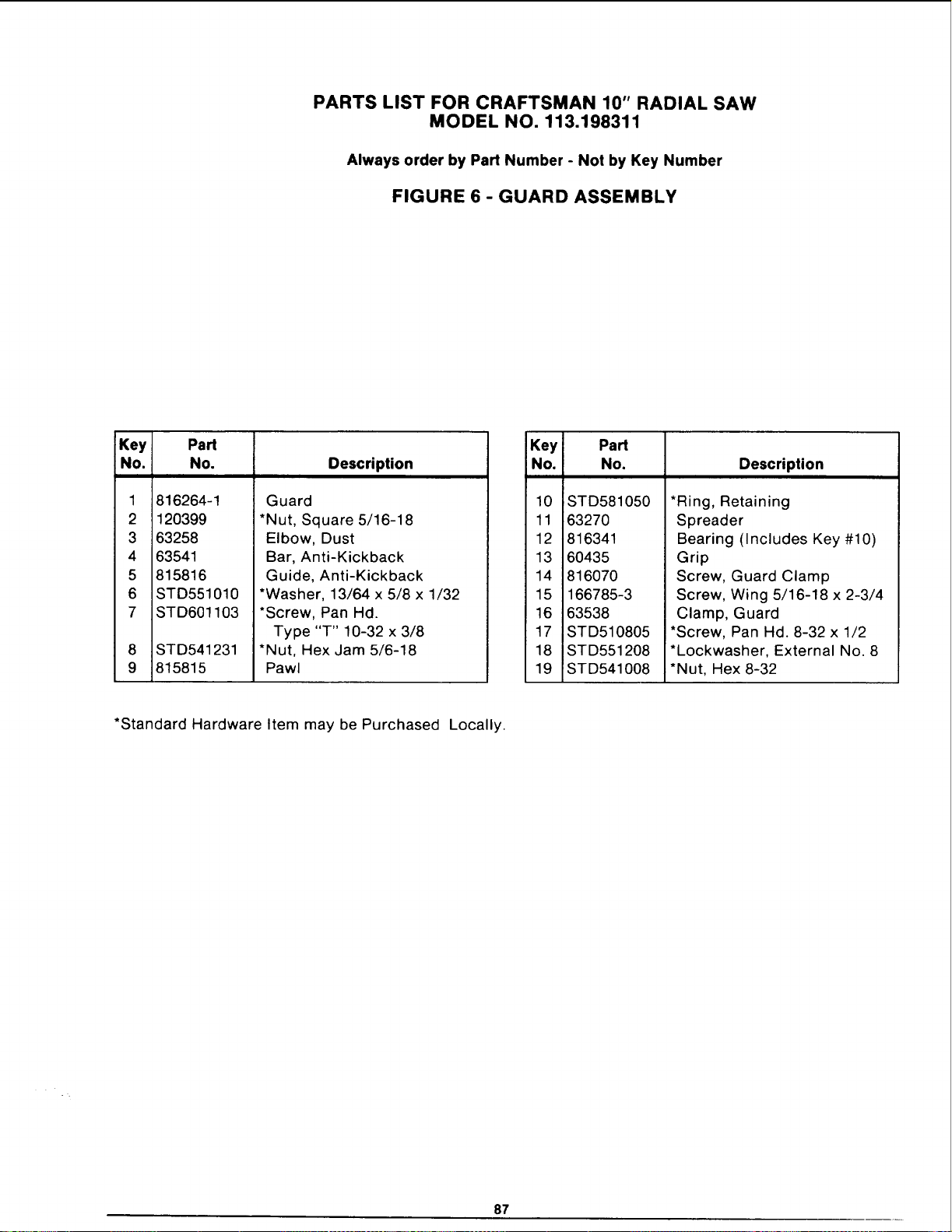
PARTS LIST FOR CRAFTSMAN 10" RADIAL SAW
MODEL NO. 113.198311
Always order by Part Number - Not by Key Number
FIGURE 6 - GUARD ASSEMBLY
Key Part
No. No. Description
1
2
3
4
5
6
7
8
9
816264-1
120399
63258
63541
815816
STD551010
STD601103
STD541231
815815
Guard
*Nut, Square 5/16-18
Elbow, Dust
Bar, Anti-Kickback
Guide, Anti-Kickback
*Washer, 13/64 x 5/8 x 1/32
*Screw, Pan Hal.
Type "T" 10-32 x 3/8
*Nut, Hex Jam 5/6-18
Pawl
Key Part
No. No.
10 STD581050
11 63270
12 816341
13 60435
14 816070
15 166785-3
16 63538
17 STD510805
18 STD551208
19 STD541008
Description
*Ring, Retaining
Spreader
Bearing (Includes Key #10)
Grip
Screw, Guard Clamp
Screw, Wing 5/16-18 x 2-3/4
Clamp, Guard
*Screw, Pan Hd. 8-32 x 1/2
*Lockwasher, External No. 8
*Nut, Hex 8-32
*Standard Hardware Item may be Purchased Locally.
87
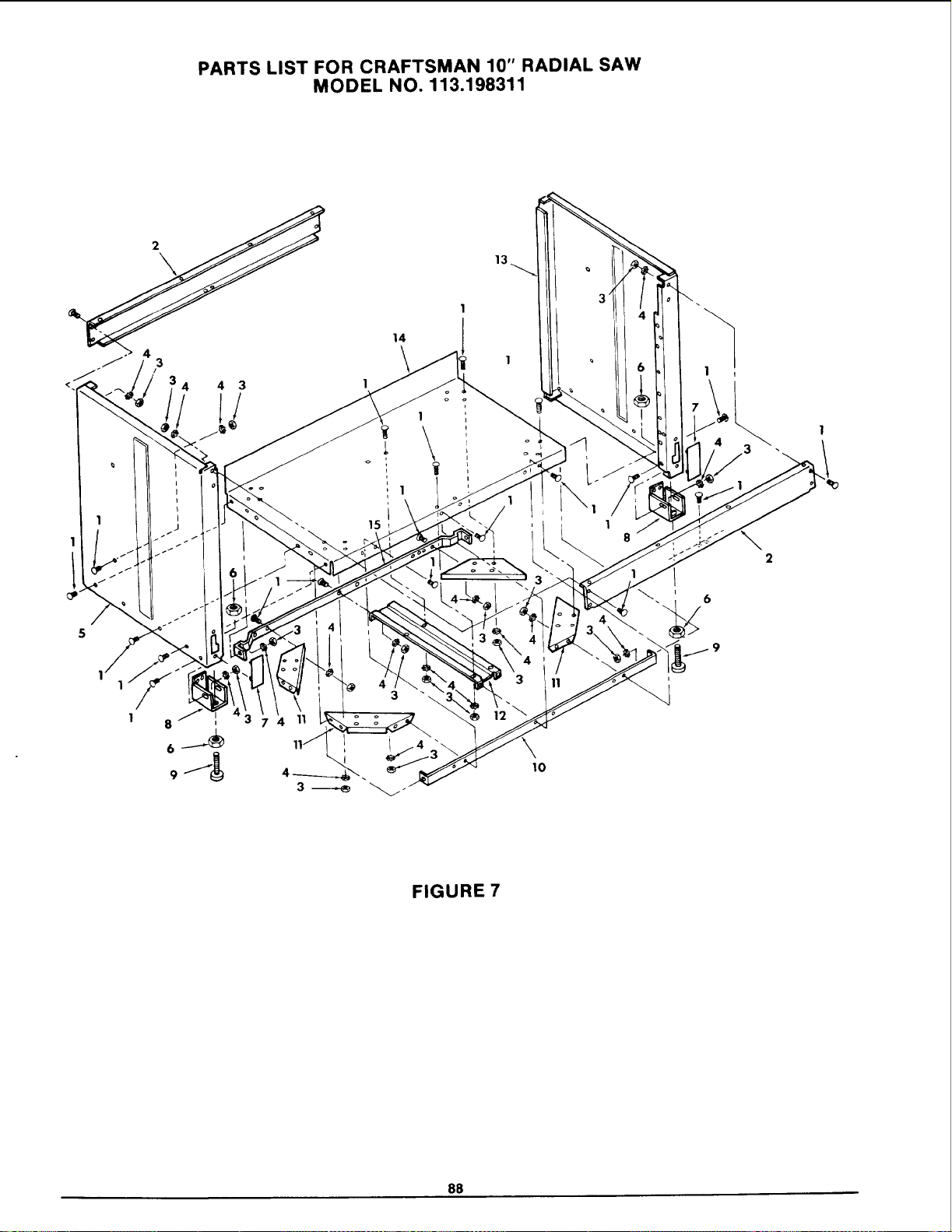
PARTS LIST FOR CRAFTSMAN 10" RADIAL SAW
MODEL NO. 113.198311
1
14
]
1
1
15
10
6
9
FIGURE 7
88
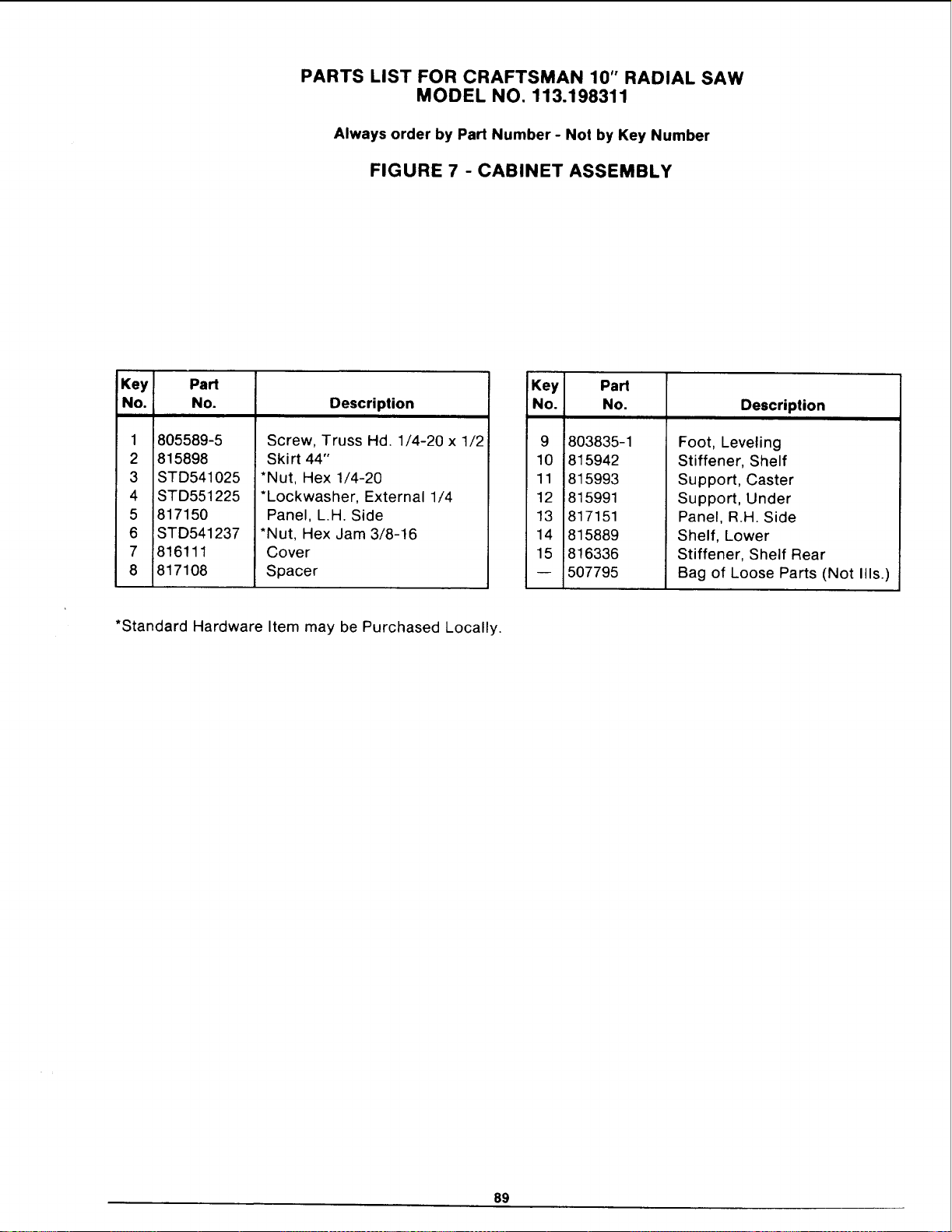
PARTS LIST FOR CRAFTSMAN 10" RADIAL SAW
MODEL NO. 113.198311
Always order by Part Number - Not by Key Number
FIGURE 7 - CABINET ASSEMBLY
Key
No.
1
2
3
4
5
6
7
8
Part
No.
805589-5
815898
STD541025
STD551225
817150
STD541237
816111
817108
Description
Screw, Truss Hd. 1/4-20 x 1/2
Skirt 44"
*Nut, Hex 1/4-20
*Lockwasher, External 1/4
Panel, L.H. Side
*Nut, Hex Jam 3/8-16
Cover
Spacer
Key
No.
9
10
11
12
13
14
15
Part
No,
803835-1
815942
815993
815991
817151
815889
816336
507795
Description
Foot, Leveling
Stiffener, Shelf
Support, Caster
Support, Under
Panel, R.H. Side
Shelf, Lower
Stiffener, Shelf Rear
Bag of Loose Parts (Not Ills.)
*Standard Hardware Item may be Purchased Locally.
89
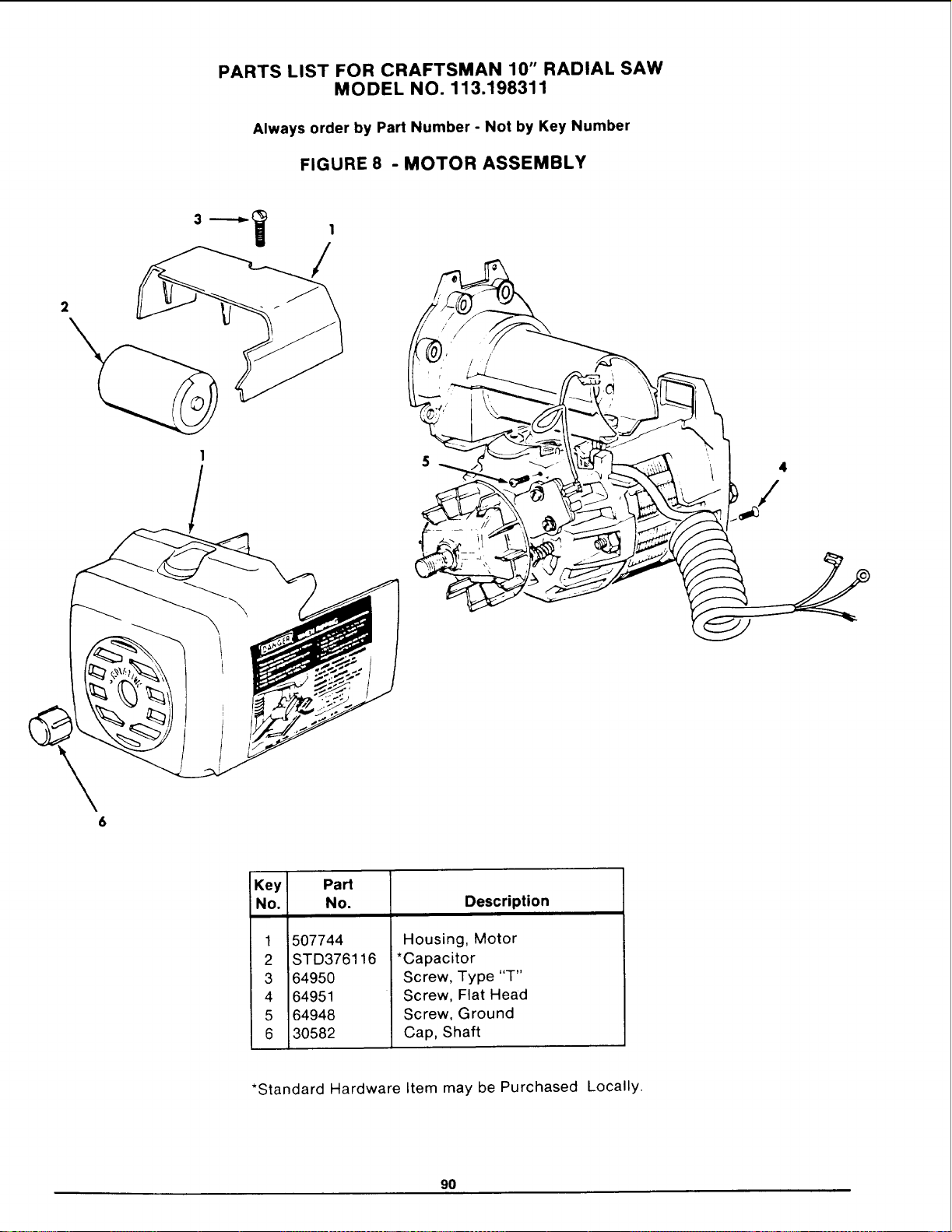
PARTS LIST FOR CRAFTSMAN 10" RADIAL SAW
MODEL NO. 113.198311
Always order by Part Number - Not by Key Number
FIGURE 8 - MOTOR ASSEMBLY
1
/
6
Key Part
No. No. Description
1
2
3
4
5
6
i507744
STD376116
64950
64951
64948
30582
Housing, Motor
*Capacitor
Screw, Type "T"
Screw, Flat Head
Screw, Ground
Cap, Shaft
*Standard Hardware Item may be Purchased Locally.
90
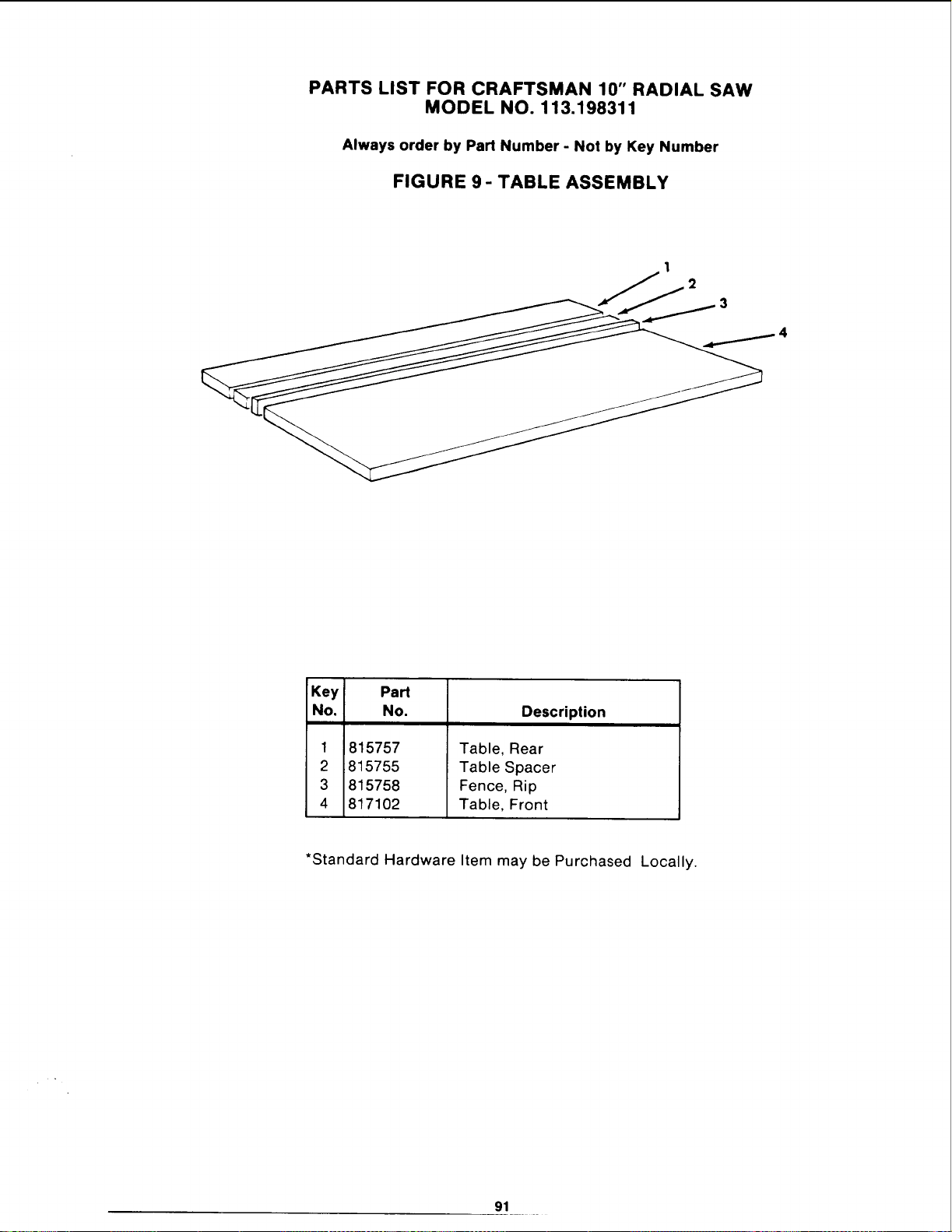
PARTS LIST FOR CRAFTSMAN 10" RADIAL SAW
MODEL NO. 113.198311
Always order by Part Number - Not by Key Number
FIGURE 9- TABLE ASSEMBLY
1
2
4
Key Part
No. No. Description
1
2
3
4
815757
815755
815758
817102
Table, Rear
Table Spacer
Fence, Rip
Table, Front
*Standard Hardware Item may be Purchased Locally.
91
NOTES

NOTES
NOTES
NOTES
F
_A,/R8
Operators
Manual
SERVICE
MODEL NO.
113.198311
10" RADIAL SAW
WITH 44" CABINET
HOW TO ORDER
REPAIR PARTS
10-INCH RADIAL SAW
Now that you have purchased your 10-inch radial saw, should a need
ever exist for repair parts or service, simply contact any Sears Service
Center and most Sears, Roebuck and Co. stores. Be sure to provide all
pertinent facts when you call or visit.
The model number of your 10-inch radial saw will be found on a plate
attached to your saw, at the left-hand side of the base.
WHEN ORDERING REPAIR PARTS, ALWAYS GIVE THE FOLLOW-
ING INFORMATION:
PART NUMBER
MODEL NUMBER
113.198311
PART DESCRIPTION
NAME OF ITEM
10-INCH RADIAL SAW
All parts listed may be ordered from any Sears Service Center and most
Sears stores. If the parts you need are not stocked locally, your order will
be electronically transmitted to a Sears Repair Parts Distribution Center
for handling.
Sold by SEARS, ROEBUCK AND CO., Chicago, IL. 60684 U.S.A.
Part No. SP5103 Form No. SP5103 Printed in U.S.A. 11/}