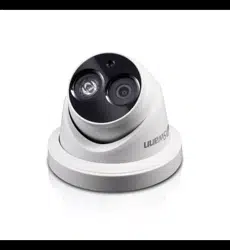
3MP HD Dome
Security Camera
For use with Swann 7300 Series HD NVRs
EN
INSTRUCTION MANUAL
1
Congratulations on your purchase of this
3Megapixel HD Security Camera. This is a state-
of-the-art dome security camera with digital im-
aging technology for 10x the picture sharpness
of traditional security systems. The 3 Megapixel
resolution is able to generate super clear video
images and the built-in microphone allows you
to hear what’s happening. See everything during
the night with the latest infrared cut filter for
amazing night vision up to 100ft/30m. It’s built to
suit any conditions with weather resistant rating
of IP66 for indoor & outdoor use.
Important note - All jurisdictions have specific
laws and regulations relating to the use of cam-
eras. Before using any camera for any purpose,
it is the buyer’s responsibility to be aware of all
applicable laws and regulations that prohibit or
limit the use of cameras.
Important safety instructions
1) Make sure the camera is fixed correctly and
stable if fastened in place.
2) Do not operate if wires and terminals are ex-
posed.
3) This camera can only be used in combination
with Swann’s NVR-7300 HD network video record-
ers.
4) The reset button is used to perform a factory
reset. Disconnect the Ethernet cable, hold down
the reset button then connect the Ethernet cable.
Keep holding the reset button for 20 seconds then
release. The NVR will take a short time to detect
and display the camera after it has been reset.
Warning - Modifications not approved by the party
responsible for compliance could void user’s au-
thority to operate the equipment.
Introduction
2
Choosing a location for your Camera
Some things to consider when choosing a location -
1) What you want to monitor and where you’ll get the
best view of it.
2) How you’re going to connect the camera to your
monitoring system; remember that cables and
connections should be kept out of the weather.
3) It’s recommended to mount your camera at an
elevated position to minimise harm.
4) Place your camera as close to the area of interest
as practicable. The best position is from about 4m
(13ft) above looking slightly down, keeping in mind
the details you are looking for.
5) Although the sky looks nice when you look at the
live view from your camera, it is an unlikely direction
for an offender to approach, make sure your camera
has minimal sky in it as the light in daylight can make
the foreground of the image darker.
6) Think about the most likely way a potential offender
may approach your home, use your cameras to give
you the best coverage of these areas.
7) The camera’s casing is resistant to water, different
weather conditions and tampering. It would take
an overwhelming event of this kind to damage the
housing of the camera. However, the cable and
connector are vulnerable and require protection.
8) Even though the camera is weather and water-
resistant, the cable and connectors are not always
as easy to protect. We recommend you cover the
connectors and the end of the cable with some
waterproof tape or similar for best results.
9) Avoid bending your cables at sharp angles.
10) Don’t put your cable near live electrical wiring.
AC electricity generates radio “noise” which can
interfere with the signal from your camera.
3
Connecting your Camera
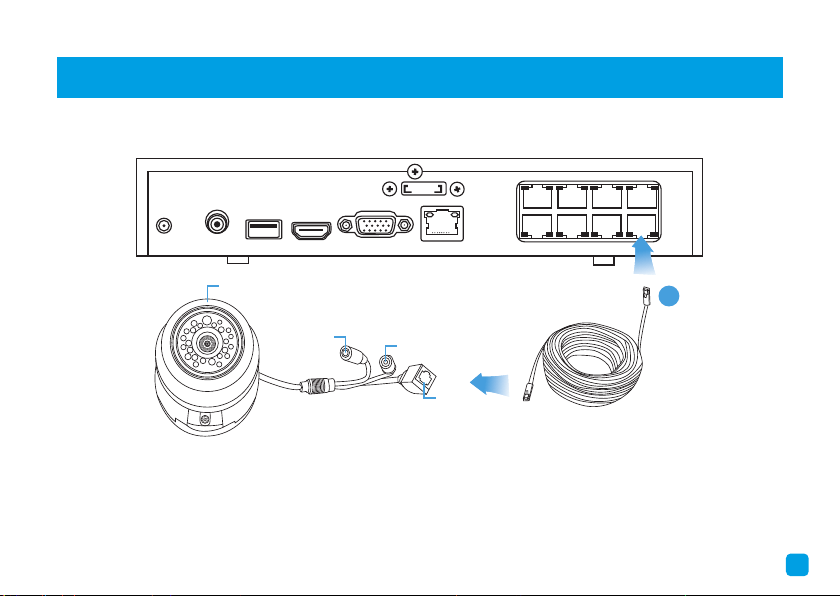
To connect your camera to the NVR, simply connect the supplied Ethernet cable to the LAN connection on the
camera then plug the other end of the cable (1) into one of the IP camera inputs on the back of the NVR.
Power
Reset
LAN
Microphone
AUDIO
OUT
eSATA
LAN
VGA
HDMI
DC 48V
USB
1 3 5 7
2 4 6 8
1
It doesn’t really matter which input you use as they are quite versatile and will be configured in a later step.
The Ethernet cable is the same at both ends so it doesn’t matter which end plugs into the camera or NVR.
Note: For more information on how to connect and setup your camera consult the quick start guides and manual
for your NVR.
4
Mounting your Camera
The camera can be mounted onto a flat vertical or horizontal surface and
must be of sufficient strength to hold the camera. To mount the camera -
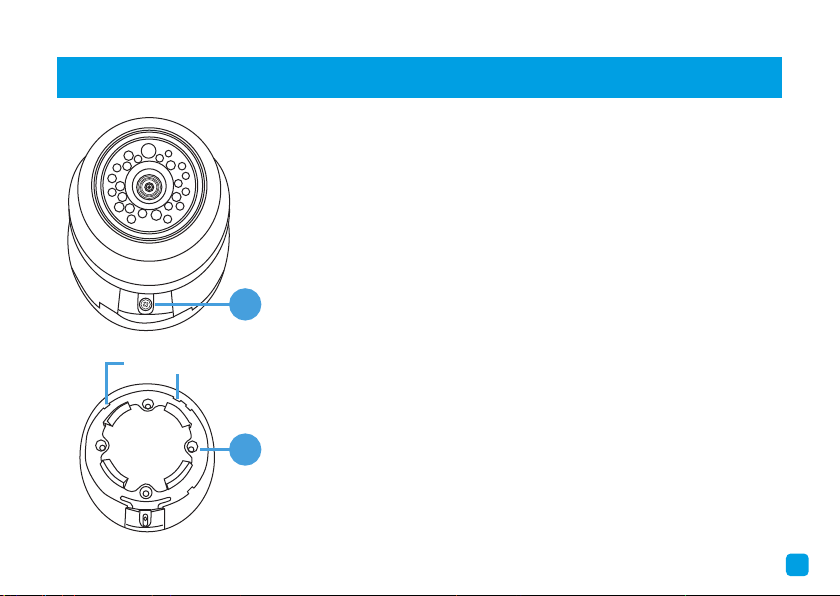
• Using a Phillips head screwdriver, remove the screw (1) from the
mounting clip. Press down on the mounting clip and carefully remove
the dome cover lifting from the front edge first.
• You’re now free to remove the camera to gain access to the mounting
bracket (2). There are four mounting holes available.
• Position the camera in the location you want to mount to then mark
the mounting holes on the surface to position the screws. Using the
appropriate screws for the surface you are mounting to, screw the
camera into place. Place the camera back onto the mounting bracket.
• To reinstall the dome cover, there are two dome clips located on the
mounting base. Place the dome cover into the dome clips first then
press down on the cover until it locks into place. Place the screw back
onto the mounting clip and tighten.
• The dome cover can be rotated left or right and the camera can be
aimed in almost any direction from wherever you choose to mount it.
1
2
Dome Clips
5
Limited Warranty - Terms & Conditions
Swann Communications warrants this product
against defects in workmanship and material for
a period of one (1) year from its original purchase
date. You must present your receipt as proof of
purchase for warranty validation. Any unit which
proves defective during the stated period will
be repaired without charge for parts or labour
or replaced at the sole discretion of Swann. The
end user is responsible for all freight charges in-
curred to send the product to Swann’s repair cen-
tres. The end user is responsible for all shipping
costs incurred when shipping from and to any
country other than the country of origin.
The warranty does not cover any incidental, ac-
cidental or consequential damages arising from
the use of or the inability to use this product. Any
costs associated with the fitting or removal of this
product by a tradesman or other person or any
other costs associated with its use are the re-
sponsibility of the end user. This warranty applies
to the original purchaser of the product only and
is not transferable to any third party. Unauthor-
ized end user or third party modifications to any
component will render all warranties void. By law
some countries do not allow limitations on certain
exclusions in this warranty. Where applicable by
local laws, regulations and legal rights will take
precedence.
For Australia: Our goods come with guarantees
which cannot be excluded under Australian Con-
sumer Law. You are entitled to a replacement
or refund for a major failure and for compensa-
tion for any other reasonably foreseeable loss or
damage. You are also entitled to have the goods
repaired or replaced if the goods fail to be of ac-
ceptable quality.
6
FCC Verification
This equipment has been tested and found to comply with the limits for Class B digital device, pursu-
ant to part 15 of the FCC Rules. These limits are designed to provide reasonable protection against
harmful interference in a residential installation. This equipment generates, uses and can radiate radio
frequency energy and, if not installed and used in accordance with the instructions, may cause harmful
interference to radio or television reception, which can be determined by turning the equipment off and
on, the user is encouraged to try to correct the interference by one or more of the following measures:
• Reorient or relocate the receiving antenna
• Increase the separation between the equipment and the receiver
• Connect the equipment into an outlet on a circuit different from that to which the receiver is con-
nected
• Consult the dealer or an experienced radio/TV technician for help
These devices comply with part 15 of the FCC Rules. Operation is subject to the following two conditions:
(1) These devices may not cause harmful interference.
(2) These devices must accept any interference received, including interference that may cause unde-
sired operation.

M816CAM040815E | © Swann 2015
Helpdesk/Technical Support
Technical Support E-mail: [email protected]
Telephone Helpdesk
USA Toll Free 1-800-627-2799
USA Parts & Warranty 1-800-627-2799
(M-F, 9am-5pm US PT)
AUSTRALIA 1800 788 210
NEW ZEALAND Toll Free 0800 479 266
UK 0808 168 9031