EN
USER GUIDE
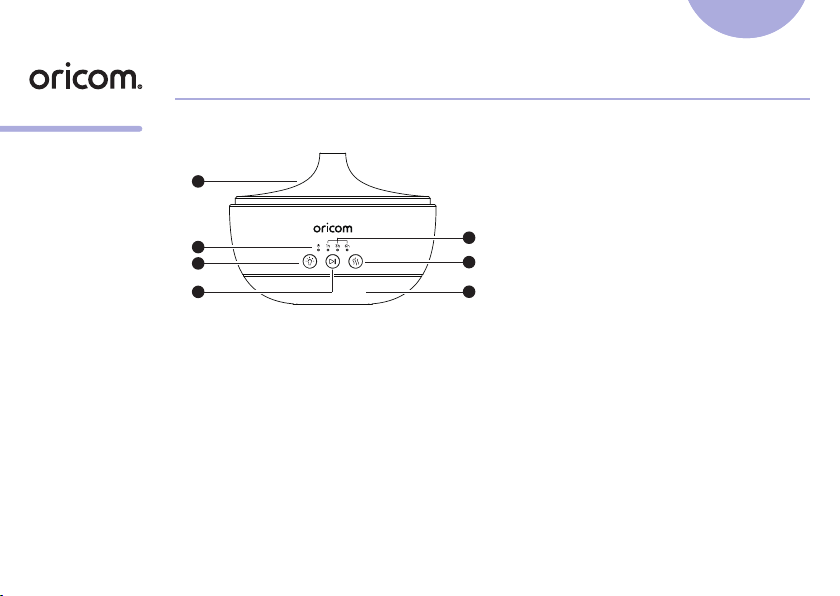
1. Overview of Nursery Calm
1
2
4
5
3
6
7
1. Top Cover
2. Power LED
3. Timer indicator
4. Mood Light button
5. Play / Pause button
6. Mist button
7. Speaker
IMPORTANT:
• Unplug before cleaning.
• All parts may be wiped with a soft damp cloth and then wiped with a dry cloth.
• Clean the ultrasonic plate with water on a soft cloth regularly.
• Dry with a soft cloth to remove leftover condensation.
• Do not clean the product with thinner or cleansers.
• Empty tank after each use.
• Do not immerse unit in water.
Model:
OBHAD200
2. Setting up your
Nursery Calm
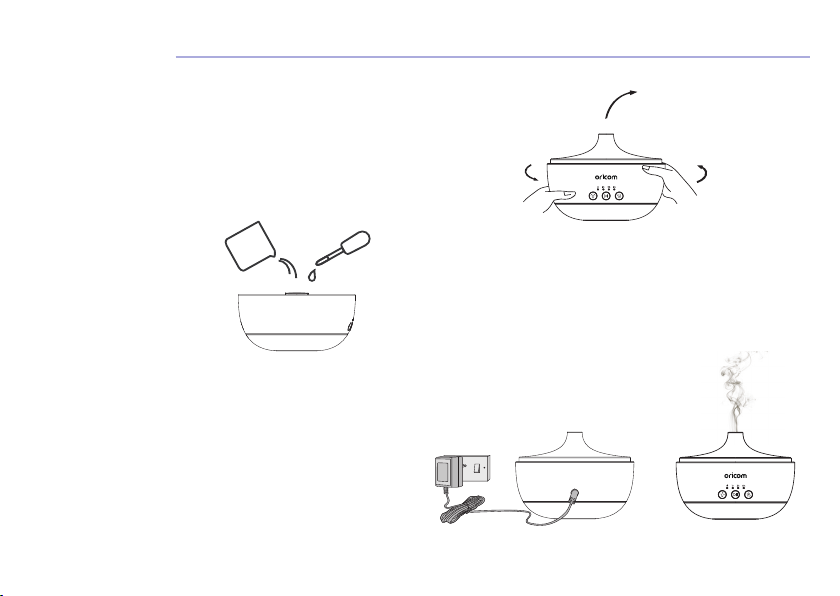
Place the Nursery Calm on a at,
even surface, remove the top
cover from diffuser base.
Fill the water tank with clean, cool water up to MAX line.
To create an aroma scent, add a few drops of essential oil
(not included) to dilute with the water in the tank.
Replace the top cover back onto
the diffuser base. Make sure it
is installed correctly.
Connect the power adaptor into
the power socket on the back of
the Nursery Calm and the other
end to mains power.

3. Using the Product
3.1 Turn On the Nursery Calm
Press button to turn on the Nursery Calm.
3.2 Set Timer
You can set a timer to schedule the working hours of the Nursery Calm.
Press
button to turn on the timer and select 1h / 3h / 6h or switch off both aroma diffuser /
humidier and night light.
3.3 Night Light
The mood light feature gives soft glow light with 7 colours of choice for soothing your baby.
• Press
button to turn the light on.
• Press
button again to cycle through the colours.
• Press
button during the colour cycle to select a colour.
• Press
button to turn off.
3.4 Audio playback
Switch on Bluetooth and enter discovery mode on your smart device while close to Nursery Calm,
searching for available devices and select “AromaSpeaker Diffuser”, follow on screen instructions to
complete the pairing.
• Press
button to play favourite song through your device.
• While the audio is playing, long press
button to reduce the volume or long press button to
increase the volume.
• Press
button to stop Audio playback.
Important for Bluetooth:
• Keep your device within 6 metres of Nursery Calm to get good connection.
4. Troubleshooting
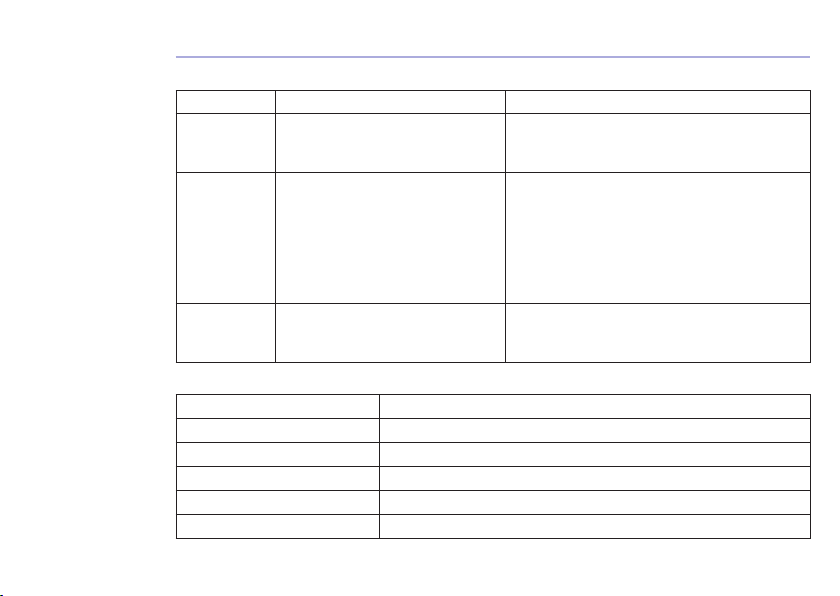
Problem Possible Cause Solution
Unit will not
turn on
There is not enough water in the
Water Tank. The AC adaptor is not
connected to a power supply.
Add water to the tank; Carefully disconnect the
AC adaptor from the DC Socket and the power
supply, check the cables, then reconnect.
No mist or
abnormal
mist; Unit is
leaking water
Not enough water or too much
water. Residue on the Ultrasonic
plate. Cover not installed properly.
Dust or restriction to the air-suction
port on the underside of the base.
Add a suitable amount of water in the tank.
Water must never be lled over 200 ML (MAX)
Line. Please refer to Maintenance instructions
and remove and re-install correctly so vapours
can be released freely. Clean the air suction
port of any dust. Restricted airow will affect
mist.
Water leakage
from product
Cover not installed properly. Has
the unit been tipped over? Low
temperature or high humidity.
Remove and reinstall correctly, so vapours can
be released freely. Under these conditions, the
mist may condense quickly into water droplets.
5. Specifications
Product Size 4.65’’ height x 6.3’’ diameter
Recommended Water Level 200ml (MAX)
Product Weight Approx. 480g (with adaptor)
Accessories / Materials Adaptor, User Manual / ABS, PP, PET
Power Supply (Input) AC100-240V 50/60Hz / (Output) 24V 650mA
Power / Suitable Area 15.6W / 10-15m
2
* Automatically turns off when water levels are low.

6. General Information
Express Warranty (Australia)
This Express Warranty is provided by Oricom International Pty Ltd ABN 46 086 116 369, Unit 1, 4
Sovereign Place, South Windsor NSW 2756, herein after referred to as “Oricom”.
Oricom warrants that the product is free from defects in materials or workmanship during the Express
Warranty Period. This Express Warranty does not extend to any product from which the serial number
has been removed or was purchased outside of Australia.
The benets of this Express Warranty are in addition to other rights and remedies you may have
under the Australian Consumer Law. Our goods come with guarantees that cannot be excluded
under the Australian Consumer Law. You are entitled to a replacement or refund for a major failure
and compensation for any other reasonably foreseeable loss or damage. You are also entitled to
have the goods repaired or replaced if the goods fail to be of acceptable quality and the failure does
not amount to a major failure. In the event of a minor failure, Oricom reserves the right to choose to
repair or replace the product.
The Express Warranty Period will be a period of 12 months beginning on the date of purchase of the
product evidenced by your dated sales receipt. You are required to provide proof of purchase as a
condition of receiving Express Warranty services.
You are entitled to a replacement product or repair of the product at our discretion according to
the terms and conditions of this document if your product is found to be faulty within the Express
Warranty Period. This Express Warranty extends to the original purchaser only and is not transferable.
Products distributed by Oricom are manufactured using new materials or new and used materials
equivalent to new in performance and reliability. Spare parts may be new or equivalent to new. Spare
parts are warranted to be free from defects in material or workmanship for thirty (30) days or for the
remainder of the Express Warranty Period of the Oricom branded product in which they are installed,

whichever is longer. During the Express Warranty Period, Oricom will where possible repair and if not
replace the faulty product or part thereof. All component parts removed under this Express Warranty
become the property of Oricom. In the unlikely event that your Oricom product has a recurring
failure, Oricom may always, subject to the Competition and Consumer Act 2010, at its discretion,
elect to provide you with a replacement product of its choosing that is at least equivalent to your
product in performance.
No change to the conditions of this Express Warranty is valid unless it is made in writing and signed
by an authorised representative of Oricom.
Oricom will not be liable under this Express Warranty, and to the extent permitted by law will not be
liable for any defect, loss, damage or injury arising out of or in connection with a:
1. Failure by you to adhere to the warnings and follow the instructions set out in this user guide for
the proper installation and use of the product;
2. Willful misconduct or deliberate misuse by you of the product;
3. Any external cause beyond our control, including but not limited to power failure, lightning or
over voltage; or
4. Modication to the product or services carried out on the product by anyone other than Oricom
or Oricom’s authorised service provider.
How to make a claim under your Express Warranty in Australia
Oricom has a simple warranty process for you to follow:
• Please call or email our Customer Support Team, 02 4574 8888 or [email protected].
• A Customer Support Team member will verify after troubleshooting with you if your product
qualies under warranty. If so, they will give you a Product Return Authorisation number.
• We will then email a Return Authorisation form and a Repair Notice (if necessary), together with
instructions on how to return the product for warranty service.

Please note that if a Customer Support Team member advises that your product does not qualify for
return, this warranty does not apply to your product. Products that are authorised to be returned to
Oricom in Australia must include all of the following:
• A completed Return Authorisation form
• A copy of your Proof of Purchase (please keep your original copy)
• The faulty product, including all accessories.
Send the approved returns to:
Oricom International Pty Ltd
Locked Bag 658
South Windsor NSW 2756 Australia
Please note that this Express Warranty excludes expenses incurred by you in returning any faulty
product to us. You must arrange and pay any expenses incurred (including postage, delivery, freight,
transportation or insurance of the product) to return the faulty product to us, however, we will arrange
delivery of the repaired or replaced faulty product to you.
Important Information - Repair Notice
Please be aware that the repair of your products may result in the loss of any user-generated data
(such as stored telephone numbers, text messages and contact information). Please ensure that you
have made a copy of any data saved on your product before sending for repair. Please also be aware
that products presented for repair may be replaced by refurbished products or parts of the same type
rather than being repaired.
All rights reserved
Printed in China
Version 4.0Ref: 2022-02-10
Oricom Customer Support
Oricom have a trained and dedicated team of Customer Support Representatives, each with the
knowledge and resources to assist in answering your questions quickly and efciently.
Oricom Support - Australia
For all product enquiries, troubleshooting or to discuss the range of Oricom products, feel free to
contact Oricom or visit our website for answers to frequently asked questions.
(02) 4574 8888 / Monday - Friday 8am – 6pm AEST
Email: [email protected] / www.oricom.com.au
Oricom Support - New Zealand
0800 674 266 / Monday - Friday 10am - 8pm NZST
Email: [email protected]