Write the model and serial number here:
E
GE
Model #
Serial #
These numbers can be found inside on the left of the
refrigerator.
R'S TALLATION
CONTENTS
SAFETY WARNING SIGNS ...............................................................2
OPERATINGINSTRUCTIONS ........................................................4
SETTINGUPTHE REFRIGERATOR........................................................4
MAJORFEATURES.....................................................................................4
CONTROLPANEL........................................................................................5
DIGITALPANEL............................................................................................6
TEMPERATURECONTROL.......................................................................7
ICE and COLDWATERDISPENSER.........................................................7
SHELVESand BINS.....................................................................................8
FOODSTORAGEGUIDE...........................................................................9
REMOVINGTHE FREEZERACCESSORIES..........................................11
REMOVINGTHE FRIDGEACCESSORIES.............................................11
CAREAND CLEANING.............................................................................12
CHANGINGTHE INTERIORLIGHT.........................................................13
WATERFILTER..........................................................................................14
DOORS.......................................................................................................14
INSTALLATION INSTRUCTIONS................................................is
INSTALLATIONOF THE REFRIGERATOR.............................................15
REMOVINGTHE REFRIGERATORDOORS..........................................16
REATTACHINGTHEREFRIGERATORDOORS....................................19
LEVELINGTHEREFRIGERATOR............................................................22
ADJUSTINGTHE HEIGHTBETWEENTHE DOORS.............................23
CHECKINGTHE WATERDISPENSERLINE...........................................24
INSTALLATIONOF THE WATERDISPENSERLINE...............................25
BEFOREYOU CALL FOR SERVICE........................................................28
CONSUMER SUPPORT ....................................................................30
WARRANTY...............................................................................................30
In the U.S.A, for questions about features,
operation/performance, parts, accessories or service, call:
1=800=726=7864 (I=800=SAMSUNG)
www.samsung.com
DA68-O1606A REV(O.O)
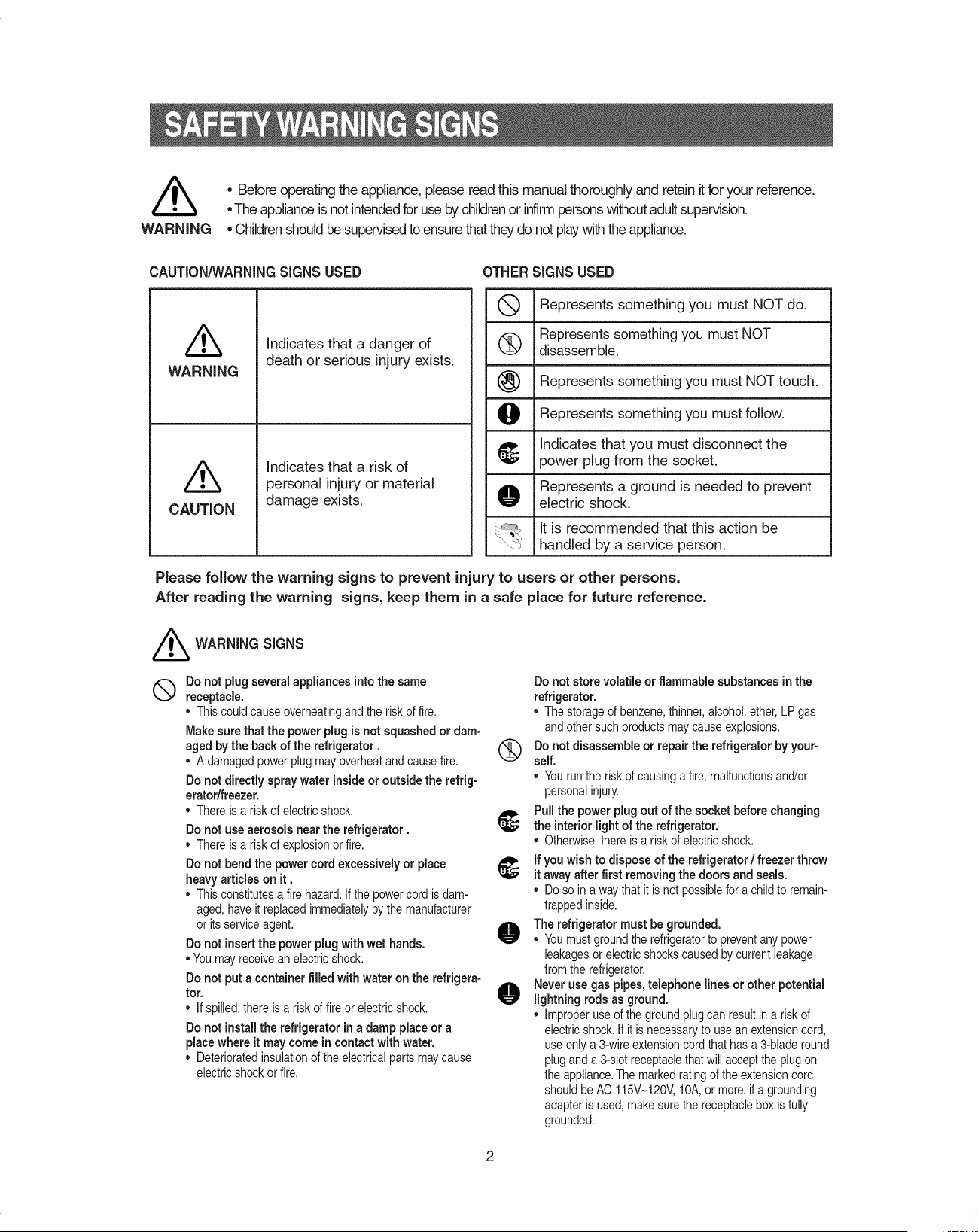
/k
WARNING
• Before operating the appliance,please readthis manual thoroughly and retain it for your reference.
•The applianceis not intendedfor useby childrenor infirm personswithoutadultsupervision.
• Childrenshouldbesupervisedto ensurethatthey do not playwith the appliance.
CAUTION/_NARNINGSIGNS USED OTHER SIGNS USED
Q Represents something you must NOT do.
iRepresents something you must NOT
(_) disassemble.
Represents something you must NOT touch.
O Represents something you must follow.
_, Indicates that you must disconnect the
ipower plug from the socket.
Represents a ground is needed to prevent
O electric shock.
It is recommended that this action be
handled by a service person.
/k
WARNING
/k
CAUTION
Indicates that a danger of
death or serious injury exists.
Indicates that a risk of
personal injury or material
damage exists.
Please follow the warning signs to prevent injury to users or other persons.
After reading the warning signs, keep them in a safe place for future reference.
//_ WARNING SIGNS
®
Do not plug several appliances intothe same
receptacle.
Thiscould causeoverheatingandthe risk of fire.
Make sure that the powerplug is not squashedor dam-
aged by the back of the refrigerator.
• A damagedpowerplug mayoverheatandcausefire.
Do not directlyspraywater inside or outside the refrig-
erator/freezer.
• There is a riskof electricshock.
Do not use aerosols near the refrigerator.
• There is a riskof explosionor fire.
Do not bend the power cordexcessively or place
heavy articles on it.
• This constitutesa fire hazard.If the powercord is dam-
aged, haveit replacedimmediatelyby the manufacturer
or its serviceagent.
Do notinsertthe power plug with wet hands.
• Youmay receivean electricshock.
Do not put a container filled with water on the refrigera-
tor.
• If spilled,there is a risk of fire orelectricshock.
Do not installthe refrigerator ina damp place or a
place where it may come in contact with water.
• Deterioratedinsulationof the electricalparts may cause
electricshockor fire.
Do not store volatile or flammable substancesinthe
refrigerator.
• The storageof benzene,thinner,alcohol,ether,LP gas
andothersuch productsmay causeexplosions.
(_ Do notdisassemble or repair the refrigerator by your-
self.
• Yourun the riskof causinga fire, malfunctionsand/or
personalinjury.
Pull the power plugout of the socket before changing
_, the interiorlight of the refrigerator.
• Otherwise,there is a riskof electricshock.
_; if you wish to dispose of the refrigerator/ freezer throw
it away after first removing the doors and seals.
• Doso ina way thatit is not possiblefora childto remain-
trappedinside.
O The refrigerator must be grounded.
• Youmustgroundthe refrigeratorto preventany power
leakagesor electricshockscausedby currentleakage
from the refrigerator.
O ever use gas pipes, telephone lines or other potential
lightning rods as ground.
• Improperuse of theground plugcan resultin a risk of
electricshock.If it is necessaryto use an extensioncord,
use onlya 3-wireextensioncordthat has a 3-bladeround
pluganda 3-slotreceptaclethatwill acceptthe plugon
the appliance.The markedratingof theextensioncord
shouldbe AC 115V~120V,10A,or more.ifa grounding
adapteris used, makesurethe receptaclebox is fully
grounded.
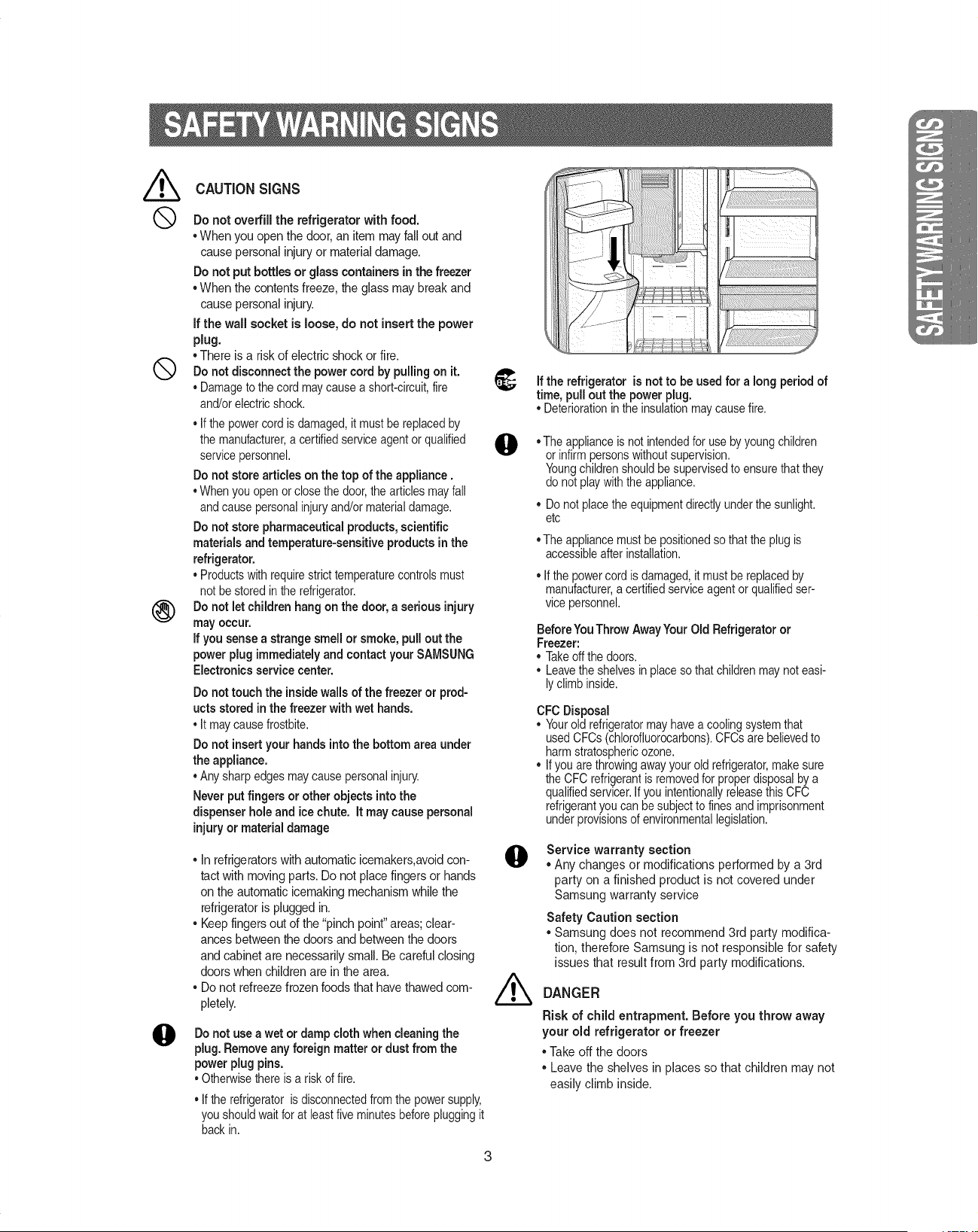
CAUTION SIGNS
Do not overfill the refrigerator with food.
°When you open the door, an item mayfall out and
cause personal injuryor matedal damage.
Do not put bottles or glass containers in the freezer
• When the contentsfreeze, the glass may break and
cause personal injury.
If the wall socket is loose, do not insert the power
plug.
• There isa risk of electric shock or fire.
Q Do not disconnect the power cord by pulling on it.
• Damageto the cordmay causea short-circuit,fire
and/orelectricshock.
• If thepower cordis damaged,it mustbe replacedby
the manufacturer,a certifiedserviceagentor qualified
servicepersonnel.
Do not store articles on the top of the appliance.
• When you open orclose thedoor,thearticlesmay fall
andcausepersonalinjuryand/ormaterialdamage.
Do not store pharmaceutical products,scientific
materials and temperature-sensitive products inthe
refrigerator.
• Productswith requirestrict temperaturecontrolsmust
notbe storedin the refrigerator.
Do not let children hangon the door, a serious injury
may occur.
if you sensea strange smell or smoke, pull out the
power plug immediatelyand contact your SAMSUNG
Electronics service center.
@
Do not touch the insidewallsof the freezer or prod-
ucts stored in the freezer with wet hands.
• It maycausefrostbite.
Do not insertyour hands intothe bottom area under
the appliance.
• Any sharpedges may causepersonalinjury.
Never put fingers or otherobjectsintothe
dispenser hole and ice chute. It may cause personal
injuryor material damage
• In refrigerators with automatic icemakers,avoidcon-
tact with moving parts. Do not placefingers or hands
on the automatic icemaking mechanism while the
refrigerator is plugged in.
• Keep fingers out of the "pinch point"areas;clear-
ances between the doors and betweenthe doors
and cabinet are necessarily small. Be careful closing
doors when children are in the area.
• Do not refreezefrozen foods that have thawed com-
pletely.
@
@
Do not use a wet or damp cloth when cleaning the
plug. Remove any foreign matter or dust from the
power plug pins.
• Otherwisethereis a risk of fire.
• If the refrigerator is disconnectedfromthe powersupply,
you shouldwait forat leastfive minutesbeforepluggingit
back in.
3
If the refrigeratoris notto be used for a long period of
time, pull out the power plug.
• Deteriorationinthe insulationmay causefire.
• The applianceis not intendedfor use byyoung children
or infirmpersonswithoutsupervision.
Youngchildrenshouldbe supervisedto ensurethat they
do notplay withtheappliance.
• Donot placethe equipmentdirectlyunderthe sunlight.
etc
• The appliancemustbe positionedso thatthe plugis
accessibleafter installation.
• If the powercord is damaged,it mustbe replacedby
manufacturer,a certifiedserviceagentor qualifiedser-
vice personnel.
BeforeYouThrow AwayYourOld Refrigerator or
Freezer:
• Takeoff the doors.
• Leavethe shelvesin placeso thatchildrenmaynot easi-
ly climbinside.
CFC Disposal
• Yourold refrigeratormayhavea coolingsystemthat
usedCFCs(chlorofluorocarbons).CFCsare believedto
harm stratosphericozone.
• Ifyou arethrowingawayyour old refrigerator,makesure
the CFCrefrigerantis removedfor properdisposalbya
qualifiedservicer.If you intentionallyreleasethisCFC
refrigerantyou can be subjectto fines and imprisonment
underprovisionsof environmentallegislation.
Service warranty section
• Any changes or modifications performed by a 3rd
party on a finished product is not covered under
Samsung warranty service
Safety Caution section
• Samsung does not recommend 3rd party modifica-
tion, therefore Samsung is not responsible for safety
issues that result from 3rd party modifications.
DANGER
Risk of child entrapment. Before you throw away
your old refrigerator or freezer
° Take off the doors
° Leave the shelves in places so that children may not
easily climb inside.
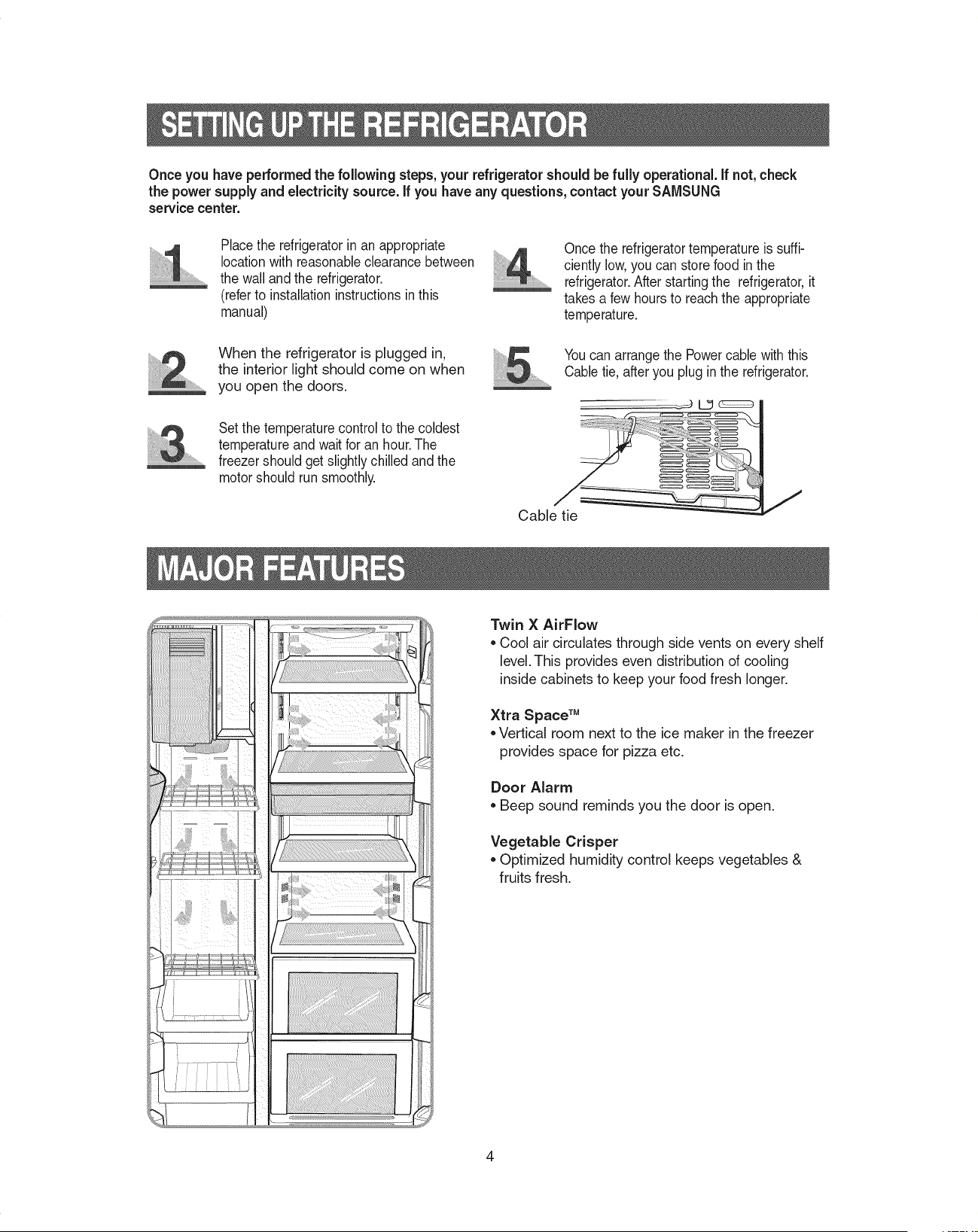
Once you have pe#ormed the following steps,your refrigerator should be fully operational, if not,check
the power supply and electricitysource, if you have any questions,contact your SAMSUNG
service center.
Placethe refrigeratorin an appropriate
locationwith reasonableclearance between
the wall and the refrigerator.
(referto installationinstructions in this
manual)
When the refrigerator is plugged in,
the interior light should come on when
you open the doors.
Set the temperature controlto the coldest
temperature andwait for an hour.The
freezershould get slightly chilled and the
motor should run smoothly.
Cable tie
Once the refrigeratortemperature is suffi-
ciently low,you can store food inthe
refrigerator.After starting the refrigerator,it
takes a few hours to reachthe appropriate
temperature.
Youcan arrangethe Powercable with this
Cable tie, after you plug in the refrigerator.
Twin X AirFlow
,,Cool air circulates through side vents on every shelf
level.This provides even distribution of cooling
inside cabinets to keep your food fresh longer.
Xtra Space TM
,,Vertical room next to the ice maker in the freezer
provides space for pizza etc.
Door Alarm
Beep sound reminds you the door is open.
Vegetable Crisper
Optimized humidity control keeps vegetables &
fruits fresh.

POWER FREEZE BUTTON
Speeds up the freezing process in the freezer.
_/t FREEZERTEMP.BUTTON
To set the freezer temperature,press the button
repeatedlyto change the set temperature in
sequence between cold and coldest.
iCE TYPE BUTTON
Use this button to choose Cubed or Crushed ice
or Ice off.
CHILD LOCK BUTTON
When this button is pressed for 3seconds, all
functions are locked and can not be modified.
The water and ice dispenser are locked.
FRIDGETEMP.BUTTON
To set the fridge temperature, press the button
repeatedlyto change the set temperature in
sequence between cool and coolest.
1
FILTER RESET BUTTON |
When the water filter isreplaced, reset the indica-
ltot by pressing the button for 3 seconds.
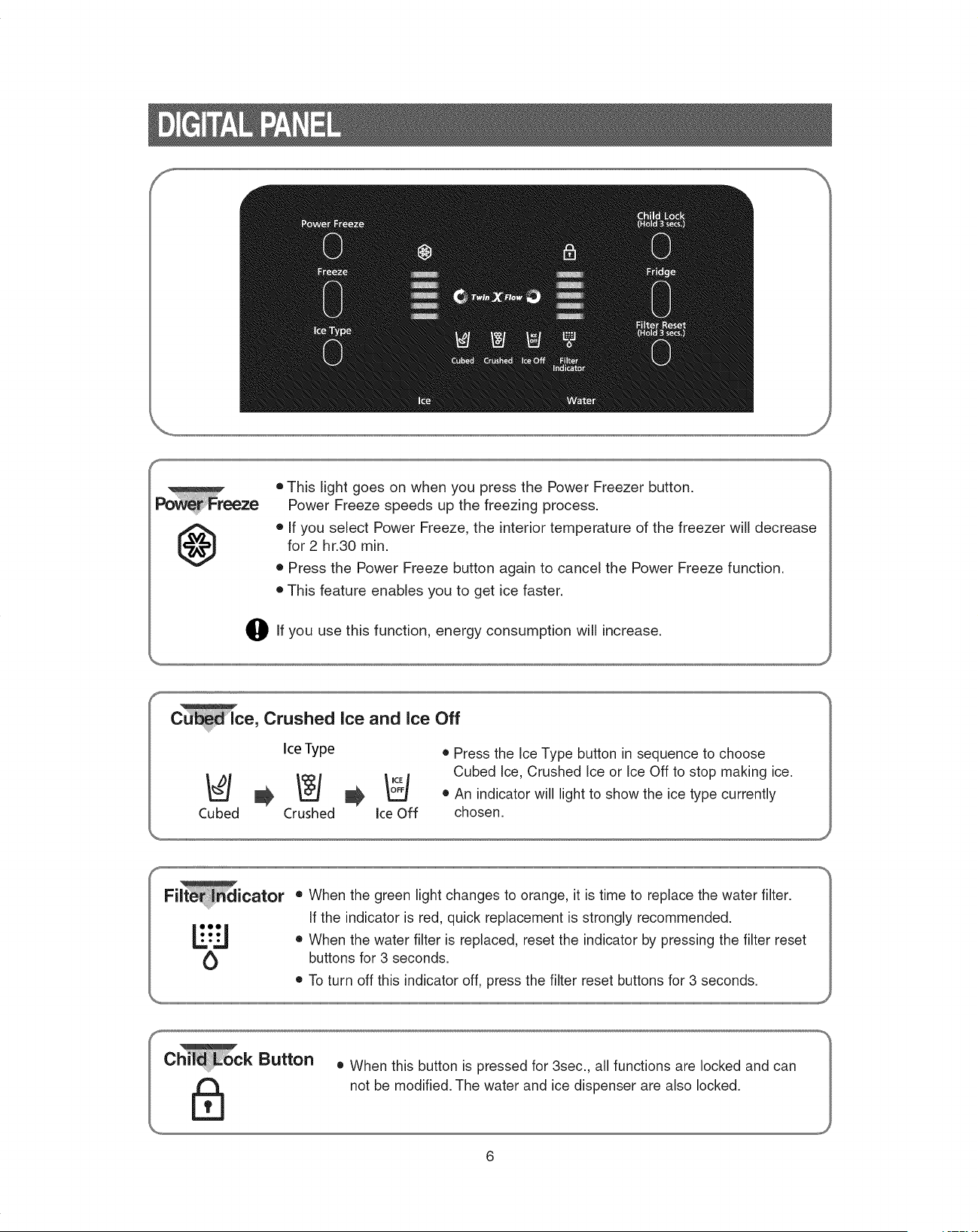
f
J
@
• This light goes on when you press the Power Freezer button.
Power Freeze speeds up the freezing process.
• If you select Power Freeze, the interior temperature of the freezer will decrease
for 2 hr.30 min.
• Press the Power Freeze button again to cancel the Power Freeze function.
• This feature enables you to get ice faster.
O If you use this function, energy consumption will increase.
e, Crushed Ice and Ice Off
Ice Type • Press the Ice Type button in sequence to choose
Cubed Ice, Crushed Ice or Ice Off to stop making ice.
• An indicator will light to show the ice type currently
Cubed Crushed ice Off chosen.
Fi icator
b
• When the green light changes to orange, it is time to replace the water filter.
If the indicator is red, quick replacement is strongly recommended.
• When the water filter is replaced, reset the indicator by pressing the filter reset
buttons for 3 seconds.
• To turn off this indicator off, press the filter reset buttons for 3 seconds.
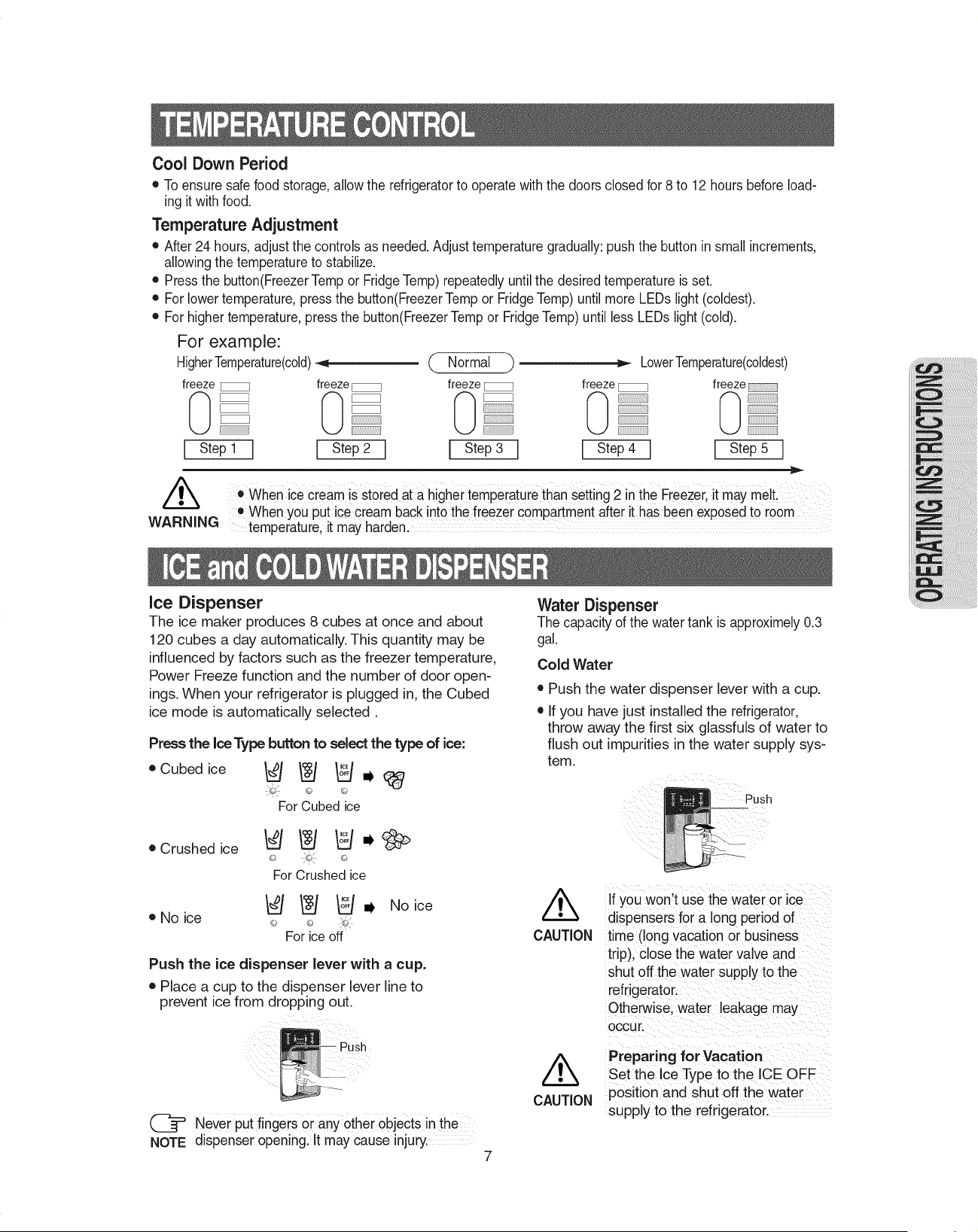
Cool Down Period
• To ensure safefood storage, allowthe refrigeratorto operate with the doors closed for 8 to 12 hours before load-
ing it with food.
Temperature Adjustment
• After 24 hours, adjustthe controls as needed.Adjusttemperature gradually: push the button in small increments,
allowingthe temperatureto stabilize.
• Pressthe button(FreezerTemp or FridgeTemp)repeatedly untilthe desired temperature is set.
• For lowertemperature,press the button(FreezerTemp or FridgeTemp) until more LEDs light (coldest).
• For highertemperature,press the button(FreezerTemp or FridgeTemp)until less LEDs light (cold).
For example:
HigherTemperature(cold)_,i _ Normal _ _ LowerTemperature(coldest)
freeze _ freeze _ freeze _ freeze _ freeze
I Step1 ] I Step2 I I Step3 I I Step4 I I Step5 I
/k
WARNING
• when ice cream is stored at a highei tempeiature than Setting2 in the Freezei,it may melt
Whenyou put icecream back into the freezer compartmentafter it has beenexposed to room
temperature,it may harden.
Ice Dispenser
The ice maker produces 8 cubes at once and about
120 cubes a day automatically. This quantity may be
influenced by factors such as the freezer temperature,
Power Freeze function and the number of door open-
ings. When your refrigerator is plugged in, the Cubed
ice mode is automatically selected.
Press the ice Type button to select the type of ice:
oCubedice _ /N _ .
For Cubed ice
• Crushed ice
• No ice
For Crushed ice
_ _ o_, Noice
L
For ice off
Push the ice dispenser lever with a cup.
• Place a cup to the dispenser lever line to
prevent ice from dropping out.
Push
(_= Never put fingers or any other objects in the
NOTE dispenser opening. It may cause injury.
7
Water Dispenser
The capacity of the water tank is approximely0.3
gal.
Cold Water
• Push the water dispenser lever with a cup.
• If you have just installed the refrigerator,
throw away the first six glassfuls of water to
flush out impurities in the water supply sys-
tem.
/k
CAUTION
If you won't use the water or ice
dispensers for a long period of
time (long vacation or business
trip), close the water valve and
shut off the water supply to the
refrigerator.
Otherwise, water leakage may
OCCUr.
/k
CAUTION
Preparing for Vacation
Set the Ice Type to the ICE OFF
position and shut off the water
supply to the refrigerator.
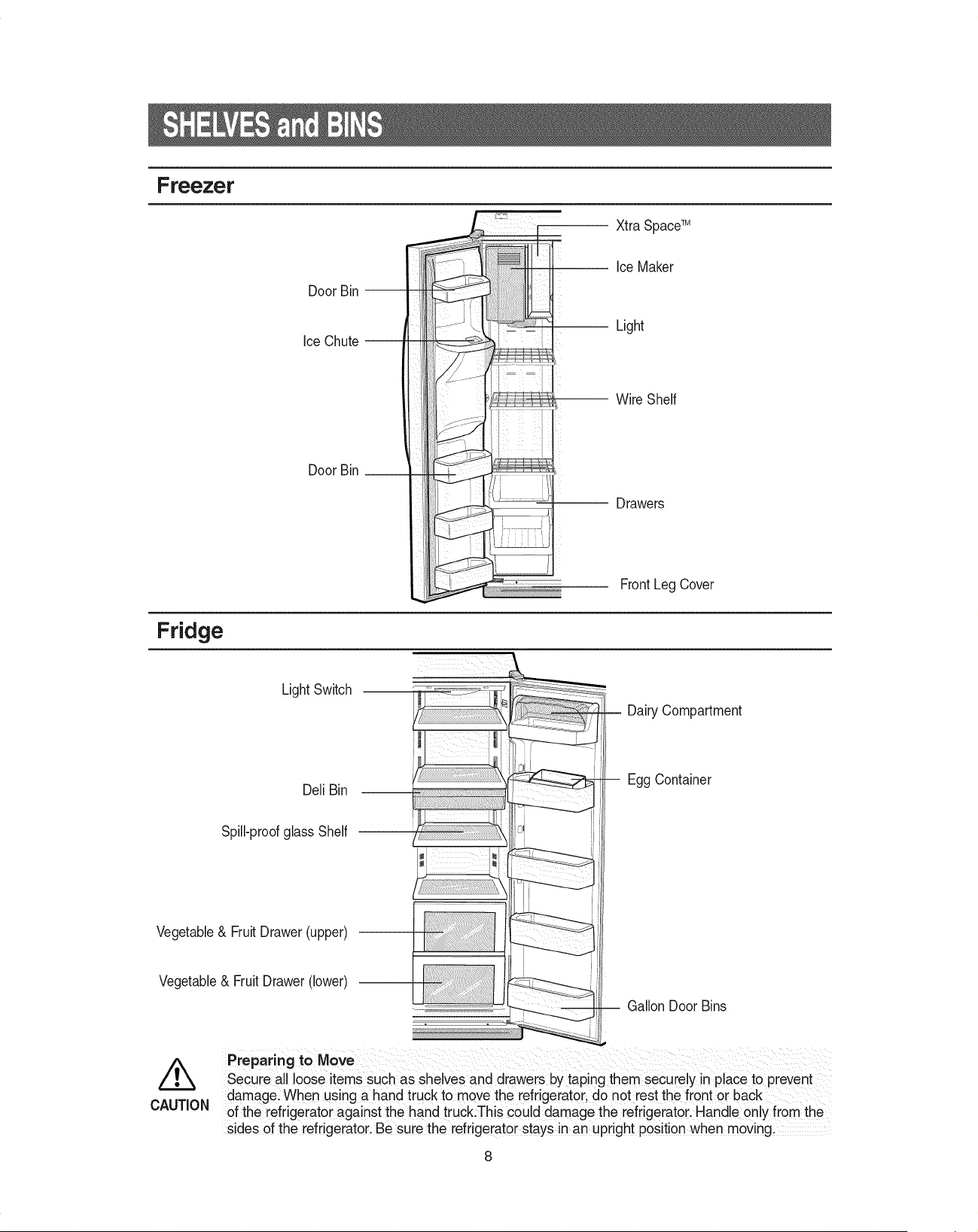
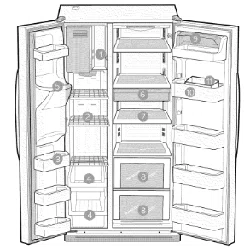
Freezer
Fridge
Door Bin
Ice Chute
Door Bin
li iitii!iii!!
Xtra SpaceTM
Ice Maker
Light
Wire Shelf
Drawers
FrontLeg Cover
Light Switch
Dell Bin
Spill-proofglass Shelf
Vegetable& Fruit Drawer(upper)
Vegetable& Fruit Drawer (lower)
Dairy Compartment
Egg Container
I
-- Gallon Door Bins
/k
CAUTION
Preparing to Move
Secuie all loose items Such as shelves and drawers by taping them secuiely in place toprevent
damagel When using a hand truck to move the refrigerator, do not rest the front or back
of the refrigerator against the hand truck:This could damage the refrigerator, Handle only from the
sides of the refrigerator, Be sure the refrigerator staysin an upr!ght position when moving,
8
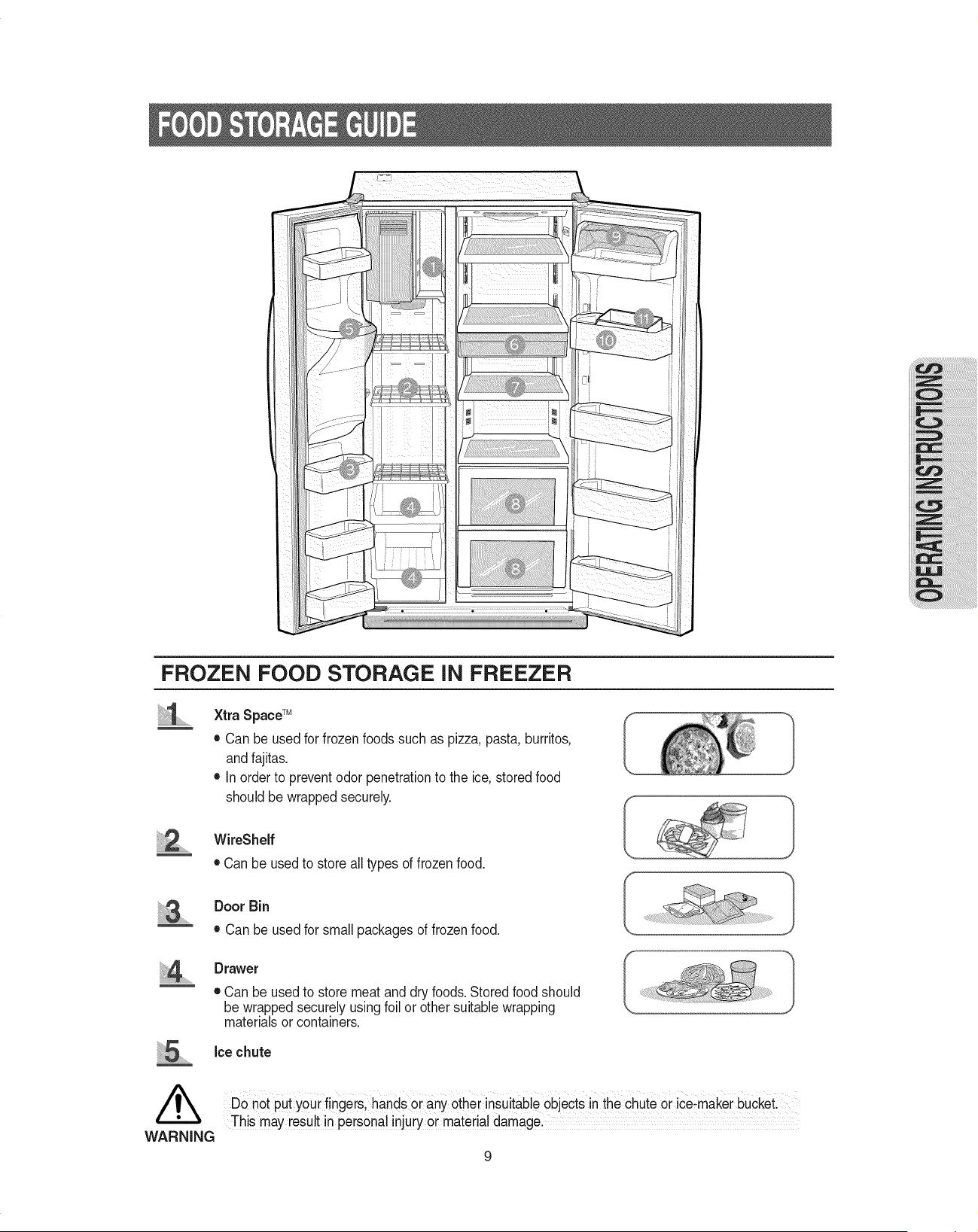
FROZEN FOOD STORAGE iN FREEZER
Xtra SpaceTM
• Can be used for frozenfoods such as pizza, pasta, burritos,
and fajitas.
• inorder to preventodor penetrationto the ice,storedfood
should be wrapped securely.
WireShelf
• Can be usedto store all types of frozen food.
/k
WARNING
Door Bin
• Can be used for small packages of frozen food.
Drawer
• Can be used to store meat and dry foods.Stored food should
be wrapped securely using foil or other suitablewrapping
materials or containers.
Ice chute
Do not put your fingers, handsorany other insuitableobjectsin the Chuteor ice:maker buCket:
This may reSUltin personal injuiy oi matedaldamagel
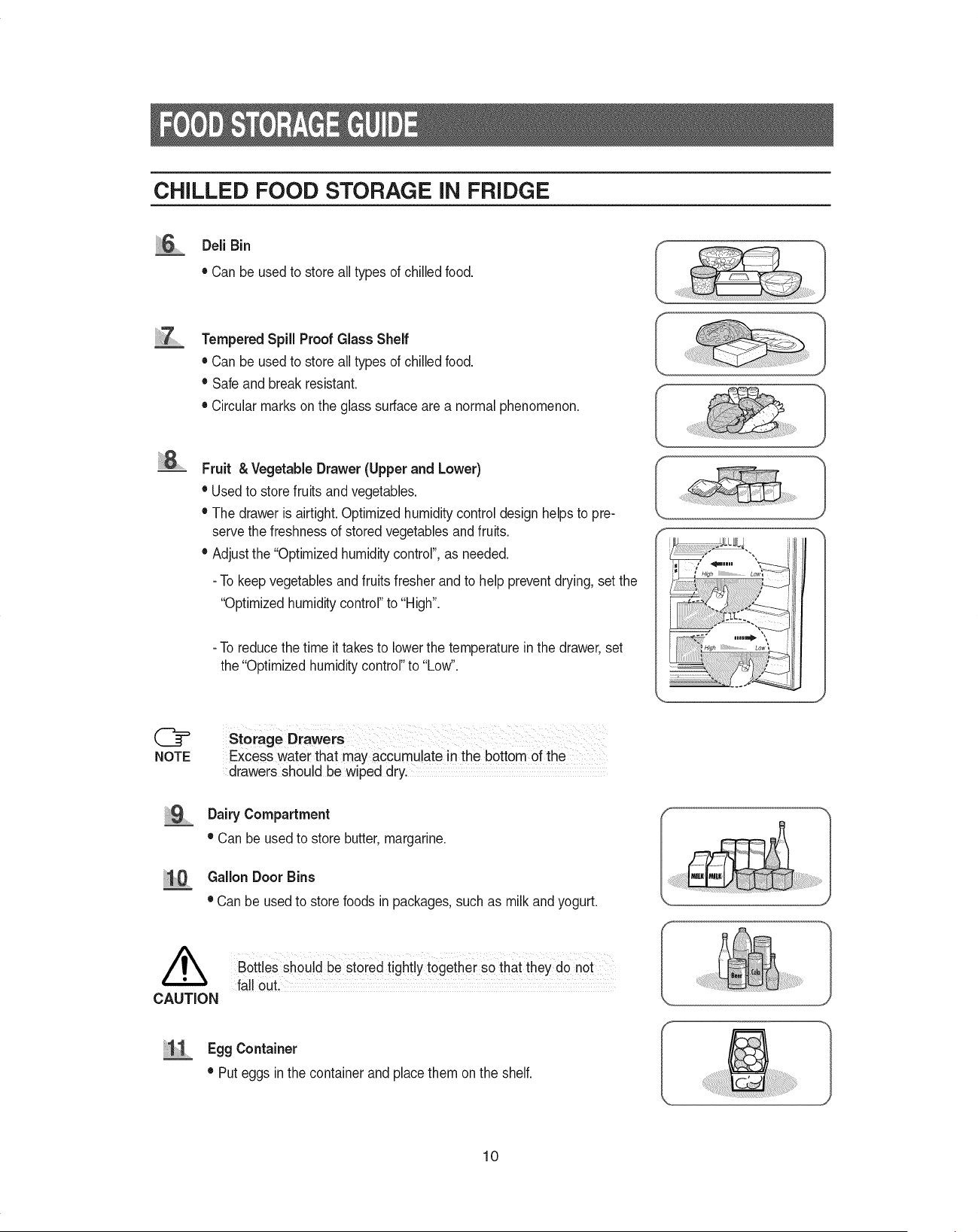
CHILLED FOOD STORAGE iN FRIDGE
))))))_DeliBin
• Can be usedto store all types of chilledfood.
Tempered Spill Proof Glass Shelf
• Can be usedto store all types of chilledfood.
• Safe and break resistant.
• Circular marks on the glass surface are a normal phenomenon.
8 .......
NOTE
Fruit & Vegetable Drawer (Upper and Lower)
• Used to store fruits and vegetables.
• The drawer is airtight. Optimized humiditycontrol design helps to pre-
servethe freshness of stored vegetablesand fruits.
• Adjustthe "Optimized humiditycontrol", as needed.
- To keep vegetablesand fruits fresher and to help preventdrying, set the
"Optimized humidity control"to "High".
- To reducethe time it takes to lowerthe temperature inthe drawer,set
the "Optimized humiditycontrol"to "Low".
Storage Drawers
Excess water that may accumulate inthe bottom of the ......
drawers should be wiped dry.
Dairy Compartment
• Can be used to store butter,margarine.
Gallon Door Bins
• Can be used to store foods in packages, such as milk andyogurt.
Bottles should be st0red tightly togethei so that they do not
fall OuL
lJ Egg Container
• Put eggs in the container and place them on the shelf.
10
iii iiii 8.............
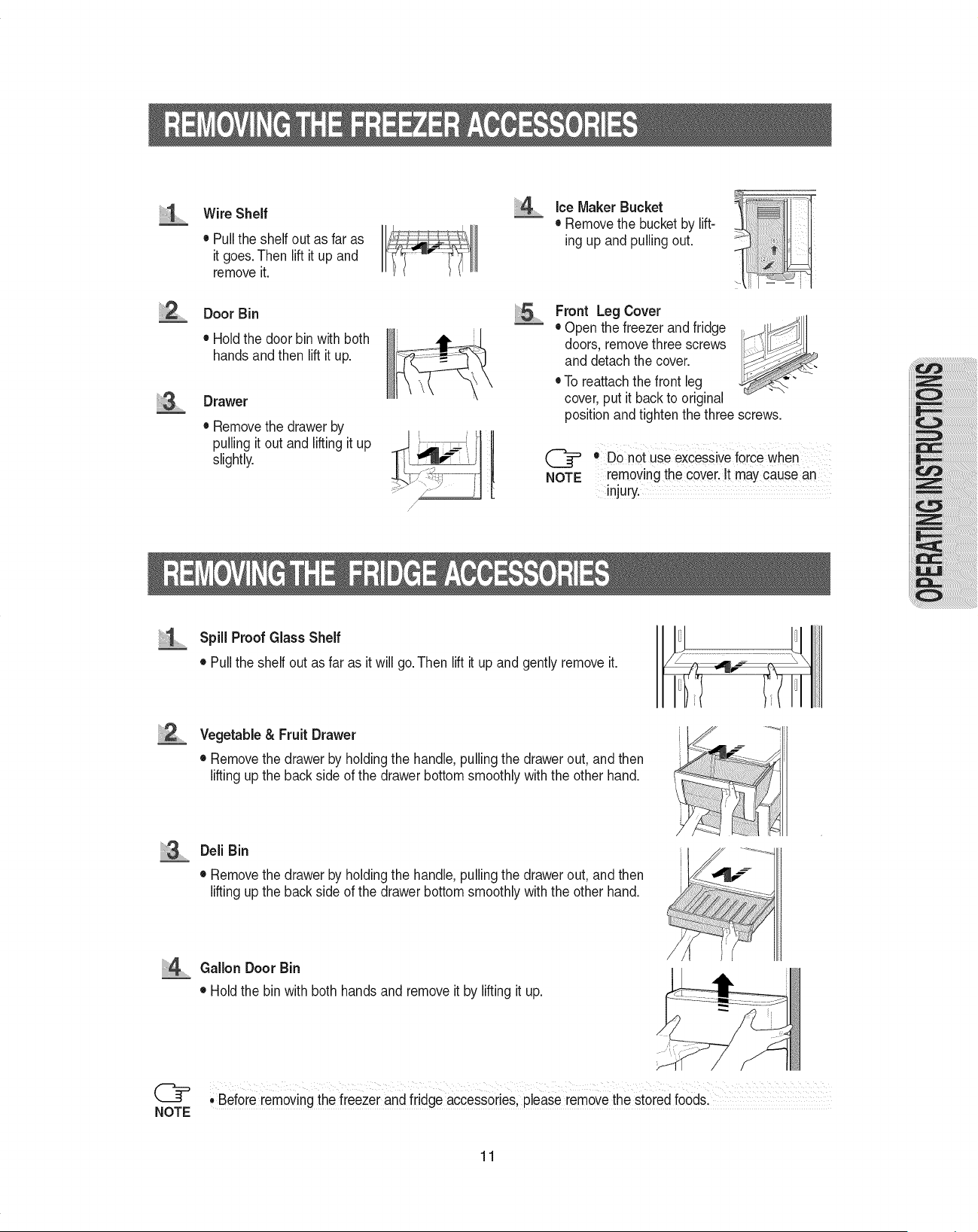
Wire Shelf
• Pullthe shelf out as far as
it goes.Then lift it up and
removeit.
Door Bin
• Holdthe door bin with both
hands andthen lift it up.
Drawer
• Removethe drawer by
pulling it out and liftingit up _ i_ _, II
slightly.
/
/
IceMaker Bucket
• Remove the bucketby lift-
ing up and pullingout.
Front Leg Cover
• Open the freezer and fridge
doors, remove three screws
and detach the cover.
• To reattachthe front leg
cover, put it back to original
position and tighten the three screws.
(_= o Do not use excessiveforce when
NOTE removing the covei. It causean
InjUry.
Spill Proof Glass Shelf
• Pullthe shelf out as far as it will go.Then lift it up and gently remove it.
2 Vegetable & Fruit Drawer
• Removethe drawer by holdingthe handle, pulling the drawer out, and then
liftingup the back side of the drawer bottom smoothly with the other hand.
Deli Bin
• Removethe drawer by holdingthe handle, pulling the drawer out, and then
liftingup the back side of the drawer bottom smoothly with the other hand.
@
NOTE
/
Gallon Door Bin
• Hold the bin with both hands and remove it by liftingit up.
; Befo[e removingthe freezer and fridge accessories,please removethe stored food&
11
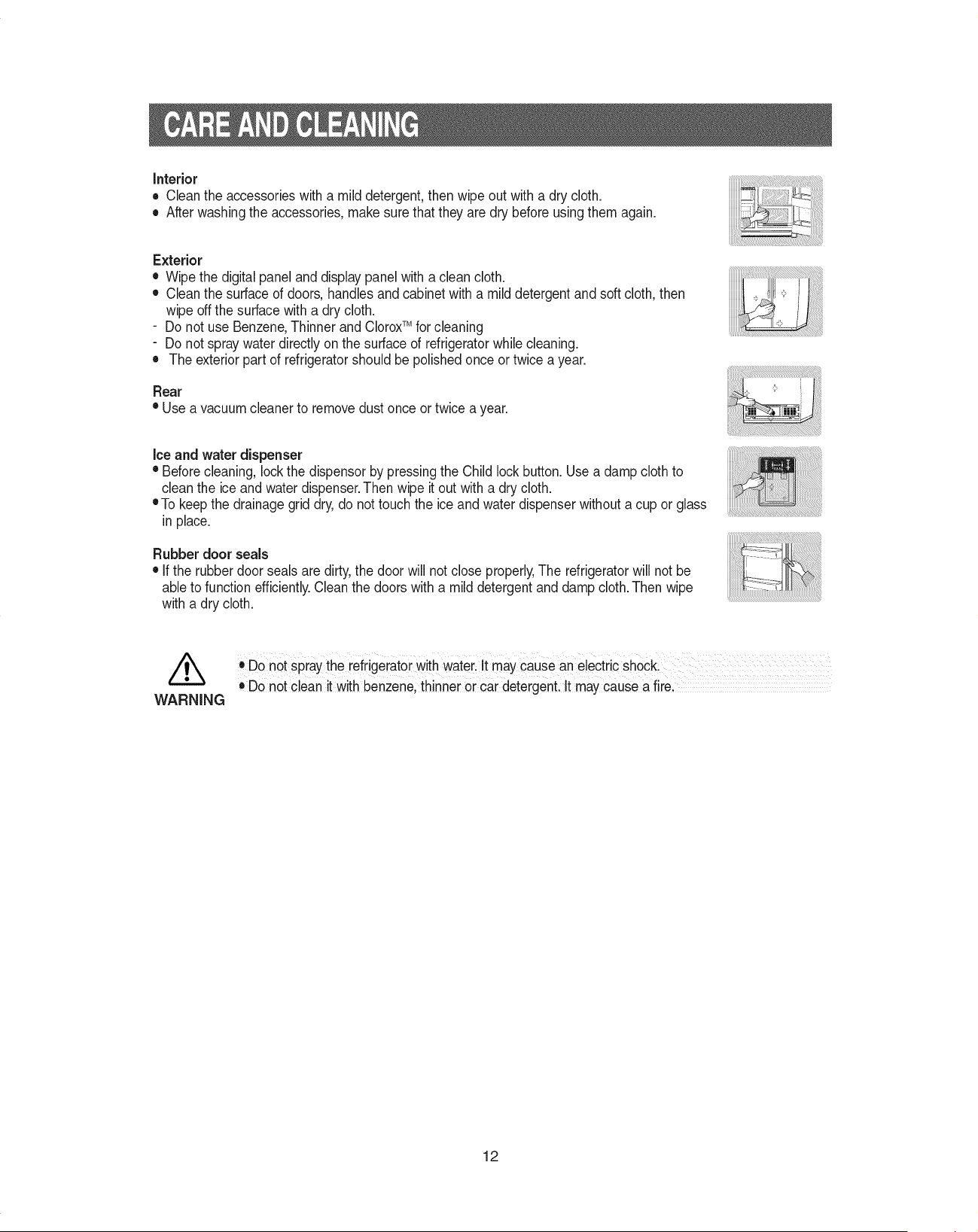
Interior
• Cleantheaccessorieswithamilddetergent,thenwipeoutwitha drycloth.
• Afterwashingtheaccessories,makesurethattheyaredrybeforeusingthemagain.
Exterior
• Wipethedigitalpanelanddisplaypanelwithacleancloth.
• Cleanthesurfaceofdoors,handlesandcabinetwithamilddetergentandsoftcloth,then
wipeoffthesurfacewithadrycloth.
- Do not use Benzene,Thinner and CloroxTM for cleaning
- Do not spray water directly on the surface of refrigeratorwhile cleaning.
• The exteriorpart of refrigeratorshould be polished once or twice a year.
Rear
• Use a vacuum cleaner to removedust once or twice a year.
Ice and water dispenser
• Beforecleaning, lock the dispensor by pressingthe Child lockbutton. Use a damp clothto
clean the ice and water dispenser.Then wipe it out with a dry cloth.
eTo keep the drainagegrid dry, do not touch the ice and water dispenser without a cup or glass
in place.
Rubber door seals
• Ifthe rubber door seals are dirty,the doorwill not close properly,The refrigeratorwill not be
ableto function efficiently.Cleanthe doors with a mild detergentand damp cloth. Then wipe
with a dry cloth.
//_ :,Do not spray the refiigeratoi Withwate[i it may cause an electric shocL
, Do not clean it Withbenzene, thinner 0r car detergenL It may cause a firel
WARNING
12
/k
WARNING
/k
CAUTION
Before changing the interior lights, unplug the refrigerator from the power supply, if you
have difficulty in changing the lights; contact your service center.
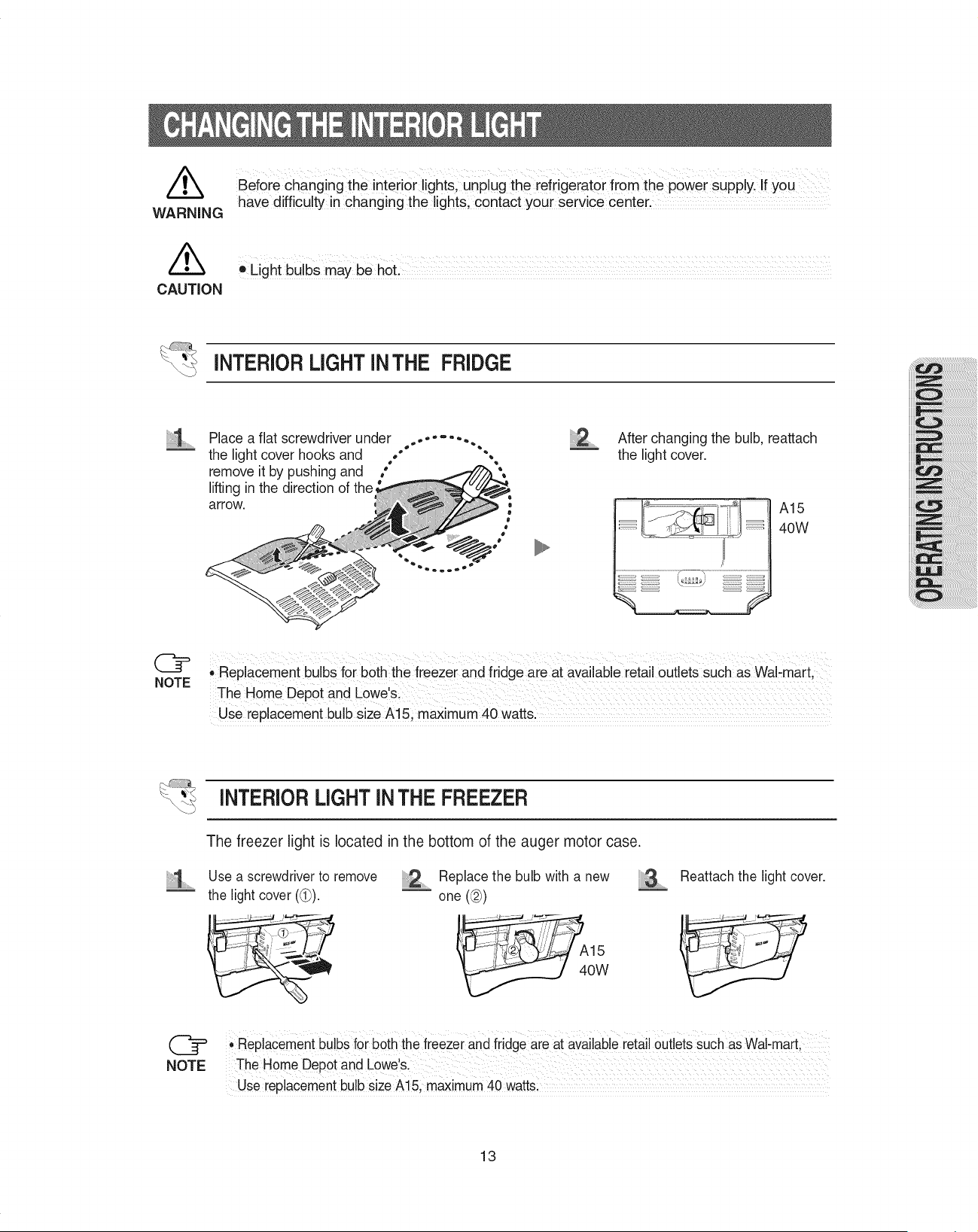
iNTERiORLIGHT iNTHE RIDGE
Place a flat screwdriver under .....
the light cover hooks and ." ",
remove it by pushing and °*
lifting in the direction of the
arrow.
2 ...........After changing the bulb. reattach
the light cover.
A15
40W
@
NOTE
• Replacement bulbs for both the freezer and fridge are at available retail outlets sUch as waFmart,
The Home Dep0t and Lowe,&
Use replaceme nt bulb size A15 ;max! mum 40watts:
INTERIORLIGHT INTHE FREEZER
The freezer light is located in the bottom of the auger motor case.
Use a screwdriverto remove ............Replace the bulb with a new
the light cover ((_). _ one (@)
W
iiii!i!i_.............
Reattach the light cover.
' Replacementbulbs for both;the freezer and fridge are at availablereta outlets such as Wal,mart
The Home Depot and Lowes:
Use replacementbulb size A! 5, maximum40 watts;
13
The water "Filter Indicator" light
• "Filter Indicator" light lets you know when it is time to change your water filter cartridge. The light
will change from green to orange. This tells you that it is almost time to change the current cartridge.
It is recommended that you replace the cartridge when the light changes to red or every six months.
(see "Install the water filter" section on the page 26 for more information.)
Using the dispenser without the water filter
, You can not use the water and ice dispenser without a water filter cartridge because the water line
blocks at the water supply.
Ordering replacement filters
• To order more water filter cartridges, call 1-800-SAMSUNG and ask for accessory Part # DA29-
00003A or contact your authorized Samsung dealer.
The refrigerator doors have a special door opening and closing feature to make sure they close all the
way and are securely sealed.
When opening the door, it will only open so far. After reaching a certain point, it will remain open.
When the door is partially open, it will close automatically.
14
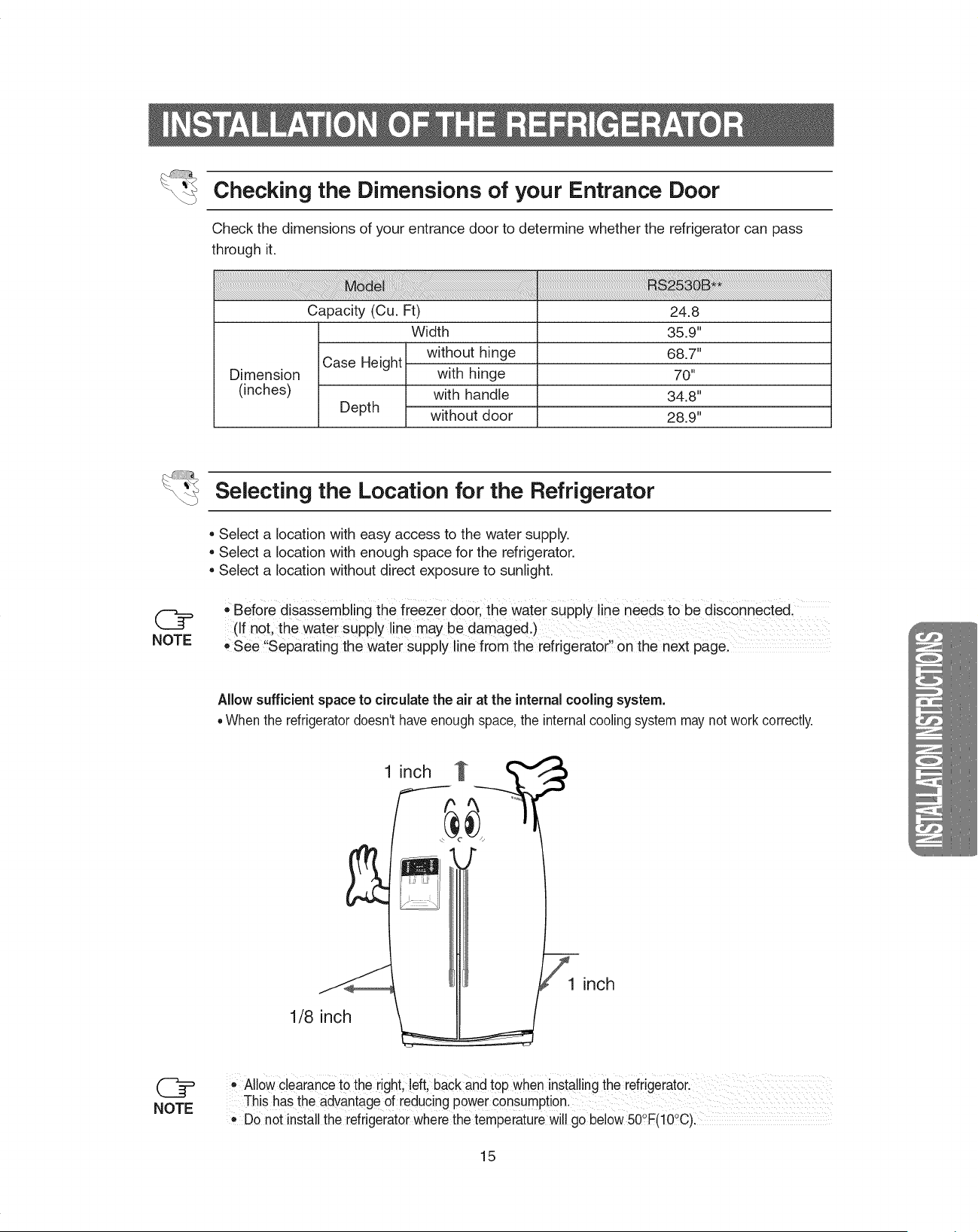
Checking the Dimensions of your Entrance Door
Check the dimensions of your entrance door to determine whether the refrigerator can pass
through it.
Capacity (Cu. Ft)
Case Height
Dimension
(inches)
Depth
Width
without hinge
with hinge
with handle
without door
24.8
35.9"
68.7"
70"
34.8"
28.9"
NOTE
Selecting the Location for the Refrigerator
Select a location with easy access to the water supply.
Select a location with enough space for the refrigerator.
Select a location without direct exposure to sunlight.
,,Before disassembling the freezer door, the water supply line needs to be disconnected,
(if not, the water Supply line may be damaged.)
, See !'Separating the Water suPply line from the refrigerator Onthe next pagel
AlJowsufficient space to circulate the air at the internal cooling system.
=When the refrigeratordoesn't have enough space,the internalcooling system may not work correctly.
1 inch _
...._lllllllllllllllllllllllllllllllllr_
1/8 inch
1 inch
• AllowClearancetothe rightl ieftl baCkandtop when installing therefrigerator:
This has the advantage of reducing power consumption. ........................
e Donot install the refrigeratorwhere the temperaturewill go below 50°F(10_C)I
15

Removing the Front Leg Cover
Open the freezer and fridge doors, and then take off the front leg cover by turning the
three screws counter-clockwise.
FRONT LEG COVER
Separating the Water Supply Line from the Refrigerator
Remove the water tube by pressing the coupler (@)and pulling the water tube (d_)away.
@
NOTE
Be careful not tOcut the water tube when separatingit fromthe coupler,
16
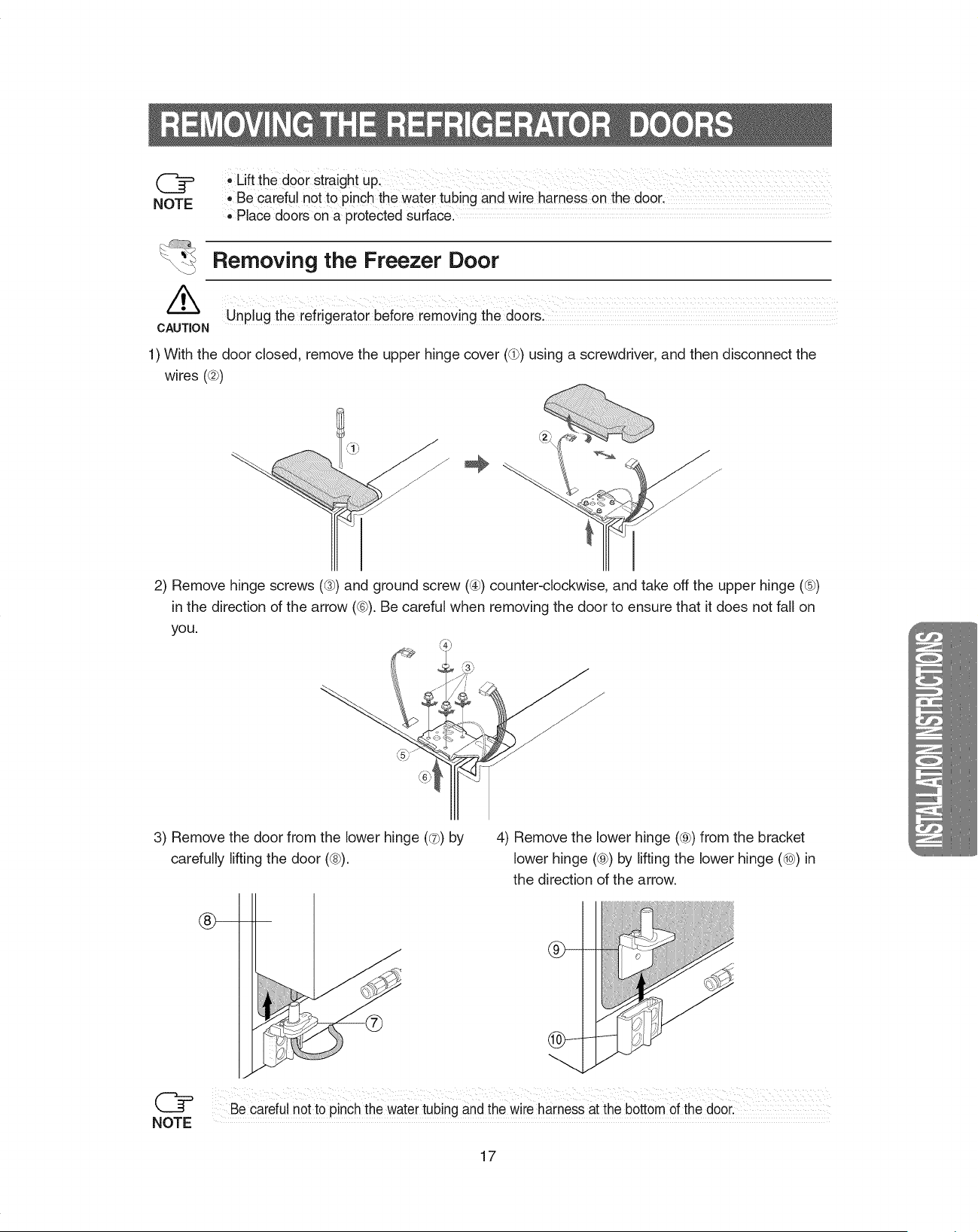
NOTE
Uftthedoorstraightup:
.Be carefulnottopinchthewatertubingandwireharnessonthedoor,
,,Placedoorsonaprotectedsurface...................................
Removing the Freezer Door
//_ Unplug the refrigerat0r before removing the dOorsl
CAUTION
1) With the door closed, remove the upper hinge cover (dP)using a screwdriver, and then disconnect the
wires (@)
2) Remove hinge screws ((3_)and ground screw (@)counter-clockwise, and take off the upper hinge (_-sb)
in the direction of the arrow (®). Be careful when removing the door to ensure that it does not fall on
yOU,
3) Remove the door from the lower hinge (®) by
carefully lifting the door (®).
4) Remove the lower hinge (®) from the bracket
lower hinge (®) by lifting the lower hinge (_) in
the direction of the arrow.
...._lllllllllllllllllllllllllllllllllf_
db-
NOTE
Be careful not to pinch the watertubing and thewire harness at the bottom of the door:
17
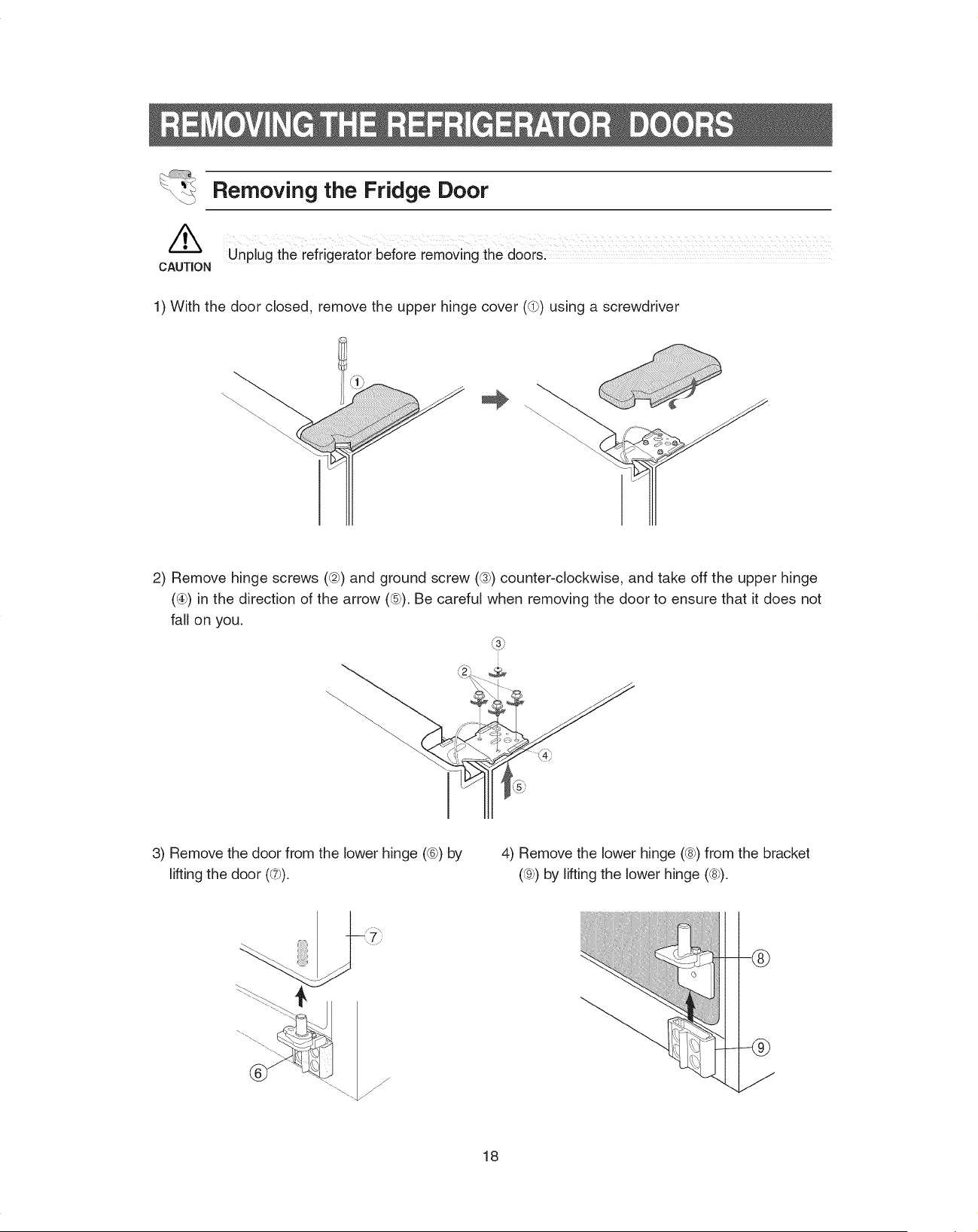
/k
CAUTION
Removing the Fridge Door
Unplug the iefrigeratoi before removing the doOiS;
1) With the door closed, remove the upper hinge cover (@) using a screwdriver
2) Remove hinge screws ((2})and ground screw (@) counter-clockwise, and take off the upper hinge
(@) in the direction of the arrow (@). Be careful when removing the door to ensure that it does not
fall on you.
3) Remove the door from the lower hinge (@)by
lifting the door (@).
4) Remove the lower hinge (@)from the bracket
(@)by lifting the lower hinge (@).
f
--@
18
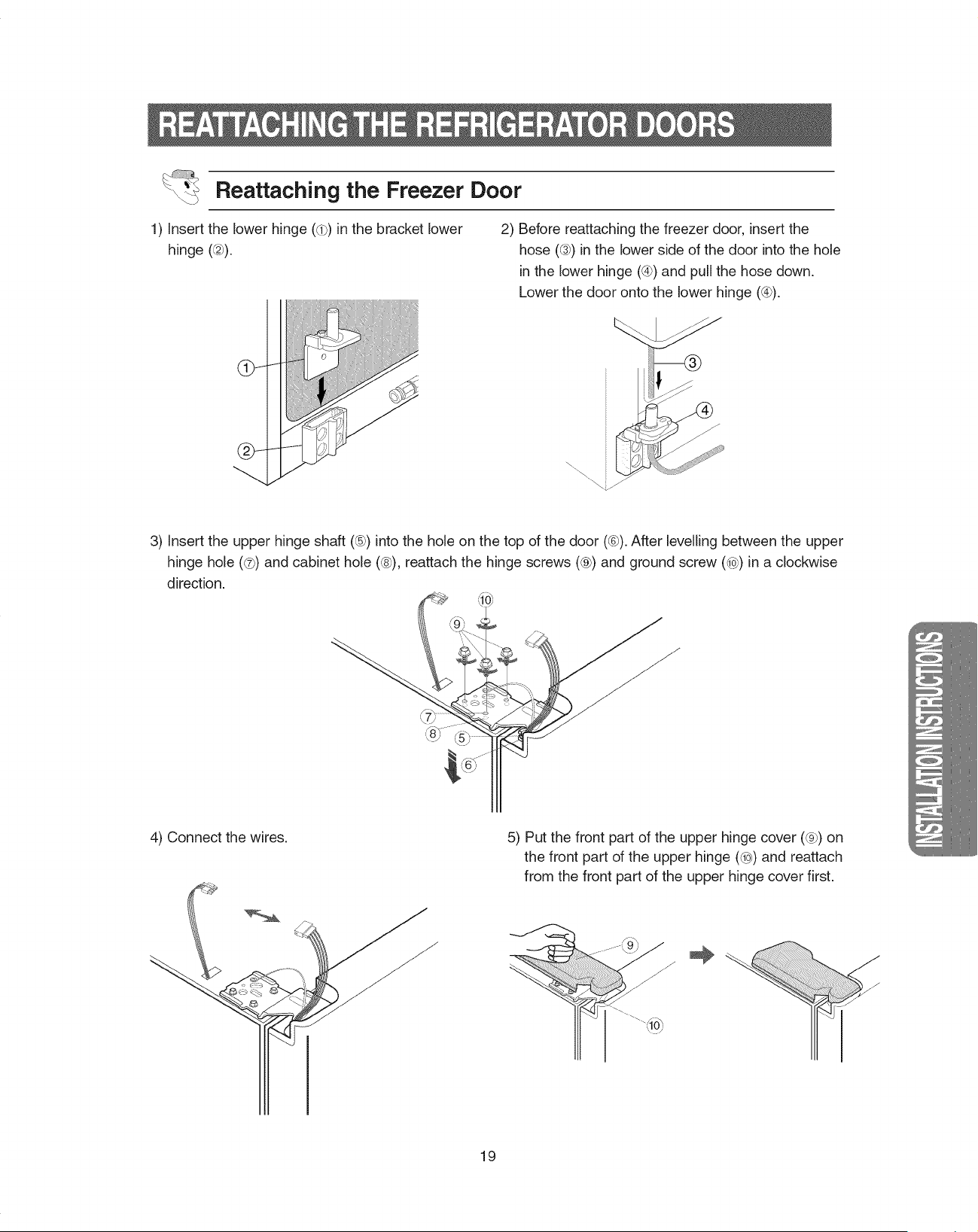
Reattaching the Freezer Door
1) insert the lower hinge (_) in the bracket lower
hinge ((27).
2) Before reattaching the freezer door, insert the
hose ((37)in the lower side of the door into the hole
Jnthe lower hinge (@)and pull the hose down.
Lower the door onto the lower hinge (@).
3) Insert the upper hinge shaft (@) into the hole on the top of the door (@).After levelling between the upper
hinge hole (@)and cabinet hole (@), reattach the hinge screws (@) and ground screw (@) Jna clockwise
direction.
4) Connect the wires.
. --'=r_-%,I
5) Put the front part of the upper hinge cover (@) on
the front part of the upper hinge (@) and reattach
from the front part of the upper hinge cover first.
...._lllllllllllllllllllllllllllllllllr_
19
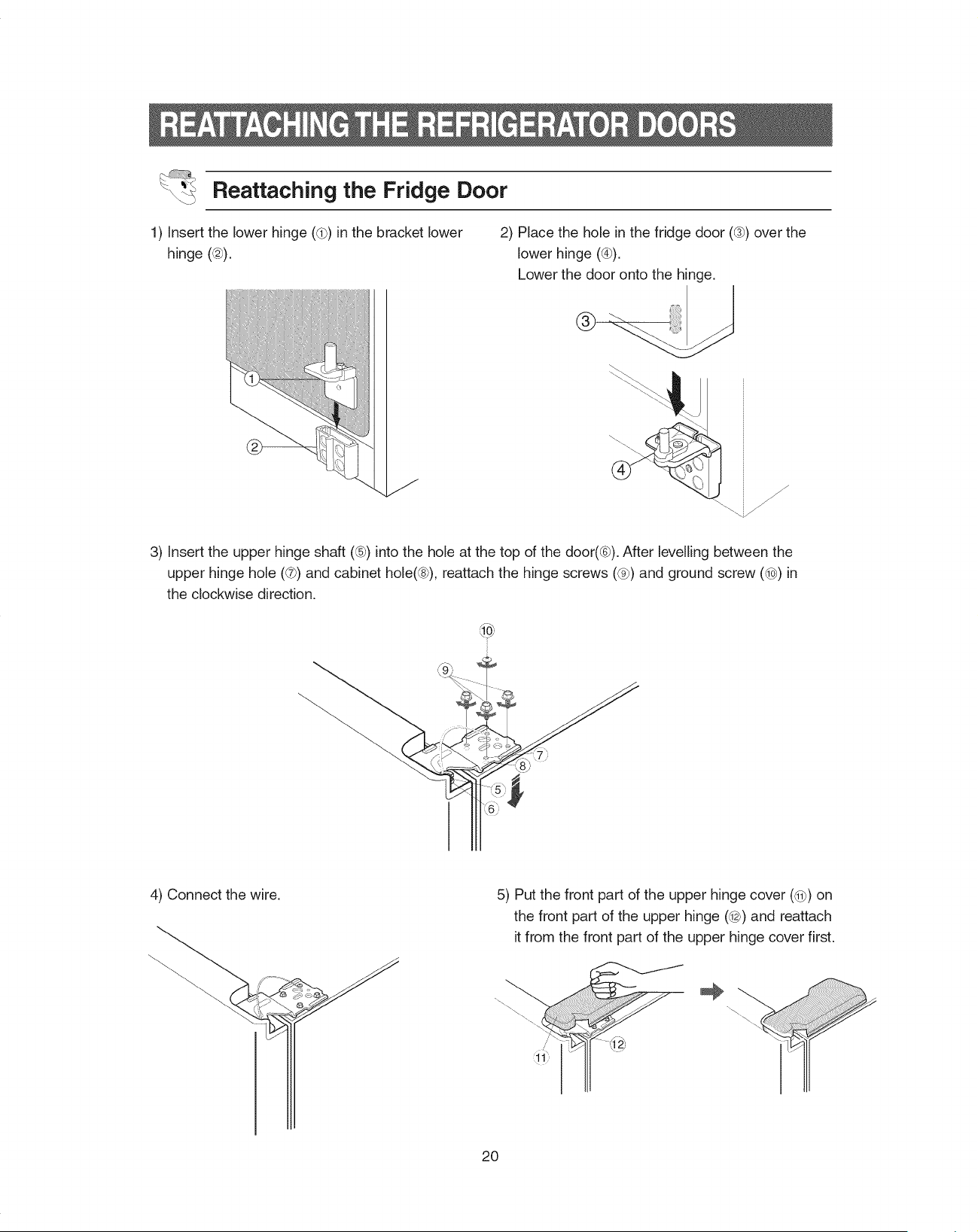
Reattaching the Fridge Door
1) insert the lower hinge (_) in the bracket lower
hinge (@).
2) Place the hole in the fridge door (@) over the
lower hinge (@).
Lower the door onto the hinge.
@.
3) insert the upper hinge shaft (®) into the hole at the top of the door(®). After levelling between the
upper hinge hole (_t_)and cabinet hole(®), reattach the hinge screws (@) and ground screw (@) in
the clockwise direction.
4) Connect the wire.
_i'
5) Put the front part of the upper hinge cover (@) on
the front part of the upper hinge (@) and reattach
it from the front part of the upper hinge cover first.
20
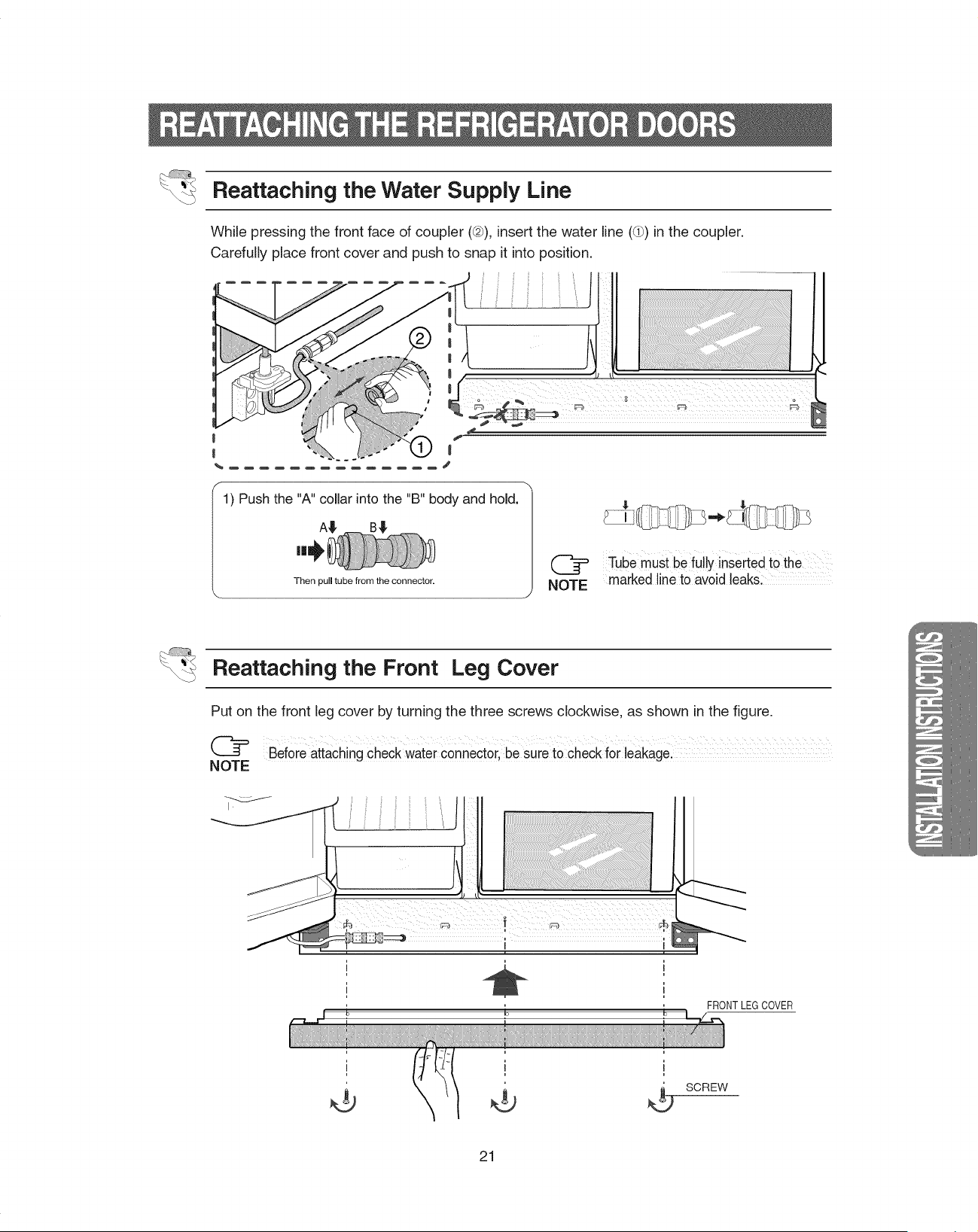
Reattaching the Water Supply Line
While pressing the front face of coupler (@), insert the water line ((b) in the coupler.
Carefully place front cover and push to snap it into position.
1) Push the "A" collar into the "B" body and hold. /
A_
Then pull tube from the connector.
Tube must be fully inseited to the
marked line to avoid leaks:
Reattaching the Front Leg Cover
Put on the front leg cover by turning the three screws clockwise, as shown in the figure.
Beforeattaching check water connector,be sure to check forleakage.
NOTE
...._lllllllllllllllllllllllllllllllllf_
_-:....,,,,,,,,,,,,,,,,,,,,,_
FRONTLEGCOVER
SCREW
21
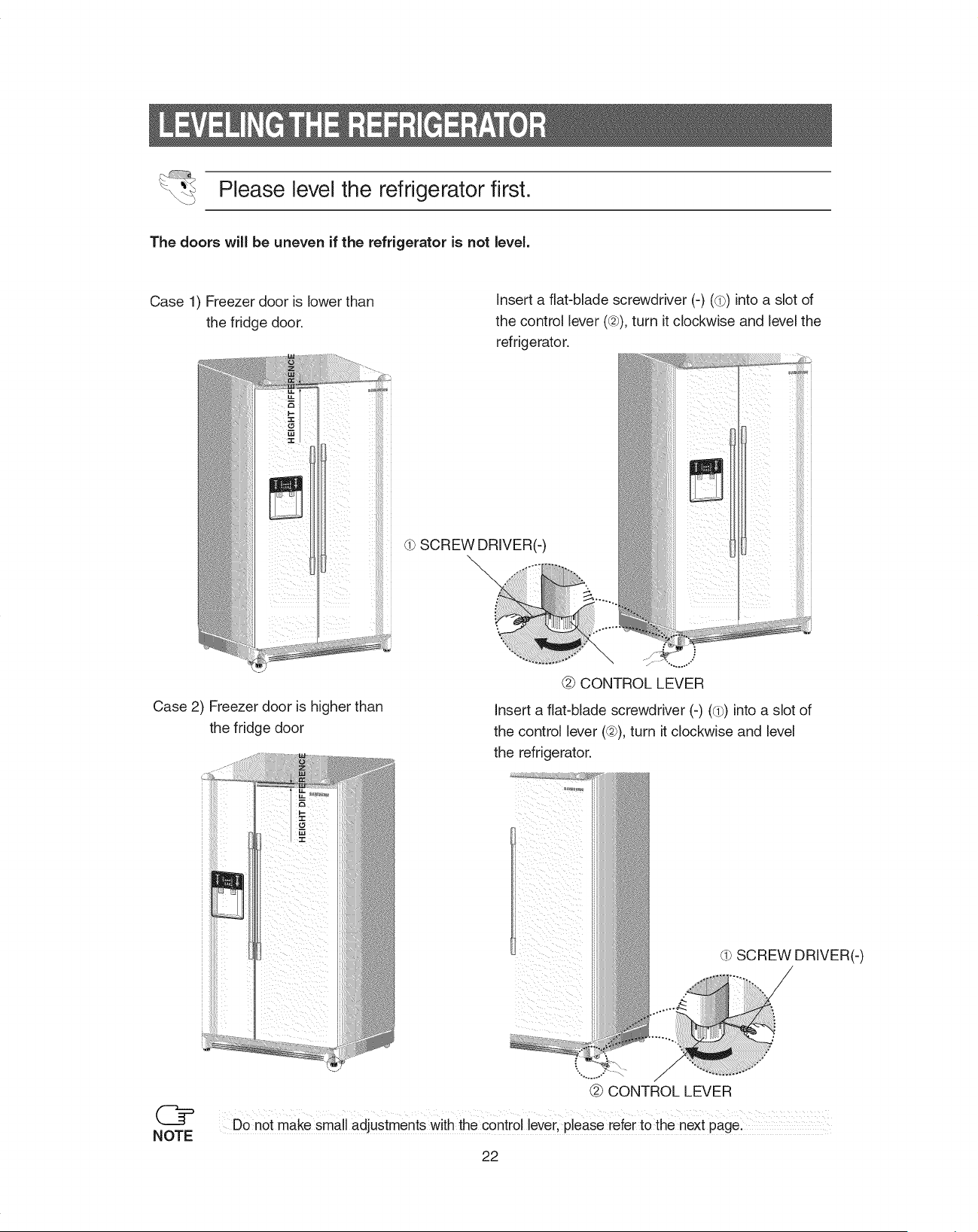
Please level the refrigerator first.
The doors will be uneven if the refrigerator is not level.
Case 1) Freezer door is lower than
the fridge door.
insert a flat-blade screwdriver (-) ((b) into a slot of
the control lever (@), turn it clockwise and level the
refrigerator.
d} SCREW DRIVER(-)
Case 2) Freezer door is higher than
the fridge door
"...o_o..,
@ CONTROL LEVER
Insert a flat-blade screwdriver (-) (d}) into a slot of
the control lever (@),turn it clockwise and level
the refrigerator.
.°°o.,..."
@ CONTROL LEVER
SCREW DRIVER(-)
/
/
Do not make small adjustments With the control lever, please refer to the next page:
22
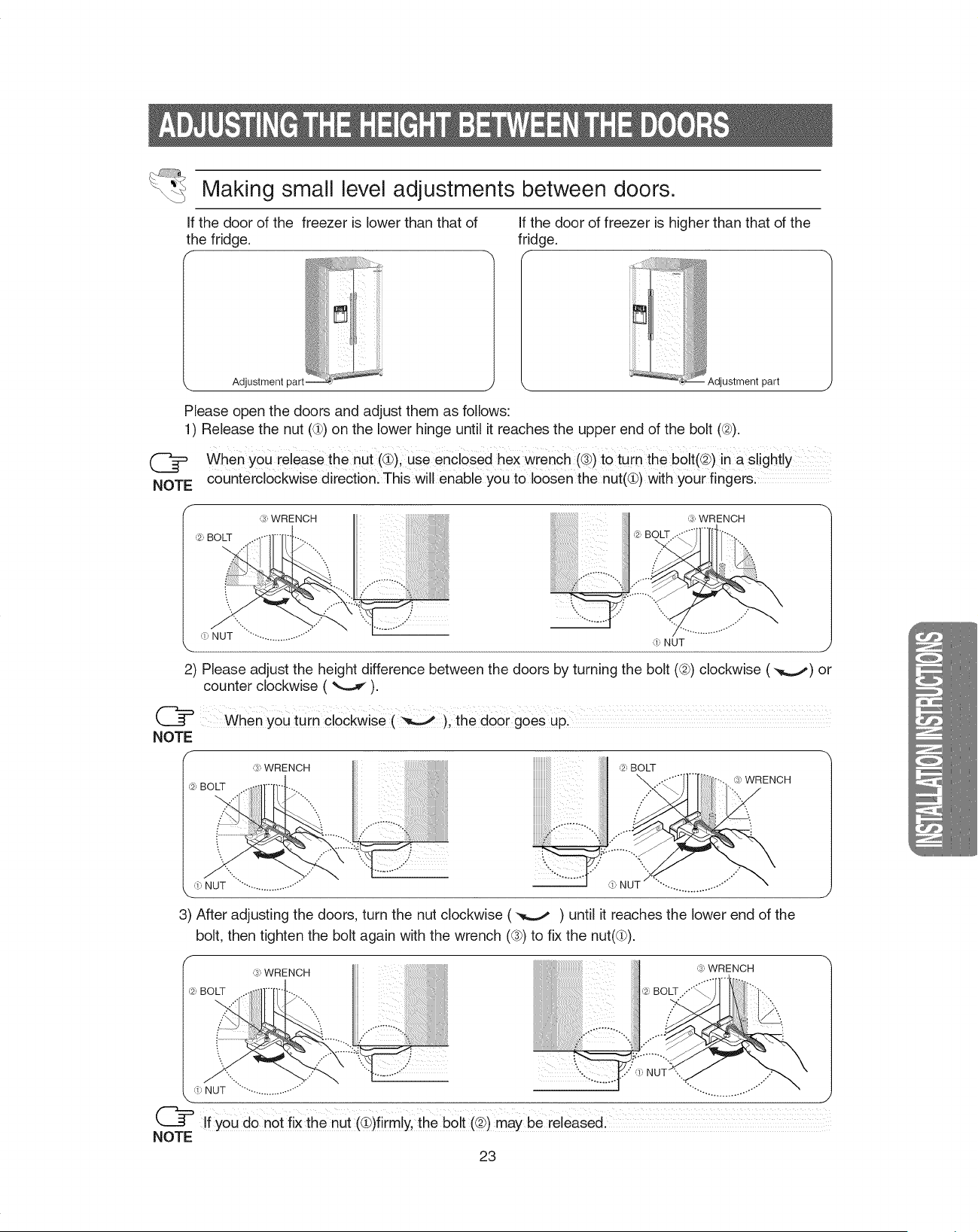
Making small level adjustments between doors.
If the door of the freezer is lower than that of
the fridge.
,, Adjustment part.
If the door of freezer is higher than that of the
fridge.
f
Adjustment part
Please open the doors and adjust them as follows:
1) Release the nut (d)) on the lower hinge until it reaches the upper end of the bolt (@).
@
NOTE
when yOu release the nut (_), use enclosed hex wrench (®)tO turn the bolt(@)inasl ghtly
counterclockwise direction: This will enable you to loosen the nut(@) with your fingers:
,_3_WRENCH
`1:,NUT ..................... d;, NUT
2) Please adjust the height difference between the doors by turning the bolt (@) clockwise (,_..,,,) or
counter clockwise ( _--...,_).
(_= When YOUturn clockwise (_), the door gOes uPl
,;, WRENCH ,_:,BOLT
,',3_',WRENCH
"S
-. . ",... ............. o...'""d;, NUT " ........................ ,!, NUT
3) After adjusting the doors, turn the nut clockwise ( _ ) until it reaches the lower end of the
bolt, then tighten the bolt again with the wrench (®) to fix the nut((lb).
f
,;, WRENCH ,3_',WRENCH
,',_:,BOLT ..'"'_
,. , y"
4", NUT .........................." ...................
If YOUdOn0t fiX the nut @)firmly,the bolt (@)may be release&
NOTE
23
...._lllllllllllllllllllllllllllllllllf_
_..:..,,,,,,,,1111111111111111111111111111111_
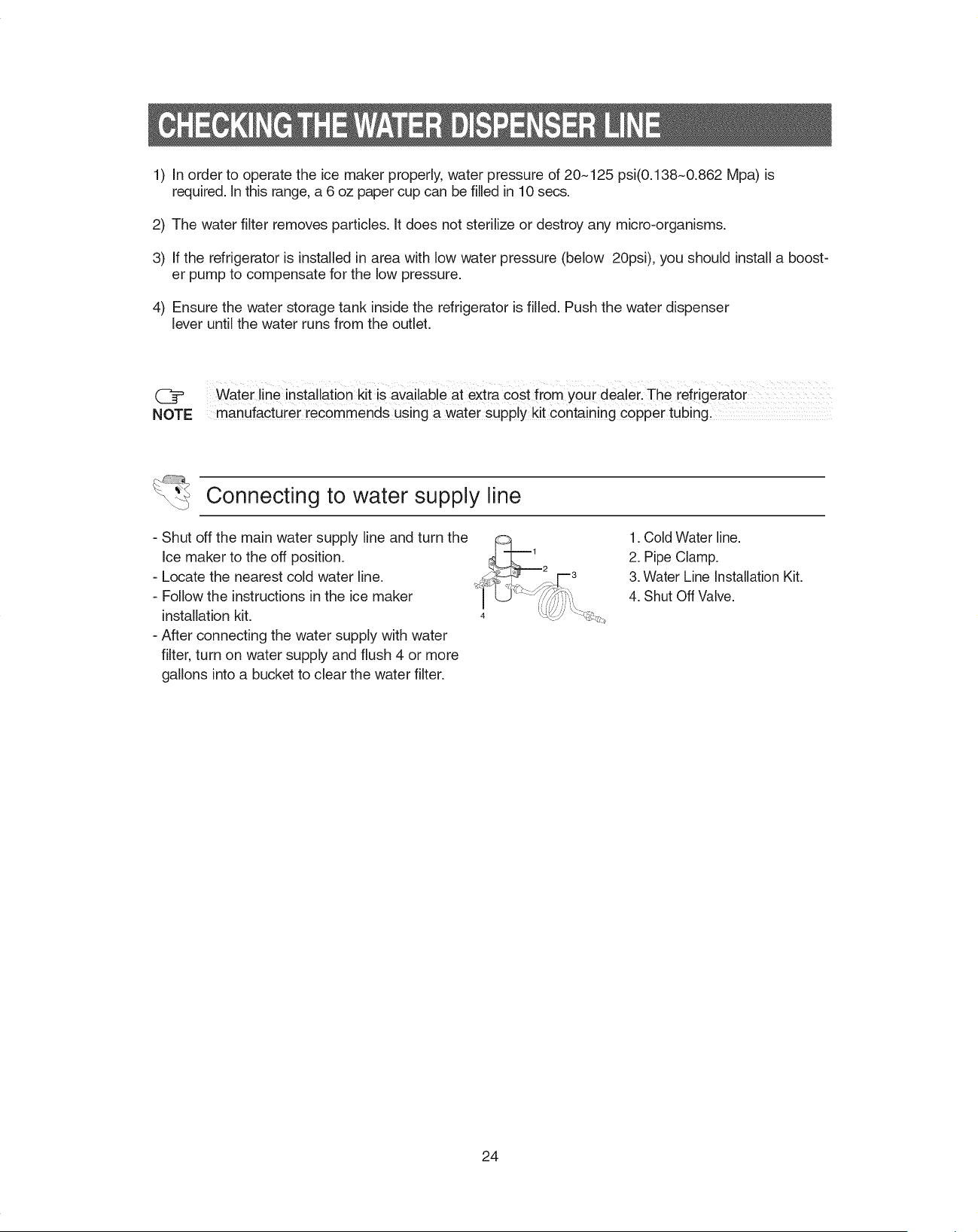
1) In order to operate the ice maker properly, water pressure of 20~125 psi(0.138~0.862 Mpa) is
required. In this range, a 6 oz paper cup can be filled in 10 secs.
2) The water filter removes particles. It does not sterilize or destroy any micro-organisms.
3) If the refrigerator is installed in area with low water pressure (below 20psi), you should install a boost-
er pump to compensate for the low pressure.
4) Ensure the water storage tank inside the refrigerator is filled. Push the water dispenser
lever until the water runs from the outlet.
(_ Water line installation kit is available at extra cost from your dealer. The refrigerator ...................
NOTE manufacturer recommends using a water supply kit containing copper tubing,
Connecting to water supply line
- Shut off the main water supply line and turn the
Ice maker to the off position.
- Locate the nearest cold water line.
- Follow the instructions in the ice maker
installation kit.
- After connecting the water supply with water
filter, turn on water supply and flush 4 or more
gallons into a bucket to clear the water filter.
1. Cold Water line.
2. Pipe Clamp.
3. Water Line Installation Kit.
4. Shut Off Valve.
24
Before You Install the water line
• This water line installation is not warranted by Samsung.
Followthese instructions carefully to minimize the risk of expensive water damage.
• Banging pipes (water banging in the pipes) in house plumbing can cause damage to refrigerator parts
and lead to water leakage or flooding. Call a qualified plumber to correct the problem before installing
the water supply line to the refrigerator.
To prevent burns and product damage, do not hook up the water line to the hot water line.
If you use your refrigerator before connecting the water line, make sure the"lce Type" is set to the ICE
OFF position.
Do not install the icemaker tubing in areas where temperatures fall below freezing.
When using any electrical device (such as a power drill) during installation, be sure the device is insu-
lated or wired in a manner to prevent electric shock.
All installations must be in a accordance with local plumbing code requirements.
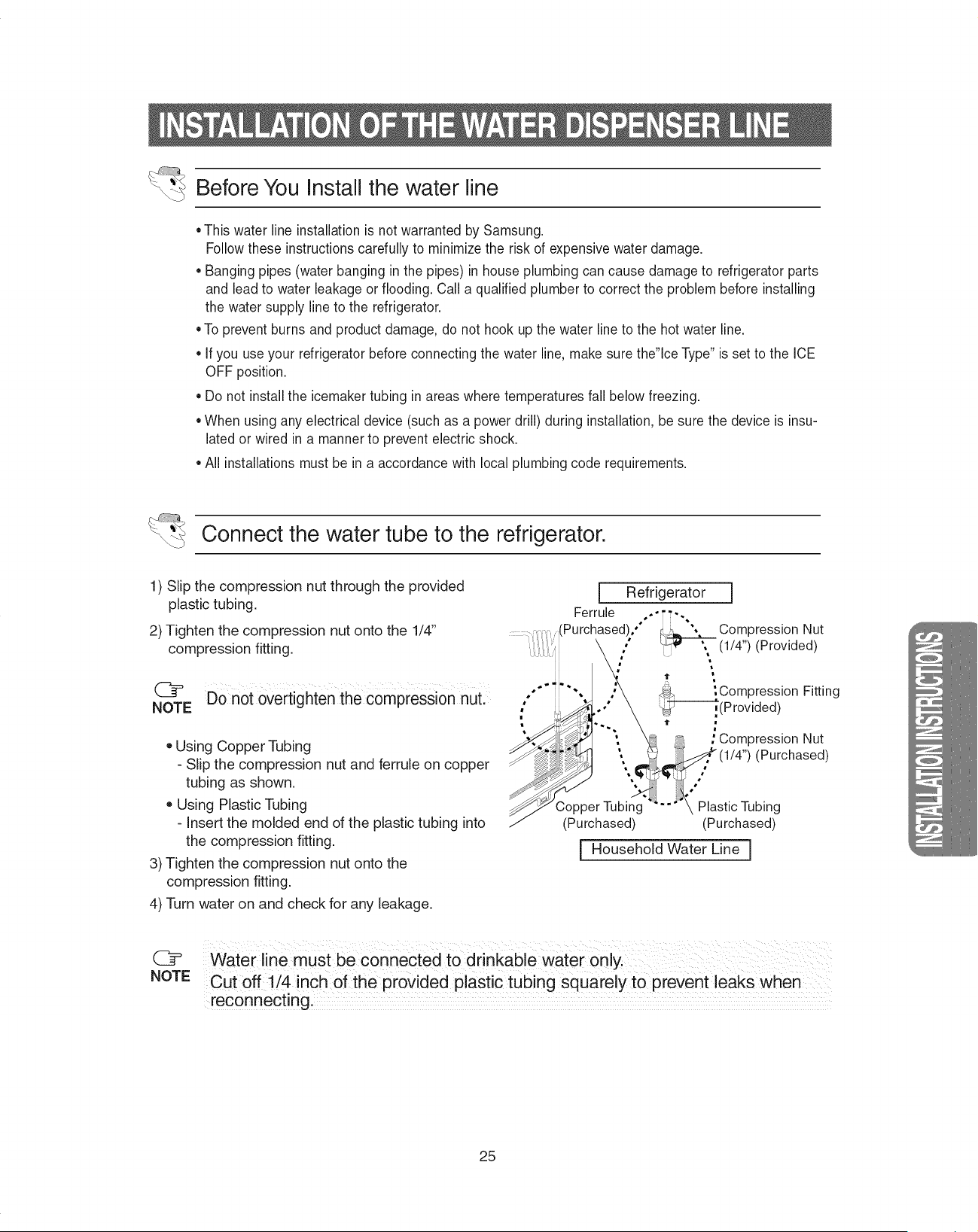
Connect the water tube to the refrigerator.
1) Slip the compression nut through the provided
plastic tubing.
2) Tighten the compression nut onto the 1/4"
compression fitting.
@ Do not overtighten the compression nUL ""
NOTE
o Using Copper Tubing
- Slip the compression nut and ferrule on copper
tubing as shown.
Using Plastic Tubing
- Insert the molded end of the plastic tubing into
the compression fitting.
3) Tighten the compression nut onto the
compression fitting.
4) Turn water on and check for any leakage.
[
Ferrule
Purchased),"
Refrigerator I
,_ ", Compression Nut
(1/4") (Provided)
"It _
_Compression Fitting
_(Provided)
t
; Compression Nut
(1/4") (Purchased)
3opper Tubing Plastic Tubing
(Purchased) (Purchased)
[ Household Water Line j
...._lllllllllllllllllllllllllllllllllr_
@
NOTE
Waterline must be connected tO drinkable Water only.
Cut off 1/4 inch of the provided p astic tub ng squarely to prevent eaks when
reconnecting,
25
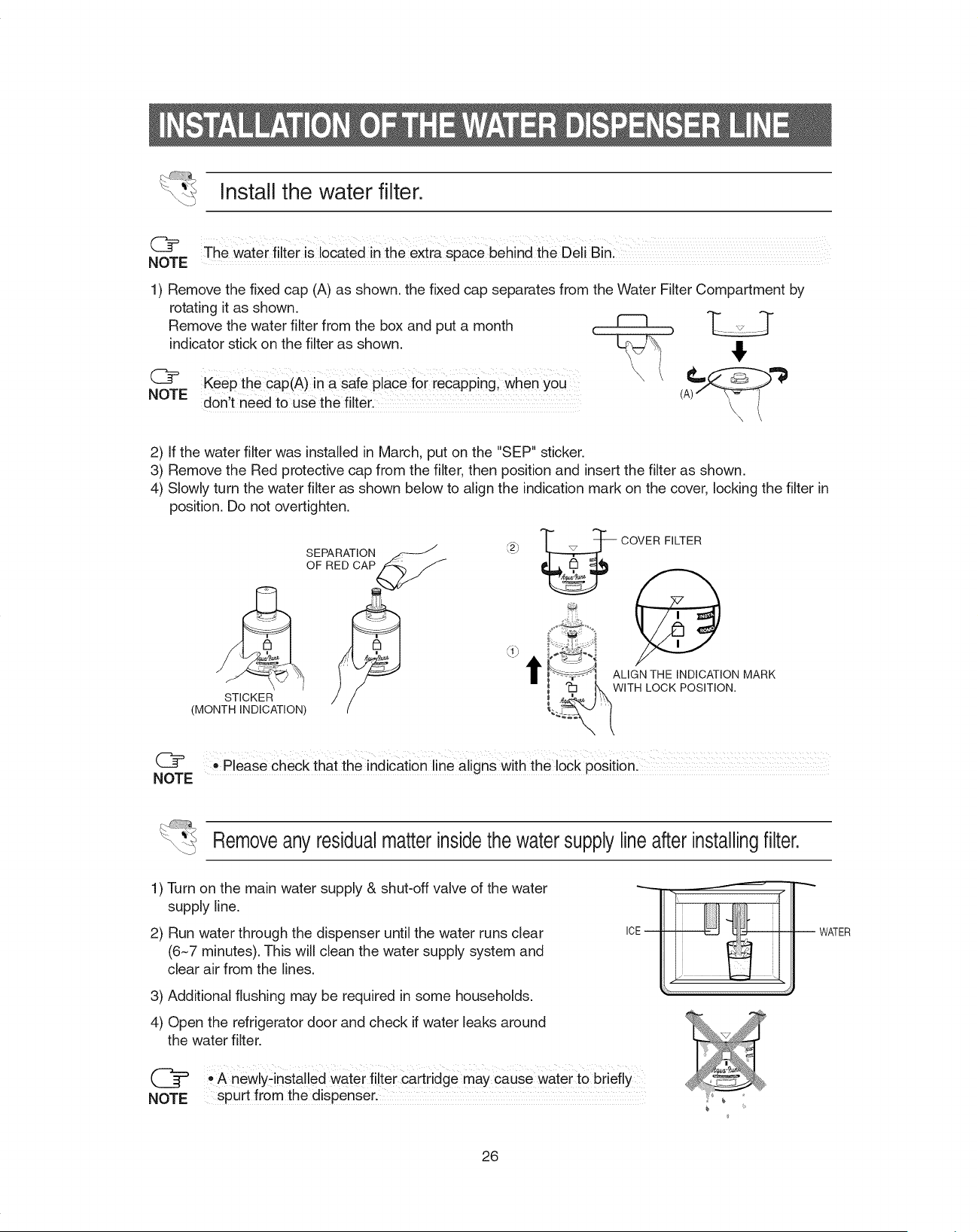
Install the water filter.
@ The water filter is located in the extra space behind the Deli Bin:
NOTE
1) Remove the fixed cap (A) as shown, the fixed cap separates from the Water Filter Compartment by
rotating it as shown.
q_ ,--,r-
Remove the water filter from the box and put a month _ _
indicator stick on the filter as shown. _,
C_
NOTE
Keep the cap(A)in a safe place for [ecapping, when YOU
don,t need to use the filter.
2) If the water filter was installed in March, put on the "SEP" sticker.
3) Remove the Red protective cap from the filter, then position and insert the filter as shown.
4) Slowly turn the water filter as shown below to align the indication mark on the cover, locking the filter in
position. Do not overtighten.
STICKER
(MONTH INDICATION)
SEPARATION
OF RED CAP
r,2_' _ COVER FILTER
_ _ _ WITHLOCKPOSITION.
NOTE "Please check that the indication line aligns with the lock positionl
Removeanyresidualmatterinsidethe watersupplylineafterinstallingfilter.
1) Turn on the main water supply & shut-off valve of the water
supply line.
2) Run water through the dispenser until the water runs clear
(6~7 minutes). This will clean the water supply system and
clear air from the lines.
3) Additional flushing may be required in some households.
4) Open the refrigerator door and check if water leaks around
the water filter.
@ ,, A newly_installed water filter Cartridge may cause water to briefly
NOTE spurt from the dispenser.
WATER
26
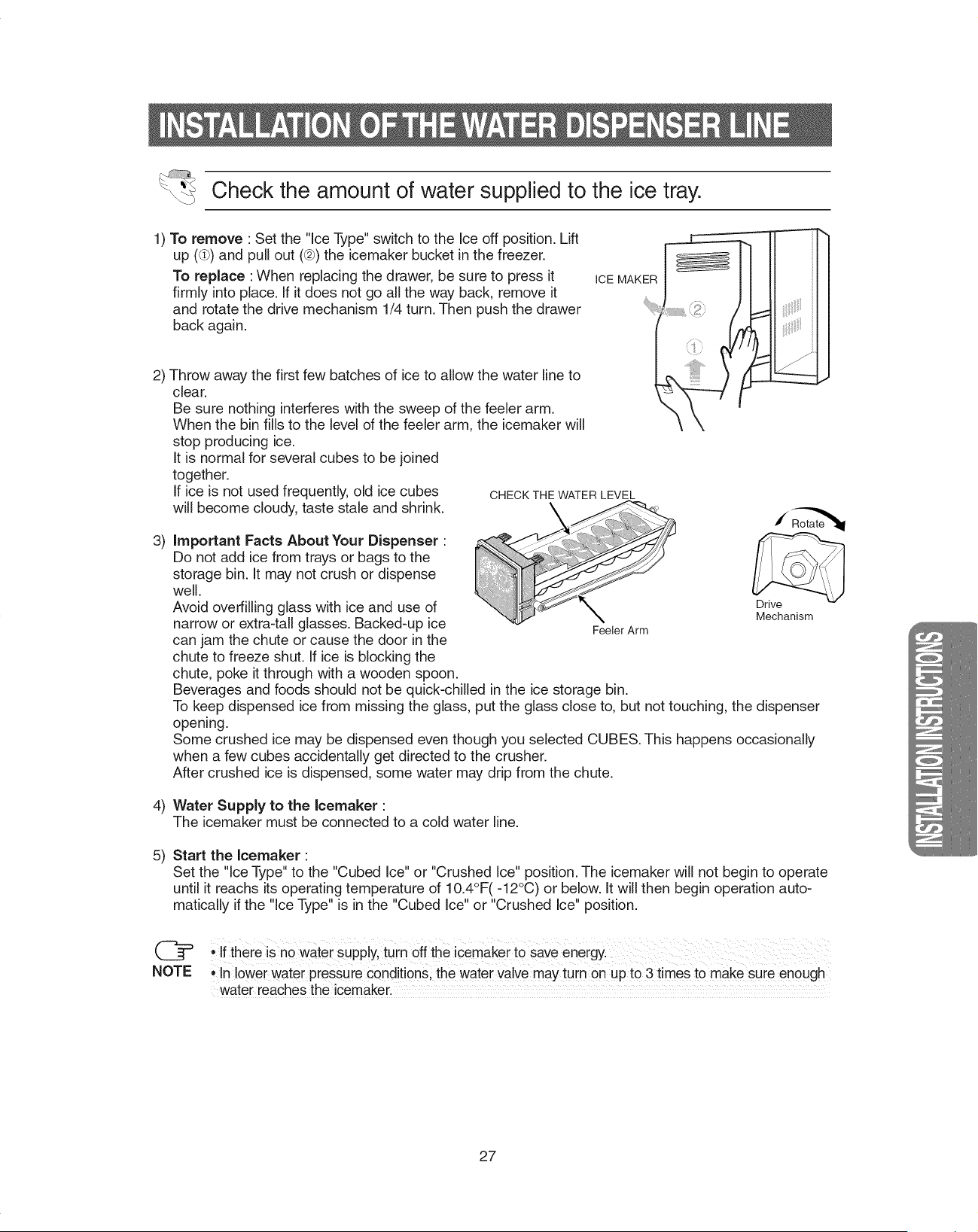
Check the amount of water supplied to the ice tray.
1) To remove : Set the "Ice Type" switch to the Ice off position. Lift
up ((lb)and pull out (@)the icemaker bucket in the freezer.
To replace :When replacing the drawer, be sure to press it
firmly into place. If it does not go all the way back, remove it
and rotate the drive mechanism 1/4 turn. Then push the drawer
back again.
ICE MAKER
2) Throw away the first few batches of ice to allow the water line to
clear.
Be sure nothing interferes with the sweep of the feeler arm.
When the bin fills to the level of the feeler arm, the icemaker will
stop producing ice.
It is normal for several cubes to be joined
together.
If ice is not used frequently, old ice cubes
will become cloudy, taste stale and shrink.
3)
CHECK THE WATER LEVEL
important Facts About Your Dispenser :
Do not add ice from trays or bags to the
storage bin. It may not crush or dispense
well.
Avoid overfilling glass with ice and use of
narrow or extra-tall glasses. Backed-up ice FeelerArm
can jam the chute or cause the door in the
chute to freeze shut. If ice is blocking the
chute, poke it through with a wooden spoon.
Beverages and foods should not be quick-chilled in the ice storage bin.
To keep dispensed ice from missing the glass, put the glass close to, but not touching, the dispenser
opening.
Some crushed ice may be dispensed even though you selected CUBES. This happens occasionally
when a few cubes accidentally get directed to the crusher.
After crushed ice is dispensed, some water may drip from the chute.
Drive
Mechanism
4) Water Supply to the Icemaker "
The icemaker must be connected to a cold water line.
5)
Start the Icemaker "
Set the "Ice Type" to the "Cubed Ice" or "Crushed Ice" position. The icemaker will not begin to operate
until it reachs its operating temperature of 10.4°F(-12°C) or below. It will then begin operation auto-
matically if the "ice Type" is in the "Cubed Ice" or "Crushed Ice" position.
NOTE
• If there !s no Watersupply, turn off the icemaker t0 Saveenergyl
• In lower water pressure conditions, the water valve may turn 0nup to 3 times to make sure enough
water reaches the icemaker.
_.. :....,,,,,,,,,,,,,,,,,,,,,_
27
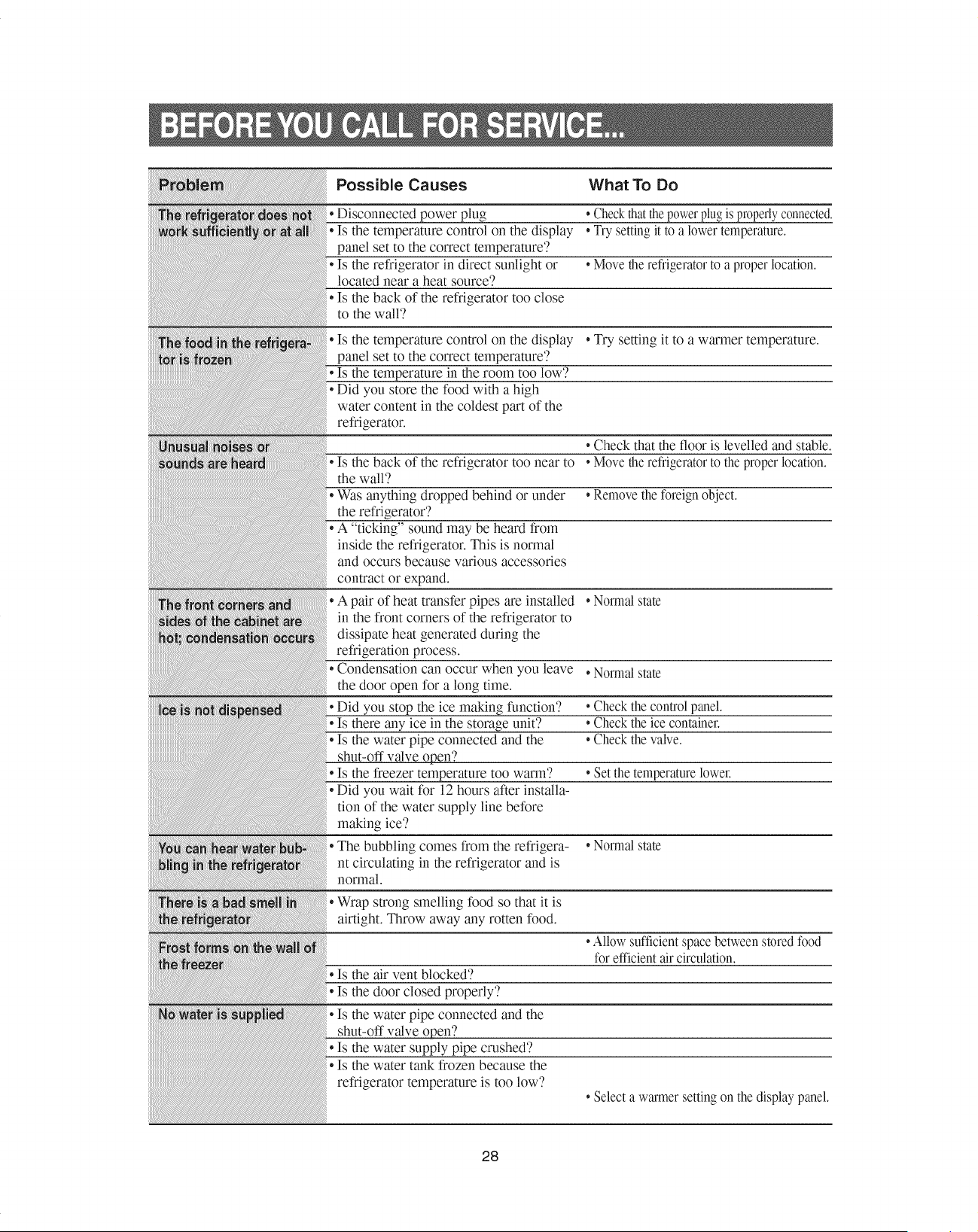
Possible Causes What To Do
• Disconnected power plug *Checkthatthe powerplugisproperlyconnected.
• Is the temperature control on the display • Try setting it to a lower temperature.
panel set to the correct temperature'?
• Is the refrigerator in direct sunlight or • Move the refrigeratorto a proper location.
located near a heat source'?
• Is the back of the refrigerator too close
to the wall?
• Is the temperature control on the display • Try setting it to a warmer temperature.
panel set to the correct temperature'?
• Is the temperature in the room too low'?
• Did you store the food with a high
water content in the coldest part of the
refrigerator.
• Check that the floor is levelled and stable.
• Is the back of the refrigerator too near to *Move the refrigeratorto the proper location.
the wall?
• Was anything dropped behind or under *Remove the foreign object.
the refrigerator'?
• A "ticking" sound may be heard from
inside the refrigerator. This is normal
and occurs because various accessories
contract or expand.
• A pair of heat transfer pipes are installed • Normal state
in the front corners of the refrigerator to
dissipate heat generated during the
refrigeration process.
• Condensation can occur when you leave . Normal state
the door open for a long time.
• Did you stop the ice making function?
• Is there any ice in the storage unit'?
• Is the water pipe connected and the
shut-off valve open?
• Is the freezer temperature too warm'?
• Did you wait for 12 hours after installa-
tion of the water supply line before
making ice'?
• The bubbling comes from the refrigera- • Normal state
nt circulating in the refrigerator and is
normal.
*Check the control panel.
*Check the ice container.
*Check the valve.
*Set the temperature lower.
• Wrap strong smelling food so that it is
airtight. Throw away any rotten food.
• Allow sufficient spacebetween storedfood
for efficient air circulation.
• Is the air vent blocked?
• Is the door closed properly?
• Is the water pipe connected and the
shut-off valve open2
• Is the water supply pipe crashed?
• Is the water tank frozen because the
refrigerator temperature is too low'?
• Select a warmer settingon the display panel.
28
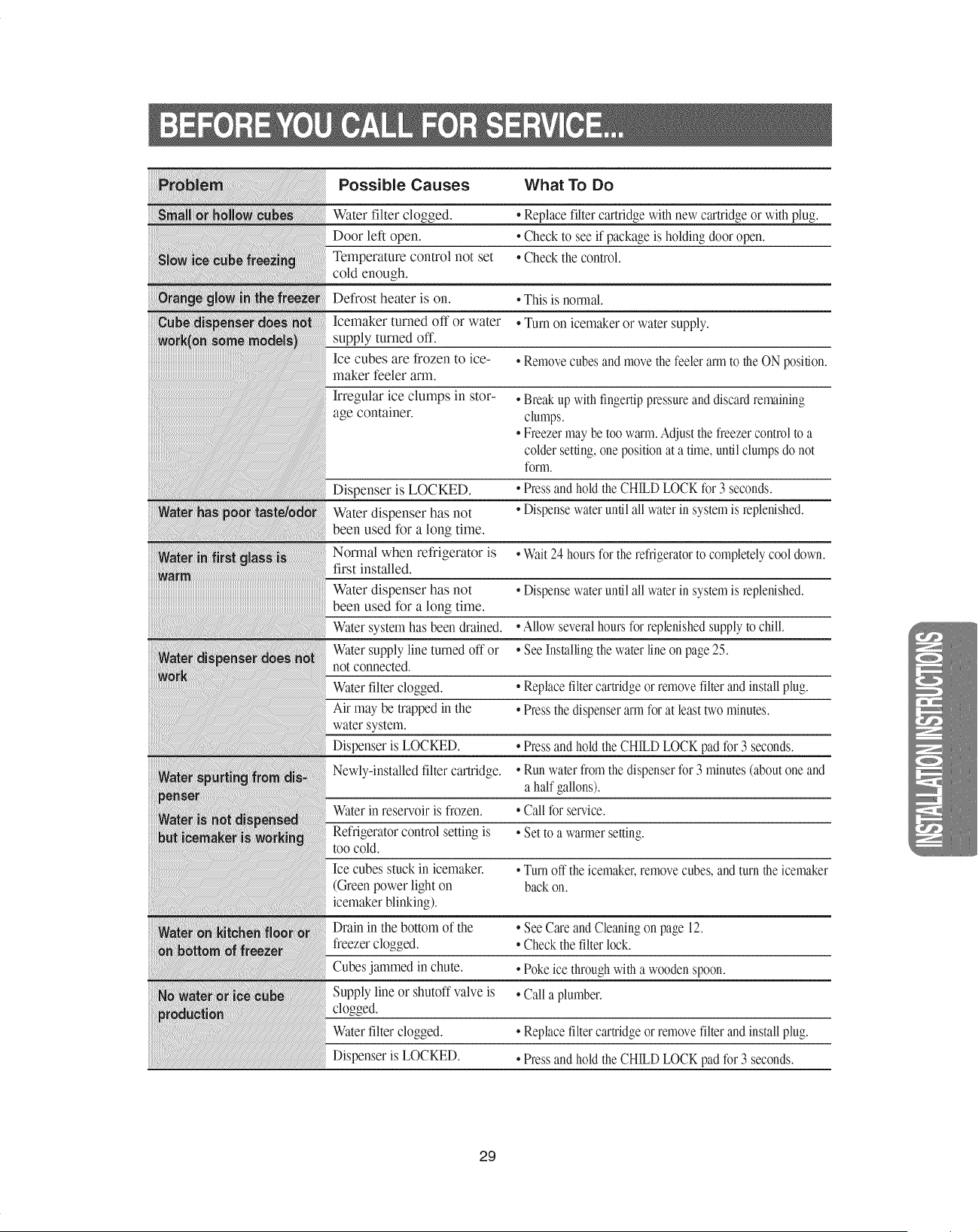
Possible Causes What To Do
Water filter clogged.
Door left open.
Temperature control not set
cold enough.
• Replace filter cartridge withnew cartridgeor with plug.
• Check to see if package is holding door open.
• Check the control.
iiiiiiiiii
iiiiiiiiiiiiiiiil¸_!_i_i!_!il!il!il!il!il!il!il!il!il!il!il!il!il!il!il!il!il!il!il!il!il!il!il!il!il!il!il!il!il!il!il!il!il!il!il!il!il!il!il!il!il!il!il!il!il!il!il!il!il!il!il!il!il!il!il!il!il!il!il!il!il!il!il!il!il!il!il!il!il!il!il!il!il!il!il!il!il!il!il!il!il!il!il!il!il!il!il!il!il!il!il!il!il!il!il!il!il!il!il!il!il!il!il!il!il!il!il!il!il!il!il!il¸iliiiiiiii!!i!!i!!i!ii!!i!ii!!i!iill
Defrost heater is on.
Icemaker turned off or water
supply turned off.
Ice cubes are frozen to ice-
maker feeler arm.
Irregular ice clumps in stor-
age container.
Dispenser is LOCKED.
Water dispenser has not
been used for a long time.
Normal when refrigerator is
first installed.
Water dispenser has not
been used for a long time.
Water systemhas been drained.
Water supplyline turned off or
not connected.
Waterfilter clogged.
Air may be trapped in the
water system.
Dispenser is LOCKED.
Newly-installed filter cartridge.
Waterin reservoir is frozen.
Refrigeratorcontrol setting is
too cold.
Ice cubes stuck in icemaker.
(Green power light on
icemaker blinking).
• This is normal.
• Turn on icemaker or water supply.
• Removecubes and movethe feelerarm to the ONposition.
• Breakup with fingertippressureand discardremaining
clumps.
• Freezermay be too warm.Adjust thefreezercontrolto a
colder setting,one positionat a time,until clumps do not
form.
• Press andhold the CHILDLOCK for 3 seconds.
• Dispensewater until all water in systemis replenished.
•Wait 24 hours for the refrigeratorto completelycool down.
• Dispensewater until all water in systemis replenished.
•Allow severalhours for replenishedsupplyto chill.
• See Installingthewater lineon page25.
• Replacefilter cartridgeor removefilter and installplug.
• Press thedispenserarm for at least twominutes.
• Press andhold the CHILDLOCK pad for 3 seconds.
• Runwaterfrom the dispenserfor 3 minutes(aboutone and
a half gallons).
• Callfor service.
• Set to a warmersetting.
• Turnoff theicemaker,removecubes,and turnthe icemaker
back on.
Drain in the bottom of the
freezer clogged.
Cubes jmnmed in chute.
Supply line or shutoff valve is
clogged.
Waterfilter clogged.
Dispenser is LOCKED.
• See Careand Cleaningon page 12.
• Check thefilter lock.
• Poke ice throughwith a woodenspoon.
• Calla plumber.
• Replacefilter cartridgeor removefilter and installplug.
• Press andhold the CHILDLOCK pad for 3 seconds.
29
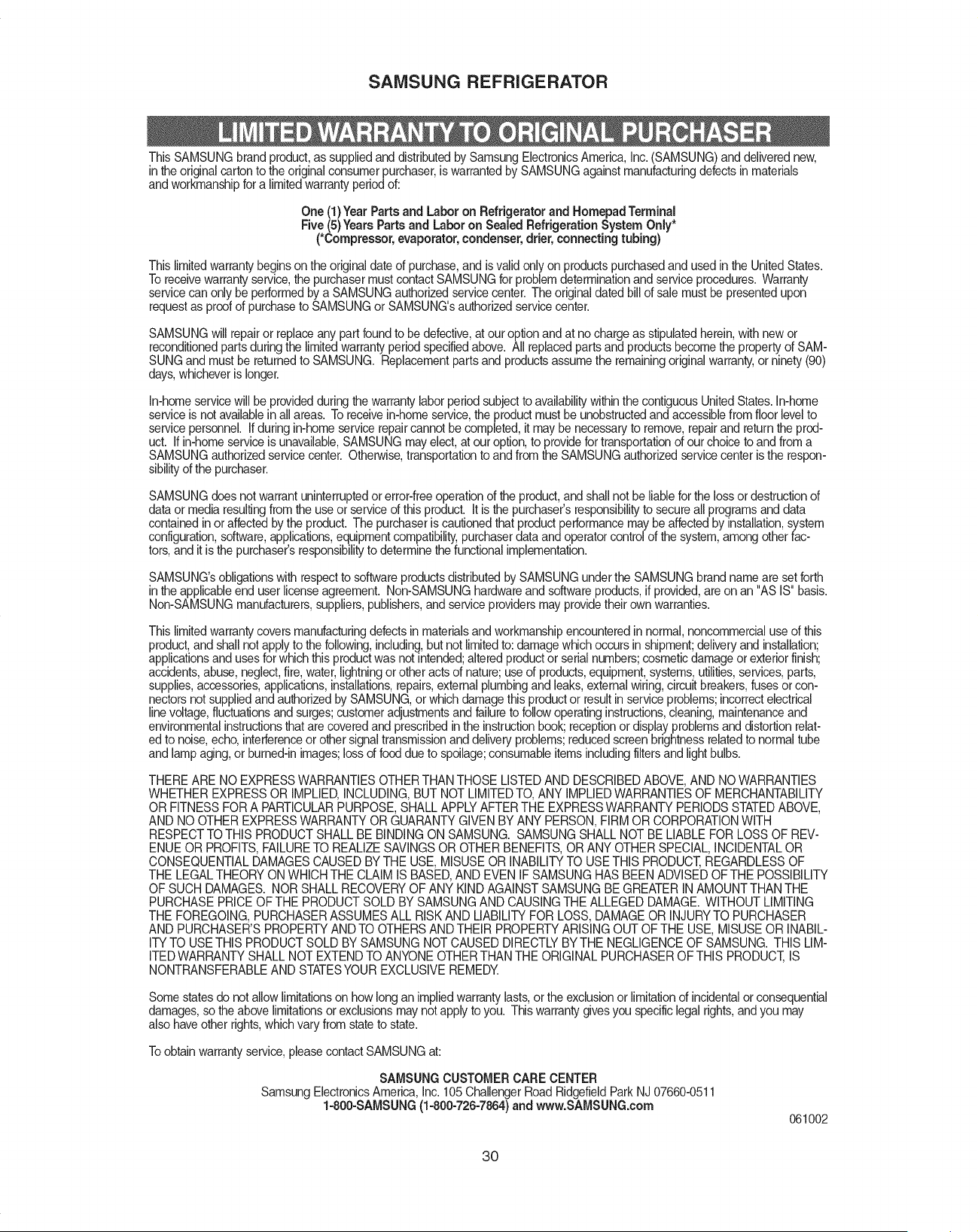
SAMSUNG REFRIGERATOR
This SAMSUNG brand product,as suppliedand distributed by Samsung ElectronicsAmerica, Inc.(SAMSUNG) and deliverednew,
in theoriginal carton to the original consumerpurchaser,is warranted by SAMSUNGagainst manufacturingdefects in materials
and workmanshipfor a limitedwarranty periodof:
One (1)Year Parts and Labor on Refrigerator and HomepadTerminal
Five (5) YearsParts and Laboron Sealed Refrigeration System Only*
(*Compressor,evaporator, condenser,drier, connectingtubing)
This limitedwarranty beginson the original date of purchase, and is valid only on products purchasedand used in the UnitedStates.
To receivewarranty service,the purchasermust contact SAMSUNGfor problem determinationand serviceprocedures. Warranty
servicecan only be performedby a SAMSUNGauthorizedservicecenter. The original dated bill of sale must be presentedupon
requestas proofof purchaseto SAMSUNGor SAMSUNG'sauthorizedservice center.
SAMSUNGwill repairor replaceany part found to be defective,at our option and at no charge as stipulatedherein,with new or
reconditionedparts duringthe limitedwarranty periodspecifiedabove. All replacedparts and productsbecome the propertyof SAM-
SUNGand must be returned to SAMSUNG. Replacementparts and productsassume the remainingoriginal warranty,or ninety (90)
days, whicheveris longer.
In-homeservicewill be providedduring thewarranty labor period subjectto availabilitywithinthe contiguous UnitedStates. In-home
serviceis not availablein all areas. Toreceive in-homeservice,the productmust be unobstructedand accessiblefrom floor levelto
servicepersonnel. If during in-homeservicerepaircannot becompleted, it may be necessaryto remove,repairand return the prod-
uct. If in-homeservice is unavailable,SAMSUNGmayelect, at our option,to providefor transportationof our choice to and from a
SAMSUNGauthorizedservicecenter. Otherwise, transportationto and from the SAMSUNGauthorizedservice centeris the respon-
sibilityof the purchaser.
SAMSUNGdoes not warrant uninterruptedor error-freeoperationof the product,and shall not be liablefor the loss or destructionof
data or media resultingfrom the use or serviceof this product. It isthe purchaser'sresponsibilityto secure allprograms and data
contained in or affectedby the product. The purchaseris cautioned that productperformance may be affectedby installation,system
configuration,software,applications,equipmentcompatibility,purchaserdata and operatorcontrol of the system,among otherfac-
tors, and it is the purchaser'sresponsibilityto determine the functionalimplementation.
SAMSUNG'sobligationswith respectto softwareproductsdistributed by SAMSUNGunder the SAMSUNG brand name are set forth
inthe applicableend user license agreement. Non-SAMSUNGhardwareand softwareproducts,if provided, are on an "AS IS" basis.
Non-SAMSUNGmanufacturers,suppliers,publishers,and serviceproviders may providetheir own warranties.
This limitedwarrantycovers manufacturingdefects in materialsand workmanshipencounteredin normal, noncommercialuseof this
product,and shallnot applyto the following,including,but not limitedto:damage which occurs in shipment;deliveryand installation;
applicationsand uses for which this productwas not intended;altered productor serial numbers;cosmeticdamage or exterior finish;
accidents, abuse,neglect,fire, water, lightningor otheracts of nature; use of products,equipment, systems,utilities,services,parts,
supplies,accessories,applications,installations,repairs,external plumbingand leaks, externalwiring, circuit breakers,fusesor con-
nectorsnot suppliedand authorizedby SAMSUNG,or which damage this productor resultin service problems;incorrectelectrical
linevoltage,fluctuationsand surges;customeradjustmentsand failureto followoperatinginstructions,cleaning, maintenanceand
environmentalinstructionsthat are coveredand prescribedinthe instructionbook; receptionor display problemsand distortionrelat-
ed to noise,echo, interferenceor other signaltransmissionand delivery problems;reducedscreen brightnessrelatedto normal tube
and lampaging, or burned-inimages;lossof food due to spoilage;consumableitemsincludingfiltersand light bulbs.
THERE ARE NO EXPRESSWARRANTIESOTHERTHAN THOSE LISTEDAND DESCRIBEDABOVE, AND NO WARRANTIES
WHETHER EXPRESSOR IMPLIED,INCLUDING,BUT NOT LIMITEDTO, ANY IMPLIEDWARRANTIESOF MERCHANTABILITY
OR FITNESS FORA PARTICULARPURPOSE,SHALL APPLYAFTERTHE EXPRESSWARRANTY PERIODS STATEDABOVE,
AND NO OTHER EXPRESSWARRANTY ORGUARANTY GIVEN BY ANY PERSON, FIRM OR CORPORATIONWITH
RESPECTTO THIS PRODUCTSHALL BE BINDINGON SAMSUNG. SAMSUNG SHALL NOT BE LIABLE FOR LOSSOF REV-
ENUE OR PROFITS,FAILURETO REALIZESAVINGSOR OTHER BENEFITS,OR ANY OTHER SPECIAL,INCIDENTALOR
CONSEQUENTIALDAMAGESCAUSEDBY THE USE, MISUSEOR INABILITYTO USETHIS PRODUCT,REGARDLESS OF
THE LEGALTHEORY ON WHICHTHE CLAIM IS BASED,AND EVEN IF SAMSUNGHAS BEEN ADVISED OFTHE POSSIBILITY
OF SUCH DAMAGES. NOR SHALL RECOVERYOF ANY KIND AGAINSTSAMSUNG BE GREATERIN AMOUNT THAN THE
PURCHASEPRICE OFTHE PRODUCTSOLD BY SAMSUNGAND CAUSINGTHE ALLEGED DAMAGE.WITHOUT LIMITING
THE FOREGOING,PURCHASERASSUMES ALL RISKAND LIABILITYFOR LOSS, DAMAGE OR INJURYTO PURCHASER
AND PURCHASER'SPROPERTYAND TO OTHERSAND THEIR PROPERTYARISING OUT OFTHE USE, MISUSE OR INABIL-
ITYTO USETHIS PRODUCTSOLD BY SAMSUNG NOT CAUSED DIRECTLYBY THE NEGLIGENCEOF SAMSUNG. THIS LIM-
ITEDWARRANTY SHALL NOT EXTENDTO ANYONEOTHER THAN THE ORIGINALPURCHASEROFTHIS PRODUCT,IS
NONTRANSFERABLEAND STATESYOUR EXCLUSIVEREMEDY.
Some states do notallow limitationson how longan impliedwarranty lasts,or the exclusionor limitationof incidentalor consequential
damages, so the above limitationsor exclusionsmay notapply to you. This warrantygives you specificlegal rights,andyou may
also haveother rights,which vary from stateto state.
To obtain warrantyservice, pleasecontact SAMSUNG at:
SAIVlSUNGCUSTOMER CARE CENTER
Samsung ElectronicsAmerica, Inc. 105 ChallengerRoad RidgefieldPark NJ 07660-0511
1-800-SAMSUNG(1-800-726-7864)and www.SAMSUNG.com
061002
3O

If you have any questions or comments relating to Samsung products,
please contact the SAMSUNG customer care center.
Samsung Electronics America, Inc.
105 Challenger Road Ridgefield Park, NJ 07660-0511
1-800-SAM SU NG(1-800-726-7864)
www.samsung.com
All right reserved. This manual maynot be reproduced in whole or in part in any
form without written permission from the SAMSUNG ELECTRONICS Company