ELECTRIC
HOME-CINEMA TELEVISION
MODELS
738 Series
Series
BASIC OWNER'S GUIDE
This manual provides basic connection, setup, and operating instructions. Please visit our website at
www.Mitsubishi=tv.com to view or download a detailed owner's guide that fully describes the features
of this TV. Follow the Support link to the Product Documents page.
• For questions:
Visit our website at www.mitsubishi-tv.com.
Call Consumer Relations at 800-332-2119 for operational or connection assistance.
• For information on System Reset, please see the back cover.
• To order replacement or additional remote controls, visit our website at www.mitsuparts.com or call
800-553-7278.
• 838 Series. IR emitter cables for NetCommand home-theater control are available for purchase from
Mitsubishi. Call 800-553-7278 and request either part number 242D483020 (two-ended cable) or part
number 299P254020 (four-ended cable).
H_:::itI_II °
HIGH'DEFINITION MULTiMEDiA INTERFACE
_NTERNET MEDIA
6COLOR
PROCESSOR
CAUTION:TOREDUCETHERISKOFELECTRIC
SHOCK,DONOTREMOVECOVER(ORBACK).
NOUSERSERVICEABLEPARTSINSIDE.REFER
SERVICINGTOQUALIFIEDSERVICEPERSONNEL.
/_ The lightning flash with arrowhead symbol
within an equilateral triangle is intended to
alert the user of the presence of uninsulated
"dangerous voltage" within the product's
enclosure that may be of sufficient magnitude to consti-
tute a risk of electric shock to persons.
The exclamation point within an equilat-
eral triangle is intended to alert the user to
the presence of important operating and
maintenance (servicing) instructions in the
literature accompanying the product.
MAINS DiSCONNECTiON: The mains plug is used
as the disconnect device. The mains plug shall remain
readily operable.
Stand Requirement
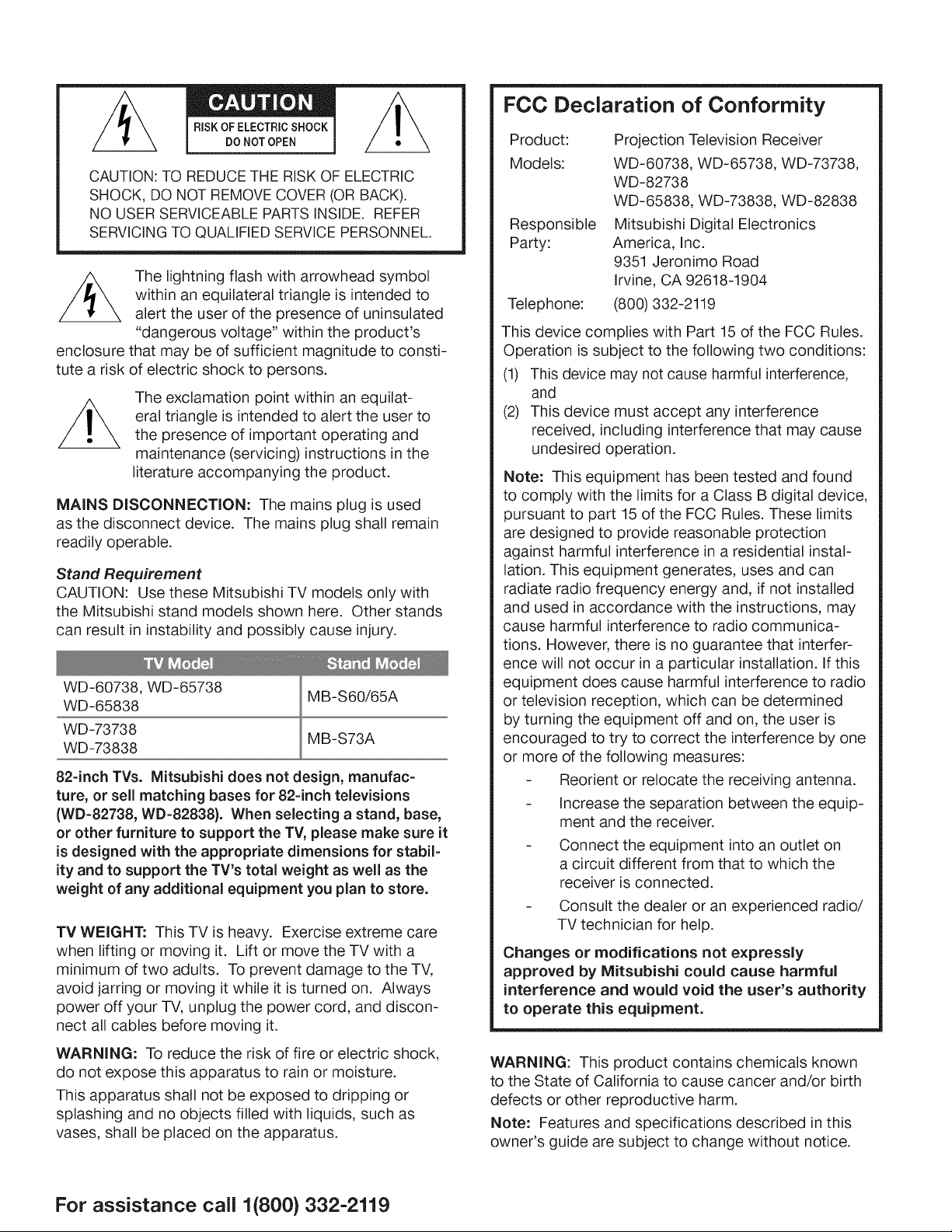
CAUTION: Use these Mitsubishi TV models only with
the Mitsubishi stand models shown here. Other stands
can result in instability and possibly cause injury.
WD-60738, WD-65738
WD-65838
MB-S60/65A
WD-73738
MB-S73A
WD-73838
82-inch TVs. Mitsubishi does not design, manufac-
ture, or sell matching bases for 82-inch televisions
(WD=82738, WD-82838). When selecting a stand, base,
or other furniture to support the TV, please make sure it
is designed with the appropriate dimensions for stabil-
ity and to support the TV's total weight as well as the
weight of any additional equipment you plan to store.
TV WEIGHT: This TV is heavy. Exercise extreme care
when lifting or moving it. Lift or move the TV with a
minimum of two adults. To prevent damage to the TV,
avoid jarring or moving it while it is turned on. Always
power off your TV, unplug the power cord, and discon-
nect all cables before moving it.
WARNING: To reduce the risk of fire or electric shock,
do not expose this apparatus to rain or moisture.
This apparatus shall not be exposed to dripping or
splashing and no objects filled with liquids, such as
vases, shall be placed on the apparatus.
FCC Declaration of Conformity
Product:
Models:
Responsible
Party:
Telephone:
Projection Television Receiver
WD-60738, WD-65738, WD-73738,
WD-82738
WD-65838, WD-73838, WD-82838
Mitsubishi Digital Electronics
America, Inc.
9351 Jeronimo Road
Irvine, CA 92618-1904
(800) 332-2119
This device complies with Part 15 of the FCC Rules.
Operation is subject to the following two conditions:
(1) This device may not cause harmful interference,
and
(2) This device must accept any interference
received, including interference that may cause
undesired operation.
Note: This equipment has been tested and found
to comply with the limits for a Class B digital device,
pursuant to part 15 of the FCC Rules. These limits
are designed to provide reasonable protection
against harmful interference in a residential instal-
lation. This equipment generates, uses and can
radiate radio frequency energy and, if not installed
and used in accordance with the instructions, may
cause harmful interference to radio communica-
tions. However, there is no guarantee that interfer-
ence will not occur in a particular installation. If this
equipment does cause harmful interference to radio
or television reception, which can be determined
by turning the equipment off and on, the user is
encouraged to try to correct the interference by one
or more of the following measures:
Reorient or relocate the receiving antenna.
Increase the separation between the equip-
ment and the receiver.
Connect the equipment into an outlet on
a circuit different from that to which the
receiver is connected.
Consult the dealer or an experienced radio/
TV technician for help.
Changes or modifications not expressly
approved by Mitsubishi could cause harmful
interference and would void the user's authority
to operate this equipment.
WARNING: This product contains chemicals known
to the State of California to cause cancer and/or birth
defects or other reproductive harm.
Note: Features and specifications described in this
owner's guide are subject to change without notice.
For assistance call 1(800} 332-2119
Contents
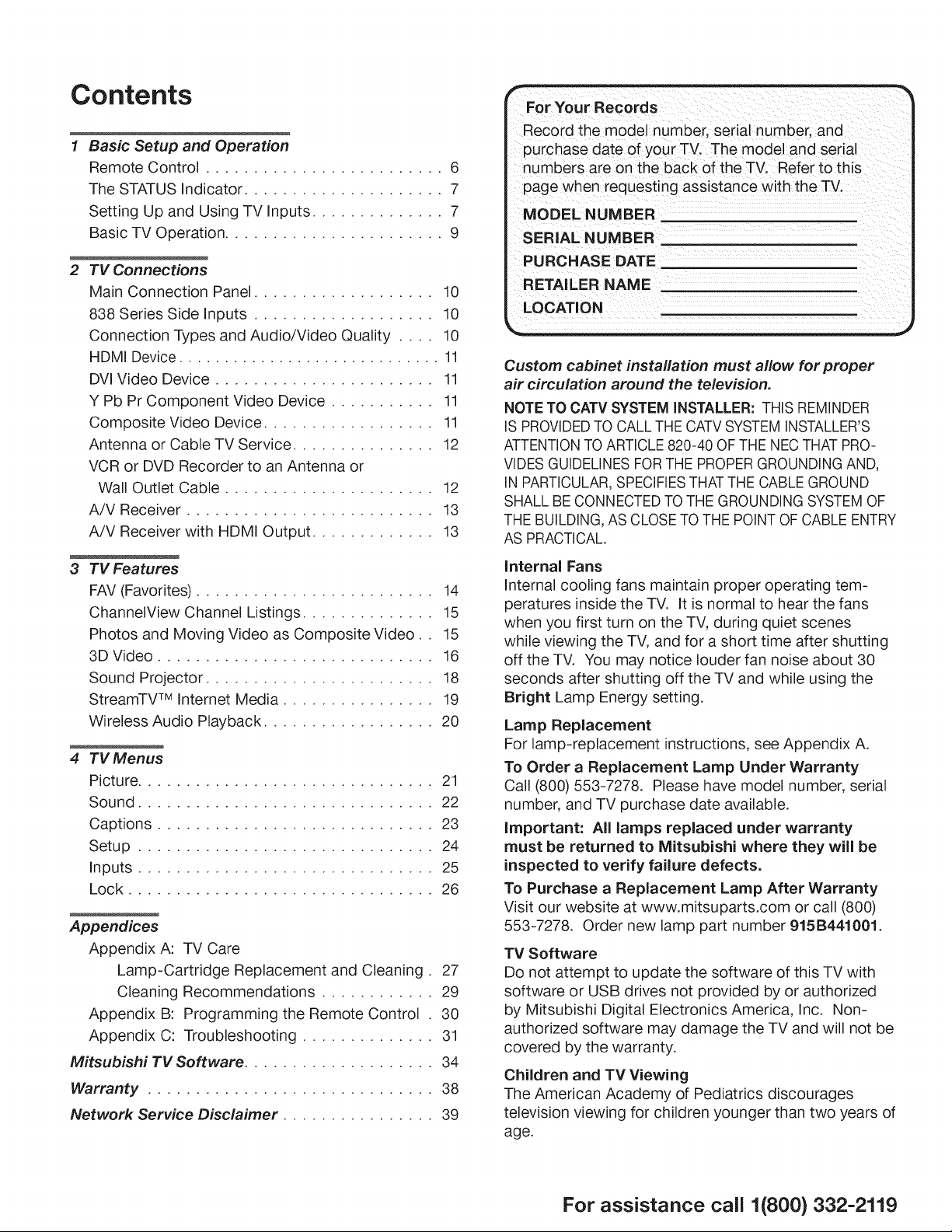
1 Basic Setup and Operation
Remote Control ......................... 6
The STATUS Indicator ..................... 7
Setting Up and Using TV Inputs .............. 7
Basic TV Operation ....................... 9
2 TV Connections
Main Connection Panel ................... 10
838 Series Side Inputs ................... 10
Connection Types and Audio/Video Quality .... 10
HDMI Device ............................. 11
DVl Video Device ....................... 11
Y Pb Pr Component Video Device ........... 11
Composite Video Device .................. 11
Antenna or Cable TV Service ............... 12
VCR or DVD Recorder to an Antenna or
Wall Outlet Cable ...................... 12
A/V Receiver .......................... 13
A/V Receiver with HDMI Output ............. 13
3 TVFeatures
FAV (Favorites) ......................... 14
ChannelView Channel Listings .............. 15
Photos and Moving Video as Composite Video.. 15
3D Video ............................. 16
Sound Projector ........................ 18
StreamTW MInternet Media ................ 19
Wireless Audio Playback .................. 20
4 TV Menus
Picture ............................... 21
Sound ............................... 22
Captions ............................. 23
Setup ............................... 24
Inputs ............................... 25
Lock ................................ 26
Appendices
Appendix A: TV Care
Lamp-Cartridge Replacement and Cleaning. 27
Cleaning Recommendations ............ 29
Appendix B: Programming the Remote Control . 30
Appendix C: Troubleshooting .............. 31
Mitsubishi TV Software .................... 34
Warranty .............................. 38
Network Service Disclaimer ................ 39
For Your Records
Record the model number, serial number, and
purchase date of your TV. The model and serial
numbers are on the back of the TV. Refer to this
page when requesting assistance with the TV.
MODEL NUMBER
SERIAL NUMBER
PURCHASE DATE
RETAI LER NAME
LOCATION
Custom cabinet installation must allow for proper
air circulation around the television.
NOTE TO CATV SYSTEM iNSTALLER: THIS REMINDER
IS PROVIDEDTO CALL THE CATVSYSTEMINSTALLER'S
ATTENTIONTO ARTICLE 820-40 OF THE NEC THAT PRO-
VIDESGUIDELINES FORTHE PROPERGROUNDING AND,
IN PARTICULAR,SPECIFIESTHATTHE CABLE GROUND
SHALL BE CONNECTED TO THE GROUNDING SYSTEMOF
THE BUILDING, AS CLOSE TO THE POINT OF CABLE ENTRY
AS PRACTICAL.
Internal Fans
Internal cooling fans maintain proper operating tem-
peratures inside the TV. It is normal to hear the fans
when you first turn on the TV, during quiet scenes
while viewing the TV, and for a short time after shutting
off the TV. You may notice louder fan noise about 30
seconds after shutting off the TV and while using the
Bright Lamp Energy setting.
Lamp Replacement
For lamp-replacement instructions, see Appendix A.
To Order a Replacement Lamp Under Warranty
Call (800) 553-7278. Please have model number, serial
number, and TV purchase date available.
important: All lamps replaced under warranty
must be returned to Mitsubishi where they will be
inspected to verify failure defects.
To Purchase a Replacement Lamp After Warranty
Visit our website at www.mitsuparts.com or call (800)
553-7278. Order new lamp part number 915B441001.
TV Software
Do not attempt to update the software of this TV with
software or USB drives not provided by or authorized
by Mitsubishi Digital Electronics America, Inc. Non-
authorized software may damage the TV and will not be
covered by the warranty.
Children and TV Viewing
The American Academy of Pediatrics discourages
television viewing for children younger than two years of
age.
For assistance call 1(800} 332-2119

4
important Safety instructions
Please read the following safeguards for your TV and
retain for future reference. Always follow all warnings
and instructions marked on the television.
EXAMPLE OF ANTENNA GROUNDING
1)
2)
3)
4)
5)
6)
7)
8)
9)
10)
11)
Read these instructions.
Keep these instructions.
Heed all warnings.
Follow all instructions.
Do not use this apparatus near water.
Clean only with dry cloth.
Do not block any ventilation openings. Install in
accordance with the manufacturer's instructions.
Do not install near any heat sources such as
radiators, heat registers, stoves, or other apparatus
0ncluding amplifiers) that produce heat.
Do not defeat the safety purpose of the polarized
or grounding-type plug. A polarized plug has two
blades with one wider than the other. A grounding
type plug has two blades and a third grounding
prong. The wide blade or the third prong are
provided for your safety. If the provided plug does
not fit into your outlet, consult an electrician for
replacement of the obsolete outlet.
Protect the power cord from being walked on
or pinched particularly at plugs, convenience
receptacles, and the point where they exit from the
apparatus.
Only use attachments/accessories specified by the
manufacturer.
LEADIN WIRE
ELECTRIC
SERVICE
DISCHARGE UNIT
(NEC ARTICLE 810-20)
GROUNDING
CONDUCTORS
(NEC ARTICLE 810-21)
ELECTRODE SYSTEM
NEC NATIONAL ELECTRICAL CODE (NEC ART 250, PARTH)
Outdoor Antenna Grounding
If an outside antenna or cable system is connected
to the TV, be sure the antenna or cable system is
grounded so as to provide some protection against
voltage surges and built-up static charges.
Replacement Parts
When replacement parts are required, be sure the
service technician has used replacement parts speci-
fied by the manufacturer or have the same character-
istics as the original part. Unauthorized substitutions
may result in fire, electric shock or other hazards.
12)
13)
14)
Use only with the cart,
stand, tripod, bracket,
or table specified
by the manufacturer,
or sold with the
apparatus. When
a cart is used, use
caution when moving
the cart!apparatus
combination to avoid
injury from tip-over.
Unplug this apparatus
during lightning storms or when unused for long
periods of time.
Refer all servicing to qualified service personnel.
Servicing is required when the apparatus has been
damaged in any way', such as power-supply cord or
plug is damaged, liquid has been spilled or objects
have fallen into the apparatus, the apparatus has
been exposed to rain or moisture, does not operate
normally, or has been dropped.
The following TV models are
ENERGY STAR@qualified:
WD-65738, WD-73738, WD-82738
WD-65838, WDW3838, WD-82838
Products that earn the ENERGY
STAR prevent greenhouse gas
emissions by meeting strict energy
efficiency guidelines set by the U.S.
Environmental Protection Agency
and the U.S. Department of Energy.
For assistance call 1(800) 332-2119
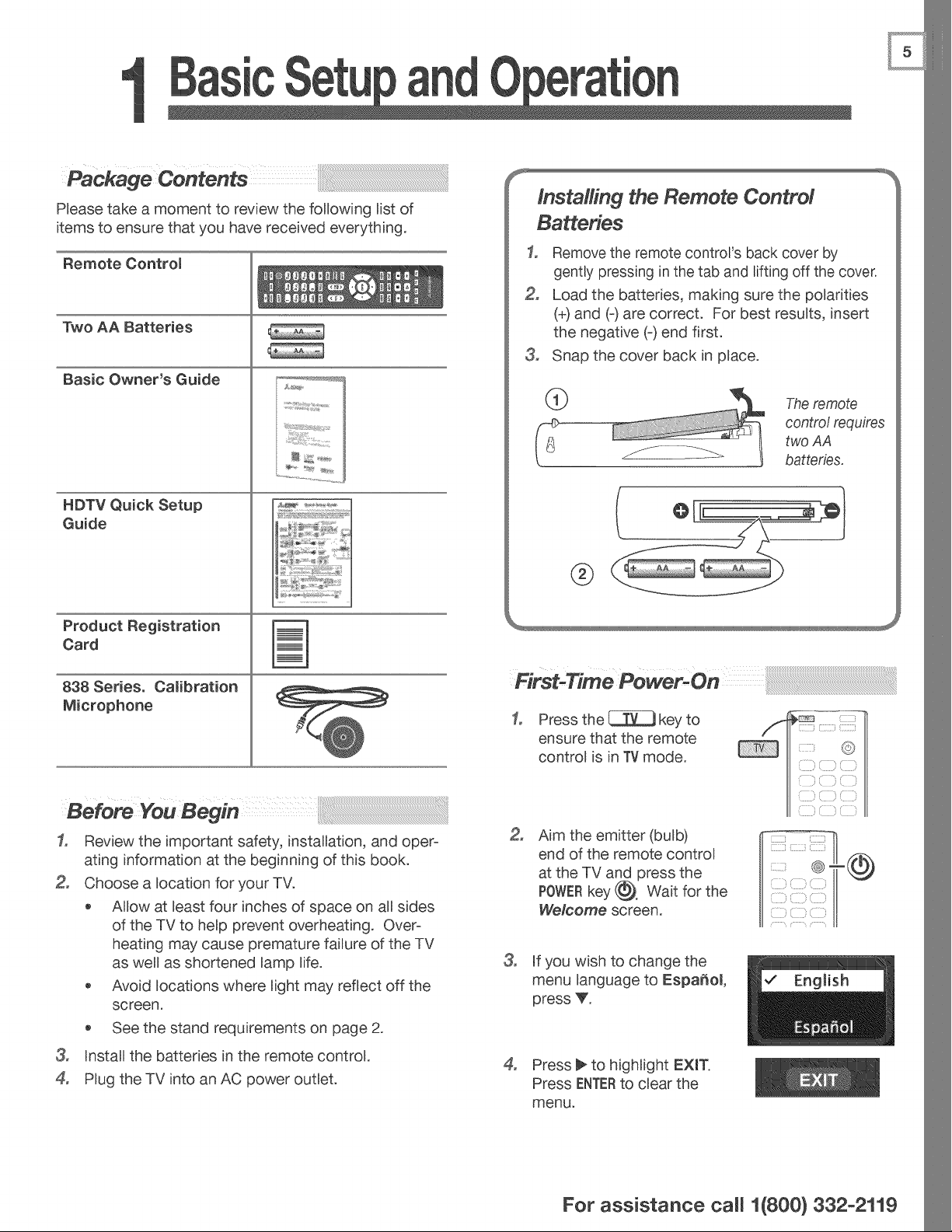
Please take a moment to review the following list of
items to ensure that you have received everything.
Remote Controm
Two AA Batteries
Basic Owner's Guide
HDTV Quick Setup
Guide
Product Registration
Card
838 Series. Camibration
Microphone
Installing the Remote Control
Batteries
1, Remove the remote control's back cover by
gently pressing in the tab and lifting off the cover.
Load the batteries, making sure the polarities
(+) and (-) are correct. For best results, insert
the negative (-) end first.
3, Snap the cover back in place.
The remote
contro/ requires
two AA
batteries,
®
3o
ensure that the remote
control is in TV mode.
3o
Review the important safety, installation, and oper-
ating information at the beginning of this book.
Choose a location for your TV.
o AUow at least four inches of space on all sides
of the TV to help prevent overheating. Over-
heating may cause premature failure of the TV
as well as shortened lamp life.
Avoid locations where light may reflect off the
screen.
See the stand requirements on page 2.
3, Install the batteries in the remote control.
4, Plug the TV into an AC power outlet.
3_
°
Aim the emitter (bulb)
end of the remote control
at the TV and press the
POWERkey (_, Wait for the
We/come screen.
If you wish to change the
menu language to Espa_ol,
press V.
Press _ to highlight EXIT.
Press ENTERto clear the
menu.
,,............']
iili ,_j T\ _
For assistance ca((1(800} 332-2119
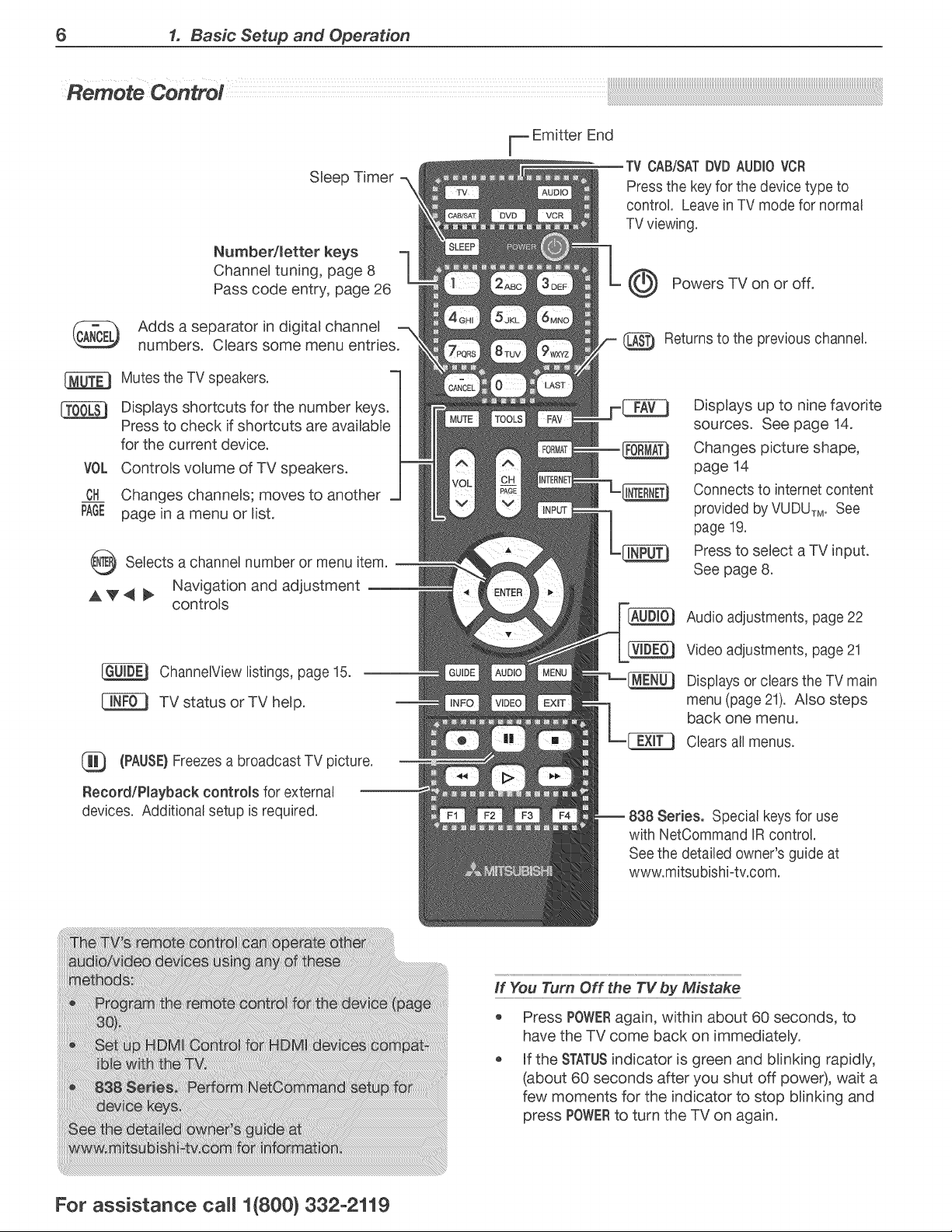
6 1. Basic Setup and Operation
Sleep Timer
Number/metter keys
Channel tuning, page 8
Pass code entry, page 26
Adds a separator in digital channel
numbers. Clears some menu entries.
Mutes the TV speakers.
VOL
CH
PAGE
Displays shortcuts for the number keys.
Press to check if shortcuts are avaUable
for the current device.
Controls volume of TV speakers.
Changes channels; moves to another
page in a menu or list.
O Selects a or menu
channel number item.
A V _ _ Navigation and adjustment
controls
ChannelView listings, page 15.
TV status or TV help.
(PAUSE}Freezes a broadcast TV picture.
Record/Playback controls for external
devices. Additional setup is required.
F Emitter End
TV CAB/SATDVD AUDIO VCR
Press the key for the device type to
control. Leave in TV mode for normal
TV viewing.
Powers TV on or off.
@ Returns to the previous channel.
Displays up to nine favorite
sources. See page 14.
Changes picture shape,
page 14
Connects to intemet content
provided by VUDUTM.See
page 19.
Press to select a TV input.
See page 8.
Audio adjustments, page 22
Video adjustments, page 21
Displays or clears the TV main
menu (page 21). Also steps
back one menu.
Clears all menus.
Series. Special keys for use
with NetCommand )R control.
See the detailed owner's guide at
www.mitsubishi-tv.com.
if You Turn Off the TV by Mistake
Press POWERagain, within about 60 seconds, to
have the TV come back on immediately.
If the STATUSindicator is green and blinking rapidly,
(about 60 seconds after you shut off poweO, wait a
few moments for the indicator to stop blinking and
press POWERto turn the TV on again.
For assistance ca((1(800)332-2119
1. Basic Setup and Operation 7
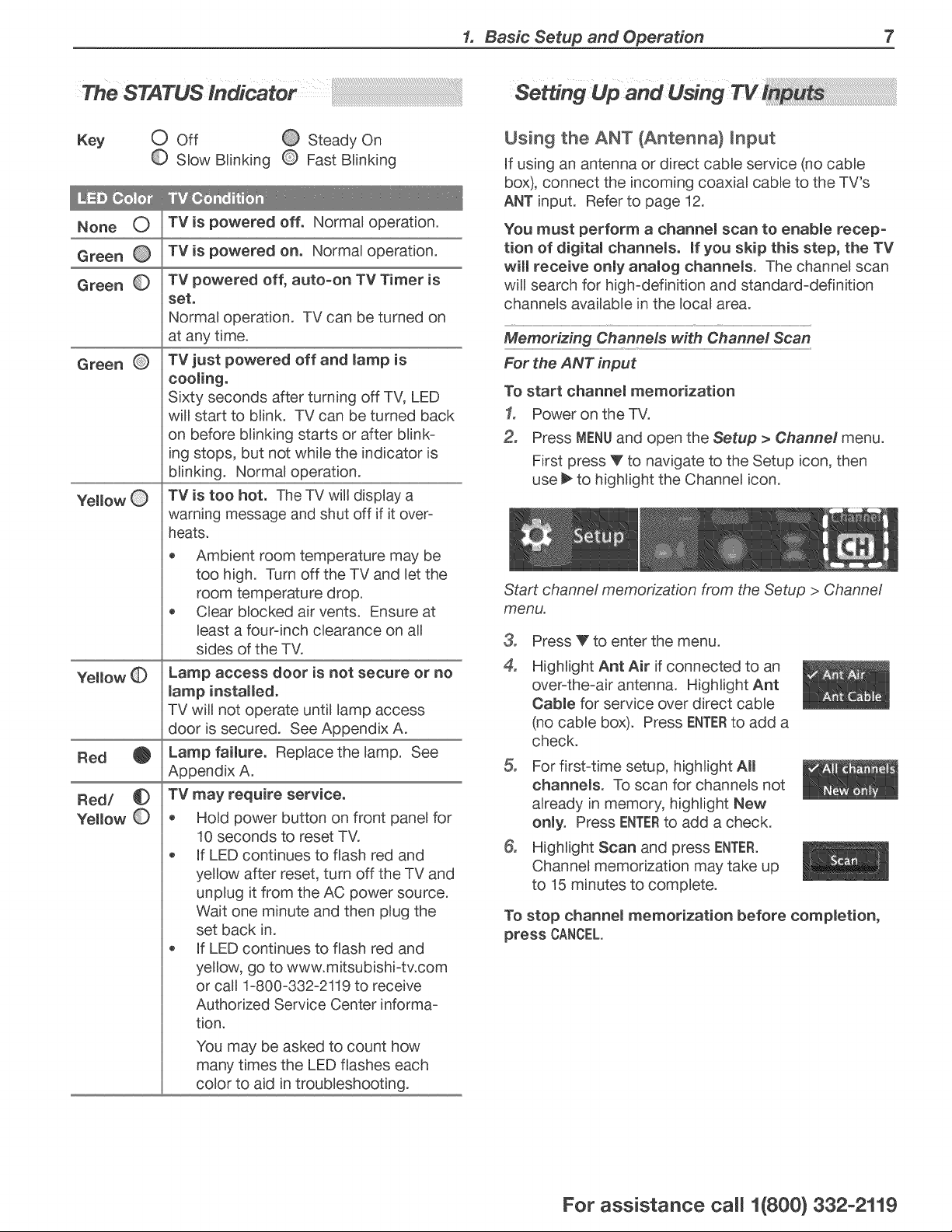
The STATUS Indicator
Key O Off @ Steady On
O Slow Blinking Q Fast Blinking
None O TVis powered off, Norma) operation.
Green O TVis powered on, Norma) operation.
Green
Green
Yellow
Red
Red/ _D
Yellow
Tv powered off, auto-on TV Timer is
set,
Norma) operation. TV can be turned on
at any time.
TV just powered off and mampis
cooling.
Sixty seconds after turning off TV, LED
wiU start to bunk. TV can be turned back
on before bunking starts or after bunk-
ing stops, but not whUe the indicator is
bunking. Norma)operation.
TV is too hot. The TV wUIdisplay a
warning message and shut off if it over-
heats.
o Ambient room temperature may be
too high. Turn off the TV and let the
room temperature drop.
Clear blocked air vents. Ensure at
least a four-inch clearance on all
sides of the TV.
Lamp access door is not secure or no
(amp installed.
TV wiU not operate until lamp access
door is secured. See Appendix A.
Lamp faimureo Replace the lamp. See
Appendix A.
TV may require service.
* Hold power button on front panel for
10 seconds to reset TV.
* If LED continues to flash red and
yellow after reset, turn off the TV and
unplug it from the AC power source.
Wait one minute and then plug the
set back in.
If LED continues to flash red and
yellow, go to www.mitsubishi-tv.com
or call 1-800-332-2119 to receive
Authorized Service Center informa-
tion.
You may be asked to count how
many times the LED flashes each
color to aid in troubleshooting.
Setting Up and Using TV
Using the ANT (Antenna} Input
If using an antenna or direct cable service (no cable
box), connect the incoming coaxial cable to the TV's
ANT input. Refer to page 12.
You must perform a channem scan to enabme recep-
tion of digitam channemso mfyou skip this step, the TV
will receive onmy anamog channems. The channel scan
will search for high-definition and standard-definition
channels avaUable in the local area.
Memorizing Channels with ChanneY Sca n
For the ANT input
To start channem memorization
1, Power on the TV.
Press MENUand open the Setup > Channel menu.
First press V to navigate to the Setup icon, then
use _ to highlight the Channel icon.
Start channel memorization from the Setup > Channel
menu.
°
4°
Press V to enter the menu.
Highlight Ant Air if connected to an
over-the-air antenna. Highlight Ant
Cabmefor service over direct cable
(no cable box). Press ENTERto add a
check.
For first-time setup, highlight AH
channems. To scan for channels not
already in memory, highlight New
onmy. Press ENTERto add a check.
Highlight Scan and press ENTER.
Channel memorization may take up
to 15 minutes to complete.
To stop channem memorization before compmetion,
press CANCEL.
For assistance ca((1(800} 332-2119
8 1. Basic Setup and Operation
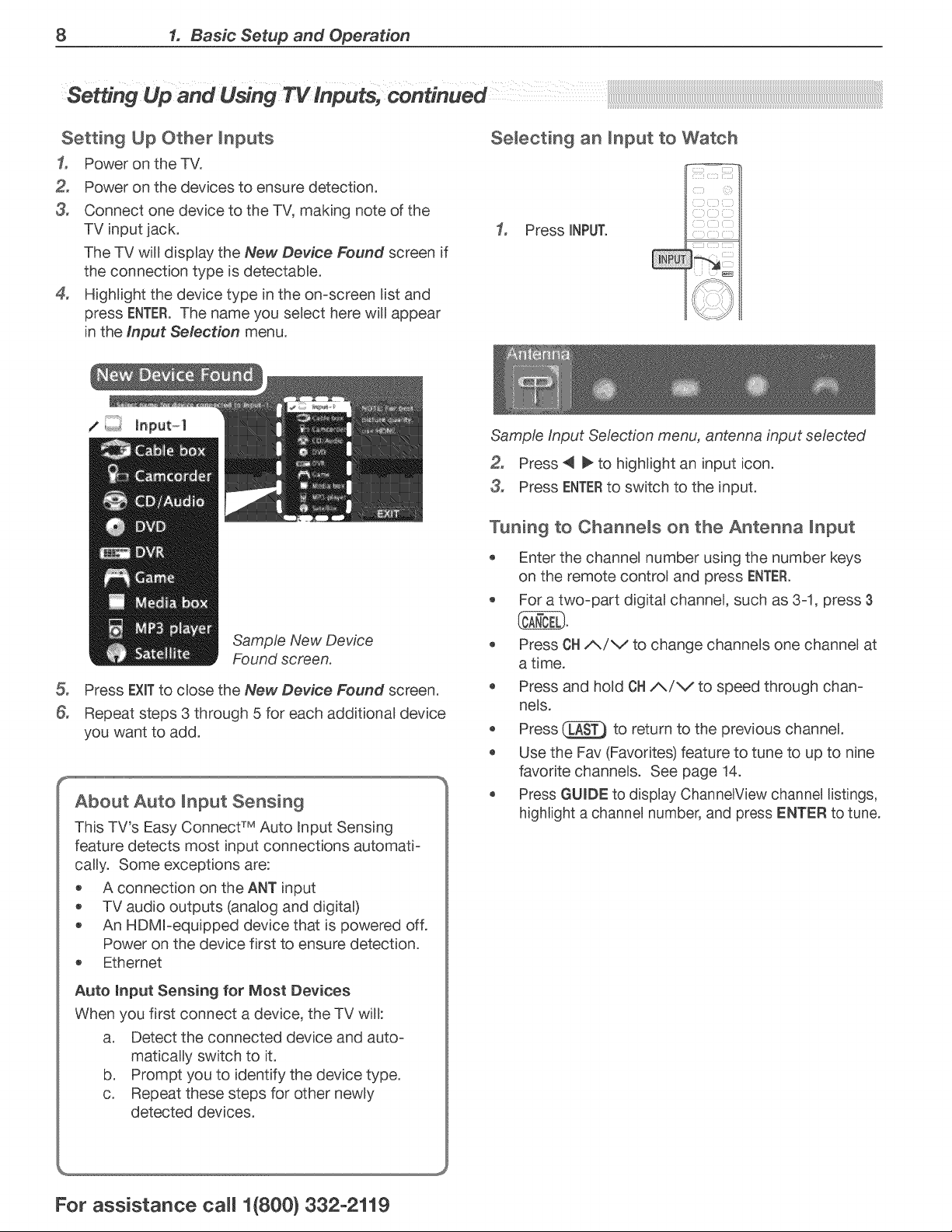
Setting Up Other inputs
1, Power on the TV.
Power on the devices to ensure detection.
3, Connect one device to the TV, making note of the
TV input jack.
The TV will display the New Device Found screen if
the connection type is detectable.
4, Highlight the device type in the on-screen list and
press ENTER.The name you select here will appear
in the Input Selection menu.
Selecting an input to Watch
1, Press iNPUT.
&
Sample New Device
Found screen.
Press EXiTto close the New Device Found screen.
Repeat steps 3 through 5 for each additional device
you want to add.
About Auto input Sensing
This TV's Easy Connect TM Auto RnputSensing
feature detects most input connections automati-
cally. Some exceptions are:
o A connection on the ANT input
TV audio outputs (analog and digital)
An HDMFequipped device that is powered off.
Power on the device first to ensure detection.
Ethernet
Auto input Sensing for Most Devices
When you first connect a device, the TV will:
a. Detect the connected device and auto-
matically switch to it.
b. Prompt you to identify the device type.
c. Repeat these steps for other newly
detected devices.
Sample input Selection menu, antenna input selected
Press _l _ to highlight an input icon.
3, Press ENTERto switch to the input.
Tuning to ChanneJs on the Antenna Input
Enter the channel number using the number keys
on the remote control and press ENTER.
For a two-part digital channel, such as 3-1, press 3
Press OHi_/v to change channels one channel at
a time.
Press and hold OH/_/V to speed through chan-
nels.
Press _ to return to the previous channel.
Use the Fav (Favorites) feature to tune to up to nine
favorite channels. See page 14.
Press GUIDE to display ChannelView channel listings,
highlight a channel number, and press ENTER to tune,
For assistance ca((1(800) 332-2119
1. Basic Setup and Operation 9
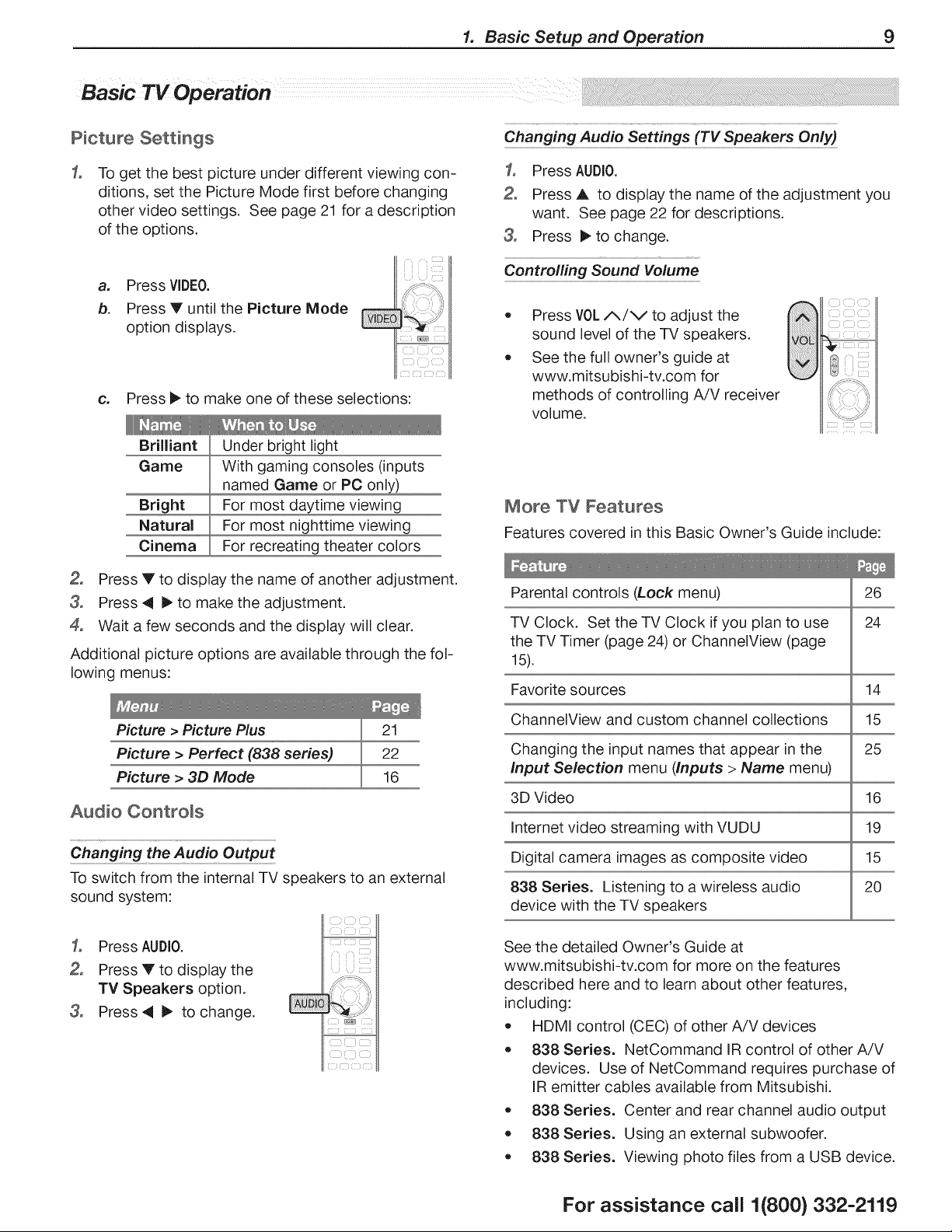
Basic TV Operation
Picture Settings
Changing Audio Settings (TV Speakers Only)
1,
To get the best picture under different viewing con-
ditions, set the Picture Mode first before changing
other video settings. See page 21 for a description
of the options.
a. Press VIDEO.
b. Press Y until the Picture Mode
option displays.
c. Press I_ to make one of these selections:
1, Press AUDIO.
Press J, to display the name of the adjustment you
want. See page 22 for descriptions.
3, Press _,to change.
Controlling Sound Volume
Press V0L A/V to adjust the
sound level of the TV speakers.
See the full owner's guide at
www.mitsubishi-tv.com for
methods of controlling A/V receiver
volume.
Brilliant
Game
Bright
Natural
Cinema
Under bright light
With gaming consoles (inputs
named Game or PC onl_
For most daytime viewing
For most nighttime viewing
For recreating theater colors
Press Y to display the name of another adjustment.
3, Press _ 1_to make the adjustment.
4, Wait a few seconds and the display will clear.
Additional picture options are available through the fol-
lowing menus:
Picture > Picture Plus 21
Picture > Perfect (838 series) 22
Picture > 3D Mode 16
Audio Controls
Changing the
To switch from the internal TV speakers to an external
sound system:
More TV Features
Features covered in this Basic Owner's Guide include:
Parental controls (Lock menu) 26
TV Clock. Set the TV Clock if you plan to use 24
the TV Timer (page 24) or ChannelView (page
15).
Favorite sources 14
ChannelView and custom channel collections 15
Changing the input names that appear in the 25
Input Selection menu (Inputs > Name menu)
3D Video 16
Internet video streaming with VUDU 19
Digital camera images as composite video 15
838 Series. Listening to a wireless audio 20
device with the TV speakers
1, Press AUDIO.
Press V to display the
TV Speakers option.
3, Press4 I_ to change.
See the detailed Owner's Guide at
www.mitsubishi-tv.com for more on the features
described here and to learn about other features,
including:
• HDMI control (CEC) of other A/V devices
• 838 Series. NetCommand IR control of other A/V
devices. Use of NetCommand requires purchase of
IR emitter cables available from Mitsubishi.
• 838 Series. Center and rear channel audio output
• 838 Series. Using an external subwoofer.
• 838 Series. Viewing photo files from a USB device.
For assistance call 1(800) 332-2119

TVConnections
Main Connection Panel
838 Series Jacks. See
the full owner's guide at
www.mitsubishi-tv.com.
,_=mmmmmmimmlmmSUB _
= CENTER WOOFER
NPUT OUTPUT •
m
: I L -
DiGiTAL DVI/PC AUDIO AUDIO
AUDIO _ iNPUT OUTPUT
OUTPUT page 11 (pag_ 13)
(page 13)
[
i
i
u
u
USB
r___NDMI ...............-q
1 2 3
HDMI USB
page 11 tAccessorypower
onall models;
738Series,wireless
adapter,page19)
l
[.AN
I
LAN
(Ethernet, port
page 19)
838 Series Side inputs
DVI/PC AUDIO
R -INPUT -L
I I
R &L VIDEO Y Pb Pr
Analog (composite (component
Audio video) video)
Input
INPUT 3
Pb Y/VIDEO L AUDIOR
USB
I
Y Pb Pr VIDEO R& L
(component (composite Analog
video) video) Audio
Input
L_
I
USB
(page19)
connectionTypesandAudio/VideoQuality
VIDEO QUALITY
Component
HDMI HDMi-to-DVl Video
Composite
Video
®
HDMI 4
HDMI
HDMI
AUDIO/SURROUND
OUTPUT
(838 series, page 23)
AUDIOtSURROUND
3D
GLASSES
EMITTER
ANT
page 12
3D GLASSES
EMITTER
(page 16)
AUDIO QUALITY
Digital
Audio
L/R Analog
Audio
®@
For assistance call 1(800) 332-2119

2. TV Connections 11
Mitsubishi recommends using high-speed HDMI
cables to connect newer devices incorporating HDMI
technology.
TV main pane!
HDIVII=to=HDIVll
cab!e
Y Pb Pr Compon en t Vide_
Required:
• RCA-type component video cables
Left/right analog audio cables.
TV main pane!
Any HDMI device
Audio Component
cab!es video cab!es
Incoming. from
cab!e serv=ce or
satellite dish
\
m m m m
I ® @1® @@
L R Y Pb Pr
AUDIO
Component video
device
Required:
DVl-to-HDMI cable or DVl/HDMI adapter and
HDMI cable
Left/right analog audio cables
TV main pane!
Audio
cab!es
Digita! DVI
device
Required:
Composite video cable (usually yellow)
Analog stereo audio cables.
R-AUDIO -L
,®
R (_) Audio
cables
AUDIOOUT
®
COMPOSITE
VIDEOOUT
Composite
video cable
VCR or other device with
composite video output
For assistance call 1(800) 332-2119
12 2. TV Connections
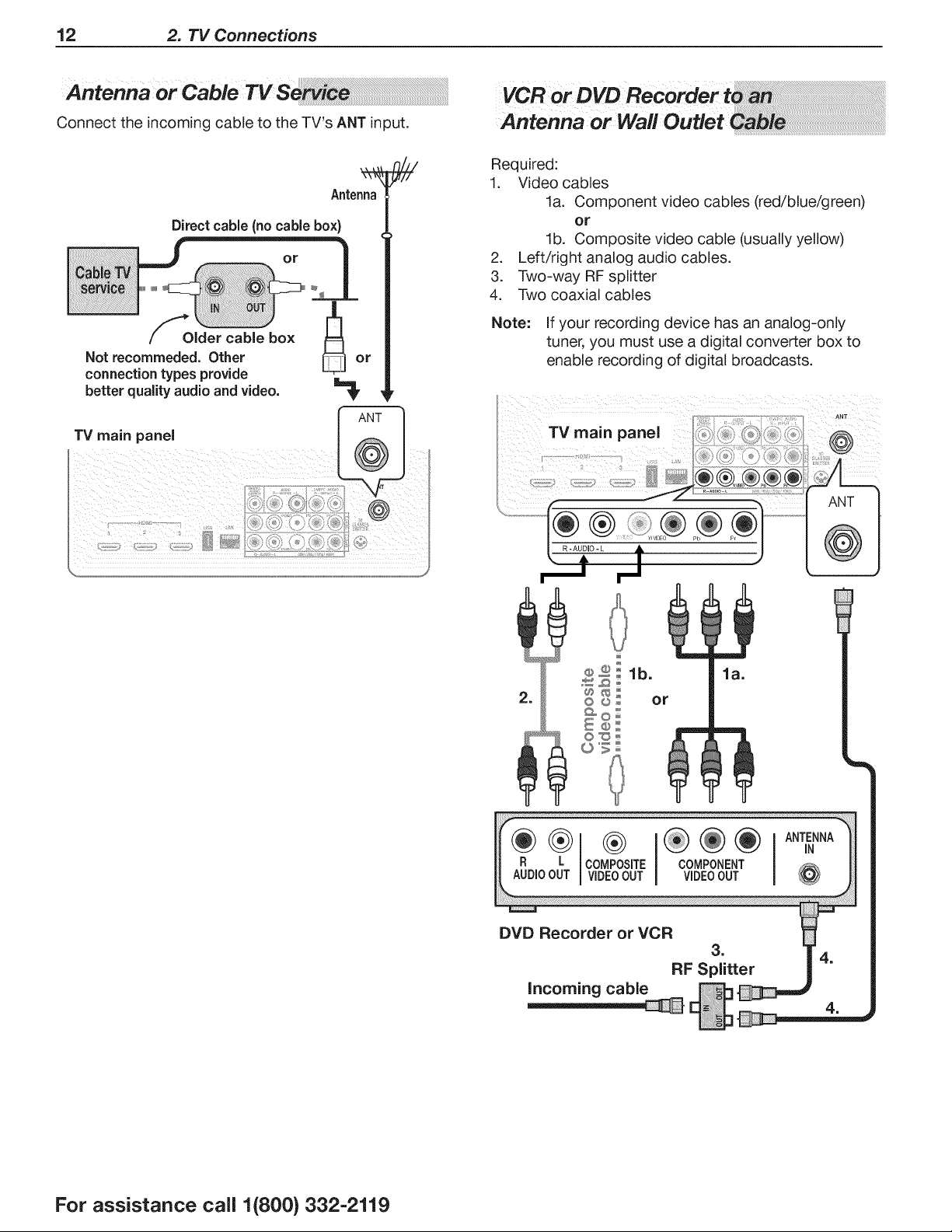
AntennaorCableTV S
Connect the incoming cable to the TV's ANT input.
Antenna
Direct cable (no cable box)
Older cable box
Not recommeded. Other
connection types provide
better quality audio and video,
TV main panel
ANT
@
Required:
1. Video cables
la. Component video cables (red/blue/green)
or
lb. Composite video cable (usually yellow)
2. Left/right analog audio cables.
3. Two-way RF splitter
4. Two coaxial cables
Note: If your recording device has an analog-only
tuner, you must use a digital converter box to
enable recording of digital broadcasts.
ANT
TV main panel @
R L
AUDIOOUT
®
COMPOSITE
VIDEOOUT
COMPONENT
VIDEOOUT
DVD Recorder or VCR
3.
RF Splitter
Incoming cable
=
For assistance call 1(800) 332-2119
2. TV Connections 13
A/V Receiver
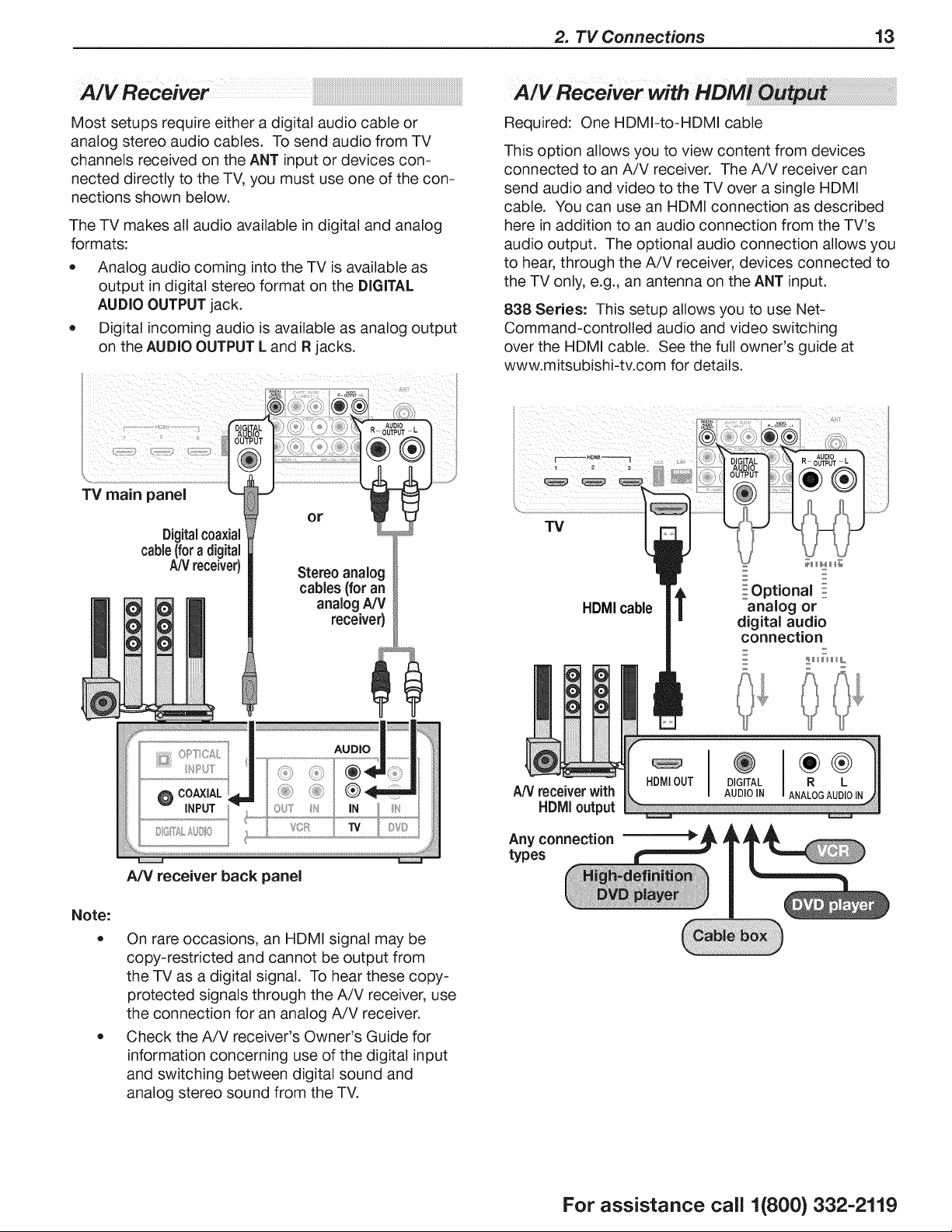
Most setups require either a digital audio cable or
analog stereo audio cables. To send audio from TV
channels received on the ANT input or devices con-
nected directly to the TV, you must use one of the con-
nections shown below.
The TV makes all audio available in digital and analog
formats:
• Analog audio coming into the TV is available as
output in digital stereo format on the DIGITAL
AUDIO OUTPUT jack.
• Digital incoming audio is available as analog output
on the AUDIO OUTPUT L and R jacks.
Required: One HDMI-to-HDMI cable
This option allows you to view content from devices
connected to an A/V receiver. The A/V receiver can
send audio and video to the TV over a single HDMI
cable. You can use an HDMI connection as described
here in addition to an audio connection from the TV's
audio output. The optional audio connection allows you
to hear, through the A/V receiver, devices connected to
the TV only, e.g., an antenna on the ANT input.
838 Series: This setup allows you to use Net-
Command-controlled audio and video switching
over the HDMI cable. See the full owner's guide at
www.mitsubishi-tv.com for details.
ii( : i¸ ::::
TV main panel
Digitalcoaxial
cable(foradigital
A,_/receiver)
AUDIO
R OUTPUT L
or
Stereo analog
cables (for an
analog NV
receiver)
Note:
®
A/V receiver back panel
On rare occasions, an HDMI signal may be
copy-restricted and cannot be output from
the TV as a digital signal. To hear these copy-
protected signals through the A/V receiver, use
the connection for an analog A/V receiver.
Check the A/V receiver's Owner's Guide for
information concerning use of the digital input
and switching between digital sound and
analog stereo sound from the TV.
TV
AUDIO
R OUTPUT L
HDMIcable
t
_HHH_
Optional :
analog or
digital audio
connection
z
_HHHL
A/V receiverwith
HDIVIIoutput
Any connection
types
HDMIOUT DIGITAL R L
AUDIO IN ANALOGAUDIOIN
For assistance call 1(800) 332-2119
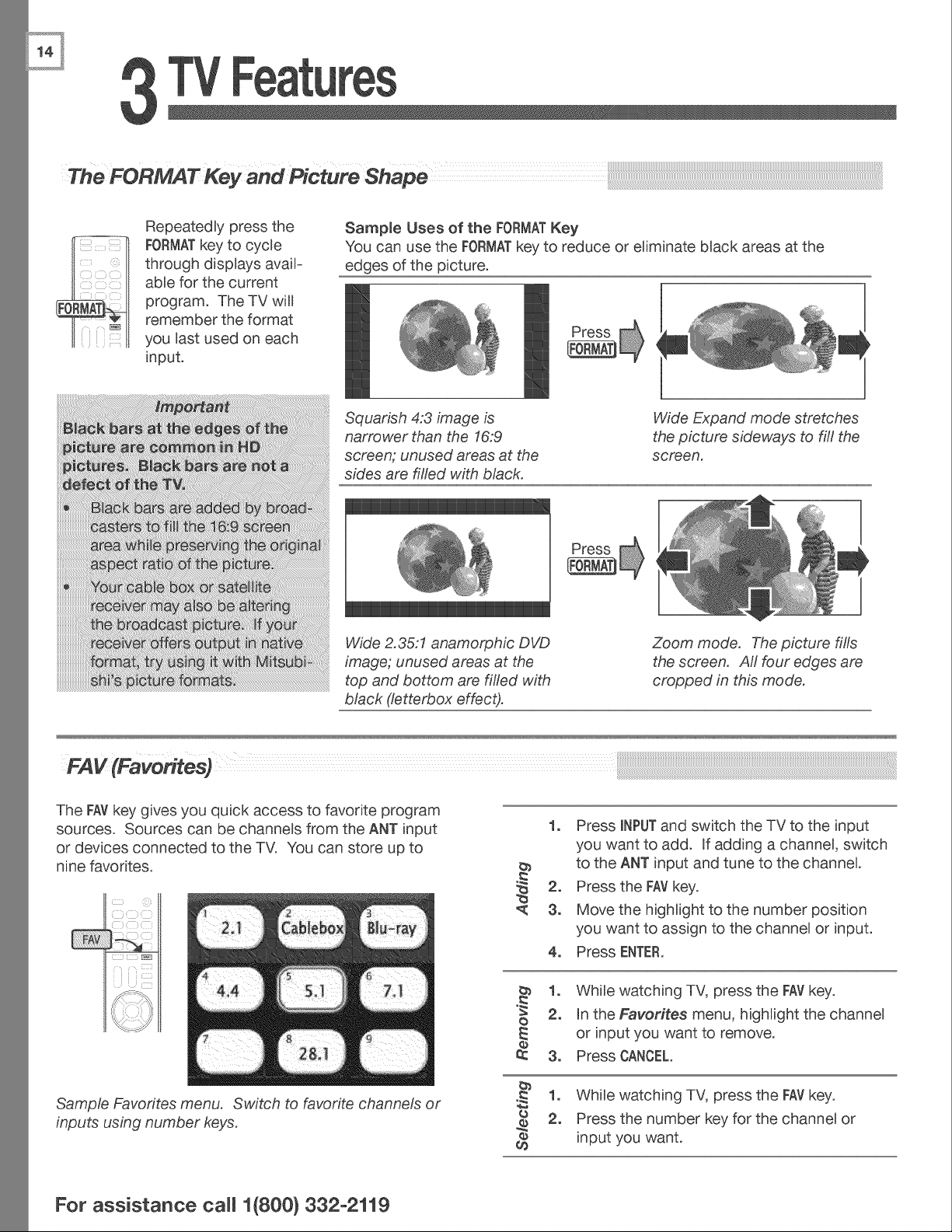
RepeatedBy press the
FORMATkey to cycBe
through displays avaiF
abBefor the current
program. The TV will
remember the format
you Bastused on each
input.
Sampme Uses of the FORMATKey
You can use the FORMATkey to reduce or eBiminate bBack areas at the
edges of the 3icture.
Squarish 4:3 image is
narrower than the 16:9
screen; unused areas at the
sides are filled with black.
Wide Expand mode stretches
the picture sideways to fill the
screen.
Wide 2.35:1 anamorphic DVD
image; unused areas at the
top and bottom are filled with
black (letterbox effect).
Zoom mode. The picture fills
the screen. Atl four edges are
cropped in this mode.
The FAVkey gives you quick access to favorite program
sources. Sources can be channeBs from the ANT input
or devices connected to the TV. You can store up to
nine favorites.
Sample Favorites menu. Switch to favorite channels or
inputs using number keys.
b_
,<
1o Press INPUTand switch the TV to the input
you want to add. If adding a channeB, switch
to the ANT input and tune to the channel
2, Press the FAVkey.
3o Move the highlight to the number position
you want to assign to the channeB or input.
4o Press ENTER.
1o WhiBe watching TV, press the FAYkey.
o 2, In the Favorites menu, highlight the channel
E or input you want to remove.
o
3, Press CANCEL.
1, While watching TV, press the key.
FAY
o 2, Press the number key for the channel or
o input you want.
¢0
For assistance ca((1(800) 332-2119
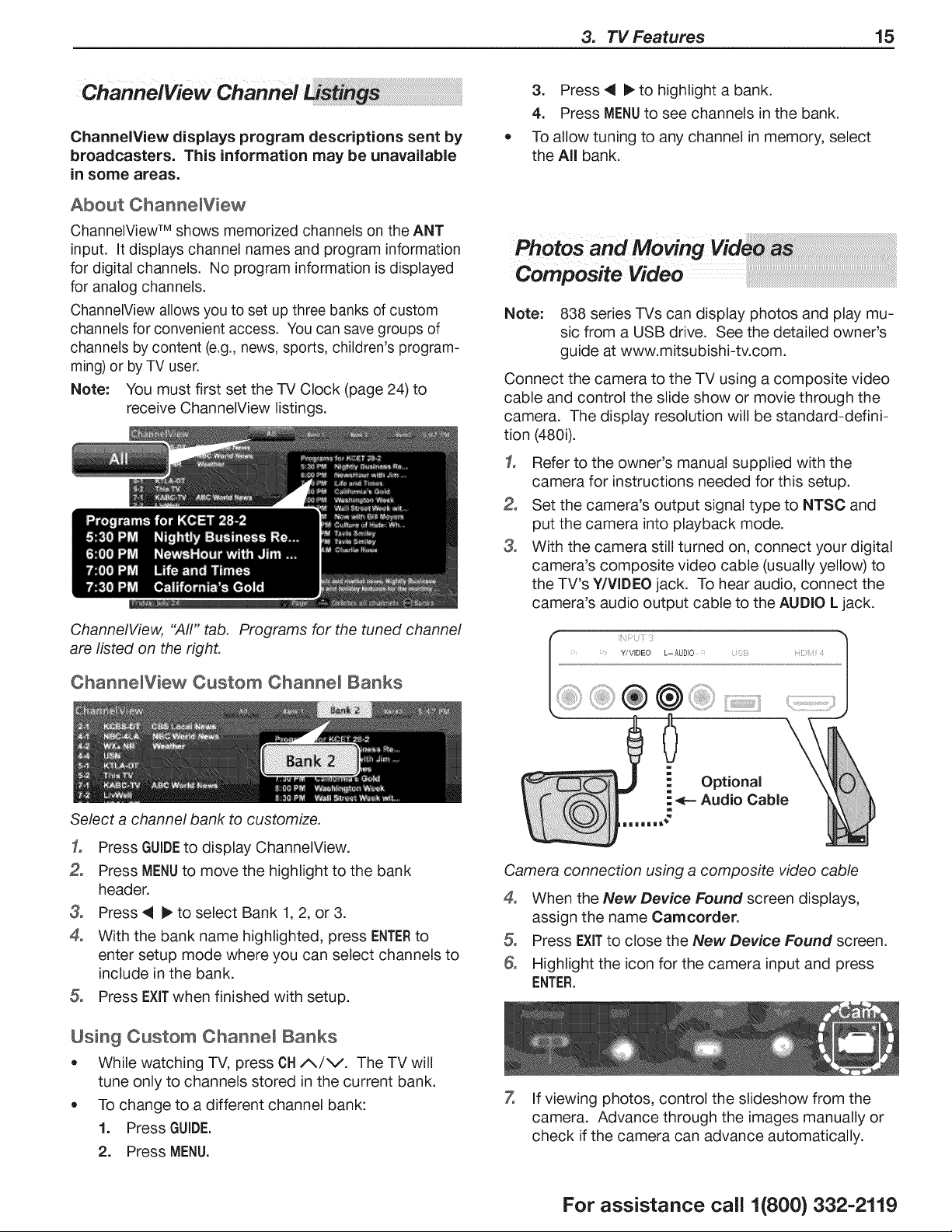
3. TV Features 15
ChannelView displays program descriptions sent by
broadcasters. This information may be unavailable
in some areas.
About Channe[View
ChanneIView TM shows memorized channels on the ANT
input. It displays channel names and program information
for digital channels. No program information is displayed
for analog channels.
ChannelView allows you to set up three banks of custom
channels for convenient access. You can save groups of
channels by content (e.g., news, sports, children's program-
ming) or by TV user.
Note: You must first set the -IV Clock (page 24) to
receive ChanneIView listings.
ChannelView, "Aft" tab, Programs for the tuned channel
are listed on the right,
Channe[View Custom Channel Banks
Select a channel bank to customize.
1, Press GUIDEto display ChannelView.
2, Press MENUto move the highlight to the bank
header.
3, Press 41 I_ to select Bank 1, 2, or 3.
4, With the bank name highlighted, press ENTERto
enter setup mode where you can select channels to
include in the bank.
5, Press EXITwhen finished with setup.
Usin9 Custom Channel Banks
• While watching TV, press CH/_/V. The TV will
tune only to channels stored in the current bank.
• To change to a different channel bank:
1. Press GUIDE.
2, Press MENU.
3, Press _i I_ to highlight a bank.
4. Press MENUto see channels in the bank.
To allow tuning to any channel in memory, select
the All bank.
Note: 838 series TVs can display photos and play mu-
sic from a USB drive. See the detailed owner's
guide at www.mitsubishi-tv.com.
Connect the camera to the TV using a composite video
cable and control the slide show or movie through the
camera. The display resolution will be standard-defini-
tion (480i).
1, Refer to the owner's manual supplied with the
camera for instructions needed for this setup.
2, Set the camera's output signal type to NTSC and
put the camera into playback mode.
3, With the camera still turned on, connect your digital
camera's composite video cable (usually yellow) to
the TV's Y/VIDEO jack. To hear audio, connect the
camera's audio output cable to the AUDIO L jack.
[';iF 1 :
i Y/VIDEO L- AUD]O i Z;i!!; HDiii ¢
!i ® ::]!!ii:
Camera connection using a composite video cable
4° When the New Device Found screen displays,
assign the name Camcorder.
5, Press EXITto close the New Device Found screen.
Highlight the icon for the camera input and press
ENTER.
7, If viewing photos, control the slideshow from the
camera. Advance through the images manually or
check if the camera can advance automatically.
For assistance call 1(800) 332-2119
16 3. TV Features
To display 3D gaming or 3D cinema content, your
Mitsubishi TV requires:
• A compatible 3D source device outputting a 3D
signal in one of these formats:
Checkerboard format, 1080p, 60-Hz; (lower
resolutions may be supported but will not fill the
screen)
Side-by-Side format, 1080p, 24/30/60 Hz; 720p,
60 Hz
Active-shutter 3D glasses, DLP link type or IR
emitter type with matching emitter
Please visit our website at www.mitsubishi-tv.com for infor-
mation about future TV software updates that will broaden
3D signal compatibility.
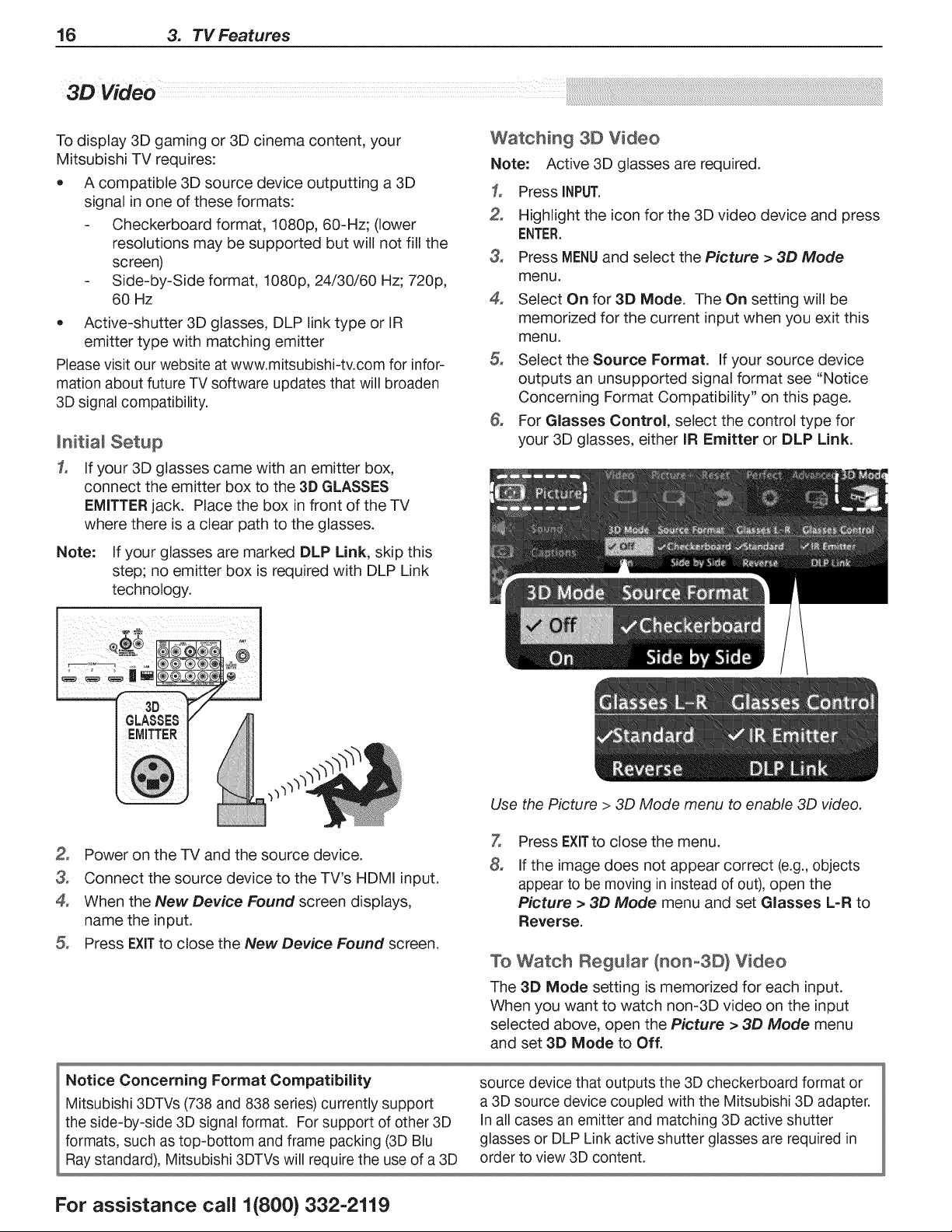
Jnitia_ Setup
1, If your 3D glasses came with an emitter box,
connect the emitter box to the 3D GLASSES
EMITTER jack. Place the box in front of the TV
where there is a clear path to the glasses.
Note: If your glasses are marked DLP Link, skip this
step; no emitter box is required with DLP Link
technology.
Watching 3D Video
Note: Active 3D glasses are required.
3o
2,
3°
4°
°
&
Press INPUT.
Highlight the icon for the 3D video device and press
ENTER.
Press MENUand select the Picture > 3D Mode
menu.
Select On for 3D Mode. The On setting will be
memorized for the current input when you exit this
menu.
Select the Source Format. If your source device
outputs an unsupported signal format see "Notice
Concerning Format Compatibility" on this page.
For Glasses Control, select the control type for
your 3D glasses, either IR Emitter or DLP Link.
Use the Picture > 3D Mode menu to enable 3D video.
2, Power on the TV and the source device.
3, Connect the source device to the TV's HDMI input.
4, When the New Device Found screen displays,
name the input.
5, Press EXITto close the New Device Found screen.
7,
8°
Press EXITto close the menu.
If the image does not appear correct (e.g., objects
appear to be moving in instead of out), open the
Picture > 3D Mode menu and set Glasses L-R to
Reverse.
To Watch Regular (nOno3D} Video
The 3D Mode setting is memorized for each input.
When you want to watch non-3D video on the input
selected above, open the Picture > 3D Mode menu
and set 3D Mode to Off.
Notice Concerning Format Compatibility source device that outputs the 3D checkerboard format or
Mitsubishi 3DTVs (738 and 838 series) currently support a 3D source device coupled with the Mitsubishi 3D adapter.
the side-by-side 3D signal format. For support of other 3D In all cases an emitter and matching 3D active shutter
formats, such as top-bottom and frame packing (3D Blu glasses or DLP Link active shutter glasses are required in
Ray standard), Mitsubishi 3DTVs will require the use of a 3D order to view 3D content.
For assistance call 1(800) 332-2119
3. TV Features 17
3D Video, continued
3D Safety Requirements
• 3D Glasses are NOT designed as sunglasses or safety glasses and do not provide protection. 3D glasses should
be worn only when viewing 3D material.
• Do not wear the wireless glasses in any situations that require unimpaired visual perception.
• Children under the age of 5 should not view 3D programming.
Under normal conditions, 3D viewing is safe for your movies or games. Some people may experience discomfort,
however. To minimize the potential for experiencing visual problems or any adverse symptoms:
• Read and follow any and all safety warnings that accompany your 3D glasses or 3D source devices.
• Maintain a distance of no less than 2 to 2.5 feet away from the display. Viewing from too short a distance can
strain your eyes.
• Take regular breaks, at least 5 minutes after every hour of 3D viewing.
If you experience any of the following symptoms, discontinue 3D viewing until the symptoms go away:
• nausea, dizziness, or queasiness,
• headache, or eyestrain,
• blurry vision,
• double vision that lasts longer than a few seconds,
Do not engage in any potentially hazardous activity (for example, driving a vehicle) until your symptoms have com-
pletely gone away. If symptoms persist, discontinue use and do not resume 3D viewing without discussing your
symptoms with a physician.
WARNING!
iF YOU OR ANY MEMBER OF YOUR FAMILY HAS A HISTORY OF EPILEPSY, CONSULT A PHYSiCiAN BEFORE
USING COMPUTER GAME PRODUCTS.
A small percentage of the population may experience epileptic seizures when viewing certain types of TV images or
video games that contain flashing patterns of light.
The following people should consult a physician before viewing 3D Games or Video:
• Anyone with a history of epilepsy, or who has a family member with a history of epilepsy
• Anyone who has ever experienced epileptic seizures or sensory disturbances triggered by flashing light effects.
WARNING!
SOME LIGHT PATTERNS MAY iNDUCE SEIZURES iN PERSONS WiTH NO PRIOR HISTORY OF EPILEPSY.
DiSCONTiNUE 3D ViEWiNG iF YOU EXPERIENCE ANY OF THE FOLLOWING SYMPTOMS:
• Involuntary movements, eye or muscle twitching
• Muscle cramps
• Nausea, dizziness, or queasiness
• Convulsions
• Disorientation, confusion, or loss of awareness of your surroundings
Do not engage in any potentially hazardous activity (for example, driving a vehicle) until your symptoms have com-
pletely gone away.
Do not resume 3D viewing without discussing the symptoms with your physician.
For assistance call 1(800) 332-2119
18 3. TV Features
838 Series
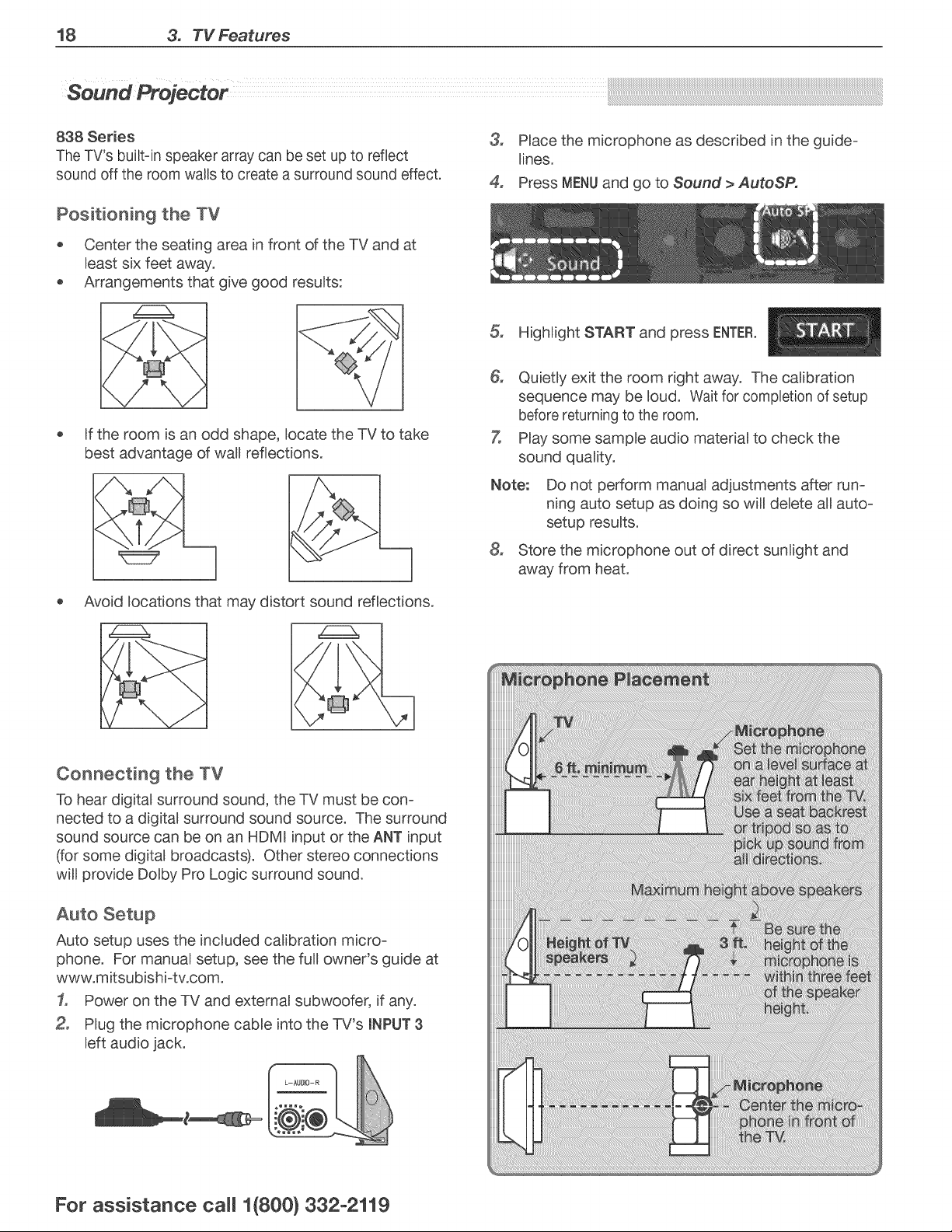
The TV's built-in speaker array can be set up to reflect
sound off the room walls to create a surround sound effect.
Positioning the TV
o Center the seating area in front of the TV and at
Beastsix feet away.
Arrangements that give good resuBts:
Rfthe room is an odd shape, )ocate the TV to take
best advantage of waU reflections.
Avoid )ocations that may distort sound reflections.
U
3_
4.
PBacethe microphone as described in the guide-
Unes.
Press MENUand go to Sound > AutoSP,
HighUght START and press ENTER.
6, Quietly exit the room right away. The caUbration
sequence may be )oud. Wait for completion of setup
before returning to the room.
7, PBaysome sampBe audio materia) to check the
sound quaUty.
Note: Do not perform manua) adjustments after run-
ning auto setup as doing so wiU deBete aUauto-
setup results.
8, Store the microphone out of direct sunlight and
away from heat.
Connecting the TV
To hear digital surround sound, the TV must be con-
nected to a digital surround sound source. The surround
sound source can be on an HDMI input or the ANT input
(for some digital broadcasts). Other stereo connections
will provide Dolby Pro Logic surround sound.
Auto Setup
Auto setup uses the included calibration micro-
phone. For manual setup, see the full owner's guide at
www.mitsubishi-tv.com.
1, Power on the TV and external subwoofer, if any.
Plug the microphone cable into the TV's mNPUT3
left audio jack.
For assistance ca((1(800} 332-2119
3. TV Features 19
StreamTv TM Intemet Media ......
Internet services provided by VUDU TM Apps let you
access many popular on-line applications. In addition to
free content, VUDU's movie service lets you buy and rent
movies through the TV. Visit www.VUDU.com to learn
more about available movie titles, prices, and services
offered. For a list of recommended routers and switches,
see the Support > FAQ section at VUDU.com.
Required for StreamTV internet media:
• Broadband internet service (at least 2 Mbps for SD, 4 Mbps
for HD, and 8 Mbps for 1080p HDX)
Ethemet cable or an Azurewave AW-NU231 USB
wireless adapter.
Computer access to the VUDU.com website (required
for initial account activation).
A credit card for rental and purchase transactions
from VUDU's movie service.
Home Network Setup
Before using StreamTV internet media, you must connect
the TV to the internet using one of these methods.
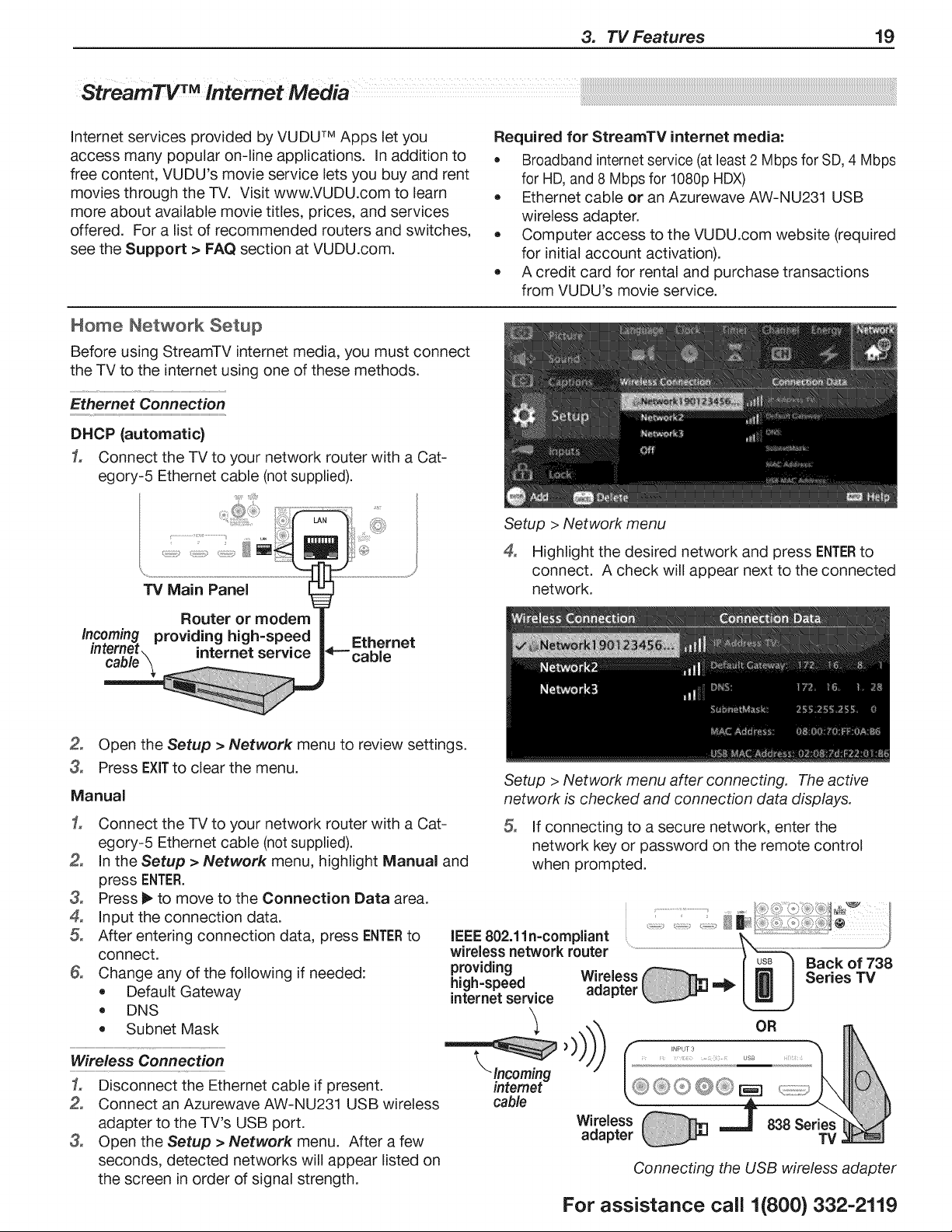
Ethernet Connection
DHCP (automatic}
1, Connect the TV to your network router with a Cat-
egory-5 Ethemet cable (not supplied).
TV Main Panel
Router or modem
Incoming providing high=speed | Ethernet
intem_t internet service 4_--cabl e
Setup > Network menu
°
Highlight the desired network and press ENTERto
connect. A check will appear next to the connected
network.
2, Open the Setup > Network menu to review settings.
3° Press EXiTto clear the menu.
Manual
1, Connect the TV to your network router with a Cat-
egory-5 Ethernet cable (not supplied).
2, In the Setup > Network menu, highlight Manual and
press ENTER.
3, Press 1_ to move to the Connection Data area.
4, Input the connection data.
5° After entering connection data, press ENTERto
connect.
& Change any of the following if needed:
Default Gateway
DNS
Subnet Mask
Wireless Connection
1, Disconnect the Ethernet cable if present.
2, Connect an Azurewave AW-NU231 USB wireless
adapter to the TV's USB port.
3° Open the Setup > Network menu. After a few
seconds, detected networks will appear listed on
the screen in order of signal strength.
Setup > Network menu after connecting. The active
network is checked and connection data displays.
5° If connecting to a secure network, enter the
network key or password on the remote control
when prompted.
OR
838 Series
TV
Connecting the USB wireless adapter
For assistance call 1(800) 332-2119
20 3. TV Features
Usin 9 StreamTV Intemet Media
After estabBishing intemet connectiv-
ity, press the INTERNETkey to display
services from VUDU Apps. Press
ENTERto Baunch an application.
Gettin 9 Started with VUDU
1,
3_
4,
After estabBishing internet connectivity, press
INTERNETto dispBay offerings from VUDU.
SeBect the VUDU movie service.
Browse the VUDU movie cataBog and offerings.
When you are ready to rent or buy a movie, you
will be prompted to activate your VUDU account.
Follow the on-screen instructions and use a com-
puter to go to www.VUDUocom/activation. A
credit card is required for activation.
Once your account is activated, you can rent and buy
movies using only the TV and the TV's remote control.
Specialized Keys for VUDU
INTERNET Displays the VUDU internet menu.
GUIDE VUDU HOMEkey
INFO VUDU MOREkey
LAST VUDU BACKkey (goes to previous menu)
CANCEL VUDU backspace(in text-entry screens)
F2 VUDU System menu
EXIT Exit VUDU
mfYou Are Unabme to Connect to the mntemet
o Check all power and data connections.
If you can reach the internet with a computer or
other device on the same internet service used by
the TV, consult the router or modem owner's guide
for reset instructions.
If you cannot reach the internet, contact your
service provider. You may be asked for network
information such as the TV's IP address. Go to the
Setup > Network menu to see connection data.
For Further Assistance
If you are having trouble connecting your TV or
accessing internet applications, contact Mitsubishi
Customer Care at 1-800-332-2119.
If you are having difficulty with your VUDU
account, contact VUDU Customer Care at
www.VU DU.comisupport.
See more troubleshooting tips in Appendix C.
For assistance ca(( 1(800} 332-2119
Wireless Audio Playback
838 Series. The TV's built-in speaker array can play
audio from a handheld device using Bluetooth® A2DP
(stereo audio) wireless technology.
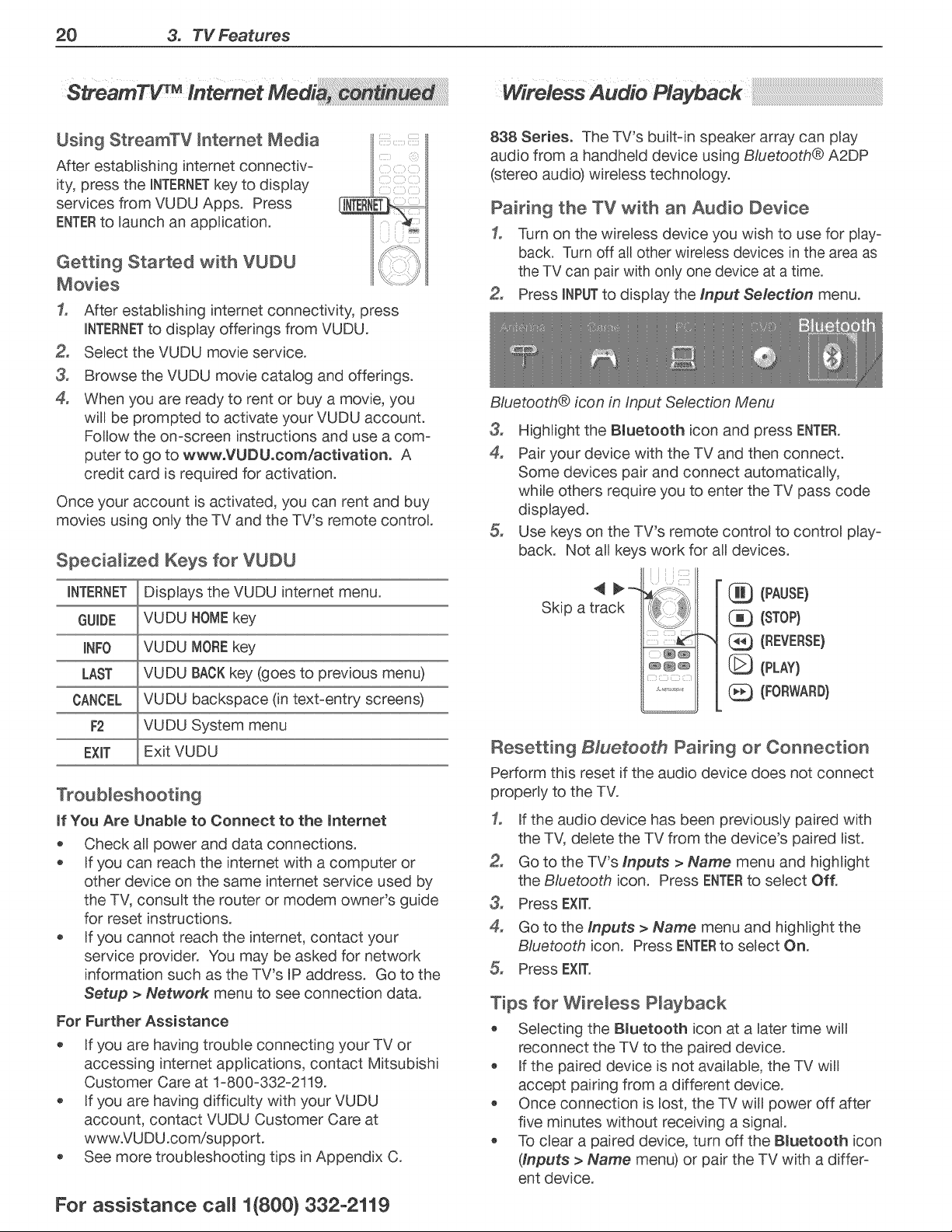
Pairing the TV with an Audio Device
1. Turn on the wireless device you wish to use for play-
back. Turn off all other wireless devices in the area as
the TV can pair with only one device at a time.
Press INPUTto display the Input Selection menu.
Bluetooth® icon in Input Selection Menu
3_
4,
Highlight the Bluetooth icon and press ENTER.
Pair your device with the TV and then connect.
Some devices pair and connect automatically,
while others require you to enter the TV pass code
displayed.
Use keys on the TV's remote control to control play-
back. Not all keys work for all devices.
Skip a track
(PAUSE}
(STOP}
" Q (REVERSE}
(PLAY}
(FORWARD}
Resetting B/ueteeth Pairing or Connection
Perform this reset if the audio device does not connect
properly to the TV.
1. If the audio device has been previously paired with
the TV, delete the TV from the device's paired list.
Go to the TV's Inputs > Name menu and highlight
the Bluetooth icon. Press ENTERto select Off.
3, Press EXIT.
4. Go to the Inputs > Name menu and highlight the
Bluetooth icon. Press ENTERto select On.
Press EXIT.
Tips for Wireless Playback
Selecting the Bluetooth icon at a later time will
reconnect the TV to the paired device.
If the paired device is not available, the TV will
accept pairing from a different device.
Once connection is lost, the TV will power off after
five minutes without receiving a signal.
To clear a paired device, turn off the Bmuetooth icon
(Inputs > Name menu) or pair the TV with a differ-
ent device.
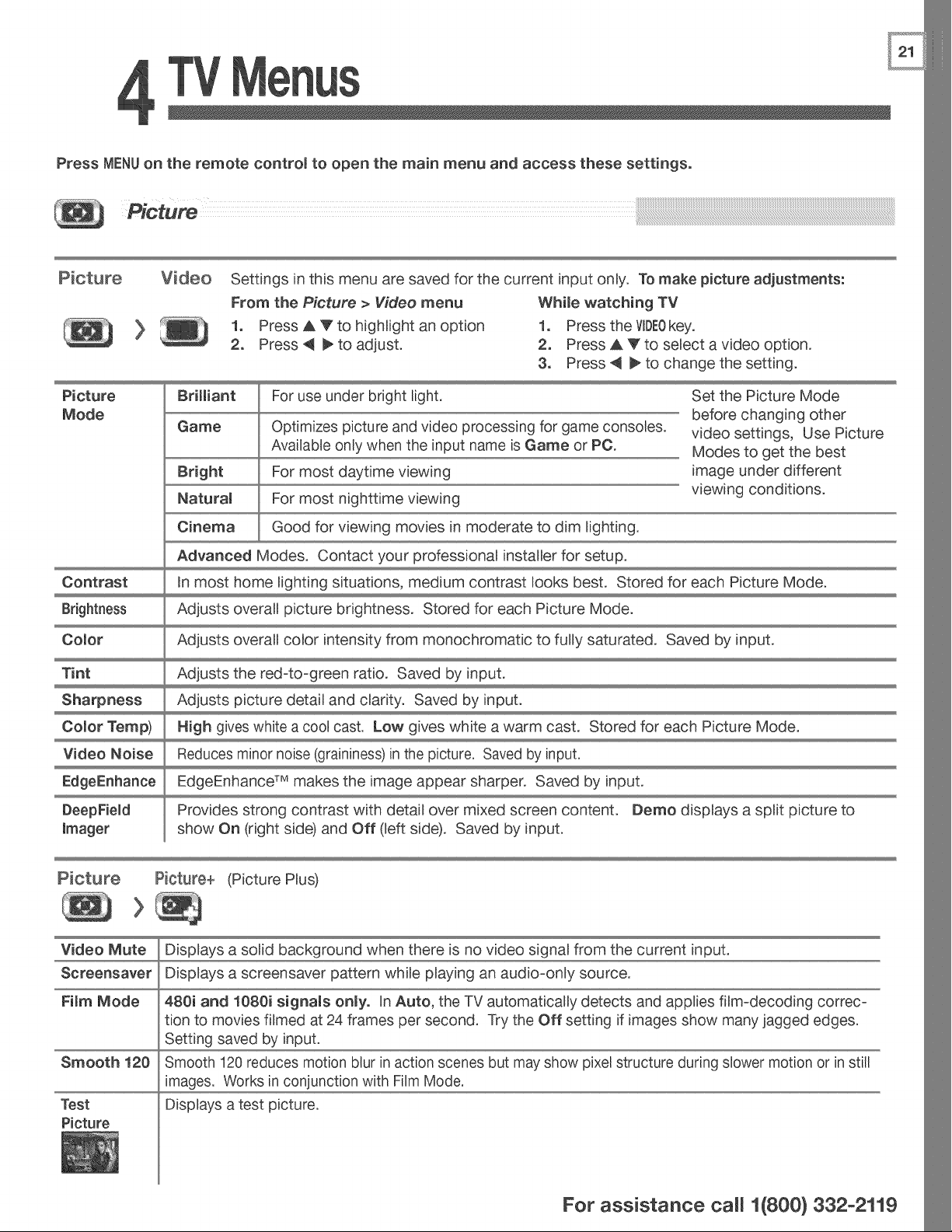
Press MENUon the remote control to open the main menu and access these settings.
Picture
Picture
Mode
Settings in this menu are saved for the current input only. To make picture adjustments:
From the Picture > Video menu Whime watching TV
1o Press _ _ to highlight an option 1o Press the VDE0key.
2. Press 4 _ to adjust. 2. Press A V to select a video option.
3o Press 4 _ to change the setting.
For use under bright light. Set the Picture Mode
Brilliant
Game
Bright
Natural
Cinema
Advanced Modes.
Optimizes picture and video processing for game consoles.
Available only when the input name is Game or PC.
For most daytime viewing
For most nighttime viewing
Good for viewing movies in moderate to dim lighting.
Contact your professional installer for setup.
before changing other
video settings, Use Picture
Modes to get the best
image under different
viewing conditions.
Contrast In most home lighting situations, medium contrast looks best. Stored for each Picture Mode.
Brightness Adjusts overall picture brightness. Stored for each Picture Mode.
Comor Adjusts overall color intensity from monochromatic to fully saturated. Saved by input.
Tint Adjusts the red-to-green ratio. Saved by input.
Sharpness Adjusts picture detail and clarity. Saved by input.
Comor Temp) High gives white a cool cast. Low gives white a warm cast. Stored for each Picture Mode.
Video Noise Reduces minor noise (graininess)in the picture. Saved by input.
EdgeEnhance TM makes the image appear sharper. Saved by input.
Provides strong contrast with detail over mixed screen content. Demo displays a split picture to
show On (right side) and Off (left side). Saved by input.
(Picture Plus)
Video Mute Displays a solid background when there is no video signal from the current input.
Screensaver Displays a screensaver pattern while playing an audio-only source.
FimmMode 480i and 1080i signams onmyo In Auto, the TV automatically detects and applies film-decoding correc-
tion to movies filmed at 24 frames per second. Try the Off setting if images show many jagged edges.
Setting saved by input.
Smooth 120 reduces motion blur in action scenes but may show pixe[ structure during slower motion or in still
images. Works in conjunction with Film Mode.
Displays a test picture.
Smooth 120
Test
Picture
For assistance ca((1(800} 332-2119
22 4. TV Menus
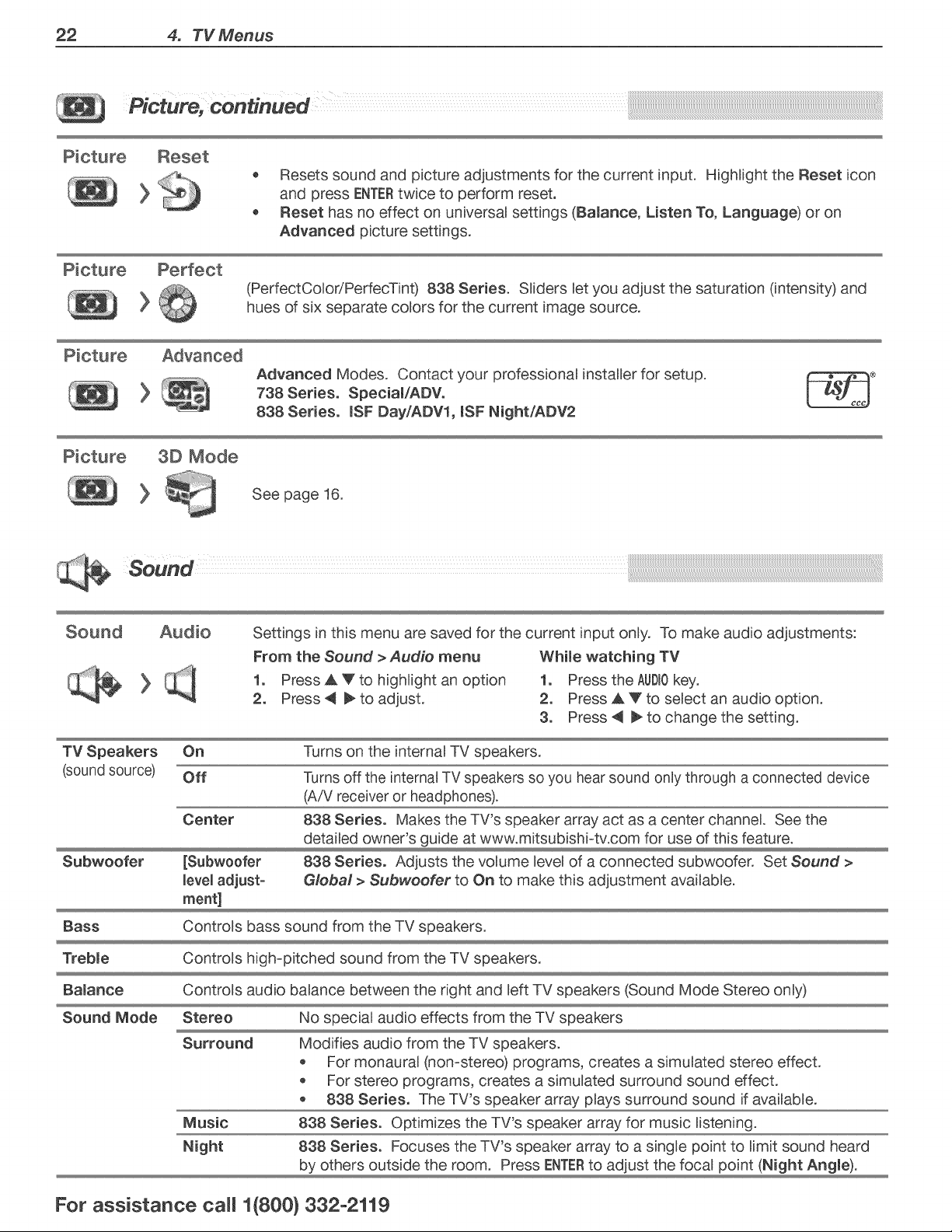
Picture, continued .......
o Resets sound and picture adjustments for the current input. High)ight the Reset icon
and press ENTERtwice to perform reset.
Reset has no effect on universa) settings (Balance, Listen To, Language) or on
Advanced picture settings.
(PerfectCo)oriPerfecTint) 838 Series. S))ders Betyou adjust the saturation (intensity) and
hues of six separate co)ors for the current image source.
Advanced Modes. Contact your professiona) instaUer for setup.
738 Series. Special/ADV.
838 Series. (SF Day/ADV1, (SF NightiADV2
3D Mode
See page 16.
Sound
Settings in this menu are saved for the current input on)y. To make audio adjustments:
From the Sound > Audio menu Whi(e watching TV
1o Press _ _Fto high)ight an option 1o Press the AUD(Okey.
2. Press 4 _ to adjust. 2. Press A V to select an audio option.
3o Press 4 _ to change the setting.
TV Speakers On Turns on the internal TV speakers.
(sound source) Off Turns off the internal TV speakers so you hear sound only through a connected device
(AiV receiver or headphones).
Center 838 Series. Makes the TV's speaker array act as a center channel. See the
detailed owner's guide at www.mitsubishi-tv.com for use of this feature.
Subwoofer [Subwoofer 838 Series. Adjusts the volume level of a connected subwoofer. Set Sound >
level adjust- Global > Subwoofer to On to make this adjustment available.
meat]
Bass Controls bass sound from the TV speakers.
Treb(e Controls high-pitched sound from the TV speakers.
Controls audio balance between the right and left TV speakers (Sound Mode Stereo only)
Ba(anoe
Sound Mode Stereo No special audio effects from the TV speakers
Surround Modifies audio from the TV speakers.
For monaural (non-stereo) programs, creates a simulated stereo effect.
For stereo programs, creates a simulated surround sound effect.
838 Series. The TV's speaker array plays surround sound if available.
Music 838 Series. Optimizes the TV's speaker array for music listening.
Night 838 Series. Focuses the TV's speaker array to a single point to limit sound heard
by others outside the room. Press ENTERto adjust the focal point (Night Ang(e).
For assistance ca((1(800) 332-2119
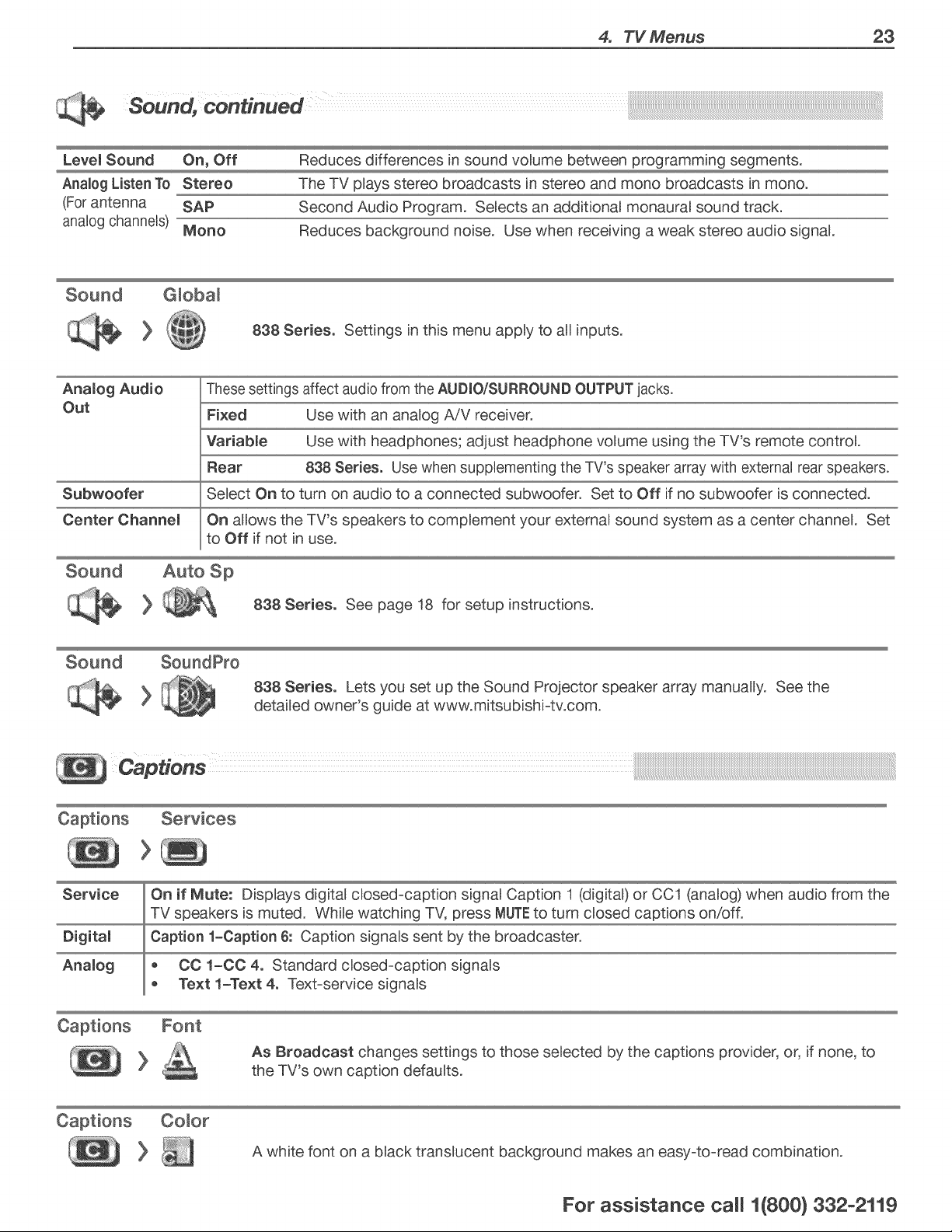
4. TV Menus 23
So.rid,continued ....
Level Sound On, Off Reduces differences in sound volume between programming segments.
Analog Listen To Stereo The TV plays stereo broadcasts in stereo and mono broadcasts in mono.
(For antenna SAP Second Audio Program. Selects an additional monaural sound track.
analog channels) Mono Reduces background noise. Use when receiving a weak stereo audio signal.
Sound G)oba)
838 Serieso Settings in this menu apply to all inputs.
Anamog Audio These settings affect audio from the AUDmOiSURROUNDOUTPUT jacks.
Out Fixed Use with an analog A/V receiver.
Variabme Use with headphones; adjust headphone volume using the TV's remote control.
Rear 838 Series. Use when supplementing the TV's speaker array with external rear speakers.
Subwoofer Select On to turn on audio to a connected subwoofer. Set to Off if no subwoofer is connected.
Center Channem On allows the TV's speakers to complement your external sound system as a center channel. Set
to Off if not in use.
Auto Sp
838 Serieso See page 18 for setup instructions.
Sound SoundPro
838 Series. Lets you set up the Sound Projector speaker array manually. See the
detailed owner's guide at www.mitsubishi-tv.com.
Captions Services
>
Service On if Mute: Displays digital closed-caption signal Caption 1 (digital) or CC1 (analog) when audio from the
TV speakers is muted. While watching TV, press MUTEto turn closed captions on!off.
Digitam Caption 1-Caption 6: Caption signals sent by the broadcaster.
Analog o CO 1-CO 4. Standard closed-caption signals
Text 1-Text 4o Text-service signals
As Broadcast changes settings to those selected by the captions provider, or, if none, to
the TV's own caption defaults.
A white font on a black translucent background makes an easy-to-read combination.
For assistance ca((1(800} 332-2119
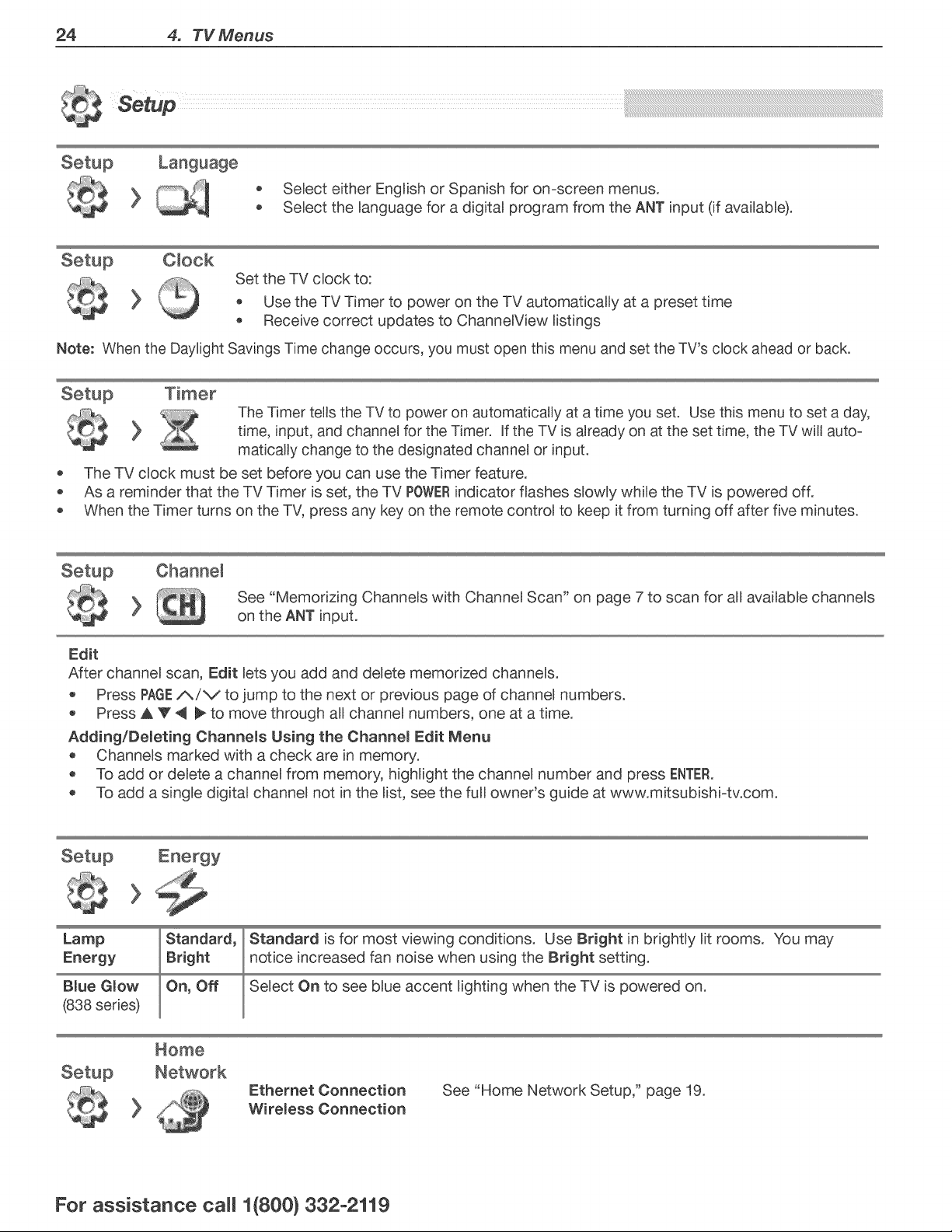
24 4. TV Menus
o Select either English or Spanish for omscreen menus.
Select the language for a digital program from the ANT input (if available).
Setup O)ock
Set the TV clock to:
* Use the TV Timer to power on the TV automatically at a preset time
* Receive correct updates to ChannelView listings
Note: When the Daylight Savings Time change occurs, you must open this menu and set the TV's clock ahead or back.
Setup Timer
The Timer tells the TV to power on automatically at a time you set. Use this menu to set a day,
time, input, and channel for the Timer. If the TV is already on at the set time, the TV will auto-
maticaUy change to the designated channel or input.
The TV clock must be set before you can use the Timer feature.
As a reminder that the TV Timer is set, the TV POWERindicator flashes slowly while the TV is powered off.
When the Timer turns on the TV, press any key on the remote control to keep it from turning off after five minutes.
See "Memorizing Channels with Channel Scan" on page 7 to scan for all available channels
on the ANT input.
Edit
After channel scan, Edit lets you add and delete memorized channels.
Press PAGEi_/V to jump to the next or previous page of channel numbers.
Press A V _ _ to move through all channel numbers, one at a time.
Adding/Demeting Channems Using the Channem Edit Menu
* Channels marked with a check are in memory.
* To add or delete a channel from memory, highlight the channel number and press ENTER.
To add a single digital channel not in the list, see the full owner's guide at www.mitsubishimtv.com.
Lamp
Blue Glow
(838 series)
Standard,
On, Off
Standard is for most viewing conditions. Use Bright in brightly lit rooms. You may
notice increased fan noise when using the Bright setting.
Select On to see blue accent lighting when the TV is powered on.
Ethemet Connection
Wiremess Connection
See "Home Network Setup," page 19.
For assistance ca((1(800} 332-2119
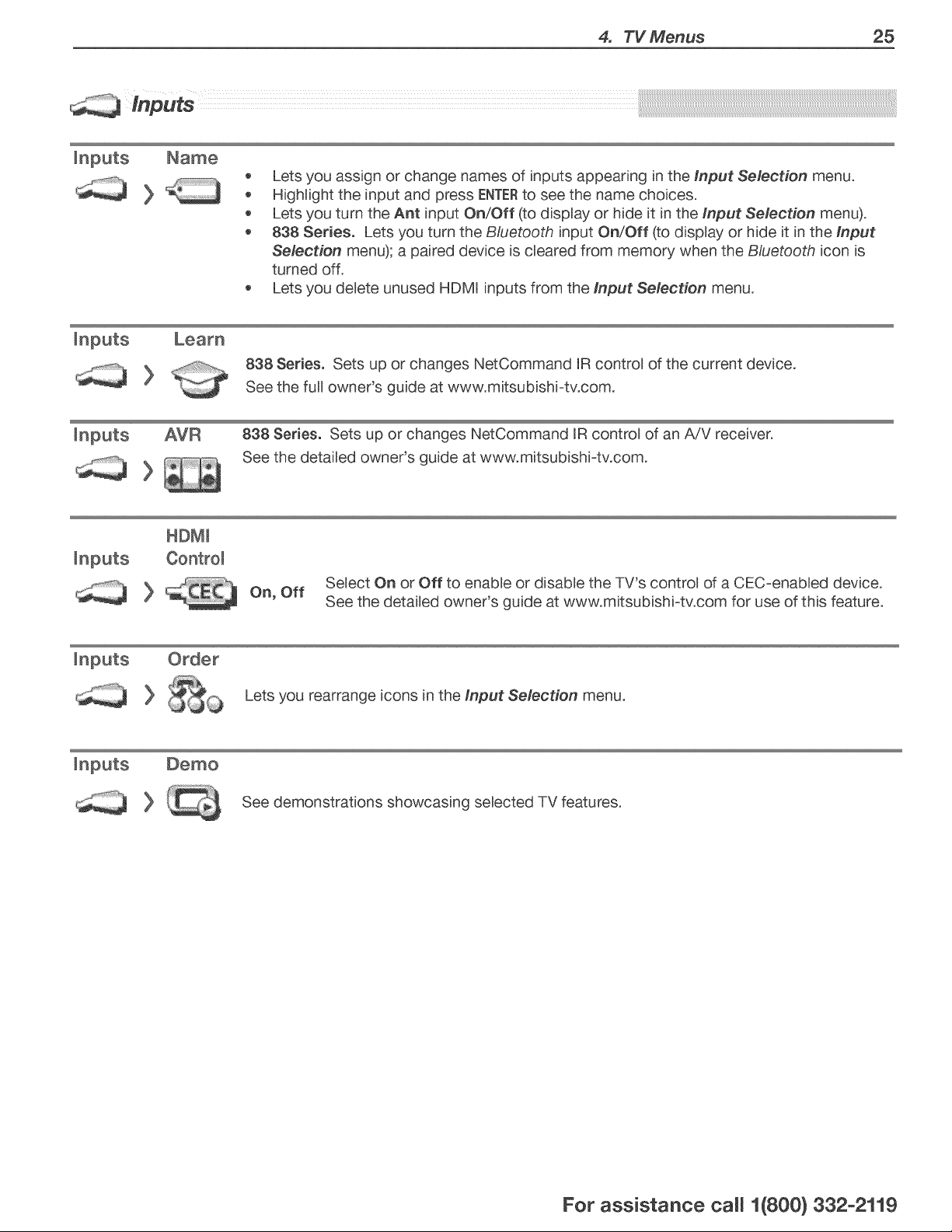
4. TV Menus 25
o Lets you assign or change names of inputs appearing in the Input Selection menu.
HighUght the input and press ENTERto see the name choices.
Lets you turn the Ant input On/Off (to dispBay or hide it in the Input Selection menu).
838 Series. Lets you turn the B/uetooth input On/Off (to dispBay or hide it in the Input
Selection menu); a paired device is cBeared from memory when the Bluetooth icon is
turned off.
Lets you deBete unused HDMR inputs from the Input Selection menu.
838 Series. Sets up or changes NetCommand RRcontro) of the current device.
See the fuU owner's guide at www.mitsubishi-tv.com.
inputs AVR 838 Series. Sets up or changes NetCommand RRcontro) of an A/V receiver.
See the detaUed owner's guide at www.mitsubishi-tv.com.
Select On or Off to enabBe or disable the TV's control of a CEC-enabled device.
On, Off
See the detailed owner's guide at www.mitsubishi-tv.com for use of this feature.
Lets you rearrange icons in the input Selection menu.
See demonstrations showcasing selected TV features.
For assistance ca((1(800} 332-2119
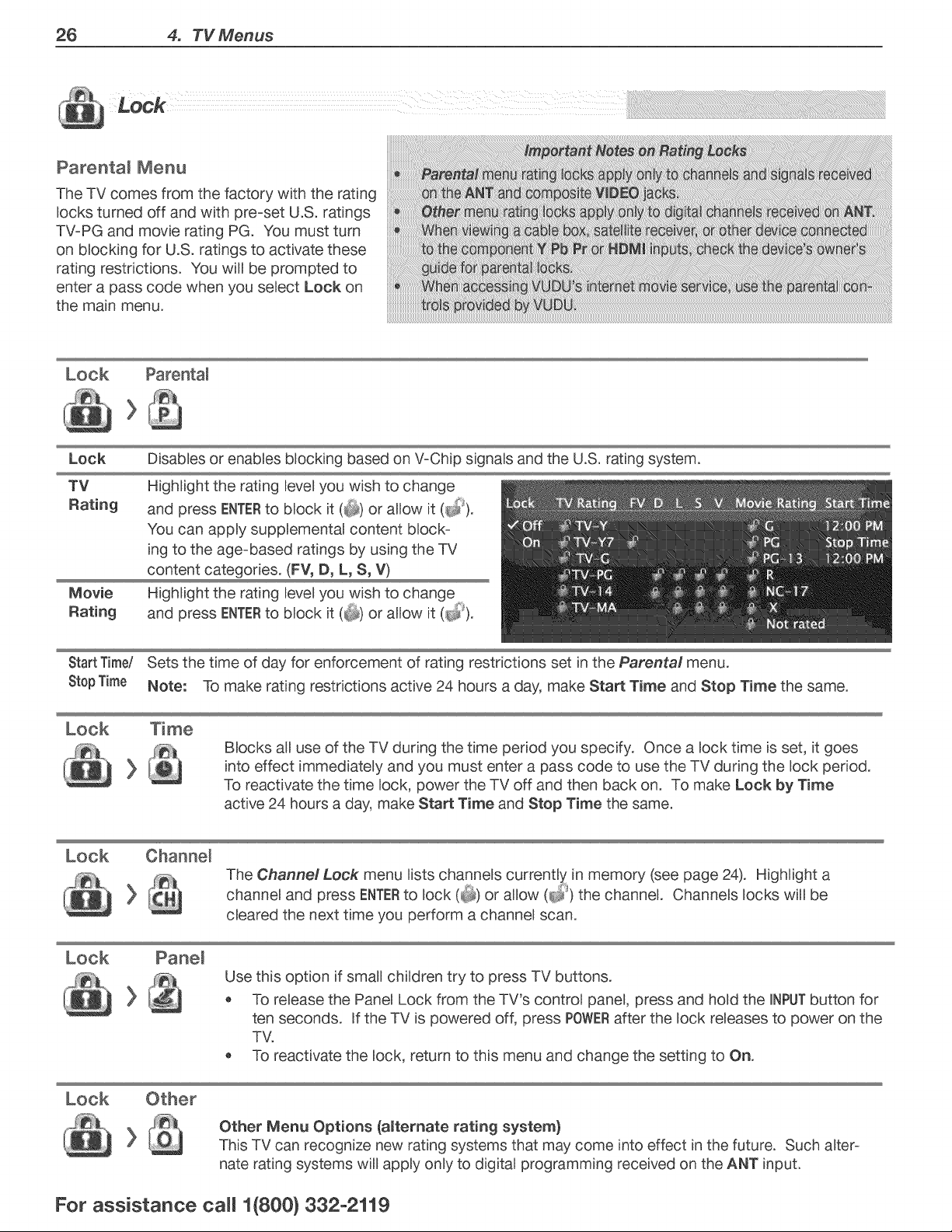
26 4. TV Menus
Parenta_ Menu
The TV comes from the factory with the rating
Bocks turned off and with pre-set U.S. ratings
TV-PG and movie rating PG. You must turn
on bBocking for U.S. ratings to activate these
rating restrictions. You will be prompted to
enter a pass code when you seBect Lock on
the main menu.
Lock
TV
Rating
>
Parenta_
DisabBesor enabBes bBocking based on V-Chip signaBs and the U.S. rating system.
HighBight the rating BeveByou wish to change
and press ENTERto bBock it (_ or allow it (_).
You can appBy suppBemental content block-
ing to the age-based ratings by using the TV
content categories. (FV, D, L, S, V)
Highlight the rating level you wish to change
and press ENTERto block it (_ or allow it (_).
StartTime/ Sets the time of day for enforcement of rating restrictions set in the Parental menu.
StopTime Note: To make rating restrictions active 24 hours a day, make Start Time and Stop Time the same.
Blocks all use of the TV during the time pedod you specify. Once a lock time is set, it goes
into effect immediately and you must enter a pass code to use the TV dudng the lock period.
To reactivate the time lock, power the TV off and then back on. To make Lock by Time
active 24 hours a day, make Start Time and Stop Time the same.
Lock Channem
>
cleared the next time you perform a channel scan.
Look
Use this option if small children try to press TV buttons.
o To release the Panel Lock from the TV's control panel, press and hold the INPUTbutton for
ten seconds. If the TV is powered off, press POWERafter the lock releases to power on the
TV.
To reactivate the lock, return to this menu and change the setting to On.
Look
Other Menu Options (amternate rating system)
This TV can recognize new rating systems that may come into effect in the future. Such alter-
nate rating systems will apply only to digital programming received on the ANT input.
For assistance ca(( 1{[800} 332-2119
Appendices 27
Lamp-Cartridge Replacement and Cleaning
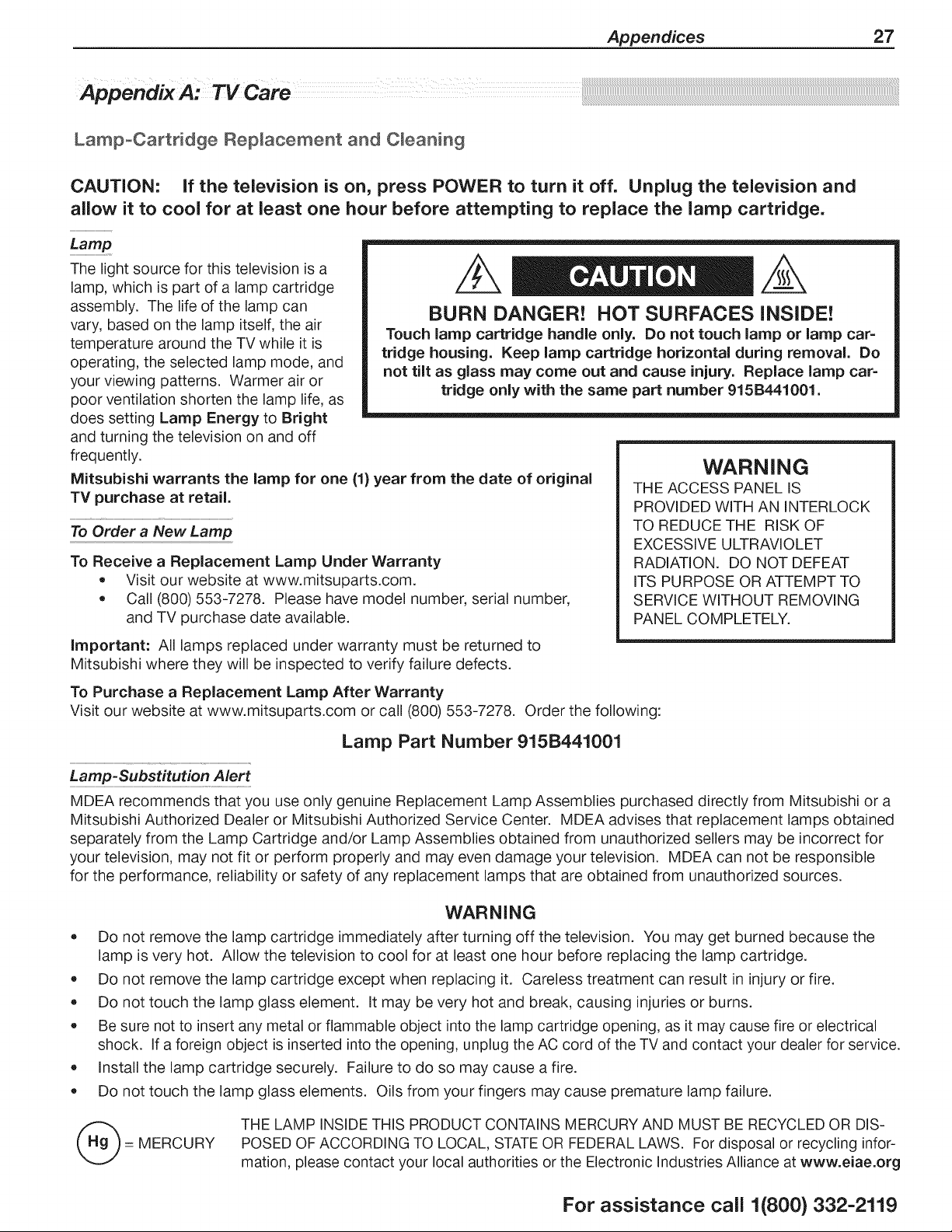
CAUTION: if the television is on, press POWER to turn it off. Unplug the television and
allow it to cool for at least one hour before attempting to replace the lamp cartridge.
Lamp
The light source for this television is a
lamp, which is part of a lamp cartridge
assembly. The life of the lamp can
vary, based on the lamp itself, the air
temperature around the TV while it is
operating, the selected lamp mode, and
your viewing patterns. Warmer air or
poor ventilation shorten the lamp life, as
does setting Lamp Energy to Bright
and turning the television on and off
frequently.
BURN DANGER! HOT SURFACES INSIDE!
Touch lamp cartridge handle only. Do not touch lamp or lamp car=
tridge housing. Keep lamp cartridge horizontal during removal. Do
not tilt as glass may come out and cause injury. Replace lamp car=
tridge only with the same part number 915B441001.
Mitsubishi warrants the lamp for one (1) year from the date of original
TV purchase at retail.
To Order a New Lamp
To Receive a Replacement Lamp Under Warranty
• Visit our website at www.mitsuparts.com.
• Call (800) 553-7278. Please have model number, serial number,
and TV purchase date available.
Important: All lamps replaced under warranty must be returned to
Mitsubishi where they will be inspected to verify failure defects.
To Purchase a Replacement Lamp After Warranty
WARNING
THE ACCESS PANEL IS
PROVIDED WITH AN INTERLOCK
TO REDUCE THE RISK OF
EXCESSIVE ULTRAVIOLET
RADIATION. DO NOT DEFEAT
ITS PURPOSE OR ATTEMPT TO
SERVICE WITHOUT REMOVING
PANEL COMPLETELY.
Visit our website at www.mitsuparts.com or call (800) 553-7278. Order the following:
Lamp Part Number 915B441001
Lamp-Substitution Alert
MDEA recommends that you use only genuine Replacement Lamp Assemblies purchased directly from Mitsubishi or a
Mitsubishi Authorized Dealer or Mitsubishi Authorized Service Center. MDEA advises that replacement lamps obtained
separately from the Lamp Cartridge and/or Lamp Assemblies obtained from unauthorized sellers may be incorrect for
your television, may not fit or perform properly and may even damage your television. MDEA can not be responsible
for the performance, reliability or safety of any replacement lamps that are obtained from unauthorized sources.
WARNING
• Do not remove the lamp cartridge immediately after turning off the television. You may get burned because the
lamp is very hot. Allow the television to cool for at least one hour before replacing the lamp cartridge.
• Do not remove the lamp cartridge except when replacing it. Careless treatment can result in injury or fire.
• Do not touch the lamp glass element. It may be very hot and break, causing injuries or burns.
• Be sure not to insert any metal or flammable object into the lamp cartridge opening, as it may cause fire or electrical
shock. If a foreign object is inserted into the opening, unplug the AC cord of the TV and contact your dealer for service.
• Install the lamp cartridge securely. Failure to do so may cause a fire.
• Do not touch the lamp glass elements. Oils from your fingers may cause premature lamp failure.
= MERCURY
THE LAMP INSIDE THIS PRODUCT CONTAINS MERCURY AND MUST BE RECYCLED OR DIS-
POSED OF ACCORDING TO LOCAL, STATEOR FEDERAL LAWS. For disposal or recycling infor-
mation, please contact your local authorities or the Electronic Industries Alliance at www.eiae.org
For assistance call 1(800) 332-2119
28 Appendices
Lamp-Cartridge Replacement
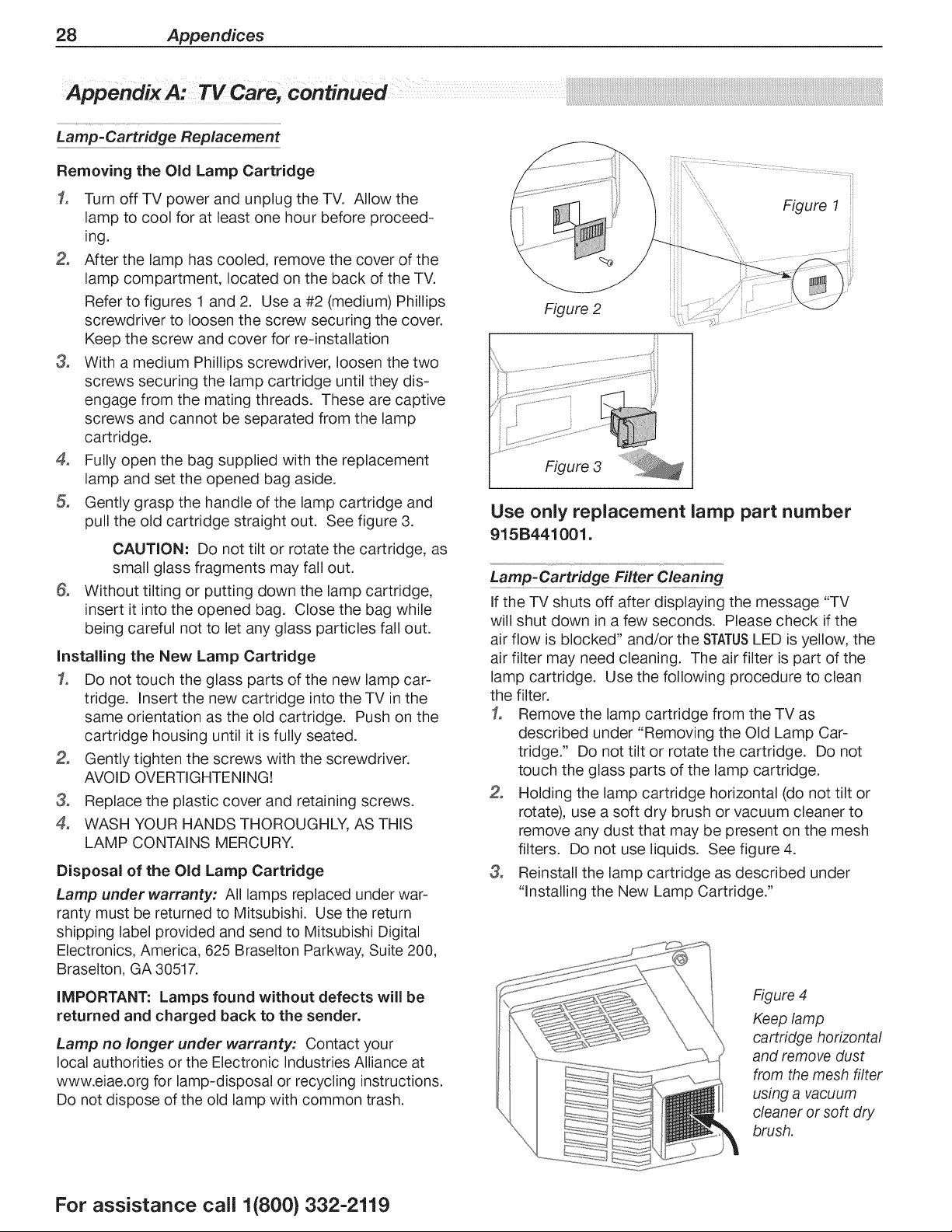
Removing the Old Lamp Cartridge
1, Turn off TV power and unplug the TV. Allow the
lamp to cool for at least one hour before proceed-
ing.
After the lamp has cooled, remove the cover of the
lamp compartment, located on the back of the TV.
Refer to figures 1 and 2. Use a #2 (medium) Phillips
screwdriver to loosen the screw securing the cover.
Keep the screw and cover for re-installation
3, With a medium Phillips screwdriver, loosen the two
screws securing the lamp cartridge until they dis-
engage from the mating threads. These are captive
screws and cannot be separated from the lamp
cartridge.
4, Fully open the bag supplied with the replacement
lamp and set the opened bag aside.
Gently grasp the handle of the lamp cartridge and
pull the old cartridge straight out. See figure 3.
G,
CAUTION: Do not tilt or rotate the cartridge, as
small glass fragments may fall out.
Without tilting or putting down the lamp cartridge,
insert it into the opened bag. Close the bag while
being careful not to let any glass particles fall out.
Installing the New Lamp Cartridge
1, Do not touch the glass parts of the new lamp car-
tridge. Insert the new cartridge into the TV in the
same orientation as the old cartridge. Push on the
cartridge housing until it is fully seated.
Gently tighten the screws with the screwdriver.
AVOID OVERTIGHTENING!
3, Replace the plastic cover and retaining screws.
4, WASH YOUR HANDS THOROUGHLY, AS THIS
LAMP CONTAINS MERCURY.
Disposal of the Old Lamp Cartridge
Lamp under warranty: All lamps replaced under war-
ranty must be returned to Mitsubishi. Use the return
shipping label provided and send to Mitsubishi Digital
Electronics, America, 625 Braselton Parkway, Suite 200,
Braselton, GA 30517.
iMPORTANT: Lamps found without defects will be
returned and charged back to the sender.
Lamp no longer under warranty: Contact your
local authorities or the Electronic Industries Alliance at
www.eiae.org for lamp-disposal or recycling instructions.
Do not dispose of the old lamp with common trash.
::::::, Figure 1
Figure 2
Figure 3
Use only replacement lamp part number
915B441001.
Lamp:Cartridge Filter Cleaning
If the TV shuts off after displaying the message "TV
will shut down in a few seconds. Please check if the
air flow is blocked" and/or the STATUSLED is yellow, the
air filter may need cleaning. The air filter is part of the
lamp cartridge. Use the following procedure to clean
the filter.
1, Remove the lamp cartridge from the TV as
described under "Removing the Old Lamp Car-
tridge." Do not tilt or rotate the cartridge. Do not
touch the glass parts of the lamp cartridge.
Holding the lamp cartridge horizontal (do not tilt or
rotate), use a soft dry brush or vacuum cleaner to
remove any dust that may be present on the mesh
filters. Do not use liquids. See figure 4.
3, Reinstall the lamp cartridge as described under
"Installing the New Lamp Cartridge."
Figure 4
Keep lamp
cartridge horizontal
and remove dust
from the mesh filter
using a vacuum
cleaner or soft dry
brush,
For assistance call 1(800} 332-2119
Appendices 29
Cleaning Recommendations
Normally, light dusting with a dry, non-scratching duster
will keep your TV dean. If cleaning beyond this is
needed, please use the following guidelines:
First, turn off the TV and unplug the power cord from the
power outlet.
Occasionally dean dust build-up from the air-intake
gdlles on the back and sides of the TV. Clean using a
vacuum cleaner with a brush attachment.
Top and Sides of the TV
* Gently wipe down your TV with a soft, non-abrasive
cloth such as cotton flannel, microfiber, or a clean
cloth diaper, lightly moistened with water. Dry with a
second dry, soft, non-abrasive cloth.
* For oily dirt, add a few drops of mild liquid detergent,
such as dishwashing detergent, to the water used
to moisten the cloth. Rinse with a second cloth
moistened only with water. Dry with a third dry, soft,
non-abrasive cloth.
Screen
• Follow the instructions for the top and sides, wiping
gently in an up and down motion.
• Clean the entire screen evenly, not just sections of
the screen.
* Do not allow liquid to drip down the screen, as some
liquid may enter the TV through the gap between the
screen and screen frame.
* You may purchase Mitsubishi Screen Cleaner, part
number CLEANER-VSS, by calling (800) 553-7278.
Genera/ Cleaning Precautions
* DO NOT allow liquid to enter the TV through the
ventilation slots or any crevice.
* DO NOT use any strong or abrasive cleaners, as
these can scratch the surfaces.
* DO NOT use any cleaners containing ammonia,
bleach, alcohol, benzene, or thinners, as these can
dull the surfaces.
* DO NOT spray liquids or cleaners directly on the
TV's surfaces.
* DO NOT scrub or rub the TV harshly. Wipe it gently.
For assistance call 1(800) 332-2119
30 Appendices
Appendix B: Programming the Remote Control
Programming the Remote Contro_
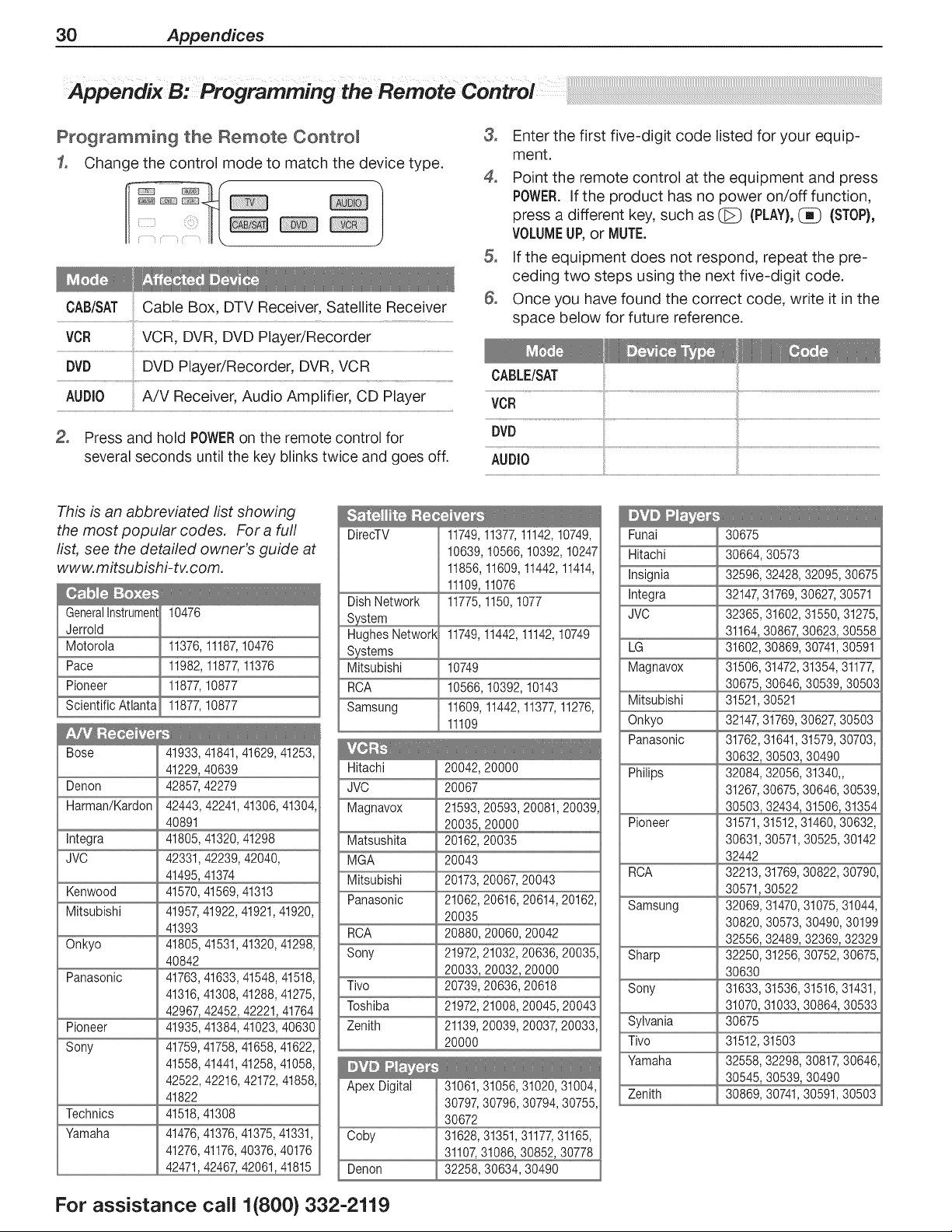
f° Change the control mode to match the device type.
o }
CAB/SAT Cable Box, DTV Receiver, Satellite Receiver
VCR VCR, DVR, DVD Player/Recorder
DVD DVD Player/Recorder, DVR, VCR
A/V Receiver Audio Amplifier, CD Player
AUDIO
Press and hold POWERon the remote control for
several seconds until the key blinks twice and goes off.
3,
4,
G,
Enter the first five-digit code listed for your equip-
ment.
Point the remote control at the equipment and press
POWER.If the product has no power on/off function,
press a different key, such as _ (PLAY),_ (STOP),
VOLUMEUP,or MUTE.
If the equipment does not respond, repeat the pre-
ceding two steps using the next five-digit code.
Once you have found the correct code, write it in the
space below for future reference.
CABLE/SAT
VCR
AUDIO
This is an abbreviated list showing
the most popular codes. For a full
list, see the detailed owner's guide at
www. mitsubishi-tv, com.
GeneralInstrument
Jerrold
Motorola
Pace
Pioneer
Scientific Atlanta
10476
11376,11187,10476
11982,11877,11376
11877,10877
11877,10877
Bose 41933,41841,41629,41253,
41229,40639
Denon 42857,42279
Harman/Kardon 42443, 42241,41306,41304,
40891
Integra 41805,41320,41298
JVO 42331,42239, 42040,
41495,41374
Kenwood 41570,41569,41313
Mitsubishi 41957,41922,41921,41920,
41393
Onkyo 41805,41531,41320,41298,
40842
Panasonic 41763,41633,41548,41518,
41316,41308,41288,41275,
42967,42452,42221,41764
Pioneer 41935,41384,41023,40630
Sony 41759,41758,41658,41622,
41558,41441,41258,41058,
42522, 42216,42172,41858,
41822
Technics 41518,41308
Yamaha 41476,41376,41375,41331,
41276,41176,40376, 40176
42471,42467,42061,41815
DirecTV
Dish Network
Hughes Network 11749,11442,11142,10749
Mitsubishi 10749
RCA 10566,10392,10143
Samsung 11609,11442,11377,11276,
11109
Hitachi
JVO
Magnavox
11749,11377,11142,10749,
10639,10566,10392,10247
11856,11609,11442,11414,
11109,11076
11775,1150,1077
Matsushita
MGA
Mitsubishi
Panasonic
ROA
Sony
Tivo
Toshiba
Zenith
Apex Digital 31061,31056,31020,31004,
30797,30796, 30794,30755,
30672
Ooby 31628,31351,31177,31165,
31107,31086,30852, 30778
Denon 32258, 30634, 30490
20042,20000
20067
21593,20593,20081,20039
20162,20035
20043
20173,20067,20043
21062,20616,20614,20162,
20035
20880,20060,20042
21972,21032,20636,20035,
20033,20032,20000
20739,20636,20618
21972,21008,20045,20043
21139,20039,20037 20033,
20000
Funai 30675
Hitachi 30664,30573
Insignia 32596,32428,32095,30675
Integra 32147,31769,30627 30571
JVC 32365,31602,31550,31275,
31164,30867 30623,30558
LG 31602,30869,30741,30591
Magnavox 31506,31472,31354,31177
30675,30646,30539,30503
Mitsubishi 31521,30521
Onkyo 32147,31769,30627 30503
Panasonic 31762,31641,31579,30703,
30632,30503,30490
Philips 32084,32056,31340.
31267,30675,30646,30539,
Pioneer 31571,31512,31460,30632,
30631,30571,30525,30142
32442
RCA 32213,31769,30822,30790,
30571,30522
Samsung 32069,31470,31075,31044,
30820,30573,30490,30199
32556,32489,32369,32329
Sharp 32250,31256,30752,30675,
30630
Sony 31633,31536,31516,31431,
31070,31033,30864,30533
Sylvania 30675
Tivo 31512,31503
Yamaha 32558,32298,30817 30646
30545,30539,30490
Zenith 30869,30741,30591,30503
For assistance call 1(800} 332-2119
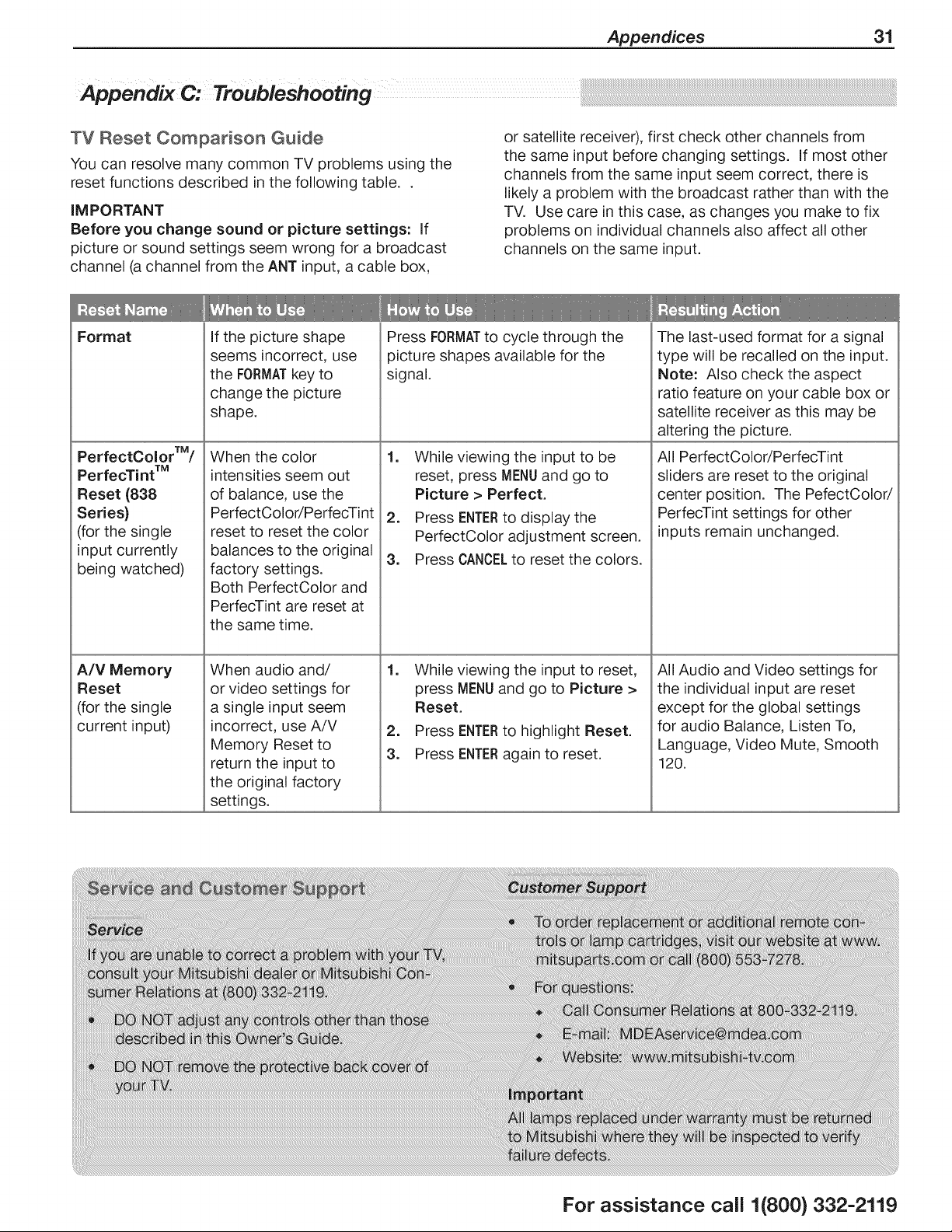
Appendices 31
TV Reset Comparison Guide
You can resolve many common TV problems using the
reset functions described in the following table..
iMPORTANT
Before you change sound or picture settings: if
picture or sound settings seem wrong for a broadcast
channel (a channel from the ANT input, a cable box,
or satellite receiver), first check other channels from
the same input before changing settings. If most other
channels from the same input seem correct, there is
likely a problem with the broadcast rather than with the
TV. Use care in this case, as changes you make to fix
problems on individual channels also affect all other
channels on the same input.
Format
PerfectColorTM/
PerfecTint TM
Reset (838
Series)
(for the single
input currently
being watched)
A/V Memory
Reset
(for the single
current input)
If the picture shape
seems incorrect, use
the FORMATkey to
change the picture
shape.
When the color
intensities seem out
of balance, use the
PerfectColor/PerfecTint
reset to reset the color
balances to the original
factory settings.
Both PerfectColor and
PerfecTint are reset at
the same time.
When audio and/
Press FORMATto cycle through the
picture shapes available for the
signal.
1. While viewing the input to be
reset, press MENUand go to
Picture > Perfect.
The last-used format for a signal
type will be recalled on the input.
Note: Also check the aspect
ratio feature on your cable box or
satellite receiver as this may be
altering the picture.
All PerfectColor/PerfecTint
sliders are reset to the original
center position. The PefectColor/
PerfecTint settings for other
inputs remain unchanged.
or video settings for
a single input seem
incorrect, use A/V
Memory Reset to
return the input to
the original factory
settings.
2. Press ENTERto display the
PerfectColor adjustment screen.
3. Press CANCELto reset the colors.
1. While viewing the input to reset, All Audio and Video settings for
press MENUand go to Picture >
Reset.
2. Press ENTERto highlight Reset.
3. Press ENTERagain to reset.
the individual input are reset
except for the global settings
for audio Balance, Listen To,
Language, Video Mute, Smooth
120.
For assistance call 1(800) 332-2119
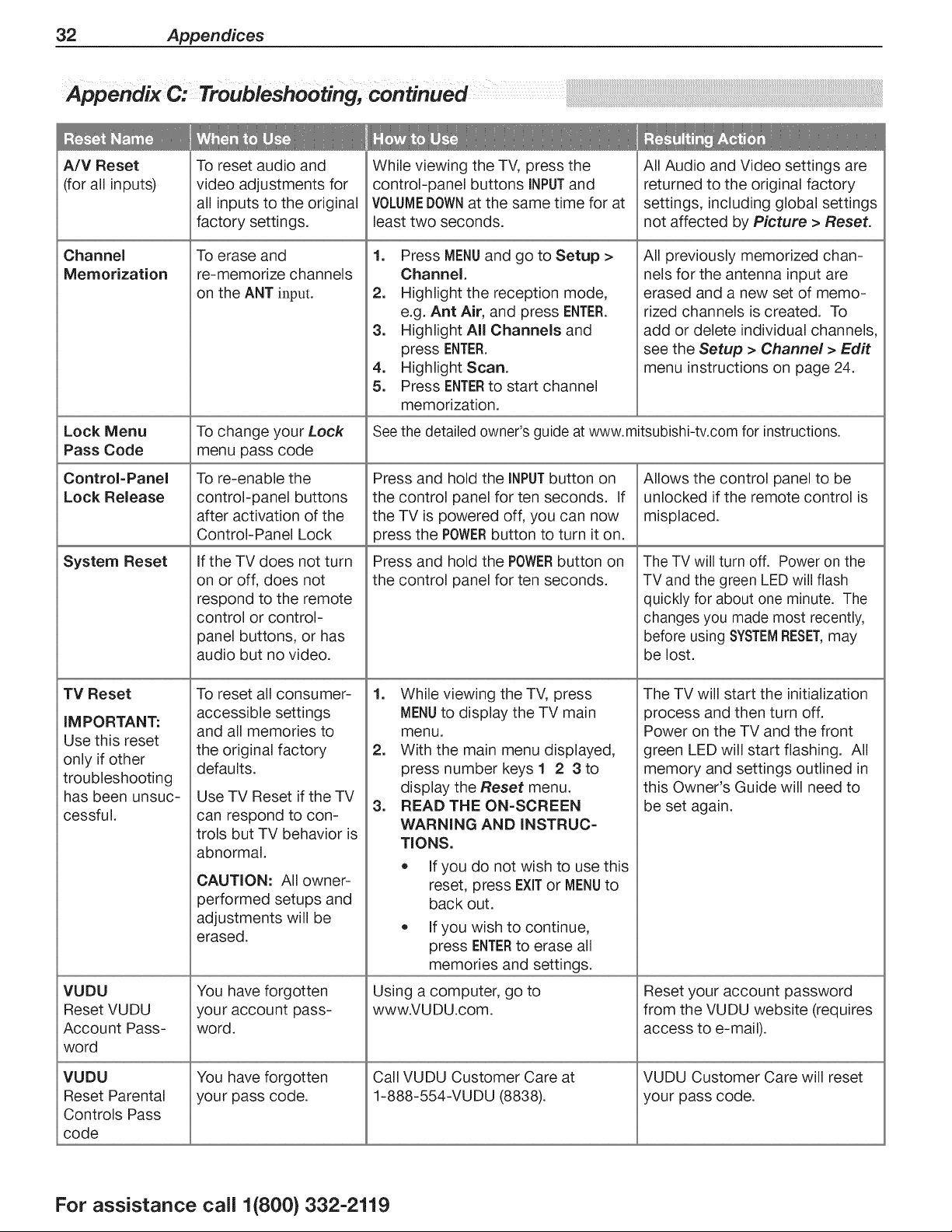
32 Appendices
Appendix (74 Troubleshooting, continued
A/V Reset
(for all inputs)
Channel
Memorization
Lock Menu
Pass Code
Control=Panel
Lock Release
System Reset
TV Reset
IM PORTANT:
Use this reset
only if other
troubleshooting
has been unsuc-
cessful.
VUDU
Reset VUDU
Account Pass-
word
VUDU
Reset Parental
Controls Pass
code
To reset audio and
video adjustments for
all inputs to the original
factory settings.
To erase and
re-memorize channels
on the ANT input.
To change your Lock
menu pass code
To re-enable the
control-panel buttons
after activation of the
Control-Panel Lock
If the TV does not turn
on or off, does not
respond to the remote
control or control-
panel buttons, or has
audio but no video.
To reset all consumer-
accessible settings
and all memories to
the original factory
defaults.
Use TV Reset if the TV
can respond to con-
trois but TV behavior is
abnormal.
CAUTION: All owner-
performed setups and
adjustments will be
erased.
You have forgotten
your account pass-
word.
You have forgotten
your pass code.
While viewing the TV, press the
control-panel buttons INPUTand
VOLUMEDOWNat the same time for at
least two seconds.
1. Press MENUand go to Setup >
Channel.
2. Highlight the reception mode,
e.g. Ant Air, and press ENTER.
3. Highlight All Channels and
press ENTER.
4. Highlight Scan.
5. Press ENTERto start channel
memorization.
All Audio and Video settings are
returned to the original factory
settings, including global settings
not affected by Picture > Reset.
All previously memorized chan-
nels for the antenna input are
erased and a new set of memo-
rized channels is created. To
add or delete individual channels,
see the Setup > Channel > Edit
menu instructions on page 24.
See the detailed owner's guide at www.mitsubishi-tv.com for instructions.
Press and hold the INPUTbutton on
the control panel for ten seconds. If
the TV is powered off, you can now
press the POWERbutton to turn it on.
Press and hold the POWERbutton on
the control panel for ten seconds.
=
.
=
While wewing the TV, press
MENUto display the TV main
menu.
With the main menu displayed,
press number keys 1 2 3 to
display the Reset menu.
READ THE ON-SCREEN
WARNING AND INSTRUC-
TIONS.
• If you do not wish to use this
reset, press EXiTor MENUto
back out.
• If you wish to continue,
press ENTERto erase all
memories and settings.
Using a computer, go to
www.VUDU.com.
Call VUDU Customer Care at
1-888-554-VUDU (8838).
Allows the control panel to be
unlocked if the remote control is
misplaced.
The TV will turn off. Power on the
TV and the green LED will flash
quickly for about one minute. The
changes you made most recently,
before using SYSTEMRESET,may
be lost.
The TV will start the initialization
process and then turn off.
Power on the TV and the front
green LED will start flashing. All
memory and settings outlined in
this Owner's Guide will need to
be set again.
Reset your account password
from the VUDU website (requires
access to e-mail).
VUDU Customer Care will reset
your pass code.
For assistance call 1(800) 332-2119

Appendices 33
Common Picture Problems
Picture does not look like a high-defi-
nition picture.
TV has sound but no picture.
Picture has become dimmer.
A color program appears as a black
and white image, or the colors are
dim, or the screen is black.
Picture from an HDMI input is noisy
(poor quality).
Compare the picture to the TV's test picture (Picture > Picture+ >
Test Picture) to check if the source signal is supplying a lesser-quality
image.
Not all signals are high-definition signals. To receive high-definition
programming from your cable or satellite provider, you must subscribe
to the provider's high-definition service. Some over-the-air broadcasts
are in high-definition and can be received with a high-quality antenna
suited to your location.
• Press MENUon the remote control. If the menu displays, then there
is a problem with the incoming signal.
Check that all video inputs are plugged in firmly to the correct input
jacks.
Press and hold the POWERbutton on the control panel for ten
seconds to perform System Reset.
The lamp is nearing the end of its life. Order a new lamp.
Adjust picture brightness and contrast to maximum levels.
Change Lamp Energy from Standard to Bright.
• if using component video, check that the red, green, and blue input
cables are correctly connected to the red, green, and blue compo-
nent video jacks.
= if using composite video, check that the incoming cable is con-
nected the TV's green Y/ViDEO jack.
= 838 Series. The PerfectColor color balance has been incorrectly
set. Reset the PerfectColor balance.
Compare the picture to the TV's test picture (Picture > Picture+ >
Test Picture) to check if the noise is internal or external to the TV.
Upgrade a Category 1 (unmarked) HDMI cable to a newer type of
high-speed HDMI cable.
Home Network
.
2.
3.
I cannot connect the TV to the
network.
I plugged in a wireless USB adapter,
but the wireless connection is not
working.
The INTERNET key only goes to
VUDU.
Go to the Setup > Network menu. Obtain the TV MAC address and
3rovide it to the router.
The network may be locked. Go to Setup > Network. Highlight the
network name and supply the pass code.
Normal operation. The TV receives all internet services through VUDU.
The TV does not provide full internet access as does a web browser on
a computer.
For assistance call 1(800} 332-2119
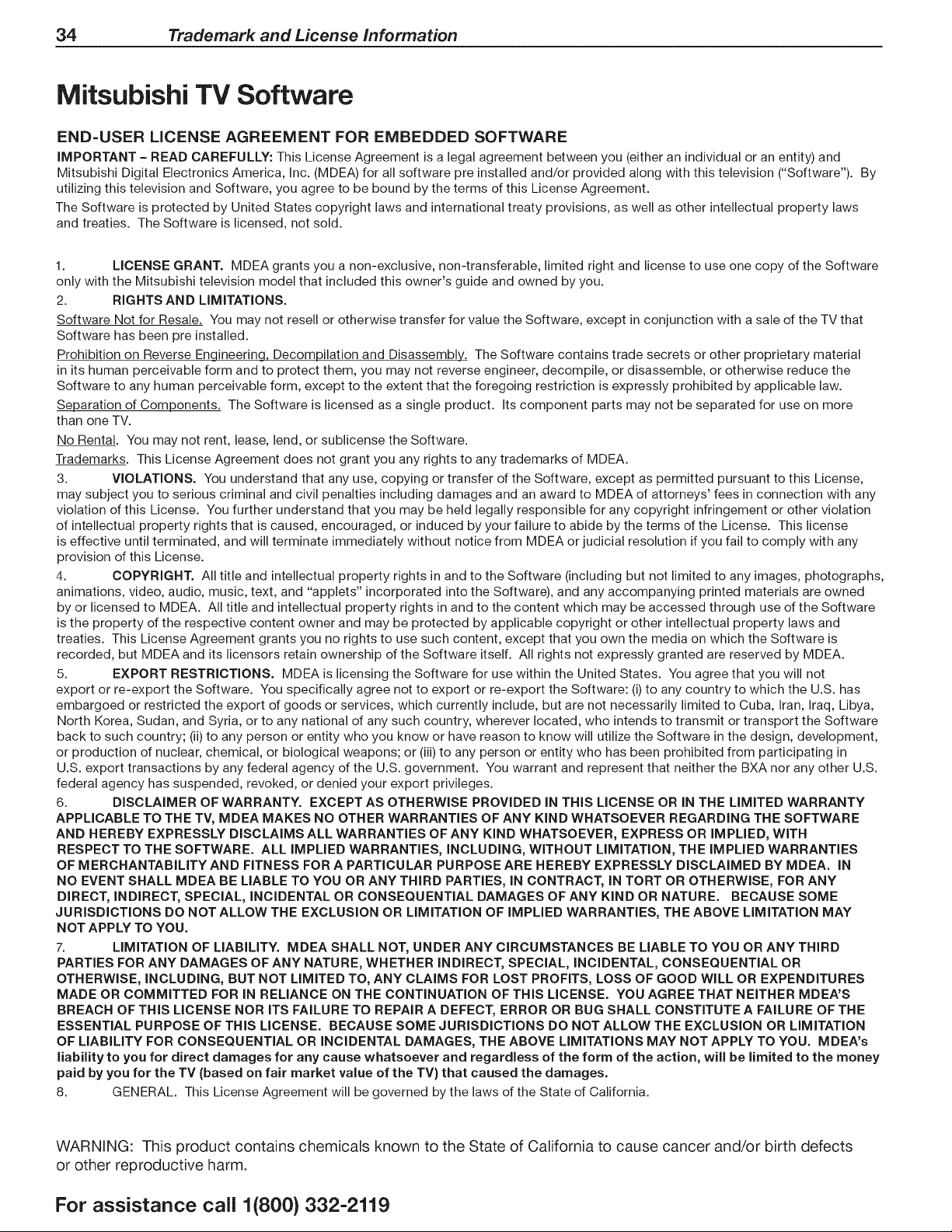
34 Trademark and License information
Mitsubishi TV Software
END=USER LICENSE AGREEMENT FOR EMBEDDED SOFTWARE
IMPORTANT - READ CAREFULLY: This License Agreement is a legal agreement between you (either an individual or an entity) and
Mitsubishi Digital Electronics America, Inc. (MDEA) for all software pre installed and/or provided along with this television ("Software"). By
utilizing this television and Software, you agree to be bound by the terms of this License Agreement.
The Software is protected by United States copyright laws and international treaty provisions, as well as other intellectual property laws
and treaties. The Software is licensed, not sold.
1. LICENSE GRANT. MDEA grants you a non-exclusive, non-transferable, limited right and license to use one copy of the Software
only with the Mitsubishi television model that included this owner's guide and owned by you.
2. RIGHTS AND LIMITATIONS.
Software Not for Resale. You may not resell or otherwise transfer for value the Software, except in conjunction with a sale of the TV that
Software has been pre installed.
Prohibition on Reverse Engineering, Decompilation and Disassembly. The Software contains trade secrets or other proprietary material
in its human perceivable form and to protect them, you may not reverse engineer, decompile, or disassemble, or otherwise reduce the
Software to any human perceivable form, except to the extent that the foregoing restriction is expressly prohibited by applicable law.
Separation of Components. The Software is licensed as a single product. Its component parts may not be separated for use on more
than one TV.
No Rental. You may not rent, lease, lend, or sublicense the Software.
Trademarks. This License Agreement does not grant you any rights to any trademarks of MDEA.
3. VIOLATIONS. You understand that any use, copying or transfer of the Software, except as permitted pursuant to this License,
may subject you to serious criminal and civil penalties including damages and an award to MDEA of attorneys' fees in connection with any
violation of this License. You further understand that you may be held legally responsible for any copyright infringement or other violation
of intellectual property rights that is caused, encouraged, or induced by your failure to abide by the terms of the License. This license
is effective until terminated, and will terminate immediately without notice from MDEA or judicial resolution if you fail to comply with any
provision of this License.
4. COPYRIGHT. All title and intellectual property rights in and to the Software (including but not limited to any images, photographs,
animations, video, audio, music, text, and "applets" incorporated into the Software), and any accompanying printed materials are owned
by or licensed to MDEA. All title and intellectual property rights in and to the content which may be accessed through use of the Software
is the property of the respective content owner and may be protected by applicable copyright or other intellectual property laws and
treaties. This License Agreement grants you no rights to use such content, except that you own the media on which the Software is
recorded, but MDEA and its licensors retain ownership of the Software itself. All rights not expressly granted are reserved by MDEA.
5. EXPORT RESTRICTIONS, MDEA is licensing the Software for use within the United States. You agree that you will not
export or re-export the Software. You specifically agree not to export or re-export the Software: (i) to any country to which the U.S. has
embargoed or restricted the export of goods or services, which currently include, but are not necessarily limited to Cuba, Iran, Iraq, Libya,
North Korea, Sudan, and Syria, or to any national of any such country, wherever located, who intends to transmit or transport the Software
back to such country; (ii) to any person or entity who you know or have reason to know will utilize the Software in the design, development,
or production of nuclear, chemical, or biological weapons; or (iii) to any person or entity who has been prohibited from participating in
U.S. export transactions by any federal agency of the U.S. government. You warrant and represent that neither the BXA nor any other U.S.
federal agency has suspended, revoked, or denied your export privileges.
6. DISCLAIMER OF WARRANTY. EXCEPT AS OTHERWISE PROVIDED IN THIS LICENSE OR IN THE LIMITED WARRANTY
APPLICABLE TO THE TV, MDEA MAKES NO OTHER WARRANTIES OF ANY KIND WHATSOEVER REGARDING THE SOFTWARE
AND HEREBY EXPRESSLY DISCLAIMS ALL WARRANTIES OF ANY KIND WHATSOEVER, EXPRESS OR IMPLIED, WITH
RESPECT TO THE SOFTWARE. ALL IMPLIED WARRANTIES, INCLUDING, WITHOUT LIMITATION, THE IMPLIED WARRANTIES
OF MERCHANTABILITY AND FITNESS FOR A PARTICULAR PURPOSE ARE HEREBY EXPRESSLY DISCLAIMED BY MDEA. IN
NO EVENT SHALL MDEA BE LIABLE TO YOU OR ANY THIRD PARTIES, IN CONTRACT, IN TORT OR OTHERWISE, FOR ANY
DIRECT, INDIRECT, SPECIAL, INCIDENTAL OR CONSEQUENTIAL DAMAGES OF ANY KIND OR NATURE. BECAUSE SOME
JURISDICTIONS DO NOT ALLOW THE EXCLUSION OR LIMITATION OF IMPLIED WARRANTIES, THE ABOVE LIMITATION MAY
NOT APPLY TO YOU.
7. LIMITATION OF LIABILITY. MDEA SHALL NOT, UNDER ANY CIRCUMSTANCES BE LIABLE TO YOU OR ANY THIRD
PARTIES FOR ANY DAMAGES OF ANY NATURE, WHETHER INDIRECT, SPECIAL, INCIDENTAL, CONSEQUENTIAL OR
OTHERWISE, INCLUDING, BUT NOT LIMITED TO, ANY CLAIMS FOR LOST PROFITS, LOSS OF GOOD WILL OR EXPENDITURES
MADE OR COMMITTED FOR IN RELIANCE ON THE CONTINUATION OF THIS LICENSE. YOU AGREE THAT NEITHER MDEA'S
BREACH OF THIS LICENSE NOR ITS FAILURE TO REPAIR A DEFECT, ERROR OR BUG SHALL CONSTITUTE A FAILURE OF THE
ESSENTIAL PURPOSE OF THIS LICENSE. BECAUSE SOME JURISDICTIONS DO NOT ALLOW THE EXCLUSION OR LIMITATION
OF LIABILITY FOR CONSEQUENTIAL OR INCIDENTAL DAMAGES, THE ABOVE LIMITATIONS MAY NOT APPLY TO YOU. MDEA's
liability to you for direct damages for any cause whatsoever and regardless of the form of the action, will be limited to the money
paid by you for the TV (based on fair market value of the TV) that caused the damages.
8. GENERAL. This License Agreement will be governed by the laws of the State of California.
WARNING: This product contains chemicals known to the State of California to cause cancer and/or birth defects
or other reproductive harm.
For assistance call 1(800) 332-2119
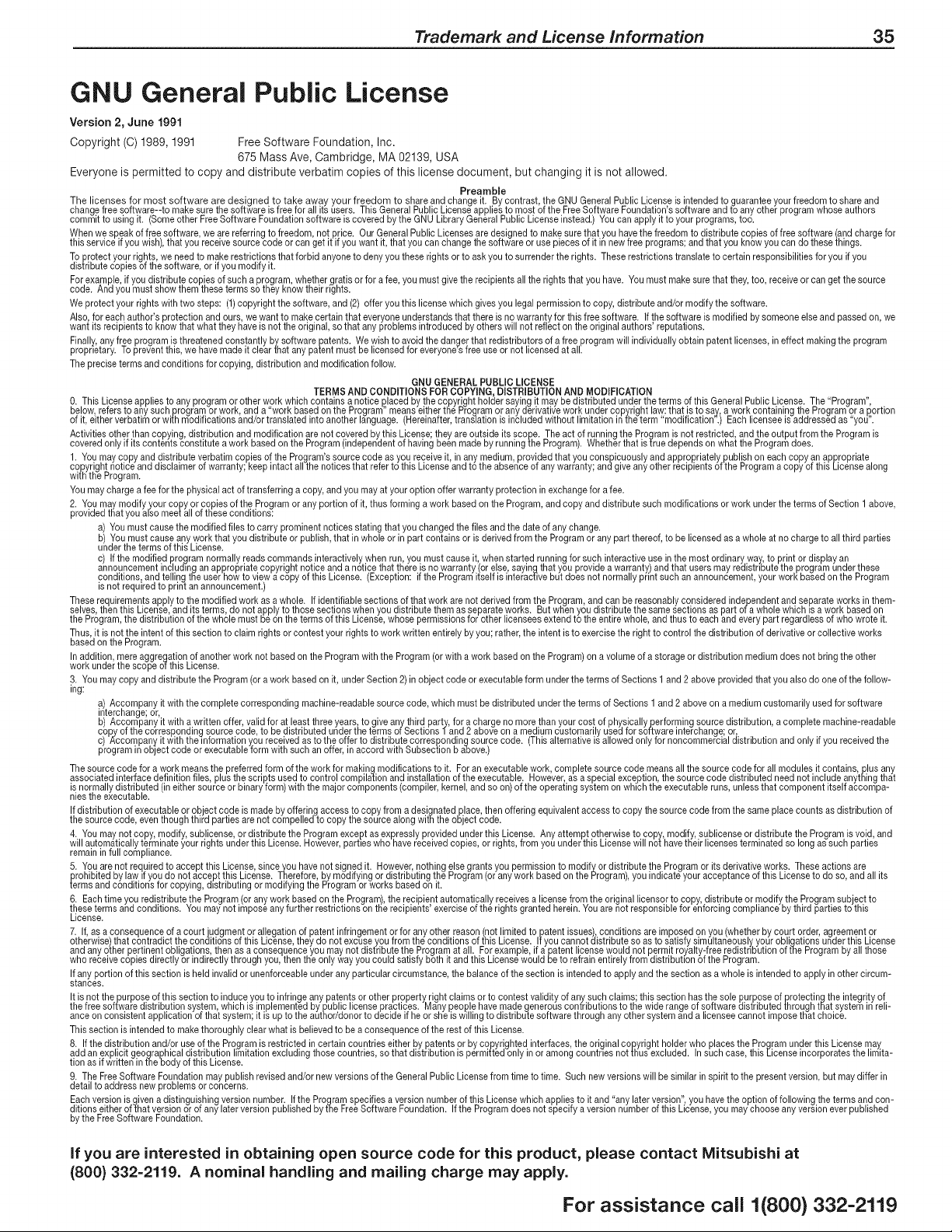
Trademark and License information 35
GNU General Public License
Version 2, June 1991
Copyright (C) 1989, 1991 Free Software Foundation, Inc.
675 Mass Ave, Cambridge, MA 02139, USA
Everyone is permitted to copy and distribute verbatim copies of this license document, but changing it is not allowed.
Preamble
The licenses for most software are designed to take away your freedom to share and changeit. By contrast, the GNUGeneral Public Licenseis intended to guarantee your freedom to share and
changefree software--to make surethe software isfree for all its users. This GeneralPublic Licenseapplies to most of theFree Software Foundation's software and to any other programwhose authors
committo using it. (Someother Free Software Foundationsoftware iscoveredby the GNU LibraryGeneral Public Licenseinstead.) Youcan apply it to your programs, too.
When we speak of free software we are referring to freedom, not price. Our GeneralPublic Licensesare designedto makesure that you have thefreedom to distribute copies of free software (andchargefor
ths eerv ce f you w sh, that you rece vesource code or canget t f you want it, that you canchange the software oruse pieces of it in new free programs; and that you know you can do thesethings.
To protect your rights, we needto makerestrictions that forbid anyone to deny you these rights or to ask you to surrenderthe rights. Theserestrictions translateto certain responsibilities for you if you
distributecopies of thesoftware, or if you modify it.
Forexample if you distribute copies of such aprogram, whether gratis or for a fee, you must give the recipients all the rights that you have. Youmust makesurethat they, too, receiveor can getthe source
code. And you must show them theseterms so they know the r r ghte.
We protect your rights with two steps: (1)copyright the software,and (2) offer you this licensewhich gives you legal permissionto copy, distribute and/or modify the software.
Also for each author's protection and ours we want to makecertain that everyoneunderstands that there is no warranty for this free software. If the software is modified bysomeone else and passed on, we
want ts rec pents to know that what they have s not the or g na, so that anyprob eros ntroduced byothers w not ref ect on the org na authors reputat one.
Finally anyf_e program is threatenedconstan!ly bysoftware patents. We wish to avoid the dangerthat redistributors of a,free programwill individually obtain patent licenses, in effect makingthe program
propnetary, toprevent th s,we nave maae t ctearthat any patent must be t censed for everyonee Treeuse or not ceneeoat a.
The preciseterms and conditions for copying, distribution and modificationfellow.
GNU GENERALPUBLIC LICENSE
TERMS AND CONDiTiONS FORCOPYING, DISTRIBUTION AND MODIFICATION
O.This Licenseapplies to any programor otherwork whichcontains a notice placed bythe copyright holder sayingit may be distributed underthe terms of thisGeneral Public License. The "Program",
below refers to anysuch program or work, and a "work basedon the Program"means eithertee Program or any derivativework undercopyright law:that is to ear, a work containing the Programor a portion
of t, ether verbat m or w th rood f cat onsand/or traneated ntoanother anguage. Herenafter, translat on s ncuded wthout m tat on nfhe term rood f cat on. Each censee s addressed as you.
Activities otherthan copying distribution and modification are not covered bythis License; they areoutside its scope. Theact of running the Program is not restricted, and the output from the Program is
coveredon y f ts contents const tute a work based on the Program ndependentof hayng been made byrunn ng the Program. Whetherthat efrue depends on what the Programdoes.
1. You maycopy and distribute verbatim copies of the Program'ssource code asyou receiveit in anymedium provided that you conspicuouslyand appropriately publish on each copy anappropriate
copyright notice and disclaimer of warranty keep intact all the notices that referto this License and to the absence ofany warranty and give anyotherrecipients ofthe Program acopy of this Licensealong
with the Program.
Youmay charge a feefor the physicalact of transferring a copy, and you may at your optionoffer warranty protection in exchangefor a fee.
2. You maymodify your copy or copiesof the Programor any portion of it thus forming a work based on the Program and copy and distribute such modifications or work underthe terms of Section 1 above,
provided that you also meetall of these conditions:
a) You must cause the modified files to carry prominent notices stating that you changed the files and the dateof anychange.
b) You must cause any work that you distribute or publish,that in wholeor in part contains or isderived from the Program or anypart thereof,to be licensed asa whole at no chargeto all third parties
underthe terms ofthis License.
c) If the modified programnormally reads commands interactivelywhen run you must cause it when started running for such interactiveuse in the most ordinary way to print ordisplay an
announcementincluding anappropriate copyright notice and a notice that there is no warranty (or else, sayingthat you provide awarranty) and that usersmay redistnbutethe program under these
conditions; and telling tee userhow to view a copy ofthis License. (Exception: if the Program itself is interactivebut does not normally print such anannouncement your work based onthe Program
s not requ=redto pr nt an announcement.
These requirementsapply to themodified work as awhole. If identifiable sections of that work are notderived from the Program and can be reasonablyconsidered independent and separateworks in them-
selves then this License,and its terms, do not apply to those sections when you distribute them asseparate works. But whenyou distribute the same sections as part of a whole whichis a work based on
the Program,the d str but on of the who e must be on theterms of ths L cense, whose permesone for other ceneeesextend to theent re who e, and thus to each and every part regard ees of who wrote t.
Thus, it is notthe intent of this section to claim rightsor contest your rights to work written entirelyby you; rather,the intent isto exercisethe right to control the distribution of derivativeor collective works
basedon the Program.
In addition mereaggregation of anotherwork not basedon the Programwith the Program (or with awork based on the Program)on avolume of astorage or distribution mediumdoes notbring the other
work under the scope of the L cense.
3. You maycopy and distribute the Program (or awork based on it, underSection 2)in object code or executable form underthe terms of Sections 1 and 2 above provided that you also do oneofthe follow-
ing:
a) Accompany it with the completecorresponding machine-readablesource code which must be distributed underthe terms of Sections 1 and 2 above on a medium customarilyused for software
interchange;or,
b) Accompany it with awritten offer, validfor at least three years,to give anythird party, for a charge no more thanyour cost of physicallyperferming source distribution, a complete machine-readable
copy of the corresponding source code to be distributed underthe terms of Sections land 2 aboveon a mediumcustomarily used for software interchange or,
c) Accompany it with the dormation you received asto theoffer to distribute correspndingseurce code. (This alternativeis allowedonlyfor noncommercialdistribution and only if you receivedthe
programin objectcode or executable form with such an offer, inaccord with Subsection b above.)
The source code for a work means the preferredform of the work for making modifications to it. For an executablework complete source code means all the source code for all modules it contains plus any
associatedinterface definition files plus thescripts used to control compilation and installation of the executable.However as a special exception the source code distributed neednot include anythingthat
isnormally distributed (in either source or binaryform) with the major components (compiler kernel and so on)of theoperating system on which the executableruns unless that component itselfaccompa-
nes the executabe.
Ifdistribution of executable or object code is made by offering accessto copy from a designatedplace then offering equivalentaccess to copy the source code from the same place counts as distribution of
the source code, even thoughthird parties are not compe ed to copy the source a eng w th the ob ect code.
4. You maynot copy modify sublicense or distribute the Programexcept as expressly provided underthis License. Anyattempt otherwiseto copy modify sublicense or distribute the Program is void and
will automatically terminate your rights underthis License. However parties who have receivedcopies or rights from you underthis License will nethave tEeir licensesterminated so long as such parties
rernan n fu comp ance.
5. You arenot required to accept this License,since_ou havenot signed it. However,nothing else grants you permissionto modifX or distribute theProgram or its derivative works. These actions are
prohibited by law if you do not accept this License. tnerefore,by modifying or distributing the Program (or anywork based on the t-'rogram),you indicateyour acceptance of this License to do so, and all its
terms and conditions for copying,distributing or modifying the Programor works basedon it.
6. Eachtime you redistribute the Program (or anywork based on theProgram) the recipientautomatically receives a license from the originallicensor to copy, distributeor modify the Program subject to
these terms and cond tons. You maynot repose any further restr ct ons on the recp ents exercse of the r ghts granted here n. Youare not respons b efor enforc ng comp ance by th rd part esto ths
License.
7. If, as aconsequence of a courtjudgment or allegation of patent infringement or for any other reason(not limited to patent issues),conditions areimposed on you (whetherby court order, agreementor
otherwise)that contradict the conditions of this License,they do not excuseyou from the conditions of this License. If you cannot distribute so asto satisfy simultaneously,your obligations underthis License
and anyother pertinentobligations thenas aconsequence you maynot distribute the Program at all. For example, if a patent licensewould not permit royalty-free redistnbution of t]_eProgram by all those
who rece vecop es d rect y or nd rect y throughyou, then the on y way you cou d sat sfy both t and ths L censewou d beto refran ent re y from dstr buttonof the Program.
Ifany portion of this section is held invalid or unenforceableunder any particular circumstance, the balance of thesection is intended to apply and the section as awhole is intended to apply in other circum-
stances.
It isnot thepurpose of this section to induceyou to infringeany patents or other property right claims or to contest validity of anysuch claims; this section has thesole purposeof protecting theintegrity of
the free software distribution system whichis implemented by public license practices. Many people have made generouscontributions to the wide rangeof software distributed throughthat system in reli-
ance on consstent app cat on of that system; t s up to the author/donor to dec de f heor she s w ng to d str bu_esoftware through any othersystem and a censee cannot reposethat cho ce.
This section is intended to makethoroughly clear what is believedto bea consequenceof the rest of this License.
8. Ifthe distribution and/or useof the Programis restricted in certain countries either by patents orby copyrighted interfaces,the original copyright holder who places the Program under this License may
add an explicit geographicaldistribution limitationexcluding thosecountries so that distribution is permitted only in or among countnes nottlius excluded. In such case this Eicenseincorporates the limita-
tion as if written in t]_ebody of thisLicense.
9. The FreeSoftware Foundation may publish revised and/or new versions of the General Public Licensefrom time to time. Such new versionswill be similarin spirit to the presentversion, but maydiffer in
detailto addressnew problems or concerns.
Eachversion is given a distinguishingversion number. Ifthe Programspecifies a version numberof this License whichapplies to it and "any later version",you have the option of followingthe terms and con-
ditionseither ofihat version orof any laterversion publishedby t_neFreeSoftware Foundation. Ifthe Program does not specify a version number of this License,you maychooseany versionever published
bythe Free Software Foundation.
if you are interested in obtaining open source code for this product, please contact Mitsubishi at
(800) 332-2119. A nominal handling and mailing charge may apply.
For assistance call 1(800} 332-2119
36 Trademark and License information
10. Ifyou wishtoincorporatepartsoftheProgramintootherfree programs whose distribution conditions aredifferent, write to theauthor to ask for permission. For software which iscopyrighted bythe
FreeSoftware Foundation write to the FreeSoftware Foundation;we sometimes makeexceptions for this. Our decision will be guided bythe two goals of preserving thefree status of all derivativesof our
freesoftware and of promot ng theshar ng and reuse of software genera y.
NOWARRANTY
11. BECAUSETHEPROGRAMIS LICENSEDFREEOF CHARGETHERE ISNO WARRANTYFORTHEPROGRAM TO THE EXTENTPERMITTEDBY APPLICABLELAW. EXCEPTWHEN OTHERWISE
STATEDIN WRITINGTHE COPYRIGHTHOLDERSAND/OROTHI:RPARTIESPROVIDETHE PROGRAM"AS IS" WITHOUTWARRANTYOF ANY KIND, EITHEREXPRESSEDOR IMPLIED,INCLUDING,BUT
NOTLIMITEDTO THE IMPLIEDWARRANTIESOF MERCHANTABILITYANDFITNESSFORA PARTICULARPURPOSE.THE ENTIRERISK ASTO THEQUALITYANDPERFORMANCEOF THEPROGRAMIS
WTH YOU. SHOULDTHE PROGRAMPROVEDEFECTVE,YOUASSUMETHE COSTOFALL NECESSARYSERVC NG, REPAR OR CORRECTON.
12. IN NO EVENTUNLESSREQUIREDBYAPPLICABLELAW ORAGREEDTO IN WRITINGWILL ANYCOPYRIGHTHOLDER,OR ANYOTHERPARTYWHO MAYMODIFYAND/ORREDISTRIBUTETHE
PROGRAMAS PERMITTEDABOVE, BE LIABLETOYOU FORDAMAGES,INCLUDINGANY GENERAL,SPECIAL INCIDENTALOR CONSEQUENTIALDAMAGESARISINGOUTOF THE USEOR INABILITY
TOUSETHE PROGRAM(INCLUDINGBUT NOTLIMITEDTO LOSS OF DATAOR DATABEINGRENDEREDINACCURATEOR LOSSESSUSTAINEDBY YOUOR THIRDPARTIESOR A FAILUREOFTHE
PROGRAMTOOPERATEWITH ANYOTHERPROGRAMS),EVEN IFSUCHHOLDEROR OTHERPARTYHAS BEEN ADVISEDOF THE POSSIBILITYOF SUCH DAMAGES.
GNU GENERAL PUBLIC LICENSE
Version3, 29June2007
Copyright© 2907FreeSoftwareFoundationInc.<http://fsf.org/>
Everyonespermtted to copyand d strbuteverbatm copes of th s censedocument,but changng t s nota owed.
Preamble
TheGNUGeneralPublicLicenseis afree,copyleftlicenseforsoftwareandotherkindsof works.
Thelicensesfor mostsoftwareandotherpracticalworksaredesignedto takeawayyourfreedomto shareandchangetheworks.By contrast,theGNUGeneralPublicLicenseis intendedto guaranteeyourfreedomto share
andchangeallversionsof a program4o makesureit remainsfreesoftwareforall _tsusers.We theFreeSoftwareFoundationusethe GNUGeneralPublicLicensefor mostof oursoftware if appliesalsoto anyotherwork
releasedfniswayby its authors.Youcanapplyit to yourprograms,too.
Whenwespeakoffreesoftware,wearereferringtofreedom,notprice.OurGeneralPublicLicensesaredesignedto makesurethatyouhavethe freedomto distributecopiesof free software(andchargefor them ifyouwish),
thatyoureceivesourcecodeorcanget it ifyou wantit,that youcanchangethe softwareorusepiecesof it in newfreeprograms,and thatyouknowyoucan dothesethngs.
Toprotectyourrights weneedto preventofhersfrom denyingyouthesenghtsor askingyouto surrendertherights.Thereforeyou havecertainresponsibilitiesif youdistributecopiesofthe softwareor if youmodifyit:
responsibihtiesto respectthe freedomof others.
Forexample,if youdistributecopiesof sucha program,whethergratisor for afee,you mustpasson to therecipientsthe samefreedomsthat youreceived.Youmustmakesurethatthey,too, receiveorcanget thesource
code.Andyou mustshowthem thesetermssothey knowtheir rights.
Developersthat usethe GNUGPLprotectyourrightswithtwo steps:(1)assertcopyrightonthe software,and(2)offeryouthis Licensegivingyoulegalpermissionto copy,distributeand/ormodifyit.
Forthedevelopers'andauthors'protection,the GPLclearlyexplainsthat thereis nowarrantyfor this freesoftware.For bothusers'andauthors'sake,theGPLrequiresthat modifiedversionsbemarkedas changed,so that
theirproblemswill not beattributederroneouslyto authorsof previousversions.
Somedevicesaredesignedto denyusersaccessto installor runmodifiedversionsof thesoftwareinsidethem,althoughthe manufacturercando so. Thisis fundamentallyincompatiblewiththeaimof protectingusers'free-
domto changethe soft-ware.The systematicpatternof suchabuseoccursintheareaof productsfor individualsto use,whichispreciselywhereit is mostunacceptable.Therefore,we havedesignedth_sversionof the GPLto
prohibitthepracticefor thoseproducts.Ifsuchproblemsarisesubstantiallyin otherdomains,we standreadyto extendthis prowsionto thosedomainsin futureversionsof theGPL,as neededto protectthefreedomof users.
Finally,everyprogramisthreatenedconstantlyby softwarepatents.Statesshouldnotallowpatentsto restrictdevelopmentand useof softwareon general-purposecomputers,but inthosethat do,we wishto avoidthespecial
dangerthatpatentsappliedto a freeprogramcould makeit effectivelyproprietary.Topreventthis the GPLassuresthat patentscannotbeusedto renderthe programnon-free.
Theprecsetermsand condtons for copyng, dstrbuton androodf cat onfo ow.
TERMSAND CONDITIONS
9. Definitions.
"ThisLicense"refersto version3 of the GNUGeneralPublicLicense.
"Copyright"alsomeanscopyright-likelawsthat applyto otherkindsof works,suchas semiconductormasks.
"TheProgram"refersto anycopyrightableworklicensedunderthisLicense.Eachlicenseeis addressedas"you"."Licensees"and "recipients"maybeindividualsor organizations,
To'modify" a workmeansto copy:fromoradaptall or part of theworkina fashionrequiringcopyrightpermission,otherthanthe makingof anexactcopy, Theresultingworkiscalleda"modifiedversion"of theearlierworkor
awork"basedon" the earlierwork.
A "coveredwork"meanseitherthe unmodifiedProgramora workbasedonthe Program.
To"propagate"a workmeansto do anythingwithit that withoutpermissionwouldmakeyoudirectlyor secondarilyliablefor infringementunderapplicablecopyrightlaw exceptexecutingit ona computeror modifyinga
privatecope!,Propagationincludescopying,distribution(withor withoutmodification),makingavailableto the public,andin somecountriesotheractivitiesas well.
To"convey a workmeansanykindof propagationthat enablesotherpartiesto makeor receivecopies,Mereinteractionwitha userthrougha computernetwork,with notransferof a copy,isnotconveying,
Aninteractiveuserinterfacedisplays"AppropriateLegalNotices"to theextentthat it includesa convenientand prominentlyvisiblefeaturethat (1)d_splaysanappropriatecopyrightnotice,and(2)tellsthe userthat thereis
nowarrantyforthe work (exceptto theextentthat warrantiesareprovided)that licenseesmayconveythework underthis Licenseand howto viewacopyof th_sbcense.If theinterfacepresentsa list of usercommandsor
optons,suchas amenu,a promnenttern n the st meetsth s cr teron.
1. SourceCode.
The'source code"for a workmeansthepreferredformof theworkfor makingmodificationsto it. "Objectcode" meansanynon-sourceformof a work,
A "StandardInterface"meansaninterfacethat eitheris an officialstandarddfined bya recognizedstandardsbody,or, inthecaseof interfacesspecifiedfor a particularprogramminglanguage,onethat is widelyusedamong
developersworkinginthat language.
The"SystemLibraries"of anexecutableworkincludeanythingotherthanthe workas awhole that(a)is includedin the normalformof packaginga MajorComponentbut whichis notpartof that MaiorComponentand (b)
servesonlyto enableuseoftheworkwith thatMajorComponent,or to implementa StandardInterfacefor whichan implementationis availableto the publicin sourcecodeform,A 'Major Component'. inthiscontext meansa
majoressentialcomponent(kernel,windowsystem,andsoon)of thespecificoperatingsystem(if any)onwhichthe executablework runs,or acompilerusedto producethework,oran objectcodeinterpreterusedto runit,
The"CorrespondingSource'for aworkinobjectcodeform meansallthe sourcecodeneededto generateinstall and (foranexecutablework)runthe objectcodeand to modifythework _ncludingscriptsto controlthose
activities.Howeverit doesnot includethe work'sSystemLibrariesor general-purposetoolsor generallyavailablefreeprogramswhichareusedunmodifiedinperformingthoseactivitiesbutwhicharenot partof thework,For
exampleCorrespondingSourceincludesinterfacedefinitionfilesassociatedwith sourcefilesforthe work andthe sourcecodefor sharedlibrariesanddynamicallylinkedsubprogramsthatthe workis specificallydesignedto
require,suchasby intimatedatacommunicationor controlflowbetweenthosesubprogramsandotherpartsof the work,
TheCorrespondingSourceneednotincludeanythingthat userscanregenerateautomaticallyfrom otherpartsof theCorrespondingSource,
TheCorrespondingSourcefor a work insourcecodeform is thatsamework.
2. BasicPerrnissions.
AllrightsgrantedunderthisLicensearegrantedfortheterm of copyrightontheProgram,and areirrevocableprovidedthestatedconditionsaremet,ThisLicenseexplicitlyaffirmsyourunlimitedpermissionto runtheunmodi-
fiedProqram,Theoutputfromrunninga coveredwork is coveredbythisLicenseonryif theoutput givenits content constitutesa coveredwork,ThisLicenseacknowledgesyournghtsof fair useor otherequivalentas
pnrovidedbycopyrightlaw,
Youmaymake,runand propagatecoveredworksthatyoudo notconvey,withoutconditionsso longasyourlicenseotherwiseremainsin force.Youmayconveycoveredworksto othersforthe solepurposeof havingthem
makemodificationsexclusivel#for you,or provideyouwithfacilitiesfor runningthoseworks,providedthat youcomplywith the termsof this Licenseinconveyingallmaterialfor whichyoudo not contro/copyright.Tliosethus
makingor runningthe coveredworksfor youmustdo soexclusivelyonyourbehalf,underyourdirectionandcontrol,ontermsthat prohibitthemfrom makinganycopiesof yourcopyrightedmaterialoutsidetheirrelationship
withyou,
Conveyingunderanyothercircumstancesis permittedsolelyundertheconditionsstatedbelow,Sublicensingis not allowed;section19makesit unnecessary,
3, ProtectingUsers'LegalRights FromAnti-CircumventionLaw.
Nocoveredworkshall bedeemedpartof aneffectivetechnologicalmeasureunderanyapplicablelawfulfillingobligationsunderarticle11of theWIPOcopyrighttreatyadoptedon 29December1996,or similarlawsprohibiting
orrestrictingcircumventionof suchmeasures,
Whenyouconveya coveredwork youwaiveanylegalpowerto forbid circumventionof technologicalmeasuresto the extentsuchcircumventionis effectedby exercisingrightsunderthisLicensewith respectto thecovered
work,andyou d scam any ntenton to m t operaton or modf cat onof the workas ameansof enforcng,aganst theworks users,youror th rd partes ega r ghtsto forb8 c rcumventonof technoogca measures.
4. ConveyingVerbatimCopies.
Youmayconveyverbatimcopiesof the Program'ssourcecodeas youreceiveit in anymedium providedthat youconspicuouslyandappropriatelypublishon eachcopyan appropriatecopyrightnotice keepintactall notices
statingthatthisLicenseandanynon-permissivetermsaddedinaccordwithsection7 applyto the code;keep_ntactallnoticesoftheabsenceof anywarranty;andgiveall recipientsa copyoflhis Licensealongwiththe
Program.
Youmaychargeanypriceor nopricefor eachcopythatyou convey,andyoumay offersupportor warrantyprotectionfor a fee.
5. ConveyingModifiedSourceVersions.
Youmayconveyaworkbasedonthe Program,orthe modificationsto produceit fromtheProgram,inthe formof sourcecode underthetermsof section4, providedthatyoualsomeet allof theseconditions:
a)Thework mustcarryprominentnoticesstatingthat youmodifiedit, andgivinga relevantdate.
b/Thework mustcarryprominentnoticesstatingthat Jtisreleasedunderthisbcenseand anyconditionsaddedundersection7. Thisrequirementmodifiesthe requirementin section4 to "keepintactallnotices".
c)Youmustlicensetheentirework,asa whole,underthis Licenseto anyonewho comesintopossessionof a copy.ThisLicensewillthereforeapply,alongwithanyapplicablesection7additionalterms,to thewholeofthe
work,andall itsparts,regardlessof howthey arepackaged.ThisLicensegivesnopermissionto licensethework inanyotherway,but it doesnotinvalidatesuchpermissionif youhaveseparatelyreceivedit.
d)lftheworkhasinteractiveuserinterfaces,eachmustdisplayAppropriateEegalNobces;however,if theProgramhasinteractiveinterfacesthat do notdisplayAppropriateLegalNotices,yourworkneednot makethem do so.
A compilationof a coveredworkwithotherseparateandindependentworks,whicharenot bytheirnatureextensionsof the coveredwork,andwhicharenot combinedwithit suchas to forma largerprogram,inor ona vol-
umeota storageor distributionmedium iscalledan "aggregate"if the compilationandits resultingcopyrightarenot usedto limittheaccessor legalrightsof the compilation'susersbeyondwhafiheindividualworkspermit.
ncus onof a coveredwork n anaggregatedoes notcauseths L censeto appy to the otherpartsof theaggregate.
6. ConveyingNon-SourceForms.
Youmayconveyacoveredworkin objectcodeformunderthe termsof sections4 and5 providedthat youalsoconveythemachine-readableCorrespondingSourceunderthetermsof thisLicense.inone oftheseways:
a)Conveytheobjectcode in, or embodiedin, aphysicalproduct(includinga physicaldistributionmedium),accompaniedbythe CorrespondingSourcefixedon a durablephysicalmediumcustomarilyusedfor softwareinter-
change.
b)Conveytheobjectcode in,or embodiedin,a physicalproduct(includinga physicaldistributionmedium),accompaniedby a writtenoffer,validfor at leastthreeyearsandvalidfor aslong asyouoffersparepartsorcustomer
supportforthat productmodel,to give anyonewho possessestheobjectcodeeither(1)acopyof the CorrespondingSourcefor all thesoftwareinthe productthat iscoveredby this License,on adurablephysicalmedium
customarilyusedfor softwareinterchange,for a pricenomorethanyourreasonablecost of physicallyperformingthis conveyingof source or (2)accessto copythe CorrespondingSourcefroma networkserverat nocharge.
c)Conveyindividualcopiesof the objectcodewith a copyof thewrittenofferto providetheCorrespondingSource.Thisalternativeis allowedonlyoccasionallyand noncommerciallyandonly if youreceivedthe objectcode
withsuchanoffer,in accordwithsubsection6b.
d)Conveytheobiectcode byofferingaccessfroma designatedplace(gratisorfor acharge)and offerequivalentaccessto theCorrespondingSourceinthe samewaythroughthesameplaceat nofurthercharge.Youneed
notrequirerec#ents to copythe CorrespondingSourcealongwithtSeobjectcode.Ifthe placeto copythe objectcode is anetworkservertheCorrespondingSourcemay beon a differentserver(operatedb_/youor athird
party)that supportsequivalentcopyingfacilities providedyoumaintaincleardirectionsnextto theobiectcode sayingwhereto findthe CorrespondingSource.Regardlessof whatserverhoststheCorrespondingSource,you
remainob gatedto ensurethat t Jsava abe for as ong as neededto sat sfytheserequrements.
For assistance call 1(800} 332-2119
Trademark and License information 37
e)Conveytheobjectcode usingpeer4o-peertransmission,providedyouinformotherpeerswheretheobjectcode andCorrespondingSourceof theworkarebeingofferedto the generalpublicat nochargeundersubsection
6d,
A separableportionof theobjectcode,whosesourcecodeis excludedfromthe CorrespondingSourceasa SystemLibrary,neednotbeincludedinconveyingtheobjectcode work,
A "UserProduct"iseither(1)a "consumerproduct",whichmeansanytangiblepersonalpropeffywhich isnormallyusedfor persona[,family,or householdpurposes,or (2)anythingdesignedor soldfor incorporationintoa
dwelling,in determiningwhethera productis a consumerproduct,doubtfulcasesshallbe resolvedinfavorof coverage,Fora particularproductreceivedbya particularuser,"normallyused"refersto atypicalor common
useof that classof product,regardlessofthe statusof the particularuserorof thewayinwhich the particularuseractuallyuses,orexpectsor is expectedto use,theproduct,A productisa consumerproductregardlessof
whethertheproducthassubstantialcommercialindustrialor nomconsumeruses.unlesssuchusesrepresentthe onlysignificantmodeof useof theproduct,
"InstallationInformation"for a UserProductmeansanymethods proceduresauthorizationkeys orotherinformationrequiredto installand executemodifiedversionsof a coveredworkin thatUserProductfrom a modified
versionof its CorrespondingSource,Theinformationmustsufficeto ensurethat thecontinuedfunctioningof the modifiedobjectcodeisin nocasepreventedorinterferedwith solelybecausemodificationhasbeenmade,
Ifyouconveyanobject codeworkunderthissectionin, orwith, or specificallyfor usein,a UserProduct,andtheconveyingoccursas partof atransactioninwhichtherightof possessionand useof the UserProductis
transferredto the recipientin perpetuityor for a fixedterm(regardlessof howthe transactionischaracterized),the CorrespondingSourceconveyedunderthissectionmustbe accompaniedby the InstallationInformation,But
thisrequirementdoesnot applyif neitheryounoranythirdparty retainstheabilityto instal[modifiedobjectcode ontheUserProduct(forexample,theworkhasbeeninstalledin ROM).
Therequirementto provideInsta[htioninformationdoesnotinc[udea requirementto continueto providesupRortservice,warrantyor updatesfor a workthat hasbeenmodifiedor installedbythe recipient,orforthe User
Productn whch t hasbeenmodfed or nsta ed.Accessto anetworkmaybedenedwhen themodf caton tsef materlay andadversey affectstheoperatonof thenetworkor v o atestheruesandprotocos for commun
cationacrossthenetwork.
CorrespondingSourceconveyedandInstallationInformationprovided inaccordwiththis sectionmustbe ina formatthat is publiclydocumented(andwith animplementationavailableto thepublicin sourcecodeform),and
mustrequreno speca passwordor keyfor unpackng,readngor copyng.
7.AdditionalTerms,
"Additionalpermissions"aretermsthat supplementthe termsof this Licensebymakingexceptionsfromoneor moreof its conditions.Additionalpermissionsthatareapplicableto theentireProgramshallbetreatedas though
theywereincludedin thisLicense,to the extentthat they arevalid underapplicablelaw.If additionalpermissionsapplyonlyto part of the Program,that partmaybeusedseparatelyunderthosepermissions,but the entire
Programremainsgovernedbythis Licensewithoutregardto the additionalpermissions,
Whenyouconveya copyof a coveredwork,youmay atyouroptionremoveanyadditionalpermissionsfromthat copy,orfrom anypartof it. (Additionalpermissionsmaybewrittento requiretheirownremovalin certaincases
whenyou modifythe work.)Youmayplaceadditionalpermissionsonmaterial,addedby youto acoveredwork,for whichyou haveorcangiveappropriatecopyrightpermission.
Notwithstandinganyotherprovisionof thisLicense,for materialyouadd to acoveredwork, youmay(if authorizedby thecopyrightholdersof that material)supplementthe termsof this Licensewithterms:
a)Disc[aimingwarrantyor limitingliabilitydifferentlyfromtheterms ofsections15and16of this License;or
b/Requiringpreservationof specifiedreasonablelegalnoticesor authorattributionsinthat materialorin theAppropriateLegalNoticesdisplayedby workscontainingit; or
c)Prohibitingmisrepresentationof theoriginofthat material,or requiringthatmodifiedversionsof suchmatenaIbemarked_nreasonablewaysasdifferentfrom theoriginalversion;or
c0LimitingtSeusefor publicitypurposesof namesof [icensorsor authorsof the material;or
e)Decliningtogrant rightsundertrademarklawfor useof sometradenames,trademarks,orservicemarks;or
f) Requiringindemnificationof [icensorsand authorsof that materialbyanyonewho conveysthematerial(or modifiedversionsof it) withcontractualassumptionsof liabilityto the recipient,for anyliabilitythatthesecontractual
assumptionsdirectlyimposeonthoselicensorsandauthors.
All othernompermissmveadditionaltermsareconsidered"furtherrestrictions"withinthe meaningof section10,Ifthe Programasyoureceivedit or anypart of it containsanoticestatingthat it is governedby this License
alongwitha termthat isa furtherrestriction,youmayremovethatterm.Ifa licensedocumentcontainsa furtherrestrictionbutpermitsrelicensingor conveyingunderthisLicense,youmayadd to a coveredworkmaterial
governedbythe termsof that licensedocument,providedthatthe furtherrestrictiondoesnot survivesuchrelicensingor conveying.
ffyouaddtermsto a coveredworkinaccordwiththis section youmustplace,inthe relevantsourcefiles, astatementof theadditmonaltermsthat applyto thosefiles,or anoticeindicatingwhereto findtheapplicableterms.
Addt ona terms,permssve or non-permssve, maybestated intheformof aseparatey wrtten cense,or statedasexceptons;the aboverequrementsappy etherway,
8. Termination.
Youmaynotpropagateor modifya coveredworkexceptasexpresslyprovidedunderthisLicense,Anyattemptotherwiseto propagateor modifyit is void andwill automaticallyterminateyourrightsunderthis License(includ-
inganypatentlicensesgrantedunderthethirdparagraphof section11).
However,if youceaseall violationof thisLicensethenyour licensefroma particularcopyrightholderis reinstatedla)provisionallyunlessanduntilthecopyrightholderexplicitlyandfinallyterminatesyourlicenseand (b)
permanently,if the copyrightholderTaiasto notifyyouotthe violationuy somereasonablemeanspriorto 60daysa_erthe cessation.
Moreover,yourlicensefroma particularcopyrightholderis reinstatedpermanentlyif the copyrightholdernotifiesyouof theviolationbysomereasonablemeans,thisis thefirsttimeyouhavereceivednoticeof violationof this
License(foranywork)fromthat copyrightholder,andyoucurethe violationpriorto 30daysafteryourreceiptof the notice.
Terminationof yourrightsunderthis sectiondoesnot terminatethe licensesof partieswho havereceivedcopiesorrightsfromyou underthis License.Ifyourrightshavebeenterminatedand notpermanentlyreinstatedyou do
notqua fyto receve new cerisesfor the samematera undersect on10.
9.AcceptanceNot Requiredfor HavingCopies.
Youarenot requiredto acceptthis Licensein orderto receiveorruna copyof the Program.Ancillarypropagationof a coveredworkoccurringsolelyasa consequenceof usingpeer4o-peertransmissionto receivea copy
likewisedoesnotrequireacceptance.However,nothingotherthanthisbcense grantsyoupermissionto propagateor modifyanycoveredwork,Theseactionsinfringecopyrig_ntifyoudo notacceptthisLicense.Therefore,by
modifyingorpropagatinga coveredwork,youindicateyouracceptanceof thisDcenseto do so.
10.Automatic Licensingof DownstreamRecipients.
Eachtimeyouconveya coveredwork, therecipientautomaticallyreceivesa licensefrom the original[icensors,to run,modifyandpropagatethatwork, subjectto this License.Youarenotresponsiblefor enforcingcompliance
bythirdpartieswiththis License,
An "enti!ytransaction"isa transactiontransferringcontrolof anorganizationorsubstantiallyallassetsof one or subdividinganorganizationor mergingorganizations.Ifpropagationof a coveredworkresultsfrom anentity
transactioneachpartyto thattransactionwho receivesa copyofthework alsoreceiveswhateverlicensesto theworkthe party'spredecessorin interesthador couldgiveunderthe previousparagraphplusa rightto posses-
sionof the CorrespondingSourceof the workfromthepredecessorininterest,if thepredecessorhasit orcangetit withreasonableefforts,
Youmaynotimposeanyturtherrestrictionsonthe exerciseof the rightsgrantedoraffirmedunderthisLicense.Forexampleyoumaynot imposealicensefee,royal!y,orotherchargefor exerciseof rightsgrantedunderthis
Lcense,andyoumaynot nt ate t gaton ncudnga cross-camor counterca m n a awsut a eg ngthatanypatentc a m is nfrnged bymakng,us ng,se ng, offerngfor sae, or mportngthe Programor anyportonof t,
f 1. Patents,
A "contributor"is a copyrightholderwho authorizesuseunderthisLicenseof theProgramor a workonwhichtheProgramis based.Theworkthus licensediscalledthe contributor's"contributorversion",
A contributor's"essentialpatentclaims"area[[patentclaimsownedor controlledby thecontributorwhetheralreadyacquiredor hereafteracquiredthat wouldbeinfringedbysomemanner,permittedby thisLicenseof mak*
ing,using,or sellingits contributorversion,butdo notincludeclaimsthat wouldbeinfringedonlyas aconsequenceof furthermodificationofthecontributorversion.Forpurposesof thisdefinition,_control"includestheright
to grantpatentsub]icensesina mannerconsistentwiththe requirementsofthis License,
Eachcontributorgrantsyoua non-exclusiveworldwide,royalty4reepatentlicenseunderthecontributor'sessentialpatentclaims,to make,use, sell,offerfor sale,importand otherwiserun,modifyandpropagatethe contents
of ts contrbutorverson.
Inthefollowingthreeparagraphs,a "patentlicense"isanyexpressagreementor commitment,howeverdenominated,notto enforceapatent(suchas anexpresspermissionto practicea patentorcovenantnotto suefor pat-
entinfringement),To"grant"suchapatentlicenseto a partymeansto makesuchan agreementor commitmentnotto enforcea patentagainsttheparty.
Ifyouconveya coveredwork,knowinglyrelyingona patentlicense,and theCorrespondingSourceof theworkis notavai[aNefor anyoneto copy,freeof chargeandunderthetermsof this License.throughapubliclyavailable
networkserverorotherreadilyaccessiblemeansthenyoumusteither(1)causetheCorrespondingSourceto beso availableor (2)arrangeto depriveyourselfof thebenefitofthe patentlicensefor_thisparticularwork or (3)
arrangeina mannerconsistentwiththerequirementsof thisLicenseto extendthepatentlacenseto downstreamrecipients."Knowinglyrelying"meansyouhaveactualknowledgethat butforthe patentlicenseyourconvey-
ingthecoveredworkin acountry,or yourrecipient'suseof thecoveredworkina country wouldinfringeoneor moreadentifiab[epatentsinthai countrythat youhavereasonto Believearevalid,
If,pursuantto or inconnectionwitha singletransactionor arrangement,you convey,or propagateby procuringconveyanceof,a coveredwork,andgranta patentlicenseto someof thepartiesreceivingthe coveredwork
authorizingthemto use,propagate,modifyor conveya specificcopyof thecoveredwork,thenthepatentlicenseyougrantis automaticallyextendedto all recipientsofthe coveredworkandworksbasedonit.
A patenthcenseis "discnminatory"if it does notincludewithinthescopeof its coverage,prohibitsthe exerciseof,or isconditionedonthe non-exerciseof oneor moreof the rightsthat arespecificallygrantedunderthis
License.Youmaynotconveya coveredworkif youarea partyto anarrangementwithathird partythat isinthe businessof distributingsoftwareunderwhichyou makepaymentto thethirdpartybasedontheextentof
youractivityof conveyingthework,andunderwhichthethirdpartygrants,to anyof the partieswhowouldreceivethecoveredworkfromyou, adiscriminatorypatentlicense(a)inconnectionwithcopiesof thecoveredwork
conveyedbyyou(or copiesmadefromthosecopies) or(b) pnmanlyfor andinconnectionwithspecificproductsor compilationsthat containthecoveredwork unlessyouenteredintothat arrangementorthat patentlicense
wasgranted,priorto 28March2007,
Nothnginthis Licenseshallbeconstruedasexcludingor limitingany impliedlicenseor otherdefensesto infringementthat mayotherwisebeavailableto you underapplicablepatentlaw,
12.NoSurrenderof Others' Freedom.
Ifconditionsareimposedon you(whetherby courtorder agreementor otherwise)that contradictthe conditionsof this Licensetheydo notexcuseyou fromtheconditionsof this License.Ifyoucannotconveya coveredwork
soasto satisfysimultaneouslyyourobligationsunderthis Dcenseandanyotherpertinentobligations,thenasa consequenceyou maynotconveyitat all For exampleif youagreeto termsthat obligateyoufo collecta royalty
for furtherconveyngfrom thoseto whomyouconveythe Program,the ony wayyoucoud sahsfyboththosetermsandth s L censewoud beto refran entre y fromconveyngthe Program.
13,Usewith the GNUAfferoGeneralPublic License.
Notwithstandinganyotherprovisionof thisLicense,you havepermissionto [inkor combineanycoveredworkwitha worklicensedunderversion3 of theGNUAfferoGeneralPublicLicenseintoa singlecombinedwork,and
to conveythe resultingwork.Thetermsofthis Licensewill continueto applyto thepart whichJsthecoveredwork, butthe specialrequirementsof theGNUAfferoGeneralPublicLicense,section13,concerninginteraction
througha networkwi[fapplyto the combinationas such,
14.RevisedVersionsof this License,
TheFreeSoftwareFoundationmaypublishrevisedand/ornewversionsof the GNUGeneralPublicLicensefromtimeto time.Suchnewversionswi[[besimilarinspiritto thepresentversion,but maydifferin detailto address
newproblemsorconcerns,
Eachversionisgiven adistinguishingversionnumber,If the Programspecifiesthat a certainnumberedversionof the GNUGeneralPublicLicense"oranylaterversion"appliesto it, youhavetheoptionof followingtheterms
andconditionseitherof that numberedversionorof anylaterversionpublishedbythe FreeSoftwareFoundation,Ifthe Programdoesnotspecifya versionnumberof the GNUGeneralPublicLicenseyou maychooseany
versioneverpunishedby the FreeSoftwareFoundation.
Ifthe ProgramspecifiesthataproxycandecidewhichfutureversionsoftheGNUGeneralPublicLicensecanbeused that proxy'spublicstatementof acceptanceof a versionpermanentlyauthorizesyouto choosethat ver-
sionfortheProgram.
Laterlicenseversionsmaygiveyouadditionalordifferentpermissions,However,noadditionalobligationsareimposedon anyauthoror copyrightholderas a resultof yourchoosingto followa laterversion.
15.Disclaimerof Warranty.
THEREISNOWARRANTYFORTHEPROGRAM,TOTHEEXTENTPERMITTEDBYAPPLICABLELAW,EXCEPTWHENOTHERWISESTATEDIN WRITINGTHECOPYRIGHTHOLDERSAND/OROTHERPARTIESPROVIDE
THEPROGRAM"AS IS"WITHOUTWARRANTYOFANYKINDEITHEREXPRESSEDORiMPLiEDINCLUDINGBUTNOTLIMITEDTO THEIMPLIEDWARRANTIESOFMERCHANTABIUTYANDFITNESSFORA PARTiCU-
LARPURPOSE,THEENTIRERISKASTOTHEQUALITYAND_ERFORMANCEOFTHEPROGRA_ISWITHY_U, SHOULDTHEPROGRAMPROVEDEFECTIVE,YOUASSUMETHECOSTOFALLNECESSARYSERVICING,
REPAIRORCORRECTION.
16.Limitationof Liability.
INNOEVENTUNLESSREQUIREDBY APPLICABLELAWORAGREEDTOINWRiTiNGWILLANY COPYRIGHTHOLDER,ORANY OTHERPARTYWHOMODIFIESAND/ORCONVEYSTHEPROGRAMAS PERMITTED
ABOVEBELIABLETOYOUFORDAMAGES,INCLUDINGANYGENERAL,SPECIAL,INCIDENTALORCONSEQUENTIALDAMAGESARISINGOUTOFTHEUSEORINABILITYTOUSETHEPROGRAM(INCLUDINGBUT
NOTLM TEDTOLOSSOF DATAORDATABENGRENDEREDNACCURATEOR LOSSESSUSTANEDBY YOUORTH RDPARTESORA FALUREOFTHEPROGRAMTO OPERATEWTH ANYOTHERPROGRAMS,EVEN
IFSUCHHOLDEROROTHERPARTYHASBEENADVISEDOFTHEPOSSIBILITYOFSUCHDAMAGES,
17.Interpretationof Sections 15and 16.
if the disclaimerof warrantyandlimitationof liabilityprovidedabovecannotbegivenlocallegaleffectaccordingto theirterms reviewingcourtsshallapplylocal lawthat mostcloselyapproximatesanabsolutewaiverof all civil
liabilityin connectionwiththe Program,unlessa warrantyor assumptionof liabi_tyaccompaniesacopyof the Programin returnfor afee.
For assistance call 1(800) 332-2119
38 Warranty
Mitsubishi Home-Cinema Television Limited Warranty
MITSUBISHI DIGITAL ELECTRONICS AMERICA, INC. ("MDEA') warrants as follows to the original purchaser of this
television from an authorized MITSUBISHI Audio/Video Dealer, should it prove defective by reason of against defects
arising from improper workmanship and/or material:
a. Parts. The lenticular (i.e. front picture) screen is warranted against defects in materials and workmanship for a
period of thirty (30) days from the date of the original purchase at retail. The lamp and all other parts (except any soft-
ware incorporated into this television) are warranted for a period of one (1) year from the date of the original purchase
at retail. We will repair or replace, at our option, any defective part without charge for the part. Parts used for replace-
ment may be replaced with those of like kind and quality and may be new or remanufactured. Parts used for replace-
ment are warranted for the remainder of the original warranty period.
b. Embedded Software. MDEA warrants that all software incorporated into this television set (the "Embedded
Software") will perform in accordance with the functional description of Embedded Software in all material respects,
but MDEA does not warrant that the Embedded Software is error-free. The limited warranty contained in this section
shall continue for a period of one (1) year from the date of the original purchase at retail. If, after prompt notice within
the warranty period, MDEA determines that the Embedded Software has failed to perform in accordance with such
functional description in all material respects and if such failure is not due to accident, misuse, modification or misap-
plication of the Embedded Software, then MDEA shall modify or replace the nonconforming Embedded Software at
no charge to you, which at MDEA's sole discretion may be fulfilled by means of modification or replacement software
contained on a replacement memory card for Customer installation. The foregoing shall be MDEA's sole obligation
to you under this limited warranty. All rights under this limited warranty on the Embedded Software also subject to
your acceptance of and compliance with the terms of the Software License Agreement applicable to this television,
and this limited warranty on the Embedded Software shall be null and void if the Embedded Software is modified or
changed in any manner except as specifically authorized by MDEA.
c. Labor. For thirty (30) days after the original purchase at retail, we will repair or replace, at our option, the lenticu-
lar screen if it proves defective. For certain items that are designed to be replaced by the consumer, including (but
not limited to) some Embedded Software, the consumer is solely responsible for any replacement labor. For all other
parts, we will provide the labor for a warranty repair by an authorized MITSUBISHI service center without charge for
one (1) year from the original date of purchase at retail.
d. Notice. To obtain warranty service, you must notify an authorized MITSUBISHI service center of any defect within
the applicable warranty time period.
e. This DLP Projection Television uses a single DLP chip to create the screen image. This technology creates the
image using small dots, or picture elements (pixels). Your DLP Projection TV is manufactured to a high level of perfor-
mance and quality, in fact, 99.99% perfect in the number of properly functioning pixels. As in other display technol-
ogy, sometimes a pixel is continuously active, inactive or the incorrect color. Our standard is clear; MDEA warrants
only that the percentage of properly functioning pixels will be not less than 99.99% of all pixels.
BEFORE REQUESTING SERVICE, please review the instruction booklet to insure proper installation and
correct customer control adjustment. If the problem persists please arrange for warranty service.
1. TO OBTAIN WARRANTY SERVICE:
a. Contact your nearest authorized MITSUBISHI service center, whose name and address can be obtained from your
MITSUBISHI dealer, by writing at the address provided below, calling MDEA at the 800-332-2119, or by using the
support feature of our website at www.Mitsubishi-tv.com.
b. Warranty service will be provided in your home or, if required, at an authorized service shop, provided that your
television is located within the geographic territory customarily covered by an authorized MITSUBISHI service center.
If not, you must either deliver your television to an authorized service location at your own expense, or pay for any
travel and/or transportation costs the service center may charge to and from your home. Actual service labor will be
provided without charge.
c. Proof of purchase date from an authorized MITSUBISHI dealer is required when requesting warranty service.
Present your sales receipt or other document which establishes proof and date of purchase. THE RETURN OF THE
OWNER REGISTRATION CARD IS NOT A CONDITION OF COVERAGE UNDER THIS LIMITED WARRANTY. However,
please return the Owner Registration Card so that we can contact you should a question of safety arise which could
affect you.
For assistance call 1(800} 332-2119
Warranty 39
d. To obtain a replacement lamp, order the lamp directly from the MDEA Parts Department at (800) 553-7278.
2. THIS LIMITED WARRANTY DOES NOT COVER:
a. Up to .01% pixel outages (small dot picture elements that are dark or incorrectly illuminated).
b. Damage to the lenticular screen or Fresnel lens, screen frame, cosmetic damage or to any other damage where
such damage is caused by unauthorized modification, alteration, repairs to or service of the product by anyone other
than an authorized MITSUBISHI service center; physical abuse to or misuse of the product (including any failure to
carry out any maintenance as described in the Owner's Guide including air vent cleaning or any product damaged
by excessive physical or electrical stress); any products that have had a serial number or any part thereof altered,
defaced or removed; product use in any manner contrary to the Owner's Guide; freight damage; or any damage
caused by acts of God or other factors beyond the reasonable control of MDEA, such as power surge damage
caused by electrical system or lightning. This limited warranty also excludes service calls where no defect in the
product covered under this warranty is found, service calls related to unsatisfactory audio or visual reception or signal
unless caused by a defect in the product that is covered under this limited warranty, all costs, expenses or any other
damages arising from product installation, or set-ups, any adjustments of user controls (including contrast, bright-
ness, color, tint, fine tuning, sharpness), other adjustment necessary to prepare the unit for display or use, connection
with any external audio receiver, antenna, cable or satellite systems, or service of products purchased or serviced
outside the U.S.A. Please consult the operating instructions contained in the Owner's Guide furnished with the
product for information regarding user controls.
3. ANY EXPRESS WARRANTY NOT PROVIDED HEREIN, AND ANY REMEDY WHICH, BUT FOR THIS PROVISION,
MIGHT ARISE BY IMPLICATION OR OPERATION OF LAW, IS HEREBY EXCLUDED AND DISCLAIMED. THE IMPLIED
WARRANTIES OF MERCHANTABILITY AND OF FITNESS FOR ANY PARTICULAR PURPOSE ARE EXPRESSLY
LIMITED TO A TERM OF ONE YEAR.
4. UNDER NO CIRCUMSTANCES SHALL MDEA BE LIABLE TO PURCHASER OR ANY OTHER PERSON FOR ANY
INCIDENTAL, SPECIAL OR CONSEQUENTIAL DAMAGES, WHETHER ARISING OUT OF BREACH OF WARRANTY,
BREACH OF CONTRACT, OR OTHERWISE.
5. Some states do not allow limitations on how long an implied warranty lasts, or the exclusion or limitation of inciden-
tal, special, or consequential damages, so the above limitations or exclusions may not apply to you.
6. This limited warranty gives you specific legal rights, and you may also have other rights which vary from state to
state.
7. In the event of any dispute under this limited warranty, jurisdiction and venue for resolving that dispute will be in the
state where the television was purchased and the laws of such state will govern.
MITSUBISHI
MITSUBISHI DIGITAL ELECTRONICS AMERICA, INC.
9351 Jeronimo Road
Irvine, CA 92618-1904
NetworkServiceDisclaimer
Third party content and services, including without limitation home entertainment services by VUDU, Inc., are provided in accordance with what-
ever terms and conditions are established by the third party providers and agreed to by you. Mitsubishi Digital Electronics America ("MDEA") has
no control over any such third parties or any agreement you reach with them. MDEA has no control over the networks or transmission facilities
by which content and services are provided by third parties. Your connection to the internet may vary in availability and quality. Customer service
questions are to be directed to the third-party provider, not MDEA.
MDEA DOES NOT WARRANT CONTENT OR SERVICESPROVIDED BY ANY THIRD PARTY, EITHER EXPRESSLYOR IMPLIEDLY,FOR ANY
PURPOSE. MDEA DOES NOT WARRANT THAT ANY THIRD PARTY SERVICEWILL REMAINAVAILABLE FOR ANY PERIOD OF TIME OR THAT IT
WILL BE SATISFACTORY,UNINTERRUPTEDOR ERROR FREE. MDEA EXPRESSLYDISCLAIMS ANY IMPLIED WARRANTIES, INCLUDING BUT
NOT LIMITED TO, WARRANTIES OF MERCHANTABILITY OR FITNESS FOR A PARTICULAR PURPOSE WITH RESPECTTO ANY THIRD PARTY
CONTENT AND SERVICES.
MDEA WILL NOT,UNDER ANY CIRCUMSTANCES, BE LIABLE, WHETHER IN CONTRACT OR TORT OR OTHER LEGAL THEORY, FOR ANY
DIRECT, INDIRECT, INCIDENTAL, SPECIAL OR CONSEQUENTIAL DAMAGES,ATTORNEY FEES,EXPENSES,OR ANY OTHER DAMAGES
ARISING OUT OF,OR IN CONNECTION WITH, YOUR USE OF ANY CONTENT OR SERVICE THAT IS PROVIDEDTO YOU BY ANY THIRD PARTY,
EVEN IF ADVISED OFTHE POSSIBILITY OF SUCH DAMAGES.
For assistance call 1(800} 332-2119

_ ITSUBiSHI
ELECTRIC
Website:
www.mitsubishi=tv.com
E-mail:
Call Consumer Relations for operational or connection assistance at
800-332-2119
To order replacement or additional
remote controls, lamp cartridges, or NetCommand IR emitters,
Visit our website www, mitsuparts,com
or call
800-553-7278
SYSTEM RESET
If the TV does not respond to the remote control, control-panel
buttons, or will not power on/off, press and hold the POWER
button on the control panel for ten seconds.
The TV will turn off. Power on the TV and the green LED will flash
quickly for about one minute. Recent settings changes may be lost.
Trademark and License information
LICENSOR'S SUPPLIERS DO NOT MAKE OR PASS ON TO END USER OR ANY OTHER THIRD PARTY, ANY
EXPRESS, IMPLIED OR STATUTORY WARRANTY OR REPRESENTATION ON BEHALF OF SUCH SUPPLIERS,
INCLUDING, BUT NOT LIMITED TO THE IMPLIED WARRANTIES OF NON-INFRINGEMENT, TITLE, MERCHANTABIL-
ITY OR FITNESS FOR A PARTICULAR PURPOSE.
Manufactured under license from Cambridge Mechatronics Ltd.
Rapidfire and the 1... logo are trademarks of Cambridge Mechatronics Ltd
The Bluetooth® word mark and Iogos are registered trademarks owned by Bluetooth SIG, Inc. and any use of such
marks by Mitsubishi Electric is under license. Other trademarks and trade names are those of their respective owners.
Digital Light Processing® and DLP® are registered trademarks of Texas Instruments.
Manufactured under license from Dolby Laboratories. Dolby is a trademark of Dolby Laboratories.
ENERGY STAR® and the ENERGY STAR mark are registered U.S. marks. ENERGY STAR is a registered mark owned
by the U.S. government.
HDMI®, the HDMI Logo, and High-Definition Multimedia Interface are trademarks or registered trademarks of HDMI
Licensing LLC in the United States and other countries.
® Science Foundation Certified Calibration Controls
Imaging
The software in this TV is based in part on the work of the Independent JPEG Group, copyright © 1991-1998, Thomas
G. Lane, all rights reserved.
"x.v.Color" and the "x.v.Color" logo are trademarks of Sony Corporation.
VUDUTMiS a trademark of VUDU, Inc.
ChannelView TM, DeepField TM Imager, Easy Connect TM, EdgeEnhance TM, NetCommand®, PerfectColor TM, PerfecTint TM,
Plush 1080p® 5G, Smooth120Hz TM, StreamTV TM are trademarks of Mitsubishi Digital Electronics America, Inc.
V43+/V43++
© 2010 Mitsubishi Digital Electronics America, Inc. 853B710A50