Operating and Installation
Instructions
Ventilation Hood
To prevent accidents and damage to the appliance, you must read
these instructions before installing the appliance and using it for the
first time.
en-US M.-Nr. 11 743 560

Contents
2
IMPORTANT SAFETY INSTRUCTIONS ............................................................ 4
Caring for the environment .............................................................................. 13
Guide to the ventilation hood ........................................................................... 14
Description of functions ................................................................................... 16
Before using for the first time .......................................................................... 17
Selecting extraction mode or recirculation mode................................................ 17
Setting up Miele@home ...................................................................................... 17
Connecting via the app .................................................................................. 18
Connecting via WPS ...................................................................................... 19
Signing out of WiFi (reset to factory settings) ................................................ 20
Setting up Con@ctivity ........................................................................................ 21
Con@ctivity with direct wireless connection (Con@ctivity 2.0) ...................... 21
Operation (Automatic mode) ............................................................................ 25
Cooking with Con@ctivity (Automatic mode) ...................................................... 25
Cooking process ................................................................................................. 26
Temporarily exiting Automatic mode................................................................... 27
Resuming Automatic mode............................................................................ 27
Operation (Manual mode) ................................................................................. 28
Cooking without Con@ctivity (Manual mode) ..................................................... 28
Turning on the blower.......................................................................................... 28
Selecting the power level .................................................................................... 28
Selecting the delayed shutdown time ................................................................. 28
Turning off the blower.......................................................................................... 28
Dimming/switching the overhead lighting on/off................................................. 29
Power management ............................................................................................ 29
Safety shut-off..................................................................................................... 30
Operation (Automatic and Manual modes) ..................................................... 31
Filter saturation indicator..................................................................................... 31
Adjusting the grease filter filter saturation indicator ....................................... 31
Adjusting or deactivating the filter saturation indicator for the charcoal filter 32
Checking the filter saturation indicator........................................................... 32
Energy-saving tips............................................................................................. 33
Cleaning and care ............................................................................................. 34
Stainless steel housing........................................................................................ 34
Important information for appliances with stainless steel surfaces ............... 34
Important information for appliances with lacquered housing....................... 34

Contents
3
Grease filters ....................................................................................................... 35
OdorFree Charcoal Filter ..................................................................................... 37
Resetting the filter saturation indicator for the charcoal filters....................... 37
Disposing of charcoal filters ........................................................................... 37
Installation.......................................................................................................... 38
Before installation................................................................................................ 38
Removing the protective film............................................................................... 38
Installation materials............................................................................................ 38
Appliance dimensions ......................................................................................... 40
Distance between cooktop and ventilation hood (S)........................................... 41
Installation recommendations ............................................................................. 42
Drilling diagram for wall mounting....................................................................... 42
Plywood backing ................................................................................................ 43
To install a plywood backing .............................................................................. 43
Air venting ........................................................................................................... 44
Non-return flap ............................................................................................... 44
Condensate .................................................................................................... 45
Reducing Collar ............................................................................................. 45
Electrical connection ........................................................................................... 46
Customer Service.............................................................................................. 47
Contact in the event of a fault ............................................................................. 47
Location of the data plate ................................................................................... 47
MieleCare ............................................................................................................ 47
Technical data................................................................................................... 48
Optional accessories for recirculation mode....................................................... 48
IMPORTANT SAFETY INSTRUCTIONS
4
READ AND SAVE THESE INSTRUCTIONS
This appliance complies with current safety requirements.
Improper use of the appliance can lead to personal injury and
material damage.
Read all instructions before installing or using the appliance for the
first time. Only use the appliance for its intended purpose.
Keep these operating instructions in a safe place and pass them
on to any future user.
Appropriate use
CAUTION: For General Ventilating Use Only. Do Not Use To
Exhaust Hazardous Or Explosive Materials And Vapors.
This appliance is intended for residential use only. Use only as
described in these operating instructions.
This ventilation hood is not intended for outdoor use.
It must only be used to extract and clean vapors produced during
cooking. Any other use occurs at the owner's own risk.
Where a recirculation ventilation hood is installed above a gas
cooktop, please ensure that there is an adequate supply of fresh air
into the room in which it is installed. Please seek the advice of a
qualified gas fitter if necessary.
This appliance is suitable for installation above gas or electric
cooking surfaces.
Persons who lack physical, sensory or mental abilities, or
experience with the appliance should not use it without supervision
or instruction by a responsible person.

IMPORTANT SAFETY INSTRUCTIONS
5
Safety with children
Children must be kept away from the ventilation hood unless they
are constantly supervised.
Please supervise children in the vicinity of the hood and do not let
them play with it.
The LED ClearView lighting is very intense.
Ensure that especially babies/small children don't look into the light.
Danger of suffocation. While playing, children may become
entangled in packaging material (such as plastic wrapping) or pull it
over their head, presenting the risk of suffocation. Keep packaging
material away from children.
Technical safety
WARNING: TO REDUCE THE RISK OF FIRE, ELECTRIC SHOCK,
OR INJURY TO PERSONS, OBSERVE THE FOLLOWING:
- Use this appliance only in the manner intended by the
manufacturer. If you have questions, contact Miele.
- Before servicing or cleaning the appliance, switch power off at the
service panel and lock the service disconnecting means to
prevent power from being switched on accidentally. If the service
disconnecting means cannot be locked, securely fasten a
prominent warning device, such as a tag, to the service panel.
Unauthorized installation, maintenance, and repairs can cause
considerable danger for the user. Installation, maintenance, and
repairs must only be carried out by a Miele authorized technician.
A damaged ventilation hood can be dangerous. Always check for
visible signs of damage. Never use a damaged ventilation hood.

IMPORTANT SAFETY INSTRUCTIONS
6
Be certain your appliance is properly installed and grounded by a
qualified technician. To guarantee the electrical safety of this
appliance, continuity must exist between the appliance and an
effective grounding system. It is imperative that this basic safety
requirement be met. If there is any doubt, have the electrical system
of the house checked by a qualified electrician.
Reliable and safe operation of this hood can only be guaranteed if
it has been connected to the electrical supply.
To avoid damaging the ventilation hood, make sure that the
connection data (voltage and frequency) on the data plate
correspond to the building's power supply before connecting the
appliance.
If in doubt, consult a qualified electrician.
Do not use a power bar or extension cord to connect the
ventilation hood to electricity. These are a fire hazard and do not
guarantee the required level of appliance safety.
To ensure safe operation, only use the ventilation hood after it has
been properly installed.
This ventilation hood may not be used in non-stationary locations
(e.g. on a ship).
Adequate ventilation must be provided when the hood is operated
simultaneously with devices that burn gas or other fuels.
Only open the housing as described in the enclosed “Installation
diagram” and in the “Cleaning and care” section of this manual.
Under no circumstances should any other parts of the housing be
opened.
Tampering with electrical connections or components and
mechanical parts is highly dangerous to the user and can cause
operation faults.

IMPORTANT SAFETY INSTRUCTIONS
7
Defective components should be replaced by Miele original parts
only. Only with these parts can safety of the appliance be assured as
intended by the manufacturer.
If the power cord is damaged, it must only be replaced by a
qualified service technician.
During installation, maintenance, and repair work, the ventilation
hood must be disconnected from the electrical supply. It is only
completely isolated from the electricity supply if one of the following
applies:
- The circuit breakers on the electrical service panel are tripped.
- The screw-type fuses on the electrical service panel have been
removed.
- The power cord (if present) has been unplugged from the socket
(pull the plug not the cord).
Correct use
WARNING: TO REDUCE THE RISK OF A COOKTOP GREASE
FIRE:
- a) Never leave surface units unattended at high settings. Boilovers
cause smoking and greasy spillovers may ignite. Heat oils slowly
on low or medium settings.
- b) Always turn the hood on when cooking at a high heat.
- c) Clean the ventilation hood frequently. Grease should not be
allowed to accumulate on the fan or filter.
- d) Use the proper pan size. Always use cookware appropriate for
the size of the cooking area.
Open flames are a fire hazard.
The use of an open flame under the ventilation hood is not
permitted. To avoid the danger of fire, do not flambé or grill over an
open flame. When switched on, the ventilation hood could draw
flames into the filter. Fat deposits could ignite, presenting a fire
hazard.

IMPORTANT SAFETY INSTRUCTIONS
8
WARNING: TO REDUCE THE RISK OF INJURY TO PERSONS IN
THE EVENT OF A COOKTOP GREASE FIRE, OBSERVE THE
FOLLOWING*:
- a) SMOTHER FLAMES with a close fitting lid, cookie sheet, or
metal tray then turn off the burner. BE CAREFUL TO PREVENT
BURNS. If the flames do not go out immediately, EVACUATE AND
CALL THE FIRE DEPARTMENT.
- b) NEVER PICK UP A FLAMING PAN - You may be burned.
- c) DO NOT USE WATER, including wet dishcloths or towels - a
violent steam explosion will result.
- d) Use a fire extinguisher ONLY if:
– 1) You have a class ABC extinguisher, and you know how to operate it.
– 2) The fire is small and contained in the area where it started.
– 3) The fire department is being called.
– 4) You can fight the fire with your back to an exit.
*Based on “Kitchen Fire Safety Tips” published by NFPA.
The ventilation hood may become damaged if exposed to
excessive heat from a gas cooktop.
- When using the ventilation hood over a gas cooktop, ensure that
any burners in use are always covered by cookware. Turn burners
off when removing the cookware, even if doing so for just a short
time.
- Select cookware that is suitable for the size of the burner.
- Adjust the flame so that it never extends up the sides of the
cookware.
- Avoid overheating the cookware (e.g., when cooking with a wok).
Always turn the ventilation hood on whenever a burner is in use to
prevent damage from condensation.

IMPORTANT SAFETY INSTRUCTIONS
9
Overheated oil and fat can ignite, causing fire damage to the
ventilation hood.
Do not leave cookware, pans, and deep-fat fryers unattended when
cooking with oil or fat. Similarly, never leave an open flame
unattended when grilling.
Fat and debris deposits impair the proper functioning of the
ventilation hood.
To ensure that cooking vapors are properly cleaned, never use the
ventilation hood without the grease filters in place.
Please note that the heat rising from the stovetop during cooking
can cause the ventilation hood to become very hot.
Do not touch the housing or the grease filters until the ventilation
hood has cooled down.

IMPORTANT SAFETY INSTRUCTIONS
10
Proper installation
WARNING: TO REDUCE THE RISK OF FIRE, ELECTRIC SHOCK,
OR INJURY TO PERSONS, OBSERVE THE FOLLOWING:
- a) Installation work and electrical wiring must be done by qualified
person(s) in accordance with all applicable codes and standards,
including fire-rated construction.
- b) Sufficient air is needed for combustion and exhausting of gases
through the flue (chimney of fuel burning equipment to prevent
back drafting. Follow the heating equipment manufacturer’s
guideline and safety standards such as those published by the
National Fire Protection Association (NFPA) and the American
Society for Heating, Refrigeration and Air Conditioning Engineers
(ASHRAE), and the local code authorities.
- c) When cutting or drilling into the wall or ceiling, do not damage
electrical wiring and other hidden utilities.
- d) Ducted hoods must always be vented to the outdoors.
- e) Do not use this hood with any solid-state speed control device.
To determine whether a ventilation hood may be operated above
your cooking appliance, please refer to the information provided by
the appliance's manufacturer.
Safety regulations prohibit the installation of a ventilation hood
over solid fuel stoves.
An insufficient safety distance between the cooktop and the
ventilation hood can result in damage to the ventilation hood.
The minimum safety distances between the top of the cooktop and
the bottom of the ventilation hood given in the “Installation” section
of this booklet must be observed, unless the cooktop manufacturer
states that a greater safety distance is required.
If more than one cooking appliance is installed beneath the
ventilation hood, and they have different minimum safety distances
to the ventilation hood, select the greater distance.

IMPORTANT SAFETY INSTRUCTIONS
11
Be sure to observe the information contained in the “Installation”
section when mounting the ventilation hood.
Components can have sharp edges which may cause injury.
Wear gloves to protect your hands.
When installing the exhaust duct, only use pipes or tubes made of
non-flammable material. These can be obtained from your Miele
dealer or from Miele Technical Service.
Exhaust air should not be vented into a chimney or vent flue which
is otherwise in use and should not be channeled into ducting which
ventilates rooms with fuel-burning installations.
If exhaust air is to be extracted into a chimney or ventilation duct
no longer used for other purposes, seek professional advice.
WARNING: TO REDUCE THE RISK OF FIRE USE ONLY METAL
DUCTWORK.
Cleaning and maintenance
There is a risk of fire if cleaning is not completed according to the
instructions in this manual.
Never use a steam cleaner to clean the ventilation hood.
The steam can reach the electrical components and cause a short
circuit.
Accessories
Use only genuine original Miele parts. If parts or accessories from
other manufacturers are used, the warranty will become void.

IMPORTANT SAFETY INSTRUCTIONS
12
FCC Declaration of Conformity
These devices comply with FCC Rules Part 15. This equipment
has been tested and found to be in compliance with the limits for a
Class B digital device, pursuant to Part 15 of the FCC Rules of
Operation and is subject to the following conditions:
These devices may not cause harmful interference.
These devices must accept any interference received, including
interference that may cause undesired operation.
FCC Radiation Exposure Statement
This equipment complies with FCC radiation exposure limits set
forth for an uncontrolled environment. This equipment should be
installed and operated with minimum distance 8" (20cm) between
the radiator and your body.
Industry Canada Statement
This digital apparatus does not exceed the Class B limits for
Radio Noise Emissions from digital apparatus set out in the Radio
Interference Regulations of the Canadian Department of
Communications.
Complies with Canadian ICES-003 Class B specifications.
Caring for the environment
13
Disposal of the packing
material
The cardboard box and packing
materials protect the appliance during
shipping. They have been designed to
be biodegradable and recyclable.
Ensure that any plastic wrappings,
bags, etc. are disposed of safely and
kept out of the reach of children.
Danger of suffocation!
Disposal of your old appliance
Electrical and electronic appliances
contain valuable materials. They also
contain certain substances, compounds
and components which were essential
for the proper functioning and safe use
of the equipment. Handling these
materials improperly by disposing of
them in your household waste can be
harmful to your health and the
environment. Therefore, please do not
dispose of your old appliance with
regular household waste and follow
local regulations on proper disposal.
Consult with local authorities, dealers or
Miele in order to dispose of and recycle
electrical and electronic appliances.
Miele assumes no responsibility for
deleting any personal data left on the
appliance being disposed. Please
ensure that your old appliance is kept
away from children until removal.
Observe safety requirements for
appliances that may tip over or pose an
entrapment hazard.
Guide to the ventilation hood
14

Guide to the ventilation hood
15
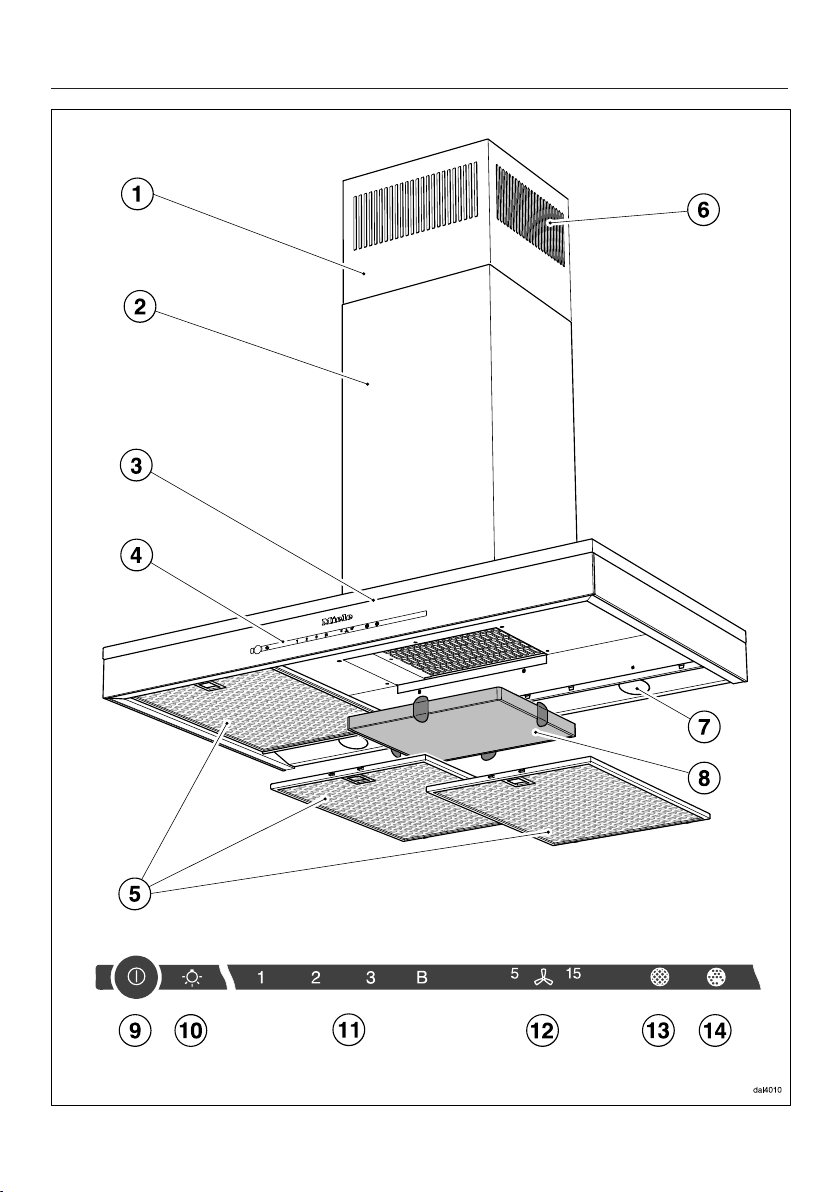
a
Telescopic extension piece
b
Duct cover
c
Canopy
d
Controls
e
Grease filter
f
Recirculation vents
Only for recirculation mode
g
Overhead lighting
h
Charcoal filters
Optional accessories for recirculation mode
i
Sensor control for turning the blower on and off
j
Sensor control for switching the lighting on and off and for dimming the lighting
k
Sensor controls for setting the blower power
l
Sensor control for the delayed shutdown function
m
Sensor control for the grease filter saturation indicator
n
Sensor control for the charcoal filter saturation indicator
Description of functions
16
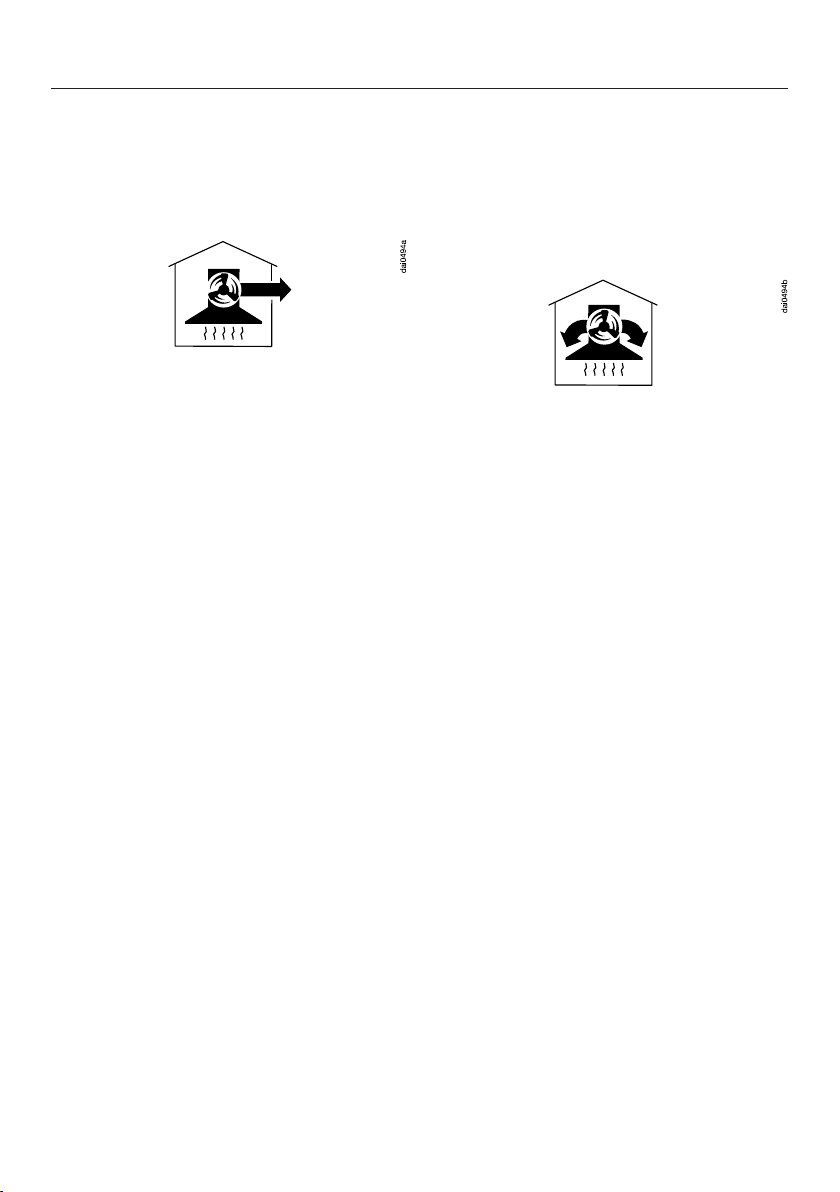
The following functions are available on
your ventilation hood, depending on the
model:
Extraction mode
The air is drawn in and cleaned by the
grease filters and directed outside.
Recirculation mode
The recirculation mode requires a
recirculation kit and OdorFree Charcoal
Filter (available as optional accessories,
see “Technical Data” for more
information)
The air is drawn in and first cleaned by
the grease filters and then by an
OdorFree Charcoal Filter. The cleaned
air is then recirculated back into the
kitchen.
Before using for the first time
17
Selecting extraction mode or
recirculation mode
The ventilation hood can be operated
with either extraction mode or
recirculation mode. The power of the
blower is adapted to suit the selected
mode of operation. The ventilation
hood is set up at the factory for
recirculation mode. It has to be reset
for extraction mode.
To reset it for extraction mode, the filter
saturation indicator for the charcoal
filter(s) has to be deactivated.
Switch off the blower and the lighting.
Touch the delayed shutdown
control and the charcoal filter
control at the same time.
The charcoal filter symbol and one of
the blower power level indicators will
flash.
Touch the B control.
Confirm your choice by touching the
charcoal filter control.
All the indicator lights will go out.
Extraction mode has now been set.
If the new setting is not confirmed
within 4minutes, the ventilation hood
will revert to the previous setting.
Setting up Miele@home
Requirement:
- Home WiFi network
Your ventilation hood is equipped with
an integrated WiFi module. The
ventilation hood can be connected to
the household WiFi network.
You will then be able to operate the
ventilation hood via the Miele app.
Before installing the ventilation hood
in its final location, ensure that the
signal of your WiFi network is strong
enough.
Please note that you cannot set up a
WiFi connection at the same time as a
wireless connection (Con@activity 2.0,
remote control).
You can connect to the household WiFi
network via the Miele app or via WPS.
Miele App
The Miele App is available to download
free of charge from the Apple App
Store
®
or from the Google Play Store™.
Before using for the first time
18
Connecting via the app
The Miele app can be used to connect
to your network.
Install the Miele app on your mobile
device.
To log in you will need:
1. your WiFi network password
2. your ventilation hood password
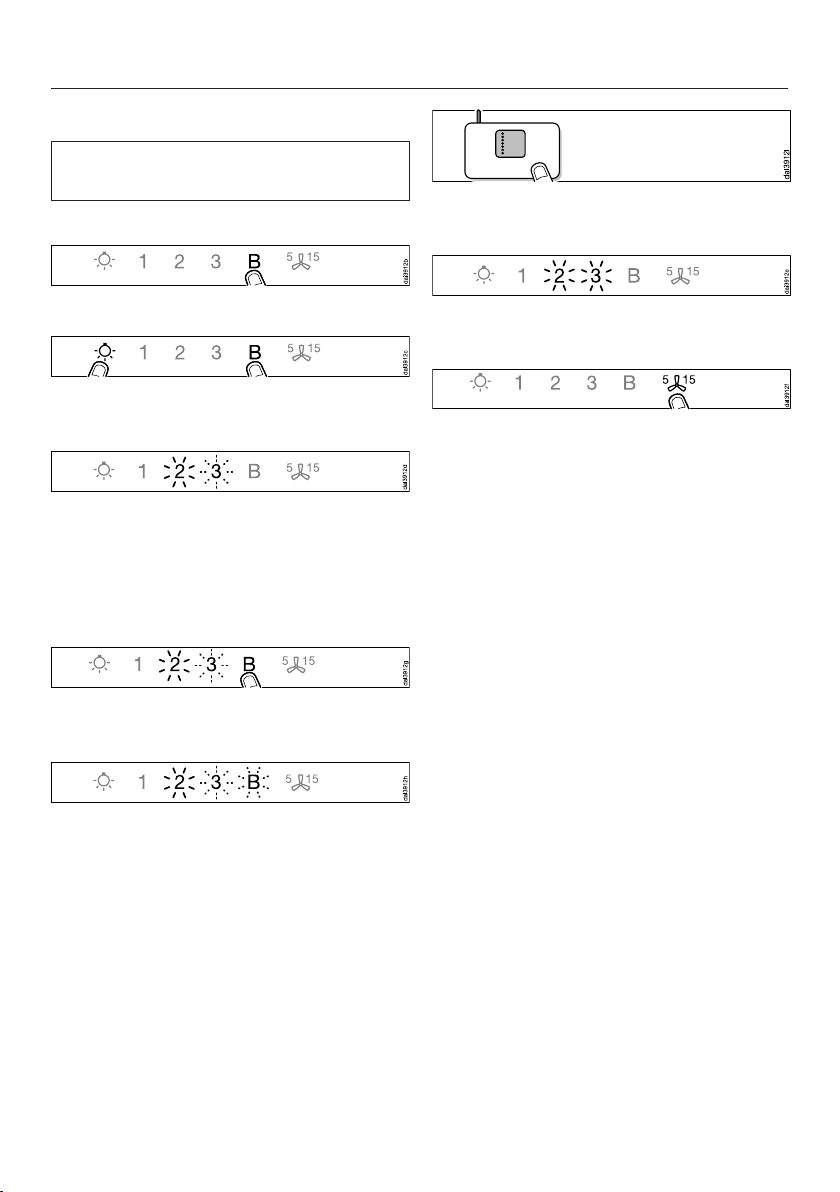
The password for your ventilation hood
consists of the last 9digits of the serial
number. This can be found on the
appliance’s data tag.
The data plate is visible once you have
removed the grease filter.
Start signing the appliance on in the
app. Follow the signing in
instructions.
If requested to activate WiFi on the
ventilation hood, proceed as follows:
Switch the ventilation hood off.
Press and hold the B control.
Touch the lighting control at the
same time.
2 will light up constantly, 3 will flash on
and off.
The ventilation hood will be ready for
connection in the next 2minutes.
Follow the instructions in the app.
When successfully connected, 2 and 3
will light up constantly.
Quit connection mode on the
ventilation hood by touching the
delayed shutdown control.
The ventilation hood can now be
operated via the app.
Before using for the first time
19
Connecting via WPS
Your WiFi router must support WPS
(WiFi Protected Setup).
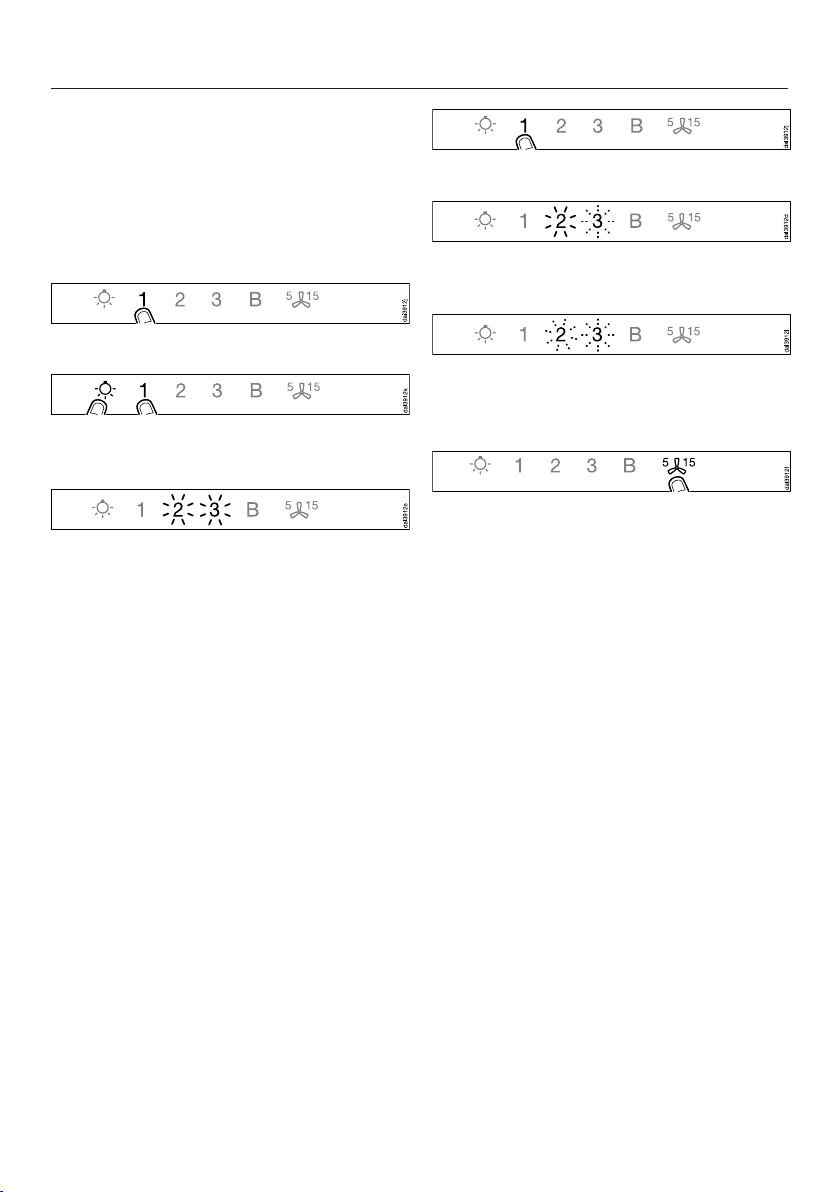
Switch the ventilation hood off.
Press and hold the B control.
Touch the lighting control at the
same time.
2 will light up constantly, 3 will flash on
and off.
The WiFi connection must be started on
the ventilation hood at the same time as
on the WiFi router.
Press the B control on the ventilation
hood after a few seconds.
After a short while, 2 will light up
constantly, and 3 and B will flash on
and off.
The ventilation hood is ready for
connection in the next two minutes.
Start the WiFi connection on your
WiFi router.
When successfully connected, 2 and 3
will light up constantly.
Quit connection mode on the
ventilation hood by touching the
delayed shutdown control.
The ventilation hood can now be
operated via the app.
If the connection fails, you have
probably not connected WPS to your
router quickly enough. Repeat the steps
above.
Tip: If your WiFi router does not support
WPS, please connect via the
Miele@mobile app.
Before using for the first time
20
Signing out of WiFi (reset to factory
settings)
To set up a new WiFi connection, the
existing WiFi connection must be
disconnected.
Switch the ventilation hood off.
Press and hold the 1 control.
Touch the lighting control at the
same time.
With an existing WiFi connection, 2 and
3 will light up constantly.
The ventilation hood is ready for
disconnection during the next two
minutes.
Touch the 1 control.
2 will light up constantly, 3 will flash on
and off.
After a few seconds, 2 and 3 will flash
on and off. The connection has now
been disconnected.
Quit disconnection mode on the
ventilation hood by touching the
delayed shutdown control.
The WiFi connection has now been
disconnected. A new connection can
now be set up.
Before using for the first time
21
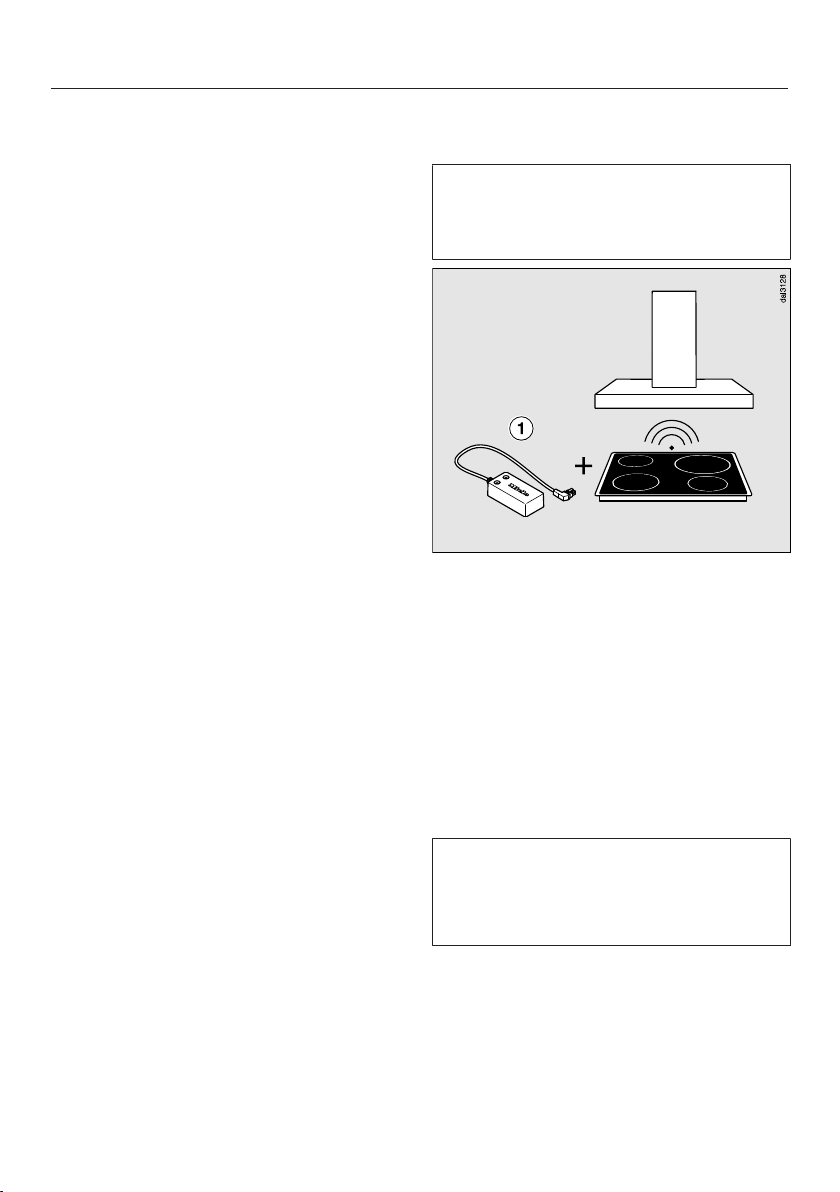
Setting up Con@ctivity
Con@ctivity is the direct communication
system between an induction Miele
cooktop and a Miele ventilation hood. It
enables the ventilation hood to operate
automatically depending on the
operational state of a Miele cooktop
with onset controls.
- When a burner is turned on, the
overhead lighting on the hood turns
on automatically. After a brief delay,
the ventilation hood blower also
comes on.
- The ventilation hood selects the
power setting automatically during
cooking. The power level selected by
the ventilation hood depends on the
number of cooking zones being used
and their power levels.
- After switching the cooktop off, the
blower and the overhead lighting will
switch off automatically after a
specified period of time.
Detailed information about this function
can be found under “Operation”.
Con@ctivity with direct wireless
connection (Con@ctivity 2.0)
Required:
- Con@ctivity 2.0 enabled Miele
induction cooktop
This ventilation hood is supplied with a
Con@ctivity 2.0 wireless stick .
The wireless stick can only be used
with cooktops that are fitted with a slot
for the wireless stick to operate the
Con@ctivity function.
Check the installation instructions for
the Con@ctivity 2.0 stick to ensure
that it is compatible with your
cooktop.
Please note that you cannot set up a
WiFi connection at the same time as a
wireless connection (Con@activity 2.0,
remote control).
Before using for the first time
22
Installing the Con@ctivity 2.0 stick
See the relevant installation
instructions provided with the
Con@ctivity 2.0 stick.
Activating the wireless connection
The ventilation hood and the cooktop
must be installed and operational.
The wireless connection must be
activated on the ventilation hood and
the cooktop at the same time.
Activation on the ventilation hood is
described below.
Activation on the cooktop is described
in the relevant operating and installation
instructions. Please refer to the
operating instructions before starting.
Activate the ventilation hood first, then
the cooktop.
Activating the ventilation hood
The cooktop and ventilation hood
must be switched off.
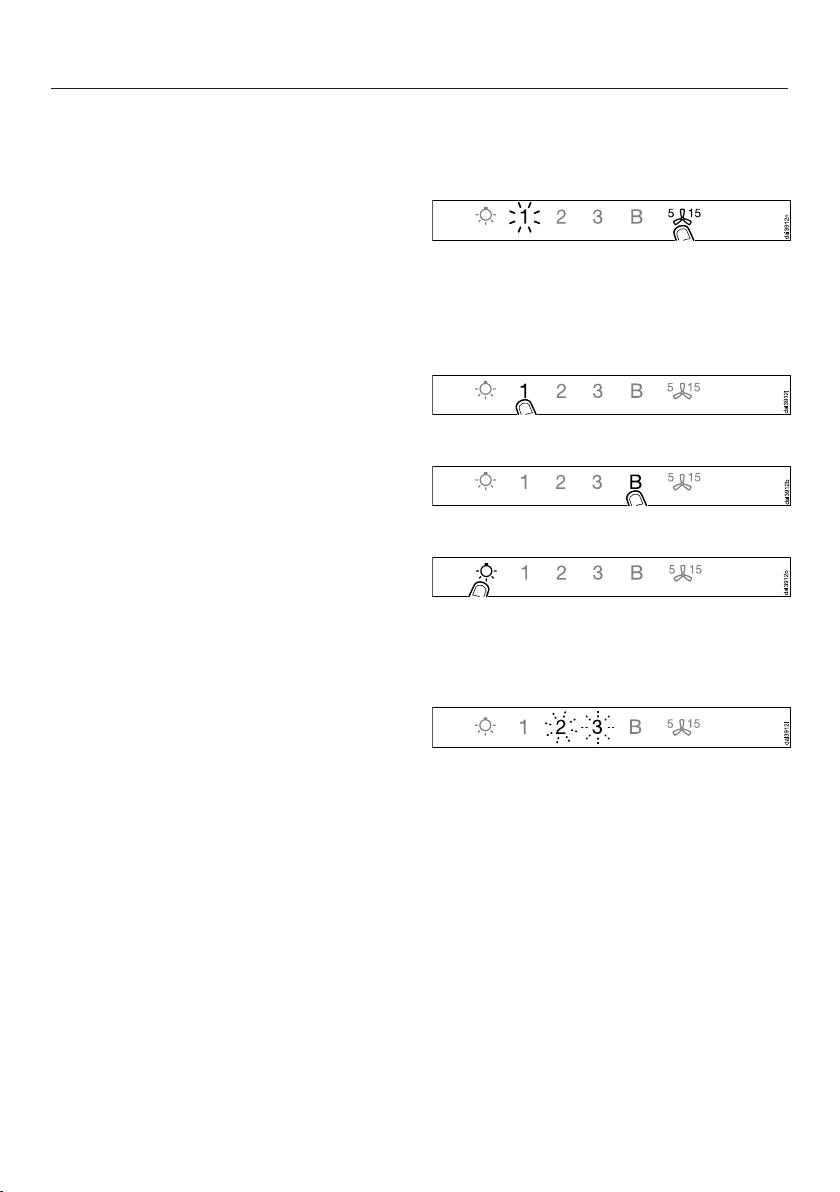
Touch the delayed shutdown
control for approx. 10seconds
until 1 lights up.
Then touch in turn:
- the 1 control,
- then the B control,
- then the lighting control.
The ventilation hood is now in signing
on/off mode.
If a wireless connection has not yet
been established, 2 and 3 will flash at
the same time.
If a wireless connection has already
been established, 2 and 3 will light up
constantly (Con@ctivity 2.0 is already
activated or a remote control is signed
on).
Before using for the first time
23
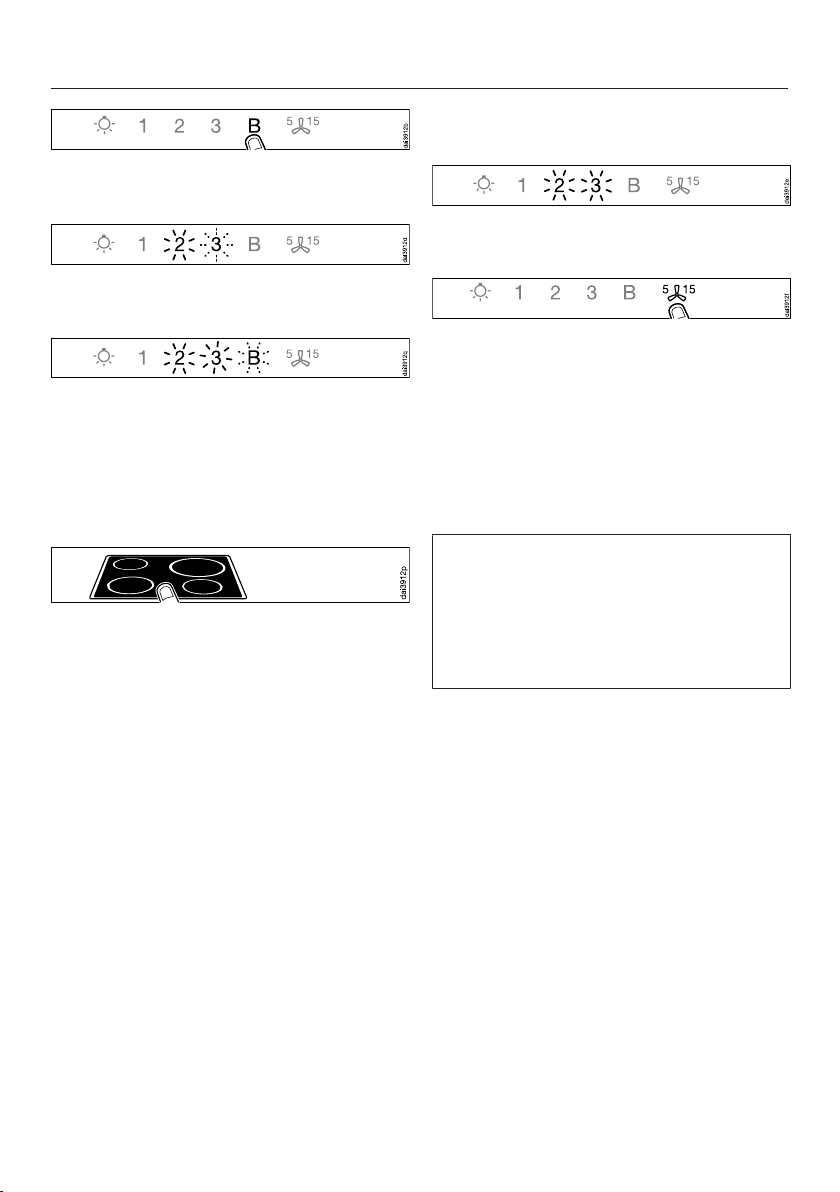
Touch the B control to activate
Con@ctivity 2.0.
2 will light up constantly, 3 will flash on
and off.
After a few seconds, 2 and 3 will light
up constantly, B will flash on and off.
The search for a wireless connection
will start.
Activating the cooktop
While the ventilation hood is
searching for a signal, start activating
the cooktop.
For more details, see the cooktop
operating instructions.
When the cooktop registers that a
connection has been established, exit
activation on the cooktop.
Finishing activation on the ventilation
hood
When successfully connected, B will go
out, and 2 and 3 will light up constantly.
Confirm activation with the delayed
shutdown control. All the
indicator lights will go out.
The Con@ctivity function is now ready
for use.
If you do not confirm within 4minutes,
activation will be canceled.
You only need to carry out the
activation procedure once. If the
appliances are disconnected from the
electricity supply, for example during a
loss of power, they will still remain
activated.
Before using for the first time
24
Activation failed
If a wireless connection cannot be
established despite activation of the
Con@ctivity function on the ventilation
hood and cooktop, the function must
first be deactivated and then
reactivated on both appliances.
Deactivating the wireless connection
The cooktop and ventilation hood
must be switched off.
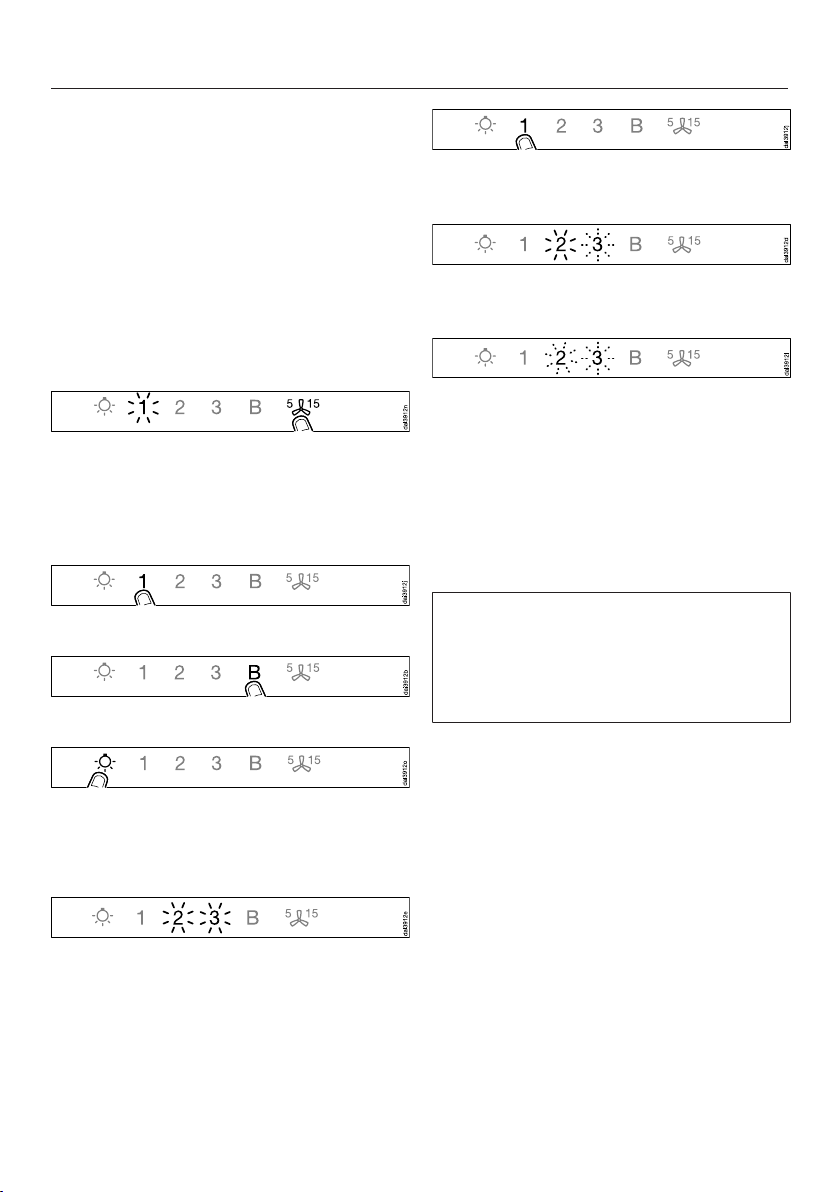
Touch the delayed shutdown
control for approx. 10seconds
until 1 lights up.
Then touch in turn:
- the 1 control,
- then the B control,
- then the lighting control.
The ventilation hood is now in signing
on/off mode.
If a wireless connection has already
been established, 2 and 3 will light up
constantly.
Touch the 1 control to deactivate
Con@ctivity 2.0.
2 will light up constantly, 3 will flash on
and off.
After a few seconds, 2 and 3 will start
flashing on and off.
The wireless connection has now been
deactivated.
To deactivate the cooktop, please
refer to the corresponding operating
instructions.
Please bear in mind that disabling the
connection will also disable any
remote control function being used.
The remote control must then be
reactivated.

Operation (Automatic mode)
25
When Con@ctivity is active, the
ventilation hood always operates in
automatic mode (see “Before using for
the first time – Setting up
Con@ctivity”).
If you wish to operate the ventilation
hood manually; see “Operation
(Manual mode) – Cooking without
Con@ctivity”.
Cooking with Con@ctivity
(Automatic mode)
Turn on a burner to the desired power
setting.
The overhead lighting will come on.
After a few seconds, the blower will
come on, briefly operating at power
level 2 before immediately switching to
level 1.
The ventilation hood selects the power
level automatically during cooking.
This level is determined by the total
output of the cooktop, i.e., the number
of burners in operation and the power
levels selected.
If you select a higher power level on the
cooktop or switch on multiple burners,
the ventilation hood will switch to a
higher blower level.
If you select a lower power level on the
cooktop or turn off a burner, the
ventilation hood will accordingly switch
to a lower blower level.
Examples for power levels 1 to B
Reaction time
Changing the power setting on the
cooktop does not lead to an immediate
increase or decrease in cooking vapors.
For this reason, the hood reacts with a
slight delay.
Delays can also result from the fact that
the cooktop transmits the information to
the hood in intervals.
The reaction time can vary from a few
seconds to a couple of minutes.

Operation (Automatic mode)
26
Cooking process
For example, you switch on a burner
at the highest power level to heat
cookware for frying. After approx.
10seconds to 4minutes, you then
reduce the power level (60seconds
to 5minutes for a HiLight cooktop).
The ventilation hood recognizes a
cooking process.
The ventilation hood turns itself on and
when the cooktop power level has been
reduced, the ventilation hood switches
to power level 3 and remains at that
level for approx. 5minutes.
After this, the blower level is once again
determined by the Con@ctivity function.
You can also manually select a different
blower level before then.
Switching off
Turn off all burners.
Over the next few minutes, the
ventilation hood blower setting will
decrease one level at a time until the
hood eventually turns off.
This helps to neutralize any lingering
vapors and odors in the air.
- From the Booster setting, the blower
switches immediately to level3.
- From level 3, it will switch to level 2
after approx. 1minute.
- From level 2, it will switch to level 1
after 2minutes.
- After 2minutes at level 1, the blower
automatically turns off.
- After another 30seconds, the
overhead lighting turns off.
The cooking process is then finished.

Operation (Automatic mode)
27
Temporarily exiting Automatic
mode
To temporarily exit Automatic mode
when cooking:
Manually select a different blower
level; or
Manually turn the ventilation hood off;
or
Activate the delayed shutdown
function on the ventilation hood.
The blower will switch itself off after
the selected run-on time, and the
lighting will remain on.
The ventilation hood functions are now
operated manually (see “Operation
(Manual mode)”).
Resuming Automatic mode
The ventilation hood resumes
Automatic mode:
- If the ventilation hood has not been
used for a period of approx.
5minutes after the manual selection
of a blower level; or
- If the manually selected blower level
once again matches the automatic
setting; or
- The ventilation hood blower and the
cooktop have been switched off for
at least 30seconds.
Automatic mode will resume next
time the cooktop is switched on.
You can also operate the ventilation
hood manually for a complete cooking
process.
To do so, switch the ventilation hood
blower on before the cooktop.
If the ventilation hood and the cooktop
have been switched off for at least
30seconds after cooking, Automatic
mode will resume next time the cooktop
is switched on.

Operation (Manual mode)
28
Cooking without Con@ctivity
(Manual mode)
The ventilation hood can be operated
manually if:
- The Con@ctivity function is not
activated.
- You have temporarily deactivated the
Con@ctivity function (see “Operation
(Automatic mode) – Temporarily
exiting Automatic mode”).
Turning on the blower
Switch the blower on as soon as you
start cooking. This is to ensure that
vapors are captured right from the start.
Touch the On/Off control.
The blower switches on at power level
2.
Selecting the power level
Power levels 1 to 3 are available for light
to heavy cooking vapors and odors.
For strong vapors and odors that are
temporarily produced when cooking,
e.g., during searing, select the B
booster level.
Select the power level required by
tapping a button from 1 to B.
Reducing power down from the
Booster setting
If power management is activated
(default setting), the blower
automatically switches back to level 3
after 5minutes.
Selecting the delayed
shutdown time
It is advisable to run the blower for a
few minutes after cooking has finished.
This helps to neutralize any lingering
vapors and odors in the air.
It also reduces the risk of residues
accumulating in the ventilation hood
and any resultant odors.
The delayed shutdown function enables
the blower to continue running for a
pre-determined time before switching
itself off automatically.
After you have finished cooking,
touch the delayed shutdown
control.
- Once: blower switches off after
5minutes (5 lights up).
- Twice: blower switches off after
15minutes (15 lights up).
- If you touch the delayed shutdown
control again, the blower will
remain switched on ( will go out).
Turning off the blower
Press the On/Off control to turn
the blower off.

Operation (Manual mode)
29
Dimming/switching the
overhead lighting on/off
The overhead lighting can be switched
on and off and dimmed independently
of the blower.
Touch the lighting control briefly to
switch it on or off.
The lighting will switch on at maximum
brightness.
With the lighting switched on, press
and hold the lighting control. The
brightness will gradually dim until you
release the control.
To increase the brightness, press and
hold the lighting control again until
the desired level has been reached
and then release it.
Power management
The ventilation hood is equipped with a
power management system. Power
management helps to save energy. It
ensures that the blower power level is
reduced automatically and that the
lighting is switched off.
- If the booster level is selected, the
blower automatically switches to
level 3 after 5 minutes.
- If the blower is set to level 3, 2, or 1,
it switches back one blower setting
after 2 hours and then in 30-minute
intervals until the blower eventually
switches off.
- The overhead lighting will switch off
automatically after 12hours.
You can deactivate power
management.
Keep in mind that this may increase
energy consumption.

Operation (Manual mode)
30
Activating/deactivating power
management
Switch off the blower and the lighting.
Touch the delayed shutdown
control for approx. 10seconds,
until 1 lights up in the power level
display.
Then press in order:
- the lighting control,
- the 1 control, and then
- the lighting control.
When power management is turned on,
the 1 and B indicators will be
continuously lit.
When it is turned off, the 1 and B
indicators will flash.
Touch the 1 control to deactivate
power management.
The 1 and B indicators will flash.
Touch the B control to activate power
management.
The 1 and B indicators will be
continuously lit.
Confirm the setting by pressing the
delayed shutdown control.
All the indicator lights will go out.
If you do not confirm the new setting
within 4minutes, the ventilation hood
will revert to the previous setting.
Safety shut-off
If power management has been
deactivated, the ventilation hood will
switch itself off automatically after
12hours if it has been left on (blower
and overhead lighting).
To switch it back on, press the On/
Off control or the lighting
control.

Operation (Automatic and Manual modes)
31
Filter saturation indicator
The ventilation hood registers the length
of time it has been operated.
The filter saturation indicators show
when the filters need to be cleaned or
changed by lighting up the grease filter
symbol or charcoal filter symbol .
Additional information on cleaning and
changing the filters and resetting the
filter saturation indicators can be found
under “Cleaning and care”.
Adjusting the grease filter filter
saturation indicator
The filter saturation indicator can be set
to suit the customer’s cooking habits.
The factory default setting is a cleaning
interval of 30hours.
- Select a shorter interval of 20hours if
food is fried regularly.
- A shorter cleaning interval is also
recommended if the customer only
cooks occasionally. This will prevent
grease buildup from hardening and
making cleaning more difficult.
- Select a longer cleaning interval of 40
or 50hours if the customer uses very
little fat when cooking.
Switch off the blower and the lighting.
Touch the delayed shutdown
control and the grease filter
control at the same time.
The grease filter symbol and one of
the blower power level indicators will
flash.
The indicators 1 to B show the current
time setting:
1............................................... 20hours
2............................................... 30hours
3............................................... 40hours
B .............................................. 50hours
Touch the relevant control to select
the duration required.
Confirm your choice by touching the
grease filter control .
All the indicator lights will go out.
If the new setting is not confirmed
within 4minutes, the ventilation hood
will revert to the previous setting.

Operation (Automatic and Manual modes)
32
Adjusting or deactivating the filter
saturation indicator for the charcoal
filter
The charcoal filter is needed for
recirculation mode.
The filter saturation indicator can be set
to suit the customer’s cooking habits.
It has to be deactivated for vented
mode.
The factory default setting is an interval
of 180hours.
Switch off the blower and the lighting.
Touch the delayed shutdown
control and the charcoal filter
control at the same time.
The charcoal filter symbol and one of
the blower power level indicators will
flash.
The indicators 1 to B show the current
time setting:
1............................................. 120hours
2............................................. 180hours
3............................................. 240hours
B ......................................... Deactivated
Touch the relevant control to select
the duration required.
Confirm your choice by touching the
charcoal filter control.
All the indicator lights will go out.
If the new setting is not confirmed
within 4minutes, the ventilation hood
will revert to the previous setting.
Checking the filter saturation
indicator
Before the set operating time has run
out, you can check what percentage of
the time has elapsed.
Press the On/Off control to turn
the blower on.
Press and hold the grease filter
control or the charcoal filter
control .
One or more of the power level
indicators will flash.
The number of flashing indicators
shows the elapsed operating time as a
percentage.
1 ................................................... 25%
1 and 2 ........................................ 50%
1 to 3 ........................................... 75%
1 toB ......................................... 100%
The elapsed operating time remains
stored in the memory when the
ventilation hood is turned off or in the
event of an interruption to the power
supply.

Energy-saving tips
33
This hood operates in a very efficient
and energy-saving manner. The
following will help you to save even
more energy when using it:
- Ensure that there is sufficient
ventilation in the kitchen when
cooking. If there is insufficient air flow
during extraction mode, the hood
cannot operate efficiently, causing
increased operating noise levels.
- Always cook with the lowest possible
setting. This produces fewer cooking
vapors so that you can use a lower
hood power level and therefore
benefit from reduced energy
consumption.
- Clean or change the filters at regular
intervals. Heavily soiled filters reduce
performance, increase the risk of fire
and are unhygienic.
- Use the Con@ctivity function. The
ventilation hood will switch on and off
automatically. The ventilation hood
will select the optimum power level
for the cooking you are doing, which
ensures low energy consumption.
- If you are operating the ventilation
hood manually, please note the
following:
– Check the power level selected on
the ventilation hood. A low power
level is usually sufficient. Only use
the Booster setting when
necessary.
– When a large volume of cooking
vapors are being produced, switch
to a high power level in good time.
This is more efficient than
operating the hood for longer to try
to capture cooking vapors that
have already been distributed
throughout the kitchen.
– Make sure that you switch off the
hood after use.
If cooking vapors and odors still
need to be removed from the
kitchen air after cooking, use the
delayed shutdown function. The
blower will switch off automatically
after the selected delayed
shutdown time.
Cleaning and care
34
Before proceeding with any
maintenance or cleaning task, the
ventilation hood must be
disconnected from the power supply,
see “IMPORTANT SAFETY
INSTRUCTIONS”.
Stainless steel housing
General information
The surfaces and control buttons
are susceptible to scratching and
chipping.
Observe the following cleaning
instructions.
Clean all surfaces and control buttons
using warm water and liquid dish
soap. Apply with a sponge cloth.
After cleaning, dry the surfaces with a
soft cloth.
Avoid the following:
- Cleaners containing soda, acid or
chloride, or cleaners containing
solvents
- Abrasive cleaners such as scouring
powder, scouring liquid, abrasive
sponges such as pot scourers, or
used sponges that still contain
residues from abrasive cleaners
Important information for appliances
with stainless steel surfaces
Stainless steel surfaces can be cleaned
with a non-abrasive cleaning agent
designed specifically for use on
stainless steel.
To prevent the surfaces from quickly
becoming dirty again, we recommend
treating them with a stainless steel care
product (available from Miele).
Important information for appliances
with lacquered housing
Minor scratches on the surface are
inevitable when cleaning the casing;
they may be visible depending on the
lighting in the kitchen.
Special instructions for glass
surfaces
Glass surfaces can be cleaned using
a cleaner specifically for use on glass.
Cleaning and care
35
Grease filters
Risk of fire
Oversaturated grease filters are a fire
hazard.
Clean the grease filters at regular
intervals.
The re-usable metal grease filters in the
appliance remove solid particles
(grease, dust, etc.) from the kitchen
vapors, preventing soiling of the
ventilation hood.
The grease filters must be cleaned at
regular intervals.
Heavily soiled grease filters hinder air
extraction and will lead to increased
levels of soiling in the ventilation hood
and in the kitchen.
Cleaning intervals
Accumulated grease solidifies over a
longer period of time and makes
cleaning more difficult. The grease
filters should therefore be cleaned every
3 to 4 weeks.
The filter saturation indicator reminds
you to regularly clean the grease filters
by illuminating the grease filter
symbol.
You can adjust the interval for the filter
saturation indicator to match your
cooking habits (see “Operation
(Automatic and Manual modes)”).
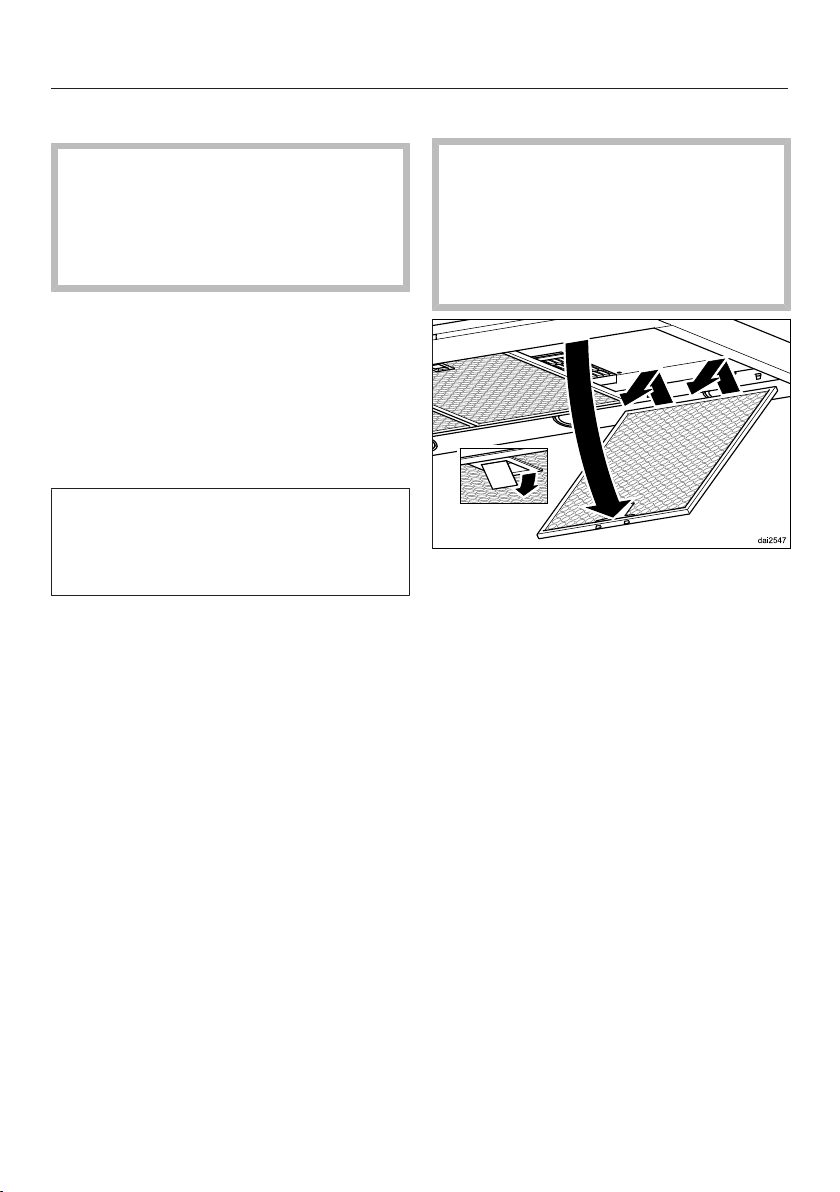
Removing the grease filters
When handling the grease filter,
be careful not to drop it.
This can result in damage to the filter
and the cooktop below.
Make sure you hold the filter securely
at all times when handling it.
To remove a grease filter, release the
locking clip. Then, open the filter to a
45° angle, unhook it, and remove it
from the hood.
Cleaning the grease filters by hand
Clean the filters with a soft nylon
brush in a mild solution of hot water
and dish soap. Do not use undiluted
dish soap.
Cleaning and care
36
Unsuitable cleaning agents
Unsuitable cleaners can cause damage
to the filter surfaces if used regularly.
Do not use any of the following:
- Lime removers
- Abrasive powders or abrasive liquids
- Aggressive all-purpose cleaners and
degreaser sprays
- Oven sprays
Cleaning the grease filters in a
dishwasher
Place the grease filters upright or
slightly inclined in the lower basket.
Ensure the spray arm is not
obstructed.
Use a commonly available household
dishwashing detergent.
In a Miele dishwasher use the
“Normal” program.
Depending on the detergent used,
cleaning the filters in a dishwasher
may cause the inside filter surfaces to
become discolored. However, this will
not affect the functioning of the grease
filters in any way.
After cleaning
After cleaning, leave the filters on an
absorbent surface to dry.
When removing the filters for
cleaning, also clean off any
accessible oil or fat buildup from the
housing. Doing so will prevent a fire
hazard.
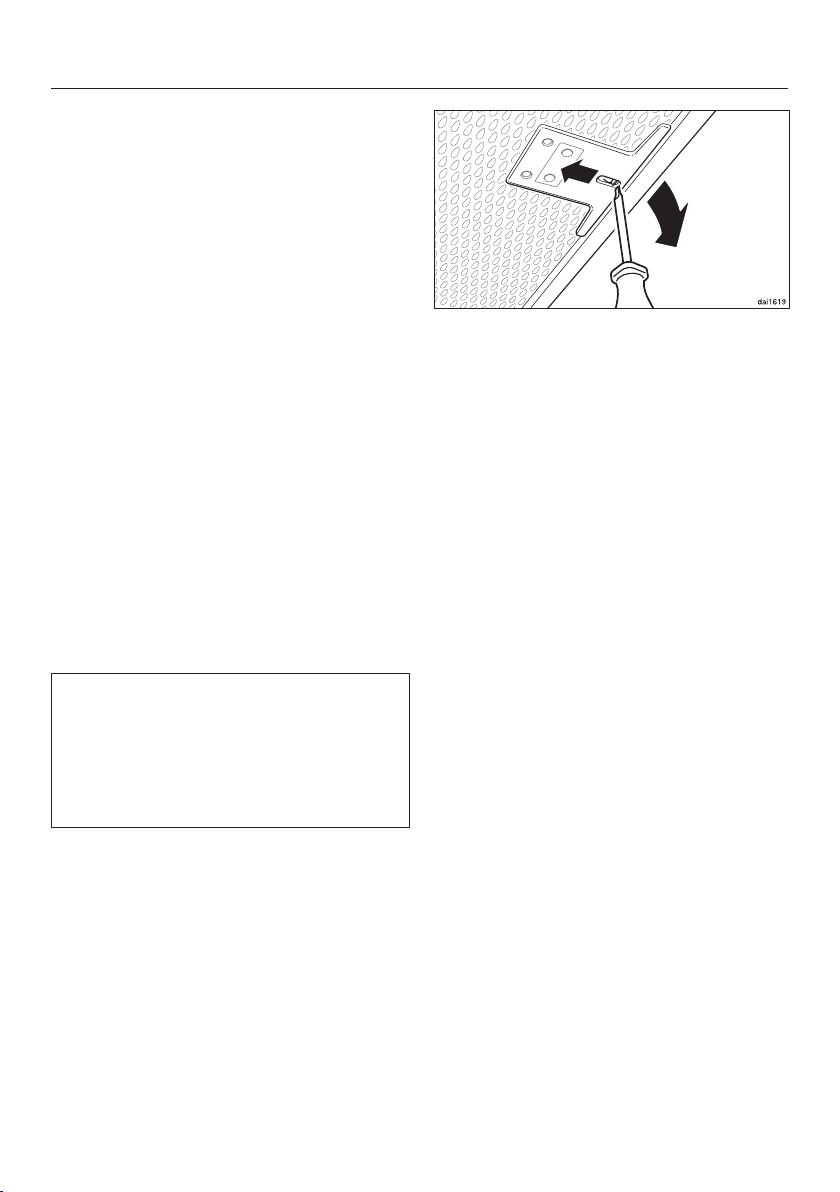
Reinstall the grease filters. When
inserting the filters, make sure that
the locking clip is facing down.
If the filters have been installed
incorrectly, you can insert a small
screwdriver into the slit to disengage
the locking clip.
Resetting the filter saturation
indicator for the grease filters
Once cleaning is complete, the filter
saturation indicator must be reset.
While the blower is turned on, touch
the grease filter control for approx.
3seconds, until only the 1 is flashing.
The grease filter symbol goes out.
When cleaning the grease filters before
the full operating time has elapsed:
Touch the grease filter control for
approx. 6seconds, until only the 1 is
flashing.
Cleaning and care
37
OdorFree Charcoal Filter
With recirculation mode, a charcoal
filter must be fitted in addition to the
grease filters. The charcoal filter is
designed to absorb cooking odors.
The charcoal filter is fitted in the canopy
above the grease filters.
How to install/replace a charcoal
filter
Remove the grease filters before
fitting or replacing a charcoal filter.
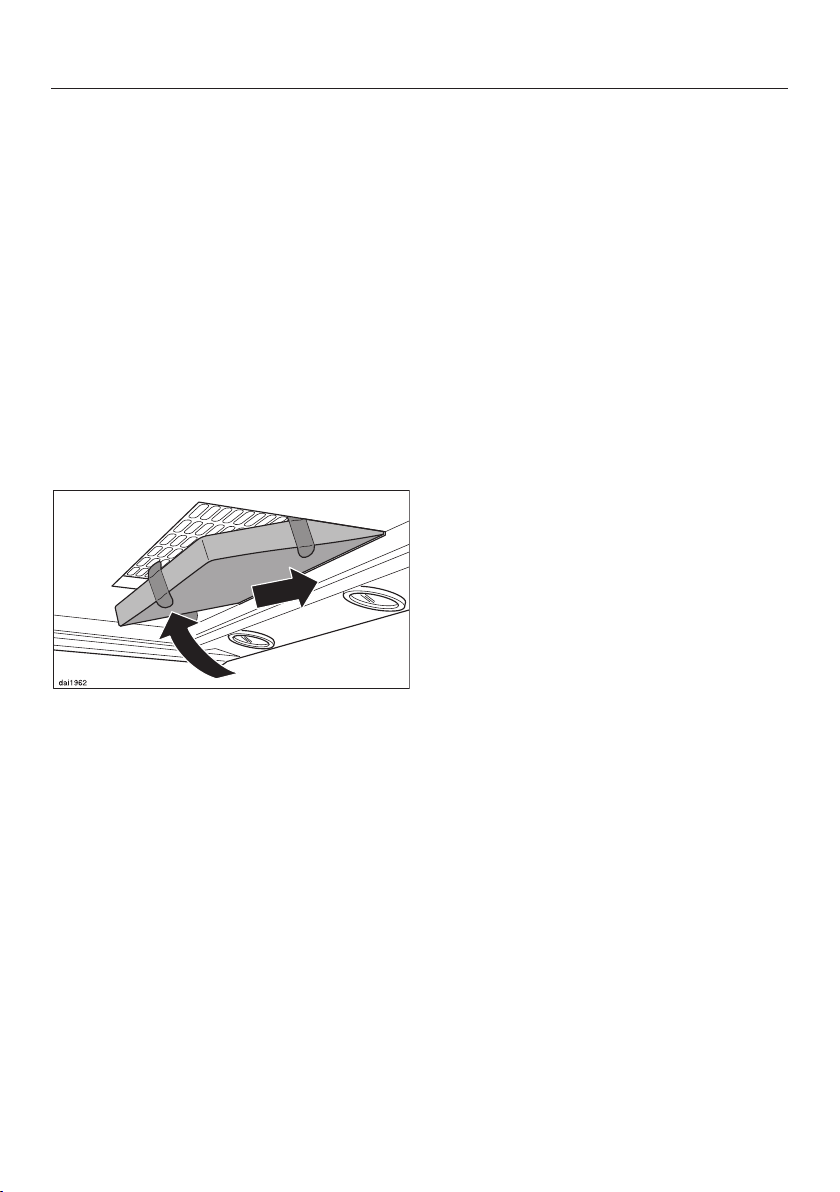
Take the charcoal filter out of its
packaging.
Slide the filter into the back of the
intake frame, then push the front of
the filter up into the frame.
Reinsert the grease filters.
When to change the OdorFree
Charcoal Filter
Replace the charcoal filter when it no
longer absorbs kitchen odors
effectively.
It should be replaced at least every 6
months.
The filter saturation indicator reminds
you to regularly replace the charcoal
filter by illuminating the charcoal filter
symbol.
Resetting the filter saturation
indicator for the charcoal filters
After changing the charcoal filters, the
filter saturation indicator must be reset.
Touch the charcoal filter control for
approx. 3seconds with the blower
switched on until only the indicator
light for level 1 is flashing.
The charcoal filter symbol will go
out.
If you want to replace the charcoal filter
before the full operating time elapses:
Touch the charcoal filter control for
approx. 6seconds until only the
indicator light for level 1 is flashing.
Disposing of charcoal filters
Used charcoal filters can be disposed
of with normal household waste.
Charcoal filters are available to order via
the Miele Web Store (see end of this
booklet for contact details), or from
your Miele dealer.
The charcoal filters are listed under
“Technical data” at the back of this
booklet.
Installation
*INSTALLATION*
38
Before installation
Before installation, it is important
to read the information contained in
this chapter and in the “IMPORTANT
SAFETY INSTRUCTIONS” chapter.
Removing the protective film
The housing components are covered
by a protective film to prevent them
from damage during transport.
Please remove this film before
installing the housing components. It
can be peeled off easily without any
additional tools.
Installation materials
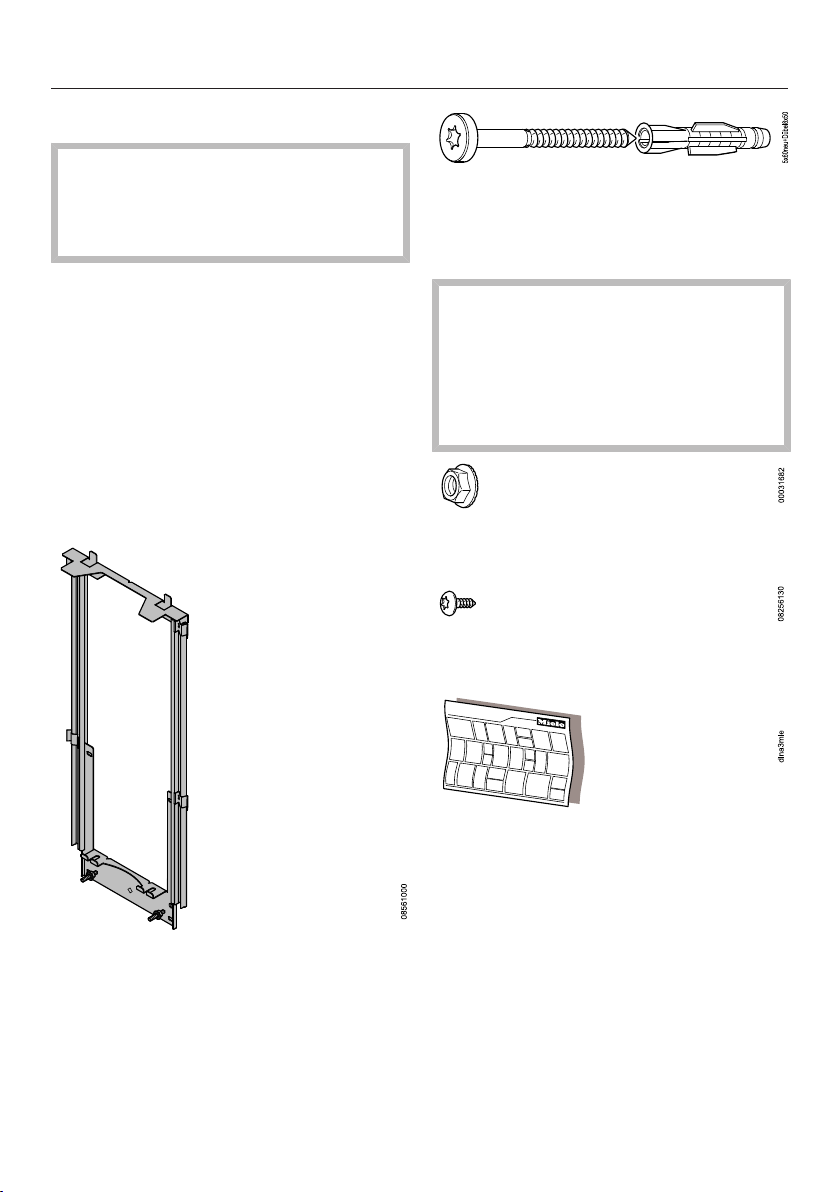
Telescopic wall bracket
for securing the ventilation system on
the wall.
6 screws 5x60mm and
6 plugs 8x50mm
for securing the ventilation hood on the
wall.
The screws and plugs are
designed for use in solid walls only.
Use different fasteners for other wall
construction types.
Make sure that the wall can support
the load.
2M6locknuts
for mounting the appliance unit
2 screws 3.9x7.5mm
for securing the duct cover
Montage
Installation
Montaje
Montaggio
Montering
Montagem
Asennus
Installation plan
See the installation plan for details of
the individual steps involved in the
installation of this appliance.
Installation
*INSTALLATION*
39
DUW20
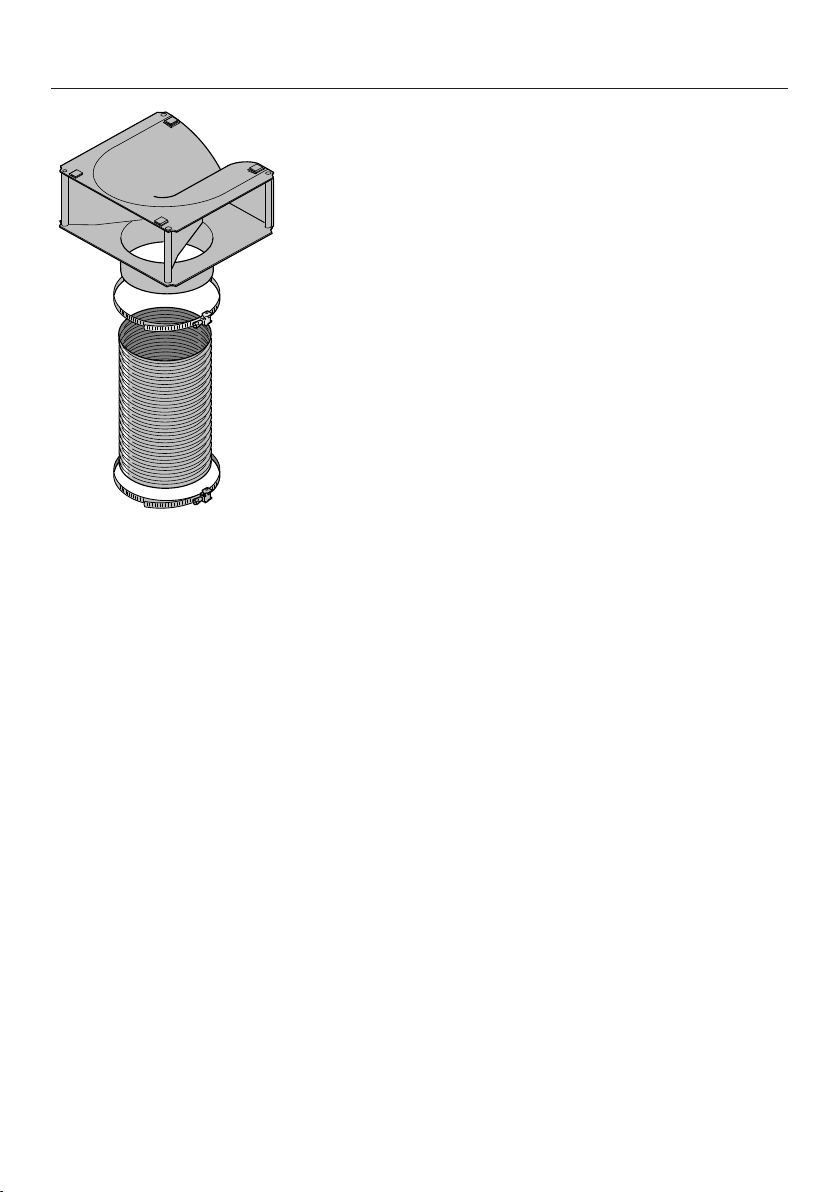
Conversion kit for recirculation
mode
The conversion kit contains an exhaust
grille, hose, and hose clips (not
supplied, but available as an optional
accessory. See “Technical data”).
Installation
*INSTALLATION*
40
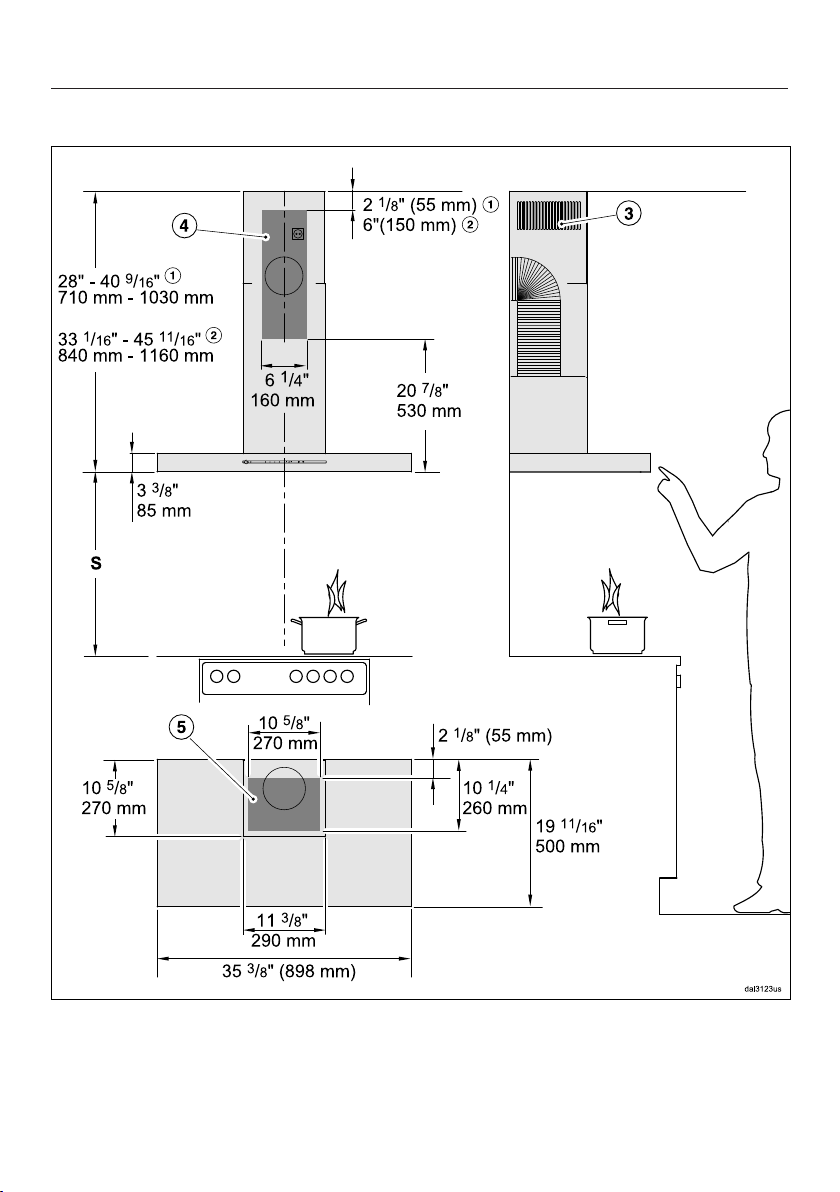
Appliance dimensions
The drawing is not to scale
a
Extraction mode
b
Recirculation
Installation
*INSTALLATION*
41
c
Air vent positioned at the top for recirculation
de
Installation area (only d is required for recirculation operation). Wall or ceiling
area for the ducting cutout and for the electrical outlet. For recirculation
operation, only an electrical outlet needs to be installed.
Exhaust connection 6" (150mm)
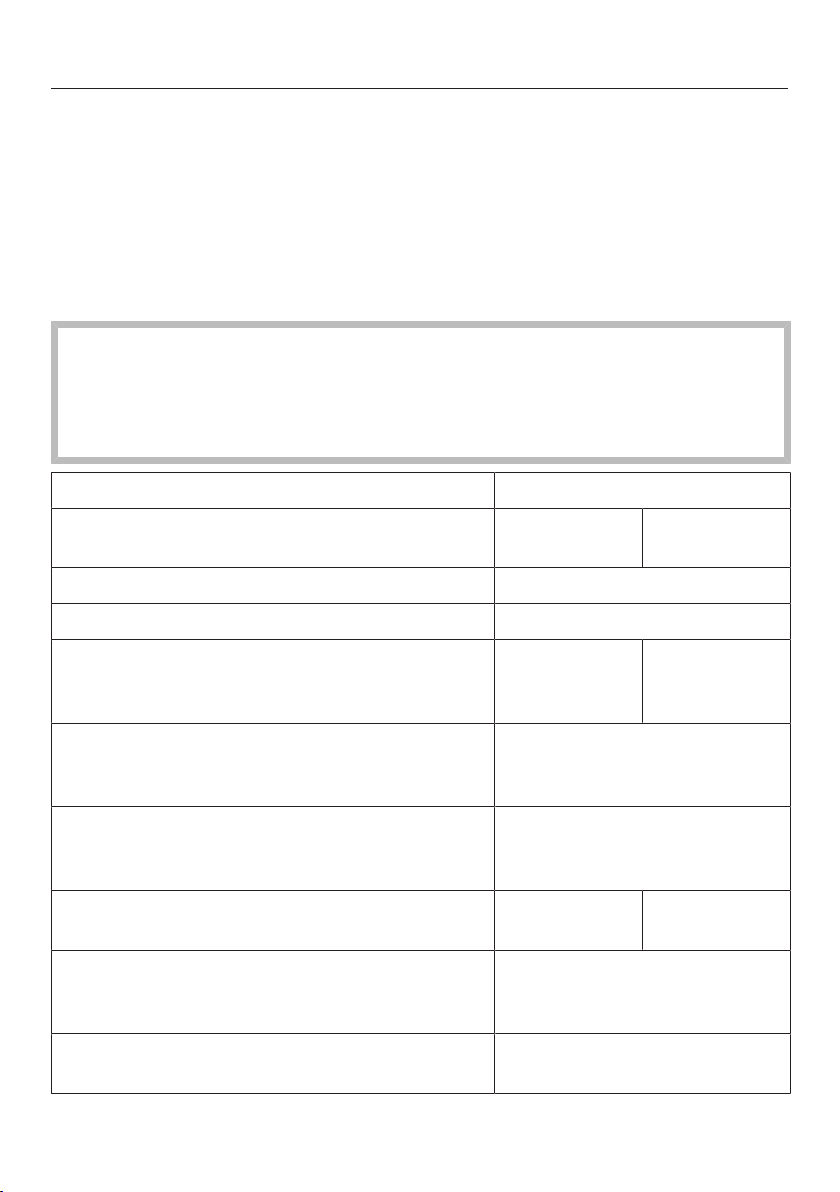
Distance between cooktop and ventilation hood (S)
Provided a larger distance is not given by the manufacturer of the cooktop,
follow the minimum safety distances between a cooktop and the bottom of the
hood.
Please also observe the information contained in the “IMPORTANT SAFETY
INSTRUCTIONS” section.
Minimum distance S
Cooking appliance Miele
appliance
Non-Miele
appliance
Electric Cooktops 24" (610mm)
Electric Barbeques and Fryers 26" (660mm)
Multiburner Gas Cooktops
≤ 43,000 BTU/hr (12.6kW),
no burner > 15,000 BTU/hr (4.5 kW).
26" (660mm) 30" (760mm)
Multiburner Gas Cooktops
≤ 73,800 BTU/hr (21.6kW),
no burner > 16,500 BTU/hr (4.8 kW)
30" (760mm)
Multiburner Gas Cooktops
> 73,800 BTU/hr (21.6kW),
or one of the burners > 16,500 BTU/hr (4.8 kW)
Not possible
Single Burner Gas Cooktops
≤ 20,500 BTU/hr (6 kW)
26" (660mm) 30" (760mm)
Single Burner Gas Cooktops
> 20,500 BTU/hr (6 kW)
≤ 27,600 BTU/hr (8.1 kW)
30" (760mm)
Single Burner Gas Cooktops
> 27,600 BTU/hr (8.1 kW)
Not possible

Installation
*INSTALLATION*
42
Installation recommendations
- A distance of at least 26" (660mm) is
recommended above electric
cooktops to provide more workspace
and easier cooking under the hood.
- When selecting an installation height,
always take the user height into
consideration. Users should have
ample space to work comfortably on
the cooktop and reach the ventilation
hood controls with ease.
- Please note that the greater the
distance from the cooktop, the less
effective the hood is at drawing in the
cooking vapors.
- To achieve optimum vapor extraction,
the hood must be centered over the
cooktop, not to the side.
- The cooktop should be no wider than
the hood. Preferably, it should be
narrower for better extraction.
- The mounting area must be easily
accessible. The ventilation hood
should be easy to reach and
disassemble in case a service call is
necessary. This should be taken into
consideration when planning the
position of cabinetry, shelves,
ceilings or decorative elements in the
vicinity of the ventilation hood.
Drilling diagram for wall
mounting
Please follow the directions given in
the installation instructions supplied
for drilling.
When installing a custom back wall
with pre-drilled holes, please refer to
the drilling distances in the drawing
above (screws ³/₁₆" (5mm)).
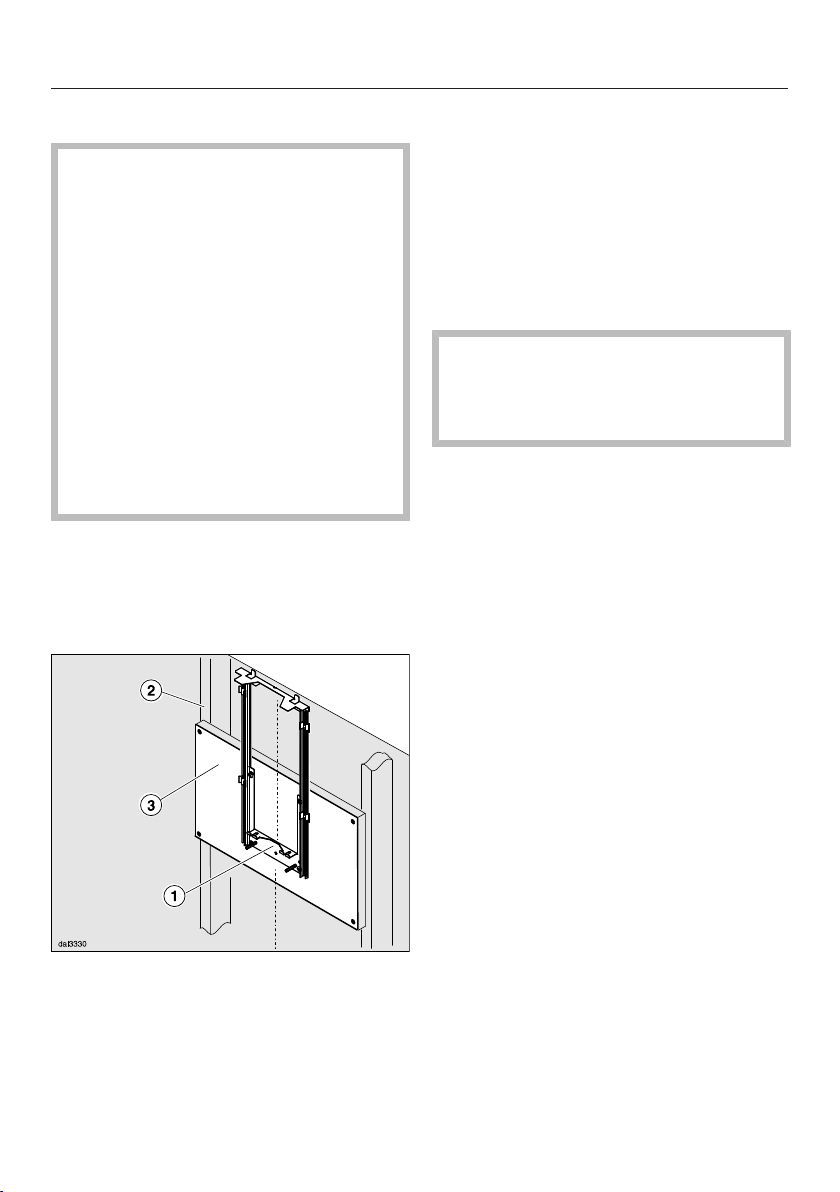
Installation
*INSTALLATION*
43
Plywood backing
The majority of the weight of the
installed ventilation system will be
supported by the lower retaining
plate. It must be firmly attached to
the stud framing behind the drywall.
If studs are not available in the
required locations, a plywood
backing (min. ½" (13mm) thick)
spanning at least two studs must be
installed.
Failure to adequately support the
weight as stated may result in the
ventilation system falling off the wall,
causing personal injury and property
damage.
If plywood backing is not needed,
proceed to the included “Installation
diagram”.
To install a plywood backing
Determine and mark the location of
the retaining plate for the canopy
as outlined on the “Installation
diagram”.
Make a cutting line 3“ (76mm) above
and 3” (76mm) below the outline of
the retaining plate.
Find the studs to the left and right
of the mounting location by tapping
the wall or using a stud finder.
Mark a vertical cutting line along the
center of each stud.
CAUTION: When cutting or drilling
into the wall or ceiling, do not
damage electrical wiring and other
hidden utilities.
Remove the drywall between the
cutting lines and replace it with
plywood of a matching thickness
(min. ½" (13mm) thick). Tape the
joints and refinish the wall.
Proceed to the enclosed “Installation
diagram” to complete the installation.
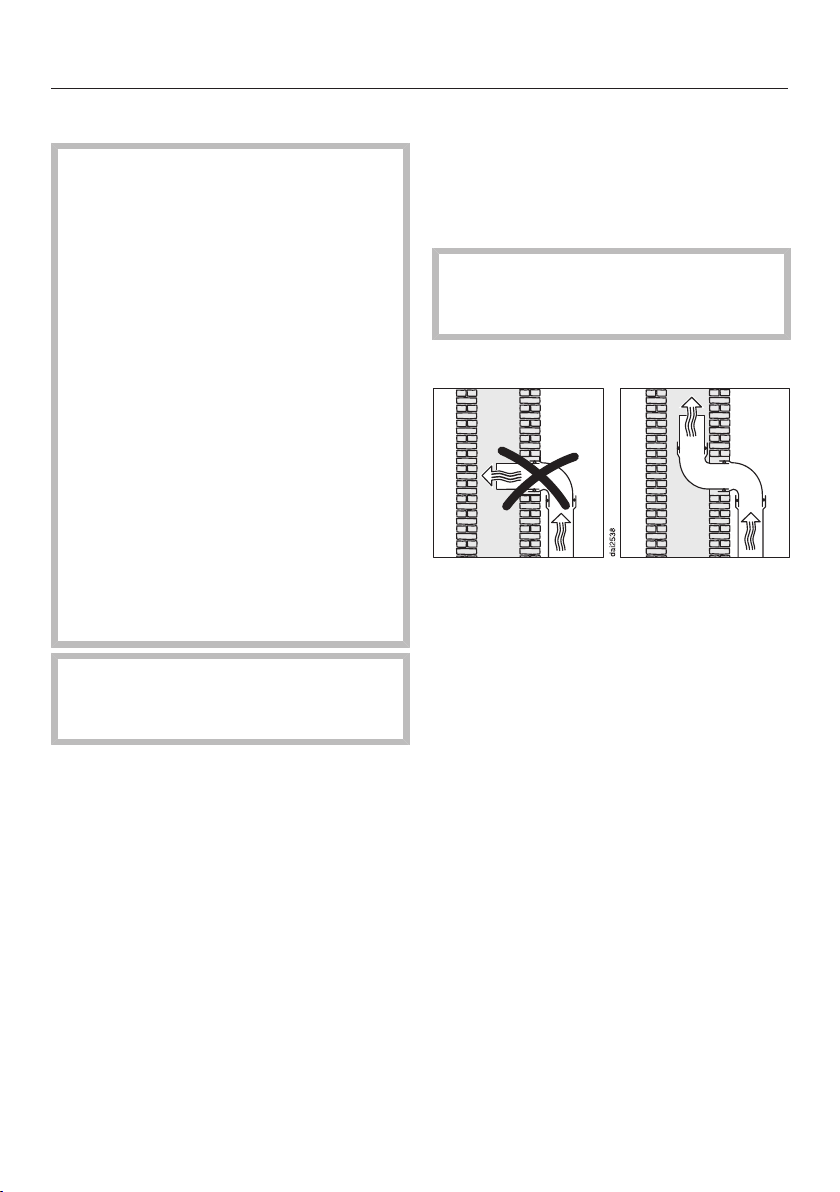
Installation
*INSTALLATION*
44
Air venting
WARNING: Danger of toxic fumes.
Gas cooking appliances release
carbon monoxide that can be
harmful or fatal if inhaled.
To reduce the risk of fire and to
properly exhaust air, the exhaust
gases extracted by the hood should
be vented outside of the building
only.
Do not vent exhaust air into spaces
within walls or ceilings or in attics,
crawl spaces or garages.
To reduce the risk of fire, only use
metal ductwork.
Please read and follow the
“IMPORTANT SAFETY
INSTRUCTIONS” to reduce the risk
of personal injury. Follow all local
building codes when installing the
hood.
Only use smooth pipes or flexible
ducting made from approved non-
flammable materials for ducting.
To achieve the most efficient air
throughput with the lowest noise levels,
please note the following:
- The diameter of the vent ducting
must not be smaller than the cross-
section of the vent collar (see
“Appliance dimensions”). This applies
in particular when using flat ducting.
- The ducting should be as short and
straight as possible.
- Only use wide radius bends.
- The ducting must not be kinked or
compressed.
- All connections must be strong and
airtight.
- If the ducting has flaps, these must
be opened whenever the ventilation
hood is switched on.
Any constriction of the air throughput
will reduce extraction performance
and increase operating noise.
Ventilation stack
If the exhaust air is to be ducted into a
flue, the ducting must be directed in the
flow direction of the flue.
If the flue is used by several ventilation
units, the cross-section of the flue must
be large enough.
Non-return flap
Use a non-return flap in the vent
system.
A non-return flap ensures that when the
ventilation hood is not in operation, the
duct is closed to prevent unwanted
exchange of room air and outside air.
If the exhaust is ducted through an
outside wall, a Miele wall vent or roof
vent (available as an optional
accessory) is recommended. Both of
these have a built-in non-return flap.
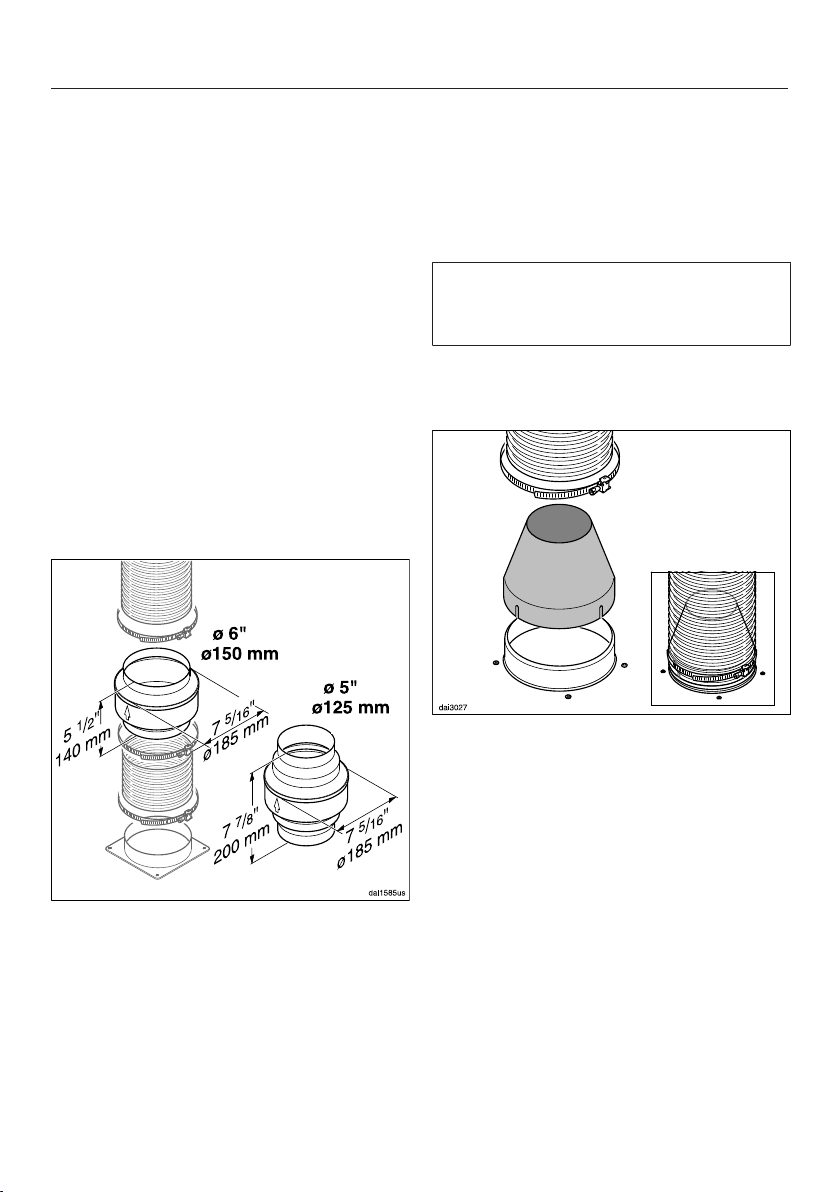
Installation
*INSTALLATION*
45
If the on-site vent system does not have
a non-return flap, you can purchase one
as an optional accessory.
Condensate
If the ducting is to run through cool
rooms or ceiling space, for example, the
significant variations in temperature
between the different areas can cause
condensate to form. Insulate the
ducting to reduce temperature
variations.
If the ducting is to be laid horizontally, it
must be laid with a downwards sloping
gradient of at least ³/₈" (1cm) per meter.
This is to ensure that condensate
cannot drain back into the ventilation
hood.
In addition to insulating the ducting, it is
advisable to also install a condensate
trap for collecting and evaporating any
potential condensate.
Condensate traps for 5" (125mm) or
6" (150mm) diameter ducting are
available as optional accessories.
When installing a condensate trap,
ensure that it is positioned vertically
and as closely as possible to the
ventilation hood above the exhaust
vent. The arrow on the casing indicates
the direction of airflow.
Miele will not accept warranty claims
for any functional defects or damage
caused by inadequate ducting.
Reducing Collar
(optional accessory)
If you would like to reduce the
environmental impact of your ventilation
system by limiting the CFM output the
Reducing Collar can be installed. It
reduces the air flow to less than
400CFM. Check local building codes
for max. CFM requirements.
Push the Reducing Collar on the
exhaust port of the blower.
Push the exhaust hose over it.
Secure both with a hose clamp.
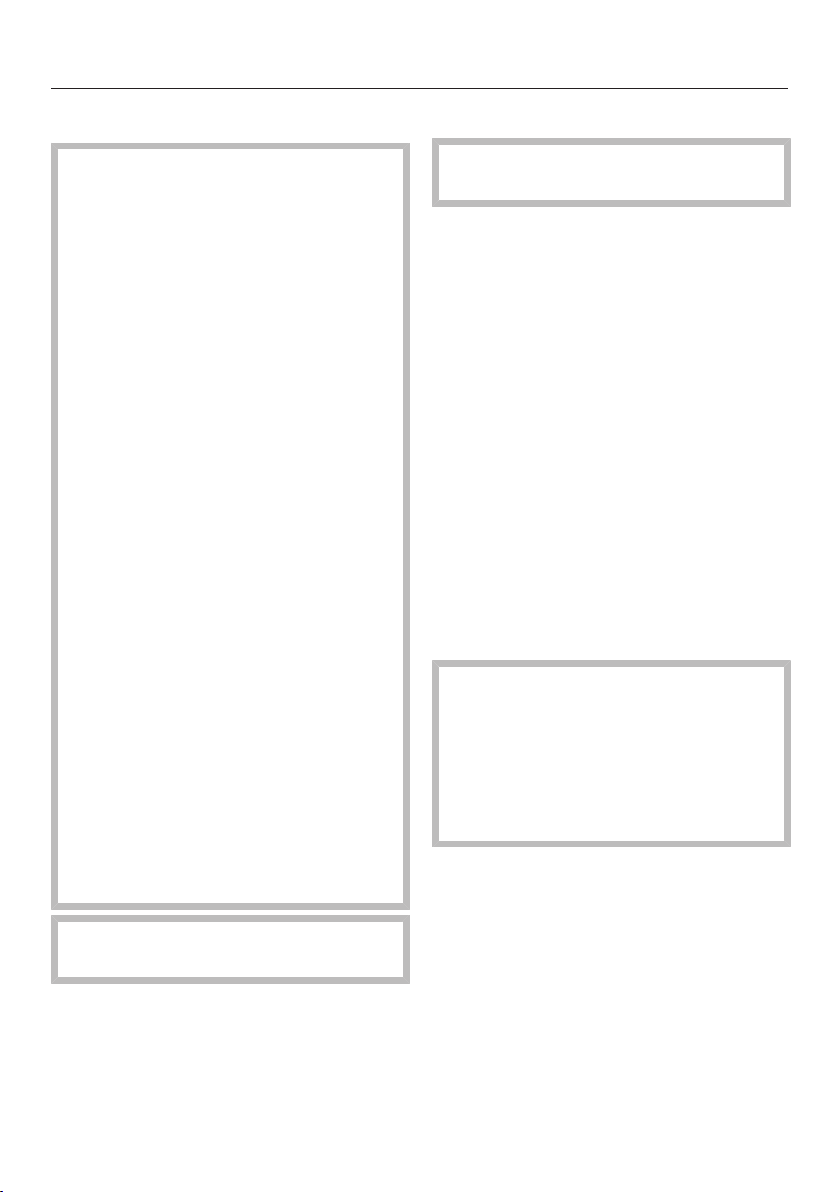
Installation
*INSTALLATION*
46
Electrical connection
WARNING: TO REDUCE THE RISK
OF FIRE, ELECTRIC SHOCK, OR
INJURY TO PERSONS, OBSERVE
THE FOLLOWING:
All electrical work should be
performed by a qualified electrician
in strict accordance with national
regulations (for USA: ANSI-NFPA 70)
and local safety regulations.
Installation, repairs and other work
by unqualified persons could be
dangerous.
Ensure that power to the appliance is
OFF while installation or repair work
is performed.
Verify that the voltage, load and
circuit rating information found on
the data plate (see "Technical
Service"), match the household
electrical supply before installing the
hood.
Use only with ventilation hood cord-
connection kits that have been
investigated and found acceptable
for use with this model hood.
If there is any question concerning
the electrical connection of this
appliance to your power supply,
please consult a licensed electrician
or call Miele’s Technical Service
Department.
WARNING: THIS APPLIANCE MUST
BE GROUNDED
Grounding Instructions
WARNING - Improper grounding can
result in a risk of electric shock.
This appliance must be grounded. In
the event of an electrical short circuit,
grounding reduces the risk of electric
shock by providing a path of least
resistance. This appliance is equipped
with a cord having a grounding wire
with a grounding plug.
If there is any doubt, have the electrical
system of the house checked by a
qualified electrician.
Do not use an extension cord. If the
power supply cord is too short, have a
qualified electrician install an outlet near
the appliance.
The plug must be plugged into an
outlet that is properly installed and
grounded.
WARNING - Grounding instructions
(Canada)
The grounding-type attachment plug
shall be connected to a grounding-
type receptacle installed in
accordance with CSA C22.1-12,
Canadian Electrical Code, Part I.

Customer Service
47
Contact in the event of a fault
In the event of a fault which you cannot
remedy yourself, please contact your
Miele dealer or Miele Customer Service.
You can book a Miele Service Call
online at www.miele.com/service.
Contact information for Miele
Customer Service can be found at the
end of this document.
Please quote the model identifier and
serial number of your appliance (SN)
when contacting Miele Customer
Service. Both pieces of information can
be found on the data plate.
Location of the data plate
The data plate is visible once you have
removed the grease filters.
Warranty
For further information, please refer to
your warranty booklet.
MieleCare
This service is available in USA only.
MieleCare, our Extended Service
Contract program, gives you the
assurance of knowing that your
appliance investment is covered by
5years of worry free ownership.
MieleCare is the only Extended Service
Contract in the industry that guarantees
repairs by a Miele Authorized Service
Provider using genuine Miele parts.
Only genuine Miele parts installed by
factory trained professionals can
guarantee the safety, reliability, and
longevity of your Miele appliance.
Please note that unless expressly
approved in writing by Miele’s Service
department, Extended Service
Contracts offered by other providers for
Miele products will not be recognized
by Miele. Our goal is to prevent
unauthorized (and untrained) service
personnel from working on your Miele
products, possibly doing further
damage to them, you and/or your
home.
To learn more about MieleCare
Extended Service Contracts, please
contact your appliance dealer or visit us
online at:
www.mieleusa.com
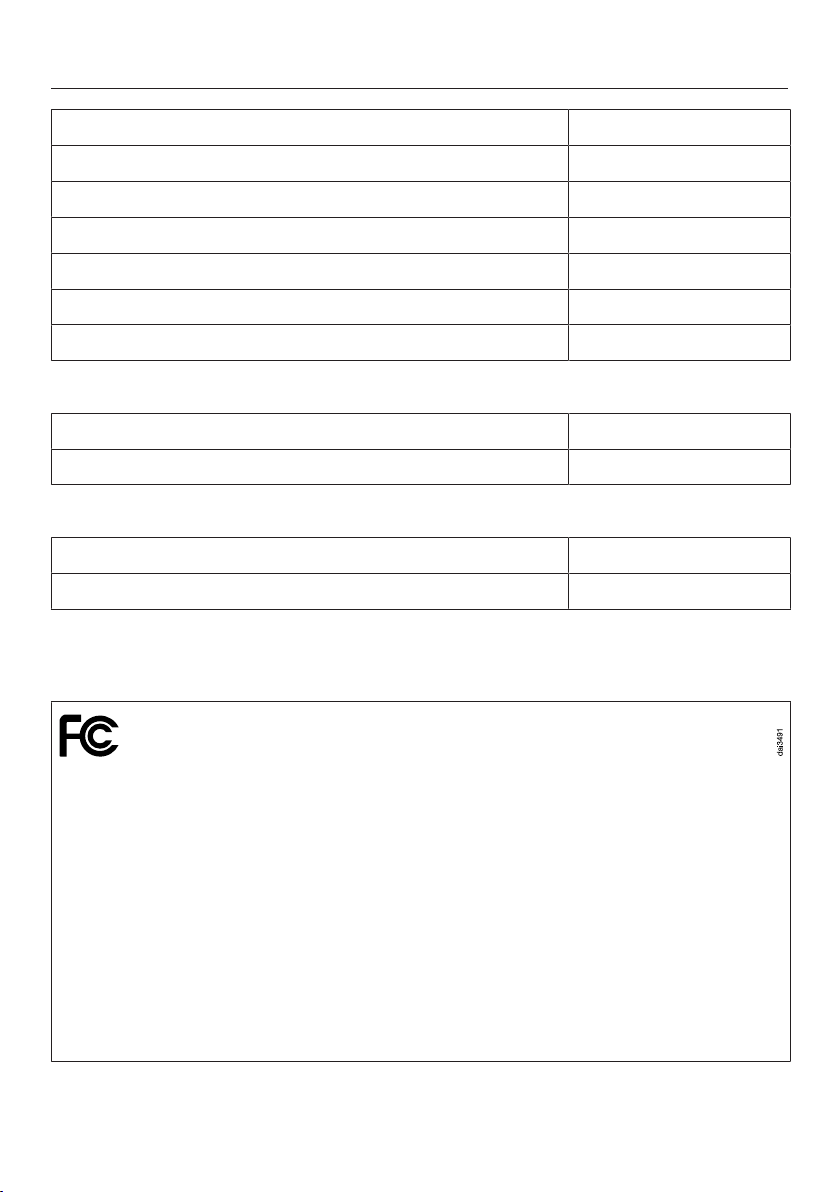
Technical data
48
Blower motor 350W
Overhead lighting 3x3W
Total connected load 359W
Supply voltage, frequency 120VAC, 60Hz
Fuse 15A
Power cord length 2.5ft (0.75m)
Weight 57.2lbs (26kg)
WiFi module
Frequency range 2.400–2.4835GHz
Maximum transmission power < 100mW
ZigBee® module
Frequency band 2.405–2.48GHz
Maximum transmission power < 10mW
Optional accessories for recirculation mode
DUW20 conversion kit and DKF12-900 charcoal filter
WiFi module EK037
FCC ID: 2ACUWEK037
IC: 5669C-EK037
ZigBee® module EK038
FCC ID: 2ACUWEK038
IC: 5669C-EK038
This device complies with Part 15 of the FCC Rules and with Industry Canada
licence-exempt RSS standard(s). Operation is subject to the following two
conditions: (1) this device may not cause harmful interference, and (2) this device
must accept any interference received, including interference that may cause
undesired operation.



9 Independence Way
Princeton, NJ 08540
Phone:
Fax:
www.mieleusa.com
U.S.A.
Miele, Inc.
National Headquarters
Please have the model and serial number
of your appliance available when
contacting Customer Service.
Canada
Importer
Miele Limited
Headquarters and Miele Centre
800-843-7231
609-419-4298
Customer Service & Support
Phone:
Fax:
161 Four Valley Drive
Vaughan, ON L4K 4V8
www.miele.ca
888-99-MIELE(64353)
888-586-8056
Customer Care Centre
Phone:
800-565-6435
905-532-2272
International Headquarters
Miele & Cie. KG
Carl-Miele-Straße 29
33332 Gütersloh
Germany

M.-Nr. 11 743 560 / 00en-US
DA 6698 W