Making Your World
A Lit_ Easier:
UseAndCare
MICROWAVE-CONVECTION OVEN
PART NO. 3828W5A0072/4359327 MODEL MC8131XE
Table of Contents
A Note to You ............................................ 3
Microwave Oven Safety ......................... 4-8
Important safety instructions................. 4
Precautionsto avoid possible exposure
toexcessive microwaveenergy ............ 6
Operating safety precautions ................ 7
Installation Instructions ............................ 9
Getting to Know Your Microwave-
Convection Oven .................................... 12
How microwave cookingworks ........... 12
Microwave oven features .................... 14
Control panel features ......................... 15
Built-in kits .......................................... 17
Setting the clock ................................. 18
Using the minute timer ........................ 19
Microwave Cooking ................................ 21
Getting the bestcookingresults.......... 21
Microwave cookingat high cook
power ................................................. 21
Microwave cookingat different
cook powers ....................................... 23
Microwave cooking with more than
one cook cycle .................................... 25
Using POPCORN ............................... 28
Using WARM HOLD ........................... 30
One-touch reheating ........................... 31
One-touch reheating chart .................. 32
One-touch microwave cooking ............ 32
One-touch microwave cooking chart ... 33
Using PLUS TIME ............................... 34
Defrosting with microwave energy ....... 35
Defrost chart ...................................... 37
Defrosting tips ..................................... 39
Convection Cooking ............................... 40
How convection cooking works ........... 40
Cooking with CONVECTION ............... 41
Convenience foods cooking chart ....... 43
Combination Cooking ................... ,......... 44
How combination cooking works ......... 44
Combination high and low cooking ...... 45
Meat combination cooking chart .......... 46
Auto cook combination cooking ........... 49
Auto cook combination setting chart .._ 50
Caring for Your Microwave-
Convection Oven .................................... 51
Cooking Guide ........................................ 52
Reheating chart ................................. 52
Microwave cooking chart..................... 53
Microwave cooking tips....................... 54
Oven utensilsguide ............................ 56
Questions and Answers .......................... 57
If You Need Assistance or Service ......... 58
Warranty .................................................. 64
2
A Note to You
Thank you for buying a WHIRLPOOL s appliance.
Because your life is getting busier and more complicated, WHIRLPOOL microwave ovens are
easy to use, save time, and help you manage your home better. To ensure that you enjoy
years of trouble-free operation, we developed this Use and Care Guide. It is full of valuable
information about how to operate and maintain your appliance properly and safely. Please
read it carefully.
Also, please complete and mail in the Ownership Registration Card provided with your
appliance. The card helps us notify you about any new information on your appliance.
Please record your model's
information.
Whenever you call to request service for Model Number
your appliance, you need to know your Serial Number
complete model number and serial number.
You can find this information on the model PurchaseDate
and serial number plate (see diagram on DealerName
page 14 for location of plate).
Please also record the purchase date of DealerAddress
your appliance and your dealer's name, DealerPhone
address, and telephone number.
Keep this book and the sales slip together in a safe place for future reference.
I Our Consumer Assistance
Center number is toll-free.
1-800-253-1301
3
Microwave Oven Safety
Your safety is important to us.
This guide contains safety statements under
warning symbols. Please pay special
attention to these symbols and follow any
instructions given. Here is a brief explana-
tion of the use of the symbol.
This symbol alerts you to
hazards such as fire, electrical
shock, or other injuries.
IMPORTANT SAFETY INSTRUCTIONS
Microwave ovens have been thoroughly tested for safe and efficient operation. However,
as with any appliance, there are special installation and safety precautions which must be
followed to ensure safe and satisfactory operation and prevent damage to the unit.
• Read all instructions before using the
microwave oven.
• Read and follow the specific "PRE-
CAUTIONS TO AVOID POSSIBLE
EXPOSURE TO EXCESSIVE MICRO-
WAVE ENERGY" found on page 6.
• This appliance must be grounded.
Connect only to properly grounded
outlet. See "GROUNDING INSTRUC-
TIONS" found on page 10,
• Install or locate this appliance only in
accordance with the provided Installa-
tion Instructions found on page 9.
• Some products such as whole eggs in
the shell and sealed containers -for
example, closed glass jars - could
explode and should not be heated in
this oven.
• Do not heat, store, or use flammable
materials in or near the oven. Fumes
could create a fire hazard or explosion.
• Do not store this appliance outside.
• Use this appliance only for its intended
use as described in this manual. Do
not use corrosive chemicals or vapors
in this appliance. This type of oven is
specifically designed to heat or cook
food. It is not designed for industrial or
laboratory use.
•As with any appliance, close supervision
is necessary when used by children.
• Do not operate this appliance if it has
a damaged cord or plug, if it is not
working properly, or if it has been
damaged or dropped. Electrical shock,
fire, or other hazards could result.
• This appliance should be serviced only
by qualified service personnel. Call an
authorized Whirlpool service company
for examination, repair, or adjustment.
• Do not cover or block any opening on
the appliance, Fire could result.
• Do not store or use this appliance
outdoors. Do not use this product near
water - for example, near a kitchen sink,
in a wet basement, or near a swimming
pool, and the like.
• Do not immerse cord or plug in water.
• Keep cord away from heated surfaces.
• Do not let cord hang over edge of table
or counter.
• See door surface and interior cleaning
instructions on page 51.
-Toreducetheriskoffireintheovencavity:
- Donotovercookfood.Carefullyattend
applianceifpaper,plastic,orother
combustiblematerialsareplaced
insidetheoventofacilitatecooking.
Papercouldcharorburn,andsome
plasticscouldmeltifusedwhen
heatingfoods.
- Donotusepaper,plastics,orother
combustiblematerialswhenoperating
themicrowaveovenasaconvection
oven.
- Do not deep fry in oven. Microwavable
utensils are not suitable and it is
difficult to maintain appropriate deep
frying temperatures.
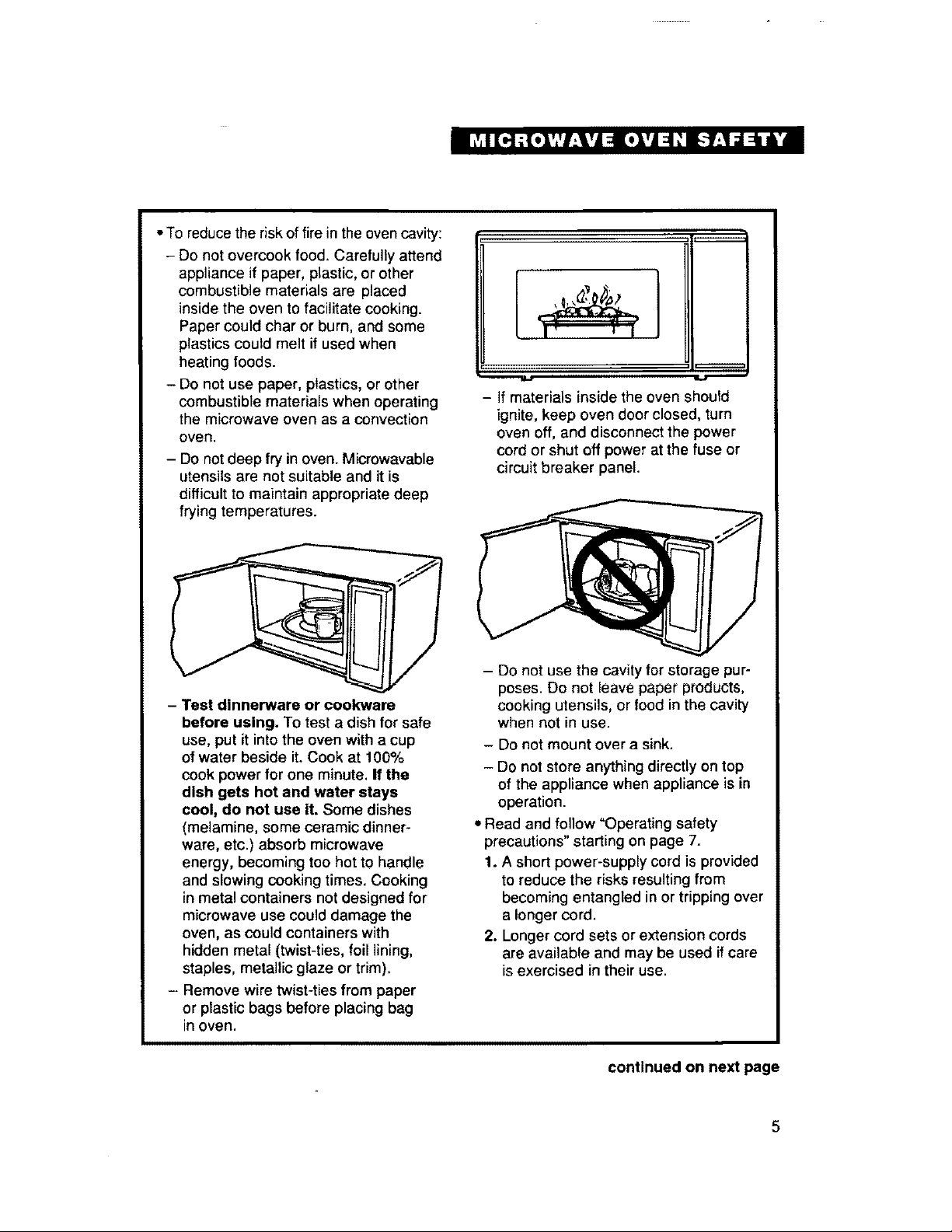
- Test dinnerware or cookware
before using, To test a dish for safe
use, put it intothe oven with a cup
ofwater beside it. Cook at 100%
cook power for one minute. If the
dish gets hot and water stays
cool, do not use it. Some dishes
(melamine, some ceramic dinner-
ware, etc.) absorb microwave
energy, becoming too hot tO handle
and slowing cooking times. Cooking
in metal containers not designed for
microwave use could damage the
oven, as could containers with
hidden metal (twist-ties, foil lining,
staples, metallic glaze or trim).
- Remove wire twist-ties from paper
or plastic bags before placing bag
in oven.
- If materials inside the oven should
ignite, keep oven door closed, turn
oven off, and disconnect the power
cord or shut off power at the fuse or
circuit breaker panel.
- Do not use the cavity for storage pur-
poses. Do not leave paper products,
cooking utensils, or food in the cavity
when not in use.
- Do not mount over a sink.
- Do not store anything directly on top
of the appliance when appliance is in
operation.
• Read and follow "Operating safety
precautions"starling on page 7.
1. A short power-supply cord is provided
to reduce the risks resulting from
becoming entangled in or trippingover
a longercord.
2. Longer cord sets or extension cords
are available and may be used if care
isexercised in their use.
continued on next page
3. If a long cord or extension cord is
used temporarily, (a) the marked
electrical rating of the cord set or
extension cord should be at least as
great as the electrical rating of the
appliance, (b) the extension cord must
be a grounding-type, 3-wire cord that
has a 3-blade grounding plug and a
3-slot receptacle that will accept the
plug on the appliance, and (c) the longer
cord should be arranged so that it will
not drape over the countertop or table-
top where it can be pulled on by children
or tripped over accidentally.
4. A qualified electrician must install a
properly grounded and polarized
3-prong receptacle near the appliance.
- SAVE THESE INSTRUCTIONS -
PRECAUTIONSTOAVOID
POSSIBLEEXPOSURETO
EXCESSIVEMICROWAVE
ENERGY...
Do not attempt to operate this oven with
the door open since open-door operation
can result in harmful exposure to micro-
wave energy. It is important not to defeat
or tamper with the safety interlocks.
Do not place any object between the
oven front face and the door or allow soil
or cleaner residue to accumulate on
sealing surfaces.
Do not operate the oven if it is damaged.
It is particularly important that the oven
door close properly and that there is no
damage to the:
(1) Door (bent),
(2) Hinges and latches (broken or
loosened),
(3) Door seals and sealing surfaces.
Do not operate the microwave oven if the
door window is broken.
The microwave oven should be checked
for microwave leakage by qualified service
personnel after a repair is made.
The oven should not be adjusted or
repaired by anyone except properly
qualified service personnel.
Do not operate the microwave oven with
the outer cabinet removed.
6
Operating safety precautions
J
J
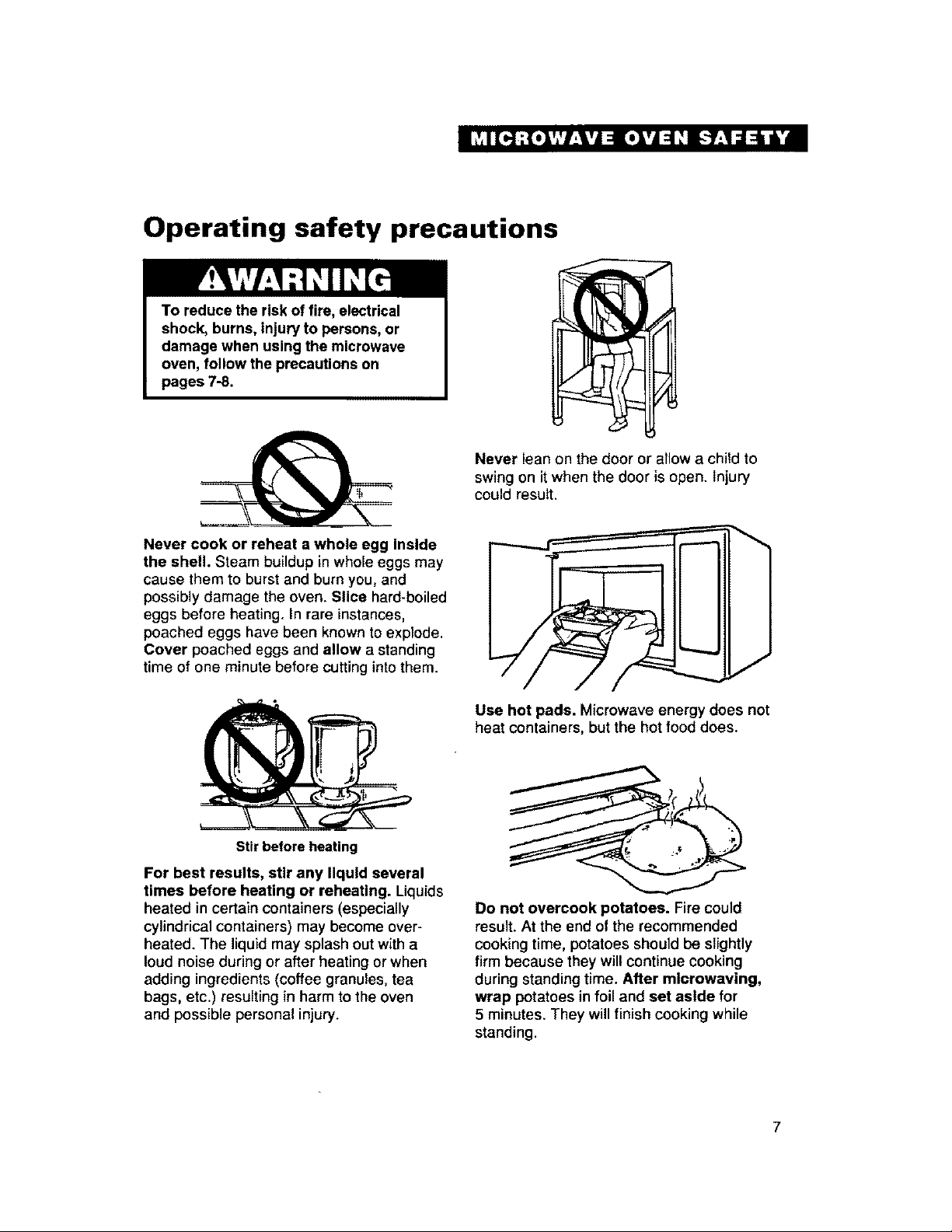
Never cook or reheat a whole egg inside
the shell. Steam buildup in whole eggs may
cause them to burstand burn you, and
possibly damage the oven. Slice hard-boiled
eggs before heating. In rare instances,
poached eggs have been known to explode.
Cover poached eggs and allow a standing
time of one minute before cutting into them.
Stir before heating
Never lean on the door or allow a child to
swing on itwhen the door is open. Injury
could result,
J
Use hot pads. Microwave energy does not
heat containers, but the hot food does.
For best results, stir any liquid several
times before heating or reheating. Liquids
heated in certain containers (especially
cylindrical containers) may become over-
heated. The liquid may splash out with a
loud noise during or after heating or when
adding ingredients (coffee granules, tea
bags, etc.) resulting in harm to the oven
and possible personal injury.
Do not overcook potatoes. Fire could
result. At the end of the recommended
cooking time, potatoes should be slightly
firm because they will continue cooking
during standing time. After mlcrowaving,
wrap potatoes in foil and set aside for
5 minutes, They will finish cooking while
standing.
7
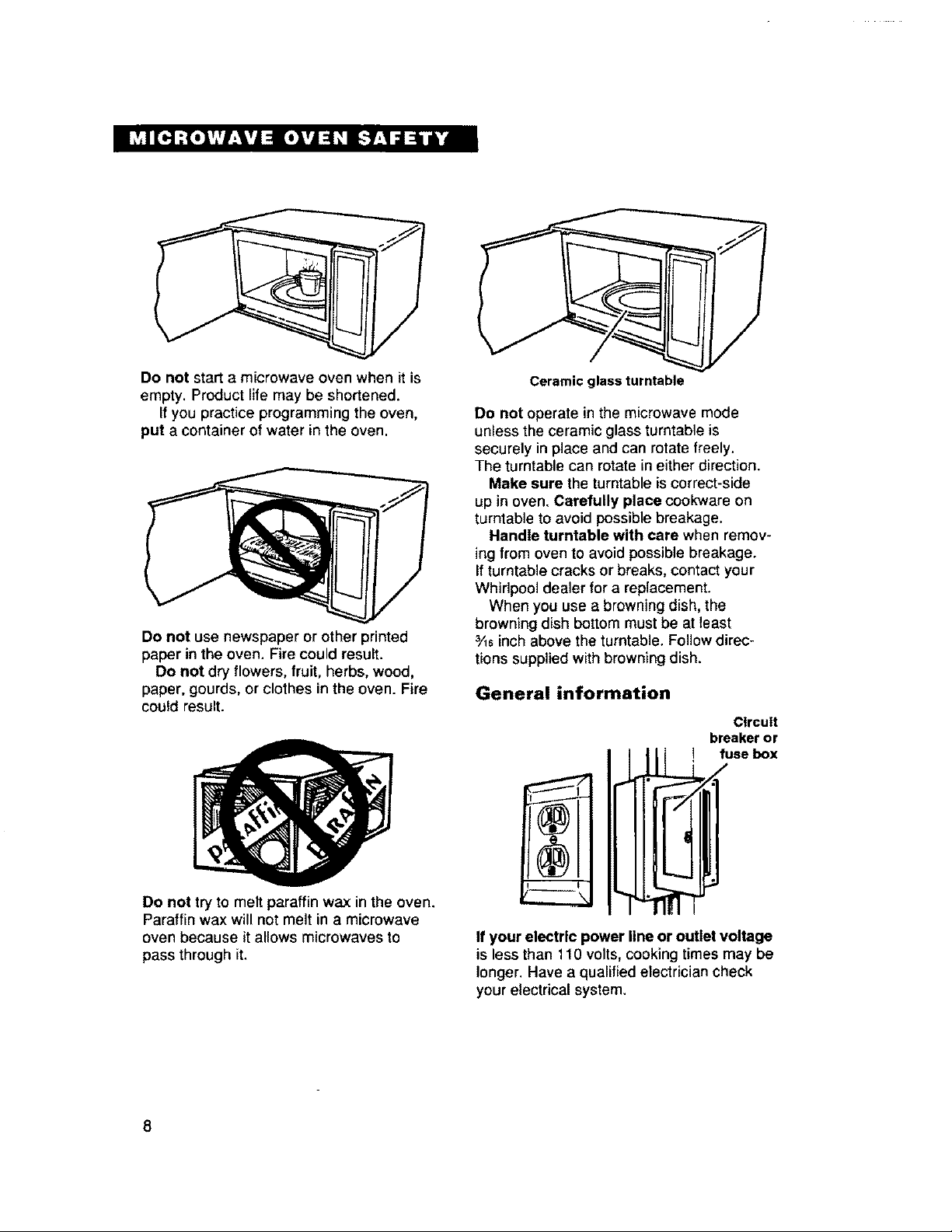
Donot start a microwave oven when it is
empty, Product life may be shortened.
If you practice programming the oven,
put a container of water in the oven.
Do not use newspaper or other printed
paper in the oven. Fire could result.
Do not dry flowers, fruit, herbs, wood,
paper, gourds, or clothes in the oven. Fire
could result.
Do not try to melt paraffin wax in the oven.
Paraffin wax will not melt in a microwave
oven because it allows microwaves to
pass through it.
Ceramic glass turntable
Do not operate in the microwave mode
unless the ceramic glass turntable is
securely in place and can rotate freely.
The turntable can rotate in either direction.
Make sure the turntable is correct-side
up in oven. Carefully place cookware on
turntableto avoid possiblebreakage.
Handle turntable with care when remov-
ing from oven to avoid possible breakage.
Ifturntable cracks or breaks, contact your
Whirlpool dealer for a replacement.
When you use a browning dish, the
browning dish bottommust be at least
3Aeinchabove the turntable. Follow direc-
tions suppliedwith browning dish.
General information
Circuit
breakeror
I fuse box
If your electric power line or outlet voltage
is less than 110 volts, cookingtimes may be
longer. Have a qualified electriciancheck
yourelectrical system.
8
Installation Instructions
Before you begin operating the oven, carefully read the following instructions.
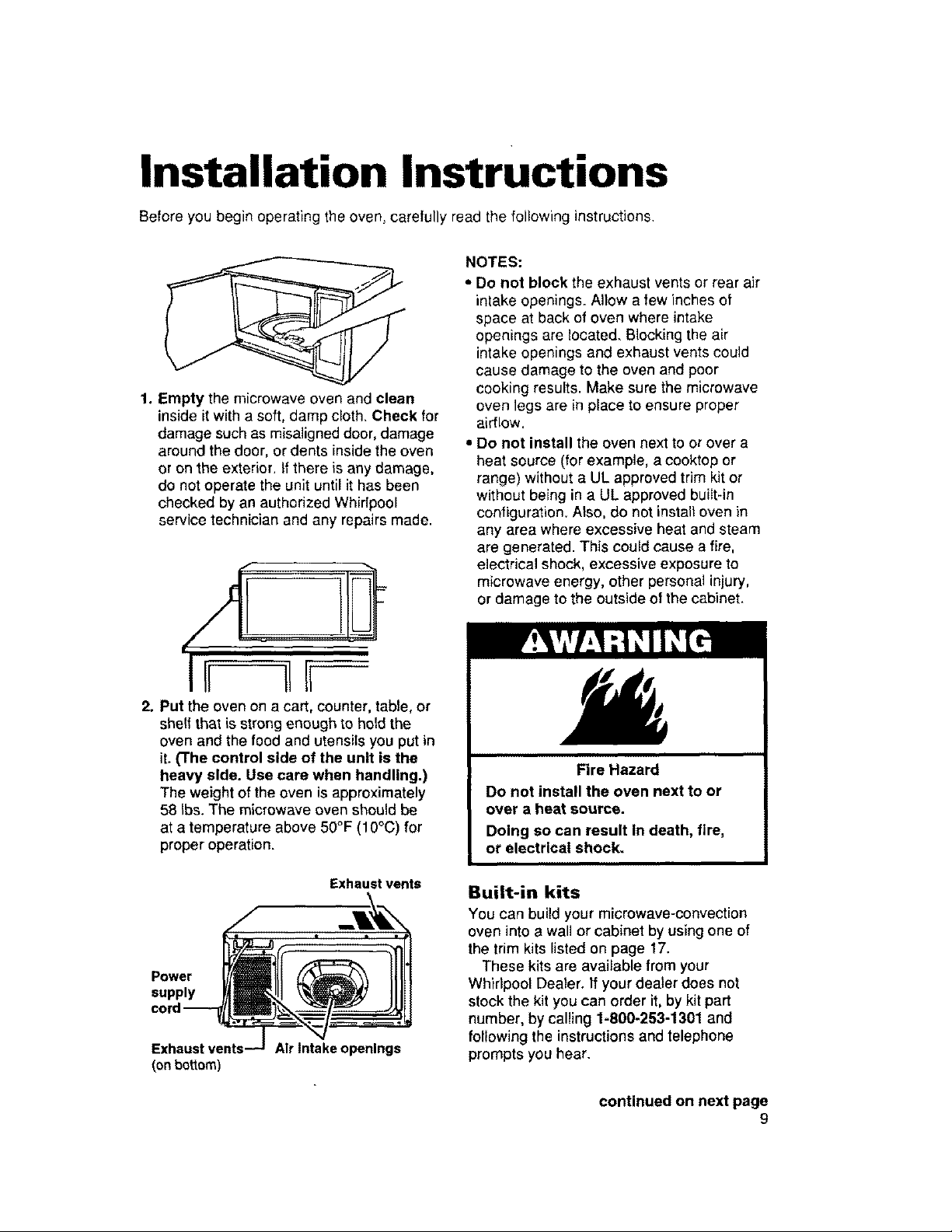
1. Empty the microwave oven and clean
inside it with a soft, damp cloth. Check for
damage such as misaligned door, damage
around the door, or dents inside the oven
or on the exterior, if there is any damage,
do not operate the unit until it has been
checked by an authorized Whirlpool
service technician and any repairs made.
_f m
2. Put the oven on a cart, counter, table, or
she?fthat is strong enough to hold the
oven and the food and utensils you put in
it. (The control side of the unit is the
heavy side. Use care when handling.)
The weight of the oven is approximately
58 Ibs. The microwave oven should be
at a temperature above 50°F (10°C) for
proper operation.
Exhaust vents
Power
supply
(on bottom)
Air Intake openings
NOTES:
• Do not block the exhaust vents or rear air
intake openings. Allow a few inches o|
space at back of oven where intake
openings are located. Blocking the air
intake openings and exhaust vents could
cause damage to the oven and poor
cooking results. Make sure the microwave
oven legs are in place to ensure proper
airflow.
• Do not install the oven next to or over a
heat source (for example, a cooktop or
range) without a UL approved trim kit or
without being in a UL approved built-in
configuration. Also, do not install oven in
any area where excessive heat and steam
are generated. This could cause a fire,
electrical shock, excessive exposure to
microwave energy, other personal injury,
or damage to the outside of the cabinet.
Fire Hazard
Do not install the oven next to or
over a heat source.
Doing so can result In death, fire,
or electrical shock.
Built-in kits
You can build your microwave-convection
oven into a wall or cabinet by using one of
the trim kits listed on page 17.
These kits are available from your
Whirlpool Dealer. If your dealer does not
stock the kit you can order it, by kit part
number, by calling 1-800-253-1301 and
following the instructions and telephone
prompts you hear.
continued on next page
9
3. Electrical requirements
Observe all governing codes and ordi-
nances. A 120 Volt, 60 Hz, AC only, 15
or 20 amp fused electrical supply is
required.
(Time-delay fuse is recommended.) It
is recommended that a separate circuit
serving only this appliance be provided.
,.GROUNDING INSTRUCTIONS
5. For your personal safety, this appliance
must be grounded. In the event of an
electrical short circuit, grounding
reduces the risk of electrical shock by
providing an escape wire for the electric
current. This appliance is equipped with
a polarized 3-prong grounding plug.
It must be plugged into a correctly
polarized mating 3-prong grounding
type wall receptacle, properly installed
and grounded in accordance with the
National Electrical Code and local
codes and ordinances. If a mating wall
receptacle is not available or if you
are not sure if the wall receptacle is
properly grounded and polarized, have
it checked by a qualified electrician.
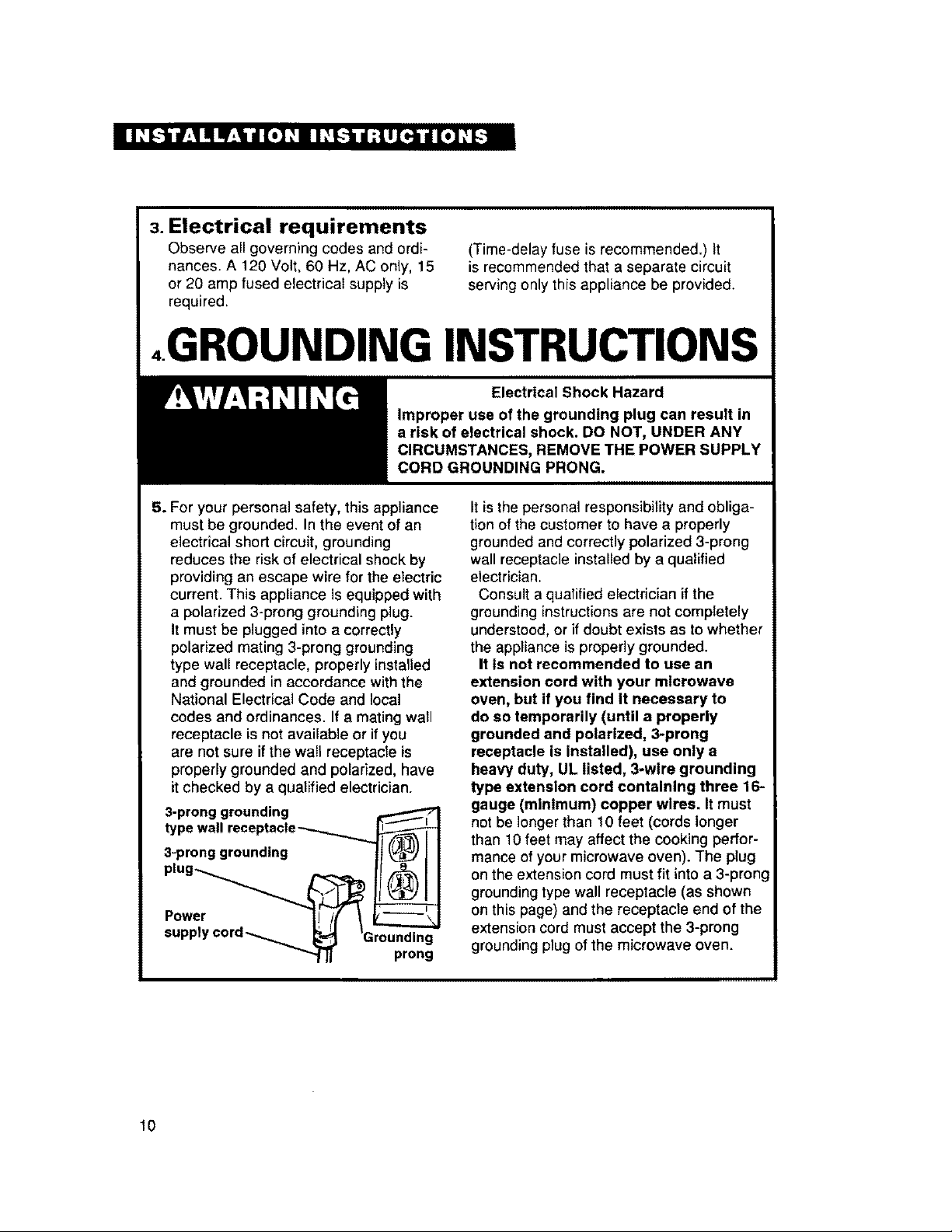
3-pronggrounding
typewall receptacle--_,..._
3-pronggroundlng
plug_ _
Power I! /( \
supply cora__ _;_ 'Grounding
II prong
It is the personal responsibility and obliga-
tion of the customer to have a properly
grounded and correctly polarized 3-prong
wall receptac]e installed by a qualified
electrician.
Consult a qualified electrician if the
grounding instructions are not completely
understood, or if doubt exists as to whether
the appliance is properly grounded.
It is not recommended to use an
extension cord with your microwave
oven, but if you find it necessary to
do so temporarily (until a properly
grounded and polarized, 3-prong
receptacle is installed), use only a
heavy duty, UL listed, 3-wire grounding
type extension cord containing three 16-
gauge (minimum) copper wires. It must
not be longer than 10 feet (cords longer
than 10 feet may affect the cooking perfor-
mance of your microwave oven). The plug
on the extension cord must fit into a 3-prong
grounding type wall receptacle (as shown
on this page) and the receptacle end of the
extension cord must accept the 3-prong
grounding plug of the microwave oven.
10
6. k-_ To test the oven, plug it into
the proper electrical outlet.
Put about 1 cup (250 mL) of
cold water in a glass container
in the oven, Close the door. Make sure it
latches. Follow the directions on page 21 to
set the oven to cook for 2 minutes. When
the time is up, the water should be heated.
7. This microwave oven Is designed for
use in the household only and must
not be used for commercial purposes.
Do not remove the door, control panel,
or cabinet at any time. The unit is
equipped with high voltage and should
be serviced by an authorized Whirlpool
service technician.
- SAVE THESE INSTRUCTIONS -
11
Getting to Know Your
Microwave-Convection
Oven
This section discusses the concepts behind microwave cooking and introduces you to the
basics you need to know to operate your microwave oven. Please read this information
before use.
How microwave cooking works
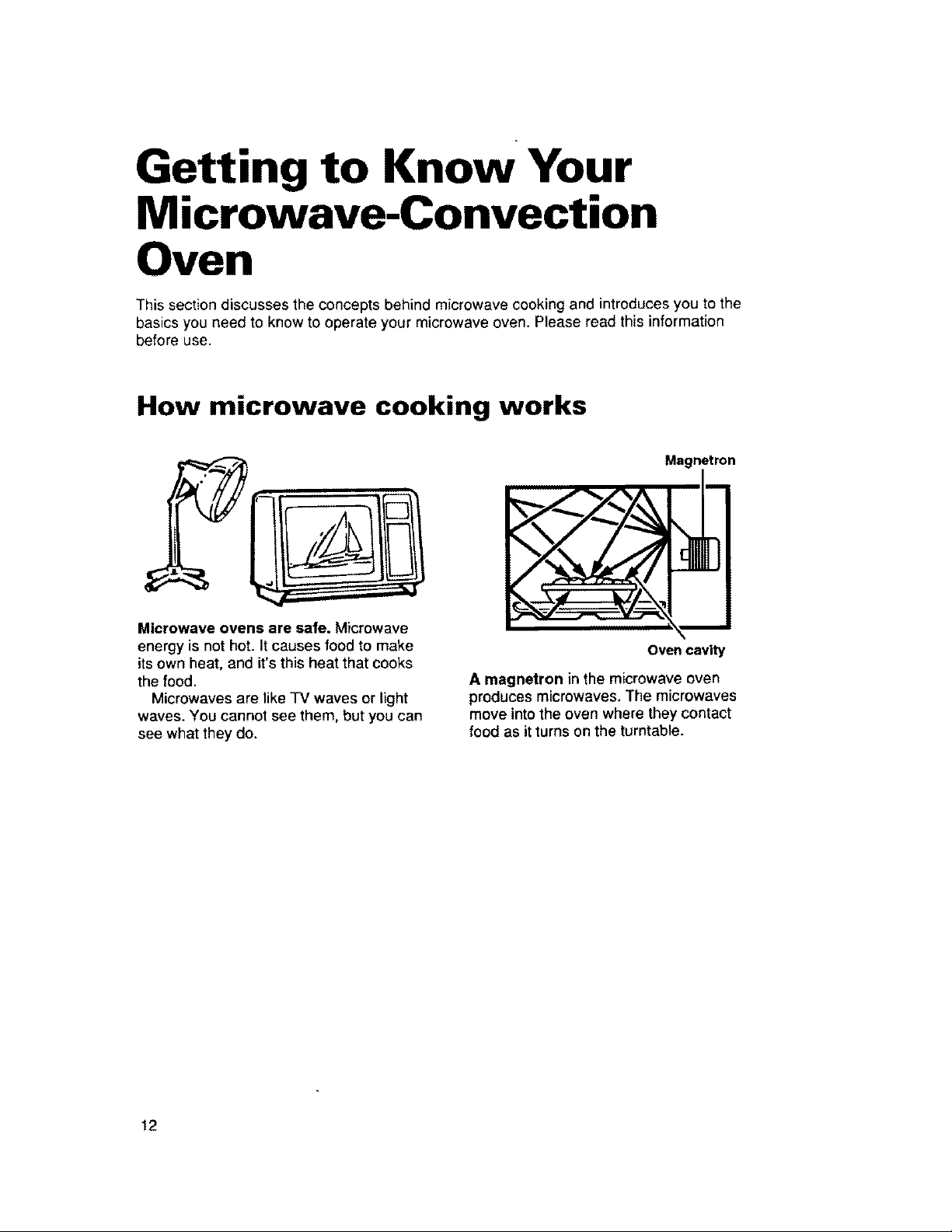
Magnetron
Microwave ovens are safe. Microwave
energy is not hot. Itcauses food to make
its own heat, and it's this heat that cooks
the food.
Microwaves are like TV waves or light
waves. You cannot see them, but you can
see what they do.
Oven cavity
A magnetron in the microwave oven
produces microwaves. The microwaves
move into the oven where they contact
food as it turns on the turntable.
12
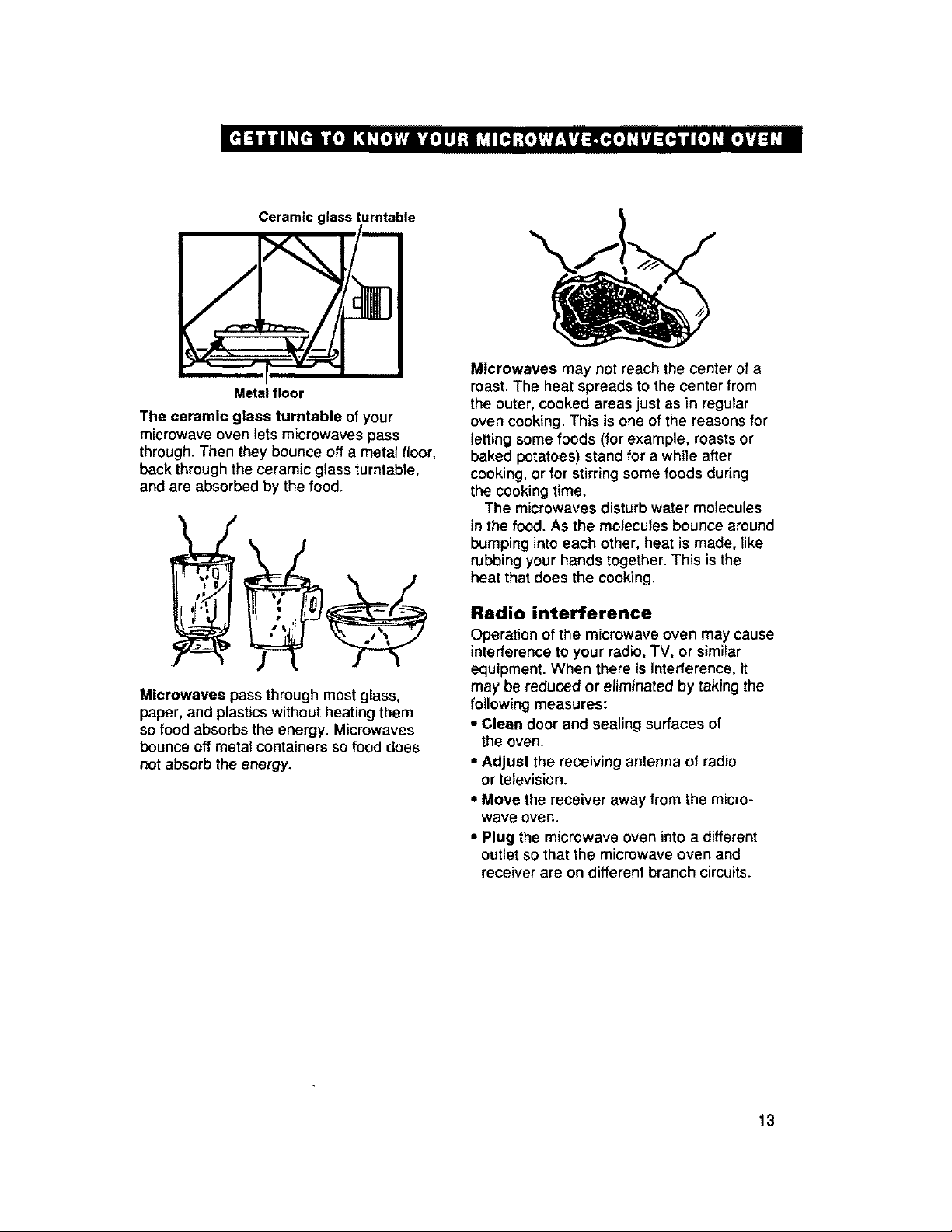
Ceramic glassturntable
eli
Metal floor
The ceramic glass turntable of your
microwave over} lets microwaves pass
through. Then they bounce off a metal floor,
back through the ceramic glass turntable,
and are absorbed by the food.
Microwaves pass through most glass,
paper, and plasticswithout heating them
so food absorbs the energy. Microwaves
bounce off metal containers so food does
not absorb the energy.
Microwaves may not reach the center of a
roast. The heat spreads to the center trom
the outer, cooked areas just as in regular
oven cooking. This is one of the reasons for
letting some foods (for example, roasts or
baked potatoes) stand for a while after
cooking, or for stirring some foods during
the cooking time.
The microwaves disturb water molecules
in the food. As the molecules bounce around
bumping into each other, heat is made, like
rubbing your hands together. This is the
heat that does the cooking.
Radio interference
Operation of the microwave oven may cause
interference to your radio, TV, or similar
equipment. When there is interference, it
may be reduced or eliminated by taking the
following measures:
• Clean door and sealing surfaces of
the oven.
• Adjust the receiving antenna of radio
or television.
• Move the receiver away from the micro-
wave oven.
• Plug the microwave oven into a different
outlet so that the microwave oven and
receiver are on different branch circuits.
13
141itl [_lloi l_[_.l,l|*lll:i_',l[4:[,l,l:t'lll.i 1'J4_I1.1_'1.1_'14_'1
i
Microwave oven features
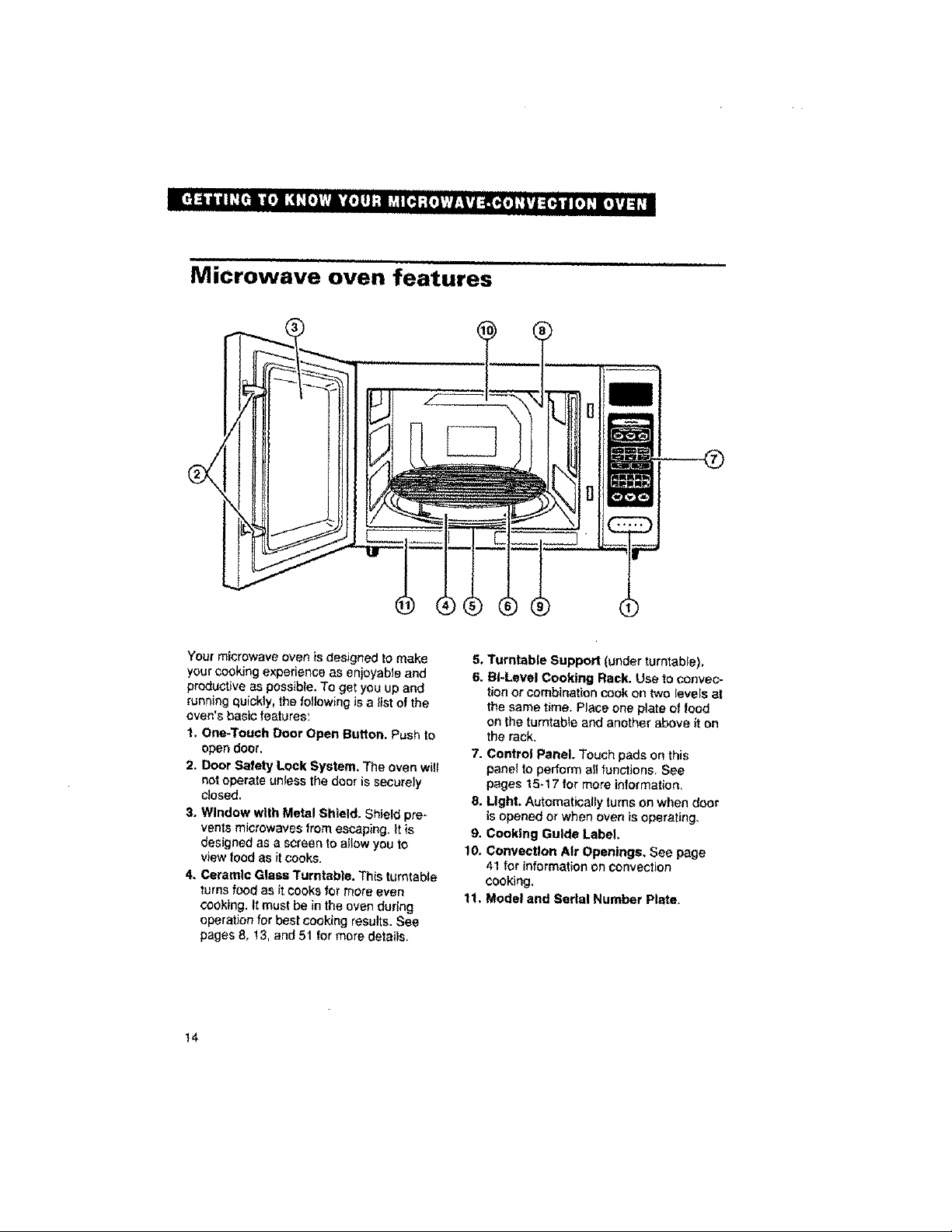
Yourmicrowave ovenisdesigned to make
your coding experience as en_y_ble and
productive as possible.Toget you up and
running quickly, the following is a list of the
oven's basicfeatures:
1. One-Touch Door Open Button, Push to
open door.
2. Door Safety Lock System. The ovsn will
not operate unless the door is securely
closed,
% Window with Metal Shield. Shieldpre-
vents microwaves from escaping. It is
designed asa screento allow you to
view food as it cooks,
4. Ceramic Glass Turntable. This turntable
turns foodas it Cooksformore even
cooking, it must be in the ovenduring
operation for best cookingresults. See
pages 8, 13,and 51 for more details,
5, Turntable Support (under turntable),
6, BI-Level Cooking Rack. Use to conveo*
tionor combination cook ontwo levels at
the same time. Place one plateof food
on the turntable and anot_r a_vs it on
the rack.
7. Control Panel. Touchpads on this
panel toperform all functions. See
pages 15-17 for more information,
8, Light. Automatically turnson whendoor
is openedor when oven is opera_mg.
9. Cooking Guide Label,
10, ConvecUon Air Openings, See page
41forinformationonconvection
cooking,
11, Model and Serial Number Plate,
14
Control panel features
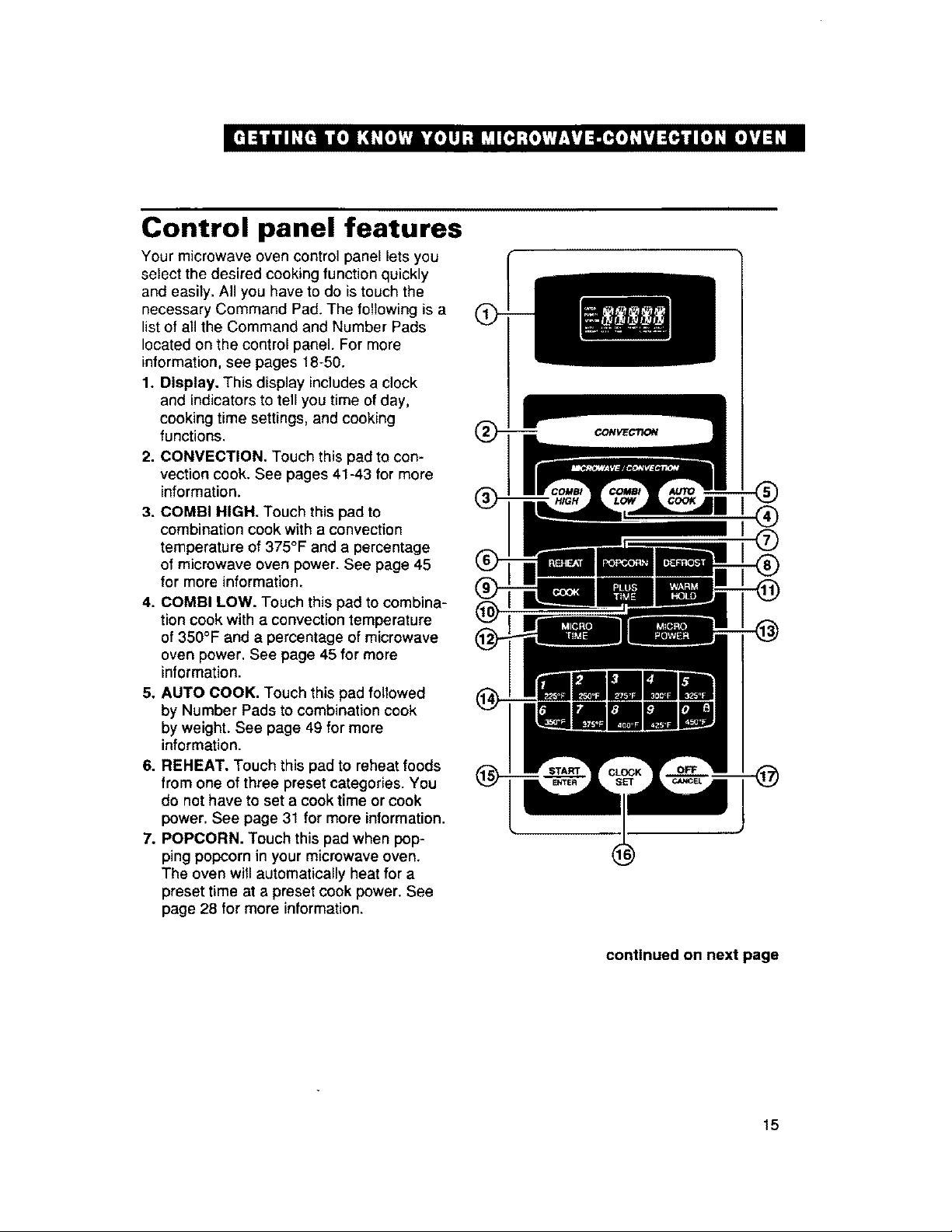
Your microwave oven control panel lets you
select the desired cooking function quickly
and easily. All you have to do is touch the
necessary Command Pad. The following is a
list of all the Command and Number Pads
located on the control panel. For more
information, see pages 18-50.
1. Display. This display includes a clock
and indicators to tell you time of day,
cooking time settings, and cooking
functions.
2. CONVECTION. Touch this pad to con-
vection cook. See pages 41-43 for more
information.
3. COMBI HIGH. Touch this pad to
combination cook with a convection
temperature of 375°F and a percentage
of microwave oven power. See page 45
for more information.
4. COMBI LOW. Touch this pad to combina-
tion cook with a convection temperature
of 350°F and a percentage of microwave
oven power. See page 45 for more
information.
5. AUTO COOK. Touch this pad followed
by Number Pads to combination cook
by weight. See page 49 for more
information.
6. REHEAT. Touch this pad to reheat foods
from one of three preset categories. You
do not have to set a cook time or cook
power. See page 31 for more information.
7. POPCORN. Touch this pad when pop-
ping popcorn in your microwave oven.
The oven will automatically heat for a
preset time at a preset cook power. See
page 28 for more information.
@
@
®
@
continued on next page
15
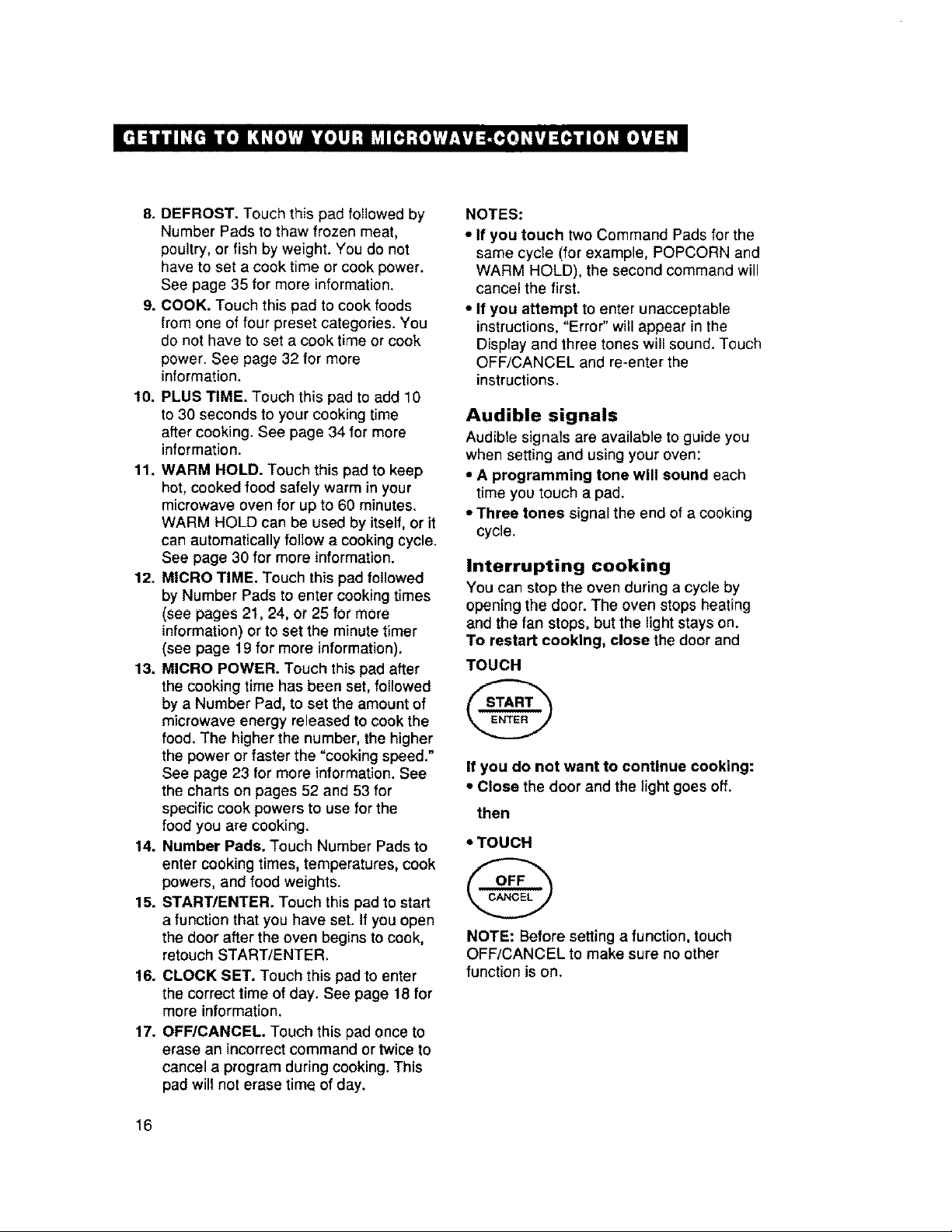
8.DEFROST.Touchthispadfollowedby
NumberPadstothawfrozenmeat,
poultry,orfishbyweight.Youdonot
havetosetacooktimeorcookpower.
Seepage35formoreinformation.
9.COOK.Touchthispadtocookfoods
fromoneoffourpresetcategories.You
donothavetosetacooktimeorcook
power.Seepage32formore
information.
10. PLUS TIME. Touch this pad to add 10
to 30 seconds to your cooking time
after cooking. See page 34 for more
information.
11. WARM HOLD. Touch this pad to keep
hot, cooked food safely warm in your
microwave oven for up to 60 minutes.
WARM HOLD can be used by itself, or it
can automatically follow a cooking cycle.
See page 30 for more information.
12. MICRO TIME. Touch this pad followed
by Number Pads to enter cooking times
(see pages 21,24, or 25 for more
information) or to set the minute timer
(see page 19 for more information).
13. MICRO POWER. Touch this pad after
the cooking time has been set, followed
by a Number Pad, to set the amount of
microwave energy released to cook the
food. The higher the number, the higher
the power or faster the "cooking speed."
See page 23 for more information. See
the charts on pages 52 and 53 for
specific cook powers to use for the
food you are cooking.
14. Number Pads. Touch Number Pads to
enter cooking times, temperatures, cook
powers, and food weights.
15. START/ENTER. Touch this pad to start
a function that you have set. If you open
the door after the oven begins to cook,
retouch START/ENTER,
16. CLOCK SET. Touch this pad to enter
the correct time of day. See page 18 for
more information,
17. OFF/CANCEL Touch this pad once to
erase an incorrect command or twice to
cancel a program during cooking. This
pad will not erase time of day.
NOTES:
• If you touch two Command Pads for the
same cycle (for example, POPCORN and
WARM HOLD), the second command will
cancel the first.
• If you attempt to enter unacceptable
instructions, "Error" will appear in the
Dispray and three tones will sound. Touch
OFF/CANCEL and re-enter the
instructions.
Audible signals
Audible signals are available to guide you
when setting and using your oven:
• A programming tone will sound each
time you touch a pad.
• Three tones signal the end of a cooking
cycle.
Interrupting cooking
You can stop the oven during a cycle by
opening the door. The oven stops heating
and the fan stops, but the light stays on.
To restart cooking, close the door and
TOUCH
If you do not want to continue cooking:
• Close the door and the light goes off.
then
•TOUCH
NOTE: Before setting a function, touch
OFF/CANCEL to make sure no other
function is on.
16
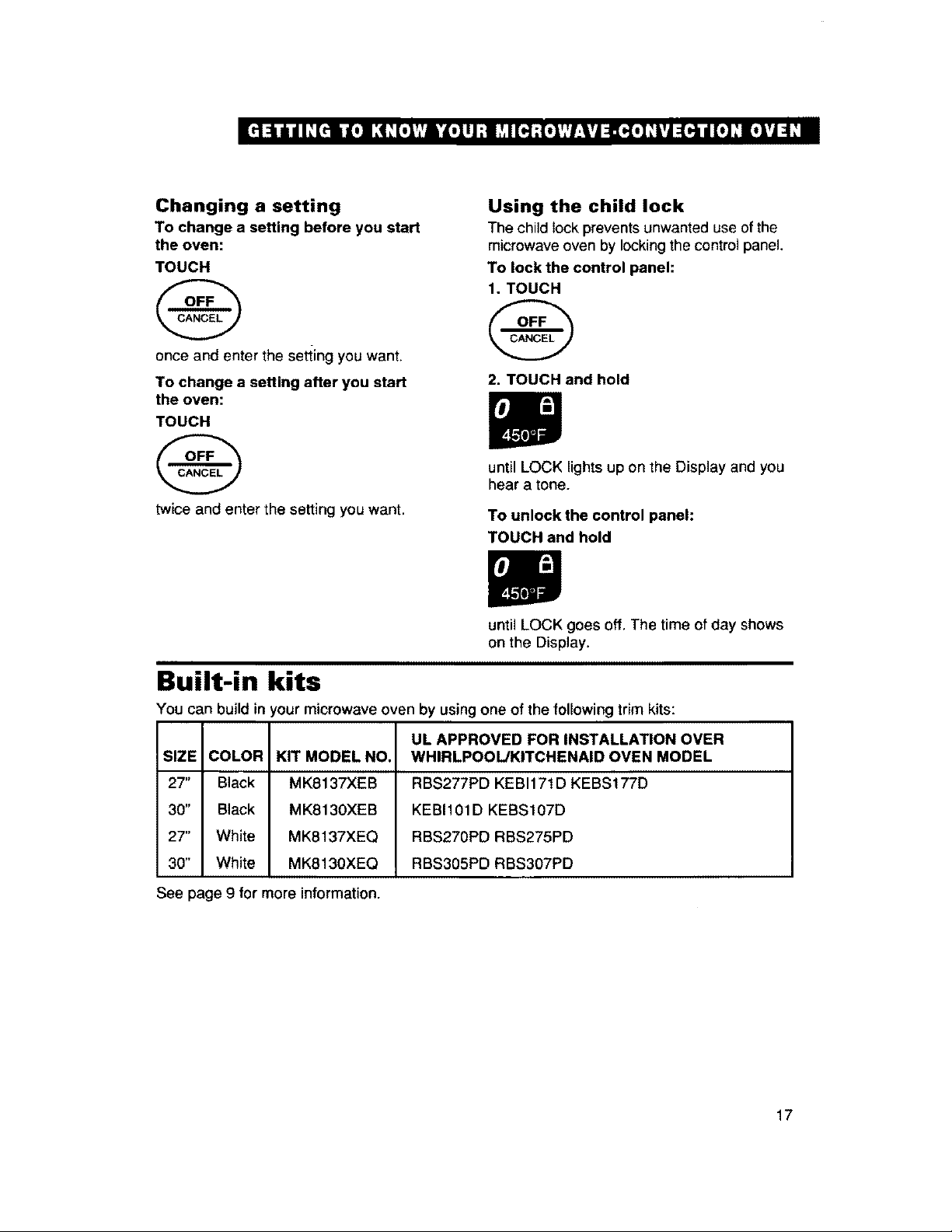
Changing a setting
To change a setting before you start
the oven:
TOUCH
once and enter the setting you want.
To change a setting after you start
the oven:
TOUCH
@
twice and enter the setting you want.
Using the child lock
The child lock prevents unwanted use of the
microwave oven by locking the control panel.
To lock the control panel:
1. TOUCH
@
2. TOUCH and hold
until LOCK lights up on the Display and you
hear a tone.
To unlock the control panel:
TOUCH and hold
until LOCK goes off. The time of day shows
on the Display.
Built-in kits
You can build in r'our microwave oven by using one of the following trim kits:
UL APPROVED FOR INSTALLATION OVER
SIZE COLOR KIT MODEL NO. WHIRLPOOL/KITCHENAID OVEN MODEL
27" Black MK8137XEB RBS277PD KEBI171D KEBS177D
30" Black MK8130XEB KEBI101D KEBS107D
27" White MK8137XEQ RBS270PD RBS275PD
30" White MK8130XEQ RBS305PD RBS307PD
See page 9 for more information.
17
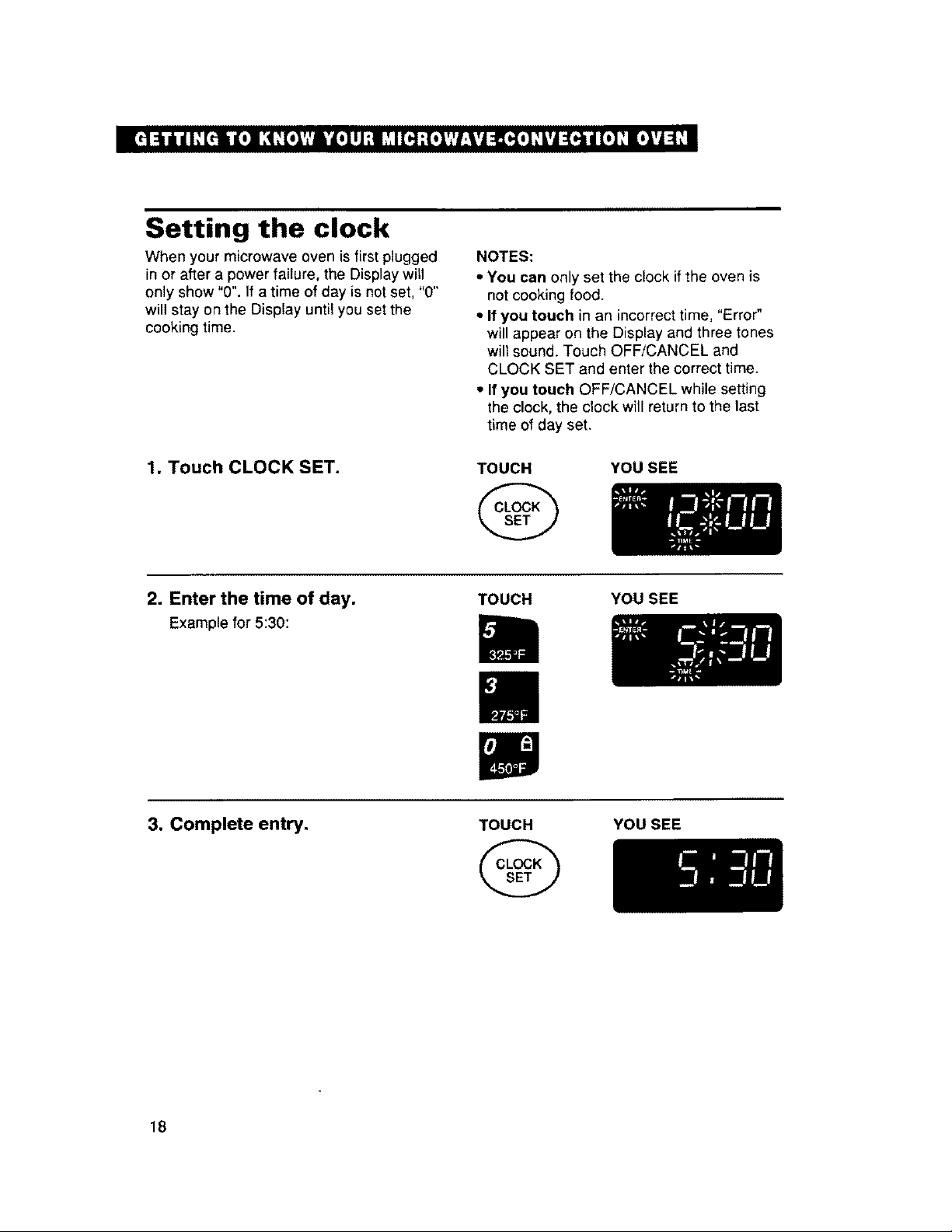
Setting the clock
When your microwave oven is first plugged
in or after a power failure, the Display witl
only show "0". If a time of day is not set, "0"
will stay on the Display until you set the
cooking time.
NOTES:
• You can only set the clock if the oven is
not cooking food.
• If you touch in an incorrecttime, "Error"
will appear on the Display and three tones
will sound. Touch OFF/CANCEL and
CLOCK SET and enter the correct time.
• If you touch OFF/CANCEL while setting
the clock, the clock will return to the last
time of day set.
1. Touch CLOCK SET. TOUCH
@
YOUSEE
2. Enter the time of day.
Examplefor 5:30:
TOUCH YOU SEE
3. Complete entry.
TOUCH
@
YOU SEE
18
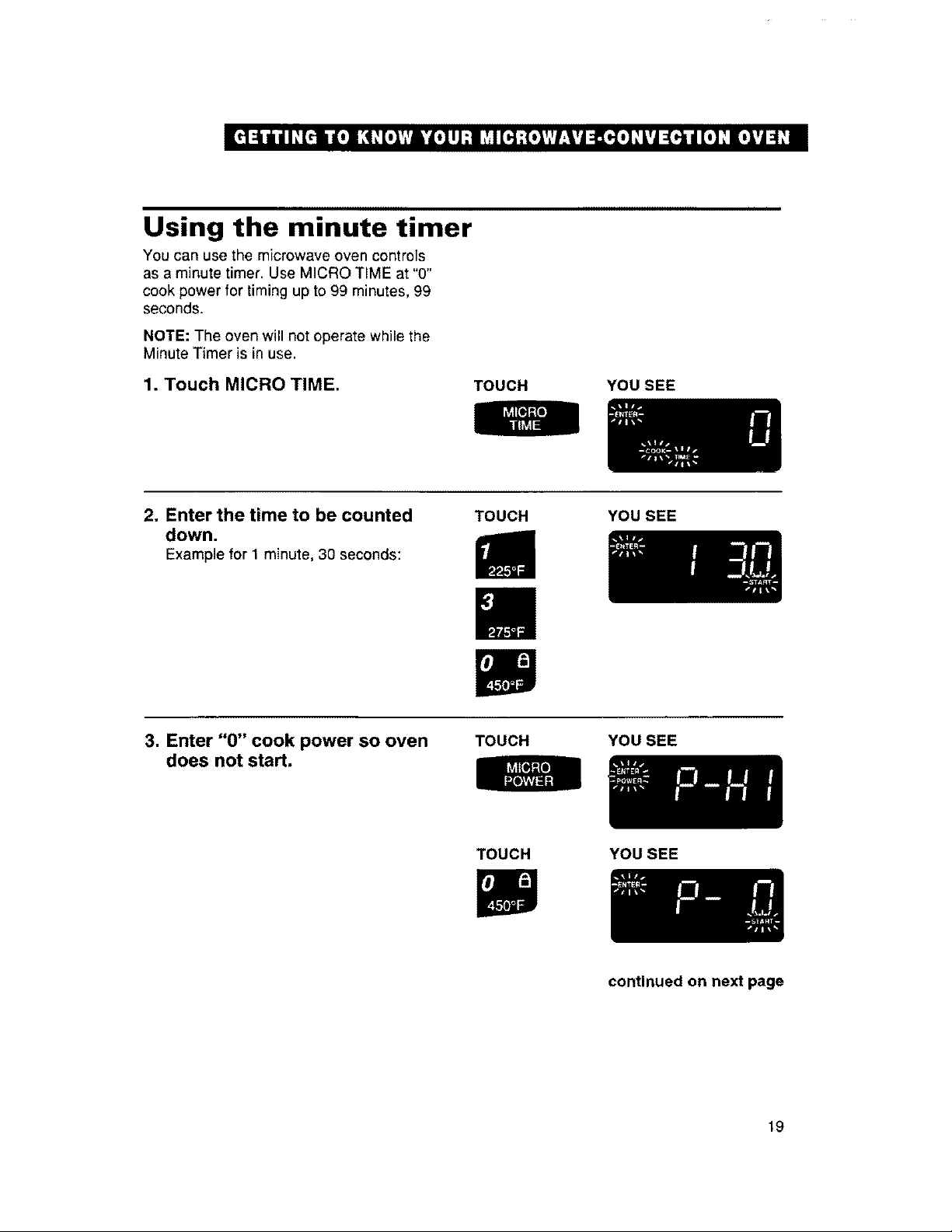
Using the minute timer
You can use the microwave oven controls
as a minute timer. Use MICRO TIME at "0"
cook power for timing up to 99 minutes, 99
seconds.
NOTE: The oven will not operate while the
Minute Timer is in use.
1. Touch MICRO TIME. TOUCH YOU SEE
2. Enter the time to be counted
down.
Example for 1 minute, 30 seconds:
TOUCH YOU SEE
3. Enter "0" cook power so oven
does not start.
TOUCH YOU SEE
TOUCH YOUSEE
continued on next page
19
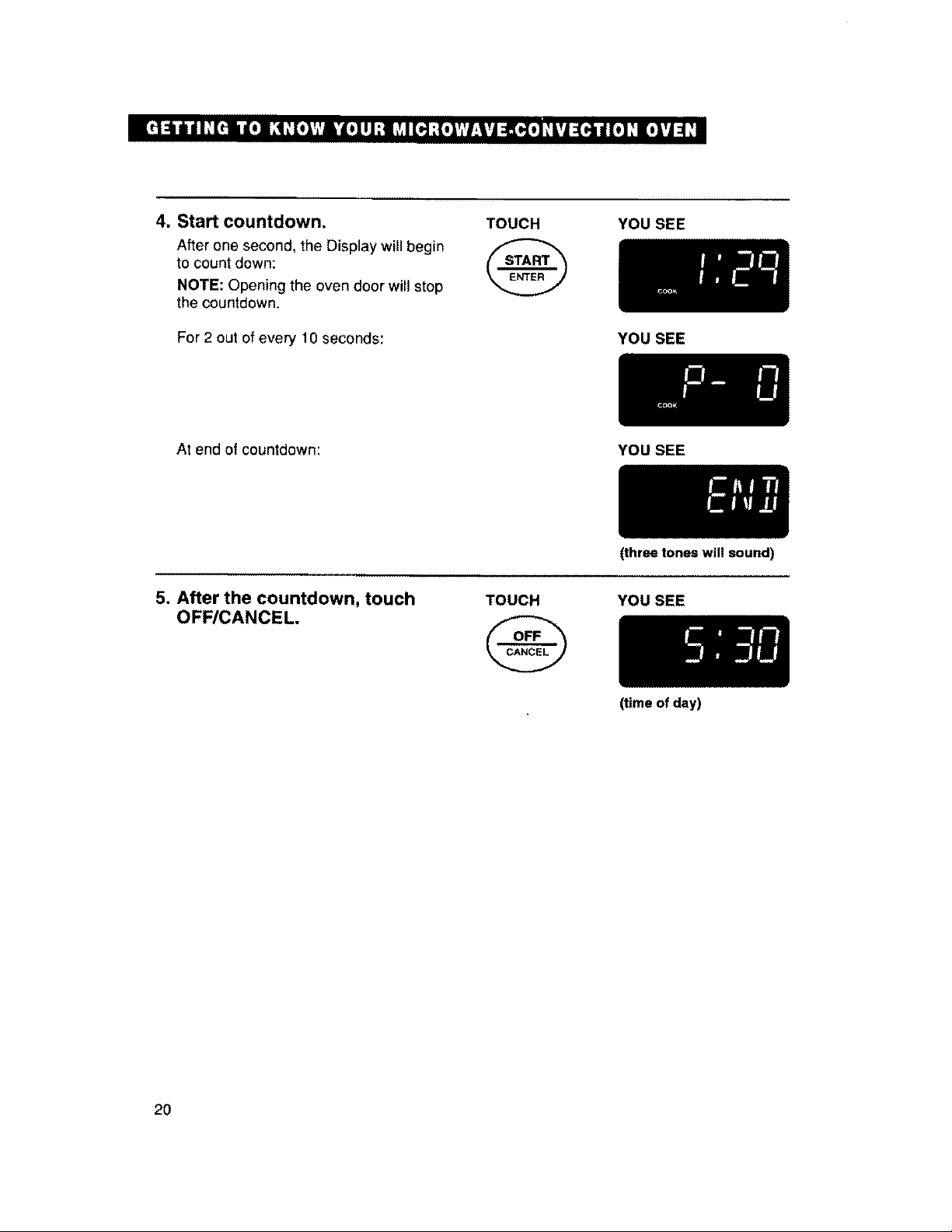
4. Start countdown.
After one second, the Display will begin
to count down:
NOTE: Opening the oven door will stop
the countdown,
IJ
For 2 out of every 10 seconds:
TOUCH YOU SEE
YOU SEE
At end of countdown: YOU SEE
5. After the countdown, touch
OFF/CANCEL
TOUCH
@
(three tones will sound)
YOU SEE
2O
(time of day)
Microwave Cooking
This section gives you instructions for operating each microwave function. Please read these
instructions carefully.
Getting the best cooking results
• ALWAYS cook food for the minimum
recommended cooking time. if necessary,
touch PLUS TIME after the cooking time
is over (see page 34). Then check for
doneness to avoid overcooking the food.
• Stir, turn over, or rearrange food being
cooked about halfway through the cook
time for most even doneness with all
recipes.
* If a glass cover is not available, use
wax paper, paper towels, or microwave-
approved plastic wrap. Turn back a
corner to vent steam during cooking.
• Although a new rating method* rates this
oven at 850 watts, you may use a reliable
cookbook and recipes developed for
microwave ovens previously rated at
700-800 watts.
"IEC-705 Test Procedure. The IEC-705 Test Procedure
is an internalionally recognized method of rating
microwave wattage output and does not represent an
acluaT change to output power or cooking performance,
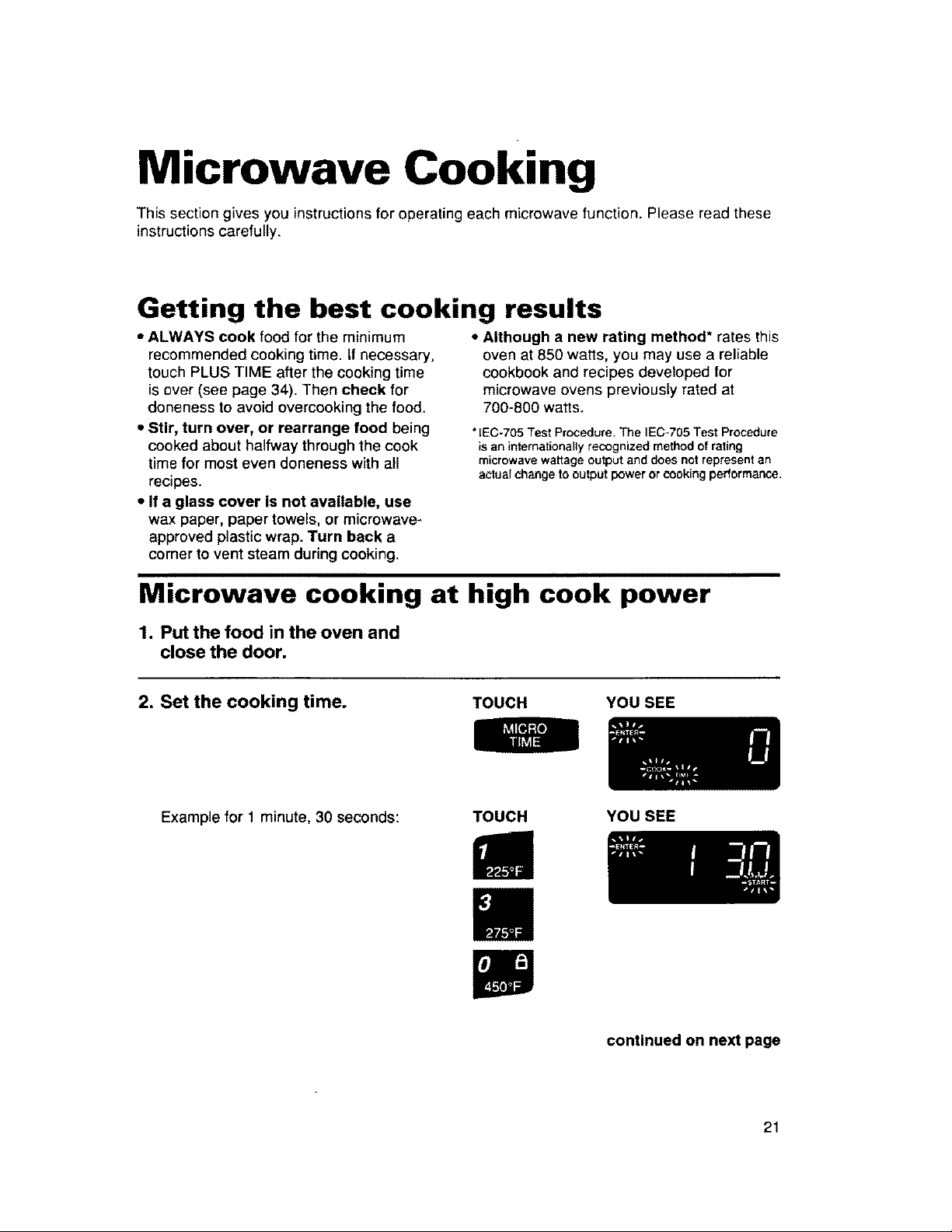
Microwave cooking at high cook power
1. Put the food in the oven and
close the door.
2. Set the cooking time.
TOUCH YOU SEE
Example for 1 minute, 30 seconds:
TOUCH YOU SEE
continued on next page
21
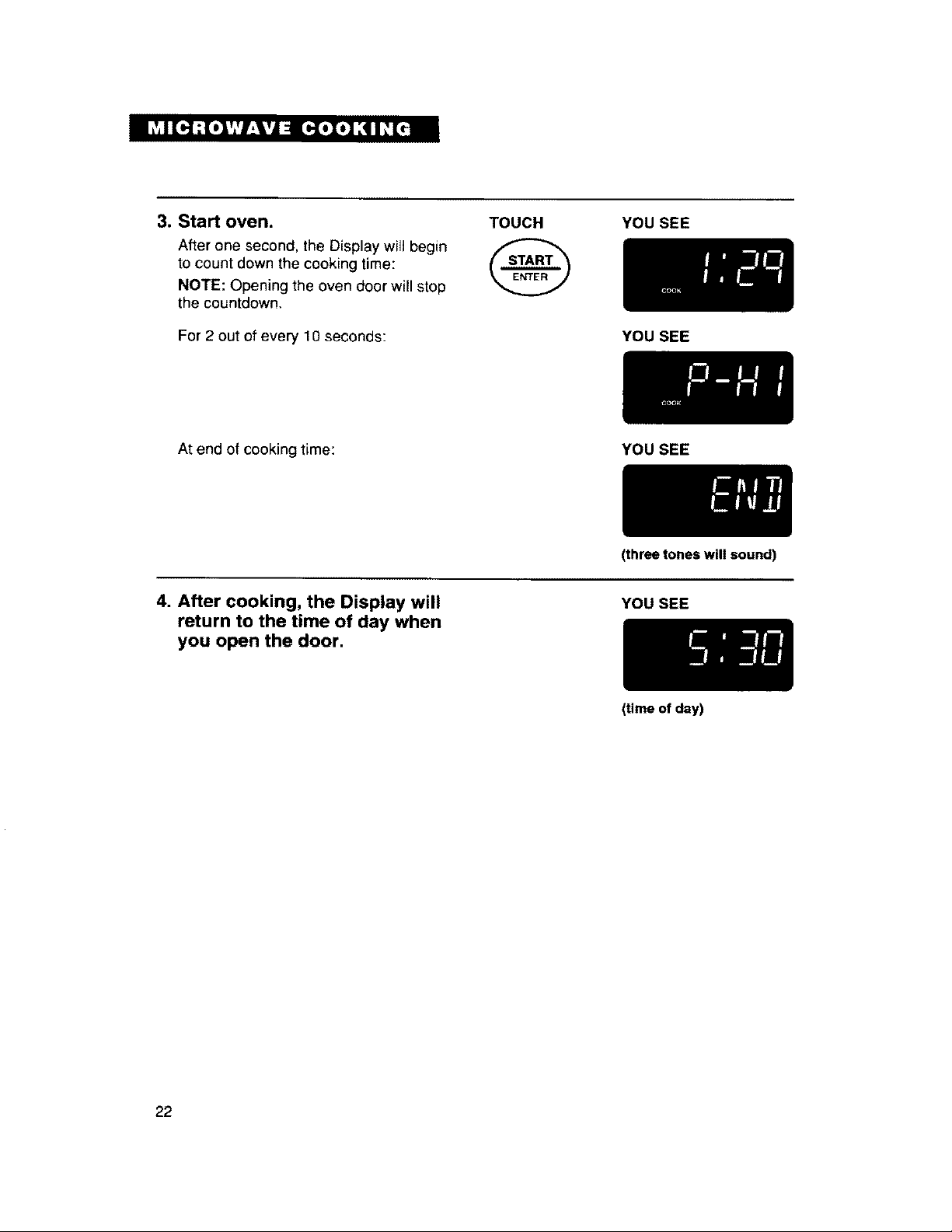
3. Start oven.
After one second, the Display will begin
to count down the cooking time:
NOTE: Opening the oven door will stop
the countdown,
[I
For 2 out of every 10 seconds:
TOUCH YOU SEE
YOU SEE
At end of cooking time:
YOU SEE
4. After cooking, the Display will
return to the time of day when
you open the door.
(three tones will sound)
YOU SEE
(time of day)
22
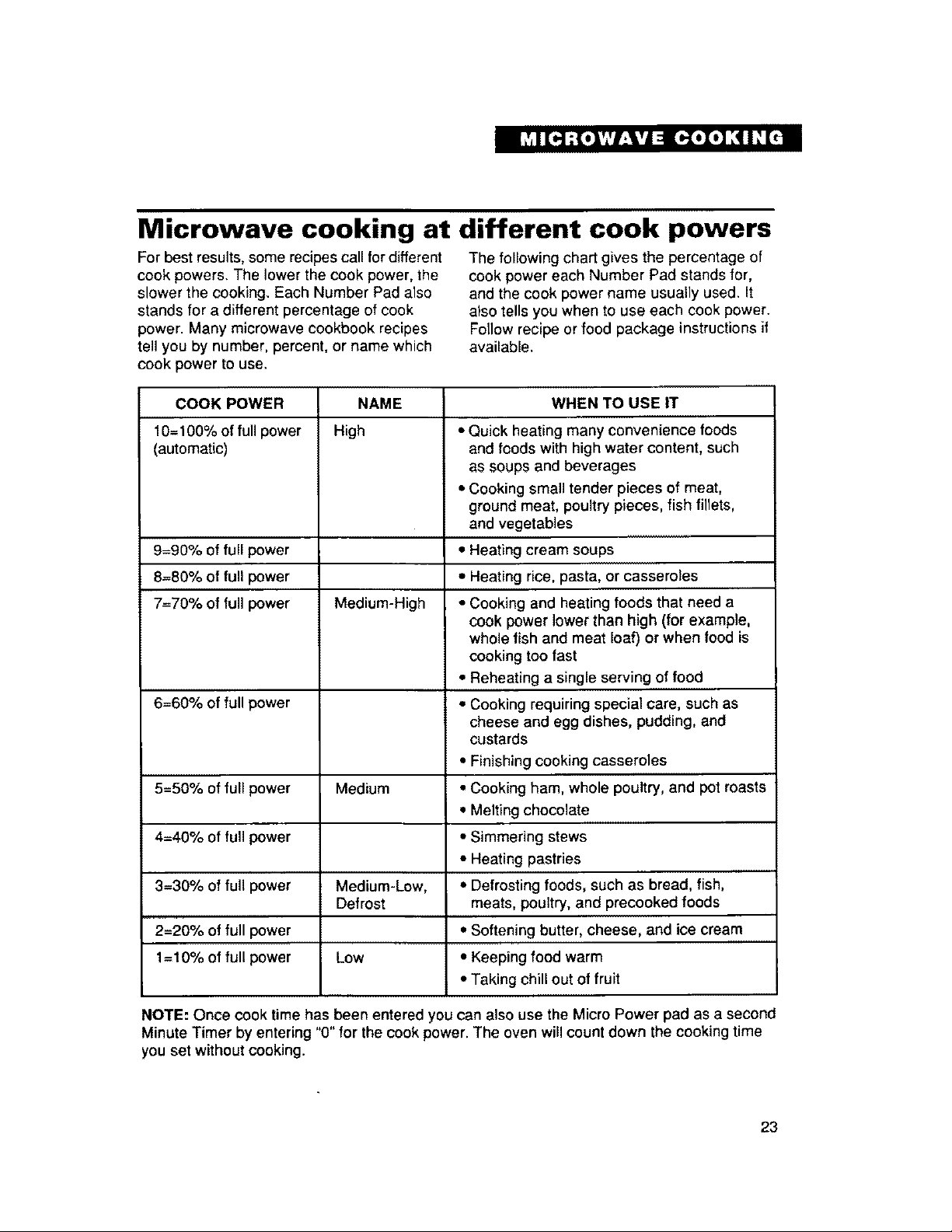
Microwave cooking at different cook powers
For best results, some recipes call for different
cook powers. The lower the cook power, the
slower the cooking. Each Number Pad also
stands for a different percentage of cook
power. Many microwave cookbook recipes
tell you by number, percent, or name which
cook power to use.
The following chart gives the percentage of
cook power each Number Pad stands for,
and the cook power name usually used. It
also tells you when to use each cook power.
Follow recipe or food package instructions if
available.
COOK POWER NAME WHEN TO USE IT
10=100% of full power High • Quick heating many convenience foods
(automatic) and foods with high water content, such
as soups and beverages
• Cooking small tender pieces of meat,
ground meat, poultry pieces, fish fillets,
and vegetables
9=90% of full power • Heating cream soups
8=80% of full power • Heating rice, pasta, or casseroles
7=70% of full power Medium-High • Cooking and heating foods that need a
cook power lower than high (for example,
whole fish and meat loaf) or when food is
cooking too fast
• Reheating a single serving of food
6=60% of full power o Cooking requiring special care, such as
cheese and egg dishes, pudding, and
custards
• Finishing cooking casseroles
5=50% of full power Medium • Cooking ham, whole poultry, and pot roasts
• Melting chocolate
4=40% of full power • Simmering stews
• Heating pastries
3=30% of full power Medium-Low, • Defrosting foods, such as bread, fish,
Defrost meats, poultry, and precooked foods
2=20% of full power • Softening butter, cheese, and ice cream
1=10% of full power Low • Keeping food warm
• Taking chill out of fruit
NOTE: Once cook time has been entered you can also use the Micro Power pad as a second
Minute Timer by entering "0" for the cook power. The oven will count down the cooking time
you set without cooking.
23
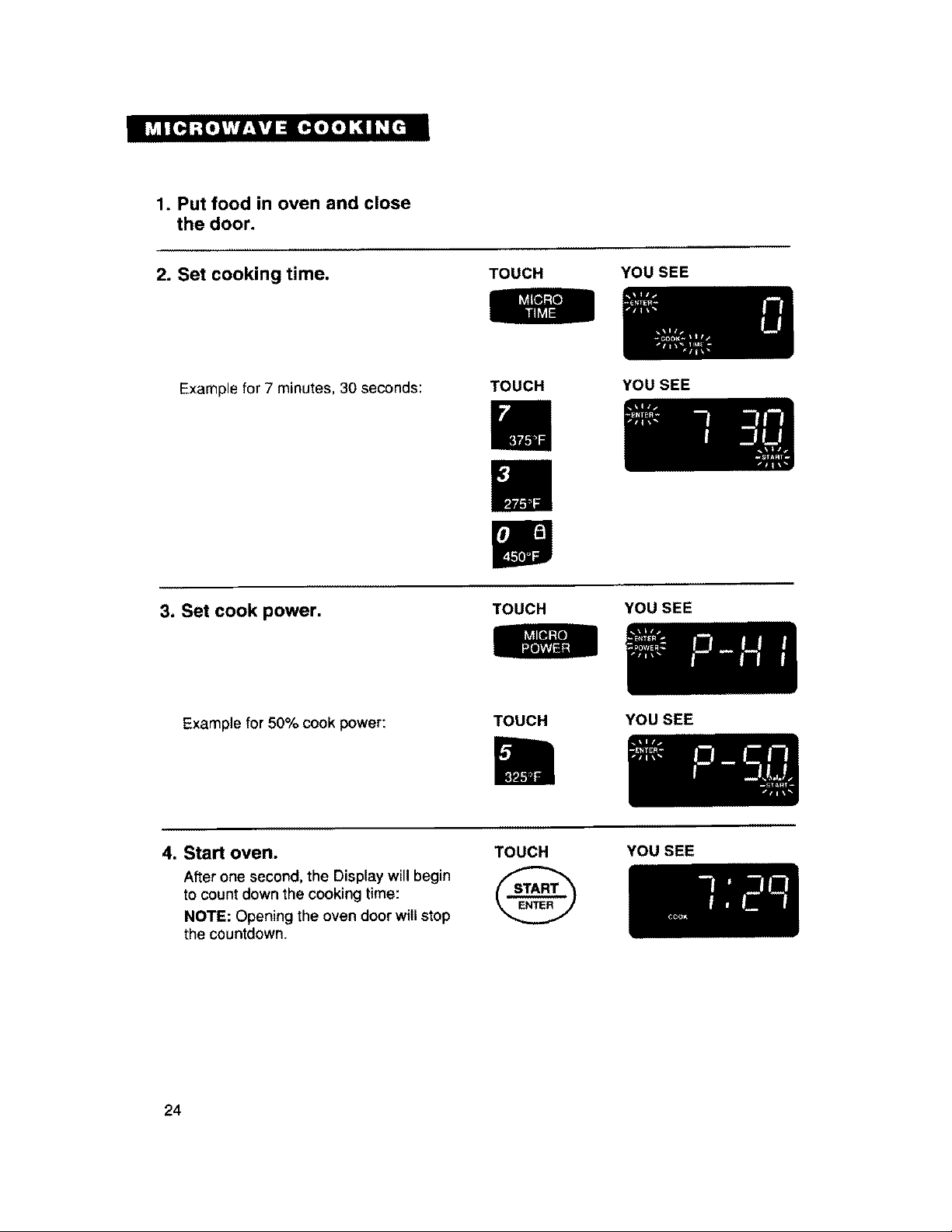
1. Putfoodin oven and close
the door.
2. Set cooking time.
TOUCH
YOU SEE
Example for 7 minutes, 30 seconds:
TOUCH YOU SEE
3. Set cook power.
TOUCH
YOU SEE
Example for 50% cook power:
TOUCH
YOU SEE
4. Start oven.
After one second, the Display will begin
to count down the cooking time:
NOTE: Opening the oven door willstop
the countdown.
TOUCH
YOU SEE
24
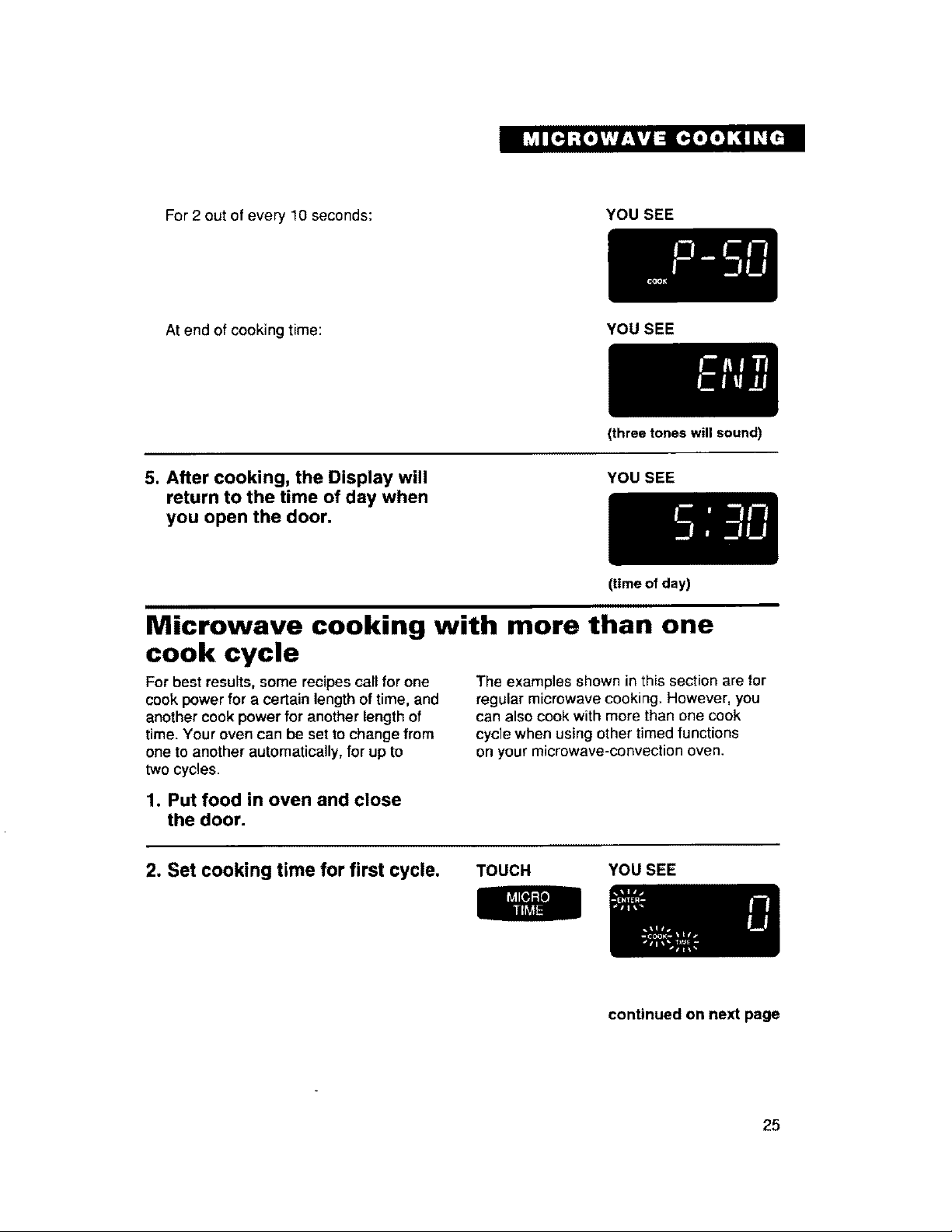
For 2 out of every 10 seconds:
YOU SEE
At end of cooking time:
YOU SEE
5. After cooking, the Display will
return to the time of day when
you open the door.
(three tones will sound)
YOU SEE
(time of day)
Microwave cooking with more than one
cook cycle
For best results, some recipes call for one
cook power for a certain length oftime, and
another cook power for another length of
time. Your oven can be set to change from
one to another automatically, for up to
two cycles.
The examples shown in this section are for
regular microwave cooking. However, you
can also cook with more than one cook
cycle when using other timed functions
on your microwave-convection oven.
1. Put food in oven and close
the door.
2. Set cooking time for first cycle. TOUCH
YOU SEE
continued on next page
25
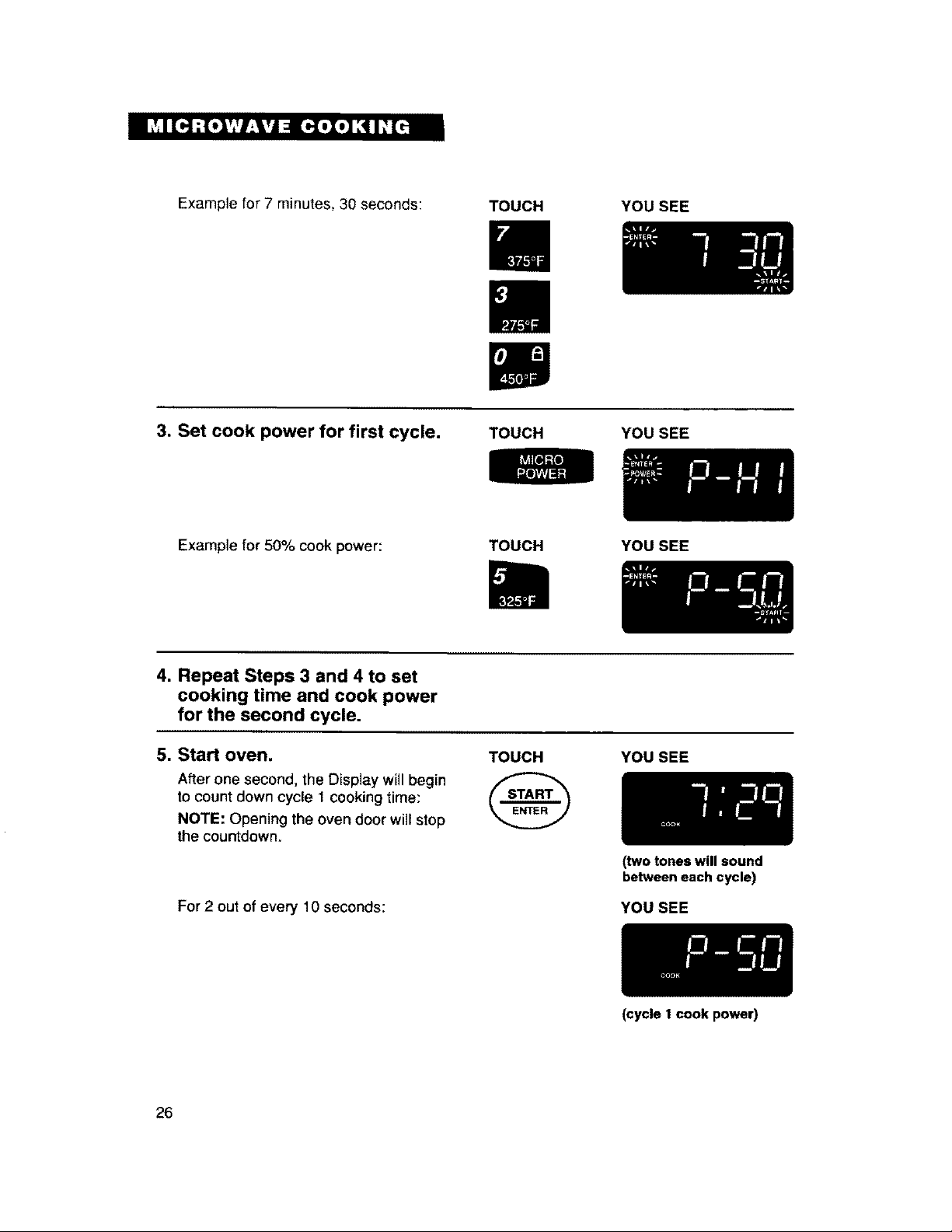
Example for 7 minutes, 30 seconds: TOUCH
YOU SEE
3. Set cook power for first cycle. TOUCH YOU SEE
Example for 50% cook power:
TOUCH YOU SEE
4. Repeat Steps 3 and 4 to set
cooking time and cook power
for the second cycle.
5. Start oven. YOU SEE
TOUCH
After one second, the Display willbegin
to count down cycle 1 cooking time:
NOTE: Opening the oven door will stop
the countdown.
For 2 out of every 10 seconds:
(two tones will sound
betweeneach cycle)
YOU SEE
26
(cycle t cook power)
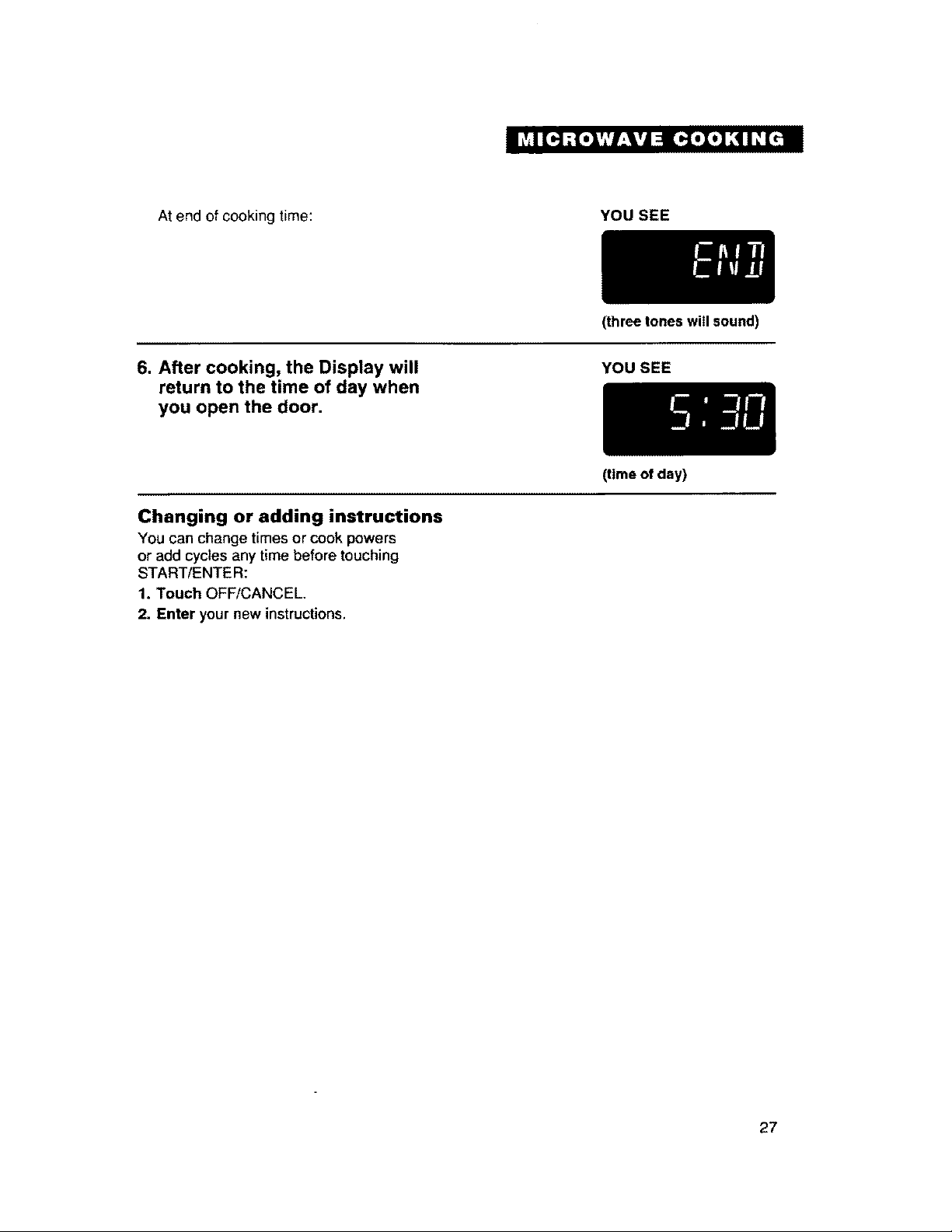
At end of cooking time:
YOU SEE
6. After cooking, the Display will
return to the time of day when
you open the door.
(three tones will sound)
YOU SEE
Changing or adding instructions
You can change times or cook powers
or add cycles any time before touching
START/ENTER:
1. Touch OFF/CANCEL
2. Enter your new instructions,
(time of day)
27
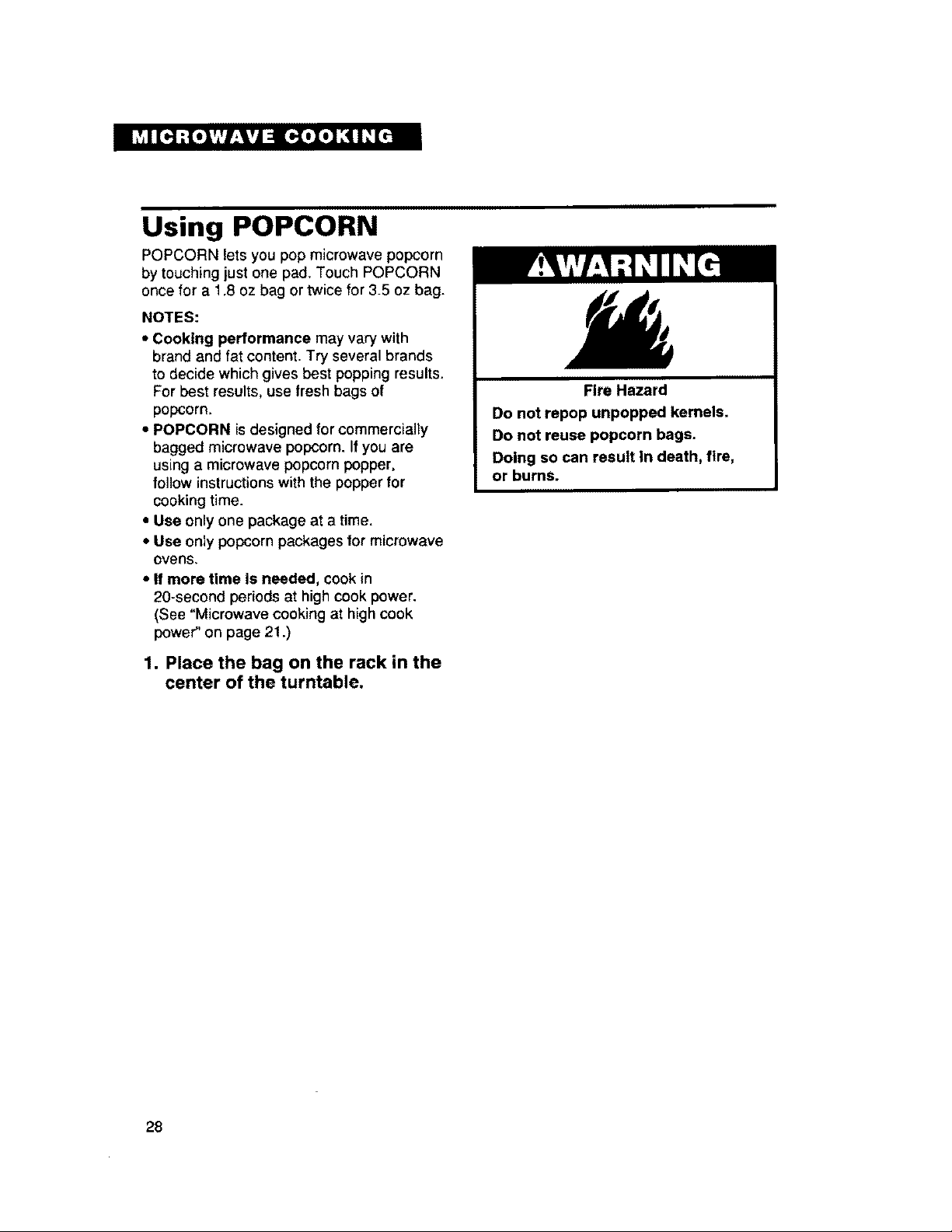
Using POPCORN
POPCORN lets you pop microwave popcorn
by touching just one pad, Touch POPCORN
once for a 1,8 oz bag or twice for 3_5oz bag.
NOTES:
• Cooking performance may vary with
brand and fat content. Try several brands
to decide which gives best popping results,
For best results, use fresh bags Of
popcorn.
• POPCORN isdesigned for commercially
bagged microwave popcorn. If you are
using a microwave popcorn popper,
follow instructions with the popper for
cooking time.
• Use only one package at a time.
• Use only popcorn packages for microwave
ovens,
* If more time is needed, cook in
20-second periods at highcook power.
(See "Microwave cooking at high cook
power" on page 21.)
1. Place the bag on the rack in the
center of the turntable,
Fire Hazard
Do not repop unpopped kernels.
Do not reuse popcorn bags.
Doing so can result In death, fire,
or burns.
28
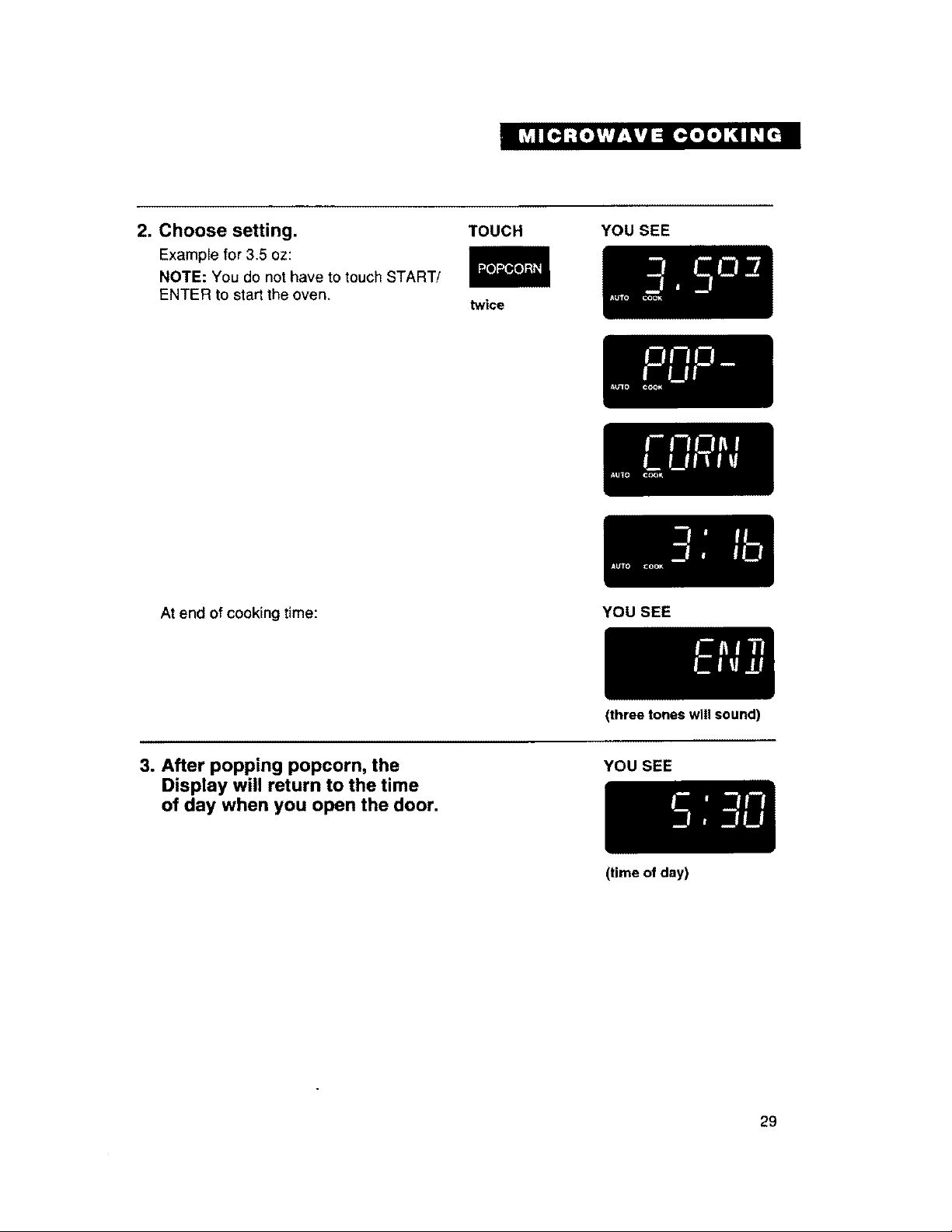
2. Choose setting.
Example for 3.5 oz:
NOTE: You do not have to touch START/
ENTER to start the oven.
TOUCH
twice
YOU SEE
At end of cooking time:
YOU SEE
3. After popping popcorn, the
Display will return to the time
of day when you open the door,
(three tones will sound)
YOU SEE
(time of day)
29
Using WARM HOLD
You can safely keep hot, cooked food warm
inyour microwave oven for up to 60 min-
utes. You can use WARM HOLD by itself,
or to automatically follow a cooking cycle.
NOTES:
• Opening the oven door cancels WARM
HOLD. Close the door and touch WARM
HOLD, then touch START/ENTER if
additional WARM HOLD time is desired.
• Food cooked covered should be covered
during WARM HOLD.
• Pastry items (pies, turnovers, etc.) should
be uncovered during WARM HOLD.
1. Put hot, cooked food in the
oven and close the door.
• Complete meals kept warm on a dinner
plate should be covered during WARM
HOLD.
• Do not use more than one complete
WARM HOLD cycle (about 60 minutes).
The quality of some foods will suffer with
extended time.
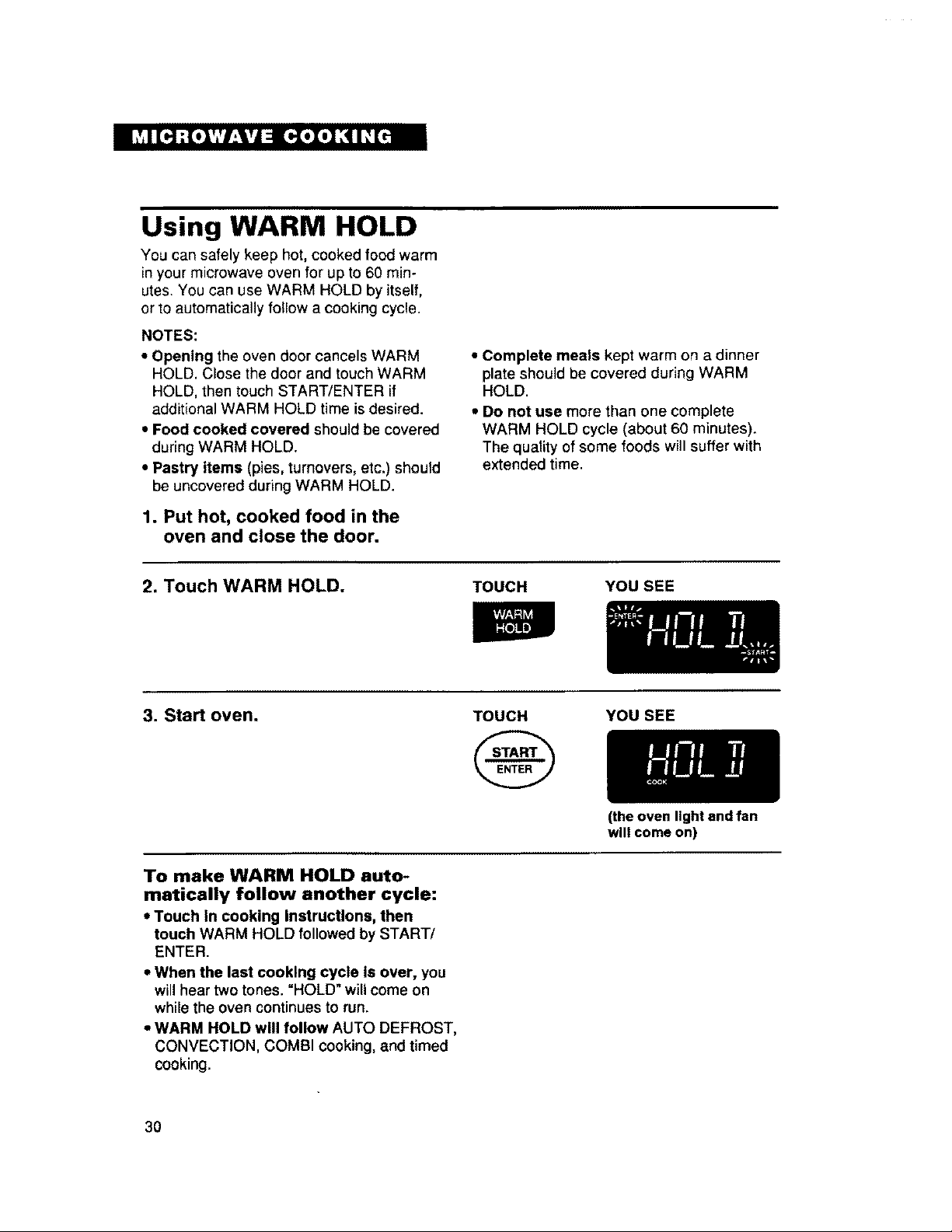
2. Touch WARM HOLD.
TOUCH YOU SEE
3. Start oven. TOUCH YOU SEE
To make WARM HOLD auto-
matically follow another cycle:
• Touch In cooking Instructions, then
touch WARM HOLD followed by START/
ENTER.
• When the last cooking cycle Is over, you
willhear two tones. "HOLD" willcome on
while the oven continues to run.
• WARM HOLD will follow AUTO DEFROST,
CONVECTION, COMBI cooking, and timed
cooking.
3O
(the oven light and fan
will come on)
One-touch reheating
You can reheat a food or beverage by
choosing a preset category and quantity.
You do not need to figure out cooking time
or cook power.
NOTE: See "Reheating chart" on page 52
for reheating with cooking time and cook
power.
1. Put food in the oven and close
the door.
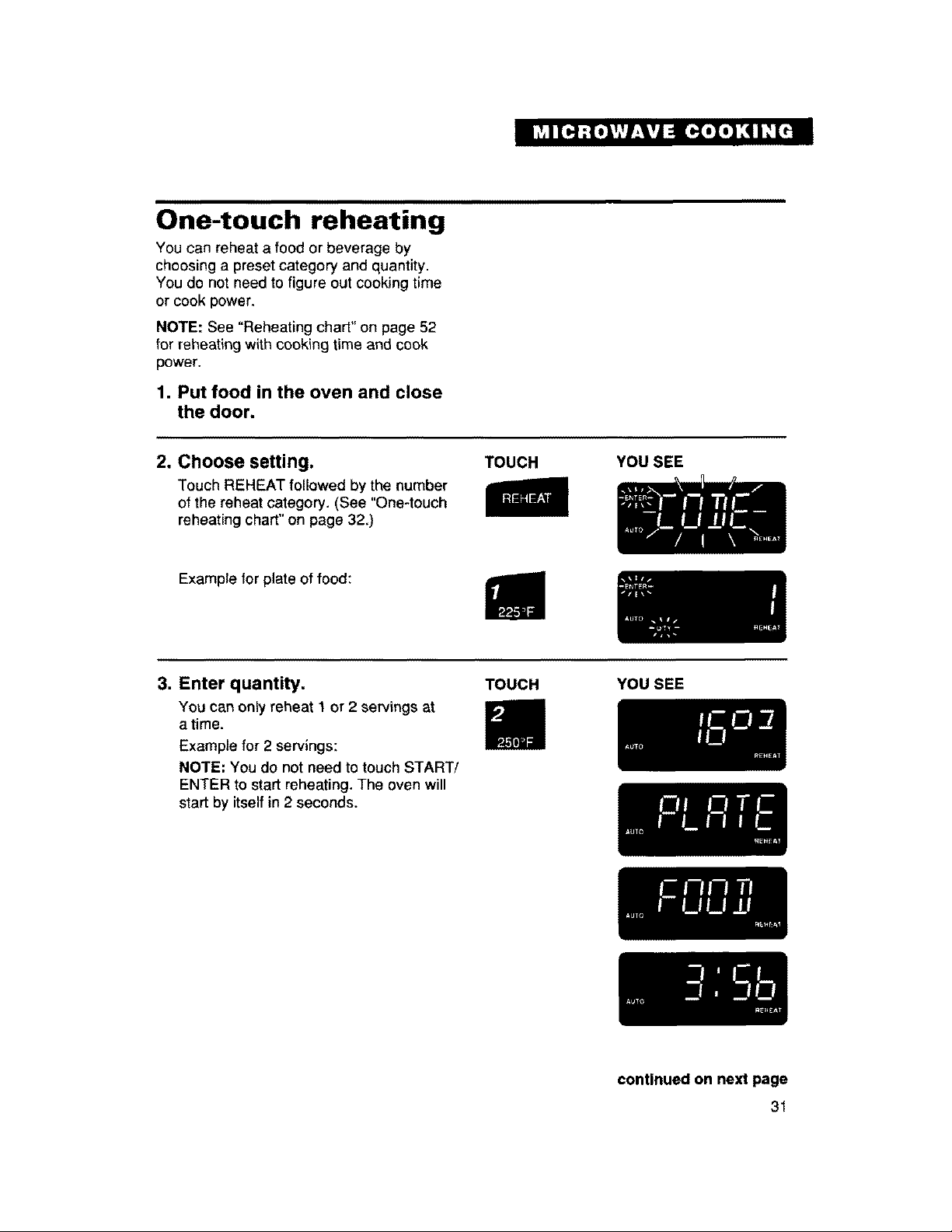
2. Choose setting.
Touch REHEAT followed bythe number
of the reheat category. (See "One-touch
reheating chart" on page 320
TOUCH
YOU SEE
Example for plate of food:
3. Enter quantity.
You can only reheat 1 or 2 servings at
a time.
Example for 2 servings:
NOTE: You do not need to touch START/
ENTER to start reheating. The oven will
start by itself in 2 seconds.
TOUCH YOU SEE
continued on next page
31
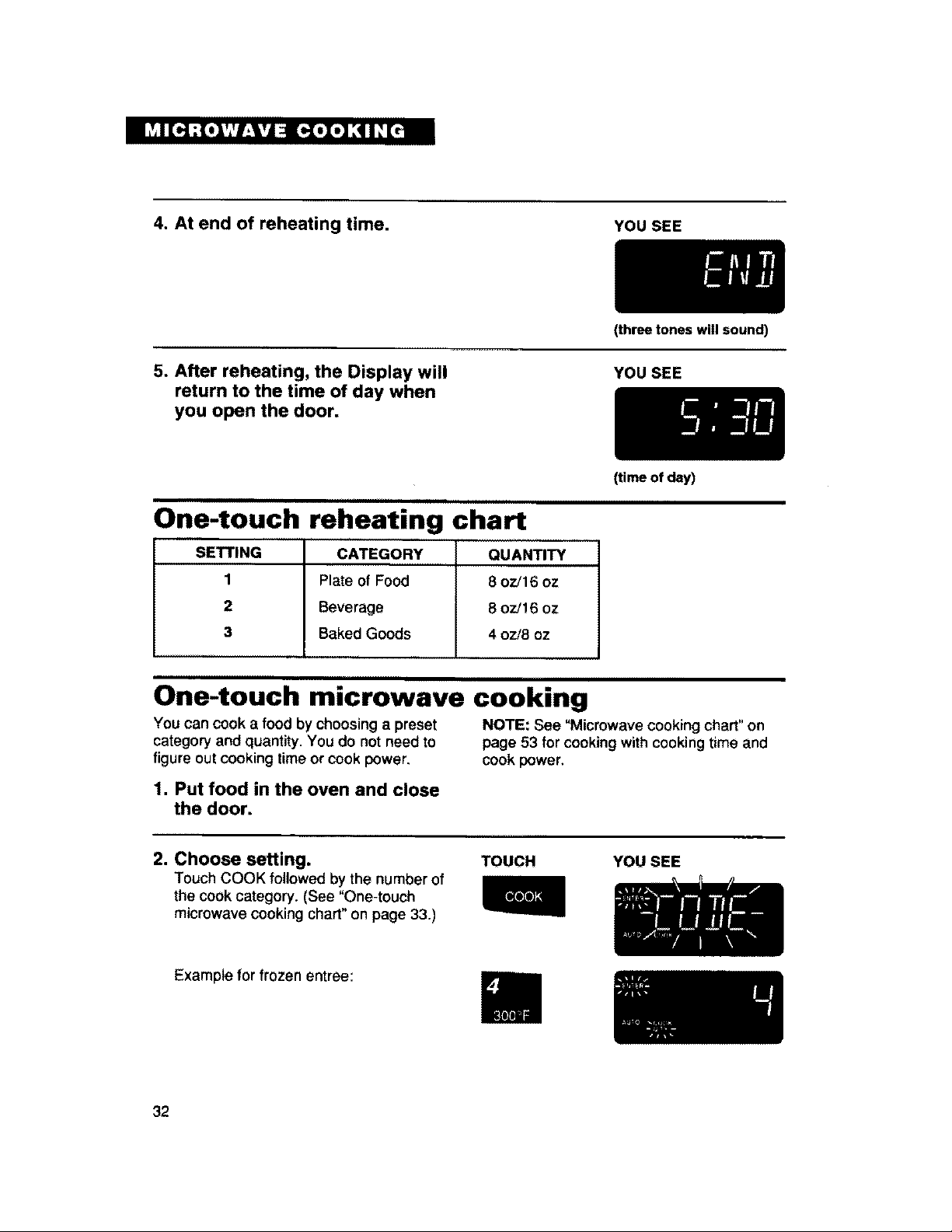
4. At end of reheating time.
YOU SEE
5. After reheating, the Display will
return to the time of day when
you open the door.
(three tones will sound)
YOU SEE
One-touch reheating chart
SETTING CATEGORY QUANTITY
1 Plate of Food 8 oz/16 oz
2 Beverage 8 oz!16 oz
3 Baked Goods 4 oz/8 oz
One-touch microwave cooking
(time of day)
You can cook a food by choosing a preset NOTE: See "Microwave cooking chart" on
category and quantity. You do not need to page 53 for cooking with cooking time and
figure out cooking time or cook power, cook power,
1. Putfood in the oven and close
the door.
2. Choose setting.
Touch COOK followed by the number of
the cook category. (See "One-touch
microwave cooking chart"on page 33.)
TOUCH YOU SEE
Example for frozen entree:
32
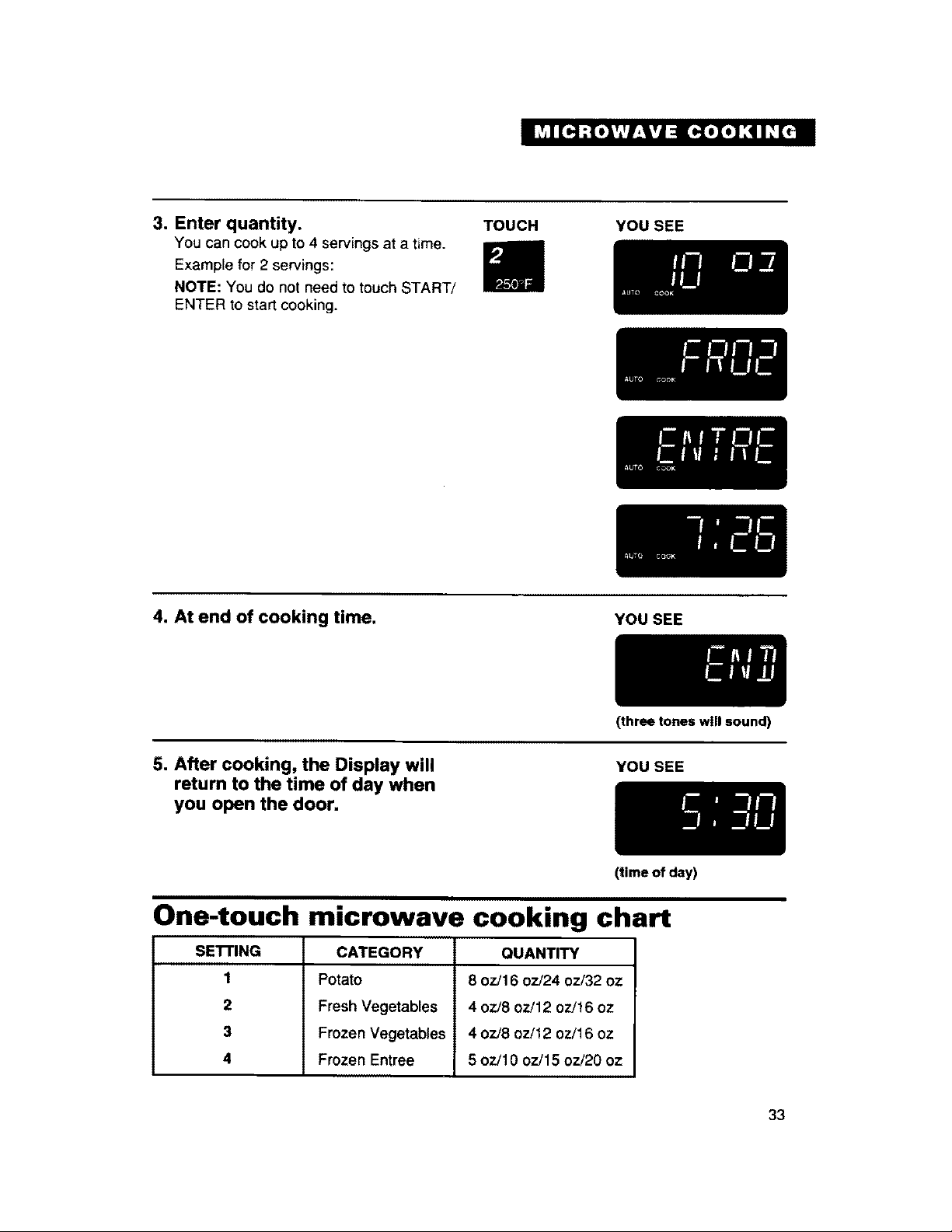
3, Enter quantity.
You can cook up to 4 servings at a time.
Example for 2 servings:
NOTE: You do not need to touch START!
ENTER to start cooking.
TOUCH YOU SEE
4. At end of cooking time.
YOU SEE
5. After cooking, the Display will
return to the time of day when
you open the door,
(three tones will sound)
YOU SEE
(time of day)
One-touch microwave cooking chart
SE'n'ING
1
2
3
4
CATEGORY
Potato
Fresh Vegetables
Frozen Vegetables
Frozen Entree
QUANTITY
8 ozi16 oz/24 oz/32 oz
4 oz/8 oz/12 oz/16 oz
4 oz/8 ozi12 oz/16 oz
5 oz/10 oz/15 oz/20 oz
33
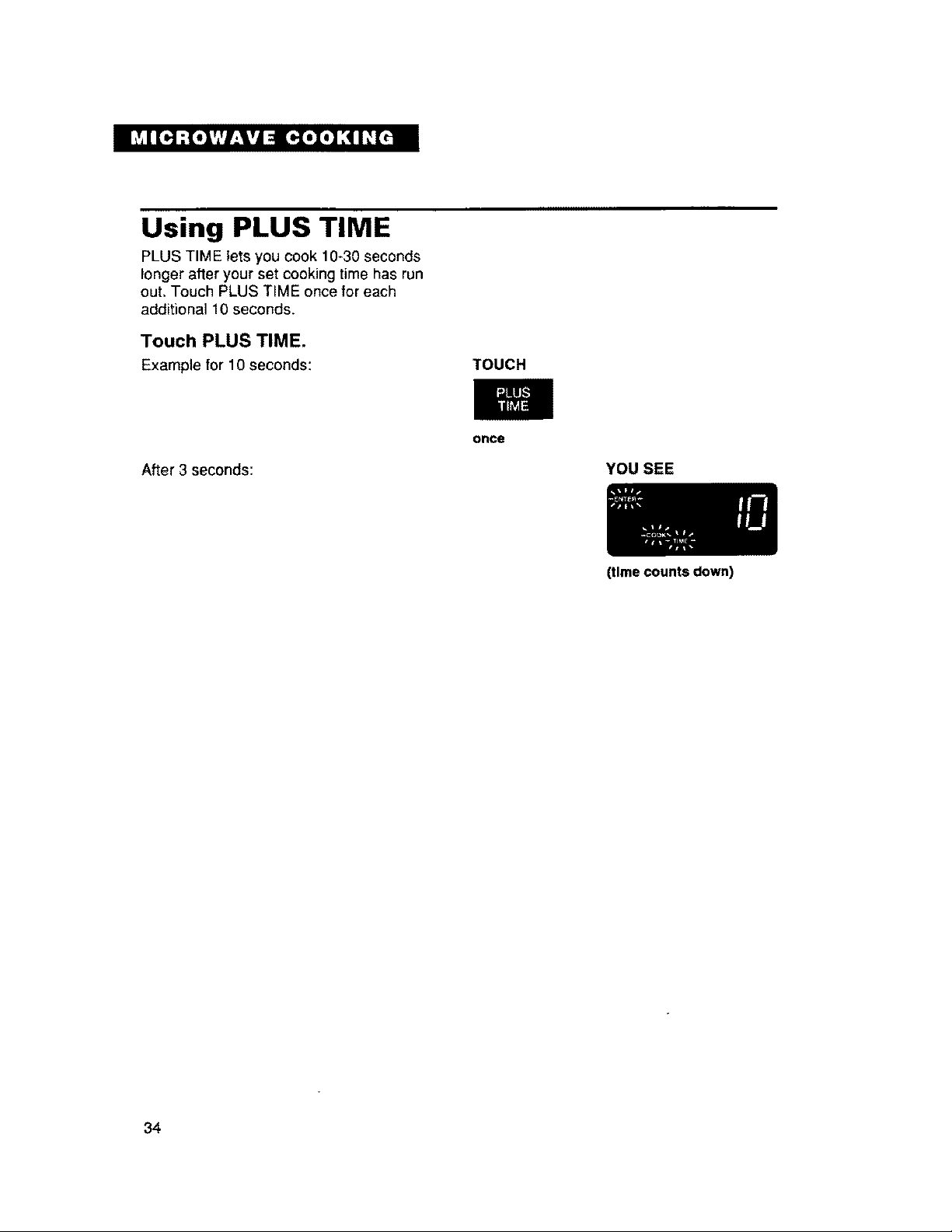
Using PLUS TIME
PLUS TIM E lets you cook 10-30 seconds
longer after your set cooking time has run
out. Touch PLUS TIME once for each
additional 10 seconds.
Touch PLUS TIME.
Example for 10 seconds:
TOUCH
After 3 seconds:
once
YOU SEE
34
(time counts down)
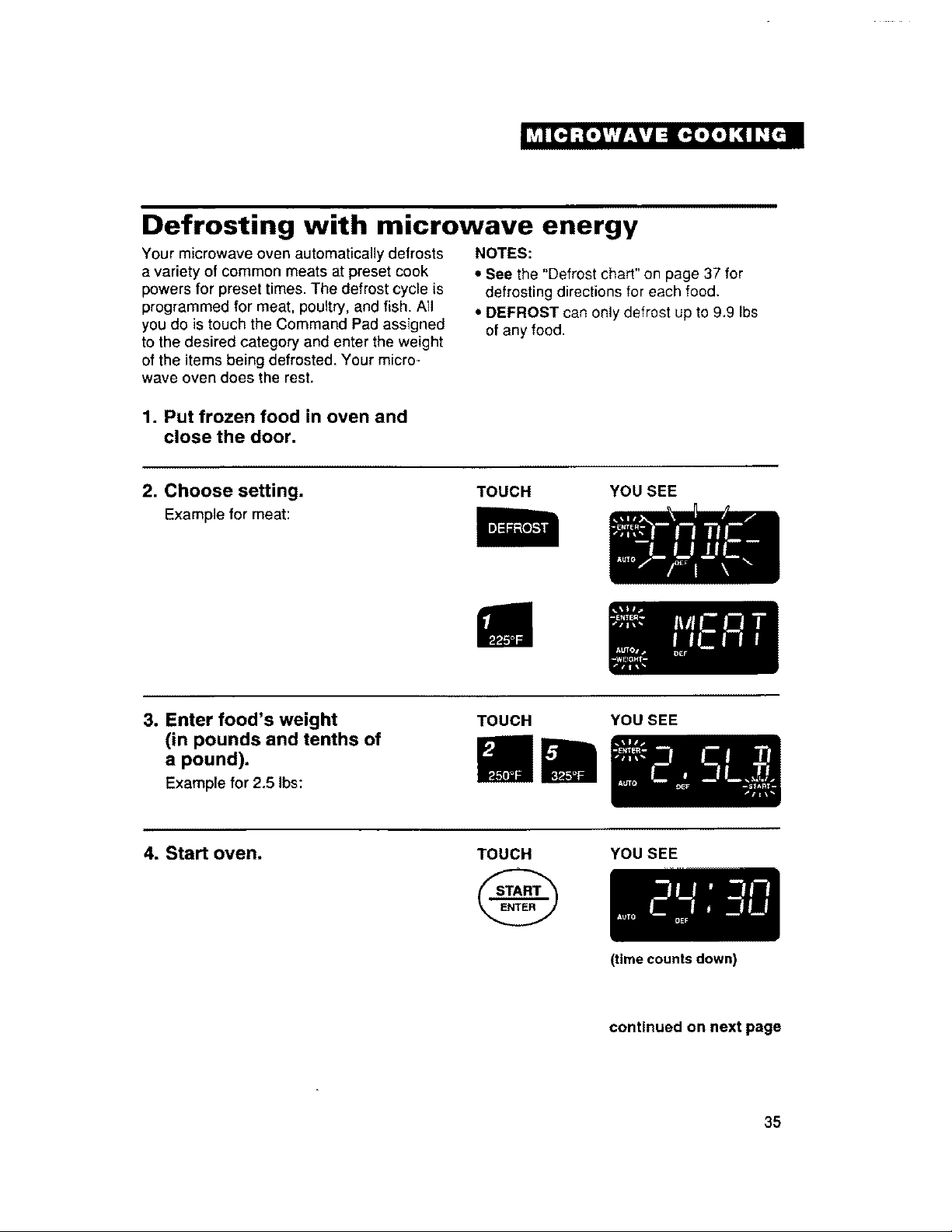
Defrosting with microwave energy
Your microwave oven automatically defrosts
a variety of common meats at preset cook
powers for preset times. The defrost cycle is
programmed for meat, poultry, and fish. AII
you do is touch the Command Pad assigned
to the desired category and enter the weight
of the items being defrosted. Your micro-
wave oven does the rest.
NOTES:
• See the "Defrost chad" on page 37 for
defrosting directions for each food.
• DEFROST can only defrost up to 9.9 Ibs
of any food.
1. Put frozen food in oven and
close the door.
2. Choose setting.
Example for meat:
TOUCH YOU SEE
3. Enterfood's weight
(in pounds and tenths of
a pound).
Examplefor2.51bs:
TOUCH YOU SEE
4. Start oven. TOUCH YOUSEE
(time counts down)
continued on next page
35
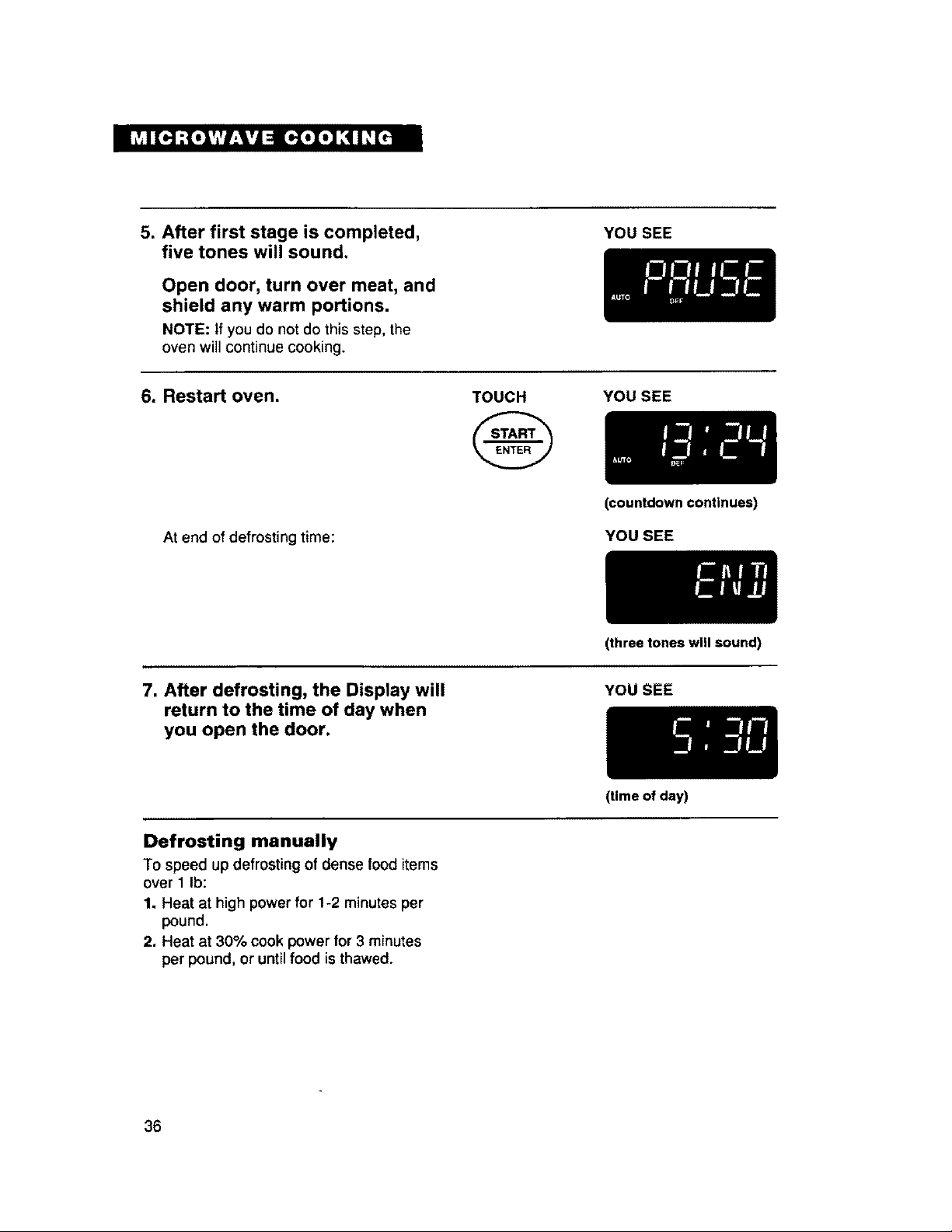
5. After first stage is completed,
five tones will sound.
Open door, turn over meat, and
shield any warm portions.
NOTE: If you do not do this step, the
oven will continue cooking.
YOU SEE
6. Restart oven.
TOUCH
YOU SEE
At end of defrosting time:
(countdown continues)
YOU SEE
(three tones wnl sound)
7. After defrosting, the Display will
return to the time of day when
you open the door.
YOU SEE
Defrosting manually
To speed up defrosting of dense food items
over 1 Ib:
1. Heat at high power for 1-2 minutes per
pound.
2. Heat at 30% cook power for 3 minutes
per pound, or until food is thawed.
36
(time of day)
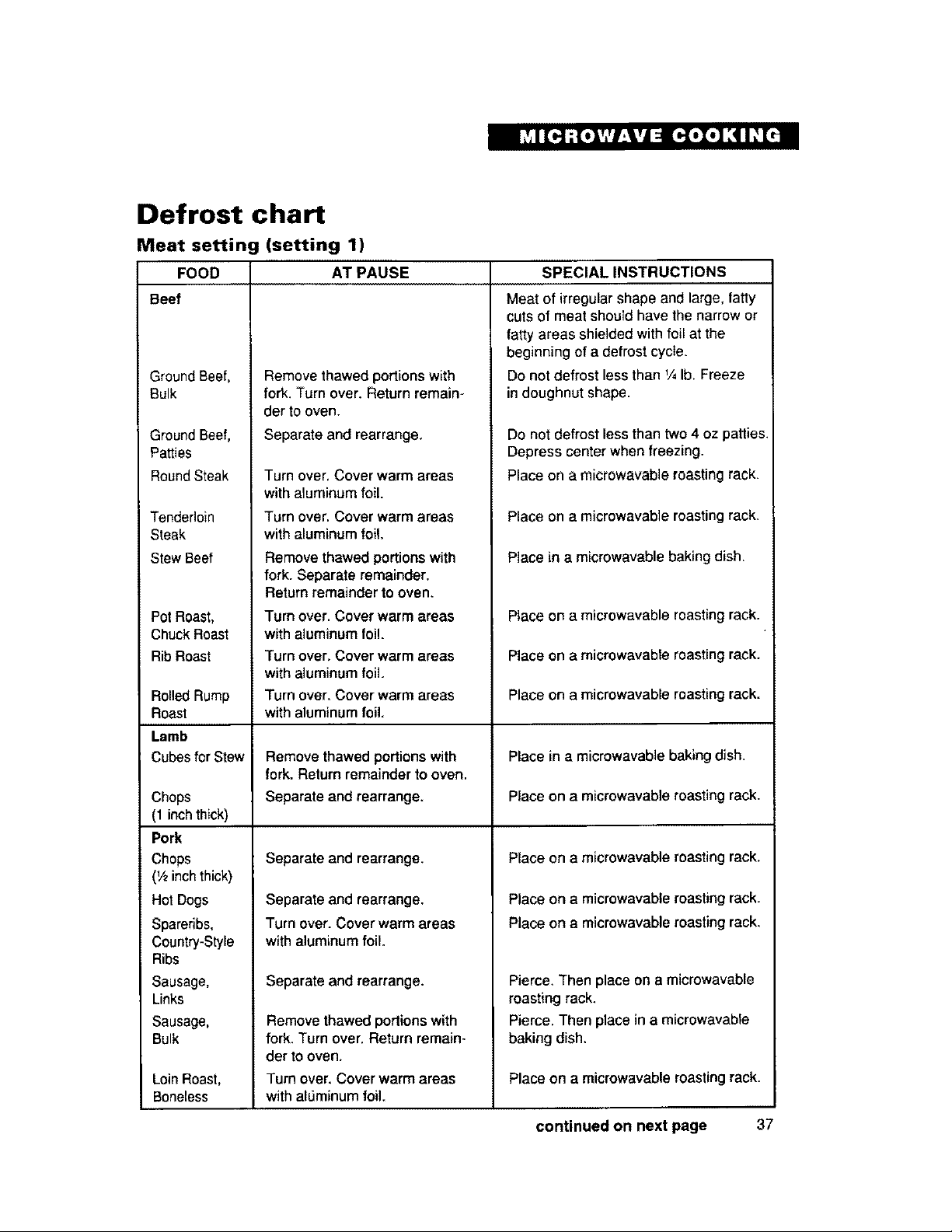
Defrost chart
Meat setting (setting 1)
FOOD
Beef
Ground Beef,
Bulk
Ground Beef,
Patties
Round Steak
Tenderloin
Steak
Stew Beef
Pot Roast,
ChuckRoast
Rib Roast
Rolled Rump
Roast
Lamb
Cubes for Stew
Chops
(1 inchthick)
Pork
Chops
(V2inchthick)
Hot Dogs
Spareribs,
Country-Style
Ribs
Sausage,
Links
Sausage,
Bulk
Loin Roast,
Boneless
AT PAUSE SPECIAL INSTRUCTIONS
Remove thawed portions with
fork. Turn over. Returnremain-
der to oven.
Separate and rearrange.
Turn over,Cover warm areas
with aluminum foil.
Turn over, Cover warm areas
with aluminum foil.
Remove thawed portionswith
fork. Separate remainder,
Return remainder to oven.
Turn over. Cover warm areas
with aluminum foil.
Turn over. Coverwarm areas
with aluminum foil.
Turn over. Cover warm areas
with aluminum foil.
Remove thawed portions with
fork.Return remainder to oven,
Separate and rearrange.
Separate and rearrange.
Separate and rearrange,
Turn over. Cover warmareas
with aluminum foil.
Separate and rearrange.
Remove thawed portions with
fork. Turn over, Return remain-
der to oven.
Turn over. Cover warm areas
with alL_minumfoil.
Meat of irregular shape and large, fatty
cuts of meat should have the narrow or
fatty areas shielded with foil at the
beginning of a defrost cycle.
Do not defrost less than % lb, Freeze
in doughnut shape.
Do not defrost less than two 4 oz patties.
Depress center whenfreezing.
Place on a microwavable roastingrack.
Place on a microwavable roasting rack.
Place in a microwavable baking dish.
Place on a microwavable roastingrack.
Place on a microwavable roasting rack.
Place on a microwavable roasting rack.
Place in a microwavable bakingdish.
Place on a microwavable roastingrack.
Place on a microwavable roastingrack.
Place on a microwavable roasting rack.
Place on a microwavable roasting rack,
Pierce. Then place on a microwavable
mastingrack.
Pierce. Then place in a microwavable
baking dish.
Place on a microwavable roastingrack.
continued on next page 37
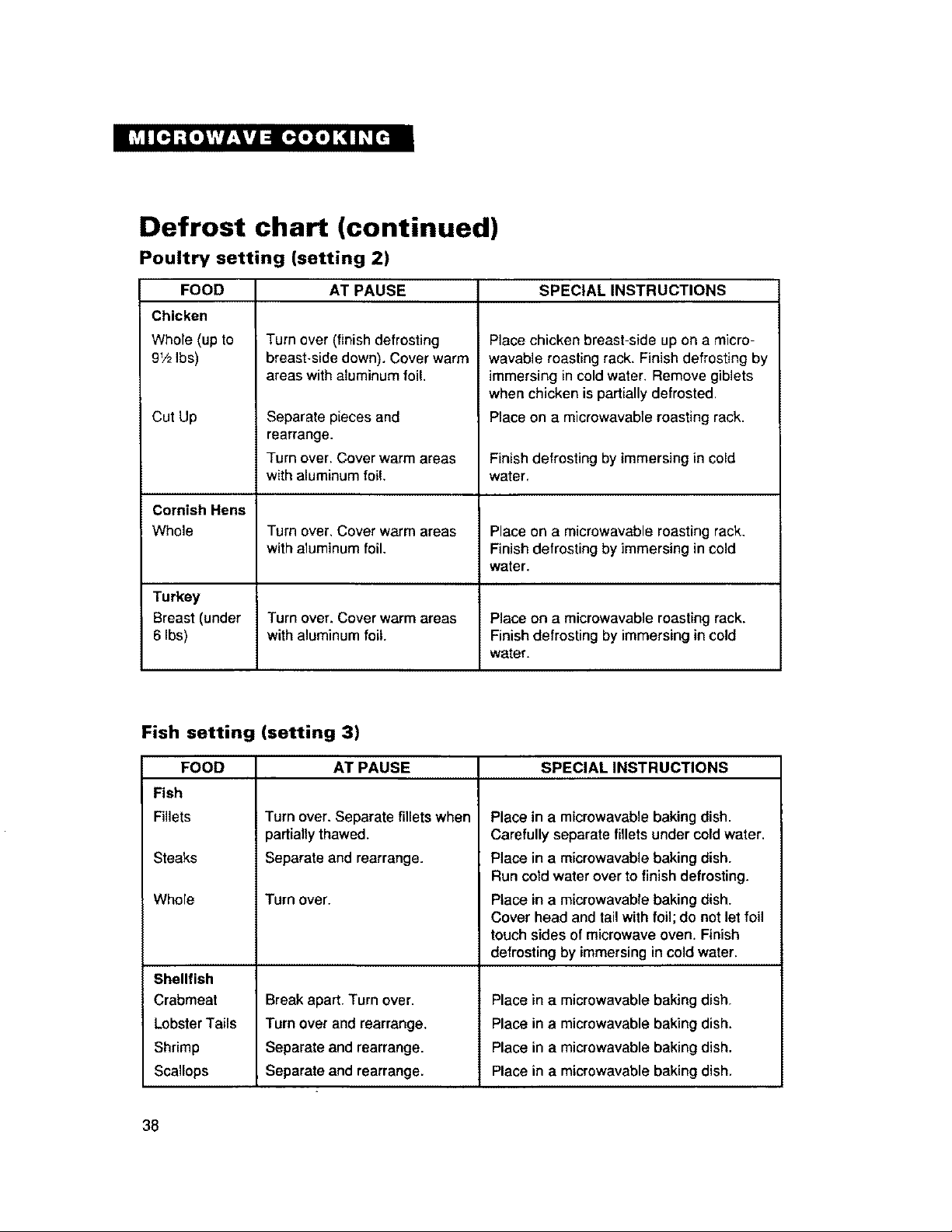
Defrost chart (continued)
Poultry setting (setting 2)
FOOD
Chicken
Whole (up to
9V2Ibs)
Cut Up
AT PAUSE SPECIAL INSTRUCTIONS
Turn over (finish defrosting
breast-side down). Cover warm
areas with aluminum foil.
Separate pieces and
rearrange.
Turn over. Cover warm areas
with aluminum foil,
Place chicken breast-side up on a micro-
wavable roasting rack. Finish defrosting by
immersing in cold water. Remove giblets
when chicken is partially defrosted,
Place on a microwavable roasting rack.
Finish defrosting by immersingin cold
water.
Cornish Hens
Whole Turn over, Cover warm areas Place on a microwavable roasting rack.
with aluminum foil. Finish defrosting by immersing in cold
water.
Turkey
Breast (under Turn over. Cover warm areas Place on a microwavable roasting rack.
6 Ibs) with aluminum foil. Finish defrosting by immersing in cold
water.
Fish setting (setting 3)
AT PAUSE SPECIAL INSTRUCTIONSFOOD
Fish
Fillets
Steaks
Whole
Shellfish
Crabmeat
Lobster Tails
Shrimp
Scallops
Turn over,Separate fillets when
partially thawed.
Separate and rearrange.
Turn over.
Break apart, Turn over.
Turn over and rearrange,
Separate and rearrange.
Separate and rearrange.
Place in a microwavable baking dish.
Carefully separate fillets under cold water.
Place in a microwavable baking dish.
Run cold water over to finish defrosting.
Place in a microwavable baking dish.
Cover head and tail with foil; do not let foil
touch sides of microwave oven. Finish
defrosting by immersing incoldwater.
Place in a microwavable baking dish,
Place in a microwavable baking dish.
Place in a microwavable baking dish.
Place in a microwavable baking dish.
38
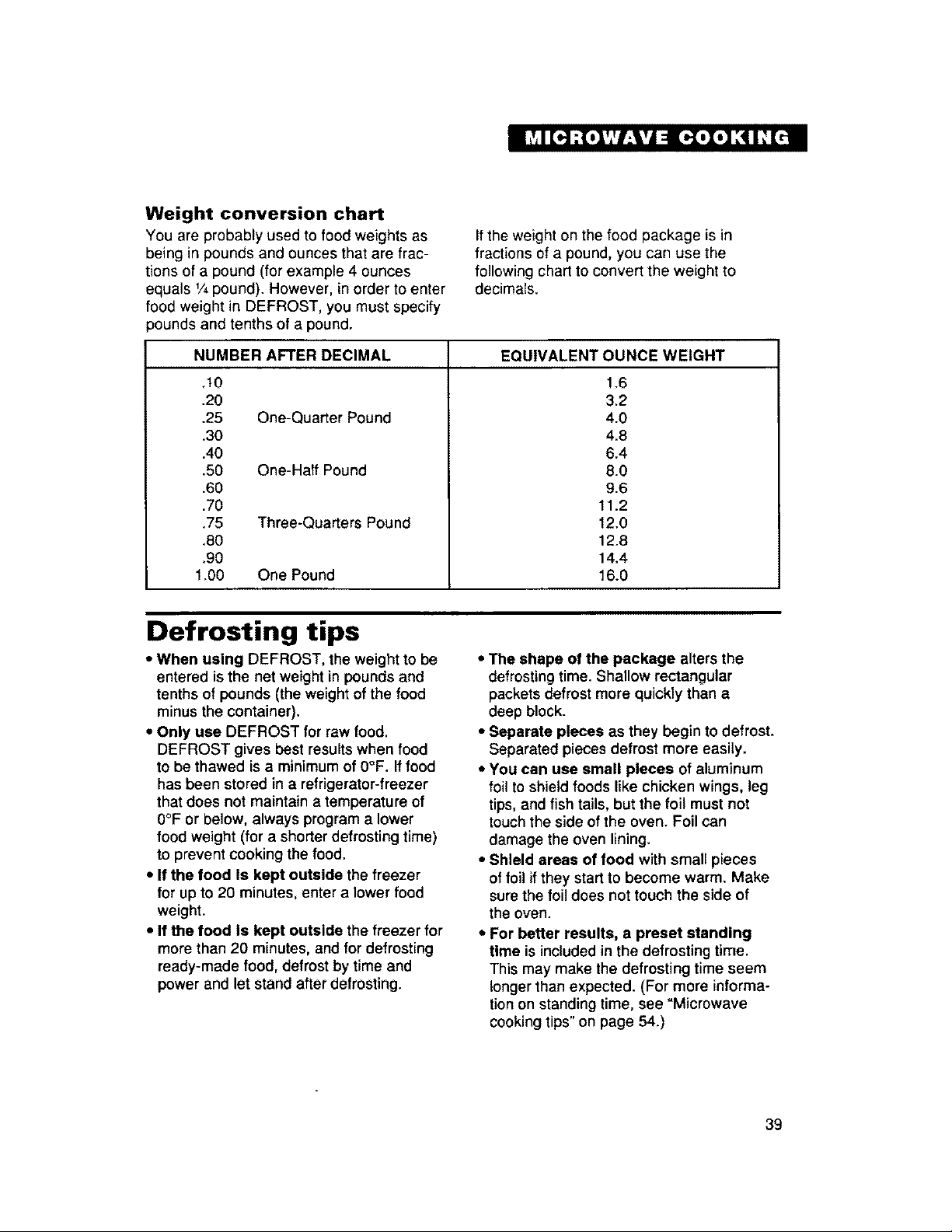
Weight conversion chart
You are probably used to food weights as
being in pounds and ounces that are frac-
tions of a pound (for example 4 ounces
equals Y4pound). However, in order to enter
food weight in DEFROST, you must specify
pounds and tenths of a pound.
If the weight on the food package is in
fractionsof a pound, you can use the
following chart to convert the weight to
decimals.
NUMBER AFTER DECIMAL EQUIVALENT OUNCE WEIGHT
,10
.20
.25 One-Quarter Pound
,30
,40
,50 One-Half Pound
,60
.70
.75 Three-Quarters Pound
.80
.90
1.00 One Pound
1.6
3,2
4.0
4,8
6,4
8.0
9.6
11.2
12.0
12.8
14.4
16.0
Defrosting tips
• When using DEFROST, the weight to be
entered is the net weight in pounds and
tenths of pounds (the weight of the food
minus the container).
• Only use DEFROST for raw food,
DEFROST gives best results when food
to be thawed is a minimum of 0°F. If food
has been stored in a refrigerator-freezer
that does not maintain a temperature of
0°F or below, always program a lower
food weight (for a shorter defrosting time)
to prevent cooking the food.
• If the food Is kept outside the freezer
for up to 20 minutes, enter a lower food
weight.
• If the food Is kept outside the freezer for
more than 20 minutes, and for defrosting
ready-made food, defrost by time and
power and let stand after defrosting.
• The shape of the package alters the
defrosting time. Shallow rectangular
packets defrost more quickly than a
deep block.
• Separate pieces as they begin to defrost.
Separated pieces defrost more easily.
• You can use small pieces of aluminum
foil to shield foods like chicken wings, leg
tips,and fish tails, but the foil must not
touch the side of the oven. Foil can
damage the oven lining.
• Shield areas of food with small pieces
of foil if they startto become warm. Make
sure the foil does not touch the side of
the oven.
• For better results, a preset standing
time is included in the defrosting time.
This may make the defrosting time seem
longer than expected. (For more informa-
tionon standing time, see "Microwave
cookingtips"on page 54.)
39
Convection Cooking
This section gives you instructions for operating each convection function. Please read these
instructions carefully.
How convection cooking works
Convection cooking circulates hot air
through the oven cavity with a fan. The
constantly moving air surrounds the food
to heat the outer portion quickly. Your oven
uses convection cooking whenever you use
the Convection Command Pads. DO NOT
USE THE OVEN WITHOUT THE TURN-
TABLE IN PLACE.
Helpful hints for convection
cooking:
• You can cook food either directly on the
turntable or with the Bi-Level Cooking Rack
on the turntable.
• Do not cover turntable or baking rack with
aluminum foil. It interferes with the flow of
air that cooks the food.
• Round pizza pans are excellent cooking
utenslls for many convection-only items.
Choose pans that do not have extended
handles.
• You may remove the turntable when
preheating the oven and when preparing
food to be cooked directly on the turntable.
• Use convection cooking for items like
souffles, breads, cookies, angel food
cakes, pizza, and for some meat and
fish cooking.
• You do not need to use any special
techniques to adapt your favorite oven
recipes to convection cooking; however,
you may need to lower some temperatures
or reduce some cooking times from the
convection oven cooking directions. See
examples in your cookbook and inthe
charts in this section.
• When baking cakes, cookies, breads,
rolls, or other baked foods, most recipes
call for preheating. Preheat the empty
oven just as you do a regular oven. You
can start heavier dense foods such as
meats, casseroles, and poultry without
preheating.
• All heatproof cookware or metal utensils
can be used in convection cooking.
• As In conventional cooking, the distance
of the food from the heat source affects
cooking results. Follow cookbook recipes
and refer to the charts in this Use and
Care Guide, It isalso helpful to find a
similar recipe in the cookbook index and to
refer to recipe's suggested techniques.
• Use metal utensils only for convection
cooking. Never use for microwave or
combination cooking since arcing and
damage to the oven may occur.
• After preheating, ifyou do not open the
door, the oven willautomatically hold at
the preheated temperature for 30 minutes.
• You can set up to three convectioncycles.
(Example for two-crust pies: You can set
the oven to preheat for baking at 425°F
and to finish baking at 350°F.)
4O
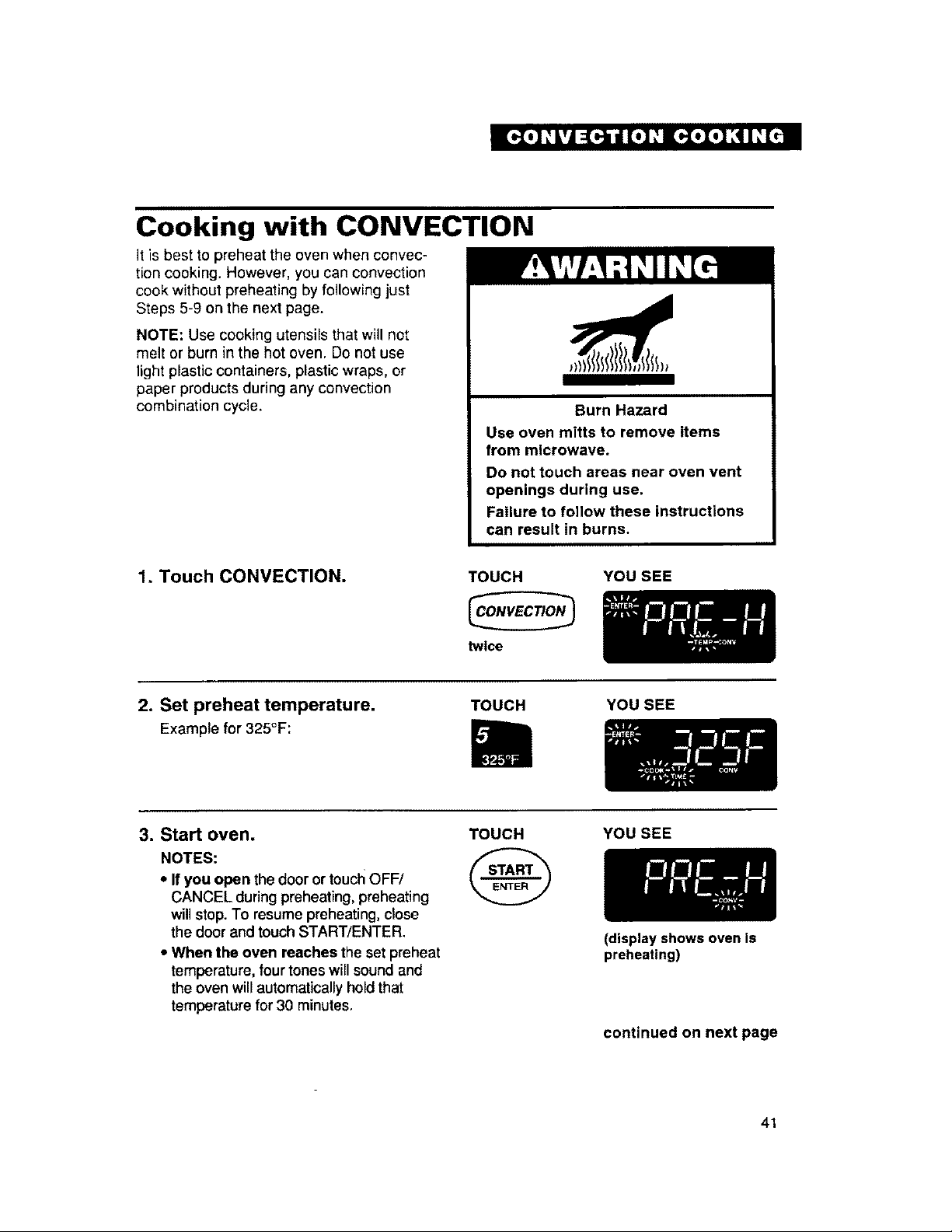
Cooking with CONVECTION
It is best to preheat the oven when convec-
tion cooking. However, you can convection
cook without preheating by following just
Steps 5-9 on the next page.
NOTE: Use cooking utensils that will not
melt or burn in the hot oven. Do not use
light plastic containers, plastic wraps, or
paper products during any convection
combination cycle.
Burn Hazard
Use oven mitts to remove items
from microwave.
Do not touch areas near oven vent
openings during use.
Failure to follow these instructions
can result in burns.
1. Touch CONVECTION. TOUCH YOU SEE
twice
2. Set preheat temperature.
Example for 325°F:
TOUCH YOU SEE
3. Start oven.
NOTES:
• If you open thedoor or touchOFF/
CANCEL duringpreheating,preheating
willstop.To resume preheating,ctose
the doorand touch START/ENTER.
• When the oven reaches the set preheat
temperature,four tones willsound and
the oven willautomaticallyholdthat
temperature for 30 minutes.
TOUCH
@
YOU SEE
(display shows oven is
preheating)
continued on next page
41
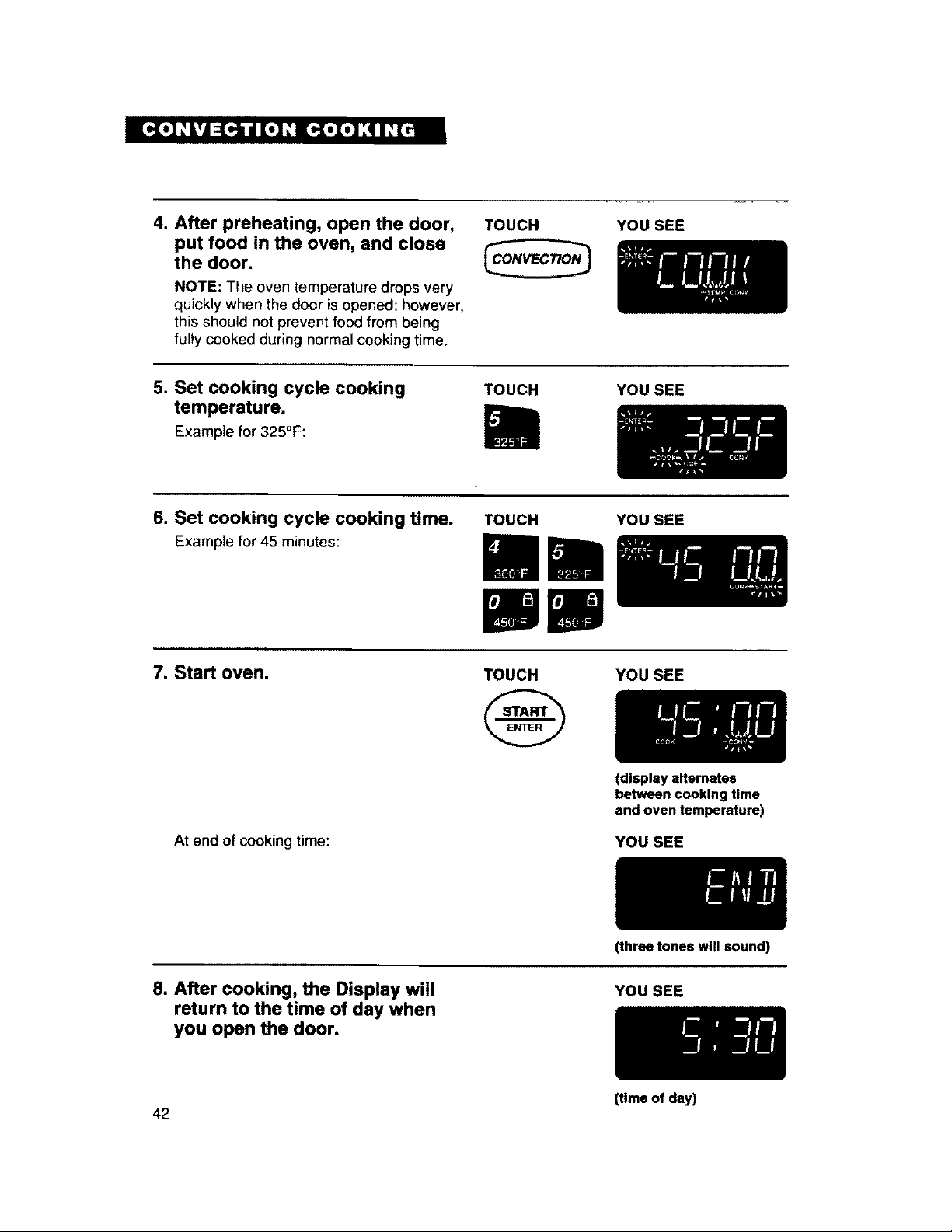
4. After preheating, open the door,
put food in the oven, and close
the door.
NOTE: The oven temperature drops very
quickly when the door is opened; however,
this should not prevent food from being
fully cooked during normal cooking time.
TOUCH YOU SEE
5. Set cooking cycle cooking
temperature.
Example for 325°F:
TOUCH YOU SEE
6. Set cooking cycle cooking time.
Example for 45 minutes:
TOUCH YOU SEE
7. Start oven.
At end of cooking time:
TOUCH YOU SEE
(display alternates
between cooking time
and oven temperature)
YOU SEE
8. After cooking, the Display will
return to the time of day when
you open the door.
(three tones will sound)
YOU SEE
(time of day)
42
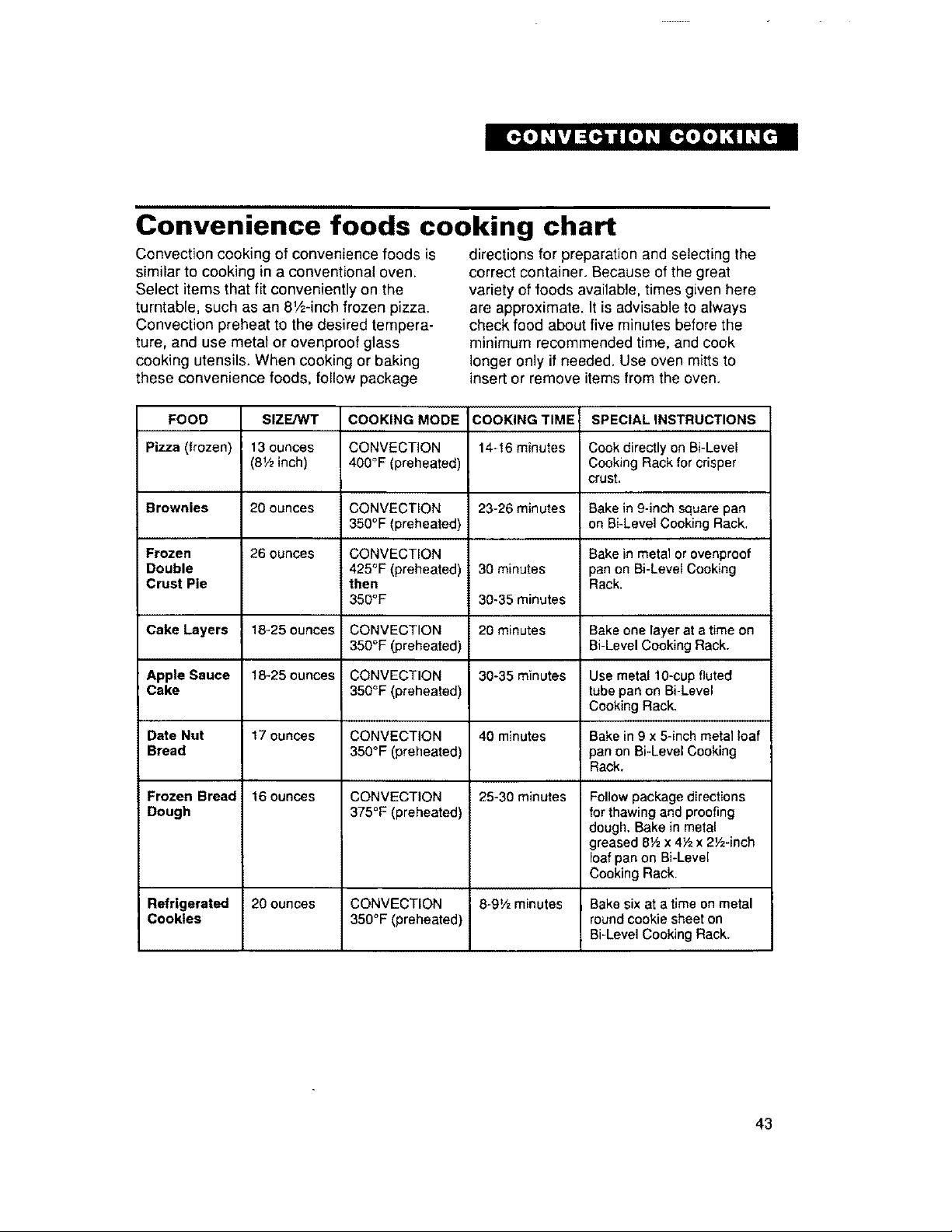
Convenience foods cooking chart
Convection cooking of convenience foods is
similar to cooking in a conventional oven.
Select items that fit conveniently on the
turntable, such as an 8V2-inch frozen pizza.
Convection preheat to the desired tempera-
ture, and use metal or ovenproof glass
cooking utensils. When cooking or baking
these convenience foods, follow package
directions for preparation and selecting the
correct container. Because of the great
variety of foods available, times given here
are approximate. It is advisable to always
check food about five minutes before the
minimum recommended time, and cook
longer only if needed. Use oven mitts to
insert or remove items from the oven.
FOOD
Pizza (frozen)
SIZ_
13 ounces
(8½inch)
COOKING MODE
CONVECTION
460°F (preheated)
COOKING TIME
14-16 minutes
SPECIAL INSTRUCTIONS
Cook directly on Bi-Level
Cooking Rack for crisper
crust.
Brownies 20 ounces CONVECTION 23-26 minutes Bake in 9-inch square pan
350°F (preheated) on Bi-Level Cooking Rack,
Frozen 26 ounces CONVECTION Bake in metal or ovenproof
Double 425°F (preheated) 30 minutes pan on Bi-Level Cooking
Crust Pie then Rack.
350°F 30-35 minutes
Cake Layers 18-25 ounces CONVECTION 20 minutes Bake one layer at a time on
350°F (preheated) Bi Level Cooking Rack.
Apple Sauce 18_25 ounces CONVECTION 30-35 minutes Use metal 10-cup fluted
Cake 350°F (preheated) tube pan on Bi-Level
Cooking Rack.
Date Nut 17 ounces CONVECTION 40 minutes Bake in 9 x 5-inch metal loaf
Bread 350°F (preheated) pan on Bi-Level Cooking
Rack.
Frozen Bread 16 ounces CONVECTION 25-30 minutes Follow package directions
Dough 375°F (preheated) for thawing and proofing
dough. Bake in metal
greased 6½ x 4Yzx 2½-inch
loaf pan on Bi-Level
Cooking Rack.
Refrigerated 20 ounces CONVECTION 8-9½ minutes Bake six at a time on metal
Cookies 350°F (preheated) round cookie sheet on
Bi-Level Cooking Rack,
43
Combination Cooking
This section gives you instructions for operating each combination cooking function.
Please read these instructions carefully.
How combination cooking works
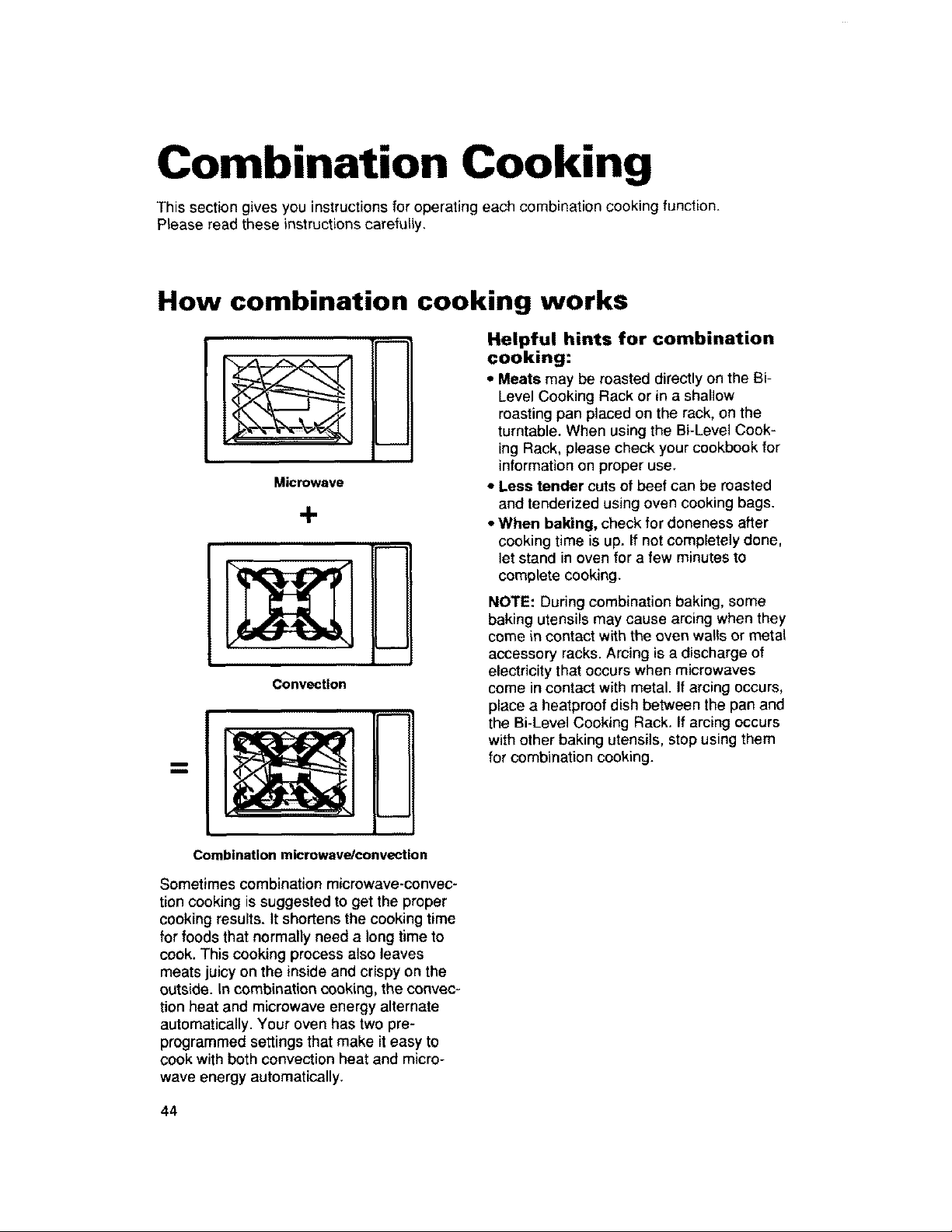
Microwave
J
Convection
Helpful hints for combination
cooking:
* Meats may be roasted directly on the Bi-
Level Cooking Rack or in a shallow
roasting pan placed on the rack, on the
turntable. When using the Bi-Leve] Cook-
ing Rack, please check your cookbook for
information on proper use.
• Less tender cuts of beef can be masted
and tenderized using oven cookingbags.
• When baking, check for doneness after
cooking time is up. Ifnot completely done,
let stand in oven for a few minutesto
complete cooking.
NOTE: During combination baking, some
baking utensils may cause arcing when they
come in contact with the oven walls or metal
accessory racks. Arcing is a discharge of
electricity that occurs when microwaves
come in contact with metal. If arcing occurs,
place a heatproof dish between the pan and
the Bi-Level Cooking Rack, If arcing occurs
with other baking utensils, stop using them
for combination cooking.
Combination microwave/convection
Sometimes combination microwave-convec-
tion cooking is suggested to get the proper
cooking results. It shortens the cooking time
for foods that normally need a long time to
cook. This cooking process also leaves
meats juicy on the inside and crispy on the
outside. In combination cooking, the convec-
tion heat and microwave energy alternate
automatically. Your oven has two pro-
programmed settings that make it easy to
cook with both convection heat and micro-
wave energy automatically.
44
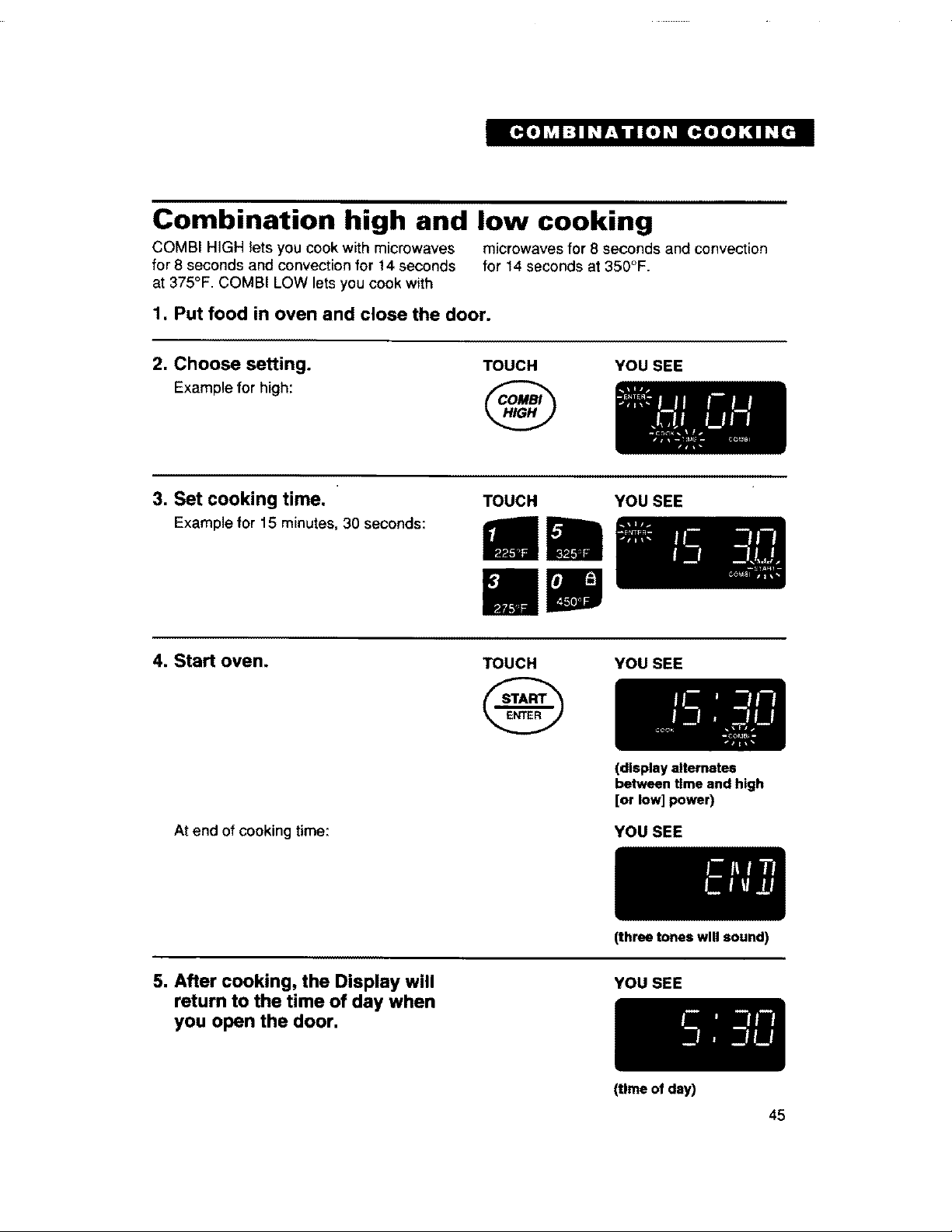
Combination high and low cooking
COMBI HIGH lets you cook with microwaves microwaves for 8 seconds and convection
for 8 seconds and convection for 14 seconds for 14 seconds at 350°F.
at 375°F. COMBI LOW lets you cook with
1, Put food in oven and close the door.
2. Choose setting.
Example for high:
TOUCH YOU SEE
3. Set cooking time.
Example for 15 minutes, 30 seconds:
TOUCH YOU SEE
4. Start oven.
At end of cooking time:
TOUCH YOU SEE
(display alternates
between time and high
[or low] power)
YOU SEE
5. After cooking, the Display will
return to the time of day when
you open the door.
(three tones will sound)
YOU SEE
(time of day)
45
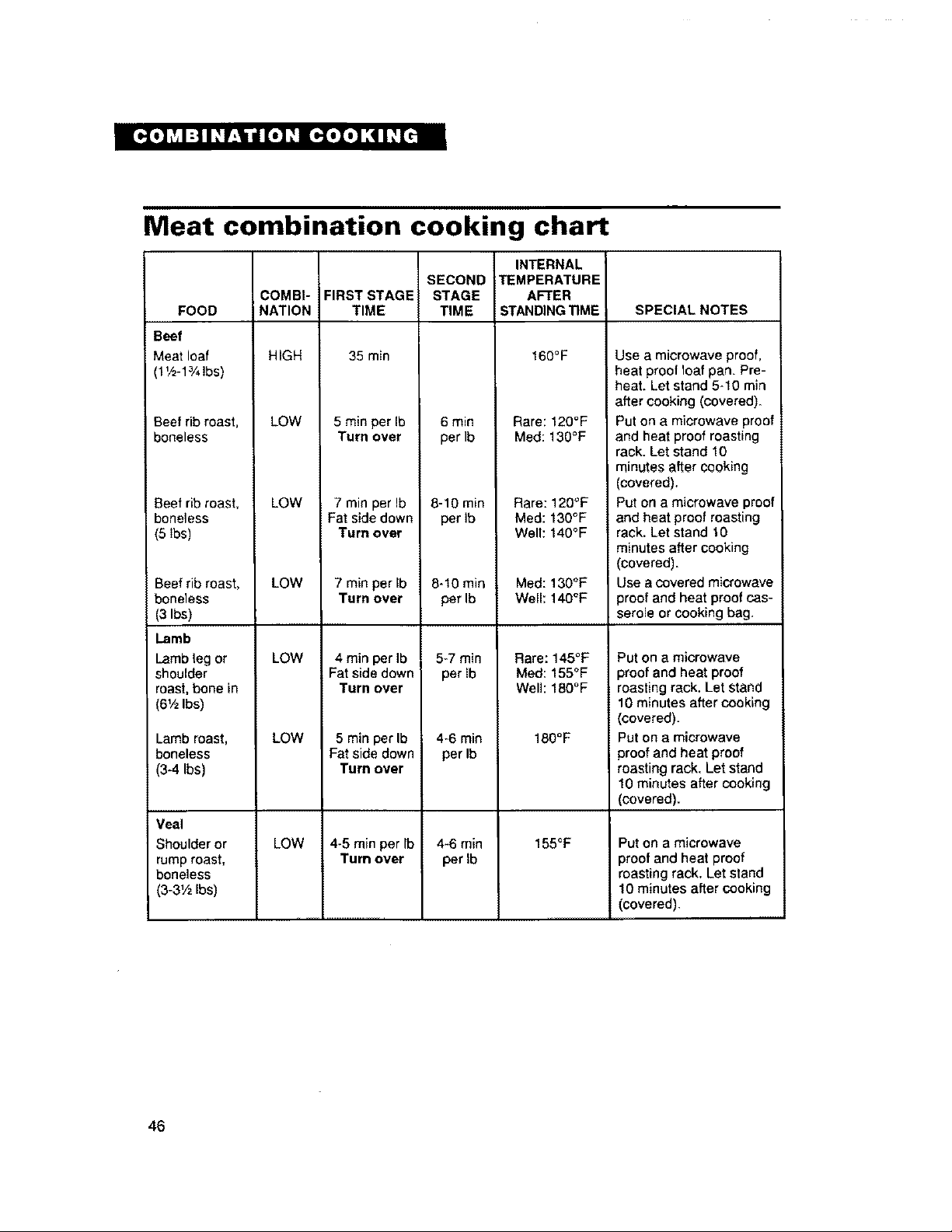
Meat combination cooking chart
FOOD
Beef
Meat loaf
1V2-1%lbs)
Beef rib roast,
boneless
Beefrib roast,
boneless
(5 lbs)
Beef rib roast,
boneless
(3 Ibs)
lamb
Lamb leg or
shoulder
roast, bone in
(6V2Ibs)
Lamb roast,
boneless
(3-4 Ibs)
Veal
Shoulder or
rump roast,
boneless
(3-3Y2 Ibs)
COMBI-
NATION
HIGH
LOW
LOW
LOW
LOW
LOW
LOW
FIRST STAGE
TIME
35 min
5 min per Ib
Turn over
7 min per Ib
Fat side down
Turn over
7 min perIb
Turn over
4 rain per Ib
Fat side down
Turn over
5 min perlb
Fat side down
Turn over
4-5 min per Ib
Turn over
SECOND
STAGE
TIME
6 min
perlb
B-10 rain
per ib
8-10 min
per Ib
5-7 min
per Ib
4-6 min
per Ib
4-6 min
per Ib
INTERNAL
TEMPERATURE
AFTER
STANDING_ME
160°F
Rare: 120°F
Meal: 13O°F
Rare: 120"F
Med: 130°F
Well: 140°F
Meal: 13O°F
Well: 140°F
Rare: 145°F
Med: 155°F
Well: 180°F
180° F
155°F
SPECIAL NOTES
Use a microwave proof,
heat proof 1oafpan. Pre-
heat. Let stand 5-10 rain
after cooking (covered).
Put on a microwave proof
and heat proof roasting
rack. Let stand 10
minutes after cooking
(covered),
Put on a microwave proof
and heat proof roasting
rack, Let stand 10
minutes after cooking
(covered).
Use a covered microwave
3roof and heat proof cas-
serole or cooking bag.
Put on a microwave
proof and heat proof
roasting rack. Let stand
10 minutes after cooking
(covered).
Put on a microwave
proofand heat proof
roasting rack. Let stand
10 minutes after cooking
(covered).
Put on a microwave
proof and heat proof
roasting rack. Let stand
10 minutes after cooking
(covered),
46
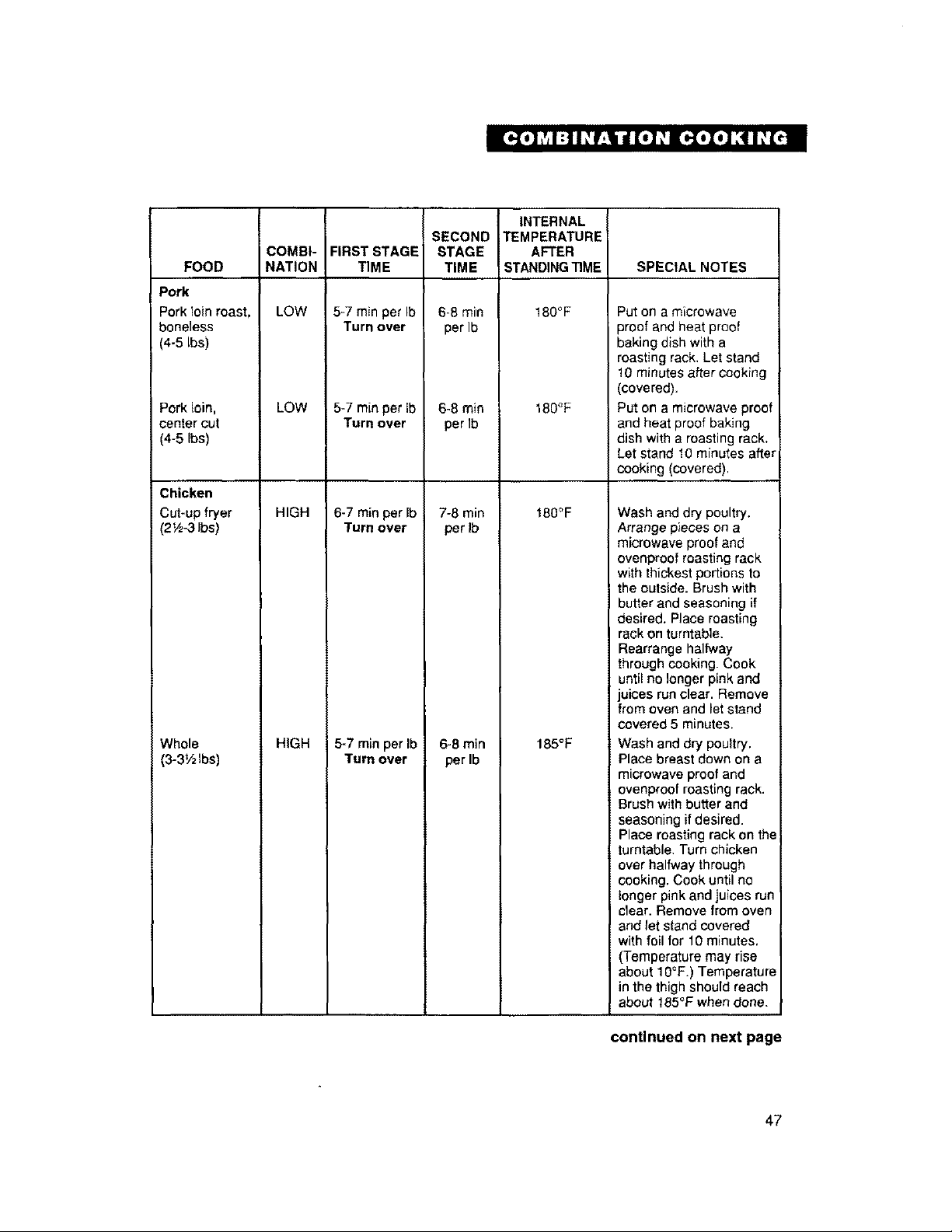
FOOD
Pork
Pork loin roast,
boneless
(4-5 Ibs)
Pork loin,
center cut
(4-5 Ibs)
Chicken
Cut-up fryer
(2 ',_-3Ibs)
Whole
(3-3_/zlbs)
INTERNAL
SECOND TEMPERATURE
COMBI- FIRST STAGE STAGE AFTER
NATION TIME TIME STANDING_ME SPECIAL NOTES
LOW 180°F
LOW
HIGH
HIGH
5-7 min per Ib
Turn over
5-7 rainper Ib
Turn over
6-7 min per Ib
Turn over
5-7 min per Ib
Turn over
6-8 rain
per Ib
6-8 rain
per Ib
7-8 min
per Ib
6-8 min
per Ib
180°F
180°F
185°F
Put on a microwave
oroof and heat proof
baking dish with a
roasting rack. Let stand
!0 minutes after cooking
(covered).
Put on a microwave proof
and heat proof baking
dish with a roasting rack.
Let stand 10 minutes after
cooking (covered).
Wash and dry poultry.
Arrange pieces on a
microwave proof and
ovenproof roasting rack
with thickest portions to
the outside. Brush with
butter and seasoning if
desired. Place roasting
rack on turntable.
Rearrange halfway
through cooking. Cook
until no longer pink and
juices run clear. Remove
from oven and let stand
covered 5 minutes.
Wash and dry poultry.
Place breast down on a
microwave proof and
ovenproof roasting rack.
Brush with butter and
seasoning if desired.
Place roasting rack on the
turntable. Turn chicken
over halfway through
cooking. Cook until no
longer pink and juices run
clear. Remove from oven
and let stand covered
with foil tot 10 minutes,
(Temperature may rise
about IO°F.) Temperature
in the thigh should reach
about 185°F when done.
continued on next page
47
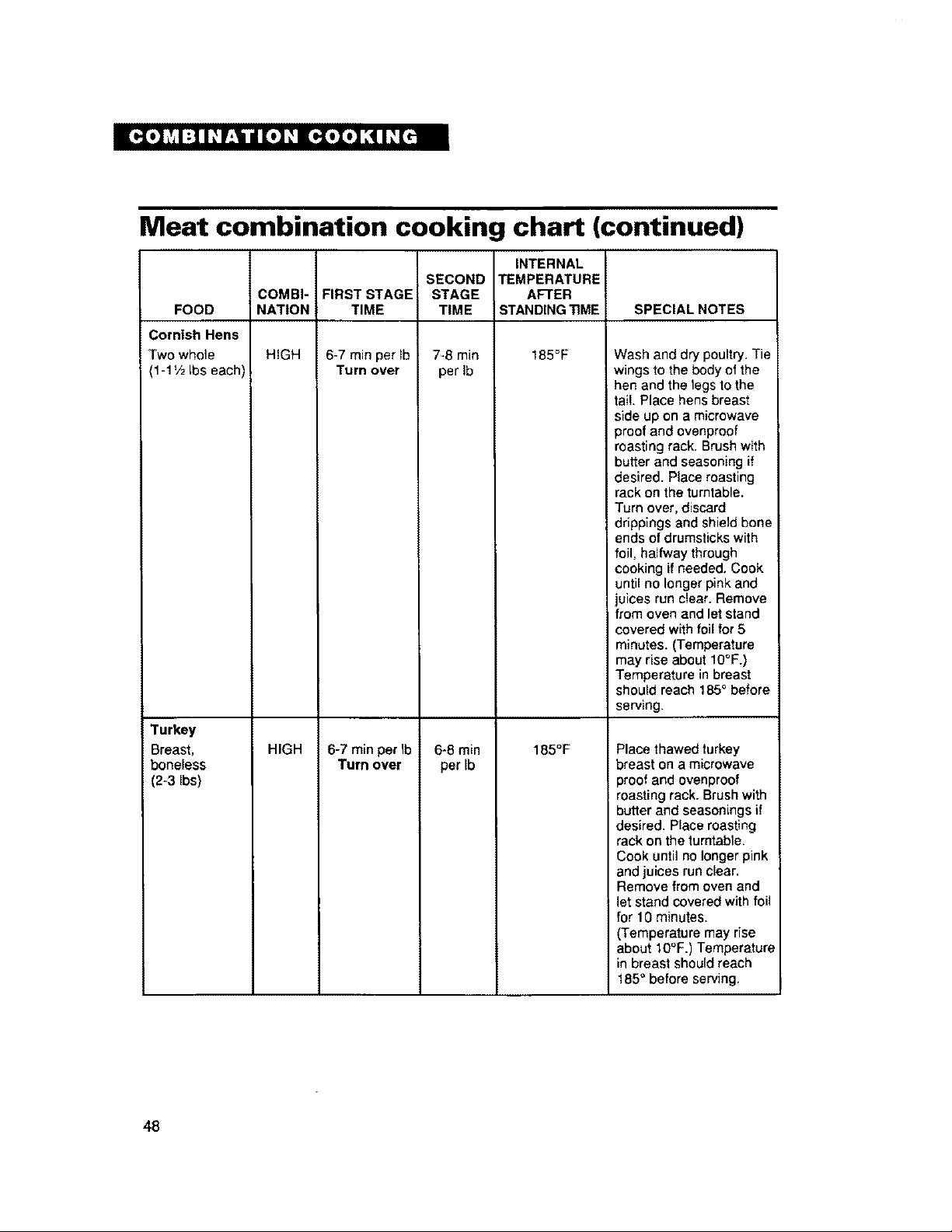
Meat combination cooking chart (continued)
INTERNAL
SECOND TEMPERATURE
COMBI- FIRST STAGE STAGE AFTER
NATION TIME TIME STANDING TIME SPECIAL NOTES
HIGH 185°F
FOOD
Cornish Hens
Two whole
1-1V2Ibs each)
Turkey
Breast,
boneless
(2-3 Ibs)
HIGH
6-7 min per Ib
Turn over
6-7 rainper Ib
Turn over
7-8 min
per Ib
6-8 min
perIb
185°F
Wash and dry poultry. Tie
wings to the body of the
hen and the legs to the
tail Place hens breast
side up on a microwave
proof and ovenproof
roasting rack. Brush with
butter and seasoning if
desired. Place roasting
rack on the turntable.
Turn over, discard
drippings and shield bone
ends of drumsticks with
foil, halfway through
cooking if needed. Cook
until no longer pink and
juices run clear. Remove
from oven and let stand
covered with foil for 5
minutes. (Temperature
may rise about 10°F.)
Temperature in breast
should reach 185° before
serving,
Place thawed turkey
breast on a microwave
proof and ovenproof
roasting rack. Brush with
butter and seasonings if
desired. Place roasting
rack on the turntable.
Cook until no longer pink
and juices run clear.
Remove from oven and
let stand covered with foil
for 10 minutes.
(Temperature may rise
about 10"F.) Temperature
in breast should reach
185° before serving.
48
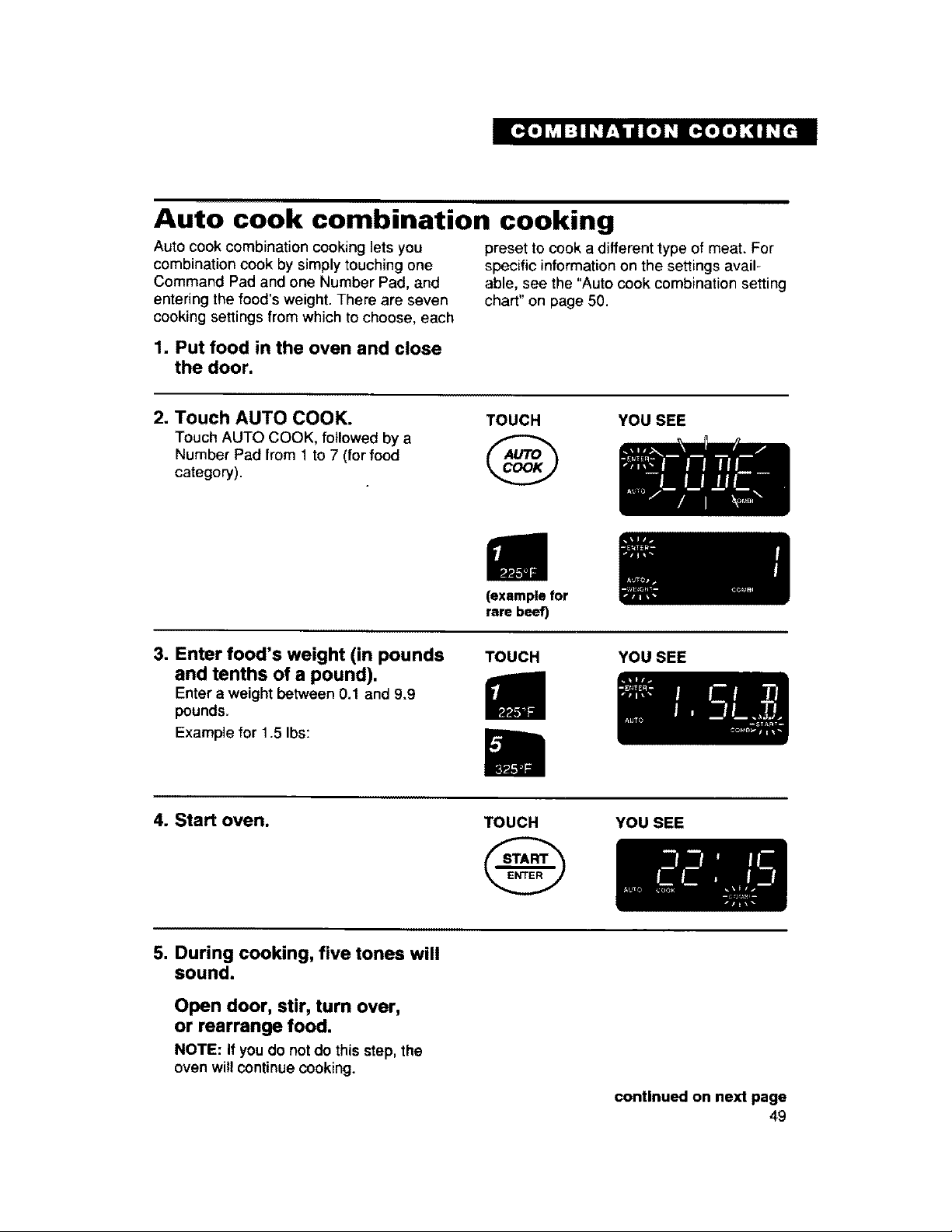
Auto cook combination cooking
Auto cook combination cooking lets you preset to cook a different type of meat. For
combination cook by simply touching one specific information on the settings avail-
Command Pad and one Number Pad, and able, see the "Auto cook combination setting
entering the food's weight. There are seven chart" on page 50.
cooking settings from which to choose, each
1. Put food in the oven and close
the door.
2. Touch AUTO COOK.
Touch AUTO COOK, followed by a
Number Pad from 1 to 7 (for food
category).
TOUCH
@
YOU SEE
(example for
rare beef)
3. Enter food's weight (in pounds
and tenths of a pound).
Enter a weight between 0.1 and 9.9
pounds.
Example for 1.5 Ibs:
TOUCH YOU SEE
4. Start oven.
TOUCH YOU SEE
5. During cooking, five tones will
sound.
Open door, stir, turn over,
or rearrange food.
NOTE: If you do not do this step, the
oven willcontinue cooking.
continued on next page
49
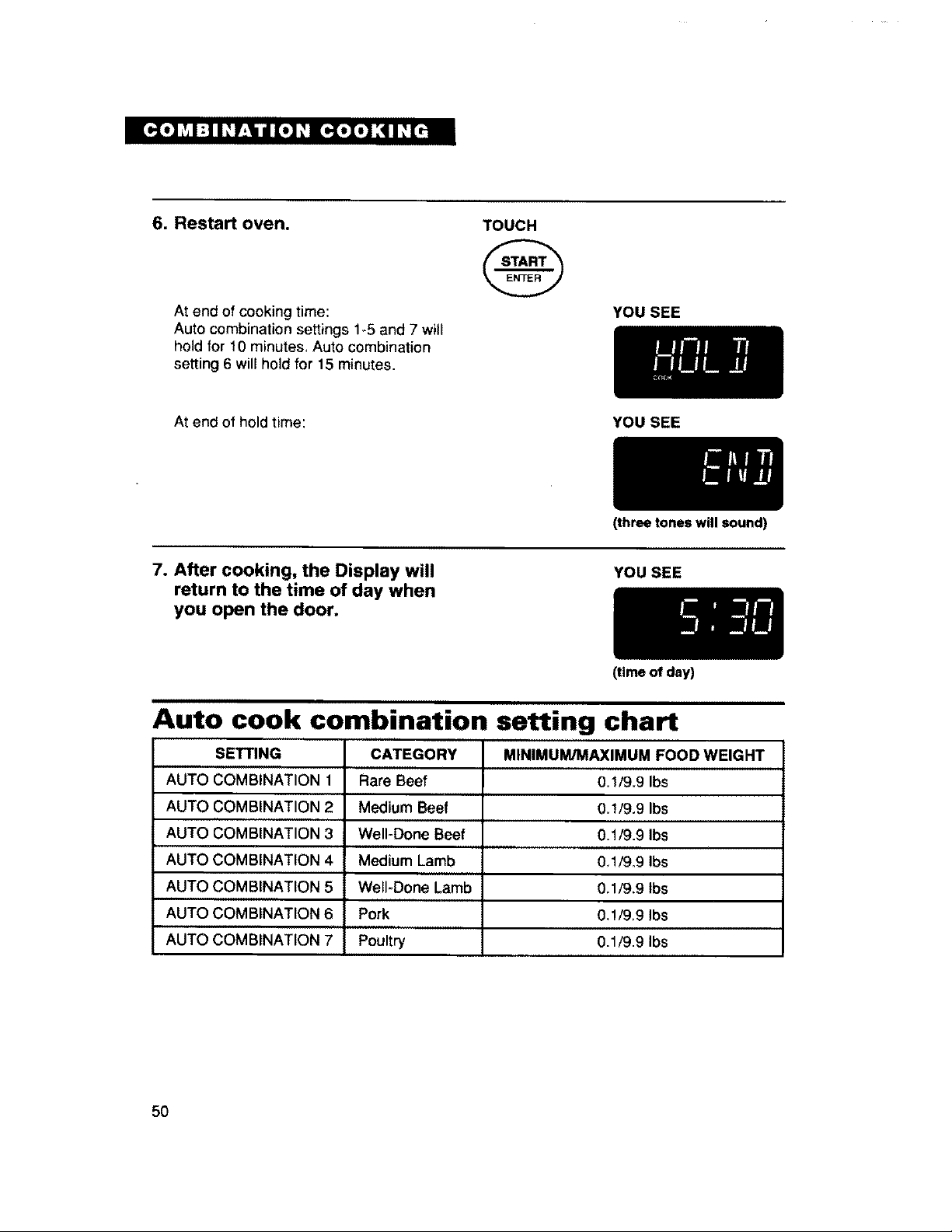
6. Restart oven.
At end of cooking time:
Auto combination settings 1_5 and 7 will
hold for t0 minutes, Auto combination
setting 6 will hold for 15 minutes.
TOUCH
@
YOU SEE
At end of hold time: YOU SEE
7. After cooking, the Display will
return to the time of day when
you open the door.
(three tones will sound)
YOU SEE
(time of day)
Auto cook combination setting chart
SETTING CATEGORY MINIMUM/MAXIMUM FOOD WEIGHT
AUTO COMBINATION 1 Rare Beef 0.1/9.9 Ibs
AUTO COMBINATION 2 Medium Beef 0.1/9.9 Ibs
AUTO COMBINATION 3 Well-Done Beef 0,1/9.9 Ibs
AUTO COMBINATION 4 Medium Lamb 0_1/9.9 Ibs
AUTO COMBINATION 5 Well*Done Lamb 0,1/9,9 Ibs
AUTO COMBINATION 6 Pork 0,1/9.9 Ibs
AUTO COMBINATION 7 Poultry 0.1/9.9 Ibs
5O
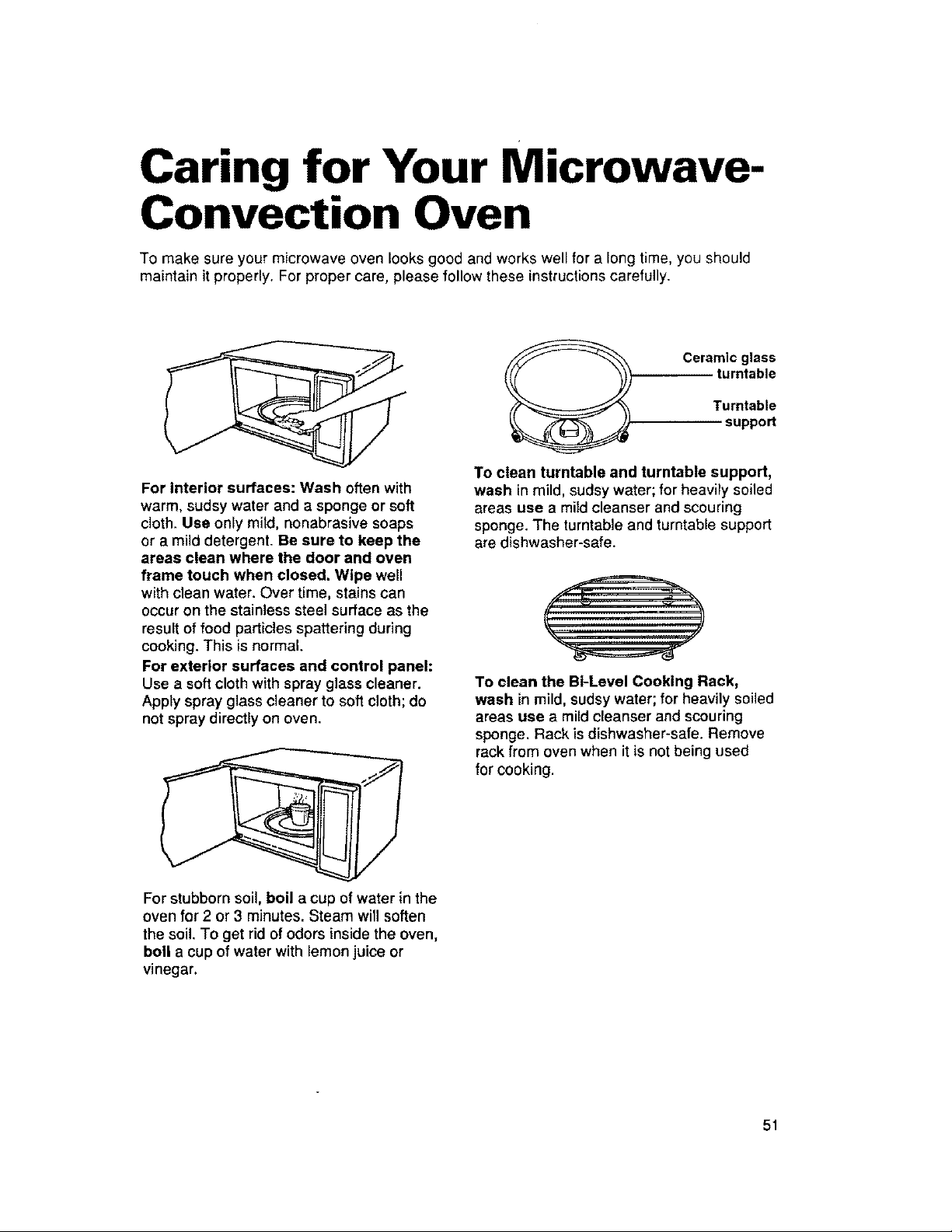
Caring for Your Microwave-
Convection Oven
To make sure your microwave oven looks good and works well for a long time, you should
maintain it properly. For proper care, please follow these instructions carefully.
For interior surfaces: Wash often with
warm, sudsy water and a sponge or soft
cloth. Use only mitd, nonabrasive soaps
or a mild detergent. Be sure to keep the
areas clean where the door and oven
frame touch when closed. Wipe well
with clean water. Over time, stains can
occur on the stainless steel surface as the
result of food particles spattering during
cooking. This is normal.
For exterior surfaces and control panel:
Use a soft cloth with spray glass cleaner.
Apply spray glass cleaner to soft cloth; de
not spray directly on even.
For stubborn soil, boil a cup of water in the
oven for 2 or 3 minutes. Steam will soften
the soil. To get rid of odors inside the oven,
boll a cup of water with lemon juice or
vinegar.
Ceramic glass
turntable
Turntable
support
To clean turntable and turntable support,
wash in mild, sudsy water; for heavily soiled
areas use a mild cleanser and scouring
sponge. The turntable and turntable support
are dishwasher-safe.
To clean the B1-Level Cooking Rack,
wash in mild, sudsy water; for heavily soiled
areas use a mild cleanser and scouring
sponge. Rack is dishwasher-safe. Remove
rackfrom oven when it is not being used
for cooking.
51
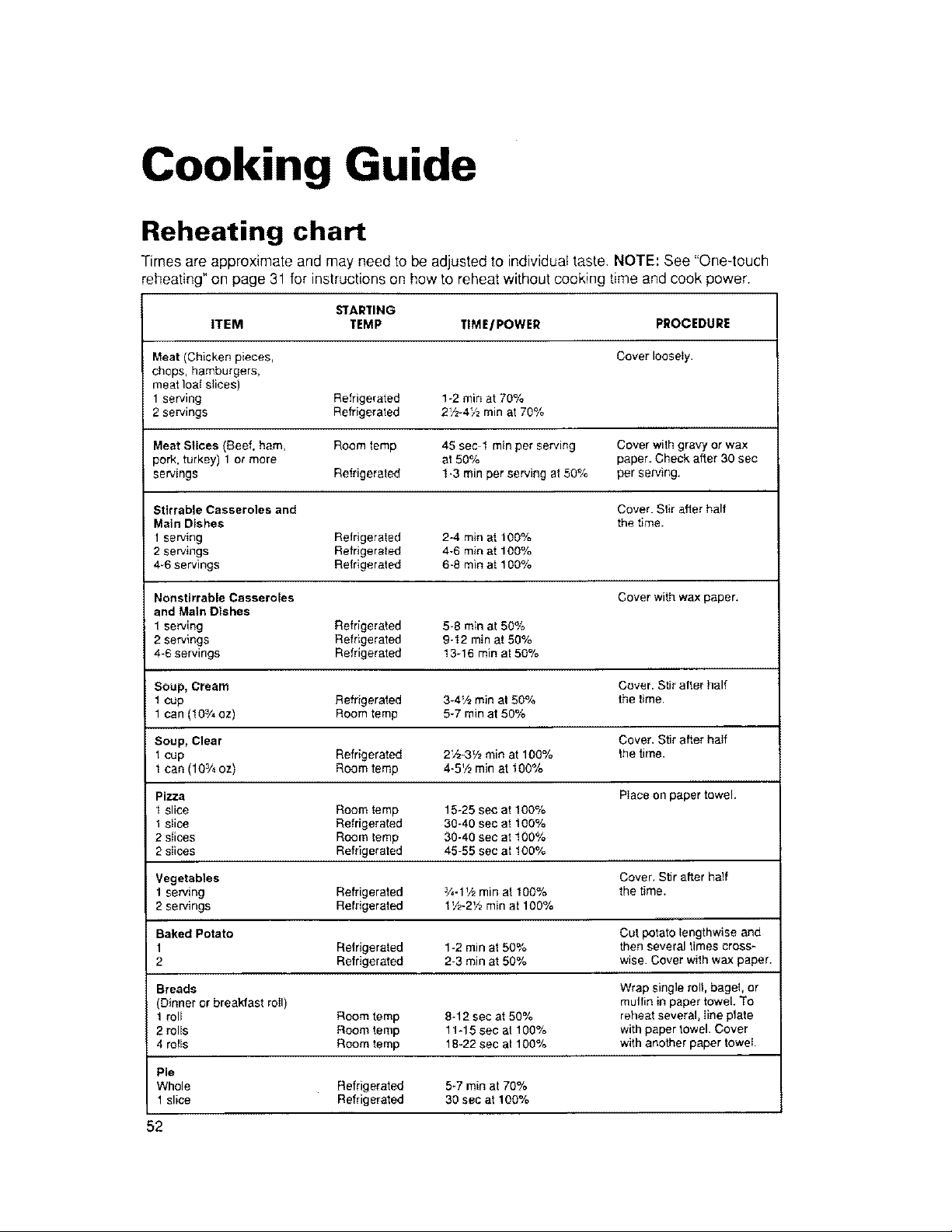
Cooking Guide
Reheating chart
Times are approximate and may need to be adjusted to individual taste. NOTE: See "Oneqouch
reheating" on page 31 for instructions on how to reheat without cooking time and cook power.
STARTING
ITEM TEMP TIME/POWER PROCEDURE
Meat (Chicken pieces, Cover loosely.
chops, hamburgers,
meat ioal slices)
serving Relrigerated 1-2 rain at 70%
2 servings Refrigerated 2Vz-4Vz min at 70%
Meat Slices (Beef, ham, Room temp 45 sec 1 min per serv=ng Cover with gravy or wax
pork, turkey) 1 or more at 50% paper. Check after 30 sec
servings Refrigerated 1-3 rain per serving at 50% per serving.
Stirrable Casseroles and Cover. Stir after half
Main Dishes the time.
1 serving Refrigerated 24 roin at 100%
2 servings Refrigerated 4-6 rain at 100%
46 servings Refrigerated 6-8 rain at 100%
Nonstirrable Casseroles Cover with wax paper.
and Main Dishes
1 serving Refrigerated 5-8 min at 50%
2 sewings Refrigerated 9_12 mln at 50%
4*6 servings Refrigerated 13q 6 min at 50%
Soup, Cream Cover. Stir alter half
1 cup Refrigerated 3-4V2min at 50% the time
1 can (103/4oz) Room letup 5-7 rain at 50%
Soup, Clear Cover. Stir alter haIf
1cup Refrigerated 2V2-3V2min at 100% the time.
1can (103/4oz) Room temp 4-5V2min at 100%
Pizza Place on paper towel.
1 slice Room temp 15-25 sec at 100%
1 slice Refrigerated 30_40 sec at 100%
2 slices Room letup 30-40 sec at 100%
2 slices Refrigerated 45-55 sec at 100%
Vegetables Cover. Stir after half
1 serving Refrigerated _-1_/2 rain at 100% the time.
2 servings Refrigerafed 1'/2-2V2rain at 100%
Baked Potato Cut potato lengthwise and
Refrigeraled 1-2 rain at 50% then several times oross_
2 Refrigerated 2-3 rain at 50% wise. Cover with wax paper.
Breads Wrap single roll, bagel, or
Dinner or breakfast roll) muffin in paper towel. To
roll Room temp 8-12 sec at 50% reheat several, line plate
2 rolls Room temp 11_15 see at 100% with paper towel. Cover
4 roils Room temp 18-22 sec at 100% with another paper towei
Pie
Whole Refrigerated 5*7 rain at 70%
slice Refrigerated 30 sec at 100%
52
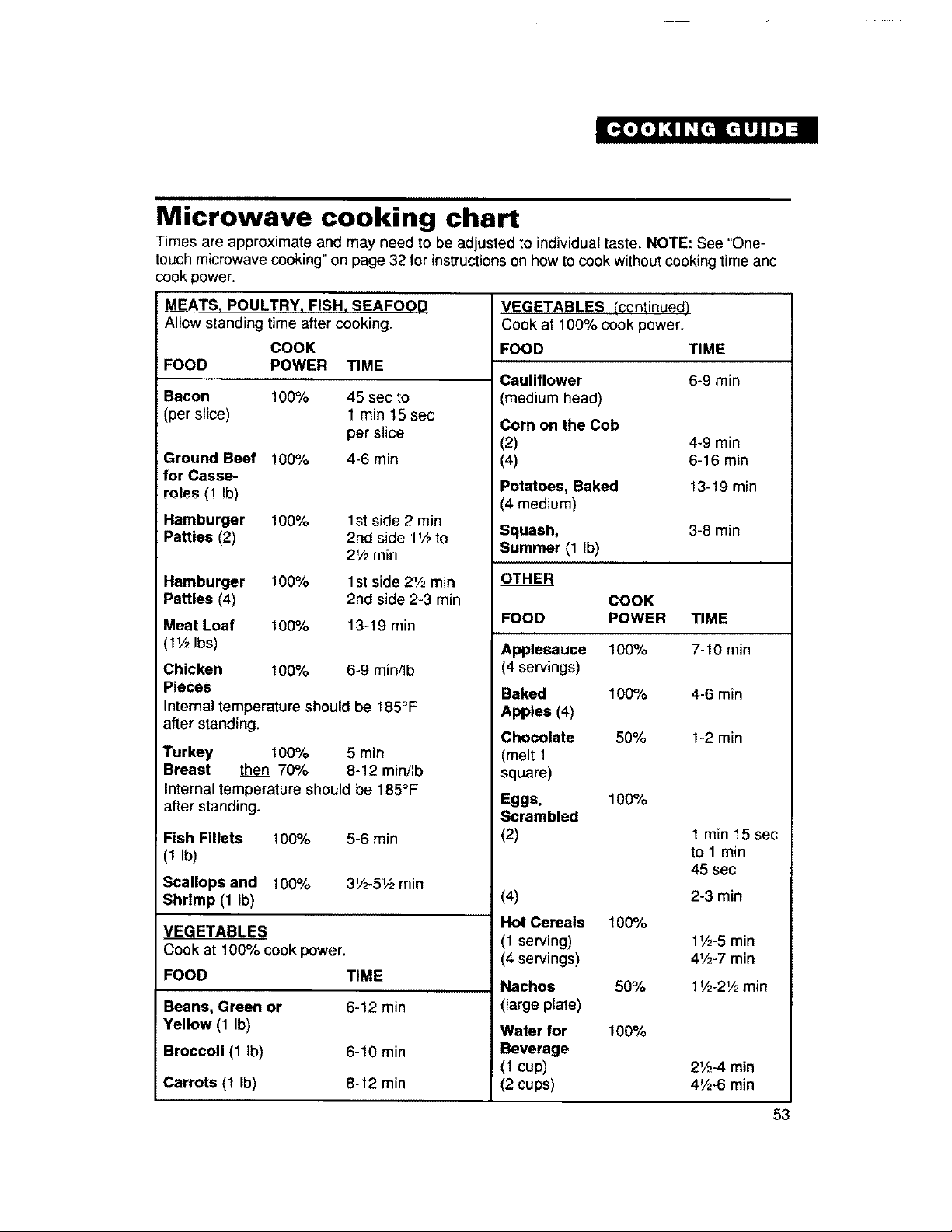
Microwave cooking chart
Times are approximate and may need to be adjusted to individual taste. NOTE: See "One-
touch microwave cooking" on page 32 for instructions on how to cook without cooking time and
cook power.
MEATS, POULTRY, FISH, SEAFOOD
Allow standing time after cooking.
COOK
FOOD POWER TIME
Bacon 100% 45 sec to
(per slice) 1 min 15 sec
per slice
Ground Beef 100% 4-6 min
for Casse-
roles (1 Ib)
Hamburger 100% 1st side 2 min
Patties (2) 2nd side 1V2to
2V2 min
Hamburger 100% 1st side 21/2min
Patties (4) 2nd side 2-3 min
Meat Loaf 100% 13-19 min
(1'/2Ibs)
Chicken 100% 6-9 minilb
Pieces
Internal temperature should be 185°F
after standing.
Turkey 100% 5 min
Breast then 70% 8-12 min/Ib
Internal temperature should be 185°F
after standing.
Fish Fillets 100% 5-6 min
(IIb)
Scallops and 100% 3V2-5_ min
Shrimp (1 Ib)
VEGETABLES
Cook at 100% cook power.
FOOD TIME
Beans, Green or 6-12 min
Yellow (1 Ib)
Broccoli (1 Ib) 6-10 min
Carrots (1 Ib) 8-12 min
VEGETABLES (continued)
Cook at 100% cook power.
FOOD TIME
Cauliflower 6-9 min
(medium head)
Corn on the Cob
(2) 4-9 min
(4) 6-16 min
Potatoes, Baked 13-19 min
(4 medium)
Squash, 3-8 rain
Summer (1 Ib)
OTHER
COOK
FOOD POWER TIME
Applesauce 100%
(4 servings)
Baked 100%
Apples (4)
Chocolate 50%
(melt 1
square)
Eggs, 100%
Scrambled
(2)
(4)
Hot Cereals
(1 serving)
(4 servings)
Nachos
(large plate)
Water for
Beverage
(1 cup)
(2 cups)
100%
50%
100%
7-10 min
4-6 min
1-2 min
1 min 15 sec
to 1 min
45 sec
2-3 min
1',,3-5min
4_,,_-7min
1',_-21/2min
2V2-4 rain
41/2-6min
53
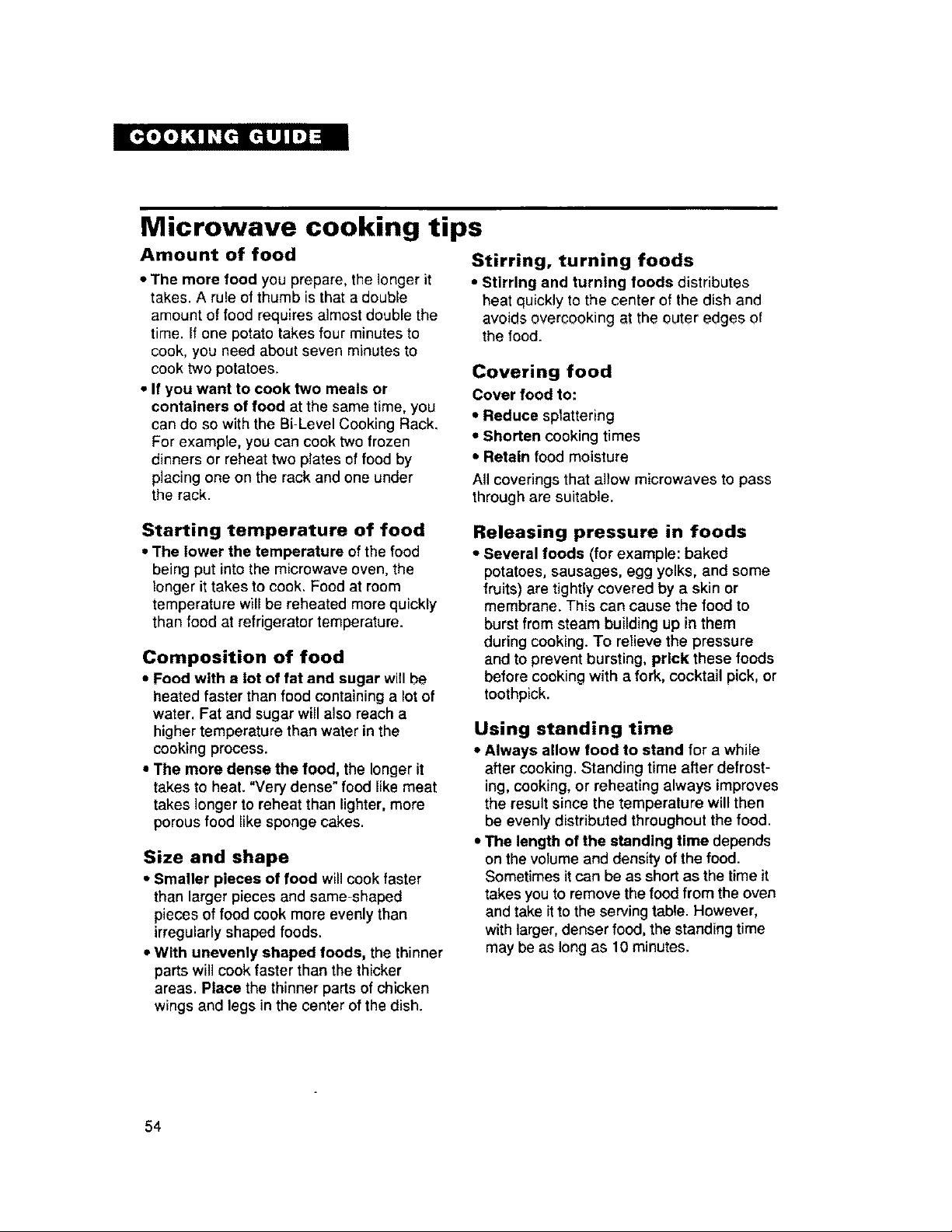
Microwave cooking tips
Amount of food
• The more food you prepare, the longer it
takes. A rule of thumb is that a double
amount of food requires almost double the
time. If one potato takes four minutes to
cook, you need about seven minutes to
cook two potatoes,
• If you want to cook two meals or
containers of food at the same time, you
can do so with the Bi-Level Cooking Rack,
For example, you can cook two frozen
dinners or reheat two plates of food by
placing one on the rack and one under
the rack.
Stirring, turning foods
• Stirring and turning foods distributes
heat quickly to the center of the dish and
avoids overcooking at the outer edges of
the food.
Covering food
Cover food to:
• Reduce sptattering
• Shorten cooking times
• Retain food moisture
All coverings that allow microwaves to pass
through are suitable.
Starting temperature of food
* The lower the temperature of the food
being put intothe microwave oven, the
longer ittakes to cook. Food at room
temperature willbe reheated more quickly
than food at refrigeratortemperature.
Composition of food
• Food with a lot of fat and sugar will be
heated faster than food containing a lot of
water. Fat and sugar will also reach a
higher temperature than water in the
cooking process,
• The more dense the food, the longer it
takes to heat. "Very dense" food like meat
takes longer to reheat than lighter, more
porousfood like sponge cakes,
Size and shape
• Smaller pieces of food willcook faster
than larger pieces and same-shaped
pieces of food cook more evenly than
irregularly shaped foods.
• With unevenly shaped foods, the thinner
parts will cook faster than the thicker
areas. Place the thinner parts of chicken
wings and legs in the center ofthe dish.
Releasing pressure in foods
• Several foods (for example: baked
potatoes, sausages, egg yolks, and some
fruits) are tightly covered by a skin or
membrane. This can cause the food to
burstfrom steam building up in them
during cooking. To relieve the pressure
and to prevent bursting, prick these foods
before cookingwith a fork, cocktail pick, or
toothpick.
Using standing time
• Always allow food to stand for a while
after cooking_ Standing time after defrost-
ing, cooking, or reheating always improves
the result since the temperature will then
be evenly distributed throughout the food.
• The length of the standing time depends
on thevolume and density ofthe food.
Sometimes it can be as shortas the time it
takes you to remove the food from the oven
and take itto the serving table. However,
withlarger, denser food, the standing time
may be as long as 10 minutes.
54
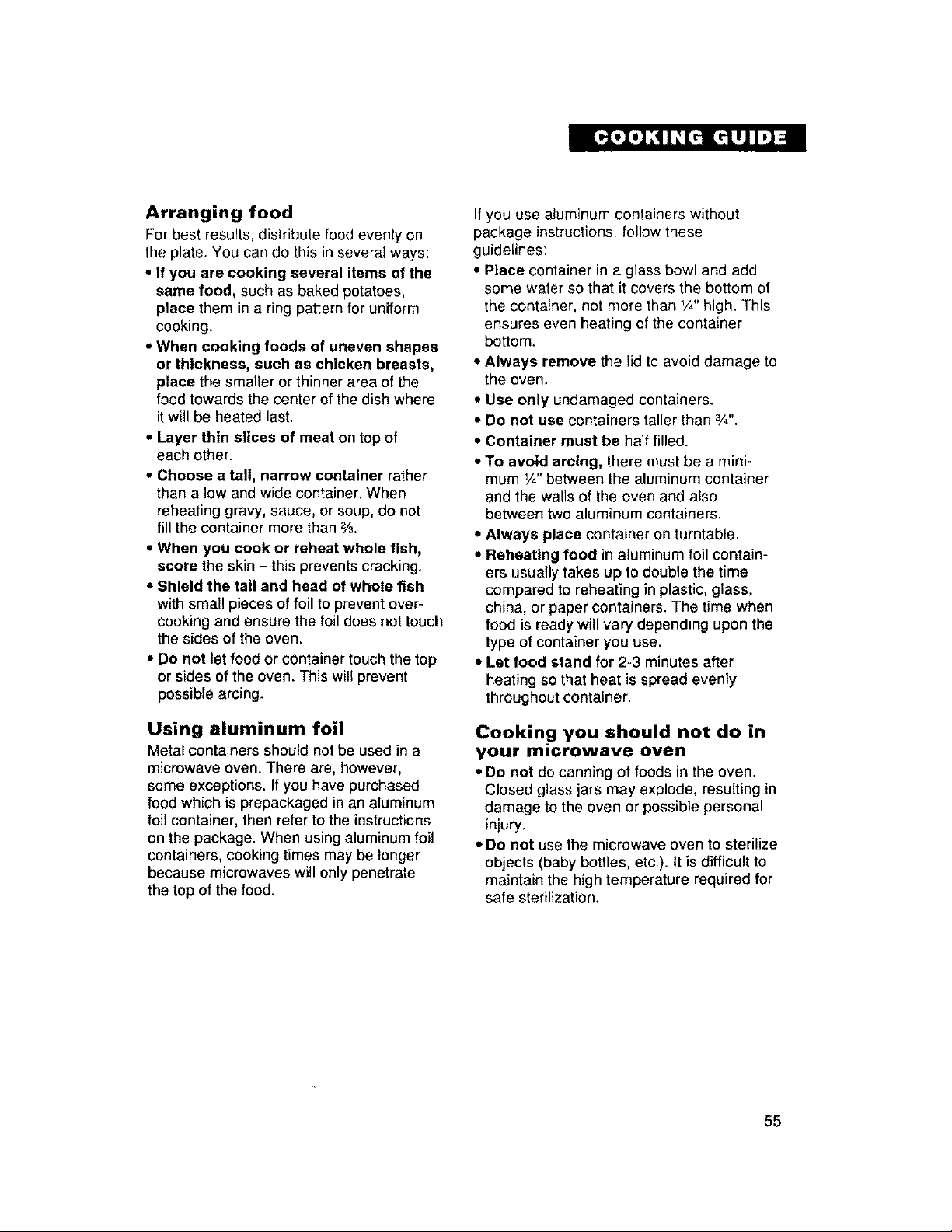
Arranging food
For best results, distribute food evenly on
the plate. You can do this in several ways:
• if you are cooking several items of the
same food, such as baked potatoes,
place them in a ring pattern for uniform
cooking,
,, When cooking foods of uneven shapes
or thickness, such as chicken breasts,
place the smaller orthinner area ofthe
food towards the center of the dish where
it will be heated last.
• Layer thin slices of meat on top of
each other.
• Choose a tail, narrow container rather
than a low and wide container. When
reheating gravy, sauce, or soup, do not
fill the container more than %.
• When you cook or reheat whole fish,
score the skin - this prevents cracking.
• Shield the tall and head of whole fish
with small pieces offoil to prevent over-
cookingand ensure the foil does not touch
the sides of the oven.
• Do not letfood or container touchthe top
or sides of the oven. This will prevent
possible arcing.
Using aluminum foil
Metal containers should not be used in a
microwave oven. There are, however,
some exceptions. If you have purchased
food which is prepackaged inan aluminum
foil container, then refer to the instructions
on the package. When using aluminum foil
containers, cooking times may be longer
because microwaves will only penetrate
the top of the food.
If you use aluminum containers without
package instructions, follow these
guidelines:
• Place container in a glass bowl and add
some water so that it covers the bottom of
the container, not more than 1/4"high. This
ensures even heating of the container
bottom.
• Always remove the lid to avoid damage to
the oven.
• Use only undamaged containers.
• Do not use containers taller than ¾".
• Container must be half filled.
• To avoid arcing, there must be a mini-
mum V4"between the aluminum container
and the walls of the oven and also
between two aluminum containers.
• Always place container on turntable.
• Reheating food in aluminum foil contain-
ers usually takes up to double the time
compared to reheating in plastic, glass,
china, or paper containers. The time when
food is ready willvary depending upon the
type ofcontainer you use.
• Let food stand for 2-3 minutesafter
heating so that heat isspread evenly
throughout container.
Cooking you should not do in
your microwave oven
• Do not do canning of foods in the oven,
Closed glass jars may explode, resulting in
damage to the oven or possible personal
injury,
• Do not use the microwave oven to sterilize
objects (baby bottles, etc.), tt is difficultto
maintain the high temperature required for
safe sterilization,
55
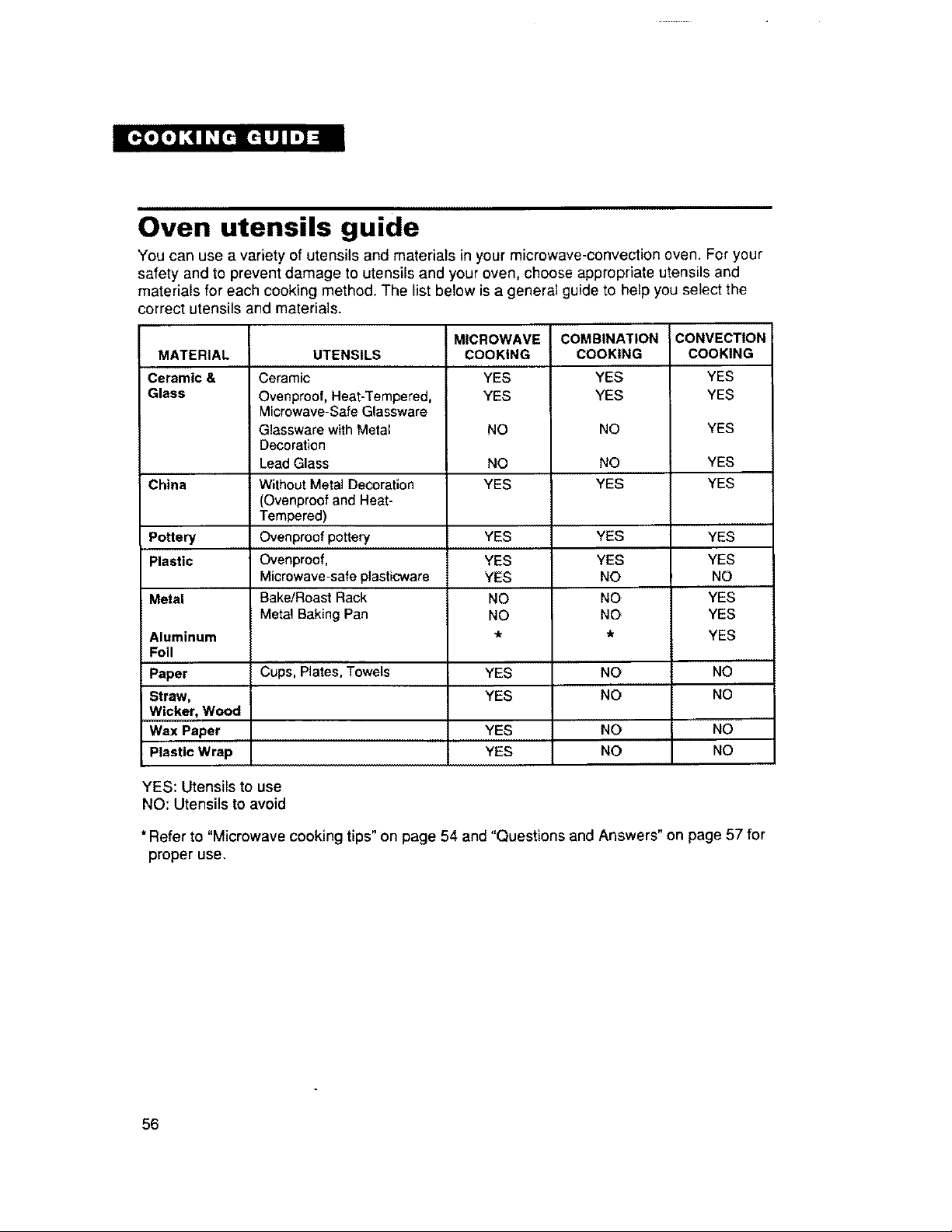
Oven utensils guide
You can use a variety of utensils and materials in your microwave-convection oven. For your
safety and to prevent damage to utensils and your oven, choose appropriate utensils and
materials for each cooking method, The list below is a general guide to help you select the
;orrect utensils and materials.
MATERIAL
Ceramic &
Glass
China
Pottery
Plastic
Metal
Aluminum
Foil
Paper
Straw,
Wicker, Wood
Wax Paper
Plastic Wrap
UTENSILS
Ceramic
Ovenprcof, Heat-Tempered,
Microwave-Safe Glassware
Glassware with Metal
Decoration
Lead Glass
Without Metal Decoration
(Ovenproof and Heat-
Tempered)
Ovenproof pottery
Ovenproof,
Microwave-safe plasticware
Bake!Roast Rack
Metal Baking Pan
Cups, Plates, Towels
MICROWAVE
COOKING
YES
YES
NO
NO
YES
YES
YES
YES
NO
NO
YES
YES
YES
YES
COMBINATION
COOKING
YES
YES
NO
NO
YES
YES
YES
NO
NO
NO
NO
NO
NO
NO
CONVECTION
COOKING
YES
YES
YES
YES
YES
YES
YES
NO
YES
YES
YES
NO
NO
NO
NO
YES: Utensils to use
NO: Utensils to avoid
* Refer to "Microwave cooking tips" on page 54 and "Questions and Answers" on page 57 for
proper use,
56
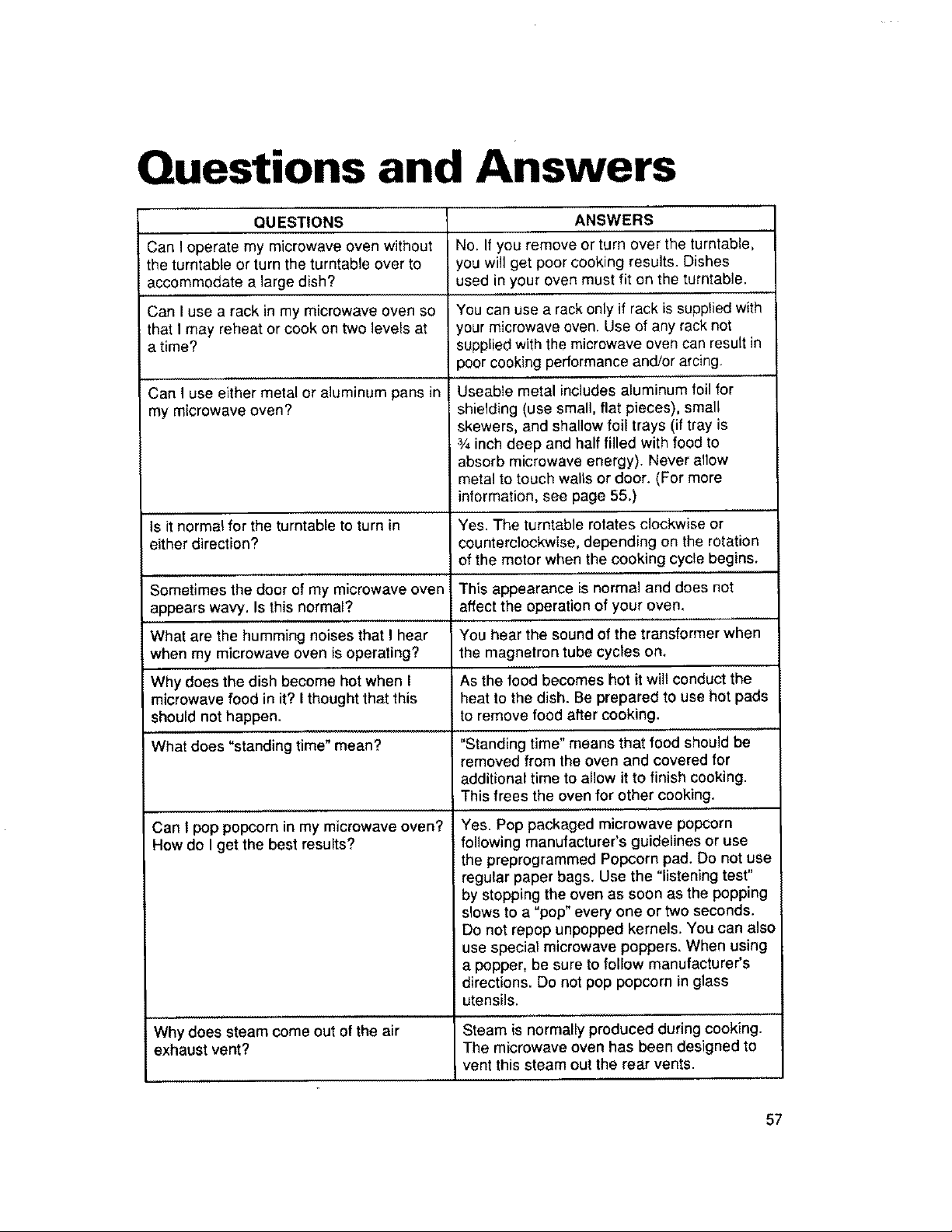
Questions and Answers
QUESTIONS
Can I operate my microwave oven without
the turntable or turn the turntable over to
accommodate a large dish?
Can I use a rack in my microwave oven so
that I may reheat or cook on two levels at
i time?
Can I use either metal or aluminum pans in
my microwave oven?
Is it normal for the turntable to turn in
either direction?
ANSWERS
No. If you remove or turn over the turntable,
, you will get poor cooking results. Dishes
used in your oven must fit on the turntable.
i You can use a rack only if rack is supplied with
your microwave oven. Use of any rack not
supplied with the microwave oven can result in
)oorcooking performance and!or arcing.
Useable metal includes aluminum foil for
shielding (use small, flat pieces), small
skewers, and shallow foil trays (if tray is
_Ainch deep and half filled with food to
absorb microwave energy). Never allow
metal to touch walls or door. (For more
information, see page 55.)
Yes. The turntable rotates clockwise or
counterclockwise, depending on the rotation
of the motor when the cooking cycle begins.
Yes. Pop packaged microwave popcorn
following manufacturer's guidelines or use
the preprogrammed Popcorn pad. Do not use
regular paper bags, Use the "listening test"
by stopping the oven as soon as the popping
slows to a "pop" every one or two seconds.
Do not repop unpopped kernels. You can also
use special microwave poppers. When using
a popper, be sure to follow manufacturer's
directions. Do not pop popcorn in glass
utensils,
Why does steam come out of the air Steam is normally produced during cooking.
exhaust vent? The microwave oven has been designed to
vent this steam out the rear vents.
57
Can I pop popcorn in my microwave oven?
How do I get the best results?
Sometimes the door of my microwave oven This appearance is normal and does not
appears wavy, Is this normal? affect the operation of your oven,
What are the humming noises that I hear You hear the sound of the transformer when
when my microwave oven is operating? the magnetron tube cycles on.
Why does the dish become hot when I As the food becomes hot it will conduct the
microwave food in it? I thought that this heat to the dish. Be prepared to use hot pads
should not happen, to remove food after cooking.
What does "standing time" mean? "Standing time" means that food should be
removed from the oven and covered for
additional time to allow it to finish cooking.
This frees the oven for other cooking.
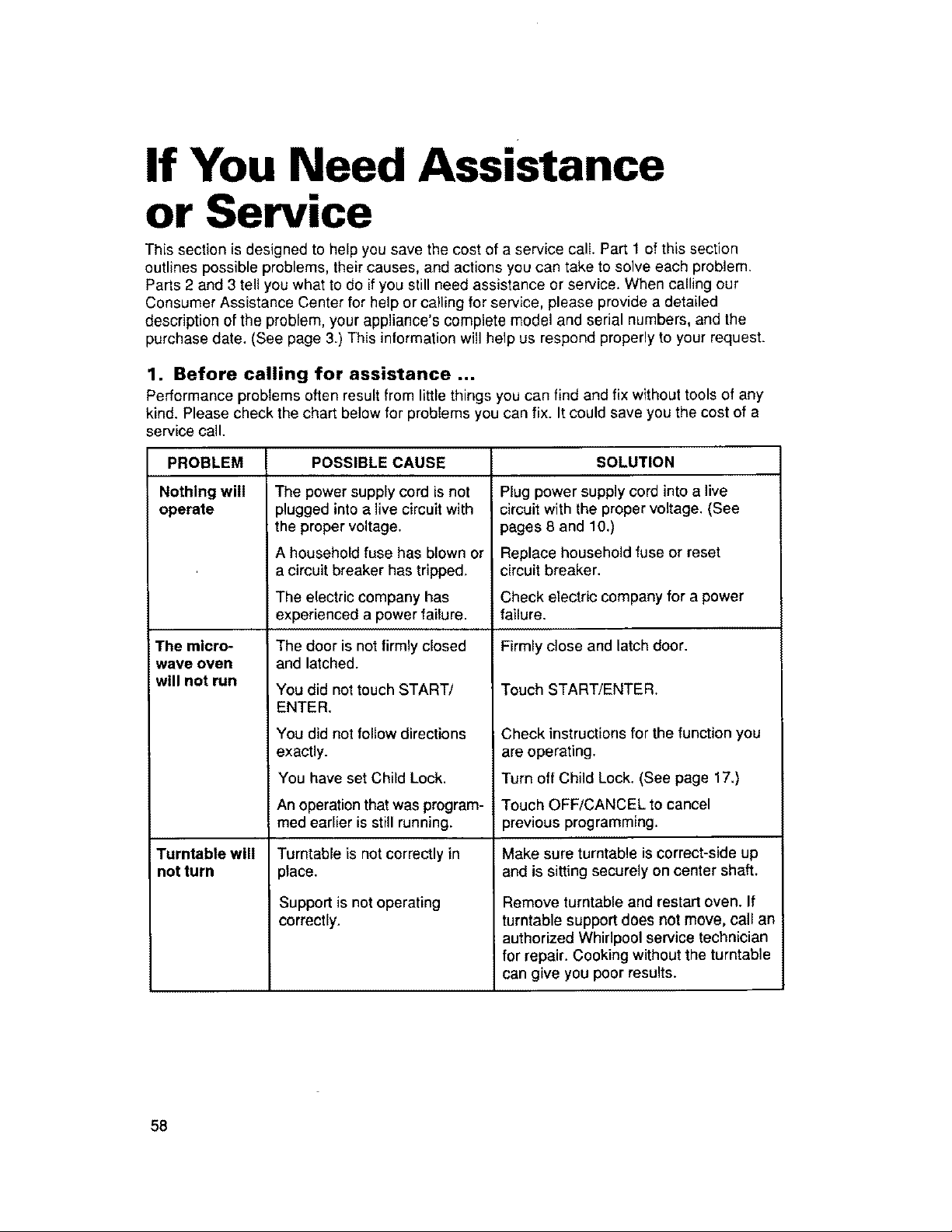
If You Need Assistance
or Service
This section is designed to help you save the cost of a service call. Part 1 of this section
outlines possible problems, their causes, and actions you can take to solve each problem.
Parts 2 and 3 tell you what to do if you still need assistance or service. When calling our
Consumer Assistance Center for help or calling for service, please provide a detailed
description of the problem, your appliance's complete model and serial numbers, and the
purchase date. (See page 3.) This information will help us respond properly to your request.
1. Before calling for assistance ...
Performance problems often result from little things you can find and fix without tools of any
kind. Please check the chart below for problems you can fix. It could save you the cost of a
;ervice call.
PROBLEM
Nothing will
operate
The micro-
wave oven
will not run
Turntable will
not turn
POSSIBLE CAUSE
The power supply cord isnot
plugged into a live circuit with
the proper voltage.
A household fuse has blown or
a circuit breaker has tripped,
The electric company has
experienced a power failure.
The door is not firmly closed
and latched.
You did not touch START/
ENTER.
You did not follow directions
exactly.
You have set Child Lock.
An operation that was program-
med earlier is still running.
Turntable is not correctly in
place.
Support is not operating
correctly.
SOLUTION
Plug power supply cord into a live
circuit with the proper voltage. (See
pages 8 and 10,)
Replace household fuse or reset
circuit breaker.
Check electric company for a power
failure.
Firmly close and latch door.
Touch START/ENTER,
Check instructionsfor the function you
are operating.
Turn off Child Lock. (See page 17,)
Touch OFF/CANCEL to cancel
previous programming.
Make sure turntable is correct-side up
and is sitting securely on center shaft.
Remove turntable and restart oven. If
turntable support does not move, call an
authorized Whirlpool service technician
for repair. Cooking without the turntable
can give you poor results.
58
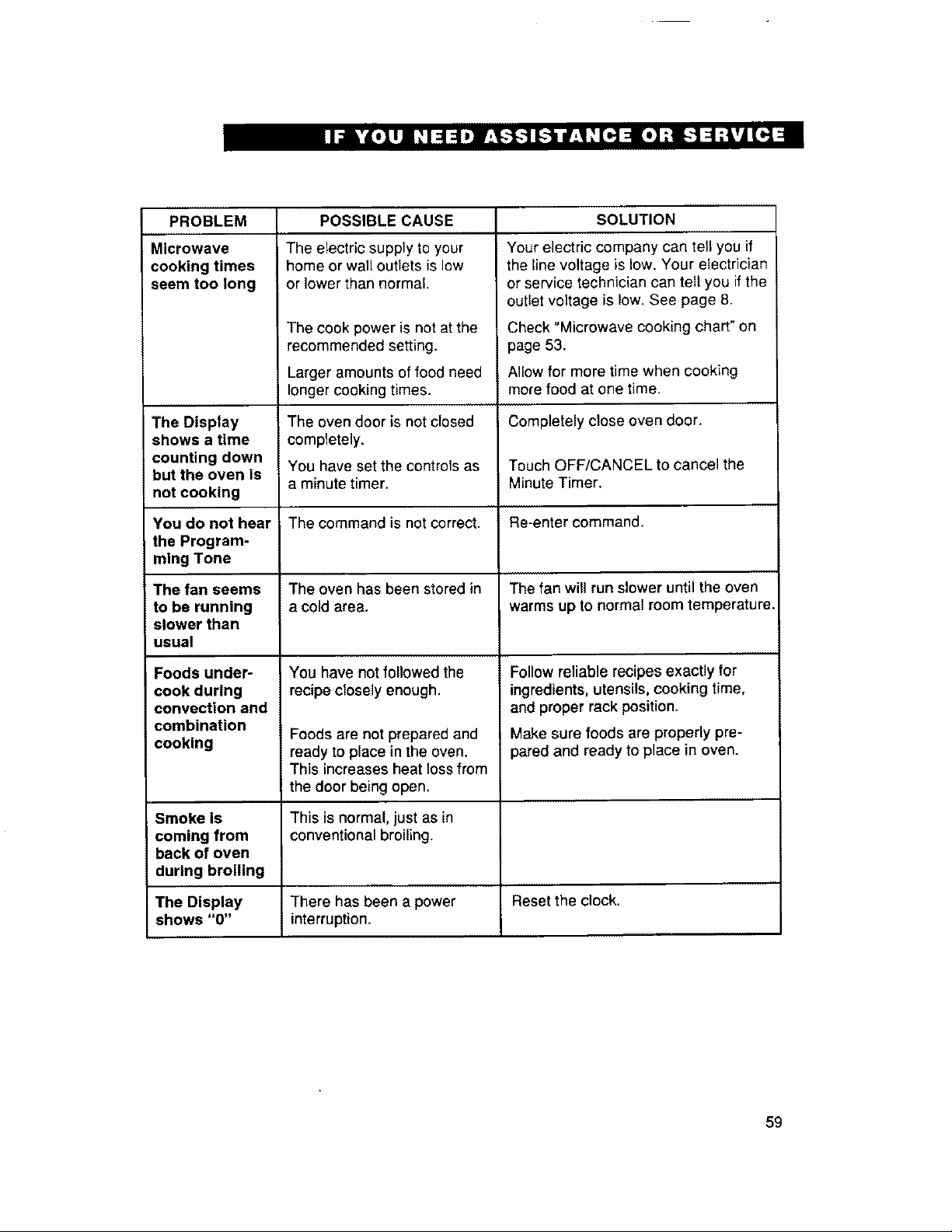
PROBLEM
Microwave
cooking times
seem too long
The Display
shows a time
counting down
but the oven is
not cooking
POSSIBLE CAUSE
The electric supply to your
home or wall outlets is low
or lower than normal.
The cook power is not at the
recommended setting.
Larger amounts of food need
longer cooking times.
The oven door is not closed
completely.
You have set the controls as
a minute timer.
SOLUTION
Your electric company can tell you if
the line voltage is low. Your electrician
or service technician can tell you if the
outlet voltage is low. See page 8.
Check "Microwave cooking chart" on
page 53.
Allow for more time when cooking
more food at one time.
Completely close oven door.
Touch OFF/CANCEL to cancel the
Minute Timer.
You do not hear The command is not correct. Re-enter command.
the Program-
mlng Tone
The fan seems The oven has been stored in The fan will run slower until the oven
to be running a cold area. warms up to normal room temperature.
slower than
usual
You have not followed the
recipe closely enough.
Foods are not prepared and
ready to place in the oven.
This increases heat loss from
the door being open.
Foods under-
cook during
convection and
combination
cooking
Smoke Is
coming from
back of oven
during broiling
The Display
shows "0"
This is normal, just as in
conventional broiling.
There has been a power
interruption.
Follow reliable recipes exactly for
ingredients, utensils, cooking time,
and proper rack position.
Make sure foods are properly pre-
pared and ready to place in oven.
Reset the clock.
59
2. If you need assistance ...
Call the Whirlpool Consumer Assistance
Center telephone number. Dial toll-free
from anywhere in the U.S.A.:
1-800-253-1301
and talk with one of our trained consultants.
The consultant can instruct you in how to
obtain satisfactory operation from your
appliance or, ifservice is necessary, recom-
mend a qualified service company in your
area.
If you prefer, write to:
Whirlpool Brand Home Appliances
Consumer Assistance Center
cio Correspondence Dept.
2000 North M-63
Benton Harbor, MI 49022-2692
Please include a daytime phone number in
your correspondence.
3. If you need service ...
_._O]. Whirlpool has a nationwide
networkof authorized
Whirlpool service compa-
SERVICE
hies. Whirlpool service
technicians are trained to fulfill the product
warranty and provide after-warranty service,
anywhere in the United States• To locate the
authorized Whirlpool service company in
your area, call our Consumer Assistance
Center telephone number (see Step 2) or
look in your telephone directory Yellow
Pages under:
,APPLIANCE-HOUSEHOLD
MAJOR, SERVICE & REPAIR
• See,"Whirlpool Appl_ces or
Authonzed WhirlpOol Se_ce
(Exan_e: _ Se_ice CO )
*WASHING MACHINES E
DRYERS, SERVICE & REPAIR
• See: Whir_0ool Appliances ot
Authorized W hi_tpool Ser_ce
(_an_o: XYZ Sen_c_ Co)
4. If you are not satisfied
with how the problem
was solved ...
• Contact the Major Appliance Consumer
Action Program (MACAP). MACAP is a
group of independent consumer experts
that voices consumer views at the highest
levels of the major appliance industry.
• Contact MACAP only when the dealer,
authorized servicer, and Whirlpool have
failed to resolve your problem.
Major Appliance Consumer Action Program
20 North Wacker Drive
Chicago, IL 60606
• MACAP will in turn inform us of your action.
6O
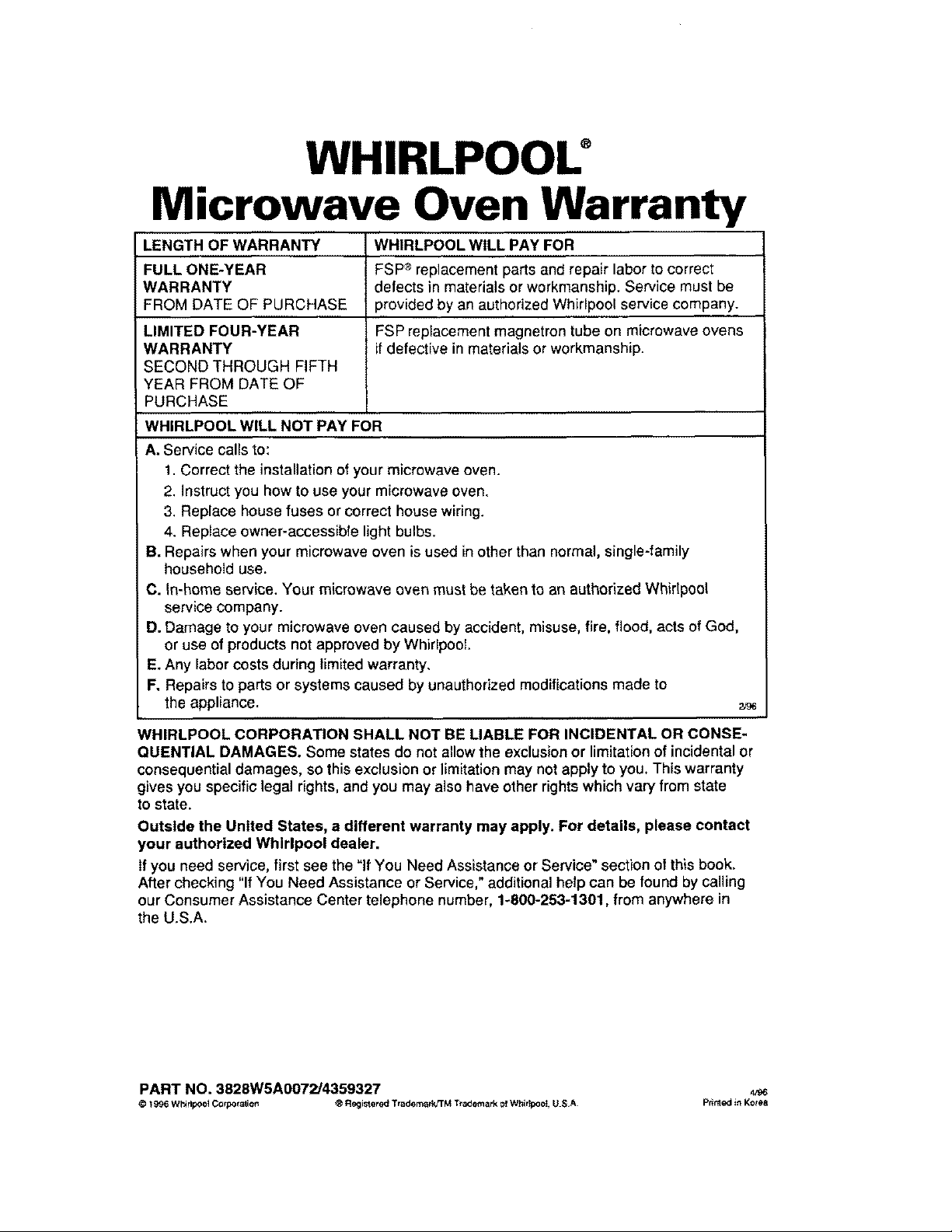
WHIRLPOOU
Microwave Oven Warranty
LENGTH OF WARRANTY WHIRLPOOL WILL PAY FOR
FULL ONE-YEAR FSP_ replacement parts and repair labor to correct
WARRANTY defects in materials or workmanship. Service must be
FROM DATE OF PURCHASE provided by an authorized Whirlpool service company.
LIMITED FOUR-YEAR FSP replacement magnetron tube on microwave ovens
WARRANTY if defective in materials or workmanship.
SECOND THROUGH FIFTH
YEAR FROM DATE OF
PURCHASE
WHIRLPOOL WILL NOT PAY FOR
A. Service calls to:
1. Correct the installation of your microwave oven.
2. Instruct you how to use your microwave oven.
3. Replace house fuses or correct house wiring.
4. Replace owner-accessible light bulbs.
B. Repairs when your microwave oven is used in other than normal, single-family
household use.
C. In-home service. Your microwave oven must be taken to an authorized Whirlpool
service company.
D. Damage to your microwave oven caused by accident, misuse, fire, flood, acts of God,
or use of products not approved by Whirlpool
E. Any labor costs during limited warranty.
F. Repairs to parts or systems caused by unauthorized modifications made to
the appliance. 2,_
WHIRLPOOL CORPORATION SHALL NOT BE LIABLE FOR INCIDENTAL OR CONSE-
QUENTIAL DAMAGES. Some states do not allow the exclusionor limitationof incidental or
consequential damages, so this exclusion or limitationmay not apply to you. This warranty
gives you specific legal rights, and you may also have other rights which vary from state
to state.
Outside the United States, a different warranty may apply. For details, please contact
your authorized Whirlpool dealer.
If you need service, first see the "If You Need Assistance or Service" section of this book.
After checking "If You Need Assistance or Service," additional help can be found by calling
our Consumer Assistance Center telephone number, 1-800-253-1301, from anywhere in
the U.S.A.
PART NO. 3828W5A0072/4359327 ,v_
© 1996 WhirlpO0_ Co rpotaliorl ® Registered Tradomad_'TM T_adematk of Whir_;ooI, U S.A Prinled in Korea