If the oven does not work, do not make a service call until you have made the following checks:
The Turntable and Turntable Support is in place.
The Plug is properly inserted in the wall socket.
The Door is properly closed.
Check your Fuses and ensure that there is power available.
Check that the oven has ample ventilation.
Wait for 10 minutes, then try to operate the oven once more.
Open and then close the door before you try again.
Demo Mode is disabled.
During the operation of some functions, a symbol “ ” may be displayed. This is normal and indicates that the oven performs some calculations in order to reach a good end result.
This is to avoid unnecessary calls for which you will be charged.
When calling for Service, please give the serial number and type number of the oven.
If the mains cord needs replacing it should be replaced by the original mains cord, which is available via our service organization. The mains cord must only be replaced by a trained service technician.
WARNING: Service only to be carried out by a trained service technician. It is hazardous for anyone other than a trained person to carry out any service or repair operation, Which involves the removal of any cover, which gives protection against exposure to microwave energy.
Do not remove any cover.
MAINTENANCE & CLEANING
Failure to maintain the oven in a clean condition could lead to deterioration of the surface that could adversely affect the life of the appliance and possibly result in a hazardous situation.
Do not use metal scouring pads, abrasive cleansers, steel-wool pads, gritty washcloths, etc. which can damage the control panel, and the interior and exterior oven surfaces. Use a cloth with a mild detergent or a paper towel with spray glass cleaner. Apply spray glass cleaner to a paper towel.
At regular intervals, especially if spill overs have occurred, remove the turntable, the Turntable Support and wipe the base of the oven clean.
Use a soft and damp cloth with mild detergent to clean the interior surfaces, front and rear of the door and the door opening.
Do not use steam cleaning appliances when cleaning your microwave oven.
The oven should be cleaned regularly and any food deposits removed.
Cleaning is the only maintenance normally required. It must be carried out with the microwave oven disconnected.
Do not spray directly on the oven.
This oven is designed to operate with the turntable in place.
Do not operate the microwave oven when the turntable has been removed for cleaning.
Do not allow grease or food particles to build up around the door. For stubborn stains, boil a cup of water in the oven for 2 or 3 minutes. Steam will soften the marks.
Adding some lemon juice to a cup of water, placing this on the turntable and boiling for a few minutes can eliminate odors inside the oven.
The Grill element does not need cleaning since the intense heat will burn off any splashes, but the ceiling beneath it may need regular cleaning. This should be done with a soft and damp cloth with mild detergent.
If the Grill is not used regularly, it should be run for 10 minutes a month to burn off any splashes, in order to reduce the risk of fire.
CAREFUL CLEANING:
The Crisp Plate should be cleaned with mild, detergent and water. Heavily soiled areas can be cleaned with a scouring cloth and a mild cleanser.
Always let the Crisp Plate cool off before cleaning.
Do not immerse or rinse with water while the Crisp Plate is hot. Quick cooling may damage it.
Do not use steel-wool pads. This will scratch the surface.
CONTROL PANEL
1. STOP BUTTON
Press to stop or reset any of the oven functions.
2. MANUAL FUNCTIONS
Use to select:
Microwave function
Grill function
Combi Grill + Microwaves function
Combi Forced Air + Microwaves function
Quick Heat function
3. 6TH SENSE REHEAT BUTTON
Use to select 6th Sense reheat function.
4. DEFROST BUTTON
Use to select manual Defrost / 6th sense Defrost functions.
5. 6TH SENSE STEAM BUTTON
Use to select 6th Sense Steam function.
6. CRISP BUTTON
Use to select Crisp function.
7. FORCED AIR BUTTON
Use to select Forced Air (with or without preheat) functions.
8. CONFIRMATION BUTTON
Product ON: confirm the cooking parameter and then start the cooking process.
Product OFF: activate the Jet Start function.
9. ROTATING KNOB
According to the different functions, turn to select:
Microwave power level
Grill level
Cooking time
Weight
Temperature
Food type/category
Doneness level
10. 6TH SENSE BREAD DEFROST BUTTON
Use to select 6th Bread Defrost function.
11. 6TH SENSE CHEF MENU BUTTON
Use to Access the automatic recipes.
12. FAVOURITES BUTTON
Use to store and recall your favourite recipes.
13. SETTINGS BUTTON
Use to change the settings, like language, sounds, etc…
14. STOP TURNTABLE BUTTON
Use this function when you need to use very large vessel that could not turn freely in the oven. It works only with the following cooking functions:
Forced Air
Combi Grill + Microwave
Combi Forced Air + Microwave
15. TIMER BUTTON
Use to set the kitchen timer.
16. TEXT DISPLAY
The display includes indicator text and symbols.
17. JET START BUTTON
Product ON: confirm the cooking parameter and then start the cooking process.
Product OFF: activate the Jet Start function.
GENERAL USE
FIRST USE - LANGUAGE SELECTION
The first time the oven is plugged, the Display will ask you to set the Language (English language is shown by default). To change the language turn the Rotating Knob and select your language by pressing the Confirmation Button.
Note: it is possible to change the Language at any time by entering the Settings menu
STAND-BY MODE
After the pressure of the Stop Button, or if the user does not interact with the product for a certain time, the oven enters Stand-By mode and the display will be turned off. Turn the Rotating Knob or press any button to exit.
START PROTECTION / CHILD LOCK
This automatic safety function is activated one minute after the oven has returned to “stand by mode“. (The oven is in “stand by” when the display is blank)
When the safety function is active the door must be opened and closed in order to start the cooking, otherwise the display will show:
DEMO MODE
Demo Mode is designed to demonstrate in the store how to operate the product. When Demo Mode is active, the text “DEMO” is shown on the display.
When Demo Mode is enabled, neither microwave energy nor heat will be produced. In order for the oven to properly work, Demo Mode has to be disabled.
PAUSE OR STOP COOKING
To pause cooking: The cooking can be paused to check, turn or stir the food by opening the door. The setting will be maintained for 10 minutes.
To continue cooking: Close the door and press the Jet Start or Confirmation Button ONCE. The cooking is resumed from where it was paused.
If you don’t want to continue cooking you can:
Remove the food, close the door and press the STOP Button.
When the cooking is finished:
A beep will signal once a minute for 10 minutes when the cooking is finished. Press the STOP Button or open the door to cancel the signal.
Note: The oven will only hold the settings for 60 seconds if the door is opened and then closed after the cooking is finished.
ADD/ STIR/ TURN FOOD
Depending on the selected function, it could be needed to add / stir / turn food during cooking. In these cases the oven will pause cooking and it will ask you to perform the needed action.
When required, you should:
Open the door.
Add, Stir or Turn the food (depending on the required action).
Close the door and restart by pressing the Confirmation Button / Jet Start button.
Notes:
If the door is not opened within 2 minutes since the request to Add some food, the oven will go into Stand-by mode.
If the door is not opened within 2 minutes since the request to Stir ot Turn the food, the oven will continue the cooking process (in this case the final results may not be the optimal ones).
STOP TURNTABLE
To get the best possible results, the Glass Turntable has to rotate while cooking.
In case you need to use very large vessels that will not turn freely in the oven, it is possible to stop the rotation of the Glass Turntable using the Stop Turntable function.
This function works only with the following cooking functions:
Forced Air
Combi Grill + Microwave
Combi Forced Air + Microwave
TIMER
Use this function when you need a kitchen timer to measure exact time for various purposes such as letting the dough rise before baking etc.
Note that the Kitchen Timer does NOT activate any cooking cycle.
With the product is in Stand-By Mode (see Stand-By Mode chapter), press the Timer Button.
Turn the Rotating Knob to set the minutes to measure.
Press the Confirmation Button/Jet Start Button. The function will start.
An acoustic signal will be heard when the timer has finished its countdown.
Note: after the timer has been started, it is possible to start a cooking function. In this case, pressing the Timer button the display will show for a few seconds the remaining time of the Timer function.
SETTINGS
Here you can easily see and change the product settings (sound, language, factory default settings).
Put the product in Stand-By mode (see the Stand-By mode chapter), and press the Settings button to enter the Settings Menu, then use the rotating knob and the Confirmation button to change the following settings:
SET SOUND
Turn the Rotating Knob to select the values of Enable/Disable.
Press the Confirmation Button.
LANGUAGE
Turn the Rotating Knob to select the available languages (see table).
Press the Confirmation Button.
ITEMS
1
2
3
4
5
6
7
8
9
10
11
Languages
English
French
Italian
German
Swedish
Spanish
Dutch
Hungarian
Slovakian
Polish
Czech
RESET TO FACTORY DEFAULT
Turn the Rotating Knob to select the values of Yes/No. (Choosing Yes, the original settings of the product will be restored).
Press the Confirmation Button.
DEMO MODE
Turn the Rotating Knob to enable/disable the Demo Mode. Select “ENABLED” to activate the Demo Mode, or “DISABLED” to deactivate it.
Press the Confirmation Button.
EXIT
Turn the Rotating Knob to select Exit.
Press the Confirmation Button to exit the menu.
COOKING FUNCTIONS
JET START
This function is used for quick reheating of food with a high water content such as clear soups, coffee or tea.
1. Press the Jet Start Button.
Pressing the Jet Start Button the Microwave function will start at maximum power for 30 seconds, and each additional pressure of the Jet Start Button will increase the cooking time of 30 seconds. After the function has started, you can also use the Rotating Knob to increase or decrease the cooking time.
Tips and suggestions:
With the oven in Stand-By mode, it is possible to use the Jet Start function also turning the Rotating Knob to set the Jet Start duration, and pressing the Confirmation Button to start the function.
MICROWAVE
Microwave function allows to quickly cook or reheat food and beverages
Press the Manual Functions Button .
The display will show: “MICROWAVE”, press the Confirmation Button to confirm.
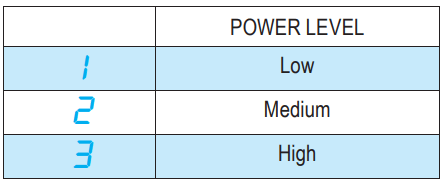
Turn the Rotating Knob to set the Microwave power (see the table below).
Press the Confirmation Button.
Turn the Rotating Knob to set the time.
Press the Confirmation Button/Jet Start Button. The function will start.
ONCE THE COOKING PROCESS HAS BEEN STARTED :
To adjust the power: Press the Manual Functions Button and rotate the Rotating Knob to adjust power level.
To increase time/decrease time: Turn the Rotating Knob, or press Jet Start Button /Confirmation Button to increase the cooking time in 30 second increments.
POWER
SUGGESTED USE:
JET
Reheating of beverages, water, clear soups, coffee, tea or other food with a high water content. If the food contains egg or cream choose a lower power.
750 W
Cooking of fi sh, meat, vegetables etc
650 W
Cooking dishes, not possible to stir
500 W
More careful cooking e.g. high protein sauces, cheese and egg dishes and to fi nish cooking casseroles.
350 W
Simmering stews, melting butter.
160 W
Defrosting
90 W
Softening butter, cheeses and ice cream.
GRILL
This function uses a powerful quartz grill to brown foods, creating a grill or a gratin effect. Grill function allows to brown foods like cheese on toast, hot sandwiches, potato croquettes, sausages, vegetables.
Press the Manual Functions Button .
Turn the Rotating Knob to see the “GRILL” and press the Confirmation Button to confirm.
Turn the Rotating Knob to set the Grill power level (see the table below) and press the Confirmation Button to confirm.
Turn the Rotating Knob to set the time.
Press the Confirmation Button/Jet Start Button. The function will start
ONCE THE COOKING PROCESS HAS BEEN STARTED :
To adjust the power: Press the Manual Functions Button and rotate the Rotating Knob to adjust power level.
To increase time/decrease time: Turn the Rotating Knob, or press Jet Start Button /Confirmation Button to increase the cooking time in 30 second increments.
Tips and suggestion:
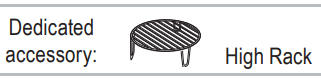
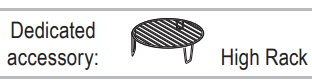
For food like cheese, toast, steaks and sausages, place food on the high Wire Rack.
Ensure that the utensils used are heat resistant when you use this function.
Do not use plastic utensils when grilling. They will melt. Items of wood or paper are not suitable either.
Be careful, not to touch the ceiling beneath the grill element.
COMBI GRILL + MICROWAVE
This function combines Microwave and Grill heating, allowing you to heat and brown at the same time.
Press the Manual Functions Button .
Turn the Rotating Knob to see the “COMBI GRILL + MICROWAVE” and press the Confirmation Button to confirm.
Turn the Rotating Knob to set the Microwave power level (see the table below) and press the Confirmation Button to confirm.
Turn the Rotating Knob to set the time.
Press the Confirmation Button/Jet Start Button. The function will start.
ONCE THE COOKING PROCESS HAS BEEN STARTED :
To adjust the power: Press the Manual Functions Button and turn the Rotating Knob to adjust value.
To increase time/decrease time: Turn the Rotating Knob, or press Jet Start Button /Confirmation Button to increase the cooking time in 30 second increments.
POWER LEVEL
SUGGESTED USE:
650 W
Vegetables
500 W
Poultry & Lasagne
350 W
Fish
160 W
Meat
90 W
Gratined fruit
Tips and suggestion:
Do not leave the oven door open for long periods when the Grill is in operation, as this will cause a drop in temperature.
If you cook large dishes which require stopped turntable function, then turn the dish after approximately half the cooking time. This is necessary for getting colour on the whole top surface.
Ensure that the utensils used are microwave safe and heat resistant when you use this function.
Do not use plastic utensils when grilling. They will melt. Items of wood or paper are not suitable either.
Be careful, not to touch the ceiling beneath the grill element.
COMBI FORCED AIR + MICROWAVE
This function combines Microwave and Forced Air cooking, allowing you to prepare oven-baked dishes in less time.
Combi Forced Air + Microwave allows you to cook dishes like roast meat, poultry, jacket potatoes, precooked frozen foods, fish, cakes and pastry.
Press the Manual Functions Button .
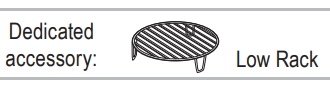
Turn the Rotating Knob to see the “COMBI FORCED AIR + MICROWAVE-USE LOW RACK” and press the Confirmation Button to confirm.
Turn the Rotating Knob to set the temperature (choose a temperature in the range from 50°C to 200°C”) and press the Confirmation Button to confirm.
Turn the Rotating Knob to set the Microwave power (see the table below) and press the Confirmation Button to confirm.
Turn the Rotating Knob to set the time.
Press the Confirmation Button/Jet Start Button. The function will start.
ONCE THE COOKING PROCESS HAS BEEN STARTED :
To adjust the power: Press the Manual Functions Button and turn the Rotating Knob to adjust temperature.
To increase time/decrease time: Turn the Rotating Knob, or press Jet Start Button /Confirmation Button to increase the cooking time of 30 seconds.
To adjust the temperature: press the Forced Air button and turn the Rotating Knob to adjust the value.
POWER LEVEL
SUGGESTED USE:
350 W
Poultry, Jacket potatoes, Lasagne & Fish
160 W
Roast meat & Fruit cakes
90 W
Cakes & Pastry
Tips and suggestions:
Use the low Wire Rack to put food on to allow the air to circulate properly around the food.
Ensure that the utensils used are microwave safe and ovenproof when you use this function.
QUICK HEAT
Use this function to preheat the empty oven in a short time. You can set the desired temperature and the oven will inform as soon as the temperature has been reached.
Press the Manual Functions Button .
Turn the Rotating Knob to see the “QUICK HEAT” and press the Confirmation Button to confirm.
Turn the Rotating Knob to set the temperature.
Press the Confirmation Button/Jet Start Button. The function will start.
Once the heating process has been started the temperature can easily be adjusted by turning the Rotating Knob.
During the heating process, “PREHEATING” is displayed and the progress bar is displayed until the set temperature is reached.
When the temperature is reached, “END“ will be displayed.
Tips and suggestions: Do not place food before or during preheating in the oven. It may be burned from the intense heat.
DEFROST (MANUAL AND 6TH SENSE DEFROST)
This function allows you to quickly defrost food either manually or automatically.
Use this function to defrost Meat, Poultry, Fish, Vegetables or Bread.
1: MANUAL DEFROST
Press the Defrost Button .
Turn the Rotating Knob to see the “MANUAL,DEFROST” and press the Confirmation Button to confirm.
Turn the Rotating Knob to set the time.
Press the Confirmation Button/Jet Start Button. The function will start.
2-6: 6TH SENSE DEFROST
Press the Defrost Button .
Turn the Rotating Knob to select the food type (see table below) and press the Confirmation Button to confirm.
Turn the Rotating Knob to set the weight and press the Confirmation Button to confirm.
Press the Confirmation Button/Jet Start Button. The function will start.
TYPE OF DEFROST
FOOD CATEGORY
WEIGHT
1
Manual
-
-
2
6th Sense
Meat
100g - 2kg
3
6th Sense
Poultry
100g - 2kg
4
6th Sense
Fish
100g - 2kg
5
6th Sense
Vegetables
100g - 2kg
6
6th Sense
Bread
100g - 2kg
Tips and suggestions:
For best result we recommend to defrost directly on the Glass Turntable. If needed, it is possible to use a container of light plastic suitable for microwave.
For food not listed in this table and if the weight is less or more than recommended weight, you should choose manual function.
If the food is warmer than frozen temperature (-18°C), choose lower weight of the food.
If the food is colder than frozen temperature (-18°C), choose higher weight of the food.
Boiled food, stews and meat sauces defrost better if stirred during defrosting time.
Separate pieces as they begin to defrost. Individual slices defrost more easily.
CRISP
This exclusive Whirlpool function allows for perfectly golden brown results both on the top and bottom surfaces of the food. Using both Microwave and Grill cooking, the Crisp Plate will rapidly reach the right temperature and begin to brown and crisp the food.
The following accessories must be used with the Crisp function:
the Crisp Plate
the Crisp Handle to manage the hot Crisp Plate.
Use this function to reheat and cook pizzas, quiches, and other dough based food. It is also good for frying bacon and eggs, sausages, potatoes, french fries, hamburgers and other meats etc. without adding oil (or by adding only a very limited quantity of oil).
Place the empty crisp plate on the glass turntable into the oven.
Press the Crisp Button .
Turn the Rotating Knob to set the cooking time.
Press the Confirmation Button/Jet Start Button.
The function will start. Only use the Crisp Plate with this function. Other available Crisp Plates on the market will not give the correct result when using this function.
Tips and suggestions:
Ensure that the Crisp Plate is correctly placed in the middle of the Glass Turntable.
The oven and the Crisp Plate become very hot when using this function.
Do not place the hot Crisp Plate on any surface susceptible to heat.
Be careful, not to touch the ceiling beneath the Grill element.
Use oven mittens or the Crisp Handle when removing the hot Crisp Plate.
Before cooking food that does not require a long cooking time (pizza, cakes…), we recommend to pre-heat the Crisp plate 2-3 minutes in advance.
6TH SENSE BREAD DEFROST
This exclusive Whirlpool function allows you to defrost frozen bread. Combining both Defrost and Crisp technologies, your bread will taste and feel as if it were freshly baked.
Use this function to quickly defrost and heat frozen rolls, baguettes & croissants.
6th Sense Bread Defrost can be used if the net weight is between 50g- 400g.
The following accessories must be used with this function:
the Crisp Plate
the Crisp Handle to manage the hot crisp plate.
Place the empty Crisp Plate on the Glass Turntable in the oven.
Press the 6th Sense Bread Defrost Button .
Turn the Rotating Knob to select the weight.
Press Confirmation Button. There is preheating stage before cooking start. When the temperature has been reached, a message informs you to add the food (bread). During the preheating process, “PREHEATING” displayed.
Press the Confirmation Button/Jet Start Button. The function will start.
The oven automatically uses Microwaves and Grill in order to preheat the Crisp Plate. This way the Crisp Plate will rapidly reach its working temperature. When preheating is done the oven will ask you to add food.
Tips and suggestions:
Ensure that the Crisp Plate is correctly placed in the middle of the Glass Turntable.
The oven and the Crisp Plate become very hot when using this function.
Do not place the hot Crisp Plate on any surface susceptible to heat.
Use oven mittens or the Crisp Handle when removing the hot Crisp Plate.
Only use the supplied Crisp Plate with this function. Other available Crisp Plates on the market will not give the correct result when using this function.
FORCED AIR
This function allows you to obtain oven-baked dishes. Using a powerful heat element and fan, the cooking cycle is just like that of a traditional oven. Use this function to cook meringues, pastry, cakes, soufflés, poultry and roast meats.
It is possible to use the Forced Air function with or without a Preheat phase. The Preheat phase use both the fan and the Grill to quickly preheat the oven before you start cooking, to achieve the best possible cooking results.
1: WITH PREHEAT
Press the Forced Air Button .
The display will show the option: “WITH PREHEAT FORCED AIR-USE LOW RACK”, press the Confirmation Button to confirm.
Turn the Rotating Knob to set the temperature and press the Confirmation Button to confirm.
Turn the Rotating Knob to set the time.
Press the Confirmation Button/Jet Start Button. The function will start.
Note: There is preheating stage before cooking starts. When the temperature has been reached, a message informs you to add the food.
2: WITHOUT PREHEAT
Press the Forced Air Button .
Turn the Rotating Knob to see the “WITHOUT PREHEAT FORCED AIR-USE LOW RACK” and press the Confirmation Button to confirm.
Turn the Rotating Knob to set the temperature and press the Confirmation Button to confirm.
Turn the Rotating Knob to set the time.
Press the Confirmation Button/Jet Start Button. The function will start.
ONCE THE COOKING PROCESS HAS BEEN STARTED:
To adjust the temperature: Press the Forced Air Button and rotate the knob to adjust value.
To increase time/decrease time: Rotate the Rotating Knob, or press Jet Start Button /Confirmation Button to increase the cooking time in 30 second increments.
Tips and suggestions:
Use the low Wire Rack to put food on to allow the air to circulate properly around the food.
Ensure that the utensils used are ovenproof when you use this function.
You can use the Crisp Plate as a Baking Tray when you bake small items like cookies and muffins. Place the plate on the low Wire Rack.
The Baking Tray can be used for cooking a full tray of meringue, pastry and cookies.
6TH SENSE STEAM
This function allows you to obtain healthy and natural tasting dishes by cooking with steam. Use this function to steam cook foods such as vegetables and fish.
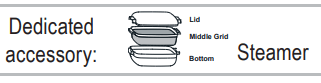
The provided steamer accessory must always be used with this function.
This function works in 2 phase.
The first phase quickly brings the water to boiling temperature.
The second phase automatically adjusts to simmering temperature in order to avoid over boiling. The display will show the steam time and count down at this step.
Press the 6th Sense Steam Button .
Turn the Rotating Knob to set the cooking time (If time is not set, the function will end up right after the water has reached the boiling point).
Press the Confirmation Button/Jet Start Button. The function will start.
Cooking vegetables:
Place the vegetables on the middle grid. Pour 50-100 ml water into the bottom part. Cover with the lid and set the time.
Soft vegetables such as broccoli and leek require 2-3 minutes cooking time. Harder vegetables such as carrots and potatoes require 4-5 minutes cooking time.
Cooking fish:
Pour water up to the “Steam” level inside the bottom (base) of the steamer (about 100ml).
Put the fish on the middle grid, cover with the lid and set the cooking time.
Tips and suggestions:
The steamer is designed to be used with microwaves only!
Never use the steamer with any other function at all. Using the steamer in any other function may cause damage.
Always place the steamer on the Glass Turntable.
6TH SENSE REHEAT
This function allows you to automatically reheat your dishes. The microwave will automatically calculate the needed microwave power level and time to get the best possible result in the shortest time
Use this function to reheat ready-made food either frozen, chilled or at room temperature..
Place food onto a microwave safe and heatproof dinner plate or dish.
Press the 6th Sense Reheat Button .
Press the Confirmation Button/Jet Start Button. The function will start
Tips and suggestions:
The net weight shall be kept within 250g - 600g when using this function.
Ensure the oven is at room temperature before using this function in order to obtain the best result.
Arrange the thicker, denser food to the outside of the plate and the thinner or less dense food in the middle.
Place thin slices of meat on top of each other or interlace them.
Thicker slices such as meat loaf and sausages have to be placed close to each other.
Waiting 1-2 minutes before serving the reheated food will improves the results, especially for frozen food.
Plastic wrap should be scored or pricked with a fork, to relieve the pressure and to prevent bursting, as steam builds-up during cooking.
FAVOURITES
The Favourites function provides you with an easy way to quickly store and recall up to 10 customized recipes.
Each Favorite can contain a single cycle or a sequence of cycles (up to 6).
A cycle consists of a cooking function and the related temperatures, power levels and time settings.
COMPATIBLE COOKING FUNCTIONS:
It is possible to save any of the following functions:
any cycle temperatures, power levels and time settings were changed after the start of the cycle
the product went in Standby (automatically or after the pressure of the STOP button)
HOW TO SAVE A SINGLE CYCLE:
Start a cycle among the ones that are compatible with the Favourites function (see above).
Wait until the end of the cycle, then press and hold for a few seconds the Favourites button .
The Display will show you the first empty position - if any - where to save your new Favourite. Press the Confirmation Button to store the Favorite in the proposed position, or turn the Rotating Knob to select another position, then press the Confirmation Button.
Note: it is possible to replace an existing Favourite with a new one: you will be asked to confirm this action by pressing again the Confirmation Button.
HOW TO SAVE A SEQUENCE OF CYCLES:
Start a cycle among the ones that are compatible with the Favourites function.
Wait until the end of the cycle, then select the next cycle you want to save in the sequence.
Repeat step 2 if you want to add another cycle to the sequence then go to the step no. 4.
Press and hold for a few seconds the Favourite button .
Turn the Rotating Knob and select “SAVE CYCLE SEQUENCE” pressing the Confirmation Button.
The Display will show you the first empty position - if any - where to save your new Favourite. Press the Confirmation Button to store the Favorite in the proposed position, or use the Rotating Knob to select another position, then press the Confirmation Button.
Note: it is possible to replace an existing Favourite with a new one: you will be asked to confirm this action by pressing again the Confirmation Button.
HOW TO RECALL A FAVOURITE:
Press the Favorite button .
Turn the Rotating Knob and press the Confirmation Button to select and start the desired Favourite from the list.
Note: if the Favourite consists of a sequence of cycles, press the Jet Start button to start each of the phases in the sequence. If no action is done after the end of each phase, next phase will automatically start after 2 minutes.
 ” may be displayed. This is normal and indicates that the oven performs some calculations in order to reach a good end result.
 FIRST USE - LANGUAGE SELECTION
 STAND-BY MODE
 START PROTECTION / CHILD LOCK
 DEMO MODE
 PAUSE OR STOP COOKING
 ADD/ STIR/ TURN FOOD
 STOP TURNTABLE
 TIMER
TIMER
 SETTINGS
 the Microwave function will start at maximum power for 30 seconds, and each additional pressure of the Jet Start Button will increase the cooking time of 30 seconds. After the function has started, you can also use the Rotating Knob to increase or decrease the cooking time.

 .
.



 and turn the Rotating Knob to adjust the value.

 .
.

 .
.
 .
.

 .
.

 .
.

 .
.
 .
.