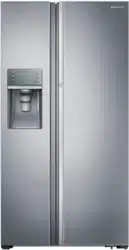
Refrigerator
user manual
imagine the possibilities
Thank you for purchasing a Samsung product.
To receive a more complete service,
please register your product at
www.samsung.com/global/register
English
RSA1Z***
RSA1S***
RSA1U***
RSA1D***
RSA1N***
Free Standing Appliance
条形码
DA68-02439C-16
RSA1***
V
SRS582NLS
SRS565DHLS
2_ features
features of your new
refrigerator
KEY FEATURES OF YOUR NEW REFRIGERATOR
Your Samsung Side-By-Side Refrigerator comes equipped with many space-saving, innovative storage and
energy-efficient features.
• HIDDEN HINGES & DOOR S/W
Slick-covered hidden hinges & door s/w helps Neat & Stylish square frontal view.
• CoolSelect Duo (Optional)
The customizable CoolSelect Duo lets you choose between meat and vegetable mode
depending on your needs. In meat mode, your deli items and meats keep their juicy
texture and freshness. In vegetable mode, the box maintains optimal humidity for fruits and
vegetables, transforming into a perfect crisper to keep them fresh longer. Now, you always
have food at its freshest.
• BLACK CLEAR LED DISPLAY
With luxurious black window, you can look and feel neat & clear design.
For easy future reference write the model and serial
number down. You will find your model number on the
left hand side wall of the refrigerator.
Model #
Serial #
CENotice
This product has been determined to be in compliance with the Low Voltage Directive(2006/95/EC), the
Electromagnetic Compatibility Directive (2004/108/EC), RoHS Directive (2011/65/EU), Commission
Delegated Regulation (EU) No 1060/2010 and the Eco-Design Directive(2009/125/EC) implemented by
Regulation (EC) No 643/2009 of the European Union. (For products sold in European Countries only).
safety information _3
safety information
SAFETY INFORMATION
•Beforeoperatingtheappliance,pleasereadthis
manualthoroughlyandretainitforyourreference.
•Becausethesefollowingoperatinginstructions
covervariousmodels,thecharacteristicsof
yourrefrigeratormaydifferslightlyfromthose
describedinthismanual.
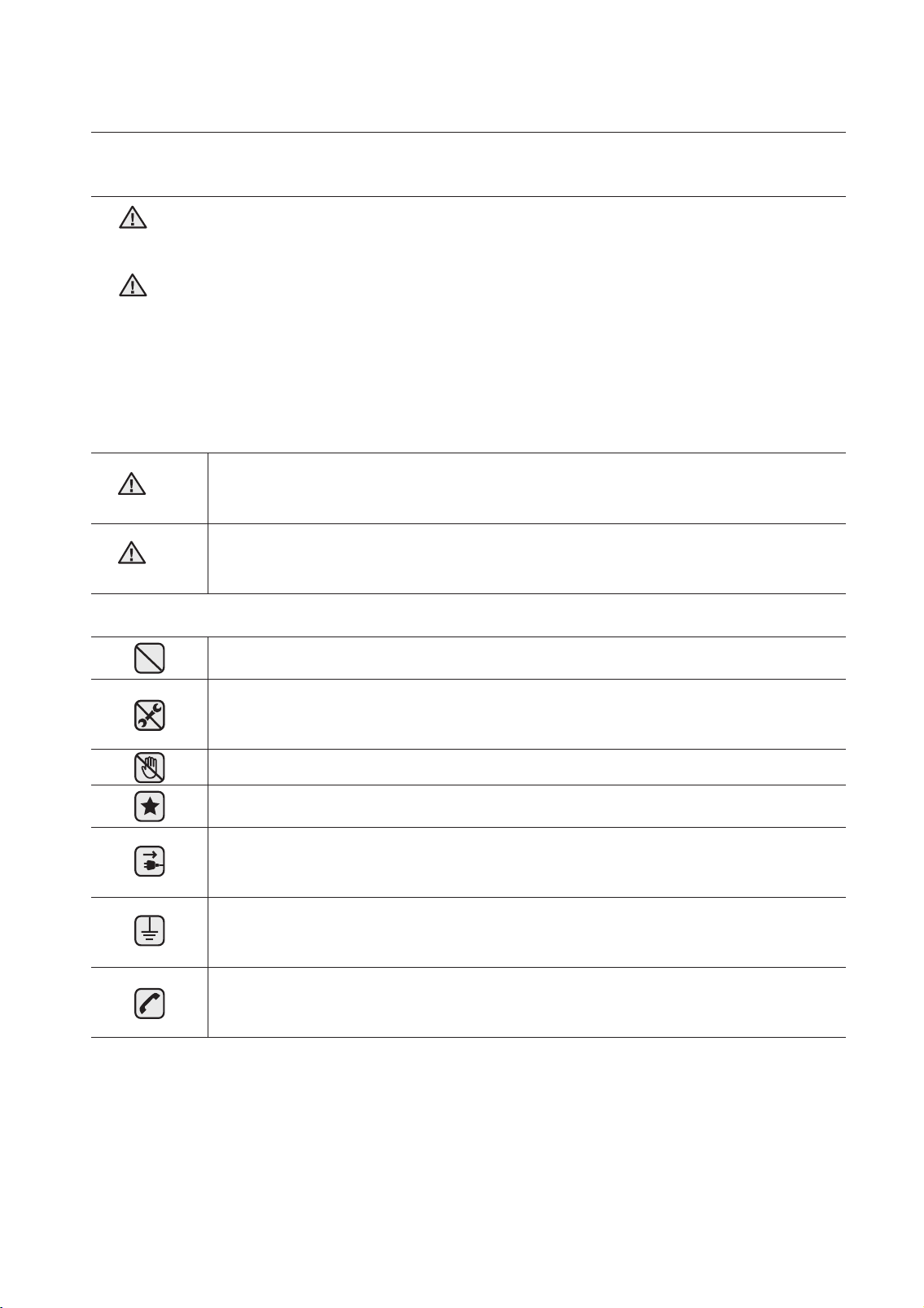
CAUTION/WARNING SYMBOLS USED
Indicatesthatadangerofdeathorseriousinjury
exists.
Indicatesthatariskofpersonalinjuryormaterial
damageexists.
OTHER SYMBOLS USED
RepresentssomethingyoumustNOTdo.
RepresentssomethingyoumustNOT
disassemble.
RepresentssomethingyoumustNOTtouch.
Representssomethingyoumustfollow.
Indicatesthatyoumustdisconnectthepower
plugfromthesocket.
Representsagroundisneededtopreventelectric
shock.
Itisrecommendedthatthissymbolbehandledby
serviceman.
These warning signs are here to prevent injury to you
and others.
Please follow them explicitly.
After reading this section, keep it in a safe place for
future reference.
WARNING
WARNING
WARNING
CAUTION
4_ safety information
safety information
•Thisrefrigeratormustbeproperlyinstalledandlocated
inaccordancewiththemanualbeforeitisused.
•Usethisapplianceonlyforitsintendedpurposeas
describedinthisinstructionmanual.
•Westronglyrecommendthatanyservicingbe
performedbyaqualiedindividual.
•R600aorR134acanbeusedasarefrigerant.Check
thecompressorlabelontherearoftheapplianceand
theratinglabelinsidethefridgetoseewhichrefrigerant
isusedfortherefrigerator.
•IncaseofR600arefrigerant,thisgasisnatural
gaswithhighenvironmentalcompatibilitythatis,
however,alsocombustible.Whentransporting
andinstallingtheappliance,careshouldbe
takentoensurethatnopartsoftherefrigerating
circuitaredamaged.
•Refrigerantsquirtingoutofthepipescouldignite
orcauseaneyeinjury.Ifaleakisdetected,
avoidanynakedamesorpotentialsourcesof
ignitionandairtheroominwhichtheappliance
isstandingforseveralminutes.
•Inordertoavoidthecreationofaammablegas-air
mixtureifaleakintherefrigeratingcircuitoccurs,the
sizeoftheroominwhichtheappliancemaybesited
dependsontheamountofrefrigerantused.
•Neverstartupanapplianceshowinganysignsof
damage.Ifindoubt,consultyourdealer.
•Theroommustbe1m
3
insizeforevery8gofR600a
refrigerantinsidetheappliance.
•Theamountofrefrigerantinyourparticularapplianceis
WARNING
safety information _5
shownontheidenticationplateinsidetheappliance.
•Pleasedisposeofthepackagingmaterialforthis
productinanenvironmentallyfriendlymanner.
•Pullthepowerplugoutofthesocketbeforechanging
theinteriorlightoftherefrigerator.
-Otherwise,thereisariskofelectricshock.
SEVERE WARNING SIGNS
•Donotinstalltherefrigeratorinadampplaceorplace
whereitmaycomeincontactwithwater.
-Deterioratedinsulationofelectricalpartsmaycausean
electricshockorre.
•Donotplacethisrefrigeratorindirectsunlightor
exposetotheheatfromstoves,roomheatersorother
appliance.
•Allowsufcientspacetoinstalltherefrigeratoronaat
surface.
-Ifyourrefrigeratorisnotlevel,theinternalcooling
systemmaynotworkcorrectly.
•Donotplugseveralappliancesintothesamemultiple
powerboard.Therefrigeratorshouldalwaysbe
pluggedintoitsownindividualelectricalwhichhasa
voltageratingthatmatchedtheratingplate.
-Thisprovidesthebestperformanceandalsoprevents
overloadinghousewiringcircuits,whichcouldcausea
rehazardfromoverheatedwires.
•Neverunplugyourrefrigeratorbypullingonthepower
cord.Alwaysgripplugrmlyandpullstraightoutfrom
theoutlet.
-Damagetothecordmaycauseashort-circuit,re
safety information
WARNING
6_ safety information
and/orelectricshock.
•Makesurethatthepowerplugisnotsquashedor
damagedbythebackoftherefrigerator.
•Donotbendthepowercordexcessivelyorplace
heavyarticlesonit.
-Thisconstitutesarehazard.
•Havethepowercordrepairedorreplacedimmediately
bythemanufactureroritsserviceagentifpowercord
hasbecomefrayedordamaged.
•Donotuseacordthatshowscracksorabrasion
damagealongitslengthorateitherend.
•Ifthepowercordisdamaged,haveitreplaced
immediatelybythemanufactureroritsserviceagent.
•Whenmovingtherefrigerator,becarefulnottorollover
ordamagethepowercord.
•Donotinsertthepowerplugwithwethands.
•Unplugtherefrigeratorbeforecleaningandmaking
repairs.
•Donotuseawetordampclothwhencleaningthe
plug.
•Removeanyforeignmatterordustfromthepower
plugpins.
-Otherwisethereisariskofre.
•Iftherefrigeratorisdisconnectedfromthepower
supply,youshouldyoushouldwaitforatleastten
minutesbeforepluggingitback.
safety information

safety information _7
•Ifthewallsocketisloose,donotinsertthepowerplug.
-Thereisariskofelectricshockorre.
•Theappliancemustbepositionedsothattheplugis
accessibleafterinstallation.
•Therefrigeratormustbegrounded.
-Youmustgroundtherefrigeratortopreventany
powerleakagesorelectricshockscausedby
currentleakagefromtherefrigerator.
•Neverusegaspipes,telephonelinesorother
potentiallighteningrodsasground.
-Improperuseofthegroundplugcanresultin
electricshock.
•Donotdissembleorrepairtherefrigeratorbyyourself.
-Yourunriskofcausingare,malfunctionand/or
personalinjury.
•Ifyousmellpharmaceuticalorsmoke,pullout
powerplugimmediatelyandcontactyourSamsung
electronicsservicecenter.
•Keepventilationopeningintheapplianceenclosureor
mountingstructureclearofobstruction.
•Donotusemechanicaldevicesoranyothermeans
toacceleratethedefrostingprocess,otherthanthose
recommendedbythemanufacturer.
•Donotdamagetherefrigerantcircuit.
•Donotplaceoruseelectricalapplianceinside
therefrigerator/freezer,unlesstheyareofatype
recommendedbythemanufacturer.
•Theapplianceisnotintendedforusebypersons
(includingchildren)withreducedphysical,sensory
safety information
8_ safety information
ormentalcapabilities,orlackofexperienceand
knowledge,unlesstheyhavebeengivensupervision
orinstructionconcerninguseoftheappliancebya
personresponsiblefortheirsafety.
•Childrenshouldbesupervisedtoensurethattheydo
notplaywiththeappliance.
•Theapplianceisnottobeusedbypersons(including
children)withreducedphysical,sensoryormental
capabilities,orlackofexperienceandknowledge,
unlesstheyhavebeengivensupervisionorinstruction
concerninguseoftheappliancebyaperson
responsiblefortheirsafety.
•Donotletchildrenhangonthedoor.Ifnot,aserious
injurymayoccur.
•Donottouchtheinsidewallsofthefreezerorproducts
storedinthefreezerwithwethands.
-Thismaycausefrostbite.
•Iftherefrigeratorisnottobeusedforalongperiodof
time,pulloutthepowerplug.
-Deteriorationintheinsulationmaycausere.
•Donotstorearticlesonthetopoftheappliance.
-Whenyouopenorclosethedoor,thearticles
mayfallandcausepersonalinjuryand/ormaterial
damage.
•ItishazardousforanyoneotherthananAuthorised
ServicePersontoservicethisappliance.In
Queensland–theauthorizedServicePerson
MUSTholdaGasWorkAuthorisationorLicence
forhydrocarbonrefrigerants,tocarryoutServicing
orrepairswhichinvolvetheremovalofcovers.(For
safety information
safety information _9
Australiaonly)
CAUTION SIGNS
•Thisproductisintendedonlyforthestorageoffoodin
adomesticenvironment.
•Manufacturer’srecommendedstoragetimesshould
beadheredto.Refertorelevantinstructions
•Bottleshouldbestoredtightlytogethersothattheydo
notfallout.
•Donotplacecarbonatedorzzydrinksinthefreezer
compartment
•Donotoverlltherefrigeratorwithfood.
-Whenyouopenthedoor,anitemmayfalloutand
causepersonalinjuryormaterialdamage.
•Donotputbottlesorglasscontainersinthefreezer.
-Whenthecontentsfreeze,theglassmaybreakand
causepersonalinjury.
•Donotsprayinammablegasneartherefrigerator.
-Thereisariskofexplosionorre.
•Donotdirectlyspraywaterinsideoroutsidethe
refrigerator.
-Thereisariskofreorelectricshock.
•Donotstorevolatileorammablesubstancesinthe
refrigerator.
-Thestorageofbenzene,thinner,alcohol,ether,
LPgasandothersuchproductsmaycause
explosions.
•Ifyouhavealongvacationplanned,youmust
emptytherefrigeratorandturnitoff.
CAUTION
safety information
10_ safety information
•Donotre-freezefrozenfoodsthathavethawed
completely.
•Donotstorepharmaceuticalsproducts,scientic
materialsortemperature-sensitiveproductsinthe
refrigerator.
-Productsthatrequirestricttemperaturecontrols
mustnotbestoredintherefrigerator.
•Donotputacontainerlledwithwateronthe
refrigerator.
-Ifspilled,thereisariskofreorelectricshock.
•Donotapplystrongshockorexcessiveforceonto
the
surface
of
glass.
glassmayresultinapersonalinjuryand/or
property
damage.
CAUTION SIGNS FOR CLEANING
•Donotinsertyourhandsintothebottomarea
undertheappliance.
-Anysharpedgesmaycausepersonalinjury.
•Neverputngersorotherobjectsintothe
dispenserholeandicechute.
-Itmaycausepersonalinjuryormaterialdamage.
•Donotuseawetordampclothwhencleaningthe
plug,removeanyforeignmaterialordustfromthe
powerplugpins.
-Otherwisethereisariskofre.
•Iftherefrigeratorisdisconnectedfromthepower
supply,youshouldwaitforatleastveminutes
beforepluggingitback.
safety information
-Broken
safety information _11
WARNING SIGNS FOR DISPOSAL
•Whendisposingofthisorotherrefrigerator/s,
removethedoor/doorseals,doorlatchsothat
smallchildrenoranimalscannotbecometrapped
inside.
•Leavetheshelvesinplacesothatchildrenmaynot
easilyclimbinside.
•R600aorR134aisusedasarefrigerant.Checkthe
compressorlabelontherearoftheapplianceorthe
ratinglabelinsidethefridgetoseewhichrefrigerant
isusedforyourrefrigerator.Whenthisproduct
containsammablegas(RefrigerantR600a)contact
yourlocalauthorityinregardtosafedisposalofthis
product.
•Cyclopentaneisusedasainsulationblowinggas.
Thegasesininsulationmaterialrequirespecial
disposalprocedure.Pleasecontactyourlocal
authoritiesinregardtotheenvironmentallysafe
disposalofthisproduct.Ensurethatnoneofthe
pipesonthebackoftheappliancesaredamaged
priortodisposal.Thepipesshallbebrokeinthe
openspace.
Intheeventofapowerfailure,callthelocalofceof
yourElectricityCompanyandaskhowlongitisgoing
tolast.
Mostpowerfailuresthatarecorrectedinanhouror
twowillnotaffectyourrefrigeratortemperatures.
However,youshouldminimizethenumberofdoor
CAUTION
safety information
12_ safety information
safety information
openings while the power is off.But should the power
failure last more than 24hours, remove all frozen food.
For doors or lids
with locks and keys, the keys
be kept out of the reach of children and not in the
vicinity of the refrigerating appliance, in order to
prevent children from being locked inside.
There is protective film on the surface of some
refrigerator models, which is used to protect the
refrigerator from scratches during transport. To avoid
static electricity, please peel off the protective film
slowly. If the protective film is not removed for a long
time, it may cause color shading of the steel plate.
ADDITIONAL TIPS FOR PROPER USAGE
•Allow the appliance to stand for 2hours after
installation.
•To get best performance of product,
- Do not place foods too closely in front of the vents
at the rear of the appliance as it can obstruct free
air circulation in the freezer compartment.
- Wrap the food up properly or place it in airtight
containers before put it into the fridge freezer
- Do not put any newly introduced food for freezing
near to already frozen food.
•Do not place carbonated or
drinks in the
freezer compartment
•Please observe maximum storage times and expiry
dates of frozen goods.
CAUTION
safety information _13
safety information
•Thereisnoneedtodisconnecttherefrigeratorfrom
thepowersupplyifyouwillbeawayforlessthan
threeweeks.But,removeallthefoodifyouare
goingawayforthethreeweeksormore.Unplug
therefrigeratorandcleanit,rinseanddry.
•Mostpowerfailuresthatarecorrectedinanhour
ortwowillnotaffectyourrefrigeratortemperatures.
However,youshouldminimizethenumberofdoor
openingswhilethepowerisoff.Butshouldthe
powerfailurelastmorethan24hours,removeall
frozenfood.
•Ifthekeyisprovidedwithrefrigerator,thekeys
shouldbekeptoutofthereachofchildrenandnot
inthevicinityoftheappliance.
•Theappliancemightnotoperateconsistently
(possibilityofdefrostingofcontentsor
temperaturebecomingtoowarminthefrozen
foodcompartment)whensitedforanextended
periodoftimebelowthecoldendoftherangeof
temperaturesforwhichtherefrigeratingapplianceis
designed.
•Donotstorefoodwhichgoesbadeasilyatlow
temperature,suchasbananas,melons.
•Placetheicetrayattheoriginallyprovidedposistion
bymanufacturerinordertoachieveoptimalice-
freezing.
•Yourapplianceisfrostfree,whichmeansthereis
noneedtomanuallydefrostyourappliance,asthis
willbecarriedoutautomatically.
•Temperaturerisingduringthedefrostcancomply
14_ safety information
safety information
withISOrequirement.ButIfyouwanttoprevent
anundueriseinthetemperatureofthefrozen
foodwhiledefrostingtheappliance,pleasewrap
thefrozenfoodinseverallayersofpapersuchas
newspaper.
•Anyincreaseintemperatureoffrozenfoodduring
defrostingcanshortenitsstoragelife.
SAVING ENERGY TIPS
•Installtheapplianceinacool,dryroomwith
adequateventilation.
•Ensurethatitisnotexposedtodirectsunlightand
neverputitnearadirectsourceofheat(radiator,for
example).
•Neverblockanyventsorgrillesontheappliance.
•Allowwarmfoodtocooldownbeforeplacingitin
theappliance.
•Putfrozenfoodintherefrigeratortothaw.You
canthenusethelowtemperaturesofthe frozen
productstocoolfoodintherefrigerator.
•Donotkeepthedooroftheapplianceopenfortoo
longwhenputtingfoodinortakingfoodout.
•Theshortertimeforwhichthedoorisopen,the
lessicewillforminthefreezer.
•Cleantherearoftherefrigeratorregularly.Dust
increasesenergyconsumption.
•Donotsettemperaturecolderthannecessary.
•Ensuresufcientairexhaustattherefrigeratorbase
andatthebackwalloftherefrigerator.Donot
safety information _15
safety information
coverairventopenings.
•Allowclearancetotheright,left,backandtop
wheninstalling.Thiswillhelpreducepower
consumptionandkeepyourenergybillslower.
16_ contents
contents
seTTING UP yOUR sIde-by-sIde
RefRIGeRATOR
17
17 Getting ready to install the refrigerator
18 Removing the refrigerator doors
21 Reattaching the refrigerator door
s
24 Leveling the refrigerato
r
seTTING UP yOUR sIde-by-sIde
RefRIGeRATOR
25 Making minor adjustments to the doors
26 Checking the water dispenser lin
e(optional)
27 Installing the water dispenser lin
e
OPeRATING The sAMsUNG
sIde-by-sIde RefRIGeRATOR
30
30 Setting up the refrigerator
31 Operating the refrigerato
r
32 Using the digital displa
y
33 Controlling the temperatur
e
34 Using the ice and cold water dispense
r
35 Shelves and bin
s
36 Storing foo
d
38 CoolSelect Duo
(Optional)
39 Removing the freezer accessories
40 Removing the fridge accessorie
s
41 Cleaning the refrigerato
r
42 Changing the interior light
s
43 Using the door
s
TROUbleshOOTING
44
25
setting up_17
setting up your side-by-side
refrigerator
GETTING READY TO INSTALL THE REFRIGERATOR
Congratulations on the purchase of your Samsung Side-By-Side Refrigerator. We hope you will enjoy the
many state-of-the-art features and efficiencies that this new appliance has to offer.
Selecting the best location for the refrigerator
•Select a location with easy access to the water supply.
•Select a location without direct exposure to sunlight.
•Select a location with level (or nearly level) flooring.
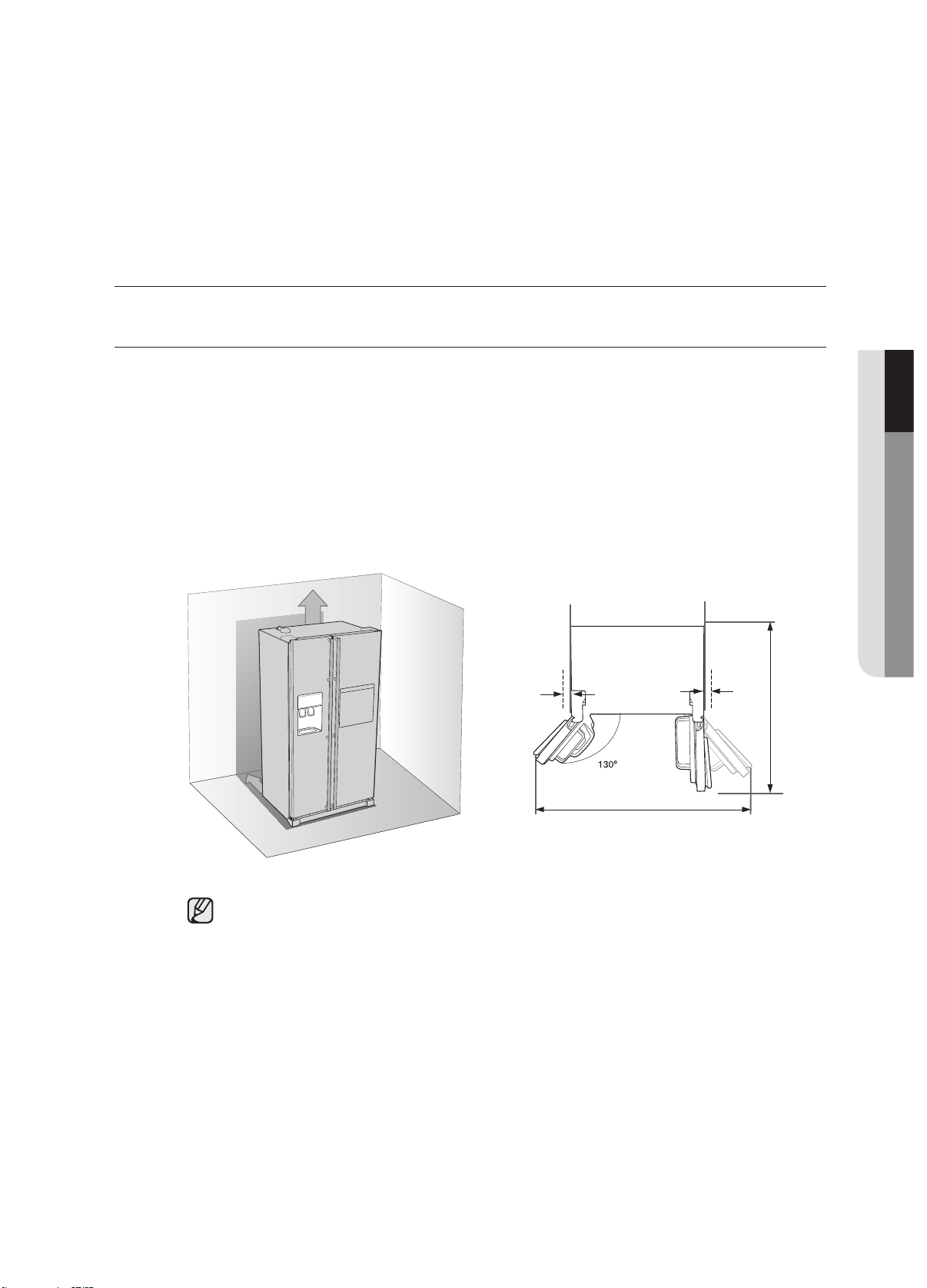
•Select a location with enough space for the refrigerator doors to open easily.
•Allow sufficient space to install the refrigerator on a flat surface.
- If your refrigerator is not level, the internal cooling system may not work correctly.
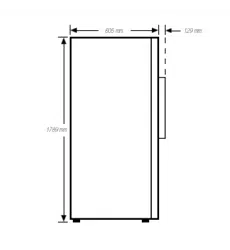
- Overall space required in use. Refer to drawing and dimension as below.
•Allow clearance to the right, left, back and top when installing. This will help reduce
power consumption and keep your energy bills lower.
•Do not install the refrigerator where the temperature will go below 50°F (10°C).
•Make sure you disconnect the water supply line BEFORE removing the freezer door.
See the next section on “Separating the Water Line” to avoid damage.
25mm
25mm
1546mm
mm361
1
at least 50mm
at least 50mm
1
0
SEG
N
I
T
T
UP

1_setting up
REMOVING THE REFRIGERATOR DOORS
If your entrance won’t allow the refrigerator to pass easily through it, you can remove the doors.
1. Removing the Front Leg Cover
First, open both the freezer and refrigerator doors, and then take off the front leg cover by turning
the three screws counter-clockwise.
Separating the Water Supply Line from the Refrigerator
1.Remove the water line by pressing the coupler
1
and pulling the water line
2
away.
:
Do not cut the water line. Gently separate it from the coupler.
1
2
setting up _19
setting up your side-by-side
refrigerator
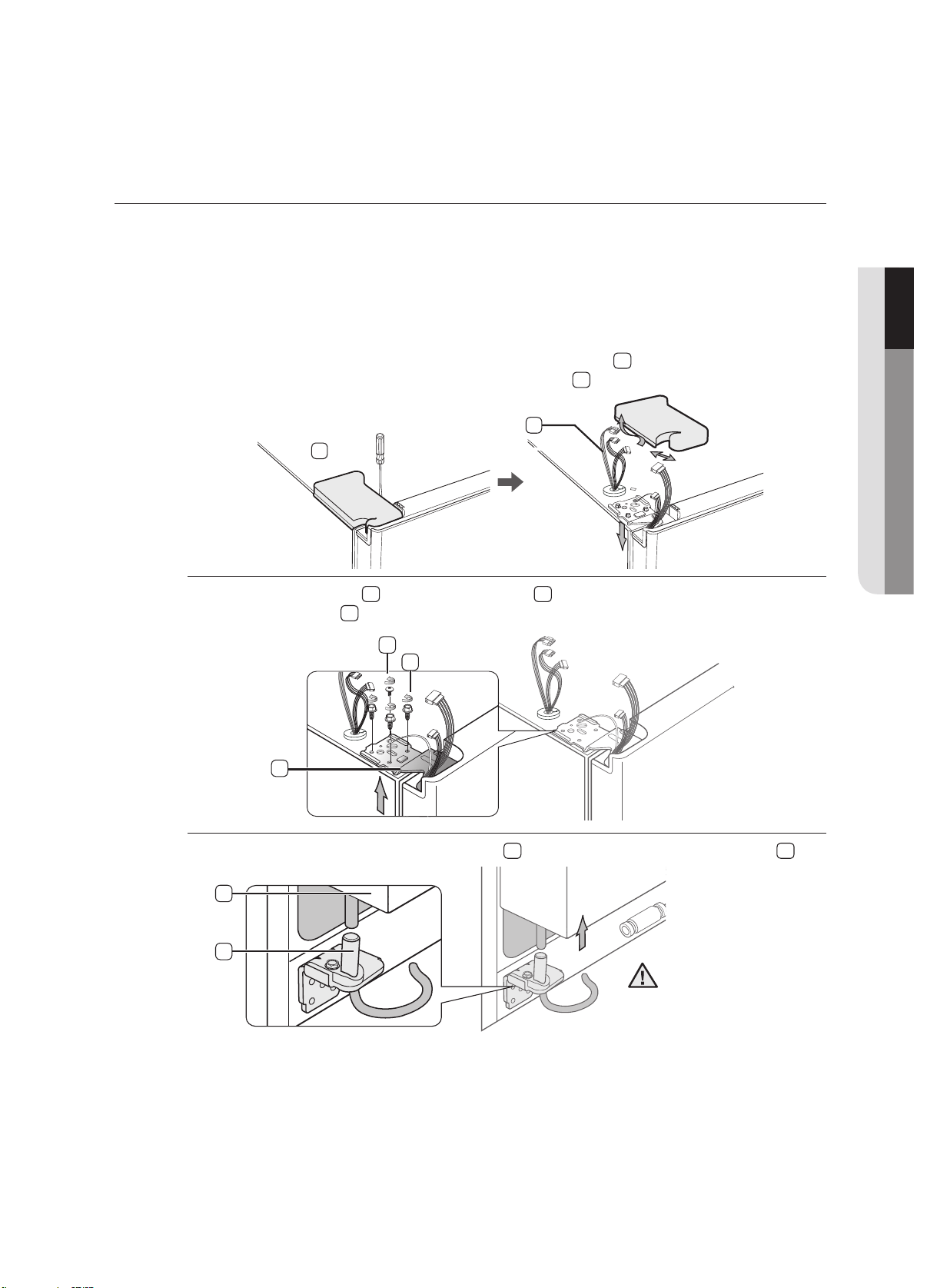
2. Removing the freezer door
A few things to mention first.
• Make sure that you lift the door straight up so the hinges are not bent or broken.
• Be careful not to pinch the water tubing and wire harness on the door.
• Place doors on a protected surface to prevent scratching or damage.
1. With the Freezer door closed, remove the upper hinge cover
1
using a screwdriver, and
then disconnect the wires by gently pulling them apart
2
.
2.
Remove hinge screws
3
and the ground screw
4
by turning counter-clockwise, and take
off the upper hinge
5
. Be careful that the door does not fall on you as you are removing it
3.
Next, remove the door from the lower hinge
6
by carefully lifting the door straight up
7
.
2
3
4
5
7
6
1
01 SETTING UP
Be careful not to pinch
the water tubing and
wire harness on the
door.
20_ setting up
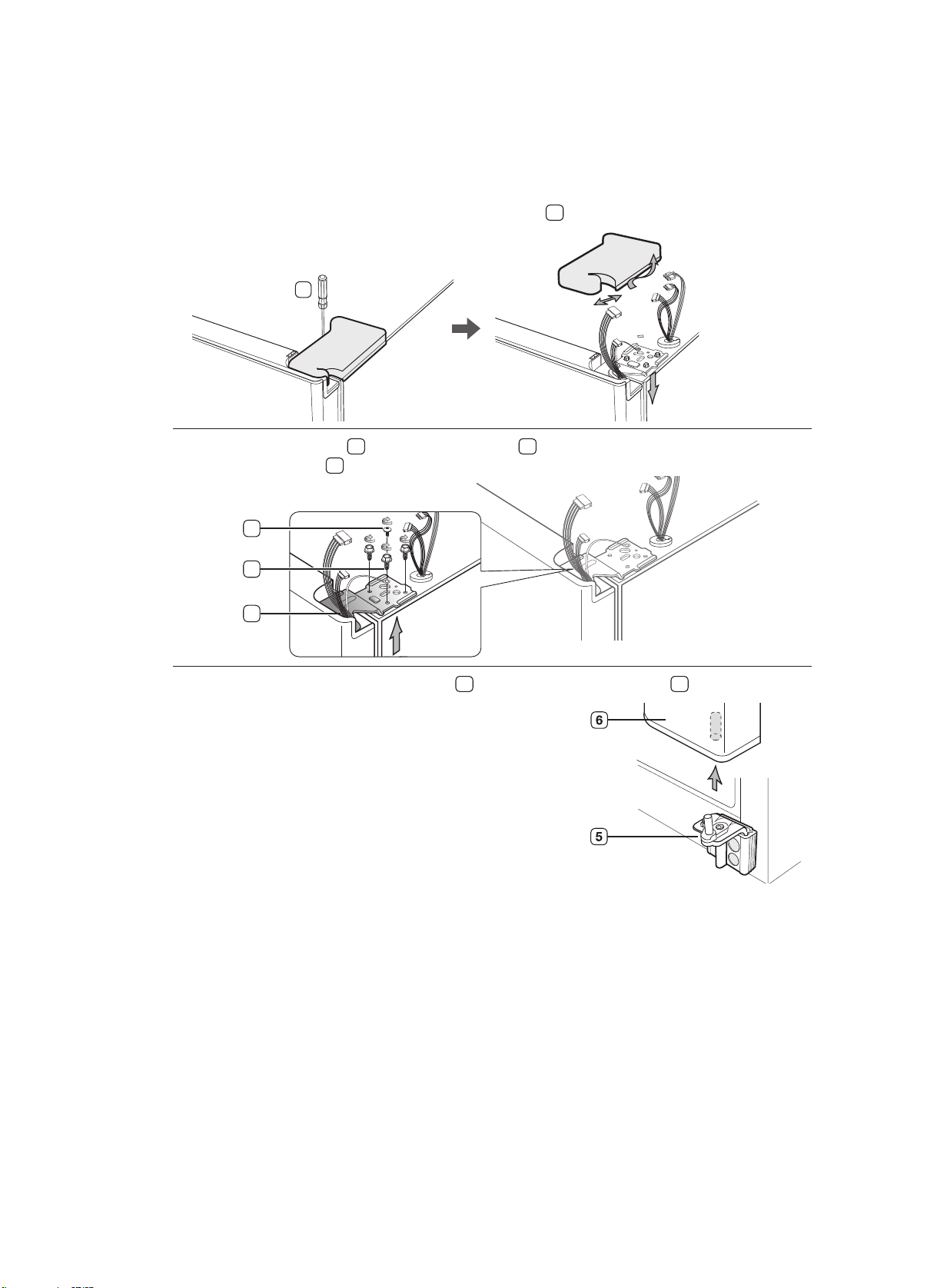
Removing the Fridge Door
1. With the door closed, remove the upper hinge cover
1
using a screwdriver.
2.
Remove hinge screws
2
and the ground screw
3
by turning counter-clockwise, and take
off the upper hinge
4
. Be careful that the door does not fall on you as you are removing it.
3.
Remove the door from the lower hinge
5
by lifting the door straight up
6
.
1
4
2
3

setting up _ 21
setting up your side-by-side
refrigerator
REATTACHING THE REFRIGERATOR DOORS
Once you have safely placed your refrigerator where you plan for it to stay, it is time to put the doors back on.
Reattaching the Freezer Door
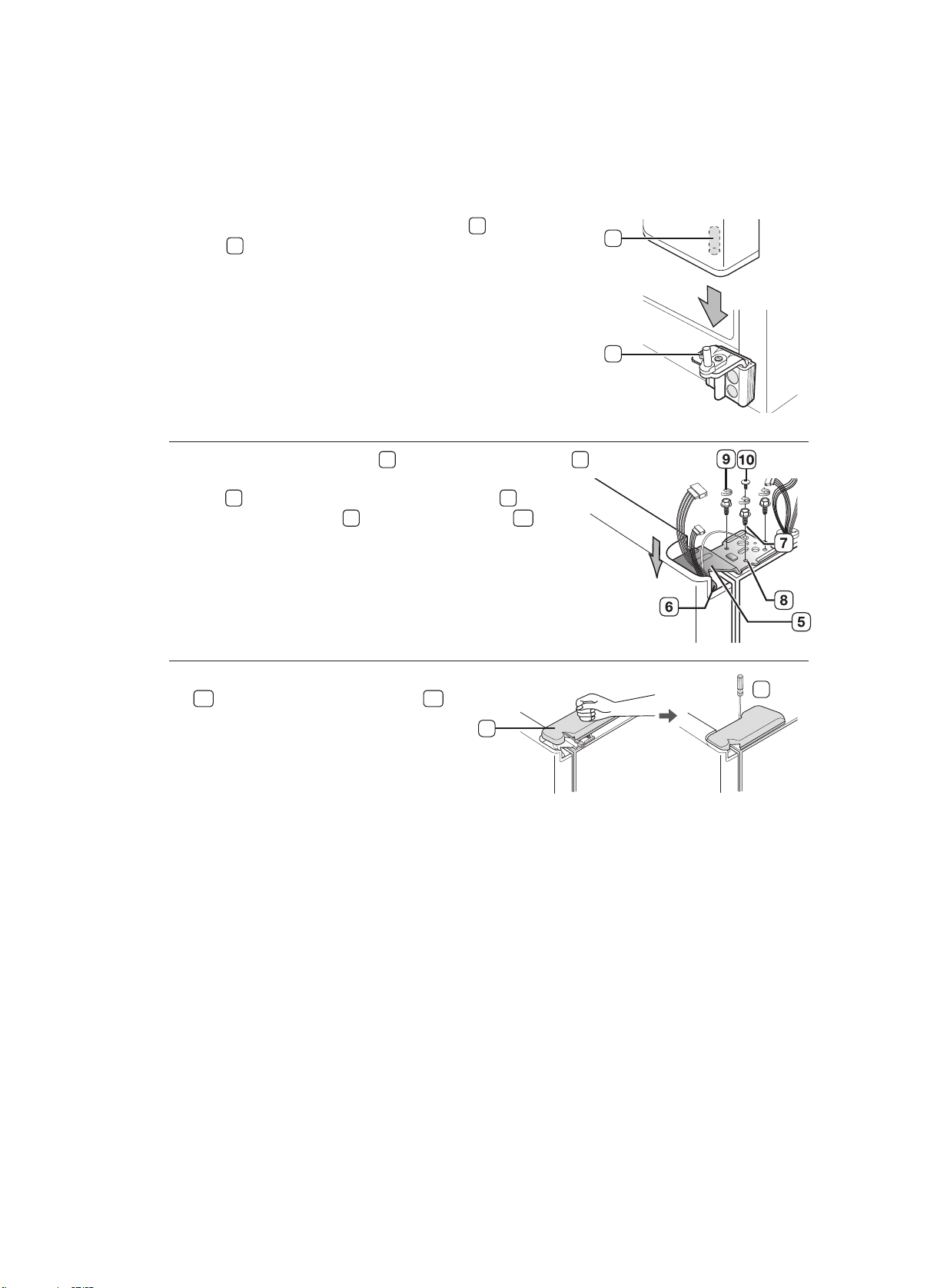
1. Insert the upper hinge shaft
3
into the hole on the corner
of the freezer door
4
. Make sure the hinge is level between
the upper hinge hole
5
and the hole of the cabinet
6
and
reattach the hinge screws
7
and ground screw
8
by turning
in a clockwise direction.
2.
Reconnect the wires.
3.
Place the front part of the upper hinge cover
9
on the front of the upper hinge
10
and
reattach with the screw.
01 SETTING UP
10
9
4
5
6
7
8
3
22_ setting up
Reattaching the Fridge Door
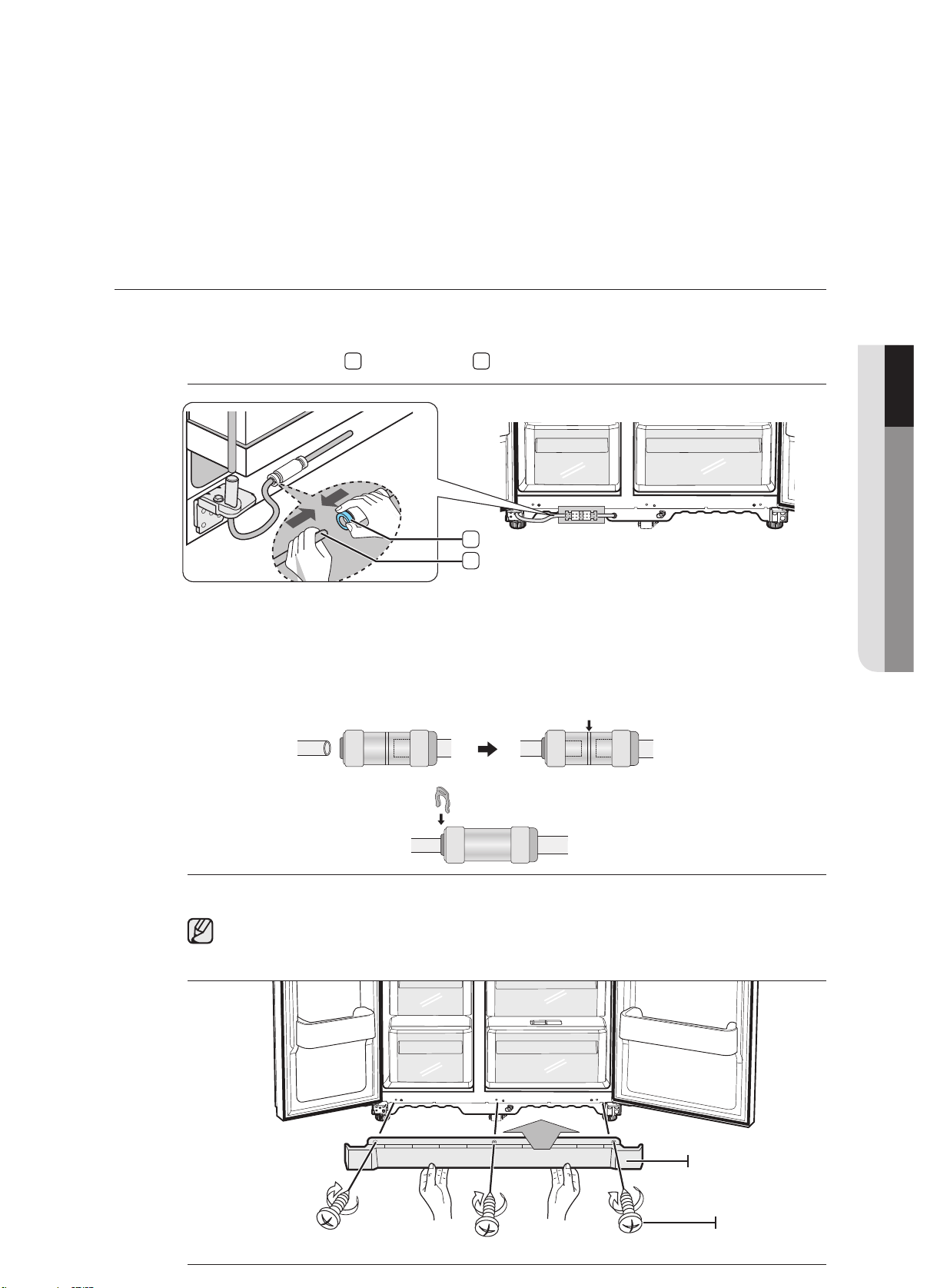
1. Fit the hole in the corner of the fridge door
3
over the lower
hinge
4
.
2.
Insert the upper hinge shaft
5
into the hole on the hinge
6
. Make sure the hinge is level between the upper hinge
hole
7
and the hole on the top of the cabinet
8
. Then,
reattach hinge screws
9
and the ground screw
10
by
turning it in a clock wise direction.
3.
Place the front part of the upper hinge cover
11
on the front of the upper hinge
12
and
reattach it with the screw.
3
4
12
11
settingup_23
settingupyourside-by-side
refrigerator
ReattachingtheWaterSupplyLine
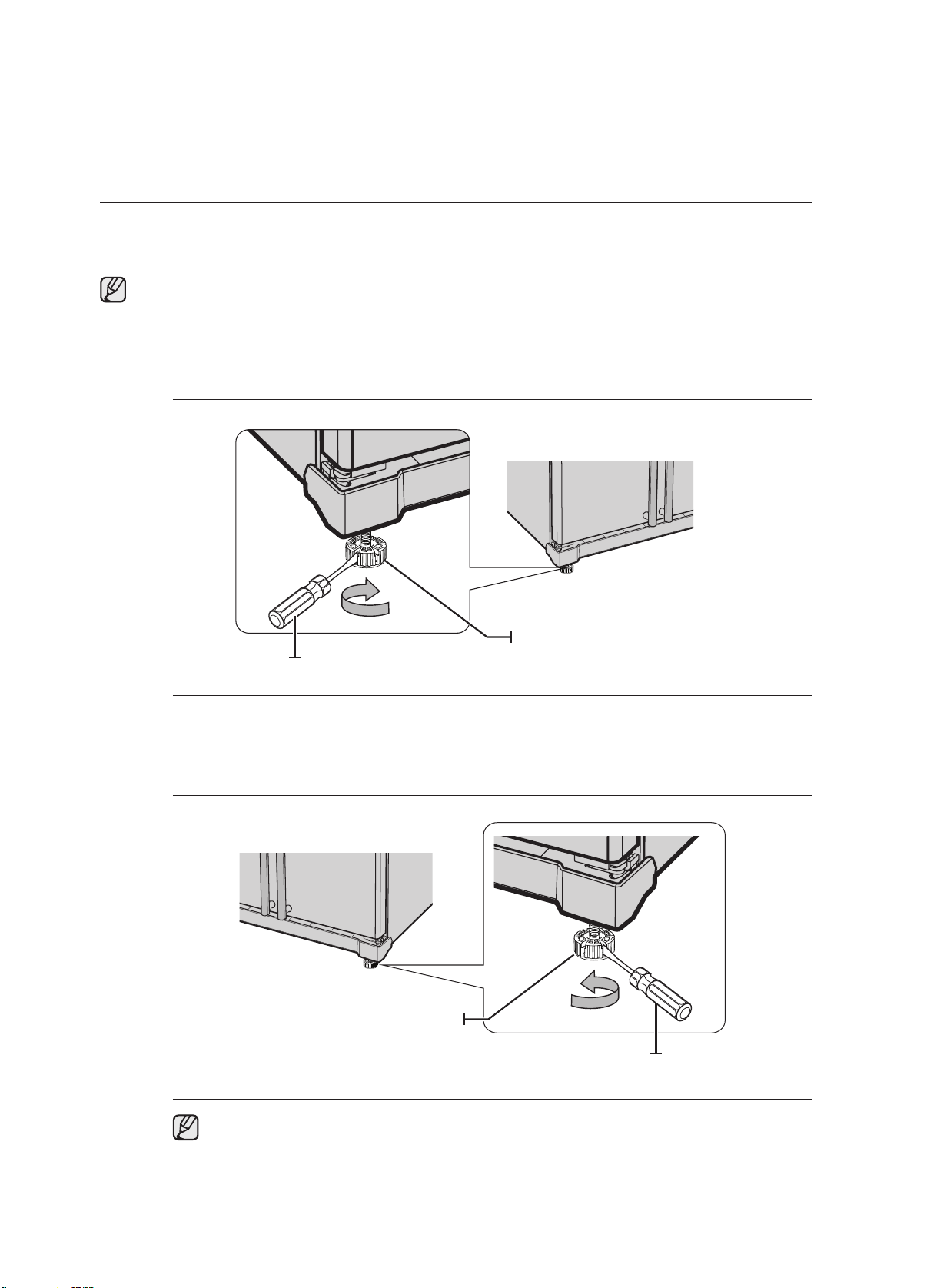
1.Insertthewaterline
1
intothecoupler
2
.
ReattachingtheFrontLegCover
Beforeattachingthecover,checkwaterconnectorforleakage.
Replacethefrontlegcoverbyturningthethreescrewsclockwise,asshowninthefigure.
FrontLegCover
Screw
2
1
10SEGNI
T
T
U
P
2.The Water Line must be fully Inserted to the center of transparent coupler to prevent water
leakage from the dispenser.
3.Insert the clip in the install pack and check that it holds the line fi rmly.
Center of transparent
coupler
clip A (1/4”)
(6.35mm)
24_ setting up
LEVELING THE REFRIGERATOR
Now that the doors are back on the refrigerator, you will want to make sure the refrigerator is level so
you can then make final adjustments. If the refrigerator is not level, it will not be possible to get the doors
perfectly even.
The front of the refrigerator is also adjustable.
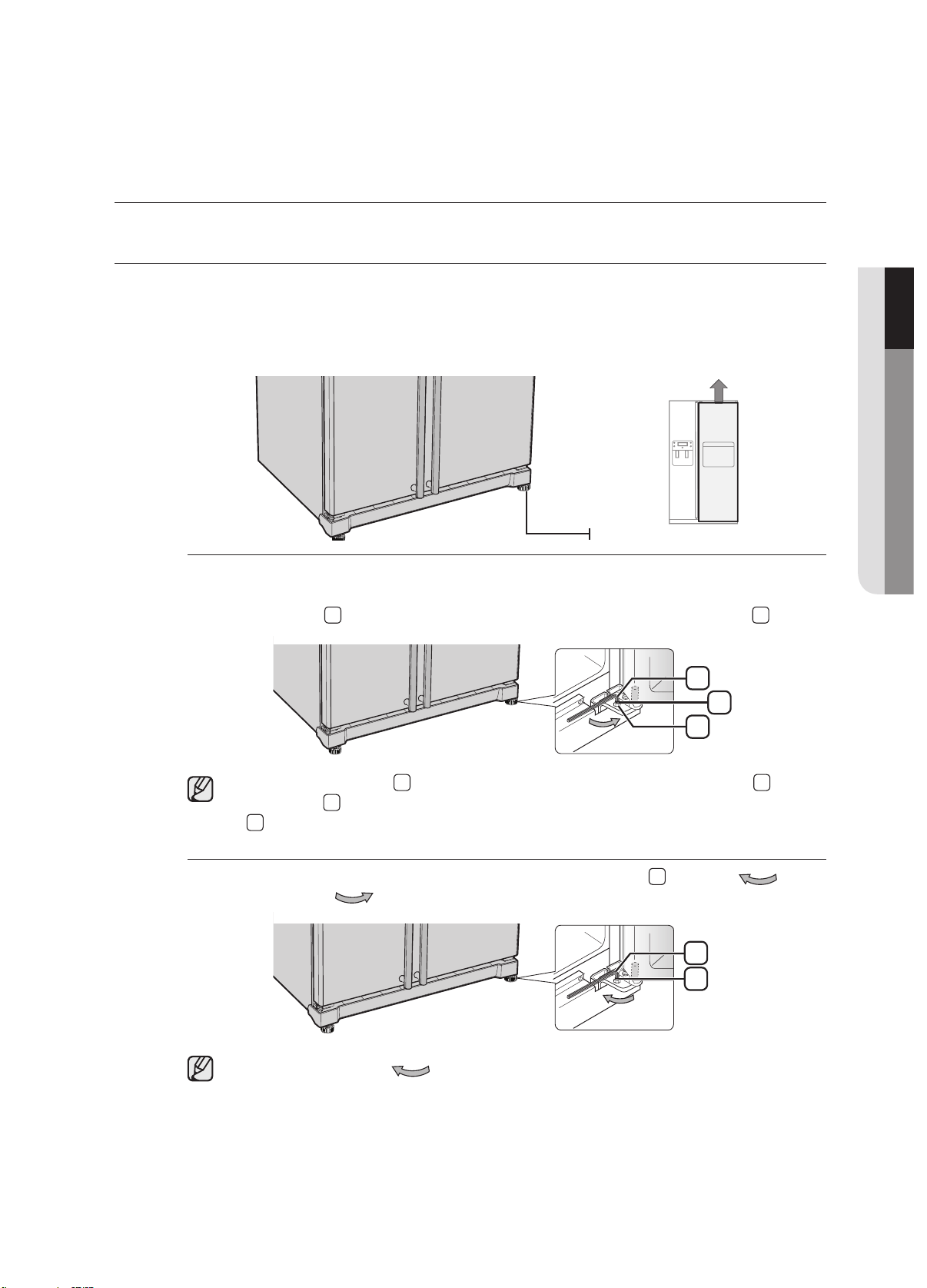
When the Freezer door is lower than the fridge
Insert a flat-blade screwdriver into a notch on the Leg, turn it clockwise or counter clockwise to
level the freezer.
When the Freezer door is higher than the fridge
Insert a flat-blade screwdriver into a notch on the Leg, turn it clockwise or counter clockwise to
level the fridge.
Refer to the next section for the best way to make very minor adjustments to the doors.
Leg
Leg
Screw Driver
Screw Driver
Caution:Thelegsofproductareunconnectedwhenitisoutoffactory.Makesuretoadjustthe
legstotouchthefloor,andmaketheproductlevelbeforeusing.
setting up _25
setting up your side-by-side
refrigerator
MAKING MINOR ADJUSTMENTS TO THE DOORS
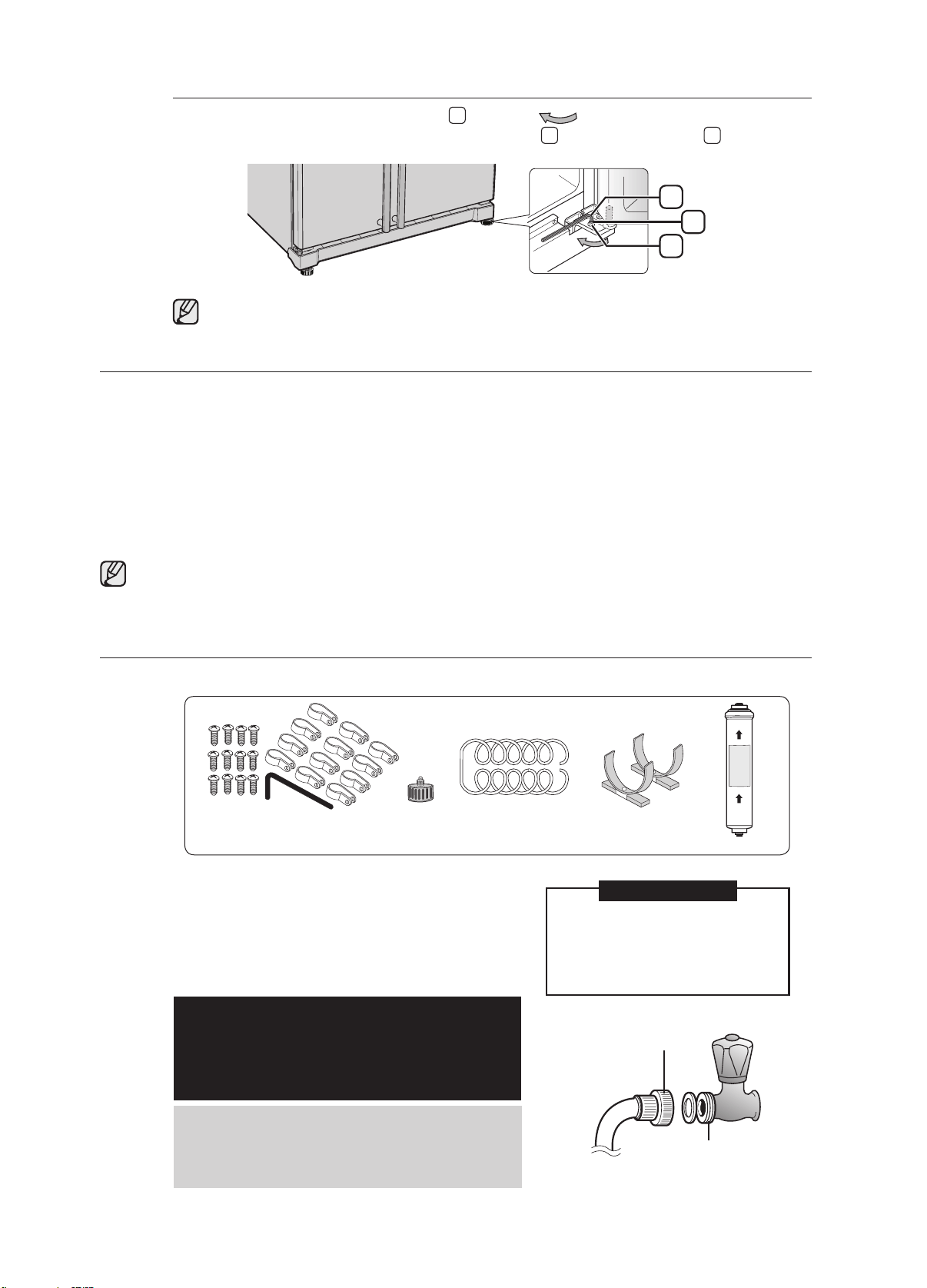
Remember, a leveling refrigerator is necessary for getting the doors perfectly even. If you need help,
review the previous section on leveling the refrigerator.
When the door of the freezer is higher
than the fridge
In the case of the process to correct the imbalance is the same. Open the doors and adjust
them, one at a time, as follows:
1. Unscrew the nut
1
from the lower hinge until it reaches the upper end of the bolt
2
.
When you release the nut
1
, make sure that you use the Allen wrench provided
3
to
loosen the bolt
2
in a counter-clockwise direction. You should then be able to unscrew the
nut
1
with your fingers.
2.
Adjust the height difference between the doors by turning the bolt
2
clockwise or
counter clockwise .
When you turn clockwise , the door will move up.
Adjustment part
3
2
1
Wrench
bolt
Nut
3
2
Wrench
bolt
01 SETTING UP
26_ setting up
3. After adjusting the doors, turn the nut
1
clockwise until it reaches the lower end of
the bolt, then tighten the bolt again with the wrench
3
to fix the nut in place
1
.
If you do not secure the nut firmly, the bolt may release.
CHECKING THE WATER DISPENSER LINE (OPTIONAL)
A water dispenser is just one of the helpful features on your new Samsung refrigerator. To help promote
better health, the Samsung water filter removes unwanted particles from your water. However, it does not
sterilize or destroy microorganisms. You will need to purchase a water purifying system to do that.
In order for the icemaker to operate properly, water pressure of 138 ~862 Kpa is required. Under normal
conditions, a 170 cc paper cup can be filled in 10 seconds.
If the refrigerator is installed in an area with low water pressure (below 138 Kpa), you can install a booster
pump to compensate for the low pressure.
Make sure the water storage tank inside the refrigerator is properly filled. To do this, press the water
dispenser lever until the water runs from the water outlet.
Water Line installation Kits are included with unit. You can find it in freezer drawer.
INSTALLING THE WATER DISPENSER LINE
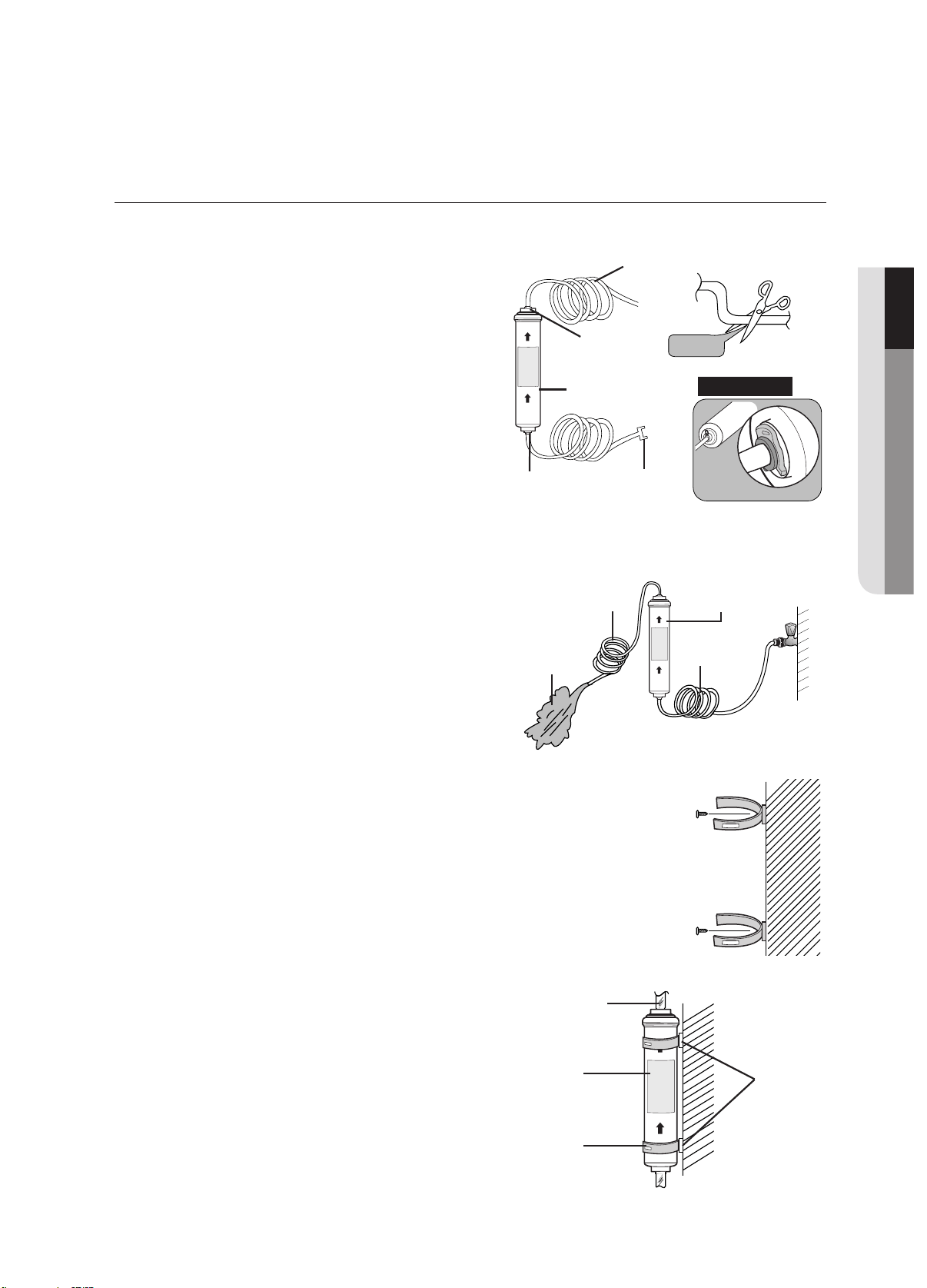
Parts for water line Installation
Connecting to the water supply line
Connect the water pipe with coupler and tap.
1. Close the main water tap.
2. Connect coupler “A” to the tap. Note:
Water line fixer
and screws
Pipe
connector
Water line Filter
lock-clip
Filter
3
2
1
Wrench
bolt
Nut
CAUTION
The water line must be connected
to the cold water pipe.
If it is connected to the hot
water pipe, it may cause the
filter to malfunction.
WARRANTY INFORMATION
This water line installation is not covered by the
refrigerator or ice maker manufacturer’s warranty.
Follow these instructions carefully to minimise the
risk of expensive water damage.
Note:
If the coupler does not fit on the current tap, go
the nearest authorised service dealer and purchase
the right couplers fittings.
COUPLER “A”
TAP
setting up _27
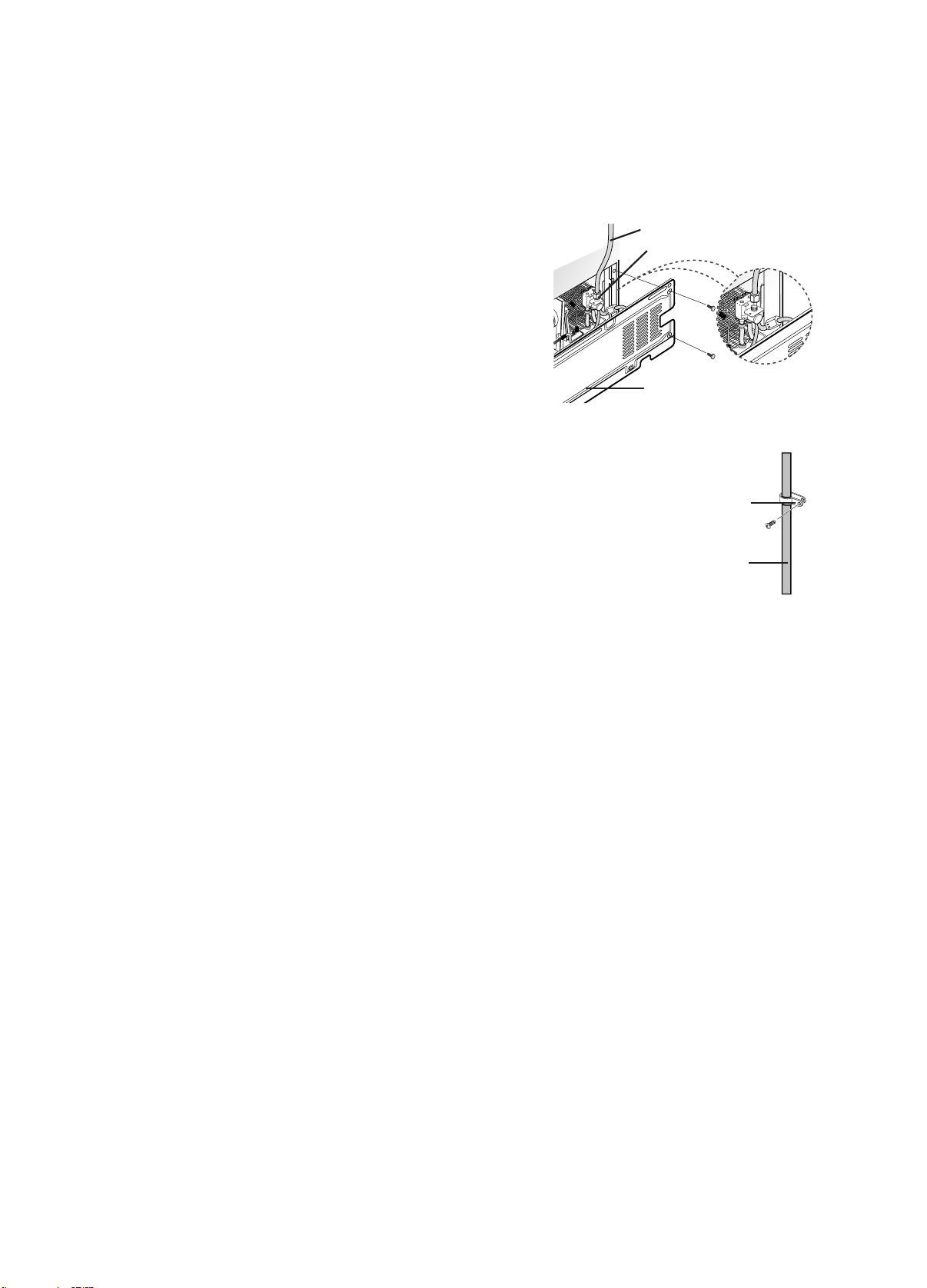
Remove any residual matter inside the filter. (Model with the filter)
- Open the main water tap to check whether
water is running through the water tube on
the water inlet side of the filter.
- If water does not come out through the line,
check whether the tap is open.
- Leave the tap open until clean water is
running out and any residual matter that built
up during manufacturing has been removed.
Attach the filter lock stations.
- Hold the filter lock stations in the appropriate
position (under the sink for example) and fix it tightly
into place where to screw.
Secure the filter in position.
- Fix the filter in position, as shown in the
figure on the right.
setting up your side-by-side
refrigerator
01 SETTING UP
Select the location where the filter is to
install. (Model with the filter)
- If you wish to reassemble the water inlet and out-
let sides of the filter during filter installation,
see the reference illustration.
- Cut the water line attached to the filter to the
appropriate place after measuring the distance
between the filter and the cold water tap.
COUPLER
SIDE OF
FILTER
WATER INLET
SIDE OF FILTER
LINE OUTLET
90 degree
FILTER WATER
REFERENCE
WATER LINE
FILTER
WATER
OUTLET SIDE
OF FILTER
TWO FILTER LOCK
STATION
TWO FILTER LOCK
STATION
TIGHTENING
BAND
FILTER
WATER TUBE
FILTER
LOCK
STATIONS
28_ setting up
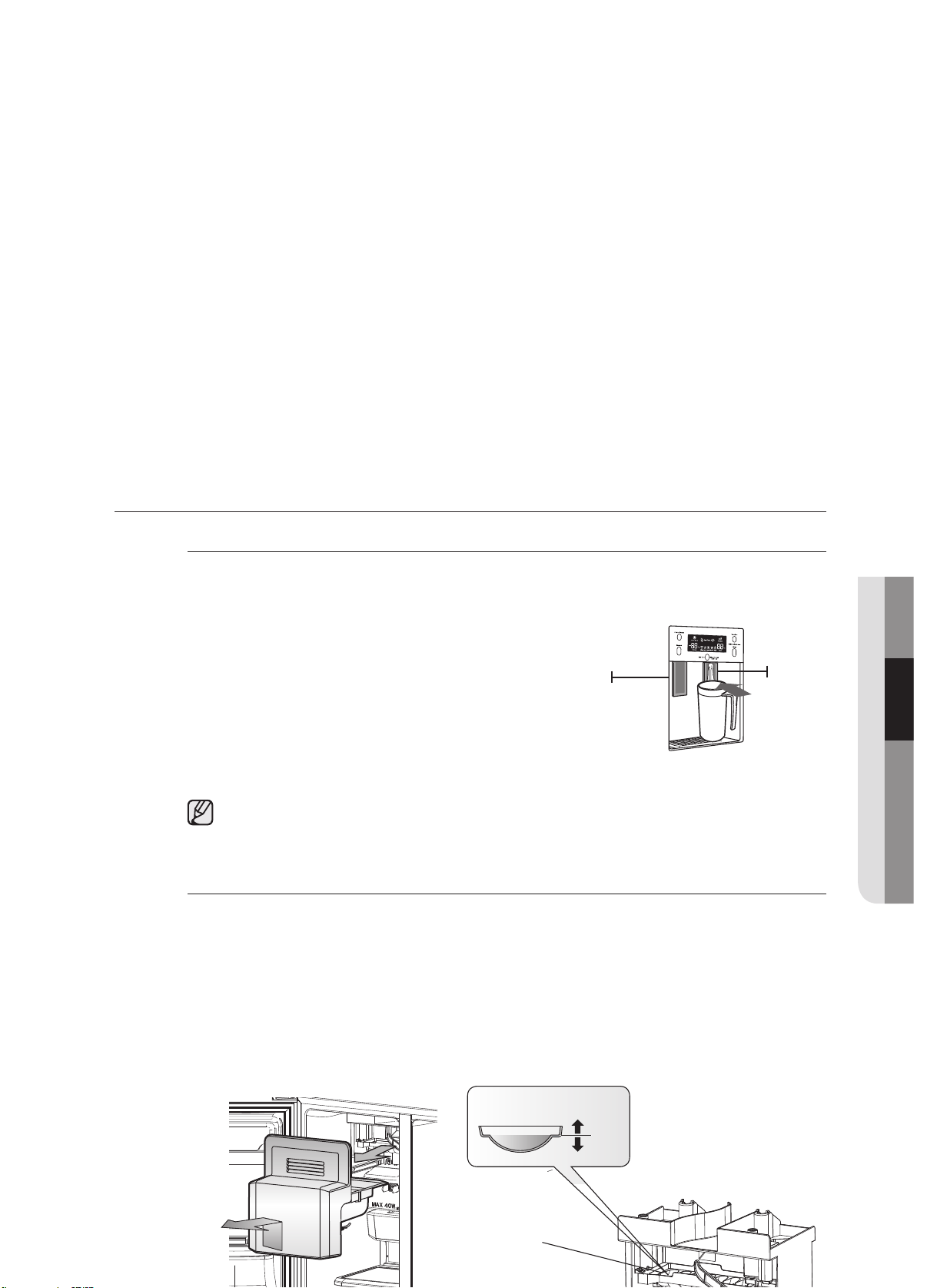
Connect the water line to the refrigerator.
- Remove the compressor cover of the refrigerator.
- Connect the water line to the valve, as shown in the
figure.
- When connected, check if there is any leakage.
If any, repeat the connection.
- Reattach the compressor cover of the refrigerator.
Secure the water line.
- Using clip ”A”, fix the water line to the wall (the back of
refrigerator).
- When the water line is secure, make sure whether the water line
is not excessively bent, pinched or squashed.
CLIP A
WATER LINE
WATER LINE
INSTRUCTIONS
COMPRESSOR COVER OF
REFRIGERATOR
CONNECTION NUT
setting up_2
setting up your side-by-side
refrigerator
Removing any residual matter inside the water supply line after
installing filter.
1.Turn ON the main water supply & turn OFF the valve
to the water supply line.
2.
Run water through the dispenser until the water runs
clear (approx. 1L). This will clean the water supply
system and remove air from the lines.
3.
Additional flushing may be required in some
households.
4.
Open the refrigerator door and make sure there are
no water leaks coming from the water filter.
A newly installed water filter cartridge may cause
water to briefly spurt from the water dispenser. This
is due to air getting into the line. It should pose no
problem to operation.
Check the amount of water supplied to the ice tray. (Optional)
1.Lift up the icemaker bucket and gently pull out of the freezer.
2.
When you press the Test button for 1.5 seconds, the ice cube container is filled with water
from the water supply tap after ice tray is twisted. Check to make sure the amount of water is
correct(see the illustration below).
If the water level is too low, the ice cubes will be small. This is a water pressure problem from
with in the main water pipes, not the refrigerator.
10SEGNI
T
TU
P
Ice maker
1
Ice
Water
2
Check the water level
Test button
Feeler Arm
operating the SAMSUNG
side-by-side refrigerator
SETTING UP THE REFRIGERATOR
Now that you have your new refrigerator installed and in place, you are ready to set up and enjoy the full
features and functions of the appliance.
By completing the following steps, your refrigerator should be fully operational. If not, first check the power
supply and electricity source or try the troubleshooting section at the back of this user guide. If you have
any further questions, contact your Samsung Electronics service center.
1. Place the refrigerator in an appropriate location with reasonable clearance between the wall
and the refrigerator. Refer to installation instructions in this manual.
2.
Once the refrigerator is plugged in, make sure the interior light comes on when you open the
doors.
3.
Set the temperature control to the coldest temperature and wait for an hour.
The freezer should get slightly chilled and the motor should run smoothly.
4.
After powering the refrigerator, it will take a few hours to reach the appropriate temperature.
Once the refrigerator temperature is sufficiently cool, you can store food and drink in the
refrigerator.
30_ setting up
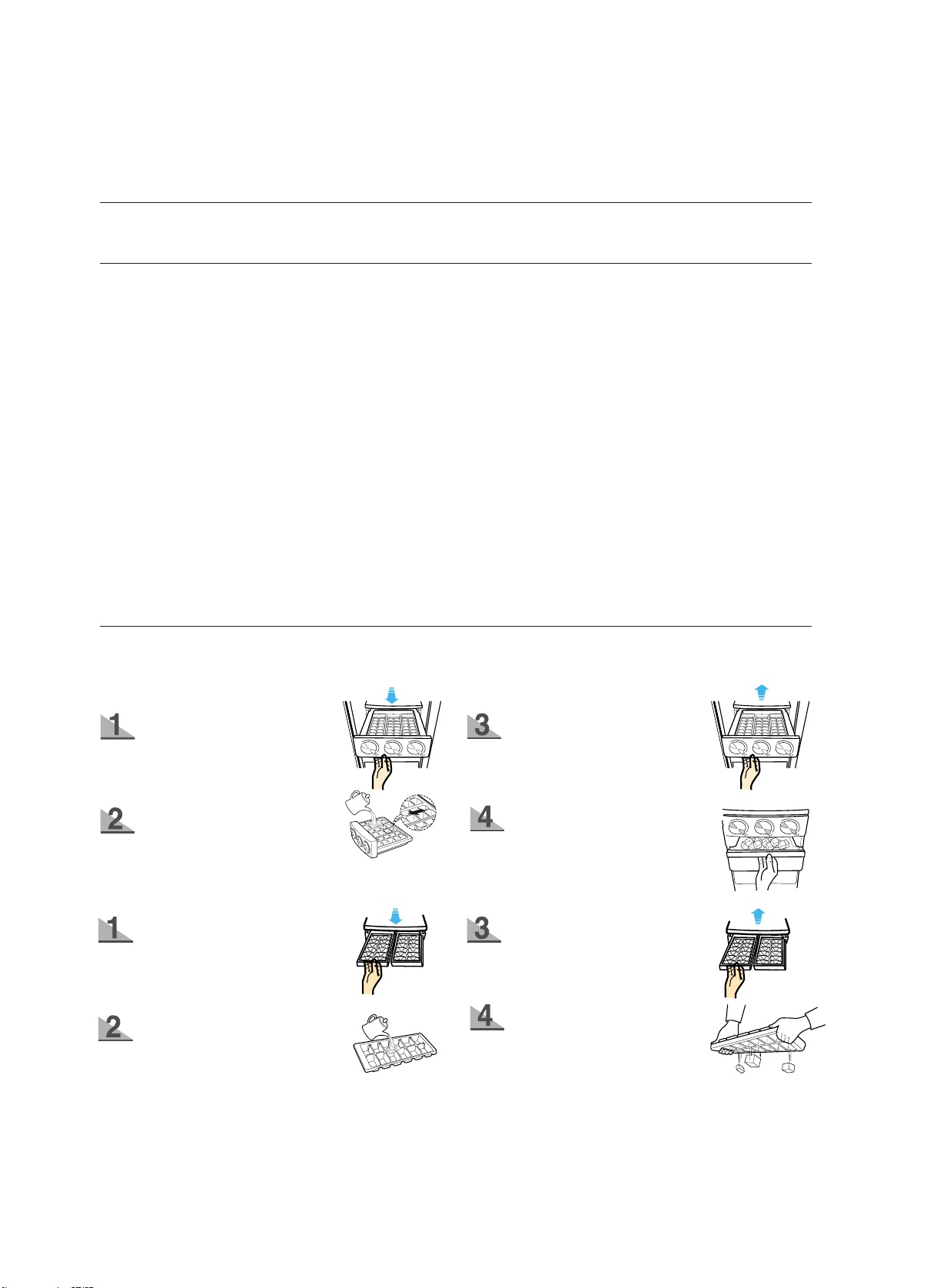
Pull out the ice tray.
Pour cool water into the
tray until it reaches the
water level indicator on
the tray.
Place it inside ice tray.
Turn ice tray button and the
ice automatically full into
the below ice compartment
after release. Pull out ice
storage compartment for ice.
Pull out the ice tray.
Pour
water into the tray
until it reaches the water
level indicator on the tray.
Place it under the freezer
shelf or on the freezer shelf.
To separate individual ice
cubes, pull out the ice tray
and hold the ice tray by its
ends, then twist it gently.
When the freeze temperature get zero degre below, you can use Ice Box to make ice.
USE ICE TRAY(OPTIONAL)(RSA1Z,RSA1S,RSA1U,RSA1D,RSA1N,RSA1V,SRS582NLS,
SRS565DHLS)
operating_31
OPERATING THE REFRIGERATOR
Using the Control Panel
20O
E
PGNI
TAR
56
7
1
2
4
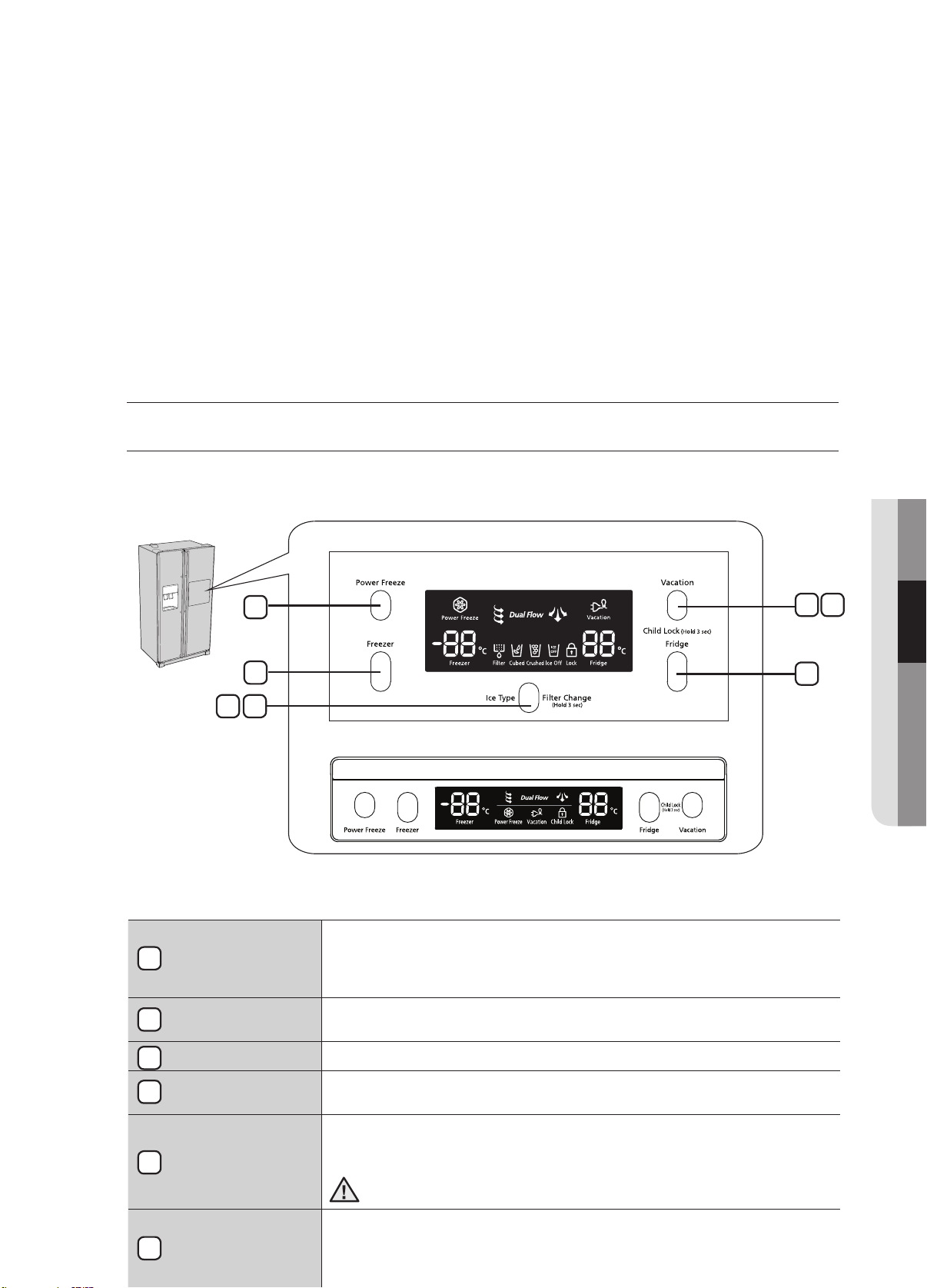
POWER FREEZE
BUTTON
Speeds up the time needed to freeze products in the freezer. This can
be helpful if you need to quickly freeze items that spoil easily or if the
temperature in the freezer has warmed dramatically (For example, if the
door was left open).
FREEZER BUTTON
Press the Freezer button to set the freezer to your desired temperature,
You can set the temperature between -14°C (8°F) and -25ºC (-14°F).
ICE TYPE BUTTON
Use this button to choose Cubed, Crushed or to turn the Ice feature off.
FILTER CHANGE
BUTTON
When you change the filter, press this button for 3 seconds to reset the
filter schedule.
VACATION
BUTTON
If you are going on vacation or business trip or you do not need to use the
refrigerator, press the Vacation button.
When you select vacation button for
fridge compartment off, display LED of Vacation will be on.
It is strongly requested to remove foods in the fresh-food compartment
and do not leave the door open when you select Vacation function.
CHILD LOCK
FUNCTION
By pressing the Vacation button and the Fridge button simultaneously for 3
seconds, all buttons will be locked. The Water dispenser lever and the Ice
lever will not work either. To cancel this function, Press these two buttons for
3 seconds again.
FRIDGE BUTTON
Press the Fridge button to set the fridge to your desired temperature.
You can set temperature between 1°C and 7°C (34°F and 45°F).
1
2
3
4
5
6
7
3
RSA1S/N/V, SRS582NLS
RSA1Z/U/D, SRS565DHLS

32_operating
operating the SAMSUNG
side-by-side refrigerator
USING THE DIGITAL DISPLAY
“88” segment on Freezer part indicates the current Freezer temperature.
“88” segment on Fridge part indicates the current Fridge temperature.
Power Freeze
This icon will light up when you activate the “Power Freeze” feature. “Power Freeze” is great for
times when you need a lot of ice. Press the Power Freeze button and ice production will increase.
When you have enough, just press the button again to cancel the “Power Freeze” mode.
When you use this function, the energy consumption of the refrigerator will increase.
This function must be activated before putting large amount of food stuff in the freezer
compartment at least 24 hours before.
RSA1S/N/V, SRS582NLS
RSA1Z/U/D, SRS565DHLS
operating _33
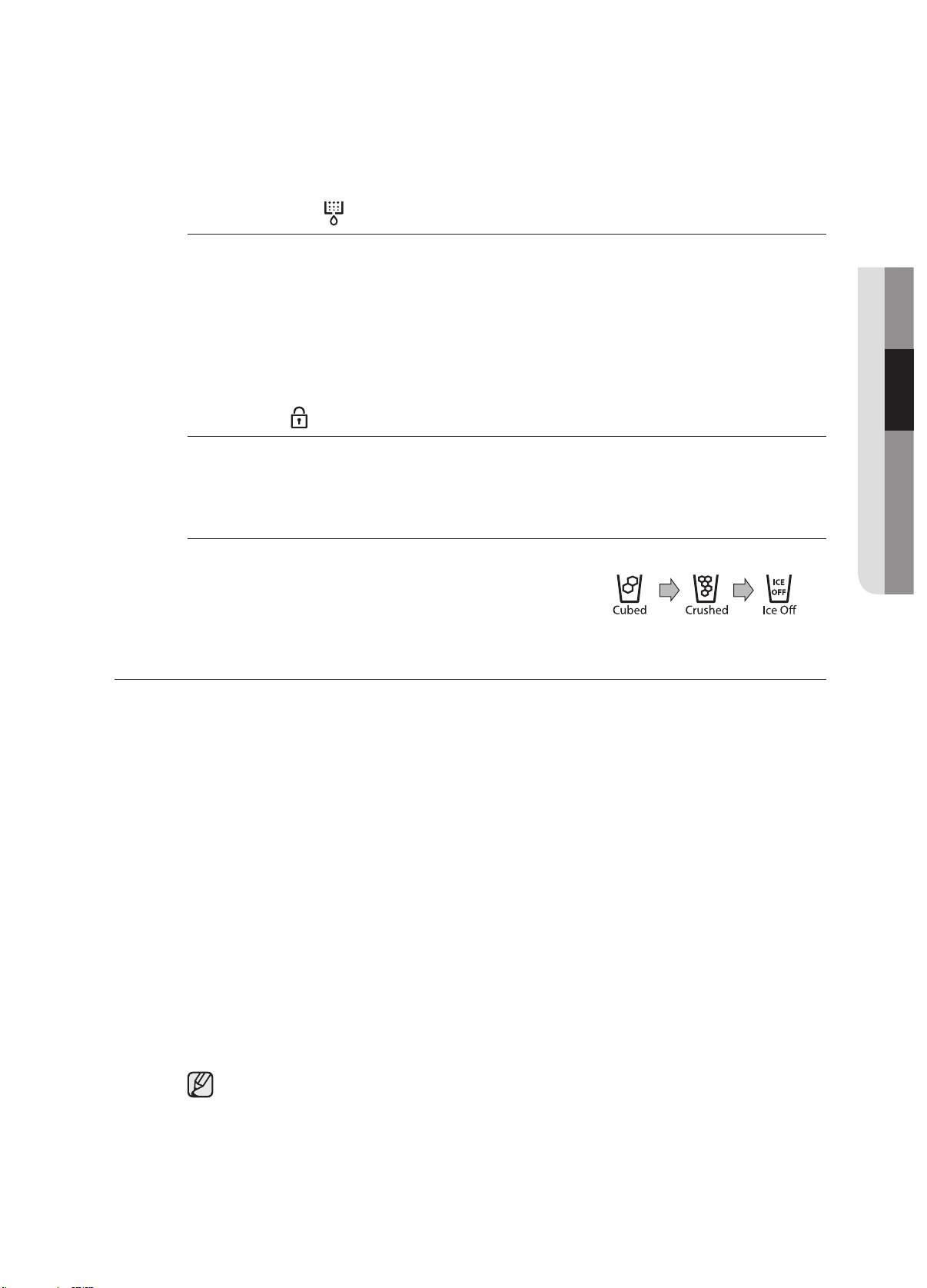
Filter Indicator
When the filter indicator light is on, it is time to change the filter. Typically this happens about
every 6 months.
After removing the old water filter and installing a new one (see page 26 for instructions on how
to do this), reset the indicator status light by pressing the Ice Type button for about 3 seconds.
The indicator will light again in about 6 months to let you know it is time to change your water
filter.
When you do not use the water filter, press the Ice Type button for more than 5 seconds, the
Filter indicator lamp and the Filter Change letters will be off.
Child Lock
This icon will light up when you activate the Child Lock function by pressing the Vacation button
and the Fridge button simultaneously for 3 seconds. Press these two buttons for 3 seconds
again to reactivate.
Cubed Ice, Crushed Ice and turnning the Ice maker off.
Enjoy cubed or crushed ice by selecting your preference
from the digital control panel. If you don’t need ice, turn
the feature off to save on water and energy consumption.
The Ice type light indicates the type of ice(or no ice) that is
currently chosen.
CONTROLLING THE TEMPERATURE
Controlling the Freezer temperature
The freezer temperature can be set between -14°C (8°F) and -25ºC (-14°F) to suit your particular
needs. Press the freezer button repeatedly until the desired temperature is shown in the
temperature display. Keep in mind that foods like ice cream may melt at -16ºC (4°F).
The temperature display will move sequentially from -14°C (8°F) and -25ºC (-14°F). When the
display reaches -14ºC (8°F), it will begin again at -25ºC (-14°F).
Five seconds after the new temperature is set the display will again show the actual current
freezer temperature. However, this number will change as the Freezer adjusts to the new
temperature.
Controlling the Fridge temperature
The refrigerator temperature can be set between 7ºC (45°F) and 1ºC (34°F) to suit your particular
needs. Press the fridge button repeatedly until the desired temperature is shown in the
temperature display.
The temperature control process for the Fridge works just like the Freezer process.
Press the fridge button to set your desired temperature. After a few seconds, the Fridge will
begin tracking towards the newly set temperature. This will be reflected in the digital display.
The temperature of the freezer or the refrigerator may rise from opening the doors too
frequently, or if a large amount of warm or hot food is placed in either side.
This may cause the digital display to blink. Once the freezer and refrigerator return to their
normal set temperatures the blinking will stop.
If the blinking continues, you may need to “reset” the refrigerator. Try unplugging the
appliance, wait about 10 minutes and then plug back in.
02 OPERATING
Ice type
The top and bottom guards in the freezer of this model are the two star sections, so the
temperature in two star sections are slightly higher than other freezer compartment.
34_ operating
operating the SAMSUNG
side-by-side refrigerator
USING THE ICE AND COLD WATER DISPENSER
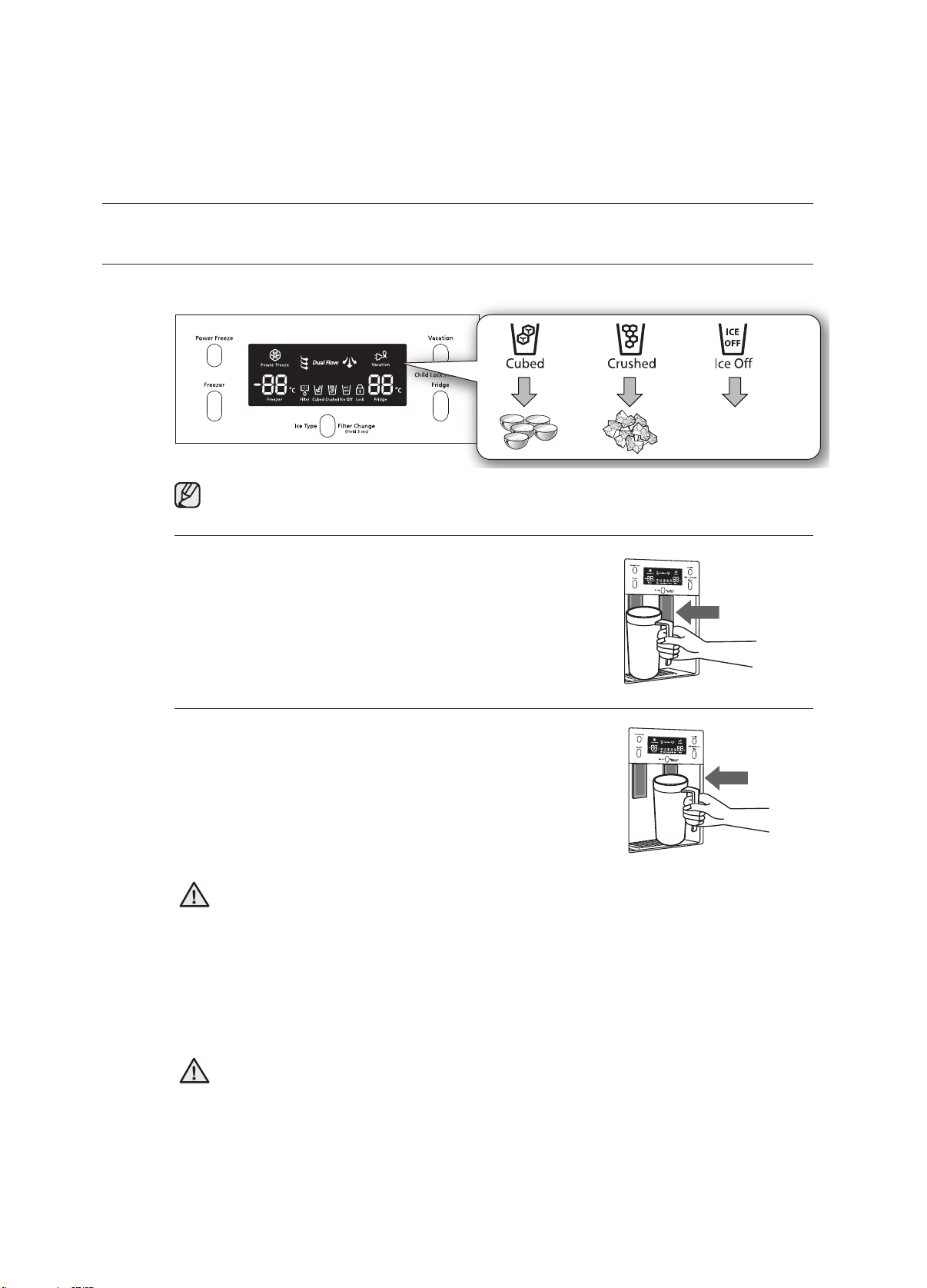
Press the Ice Type button to select the type of ice you want
Ice is made in cubes. When you select “Crushed”, the icemaker grinds the ice cubes into
crushed ice.
Dispensing ice
Place your glass underneath the ice outlet and push gently
against the ice dispenser lever with your glass. Make sure
the glass is in line with the dispenser to prevent the ice from
bouncing out.
Using the Water Dispenser
Place a glass underneath the water outlet and push gently
against the water dispenser lever with your glass. Make sure
the glass is in line with the dispenser to prevent the water from
splashing out.
•
Do not put your fingers, hands or any other unsuitable objects in the chute or ice-maker bucket.
- It may result in personal injury or material damage.
• Never put finger or any other objects in the dispenser opening.
- It may cause injury.
• Use only the ice maker provided with the refrigerator.
• The water supply to this refrigerator must only be installed/connected by a suitably
qualified person and connect to a potable water supply only.
• In order to operate the ice maker properly, water pressure of 138 ~ 862 Kpa is
required.
• If you have a long vacation or business trip and won’t use water or ice dispensers,
close the water valve.
- Otherwise, water leakage may occur.
• Wipe excess moisture from the inside and leave the doors open.
- Otherwise, odor and mold may develop.
No Ice
Select this if you want to
turn off the icemaker
Push
Push
WARNING
CAUTION
operating _35
02 OPERATING
SHELVES AND BINS
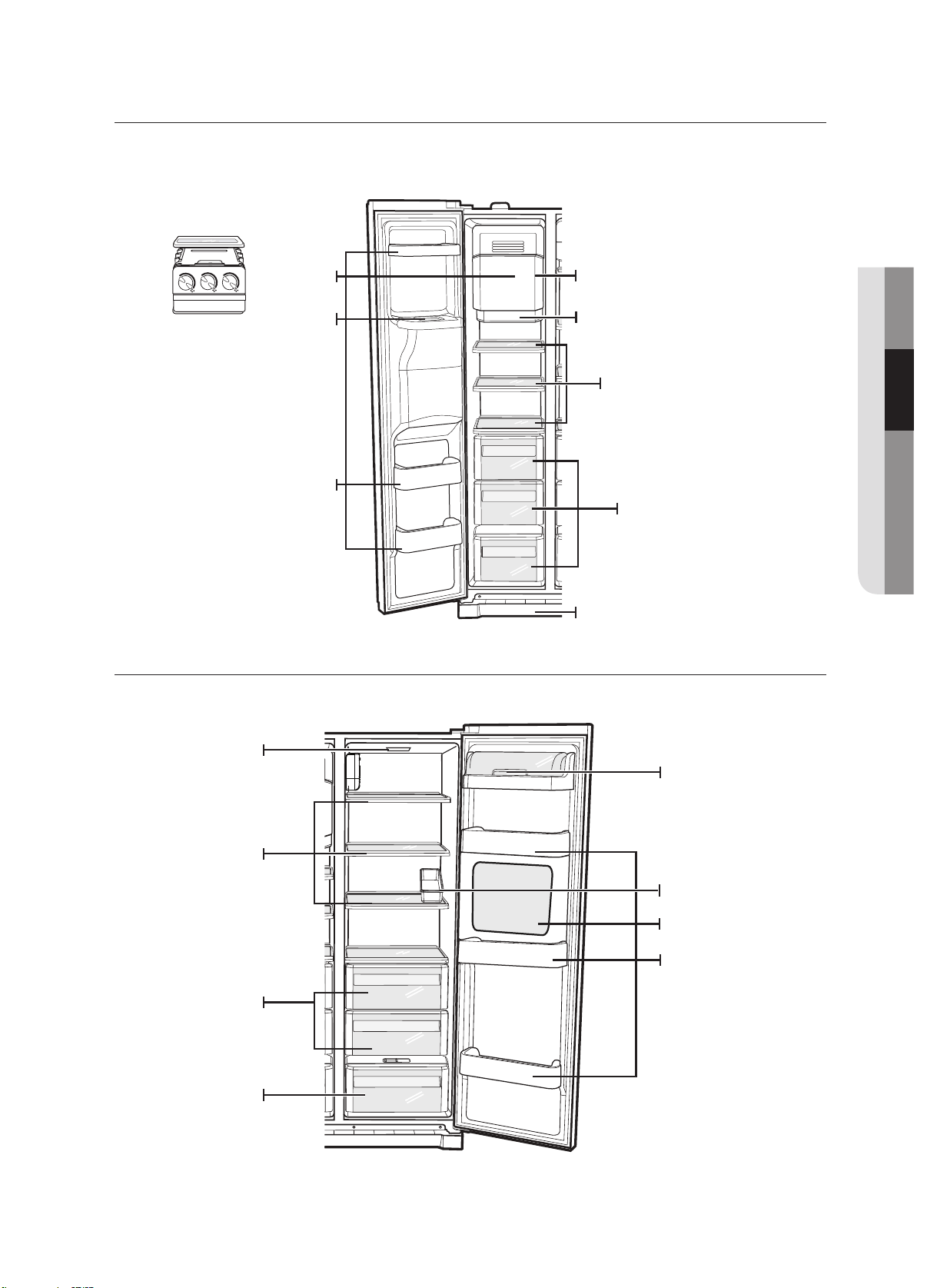
Freezer
Fridge
Ice Maker Bucket (Optional)
Door Bins
Ice Chute
(Optional)
Lamp Cover
Glass Shelves
Drawers
(Optional)
Front Leg Cover
Dairy Bin
Lamp Cover
Glass Shelf
Door Bins
CoolSelect Duo
(Optional)
Vegetable &Fruit
Drawers
(Optional)
Tray Utility
Beverage Station
(Optional)
(Optional)
Ice Maker Bo
x
36_ operating
operating the SAMSUNG
side-by-side refrigerator
STORING FOOD
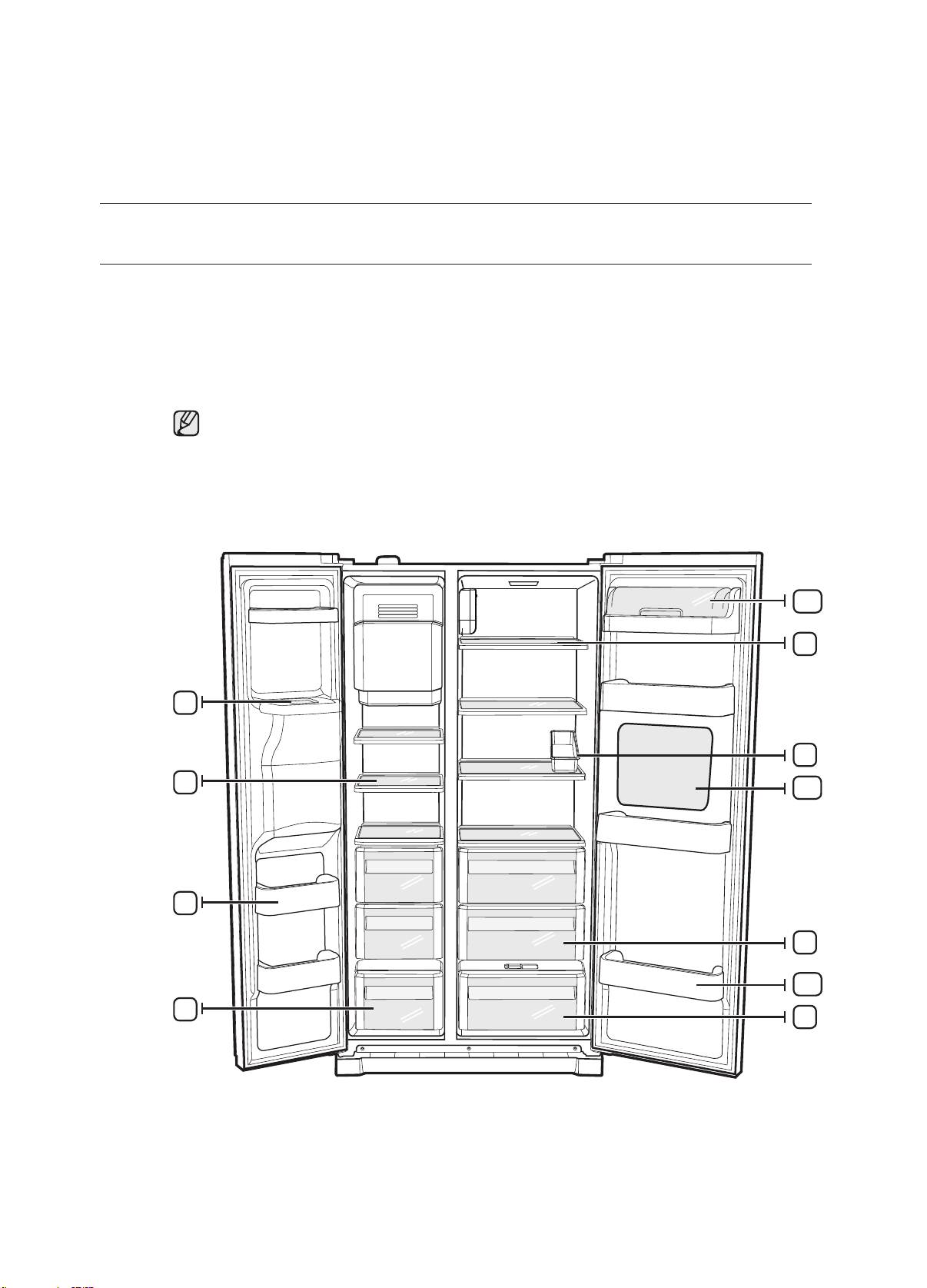
Storing Food in the Freezer
The Samsung Side-By-Side Refrigerator has been designed to provide you with maximum
spacesaving features and functions. Here are some of the customized compartments we have
created to keep your food fresher, longer. Remember, in order to prevent odor penetration to the
ice, stored food should be wrapped securely and as airtight as possible.
To get the best energy efficiency of this product, please leave all selves, drawers and baskets
on their original position like as above illustration.
To get more space, you can remove freezer drawer(s) except bottom freezer drawer and ice
is calculated with these components removed.
not affect thermal and
mechanical characteristics. A declared storage volume of frozen food
storage compartment
trays(For RSA1S***,SRS582NLS, RSA1N*** ,RSA1V *** and RSA1W*** models) since it does
1
2
3
4
5
11
9
10
8
7
12
operating _37
Storing Food in the Freezer
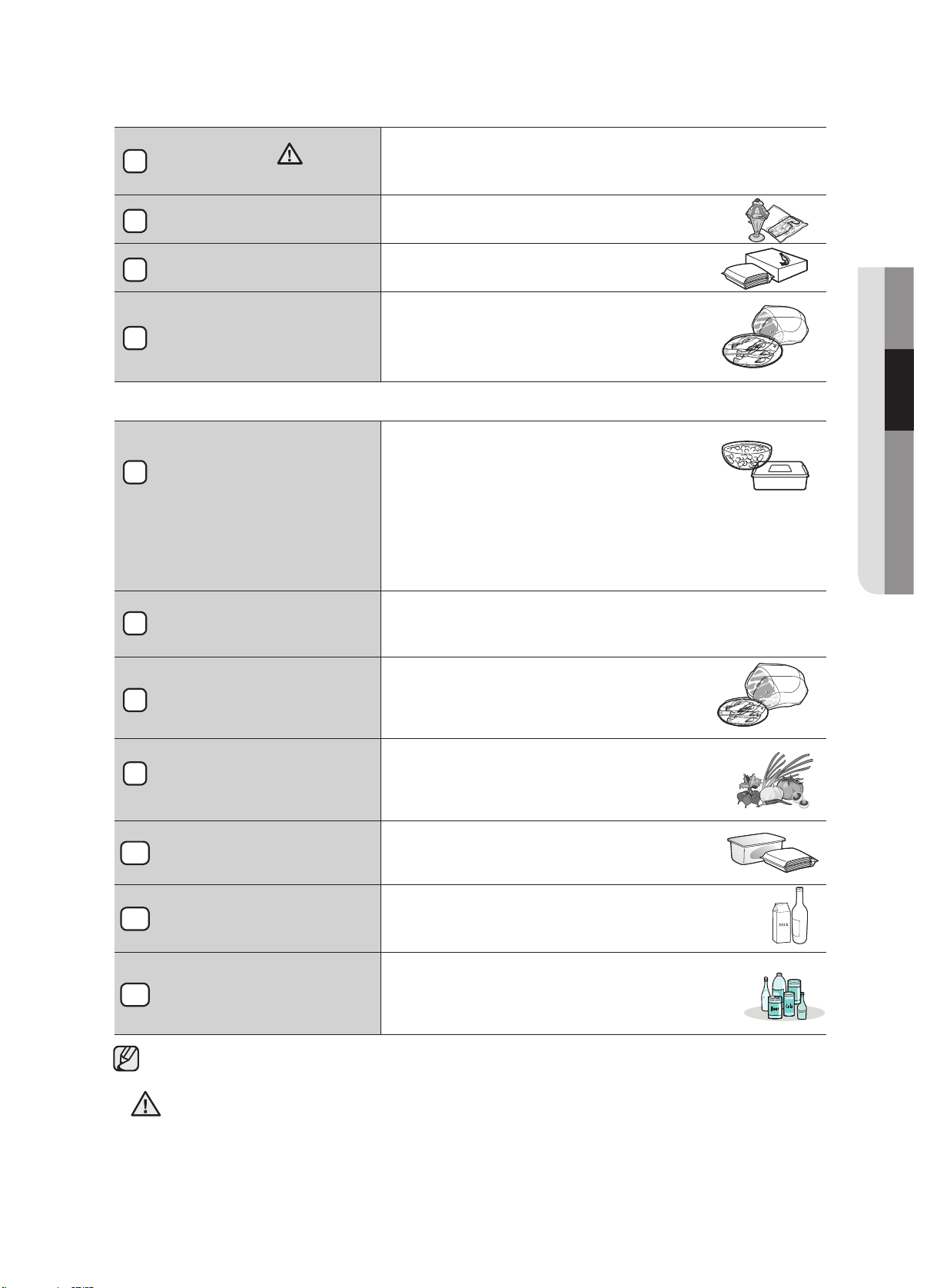
ICe ChUTe
Do not put your fingers, hands or any other objects in the ice
chute or the ice maker bucket. This may result in personal injury
or material damage.
shelVes
Can be used to store all types of frozen
food.
dOOR bINs
Can be used for small packages of frozen
food.
dRAWeRs
Best used to store meats or dry foods.
Stored food should be wrapped securely
using foil or other suitable wrapping
materials or containers.
Storing Food in the Fridge
shelVes
Designed to be crack-resistant. They can be
used to store all types of food and drinks.
Circular marks on the glass surface are a
normal phenomenon and can usually be wiped
clean with a damp cloth.
TRAy UTIlITy
Best place to keep eggs.
Place the TRAY UTILITY on the shelf for easy
access.
COOlseleCT dUO
(OPTIONAl)
Helps to preserve the taste, and prolong the
freshness of your food. Use it to store meat,
vegetable, poultry, fish or any other foods that
are consumed on a regular basis.
fRUIT & VeGeTAble
dRAWeR
Used to preserve the freshness of your stored
vegetables and fruits. It has been specifically
designed to control the level of humidity within
the drawer.
dAIRy bIN
Can be used to store smaller dairy items like
butter or margarine, yogurt or cream-cheese
bricks.
dOOR bINs
Designed to handle large, bulky items such
as gallons of milk or other large bottles and
containers.
beVeRAGe sTATION
(OPTIONAl)
Canbe used to store the frequently used items,
such as canned beverages and snacks and
allows access to these items without opening
the regrigerator door.
Bottles should be stored tightly together so that they do not tip and fall out when the refrigerator door
is opened.
• If you plan to go away for a significant time, empty the refrigerator and turn it off. Wipe the
excess moisture from the inside of the appliance and leave the doors open. This helps keep
odor and mold from developing.
• If the refrigerator is not to be used for a long period of time, pull out the power plug.
- Deterioration in the insulation may cause fire.
02 OPERATING
1
2
3
4
5
7
8
9
10
WARNING
11
WARNING
12
38_ operating
operating the SAMSUNG
side-by-side refrigerator
USING THE CoolSelect Duo (OPTIONAL)
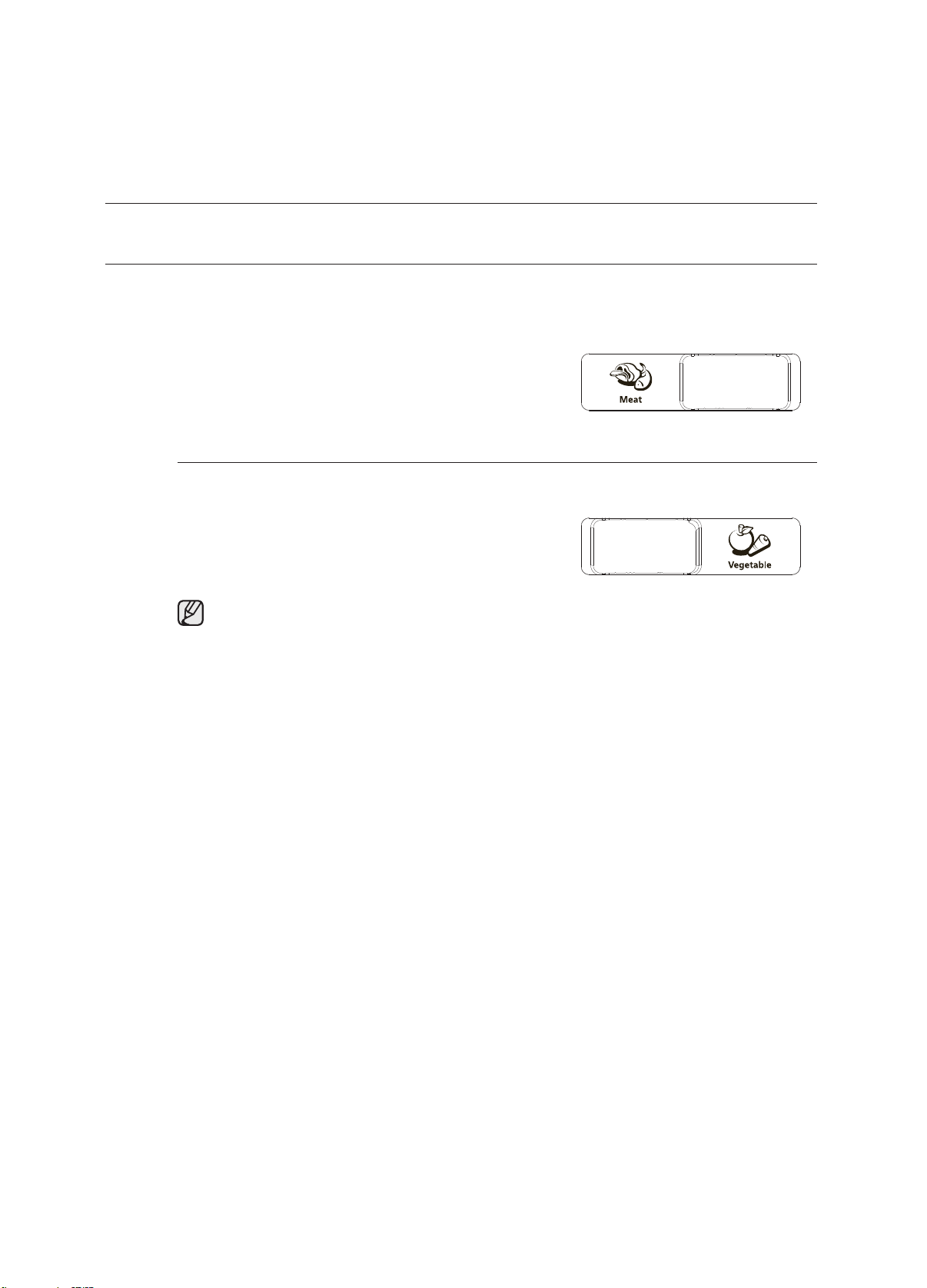
The CoolSelect Duo is designed to make your busy life just a little bit easler.
Meat
When MEAT is selected, the temperature of the
CoolSelect Duo is suitable for storing meat or ham by
entering chill of freezer to it. This feature also helps keep
meat or ham fresh for longer.
Vegetable
When VEGETABLE is selected, the temperature of
CoolSelect Duo is suitable for storing vegetable or fruit by
closing chill of freezer to it. This feature also helps keep
vegetable or fruit fresh for longer.
When “MEAT or VEGETABLE” is in operation, any items that you do NOT want affected
should be moved out of the drawer.
operating_3
REMOVING THE FREEZER ACCESSORIES
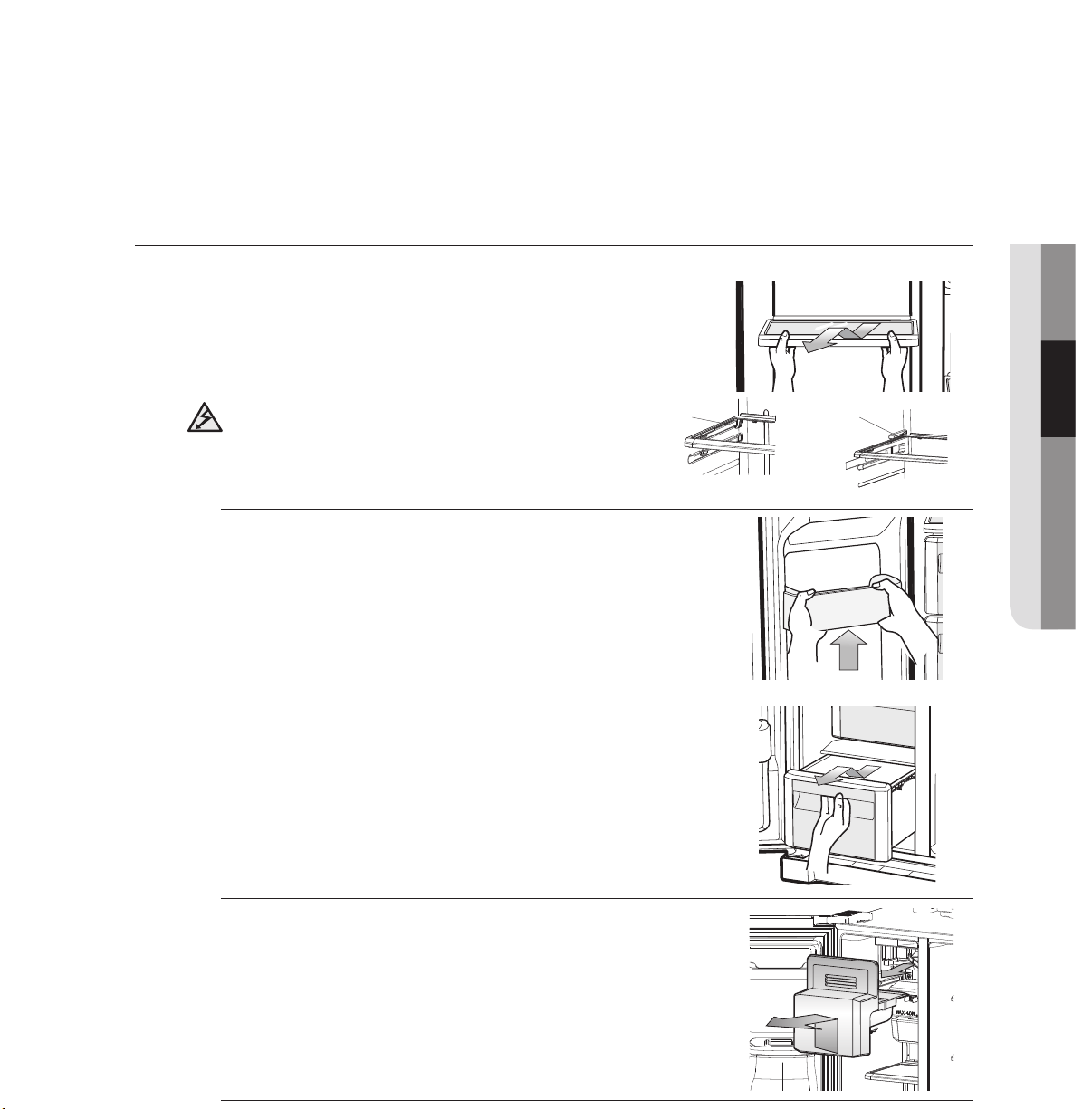
Cleaning and rearranging the interior of the freezer is a snap.
1.Remove the Glass Shelf by pulling the shelf out as far as it
will go. Then, gently lift it up and remove it.
2.
Remove the Door Bin by holding the door bin with both
hands and then gently lift it up.
3.
Remove the Plastic Drawer by pulling it out and slightly
lifting it up.
4.
Remove the Icemaker Bucket by lifting up and pulling it out.
5.
Remove the Front Leg Cover by opening both the freezer
and refrigerator doors, and removing the three screws. Once
the screws are free, detach the cover. To reattach the front
leg cover, place it back in its original position and tighten the
three screws.
Do not use excessive force when removing the cover.
Otherwise, the cover may break and cause injury.
20O
E
PGNI
T
AR
CAUTION
In case it does not have hooks itself in the back
side for not being tilted,a shelf should be placed
deeply in a proper position where there are blocks
for shelves as shown. if not, the shelf can fall out
of a refrigerator.
Hook
Block

4_operating
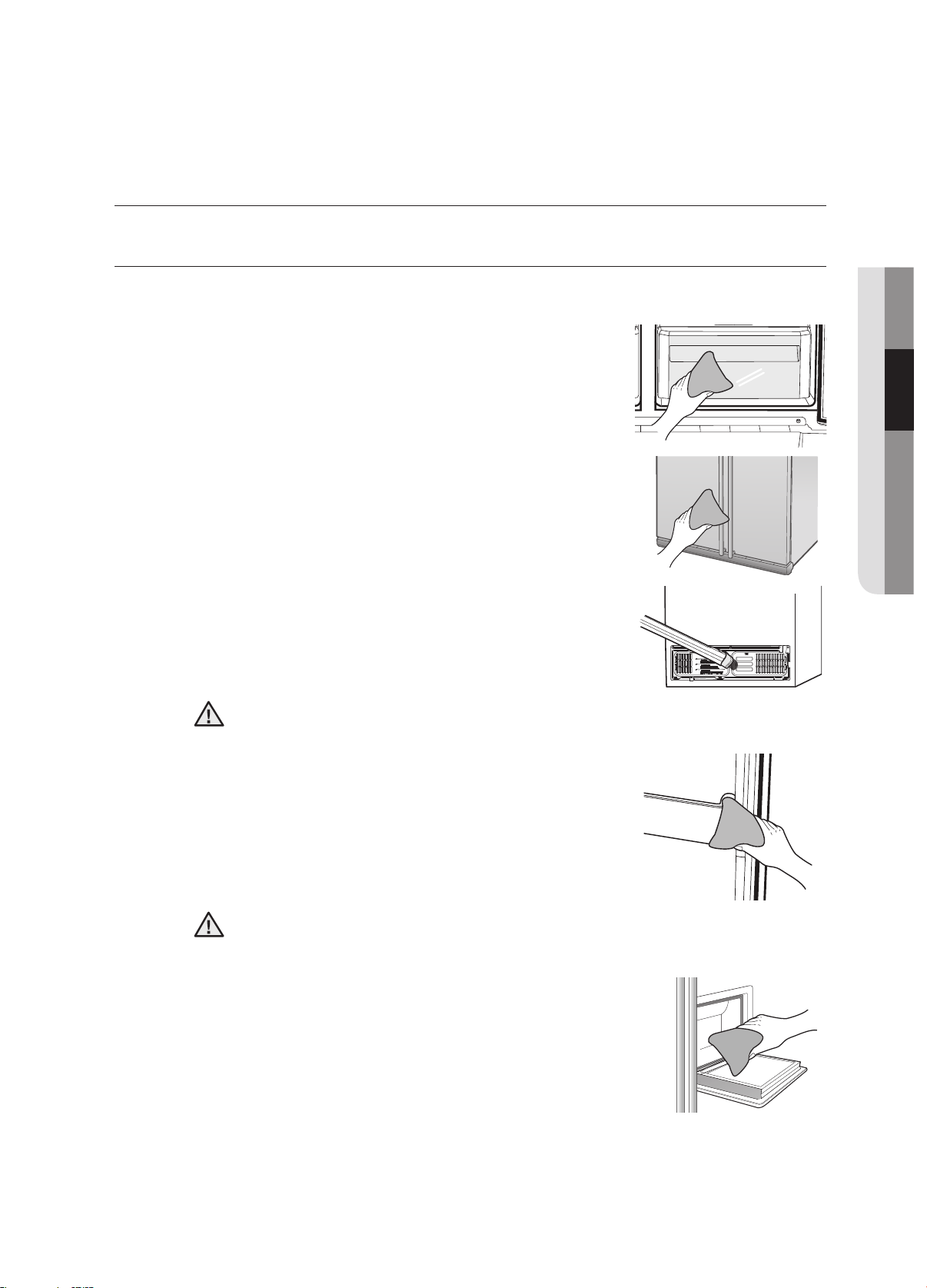
REMOVING THE FRIDGE ACCESSORIES
1.Remove the Glass Shelf by pulling the shelf out as far as it
will go. Then, gently lift it up and gently remove it.
2.
Remove the Vegetable & Fruit Drawer by pressing on the
indentations found on the inside left and right sides of the
Veggie Box/Dry Box cover and remove by pulling forward.
Holding the drawer with one hand, lift it up a little bit while
pulling it forward and take it out of the refrigerator.
3.
Remove the Gallon Door Bin by holding the bin with both
hands and gently lifting it up.
Before removing any accessories, make sure that no food is in the way.
When possible, remove the food altogether to reduce the risk of accidents.
side-by-side refrigerator
CAUTION
In case it does not have hooks itself in the back
side for not being tilted,a shelf should be placed
deeply in a proper position where there are blocks
for shelves as shown. if not, the shelf can fall out
of a refrigerator.
Hook
Block
operating _41
operating the SAMSUNG
side-by-side refrigerator
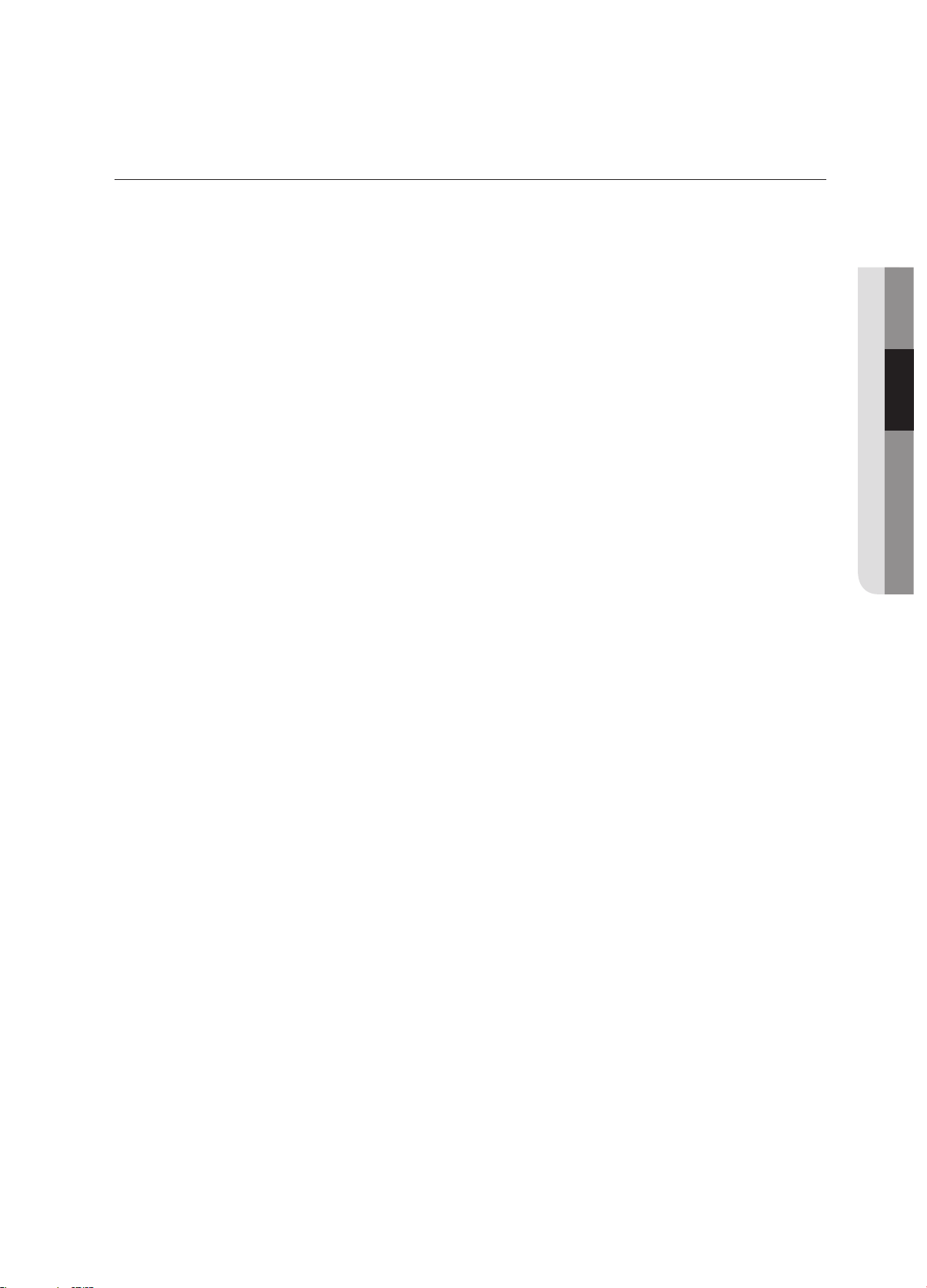
CLEANING THE REFRIGERATOR
Caring for your Samsung Side-By-Side Refrigerator prolongs the life of your appliance and helps keep it
odor and germ-free.
Cleaning the Interior
Clean the inside walls and accessories with a mild detergent
and then wipe dry with a soft cloth. You can remove the drawers
and shelves for a more thorough cleaning. Just make sure to dry
them before putting them back into place.
Cleaning the Exterior
Wipe the digital panel and display panel with a clean, soft cloth.
Spray water onto the cleaning cloth instead of spraying directly
on the surface of the refrigerator. This helps ensure an even
distribution of moisture to the surface. The doors, handles and
cabinet surfaces should be cleaned with a mild detergent and
then wiped dry with a soft cloth. To keep your appliance looking
its best, the exterior should be polished once or twice a year.
Do not use Benzene, Thinner or Clorox™ for cleaning.
They may damage the surface of the appliance and can create a risk of fire.
Cleaning the Rubber door seals
If the rubber door seals are dirty the doors may not close
properly, and the refrigerator will not operate efficiently. Keep the
door seals free of grit or grime by cleaning the doors with a mild
detergent and damp cloth. Wipe dry with a clean, soft cloth.
Do not spray the refrigerator with water while it is plugged in, as it may cause an electric
shock. Do not clean the refrigerator with benzene, thinner or car detergent for risk of fire.
Cleaning the Home Bar
Use a damp cloth to clean the ice and water dispenser.
Then wipe dry with a clean, soft cloth.
02 OPERATING
WARNING
CAUTION

42_operating
operating the SAMSUNG
side-by-side refrigerator
CHANGING THE INTERIOR LIGHTS
WARNING
Do not replace LED lamp privately and please contact the specialized
repair staff if necessary.
And make it sure that the new LED lamp is the same as the old one.
Do not break the lamp cover .
operating _43
USING THE DOORS
The refrigerator doors are equipped with a door opening and closing feature that ensures that the doors
close all the way and are securely sealed.
After opening beyond a certain point, the door will “catch” and remain open. When the door is ajar ahead of
the catch that allows it to stay open, it will close automatically.
02 OPERATING
troubleshooting
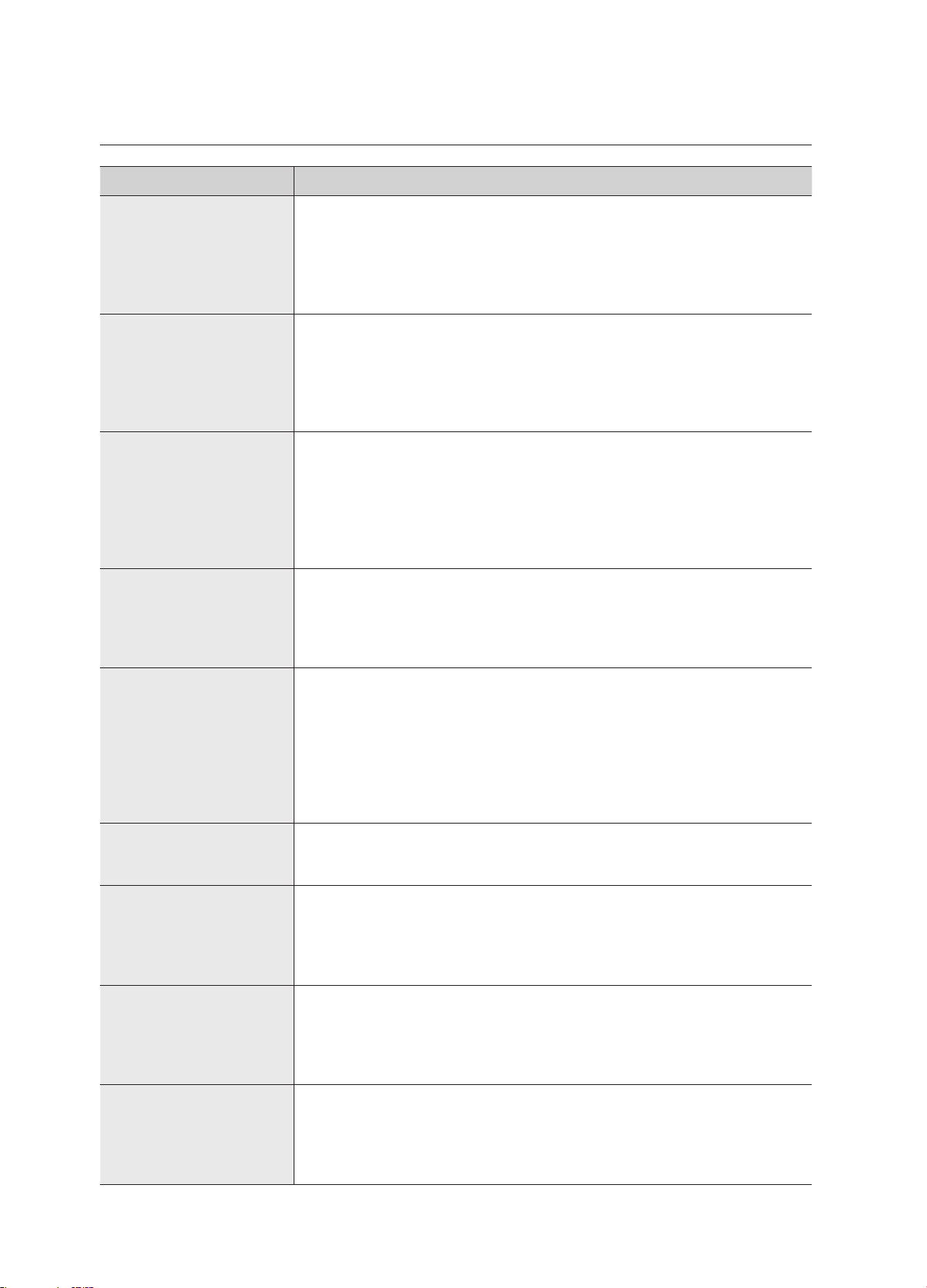
PRObleM sOlUTION
The refrigerator does not
work at all or it does not
chill sufficiently.
• Check that the power plug is properly connected.
• Is the temperature control on the display panel set to the correct
temperature? Try setting it to a lower temperature.
• Is the refrigerator in direct sunlight or located too near a heat source?
• Is the back of the refrigerator too close to the wall and therefore keeping
air from circulating?
The food in the fridge is
frozen.
• Is the temperature control on the display panel set to the correct
temperature? Try setting it to a warmer temperature.
• Is the temperature in the room very low?
• Did you store the food with a high water content in the coldest part of
the fridge? Try moving those items into the body of the fridge instead of
keeping them in the CoolSelect Duo™ drawer.
You hear unusual noises
or sounds.
• Check that the refrigerator is level and stable.
• Is the back of the refrigerator too close to the wall and therefore keeping
air from circulating?
• Was anything dropped behind or under the refrigerator?
• A “ticking” sound is heard from inside the refrigerator. This is normal and
occurs because various accessories are contracting or expanding in
relation to the temperature of the refrigerator interior.
The front corners
and sides of the
appliance are hot
and condensation is
occurring.
• Some heat is normal as anti-condensators are installed in the front
corners of the refrigerator to prevent condensation.
• Is the refrigerator door ajar? Condensation can occur when you leave
the door open for a long time.
Ice is not dispensing.
• Did you wait for 12 hours after installation of the water supply line before
making ice?
• Is the water line connected and the shut-off valve open?
• Did you manually stop the ice making function? Make sure Ice Type is
set to Cubed or Crushed.
• Is there any ice blocked within the ice storage unit?
• Is the freezer temperature too warm? Try setting the freezer temperature
lower.
You can hear water
bubbling in the
refrigerator.
• This is normal. The bubbling comes from the refrigerant coolant liquid
circulating through the refrigerator.
There is a bad smell in
the refrigerator.
• Has a food item spoiled?
• Make sure that strong smelling food (for example, fish) is wrapped so
that it is airtight.
• Clean out your freezer periodically and throw away any spoiled or
suspect food.
Frost forms on the walls
of the freezer.
• Is the air vent blocked? Remove any obstructions so air can circulate
freely.
• Allow sufficient space between the foods stored for efficient air
circulation.
• Is the freezer door closed properly?
Water dispenser is not
functioning.
• Is the water line connected and the shut-off valve open?
• Has the water supply line tubing been crushed or kinked?
Make sure the tubing is free and clear of any obstruction.
• Is the water tank frozen because the refrigerator temperature is too low?
Try selecting a warmer setting on the main display panel.
44_ troubleshooting
English
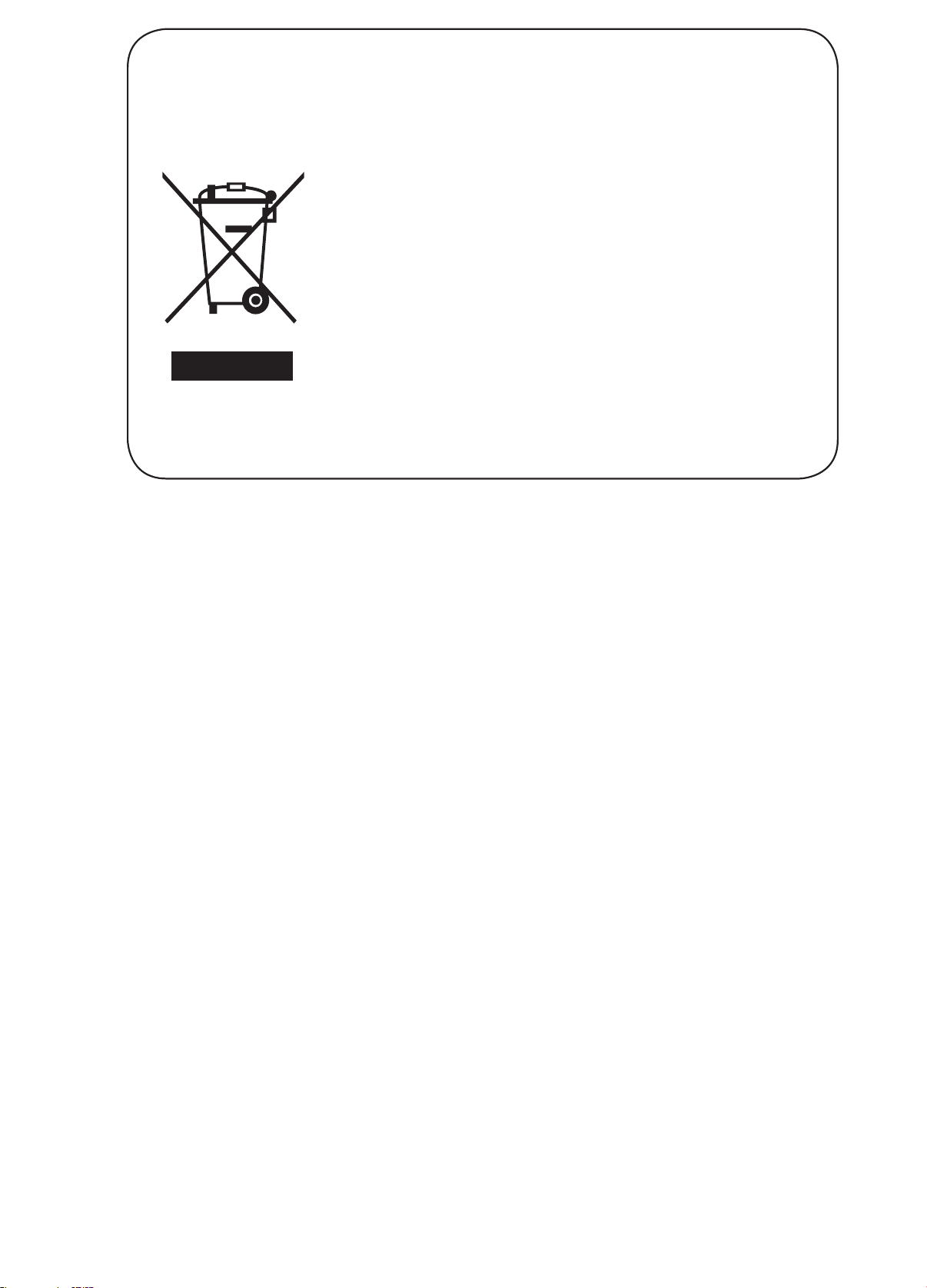
Correct Disposal of This Product
(Waste Electrical & Electronic Equipment)
(Applicable in countries with separate collection systems)
This marking on the product, accessories or literature indicates that
the product and its electronic accessories (e.g. charger, headset, USB
cable) should not be disposed of with other household waste at the
end of their working life. To prevent possible harm to the environment
or human health from uncontrolled waste disposal, please separate
these items from other types of waste and recycle them responsibly to
promote the sustainable reuse of material resources.
Household users should contact either the retailer where they
purchased this product, or their local government ofce, for details of
where and how they can take these items for environmentally safe
recycling.
Business users should contact their supplier and check the terms and
conditions of the purchase contract. This product and its electronic
accessories should not be mixed with other commercial wastes for
disposal.
MEMO
MEMO
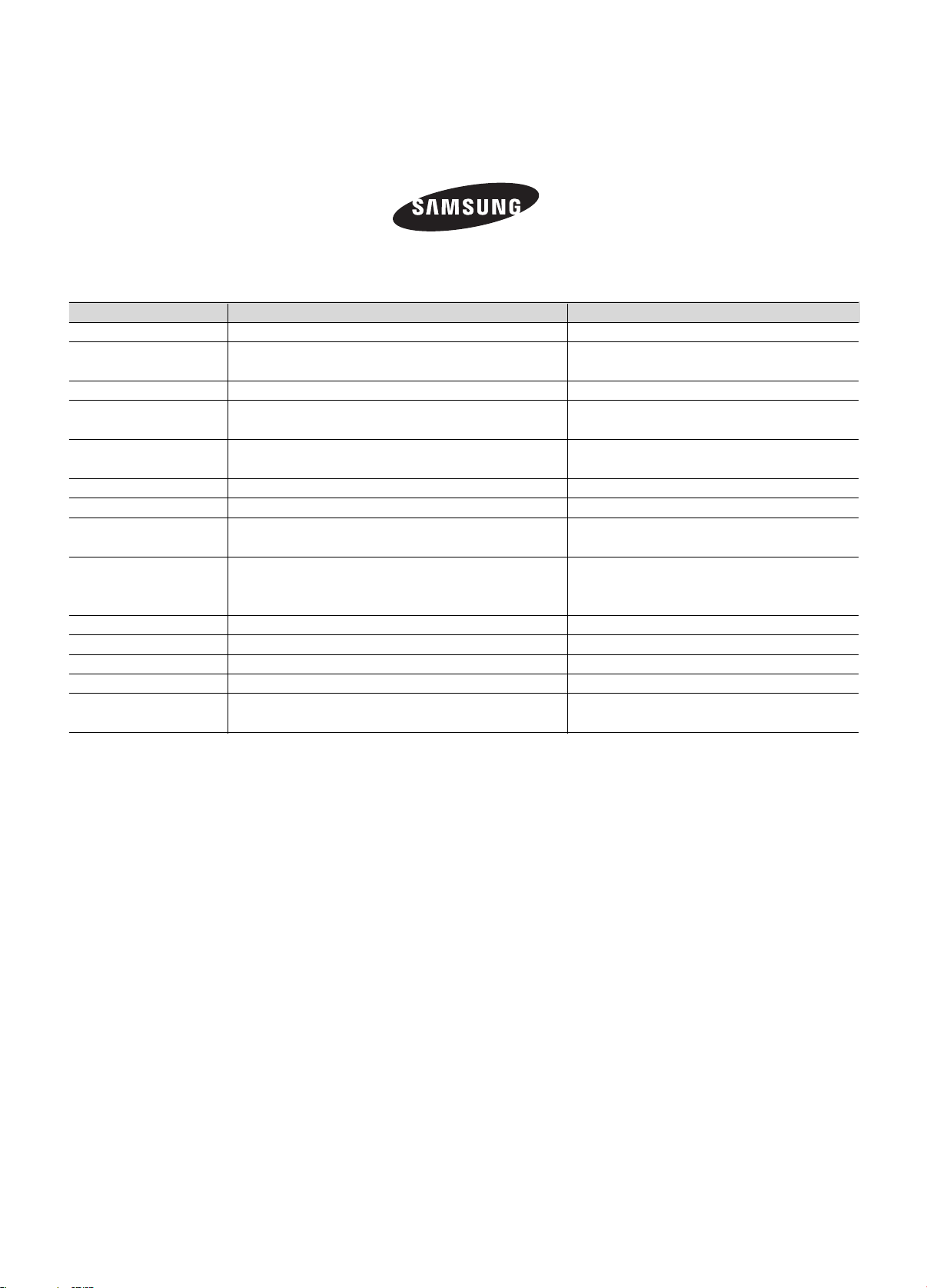
QUESTIONS OR COMMENTS?
`
AUSTRALIA 1300 362 603 www.samsung.com/au
COLOMBIA
01 8000 112 112
Bogotá 600 12 72
www.samsung.com/co
EIRE 0818 717100 www.samsung.com
HONG KONG (852) 3698 4698
www.samsung.com/hk (Chinese)
www.samsung.com/hk_en (English)
INDIA
1800 3000 8282
1800 266 8282
www.samsung.com/in
MALAYSIA 1800-88-9999 www.samsung.com/my
NEW ZEALAND 0800 SAMSUNG (0800 726 786) www.samsung.com/nz
PANAMA 800-7267
www.samsung.com/latin (Spanish)
www.samsung.com/latin_en (English)
PHILIPPINES
1-800-10-7267864 [PLDT]
1-800-8-7267864 [Globe landline and Mobile]
02-4222111 [Other landline]
www.samsung.com/ph
SINGAPORE 1800-SAMSUNG(726-7864) www.samsung.com/sg
SOUTH AFRICA 0860 SAMSUNG (726 7864) www.samsung.com
U.K 0330 SAMSUNG (7267864) www.samsung.com
VIETNAM 1800 588 889 www.samsung.com
Ghana
0800-10077
0302-200077
www.samsung.com/africa_en/
COUNTRY
CALL
OR VISIT US ONLINE AT