1
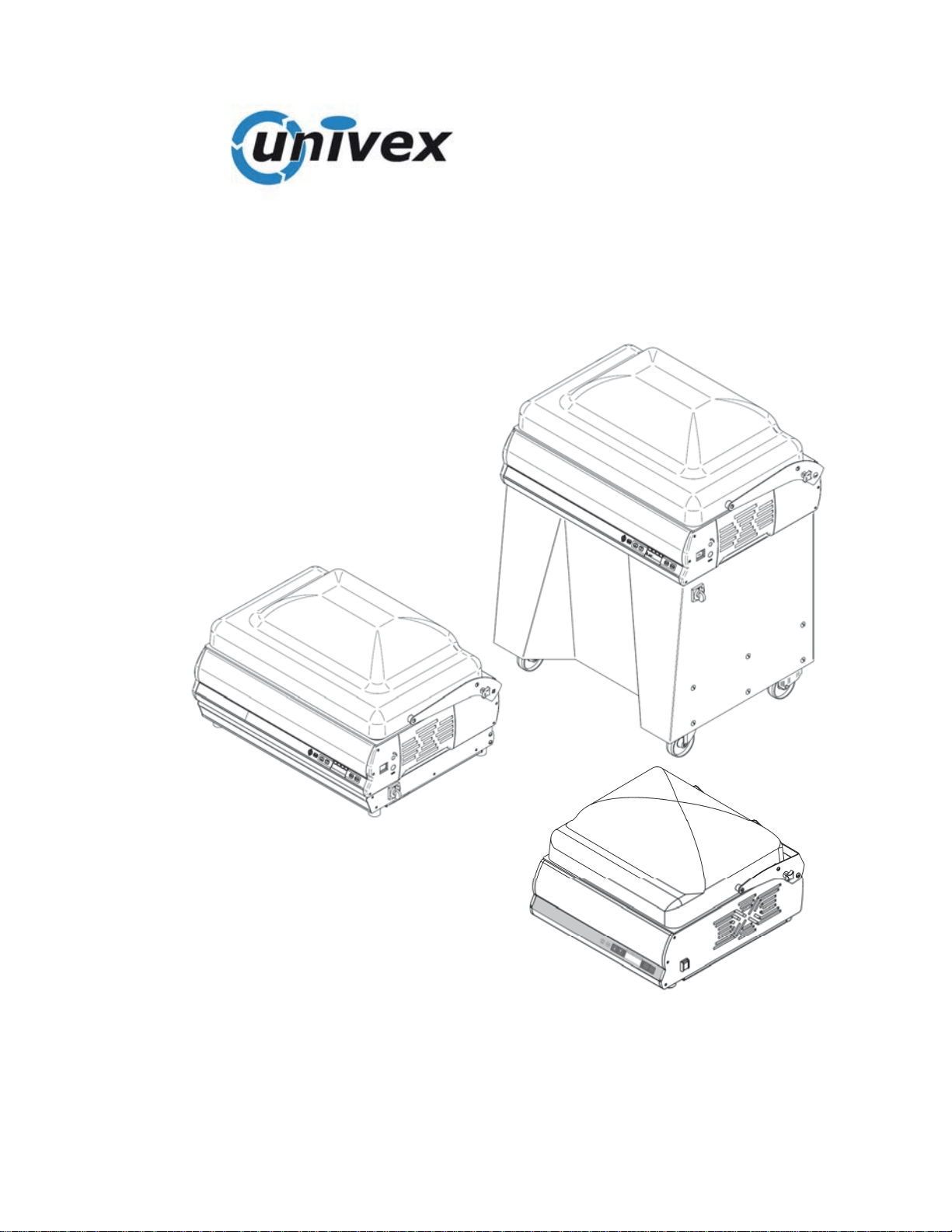
VACUUM PACKAGING MACHINE
USER AND MAINTENANCE MANUAL
30
40
50
70

3
INDEX
1. Delivery and warranty 5
1.1 Foreword.
1.2 Preservation and use of this manual
1.3 Warranty
1.4 General recommendations and limits of liability of the Manufacturer
1.5 Description of the machine
1.6 Declared use
1.7 Use not allowed
1.7.1 Safety prescriptions
1.7.2 Lighting
1.8 Company information
1.8.1 Warning and Danger signs
2. Technical features 9
2.1 Main parts
2.2 Technical features
2.3 Dimensions and weight of the machine
2.4 Wiring diagram
2.4.1 Wiring diagram
2.4.2 Wiring diagram Mod. Easy
3. Inspection, transport, delivery and installation 13
3.1 Inspection
3.2 Delivery and handling of the machine
3.3 Installation
3.3.1 Disposal of packaging
3.4 Connections
3.5 Electrical system hook-up
3.5.1 3-phase machine (220 V/60 Hz)
3.5.2 Check the electrical connection - ONLY FOR INSTALLER
4. Using the machine 15
4.1 Control board key
4.1.2 Automatic vacuum adjustment
4.1.3 Activation of the thermal printer
4.1.4 Date adjustment
4.1.5 Time adjustment
4.1.6 Simplified menu
4.1.7 Pressure sensor calibration (must be done at first use of
the machine) for vacuum full versions with pressure sensor
4.2 Using the packaging machine
4.2.1 Vacuum packing
4.2.2 Automatic packaging
4.2.3 Automatic packaging with adjustable vacuum percentage
4.2.4 Packaging with introduction of inert gases (optional)
4.2.5 Packaging with the use of the thermal printer
4.2.6 - Edit label printing

4
4.3 Packaging of liquid or semi-liquid products
4.3.1 Packaging of liquid or semi-liquid products with the use of the
standard inclined surface
4.3.2 Packaging of thin products with use of optional raised surface
4.3.3 Packaging of products in external pan (with vacuum % control)
4.3.4 Packaging of products in external pan (with vacuum time control)
4.4 Examples of packaging in controlled atmosphere
4.5 Cleaning the machine
4.6 Machine at rest
4.7 Vacuum pump heating
4B. Use of the Mod. Easy machine 26
4B.1 Mod. Easy Control Panel legend
4B.1.1 Chamber vacuum packing cycle
4B.1.2 External vacuum packing cycle
5. Controls and maintenance 28
5.1 Controls and maintenance
5.2 Maintenance
5.2.1 Vacuum pump
6. Obligations in case of malfunctioning and/or potential dangers 29
6.1 User obligations
7. Troubleshooting 29
7.1 Troubleshooting
7.2 Putting the machine out of service

5
1 Delivery and warranty
1.1 - Foreword
ATTENTION!
The symbols used in this manual intend to call the reader’s attention to points and
operations that put the operator’s personal safety at risk or which can cause
damage to the machine itself.
Do not operate with the machine if you are not certain to have correctly understood
that highlighted in these notes.
ATTENTION!
Some illustrations in this manual represent the machine or parts of the same with
panels or guards removed. This is in order to make things clearer.
Do not use the machine in these conditions, but only with all protections mounted
correctly and in perfect working order.
The Manufacturer prohibits reproduction, even partial, of this manual and its
content cannot be used for purposes not permitted by the same.
Any breach thereof will be dealt with under the provisions of said Law.
1.2 - Preservation and use of the manual
The purpose of this manual is to make the users of the machine aware of the
prescriptions and essential criteria relative to transport, handling, use and
maintenance of the machine itself, via texts and figures.
Therefore, this manual must be read thoroughly before the machine is used.
Keep it in a safe place near to the machine, which is easy and quick to access for
future consultation.
If the manual is lost or deteriorated, request a copy from your dealer or the
Manufacturer directly.
If the machine is transferred, inform the Manufacturer of the name and address of
the new owner.
This manual reflects the state of the art at the time of marketing and cannot be
considered inadequate merely because it is updated successively on the basis of
new developments. The manufacturer also reserves the right to update production
and relative manuals without the obligation to updating earlier issues, except in
exceptional cases.
If in doubt, consult the nearest after-sales centre or the Manufacturer directly.
The manufacturer is intent on continuous optimisation of its product.
For this reason it is pleased to receive any signals or proposals for improvement of
the machine and/or manual.
The machine has been delivered to the user with valid warranty conditions at the
time of purchase.
Contact your own supplier for all clarifications.

6
1.3 - Warranty
The Manufacturer is committed for 12 (twelve) months, from the date of shipping
and direct delivery of the goods, to guaranteeing the customer or authorised dealer
the integrity and good operation of the components relative to the machinery in
question.
The warranty excludes all parts of the machinery subject to normal wear, i.e
components in which use generates unstoppable constant wear:
A. Electric resistances – Teflon - Sealing gaskets – Dome opening pistons –
Sealing membrane– Air filters – Oil filters – Oil change – Pump vanes.
B. Whenever a vacuum pump relative to a machine under warranty is returned to
the Manufacturer due to problems regarding suction and malfunctioning, the
Manufacturer reserves the right to control whether foreign bodies have been
sucked up: (liquids, solids, juices, sauces etc.). If this situation is verified, the
repair materials and labour will be charged regularly, as the problem is not
linked to manufacturing defects but Customer negligence during use.
C. Any problems linked to the electronic circuit boards of the circuit must be
examined by the Manufacturer before the piece to be replaced is sent under
warranty. A voltage change, electric over-feeding, interference in the external
mains, could cause damage that is not the manufacturer’s fault or which can
be blamed on the manufacture of the piece.
D. Any problems linked to pneumatic, structural, mechanical parts, will be solved
normally under warranty without charge.
E. During the warranty period, for interventions covered by the same, there will
be no charge for the materials replaced, while labour costs will be calculated.
For any interventions performed during the warranty period that are not
covered by the warranty itself, the materials replaced and the labour will be
charged regularly.
F. If external interventions by our technicians are requested during the warranty
period, travel expenses (return) will be charged in full, independent of the
cause of the intervention.
1.4 - General recommendations and limits of liability of the
Manufacturer
Every operator-machine interaction, within the declared use ambit and the entire
life cycle of the same, has been carefully and thoroughly analysed by the
Manufacturer during the design and construction phases and when drawing up the
instruction manual. In spite of this, it is intended that nothing can replace the
experience, suitable training and especially the “good common sense” of those
interacting with the machine. The last requisites are therefore deemed
indispensible in every operational phase inherent the machine and when reading
this manual.
Failure to comply with the precautions or specific recommendations present in this
manual, use of the machine by unsuitable staff, violate all Safety Standards
concerning the design, manufacture and declared use of the supply and relieve the
Manufacturer from all liability in the event of damage/injury to objects/persons.

7
The Manufacturer is not deemed liable for the consequences caused by the
user’s failure to comply with the safety precautions given in this manual.
1.5 - Description of the machine
The vacuum packaging machine with dome is controlled electrically and therefore
not subject to wear. The electronically-governed sealing system, is composed of a
flat resistance (5mm) stainless steel bar which, thanks to an excellent pneumatic
system installed, guarantees balanced and even sealing on any type of bag to be
used (nylon, polyethylene, Cryovac).
The vacuum pumps used are very modern and guarantee surprising silence even
though operating with uninterrupted cycles along with a very high level of final
vacuum.
The models represented in this manual have been created in compliance with the
directives UL 963 norms and CSA 22.2 regulations.
In the event of an accident, the manufacturer cannot be held responsible if the
machine has been modified, tampered with, the safety protections have been
removed or used in ways not declared by the manufacturer.
1.6 - Declared use
The machine has been designed and manufactured to vacuum pack products
according to the instructions in this manual and must be intended for this use only.
Any other use must be considered improper and therefore dangerous. The
Manufacturer cannot be considered responsible for any damage deriving from
improper, incorrect or unreasonable use.
It must be used in professional environments and any staff using the machine must
have experience in the sector and have read and understood this manual.
1.7– Uses not allowed
1.7.1 - Safety prescriptions
The following points must be respected:
1 never touch the metal parts of the machine with wet or damp hands;
2 do not pull the power supply cable or the appliance itself, to disconnect the plug
from the current;
3 do not allow the packaging machine to be used by children or untrained staff;.
4 the electric safety of this machine is only assured when the same is correctly
connected to an efficient earth plant, as envisioned by the electric Safety
Standards in force; this fundamental requirement must be verified. If in doubt,
request an accurate control of the system by professionally qualified staff; the
Manufacturer cannot be considered responsible for any damage caused by
the failure to earth the system;
5 in the event of possible damage to the earth protection, the machine must be put
out of service, in order to prevent undesired and/or involuntary activation;
6 always use protection fuses that are in compliance with the Safety Standards in
force, with the correct value and suitable mechanical features;

8
7 avoid the use of repaired fuses and the creation of short circuits between the
terminals on the fuse holders;
8 the packaging machine power supply cable must never be replaced by the user;
contact the machine manufacturer exclusively in the event of damage to the
cable, or for its replacement;
9 keep the cable away from hot parts;
10 always switch the machine off and disconnect it from the mains electricity
before starting any global clearing procedure or washing operation;
11 clean the machine coverings, panels and commands using soft, dry cloths
dampened in a weak solution of detergent or alcohol;
12 The machines for use with Gas are not set-up for use with mixtures containing
over 20% oxygen.
1.7.2 - Lighting
The place of installation of the machine must have sufficient natural and artificial
lighting in compliance with the Standards in force in the country of installation of
the packaging machine.
In all cases, the lighting must be uniform and guarantee good visibility in all parts
of the packaging machine and must not create dangerous reflections.
The lighting must allow the control panels to be read correctly and clearly identify
the emergency buttons.
1.8 - Company details
An exact description of the "Model", the "Serial number" and the "Year of
Manufacture" of the machine will facilitate quick and effective response by our after
-sales assistance. It is advised to indicate the model of the machine and the serial
number every time the after-sales service is contacted.
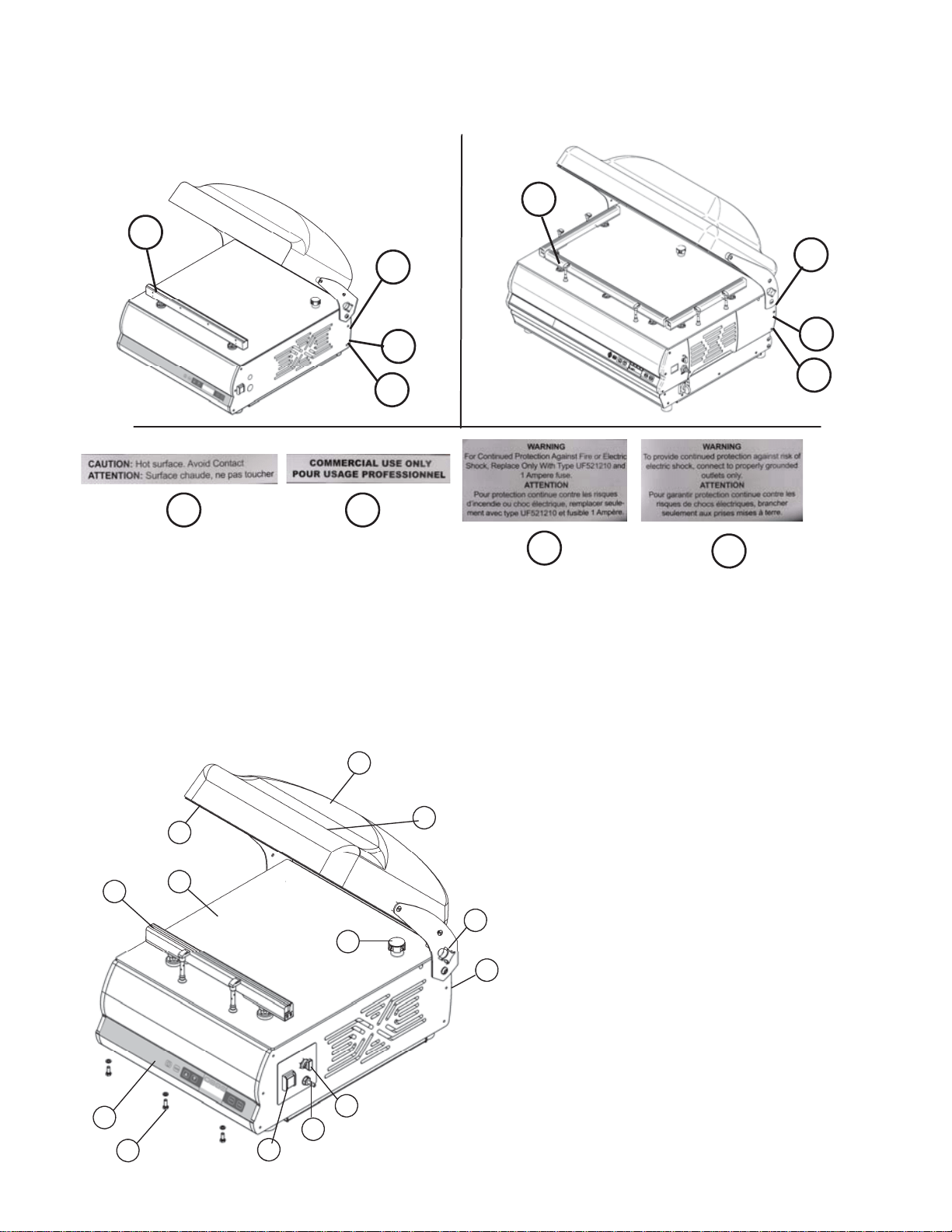
Identify the plate data represented in fig. 1.8.1.
We suggest you write the data of your machine in the box below as a
reminder.
Machine Model………………………..
Serial number……………………………………
Year of construction……………………………...
Type………………………………………………..
Fig. 1.8.1
E
A = Machine model
B = Power supply
C = Motor power
D = Motor frequency Hz
E = Weight
F = Amperage
G = Year of construction
H = Serial N°
I = Manufacturer
L = Bar code
A
B C
D E
F G
H
I
L
9
1.8.1 - Warning and danger plates (Fig. 1.8.2)
2 Technical features
2.1 - Main parts
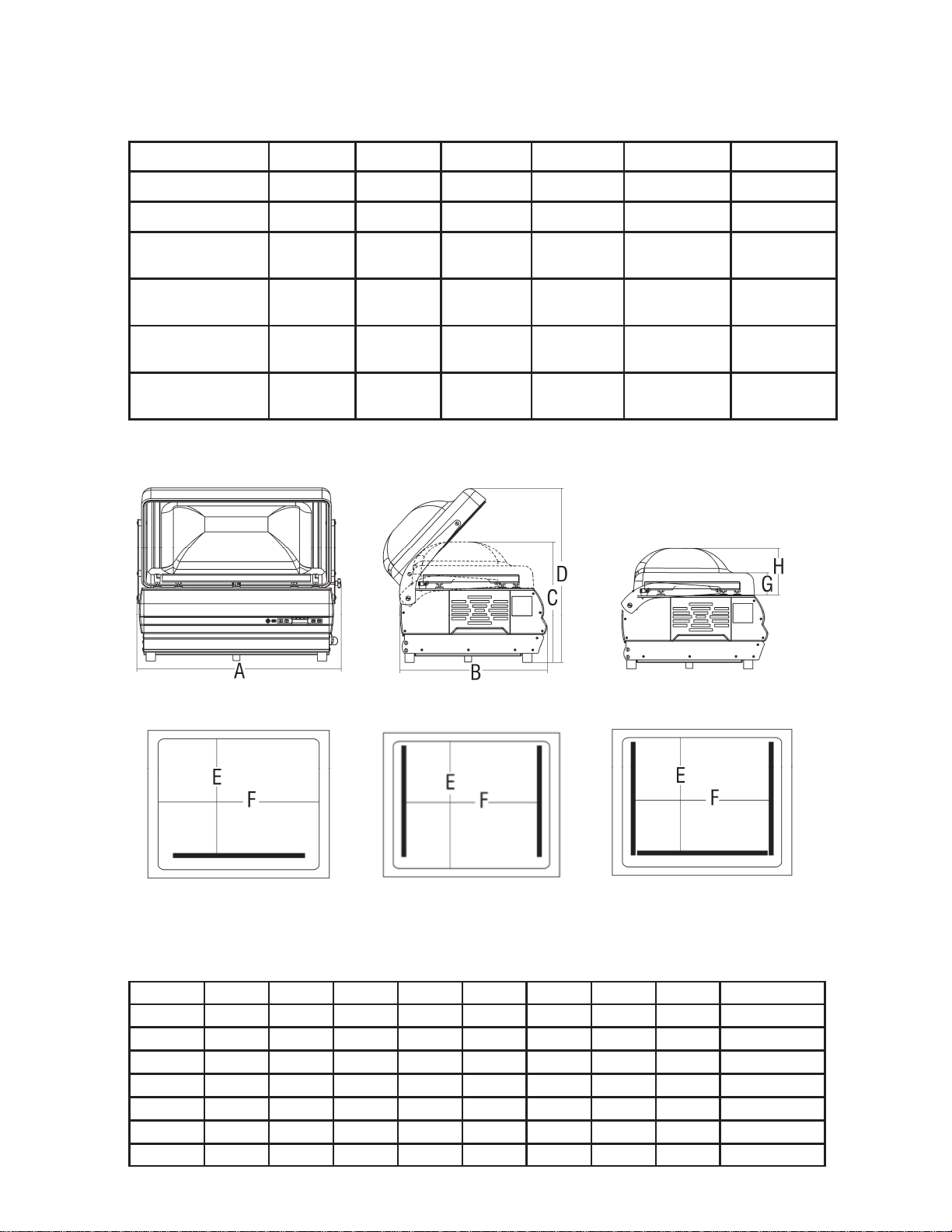
To facilitate comprehension of the manual, the main machine components are
listed below and represented in fig. 2.1.1.
Fig. 2.1.1
1. Control panel
2. Surface
3. Power supply cable
4. Master switch
5. Transparent Plexiglas dome
6. Silicon counter-bar
7. Sealing gasket
8. Suction pipe for vacuum
9. Sealing bar
10. Dome fixing knob
11. Gas pipe fitting.
12. Soft-air cock
13. Front profile locking screws
9
2
1
4
6
7
5
8
10
3
11
12
13
A B
C
Fig. 1.8.2
A
B
C
A
B
C
D
D
D
10
2.2 - Technical features
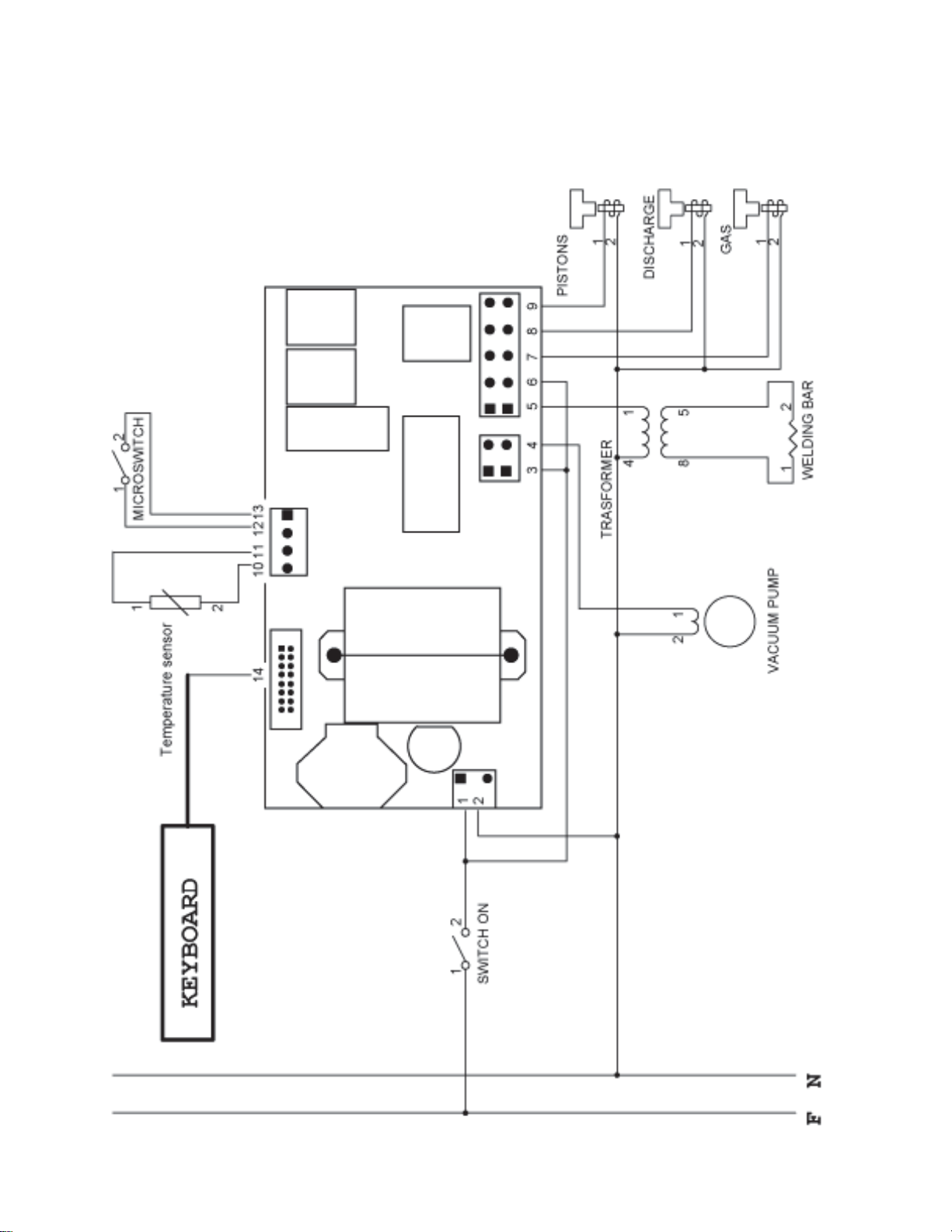
2.3 - Dimensions and weight of the machine
30/12 40 50
Power Kw 0,45 0,75 0,75
Vacuum pump 12 mc/h 21 mc/h 21 mc/h
Sealing bar 310 mm 410 mm 510 mm
Chamber
dimensions
340x360x
h130 mm
430x410x
h140 mm
540x430x
h190 mm
Power supply 120V/60Hz 120V/60Hz 120V/60Hz
Oil tank capacity ml 450 ml 450 ml 450
30/8
0,35
8 mc/h
310 mm
340x360x
h130 mm
120V/60Hz
ml 250
50 x2
0,75
21 mc/h
n. 2 x 410 mm
545x460x
h190 mm
120V/60Hz
ml 450
70/40
1.5 KW
40 mc/h
n. 1 x 640 mm
n. 2 x 410 mm
780 x 480
h 190 mm
220V / 60Hz
1 lt
A B C D Peso netto
mm mm mm mm Kg
30 402 525 360 480 46
40 493 585 370 542 56
50 609 640 420 605 70
50 x2 609 640 420 605 71
E F G H
mm mm mm mm
333,5 340 85 140
390 430 85 150
430 540 90 200
424 428 90 200
70 850 650 520 670 424 660 90 200 115
70 P 850 650 1134 1368 424 660 95 200 167
Fig. 2.3.1
11
2.4 - Wiring diagram
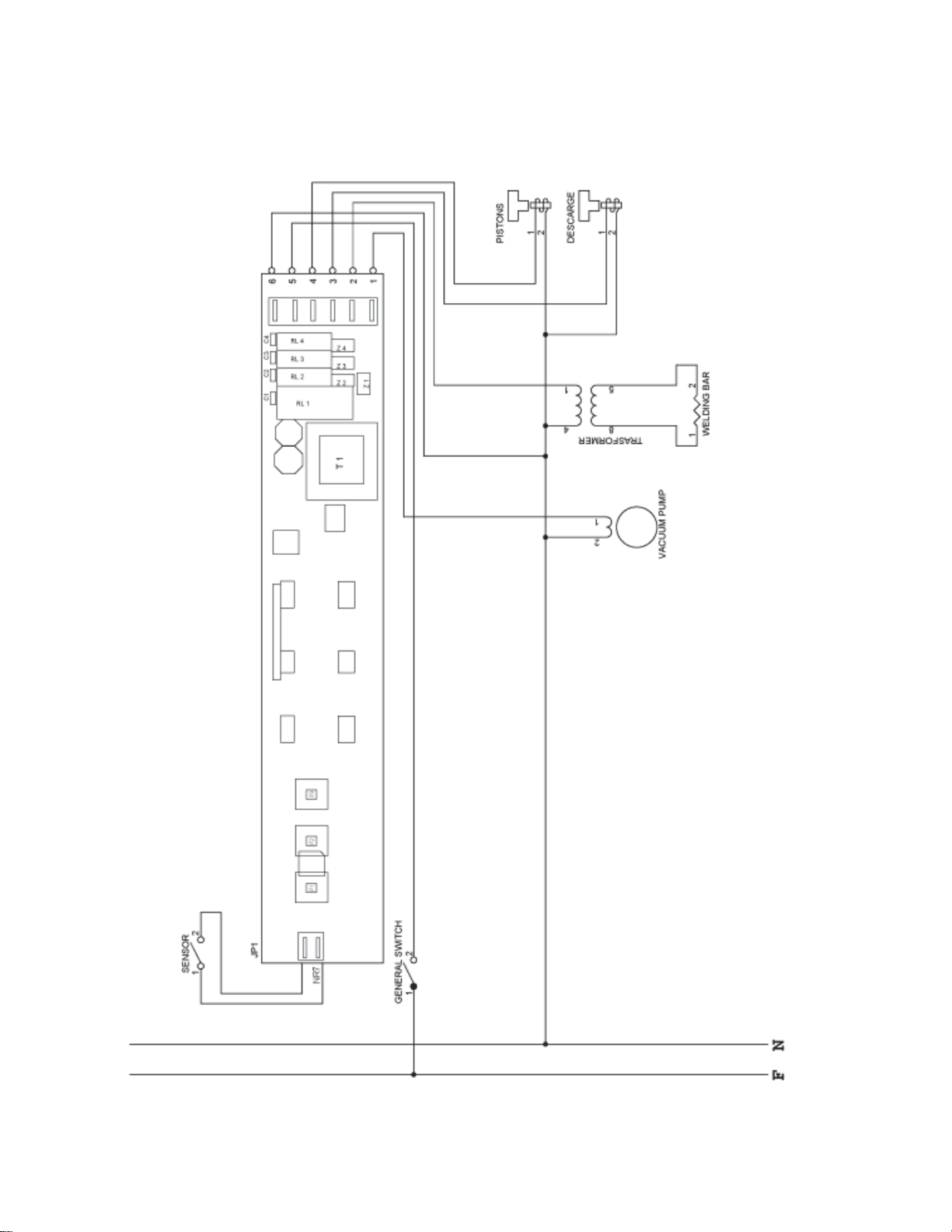
Fig. 2.4.1
Wire map legend
1 = white
2 = white
3 = white
4 = black
5 = orange
6 = white
7 = red
8 = yellow
9 = grey
12
Wire map legend
1 = Black
2 = Red
3 = White
4 = Orange
5 = Gray
6 = Blue
Fig. 2.4.2
2.4.2 - Wiring diagram Mod. Easy
13
3 Inspection, transport, delivery and installation
3.1 - Inspection
The machine you own has been inspected at our establishment in order to certify
correct operation and adjustment.
3.2 - Delivery and handling the machine
All material delivered has been accurately controlled before consignment to the
carrier.
Unless agreed differently with the Customer or for particularly onerous transport,
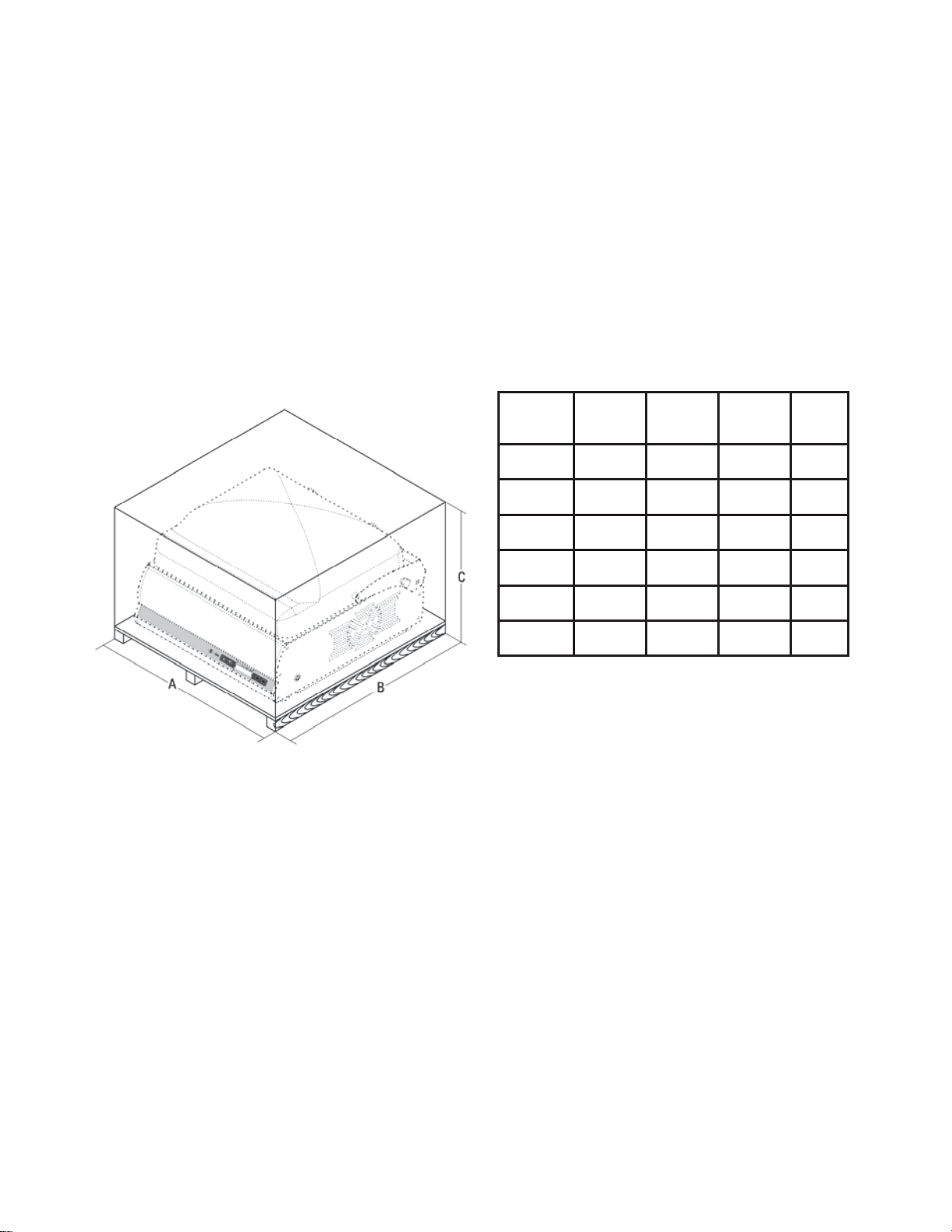
the machine is wrapped in nylon and cardboard.
The packaging dimensions are given in fig. 3.2.1
On receipt of the machine, check the integrity of the packaging.
If the packaging is damaged, sign the documents for receipt with the following
note:
"Accepted subject to checking..." and the reason.
Open the packaging, and in the presence of machine components that are really
damaged, make a claim to the carrier within three days from the date indicated on
the documents.
3.3 - Installation
After having removed the packaging, check the integrity of the machine.
In particular, check that the machine is integral and without visible damage, which
could have been caused during transport.
If in doubt, do not use the machine and contact the Manufacturer.
Place
Position the packaging machine place with a low percentage of humidity and away
from heat sources.
Fig. 3.2.1
A B C
Gross
weight
mm mm mm Kg
30
720 570 770 57
40
760 640 770 67
50
840 870 750 84
70
1200 800 720
70 P
1200 800 1350
14
Before carrying out any check that leads to the removal of some items, the plug
must be removed from the mains electricity.
3.3.1 - Disposal of the packaging
The packaging materials such as cardboard, nylon and wood are products similar
to solid urban waste. They can therefore be disposed of freely.
Nylon is a pollutant, which produces toxic fumes if burned.
Do not burn and disperse in the environment, but dispose according to the Laws in
force.
If the machine is in a country where there are particular regulations, dispose of the
packaging in compliance with that described by the Standards in force.
3.4 - Connections
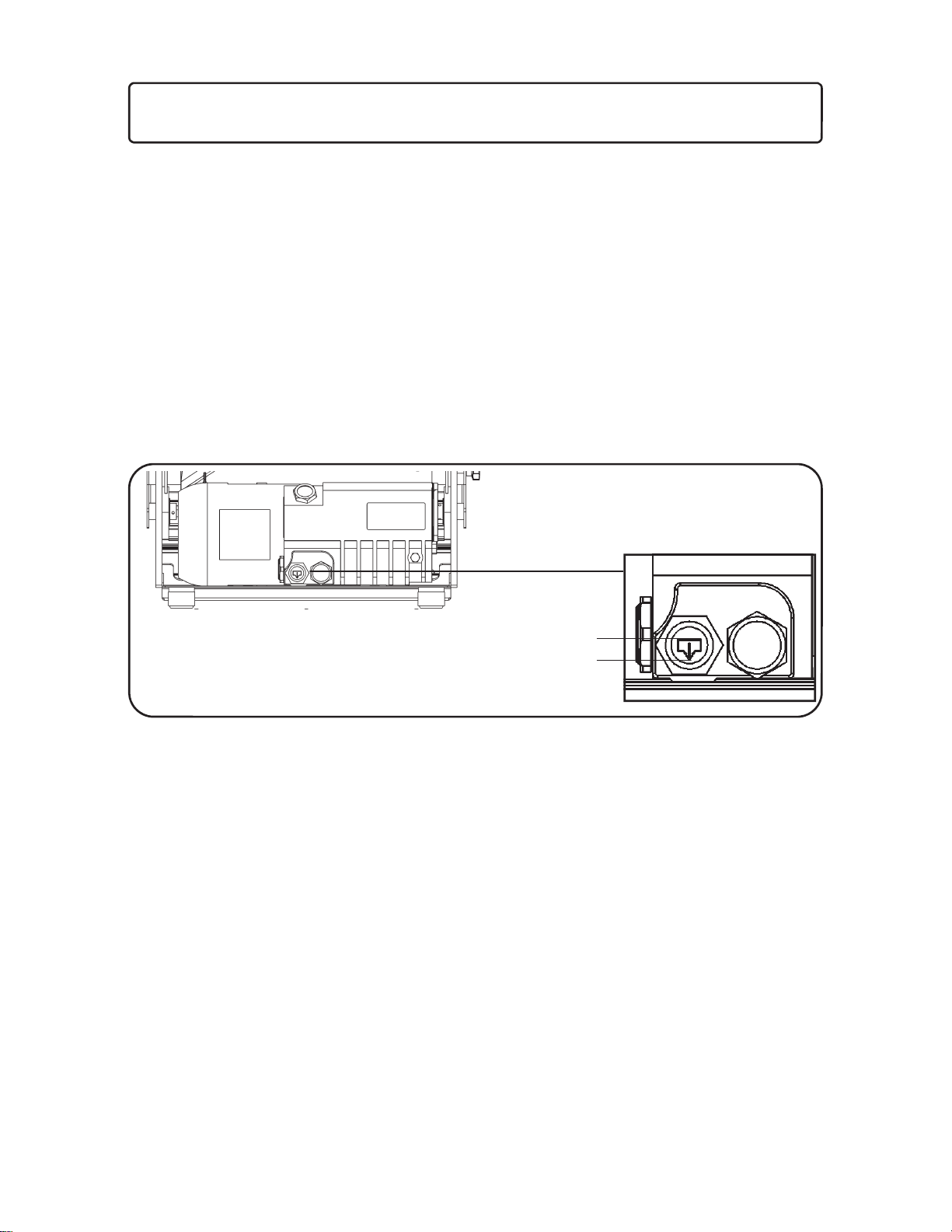
Before start-up, check the oil level via the control window present on the pump.
Before connecting the packaging machine, make sure that the plate data
correspond with that of the mains electricity.
The plate is on the rear of the machine.
When the level has been checked and everything closed, connect the plug to the
120V or 220V socket.
In the event of incompatibility between the socket and plug, have the socket
replaced with a suitable one by professionally qualified staff.
In particular, the latter must check that the section of the cables is suitable for the
input power of the machine. In general, the use of adapters, multiple socket outlets
and/or extensions is not recommended.
Whenever their use is indispensible, only simple or multiple adapters and
extensions must be used that are in compliance with Safety Standards in force;
however paying attention not to exceed the capacity limit in terms of current value,
and the maximum power value marked on the multiple outlet.
Fig. 3.4.1
MAX
MIN
15
3.5 - Electrical system hook-up
ATTENTION!
- Connect the 16 ampere plug supplied by the manufacturer to the power cable.
Make sure that its voltage matches the value displayed on the machine’s rating
Plate. All work on the electrical system of the machine must be carried out by
specialized staff duly authorized for its performance by the manager in charge.
Hook the machine to a power grid that has an efficient earthing connection.
3.5.1 - 3-phase machine (220 V/50 Hz)
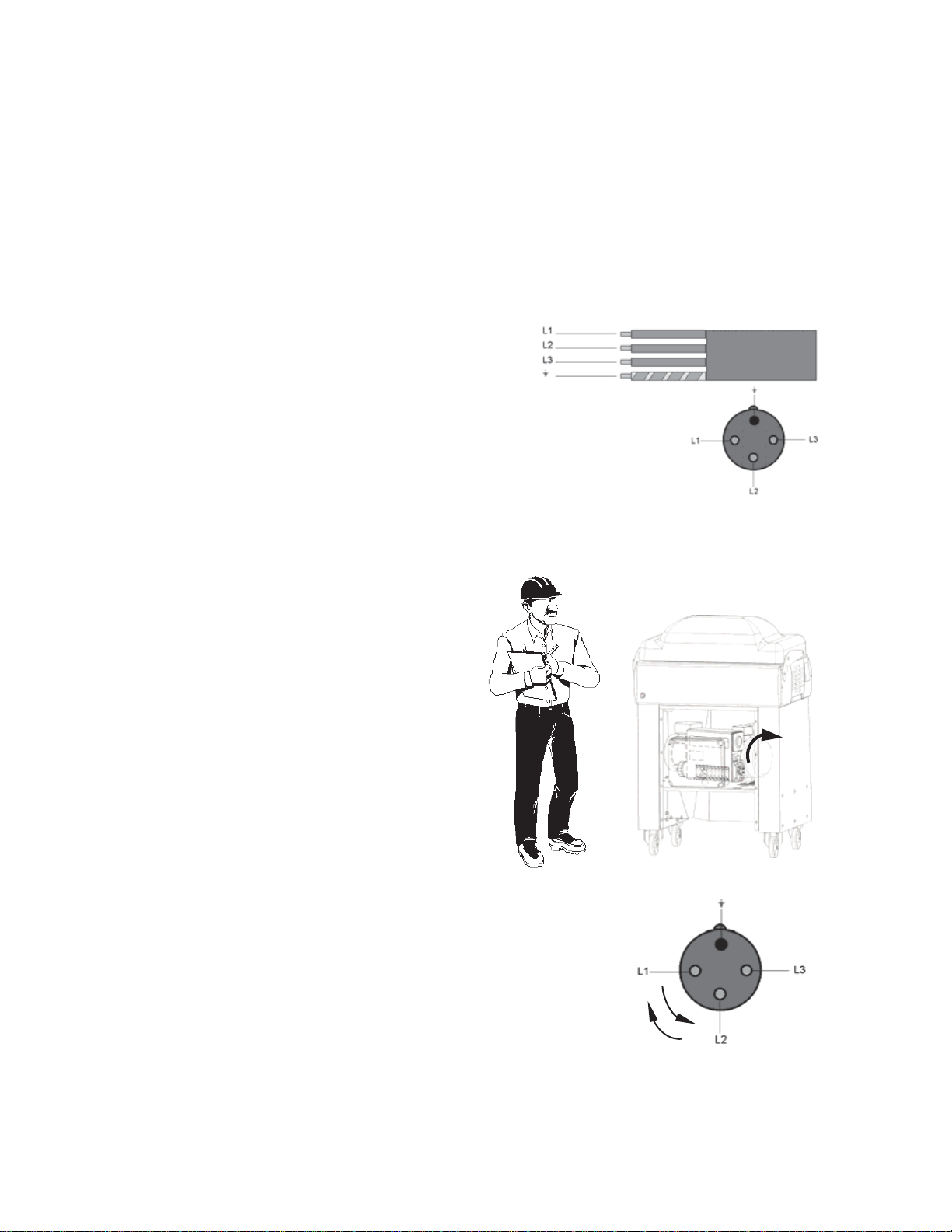
These machine versions include a power cable
with a diameter of 4 x 1 mm.
The power cable is plugged into a quadripolar
3-phase socket. Hook the cable to the 3-phase
power grid, interposing a 16 ampere differential
circuit breaker.
3.5.2 - Check the electrical connection - ONLY FOR INSTALLER
Connect the plug to the power supply.
Starting the machine and check the rotation sense of vacuum pump. The rotation sense
must be clockwise (Fig. 3.5.3).
If the rotation sense is not correct, disconnect the machine to the
power supply and reverse two wires (Fig. 3.5.4).
Note: For the machines connected to a single-phase line, the rotation sense is set
by the manufacturer.
Fig. 3.5.4
Fig. 3.5.3

16
4 Using the machine
4.1– Control board key
1. ON-OFF Machine switch-on and access to the machine
programming menu.
2. Activation of inert gases (on machine set-up only)
Activation of thermal printer (on machine set-up only)
3. Increase times.
4. Decrease times.
5. - Selection of suction times (A).
- Selection of sealing times (B).
- Selection of gas injection time (C) (on machine set-up).
- Selection of automatic or saved programs (D).
6. Storing programs.
The current selection can be saved by holding this key
down until “program saved” appears on the display.
7. Analogue display for logo, programs, times, date and time.
A = suction time
B = sealing time
C = gas injection time
D = selected program
Button 1 pressed once when the machine is in vacuum mode, allows the bags to be sealed
immediately. If it is pressed twice, when the machine is in vacuum mode, it allows the
operator to run a quick discharge, instantly reopening the bell and avoiding the welding.
!!! CAUTION !!!
All the following functions and adjustments must be performed with the machine powered
(main switch ref. 8 fig. 4.1.2 in position ON)
and the board switched to OFF (the display will intermittently read OFF and the DATE and
TIME).
If the board is on, switch it off before you perform the following operations, by pressing the
key ref. 1 fig. 4.1.1
4.1.1 Adjusting the MENU language
Hold key 1 down (fig. 4.1.1) for at least 5 seconds.
“Languages” will appear on the display. By pressing keys 3 and 4 (fig. 4.1.1) the desired
language can be selected and then confirmed by pressing key 1 (fig. 4.1.1).
Fig. 4.1.1
8
Fig. 4.1.2
1 2 3 4
A B C D
5 67
17
4.1.2 Automatic vacuum adjustment
Hold key 1 (fig. 4.1.1) down for at least 5 seconds. The wording “language” appears on the
display. Press key 5 (fig. 4.1.1) and select “Setting PROG. A”. Use keys 3 and 4 (fig. 4.1.1) to
select the final pressure you want to reach in the bell.
1 mb (hard vacuum)
5 mb (standard vacuum)
10 mb (soft fast vacuum)
Confirm by pressing 1 (fig. 4.1.1).
4.1.3 Activation of the thermal printer
Press the button 2 (fig 4.1.1.) for 3 seconds to activate the thermal printer.
Finished every cycle of work the machine will make the label printing.
By pressing the button SAVE (6 fig. 4.1.1) you can reprint the last label.
To deactivate the printer it will be sufficient press the button 2 for 3 seconds.
4.1.4 Date adjustment
Hold key 1 down (fig. 4.1.1) for at least 5 seconds.
“Languages” will appear on the display. Press key 5 (fig. 4.1.1) and select “date”. By
pressing keys 3 and 4 (fig. 4.1.1) it will be possible to set the date.
Confirm by pressing key 1 (fig. 4.1.1).
4.1.5 Time adjustment
Hold key 1 down (fig. 4.1.1) for at least 5 seconds.
“Languages” will appear on the display. Press key 5 (fig. 4.1.1) and select “time”. By
pressing keys 3 and 4 (fig. 4.1.1) it will be possible to set the data.
Confirm by pressing key 1 (fig. 4.1.1).
4.1.6 Simplified Menu
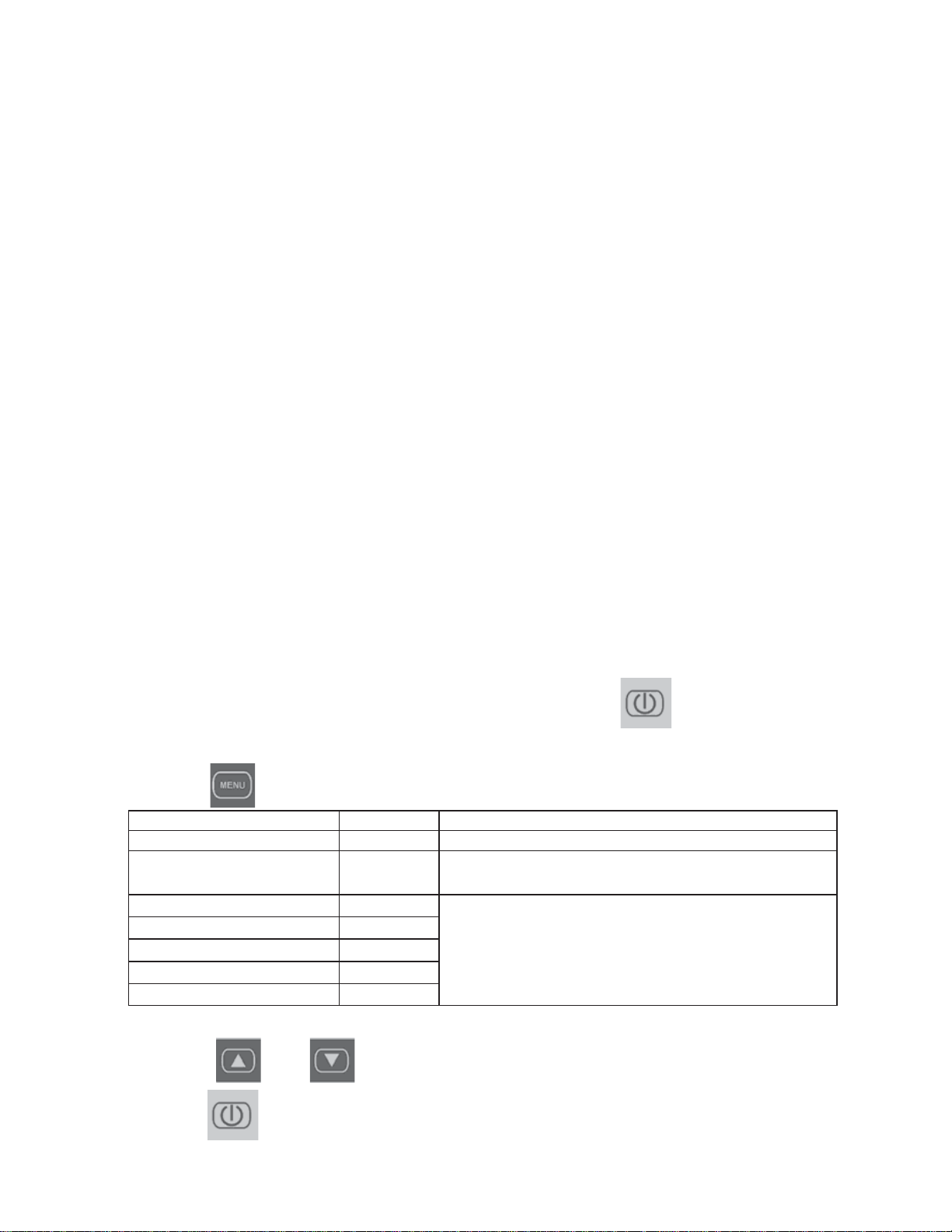
To access the menu to set machine parameters, hold the
key pressed for 5”.
By doing so, you will access the parameters menu, which can be used and is accessible to all
users.
Use the key to scroll the menu items.
Use the and keys to modify the set parameters.
Use the key to confirm the changed or wait for the machine to return to OFF
mode after 30 seconds.
DEFAULT NOTE
4 LANGUAGE ITALIANO
6 selectable display languages.
5
AUTOMATIC VACUUM
ADJUSTMENT
5 mb
1 mb (hard vacuum) - 5 mb (standard vacuum) -
10 mb (soft fast vacuum)
6 YEAR
Date and time are set by default when assembling
the machine and a buffer battery avoids the hassle
of having to set it again after a voltage black-out.
7 MONTH
8 DAY
9 TIME
10 MINUTE

18
4.1.7 Pressure sensor calibration (must be done at first use of the machine)
for vacuum full versions with pressure sensor
Reasons and procedures
Firmware rel. W8VD1A V4.4 and subsequent versions
This machine is equipped with a very precise “relative pressure” sensor that allows
you to automatically manage optimal operation time without having to carry out
checks or manual settings.
To use the vacuum sensor, all you need to do is make sure the machine is powered
up and turned on, then check that the letters “AA” appear on the right of the display;
this shows that the automatic vacuum is functioning.
Otherwise, move to the MENU button (button 6) in the D display field and, using
button 3 and 4, select the automatic program position AA.
The relative pressure is the difference between the location’s air pressure and the
desired final vacuum point (you can select from 1, 5 or 10 Mb as in the manual in
point 4.1.2).
This relative pressure is, however, affected by the air pressure of the place where
the machine has been installed, which may differ substantially from the one in which
the machines are produced and tested (20 m above sea level with an average pres-
sure of 1020 Mb).
With an increase in altitude, the pressure goes down considerably and the sensor
may have difficulties taking readings, which has an effect on the vacuum percentage
shown on the display. It isn’t the functionality of the machine that changes, the pump
is not affected in any way, and the actual pressure reached in the room is, at such a
time of operation, the same as or even less than what it was when the machine was
manufactured.
However, the following problem occurs: despite the fact that the room has reached the
vacuum required, the display continues to indicate a lower vacuum, and therefore the pump
continues to run uninterrupted.
In order to recalibrate the sensor to the new pressure situation of the machine’s in-
stallation location, different from the altitude and pressure of under which the ma-
chine was manufactured, a simple sensor calibration program has therefore comes
with the machine.
To calibrate, enter the programming menu: when the machine is powered up and
turned off, you should hold down the ON/OFF button (button 1) for 5 seconds. Move
on using the MENU button (button 5) until you get to: VACUUM CALLIBRATION,
choose “yes” with the arrows (buttons 3-4), confirm with the MENU button (button 5)
and follow the instructions indicated on the display (closing the chamber).
Once the machine’s calibration cycle is complete, the machine is ready to work un-
der the best conditions. If you lose power or the calibration procedure is necessarily
interrupted, we recommend repeating the steps described.
All of the machines with firmware release W8VD1A V4.1 and subsequent versions
can be updated with this V4.4 release.

19
4.2 - Using the packaging machine
4.2.1 Vacuum packaging
1. Connect the machine to the mains power supply
2. Unscrew the black knob on the right side of the machine until the dome is
released and work can be started.
3.
Supply power to the machine
on using the switch on the right side.
“OFF _____” will appear on the display.
4.
Switch the board by pressing the key ref. 1 fig. 4.1.1
5. Set the suction time, the sealing time and the gas injection time (if the packaging
machine is fitted with this system).
6. Place the bag on the surface resting the open end of the bag on the sealing bar
in a perfectly flat manner.
7. Lower the dome, applying pressure so that it remains closed and allows the work
cycle to begin.
4.2.2 Automatic packaging
If the operator selects program “AA” using key 6, the suction time will be calculated
automatically by the machine, while the operator must only set the sealing time by
evaluating the thickness of the bags used.
In this situation the following will appear on the screen in correspondence with:
A the wording AUT
B the sealing time that can be set
C any gas time (machine set-up only)
D the wording “AA”
After having set the desired times, place the bag on the surface, resting the open
end of the bag on the sealing bar in a perfectly flat manner.
Lower the dome, applying pressure so that it remains closed an the work cycle can
begin.
4.2.3 Automatic packaging with adjustable vacuum percentage
If the operator selects program “AA” using key 6, the suction time will be calculated
automatically by the machine, while the operator can set the sealing time, by
evaluating the thickness of the bags used and, via keys 3 and 4, set the vacuum
percentage that the machine must achieve (50% - 60% - 70% - 80% - 90%).
In this situation the following will appear on the screen in correspondence with:
A the wording AUT
B the sealing time that can be set
C any gas time (machine set-up only)
D the wording “AA”
After having set the desired times, place the bag on the surface, resting the open
end on the sealing bar in a perfectly flat manner.
Lower the dome, applying pressure so that it remains closed and the work cycle can
begin.
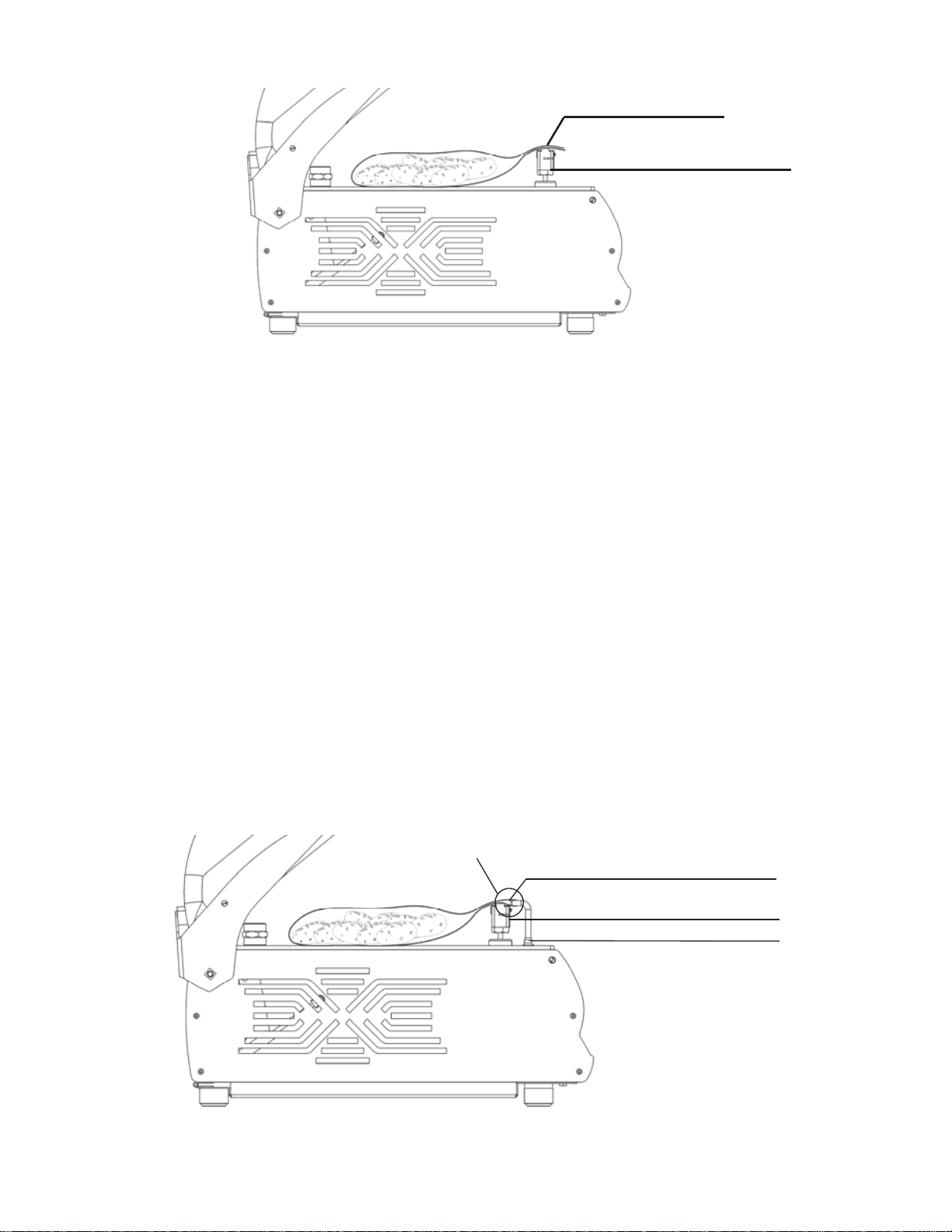
20
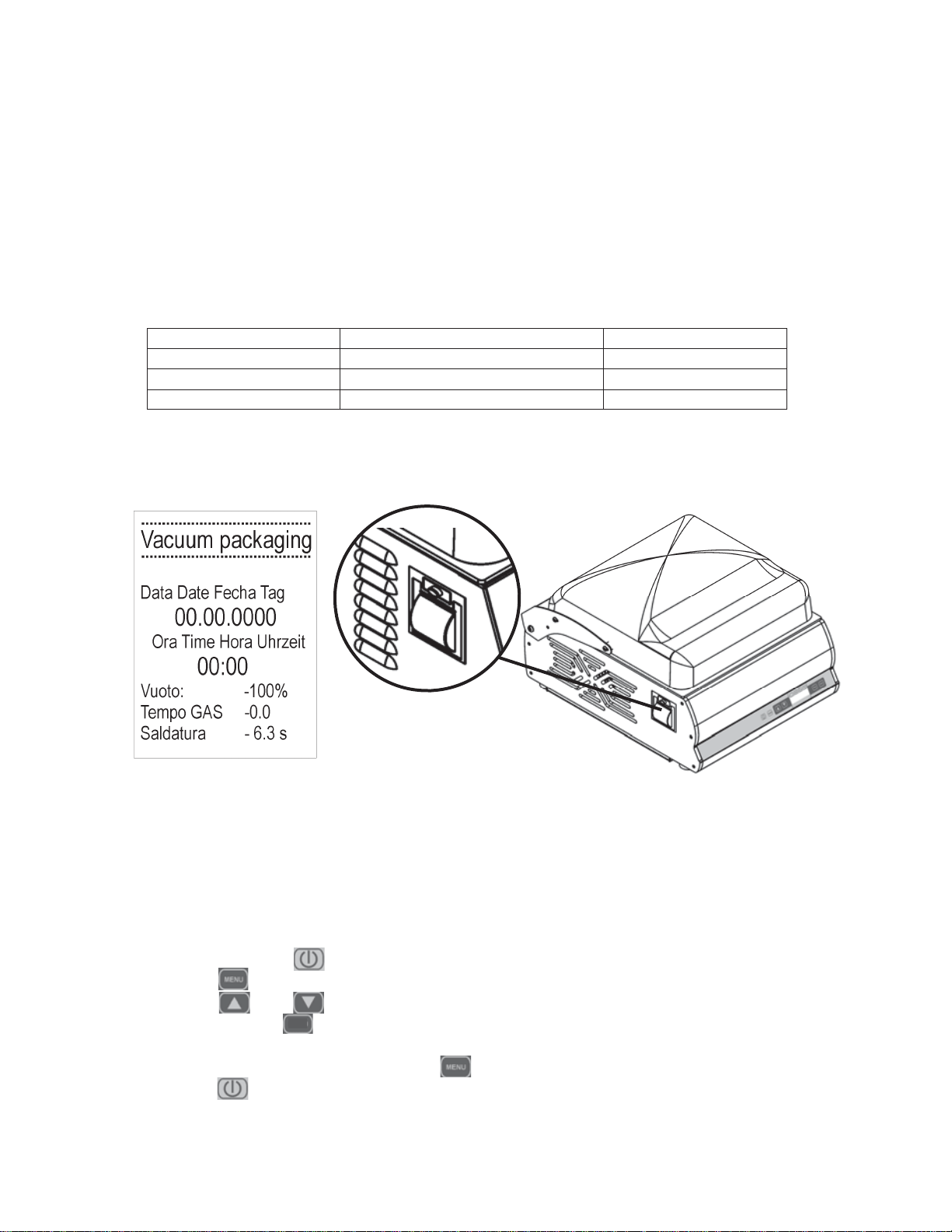
4.2.4 Packaging with introduction of inert gases. (Optional)
ATTENTION, ONLY USE GAS WITH MAXIMUM 20% OXYGEN.
MIXES WITH A HIGH OXYGEN PERCENTAGE ARE POTENTIALLY
DANGEROUS IF USED WITH THIS MACHINE
Connect the pipe coming from the fitting cylinder ref. 12 fig. 2.1.1 positioned on the
right side of the machine and adjust the manometer positioned on the cylinder to a
pressure value equal to 0.4 - 0.5 Bar.
1. Start the gas cycle by pressing key 2.
2. Use keys 3 and 4 to set the gas injection time. Normally, it never exceeds
6 - 7 seconds, as gas saturation in the dome would cause the
sealing bars sealing pressure to drop (min. vacuum percentage in dome = 70%).
3. Place the bag containing the product inside the vacuum chamber,
inserting the gas introduction nozzle inside the mouth of the bag, taking care
that there are no folds that prevent the gas escaping.
Whenever large bags are used, two nozzle can be inserted at the same time in
order to eliminate waste gas in the dome.
4. To deactivate the gas cycle pressing key 2.
SURPLUS BAG
SEALING BAR
Fig. 4.2.1
SURPLUS BAG
SEALING BAR
1
GAS INTRODUCTION NOZZLE
Fig. 4.2.2
21
The main food gas suppliers are:
Addresses can normally found in the telephone directory under the GAS heading.
The following table shows some product types with relative pre-determined mixture.
"We recommend the use of a gas pressure adjustment manometer with scale
from 0 to 6 Bar to guarantee gas inlet pressure into the machine of 0.4 - 0.5
Bar, as it is much more accurate than a manometer with scale from 0 to 30
Bar. If the gas inlet pressure should not be that indicated, the machine could
have problems in the working phase"
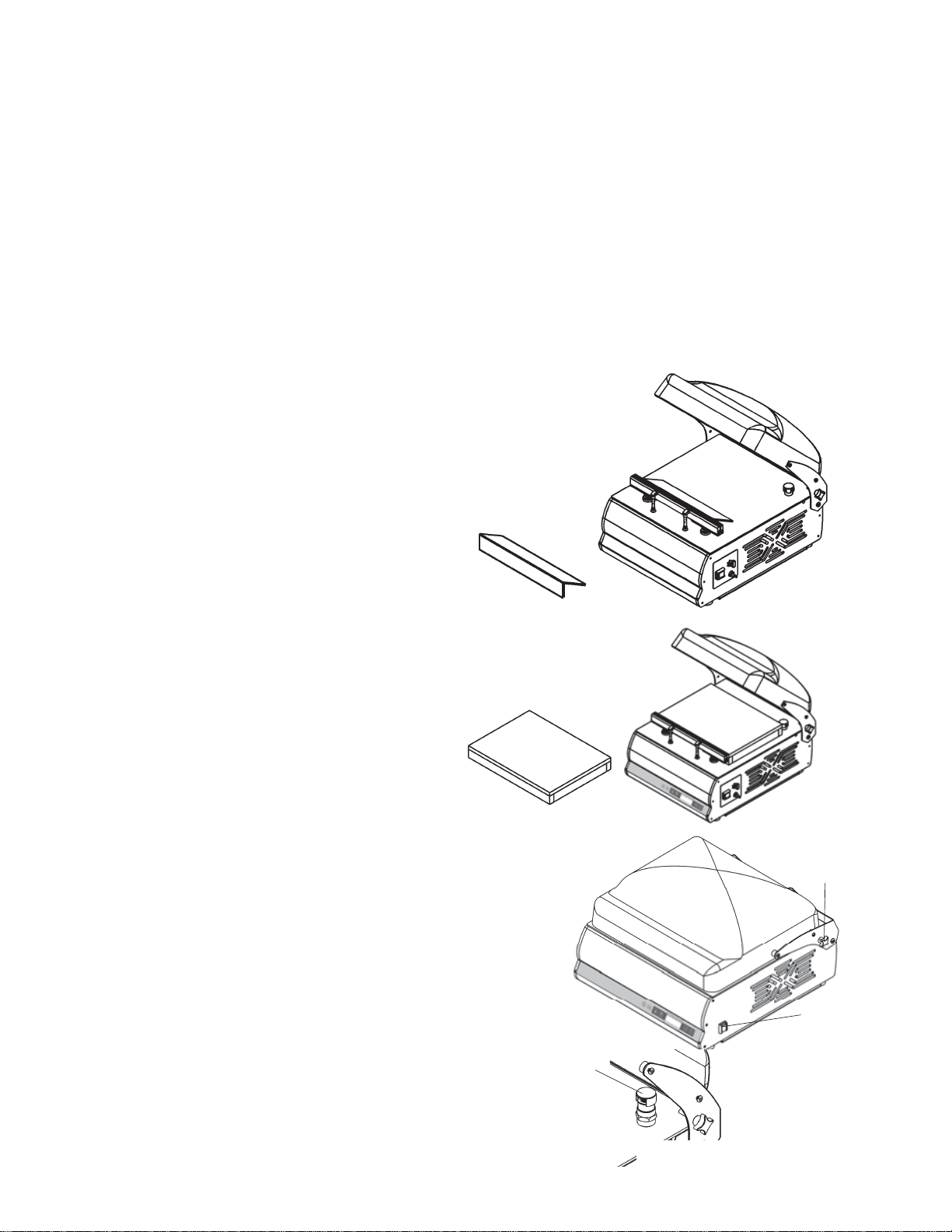
4.2.5 - Packaging with the use of the thermal printer
If the thermal printer has been activated in the machine, as described in paragraph
4.1.3, a label containing the following data will be printed at every vacuum cycle:
By briefly pressing the SAVE key (ref. 6 fig. 4.1.1) it is possible to have several
copies of the last label printed.
Fig. 4.2.3
SIAD SIO SAPIO RIVOIRA
PERGINE LINDE GAS SOL
SEALING TIME MATERIAL THICKNESS (micro)
2 CRYOVAC / HEAT-SHRINKABLE -
3 BAGS 100
4 / 5 BAGS 140
4.2.6 - Edit label printing
You can change the text "Vacuum packaging" on the label by adding a text up to
16 characters
With the machine powered (the main switch ref. 8 fig. 4.1.2 in ON) and the board OFF
Press and hold the key (1 fig. 4.1.1) for at least 5 seconds.
Press the key (5 fig. 4.1.1) and select "change printer".
Press the and keys (3 and 4 fig. 4.1.1) to select the character and confirm
it by pressing the key (6 fig. 4.1.1).
It will then go on to the next character until the desired text has been written
Confirm the new text by pressing the key (5 fig. 4.1.1)
Press the key (1 fig. 4.1.1) or wait 30 seconds to return to the OFF mode.
SAVE
22
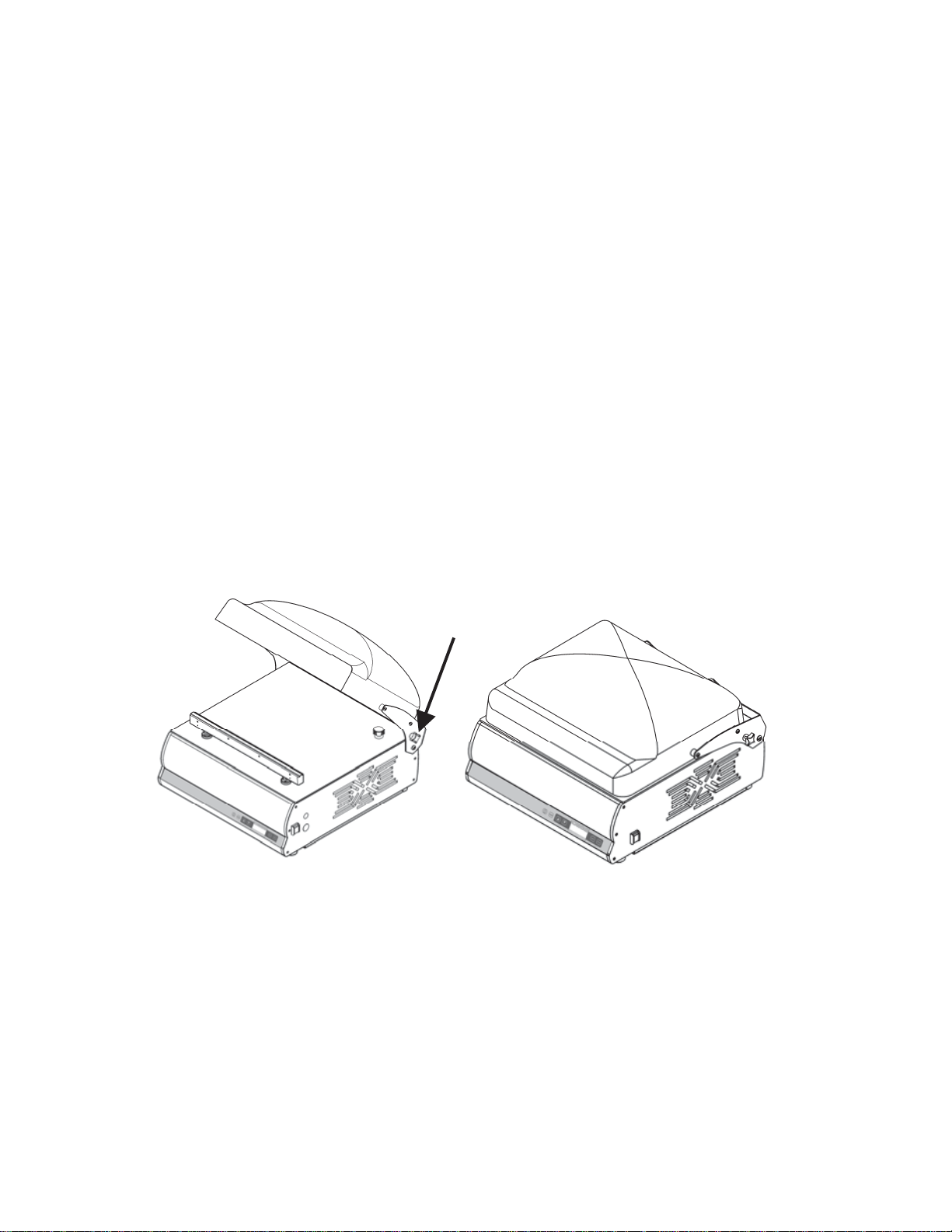
4.3.1 - Packaging liquids or semi-liquids with the
use of standard inclined surface
When liquid products must be packed,
the use of the inclined surface is
recommended, in order to facilitate the
operation.
4.3.2 - Packaging of thin products with the use of the
optional raised surface
When thin products such as sliced
cured meats must be packed, the use
of the raised surface is recommended,
in order to facilitate the operation
Fig. 4.3.2
4.3.3 - Packaging products in an external pan
(with % vacuum control)
When products stored in external trays must be
packed, the use of the external suction kit is
recommended in order to facilitate the operation.
1. Connect the machine to the mains power supply.
2. Unscrew the black knob (ref. 1 fig. 4.3.3) to
positioned on the right side of the machine, in
order release the dome and start to work.
3. Turn the machine on using the switch
(ref. 2 fig. 4.3.3) on the right side.
“OFF _____” will appear on the display.
4. Select the program XA by pressing the key Ref 6
fig. 4.1.1
1
Fig. 4.3.3
2
Fig. 4.3.4
3
4.3 - Packaging liquids or semi-liquids
With the dome vacuum packing machines we produce, it is possible to vacuum
pack liquids and semi-liquids (soups, juices, sauces, etc…) lengthening their
duration and maintaining flavour and hygiene unaltered.
In these cases, remember that the bags must never be filled up to maximum limit,
but up to 50% of the capacity, making sure that the edge is at a higher level with
respect to the sealing bar.
1. Select the program “LA” using key 6
The vacuum cycle remains programmed as described in the USING THE
PACKAGING MACHINE chapter. (4.2)
2. As liquids are incompressible, they do not require packaging in modified
environments, i.e. with the addition of inert gases.
3. Before sealing the bag, the machine will make two breaks
4. All of the packets can be stored in a cold room and
stacked normally.
Fig. 4.3.1

23
4.3.4 - Packaging products in external
pan (with vacuum time control)
1. Connect the machine to the power supply Network.
2. Loosen the black knob (ref. 1 fig. 4.3.3) positioned on the right side of the
machine until the dome is released and the job can start.
3. Turn the machine on via the switch (ref. 2 fig. 4.3.3) on the right side.
“OFF _____” will appear on the display.
4. Select the program XT by pressing the key ref 6 fig. 4.1.1
5. Remove the suction cap (ref. 3 fig. 4.3.4).
6. Attach the suction kit pipe (ref. 4 fig. 4.3.5)
7. Attach the suction kit dome nut to the tray lid valve (ref. 5 fig. 4.3.5)
8
. Pressing on the menu key ref 5 fig. 4.1.1 take the display cursor to position A
9.
Pressing the buttons ref 3 and 4 fig. 4.1.1 select the desired suction time
10. Press the key ref. 1 fig. 4.1.1 to start the vacuum cycle.
11. When the suction time selected has expired, the machine stops automatically.
5. Remove the suction cap (ref. 3 fig. 4.3.4).
6. Attach the suction kit pipe (ref. 4 fig. 4.3.5)
7. Attach the suction kit dome nut to the tray lid valve
(ref. 5 fig. 4.3.5)
8. Use buttons ref. 3 and 4 fig. 4.1.1 to select the
percentage vacuum desired inside the tray.
(the choice is from 50% to 100%)
9. Press the key ref. 1 fig. 4.1.1 to start the
vacuum cycle.
10. Once the vacuum percentage equal to 100% has
been reached, the machine stops automatically.
Fig. 4.3.5
4
5
PRODUCT
OXYGEN %
(O
2)
CARBON
DIOXIDE %
(CO
2)
NITRO-
GEN %
(N
2)
Deli cold cuts - 20 80
Bear/Beverages in cans - 100
Biscuits and baked products - 100 100
Coffee - 100 100
Freeze-dried meats and spices - - 100
Minced meat - - 100
Chocolate - 100 -
Fresh cheese/Mozzarella -/- 20/- 80/100
Hard cheeses - - 100
Fresh salad/Parsley - 50 50
Yogurt/Puff pastry - 100 -
Powdered milk - 30 70
Powdered dry yeast - 100 100
4.4 - Examples of packaging in controlled atmosphere
NEVER USE MIXTURES WITH OXYGEN OVER 20%

24
FRESH MEATS
BEEF 30/40 days
VEAL 30/40 days
PORK 20/25 days
WHITE MEATS 20/25 days
RABBIT AND GAME ON THE BONE 20 days
LAMB/GOAT 30 days
SAUSAGES 30 days
OFFAL 10/12 days
PRODUCT
OXYGEN %
(O
2)
CARBON
DIOXIDE %
(CO
2)
NITRO-
GEN %
(N
2)
Apples 2 1 97
Sliced pork belly - 35 65
Sliced bread/Bread - 100 -
Toast/Danish toasts - 80 20
Pasta - - 100
Fresh pasta/tortellini/lasagne - 70/100 30
Potatoes/Chips/Snacks/Hops - 100
Blue Fish - 60 40
Pizza - 30 70
Poultry - 75 25
Tomatoes 4 4 92
Pre-cooked products - 80 20
Cured meats - 20 80
Fruit juices - - 100
Trouts/ Farmed fish - 100 -
Wine/Oil - - 100
PRESERVATION TIME OF VACUUM PACKE DPRODUCTS
KEPT AT A TEMPERATURE OF +0°/+3° C.
FISH: Average duration 7/8 days with extremely fresh product
CURED COLD CUTS: Maintenance time to perfection over 3 months
MATURED CHEESES: Grana, pecorino, etc. 120 days
FRESH CHEESES: Mozzarella, brie, etc 30/60 days
VEGETABLES: In general 15/20 days
25
4.5 - Cleaning the machine
ATTENTION!
Disconnect the machine from the mains electricity before cleaning.
Do not clean the machine using a jet of water.
Use non-toxic detergents only, expressly intended for clearing components coming
into contact with foodstuffs. DO NOT use chlorine-based detergents.
DO NOT use ethyl alcohol to clean the Plexiglas dome.
The Plexiglas must be cleaned regularly with a soft, damp cloth, using cold or
warm water, with a small amount of neutral detergent.
It is recommended to avoid:
- the use of products containing: denatured ethyl alcohol, solvents in general,
Benzene, Trichloroethylene
- the use of abrasive materials and contact with sharp objects
Drying
When the dome has been cleaned, it can be dried using a slightly damp chamois
cloth, without rubbing hard.
4.6 - Machine at rest
ATTENTION!
If the machine is not used for a long period of time, to prevent dirt and dust
depositing inside the chamber, close and fix the dome using the relevant fixing
knob.
4.7 - Vacuum pump heating
During the winter period, in the morning it is recommended to briefly pre-heat the
pump in order to fluidify the oil before it goes into circulation:
- Position the master switch (ref. 4 fig. 2.1.1) at ON.
- Close the suction cock (ref. 8 fig 2.1.1)
- Press the SAVE key 4 times (ref. 6 fig 4.1.1)
The machine will perform an oil heating cycle and the cycle will block automatically
on reaching a temperature of 50 °C.
If the operator wants to interrupt the cycle before it ends, he must press the switch-
on key ref. 1 fig 4.1.1.
N.B. This operation must only be performed with the intake cock closed.
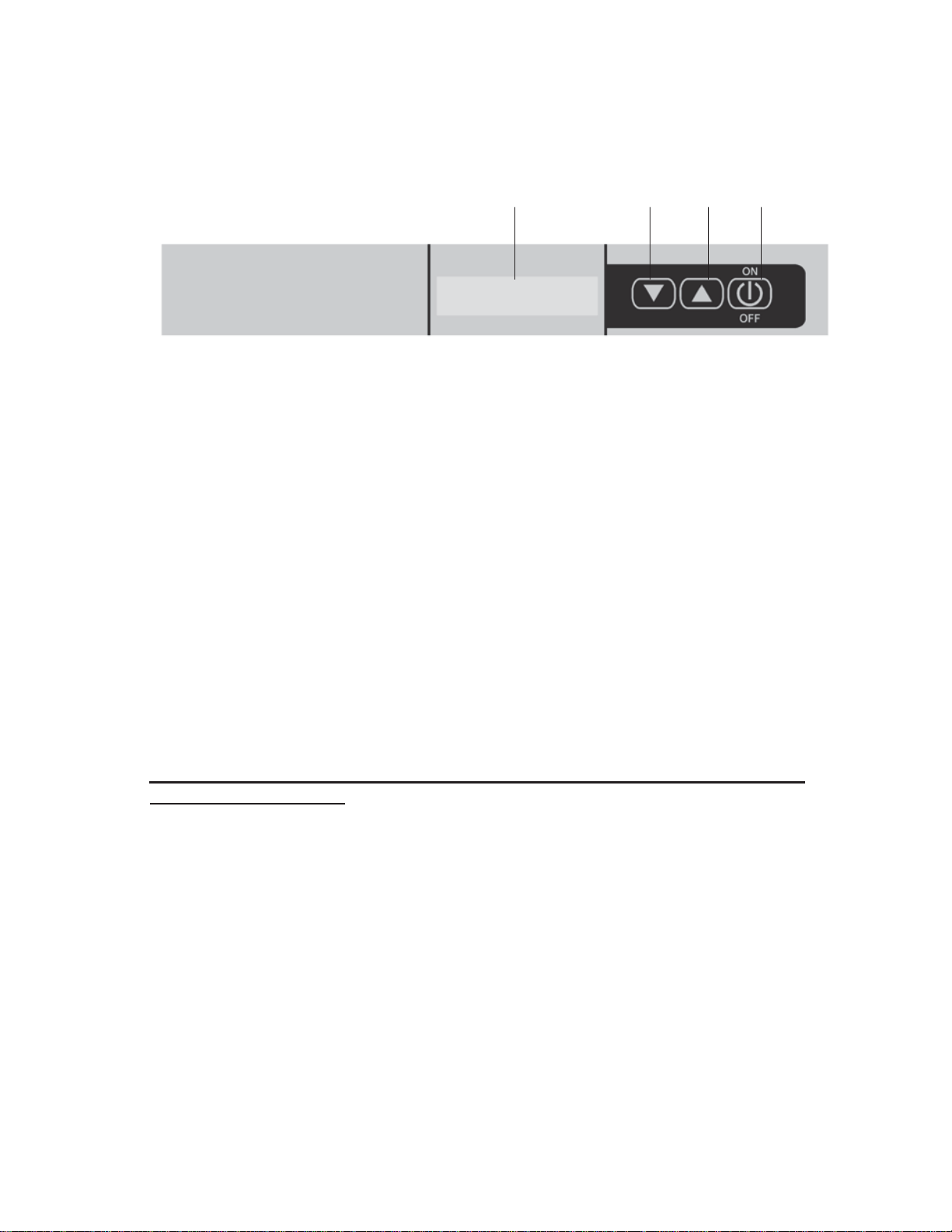
26
4B Use of the Mod. Easy Machine
4B.1 - Mod Easy Control Panel Legend
1. ON-OFF
- Turning the machine on and off:
briefly pressthe ON button
pressthe OFF button for 3 sec.
- Interruption of work phase:
During the work phases, if pressed, it stops the processing and passes to the next one.
- Vac Time or Seal Time Selection:
when in the ON mode, if pressed,it allows you to move the arrow in order to select
Between VacTime and Seal Time (for their modification use keys 2 and 3 to
increase or decreasetheirvalues)
Note: the software always saves the latest change.
2. Increase the Selected Values
- Press to increase the values previously selected:
Adjustable values: vacuum packing time; seal time or external vacuumpacking time
- When in the OFF mode, if pressed for 3 times in a row,the pre-heating cycle or
expulsion of water residues from the oil pump will be started
To be performed after vacuum cycles with liquid products, or every 15 days.
The duration of the cycle is 15 minutes and can be interrupted by pressing the 1 button
NB This should be always performed with the suction cap closed (turn the
cap to close the slots)
3. Decrease the Selected Values
- Press to decrease the values previously selected:
Adjustable values: vacuum packing time; sealing time or external vacuum packingtime
Pressing buttons 2 and 3 simultaneously switching from vacuumpacking chamber
mode to external vacuum packing mode in a cyclic modality.
4. Analog Display
- It allows the working modalities to be viewed:
OFF
chamber vacuum packing
external vacuum packing
pre-heating or expulsion of water residuals
Vacuum percentage
14 3 2
Fig. 4B.1.1

27
4B.1.1 Chamber Vacuum Packing Cycle
1 - Press the general switch (right side of machine) Ref. 8 Fig. 4B.1.2 in the ON
position. The display lights up and the word OFF appears
2 - Press the 1 button and put the machine in an ON mode.
The machine is ready for the chambervacuum packing cycle.
Check that the timing of vacuum packing and sealingtimes are optimal (the machine is
sold with preset vacuum packing and sealing values).
3 - Place the bag inside the chamber and close the chamber to start a work cycle.
4 - Check that the vacuum packaging percentage has reached 100%
5 -
Finish the cycle, open the chamber and extract the sealed vacuum packedproduct.
Start again from phase 3 for a new cycle.
Note: Every work step may be stopped by pressing the 1 button
Pressing the 1 button once = stop the vacuum packing and start the sealing cycle
Pressing the 1 button twice = cancel the cycle without sealing
4B.1.2 External Vacuum Packing Cycle
Place the switch (right side of the machine) Ref. 8 fig. 4B.1.2 in the ON position
The display will read OFF
Press the 1 button and put the machine in the ON mode (vacuum packing chamber).
Simultaneously press buttons 2 and 3 for 1 sec.
The display will show the message EXT. VACUUM
Check that the set time is sufficient.
If necessary, increase or decrease the time with keys 2 and 3.
Insert the tube for external suction (optional) in the suction hole, being careful to
remove the adjustable cap.
Press the 1 button to start the cycle.
The cycle will stop automatically when it reaches the set time.
Please note: Pressing buttons 2 and 3 at the same time will return it to the vacuum
chamber packing mode.

28
5 Controls and maintenance
5.1 - Controls and maintenance
Access to the internal part of the machine is reserved exclusively to our
specialised technician.
If the machine is accessed voluntarily, the manufacturer declines all civil and penal
liability regarding any accidents or damage caused to persons or objects.
All electric components are protected within the machine body and the relative
guard must be removed in order to gain access. Whenever access must be made,
remove the plug from the electric control board current socket.
5.2- Maintenance
1. Clean the sealing bars and the silicon counter-bar more or less every 15 days
using alcohol.
2. Change the oil every 400 hours of working (data variable depending on the type
of product packed).
After 2000 cycles the machine envisions an automatic oil control, the display
shows the “oil change” message. The user must call the dealer, who will
check the efficiency of the oil and will replace it, if necessary.
3. Replacement of electric resistances, Teflon sealing bar, lid sealing gaskets
about every 200 working hours.
4. Replacement of the silicon counter-bar
5. Check pump vanes, filters, pneumatic solenoid valve seals every 35,000
work cycles.
5.2.1 - Vacuum pump
For the safeguarding and the duration of the vacuum pump, follow the indications
given below scrupulously:
- Do not suck up steam, liquids and flours of any type.
This compromises the viscosity of the pump oil and damages the pump itself.
- Periodically check the pump oil level through the visual inspection window
(ref. 4 fig. 5.2.2)
A level below minimum can damage the pump
A level above maximum can damage the pump filter and the pump itself
- Periodically check the colour of the pump oil. If the oil appears
cloudy, dark or emulsioned, it must be replaced immediately.
- Replace the pump oil every 2 / 4 / 6 or 12 months, depending on use and location
of the equipment, or appearing the notice "change oil" on the display.
The pump oil may have to be replaced every month.
- Replace the pump oil before prolonged machine shutdown.
ATTENTION!!:
Considering that the vacuum packaging machine is nearly always located in the
kitchen, an environment full of steam and humidity, the level and quality of the
pump oil must be checked constantly and replaced frequently and periodically.
AGIP ARNICA 32 Q8 HAENDEL 32
SHELL TELLUST 32 ESSO INVAROL EP46
Types oil

29
6
Obligations in the event of malfunctioning and/or potential
dangers
The operators must inform their direct seniors of any deficiency and/or potential
dangerous situation that should occur.
6.1 - User obligations
The user must inform the manufacturer immediately if any defects and/or
malfunctioning of the accident-prevention system are detected, as well as any
presumed dangerous situation of which he becomes aware.
It is prohibited for the user and/or third parties (excluding duly authorised
manufacturer’s staff) to make any type or entity of modifications to the machine
and its functions, as well as to this technical document. In the event of
malfunctioning and/or dangers, owing to failure to respect the afore-said, the
manufacturer is not liable for any consequences. We recommend you request any
modifications from the Manufacturer.
7 Troubleshooting
7.1 - Troubleshooting
1 After having connected the master switch, the machine does not start:
a) Check that the plug is well inserted into the socket and, if necessary, control the
contacts inside the plug itself.
b) Check that on lowering the dome, the micro switch positioned on the rear below
the left fixing hinge, is excited.
2 The machine operates regularly, but the package is not sealed when the
dome is opened
a) Lift the Teflon and check that the resistance is not interrupted and it is blocked
on the lateral clamps.
3 If the machine does not achieve an excellent vacuum
a) Close the dome and disconnect the line when a negative pressure of about 90%
has been reached. Check whether the vacuum percentage indicated on the
display remains fixed or decreases.
- In the first case, there are no leaks, therefore the problem has another source
(pump vanes, oil replacement).
- In the second case, there is the presence of air infiltration into the dome:
• Check the membrane below the sealing bar, checking that it has no holes or
is ripped
• Check the integrity of the sealing gasket positioned under the lid; if the
afore-mentioned pieces must be replaced, request them directly from the
authorised dealer.

30
If for some reason, you decide to put the machine out of service, make sure no-
body can use it: disconnect it from the mains and eliminate the electrical con-
nections.
7.2 Putting the machine out of service