ENGLISH FRANÇAIS
Rev 1.0 CI
TONE-FP8 / TONE-FP8W /
TONE-FP8E
www.lg.com
Copyright © 2021 LG Electronics Inc. All rights reserved
OWNER'S MANUAL
Bluetooth® LG Stereo Headset
NOTE: Please read all information
carefully prior to using the headset in order to
prevent product damage and to enjoy the best
performance.
Any modications or changes to this manual
due to typographical errors or inaccuracies of
stated information shall only be made by
LG Electronics Inc.
Google Play App Store

Contents
1. Overview....................................................................................................................................................2
2. How to pair ..............................................................................................................................................4
3. Wearing Earbuds ..................................................................................................................................6
4. Playing Music ..........................................................................................................................................7
5. Placing a Call ...........................................................................................................................................8
6. Listen to the Ambient Sound (LAS), Active Noise Cancellation (ANC)..............9
7. UVnano ..................................................................................................................................................11
8. Charging .................................................................................................................................................12
9. Checking the Battery Status .....................................................................................................13
Safety Precautions ................................................................................................................................14
Battery Status Indicator .....................................................................................................................17
Mobile Calling Functions ....................................................................................................................18
LG TONE Free App .................................................................................................................................19
Troubleshooting .......................................................................................................................................19
Specications and Features .............................................................................................................20
Declaration of Conrmation ............................................................................................................22
Additional Information ........................................................................................................................23
Limited Warranty....................................................................................................................................26
Important Safety Information ........................................................................................................27
Open Source Software Notice Information ............................................................................28
Symbols ........................................................................................................................................................29
ENGLISH
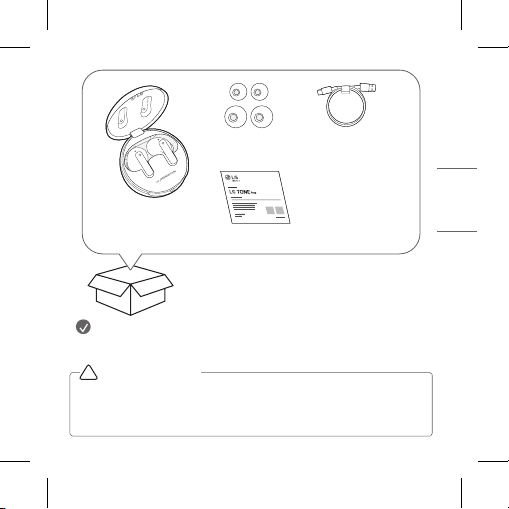
1
ENGLISH
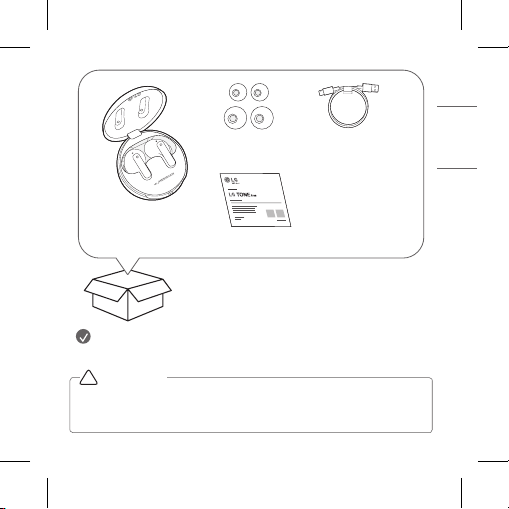
NOTE: Actual product design may differ from images shown in manual.
*A mid-sized ear gel is attached to the earbud by default.
Make sure authentic LG Electronics components are used. Using a non-
authentic component may damage the product and thus void the warranty.
Use the USB Type C™ cable provided with the product.
!
CAUTION
LG TONE Free™
Earbuds
UV Charging Case
USB Type C™
Charging Cable
Extra Ear Gels
(small & large)
Owner’s Manual
2
ENGLISH
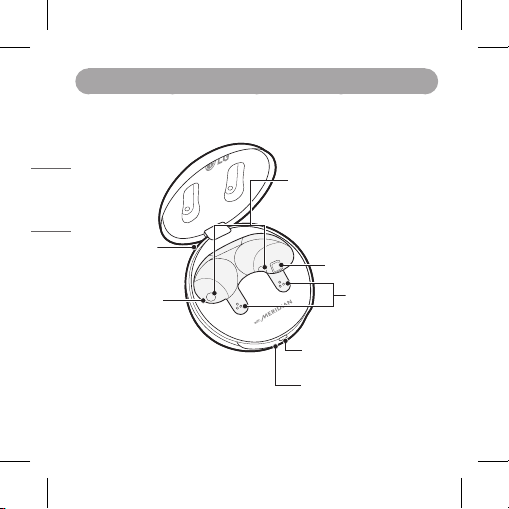
1. Overview
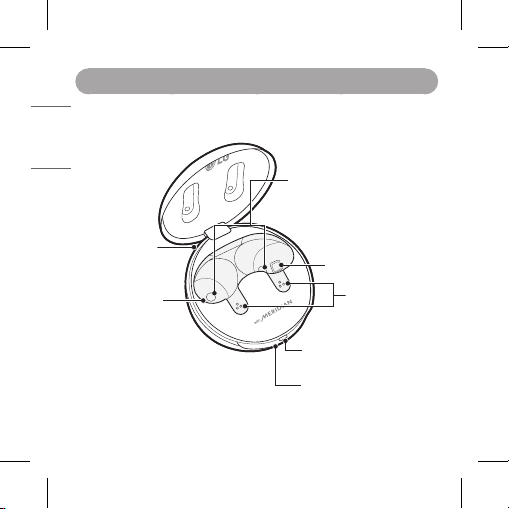
[Charging Case]
Charging port
Charging terminals
UVnano LED
Mood light
(When you open the
charging case, the mood
light turns on and off.)
UVnano LED
Battery Status Indicator (up)
UVnano Indicator (down)
Charging terminals
3
ENGLISH
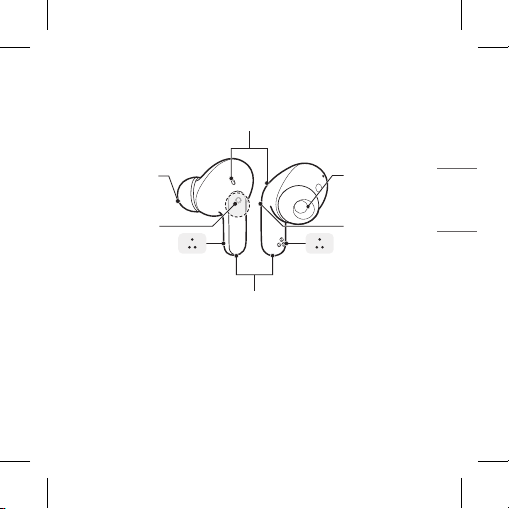
[Earbuds]
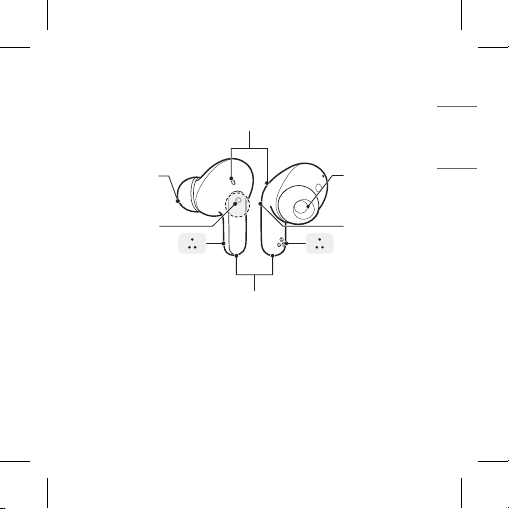
*Make sure that the charging terminals have no foreign substances on them.
*The appearance and specications of the actual product may differ depending
on the model.
Charging terminals
Battery Status Indicator (up)
UVnano Indicator (down)
Speaker mesh
(Microphone)
Microphone
Microphone
Touchpad
Touchpad
Charging terminals
Charging terminals
Speaker mesh
(Microphone)
4
ENGLISH
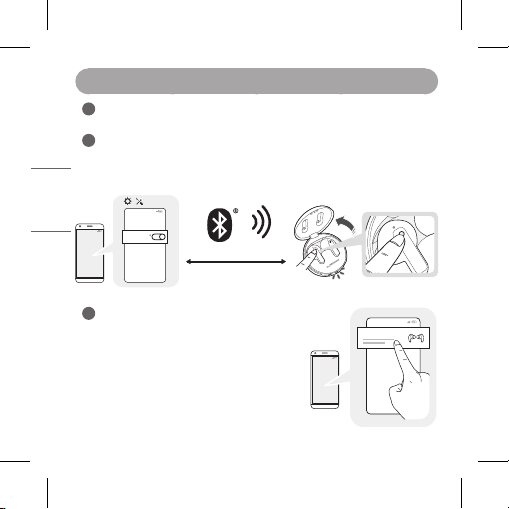
2. How to pair
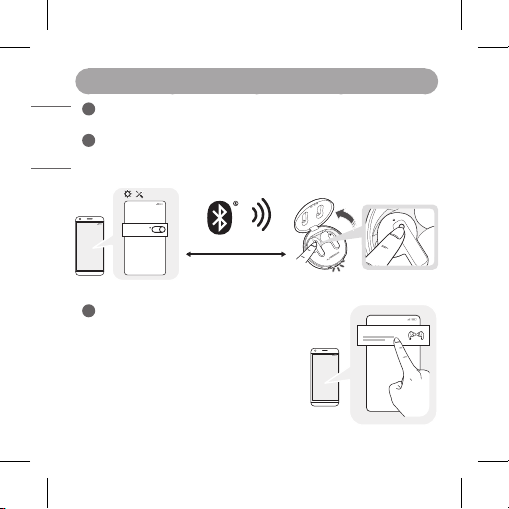
Turn on the Bluetooth function on the mobile phone or the device to be
connected.
Open the cover of the charging case with the earbuds mounted on the case.
Press and hold the touchpad of the left or right earbud for 3 to 5 seconds
until the battery status indicator blinks blue.
-(
-(
#MVFUPPUI
0/
~39 inch, ~1m
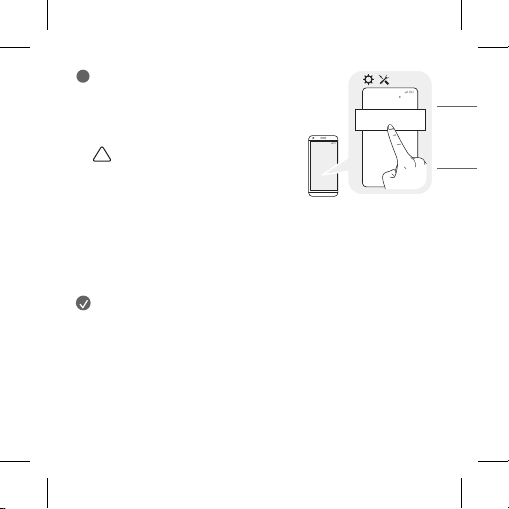
When the Fast Pair connection pop-up
appears on the top area of the mobile
phone screen, tap it to connect.
y It only supports Android™ 6.0 or higher,
and requires conguring Bluetooth and
location information settings of the
mobile device.
-(
-(
-(50/&'1
5
ENGLISH
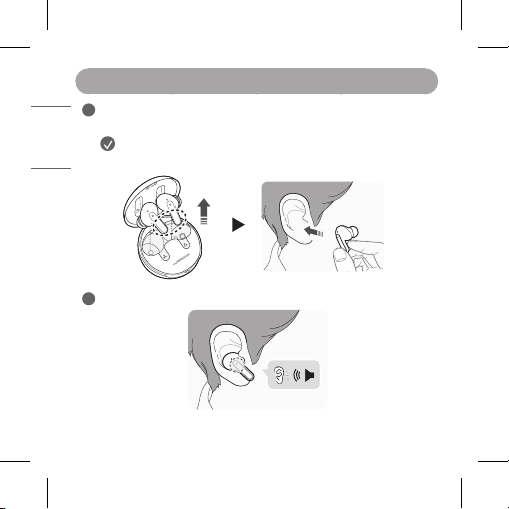
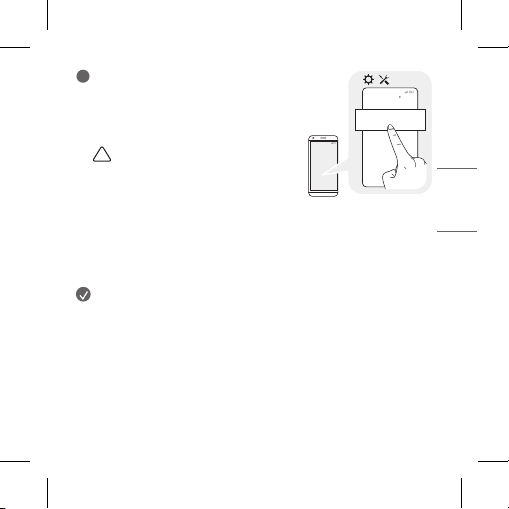
If the pop-up does not appear, select
[LG-TONE-FP8] from the Bluetooth menu
on the mobile phone and connect it (for
users of iOS or Android 5.0 or lower
versions).
!
CAUTION: In the list of Bluetooth
connected devices, LG-TONE-FP8_LE
is not the correct model name for
connection. Check the model name in
use and connect with the model name
without “LE”.
If the earbud model name is abnormally displayed on the Android
device, change the model name in the Bluetooth menu of Connected
Device Settings.
NOTE: To connect with another device, perform the above procedure again.
-(
-(
-(50/&'1
#MVFUPPUI
6
ENGLISH
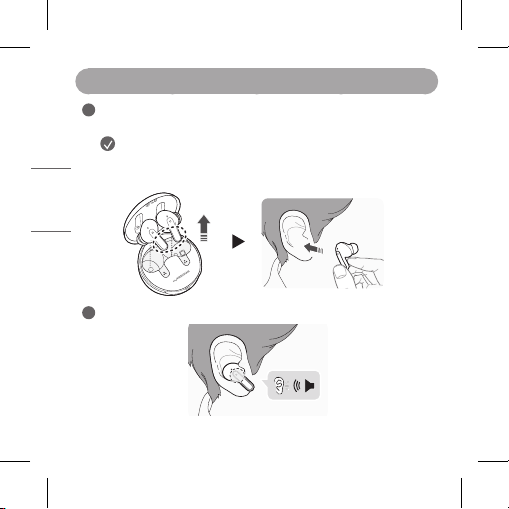
3. Wearing Earbuds
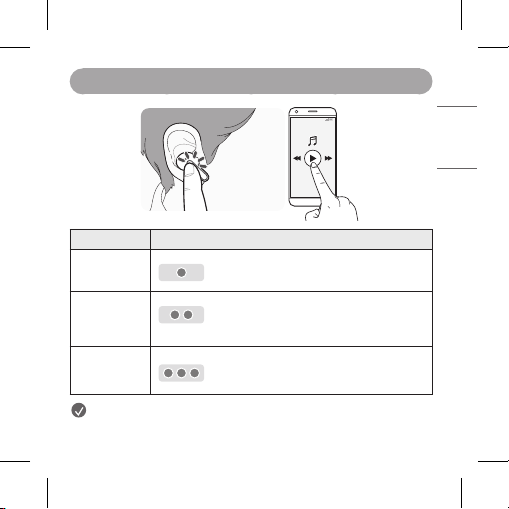
Separate the earbuds from the charging case and adjust them so that
they t comfortably in your ears.
NOTE: Choose the ear gels that best t your ears to
improve Active Noise Canceling (ANC) performance.
You will hear an audio conrmation when wearing the earbuds.
7
ENGLISH
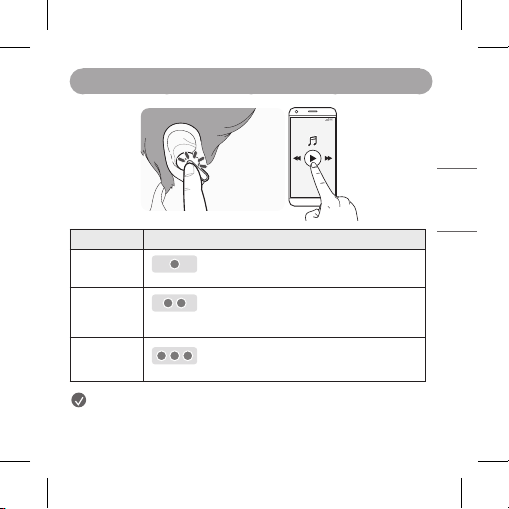
4. Playing Music
-(
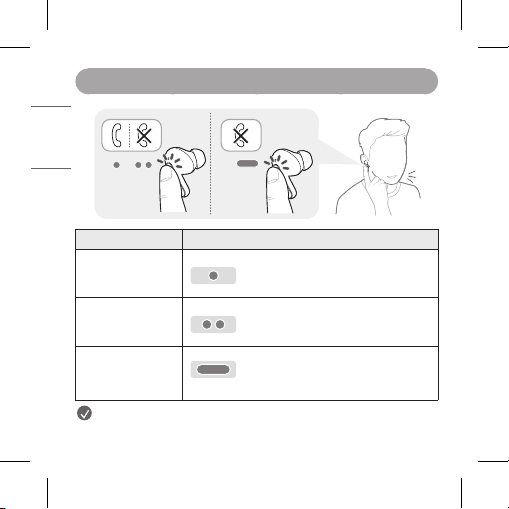
Function Description
Play / Pause
: Touch the left or right earbud once.
Adjusting
the Volume
: Touch the left(Decrease volume) or
right(Increase volume) earbud twice.
Play Next
: Touch the left or right earbud three times.
NOTE: You can change the operation method of the function in the
touchpad settings of the LG TONE Free app.
8
ENGLISH
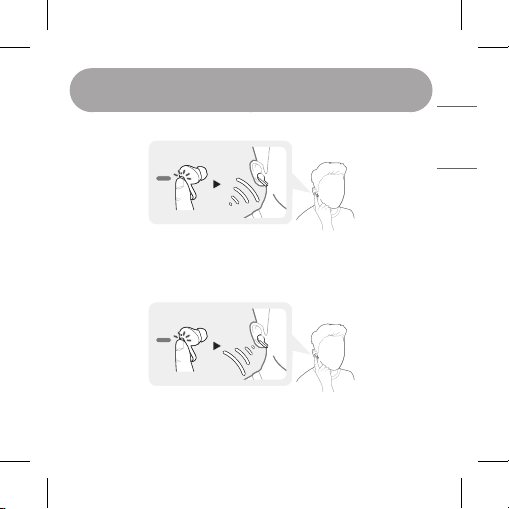
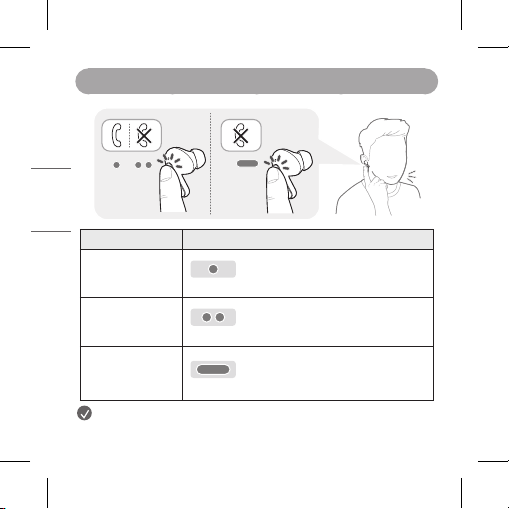
5. Placing a Call
Function Description
Answering Calls
: Touch the left or right earbud once.
Ending Calls
: Touch the left or right earbud twice.
Rejecting Calls
: Touch and hold the left or right
earbud.
NOTE: Please check the content on the mobile phone call function on
the back of the Owner's Manual.
9
ENGLISH
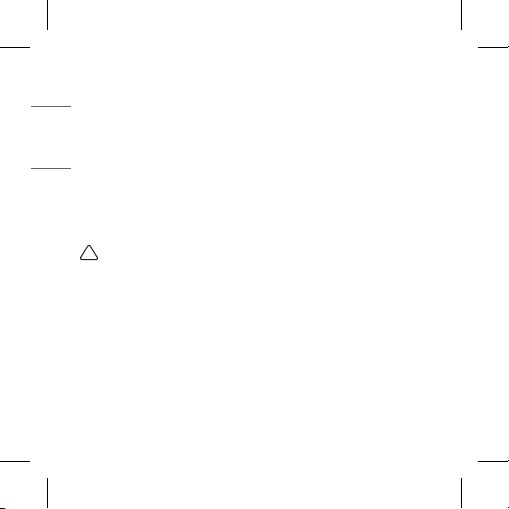
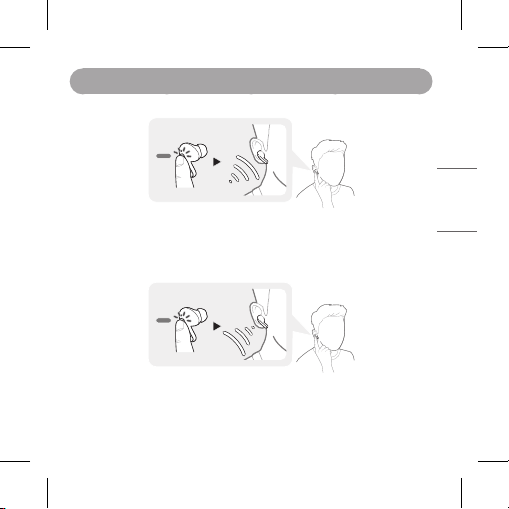
6. Listen to the Ambient Sound (LAS), Active Noise
Cancellation (ANC)
[Listen to the Ambient Sound (LAS)]
The Listen to the Ambient Sound (LAS) function allows you to listen to
the ambient sound so that you can recognize the surrounding situation
and any potential risks.
[Active Noise Cancellation (ANC)]
The Active Noise Cancellation (ANC) function blocks out ambient sound.
Use the function to listen to music or watch a video.
10
ENGLISH
Touch and hold the left or right earbud to switch between the ANC mode
and the LAS mode.
You can set the LAS and ANC functions in the LG TONE Free app.
You can congure the Listen to the Ambient Sound mode and Conversation
mode using the LG TONE Free app.
If you use the LAS or ANC function, the battery consumes faster, reducing
the time you can use the product.
You can use the LAS and ANC functions while being idle, listening to music,
or being on the phone.
*ANC is an acronym for Active Noise Cancellation.
*LAS is an acronym for Listen to the Ambient Sound.
!
CAUTION: When the LAS mode is enabled, you may hear the ambient
sound become loud suddenly. When using the ANC function outdoors,
pay attention to the surrounding environment for safety.
11
ENGLISH
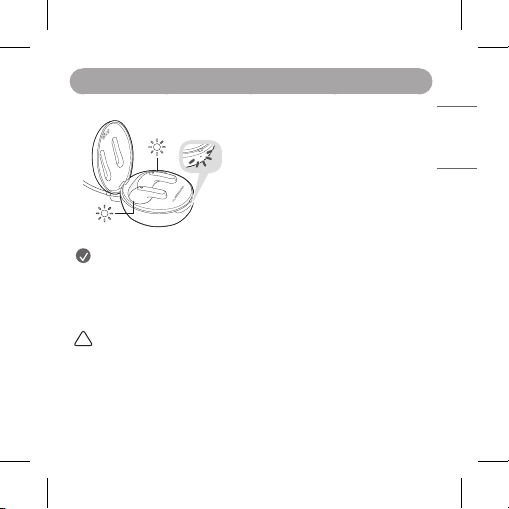
7. UVnano
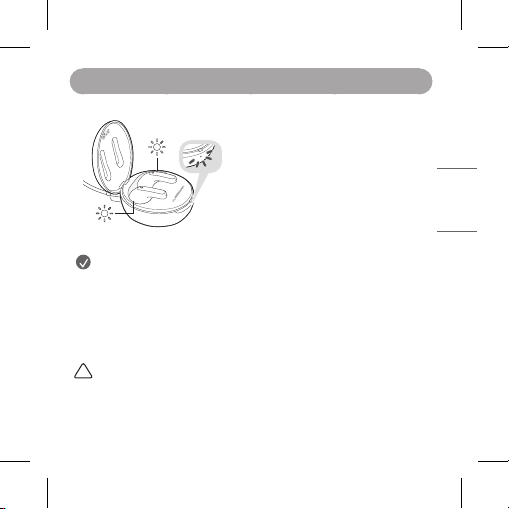
The charging case has two built-in UVnano
LED, which help reduce bacteria on the
speaker mesh of the earbuds.
The UVnano LED operates for 5 minutes
when mounted in the charging case while
it is being charged via a wired connection
or a wireless charger.
*UVnano is a compound word derived from
the words UV and its unit, nanometer.
NOTE: The UVnano LED indicator turns blue when on.
The UVnano charging case is designed to help reduce bacteria on the
speaker mesh of the earbuds. UVnano is not a substitute for standard
infection control practices.
In the case of a white product, discoloring may occur in the contact area
of the UVnano LED, but it does not affect the product function.
!
CAUTION: Be aware that the temperature of the earbuds may rise
while the UVnano LED is on.
12
ENGLISH
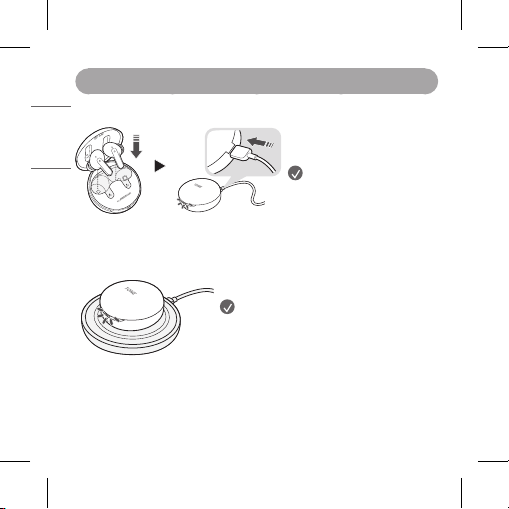
8. Charging
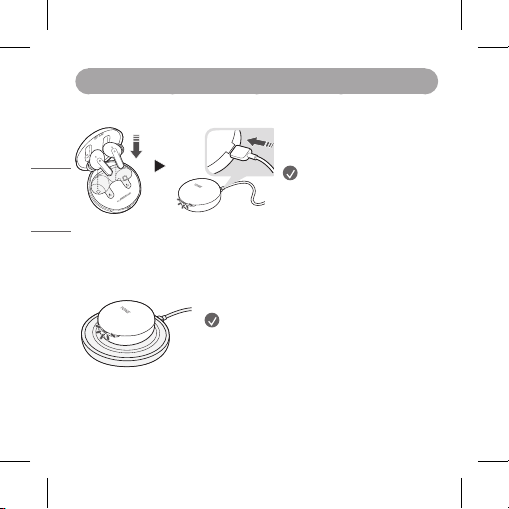
[Wired Charging]
When the charging cable is
connected, the charging status
is displayed in the charging case.
NOTE: The earbuds and the
charging case are charged
at the same time.
The charging port on the
charging case cannot be
used to supply power to
mobile phones, etc.
[Wireless Charging]
Align the bottom center of the charging case
with the center of the wireless charger.
NOTE: The wireless charger is not
provided. The wireless charging function
may not work in some wireless chargers.
Wireless charging feature charges at
a slower rate due to less power being
transmitted to the charging case.
When wirelessly charging, the UVnano
process will commence for 5 minutes
before charging.

13
ENGLISH
9. Checking the Battery Status
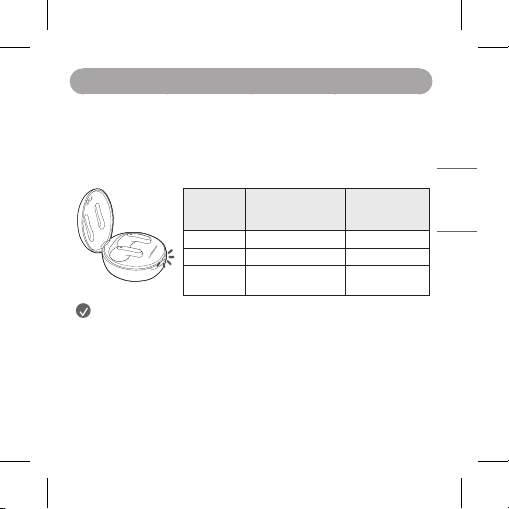
If earbuds are mounted in the charging case, the earbuds’ battery status is
displayed. Otherwise, the charging case’s battery status is displayed.
If the earbuds are mounted in the charging case while plugged in, the
UVnano process will commence for 5 minutes. Once this process is
complete, the charging case’s battery status will be displayed.
Battery
Status
Indicator
Remaining Battery
(charger not
connected)
Charging State
(charger
connected)
Red 20% or lower Charging
Yellow 20% - 80% -
Green 80% or higher Fully charged
NOTE: When the charging case lid is closed, charging case battery
status is displayed. If the charging case has no remaining charge, there
will be no display and it cannot function. We recommend you keep the
charging case charged at all times as the earbuds are not able to be
turned on and turned off independently.
14
ENGLISH
Safety Precautions
The following safety precautions are provided to prevent any unexpected
accident or damage. Please familiarize yourself with the safety precautions.
The safety precautions are classied into “WARNING” and “CAUTION”.
!
WARNING: Failing to comply with the instructions may result in
serious injury or death.
!
CAUTION: Failing to comply with the instructions may result in minor
injury or product damage.
!
WARNING
Do not drop the product from a high place.
Make sure there is no water, alcohol, or benzene in contact with the product.
Do not store the product in a wet or dusty place.
Do not place heavy objects on the product.
This product is waterproof to the IPX4 level (daily life waterproof).
(The IPX4 waterproof rating applies to the earbud product only.)
Do not put the product under the water or use it in a humid location
such as a bathroom.
!
CAUTION
Do not disassemble, adjust, or repair the product arbitrarily.
Do not place the product near excessive heat or ammable material.
The product may be damaged if an incompatible charger is used.

15
ENGLISH
Make sure that an infant or child does not swallow a magnet or a small
component of the product.
Make sure that foreign objects do not enter the charger’s connectors
(charging port and power plug). Failure to do so may result in re or
electric shock.
If you have a medical device implanted, contact your doctor before using
this device.
This product has a built-in battery, and the battery cannot be removed or
replaced arbitrarily.
For your safety, do not remove the battery incorporated in the product.
If you arbitrarily replace the battery or don’t replace it correctly, it may
explode.
The lithium-ion battery is a hazardous component that can cause injury.
Battery replacement by an unqualied professional can cause damage
to your device.
Do not discard the battery arbitrarily. Follow the local procedure for
discarding batteries.
Risk of re or explosion if the battery is replaced by an incorrect type.
Do not store or transport at pressures lower than 11.6 kPa (0.116 bar)
and at above 15,000 m (9.32 miles) altitude.
Replacement of a battery with an incorrect type that can defeat a
safeguard (for example, in the case of some lithium battery types).
Disposal of a battery into re or a hot oven, or mechanically crushing or
cutting of a battery, that can result in an explosion.
Leaving a battery in an extremely high temperature surrounding
environment that can result in an explosion or the leakage of ammable
liquid or gas.

16
ENGLISH
A battery subjected to extremely low air pressure that may result in an
explosion or the leakage of ammable liquid or gas.
Do not carelessly throw away old batteries. It can cause an explosion or re.
The disposal method may vary by country and region. Dispose of it in an
appropriate manner.
WARNING - UV radiation emitted from this device.
Unintended use of the device, or damage to the housing, may result in
exposure to ultraviolet radiation.
Ultraviolet radiation may cause eye and skin irritation.
Avoid exposing eyes and skin to ultraviolet radiation.
The use of this device is a supplement to and not a substitute for
standard infection control practices; users must continue to follow
all current infection control practices, including those related to the
cleaning and disinfection of environmental surfaces.
KEEP OUT OF THE REACH OF CHILDREN.
Do not disassemble the product and use UV LED component for
purposes other than intended. Ultraviolet light coming from the UV LED
is harmful to your eyes.
NOTE
If the product is exposed to excessive sweat, clean the product.
Keep the earbuds clean.
Wearing earbuds for a long time may cause pain, and if humidity inside
ears continues for a long time, it may cause skin trouble.
17
ENGLISH
Battery Status Indicator
Status Description
Bluetooth Search
Mode
The battery status indicator ashes in blue.
Battery below 20%
The battery status indicator turns on and
off in red.
Battery 20% - 80%
The battery status indicator turns on and off
in yellow.
Battery 80% or
more
The battery status indicator turns on and off
in green.
When there is
a problem while
charging
The battery status indicator ashes in red.
Charging
(charger connected)
The battery status indicator turns on in red.
Charging complete
(charger connected)
The battery status indicator turns on in green.

18
ENGLISH
Mobile Calling Functions
Function Status Description
Answering
Calls
Ringing Touch the left or right earbud once.
Making Calls Idle
If you make a call using a mobile phone,
the call is automatically connected to the
headset.
Receiving
Calls while
on the
Phone
Talking
If you touch the left or right earbud once,
the current call will go on hold, and you will
be able to answer an incoming call.
If the previous call is on hold, you can nish
the current call on the mobile phone.
(It works differently depending on the
mobile phone settings.)
19
ENGLISH
LG TONE Free App
If you install the “LG TONE Free” app, you can use Check Earbud Battery, Voice
Alert, Change Equalizer Mode, Check Last Connected Location Information,
and Find My Earbuds functions. Check out the app for more details.
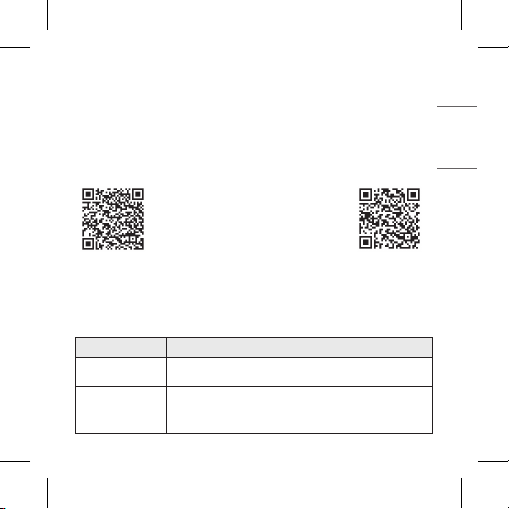
To install the “LG TONE Free” app, search LG TONE Free in the Google Play
Store or App Store or scan the QR code below.
It supports Android 7.0 or higher and iOS 11 or higher.
Google Play App Store
Troubleshooting
If you see any of the following symptoms while using the product, make sure
to recheck it. It may not be a malfunction.
Symptom Cause and Solution
The power does
not turn on
Check the battery level and charge it.
If unable to
make a call with
earbuds
If the mobile phone does not support headset and
hands-free functions, you cannot use the calling features.
Check the battery level and charge it.
20
ENGLISH
If unable
to register
earbuds to
mobile phone
Check whether earbuds are turned on.
Check if the earbuds have entered the search mode.
- While the earbuds are inserted in the charging
case, press and hold the touch pad on the left or
right earbud for 3 to 5 seconds to switch to the
search mode.
If you replaced
the earbuds
or there is a
problem with
the operation
(Factory reset)
While the earbuds are inserted in the charging case,
press and hold the touch pad on the left or right
earbud for 10 seconds or more.
- The battery status indicator of the charging case
ashes red and the initialization to the factory
status is carried out. After initialization to the
factory status, reconnect the earbuds.
Specications and Features
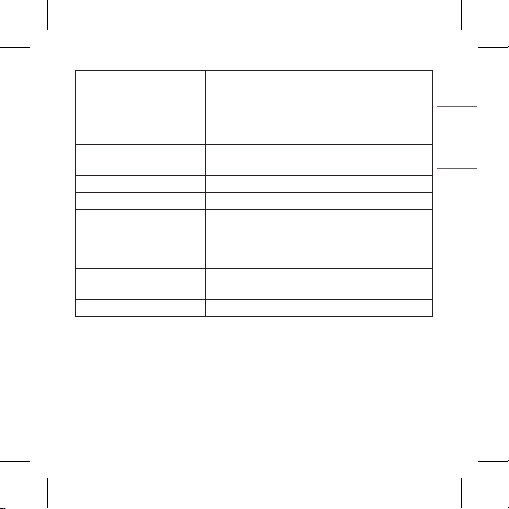
Item Comments
Bluetooth
Specications
V 5.2 (Headset/Hands-Free/A2DP/AVRCP)
Battery
Earbud : 3.7 V / 68 mAh, Lithium-ion
Charging case : 3.7 V / 390 mAh, Lithium-ion
Music Play Time Earbuds
& With Charging case
ANC Off :
Up to 10 & Up to 24 hours*
ANC On :
Up to 6 & Up to 15 hours*
21
ENGLISH
Charging Time
Earbud : within an hour / Charging case :
within 2 hours
Fast Charging : 5 min charge for up to 60 min
playtime*
※ When charging wired at room temperature
Rated Input Voltage
Earbud : 5 V 0 136 mA
Charging case : 5 V 0 500 mA
Operating Temperature 0°C (+32°F) ~ +40°C (+104°F)
Operating Humidity 5 % ~ 60 %
Dimensions (mm)
Earbud : 21.2 mm (W) X 28.3 mm (L) X 23.2
mm (H)
Charging case : 54.5 mm (W) X 54.5 mm (L)
X 30 mm (H)
Weight (g)
Earbud : 5.2 g (One earbud)
Charging case : 39 g
Frequency range 2402 MHz to 2480 MHz
*Duration of use may vary depending on the connected mobile device,
features being used, settings, signal strength, operating temperature,
frequency band, and other methods of use.
Fast charging feature does not apply when charging case is placed on
wireless charging device such as a pad.
Wireless charging feature charges at a slower rate due to less power
being transmitted to the charging case.

22
ENGLISH
Declaration of Conrmation
Industry Canada Statement
[For having wireless function (WLAN, Bluetooth,...)]
This device contains licence-exempt transmitter(s)/receiver(s) that
comply with Innovation, Science and Economic Development Canada’s
licence-exempt RSS(s). Operation is subject to the following two
conditions:
(1) This device may not cause interference.
(2) This device must accept any interference, including interference that
may cause undesired operation of the device.
CAN ICES-003 (B) / NMB-003 (B)
IC Radiation Exposure Statement
[For having wireless function (WLAN, Bluetooth,...)]
This equipment complies with IC radiation exposure limits set forth for an
uncontrolled environment.
NOTE: THE MANUFACTURER IS NOT RESPONSIBLE FOR ANY RADIO OR
TV INTERFERENCE CAUSED BY UNAUTHORIZED MODIFICATIONS TO
THIS EQUIPMENT.
SUCH MODIFICATIONS COULD VOID THE USER’S AUTHORITY TO
OPERATE THE EQUIPMENT.
Bluetooth® is a registered trademark of Bluetooth SIG, Inc. worldwide.
Android, Google Play, the Google Play logo, and other related marks and
logos are trademarks of Google LLC.
23
ENGLISH
FCC ID: ZNFTONEFP8
IC: 2703C-TONEFP8
Additional Information
1. Radio frequency exposure
This Bluetooth LG Stereo Headset is a radio transmitter and receiver.
When in operation it communicates with a Bluetooth-equipped
mobile device by receiving and transmitting radio frequency (RF)
electromagnetic elds (microwaves) in the frequency range
2402 to
2480 MHz
. Your Bluetooth headset is designed to operate in compliance
with the RF exposure guidelines and limits set by national authorities and
international health agencies when used with any compatible
LG Electronics mobile device.
2.
Bluetooth
Connection Precautions
The following environments affect the range and reception of Bluetooth
signals:
-When walls, metal, human bodies, or other obstacles exist between the
Bluetooth device and the connected device
-When equipment that uses 2.4 GHz frequency signals (Wireless LANs,
wireless phones, microwave ovens, etc.) is placed near the devices being
used
-When using a Bluetooth device (TV, laptop, etc.) other than the mobile
phone, the sound quality may be affected by the specications and
performance of the device.

24
ENGLISH
3. Potentially explosive atmosphere
Power off your electronic device when in any area with a potentially
explosive atmosphere. Although this is uncommon, your electronic device
could generate sparks. Sparks in such areas could cause an explosion
or re resulting in bodily injury or even death. Areas with a potentially
explosive atmosphere are often, but not always, clearly marked.
4. Emergency calls
IMPORTANT!
This Bluetooth headset and the electronic device connected to the
headset operate using radio signals, mobile and landline networks
as well as user-programmed functions, which cannot guarantee
connection under all conditions. Therefore you should never rely solely
upon any electronic device for essential communications (e.g. medical
emergencies). Remember, in order to make or receive calls, the headset
and the electronic device connected to the headset must be powered on
and in a service area with adequate mobile signal strength. Emergency
calls may not be possible on all mobile phone networks or when certain
network services and/or phone features are in use. Check with your local
service provider.
5. Battery information
A rechargeable battery has a long service life if treated properly. A new
battery or one that has not been used for a long period of time could
have reduced capacity the rst few times it is used. Do not expose
the battery to extreme temperatures, never above +50°C (+122°F) or
below -10°C (+14°F). For maximum battery capacity, use the battery
at room temperature. If the battery is used in low temperatures, the
battery capacity will be reduced. The battery can only be charged in
temperatures between 0°C (+32°F) and +45°C (+113°F).

25
ENGLISH
6. Recycling the battery in your
Bluetooth
headset
The battery in your Bluetooth headset must be disposed of properly and
should never be placed in municipal waste. The LG Electronics service
partner who removes the battery will dispose of it according to local
regulations. In case rechargeable battery is included in this product, the
rechargeable battery should be recycled in compliance with rechargeable
battery recycling standards. To dispose of properly, call 1.800.822.8837
or visit www.call2recycle.ca.
7. Conditions
-The warranty is valid only if the original receipt issued to the original
purchaser by the dealer, specifying the date of purchase and serial
number, is presented with the product to be repaired or replaced.
LG Electronics reserves the right to refuse warranty service if this
information has been removed or changed after the original purchase of
the product from the dealer.
-If LG Electronics repairs or replaces the product, the repaired or replaced
product shall be warranted for the remaining time of the original
warranty period or for ninety (90) days from the date of repair, whichever
is longer. Repair or replacement may involve the use of functionally
equivalent reconditioned units. Replaced parts or components will
become the property of LG Electronics.
-This warranty does not cover any failure of the product due to normal
wear and tear, or due to misuse, including but not limited to use in other
than the normal and customary manner, in accordance with instructions
for use and maintenance of the product. Nor does this warranty cover
any failure of the product due to accident, modication or adjustment,
acts of God or damage resulting from liquid.

26
ENGLISH
-This warranty does not cover product failures due to improper repair
installations, modications or service performed by a non-LG Electronics
authorized person. Tampering with any of the seals on the product will
void the warranty.
-THERE ARE NO EXPRESS WARRANTIES, WHETHER WRITTEN OR
ORAL, OTHER THAN THIS PRINTING INCLUDING WITHOUT LIMITATION
THE IMPLIED WARRANTIES OF MERCHANTABILITY OR FITNESS
FOR A PARTICULAR PURPOSE, ARE LIMITED TO THE DURATION OF
THIS LIMITED WARRANTY. IN NO EVENT SHALL LG ELECTRONICS
OR ITS VENDORS BE LIABLE FOR INCIDENTAL OR CONSEQUENTIAL
DAMAGES OF ANY NATURE WHATSOEVER, INCLUDING BUT NOT
LIMITED TO LOST PROFITS OR COMMERCIAL LOSS, TO THE FULL
EXTENT THOSE DAMAGES CAN BE DISCLAIMED BY LAW.
• Some countries/states do not allow the exclusion or limitation of
incidental or consequential damages, or limitation of the duration of
implied warranties, so the preceding limitations or exclusions may not
apply to you. The warranty provided does not affect the consumer’s
statutory rights under applicable national legislation in force, nor the
consumer’s rights against the dealer arising from their sales/purchase
contract.
Limited Warranty
Subject to the conditions of this Limited Warranty, LG Electronics
warrants this product to be free from defects in design, material and
workmanship at the time of its original purchase by a consumer, and for
a subsequent period of one (1) year. Should your product need warranty
service, please return it to the dealer from whom it was purchased
or contact your local LG Electronics contact centre to get further
information.
27
ENGLISH
Important Safety Information
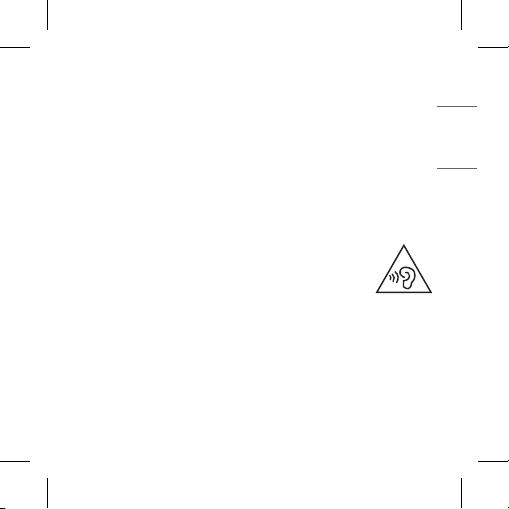
Avoiding hearing damage
Permanent hearing loss may occur if you use your headset at a high
volume.
Set the volume to a safe level. Over time you can become accustomed
to a higher volume that may sound normal but can be damaging to your
hearing.
If you experience ringing in your ears or mufed speech, stop listening
and have your hearing checked. The louder the volume, the less time is
required before your hearing could be affected.
Hearing experts suggest that to protect your hearing:
• Limit the amount of time you use the headset at high
volume.
• Avoid increasing the volume to block out noisy
surroundings.
• Decrease the volume if you can’t hear people speaking
near you.
Using headsets safely
Use of headsets to listen to music while operating a vehicle is not
recommended and is illegal in some areas. Be careful and attentive while
driving. Stop using this device if you nd it disruptive or distracting
while operating any type of vehicle or performing any other activity that
requires your full attention.
28
ENGLISH
Open Source Software Notice Information
To obtain the source code under GPL, LGPL, MPL, and other open source
licenses, that is contained in this product, please visit https://opensource.lge.
com.
In addition to the source code, all referred license terms, warranty
disclaimers and copyright notices are available for download.
LG Electronics will also provide open source code to you on CD-ROM for a
charge covering the cost of performing such distribution (such as the cost
of media, shipping, and handling) upon email request to opensource@
lge.com.
This offer is valid for a period of three years after our last shipment of this
product. This offer is valid to anyone in receipt of this information.
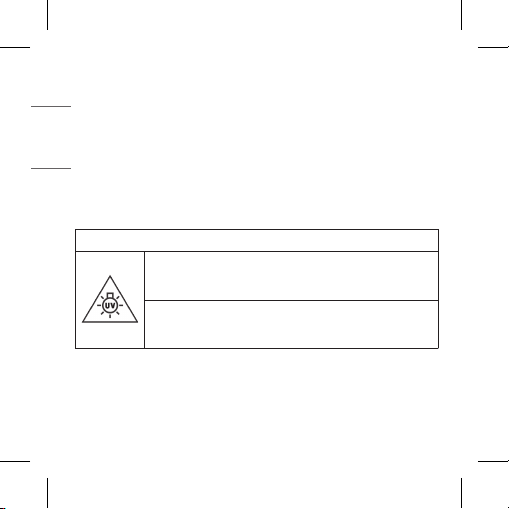
RISK GROUP 2
CAUTION : UV EMITTED FROM THIS PRODUCT.
EYE OR SKIN IRRITATION MAY RESULT FROM EXPOSURE.
USE APPROPRIATE SHIELDING.
WARNING : IF YOU ARE NOT CHARGING OR IF YOU
OPEN THE CHARGING CASE, THE UVNANO FUNCTION
IS NOT ACTIVIATED.
What is to be done when you have been overexposed to Ultraviolet (UV)
radiation?
Get medical attention after taking rst aid as follows.
-In case of the eye, place a sterile dressing over the eye.
-In case of the skin, apply cold water or ice to the skin.
29
ENGLISH
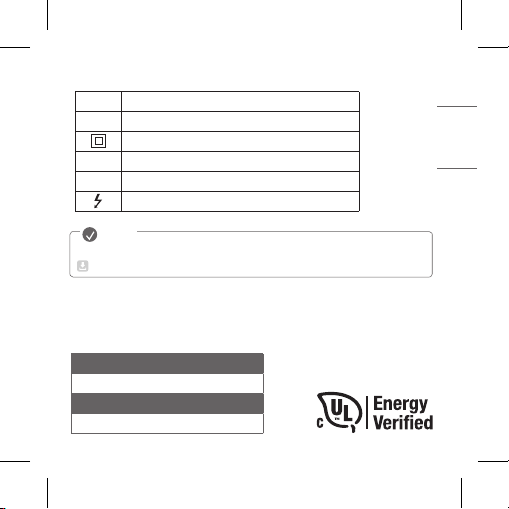
Symbols
~
Refers to alternating current (AC).
0
Refers to direct current (DC).
Refers to class II equipment.
1
Refers to stand-by.
!
Refers to “ON” (power).
Refers to dangerous voltage.
The complete manual is available for download from the LG Electronics website.
www.lg.com/ca_en/support/manuals
NOTE
The output level shall automatically return to an output level not
exceeding RS1 when the power is switched off.
LG Electronics Canada Inc. , 20 Norelco Drive, North York, ON M9L 2X6
1-888-542-2623, [email protected]
LG Customer Information Center
1-888-542-2623 CANADA
Register your product Online!
www.lg.com

FRANÇAIS
Rev 1.0 CI
TONE-FP8 / TONE-FP8W /
TONE-FP8E
www.lg.com
Droits d’auteur © 2021 LG Electronics inc. Tous droits réservés
MANUEL D’UTILISATION
Écouteurs-boutons stéréophoniques Bluetooth
MD
de LG
REMARQUE: Veuillez lire attentivement toutes les
informations avant d’utiliser les écouteurs-boutons an
d’éviter d’endommager le produit et de bénécier de la
meilleure performance.
Toute modication à ce guide pour corriger une erreur
typographique ou une inexactitude technique ne peut être
effectuée que par LG Electronics Inc.

Table des matières
1. Présentation............................................................................................................................................2
2. Jumelage ....................................................................................................................................................4
3. Port des écouteurs-boutons .........................................................................................................6
4. Écoute de la musique ........................................................................................................................7
5. Processus d'appel ................................................................................................................................8
6. Son ambiant (LAS) et suppression active du bruit (ANC) ..........................................9
7. UVnano ..................................................................................................................................................11
8. Charge......................................................................................................................................................12
9. Vérication de l’état de la batterie .........................................................................................13
Mesures de sécurité..............................................................................................................................14
Indicateur d’état de la batterie .......................................................................................................17
Fonctions d’appel sur téléphone cellulaire...............................................................................18
Appli LG TONE Free ...............................................................................................................................19
Dépannage ..................................................................................................................................................19
Fonctions et caractéristiques ..........................................................................................................21
Attestation de conformité ................................................................................................................22
Informations supplémentaires........................................................................................................24
Garantie limitée .......................................................................................................................................28
Consignes de sécurité importantes ............................................................................................28
Informations sur les logiciels libres ..............................................................................................29
Symboles .....................................................................................................................................................31
FRANÇAIS
1
FRANÇAIS
REMARQUE : Le produit réel peut différer des illustrations contenues
dans ce manuel.
* Les écouteurs-boutons sont fournis de série avec un embout de taille moyenne.
Assurez-vous d’utiliser des composants authentiques de LG Electronics.
L’utilisation d’un composant non authentique peut endommager le produit et
rendre la garantie nulle et sans effet.
Utilisez le câble USB de type C
MC
fourni avec le produit.
!
MISE EN GARDE
Boîtier de charge UV
des écouteurs-boutons
LG TONE Free
MC
Câble de charge
USB Type C
MC
Embouts
supplémentaires
(petits et grands)
Manuel d’utilisation
2
FRANÇAIS
1. Présentation
[Boîtier de charge]
Port de charge
Bornes de charge
DEL UVnano
Lumière d’ambiance
(Lorsque vous ouvrez
le boîtier de charge,
la lumière d’ambiance
s’allume et s’éteint.)
DEL UVnano
Indicateur d’état de la batterie
(haut)
Indicateur UVnano (bas)
Bornes de charge
3
FRANÇAIS
[Écouteurs-boutons]
* Assurez-vous que les bornes de charge ne contiennent aucune substance
étrangère.
* L’aspect et les caractéristiques de ce produit peuvent différer en fonction
du modèle.
Bornes de charge
Indicateur d’état de la batterie
(haut)
Indicateur UVnano (bas)
Grille de haut-
parleur
(Microphone)
Microphone
Microphone
Pavé tactile
Pavé tactile
Bornes de charge
Bornes de charge
Grille de haut-
parleur
(Microphone)
4
FRANÇAIS
2. Jumelage
Activez la fonction
Bluetooth
sur le téléphone portable ou l’appareil à
connecter.
Ouvrez le couvercle du boîtier de charge, les écouteurs-boutons en place
dans le boîtier. Tenez le doigt sur le pavé tactile de l'écouteur-bouton
gauche ou droit pendant 3 à 5 secondes jusqu’à ce que l’indicateur du
statut de la batterie clignote en bleu.
-(
-(
#MVFUPPUI
0/
~39 po, ~1m
Lorsque la fenêtre contextuelle de jumelage
rapide (Fast Pair) apparaît dans la partie
supérieure de l’écran du téléphone mobile,
touchez-la pour effectuer la connexion.
y Ne prend en charge que les versions
Android
MC
6.0 ou supérieures et nécessite
la conguration des paramètres Bluetooth
et des données de localisation de l’appareil
mobile.
-(
-(
-(50/&'1
5
FRANÇAIS
Si la fenêtre contextuelle n’apparaît pas,
sélectionnez [LG-TONE-FP8] depuis le
menu Bluetooth du téléphone portable et
effectuez la connexion (utilisateurs d’iOS ou
d’Android 5.0 ou de versions inférieures).
!
MISE EN GARDE : Dans la liste des
appareils connectés par Bluetooth,
LG-TONE-FP8_LE n’est pas le bon nom
pour la connexion. Vériez le nom du
modèle utilisé et établissez la connexion
avec le nom du modèle sans le «LE».
Si le nom du modèle de l'écouteur-bouton s’afche de façon
anormale sur l’appareil Android, modiez-le dans le menu Bluetooth
des paramètres de l’appareil connecté.
REMARQUE : Pour vous connecter à un autre appareil, répétez la
procédure ci-dessus.
-(
-(
-(50/&'1
#MVFUPPUI
6
FRANÇAIS
3. Port des écouteurs-boutons
Retirez les écouteurs-boutons du boîtier de charge et ajustez-les de
sorte qu’ils se portent confortablement dans vos oreilles.
REMARQUE :
Utilisez les embouts qui conviennent le
mieux à vos oreilles pour améliorer la performance de la
suppression active du bruit (ANC).
Une tonalité conrme le port des écouteurs-boutons.
7
FRANÇAIS
4. Écoute de la musique
-(
Fonction Description
Lecture /
Pause
: Touchez l'écouteur-bouton gauche ou droit
une fois.
Réglage du
volume
: Touchez l'écouteur-bouton gauche (diminuer
le volume) ou droit (augmenter le volume)
deux fois.
Piste
suivante
:
Touchez l'écouteur-bouton gauche ou droit
trois fois
.
REMARQUE : Vous pouvez modier le mode de fonctionnement dans les
paramètres du pavé tactile de l’application LG TONE Free.
8
FRANÇAIS
5. Processus d'appel
Fonction Description
Prendre un appel
: Touchez l'écouteur-bouton gauche
ou droit une fois.
Terminer un appel
:
Touchez l'écouteur-bouton gauche ou
droit deux fois.
Refuser un appel
: Tenez le doigt sur l'écouteur-bouton
gauche ou droit.
REMARQUE : Voyez les Fonctions d'appel sur téléphone cellulaire
plus loin dans le présent mode d'emploi.
9
FRANÇAIS
6. Son ambiant (LAS) et suppression active du bruit (ANC)
[Son
ambiant (LAS)
]
L'écoute avec son ambiant (LAS) vous permet d'entendre les bruits
environnants an de reconnaître la situation environnante et les risques
potentiels.
[Suppression active du bruit (ANC)]
La suppressioni active du bruit (ANC) bloque tout son ambiant. Utilisez
cette fonction pour écouter de la musique ou visionner une vidéo.
10
FRANÇAIS
Tenez le doigt sur l'écouteur-bouton gauche ou droit pour alterner entre les
modes ANC et LAS.
Vous pouvez régler les fonctions LAS et ANC dans l’application LG TONE Free.
Vous pouvez congurer les modes Écoute avec son ambiant et
Conversation dans l’application gratuite LG TONE.
Si vous utilisez la fonction LAS ou ANC, la batterie s’épuise plus
rapidement, ce qui réduit la durée d’utilisation du produit.
Vous pouvez utiliser les fonctions LAS et ANC au repos, en écoutant de la
musique ou en parlant au téléphone.
* ANC est l’acronyme de Active Noise Cancellation (Suppression active
du bruit).
* LAS est l'acronyme de Listen to the Ambient Sound (Écoute avec son
ambiant).
!
MISE EN GARDE :
Lorsque le mode LAS est activé, le son ambiant
peut devenir soudainement fort. Lorsque vous utilisez la fonction ANC à
l’extérieur, portez attention à vos alentours pour plus de sécurité.
11
FRANÇAIS
7. UVnano
Le boîtier de charge est doté de deux
DEL UVnano intégrées qui permettent
de réduire les bactéries sur les mailles du
haut-parleur des oreillettes.
La DEL UVnano fonctionne pendant
5 minutes lorsqu'elle est xée dans
le boîtier de charge tandis qu'elle est
chargée via une connexion laire ou un
chargeur sans l.
* UVnano est un mot composé dérivé du
mot UV et de son unité, le nanomètre.
REMARQUE : L’indicateur UVnano apparaît en bleu lorsque la DEL
UVnano est allumée.
Le boîtier de charge UVnano est conçu pour aider à réduire les
bactéries sur la grille de haut-parleur des écouteurs-boutons. UVnano
ne remplace pas les pratiques standard de contrôle des infections.
Dans le cas d’un produit de couleur blanche, une décoloration peut se
produire dans la zone de contact de la DEL UVnano, mais elle n’affecte
pas le fonctionnement du produit.
!
MISE EN GARDE : Gardez à l’esprit que la température des écouteurs-
boutons peut s'élever lorsque la DEL UVnano est allumée.
12
FRANÇAIS
8. Charge
[Charge laire]
Lorsque le câble de charge est
connecté, l’état de charge s’afche
sur le boîtier de charge.
REMARQUE : Les écouteurs-
boutons et le boîtier de
charge se rechargent en
même temps. Le port de
charge du boîtier de charge
ne peut pas être utilisé pour
alimenter les téléphones
portables ou autres.
[Charge sans l]
Alignez le centre inférieur du boîtier de recharge avec
le centre du chargeur sans l.
REMARQUE : Le chargeur sans l n’est pas
fourni. La fonction de recharge sans l peut
ne pas correspondre pour certains chargeurs
sans l. La fonction de recharge sans l
charge à un rythme plus lent en raison de la
réduction de la puissance transmise au boîtier
de recharge. Lors du chargement sans l, le
processus UVnano commencera pendant
5 minutes avant le chargement.
13
FRANÇAIS
9. Vérication de l’état de la batterie
Si les écouteurs-boutons sont xés dans le boîtier de charge, l’état de la
batterie des écouteurs-boutons s’afche. Sinon, l’état de la batterie du
boîtier de charge s’afche.
Si les écouteurs-boutons sont montés dans le boîtier de charge alors qu’ils
sont branchés, le processus UVnano débutera pendant 5 minutes. Une fois
ce processus terminé, l’état de la batterie du boîtier de charge sera afché.
Indicateur
d’état de la
batterie
Charge restante
(chargeur
débranché)
État de charge
(chargeur
branché)
Rouge 20% ou moins En charge
Jaune 20% à 80% -
Vert 80% ou plus
Complètement
chargé
REMARQUE : Lorsque le couvercle du boîtier de charge est fermé,
l’état de la batterie du boîtier de charge s’afche. Si le boîtier
de charge est déchargé, rien ne sera afché et il ne pourra pas
fonctionner. Nous vous recommandons de maintenir le niveau de
charge du boîtier de charge, car les écouteurs-boutons ne peuvent
s’allumer ni s’éteindre indépendamment.
14
FRANÇAIS
Mesures de sécurité
Les mesures de sécurité suivantes se veulent de prévenir tout accident ou
dommage inattendu. Il convient de se familiariser avec les mesures de sécurité.
Les mesures de sécurité sont classées en «AVERTISSEMENT» et
«MISE EN GARDE».
!
AVERTISSEMENT : Le non-respect des instructions peut entraîner
des blessures graves ou la mort.
!
MISE EN GARDE : Le non-respect des instructions peut entraîner des
blessures légères ou des dommages au produit.
!
AVERTISSEMENTS
Évitez de laisser tomber le produit de haut.
Évitez tout contact du produit avec de l'eau, de l'alcool ou du benzène.
Ne rangez pas le produit dans un endroit humide ou poussiéreux.
Ne placez jamais d’objets lourds sur le produit.
Ce produit offre une étanchéité IPX4 (étanchéité en usage de tous les jours).
(L’indice d’étanchéité IPX4 s’applique uniquement aux écouteurs-boutons).
Ne plongez pas le produit dans l’eau et ne l’utilisez pas dans un endroit
humide comme une salle de bain.
!
MISES EN GARDE
N’essayez pas de désassembler, d’ajuster ou de réparer l’appareil.
Ne placez pas le produit près d’une source de chaleur excessive ni de
matières inammables.

15
FRANÇAIS
Vous risquez d’endommager le produit si vous utilisez un chargeur non
compatible.
Assurez-vous qu’aucun bébé ni enfant n’avale d’aimant ou de petit
composant du produit.
Assurez-vous qu’aucun corps étranger ne pénètre dans les connecteurs
du chargeur (port de charge et prise d’alimentation). Sinon, cela pourrait
entraîner des décharges électriques ou provoquer un incendie.
Si vous portez un implant médical, consultez votre médecin avant
d’utiliser cet appareil.
Ce produit comporte une batterie intégrée qui ne peut être ni retirée, ni
remplacée arbitrairement.
Pour votre sécurité, ne retirez pas la batterie intégrée au produit.
Si vous remplacez arbitrairement la batterie ou si vous ne la remplacez
pas correctement, elle peut exploser.
La batterie au lithium-ion est un composant dangereux qui peut causer
des blessures.
Le remplacement de la batterie par un professionnel non qualié risque
d’endommager votre appareil.
Ne jetez pas la batterie arbitrairement. Suivez la procédure locale
d’élimination des batteries.
Risque d’incendie ou d’explosion si la batterie est remplacée par un type
incorrect.
N'entreposez ni ne transportez la batterie à des pressions inférieures à
11,6 kPa (0,116 bar) et à une altitude de plus de 15 000 m (9.32 milles).
Remplacer une batterie par un type incorrect peut faire échouer un
dispositif de protection (par exemple, dans le cas de certains types de
batteries au lithium);
Jeter une batterie dans le feu ou un four chaud, ou l’écraser ou la couper
mécaniquement, peut entraîner une explosion.

16
FRANÇAIS
Exposer une batterie à une température extrêmement élevée peut entraîner
une explosion ou une fuite de liquide ou de gaz inammable;
Soumettre une batterie à une pression d’air extrêmement basse peut
entraîner une explosion ou une fuite de liquide ou de gaz inammable.
Jeter imprudemment des batteries usées peut provoquer une explosion
ou un incendie. La méthode d’élimination peut varier selon les pays et les
régions. Jetez-les de manière appropriée.
AVERTISSEMENT – Cet appareil émet des rayons UV.
L’utilisation involontaire de l’appareil ou l’endommagement du boîtier peut
entraîner une exposition aux rayons ultraviolets.
Les rayons ultraviolets peuvent provoquer une irritation des yeux et de
la peau.
Évitez toute exposition des yeux et de la peau aux rayons ultraviolets.
L’utilisation de cet appareil est un complément et non un substitut aux
pratiques standard de prévention des infections; les utilisateurs doivent
continuer à suivre toutes les pratiques courantes de prévention des
infections, y compris celles liées au nettoyage et à la désinfection des
surfaces environnementales.
GARDER HORS DE PORTÉE DES ENFANTS.
Ne pas désassembler le produit ni utilisez le composant DEL UV à
des ns autres que celles qui sont prévues. La lumière ultraviolette
provenant de la DEL UV est nocive pour vos yeux.
17
FRANÇAIS
REMARQUE
Nettoyez le produit s’il est exposé à une sueur excessive.
Maintenez les écouteurs-boutons propres.
Porter des écouteurs-boutons pendant une longue période peut causer
de la douleur, et si de l’humidité persistait à l’intérieur des oreilles
pendant une longue période, cela pourrait causer des problèmes cutanés.
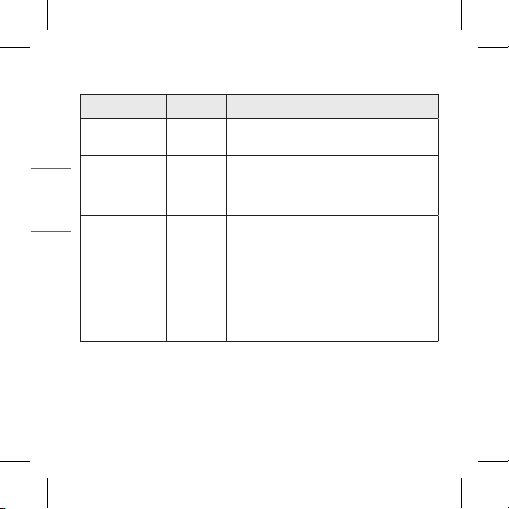
Indicateur d’état de la batterie
État Description
Mode de recherche
Bluetooth
L’indicateur d’état de la batterie clignote
en bleu.
Batterie faible à
moins de 20 %
L’indicateur d’état de la batterie s’allume et
s’éteint en rouge.
Batterie entre 20 %
et 80 %
L’indicateur d’état de la batterie s’allume et
s’éteint en jaune.
Batterie à 80 %
ou plus
L’indicateur d’état de la batterie s’allume et
s’éteint en vert.
Problème pendant la
charge
L’indicateur d’état de la batterie clignote en
rouge.
Charge
(chargeur connecté)
L’indicateur d’état de la batterie s’allume en
rouge.
Charge terminée
(chargeur connecté)
L’indicateur d’état de la batterie s’allume
en vert.
18
FRANÇAIS
Fonctions d’appel sur téléphone cellulaire
Fonction État Description
Prendre un
appel
Sonnerie
Touchez l'écouteur-bouton gauche ou
droit une seule fois.
Faire un appel Inactif
Si vous faites un appel à l’aide d’un
téléphone cellulaire, l’appel est
automatiquement connecté aux
écouteurs-boutons.
Recevoir
des appels
pendant que
vous êtes au
téléphone
Pour
parler
Si vous touchez l'écouteur-bouton
gauche ou droit une fois, l’appel en
cours sera mis en attente et vous
pourrez répondre à un appel entrant.
Si l’appel précédent est en attente, vous
pouvez terminer l’appel en cours sur le
téléphone cellulaire.
(Ceci fonctionne différemment selon la
conguration du téléphone cellulaire.)
19
FRANÇAIS
Appli LG TONE Free
Si vous installez l’application « LG TONE Free », vous pouvez utiliser les
fonctions Vérier la batterie des écouteurs, Alerte vocale, Changer le
mode de l’égaliseur, Vérier les dernières informations de localisation
connectée et Trouver mes écouteurs. Consultez l’application pour plus de
détails.
Pour installer l’application « LG TONE Free », recherchez LG TONE Free
dans la boutique Google Play ou l’App Store ou scannez le code QR
ci-dessous. Les appareils Android 7.0 et plus récents et iOS 11 ou plus
récents sont pris en charge.
Google Play App Store
Dépannage
Si vous observez l’un des comportements suivants lors de l’utilisation du
produit, assurez-vous de le vérier à nouveau. Il ne s’agit peut-être pas
d’un dysfonctionnement.
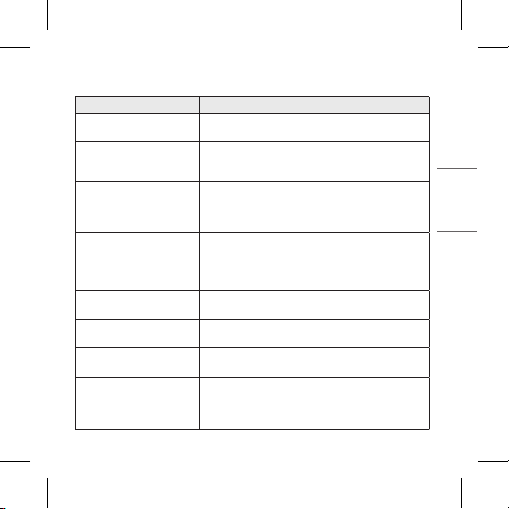
Comportement Cause et solution
L’appareil ne s’allume
pas
Vériez le niveau de la batterie et rechargez-la.
20
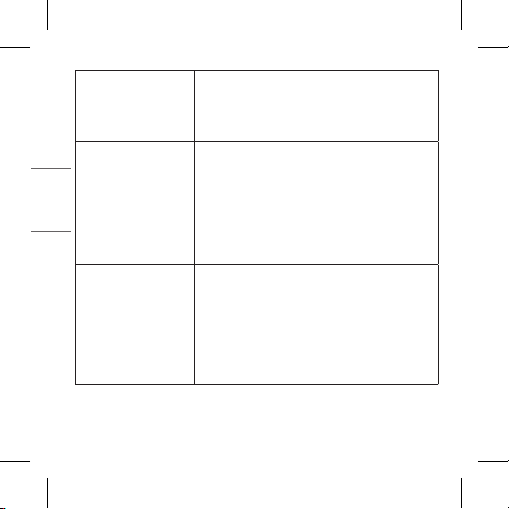
FRANÇAIS
Impossible de faire
un appel avec les
écouteurs-boutons
Si le téléphone cellulaire ne prend pas en
charge les fonctions d’écouteurs et de mains
libres, vous ne pouvez pas utiliser les fonctions
d’appel.
Vériez le niveau de la batterie et rechargez-la.
Impossible de jumeler
les écouteurs-boutons
au téléphone mobile
Vériez si les écouteurs-boutons sont activés.
Vériez si les écouteurs-boutons sont en mode
recherche.
- Lorsque les écouteurs-boutons sont insérés
dans le boîtier de charge, tenez le doigt sur le
pavé tactile de l’écouteur-bouton gauche ou
droit pendant 3 à 5 secondes pour passer en
mode recherche.
Si vous avez replacé les
écouteurs-boutons ou
s’il y a un problème de
fonctionnement
(Réinitialisation)
Lorsque les écouteurs-boutons sont insérés
dans la boîte de charge, tenez le doigt sur le
pavé tactile de l'écouteur-bouton gauche ou
droit pendant 10 secondes ou plus.
- L’indicateur d’état de la batterie clignote
en rouge et la réinitialisation s’exécute.
Rejumelez les écouteurs-boutons une fois la
réinitialisation terminée.
21
FRANÇAIS
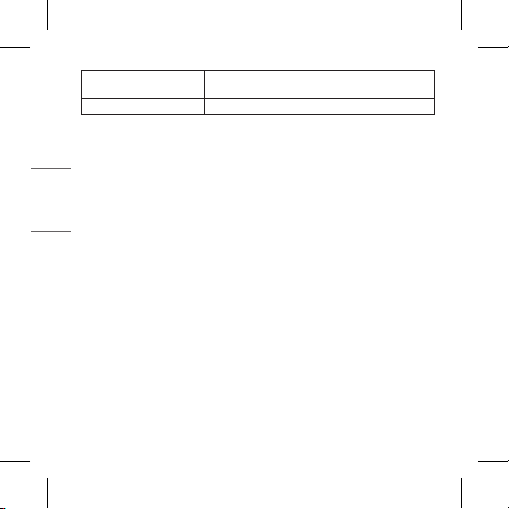
Fonctions et caractéristiques
Élément Commentaires
Caractéristiques
Bluetooth
V 5.2 (casque d’écoute/mains libres/A2DP/
AVRCP)
Batterie
Écouteurs : 3,7 V / 68 mA h, lithium-ion
Boîtier de charge : batterie 3,7 V /
390 mA h, lithium-ion
Autonomie d'écoute
avec les écouteurs-
boutons et dans le
boîtier de charge
ANC désactivé : Jusqu’à 10 et 24 heures*
ANC activé : Jusqu’à 6 et 15 heures*
Délai de charge
Écouteurs-boutons : 1 h / boîtier de charge : 2 h
Charge rapide : 5 min. de charge pour jusqu’à
60 min. de lecture*
※ Charge laire à température ambiante
Tension d’alimentation
nominale
Écouteurs-boutons : 5 V 0 136 mA
Boîtier de charge : 5 V 0 500 mA
Température de
service
0 °C à 40 °C (32 °F à 104 °F)
Niveau d’humidité en
service
5 % à 60 %
Dimensions (mm)
Écouteurs-boutons : 21,2 X 28,3 X 23,2 mm
(L x P x H)
Boîtier de charge : 54,5 X 54,5 X 30 mm
(L x P x H)
22
FRANÇAIS
Poids (g)
Écouteurs-boutons : 5,2 g (un écouteur)
Boîtier de charge : 39 g
Plage de fréquences 2 402 MHz à 2 480 MHz
* L'autonomie peut varier en fonction de l’appareil connecté, des fonctions
utilisées, des paramètres, de la force du signal, de la température de
fonctionnement, de la bande de fréquences et d’autres modes d’utilisation.
La fonction de charge rapide ne s’applique pas lorsque le boîtier de
recharge est placé sur un appareil de charge sans l comme une station
de charge.
La fonction de charge sans l charge à un rythme plus lent en raison de la
réduction de la puissance transmise au boîtier de recharge.
Attestation de conformité
Avis d’Industrie Canada
[Pour la fonction sans l (WLAN, Bluetooth, etc.)]
L’émetteur-récepteur exempt de licence contenu dans le présent appareil
est conforme aux CNR d’Innovation, Sciences et Développement
économique Canada applicables aux appareils radio exempts de licence.
L’exploitation est autorisée aux deux conditions suivantes :
(1) L’appareil ne doit pas provoquer d’interférences;
(2) Cet appareil doit accepter toutes les interférences, y compris celles
pouvant entraîner son dysfonctionnement.
CAN ICES-003 (B) / NMB-003 (B)
23
FRANÇAIS
Avis d’Industrie Canada sur l’exposition aux rayonnements
[Pour la fonction sans l (WLAN,
Bluetooth
, etc.)]
Cet appareil est conforme aux limites d’exposition aux rayonnements
d’Industrie Canada pour un environnement non contrôlé.
REMARQUE : LE FABRICANT N’EST PAS RESPONSABLE DES
INTERFÉRENCES RADIOÉLECTRIQUES CAUSÉES PAR DES
MODIFICATIONS NON AUTORISÉES APPORTÉES À CET ÉQUIPEMENT.
DE TELLES MODIFICATIONS POURRAIENT ANNULER L’AUTORISATION
ACCORDÉE À L’UTILISATEUR DE FAIRE FONCTIONNER L’APPAREIL.
Bluetooth® est une marque déposée de Bluetooth SIG, Inc. dans le monde
entier.
Android, Google Play, le logo Google Play et autres marques et logos
associés sont des marques commerciales de Google LLC.
FCC ID: ZNFTONEFP8
IC: 2703C-TONEFP8

24
FRANÇAIS
Informations supplémentaires
1. Exposition aux fréquences radio
Les écouteurs-boutons stéréophoniques Bluetooth de LG sont des
émetteurs-récepteurs radio. Durant leur fonctionnement, ils communiquent
avec un appareil mobile Bluetooth en recevant et en émettant des champs
électromagnétiques (micro-ondes) de fréquences radio (RF) dans la plage
de fréquences de 2 402à 2 480MHz. Vos écouteurs-boutons Bluetooth
sont conçus pour fonctionner conformément aux directives et aux limites en
matière d’exposition aux fréquences radio dénies par les autorités nationales
et les agences sanitaires internationales, lors de l’utilisation avec tout appareil
LG Electronics compatible.
2. Précautions relatives à la connexion
Bluetooth
Les environnements suivants réduisent la portée et la réception des
signaux Bluetooth :
-Lorsque des murs, du métal, des corps humains ou d’autres obstacles se
trouvent entre l’appareil Bluetooth et l’appareil connecté;
-Lorsqu’un équipement utilisant des signaux de fréquence de 2,4 GHz
(réseaux sans l, téléphones sans l, fours à micro-ondes, etc.) est placé
près des appareils utilisés.
-Lorsque vous utilisez un appareil Bluetooth (téléviseur, ordinateur
portable, etc.) autre qu’un téléphone portable, la qualité sonore peut
être perturbée par les caractéristiques et les performances de l’appareil.
3. Zone avec risque de déagration
Éteignez votre appareil électronique dans les zones où il y a un risque
de déagration. Bien que ce phénomène soit rare, il est possible que
votre appareil électronique génère des étincelles. Dans de telles zones,

25
FRANÇAIS
une étincelle peut provoquer une explosion ou un incendie entraînant
des blessures, voire la mort. Ces zones sont habituellement, mais pas
toujours, clairement identiées.
4. Appels d’urgence
IMPORTANT!
Ces écouteurs-boutons Bluetooth et l’appareil électronique connecté
fonctionnent en utilisant des signaux radio, des réseaux cellulaires et
laires ainsi que des fonctions programmées par l’utilisateur qui ne
peuvent pas garantir une connexion en tout temps. Par conséquent,
ne comptez jamais uniquement sur un appareil électronique pour les
appels importants (urgences médicales, par exemple). Pour l’émission
ou la réception d’appels, les écouteurs-boutons et l’appareil électronique
connecté doivent être allumés et se trouver dans une zone de service
fournissant une puissance de signal cellulaire adéquate. Il est possible
que les appels d’urgence n’aboutissent pas sur tous les réseaux de
téléphonie cellulaire ou lorsque certains services réseau ou fonctions
téléphoniques sont utilisés. Communiquez avec votre fournisseur de
services local.
5. Information sur la batterie
Si elle est utilisée adéquatement, une batterie rechargeable a une
longue durée de vie. Une batterie neuve ou une batterie qui n’a pas été
utilisée pendant longtemps peut avoir une autonomie réduite lors de
ses premières utilisations. N’exposez pas la batterie aux températures
extrêmes, jamais au-dessus de 50 °C (122 °F) ou au-dessous de -10
°C (14 °F). Pour
optimiser l’autonomie de la batterie, utilisez-la à la
température ambiante. Si la batterie est utilisée à une température
basse, sa capacité sera réduite. La batterie ne peut être chargée qu’à une
température comprise entre 0 °C (32 °F) et 45 °C (113 °F).

26
FRANÇAIS
6. Recyclage de la batterie de votre casque d’écoute
Bluetooth
La batterie de vos écouteurs-boutons Bluetooth doit être recyclée de
manière appropriée et ne doit en aucun cas être jetée dans les déchets
municipaux. Le partenaire de service de LG Electronics chargé d’enlever la
batterie la jettera conformément aux règlements locaux.
Si le produit inclut une batterie rechargeable, celle-ci devrait être recyclée
conformément aux normes de recyclage des batteries rechargeables.
Pour vous en débarrasser correctement, appelez au 1 800 822-8837, ou
visitez le site www.appelarecycler.ca.
7. Conditions
-La garantie est valable uniquement si le reçu d’achat original que le
vendeur a remis à l’acheteur original, précisant la date d’achat et le
numéro de série, est présenté avec le produit à réparer ou à remplacer.
LG Electronics se réserve le droit de refuser d’assurer le service de
garantie si ces informations ont été effacées ou modiées après l’achat
original du produit auprès du détaillant.
-Si LG Electronics répare ou remplace le produit, le produit réparé ou
remplacé sera garanti pour la durée restante de la garantie initiale ou
quatre-vingt-dix (90) jours après la date de la réparation, selon la plus
longue durée des deux. La réparation ou le remplacement pourra être
effectué au moyen d’unités reconditionnées équivalentes sur le plan
fonctionnel. Les pièces ou composants remplacés deviendront la propriété
de LG Electronics.
-La présente garantie ne couvre aucune défaillance du produit causée par
l’usure normale, une mauvaise utilisation, y compris, mais sans s’y limiter,
une utilisation dans des conditions autres que les conditions normales
et habituelles, conformément aux instructions en matière d’utilisation
ou d’entretien. Elle ne couvre pas non plus toute défaillance du produit

27
FRANÇAIS
causée par un accident, une modication ou un réglage, des cas de force
majeure ou des dommages résultant du contact avec un liquide.
-La présente garantie ne couvre pas les défaillances du produit causées
par des installations, des modications ou des réparations effectuées
par une personne non agréée par LG Electronics. Toute modication des
sceaux sur le produit entraîne l’annulation de la garantie.
-IL N’EXISTE AUCUNE GARANTIE EXPRESSE, ÉCRITE OU ORALE,
AUTRE QUE LA PRÉSENTE GARANTIE LIMITÉE IMPRIMÉE. TOUTES
LES GARANTIES IMPLICITES, Y COMPRIS, MAIS SANS S’Y LIMITER, LES
GARANTIES IMPLICITES DE QUALITÉ MARCHANDE OU D’ADÉQUATION
À UN USAGE PARTICULIER, SONT LIMITÉES À LA DURÉE DE
LA PRÉSENTE GARANTIE LIMITÉE. LG ELECTRONICS OU SES
FOURNISSEURS NE SERONT EN AUCUN CAS RESPONSABLES DES
DOMMAGES ACCESSOIRES OU INDIRECTS DE QUELQUE NATURE QUE
CE SOIT, Y COMPRIS, MAIS DE FAÇON NON LIMITATIVE, LES PERTES
DE BÉNÉFICES OU D’ACTIVITÉS COMMERCIALES, DANS LA MESURE
OÙ LA LOI AUTORISE L’EXCLUSION DE TELS DOMMAGES.
• Certains pays/états n’autorisent pas l’exclusion ou la limitation des
dommages accessoires ou indirects, voire la limitation de la durée des
garanties implicites.
De ce fait, les limitations ou exclusions qui précèdent pourraient ne pas
s’appliquer à votre cas. La garantie fournie ne concerne ni les droits
légaux du consommateur selon la législation applicable en vigueur, ni les
droits du consommateur vis-à-vis du revendeur découlant du contrat de
vente/d’achat passé entre eux.

28
FRANÇAIS
Garantie limitée
Sous réserve des conditions de la présente garantie limitée, LG Electronics
garantit que le présent produit est exempt de défauts de conception, de
matériaux et de fabrication au moment de l’achat initial par un consommateur,
et ce, pendant un (1) an. Si votre produit nécessite une réparation couverte
par la garantie, veuillez le retourner au revendeur auprès duquel il a été acheté
ou communiquez avec le centre d’appels LG Electronics de votre région pour
obtenir de plus amples renseignements.
Consignes de sécurité importantes
Prévention de la perte d’acuité auditive
Une perte auditive permanente est possible si vous utilisez vos
écouteurs-boutons à un volume élevé.
Réglez le volume à un niveau sécuritaire. Avec le temps, vous pouvez
vous habituer à un volume sonore qui vous paraît normal, mais qui peut
entraîner une diminution de l’acuité auditive.
Si vous entendez des sifements dans vos oreilles ou si les paroles de
vos interlocuteurs vous semblent étouffées, cessez l’utilisation de vos
écouteurs-boutons et consultez un médecin. Plus le volume est élevé,
moins il faut de temps pour que votre acuité auditive diminue.
Voici quelques conseils d’experts en audition pour vous aider à vous protéger :
29
FRANÇAIS
• Limitez le temps passé à utiliser vos écouteurs-boutons à
un volume élevé.
• Évitez d’augmenter le volume pour couvrir le bruit ambiant.
•
Réduisez le volume si vous n’entendez pas les personnes qui
parlent à côté de vous.
Utilisation en toute sécurité des écouteurs-boutons
Il est déconseillé et, dans certaines régions, illégal, d’utiliser des
écouteurs-boutons pour écouter de la musique au volant d’un véhicule en
mouvement. Soyez prudent et vigilant lorsque vous conduisez. N’utilisez
pas votre appareil s’il vous dérange ou vous distrait lorsque vous êtes
au volant de tout type de véhicule ou lorsque vous exercez toute autre
activité qui requiert votre plus grande attention.
Informations sur les logiciels libres
Pour obtenir le code source conformément aux dispositions de la licence
publique générale, de la licence publique générale limitée, de la licence publique
Mozilla et de toute autre licence régissant les logiciels à code source libre
contenus dans cet appareil, visitez le site https://opensource.lge.com.
En plus du code source, toutes les dispositions de licence, les exonérations
de garantie et les avis de droits d’auteur peuvent aussi être téléchargés.
LG Electronics mettra également à votre disposition le code source libre
sur CD-ROM pour un prix couvrant le coût de la distribution (coût du
support, de l’expédition et de la manutention) sur simple demande par
courriel à l’adresse [email protected]om.
Cette offre est valable pendant une période de trois ans à compter de la
date de la dernière distribution de ce produit. Cette offre est valide pour
quiconque possède cette information.
30
FRANÇAIS
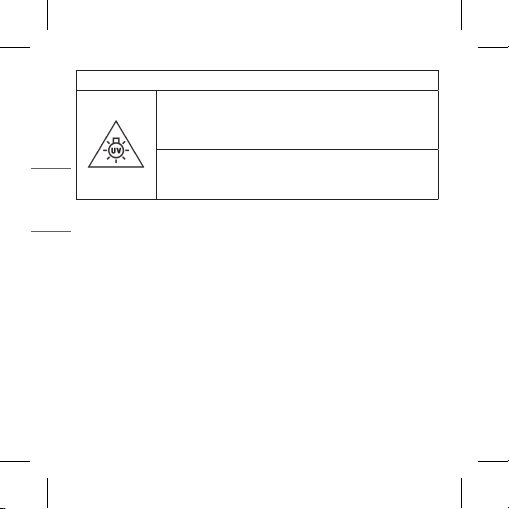
GROUPE DE RISQUE 2
MISE EN GARDE: UV ÉMIS PAR CE PRODUIT.
UNE IRRITATION DES YEUX OU DE LA PEAU PEUT
RÉSULTER D’UNE EXPOSITION.
UTILISEZ UNE PROTECTION APPROPRIÉE.
AVERTISSEMENT: LA FONCTION UVNANO N’EST PAS
ACTIVÉE SI VOUS NE RECHARGEZ PAS OU SI VOUS
OUVREZ LE BOÎTIER DE CHARGE.
Que faire lorsque vous avez été surexposé aux rayons ultraviolets (UV)?
Consultez un médecin après avoir eu les premiers soins comme suit.
-En cas d'atteinte des yeux, recouvrez-les d'un pansement stérile.
-Dans le cas de la peau, appliquez de l'eau froide ou de la glace sur la
peau.
31
FRANÇAIS
Symboles
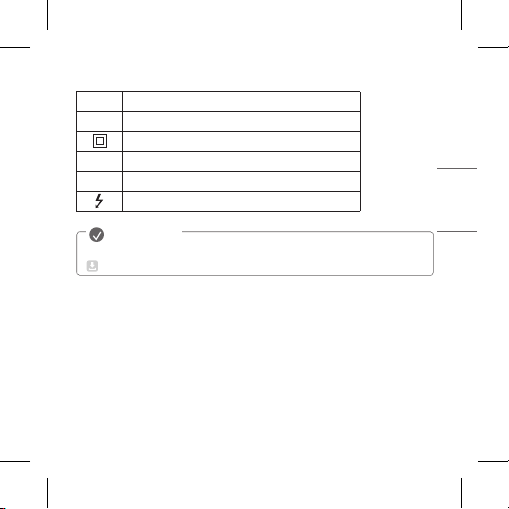
~
Désigne le courant alternatif (CA).
0
Désigne le courant continu (CC).
Désigne un équipement de classe II.
1
Désigne la mise en veille.
!
Désigne la mise en marche (alimentation).
Désigne une tension dangereuse.
Le guide complet peut être téléchargé depuis le site Web de LG Electronics.
www.lg.com/ca_fr/soutien/manuels
REMARQUE
Le niveau d’émission retourne automatiquement à un niveau n’excédant
pas RS1 quand l’alimentation est coupée.
32
FRANÇAIS
Centre d’information à la clientèle de LG
1 888 542-2623 CANADA
Enregistrez votre produit en ligne!
www.lg.com
LG Electronics Canada Inc. , 20 Norelco Drive, North York, ON M9L 2X6
1-888-542-2623, [email protected]