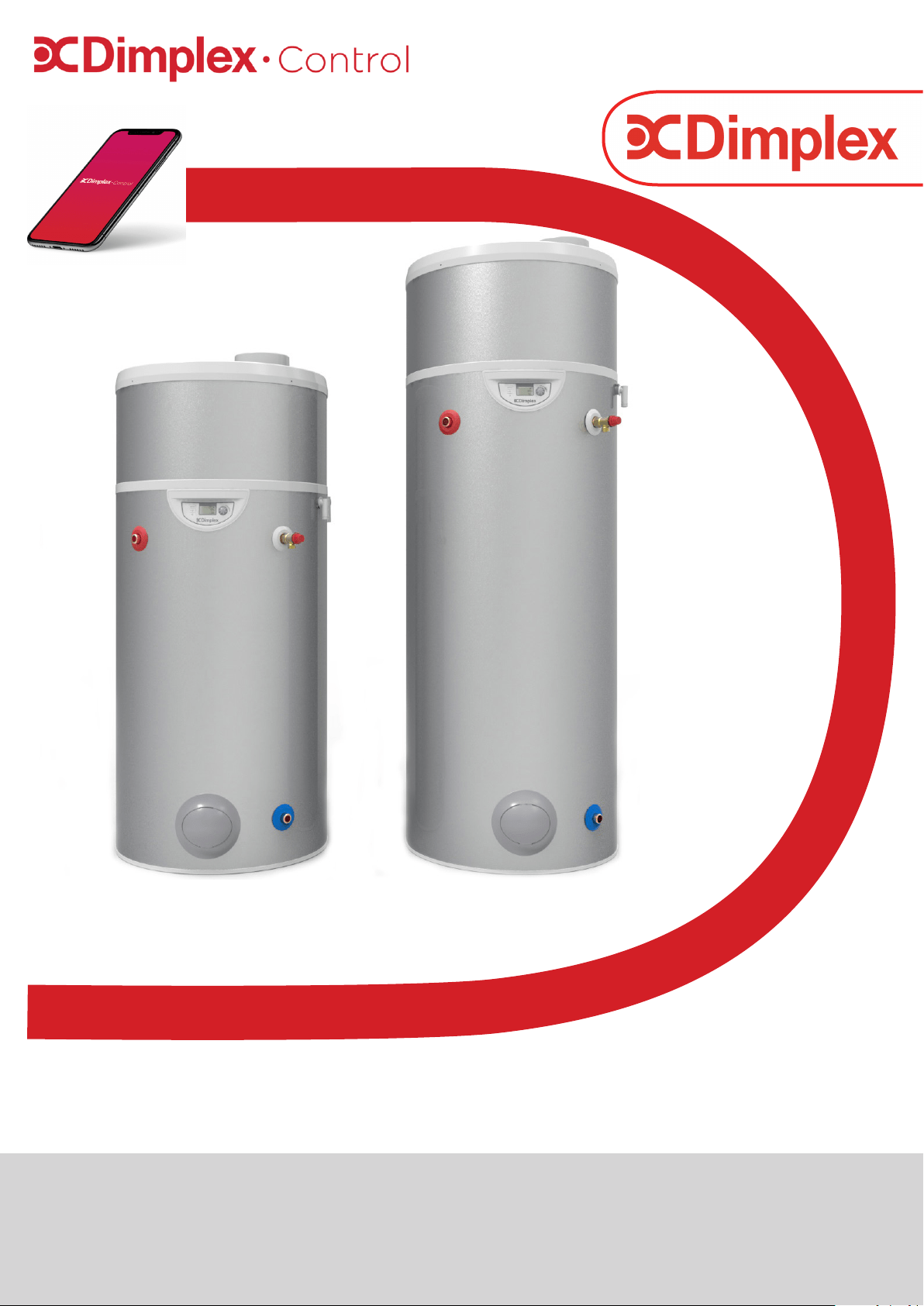
Air Source Heat Pump Water Heater
Installation and User Instructions
RD01144-2
Important - This manual must be left with user after Installation!
Edel RF
GDC Group Ltd is a licensed member of the Benchmark Scheme which
aims to improve the standards of installation and commissioning of do-
mestic heating and hot water systems in the UK and to encourage regu-
The purpose is to ensure that customers are provided with the correct
equipment for their needs, that it is installed, commissioned and ser-
viced in accordance with the manufacturer’s instructions by competent
persons and that it meets the requirements of the appropriate Building
-
pliance with Building Regulations and should be provided to the custom-
Installers are required to carry out installation, commissioning and ser-
vicing work in accordance with the Benchmark Code of Practice which is
available from the Heating and Hot Water Industry Council who manage
-
The Hot Water Association (HWA) Charter is a code of Practice which
requires that all members adhere to the following:
•
• supply products that meet, or exceed appropriate standards and
building and water regulations
• provide pre and post sales technical support
• provide clear and concise warranty details to customers
For further information on HWA Charter Membership, please refer to
-
These products are tested in accordance with EN12897:2016

3
Contents
Contents
1 Manual Warnings 4
2 Safety Information 4
3 Introduction 5
3.1 Control App 5
4 Scope of Delivery 5
5 Pre-Installation 5
5.1 Handling 5
5.2 Unpacking 5
5.3 Pipework 6
5.4 Taps and Fittings 6
5.5 Risk Assessment 6
5.6 Siting Considerations 6
5.7 Cold Water Supply 6
5.8 Building Regulation G3
Discharge Requirements 7
5.8.1 Discharge Pipe D2 7
5.8.2 Worked Example 7
5.8.3 Termination of Discharge
Pipe 8
5.9 Product Disposal 8
6 Installation 8
6.1 Correctly Site the Cylinder 8
6.2 Cold Water Inlet with Inlet
Control Group 8
6.2.1 Install the Inlet Group 8
6.2.2 Expansion Vessel 8
6.2.3 Balanced Cold Water Supply 9
6.2.4 Drain Valve 9
6.3 Hot Water Outlet 9
6.3.1 Thermostatic Mixing Valve 9
6.3.2 Pipe Insulation 9
6.4 Discharge Pipes from Safety
Devices 9
6.4.1 Discharge Pipe D1 9
6.4.2 Discharge Pipe D2 9
6.4.3 Tundish 9
6.5 Immersion Heaters 9
6.6 Air Connection 10
6.7 Ducting Design 10
6.7.1 Worked Example 10
6.8 Condensates Draining 10
6.9 Electrical Connections 11
6.9.1 Accessing Electrical Connections 11
6.9.1.1 Electricity Provider Contact 11
6.9.1.2 Connecting the PV Function 11
7 Set-Up and Use 12
7.1 Commissioning 12
7.2 Using your Hot Water Heat Pump 13
7.3 Control Box 13
7.4 Setting the Language 13
7.5 Setting the Time 13
7.6 Setting the Water Temperature 14
7.7 Standby Mode 14
7.8 Boost Function 14
7.9 Electric Mode 14
7.10 Programming 15
7.11 Installer Menu 16
7.11.1 PV Mode 16
7.11.2 Adjusting the Operating Settings 16
7.11.2.1 Anti-Bacteria 17
7.11.2.2 Fan Mode 17
7.11.2.3 Minimum Temperature 17
7.11.2.4 Shedding 17
7.11.2.5 Maximum Heating Time 18
7.11.3 Locking the Keypad 18
7.11.4 Resetting Parameters 18
7.11.5 Reading Display 19
7.11.6 Counters (Meters) 19
7.12 Control App 19
7.12.1 Home Screen 19
7.12.2 Holiday Mode 19
7.12.3 Schedule Control 19
7.12.4 Hygiene Mode 19
8 Maintenance 19
8.1 DHW Cylinder 19
8.2 Heat Pump 19
8.3 Air intake & Exhaust 20
8.4 Heat Pump Condensation 20
8.5 Electrical Connections 20
8.6 Troubleshooting 21
8.7 Spare Parts 22
8.8 Error Codes 23
9 Warranty 25
9.1 Warranty Limits 25
9.1.1 General Information 25
9.1.2 Exclusion from Warranty 25
9.1.2.1 Use 25
9.1.2.2 Handling 25
9.1.2.3 Installation Site 25
9.1.2.4 Electrical Connections 25
4
Before removing the cover from
the immersion heater isolate the
appliance using isolating switch!
Danger of electrical shock! Only
use suitable electrically
insulated equipment when work-
ing inside immersion housing.
The cylinder must be lled with
water before switching on the
immersion heater. Failure to do
so will damage the element and
void the warranty.
The appliance should be
installed in a place where it is
not exposed to damp and is not
at risk of being splashed with
water.
It is important to check the
pre-charge pressure of the
expansion vessel membrane
before lling the cylinder. This
has been factory set to 3 bar.
The pre-charge should be
greater than or equal to 3 bar.
A high level cut-out is tted to
the product for each heat source.
This should never
activate under normal
operation.
i
!
!
!
Safety Information
Electrical Warnings
Indicates any hazard of an
electrical nature.
Information
Indicates tips and advice for the
smooth operation of the system.
General Warnings
Indicates a general warning against
actions which could result in
damage to the system or personal
injury to the installer and/or user.
This appliance can be used by
children aged 8 years and above
and persons with
reduced physical, sensory or
mental capabilities or lack of
experience and knowledge if
they have been given
supervision or instruction
concerning use of appliance in
a safe way and understanding
the hazards involved - some
parts of this product can be-
come hot and cause burns.
Children shall not play with the
appliance. Cleaning and user
maintenance shall not be made
by children without supervi-
sion.
No isolating device may be
tted between the inlet group
and the cold water inlet on the
cylinder, as by doing so
important safety devices could
be isolated!
The maintenance of this
appliance must be carried out
by suitable qualied person
only. It is recommended to
maintain the unit on an annual
basis. Isolate all electrical
supplies from the unit before
commencing work.
Danger of electrical shock!
It is important that the tundish
is positioned away from any
electrical components.
Means for electrical
disconnection must be
incorporated in the xed wiring
in accordance with the wiring
rules.
Please retain manual for future reference.
i
1 Manual Warnings
2 Safety Information
i
i
If an electronic copy of this manual should be
required, please contact the
manufacturer at the address at the back of this
manual.
i
i

5
Pre-Installation
The upper covers of the appliance are not made to
withstand force and should not be used for
handling purposes.
Non-permitted transport positions:
Permitted transport positions:
No other transport position is authorised
5 Pre-Installation Advice
5.1 Handling
Thank you for choosing this product. The Edel Air Source
-
ty, immersion heaters for fast reheat times. They boast
50mm of low GWP insulation foam, together with 100%
recyclable stainless steel inner components and a hard
wearing outer shell manufactured from completely recy-
cled materials.
Note:
This product has been designed specically for the
purpose of delivering heated, domestic and sanitary
hot water as part of a pressurised water heating
system. The package is provided with ttings that
comply with Section G3 of Building Regulations.
3 Introduction
If tipped, the centre of gravity will shift
towards the top: handle with care.
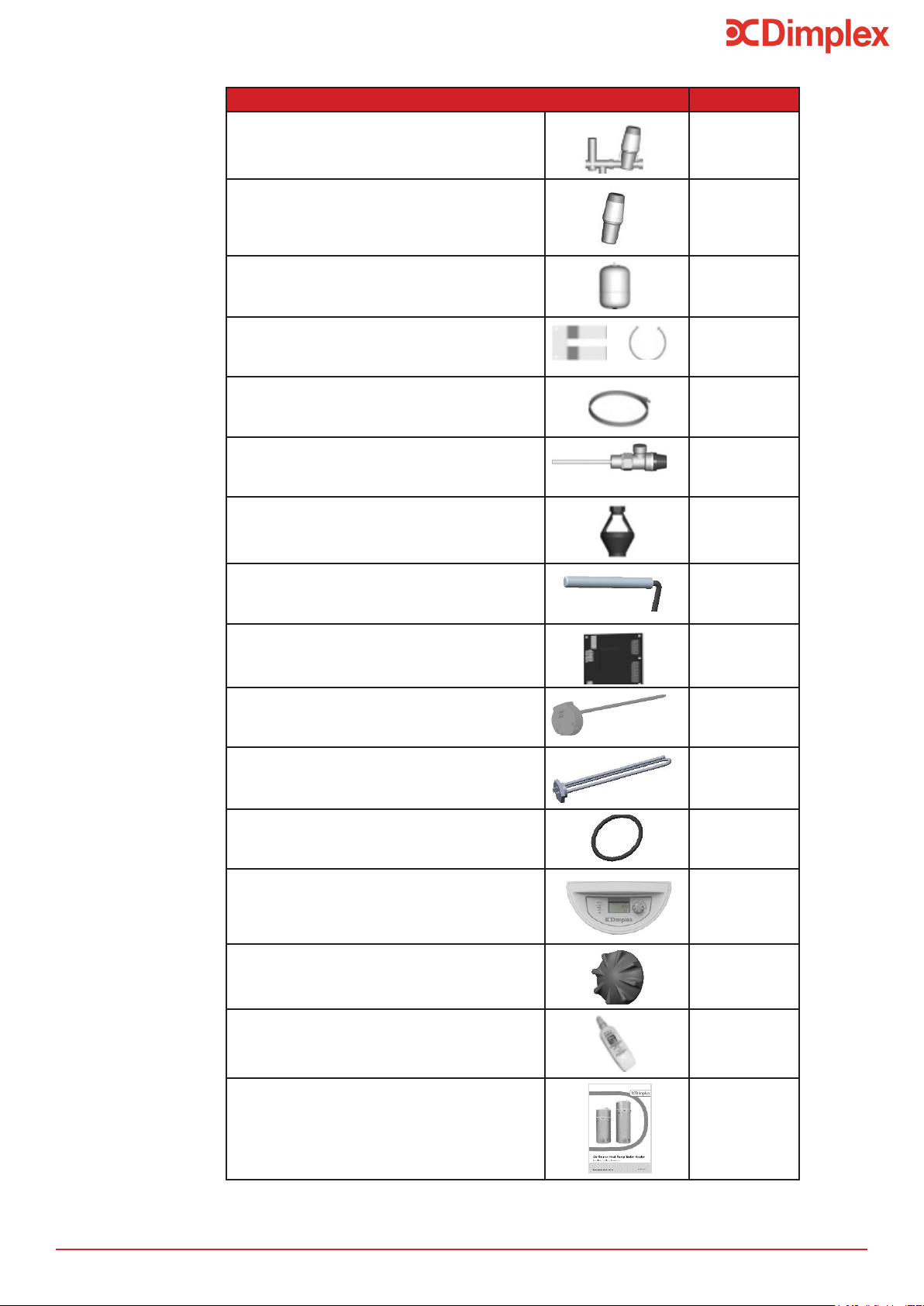
4 Scope of Delivery
Table 1: Scope of Delivery for Edel RF Hot Water Heat Pump
Please read the following section carefully before
commencing installation. If in any doubt, please call the
appropriate help desk. Disregarding the instructions given
in this manual in its entirety and any relevant regulations,
standards and codes of practice will void the guarantee of
this product.
i
Dimplex cannot take responsibility for
ensuring safe operation of the appliance
outside of the scope of intended use.
Transporting the appliance in a
horizontal position may lead to
irreparable damage to the
components of the heat pump
!
All other transport positions are
PROHIBITED
!
3.1 Control App
This product is Dimplex Control capable * .
Control and monitor your heating and hot water with Dim-
plex Control. Group appliances into zones to easily control
and track their energy usage. Any time. Anywhere.
Search for Dimplex Control on your device’s app store.
*A Dimplex Hub is required for this product to connect to
Dimplex Control. For instruction on setting up Dimplex Hub,
please refer to the manual. Manuals can be downloaded at
Dimplex.co.uk.
Risk of tipping/falling
Do not drop
or lower suddenly
Please note that handling, installation and use of this
product is subject to the Health and Safety at Work Act.
If the unit is not installed immediately, it should remain
in its protective packaging with all pipe protectors/end
caps applied to prevent damage and dirt deposit inside
the water heater and the coil.
6
Pre-Installation
5.3 Pipework
The pipe runs should be executed as short as possible,
unused pipework should be removed and all remaining
pipework should be lagged in accordance with
regulatory requirements to prevent heat loss and the
formation of condensation.
5.4 Taps and Fittings
have a rated operating pressure of 0.6 MPa (6 bar) or
above.
5.5 Risk Assessment
It is strongly recommended to complete a risk
assessment before installing the product. The following
areas require particular consideration in addition to the in-
formation required by the Health and Safety at Work Act.
- Scalding: where appropriate or required by law a
water outlet of the cylinder.
- Explosion: the unit is fully equipped with all relevant
safety equipment to comply with current regulations.
independent third party testing. The correct
application hereafter is the responsibility of the
competent installer.
- Water borne organisms (i.e. Legionella): if applicable
a risk assessment should be carried out following the
recommendations outlined in the Approved Code of
Practice L8.
- The user preference must be considered when
commissioning the system.
5.6 Siting Considerations
When choosing the place where the appliance is to be
installed the following points should be taken into
consideration:
- Structural integrity.
- Access for installation, operation, maintenance and
replacement.
- Routing of discharge pipework.
- Access to water mains supply, hot and cold water
distribution pipework.
- Access to suitable electricity supply.
Particular care must be taken when placing the water
heater in a garage or outbuilding. All exposed pipework
must be correctly insulated to avoid frost damage.
The position and orientation of the water heater should
be such that easy access is provided for servicing the
controls. A minimum distance of 400mm in front of the
immersion is recommended, to allow the replacement
of the immersion heater should the need arise. When
installing the water heater all labels should be clearly
visible and ensure that no pipework hinders any work to
be carried out on the various components.
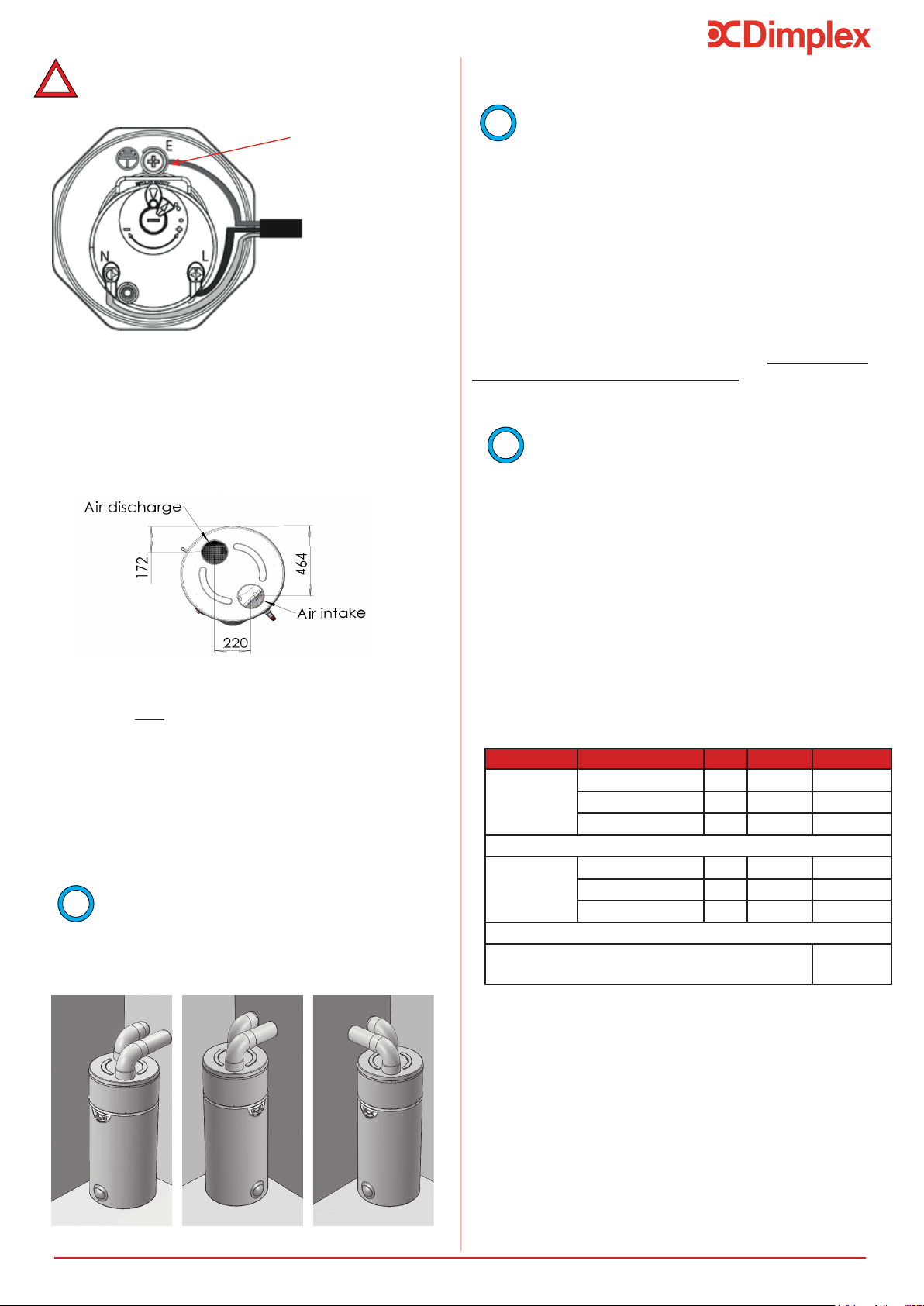
the appliance is horizontal, see Figure 1.
Figure 1: Correct siting of Water Heater
weight of the water heater when full of water (please see
technical data) and suitably accessible for
replacement/maintenance without specialist tools or lift-
ing equipment as this will void the warranty
conditions.
Keep the transport bag out of reach of
children (risk of suocation).
- Remove plastic cover and cardboard packaging.
- Remove corner protection pieces, ensuring that all
nails and staples are taken out.
the transport bag.
- Without tilting the appliance, use an appropriate tool
to remove the screws from underneath the pallet.
5.2 Unpacking
It is PROHIBITED:
- To let the appliance operate using air intake which
contains solvents or explosive matter.
- To use air intake which contains grease, dust or
aerosol particles.
- To connect vented exhaust hoods to the ventilation
system.
It is PROHIBITED to install the appliance
- Outdoors
- In rooms which are exposed to frost
- In humid rooms which have a lot of steam or vapour
(for example, a bathroom)
7
Pre-Installation
5.8 Building Regulation G3 Discharge
Requirements
As part of the requirements of Building Regulation G3
complies with BS EN 1490. Any discharge from a water
heater system should be conveyed to where it is visible,
but will not cause danger to persons in or about the
building. The tundish and the discharge pipes should be
Building Regulation approved document G3, (England
and Wales), Part P of Northern Ireland and Standard
4.9 of Scotland.
Dimplex strongly recommends the use of metal
pipework only and Dimplex does not take responsibility
for any damage caused from discharges.
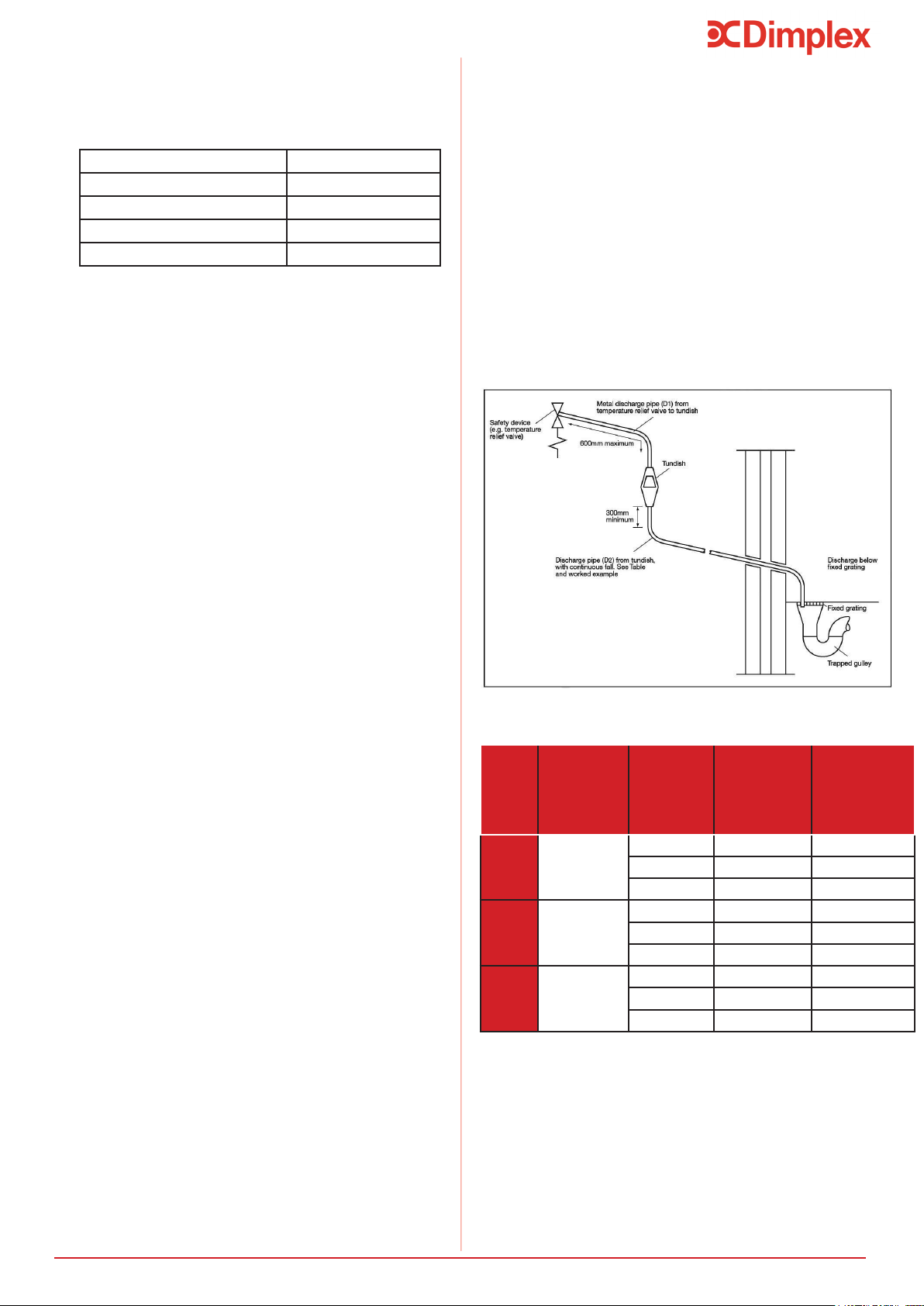
The discharge pipe D2 should be at least one pipe size
larger than the nominal outlet size of the safety device
unless its total equivalent hydraulic resistance exceeds
that of a straight pipe 9m long, i.e. for discharge pipes
between 9m and 18m the equivalent resistance length
should be at least two sizes larger than the nominal out-
let size of the safety device; between 18m and 27m at
least 3 sizes larger, and so on; bends must be taken into
Figure 2, Table 2 and the worked example.
If required, precautions can be taken to minimise
-
ditioner or water softener. These devices should be in-
stalled in hard water areas where high water
storage temperatures are required, i.e. greater than
60°C storage temperatures, particularly when water
hardness exceeds 200ppm. Should the water heater re-
quire de-scaling, this must be performed by a
Value
outlet
size
Minimum size
of discharge
pipe before
tundish (mm)
Minimum size
of discharge
pipe after
tundish (mm)
Maximum
allowed length
of pipe after
tundish (m)
Length to be
subtracted for
each elbow or
bend
(m)
15 9
35
9
35
G1 35 9
Dimplex recommend an annual maintenance
inspection is carried out on the water heater. In hard wa-
ter areas this should include inspection of the
immersion heater, [above 120ppm or 120mg/l]. A local
water quality testing. The heating elements may require
periodic de-scaling. The installer should do this as part of
a maintenance agreement.
- The cold water inlet pipework should have at least an
inside diameter of 19mm and should meet the
requirements of the water regulations for the supply
of wholesome water.
Note: An alternative approach for sizing discharge pipes
would be to follow Annex D, section D.2 of BS 6700:2006
+ A1:2009).
- The cold water supply to the water heater must come
directly from the cold water mains after the mains
stop valve to the property.
This example is for a G½ temperature relief valve with
a discharge pipe (D2) having 4 No. 22mm elbows and
length of 7m from the tundish to the point of discharge.
The discharge pipe (D2) from the Tundish should:
- “have a vertical section of pipe at least 300mm long
below the tundish before any elbows or bends in the
pipework and be installed with a continuous fall of at
The following instructions have to be followed when
installing the cold water mains supply to the water
heater:
Minimum dynamic pressure 150Kpa (1.5 bar)
Maximum inlet supply pressure 1200Kpa (12 bar)
Minimum ow rate 15l/min
Max. chlorine content 250mg/L
Max. water hardness 200mg/L
For satisfactory and safe performance of the water
heater the water supply must meet the following
criteria:
5.7 Cold Water Supply
The discharge pipe (D2) should be made of:
- “metal; or other material that has been demonstrated
to be capable of safely withstanding temperatures of
the water discharged and is clearly and permanently
marked to identify the product and performance
From Table 2, the maximum resistance allowed for a
straight length of 22mm copper discharge pipe (D2) from
a G½ temperature relief valve is 9.0m. Subtract the re-
sistance for 4 No. 22mm elbows at 0.8m each = 3.2m.
8
Installation
5.8.3 Termination of discharge pipe
- “The discharge pipe (D2) from the tundish should
terminate in a safe place where there is no risk to
persons in the vicinity of the discharge.”
Examples of acceptable discharge arrangements are:
- “To a trapped gully with the end of the pipe below a
- Downward discharges at low level; i.e. up to 100mm
above external surfaces such as car parks, hard
standings, grassed areas etc. are acceptable providing
that a wire cage or similar guard is positioned to
prevent contact, whilst maintaining visibility; and ,
- Discharges at high level: e.g. into a metal hopper and
metal downpipe with the end of the discharge pipe
clearly visible or onto a roof capable of withstanding
high temperature discharges of water and 3m from
any plastic guttering system that would collect such
discharges.”
6 Installation
6.1 Correctly Siting the Water Heater
Install the water heater in an appropriate location,
ensuring all of the recommendations have been
considered (see Section 5.6).
6.2.1 Install the Inlet Group
The inlet group regulates the pressure of the incoming
mains water supply to the water heater and removes
any debris that might be water borne.
Between the inlet group and the cold
water inlet on the water heater NO isolating
safety devices could be isolated!
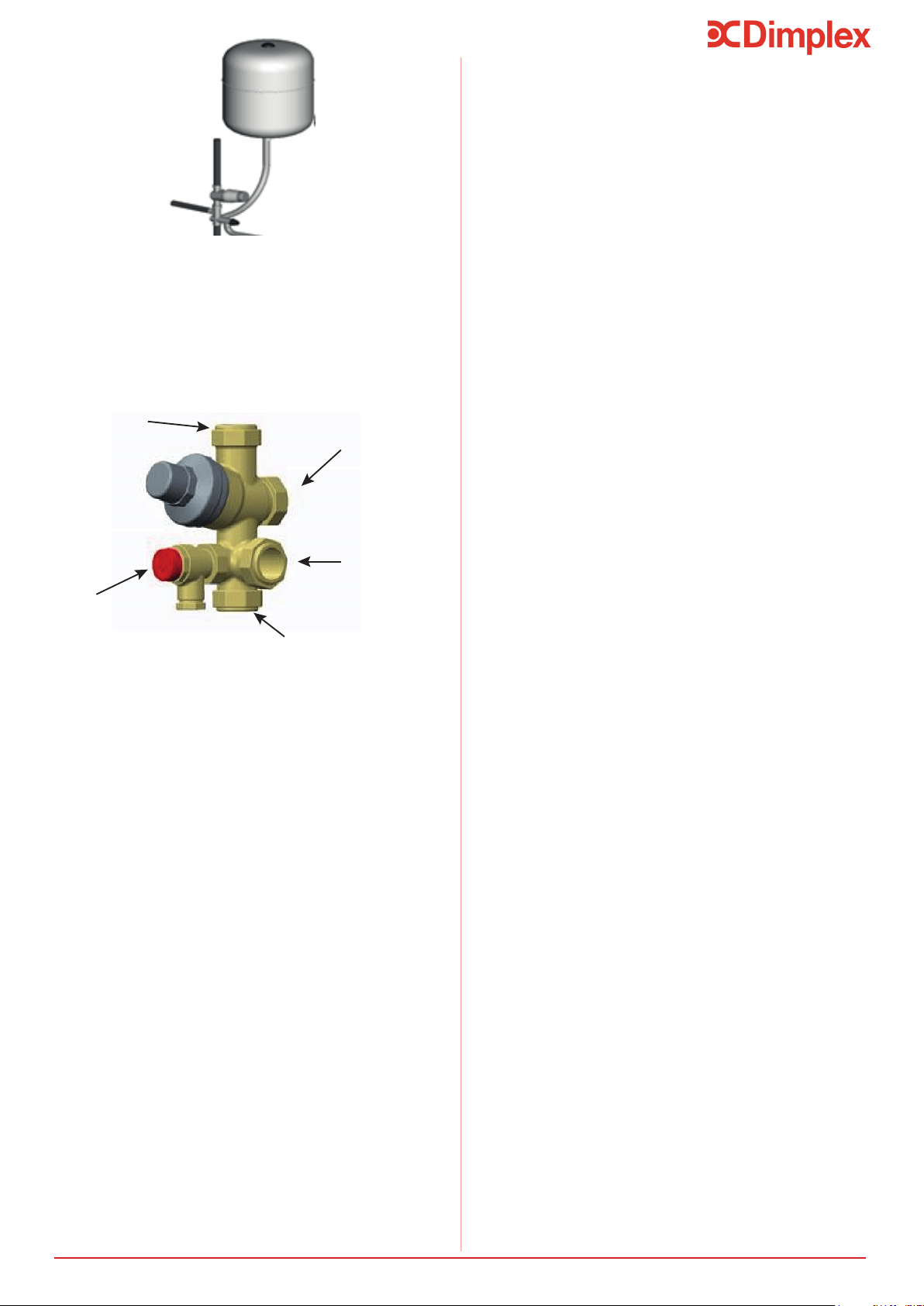
6.2.2 Expansion Vessel
The expansion vessel is mandatory on the Dimplex
water heater and can be connected directly to the cold
with the vessel. The expansion vessel should always be
instructions, see Figure 3. No isolating device should be
group.
Furthermore, it is recommended to mount the vessel
higher than the water heater to avoid having to drain
the water heater when maintaining and replacing the
expansion vessel.
It is important to check the pre-charge pressure of the
The pre-charge should be greater than or equal to 3
bar.
6.2 Cold Water Inlet with Inlet Group
- The discharge pipe should not be connected to a soil
discharge stack unless the soil discharge stack is
capable of safely withstanding temperatures of the
water discharged, in which case, it should:
-Contain a mechanical seal, which allows water into the
branch pipe without allowing foul air from the drain to
be ventilated through the tundish.
- There should be a separate branch pipe with no
sanitary appliances connected to it.
- If plastic pipes are used as branch pipes carrying
discharge from a safety device, they should be either
polybutalene (PB) or cross-linked polyethylene (PE-X)
complying with national standards.
- Be continuously marked with a warning that no
sanitary appliances should be connected to the
pipe.
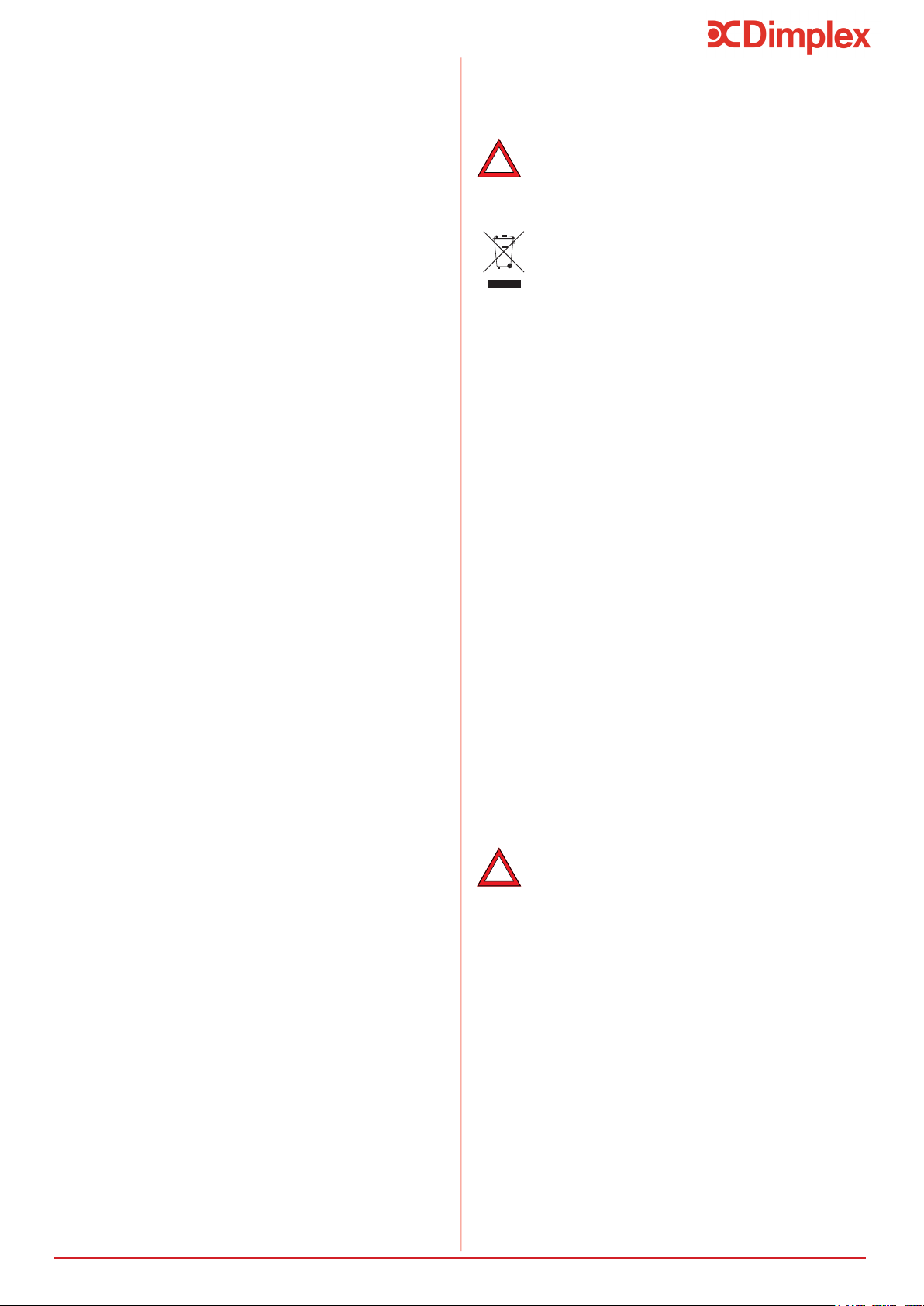
5.9 Product Disposal
This product has been manufactured from
mostly recyclable materials. At the end of the
product’s life, it should be disposed of at a Local
Authority Recycling Centre.
Materials:
• Inner Cylinder - Stainless Steel
• Outer Cladding - HIPS/ABS (Polypropylene BE 50)
• Inlet/Outlet Pipe - Plastic (Polypropylene BE 50)
• Insulation - 50mm PU Foam (GWP =1, ODP =0)
Connections & Fasteners:
• Inlet/Oulet - stainless steel
• T&P Valve - ½”F BSP
• Immersion Heater - 1 ¼”F BSP
!
!
Safety & Control:
• Cold water inlet group - brass
• Tundish - acetal co-polymer
• T&P Valve - brass
- Where a single common discharge pipe serves more
than one system, it should be at least one pipe size
larger than the largest individual discharge pipe (D2)
to be connected.
As the discharge would consist of high
felt and non-metallic rainwater goods may be
damaged by such discharges.
Therefore the maximum permitted length equates to
5.8m, which is less than the actual length of 7m,
therefore calculate the next largest size.
Maximum resistance allowed for a straight length of
28mm copper discharge pipe (D2) from a G½
temperature relief valve is: 18m.
Subtract the resistance for 4 No. 28mm elbows at 1.0m
each = 4m.
Therefore the maximum permitted length equates to
14m.
As the actual length is 7m, a 28mm (D2) copper pipe will
be satisfactory.
9
If balanced cold water supply is required a connection
can be taken from the bottom of the inlet group.
6.2.3 Balanced Cold Water Supply
It is also recommended to install a drain valve (not
supplied) in the lowest point of the cold water feed to
the water heater. This allows the water heater to be
drained in a controlled manner should this become
necessary.
6.2.4 Drain Valve
6.3 Hot Water Outlet
The hot water pipework is to be directly connected to
the hot water outlet connection on the water heater.
A thermostatic mixing valve may be required to limit
the outlet temperature. In this case, the valve should
be installed following the manufacturer’s instructions,
ensuring none of the safety equipment has been
isolated, (i.e. make sure the connection to the
thermostatic mixing valve is taken after the safety
equipment of the inlet group).
6.3.1 Thermostatic Mixing Valve
6.4 Discharge Pipes from Safety
Devices
6.4.1 Discharge Pipe D1
The temperature and pressure relief valve must be dis-
charged directly or by way of a manifold via a short length
of metal pipe (D1) into a tundish; and the
discharge pipe must be installed in a continuously down-
ward direction and in a frost free environment. Water may
drip from the discharge pipe of the
pressure relief device and this pipe must be left open to
the atmosphere.
The diameter of discharge pipe (D1) should not be less
than the nominal outlet size of the safety device, e.g. tem-
perature relief valve.
6.4.2 Discharge Pipe D2
For a detailed description of the discharge pipework D2
(see Section 5.8.1).
6.4.3 Tundish
The tundish should be vertical, located in the same space
as close as possible to, and lower than, the safety device,
with no more than 600mm of pipe between the valve out-
let and the tundish (see Figure 2).
Where discharge may not be apparent, e.g. in dwellings
occupied by people with impaired vision or mobility, con-
sideration should be given to the installation of a suita-
ble safety device to warn when discharge takes place, e.g.
electronically operated.
Note: To comply with the Water Supply (Water Fittings)
Regulations, the tundish should incorporate a suitable air
gap.
Note: It is important that the tundish is
positioned away from any electrical components.
6.5 Immersion Heater
It is recommended to insulate the hot water pipework
from the water heater to the outlets, to reduce the
energy requirements for providing hot water. It is also
recommended to insulate all other exposed pipework,
and the cold water inlet pipes.
6.3.2 Pipe Insulation
The Edel Air Source Heat Pump Water Heater comes with
-
sion heater incorporates an independent non-self resetting
over temperature cut-out. Should this
operate, please investigate the cause of the cut out before
resetting (See Troubleshooting).
Cold water
from Mains
Balanced Cold
Water Supply
Expansion Vessel
Connection
Cold Water Inlet
Expansion Relief
Valve
vessel to the inlet group
Where a manifold is used it should be sized to accept and
discharge the total discharge from all the D1
discharge pipes connected to it.
The discharge pipework from the expansion relief valve
must be installed constantly falling to an open point of
discharge. It is recommended to combine it with the dis-
charge of the temperature and pressure relief valve.
Note: The T&P valve is pre-sealed and if moved the seal
will be broken, should this occur, it will need to be re-
sealed with an appropriate sealant (Dimplex part number
R00836-1).
Installation
Note: The expansion vessel must be installed
to the side of the expansion relief valve on
the inlet group. To do this the blanking plug
must be removed and the expansion vessel
connected, as shown in Figure 4.
Figure 3: Connection of the expansion vessel
to the inlet group
10
The heat pump operates over a large air temperature
range (from -7°C to 35°C) using energy from outdoor
air. It is essential to correctly design and install the air
ducting system to ensure the product operates properly
and complies with regulations.
The air supply to and from the Edel heat pump water
heater must NOT extract air from the living space of the
dwelling. The air must be supplied to the appliance di-
rectly from the outside or from another source outside
the thermal envelop of the living space.
The ducting used to connect the air intake and exhaust
forming. Condensation may result in damage to the ap-
pliance and/or building fabric.
Dimplex does not take any responsibil-
ity for issues caused by poor ducting
design or installation.
Figure 7 provides an example of how the ducting inlet
and outlet connections should be installed.
Installation
through the ducting for correct operation of the appli-
above 320m
3
/hr.
For the fan to operate in Fan speed 1, the maximum sys-
tem pressure drop across the ducting connections must
not exceed 100Pa and for Fan speed 2 the maximum
pressure drop must not exceed 220Pa
6.7 Ducting Design
6.6 Air Connection
Item Qty ∆P [Pa] Total [Pa]
Air Intake X 5
90°bend X 3
External terminal X 1
Air Exhaust
90°bend
External terminal X 1
/
hr
6.7.1 Worked Example
- The pressure drop information provided is for
160mm semi rigid Ubbink ducting, other ducting
manufacturers components may be used howev-
er the total maximum pressure drop must not ex-
ceed the stated values.
Figure 6: Air intake and Air discharge
A ducting system with the following;
Note:
-The calculated worked example includes all the
necessary ducting components to complete the
installation and has resulted in a total system
pressure drop of 207.7 Pa at 320m
3
/hr mass air
ow rate. This is acceptable as the pressure drop
is below the maximum permissible allowed.
NOTE: The system reliability and eciency will be
compromised should the mass air ow rate
drop below 320m
3
/hr.
the system designer calculated the required total
quantity of ducting connections, lengths, bends and
terminations to establish an accurate value for total
Table 3: Worked example
Fan speed 1 will operate when the
system pressure drop is minimal as a
result of very short duct runs. System
eciency will be slightly increased and
the noise level slightly reduced.
i
Dimplex does not take responsibility
for installation and the operating e-
ciency of the appliance when installed
outside the scope of the guidelines
provided in this document.
i
i
Figure 5: Wiring diagram for Immersion Heater
Dial to adjust
water temperature
Earth (green/yellow)
Live (brown)
Neutral (blue)
before switching on the immersion heater. Failure
to do so will damage the element and void any
guarantee on the product.
!
11
Installation
6.9 Electrical Connections
The power supply should comply with the regulations in
the country of installation, as well as the IEE Wiring Reg-
ulations.
A means of disconnection which ensure an electrical iso-
lation in Category III conditions should be installed in
Protect the appliance with :
- A 13A fused spur or isolator must be installed adjacent
to the appliance for mains supply connection.
the local consumer unit on the same supply.
If the power supply cable is damaged it must be
6.9.1 Accessing Electrical Connections
To access electrical connections:
- Isolate the electrical connections.
- Remove the cover from the top of the appliance by
base of the heater.
- Remove the black protective cover from the electronic
board.
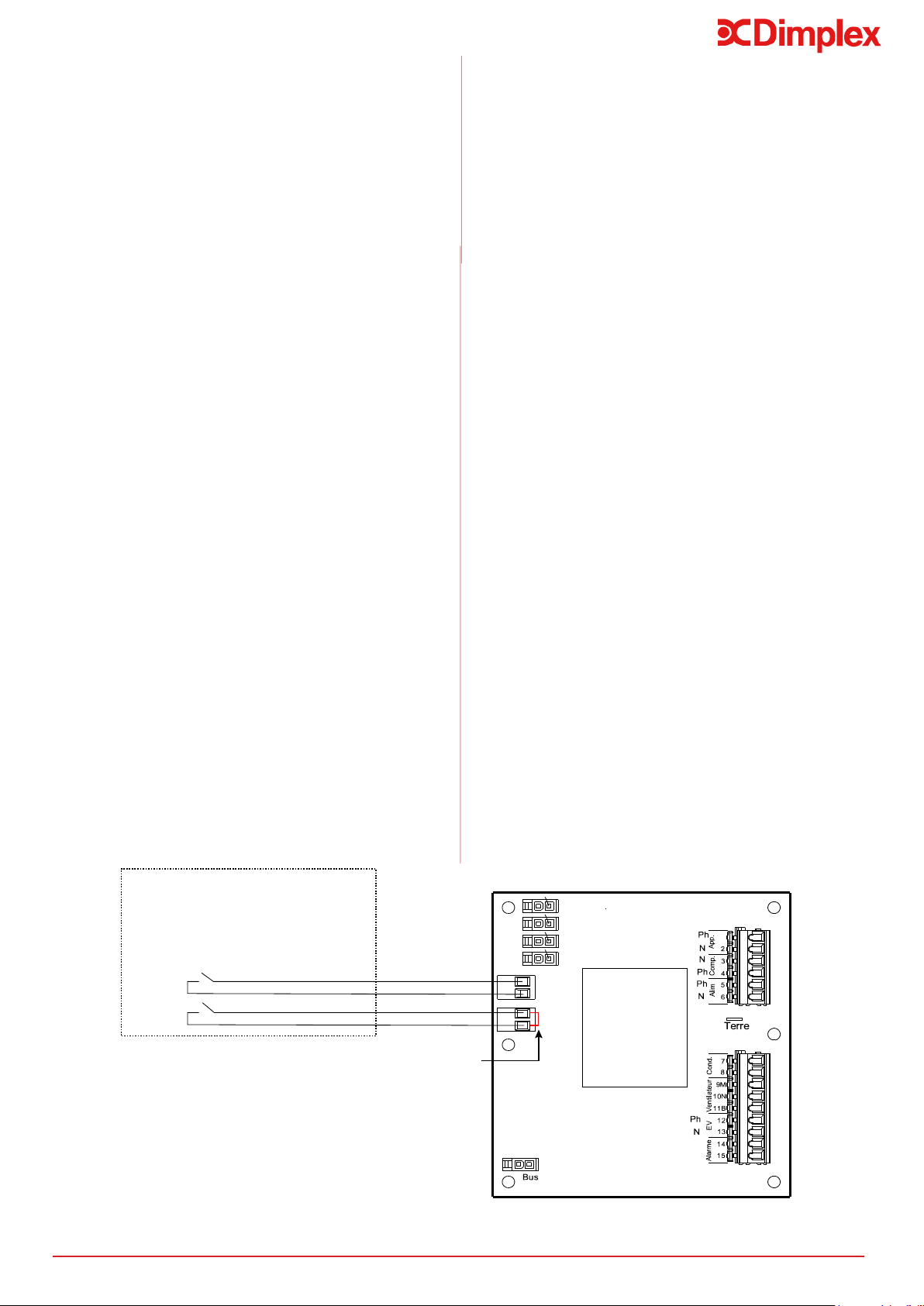
To stop the electrical back-up immersion running during
peak time, connect the voltage-free contact from your
electricity meter to terminal n°1, please refer to Figure
8.
- Contact open = electrical back-up not authorised to
run
- Contact closed = electrical back-up authorised
to run
If you choose load shedding level 1, the electrical
back-up is prevented from running. If you choose load
shedding level 0, both the electrical back-up and the
heat pump will be prevented from running (see Section
7.10.2.4).
To prevent electrical backup operating during peak
hours, if a volt free output is not available from the
meter, a timer switch should be used if:
- Switch on = backup allowed
Only a zero-voltage, external control such as a timer
switch should be used (if not, the electronic board could
be destroyed).
- Pass a 0.75mm 2-wire cable with crimped ends
through a cable gland at the back of the appliance
and bring the end of the cable round to the electronic
board. The other end of the cable should be
connected to the timer switch.
- Insert the 2-wire cable through a grommet on the
electronics board.
- Connect the 2-wire cable to “Entrée 1” indicated on
the electronic board, having removed the existing red
bridge beforehand.
6.9.1.1 Electricity Provider Contact
Figure 9: Detailing the electricity provider contact on
the electronic board
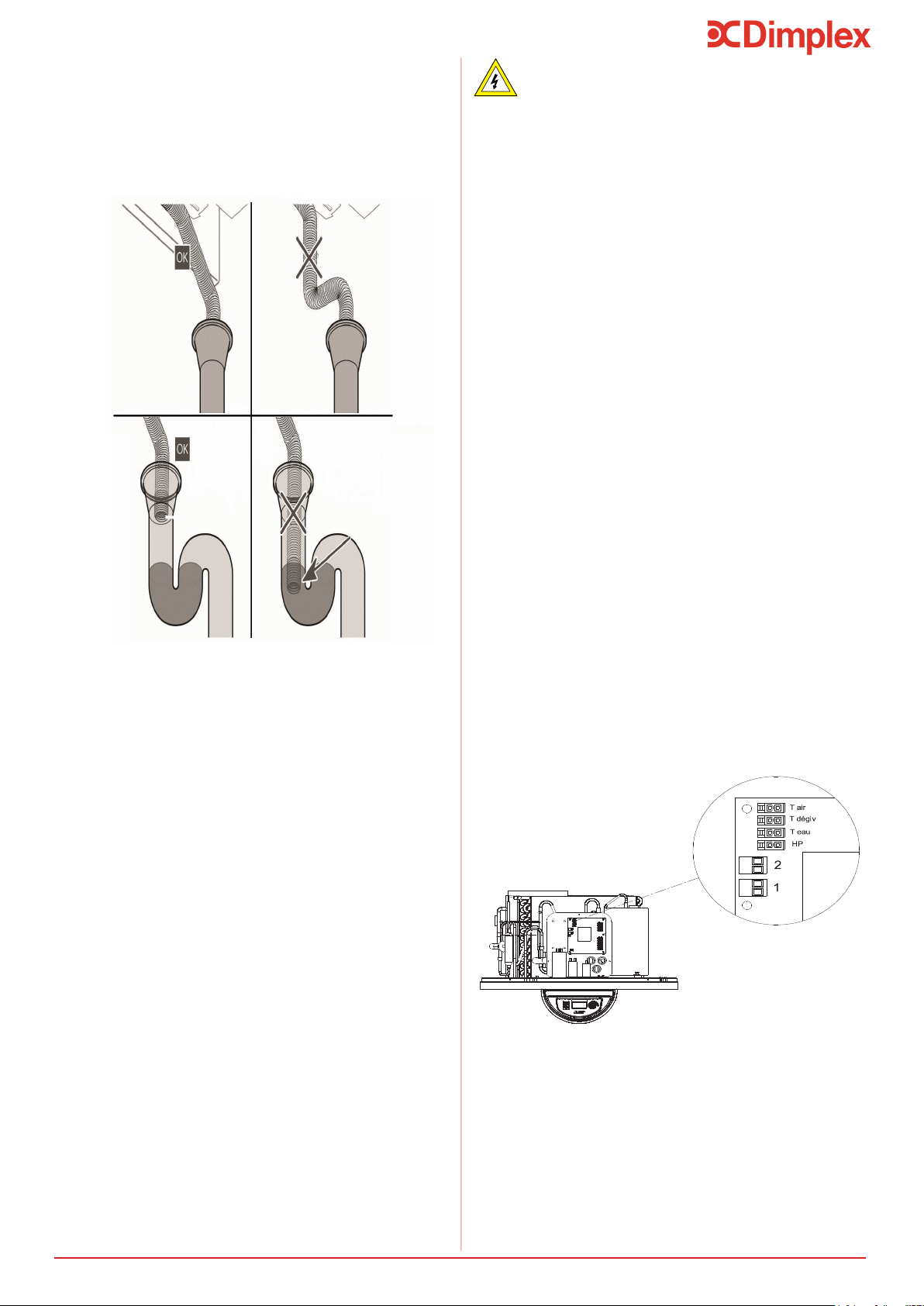
The condensates tube should not be directly
connected to a drain. It must terminate into open air
through a U-bend which has been added and contains
water.
6.8 Condensates Draining
Detailing the correct connection of
condensates draining
Only a voltage-free, external connection may be
used, or the electronics board may be destroyed.
12
Deterioration risk: The water tank must be lled
before the appliance is switched on or connected
to a power supply.
7 Set-Up and Use
7.1 Commissioning
Figure 10:
At the time of commissioning, complete all relevant
sections of the Benchmark Checklist located on the
inside back pages of this document.
The following commissioning procedures only detail the
required steps to be taken for the potable water loop.
1) Before making any mains connections to the
out to ensure all debris has been removed so as
not to damage the strainer within the
combination valve.
valve and check all connections and joints to
3) Before turning on the mains supply to the
water heater a hot water tap should be opened,
where the water heater is located.
4) Check the pre-charge in the expansion vessel
and ensure it is at least 3 bar. Note actual
pressure on label on expansion vessel.
until water runs from the open hot water tap.
been removed.
6) Close the hot water tap.
7) Check all joints for leaks, even those not
having been altered especially when replacing a
vented water heater.
8) Open temperature and pressure relief valve
to ensure proper discharge and check after
closing that valve is not dripping.
9) Open expansion relief valve to ensure proper
discharge and check after closing that valve is
not dripping.
10) Check all shower outlets, toilet cisterns and
(especially when replacing a vented unit).
Open all water outlets to purge air from
pipework and ensure proper operation.
11) Instruct user in the operation of the unit and
hand over this manual advising the owner of
annual service requirements.
12) Complete the technical data label on the
water heater with legible and permanent
writing.
Set-Up and Use
This function enables the appliance to operate in
auto-production mode, which means that it will use the
energy produced by the PV function to supply the heat
pump as well as the electrical back-up, in order to heat
the water in the tank.
The connection is made between the PV Inverter and
connectors 1 and 2 on the electronics board.
- Remove the appliance lid.
- Remove the black cover from the electronic board.
6.9.1.2 Connecting the PV Function
- Connect the PV function cable to connector 1 on the
electronic board.
- If the PV function regulator has two control contacts,
connect them to Entrée 1 and 2 on the electronic
board (see Figure 9).
- Terminal 1: a low level of electrical energy is
produced by the PV function.
- Terminal 2: a high level of electrical energy is
produced by the PV function.
2
1
PV max
PV éco
Voltage-free Contacts to PV Inverter
Tair
Tdégiv
Teau
HP
Caution: Connectors 1 and 2 are for
VOLTAGE FREE CONTACTS only. They
must NEVER be connected to 230V.
Red Jumper to
be removed
13
Set-Up and Use
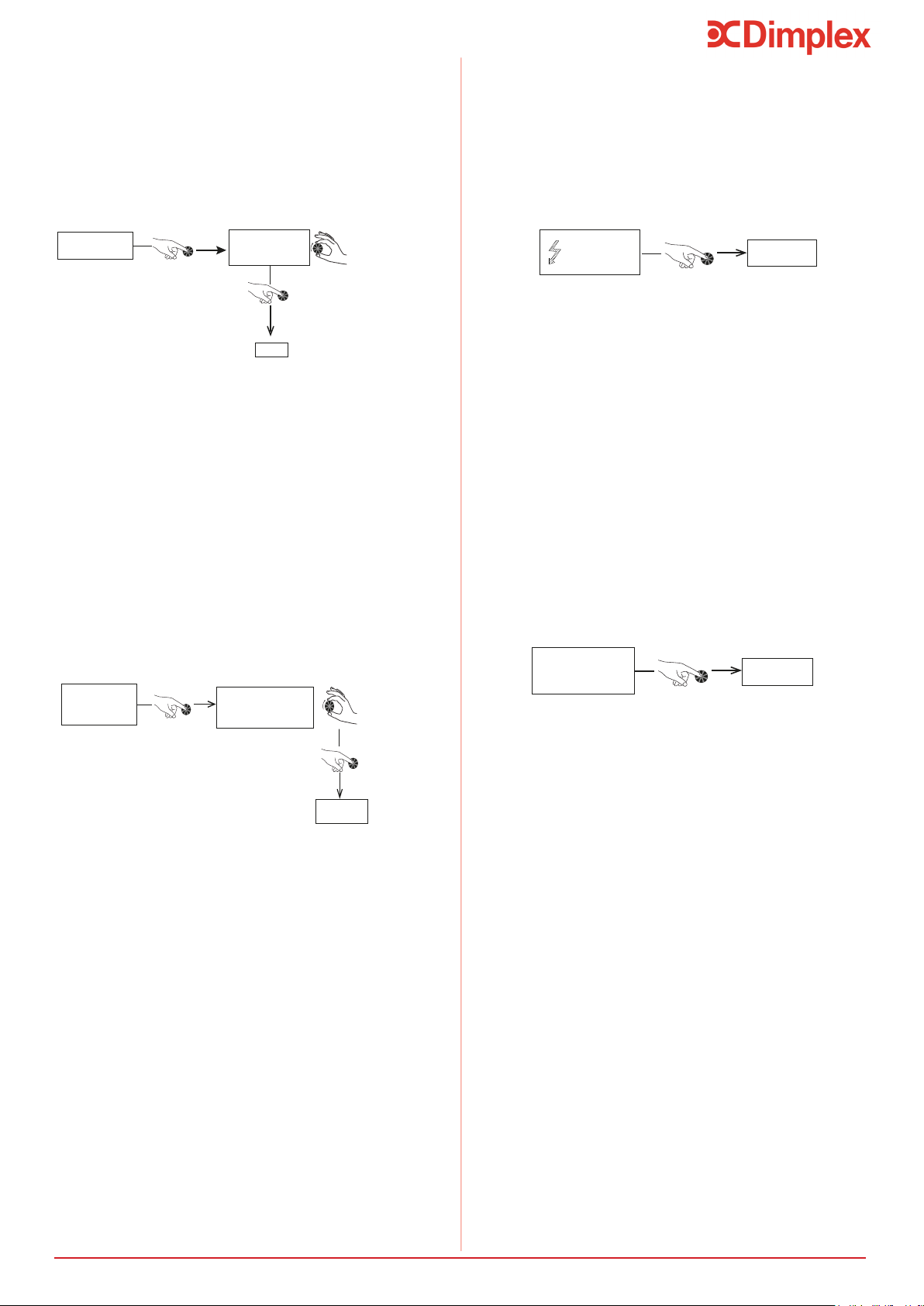
7.4 Setting the Language
Enter
LANGUAGE
LANGUAGE
EnG
Set Language
The language must be selected when the appliance is
language menu can be accessed at any time.
- Press ‘Menu’.
- Turn the dial to scroll through the menu options:
- Press ‘Clock’:
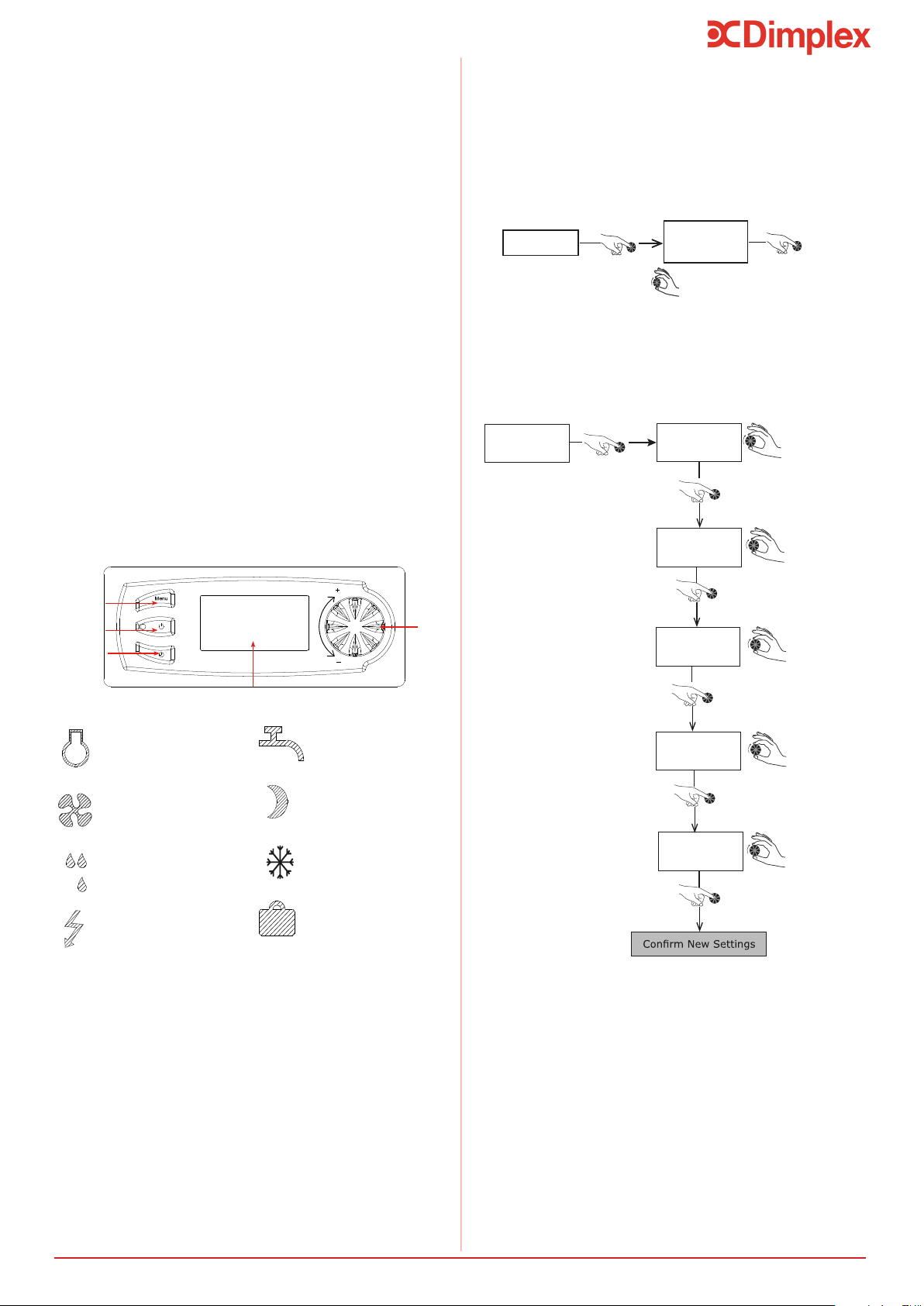
7.5 Setting the Time
--/09/11
17 : 32
Set Day
26/--/11
17 : 32
Set Month
26/09/--
17 : 32
Set Year
Monday
-- : 32
Set Hours
Monday
17 : --
Set Minutes
26/09/11
17 : 32
- Press ‘Menu’ to return to the main screen.
Menu
Time
Setting
Display Screen
Dial
On/Off
7.3 Control Box
Compressor
Activated
Fan
Activated
De-icing in
Progress
Electrical Backup
Activated
Domestic Hot Water
Request
Economy Mode
Activated
Freeze Protect Mode
Activated
Holiday Mode
Activated
The hot water heat pump mainly operates with the heat
pump, as long as the air intake temperature remains in
the authorised - 7°C to + 35°C range. Outside of this
range, electrical backup ensures that the domestic hot
water is heated.
The domestic hot water temperature provided by the
heat pump is adjustable up to 60°C. In case of high
domestic hot water consumption, the domestic hot
water heater has a comfort function which increases
the heating capacity when there is less than 1/3 of the
tank’s volume left at over 38°C (see Section 7.10.2.3).
There is also a setting to activate electrical backup if
the heating time is too long.
If more domestic hot water is required from time to
time, the heat pump water heater has a “Boost”
function (activated by the user) which ensures that the
water heats to the desired temperature (for example :
50°C) quickly with the help of the heat pump and
electrical backup. This function is deactivated as soon
as the required temperature is reached.
From time to time, check that there are no alerts (in
case of an alert, please refer to Section 8.5).
7.2 Using your Hot Water Heat Pump
-See section 7.11 for instructions to gain access to
installer menu
14
Set-Up and Use
- Press ‘Menu’.
- Turn the dial to scroll through the menu options:
7.8 BOOST Function (for occasional use)
The ‘BOOST’ function temporarily uses both the
immersion heater and the heat pump to increase the
temperature during a heating cycle. The “electrical
BOOST
YES
Enter
The ‘BOOST’ function is automatically deactivated as
soon as the set temperature is reached (end if heating
cycle).
- ‘BOOST’ can be cancelled by selecting ‘no’ in the
menu
7.9 Electric Mode
(to operate with electrical backup)
Electric mode uses only the immersion heater to heat
the water in the heat pump water heater. It provides a
back-up option if for any reason the heat pump is not
running (ducting not yet connected, dusty renovation
work being carried out near the appliance....). This can
ELEC MODE
YES
Enter
- Press ‘Menu’ to return to the main screen
7.7 Holiday Mode
‘Holiday’ mode puts the appliance on standby whilst the
freeze protection mode remains active. This function
can be programmed to run between 1 and 99 days and
HOLIDAYS
HOLI. RETURN. 8
Set number of days
in standby mode
Enter
time when the number of days set has ended.
Throughout the holiday period, the heat pump water
heater shows ‘Holi. Return.’ on the display screen, as
well as a countdown of the days.
-To cancel holiday mode select 0 days
- Press ‘Menu’ to return to the main screen.
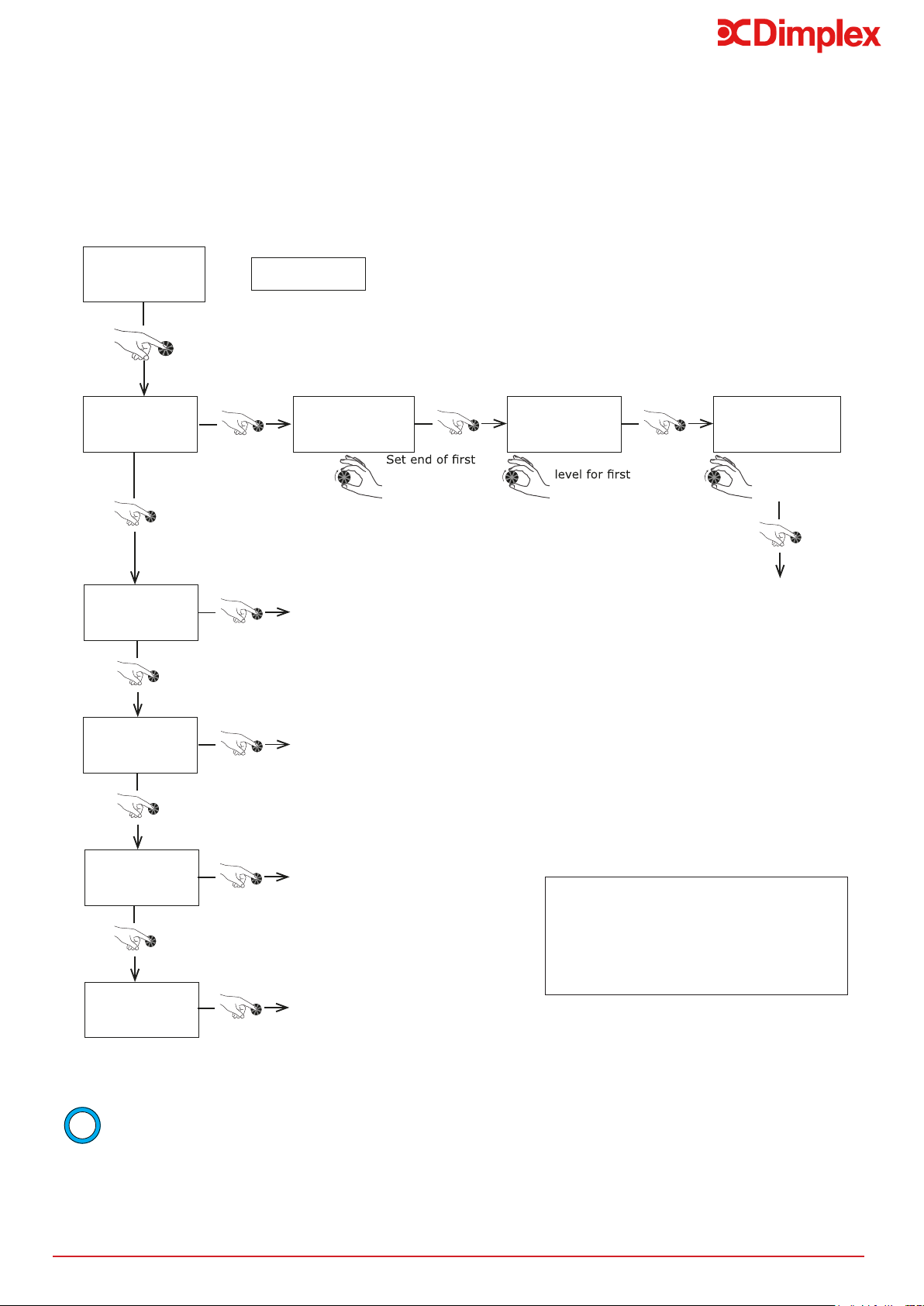
- Press ‘Menu’.
- Turn the dial to scroll through the menu options:
- Press ‘Menu’.
- Turn the dial to scroll through the menu options:
- Press ‘Menu’ to return to the main screen.
7.6 Setting the Water Temperature
The water temperature can be adjusted between 30°C
and 65°C. The heat pump alone heats the water up
until 60°C. Beyond this temperature, up to 65°C, the
electrical backup immersion takes over.
- Press ‘Menu’.
- Turn the dial to scroll through the menu options:
TEMP SETT.
TARGET +
60°C
Set Temperature
Enter
- Press ‘Menu’ to return to the main screen
- In order to get the best from your heat pump, we
recommend that you do not leave the set water
temperature too high unless necessary. The default
temperature is set at 60°C.
15
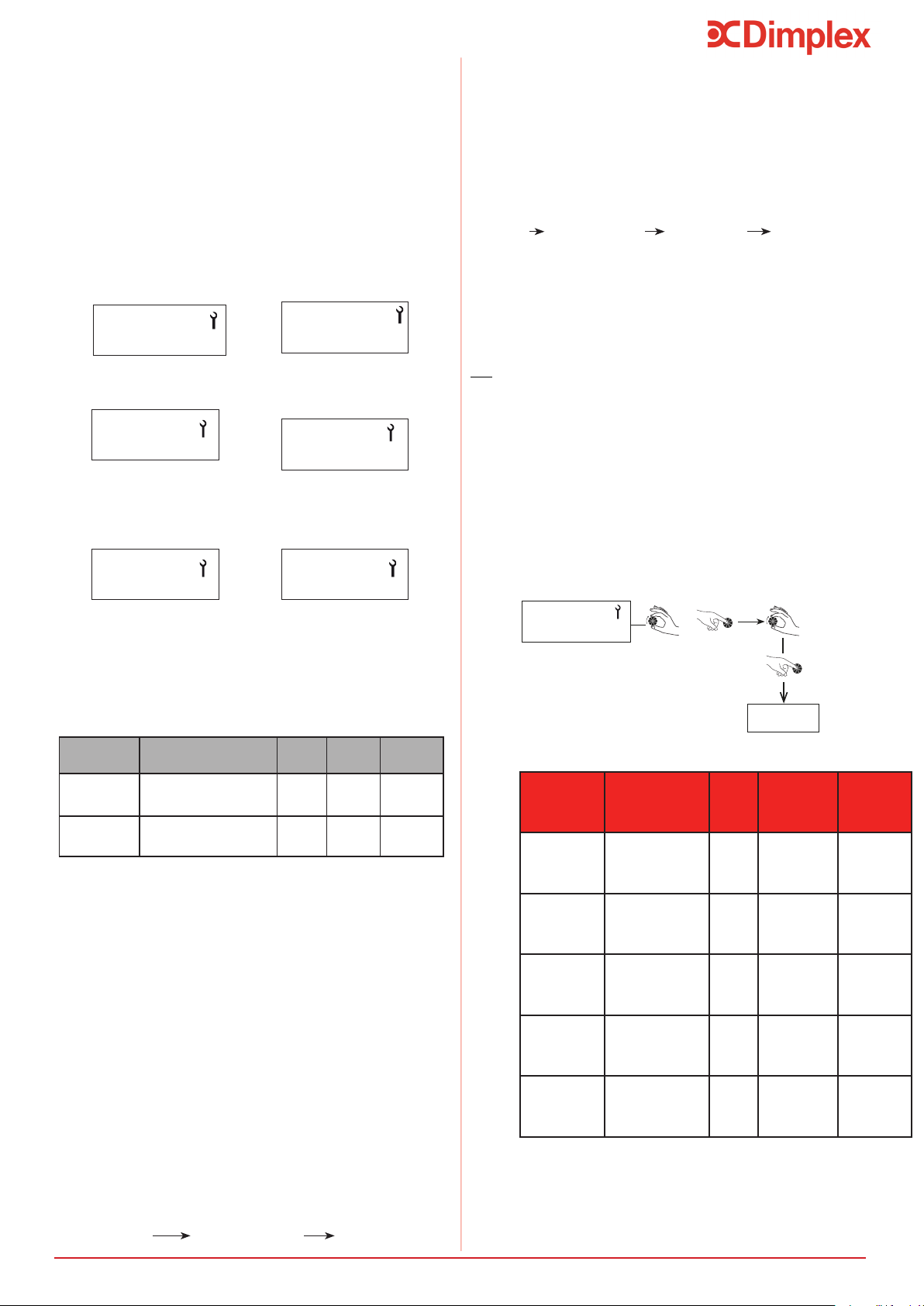
NEW PROG.
Select Day
0000-_ _ _ _
00 : 30
h
time period
0000-0630
frost pt
0630-_ _ _ _
06 : 30
h
Set comfort
time period
Set end of
second time
period
...and so on, up
to 7 time periods
per day
COPY SUN.
= Copy Programming from day before
COPY PROG.
= Copy a standard programme or a programme from another day
MODIFY PR.
= Modify exisitng programme
SEE PROG.
= See exisitng programme
MONDAY
Set-Up and Use
Frost PT = Frost Protection Mode
ECO = Heat Pump Only Running
CONF = Heat Pump Only Running +
electrical back-up if needed
7.10 Programming
Heating time for the tank varies according to the outdoor temperature.
(freeze protection mode). Electrical backup is not allowed while the appliance is in ‘Economy’ mode.
To access the program menu:
- Press the ‘Clock’.
- Press down for 3 seconds until the screen display ‘Settings’.
i
16
1. PV mode must be activated in the controller to take
account of connections as described in Section
6.9.1.2. If the PV mode regulator is connected to
connectors 1 and 2 on the electronics board.
- The electrical energy which is produced is stored in
the form of hot water. The PV function can be set to
- PV ECO = the lower level of photovoltaic electricity
production. The heat pump generates a higher water
temperature. The hot water temperature must be
somewhere in-between the ordinary hot water
temperature and 60°C (factory setting: 60°C).
- PV MAX = the higher level of photovoltaic electricity
production. The heat pump and electrical back-up
generate a higher water temperature. The hot water
temperature must be somewhere in between the eco
mode hot water temperature and 65°C (factory
setting: 65°C).
2. Turn the dial to set the mode:
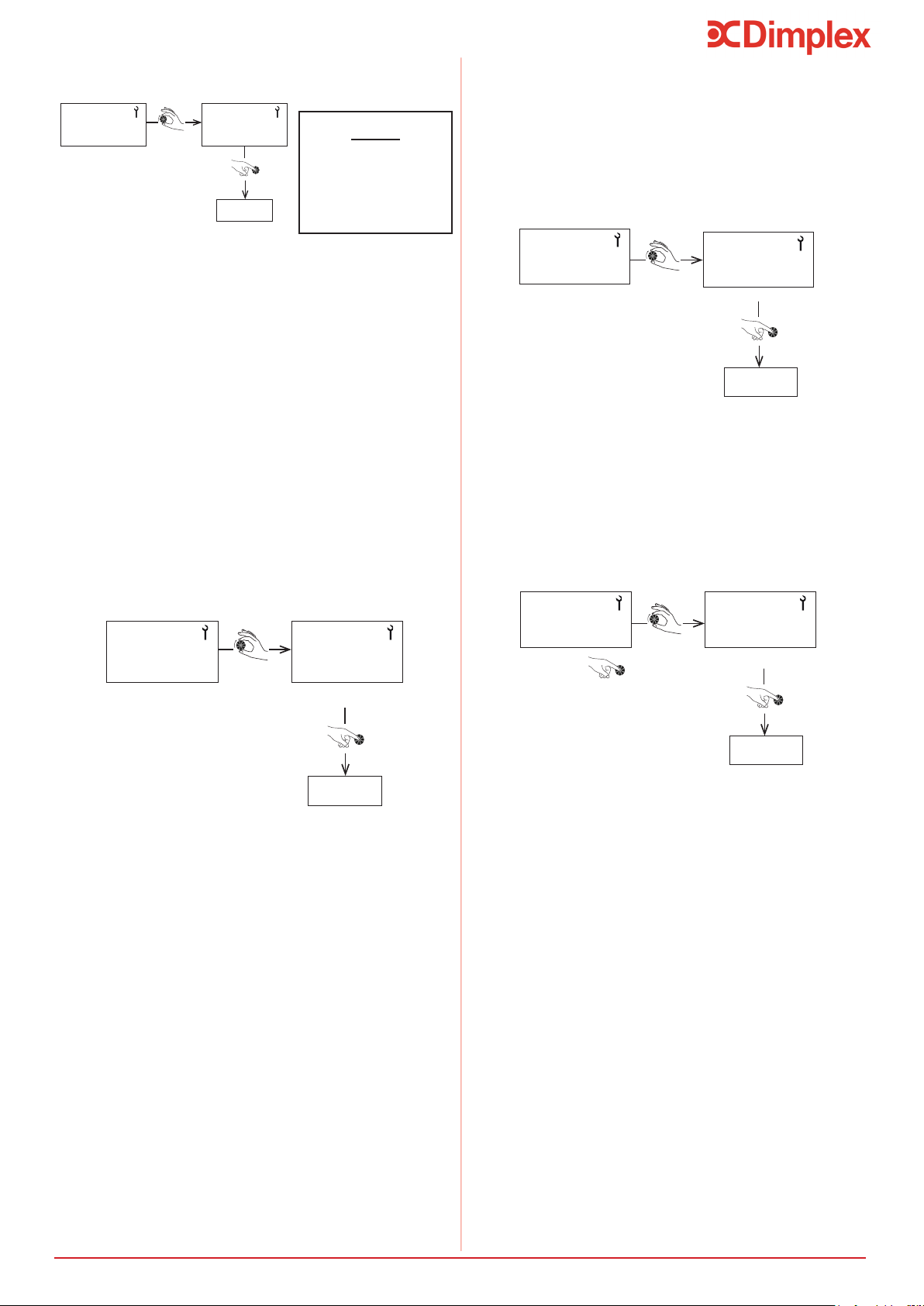
MENU INST. MENU PV MODE
Set-Up and Use
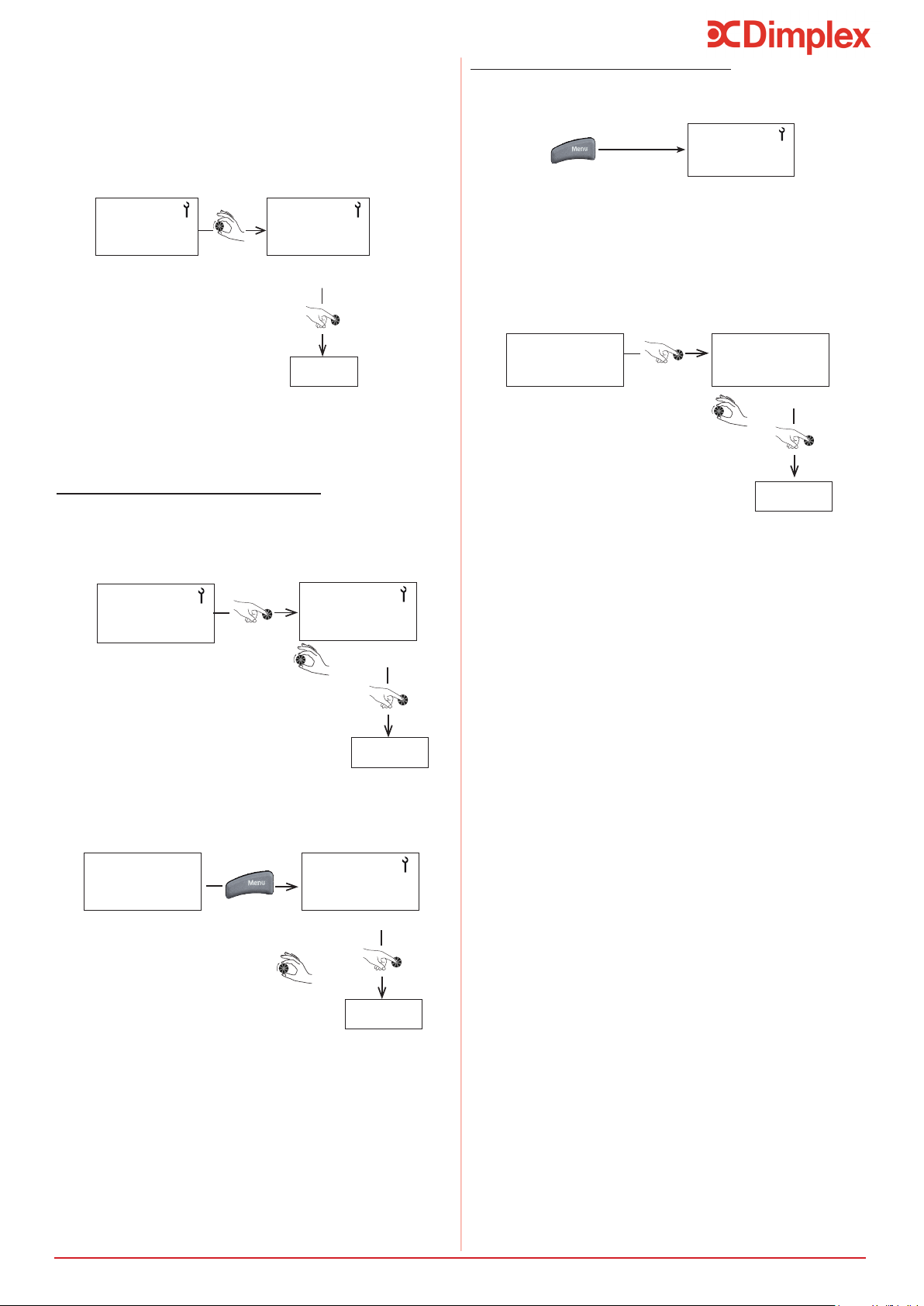
SETTINGS
To adjust installation
settings
RESET PAR.
To go back to
default settings
DISPLAY
To display temperatures
of sensors and inlets
default settings
COUNTERS
To see the meters
running, count
start-ups etc.
7.11 Installer Menu
It may be necessary to adjust certain settings to
optimise the performance of the heat pump water
heater, depending on how the appliance is installed.
Accessing the Installer Menu:
- Press ‘Menu’ and ‘clock’ simultaneously
- Turn the dial until the screen displays ‘Inst. Menu’
- Press the ‘Clock’ and ‘Menu’ buttons simultaneously
- Keep both buttons pressed down until the screen goes
blank
7.11.1 PV Mode
Setting Description Unit Range
Factory
setting
mode pv
Photovoltaic mode
activated
-
yes
no
no
priority
Anti-legionellosis
cycle time intervals
-
yes
no
yes
Yes: the signals from connectors 1 and 2 take
precedence over eco, holiday and frost protection
modes.
No: frost protection and eco modes take precedence
over the signals from connectors 1 and 2.
3. Select ‘Yes’.
5. Press the ‘Menu’ key.
6. Set the desired domestic hot water temperature.
7. Turn the dial to select the primary function:
MENU INST. MENU PV MODE PRIORITY
N.B:
If PV mode is chosen as the primary function, the
domestic hot water will also be heated during
non-selected time periods, e.g. in holiday mode and
outside of the programmed time slots.
If you only wish the domestic hot water to be heated
during authorised time slots, adjust the setting to ‘‘No’’.
- The load shedding function will not be available.
7.11.2 Adjusting the Operating
Settings
SETTINGS
Enter
+
- Press ‘Menu’ twice to return to the main screen.
LOCKING
To display locking
settings
Setting Description Unit Options
Factory
Setting
ANTI-BACT.
Time interval for
anti-legionella
cycle
Days No - 99 No
FAN MODE
Ventilation mode
- 1, 2 or 3 1
T
o
C MINI
Min. temp. for
electrical backup
- No or 43
o
C No
SHEDDING
Load shedding level
- 0, 1 or 2 1
MAX. TIME
Max. heating time
Hours
No, auto
1 to 24
No
PV MODE
To display PV settings
17
Set-Up and Use
7.11.2.1 Anti-Bacteria (Anti-Bact)
Factory Setting = No
- No legionella cycle except the return from vacation
and during exit frost over 3 days.
- During the legionella cycle the water temperature is
raised to 60°C by the heat pump.
- If the hot water is already set to 60°C (See Section
7.5) then legionella cycle will not run as
temperature is already obtained.
- If a cycle is interrupted by loss of electrical power
then the cycle will run at the next cycle period.
- The frequency of day can be adjusted according to
number of days
-During the anti-legionellosis cycle the temperature is
raised between 55°C and 70°C
ANTI-BACT
No
ANTI-BACT
8
Enter
Example:
Anti-Bact 8 = the legionella
cycle every 8 days
7.11.2.2 Fan Mode
Fan Vent
Fan Vent
2
Select Mode
Enter
Factory Setting = 1
- Mode 1 = Standard mode, automatic ventilation.
- Mode 2 = Manual mode, forced ventilation.
- Mode 3* = Ventilation during the heating of the
water and ventilation controlled by thermostat.
Thermostat is connected to input of the electronic card
in the heat pump water heater (see wiring diagram).
* In the case of activation of the PV mode, controlled
ventilation (Mode 3) is not available.
* The electric back-up immersion heater will activate
until the water temperature reaches 43
o
C. The heat
pump will complete the remaining charge to set
temperature.
7.11.2.3 Minimum Temperature
T
o
C Min.
No
T
o
C Min.
43
o
c
Select Mode
Enter
It is possible to allow the operation of the immersion
heater along with the heat pump to prevent the
water temperature falling below a minimum comfort
temperature of 38°C. The immersion will then heat the
water to 43°C, once this temperature has been reached
the complete heating of the water heater.
- By default this is not active.
- In case of load shedding, the function <T
o
C Mini> is
not active.
7.11.2.4 Shedding
You can select which items are restricted from running
during load shedding (immersion heater or heat pump).
Shedding
1
Shedding
0
Select Mode
Enter
- Press ‘Menu’ to return to the main screen.
If the power contact is open:
- Mode 0 = Nothing is allowed to run.
- Mode 1 = Only the heat pump will operate.
- Mode 2 = Heat pump and boost are will operate
(neutralising the peak hours).
If the PV function is activated then the load shedding
from the voltage-free contact (Entrée 1/2) is not
possible. In this case it is necessary to go through the
programme scheduling (See Section 7.9).
- Press ‘Menu’ twice to return to the main screen.
- Press ‘Menu’ twice to return to the main screen.
- Press ‘Menu’ to return to the main screen.
Example:
the anti-legionellosis cycle
18
Set-Up and Use
A period of time can be chosen where the electrical
back-up will run at the same time as the heat pump to
speed up the heating of the water in the tank.
If you choose Max. Time= AUTO, the heating time is
limited to 5 hours maximum.
7.11.2.5 Maximum Time
Max. Time
No
Max. Time
3h
Select time period between
1 and 24 hours
Enter
- This function is deactivated by default.
- Press ‘Menu’ to return to the main screen.
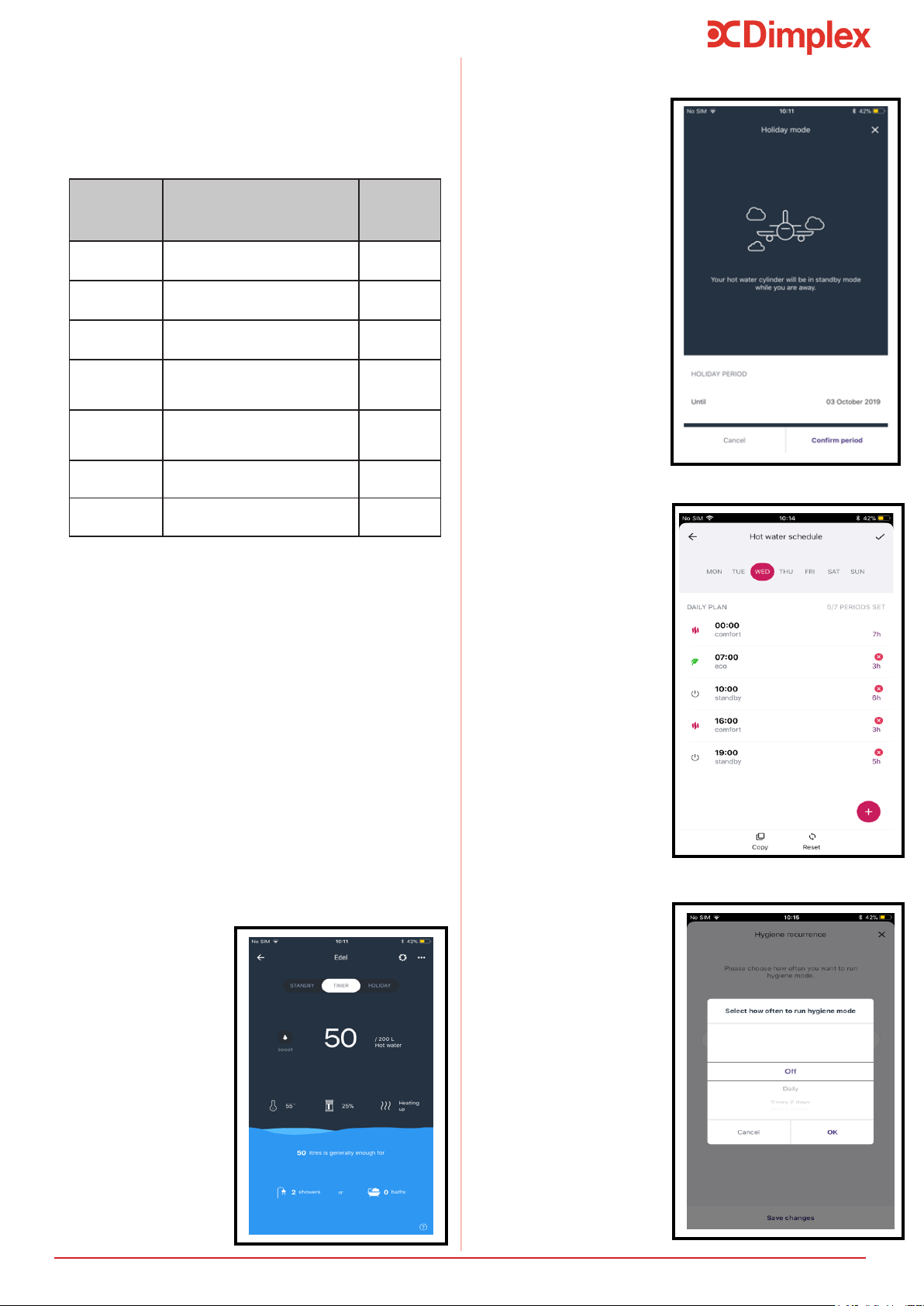
7.11.3 Locking the Keyboard
Permanent and automatic locking
The “Locking” option enables you to create two
possible levels of locking for accessing the menus.
In the “Installer” menu, turn the dial to “Locking”.
LOCKING
LOCKING
NO
Select No
Enter
NO = Locking is not activated but manual locking is
possible by pressing ‘Menu’ for 3 seconds.
50
o
C UNLOCK
NO
Select Yes
Enter
Press for
3 secs
AUTO = To lock menu access with temporary unlocking
(60) sec, press ‘Menu’ for 3 seconds.
Without gaining access through the ‘installer’ menu and
provided that locking settings are not already in place.
Manual Locking from the Main Screen
Press for
3 secs
LOCKING
- Press ‘Menu’ to return to the main screen.
7.11.4 Resetting Parameters
Resetting the parameters enables you to go back to the
default settings. Go to the ‘Installer’ Menu and turn the
dial to ‘Reset’.
RESET PAR
RESET PAR
YES
Select ‘YES’
ENTER
19
Maintenance
7.11.5 Reading Display
The ‘Read Data’ menu shows you, in real time, the
information given by sensors. To access hold the dial for
3 seconds until ‘Display’ menu shows, turn the dial to
select the desired display.
Display Description
Reference
on electronics
board
water
Domestic hot water temperature in
lower part of tank
Teau
air
Temperature of heat pump air intake Tair
evap.
Temperature of heat pump
evaporator (expansion valve outlet)
Tdégiv.
clock
switch
Off-peak hours switch
(0 = on; 1 =off)
heures creuses
fan contr.
Fan control switch
(0 =on; 1 =off)
hygrostat
PV eco
Contact input 1
0 = open 1 = closed
1
pv max
Contact input 2
0 = open 1 = closed
2
The temperature which is permanently displayed on the
screen is the set temperature and does not
necessarily indicate the temperature of the water
immediately available in the tank.
7.11.6 Counters (Meters)
The ‘Counters’ menu shows the number of start-ups
from the heat pump and the electrical backup. In the
‘Installer’ menu, turn the dial to ‘Counters’.
Counter No.1: Number of start-ups from the
heat pump.
Counter No. 2: Number of start-ups from the
electrical backup.
Counter No. 3: Cumulated heated pump running
time.
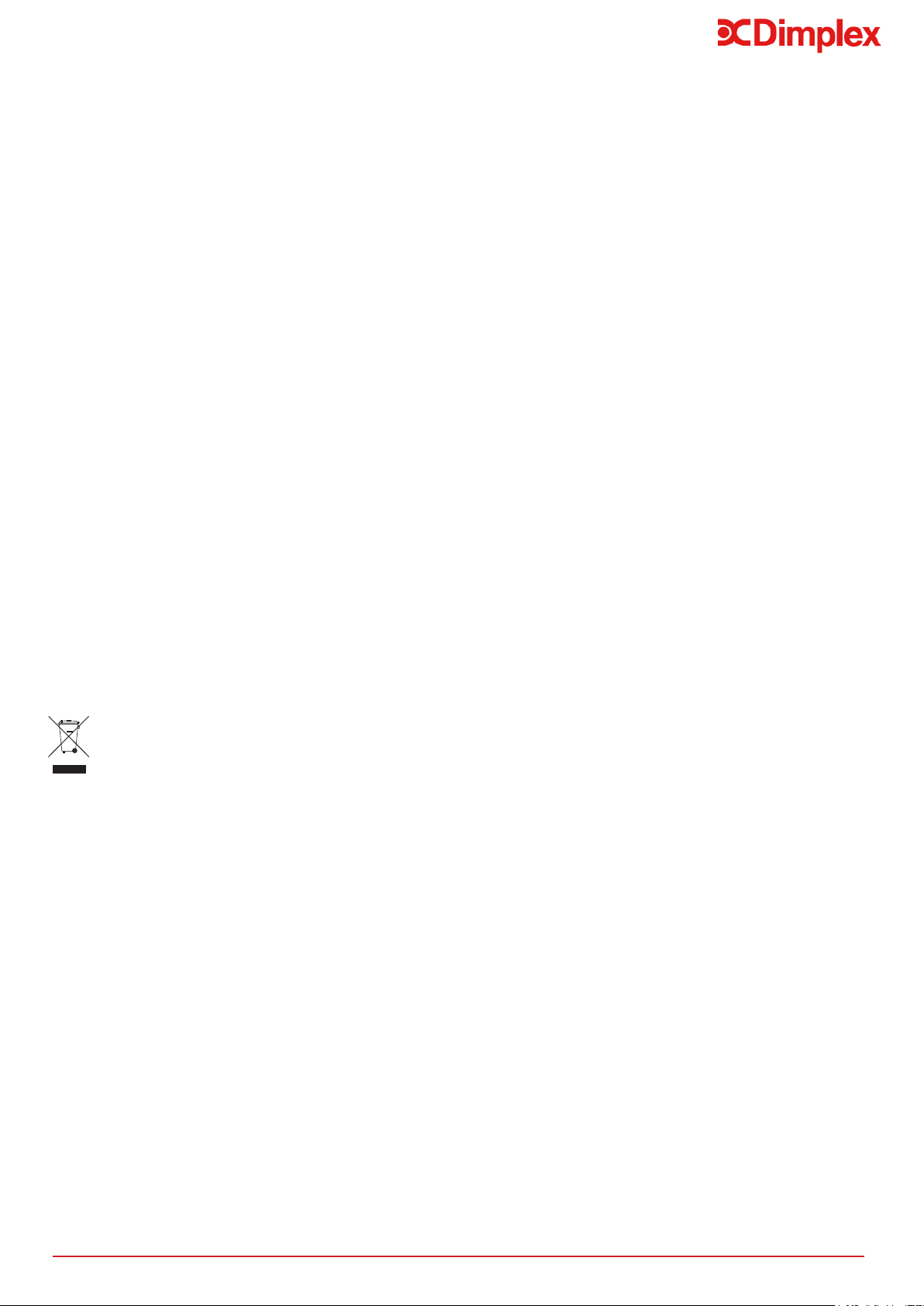
7.12 Control App
7.12.1 Home Screen
• Turn Edel into
Timer mode
regardless of
schedule.
• Use boost
function for
immediate hot
water.
• Overview of
the cylinder
charge and
available hot
water.
7.12.2 Holiday Mode
• Ensures the
cylinder doesn’t
charge when
away, and that
there will be hot
water upon your
return.
•
of days up to
any date.
• Turn cylinder
back into Timer
mode at any
point.
7.12.3 Schedule Control
• Create
individual
schedules for
each day to suit
the customer.
• Copy a schedule
to any day of
the week.
• Allows control
over your
appliance to
ensure that
you always
have hot water
and are not
unnecessarily
using energy.
7.12.4 Hygiene Mode
• Select to run
hygiene mode
on the app,
frequency of
hygiene mode up
to 99 days.

20
8 Maintenance
The maintenance of this appliance covers the critical ar-
eas of the Domestic Hot Water Cylinder, the Heat Pump
Module, Air Connections and Electrical Connections.
All maintenance on this product must
be undertaken by a suitably qualied
and trained technician.
!
8.1 DHW Cylinder
After servicing, complete the relevant Service Re-
cord section of the Benchmark Checklist located on
the inside back pages of this document. To meet
with warranty requirements the cylinder must be
serviced annually.
When draining the tank, ensure that
there is a large enough air inlet at the
top to avoid any depression in the tank;
failure to do so will invalidate the war-
ranty.
!
1. Draw some water from cold water tap and retain
in container.
2. Isolate cold water mains supply from cylinder.
to assure safe discharge and check that valve is
not dripping when closed.
safe discharge and check that valve is not dripping
when closed. The expansion relief valve should be
operated regularly to remove lime deposits and to
verify that it is not blocked.
5. Open hot water tap and release remaining pres-
sure from unit.
6. If the system is drained completely for an inter-
nal inspection, ensure the hot water tap remains
open, connect a hose to the drain valve and en-
sure a safe discharge.
7. Note the set pressure of the pressure reducing
valve. Remove cartridge and clean strainer in wa-
ter provided in container. Re-assemble pressure
reducing valve ensuring the correct pressure is
set.
8. Periodically the immersion heater should be re-
system is drained for internal inspection Check
the O-ring seal for damage and replace if neces-
sary. A torque of 40 Nm is recommended when
tightening up the immersion after it has been re-
9. Check electrical wiring connections and the condi-
tion of the cable of the immersion heater and the
thermostat.
10. The immersion heater boss can also be used for
access to view the internal components of the cyl-
inder.
11. Re-commission unit (see chapter 7.1).
8.2 Heat Pump
Any work on the refrigerant circuit
must be carried out by a qualied
professional with an F Gas Category 1
certicate of aptitude.
It is strictly prohibited to release refrig-
erant into the atmosphere. The refriger-
ant must be collected before any work is
carried out on the circuit.
1. Remove insulation from ducting as well as the duct-
ing itself and thus remove the hood from the unit to
expose the compressor, heat exchanger etc.
2. Check the compressor for ice formation.
3. Check the circuit for leak-tightness by carrying out
a test of the refrigeration components with an ap-
4. Check whether the components of the refrigerant
circuit show any signs of rust or traces of oil.
5. Check the unit’s components for wear or defective
items.
6. Inspect for build-up of debris in ducting and hood,
remove if necessary.
7. The heat exchanger should be examined for dirt
and dust and cleaned with warm water carefully to
8. Check that the cables are securely seated on the
connection terminals.
9. Check that the fan runs freely.
!
!
8.3 Air intake & Exhaust
1. Both the exhaust and air intake vents must be
inspected and cleared of any debris stuck in the
vents.
2. Ensure the evaporator is checked at least once a
year, more depending on the cleanliness of the air
8.4 Heat Pump Condensation
1. To check that condensation is draining correctly:
- Remove upper cover (see Section 6.9.1).
- Check for blockages in the drainage hole.
- Clean the condensate recovery container, were de-
posits from air intake may have gathered.
2. The pressure limiting device must be switched
on regularly to eliminate limescale and check for
blockages.
3. Check that all hydraulic connections on the heat
pump water heater are watertight.
4. The condensate drain should be inspected to en-
sure the red plug has been removed and unre-
stricted draining of condensation is allowed.
21
Notes
Waste electrical product should not
be disposed of with household waste.
Please recycle where facilities exist.
Check with your Local Authority or retail-
er for recycling advice.
8.5 Electrical Connections
Incorrectly made electrical connections can result in
-
vicing the product, please ensure the wiring is adequate
to minimise risk of overheating. Please ensure you have:
1. Remove the dust from power supply connections.
2. Used the correct type and cross-sectional area ca-
ble to meet manufacturer and Wiring Regulation
requirements.
3. When stripping the insulation from the individual
conductors, taken care to not damage the strands
of the conductor wire, which would reduce the
cross-sectional area of the conductor.
4. Ensured the conductors are tightly and securely
connected to the controls or immersion heater
5. Ensured the bared conductors are correctly insert-
ed into the terminals, to avoid bearing on the insu-
lation sleeving or only partially clamping the con-
ductors.
6. Securely anchored the supply cable using the
means provided to avoid exerting any external
strain to the cable and hence to the terminals.
7. Checked to ensure the product is earthed correctly;
the Live and Neutral connections are to the correct
terminals, and the Residual Current Device (RCD)
operates correctly.
8. Regularly checked the electrical connections as
part of the maintenance schedule, to ensure the
wires remain in good condition and terminations
remain secure. Ensure any spare parts used dur-
ing maintenance of the product are an authorised
spare part and meet the manufacturers’ require-
ments.
22
Troubleshooting
8.6 Troubleshooting
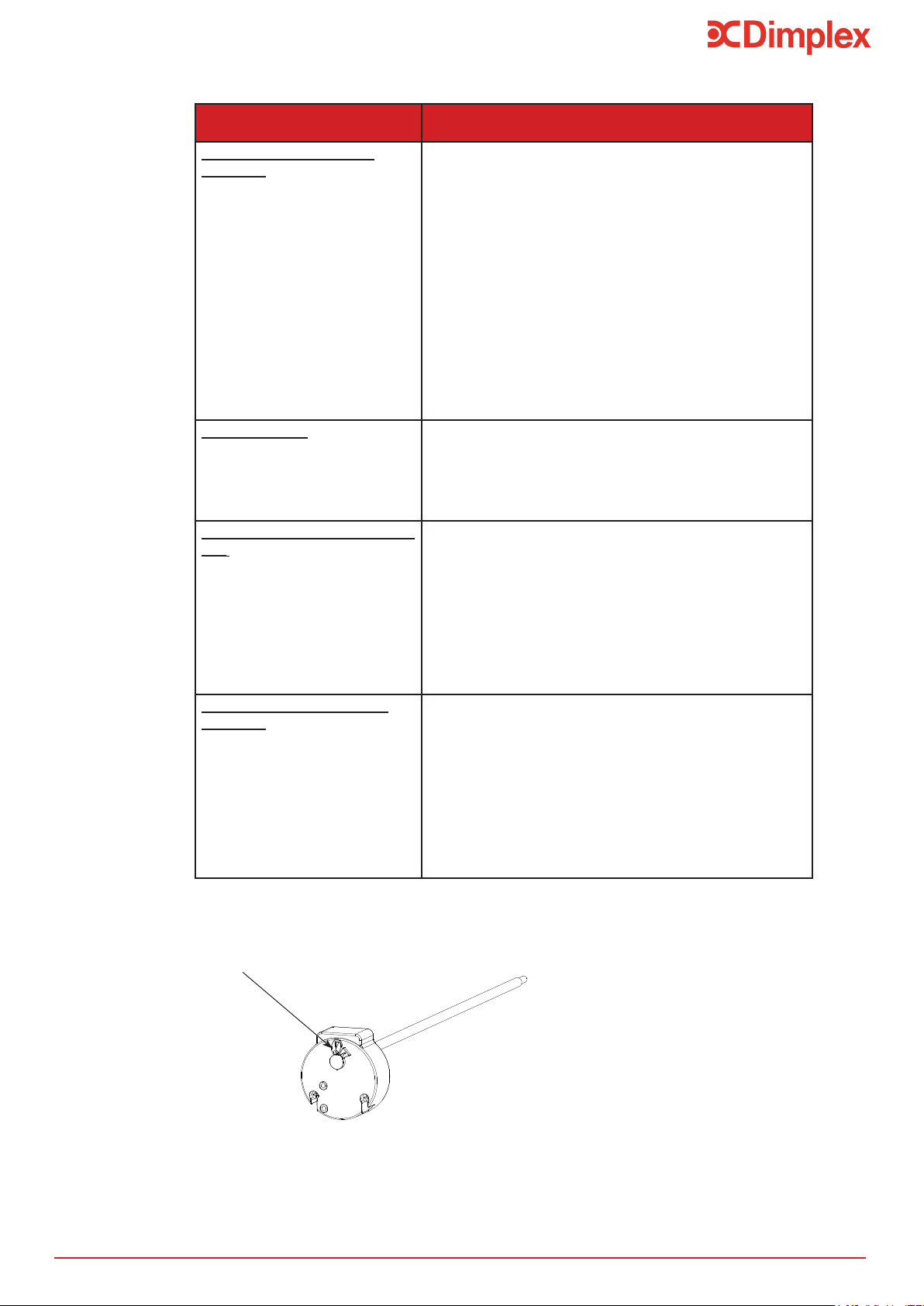
Do not adjust the settings on the thermostat.
Reset button (85
o
C) on thermostat
Issue Check
The Heat Pump is not
working
- That the desired water temperature is higher than
the
temperature of the water in the tank.
- There is power supply to the appliance.
- The the green light is on.
- That the appliance is not in holiday mode (see
Section
7.6)
- That the air intake or ambient temperature is under
- 7
o
C or over +35
o
C.
- That the timer has not been programmed to stop
the
appliance operating (‘Economy’ light will be on (see
Section 7.2).
- If an error message is displayed on the screen
(see Section 8.5).
No Hot Water - That the volume consumed is not higher than the
volume in the tank.
- The time period the appliance operates is not too
short (12hrs minimum if connected to piping).
- The water temperature is not set too low.
Condensates are not drain-
ing
- The draining system for dirt or blockages:
Remove the cover (see Section 6.9.1) and check
the
opening.
- That tubes do not have bends or “U” shapes that
can
collect water.
access to open air.
Electrical backup is not
working
- That your electricity provider or your timer is not
preventing the appliance from functioning, ‘Econo-
my’
symbol should be on (see Section 7.2).
- A heat-limiting safety thermostat for electrical
backup has not been activated after over-heating
(>85°C). If this is the case, reset it.
- Before resetting, check:
• that the heating element does not have limescale.
• clean or replace if necessary.
Table 5: Troubleshooting
Contents
Spares Parts
23
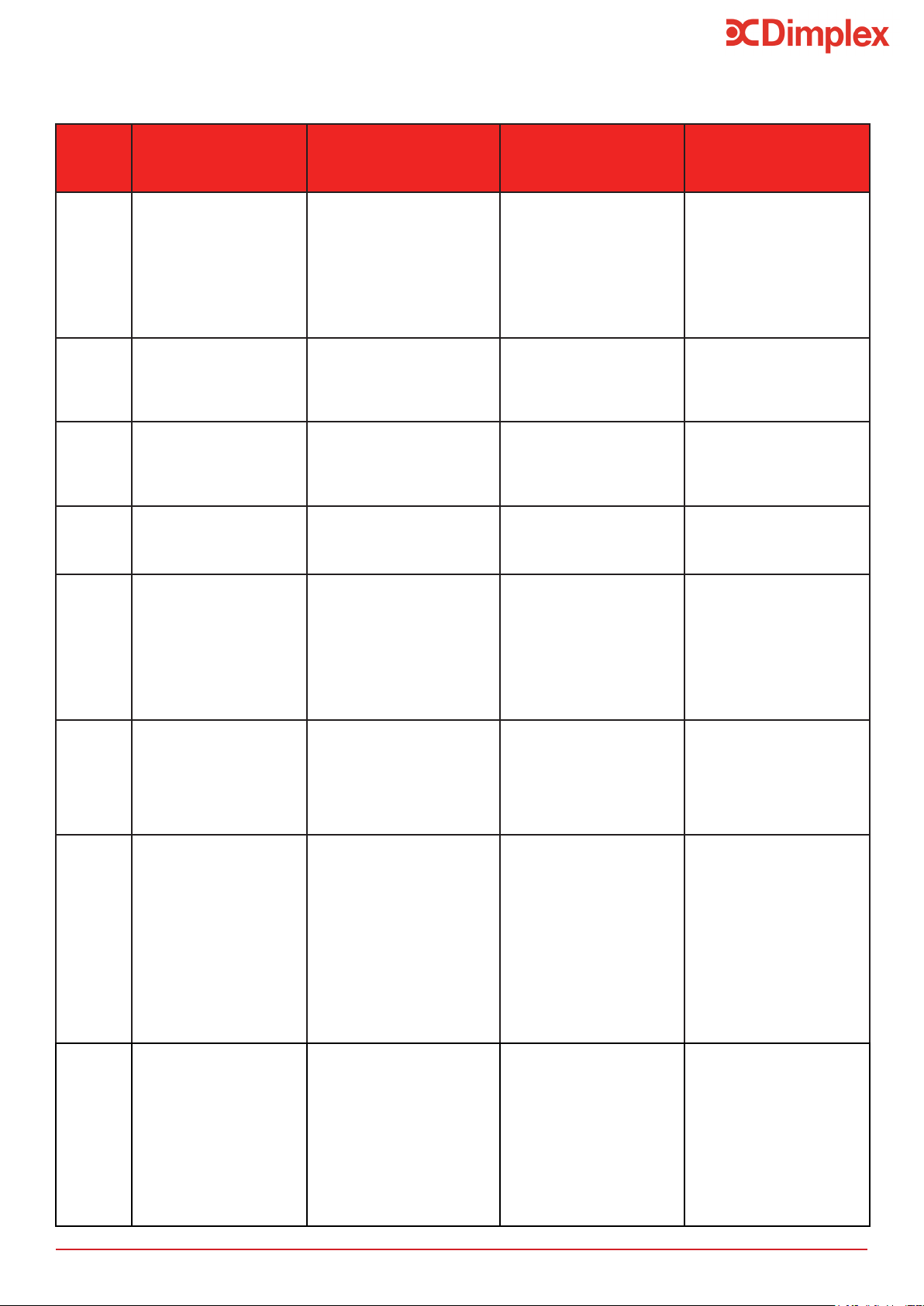
8.7 Spare Parts
Table 6: Edel Air Source Water Heater Spare Part List
Description Part No
R00009-1
R00095-1
C3S PCB Controller
Electric heating seal
PCB +Display +PGM +Cable
Display Screen Dial
Thread sealant
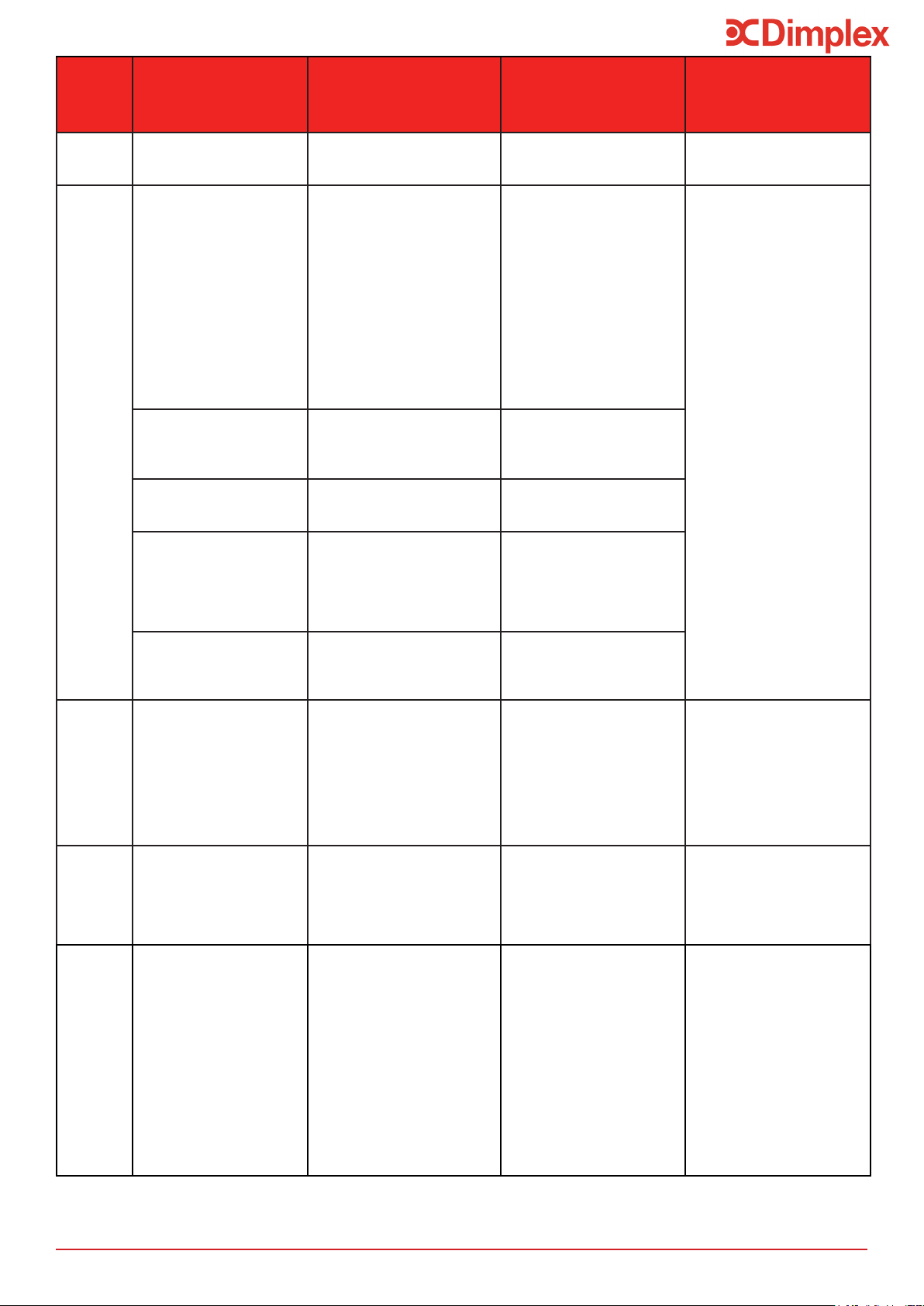
Error Messages
24
Display Error Probable causes Solutions
Temporary operation
measures while
waiting for problem to
be solved
MEMO/
BUS
• Electronic board defect.
• Bus wire defect.
• Display screen defect.
• Voltage too high on
electrical network.
• Cabling error during
electrical connection
(connection to electricity
provider or moisture
sensor...).
• Damage during
transportation.
• Replace main electronics
board or;
• Replace display screen
board.
• Appliance non-functional.
T_AIR
• Air temperature sensor
defect (Temperature of
air taken in).
• Sensor not functioning.
• Sensor unplugged from
board.
• Sensor cable damaged.
• Replace sensor.
• Heat pump
non-functional.
• Electrical backup heats
water to 43°C (min
38°C).
T_DE-
FROST
• Evaporator sensor
defect (de-icing
temperature).
• Sensor not functioning.
• Sensor unplugged from
board.
• Sensor cable damaged.
• Replace sensor.
• Heat pump
non-functional.
• Electrical backup heats
water to 43°C (min
38°C).
T_water
• Tank water sensor
defect.
• Sensor not functioning.
• Sensor unplugged from
board.
• Sensor cable damaged.
• Replace sensor.
• Heat pump
non-functional.
Clock • Clock/timer defect.
• Voltage too high on
electrical network.
• Damage during
transportation.
• 1-Press «clock settings»
and set date and time.
• 2-If the error message
still does not disappear,
replace the electronics
board.
• Programmed heating
periods are no longer
valid: the water is
maintained continuously
at the standard set
temperature (if no signal
or control is connected
to the «external control»
switch).
OVER
PRESS.
• Heat pump pressure too
high.
• No water in tank.
• Water is too hot (>75°C)
• Water sensor removed
from tank.
• Defective water sensor.
• Check that the tank has
water and purged of air.
• Change the water sensor
• Check that the water
sensor is in the right
position in the tank.
• Heat pump is
non-functional.
• Resets automatically.
• Authorised to run on
backup.
FREQ.
DEFRO
• De-icing too often.
• Air inlet / outlet blocked.
• Ventilation duct blocked.
• Air duct is too long or has
too many elbows.
• Evaporator clogged.
• Check that air is
circulating properly
throughout the piping
circuit.
• Check pipe lengths:
hose.
-20m total of rigid
piping.
ducts.
• Check evaporator is
clean.
• Heat pump
non-functional.
• Electrical backup heats
water to 43°C (min
38°C).
LOW
PRES
• Heat pump pressure
too low.
• Air inlet / outlet blocked.
• Ventilation duct blocked.
• Fan blocked or out of
order.
• Evaporator clogged.
• Ice on evaporator.
• Check the fan is working.
• Check that air is
circulating properly
throughout the piping
circuit.
• Check pipe lengths:
-20m total of rigid piping.
ducts.
• Check evaporator is
clean.
• Heat pump
non-functional.
• Electrical backup heats
water to 43°C (min
38°C).
8.8 Error Message Codes: Errors, Solutions and Operating in case of Error
N.B Errors can be dismissed by briey pressing the dial (manual reset).
Error Messages
25
Display Error Probable causes Solutions
Temporary operation
measures while
waiting for problem to
be solved
OVER-
HEAT
• Domestic hot water
overheat (water
temperature >85°C)
• Defective water sensor
• Water sensor removed
from tank
• Check that sensor is in
the right position in the
tank
• Heat pump is
non-functional
• Resets automatically
ERR 01
• Incorrect temperature
sensor reading.
• The air and de-icing
sensors are the wrong way
round on the electronics
board.
• The de-icing sensor and
water sensors are the
wrong way round on the
electronics boar.
• The de-icing sensor is
connected to the air input,
the air sensor is connected
to the water input, the
water sensor is connected
to the de-icing input.
• Reposition the
temperature sensors
correctly on the main
electronics board.
• Heat pump
non-functional.
• Incorrect reading from
the de-icing sensor.
• The de-icing sensor is not
properly connected to the
tube and is measuring air.
• Reposition the de-icing
sensor properly in the
tube.
• The heat pump has run
out of gas.
• There is a leak on the
refrigerant circuit.
• Find and repair the leak
refrigerant circuit.
• The expansion valve is
not working.
• The expansion valve is
damaged or broken due to
work being carried out on
the appliance or it being in
contact with a part which
vibrates.
• Replace expansion valve.
• The compressor is not
working and safety
temperature is
activated.
• Weakness in compressor. • Replace compressor.
ERR 02
• Incorrect temperature
sensor readings.
• The air and water sensors
are the wrong way round
on the electronics board.
• The de-icing sensor is
connected to the air input,
the air sensor is connected
to the water input, the
water sensor is connected
to the de-icing input.
• Reposition the
temperature sensors
correctly on the main
electronics board.
• Appliance non-functional.
ERR 03
• Incorrect temperature
sensor readings.
• The de-icing sensor is
connected to the air input,
the air sensor is connected
to the water input, the
water sensor is connected
to the de-icing input.
• Reposition the
temperature sensors
correctly on the main
electronics board.
• Appliance non-functional.
ERR 04
• Incorrect de-icing and
water sensor readings.
• The de-icing sensor and
the water sensor are the
wrong way round on the
electronics board.
• Reposition the
temperature sensors
correctly on the main
electronics board.
• Heat pump
non-functional.
ERR 08
• Wrong measure on
de-icing sensor.
• De-icing sensor is
defective.
• Replace de-icing sensor.
• Product runs in
alternative mode with
heat pump.
ALARM
EPR0
• The display screen
electronics board has a
memory problem.
• The display screen
electronics board is
damaged.
• Replace display screen
electronics board.
• Appliance
non-functional.
*DHW = Domestic Hot Water

26
9 Warranty
The tank is guaranteed against breakage for a
appliance was activated, if the warranty voucher
was sent back to the manufacturer. In the absence
of this document, the date of manufacture will be
used to determine the start date. If the tank is
broken, the whole appliance will be replaced.
The other parts are guaranteed for a two year
period starting from the date the appliance was
activated, if the warranty voucher was sent
back to the manufacturer. In the absence of this
document, the date of manufacture will be used to
determine the start date.
The appliance is guaranteed against all
manufacturing defects, provided that it was
instruction manuals, the C15-100 standard for
electrical connections and the plumbing DTU 60-1
additional clause 4 for domestic water.
A defective part does not warrant the whole
appliance being replaced.
The warranty only extends to parts which we
identify as having been defective at manufacture.
If necessary, the part or product should be
returned to the manufacturer but only with
prior agreement from our technical department.
Labour, transport and packaging costs are the
responsibility of the user. Repairs on a device will
not result in compensation. The parts warranty
ends at the same time as the
appliance warranty.
The warranty only applies to the appliance and its
components and excludes any part or installation
external to the appliance.
Regular maintenance of the appliance by a trained
professional is essential for ensuring sustained
use and durability. In the absence of regular
maintenance, the warranty will not apply.
If an appliance is presumed to have been
the cause of any damage, the appliance and
the damage must be left as they are and not
tampered with.
9.1.1 General Information
9.1 Warranty Limits
Please read the following statements
carefully as it aects your warranty.
Please ensure that the installer has fully
completed the Benchmark Checklist on the inside
back pages of this document and that you have
signed it to say that you have received a full and
is legally required to complete a commissioning
checklist as a means of complying with the
appropriate Building Regulations Part G3 (England
and Wales), Part P of Northern Ireland and Sec-
Building Control either directly or through a
issued to the customer who should, on receipt,
Warranty
This product should be serviced annually to
The service engineer should complete the relevant
Service Record on the Benchmark Checklist after
The Benchmark Checklist will be required in the
The warranty does not apply to defects or damage
caused by situations or events such as:
• Misuse, abuse, negligence, improper
transport or handling.
• Incorrect installation, or installation which
has been carried out without following the
instructions in the manual and user guide.
•
•
appliance.
•
hailstones, hurricanes or any other natural
catastrophe.
• Movement, imbalance, collapse or settling
of the ground or the structure where the
appliance is installed.
• Any other damage which is not due to
defects in the product.
The heat pump water heater is not guaranteed
against:
• Variations in colour of the appliance or
damage caused by air pollution, exposure
to chemical elements or changes brought
about by bad weather conditions.
• Dirt, rust, grease or stains which occur on
the surface of the appliance.

27
Warranty
The warranty does not cover defects resulting from:
recommendations,
- using accessories which were not provided by us.
9.1.2.5 Hydraulic Connections
Cases (unlimited) where the warranty is void:
- Non-maintenance of the appliance and in particular
the anode not being replaced in time.
- Non-maintenance of the pressure-relief valve,
resulting in excessive pressure.
- Non-maintenance of the evaporator or the
condensates draining system.
- Abnormal levels of limescale on heating elements or
safety devices.
- Not using parts supplied by the manufacturer.
- Protective outer casing being subjected to any
external damage.
Cases (unlimited) where warranty is void:
- Inverting the hot/cold water connections.
- Water pressure being higher than 6 bars.
pressure relief valve.
cold water inlet on the appliance.
- Fitting a pressure relief valve which does not comply
with the current national standards.
- Installing a previously-used pressure-relief valve.
- Tampering with the pressure-relief valve.
- Abnormal levels of corrosion caused by an incorrect
hydraulic connection (direct contact between iron and
copper) without a sleeve (cast iron, steel or insulator).
- External corrosion caused by the piping not being
properly.
- Improper connection of the condensates recovery
system.
No claim for compensation may be made for damage
thermostatic mixing valves.
9.1.2.6 Accessories
9.1.2.7 Maintenance
9.1.2 Exclusion from Warranty
9.1.2.1 Use
Cases where warranty (unlimited) is void :
- Water supply being other than cold domestic water,
(such as rainwater or water from a well), or which has
particularly hostile or abnormal properties which do
not comply with the national rules and current
standards (DTU 60 - 1 additional clause 4, hot water).
9.1.2.2 Handling
Cases (unlimited) where warranty is void:
- Any damage sustained by impacts or falls during
handling after delivery from the factory.
- Deterioration in the condition of the appliance
after handling where the instructions in the manual
have not been followed.
- Damage occurring in the appliance when it has been
switched on less than an hour after it has been leaning
9.1.2.3 Installation Site
Cases (unlimited) where the warranty is void:
- Placing the appliance where it can be subject to ice or
other bad weather conditions.
- Non-compliance with the instructions in the manual
when installing the appliance.
- Installing the appliance on a surface which cannot
bear its weight when it contains water.
- Installing the appliance in a room with surface area of
less than 20m² where there is no piping for air intake
and rejection.
- Installing the appliance at a tilted angle which does
manufacturer’s responsibility.
9.1.2.4 Electrical Connections
Cases (unlimited) where the warranty is void:
- Faulty electrical connection which does not comply
with the current national installation standards.
- Not following the connection diagrams in the
instruction manual.
required voltage.
- Failure to comply with supply cable sections.
throughout the appliance (fuse / circuit-breaker,
grounding etc).
- Damage which results from deactivating the
electrical backup thermostat and / or the heat pump.
28
B
C
D
E
A
152
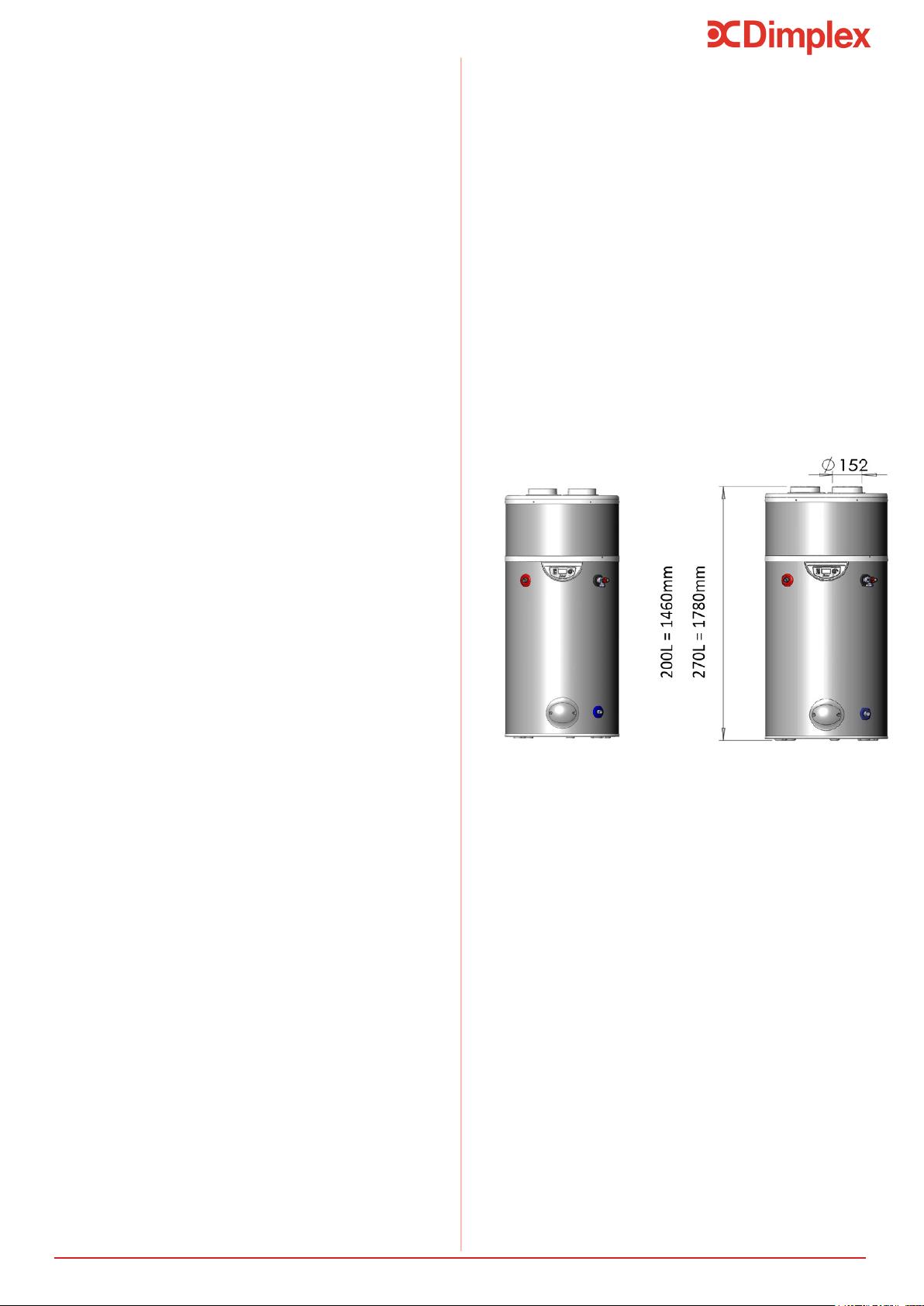
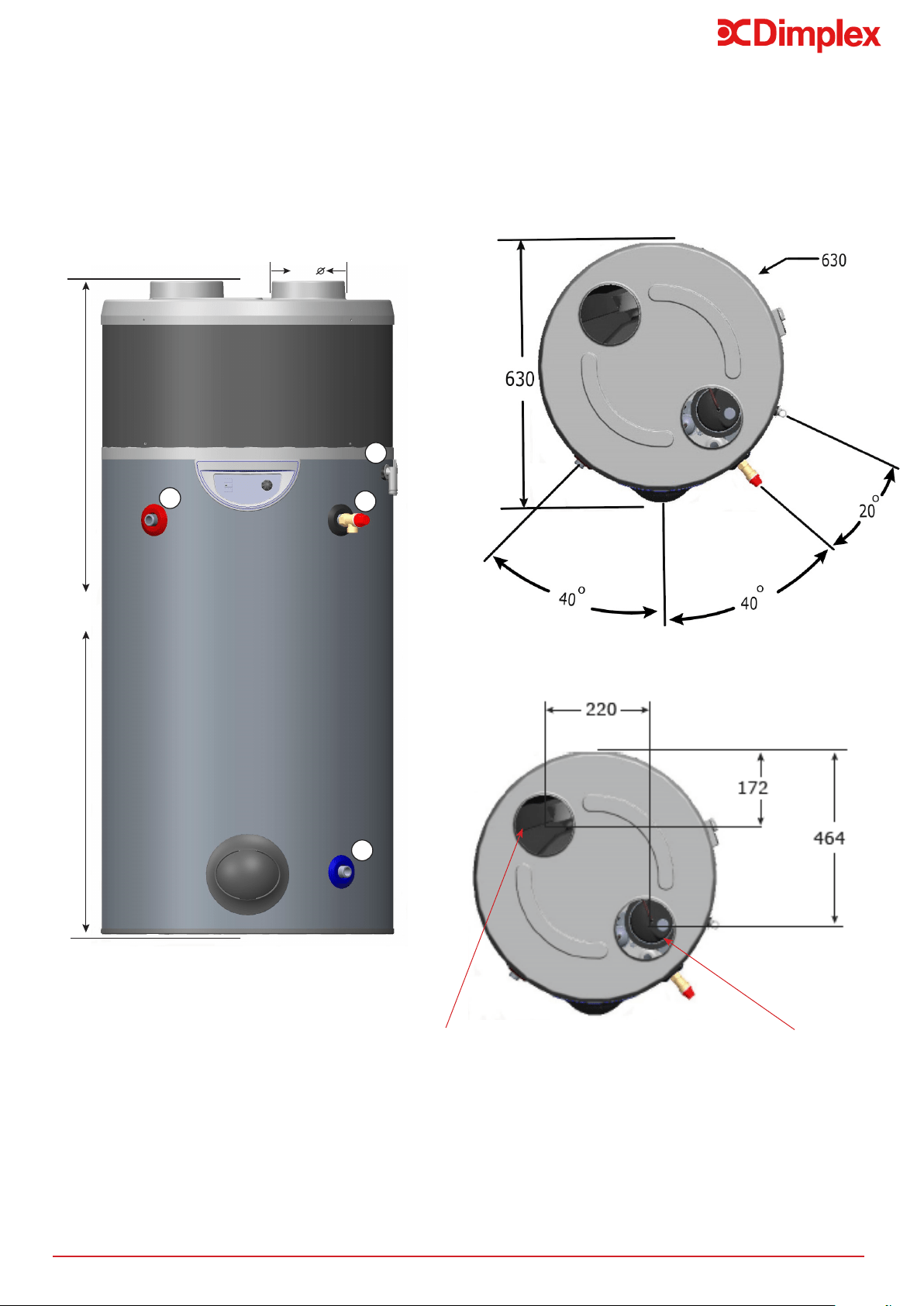
Figure 11: Edel Air Source Water Heater Dimensions (for reference only)
Technical Data and Product Fiche
10 Technical Data and Product Fiche
Air Intake
Air Discharge
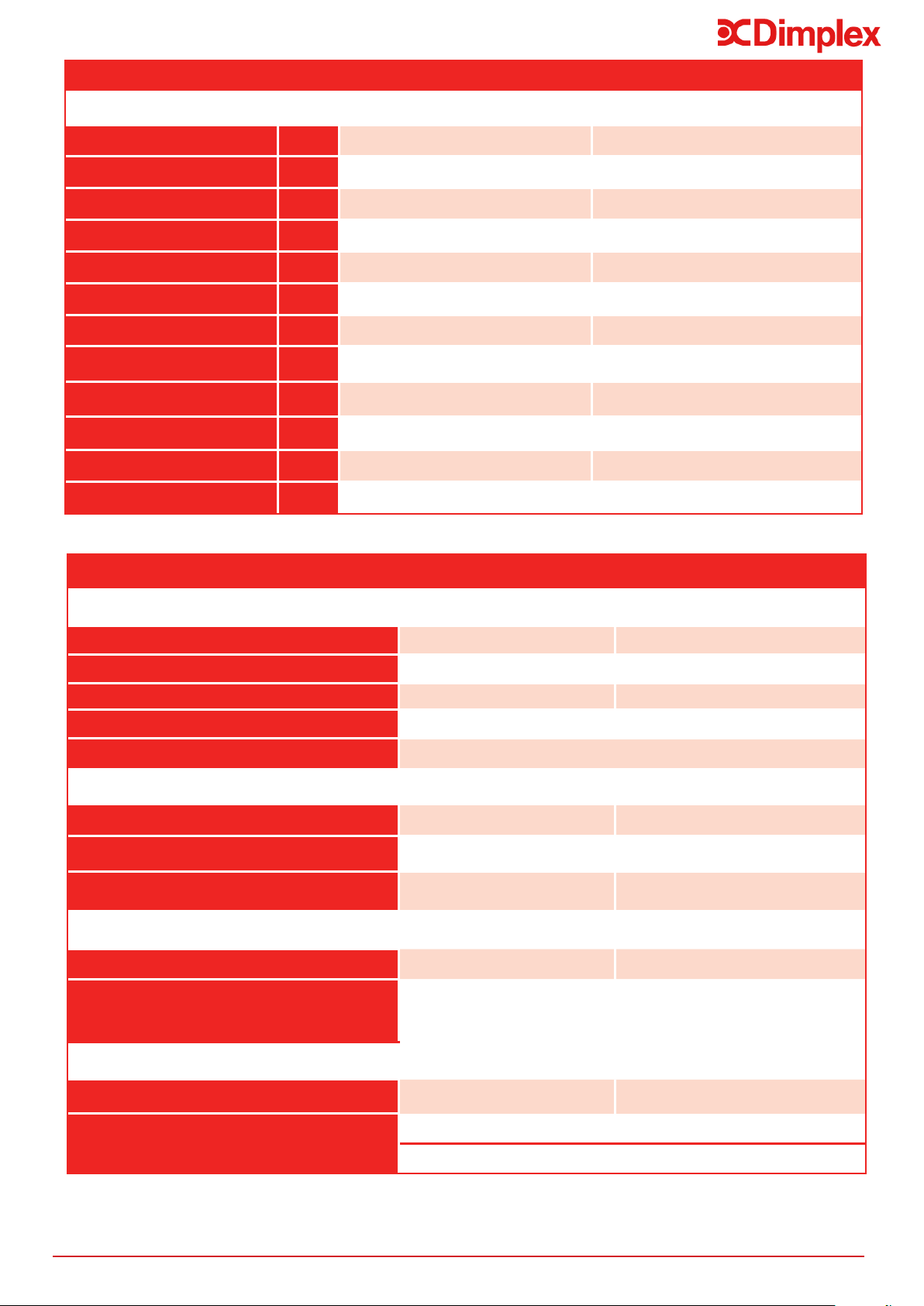
29
Edel Air Source Water Heater - Dimensions
Reference EDL200UK-630RF EDL270UK-630RF
Capacity [l] 200 270
Hot Water Capacity [l]* 164.12 228.65
Weight - Empty [kg] 56.5 63
Weight - Full [kg] 254 332
Heat Up Time [hh:mm]* 07:15 09:48
Heat Loss [kWh/24h] 1.61 1.77
Height [mm] A 1460 1780
Outer Diameter [mm] 630 630
Condensates Pipe [mm] B 1025 1310
Hot Water Outlet [mm] C 900 1245
T&P Valve [mm] D 900 1245
Cold Water Inlet [mm] E 155 155
Table 9: Edel Air Source Water Heater Product Fiche
Technical Data and Product Fiche
*Cylinder is tested in accordance with EN12897:2006
GDC Group Ltd
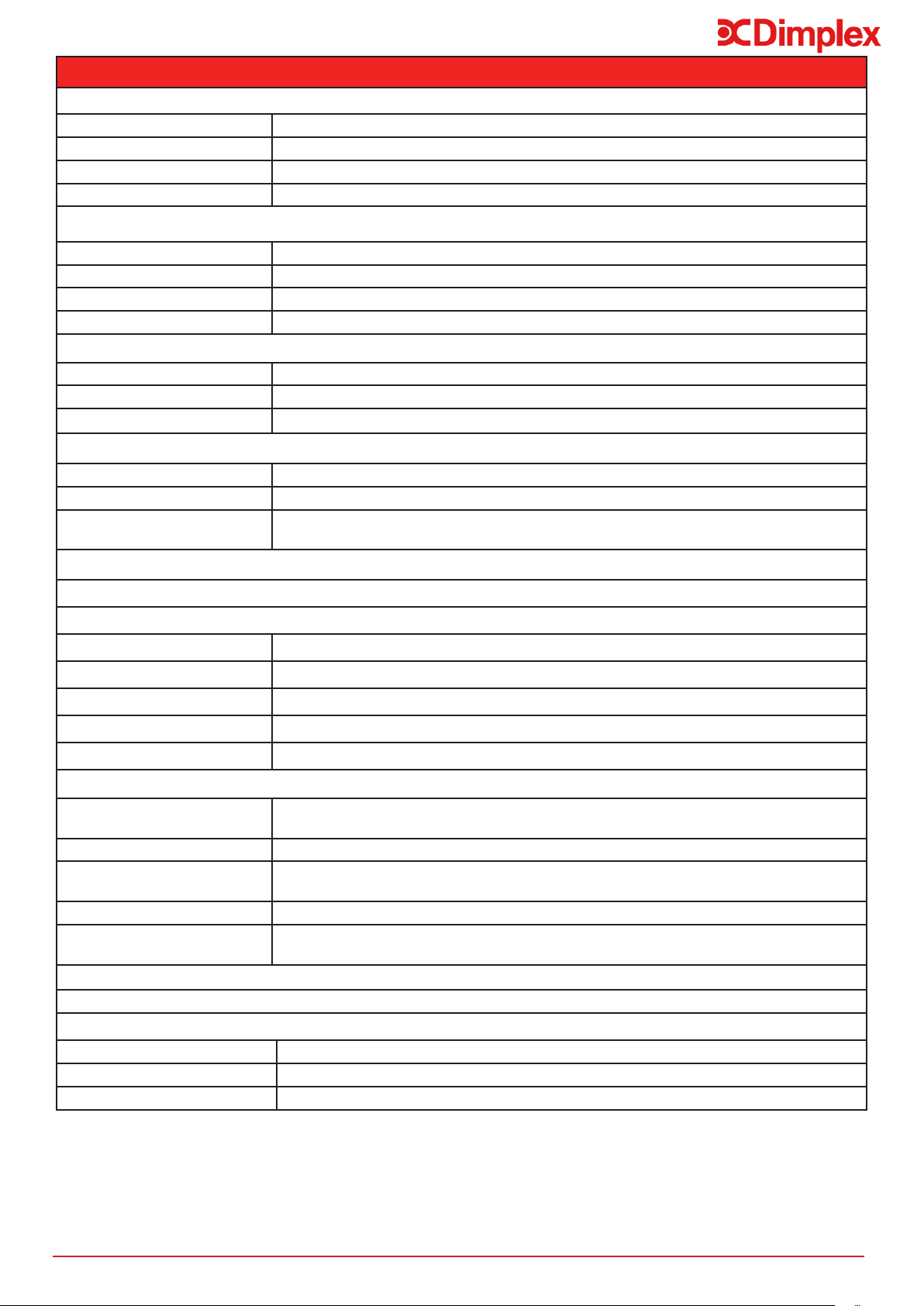
Edel Air Source Water Heater - Product Fiche
Reference
EDL200UK-630RF EDL270UK-630RF
Load Prole - Primary M L
Energy Rating A+ A+
COP 3.36 3.30
Thermostat Setting 55°C 55°C
Sound Pressure level at 2m [dB(A)] 37(Speed 1)/40(Speed 2)
Average Climatic Conditions
Average Energy Consumption [kWh] 377 746
Water Heating Eciency [%] 136 138
Daily Electricity Consumption [kWh] 1.84 3.53
Warmer Climatic Conditions
Annual Energy Consumption [kWh] 351 617
Water Heating Ecicency [%] 136 166
Daily Electricity Consumption [kWh] 1.84 2.93
Cooler Climatic Conditions
Annual Energy Consumption [kWh] 351 805
Water Heating Eciency [%] 113 113
Daily Electricity Consumption [kWh] 2.21 3.8
30
Edel Air Source Water Heater - Product Features
Materials
Inner cylinder Stainless steel
Outer cylinder Plastic
Inlet/outlet Stainless steel
Insulation 50mm PU foam (GWP=1, ODP=0)
Maximum Operating Conditions
Potable water temperature 65°C
Operating pressure 3 bar
Maximum design pressure 6 bar
Heat Pump max. pressure 25 bar
Cold Water Supply
Minimum dynamic pressure 1.5 bar
Maximum pressure 12 bar
15 l/min
Connections
Cold water inlet M 3/4” stainless steel
Hot water outlet M 3/4” stainless steel
Air pipe diameter
(inlet and outlet)
160 mm
Immersion Heater
1.2 kW@240V
Ventilation
320 to 400 m
3
/h
Air temperature -7°C to 35°C
Max. air pipe length rigid piping: 20m in total (intake and rejection)
0.3 L/h
Condensates drainage pipe 18/24 mm
Safety Components
Pressure reducing valve and
strainer
3 bar
Expansion relief valve 6 bar
Temperature and pressure
relief valve
7 bar/90°C 1/2” BSP
Factory pressure test 12 bar
Integrated electrical back-up
power
1200W (safety setting = 85°C)
Approvals
KIWA approval number - 1701712
Guarantee
Inner cylinder 5 years
Immersion heaters
Other components 2 years - excluding expansion vessel membrane pressure
Air Intake
Table 10: Edel Air Source Water Heater Product Features
Technical Data and Product Fiche
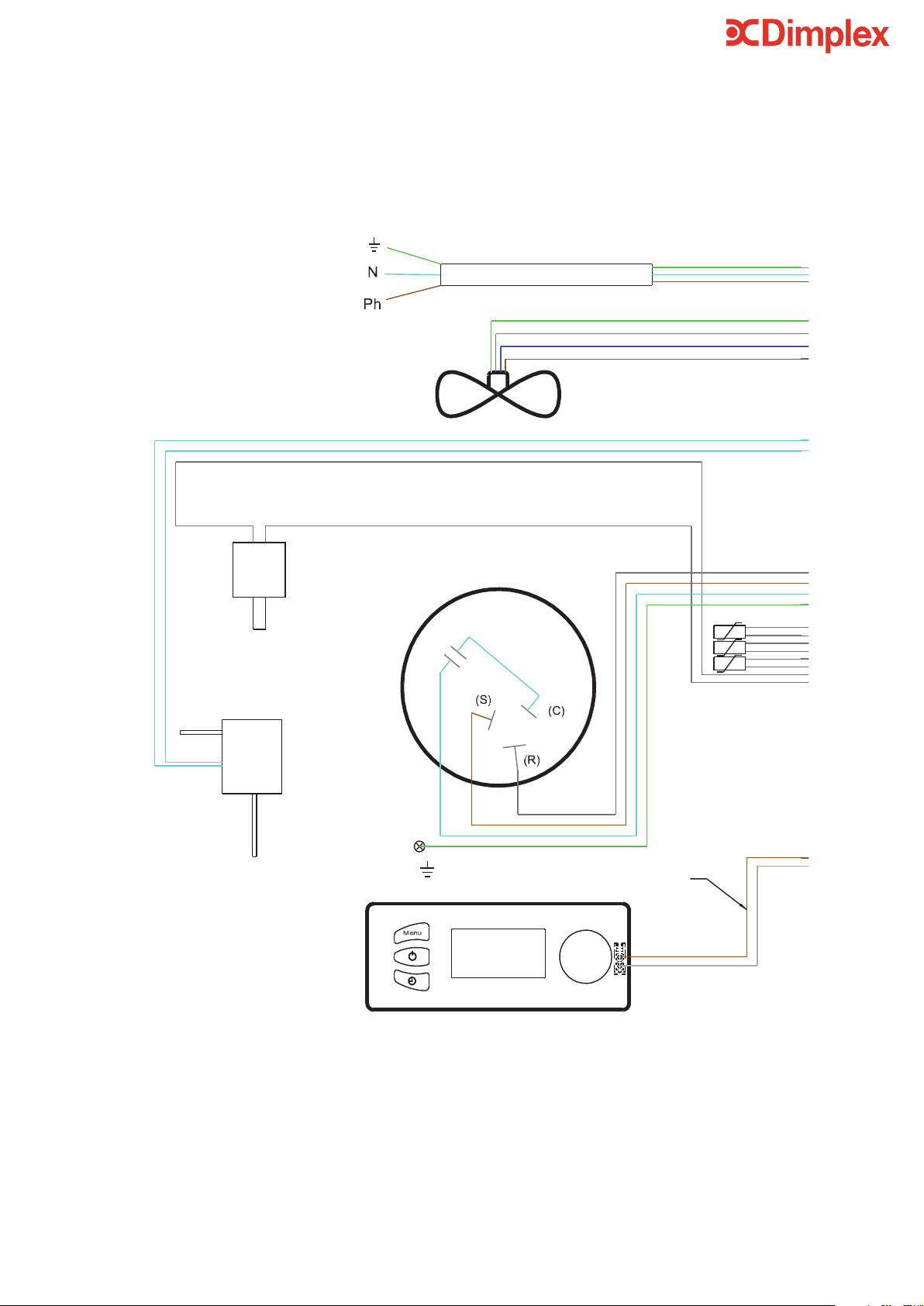
31
Power Supply
Green/Yellow
Black
Blue
Brown
Black
Blue
Blue
Black
Sensors
Black
Black
Black
Black
Blue
Black
Blue
Brown
Black
Brown
Communication Bus
Display
Brown
Black
Black
1
2
Red
Blue
Blue
Black
Brown
Blue
Green/Yellow
Blue
Black
Blue
Blue
Red
Red
Blue
Fan B1244454
F
HPS
DV
HTS
WTS
HPS - High Pressure Switch
C25 - Compressor Start Capacitor
C2 - Fan Capacitor
C4 - Valve
F - Fan
DV - Defrost Valve
RE - Immersion Heater
LTS - Immersion Heater Safety Cut-out
WTS - Immersion Heater Water Temp. Stat
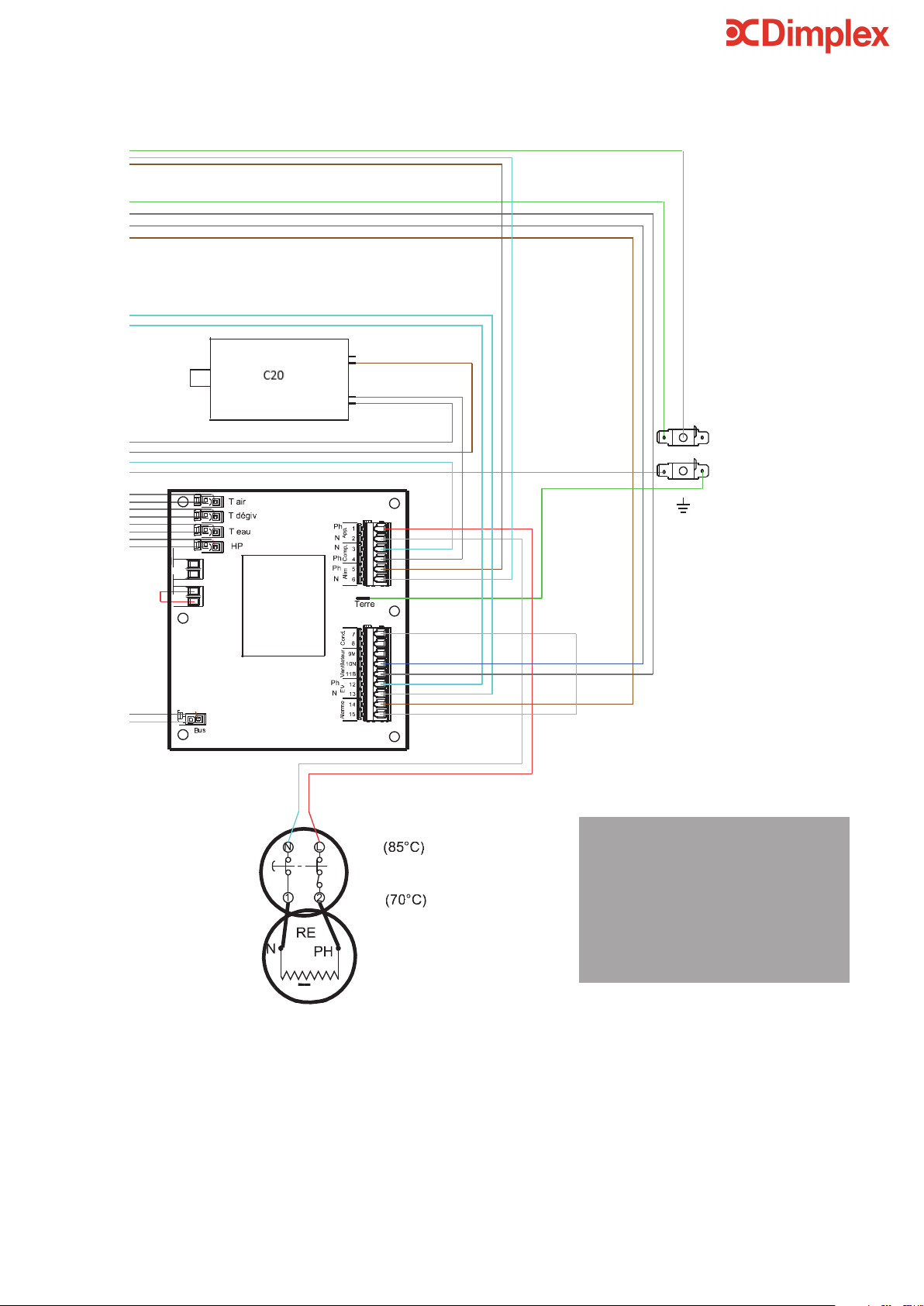
Power Supply
Green/Yellow
Black
Blue
Brown
Black
Blue
Blue
Black
Sensors
Black
Black
Black
Black
Blue
Black
Blue
Brown
Black
Brown
Communication Bus
Display
Brown
Black
Black
1
2
Red
Blue
Blue
Black
Brown
Blue
Green/Yellow
Blue
Black
Blue
Blue
Red
Red
Blue
Fan B1244454
F
HPS
DV
HTS
WTS
HPS - High Pressure Switch
C25 - Compressor Start Capacitor
C2 - Fan Capacitor
C4 - Valve
F - Fan
DV - Defrost Valve
RE - Immersion Heater
LTS - Immersion Heater Safety Cut-out
WTS - Immersion Heater Water Temp. Stat
32

33
Notes
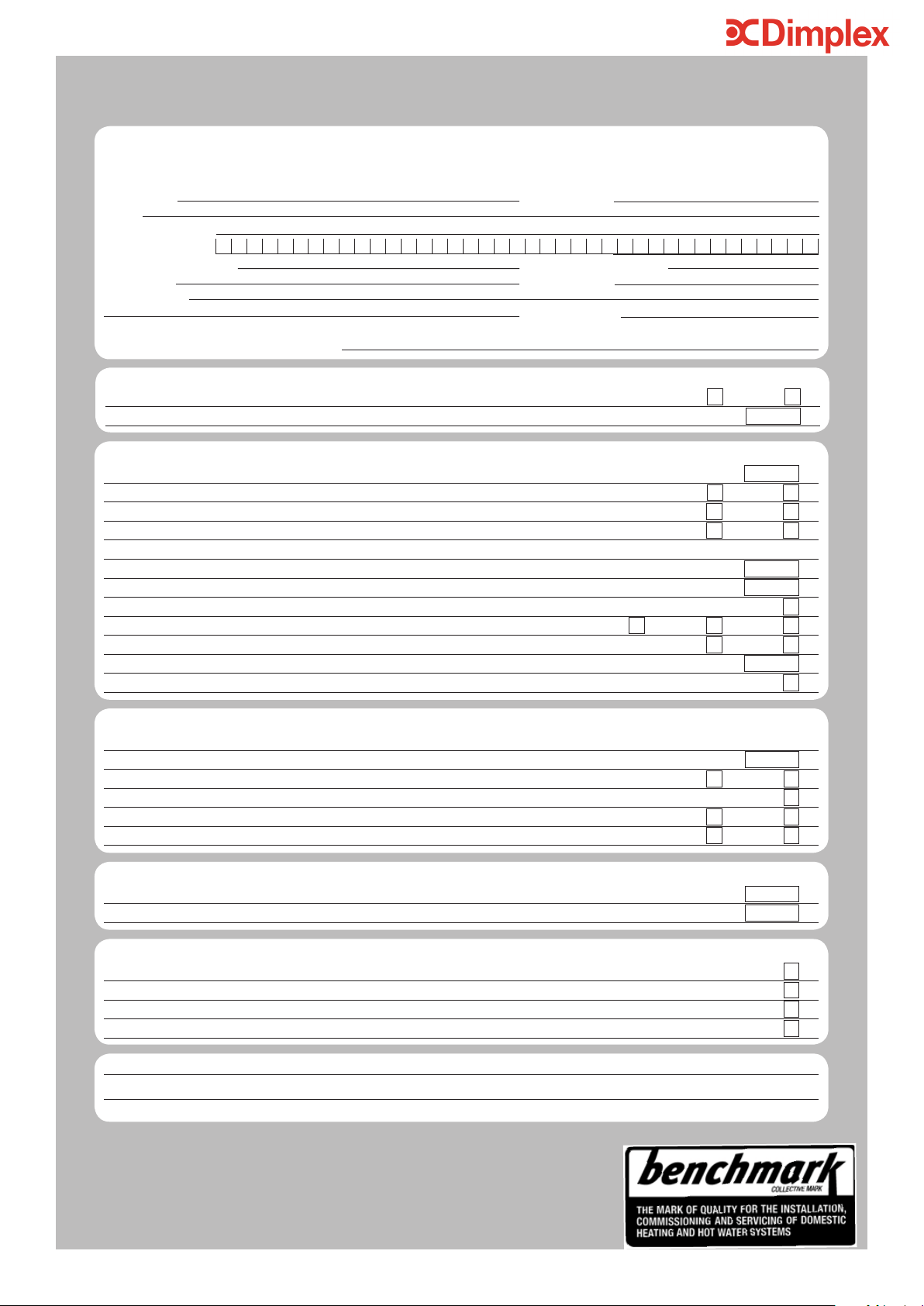
MAINS PRESSURE HOT WATER STORAGE SYSTEM COMMISSIONING CHECKLIST
*
All installations in England and Wales must be notified to Local Authority Building Control (LABC) either directly or through a Competent Persons Scheme.
A Building Regulations Compliance Certificate will then be issued to the customer.
©Heating and Hotwater Industry Council (HHIC) www.centralheating.co.uk
ALL SYSTEMS PRIMARY SETTINGS
(indirect heating only)
Is the primary circuit a sealed or open vented system? Sealed
Open
What is the maximum primary flow temperature?
°C
ALL SYSTEMS
What is the incoming static cold water pressure at the inlet to the system?
bar
Has a strainer been cleaned of installation debris (if fitted)? Yes
No
Is the installation in a hard water area (above 200ppm)? Yes
No
If yes, has a water scale reducer been fitted? Yes
No
What type of scale reducer has been fitted?
What is the hot water thermostat set temperature?
°C
What is the maximum hot water flow rate at set thermostat temperature (measured at high flow outlet)?
l/min
Time and temperature controls have been fitted in compliance with Part L of the Building Regulations? Yes
Type of control system (if applicable) Y Plan
S Plan
Other
Is the cylinder solar (or other renewable) compatible? Yes
No
What is the hot water temperature at the nearest outlet?
°C
All appropriate pipes have been insulated up to 1 metre or the point where they become concealed Yes
UNVENTED SYSTEMS ONLY
Where is the pressure reducing valve situated (if fitted)?
What is the pressure reducing valve setting?
bar
Has a combined temperature and pressure relief valve and expansion valve been fitted and discharge tested? Yes
No
The tundish and discharge pipework have been connected and terminated to Part G of the Building Regulations Ye s
Are all energy sources fitted with a cut out device? Yes
No
Has the expansion vessel or internal air space been checked? Yes
No
THERMAL STORES ONLY
What store temperature is achievable?
°C
What is the maximum hot water temperature?
°C
ALL INSTALLATIONS
The hot water system complies with the appropriate Building Regulations Yes
The system has been installed and commissioned in accordance with the manufacturer’s instructions Yes
The system controls have been demonstrated to and understood by the customer Yes
The manufacturer’s literature, including Benchmark Checklist and Service Record, has been explained and left with the customer Yes
Commissioning Engineer’s Signature
Customer’s Signature
(To confirm satisfactory demonstration and receipt of manufacturer’s literature)
This Commissioning Checklist is to be completed in full by the competent person who commissioned the storage system as a means of
demonstrating compliance with the appropriate Building Regulations and then handed to the customer to keep for future reference.
Failure to install and commission this equipment to the manufacturer’s instructions may invalidate the warranty but does not affect statutory rights.
Customer Name Telephone Number
Address
Cylinder Make and Model
Cylinder Serial Number
Commissioned by (print name) Registered Operative ID Number
Company Name Telephone Number
Company Address
Commissioning Date
To be completed by the customer on receipt of a Building Regulations Compliance Certificate
*
:
Building Regulations Notification Number (if applicable)
SERVICE RECORD
It is recommended that your hot water system is serviced regularly and that the appropriate Service Record is completed.
Service Provider
Before completing the appropriate Service Record below, please ensure you have carried out the service as described in the manufacturer’s
instructions.
SERVICE 1
Date
Engineer Name
Company Name
Telephone Number
Comments
Signature
SERVICE 2
Date
Engineer Name
Company Name
Telephone Number
Comments
Signature
SERVICE 3
Date
Engineer Name
Company Name
Telephone Number
Comments
Signature
SERVICE 4
Date
Engineer Name
Company Name
Telephone Number
Comments
Signature
SERVICE 5
Date
Engineer Name
Company Name
Telephone Number
Comments
Signature
SERVICE 6
Date
Engineer Name
Company Name
Telephone Number
Comments
Signature
SERVICE 7
Date
Engineer Name
Company Name
Telephone Number
Comments
Signature
SERVICE 8
Date
Engineer Name
Company Name
Telephone Number
Comments
Signature
SERVICE 9
Date
Engineer Name
Company Name
Telephone Number
Comments
Signature
SERVICE 10
Date
Engineer Name
Company Name
Telephone Number
Comments
Signature

Disregarding the instructions given in this manual in its entirety and any relevant
regulations, standards and codes of practice will void the guarantee of this product. Glen
Dimplex reserve the right to revise products, literature and guarantee terms without
prior notice due to a policy of continuous improvement.
www.KIWA.co.uk
www.HWA.co.uk
To speak to customer services please contact:
Glen Dimplex UK LTD.
Millbrook House Grange Drive, Hedge End,
Southampton SO30 2DF
Telephone: +44 [0]344 879 3588
Fax: 0844 879 3583
Email: customer[email protected]

