Installation Manual
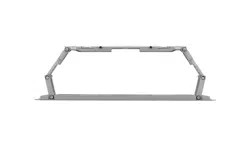
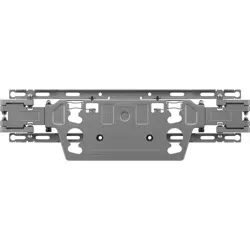
Wall Mount
Support
Before use of this product, please
read “Safety Precautions” to
ensure trouble-free use.
After reading the installation
manual, store it in a convenient
place for future reference.
WB21EB
Printed in Korea
www.lg.com
Copyright © 2021 LG Electronics Inc.
All Rights Reserved.
*MFL71795403*
(2104-REV00)
2
ENGLISH_index
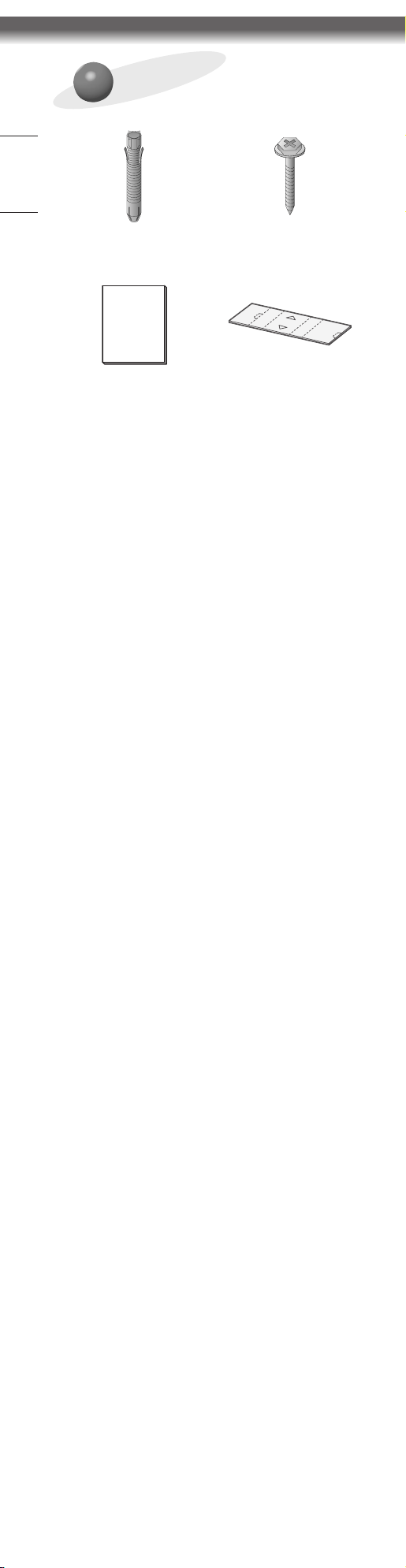
Accessories
Wall mount fixing anchors
8pcs
Wall mount fixing
screws 8pcs
Installation Manual Paper BOX
3
ENGLISH_index
Safety Precautions
- Professional installers should read this manual
carefully to ensure proper installation.
- Professional installers should forward this manual
to customers after installation and encourage them
to read and store it in a convenient place for future
reference.
After reading the installation manual, keep it in a
convenient place for future reference.
Caution
Ask a professional installer appointed by the store
for installation of the product.
Installation by someone other than a professional
installer is extremely dangerous and may result in
personal injury.
Contact a professional installer appointed by the
store prior to moving or replacing the product after
installation.
Installation is a technical task and safety issues may
arise if an individual attempts to install or move the
product personally.
When installing the product on a wall, do not hang
the power line or signal cables from the back of the
TV.
This can damage the cords, resulting in a fire, electrical
shock or malfunction of the product.
Do not install the product in an unstable site that
cannot withstand its weight.
If the installation site lacks sufficient rigidity, the
product may fall and cause personal injury.
Do not hang on the product or subject it to severe
impact after installation.
Doing so may cause the product to fall and cause
personal injury.
4
ENGLISH_index
Warning
Install the product according to the instructions in
the installation manual.
Failure to install the product according to the
instructions in the installation manual can result in
serious personal injury or product damage.
Make sure a wall is available prior to proceeding
with installation. Make use of the anchors and
screws provided with the product.
Use of any unauthorized anchors or screws may not
support the product's weight, which poses safety risks.
Do not wipe the product with a wet towel or use
any heating equipment or humidifier under the place
where the product is installed.
Liquid water or vapor may enter the product and
excessive heat may cause fire, electric shock, or
malfunction.
Unplug the product’s power cord from the wall
outlet before installing.
Installing the product while the power cord is plugged
in may result in electric shock or fire.
Connect the product with the supplied cable. Use of
an unauthorized cable may result in damage by
friction with the wall. Make sure to use the supplied
cable gender.
(This may vary by model.)
Be sure to have at least two people when installing
the product or adjusting the product’s height after
installation.
Attempting to perform installation or adjustments
personally may result in personal injury or damage to
the product.
When drilling in the wall for installation, be sure to
use drill bits and drills of the specified diameter.
Follow the instructions for the hole depth.
Drilling and installing the product in ways other than
specified in the installation manual may result in an
unstable installation and potential safety issues.
Do not install the product near a fire sprinkler or
detector, a place where vibration or shock may
occur or near a high-voltage wire or power source.
Do not install the product with bare hands. Be sure
to wear work gloves.
Attempting installation without work gloves may
cause personal injury.
5
ENGLISH_index
Before Installation
* Do not use the product for any purpose other than
installing the TV on a wall.
* Avoid product damage and safety accidents caused by
careless installing or use of improper or unauthorized
wall mount.
* Follow the instructions in the installation manual for a
convenient installation of the wall mount.
* Immediately discontinue installation and contact the
service center if you cannot fully understand the
installation process.
Use a professional installer if any installation issues
remain after the inquiry.
* Installation of this product on a concrete wall or wood
stud is recommended. Installation of this product on
other surfaces (Dry wall, plywood, bricks, etc.) is not
recommended. Improper installation may result in the
product falling.
* When installing the Full Contact Wall Mount, the TV
may not be contacted firmly against the wall due to
some wall conditions.
* Install the product only on a vertical wall.
Do not install on a tilted wall that exceeds building
standards or on the heavily titled wall or ceiling.
LG is not responsible for problems caused by improper
installation of the product, e.g., heavily tilted walls and
ceilings.
* Check the enclosed accessories before installation. We
are not responsible for any lost or damaged accessories
after the inner packaging is opened.
* When an infant or small child swallows the enclosed
accessories, various safety accidents such as choking
may occur. Keep the enclosed accessories out of the
reach of infants and children.
* When tightening screws, tighten until fully snug. Avoid
using excessive force when tightening the screws.
Doing so may damage the wall and product or reduce
the rigidity or performance of the product.
* Avoid installing a TV that exceeds the specified tensile
load, and do not allow any external force to be applied
to the product.
* Avoid accidents by using work tools with care during
installation.
* After installing the product, ensure its use in close
contact with a wall.
If the product is not positioned against a wall, the
product may be unstable or damaged.
<Tools for Installation>
"+" shaped screwdriver (manual or electric) / level / drill /
Ø8mm drill bit for concrete or Ø4mm drill bit for steel
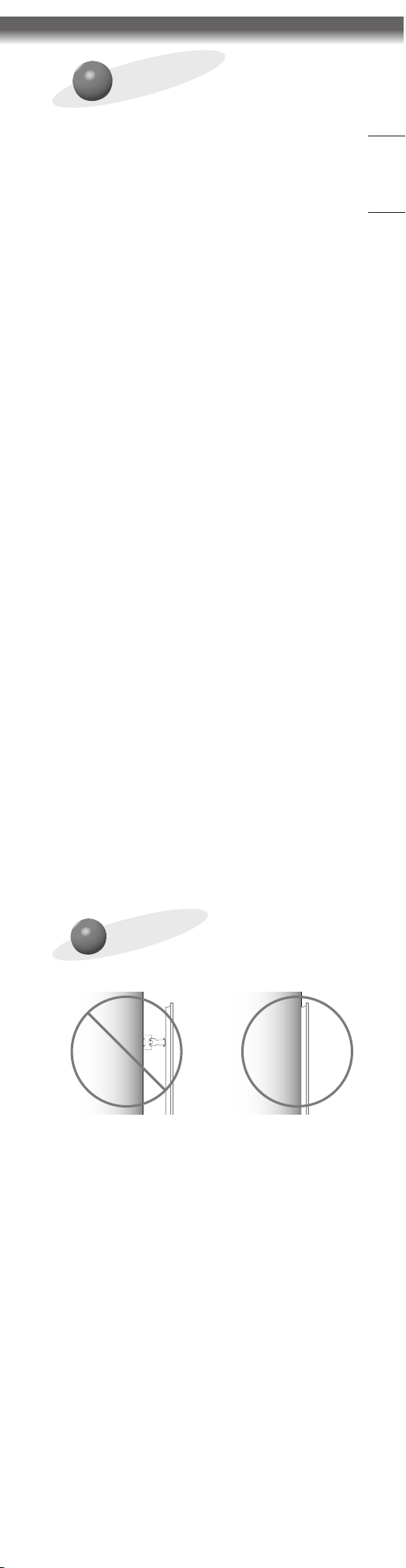
How to x the TV on
the wall
* Please use the TV close to the wall after installation.
6
ENGLISH_index
How to install
- The appearance of tools may differ from the
enclosed images.
- Always consult a professional when installing a wall
mount.
1
Wearing gloves
2
How to fix anchors and screws
Please make sure that:
- Check that the material and thickness of the wall and
finishing material comply with the installation manual.
Before beginning the mounting process, you must be
sure the wall is able to support the weight of the TV.
- Should use the enclosed anchors and screws on crack-
free concrete walls.
- Never install the product on a plasterboard or wall
made of paper or medium-density fiberboard (MDF).
When it is necessary to install the product on such wall,
anchor screws must be fastened to retaining walls
(concrete) or wood Stud inside the finishing material.
- The wall mount should be attached to a stud. This
usually will not be a problem, but depending on
individual circumstances, there may be cases when the
ability to mount into a studis not possible. In this case,
there are a variety of drywall anchors, such as toggle
bolts, which may provide a solution.If using drywall
anchors, please be sure the anchors and the wall have
the ability to support the weight of your TV. Please
note that the supplied anchors may not be the correct
ones for your individual situation, so you should check
with a local professional.
- Other unspecified walls must be capable of supporting
pullout loads of over 70 kgf (154.3 lbf) (686 N) and
shear loads of over 100 kgf (220.4 lbf) (980 N) per
fastener.
- Use an Ø 8 mm drill bit for concrete and a hammer
(impact) drill or Ø 4 mm drill bit for wood stud to drill
holes.
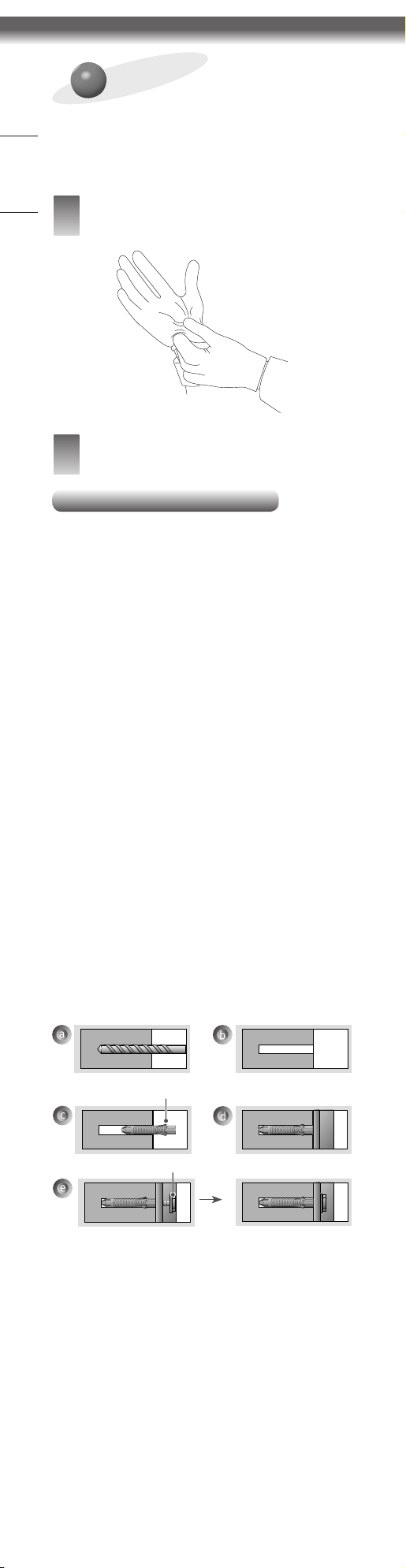
(For installation on concrete wall)
Screws for fixing the wall mount
Anchors for fixing the wall mount
a. Drill holes in anchor locations with a drill bit of Ø 8 mm
to a depth of 80 mm (3.1 inches) to 100 mm (3.9
inches).
b. Clean the drilled holes.
c. Insert the enclosed anchors for fixing the wall mount
into the holes. (Use a hammer when inserting anchors.)
d. Push the wall mount support closely toward the wall to
match the hole locations.
e. Tighten screws for fixing the wall mount to the holes.
At this time, tighten the screws with the torque more
than 45 kgf/cm (39.0 lbf/in) to 60 kgf/cm (52.0 lbf/in).
7
ENGLISH_index
(For installation on wood stud)
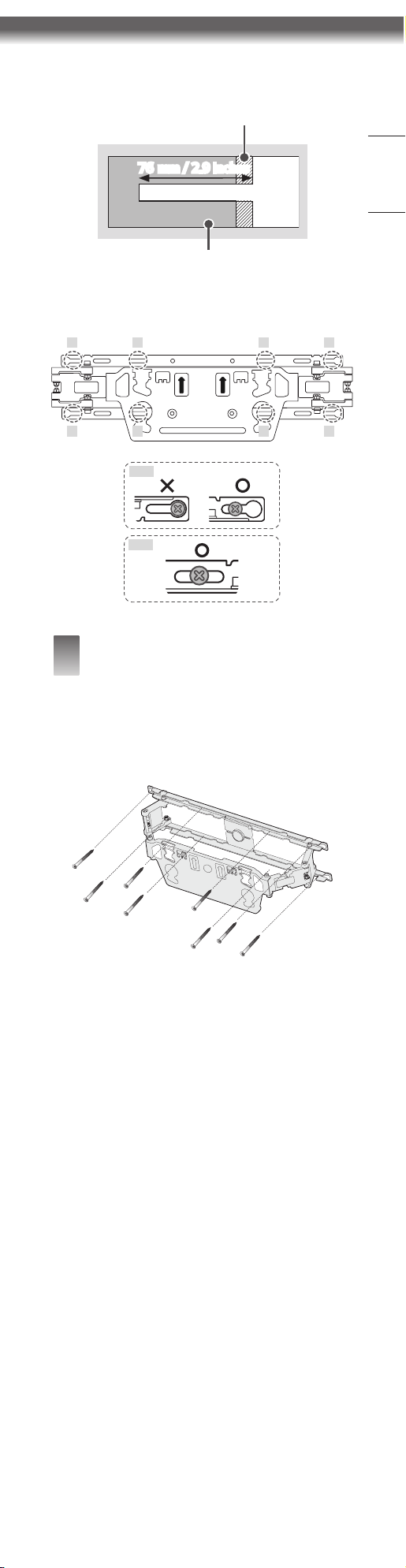
Use the Ø 4 mm drill bit for wood to drill holes with the
depth of 76 mm (2.9 inches). (Clean the drilled hole.)
Drywall
Wood stud
76mm / 2.9 inches
Without using the wall mounting anchor, fasten the wall
mounting screw directly to the wood stud.
1 5 6 2
3 7 8 4
1 ~ 4
5 ~ 8
3
How to install the wall mount
support
- It is recommended that this product be installed
only on concrete walls. Installing it elsewhere (e.g.
walls made of wood, plywood, bricks, etc.) is not
recommended and may result in the product
falling.
→ Align the wall mount support with the wall where
you want to install the wall mount support, mark
the places where the wall screws will be fixed and
remove the wall mount support.
→ Refer to the following picture to fix the wall mount
support.
→ Use a level to verify that the wall mount is
positioned horizontally.
→ If the screw cannot be tightened in the designated
position, do so in the position nearest the original.
However, do not change more than 2 positions from
the designated position.
→ Fix 2 wall mount fixing screws each on the top left
and right and 2 others each on the bottom left and
right.
→ At this time, use a "+" shaped screwdriver (manual
or electric) to turn the screw so that the wall, the
wall mount support, and the screws come into close
contact.
8
ENGLISH_index
4
How to combine the wall
mount support and TV
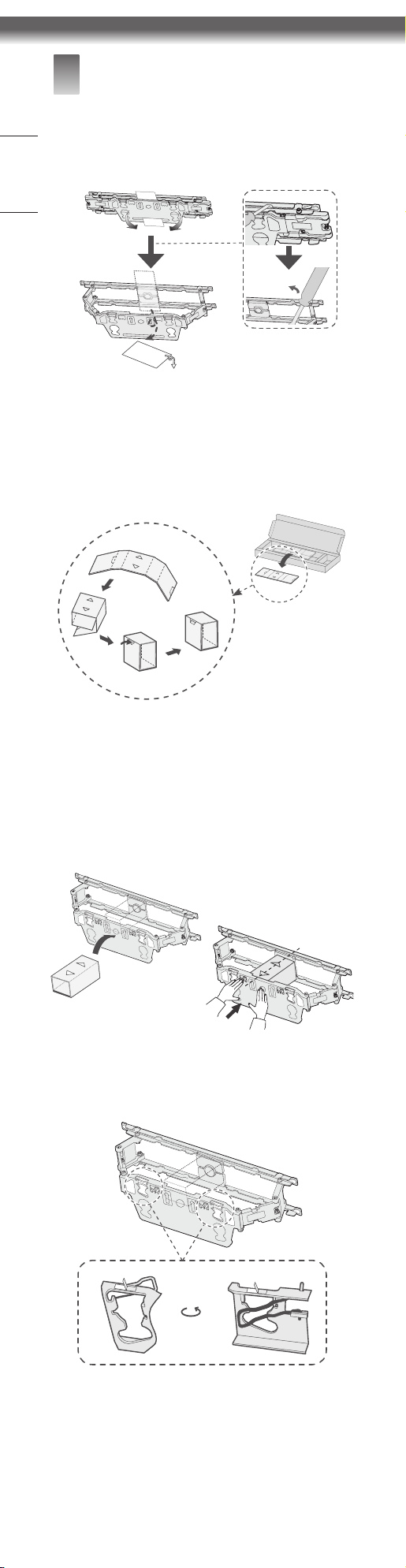
1.
Pull the wall mount bracket installed on the wall
forward as much as possible.
-
Use tools if necessary.
2.
Fold the anti-push paper into a box.
-
Take out the anti-push paper, and fold it into a box
along the folding lines.
-
Press the marked part to fix the shape.
3.
Insert the anti-push paper box inside the bracket to
prevent the bracket from being pushed back while
installing the TV.
-
Place the box with the front/back arrows on the
box facing up.
-
After inserting the anti-push paper box, push the
bracket so that the box does not fall off.
4.
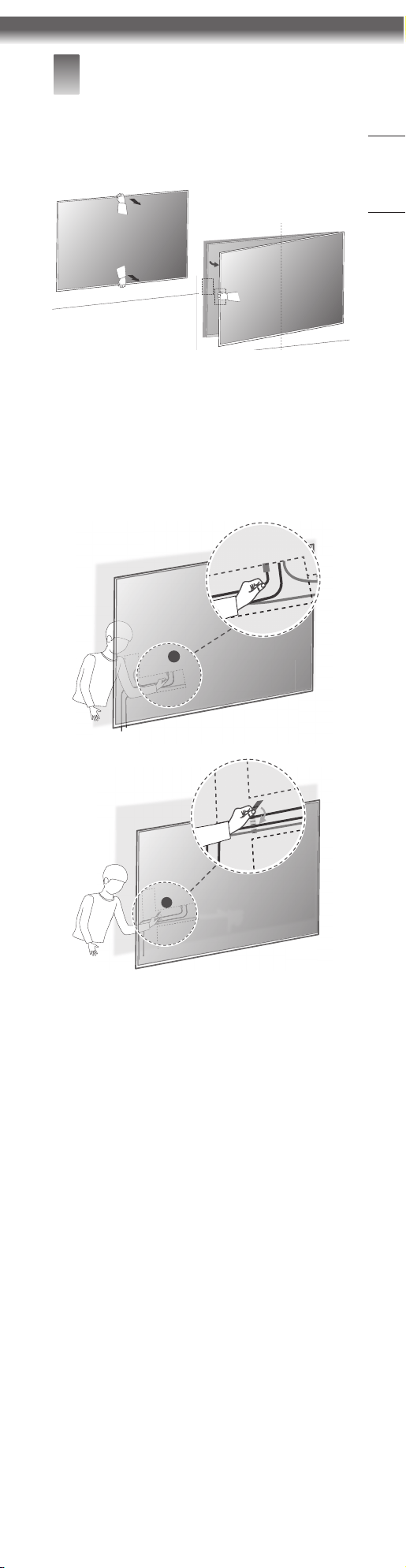
Push the two safety pins on the left and right sides
of the bracket to open them.
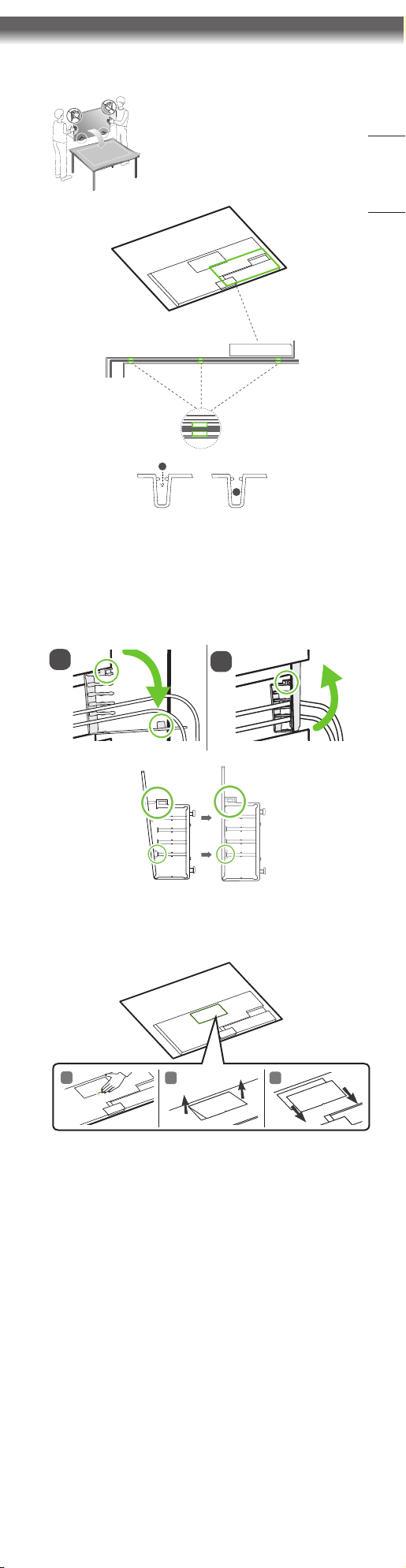
9
ENGLISH_index
5.
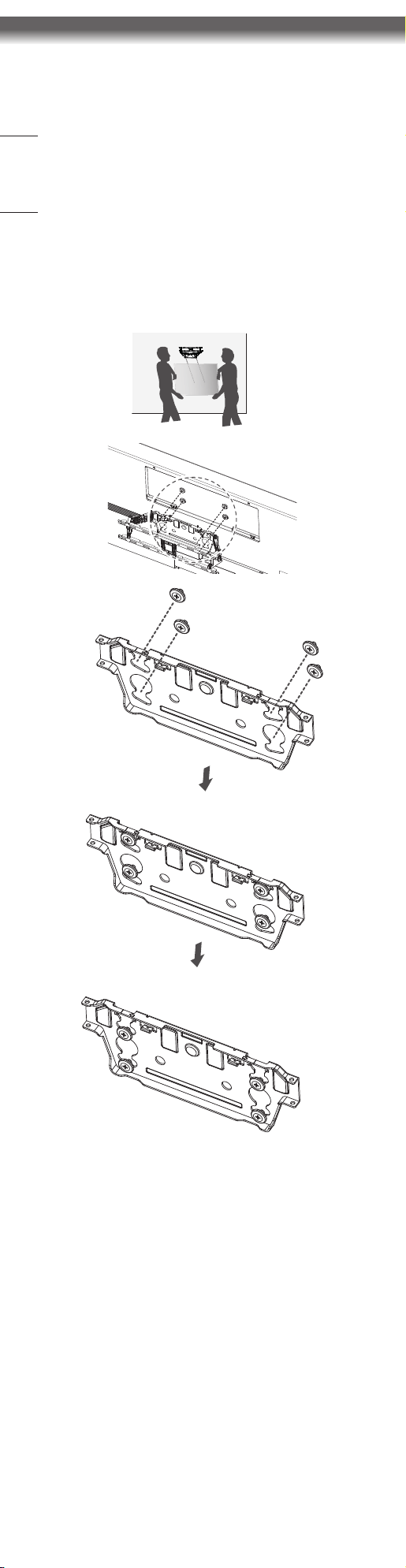
Lay the TV down, insert the power cord into the slot
on the back of the TV, and fix it.
6.
Align the power cord and other cables using the
cable holder.
Caution: Keep the cables within the designated area.
(Cables outside the designated area may prevent the
TV from being attached to the wall.)
1
2
7.
With the TV lying down, remove the upper cover.
1
2 3
10
ENGLISH_index
8.
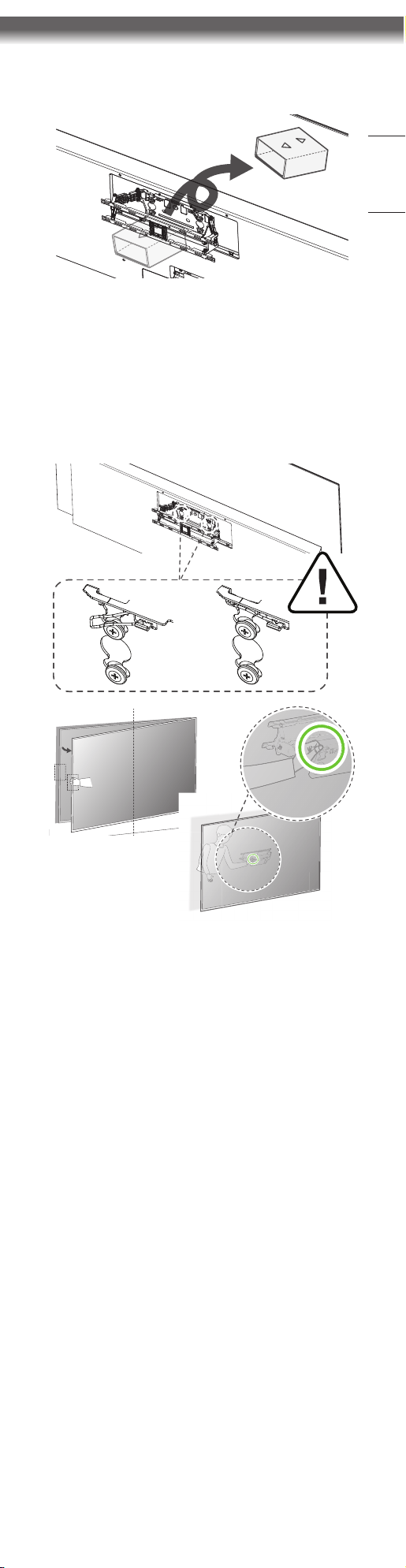
Mount the TV to the wall mount bracket.
-
Insert the spacer screws on the TV into the holes
on the bracket attached to the wall.
-
With the spacer screws inserted into the hole,
lower the TV to secure them.
-
Check if the TV is securely fixed by pulling out the
bottom of the TV.
-
When mounting a TV with a speaker attached, hold
the TV and lift it up. Do not hold the speaker.
Caution: Ensure two or more people work
together when mounting the TV. (If the product is
lifted by one person, it may fall and result in injury
or damage.)
Be careful not to trap the power cord between
the wall mount bracket and the TV when
mounting the TV. (If the power cord becomes
trapped, it may result in product damage.)
11
ENGLISH_index
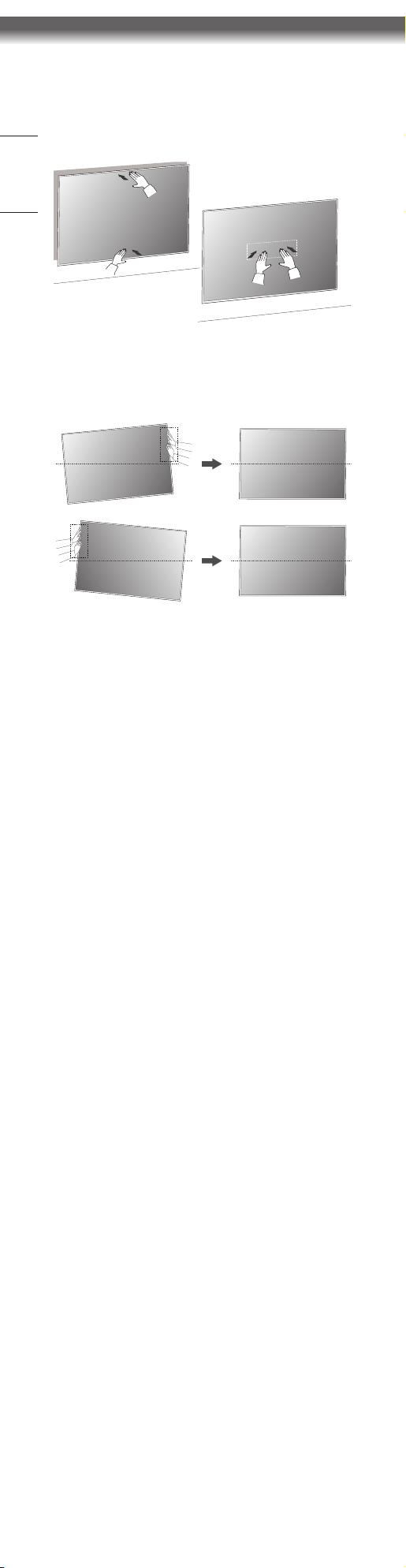
9.
Remove the anti-push paper box.
-
Pull the TV forward as much as possible to make it
easier to remove the box.
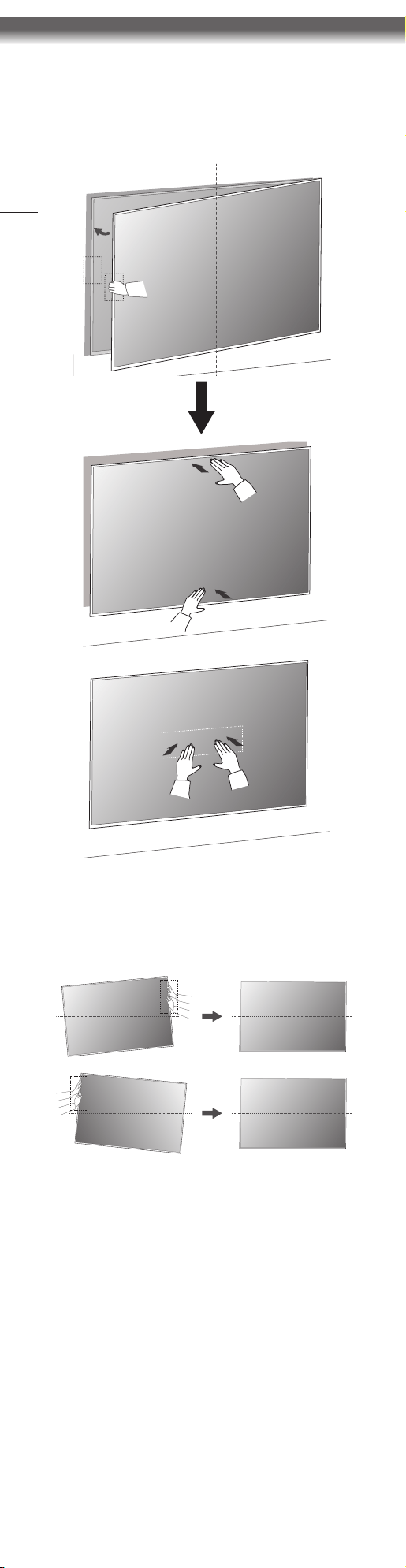
10.
Pull the two safety pins on the left and right sides
of the bracket to close them.
Caution: Ensure the safety pins are closed and secured.
(If the product is moved with the safety pins open, it
may fall and result in injury or damage.)
If a safety pin is out of reach, make space by pulling one
side of the TV forward and pushing the other side to
the wall, and lock/unlock the safety pin.
12
ENGLISH_index
11.
Push the TV until it makes close contact with the
wall.
-
Gently push the top and bottom of the TV without
excessive force.
-
Push the center of the TV gently once more to
mount it tight to the wall.
12.
If the installed product is not level, you can level it
by hand.
-
Push the side of the TV with your hand and move it
in the desired direction.
13
ENGLISH_index
5
How to connect additional
cables while watching TV
1.
Pull the TV forward.
-
Gently pull the top and bottom sides of the TV, and
pull from the left side to check where the cables
connect.
2.
Once the TV has been pulled out, you can now begin
connecting the cables.
-
Getting as far behind the TV as possible, line up
your cables utilizing the cable holder.
Caution: Make sure the cables are not placed outside
the designated area. (Cables outside the designated
area may prevent the TV from being attached to the
wall.)
1
2
2
14
ENGLISH_index
3.
Push the TV until it makes close contact with the
wall.
-
Gently push the top and bottom of the TV without
excessive force.
-
Push the center of the TV gently once more to
mount it tight to the wall.
4.
If the installed product is not level, you can level it by
hand.
-
Push the side of the TV with your hand and move it
in the desired direction.
15
ENGLISH_index
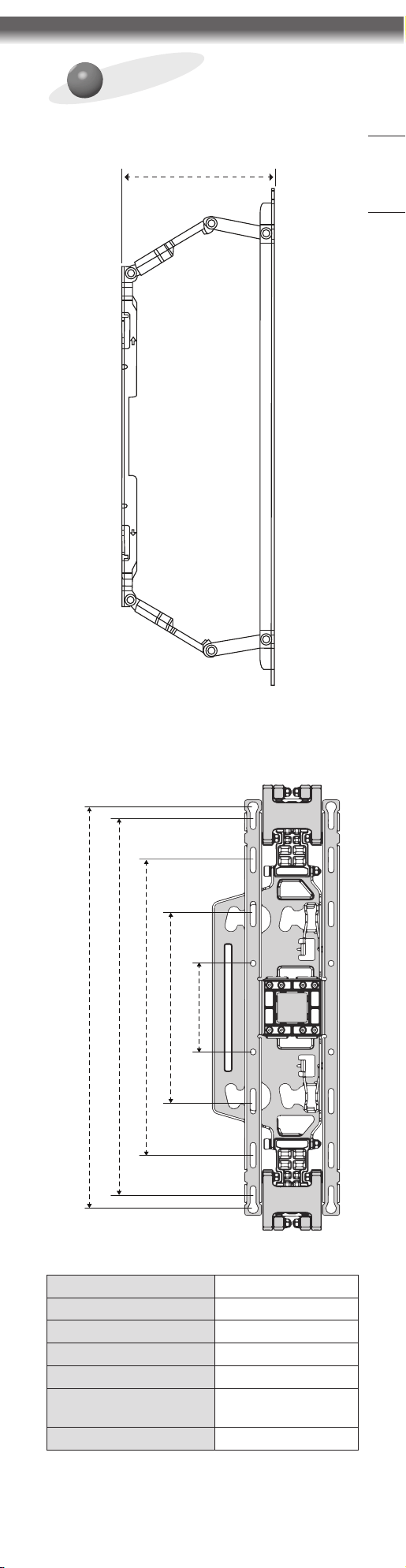
Product Specications
(mm(inches))
130 (5.1)
90 (3.5)
190 (7.4)
300 (11.8)
400 (15.7)
408 (16.0)
Model name WB21EB
Width (mm(inches)) 452 (17.7)
Height (mm (inches)) 129 (5.0)
Depth (mm(inches)) 13 (0.5)
Weight (kg(lbs)) 1.2 (2.6)
Maximum tensile load
(kg(lbs))
50 (110.2)
Screws Distance (mm) 180 x 55