Before using your new product, please read these instructions to prevent any damage.
USER GUIDE
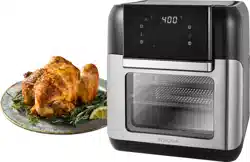
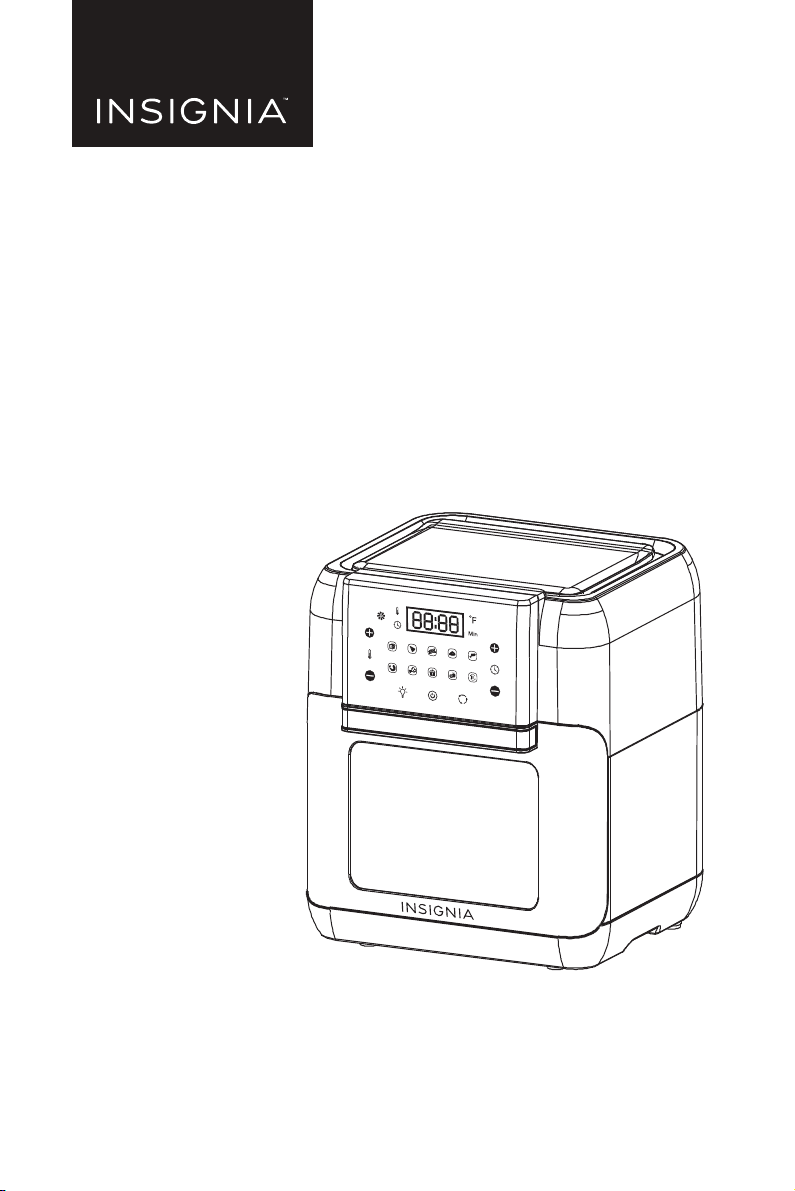
10 Qt. Digital Air Fryer Oven
NS-AF10DSS2/NS-AF10DBK2/NS-AF10DSS2-C

www.insigniaproducts.com
2
Contents
Introduction . . . . . . . . . . . . . . . . . . . . . . . . . . . . . . . . . . . . . . . . . . . . . . . . . . . . . . . . . . . . 2
important safeguards . . . . . . . . . . . . . . . . . . . . . . . . . . . . . . . . . . . . . . . . . . . . . . . . . . . 3
Overheating Protection . . . . . . . . . . . . . . . . . . . . . . . . . . . . . . . . . . . . . . . . . . . . . 5
Plasticizer warning . . . . . . . . . . . . . . . . . . . . . . . . . . . . . . . . . . . . . . . . . . . . . . . . . . 5
Automatic switch-off . . . . . . . . . . . . . . . . . . . . . . . . . . . . . . . . . . . . . . . . . . . . . . . . 5
Extension cord instructions. . . . . . . . . . . . . . . . . . . . . . . . . . . . . . . . . . . . . . . . . . 5
About the power cord. . . . . . . . . . . . . . . . . . . . . . . . . . . . . . . . . . . . . . . . . . . . . . . 6
Features . . . . . . . . . . . . . . . . . . . . . . . . . . . . . . . . . . . . . . . . . . . . . . . . . . . . . . . . . . . . . . . . 7
Package contents . . . . . . . . . . . . . . . . . . . . . . . . . . . . . . . . . . . . . . . . . . . . . . . . . . . 7
Components. . . . . . . . . . . . . . . . . . . . . . . . . . . . . . . . . . . . . . . . . . . . . . . . . . . . . . . . 7
Control panel . . . . . . . . . . . . . . . . . . . . . . . . . . . . . . . . . . . . . . . . . . . . . . . . . . . . . . . 8
Accessories . . . . . . . . . . . . . . . . . . . . . . . . . . . . . . . . . . . . . . . . . . . . . . . . . . . . . . . . . 9
Using your air fryer oven. . . . . . . . . . . . . . . . . . . . . . . . . . . . . . . . . . . . . . . . . . . . . . . . . 9
Preparing to cook . . . . . . . . . . . . . . . . . . . . . . . . . . . . . . . . . . . . . . . . . . . . . . . . . . . 9
Choosing the cooking mode . . . . . . . . . . . . . . . . . . . . . . . . . . . . . . . . . . . . . . . . 9
Preset food temperatures and times . . . . . . . . . . . . . . . . . . . . . . . . . . . . . . . .10
Setting the cooking time . . . . . . . . . . . . . . . . . . . . . . . . . . . . . . . . . . . . . . . . . . .10
Setting the temperature. . . . . . . . . . . . . . . . . . . . . . . . . . . . . . . . . . . . . . . . . . . .10
Using the preheat feature . . . . . . . . . . . . . . . . . . . . . . . . . . . . . . . . . . . . . . . . . .10
Recommended cooking time and temperature . . . . . . . . . . . . . . . . . . . . .11
Cooking with your air fryer oven . . . . . . . . . . . . . . . . . . . . . . . . . . . . . . . . . . . .12
Using the accessories . . . . . . . . . . . . . . . . . . . . . . . . . . . . . . . . . . . . . . . . . . . . . .12
Maintaining your air fryer oven . . . . . . . . . . . . . . . . . . . . . . . . . . . . . . . . . . . . . . . . .16
Cleaning your air fryer oven . . . . . . . . . . . . . . . . . . . . . . . . . . . . . . . . . . . . . . . .16
Storing your air fryer oven . . . . . . . . . . . . . . . . . . . . . . . . . . . . . . . . . . . . . . . . . .16
Troubleshooting . . . . . . . . . . . . . . . . . . . . . . . . . . . . . . . . . . . . . . . . . . . . . . . . . . . . . . .16
Specifications . . . . . . . . . . . . . . . . . . . . . . . . . . . . . . . . . . . . . . . . . . . . . . . . . . . . . . . . . .17
ONE-YEAR LIMITED WARRANTY . . . . . . . . . . . . . . . . . . . . . . . . . . . . . . . . . . . . . . . . .18
Introduction
Congratulations on your purchase of a high-quality Insignia product. Your
NS-AF10DSS2, NS-AF10DBK2, or NS-AF10DSS2-C represents the state of the art in
digital air fryer oven design and is designed for reliable and trouble-free
performance.

3
10 Qt. Air Fryer Oven
www.insigniaproducts.com
IMPORTANT SAFEGUARDS
When using electrical appliances, basic safety precautions should always be
followed:
1 This appliance can be used by persons with reduced physical, sensory or
mental capabilities or lack of experience and knowledge if they have been
given supervision or instruction concerning the use of the appliance in a safe
way and understand the hazards involved.
2 Keep the appliance and its cord out of reach of children. DO NOT allow the
appliance to be used by children. Close supervision is necessary when used
near children.
3 Children should not play with the appliance.
4 NEVER use electrical socket below counter.
5 NEVER connect this appliance to an external timer switch or separate
remote-control system.
6 When using this appliance, provide at least 6 inches (15.25 cm) of space above
and on all sides for air circulation.
7 To protect against electrical shock, DO NOT immerse cord, plugs, or main unit
housing in water or other liquid. Cook only in the basket provided.
8 Regularly inspect the appliance and power cord. DO NOT use the appliance if
there is damage to the power cord or plug. If the appliance malfunctions or
has been damaged in any way, immediately stop use and call Customer
Service.
9 DO NOT use an extension short cord. A short power-supply cord is used to
reduce the risk of children grabbing the cord or becoming entangled and to
reduce the risk of people tripping over a longer cord.
10 ALWAYS ensure the appliance is properly assembled before use.
11 DO NOT cover the air intake vent or air outlet while unit is operating. Doing so
will prevent even cooking and may damage the unit or cause it to overheat.
12 Before placing removable basket into the main unit, ensure basket and unit
are clean and dry by wiping with a soft cloth.
13 This appliance is for household use only. DO NOT use this appliance for
anything other than its intended use. DO NOT use in moving vehicles or boats.
DO NOT use outdoors. Misuse may cause injury.
14 Intended for worktop use only. Ensure the surface is level, clean and dry. DO
NOT move the appliance when in use.
15 DO NOT place the appliance near the edge of a worktop during operation.
16 DO NOT use accessory attachments not recommended or sold by the
manufacturer. DO NOT place accessories in a microwave, toaster oven,
convection oven, or conventional oven or on a ceramic cooktop, electric coil,
gas burner range or outdoor grill. The use of accessory attachments not
recommended by the manufacturer may cause fire, electric shock or injuries.
WARNING: Read this manual carefully and completely and retain for
future reference. Failure to adhere to safety instructions may result
in serious injury or damage.

4
www.insigniaproducts.com
17 ALWAYS ensure basket is properly closed before operating.
18 DO NOT use the appliance without the removable basket installed.
19 DO NOT use this appliance for deep-frying.
20 DO NOT place appliance on hot surfaces or near a hot gas or electric burner or
in a heated oven.
21 Prevent food contact with heating elements. DO NOT overfill when cooking.
Overfilling may cause personal injury or property damage or affect the safe
use of the appliance.
22 DO NOT place items on top of unit at any time.
23 Socket voltages can vary, affecting the performance of your product. To
prevent possible illness, use a thermometer to check that your food is cooked
to the temperatures recommended.
24 Should the unit emit black smoke, unplug immediately. Wait for smoking to
stop before removing any cooking accessories.
25 DO NOT touch hot surfaces. Appliance surfaces are hot during and after
operation. To prevent burns or personal injury, ALWAYS use protective hot
pads or insulated oven mitts and use available handles.
26 Extreme caution must be used when the appliance contains hot food.
Improper use may result in personal injury.
27 This appliance has a polarized plug (one blade is wider than the other). To
reduce the risk of electric shock, this plug is intended to fit into a polarized
outlet only one way. If the plug does not fit fully into the outlet, reverse the
plug. If it still does not fit, contact a qualified electrician. DO NOT attempt to
modify the plug in any way.
28 Spilled food can cause serious burns. Keep appliance and cord away from
children. DO NOT let cord hang over edges of tables or counters or touch hot
surfaces.
29 The basket and crisper plate become extremely hot during the cooking
process. Avoid physical contact while removing the basket or plate from the
appliance. ALWAYS place basket or plate on a heat-resistant surface after
removing. DO NOT touch accessories during or immediately after cooking.
30 Cleaning and user maintenance should not be carried out by children.
31 To disconnect, press the power button to turn off the unit, then unplug from
socket when not in use and before cleaning. Allow to cool before cleaning,
disassembly, putting in or taking off parts and storage.
32 DO NOT clean with metal scouring pads. Pieces can break off the pad and
touch electrical parts, creating the risk of electric shock. Please refer to
Cleaning your air fryer oven on page 16 for regular maintenance of the
appliance.
5
10 Qt. Air Fryer Oven
www.insigniaproducts.com
SAVE THESE INSTRUCTIONS
Overheating Protection
The appliance comes with an overheating protection system. It will be turned off
automatically if the inner temperature control system fails. If that happens, unplug
the power cord, let the appliance cool down, and send it to authorized service
center for repair.
Plasticizer warning
CAUTION: To prevent plasticizers from migrating to the finish of the counter top
or table top or other furniture, place NON-PLASTIC coasters or place mats
between the appliance and the finish of the counter top or table top. Failure to do
so may cause the finish to darken. Permanent blemishes may occur or stains can
appear.
Automatic switch-off
The appliance comes with a built-in shut-off device that automatically shuts down
the unit when it reaches the preset time. You can manually switch off the
appliance at any time by pressing the Power Button. The fan will continue running
for about 20 seconds to cool down the unit.
Extension cord instructions
• An extension cord may be used if the following care is exercised in their use:
• The marked electrical rating of the extension cord should be at least as great
as the electrical rating of the appliance (860 W).
• A longer cord should be arranged so that it will not drape over the counter
or table top where it could be pulled on by children or tripped over
unintentionally.
California Residents
WARNING: Cancer and reproductive harm -
www.p65warnings.ca.gov
WARNING: To avoid injury, read and understand the instructions in
this user manual before attempting to use this appliance.
WARNING:
Electrical shock hazard. Use grounded outlet only.
• DO NOT remove ground.
• DO NOT use an adapter
• DO NOT use an extension cord.
Failure to follow these instructions may result in electric shock and/or serious
injury.
WARNING: THE FAILURE TO FOLLOW ANY OF THE IMPORTANT
SAFEGUARDS AND/OR THE INSTRUCTIONS FOR SAFE USE IS A
MISUSE OF YOUR APPLIANCE THAT CAN VOID YOUR WARRANTY
AND CREATE THE RISK OF SERIOUS INJURY.

6
www.insigniaproducts.com
About the power cord
Your air fryer oven has a polarized plug (one blade is wider than the other). To
reduce the risk of electric shock, this plug is intended to fit into a polarized outlet
only one way. If the plug does not fit fully into the outlet, reverse the plug. If it still
does not fit, contact a qualified electrician. Do not attempt to modify the plug in
any way. If the power cord is damaged, it must be replaced by the manufacturer,
its service agent, or a similar qualified person, in order to avoid hazard.
SAVE THESE INSTRUCTIONS
7
10 Qt. Air Fryer Oven
www.insigniaproducts.com
Features
• 10-quart capacity accommodates a wide assortment of foods for a variety of
cooking options.
• Circular Heat technology cooks food quickly and evenly.
• Adjustable thermostat up to 400° F to accommodate a variety of recipes.
• Digital-touch-screen control panel for easy operation.
• Integrated timer that lets you set and monitor the cooking time to help ensure
tasty results.
• Clear window allows you to view food while cooking.
• Easy-to-clean parts, including a dishwasher-safe cooking racks and a drip tray.
Package contents
• 10 Quart Digital Air Fryer Oven
•Cooking racks (2)
•Drip tray
• Rotisserie spit
• Removal tool
• User Guide
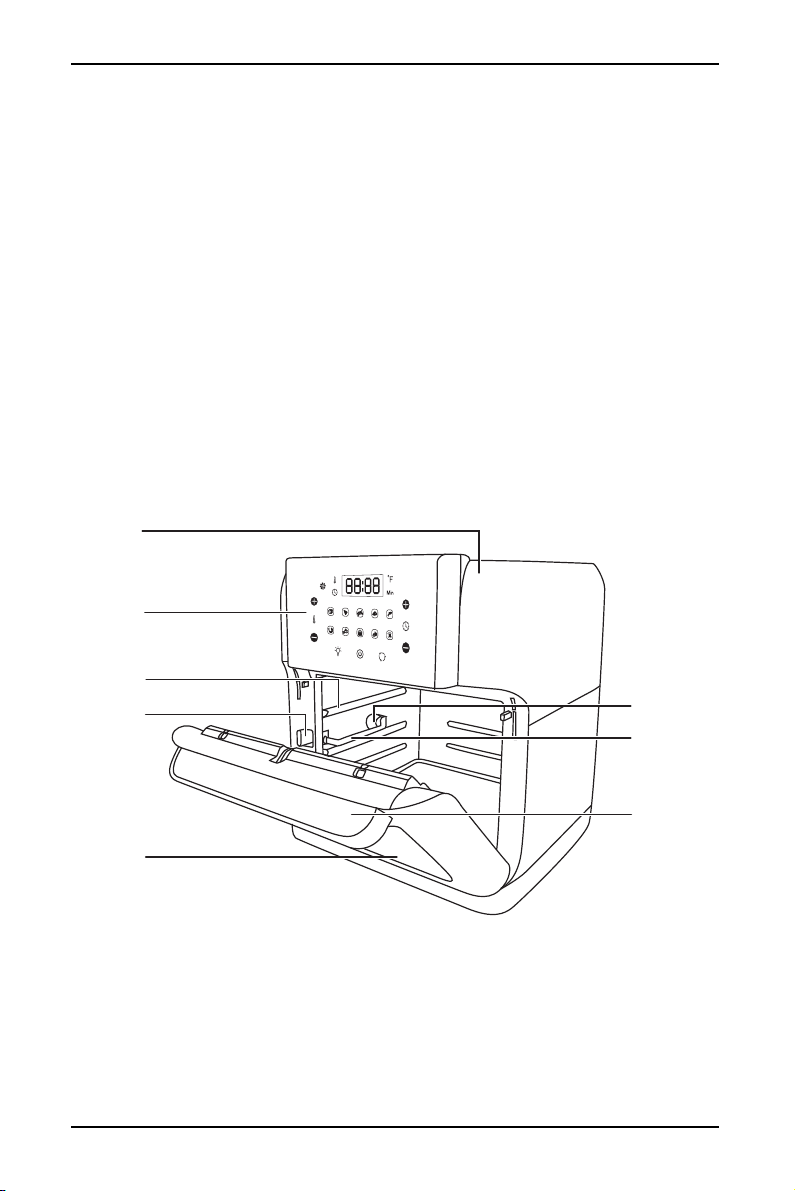
Components
Top lid
Rotisserie
spit rotator
Accessory
rails
Control
panel
Rails
Shaft lock
switch
Door
handle
Door with
window
8
www.insigniaproducts.com
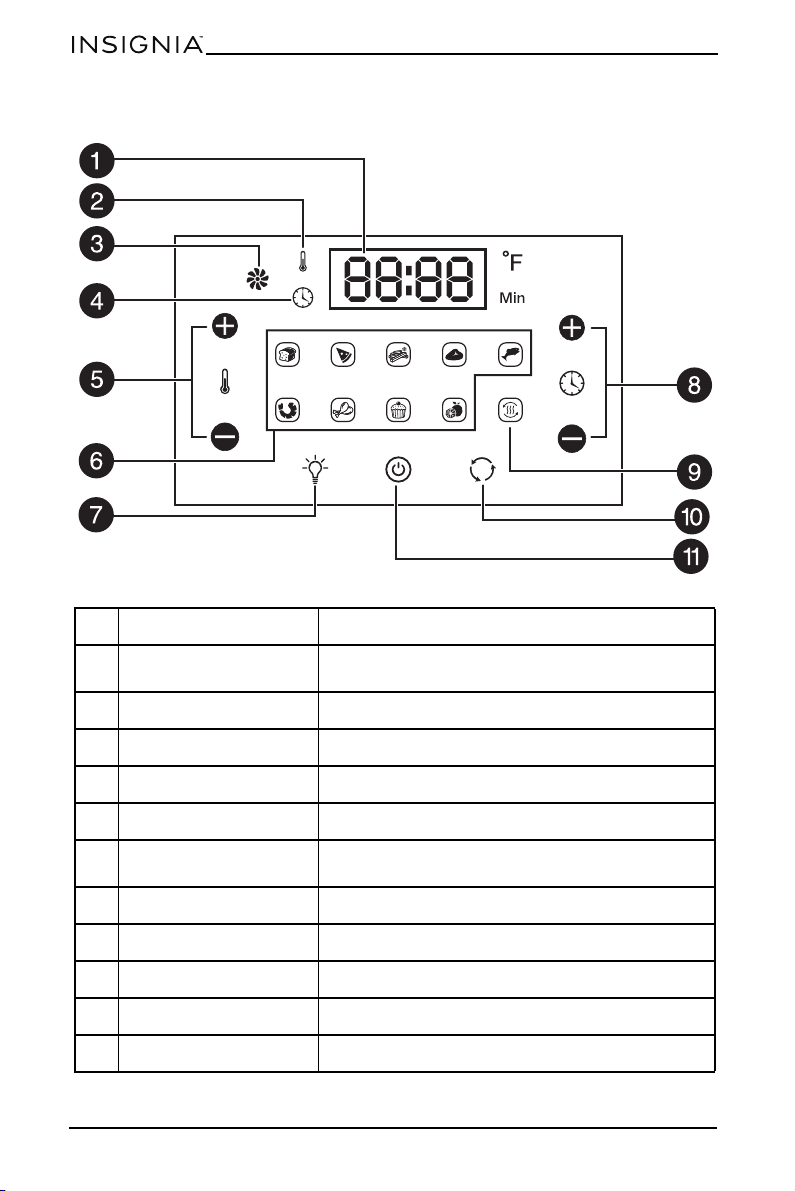
Control panel
#ITEM FUNCTION
1 Display
Displays the cook time, delay time, temperature, and
other messages.
2 Temperature indicator Lights when the display is showing temperature.
3 Cooking indicator Lights during the cooking process.
4 Time indicator Lights when the display is showing time.
5 Temperature +/- buttons Press to increase (+) or decrease (-) the temperature.
6 Mode buttons/indicators
Press to select a cooking mode. The button lights to
show which mode is selected.
7 Light button Press to turn on the interior light.
8 Time +/- buttons Press to increase (+) or decrease (-) cooking time.
9 Preheat button Press to begin preheating the air fryer oven.
10 Rotate button Press to rotate the rotisserie.
11 Power button Press to turn the power on or off.
4
9
10 Qt. Air Fryer Oven
www.insigniaproducts.com
Accessories
Using your air fryer oven
Preparing to cook
1 Read all instructions and important safeguards.
2 Remove all packaging materials and make sure that all items are included and
in good condition.
3 Remove any stickers or labels from the air fryer oven.
4 Tear up all plastic bags because they can pose a risk to children.
5 Thoroughly wash the accessories with hot water and mild detergent and a
non-abrasive sponge, then dry thoroughly.
6 Wipe the appliance clean with a damp cloth.
7 Plug in the power cord. A beep sounds and your air fryer oven enters standby
mode. All of the indicators on the control panel flash once.
8 Press the (power) button. Another beep sounds and all of the indicators
on the control panel flash once.
9 Press the (preheat) button, if needed.
Choosing the cooking mode
1 With the unit on, select the mode you want by pressing the appropriate mode
button. The corresponding mode indicator lights up.
The display shows the cooking temperature and cooking time alternatively
with the latter counting down by the minute.
2 When the mode is selected, press the (power) button to start the cooking
process (or wait five seconds and cooking starts automatically). The cooking
indicator will keep flashing after cooking has started.
CAUTION:
• Do not use abrasive cleaners or scouring pads. They can damage your air fryer oven.
• Do not immerse the air fryer oven, cord, or plug in water at any time.
Tips:
• If you open the air fryer oven door while cooking, the oven pauses. When you close it,
cooking resumes.
• For a more even result, press the rotate button to start rotating the rotisserie.
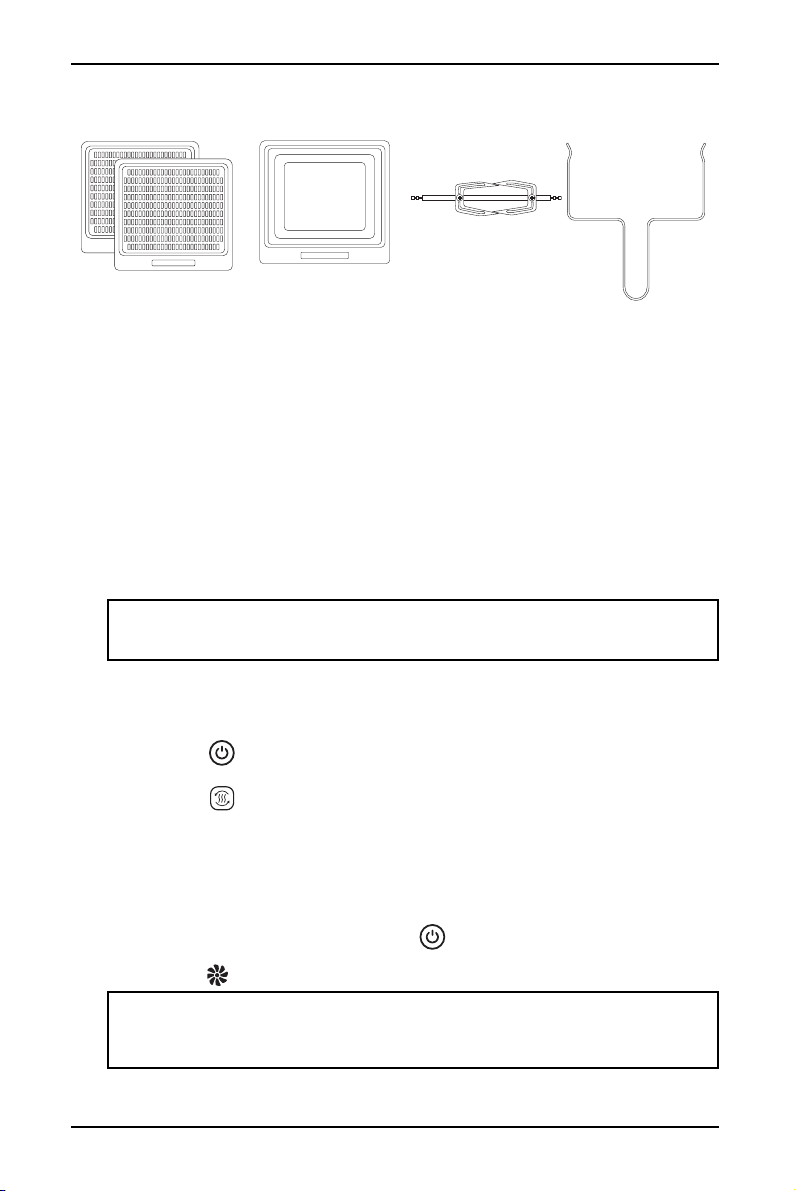
Cooking racks (2)
Drip tray
Rotisserie spit
Rotisserie spit
removal tool
10
www.insigniaproducts.com
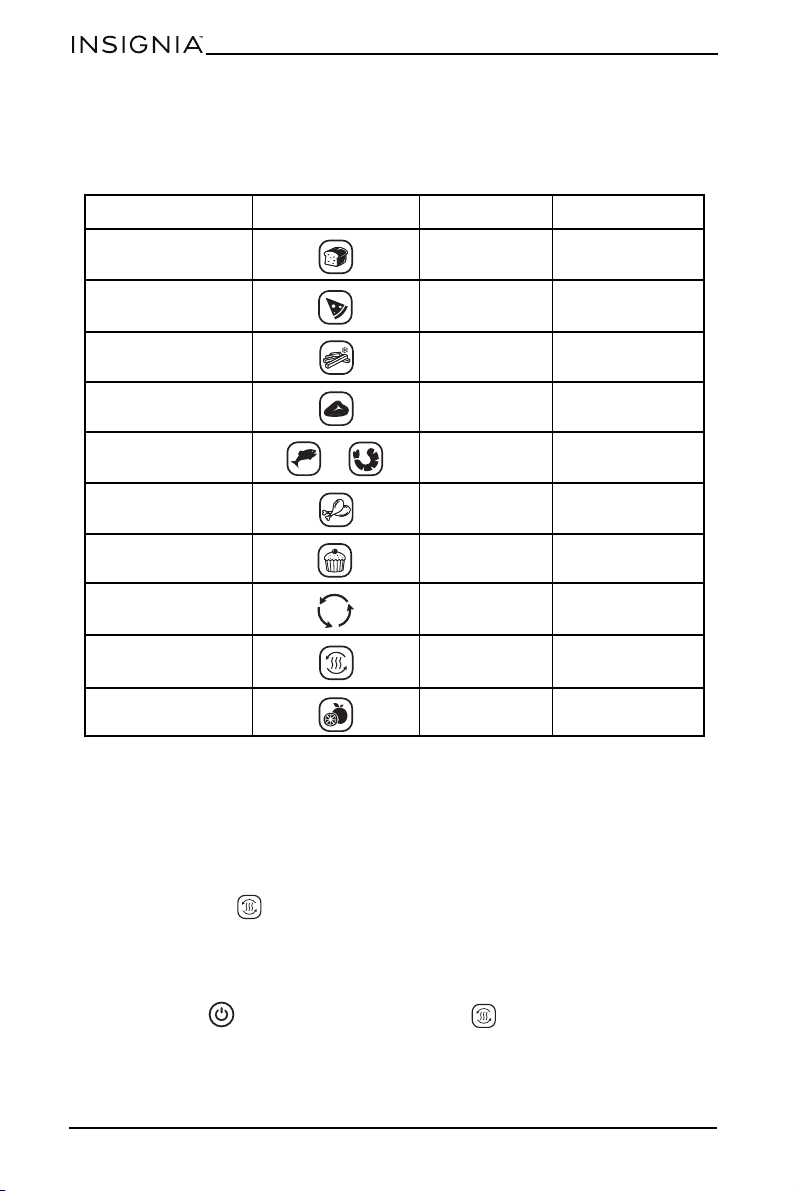
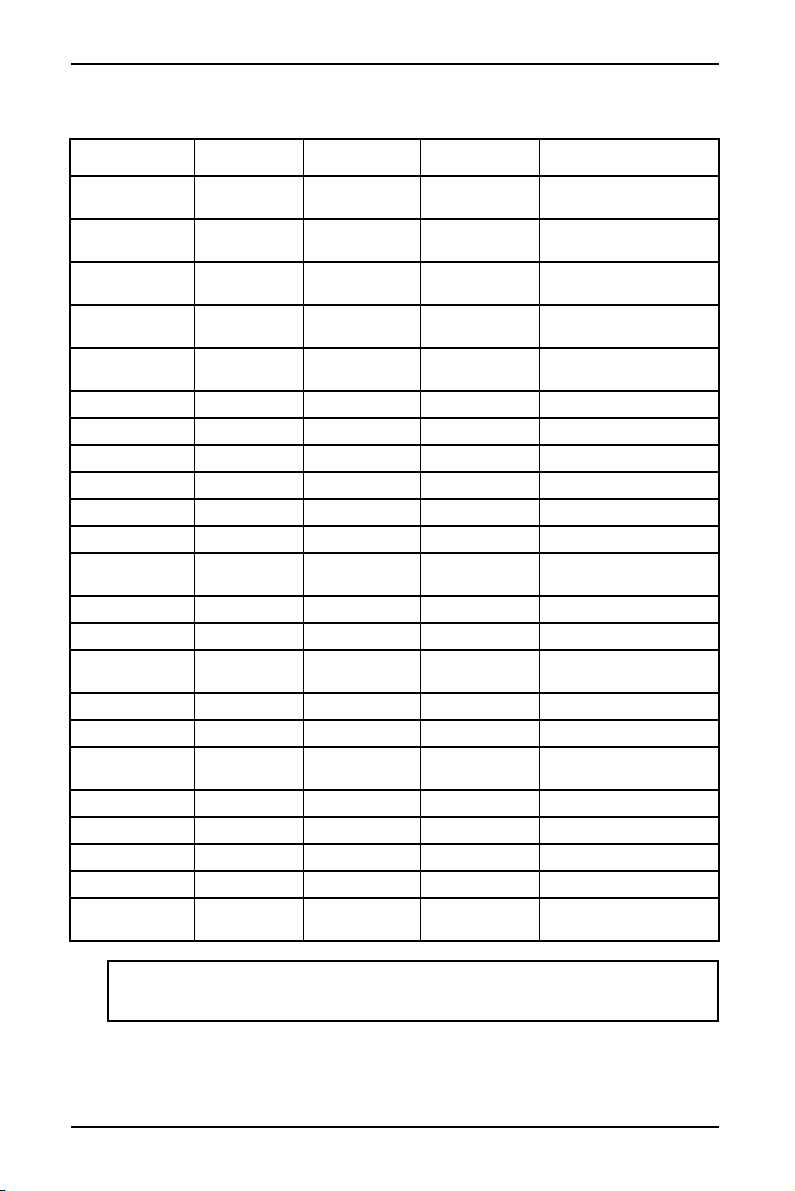
Preset food temperatures and times
This table shows the default temperature and time settings for preset items. You
can use the set temperature and set timer buttons (+ and –) to change the preset
temperature and time, as needed.
Setting the cooking time
Press the time + or time - button to increase to decrease the cooking time.
Setting the temperature
Press the temperature + or temperature - button to increase or decrease the
cooking temperature.
Using the preheat feature
Use the preheat ( ) feature to save time and help make air frying perfect. Use
the preheat feature:
• If a recipe calls for a preheated oven
• When cooking meats or proteins that benefit from a hot initial searing
1 Place the empty pan and cooking rack into your air fryer oven.
2 Press the (power) button, then press the (preheat) button. The button
blinks.
3 When your air fryer oven beeps once, place food onto the cooking rack and
program the cooking time and temperature.
COOKING MODE BUTTON TEMPERATURE COOKING TIME
Toast 350° F 5 minutes
Pizza 300° F 12 minutes
French Fries 400° F 15 minutes
Steaks/Chops 350° F 15 minutes
Fish or Shrimp 320° F 12 minutes
Chicken 370° F 30 minutes
Cake 320° F 35 minutes
Rotisserie N/A N/A
Preheat 280° F 6 minutes
Dehydrate 90° F 120 minutes
11
10 Qt. Air Fryer Oven
www.insigniaproducts.com
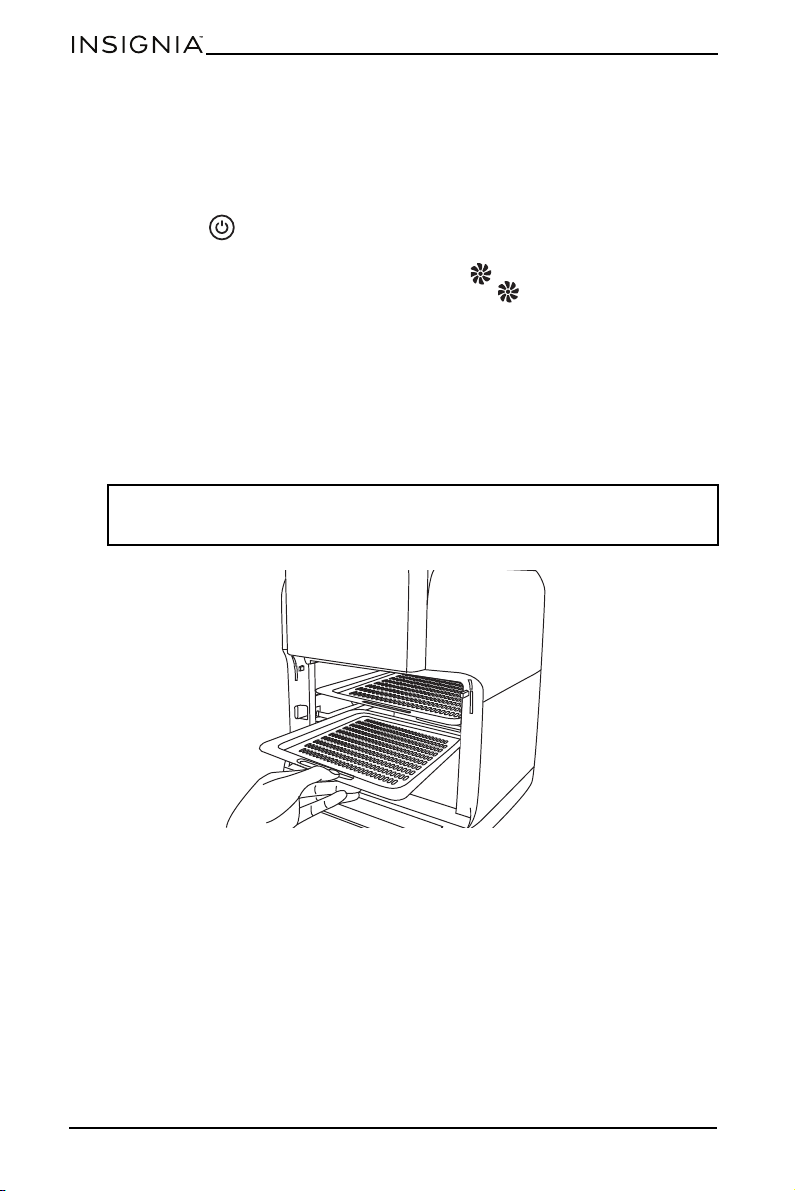
Recommended cooking time and temperature
FOOD AMOUNT TIME (Mins) TEMP RECOMMENDATIONS
Frozen French
fries (thin)
1.5 - 3 cups 15-16 400° F (200° C)
Frozen French
fries (thick)
1.5 - 3 cups 15-20 400° F (200° C)
Homemade
French fries
1.5 - 3.5 cups 10-16 400° F (200° C)
Homemade
potato wedges
1.5 - 3.5 cups 18-22 360° F (182° C)
Homemade
potato cubes
1.5 - 3 cups 12-18 360° F (182° C)
Hash browns 1 cup 15-18 360° F (182° C)
Potato augratin 2 cups 15-18 400° F (200° C)
Steak .25 - 1.1 lb. 8-12 360° F (182° C)
Pork chops .25 - 1.1 lb. 10-14 360° F (182° C)
Hamburger .25 - 1.1 lb. 7-14 360° F (182° C)
Sausage .25 - 1.1 lb. 13-15 400° F (200° C)
Chicken
drumsticks
.25 - 1.1 lb. 18-22 360° F (182° C)
Chicken breast .25 - 1.1 lb. 10-15 360° F (182° C)
Spring rolls .25 - .75 lb. 15-20 400° F (200° C) Use oven-ready
Frozen chicken
nuggets
.25 - 1.1 lb. 10-15 400° F (200° C) Use oven-ready
Frozen fish sticks .25 - 1.1 lb. 6-10 400° F (200° C) Use oven-ready
Mozzarella sticks .25 - 1.1 lb. 8-10 360° F (182° C) Use oven-ready
Stuffed
vegetables
.25 - 1.1 lb. 10 320° F (160° C) Use oven-ready
Cake 1.25 cups 20-25 320° F (160° C) Use baking tin
Quiche 1.5 cups 20-22 360° F (182° C) Use baking tin/oven dish
Muffins 1.25 cups 15-18 400° F (200° C) Use baking tin
Sweet snacks 1.5 cups 20 320° F (160° C) Use baking tin/oven dish
Frozen onion
rings
1 lb 15 400° F (200° C)
Note: The dehydrate function has a minimum temperature of 90° F and a maximum
temperature of 200° F for 2-24 hours. The temperature/time range for the other functions
is 180-400° F for 1-60 minutes.
12
www.insigniaproducts.com
Cooking with your air fryer oven
1 Place the food to be cooked on the cooking rack(s), then place the cooking
rack(s) into the air fryer oven and close the door.
2 Press the preset button for the food you are preparing, or set the time and
temperature using the +/- buttons.
3 Press the (power) button to begin cooking, or wait five seconds and
cooking begins automatically.
4 When cooking begins, the cooking indicator flashes. When the food is
done cooking, the fan and the cooking indicator remain on for 20 seconds.
The display will then show “OFF” for 20 seconds followed by a beep for five
seconds.
5 Remove the food from your air fryer oven.
Using the accessories
Using the proper accessory will help you achieve a satisfactory result and will
improve your cooking experience.
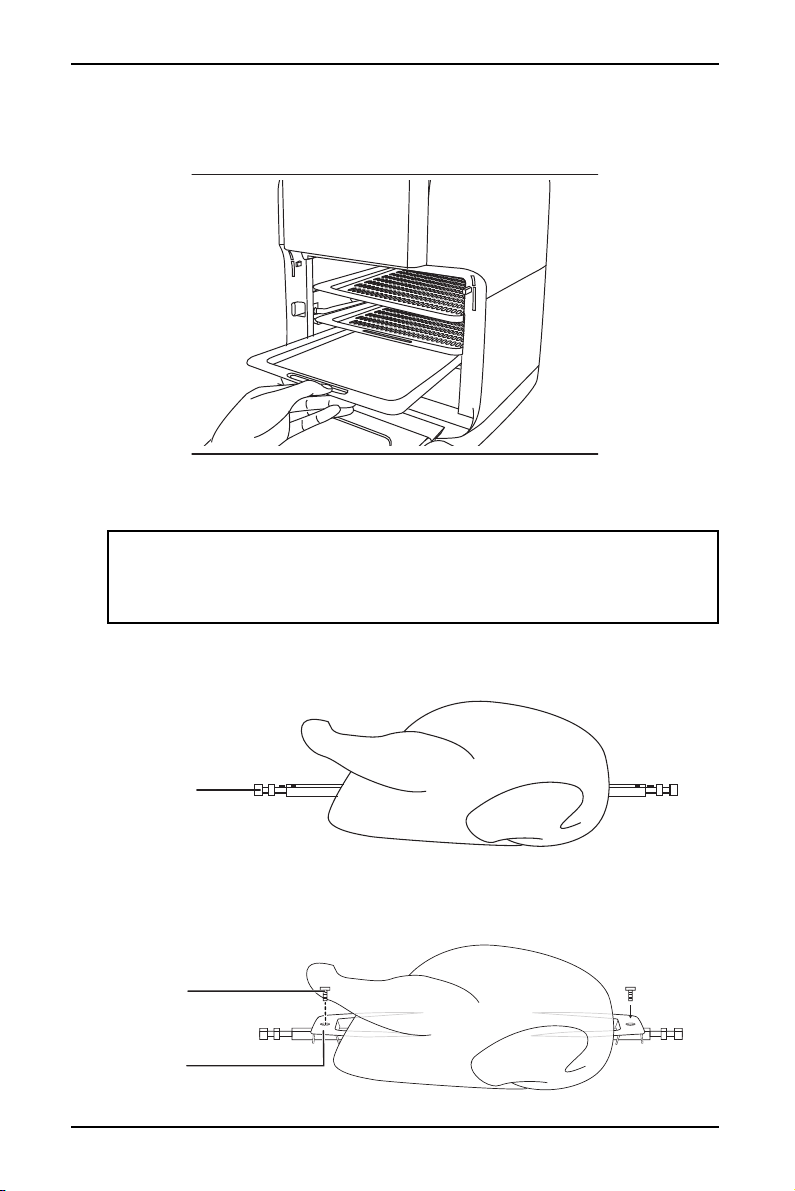
Using the cooking racks
Slide the cooking racks into the upper two pairs of rails for dehydration or to cook
crispy snacks. The cooking racks are also useful for cooking items like pizza (up to
7.4 in. (18.8 cm).
Note: The cooking racks have a non-stick coating which makes them easy to clean. The
use of foil on the cooking racks is not recommended because the holes in the rack provide
air circulation for even cooking.
13
10 Qt. Air Fryer Oven
www.insigniaproducts.com
Using the drip tray
Slide the drip tray onto the lowest rails to collect dripping oils, sauces, or other
dripping residue. Makes for an easier clean up.
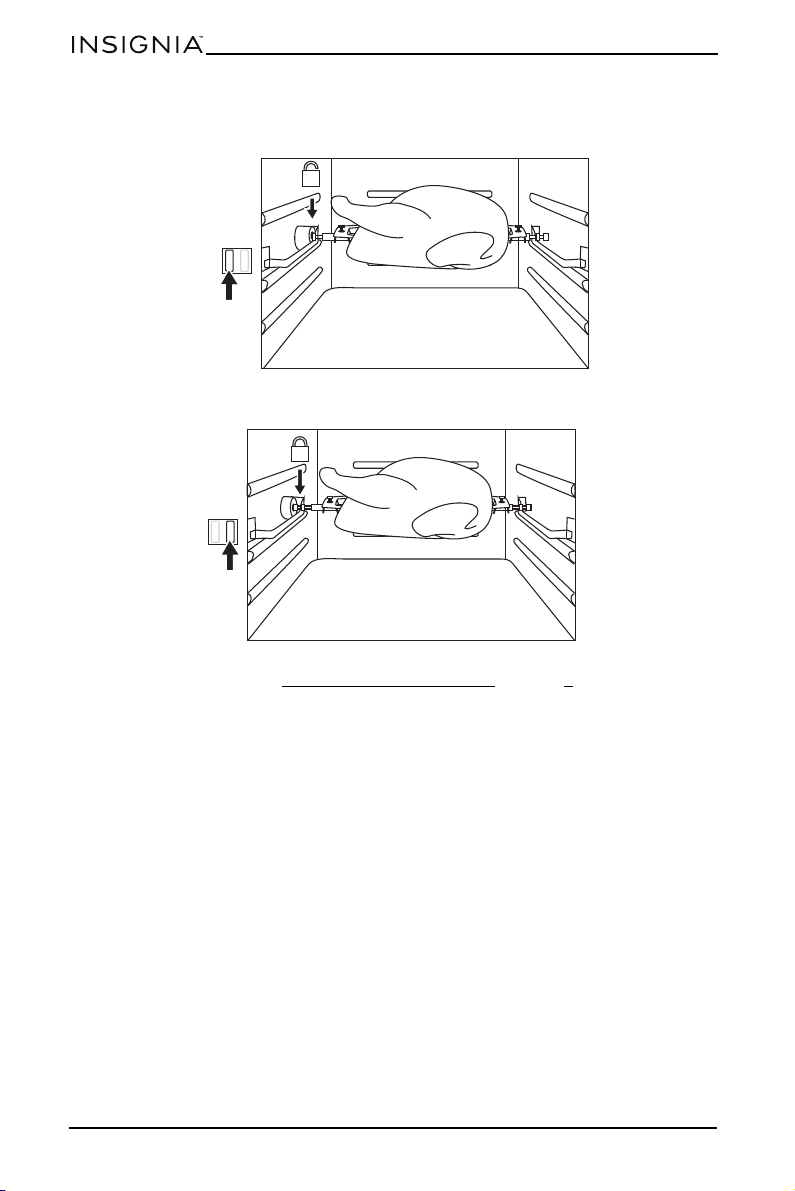
Using the rotisserie spit
Use to roast whole chickens, pork roasts, or other large cuts of meat.
1 Loosen the wing nuts, then remove the meat forks (2) from the rotisserie spit.
2 Pass the shaft through the length of the whole chicken, roast, or cut of meat.
3 Mount the meat forks (one on each end) on the rotisserie spit, insert into the
meat to hold it in place, then tighten the wing nuts to hold the meat forks in
place.
WARNING:
• Meat forks and other accessories are sharp. Pay special attention during use to avoid
personal injury.
• When cooking is complete, the accessories are very hot. To avoid burns, use a hot pad
or oven mitt.
Rotisserie
spit
Wing nut
Meat fork
14
www.insigniaproducts.com
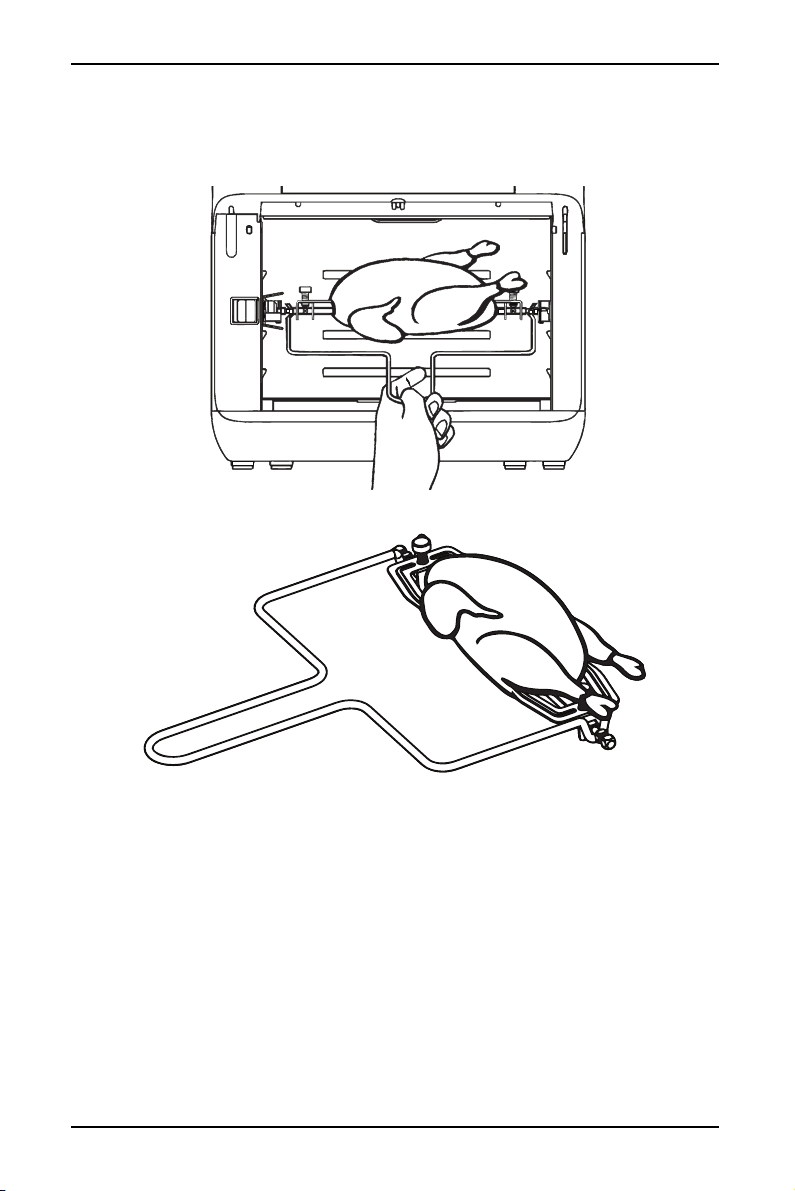
4 Move the shaft lock switch to the right to unlock it, then place the rotisserie
shaft into position in the rotisserie shaft rotator.
5 Move the shaft lock switch to the left to lock the rotisserie spit in position.
6 Begin cooking (see Choosing the cooking mode on page 9 for information on
how to begin cooking).
15
10 Qt. Air Fryer Oven
www.insigniaproducts.com
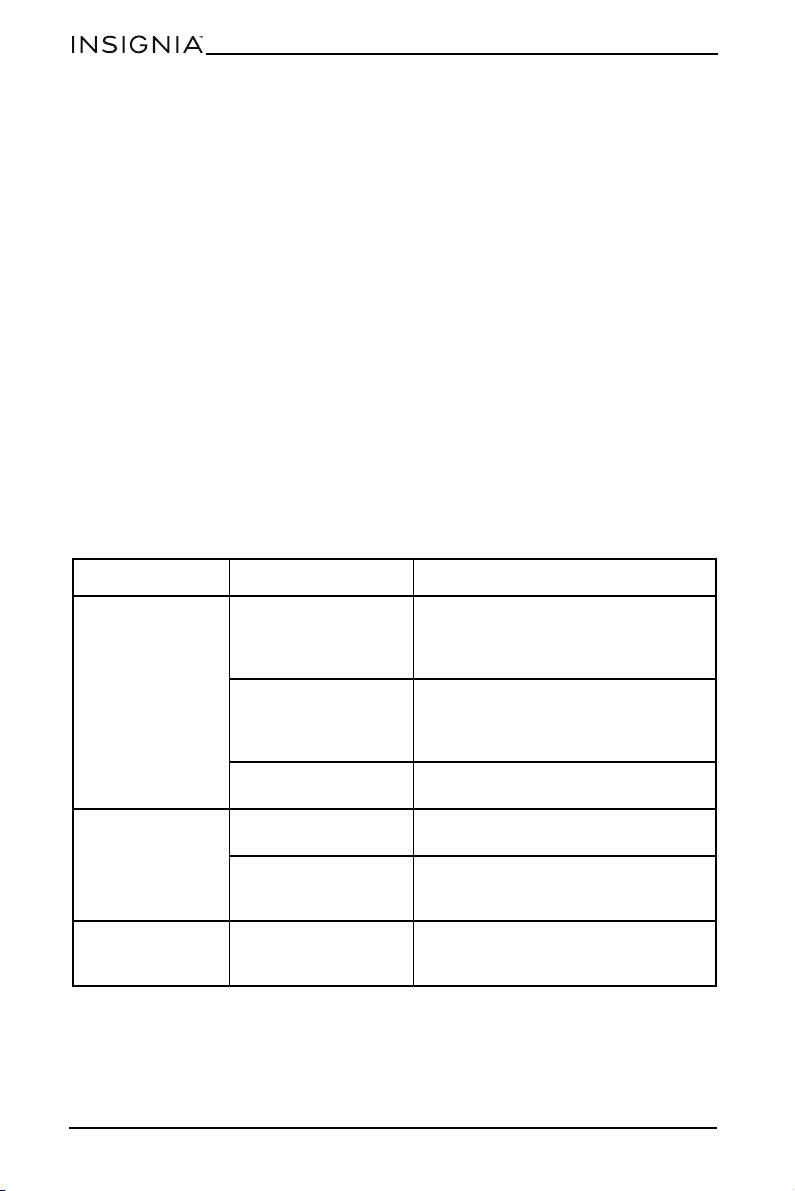
7 To remove the rotisserie spit from the air fryer oven when cooking is complete,
move the shaft lock switch to the right to release the rotisserie spit, then reach
into the air fryer oven with the removal tool, engage the ends of the rotisserie
spit with the tool and lift the rotisserie spit out of the air fryer oven.
16
www.insigniaproducts.com
Maintaining your air fryer oven
Cleaning your air fryer oven
Clean your air fryer oven after each use. Unplug your air fryer oven and make sure
that the appliance is thoroughly cooled before cleaning.
• The accessories are dishwasher safe but never use abrasive cleaning materials
or utensils on their surfaces to avoid scratches.
• Soak caked-on food in warm, soapy water for easier removal.
• Wipe the outside of the appliance with a warm cloth slightly wet with mild
detergent.
• Clean the inside of the appliance with a warm, nonabrasive sponge slightly
wet with mild detergent.
• If necessary, remove unwanted food residue from the control panel with a soft
cleaning brush.
Storing your air fryer oven
1 Unplug the appliance and let it cool thoroughly.
2 Make sure that all components are clean and dry.
3 Place the appliance in the clean, dry place.
Troubleshooting
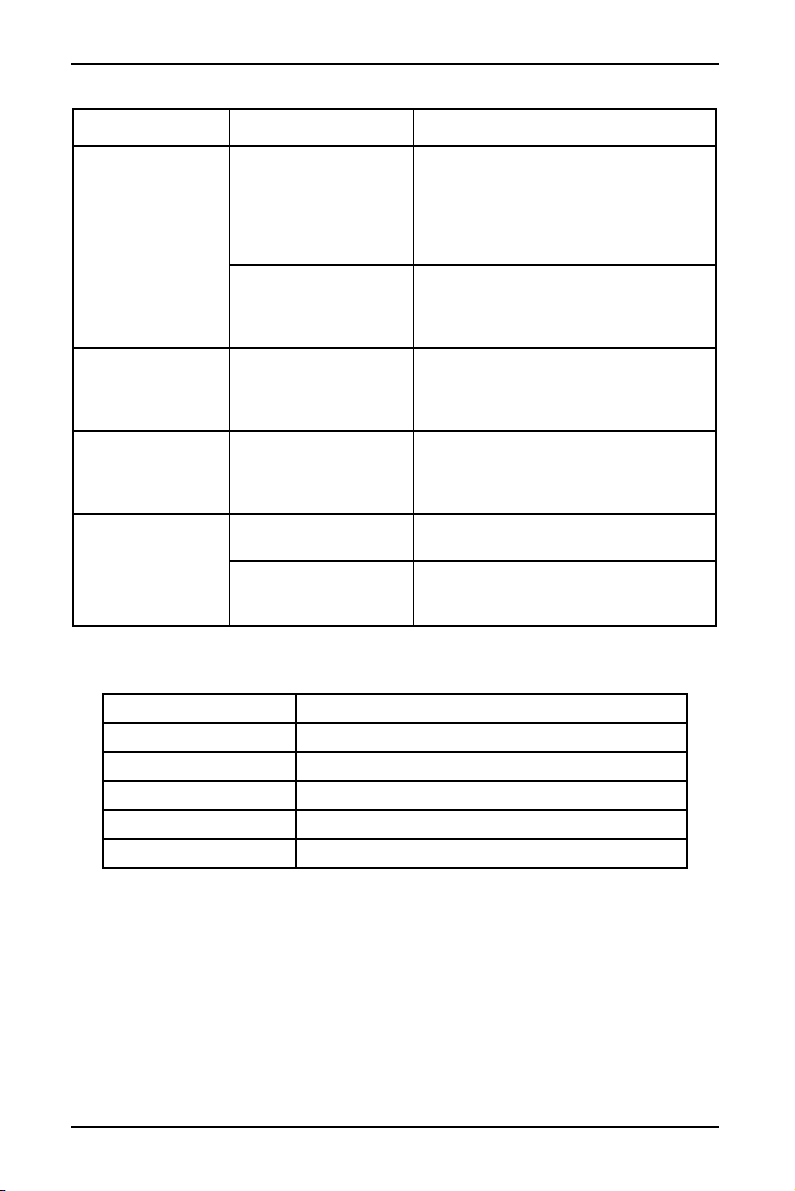
PROBLEM POSSIBLE CAUSE SOLUTION
The air fryer oven
does not work
The air fryer oven is not
plugged in.
Make sure that the power cord is
plugged in and the wall outlet works. If
not, check the circuit breaker and reset
if necessary.
You have not started
the cooking process by
setting the cooking
time and temperature.
Set the temperature and time as
instructed.
The door is not closed
properly.
Make sure that the door is closed.
The food is not
done
Too much food in the
air fryer oven.
Reduce the amount of food you are
attempting to cook.
The cooking
temperature was set
too low.
Set the temperature higher.
The food is not
cooked evenly
The cooking tray was
not positioned
correctly.
Adjust the cooking tray position
correctly.
17
10 Qt. Air Fryer Oven
www.insigniaproducts.com
Specifications
White smoke
comes out of the air
fryer oven
The food you are
preparing is greasy.
When you fry greasy ingredients in the
air fryer oven, a large amount of oil will
leak into the pan. The oil produces
white smoke and the pan may heat up
more than usual.This does not affect
the appliance or the end result.
The pan still contains
grease residues from
previous use.
White smoke is caused by grease
heating up in the pan. Make sure that
you clean the pan properly after each
use.
French fries are not
crispy
The crispiness of the
fries depends on the
amount of water in the
potatoes.
• Make sure that you dry the potato
sticks properly.
• Cut the potato sticks smaller for a
crispier result.
Fried snacks are not
crispy
Use the type of snacks
meant to be prepared
in a traditional deep
fryer.
Use oven snacks.
The cooking rack
will not slide into
the air fryer oven
correctly.
There is too much food
on the cooking rack.
Do not fill the cooking rack beyond the
MAX indicator.
The cooking rack isn’t
placed in the air fryer
oven correctly.
Push the cooking rack into the pan until
you hear a click.
Volume 10.5 Qt. (10 L)
Dimensions (H x W x D) 14.5 x 12.9 x 13.2 in. (36.9 x 32.8 x 33.6 cm)
Weight 14.7 lb. (6.7 kg)
Power 120 V ~ 60 Hz
Power consumption 1500 W
Power cord length 3.3 ft. (1 m)
PROBLEM POSSIBLE CAUSE SOLUTION

18
www.insigniaproducts.com
ONE-YEAR LIMITED WARRANTY
Definitions:
The Distributor* of Insignia branded products warrants to you, the original purchaser of this
new Insignia-branded product (“Product”), that the Product shall be free of defects in the
original manufacturer of the material or workmanship for a period of one (1) year from the
date of your purchase of the Product (“Warranty Period”).
For this warranty to apply, your Product must be purchased in the United States or Canada
from a Best Buy branded retail store or online at www.bestbuy.com
or www.bestbuy.ca and
is packaged with this warranty statement.
How long does the coverage last?
The Warranty Period lasts for 1 year (365 days) from the date you purchased the Product.
Your purchase date is printed on the receipt you received with the Product.
What does this warranty cover?
During the Warranty Period, if the original manufacture of the material or workmanship of
the Product is determined to be defective by an authorized Insignia repair center or store
personnel, Insignia will (at its sole option): (1) repair the Product with new or rebuilt parts; or
(2) replace the Product at no charge with new or rebuilt comparable products or parts.
Products and parts replaced under this warranty become the property of Insignia and are
not returned to you. If service of Products or parts are required after the Warranty Period
expires, you must pay all labor and parts charges. This warranty lasts as long as you own your
Insignia Product during the Warranty Period. Warranty coverage terminates if you sell or
otherwise transfer the Product.
How to obtain warranty service?
If you purchased the Product at a Best Buy retail store location or from a Best Buy online
website (www.bestbuy.com
or www.bestbuy.ca), please take your original receipt and the
Product to any Best Buy store. Make sure that you place the Product in its original packaging
or packaging that provides the same amount of protection as the original packaging.
To obtain warranty service, in the United States and Canada call 1-877-467-4289. Call agents
may diagnose and correct the issue over the phone.
Where is the warranty valid?
This warranty is valid only in the United States and Canada at Best Buy branded retail stores
or websites to the original purchaser of the product in the country where the original
purchase was made.
What does the warranty not cover?
This warranty does not cover:
• Food loss/spoilage due to failure of refrigerator or freezer
• Customer instruction/education
• Installation
• Set up adjustments
• Cosmetic damage
• Damage due to weather, lightning, and other acts of God, such as power surges
•Accidental damage
•Misuse
•Abuse
• Negligence
• Commercial purposes/use, including but not limited to use in a place of business or in
communal areas of a multiple dwelling condominium or apartment complex, or
otherwise used in a place of other than a private home.
• Modification of any part of the Product, including the antenna

19
10 Qt. Air Fryer Oven
www.insigniaproducts.com
• Display panel damaged by static (non-moving) images applied for lengthy periods
(burn-in).
• Damage due to incorrect operation or maintenance
• Connection to an incorrect voltage or power supply
• Attempted repair by any person not authorized by Insignia to service the Product
• Products sold “as is” or “with all faults”
• Consumables, including but not limited to batteries (i.e. AA, AAA, C etc.)
• Products where the factory applied serial number has been altered or removed
• Loss or Theft of this product or any part of the product
• Display panels containing up to three (3) pixel failures (dots that are dark or incorrectly
illuminated) grouped in an area smaller than one tenth (1/10) of the display size or up to
five (5) pixel failures throughout the display. (Pixel based displays may contain a limited
number of pixels that may not function normally.)
• Failures or Damage caused by any contact including but not limited to liquids, gels or
pastes.
REPAIR REPLACEMENT AS PROVIDED UNDER THIS WARRANTY IS YOUR EXCLUSIVE REMEDY
FOR BREACH OF WARRANTY. INSIGNIA SHALL NOT BE LIABLE FOR ANY INCIDENTAL OR
CONSEQUENTIAL DAMAGES FOR THE BREACH OF ANY EXPRESS OR IMPLIED WARRANTY ON
THIS PRODUCT, INCLUDING, BUT NOT LIMITED TO, LOST DATA, LOSS OF USE OF YOUR
PRODUCT, LOST BUSINESS OR LOST PROFITS. INSIGNIA PRODUCTS MAKES NO OTHER
EXPRESS WARRANTIES WITH RESPECT TO THE PRODUCT, ALL EXPRESS AND IMPLIED
WARRANTIES FOR THE PRODUCT, INCLUDING BUT NOT LIMITED TO ANY IMPLIED
WARRANTIES OF AND CONDITIONS OF MERCHANTABILITY AND FITNESS FOR A PARTICULAR
PURPOSE, ARE LIMITED IN DURATION TO THE WARRANTY PERIOD SET FORTH ABOVE AND
NO WARRANTIES, WHETHER EXPRESS OR IMPLIED, WILL APPLY AFTER THE WARRANTY
PERIOD. SOME STATES, PROVINCES AND JURISDICTIONS DO NOT ALLOW LIMITATIONS ON
HOW LONG AN IMPLIED WARRANTY LASTS, SO THE ABOVE LIMITATION MAY NOT APPLY TO
YOU. THIS WARRANTY GIVES YOU SPECIFIC LEGAL RIGHTS, AND YOU MAY ALSO HAVE OTHER
RIGHTS, WHICH VARY FROM STATE TO STATE OR PROVINCE TO PROVINCE.
Contact Insignia:
1-877-467-4289
www.insigniaproducts.com
INSIGNIA is a trademark of Best Buy and its affiliated companies.
*Distributed by Best Buy Purchasing, LLC
7601 Penn Ave South, Richfield, MN 55423 U.S.A.
©2021 Best Buy. All rights reserved.

www.insigniaproducts.com
1-877-467-4289 (U.S. and Canada)
INSIGNIA is a trademark of Best Buy and its affiliated companies.
Distributed by Best Buy Purchasing, LLC
7601 Penn Ave South, Richfield, MN 55423 U.S.A.
©2021 Best Buy. All rights reserved.
V2 ENGLISH
21-0805