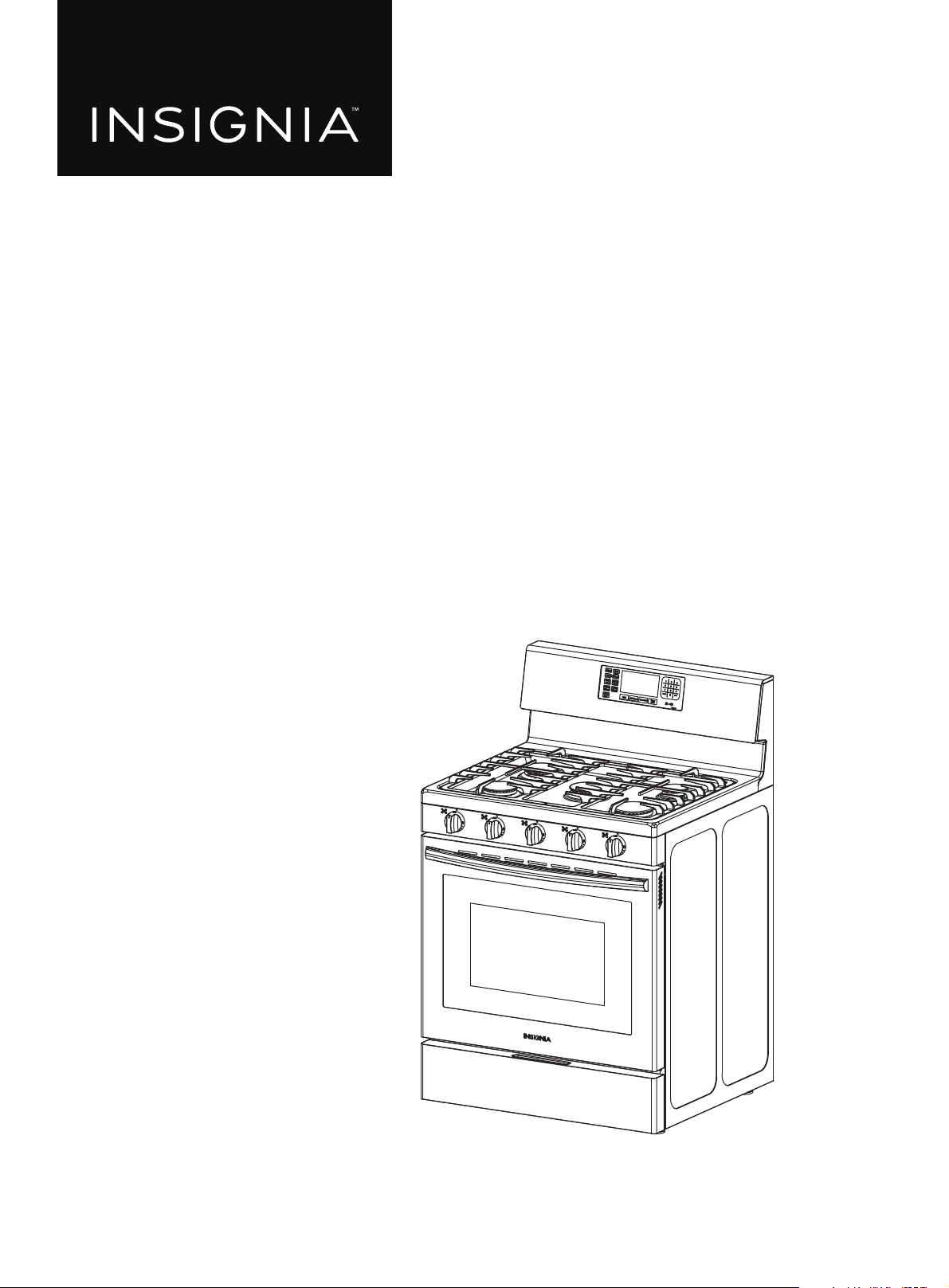
Before using your new product, please read these instructions to prevent any damage.
USER GUIDE
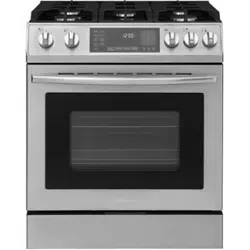
4.8 Cu. Ft. Freestanding
Gas Convection Range
with Steam Cleaning
NS-RGFGSS1

www.insigniaproducts.com
2
Contents
Before you begin . . . . . . . . . . . . . . . . . . . . . . . . . . . . . . . . . . . . . . . . . . . . . . . . . . . . . . . . . . . . . . . . . . . . . . . . . . . . . . . . . . . . . 3
IMPORTANT SAFETY INSTRUCTIONS . . . . . . . . . . . . . . . . . . . . . . . . . . . . . . . . . . . . . . . . . . . . . . . . . . . . . . . . . . . . . . . . . . . 4
ANTI-TIP DEVICE . . . . . . . . . . . . . . . . . . . . . . . . . . . . . . . . . . . . . . . . . . . . . . . . . . . . . . . . . . . . . . . . . . . . . . . . . . . . . . . . . . . . . . 5
IMPORTANT SAFETY PRECAUTIONS. . . . . . . . . . . . . . . . . . . . . . . . . . . . . . . . . . . . . . . . . . . . . . . . . . . . . . . . . . . . . . . . . . . . 5
ELECTRICAL WARNINGS . . . . . . . . . . . . . . . . . . . . . . . . . . . . . . . . . . . . . . . . . . . . . . . . . . . . . . . . . . . . . . . . . . . . . . . . . . . . . . . 8
GROUNDING INSTRUCTIONS . . . . . . . . . . . . . . . . . . . . . . . . . . . . . . . . . . . . . . . . . . . . . . . . . . . . . . . . . . . . . . . . . . . . . . . . . . 8
INSTALLATION WARNINGS. . . . . . . . . . . . . . . . . . . . . . . . . . . . . . . . . . . . . . . . . . . . . . . . . . . . . . . . . . . . . . . . . . . . . . . . . . . . . 8
SURFACE BURNER WARNINGS . . . . . . . . . . . . . . . . . . . . . . . . . . . . . . . . . . . . . . . . . . . . . . . . . . . . . . . . . . . . . . . . . . . . . . . . . 9
OVEN WARNINGS . . . . . . . . . . . . . . . . . . . . . . . . . . . . . . . . . . . . . . . . . . . . . . . . . . . . . . . . . . . . . . . . . . . . . . . . . . . . . . . . . . . .10
Features . . . . . . . . . . . . . . . . . . . . . . . . . . . . . . . . . . . . . . . . . . . . . . . . . . . . . . . . . . . . . . . . . . . . . . . . . . . . . . . . . . . . . . . . . . . . .11
Package contents . . . . . . . . . . . . . . . . . . . . . . . . . . . . . . . . . . . . . . . . . . . . . . . . . . . . . . . . . . . . . . . . . . . . . . . . . . . . . . . . . . . . . . . . . . . . . . . . 11
Main components . . . . . . . . . . . . . . . . . . . . . . . . . . . . . . . . . . . . . . . . . . . . . . . . . . . . . . . . . . . . . . . . . . . . . . . . . . . . . . . . . . . . . . . . . . . . . . . 12
Oven components . . . . . . . . . . . . . . . . . . . . . . . . . . . . . . . . . . . . . . . . . . . . . . . . . . . . . . . . . . . . . . . . . . . . . . . . . . . . . . . . . . . . . . . . . . . . . . . 12
Oven control panel . . . . . . . . . . . . . . . . . . . . . . . . . . . . . . . . . . . . . . . . . . . . . . . . . . . . . . . . . . . . . . . . . . . . . . . . . . . . . . . . . . . . . . . . . . . . . . 13
Range dimensions . . . . . . . . . . . . . . . . . . . . . . . . . . . . . . . . . . . . . . . . . . . . . . . . . . . . . . . . . . . . . . . . . . . . . . . . . . . . . . . . . . . . . . . . . . . . . . . 14
Installing. . . . . . . . . . . . . . . . . . . . . . . . . . . . . . . . . . . . . . . . . . . . . . . . . . . . . . . . . . . 16
Selecting a location . . . . . . . . . . . . . . . . . . . . . . . . . . . . . . . . . . . . . . . . . . . . . . . . . . . . . . . . . . . . . . . . . . . . . . . . . . . . . . . . . .17
Clearances and dimensions . . . . . . . . . . . . . . . . . . . . . . . . . . . . . . . . . . . . . . . . . . . . . . . . . . . . . . . . . . . . . . . . . . . . . . . . . . . . . . . . . . . . . .17
Locations for gas piping and electrical outlets . . . . . . . . . . . . . . . . . . . . . . . . . . . . . . . . . . . . . . . . . . . . . . . . . . . . . . . . . . . . . . . . . . . . 18
Gas requirements . . . . . . . . . . . . . . . . . . . . . . . . . . . . . . . . . . . . . . . . . . . . . . . . . . . . . . . . . . . . . . . . . . . . . . . . . . . . . . . . . . . .18
Commonwealth of Massachusetts requirements . . . . . . . . . . . . . . . . . . . . . . . . . . . . . . . . . . . . . . . . . . . . . . . . . . . . . . . . . . . . . . . . . .18
Electrical requirements. . . . . . . . . . . . . . . . . . . . . . . . . . . . . . . . . . . . . . . . . . . . . . . . . . . . . . . . . . . . . . . . . . . . . . . . . . . . . . .18
Installing your gas range . . . . . . . . . . . . . . . . . . . . . . . . . . . . . . . . . . . . . . . . . . . . . . . . . . . . . . . . . . . . . . . . . . . . . . . . . . . . .19
Important notes to the installer: . . . . . . . . . . . . . . . . . . . . . . . . . . . . . . . . . . . . . . . . . . . . . . . . . . . . . . . . . . . . . . . . . . . . . . . . . . . . . . . . . .19
Before installing your range . . . . . . . . . . . . . . . . . . . . . . . . . . . . . . . . . . . . . . . . . . . . . . . . . . . . . . . . . . . . . . . . . . . . . . . . . . . . . . . . . . . . . . 19
Connecting to gas . . . . . . . . . . . . . . . . . . . . . . . . . . . . . . . . . . . . . . . . . . . . . . . . . . . . . . . . . . . . . . . . . . . . . . . . . . . . . . . . . . . . . . . . . . . . . . . 19
Optional: Converting to LP gas . . . . . . . . . . . . . . . . . . . . . . . . . . . . . . . . . . . . . . . . . . . . . . . . . . . . . . . . . . . . . . . . . . . . . . . . . . . . . . . . . . . 20
Installing the anti-tip device. . . . . . . . . . . . . . . . . . . . . . . . . . . . . . . . . . . . . . . . . . . . . . . . . . . . . . . . . . . . . . . . . . . . . . . . . . . . . . . . . . . . . . 21
Placing your range and connecting to power . . . . . . . . . . . . . . . . . . . . . . . . . . . . . . . . . . . . . . . . . . . . . . . . . . . . . . . . . . . . . . . . . . . . .21
Leveling your range. . . . . . . . . . . . . . . . . . . . . . . . . . . . . . . . . . . . . . . . . . . . . . . . . . . . . . . . . . . . . . . . . . . . . . . . . . . . . . . . . . . . . . . . . . . . . . 22
Assembling the top burners. . . . . . . . . . . . . . . . . . . . . . . . . . . . . . . . . . . . . . . . . . . . . . . . . . . . . . . . . . . . . . . . . . . . . . . . . . . . . . . . . . . . . .23
Installing the burner knobs. . . . . . . . . . . . . . . . . . . . . . . . . . . . . . . . . . . . . . . . . . . . . . . . . . . . . . . . . . . . . . . . . . . . . . . . . . . . . . . . . . . . . . . 23
Installing the oven door handle . . . . . . . . . . . . . . . . . . . . . . . . . . . . . . . . . . . . . . . . . . . . . . . . . . . . . . . . . . . . . . . . . . . . . . . . . . . . . . . . . . 24
Installing the plastic pads . . . . . . . . . . . . . . . . . . . . . . . . . . . . . . . . . . . . . . . . . . . . . . . . . . . . . . . . . . . . . . . . . . . . . . . . . . . . . . . . . . . . . . . . 24
Checking the ignition of the burners . . . . . . . . . . . . . . . . . . . . . . . . . . . . . . . . . . . . . . . . . . . . . . . . . . . . . . . . . . . . . . . . . . . . . . . . . . . . . 25
Using . . . . . . . . . . . . . . . . . . . . . . . . . . . . . . . . . . . . . . . . . . . . . . . . . . . . . . . . . . . . . . 26
Before you begin using your range . . . . . . . . . . . . . . . . . . . . . . . . . . . . . . . . . . . . . . . . . . . . . . . . . . . . . . . . . . . . . . . . . . .27
Tips for saving gas . . . . . . . . . . . . . . . . . . . . . . . . . . . . . . . . . . . . . . . . . . . . . . . . . . . . . . . . . . . . . . . . . . . . . . . . . . . . . . . . . . . . . . . . . . . . . . . 27
Using the surface burners . . . . . . . . . . . . . . . . . . . . . . . . . . . . . . . . . . . . . . . . . . . . . . . . . . . . . . . . . . . . . . . . . . . . . . . . . . . .28
Using the correct cookware . . . . . . . . . . . . . . . . . . . . . . . . . . . . . . . . . . . . . . . . . . . . . . . . . . . . . . . . . . . . . . . . . . . . . . . . . . . . . . . . . . . . . . 28
Lighting a burner . . . . . . . . . . . . . . . . . . . . . . . . . . . . . . . . . . . . . . . . . . . . . . . . . . . . . . . . . . . . . . . . . . . . . . . . . . . . . . . . . . . . . . . . . . . . . . . . 29
Manually lighting a burner . . . . . . . . . . . . . . . . . . . . . . . . . . . . . . . . . . . . . . . . . . . . . . . . . . . . . . . . . . . . . . . . . . . . . . . . . . . . . . . . . . . . . . . 29
Selecting the flame size . . . . . . . . . . . . . . . . . . . . . . . . . . . . . . . . . . . . . . . . . . . . . . . . . . . . . . . . . . . . . . . . . . . . . . . . . . . . . . . . . . . . . . . . . . 29
Using the oven . . . . . . . . . . . . . . . . . . . . . . . . . . . . . . . . . . . . . . . . . . . . . . . . . . . . . . . . . . . . . . . . . . . . . . . . . . . . . . . . . . . . . .30
Using the oven vent . . . . . . . . . . . . . . . . . . . . . . . . . . . . . . . . . . . . . . . . . . . . . . . . . . . . . . . . . . . . . . . . . . . . . . . . . . . . . . . . . . . . . . . . . . . . . 30
Using the oven light . . . . . . . . . . . . . . . . . . . . . . . . . . . . . . . . . . . . . . . . . . . . . . . . . . . . . . . . . . . . . . . . . . . . . . . . . . . . . . . . . . . . . . . . . . . . . 30
Positioning the oven racks . . . . . . . . . . . . . . . . . . . . . . . . . . . . . . . . . . . . . . . . . . . . . . . . . . . . . . . . . . . . . . . . . . . . . . . . . . . . . . . . . . . . . . . 31
Tips for baking. . . . . . . . . . . . . . . . . . . . . . . . . . . . . . . . . . . . . . . . . . . . . . . . . . . . . . . . . . . . . . . . . . . . . . . . . . . . . . . . . . . . . . . . . . . . . . . . . . . 32

www.insigniaproducts.com
3
4.8 Cu. Ft. Freestanding Gas Convection Range with Steam Cleaning
Setting the clock. . . . . . . . . . . . . . . . . . . . . . . . . . . . . . . . . . . . . . . . . . . . . . . . . . . . . . . . . . . . . . . . . . . . . . . . . . . . . . . . . . . . . . . . . . . . . . . . . 33
Selecting the 12-hour or 24-hour display setting . . . . . . . . . . . . . . . . . . . . . . . . . . . . . . . . . . . . . . . . . . . . . . . . . . . . . . . . . . . . . . . . . .33
Using the timer . . . . . . . . . . . . . . . . . . . . . . . . . . . . . . . . . . . . . . . . . . . . . . . . . . . . . . . . . . . . . . . . . . . . . . . . . . . . . . . . . . . . . . . . . . . . . . . . . . 33
Baking. . . . . . . . . . . . . . . . . . . . . . . . . . . . . . . . . . . . . . . . . . . . . . . . . . . . . . . . . . . . . . . . . . . . . . . . . . . . . . . . . . . . . . . . . . . . . . . . . . . . . . . . . . . 33
Adjusting the thermostat . . . . . . . . . . . . . . . . . . . . . . . . . . . . . . . . . . . . . . . . . . . . . . . . . . . . . . . . . . . . . . . . . . . . . . . . . . . . . . . . . . . . . . . . 33
Fan baking and roasting . . . . . . . . . . . . . . . . . . . . . . . . . . . . . . . . . . . . . . . . . . . . . . . . . . . . . . . . . . . . . . . . . . . . . . . . . . . . . . . . . . . . . . . . . 34
Programming the cook time . . . . . . . . . . . . . . . . . . . . . . . . . . . . . . . . . . . . . . . . . . . . . . . . . . . . . . . . . . . . . . . . . . . . . . . . . . . . . . . . . . . . . 34
Programming a delayed start time . . . . . . . . . . . . . . . . . . . . . . . . . . . . . . . . . . . . . . . . . . . . . . . . . . . . . . . . . . . . . . . . . . . . . . . . . . . . . . . 35
Broiling. . . . . . . . . . . . . . . . . . . . . . . . . . . . . . . . . . . . . . . . . . . . . . . . . . . . . . . . . . . . . . . . . . . . . . . . . . . . . . . . . . . . . . . . . . . . . . . . . . . . . . . . . . 35
Keeping food warm. . . . . . . . . . . . . . . . . . . . . . . . . . . . . . . . . . . . . . . . . . . . . . . . . . . . . . . . . . . . . . . . . . . . . . . . . . . . . . . . . . . . . . . . . . . . . . 35
Switching between Fahrenheit or Centigrade. . . . . . . . . . . . . . . . . . . . . . . . . . . . . . . . . . . . . . . . . . . . . . . . . . . . . . . . . . . . . . . . . . . . .36
Turning sound on or off . . . . . . . . . . . . . . . . . . . . . . . . . . . . . . . . . . . . . . . . . . . . . . . . . . . . . . . . . . . . . . . . . . . . . . . . . . . . . . . . . . . . . . . . . . 36
Locking oven controls . . . . . . . . . . . . . . . . . . . . . . . . . . . . . . . . . . . . . . . . . . . . . . . . . . . . . . . . . . . . . . . . . . . . . . . . . . . . . . . . . . . . . . . . . . . 36
Maintenance . . . . . . . . . . . . . . . . . . . . . . . . . . . . . . . . . . . . . . . . . . . . . . . . . . . . . . . 37
Cleaning and maintaining. . . . . . . . . . . . . . . . . . . . . . . . . . . . . . . . . . . . . . . . . . . . . . . . . . . . . . . . . . . . . . . . . . . . . . . . . . . .38
Cleaning the control panel . . . . . . . . . . . . . . . . . . . . . . . . . . . . . . . . . . . . . . . . . . . . . . . . . . . . . . . . . . . . . . . . . . . . . . . . . . . . . . . . . . . . . . . 38
Cleaning stainless steel surfaces . . . . . . . . . . . . . . . . . . . . . . . . . . . . . . . . . . . . . . . . . . . . . . . . . . . . . . . . . . . . . . . . . . . . . . . . . . . . . . . . . .38
Cleaning the oven racks. . . . . . . . . . . . . . . . . . . . . . . . . . . . . . . . . . . . . . . . . . . . . . . . . . . . . . . . . . . . . . . . . . . . . . . . . . . . . . . . . . . . . . . . . . 38
Cleaning the oven door . . . . . . . . . . . . . . . . . . . . . . . . . . . . . . . . . . . . . . . . . . . . . . . . . . . . . . . . . . . . . . . . . . . . . . . . . . . . . . . . . . . . . . . . . . 39
Cleaning the surface burner control knobs. . . . . . . . . . . . . . . . . . . . . . . . . . . . . . . . . . . . . . . . . . . . . . . . . . . . . . . . . . . . . . . . . . . . . . . .40
Cleaning surface burner grates and assemblies . . . . . . . . . . . . . . . . . . . . . . . . . . . . . . . . . . . . . . . . . . . . . . . . . . . . . . . . . . . . . . . . . . . 41
Cleaning the cooktop . . . . . . . . . . . . . . . . . . . . . . . . . . . . . . . . . . . . . . . . . . . . . . . . . . . . . . . . . . . . . . . . . . . . . . . . . . . . . . . . . . . . . . . . . . . . 43
Removing and replacing the oven door . . . . . . . . . . . . . . . . . . . . . . . . . . . . . . . . . . . . . . . . . . . . . . . . . . . . . . . . . . . . . . . . . . . . . . . . . .44
Removing and replacing the storage drawer. . . . . . . . . . . . . . . . . . . . . . . . . . . . . . . . . . . . . . . . . . . . . . . . . . . . . . . . . . . . . . . . . . . . . .48
Steam cleaning the oven. . . . . . . . . . . . . . . . . . . . . . . . . . . . . . . . . . . . . . . . . . . . . . . . . . . . . . . . . . . . . . . . . . . . . . . . . . . . . . . . . . . . . . . . . 49
Troubleshooting. . . . . . . . . . . . . . . . . . . . . . . . . . . . . . . . . . . . . . . . . . . . . . . . . . . . . . . . . . . . . . . . . . . . . . . . . . . . . . . . . . . . .50
Cooktop. . . . . . . . . . . . . . . . . . . . . . . . . . . . . . . . . . . . . . . . . . . . . . . . . . . . . . . . . . . . . . . . . . . . . . . . . . . . . . . . . . . . . . . . . . . . . . . . . . . . . . . . . 50
Oven . . . . . . . . . . . . . . . . . . . . . . . . . . . . . . . . . . . . . . . . . . . . . . . . . . . . . . . . . . . . . . . . . . . . . . . . . . . . . . . . . . . . . . . . . . . . . . . . . . . . . . . . . . . . 50
Error codes . . . . . . . . . . . . . . . . . . . . . . . . . . . . . . . . . . . . . . . . . . . . . . . . . . . . . . . . . . . . . . . . . . . . . . . . . . . . . . . . . . . . . . . . . . . . . . . . . . . . . . 52
Specifications. . . . . . . . . . . . . . . . . . . . . . . . . . . . . . . . . . . . . . . . . . . . . . . . . . . . . . . . . . . . . . . . . . . . . . . . . . . . . . . . . . . . . . . .53
ONE-YEAR LIMITED WARRANTY . . . . . . . . . . . . . . . . . . . . . . . . . . . . . . . . . . . . . . . . . . . . . . . . . . . . . . . . . . . . . . . . . . . . . .54
Before you begin
READ THESE INSTRUCTIONS COMPLETELY AND CAREFULLY.
Important note to the installer
• Read all instructions contained in the Installation section before installing the range. See Installing on page 16.
• Remove all packing materials from the oven compartments before connecting the electric and gas supply to the range.
• Observe all governing codes and ordinances.
• Be sure to leave these instructions with the consumer.
• Installation of this appliance requires basic mechanical skills.
• Proper installation is the responsibility of the installer.
• Product failure due to improper installation is not covered under the Warranty.
Important note to the consumer
• Keep your user manual for future reference.
• As when using any appliance generating heat, there are certain safety precautions you should follow.
• Be sure your range is installed and grounded properly by a qualified installer or service technician.
• Make sure the wall coverings around the range withstand the heat generated by the range.
• Cabinet storage space above the surface burners should be a minimum of 30 in. (76.2 cm).
Important note to the servicer
• The electrical diagram is attached to the back of the range.
www.insigniaproducts.com
4
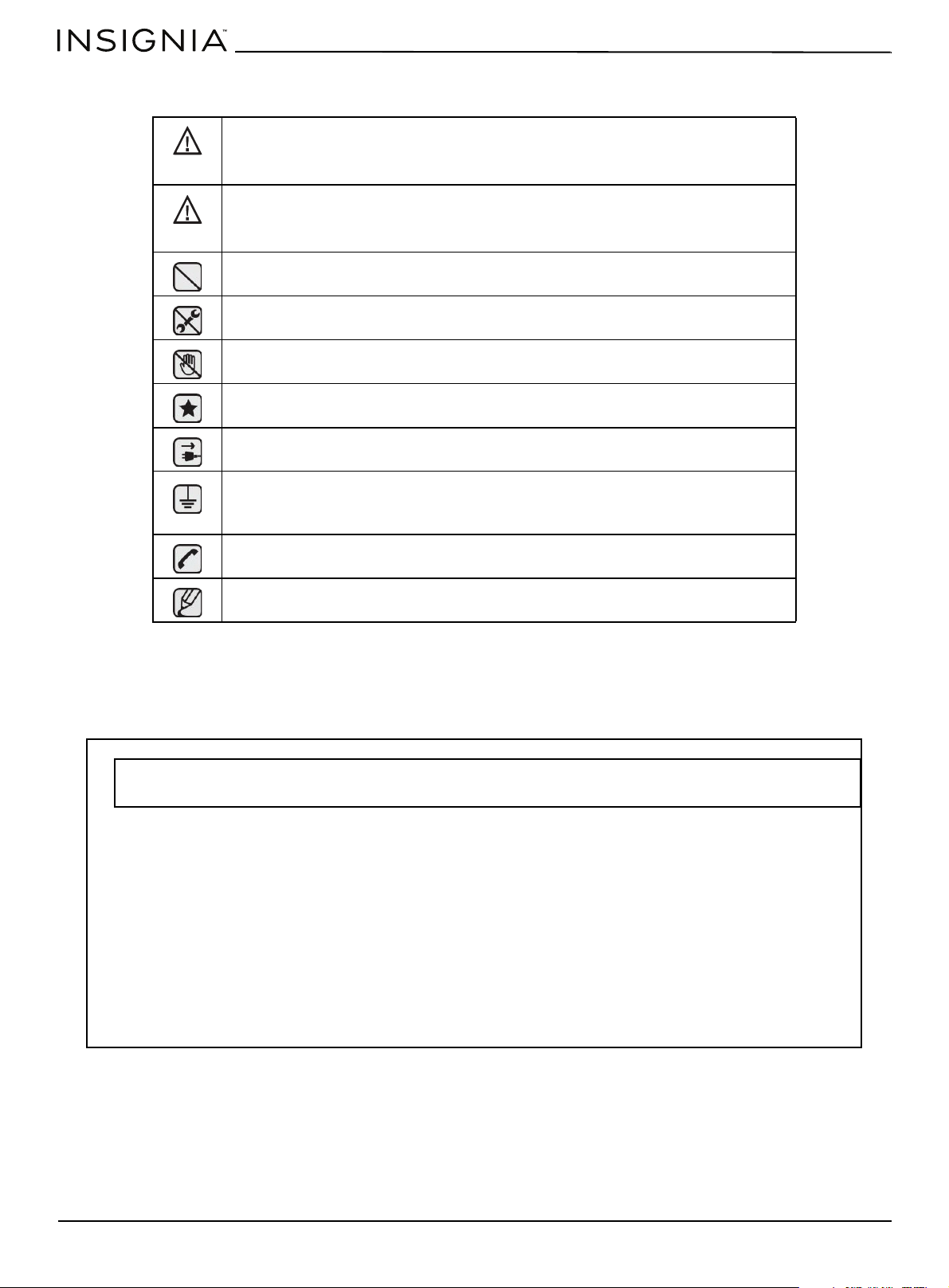
Safety Symbols
What the icons and signs in this user manual mean:
These warning signs are here to prevent injury to you and others. Please follow them explicitly.
Do not discard this manual. Please keep it in a safe place for future reference.
IMPORTANT SAFETY INSTRUCTIONS
You can be killed or seriously injured if you do not follow instructions.
Minor injury or property damage can result if you don’t follow instructions.
Do NOT attempt.
Do NOT disassemble.
Do NOT touch.
Follow directions explicitly.
Unplug the power cord from the electrical outlet.
Make sure the range is plugged into an earth grounded electrical outlet to prevent
electric shock. An outlet equipped with a Ground Fault Interrupter (GFI) is highly
recommended.
Call the service center for help.
Note
WARNING
CAUTION
— DO NOT store or use gasoline or other flammable vapors and liquids in the vicinity of this or any other
appliance.
— WHAT TO DO IF YOU SMELL GAS.
• DO NOT try to light any appliance.
• DO NOT touch any electrical switch.
• DO NOT use any phone in your building.
• Immediately call your gas supplier from outside the building. Follow the gas supplier's instructions.
• If you cannot reach your gas supplier, call the Fire Department.
— Installation and service must be performed by a qualified installer, service agency or gas supplier.
WARNING If the information in this manual is not followed exactly, a fire or explosion may result causing
property damages, personal injury or death.
www.insigniaproducts.com
5
4.8 Cu. Ft. Freestanding Gas Convection Range with Steam Cleaning
ANTI-TIP DEVICE
IMPORTANT SAFETY PRECAUTIONS
Installation and Service
Electrical/Mechanical
WARNING
Tip-Over Hazard
• A child or adult can tip the range and be killed.
• Install anti-tip device to range and/or structure per installation
instructions.
• Engage the range to the anti-tip device installed to the structure.
• Reengage anti-tip device if range is moved.
• Failure to follow these instructions can result in death or serious burns to
children or adults.
To prevent accidental tipping of the range, attach an approved and packed anti-tip device to the floor.
Check for proper installation by carefully tipping the range forward. The anti-tip device should engage
and prevent the range from tipping over.
If the range is pulled out away from the wall for any reason, make sure the anti-tip device is reengaged
after the range has been pushed back into place.
Never completely get rid of the leveling legs or the range will not be secured to the anti-tip device
properly.
Failure to follow these instructions can result in death, serious personal injury, and/or property damage.
DO NOT step/sit/lean on the door or drawer to prevent accidental tipping of the range.
Follow basic precautions when installing and using this range to reduce the risk of fire, electrical shock,
injury, or death to persons, including:
This range must be properly installed and located in accordance with the installation instructions before
it is used.
Professional installation is strongly recommended.
Due to the size and weight of the range, it is highly recommended that two or more people move or
install this appliance.
All ranges can tip over and cause severe injuries.
Never try to repair or replace this appliance on your own unless it is specifically recommended in this
manual. This appliance should be serviced only by a qualified service technician.
Know the location of the gas shut-off valve and how to shut it off if necessary.
Properly remove or destroy the packaging materials after the appliance is unpacked.
Unplug or disconnect power before servicing.
Do not tamper with the controls.
Grates and griddles (if equipped) are heavy. They can be dangerous if dropped.
The inner portion of the split oven rack (if equipped) could drop down accidentally if not assembled
properly. Place the inner rack in the proper position within the outer rack.
Always position the oven racks at the same level on each cavity side. Uneven racks could cause food to
slide to the lower side, posing a risk of burns.
WARNING
WARNING
www.insigniaproducts.com
6
Danger to children
Fire
Do not store any object of interest to children on the cooktop or back guard of the range. Children
climbing on the range to reach items could be killed or seriously injured.
Do not let little children touch the range.
The cooktop grates and griddle (if equipped) are heavy and presents a risk of injury if dropped on a foot.
Teach children not to touch or play with grates or griddle.
The inner rack of the Split Rack can be dropped if it is not assembled properly. Place the Inner rack in the
proper place on the Outer rack. Always insert the rack or split rack assembly (if equipped) on the same
level of the oven cavity side.
Keep children away from the door when opening or closing it as they may bump themselves on the
door or catch their fingers in the door.
Keep all packaging materials out of reach of children. Failure to dispose of plastic bags could result in
suffocation.
Do not leave children alone or unattended in an area where a range is in use. They should never be
allowed to sit or stand on any part of a range.
Teach children not to touch or play with the controls or any part of the range.
Do not leave the oven door open. An opened door could entice children to hang on the door or crawl
inside the oven. It is recommended to utilize the control/door lockout feature to reduce the risk of
misuse from children.
Before disposing of the range, cut off the power cord to prevent it being connected to a power source.
Remove the door to prevent children and animals from getting trapped.
Do not touch oven burners or interior surfaces of the oven.
Cooking surfaces, grates, cooktop burners and caps, as well as oven walls may be hot even though they
are dark in color. Interior oven surfaces can become hot enough to cause burns. During and after use, do
not touch or let clothing or other flammable materials contact oven burners, or interior surfaces of the
oven until they have had sufficient time to cool.
Do not let a pot holder touch a hot heating element. Do not use a towel or other bulky cloth as a pot
holder.
Do not use your range to heat unopened food containers or to dry newspapers.
Keep oven vent ducts unobstructed. Clean vents frequently to avoid grease buildup.
Never use your range for warming or heating a room. Doing so could result in carbon monoxide
poisoning and/or overheating of the oven.
Loose-fitting or hanging garments should not be worn while using this appliance.
DO NOT STORE OR USE combustible materials, gasoline, or other flammable vapors or liquids in the
vicinity of this appliance. See “WHAT TO DO IF YOU SMELL GAS” under the Gas Warnings.
Do not pour water into the cooktop well while cleaning the cooktop. This could leak down into the
range gas and electrical systems creating a risk of electrical shock or high levels of Carbon Monoxide,
due to corrosion of the gas valves or ports.
Do not use water on a grease fire. Water might cause a grease fire to explode, spreading the fire and
creating a larger fire and health hazard. Turn off heat source and smother with tight-fitting lid or use a
multipurpose dry chemical or foam-type fire extinguisher.
Never leave surface units unattended at high heat settings. Boilovers cause smoking, and greasy
spillovers could ignite.
Do not use a flame to check for gas leaks. Use a soapy water mixture around the area you are checking
instead. If there is a gas leak, you will see small bubbles in the soapy water mixture at the point of the
leak.
Do not place portable appliances, or any other object other than cookware on the cooktop. Damage or
fire could occur if cooktop is hot.
www.insigniaproducts.com
7
4.8 Cu. Ft. Freestanding Gas Convection Range with Steam Cleaning
Steam and Vapors
GAS WARNINGS
CALIFORNIA SAFE DRINKING WATER AND TOXIC
ENFORCEMENT ACT
IN THE COMMONWEALTH OF MASSACHUSETTS
Do not attempt to operate this appliance if it is damaged, malfunctioning, or has missing or broken
parts.
Never place plastic, paper, or other items that could melt or burn near the oven vents or any of the
surface burners.
Use care when opening the oven door. Let hot air or steam escape before removing or placing food in a
hot oven.
Use only dry pot holders. Moist or damp pot holders on hot surfaces may result in burns from steam.
If the information in this manual is not followed exactly, a fire or explosion may result, causing death,
personal injury, or property damage.
1 DO NOT light a match, candle, or cigarette.
2 DO NOT turn on any gas or electric appliances.
3 DO NOT touch any electrical switches.
4 DO NOT use any phone in your building.
5 Clear the room, building, or area of all occupants.
6 Immediately call your gas supplier from outside the building. Follow the gas supplier’s instructions.
7 If you cannot reach your gas supplier, call the Fire Department.
Read instructions completely and carefully.
Installation of this range must conform with local codes or, in the absence of local codes, with the
National Fuel Gas Code, ANSI Z223.1/NFPA.54, latest edition. In Canada, installation must conform with
the current Natural Gas Installation Code, CAN/CGA-B149.1, or the current Propane Installation Code,
CAN/CGA-B149.2, and with local codes where applicable. This range has been design-certified by UL
according to ANSI Z21.1, latest edition, and Canadian Gas Association according to CAN/CGA-1.1, latest
edition.
Installation and service must be performed by a qualified installer, service agency, or gas supplier.
Have the installer show you the location of the gas shut-off valve and how to shut it off.
Always use NEW flexible connectors when installing a gas appliance. Never reuse old flexible
connectors. The use of old flexible connectors can cause gas leaks and personal injury.
Never use this appliance as a space heater to heat or warm the room. Doing so may result in carbon
monoxide poisoning and overheating of the oven.
Never block the oven vents (air openings). They provide the air inlet and exhaust that are necessary for
the oven to operate properly with correct combustion.
The California Safe Drinking Water and Toxic Enforcement Act requires the Governor of California to
publish a list of substances known to the state to cause birth defects or other reproductive harm and
requires businesses to warn customers of potential exposure to such substances.
Gas appliances can cause minor exposure to four of these substances, namely, carbon monoxide,
formaldehyde, and soot, caused primarily by the incomplete combustion of natural gas or LP fuels.
Properly adjusted burners, indicated by a bluish rather than yellow flame, will minimize incomplete
combustion. Exposure to these substances can be minimized by venting with an open window or by
using a ventilation fan or hood.
This product must be installed by a qualified plumber or gas fitter by the State of Massachusetts.
When using ball-type gas shut-off valves, they shall be the T-handle type.
Multiple flexible gas lines must not be connected in series.
WARNING
WARNING
www.insigniaproducts.com
8
ELECTRICAL WARNINGS
GROUNDING INSTRUCTIONS
INSTALLATION WARNINGS
Comply with the following electrical instructions and requirements to avoid death, personal injury from
electric shock, and/or property damage from fire:
1 Plug into a grounded 3-prong outlet.
2 DO NOT remove ground prong.
3 DO NOT use an adapter.
4 NEVER use an extension cord.
Use a dedicated 120-volt, 60-Hz, 20-amp, AC, fused electrical circuit for this appliance. A time-delay fuse
or circuit breaker is recommended. DO NOT plug more than one appliance in this circuit.
The range is supplied with a 3-prong grounded plug. This cord MUST be plugged into a mating,
grounded 3-prong outlet that meets all local codes and ordinances. If you are unsure your electrical
outlet is properly grounded, have it checked by a licensed electrician.
If codes permit the use of a separate ground wire, it is recommended that a qualified electrician
determine the proper path for this ground wire.
Electrical service to the range must conform to local codes. Barring local codes, it should meet the latest
ANSI/NFPA No. 70 – Latest Revision (for the U.S.) or the Canadian Electrical Code CSA C22.1 – Latest
Revisions.
It is the personal responsibility of the appliance owner to provide the correct electrical service for this
appliance.
NEVER connect ground wire to plastic plumbing lines, gas lines, or hot water pipes.
DO NOT modify the plug provided with the appliance.
Grounding a range with a cord connection:
This appliance must be Earth grounded. In the event of a malfunction or breakdown, grounding will
reduce the risk of electrical shock by providing a path for the electric current. This appliance is equipped
with a cord having a grounding plug. The plug must be firmly plugged into an outlet that is properly
installed and grounded in accordance with the local codes and ordinances.
Improper connection of the grounding plug can result in a risk of electric shock. Check with a qualified
electrician if you have any doubt the appliance is properly grounded.
NEVER modify the plug provided with the appliance. If it does not fit the existing outlet, have a qualified
electrician install a proper outlet.
Any adjustment and service should be performed only by qualified gas range installers or service
technicians.
Be sure your range is correctly installed and adjusted by a qualified service technician or installer for the
type of gas (natural or LP) that is to be used. To utilize LP fuel source, the 5 surface burner orifices, 2 oven
orifices must be exchanged with the provided LP orifice set, and the GPR adapter must be reversed.
These adjustments must be made by a qualified service technician in accordance with the
manufacturers instructions and all codes and requirements of the authority having jurisdiction. Failure
to follow these instructions could result in serious injury or property damage. The qualified agency
performing this work assumes responsibility for the conversion.
Do not attempt to repair or replace any part of your range unless it is specifically recommended in this
manual. All other service should be referred to a qualified technician.
WARNING
WARNING
WARNING
www.insigniaproducts.com
9
4.8 Cu. Ft. Freestanding Gas Convection Range with Steam Cleaning
SURFACE BURNER WARNINGS
This appliance must be properly grounded. Plug your range into a 120- volt grounded outlet that is only
used for this appliance. Do not remove the grounding (third) prong from the plug. Firmly plug the
power cord into the wall outlet. If you are not sure your electrical outlet is grounded, it is your personal
responsibility and obligation to have a properly grounded, three-prong outlet installed in accordance
with local and national codes. Do not use a damaged power plug or loose wall outlet. Do not use an
extension cord with this appliance. In addition, do not use an adapter or otherwise defeat the
grounding plug. If you do not have a proper outlet or have any doubt, consult a licensed electrician.
Locate the range out of kitchen traffic paths and drafty locations to prevent poor air circulation.
This appliance should be positioned in such a way that the power plug is accessible.
Do not install in an area exposed to dripping water or outside weather conditions.
Remove all packaging materials from the range before operating it. These materials can ignite, causing
smoke and/or fire damage.
Install this appliance on a level and hard floor that can support its weight. Synthetic flooring, like
linoleum, must withstand 180° F (82° C) temperatures without shrinking, warping, or discoloring. Never
install the range directly over interior kitchen carpeting unless a sheet of 0.25-inch plywood or similar
insulator is placed between the range and carpeting.
Never block the vents (air openings) of the range. They provide the air inlet and exhaust necessary for
the range to operate properly with correct combustion.
Air openings are located behind the range, under the oven control panel, at the top and bottom of the
oven door, and under the storage drawer.
Large scratches or impacts on door glass can cause the glass to break or shatter.
Make sure the wall coverings around the range can withstand heat, up to 200° F (93° C), generated by
the range.
Avoid placing cabinets above the range. This reduces the hazard caused by reaching over the open
flames of operating burners.
If cabinets are placed above the range, allow a minimum clearance of 40 in (102 cm) between the
cooking surface and the bottom of unprotected cabinets.
Install a ventilation hood or an externally vented Over The Range Microwave Oven over the range
cooktop that is as wide as the range, centered over the range, and projects forward beyond the front of
the cabinets.
Remove all tape and packaging. Make sure the burners are properly seated and level.
Remove any accessories from the oven and/or lower drawer.
Check to make sure no range parts have come loose during shipping.
Seal any openings in the wall behind the appliance and in the floor under the appliance after the gas
supply line is installed.
Follow basic precautions when installing and using this range to reduce the risk of fire, electrical shock,
injury, or death to persons, including:
Use proper pan sizes. Avoid pans that are unstable or warped. Select cookware having flat bottoms
large enough to cover the burner grates. To avoid spillovers, make sure cookware is large enough to
contain your food. This will save cleaning time and prevent hazardous accumulations of food, since
heavy spattering or spillovers left on the range can ignite. Use pans with handles that can be easily
grasped and remain cool.
Always use the LITE position when igniting the top burners. Make sure the burners have ignited.
Never leave the surface burners unattended at HIGH flame settings. Boil overs cause smoking and
greasy spillovers that might catch on fire.
Adjust the top burner flame size so it does not extend beyond the edge of the cookware. Excessive
flames past cookware edges can be hazardous.
Only use dry pot holders. Pot holders with moisture in them may result in burns from steam when they
come in contact with hot surfaces.
WARNING
www.insigniaproducts.com
10
OVEN WARNINGS
Keep pot holders away from open flames when lifting cookware. Never use a towel or bulky cloth in
place of a pot holder.
Keep all plastic away from the surface burners or any open flame.
When using glass cookware, make sure it is designed for top-of-range cooking.
Always make sure cookware handles are turned to the side or rear of the cooktop, but not over other
surface burners. This will minimize the chance of burns, spillovers, and ignition of flammable materials
due to bumping the pan.
Do not wear loose or hanging garments when using the range. They could ignite and burn you if they
touch a surface burner.
Always heat frying oils slowly, and watch as it heats. If foods are being fried at high heat, carefully watch
during the cooking process. If a combination of fats or oils are to be used during frying, they need to be
stirred together before heating.
Use a deep fryer thermometer whenever possible. This prevents overheating fryer beyond the smoking
point.
Use as little fat as possible for shallow or deep-fat frying. Using too much fat can cause spillovers when
food is added.
Items should always be removed from the cooktop when they are done cooking. Never leave plastic
items on the cooktop. This prevents the hot air from the vent from igniting flammable items, melting, or
building up pressure in closed containers.
This cooktop is not designed to flame foods or cooking with a wok or wok ring attachment. If foods are
flamed, they should only be flamed under a ventilation hood that is on.
Always make sure foods being fried are thawed and dried. Moisture of any kind can cause hot fat to
bubble up and over the sides of the pan.
Never move a pan or deep-fat fryer full of hot fat. It should always be cooled before moving.
If range is located near a window, NEVER hang long curtains or paper blinds on that window. They could
blow over the surface burners and ignite, causing a fire hazard.
Always make sure the controls are OFF and the grates are cool before they are removed to prevent any
possibility of burning.
Grease is flammable and should be handled very carefully. Do not use water on grease fires.
If you smell gas, turn off the gas to the range and call a qualified service technician. NEVER use an open
flame to locate a leak.
Always turn off the surface burner controls before removing cookware. All surface burner controls
should be turned OFF when not cooking.
Do not use a wok on the cooking surface if the wok has a round metal ring that is placed over the burner
grate to support the wok. This ring acts as a heat trap, which may damage the burner grate and burner
head. Also, it causes the burner to work improperly. This may cause a carbon monoxide level above that
allowed by current standards, resulting in a health hazard.
NEVER cover any holes or passages in the bottom oven cover. NEVER cover an entire oven rack with
aluminum foil or like material. Covering bottom cover and/or racks blocks airflow through the oven and
could cause carbon monoxide poisoning.
Do not use aluminum foil or foil liners anywhere in the oven. Misuse traps heat and could cause a fire
hazard or damage the range.
DO NOT clean the door gasket. The door gasket is essential for a good seal. Care should be taken not to
damage or move the gasket.
Always follow the manufacturers directions when using cooking or roasting bags in the oven.
Stand away from the range when opening the door of a hot oven. The escaping hot air and steam can
cause burns to hands, face and eyes.
Do not use the oven for storage. Stored items can be damaged or ignite.
WARNING
www.insigniaproducts.com
11
4.8 Cu. Ft. Freestanding Gas Convection Range with Steam Cleaning
SAVE THESE INSTRUCTIONS
Features
Package contents
• 4.8 Cu. Ft. Freestanding Gas Convection Range with Steam Cleaning
• Anti-tip device (1) with ST5*40mm screws (4)
• Oven handle (1) with Hex wrench (1)
•Oven racks (2)
• Back plastic pads (2) with ST5*20mm screws (2)
• Burner control knobs (5)
•User Guide
Keep the oven free from grease buildup.
Reposition oven racks when the oven is cool to prevent burning or personal injury.
Do not heat unopened containers. Pressure in the container could build up, resulting in explosion
and/or personal injury.
Only use glass cookware that is recommended for use in gas ovens.
Always remove broiler pan from range when the broiling is finished. Clean after each use. This prevents
fire flare-ups from stored grease build up.
Do not broil meat too close to the burner flame. Trim excess fat from meat before cooking. Meat fat can
ignite, causing a fire hazard. Make sure broiler pan is placed correctly to reduce the possibility of grease
fires.
If a grease fire should occur in the oven, turn off the oven by pressing the Clear/Off pad. Keep the oven
door closed to put out the fire.
Always bake and/or broil with the oven door closed. Broiling with the door partially or fully open can
damage the surface burner control knobs.
Keep the appliance area clear and free from combustible materials, gasoline, and other flammable
vapors and liquids.
Do not use the oven to dry newspapers or mail. Such items will catch fire if overheated.
For safety and proper cooking performance, always bake and broil with the oven door closed.
www.insigniaproducts.com
12
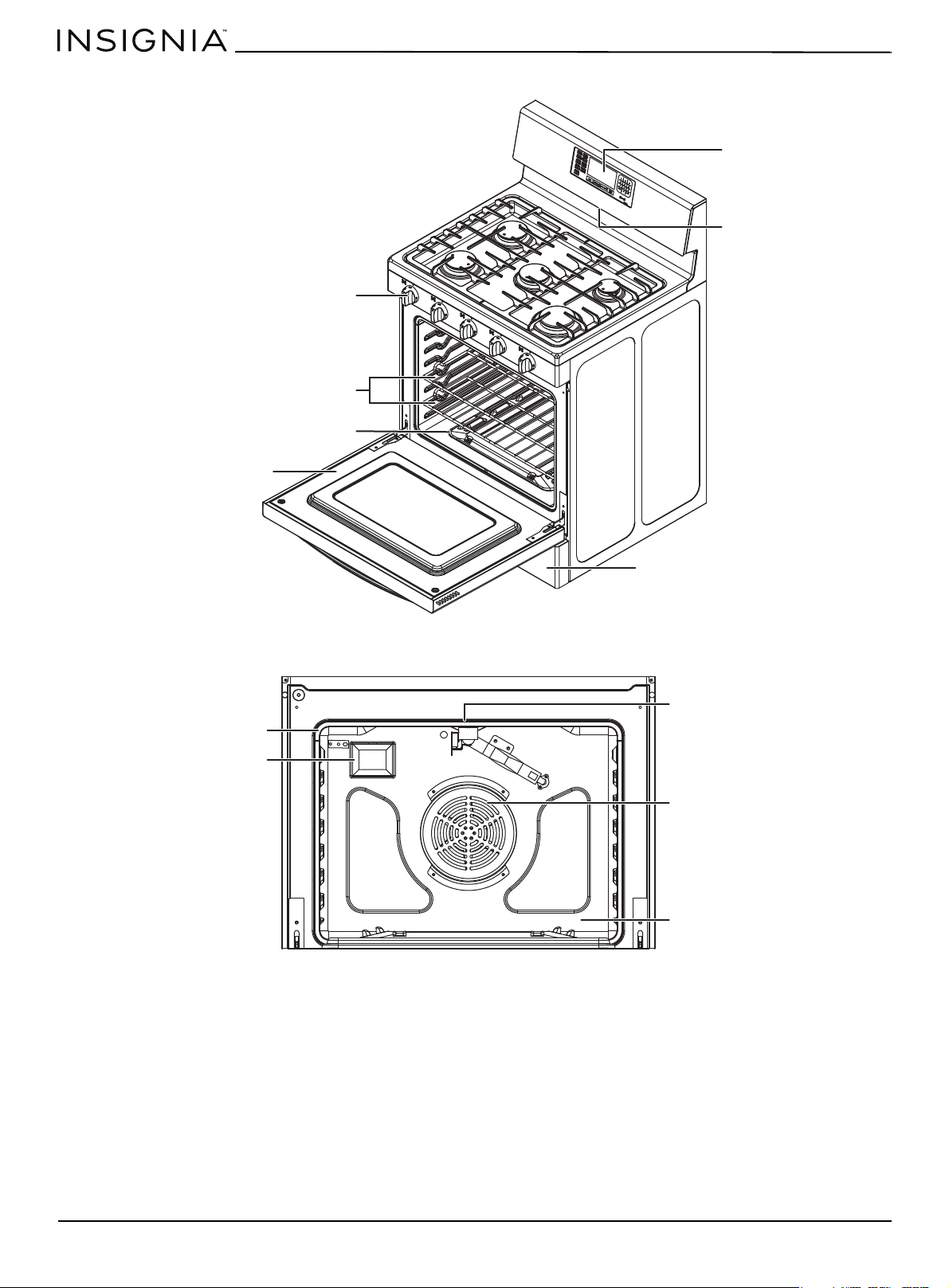
Main components
Oven components
Removable oven door
Control panel
Oven vent
Burner control knobs
Removable storage drawer
Oven racks (2)
Removable oven floor
Oven rack position guide
Oven light
Broil oven burner
Fan
Bake oven burner
www.insigniaproducts.com
13
4.8 Cu. Ft. Freestanding Gas Convection Range with Steam Cleaning
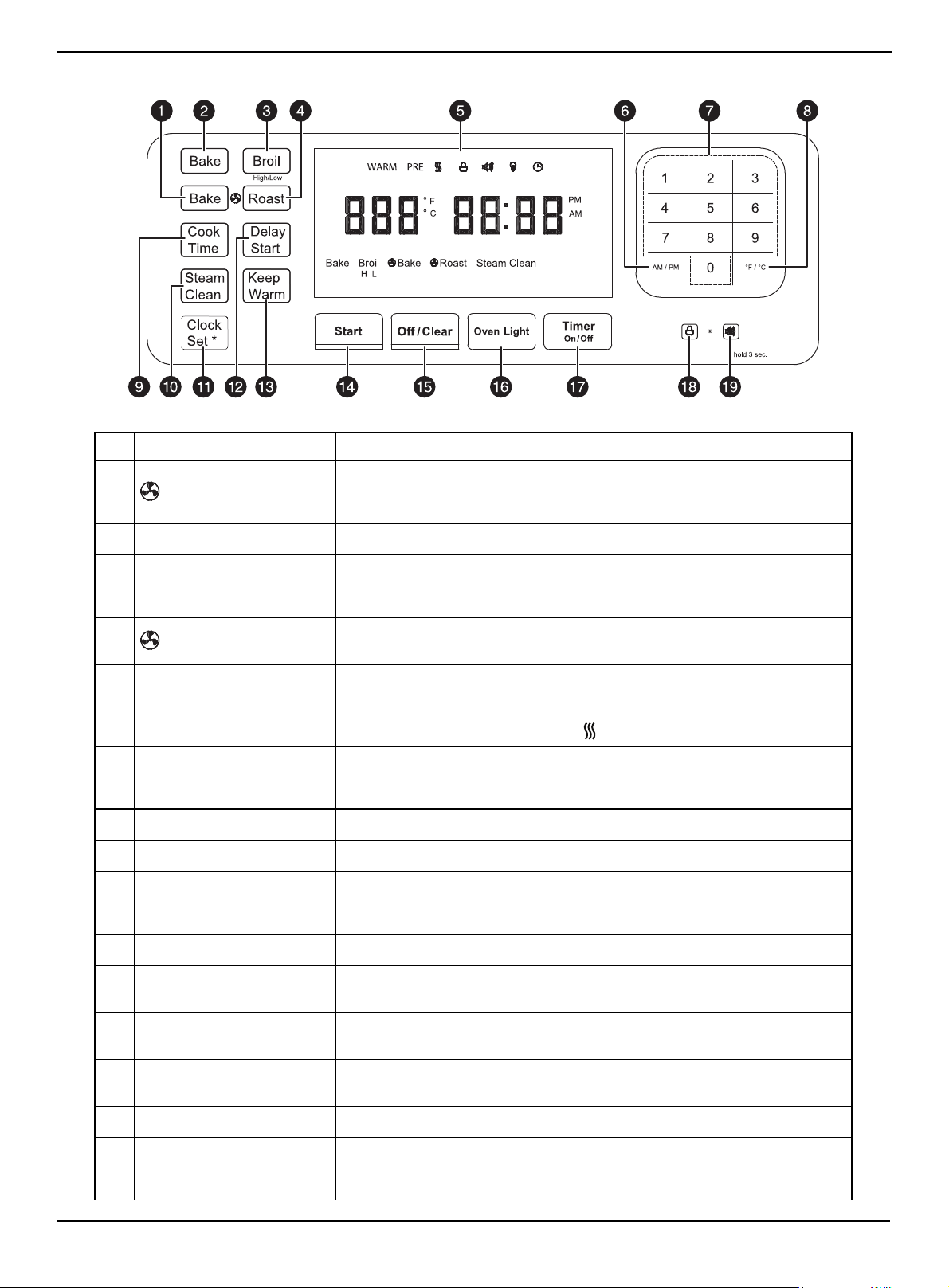
Oven control panel
# TOUCHPAD DESCRIPTION...
1 Bake
Turns on the fan while baking. Provides more consistent heat by circulating
the air inside the oven while baking. Cooks large amounts of baked goods on
multiple shelves at the same time.
2 Bake Turns on the Bake function. Evenly cooks food using the bottom oven burner.
3 Broil
Turns on the Broil function. Cooks foods using the top oven burner only. Press
once for broiling in High heat mode. Press twice for broiling in Low heat
mode.
4 Roast
Turns on the Fan Roast function. Provides more consistent heat by circulating
the air inside the oven while roasting. Cooks large cuts of meat.
5 Display
Shows the time of day, oven temperature, whether the oven is in the bake,
broil, or steam cleaning mode, and the time set for the timer or automatic
oven operations.
When the oven is heating shows the (heating) icon.
6 AM/PM
Press and hold for three seconds to switch between the 12-hour and 24-hour
time format. When setting the current time, press to select the AM or PM time
format.
7 Numbers Sets times, temperatures, and preset oven functions.
8 °F /°C Press and hold for one second to switch between Fahrenheit and Celsius.
9 Cook Time
Turns on the Cook Time function, then use the number pads to set the
amount of time you want your food to cook. The oven automatically shuts off
when the time has elapsed.
10 Steam Clean Turns on the Steam Clean oven function.
11 Clock Set *
Press and hold for three seconds to turn on the clock set feature, then set the
current time.
12 Delay Start
Set the oven to start and stop automatically. Use with the Bake, fan Bake, fan
Roast, or Cook Time functions.
13 Keep Warm
Keeps cooked foods warm after cooking. This lowers the oven temperature
and maintains it at 150° F (65° C) up to three hours.
14 Start Starts the oven cooking, cleaning, or timing functions.
15 Off / Clear Cancels all oven operations except the clock and timer.
16 Oven Light Turns the oven light on or off.
www.insigniaproducts.com
14
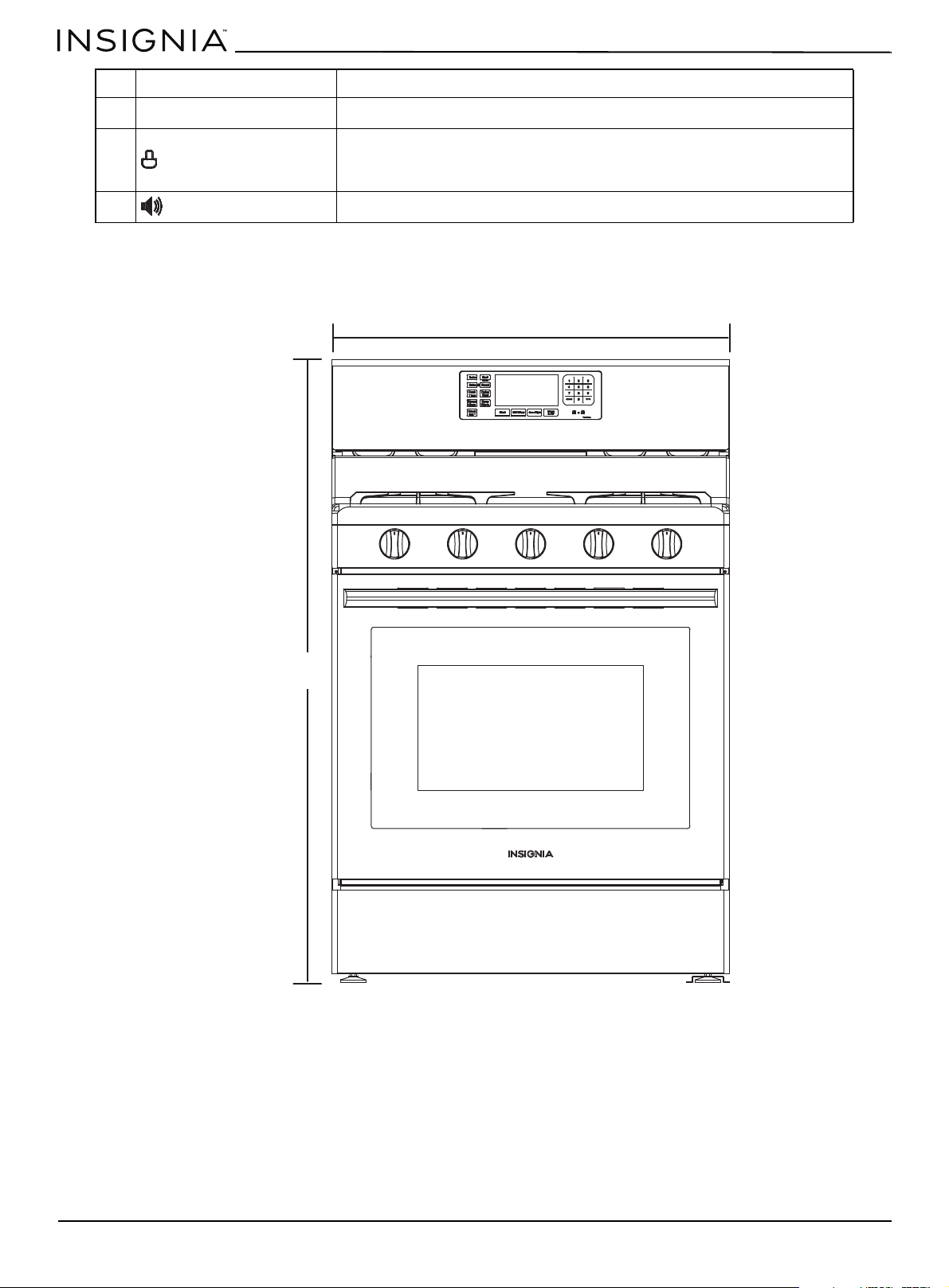
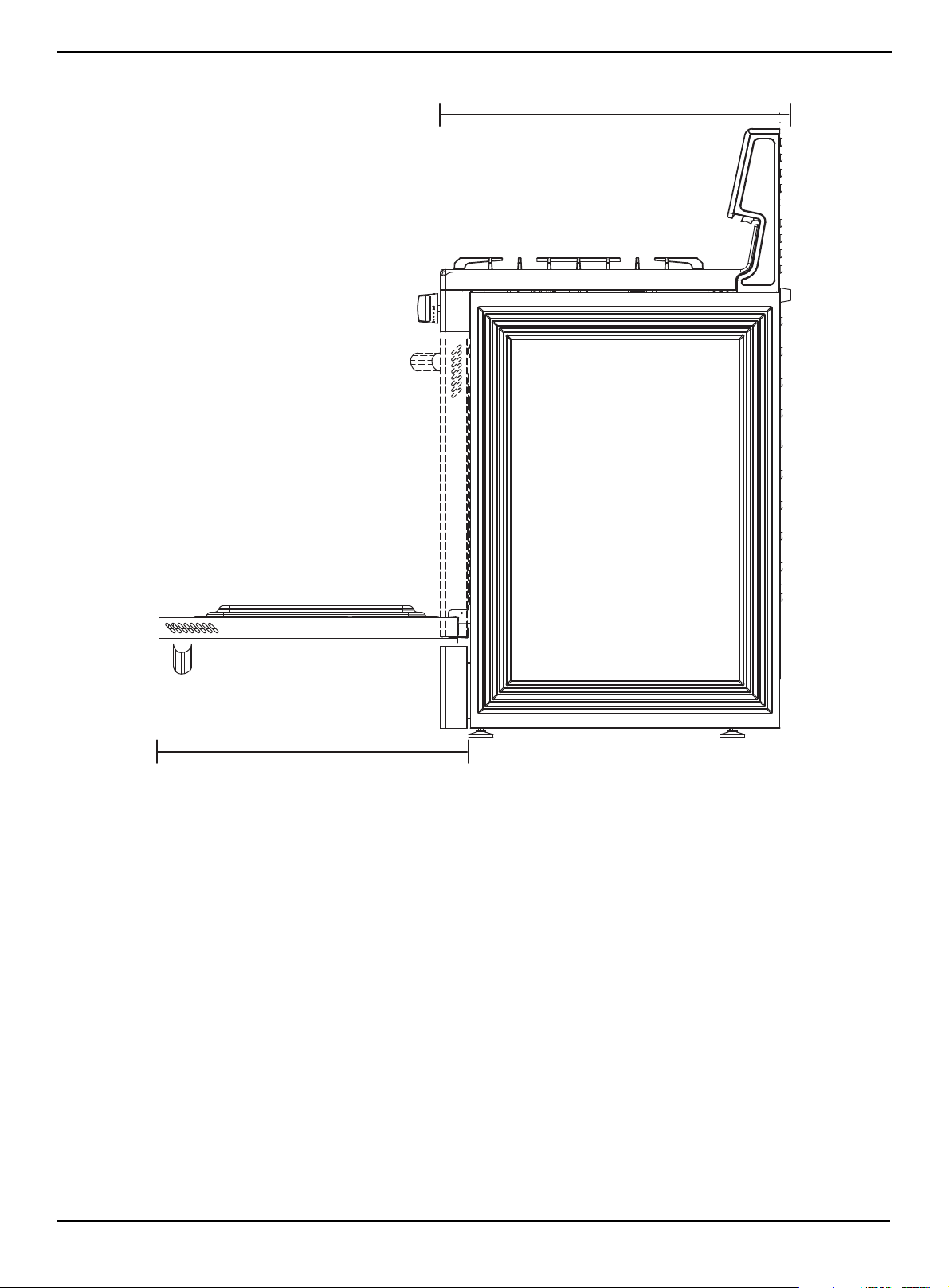
Range dimensions
Front
17 Timer On / Off Turns on the kitchen timer for the amount of time you want.
18 (lock)
Press and hold for three seconds to turn off the control panel touch pads to
prevent the oven from accidentally being turned on. Touch pads stay locked
until you turn this function off.
19 (sound) Press and hold for three seconds to turn sound on or off.
# TOUCHPAD DESCRIPTION...
29.9 in. (75.9 cm)
46.9 to 47.9 in.
(119.1 to 121.7 cm)
www.insigniaproducts.com
15
4.8 Cu. Ft. Freestanding Gas Convection Range with Steam Cleaning
Side
26.9 in. (68.3 cm)
23.9 in. (60.7 cm)

Installing
4.8 Cu.Ft Freestanding Convection Range with Steam Cleaning
Selecting a location . . . . . . . . . . . . . . . . . . . . . . . . . . . . . . . . . . . . . . . . . . . . . . . . . . . . . . . . . . . . . . . . . . . . . . . . . . . . . . . . . .17
Clearances and dimensions . . . . . . . . . . . . . . . . . . . . . . . . . . . . . . . . . . . . . . . . . . . . . . . . . . . . . . . . . . . . . . . . . . . . . . . . . . . . . . . . . . . . . .17
Locations for gas piping and electrical outlets . . . . . . . . . . . . . . . . . . . . . . . . . . . . . . . . . . . . . . . . . . . . . . . . . . . . . . . . . . . . . . . . . . . . 18
Gas requirements . . . . . . . . . . . . . . . . . . . . . . . . . . . . . . . . . . . . . . . . . . . . . . . . . . . . . . . . . . . . . . . . . . . . . . . . . . . . . . . . . . . .18
Electrical requirements. . . . . . . . . . . . . . . . . . . . . . . . . . . . . . . . . . . . . . . . . . . . . . . . . . . . . . . . . . . . . . . . . . . . . . . . . . . . . . .18
Installing your gas range . . . . . . . . . . . . . . . . . . . . . . . . . . . . . . . . . . . . . . . . . . . . . . . . . . . . . . . . . . . . . . . . . . . . . . . . . . . . .19
Important notes to the installer: . . . . . . . . . . . . . . . . . . . . . . . . . . . . . . . . . . . . . . . . . . . . . . . . . . . . . . . . . . . . . . . . . . . . . . . . . . . . . . . . . .19
Before installing your range . . . . . . . . . . . . . . . . . . . . . . . . . . . . . . . . . . . . . . . . . . . . . . . . . . . . . . . . . . . . . . . . . . . . . . . . . . . . . . . . . . . . . . 19
Connecting to gas . . . . . . . . . . . . . . . . . . . . . . . . . . . . . . . . . . . . . . . . . . . . . . . . . . . . . . . . . . . . . . . . . . . . . . . . . . . . . . . . . . . . . . . . . . . . . . . 19
Optional: Converting to LP gas . . . . . . . . . . . . . . . . . . . . . . . . . . . . . . . . . . . . . . . . . . . . . . . . . . . . . . . . . . . . . . . . . . . . . . . . . . . . . . . . . . . 20
Installing the anti-tip device. . . . . . . . . . . . . . . . . . . . . . . . . . . . . . . . . . . . . . . . . . . . . . . . . . . . . . . . . . . . . . . . . . . . . . . . . . . . . . . . . . . . . . 21
Placing your range and connecting to power . . . . . . . . . . . . . . . . . . . . . . . . . . . . . . . . . . . . . . . . . . . . . . . . . . . . . . . . . . . . . . . . . . . . .21
Leveling your range. . . . . . . . . . . . . . . . . . . . . . . . . . . . . . . . . . . . . . . . . . . . . . . . . . . . . . . . . . . . . . . . . . . . . . . . . . . . . . . . . . . . . . . . . . . . . . 22
Assembling the top burners. . . . . . . . . . . . . . . . . . . . . . . . . . . . . . . . . . . . . . . . . . . . . . . . . . . . . . . . . . . . . . . . . . . . . . . . . . . . . . . . . . . . . .23
Installing the burner knobs. . . . . . . . . . . . . . . . . . . . . . . . . . . . . . . . . . . . . . . . . . . . . . . . . . . . . . . . . . . . . . . . . . . . . . . . . . . . . . . . . . . . . . . 23
Installing the oven door handle . . . . . . . . . . . . . . . . . . . . . . . . . . . . . . . . . . . . . . . . . . . . . . . . . . . . . . . . . . . . . . . . . . . . . . . . . . . . . . . . . . 24
Installing the plastic pads . . . . . . . . . . . . . . . . . . . . . . . . . . . . . . . . . . . . . . . . . . . . . . . . . . . . . . . . . . . . . . . . . . . . . . . . . . . . . . . . . . . . . . . . 24
Checking the ignition of the burners . . . . . . . . . . . . . . . . . . . . . . . . . . . . . . . . . . . . . . . . . . . . . . . . . . . . . . . . . . . . . . . . . . . . . . . . . . . . . 25
www.insigniaproducts.com
17
4.8 Cu. Ft. Freestanding Gas Convection Range with Steam Cleaning
Selecting a location
Clearances and dimensions
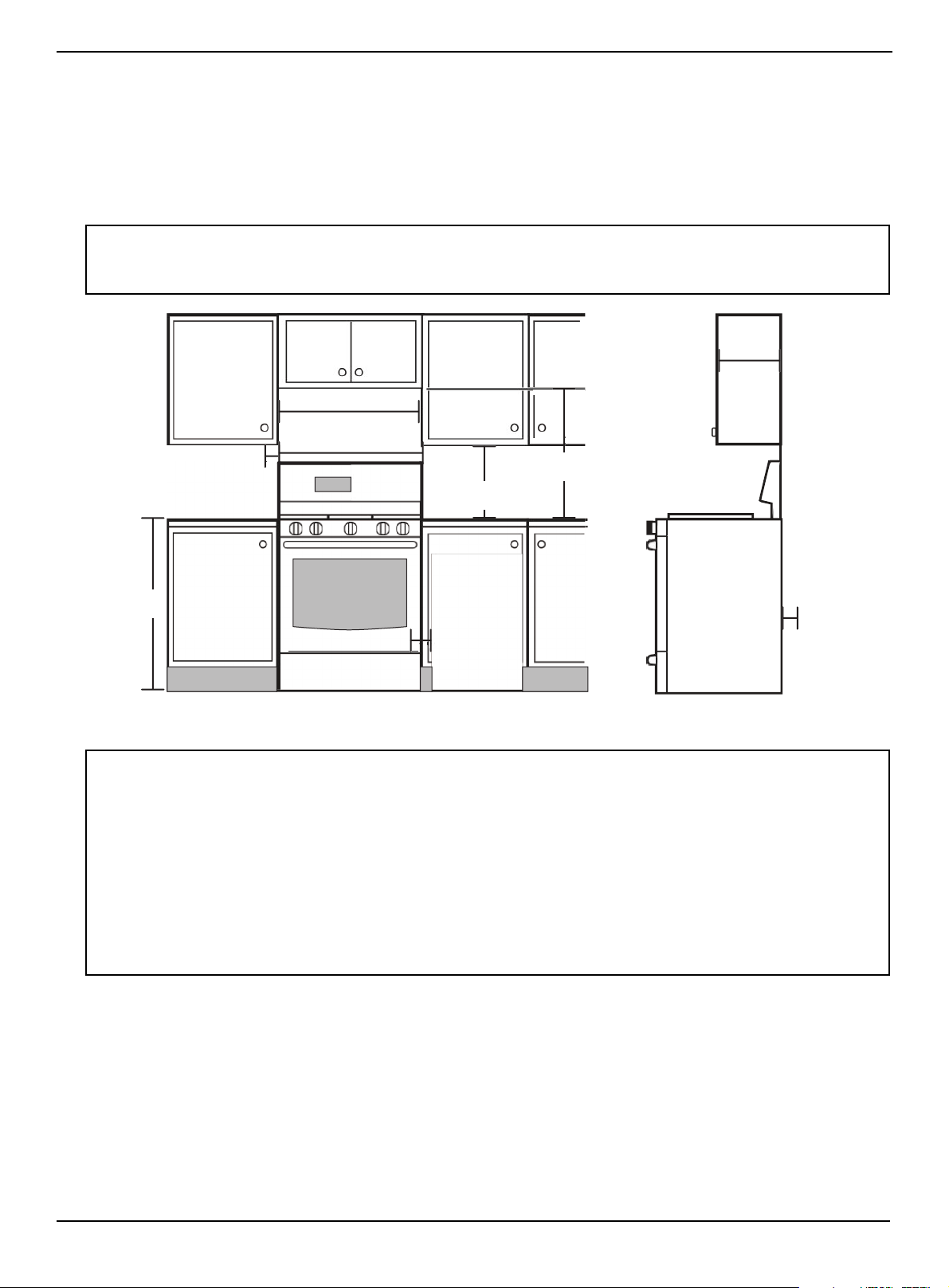
BEFORE YOU BEGIN to install your range, refer to the following information, dimensions, and clearances. Do not locate
your range where it may be subject to strong drafts. Provide adequate clearances between your range and adjacent
combustible surfaces. These dimensions must be met for safe use of your range. The location of the electrical outlet and
gas piping may be adjusted to meet the following dimensions and clearances.
For installation in Canada, a free-standing range is not to be installed closer than 4.7 in. (12 cm) from any adjacent surface.
Minimum dimensions
CAUTION:
Your range has been designed to comply with the maximum allowable wood cabinet temperature of 194° F (90 °C). Make sure that the
wall covering, counter tops, and cabinets around the range can withstand the heat (up to 194° F (90° C)) generated by your range. If
not, discoloration, de-lamination, or melting may occur.
WARNING:
If you have overhead cabinets, use a range hood that projects horizontally a minimum of 5 in. (12.7 cm) beyond the front of the
cabinets. This helps dissipate any heat buildup in the overhead cabinets to prevent death, personal injury, or a fire hazard. Install
above the cooktop with a clearance of not less than .25 in. (.6 cm) between the hood and the underside of the combustible material or
metal cabinet. The hood must be at least as wide as your range and centered over your range. Clearance between the cooking surface
and the ventilation hood surface must never be less than 24 in. (61 cm).
Exception: Installation of a listed microwave oven or cooking appliance over the cooktop shall conform to the installations packed
with that appliance.
• 30 in. (76.2 cm) minimum clearance between the top of the cooking surface and the bottom of an unprotected wood
or metal cabinet. Or If there is not a 30 in. (76.2 cm) minimum clearance, 24 in. (61 cm) minimum when the bottom of
the wood or metal cabinet is protected by not less than .25 in. (.64 cm) flame-retardant mill board covered with not
less than a No. 28 MSG sheet steel, .015 in. (.038 cm) stainless steel, .024 in. (.061 cm) aluminum, or .020 in. (.051 cm)
copper.
• 18 in (45.7 cm) minimum between the countertop and the adjacent cabinet bottom.
30 in. (76.2 cm)
10 in.(25.4 cm) min to
left wall
10 in.(25.4
cm) min to
right wall
36 in. (91.4 cm)
.78 in. (2 cm)
30 in. (76.2 cm) min
18 in. (45.7 cm)
24 in. (61 cm)
Lower cabinet
depth
0 in. (0 cm)
Clearance
below cooktop
and at rear and
sides of range
13 in.
(33 cm)
Max.
cabinet
depth
www.insigniaproducts.com
18
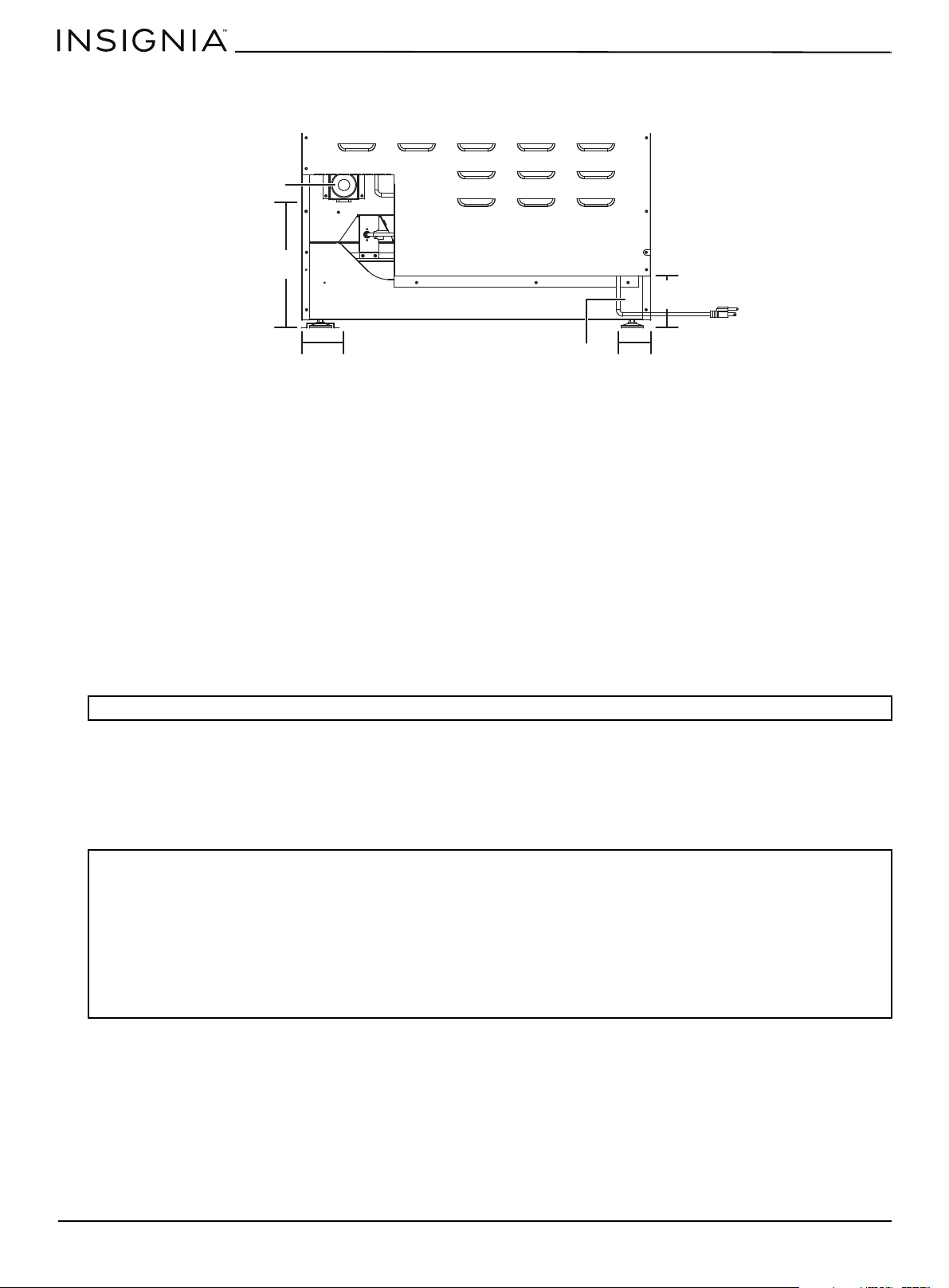
Locations for gas piping and electrical outlets
Gas requirements
Your range is convertible for use with natural or propane gas. The factory default is natural gas. If you decide to use this
range on LP gas, conversion must be made by a qualified LP installer before attempting to operate the range.
Your range is designed to operate at a pressure of 5 in. (13 cm) of water column on natural gas or 10 in. (25 cm) of water
column on LP gas (propane or butane).
Do not attempt to convert your range from the natural or LP gas without consulting the gas supplier.
For correct operation, the pressure of natural gas supplied to the regulator must be between 5 and 13 in. (13 and 33 cm) of
water column. For LP gas, the pressure supplied must be between 10 and 13 in. (25 and 33 cm) of water column.
When checking the operation of the regulator, the inlet pressure must be at least 1 in. (2.5 cm) greater than the operating
(manifold) pressure as given.
The pressure regulator, located at the inlet of the range manifold, must remain in the supply line for either natural or LP
gas. A flexible-metal appliance connector used to connect the range to the gas supply line should have an I.D. of 0.5 in.
(1.3 cm) and be 5 ft. (152 cm) in length for ease of installation.
In Canada, flexible connectors must be single-wall metal connectors no longer than 6 ft. (183 cm) in length.
Commonwealth of Massachusetts requirements
Special instructions for appliances installed in the State of Massachusetts: Your range must be installed by a qualified
plumber or gas fitter.
Electrical requirements
• Your range is equipped with a power cord that has an equipment-grounding conductor and a grounding plug. The
plug must be firmly plugged into a three-prong outlet that is correctly installed and grounded in accordance with all
local codes and ordinances. In the event of a malfunction or breakdown, grounding decreases the risk of electrical
shock by providing a path for the electric current.
• A 120 V, 60 Hz, AC, approved electrical service with a 20 amp circuit breaker or time-delay fuse is required for all U.S.
and Canadian models.
• Do not reuse a power supply cord from an old range or other appliance.
• The power cord electric supply wiring must be retained at the range cabinet with a suitable UL-listed strain relief.
• We also recommend a time-delay fuse or circuit breaker.
WARNING: Do not kink or damage the flexible metal tubing when moving the range.
WARNING: To reduce the risk of fire, electric shock, or personal injury:
• Do not use an extension cord or adapter plug with your range.
• Your range must be properly grounded.
• Check with a qualified electrician if you are not sure your range is correctly grounded.
• Do not modify the power cord plug. If it does not fit the outlet. Instead, have a correct outlet installed by a qualified electrician.
• All wiring and grounding must be done in accordance with local codes or, in the absence of local codes, with the National Electrical
Code, ANSI/NFPA No. 70 – Latest Revision (for the U.S.) or the Canadian Electrical Code CSA C22.1, or latest revisions and local codes
and ordinances.
• Wiring diagram is located on the back of your range.
• Your range is equipped with an electronic ignition system that will not operate if it is plugged into an outlet that is not correctly
polarized.
3.6 in.
(9.1 cm)
2.8 in.
(7.1 cm)
10.8 in. (27.4 cm)
5.2 in. (13.1 cm)
Electrical outlet
Gas pipe connection
Back of the range
www.insigniaproducts.com
19
4.8 Cu. Ft. Freestanding Gas Convection Range with Steam Cleaning
• Ground Fault Circuit Interrupters (GFCIs) are not required or recommended for the gas range receptacles.
• NEVER connect the ground wire to plastic plumbing lines, gas lines, or water pipes.
Installing your gas range
Important notes to the installer:
1 Read this manual before installing the range.
2 Observe all governing codes and ordinances.
3 Make sure that you leave these instructions with the range.
4 Before installing the range in an area covered with linoleum or any synthetic floor covering, make sure that the floor
covering can withstand temperatures of at least 180° F (82° C) without shrinking, warping, or discoloring.
5 Do not install the range over carpeting unless you place an insulating pad or sheet of .25 in. (.6 cm) thick plywood
between the range and carpeting.
Before installing your range
1 Remove the exterior and interior packing.
2 Wipe the surfaces of the range with a damp cloth or sponge, then wipe them dry with a clean, dry cloth.
Connecting to gas
1 Shut off the main gas supply valve before disconnecting an old range. Leave the valve off until the new hookup is
complete. Don't forget to relight the pilots on other gas appliances when you turn the gas back on.
2 Install a manual gas line shut-off valve in the gas line in an easily accessed location outside of your range.
Make sure that everyone operating your range knows where the valve is and how to shut off the gas supply to your
range.
3 Install a male 0.5 in. (1.3 cm) flare union adapter to the 0.5 in. (1.3 cm) NPT internal thread at the regulator inlet. Use a
backup wrench on the elbow regulator fitting to avoid damage.
When installing the range from the front, remove the 90° elbow for easier installation.
4 Install a male 0.5 in. (1.3 cm) or 0.75 in. (1.9 cm) flare union adapter to the NPT internal thread of the manual shut-off
valve, taking care to back up the shut-off valve to keep it from turning.
5 Connect a flexible metal appliance connector to the adapter on your range. Position your range to allow room for the
connection at the shut-off valve.
WARNING: We recommend that a professional installer install your range.
If your range is not installed correctly, incorrect electrical grounding or gas leaks can cause a fire or explosion which can lead to injury
or death.
WARNING: If the gas is not installed correctly to your range, a gas leak can cause a fire or explosion which can lead to death or injury.
We recommend that a professional installer connect the gas.
WARNINGS:
Do not store or use gasoline or other flammable vapors and liquids in or near your range.
IF YOU SMELL GAS:
• DO NOT light a match, candle, or cigarette.
• DO NOT try to light any appliance.
• DO NOT touch any electrical switch.
• DO NOT use any phone in your building.
• Clear the room, building, or area of all occupants.
• Immediately call your gas supplier from outside the building. Follow the gas supplier’s instructions.
• If you cannot reach your gas supplier, call the Fire Department.
Never use an old connector when installing your range. If you use the hard-piping method, carefully align the pipe. You can’t move
your after the gas is connected.
Notes:
• Because hard piping restricts movement of your range, we recommend that you use a CSA International-certified flexible metal
appliance connector unless local codes require a hard-piped connection.
• To prevent gas leaks, apply pipe-joint compound or wrap pipe-thread tape with Teflon on all male (external) pipe threads.
CAUTIONS:
Do not over-tighten the flare union adapter to the NTP internal thread at the regulator.
To prevent gas leaks, apply pipe-joint compound in the vicinity of the joints.

www.insigniaproducts.com
20
6 When all connections have been made, make sure that all range controls are in the OFF positions, then turn on the
main gas supply valve.
7 Use a liquid leak detector at all joints and connections to check for leaks.
Optional: Converting to LP gas
Your range came set up to use natural gas. You can convert your range to use LP gas, but the conversion should be done by
a qualified LP gas installer.
Conversion instructions and LP orifices are supplied with an LP conversion kit (not included).
The conversion to LP requires all burner orifices to be changed (five surface burners and two oven burners). Save the
replaced orifices in case you want to convert back to natural gas.
For LP conversion, nozzles and gas valves must be adjusted so that the bypasses are in the vertical position.
Burner orifice sizes and output ratings
WARNING: Do not use a flame to check for gas leaks. An explosion or fire may occur causing person injury or death.
Notes:
• When using test pressures greater than 1/2 psig to pressure-test the gas supply system, disconnect your range and the individual
shut-off valve from the gas supply piping.
• When using test pressures of 1/2 psig or less to test the gas supply system, isolate your range from the gas supply system by closing
the individual shut-off valve.
LP gas (propane) 10 in WCP Natural gas 5 in WCP
Burner
location
BTU rate
Orifice size
(mm)
Burner
location
BTU rate
Orifice size
(mm)
RF 16,000 1.18 RF 18,000 1.92
LF 10,000 0.92 LF 12,000 1.50
RR 4,000 0.60 RR 5,000 0.94
LR 7,000 0.77 LR 9,000 1.30
CTR 10,000 0.92 CTR 12,000 1.50
Bake 18,500 1.22 Bake 18,500 1.93
Broil 12,000 1.04 Broil 13,500 1.60
www.insigniaproducts.com
21
4.8 Cu. Ft. Freestanding Gas Convection Range with Steam Cleaning
Installing the anti-tip device
An anti-tip bracket with screws and installation instructions came with your range. If the bracket isn’t installed correctly,
your range could be tipped by you or a child standing, sitting, or leaning on an open oven door
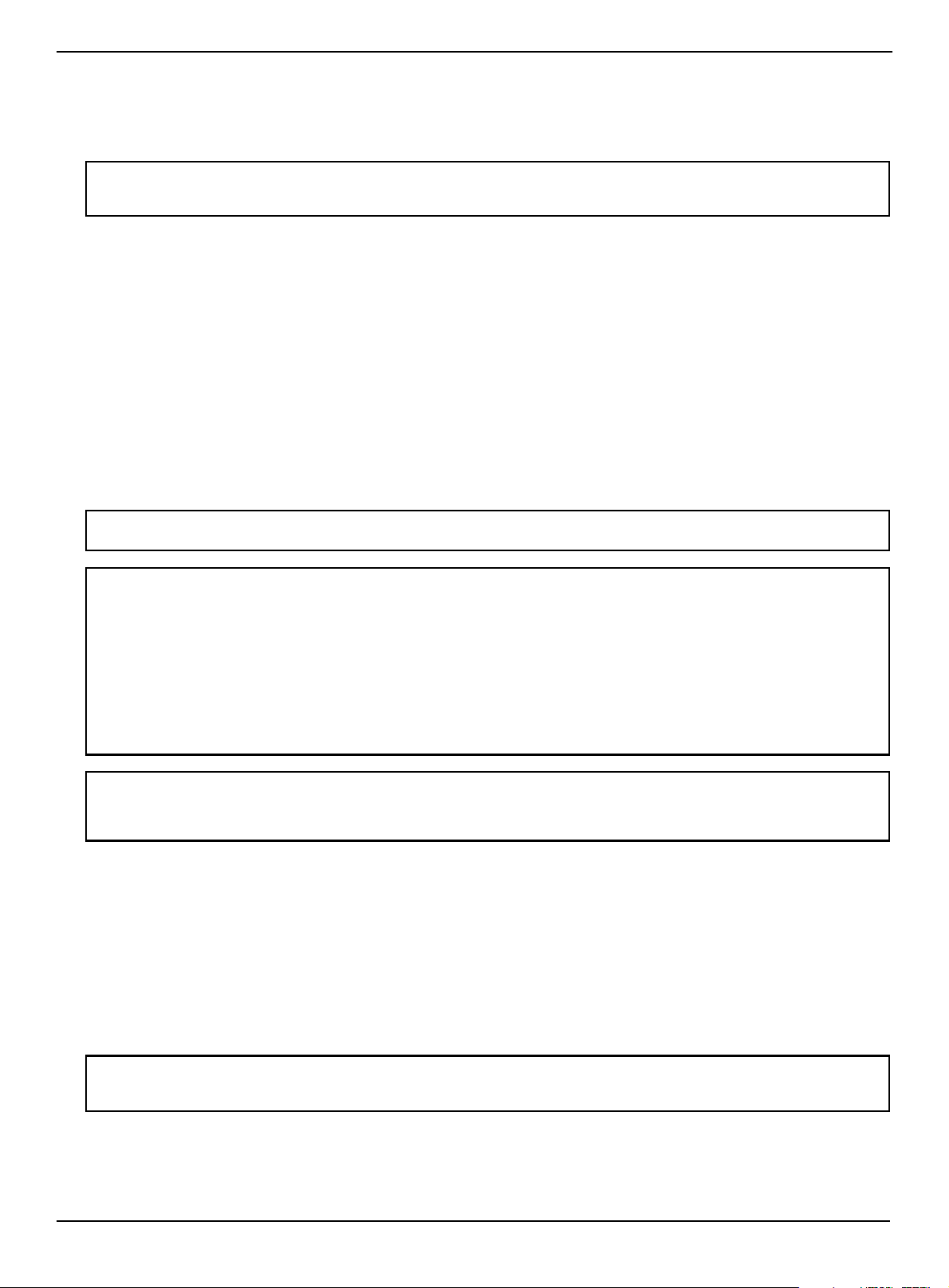
1 Release and extend the leveling leg to a minimum clearance of 21/32 in. (1.7 cm) between the range bottom and the
floor.
2 Follow the instructions that came with the anti-tip device.
3 Remove the storage drawer and look underneath the range to make sure that the leveling leg is engaged in the
bracket.
Placing your range and connecting to power
1 Plug in the power cord. Make sure that the outlet meets local or national electrical codes.
2 Slide the range into place.
3 Check the gas supply line to make sure that it did not get damaged and it stayed connected during positioning.
4 Check to make sure that the back leg of the range slid into the anti-tip bracket. Carefully tip the range forward to
ensure that the anti-tip bracket engages the back brace and prevents tip-over.
WARNING: To reduce the risk of tipping, your range must be secured by the provided anti-tip device.
• All ranges can tip, resulting in personal injury.
• A child or adult can tip the range and be killed.
• Install the anti-tip device to your range and structure by following the installation instructions.
• Engage your range to the anti-tip device installed to the structure.
• If you pull the range away from the wall for cleaning, service, or any other reason, make sure that the anti-tip device is correctly
reengaged when you push the range back against the wall. In the event of abnormal usage (such as a person standing, sitting, or
leaning on an open door), failure to take this precaution can result in tipping of the range. Personal injury might result from spilled
hot liquids or from the range itself.
Failure to follow these instructions can result in death or serious burns to children or adults.
WARNINGS: Avoid fire hazard or electrical shock.
• Do not use an adapter plug, an extension cord, or remove the grounding prong from the power cord. Failure to follow this warning
can cause serious injury, fire, or death.
• The range is equipped with a 3-prong grounding plug for your protection against shock hazard and should be plugged directly
into a correctly grounded receptacle. DO NOT cut or remove the grounding prong from this plug.
• The power cord must be plugged into a mating 3-prong ground-type outlet, grounded to conform with the National Electrical
Code, ANSI/NFPA 70 latest edition, or Canadian Electrical Code (CSA) and all local codes and ordinances.
• For personal safety, the range must be correctly grounded. For maximum safety, the power cord must be plugged into an electrical
outlet that is correctly polarized and grounded.
• If a 2-prong wall receptacle is the only available outlet, have it replaced with a correctly grounded 3-prong wall receptacle installed
by a qualified electrician.
• Do not ground to a gas pipe.
www.insigniaproducts.com
22
Leveling your range
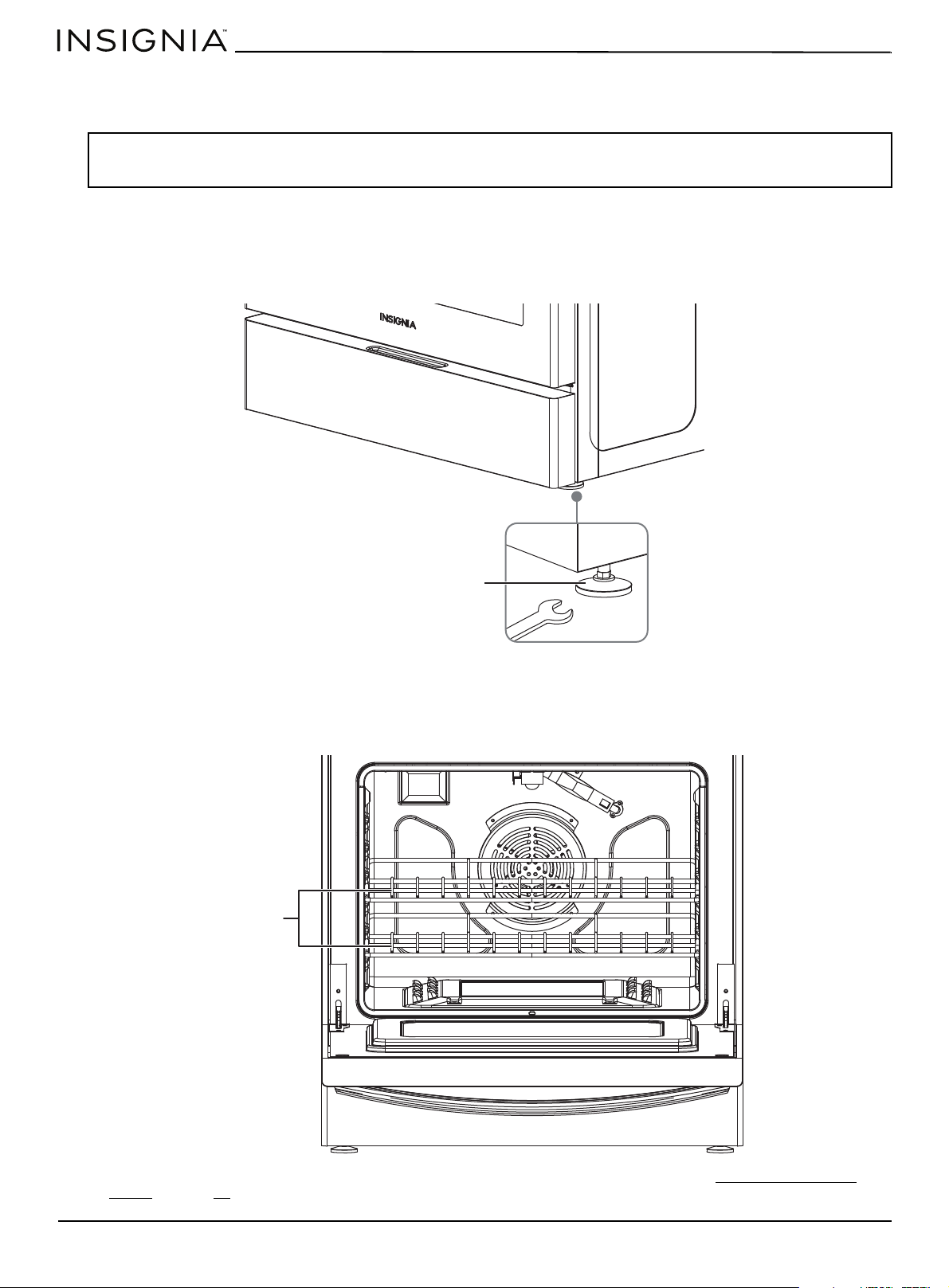
Your range should be level. If your range is not level, the door may not close or seal correctly which can cause uneven
heating and gas wastage problems.
1 Make sure the range is positioned where you want it.
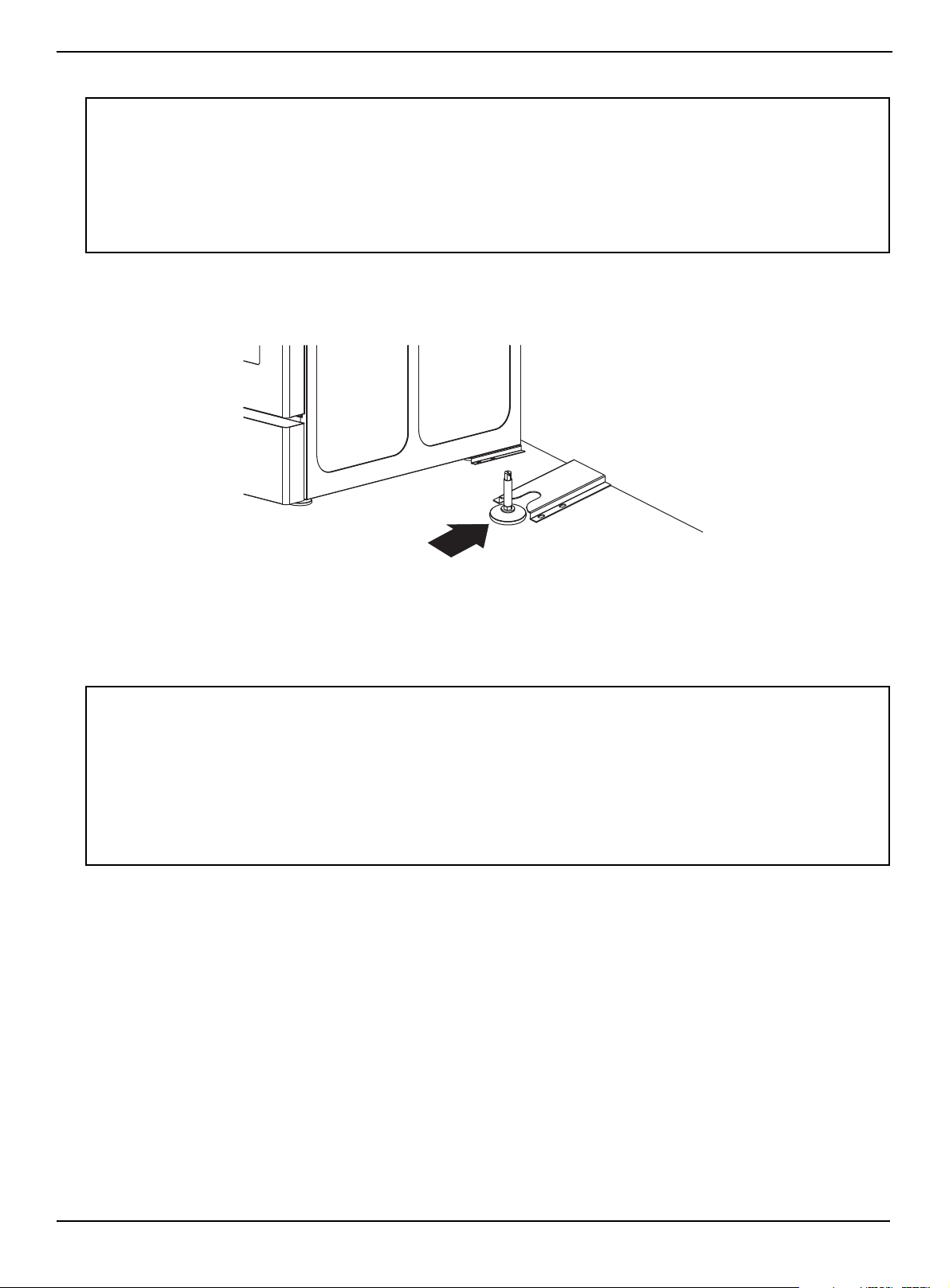
2 Using a wrench, level the range by turning the front leveling legs if necessary. Counterclockwise shortens the leg and
lowers the range. Clockwise lengthens the leg and raises the range.
Adjust the leveling legs only as far as necessary to level the range. Extending the leveling legs more than necessary or
removing legs can cause the range to be unstable.
3 If range is next to or between cabinets, make sure that the cooktop (without the surface burner grates) is level with the
counter tops.
4 Position an oven rack in the center rack position. Check the level of the range with a carpenter level using the two
positions.
5 After your range is level, make sure that the rear leg is engaged with the anti-tip device. See Installing the anti-tip
device on page 21.
Notes:
• To make it easier to adjust the feet, have someone push against the top of the range to tilt it slightly.
• Adjusting the two front legs is usually sufficient, but all four legs adjust if necessary.
Leveling leg
Oven racks
www.insigniaproducts.com
23
4.8 Cu. Ft. Freestanding Gas Convection Range with Steam Cleaning
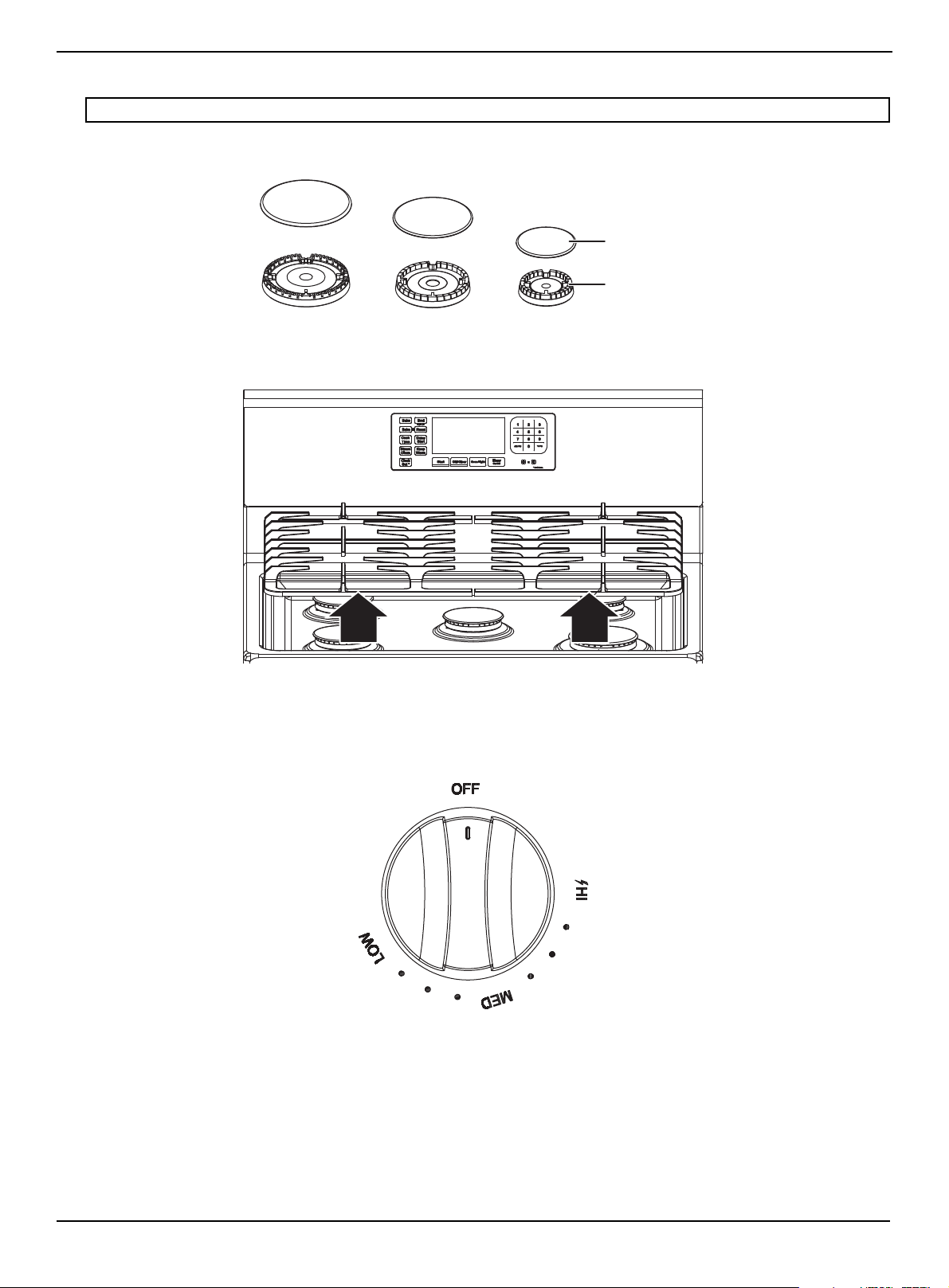
Assembling the top burners
1 Position surface burner heads on top of the surface burner manifolds. The electrodes fit into the slot in the bottom of
the heads. Make sure that the surface burner heads are flat and parallel with the cooktop.
2 Place the matching size caps on top of each surface burner head.
3 Place the grates on the cooktop.
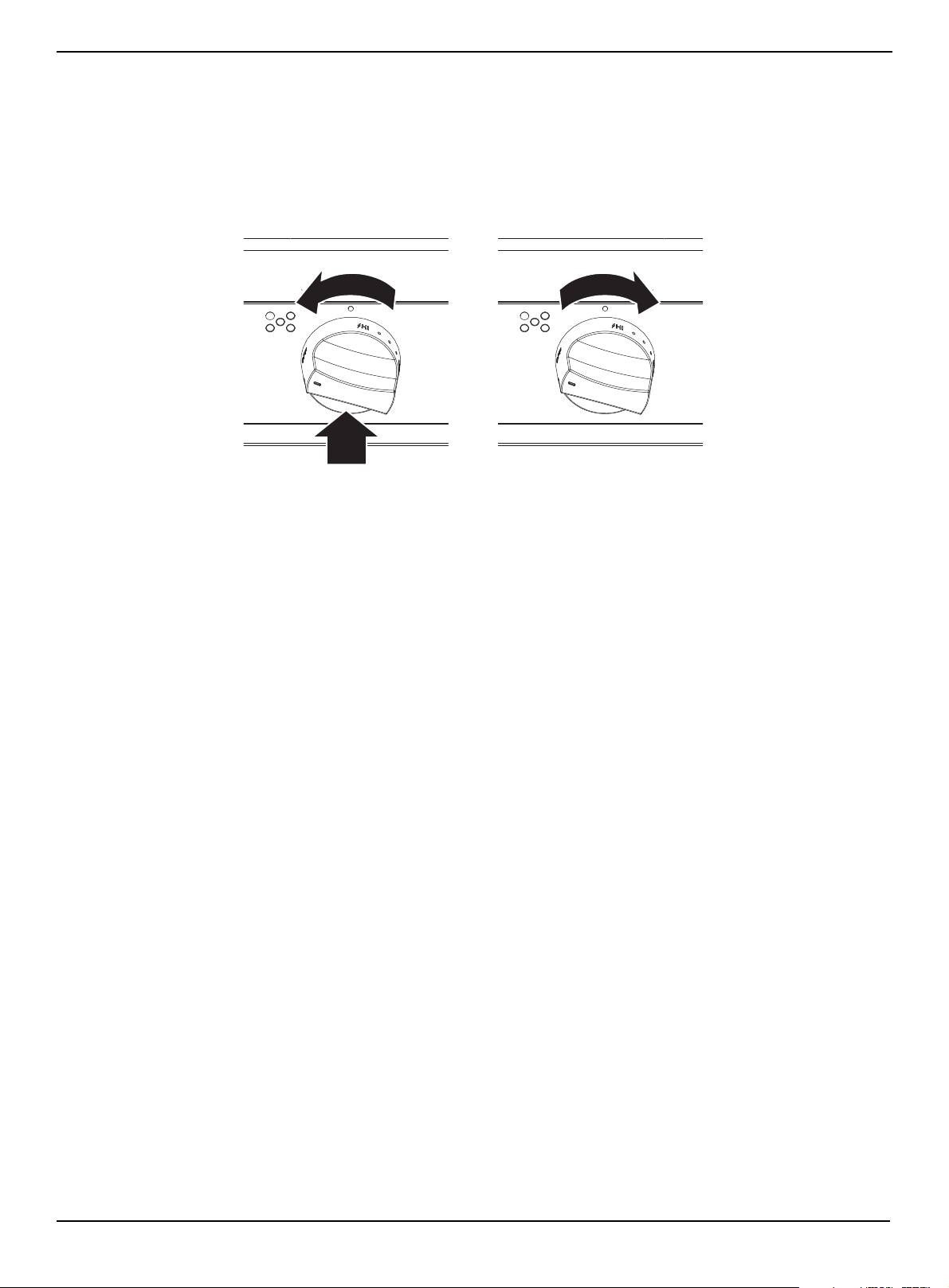
Installing the burner knobs
Depending on the model, your range may have shipped with the burner control knobs and oven handle detached and
packaged separately. If this is the case, you will need to install these pieces yourself.
1 Check the installation kit for the five burner control knobs required.
2 Push each knob in all the way to fully attach the shaft and make sure knobs are easy to rotate.
CAUTION: Do not operate the surface burners without all burner parts in place.
Burner cap
Burner head
www.insigniaproducts.com
24
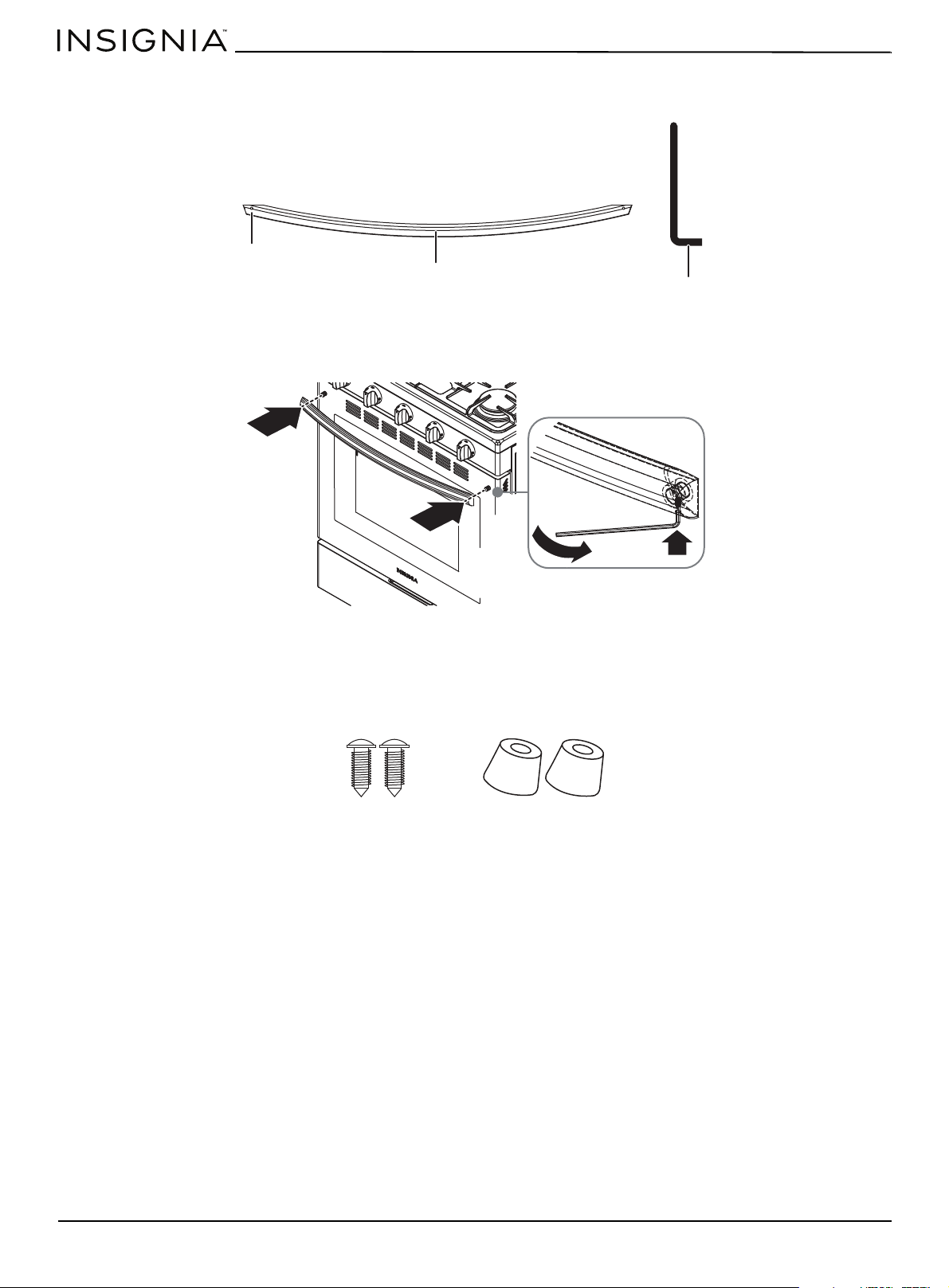
Installing the oven door handle
1 Check your installation kits for the oven handle and hex wrench.
2 Make sure that the side with screw holes faces towards the oven door.
3 Place the door handle against to the oven door and fit it on the connection part.
4 Use the Allen wrench to tighten both sides of the door handle.
Installing the plastic pads
To prevent your range from getting too close to the wall behind the range, install the included plastic pads.
1 Locate the plastic pad kit. It includes:
2 Align the holes in the plastic pads with the holes on the top, back of your range, then secure the pads to your range
with the provided screws.
Handle
Screw
hole
Hex wrench
Screws (2)
Plastic pads
www.insigniaproducts.com
25
4.8 Cu. Ft. Freestanding Gas Convection Range with Steam Cleaning
Checking the ignition of the burners
Check the operation of all cooktop and oven burners after your range has been installed and assembled, gas supply lines
have been carefully checked for leaks, and electrical power cord has been plugged in.
All surface and oven burners have electronic ignition.
Surface burners
1 Push in and turn the control knob for a surface burner to the LITE position. The “clicking” sound indicates the electronic
ignition system is operating correctly. The burner lights in about four seconds, after the air has been purged from the
supply line.
2 After the burner lights, turn the control knob to the setting you want. The “clicking” sound stops and the flame height
changes from Max. to Min. while turning the control knob.
3 Repeat steps 1 and 2 to test each burner.
Oven bake burner
1 Press Bake. The display blinks 350.
2 Press Start. The bake burner should start heating.
3 Open the oven door and make sure that the bottom oven (bake) burner has lit.
4 Press Off/Clear to turn oven off.
Oven broil burner
1 Press Broil, then press Start. The broil burner should start heating.
2 Open the oven door and make sure that the top oven (broil) burner has lit.
3 Press Off/Clear to turn oven off.

Using
4.8 Cu.Ft Freestanding Convection Range with Steam Cleaning
Before you begin using your range . . . . . . . . . . . . . . . . . . . . . . . . . . . . . . . . . . . . . . . . . . . . . . . . . . . . . . . . . . . . . . . . . . .27
Tips for saving gas . . . . . . . . . . . . . . . . . . . . . . . . . . . . . . . . . . . . . . . . . . . . . . . . . . . . . . . . . . . . . . . . . . . . . . . . . . . . . . . . . . . . . . . . . . . . . . . 27
Using the surface burners . . . . . . . . . . . . . . . . . . . . . . . . . . . . . . . . . . . . . . . . . . . . . . . . . . . . . . . . . . . . . . . . . . . . . . . . . . . .28
Using the correct cookware . . . . . . . . . . . . . . . . . . . . . . . . . . . . . . . . . . . . . . . . . . . . . . . . . . . . . . . . . . . . . . . . . . . . . . . . . . . . . . . . . . . . . . 28
Lighting a burner . . . . . . . . . . . . . . . . . . . . . . . . . . . . . . . . . . . . . . . . . . . . . . . . . . . . . . . . . . . . . . . . . . . . . . . . . . . . . . . . . . . . . . . . . . . . . . . . 29
Manually lighting a burner . . . . . . . . . . . . . . . . . . . . . . . . . . . . . . . . . . . . . . . . . . . . . . . . . . . . . . . . . . . . . . . . . . . . . . . . . . . . . . . . . . . . . . . 29
Selecting the flame size . . . . . . . . . . . . . . . . . . . . . . . . . . . . . . . . . . . . . . . . . . . . . . . . . . . . . . . . . . . . . . . . . . . . . . . . . . . . . . . . . . . . . . . . . . 29
Using the oven . . . . . . . . . . . . . . . . . . . . . . . . . . . . . . . . . . . . . . . . . . . . . . . . . . . . . . . . . . . . . . . . . . . . . . . . . . . . . . . . . . . . . .30
Using the oven vent . . . . . . . . . . . . . . . . . . . . . . . . . . . . . . . . . . . . . . . . . . . . . . . . . . . . . . . . . . . . . . . . . . . . . . . . . . . . . . . . . . . . . . . . . . . . . 30
Using the oven light . . . . . . . . . . . . . . . . . . . . . . . . . . . . . . . . . . . . . . . . . . . . . . . . . . . . . . . . . . . . . . . . . . . . . . . . . . . . . . . . . . . . . . . . . . . . . 30
Positioning the oven racks . . . . . . . . . . . . . . . . . . . . . . . . . . . . . . . . . . . . . . . . . . . . . . . . . . . . . . . . . . . . . . . . . . . . . . . . . . . . . . . . . . . . . . . 31
Tips for baking. . . . . . . . . . . . . . . . . . . . . . . . . . . . . . . . . . . . . . . . . . . . . . . . . . . . . . . . . . . . . . . . . . . . . . . . . . . . . . . . . . . . . . . . . . . . . . . . . . . 32
Setting the clock. . . . . . . . . . . . . . . . . . . . . . . . . . . . . . . . . . . . . . . . . . . . . . . . . . . . . . . . . . . . . . . . . . . . . . . . . . . . . . . . . . . . . . . . . . . . . . . . . 33
Selecting the 12-hour or 24-hour display setting . . . . . . . . . . . . . . . . . . . . . . . . . . . . . . . . . . . . . . . . . . . . . . . . . . . . . . . . . . . . . . . . . .33
Using the timer . . . . . . . . . . . . . . . . . . . . . . . . . . . . . . . . . . . . . . . . . . . . . . . . . . . . . . . . . . . . . . . . . . . . . . . . . . . . . . . . . . . . . . . . . . . . . . . . . . 33
Baking. . . . . . . . . . . . . . . . . . . . . . . . . . . . . . . . . . . . . . . . . . . . . . . . . . . . . . . . . . . . . . . . . . . . . . . . . . . . . . . . . . . . . . . . . . . . . . . . . . . . . . . . . . . 33
Adjusting the thermostat . . . . . . . . . . . . . . . . . . . . . . . . . . . . . . . . . . . . . . . . . . . . . . . . . . . . . . . . . . . . . . . . . . . . . . . . . . . . . . . . . . . . . . . . 33
Fan baking and roasting . . . . . . . . . . . . . . . . . . . . . . . . . . . . . . . . . . . . . . . . . . . . . . . . . . . . . . . . . . . . . . . . . . . . . . . . . . . . . . . . . . . . . . . . . 34
Programming the cook time . . . . . . . . . . . . . . . . . . . . . . . . . . . . . . . . . . . . . . . . . . . . . . . . . . . . . . . . . . . . . . . . . . . . . . . . . . . . . . . . . . . . . 34
Programming a delayed start time . . . . . . . . . . . . . . . . . . . . . . . . . . . . . . . . . . . . . . . . . . . . . . . . . . . . . . . . . . . . . . . . . . . . . . . . . . . . . . . 35
Broiling. . . . . . . . . . . . . . . . . . . . . . . . . . . . . . . . . . . . . . . . . . . . . . . . . . . . . . . . . . . . . . . . . . . . . . . . . . . . . . . . . . . . . . . . . . . . . . . . . . . . . . . . . . 35
Keeping food warm. . . . . . . . . . . . . . . . . . . . . . . . . . . . . . . . . . . . . . . . . . . . . . . . . . . . . . . . . . . . . . . . . . . . . . . . . . . . . . . . . . . . . . . . . . . . . . 35
Switching between Fahrenheit or Centigrade. . . . . . . . . . . . . . . . . . . . . . . . . . . . . . . . . . . . . . . . . . . . . . . . . . . . . . . . . . . . . . . . . . . . .36
Turning sound on or off . . . . . . . . . . . . . . . . . . . . . . . . . . . . . . . . . . . . . . . . . . . . . . . . . . . . . . . . . . . . . . . . . . . . . . . . . . . . . . . . . . . . . . . . . . 36
Locking oven controls . . . . . . . . . . . . . . . . . . . . . . . . . . . . . . . . . . . . . . . . . . . . . . . . . . . . . . . . . . . . . . . . . . . . . . . . . . . . . . . . . . . . . . . . . . . 36
www.insigniaproducts.com
27
4.8 Cu. Ft. Freestanding Gas Convection Range with Steam Cleaning
Before you begin using your range
Before turning on the burners or oven:
• Remove all packaging materials.
• Wipe the surfaces of your range with a damp cloth or sponge, then dry with a clean, dry cloth.
When you turn on a burner or the oven for the first time, smoke and odors may be emitted. This is normal. Make sure that
the room is well ventilated.
ADDITIONAL SURFACE BURNER WARNINGS
Follow the surface burner warnings in SURFACE BURNER WARNINGS
on page 9. In addition, follow these warnings:
• The burner head can be blocked by food or dust. Clean the head if it appears blocked. If you clean the head with water,
assemble it only after it is completely dry. If the head is wet, it might prevent the burners from igniting.
• Do not pour water on the cooktop for cleaning. It can get inside the range and cause the parts inside to rust.
• Only ignite the cooktop burners with the burner caps in place. If the burner caps are not in place, you can damage the
controls or cause an unintended large or dangerous flame.
• Always use the LITE position when igniting the top burners. Make sure that the burners have ignited.
• If ignition fails, turn the knob to OFF and wait until the gas already emitted has dissipated. If you keep the knob in the
LITE position without proper ignition, the emitted gas might cause an explosion.
• Heating of beverages can result in delayed eruptive boiling. To prevent delayed eruptive boiling, ALWAYS allow heated
beverages to stand at least 20 seconds after you have turned the burner off so that the temperature in the liquid can
stabilize.
• After turning on a surface burner, check to make sure that the burner has ignited. Adjust the level of the flame by
turning the burner knob.
• Adjust the top burner flame size so it does not extend beyond the edge of the cookware. Flames that extend past
cookware edges can be hazardous.
• To decrease spattering when cooking foods with lots of liquid, such as meat sauce or stew, adjust the flame to low and
stir frequently.
• When you set a burner to simmer, do not turn the burner knob quickly. Watch the flame to make sure it stays on.
Tips for saving gas
• Use dark-colored or enamel-coated cookware in the oven because the heat transmission is better.
• Before cooking, preheat the oven if the recipe calls for preheating.
• Do not open the oven door frequently during cooking to maintain the oven temperature and save energy.
• Try to cook more than one dish in the oven at the same time whenever possible.
• If you plan to cook more than one dish, cook them one after another. The oven will already be hot.
• Defrost frozen dishes before cooking them.
• Use pots and pans with covers for cooking.
• Select the burner that most closely matches the size of the bottom of the pot you are using. Always select the correct
pot size for your dishes. Larger pots require more gas.
WARNING: All electrical and gas equipment with moving parts can be dangerous. Making sure that you read and understand all
safety information. See IMPORTANT SAFETY INSTRUCTIONS on page 4. Pay particular attention to SURFACE BURNER WARNINGS on
page 9 and OVEN WARNINGS on page 10.
CAUTION: Do not use harsh detergents, scouring powder, or any sharp objects to clean your range. These items can damage the
surfaces of the range.
WARNINGS:
• Do not touch any hot surface on your range. Use oven gloves or potholders.
• Do not let children near your range.
WARNING:
Never Operate the Top Surface Cooking Section of this Appliance Unattended
• Failure to follow this warning statement could result in a fire, explosion, or burn hazard that could cause property damage, personal
injury, or death.
• If a fire should occur, keep away from the appliance and immediately call your Fire Department.
DO NOT ATTEMPT TO EXTINGUISH AN OIL/GREASE FIRE WITH WATER.
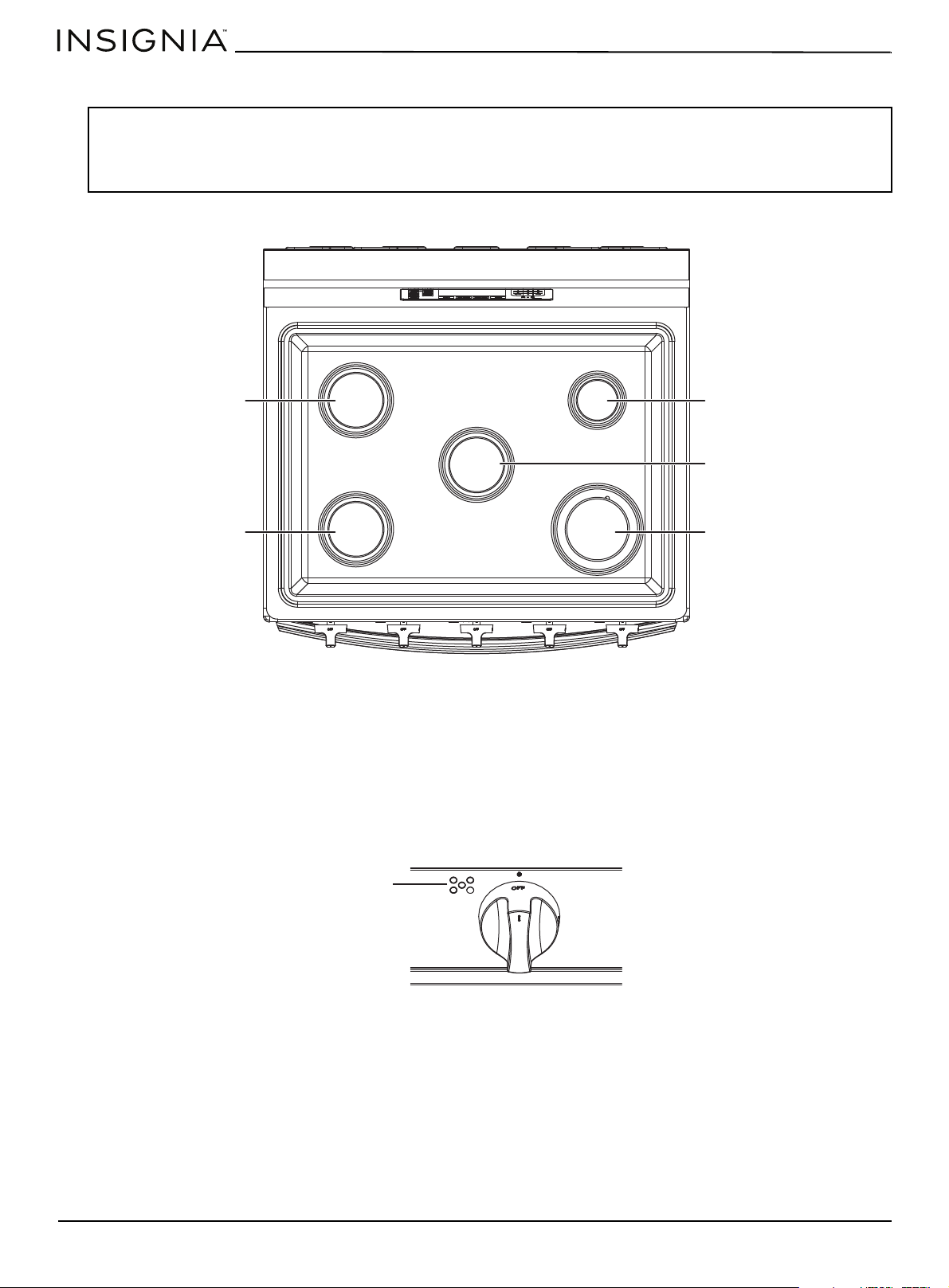
www.insigniaproducts.com
28
Using the surface burners
Your range cooktop has five surface burners. The different burner sizes make sure that you have the correct heat source for
each cooking job.
The right rear burner provides precise cooking performance for delicate foods and foods that require low heat for long
cooking times. The right rear burner lets you use the LO setting for a low simmer setting.
The right front burner provides maximum output. This burner can also be used as a general-purpose burner, but it is
designed to provide quick heat to large cookware. The right front burner spreads out the heat with a larger circle of flames.
The left front, left rear, and center burners are general-purpose burners that can be used for most cooking. The HI to LO
settings on the control knobs provide a wide range of cooking temperatures to meet your cooking needs. This provides
better heat distribution for larger cookware (12 in. [30.5 cm]) or larger pots and pans.
Each surface burner has a control knob with settings from HI to LO. They also have a LITE setting that is only used to light
the flame. The electronic ignition system sparks when the control knob is in the LITE position.
The surface burner indicator next to the control knob shows which burner the knob controls.
Using the correct cookware
Using the correct cookware can prevent many problems, such as uneven cooking or extended cooking times. Using the
correct pans reduces cooking times and cooks food more evenly. Look for the following pan characteristics:
• Flat bottom and straight sides
• Tight-fitting lid
• Weight of handle does not tilt pan
• Pan is well-balanced
• Pan size matches the amount of food being prepared.
• Made of material that conducts heat well.
• The pan diameter matches the surface burner flame diameter.
WARNINGS:
Before using the surface burners, make sure to follow all the safety warnings and precautions as listed. Failure to do so could result in
product damage, personal injury, and/or death.
When you want to move a pot or pan onto another burner, lift it up and place it on the other burner. Do not slide a pot or pan from
one burner to another.
Left rear burner
Left front burner
Right rear burner
Center burner
Right front burner
Indicator
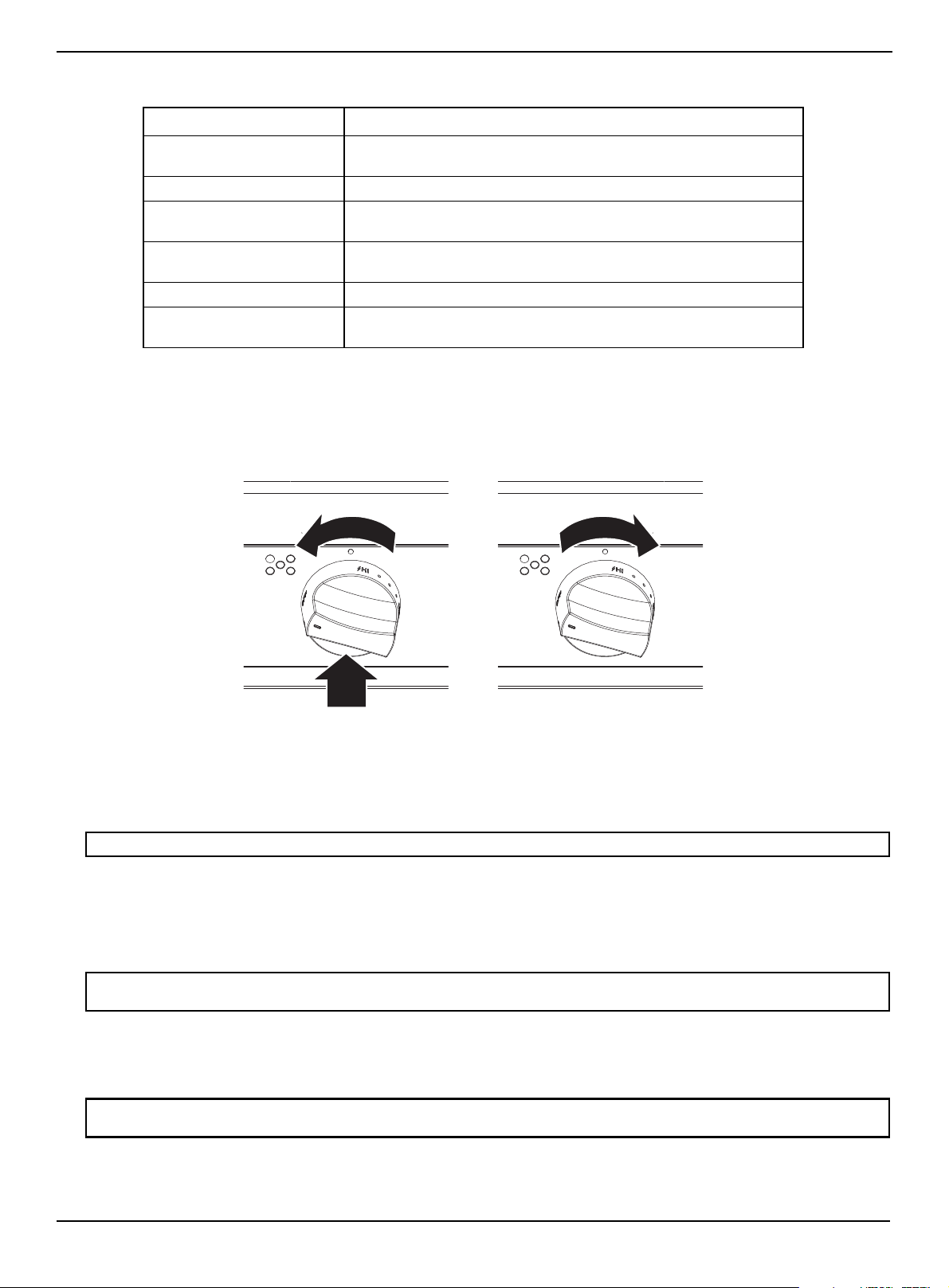
www.insigniaproducts.com
29
4.8 Cu. Ft. Freestanding Gas Convection Range with Steam Cleaning
What your cookware is made of determines how evenly and quickly heat is transferred from the surface burner to the pan
bottom.
Lighting a burner
Make sure all surface burners are positioned and assembled correctly.
1 Push in and turn the control knob for a surface burner to the LITE position. The “clicking” sound indicates the electronic
ignition system is operating correctly. The burner lights in about four seconds, after the air has been purged from the
supply line.
2 After the burner lights, turn the control knob to the setting you want. The “clicking” sound stops and the flame height
changes from Max. to Min. when you turn the control knob.
Manually lighting a burner
If a power failure occurs, you can manually light the surface burners.
1 Hold a long gas grill lighter to the surface burner you want to light.
2 Push in and turn the control knob for that burner to the LITE position.
3 After the burner has lit, set the control knob and the burner to the setting you want.
Selecting the flame size
The flames on the burners should always stay under the cookware. The flames should never extend beyond the bottom
surface or up the sides of the cookware.
Always watch the flame when adjusting the heat setting with the control knob. The flame should always match the size of
the cookware being used.
MATERIAL DESCRIPTION
Aluminum Excellent heat conductor. Some types of food cause aluminum to
darken. (Anodized aluminum cookware resists staining and pitting.)
Copper Excellent heat conductor, but discolors easily.
Stainless Steel Slow heat conductor with uneven cooking results. It is durable, easy
to clean, and resists staining.
Cast-iron A poor conductor, but retains heat well. Cooks evenly once cooking
temperature is reached.
Enamelware Heating characteristics vary depending on base material.
Glass Slow heat conductor. Only use glass cookware that it is designated
for oven use.
WARNING: Use extreme caution when manually lighting a surface burner.
WARNING: Flames larger than the bottom of the cookware do not result in faster heating, but could result in a fire hazard or personal
injury.
WARNING: Before using the surface burners, make sure to follow all the safety warnings and precautions as listed. Failure to do so
could result in product damage, personal injury, or death.

www.insigniaproducts.com
30
Using the oven
Your oven has six oven functions:
Using the oven vent
The oven vent is located under the oven control panel.
Do not block or place items in front of the oven vent. Correct air circulation prevents oven burner combustion problems
and provides good cooking results.
Because the oven vent and surrounding area can become hot, use care when placing items near the vent. Hot steam could
heat or melt items placed in front of the vent.
Using the oven light
Touch Oven Light to turn the light on or off. The oven light lets you check the cooking progress without opening the oven
door.
WARNING: Stand away from the oven when opening the oven door. Escaping hot air or steam can burn your hands, face, or eyes. Let
hot air or steam escape before removing or replacing food.
FUNCTION MINIMUM SETTING MAXIMUM SETTINGS
Bake 150° F (66° C) 550° F (288° C)
Broil Lo Hi
Fan Bake ( Bake) 150° F (66° C) 550° F (288° C)
Fan Roast ( Roast) 150° F (66° C) 550° F (288° C)
Steam Clean — 25 minutes
Keep Warm — 3 hours
Note: Always bake or broil with the oven door closed. If you open the oven door while the oven is operating and leave it open, the
oven burner stops in one minute. This is not a product failure. The oven automatically starts again when you close the door.
Oven vent
Oven light
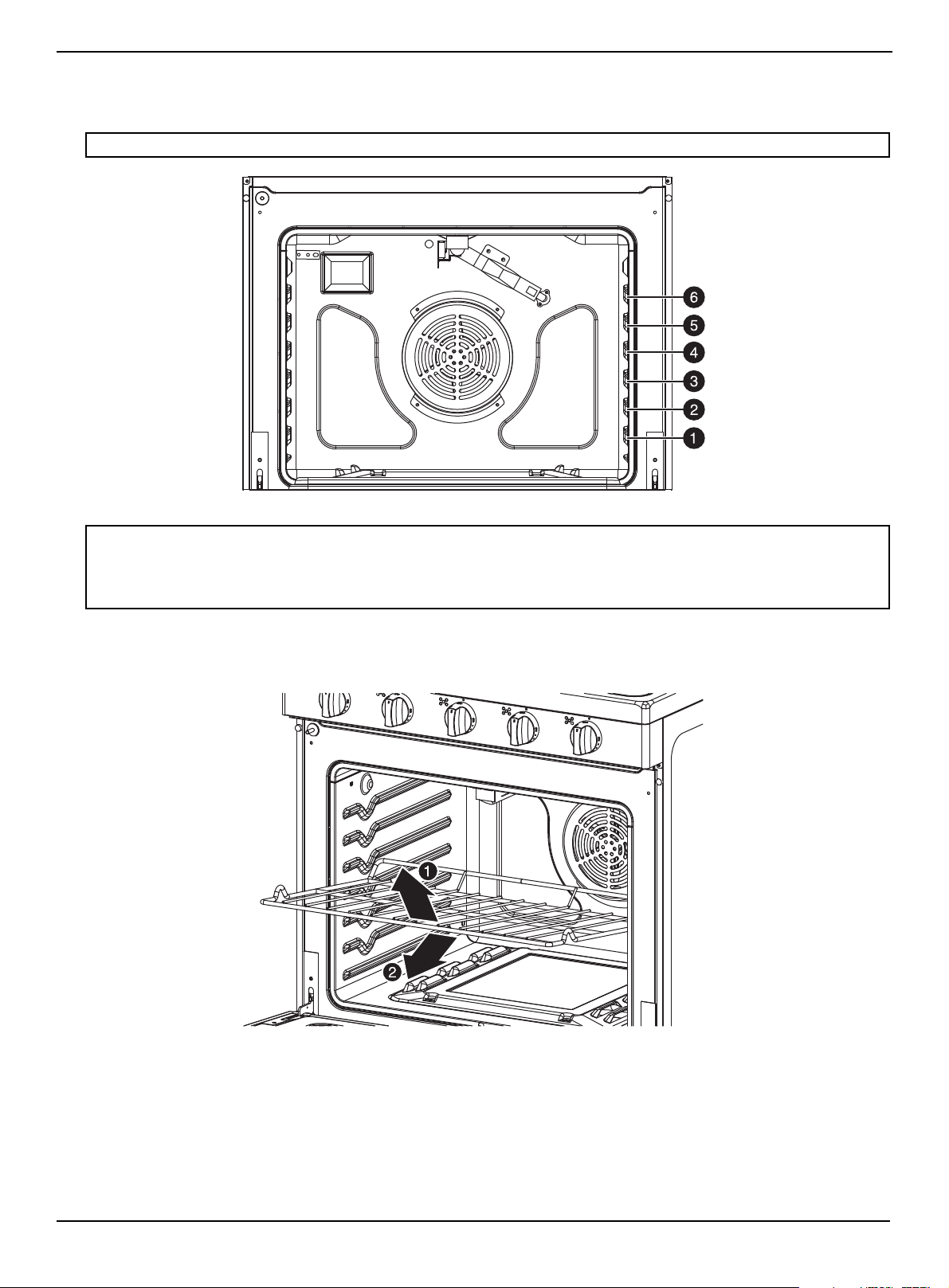
www.insigniaproducts.com
31
4.8 Cu. Ft. Freestanding Gas Convection Range with Steam Cleaning
Positioning the oven racks
You can remove and reposition the oven racks in any of the six rack positions. Each oven rack has a built-in stop to prevent
it from accidentally being pulled completely out. Correct positioning of the oven racks provides the best cooking results.
Removing an oven rack
1 Pull the rack straight out until it stops.
2 Lift up the front of the oven rack and pull to remove it from the oven.
Note: The rack position above 6 is not usable.
CAUTIONS:
• Do not cover an oven rack with aluminum foil. This disturbs the heat circulation and results in poor baking.
• Do not place aluminum foil on the oven bottom because it could cause damage.
• Arrange the oven racks only when the oven is cool.
• When placing an oven rack in the top most rack position, make sure that the rack is stably situated on the embossed stop.

www.insigniaproducts.com
32
Replacing an oven rack
1 Place the back edge of the rack on the a rack support.
2 Lift up the front of the rack and slide it into the oven.
Baking layer cakes
• Centering the baking pans in the oven produces better cooking results.
• When baking multiple items, make sure that you leave a 1 to 1.5 in. (2.5 to 3.8 cm) space around each item.
• When baking or fan baking on multiple racks, place the oven racks in positions 3 and 5.
• Place two pans in the rear of the top rack and the other two pans in the front of the bottom rack.
Tips for baking
• Use appropriate non-stick coated metal sheets or aluminum containers or use heat-resistant silicone molds.
• Make the best use of the space on the rack. We recommend placing the baking pan in the middle of the rack.
• Select the correct shelf position before turning the oven on.
• Do not move oven shelves when hot. If you must move a rack while the oven is hot, do not let the potholder contact
the hot oven burner.
• Keep the oven door closed as much as possible.
Note: Correct positioning of food items in the oven helps you achieve the best cooking results.

www.insigniaproducts.com
33
4.8 Cu. Ft. Freestanding Gas Convection Range with Steam Cleaning
Setting the clock
The clock must be set to the correct time of day for the automatic oven timing functions to work correctly. You can adjust
the clock to show a 12-hour or 24-hour display. The 12-hour display is the default setting. The time of day can only be
changed when your range is not in use (standby).
1 Press the Clock Set* pad for three seconds.
2 Enter the current time in hours and minutes using the number pads. The time you set blinks on the display.
3 Touch the AM/PM pad to change between AM/PM.
4 Press the Start or Clock Set* pad to save. The display shows the time of the day.
Selecting the 12-hour or 24-hour display setting
1 Press and hold the AM / PM pad three seconds.The display shows the present mode.
2 Press the AM / PM pad to change between the 12-hour and 24-hour display setting. The display shows 12Hr or 24Hr
depending on your selection.
3 Press the Start pad to save the clock display mode.
Using the timer
The timer serves as an extra timer that beeps when the set time has elapsed. It does not start or stop cooking functions.
You can use this function at the same time as any other oven function or even when neither the cooktop or oven are in
use. You can set the timer for any amount of time from 1 minute to 23 hours and 59 minutes.
1 Press the Timer On/Off pad. The display shows Timer, and 00:00 blinks in the display.
2 Use the number pads to enter the amount of time you want in minutes or hours and minutes. The display shows the
set time.
3 Press the Start pad to start the timer. The display shows the remaining time. When time has elapsed, the timer
continues to beep until you press the Timer On/Off pad. After you press the Timer On/Off pad, the display shows the
time of day.
Baking
The Bake function lets you program the oven to bake to any temperature between 150° F (66° C) and 550° F (288° C).
1 Position the oven rack where you want it.
2 Press Bake. The display shows the default temperature 350° and the bake icon blinks. If the default temperature is the
cooking temperature you want, skip to step 4.
3 (Optional) Press the number pads to enter the cooking temperature you want. The display blinks the temperature.
4 Press Start. The oven automatically lights and starts preheating. Preheating is important for good baking results.
The display shows PRE, 100°, the time of the day, and bake icons until the oven reaches 100°. Then, the display shows
the actual oven temperature. When the oven reaches the temperature you set, it beeps three times.
5 Place the food in the oven, then close the oven door.
6 When baking is complete, remove the food from the oven, close the oven door, then press Off/Clear. The oven shuts
off and the display shows the time of day.
7 To change a programmed baking temperature, press Bake, enter the new baking temperature, then press Start. The
oven completes cooking at the new temperature.
Adjusting the thermostat
If your baking results are not what you are used to, the present oven cooking thermostat can be adjusted by up to ±35° F
(±19° C).
1 Press and hold °F / °C for three seconds while in standby mode. The display will show 0.
2 Use the number pads to enter the temperature adjustment you want. For example, if you want the oven temperature
to be 10° higher than the displayed temperature, press 1, then 0. If you want the temperature to be 10 degrees lower,
press 1, 0, then press and hold °F / °C for one second. The display changes to -10.
3 Press Start. The display shows the time of day. The next time you bake, the oven uses the new temperature setting.
Note: This temperature adjustment is retained in memory after a power failure. This adjustment will be used in all future baking,
including Bake, Fan Bake, Fan Roast, Broil, and Keep Warm. Adjusting the thermostat do not affect steam-cleaning. If you want to
adjust the temperature for a single baking task, see Baking on page 33.
www.insigniaproducts.com
34
Fan baking and roasting
The Fan Bake and Fan Roast functions lets you program the oven to bake or roast at any temperature between 150° F
(66° C) and 550° F (288° C). The fan in the back of the oven cavity circulates the hot air evenly throughout the oven cavity.
As a result, foods are more evenly cooked and browned in less time than with regular heat.
For fan baking:
• Ideal for foods being cooked on multiple racks.
• Good for large quantities of baked foods.
• Provides good results with cookies, biscuits, brownies, cupcakes, cream puffs, sweet rolls, angel food cake, and bread.
• Cookies have best cooking results when cooked on flat cookie sheets.
• When fan baking on a single rack, place the oven rack in position 3 or 4.
• When fan baking on multiple racks, place the oven racks in position 3 and 5.
For fan roasting:
• Good for larger tender cuts of meat, uncovered.
• Place a broil pan and grid under the meat or poultry during fan roast for best results. The pan catches grease spills and
the grid prevents grease spatters.
1 Position the oven rack in the location you want.
2 Press ( Bake (Fan Bake) or Roast (Fan Roast).The oven beeps every time a pad is pressed. The display shows the
default temperature 325° and the bake icon blinks. If the default temperature is the temperature you want, skip to
step 4.
3 (Optional) Press the number pads for the temperature you want. All roasting should be done on a broil pan and grid.
4 Press Start. The oven automatically lights and starts preheating. Preheating is important for good baking results.
The display shows PRE, 100°, the time of day, and Fan Bake or Fan Roast until the oven reaches 100°. Then, the display
shows the actual oven temperature. When the oven reaches the temperature you set, it beeps three times.
5 Place the food in the oven and close the oven door.
When baking or roasting is complete, the oven automatically shuts off, END blinks on the display, and the oven beeps
for 30 seconds or until you press Off/Clear. The display shows the time of day.
6 To change a programmed baking temperature, press ( Bake or Roast, enter the new temperature, then press
Start. The oven completes cooking at the new temperature.
Programming the cook time
The Cook Time function lets you program the oven to cook food at a set temperature for a specified length of time. At the
end of the set time, the oven automatically shuts off.
1 Position the oven rack in the location you want, then place the food in the oven and close the oven door.
2 Press Bake. The displays shows the default temperature and the bake icon blinks. If the default temperature is the
temperature you want, skip to step 4.
3 (Optional) Press the number pads for the temperature you want. Preheating is important for good baking results. All
roasting should be done on a broil pan and grid.
4 Press Cook Time. The display will show 00:00.
5 Press the number pads for the cooking time you want. The display shows the selected time. You can set the time to any
duration from 1 minute to 10 hours.
6 Press Start. The oven automatically lights and starts preheating.
The display shows the default or selected temperature, Bake, and selected cook time, until the oven reaches the
temperature you set. When the oven reaches that temperature, it beeps three times. The oven starts cooking for the set
amount of time, and the display shows the remaining cooking time.
When the cooking time has elapsed, the oven automatically shuts off, END flashes on the display, and the oven beeps
for 30 seconds or until you press Off/Clear. After that, the display shows the time of day.
7 To change the programmed baking temperature, press Bake, enter the new baking temperature, then press Start. The
oven completes cooking at the new temperature.
8 To change the cooking time, press Cook Time, enter the new cooking time, then press Start. The oven continues
cooking for the remaining time you set.
CAUTION: Use caution when using the Cooking Time function. This function is best used when cooking cured or frozen meats and
most fruits and vegetables. Foods that can easily spoil, like milk, eggs, fish, poultry, and meats, should be chilled in a refrigerator
before they are placed in the oven. Even when chilled, they should not stand for more than one hour before cooking begins and
should be removed promptly when cooking is completed. Eating spoiled food can result in sickness from food poisoning.
Note:
Place food in the oven after preheating if the recipe calls for it. Preheating is important for good baking results.
Note: To see the time of day while cooking, press and hold Clock Set*. When you release Clock Set*, the display goes back to the
remaining cooking time.

www.insigniaproducts.com
35
4.8 Cu. Ft. Freestanding Gas Convection Range with Steam Cleaning
Programming a delayed start time
The Delay Start function lets you use the kitchen timer to automatically start and stop another cooking program (Bake, Fan
Bake, or Fan Roast). You can set a delay from 1 minute to 10 hours. The clock must be set to the correct time of day for
Delay Start to work correctly.
1 Position the oven rack in the location you want, then place the food in the oven and close the oven door. All roasting
should be done on a broil pan and grid.
2 Press the pad for the baking or roasting operation you want. The display shows the default temperature. If the default
temperature is the temperature you want, skip to step 4.
3 (Optional) Press the number pads for the temperature you want. The displays shows the temperature you set.
4 Press Cook Time. The display shows the cooking temperature, Bake, and 00:00.
5 Press the number pads for the cooking duration you want. The display blinks the cooking duration you set. You can set
the duration to any amount of time from 1 minute to 10 hours.
6 Press Delay Start. The display shows Delay and 0:00 blinks.
7 Use the number pads to enter the duration of time you want the oven to wait before it turns on. You can set the
duration to any amount of time from 1 minute to 10 hours.
8 Press Start. The oven beeps when the start time is reached and starts preheating. When the oven reaches the cooking
temperature, it beeps three times.
The display counts down the set cooking time. When the cooking time has elapsed, the oven automatically shuts off,
END flashes on the display, and the oven beeps for 30 seconds or until you press Off/Clear. After that, the display
shows the time of day.
9 To change the start time, press Delay Start, enter a new starting time, then press Start.
10 To change the programmed baking temperature, press Bake, enter the new baking temperature, then press Start. The
oven completes cooking at the new temperature.
11 To change the cooking time, press Cook Time, enter the new cooking time, then press Start. The oven continues
cooking for the remaining time you set.
Broiling
The Broil function lets you cook and brown foods using only a top heat source. The oven door must remain closed during
broiling. The meat or fish should always be placed on a broiling grid in a broiling pan.
1 Place the food on a broiling pan with an insert grid and into the oven. Close the oven door.
2 Press Broil once for Hi and twice for Lo. Use Lo to cook foods such as poultry or thick cuts of meat thoroughly without
over browning them.
3 Press Start. The oven automatically lights the top oven burner and starts cooking. The display shows the broil setting
(Hi or Lo) you selected and Broil.
Broil on one side until food is browned, then turn and broil on the other side.
4 When broiling is completed, press Off/Clear to shut off the oven. The display shows the time of day.
5 To change a programmed broiling setting, press Broil to change the setting between Hi and Lo, then press Start. The
oven changes the broil setting and completes cooking at the new temperature.
Keeping food warm
The Keep Warm function lets you keep cooked foods warm at a low baking temperature for up to three hours.
1 Position the oven rack in the location you want, then place the food in the oven and close the oven door.
2 Press Keep Warm, then press Start. The oven automatically lights and heats to 150° F (65° C). The display shows Warm
and the time of day.
3 When warming is completed, press Off/Clear. The display shows the time of day.
CAUTION: Use caution when using the Delay Start function. This function is best used when cooking cured or frozen meats and most
fruits and vegetables. Foods that can easily spoil, like milk, eggs, fish, poultry, and meats, should be chilled in a refrigerator before they
are placed in the oven. Even when chilled, they should not stand for more than one hour before cooking begins and should be
removed promptly when cooking is completed. Eating spoiled food can result in sickness from food poisoning.
WARNING: If an oven fire occurs, close the oven door and turn the oven off. If the fire continues, throw baking soda on the fire or use
a foam-type fire extinguisher. Do not put water or flour on the fire. Flour may explode and water can cause a grease fire to spread. Both
can cause personal injury and/or property damage.

www.insigniaproducts.com
36
Switching between Fahrenheit or Centigrade
You can program the oven control to display temperatures in Fahrenheit or Centigrade. The oven was preset at the factory
to display in Fahrenheit.
1 Press and hold °F / °C for one second. The display shows F or C. The default is F.
2 Press and hold °F / °C for one second to change between F and C.
3 Press Start to save the temperature selection.
Turning sound on or off
You can turn the sound of the oven controls on or off.
1 Press (sound) for three seconds. The display shows Snd On (sound on) or Snd Off (sound off). The default setting is
Snd On.
2 Press (sound) for three seconds to toggle between Snd On and Snd Off.
3 Press Start to save the sound setting.
Locking oven controls
The Lock function turns off the control panel touch pads to prevent the oven from accidentally being turned on. Touch
pads stay locked until you turn this function off.
1 Press and hold (lock) for three seconds. The oven beeps and the display shows Loc, the time of day, and the lock icon.
2 To unlock the controls, press and hold (lock) for three seconds.
Note: The clock and beep warning tones stay on even when you turn sound off.

Maintenance
4.8 Cu.Ft Freestanding Convection Range with Steam Cleaning
Cleaning and maintaining. . . . . . . . . . . . . . . . . . . . . . . . . . . . . . . . . . . . . . . . . . . . . . . . . . . . . . . . . . . . . . . . . . . . . . . . . . . .38
Cleaning the control panel . . . . . . . . . . . . . . . . . . . . . . . . . . . . . . . . . . . . . . . . . . . . . . . . . . . . . . . . . . . . . . . . . . . . . . . . . . . . . . . . . . . . . . . 38
Cleaning stainless steel surfaces . . . . . . . . . . . . . . . . . . . . . . . . . . . . . . . . . . . . . . . . . . . . . . . . . . . . . . . . . . . . . . . . . . . . . . . . . . . . . . . . . .38
Cleaning the oven racks. . . . . . . . . . . . . . . . . . . . . . . . . . . . . . . . . . . . . . . . . . . . . . . . . . . . . . . . . . . . . . . . . . . . . . . . . . . . . . . . . . . . . . . . . . 38
Cleaning the oven door . . . . . . . . . . . . . . . . . . . . . . . . . . . . . . . . . . . . . . . . . . . . . . . . . . . . . . . . . . . . . . . . . . . . . . . . . . . . . . . . . . . . . . . . . . 39
Cleaning the surface burner control knobs. . . . . . . . . . . . . . . . . . . . . . . . . . . . . . . . . . . . . . . . . . . . . . . . . . . . . . . . . . . . . . . . . . . . . . . .40
Cleaning surface burner grates and assemblies . . . . . . . . . . . . . . . . . . . . . . . . . . . . . . . . . . . . . . . . . . . . . . . . . . . . . . . . . . . . . . . . . . . 41
Cleaning the cooktop . . . . . . . . . . . . . . . . . . . . . . . . . . . . . . . . . . . . . . . . . . . . . . . . . . . . . . . . . . . . . . . . . . . . . . . . . . . . . . . . . . . . . . . . . . . . 43
Removing and replacing the oven door . . . . . . . . . . . . . . . . . . . . . . . . . . . . . . . . . . . . . . . . . . . . . . . . . . . . . . . . . . . . . . . . . . . . . . . . . .44
Removing and replacing the storage drawer. . . . . . . . . . . . . . . . . . . . . . . . . . . . . . . . . . . . . . . . . . . . . . . . . . . . . . . . . . . . . . . . . . . . . .48
Steam cleaning the oven. . . . . . . . . . . . . . . . . . . . . . . . . . . . . . . . . . . . . . . . . . . . . . . . . . . . . . . . . . . . . . . . . . . . . . . . . . . . . . . . . . . . . . . . . 49
Troubleshooting. . . . . . . . . . . . . . . . . . . . . . . . . . . . . . . . . . . . . . . . . . . . . . . . . . . . . . . . . . . . . . . . . . . . . . . . . . . . . . . . . . . . .50
Cooktop. . . . . . . . . . . . . . . . . . . . . . . . . . . . . . . . . . . . . . . . . . . . . . . . . . . . . . . . . . . . . . . . . . . . . . . . . . . . . . . . . . . . . . . . . . . . . . . . . . . . . . . . . 50
Oven . . . . . . . . . . . . . . . . . . . . . . . . . . . . . . . . . . . . . . . . . . . . . . . . . . . . . . . . . . . . . . . . . . . . . . . . . . . . . . . . . . . . . . . . . . . . . . . . . . . . . . . . . . . . 50
Error codes . . . . . . . . . . . . . . . . . . . . . . . . . . . . . . . . . . . . . . . . . . . . . . . . . . . . . . . . . . . . . . . . . . . . . . . . . . . . . . . . . . . . . . . . . . . . . . . . . . . . . . 52
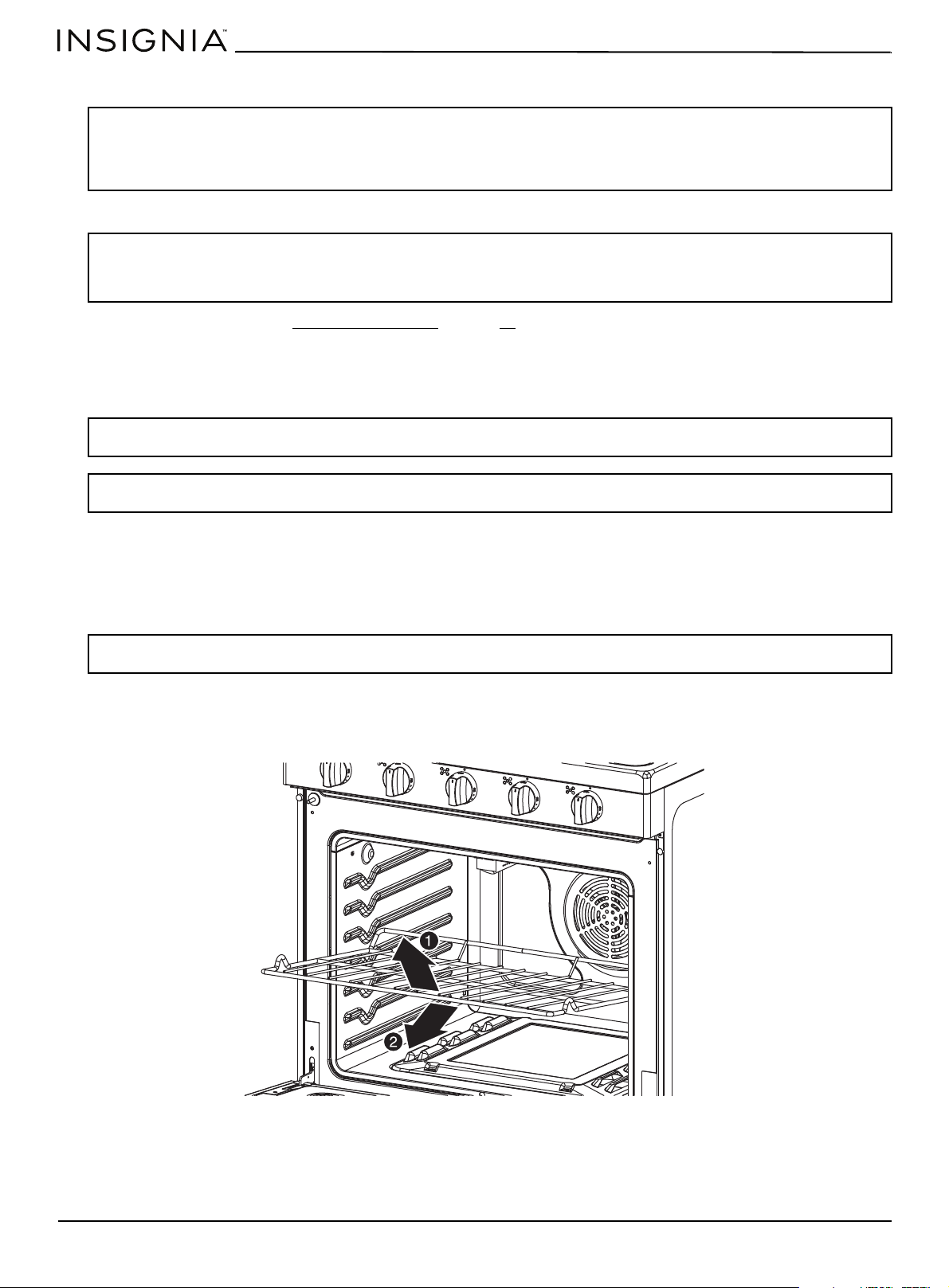
www.insigniaproducts.com
38
Cleaning and maintaining
Cleaning the control panel
1 Lock the oven controls. See Locking oven controls on page 36.
2 Clean spatters with a damp cloth or glass cleaner. You can use warm, soapy water to clean heavily soiled areas.
3 When cleaning is done, unlock the oven controls.
Cleaning stainless steel surfaces
1 Place a small amount of a stainless steel cleaner designed for use with appliances on a damp cloth or damp paper
towel.
2 Clean a small area, rubbing with the grain of the stainless steel, if applicable.
3 Dry and buff with a clean, dry paper towel or soft cloth.
4 Repeat as necessary.
Cleaning the oven racks
1 Pull a rack straight out until it stops.
2 Lift up the front of the oven rack and pull to remove it from the oven.
3 Clean by hand in hot, soapy water with a plastic or soap-filled scouring pad, then dry with a soft cloth.
WARNINGS:
• Always make sure that the controls are off and all surfaces are cool before removing or cleaning any of the range parts. This will
prevent you from getting burned.
• If your range is pulled out from the wall for any reason, make sure that the anti-tip device is reengaged after your range has been
pushed back into place. Failure to take this precaution could result in the range tipping and personal injury.
CAUTIONS:
• Never use steel wool or abrasive cleansers.
• Protect the surface from sharp objects.
These items can damage the surface.
CAUTION: Do not use a steel-wool pad or abrasive cleaners on stainless steel surfaces. Abrasive pads and cleaners will scratch the
surface and damage the finish.
Note: To prevent any discolorations or grease stains, we recommend that you clean and remove any spills, spots, and grease from your
range after each use.
Note: If you previously used a mineral oil-based stainless steel appliance cleaner, wash the surface with dish washing liquid and water
before using the stainless steel cleaner.
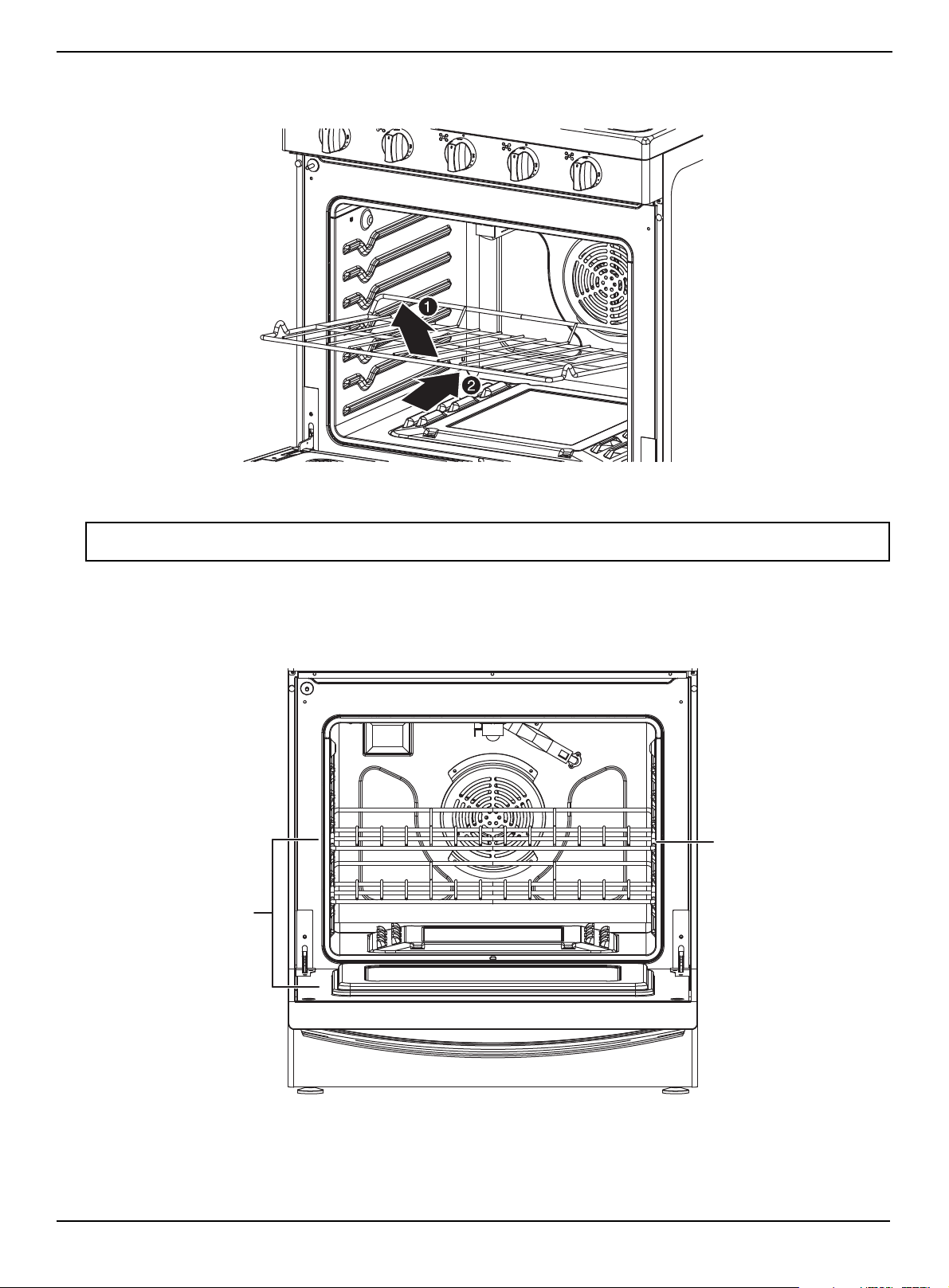
www.insigniaproducts.com
39
4.8 Cu. Ft. Freestanding Gas Convection Range with Steam Cleaning
4 To replace the rack, place the back edge of the rack on the a rack support, then lift the front of the rack and slide it into
the oven. If a rack becomes difficult to slide, rub the side rails with wax paper or a cloth containing a small amount of
cooking oil. This helps the rack slide more easily in the tracks.
Cleaning the oven door
The oven door has multiple surfaces that require different cleaning techniques. The gasket on the oven door frame should
never be cleaned or moved to clean other surfaces. The gasket is made of woven material which is essential for a good
heat seal.
1 Clean the inside door surface by hand with hot, soapy water and a soapy plastic scouring pad. Do not let moisture get
inside the door assembly.
2 Rinse and dry thoroughly with a clean, soft cloth.
WARNING: Do not let moisture enter the door or contact the door gasket while cleaning. Moisture entering the door assembly and or
getting on the door gasket damages the gasket.
Inside door surfaces
Door gasket
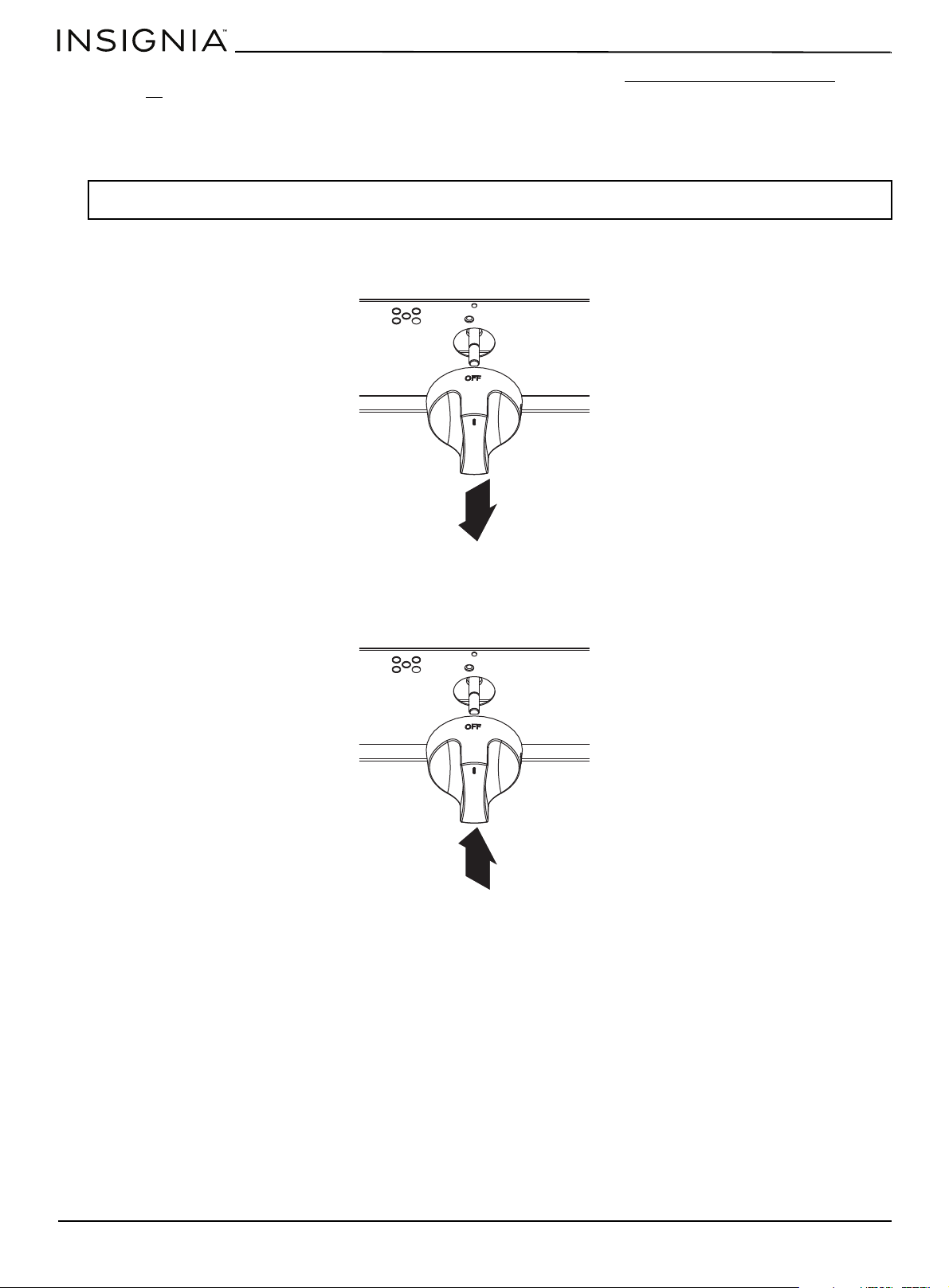
www.insigniaproducts.com
40
3 Clean the outside door stainless steel surfaces by following the instructions in Cleaning stainless steel surfaces on
page 38
.
4 Clean the glass window with glass cleaner or warm, soapy water with a thorough rinse. Do not let moisture get inside
the door assembly.
Cleaning the surface burner control knobs
1 Make sure that all surface burner knobs are in the OFF position.
2 Pull the control knobs straight off the surface burner control valve stems. Do not clean the control knobs in a
dishwasher. They are not dishwasher-safe.
3 Clean the knobs in warm, soapy water. Rinse and completely dry all surfaces (including back and stem hole).
4 Clean stainless steel surfaces with a stainless steel cleaner on a damp, soft cloth.
5 Replace the control knobs in the OFF position by pushing them straight onto the control valve stems.
WARNING: Do not use spray cleaners on the surface burner control panel. Spray entering the valve holes could contact electrical
components resulting in death, personal injury, or product damage.
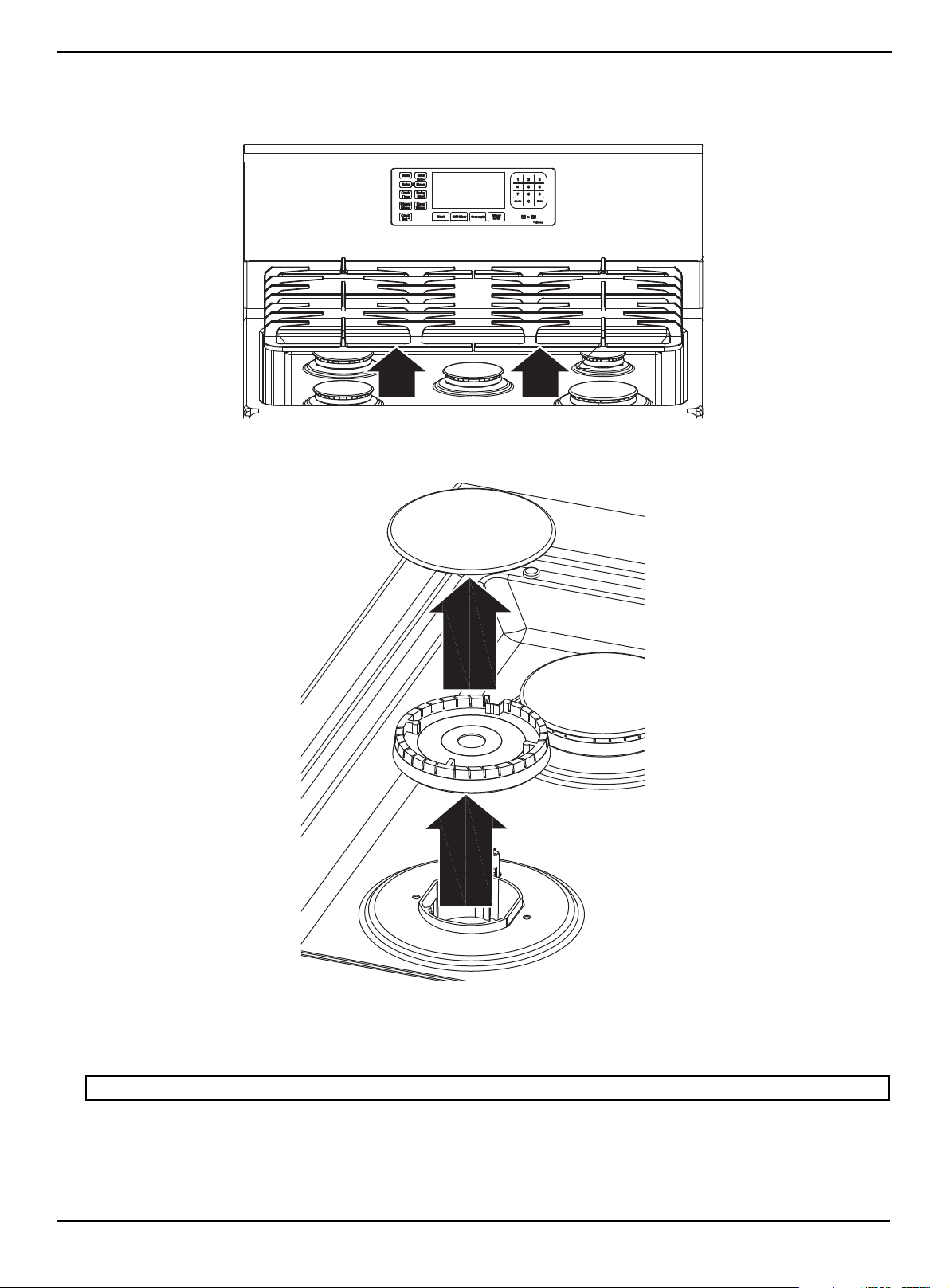
www.insigniaproducts.com
41
4.8 Cu. Ft. Freestanding Gas Convection Range with Steam Cleaning
Cleaning surface burner grates and assemblies
1 Turn off all controls and make sure that all parts have cooled.
2 Lift up and remove the burner grates from the cooktop. Make note of the burner sizes and locations.
3 Lift up and remove the burner caps from the burner heads.
4 Lift up and remove the burner heads from the valve manifolds.
5 Clean all removable burner parts in warm, soapy water. Do not use steel-wool pads or abrasive cleaners on any burner
part.
6 Rinse thoroughly, then completely dry all parts before you reassemble them.
Note: Starter electrodes are not removable and should only be wiped clean when the controls are in the OFF position.
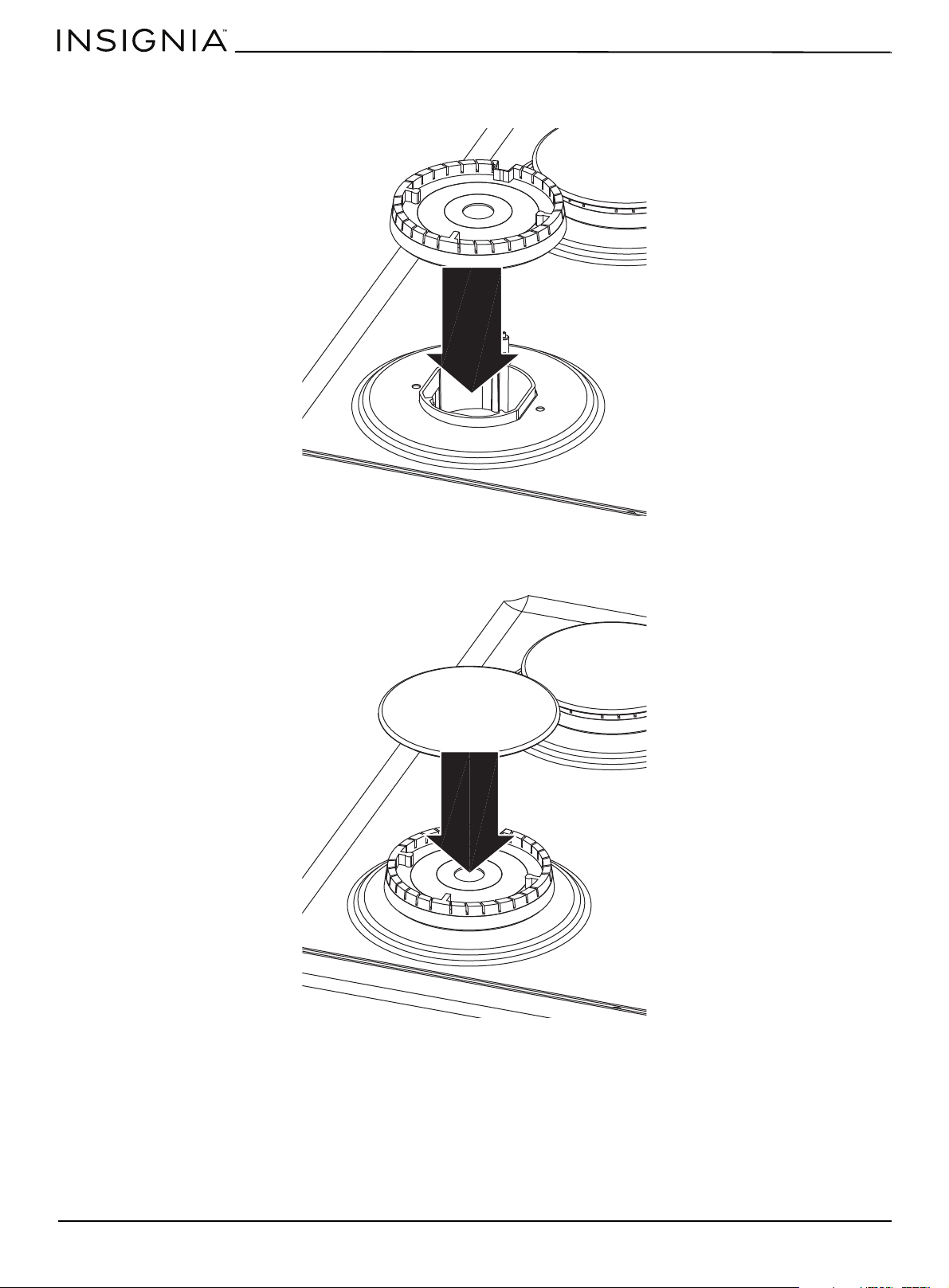
www.insigniaproducts.com
42
7 Set all burner heads on top of the manifold valves in the same locations you removed them from. The hole on the side
of a burner head goes over the electrode. The burner heads are correctly installed when they are flat on the top of the
manifold valves.
8 Set the burner caps on top of the burner heads. These also need to be flat on top of the burner heads to ensure proper
and safe operation.
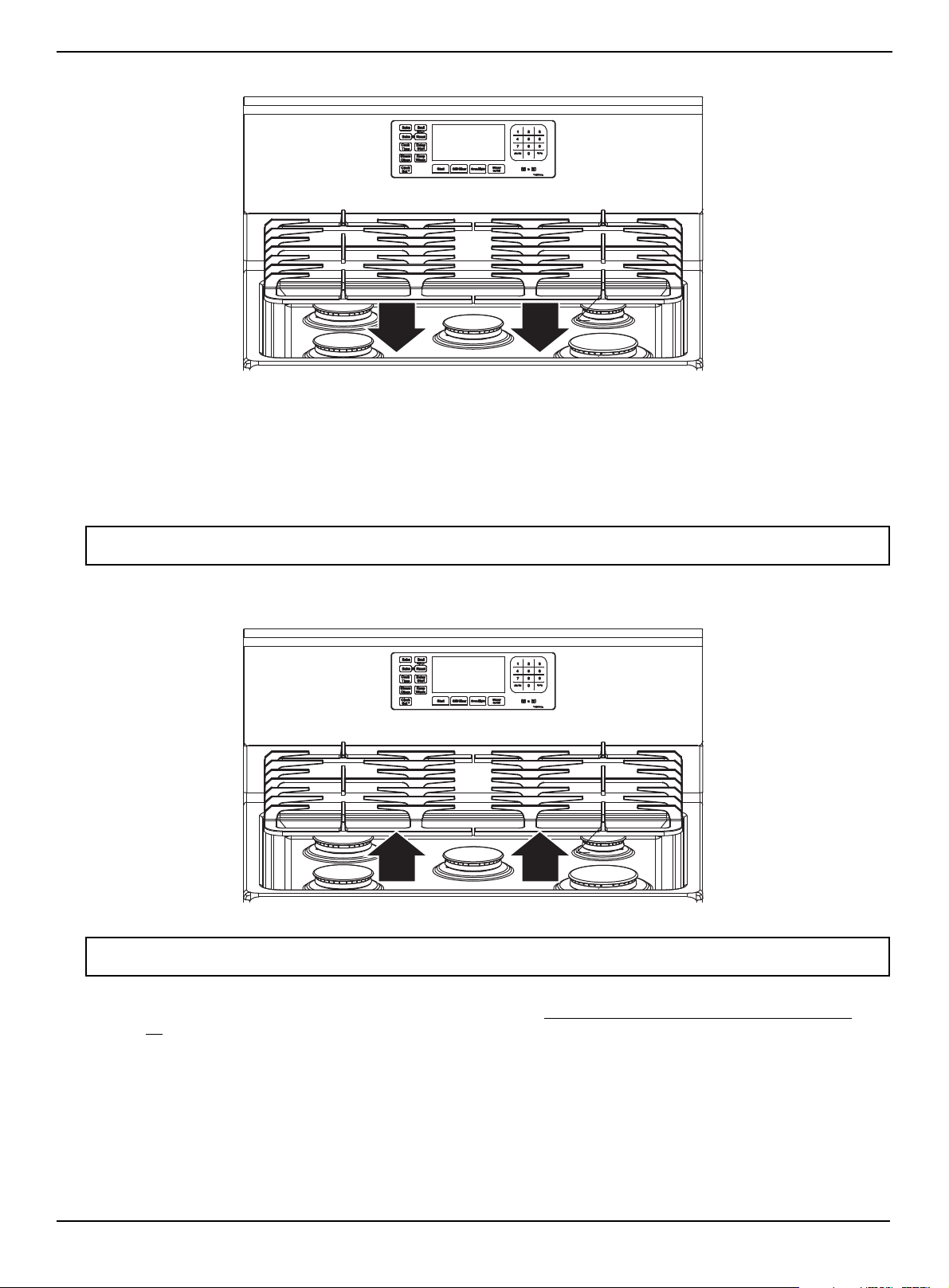
www.insigniaproducts.com
43
4.8 Cu. Ft. Freestanding Gas Convection Range with Steam Cleaning
9 Replace the burner grates on top of the range cooktop.
10 Push in and turn each surface burner control knob to the LITE position, let each burner light, then set each control
knob back to a burner setting to make sure each burner operates correctly.
Cleaning the cooktop
The cooktop surface is a porcelain-enamel surface. To prevent this surface from becoming dull, wipe up and clean spills as
they happen. Foods with a lot of acid (for example, tomatoes, sauerkraut, and fruit juices) or foods with high sugar content
can cause dull spots if allowed to set.
1 Make sure that all surface burners are OFF.
2 When surfaces have cooled, remove the burner grates.
3 Clean the cooktop surface with warm, soapy water and a soft, damp cloth. If a spill goes under a surface burner, remove
the surface burner cap and head to access and clean the spill. See Cleaning surface burner grates and assemblies
on
page 41
.
4 Rinse with clean water, then dry and polish with a soft, dry cloth.
5 Reassemble burner components (if removed) and replace the burner grates.
WARNING: Do not use a steel-wool pad or abrasive cleaners on stainless steel surfaces. Abrasive pads and cleaners will scratch the
surface and damage the finish.
WARNING: Do not remove or lift the cooktop during cleaning. Doing so could damage the gas lines leading to the surface burner
manifolds, causing poor or dangerous operation.
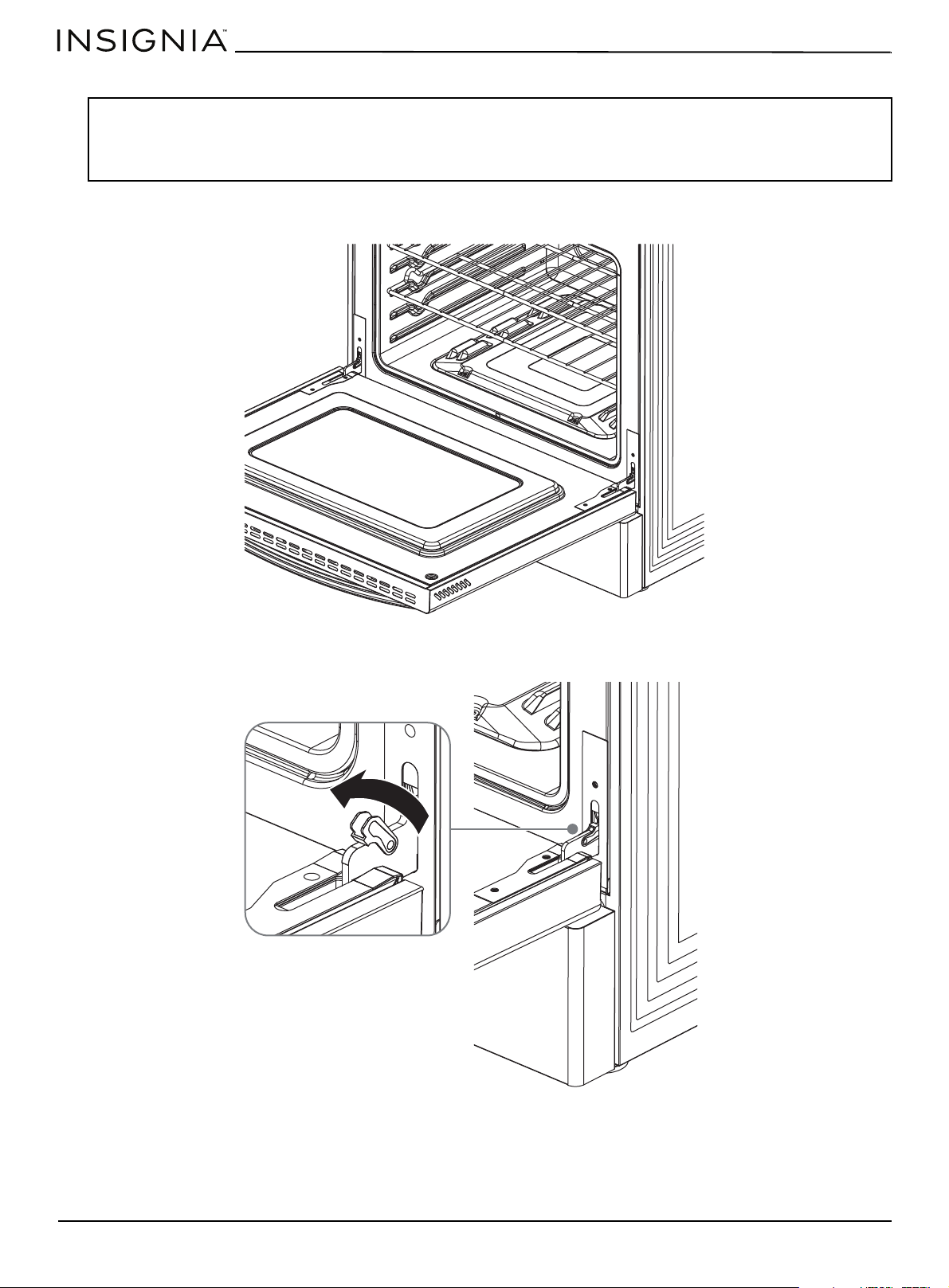
www.insigniaproducts.com
44
Removing and replacing the oven door
Removing the door
1 Completely open the oven door.
2 Open the levers fully on both sides.
WARNINGS:
• The oven door is heavy. Do not lift the door by its handle. Be careful not to drop the door during removal. Incorrect handling could
result in personal injury.
• Disconnect the electrical power to your range before removing the oven door. This prevents the oven from accidentally being
turned on while the door is removed.
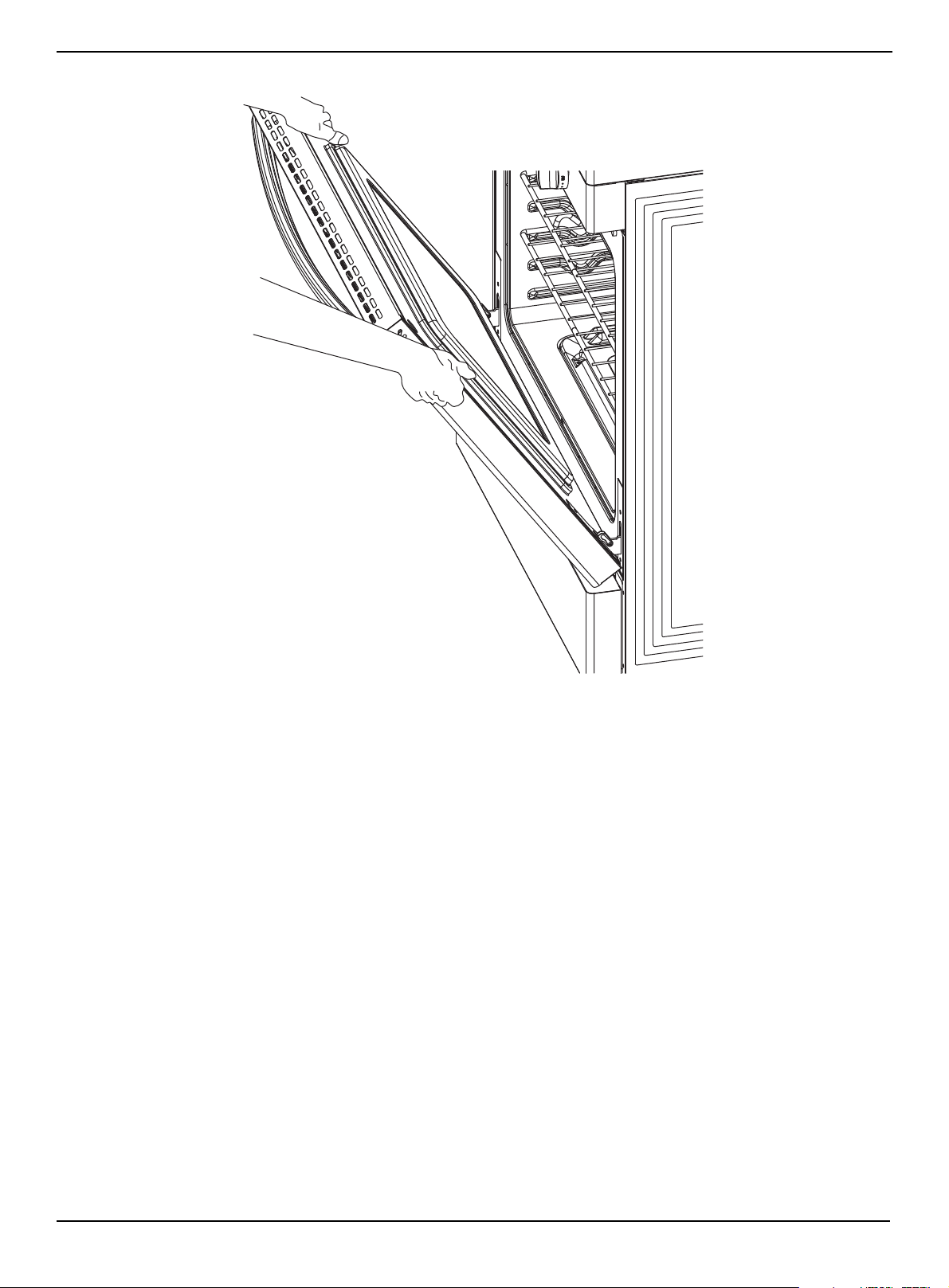
www.insigniaproducts.com
45
4.8 Cu. Ft. Freestanding Gas Convection Range with Steam Cleaning
3 Hold the door firmly on both sides.
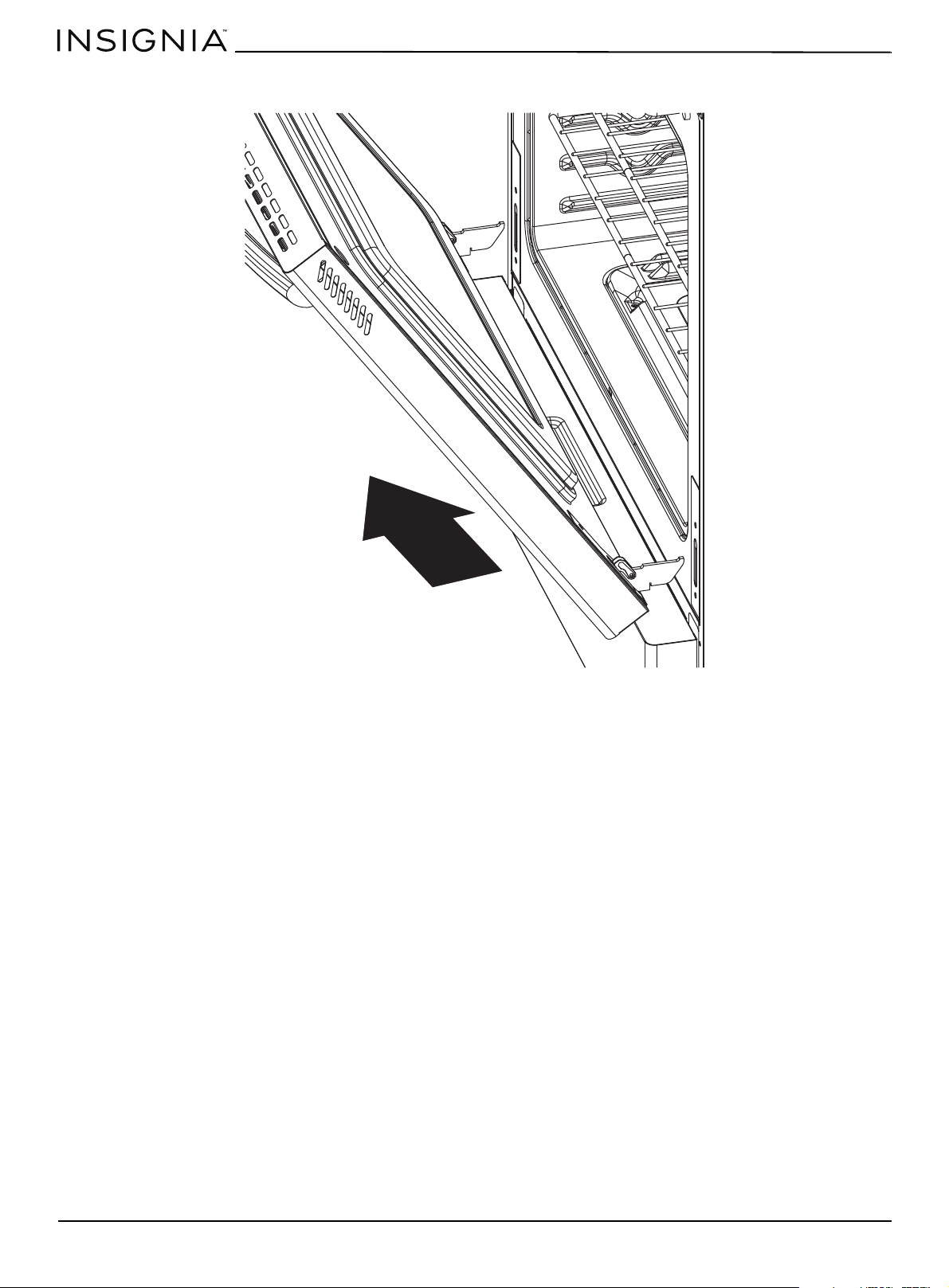
www.insigniaproducts.com
46
4 Disengage the hinges and remove the door gently with a 30° angle between the door and the oven. Place the door on
a protected surface.
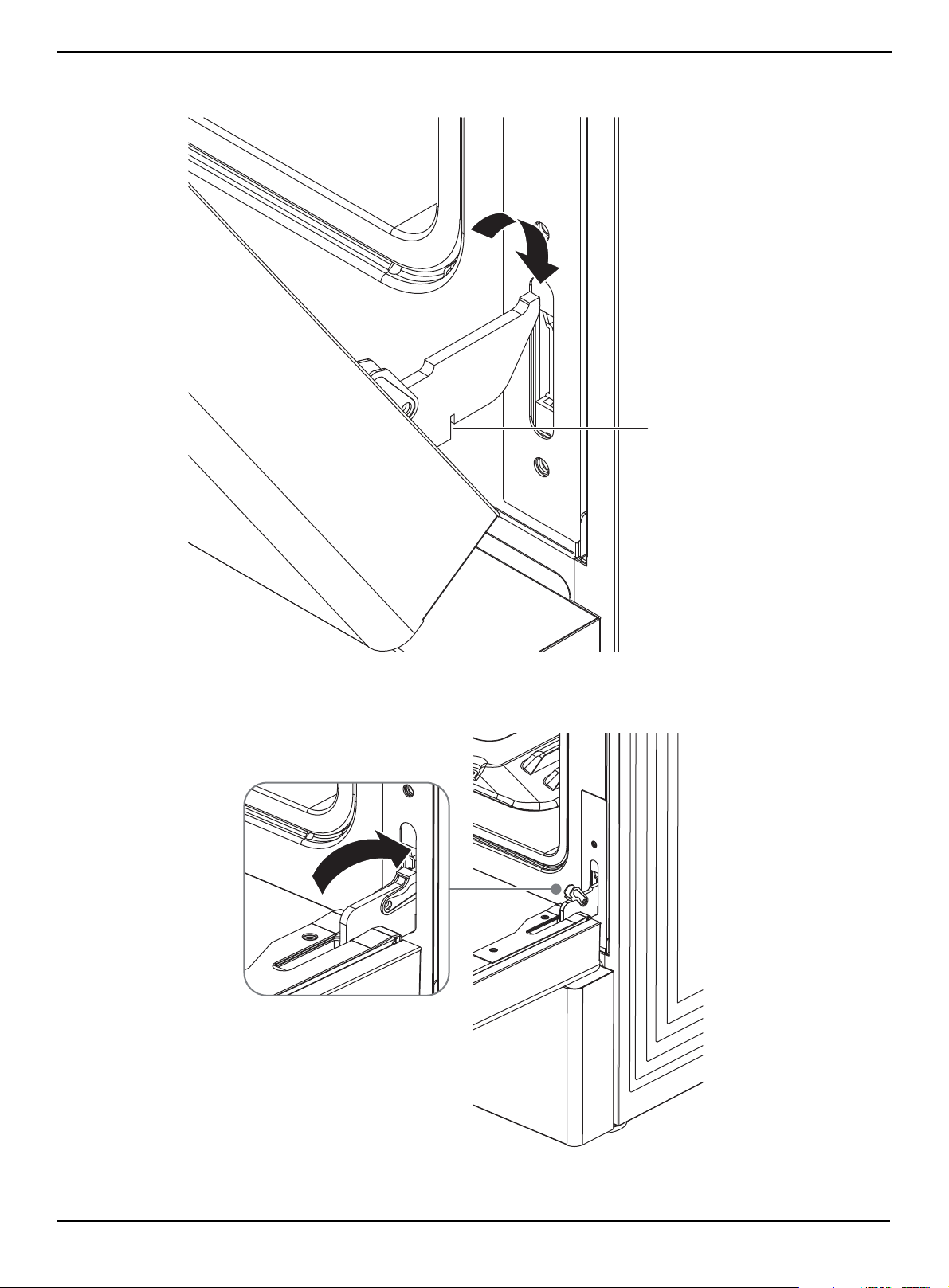
www.insigniaproducts.com
47
4.8 Cu. Ft. Freestanding Gas Convection Range with Steam Cleaning
Replacing the door
1 Hold the door firmly in almost half open position.
2 Insert the hinge tongues into the slots making sure that the notches on both sides drop into place.
3 Open the door fully.
Notch
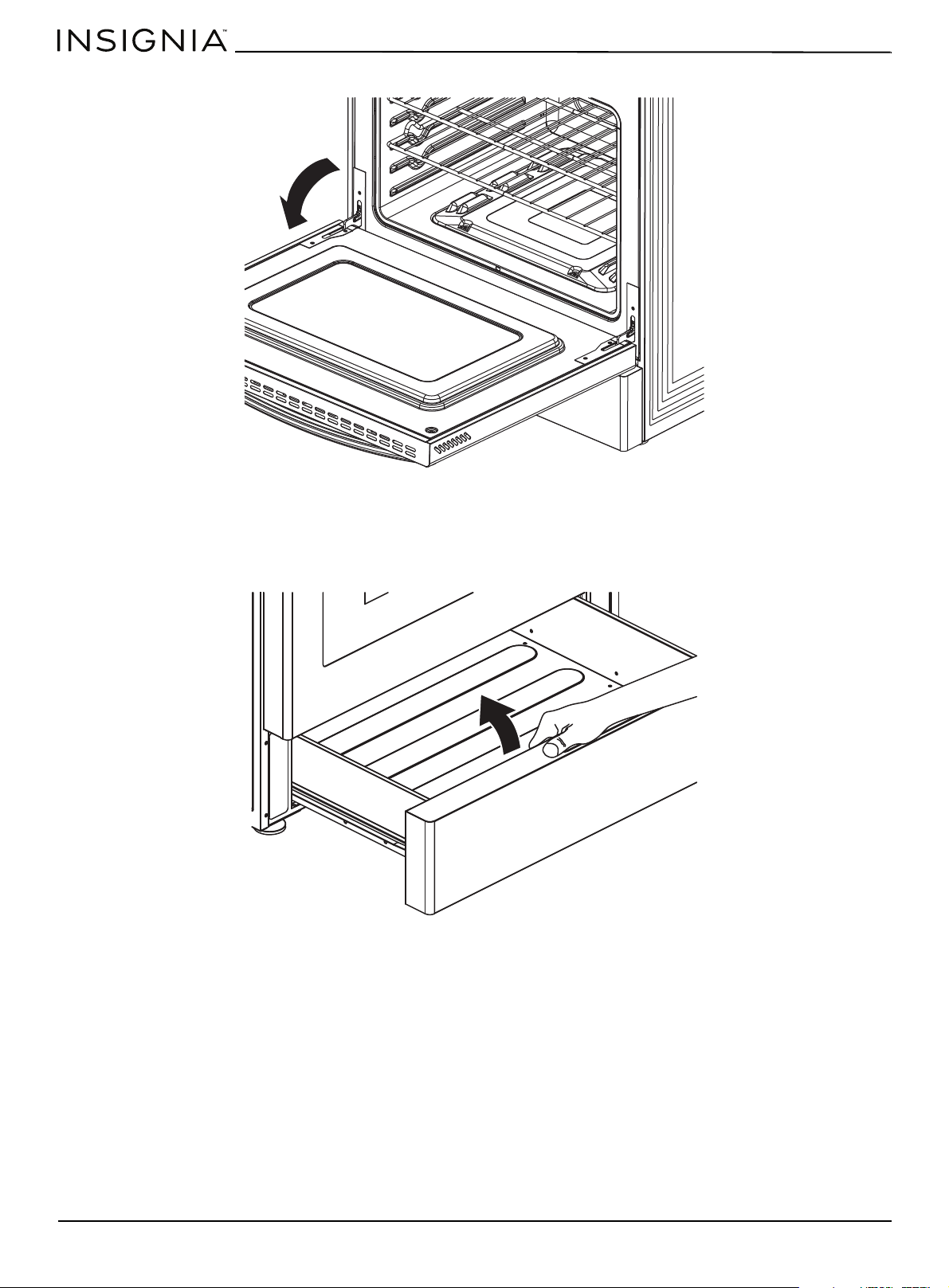
www.insigniaproducts.com
48
4 Fully close the levers on the left and right hinges, then close the door.
Removing and replacing the storage drawer
The storage drawer is a good place to store cookware and bakeware. Do not store plastics or flammable material in the
drawer. Clean the storage drawer with a damp cloth or sponge. Never use harsh abrasives or scouring pads.
1 Open storage drawer fully, lift the storage drawer, then remove the drawer.

www.insigniaproducts.com
49
4.8 Cu. Ft. Freestanding Gas Convection Range with Steam Cleaning
2 To replace the drawer, make sure that the white wheel on the drawer aligns with the rails well, then slide the drawer
back into your range.
Steam cleaning the oven
1 Remove all accessories from the oven.
2 Pour 10 oz. (300 ml) of water onto the bottom of the empty oven and close the oven door. Use normal water only, not
distilled water.
When steam-cleaning, use exactly 10 oz. of water since this produces the best results.
3 Press Steam Clean, then press Start. When the operation is complete (about 25 minutes), the display blinks and a
beep sounds.
4 Press Off/Clear.
5 Open the oven door and remove the remaining water with a sponge. Do not leave the residual water in the oven for
any length of time. A significant amount of water remains on the bottom of the oven after a steam-cleaning cycle.
6 Use a detergent-soaked sponge, a soft brush, or a nylon scrubber to wipe the oven interior. Remove stubborn residue
with a nylon scourer. You can remove lime deposits with a cloth soaked in vinegar. If the oven remains dirty, repeat the
procedure after the oven has cooled.
7 After cleaning, leave the oven door ajar at a 15° angle to let the interior enamel surface dry thoroughly.
Note: For heavy residue, such as grease left over from roasting, we recommend that you rub detergent into the residue before
activating the steam-cleaning function.
Note: If you press Steam Clean when the oven temperature is above 150° F, Hot appears in the display. Because this function
produces the best results when started while the oven is cool, we recommend that you wait until the oven has cooled down and Hot
disappears from the display.
WARNING: Be careful when opening the door before a steam-cleaning procedure has ended. The water on the bottom is hot.
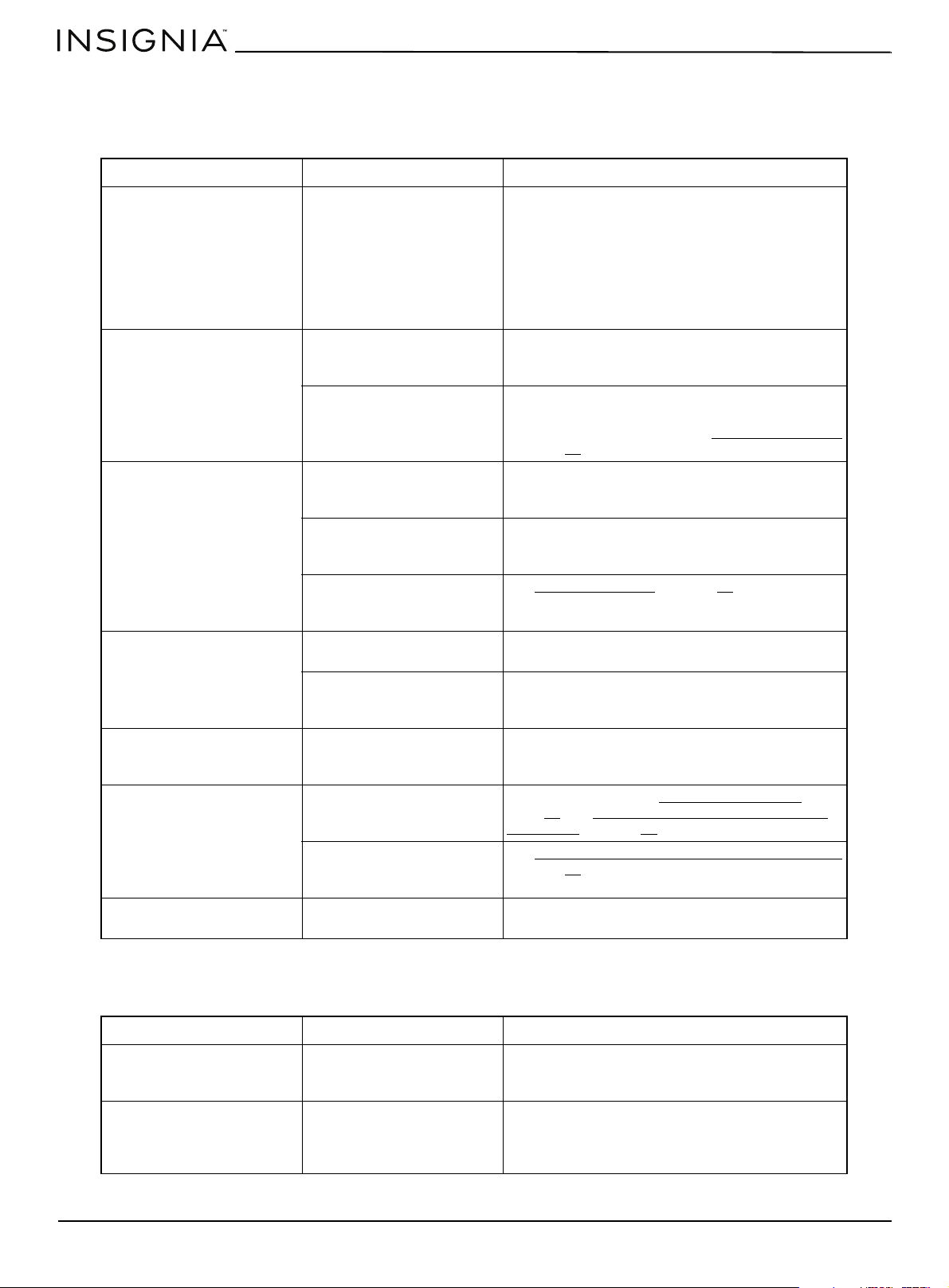
www.insigniaproducts.com
50
Troubleshooting
Cooktop
If the solutions in this section do not solve a problem, contact a qualified service technician or Insignia customer service.
Oven
If the solutions in this section do not solve a problem, contact a qualified service technician or Insignia customer service.
PROBLEM PROBABLE CAUSE POSSIBLE SOLUTION
I smell gas There is a gas leak. Clear the room, building, or area of all occupants.
Immediately call your gas supplier from outside the
building. Do not call from your phone.
Your range is electrical and could cause a spark that
could ignite the gas. Follow the gas supplier’s
instructions.
If you cannot reach your gas supplier, call the Fire
Department.
My range is not level The kitchen cabinets may not
be level and may make your
range appear to be not level.
Make sure that the cabinets are square and provide
sufficient room for installation.
Your range has been installed
incorrectly. One or more of
the leveling legs may be
damaged or uneven.
Make sure that the floor is level, strong, and stable.
If the floor sags or slopes, contact a carpenter.
Check and level the range. See Leveling your range
on page 22
.
None of burners light The power cord is not
plugged into the electrical
outlet.
Make sure that the power plug is plugged into a
live, correctly grounded outlet.
A fuse in your home may be
blown or the circuit breaker
tripped.
Replace the fuse or reset the circuit breaker.
The gas supply is not
correctly connected or
turned on.
See Connecting to gas
on page 19.
One of the surface burners
doesn’t light
The control knob isn't set
correctly.
Push in the control knob and turn it to the LITE
position.
The burner caps are not in
place or the burner base is
misaligned.
Clean the electrodes. Put the burner cap on the
burner head. Align the burner base.
Surface burner clicks during
operation.
The control knob has been
left in the LITE position.
After the burner lights, turn the control knob to a
desired setting. If the burner still clicks, contact a
qualified service technician.
The burners don’t burn
evenly.
Surface burners are dirty. Clean the burners. See Cleaning the cooktop
on
page 43
and Cleaning surface burner grates and
assemblies on page 41.
Surface burner components
and caps are not assembled
correctly and level.
See Cleaning surface burner grates and assemblies
on page 41
.
Very large or yellow surface
burner flames
Wrong orifice is assembled. Contact your installer to check the burner orifice
size or LP gas conversion.
PROBLEM PROBABLE CAUSE POSSIBLE SOLUTION
Surface burners light but
oven burners don’t light
The gas pressure regulator
shut off switch is in the off
position.
Call a qualified service technician.
Display goes dark The electrical outlet ground
fault interrupter (GFI or GFCI)
has been tripped and needs
to be reset.
Replace fuse or reset circuit breaker.
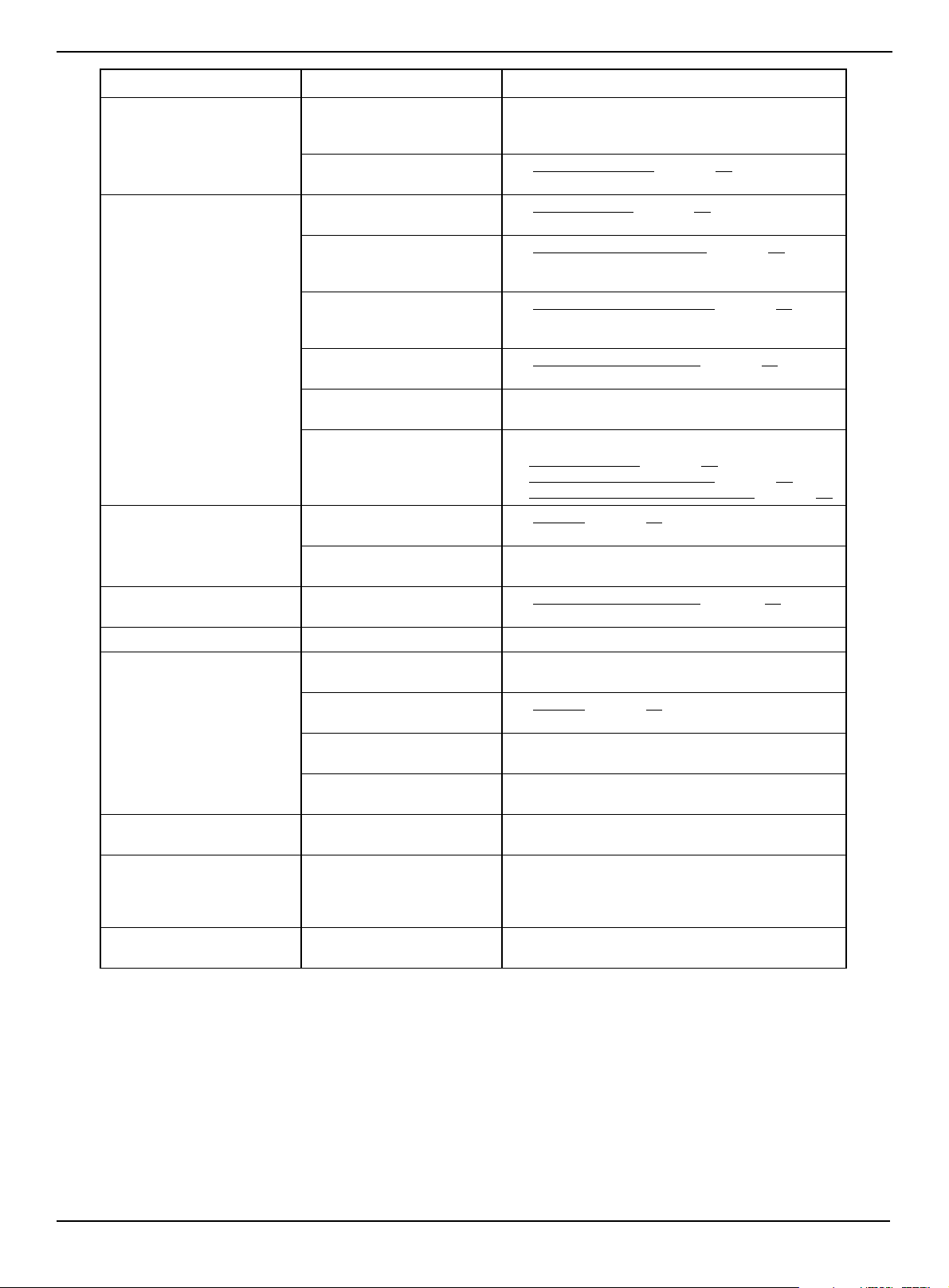
www.insigniaproducts.com
51
4.8 Cu. Ft. Freestanding Gas Convection Range with Steam Cleaning
Very large or yellow oven
burner flames
The oven burner air
adjustment shutters need to
be adjusted.
Call for a qualified service technician.
Gas supply is not correctly
connected or turned on.
See Connecting to gas
on page 19.
Food does not bake or roast
correctly in the oven
Wrong cooking mode is
selected.
See Using the oven
on page 30.
The oven racks have not been
positioned correctly for the
foods being cooked.
See Positioning the oven racks
on page 31.
Incorrect cookware or
cookware or incorrect size
being used.
See Using the correct cookware
on page 28.
Oven thermostat needs
adjustment.
See Adjusting the thermostat
on page 33.
There is aluminum foil on
racks and/or oven bottom.
Remove the foil.
Clock or timers not set
correctly.
See:
• Setting the clock
on page 33
• Programming the cook time on page 34
• Programming a delayed start time on page 35
Food doesn’t broil correctly
in the oven
Oven controls not set
correctly.
See Broiling on page 35.
Oven door was not closed
during broiling.
Keep the oven door closed when broiling.
Oven temperature is too hot
or cold
Oven thermostat needs
adjustment.
See Adjusting the thermostat
on page .33.
Oven light won’t turn on. The bulb is burned out. Call for a qualified service technician.
Oven smokes excessively
during broiling
Meat or food not correctly
prepared before broiling.
Cut away excess fat or fatty edges that may curl.
Controls are not being set
correctly.
See Broiling
on page 35.
Greasy buildup on oven
surfaces.
Regular cleaning is necessary when broiling
frequently.
The food may be too close to
the broiler burner.
Move the broiler dish to a lower rack.
I hear a crackling or popping
noise
This is normal. This is the sound of the metal heating and cooling
during any cooking or cleaning function.
Steam or smoke coming from
under the control panel.
This is normal. The oven vent is located below the control panel.
More steam is visible when using the fan functions
or when baking or roasting multiple items at the
same time.
I smell a strong odor. This is normal. The insulation around the inside of the oven emits
an odor the first few times you use the oven.
PROBLEM PROBABLE CAUSE POSSIBLE SOLUTION
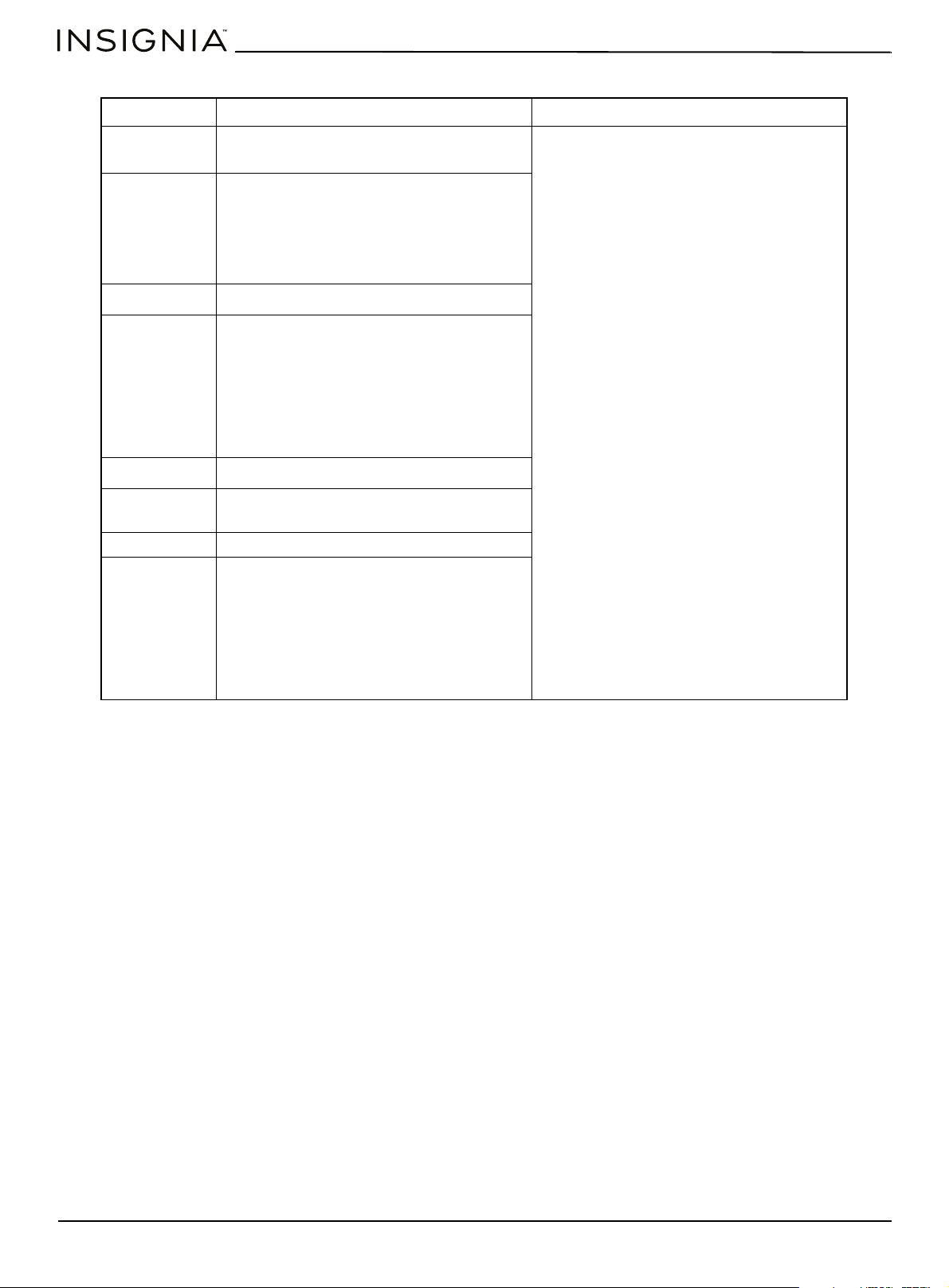
www.insigniaproducts.com
52
Error codes
Turning demo mode on or off
When your range is in demo mode, most of its functions don't work.
• To turn off demo mode, press and hold the 1 and 9 number pads on control panel simultaneously for three seconds,
then release. OFF SHOP appears on the display for one second, then your range resumes its normal mode of operation.
• Repeat to turn demo mode on. ON SHOP appears on the display for one second, then your range enters demo mode.
ERROR CODE POSSIBLE CAUSE SOLUTION
E0
• The temperature sensor may be damaged
and the circuit open.
Press Off/Clear, then restart the oven. If the
problem persists, disconnect all power from
your range for at least 30 seconds, then
reconnect the power.If this does not solve the
problem, call for service.
E1
• The gas valve may not be working correctly.
• The oven may have an insufficient air
supply or the supply is unstable.
• The 120V AC power supply voltage is low,
causing the igniter or gas valve to work
abnormally.
E2
• The oven door circuit may have failed.
E3
• The oven air supply valve may be broken.
• The igniter may be broken.
• The circuit and components of the circuit
board may be damaged.
• The temperature detection circuit may be
broken, causing the temperature to never
rise.
• There may be no gas.
E4
• The keys on the touch panel are stuck.
E5 The temperature sensor may have overheated.
The circuit board may be damaged.
E6 The circuit board may be damaged.
E7
• The oven air supply valve may be broken.
• The igniter may be broken.
• The circuit and components of the circuit
board may be damaged.
• The temperature detection circuit may be
broken, causing the temperature to never
rise.
• There may be no gas.
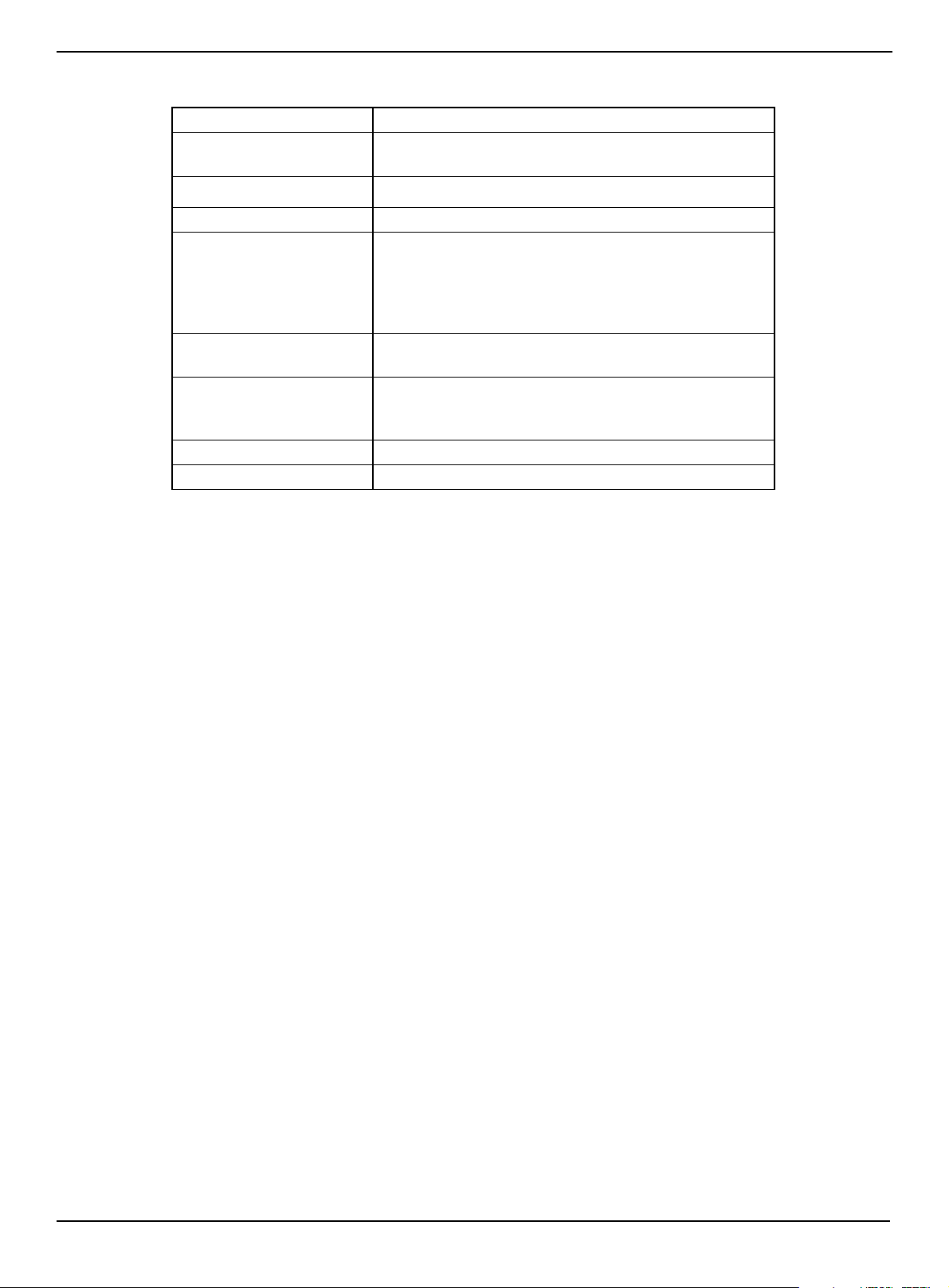
www.insigniaproducts.com
53
4.8 Cu. Ft. Freestanding Gas Convection Range with Steam Cleaning
Specifications
Dimensions (H × W × D) 46.9 × 29.9 × 26.9 in. (119 × 75.9 × 68.3 cm)
Weight
Gross Weight: 224.9 lbs. (102 kg)
Net Weight: 196.2 lbs. (89 kg)
Power requirements
120 V/60 Hz
Power cord length 5 ft. (1.5 m)
Cooktop burners Right Front: NG-18000 BTU/LPG-16000 BTU
Left Front: NG-12000 BTU/LPG-10000 BTU
Right Rear: NG-5000 BTU/LPG-4000 BTU
Left Rear: NG-9000 BTU/LPG-7000 BTU
Center: NG-12000 BTULPG-10000 BTU
Oven burner Bake: NG-13500 BTU/LPG-12000 BTU
Broil: NG-18500 BTU/LPG-18500 BTU
Oven temperatures Bake: 150 ~ 550° F (65.6 ~ 287.8° C
Convection (fan) Bake: 150 ~ 550° F (65.6 ~ 287.8° C
Convection (fan) Roast:150 ~ 550° F (65.6 ~ 287.8° C
Oven light 40 W
Gas type Natural or propane

www.insigniaproducts.com
54
ONE-YEAR LIMITED WARRANTY
Definitions:
The Distributor* of Insignia branded products warrants to you, the original purchaser of this new Insignia-branded product (“Product”), that the
Product shall be free of defects in the original manufacturer of the material or workmanship for a period of one (1) year from the date of your purchase
of the Product (“Warranty Period”).
For this warranty to apply, your Product must be purchased in the United States or Canada from a Best Buy branded retail store or online at
www.bestbuy.com or www.bestbuy.ca and is packaged with this warranty statement.
How long does the coverage last?
The Warranty Period lasts for 1 year (365 days) from the date you purchased the Product. Your purchase date is printed on the receipt you received
with the Product.
What does this warranty cover?
During the Warranty Period, if the original manufacture of the material or workmanship of the Product is determined to be defective by an authorized
Insignia repair center or store personnel, Insignia will (at its sole option): (1) repair the Product with new or rebuilt parts; or (2) replace the Product at
no charge with new or rebuilt comparable products or parts. Products and parts replaced under this warranty become the property of Insignia and are
not returned to you. If service of Products or parts are required after the Warranty Period expires, you must pay all labor and parts charges. This
warranty lasts as long as you own your Insignia Product during the Warranty Period. Warranty coverage terminates if you sell or otherwise transfer the
Product.
How to obtain warranty service?
If you purchased the Product at a Best Buy retail store location or from a Best Buy online website (www.bestbuy.com or www.bestbuy.ca), please take
your original receipt and the Product to any Best Buy store. Make sure that you place the Product in its original packaging or packaging that provides
the same amount of protection as the original packaging.
To obtain warranty service, in the United States and Canada call 1-877-467-4289. Call agents may diagnose and correct the issue over the phone.
Where is the warranty valid?
This warranty is valid only in the United States and Canada at Best Buy branded retail stores or websites to the original purchaser of the product in the
country where the original purchase was made.
What does the warranty not cover?
This warranty does not cover:
• Customer instruction/education
•Installation
•Set up adjustments
• Cosmetic damage
• Damage due to weather, lightning, and other acts of God, such as power surges
• Accidental damage
•Misuse
•Abuse
•Negligence
• Commercial purposes/use, including but not limited to use in a place of business or in communal areas of a multiple dwelling condominium or
apartment complex, or otherwise used in a place of other than a private home.
• Modification of any part of the Product, including the antenna
• Display panel damaged by static (non-moving) images applied for lengthy periods (burn-in).
• Damage due to incorrect operation or maintenance
• Connection to an incorrect voltage or power supply
• Attempted repair by any person not authorized by Insignia to service the Product
• Products sold “as is” or “with all faults”
• Consumables, including but not limited to batteries (i.e. AA, AAA, C etc.)
• Products where the factory applied serial number has been altered or removed
• Loss or Theft of this product or any part of the product
• Display panels containing up to three (3) pixel failures (dots that are dark or incorrectly illuminated) grouped in an area smaller than one tenth
(1/10) of the display size or up to five (5) pixel failures throughout the display. (Pixel based displays may contain a limited number of pixels that
may not function normally.)
• Failures or Damage caused by any contact including but not limited to liquids, gels or pastes.
REPAIR REPLACEMENT AS PROVIDED UNDER THIS WARRANTY IS YOUR EXCLUSIVE REMEDY FOR BREACH OF WARRANTY. INSIGNIA SHALL NOT BE
LIABLE FOR ANY INCIDENTAL OR CONSEQUENTIAL DAMAGES FOR THE BREACH OF ANY EXPRESS OR IMPLIED WARRANTY ON THIS PRODUCT,
INCLUDING, BUT NOT LIMITED TO, LOST DATA, LOSS OF USE OF YOUR PRODUCT, LOST BUSINESS OR LOST PROFITS. INSIGNIA PRODUCTS MAKES NO
OTHER EXPRESS WARRANTIES WITH RESPECT TO THE PRODUCT, ALL EXPRESS AND IMPLIED WARRANTIES FOR THE PRODUCT, INCLUDING BUT NOT
LIMITED TO ANY IMPLIED WARRANTIES OF AND CONDITIONS OF MERCHANTABILITY AND FITNESS FOR A PARTICULAR PURPOSE, ARE LIMITED IN
DURATION TO THE WARRANTY PERIOD SET FORTH ABOVE AND NO WARRANTIES, WHETHER EXPRESS OR IMPLIED, WILL APPLY AFTER THE WARRANTY
PERIOD. SOME STATES, PROVINCES AND JURISDICTIONS DO NOT ALLOW LIMITATIONS ON HOW LONG AN IMPLIED WARRANTY LASTS, SO THE ABOVE
LIMITATION MAY NOT APPLY TO YOU. THIS WARRANTY GIVES YOU SPECIFIC LEGAL RIGHTS, AND YOU MAY ALSO HAVE OTHER RIGHTS, WHICH VARY
FROM STATE TO STATE OR PROVINCE TO PROVINCE.
Contact Insignia:
1-877-467-4289
www.insigniaproducts.com
INSIGNIA is a trademark of Best Buy and its affiliated companies.
*Distributed by Best Buy Purchasing, LLC
7601 Penn Ave South, Richfield, MN 55423 U.S.A.
©2021 Best Buy. All rights reserved.

For product inquiries, please contact us with the information below:
1-877-467-4289
www.insigniaproducts.com
INSIGNIA is a trademark of Best Buy and its affiliated companies.
Distributed by Best Buy Purchasing, LLC
7601 Penn Ave South, Richfield, MN 55423 U.S.A.
©2021 Best Buy. All rights reserved.
V6 ENGLISH
21-0297