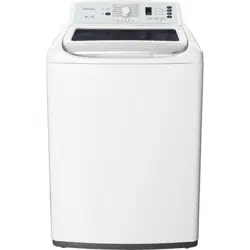
Before using your new product, please read these instructions to prevent any damage.
USER GUIDE
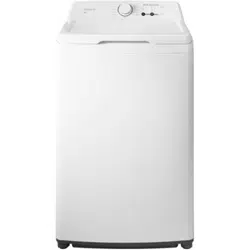
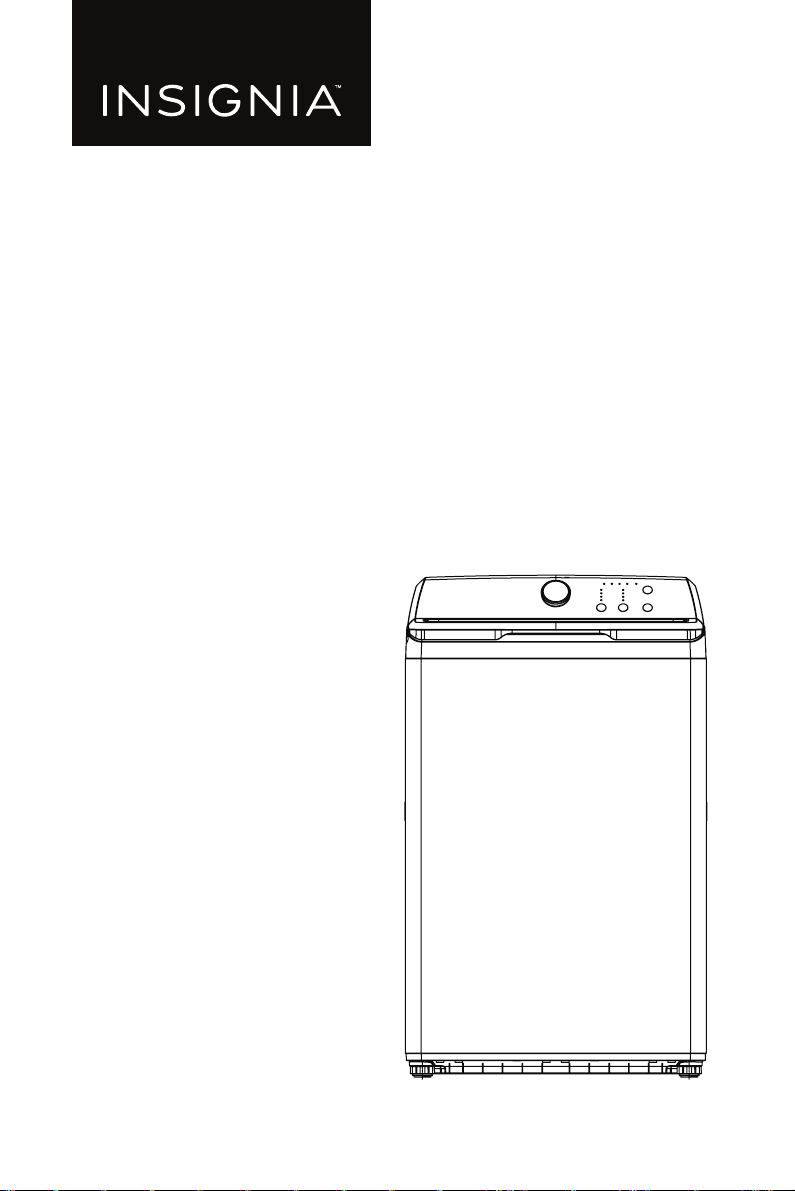
3.7 Cu. Ft. Top Load Washer
NS-TWM35W1
www.insigniaproducts.com
2
Contents
IMPORTANT SAFETY INSTRUCTIONS . . . . . . . . . . . . . . . . . . . . . . . . . . . . . . . . . . . . . 3
Features . . . . . . . . . . . . . . . . . . . . . . . . . . . . . . . . . . . . . . . . . . . . . . . . . . . . . . . . . . . . . . .10
Package contents . . . . . . . . . . . . . . . . . . . . . . . . . . . . . . . . . . . . . . . . . . . . . . . . . .10
Main components. . . . . . . . . . . . . . . . . . . . . . . . . . . . . . . . . . . . . . . . . . . . . . . . . .11
Inside components. . . . . . . . . . . . . . . . . . . . . . . . . . . . . . . . . . . . . . . . . . . . . . . . .12
Control panel . . . . . . . . . . . . . . . . . . . . . . . . . . . . . . . . . . . . . . . . . . . . . . . . . . . . . .13
Unpacking your washer . . . . . . . . . . . . . . . . . . . . . . . . . . . . . . . . . . . . . . . . . . . . . . . .14
Choosing a location . . . . . . . . . . . . . . . . . . . . . . . . . . . . . . . . . . . . . . . . . . . . . . . . . . . .15
Washer dimensions and installation measurements . . . . . . . . . . . . . . . . .15
Electrical requirements . . . . . . . . . . . . . . . . . . . . . . . . . . . . . . . . . . . . . . . . . . . . .18
Water requirements . . . . . . . . . . . . . . . . . . . . . . . . . . . . . . . . . . . . . . . . . . . . . . . .19
Drainage requirements. . . . . . . . . . . . . . . . . . . . . . . . . . . . . . . . . . . . . . . . . . . . .19
Installing your washer . . . . . . . . . . . . . . . . . . . . . . . . . . . . . . . . . . . . . . . . . . . . . . . . . .20
You will need: . . . . . . . . . . . . . . . . . . . . . . . . . . . . . . . . . . . . . . . . . . . . . . . . . . . . . .20
Step 1: Select a location . . . . . . . . . . . . . . . . . . . . . . . . . . . . . . . . . . . . . . . . . . . .20
Step 2: Connect the water hoses . . . . . . . . . . . . . . . . . . . . . . . . . . . . . . . . . . . .20
Step 3: Connect the drain hose . . . . . . . . . . . . . . . . . . . . . . . . . . . . . . . . . . . . .22
Step 4: Level your washer. . . . . . . . . . . . . . . . . . . . . . . . . . . . . . . . . . . . . . . . . . .27
Step 5: Power your washer. . . . . . . . . . . . . . . . . . . . . . . . . . . . . . . . . . . . . . . . . .28
Step 6: Run a test cycle . . . . . . . . . . . . . . . . . . . . . . . . . . . . . . . . . . . . . . . . . . . . .29
Step 7: Protect the power cord. . . . . . . . . . . . . . . . . . . . . . . . . . . . . . . . . . . . . .29
Washing a load of laundry . . . . . . . . . . . . . . . . . . . . . . . . . . . . . . . . . . . . . . . . . . . . . .30
Step 1: Select a detergent . . . . . . . . . . . . . . . . . . . . . . . . . . . . . . . . . . . . . . . . . .30
Step 2: Turn on your washer . . . . . . . . . . . . . . . . . . . . . . . . . . . . . . . . . . . . . . . .30
Step 3: Add detergent and additives to the compartments . . . . . . . . . .30
Step 4: Select the appropriate cycle and options for the load . . . . . . . .32
Step 5: Start your washer . . . . . . . . . . . . . . . . . . . . . . . . . . . . . . . . . . . . . . . . . . .32
Washer options and settings. . . . . . . . . . . . . . . . . . . . . . . . . . . . . . . . . . . . . . . . . . . .33
Maintaining your washer . . . . . . . . . . . . . . . . . . . . . . . . . . . . . . . . . . . . . . . . . . . . . . .34
Cleaning the exterior. . . . . . . . . . . . . . . . . . . . . . . . . . . . . . . . . . . . . . . . . . . . . . .34
Cleaning the interior . . . . . . . . . . . . . . . . . . . . . . . . . . . . . . . . . . . . . . . . . . . . . . .34
Cleaning the control panel . . . . . . . . . . . . . . . . . . . . . . . . . . . . . . . . . . . . . . . . .34
Cleaning the detergent, bleach, or softener compartment . . . . . . . . . . .34
Cleaning the tub . . . . . . . . . . . . . . . . . . . . . . . . . . . . . . . . . . . . . . . . . . . . . . . . . . .34
Storing your washer. . . . . . . . . . . . . . . . . . . . . . . . . . . . . . . . . . . . . . . . . . . . . . . .35
Troubleshooting . . . . . . . . . . . . . . . . . . . . . . . . . . . . . . . . . . . . . . . . . . . . . . . . . . . . . . .35
Understanding the error codes . . . . . . . . . . . . . . . . . . . . . . . . . . . . . . . . . . . . .38
Specifications . . . . . . . . . . . . . . . . . . . . . . . . . . . . . . . . . . . . . . . . . . . . . . . . . . . . . . . . . .39
ONE-YEAR LIMITED WARRANTY . . . . . . . . . . . . . . . . . . . . . . . . . . . . . . . . . . . . . . . . .40
SAFETY & PRECAUTIONS
3
www.insigniaproducts.com
IMPORTANT SAFETY
INSTRUCTIONS
SAVE THESE INSTRUCTIONS
This User Guide contains important information on the installation, use, and care of
your appliance. Please read this guide carefully before installation and operation
of this machine to prevent injury and property damage.
The Warnings and Important Safety Instructions in this guide do not cover all
possible conditions and situations that may occur. It is your responsibility to use
common sense, caution, and care when installing, maintaining, and operating
your washer.
CAUTION
RISK OF ELECTRIC SHOCK
DO NOT OPEN
WARNING:
This indicates that hazards or unsafe practices may
cause serious personal injury or death.
To reduce the risk of fire, explosion, electric shock, or personal injury
when using your washing machine, follow these basic safety
precautions.
CAUTION: This indicates that hazards or unsafe practices may
cause minor personal injury or property damage.
This symbol indicates that there are important operating and
maintenance instructions in the literature accompanying your
washing machine.
State of California Proposition 65
Warnings
WARNING:
Cancer and Reproductive Harm–www.P65Warnings.ca.gov.
WARNING:
Do not store or use gasoline or other flammable vapors and liquids in
the vicinity of this or any other appliance.
SAFETY & PRECAUTIONS
4
www.insigniaproducts.com
Basic precautions
1 Read all instructions before using the appliance.
2 Use this appliance only for its intended purpose as described in this User
Guide.
3 Before use, the washer must be properly installed as described in this guide.
4 Always follow the fabric care instructions supplied by the garment
manufacturer.
5 Do not wash or dry articles that have been previously cleaned in, washed in,
soaked in, or spotted with gasoline, dry-cleaning solvents, or other flammable
or explosive substances as they give off vapors that could ignite or explode.
6 Do not allow children to play on or in the appliance. Close supervision of
children is necessary when the appliance is used near children.
7 Before the appliance is removed from service or discarded, remove the lid of
the washing compartment.
8 Do not reach into the appliance if the tub is moving.
9 Do not install or store this appliance where it will be exposed to the weather
or freezing temperatures.
10 Do not tamper with the controls.
11 Do not repair or replace any part of the appliance or attempt any servicing
unless it is specifically recommended in the user-maintenance instructions or
in published user-repair instructions that you understand.
12 Under certain conditions, hydrogen gas may be produced in a hot-water
system that has not been used for two weeks or more. HYDROGEN GAS IS
EXPLOSIVE. If the hot-water system has not been used for such a period,
before using a washing machine, turn on all hot-water faucets and let the
water flow from each for several minutes. This will release any accumulated
hydrogen gas. As the gas is flammable, do not smoke or use an open flame
during this time.
13 Keep the area underneath and around your appliance free of combustible
materials (lint, paper, rags, and so on), gasoline, chemicals, and other
flammable vapors and liquids.
14 Do not place items exposed to cooking oil in your washer. Items contaminated
with cooking oil may contribute to a chemical reaction that could cause a load
to catch fire.
15 This washer is not designed for maritime use or for mobile installations such as
in RVs, aircraft, and other mobile platforms.
16 Turn off the water faucets and unplug the washer if the machine is to be left
for an extended period of time, such as during vacations.
17 Packaging material can be dangerous for children. There is a risk of
suffocation! Keep all packaging away from children.
18 Always check the inside of the washer for foreign objects before loading
laundry. Keep the lid closed when not in use.
WARNING

SAFETY & PRECAUTIONS
5
www.insigniaproducts.com
19 Do not add gasoline, dry-cleaning solvents, or other flammable or explosive
substances to the wash water. These substances give off vapors that could
ignite or explode.
Installation warnings and precautions
1 Plug the power cord into an AC 120 V/60 Hz wall socket rated at 15 amps or
higher. Use the socket for this washer only. Do not use an extension cord.
• Sharing a wall socket with another appliance, using a power strip, or
extending the power cord may result in electric shock or fire.
• Do not use an electric transformer. It may result in electric shock or fire.
• Make sure that the power voltage, frequency, and current match the
product's specifications. Failing to do so may result in electric shock or fire.
2 Remove all foreign substances such as dust or water from the power plug
terminals and contact points using a dry cloth on a regular basis.
• Unplug the power plug and clean it with a dry cloth.
• Failing to do so may result in electric shock or fire.
3 Plug the power plug into the wall socket in the right direction so that the cord
runs towards the floor.
• If you plug the power plug into the socket in the opposite direction, the
electric wires within the cable may be damaged and this may result in
electric shock or fire.
4 Plug the power plug into the wall socket firmly. Do not use a damaged power
plug, or loose wall socket, because this may result in electric shock or fire.
5 Do not pull or excessively bend the power cord. Do not twist or tie the power
cord.
6 Do not hook the power cord over a metal object, place a heavy object on the
power cord, insert the power cord between objects, or push the power cord
into the space behind the appliance, because this may result in electric shock
or fire.
7 Do not pull the power cord when unplugging the power plug.
• Unplug the power plug by holding the plug.
• Failing to do so may result in electric shock or fire.
8 If the power plug or power cord are damaged, contact your nearest service
center.
9 Do not install on carpet. Install the washer on a level and solid floor that can
support its weight. Failure to do so may result in abnormal vibrations, noise, or
problems with the product.
10 The washer is heavy. Two or more people may be needed to install and move
the appliance. Failure to do so may result in bodily or other injuries.
11 Store and install the washer where it will not be exposed to temperatures
below freezing or exposed to outdoor weather conditions. Failure to do so
may result in serious leak damage.
12 Position the appliance so that the power plug is easily accessible. Failure to do
so may result in electric shock or fire due to an electrical short circuit.
WARNING
SAFETY & PRECAUTIONS
6
www.insigniaproducts.com
13 Failure to closely follow these instructions may result in an abnormal vibrating
and out-of-balance condition that could result in physical injury, property
damage, and/or appliance damage.
Use and maintenance warnings and precautions
1 If the appliance is flooded, cut the power immediately and contact your
nearest service center.
2 If the appliance emits a strange noise, a burning smell, or smoke, unplug the
power plug immediately and contact your nearest service center. Failure to do
so may result in electric shock or fire.
3 In the event of a gas leak (such as propane or LP gas), ventilate the area
immediately. Do not turn any appliance or light on or off.
• Do not use a ventilating fan.
• A spark may result in an explosion or fire.
4 Do not force the washer lid open while the washer is operating
(high-temperature washing, drying, or spinning).
• Water flowing out of the washer may cause burns or cause the floor to be
slippery. This may result in injury.
• Forcing the lid open can damage the product or cause injury.
5 Make sure to remove the packaging (sponge, styrofoam) attached to the
bottom of the washer before using it.
6 Do not insert your hand or a metal object under the washer. This may result in
injury.
7 Do not attempt to operate this appliance if it is damaged, malfunctioning,
partially disassembled, or has missing or broken parts, including a damaged
cord or plug. This may result in electric shock, fire, or death.
8 Do not touch the power plug with wet hands. This may result in electric shock.
9 Do not turn the appliance off by unplugging the power plug while the washer
is in operation. Plugging the power plug into the wall socket again may cause
a spark and result in electric shock or fire.
10 Keep all packaging material well out of the reach of children, as packaging
materials can be dangerous to children. If a child places a bag over his or her
head, he or she may suffocate.
11 Do not let children or infirm persons use this washer unsupervised. Failure to
do so may result in electric shock, burns, or injury.
12 Do not attempt to repair, disassemble, or modify the appliance yourself.
• Do not use any fuse (such as copper, steel wire, etc.) other than the standard
fuse.
• If you need to repair or reinstall the appliance, contact your nearest service
center.
• Failure to do so may result in electric shock, fire, problems with the product,
or injury.
13 If any foreign substance such as water enters the appliance in any area other
than the tub, unplug the power plug and contact your nearest service center.
Failure to do so may result in electric shock or fire.
WARNING

SAFETY & PRECAUTIONS
7
www.insigniaproducts.com
14 If the water supply hose comes loose from the faucet and floods the
appliance, unplug the power plug. Failure to do so may result in electric shock
or fire.
15 Do not mix chlorine bleach with ammonia or acids such as vinegar. Incorrect
usage can produce poisonous gas, resulting in serious injury.
16 Do not reach into the washer while parts are moving. Before loading,
unloading, or adding items, press the (start/pause) button and allow the
tub to come to a complete stop before reaching inside. Failure to do so may
result in electric shock, injury, or fire.
17 Do not allow children to play on or in the washer. Close supervision of children
is necessary when the washer is used near children. As children grow, teach
them the proper, safe use of all appliances. Failure to do so may result in
serious injury.
18 Keep laundry products out of reach of children. Observe all warnings on
product labels and follow them. Failure to do so may result in serious injury.
19 Disconnect this appliance from the power supply before attempting any user
maintenance. Pressing the (power) button does not disconnect this
appliance from the power supply. Failure to do so may result in electric shock,
injury, or fire.
20 Do not clean the appliance by spraying water directly onto it.
21 Do not use benzene, thinner, or alcohol to clean the appliance. This may result
in discoloration, deformation, damage, electric shock, or fire.
22 Unplug the power plug when the appliance is not being used for long periods
of time or during a thunder/lightning storm. Failure to do so may result in
electric shock or fire.
23 Keep hands and foreign objects clear of the lid and latch area when closing
the lid. Failure to do so may result in personal injury.
24 If the washer is contaminated by a foreign substance such as detergent, dirt,
or food waste, unplug the power plug and clean the washer with a damp, soft
cloth. Failure to do so may result in discoloration, deformation, damage, or
rust.
25 The clear portion of the lid can be broken by a strong impact. Take care when
using the washer. If the clear portion is cracked or broken, it may result in
injury.
26 After a water supply failure or when reconnecting the water supply hose, open
the faucet slowly.
27 Open the faucet slowly after a long period of non-use. The air pressure in the
water supply hose or the water pipe may result in damage to a part or in water
leakage.
28 If a drain error occurs during an operation, check if there is a draining problem.
If the washer is used when it is flooded because of a draining problem, it may
result in electric shock or fire due to an electrical short circuit. Do not insert
your hand or a metal object under the washer. This may result in injury.
29 Insert laundry into the washer completely so that the laundry does not get
caught in the lid. If laundry gets caught in the lid, it may result in damage to
the laundry or the washer, or result in water leakage.
30 Make sure that the faucet is turned off when the washer is not being used.
SAFETY & PRECAUTIONS
8
www.insigniaproducts.com
31 Make sure that the water supply hose connectors are properly tightened.
Failure to do so may result in property damage or injury.
32 Open the faucet and check if the water supply hose connector is firmly
tightened and that there is no water leaking before using the product. If the
water supply hose connectors are loose, it may result in water leakage.
33 Do not stand on top of the appliance or place objects (such as laundry, lighted
candles, lighted cigarettes, dishes, chemicals, metal objects, etc.) on the
appliance. This may result in electric shock, fire, problems with the product, or
injury.
34 Do not operate the appliance with wet hands. This may result in electric shock.
35 Do not spray volatile material such as insecticide onto the surface of the
appliance. As well as being harmful to humans, it may also result in electric
shock, fire, or problems with the product.
36 Do not place an object that generates an electromagnetic field near the
washer. This may result in injury due to a malfunction.
37 Since the water drained during a high temperature wash or drying cycle is hot,
do not touch the water. This may result in burns or injury.
38 Do not wash, spin, or dry water-proof seats, mats, or clothing.
39 Do not wash thick, hard mats even if the washer mark is on the care label. This
may result in injury or damage to the washer, walls, floor, or clothing due to
abnormal vibrations.
40 Do not operate the washer when the detergent dispenser is removed. This
may result in electric shock or injury due to water leakage.
41 Do not insert your hand into the detergent dispenser after opening it. This
may result in injury because your hand may be caught.
42 Do not place any non-laundry objects, such as shoes, food waste, or animals
into the washer. This can cause abnormal vibrations that can damage the
washer, and, in the case of pets, cause severe injury or death.
43 Do not press the buttons using sharp objects such as pins, knifes, or
fingernails. This may result in electric shock or injury.
44 Do not wash laundry contaminated by oils, creams, or lotions usually found in
skin-care shops or massage clinics. This may result in the rubber seal
becoming deformed and water leakage.
45 Make sure that the water inlet pipe is connected and the tap is opened before
washing clothes.
46 Do not leave metal objects (safety pins, hair pins, and so on) or bleach in the
tub for long periods of time. This may cause the tub to rust.
• If rust appears on the surface of the tub, apply a neutral cleansing agent to
the surface and use a sponge to clean it. Never use a metal brush.
47 Do not use hot water from water cooling/heating devices. This may result in
problems with the washer.
48 Do not use natural hand-washing soap in the washer. If it hardens and
accumulates inside the washer, it may cause problems with the product,
discoloration, rust, or bad odors.

SAFETY & PRECAUTIONS
9
www.insigniaproducts.com
49 If using a washing net with this machine (not provided), do not wash laundry
items such as bedding in the washing net. Doing so may result in injury due to
abnormal vibrations. Place only smaller items, such as lace socks and lingerie,
in the washing net.
50 Do not use hardened powdered detergent. If it accumulates inside the washer,
it may result in water leakage.
51 Do not wash throw rugs or doormats. Doing so may cause sand to accumulate
inside the washer, resulting in mechanical problems.
52 Do not wash water-resistant or water-repellent clothing. This may result in an
abnormal vibrating and out-of-balance condition that could result in physical
injury, property damage and/or appliance damage.
Grounding/Earthing
1 This appliance must be grounded. In the event of malfunction or breakdown,
grounding will reduce the risk of electric shock by providing a path of least
resistance for electric current. This appliance is equipped with a cord having
an equipment-grounding conductor and a grounding plug. The plug must be
plugged into an appropriate outlet that is properly installed and grounded in
accordance with all local codes and ordinances.
2 WARNING: Do not ground the appliance to a gas pipe, plastic water
pipe, or telephone.
Improper connection of the equipment-grounding conductor can result in a
risk of electric shock, fire, explosion, or problems with the product. Check with
a qualified electrician or serviceman if you are in doubt as to whether the
appliance is properly grounded.
3 Do not modify the plug provided with the appliance – if it will not fit the
outlet, have a proper outlet installed by a qualified electrician.
Choosing a proper location
1 Do not install this appliance near a heater or inflammable material.
2 Do not install this appliance in a humid, oily, or dusty location, or in a location
exposed to direct sunlight or water (rain drops).
3 Do not install this appliance in a location where gas may leak. Failure to do so
may result in electric shock or fire.
4 If the washer is moved to a new location, have it checked and re-installed by a
qualified service technician. Failure to follow this warning may result in
electric shock or fire.
FEATURES
10
www.insigniaproducts.com
Features
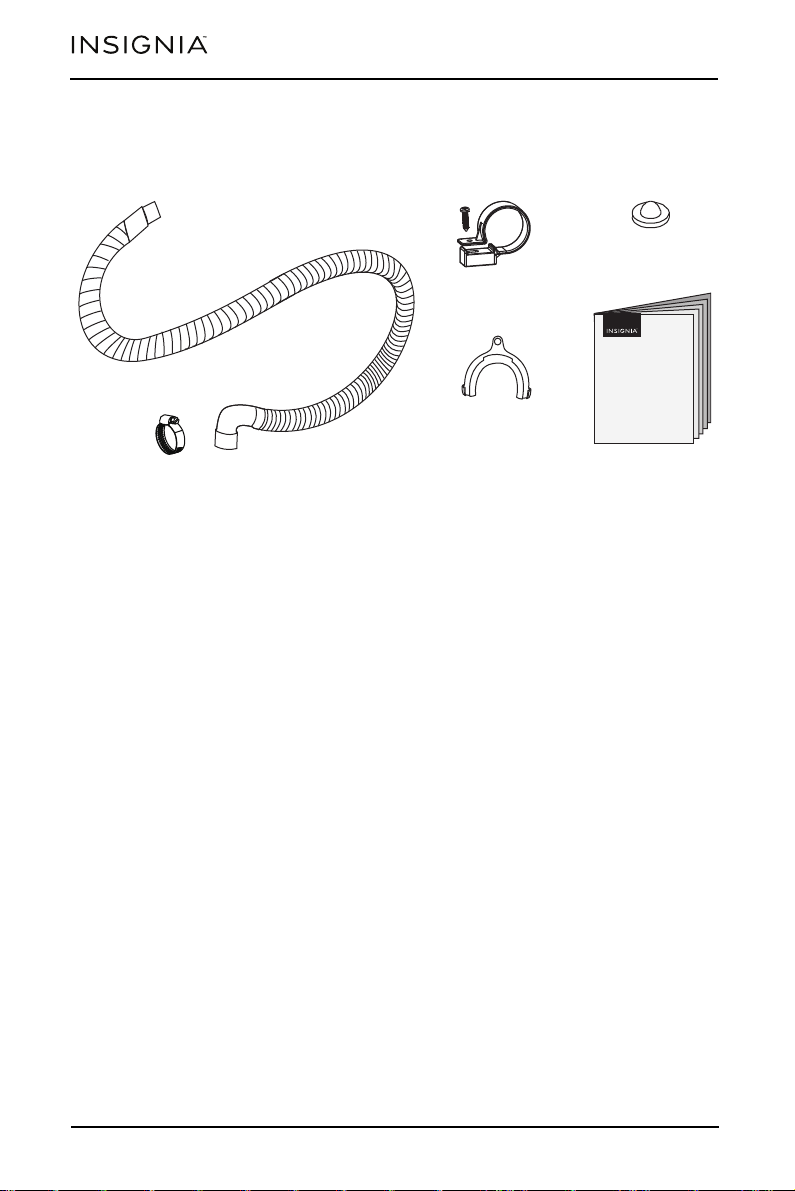
Package contents
Make sure that the following items came with your washer:
Drain hose and clamp (1)
Hose holder (1)
User Guide
Hose clamp (2)
Filter (2)
11
FEATURES
www.insigniaproducts.com
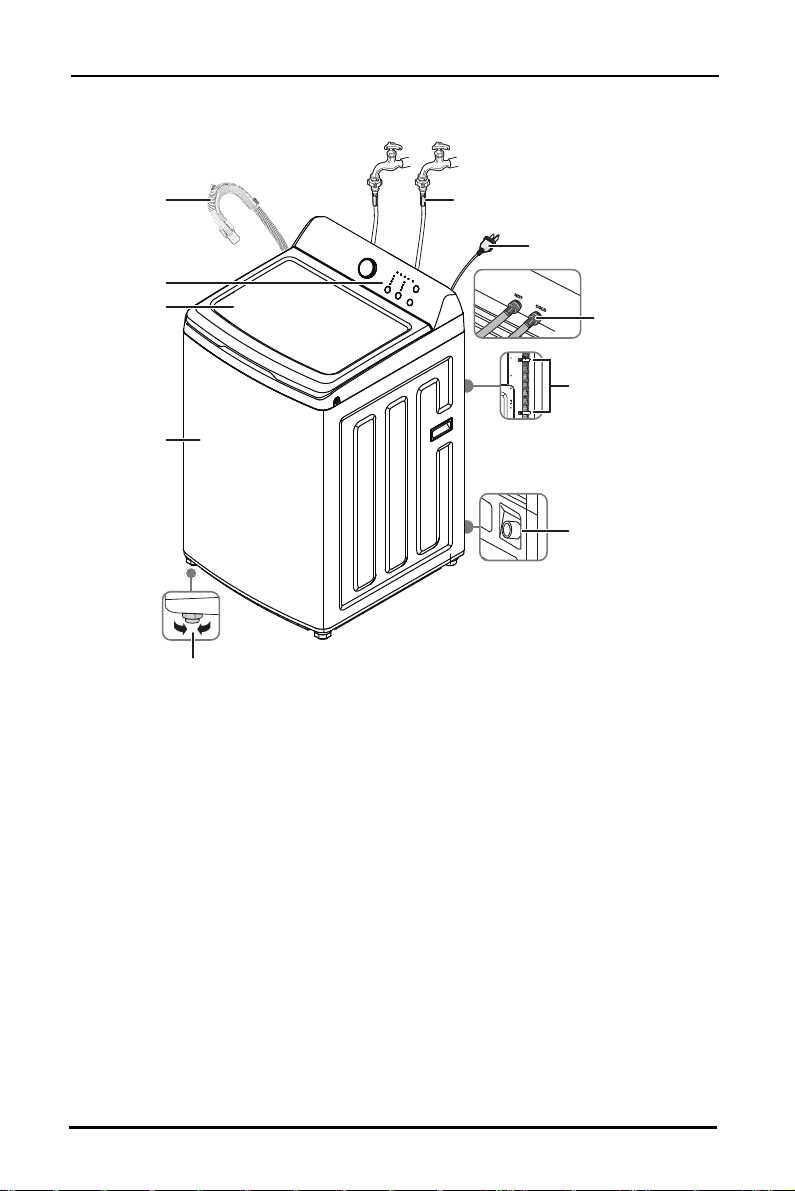
Main components
Top lid
Drain hose and
holder
Cabinet
Faucets and water inlet hoses
(not included)
Adjustable legs (2) (front)
Control panel
Water inlet valves
(on the back)
Power cord
Drain hose outlet
Attach hose clamps to
predrilled holes
FEATURES
12
www.insigniaproducts.com
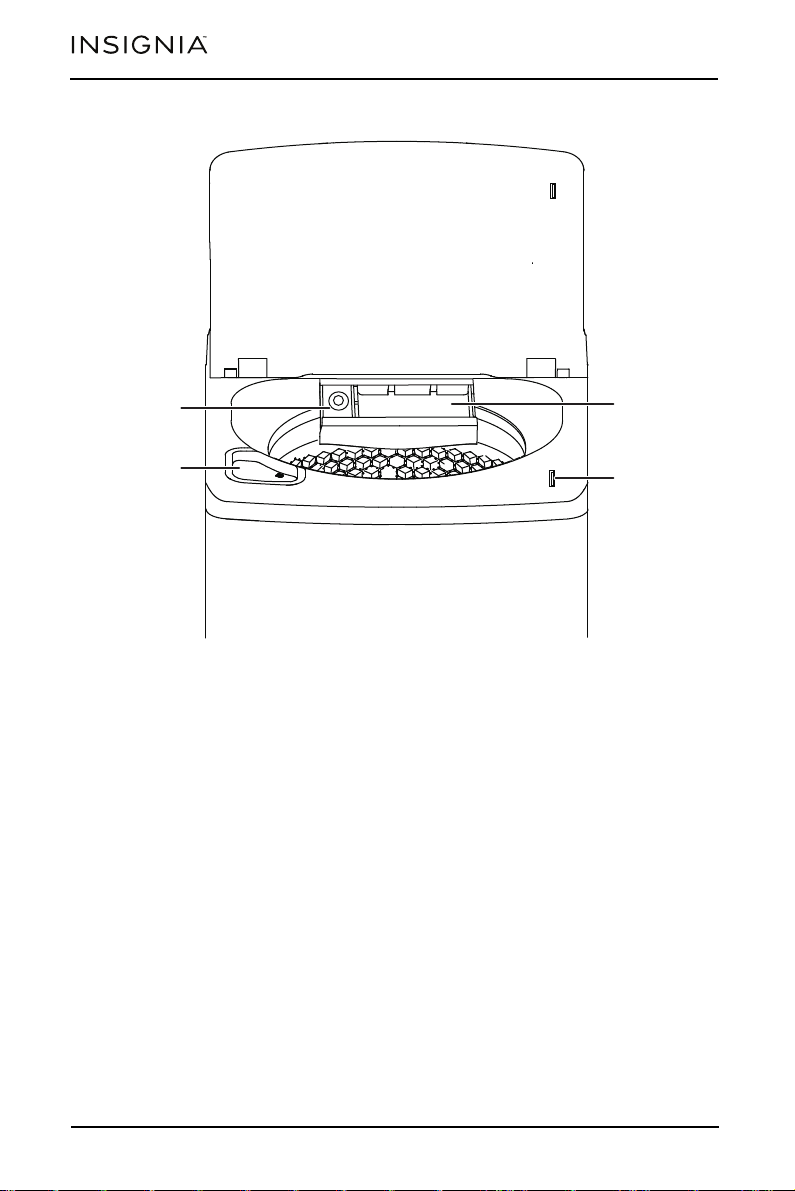
Inside components
Detergent
compartment
Chlorine bleach
compartment
Fabric softener
compartment
Lid lock
FEATURES
13
www.insigniaproducts.com
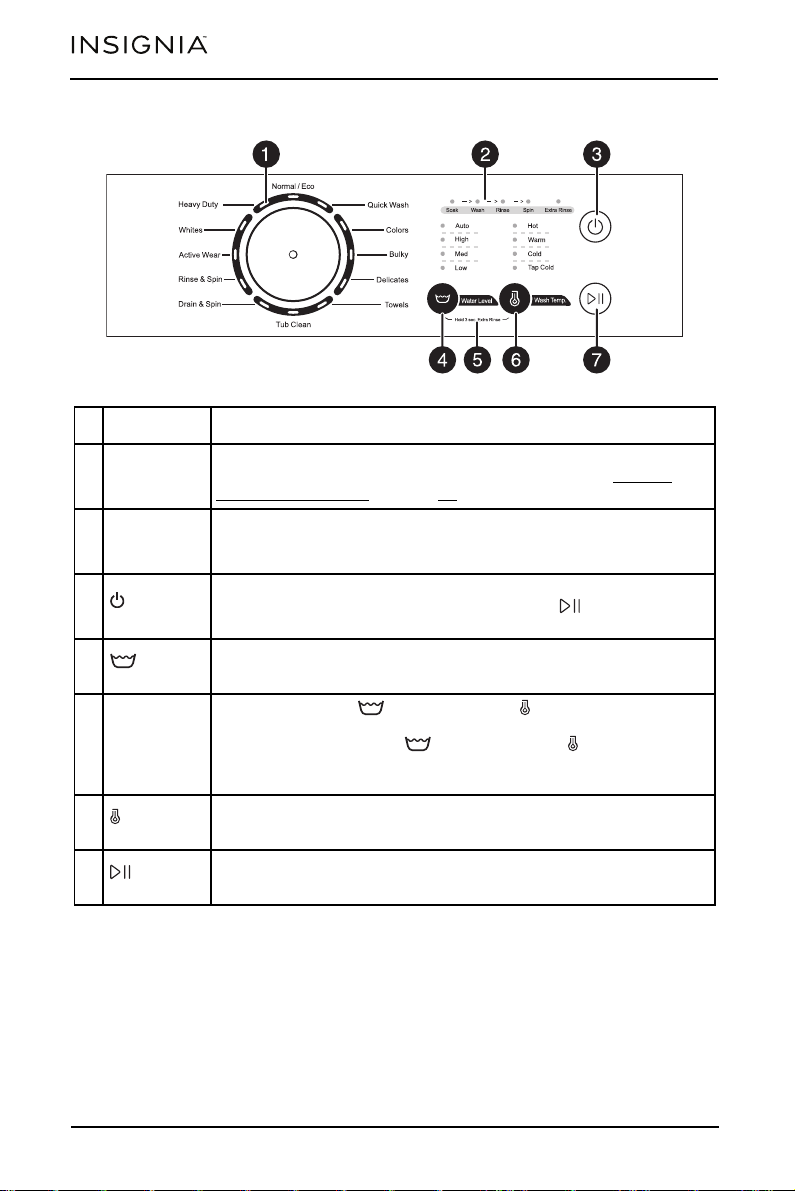
Control panel
# ITEM DESCRIPTION
1
Cycle
selector
Turn to select a wash cycle. The cycle you select determines the
wash pattern for the cycle. For more information, see Washer
options and settings on page 33.
2
Cycle status
lights
Light to indicate what part of the cycle your washer is in. For
example, the Soak light flashes when your washer is in the soak
process.
3
/ (power)
button
Press to turn on your washer. Press again to turn off your washer. If
you leave your washer on and don’t press the (start/pause)
button within 10 minutes, your washer automatically turns off.
4
Water
Level
Press to select a water level.
5
Extra Rinse
Press and hold the Water Level and Wash Temp. buttons at
the same time for three seconds to add an extra rinse to the wash
cycle. Press and hold the Water Level and Wash Temp.
buttons at the same time for three seconds to cancel the extra
rinse.
6
Wash
Temp.
Press to select the wash water temperature. The rinse water
temperature is always cold.
7
(start/pause)
Press to start the wash cycle. Press again to pause the cycle.

INSTALLATION INSTRUCTIONS
14
www.insigniaproducts.com
Unpacking your washer
• Remove the packing box, then lift your washer up and away from the foam
base cushion. Open the lid of your washer to take out all accessories including
the protective foam.
WARNINGS:
• Packing materials can be dangerous to children. Keep all packing materials
(plastic bags, polystyrene, and so on) well out of the reach of children.
• Don’t operate your washer on the foam base cushion. Doing so results in
serious vibration, which could cause equipment damage or result in physical
injury.
CAUTION:
Your washer is heavy. You may need help to unpack and move it.
Foam base
cushion
Protective
foam
15
www.insigniaproducts.com
INSTALLATION INSTRUCTIONS
Choosing a location
• For best performance, you must install your washer on a solid, level floor.
• Wooden floors may need to be reinforced to minimize vibration or
unbalanced load situations.
• Carpeting and soft tile surfaces can contribute to excessive vibration, which
can cause your washer to move slightly during the spin cycle.
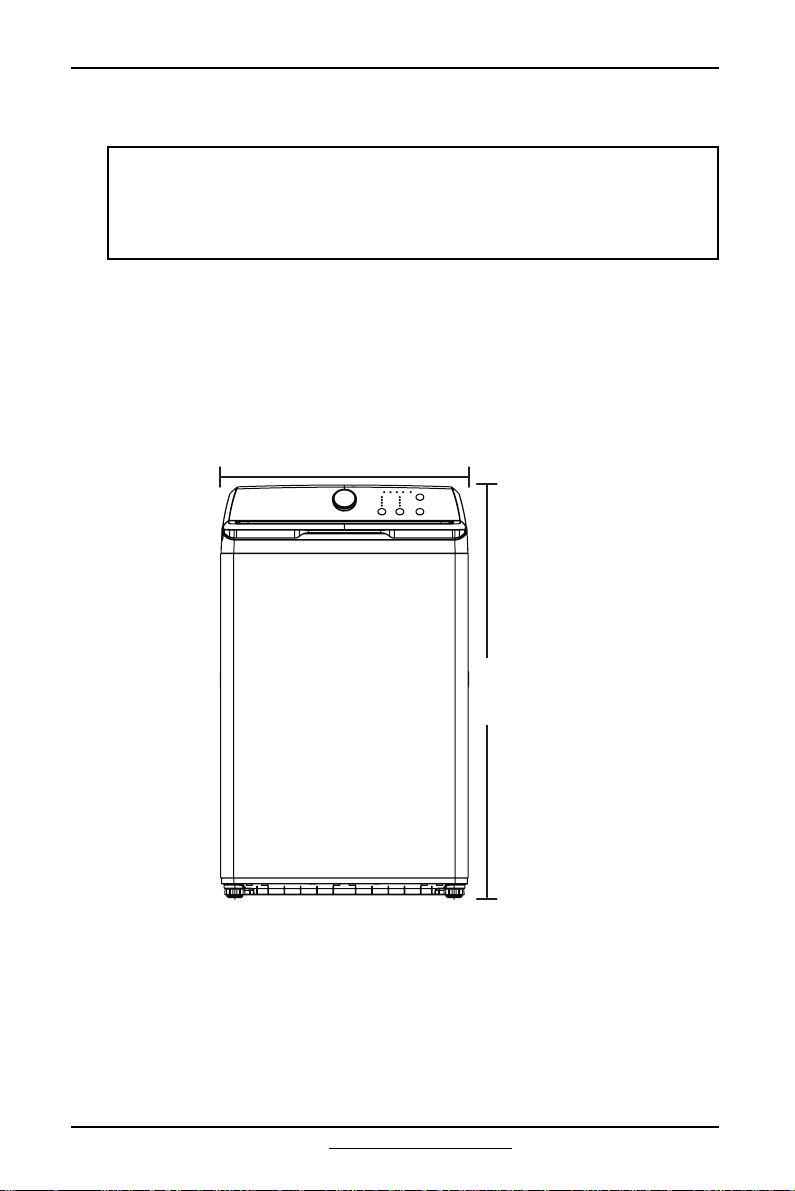
Washer dimensions and installation measurements
Front
WARNINGS:
• Don’t install your washer in areas where water may freeze because your
washer always retains some water in its water valve, pump, and hose areas.
Frozen water can damage the belts, pump, hoses, and other components.
• Never install on a platform or weakly supported structure.
42.2 in. (107.2 cm)
25.2 in. (64 cm)
INSTALLATION INSTRUCTIONS
16
www.insigniaproducts.com
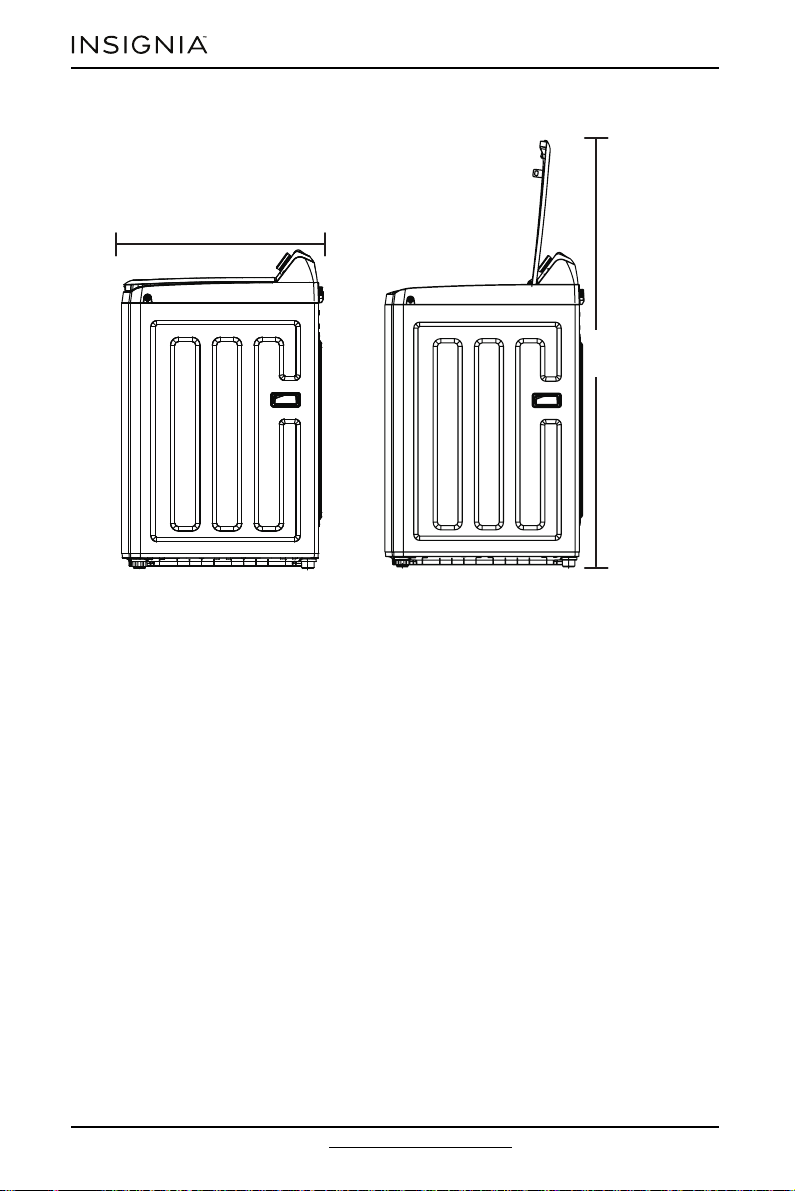
Side
57.9 in. (147 cm)
27 in. (68.6 cm)
17
www.insigniaproducts.com
INSTALLATION INSTRUCTIONS
Installing in an alcove or closet
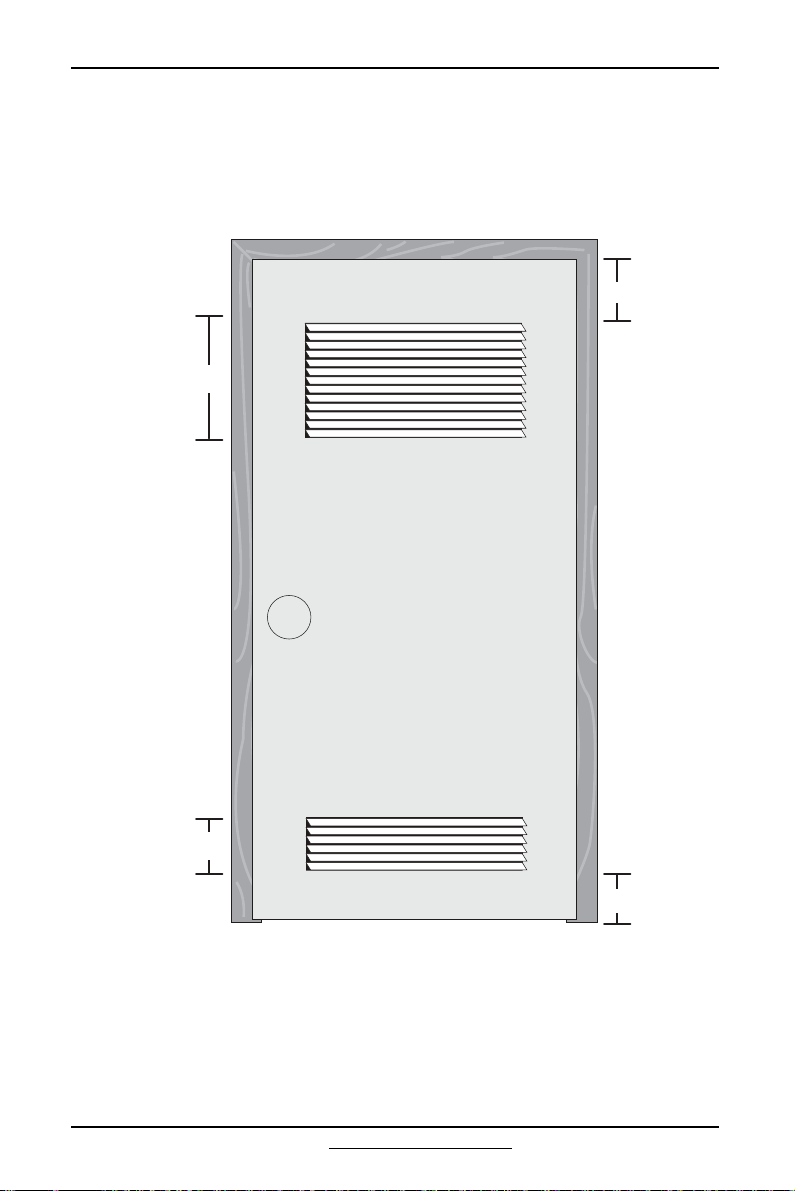
If you install your washer in an alcove or closet, the front of the closet must have
two unobstructed air openings for a combined minimum total area of 72 sq. in.
(465 sq. cm) with a minimum clearance of 3 in. (7.6 cm) at the top and bottom. A
slatted door with equivalent space clearance is acceptable.
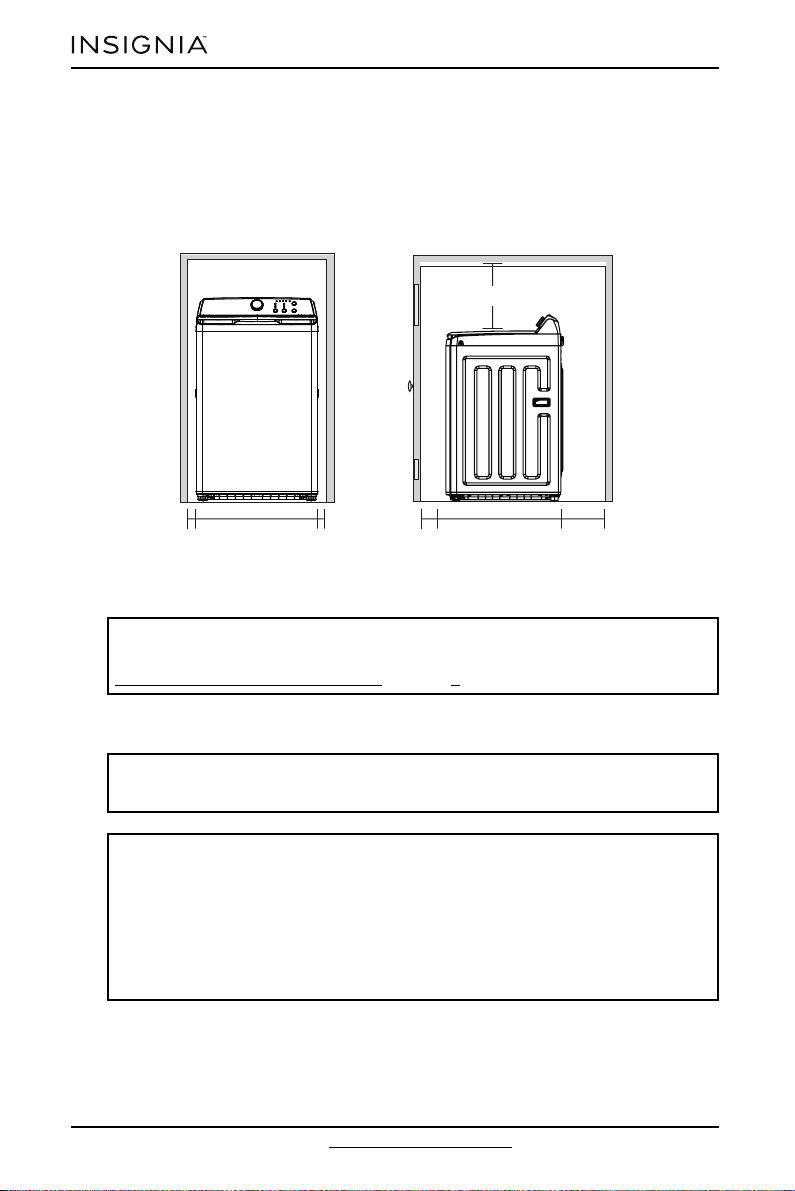
Minimum clearances between your washer and adjacent walls or other surfaces
are:
• Either side: 1 in. (2.5 cm)
• Rear: 6 in. (15.2 cm)
• Closet Front: 2 in. (5.1 cm)
• Top : 24 in. (61 cm)
48 sq. in. (310 sq. cm)
24 sq. in. (155 sq. cm)
3 in. (7.6 cm)
3 in. (7.6 cm)
INSTALLATION INSTRUCTIONS
18
www.insigniaproducts.com
• Gap between the end of the water valve and the wall:
• Case 1: If you connect the supply hose after you install your washer: Over
3.9 in. (10 cm)
• Case 2: If you connect the supply hose before you install your washer: Over
2.8 in. (7 cm)
If you install your washer and dryer side-by-side in a closet, the closet front must
have an unobstructed air opening of at least 72 sq. in. (465 sq. cm).
Electrical requirements
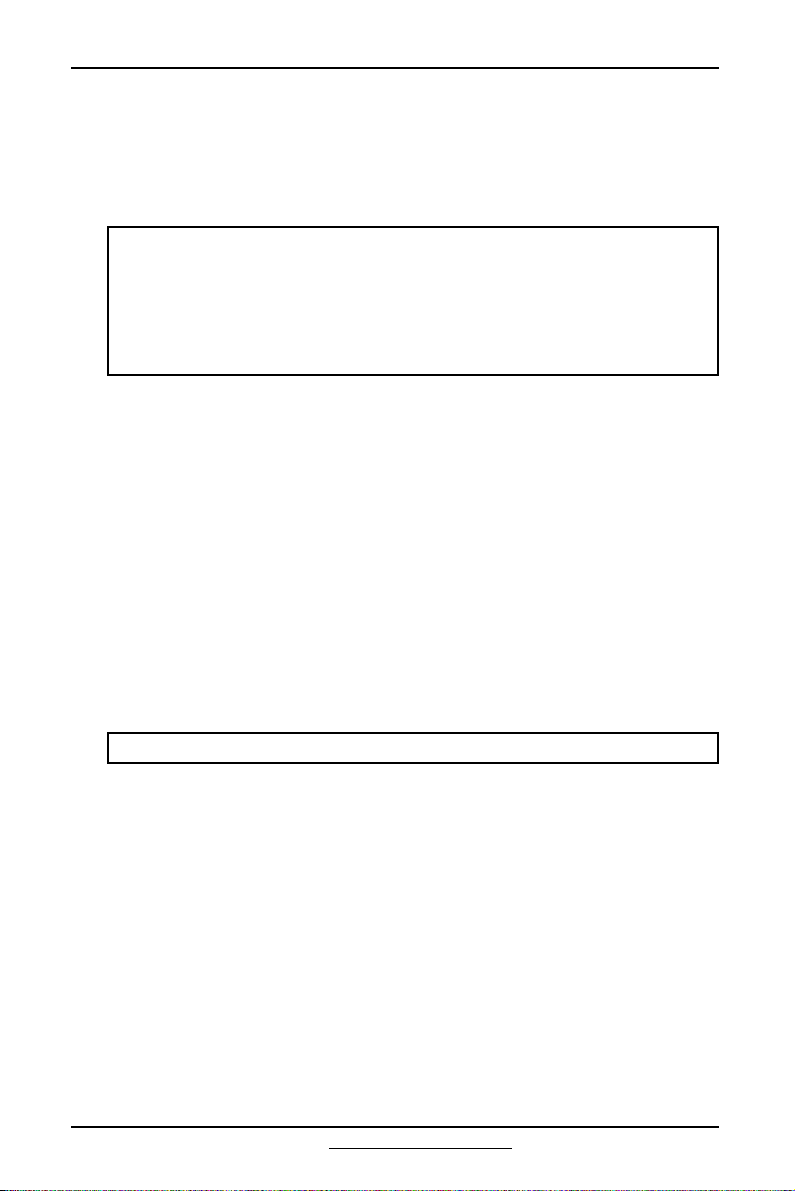
Use a 120 Volt, 60 Hz, 15 amp fuse or circuit breaker. We recommend an individual
branch circuit that serves only your washer.
WARNING:
To reduce the risk of fire, electric shock, or injury to persons, read the
IMPORTANT SAFETY INSTRUCTIONS on page 3 before operating your washer.
WARNING:
Never use an extension cord.
WARNING:
Certain internal parts are intentionally not grounded and may present a risk of
electric shock only during servicing. Service Personnel: Do not contact the
following parts while the appliance is energized:
•Electric
•Valve
•Retractor
• Motor pump.
27 in. (68.6 cm)
1 in.
(2.5 cm)
1 in.
(2.5 cm)
2 in.
(5.1 cm)
24 in. (61 cm)
6 in.
(15.2 cm)
25 in. (64 cm)
19
www.insigniaproducts.com
INSTALLATION INSTRUCTIONS
Electrical grounding is required for your washer.
• You must ground your washer. In the event of a malfunction or breakdown,
grounding reduces the risk of electric shock by providing a path of least
resistance for the electric current.
• Your washer has a power cord with a three-pronged grounding plug for use in
a correctly installed and grounded outlet.
Water requirements
To fill your washer in the correct amount of time, the water pressure needs to be
between 29 and 116 psi (200 to 800 kPa).
If the water pressure is less than 14 psi (100 kPa):
• The water valve may fail or may not shut off completely.
• The time it takes to fill your washer may be longer than the time your washer
controls allow. Your washer turns off and reports an error. A time-limit is built
into the controls to prevent flooding in your home if a hose becomes loose.
• Water inlet hoses must be purchased separately. You can buy inlet hoses in
various lengths up to 8 ft. (240 cm).
• To avoid the possibility of water damage:
• Make sure that the water faucets are easily accessible.
• Turn off the faucets when you aren’t using it.
• Periodically check to make sure that water isn’t leaking from the water hose
fittings.
Drainage requirements
• The recommended height for the drain standpipe is 48 in. (122 cm).
• The drain hose must be routed through the hose holder to the standpipe.
• The standpipe must be large enough to accept the outside diameter of the
drain hose.
WARNINGS:
• You’re responsible for providing adequate electrical services for your washer.
• To prevent unnecessary risk of fire, electrical shock, or personal injury, all
wiring and grounding must be done in accordance with the National Electrical
Code ANSI/FNPA, No.70 Latest Revision and local codes and ordinances.
• Never connect the ground wire to plastic plumbing lines, gas lines, or hot
water pipes.
Note: The drain hose is inside your washer tub.
INSTALLATION INSTRUCTIONS
20
www.insigniaproducts.com
Installing your washer
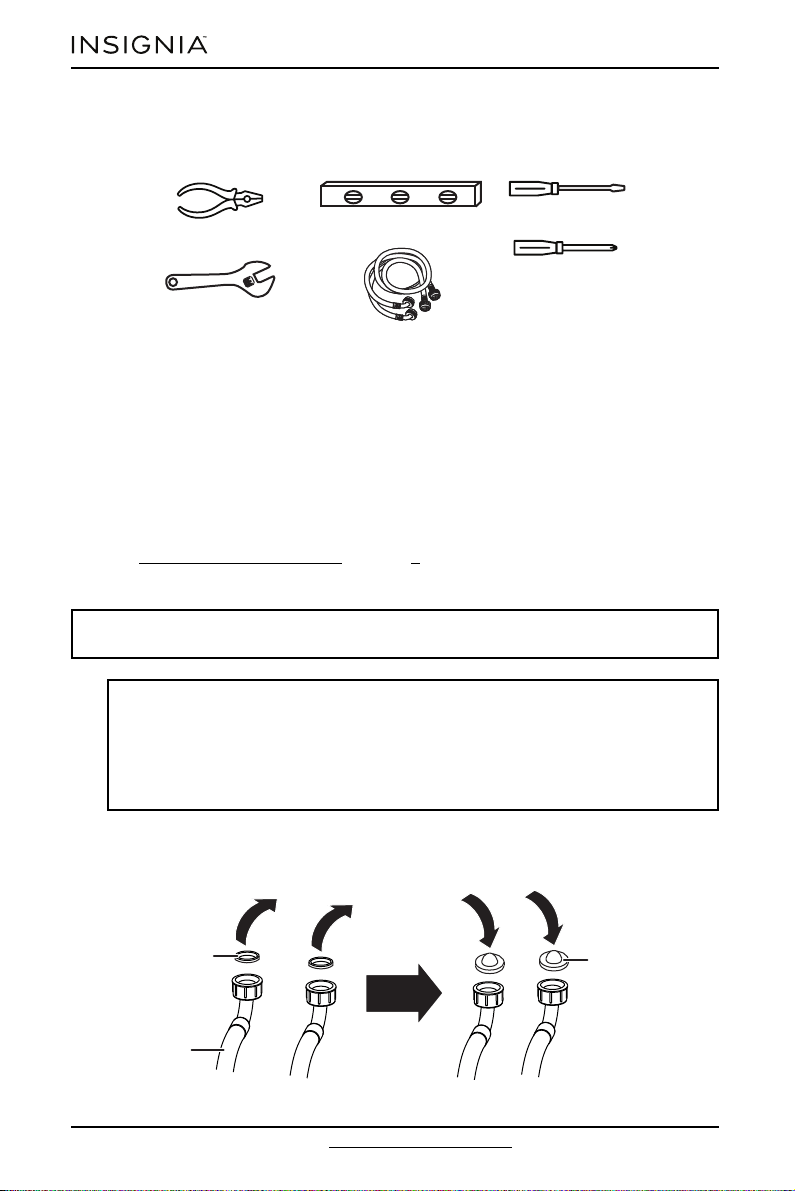
You will need:
Step 1: Select a location
Before you install your washer, make sure that the location:
• Is a hard, level surface without carpeting or soft flooring that can obstruct
ventilation.
• Is away from direct sunlight.
• Has adequate ventilation.
• Isn’t exposed to freezing temperatures (32° F or 0° C).
• Is away from heat sources such as oil or gas.
• Has enough space so that your washer doesn’t rest on its power cord.
See Choosing a proper location
on page 9.
Step 2: Connect the water hoses
1 Before connecting the water-inlet hose to the tap, remove the rubber washer
inside the water-inlet hose connector. Take the rubber washer with filter out of
the accessory bag and install it into the water-inlet hose connector.
Note: The water supply hoses aren’t supplied with your washer and must be
purchased separately.
CAUTIONS:
• Use new water supply hoses. Using old hoses can result in leakage or overflow
that can damage your property.
• Don’t connect multiple water supply hoses together to increase the length of
the hose. Hoses connected this way can leak and cause electrical shock. If a
hose is too short, replace the hose with a longer, high-pressure hose.
Pliers
Phillips screwdriver
Level
Flat-head screwdriver
Wrench
Washer inlet hoses
Rubber washer
Inlet hose
Hose filter

21
www.insigniaproducts.com
INSTALLATION INSTRUCTIONS
2 Tighten the hose and faucet fittings by hand until they are snug. Tighten them
an additional two-thirds of a turn with pliers or a wrench. Pull the water supply
hoses downwards to make sure that they are connected securely.
3 Place the unconnected ends of the hoses into a bucket, then turn on the
faucets connected to the water supply hoses for 10 or 15 seconds to remove
any foreign substances. Turn off the faucets.
CAUTION:
Don’t overtighten the fittings or apply tape or sealant to the faucets or water
supply intakes. This can damage the fittings.
HotCold
Filter
INSTALLATION INSTRUCTIONS
22
www.insigniaproducts.com
Step 3: Connect the drain hose
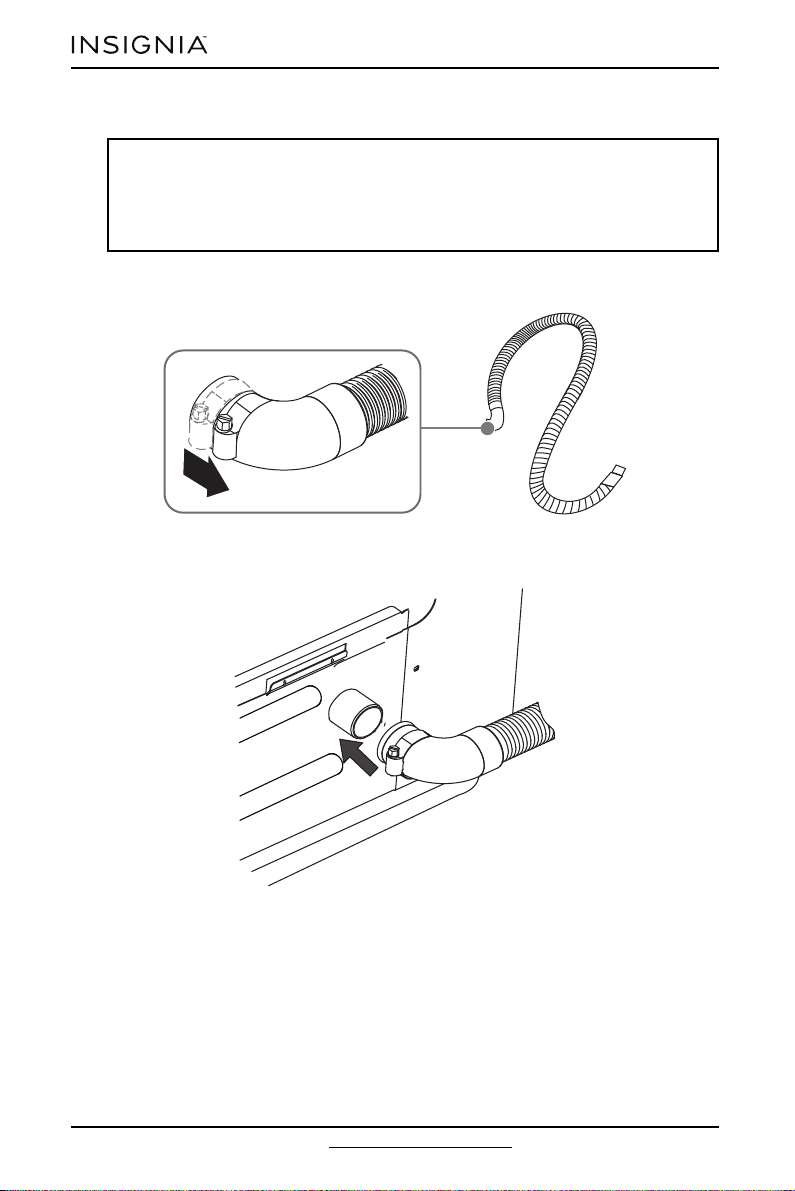
1 Find the end of the drain hose that has the clamp, then slide the clamp away
from the end of the hose.
2 Insert the drain hose with the clamp onto your washer’s drain pipe. Make sure
that the drain hose completely covers the end of the drain pipe.
CAUTIONS:
• Failure to slide the drain hose completely over your washer’s drain pipe may
result in water leakage.
• Failure to move the clamp or hoop onto your washer’s drain pipe results in
water leakage.
23
www.insigniaproducts.com
INSTALLATION INSTRUCTIONS
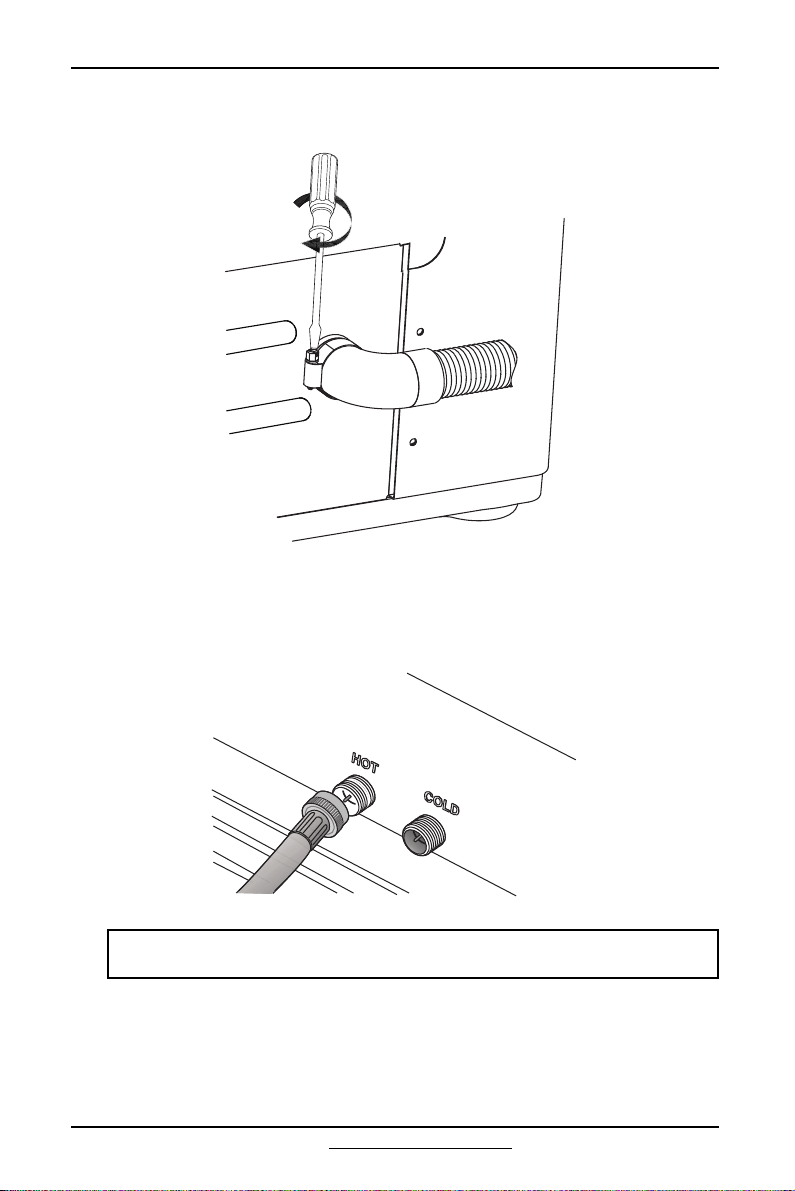
3 Move the clamp toward the drain pipe outlet. Tighten the clamp with a
flat-head screwdriver.
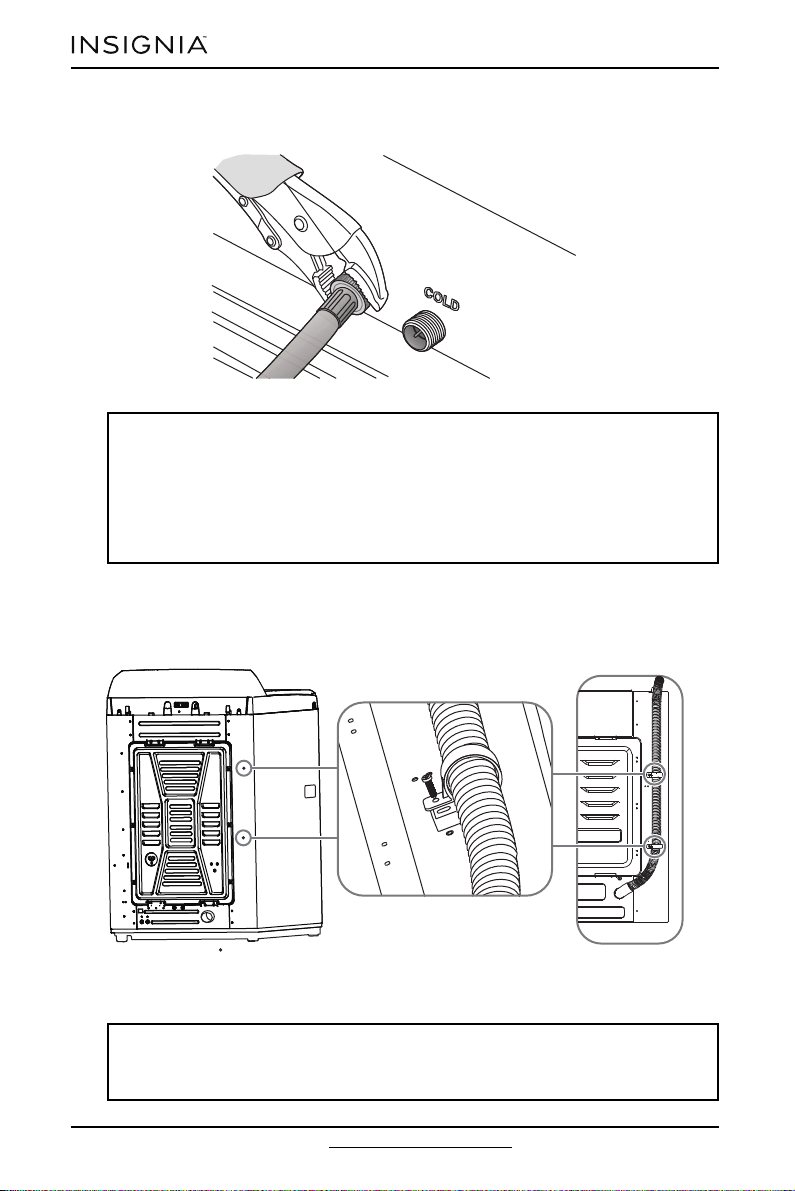
4 Connect the ends of the water supply hoses to the water supply intake
connections at the top of your washer. Make sure that the rubber washers are
in place. The water supply hose connected to the hot faucet must be
connected to the hot water supply intake and the water hose connected to
the cold faucet must be connected to the cold water supply intake.
Note: If you don’t want to use the hot water supply hose, you must select the
Tap Cold option for the water temperature.
INSTALLATION INSTRUCTIONS
24
www.insigniaproducts.com
5 Tighten the fittings by hand until they are snug, then tighten them an
additional two-thirds of a turn with pliers or a wrench.
6 Turn on the hot and cold water supplies, then check all the water supply
intake connections and the faucets for water leaks.
7 Fasten the drain hose to the washer frame at the indicated locations with the
provided hose clamps (2), using a Phillips screwdriver.
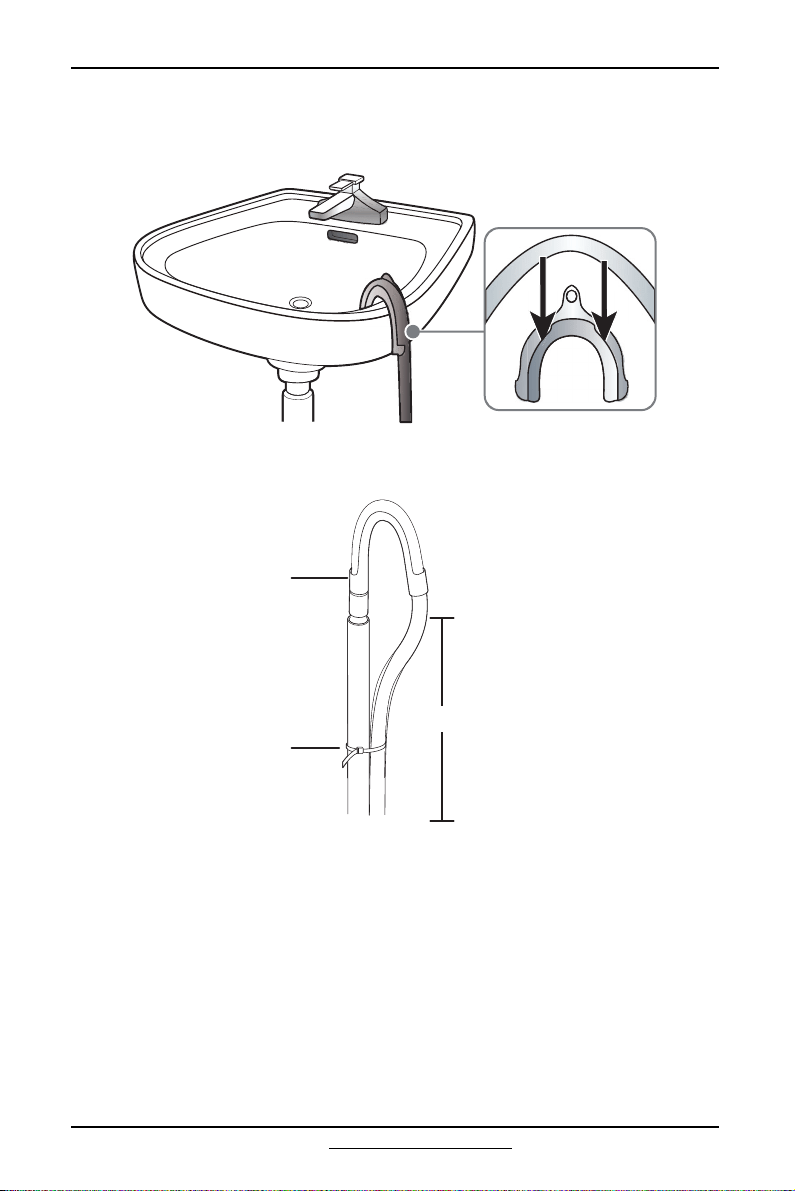
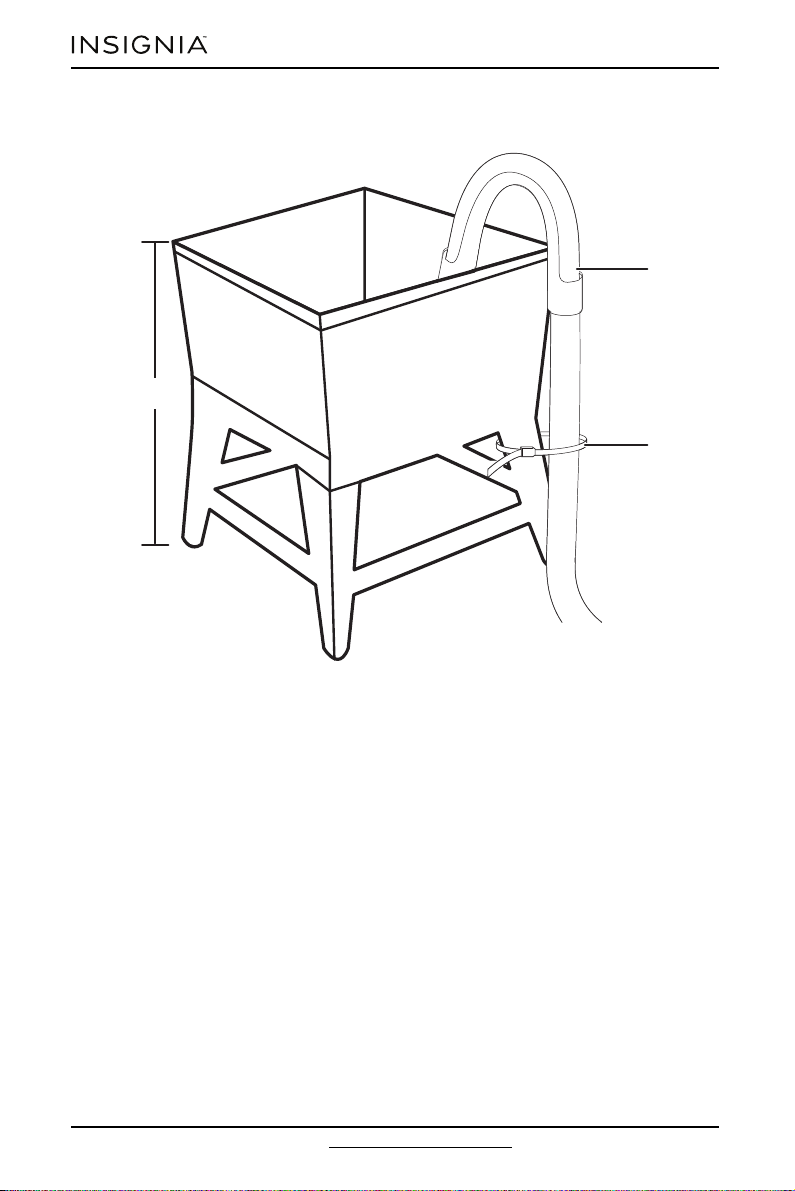
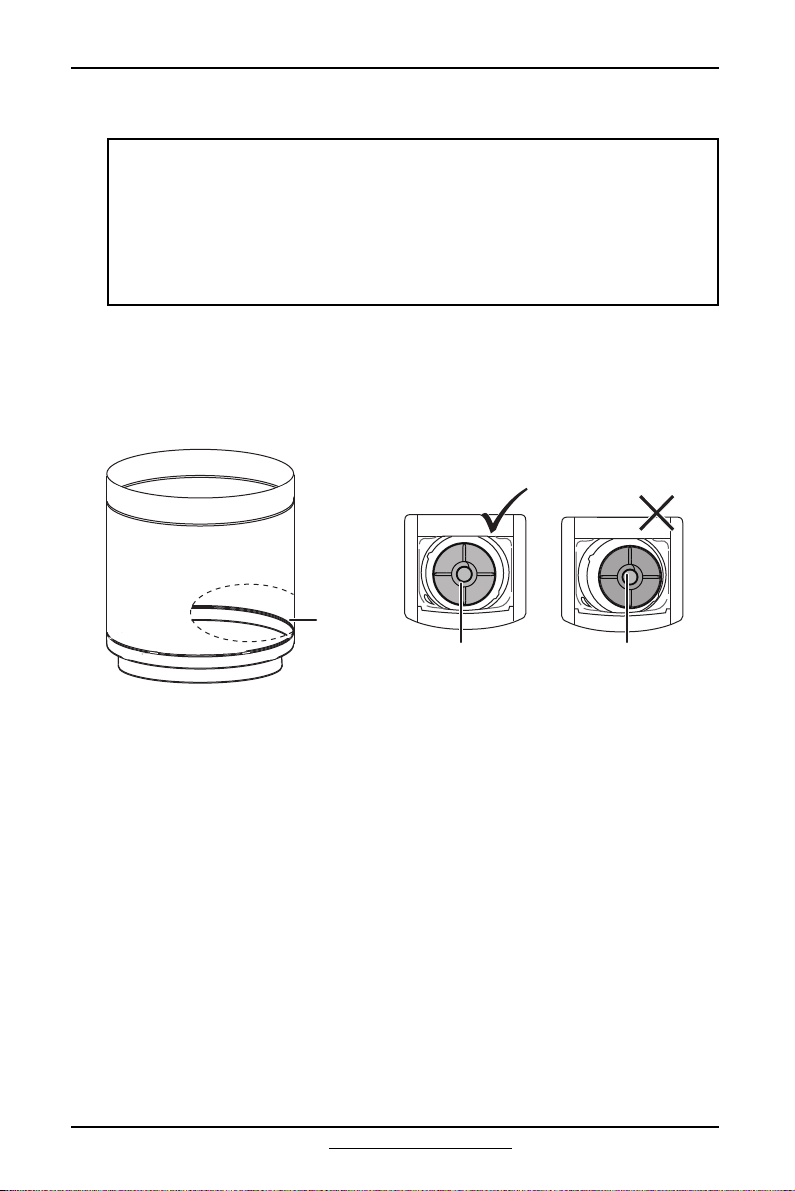
8 Position the other end of the drain hose (the loose end) in one of the following
ways:
CAUTIONS:
• Don’t overtighten the fittings or apply tape or sealant to the faucets or water
supply intakes. This can damage the fittings.
• Make sure that the water supply hoses aren’t twisted or bent. A bent or
twisted hose can leak and cause an electric shock because of water leakage.
To ensure the correct water usage, connect both hot and cold water faucets.
If either or both aren’t connected, an error code could occur.
CAUTION:
Make sure that the connection between the drain hose and the wash basin,
standpipe, or laundry tub isn’t airtight.
25
www.insigniaproducts.com
INSTALLATION INSTRUCTIONS
• Over the edge of a wash basin - Secure the guide to the side of the basin wall
with the hose holder, then tape it or tie it with a piece of cord to prevent the
drain hose from moving.
• In a standpipe - The standpipe must be no shorter than 39 in. (99 cm) and no
longer than 96 in. (244 cm).
96 in. (244 cm) max
39-in. (99 cm) min
Hose holder
Tie strap
Standpipe
INSTALLATION INSTRUCTIONS
26
www.insigniaproducts.com
• In a laundry tub - The laundry tub must be no shorter than 39 in. (99 cm) and
no higher than 96 in. (244 cm) maximum.
Hose retainer
Tie strap
96 in. (244 cm)
max
39-in.
(99 cm) min
27
www.insigniaproducts.com
INSTALLATION INSTRUCTIONS
Step 4: Level your washer
Determine if your washer is level by checking the position of the tub or by using a
level.
1 Slide your washer into position.
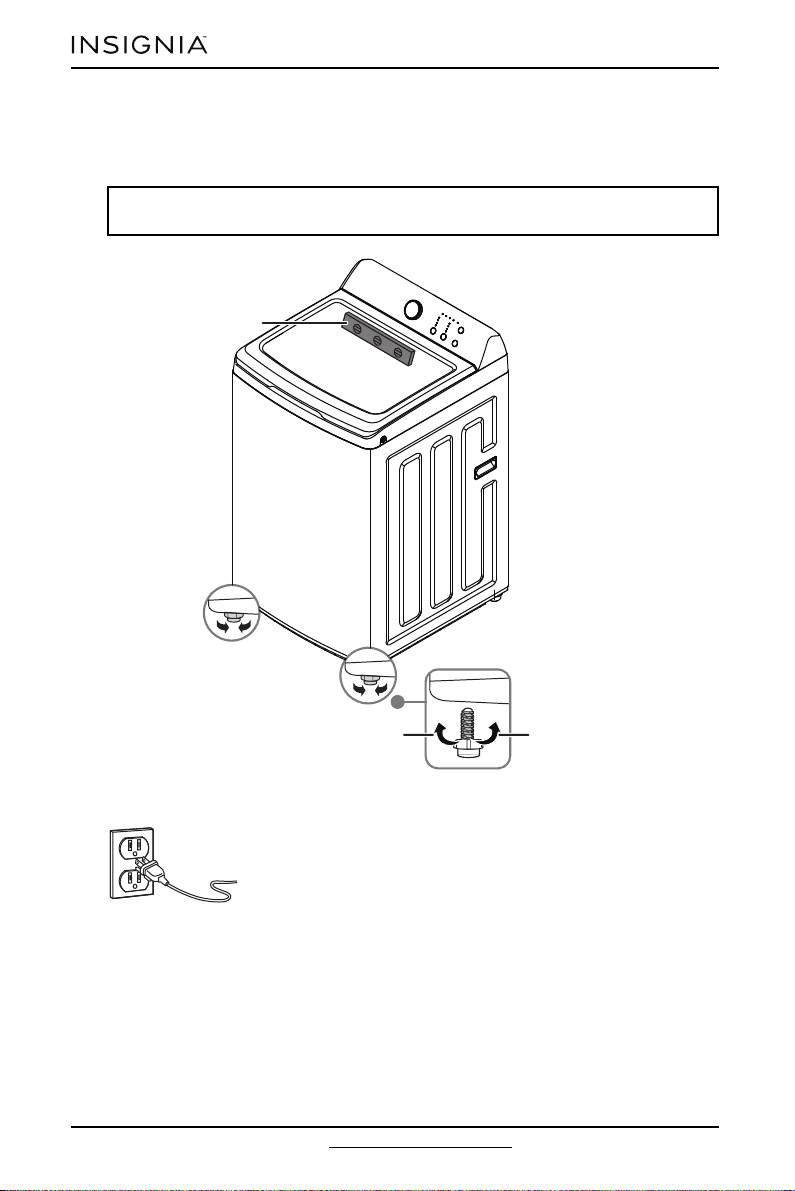
2 Open your washer’s lid, then pour water into the tub to the leveling circle. If
your washer is level, the water touches the leveling circle all the way around. If
your washer isn’t level, the water only touches part of the leveling circle.
CAUTION:
Don’t use your washing machine without leveling it. If your washer isn’t level, it
may:
• Vibrate excessively which can cause your washer to malfunction
• Make excessive noise
• Indicate error codes when your washer is running
Extend the leveling feet only as much as is necessary. If the feet are extended
too much, your washer may vibrate.
Leveling
circle
Washer is level - the
water touches the
leveling circle all the
way around.
Washer not level - the
water does not touch
the leveling circle all
the way around.
Add water to the washer until it reaches the
leveling circle. If the washer is level, the
water touches the leveling circle all the way
around. If it’s not level, it only touches part
of the leveling circle
INSTALLATION INSTRUCTIONS
28
www.insigniaproducts.com
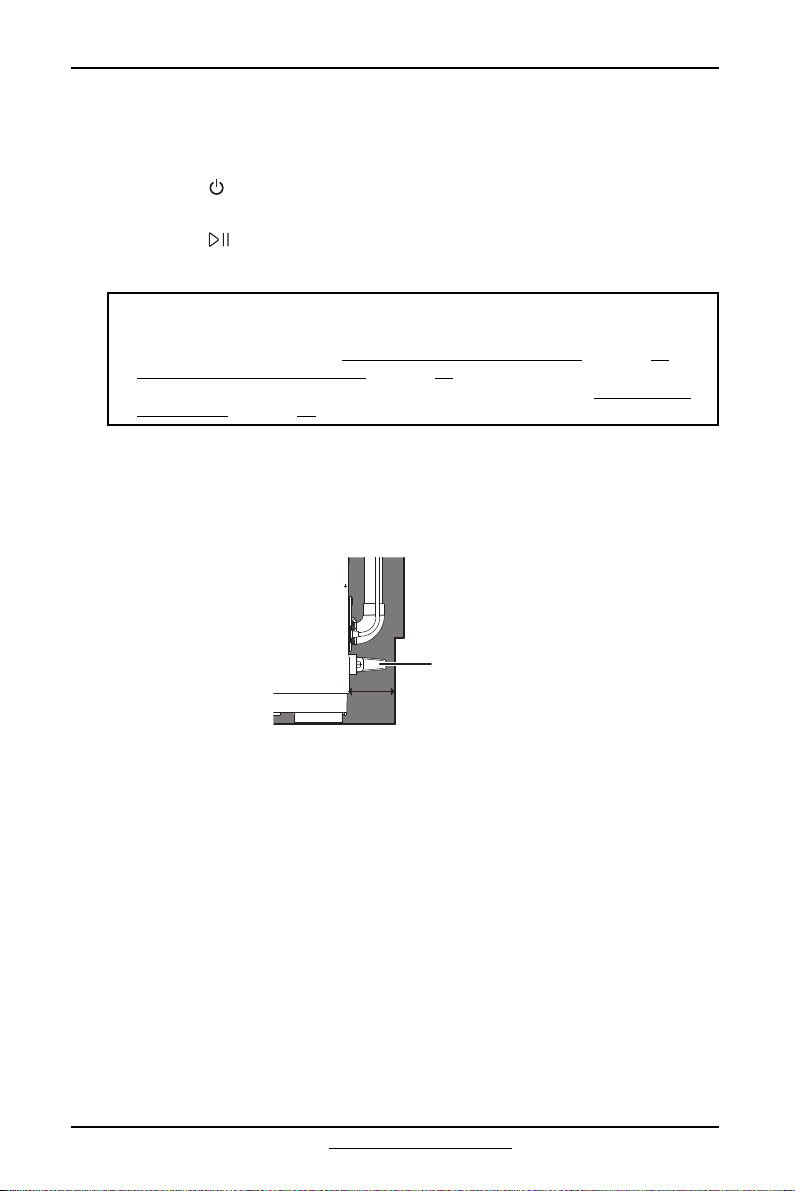
3 If your washer isn’t level, carefully tilt your washer just enough to adjust the
two leveling feet on the bottom of the front of your washer. Extend the feet
only as much as is necessary. If the feet are extended too much, your washer
may vibrate.
Step 5: Power your washer
Plug the power cord into a well-grounded, 3-prong, 120 Volt
60 Hz approved electrical outlet, protected by a 15-amp fuse
or comparable circuit breaker. Your washer is grounded
through the third prong of the power cord.
Note: Having someone tilt your washer helps to take some weight off the
leveling feet and makes them easier to adjust.
Loosen Lock
Level
29
www.insigniaproducts.com
INSTALLATION INSTRUCTIONS
Step 6: Run a test cycle
Run a test cycle to make sure that your washer is correctly installed.
1 Load about 6 lbs. (2.7 kg) of laundry into the tub.
2 Press the (power) button to turn on your washer.
3 Turn the cycle selector to select the Rinse & Spin cycle.
4 Press the (start/pause) button to start the test cycle. Your washer shouldn’t
rock or vibrate excessively when water fills the tub, or when washing or
spinning. Your washer should drain well during the spin cycle.
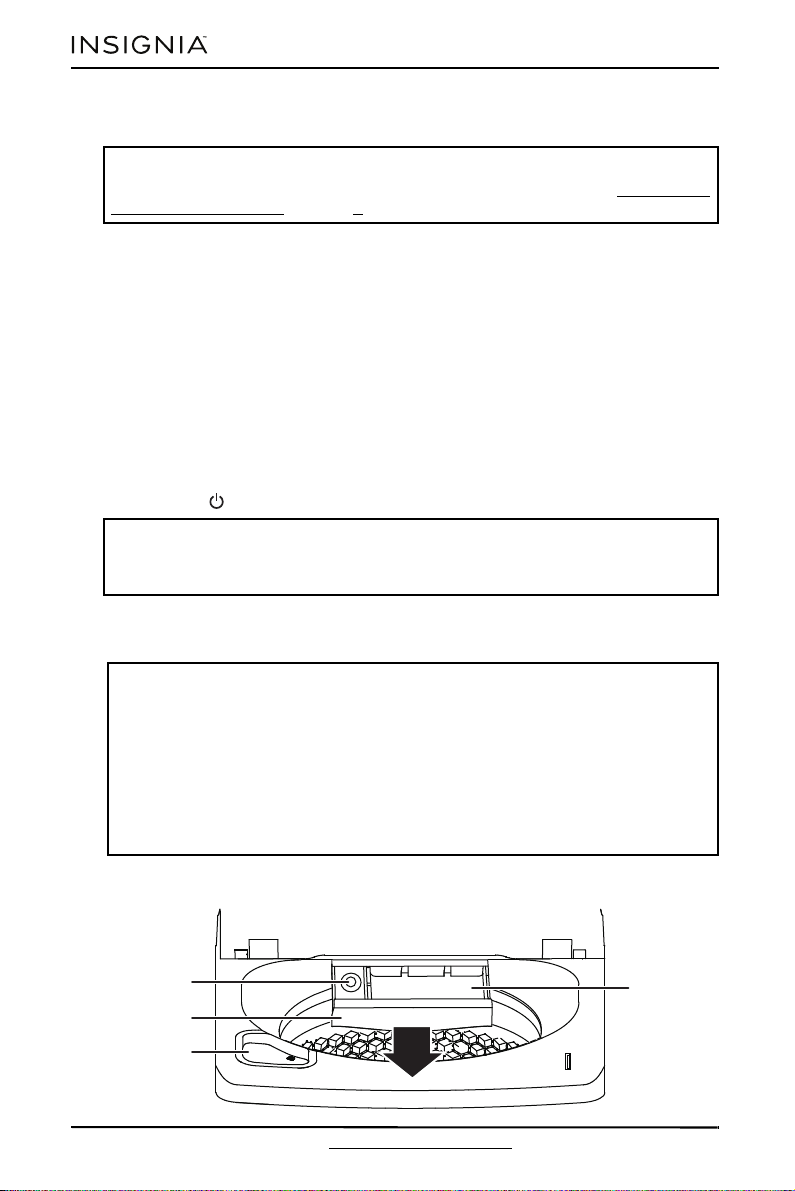
Step 7: Protect the power cord
1 Keep the power cord away from the skirting line of the wall or any sharp
objects when installing.
2 Rotate the wall stand-off 90° clockwise and make sure that the wall stand-off is
in the stop position.
CAUTIONS:
• If you detect any water leaks while your washer is filling or draining, check
the water connections. See Step 2: Connect the water hoses on page 20 or
Step 3: Connect the drain hose on page 22.
• If your washer rocks or vibrates excessively, level it again. See Step 4: Level
your washer on page 27.
2.4 in. (6 cm)
Wall stand-off
OPERATING INSTRUCTIONS
30
www.insigniaproducts.com
Washing a load of laundry
Step 1: Select a detergent
Your washer is designed to use high efficiency (HE) detergents.
• For the best cleaning results, use an HE detergent. We recommend that you
don’t use a regular detergent. HE detergents contain suppressors that reduce
or eliminate suds. When fewer suds are produced, the load washes more
efficiently and cleaning is maximized.
• Reducing the amount of detergent may reduce the quality of cleaning. Make
sure that you:
• Pre-treat stains
• Sort carefully by color and soil level
• Avoid overloading
Step 2: Turn on your washer
• Press the (power) button to turn on your washer.
1 Sort laundry by fabric type, soil level, color, and load size.
2 Fill the tub with dry, unfolded clothes. Load the tub no more than 3/4 full.
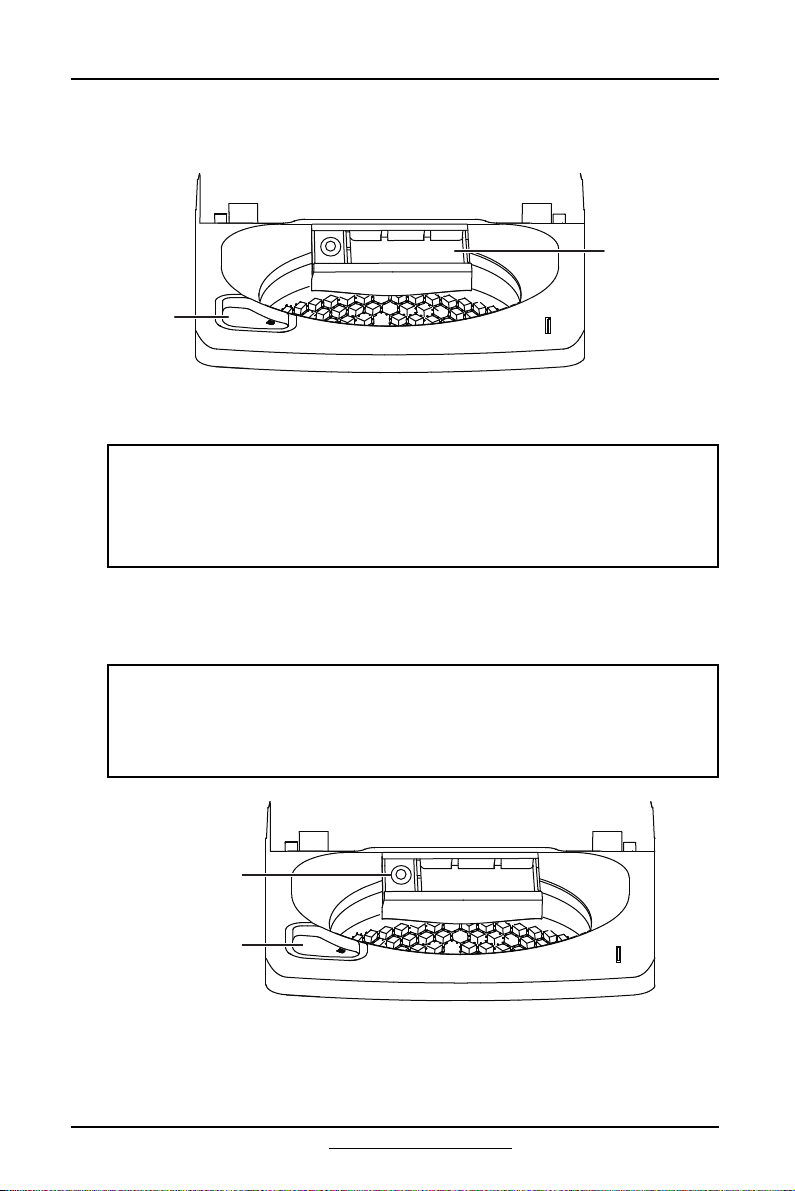
Step 3: Add detergent and additives to the compartments
WARNING:
To reduce the risk of fire, electric shock, or injury to persons, read the IMPORTANT
SAFETY INSTRUCTIONS on page 3 before operating your washer.
CAUTION:
Before loading your laundry, make sure that you remove coins, keys, and other
hard objects, and that you close zippers. These items may damage clothes.
Notes:
• Overloading may reduce washing efficiency, cause excess wear, and possibly
cause creasing or wrinkling of the load.
• Wash delicate items such as bras, hosiery, and other lingerie on the Delicates
cycle with similar lightweight items.
• When washing big, bulky items (such as rugs or pillows) or a few smaller items
(such as stuffed toys or one or two sweaters) that don’t fill the tub completely,
add a few towels to improve spin performance.
• Always use the Bulky cycle for bulky items.
• When washing heavily soiled loads, don’t overload your washer.
Compartment
drawer
Bleach
compartment
Softener
compartment
Detergent
compartment
31
www.insigniaproducts.com
OPERATING INSTRUCTIONS
Detergents
1 Pour the recommended amount of laundry detergent directly into the
detergent compartment before starting your washer.
2 If you’re using color-safe bleach or regular liquid bleach, add it to the bleach
compartment.
Fabric softener
• Pour the recommended amount of liquid fabric softener into the softener
compartment. The dispenser automatically releases liquid fabric softener at
the correct time during the rinse cycle.
Notes:
• When adding color-safe bleach with detergent, both laundry products must
be in the same form (liquid).
• If you are using powder detergent, we recommend that you add it to the
bottom of the tub before you add the load or add it to the detergent
compartment.
CAUTIONS:
• Use the softener compartment ONLY for liquid fabric softeners.
• Don’t use the Downy Ball® in your washer.
• We recommend that you don’t use liquid fabric softener that is too sticky
because it may not mix with the water sufficiently.
Detergent
compartment
Bleach
compartment
Softener
compartment
Bleach
compartment
OPERATING INSTRUCTIONS
32
www.insigniaproducts.com
Chlorine bleach (liquid only)
• Pour the recommended amount of bleach into the bleach compartment.
• Don’t over-fill the compartment.
Step 4: Select the appropriate cycle and options for the load
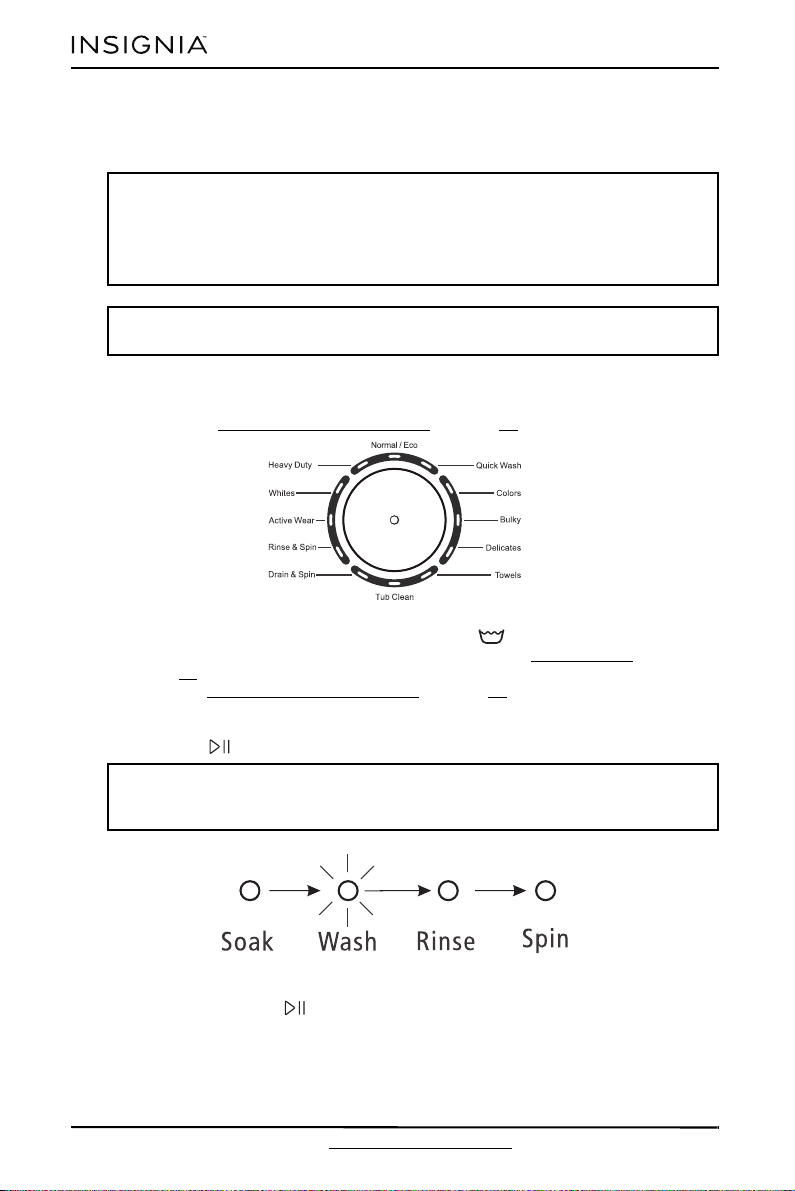
1 Turn the cycle selector to select a washing cycle. For information on wash
cycles, see Washer options and settings on page 33.
2 Optional: Use the control panel buttons (like Water Level) to customize
the washing cycle. For descriptions of selections, see Control panel on
page 13. For information about which buttons are available for each cycle
type, see Washer options and settings on page 33.
Step 5: Start your washer
1 Press the (start/pause) button.
2 If you need to pause the cycle (for example to add or remove items or adjust
the load), press the (start/pause) button. When you hear a click, open the
lid. Your washer stops. When you’re ready to resume washing, close the lid,
then press the button again.
CAUTIONS:
• Avoid splashing or over-filling the compartment.
• Never pour undiluted liquid chlorine bleach directly onto the load or into the
tub. Doing so can damage fabrics, by weakening of the fibers or stripping the
color.
Notes: The bleach dispenser doesn’t have a water inlet to the bleach dispenser,
so the bleach directly flows into the tub when you pour it in.
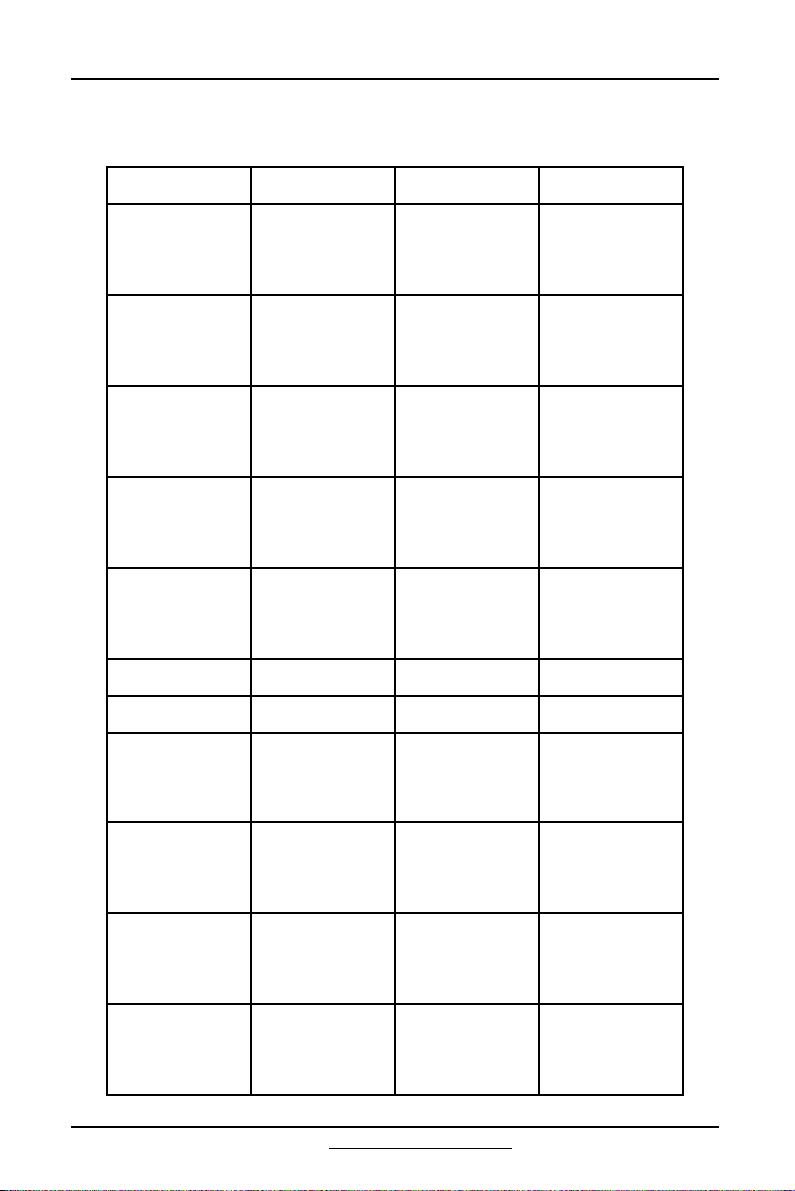
Note: As the wash cycle moves from stage to stage, the current stage light
flashes and the finished progress (stage) light is off. The following stage lights
are always on.
33
www.insigniaproducts.com
OPERATING INSTRUCTIONS
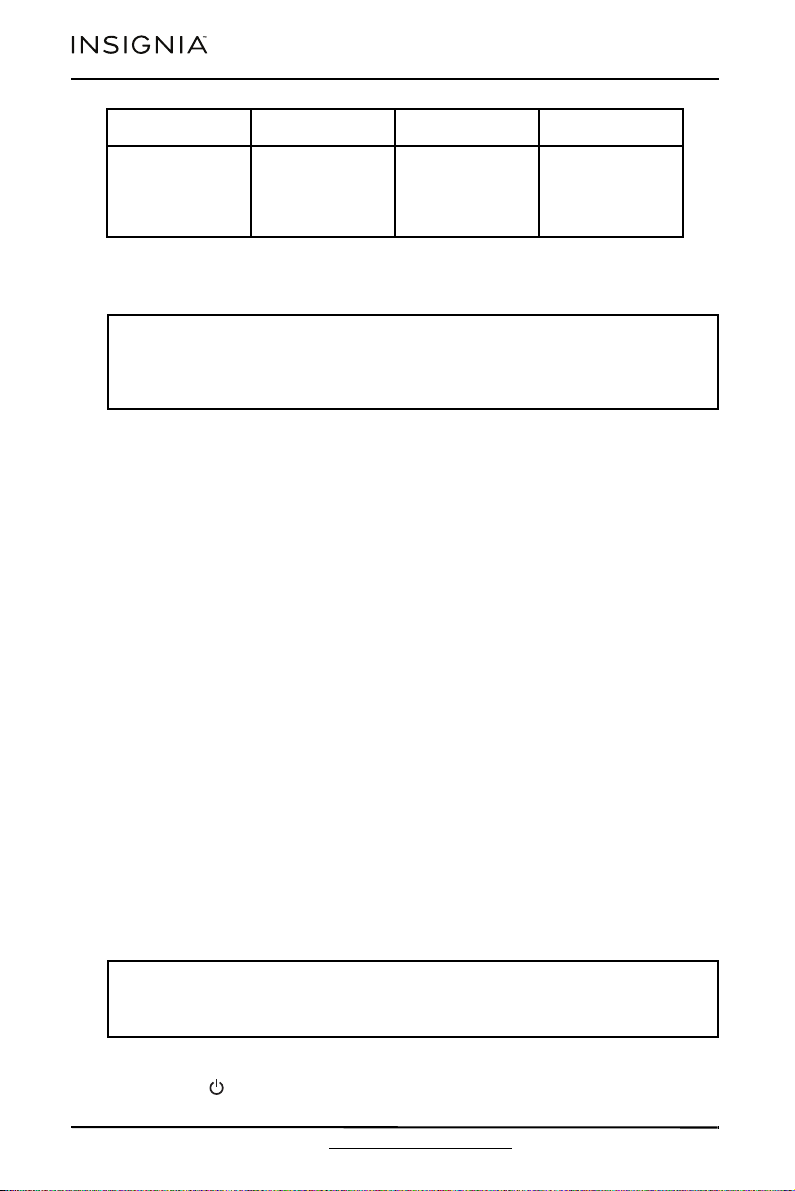
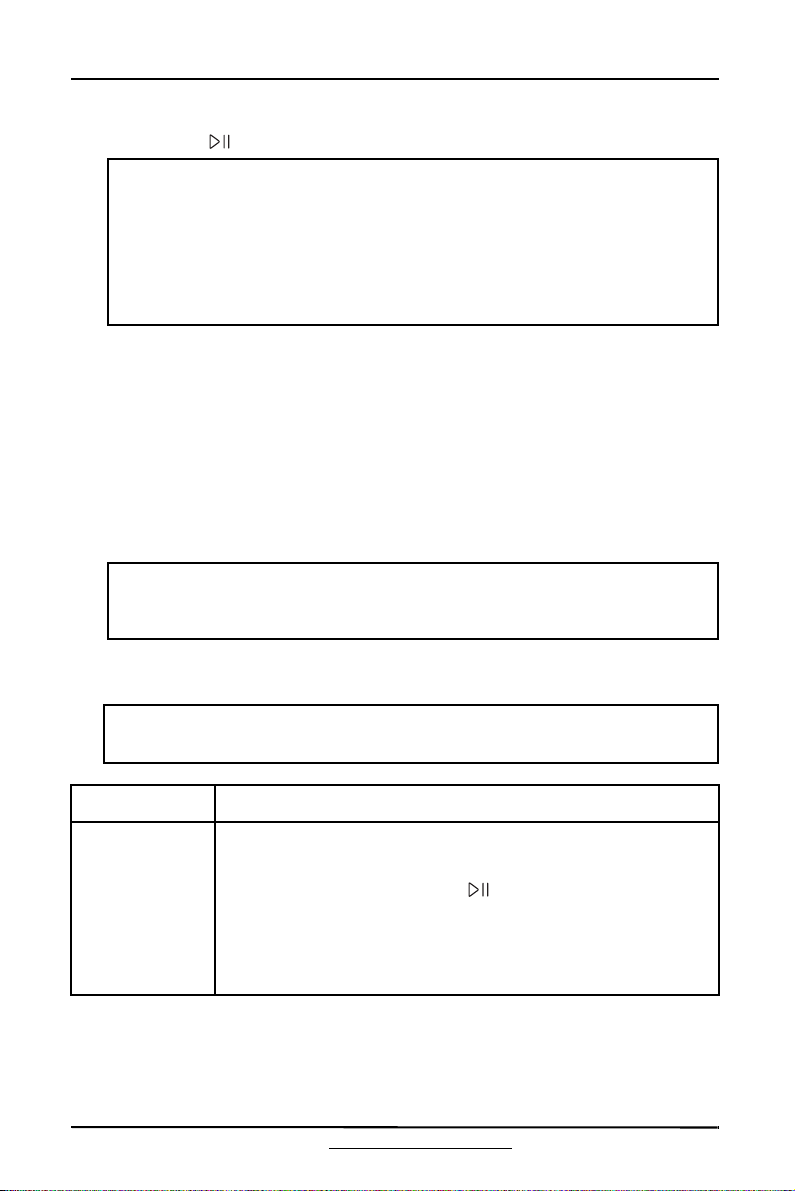
Washer options and settings
Bolded options are initial settings.
PROGRAM WATER LEVEL WASH TEMP. EXTRA RINSE
Normal/Eco
Auto
Low
Med
High
Hot
Warm
Cold
Tap cold
Y/N
Active Wear
Auto
Low
Med
High
Hot
Warm
Cold
Tap cold
Y/N
Whites
Auto
Low
Med
High
Hot
Warm
Cold
Tap cold
Y/N
Heavy Duty
Auto
Low
Med
High
Hot
Warm
Cold
Tap cold
Y/N
Rinse & Spin
Auto
Low
Med
High
Tap Cold —
Drain & Spin———
Tub Clean High Hot —
Quick Wash Med
Hot
Warm
Cold
Tap cold
Y/N
Colors
Auto
Low
Med
High
Warm
Cold
Tap cold
Y/N
Bulky
Auto
Low
Med
High
Hot
Warm
Cold
Tap cold
Y/N
Delicates Med
Hot
Warm
Cold
Tap cold
Y/N
USER MAINTENANCE INSTRUCTIONS
34
www.insigniaproducts.com
Maintaining your washer
Cleaning the exterior
• Use a soft cloth to wipe up all detergent, bleach, or other spills as they occur.
Cleaning the interior
• Clean the interior of your washer periodically to remove any dirt, soil, odor,
mold, mildew, or bacterial residue that may remain in your washer as a result
of washing clothes.
• Failure to follow these instructions may result in unpleasant conditions,
including odors or permanent stains in your washer or on your laundry.
• To remove hard water deposits, use a cleaner labeled “Washer safe.”
Cleaning the control panel
• Clean with a soft, damp cloth. Don’t use abrasive powders or cleaning pads.
• Don’t spray cleaners directly on the panel. The control panel finish may be
damaged by some laundry pre-treatment soil and stain remover products.
Apply such products away from your washer and wipe up any spills or
over-spray immediately.
Cleaning the detergent, bleach, or softener compartment
• To remove laundry product residue, wipe with a damp cloth and towel dry.
• You can remove the detergent and softener compartments to clean them.
However, the bleach compartment isn’t removable, so you must flush the
compartment while it is in your washer.
Cleaning the tub
The Tub Clean cycle is a self-cleaning cycle that removes the causes of odors that
may occur inside your washer without using a cleaning agent. We suggest
cleaning the tub about once a month.
1 With the tub empty, add one cup of chlorine bleach to the bleach dispenser.
2 Press the (power) button.
Towel s
Low
Med
High
Hot
Warm
Cold
Tap cold
Y/N
CAUTION:
Turn off the water faucets after normal use. This shuts off the water supply to
your washer and prevents the possibility of damage from escaping water. Leave
the lid open to let the inside of your washer dry out.
CAUTION:
Never use the Tub Clean cycle when laundry is in your washer. This may
damage the laundry or your washer.
PROGRAM WATER LEVEL WASH TEMP. EXTRA RINSE
USER MAINTENANCE INSTRUCTIONS
35
www.insigniaproducts.com
3 Turn the cycle selector to Tub Clean.
4 Press the (start/pause) button.
Storing your washer
You can damage your washer if you don’t remove water from hoses and internal
components before storage.
1 Select the Quick Wash cycle and add bleach to your washer. Run your washer
through the cycle without a load.
2 Turn the water faucets off and disconnect the inlet hoses.
3 Unplug your washer from the electrical outlet and leave your washer’s lid
open to let air circulate inside the tub.
4 Raise the drain hose vertically to make sure that all the water has been
drained.
Troubleshooting
WARNING:
Certain internal parts are intentionally not grounded and may present a risk of
electric shock only during servicing. Service Personnel: Do not contact the
following parts while the appliance is energized:
•Electric
•Valve
•Retractor
• Motor pump.
CAUTION:
If your washer has been stored in below-freezing temperatures, allow time for
any leftover water in your washer to thaw out before use.
CAUTION:
Don’t try to repair your washer yourself. Doing so invalidates the warranty.
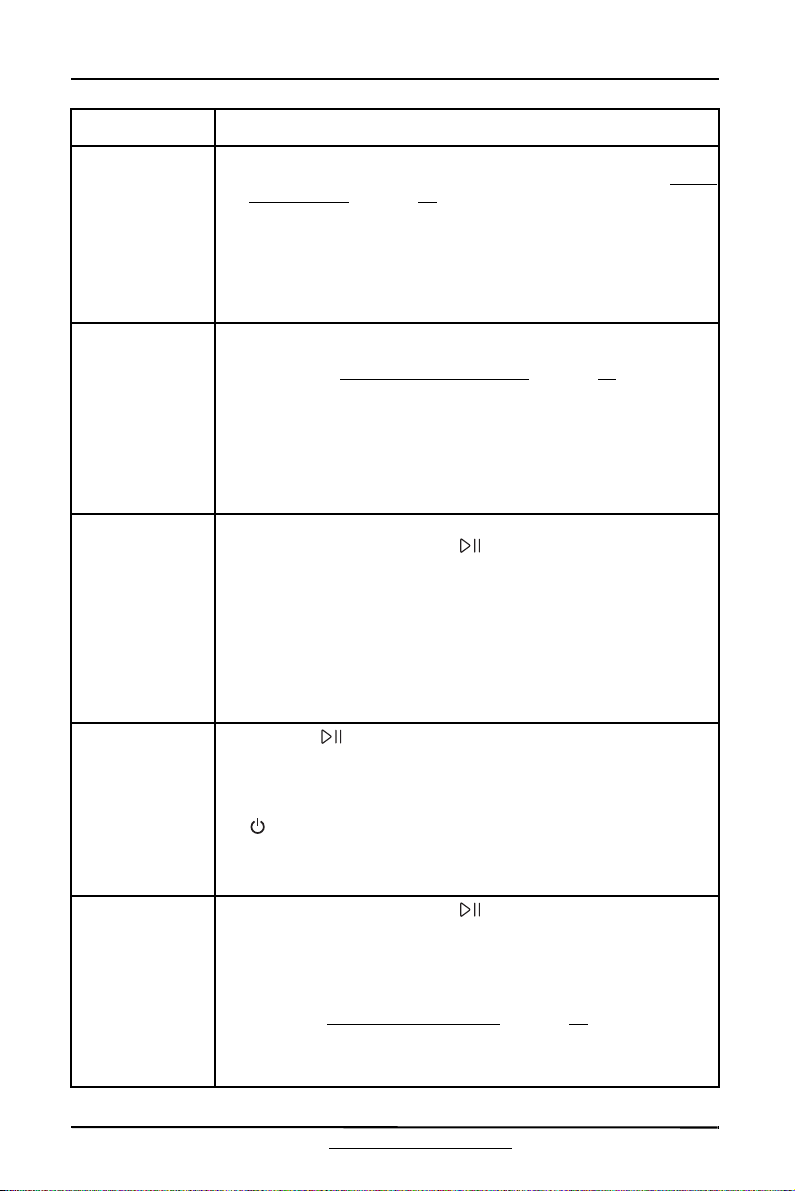
PROBLEM SOLUTION
Washer doesn’t
start
• Make sure that your washer is plugged in.
• Make sure that the lid is closed.
• Make sure that the water source faucets are open.
• Make sure that you press the (start/pause) button to start
your washer.
• Before your washer starts to fill, it makes a series of clicking
noises to make sure that the lid is locked and to do a quick
drain.
• Check the fuse or reset the circuit breaker.
USER MAINTENANCE INSTRUCTIONS
36
www.insigniaproducts.com
No water or not
enough water
OR
Detergent or
softener is still in
its compartment
after the wash
cycle is
completed
• Make sure that both faucets are fully turned on.
• Make sure that the water pressure is in the range listed in Water
requirements on page 19.
• Make sure that the water inlet hoses aren’t kinked. Straighten if
necessary.
• Disconnect the hoses and clean the hose filter screens. The
screens may be clogged.
Washer vibrates
or is too noisy
• Make sure that your washer is set on a level surface. If the
surface isn’t level, adjust your washer’s feet to level your
washer. See Step 4: Level your washer
on page 27.
• Make sure that your washer isn’t touching any other object.
• Make sure that the laundry load is balanced.
• During the spin process, if clothes are piled to one side of the
tub, your washer may stop because of the imbalance. Your
washer tries up to three times to solve the problem
automatically. If your washer can’t solve the problem, try to
manually redistribute clothes inside the tub.
Washer stops • Make sure that the power outlet is a working outlet.
• Close the lid, then press the (start/pause) button to start
your washer. For your safety, your washer doesn’t spin unless
the lid is closed.
• Before your washer starts to fill, it makes a series of clicking
noises to make sure that the lid is locked and to do a quick
drain.
• Sometimes your washer may pause between stages in the
cycle. Wait to see if your washer starts again.
• Disconnect the inlet hoses and clean the hose filter screens
periodically. The screens may be clogged.
Lid is locked or
doesn’t open
• Press the (start/pause) button to pause your washer. You
can’t open the lid if your washer is running.
• After you pause your washer, it may take a few seconds for the
lid lock to release.
• If the lid is locked when your washer isn’t running, press the
(power) button to turn on your washer.
• If power fails while your washer is running, the lid unlocks
when power is restored. Your washer waits three minutes, then
runs the rest of the cycle.
Washer doesn’t
drain or spin
• Close the lid, then press the (start/pause) button to start
your washer. For your safety, your washer doesn’t spin unless
the lid is closed.
• Make sure that the drain hose isn’t kinked. Straighten as
necessary.
• Make sure that the height of the drain hose is within specified
limits. See Drainage requirements on page 19.
• Check the fuse or reset the circuit breaker.
• The pipes to your sewer system may be clogged. Contact a
plumber or qualified repair professional.
PROBLEM SOLUTION

USER MAINTENANCE INSTRUCTIONS
37
www.insigniaproducts.com
The water
temperature isn’t
correct
• Make sure that you’ve selected the correct temperature.
• Make sure that the water source faucets are fully opened.
• Make sure that the hoses are connected to the correct faucet
and water intake connections on your washer, then flush the
lines. See Step 2: Connect the water hoses on page 20.
• Disconnect the hoses and clean the hose filter screens. The
hose may be clogged.
Load is too wet at
the end of the
cycle
• Use a high-efficiency detergent to reduce over-sudsing. See
Step 1: Select a detergent
on page 30.
• The load may be too small. Very small loads (one or two items)
may become unbalanced and not spin out completely.
Water leaks • Make sure that all hose connections are tight. See Step 2:
Connect the water hoses on page 20
and Step 3: Connect the drain hose on page 22.
• Make sure that the end of the drain hose is correctly inserted
and secured to the drainage system. See Step 3: Connect the
drain hose on page 22.
• Avoid overloading.
• Use a high-efficiency detergent to reduce over-sudsing. See
Step 1: Select a detergent
on page 30.
• Shut off the faucets and remove the hose connections. Make
sure that rubber filters and seals are in correct place and not
cut.
Load has too
many suds
• Use a high-efficiency detergent to reduce over-sudsing. See
Step 1: Select a detergent
on page 30.
• If you have “soft” water, reduce the amount of detergent.
• For small or lightly soiled loads, reduce the amount of
detergent.
Washer has an
odor
• Periodically run a Tub Clean cycle to clean the tub. See
Cleaning the tub
on page 34.
• Use a high-efficiency detergent to reduce over-sudsing.
Excessive suds collect in nooks and crannies and cause odor.
See Step 1: Select a detergent on page 30.
• Dry the interior of your washer after the total cycle has
finished.
PROBLEM SOLUTION

USER MAINTENANCE INSTRUCTIONS
38
www.insigniaproducts.com
Understanding the error codes
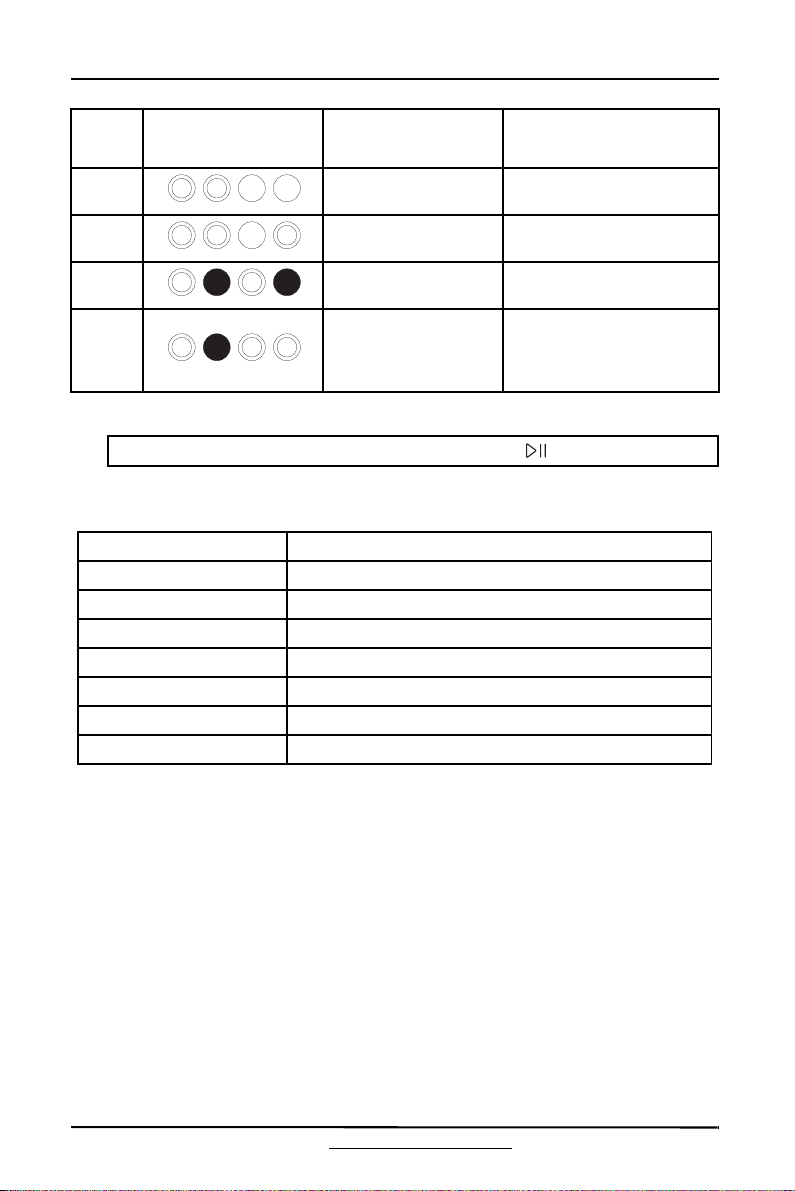
Your washer has an automatic error-monitoring system to detect and diagnose
problems at an early stage.
Notes:
• = Off, = Flashing, = On
• While an error is happening, the Extra Rinse LED flashes and the Status LEDs
indicates the error code.
• When an error is happening, the buzzer beeps for 5 seconds and repeat once
per 15 minutes. After 24 hours, your washer powers off automatically.
ERROR
CODE
LED DISPLAY POSSIBLE CAUSE SOLUTIONS
E1
Your washer takes
more than 30 minutes
to fill with water. After
water finishes entering
your washer, the water
level hasn’t changed in
five minutes.
• Make sure that the lid
isn’t open.
• Make sure that water
isn’t leaking. See No
water or not enough
water on page 36.
•Contact Insignia
Customer Care.
E2
Your washer takes
more than 10 minutes
to drain.
• See Washer doesn’t
drain or spin on
page 36.
E3
The lid is open. • Close the lid.
• The lid lock or PCB has
failed. Contact Insignia
Customer Care.
Your washer is not
level
• Level your washer. See
Step 4: Level your
washer on page 27.
E4
Your washer is out of
balance more than
three times in spin
operation.
•Contact Insignia
Customer Care.
F2
The EEPROM failed. • Contact Insignia
Customer Care.
F5
Load sensing failed. • Contact Insignia
Customer Care.
Status LEDs
USER MAINTENANCE INSTRUCTIONS
39
www.insigniaproducts.com
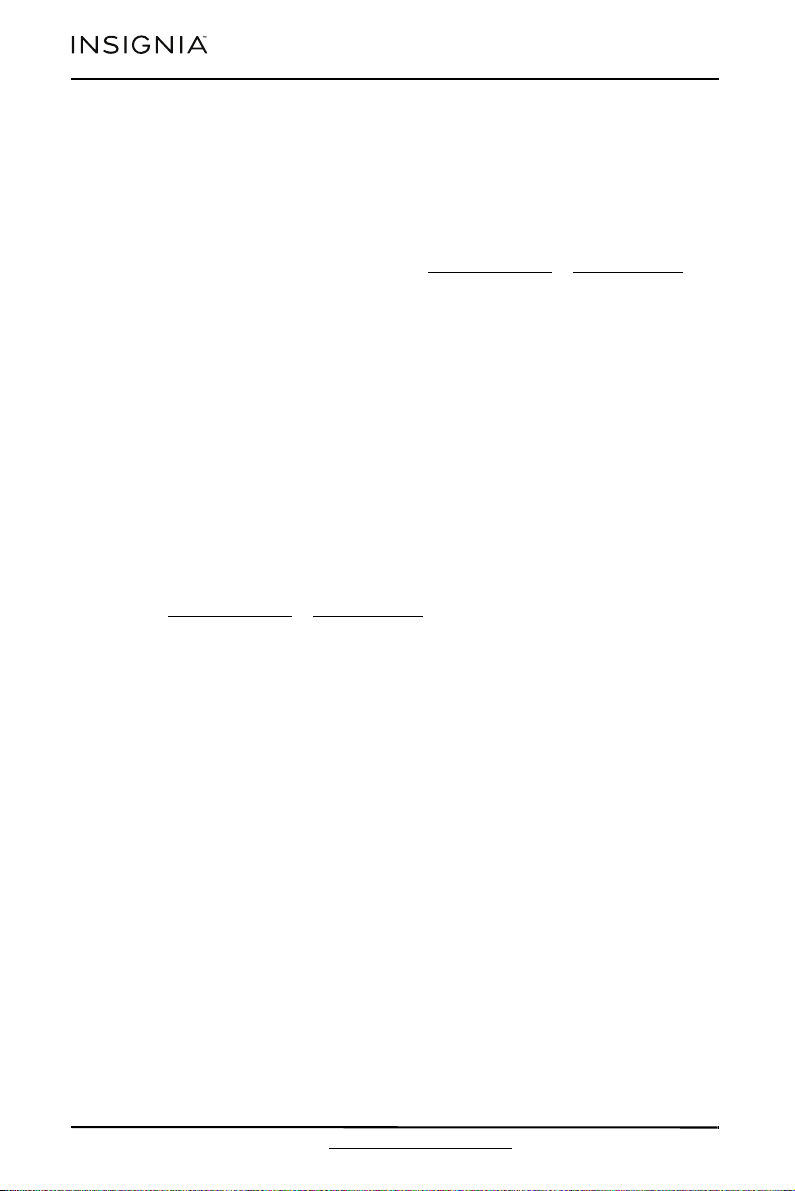
Specifications
F8
Water level sensor
failed.
•Contact Insignia
Customer Care.
Fd
Lid lock failed. • Contact Insignia
Customer Care.
C9
The PCB failed. • Contact Insignia
Customer Care.
E5
Impact switch failed.
The switch is pressed
against the outer tub
cover.
• Level your washer.
•Contact Insignia
Customer Care.
Note: To clear the E1, E2, E3, or E4 error code, press the (start/pause) button.
Dimensions (H × W × D) 42.2 in. × 25.2 in. × 27 in. (107.2 cm × 64 cm × 68.6 cm)
Net weight 109.1 lbs (49.5 kg)
Power 120 V~/60 Hz
Current draw 8 A
Pulsator type Agitator
Drum grain Cubic
Motor Single phase induction
Rated capacity (safety) 13.9 lbs. (6.3 kg)
ERROR
CODE
LED DISPLAY POSSIBLE CAUSE SOLUTIONS
USER MAINTENANCE INSTRUCTIONS
40
www.insigniaproducts.com
ONE-YEAR LIMITED WARRANTY
Definitions:
The Distributor* of Insignia branded products warrants to you, the original purchaser of this
new Insignia-branded product (“Product”), that the Product shall be free of defects in the
original manufacturer of the material or workmanship for a period of one (1) year from the
date of your purchase of the Product (“Warranty Period”).
For this warranty to apply, your Product must be purchased in the United States or Canada
from a Best Buy branded retail store or online at www.bestbuy.com
or www.bestbuy.ca and
is packaged with this warranty statement.
How long does the coverage last?
The Warranty Period lasts for 1 year (365 days) from the date you purchased the Product.
Your purchase date is printed on the receipt you received with the Product.
What does this warranty cover?
During the Warranty Period, if the original manufacture of the material or workmanship of
the Product is determined to be defective by an authorized Insignia repair center or store
personnel, Insignia will (at its sole option): (1) repair the Product with new or rebuilt parts; or
(2) replace the Product at no charge with new or rebuilt comparable products or parts.
Products and parts replaced under this warranty become the property of Insignia and are
not returned to you. If service of Products or parts are required after the Warranty Period
expires, you must pay all labor and parts charges. This warranty lasts as long as you own your
Insignia Product during the Warranty Period. Warranty coverage terminates if you sell or
otherwise transfer the Product.
How to obtain warranty service?
If you purchased the Product at a Best Buy retail store location or from a Best Buy online
website (www.bestbuy.com or www.bestbuy.ca), please take your original receipt and the
Product to any Best Buy store. Make sure that you place the Product in its original packaging
or packaging that provides the same amount of protection as the original packaging.
To obtain warranty service, in the United States and Canada call 1-877-467-4289. Call agents
may diagnose and correct the issue over the phone.
Where is the warranty valid?
This warranty is valid only in the United States and Canada at Best Buy branded retail stores
or websites to the original purchaser of the product in the country where the original
purchase was made.
What does the warranty not cover?
This warranty does not cover:
• Food loss/spoilage due to failure of refrigerator or freezer
• Customer instruction/education
•Installation
•Set up adjustments
• Cosmetic damage
• Damage due to weather, lightning, and other acts of God, such as power surges
• Accidental damage
•Misuse
•Abuse
•Negligence
• Commercial purposes/use, including but not limited to use in a place of business or in
communal areas of a multiple dwelling condominium or apartment complex, or
otherwise used in a place of other than a private home.
• Modification of any part of the Product, including the antenna
• Display panel damaged by static (non-moving) images applied for lengthy periods
(burn-in).

41
www.insigniaproducts.com
• Damage due to incorrect operation or maintenance
• Connection to an incorrect voltage or power supply
• Attempted repair by any person not authorized by Insignia to service the Product
• Products sold “as is” or “with all faults”
• Consumables, including but not limited to batteries (i.e. AA, AAA, C etc.)
• Products where the factory applied serial number has been altered or removed
• Loss or Theft of this product or any part of the product
• Display panels containing up to three (3) pixel failures (dots that are dark or incorrectly
illuminated) grouped in an area smaller than one tenth (1/10) of the display size or up to
five (5) pixel failures throughout the display. (Pixel based displays may contain a limited
number of pixels that may not function normally.)
• Failures or Damage caused by any contact including but not limited to liquids, gels or
pastes.
REPAIR REPLACEMENT AS PROVIDED UNDER THIS WARRANTY IS YOUR EXCLUSIVE REMEDY
FOR BREACH OF WARRANTY. INSIGNIA SHALL NOT BE LIABLE FOR ANY INCIDENTAL OR
CONSEQUENTIAL DAMAGES FOR THE BREACH OF ANY EXPRESS OR IMPLIED WARRANTY ON
THIS PRODUCT, INCLUDING, BUT NOT LIMITED TO, LOST DATA, LOSS OF USE OF YOUR
PRODUCT, LOST BUSINESS OR LOST PROFITS. INSIGNIA PRODUCTS MAKES NO OTHER
EXPRESS WARRANTIES WITH RESPECT TO THE PRODUCT, ALL EXPRESS AND IMPLIED
WARRANTIES FOR THE PRODUCT, INCLUDING BUT NOT LIMITED TO ANY IMPLIED
WARRANTIES OF AND CONDITIONS OF MERCHANTABILITY AND FITNESS FOR A PARTICULAR
PURPOSE, ARE LIMITED IN DURATION TO THE WARRANTY PERIOD SET FORTH ABOVE AND
NO WARRANTIES, WHETHER EXPRESS OR IMPLIED, WILL APPLY AFTER THE WARRANTY
PERIOD. SOME STATES, PROVINCES AND JURISDICTIONS DO NOT ALLOW LIMITATIONS ON
HOW LONG AN IMPLIED WARRANTY LASTS, SO THE ABOVE LIMITATION MAY NOT APPLY TO
YOU. THIS WARRANTY GIVES YOU SPECIFIC LEGAL RIGHTS, AND YOU MAY ALSO HAVE OTHER
RIGHTS, WHICH VARY FROM STATE TO STATE OR PROVINCE TO PROVINCE.
Contact Insignia:
1-877-467-4289
www.insigniaproducts.com
INSIGNIA is a trademark of Best Buy and its affiliated companies.
*Distributed by Best Buy Purchasing, LLC
7601 Penn Ave South, Richfield, MN 55423 U.S.A.
©2021 Best Buy. All rights reserved.

www.insigniaproduc ts.com
1-877-467-4289 (U.S. and Canada)
INSIGNIA is a trademark of Best Buy and its affiliated companies.
Distributed by Best Buy Purchasing, LLC
7601 Penn Ave South, Richfield, MN 55423 U.S.A.
©2021 Best Buy. All rights reserved.
V3 ENGLISH
21-0664