User manual
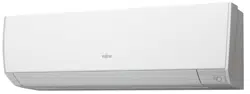
Indoor Unit Overview and Operations
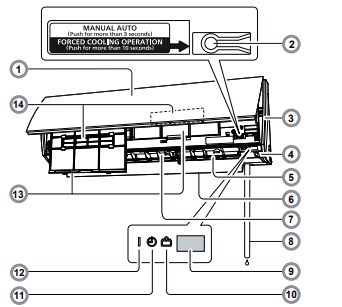
1 Intake grille
Before starting operation, make sure that the intake grille has been shut completely. Incomplete closing may have an effect on the proper function or performance of the product.
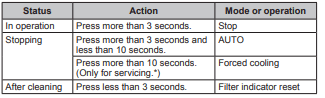
2 MANUAL AUTO button
Use when the remote controller is lost or there is a malfunction.
3 Front panel
4 Human Senso
Used for Energy Saving Program. Controls temperature setting by detecting people in the room.
5 Vertical airflow direction louver
Each time you press Vertical SET button on the remote controller, the angle of the vertical airflow direction louver moves as follows:
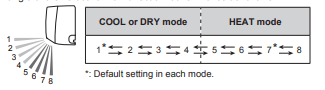
- Do not adjust by hand.
- At the beginning of AUTO or HEAT mode, they may stay on position 1 for a while for adjustment.
- If the angle is set to position 5-8 for more than 30 minutes in COOL or DRY mode, the louver will automatically return to position 4.
- Keeping the position 5-8 during COOL or DRY mode may cause condensation to form, and the drops may damage your property.
6 Power diffuser
In conjunction with movement of the vertical airflow direction louver, the angle of the power diffuser moves as follows:

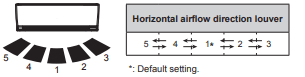
7 Horizontal airflow direction louver
Each time you press the Horizontal SET button on the remote controller, the airflow direction range of the horizontal airflow direction louver will change as follows:
8 Drain hose
9 Remote controller signal receiver
10 ECONOMY indicator (green)
Lights in ECONOMY operation and in 10 °C HEAT operation.
11 TIMER indicator (orange)
Lights in TIMER operation, and blinks slowly when the timer setting error is detected. For details, refer to “Auto-restart function”.
12 OPERATION indicator (green)
Lights in normal operation, and blinks slowly in Automatic defrosting operation. Blinks during Demand Response operation.
13 Air filter
14 Air cleaning filters
Purify or deodorize the air, and provide fresh airflow.
Remote Controller Overview and Operations
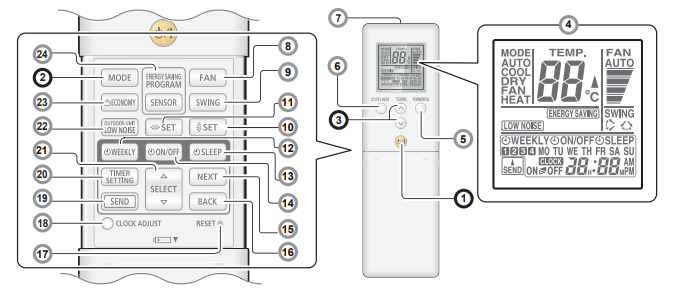
1 START/STOP button
2 MODE button
Switches operation mode in following order.

Notes in HEAT mode:
- At the beginning of the operation, the indoor unit operates at very low fan speed for about 3–5 minutes for preparation, then switches to the selected fan speed.
- Automatic defrosting operation overrides the heating operation when necessary.
3 TEMP. (temperature) buttons
Sets the desired temperature. In COOL or DRY mode, the temperature needs to be set lower than the current room temperature. In HEAT mode, the temperature needs to be set higher than the current room temperature. Otherwise, corresponding operation mode may not start.

4 Remote controller display
In this section, all the possible indicators are displayed for description. In actual operation, the display is linked with the button operation, and only shows the necessary indicators for each setting.
5 POWERFUL button
Activates the POWERFUL operation. The unit will operate at maximum power and strong airflow to quickly cool down or warm up the room. When activated, the indoor unit will emit 3 short beeps. To turn off, press the POWERFUL button again. The indoor unit will then emit 2 short beeps.
POWERFUL operation is automatically turned off in the following situations:
- Adjusted room temperature reaches the set temperature in COOL, DRY, or HEAT mode.
- 20 minutes have passed after the POWERFUL operation mode has been set. Even in situations above, the POWERFUL operation will not automatically turn off unless it has run for a certain amount of time.
Notes:
- The airflow direction and the fan speed are controlled automatically.
- • This operation cannot be performed simultaneously with ECONOMY operation.
- POWERFUL operation will override the OUTDOOR UNIT LOW NOISE, ENERGY SAVING functions. Both functions, if set, will start after the POWERFUL operation is turned off.
6 10 °C HEAT button
Starts 10 °C HEAT operation that mainains the room temperature at 10 °C so as to prevent the room temperature to drop too low. After pressing the button to start the 10 °C HEAT operation, the indoor unit emits 2 short beeps and the ECONOMY indicator (green) will turn on. To turn off, press the START/STOP button. The Economy indicator will turn off.
Notes:
- In 10 °C HEAT operation mode, only the vertical airflow direction can be adjusted by using the SET button.
- HEAT mode will not be performed if the room temperature is warm enough
7 Signal transmitter
Aim at the signal receiver of the indoor unit properly.
- Signal transmit indicator
 on the remote controller display shows that the signal from the remote controller is being transmitted.
- Operating range is approximately 7 m.
- You will hear a beep if the transmitted signal has been sent properly. If there is no beep, press the button on the remote controller again.
8 FAN button
Controls the fan speed.

- When AUTO is selected, the fan speed is automatically adjusted according to the operation mode.
9 SWING button
Sets the automatic swing operation. Each time the SWING button is pressed, the operation will change
- The Left/right swing operation will follow the direction as shown on Horizontal airflow direction louver"
- The Up/down Swing operation range will differ by mode as follows:

Notes:
- SWING operation may stop temporarily when the indoor unit fan is rotating at very low speed or is stopped.
- In FAN mode, the Up/down swing operation range of 1 <-> 5 or 6 <-> 8 is decided according to the airflow direction previously set before starting the swing operation
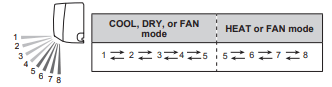
10 Vertical SET button
Adjusts the vertical airflow direction.
11 Horizontal SET button
Adjusts the horizontal airflow direction.
12 WEEKLY timer button
Activates the WEEKLY timer for a maximum of 4 on or off programs per day, each day of the week.
13 SLEEP timer button
Activates the SLEEP timer that helps you to fall asleep comfortably with gradual temperature control.
14 ON/OFF timer button
Activates the ON/OFF timer.
15 NEXT button
Used for adjusting the timer setting.
16 BACK button
Used for adjusting the timer setting.
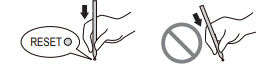
17 RESET button
When you press the RESET button, press it gently by using the tip of a ballpoint pen or other small object in correct direction as shown in this figure.
18 CLOCK ADJUST button
Used for adjusting the clock.
19 SEND button
Used for sending the timer/clock setting.
20 TIMER SETTING button
Used to enter the timer setting mode.
21 SELECT button
Used for adjusting the clock or timer.
22 OUTDOOR UNIT LOW NOISE button
Starts or stops OUTDOOR UNIT LOW NOISE operation that lowers noise generated from the outdoor unit by cutting down the rotation number of the compressor, and suppressing the fan speed.
Once the operation is set, the setting is preserved until you press this button again to stop the operation, even if the indoor unit operation is stopped.
 on the remote controller display shows that the unit is in OUTDOOR UNIT LOW NOISE mode.
Notes:
- This operation cannot be performed simultaneously with FAN, DRY and POWERFUL operation modes.
23 ECONOMY button
Starts or stops ECONOMY operation that saves more electricity than other operation modes by changing the set temperature to a moderate setting. By pressing the ECONOMY button, the ECONOMY indicator on the indoor unit turns on.
- In COOL or DRY mode, the room temperature will be adjusted a few degrees higher than the set temperature.
- In HEAT mode, the room temperature will be adjusted a few degrees lower than the set temperature.
Notes:
- In COOL, HEAT, or DRY mode, the maximum output of this operation is approximately 70 % of usual air conditioning operation.
- This operation cannot be performed during temperature monitoring by AUTO mode.
24 SENSOR button (ENERGY SAVING PROGRAM)
Activates or deactivates the energy saving program.
* The Energy Saving program is ON at the time of purchase.
Timer Operation
ON timer or OFF timer
You can set the ON timer or OFF timer with the following steps.
1 Press the TIMER SETTING button to start the setting. The WEEKLY indicator will be flashing on the remote controller.
2 Press the SELECT button to choose the desired mode. The mode will change as follows

3 Press the NEXT button. Continue to setting for each mode.
* To cancel timer setting during the setting process, press the TIMER SETTING button again.
4 Adjust the time by pressing the SELECT button while the clock indicator is blinking. Each time you press the button, the time will change by +5/-5 minutes. Pressing down will change the time by +10/-10 minutes.
5 Press the SEND button.
To redo the timer setting, perform step 1 to 5 again.
To cancel the ON/OFF timer, press the ON/OFF button while the ON/ OFF indicator is on. (Erases the indicator)
Program timer (combined use of the ON timer and the OFF timer)
You can set an integrated ON–OFF or OFF–ON timer. Either of the timer whose configured starting time is closer to the current time works first, and the order of timer operation is displayed as follows:

To set the program timer, conduct the same steps ①~⑤ for the ON/ OFF timer. (Select ON⇔OFF in Step 2)
Notes:
- If you change the setting value for the timer after the program timer is set, the counting down of the timer will be reset at that moment.
- Time setting for each combination should be within a span of 24 hours. SLEEP timer To set the SLEEP timer, first follow steps ①~③ for the ON/OFF timer.
4 Adjust the time by pressing the SELECT button while the clock indicator is blinking. Each time you press the button, the time changes as follows:

5 Press the SEND button.
To cancel the SLEEP timer, press the SLEEP button while the SLEEP indicator is on. (Erases the indicator)
To help you to fall asleep comfortably and prevent excessive warming or cooling in sleep, the SLEEP timer controls the temperature setting automatically in accordance with the set time shown as follows. The air conditioner completely turns off after the set time has elapsed.
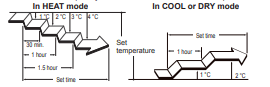
WEEKLY timer
ON and OFF timer can be combined, and up to 4 reservations (program 1 - 4) per day and 28 reservations per week. Before setting the program, please set the week and time of the air conditioner first. If the week and time are not set, the weekly timer will not operate correctly at the set time. Please refer to "remote controller preparation"
Example of WEEKLY timer 1
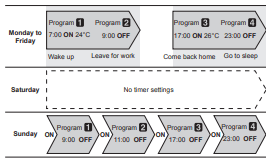
Example of WEEKLY timer 2
You can specify a given temperature in the ON setting in WEEKLY timer.

* You can set the temperature for AUTO, COOL, and DRY modes within the range of 18-30°C, for Heat mode the range is 10 or 16-30°C. Even if you set to 10, 16, or 17°C, if you run the product on AUTO, COOL, or DRY, it will run at 18°C.
Notes:
- Operations modes other than the temperature setting will be the same at the last time operation was stopped, so Cooling → Heating → Cooling → Heating type of operations cannot be automatically set.
- If you set the ON timer and OFF timer on the same time, the air conditioner will run the ON timer. If two ON timer are set at the same time, the air conditioner will run in the order of the program number.
- If there is a power interruption, such as due to a power outage during the WEEKLY timer setting or a circuit breaker cutting out, the internal timer of the air-conditioning will be incorrect. (See "Auto-restart".) In such a case, the main timer lamp will notify you of this by flashing, so carry out matching of the time and date. (See "remote controller preparation".)
- You cannot use the WEEKLY timer together with the other timers. If you want to run the product on WEEKLY timer after using the ON/ OFF Timer, Program Timer, or SLEEP Timer while the WEEKLY timer is running, you need to activate the WEEKLY timer again
To set the WEEKLY timer, first follow steps ①~③ on page 6 for the ON/OFF timer.
4 Select the program number and the day using the SELECT button.
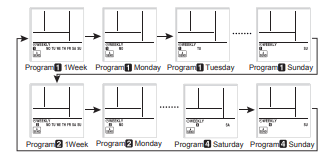
Press the NEXT button, when the program number and day you want to set are flashing.
5 Using the SELECT button select the operation mode (ON timer, OFF timer, or without a timer).
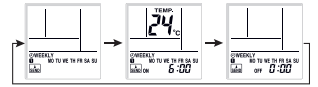
To operate without a timer
1. Press the NEXT button to go back to step 4 and configure the next setting.
2. Press the SEND button to finish Press the NEXT button.
6 Press the SELECT button to set the desired ON time or OFF time.
If you selected OFF in step 5
1. Press the NEXT button to go back to step 4 and configure the next setting.
2. Press the SEND button. Press the NEXT button.
7 Press the SELECT button to set the temperature.
If you want to move on to the next setting, press the NEXT button, return to step 4 and configure the next setting.
8 To complete the setting, press the SEND button.
If you want to cancel the setting midway, please press the TIMER SETTING button instead of pressing the SEND button.
Notes:
- When canceling the WEEKLY timer, select No Timer Operation in Step 5 in the WEEKLY timer setting.
- If you want to go back to the previous step when configuring settings, press the BACK button to return to the previous step.
- Press the SEND button, when you are close to the main unit. If you do so when far from the main unit, the signal may not get properly sent, and the settings may not get properly configured.
- To check the schedule, repeat steps 1 to 3 to enter the WEEKLY timer mode, then use the SELECT button to browse through the WEEKLY timer settings in the order shown in step 4.
- To cancel the WEEKLY timer, press the WEEKLY button while the WEEKLY indicator is on. (Erases the indicator)
Human Sensor (Energy Saving)
To prevent waste of electricity, this function controls the temperature setting when no one is occupying the room. Energy Saving program is on at the time of purchase.
1 To activate the Energy Saving program, press the SENSOR button.
 indicator will be flashing on the remote controller display.
2 To deactivate the Energy Saving program, press the SENSOR button again.
 will no longer be shown on the remote controller display.
About the ENERGY SAVING Operation
If no one enters the room for approximately 20 minutes, the set temperature will be automatically controlled. (When someone comes back into the room, the human sensor will detect this, and automatically revert to the original settings.)
COOL/DRY The set temperature will be increased by a maximum of approximately 2˚C.
HEAT The set temperature will be decreased by a maximum of approximately 4˚C.
AUTO This runs the ENERGY SAVING function automatically for the selected mode (Cooling/ Heating/ Drying).
- When using together with the SLEEP timer , the SLEEP timer will be prioritized.
- During 10°C HEAT operation, if there is no one in the room the set temperature will not be changed.
- Application range is follows
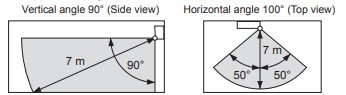
ENERGY SAVING function may not work when the room temperature is very different from the temperature defined in temperature setting, such as when immediately after starting the operation.
About the HUMAN SENSOR
- Details about detection with the human sensor
- The human sensor detects whether there are people in the room by looking for movement by people in the room.
- Since the human sensor detects infrared light given out by people, there may be cases where this detection is incorrect.
Situations in which the sensor will detect no people in the room, even when there is someone there
- When the temperature is high and the difference with between people’s body temperature is small. (Such as during the summer when the temperature is 30˚C or higher)
- When there is someone in the room, but they do not move for a long period of time.
- When someone is hidden behind a sofa, other furniture, glass, or in similar situations.
- When someone is wearing extremely thick clothing and has their back facing the sensor.
Situations in which the sensor will incorrectly detect people in the room, even when there is no one there
- When there is a dog or a cat moving around in the room.
- When the wind is making curtains or plants move.
- When there are heating units, humidifiers, or electric appliances such as oscillating electric fans operating.
Demand Response and Indoor Unit Operation
This product is designed to be compatible with Air Conditioning Demand Response program. To utilize the function, you need a separate arrangement with your electricity supplier. Please check availability in the place of use. When your electricity supplier activates one of the following 3 Demand Response (DR) modes, the air conditioner switches over to the appropriate operation, and the OPERATION indicator (green) on the indoor unit blinks to inform you the unit has entered the DR mode.
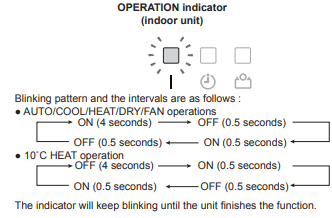
DR mode 1 Compressor off.
DR mode 2 The air conditioner continues to cool or heat during the Demand Response event, but the electrical energy consumed by the air conditioner in a half hour period is not more than 50% of the total electrical energy that would be consumed if operating at the rated capacity in a half hour period.
DR mode 3
The air conditioner continues to cool or heat during the Demand Response event, but the electrical energy consumed by the air conditioner in a half hour period is not more than 75% of the total electrical energy that would be consumed if operating at the rated capacity in a half hour period.
When the unit enters the DR mode, it performs moderate operation so the cooling or heating effect may be reduced. You cannot override this function by changing the temperature setting using the remote controller or other actions unless the unit finishes the function.
Note: Stopping the operation of the air conditioner by using the remote controller or by OFF timer are valid in DR mode. If the timer operation is interfered by an interruption of power supply such as a blackout and the power supply is resumed, no indication of the DR mode is performed. During the DR mode, no indication of "filter sign" is performed. Powerful operation is performed within the operable range of the DR mode.
When the unit finishes the function, it will perform the operation that was previously performed before entering the DR mode. If you have operational issues, contact your electricity supplier first to check whether they are activating any of the DR mode described above. If the air conditioner is under demand controlling, consult the issues with your electricity supplier. If they are not demand controlling the air conditioner, refer to your warranty card for the contact details of Fujitsu General (AUST.) PTY LIMITED
Automatic defrosting operation
When outdoor temperature is very low with high humidity, frost may form on the outdoor unit during the heating operation, and it could reduce the operating performance of the product. For frost protection, a microcomputer-controlled automatic defrost function is equipped in this air conditioner. If frost forms, the air conditioner will temporarily stop, and defrost circuit will operate briefly (maximum of 15 minutes.) OPERATION indicator on the indoor unit blinks during this operation. If frost forms on the outdoor unit after the heating operation, the outdoor unit will stop automatically after it operates for a few minutes. Then the automatic defrosting operation starts.
Auto-restart function
In event of power interruption such as a blackout, the air conditioner stops once. But it restarts automatically and performs previous operation when the power supply is resumed. If any power interruption occurs after the timer is set, counting down of the timer will be reset. After the power supply is resumed, the TIMER indicator on the indoor unit blinks to notify you that there has been a timer fault. In such a case, reset the timer for your opportune time.
Malfunctions caused by other electrical devices:
Use of other electrical appliances such as an electric shaver or nearby use of a wireless radio transmitter may cause the malfunction of the air conditioner. If you encounter such a malfunction, turn off the circuit breaker once. Then turn it on again, and resume operation by using the remote controller.
Heating performance
This air conditioner operates on the heat-pump principle, absorbing heat from air outdoors and transferring that heat to the indoor unit. As a result, the operating performance is reduced as outdoor air temperature drops. If you feel that the heating performance is insufficient, we recommend you to use this air conditioner in conjunction with other kinds of heating appliance.
Temperature and Humidity Range
Permissible ranges of temperature and humidity are as follows:

If the unit is used under higher temperature conditions than those noted here, the automatic protection circuit may operate, interrupting the operation. If the unit is used under lower temperature conditions than those noted here, the heat exchanger may freeze, causing water leakage or other malfunction.
- Do not use the air conditioner for any purpose other than room cooling/dry, room heating or fan.
Care and Cleaning
Daily care
When cleaning the indoor unit body, mind the following:
- Do not use water hotter than 40 °C.
- Do not use scouring cleanser, volatile solvents such as benzene or thinner.
- Wipe the unit gently by using soft cloth.
Cleaning the intake grille
1 Open the intake grille in direction of the arrow a. While gently pressing the left and right mounting shafts of the intake grille outward b, remove the intake grille in direction of the arrow c
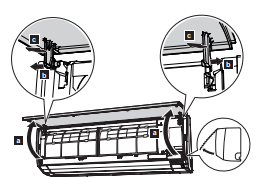
2 Wash the intake grille gently with water or wipe it gently with a soft cloth moisten with warm water. Then wipe it with a dry and soft cloth.
3 While holding the grille horizontal, set the left and right mounting shafts into the pillow blocks at the top of the panel a. To latch each shaft properly, insert the shaft until it snaps. Then close the intake grille b.
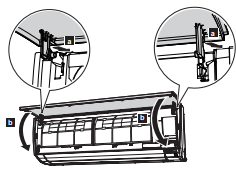
4 Press 4 places on the intake grille to close it completely

Cleaning the air filters
Mind that you have a periodical cleaning of the air filters to prevent reducing the operation efficiency of the product.
Using of clogged air filter with dust will lower the product performance, and may cause airflow reduction or increase of operating noise.
Clean the air filters once every 2 weeks under normal use.
1 Open the intake grille. (Refer to a of step 1 in “Cleaning the intake grille”.)
2 While holding the intake grille with your hand, pull up the handle a of the filter in direction of the arrow and release the 2 claws b. Then pull the filter out with gently sliding it downward c.
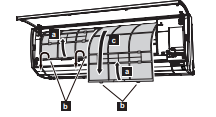
3 Filter holder and air cleaning filter are attached on the rear side of the air filter. Remove them from the air filter by unlatching each corner of the filter holder d.
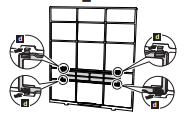
4 Remove dust by using a vacuum cleaner or by washing the filter. When you wash the filter, use neutral household detergent and warm water. After rinse the filter well, dry it throughly in a shaded place before you reinstall it.
5 Attach the air cleaning filter and the filter holder to each air filter.
6 Attach the air filter with aligning both side of the filter with the front panel, and push in the filter fully.
Note: Make sure that 2 claws are firmly snapped to the guide holes on the panel.
7 Close the intake grille firmly. (Refer to step 4 in “Cleaning the intake grille”.)
Replacing the air cleaning filter
1 Remove the air filter. (Refer to step 1 in “Replacing the air filter”.)
2 Release 2 latches a of the filter holder, and turn over the holder in direction of arrow b. Remove the soiled air cleaning filter c.
Note: Air cleaning filter is attached on each air filter
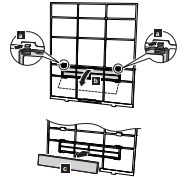
3 Attach new or maintained air cleaning filter d to the filter holder. New air cleaning filter can be attached to either of the right holder or the left holder.
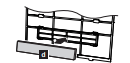
4 Latch 2 corners of the filter holder e to the air filter firmly.
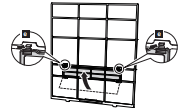
5 Reinstall the air filter. (Refer to step 6 in “Cleaning the air filter”.)
6 Close the intake grille firmly. (Refer to step 4 in “Cleaning the intake grille” .)
Following 2 types of air cleaning filters are used in this product. When you replace them, purchase dedicated air cleaning filters for this product.
Apple-catechin filter: UTR-FA16

The Apple-catechin filter uses static electricity to clean fine particles and dust in the air such as tobacco smoke and plant pollen that are too small to see.
- This filter is disposable. Do not wash or reuse it.
- Once you open the package, use it as soon as possible. The cleaning effect is reduced if the filter is left with the package opened.
- Replace the filter once every 3 months under normal use.
- • By setting the fan speed high, the air cleaning effect increases.
Ion deodorization filter: UTR-FA16-2

The filter deodorizes by powerfully decomposing absorbed odors using the oxidizing and reducing effects of ions generated by the ultra-fine-particle ceramic.
- To maintain the deodorizing effect, clean the filter once every 3 months as follows:
1. Remove the filter.
2. Flush the filter with high-pressure hot water until the surface of the filter is covered with water.
3. Wash the filter gently with diluent nuetral detergent. Do not wash it by wringing or rubbing to prevent reducing the deodorizing effect by damage.
4. Rinse the filter well with water flow.
5. Dry the filter throughly in a shaded place.
6. Reinstall the filter to the indoor unit.
- Replace the filter once every 3 years under normal use.
After extended non-use of the unit
If you have shut down the indoor unit for 1 month or more, perform the FAN operation for half a day to dry the internal parts throughly before you perform normal operation.
Additional inspection
After long period of use, accumulated dust inside the indoor unit may reduce the product performance even if you have maintained the unit with instructed daily care or cleaning procedures written in this manual. In such a case, a product inspection is recommended. For more information, consult authorized service personnel.
Troubleshooting
Operation is delayed after restart.
- To prevent blowout of the fuse, the compressor will not operate while the protection circuit is working for about 3 minutes after sudden OFF→ON operation of the power supply.
Noise is heard.
- During operation or immediately after stopping the air conditioner, refrigerant flowing sound may be heard. Also it may be particularly noticeable for 2–3 minutes after starting operation.
- During the operation, a slight squeaking sound produced by the minute expansion and contraction of the front panel caused by temperature change may be heard.
- During heating operation, a sizzling sound produced by the automatic defrosting operation may be heard.
Smell coming from the unit.
- Various smells generated from interior textile, furniture, or cigarette smoke absorbed into the air conditioner may be emitted.
Mist or steam is emitted from the unit.
- In COOL or DRY mode, a thin mist generated by condensation formed with sudden cooling process may be emitted.
- During heating operation, the fan built-in the outdoor unit may stop and rising steam generated by the automatic defrosting operation may be seen.
Airflow is weak or stops.
- Immediately after the heating operation is started, the fan speed stays very low temporarily to warm up the internal parts of the unit.
- In HEAT mode, the outdoor unit stops and the indoor unit operates at very low fan speed if the room temperature rises above the set temperature.
- In HEAT mode, the indoor unit temporarily stops for maximum of 15 minutes to perform the automatic defrosting operation while the OPERATION indicator is flashing.
- In DRY mode, the indoor unit operates at low fan speed to adjust the room humidity, and may stop from time to time.
- When the fan speed is set to “QUIET”, the fan rotates at very low speed and the airflow is reduced.
- In COOL mode, the indoor unit fan may stop from time to time when the outdoor unit is stopped.
- When monitoring operation is performed in AUTO mode, the fan rotates at very low speed.
Outdoor unit emits water.
- During heating operation, the outdoor unit may emit water generated by the automatic defrosting operation.
Before you call for or request servicing, troubleshoot a problem by performing following checks:
Does not operate at all.
- Has the circuit breaker been turned off?
- Has there been a power outage?
- Has a fuse blown out or the circuit breaker been tripped?
- Is the timer operating?
Poor cooling or heating performance.
- Is the air filter dirty?
- Is the intake grill or outlet port of indoor unit blocked?
- Is the room temperature adjusted appropriately?
- Is a window or door left opened?
- Is direct or strong sunlight shinning into the room in cooling operation?
- Are there other heating apparatus or computers operating, or too many people in the room in cooling operation?
- Is the fan speed set to “QUIET”?
- When the fan speed setting is set to “QUIET”, noise reduction is prioritized and the air-conditioning performance may become lower. If the volume of provided airflow is not agreeable to your preference, set the fan speed to “LOW” or higher fan speed.
- Has the OUTDOOR UNIT LOW NOISE mode been set?
- Do you have an arrangement with your electric company for Demand Response?
The unit operates differently from the remote controller setting.
- Are the batteries used in the remote controller exhausted?
- Are the batteries used in the remote controller loaded properly?
Immediately stop operation and turn off the electrical breaker in following cases. Then consult authorized service personnel.
- The problem persists even if you perform these checks or diagnostics.
- The OPERATION indicator and TIMER indicator blink while the ECONOMY indicator is blinking fast