
!
!
TCL• Roku TV
User Guide
Models: 28S3750, 32S3750, 40FS3750, 48FS3750, 55FS3750,
32S3800, 32S3850(A/B/P), 40FS3800, 50FS3800
Version!6.2!
English
!
!
!
!
!
!
!
!
!
!
Illustrations+in+th is +g u id e+a re +p ro v ide d +fo r+
reference+only+and+m a y+diffe r+from +ac tua l+
product+appearance.+Product+design+and+
specification+may+be+changed+without+notice.+!

!
!
Copyright
Portions!©!2015!TCL!and!Roku,!Inc.!All!rights!reserved.!ROKU,!the!ROKU!Logo,!!and!“NOW!THIS!IS!TV.”!are!trademarks!and/or!registered!
trademarks!of!Roku,!Inc.!in!the!United!Sta tes!an d!oth er!co un tries.! Material!in!this!User!Manual!is!the!property!of!TCL!and!its!subsidiaries,!and!
Roku,!Inc.!and!is!protected!under!US!and!International!copyright!and/or!other!intellectual!property!laws.!Reproduction!or!transmission!of!the!
materials,!in!whole!or!in!part,!in!any!manner,!electronic,!print,!or!otherwise,!without!the!prior!written!consent!of!the!TCL!and!Roku,!Inc.!is!a!
violation!of!TCL!and!Roku,!Inc.’s!rights!under!the!aforementioned!laws.!
No!part!of!this!publication!may!be!stored,!reproduced,!transmitted!or!distributed,!in!whole!or!in!part,!in!any!manner,!electronic!or!otherwise,!
whether!or!not!for!a!charge!or!other!or!no!consideration,!without!the!prior!written!permission!of!Roku,!Inc.!and!TCL.!
Requests!for!permission!to!store,!reproduce,!transmit!or!distribute!materials!may!be!made!to!the!following!addresses:!
TCL!!
!
Roku,!Inc.!
!
TCL,!Roku,!Inc.!and!any!and!all!other!TCL!or!Roku,!Inc.!product!names,!logos,!slogans!or!marks!are!registered!trademarks!of!TCL!and!its!
subsidiaries!and!Roku,!Inc..!All!other!trademarks!are!the!prop e rty!of!th eir!re sp ectiv e!h old e rs.!
!
!
Product!name:!TCL•!Roku!TV!!
Document!name:!TCL•!Roku!TV!User!Guide!
Document!revision:!6.2.1!
Publication!date:!12!May!2015!
!
!
!
Important information
!
!
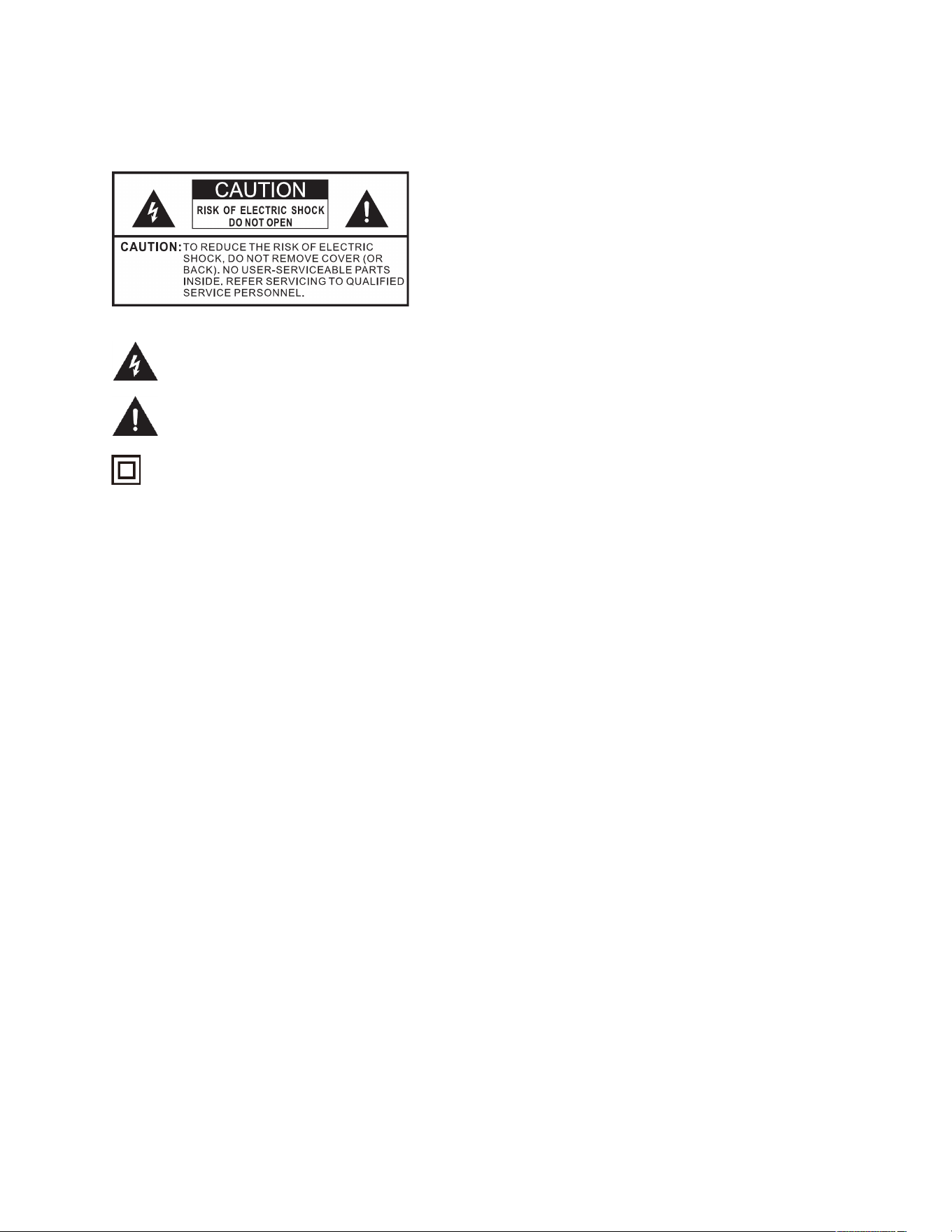
The!lightning!flash!with!arrowhead!symbol,!within!an!equilateral!triangle!is!intended!to!alert!the!user!to!the!presence!of!
uninsulated!dangerous!voltage!within!the!product's!enclosure!that!may!be!of!sufficient!magnitude!to!constitute!a!risk!of!electric!
shock.!
The!exclamation!point!within!an!equilateral!triangle!is!intended!to!alert!the!user!to!the!presence!of!important!operating!and!
maintenance!(servicing)!instructions!in!the!literature!accompanying!the!product.!
!
This!symbol!indicates!that!this!product!incorporates!double!insulation!between!hazardous!main!voltage!and!user!accessible!parts.!
When!servicing,!use!only!identical!replacement!parts.!
WARNING:!To!reduce!the!risk!of!fire!or!electric !s ho c k ,!do !n o t !ex p o se !th is !p ro d u ct !to !ra in !o r !m o i st ur e. !T hi s!p r od u c t!s h o u ld !n o t!b e!e xposed!to!
dripping!or!splashing.!No!objects!filled!with!liquids,!such!as!vases,!should!be!placed!on!or!near!the!product.!
WARNING:!The!TV!is!unstable!if!it!is!not!pro p e rly !a tta c h e d!t o !th e!b a s e!o r !mounted!to!the!wa l l.!B e !su re !to !f o llo w!the!base!or!wall!mounting!
instructions!provided !in!t he !U se r’s!Gu id e!t o !en su re!y ou r!s afe ty.!
WARNING:!Do!not!expose!batteries!to!excessive!heat!such!as!sunshine,!fire,!and!so!forth.!
Proper operating voltage
Refer!to!the!identification/rating!label!located!on!the!back!panel!of!your!product!for!its!proper!operating!voltage.!
Cable TV installer notice of proper grounding
This!reminder!is!provided!to!call!your!attention!to!Article!820a40!of!the!National!Electrical!Code!(Section!54!of!the!Canadian!Electrical!Code,!Part!
1)!which!provides!guidelines!for!proper!grounding!and,!in!particular,!specifies!that!the!cable!ground!should!be!connected!to!the!grounding!
system!of!the!building!as!close!to!the!point!of!cable!entry!as!practical.!
Installation location
Important:!This!tele vis io n!is !a !tab le !m o d e l!an d !is!d e sig n ed !t o!s it!o n !a !firm,!flat!surface.!Don’t!p lac e!t he !T V !o n !so ft !ca rp e tin g!o r!s im ilar!s urfa ce!
because!the!ventilation!slots!on!the!bottom!of!the!unit!will!be!blocked,!resulting!in!reduced!lifetime!from!overheating.!To!assure!adequate!
ventilation!for!this!product,!maintain!a!spacing!of!4!inches!from!the!top!and!side!of!the!TV!receiver!and!2!inches!from!the!rear!of!the!TV!receiver!
and!other!surfaces.!!
Also,!make!sure!the!stand!or!base!you!use!is!of!adequate!size!and!strength!to!prevent!the!TV!from!being!accidentally!tipped!over,!pushed!off,!or!
pulled!off!the!stand.!This!could!cause!persona l!inju ry!and/o r!damage!to!the!TV.!Refer!to!the!Important!Safety!Instructions!on!the!following!
pages.!
Low power standby mode
The!Power!button!(indicated!by!the!power!symbol)!on!this!TV!and!its!remote!control!puts!the!TV!into!a!very!low!power!standby!mode!but!does!
not!completely!turn!the!power!off.!To!completely!shut!the!power!off,!you!must!disconnect!the!power!cord!from!the!power!outlet.!The!mains!
plug/appliance!coupler!is!used!as!a!disconnect!device.!Therefore,!you!should!be!sure!that!the!TV!is!installed!in!a!manner!to!enable!the!power!
cord!t!

!
!
Product Registration
Please!register!your!TCL!Roku!TV!purchase!onaline!at!www.TCLUSA.com.!It!will!make!it!easier!to!contact!you!should !it!ever!b e!n ec ess ary.!
Registration!is!not!required!for!warranty!coverage.!
Product Information
Keep!your!sales!receipt!to!obtain!warranty!parts!and!service!and!for!proof!of!purchase.!Attach!it!here!and!record!the!serial!and!model!numbers!
in!case!you!need!the m .!Th e se !nu m b e rs!a re!lo ca ted !o n !th e!p ro d u ct.!
Model!No.!____________________________________________!
Serial!No.!_____________________________________________!
Purchase!Date!________________________________________!
Dealer/Address/Phone!__________________________________!
!
Important safety instructions
1.! Read*instructions.!Read!all!the!safety!and!operating!instruction s!before!operating!the!product.!!
2.! Retain*instructions.!Retain!the!safety!and!operating!instructions!for!future!reference.!
3.! Heed*warnings.!Adhere!to!all!warnings!on!the!pro d u ct!a n d!in !t he !o pe rat in g!instruc tio ns .!
4.! Follow*instructions.!Follow!all!operating!and!use!instructions.!
5.! Water*and*moisture.!Do!not!use!this!product!near!water.!
6.! Cleaning.!Clean!only!with!a!dry!cloth.!
7.! Ventilation.!Do!not!block!any!ventilation!openings.!Install!in !acco rd an ce !w ith!th e!manufacturer’s!instructions.!
8.! Heat.!Do!not!install!near!any!heat!sources!such!as!radiators,!heat!registers,!stoves,!or!other!apparatus!(including!amplifiers)!that!
produce!heat.!
9.! Grounding*or*polarization.!Do!not!defeat!the!safety!purpose!of!the!polarized!or!groundingatype!plug.!A!polarized!plug!has!two!
blades!with!one!wider!than!the!other.!A!grounding!type!plug!has!two!blades!and!a!third!grounding!prong.!The!wide!blade!or!the!
third!prong!are!provided!for!your!safety.!If!the!prov ided !plug!do es!n ot!fit!into!yo ur!outlet,!consult!an!electrician!for!rep lace m en t!of!
the!obsolete!outlet.!
10.! Power&cord&protection.!Protect!the!power!cord!from!b e in g !w a lk e d !o n !o r!p in c h e d !p a rtic u la rly!a t!p lu g s ,!c o n ve n ie n c e !re c e p ta cle s ,!
and!the!point!where!it!exits!from!the!product.!
11.! Accessories.!Use!only!attachments/accessories!spe cifie d!b y!th e!m a nu fa ctu rer.!
12.! Stand/cart.!Use!only!with!the!cart,!stand,!tripo d ,!brac ket,!o r!tab le!sp ec ified !by !the !m an u factu re r,!or!so ld!w ith !the !
apparatus.!When!a!cart!is!used,!use!caution!when!moving!the!cart/apparatus!combination!to!avoid!injury!from !
tipaover.!
13.! Power.!Unplug!this!apparatus!during!lightning!storms!or!when!unused!for!long!periods!of!time.!
14.! Servicing.!Refer!all!servicing!to!qualified!service!personnel.!Servicing!is!required!when!the!apparatus!has!been!damaged!in!any!way,!
such!as!powerasupply!cord!or!plug!damaged,!liquid!has!been!spilled!or!objects!have!fallen!into!the!app aratus,!the!apparatu s!has!
been!exposed!to!rain!or!moisture,!does!not!operate!normally,!or!has!been!dropped.!
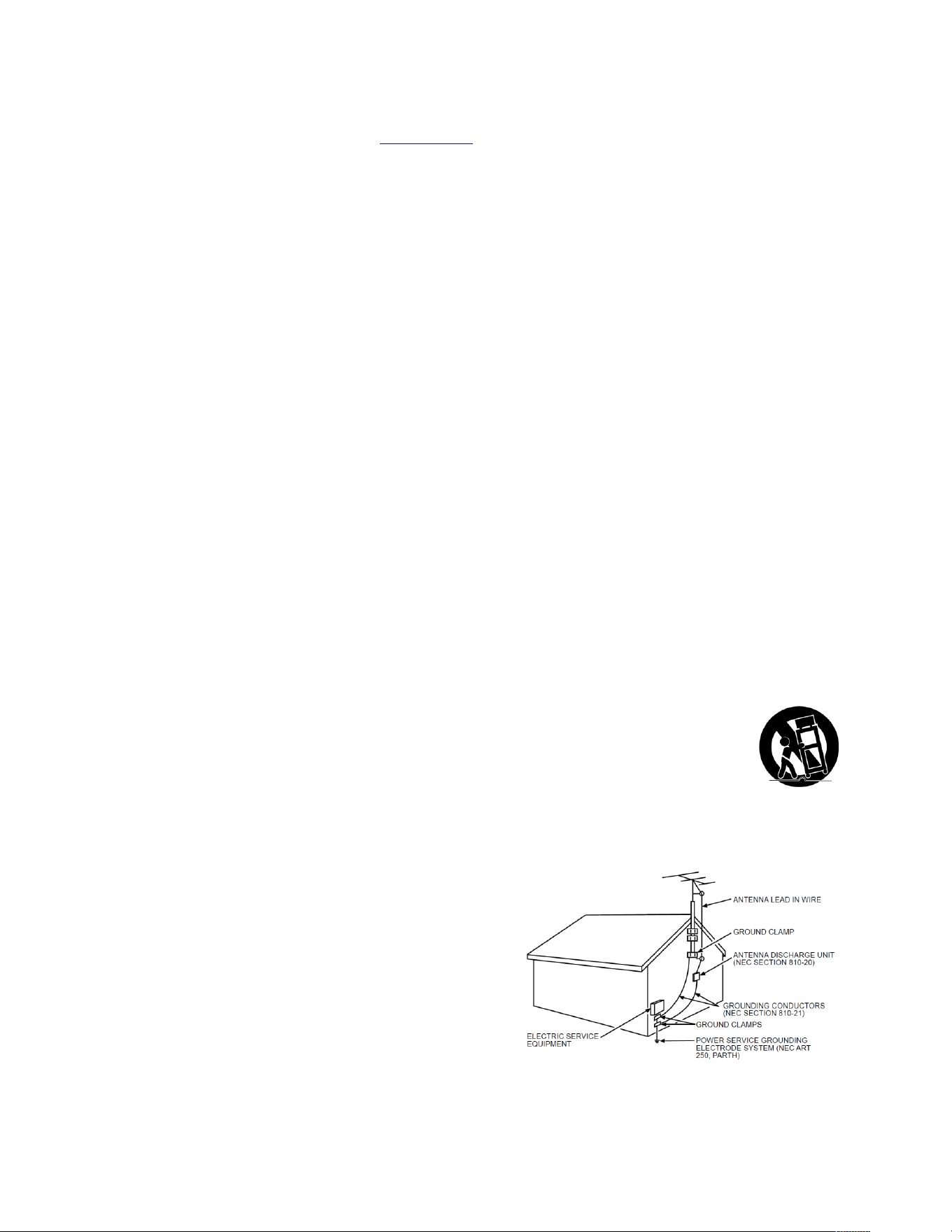
15.! If!an!outside!antenn a !o r!ca ble!system!is!connected!to!the!product,!
be!sure!the!antenna!or!cable!system!is!grounded!so!as!to!provide!
some!protection!against!voltage!surges!and!builtaup!static!charges.!
Section!810!of!the!National!Electrical!Code,!ANSI/NFPA!No.!70a2011!
(Section!54!of!Canadian!Electrical!Code,!Part!1)!provides!
information!with!res pe ct!t o !pro p er!g ro u nd in g!o f!t h e!m a st!a n d !
supporting!structure,!grounding!of!the!leadain!wire!to!an!ant en n aa
discharge!unit,!size!of!grounding!conductors,!location!of!antennaa
discharge!unit,!connection!to!grounding!electrodes,!and!
requirements!for!the!grounding!electrode.!See!followin g !ex ample

!
!
!
Page!ii!
!
!
!
!

!
!
!
Page!iii!
!
!
!
Contents
TCL•!Roku!TV!.................................................................................................................................................!i!
Impor ta n t!in fo r mation!..............................................................................................................................!i!
Impor ta n t!s af et y!in s tructions!................................................................ ....................................................!i!
Welcome!......................................................................................................................................................!1!
The!new!standard!in!Smart!TVs!................................................................................................................!1!
Get!the!most!out!of!your!new!TCL•!Roku!TV!...........................................................................................!1!
Connections!and!setup!.................................................................................................................................!3!
Before!initial!setup!...................................................................................................................................!3!
Set!up!your!TCL•!Roku!TV!!........................................................................................................................!4!
Connect!your!TCL•!Roku!TV!.....................................................................................................................!7!
AC!power!................................................................................................................................................!10!
Remote!control!batteries!.......................................................................................................................!11!
Guided!Setup!..............................................................................................................................................!12!
Connected!TCL•!Roku!TV!Home!screen!.................................................................................................!20!
Nonaconnected!TCL•!Roku!TV!Hom e!screen!..........................................................................................!22!
Benefits!of!connecting!...............................................................................................................................!23!
Connecting!brings!out!your!TCL•!Roku!TV’s!full!potential!!....................................................................!23!
What!is!streaming?!.................................................................................................................................!23!
But!what!if!I!didn’t!connect!my!TCL•!Roku!TV?!......................................................................................!24!
Setting!up!Antenna!TV!...............................................................................................................................!26!
Why!do!I!have!to!set!up!the!TV!tuner?!...................................................................................................!26!
How!do!I!set!up!the!TV!tuner?!................................................................................................................!26!
Using!your!TCL•!Roku!TV!............................................................................................................................!30!
TCL•!Roku!TV!status!light!.......................................................................................................................!30!
TCL•!Roku!TV!panel!buttons!...................................................................................................................!30!
Standby!mode!energy!savings!................................................................................................................!31!
Roku!TV!Remote!control!........................................................................................................................!31!
Getting!around!................................ .......................................................................................................!32!
Watching!broadcast!TV!channels!...........................................................................................................!34!
Switching!TV!inputs!................................................................................................................................!36!
Playing!content!from!USB!storage!devices!.............................................................................................!36!

!
!
!
Page!iv!
!
!
!
Playing!content!from!local!network!media!servers!................................................................................!37!
Adjusting!TCL•!Roku!TV!settings!................................................................ ................................................!38!
Settings!menu!.........................................................................................................................................!38!
Options!menu!.........................................................................................................................................!39!
Advanced!picture!settings!......................................................................................................................!40!
The!Roku!Feed!............................................................................................................................................!43!
Searching!for!movies!&!shows!...................................................................................................................!44!
How!do!I!search?!....................................................................................................................................!44!
I!found !a !sh o w,!now !what?!....................................................................................................................!45!
Using!the!Roku!Channel!Store!....................................................................................................................!46!
Customizing!your!TCL•!Roku!TV!.................................................................................................................!47!
Rearrange!tiles!.......................................................................................................................................!47!
Edit!broadcast!TV!channel!lineup!...........................................................................................................!48!
Rename!inputs!.......................................................................................................................................!48!
Remove!unwanted!tiles!..........................................................................................................................!49!
Change!themes!.......................................................................................................................................!49!
Change!sound!effects!volume!................................................................................................................!50!
Configure!power!settings!.......................................................................................................................!50!
Configure!parental!controls!...................................................................................................................!51!
More!settings!.............................................................................................................................................!58!
Changing!network!settings!.....................................................................................................................!58!
Changing!caption!settings!......................................................................................................................!59!
Changing!time!settings!...........................................................................................................................!60!
Scanning!for!broadcast!TV!channels!again!.............................................................................................!61!
Using!the!TCL•!Roku!TV!in!a!home!theater!............................................................................................!61!
Restarting!the!TCL•!Roku!TV!..................................................................................................................!65!
Resetting!the!TCL•!Roku!TV!....................................................................................................................!65!
Getting!system!updates!.........................................................................................................................!67!
Other!devices!.............................................................................................................................................!69!
Screen!Mirroring!your!phone!or!tablet!..................................................................................................!69!
Getting!and!using!the!Roku!mobile!app!.................................................................................................!69!
Using!a!universal!remote!........................................................................................................................!69!
FAQ!.............................................................................................................................................................!70!
Other!information!......................................................................................................................................!71!
Battery!Caution!and!Disposal!Information!.............................................................................................!71!
Electronics!Recycling!..............................................................................................................................!71!
!

!
!
!
Page!v!
!
!
!
Care!and!Cleaning!...................................................................................................................................!71!
Television!Specifications!.........................................................................................................................!72!
Notices!....................................................................................................................................................!72!
Additional!TCLLegal!Statements!!............................................................................................................!80!
*


!
!
!
Page!1!
!
!
!
Welcome
Congratulations!on!the!purchase!of!your!new!TCL!•!Roku!TV!!Discover!the!joy!of!endless!entertainment.!
After!it’s!set!up,!you’ll!be!able!to!access!a!world!of!streaming!content!channels!that!may!include!Netflix,!
YouTube,!Crackle,!CNET!and!literally!thousands!more.!Also,!your!TCL•!Roku!TV!will!receive!automatic!
updates,!enabling!new!content!and!features.!
The new standard in Smart TVs
Welcome!to!TV!like!you’ve!most!likely!never!seen!before—a!home!screen!that!you!can!personalize!with!
your!favorite!devices!and!streaming!channels.!Choose!from!hundreds!of!thousands!of!streaming!movies!
and!TV!episodes,!!plus!music,!sports,!kids,!family,!international!and!much!more.!You!should!never!run!
out!of!things!to!watch.!
Note:+Some+channels+require+payment+and/or+a+subscription+to+access+content.+Channel+
availability+is+subject+to+cha n g e +an d +n o t+a ll+c o nt en t +is+a v aila b le +in +co u n tr ies +o r+re g ion s +w h e re +
Roku+products+are+sold.!
Get the most out of your new TCL• Roku TV
Follow!these!simple!steps!to!get!the!most!out!of!your!new!Roku!TV.!
1.! Connect!to!the!Internet!!
•! It’s!simple ,!it’s!easy,!and!it!will!unlock!a!world !o f!e n te rta in m e n t.! All!you!need!is!a!
wireless!network.!There!are!hundreds!of!free!streaming!channels,!subscriptions!services!
like!Netflix!and!Spotify,!convenient!ways!to!rent!or!buy!a!favorite!film!or!show!with!
Google!Play!and!Cineplex!and!more.!!
2.! Pick!your!favorite!streaming!channels!
•! Find!the!entertainment!you!love.!!From!the!latest!blockbuster!movies!to!your!favorite!
TV!shows,!with!tons!of!live!sports,!a!broad!selection!of!music!streaming!channels,!
popular!programming!in!a!dozen!international!languages,!24x7!live!news!and!so!much!
more,!your!new!Roku!TV!has!your!sweet!spot.!Some!channels!require!payments.!

!
!
!
Page!2!
!
!
!
3.! Personalize!your!home!screen!
•! Put!your!favorite!broadcast!TV,!streaming!channels,!gaming!console!and!other!devices!
frontaanda ce nter!on!the!home!screen.!No!m ore!flipping!through!inputs!or!wading!
through!com p licate d!m en us .!!You!ca n!e ven !pe rson alize!the !na m es!o f!each !inpu t!an d!
move!tiles!around!so!your!mostaoften!used!devices!and!streaming!channels!are!only!a!
click!away.!
4.! Search!for!your!favorite!movie,!TV!show,!actor,!or!director!
•! Once!you’re!connected!to!the!internet,!you!can!easily!search!across!top!streaming!
channels!by!movie!or!TV!show!title,!actor!or!director—all!from!one!place.!Search!results!
are!organize d!b y!price !so!yo u!ca n!a lwa ys!se e!the !best!p riced !op tion .!Som e!channels!
require!paym e nts.!
5.! Send!your!personal!media!to!the!big!screen!
•! Send!personal!photos,!videos,!and!music!from!your!smartphone!or!tablet!to!the!TV!
screen!in!just!a!few!taps.!Plus,!with!Netflix!and!YouTube!apps!and!any!applicable!
subscription,!send !movies ,!s h o ws,!spor t!h i ghlights,!a n d !more!d i re c tly !to!your!Roku!TV.!
6.! Follow!movies!coming!soon!
•! Use!My!Feed!to!choose!from!and!fo llow !a!list!of!upcoming!movies,!and!then!watch!for!
alerts!each!time!one!of!your!followed!movies!becomes!available!or!changes!price.!
7.! Take!charge!with!a!smartphone!or!tablet!
•! Control!your!Roku!TV!with!the!included!remote!or!from!your!smartphone!or!a!tablet!
with!the!free!mobile!app!for!iOS,!Android,!and!Windows!devices.!Browse!channels,!view!
My!Feed,!and!even!se a rc h !with!vo ic e !v ia !fr e e !mobile !a p p .!
•! Mirror!your!smartphone!or!tablet!on!your!Roku!TV.!Share!videos,!photos,!web!pages,!
and!more!from!compatible!devices.!
Note:!Many+features+work+with+top+mobile+devices.+Go+to+support.roku.com+for+device+
compatibility+information!
Let’s!get!started.!
!

!
!
!
Page!3!
!
!
!
Connections and setup
Before initial setup
Protect against power surges
•! Connect!all!components!before!you!plug!any!power!cords!into!the!wall!outlet!or!power!strip.!
•! NEVER!plug!your!TCL!Roku!TV!into!an!ou tle t!th a t!is !co n t ro lled !b y !a!wall!switc h .!
•! Turn!off!the!TV!before!you!connect!or!disconnect!any!cables.!
•! Make!sure!all!antennas!and!cables!are!properly!grounded.!Refer!to!the!Important!Safety!
Instruct io n s.!
Safety information
•! Prevent!TV!from!overheating!by!placing!in!an!area!with!good!ventilation.!
•! Do!not!block!ventilation!holes!on!the!TV.!Position!the!TV!so!air!can!circulate!freely!on!all!sides.!
•! Do!not!stack!objects!on!the!TV.!
•! If!you!pla c e!t h e!T V !o n!a!stand,!make !su r e!y o u !a llo w !a d e q u a te !ve n t ilat io n .!
•! If!you!co n n e ct !an !a u d io !r ec e ive r!o r !amplifier!to !t h e !T V ,!pla c e!it !o n !th e !top!shelf!so!th e!h e a te d !air !
will!not!overheat!the!TV.!
Avoid audio interference
•! Position!cables!properly;!insert!each!cable!firmly!into!the!designated!jack.!
•! Route!all!cables!down!one!side!of!the!back!of!the!TV!instead!of!straight!down!the!middle.!
•! If!your!an t enna!uses!300aohm!twin!lead!cables,!do!not!coil!the!cables.!
•! Keep!twin!lead!cables!away!from!audio/video!cables.!
Avoid direct light
Do!not!p lace !the!TV !w he re!su nlight!o r!roo m !lighting!is!direc ted!to w ard !the!sc reen .!Use !soft!or!ind irect!
lighting.!
!
!
!
!
Page!4!
!
!
!
Set up your TCL• Roku TV
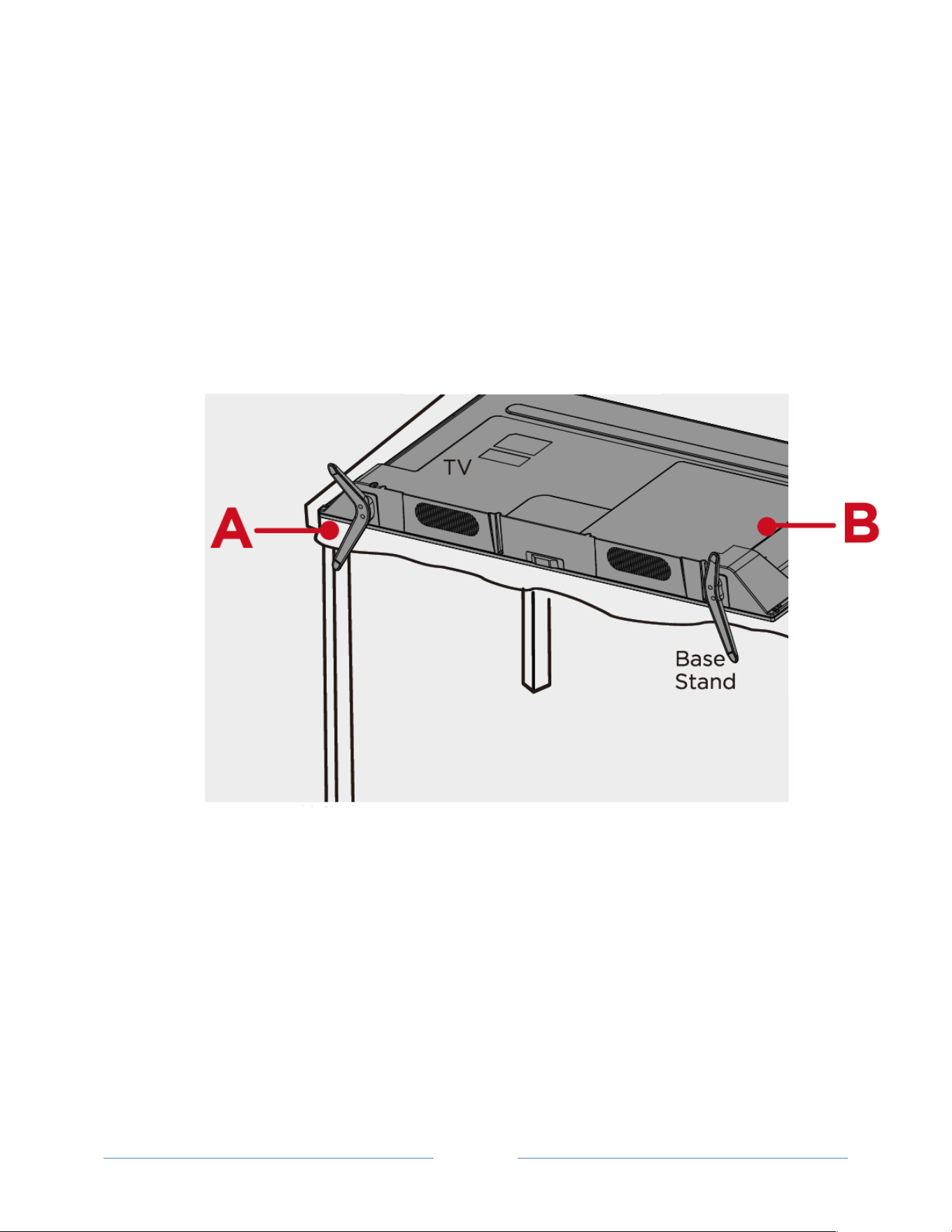
Open!the!box!and!remove!the!TV!and!other!items.!Be!careful,!the!TV!is!heavy!!
What’s in the box
!
To mount on a wall
If!you!are !moun tin g !yo u r !TCL!Roku!TV!to!the!w all,!do!no t!attac h!th e!TV !bas e!stan d!o r!TV !stand !colu m n.!
To!mount!your!TV!to!the!wall,!purchase!one!of!the!following!VESA!wall!mounts:!
•! 28"*models! VESA!100!x!100,!M4!x!12mm!screws!
•! 32"*models! VESA!200!x!150,!M4!x!12mm!screws!
•! 40"*models! VESA!100!x!150,!M6!x!16mm!screws!
•! 48"*models! VESA!200!x!200,!M6!x!16mm!screws!
•! 55"*models! VESA!200!x!200,!M6!x!16mm!screws!
The!VESA!number!is!the!horizontal!and!vertical!measurement!of!the!mounting!holes.!For!example!100!x!
200!indicates!that!the!mounting!holes!are!spaced!100mm!horizontally!and!200mm!vertically.!
Follow!the!directions!supplied!with!the!wall!mount!to!mount!the!TV!to!the!wall.!
Caution:!Your!wall!mount !must!be !a b le!t o !b e ar !a!minim u m!of!five!times!the !T V s !n et !w e ig h t!t o !a vo id !
damage.!
!
!
!
Page!5!
!
!
!
To use the stand
Your!TCL!Roku!TV!comes!without!the!stands!attached!so!that!you!can!choose!to!use!the!stands!or!mount!
your!TV!to!a!wall!using!a!wall!mount!(sold!separately).!If!you!want!to!mount!your!TV!to!the!wall,!don’t!
attach!the!stand!legs.!
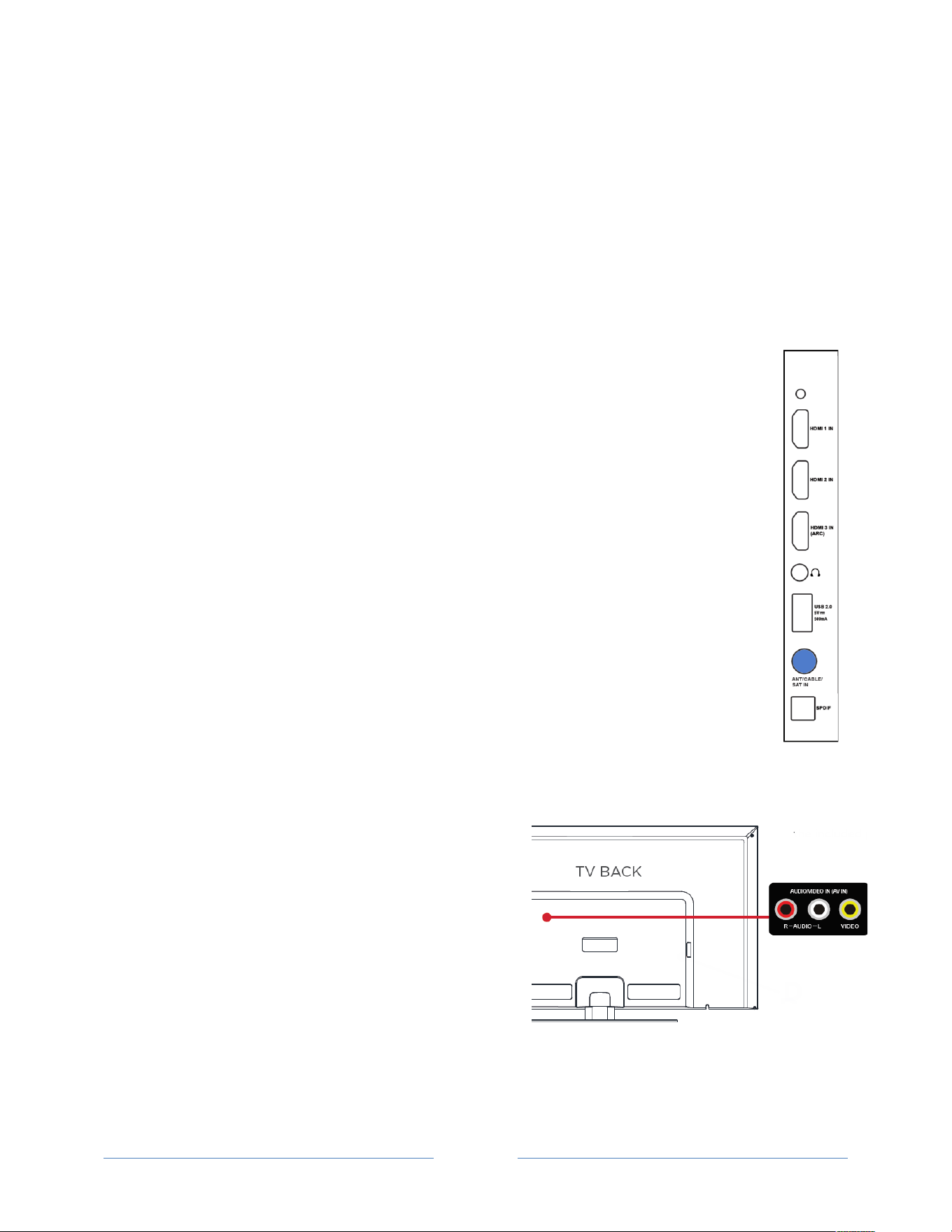
A!–!Place!the!TV!face!down!on!a!soft,!cushioned!surface!on!a!table.!The!bag!the!TV!was!packed!in!makes!
a!good!cushion.!Position!the!TV!so!tha t!the!sta nd ,!wh en !attac he d,!will!han g!ov er!the !ed ge!o f!the!tab le.!!
B!– !Align!the!stands!with!the!screw!holes!located!on!the!TV!stand!column:!
!

!
!
!
Page!6!
!
!
!
C!– !Secure!stand!column!to!the!TV!with!the!four!(4)!screws..!
!
!
!
!
!
!
Page!7!
!
!
!
!
Connect your TCL• Roku TV
This!section!explains!how!to!connect!your!devices!to!your!TV.!
Connecting an antenna, cable, or satellite box
If!you!are !u s in g!a n !a n te n n a ,!C A T V !ca b le !w it h o u t!a !s etato p!b ox,!or!a !cab le!or!sate llite!box!th at!
has!only!an!antenna!output,!connect!a!75aohm!coaxial!cable!(not!provided) !fro m !th e!de vice !to!
the!ANT/CA BL E!inp ut!o n!the !TV .!
Tip:!If+you+are+u s ing +a n +a n te n n a +w it h+a +3 0 0 +o h m+twinEle a d +ca b le,+y o u +n ee d +to +u s e+a +
300E75+ohm+adapter+(not+provided)+to+adapt+the+cable+to+a+connection+that+is+
compatible+with+the+TV’s+an ten na+input.!
Tip:+If+you+re ce iv e +yo u r+T V +s ta t ion s +th ro u g h +a +se t +to p +b ox +fr o m +a +c a b le+o r +sa te llite +T V +
provider,+connect+it+to+the+TV+using+the+best+connection+method+available.+From+most+
to+least+desirable:!
•! HDMI
®
*input!–!Digital!HD!and!SD!video!
•! AV*input!–!analog!SD!video!
•! Antenna*input!–!analog!SD!video!using!NTSC!
Connecting a component with a composite AV video cable
If!the!bes t!c o n n e ct io n !a va ila b le!o n !y o u r !co mpon en t !is!A V!or!composite !v id e o !o u tp u t ,!co n n e ct !it!to!the!
TV!using!a!composite!AV!cable!(not!provided).!Composite!AV!cables!typically!have!three!RCAatype!plugs!
on!each!end,!color!coded!as!follows:!
•! Yellow:!Video!
•! Red:!Audio,!right!channel!
•! White!or!black:!Audio,!left!channel!
Connect!each!plug!to!the!corresponding!connector!on!the!
component!and!on!the!TV.!!

!
!
!
Page!8!
!
!
!
Connecting a component with an HDMI
®
cable
If!possib le ,!co n n e ct !yo u r !d e vic es !u sing!HDMI
®
!cables!(not!pro vide d) .!Th e y!p ro vid e !th e!b e st!
video!quality!and!also!carry!audio!signals,!so!that!only!one!cable!is!needed.!For!best!picture!
quality,!we!recommend!that!you!use!cables!designated!a s!High !Spe ed !(Cate go ry!2)!H DMI
®
!
cables.!
Tip:!You+might+need+to+configure+the+component+to+send+its+sig n a l+th ro u g h +its+H D MI
®
+
connector.+
The!connector!labeled!HDMI*IN*(ARC )!has!the!additional!ability!to!use!the!audio!return!
channel!to!send!digital!audio!to!a!receiver!or!sound!bar,!as!explained!in!“!
! !

!
!
!
Page!9!
!
!
!
Connecting!an!AV!receiver!or!digital!sound!bar”!on!page!10.!
+
Connecting headphones or analog sound bar
You!can!connect!headphones!or!an!analog!sound!bar!(not!provided)!to !the!TV’s!headphone!jack.!
Tip:!Inserting+a +p lu g +in +th e +he a d p h o ne +ja c k+d is ab le s +th e +so u n d +fro m+the+TV ’s +b u iltEin +
speakers.!
!
!

!
!
!
Page!10!
!
!
!
Connecting an AV receiver or digital sound bar to the TCL• Roku TV
You!can!enjoy!Dolby!Digital!multichannel!sound!from!your!TV!if!you!connect!a!digital!amplifier!in!
either!of!two!ways:!
•! Digital*optical*audio*out*(S/PDIF)!–!Connect!a!TOSLINK!optical!cable!(not!provided)!from !
the!TV!to!the!O ptica l!input!on!your!receiver!or!sound!bar.!
•! HDMI
®
*ARC!–!Connect!an!HDMI
®
!cable!(not!provide d)! from !th e!H D M I!(AR C )!con ne cto r!to!
the!HDM I
®
!input!o n !yo u r!r ec eiv e r!o r!so u n d !b a r.!T his !c on n e ct io n !us e s!th e !A u d io !R et u rn !
Channel!(ARC)!feature!of!the!HDMI
®0
!specification!to!output!sound!from!the!TV!to!a!
compatible!device.!To!use!this!feature,!you!must!configure!the!TV!to!enable!HDMI
®
!ARC,!
as!explained!in!“Enabling!HDMI®!ARC”!on!page!63.!
Preparing the TCL• Roku TV for Internet connectivity
If!you!w a n t!to !c o n n e ct !yo u r !TV!to!th e!Intern et!to !wa tch !stream in g!co nte nt,!you !m ust!co n ne ct!usin g!a!
wireless!modem/router!or!a!wireless!access!point.!The!TV!connects!through!a!builtain!wireless!LA N !
adapter.!The!TV!does!not!support!a!wired!connection!or!the!use!of!a!USB!network!adapter.!
We!recommend!that!your!wireless!connection!support!the!IEEE!802.11b/g/n!specification!for!the!best!
experience.!
AC power
Plug!your!TV!into!a!pow er!o u tle t .!Yo u !c an !t ell!t h at !th e !TV !h a s !po wer!because!the!status!light!on!the!
front!of!the!TV!ligh ts!up .!!
“TCL•!Roku!TV!status!light”!on!page!30!explains!how!the!status!indicator!shows!what!is!happening!with!
the!TV.!
!

!
!
!
Page!11!
!
!
!
Remote control batteries
Open!the!back!of!your!Roku!TV!remote!control!and!insert!two!AAA!batteries,!observing!the!proper!
orientation.!Reattach!the!back!cover.!
!
“Roku!TV!Remote!control”!on!page!31!explains!how!to!use!the!remote!control!in!each!of!the!TV’s!
operating!modes.!
!

!
!
!
Page!12!
!
!
!
Guided Setup
With!the!preliminaries!out!of!the!way,!it’s!time!to!turn!on!your!TCL•!Roku!TV.!As!the!TV!starts!for!the!
first!time,!it!leads!you!th rough!Guided!Setup,!which!configures!the!TV!before!you !start!to!u se!it.!
During!Guided!Setup,!you’ll:!
•! Answer!a!few!questions!
•! Provide!n etw ork !con ne ctio n!info rm a tion!
•! Get!a!software!update!
•! Link!your!Roku!TV!to !you r!Ro ku!a cco un t.!
•! Connect!devices!such!as!a!DVD!player,!game!console,!or!cable!box.!
Note:!Guided+Setup+only+runs+the+first+time+you+turn+on+your+Roku+TV.+If+you+need+to+run+Guided+
Setup+again,+you’ll+have+to+perform+a+factory+reset,+as+explained+in+“Factory!reset!everything”+on+
page+65.+
Starting Guided Setup
To!start!Guided!Setup,!press!the!POWER!button!on!the!remote!control!to!turn!on!your!Roku!TV.!!
When!you!first!turn!on!your!TV,!it!will!take!a!few !sec on ds !to!ge t!itself!read y.!You’ll!notice!the!following!
things!happening:!
1.! The!status!light!blinks!every!time!the!TV!is!busy!doing!something;!in!this!case!it’s!powering!up!
and!getting!ready!for!you.!
2.! The!poweraon!screen!appears!and!the!status!light!blinks!slowly!for!a!few!more!seconds.!The!
poweraon!screen!displays!a!TCL•!Roku!TV!logo!while!th e !T V !st art s!u p .!

!
!
!
Page!13!
!
!
!
3.! After!a!few!seconds,!Guided!Setup!starts:!
Setting up your TCL• Roku TV
With!the!first!Guided!Setup!screen!on!your!TV,!follow!t h e s e !st e p s!t o !se t !it!u p :!
1.! Press!OK!or!RIGHT!on!the!remote!control!to!go!to!the!next!screen:!
!
2.! Press!OK!to!select!Set*up*for*home*use.!Home!m od e !is!th e !right!choice!for!enjoying!your!TV.!It!
provides!energy!saving!options!as!well!as!access!to!all!features!of!the!TV.!
Note:+Store+mode+configures+the+TV+for+retail+display+and +is+not+rec om mended+fo r+any+other+
use.+In+store+mode,+some+features+of+the+TV+are+missing+or+limited.+To+switch+from+one+mode+
to+the+other,+yo u +h a v e +to +perform+a+fac to r y+r e se t+as+explained+in+“Factory+reset+everything”+
on+page+65,+and+then +re p e a t+Guided +S e tup.+
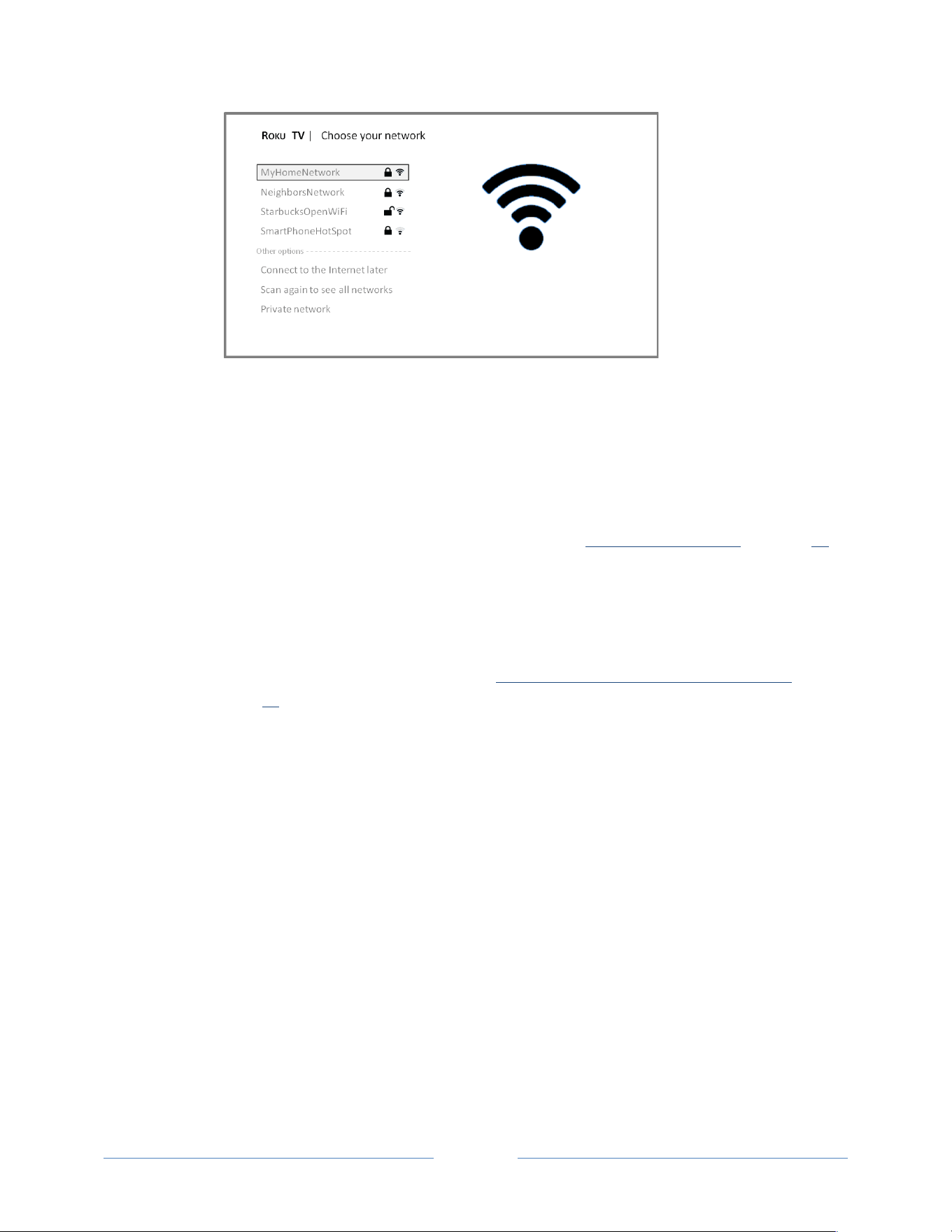
After!you!select!Set*up*for*home*use,!the!TV!scans!for!the!wireless!networks!within!range!and!
displays!them!in!order,!with!the!strongest!signals!first.!In!addition!to!yo u r!own!wireless!signal,!
the!TV!might!pick!up!signals!from!your!neighbors.!
!
!
!
Page!14!
!
!
!
!
3.! Press!UP!or!DOWN!to!highlight!the!name !of!you r!w ireless!network,!and !t h e n !p r e ss !OK!to !selec t!
it.!
Other options:
•! Connect*to*the*Internet*later!–!If!yo u ’r e !u n a b le !to !con ne ct!to!th e!Inte rne t,!that’s!OK .!You !
can!skip!this!step!and!use!the !TV !to!w atch !bro ad casts ,!play!games,!and!wa tch !DV Ds .!If!you!
want!to!connect!later,!it’s!easy.!We’ll!show!you!how!in!“Benefits!of!connecting”!on!page!23.!
Connecting!the!TV!enables!you!to!choose!from!thousand s!of!stream ing!chann els!so!the!TV!
really!wants!you !to!co nn ec t,!and !will!try!a!co up le!m o re!tim es!to !con vin ce!yo u!th at!
connecting!is!a!good!idea.!
Note:+If+you+dec id e +not+to+connect,+Guided+Setup+skips+ahead+to+setting+up+the+devices+
that+you’ve+connected+to+your+TV.+See+“NonEconnected+TCL•+Roku+TV+Home+screen”+on+
page+22+to+get+started+using +you r+nonEconnected+TV.+
•! Scan*again*/*Scan*again*to*see*all*networks!–!This!option!depends!on!the!number!of!
wireless!networks!within!range.!!
o! Scan*again!appears!if!the!list!already!shows!all!available!wireless!networks!within!
range.!If!you!don ’t!see!yo ur!w irele ss!ne two rk!n am e !in!the!list,!you!m igh t!nee d!to !
adjust!the!location!of!your!wireless!router!or!the!TV,!turn!on!your!router,!or!make!
other!changes.!When!everything!is!ready,!select!Scan*again!to!see!if!your!netw ork !
name!now!appears!in!the!list.!
o! Scan*again*to*see*all*networks!appears!if!the!TV!finds!more!than!seven!wireless!
networks,!because!the!TV!initially!displays!only!the!strongest!seven!networks.!If!you!
don’t!see!your!wireless!network!name!in!the!list,!this!option!displays!the!com p lete!
list.!If!you!s till!d o n ’t!se e!your!netw ork!nam e,!you!m ight!have!you r!router!configured!
to!provide!wirele ss!service !as!a!“p rivate !netw o rk.”!

!
!
!
Page!15!
!
!
!
Note:!Highlighting+either+of+these+options+displays+an+informational+panel+with+the+
unique+media+access+control+(MAC)+address+of+your+Roku+TV.+You+will+need+the+MAC+
address+if+your+wireless+router+is+configured+to +use+MAC+add ress+filtering .!
•! Private*network*–!If!your!wireless!network!name!is!hidden,!it!won’t!appear!in!the!list.!Select!
Private*network!to!display!an!onascreen!keyboard,!and!use!it!to!enter!your!network!name.!
Unless!you!changed!the!factoryaset!network!name,!you!can!find!the!name!(also!called!SSID)!
on!a!label!on!the!router.!!
Tip:!Wireles s+n e tw o rk s+that+are+passwordEprotected+display+a+“padlock”+icon+adjacent+to+
the+name.!!
!
4.! If!your!n etwork!is!passwordaprotected,!an!onascreen!keyboard!appears.!Use!the!keyboard!to!
enter!the!network!pass w ord.!!
!
5.! After!you!submit!your!network!password,!the!TV!displays!progress!messages!as!it!connects!to!
your!wireless!network,!your!local!network,!and!the!Internet.!
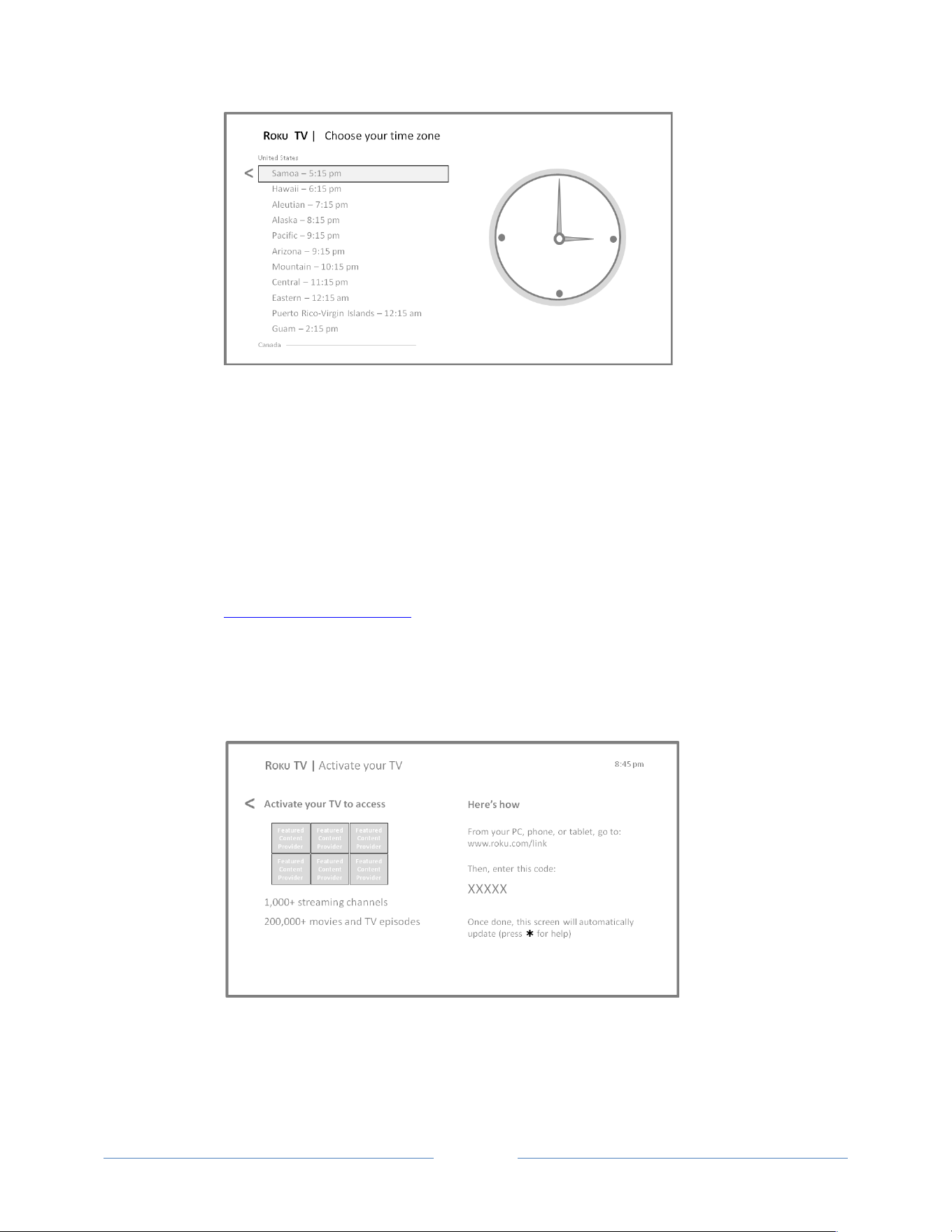
6.! Your!TV!needs!to!know!the!local!time!zone!so!that!it!can!co rrec tly!display !time !inform a tion !
about!the!program!you!are!currently!watching.!If!the!T V !is!unable !to !a u to matically !d et er mine!
the!local!time!zon e,!it!prom p ts!you !to!ch oo se!yo u r!time !zon e!from!a!list.!Use!the!UP!and!DOWN!
buttons!to!highlight!your!time!zone,!and!then!press!OK.!
!
!
!
Page!16!
!
!
!
!
7.! As!soon!as!the!TV!is!able!to!connect!to!the!Internet,!it!downloads!and!installs!its!first!software!
update,!and!then!restarts.!
Tip:!Your+TV+automatically+checks+for+updates+periodically.+These+u pd ate s+pro vide+n ew +
features+and +im pro ve +you r+ov era ll+expe rien ce+w ith +the+T V.+A fter+an +up da te ,+you +m igh t+notic e+
that+some+o ption s+ha ve +m ove d,+an d+th at+there+are+n ew +op tion s+or+fea ture s.++
You+can+download+an+updated+User+Guide+that+matches+your+Roku+TV+software+version+from+
the+TCLweb+site+at:++
www.TCLUSA.com/support+
To+determine+your+current+Roku+TV+software+version,+go+to+Settings)>)System)>)About+after+
you+complete+Guided+Setup.!
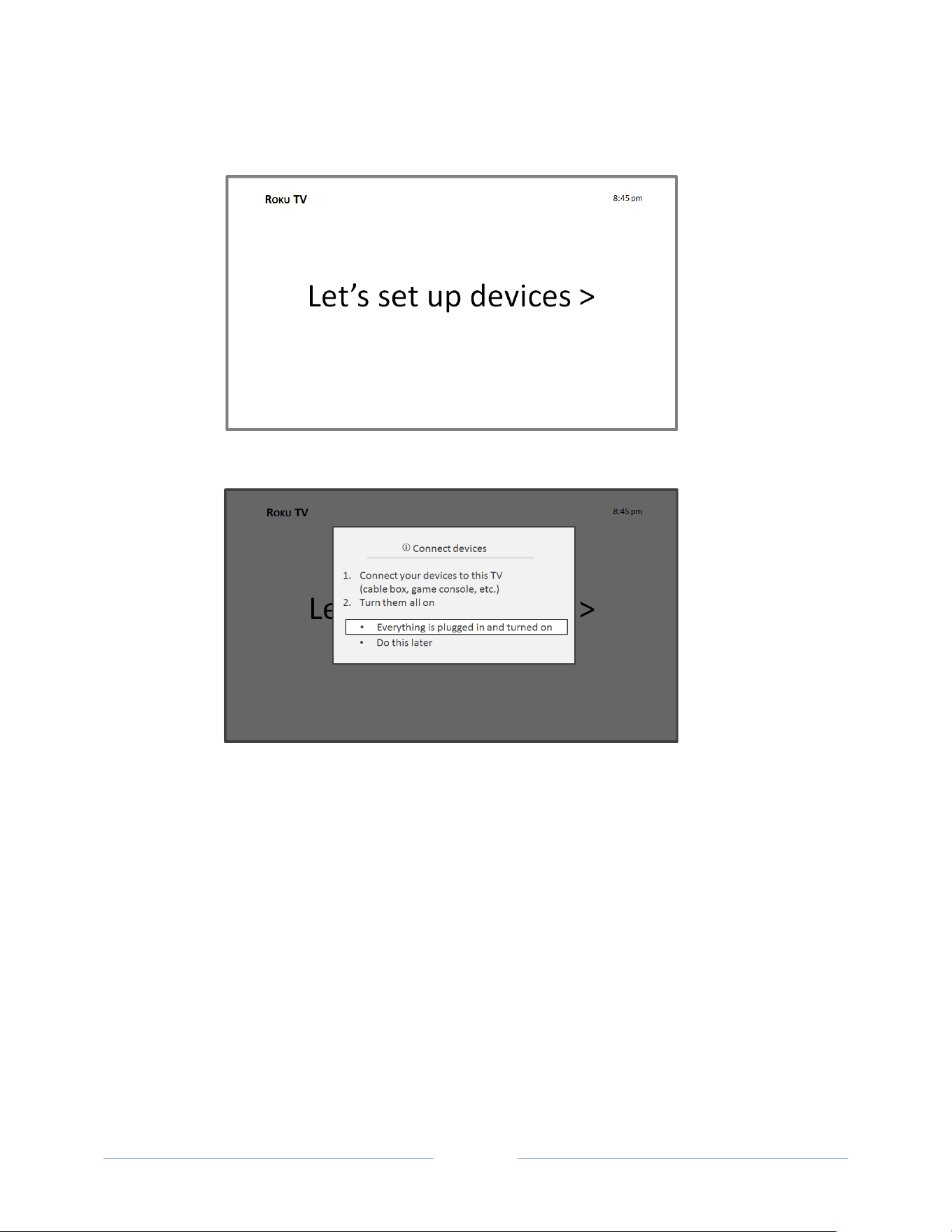
After!the!TV!restarts,!it!displays!the!Activation!screen:!
!
8.! Using!a!computer,!tablet,!or!smartphone!with!an!Internet!connection,!go!to!the!web!address!
displayed!on!the!screen!and!enter!the!code!that!appears!on!your!screen.!!

!
!
!
Page!17!
!
!
!
After!you!log!in!or!create!your!Roku!account,!
the!TV!gets!an!acknowledgemen t!and!adds!your!
preexisting!streaming!channels,!if!any,!to!your!
Roku!TV.!This!process !is !a ut o m a tic !a n d!takes!a!
few!moments—a!little!longer!if!you!already!
have!a!lot!of!streaming!channels!to!add.!!
Tip:+Streaming+channels+from+all+Roku+
devices+associated+with+your+account+are+
synchronized+periodically,+so+all+of+your+
Roku+devices+have+the+same+streaming+
channels+(subject+to+compatibility+with+the+
device).+
Note:!Channel+availability+is+subject+to+
change+and+not+all+content+is+available+in+
countries+or+regions+where+Roku+products+are+sold.++
Why do I need a Roku Account?
You!need!a!Roku!Channel!Store!account!for!several!
reaons.!
• It!links!you,!your!Roku!TV!and!your!other!Roku!
devices!to!the!Roku!Channel!Store!and!billing!
service.!
• Streaming!content!providers!know!that!it’s!OK!to!
send!content!you!request !to!your!R oku!TV.!
•
Roku!can!automatically!send!updates !to!your!device.!
Important:!It!doesn’t!cost!anything!to!use!and!
maintain!your!Roku!Channel!Store!account!(other!than!
the!cost!of!the!TV!and!Internet!access).!Your!Roku!TV!is !
packed!with!hundreds!of!free!chan nels.!Adding!a!
payment!method!now!lets!you!easily!rent!or!buy!
movies!on!demand,!or!try!popular!streaming!channels.!
!
!
!
Page!18!
!
!
!
After!it!adds!your!selected!streaming!channels,!the!TV!helps!you!set!up!the!devices!that!you’re!
connecting!to!it,!such!as!a!cable!box,!Bluaray!player,!or!game!console:!
!
9.! Press!OK!or!RIGHT!to!proceed :!
!

!
!
!
Page!19!
!
!
!
10.!Connect!all!the!devices!you!plan!to!use!with!your!TV,!turn!them!all!on,!a nd!then!select !
Everything*is*plugged*in*and*t u rn e d *o n.!The!TV!now!takes!you!step!by!step!through!each!of!its!
inputs!a n d!a s ks !w h a t!k ind !o f!d e vic e !yo u !h a ve !co n n e ct ed .!O n !e a ch !in p u t!t ha t!h a s !a!connected!
and!active!device,!you!can!see!its!picture!and!hear!its!sound.!
!
11.!Press!UP!or!DOWN!to!highlight!the!label!you!wa nt!to !asso ciate !with!th e!inp ut,!an d!th en!press!
OK!to!move!on !to!th e!ne xt!inpu t.!
You’re!done!with!Guided!Setup.!!
If*your*TV*is*conne c t ed*to*the*Inte rn et:*To!ensure!you!have!a!great!Roku!TV!experience,!we’ll!show!
you!an!introductory!video!filled!with!some!great!hints!and!tips.!If!you’re!not!interested,!press! !on!
the!remote!co n trol!to!exit!the !video !an d!go !to!the !Ro ku!TV!Home!screen.!
!
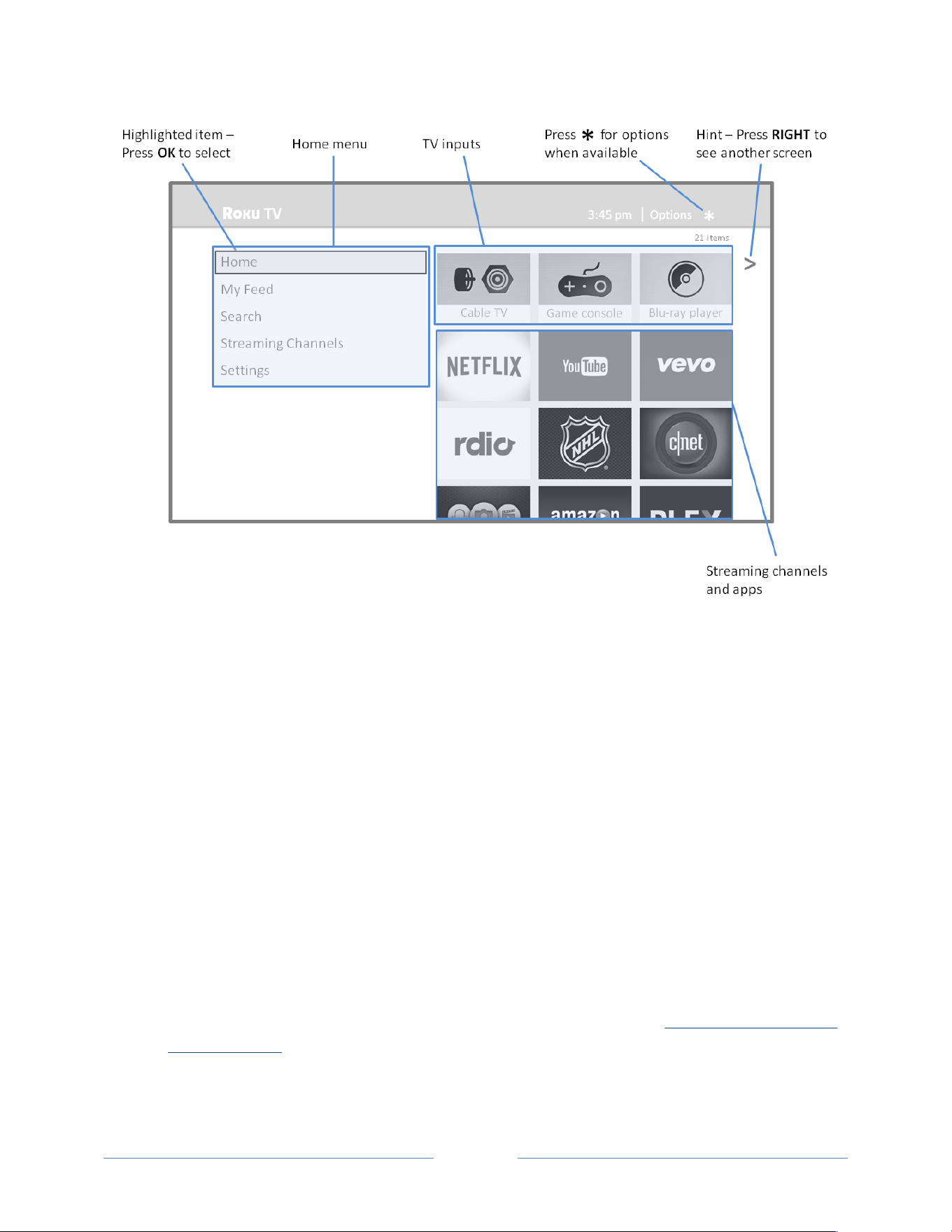
When!you!finish!Guided!Setup,!and!whenever!you!press! !on!the!remote!control,!the!Home!screen!
greets!you.!
From!here,!you!can!explore!everything!your!TV!has!to!offer.!Press!the!arrow!buttons!to!move!around,!
and!press!OK!to!select!a!highlighted!item.!W e ’ve!de sign e d !th e !T V !to !e n co u ra ge !y ou !t o !ex p lo re,!a n d !yo u !
can!probably!figure!out!most!of!the!capabilities!and!settings!on!your!own.!If!you!have!any!questions!or!
difficulties,!you!can!find!answers!and!solutions!in!this!guide.!!

!
!
!
Page!20!
!
!
!
If!you!find!yours elf !a!lo n g !way!from!the!Home!screen,!you!can!always!get!back!right!away!by!pressing!
one!button:! .!
Connected TCL• Roku TV Home screen
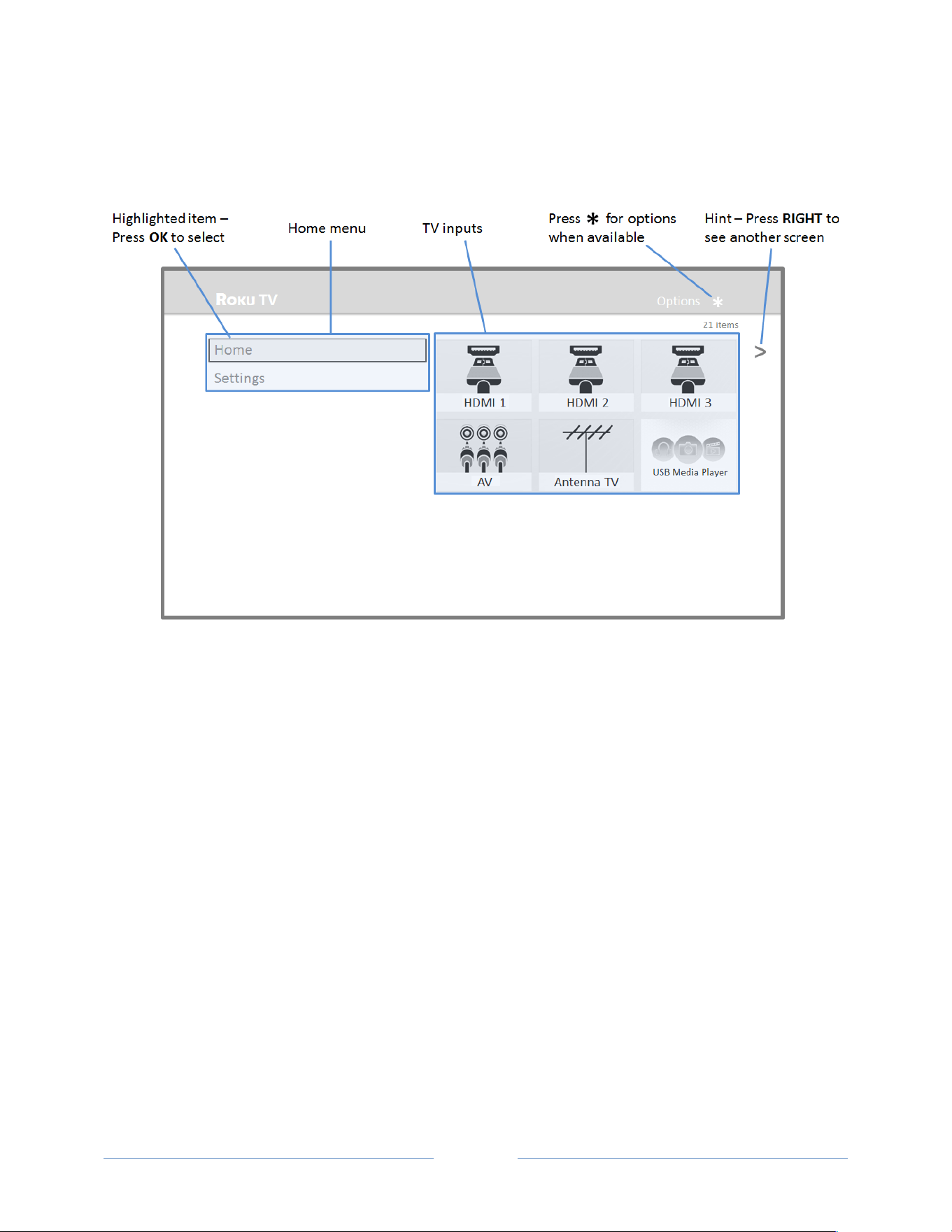
Here!is!a!typical!Home!screen!from!a!Roku!TV!that’s!connected !to!the !Interne t!an d!pa ired !with !a!Rok u!
account.!
!
Connected*Home*Screen,*United*States*markets*
!
!
!
Page!21!
!
!
!
!
Connected*Home*Screen,*Canadian*markets*
Personalize your Home screen
You!can!do!a!lot!to!personalize!your!Home!screen!and!make!it!just!right!for!you!and!your!family:!
•! Add!streaming!channels!by!using!the!Streaming*Channels!menu!option!to!browse!the!Roku !
Channel!Store.!
•! Remove!a!tile!by!highlighting!it!and!pressing!!.!Then!highlight!Remove*input!or!Remove*
channel!and!press!OK.!
•! Reposition!a!tile!by!highlighting!it!and!pressing!!.!Then!highlight!Move*input!or!Move*channel!
and!press!OK.!Use!the!arrow !bu tto n s!to !move!the !tile ,!an d !the n !p res s!OK!to !lock!it!in!its!new!
location .!
•! Rename!a!TV!input!tile!by!highlighting!it!and!pressing!!.!Then!highlight!Rename*input!and!press!
OK.!Highlight!a!new!name!in!the!list,!and!then!press!OK!to!assign!that!name !to!the !tile.!
•! Change!the!screen!theme!by!going!to!Settings*>*Themes!to!find!and!pick!one !to!su it!your!m o od .!
•! Hide!Movie!Store,!TV!Store,!or!News,!(US!mode ls!on ly)!as!explained!in!“Blocking!Movie!Store,!TV!
Store,!and!N ew s”!on!page!.!
!
!
!
Page!22!
!
!
!
Non-connected TCL• Roku TV Home screen
Here!is!a!typical!Home!screen!from!a!Roku!TV!that!is!not!connected!to!the!Internet.!
!
Personalize your Home screen
You!can!do!a!lot!to!personalize!your!Home!screen!and!make!it!just!right!for!you!and!your!family:!
•! Remove!a!tile!by!highlighting!it!and!pressing!!.!Then!highlight!Remove*input!and!press!OK.!
•! Reposition!a!tile!by!highlighting!it!and!pressing!!.!Then!highlight!Move*input!and!press!OK.!Use!
the!arrow!bu tton s!to!m o ve!th e!tile,!and !then !pre ss!OK!to!lock!it!in!its!new !loca tion .!
•! Rename!a!tile!by!highlighting!it!and!pressing!!.!Then!highlight!Rename*input!and!press!OK.!
Highlight!a!new!name!in!the!list,!and!then!press!OK!to!assign!that!nam e!to!th e!tile.!
•! Add!streaming!channels!by!browsing!the!Roku!Channel!Store!(after!connecting!the!TV!to!the!
Interne t!to !a d d !t h e!Streaming*Channels!option!to!the!menu).!
!

!
!
!
Page!23!
!
!
!
Benefits of connecting
Connecting brings out your TCL• Roku TV’s full
potential!
Make*any*night*a*movie*night*
Thousands!of!movies!to!choose!from,!across!all!major!streaming!movie!channels!like!Netflix,!Cineplex!
Store,!Crackle,!and!more
*
.
!
You’ll!never!run!out!of!something!new!to!watch.!
Get*in*the*groove*
Stream!e nd less!ho u rs!of!m usic!fro m !cha nn els!like !S po t ify,!V E V O,!and!Rd io .!With!on ademand!access!to!
thousand s!of!m us ic!artists,!you r!favo rite!bea ts!are!jus t!as!close !as!yo ur!rem o te.*
Explore*your*passions*
In!addit io n !to !p o p ular!strea ming!channels!like!YouTube,!NHL,!Sky!News!and!Cineplex!Store,!your!Roku!
TV!also!offers!hundreds!of!streaming!channels!to!fuel!your!passions—includ in g !fitn e ss ,!co o kin g ,!re ligio n ,!
outdoors,!International!programming!and!much!more.!
Enjoy*FREE*trials*of*popular*channels**
Your!Roku!TV!comes!loaded!with!special!offers,!including!free!trials!from!popular!streaming!channels!
Netflix,!!Spotify,!Rdio,!DailyBurn!Fitness,!and!many!more.!
!
What is streaming?
Streaming!is!viewing!or!listening!to!video!or!audio!content!that!is!sent!over!the!Internet,!or!located!on!a!
networkaconnected!media!server!or!on!a!USB!device!plugged!into!the!TV’s!USB!port.!!
With!streaming,!you!can!watch!most!programs!on!demand,!when!it’s!convenient!for!you.!When!
streaming,!you!can!play,!pause,!rewind,!and!fast!forward!whatev er!you!are!watch ing.!You!can!also!
replay!the!last!few !seco nd s!ag ain,!o r !tu r n !o n !c lo s e d !c a p tions.!!
!!!!!!!!!!!!!!!!!!!!!!!!!!!!!!!!!!!!!!!!!!!!!!!!!!!!!!!!!!!!!
*!Subscription!or!other!payment!may!be!required!to!access!certain!channels.!Content!may!not!be!available!in!all!
areas!in!which!the!TCL•!Roku!TVs!are!sold!and!channel!availability!is!subject!to!change.!

!
!
!
Page!24!
!
!
!
Tip:!Some+content+cannot+be+paused+or+skipped.+For+example,+if+you+are+viewing+live+
programming+or+a+program+that+is+supported+by+ads,+you+generally+are+not+allowed+to+skip+the+
ads.!
Your!Roku!TV!lets!you!cho o se !fro m!thou san ds!of!streaming!channels!that!offer!a!huge!selection!of!
entertainment:!
•! Thousands!of!movies!and!TV!episodes!
•! Unlimited!music,!live!and!onademand!
•! Tons!of!live!and!onademand!sports!!
•! Commercialafree!kids!program m in g !
•! Interna tio n a l!programming!in!22!languages!
•! 24x7!news!and!inadepth!news!commentary!
Many!streaming!channels!are!free.!Some!streaming!channels,!like !!Cineplex!and!Amazon!Instant!Video,!
let!you!p u rch a se !o r!re n t!t he !la test!movie!releases!or!popular!TV!series.!Some!channels!such!as!Netflix!or!
Spotify!charge!a!monthly!subscription!fee!and!others!are!free!if!you!subscribe!to!a!companion!service!
through!you r!cab le!or!sa tellite!prov ider.!Fo r!exa m ple ,!HBO !su bscrib ers! with!participating!broadcastTV!
provider!accounts!can!add!the!HBO!Go!channel!and!watch!it!for!free.!!
If!you!ha v e!a n !e xis tin g !s u b sc rip t io n !to !a !s er vic e!lik e !N e tflix !or!Spotify,!you!can!just!sign!in!with!your!
existing!user!name!and!password.!
To!play!streaming!content!that!is!available!on!the!Internet,!you!add!streaming!channels!to!your!Home!
screen.!To!add!a!streaming!channel!to!your!Home!screen,!use!the!Streaming*Channels!option!on!the!
Home!screen!menu!to!go!to!th e!R oku !Ch an ne l!Store ,!and!th en !select!th e!strea m ing!ch an n el!you !want!to!
add.!The!streaming!channel!is!then!added!to!your!Home!screen,!and!you!can!watch!it!at!any!time.!
For!more!information!on!using!the!Roku!Channel!Store!feature,!see!“Using!the!Roku!Channel!Store”!on!
page!46.!
Note:!Subscription+or+other+payment+may+be+required+to+access+certain+content.!Channel+
availability+subject+to+change+without+notice.+Some+channels+may+not+be+available+to+all+
households+in+every+market+or+in+all+countries+where+Roku+TVs+are+sold.++
But what if I didn’t connect my TCL• Roku TV?
What!if!you!went!through!Guided!Setup!and!chose!Connect*to*the*Internet*late r ?!No!worries.!Your!Roku!
TV!makes!it!easy!to!connect!wh en eve r!you !w ant.!A s!you !m ov e!aro un d!th e!Home!screen,!you’ll!see!
several!places!where!you!can!start!the!connection!process.!For!exam ple:!
•! Now!and!then!you’ll!see!a!message!appear!on!the!panel!to!the!right!of!the!Home!screen!offering!
a!Connect*Now!option.!Simply!highlight!and!select!the!Connect*Now!option!to!get!started.!!

!
!
!
Page!25!
!
!
!
•! Use!the!Connect*and*activate*now!option!in!the!Settings!menu.!From!the!Home!screen!menu,!
select!Settings,!then!Network,!and!then !Connect*and*activate*now.!
•! If!you!w a n t!to !start!over!from!the!beg inning,!use!the!Settings!menu!to!do!a!Factory*reset,!and!
then!go!throu gh !Gu ided !Setu p!a gain .!This!tim e,!cho os e!you r!ho m e!n etw o rk!w he n!pro m p ted .!
Regardless!of!how!you!connect,!the!process!is!the!same.!If!you!need!details,!see!Step!3!on!page!14!
under!“ !
Setting!up!your!TCL•!Roku!TV.”!

!
!
!
Page!26!
!
!
!
Setting up Antenna TV
Despite!all!of!the!entertainment!possibilities!of!your!Roku!TV,!you!may!also!want!to!watch!broadcast!TV.!
You!watch!broadcast!TV!in!much!the!same!way!you!watch!other!entertainment!choices.!You!select!a!
tile—the !Antenna*TV!tile—from !the !Home!screen .!
The!first!time!you!select!the!Antenna*TV!tile,!you!have !to !s e t!u p !t h e !T V !t u ner.!Setting!up!the!TV!tuner!
scans!for!active!channels!and!adds!them!to!your!broadcast!TV!channel!list.!!
Why do I have to set up the TV tuner?
You!might!be!asking,!“Why!is!this!step!ne cessa ry?”!Good!question.!
Not!everyone!needs!to!use!the!TV!tuner.!For!example,!you!might!have!a!set!top!box!provided!by!a!cable!
or!satellite!company!that!receives!all!of!your!channels.!Most!of!these!set!top!boxes!use!an!HDMI
®
!
connection.!!
More!and!more!people!are!watching!only!streaming!TV!and!do!not!have!a!TV!antenna!or!cable/satellite!
service.!If!you!don’t!need!the!TV!tuner,!you!can!bypass!setting!it!up!and!instead!remove!it!from!the!
Home!screen!as!explained!in!“Remove!unwanted!tiles”!on!page!49.!
When!you!set!up!Antenna!TV,!the!TV!scans!the!signals!on!its!antenna!input!for!channels!with!a!good!
signal,!and!adds!those!to!the!channel!list,!skipping!dead!channels!and!channels!with!a!very!weak !signal.!
The!TV!will,!however,!let!you!add!two!analog!channels,!e v en!if!they!have!no!signal.!You!migh t!n ee d !to !
add!these!channels!if!you!have!a n !o lde r!s e t!to p !b o x,!V C R ,!o r!ga me!con so le !th a t!ca n !o n ly!o u tp u t !a!s ign a l!
on!analog!channel!3!or!4.!These!are!the!only!channels!that!can!be!added!regardless!of!whether!they!
have!a!good!signal.!Typically,!you’ll!only!need!one!of!these!channels,!but!both!are!provided!to!make!
setup!simpler.!You!can!hide!the!one!you!don ’t!want!as!explained!in!“Edit!broadcast!TV!channel!lineup”!
on!page!48.!
How do I set up the TV tuner?
Setting!up!the!TV!tuner!is!easy—your!TV!does!most!of!the!work.!You!just!have!to!answer!a!couple!of!
questions.!!
1.! Make!sure!your!antenna!(sold!separately)!or!TV!cable!is!connec te d !to !th e !TV’s!ANT/CABLE!input.!

!
!
!
Page!27!
!
!
!
Why does the TV
need my time
zone?
The!TV!needs!to!know!
your!time!zone!so!that!it!
can!correctly! dis pl ay!time!
information!about!the!
program!you!are!
currently!watching.!
2.! On!the!Home!screen,!select!the!Antenna*TV!tile.!
3.! Read!the!simple!onascreen!instructions!and!select!Start*setup.!
!
4.! If!prom p te d ,!se le ct !yo u r !time!zon e .!Y o u ’ll!o n ly!n e e d !to !d o !t h is!if !th e !T V !
can’t!figure!out!your!time!zone!from!your!Internet!connection.!
!
5.! When!prompted,!select!whether!to!add!analog!channels!3!and!4!(to!enable!you!to!connect!older!
set!top!boxes,!VCR s,!or!game!consoles).!
!

!
!
!
Page!28!
!
!
!
6.! Wait!while!your!TV!scans!for!broadcast!(antenna!TV)!stations…!!
!
…!and!then!cable!TV!channels.!!
!
Tip:!Cable+TV+channels+are+channels+from+a+cable+TV+provider+that+you+can+receive+by+
connecting+their+cable+directly+to+your+TV+(unscrambled+N T SC ,+ATS C,+an d +QA M+channe ls,+if+
you’re+the+kind+of+person+w ho +is+intere st ed +in +th e +d e ta ils) .+In+many+cases,+your+cable+provider+
probably+requires+you+to+use+their+setEtop+box+and+con ne ct+it+to+a+differen t+inp ut,+an d+the n+
use+the+setEtop+box+to+tu ne+yo u r+cab le+station s.+In+tha t+case ,+you +can +skip+sca nn ing +for+ca ble+
channels.+
7.! When!the!channel!scans!finish,!the!TV!shows!the!number!of!channels!it!added .!

!
!
!
Page!29!
!
!
!
!
Scanning!for!channels!can!take!several!minutes.!!
Tip:!Repeat+the+channel+scan+from+time+to+time+to +m ak e+sure +you +are+rec eiving +all+of+the+late st+
channels.+Broadcasters+add+and+remove+channels,+move+cha nnels+to+different+parts+of+the+
spectrum,+and+change+the+power+levels+of+their+channels+periodically.+!
Note:!You’ll!have!to!repeat!the!channel!scan!if!you!remove!the!Antenna*TV!tile!from!the!Home!
screen!or!perform!a!factory!reset.!To!repeat!the!channel!scan!at!any!time,!go!to!Settings*>*TV*
inputs*> *Antenna*TV*>*Scan*again*for*channels.!Your!antenna!reception!and!picture!quality!
depend!on!the!position!of!your!antenna!and!on!your!location!relative!to!the!antennas!of!
broadcasters!in!your!area.!
Now,!you’re!ready!to!watch!broadcast!TV!!While!you’re!watching,!try!the!following:!
•! Press!UP!or!DOWN!to!change!chann els.!
•! Press!LEFT!to!display!the!chan ne l!list!and!then !use !UP !and !DO WN!to!select!a!ch ann el!to!w a tch.!
Or!press!REWIND!or!FAST*FORWARD!to!jump!throug h!th e!ch an ne l!list!a!page!at!a!time.!
•! Press!OK!to!display!information !ab ou t!the!cu rren t!pro gram.!
•! Press! !to!switch!to!the !prev iou sly!tun ed !cha nn el.!
•! Press!!!to!see!op tions !for!pictu re!an d!so un d!se ttings.!
Note:!If+ +is+not+a va ila b le +on +y o u r+re mote+co nt ro l,+yo u +c a n+u s e + +on+the+Roku+App+or+the+Jump+
Back+button+on+a+universal+remote.+For+more+information,+see+“Other+devices”+on+page+69.+
“Roku!TV!Remote!control”!on!page!31!has!more!information!on!using!the!remote!control!buttons!while!
watching!TV.!

!
!
!
Page!30!
!
!
!
Using your TCL• Roku TV
This!section!provides!information!on!using!the!dayatoaday!features!of!your!TCL•!Roku!TV.!
TCL• Roku TV status light
Your!TV!has!a!single!status!light!on!the!fron t !pa n e l.!It!g o es !o n !an d !o ff!a n d !b lin ks !in!d if fer en t !w a ys !
depending!on!the!status!of!the!TV,!as!shown!in!the!following!table:!
TV!condition!
Status!indicator!
Meaning!
On!(screen!is!active)!
Off!
Screen!is!communicating!that!TV!is!on.!
Screensaver!(screen!is!active)!
Off!
Screen!is!communicating!that!TV!is!on.!
Off!(no!power)!
Off!
TV!is!not!connecte d !to !power.!
Off!(standby)!
On!
TV!is!connected!to !power!and!is!ready!to!
use.!
Starting!up!from!off!state!
Slow!pulsing!blink!until!startup!
completes!
TV!is!doing!something.!
On!(receiving!update!from!USB)!
Slow!pulsing!blink!until!update!
completes!
TV!is!doing!something.!
Remote!control!command!received!
Dims!on/off!once!
TV!has!received!your!command.!
Powering!down!to!standby!mode!
Slow!pulsing!blink!until!the!TV!
reaches!standby.!
TV!is!doing!something.!
TCL• Roku TV panel buttons

!
!
!
Page!31!
!
!
!
The!controls!on!the!TV!enable!you!to!perform!simple!functions,!but!are!not!a!substitute!for!
the!remote!co n trol.!The!joystickatype!control!on!th e!ba ck!o f!your!TV!near!the!lower!right!
side!provides!the!following!functions:!!
•! Press!in!to!toggle!between!power!ON!and!Standby.!
•! Press!up!or!down!to!increase/decrease!the!volume.!
•! Press!left!or!right!to!switch!inputs.!
Standby mode energy savings
About!10!minutes!after!you!turn!off!your!Roku!TV,!it!goes!int o !a !v e ry !lo w!pow e r !st a n d b y !mode .!U n t il!
that!happen s,!if!you!tu rn!o n!the !TV !again ,!it!imm ed iately!disp lays!th e!activity!yo u !selecte d!in!th e!Power*
on!settings,!as!described!in!“Power!on!settings”!on!page!50.!After!the!TV !go e s!in to !the !lo w !p o w e r!
standby!mode,!it!takes!a!bit!longer!to!start!up.!
Roku TV Remote control
TCL•*Roku*TV*IR*remote*control*
!

!
!
!
Page!32!
!
!
!
Getting around
You’ve!already!done!a!bit!of!navigating!with!the!remote!control!when!you!completed!the!Guided!Setup!
and!when!you!set!up!Antenna!TV.!This!section !ex p lain s!h o w !to !u se !the !re m o te !co n tro l!fo r!e ve ryd a y!T V !
use.!
!
POWER*
If!the!TV !is!in !S ta n d b y !mode,!tu r n s!p o wer!on .!
If!the!TV !is!o n ,!p u t s!T V !in !S ta n d b y !mode.!
!
BACK*
The!action!depends!on!what!you!are!doing!with!the!TV:*
•! Menu:!Goes!back!to !p re v io u s !m e n u / sc re e n .!!
•! Home*screen*tile:!Moves !highlight!back!to!the!Home!menu!
option.!
•! Watching*Antenna*TV*or*a*TV*input:!Returns!to!th e !sc re en!
from!which !the !inp ut!w as !selec ted .!
•! Playing*streaming*content:!Stops!playing !s tre a m!and!re t u rn s !
to!the!previous!m e nu !or!scre en .!
•! Browsing*streaming*content:!Goes!to!the!p r ev io u s !le ve l!in !t h e!
content!tree.!
!
HOME*
Imme d iat e ly!re turns!to !th e !Home!screen!m enu .!
!
OPTIONS*
Displays!an!Options!menu,!but!only!when!the!Options*!!hint!in!the!
upper!right!corner!of!the!screen!is!not!dimmed.!The!menu!you!see!
varies!depending!on!what!you!are!doing!with!the!TV.!!
Also,!in!most!cases,!pressing!!!while!video!is!playing!displays!an!
Options!menu!over!part!of!the!screen!where!you!can!adjust!various!
picture!and!sound!settings.!
!
UP*
Moves!the!highlight!up!one!item.!
!
DOWN*
Moves!the!highlight!down!one!item.!
!
LEFT*
Moves!the!highlight!left,!if!possible!(if!a!<!hint!appears).!
When!watching!TV,!displays!your!channel!list.!
When!playing!most!streaming!videos,!skips!backward!in!the!video.!
!
RIGHT*
Moves!the!highlight!to!the!right,!if!possible!(if!a!>!hint!appears).!
When!watching!TV!with!the!channel!list!displayed,!dismisses!the!
channel!list.!
When!playing!most!streaming!videos,!skips!forward !in!the!vid e o.!

!
!
!
Page!33!
!
!
!
!
OK*
Selects!the!highlighted!option.!!
When!watching!TV,!this!button!displays!information!for!the!current!
TV!program.!
!
REWIND*
When!playing!streaming!video!that!supports!this!feature:!
•! First!press!rewinds!at!1x!speed.!
•! Second!press!rewinds!at!2x !spee d.!
•! Third!press!rewinds!at!3x!speed.!
•! Subsequent!presses!cycle!through!1x,!2x,!and!3x!rewind!speed.!
When!playing!streaming!audio,!jumps!to!the!previous!
track/selection.!
When!any!menu,!tile,!or!channel!in!the!channel!list!is!highlighted,!
jumps!u p !o n e !p ag e .!
When!using!a!virtual!keyboard,!jumps!to!the!character!at!the!top!of!
the!current!colu m n.!!
!
PLAY/*
PAUSE*
When!playing!streaming!content,!alternately!pauses!and!plays!the!
content.!
!
FAST*
FORWARD*
When!playing!streaming!video!that!supports!this!feature:!
•! First!press!fast!forwards!at!1x!speed.!
•! Second!press!fast!forwards!at!2x!speed.!
•! Third!press!fast!forwards!at!3x!speed.!
•! Subsequent!presses!cycle!through!1x,!2x,!and!3x!fast!forward!
speed.!
When!playing!streaming!audio,!jumps!to!the!next!track/selection.!
When!any!menu,!tile,!or!channel!in!the!channel!list!is!highlighted,!
jumps!d o wn!one !pa g e .!
When!using!a!virtual!keyboard,!jumps!to!the!character!at!the!bottom!
of!the!current!column.!
!
INSTANT*
REPLAY*
When!playing!streaming!video!that!supports!this!feature,!jumps!back!
a!few!seconds!with!each!press!and!resumes!playing.!In!some!
channels,!if!Closed*captioning!is!set!to !Ins ta n t*R e p la y,!c a p t io n s !a re !
displayed!during!the!duration!of!the!jump!back!period!only.!
When!watching!broadcast!TV,!jumps!to!previous!channel.!
When!using!an!onascreen!keyboard,!backspaces!in!the!text!you!are!
entering.!

!
!
!
Page!34!
!
!
!
!
VOLUME*
UP*
Turns!volume!up!one!setting!with!each!press.!Press!and!hold!to!turn!
volume!up!rapidly.!A!volume!indicator!shows!the!volume!level!while!
you!are!adjusting!the!volume!and !fo r!a !few!secon d s!a ft erward.!
Note:!If+the+TV+is+m u te d ,+pr e ss in g+VOLUM E)UP+unmutes+the+sound.!
!
VOLUME*
DOWN*
Turns!volume!down!one!setting!with!each!press.!Press!and!hold!to!
turn!volume !do w n!rap idly.!A!vo lum e !indica tor!sh ow s!the !volu m e!
level!wh ile!yo u!are!adjusting!the!volume!and!for!a!few!seconds!
afterward.!
Note:!If+the+TV+is+m u te d ,+pr e ss in g+VOUM E)DOWN+does+not+unmute+
the+sound.!
!
MUTE*
Mutes!and!unmutes!the!TV!sound.!A!volume!indicator!shows!the!
current!volume!level!and!a!mute!icon!when!you!press!MUTE!and!for!
a!few!seconds!afterward.!If!Closed*captioning!is!set!to!When*Mute,!
captions!are!displayed!while!the!TV!is!muted.!
!
FEATURED*
CHANNEL*
SHORTCUT*
Dedicated!buttons!show!the!logo!of!a!featured!streaming!content!
provider.!Pressing!a!button!turns!the!TV!on!(if!the!TV!is!not!already!
on),!and!if!the!TV!is!operating!in!connected!to!the!Internet,!performs!
one!of!the!following!actions:!
•! Displays!the!streaming!channel’s!main!page!if!you!have!already!
added!the!channel!to!your!Home!screen.!
•! Displays!the!streaming!channel’s!signaup!page!if!you!have!not!
already!added!the!channel!so!that!you!can!agree!to!any!terms!
and!fees!for!the!service.!
!
Watching broadcast TV channels
To!watch!broadcast!TV,!select!the!Antenna*TV!tile!in!the!Home!screen.!Your!TV!rem em b ers !the!last!
channel!you!watched!and!starts!with!that!channel!playing.!!
Tip:!You+also+can+use+the+buttons+on+the+TV+panel+to+select+Antenna+TV,+as+explaine d +in +" TCL•!
Roku!TV!panel!buttons”+on+page+30.+
Changing channels
To!change!channels,!you!can!do!any!of!the!following:!
•! Press!UP!to!change!to!the!nex t!highe r!cha nn el.!
•! Press!DOWN!to!change!to!the !nex t!low er!ch an ne l.!

!
!
!
Page!35!
!
!
!
•! Press!LEFT!to!display!the!chan ne l!list,!and!then !pres s!UP!and!DOWN!to!move!the !highlig h t!
through!the!list!on e!ch an ne l!at!a!time .!Or!pre ss!REWIND!an d!FAST*FORWARD*to!move!the!
highlight!through!the!list!one!page!at!a!time.!When!you’ve!highlighted!the!channel!you!want!to!
watch,!press!OK.!(If!you!decid e !yo u !do n ’t!w a n t!to !ch an g e!c h an n els ,!pre ss!RIGHT*or*BACK).!
•! Press! !to!jump!to!th e!pre viou s!ch an ne l.!Press!aga in!to!retu rn !to!the !cha nn el!you !w ere!
watching!before!you!pressed! .!
Note:!If+ +is+not+a va ila b le +on +y o u r+re mote+co nt ro l,+yo u +c a n+u s e + +on+the+Roku+App+or+the+Jump+
Back+button+on+a+universal+remote .+F or +m o re +in fo rmation ,+se e+“Other+d evices”+on+pag e+69.!
Viewing program information
To!view!information!about!the!current!program,!press!OK.!The!TV!displa y s!a!b a n ne r!a t!th e!b o tto m !of!the !
screen!with!as!much!information!as!is!available!in!the!program!data!stream.!
!
Program*information*banner*
Program!information,!subject!to!availability,!includes:!
•! Channel!number!
•! Channel!call!sign!
•! Signal!strength!
•! Program!title!
•! Start!time,!end!time,!and!gra p h !o f!program!leng th !s h o wing!cu r re n t !p o s ition!
•! Content!rating!
•! Video!resolution!(480i,!480p,!720p,!1080i,!1080p)!
•! Audio!quality!(Mono!Dolby!D igita l,!Stereo !Do lby !Digita l,!5.1!Do lby !Dig ital,!Do lby!D igita l+) !
•! Audio!features!(SAP)!
•! Closed!captioning!(CC)!
•! Current!time!

!
!
!
Page!36!
!
!
!
•! Program!description.!If!the!entire!description!does!not!fit,!press!OK!to!expand!the!size!o f!the!
banner!and!see!the!entire!description.!
Adjusting settings
Press!!!to!display!the !Options!menu.!Press!UP!and!DOWN!to!highlight!an!option ,!and !then!press!LEFT!
and!RIGHT!to!change!the!se tting.!“Adjusting!TCL•!Roku!TV!settings”!on!page!38!explains!each!of!the!
settings!in!detail.!
Switching TV inputs
Switch!to!a!TV!input!to!access!the!device!con ne cte d!to!th at!inp ut,!for!examp le,!a !B lu aray!player.!
Switching!inputs!is!as!simple!as!highlighting!the!input’s!tile!in!the!Home!screen,!and!pressing!OK.!The!
video!signal!on!the!input,!if!any,!appears!on!the!screen.!
Tip:!You+also+can+use+the+buttons+on+the+TV+panel+to+select+a+TV+input,+as+explained+in+"TCL•+Roku+
TV+panel+buttons”+on+page+30.+“Customizing+your+TCL•+Roku+TV”+on+page+47+explains+how+to+
rename+an d +rem ov e+inp uts.+
Auto-detecting devices
Your!TV!automatically!detects!when!you!connect!a!new!device!to!an!HDMI
®
!input!a n d !tu rn !o n !its !po wer.!
The!input!is!automatically!added!to!the!Home!screen!if!it!isn’t!alrea d y !pr es e nt .!
Adjusting audio/video settings
While!watching!video!content!on!any!input,!press!!!to!display!the!Options!menu.!Press!UP!and!DOWN!
to!highlight!an!optio n,!an d!th en !press !LEFT!and !RIGHT!to!chan ge!th e!settin g.!“Adjusting!TCL•!Roku!TV!
settings”!on!page!38!explains!each!of!the!settings!in!detail.!
Playing content from USB storage devices
Your!TV!has!a!USB!port!that!can!be!used!to!play!personal!music,!video,!and!photo!files!from!a!USB !fla s h !
drive!or!hard!disk.!If!your!TV!is!connected!to!the!Internet,!your!Home!screen!has!the!Roku*Media*Player!
tile.!If!your!TV!has!not!be en !con ne cte d!to!th e!Intern et,!the !Home!screen!has!the!USB*Media*Player!tile.!

!
!
!
Page!37!
!
!
!
To!use!this!feature,!first!make!sure!your!media!files!are!compatible!with!the!Roku/USB!Media!Player.!As!
of!the!publication!date!of!this!guide,!the!following!media!file!formats!are!supported
*
:!
•! Video!–MKV!(H.264/262),!MP4,!MOV!(H.2 64 )!
•! Music!–!AAC,!MP3,!WMA,!WAV!(PCM),!AIFF,!FLAC,!AC3,!a n d!DTS
†
!
•! Photo!–!JPG,!PN G ! (u p !to!4k!x!4k !pixe ls) ,!G IF ! (u p !to!4k!x!4 !k!pixels )!
To!see!the!latest!list!of!supported!formats,!view!Help!in!the!Med ia !P la ye r.!
The!Roku/USB!Media!Player!displays!supported!file!types
*
!only,!and!hides!file!types!it!knows!it!cannot!
play.!
Playing content from local network media servers
If!you!ha v e!c o n n e ct ed !y o u r!TV! to !a!ne tw ork ,!it!can!play !perso na l!video ,!mu sic,!an d!ph oto !files!from !a!
media!server!on!your!local!network.!Media!servers!include!personal!computers!running!media!server!
software!such!as!Plex!or!Windows!Media!Player,!network!file!storage!systems!that!have!builtain!media!
server!software,!and!other!devices!that!implement!the!specifications!of!the!Digital!Living!Network!
Alliance.!Some!servers!do!not!fully!implement!the!DLNA!specification!but!are!UPNP!(Universal!Plug!and!
Play)!compatible.!The!Roku!Media!Player!will!connect!to!them!as!well.!
Some!media!servers!can!convert!files!into!Roku!compatible!formats.!DRMaprotected!content!is!not!
supported.!
!
!!!!!!!!!!!!!!!!!!!!!!!!!!!!!!!!!!!!!!!!!!!!!!!!!!!!!!!!!!!!!
*
!There!are!many!variants!of!each!of!these!media!formats.!Some!variants!may!not!play!at!all!or!may!have!issues!or!
inconsiste n cie s!d u rin g !p lay b a ck .!
†!DTS!audio,!whether!in!music!or!video!files,!is!supported !o n ly !by!passathrough,!m ea ning !that!the !TV!ca nno t!
directly!output!the!sound!of!a!DTS!file,!but!can!pass!it!through!to!a!DTSacompatible!receiver!that!is!connected!to!
the!HDMI!AR C!or!S/ PD IF!con ne ctor !on!the!TV.!!

!
!
!
Page!38!
!
!
!
Adjusting TCL• Roku TV
settings
You!can!adjust!most!picture!and!sound!settings!while!you!are!watching!a!program!by!pressing!!!to!
display!the!Options!menu.!If!you!don ’t!find !w h a t!yo u !n ee d ,!the re !ar e!a d dit ion a l!pic tu re !an d !so u n d!
settings!in!the!Settings!menu.!
In!mos t!c as e s,!th e!changes!you !make!apply!only!to!the!input!you!are!using.!Antenna!TV,!each!separate!
HDMI
®
!input,!and!the!AV!inp u t!h a ve !th e ir!o w n !s et tin g s!th a t!t h e!T V !re memb e rs!when!yo u !re tu rn !t o!t h at !
input.!Th e !T V !a lso !re memb ers !th e !se tt in gs !you!specify!while!viewing!streaming!content.!
Settings menu
Use!the!Settings!menu!to!adjust!overall!TV!settings.!Press! !to!go!to!the!Home!screen ,!and!then!
navigate!to!Settings*>*TV*picture*settings.!
You!can!adjust!the!following!overall!TV!picture!settings!from!the!Settings*screen:!
•! TV*brightness!–!If!the!ligh tin g !le ve l!in !yo ur!TV!ro o m!chan ge s ,!us e !th is !se tt in g!t o !h e lp !p ro v id e !a!
better!viewing!experience;!set!to!darker!for!a!darker!room,!and!brighter!for!a!brighter!room.!
Choose!among!Normal!and!four!other!settings!to!make!the!overall!picture!brighte r!or!da rker.!So !
that!you!don ’t!have !to!m ak e!this!typ e!of!ch an ge !for!ea ch!T V!inp ut!o ne !at!a!time ,!this!setting !
increase s!o r!d e cr ea se s !th e !TV’s!gene ral!b rig h tn e ss !a cro s s!a ll!T V !in p u ts.!This+setting+is+identical+to+
the+TV)brightness+setting+you+can+access+in+the+Options+menu+while+watching+a+program.!
•! Settings*per*input!–!This!section!of!options!lists!each!TV!input.!Select!an!input!to!switch!to!that!
input.!Th e n !p re ss !!!to!disp lay!the !Options!menu,!where!you!can!adjust!the!input’s!settings!
while!watching!a!live!picture!and!listening!to!the!sound!from!that!input.!
Tip:!You+don’t+have+to+go+to+the+Settings+menu+first—you+can+display+an+input’s+Options+
menu+and+adjust+its+settings+whenever+you+are+watching+the+input+by+pressing+!.!

!
!
!
Page!39!
!
!
!
Options menu
The!Options!menu!for!each!TV!input!provides!settings!for!controlling!the!appearance!of!the!picture!and!
the!quality!of!the!au dio .!!
To!view!the!Options!menu,!press!!!whenever!you!are!watching!a!TV!input!or!streaming!a!video.!The!
Options!menu!is!a!panel!that!appears!over!the!left!side !of!the !scree n:!
!
To!adjust!the!settings!on!the!Options!menu,!press!UP!or!DOWN!to!highlight!a!setting,!and!then!p ress!
LEFT!or!RIGHT!to!change!the!se tting.!Yo u’ll!notice !the !chan ge s!you !m ak e!right!aw a y!in!pictu re!
appearance!or!audio!quality.!
Tip:!When+you+highlight+a+setting,+the+header+text+explains+the+effect+of+its+current+value.+When+
you+begin+to+adjust+a+setting,+the+other+options+are+hidden+so+you+can+see+more+of+the+screen.+
Even+though+the+other+settings+are+hidden,+you+can+move+the+highlight+up+or+down+to+adjust+the+
other+settings.!
Options menu settings
•! TV*brightness!–!Affects!the!overall!brightness!of!the!picture.!This+setting+applies+across+the+
entire+TV;+that+is,+to+all+TV+inputs+and+is+identical+to+the+TV)brightness+setting+in+the+TV)picture)
settings+menu.!
•! Picture*mode!–!Provides!picture!presets!for!various!viewing!preferences.!This+setting+applies+to+
the+currentlyEselected+input+only.!
•! Audio*mode*–!Adjusts!the!sound!quality!output!from!the!TV!speakers.!This+setting+applies+across+
the+entire+TV;+that+is,+to+all+TV+inputs.!It!doe s !n o t!a ffe ct !th e !sound!q u a lit y!for!headphones,!HDMI!
(ARC),!or!SPDIF!(TOSLINK)!connectors.!
•! Sleep*timer*–!Sets!a!timer!that!turns!off!the!TV!after!the!specific!amount!of!time.!This+setting+
remains+in+e ffe ct +ev e n +if+yo u +s to p +w a tc h in g +th e +cu rre n t+in p u t.!

!
!
!
Page!40!
!
!
!
•! Closed*captioning*–!Controls!when!you!see!captions.!This+setting+is+only+offere d +fo r+Antenna+TV,+
the+AV+input,+an d+strea m in g+vide os.+Any+set+value+remains+in+effect+across+only+these+inputs.!
o! Antenna*TV!–!Turn!captions!on!or!off,!or!set!them!to!appear!only!when!the!TV!sound!is!
muted.!
o! AV*input!–!Turn!captions!on!or!off,!or!set!them!to!appear!only!when!the!TV!sound!is!
muted.!
o! Streaming*video*channel*–!Turn!captions!on!or!off,!set!them!to!appear!only!when!the!
TV!sound!is!muted,!or!only!during!instant!replay!(for!streaming!content!that!supports!
instant!re p la y).!
Note:!If+the+Instant+Rep la y + +button+is+not+ava ila b le +o n+y o u r+re mote+co n tro l,+yo u +c a n+u s e +
+on+the+Roku+App+or+the+Jump+Back +butto n+on+a+universal+remote.+For+more+
informa t ion ,+s ee +“Other+de vices”+on+pag e+69.+Additional+captioning+options+are+provided+
in+the+Captions+screen+in+Settings.!
•! Captioning*track!–!Selects!which!caption!track!to!display!when!Closed !Ca ptio ning !is!on.!This+
setting+remains+in+effect+on+all+inputs+that+provide+captions.!
•! SAP!–!Selects!whether!to!play!a!secondary!audio!program!or!multichannel!television!sound,!and!
which!choice!to!play.!This+setting+applies+only+to+Antenna+TV+on+digital+channels.!
Tip:!To+dismiss+the+Options+menu,+just+wait+a+few+seconds+without+pressing+any+buttons.+Or+press+!+
again+to+dismiss+the+menu+immediately.!
Advanced picture settings
The!Advanced*picture*settings!menu!for!each!TV!input!provides!settings!for!fine!tuning!the!appearance!
of!the!picture.!All!of!the!settings!in!this!menu!apply!only!to!the!currentlyaselected!input.!
To!use!the!Advanced*picture*settings!menu,!first!press!!!to!display !the!Options!menu.!Then!select!
Advanced*picture*settings.!!
!

!
!
!
Page!41!
!
!
!
To!adjust!the!settings!on!the!Advanced*picture*settings!menu,!press!UP!or!DOWN!to!highlight!a!se tting,!
and!then!press!LEFT!or!RIGHT!to!change !the !setting.!Yo u’ll!notice !the !cha nge s!yo u!m ak e!right!aw a y!in!
picture!appearance.!
Tip:!When+you+highlight+a+setting,+the+header+text+explains+the+effect+of+its+current+value.+When+
you+begin+to+adjust+a+setting,+the+other+options+are+hidden+so+you+can+see+more+of+the+screen.+
Even+though+the+other+settings+are+hidden,+you+can+move+the+highlight+up+or+down+to+adjust+th e +
other+settings.+As+soon+as+you+press+UP+or+DOWN,+the+other+set tings+bec o me+visib l e+again.!
Advanced picture settings menu options
•! Picture*mode!–!Provides!picture!presets!for!various!viewing!preferences.!This!setting!duplicates!
the!one!on!th e!Options!menu.!When!you!change!the!Picture*mode,!other!p ic t u re !s e tti n g s!a d j u st !
accordingly.!For!example,!setting!the!Picture*mode!to!Vivid!sets!Brightness,!Contrast,!
Sharpness,!and!o th e r !v a lu e s!t o !p r o d u c e !a !v e ry !v ib ra nt!pictu re .!S e t tin g !Picture*mode!to!Movie!
changes!these!same!settings!to!produce!a!picture!suitable!for!enjoying!movies!in!a!darkened!
room.!If!you!m ak e!ch an ges !to!the !individ ua l!pictu re!settin gs—for!exam p le,!Contrast,!or!
Sharpness—the se!se ttings!a re!save d!fo r!the!cu rren t!inp ut!and!the !curre nt!picture!mode.!In!this!
way,!the!HDMI!1!input’s!Movie!picture!mode!can!be!customized!and!different!than!the!HDMI!2!
input’s!Movie!picture!mode!and!Antenna!TV’s!Movie!picture!mode.!Use!Reset*picture*settings,!
described!below,!to!return!the!input’s!current!picture!mode!to!its!original!values.!
•! Backlight!a!Adjusts!the!overall!light!intensity!of!the!screen.!
•! Brightness!–!Adjusts!the!dark!level!of!the!black!areas!of!the!picture.!
•! Contrast!–!Adjusts!the!white!level!of!the!light!areas!of!the!picture.!
•! Sharpness!–!Adjusts!the!sharpness!of!the!edges!of!objec ts!in!the !pictu re.!
•! Color!–!Adjusts!the!intensity!of!colors!in!the!picture.!A!setting!of!0!removes!all!color!and!displays!
a!black!and!white!picture.!
•! Tint!–!Adjusts!the!color!balance!from!green!to!red!to!obtain!accurate!colors!in!the!picture.!
•! Color*temperature!–!Adjusts!the!overall!colors!in!the!picture!from!Normal!to!slightly!more!
bluish!(Cool)!to!slightly!more!redd ish !(Warm).!
•! Picture*size!–!Adjusts!the!aspect!ratio!of!the!picture,!enabling!you!to!view!a!picture!in!its!original!
format,!or!zoo m !or!stretc h!it!to!fill!the!scre en .!The !Auto!setting!has!been!found!to!produce!the!
best!picture!in!most!cases.!
•! Game*mode!–!Controls!whether!Game!mode!is!on!or!off.!When!On,!the!TV!perf o rms!less !image!
processing!and!has!less!input!lag.!When!Off,!the!TV!may!perform!more!image!processing!and!
has!more!input!lag,!which!is!less!desirable!for!action!games.!Available+only+for+HDMI
®
+and+AV+
inputs.!
•! Reset*picture*settings!–!Returns!all!picture!settings!for!the!input’s!currentlyaselected!Picture*
mode!to!their!original!values.!

!
!
!
Page!42!
!
!
!
Tip:!To+dismiss+the+Advanced)picture)settings)menu,+just+wait+a+few+seconds+without+pressing+
any+buttons.+Or+press+!!again+to+dismiss+the+menu+immediately.+
!

!
!
!
Page!43!
!
!
!
The Roku Feed
Use!The!Roku!Feed!to!find!out!when!you !can !w atch !up co m ing!m o vies.!The!Roku!Feed!gives!you!updates!
on!your!list!of!movies!that!are!coming!soon!to!theaters.!With!The!Roku!Feed,!you’ll!know!when!your!
favorite!movie!is!ready!to !st re am,!the!c h a n n e ls !it!is !on,!an d!how !much!it !will!cost.!You!also!will!be!
alerted!any!time!a!movie!becomes!available!on!another!channel!and!whenever!its!price!changes.!When!
you!see!a!movie!that!interests!you,!y o u !c a n !select!Follow*this*mo vie*on*Roku!to!a dd !it!to!My*Feed.!
Note:+When+a+movie+you+are+following+becomes+available,+the+streaming+channel+offering+the+mov ie+
might+require+that+you+subscribe+or+pay+a+fee+to+view+it.*
Tip:*The*Roku+Feed+is+available+on ly+if +yo u r+T V +is +co n n e cte d +to +t h e+In te rn e t.!
!

!
!
!
Page!44!
!
!
!
Searching for movies &
shows
Searching!for!movies!and!shows!across!multiple!streaming!channels!is!one!of!the!unique!features!of!
your!Roku!TV.!Within!a!sing le!s ea rch !o p er atio n ,!yo u !ca n !sea rc h !by :!
•! Movie!name!
•! TV!show!name!
•! Actor!or!director!name!
•! Streaming!channel!name!
•! Game!name!
Tip:*Roku+Search+is+available+only+if+your+TV+is+connect ed +t o +th e+In t er ne t.!
Note:!Roku+Search+doesn’t+search+across+all+streaming+channels,+but+searches+across+lots+of+
popular+streaming+channels.+The+actual+channels+it+searches+vary+by+locale,+but+include+popular+
providers+such+as+Netflix+and+several+others,+with+more+being +ad ded +all+the+tim e .!
You!can!check!which!streaming!channels!are!included!in!Roku!Search!by!going!to!the!Search!screen,!
clearing!all!previous!searches!to!reveal!the!search!instru ction s,!an d!the n!w a tchin g!the !cha nn el!tiles!cycle!
at!the!bottom !of!th e!scree n.!
To!search,!select!Search!on!the!Home!screen!menu.!The!Search!screen!has!a!keyboard!grid!and!initially!
displays!instructions—a! se t!of!icons!representing!search!categories!and!a!list!of!participating!provider!
tiles.!
Tip:!If+you+don ’t+s ee +t h e +in s tructions ,+n a v igate+to +th e +e n d +o f +th e +lis t+of+recen t+s e a rc h e s +a n d +s e le ct +
Clear)recent)search)selections.!
How do I search?
To!search,!use!the!arrow!buttons!to!enter!a!few!characters!of!the!search!term.!With!each!additional!
character!you!enter,!you!narrow!down!the!search!and!the!search!results!become!more!relevant.!

!
!
!
Page!45!
!
!
!
Tip:!Use+the+free+Roku+mobile+app+on+your+smartphone+or+tablet+to+make+searching+even+faster.+
Not+only+can+you+use+your+device’s+keypad+to+type,+you+c a n +se a r c h +simp ly+by+touching+the+voice+
search+icon+and+saying+the+name+of+the+movie,+TV+show ,+actor+or+director,+channel,+or+game.!
An!icon!next!to!each!search!result!shows!the!category!of!the!result!(movie,!TV!show ,!acto r).!!
•! Press!RIGHT!to!move!the!highlight!into!the!list!of!search!results.!
•! Press!UP!and!DOWN!to!scroll!through!the !list!of!search !resu lts!to!high light!the !item!yo u !wa nt!to !
view.!
I found a show, now what?
Now!that!you’ve!highlighted!the!show,!movie,!actor,!game,!or!streaming!channel!you!were!looking!for,!
press!RIGHT.!If!your!searc h!re su lt!was!an!ac to r,!dir ec to r,!or !oth e r!ite m !th a t!d oe s!n o t!re pr es en t!a !sin gle !
item!of!c o n te n t,!yo u ’ll!se e !an o t he r!lis t!t o!n a rro w!down !y o u r!se a rch .!C o n tin u e !h igh lig h tin g !re su lts !a nd !
pressing!RIGHT!until!you!find!a!single,!viewable!content!item.!
An!HD!logo!me a n s!t ha t !th e!c o n te n t!is !av aila b le !in !hig h adefinition.!The!checked!circle!adjacent!to!the!title!
means!you!have!already!added!the!streaming!channels.!
When!you!narrow!down!your!search!to!a!game!or!streaming!channel,!you’ll!see!detailed!information,!
images ,!a n d !a v a ila b le !a c t io n s !such!a!lis t!o f !st re a ming!ch a n nels!an d !th e !c o s t!of!gettin g !th e !it e m!on!ea c h !
channel.!
The!next!time!you!use!Roku!Search,!the!Search!screen!displays!a!list!of!recent!search!selections!in!place!
of!the!search!instructions.!
Using!the!recent!search!selections!list!makes!it!easy!to!quickly!get!to!a!previously!found!item,!for!
example,!to!find!another!movie!with!the!same!actor,!or!another!TV!show!in!the!same!series.!

!
!
!
Page!46!
!
!
!
Using the Roku Channel
Store
The!Streaming*Channels!menu!option!takes!you!to!the!Roku!Ch an ne l!store,!w he re!yo u!ca n!add!new!
streaming!channels!to!your!Roku!TV.!!
Tip:!The+Streaming)Channels+menu+option+is+available +o n ly+if+your+TV+is+connected+to+the+
Internet .!
Tip:!You+also+can+search+for+streaming+channels+by+using+the+Search+option,+as+explained+in+
“Searching+for+movies+&+shows”+on+page+44.+
To!make!it!easier!to!find!what!you!w an t,!the!strea m in g!ch an ne ls! in !th e!R o k u !Ch a n n e l!St or e! are!
categorized!by!topic.!Press!UP!and!DOWN!to!highlight!the!categ ory !you !wa nt,!an d!th en !press !RIGHT!to!
move!the!highlight!into!the!grid!of!streaming!channel!tiles.!!
When!you!find!a!streaming!channel!you!want!to!add!or!learn!more!about,!highlight!it!and!press!OK!to!
display!more!details.!
•! If!the!stre aming!ch a n n e l!yo u !a re !a d d in g !is!f re e,!y o u !ca n !select!Go*to*channel!to!start!watching!it!
imme d iat ely .!!
•! If!there!is!a !o n eatime!or!recurrin g!fee!asso ciated!with!using!the!stream ing!chann el,!you!must!
agree!to!the!terms!and!conditions,!accept!the!fee,!and—if!yo u !c re at ed !o n e !w h e n !yo u !a ctiv a te d !
your!Roku!TV,!enter!you r !R o k u !P IN!code !to !a uthoriz e !th e !c h a rg e s .!
•! If!you!alre a d y!h a v e!a !s u b sc rip t io n !to !t h e!s treaming!channel—for!exam ple,!yo u!alre ad y!su bs cribe !
to!Netflix!or!you!rece ive!HB O !thro ug h!yo ur!ca ble!TV !pro vid er—you!must!complete!a!different,!
simple!authorization!step!to!add!the!streaming!chann el.!
You!only!have!to!complete!the!authorization!or!activation!step!one!time,!when!you!initially!add!the!
streaming!channel.!After!that,!you!simply!select!the!streaming!channel!tile!from!your!Home!screen!to!
start!watching.!(Chann el!av ailab ility!is!sub ject!to !cha ng e.) !
Tip:!New+streaming+channels+are+added+continuously,+so+be+sure +to+check +b a c k +e ve r y+now+a n d +
then.!
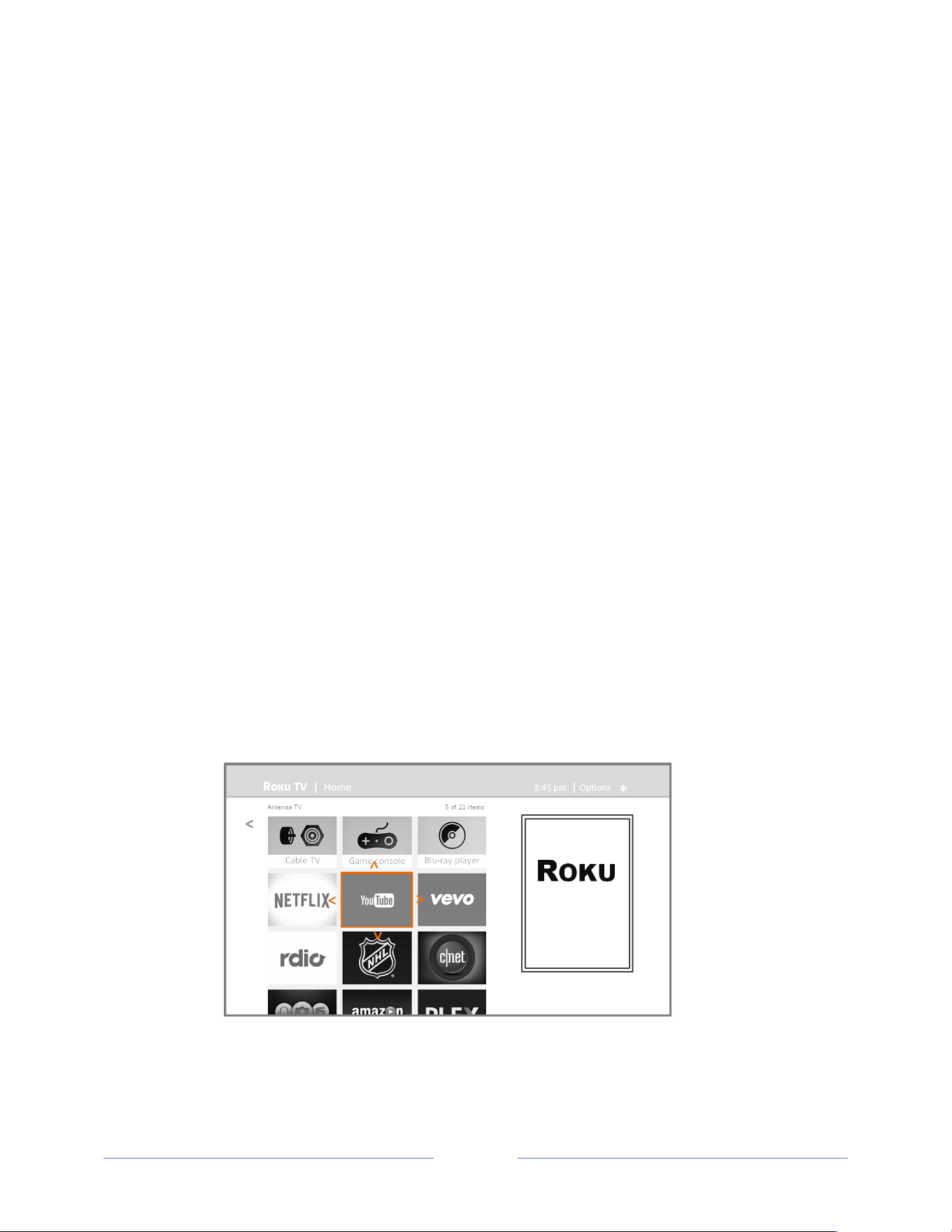
!
!
!
Page!47!
!
!
!
Customizing your TCL• Roku
TV
There!are!several!things!you!can!do!to!personalize!your!TCL•!Roku!TV.!
Rearrange tiles
Whenever!you!add!a!TV!input!tile,!it’s!added!at!the!top!of!your!Home!screen.!Whenever!you!add!a!new!
streaming!channel!from!the!Roku!Channel!Store,!it’s!added!a t!th e !bottom!of!yo u r!Hom e!screen.!
You!can!easily!rearrange!the!order!of!the!tiles!on!the!Home!screen!to!suit!your!viewing!preferences.!For!
example,!you!might!want!Antenna*TV!to!be!the!first!tile!in!your!Home*screen.!But!if!you!mostly!watch!
one!streaming!channel,!you!might!want!its!tile!to!be!the!first!one!on!your!Home!screen.!
Rearranging!tiles!is!easy:!
1.! From!the!Home!screen,!highlight!one!of!the!tiles!you!want!to!move.!!
2.! Press!!!to!display !a !list!o f!o p t ion s !fo r!th e !ty p e!o f !tile !yo u !se le ct ed .!
3.! Select!Move*input.!The!list!of!option s!d isa p pe a rs!a nd !th e !hig h ligh te d !tile!sh o w s !arr ows!
indicatin g!h o w!it!can!be !moved !
!
4.! Use!the!arrow!buttons!to!move!the!highlighted!tile!to!its!new!position.!As!you!move!the!tile,!it!
pushes!other!tiles!out!of!its!way.!
5.! Press!OK!to!lock!the!tile!into!its!new!position .!

!
!
!
Page!48!
!
!
!
6.! Repeat!these!steps!to!move!other!tiles!until!you!have!arranged!your!Home!screen!to!your!liking.!
Edit broadcast TV channel lineup
When!you!set!up!the!TV!tuner!as!described!in!“Setting!up!Antenna!TV”!on!page!26,!the!TV!add s!all!the!
channels!with!good!signals!that!it!could!detect!in!your!area.!It’s!likely!that!you!now!have!more!channels!
than!you!w an t!in!you r!cha nn el!list.!!
To!edit!the!channel!lineup,!from!the!Home!screen,!navigate!to!Settings*>*TV*inputs*> !Antenna*TV*>*Edit*
channel*lineup.!You’ll!see!a!sc ree n !listin g !all!o f!yo u r!ch a n ne ls.!A d ja ce n t!to!th e !list!o f!ch a n n els !is!a!
miniature!TV!screen!playing!the!highlighted!channel’s!picture!and!sound.!
!
Highlight!each!channel!you!want!to!hide,!and!then!press!OK!to!hide!the!ch an ne l.!!
Tip:!If+you+need +t o +se e +or +h ea r +th e +h igh lig h te d +c ha n n e l,+w a it +a+c o u p le+o f+s e co n d s+f o r+th e +T V +to +
start+playing+the+channel’s+picture+and+sound.+Also+note+that+if+you’ve+enabled+parental+controls+
and+the+program+on+the+current+channel+is+blocked,+you+won’t+see+a+picture+or+hear+sound+while+
editing+the+channel+lineup.!!
Rename inputs
Rather!than!trying!to!remember!that!your!Bluaray!player!is!conne cte d!to!H D M I!1!and!your!game!console!
is!conne ct ed !t o !H D MI!3,!you !ca n !re na me!the!T V !in p u ts !to !match!th e !co n n ec te d !co mpone n t.!
Note:!Renaming+an+input+also+changes+the+icon+associated+with+it.!

!
!
!
Page!49!
!
!
!
To!rename!an!input,!you!can!either:!
•! Highlight!the!input!tile!in!the!Home!screen,!and!then!press!! !to!display!a!list!of!option s.!From!
the!list!of!options,!select!Rename* in p u t .!Th e n !se lec t!a!n e w !n ame!and !ico n .!
or!
•! From!the!Home!screen,!navigate!to!Settings*>*TV*inputs.!On!the!TV*inputs!screen,!select!th e !
input!yo u !w a n t!to !re n a m e ,!s ele ct !Rename,!and!the n!ch o ose !a!new !n am e !and !icon !from !the !
provided!list.!
Press! !to!return!to!th e!Home!screen .!The!new !nam e!and!icon!are!now !in!effect.!
Remove unwanted tiles
It’s!easy!to !re move!u n u s ed !TV!inp u ts !and !unwanted!channel!or!app!tiles.!For!example,!if!you !n ev e r!us e!
the!HDMI!3!input,!or!if!you!don’t!like!the!weather!app!you!added!from!the!Roku!Channe l!Store,!you !can!
remove!the m !from!your!Home!screen.!!
You!also!can!remove!the!Antenna*TV!tile!if!you!neve r!u se !th e!TV!tuner.!But!be!aware!that!removing!the!
Antenna!TV!tile!also!deletes!the!broadcast!TV!channel!list.!You’ll!have!to!set!up!the!TV!tuner!again!next!
time!you!add !it.!Instruction s!for!se tting!u p!the !TV!tune r!can !be!fou n d!in!“Setting!up!Antenna!TV”!on!
page!26.!
•! To!remove!any!tile,!highlight!th e !in p ut !tile !in !th e !Home!screen ,!and!then!press!!!to!display !a!list!
of!options.!From!the!list!of!options,!select!Remove*input.!In!the!scree n!th a t!fo llo ws,!confirm!you!
want!to!remove!the!input.!
•! Alternatively,!to!remove!a!TV!input!tile!from!the!Home!screen,!navigate!to!Settings*>*TV*inputs.!
On!the!TV*inputs!screen,!select!the!input!you!want!to!remo ve,!and!then!select!Remove*>*
Confirm.!Then!press! !to !retu rn!to!the!Home!screen.!
Change themes
Another!way!to!customize!your!Roku!TV!is!to!cha n ge !its !th e m e .!T h e !th e m e !e st ab lis h es !th e !lo o k!a n d!f ee l!
of!the!TV!through!colors,!designs,!and!fonts.!
Tip:!Themes+are+available+only+when+your+TV+is+connected+to+the+Internet.!
To!change!the!theme,!in!the!Home!screen!menu!navigate!to!Settings*>*Themes.!In!the!Them es!screen ,!
choose!from!the!following!options:!
•! My*themes!–!Highlight!a!theme,!and!then!press!OK!to!switch!to!that!the m e.!!
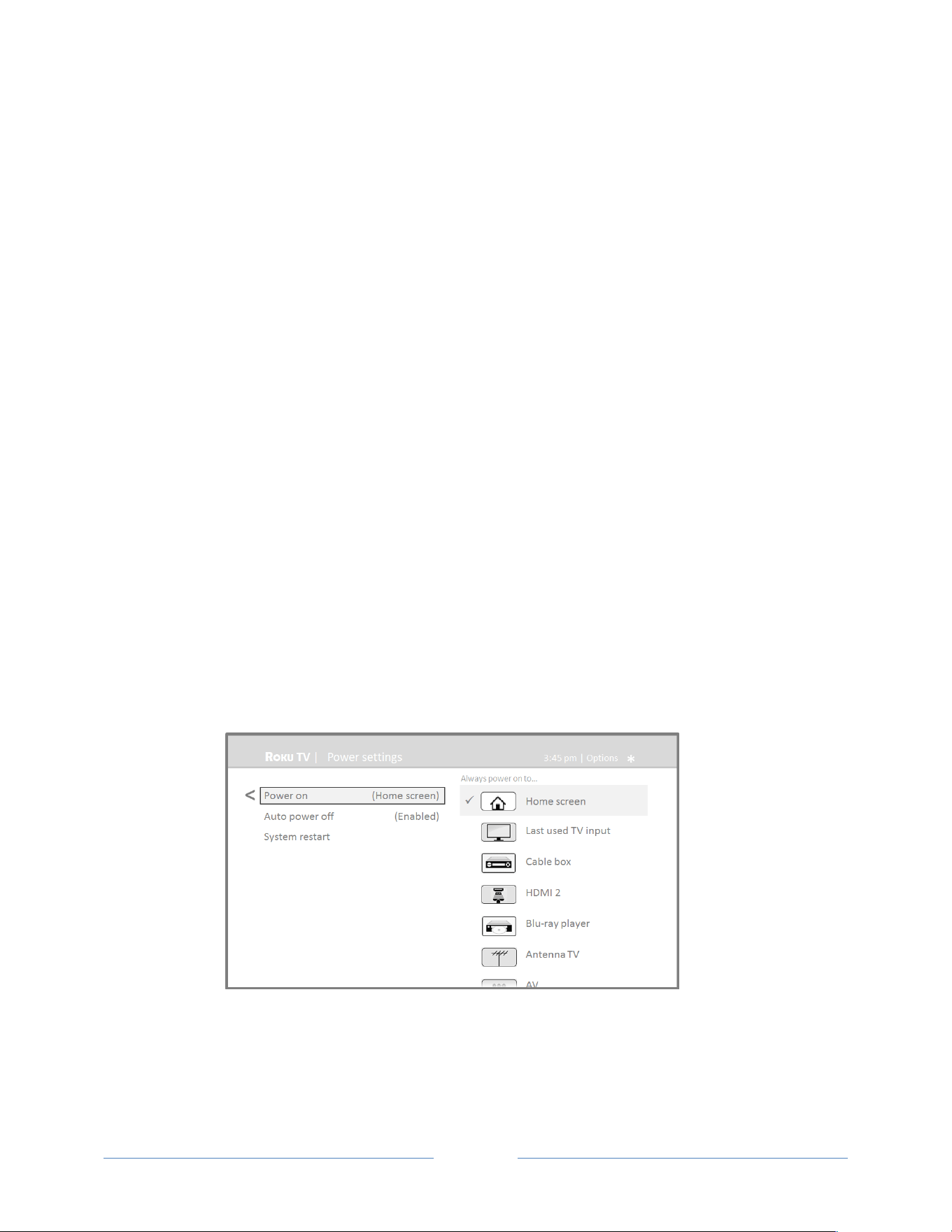
!
!
!
Page!50!
!
!
!
•! Custom*settings!–!Turn!Featured*themes!on!or!off.!When!Featured*themes!is!on ,!th e!T V !
automatically!switches!to!featured!themes— lik e !!ce rtain!holidays!—for!a!limited!time !w he ne ver!
Roku!makes!them!available,!and!then!switches!back!to!your!selected!theme!when!the!featured!
theme!expires.!When!off,!the!TV!always!uses!your!selected!theme.!
Change sound effects volume
Sound!effects!are!the!noises!the!TV!makes!to!let!you!know!it!received!your!command.!You!can!change!
the!volume !of!sou nd !effe cts!or!tu rn!the m !off.!
To!adjust!the!sound!effects!volume,!in!the!Home!screen!menu,!navigate!to!Audio*>!Menu*volume.!
Navigate!to!the!right!and!then!change!the!setting!to!High,!Medium,!Low,!or!Off.!
Configure power settings
Power!settings!let!you!set!up!your!TV!so!that!it!turns!on!to!the!location !you !choose.!Power!settings!also!
help!your!TV!save!energy!by!automatically!turning!it!off!under!certain!conditions.!
Power on settings
Power!on!settings!tells!the!TV!what!to!do!w he n!yo u !turn!o n!th e!po w er.!To !con figure !the!p ow e r!on !
settings,!from!the!Home!screen!menu ,!navigate!to!Settings*>*System*>*Power*>*Power*on.!Highlight!the!
power!on!location!from!the!list,!and!then!press!OK!to!select!it.!!
!

!
!
!
Page!51!
!
!
!
Auto power off settings
To!help!you!save!energy,!your!Roku!TV!can!automatically!turn!itself!off!after!a!period!of!inactivity!or!a!
period!during!which!no!signal!has!been!detected.!It!is!factoryaconfigured!to!do!both!of!these!things,!but!
you!can!change!these!settings!if!needed.!
To!configure!automatic!power!off,!from!the!Home!screen!menu!navigate!to!Settings*>*System*>*Power*>!
Auto*power*o ff.!In!the !Power*settings!screen,!highlight!the!following!options!and!press!OK!to!turn!them !
on!or!off:!
•! After*15*minutes*of*no*signal!–!If!n o !s ig n a l!is!d e te ct e d !o n !a!T V !in put!for!1 5 !minute s,!th e !T V !
automatically!powers!off.!
•! After*4*hours*of*no*interaction!–!If!no!re m o te!co ntro l!or!pa ne l!butto n !is!press ed !for!4!h ou rs!and!
the!TV!is!not!display ing!a!TV !sign al!or!strea m ing!a!vid eo ,!th e !T V!is!auto matica lly !p o wered !o ff .!
Configure parental controls
Parental!controls!enable!you!to!control!whether!the!members!of!your!hou seh o ld!can !view !ce rtain!kin ds !
of!broadcast!TV!programs.!When!a!program!or!feature!is!blocked,!you!can!unblock!it!by!entering!a!
parental!control!PIN!that!only!you!know.!
Note:!The+parental+control+feature+can+be+used+to+hide+the+Movie)Store,+TV)Store,+and+News+
options+that+are+available+on+the+Home+screen+menu+of+Roku+TVs+manufactured+for+the+United+
States.+Howeve r,+the+parental+controls+feature+does+not+block+other+streaming+content+nor+
content+from+inputs+other+than+the+TV+tuner.!
Creating a parental control PIN
The!first!time!you!access!the!Parental*controls!screen,!you!must!create!a!new!parental!control!PIN.!
Thereafter,!whenever!you!want!to!change!parental!control!settings,!unblock!programming!that!has!been!
blocked,!change!the!PIN,!or!disable!parental!co n t ro ls,!y ou !must!en te r!y o u r!p are n ta l!c on t ro l!P IN .!
Tip:!Your+parental+control+PIN+has+nothing+to+do+with+your+Roku+PIN.+You+can+make+them+the+
same+if+you+want—this+is+entirely+your+cho ice.!
To!create!a!new!parental!control!PIN,!from!the!Home!screen!menu !nav igate !to!Settings*>*Parental*
controls.!The!screen !d isp lay s!a !nu meric!key pa d .!U se !the !a rro w !b u tto n s!an d !th e!OK!button!to!enter!a!
four!digit!code.!Th e n!rep ea t!the!p roc ess !to!en ter!the !same!PIN!again ,!just!to!m a ke!su re!yo u !corre ctly!
entered!the!PIN!you!wan t !to !u s e .!

!
!
!
Page!52!
!
!
!
Impor ta n t:+If+you+fo rg e t+y o u r+P IN ,+th e +o n ly+way+to+r ec o v er +is+t o+p e rf o rm+a+facto ry +re s et +
operation,+as+explained+in+“Factory+reset+everything”+on+page+65.+Be+sure+to+write+it+down+in+a+
safe+place+just+in+case.!
Blocking Movie Store, TV Store, and News (US TV models only)
One!of!the!parental!control!options!is!to!completely!hide!the!entertainment!options!that!are!available!
directly!on!the!Home!screen!menu!of!Roku!TVs!manufactured!for!sale!in!the!United!States.!(The!Movie!
Store,!TV!Store,!and!News!options!are!not!available!on!Roku!TVs!manufactured!for!sale!in!Canada).!
To!hide!Home!screen!entertainment!options:!
1.! From!the!Home!screen!menu,!navigate!to!Settings*>*Parental*controls,!and!then!en te r !yo ur!PIN.!!
2.! In!the!Parental*controls!screen,!highlight!Home*screen!and!then!select!or!clear!either!of!these!
options:!
•! Hide*“Movie*Store*and*TV*Store”!–!Rem oves!the!Movie*Store!and*TV*Store*options!from!
the!Home!screen!menu .!
•! Hide*“News”!–!Removes!the!News!option!from!the!Home!screen!menu.!
Tip:!To+use+either+of+these+options+after+you’ve+hidden+them,+you+must+return+to+this+screen+and+
remove+the+ch ec k+m ark +from +th e+corre spo n ding +Hide+comma nd.!
Blocking Broadcast TV shows
For!broadcast!TV,!parental!controls!use!information!embedded!in!the!broadcast!signal!to!determine!
whether!to!allow!a!program!to!be!displayed.!Parents!can!configure!parental!controls!to!block!broadcast!
TV!programs!that!meet!or!exceed!a!specific!rating,!so!they!cannot!be!viewed!or!heard!unless!the!correct!
parental!control!PIN!is!entered.!
Enabling parental control of TV shows
The!first!step!in!blocking!TV!shows!is!to!enable!parental!control!of!TV!shows.!!
This!setting!is!provided!separately!to!make!it!easier!for!you!to!turn!parental!control!of!TV!shows!on!and!
off!without!disturbing!their!settings.!For!example,!your!kids!are!going!to!summer!camp!for!two!weeks,!
and!while!they!are!gone,!you!don’t!want!to!have!to!deal!with!unblocking!shows!that!you!want!to!watch!
by!entering!your!PIN.!All!you!need!to!do!is!clear!Enable*parental*controls,!and!all!TV!shows!a r e !
unblocked.!When!the!kids!return,!select!Enable*parental*controls!again,!and!all!of!your!parental!control!
settings!are!restored!in!a!single!operation.!
To!enable!parental!control!of!TV!shows:!
1.! In!the!Home!screen !men u,!navigate!to!Settings*>*Parental*controls,!and!then!enter!your!PIN.!!
2.! In!the!Parental*controls!screen,!navigate!to!TV*tuner*>*Parental*control*of*TV*shows.!!

!
!
!
Page!53!
!
!
!
3.! Make!sure!the!check!box!next!to!Enable*parental*controls!is!checked.!If!not,!highlight!it!and!
press!OK.!
Blocking based on US TV ratings
Most!broadcast!US!TV!shows—other!than!movies—contain!rating!data!that!enables!parental!controls!to!
block!shows!that!parents!don’t!want!others!to!view.!The!ratings!are!divided!into!two!groups!that!
function!inde pe nd en tly: !
•! Youth*group!–!TVaY,!TVaY7!
•! Main*group!–!TVaG,!TVaPG,!TVa14,!TVaMA!
Within!each!of!these!groups,!the!ratings!interact!such!that!if!you!block!a!particular!level!of!content,!the!
TV!also!blocks!all!content!with!a!higher!rating.!Conversely,!if!you!unblock!a!particular!level!of!content,!
the!TV!also!unb loc ks!all!con ten t!with !a!low er!ratin g.!For!e xam p le,!if!you!b lock!T VaPG!programs,!the!TV!
also!blocks!TVa14!and!TVaMA!programs.!If!you!subsequently!unblock!TVa14!programs,!TVaPG!programs!
are!also!unblocked,!but!TVaMA!programs!remain!blocked.!
Similarly,!within!the!main!group,!content!types!can!be!individually!blocked.!For!example,!you!can!block!
just!coars e !lan g u a ge !in !sh o ws!with!a !T V aPG!rating.!If!you!do,!then!the!TV!also!blocks!shows!with!coarse!
languag e !in !th e !hig h e r!ra tin g s!(T V a14!and!TVaMA).!Subsequently!unblocking!coarse!language!in!TVa14!
ratings!does!no t!un blo ck!co arse !lang ua ge!in!T VaMA!programs,!but!it!does!unblock!coarse!language!in!TVa
PG!programs.!
To!block!TV!shows!based!on!US!television!ratings:!!
1.! From!the!Home!screen!menu,!navigate!to!Settings*>*Parental*controls,!and!th e n !e n te r !y o u r!P IN.!!
2.! In!the!Parental*controls!screen,!navigate!to!TV*tuner*>*TV*ratings.!Choose!among!the!following!
settings:!
•! Entire*ratings!–!Highlight!the!rating!you!want!to!block,!and!then!navigate!to!the!right!and!
select!the!first!option!that!blocks!the!entire!rating!level!(and!all!higher!rating!levels).!
•! Individu al*c o n te n t*t y pe s !–!Highlight!the!rating!that!contains!the!content!type!you!want!to!
block,!and!then!select!the!content!types!you!want!to!block!from!among!those!listed.!
Remember!that!blocking!a!content!type!in!one!rating!blocks!the!equivalent!content!type!in!
all!higher!rating!levels.!
Blocking based on US movie ratings
Most!movies!in!the!US!are!rated!by!the!Motion!Picture!Association!of!America,!or!MPAA,!so!the!ratings!
are!known!as!MPAA!ratings.!TV!broadcast!signals!carry!movie!rating!data!that!enables!parental!controls!
to!block!show s!tha t!pare nts !don ’t!wa nt!o the rs!to!see .!The !ratings!a re:!
•! G!–!General!audiences!
•! PG!–!Parental!guidance!suggested!
•! PGa13!–!Parents!strongly!cautioned!for!children!age!13!or!younger!

!
!
!
Page!54!
!
!
!
•! R!–!Restricted!
•! NCa17!–!Not!for!age!17!or!younger!
Unlike!US!TV!ratings,!there!are!no!individual!content!types!within!the!ratings.!But!like!TV!ratings,!
blocking!movies !w ith !a !p a rtic u lar!r at in g!a lso !b lo c ks !m o v ie s!w it h !a!h ig h e r!ra tin g ,!an d !u n blo c kin g !movies!
with!a!particular!rating!also!unblocks!movies!with!a!lower!rating.!
Tip:!Blocking+movies+with+an+NCE17+rating+also+blocks+programs+with+the+nowEobsolete+X+rating,+
which+can+still+occur+in+the+program+data+of+older+movies.!
To!block!movies!based!on!MPAA!ratings:!!
1.! From!the!Home!screen!menu,!navigate!to!Settings*>*Parental*controls,!and!th e n !e n te r !y o u r!P IN.!!
2.! In!the!Parental*controls!screen,!navigate!to!TV*Tuner*>*Movie*ratings.!!
3.! Select!the!rating!level!you!want!to!block.!You!need!only!select!one!rating!level,!and!all!higher!
levels!are!a u to matically!b lo c ke d .!
Blocking based on Other ratings
Your!Roku!TV!can!block!programs!having!ratings!that!had!not!been!defined!when!the!TV!wa s!
manufactured.!It!does!this!by!detecting!a!new!Rating!Region!Table!in!a!program!and!then!downloading!
the!new!tab le!and !disp laying !its!rating!in!the !Pare nta l!contro ls.!
When!the!TV!downloads!a!new!Rating!Region!Table,!it!adds!a!new!option!to!the!list!of!rating!types:!
Other*ratings.!If!you!see!this!optio n !in!th e !Parental*controls!screen,!you!have!tuned!to!a!station!that!has!
implemented !a!n e w !r at ing !t ab le .!O n c e!t h e!n e w !ra tin g !ta b le !h as !b ee n !d o w n lo a de d !to !t he !T V ,!it!re mains!
in!the!TV !until!it!is!factory!reset,!and!yo u !c a n !c o n fi gure!blo ck ing!base d !on!the!new!ra tings.!
New!Region!Rating!Tables!can!have!independent!rating!levels,!or!rating!levels!that!interact!in!the!same!
ways!as!the!builtain!US!TV!and !MPAA!Movie!ra tin g s.!!
Tip:!If+your+TV+d o wnload s +a+n e w+Region+Rating+Table,+you’ll+have+to+experiment+with+its+settings+
to+understan d+h ow +to+u se+it.+
Blocking based on Canadian English ratings
CanadianaEnglish!language!and!thirdalanguage!pr og ra ms!that!a re !b ro ad c a st!in !C a n ad a !a re !ra te d!b y !th e !
Action!Group!on!Violence!on!Television,!or!AGVOT.!TV!broadcast!signals!carry!rating!data!that!enables!
parental!controls!to!block!shows!that!parents!don’t!want!others!to!view!based!on!content!containing!
violence,!language,!sex,!or!nudity.!The!ratings!are:!
•! C!–!Children!under!8!years!
•! C8!–!Children!8!years!and!older!
•! G!–!Generally!suitable!for!all!age!groups!
•! PG!–!Parental!guidance!suggested!for!viewers!under!14!years!
•! 14+!–!Generally!not!suitable!for!viewers!under!14!years!

!
!
!
Page!55!
!
!
!
•! 18+!–!Generally!not!suitable!for!viewers!under!18!years!
Blocking!content!with!a!particular!rating!also!blocks!content!with!a!higher!rating,!and!unblocking!
content!with!a!particular!rating!also!unblocks!movies!with!a!lower!rating.!
To!block!programs!based!on!AGVOT!ratings:!!
1.! From!the!Home!screen!menu,!navigate!to!Settings*>*Parental*controls,!and!then!en t er !y o u r!P I N .!!
2.! In!the!Parental*controls!screen,!navigate!to!TV*tuner*>*Canadian*English*ratings.!!
3.! Select!the!rating!level!you!want!to!block.!You!need!only!select!one!rating!level,!and!all!higher!
levels!are!a u to matically !blocked.!
Blocking based on Canadian French ratings
CanadianaFrench!language!programs!that!are!broadcast!in!Canada!are!rated!by!the!Régie!du!cinéma!du!
Québec.!TV!broadcast!sig n als !ca rry !ratin g !da ta !th at!e n ab le s!p a ren ta l!co n tro ls!to !b lo ck !sh o w s!th a t!
parents!don’t!want!others!to!view!based!on!content!containing!violence,!language,!sex,!or!nudity.!The!
ratings!are:!
•! G!–!Generally!suitable!for!all!age!groups!
•! 8+!–!Viewers!8!years!and!older!
•! 13+!–!Viewers!13!years!and!older!
•! 16+!–!Viewers!16!years!and!older!
•! 18+!–!Adults!on ly!
Blocking!content!with!a!particular!rating!also!blocks!content!with!a!higher!rating,!and!unblocking!
content!with!a!particular!rating!also!unblocks!movies!with!a!lower!rating.!
To!block!programs!based!on!CanadianaFrench!ratings:!!
1.! From!the!Home!screen!menu,!navigate!to!Settings*>*Parental*controls,!and!th e n !e n te r !y o u r!P I N .!!
2.! In!the!Parental*controls!screen,!navigate!to!TV*tuner*>*Canadian*French*ratings.!!
3.! Select!the!rating!level!you!want!to!block.!You!need!only!select!one!rating!level,!and!all!higher!
levels!are!automatically!blocked.!
Blocking unrated programs
Some!broadcast!TV!shows!and!movies!are!assigned!a!rating!of!“Unrated”.!Whether!or!not!such!
programs!contain!content!that!is!objectionable!to!you!cannot!be!determined.!However,!you!can!choose!
to!block!such!pro gra m s.!
To!block!all!unrated!broadcasts:!!
1.! From!the!Home!screen!menu,!navigate!to!Settings*>*Parental*controls,!and!th e n !e n te r !y o u r!P IN.!!
2.! In!the!Parental*controls!screen,!navigate!to!TV*tuner*>*Block*all*unrated*programs.!!

!
!
!
Page!56!
!
!
!
3.! Highlight!Block!and!press!OK.!When!bloc kin g!is!e n ab le d ,!the !a dja c en t!p ad lo c k!ico n !ch a n ges!from!
unlocked!to!locked.!
Tip:!Blocking+programs+that+have+been+assigned+a+rating+of+“Unrated”+does+not+block+programs+that+
have+no+rating+assigned+to+them+(for+example+a+broadcast+of+a+local+town+council+meeting).+
Programs+that+do+not+have+an+assigned+rating+display+Rating)NA+(for+“not+applicable,+meaning+a +
rating+is+not+need ed).+Pro gra ms+that+have+no+assigned+rating+are+considered+“safe”;+therefore,+there+
is+no+nee d +to +b lo ck +th e m.!
What happens when a TV show is blocked?
After!you’ve!set!up!parental!controls,!TV!shows!and!movies!can!be!blocked:!
•! When!you!change!channels!and!the!new!channel!is!playing!a!pro g ram!who s e!ra tin g !e xc ee d s !
your!settings.!
•! When!a!new!show!comes!on!the!channel!you!are!watching!and!its!rating!exceeds!your!settings.!
When!a!program!is!blocked!by!parental!control!settings,!the!TV!displays!a!blocked!message:!
!
Whenever!this!blocked!message!appears,!both!the!video!and!audio!of!the!show!are!blocked,!as!well!as!
program!data!that!would!normally!appear!in!the!area!at!the!bottom!of!the!screen.!
To!watch!the!blocked!program,!you!need!to!know!the!PIN!code!defined!when!you!enabled!parental!
controls,!as!explained!in!“Creating!a!parental!control!PIN”!on!page!51.!
1.! Press!OK!to!select!Unblock!and!display!a!PIN!pad.!

!
!
!
Page!57!
!
!
!
!
2.! Use!the!arrow!buttons!to!enter!your!PIN!code,!and!then!press!OK!to!select!Unblock*everything.!
After!unblocking!shows!that!have!been!blocked,!all!blocking!is!disabled!for!two!hours!or!until!you!turn!
off!the!TV.!
Changing the parental control PIN
To!change!your!parental!control!PIN:!
1.! From!the!Home!screen!menu,!navigate!to!Settings*>*Parental*controls,!and!then!enter !your!PIN .!!
2.! In!the!Parental*controls!screen,!highlight!Change*PIN.!!
3.! Move!the!highlight!into!the!adjacent!keypad,!and!then!use!the!arrow!buttons!and!the!OK!button!
to!enter!a!four!digit!cod e.!Th en !rep ea t!the!pro cess !to!ente r!the !sam e!P IN!aga in,!just!to!m ak e!
sure!you!correctly!entered!the!PIN!you!want!to!use.!
Resetting parental controls
So!now!your!kids!have!grown!up!and!gone!away!to!college,!and!you!no!longer!want!to!deal!with!blocked!
programs.!!
To!erase!all!parental!cont ro l!se tt ing s :!
1.! From!the!Home!screen!menu,!navigate!to!Settings*>*Parental*controls,!and!th e n !e n te r !y o u r!P IN.!!
2.! In!the!Parental*controls!screen,!highlight!Reset*parental*controls.!!
3.! Follow!the!instructions!on!the!screen!to!confirm!that!you!want!to!erase!all!parental!co ntro l!
settings.!
Tip:!Resetting+parental+controls+also+erases+your+parental+control+PIN.+

!
!
!
Page!58!
!
!
!
More settings
This!section!describes!the!features!and!settings!of!the!Roku!TV!that!were!not!covered !in!the !othe r!pa rts!
of!this!guide.!
Changing network settings
If!neede d ,!yo u !c a n !ch a n g e !yo u r !n et w o r k!s e ttin g s !at !an y !time.!For !ex a mple,!if!yo u !ch a n g e!t h e !n ame!of!
your!wireless!network!(its!SSID)!or!its!password,!you!will!need!to!change!your!TV’s!settings!so!that!it!can!
continue!to!connect.!Also,!if!you!decided!not!to!connect!to!the!Internet!in!“Guided!Setup”!on!page!12,!
you!can!use!Network!settings!to!connect!at!a!later!time.!
To!change!network!settings,!from!the!Home!screen!menu,!navigate!to!Settings*>*Network,!and!then !
press!RIGHT.!At!this!point,!you!can!choose!the!following!options:!
•! Update*connection!–!Press!OK!to!start!the!update !pro cess .!The !TV!u ses!yo ur!cu rren t!w ireless!
network!name!and!password!to!reconfirm! th e!wireless!connection,!the!local!network!
connection,!and!the!Internet!connection.!
•! Set*up*new*WidFi*connection!–!Press!OK!to!start!a!scan!for!w ireless !netw o rks.!Th e!TV !sca ns!fo r!
the!wireless!netw o rks!w ithin!ra nge !and !disp lays!th e!first!few !it!finds!in!ord er,!with !the!stro ngest!
signals!first.!In!addition!to!your!own!wireless!signal,!the!TV!might!pick!up!signals!from!your!
neighbors.!Now!you!can!do!one!of!the!following:!
o! Select*your*network*name!–!Select!the!name!of!your!network!and!then!enter!your!
wireless!password!if!requested.!
o! Scan*again*–!If!you!d o n ’t!s e e!y o u r!wireless !n et w o r k!n a me!in!th e!lis t,!s ele c t!Scan*again!to!
list!all!netw o rk s!in !r an g e.!T h e !firs t!s ca n !list ed !o n ly !th e!f irst !fe w ,!st ro n ge s t!w ire le ss !
signals.!The!second!scan!sometimes!results!in!a!longer!list.!If!you!still!don’t!see!your!
network!name,!you!might!need!to!adjust!the!location!of!the!wireless!router!or!the!TV,!
turn!on!your!ro ute r,!or!ma ke !othe r!cha ng es.!W h en !every thin g!is!read y,!select!Scan*
again!to!repeat!the!ne tw ork !scan .!
Note:!Highlighting+Scan)Again+displays+an+informational+panel+with+the+unique+media+
access+control+(MAC)+address+of+your+Roku+TV.+You+will+need+the+MAC+address+if+your+
wireless+router+is+configured+to+use+MAC+address+filtering.!
o! Private*network*–!If!your!wireless!netwo rk !n ame!is!hid d e n ,!it!won’t!appea r!in!the!list.!
Select!Private*network!to!display!an!onascreen!keyb oard,!and!use!it!to!enter!your!

!
!
!
Page!59!
!
!
!
network!name.!Unless!you!changed!the!factoryaset!network!name,!you!can!find!the!
name!(also!called!SSID)!on!a!label!the!router.!!
Tip:!Wireless+networks+that+are+passwordEprotected+display+a+“padlock”+icon+adjacent+to+
the+name.!!
!
Changing caption settings
You!can!change!many!different!settings!that!affect!the!appearance!of!captions.!!
To!change!caption!settings,!from!the!Home!screen!menu,!navigate!to!Settings*>*Captions,!and!then !
press!RIGHT.!At!this!point,!you!can !c ho o se !th e !follo wing!optio n s:!
•! Captions*mode!–!Choose!Off,!On,!When*mute,!or!Instan t *re p la y.!!
o! If!you!ch o o s e!On,!th e !T V !d is p la y s !ca ptions!whene v e r !th e y !a re !a v a ila ble!in!th e !p rogram !
informa tio n .!This+setting+app lies+to+Antenna+TV,+the+AV+input,+and+streaming+channels.!
o! If!you!ch o o s e!When*mute,!the!TV!displ a ys !c a p tions!on ly !when!the!sou n d !is !muted .!This+
setting+applies+to+Antenna+TV,+the+AV+input,+and+streaming+channels.!
o! If!you!ch o o s e!In st an t *R e pla y ,!th e!TV!displays!captions!only!during!a!replay!operation;!
that!is,!after!pressing! !to!jump !bac k!a!few !sec on ds!in!stre am ing !video .!This+setting+
applies+only+to+streaming+channels+when+the+program+being+streamed+supports+instant+
replay.!
Note:!If+ +is+not+a va ilable+on+your+remote+control,+you+can+use+ +on+the+Roku+App+or+the+
Jump+Bac k+bu tto n+on+a+universal+remote.+For+more+information,+see+“Other+dev ices”+on+
page+69.!
This!setting!reflects!the!Closed*captioning!settings!in!the!Options!menu!for!certain!TV!inputs,!as!
explained!in!“Options!menu!settings”!on!page!39.!Note+that,+once+enabled,+the+captions+mode+
remains+set+for+all+a p p lic ab le +in p u ts +un t il+yo u +t ur n+it +o ff.+
Tip:!Some+streaming+channels+require+you+to+enable+captions+through+a+setting+within+their+
channel+even+though+you+have+turned+on+captions+everywhere+else.!
•! Text*style*–!Choose!from!a!list!of!fonts.!As!you!move!the!highlight!to!each!font,!you!can!see!a!
sample!of!the!result!in!an!adjacent!panel.!
•! Text*edge*effect*–!Choose!from!a!list!of!edge!effect!styles,!such!as!raised,!depressed,!and!
various!shadows.!As!you!move!the!highlight!to!each!effect,!you!can!see!a!sample!of!the!result!in!
an!adjacent!panel.!
•! Text*size*–!Choose!from!a!list!of!sizes.!As!you!move!the!highlight!to!each!size,!you!can!see!a!
sample!of!the!result!in!an!adjacent!panel.!

!
!
!
Page!60!
!
!
!
•! Text*color!a!Choose!from!a!list!of!colors!for!the!text.!As!you!move!the!highlight!to!each!color,!
you!can!see!a!sample!of!the!result!in!an!adjacent!panel.!
•! Text*opacity!a!Choose!from!a!list!of!opacity!settings!for!the!text.!This!setting!determines!how!
much!the!area!behind!the!text!shows!through!the!text.!A!value!of!100%!blocks!all!of!the!content!
behind!the!text.!As!you!move!the!highlight!to!each!setting,!you!can!see!a!sample!of!the!result!in!
an!adjacent!panel.!
•! Background*color!a!Choose!from!a!list!of!colors!for!the!background!area!behind!the!text.!As!you!
move!the!highlight!to!each!color,!you!can!see!a!sample!of!the!result!in!an!adjacent!panel.!Note!
that!you!wo n’t!see !any !cha nge !un less!yo u!set!th e!Background*opacity!to!a!value!othe r!than !Off.!
•! Background*opacity!a!Choose!from!a!list!of!opacity!settings!for!the!background!of!the!caption.!
This!setting!determines!how!much!the!area!behind!the!caption!background!shows!through!the!
background.!A!value!of!100%!blocks!all!of!the!content!behind!the!background.!As!you!move!the!
highlight!to!each!setting,!you!can!see!a!sample!of!the!result!in!an!adjacent!panel.!
•! Window*color!a!Choose!from!a!list!of!colors!for!the!window!rectangle!surrounding!the!entire!
caption.!As!you!move!the!highlight!to!each!color,!you!can!see!a!sample!of!the!result!in!an!
adjacent!panel.!Note!that!you!won’t!see!any!change!unless!you!set!the!Window*opacity!to!a!
value!other!than!Default!or!Off.!
•! Window*opacity!a!Choose!from!a!list!of!opacity!settings!for!the!window!rectangle!surrounding!
the!entire!caption .!This!se tting!de term in es!ho w !m uc h!th e!area !be hind !the !cap tion!w ind o w !
shows!through!the!window.!A!value!of!100%!blocks!all!of!the!content!behind!the!window.!As!
you!move!the!highlight!to!each!setting,!you!can!see!a!sample!of!the!result!in!an!adjacent!panel.!
Changing time settings
You!can!change!time!settings!to!suit!your!preferences.!You!can!find!the!following!settings!by!navigating!
from!the!Home!scree n!me nu!to!Settings*>*Time:!
•! Sleep*timer!–!Set!a!time!delay!after!which!the!TV!will!automatically!shut!off.!This!setting!reflects!
the!setting!you!ca n!m ak e!in!the !Options!menu!from!any!TV!input,!as!explained!in!“Options!
menu!settings”!on!page!39.!Note+that+the+sleep+timer+setting+is+not+input+specific.!
•! Time*zone!–!Select!whether!to!set!the!time!zone!automatically!or!manually,!and!if!set!manually,!
select!your!current!time!zone.!Typically,!a!TV!connected!to!the!Internet!can!discover!its!own!
time!zone!au tom a tically,!and !a!TV !that!is!no t!con n ecte d!to !the!Inte rne t!mu st!be !set!m an ua lly.!
Initially,!this !se tt in g !is!made!when!y o u !se t!u p !t h e !TV!tuner,!as!explained!in!“Setting!up!Antenna!
TV”!on!page!26.!Correct!tim e !zo ne !in fo rmation!is!n ee d e d!to !co rr ec tly!d isp la y!p ro g ram!data.!!
•! Clock*format!–!Select!whether!to!display!time!in!a!12ahour!or!24ahour!format,!or!to!turn!off!time!
display.!This+setting+is+available+only+on+TVs+that+are+connected+to+the+Internet.+NonEconnected+
TVs+do+not+display+time.!

!
!
!
Page!61!
!
!
!
Scanning for broadcast TV channels again
There!will!be!times!when!you!need!to!create!a!new!channel!list.!For!example,!you:!
•! Change!cable!providers!!
•! Reorient!your!TV!antenna!
•! Move!to!a!different!city!with!different!channels!
Whenever!you!need!to!update!your!TV!channel!list,!you!can!repeat!the!channel!scan.!
Tip:!Repeat+the+channel+scan+from+time+to+time+to+make+su re +y o u +ar e+r ec eiv in g +a ll+of +th e +lat e st+
channels.+Broadcasters+add+and+remove+channels,+move+cha nnels+to+different+parts+of+the+
spectrum,+and+change+the+power+levels+of+their+channels+periodically.+!
To!repeat!the!channel!scan,!from!the!Home!screen!menu,!navigate!to!Settings*>*TV*inputs*>*Antenna*TV*
>*Scan*again*for*channels.!Then!select!Start*finding*channels!to!begin!the!chan ne l!scan!p roc ess.!Th e!
screens!and!options!that!appear!during!this!process!are!identical!to!those!described!in!“How!do!I!set!up!
the!TV!tuner? ”!on!page!26.!
Using the TCL• Roku TV in a home theater
Your!Roku!TV!has!several!features!that!make!it!an!ideal!TV!for!a!home!theater.!But!you!might!not!notice!
them!beca use !the y!rem a in!in!the!b ack gro un d!u ntil!you !dec ide!to !use!th em .!
Turning off TCL• Roku TV speakers
When!you!use!your!TV!with!a!sound!bar!or!an!external!amplifier!and!speakers,!you’ll!probably!want!to!
turn!off!the!interna l!TV!speakers.!!
To!turn!off!the!TV’s!builtain!sp ea k ers ,!in !th e !Home! scree n!men u,!navigate!to!Settings*>*Audio*>*TV*
speakers!and!change!the!setting.!
Tip:!The+TV’s+internal+speake rs+c a n +b e+enabled+and+disabled+automatically+as+needed+by+system+
audio+control,+as+described+in+“Enabling!system!audio!control”+on+page+64.+The+internal+speakers+
are+also+turned+off+when+you+use+the+headphone+jack+

!
!
!
Page!62!
!
!
!
Changing the audio mode
The!TV!has!two!audio!modes,!accessed!by!navigating!in!the!Home!screen!menu !to!Settings*>Audio*>*
Audio*mode:!!
•! Stereo!–!Use!this!setting!for!internal!speakers,!headphones,!and!external!stereo!amplifiers!
connected!through!HDMI
®
!ARC,!SPDIF!optical,!or!headphone!jack.!
•! Auto!–!Use!this!setting!to!autom atically!de tec t!the!b est!au dio !setting!b ase d!o n!the !audio!stream!
in!the!co n te nt !yo u !a re !w a tc h ing .!If!you!h av e !co n n e c te d !th e !T V !to !a n !external!Dolby!Digital!or!
Dolby!Digital!Plus!compatible!amplifier,!receiver,!or!sound!bar!through!HD MI
®
!ARC!or!SPDIF!
optical,!the!TV!automatically!selects!the!appropriate!surround!sound!capa bilities!of!the!device!
based!on!the!characteristics!of!the!current!program.!
!
Setting up a digital audio connection
You!can!connect!the!TV!to!an!external!amplifier,!receiver,!or!sound!bar!by!using!either!of!these!two!
connections:!
•! HDMI*ARC!–!The!HDMI
®
!Audio!Return!Channel!enables!the!TV!to!output!digital!audio!
on!one!of!its!HDMI
®
!connectors.!The!connected!amplifier!can!also!function!
simultaneously!as!an!input!source!to!the!TV,!if!needed.!To!use!the!ARC!capa bility,!you!
must!connect!an!HDMI
®
!cable!from!your!amp lifier’s!HDMI
®
!ARC!connector!to!the!HDMI!
ARC!connector!on!the!TV.!You!also!must:!
o! Be!sure!your!HDMI
®
!cable!is!certified !b y!HDMI
®
.!
o! Select!the!appropriate!setting!under!Settings*>*Audio*>*Audio*mode,!as!explained !in!
“Changing!the!audio!mode”!on!page!62.!
o! Enable!HDMI*ARC!under!Settings*>*System*>*CEC,!as!explaine d !in !“ Enabling!HDMI® !ARC”!
on!page!63.!!
•! SPDIF*optical!–!The!TV!has!an!SPDIF!optical!connector!that!outputs!a!digital!audio!
signal.!To!use!the!optical!output,!connect!a!TOSLINK!optical!cable!from!the!amplifier!
to!the!Optical!or!SP DIF!co n ne ctor!o n!the !TV .!You !also!m u st:!
o! Select!the!appropriate!setting!under!Settings*>*Audio*>*Audio*mode,!as!explaine d !in !
“Changing!the!audio!mode”!on!page!62.!
•! Note:!Dolby+Digital+Plus+format+is+only+output+through+the+HDMI
®
+ARC+connection.!
After!making!the!required!HDMI
®
!ARC!or!SPDIF!optical!connection,!go!to!Settings*>*Audio*>*S/PDIF*and*
ARC!option!and!select!the!audio!format!to!use.!!
Note:!In!most!cas es ,!Auto*detect!is!the!best!op tio n .!Other!settings!can!result!in!no!sound!when!
the!content!you!are!viewing!does!not!contain!the!audio!stream!type!you!selected.!

!
!
!
Page!63!
!
!
!
!
Controlling other devices through CEC
Consumer!Electronics!Control!(CEC)!enables!your!Roku!TV!and!other!CECacompatible!hom e!
entertainment!components!to!control!one!other!in!various!ways.!First,!the!CECacompatible!devices!must!
“discover”!one!another!and!report!their!capabilities.!After!this,!one!device!can!control!another!
according!to!the!features!you!enable.!For!example,!playing!a!disc!on!a!Bluaray!player!could!switch!the!TV!
to!the!Bluaray!player’s!input.!Or,!powering!off!the!TV!could!also!power!off!the!Bluaray!player!and!the!
home!theater!receiver.!
Discovering connected CEC devices
To!discover!CEC!devices:!
1.! Make!sure!that!your!CECacompatible!components!are!connected!to!the!TV!with!a !su it ab le !h igh a
speed!HDMI
®
!cable!that!supports!HDMI
®
!ARC!and!CEC!control.!
2.! Turn!on!each!component!and!make!sure!all!components!have!CEC!enabled.!
Tip:!Some+manufacturers+have+their+own+branded+names+for+CEC+functionality,+so+you+might+
need+to+read+the+product+docume nta tion +to+co rrectly+ide ntify+th e+CE C+fea ture s+of+the +devic e.+
3.! On!the!TV’s!Home!screen!menu,!navigate!to!Settings*>*Control*other*devices*(CEC)*>*Search*for*
CEC*devices,!and!then!pr e ss !OK!to !start!the !disco very !pro cess .!!
When!finished,!the!TV!displays!a!list!of!CE C !d e vic e s!th a t!a re !co n n e ct ed !t o!e a ch !H DMI
®
!input,!a s!well!as!
any!devices!that!had!previously!been!connected.!The!TV!remembers!the!names!of!multiple!CEC!devices!
even!when!they!are!no!longer!connected.!If!the!list!is!longer!than!the!allowed!space,!press!!!to !see!a!
complete!list!in!a!scrollable!window.!
Enabling HDMI
®
ARC
HDMI
®
!ARC!is!the!audio!return!channel!that!is!available!on!one!of!the!TV’s!HDMI
®
!ports.!The!audio!return!
channel!enables!you!to!send!a!Dolby!Digital!audio!signal!back!to!a!home!theater!receiver!that!is!also!
sending!an!audio!and!video!signal!into!the!TV.!Using!HDM I
®
!ARC!reduces!the!number!of!cables!needed!
and!optionally!lets!you!control!the!volume!and!mute!state!of!the!receiver!by!enabling!system!audio!
control.!
HDMI
®
!ARC!is!disabled!by!defa u lt.!T o !e n ab le !H D MI
®
!ARC,!in!the!Home!screen!menu,!navigate!to!Settings*
>*System*>*Control*other*devices*(CEC),!and!then!hig h lig h t !HDM I*ARC.!Press!OK!to!check!the!adjace nt!
check!box.!

!
!
!
Page!64!
!
!
!
Enabling system audio control
System!audio!control!enables!the!TV!rem ote !con trol!to!ch an ge !the!vo lume!and!m ute !state!o f!an!
amplifier!or!sound!bar!connected!through!HDMI
®
,!and!to !d is p la y !the!exte rn a l !d e vi ce ’s !v o lu me!an d !mute!
status!in!the!TV’s!onascreen!display.!!
The!TV!automatically!turns!off!its!internal!speakers!and!sends!volume!and !mute!con trol!signals!to!an!
external!amplifier!when!all!of!the!following!are!true:!
•! System!audio!control!is!enabled!on!the!TV.!
•! A!CECacompatible!amplifier!is!powered!on!and!CEC!discoverability!is!enabled.!
•! The!CECacompatible!amplifier’s!HDMI
®
!ARC!connector!is!connected!to!the!TV’s!HDMI!ARC!
connector!with!a!suitable!HDMI
®
!cable.!
When!the!CECacompatible!amplifier!is!off,!the!TV!automatically!turns!on!its!speakers!(unless!you!have!
turned!them !off!a s!des cribe d!in!“Turning!off!TCL•!Roku!TV!speakers”!on!page!61)!and!resumes !local!
control!of!volume!and!mute!state.!
System!audio!control!is!disabled!by!default.!To!enable!system!audio!control,!in!the!Home!screen!menu,!
navigate!to!Settings*>*Control*other*devices*(CEC)!and!highlight!System*audio*control.!Press!OK!to!
check!the!adjacent!check!box.!
Enabling 1-touch play
1atouc h!p lay!en ab les!a!co m po ne nt!to !con trol!w hich !TV !inpu t!is!active.!Fo r!exa m ple,!pre ssing !Play!on!
your!Bluaray!player!switches!the!TV!to!the!Bluaray!input.!!
1atouc h!p lay!is!disab led!b y!de fau lt.!To!en ab le!1ato u ch!p lay,!in!the !Home!screen!m enu ,!navigate!to!
Settings*>*Control*other*devices*(CEC)!and!highlight!1dtou ch*p lay.!Pre ss !OK!to !che ck!the !adja cen t!che ck!
box.!
Enabling system standby
The!system!standby!feature!causes!other!components!to!power!off!when!you!power!off!your!TV.!
Depending!on!the!CEC!System!Standby!implementation,!it!also!might!enable!connected!components!to!
power!off!your!TV!when!you!power!off!the!component.!
System!standby!is!disabled!by!default.!To!enable!system!standby,!in!the!Home!screen!menu,!navigate!to!
Settings*>*Control*other*devices*(CEC)!and!highlight!System*standby.!Press!OK!to!ch eck !the!ad jace nt!
check!box.!

!
!
!
Page!65!
!
!
!
Restarting the TCL• Roku TV
You!can!restart!the!TV!when!necessary.!Restarting!has!the!same!effect!as!unplugging!the!TV!power!and!
then!plugging!it!in!aga in.!
To!restart!the!TV,!navigate!to!Settings*>*System*>*Power!and!then!move!right!to!System*restart!and!
then!Restart.!Press!OK!to!confirm!re start.!!
While!the!TV!restarts,!the!screen!goes!dark!for!a!few!seconds,!and!then!displays!the!startup!screen!for!a!
few!more !seco n ds.!W h en !the !resta rt!op eratio n!is!co m p lete ,!you’ll!see !the!fa m iliar!Home!screen.!
Resetting the TCL• Roku TV
You!can!choose!to!reset!only!the!TV!picture!and!audio!settings!to!their!original!values,!or!perform!a!full!
factory!reset!to!retu rn!th e!TV !to!th e!state !it!wa s!in!w he n!yo u !first!unp ac ked !an d!tu rne d!it!on .!
Reset TCL• Roku TV settings
To!reset!only!the!TV!picture!and!audio!settings!to!their!original!values,!navigate!to!Settings*>*System*>*
Factory*Reset,!and!the n !h ig h li gh t !Reset*TV*settings.!Read!the !inf or m a tio n !on !th e !scre e n !to!make!su re!
you!understand!what!the!reset!operation!does.!
To!proceed!with!the!reset!operation,!press!PLAY/PAUSE!three!times!in!a!row .!
Factory reset everything
A!full!factory!reset!returns!the!TV!to!its!original,!outaofatheabox!state.!When!finished,!you!must!repeat!
Guided!Setup,!reconnecting!to!the!Internet,!realinking!you r!R o k u !ac co u n t,!a n d !re loa d in g !an y ! stream ing!
channels.!You!also!must!repeat!Antenna!TV!setup!and!input!configuration.!!
Factory!reset!is!the!recommended!choice!if!you!want!to!transfer!the!TV!to!another!owner,!and!is!the!
only!choice!if!you!want!to!switch!from!store!mode!to!home!mode!(if!you!inadvertently!selected!sto re !
mode!during!Guided!Setup).!
To!perform!a!factory!reset,!navigate!to!Settings*>*System*>*Factory*reset,!and!the n !h ig h l ig h t!Factory*
reset*everything.!Rea d !the !in fo rm a tio n !o n!th e !sc ree n !to !m a ke !su re !yo u !un d e rsta n d !w h at!th is !res et!
operation!does.!!
To!proceed!with!the!full!factory!reset,!press!PLAY/PAUSE!three!times!in!a!ro w .!

!
!
!
Page!66!
!
!
!
What if I can’t access the Factory Reset option?
It!is!possible!that!y o u r!T V !might!g et !in to !a !st at e!where !yo u !c annot!ac ce s s!t h e!v a rio u s !m e n u s ,!in clu d in g !
the!menu !optio n!th at!lets!you !pe rform !a!fa ctory !reset!o pe ration .!If!that!ha pp en s,!you !can !force !the!TV !
to!reset!by!followin g!the se!step s:!
1.! Using!a!straightened!paper!clip!or!ballapoint!pen,!press!and!hold!the!recessed!RESET!
button!on!the!TV!connector!panel.!
2.! Continue!to!hold!the!RESET!button!fo r!app rox im ately!1 2!sec on ds.!!
During!this!time,!the!status!light!turns!off,!and!then!turns!on!bright,!and!then!pulses.!
When!the!reset!cycle!completes,!the!light!either!comes!on!dim!(if!the!TV!power!was!
off!when!you!started)!or!the!TV!screen!comes!on!and!the!light!turns!off!(if!the!TV!
power!was!on!when!you!started).!
3.! When!the!status!light!turns!on!steady!dim!or!the!TV!screen!comes!on,!release!the!
RESET!button.!
4.! Proceed!through!Guided!Setup.!See!“
!
5.! Setting!up!your!TCL•!Roku!TV”!on!page!13.+!
!

!
!
!
Page!67!
!
!
!
Getting system updates
If!your!TV!is !co n n e ct ed !t o!t h e!In t ern e t!a n d !lin ke d !w it h!a !R o ku !a c co u n t,!it!will!automatically!g e t!u p d at es !
from!time!to !tim e.!Yo u!d on ’t!nee d!to !do!a nyth ing .!Bu t! if!y o u !are !a w a re !th a t!a n !u pd a te !is !av a ilab le !a nd !
you!don’t!want!to!wait!until!the!TV!updates!itself,!you!can!manually!check!for!updates.!
If!your!TV!is!not!c o n n e ct ed !t o !th e !In te rn e t ,!yo u !c an !s till!g e t!u p d a te s !b y!u s in g !a!USB!flash !d r ive .!
You!can!download!an!updated!User!Guide!that!matches!your!Roku!TV!software!version!from!the!TCLweb!
site!at:!!
www.TCLUSA.com/sup p o rt!
To!determine!your!current!Roku!TV!software!version,!go!to!Settings*>*System*>*About!after!you!
complete!Guided!Setup.!
!
Checking for updates on a connected TCL• Roku TV
If!you’re!o n e !o f!t h o se !p e o p le !w h o !h a s !to !h a ve !t h e!la te s t,!most!upato adate!gadgets!the!moment!they!are!
available,!you!can!check!for!updates!as!often!as!you!want.!
To!check!for!updates,!navigate!to!Settings*>*System*>*System *up d ate,!a nd!then!select !Check*now.!The!
TV!responds!either!with!a!message!saying!that!your!TV!is!up!to!date,!or!with!a!message!saying!that!an!
update!is!available.!!
Follow!the!instructions!on!the!screen!to!install!the!system!update.!
Getting updates on a non-connected TCL• Roku TV
If!your!TV!is!not!c o n n e ct ed !t o !th e !In te rn e t ,!yo u !c an !s till!g e t!s ys te m !update s !b y!u s in g !a!USB!flash !d r ive !
and!a!computer!with!an!Internet!connection.!
To!get!a!system!update,!navigate!to!Settings*>*System*>*System*update:!

!
!
!
Page!68!
!
!
!
!
The!System*update!screen!on!a!nonacon nected!TV!gives!you!the!opportunity!to!connect!your!TV!
to!the!Internet!to!au tomatically!receive!up da tes.!We!recommen d !this !op tio n !if!it!is!p o ssib le !in!
your!situation.!To!proceed,!select!Connect*to*the*Internet!and!follow!the!instructions!in!“But!
what!if!I!didn’t!connect!my!TCL•!Roku!TV?”!on!page!24.!
Otherwise,!if!you!can’t!connect!to!the!Internet,!select!I*can’t*connec t,!a n d !th en !follow !the !
instructio n s!o n !t he !s cre e n .!H e re’s !a!s u mmary: !
1.! On!an!Internetaconnected!computer,!go!to!the!web!site!
displayed!on!the!System*update!screen.!!
2.! On!the!USB*Update!web!page,!select!the!correct!TCL•!Roku!
TV!model!and!then!click!Download.!Save!the!file!to!the!root!
folder!of!a!stand ard !US B!flas h!driv e.! !
3.! When!the!download!finishes,!take!the!U S B !fla s h !d r iv e !to !t h e !
TV!and!plug!it!into!the!USB!port.!When!you!do,!the!TV!
validates!the!files!on!the!flash!drive!and!displays!a!12adigit!
code.!!
4.! Write!down!the!code!and!the!web!address,!and!take!this!information!back!to!your!Interneta
connected!computer.!!
5.! On!the!12ddigit*code!page,!enter!the!code!your!TV!
displayed,!and!then!click!Next.!!
6.! On!the!6ddigit*code!page,!write!down!th e! 6adigit!code!that!
appears,!and!then!take!it!back!to!your!TV.!
7.! Using!the!TV!remote!control,!select!Next!to!move!to!the !
next!screen,!and!then!use!the!onascreen!keyboa rd!to!enter!
the!6adigit!code.!When!finished,!select!OK.!The!system !
update!begins.!Do!not!remove!the!USB!flash!drive!until!the!
TV!restarts.!
When!the!update!finishes,!the!TV!restarts.!You!can!check!the!new!version!number!by!navigating!to!
Settings*>*System*>*About.!
USB flash drive
Any!normal!USB!flash!drive!will!work,!
provided!it!has!a!FATa16!or !FATa32!
file!system!format.!(This!is!the!
default!for!most!flash!drives.)!!
The!size!of!the!download!is!small—
usually!less!than!100!MB—and!so!
will!fit!on!any!size!flash!drive!you!
might!have.!
12- and 6-digit codes
The!USB!update!process!uses!a!pair!
of!codes!to!validate!that!you!are!
authorized!to!install!an!update,!and!
to!ensure!you!are!not!attempting!to!
install!an!old,!unsupported!version!of!
the!system!software.!

!
!
!
Page!69!
!
!
!
Other devices
Screen Mirroring your phone or tablet
Your!Roku!TV!ha s!a!fea ture !called !scree n!m irro ring!th at!lets!yo u!mirror!your!smartphone!or!tablet!on!
your!TV.!Share!videos,!photos,!web!pages,!and!more!from!compatible!devices
*
.!This!screen!mirroring!
feature!is!in!a!‘beta’!perio d ,!wh ich!lets !you ! try!it!out!a nd !allow s!Ro ku !to!learn !wh at!n eed s!to!b e!
improv ed—so !don’t!be!surprised!if!it!doesn’t!work!perfectly.!
For!information!on!which!devices!may!work!with!Roku!TV!screen!mirroring!and!instructions!on!how!to!
use!it,!see!http://support.roku.com/entries/56266670aHowadoaIaenableascreena mirroringaonamyaRokua
playera.!
Getting and using the Roku mobile app
Roku!makes!the!Roku!mobile!app!free!for!compatible!iOS,!Android,!a n d!Microso ft!Windo w s !8 /8 .1 !
devices.!
With!the!Roku!mobile!app,!you!can!control!your!Roku!TV,!find!and!ad d !n e w!Roku!Chan n e l s,!s e a rc h !a n d !
find!someth in g!to!w atc h,!an d!even!use!your!voice!to!search!without!typing.!More!information!can!be!
found!by!going!to!support.roku.com/home!and!searching!for!“mobile!app.”!!
!
Using a universal remote
In!man y !ca ses,!you!can!pro gram !your!cable!or!satellite!universal!remote!control!to!also!control!your!
Roku!TV.!You!will!nee d !to!h a ve !in stru ct ion s !for !pro g ra m ming!the !remote!co nt ro l!ha n dy .!C he c k!w ith !y ou r!
cable!or!satellite!provider!for!instructions.!
For!details!on!how!to!set!up!the!Roku!TV!to!work!w ith!un iversa l!rem ote !con trols,!visit!
www.roku.com/universalremote.!
!
!!!!!!!!!!!!!!!!!!!!!!!!!!!!!!!!!!!!!!!!!!!!!!!!!!!!!!!!!!!!!
*
!Many!features!work!with!top!mobile!devices.!Please!see!support.roku.com!for!compatibility!inf o rm a tio n .!

!
!
!
Page!70!
!
!
!
FAQ
For!the!latest!answers!to!Frequently!Asked!Questions,!visit!Common!Questions!section!of!the!TCLTV!
support!website!(www.TCLUSA.com/support)!and!the!Sup po rt!sectio n !of!the !Rok u!w eb site !
(www.roku.com).!!

!
!
!
Page!71!
!
!
!
Other information
Battery Caution and Disposal Information
•! For!best!results,!use!alkaline!batteries.!
•! Install!on ly !n e w !b a tt er ies !o f!t h e!s a m e !ty p e !in !yo ur!prod u c t.!
•! Failure!to!insert!batteries!in!the!correct!polarity,!as!indicated!in!the!battery!compartment,!
may!shorten!the!life!of!the!batteries!or!cause!batteries!to!leak.!
•! Do!not!mix!old!and!new!batteries.!
•! Do!not!use!Rechargeable!(Nickel!Cadmium)!or!(Nickel!Metal!Hydride)!batteries.!
•! Do!not!mix!Alkaline,!Standard!(CarbonaZinc)!or!Rechargeable!(Nickel!Cadmium)!or!(Nickel!Metal!
Hydride)!batteries.!
•! Do!not!dispose!of!batteries!in!fire.!
•! Recycle!or!dispose!of!batteries!as!per!state!and!local!guidelines.!
!
Electronics Recycling Information For Consumers !
TCL!strives!to!provide!a!high!level!of!service!to!our!customers!and!in!the!communities!we!serve,!and!
recomm en d s!that!co n sumers!always!lo ok!for!a!recycling!or!reuse!alternative!to!throwing!away!
televisions!and!oth er!e lectro nics.!W e !enc ou rage !cus tom e rs!to!recy cle!en daofa lif e!e le ct ro nic !d e vic es !
using!one!of!the!many!convenient!methods!available!today.!In!many!states!TCL!has!programs!in!place!to!
enable!consumers!to!dropaoff!and!recycle!televisions!free!of!charge.!For!information!on!electronics!
recycling!in!all!50!states,!inc lud ing!d ropaoff!locations,!please!visit!the!“Electronics!Recycling”!area!of!the!
TCL!USA!website!at!www.tclusa.com.!
Care and Cleaning
•! Caution:!Turn!off!your!TV!before!cleaning.!
•! Clean!t h e!T V !a s !needed!using!a!soft!lintafree!cloth.!Be!sure!to!occ as ion ally!du st!the !ven tilatio n!
slots!in!the!cabinet!to!help!assure!adequate!ventilation.!
•! IMPO R T A NT:!Nev er !u se !s tro n g !c lea n in g !a g en t s,!s u ch!as!am moniaabased!cleaners,!or!
abrasive!powder.!These!types!of!cleaners!will!damage!the!TV.!The!TV’s!screen!may!be!
cleaned!with!a!soft,!lintafree!cloth!as!well.!Take!ca re!n ot!to !scratc h!or!m a r!the !scree n.!If!
necessary,!you!may!use!a!cloth!dampened!with!warm!water.!While!cleaning,!do!not!spray!
liquid!dire ct ly!o n !th e !sc re e n,!o r!a llo w !liq u id !to !ru n !d o w n !th e !s cre e n !an d !in sid e !th e !T V .!A lso ,!

!
!
!
Page!72!
!
!
!
never!place!drinks!or!vases!with!water!on!top!of!the!TV.!This!could!increase!the!risk!of!fire,!
shock!hazard!or!damage!to!the!TV.!
Television Specifications
•! Broadcasting!system!
US!System!NTSCaM,!ATSC!standard!(8VSB),!QAM!!
•! Receiving!Channels!
VHF2a13,!UHF14a69,!CATV!14a36!(A)a(W),!37a59!!
(AA)a!(W W),!60a85!(AAA)a(ZZZ ),!86a94!(86)a(94),!95a99!
(Aa5)a(Aa 1),!100a135(100)a(135),!01 !(4A )!
•! Tuner!type!
Frequency!synthesized!!
•! Operating!Temperature!
5°C!to!35°C!(41°F!to!95°F)!!
•! Operating!Humidity!
20%!to!80%,!nonacondensing!
•! Storage!Temperature!
a15°C!to!45°C!(5°F!to!113°F)!!
•! Storage!Humidity!
10%!to!90%,!nonacondensing!
Notices
TTE Technology, Inc. (“TTE”) Limited Warranty
!
All TCL LCD/LED Models
What*your*warranty*covers:!Defects!in!ma te ria ls!or!work mansh ip !to!the!original*owner!of!this!TCL!
product!when!purchased!as)new)from)an)Authorized)Dealer!of!TCL!brand!products!in!the!United!States!
and!packaged!with!this!warranty!statement.!
New LCD/LED Televisions (Non-Commercial Use)
For!how!long!after!your!purchase:!
•! One*(1)*year*from*date*of*purchase!for!parts!and!labor!for! nondcommercial*use.!
New LCD/LED Televisions (Commercial Use)
For!how!long!after!your!purchase:!
•! Six*(6)*months*from*date*of*purchase*for*parts*and*labor*for*commer c ial*use.!
•! Commercial!use!includes,!but!is!not!limited!to,!the!use!of!this!product!in!a!commercial!or!
business!environment,!the!use!of!this!product!in!an!institution!or!for!institutional!purposes,!or!
other!commercial!purposes!including!rental!purposes.!
What we will do
•! At!TTE’s!discretion,!(1)!pay!an!Authorized!TCL!Service!Center!for!both!labor!charges!and!parts!to!
repair!your!televisio n,!or!(2)!rep lace !you r!telev ision !with !a!ne w !or!refu rbish ed /remanufactu red !
equivalent!value!product.!The!decision!to!repair!or!replace!will!be!made!solely!by!TTE.!See!“How!
to!get!service”.!

!
!
!
Page!73!
!
!
!
How to get service
•! !Please!have!your!original!purchase!receipt!or!proof!of!purchase!(bill!of!sale!or!receipted!invoice)!
which!states!that!condition!of!the!unit!(New,!Used,!etc.),!the!unit’s!date!of!purchase,!place!of!
purchase!and!model/serial!number!ready.!The!model/serial!number!information!can!be!found!
on!the!back!of!your!unit.!
•! Call!1a877a300a8837!or!visit!www.TCLUSA/SUPPORT!
•! A!representative!must!troubleshoot!your!problem!over!the!telephone!or!through!eamail!before!
receiving!service.!If!it!is!determ in ed !that!yo u r!unit!req u ires!serv ice,!the !service !locatio n!w ill!be!a t!
the!sole!discretion!of!TTE!based!upon!the!TTE!Limited!Warranty!Statement.!
•! At!the!sole!discretion!of!TTE,!television!screen!sizes!40”!and!smaller!will!either!be!repaired!at!an!
Authorized!TCL!Service!Center!or!directly!exchanged!for!a!new!or!refurbished/remanufactured!
unit.!At!the!sole!discretion!of!TTE,!television!screen!sizes!40”!through!55”!or!larger!will!either!be!
repaired!at!an!A uth orize d!TC L!Se rvice !Cen ter!o r!repa ired !inahom e.!
•! If!repaired!at!an!A u thorized !T C L !Se rv ice !C e n te r,!T T E !is!n ot!respo n s ib le !fo r!t ra n sp o rtation!costs!to !
the!Authorized !TC L!Se rvice!C en ter.!Ho w eve r,!TTE !will!pay!fo r!return !ship ping .!TTE !will!prov ide!
instructio n s!f or !p ac ka g in g!a n d !sh ip p in g!t h e!u n it.! Units*that*are*improperly*packed*and*
damaged*during*shipping*are*not*covered*under*your*product*warranty.*
•! Proof!of!purchase!in!the!form!of!a!bill!of!sale!or!receipted!invoice!from!an!Authorized!Dealer!
which!is!evidence!that!the!product!is!within!the!warranty!period!must!be!presented!to!obtain!
warranty!service.!
•! In!the!ev e n t!th a t!a !u n it !is!t o !b e!r e p laced,!a!picture!of!the!back!of!the!unit!showing!the!model!
and!serial!number!and!picture!of!the!issue!itself!may!be!required.!
•! PREaAUTHORIZATION!MUST!BE!OBTAINED!BEFORE!(1)!SENDING!ANY!PRODUCT!TO!AN!
AUTHORIZED!TCL!SERVICE!CENTER,!OR!(2)!OBTAINING!ANY!INaHOME!REPAIR/REPLACEMENT/!
RENTAL!SERVICES.!
What your warranty does not cover
•! A*unit*sold*in*“AsdIs”,*“Used ”,*“Factory*Reconditioned”,*“Factory*RedCertified”,*or*
“Refurbished”,*condition*or*with*faults.**
•! Units!physically!broken!during!shipment!from!a!Retailer.!Please!contact!your!Retailer!for!
assistance.!!
•! Extended!Service!Plans!purchased!from!Retailers.!Please!contact!your!Retailer!for!assistance.!
•! Customer!instruction.!(Your!Owner’s!Manual!describes!how!to!install,!adjust,!and!operate!your!
unit.!Any!additional!information!should!be!obtained!from!your!Authorized!Dealer).!
•! Installatio n !a n d !re la te d !a d ju st ments,!o r!d a mage!res u ltin g !fr o m!installa tio n .!
•! Damage!resulting!from!nonaapproved!installation!methods.!
•! Signal!reception!problems!not!caused!by!your!unit.!
•! Damage!from!misuse,!abus e ,!ne g lec t,!n o rmal!wea r!a n d !te ar ,!co smetic!da mage,!m ish a n d lin g,!
faulty!installation,!or!p ow e r!line!su rge s. !
•! Markings!or!images!on!the!television’s!panel!resulting!from!viewing!fixed!images!(including!but!
not!limited!to!certain!4:3!images!on!wide!screen!televisions,!or!data!or!images!in!fixed!screen!
location s!fr om!bann e rs ,!vid eo !g a mes,!or!cer ta in !br o ad c as t!n e tworks).!
•! Batteries.!
•! A!television!that!has!been!modified!or!incorporated!into!other!products.!
•! A!unit!purchased!or!serviced!outside!the!USA.!
•! Acts!of!nature!or!God,!such!as!but!not!limited!to!earthquake!or!lightning!damage.!
•! Special,!incidental!or!consequential!damages.!

!
!
!
Page!74!
!
!
!
LIMITATION OF WARRANTY
•! THE!WARRANTY!STATED!ABOVE!IS!THE!ONLY!WARRANTY!APPLICABLE!TO!THIS!PRODUCT.!NO!
VERBAL!OR!WRITTEN!INFORMATION!GIVEN!BY!TTE!TECHNOLOGY,!INC.,!ITS!AGENTS!OR!
EMPLOYEES!SHALL!CREATE!A!GUARANTY!OR!IN!ANY!WAY!INCREASE!OR!MODIFY!THE!SCOPE!OF!
THIS!WARRANTY.!
•! REPAIR!OR!REPLACEMENT!AS!PROVIDED!UNDER!THIS!WARRANTY!IS!THE!EXCLUSIVE!REMEDY!OF!
THE!CONSUMER.!TTE!TECHNOLOGY,!INC.!SHALL!NOT!BE!LIABLE!FOR!SPECIAL,!INCIDENTAL,!OR!
CONSEQUENTIAL!DAMAGES!RESULTING!FROM!THE!USE!OF!THIS!PRODUCT!OR!ARISING!OUT!OF!
ANY!BREACH!OF!ANY!EXPRESS!OR!IMPLIED!WARRANTY!ON!THIS!PRODUCT.!THIS!DISCLAIMER!OF!
WARRANTIES!AND!LIMITED!WARRANTY!ARE!GOVERNED!BY!THE!LAWS!OF!THE!STATE!OF!
CALIFORNIA.!EXCEPT!TO!THE!EXTENT!PROHIBITED!BY!APPLICABLE!LAW,!ANY!IMPLIED!
WARRANTY!OF!MERCHANTABILITY!OR!FITNESS!FOR!A!PARTICULAR!PURPOSE!ON!THIS!PRODUCT!
IS!LIMIT E D !T O !T H E !A P P L IC A B LE !WARR A N T Y !A N D!WAR R A N T Y !P E R IO D!SET!FORTH!ABOVE . !THIS!
WARRANTY!IS!SUBJECT!TO!CHANGE!WITHOUT!NOTICE.!PLEASE!VISIT!WWW.TCLUSA.COM!TO!
VIEW!THE!MOST!CURRENT!VERSION.!
How State Law relates to this warranty
•! Some!states!do!not!allow!the!exclusion!or!limitation!of!incidental!or!consequential!damages,!or!
limitations!on!how!long!an!implied!warranty!lasts,!so!the!above!limitations!or!exclusions!may!
not!apply!to!you.!
•! This!warranty!gives!you!specific!legal!rights,!and!you!also!may!have!other!rights!that!vary!from!
state!to!state.!
If*you*pu r ch a se d *y o u r*u n it *ou t sid e *th e *United*States*or*seek*warranty*coverage*outside*the*United*
States:!This!war ra n ty !d o e s !n o t!a p p ly .!C o n t ac t!y o u r!dealer!fo r!warran ty !in fo rmation .!
Service*calls*which*do*not*involve*defective*materials*or*workmanship*are*not*covered*by*this*
warranty.*Costs*of*such*service*calls*are*the*sole*responsibility*of*the*purchaser.*
!

!
!
!
Page!75!
!
!
!
Legal statement
Please!note—your!access!and!use!of!streaming!content!and!channels!via!the!TCL•!Roku!TV!are!governed!by!the!TCL•!Roku!TV!End!User!
Agreement!(see!below).!By!using!the!TCL•!Roku!TV,!you!agree!to!the!following!disclaimer.!For!the!avoidance!of!doubt,!the!content!disclaimer!
set!forth!herein!shall!refer!to!all!content!and!channels!accessible!and!available!on!the!TCL•!Roku!TV,!including!those!a va i la b l e !vi a !th e !Roku®!
streaming!platform,!as!well!as!broadcast!cable.
Due!to!the!various!capabilities!of!the!TCL•!Roku!TV,!as!well!as!limitations!in!the!a va i la b l e !content!availabl e !th e r e in ,!c e rt a in !f e a tu r e s,!
applications,!and!services!may!not!be!available!on!all!TCL•!Roku!TV!s,!or!in!all!territories.!Some!features!on!the!TCL•!Roku!TV!may!also!require!
additional!peripheral!devices!or!membership!fees!that!are!sold!separately.!Please!visit!the!TCLor!Roku,!Inc.!websites!for!more!information!on!
the!TCL•!Roku!TV!and!content!availability.!The!services!and!availability!of!content!on!the!TCL•!Roku!TV!are!subject!to!change!from!time!to!time!
without!prior!notice.
All!content!and!services!accessible!through!the!TCL•!Roku!TV!belong!to!third!parties!and!are!protected!by!copyright,!patent,!trademark!and/or!
other!intellectual!property!laws.!Such!content!an d!se rvices !are!pro vid ed!so lely!for!yo ur!p erso na l!non commercial!use.!You!may!not!use!any!
content!or!services!in!a!manner!that!has!not!been!authorized!by!the!content!owner!or!service!provider.!Without!limiting!the!foregoing,!you!may !
not!modify,!copy,!republish,!upload,!post,!transmit,!translate,!sell,!create!derivative!works,!exploit,!or!distribute!in!any!manner!or!medium!any!
content!or!services!displayed!through!the!TCL•!Roku!TV.
You!expressly!acknowledge!and!agree!that!your!use!of!the!TCL•!Roku!TV!is!at!your!sole!risk!and!that!the!e n tire !risk!a s!to !sa tisf act ory !qu a lity,!
performance!and!accuracy!is!with!you.!The!TCL•!Roku!TV!and!all!third!party!content!and!services!are!provided!“as!is”!without!warranty!of!any!
kind,!either!express!or!implied.!TCLand!Roku!expressly!disclaims!all!warranties!and!conditions!with!respect!to!the!TCL•!Roku!TV!content!and!
services,!either!express!or,!implied,!including!but!not!limited!to,!warranties!of!merchantability,!of!satisfactory!quality,!fitness!for!a!particular!
purpose,!of!accuracy,!of!quiet!enjoyment,!and!nonainfringement!of!third !p art y!righ ts .!TCL!and!Roku!do!not!guarantee!the!accuracy,!validity,!
timeliness,!legality,!or!completeness!of!any!con tent!o r!service!m a de!a vailab le!throu gh !the!TCL•!Roku!TV!and!does!not!warrant!that!the!TCL•!
Roku!TV,!content!or!service s !will!meet!your!re q u i re ments,!or!that!op e r a tion!of!the!TCL•!Roku!TV!will!be!uninterrupted!or!errorafree.!Under!no!
circumstances,!including!negligence,!shall!TCL!or!Roku!be!liable,!whether!in!contract!or!tort,!for!any!direct,!indirect,!incidental,!special!or!
consequential!damages,!attorney!fees,!expenses,!or!any!other!damages!arising!out!of,!or!in!connection!with,!any!information!contained!in,!or!as!
a!result!of!the!use!of!the!device,!or!any!content!or!service!accessed!by!you!or!any!third!party,!even!if!advised!of!the!possibility!of!such!damages.
Third!party!services!may!be!changed,!suspended,!removed,!terminated!or!interrupted,!or!access!may!be!disabled!at!any!time,!without!notice,!
and!TCL!and!Roku!makes!no!representation!or!warranty!that!any!content!or!service!will!remain!available!for!any!period!of!time.!Content!and!
services!are!transmitted!by!third!parties!by!means!of!networks!and!transmission!facilities!over!which!TCL!and!Roku!have!no!control.!Without!
limiting!the!generality!o f!th is!d is claimer,!TCL!and!Roku!expressly!disclaims!any!responsibility!or!liability!for!any!change,!interruption,!disabling,!
removal!of!or!suspension!of!any!co nte nt!or!se rvice!m a de!a vaila ble !throu gh!th e!TCL•!Roku!TV.!TCL,!Roku,!the!content!provide rs ,!o r !th e !s e rv ic e !
providers!may!impose!limits!on!the!use!of!or!access!to!certain!services!or!content,!in!any!case!and!without!notice!or!liability.!Any!questions!or!
requests!for!service!relating!to!the!content!or!services!made!available!on!the!TCL•!Roku!TV!should!be!submitted!to!the!respective!cable!content!
or!service!provider!or!as!described!in!the!TCL•!Roku!TV!User!Guide.
In!the!event!of!a!con flic t!b et w e en !th e !TCL•!Roku!TV!End!User!Agreement!and!the!terms!set!forth!in!this!Legal!Disclaimer,!the!TCL•!Roku!TV!End!
User!Agreement!shall!prevail!and!control!in!all!circumstances.!
TCL• Roku TV End User Agreement
IMPORT A NT:&READ &THIS&AGREEMEN T &CAREFU L L Y&IF&YOU &HAVE&AN Y & TCL•*ROKU *TV.&ALSO&REVIEW&THE&
IMPORT A NT&PRODUCT&INFORMATION&GUIDE&BEFORE&POWERING&UP&YOUR&TCL•*ROKU*TV&FOR&THE&
FIRST&TIME.&
Purpose and Scope of Agreement
This!TCL•!Roku!TV!End!User!Agreement!(“Agreement”)!is!the!legal!agreement!between!you!(“You”),!on!the!one!hand,!and!Roku,!Inc.!( “Roku”)!
and!TCL!(“TCL”)!(“TCL”*on!the!other!hand!(Roku!and!TCL!collectively!referred!to!as!“We”,!“Us”!or!“Our”),!governing!Your!use!of:!(i)!the!firmware!
and!software!that!We!have!preainstalled!on!the!television!th at !You!have!purchased!which!uses!the!Roku!platform!to!play!digital!content!
distributed!over!the!Internet!(“Television”),!and!the!firmware!and!s o ft w a r e !u p dates!Roku!ma k e s!a v a il a b le !f o r!t h e !T e le v is ion!(such!firmware,!
software!and!updates,!collectively,!the!“Software”);!(ii)!the!Roku!Channel!Store!that!is!accessible!via!the!Television’s!onascreen!menu!(“Channel*
Store”);!and!(iii)!if!downloaded!by!You!to!a!mobile!device,!any!Roku!mobile!application!and!updates!thereto!(collectively,!“Mobile*App”).!By!
establishing!an!account!at!owner.roku.com!(a!“Roku*Account”),!using!the!Television,!and/or!downloading!or!using!a!Mobile!App,!You!are!
agreeing!to!be!bound!by!the!terms!and!conditions!of!this!Agreement.!If!You!do!not!agree!to!these!terms!and!conditions,!You!are!not!granted!
any!right!to!use!the!Software!or!any!Mobile!Apps!or!the!right!to!access!the!Channel!Store.!If!Y ou !d o !n o t!a gre e !to !th es e !ter m s !an d !c on d itio n s !
and!You!are!within!the!allowable!time!period!for!returns!under!the!applicable!return!policy,!You!may!return!the!Television!to!the!place!where!
You!obtained!it!for!a!refund,!in!accordance!with!the!terms!o f!s u c h !r e tu r n !p olicy.!If!You!do!n o t !a g re e !to!these!terms!an d!conditions,!You!should!
not!download!any!Mobile!App.!If!You!have!downloaded!any!Mobile!App!and!You!do!not!agree!to!these!terms!and!conditions,!You!should!
immediately!delete!it. !
For!purposes!of!this!Agreement,!“Channel”!means!any!application!that!may!be!available!from!time!to!time !in!the!Ch an nel!Sto re,!including!
without!limitation,!applications!to!access,!display!or!play!video,!audio,!photos,!games,!text!or!graphics;!“Content”!means!video,!audio,!photos,!

!
!
!
Page!76!
!
!
!
games,!text,!graphics!and!other!audio!or!visual!materials;!and!“Content*Provider”!means!any!third!party!who!provides!video,!audio,!photo,!
games,!text,!graphics!or!other!audio!or!visual!materials!that!are!accessible!via!the!Channel!Store!and!the!Television.!
Changes to This Agreement
Roku!reserves!the!right!to!amend!this!Agre em en t! at!any!time,!in!whole!or!in!part ,!in !it s!so le!discretion.!Such!amendm ents!shall!be!effective!
immediately!upon !posting!of!the!amend ed!Agreement!on!Roku’s!website!at!www.roku.com,!via!the!Television,!or!within!any!Mobile!App.!In!its!
sole!option,!Roku!may!also!notify!You!of!the!amended!Agreement!by!sending!a!notice!to!the!last!email!address!You!have!provided!to!Roku.!You!
agree!to!provide!accurate!and!complete!information!when!You!establish!Your!Roku!Account,!and!You!agree!to!promptly!update!Your!account!
information!(including!co ntact!inform ation)!to!keep !it!accura te!an d!co m plete .!Following!the!posting!of!the!amended!Agreement!by!any!of!the!
methods!described!above,!continued!use!of!Your!Television!or!any!Mobile!App,!or!continued!access!to!Your!Roku!Account,!constitutes!Your!
express!agreement!to!be!bound!by!the!terms!and!conditions!of!the!amended!Agreement.!You!understand!that,!if!You!do!not!agree!to!the!terms!
and!conditions!of!the!amended!Agreement,!Roku!may!terminate!Your!right!to!use!the!Software!and!any!Mobile!App,!limit!Your!access!to!Your!
Roku!Account!and!the!Channel!Store,!and/or!cease!t h e !p r o v is io n!of!updates,!upgrades!or!enhancements!to!Your!Television.!
Personal, Non-Commercial Use Only; Copying and Redistribution Prohibited; No Rights Except as Expressly Granted
The!Software,!the!Channel!Store!and!the!Mobile!Apps!are!intended!for!personal,!nonacommercial!use!only.!You!may!not!use!them!for!any!
commercial!or!illegal!purpose.!Copying!or!redistribution!of!the!Software,!any!Mobile!App,!or!of!any!Content!delivered!via!the!Software!in!the!
Television!is!strictly!prohibited.!You!may!not!use!the!Television!to!access!or!attempt!to!access!any!Content!outside!of!the!country!or!location!
authorized!by!Roku!or!the!third!party!who!provided!such!Content.!Except!as!expressly!provided!under!this!Agreement,!You!do!not!acquire!any!
intellectual!property!or!o th e r!p rop rie tary !righ ts !in!o r!to !the!Software,!the!Channel!Store,!the!Mobile!Apps!or!the!Content,!including!without!
limitation,!any!rights!in!p at en ts ,!inve n tio ns ,!im p rov em e n ts,!d es ign s,!tra d em a rks,!o r!co p yrig ht s,!no r!d o !You!acquire!any!rights!in!any!confidential!
information!or!tradeasecrets.!All!rights!not!expressly!granted!to!You!in!this!Agreement!are!reserved!by!Roku!or!Our!respective!third!party!
licensors.!You!may!no t!re m o ve !or!a lte r!an y!t rad emark,!logo,!copyright!or!ot he r!p ro prie ta ry!n ot ice !in!o r!o n !any!Television,!Software,!Conte n t!or!
Mobile!App.!
Software Licenses
Software License
The!Software!is!proprietary!to!Roku!or!Our!respective!third!party!licensors!and!may!be!used!only!with!the!Television.!S ubjec t!to!the!terms!of!
this!Agreement!and!where!appropriate,!the!applicable!third!party!licenses,!We!grant!You!a!nonaexclusive,!nonatransferable!license!to!run!the!
Software!and!any!updated!versions!provided!to!You!by!Roku,!only!in!and!as!incorporated!in!the!Television.!This!is!a!license!and!not!a!sale.!You!
may!not!(i)!copy,!sublicense,!lease,!sell!or!rent!the!Software,!(ii)!distribute!or!otherwise!transfer!the!Software!to!any!third!party!except!as!
incorporated!in!the!Television,!provided!that,!You!do!not!retain!any!copies!of!the!Software!and!the!recipient!of!the!Software!reads!and!agrees!
to!accept!the!terms!and!conditions!of!this!Agreement!(including!all!amendments);!(iii)!modify,!adapt,!alter,!translate,!or!create!derivative!works!
of!the!Software;!(iv)!decompile,!disassemble,!reverse!engineer!or!otherwise!derive!or!attempt!to!derive!source!code!from!the!Software;!
(v)!defeat,!bypass,!circumvent!or!interfere!with!an y!security!mechanism !or!access!control!me asures,!or!(vi)!have!any!of!the!foregoing!done!for!
You!by!a!third!party.!This!license!does!not!grant!any!rights!to!obtaining!future!upgrades,!updates!or!supplements!to!any!Software.!
Software Updates
ROKU&RESERVES&THE&RIGHT&TO&UPDATE&THE&SOFTWARE&FROM&TIME&TO&TIME&IN&ITS&SOLE&DISCRETION,&INCLUDING&
ADDING,&CHANGING&OR&REMOVING&FUNCTIONALITIES&AND&FEATURES,&INCLUDING&BUT&NOT&LIMITED&TO,&CHANGING &
THE&USER&INTERFACE&OR&THE&MANNER&IN&WHICH&YOU&ARE&ABLE&TO&ACCESS&CONTENT&VIA&THE&TELEVISION.&
Separately Licensed Code
Notwithstanding!the!other!provisions!of!this!Agreement,!certain!components!of!the!Software,!known!as!“free”!or!“open!source”!software!code!
(“Separately*Licensed*Code”),!are!subject!to!separate!license!terms!and!are!not!subject!to!the!license!granted!above.!As!required!by!the!terms!
of!the!relevant!Separately!Licensed!Code!licenses,!Roku!makes!the!Separately!Licensed!Code,!and!Roku’s!modifications!to!it,!available!on!Roku’s!
website!at!no!charge.!Please!visit!www.roku.com/opensource!for!detailed!information!on!the!use!of!Separately!Licensed!Code.!
Third Party Notices
Some!of!the!technology!contained!in!the!Television!is!subject!to!third!party!licenses!that!require!that!You!be!given!the!following!notices:!
Hoefler!Foundry,!Inc.,!d/b/a!Hoefler!&!FrereaJones,!holds!the!copyright!to!the!font!used!in!the!user!interface!of!the!Television.!
MPEG!LAYERa3!AUDIO!CODING!TECHNOLOGY!LICENSED!FROM!FRAUNHOFER!IIS!AND!THOMSON.!
THE!TELEVISION!IS!LICENSED!UNDER!THE!AVC!PATENT!PORTFOLIO!LICENSE!FOR!THE!PERSONAL!AND!NONaCOMMERCIAL!USE!OF!A!CONSUMER!
TO!(i)!ENCODE!VIDEO!IN!COMPLIANCE!WITH!THE!AVC!STANDARD!(“AVC!VIDEO”)!AND/OR!(ii)!DECODE!AVC!VIDEO !TH AT !WA S!E NC O DE D !BY!A !
CONSUMER!ENGAGED!IN!A!PERSONAL!AND!NONaCOMMERCIAL!ACTIVITY!AND/OR!WAS!OBTAINED!FROM!A!VIDEO!PROVIDER!LICENSED!TO!
PROVIDE!AVC!VIDEO.!NO!LICENSE!IS!GRANTED!OR!SHALL!BE!IMPLIED!FOR!ANY!OTHER!USE.!ADDITIONAL!INFORMATION!MAY!BE!OBTAINED!
FROM!MPEG!LA,!L.L.C.!SEE!WWW.MPEGLA.COM.!
THE!TELEVISION!CONTAINS!TECHNOLOGY!SUBJECT!TO!CERTAIN!INTELLECTUAL!PROPERTY!RIGHTS!OF!MICROSOFT.!USE!OR!DISTRIBUTION!OF!
THIS!TECHNOLOGY!OUTSIDE!OF!THE!TELEVISION!IS!PROHIBITED!WITHOUT!THE!APPROPRIATE!LICENSE(S)!FROM!MICROSOFT.!SOME!CONTENT!
OWNERS!USE!WINDOWS!MEDIA!DIGITAL!RIGHTS!MANAGEMENT!TECHNOLOGY!(WMDRM)!AND!OTHERS!USE!PLAYREADY!DIGITAL!RIGHTS!
MANAGEMENT!TECHNOLOGY!TO!PROTECT!THEIR!INTELLECTUAL!PROPERTY,!INCLUDING!COPYRIGHTS.!THE!TELEVISION!USES!WMDRM!AND!

!
!
!
Page!77!
!
!
!
PLAYREADY!SOFTWARE!TO!ACCESS!WMDRMaPROTECTED!AND!PLAYREADYaPROTECTED!CONTENT.!IF!THE!WMDRM!OR!PLAYREADY!SOFTWARE!
FAILS!TO!PROTECT!THE!CONTENT,!CONTENT!OWNERS!MAY!ASK!MICROSOFT!TO!REVOKE!THE!SOFTWARE’S!ABILITY!TO!USE!WMDRM!OR!
PLAYREADY!TO!PLAY!OR!COPY!PROTECTED!CONTENT.!REVOCATION!DOES!NOT!AFFECT!UNPROTECTED!CONTENT.!WHEN!YOU!DOWNLOAD!
LICENSES!FOR!PROTECTED!CONTENT,!YOU!AGREE!THAT!MICROSOFT!MAY!INCLUDE!A!R E V O C A T IO N!LIST!WITH!THE!LICENSES.!CONTENT!
OWNERS!MAY!REQUIRE!YOU!TO!UPGRADE!WMDRM!OR!PLAYREADY!TO!ACCESS!THEIR!CONTENT.!IF!YOU!DECLINE!AN!UPGRADE,!YOU!WILL!NOT!
BE!ABLE!TO!ACCESS!CONTENT!THAT!REQUIRES!THE!UPGRADE.!
USE!OF!THE!TELEVISION!IS!LIMITED!TO!PRIVATE!NONaPRO FESSIONAL!USE!BY!CONSUMERS!FOR!LICENSED!CONTENT.!NO!RIGH T S!A RE !GR A N TED!
FOR!PROFESSIONAL!USE!OR!FOR!USE!OF!THE!TELEVISION!IN!COMBINATION!WITH!TELE V IS IO N S! NO T!LICENCED!UNDER!THE!MPEGa1!OR!MPEGa2!
AUDIO!STANDARDS.!
THE!TELEVISION!CONTAINS!TECHNOLOG Y !S U B JECT!TO!CERTAIN!INTELLECTUAL!PROPERTY!RIGHTS!OF!SIGMA!DESIGNS,!INC.!AND!ITS!LICENSORS.!
ANY!USE!OR!DISTRIBUTION!APART!FROM!THE!TELEVISION,!AND!ANY!MO D IF I C A T ION,!ALTERATION,!REVERSEaENGINEERING,!DECOMPILIING,!
DISASSEMBLING!OR!ATTEMPT!TO!DERIVE!THE!SOURCE!CODE!OF!THE!INTELLECTUAL!PROPERTY!OF!SIGMA!DESIGNS,!INC.!OR!ITS!LICENSORS,!ARE!
STRICTLY!PROHIBITED!EXCEPT!AS!AUTHORIZED!BY!SIGMA!DESIGNS,!INC.!WITH!RESPECT!TO!YOU,!SIGMA!DESIGNS,!INC.!AND!ITS!LICENSORS,!
SIGMA!DESIGNS,!INC.!AND!ITS!LICENSORS!OWN!THE!TITLE!TO!ALL!INTELLECTUAL!PROPERTY!RIGHTS!IN!THE!TECHNOLOGY!DESCRIBED!IN!THIS!
PARAGRAPH.!
Access to Content: Roku Accounts
Additional Definitions Applicable to this Section:
•! “FeedBased*Programming”!means!the!specific!Content!available!to!end!users!of!the!Television!who!agree!to!pay!the!applicable!fee!
to!access!the!Content.!
•! “OnedTime*Fee”!means!a!single!oneatime!charge!payable!for!access!to!selected!Fe e aBased!Programming.!
•! “Private*Channel”!means!a!Channel!which!may!be!accessed!by!entering!a!developeraprovided!linking!code!on!the!Roku!website.!
•! “Public*Channel”!means!a!Channel!that!is!generally!available!to!all!Roku!users!and!is!visible!in!the!Channel!Store.!
•! “Subscription*Fee”!means!a!monthly!or!annual!fee!charged!for!access!to!selected!FeeaBased!Programming.!
Establishing an Account
The!Television!is!enabled!to!permit!Your!access!to!Content!provided!by!various!Content!Providers.!In!order!to!access!Content,!You!are!required!
to!establish!a!Roku!Account!at!owner.roku.com!and!provide!Your!credit!card!number!or!PayPal!account!information!against!which!Your!Feea
Based!Programming!fees!will!be!charged.!At!Your!option,!a!PIN!code!may!be!required!to!access!certain!FeeaBased!Programming.!If!You!prefer!to!
use!a!PIN,!You!will!choose!Your!PIN!when!establishing!Your!Roku!Account!preferences.!Through!Your!Roku!Account,!You!will!be!provided!the!
opportunity!to!review!monthly!summaries!of!Your!charges.!In!addition,!for!some!of!the!Content,!You!may!be!required!to!maintain!a!valid!and!
active!account!in!good!standing!with!one!or!more!Content!Providers.!You!must!adhere!to!Roku’s!terms!of!service!and!to!the!terms!of!service!of!
any!Content!Provider!whose!Content!You!choose!to!access.!See!www.roku.com/channels#!nowaplaying!for!a!list!of!Content!Providers!for!the!
Television.!Roku!may!add!or!remove!Content!Providers,!Channel!and/or!Content!from!time!to!time,!in!its!sole!discretion.!Roku!reserves!the!
right!to!remove,!from!Your!Television ,!You r!acce ss!to!an y!Co nte nt!an d/ or!Ch an nel!if!Ro ku !has !reaso n!to!b elieve!that!the!Television!is!stolen,!
hacked!or!compromised,!or!that!the!Content!or!Channel!is!not!properly!authorized!or!licensed,!violates!any!law,!or!has!been!offered!by!a!
Content!Provider!in!violation!of!any!agreement!between!the!Content!Provider!and!Roku.!You!are!responsible!for!ensuring!that!any!agea
restricted!Content!is!not!viewed!by!any!p erso n!no t!m eetin g!the!a pp licab le!age !lim its,!as!sp ecified !by!la w,!regu latio n!o r!the!Content!Provider.!
Fees and Charges
Where!Roku!manages!the!handling!and!processing!of!Your!payments!for!FeeaBased!Programming,!the!following!terms!apply:!
OneETime+Fee+Programming.!For!Public!Channels,!Your!account!will!be!charged!in!full!when!You!confirm!Your!purchase!of!access!to!
the!Channel.!For!Private!Channels,!You!will!be!charged!after!the!Channel!appears!as!an!option!in!Your!Ch an nel!lineaup!and!after!You!
have!confirmed!Your!purchase!of!access!to!the!Channel.!For!the!Content!and!services!purchased!from!within!any!Public!Channel!or!
Private!Channel,!Your!account!will!be!charged!in!full!when!You!confirm!the!purchase.!
Subscription+Fee+Programming.!The!timing!of!Your!initial!selection!of!subscription!FeeaBased!Programming!will!provide!the!basis!for!
Your!billing!dates!for!all!future!monthly!and!yearly!Subscription!Fees.!All!Subscription!Fees!will!be!charged!for!the!full!term!of!the!
applicable!subscription!period,!i.e.,!for!the!month!or!year,!as!applicable,!at!the!time!You!order!the!subscription,!except!where!proa
rated!monthly!billing!applies.!Wh ere!th e!first!m on th!is!proarated,!the!second!and!a ll!su b seq u e nt !ch arg es !ap p lied !to !Y ou r!a cco u n t!w ill!
be!for!the!full!monthly!or!yearly!Subscription!Fee,!as!applicable.!
Sales+Tax.!Your!purchases!may!be!subject!to!sales!tax,!which!may!not!be!included!in!the!prices!shown!on!the!purchase!screen.!If!an!
item!You!purchased!is!subject!to!sales!tax,!such!amount!will!be!reflected!on!the!invoice!for!that!purchase.!The!amount!of!tax!
charged!on!Your!purchase!will!depend!upon!many!factors,!including!the!item!pu rchased !and!the!ap plicable!tax!rate!in!effect!at!the!
time!of!Your!purchase.!Factors!can!change!between!the!time!You!place!an!order!and!the!time!of!credit!card!charge!authorization,!
which!could!affect!the!calculation!of!sales!taxes.!
Subscription+Renewals+and+Cancellations.!All!subscriptions!will!automatically!renew!until!cancelled!by!You.!Details!for!how!to!cancel!
a!subscription!are!available!by!entering!the!key!words!“cancel!subscription”!in!the!“Ask!a!Question”!box!on!www.roku.com/support.!
If!a!subscription!is!cancelled!midaway!through!a!subscription!period,!the!subscription!will!end!at!the!end!of!the!subscription!period.!

!
!
!
Page!78!
!
!
!
You!will!continue!to!receive!the!Content!until!the!end!of!the!subscription!period,!and!fees!for!the!remainder!of!the!subscription!
period!will!not!be!refunded.!
Credit/Refund+Policy.!Credits!and!refunds!will!be!issued!only!in!accordance!with!the!terms!posted!at!www.roku.com/support.!For!
details,!go!to!www.roku.com/support!and!enter!the!key!words!“credit!policy”!in!the!“Ask!a!Question”!box.!
Privacy Policy and Consent to Use of Data
Roku’s!privacy!policy,!available!at!www.roku.com/about/privacy!(“Privacy*Policy”),!explains!Roku’s!policies!regarding!the!collection,!use,!and!
disclosure!of!information!provided!by!or!collected!from!You!via!the!Television,!Roku’s!websites!and/or!the!Mobile!Apps.!By!agreeing!to!be!
bound!by!the!terms!and!conditions!of!this!Agreement,!You!are!agreeing!to!the!collection,!use,!and!disclosure!of!Your!information!as!described!
in!the!Privacy!Policy.!You!should!review!the!Privacy!Policy!before!establishing!Your!Roku!Account,!before!linking!the!Televis io n!to!any!existing !
Roku!Account,!and!before!using!the!Television!and/or!Mobile!Apps.!
Advertising and Promotional Messages
Roku!and!the!Content!Providers!reserve!the!rights!to!deliver!and!display!advertising!and!promotional!messages!to!You!via!the!Software!
incorporated!in!the!T ele visio n !or!the!Mobile!Apps,!and!to!include!such!advertising!and!promotional!messages!in!or!with!any!user!interface,!
notice,!or!Content!that!is!displayed!via!the!Software!incorporated!in!the!Television!or!the!Mobile!Apps.!
No Warranty from Roku
This!Agreement!governs!only!Your!access!to!and!use!of!the!Software,!the!Mobile!App,!the!Channel!Store,!and!Your!Roku!Account.!Your!
warranty!with!respect!to!the!Television!and!its!operation!(including!the!operation!of!the!Software!incorporated!in!the!Television)!is!provided!
solely!by!TCL!as!set!forth!in!the!Important!Product!Information!Guide,!and!not!by!Roku.!Roku*offers*no*warranty*to*You*under*this*Agreement.!
WITHOUT!LIMITING!THE!GENERALITY!OF!THE!FOREGOING!DISCLAIMER,!TO!THE!MAXIMUM!EXTENT!PERMITTED!BY!APPLICABLE!LAW,!THE!
TELEVISION,!THE!MOBILE!APPS,!THE!SEPARATELY!LICENSED!CODE,!THE!SOFTWARE,!THE!CHANNEL!STORE,!AND!ANY!SERVICES!PERFORMED!OR!
PROVIDED!BY!THE!FOREGOING!ARE!PROVIDED!“AS!IS”!AND!“AS!AVAILABLE”,!WITH!ALL!FAULTS!AND!WITHOUT!WARRANTY!OF!ANY!KIND,!AND!
ROKU!HEREBY!DISCLAIMS!ALL!WARRANTIES!AND!CONDITIONS!WITH!RESPECT!TO!ANY!OF!THE!FOREGOING,!EITHER!EXPRESS,!IMPLIED!OR!
STATUTORY,!INCLUDING,!BUT!NOT!LIMITED!TO,!THE!IMPLIED!WARRANTIES!AND/OR!CONDITIONS!OF!MERCHANTABILITY,!OF!SATISFACTORY!
QUALITY,!OF!FITNESS!FOR!A!PARTICULAR!PURPOSE,!OF!RELIABILITY!OR!AVAILABILITY,!OF !A C C U R A CY ,!O F !Q U IE T !E N JO Y MENT,!OF!QUIET !
POSSESSION,!OF!WORKMANLIKE!EFFORT,!OF!LACK!OF!VIRUSES,!OR!REASONABLE!CARE!AND!SKILL,!AND!NONaINFRINGEMENT!OF!THIRD !PA R T Y !
RIGHTS.!ROKU!DOES!NOT!WARRANT!(I)!AGAINST!INTERFERENCE!WITH!YO U R!E NJO Y M ENT!OF!THE!TELEVISION,!THE!MOBILE!APPS,!THE!
SOFTWARE,!THE!SEPARATELY!LICENSED!CODE,!OR!THE!CHANNEL!STORE,!(II)!THAT!THE!FUNCTIONS!CONTAIN ED !IN!O R!S ER VICE S!P ER FO RMED!OR!
PROVIDED!BY!ANY!OF!THE!FOREGOING!WILL!MEET!YOUR!REQUIREMENTS,!(III)!THAT!THE!OPE RA TIO N !OF!ANY!OF!THE!FOREGOING!WILL!BE!
UNINTERRUPTED!OR!ERRORaFREE,!OR!(IV)!THAT!DEFECTS!WILL!BE!CORRECTED.!N O !OR AL!O R !WR ITT EN !INF OR M A TIO N!O R !ADV ICE !GIV EN !BY !US !
OR!OUR!RESPECTIVE!AUTHORIZED!REPRESENTATIVES!SHALL!CREATE!ANY!WARRANTY.!
Some!jurisdictions!do!not!allow!exclusions!or!limitations!on!implied!warranties,!so!the!foregoing!limitations!of!warranties!may!not!apply!to!You.!
You!may!also!have!other!rights!that!vary!from!jurisdiction!to!jurisdiction.!
Limitation of Liability
TO!THE!EXTENT!NOT!PROHIBITED!BY!APPLICABLE!LAW,!IN!NO!EVENT!SHALL!WE!OR!OUR!RES PE C T IV E !LIC E N S O R S !AND/OR!SUPPLIERS!BE!LIABLE!
FOR!(A)!ANY!PERSONAL!INJURY !OR !PR OP ER TY !DA M AG E ;!OR!(B )!ANY!CONSEQUENTIAL,!SPECIAL,!EXEMPLARY,!INCIDENTAL,!INDIRECT!OR!
PUNITIVE!DAMAGES,!OR!FOR!LOSS!OF!REVENUE!OR!PROFITS!OR!DATA!OR!USE!OR!FOR!THE!COST!OF!SUBSTITUTE!GOODS,!REGARDLESS!OF!THE!
THEORY!(WHETHER!BASED!IN!CONTRACT,!TORT!(INCLUDING!NEGLIGENCE)!OR!OTHERWISE)!ARISING!OUT!OF,!OR!IN!CONNECTION!WITH,!ANY!
TELEVISION,!ANY!ROKU!ACCOUNT,!THE!CHANNEL!STORE,!THE!MOBILE!APPS,!THE!SOFTWARE,!THIRD!PARTY!CONTENT,!THE!SEPARATELY!
LICENSED!CODE,!OR!YOUR!USE!THEREOF.!SOME!JURISDICTIONS!DO!NOT!ALLOW!LIMITATION!OF!LIABILITY!FOR!CERTAIN!DAMAGES,!SO!THE!
EXCLUSIONS!SET!FORTH!ABOVE!MAY!NOT!APPLY!TO!YOU.!TO!THE!EXTENT!ALLOWED!BY!LAW,!AND!OTHER!THAN!AS!MAY!BE!REQUIRED!BY!
APPLICABLE!LAW!FOR!PERSONAL!INJURY!CASES,!YOU!AGREE!THAT!(I)!THE!TOTAL!CUMULATIVE!LIABILITY!OF!ROKU,!ROKU’S!LICENSORS!AND/OR!
ROKU’S!SUPPLIERS,!INCLUDING!LIABILITY!RELATING!TO!ANY!TELEVISION,!ANY!ROKU!ACCOUNT,!THE!CHANNEL!STORE,!THE!SOFTWARE,!THE!
THIRD!PARTY!CONTENT,!THE!SEPARATELY!LICENSED!CODE,!AND!THE!MOBILE!APPS!SHALL!NOT!EXCEED!ONE!HUNDRED!UNITED!STATES!DOLLARS!
(US$100),!AND!(II)!ROKU,!ITS!LIC E N S O R S !AND/OR!SUPPLIERS!SHALL!NOT!BE!LIABLE!TO!YOU!UNDER!THIS!AGREEMENT!FOR!ANY!DIRECT!
DAMAGES!ARISING!OUT!OF,!OR!IN!CONNECTION!WITH,!THE!TELEVISION.!YOUR!REMEDY,!IF!ANY,!WITH!RESPECT!TO!THE!TELEVISION,!SHALL!BE!
SOLELY!AGAINST!(A)!THE!SELLER!FROM!WHOM!YOU!PURCHASED!IT!AND!(B)!TCL,!AS!SET!FORTH!IN!ACCORDANCE!WITH!THE!IMPORTANT!
PRODUCT!INFORMATION!GUIDE!PROVIDED!BY!TCL.!THE!FOREGOING!LIMITATIONS!SHALL!APPLY!EVEN!IF!THE!REMEDY!PROVIDED!HEREIN!FAILS!
OF!ITS!ESSENTAIL!PURPOSE!AND!EVEN!IF!WE!OR!OUR!LICENSORS!OR!SUPPLIERS!HAVE!BEEN!ADVISED!OF!THE!POSSIBILITY!OF!SUCH!LIABILITY.!
Additional Terms Applicable to Mobile Apps
License
The!Mobile!Apps!are!licensed,!not!sold,!to!You!for!use!only!under!the!terms!of!this!Agreement.!Roku,!as!the!licensor,!reserves!all!rights!not!
expressly!granted!to!You.!This!license!granted!to!You!by!Roku!for!the!Mobile!Apps!is!limited!to!a!nonaexclusive,!nonatransferable!license!to!use!
the!Mobile!Apps!for!perso na l!and !non acommercial!purposes!solely!on!any!mobile!device!that!You!own!or!con trol!and!as!perm itted!by!the!usage!
rules!set!forth!in!any!application!store!term s!an d!co nd it io n s!a nd !o n ly!w ith in !th e!c ou n try !or!lo ca tio n !au th o rize d !by !Ro ku .!T h is!lice ns e!d o es !no t!
grant!any!rights!to!obtaining!future!upgrades,!updates!or!supplements!to!any!Mobile!App.!
Usage Rules
You!may!not!commercialize!the!Mobile!Apps!in!any!way.!You!will!not,!and!You!will!not!allow!any!person!to,!copy!sublicense,!lease,!sell!or!rent!
the!Mobile!Apps!or!any!part!thereof,!to!analyze!it!by!means!of!reverse!engineering,!to!decompile,!disassemble,!attempt!to!derive!the!source!

!
!
!
Page!79!
!
!
!
code!of,!modify,!or!create!derivative!works!of!the!Mobile!Apps,!or!of!any!up d a t e s!t h e re t o !o r !a n y !p a rt !th e r e o f!( e x ce pt!as!and!only!to !t h e !e x te nt!
any!foregoing!restriction!is!prohibited!by!applicable!law!or!to!the!extent!as!may!be!permitted!by!the!licensing!terms!governing!use!of!any!
Separately!Licensed!Code!included!with!a!Mobile!App).!Any!attempt!to!do!so!is!a!violation!of!the!rights!of!Roku!and!its!licensors.!If!You!breach!
this!restriction,!You!may!be!subject!to!prosecu tion !and !damages.!The!terms!of!this!license!will!govern!any !upg rad es!pro vided !by!Roku!to!a!
Mobile!App,!unless!such!upgrade!is!accompanied!by!a!separate!license!in!which!case!the!terms!of!that!license!will!govern.!
Consent to Use of Data
You!agree!that!Roku!or!a!third!party!contracted!by!Roku,!may!collect!and!use!technical!and!usage!data!and!related!information,!including!but!
not!limited!to,!information!about!Your!device ,!syst em!and!software,!periph e rals!a n d!Mobile!App!usage!th a t!is!g at he red !p e riod ica lly!to !f acilitate!
the!provision!of!updates,!product!supp ort!a nd!o ther!se rvices!(if!an y)!to!You!related!to!the!Mobile!App.!Rok u!m a y!use!th is!and !oth er!inform a tion !
it!collects!about!You!as!described!in!its!Privacy!Policy,!available!at!www.roku.com/about/privacy.!
Export Controls
You!agree!not!to!download!any!Content,!Mobile!App,!or!Softw are ,!nor!oth erw ise!exp ort!o r!reaexport!the!Television!or!Mobile!Apps!or!the!
Software!into!(or!to!a!national!or!resident!of)!Cuba,!Iraq,!Libya,!North!Korea,!Iran,!Syria!or!any!other!country!as!to!which!the!United!States!has!
embargoed!goods,!or!to!anyone!on!the!U.S.!Treasury!Department's!List!of!Specially!Designated!Nationals!or!the!U.S.!Commerce!Department's!
Table!of!Denial!Orders.!By!using!the!Television,!the!Channel!Store,!the!Software!or!the!Mobile!Apps,!You!are!representing!and!warranting!that!
You!are!not!located!in,!under!the!control!of,!or!a!national!or!resident!of!any!such!country!or!on!any!such!list.!
Roku Reserves the Right to Change Policies and Web Pages
The!policies!and!other!content!of!the!Roku!web!pages!referred!to!in!this!Agreement!may!be!changed!by!Roku!from!time!to!time!in!its!sole!
discretion,!without!notice!to!Yo u .!
Dispute Resolution by Binding Arbitration, with Class Action Waiver and Choice of Law
1.! You!and!Roku!agree!to!be!bound!by!the!procedures!set!forth!below!to!resolve!any!and!all!claims!arising!out!of!or!relating!to!any!
aspect!of!the!relationship!between!You!and!Roku,!whether!based!in!contra c t,!s ta tute,!tort,!fraud,!misrepresentation!o r!any !othe r!
legal!theory,!including!b u t!n o t!lim ite d !to,!claims!relating!to!this!Agreement,!its!formation,!enforceability,!performance!or!breach,!
and!claims!related!to!advertising,!the!Software,!the!Television,!the!Ch ann el!Sto re!or!the !Mo bile!Ap ps!(as!applicable).!Each!su ch !claim!
is!referred!to!individually!a s!“Claim”!and!collectively!as!“Claims”.!
2.! YOU*AND*ROKU*AGREE*THAT,*EXCEPT*FOR*THE*CLAIMS*IDENTIFIED*IN*PARAGRAPH*4*BELOW,*ANY*AND*ALL*CLAIMS*BETWEEN*
YOU*AND*ROKU*SHALL*BE*FINALLY*SETTLED*BY*BINDING*ARBITRATION.!The!arbitration!shall!take!place!in!Santa!Clara!County,!
California,!and!shall!be!administered!by!the!American!Arbitration!Association!(“AAA”)!pursuant!to!the!AAA’s!thenacurrent!rules,!
including!(if!applicable )!th e !A AA ’s!S up p le m en ta ry!P ro ced u res !fo r!C on su m e raRelated!Disputes.!Please!be!aware!there!is!no!judge!or!
jury!in!arbitration.!Arb itra tio n !pr oc ed u re s!a re!s im p ler !an d !m o re !lim ite d !th an !the!rules!ap plica ble !in!cou rt, !and!review!of!the!
arbitrator’s!decision!by!a!court!is!limited.*YOU*AND*ROKU*FURTHER*A G R E E*T HA T *EA C H *M A Y *BR IN G *C LA IM S*A G A IN ST *TH E *O TH E R*
ONLY*ON*AN*INDIVIDUAL*BASIS*AND*NOT*AS*A*PLAINTIFF*OR*CLASS*MEMBER*IN*ANY*PURPORTED*CLASS*OR*REPRESENTATIVE*
ACTION*OR*PROCEEDING.*THE*ARBITRATOR*MAY*NOT*CONSOLIDATE*OR*JOIN*MORE*THAN*ONE*PERSON’S*CLAIM*AND*MAY*NOT*
PRESIDE*OVER*ANY*CONSOLIDATED,*REPRESENTATIVE*OR*CLASS*PROCEEDING.*ALSO,*THE*ARBITRATO R *MAY*AWARD*RELIEF*
(INCLUDING*MO N E TA R Y,*INJUNCTIVE*OR *D EC L A RATORY*RELIEF)*ONLY*ON*AN*INDIVIDUAL*BASIS*AND*MAY*NOT*AWARD*ANY*
FORM*OF*CONSOLIDATED,*REPRES EN T A T IVE*OR*CLASSdWIDE*RELIEF.!Notwithstanding!any!provision!in!these!terms!to!the!contrary,!
if!the!classaaction!waiver!in!this!provision!is!deemed!invalid!or!unenforceab le,!or!if!an!arbitration!of!a!Claim!between!You!and!Roku!is!
allowed!to!proceed!on!a!class!basis,!then!neither!You!nor!Roku!are!entitled!to!arbitrate!such!Claim.!This!arbitration!provision!is!
subject!to!the!Federal!Arbitration!Act.!The!arbitrator’s!award!shall!be!binding!on!You!and!Roku,!and!may!be!entered!in!any!court!of!
competent!jurisdiction.!
3.! Information!on!AA A !a nd !h o w !a rb itr at ion !is !in itia ted !c an !b e !fo u n d!at!www.adr.org!or!by!calling!800a778a7879.!For!Claims!between!
You!and!Roku!of!$75,000!or!less,!You!will!be!responsible!for!the!initial!arbitration!filing!fee,!up!to!the!amount!of!the!initial!filing!fee!if!
You!were!to!initiate!a!lawsuit!against!Roku!based!on!such!Claims!in!court.!If!the!arbitrator!finds!such!Claims!to!be!nonafrivolous,!
Roku!will!pay!any!difference!in!such!filing!fees!plus!the!arbitrator!fees.!For!Claims!between!You!and!Roku!in!excess!of!$75,000,!if!You!
are!able!to!demonstrate!that!the!costs!of!arbitration!will!be!prohibitive!as!compared!to!the!costs!of!litigation,!Roku!will!pay!as!much!
of!Your!actual!filing!fees!and!the!arbitrator!fees!for!the!arbitration!as!the!arbitrator!deems !nece ssa ry!to!prev ent!th e!arb itration!fro m !
being!costaprohibitive!as!compared!to!the!cost!of!litigation.!
4.! This!agreement!to!arbitrate!does!not!apply!to!any!Claim!(i)!in!which!a!party!is!attempting!to!protect!its!intellectual!property!rights!
(such!as!its!patent,!copyright,!trademark,!trad e!secre t,!or!mo ral!rights ,!but!no t!includ ing!its!priva cy!or!p ub licity!rights),!or!(ii)!that!
may!be!brought!in!smallaclaims!court.!
5.! If!the!agreement!be tw e en !Y o u !an d !Roku!to!arbitrate!in!this!provision!is!found!to!be!invalid,!unenforceable!or!inapplicable!to!a!given!
Claim!between!You!and!Roku,!then!any!and!all!proceedings!to!resolve!such!Claim!must!be!brought!exclusively!in!a!federal!court!of!
competent!jurisdiction!in!the!Northern!District!of!California!or!in!a!sta te!cou rt!in!San ta!C lara!Co un ty,!Ca lifornia.!Yo u!h ereb y!
irrevocably!consent!to!t he !ex clu siv e!ju risd ictio n !a nd !ve n u e!o f!su ch !co u rts .!
6.! 30dDay*Right*to*Opt*Out:!You!have!the!right!to!opt!out!of!this!agreement!to!arbitrate!by!sending!a!written!notice!of!Your!decision!to!
opt!out!to!the!following!address:!Legal!Department,!Roku!Inc.,!12980!Saratoga!Avenue,!Suite!D.,!Saratoga,!California!95070;!
provided!that,!such!notice!shall!be!postmarked!on!or!before!the!30
th
!day!after!the!first!to!occur!of!the!following!events:!(i)!the!
purchase!of!Your!Television,!(ii)!Your!receipt!of!the!Television,!(iii)!the!establishment!of!a!new!Roku!Account!if!You!do!not!alread y!
have!a!Roku!Account!prior!to!using!Your!Television,!(iv)!using!or!accessing!the!Channel!Store,!or!(v)!using,!accessing!or!downloading!

!
!
!
Page!80!
!
!
!
the!Software!or!any!Mobile!App.!Your!notice!should!include!Your!full!name,!Your!current!postal!address,!telephone!number!and!
email!address,!the!product!name!and!serial!number!for!Your!Television,!and!a!copy!of!the!original!proof!of!purchase!for!Your!
Television.!If!You!timely!send!a!notice!in!compliance!with!this!paragraph!6,!the!agreement!to!arbitrate!will!not!apply!to!either!You!or!
Roku.!If!You!do!not!timely!send!this!notice,!then!You!agree!to!be!bound!by!this!agreement!to!arbitrate.!
7.! Notwithstanding!any!provision!in!this!Agreement!to!the!contrary,!You!agree!that,!if!Roku!seeks!to!d ele te !or!materially!modify!the!
agreement!to!arbitrate!described!herein,!any!such!dele ti o n !or!modification !will!not!apply!to!any!individual!Claim!between!You!and!
Roku,!of!which!You!have!notified!Roku!prior!to!such!modification.!
Choice of Law
This!Agreement!shall!be!governed!by!the!laws!of!the!State!of!California,!as!if!entered!into!by!residents!of!California,!without!giving!effect!to!any!
conflict!of!laws!principles!that!may!provide!the!application!of!the!law!of!another!jurisdiction.!
Miscellaneous
This!Agreement!is!the!final,!complete!and!exclusive!agreement!between!You,!on!the!one!hand,!and!Roku!and!TCL,!on!the!oth e r !hand,!relating!to!
the!Television,!the!Channel!Store,!the!Softwa re!an d!the!Mobile!Apps!(as!applicable),!and!supersedes!all!prior!or!contemporaneous!pro po sa ls,!
advertisements,!representations,!understandings,!or!agreements!relating!thereto,!whether!oral!or!written;!provided!that,!notwithsta n d in g !th e !
foregoing,!this!Agreement!is!not!intended!to!m o dify!or!su pe rsed e!the!Im po rtan t!Pro duc t!Inform a tion!G uid e!an d!oth er!do cumentation!p ro vid ed !
to!You!with!the!Television.!No!waiver!or!modification!of!this!Agreement!will!be!valid!unless!signed!by !Ro ku,! TCL!an d!You.!Your!right!to!use!the!
Television,!the!Software,!the!Channel!Store,!Your!Roku!Account,!the!Software,!or!the!Mobile!Apps!(as!applicable)!will!immediately!term ina te!
upon!Your!breach!of!any!applicable!provision!of!this!Agreement.!The!waiver!of!a!breach!of!any!term!hereof!will!in!no!way!be!con stru ed!a s!a!
waiver!of!any!other!term!or!breach!hereof.!If!any!provision!of!this!Agreement!is!held!by!a!court!of!competent!jurisdiction!to!be!invalid!or!
unenforceable,!the!remaining!provisions!of!this!Agreement!will!rem ain !in !fu ll!fo rce !an d !e ffe ct.!
Contact Information
If!You!desire!to!contact!Roku,!please!send!Your!correspondence!by!mail!to!!
Roku,!Inc.!
12980!Saratoga!Avenue,!Suite!D!
Saratoga,!CA!95070!
or!by!email!to![email protected].!!
If!You!desire!to!con tac t!TCL,!p le a s e !s e n d !y o ur!correspond e n c e !b y !mail!to!
TCL!!
2455!Anselmo!Dr.!!
Corona,!CA!92879!
or!by!email!at![email protected].!!
Additional TCL Legal Statements
FCC Statement
Note:!This!equipment!has!been!tested!and!found!to!comply!with!the!limits!for!a!class!B!digital!Device,!pursuant!to!part!15!of!the!FCC!Rules.!
These!limits!are!designed!to!provide!reasonable!protection!against!harmful!interference!in!a!residential!installation.!This!equipment!generates,!
uses!and!can!radiate!radio!frequency!energy!and,!if!not!installed!and!used!in!accordance!with!the!instructions,!may!cause!harmful!interference!
to!radio!Communications.!Ho w ever,!the re! is!n o!g u ara nt ee !th at !int erfe re nc e!w ill!n o t!o ccu r!in !a!p a rticu la r!ins talla tio n .!If!th is!e q uip ment!does!
cause!harmful!interference!to!radio!or!television!reception,!which!can!be!determined!by!turning!the!equipm ent!off!and!on ,!the!user!is!
encouraged!to!try!to!correct!the!interference!by!one!or!more!of!the!following!measures:!
•! Reorient!or!relocate!the!receiving!antenna.!
•! Increase!the!separa tio n !be tween!the!equipme n t!a n d!t h e!re c eiv er .!
•! Connect!the!equipment!into!an!outlet!on!a!circuit!different!from!that!to!which!the!receiver!is!connected.!
•! Consult!the!dealer!or!an!experienced!radio/TV!technician!for!help.!
This!Class!B!digital!apparatus!complies!with!Canadian!ICESa003.!
Declaration of Conformity
This!device!complies!with!part!15!of!the!FCC!Rules.!Operation!is!subject!to!the!following!two!conditions:!(1)!This!device!may!not!ca us e!ha rm ful!
interference!and!(2)Th is!d e vice !m u st!a cce p t!a ny !int erfe re nc e!re ceiv ed ,!in clu din g !int erf ere nc e!th a t!m a y!ca u se!u n d es ired !o p era tion.!
Please!do!not!send!any!products!to!the!California!address!listed!in!this!manual!or!on!the!carton.!This!will!only!add!delays!in!service!for!your!
product.!

!
!
!
Page!81!
!
!
!
Macrovision statement
This!product!incorporates!copyright!protection!technology!that!is!protected!by!U.S.!patents!and!other!intellectual!property!rights.!Use!of!this!
copyright!protection!technology!must!be!authorized!by!Macrovision,!and!is!intended!for!hom e!an d!other!limited!view ing!uses!only!unless!
otherwise!authorized!by!Macrovision.!Reverse!engineering!or!disassembly!is!prohibited.!
U.S.!Patent!Nos.!5,583,936;!6,836,549;!5,315,448;!6,38 1 ,7 4 7 ;!6 ,5 0 1 ,84 2 ;!a n d !7 ,0 5 0 ,6 98 .!
HDMI
®
This!TV!incorporates!HighaDefinition!Multimedia!Interface!(HDMI
®
)!technology.!
HDMI
®
,!the!HDMI
®
!logo!and!HighaDefinition!Multimedia!Interface!are!trademarks!or!registered!trademarks!of!HDMI!Licensing!LLC.!
Dolby Digital
Manufactured!under!license!from!Dolby!Laboratories.!
“Dolby”!and!the!doubleaD!symbol!are!registered!trademarks!of!Dolby!Laboratories.!
!