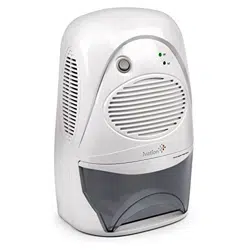
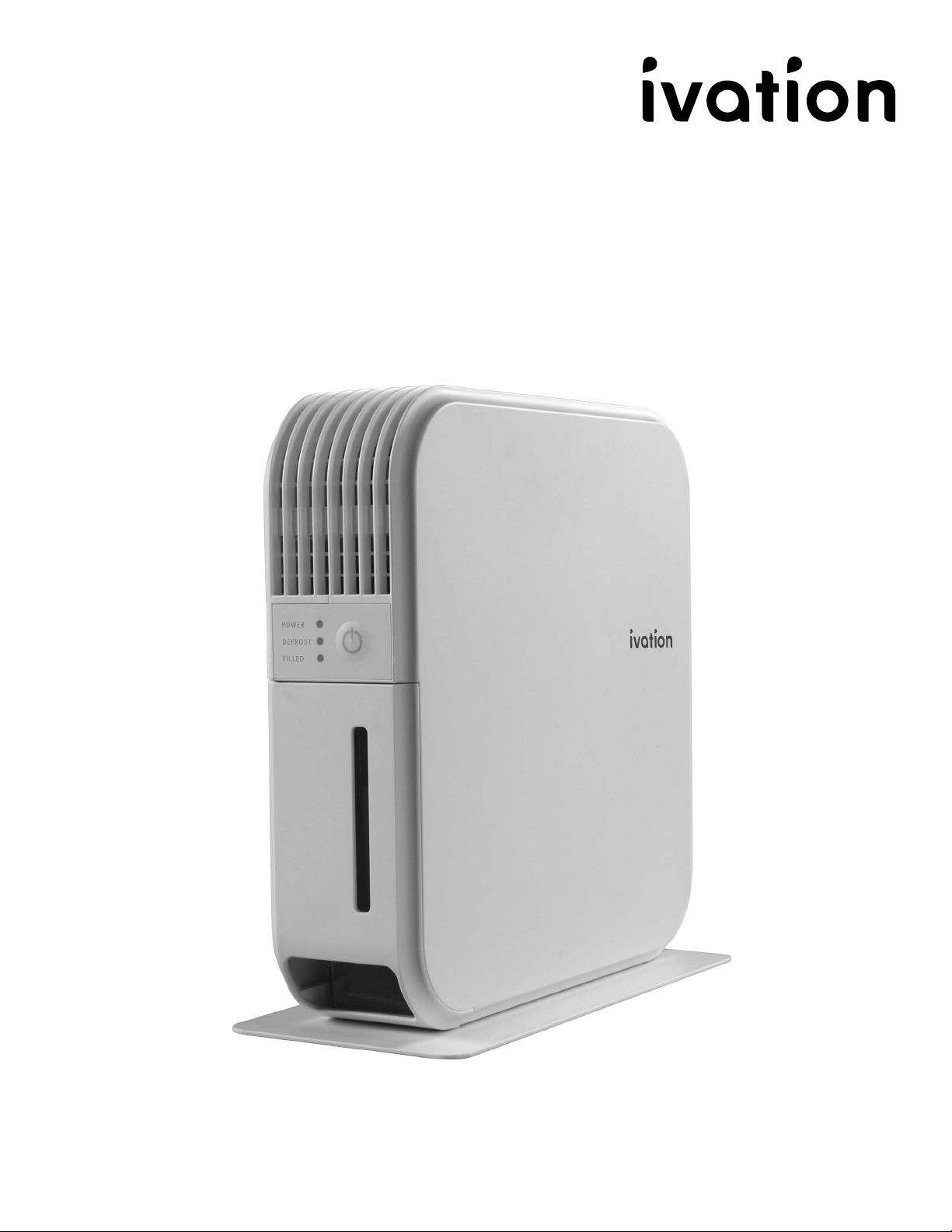
Peltier Dehumidifer 400mL
SKU: IVATEDH5
User Guide

2
INTRODUCTION
INTRODUCTION
Thank you for purchasing the Ivation® Peltier Dehumidifer
400mL. This User Manual is intended to provide you with
guidelines to ensure that operation of this product is safe
and does not pose risk to the user. Any use that does not
conform to the guidelines described in this User Manual
may void the limited warranty.
Please read all directions before using the product and
retain this guide for reference. This product is intended for
household use only.
This product is covered by a limited one-year warranty.
Coverage is subject to limits and exclusions. See warranty
for details.
FEATURES / CONTENTS
SAFETY
PRODUCT OVERVIEW
USAGE
TROUBLESHOOTING / SPECS
WARRANTY
GET IN TOUCH!
3
4
6
7
9
10
11
TABLE OF CONTENTS

3
FEATURES / CONTENTS
FEATURES / CONTENTS
FEATURES:
• Super-thin, space-saving design
• Quiet, thermoelectric operation
• Energy ecient
• Auto-defrost allows use in lower-temperature
environments
• Antibacterial and deodorizing features utilize UV light,
photocatalysts, and nanosilver particles
PACKAGE CONTENTS:
• Ivation® Peltier Dehumidifier
• User guide

4
SAFETY
SAFETY
SAFETY PRECAUTIONS
• Before plugging this device in, make sure that the power cord and
wattage/voltage of the outlet supplying power to the unit comply
with the recommended wattage/voltage on the rating label.
• Before cleaning, make sure to completely turn o and unplug this
appliance.
• Never let any hard or heavy objects press into or sit atop the
power cord. This could damage the cord, which will result in
electrical shock or a similar safety hazard.
• Never remove the plug from the outlet or attempt to move the
dehumidifier by yanking or pulling on the power cord.
• Never use any heating device (space heater, fireplace, etc.) near
the dehumidifier.
• Never remove the plug from the power supply or handle any other
electrical parts of the dehumidifier with wet hands.
• Always make sure the power cable is plugged into a grounded
outlet, the plug is undamaged, and the connection is secure before
turning on the appliance.
• Never place the dehumidifier under any wet and/or dripping
objects.
• Please make sure to disconnect the unit fully from the power
supply if you will not be using it for any period of time. This
dehumidifier includes a memory function that stores and
remembers any programmed settings when the unit is unplugged,
so your settings will be saved when you plug it back in and resume
use.
• Never attempt to repair or disassemble this appliance by yourself
for any reason.
• If at any point you notice a device malfunction or abnormal
behavior (for example, a burning odor emitting from the unit),
immediately disconnect the product from the power supply and
contact Ivation® customer service.
• Never dispose of this product with regular household waste. If you
intend to dispose of this product, please contact your local waste
disposal service for information about how to properly dispose of
a product of this nature.
• This appliance should not be used by children or persons with
reduced physical, sensory, or mental capabilities, or lack of
experience and knowledge, unless they are closely supervised at all
times, and/or have received extensive instruction and training on
how to use this device by a person responsible for their safety.
• Young children should always be supervised around this appliance
to ensure that they do not play with or climb on it.

5
SAFETY
SAFETY
• Individuals with disabilities should not attempt to use this device
without supervision to avoid risk of injury.
• User maintenance and cleaning should always be conducted with
adult supervision. Children should not be allowed to maintain or clean
this device.
• Use of an extension cord is not recommended with this appliance.
• Make sure to install this appliance in accordance with national wiring
regulations.
• If for some reason the power cord becomes damaged, it must be
replaced by either Ivation®, an authorized serviceperson, or a similarly
qualified professional as soon as possible. Do not attempt to repair or
replace the power cord on your own.
SAFE USE REQUIREMENTS
• The dehumidifier is only intended for indoor residential use. It should
not be used for commercial or industrial spaces or else it may not
perform as intended and could present a safety hazard.
• Always place the dehumidifier on a smooth and level floor.
• Do not insert objects into the unit. This will cause damage and could
present a safety hazard.
• To avoid leakage, do not remove tank while unit is in use.
• Ensure that the tank is properly inserted. If it is not, or if it has
reached capacity, the FILLED LED will blink and the machine will no
longer function until the issue has been resolved.
• When operating, this device will have no eect on adjacent enclosed
areas such as closets or pantries, as long as they remain enclosed. If
the door to such an area is left open, the dehumidifier may remove
humidity from that space as well.
• Make sure to place this appliance in an area where the temperature
will not fall outside the specified working range of 41° – 95°F (5° –
35°C). Please note that outside of these ranges the dehumidifier
will not function properly, and could present a safety hazard if you
attempt to operate it.
• To improve the eciency of this appliance, we recommend closing
all doors, windows, and other openings to spaces outside the room in
which it is installed.
• Please make sure the air inlet is kept clean and free from blockage at
all times.
• Avoid exposure to direct sunlight.
6
PRODUCT OVERVIEW
PRODUCT OVERVIEW
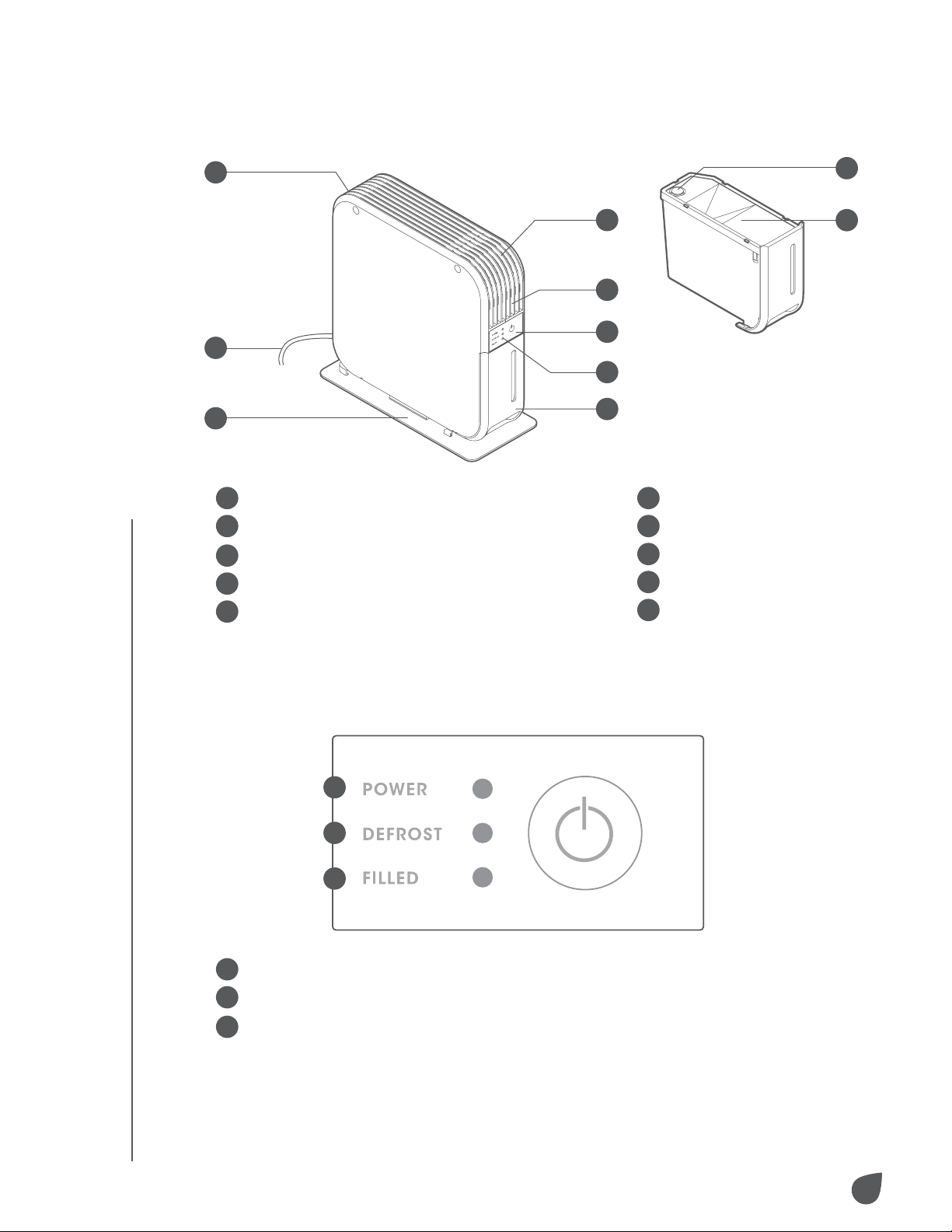
UNIT PARTS TANK
CONTROL PANEL
1
Base
2
Power cord
3
Rear intake for humid air
4
Outlet for dehumidified air
5
Front intake for humid air
A
Power (indicates unit is working normally)
B
Defrost (indicates unit has paused to complete a defrost cycle)
C
Filled (indicates that the tank is either full or not correctly
seated within the unit)
6
Control panel
7
Indicator
8
Tank
9
Stopper
10
Tank cover
3
4
9
10
5
6
7
8
2
1
A
B
C
7
SETTING UP YOUR DEHUMIDIFIER
USING YOUR DEHUMIDIFIER
EMPTYING THE TANK
IMPORTANT NOTES BEFORE USE
USAGE
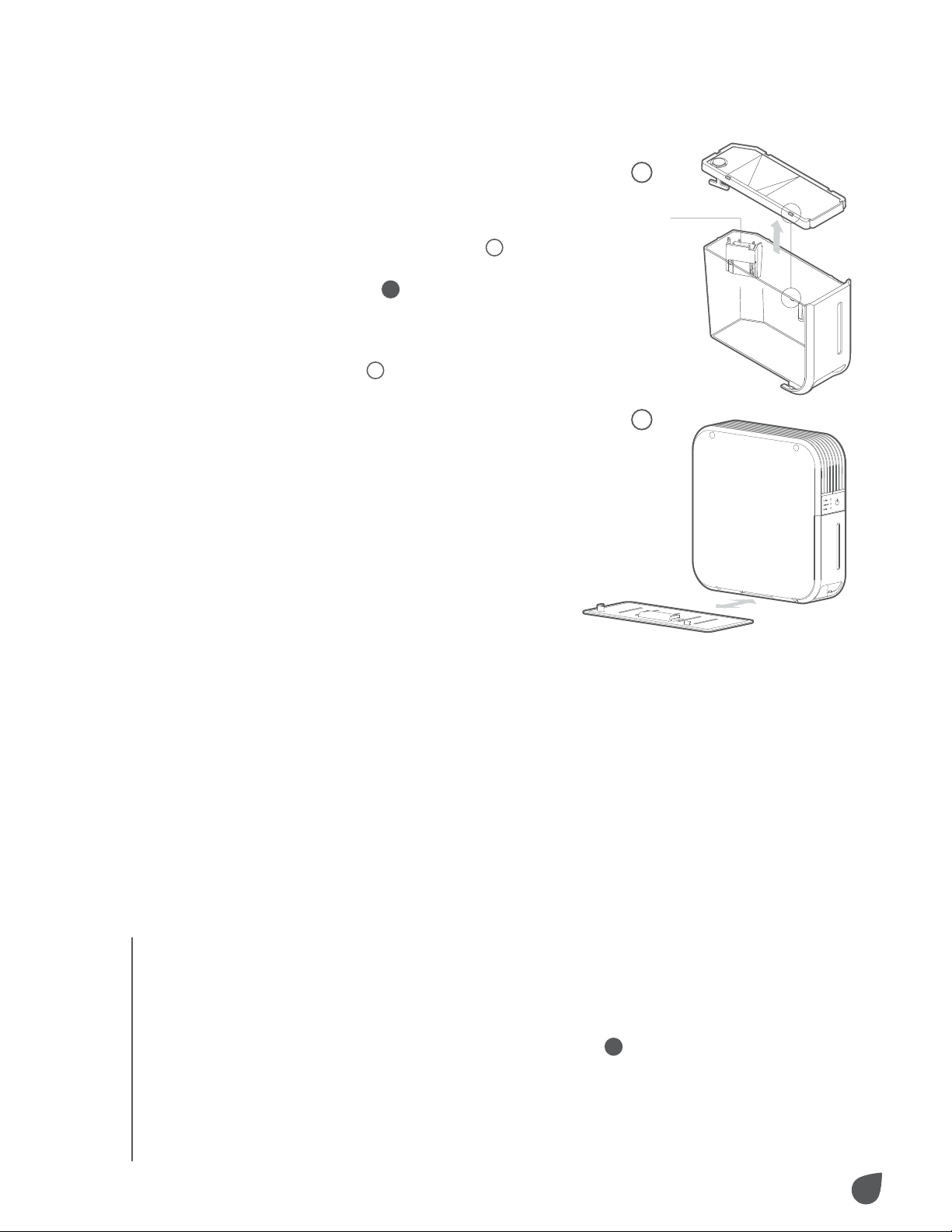
1. Prior to using your new
dehumidifier, please check to
make sure the float is properly
placed in the tank (figure
1
).
2. Align the base
1
with the
bottom of the dehumidifier.
Slide the dehumidifier into the
brackets on the base until it
clicks (figure
2
).
3. Be sure to place the unit in an
upright position on a stable,
flat surface.
Simply press the power button to turn the unit on. It will
begin working immediately to reduce the ambient humidity.
1. When the tank is full, the FILLED LED
C
will blink and the
unit will stop.
2. Turn the power o and unplug the unit from the wall.
• The tank must be properly installed and emptied in
order for the dehumidifier to function.
• Do not remove the tank while the unit is in operation.
If the tank needs to be emptied, please make sure you
shut o the unit first.
USAGE
1
2
Float
8
USAGE
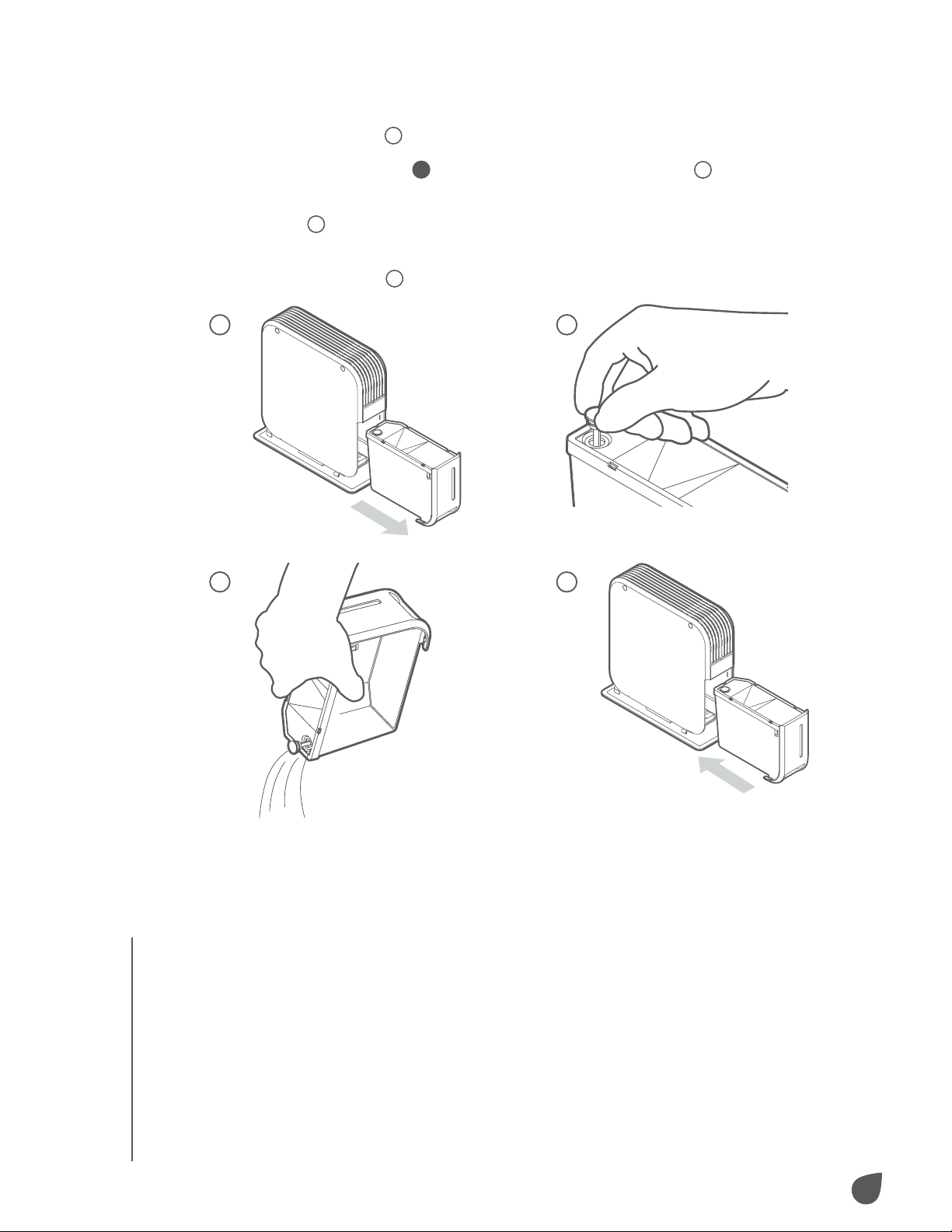
3. Carefully remove the tank by pulling it outwards from its
bottom (figure
1
).
4. Undo the stopper
9
by pulling upwards (figure
2
).
5. Pour the water out into a sink or other suitable location
(figure
3
).
6. Replace the tank by sliding it back into the unit until
it clicks (figure
4
).
USAGE
1
3
2
4
IMPORTANT NOTES:
• Do not attempt to empty the tank while the unit is operating.
This can cause damage and create an electrical hazard.
Always unplug before emptying.
• If the tank requires cleaning, use only clear, cool water. Do
not use solvents, abrasives, or hot water.
• Ensure that the cover and stopper have been completely re-
fitted before replacing the tank in the unit.
• Removing or damaging the float inside the tank can cause
the unit to stop functioning.
9
TROUBLESHOOTING / SPECS
TROUBLESHOOTING / SPECS
TROUBLESHOOTING
SPECIFICATIONS
Power consumption: 60W
Power supply: 120V/60Hz
Recommended room size: 15 – 30 sq. ft. (4.5 – 9.1 meters)
Dehumidifying capacity: 0.9 pints (400 mL)/day at 86˚F
(30˚C) and 80% RH
Tank capacity: 1.7 pints (800 mL)
Operating range: 41˚ - 95˚F (5˚ - 35˚C)
Dimensions: 4.3" W x 10" H x 9.8" D (110 x 255 x 250mm) –
includes base
Net Weight: 3.7 lb. (1.7kg)
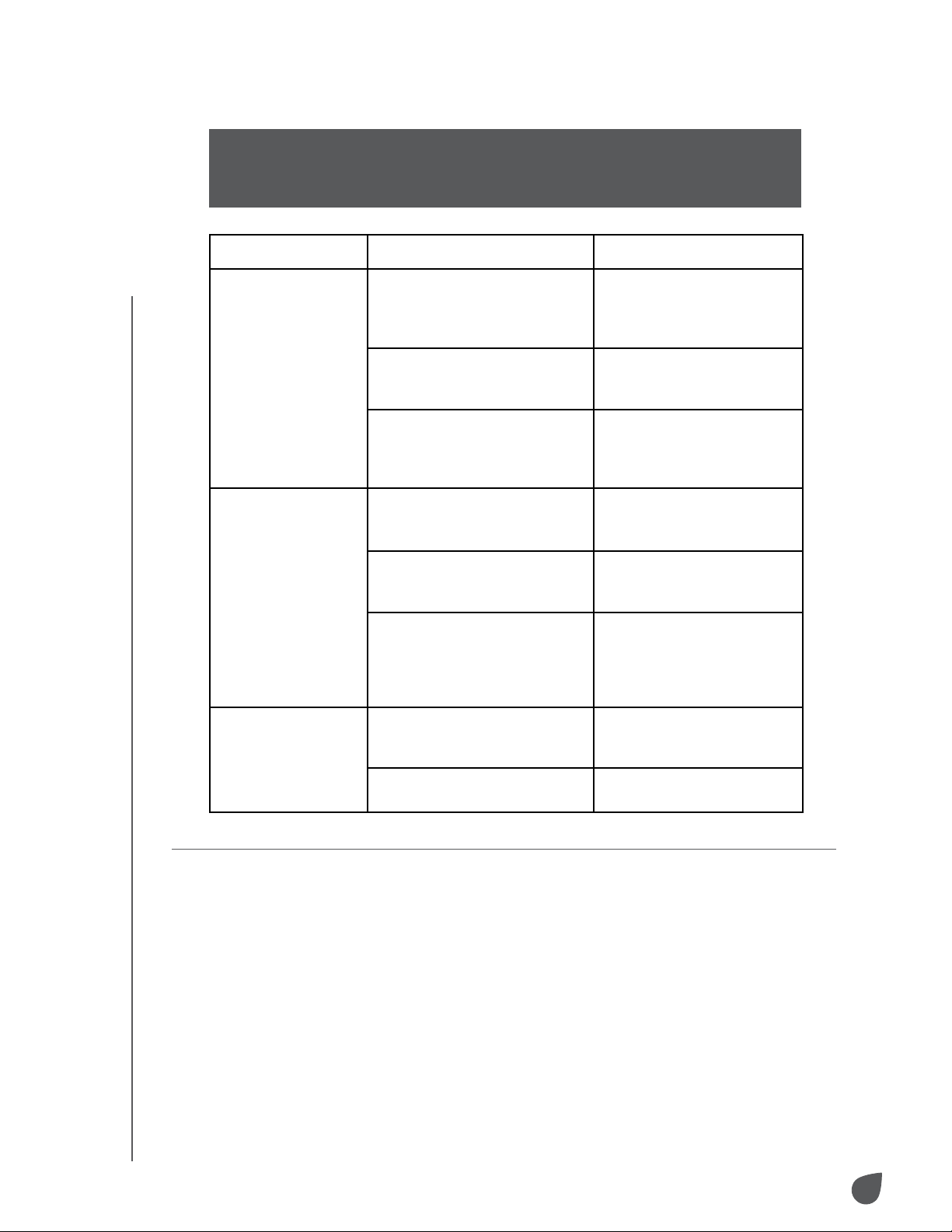
Issue Possible Cause Possible Solution
The unit is not
dehumidifying
the air.
Power is o. Check to see if the power
button is on, the unit is
plugged in, and the power
source is working.
Tank is full or not seated
correctly. (FILLED LED will
blink.)
Empty and/or re-seat the
tank.
Ambient temperature is too
low. (DEFROST cycle occurs
often.)
If possible, increase the
ambient temperature in
the location where you are
using the unit.
The unit stops
working.
Tank is full or not seated
correctly. (FILLED LED will
blink.)
Empty and/or re-seat the
tank.
Defrost cycle is running.
(DEFROST LED will blink.)
After defrost cycle is
completed, unit will
resume operation.
An unknown issue has
occurred.
Unplug the unit, clear any
obstacles away from air
inlets or outlets, allow it to
cool down for 30 minutes,
and restart.
Water overflows. Tank float has become stuck
or is improperly positioned.
Make sure the tank float
is unobstructed and
properly positioned.
The unit is not on a flat
surface.
Place the unit on a flat
surface.
WARNING: If any issue persists, contact your retailer or a qualified service
professional. This unit has no user-serviceable parts. DO NOT attempt
to repair the unit yourself, as doing so could create an electrical risk and
cause the voiding of your warranty.

10
WARRANTY
WARRANTY
WARRANTY INFORMATION
LIMITED WARRANTY ON IVATION® PELTIER DEHUMIDIFIER
400ML
THIS LIMITED WARRANTY GIVES YOU SPECIFIC LEGAL RIGHTS
AND YOU MAY ALSO HAVE OTHER RIGHTS, WHICH VARY FROM
STATE TO STATE.
WE WARRANT THAT DURING THE WARRANTY PERIOD, THE
PRODUCT WILL BE FREE FROM DEFECTS IN MATERIALS AND
WORKMANSHIP.
LIMITATION OF LIABILITY
TO THE EXTENT NOT PROHIBITED BY LAW, THIS WARRANTY
IS EXCLUSIVE AND IN LIEU OF ALL OTHER WARRANTIES,
ORAL, WRITTEN, STATUTORY, EXPRESS OR IMPLIED. EXCEPT
FOR THE EXPRESS WARRANTIES CONTAINED IN THIS LIMITED
WARRANTY STATEMENT AND TO THE EXTENT NOT PROHIBITED
BY LAW, WE DISCLAIM ALL OTHER WARRANTIES, EXPRESSED
OR IMPLIED, STATUTORY OR OTHERWISE, INCLUDING WITHOUT
LIMITATION, THE WARRANTIES OF MERCHANTABILITY AND
FITNESS FOR A PARTICULAR PURPOSE. SOME STATES DO
NOT ALLOW DISCLAIMERS OF IMPLIED WARRANTIES, SO THIS
DISCLAIMER MAY NOT APPLY TO YOU. TO THE EXTENT SUCH
WARRANTIES CANNOT BE DISCLAIMED UNDER THE LAWS OF
YOUR JURISDICTION, WE LIMIT THE DURATION AND REMEDIES
OF SUCH WARRANTIES TO THE DURATION OF THIS EXPRESS
LIMITED WARRANTY.
OUR RESPONSIBILITY FOR DEFECTIVE GOODS IS LIMITED TO
REPAIR, REPLACEMENT OR REFUND AS DESCRIBED BELOW IN
THIS WARRANTY STATEMENT.
WHO MAY USE THIS WARRANTY? C&A Marketing, Inc. located at
114 Tived Lane East, Edison, NJ (“we”) extend this limited warranty
only to the consumer who originally purchased the product (“you”).
It does not extend to any subsequent owner or other transferee of
the product.
WHAT DOES THIS WARRANTY COVER? This limited warranty
covers defects in materials and workmanship of the Ivation® Peltier
Dehumidifier 400 mL (the “product”) for the Warranty Period as
defined below.
WHAT DOES THIS WARRANTY NOT COVER? This limited warranty
does not cover any damage due to: (a) transportation; (b) storage;
(c) improper use; (d) failure to follow the product instructions or
to perform any preventive maintenance; (e) modifications; (f)
unauthorized repair; (g) normal wear and tear; or (h) external causes

11
GET IN TOUCH!
GET IN TOUCH!
such as accidents, abuse, or other actions or events beyond our
reasonable control.
WHAT IS THE PERIOD OF COVERAGE? This limited warranty starts
on the date of your purchase and lasts for one year (the “Warranty
Period”). The Warranty Period is not extended if we repair or replace
the product. We may change the availability of this limited warranty
at our discretion, but any changes will not be retroactive.
WHAT ARE YOUR REMEDIES UNDER THIS WARRANTY? With
respect to any defective product during the Warranty Period, we
will, at our sole discretion, either: (a) repair or replace such product
(or the defective part) free of charge or (b) refund the purchase
price of such product if an exchange unit cannot be provided.
HOW DO YOU OBTAIN WARRANTY SERVICE? To obtain warranty
service, you must contact us at 1-866-849-3049 or by email at info@
myivation.com during the Warranty Period to obtain a Defective
Merchandise Authorization (“DMA”) number. No warranty service
will be provided without a DMA number and return shipping costs to
our facilities shall be assumed by you, the purchaser. Shipping costs
of the replacement unit to you shall be assumed by us.
GET IN TOUCH!
info@myivation.com
1-866-849-3049
IVATION is a trademark of C&A IP Holdings, LLC, in the U.S, Canada, and the E.U.
All other products, brand names, company names, and logos are trademarks of their
respective owners, used merely to identify their respective products, and are not meant to
connote any sponsorship, endorsement or approval.
Distributed by C&A Marketing, Inc., 114 Tived Lane East, Edison, NJ 08837.
MADE IN CHINA
© 2019. C&A IP Holdings, LLC. All Rights Reserved.