FTDI Cable Use Guide
FTDI Cable FAQ:
Q:How do I use this cable with my radio?
A:Plug in the cable to your computer and allow the computer to automatically install the drivers.
Q:Do I need to "back-date" or install a prolific driver?
A:No-those procedures found online are for counterfeit cables. This cable will automatically install with the drivers on your computer.
Q:My computer did not automatically install the driver-now what?
A:Download the latest FTDI driver at : http://www.ftdichip.com/Driver/VCP.htm
Q:I need help using the software
A:walkietalkiesoftware.com is an excellent resource site. Also visit our Facebook pages (TIDRADIO) for more help.
ERROR: Failed to Connect to the transceiver (Radio)
If it says it cannot connect to the radio - this means the cable is working but is not installedcorrectlyintothe radio.
Items to Check:
- Radio is turned on
- The cable is FULLY inserted (it can be deceiving but there is a double click)
- Hold the cable into the radio - some radios might not make contact without pressure
- A way to cheat - dampen the pins of the cable before pushing it into the radio. This will give a solid contact
WINDOWS TROUBLESHOOTING HELP:
1.Get into “Window Setting”, then search “Device Manager”.
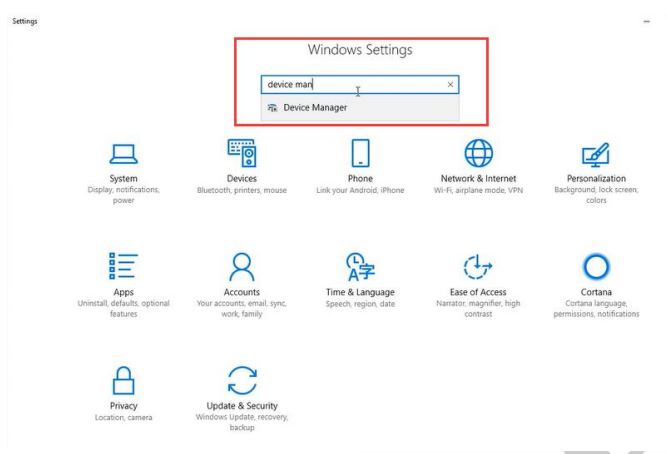
2.Open “Device Manager”, and unfold Port (COM & LPT) to check the existing port.
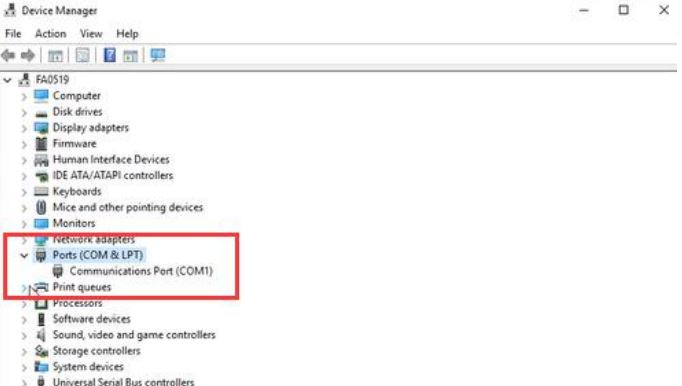
3. If there is no yellow warning triangle,your system install the correct driver and you arereadytoloadyour programming software. (Software Website : walkietalkiesoftware.com)
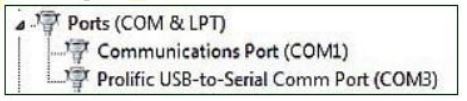
4. If there is a yellow warning triangle under 'Ports' or 'Other Devices',you operatingsystemhasaprevious driver that may cause incompatibility issues and you will need to update the driver tothelatestdriver:
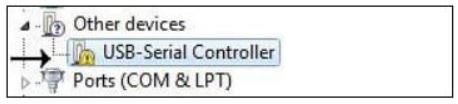
IF THIS HAPPENS UPDATE THE DRIVER AND DOWNLOAD THE LATEST DRIVER AT : http://www.ftdichip.com/Drivers/VCP.htm
Radio Reading
Programming software download link: walkietalkiesoftware.com
Download and run the TD-F6 programming software, click Setting – Port menu, select thecorrespondingport number, click “OK”.
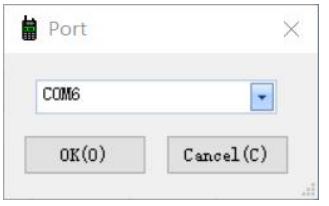
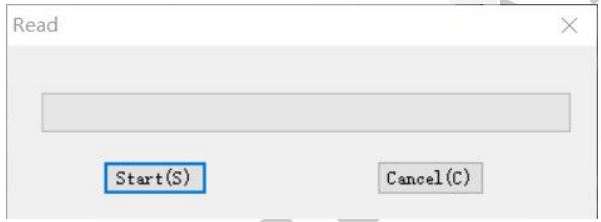
Read the current information from the radio to your PC to create an initial programtemplate. ClickProgram – Read Data From Radio, or simply click the icon.
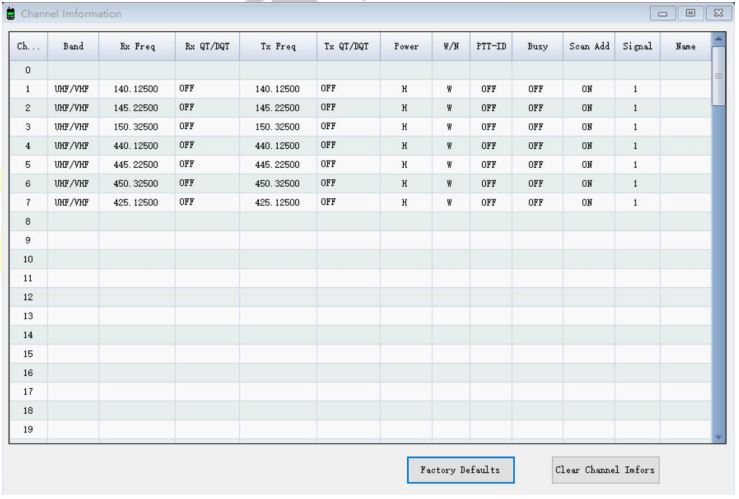
The TD-F6 radio has 128 channels, you can edit the channel number and channel informationaccordingto your needs. The following is an introduction to each term.
| Name |
Meaning |
Setting |
Description |
| RX Freq |
Receiving frequency |
VHF:136-174MHz
UHF:400-520MHz |
|
| TX Freq |
Transmitting frequency |
VHF:136-174MHz
UHF:400-520MHz
|
|
| RX QT/DQT |
Receiving CTCSS/DCS |
Refer to the DCS table and CTCSS table in the manual. |
Mutes the speaker of the transceiver in the absence of a specific low level digital signal. Ift he station you are listening todoes not transmit this specific signal,you will not hear anything. |
| TX QT/DQT |
Transmitting CTCSS/DCS |
Refer to the DCS table and CTCSS table in the manual. |
Transmits a specific low-level digital signal to unlock the squelch of adistant receiver (usually a repeater). |
| POWER |
Transmit power |
HIGH/LOW |
Transmits a specific low-level digital signal to unlock the squelch of adistant receiver (usually a repeater). |
| W/N |
Channel bandwidth |
WIDE/NARROW |
High power:8W
Middle:5W
LOW:1W |
| PTT-ID |
When to send the PTT-ID |
OFF does not send code;
BOT press PTT button to send code;
OT release PTT button to send code;
BOTH press and release PTT button to send code
|
CoWideband (25kHz bandwidth) narrowband (12.5 kHz bandwidth).des are sent during either thebeginning or end of a transmission. |
| Busy |
Busy Channel Lockout |
OFF/ON |
ON: If the channel is occupied, whenyou press the [PTT] key onthis channel, the radio will make a beeptone and will not transmit any signal. OFF: No matter if the channel is occupied, the radio will transmit thesignal when you press the [PTT] key. |
| Scan add |
|
OFF/ON |
In the scan mode, whether addthechannel to the scan list.
ON: the channel is added to scanlist;
OFF: the channel cannot be scanned.
|
| Signal |
Signal code |
1-15 |
Selects 1 of 15 DTMF codes. TheDTMF codes are programmed withsoftware and are up to 5 digits each |
| Name |
Customize channel name |
Up to 10 digits. |
Support alphanumeric channel name. |
Optional Feature
Click Edit – Optional Feature, you can set up more functions for the radio
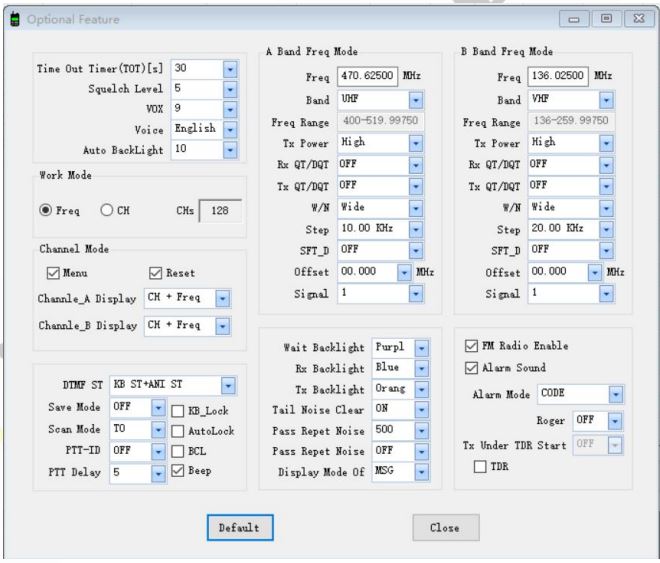
Basic Setting
| Name |
Meaning |
Settings |
Description |
| TOT(Time Out) |
Transmission time-out timer |
15-600(s) |
This feature provides a limits transmissiontime to a programmed value. This will promote battery conservation by not allowing you to make excessively long-timetr ansmissions and in the event of a stuck PTTswitch, it can prevent interference to other users as well as battery depletion. |
| Squelch Level |
|
0-9 |
Mutes the speaker of the transceiver intheabsence of a strong signal. Squelch is either OFFor 1-9 levels. The higher level, the stronger thesignal must be to in-mute the speaker. |
| VOX |
Voice operated TX |
OFF/1-10 |
When enabled it is not necessary to pushthe[PTT] button on the transceiver. Adjust the gainlevel to an appropriate sensitivity to allowsmooth transmission. |
| Voice switch |
|
ON/OFF |
Toggle voice prompt switch |
| Language |
|
Chinese/English |
Switch the language of menu display and voice prompts. |
| Auto backlight |
Display time |
OFF/0-10 (s) |
Time-out for the LCD backlight. |
| Work mode |
|
VFO |
CHs is channel quantity |
| Channel |
Channel Mode
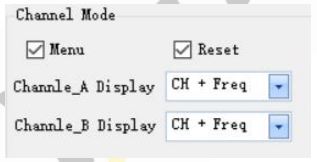
You can customize the display on Channel A/B:
CH + Name: Display Channel Number and Channel Name (Name column in Channel informationpart)
CH + Freq: Display Channel Number and Frequency
DTMF
| Name |
Setting |
Description |
| DTMF ST (DTMF side tone of transmit code) |
OFF: No DTMF Side Tones are heard |
Determines when DTMF side tones can be heard fromthe transceiver speaker |
| KB Side Tone: Side Tones are heard only from manually keyed DTMF codes |
| ANI Side Tone: Side Tones are heard only from automatically keyed DTMF codes |
| KB ST+ANI ST: All DTMF Side Tones are heard |
| Save mode |
OFF/Mode 1/Mode 2/Mode 3/Mode 4 |
Selects the ratio of sleep cycles toawake cycles (Mode 1/Mode2/Mode 3/Mode 4). The higher number the longer the battery lasts. When enabled, a word or two might be missed when the frequency beingmonitored becomes active. |
| Scan mode |
TO: Time Operation - scanning will resume after a fixed time has passed |
Scanning Resume Method |
| CO: Carrier Operation -Scanning Resume Method scanning will resume after the signal disappears |
| SE: Search Operation scanning will not resume |
| PTT_ID |
OFF: No ID is sent |
When to Send PTT-ID; Codes are sent during either the beginning or endof a transmission. |
| BOT: The selected S-CODE is sent at the beginning |
| EOT: The selected S-CODE is sent at the ending |
| BOTH: The selected SCODE is sent at the beginning and ending |
| PTT Delay |
0-30ms |
Signal code sending delay |
| KB_LOCK |
|
If you select this option, thekeyboard is locked. |
| AUTOLK (automatic keypad lock) |
|
When ON, the keypad will be lockedif not used in 8 seconds. Pressing the[#╓O] key for 2 seconds will unlock the keypad. |
| BCL(busy channel Lock-out) |
|
Check: If the channel is occupied, when you press the [PTT] key onthis channel, the radio will make a beep tone and will not transmit any signal.
Uncheck: No matter if the channel is occupied, the radio will transmit thesignal when you press the [PTT] key.
|
| Beep(keypad beep) |
|
Allows audible confirmation of a keypress. |
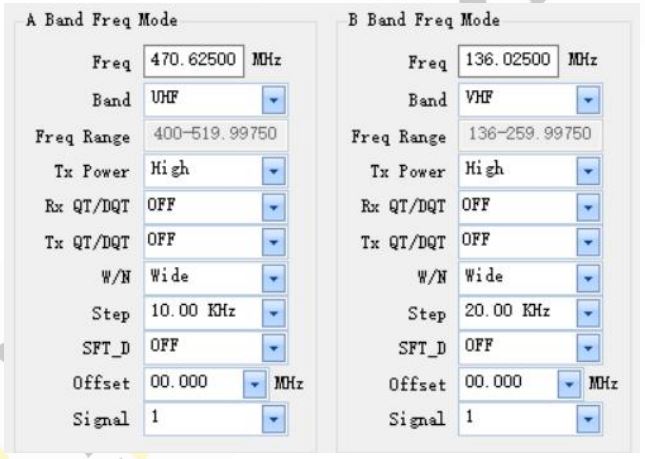
Frequency mode
STEP: Select the amount of frequency change in VFO/Frequency mode when scanning or pressingthekeys.
SFT_D: Enable access of repeaters in VFO/Frequency Mode ([OFF]: TX = RX (simplex); [+]: TXwill beshifted higher than RX in frequency; [-]: TX will be shifted lower than RX in frequency)
Offset: Specifies the difference between the TX and RX frequency (For the explanation of TXPower, RXQT/DQT, TX QT/DQT, W/N, Signal, please refer to the section 3)
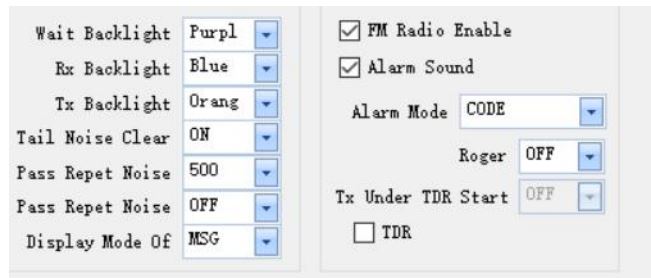
Backlight and Sound
RPT Noise Clear: Squelch Tail elimination
RPT Noise Detect:Trunk tail delay
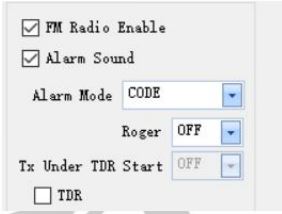
FM Radio
FM Radio Enable: When you check off, FM Radio function will be activated on the radio.
Roger: Sends an end-of-transmission tone to indicate to other stations that the transmission has ended.
TX Under TDR Start: Transmit selection while in Dual Watch mode, when enabled, priority isreturnedtoselected display once the signal in the other display disappears.
TDR: Dual Watch mode, the ability to monitor two channels at once can be a valuable asset.
Write and Save
Click Program - Write Data To Radio, or click the  icon to write and save the setting to the radio.
*If you have any problem with the TD-F6 radio using or programming, please don’t hesitatetocontactusvia support: walkietalkiesoftware.com. It’s always our honor to help.