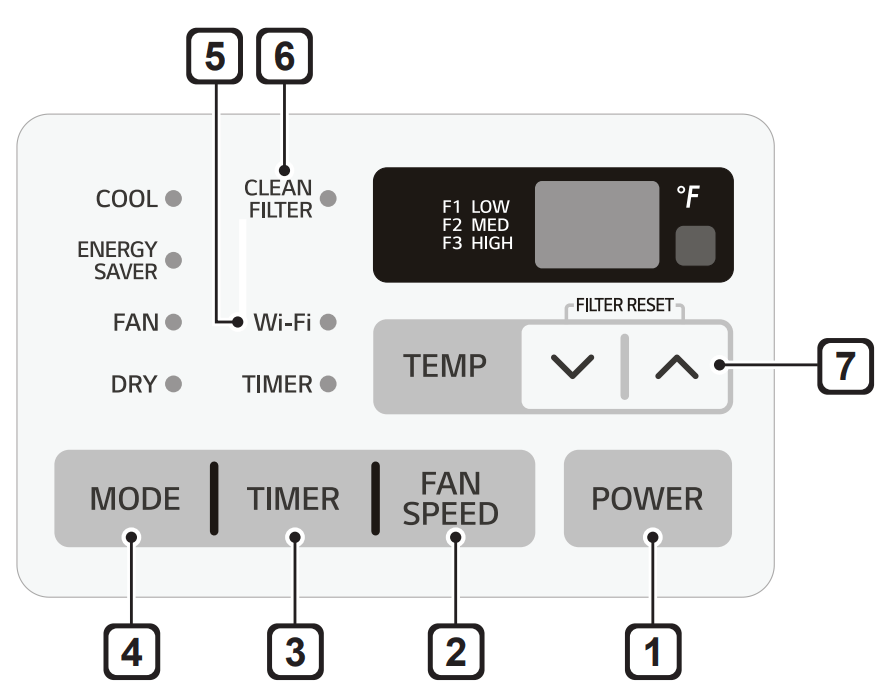
Press to set the fan speed to Low (F1), Medium (F2), or High (F3).
3. Delay ON/OFF Timer
Delay ON: When the air conditioner is off, set it to automatically turn on from 1 to 24 hours later, at its previous mode and fan settings.
Delay OFF: When the air conditioner is on, set it to automatically turn off from 1 to 24 hours later.
NOTE: Each press of the Timer button advances the timer by 1 hour. After the last press the display returns to the temperature setting.
4. Operation Mode
Press the Mode button to cycle between 4 types of air conditioner operation: Energy Saver / Cool / Fan / Dry
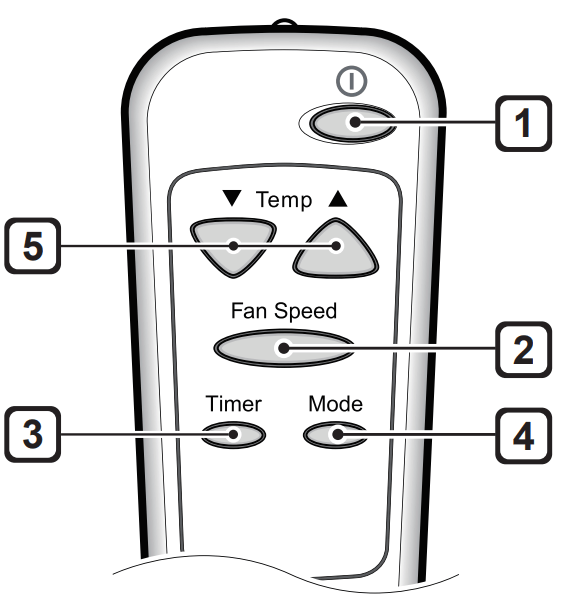
Remote Control
Energy Saver - In this mode the compressor and fan turn off when the set temperature is achieved. Approximately every 3 minutes the fan turns on to allow the unit sensor to accurately determine if more cooling is needed.
Cool Fan - This mode is ideal on hot days to cool and dehumidify the room quickly. Use the Temp buttons to set the desired room temperature and use the Fan Speed button to set the desired fan circulation speed.
Fan - In this mode the fan circulates air but the compressor does not run. Use the Fan Speed button to set fan speed to High, Medium or Low. In this mode, you cannot adjust the set temperature.
Dry - This mode is ideal for rainy and damp days to dehumidify the room rather than cooling it significantly. Humidity is removed from the room by the combination of compressor operation and the fan speed fixed at Low. The compressor and fan turn off once the set temperature is reached. Fan speed cannot be adjusted in Dry mode.
5. Wi-Fi
Enables connection of the air conditioner to the home Wi-Fi.
6. Clean Filter
The Clean Filter LED lights up to notify you that the filter needs to be cleaned. After cleaning the filter. press Temp and together on the control panel to turn off the Clean Filter light.
NOTE
The filter reset must be done using the control panel. not the remote control.
This feature is a reminder to clean the air filter for more efficient operation. The LED light turns on after 250 hours of operation.
7 Temperature Control
The thermostat monitors room temperature to maintain the desired temperature. The thermostat can be set between 60 °F–86 °F (16 °C–30 °C). Press or arrows to increase or decrease temperature setting.
NOTE
Auto Restart: If the air conditioner turns off due to a power outage, it will restart automatically once the power is restored, with the same settings as were set before the unit turned off.
Energy Saver: The unit defaults to the Energy Saver mode each time the unit is switched on except in Fan mode or when power is restored after an electrical power outage.
The remote control will not function properly if the AC infrared sensor is exposed to direct light or if there are obstacles between the remote controller and the air conditioner.
Wireless Remote Control
Inserting Batteries
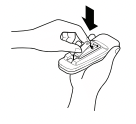
1. Push out the cover on the back of the remote control with your thumb.
2. Pay attention to polarity and insert one new AAA 1.5 V battery.
3. Reattach the cover.
NOTE
New battery is supplied with the air conditioner for use in the remote control.
Do not use a rechargeable battery. Make sure that the battery is new.
In order to prevent discharge, remove the battery from the remote control if the air conditioner is not going to be used for an extended period of time.
Keep the remote control away from extremely hot or humid places.
To maintain optimal operation of the remote control, the remote sensor should not be exposed to direct sunlight.
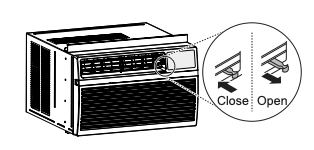
Ventilation
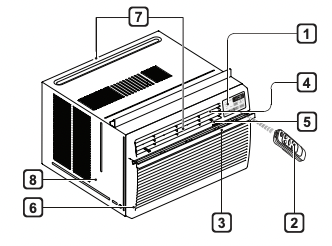
Push the ventilation lever in to the closed position to maintain the best cooling performance. Pull the ventilation lever out to open the vent and draw fresh air into the room.
Air Direction
Airflow can be adjusted by changing the direction of the air conditioner's louvers.
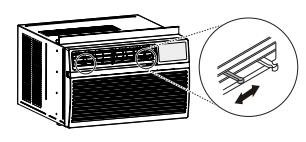
Adjusting Horizontal Airflow Direction
The horizontal airflow is adjusted by moving the levers of the vertical louvers to the left or right.
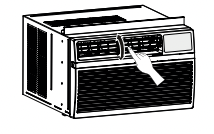
Adjusting Vertical Airflow Direction
Touch the horizontal louvers to adjust the airflow up or down.
NOTE: When the weather is extremely hot, the unit may turn off automatically to protect the compressor.
Additional Features
Slinger Fan
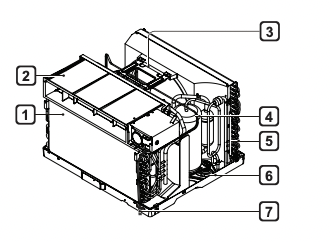
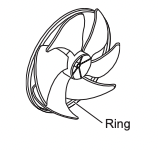
This air conditioner is equipped with a slinger fan. (See drawing.) The fan's outer ring picks up the condensed water from the base pan if the water level gets high enough. The water is then picked up by the fan and expelled through the condenser. making the air conditioner more efficient.
SMART FUNCTIONS
Using LG SmartThinQ Application
Things to check before using LG SmartThinQ
• For appliances with the logo
1. Check the distance between the appliance and the wireless router (Wi-Fi network). If the distance between the appliance and the wireless router is too far, the signal strength becomes weak. It may take a long time to register or installation may fail.
2. Turn off the Mobile data or Cellular Data on your smartphone. For iPhones, turn data off by going to Settings → Cellular → Cellular Data.
3. Connect your smartphone to the wireless router.
NOTE
• To verify the Wi-Fi connection, check that Wi-Fi icon on the control panel is lit.
• The appliance supports 2.4 GHz Wi-Fi networks only. To check your network frequency, contact your Internet service provider or refer to your wireless router manual.
• LG SmartThinQ is not responsible for any network connection problems or any faults, malfunctions, or errors caused by network connection.
• If the appliance is having trouble connecting to the Wi-Fi network, it may be too far from the router. Purchase a Wi-Fi repeater (range extender) to improve the Wi-Fi signal strength.
• The Wi-Fi connection may not connect or may be interrupted because of the home network environment.
• The network connection may not work properly depending on the Internet service provider.
• The surrounding wireless environment can make the wireless network service run slowly.
• The appliance cannot be registered due to problems with the wireless signal transmission. Unplug the appliance and wait about a minute before trying again.
• If the firewall on your wireless router is enabled, disable the firewall or add an exception to it.
• The wireless network name (SSID) should be a combination of English letters and numbers. (Do not use special characters.)
• Smartphone user interface (UI) may vary depending on the mobile operating system (OS) and the manufacturer.
• If the security protocol of the router is set to WEP, you may fail to set up the network. Please change it to other security protocols (WPA2 is recommended) and register the product again.
Installing LG SmartThinQ
Search for the LG SmartThinQ application from the Google Play Store or Apple App Store on a smart phone. Follow instructions to download and install the application.
Wi-Fi Function
For appliances with the logo Communicate with the appliance from a smart phone using the convenient smart features.
Settings
Allows you to set various options on the appliance and in the application.
NOTE
If you change your wireless router, Internet service provider or password, delete the registered appliance from the LG SmartThinQ application and register it again.
The application is subject to change for appliance improvement purposes without notice to users
Functions may vary by model.
MAINTENANCE
WARNING: Before cleaning or performing maintenance, disconnect the power supply and wait until the fan stops.
Air Filter
Check the air filter at least twice a month to see if cleaning is necessary. Trapped particles in the filter can build up and block the airflow. reducing cooling capacity and causing an accumulation of frost on the evaporator.
Cleaning the Air Filter
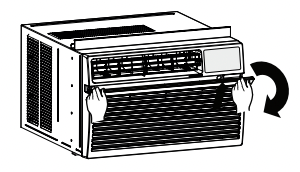
1. Remove the air filter from the front grille by pulling the filter forward and then up slightly.
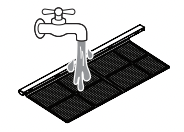
2. Wash the filter using lukewarm water below 40°C (104 °F).
3. Gently shake the excess water from the filter and replace.
Cleaning the Air Conditioner
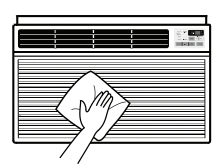
Wipe the front grille and inlet grille with a cloth dampened in a mild detergent solution.
Wash the cabinet with mild soap or detergent and lukewarm water, then polish using liquid appliance wax.
NOTE
To ensure continued peak efficiency. the condenser coils (outside of unit) should be checked periodically and cleaned if clogged with soot or dirt from outside air.
For repair and maintenance. contact an Authorized Service Center. See the warranty page for details or call 1-800-243-0000. Have your model number and serial number available. They should be written on page 27 of this manual.
TROUBLESHOOTING
Before Calling for Service
The appliance is equipped with an automatic error-monitoring system to detect and diagnose problems at an early stage. If the appliance does not function properly or does not function at all, check the following before you call for service.
Normal Sounds You May Hear
1. High Pitched Chatter - Today's high efficiency compressors may have a high pitched chatter during the cooling cycle.
2. Sound of Rushing Air - At the front of the unit. you may hear the sound of rushing air being moved by the fan.
3. Gurgle/Hiss - Gurgling or hissing noise may be heard due to refrigerant passing through evaporator during normal operation.
4. Vibration - Unit may vibrate and make noise because of poor wall or window construction or incorrect installation.
5. Pinging or Swishing - Droplets of water hitting condenser during normal operation may cause pinging or swishing sounds.
Problem
Possible Cause
Solutions
Air conditioner does not start.
The air conditioner is unplugged.
Make sure the air conditioner plug is pushed completely into the outlet.
The fuse is blown/circuit breaker is tripped.
Check the house fuse/circuit breaker box and replace the fuse or reset the breaker.
Power failure.
If power failure occurs, turn the mode control to off. When power is restored, wait 3 minutes to restart the air conditioner to prevent tripping of the compressor overload.
The current interrupter device is tripped.
Press the RESET button located on the power cord plug. If the RESET button will not stay engaged, discontinue use of the air conditioner and contact a qualified service technician.
Air conditioner does not cool as it should.
Airflow is restricted.
Make sure there are no curtains, blinds, or furniture blocking the front of the air conditioner.
The temp control may not be set correctly
Set the desired temperature to a level lower than the current temperature.
The air filter is dirty.
Clean the filter at least every 2 weeks. See the 'MAINTENANCE' section.
The room may have been hot.
When the air conditioner is first turned on, you need to allow time for the room to cool down.
Cold air is escaping.
Check for open furnace floor registers and cold air returns.
Cooling coils have iced up.
See 'Air conditioner freezing up' below.
Air conditioner freezing up.
The cooling coils are iced over.
Ice may block the air flow and obstruct the air conditioner from properly cooling the room. Set the mode control at High Fan or High Cool.
Water drips outside.
Hot, humid weather.
This is normal.
Water drips indoors.
The air conditioner is not tilted to the outside.
For proper water disposal, make sure the air conditioner slants slightly from the cabinet front to the rear.
Water collects in base pan.
Moisture removed from air and drains into base pan
This is normal for a short period in areas with little humidity; normal for a longer period in very humid areas.
Air conditioner turns on and off rapidly
Dirty air filter - air restricted.
Clean air filter.
Outside temperature extremely hot.
Refer to installation instructions or check with installer.
Noise when unit is cooling.
Air movement sound.
This is normal. If too loud, set to lower FAN setting.
Window vibration - poor installation.
Refer to installation instructions or check with installer.
Remote sensing deactivating prematurely
Remote control not located within range.
Place remote control within 20 feet & 120° radius of the front of the unit.
Remote control signal obstructed.
Remove obstruction.
Room too cold.
Set temperature too low.
Increase set temperature
Can't connect the LG SmartThinQ App. to the air conditioner.
Air conditioner is turned off.
Turn the air conditioner on.
Wireless router is turned off.
Turn the router on
The air conditioner is not connecting to the Wi-Fi.
The Wi-Fi router is too far from the air conditioner.
Move the router closer to the air conditioner or purchase and install a Wi-Fi repeater (signal booster).
You do not have permission to use the router or it is incompatible.
Make sure you are selecting the correct wireless router from the list. The router must be set to 2.4 GHz.
Wi-Fi
Trouble connecting appliance and smartphone to Wi-Fi network.
The password for the Wi-Fi network was entered incorrectly.
Delete your home Wi-Fi network and begin the registration process again.
Mobile data for your smartphone is turned on.
Turn off the Mobile data on your smartphone before registering the appliance.
The wireless network name (SSID) is set incorrectly.
The wireless network name (SSID) should be a combination of English letters and numbers. (Do not use special characters.)
The router frequency is not 2.4 GHz.
Only a 2.4 GHz router frequency is supported. Set the wireless router to 2.4 GHz and connect the appliance to the wireless router. To check the router frequency, check with your Internet service provider or the router manufacturer.
The distance between the appliance and the router is too far.
The distance between the appliance and the router is too far.If the appliance is too far from the router, the signal may be weak and the connection may not be configured correctly. Move the router closer to the appliance or purchase and install a Wi-Fi repeater.
 buttons to set the desired room temperature and use the Fan Speed button to set the desired fan circulation speed.
 and
and  together on the control panel to turn off the Clean Filter light.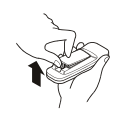
 logo
logo
 icon on the control panel is lit.