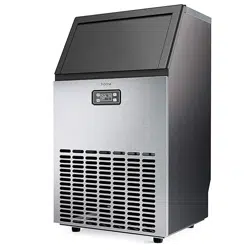
Before using your COMMERCIAL ICE MACHINE, please read this manual.
COMMERCIAL
ICE MACHINE
HME030276N

BEFORE FIRST USE:
To prevent any internal damage, it is very important to
keep refrigeration units (like this one) upright throughout
their journey. Please leave it standing upright and outside
the box for 24 HOURS before plugging it in.
Important Safety Instructions 6-7
Parts Description 8-9
Operation 10-12
Maintenance 13-14
Troubleshooting 15
Warranty 16
Manufacturing Info 17
Warning 17
Contact Us 17
TABLE OF CONTENTS

BEFORE FIRST USE:
To prevent any internal damage, it is very important to
keep refrigeration units (like this one) upright throughout
their journey. Please leave it standing upright and outside
the box for 24 HOURS before plugging it in.
Important Safety Instructions 6-7
Parts Description 8-9
Operation 10-12
Maintenance 13-14
Troubleshooting 15
Warranty 16
Manufacturing Info 17
Warning 17
Contact Us 17
TABLE OF CONTENTS

on bringing home your new appliance!
C ongratulations
Don’t forget to register your product at homelabs.com/reg
for updates, coupons, and other relevant information.
Although greatly appreciated, product registration is not
required to activate any warranty.

on bringing home your new appliance!
C ongratulations
Don’t forget to register your product at homelabs.com/reg
for updates, coupons, and other relevant information.
Although greatly appreciated, product registration is not
required to activate any warranty.
6 7
When using your hOme
™
Commercial Ice Machine (appliance), basic safety precautions should always be followed to reduce the
risk of re, electrical shock, and/or injury to persons. Incorrect operation due to ignoring instructions may cause harm or damage.
• Use this appliance only for its intended purpose as described in this manual.
• This Ice Machine must be properly installed in accordance with the installation instructions before it is used.
• The appliance must be positioned so that the plug is accessible.
• Connect the plug to properly polarized outlets only. No other appliance should be plugged into the same outlet. Be sure
that the plug is fully inserted into the receptacle.
• Do not run the power cord over carpeting or other heat insulators. Do not cover the cord. Keep the cord away from trafc
areas, and do not submerge in water or any other liquid.
• We do not recommend the use of an extension cord as it may overheat and cause a risk of re. If you must use an
extension cord, use No.14AWG as a minimum size and rated no less than 1875 watts.
• If the supply cord is damaged, it must be replaced by the manufacturer, its service agent, or a similarly qualied person
in order to avoid a hazard.
• Disconnect the main plug from the socket when not in use for a long period of time.
• Unplug the appliance before cleaning or making any repairs or services.
• Never unplug your appliance by pulling the power cord. Always grasp the plug rmly and pull straight out from the outlet.
• Do not use your appliance outdoors. Keep the appliance away from direct sunlight and make sure that there are at least
15cm (6 inches) between the back of your appliance and the wall.
• Do not tip over the appliance. Otherwise, it will generate noises and make the size of each ice cube irregular. It may also
cause water leakage from the appliance.
• If the appliance is brought in from the outside during the winter season, give it a few hours to warm up to room
temperature before plugging it in.
• Do not use any other liquids to make ice cubes besides water.
• Do not clean your Ice Machine with ammable uids. The fumes can create a re hazard or explosion.
• Failure to follow these instructions can result in death, re, or electrical shock.
• Keep ventilation openings in the appliance enclosure or in the built-in structure clear of obstruction.
• Do not damage the refrigerant circuit.
• This appliance is not intended for use by persons (including children) with reduced physical, sensory or mental capabilities,
or a lack of experience and knowledge. This applies unless they have been given supervision or instruction concerning use
of the appliance by a person responsible for their safety.
• Children should be supervised to ensure that they do not play with the appliance.
• Do not store explosive substances, such as aerosol cans with a ammable propellant, in this appliance.
• This appliance is intended to be used in indoor and similar applications, such as staff kitchen areas in shops, ofces and
other working environments, farmhouses and hotels, motels and other residential type environments, bed and breakfast
type environments, or catering and similar non-retail applications.
• IMPORTANT: The wires in the power cord are colored in accordance with the following code:
• Green or Green with a strip Yellow: Grounding
White: Neutral
Black: Live
• To avoid the appliance falling or tipping over, always place on a at, sturdy surface. Damage may occur
if the appliance falls.
ELECTRICAL SHOCK HAZARD
WARNING
IMPORTANT SAFETY INSTRUCTIONS IMPORTANT SAFETY INSTRUCTIONS
SAVE THESE INSTRUCTIONS
For Indoor Use Only
• Plug into a grounding wall outlet.
• Never remove the ground prong.
• Use a separate power supply or receptacle.
• Never use an adapter.
• Never use an extension cord.
• Failure to follow these instructions can result in death, re, or electrical shock.
• To avoid a hazard due to any instability of the appliance, it must be placed on a at, sturdy surface.
• This appliance MUST be earthed. Use the proper power source according to the rating label.
Use 110-120V/60Hz earthed power supply.
6 7
When using your hOme
™
Commercial Ice Machine (appliance), basic safety precautions should always be followed to reduce the
risk of re, electrical shock, and/or injury to persons. Incorrect operation due to ignoring instructions may cause harm or damage.
• Use this appliance only for its intended purpose as described in this manual.
• This Ice Machine must be properly installed in accordance with the installation instructions before it is used.
• The appliance must be positioned so that the plug is accessible.
• Connect the plug to properly polarized outlets only. No other appliance should be plugged into the same outlet. Be sure
that the plug is fully inserted into the receptacle.
• Do not run the power cord over carpeting or other heat insulators. Do not cover the cord. Keep the cord away from trafc
areas, and do not submerge in water or any other liquid.
• We do not recommend the use of an extension cord as it may overheat and cause a risk of re. If you must use an
extension cord, use No.14AWG as a minimum size and rated no less than 1875 watts.
• If the supply cord is damaged, it must be replaced by the manufacturer, its service agent, or a similarly qualied person
in order to avoid a hazard.
• Disconnect the main plug from the socket when not in use for a long period of time.
• Unplug the appliance before cleaning or making any repairs or services.
• Never unplug your appliance by pulling the power cord. Always grasp the plug rmly and pull straight out from the outlet.
• Do not use your appliance outdoors. Keep the appliance away from direct sunlight and make sure that there are at least
15cm (6 inches) between the back of your appliance and the wall.
• Do not tip over the appliance. Otherwise, it will generate noises and make the size of each ice cube irregular. It may also
cause water leakage from the appliance.
• If the appliance is brought in from the outside during the winter season, give it a few hours to warm up to room
temperature before plugging it in.
• Do not use any other liquids to make ice cubes besides water.
• Do not clean your Ice Machine with ammable uids. The fumes can create a re hazard or explosion.
• Failure to follow these instructions can result in death, re, or electrical shock.
• Keep ventilation openings in the appliance enclosure or in the built-in structure clear of obstruction.
• Do not damage the refrigerant circuit.
• This appliance is not intended for use by persons (including children) with reduced physical, sensory or mental capabilities,
or a lack of experience and knowledge. This applies unless they have been given supervision or instruction concerning use
of the appliance by a person responsible for their safety.
• Children should be supervised to ensure that they do not play with the appliance.
• Do not store explosive substances, such as aerosol cans with a ammable propellant, in this appliance.
• This appliance is intended to be used in indoor and similar applications, such as staff kitchen areas in shops, ofces and
other working environments, farmhouses and hotels, motels and other residential type environments, bed and breakfast
type environments, or catering and similar non-retail applications.
• IMPORTANT: The wires in the power cord are colored in accordance with the following code:
• Green or Green with a strip Yellow: Grounding
White: Neutral
Black: Live
• To avoid the appliance falling or tipping over, always place on a at, sturdy surface. Damage may occur
if the appliance falls.
ELECTRICAL SHOCK HAZARD
WARNING
IMPORTANT SAFETY INSTRUCTIONS IMPORTANT SAFETY INSTRUCTIONS
SAVE THESE INSTRUCTIONS
For Indoor Use Only
• Plug into a grounding wall outlet.
• Never remove the ground prong.
• Use a separate power supply or receptacle.
• Never use an adapter.
• Never use an extension cord.
• Failure to follow these instructions can result in death, re, or electrical shock.
• To avoid a hazard due to any instability of the appliance, it must be placed on a at, sturdy surface.
• This appliance MUST be earthed. Use the proper power source according to the rating label.
Use 110-120V/60Hz earthed power supply.
8 9
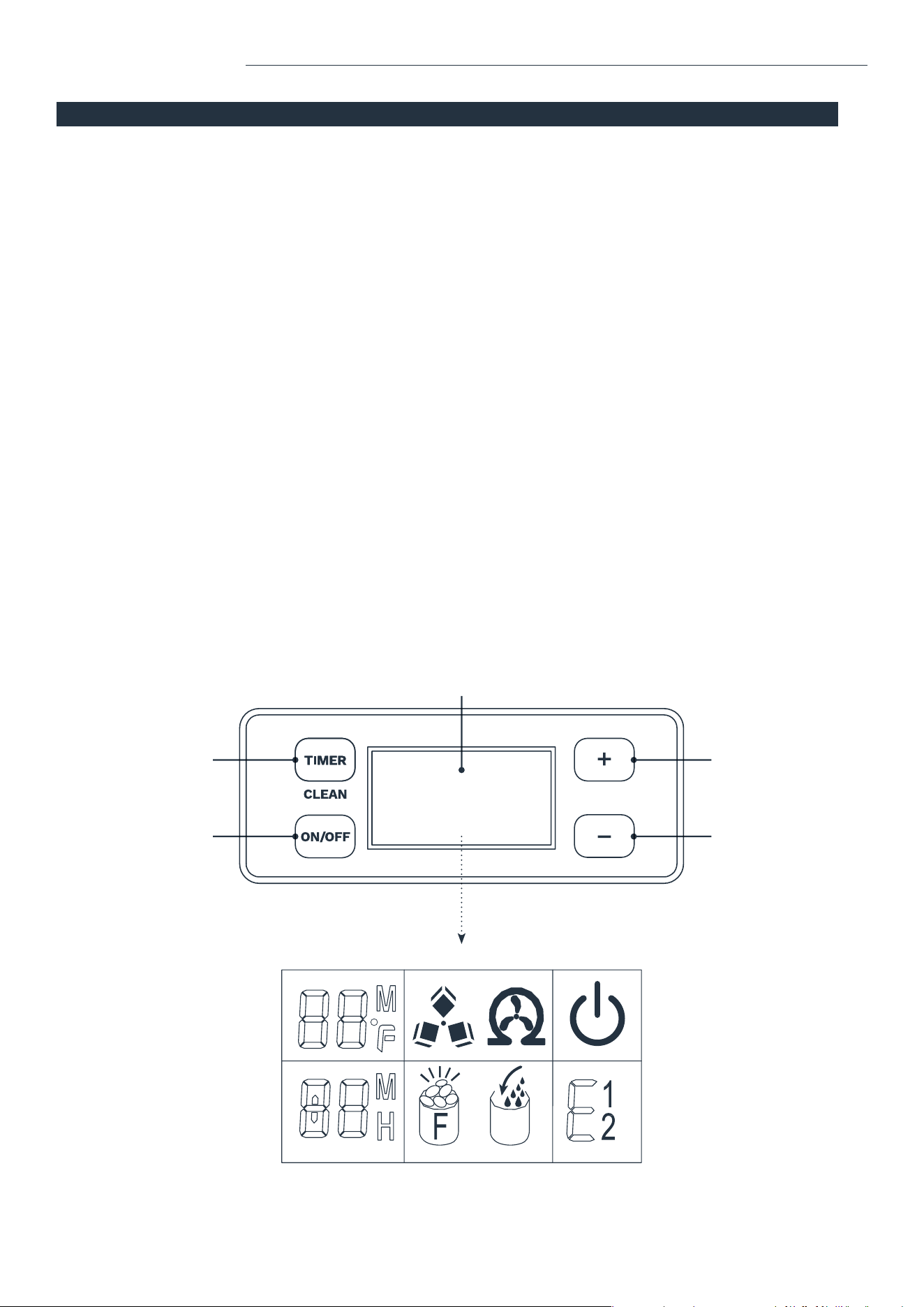
A. “TIMER/CLEAN” buon
Press this button to enter the TIMER setting program. Press and hold this button for more than 5 seconds to enter
the CLEAN program.
B. “ON/OFF” buon
Press this button to enter STANDBY mode. During Self-cleaning or Ice making program, press this button to turn
off the appliance. If the appliance is set with Timer, press this button to cancel the Timer setting.
When the appliance is making ice cubes, press and hold this button for more than 5 seconds to switch to the
ice collecting process.
C. LCD display
1. Environmental temperature and ice making time countdown. Unit of Ice making time countdown is Minutes (M).
Unit of environmental temperature is Fahrenheit (F).
2. Ice making and ice-collecting display. The rotation of the symbol indicates the process of ice making, while
the ash of the symbol indicates the process of ice-collecting.
3. Automatic self-cleaning.
4. On/Off status.
5. Error code display. E1 means the environmental temperature sensor is damaged. E2 means there is an ice making
error or refrigerant leak.
6. Water inow and shortage display. When the symbol ashes, it indicates that there is enough water in the water tank.
When the symbol lights on, it indicates that there is not enough water in the water tank.
7. Ice full alarm. Take out the ice before the next ice making cycle.
8. Setting display. Unit for time switch machine is Hour (H). Unit for the ice making time is Minute (M).
D&E. “+” “-” buon
Adjust the ice making time length with the “+” or “-” button. The default setting is zero. There will be 1 minute added
or reduced per each press of the “+” or “-” button.
It is also used to adjust the delay time of the timer. The default setting is zero. There will be 1 hour added or
reduced per each press of the “+” or “-” button.
CONTROL PANEL & FUNCTIONS
ACCESSORIES
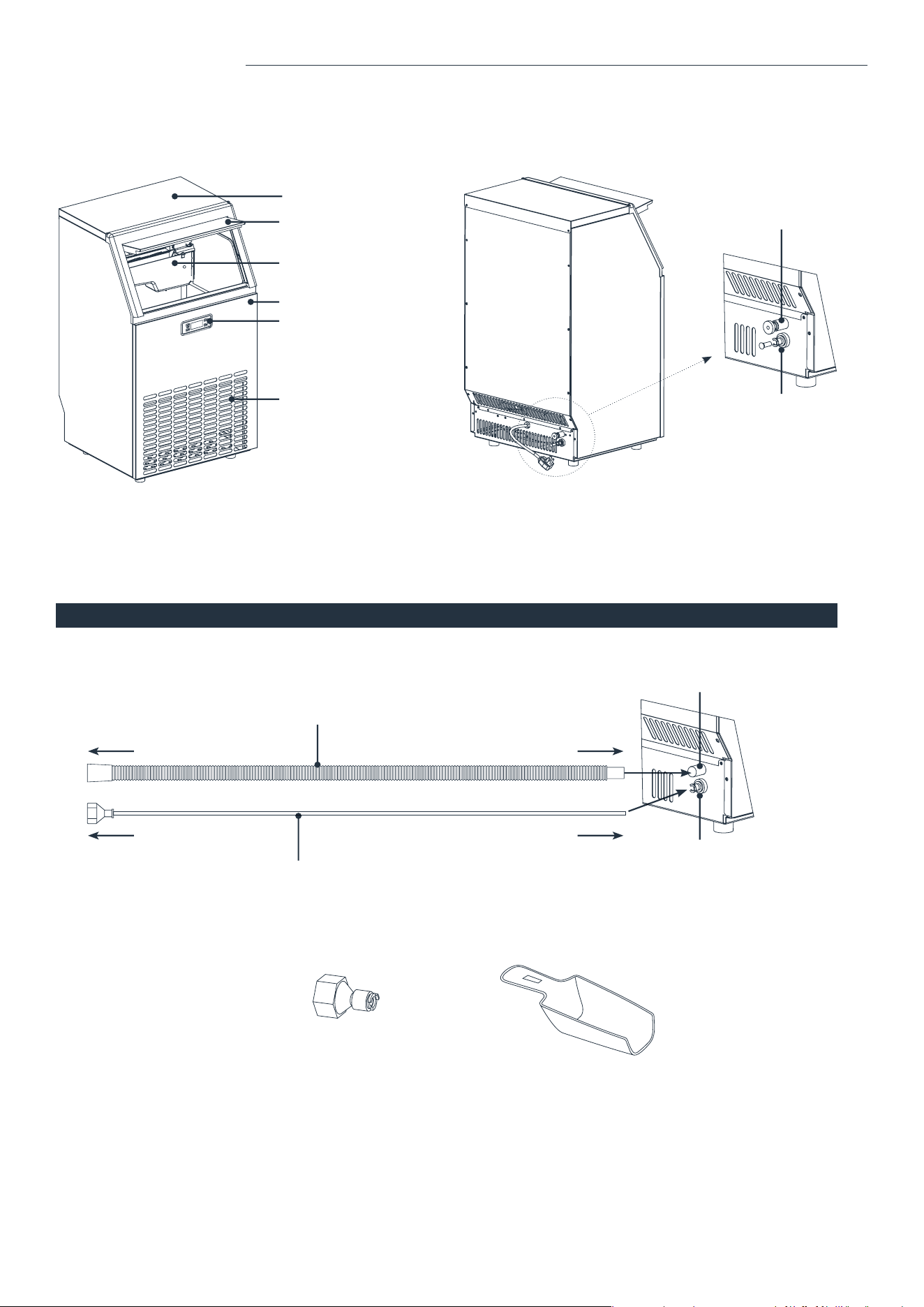
Water draining hose (length: 6.5 feet)
Water supply hose (Length: 9 feet, Diameter: 0.25 inches)
Top cover
Ice bin door
Ice making & water tank assembly
Front panel
Control panel
Air outlet
Water supply hose port
(to be connected to the water supply)
Water draining hose port
PARTS DESCRIPTION PARTS DESCRIPTION
Water supply hose port
(to be connected to the water
supply hose and water supply)
Drain hose port
To water supply To water supply hose port
To drain To drain hose port
A E
B D
C
1
8
2
7
3
6
4
5
Water supply connector Ice Scoop
NOTE: Keep drain
hose below water
drain hose port.
8 9
A. “TIMER/CLEAN” buon
Press this button to enter the TIMER setting program. Press and hold this button for more than 5 seconds to enter
the CLEAN program.
B. “ON/OFF” buon
Press this button to enter STANDBY mode. During Self-cleaning or Ice making program, press this button to turn
off the appliance. If the appliance is set with Timer, press this button to cancel the Timer setting.
When the appliance is making ice cubes, press and hold this button for more than 5 seconds to switch to the
ice collecting process.
C. LCD display
1. Environmental temperature and ice making time countdown. Unit of Ice making time countdown is Minutes (M).
Unit of environmental temperature is Fahrenheit (F).
2. Ice making and ice-collecting display. The rotation of the symbol indicates the process of ice making, while
the ash of the symbol indicates the process of ice-collecting.
3. Automatic self-cleaning.
4. On/Off status.
5. Error code display. E1 means the environmental temperature sensor is damaged. E2 means there is an ice making
error or refrigerant leak.
6. Water inow and shortage display. When the symbol ashes, it indicates that there is enough water in the water tank.
When the symbol lights on, it indicates that there is not enough water in the water tank.
7. Ice full alarm. Take out the ice before the next ice making cycle.
8. Setting display. Unit for time switch machine is Hour (H). Unit for the ice making time is Minute (M).
D&E. “+” “-” buon
Adjust the ice making time length with the “+” or “-” button. The default setting is zero. There will be 1 minute added
or reduced per each press of the “+” or “-” button.
It is also used to adjust the delay time of the timer. The default setting is zero. There will be 1 hour added or
reduced per each press of the “+” or “-” button.
CONTROL PANEL & FUNCTIONS
ACCESSORIES
Water draining hose (length: 6.5 feet)
Water supply hose (Length: 9 feet, Diameter: 0.25 inches)
Top cover
Ice bin door
Ice making & water tank assembly
Front panel
Control panel
Air outlet
Water supply hose port
(to be connected to the water supply)
Water draining hose port
PARTS DESCRIPTION PARTS DESCRIPTION
Water supply hose port
(to be connected to the water
supply hose and water supply)
Drain hose port
To water supply To water supply hose port
To drain To drain hose port
A E
B D
C
1
8
2
7
3
6
4
5
Water supply connector Ice Scoop
NOTE: Keep drain
hose below water
drain hose port.
10 11
1. Remove the exterior and interior packaging. Check if all the accessories, including the instruction manual, ice scoop, water
supply hose, water hose connector, and the water draining hose are inside. If any parts are missing, please contact hOme
™
customer service at 1-800-898-3002.
2. Remove the tape that is holding the door, inner cabinet, and ice scoop to the appliance. Clean the inside of the Ice Machine
and accessories with water. Let the appliance dry completely.
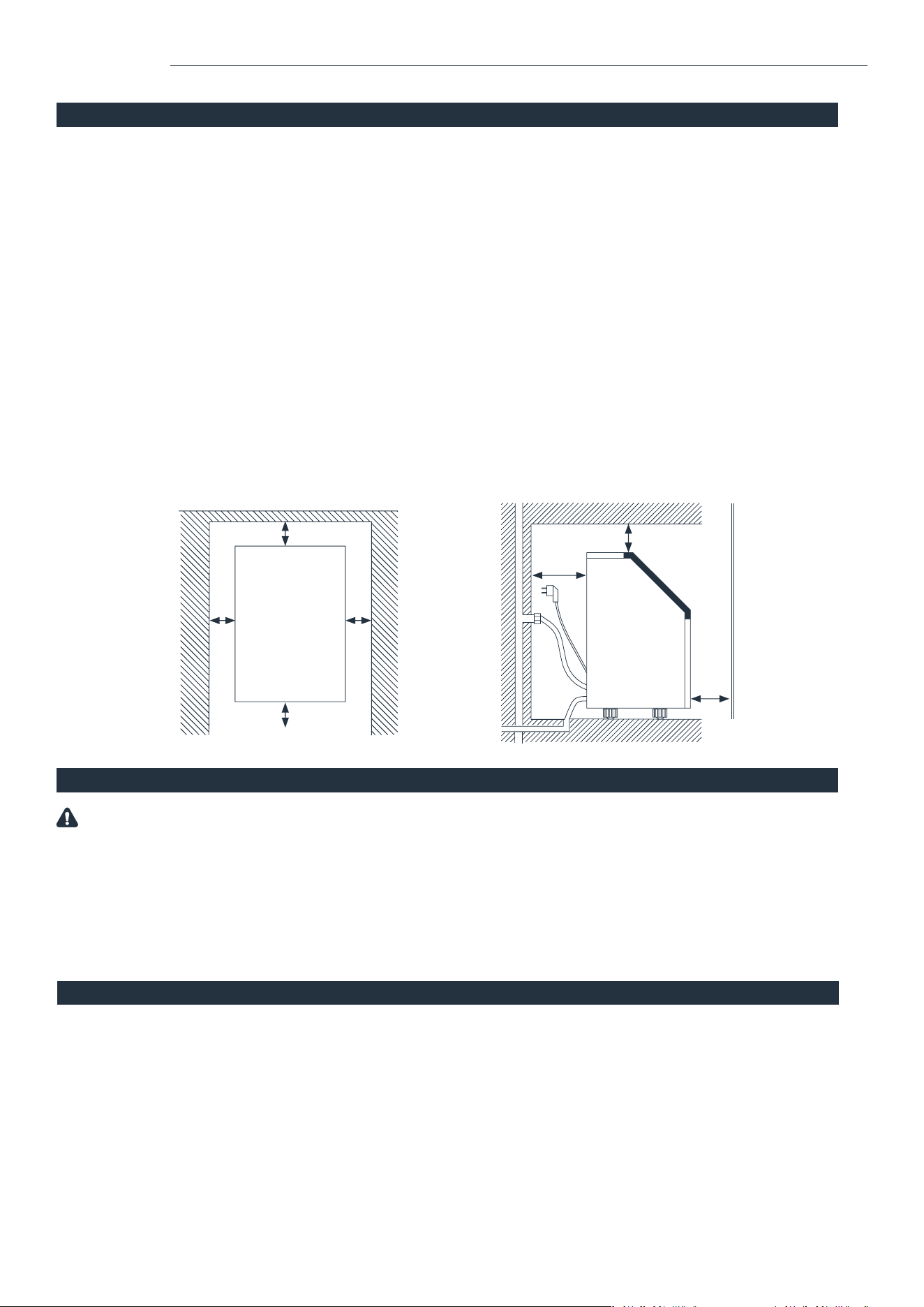
3. Put the appliance on a at surface without direct sunlight and/or other sources of heat (i.e. stove, furnace, radiator).
Make sure there is at least a 20cm (8 inches) gap between the air outlet and any obstacles, 25cm (10 inches) in front
to open the door, and at least 15cm (6 inches) between the back and the wall.
4. The appliance must be positioned so that the plug is accessible.
5. Do not put anything on top of the Ice Machine.
6. When installing the Ice Machine under a counter, follow the recommended spacing dimensions. Place electrical supplies,
water supplies, and drain xtures in the recommended locations as shown in the gure below.
7. Choose a well-ventilated area with a temperature between 10°C (50°F) and 32°C (90°F). This appliance MUST be installed in
an indoor area without wind, rain, water, spray, or drips.
8. The Ice Machine requires a continuous water supply with the pressure of 1-8 Bar. The temperature of the water inow
should be between 5°C (41°F) and 25°C (77°F) for proper operation.
9. Keep in an upright position for 24 hours before the initial power up.
WARNING: Connect to the potable water supply only. Only use drinking water.
UNPACKING AND INSTALLATION
1. It is recommended that a separate circuit, serving only your Ice Machine, be provided. Use receptacles that cannot be turned off by
a switch or pull chain. If the supply cord or plug needs to be replaced, it should be done by a certied electrician.
2. Plug your appliance into a secure, properly installed, grounded wall outlet. Under any circumstances, do not cut or remove the
third (ground) prong from the power cord. Any questions concerning power and/or grounding should be directed toward a
certied electrician.
3. This appliance requires a standard 110-120 volt, 60Hz electrical outlet.
CONNECTING YOUR ICE MACHINE
WARNING: Improper use of the grounded plug can result in the risk of electrical shock. If the power cord is damaged, please contact
hOme
™
Customer Service at 1-800-898-3002.
CLEANING YOUR ICE MACHINE BEFORE FIRST USE
Before using your appliance, it is strongly recommended to clean it thoroughly.
1. Open the Door for ice taking.
2. Clean the inside with a special ice maker cleaning uid (usually based on citric acid), warm water, and a soft cloth.
3. Then use potable water to rinse the inside parts. You can pull the water draining hose to drain out the rinsed water in
the water tank.
4. Clean the ice storage cabinet in the same way. Drain out all rinsed water from the water draining hose, which is located at the
back of the Ice Machine.
5. You must reinstall the water draining hose of the water tank and the cap of the water draining port. Otherwise, the
appliance will not make ice normally. After cleaning, you should discard the ice cubes made from the rst ice making cycle.
6. The outside of the Ice Machine should be cleaned regularly with a slightly damp cloth.
7. Dry the interior and exterior with a clean, soft cloth.
WATER CONNECTION FOR YOUR ICE MACHINE
NOTE:
• Make sure to use the new hose sets supplied with the appliance to connect to the water supply. Old hose sets should not be reused.
• The water pressure of the main water supply system should be 0.04-0.6 MPa (5.8-87 psi).
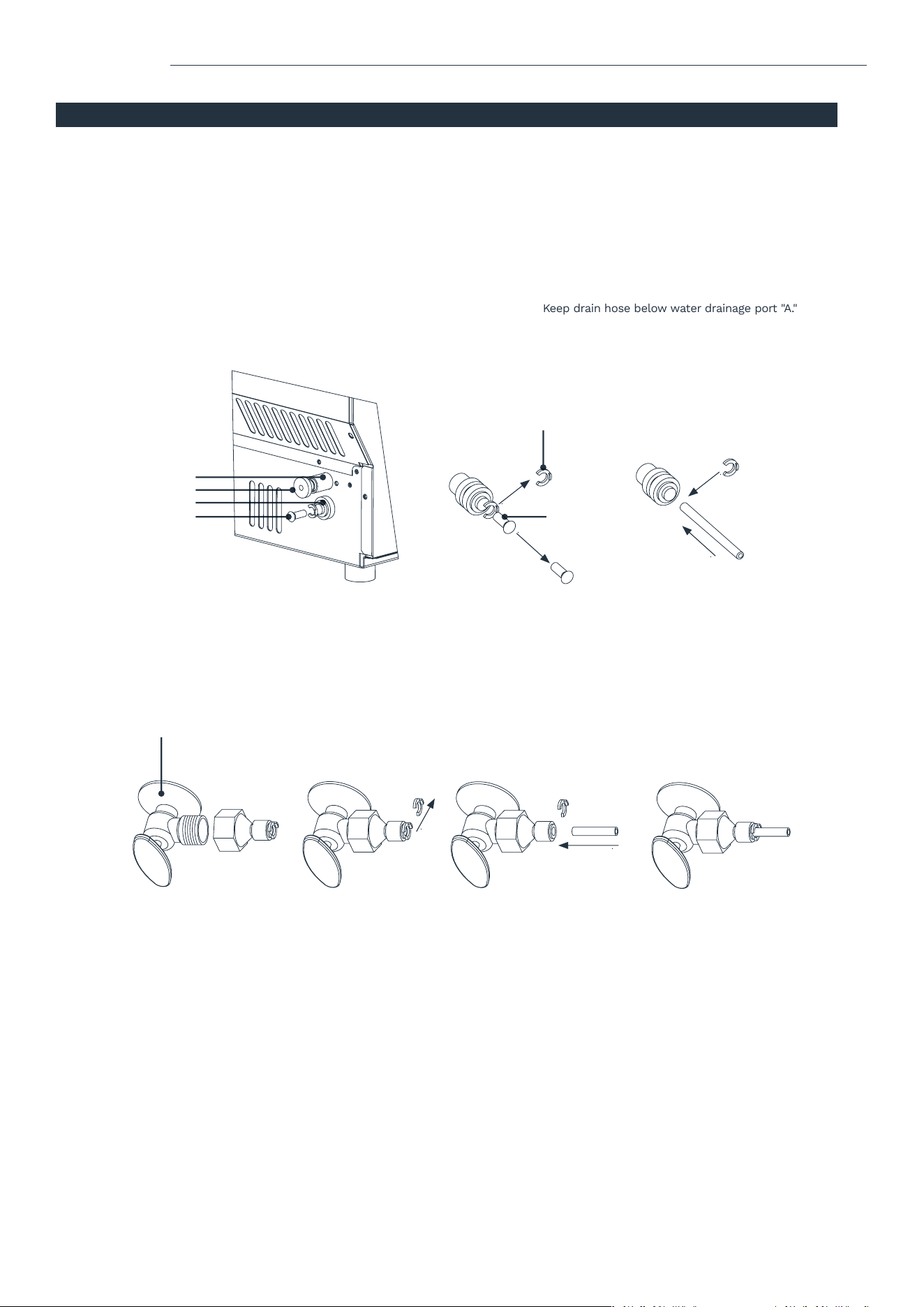
1. Connect the water supply hose to the appliance. Remove the clipper on the water supply hose port for the water supply
(indicated “B” in the following illustration), which is located at the back. Then push the anti-dust plug inwards. Use your nger to
press the circle to x the anti-dust plug. Then take down the anti-dust plug. Insert one end of the white water hose into the water
inow port. Push inwards completely and reinstall the clipper.
2. Connect the water draining hose. Pull out the water drainage cap (indicated “A” in the following illustration), then connect the draining
hose. Connect the other end of this draining hose to the main water drainage pipeline. Keep drain hose below water drainage port "A."
OPERATION OPERATION
4cm (1.6")
15cm (6")
25cm (10")
15cm (6") 15cm (6")
A
Anti-dust plug
B
Anti-dust plug
15cm (6")
20cm
(8")
Door
clearance
Air outlet
clearance
3. Connect the water supply hose to the water supply system. Install the connector to the water supply by the screw thread.
Remove the clipper from the water supply connector. Insert the other end of the hose into the water supply connector port
completely, then reinstall the clipper.
Under sink water supply
Clipper
NOTE: Remove
plugs and discard.
NOTE: Remove
plug and discard.
10 11
1. Remove the exterior and interior packaging. Check if all the accessories, including the instruction manual, ice scoop, water
supply hose, water hose connector, and the water draining hose are inside. If any parts are missing, please contact hOme
™
customer service at 1-800-898-3002.
2. Remove the tape that is holding the door, inner cabinet, and ice scoop to the appliance. Clean the inside of the Ice Machine
and accessories with water. Let the appliance dry completely.
3. Put the appliance on a at surface without direct sunlight and/or other sources of heat (i.e. stove, furnace, radiator).
Make sure there is at least a 20cm (8 inches) gap between the air outlet and any obstacles, 25cm (10 inches) in front
to open the door, and at least 15cm (6 inches) between the back and the wall.
4. The appliance must be positioned so that the plug is accessible.
5. Do not put anything on top of the Ice Machine.
6. When installing the Ice Machine under a counter, follow the recommended spacing dimensions. Place electrical supplies,
water supplies, and drain xtures in the recommended locations as shown in the gure below.
7. Choose a well-ventilated area with a temperature between 10°C (50°F) and 32°C (90°F). This appliance MUST be installed in
an indoor area without wind, rain, water, spray, or drips.
8. The Ice Machine requires a continuous water supply with the pressure of 1-8 Bar. The temperature of the water inow
should be between 5°C (41°F) and 25°C (77°F) for proper operation.
9. Keep in an upright position for 24 hours before the initial power up.
WARNING: Connect to the potable water supply only. Only use drinking water.
UNPACKING AND INSTALLATION
1. It is recommended that a separate circuit, serving only your Ice Machine, be provided. Use receptacles that cannot be turned off by
a switch or pull chain. If the supply cord or plug needs to be replaced, it should be done by a certied electrician.
2. Plug your appliance into a secure, properly installed, grounded wall outlet. Under any circumstances, do not cut or remove the
third (ground) prong from the power cord. Any questions concerning power and/or grounding should be directed toward a
certied electrician.
3. This appliance requires a standard 110-120 volt, 60Hz electrical outlet.
CONNECTING YOUR ICE MACHINE
WARNING: Improper use of the grounded plug can result in the risk of electrical shock. If the power cord is damaged, please contact
hOme
™
Customer Service at 1-800-898-3002.
CLEANING YOUR ICE MACHINE BEFORE FIRST USE
Before using your appliance, it is strongly recommended to clean it thoroughly.
1. Open the Door for ice taking.
2. Clean the inside with a special ice maker cleaning uid (usually based on citric acid), warm water, and a soft cloth.
3. Then use potable water to rinse the inside parts. You can pull the water draining hose to drain out the rinsed water in
the water tank.
4. Clean the ice storage cabinet in the same way. Drain out all rinsed water from the water draining hose, which is located at the
back of the Ice Machine.
5. You must reinstall the water draining hose of the water tank and the cap of the water draining port. Otherwise, the
appliance will not make ice normally. After cleaning, you should discard the ice cubes made from the rst ice making cycle.
6. The outside of the Ice Machine should be cleaned regularly with a slightly damp cloth.
7. Dry the interior and exterior with a clean, soft cloth.
WATER CONNECTION FOR YOUR ICE MACHINE
NOTE:
• Make sure to use the new hose sets supplied with the appliance to connect to the water supply. Old hose sets should not be reused.
• The water pressure of the main water supply system should be 0.04-0.6 MPa (5.8-87 psi).
1. Connect the water supply hose to the appliance. Remove the clipper on the water supply hose port for the water supply
(indicated “B” in the following illustration), which is located at the back. Then push the anti-dust plug inwards. Use your nger to
press the circle to x the anti-dust plug. Then take down the anti-dust plug. Insert one end of the white water hose into the water
inow port. Push inwards completely and reinstall the clipper.
2. Connect the water draining hose. Pull out the water drainage cap (indicated “A” in the following illustration), then connect the draining
hose. Connect the other end of this draining hose to the main water drainage pipeline. Keep drain hose below water drainage port "A."
OPERATION OPERATION
4cm (1.6")
15cm (6")
25cm (10")
15cm (6") 15cm (6")
A
Anti-dust plug
B
Anti-dust plug
15cm (6")
20cm
(8")
Door
clearance
Air outlet
clearance
3. Connect the water supply hose to the water supply system. Install the connector to the water supply by the screw thread.
Remove the clipper from the water supply connector. Insert the other end of the hose into the water supply connector port
completely, then reinstall the clipper.
Under sink water supply
Clipper
NOTE: Remove
plugs and discard.
NOTE: Remove
plug and discard.

12 13
1. Plug in the Ice Machine. The ON/OFF symbol (4) will ash in the display window. Press the “ON/OFF” button on the
control panel. The Ice Machine will start to make ice cubes when the water reaches the standard level on the water
tank through the electromagnetic water valve. The symbol will change to a solid light and the Ice cube symbol (2) will
start rotating. The ambient temperature will be displayed in the upper left (1) of the display: “80F” means the ambient
temperature is 80°F. A few minutes later, a number ashes in the same area: “10M,” which means the remaining ice
making time for the current cycle is 10 minutes.
2. When each ice making cycle is completed, it will enter the ice collecting process, and the Ice cube symbol (2) will ash.
The hose will add water to the water tank through the electromagnetic valve, and the arrow on the Water inow symbol
(6) will ash until the water reaches the standard level. When the Water inow symbol (6) light is off, it means the
Ice Machine is ready for the ice making cycle. In the case of a water shortage, the Ice Machine needs to be restarted.
Otherwise, it will start up automatically after 15 minutes.
NOTE: Each ice making cycle takes about 11-20 minutes based on the ambient and water temperature. The rst ice
making cycle will be longer because of the high water temperature in the water tank. However, it will last for less
than 30 minutes.
3. To adjust the ice thickness, press the “+” or “-” button on the control panel. The number at the bottom left of the display
shows the time setting of the ice making with the default “0”. Press the “+” button once to add one minute at a time, and
the ice cubes will be thicker. Press the “-” button once to reduce one minute at a time, and the ice cubes will be thinner.
NOTE: The adjustment only affects the next and subsequent ice making cycles.
4. When the Ice full alarm (7) lights up, the appliance stops working. It will work again after you take out the ice.
5. To turn off the appliance during the ice making process, press the “ON/OFF” button on the control panel to enter the
standby mode. If you press and hold “ON/OFF” for more than 5 seconds during ice making, the appliance enters into
the ice collecting process.
6. The timer setting range is between 1 to 24 hours. When the appliance is running, you can set up the time to turn it off.
When the appliance is on standby, you can set up the time to turn it on. To set up the timing, press the “TIMER” button.
The default time displays “1H” (H meaning hour). Press the “+” or “-” buttons to adjust to the time that you desire. During
the process of time adjustment, the “H” in the lower corner (8) will ash. After 5 seconds without any movement, the
"H" light will change from ashing to solid, meaning the timer setting has been completed. In standby mode where “5H”
is displayed, it means the appliance will start working automatically after 5 hours. During the ice making process where
“5H” is displayed, it means the appliance will turn off automatically after 5 hours. The “H” indicates that the appliance
currently has a timer setting on. The number before “H” indicates the time countdown. When it reaches zero, the
appliance enters into the mode you preset. Press the “TIMER” button to cancel the timer setting during the countdown.
7. To start the Self-cleaning program, plug in the main power plug after connecting the water hoses, then press and hold
the “TIMER/CLEAN” button for more than 5 seconds. The Automatic self-cleaning symbol (3) will rotate on display, and
the time countdown area will display 20M. This means the default cleaning time is 20 minutes. The “TIMER/CLEAN”
button will light on during this period. The water pump runs for 8 minutes and stops for 3 minutes, then recycles. The
total duration time is 20 minutes for one self-cleaning cycle. When the water pump stops working, water will ow to the
water tank automatically. When the program is completed, the Ice Machine will turn off automatically.
NOTE: You can press the “ON/OFF” buon to cancel the Self-cleaning program immediately.
OPERATING YOUR ICE MACHINE
OPERATION MAINTENANCE
CLEANING & MAINTENANCE OF YOUR ICE MACHINE
WARNING: Before cleaning or maintenance, unplug the Ice Machine from the main power supply (Exception: Self-cleaning program).
Do not use any alcohol or fume for cleaning/sanitization of the Ice Machine. It may cause cracks on the plastic parts. Ask an
authorized service engineer to check and clean the condenser at least once a year, in order to keep the appliance working properly.
CAUTION: If the Ice Machine has been left unused for a long period of time, it must be thoroughly cleaned before the next use.
Follow the cleaning instructions below. Do not leave any solution inside the Ice Machine after cleaning.
Periodic cleaning and proper maintenance will ensure efciency, performance, hygiene, and duration of the machine.
Never keep anything in the ice storage bin. Objects, like wine and beer bottles, are unsanitary and may cause obstruction
of the drain pipe.
Exterior Cleaning
To clean the outside of the Ice Machine, use a slightly damp cloth and wipe down the exterior. DO NOT use direct water or
solvent-based or abrasive cleaners.
NOTE:
Stainless steel products exposed to chlorine gas and moisture, such as in spas or swimming pools, may cause discoloration
of stainless steel. Discoloration from chlorine gas is normal.
Cleaning of Ice Storage
The ice storage cabinet should be sanitized occasionally. Clean the cabinet before the Ice Machine is used for the rst time and
reused after a long period of time. Follow the steps below:
1. Turn off the Ice Machine and unplug the power cord.
2. Open the Door for ice taking and wipe down the interior with a special ice maker cleaning uid (usually based on citric
acid) and follow the instructions provided by the manufacturer.
3. Rinse thoroughly with potable water. The rinsed water should be drained out via the drain hose.
4. Dry with a clean, soft cloth.
The ice scoop should be washed regularly. Wash it in the same fashion as you would any food container.
Cleaning of the Ice Making Parts
1. Repeat the above steps to clean the water tank and other inner parts of the Ice Machine.
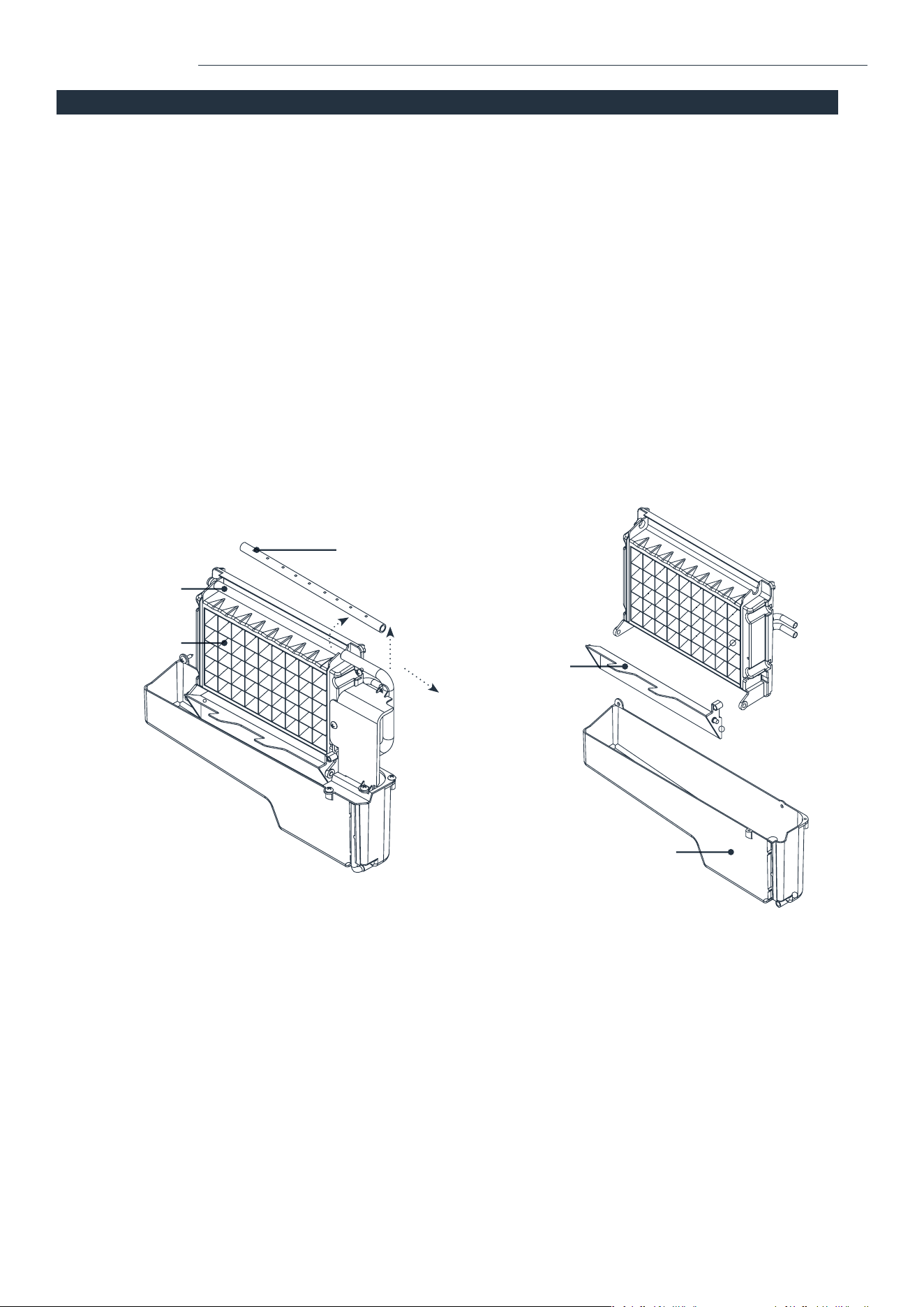
2. When the water owing from the water dividing pipe on the evaporator is very minor, disassemble the water dividing pipe
for cleaning. Clean each small hole on the water dividing pipe, like in the following illustration on Page 14. Make sure all
holes are unclogged, then reinstall the water dividing pipe to the original location.
3. If the ice cubes on the surface of the evaporator do not fall down easily, do not use mechanical force to remove them.
Press and hold the “ON/OFF” button for more than 5 seconds to switch to the ice collecting process. The ice cubes will
start to fall down. Turn off the Ice Machine and unplug the power cord to clean the surface of the evaporator.

12 13
1. Plug in the Ice Machine. The ON/OFF symbol (4) will ash in the display window. Press the “ON/OFF” button on the
control panel. The Ice Machine will start to make ice cubes when the water reaches the standard level on the water
tank through the electromagnetic water valve. The symbol will change to a solid light and the Ice cube symbol (2) will
start rotating. The ambient temperature will be displayed in the upper left (1) of the display: “80F” means the ambient
temperature is 80°F. A few minutes later, a number ashes in the same area: “10M,” which means the remaining ice
making time for the current cycle is 10 minutes.
2. When each ice making cycle is completed, it will enter the ice collecting process, and the Ice cube symbol (2) will ash.
The hose will add water to the water tank through the electromagnetic valve, and the arrow on the Water inow symbol
(6) will ash until the water reaches the standard level. When the Water inow symbol (6) light is off, it means the
Ice Machine is ready for the ice making cycle. In the case of a water shortage, the Ice Machine needs to be restarted.
Otherwise, it will start up automatically after 15 minutes.
NOTE: Each ice making cycle takes about 11-20 minutes based on the ambient and water temperature. The rst ice
making cycle will be longer because of the high water temperature in the water tank. However, it will last for less
than 30 minutes.
3. To adjust the ice thickness, press the “+” or “-” button on the control panel. The number at the bottom left of the display
shows the time setting of the ice making with the default “0”. Press the “+” button once to add one minute at a time, and
the ice cubes will be thicker. Press the “-” button once to reduce one minute at a time, and the ice cubes will be thinner.
NOTE: The adjustment only affects the next and subsequent ice making cycles.
4. When the Ice full alarm (7) lights up, the appliance stops working. It will work again after you take out the ice.
5. To turn off the appliance during the ice making process, press the “ON/OFF” button on the control panel to enter the
standby mode. If you press and hold “ON/OFF” for more than 5 seconds during ice making, the appliance enters into
the ice collecting process.
6. The timer setting range is between 1 to 24 hours. When the appliance is running, you can set up the time to turn it off.
When the appliance is on standby, you can set up the time to turn it on. To set up the timing, press the “TIMER” button.
The default time displays “1H” (H meaning hour). Press the “+” or “-” buttons to adjust to the time that you desire. During
the process of time adjustment, the “H” in the lower corner (8) will ash. After 5 seconds without any movement, the
"H" light will change from ashing to solid, meaning the timer setting has been completed. In standby mode where “5H”
is displayed, it means the appliance will start working automatically after 5 hours. During the ice making process where
“5H” is displayed, it means the appliance will turn off automatically after 5 hours. The “H” indicates that the appliance
currently has a timer setting on. The number before “H” indicates the time countdown. When it reaches zero, the
appliance enters into the mode you preset. Press the “TIMER” button to cancel the timer setting during the countdown.
7. To start the Self-cleaning program, plug in the main power plug after connecting the water hoses, then press and hold
the “TIMER/CLEAN” button for more than 5 seconds. The Automatic self-cleaning symbol (3) will rotate on display, and
the time countdown area will display 20M. This means the default cleaning time is 20 minutes. The “TIMER/CLEAN”
button will light on during this period. The water pump runs for 8 minutes and stops for 3 minutes, then recycles. The
total duration time is 20 minutes for one self-cleaning cycle. When the water pump stops working, water will ow to the
water tank automatically. When the program is completed, the Ice Machine will turn off automatically.
NOTE: You can press the “ON/OFF” buon to cancel the Self-cleaning program immediately.
OPERATING YOUR ICE MACHINE
OPERATION MAINTENANCE
CLEANING & MAINTENANCE OF YOUR ICE MACHINE
WARNING: Before cleaning or maintenance, unplug the Ice Machine from the main power supply (Exception: Self-cleaning program).
Do not use any alcohol or fume for cleaning/sanitization of the Ice Machine. It may cause cracks on the plastic parts. Ask an
authorized service engineer to check and clean the condenser at least once a year, in order to keep the appliance working properly.
CAUTION: If the Ice Machine has been left unused for a long period of time, it must be thoroughly cleaned before the next use.
Follow the cleaning instructions below. Do not leave any solution inside the Ice Machine after cleaning.
Periodic cleaning and proper maintenance will ensure efciency, performance, hygiene, and duration of the machine.
Never keep anything in the ice storage bin. Objects, like wine and beer bottles, are unsanitary and may cause obstruction
of the drain pipe.
Exterior Cleaning
To clean the outside of the Ice Machine, use a slightly damp cloth and wipe down the exterior. DO NOT use direct water or
solvent-based or abrasive cleaners.
NOTE:
Stainless steel products exposed to chlorine gas and moisture, such as in spas or swimming pools, may cause discoloration
of stainless steel. Discoloration from chlorine gas is normal.
Cleaning of Ice Storage
The ice storage cabinet should be sanitized occasionally. Clean the cabinet before the Ice Machine is used for the rst time and
reused after a long period of time. Follow the steps below:
1. Turn off the Ice Machine and unplug the power cord.
2. Open the Door for ice taking and wipe down the interior with a special ice maker cleaning uid (usually based on citric
acid) and follow the instructions provided by the manufacturer.
3. Rinse thoroughly with potable water. The rinsed water should be drained out via the drain hose.
4. Dry with a clean, soft cloth.
The ice scoop should be washed regularly. Wash it in the same fashion as you would any food container.
Cleaning of the Ice Making Parts
1. Repeat the above steps to clean the water tank and other inner parts of the Ice Machine.
2. When the water owing from the water dividing pipe on the evaporator is very minor, disassemble the water dividing pipe
for cleaning. Clean each small hole on the water dividing pipe, like in the following illustration on Page 14. Make sure all
holes are unclogged, then reinstall the water dividing pipe to the original location.
3. If the ice cubes on the surface of the evaporator do not fall down easily, do not use mechanical force to remove them.
Press and hold the “ON/OFF” button for more than 5 seconds to switch to the ice collecting process. The ice cubes will
start to fall down. Turn off the Ice Machine and unplug the power cord to clean the surface of the evaporator.
14 15
The “Water inow and
shortage” (6) indicator is on.
The appliance starts to enter
the ice making process, but
water ows in and the
“ADD WATER” indicator ashes.
The water pump is working,
but there is little water ow
out from the water dividing pipe.
The transparency of the
ice cube is not very good.
Ice cube shape is irregular.
Ice cubes are too thin.
Ice cubes are too thick.
There are no ice cubes
produced from the normal
ice making cycle.
There is no water supply.
The oating ball of the water level detecting
switch is blocked and cannot rise.
Water ows out from the water tank.
Water ows out from the water draining hose
of the water tank.
The water supply hose is blocked or
water is owing in very slowly.
The small holes on the water dividing
pipe are blocked.
Water quality is not good or the water
tank is dirty.
The small holes on the water dividing
pipe are blocked.
The ambient temperature is too high.
Air circulation around the appliance
is not good.
The ambient temperature is too low.
The ambient temperature or water
temperature in the water tank is too high.
There is a refrigerant leak.
The cooling system tube is clogged.
Check the water supply pressure and whether
the supply hose is blocked. Add water pressure
or clean the hose if needed. Clean the water tank
and the water level detecting switch. Place the
appliance on a at surface, not on a slope.
Pull out the pipe and install back into the slot of
the water tank properly.
Check the water supply pressure and whether
the supply hose is blocked. Add water pressure
or clean the hose if needed.
Clean the water dividing pipe. Make sure all
nine holes are unclogged.
Change the water supply, or use the water lter
to soften or lter the water.
Clean the water tank and change to clean puried
water. Clean the water dividing pipe. Make sure all
nine holes are unclogged.
Move the appliance to a low-temperature space
or increase the time of each ice making cycle.
Make sure that there is at least a 20cm (8 inches)
gap between the air outlet and the obstacles,
25cm (10 inches) in front to open the door, and
at least 15cm (6 inches) between the back of the
appliance and the wall. Reduce the time of each
ice making cycle.
Move to a place with a temperature lower than
32 Celsius and use low-temperature water.
Call an authorized technical service engineer
to maintain the process.
CLEANING & MAINTENANCE OF YOUR ICE MACHINE
MAINTENANCE
NOTE: After cleaning the interior parts of your Ice Machine, install the parts to the original position, then plug in
and turn on the machine. It is recommended to discard the rst batch of ice.
Cleaning Suggestion
1. The Ice scoop, door for ice taking, and water outlet pipe should be cleaned after each use. Rinse the ice scoop
and wipe the door with a clean cloth.
2. The Water tank, Ice full detecting board, and the surface of the Evaporator should be cleaned twice every month.
3. All the components and surfaces exposed to water or ice cubes, like the Ice storage bin, water tank, evaporator,
water pump, silicone tube, water outlet pipe, etc. should be cleaned by using a nickel safe ice machine cleaner
6 months after the rst use. This should be done by a professional service provider.
WARNING: Wear rubber gloves and safety goggles when handling the Ice Machine Cleaner or Sanitizer.
NOTE: Minerals that are removed from water during the ice making cycle will eventually form a hard, scaly deposit in
the water system. Clean the system regularly to remove the mineral scale buildup. The frequency of cleaning depends
on how hard your water is. With 4 to 5 grains/liter, it is recommended to clean the system every 6 months.
Ice full
detecting plate
Water tank
Hole dividers
Pull up rst,
then move out
toward right
Water
dividing pipe
Evaporator
TROUBLESHOOTING
POSSIBLE CAUSES SOLUTION
PROBLEM

14 15
The “Water inow and
shortage” (6) indicator is on.
The appliance starts to enter
the ice making process, but
water ows in and the
“ADD WATER” indicator ashes.
The water pump is working,
but there is little water ow
out from the water dividing pipe.
The transparency of the
ice cube is not very good.
Ice cube shape is irregular.
Ice cubes are too thin.
Ice cubes are too thick.
There are no ice cubes
produced from the normal
ice making cycle.
There is no water supply.
The oating ball of the water level detecting
switch is blocked and cannot rise.
Water ows out from the water tank.
Water ows out from the water draining hose
of the water tank.
The water supply hose is blocked or
water is owing in very slowly.
The small holes on the water dividing
pipe are blocked.
Water quality is not good or the water
tank is dirty.
The small holes on the water dividing
pipe are blocked.
The ambient temperature is too high.
Air circulation around the appliance
is not good.
The ambient temperature is too low.
The ambient temperature or water
temperature in the water tank is too high.
There is a refrigerant leak.
The cooling system tube is clogged.
Check the water supply pressure and whether
the supply hose is blocked. Add water pressure
or clean the hose if needed. Clean the water tank
and the water level detecting switch. Place the
appliance on a at surface, not on a slope.
Pull out the pipe and install back into the slot of
the water tank properly.
Check the water supply pressure and whether
the supply hose is blocked. Add water pressure
or clean the hose if needed.
Clean the water dividing pipe. Make sure all
nine holes are unclogged.
Change the water supply, or use the water lter
to soften or lter the water.
Clean the water tank and change to clean puried
water. Clean the water dividing pipe. Make sure all
nine holes are unclogged.
Move the appliance to a low-temperature space
or increase the time of each ice making cycle.
Make sure that there is at least a 20cm (8 inches)
gap between the air outlet and the obstacles,
25cm (10 inches) in front to open the door, and
at least 15cm (6 inches) between the back of the
appliance and the wall. Reduce the time of each
ice making cycle.
Move to a place with a temperature lower than
32 Celsius and use low-temperature water.
Call an authorized technical service engineer
to maintain the process.
CLEANING & MAINTENANCE OF YOUR ICE MACHINE
MAINTENANCE
NOTE: After cleaning the interior parts of your Ice Machine, install the parts to the original position, then plug in
and turn on the machine. It is recommended to discard the rst batch of ice.
Cleaning Suggestion
1. The Ice scoop, door for ice taking, and water outlet pipe should be cleaned after each use. Rinse the ice scoop
and wipe the door with a clean cloth.
2. The Water tank, Ice full detecting board, and the surface of the Evaporator should be cleaned twice every month.
3. All the components and surfaces exposed to water or ice cubes, like the Ice storage bin, water tank, evaporator,
water pump, silicone tube, water outlet pipe, etc. should be cleaned by using a nickel safe ice machine cleaner
6 months after the rst use. This should be done by a professional service provider.
WARNING: Wear rubber gloves and safety goggles when handling the Ice Machine Cleaner or Sanitizer.
NOTE: Minerals that are removed from water during the ice making cycle will eventually form a hard, scaly deposit in
the water system. Clean the system regularly to remove the mineral scale buildup. The frequency of cleaning depends
on how hard your water is. With 4 to 5 grains/liter, it is recommended to clean the system every 6 months.
Ice full
detecting plate
Water tank
Hole dividers
Pull up rst,
then move out
toward right
Water
dividing pipe
Evaporator
TROUBLESHOOTING
POSSIBLE CAUSES SOLUTION
PROBLEM

16 17
WARRANTY
hOme
™
offers a limited two-year warranty (“warranty period”) on all of our products purchased new and unused from
hOme Technologies, LLC or an authorized reseller, with an original proof of purchase and where a defect has arisen, wholly or
substantially, as a result of faulty manufacture, parts or workmanship during the warranty period. The warranty does not apply
where damage is caused by other factors, including but without limitation: (a) normal wear and tear; (b) abuse, mishandling,
accident, or failure to follow operating instructions; (c) exposure to liquid or inltration of foreign particles; (d) servicing or
modications of the product other than by hOme
™
; (e) commercial or non-indoor use.
The hOme
™
warranty covers all costs related to restoring the proven defective product through repair or replacement of any
defective part and necessary labor so that it conforms to its original specications. A replacement product may be provided
instead of repairing a defective product. HOme
™
’s exclusive obligation under this warranty is limited to such
repair or replacement.
A receipt indicating the purchase date is required for any claim, so please keep all receipts in a safe place. We recommend
that you register your product on our website, homelabs.com/reg. Although greatly appreciated, the product registration is
not required to activate any warranty and product registration does not eliminate the need for the original proof of purchase.
The warranty becomes void if attempts at repair are made by non-authorized third parties and/or if spare parts, other than
those provided by hOme
™
, are used.
You may also arrange for service after the warranty expires at an additional cost.
These are our general terms for warranty service, but we always urge our customers to reach out to us with any issue,
regardless of warranty terms. If you have an issue with a hOme
™
product, please contact us at 1-800-898-3002, and
we will do our best to resolve it for you.
This warranty gives you specic legal rights and you may have other legal rights, which vary from state to state, country
to country, or province to province. The customer may assert any such rights at their sole discretion.
WARNING
Keep all plastic bags away from children.
This manual is to be used with all items with the model number
HME030276N
MANUFACTURING INFO
SKU# : HME030276N
PART#: HME030276MNL
RATING: 115V, 60Hz
ICE-MAKING CURRENT: 3.5A
ICE-HARVEST CURRENT: 5.5A.
REFRIGERANT: R134a, 8.46Oz/240g
1-(800)-898-3002
CONTACT US
homelabs.com/chat
CHAT W ITH U S
CALL U S
help@homelabs.com
EMAIL U S
16 17
WARRANTY
hOme
™
offers a limited two-year warranty (“warranty period”) on all of our products purchased new and unused from
hOme Technologies, LLC or an authorized reseller, with an original proof of purchase and where a defect has arisen, wholly or
substantially, as a result of faulty manufacture, parts or workmanship during the warranty period. The warranty does not apply
where damage is caused by other factors, including but without limitation: (a) normal wear and tear; (b) abuse, mishandling,
accident, or failure to follow operating instructions; (c) exposure to liquid or inltration of foreign particles; (d) servicing or
modications of the product other than by hOme
™
; (e) commercial or non-indoor use.
The hOme
™
warranty covers all costs related to restoring the proven defective product through repair or replacement of any
defective part and necessary labor so that it conforms to its original specications. A replacement product may be provided
instead of repairing a defective product. HOme
™
’s exclusive obligation under this warranty is limited to such
repair or replacement.
A receipt indicating the purchase date is required for any claim, so please keep all receipts in a safe place. We recommend
that you register your product on our website, homelabs.com/reg. Although greatly appreciated, the product registration is
not required to activate any warranty and product registration does not eliminate the need for the original proof of purchase.
The warranty becomes void if attempts at repair are made by non-authorized third parties and/or if spare parts, other than
those provided by hOme
™
, are used.
You may also arrange for service after the warranty expires at an additional cost.
These are our general terms for warranty service, but we always urge our customers to reach out to us with any issue,
regardless of warranty terms. If you have an issue with a hOme
™
product, please contact us at 1-800-898-3002, and
we will do our best to resolve it for you.
This warranty gives you specic legal rights and you may have other legal rights, which vary from state to state, country
to country, or province to province. The customer may assert any such rights at their sole discretion.
WARNING
Keep all plastic bags away from children.
This manual is to be used with all items with the model number
HME030276N
MANUFACTURING INFO
SKU# : HME030276N
PART#: HME030276MNL
RATING: 115V, 60Hz
ICE-MAKING CURRENT: 3.5A
ICE-HARVEST CURRENT: 5.5A.
REFRIGERANT: R134a, 8.46Oz/240g
1-(800)-898-3002
CONTACT US
homelabs.com/chat
CHAT W ITH U S
CALL U S
EMAIL U S

© 2018 hOme Technologies, LLC
37 East 18 Street, 7th Floor
New York, NY 10003
For Indoor Use
Only
All rights reserved, hOme
™
. Printed in China.
1-800-898-3002
homelabs.com/help