GE ADEL20LYQ1 Dehumidifier
Product's Documents
Below are documents related to this product, you can read online or download:
- User Manual - (English, Spanish) Read Online | Download pdf
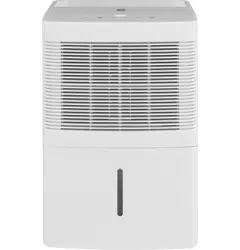
User Manual
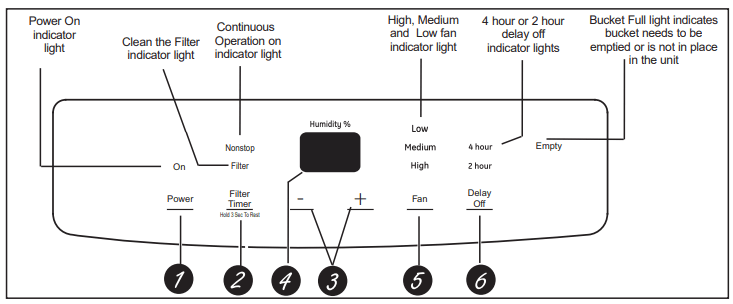
Controls
1. Power Pad
Press to turn the dehumidifier on and off.
2. Filter Timer
After 250 hours of operation, the Clean the Filter indicator light will glow to remind you to clean the filter. Remove the filter and clean it. Press to turn off the Clean the Filter light. See the Care" and Cleaning section.
3. Humidity Set Control Pads
The humidity level can be set within a range of 35% RH (Relative Humidity) to 80% RH (Relative Humidity) in 5% increments or at NS for continuous operation. To set the unit for continuous operation, press the - pad until the screen reads NS.
4. Display
Shows the set % humidity level while setting, then shows the actual (+/- 5% accuracy) room % humidity level.
5. Fan Speed Pad
Controls the fan speed.
Press to select either High, Medium or Low fan speed.
Set the fan control to High for maximum moisture removal. When the humidity has been reduced and quiet operation is preferred, set the fan control to Medium or Low.
6. Delay Off
While the dehumidifier is in operation, press this pad to set it to automatically turn off in 2 hours or 4 hours.v
Other Features
Empty Light
Glows when the bucket is ready to be emptied, or when the bucket is removed or not replaced in the proper position.
Alarm
If the bucket is full or missing for more than 3 minutes, an alarm will sound for about 10 seconds to remind you to empty and replace the bucket.
Auto Shut Off
The Water Level Control Switch shuts off the dehumidifier when the bucket is full, or when the bucket is removed or not replaced in the proper position. NOTE: Fan will continue to run approximately 3 minutes after bucket is removed.
Auto Defrost
When frost builds up on the evaporator coils, the compressor will cycle off and the fan will continue to run until the frost disappears.
Power Outage
In the case of a power outage or interruption, the unit will automatically restart, in the settings last used, after the power is restored.
When first using the dehumidifier, operate the unit continuously for 24 hours.
How the Dehumidifier Operates
Moist, humid air is drawn over a cold refrigerated dehumidifying coil. Moisture in the air condenses on this coil and drains into a bucket (or through a hose and drain).
Dry, clean air is drawn through the condenser where it is heated and discharged out the top grille into the room.
It is normal for the surrounding air to become slightly warmer as the dehumidifier operates.
Automatic Defrost
When frost builds up on the evaporator coils, the compressor will cycle off and the fan will continue to run until the frost disappears.
When the coil is defrosted, the compressor or fan will automatically restart and dehumidifying will resume.
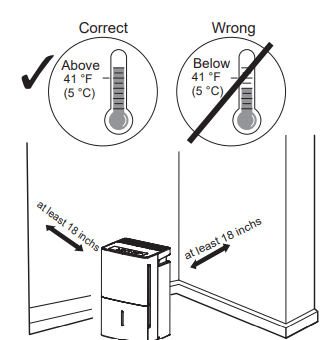
Choosing a Location
A dehumidifier operating in a basement will have little or no effect in drying an adjacent enclosed storage area, such as a closet, unless there is adequate circulation of air in and out of the area.
Always make sure the water bucket is locked into place on the dehumidifier.
Removing Collected Water
There are 2 ways to remove collected water:
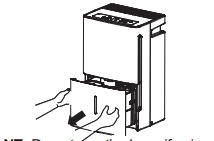
Use the bucket. When the bucket is removed, the unit will shut off. Empty and replace the bucket.
IMPORTANT: Do not use the hose if using the bucket to collect water. When the hose is connected, water will flow through it onto the floor instead of into the bucket.
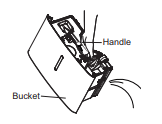
NOTES:
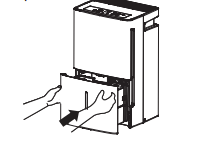
Use a hose. Water can be automatically emptied into a floor drain by attaching a garden water hose (not included).
1. Remove the bucket from the front of the unit.
2. Open the drain cover on the side of the unit.
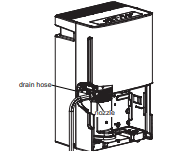
3. Thread a garden hose (not supplied) onto the nozzle, cut to length, and lead it to the floor drain.
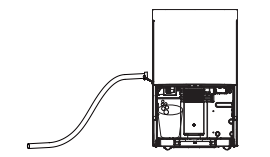
4. Replace the bucket in the unit.
NOTE: The bucket must be in place and securely seated for the dehumidifier to operate.
Water Level
The dehumidifier will turn off automatically when the bucket is full, or when the bucket is removed or not replaced in the proper position.
The bucket must be replaced in the proper position for the dehumidifier to work. The light will be on and the dehumidifier will not run if the bucket is not in the proper position.
Bucket Operation
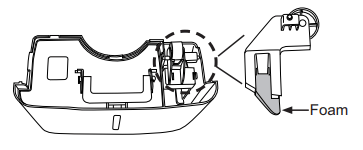
DO NOT remove the foam piece in the bucket assembly.
If removed the Dehumidifier will not work properly.
When the coil is defrosted, the compressor or fan will automatically restart and dehumidifying will resume.
Turn off the dehumidifier and remove the plug from the wall outlet before cleaning.
To clean the case:
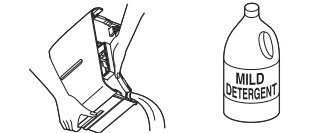
Use water and a mid detergent. Do not use bleach or abrasives.
To clean the front grille:
Use a vacuum attachment or brush.
To clean:
Every few weeks, clean the bucket to prevent growth of moid, mildew and bacteria. Partially fill the bucket with clean water and add a little mild detergent. Swish it around in the bucket, empty and rinse.
NOTE: Do not use a dishwasher to clean the water bucket.
To remove:
Remove the bucket and pour out any water.
To replace:
Slide the bucket into the dehumidifier.
NOTE: The bucket must be in place and securely seated for the dehumidifier to operate.
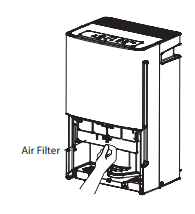
The air filter behind the front grille should be checked and cleaned at least every 250 hours of operation or more often if necessary.
After 250 hours of operation, the Clean the Filter indicator light will glow to remind you to clean the filter. Remove the filter and clean it. Replace the filter and press the Filter
Timer pad to turn off the Clean the Filter light.
To remove:
Remove the bucket. Grasp the filter edge, and pull it straight down and out.
To clean:
Clean the filter with warm, soapy water. Rinse and let the filter dry before replacing it.
Before you call for service
Dehumidifier does not start
Dehumidifier does not dry the air as it should
Dehumidifier runs too much
Frost appears on the coils
Control cannot be set
Fan noise
Water on floor
Bucket Full LED light flashing and alarm sounds while drain hose is connected.
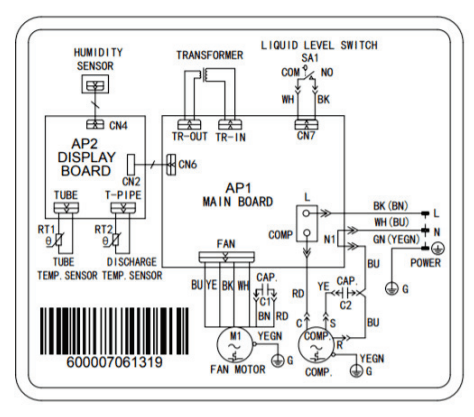
The electric schematic diagram is subject to change without notice.
Please refer to the correct one on the unit.
For models ADEL20LY and ADEL45LY.
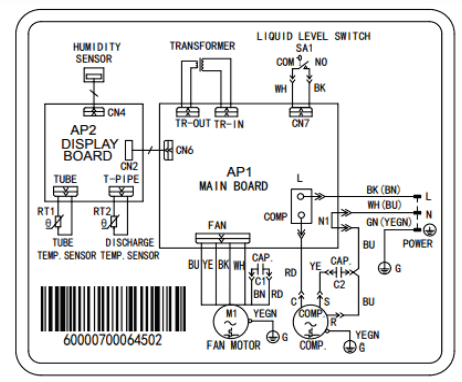
For model ADEL30LY
Reference file: GE ADEL20LYQ1 Dehumidifier
Additionally, the document applies to other GE - General Electric models: ADEL20, ADEL30, ADEL45

