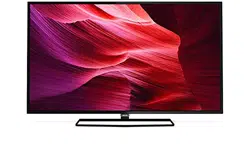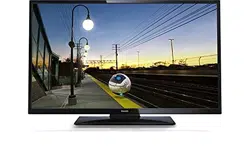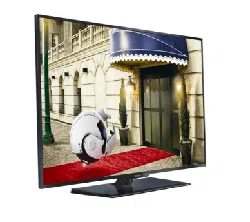

InstallationManualforEasySuiterange
xxHFL3x10T
xxHFL3x10W
Status: final
Version: 1.0
Date: May2015
Author: GerritWeiden

1
Contents
1. Requirementsbeforestartingtheinstallation..........................................................................................................3
2. FindoutthestateoftheTV......................................................................................................................................4
3. Re‐installTV..............................................................................................................................................................5
4. Installationwizard.....................................................................................................................................................8
5. Channeloptions......................................................................................................................................................19
6.ConsumerSetupMenu...........................................................................................................................................................................23
7.ProfessionalSettings...............................................................................................................................................................................24
8. WelcomeLogo........................................................................................................................................................46
8.1SmartInfo
.................................................................................................................................................................46
8.2SmartInfoShow.......................................................................................................................................................47
8.3SmartInfoBrowser..................................................................................................................................................47
9. Clone.......................................................................................................................................................................48
10.Featuresettings.......................................................................................................................................................50
11.CSM(ConsumerSetupmenu).................................................................................................................................55

2
Notice
2015 ©TP Vision Netherlands B.V. All rights reserved. Specifications are subject to change without notice.
TrademarksarethepropertyofKoninklijkePhilipsElectronicsN.Vortheirrespectiveowners.TPVisionNetherlands
B.V.reservestherighttochangeproductsatanytimewithoutbeingobligedtoadjustearliersuppliesaccordingly.
TPVision
NetherlandsB.V.cannotbeheldresponsibleneitherforanyerrorsinthecontentofthisdocumentnorfor
anyproblemsasaresultofthecontentinthisdocument.ErrorsreportedtoPhilipswillbeadaptedandpublishedon
thePhilipssupportwebsiteassoonaspossible.
Helpandsupport
VisitthePhilipssupportwebsiteatwww.support.philips.com/supportfor:
‐ Leafletandproductdocumentation
‐ DownloadaprintablePDFversionoftheusermanual
‐ Contactdetailsofthehelpdesk.
Definitions,AcronymsandAbbreviations
Coldstart: UnplugtheTVfrommainspower.ConnectTVagaintothemainspower.
GuestRC: GuestRemotecontrolsuppliedwiththeTV
OSD: OnScreenDisplay
CSM: ConsumerSetupMenu
OOB: Outoftheboxstate–TheTVisunboxedandnooptionorfeatureswereconfigured
[]: ThevaluesbetweenbracketsarereferringtoaTVmenuitem
“ ”: Thevaluesbetweenquotationmarksarereferringtoaremotecontrolbutton
FTA: FreeToAir
DVB‐T: DigitalVideoBroadcasting–Terrestrial
DVB‐C: DigitalVideoBroadcasting–Cable
OAD: OvertheAirDownload
3
1. Requirementsbeforestartingtheinstallation
Beforestartingtheinstallation,makesurethatyouhaveeverythingyouneedathand.
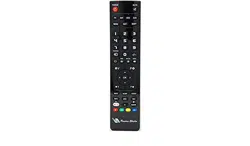
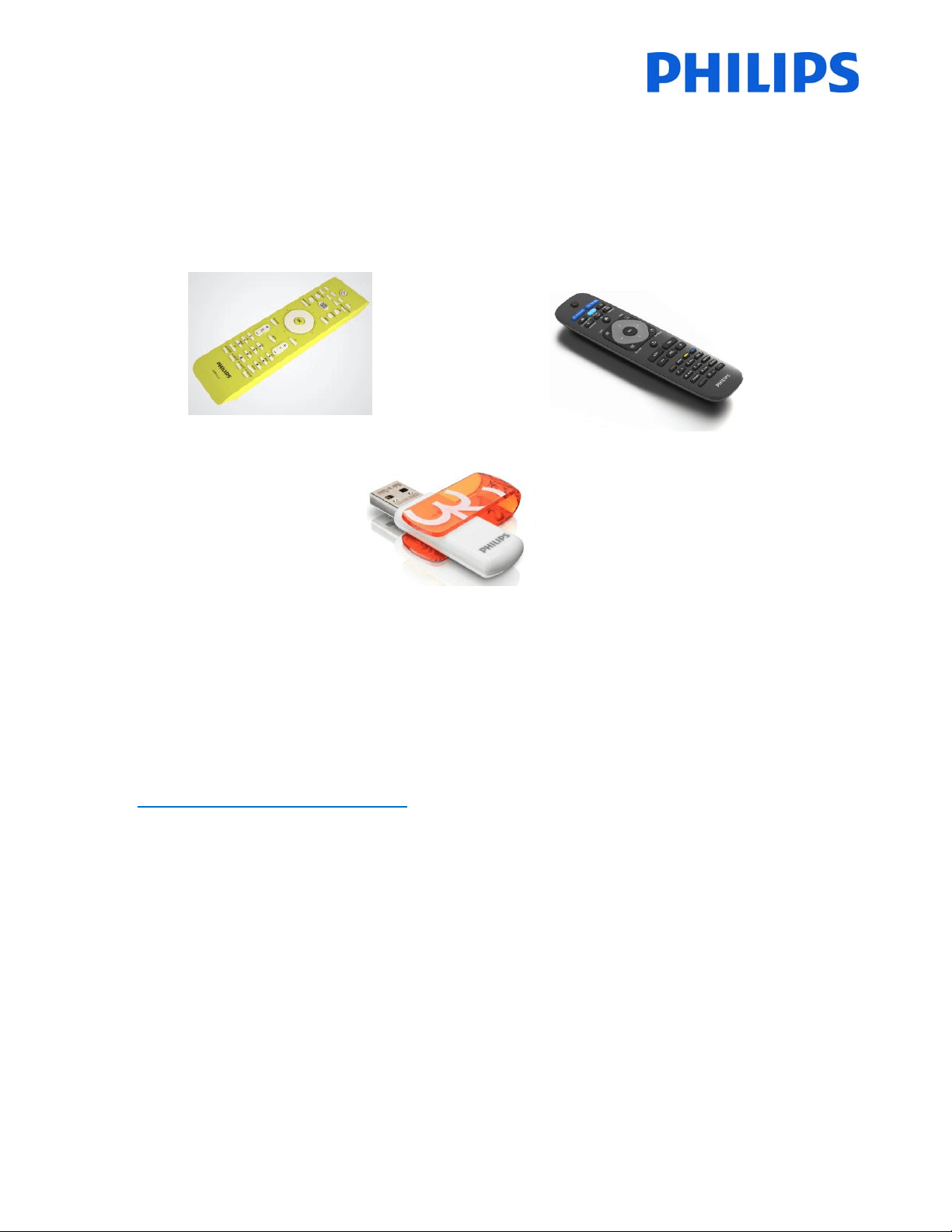
Masterremotecontrol22AV8573 or Guestremotecontrol22AV1409A/12
And
USBstick
Toaccessthe[ProfessionalSetup]menuwiththemasterremotecontrol,pressthe“RC6SETUP”keyandthenpress
the “Home/Menu” button. Using the guest remote control, press the following keys sequential:
“3,1,9,7,5,3,MUTE”.
Note:Thesequence:“3,1,9,7,5,3,MUTE”willnotshowthe[ProfessionalSetupMenu]ifthe[HighSecurity]
option
isenabled.
Forthebestguestexperienceitishighlyrecommendedtousethelatestsoftwareversionavailable.
Goto:http://www.support.philips.com/support
Enter the model number and download the latest software version available. Unzip the software and follow the
instructionshowtoupgradethesoftwareontheTV.TheUSBdriveusedforsoftwareupgrademustbeformattedas
FAT32 and preferably empty to avoid and accidental upload of wrong settings andsoftware.
It isrecommendedto
firstupgradetheTVandafterwardsperform theinstallation.
The latest software version and cloning data can be stored on the same USB drive for a 2 in 1 action: software
upgradeandcloningduringtheinstantinitialcloning.

7
AfterthisoperationtheTVwillpoweroffandonanddisplaytheinstallationwizard.
Note:Allsettingsareatdefaultvaluesandnochannelplanisavailable.

8
4. Installationwizard
WhenyouturnontheTVforthefirsttime,oryouhavereinstalledtheTV,youshouldseethefollowingscreen.
The TV is indicating that a search process for cloning data on USB key is taking place. If there is no cloning data
availabletheprocesscanbe
skipped. IftheTV doesnot find data for cloning,it willcontinuetothenextstep,the
installationwizard.
Here you will needto select your preferred language.The language selected will be used for the Consumer Setup
menu and for subtitle and audio language preferences. The language can
be change at any moment from the [TV
settings]menu.Pleaseselectwiththe“UpandDownarrow”keysandconfirmwith“OK” orpressthe“leftarrow”
key.
Afterthis,youwillneedtoselectthecountry.Dependingonthecountryselection,somepre‐definedsettingswillbe
activated,because
oflocalbroadcastrequirements.Example:digital/analogchannelscouldbedisabled;reordering
anddeletingchannelscaninsomecasesnotbepossible.
Note:Ifyouareexperiencingsomeissuesafterselectingyourcountry,pleaseselect‘Other s’inthemenu.

13
Beforestartingthesearchprocessitisadvisabletocheckthe[Settings]forsearchparametersandoptions.
Theoptionsfromthe[Settings]menuare:
[Frequencyscan] containsthree options:
‐ [Quick]: this is a fast method to search channels but it might
skipsomechannels(dependingonthenetwork).
‐ [Full]:thescanwillsearchonallfrequenciesandwillstore all
channels available. Thisis the safe method if you don’t know
thenetwork
parameters,butittakesmoretime.
‐ [Advanced]:IfyouknowthenetworkparameterslikeNetwork
ID,NetworkFrequency,youcanusethisoption,otherwisethe
safeoptionistousetheFulloption.
Note:Theoptionsaredependingontheselectionofthecountrysetting
(page9)
[SymbolRate]optionsare:
[Automatic]and[Manual].Ifyoudonotknowthecorrectvaluesfor
thisoption,pleaseusetheAutomaticoption.

14
[Analoguechannel]
Ifyoudon’thaveoryoudon’twanttoinstallanaloguechannels,you
candisablethesearchforthistypeofchannels.
[Free/scrambled] optionsare:
[Freechannelsonly]:TheTVwillsearchonlyforfreetoair(FTA)
channelsskippingthescrambledchannels.
[Free+scrambled]:TheTVwillsearchforfreetoair(FTA)and
scrambledchannels.
Afteryouhavecheckedorchangedsettings,pressthe“GreenButton”toconfirmthesettingsandtogobackto
pagefromwhichthesearchforchannelscanbestarted.Select[Start]andpress“OK”tostarttheinstallation
process.
Duringthechannelsearchyoucanseetheprogress
barandhowmanychannelsarefoundatthattime.

15
Whenthesearchisdone,youshouldsee[Channelsearchcomplete]andasummaryofthechannelsfound.
Press“OK”buttonontheremotecontrolto[Finish]thesearch.
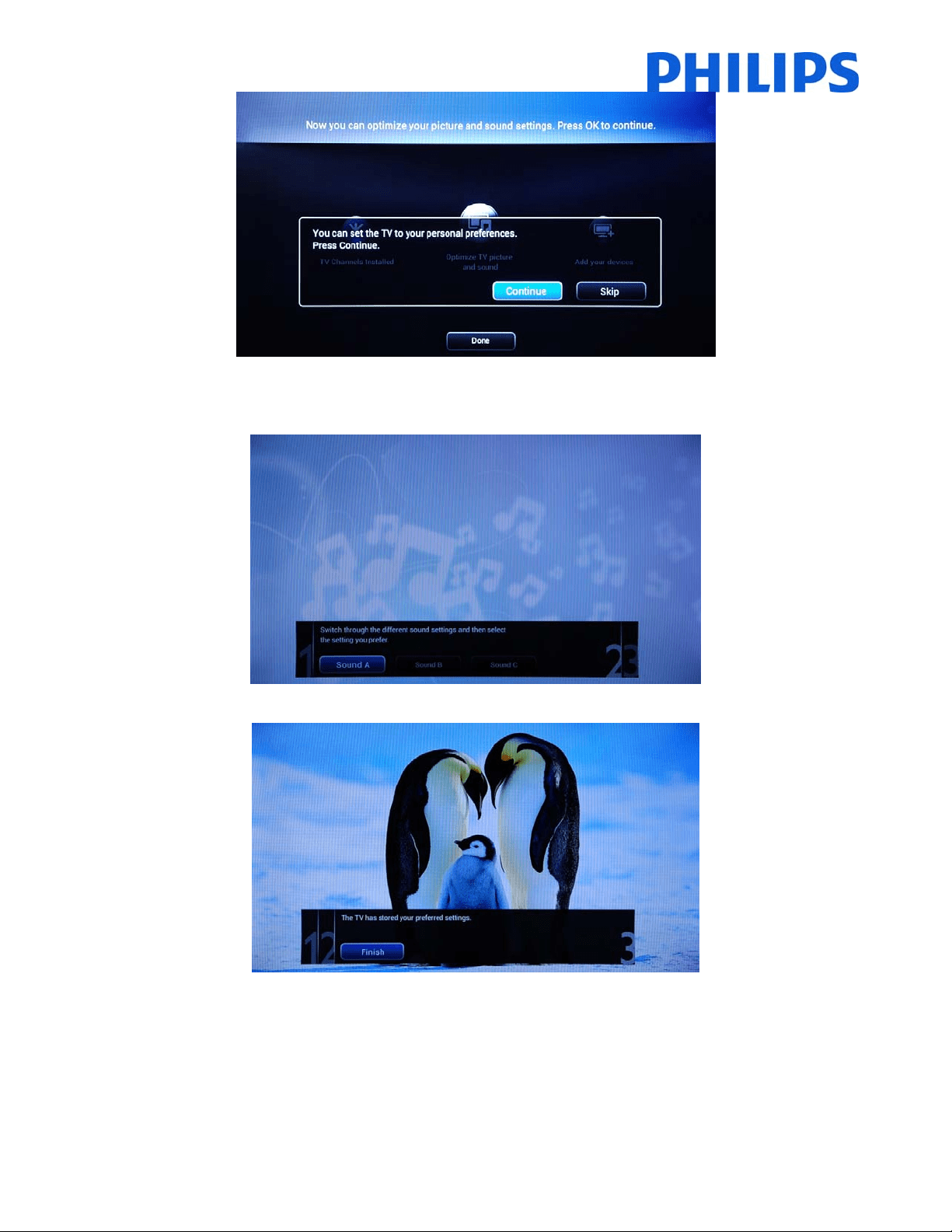
Ifyouwouldliketochangethepictureandsoundsettings,youcangoto[OptimizeTVpictureand
sound]andpress
the“OK”buttonontheremotecontrol.
AwizardwillstarttoguideyouthroughtheprocessofsettingthesoundandpictureontheTVset.Alltheoptions
presentedbythisguidecanbefoundintheConsumerSetupmenuat[Picture]and[Sound]settings.
Select
[Continue]tostartthewizardandpressthe“OK”buttonontheremotecontrol.
16
Thewizardwillaskyousomequestionsaboutwhichimageyouprefer,selecttheoptionyoudesireandpress“OK”
ontheremotecontrol.
Oncethiswizardisdone,youwillreturntotheinstallationmenuagain.
Thelastoptioninthismenuis[Addyourdevices].
ThiscanbedoneifyouwouldliketoaddaDVDplayerorSTB.

17
Whenyouaredonewiththis,select[Done]andpress“OK”ontheremotecontrol.
Afterpressing[Done]youhavecompletedtheinstallationoftheTVandyoushouldseethisscreen.Press“OK”on
theremotecontroltoexitthiswizard.
Note:Thiswizardwillnotbe
availableanymorewhenyoustarttheTVthenexttime.Theonlywaytore‐use
thiswizardistoreinsta lltheTVset.
18
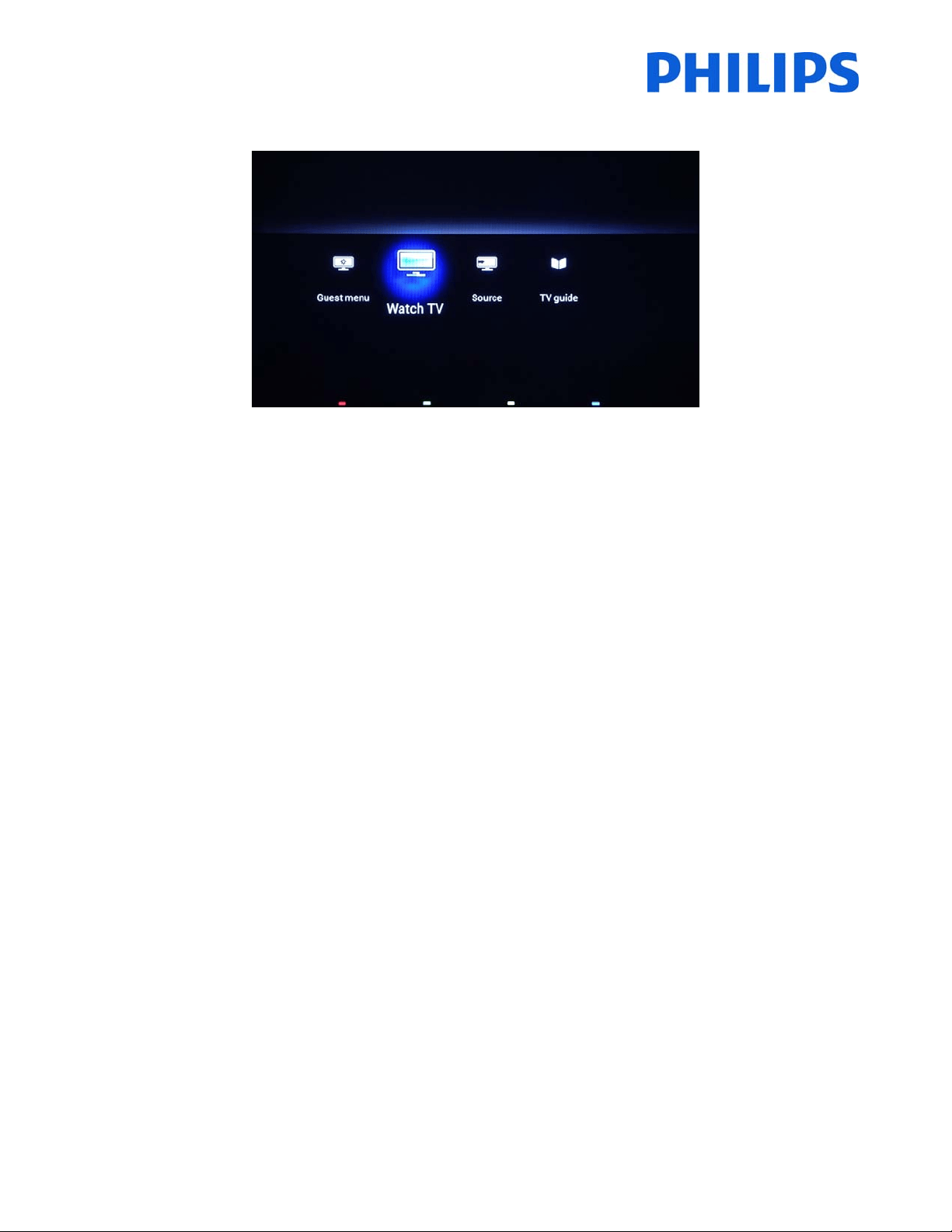
TheinitialsetupoftheTViscomplete.TVisdisplayingtheGuestmenu.Pressing[WatchTV]themenuwillbeclose
andTVwillshowfirstTVchannel.
Continuewithchannel(re)orderingandsetupoftheProfessionalmenuforacompleteinstallationoftheTVset.

19
5. Channeloptions
BeforecontinuingwiththeCo nsumerandProfessionalmenusetupitisrecommendedtosettheTVchannelsgrid.
Basedonchannelgr idoptionslike[SwitchONChannel],[ClockDownloadProgram]and[MyChoice]packagescan
beeasilysetup.
To reorder the TV channels, hide or rename the TV channels yo u
need to access the channel plan from the
ProfessionalSettings menu. In theGuest menu youcannot rearrange channels. To accessthe[Professional Setup]
menuwithmasterremotecontrol,pressthe“RC6SETUP”keyandthenpressthe“Home/Menu”button,followed
by “OK”key. Using the guestremote control, press the
following keys sequence:“3,1,9,7,5,3,MUT E” followed by
“OK”key.
The[ProfessionalSettings]menuwillbedisplayedlikeinthepicturebelow.
Gotothe[Channelsetup] optionandpress“OK”toaccessthesubmenu.
Thewarningmessagewhichinformsyouthat“allunsavedchangeswillbediscarded”willpopup.Select
[Yes]and
pressthe“OK”toconfirm.
22
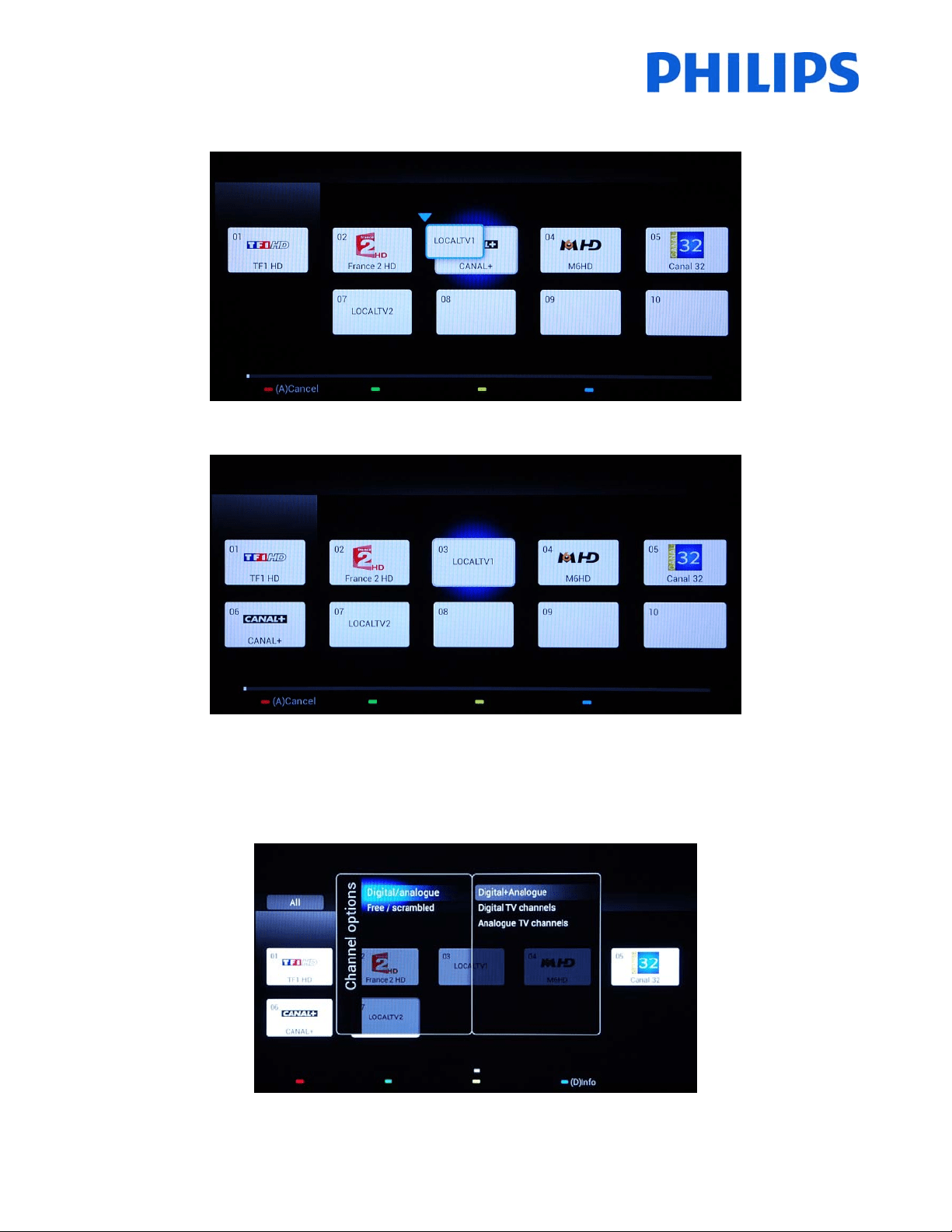
Whenthechannelisselectedtheiconissmallerandanarrowisindicatingthatthechannelcanbemoved.Usingthe
[Arrrow]keystonavigatetothenewpositionoftheTVchannelandpresstodeploythechannelonnewposition.
Thechannelmovedwillswappositionwith
thechannelthatwasselected.
The“Options”buttonallowssortingbetweendifferenttypesofchannelsforaneasiermanagingofTVchannels.
WhenallTVchannelsareonthecorrectpositionpressthe“Back”buttontoexitfromallmenus.

23
6. ConsumerSetupMenu
UsingthemasterremoteyoucanaccesstheConsumerSetupmenuandProfessionalSettingsmenubypressingthe
“RC6SETUP”keyandthenpressthe“H ome/Menu”button.Withtheguestremotecontrol,pressthefollowingkeys
insequence:“3,1,9,7,5,3,MUTE”.
TheConsumerSetupmenuallowsyoutochangedifferent
settingswhicharenotavailableintheGuestMenu.
Thetoppartcontainswizardsfordifferentitemsandoptions.
[Quickpictureandsoundsettings]:Wizardforbestpictureandsoundbasedoffewpresets.
[SearchforChannels]:Fromthismenuanewsearchforchannelscanbestarted.
[Updatesoftware]:
TVsoftwareupdatecanbeeasilystartedusingthismenu.MakesurethattheUSBdrive
insertedcontainsthelatestsoftware.
[ProfessionalSettingsMenu]:TheprofessionalsettingsoftheTVwhichareexplainedinchapter7.
Thebott ompartoftheConsumermenucontainsallsettingsforpicture;channelsettingsand
softwareupgrade
mechanism.ThesesettingsmighthaveacorrespondentintheProfessionalmenuwhichwillleadasbehavior(e.g:
Automaticchannelupdate)
[TVSettings]:generalsettingsfor“Picture”,“Sound”and“Generalsettings”
[ChannelSettings]:generalsettingsfor“Language”,“Channelinstallation”and“Childlock”
[Softwaresettings]:informationon“currentsoftwareinfo”,
selecting“localupdates”,“lookforOADupdates”(SW)
24
7. ProfessionalSettings
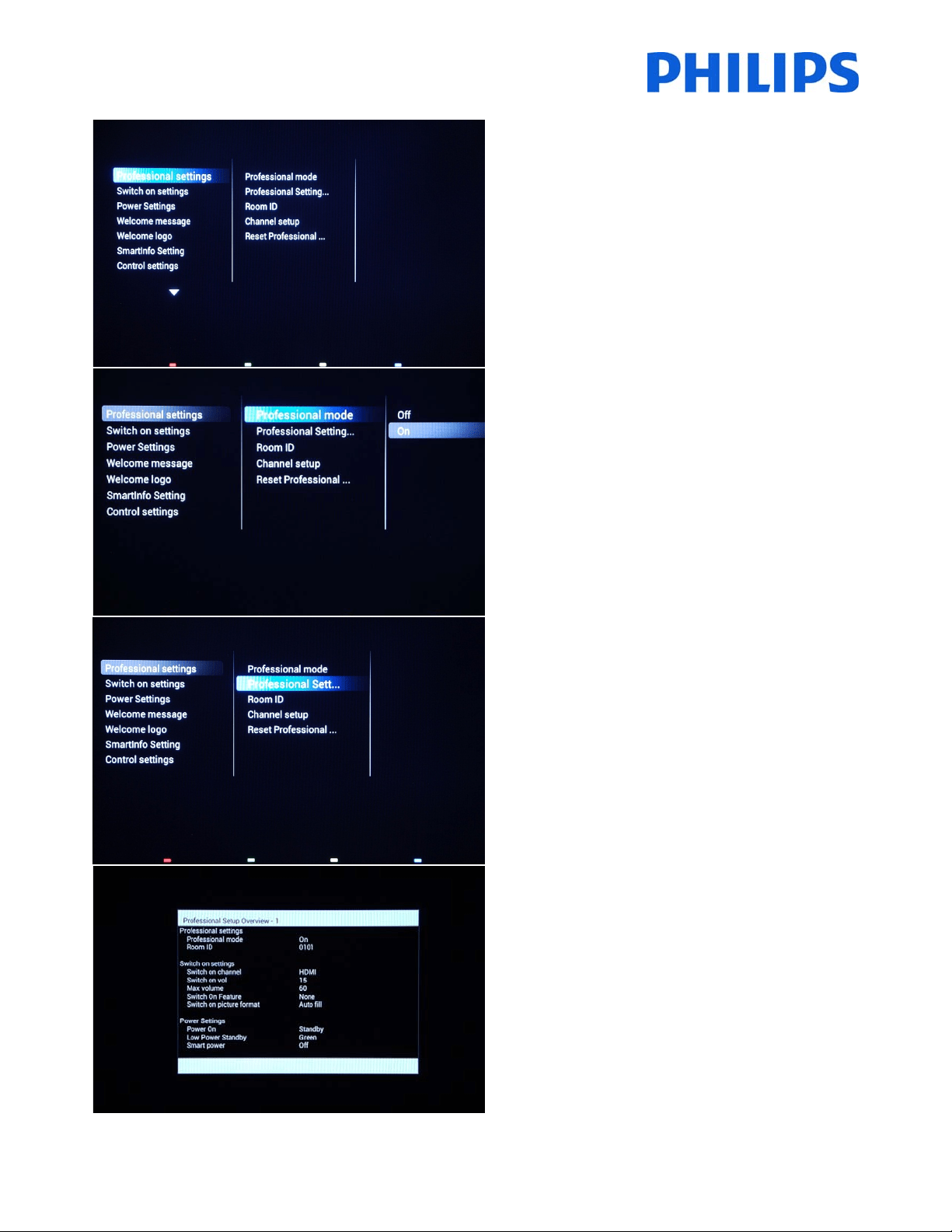
[ProfessionalSettings]
Settingsespeciallydesignatedforhospitality.
[ProfessionalMode]
[Off]:TheTVoperatesasabasic(consumer)TV.
[On]:AllsettingsintheProfessionalSettingsSetupmenu
areactive.
OnlybyswitchingonthismodetheTVwillactasa
HospitalityTV.
[ProfessionalSettingsOverview]
DisplayanoverviewoftheProfessionalsettings.
[ProfessionalSettingsOverview]
ExampleoftheProfessionalSettingsmenu.
Note:Novaluecanbechanged.

29
[Line2]
Line2:Secondlineofthewelcomemessage.
[Clear]
Willdeletethecurrentwelcomemessage.
[MessageTime‐out]
Setstheperiodoftimetodisplaythewelcomemessage
onthescreenwhenTVisturnedonfromstandby.
Selectablevalues:20,25,30seconds.
[Welcomelogo]
Enables/disablestheshowingofthestoredwelcome
Logoatstart‐upwhentheTVstartsupinGreenMode
(seePowerSettings):

35
[EnableCI‐slot]
EnablesordisablestheuseoftheintegratedCI/CI+slot:
[Off]:NopassthroughoftheTVinput signalviatheCI
SlotCardispossible;theuseofCICardslotisnot
possible.
[On]:PassthroughoftheTVinputsignalviatheCI‐Slot
Card
ispossible;theuseofCI‐Cardslotispossible.
!!CheckwithyourlocaloperatorifyourCI‐Cardiscompatiblewiththis
TV.
Note:Duethefactthatsomedecryptioncardhavevalidityperiod
Setuptheclockdownloadprogramshouldbeproperconfigured.
[ScrambledProgramDisplay]
OSDmessageisdisplayedifTVchannelisscrambledand
requiresCI+modulefordecryption.
[ON]:Themessagewillbedisplayed
[OFF]:Themessagewillbesuppressedandwillbeno
indicationwhytheTV
[EasylinkBreak‐in]
EnablesordisablestheHDMI‐CECstandbyfeaturein
Professionalmode:
[Off]:NotabletoswitchontheTVbyexternalHDMI‐CEC
devices.
[On]:AbletoswitchontheTVbyexternalHDMI‐CEC
devices.
[Easylinkcontrol]
EnablesordisablestheHDMI‐CEConetouchplayfeature
inProfessionalmode:
[Off]:DisablesTVfunctionalitytocontrolexternalHDMI‐
CECdevices.
[On]:EnablesTVfunctionalitytocontrolexternalHDMI‐
CECdevices.

36
[Digittimeout]
Definesthetimeintervalbetweennumericbuttons
presseswhenuserswillaccesstwoorthreedigits
channels.
Selectablevaluesfrom0.5to9.9seconds.
[SelectableAV]
Allowstheinstallertodefinewhichexternalsourcesto
bedisplayedonthesourcelistwhenpressingAVbutton
ontheGuestremotecontrol.
Note:Onlythesourcesmarked[X]appearinthesourcelist.
[WatchTV]
Selectthefunctionfor“WatchTV”buttonontheremote
control.
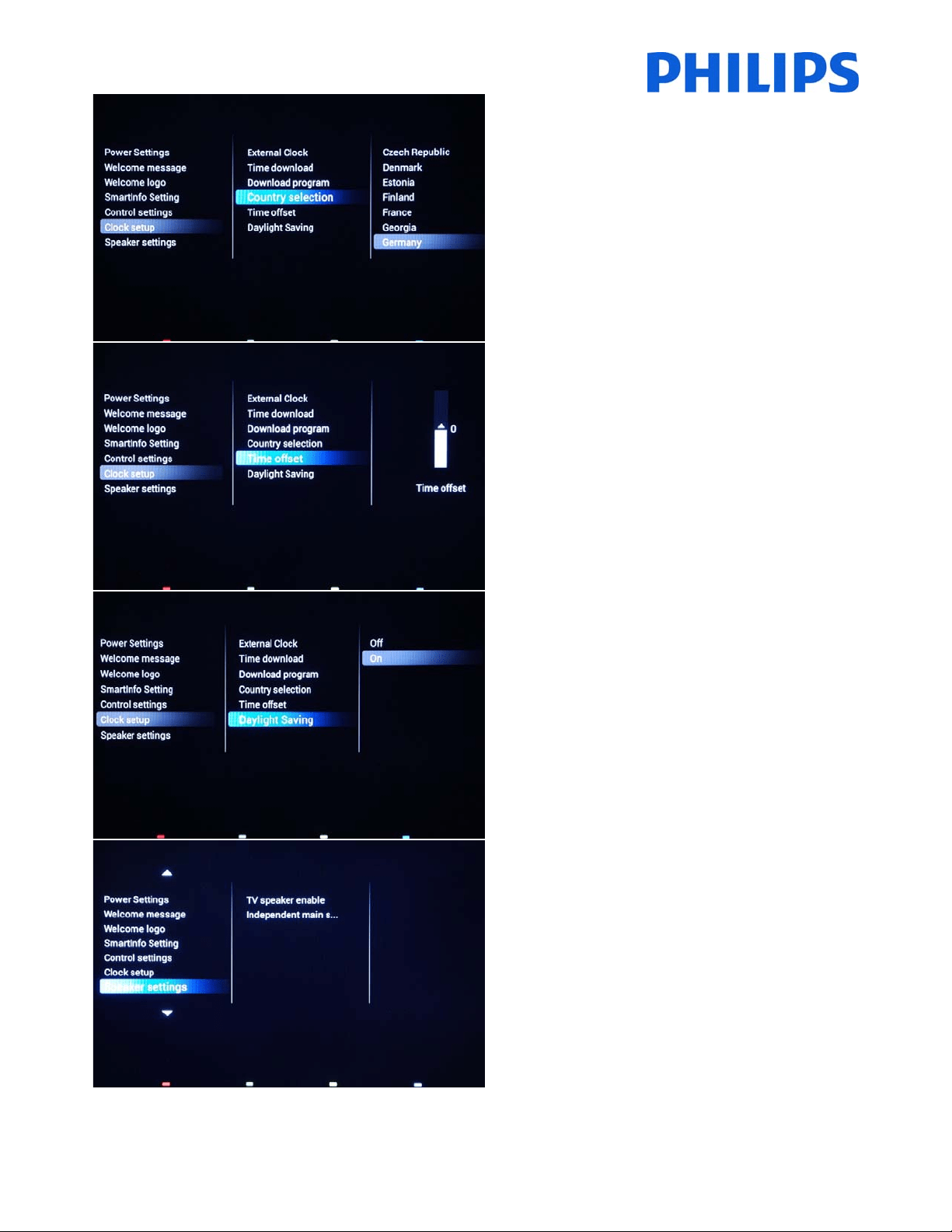
[Clocksetup]
SettingsfortheTVclock.
38
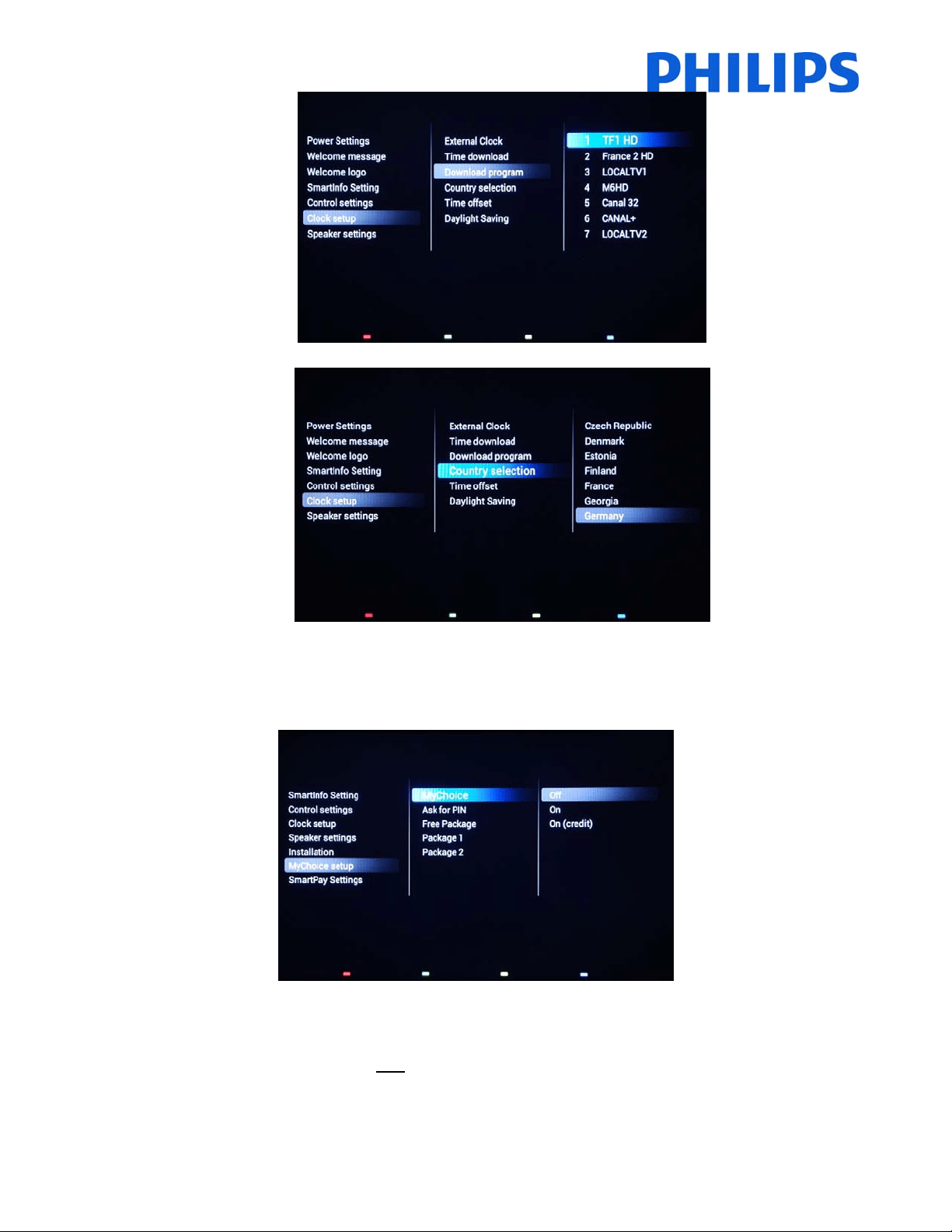
[Countryselection]
Toselecttheoriginalcountryfromthechannelchosenat
“Downloadprogram”.
[Timeoffset]
Tosetthetimeoffset.
Incasetheclockdownloadinformationisnotcorrectfor
yourregionyoucansetanoffsetheretocorrectthis.
Note:Selectablevaluebetween‐12and+12.
[Daylightsaving]
EnablestheautomaticswitchbetweenWinterTimeand
SummerTime.
[OFF]:Daylightsavingtimeisdisabled.Notime
correctionwillbeappliedwhileswitc hingbetweenwinter
andsummertime.
[ON]:Daylightsavingtimeisenabled.
[Speakersettings]
Submenuwithspeakersettings.
39
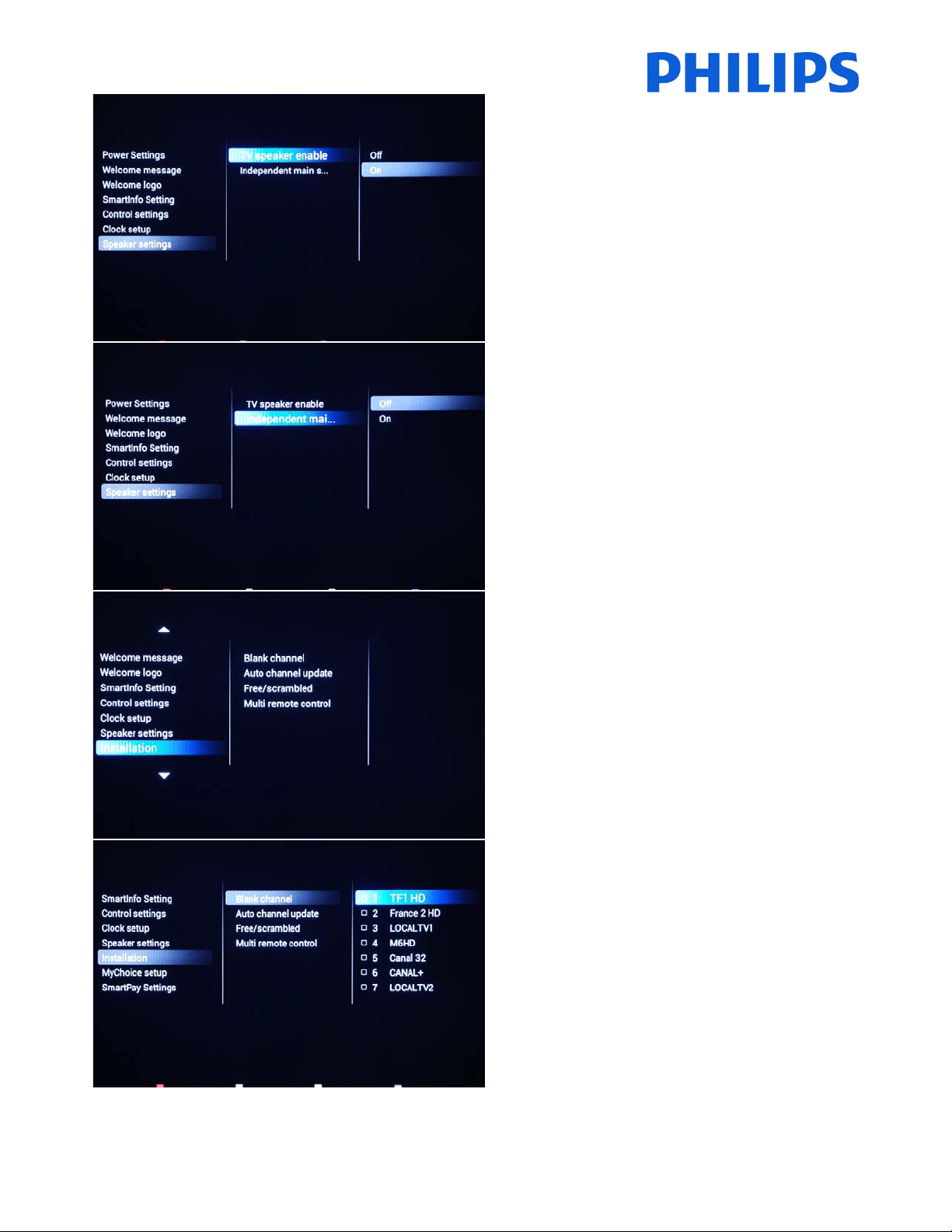
[TVspeakerenable]
[Off]: Disables the TV Main speakers. The headphone
outputisnotaffectedbythissetting.
[On]:EnablestheTVMainspeakers.
[Independentmainspeakers]
[Off]: The volume +/‐ on the Guest remote control will
affect both the TV Main speaker and the headphone
volume.
[On]: The volume +/‐ on the Guest remote control will
affect both the TV Main speaker and the headphone
volume.
After pressing “MUTE”, the volume +/‐ on
the Guest
remote control will not reactivate the TV Main speaker
volume,butwillonlycontroltheheadphonevolume.
[Installation]
Channelsettingsandmultiremotecontrol.
[Blankchannel]
The Blankchannel function disables the display of video
ontheTV,butdoesnotaffecttheaudiooutput.
Selectordeselectcanbedonebypressing“OK”buttonon
theremotecontrol.
Note:ThechannelsmarkedwithXwillnotdisplayvideoontheTV.

41
[MyChoice]
[Off]:DisablesMyCho icefunction.
[On]:EnablesMyChoicefunctionwithscratchcards.
[ONCredit]:MyChoiceworkswithMyChoiceCredits.
[AskforPIN]
[OFF]:Thecodeisrequ iredonlyonetimeatactivation.A
newcoderequestwillberequestedwhenthevalidityis
expiring.
[ON]:PinCodeisrequiredevertimewhenthefeatureis
used.EverytimewhentheTVsetisswitched[ON],the
featurewillrequirethe
pincode.
MyChoiceconfiguration:
FreePackage:Channelsfreetoview
MyChoiceconfiguration:
[Package1]:TVChannelsincludedinthepackage.

42
MyChoiceconfiguration:
[Package2]:TVChannelsincludedinthepackage.
[SmartPay]
EnableordisableSmartPay.
[OFF]:Thefeatureisdisabled.
[ON]:Thefeatureisenabled.
[Combinechannellist]
Externalsourceswillbeaddedtothechannellist.
[OFF]:Theexternalsourcesarenotpresentinthe
channellist.
[ON]:Theexternalsourceswillbepresentattheendof
thechannellist.
[VSecure]
VSecure is the hospitality content scrambling method
used by the Philips Hospitality TVs. If you are interested
to use it please contact the local Philips Hospitality TV
salesrepresentative.
43
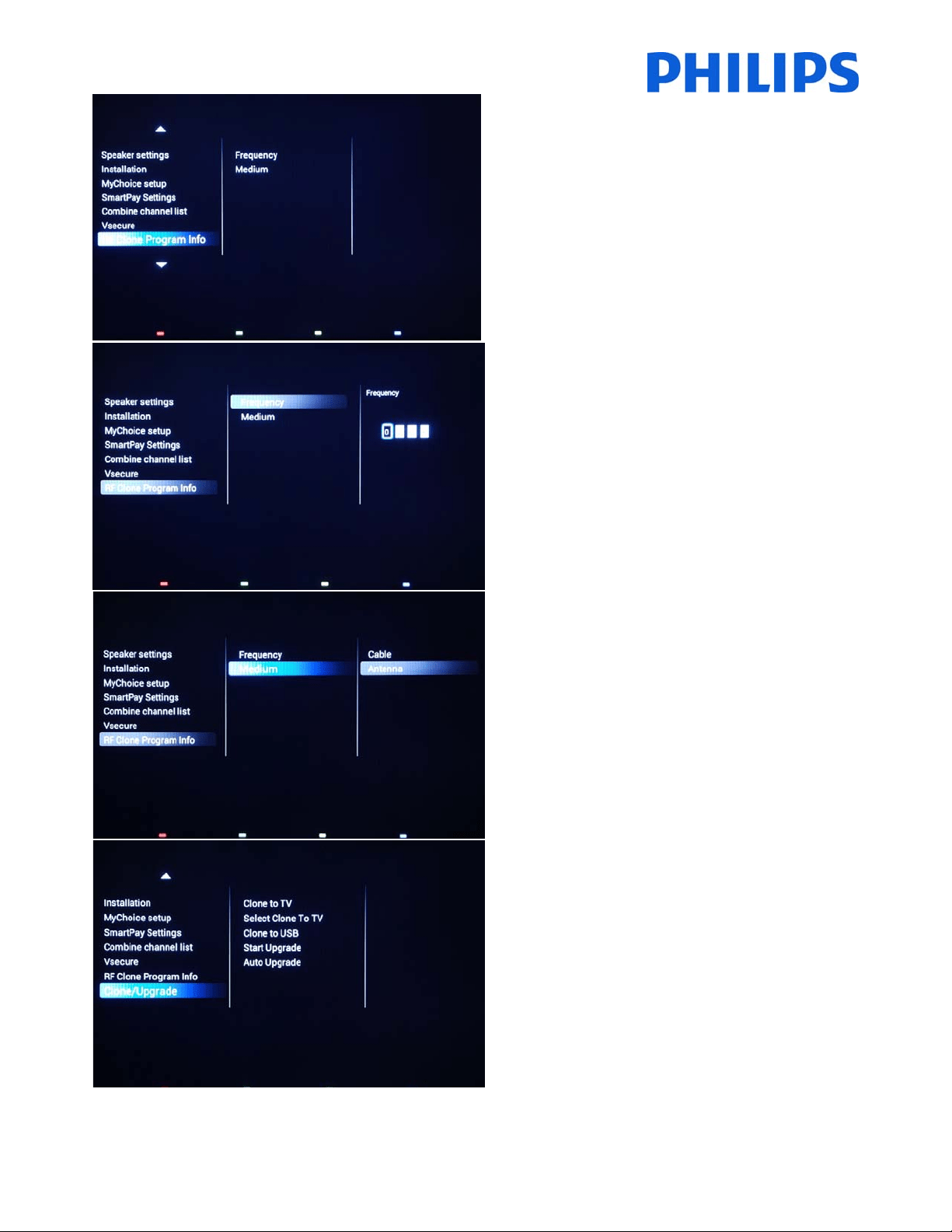
[RFCloneProgramInfo]
Allthesettingsfromthissubmenuareusedfor
SmartInstall.
[Frequency]
ThefrequencyforSmartInstallcanbemodifiedinthis
menu.
Note:Defaultvalueis706MHz
[Medium]
DefinesthetypeofdigitalchannelusedforSmartInstall.
Note:SmartInstal lisworkingonlyviaAntennacabletype
(DVB‐T)
[Clone/Upgrade]
Cloningandupgradeoptionsareavailableinthismenu.
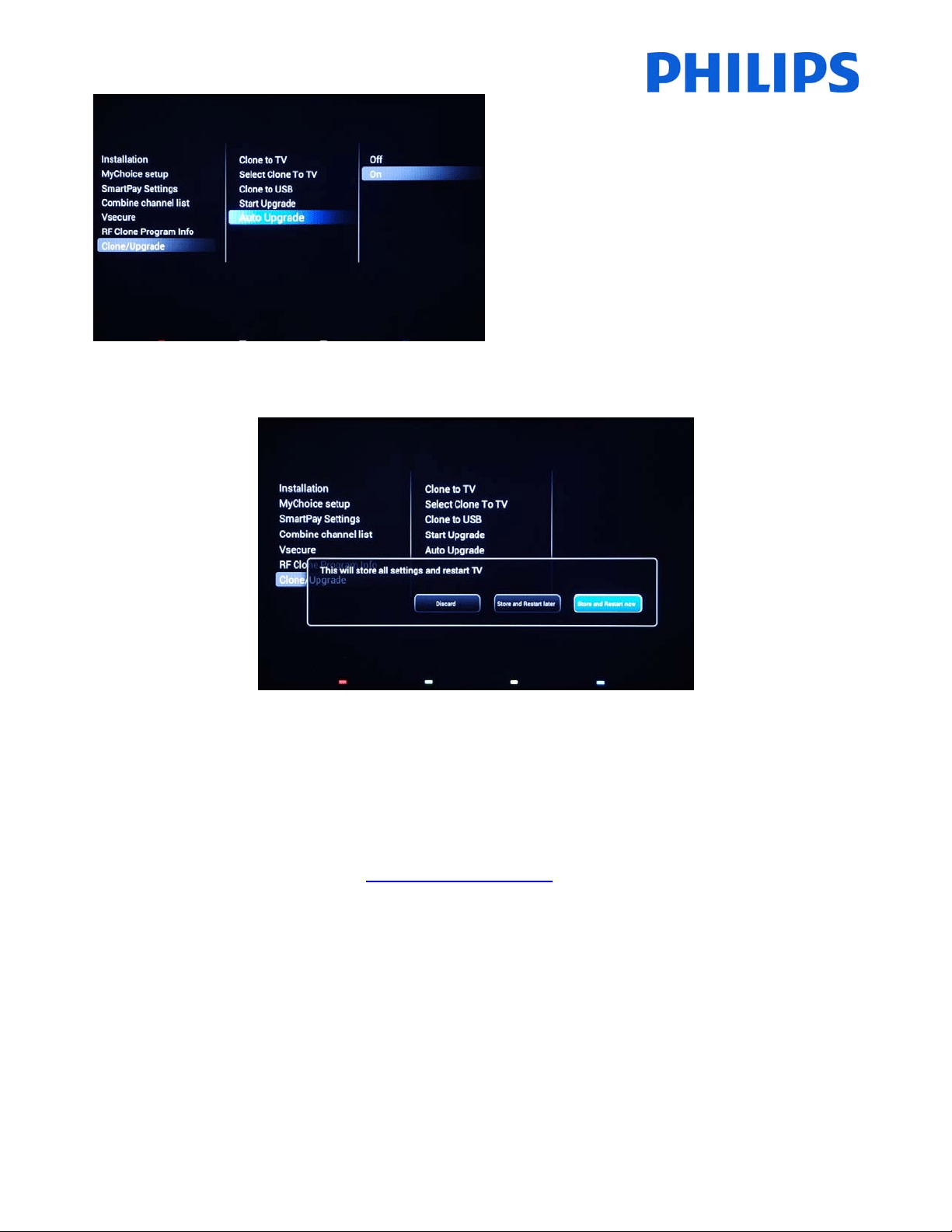
45
[AutoUpgrade]
RFupgradewillbeenabledautomaticallyat4A.M.Ifthe
TVisinstandby,theTVwillsearchforSmartInstall
broadcast.
[OFF]:RFcloningandupgradeviaSmartInstallisdisabled.
[ON]:RFcloningandupgradeviaSmartInstallisenabled.
Tostoresettingspress“HOME”(MENUbutton).Thefollowingmenuwillbedisplayed:
[Discard]:AllchangesintheProfessionalsetupmenuwillbediscardedandTVwillreturntoTVchannel.
[StoreandRestartLater]:AllchangesaresavedbutwillbeappliedonlywhenTVwillrestart.
[Store
andRestartNow]:TVwillstorethesettingsandwillrestarttoapplyallthesettings.
Afterrestartitishighlyrecommendedtocheck thechannellist,settingsandoptionsenabled.Ifthecheckdidnot
revealanyproblemsandallspecificationsareinaccordancewiththerequirements,youcan
proceedtothecloning
masterTVsettingsontherestoftheTVs.Checkhowtoclonesettings.

46
8. WelcomeLogo
IMPORTANT:Totalamount ofsizeforSmartInfoandWelcomeLogoMUSTbesmallerthan64Mb(megabyte)
Thereis1Philipslogodisplayedatstartup.ThelogocanbereplacedbyapictureuploadedviaUSB.
Fileformat:1280x720.pngfile.ThewelcomelogoisdisplayonlyifLowpowerstandbyissettoGreenandTVisin
deepstandbystatebeforeswitchingON.
Note:Below
thestartupprocessisdescribed.Theswitchingtimecanbeinfluencedbythelowpowerstandby,
featuresactivatedatstartupandswitchONchanneltype(HDorSD).
HowtouploadWelcomeLogo
1. Creategraphicsfile:1280x720.pngwithlogo.
2. Filename:TPN142HE_WelcomeLogo.png(Filenameis
case‐sensitive)
3. SaveintotheTVcloningdatafolder“TPN142HE_CloneData\MasterCloneData\”
4. InsertUSBdeviceintoTV
5. Enter[Professionalsettings]menu
6. Go to[Welcomelogo]‐>[USB‐>TV].ThisactionwillloadtheUSBintoTVmemory.
7. Go to[Displaylogo]andsetthe
option[On]toenableWelcomeLogo.
8. Go tothemainmenuandselect[PowerSettings][LowpowerStandby]:SetthevaluetoGreen.
9. Pressthe“HOME/MENU”buttontosaveandexit.Selecttheoption[StoreandRestartnow]andpress
“OK”.TVwillstore thesettingsand
restarttoapplythenewsettings.
8.1SmartInfo
TheSmartInfofeaturecanbeusedintwoways,asapictureslideshoworasuserinteractionpages.Thetwowaysof
usingSmartInfoarenotcomplementaryandcannotbeusedbothatthesametime.SmartInfocandisplaythe
picturesorthewebpagesbypressingthe“SmartInfo”button
ontheremote.TocloseSmartInfopressthe“Menu”
orthe“TV”button.ForbothcasesthepagesarestoredintheTVmemoryandcanbechangedviaUSBflashdriveor
SmartInstall.
Inthe[ProfessionalSettings]menustheoptionsforSmartInfoare:
SmartInfo:OFF‐>SmartInfoisnot
enabled.
SmartInfo:Show‐>SmartInfoisconfiguredaspictureslideshow
SmartInfo:Browser‐>SmartInfoisconfiguredtousewebpages.
Note:DuethefactthatEasySuitedoesn’thaveanetworkinterface,pagesoutsideofTVmemory
cannotbeaccessed.TVmemoryisinmax.64MB.
48
9. Clone
Withcloningitispossibletocopyto/fromaUSBdevicetheTVconfigurationdata,mediacontentandthechannel
listdata.PlaceaUSBMemorystickintheUSBsideconnectoroftheTV.
*TheUSBdeviceshouldbeformattedasFATorFAT32.
AccesstheProfessionalmenuby
pressingthe“RC6SETUP”key,andthenpressthe“Home/Menu”button.Withthe
guestremote control,pressthefollowingkeys in sequence:“3,1,9,7, 5,3,MUTE”.Accessthe[Professionalsettings]
menuandgoto[Clone/Upgrade]:
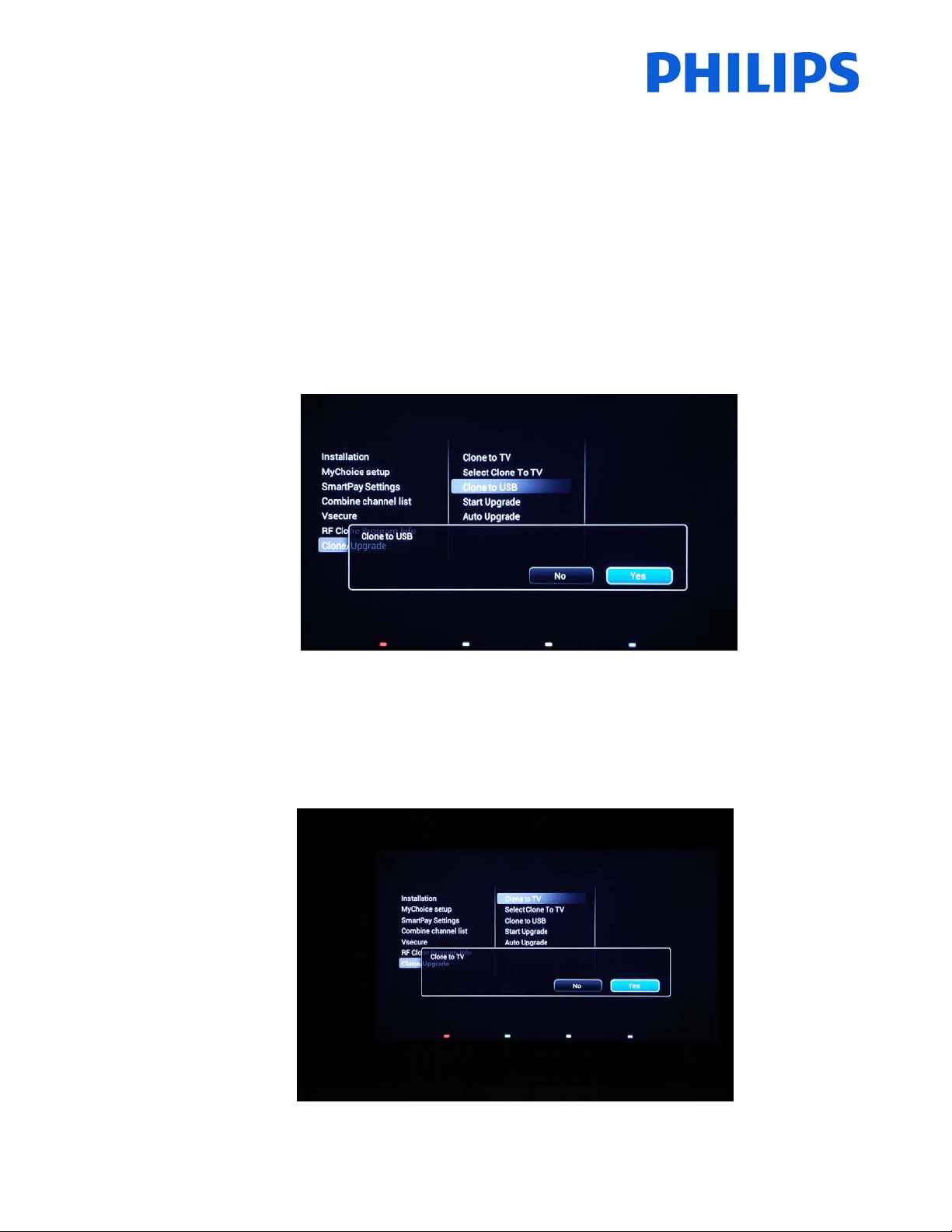
TocloneallthesettingsfromtheTV,theoption[ClonetoUSB]shouldbeused.
1.
Select[ClonetoUSB]andpress“OK”.
2. TheclonedatawillbeloadedfromtheTVsetintoUSBdevice.
3. WaituntiltheOSDmessagereturnstoitsearlierstatebeforeremovingtheUSBdevice
TocloneallsettingsfromtheUSBtotheTV,theoption
[ClonetoTV]shouldbeused.
1. Select[ClonetoTV]andpress“OK”.
2. TheclonedatawillbeloadedfromtheUSBdeviceintotheTV.Toactivatetheloadedsettings,TVwill
restart.AfterrestartTVwilldisplaytheProfessionalmenuoverview.
3. RemovetheinsertedUSB
drive.
49
Instantinitialcloningandsoftwareupgrade:
ATV out oftheboxwill triggerasoftware upgrade andthe instant initial cloning mechanism; ifthe files forthose
actionsarenotavailable,theTVwilldisplaytheinstallationwizard.Beforeconnectingthe powerco rdandpowering
on the TV, insert the
USB key with cloning data and the latest software version downloaded from the support
website.AfterpowerontheTVwillsearchontheUSBkeyforanewersoftwareversion,willapplyitandafterwards
willcheckifthecloningdataisavailable.Whenthecloningprocessiscomplete
theTVwilldisplaythesummaryand
timestampsforeac hfilecloned.
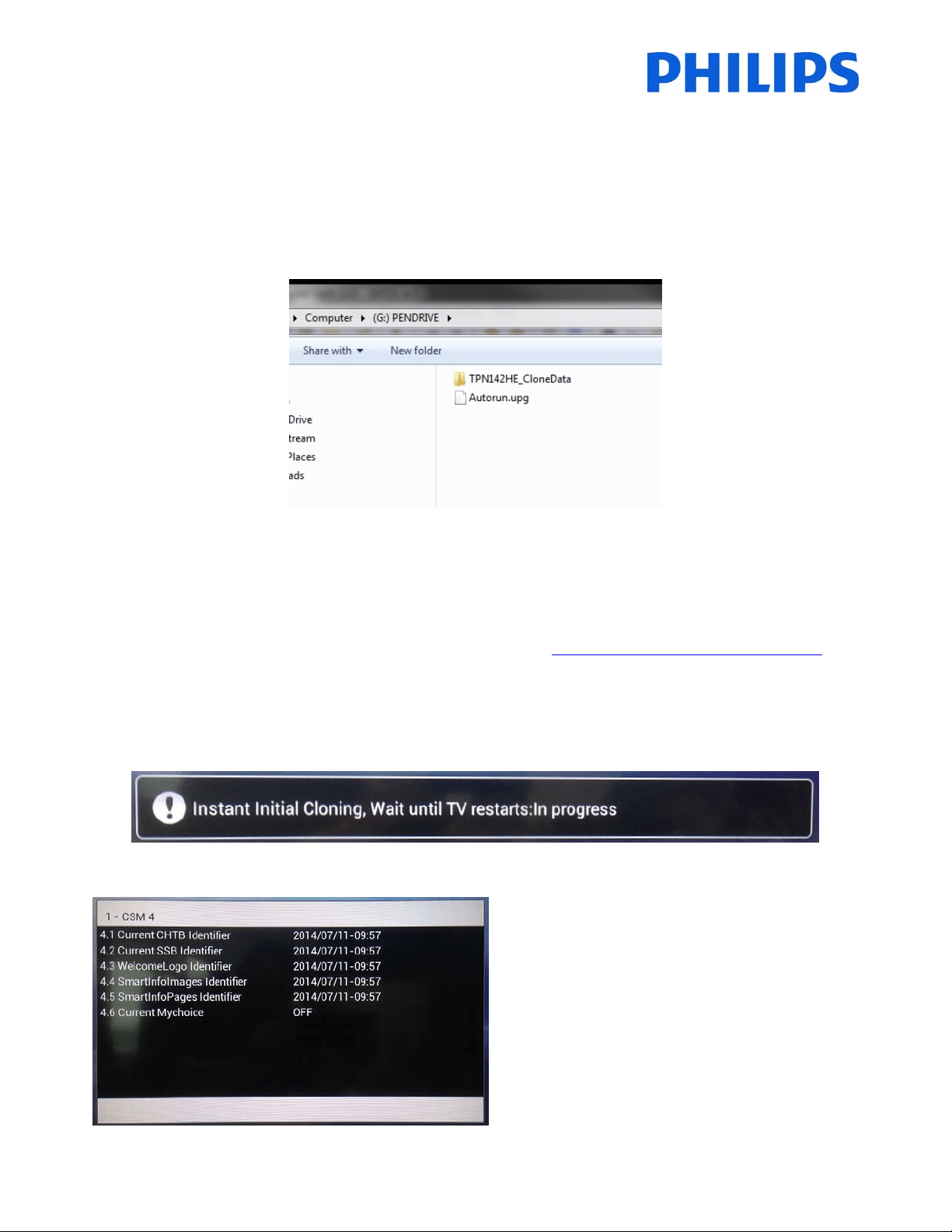
ContentofaUSBflashdriverpreparedforsoftwareupgradeandinstantinitialcloning.
TPN14HE_CloneData:containsthecloningdataandCSMinformation
Autorun.upg:isthelatestsoftwareversiondownloadedfromhttp://www.support.philips.com/support
Note:TVwillchecktheversionnumberofthesoftwareavailableontheUSBandwillupgradeonly ifthenumberis
higherthantheoneinstalledonTV.
DuringtheinstantinitialcloningthefollowingOSDmessagewillbedisp layed.
WhentheprocessiscompletetheCSMsummarywill
bedisplayed.
Whenthesummariesaredisplayedpowerdownthe
TVusingthePowerbuttonontheremoteandremove
theUSBkey.PowerontheTVtochecktheresultof
thecloningandcorrectfunctionalityofTV(e.q:
Welcomemessage,welcomelogo,hotelinfo,starting
channel,startupvolume).
51
AfterwardsdefinethecountryinwhichtheTVisinstalled.
AndifitisrequiredtheTimeoffset.
2. GotoInstallationandenableMyChoice.
Inthiscasethreeoptionsareavailable.Theseare:
[OFF]:ThismeansthatMyChoiceisdisabledandthepackagesarenotavailable.
[ON]
:MyChoiceisenabledbutwillonlyworkwithscratchcards.
[ON (Credit)]: MyChoice is enabled and it is accepting the codes generated by the MyChoice website and
alsothecodesgeneratedwithscratchcards.

53
Note:Extrachannelscanconta insomemoviechannelsorsportchannelslike:HBO,ComedyCentral,SkySport.
Package2:InthispackageyoucanaddchannelswhichwillbeactivatedwithadifferentMyChoicepincode.
Thispackagecancontain“Freechannels”,“Package1”andanotherfewchannelswhichwillbeavailable
onlyifthepincodeisvalidforPackage2.
Fewconfigurationspossibleare:
Package
2=Freechannels+VIPChannels
Note:VIPchannelscancontainchannelswhichareincludedinPackage1andafewextra.
Package2=Freechannels+Package1+VIPChannels
Eachpackagecanbeconfiguredindependentlywithouthavinganyinfluenceonotherpackages,butyou
havetokeepinmindthatafteractivationtheTVwillshowonlythechannelswhicharetickedforthis
package.
Press“HOME”button
toexitthe[Professionalmenu]andstoreallsettings.
5. ChecktheMyChoicefu nctionality.
PowerONtheTVandwaittoseetheSwitchonchannel.Pre sstheMyChoicebuttonontheremotecontrol.
ThefollowingwindowwillappearonTV:
Enterthepincodereceivedfromthewebsite
orgeneratedwithascratchcard.AfterenteringthepincodepressOK
tosubmitthecode.
Ifthepincodeiscorrect,thefollowingmessagewillbedisplayed.Alsothemessagewilldisplaytheremaining
viewingtime.
Afterafewsecondsthemessagewilldisappearandthechannelgrid
willpopupshowingallchannelsavailable.The
MyChoicechannelswillhaveastarinsidethebox.
Ifyouenteraninvalidpincodeoranexpiredpincodethefollowingmessagewillbedisplayed.

© 2014 Koninklijke Philips N.V.
All Rights reserved.
Specifications are subject to change without notice.
Trademarks are the property of Koninklijke Philips N.V. or their respective owners.
www.philips.com