TM
AQUABASS
USER GUIDE

MOKI AQUABASS
WATERPROOF BLUETOOTH SPEAKER
Moki AquaBass is the tough, durable, waterproof
speaker that will conveniently go anywhere you do.
From a speaker that fits in the palm of your hand
the AquaBass delivers an amazingly full sound and
a deep bass that must be heard to be believed.
Tested to the International *IPX7 Standard*, it can
take a spill, a splash or even a dunk in the ocean
without fear of damage. Clip it on, pump it up and
make a splash of your own.
CONTENTS
• AquaBass Waterproof Bluetooth® Speaker
• Recharge Cable - MicroUSB to USB
• Audio Cable - 3.5mm to 3.5mm
• Carabiner Clip
• User Guide
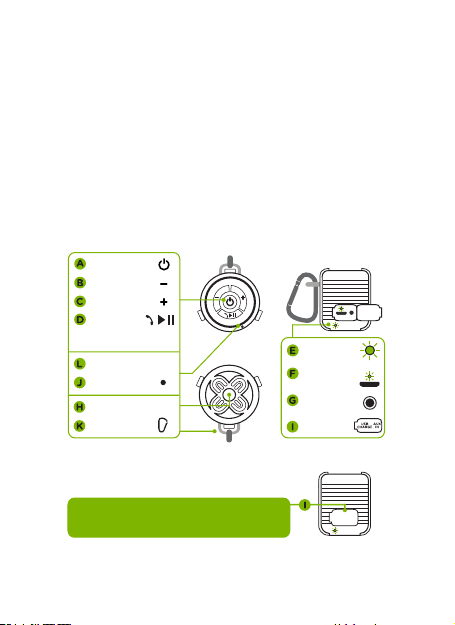
A Power ON/OFF
B Volume down
C Volume up
D Play/pause-
during music,
Answer/hang up-
during phone call
E LED indicator
F MicroUSB charge port
G 3.5 mm input (AUX IN)
H Speaker driver
I Port cover
J Microphone
K Carabiner clip
L Non-slip pad
USB
CHARGE
AUX
IN
Note: You must ensure the port cover is
securely closed before taking AquaBass
into wet or dusty environments.
3.5mm input
(AUX IN)
Port cover
LED indicator
(Bluetooth)
MicroUSB
charge port
Side
Speaker driver
Power ON/OFF
Carabiner clip
Volume down
Volume up
Non-slip pad
Microphone
Play/pause
Answer/
hang up
Top
Base
OVERVIEW
CABLE FEATURES
RECHARGE
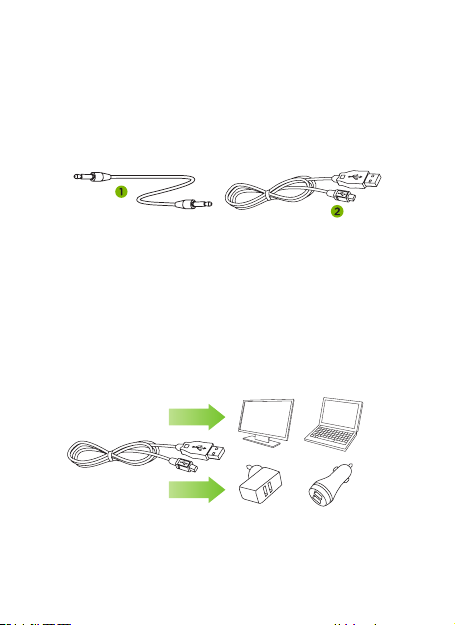
1. Play Music - 3.5 mm - 3.5 mm cable -
attach to AUX-IN and play device.
2. Recharge - attach MicroUSB to AquaBass
for recharge.
• Insert mini USB plug into AquaBass.
• Insert standard USB plug into a port on
PC / laptop or USB wall / car adaptor
(not included). Charge approximately 3 hrs.
• LED will glow red when battery is recharging.
• When battery reaches full capacity LED will
turn o.
Note: After recharging ensure the port cover is
securely closed.

Note: Only one Bluetooth audio player or phone
may connect to the AquaBass at a time. If you
have a problem connecting, check that no other
previously paired devices are reconnecting
automatically. To re-scan simply turn AquaBass
power o, wait five seconds and turn power back on.
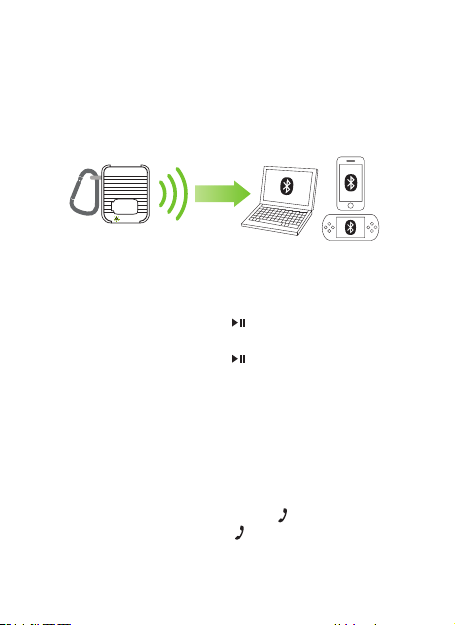
Connecting a Bluetooth device for the first time
To pair and connect
1. Place the AquaBass and your Bluetooth device
within one metre of each other.
2. On your device, turn ON Bluetooth and scan
3. On the AquaBass press and hold the power
( ) button for 1-2 seconds until you hear the
start-up chime beep and see the LED quickly
flash red / blue, indicating AquaBass is
searching for a Bluetooth device to connect with.
4. After a few seconds “AquaBass” should appear
listed under available devices. Select it to connect.
OPERATING INSTRUCTIONS
Bluetooth and associated call functions will only operate
when there is no cable connected to the 3.5 mm AUX-IN
socket of the AquaBass. Before taking the AquaBass
into wet or dusty environments ensure the port cover is
securely closed to prevent internal damage.
Pair and play via Bluetooth
Note: The AquaBass will scan for new Bluetooth
devices or will reconnect to the last paired device
if it is close by. You may be required to enter
passkey “0000” if requested depending on the
Bluetooth version of your device.
USB
CHARGE
AUX
IN
Moki AquaBass has a simple control panel for
adjusting basic playback and call functions
directly from the speaker.
• Press “PLAY / PAUSE” ( ) button once to
commence audio playback.
• Press “PLAY / PAUSE” ( ) button again to pause.
• Press or hold (
_
) button to reduce playback
volume to desired level.
• Press or hold (
+
) button to increase volume to
desired level.
When an incoming call is received you will hear
the ringtone through the AquaBass speaker.
• To answer incoming call press ( ) once.
• To hang up a call press ( ) again.
Button controls
Handsfree calls
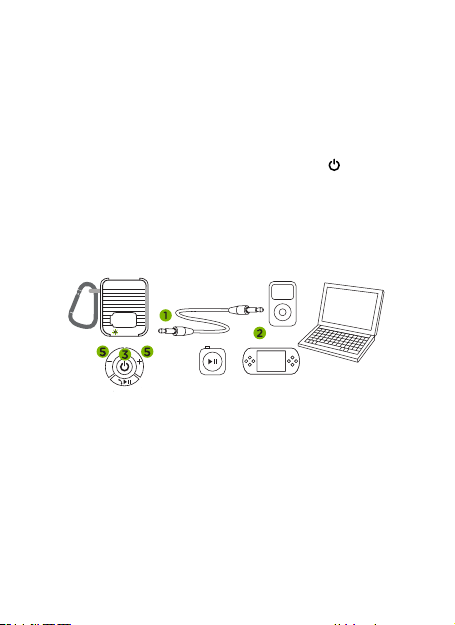
Play via audio cable
1. Insert 3.5 mm (
1
/
8
in) audio plug into the
“AUX IN” socket on AquaBass.
2. Insert opposite end into your audio player’s
headphone socket.
3. Turn on AquaBass by pressing centre ( )
button on the base control.
4. Play music and adjust volume using
player controls.
5. Volume can be adjusted on AquaBass and/or via
the connected audio player.
Note: Bluetooth and play / pause functions will have
no use when connected via 3.5 mm audio cable.
USB
CHARGE
AUX
IN

Note: Because the in-built microphone is close to
the speaker it has custom noise cancellation
processing designed to reduce noise interference
and echo feedback. If a caller has trouble hearing
you please ensure the microphone is facing
toward you or position yourself closer to
the AquaBass.
1. To increase volume, hold (
+
) button for
5-10 seconds until desired volume is reached.
(Audio player volume should also be set at an
appropriate level).
2. To decrease volume hold control (
_
) button
for 5-10 seconds until desired volume is reached.
Note: Volume will aect playtime. For longer
playtime set your player volume to high and
decrease the AquaBass volume to desired level.
Volume control

Note: Moki AquaBass is designed to be protected from rain
and accidental immersion. It is not intended to be deliberately
submerged or used underwater. *IPX7 Standard allows for
immersion in 1 m of water for 30 mins in test conditions.
Standard only applies when using the AquaBass via Bluetooth.
You must ensure the port cover is securely closed before
taking it into wet or dusty environments. For your safety
DO NOT recharge the AquaBass in or near water or in any
wet environment.
• Do not dispose of AquaBass in re or expose to
excessive heat.
• Do not store or recharge in damp or high
temperature areas.
• Do not open or insert anything into
AquaBass body.
• Do not attempt to disassemble.
• Do not apply excessive force to cables or
connection points.
• Please keep out of reach of young children
and pets.
CAUTION

Model: ACC AQBG
Power Output: 3 W
Speaker Driver: Ø 40 mm (1
3
/
5
in)
Sensitivity: => 85 dB
Frequency Response: 20 Hz - 20 kHz
Charge Time: ~ 3 hrs via USB
Dimensions: Ø 7 cm x H 7.5 cm ( 2
2
/
3
in x H 3 in)
Operating / Recharge Temp: 0˚C ~ 45˚C
(32˚F ~ 113˚F)
Weight: 200 g (7.1 oz)
SPECIFICATIONS
The Bluetooth® word mark and logos are registered
trademarks owned by Bluetooth® SIG, Inc. and any use of such
marks by Moki is under license. Other trademarks and trade
names are those of their respective owners.
mokiinternational.com
Moki International all rights reserved
Made in China
TM
TM
