User Manual
ASSEMBLY
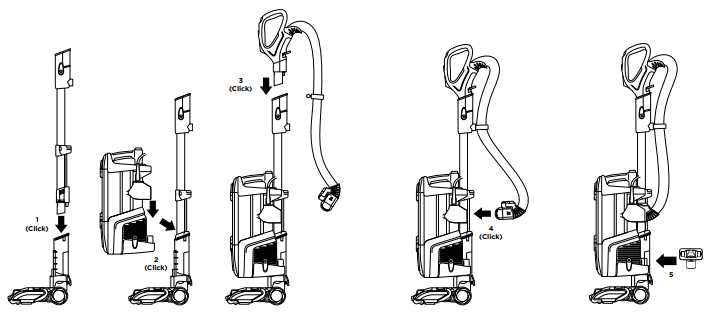
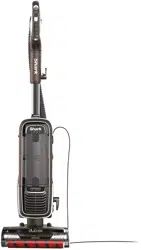
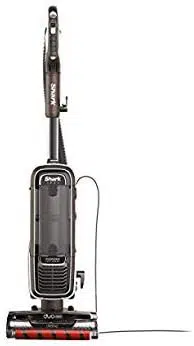
- Place motorized Nozzle on floor and insert Wand, pressing it in until it clicks securely into place.
- Place Pod onto wand and slide down to connect.
- Insert Handle into wand, pressing it in until it clicks securely into place.
- Connect Hose into back of pod, pressing it in until it clicks securely into place.
- Store included accessories on the Accessory Posts on the pod.
IMPORTANT: For proper operation, ensure all connections are securely clicked into place
WHOLE-HOME CLEANING
SETTINGS
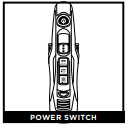
Press power button to turn on vacuum. Please note the brushrolls will not spin unless the wand is reclined.
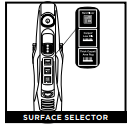
Thick Carpet & Area Rug Cleaning
Cleaning Set surface selector to Thick Carpet/Area Rug.
Carpet & Low Pile Cleaning
Set surface selector to Carpet/Low Pile to increase the speed of the brushrolls and to help remove stuck-on dust and debris.
Hard Floor Cleaning
Set surface selector to Hard Floor.
BRUSHROLL INDICATOR LIGHT
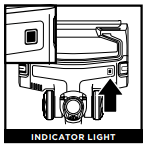
WHAT DOES THE BRUSHROLL INDICATOR LIGHT MEAN?
Solid Green: The brushrolls are spinning and working as they should.
Solid Red: There is a jam in the brushroll area. Turn off the vacuum and unplug it, then remove any blockages in the nozzle.
Flashing Red: The motorized floor nozzle is overheating. Turn off the vacuum, unplug it, and remove any blockages. Let the vacuum cool down for at least 60 minutes before restarting. See Troubleshooting section for more information.
CLEANING MODES
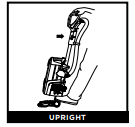
To engage brushrolls, step on floor nozzle and tilt handle back.
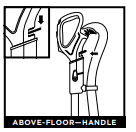
Press the Handle Release latch to detach the handle from the wand.
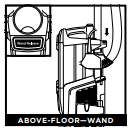
Press the Wand Release button to detach the wand from the pod.
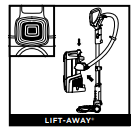
Press the Lift-Away button to detach the pod from the floor nozzle
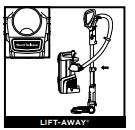
With pod removed, press the Wand Release button to detach the wand from the floor nozzle.
NOTE: All accessories are compatible with both the wand and the handle
EMPTYING THE DUST CUP
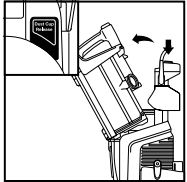
To remove Dust Cup, press release button on top of the pod. Tilt dust cup away from wand, then lift to remove.
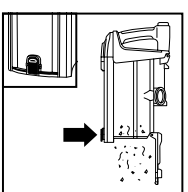
To empty debris into trash, press lower release button and bottom of dust cup will drop open
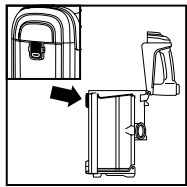
To remove collected debris from Lint Screen, press top release button and lift handle to open. Gently brush lint screen to clean
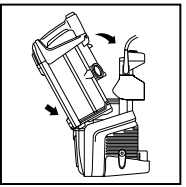
To reinstall, place bottom of dust cup into pod and then tilt back until it clicks into place
CLEANING AND REPLACING THE FILTERS
CLEANING FILTERS
Regularly rinse and replace the filters to maintain your vacuum’s suction power.
To prevent damage from cleaning chemicals, rinse filters with cold water only. Allow all filters to air-dry for at least 24 hours before reinstalling them to prevent liquid from being drawn into electric parts.
IMPORTANT: DO NOT use soap when cleaning the filters.
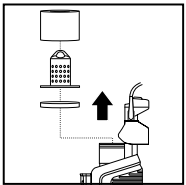
CLEAN PRE-MOTOR FILTERS EVERY 3 MONTHS
Remove Dust Cup, then lift out Filters.
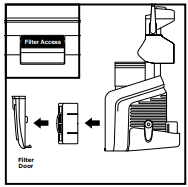
CLEAN HEPA FILTER EVERY YEAR
Press button at bottom of Filter Door. Tilt door and lift out to remove, then take out HEPA Filter.
To reinstall, insert HEPA filter into unit and replace filter door.
NOTE: The pre-motor filters should be replaced every 2.5 years. The post-motor filter should be replaced every 3 years
MAINTENANCE
NOZZLE MAINTENANCE
THE SELF-CLEANING BRUSHROLL
If any hair is wrapped around the brushroll, continue vacuuming, using Carpet/Low Pile mode on a bare floor surface, a low-pile carpet, or a small area rug. This will allow the self-cleaning brushroll to remove the hair wrap and send it to the dust cup.
If you run over a hard or sharp object or notice a noise change while vacuuming, check for blockages or objects caught in the brushroll.
If some fibers remain wrapped around the brushroll after continued use, open the brushroll garage to remove them.
- To open the brushroll garage, slide both release buttons on the floor nozzle away from you, toward the back of the nozzle, then lift off the lid.
- Clear away any objects or debris.
- To close the brushroll garage, insert the 3 tabs on top of lid into the 3 slots in the nozzle, then push down on both sides of lid until it clicks securely into place. If Brushroll Indicator Light is green and headlights are flashing, check again that both sides of lid are locked in place.
CLEANING THE BRUSHROLL
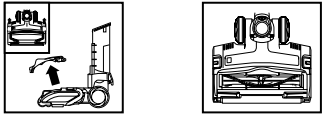
To open the brushroll garage, slide both release buttons toward the back of the nozzle, then lift off the lid. Clear away any objects or debris. To close the brushroll garage, insert the 3 tabs on top of the lid into the 3 slots in the nozzle, then push down on both sides of the lid until it clicks securely into place.
CLEANING THE SOFT ROLLER
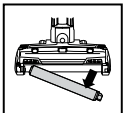
First, remove the brushroll garage lid. To remove the Soft Roller from the nozzle, lift it out by the pull tab. Tap loose debris off the Soft Roller. Use a dry towel to wipe the Soft Roller clean, or to remove any debris caught in the teeth behind the Soft Roller.
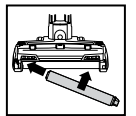
Hand wash the Soft Roller as needed. Use only water, and allow it to air-dry completely for at least 24 hours. Reinsert the Soft Roller in the front of the nozzle until it clicks into place. Reinstall the brushroll garage lid.
CHECKING FOR BLOCKAGES
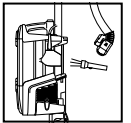
Detach hose from vacuum pod, and check hose and opening on back of pod for blockages
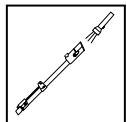
Detach wand from floor nozzle and handle, and check both ends for blockages.
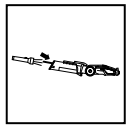
Detach wand from floor nozzle, tilt nozzle neck back, and check opening for blockages.
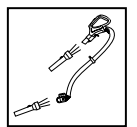
Detach handle from wand and hose from the vacuum pod, and check openings for blockages.
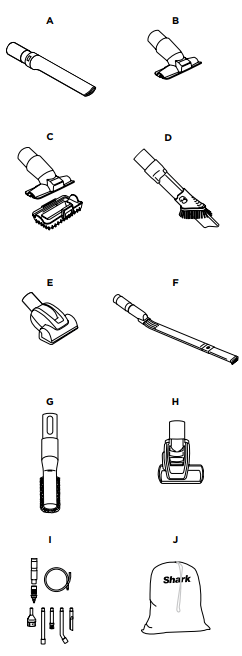
AVAILABLE ACCESSORIES
A Crevice Tool
This slender tool offers extended reach to access corners, baseboards, tight spaces, and ceilings.
B Upholstery Tool
Picks up hair, dust, and large debris from mattresses, couches, curtains, lampshades, and other delicate upholstered fabrics.
C Pet Multi-Tool
A single convertible tool for cleaning tough pet messes two ways: use the stiff bristle brush to clean stuck-on debris, or take off the bristles to reveal an upholstery tool perfect for removing stubborn pet hair and large piles of debris.
D Duster Crevice Tool
Two cleaning tools in one. The crevice tool gives you extended reach to clean in tight spaces, while the soft brush is ideal for dusting delicate surfaces.
E Pet Power Brush
The turbine brush loosens and removes pet hair and debris from carpets, and powerfully deep-cleans dander out of upholstery and other surfaces.
F Under-Appliance Wand
Clean under and behind hard-to-move appliances and furniture with this adjustable 36” tool. Flip the extension piece over to clean the underside of appliances.
G Anti-Allergen Dust Brush
This brush features nylon fiber bristles specifically designed for removing fine dust and allergen particles from the most delicate surfaces.
H Self-Cleaning Pet Power Brush
Tackles pet hair and ground-in dirt from above-floor areas like carpeted stairs and upholstery, while actively removing hair wrap as it cleans.
I Home & Car Detail Kit
Deep-clean your car like a professional detailer, or clean hard-to-reach areas in your home. Micro-sized tools let you clean around delicate objects and access the tightest spaces like car vents and computer keyboards.
J Accessory Bag
This convenient accessory storage bag measures 32 cm x 70 cm and fits the Under�Appliance Wand. Smaller size available at sharkaccessories.com
TROUBLESHOOTING
Vacuum is not picking up debris. No suction or light suction.
- Check filters to see if they need cleaning. Follow instructions for rinsing and air-drying the filters before reinstalling them.
- Dust cup may be full; empty dust cup.
- Check hose, hose connections, nozzle, wand, pod, and accessories for blockages. Clear any blockages found. (Refer to Checking for Blockages section for more information.)
- If any hair, string, or carpet fibers are wrapped around the brushroll, extend cleaning time to allow the self-cleaning brushroll to remove them.
- If some hair or fibers remain wrapped around brushroll after continued use, take off the brushroll garage lid and carefully remove them. See Cleaning the Brushroll section for more information.
Vacuum lifts area rugs.
- Make sure Surface Selector switch is set to Hard Floor.
- Suction is powerful. Take care when vacuuming area rugs or rugs with delicately sewn edges.
Brushrolls do not spin.
- If the Brushroll Indicator Light turns red, immediately turn off and unplug the vacuum. Remove pod and wand from floor nozzle and clear any blockages. Reconnect nozzle, plug in vacuum, and turn on power.
- With the power on, recline the handle, which will automatically turn on the brushrolls.
- If the brushroll indicator light is green and the headlights are flashing, the brushroll garage lid is not properly installed. Remove the lid by sliding the two release buttons on the floor nozzle. To reinstall, insert the 3 tabs into the 3 slots in the nozzle, then firmly push down on both sides of the lid until it clicks securely into place.
Vacuum turns off on its own or indicator light flashes red.
If your vacuum overheats, the thermostat will automatically turn off the motor. Perform the following steps to restart:
- Turn vacuum off and unplug it.
- Empty dust cup and clean filters (see Emptying the Dust Cup and Cleaning the Filters).
- Check for blockages in hose, wand, floor nozzle, accessories, and inlet openings.
- Allow unit to cool for a minimum of 60 minutes.
- Plug in vacuum and turn it on.
FIVE (5) YEAR LIMITED WARRANTY
The Five (5) Year Limited Warranty applies to purchases made from authorized retailers of SharkNinja Operating LLC. Warranty coverage applies to the original owner and to the original product only and is not transferable.
SharkNinja warrants that the unit shall be free from defects in material and workmanship for a period of five (5) years from the date of purchase when it is used under normal household conditions and maintained according to the requirements outlined in the Owner’s Guide, subject to the following conditions and exclusions:
What is covered by this warranty?
- The original unit and/or non-wearable parts deemed defective, in SharkNinja’s sole discretion, will be repaired or replaced up to five (5) years from the original purchase date.
- In the event a replacement unit is issued, the warranty coverage ends six (6) months following the receipt date of the replacement unit or the remainder of the existing warranty, whichever is later. SharkNinja reserves the right to replace the unit with one of equal or greater value.
What is not covered by this warranty?
- Normal wear and tear of wearable parts (such as foam filters, HEPA filters, pads, etc.), which require regular maintenance and/or replacement to ensure the proper functioning of your unit, are not covered by this warranty. Replacement parts are available for purchase at sharkaccessories.com.
- Any unit that has been tampered with or used for commercial purposes.
- Damage caused by misuse (e.g., vacuuming up water or other liquids), abuse, negligent handling, failure to perform required maintenance (e.g., not cleaning the filters), or damage due to mishandling in transit.
- Consequential and incidental damages.
- Defects caused by repair persons not authorized by SharkNinja. These defects include damages caused in the process of shipping, altering, or repairing the SharkNinja product (or any of its parts) when the repair is performed by a repair person not authorized by SharkNinja.
- Products purchased, used, or operated outside North America.
How to get service
If your appliance fails to operate properly while in use under normal household conditions within the warranty period, visit sharkclean.com/support for product care and maintenance self-help. Our Customer Service Specialists are also available at 1-800-798-7398 to assist with product support and warranty service options, including the possibility of upgrading to our VIP warranty service options for select product categories. So we may better assist you, please register your product online at registeryourshark.com and have the product on hand when you call.
SharkNinja will cover the cost for the customer to send in the unit to us for repair or replacement. A fee of $24.95 (subject to change) will be charged when SharkNinja ships the repaired or replacement unit.
How to initiate a warranty claim
You must call 1-800-798-7398 to initiate a warranty claim. You will need the receipt as proof of purchase.
We also ask that you register your product online at registeryourshark.com and have the product on hand when you call, so we may better assist you. A Customer Service Specialist will provide you with return and packing instruction information.
How state law applies
This warranty gives you specific legal rights, and you also may have other rights that vary from state to state. Some states do not permit the exclusion or limitation of incidental or consequential damages, so the above may not apply to you.