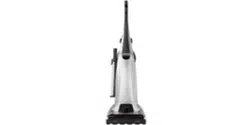

Use & Care Guide
Manual de Use¥ Cuidado
English / Espa_ol
Model/Modelo: 116.31200
Ke
O
P/N C01ZDWA10U00 - t<C01ZDWA10U0
Sears Brands Management
Corporation, Hoffman Estates, IL 60179 U.S.A.
www.kenmore.com
www.sears.com
®
Before Using Your New
Vacuum Cleaner ..............................................................................................................................3
Packing List...................................................................................................................................3
Kenmore Vacuum Cleaner Warranty ..........................................................................................4
important Safety instructions.........................................................................................................5
Parts and Features...........................................................................................................................6
Assembly instructions.................................................................................................................7-9
Handle ...........................................................................................................................................7
Attachment Assembly ..............................................................................................................8-9
Power Cord ...................................................................................................................................9
Operating instructions .............................................................................................................10-14
Power Cord ..................................................................................................................................10
Releasing the Handle ...................................................................................................................11
OFF/FLOOR/CARPET Switch ...................................................................................................11
Suggested Pile Height Settings.................................................................................................12
Pile Height Selection and Settings ...........................................................................................12
Check Bag indicator ...................................................................................................................12
Attachments ................................................................................................................................13
Attachment Use Table ...............................................................................................................14
Vacuuming Tips ..............................................................................................................................14
Performance/Safety Features ................................................................................................15-16
Vacuum Cleaner Care ............................................................................................................17-20
Vacuum Cleaner Storage .........................................................................................................17
Cleaning Exterior and Attachments ........................................................................................18
Cleaning Dirt Sensor Optics ......................................................................................................18
Dust Bag Removal and Replacement ..............................................................................18-19
Motor Safety Filter Cleaning ....................................................................................................19
Exhaust HEPAFilter Replacement ...........................................................................................20
Carbon Filter Replacement .......................................................................................................20
Dust Bag Cover Reinstall ................................................................................................................21
Agitator Cleaning ...........................................................................................................................21
Removing Clogs........................................................................................................................21-22
Troubieshootlng ..............................................................................................................................23
Master Protection Agreements ....................................................................................................24
RequestingAssistance
Or Service...........................................................................................................................Back page
-2-
Please read this guide. It will help you assemble and operate your new I<enmore vacuum cleaner in the
safest and most effective way.
For more information about vacuum cleaner care and operation, call the Vacuum Cleaner Help Line at
1-877-531-7321. You will need the complete model and serial numbers when requesting information.
Your vacuum cleaner's model and serial numbers are located on the Model and Serial Number Plate.
Use the space below to record the model number and serial number of your new I<enmore vacuum
cleaner.
Model No.
Serial No.
Date of Purchase
Keep this book and your sales check (receipt} in a safe place for future reference.
PACKING LiST
Your I<ENMORE VACUUM CLEANER is packaged with the following parts and
components assembled separately in the carton:
1 Upright Vacuum Cleaner 1 Pet Handi Mate TM
I Handle I Telescoping Wand
1 Crevice Tool 1 Use & Care Guide
1 Combination Brush 1 Repair Parts List
Each of the above assemblies are shown in detail inside the Repair Parts List.
=3=
Vacuum Cleaner Help Line:
| -877-531-732|
8:00am-5:00pm EST,M-F
(U.S.A. and Canada)
One Year Limited Warranty
When assembled, operated and maintained according to alt instructionssupplied with
the product, if this vacuum cleaner fails due to a defect in material or workmanship
within one year from the date of purchase, return it to any Sears store, Sears Parts &
Repair Center or other Kenmore outlet for free repair.
If this vacuum cleaner is used for other than private family purposes, this warranty
applies for only 90 days from the date of purchase.
This warranty covers only defects in material and workmanship. Sears will NOT pay
for:
1. Expendable items that can wear out from normal use, including but not limited to
filters, belts, light bulbs, and bags.
2. A service technician to instruct the user in correct product assembly, operation or
maintenance.
3. A service technician to clean or maintain this product.
4. Damage to or failure of this product if it is not assembled, operated or maintained
according to all instructions supplied with the product.
5. Damage to or failure of this product resulting from accident, abuse, misuse or use for
other than its intended purpose.
6. Damage to or failure of this product caused by the use of detergents, cleaners,
chemicals or utensils other than those recommended in all instructions supplied with
the product.
7. Damage to or failure of parts or systems resulting from unauthorized modifications
made to this product.
Disclaimer of implied warranties; limitation of remedies
Customer's sole and exclusive remedy under this limited warranty shall be product
repair as provided herein. Implied warranties, including warranties of merchantability or
fitness for a particular purpose, are limited to one year or the shortest period allowed
by law. Sears shal! not be liable for incidental or consequential damages. Some states
and provinces do not allow the exclusion or limitation of incidental or consequential
damages, or limitations on the duration of implied warranties of merchantability or
fitness, so these exclusions or limitations may not apply to you.
This warranty applies only while this vacuum cleaner is used in the United States and
Canada.
This warranty gives you specific legal rights, and you may also have other rights which
vary from state to state.
Sears Brands Management Corporation., Hoffman Estates, IL 60179
Sears Canada Inc., Toronto, Ontario, Canada MSB 2C3
-4-
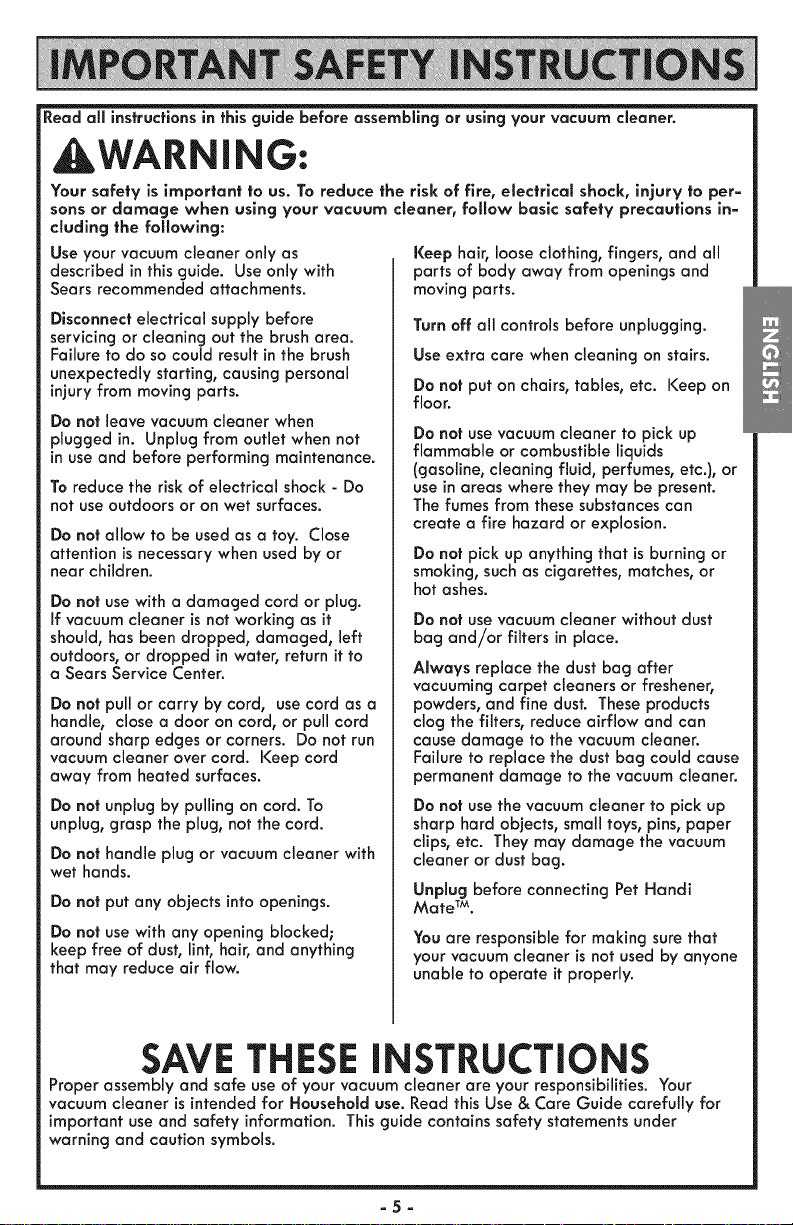
Read all instructions in this guide before assembling or using your vacuum cleaner.
WARNING:
Your safety is important to us. To reduce the risk of fire, electrlcal shock, injury to per=
sons or damage when using your vacuum cleaner, follow basic safety precautions in=
duding the following:
Use your vacuum cleaner only as
described inthisguide. Use only with
Sears recommended attachments.
Disconnect electrical supply before
servicingor cleaning out the brush area.
Failure to do socould result in the brush
unexpectedly starting, causing personal
injuryfrom moving parts.
Do not leave vacuum cleaner when
plugged in. Unplug from outlet when not
in useand before performing maintenance.
To reduce the risk of electrical shock - Do
not use outdoors or on wet surfaces.
Do not allow to be usedas a toy. Close
attention isnecessary when used by or
near children.
Do not use with a damaged cord or plug.
If vacuum cleaner isnot working as it
should, has been dropped, damaged, left
outdoors, or dropped inwater, return it to
a Sears Service Center.
Do not pull or carry by cord, usecord as a
handle, close a door on cord, or pull cord
around sharp edges or corners. Do not run
vacuum cleaner over cord. Keep cord
away from heated surfaces.
Do not unplug by pulling on cord. To
unplug, grasp the plug, not the cord.
Do not handle plug or vacuum cleaner with
wet hands.
Do not put any objects into openings.
Do not use with any opening blocked;
keep free of dust, lint, hair, and anything
that may reduce air flow.
Keep hair, loose clothing, fingers, and all
parts of body away from openings and
moving parts.
Turn off all controls before unplugging.
Use extra care when cleaning on stairs.
Do not put on chairs, tables, etc. Keep on
floor.
Do not usevacuum cleaner to pick up
flammable or combustible liquids
(gasoline, cleaning fluid, perfumes, etc.), or
use in areas where they may be present.
The fumes from thesesubstances can
create a fire hazard or explosion.
Do not pick up anything that isburning or
smoking,such as cigarettes, matches, or
hot ashes.
Do not use vacuum cleaner without dust
bag and/or filters in place.
Always replace the dust bag after
vacuuming carpet cleaners or freshener,
powders, and fine dust. These products
clog the filters, reduce airflow and can
cause damage to the vacuum cleaner.
Failure to replace the dust bag could cause
permanent damage to the vacuum cleaner.
Do not usethe vacuum cleaner to pick up
sharp hard objects, small toys, pins, paper
clips, etc. They may damage the vacuum
cleaner or dust bag.
Unplug before connecting Pet Handi
Mate TM.
You are responsible for making sure that
your vacuum cleaner is not used by anyone
unable to operate it properly.
SAVE THESEINSTRUCTIONS
Proper assembly and safe use of your vacuum cleaner are your responsibilities. Your
vacuum cleaner is intended for Household use. Read this Use & Care Guide carefully for
important use and safety information. This guide contains safety statements under
warning and caution symbols.
=5=
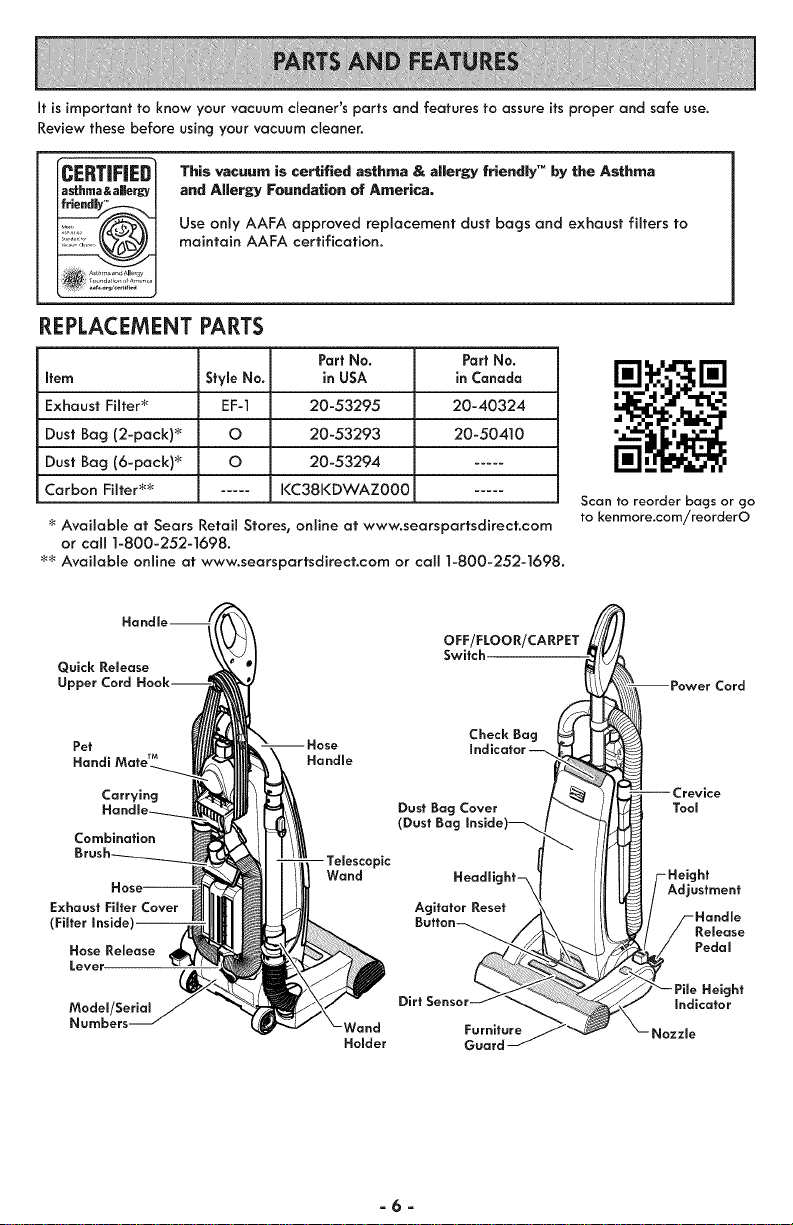
It is important to know your vacuum cleaner's parts and features to assure its proper and safe use.
Review these before using your vacuum cleaner.
ICERTIFiED
|asthma&aJiergy
, _s: ,_t_lmaan_allergy
REPLACEMENT PARTS
This vacuum is certified asthma & allergy friendly" by the Asthma
and Allergy Foundation of America.
Use only AAFA approved replacement dust bags and exhaust filters to
maintain AAFA certification.
PartNo.
Item Style No. in USA
Exhaust Filter_ EF-1 20-53295
Dust Bag (2-pack) _ O 20-53293
Dust Bag (6-pack) _ O 20-53294
Carbon Filter _ ..... KC38KDWAZ000
Part No.
in Canada
20-40324
20-50410
'_Available at Sears RetaiJ Stores, onJine at www.searspartsdirect.com
or call 1-800-252-1698.
_ Available online at www.searspartsdirect.com or call 1-800-252-1698.
Scan to reorder bags or go
to kenmore.com/reorderO
Quick Release
Upper Cord
Pet
Handi Handle
Carrying
Combination
Exhaust Filter Cover
(Filter
Hose Release
Lever
Wand
OFF/FLOOR/CARPET
Switch.
Check Bag
Indicator--
Dust Bag Cover
(Dust Bag Inside)_
Headlight_
Agitator Reset
Model/Serial Dirt
Numbers- Furniture
Holder Guard
Power Cord
_-_Crevice
/ /I I H /-Height
Ill iAdj°stmen'
L/I -_//-Hondle
Re,ease
_/ Pedal
"_/J_'- Pile Height
_/ Indicator
_Nozzle
-6-
Pleasepay special attention to these hazard alert boxes, and follow any instruc-
_ tions given. WARNING statements alert you to such hazards as fire, electric
shock, burns and personal injury. CAUTION statements alert you to suchhazards
as personal injury and/or property damage.
WARNING
Electrical Shock Hazard
DO NOT plug into the electrical supply
until the assembly is complete. Failure
to do so could result in electrlcal shock
or injury.
Before assembling the vacuum cleaner,
check the PACKING LIST. (Page 3) Use this
list to verify that you have received all the
components of your new Kenmore
vacuum cleaner.
HANDLE
,_CAUTION
Do not overtighten.
Overtlghtening could strip the screw
holes.
Do not operate the vacuum cleaner with=
out the screw in place.
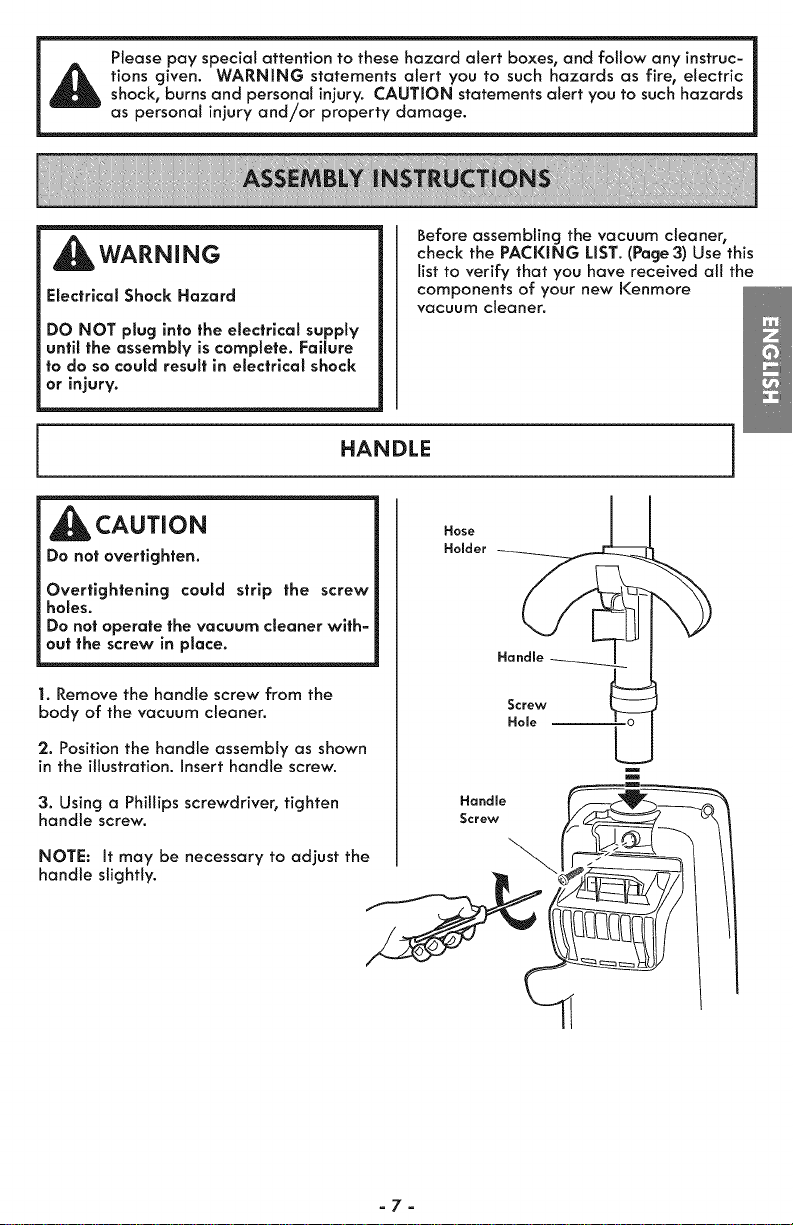
1. Remove the handle screw from the
body of the vacuum cleaner.
Hose
Holder
Handle
Screw
Hole
2. Position the handle assembly as shown
in the illustration. Insert handle screw.
3. Using a Phillips screwdriver, tighten Hond,e __
handle screw. Screw _ ___,
NOTE: It may be necessary to adjust the _1_. _
handle slightly. _
=7=
ATTACHMENT ASSEMBLY
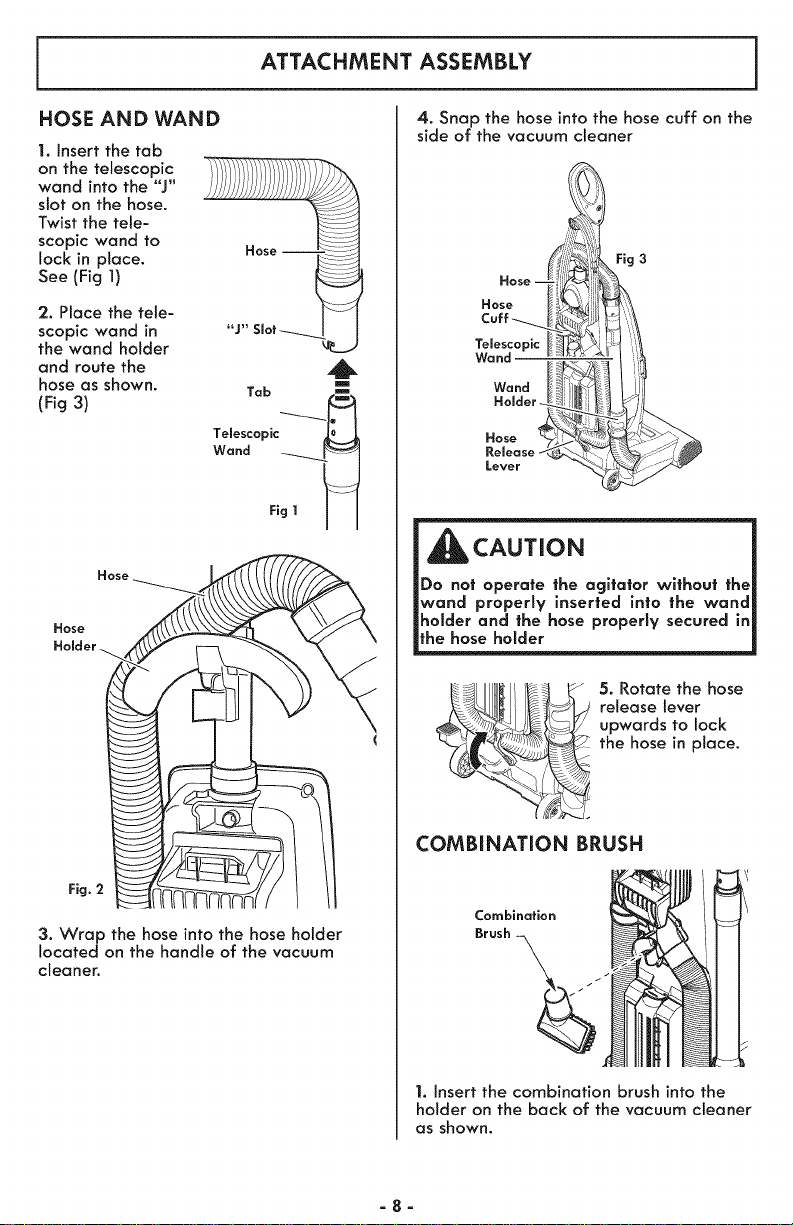
HOSE AND WAND
1. Insert the tab
on the telescopic
wand into the "J"
slot on the hose.
Twist the tele-
scopic wand to
lock in place.
See (Fig 1)
Hose J
2. Place the tele-
scopic wand in
the wand holder
and route the
hose as shown.
(Fig 3)
"J" Slot_-......
m
Tab ----_-_ .____
Telescopic
Wand _____
Fig 1 I J
Fig.
3. Wrap the hose into the hose holder
located on the handle of the vacuum
cleaner.
4. Snap the hose into the hose cuff on the
side of the vacuum cleaner
I i
CAUTION
|Do not operate the agitator without the|
|wand properly inserted into the wand|
|holder and the hose properly secured in|
_the hose holder J
• _ _ 5. Rotate the hose
___ release lever
upwards to lock
the hose in place.
COMBINATION BRUSH
Combination
Brush --
1. insert the combination brush into the
holder on the back of the vacuum cleaner
as shown.
=8=
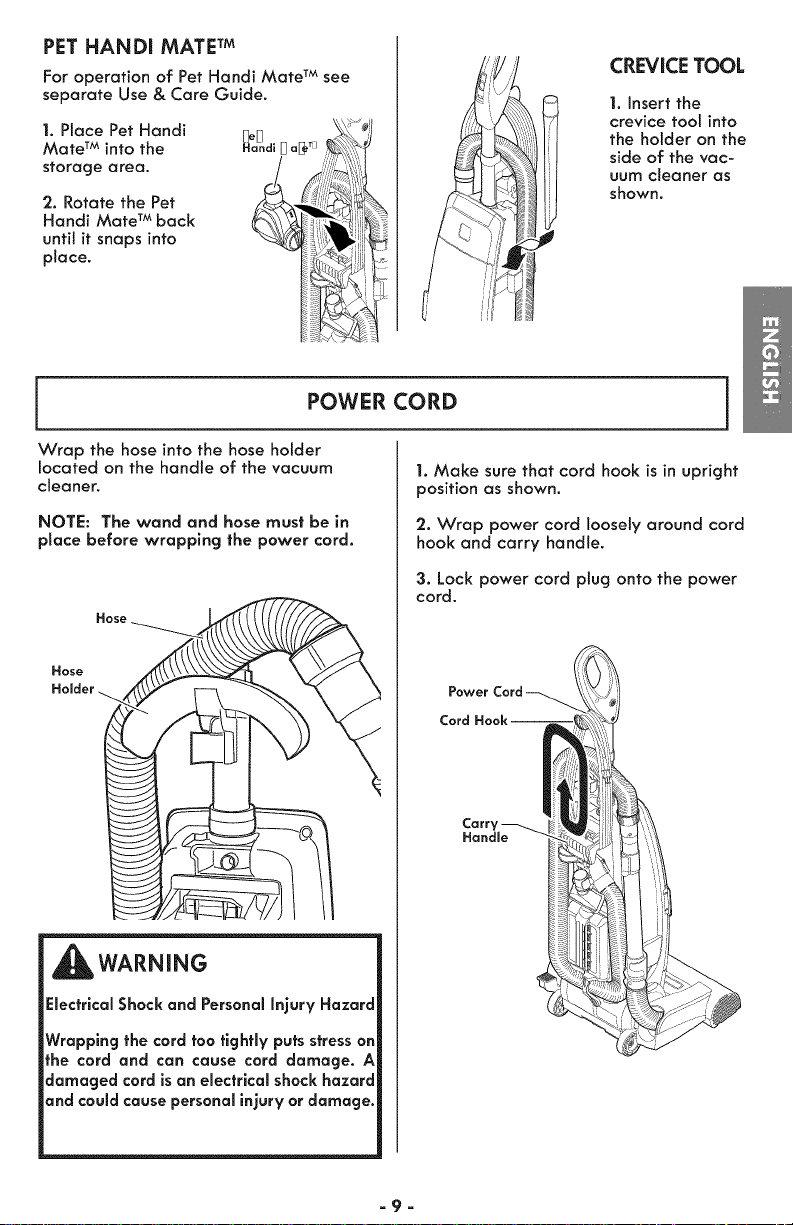
PET HANDI MATE TM
For operation of Pet Handi Mate TM see
separate Use & Care Guide.
1. Place Pet Handi
Mate TM into the
storage area.
'2. Rotate the Pet
Handi Mate TM back
untit it snaps into
place.
CREVICE TOOL
1. Insert the
crevice tool into
the holder on the
side of the vac-
uum cleaner as
shown.
POWER CORD
Wrap the hose into the hose holder
located on the handle of the vacuum
cleaner.
NOTE: The wand and hose must be in
place before wrapping the power cord.
WARNING
Electrical Shack and Personal Injury Hazard
Wrapping the cord too tightly puts stress on
the cord and can cause cord damage. A
damaged cord is an electrical shock hazard
and could cause personal injury or damage.
]
1. Make sure that cord hook is in upright
position as shown.
'2. Wrap power cord loosely around cord
hook and carry handle.
3.Lock power cord plugonto thepower
cord.
Power
Cord
Handle
-9-
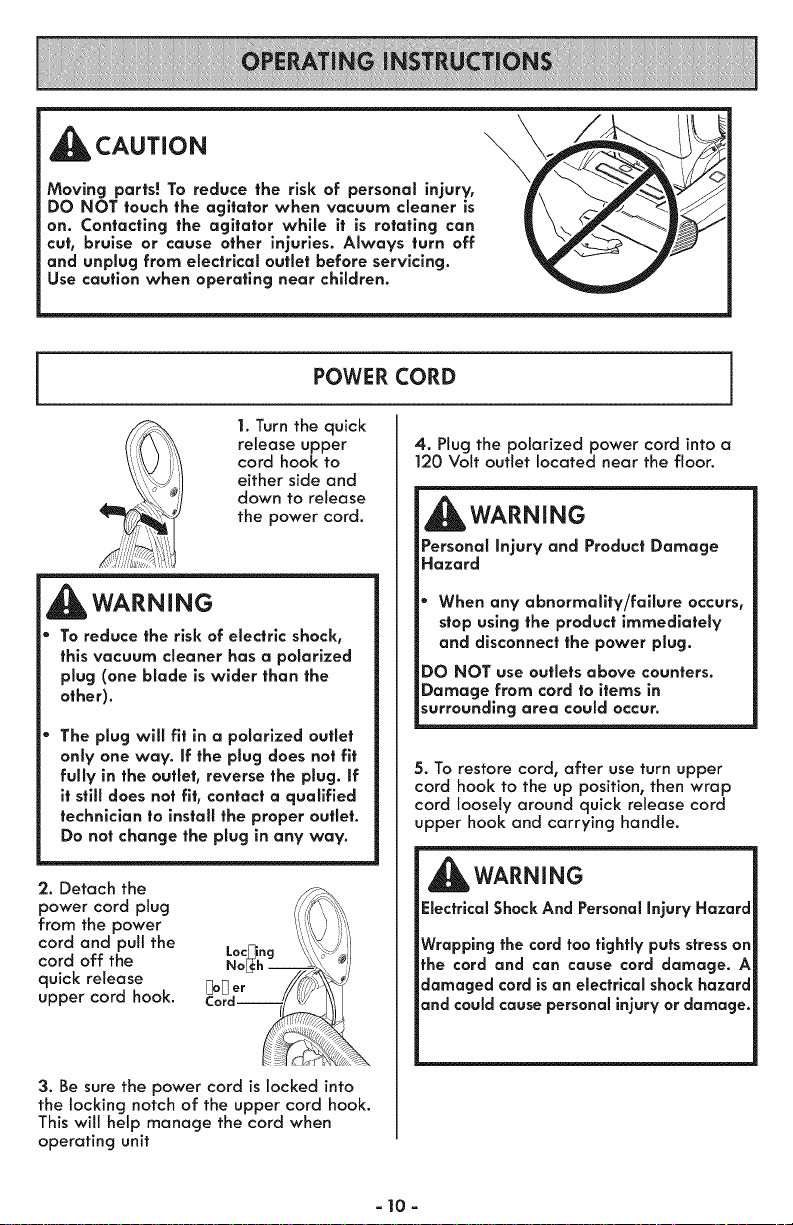
_CAUTION
Moving parts! To reduce the risk of personal injury,
DO NOT touch the agitator when vacuum cleaner is
on. Contacting the agitator while it is rotating can
cut, bruise or cause other injuries. Always turn off
and unplug from electrical outlet before servicing.
Use caution when operating near children.
\
POWER CORD
1. Turn the quick
release upper
cord hook to
either side and
down to release
the power cord.
_WARNING
To reduce the risk of electric shock,
this vacuum cleaner has a polarized
plug (one blade is wider than the
other).
The plug will fit in a polarized outlet
only one way. If the plug does not fit
fully in the outlet, reverse the plug. If
it still does not fit, contact a qualified
technician to install the proper outlet.
Do not change the plug in any way.
2. Detach the
power cord plug
from the power
cord and pull the
cord off the
quick release
upper cord hook.
3. Be sure the power cord is locked into
the locking notch of the upper cord hook.
This wilt help manage the cord when
operating unit
i
4. Plug the polarized power cord into a
120 Volt outlet located near the floor.
_WARNING
Personal Injury and Product Damage
Hazard
* When any abnormality/failure occurs,
stop using the product immediately
and disconnect the power ptug.
DO NOT use outlets above counters.
Damage from cord to items in
surrounding area could occur.
5. To restore cord, after use turn upper
cord hook to the up position, then wrap
cord loosely around quick release cord
upper hook and carrying handle.
WARNING
Electrical Shock And Personal Injury Hazard
Wrapping the cord too tightly puts stress on
the cord and can cause cord damage. A
damaged cord isan electrical shock hazard
and could cause personal injury or damage.
- 10 -
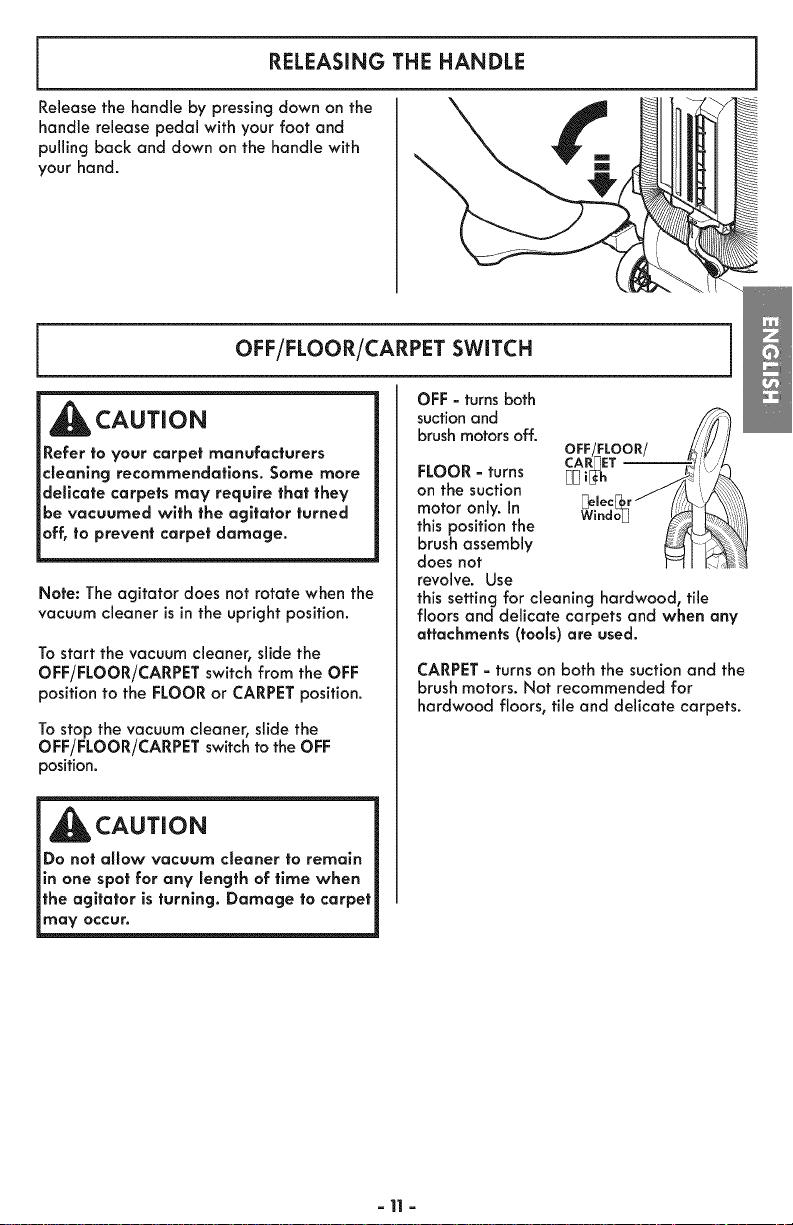
RELEASING THE HANDLE
Releasethe handle by pressing down on the
handle release pedal with your foot and
pulling back and down on the handle with
your hand.
OFF/FLOOR/CARPET SWITCH
_CAUTION
Refer to your carpet manufacturers
cleaning recommendations. Some more
delicate carpets may require that they
be vacuumed with the agitator turned
off, to prevent carpet damage.
Note: The agitator does not rotate when the
vacuum cleaner is in the upright position.
To start the vacuum cleaner, slide the
OFF/FLOOR/CARPET switch from the OFF
position to the FLOOR or CARPET position.
To stop the vacuum cleaner, slide the
OFF/FLOOR/CARPET switch to the OFF
position.
i AUTION
_Do not allow vacuum cleaner to remain
_in one spot for any length of time when
_the agitator is turning. Damage to carpet
may occur.
OFF - turns both
suction and
brush motors off.
OFF!FLOOR/
CARPET
FLOOR - turns [_[_i[_h
on the suction
motor only. In
this position the
brush assembly
does not
revolve. Use
this setting for cleaning hardwood, tile
floors and delicate carpets and when any
attachments (tools) are used.
CARPET - turns on both the suction and the
brush motors. Not recommended for
hardwood floors, tile and delicate carpets.
- 11-
SUGGESTED PILE HEIGHT SETTINGS
There are four (4) pile height settings on
the vacuum cleaner. For best deep down
cleaning, use the LO setting. However, you
may need to raise the height to make
some jobs easier, such as scatter rugs and
some deep pile carpets, and to prevent
the vacuum cleaner from shutting off.
Attention: Refer to your carpet
manufacturers cleaning
recommendations. Some more delicate
carpets may require that they be
vacuumed with the agitator turned off to
prevent carpet damage.
Suggested settings are:
HI - Shag, deep pile, or scatter rugs.
MNI - Medium to deep pile.
MLO - Low to medium pile.
LO - Most carpets, bare floors combined
with FLOOR power switch setting,
delicate carpets that require agitator to
be turned off.
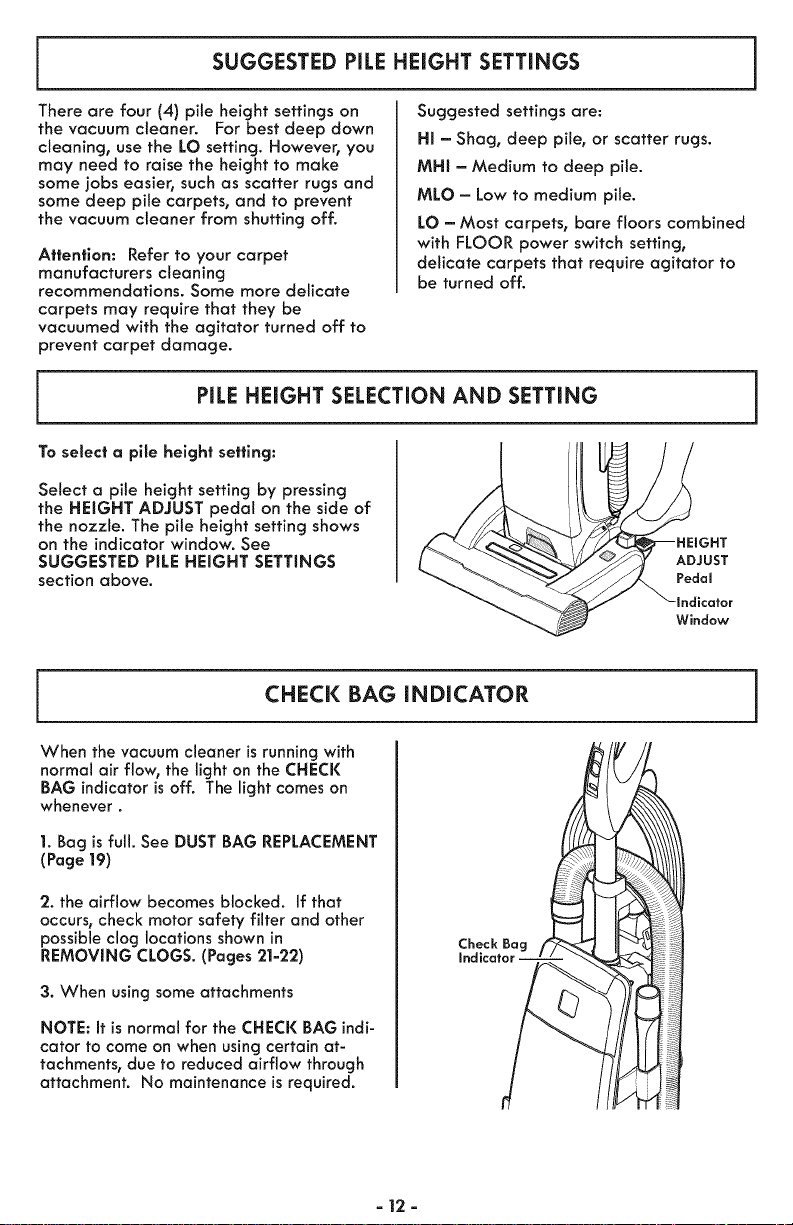
PILEHEIGHT SELECTION AND SETTING
To select a pile height setting:
Select a pile height setting by pressing
the HEIGHT ADJUST pedal on the side of
the nozzle. The pile height setting shows
on the indicator window. See
SUGGESTED PILE HEIGHT SETTINGS
section above.
ADJUST
Pedal
Window
CHECK BAG iNDiCATOR
When the vacuum cleaner isrunning with
normal air flow, the light on the CHECK
BAG indicator isoff. The light comes on
whenever.
1. Bag isfull. See DUST BAG REPLACEMENT
(Page 19)
2. the airflow becomes blocked. If that
occurs, check motor safety filter and other
possible clog locations shown in
REMOVING CLOGS. (Pages 21-22)
3. When using some attachments
NOTE: It isnormal for the CHECK BAG indi-
cator to come on when using certain at-
tachments, due to reduced airflow through
attachment. No maintenance is required.
- 12 -
ATTACHMENTS
CAUTION
DO NOT use the hose when the vacuum
cleaner is in the use position.
Always return the vacuum cleaner to the
upright position before using the hose
and attachments.
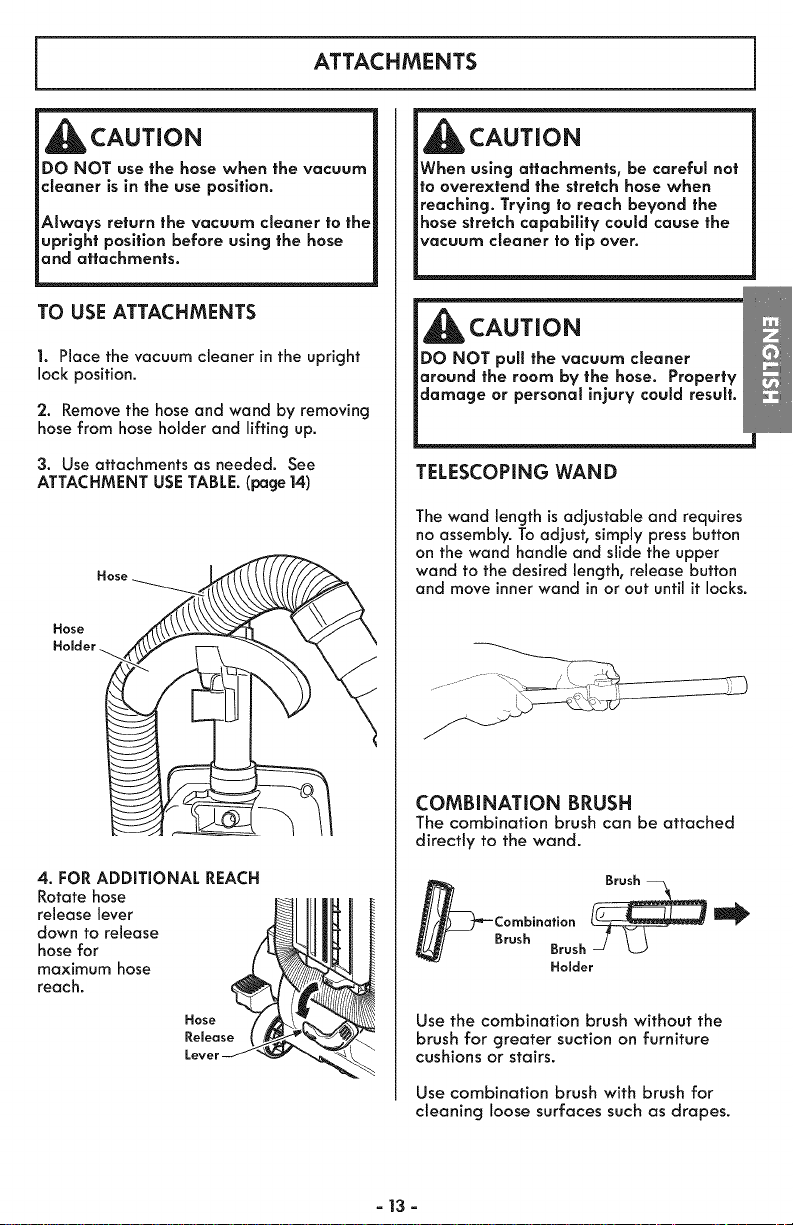
TO USE ATTACHMENTS
1. Place the vacuum cleaner in the upright
lock position.
2. Remove the hose and wand by removing
hose from hose holder and lifting up.
3. Use attachments as needed. See
ATTACHMENT USE TABLE. (page 14)
o Hose___.________._
4. FOR ADDITIONAL REACH
Rotate hose
release lever
down to release
hose for
maximum hose
reach.
CAUTION
When using attachments, be careful not
to overextend the stretch hose when
reaching. Trying to reach beyond the
hose stretch capabiEty could cause the
vacuum cleaner to tip over.
CAUTION
DO NOT pull the vacuum cleaner
around the room by the hose. Property
damage or personal injury could result.
TELESCOPING WAND
The wand length isadjustable and requires
no assembly. To adjust, simply pressbutton
on the wand handle and slide the upper
wand to the desired length, release button
and move innerwand in or out until it locks.
COMBiNATiON BRUSH
The combination brush can be attached
directly to the wand.
Combination _
Brush Brush _-
Holder
Use the combination brush without the
brush for greater suction on furniture
cushions or stairs.
Use combination brush with brush for
cleaning loose surfaces such as drapes.
- 13 -
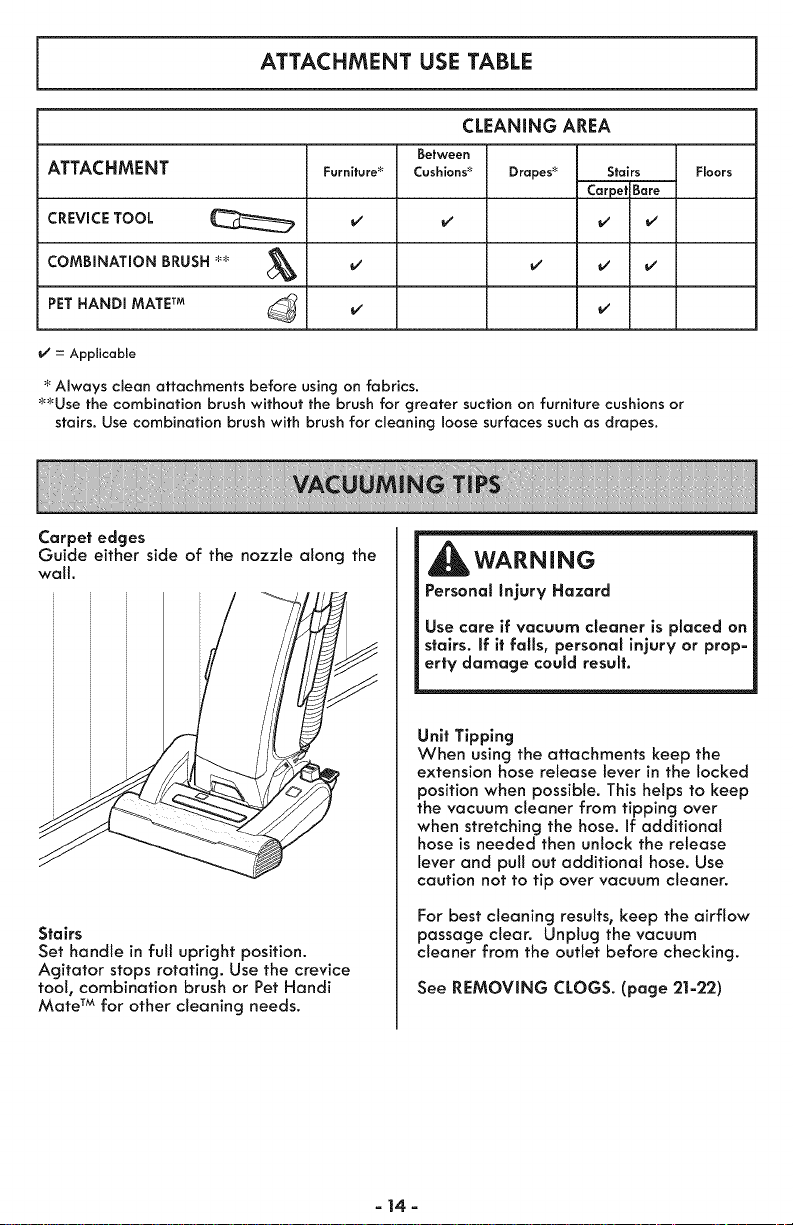
ATTACHMENT USE TABLE
CLEANING AREA
Between
ATTACHMENT Furniture:_ Cushions_ Drapes_ Stairs Floors
CarpelBare
CREVICE TOOL
COMBINATION BRUSH
PETHANDI MATETM
_' = Applicable
Always clean attachments before using on fabrics.
_Use the combination brush without the brush for greater suction on furniture cushions or
stairs. Use combination brush with brush for cleaning loose surfaces such as drapes.
Carpel edges
Guide either side of the nozzle along the
wall.
Stairs
Set handle in full upright position.
Agitator stops rotating. Use the crevice
tool, combination brush or Pet Handi
Mate TM for other cleaning needs.
WARNING
Personal injury Hazard
Use care if vacuum cleaner is placed on
stairs, if it fails, personal injury or prop=
erty damage could result.
Unit Tipping
When using the attachments keep the
extension hose release lever in the locked
position when possible. This helps to keep
the vacuum cleaner from tipping over
when stretching the hose. If additional
hose is needed then unlock the release
lever and pull out additional hose. Use
caution not to tip over vacuum cleaner.
For best cleaning results, keep the airflow
passage clear. Unplug the vacuum
cleaner from the outlet before checking.
See REMOVING CLOGS. (page 21=22)
=14=
MOTOR PROTECTION SYSTEM
1. Thermal Protector - Suction Motor
This vacuum cleaner has a thermal
protector which automatically trips to
protect the vacuum cleaner suction motor.
If a clog prevents the normal flow of air
to the motor, the thermal protector turns
the motor off automatically. This allows
the motor to coot in order to prevent
possible damage to the vacuum cleaner.
2. Thermal Protector - Agitator Motors
This vacuum cleaner has thermal
protectors which automatically trip to
protect the agitator motors. The thermal
protectors turn the motors off
automatically. This altows the motors to
cool in order to prevent possible damage
to the vacuum cleaner.
To reset thermal protectors: Turn the
vacuum cleaner off and unplug the power
cord from the outlet to allow the vacuum
cleaner to cool and the thermal
protectors to reset.
CAUTION
Always return the vacuum cleaner to the
upright position before using the hose
and attachments. Failure to do so may
result in overheating of the agitator
motors and can cause the thermal
protectors to trip.
Check for and remove clogs, and replace
bag if necessary. See REMOVING CLOGS
Section (Page 2|-22). Also check and
replace any clogged filters. Wait
approximately 40-50 minutes before
restartlng vacuum cleaner.
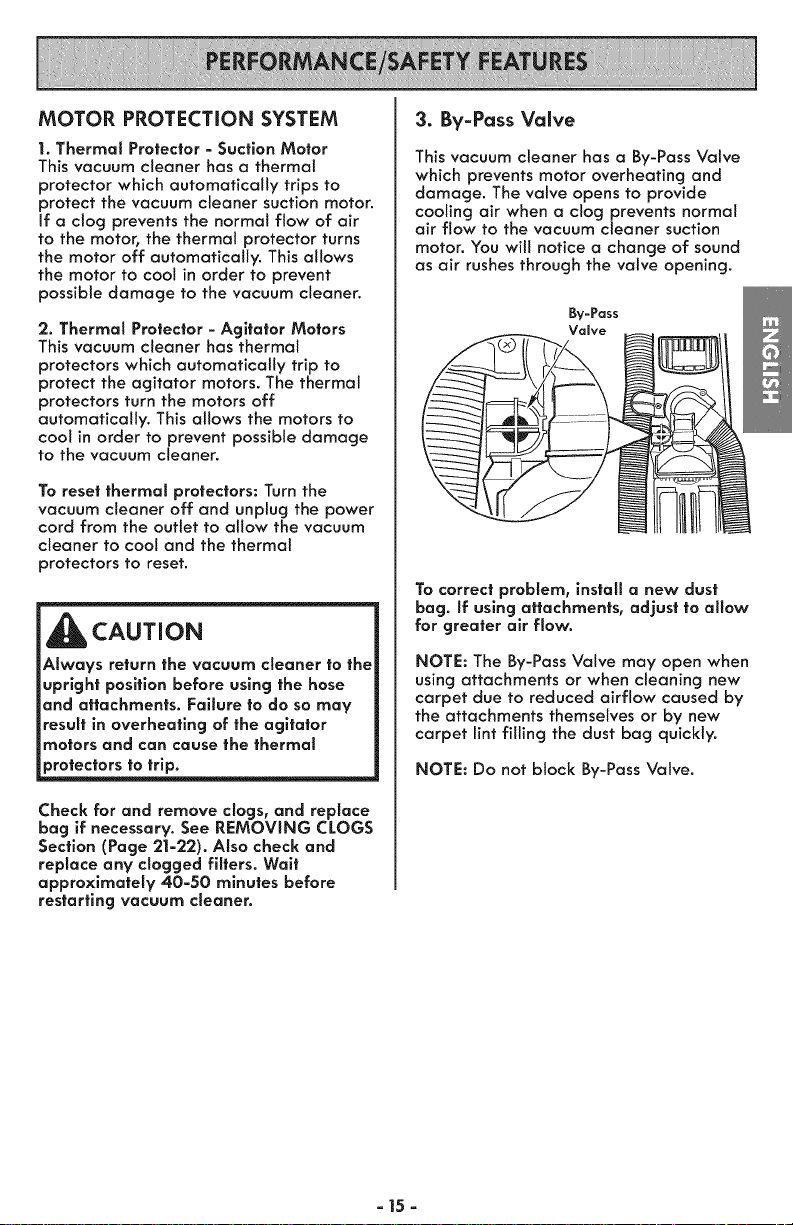
3. By-Pass Valve
This vacuum cleaner has a By-Pass Valve
which prevents motor overheating and
damage. The valve opens to provide
cooling air when a clog prevents normal
air flow to the vacuum cleaner suction
motor. You wilt notice a change of sound
as air rushes through the valve opening.
By-Pass
Valve
To correct problem, install a new dust
bag. If using attachments, adjust to allow
for greater air flow.
NOTE: The By-Pass Valve may open when
using attachments or when cleaning new
carpet due to reduced airflow caused by
the attachments themselves or by new
carpet lint filling the dust bag quickly.
NOTE: Do not block By-Pass Valve.
- 15-
WARNING
Electrical Shock And Personal Injury Haz-
ard
Disconnectelectrical supplybefore per-
forming maintenance to the vacuum
cleaner. Failure to do so could result in
electrical shockor personal injury from
vacuum cleaner suddenly starting.
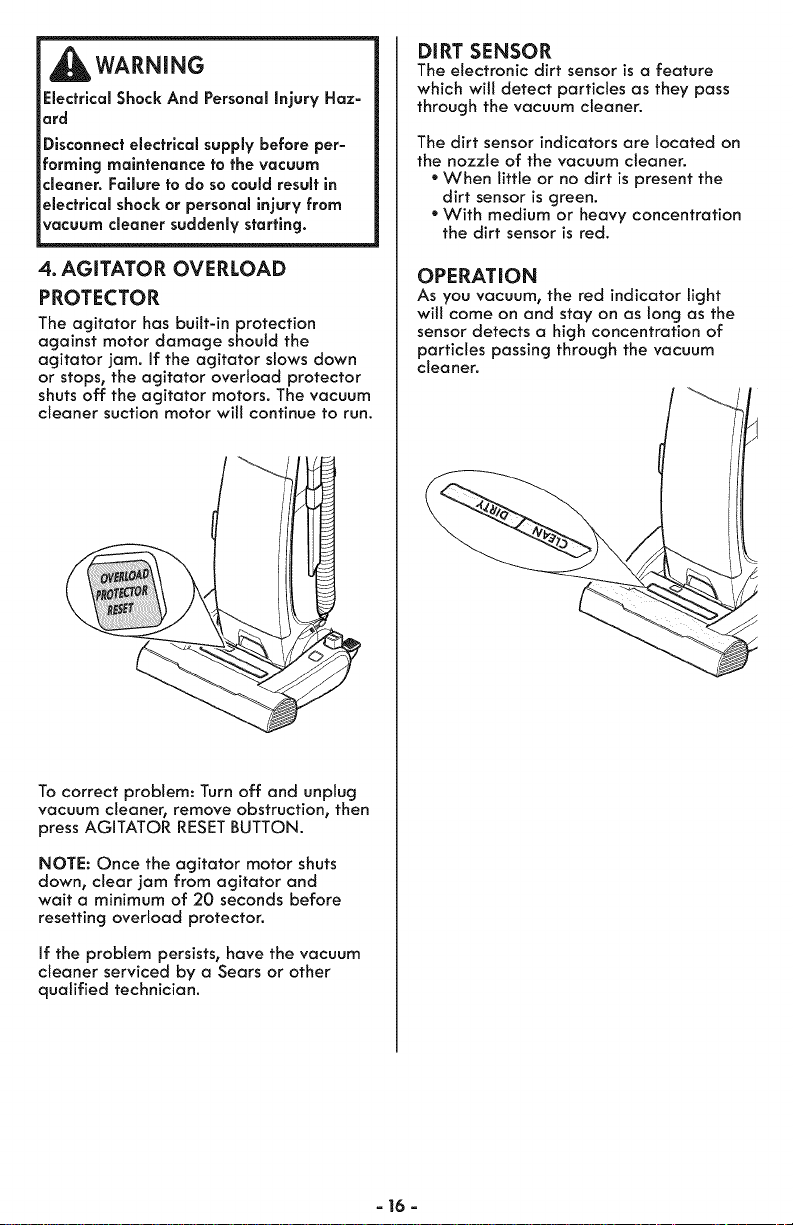
4. AGITATOR OVERLOAD
PROTECTOR
The agitator has built-in protection
against motor damage should the
agitator jam. If the agitator slows down
or stops, the agitator overload protector
shuts off the agitator motors. The vacuum
cleaner suction motor will continue to run.
Tocorrect problem: Turn off and unplug
vacuum cleaner, remove obstruction, then
press AGITATOR RESETBUTTON.
NOTE: Once the agitator motor shuts
down, clear jam from agitator and
wait a minimum of 20 seconds before
resetting overload protector.
If the problem persists, have the vacuum
cleaner serviced by a Sears or other
qualified technician.
DIRT SENSOR
The electronic dirt sensor is a feature
which will detect particles as they pass
through the vacuum cleaner.
The dirt sensor indicators are located on
the nozzle of the vacuum cleaner.
* When little or no dirt is present the
dirt sensor is green.
* With medium or heavy concentration
the dirt sensor is red.
OPERATION
As you vacuum, the red indicator light
will come on and stay on as long as the
sensor detects a high concentration of
particles passing through the vacuum
cleaner.
a 16 a
Alwaysfollowallsafetyprecautionswhen
performingmaintenancetothevacuum
cleaner.
WARNING
Electrical Shock And Personal injury
Hazard
Disconnect electrical supply before
servicing or cleaning the vacuum cleaner.
Fallure to do so could result in electrical
shock or personal injury from vacuum
cleaner suddenly starting.
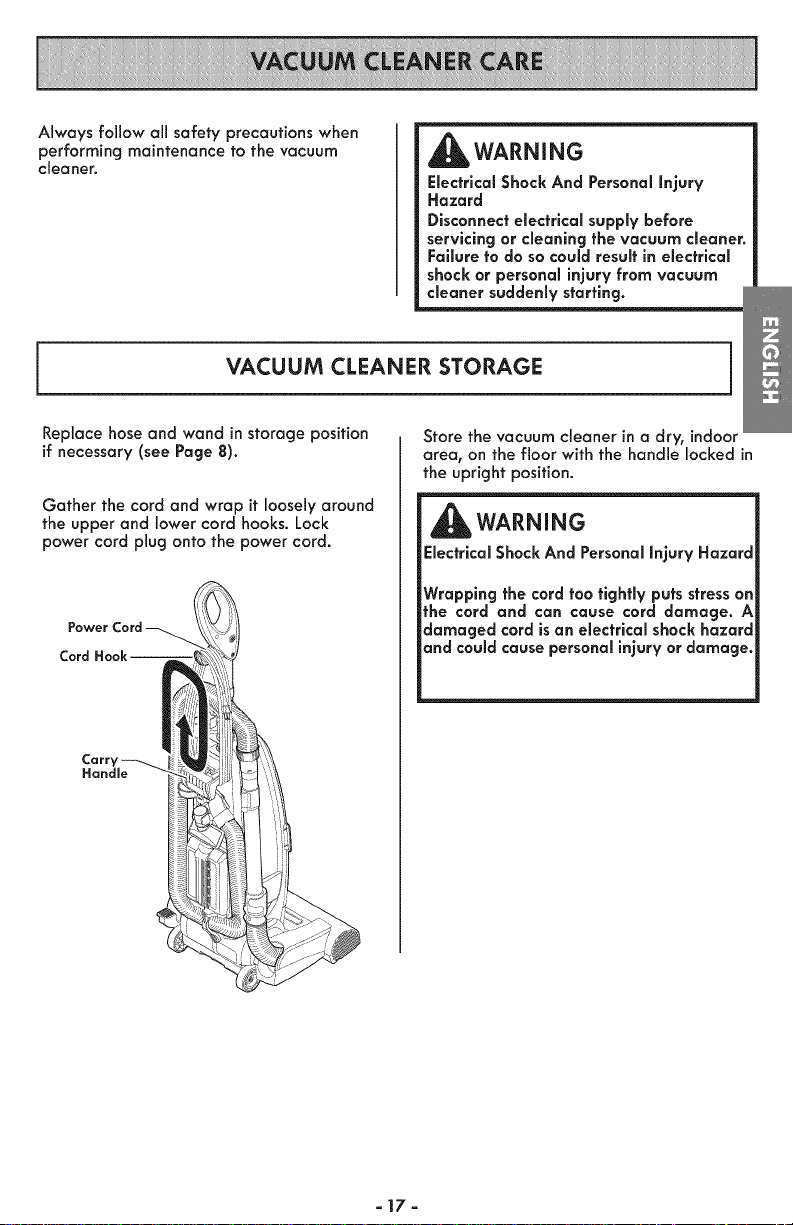
VACUUM CLEANER STORAGE
Replace hose and wand in storage position
if necessary(see Page 8).
Gather the cord and wrap it loosely around
the upper and lower cord hooks. Lock
power cord plug onto the power cord.
Power
Cord
Carr'
Handle
Store the vacuum cleaner in a dry, indoor
area, on the floor with the handle locked in
the upright position.
WARNING
Electrical Shock And Personal injury Hazard
Wrapping the cord too tightly puts stress on
the cord and can cause cord damage. A
damaged cord isan electrical shock hazard
and could cause personal injury or damage.
=17=
CLEANING EXTERIOR AND ATTACHMENTS
1. Turn off and unplug vacuum cleaner. DO
NOT drip water on vacuum cleaner.
2. To clean exterior, or to reduce static elec-
tricity and dust build-up, wipe outer surface
of vacuum cleaner and attachments. Use a
clean, soft cloth that has been dipped in a
solution of mild liquid detergent and water,
then wrung dry. Wipe dry after cleaning.
Wash attachments in warm soapy water,
rinse and air dry. Do not clean in
dishwasher.
CAUTION
Do not use attachments if they ore wet.
Attachments used in dirty areas, such
as under a refrigerator, should not be
used on other surfaces until they are
washed. They could leave mares.
CLEANING DiRT SENSOR OPTICS
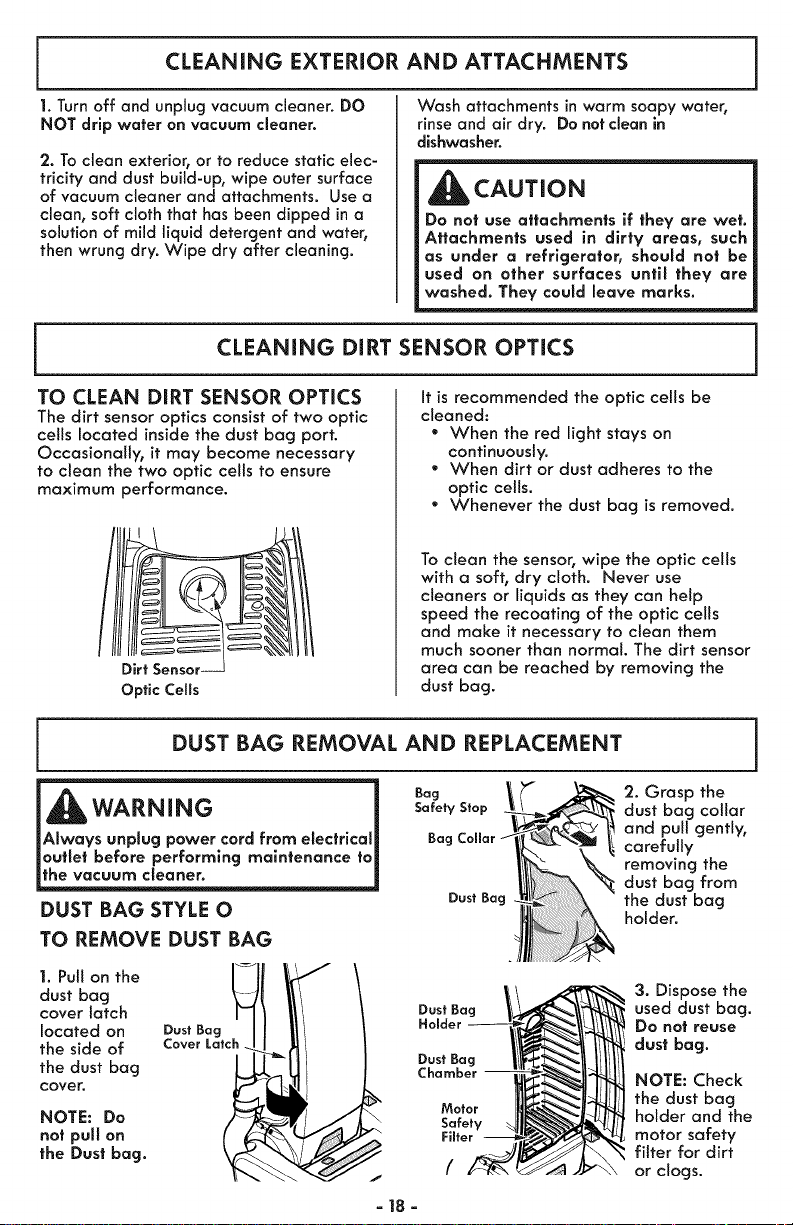
TO CLEAN DiRT SENSOR OPTICS
The dirt sensor optics consist of two optic
cells located inside the dust bag port.
Occasionally, it may become necessary
to clean the two optic cells to ensure
It is recommended the optic cells be
cleaned:
- When the red light stays on
continuously.
" When dirt or dust adheres to the
maximum performance.
Optic Cells
optic cells.
" Whenever the dust bag is removed.
To clean the sensor, wipe the optic cells
with a soft, dry cloth. Never use
cleaners or liquids as they can help
speed the recoating of the optic cells
and make it necessary to clean them
much sooner than normal. The dirt sensor
area can be reached by removing the
dust bag.
DUST BAG REMOVAL AND REPLACEMENT
_WARNING i
Always unplug power cord from electrical_
outlet before performing maintenance to_
the vacuum cleaner.
DUST BAG STYLE O
TO REMOVE DUST BAG
Bag '2. Grasp the
Safety Stop dust bag collar
and pull gently,
Bag Collar carefully
removing the
dust bag from
DustBag the dust bag
holder.
1. Pull on the _--_h_,.__,_,._
dust bag
cover latch Dust Bag
located on Dust Bag Holder -
the dust bag Chamber
cover.
f Motor
NOTE: Do Safety
not pull on Filter
the Dust bag.
/
3. Dispose the
used dust bag.
Do not reuse
dust bag.
NOTE: Check
the dust bag
holder and the
motor safety
filter for dirt
or clogs.
=18=
_CAUTION
NEVER REUSE A DUST BAG. Very fine
materlals, such as carpet freshener, face
powder, fine dust, piaster, soot, etc. can
clog the bag and cause it to burst before
it is full. Change bag more often when
vacuuming these materials.
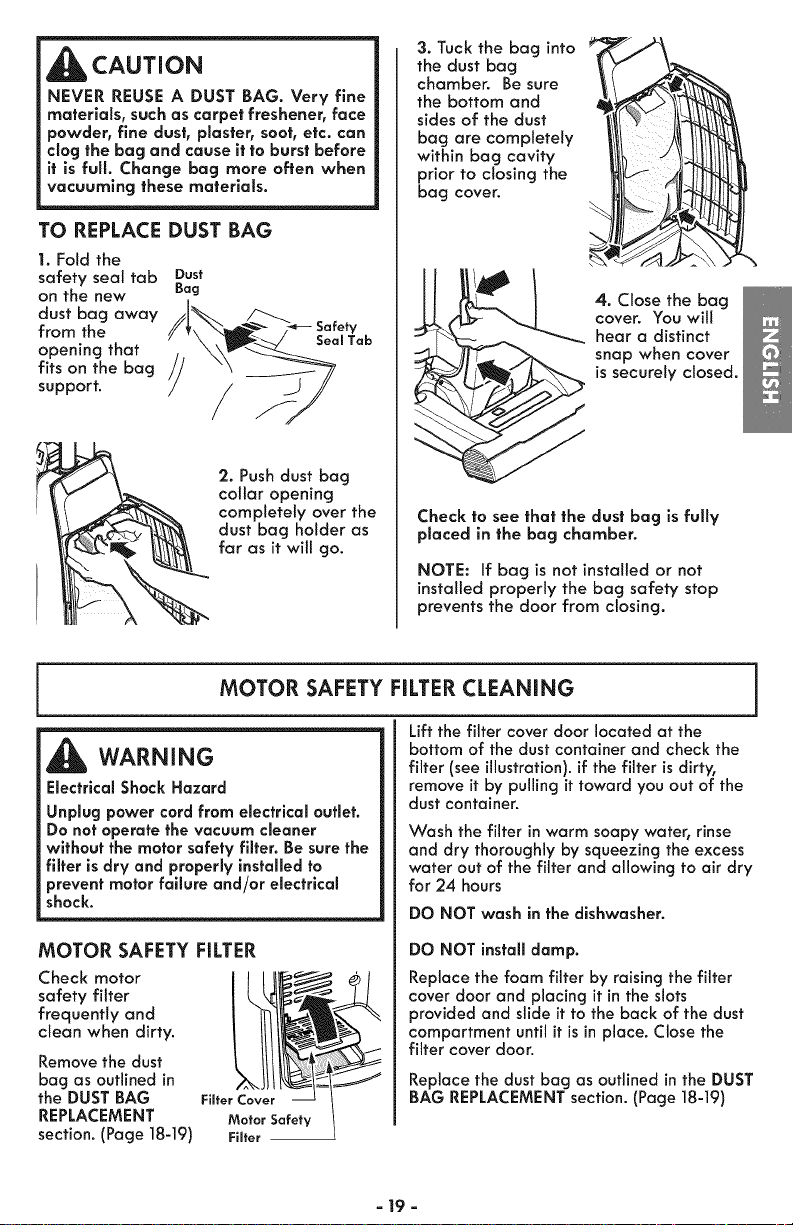
TO REPLACE DUST BAG
1. Fold the
safety seal tab
on the new
dust bag away
from the
opening that
fits on the bag
support.
Dust
Bag
2. Push dust bag
collar opening
completely over the
dust bag holder as
far as it will go.
3. Tuck the bag into
the dust bag
chamber. Be sure
the bottom and
sides of the dust
bag are completely
within bag cavity
prior to closing the
bag cover.
4. Close the bag
cover. You will
hear a distinct
snap when cover
is securely closed.
Check to see that the dust bag isfully
placed in the bag chamber.
NOTE: If bag is not installed or not
installed properly the bag safety stop
prevents the door from closing.
MOTOR SAFETY FILTERCLEANING
WARNING
Electrical Shock Hazard
Unplug power cord from electrical outlet.
Do not operate the vacuum cleaner
without the motor safety fllter. Be sure the
filter is dry and properly installed to
prevent motor failure and/or electrical
shock.
MOTOR SAFETY FILTER
Check motor
safety filter
frequently and
clean when dirty.
Remove the dust
bag as outlined in
the DUST BAG
REPLACEMENT
section. (Page 18-19)
Filter Cover
Motor Safety
Fiffer --
Lift the filter cover door located at the
bottom of the dust container and check the
filter (see illustration), if the filter is dirty,
remove it by pulling it toward you out of the
dust container.
Wash the filter in warm soapy water, rinse
and dry thoroughly by squeezing the excess
water out of the filter and allowing to air dry
for 24 hours
DO NOT wash in the dishwasher.
DO NOT install damp.
Replace the foam filter by raisingthe filter
cover door and placing it in the slots
provided and slide it to the back of the dust
compartment until it isin place. Close the
filter cover door.
Replace the dust bag as outlined in the DUST
BAG REPLACEMENTsection.(Page 18-19)
= 19 =
EXHAUST HEPA FILTER REPLACEMENT
EXHAUST FILTER STYLE EF-1
The EXHAUST HEPA FILTER must be
replaced when it becomes dirty. The
timing between replacement intervals will
depend on the use conditions the vacuum
cleaner is exposed to, The EXHAUST
HEPA FILTER should be checked when
changing the dust bag. The filter
CANNOT be washed as it will lose its
dust trapping ability.
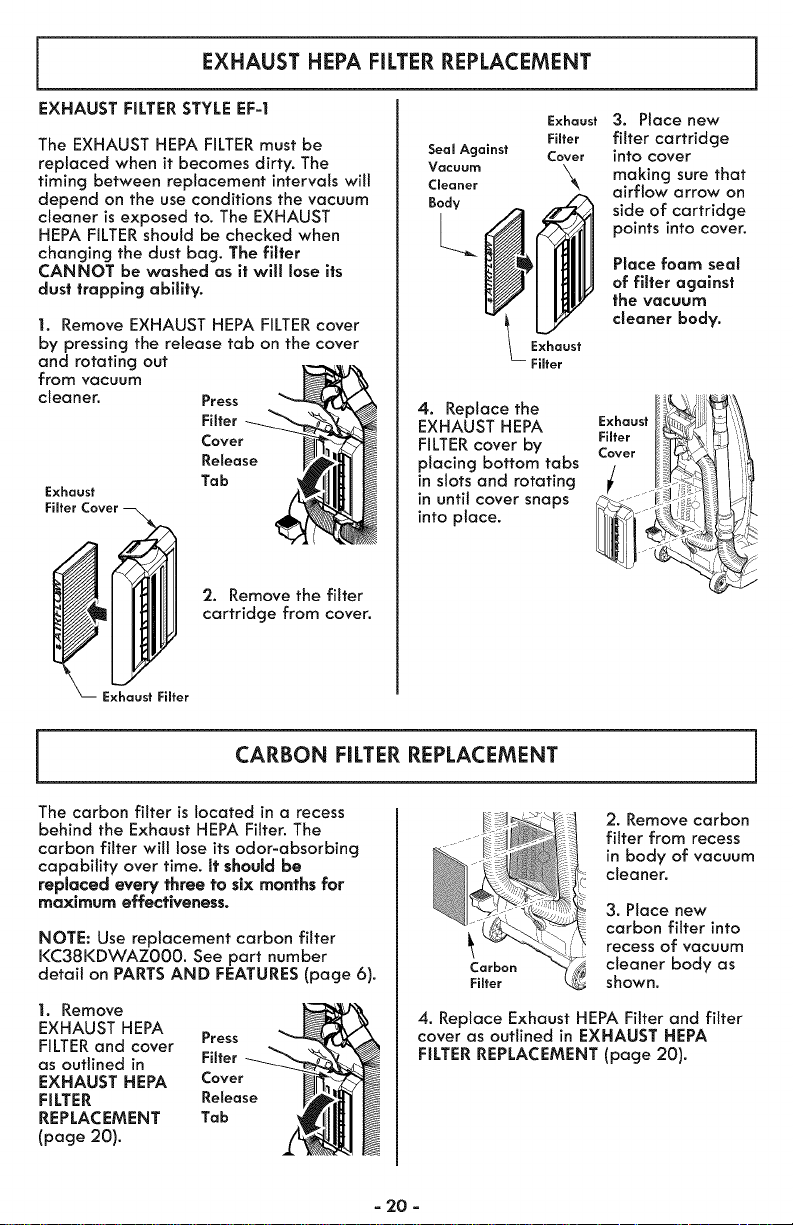
1. Remove EXHAUST HEPA FILTERcover
by pressing the release tab on the cover
and rotating out
from vacuum
cleaner.
Exhaust
Fiffer Cover
Press
Filter
Cover
Release
Tab
2. Remove the filter
cartridge from cover.
Exhaust
Filter
Seal Against Cover
Vacuum
Cleaner _k
Body
Exhaust
Fiffer
4. Replace the
EXHAUST HEPA
FILTERcover by
placing bottom tabs
in slotsand rotating
in until cover snaps
into place.
3. Place new
filter cartridge
into cover
making surethat
airflow arrow on
side of cartridge
points into cover.
Place foam seal
of filter against
the vacuum
cleaner body.
Exhaust
Filter
Cover
/
Exhaust Filter
CARBON FILTER REPLACEMENT
The carbon filter is located in a recess
behind the Exhaust HEPA Filter. The
carbon filter will lose its odor-absorbing
capability over time. It should be
repUacedevery three to six months for
maximum effectiveness.
NOTE: Use replacement carbon filter
KC38KDWAZ000. See part number
detail on PARTSAND FEATURES(page 6).
1. Remove
EXHAUST HEPA
FILTER and cover Press
as outlined in Filter
EXHAUST HEPA Cover
FILTER Release
REPLACEMENT Tab
(page 20).
"_ _ ...... _ 2. Remove carbon
_° filter from recess
in body of vacuum
__ cleaner.
3. Place new
carbon filter into
recess of vacuum
cleaner body as
Fi shown.
4. Replace Exhaust HEPA Filter and filter
cover as outlined in EXHAUST HEPA
FILTER REPLACEMENT (page 20).
- 20 -

/
Hinge Pin
Hole --
Dust Bag
Chamber
Hinge Pin
Hole
Cover To reinstall dust bag cover.
1. Align dust bag cover hinge pin with
hinge pin hole in dust container.
2. Rotate dust bag cover into place.
3. You should hear a noticeable click
when hinge pin snaps into place.
Dust Bag
Cover
Tomaintain efficient cleaning, the agitator
must be kept free of carpet fiber, string, or
hair build-up. After every 7 to 10 uses,un-
plug and turn vacuum cleaner over and
check agitator for fiber and hair build-up.
Use scissors to remove any build-up entan-
gled around the agitator.
Always follow all safety precautions when
performing maintenance to the vacuum
cleaner.
_IbWARNING
Electrical Shock Or Personal Injury
Hazard
Disconnect electrical supply before
performing maintenance to the vacuum
cleaner. Failure to do so could result in
electrlcal shock or personal injury from
the vacuum cleaner suddenly starting.
If the vacuum cleaner does not seem to
have adequate suction, first check if the
dust bag isfull or if a filter isclogged. See
DUST BAG REMOVAL AND REPLACEMENT
(Page 18-19)
If the dust bag and filter areas are free of
clogs, check the clean-out port and the
extension hose. See the following setsof
instructions.
= 21 =
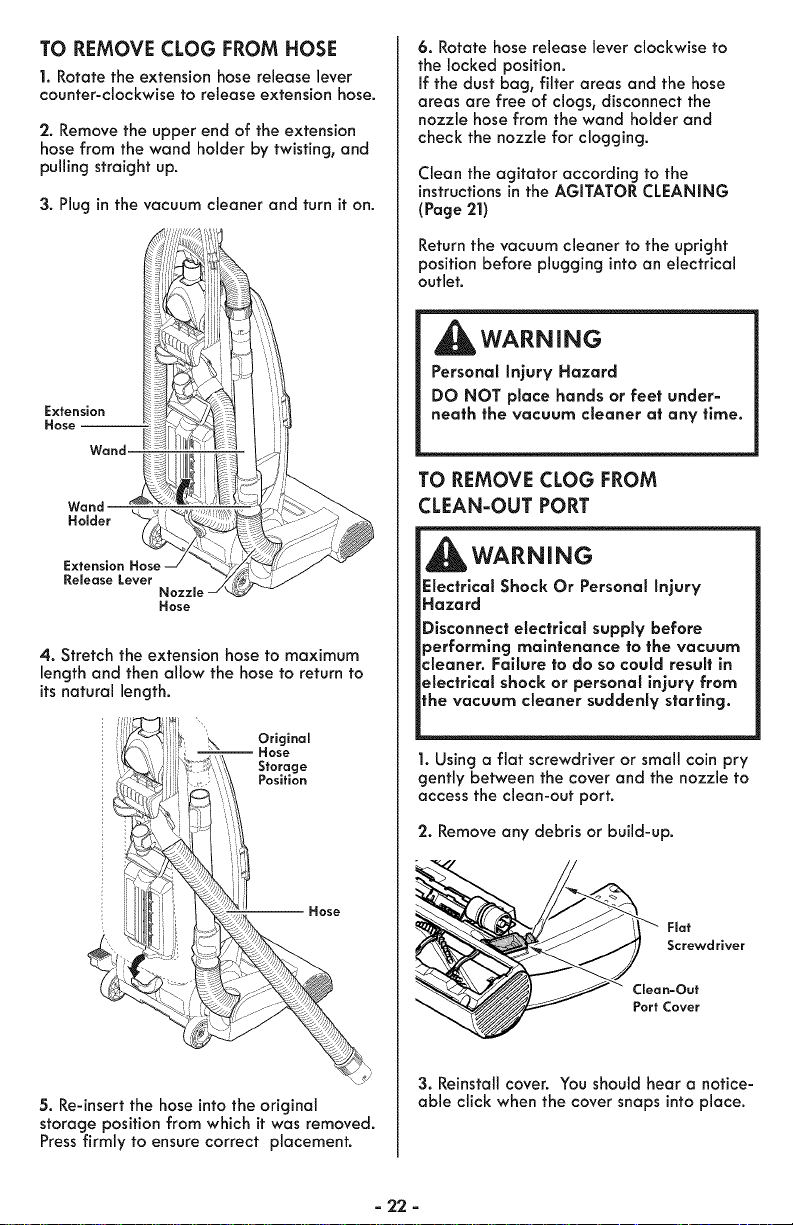
TO REMOVE CLOG FROM HOSE
1. Rotate the extension hose release lever
counter-clockwise to release extension hose.
2. Remove the upper end of the extension
hose from the wand holder by twisting, and
pulling straight up.
3. Plug in the vacuum cleaner and turn it on.
Extension
Hose --
Wand
Wand
Holder
Release Lever
Nozzle
Hose
4. Stretch the extension hose to maximum
length and then allow the hose to return to
its natural length.
Original
Hose
Storage
Position
-- Hose
5. Re-insert the hose into the original
storage position from which it was removed.
Press firmly to ensure correct placement.
6. Rotate hose release lever clockwise to
the locked position.
If the dust bag, filter areas and the hose
areas are free of clogs, disconnect the
nozzle hose from the wand holder and
check the nozzle for clogging.
Clean the agitator according to the
instructions in the AGITATOR CLEANING
(Page 21)
Return the vacuum cleaner to the upright
position before plugging into an electrical
out Jet.
WARNING
Personal Injury Hazard
DO NOT place hands or feet under-
neath the vacuum cleaner at any time.
TO REMOVE CLOG FROM
CLEAN-OUT PORT
WARNING
Electrlcal Shock Or Personal Injury
Hazard
Disconnect electrical supply before
performing maintenance to the vacuum
cleaner. Failure to do so could result in
electrical shock or personal injury from
lhe vacuum cleaner suddenly starting.
1. Using a fiat screwdriver or small coin pry
gently between the cover and the nozzle to
access the clean-out port.
2. Remove any debris or build-up.
Flat
Screwdriver
Clean=Out
Port Cover
3. Reinstall cover. You should hear a notice-
able click when the cover snaps into place.
=22 =
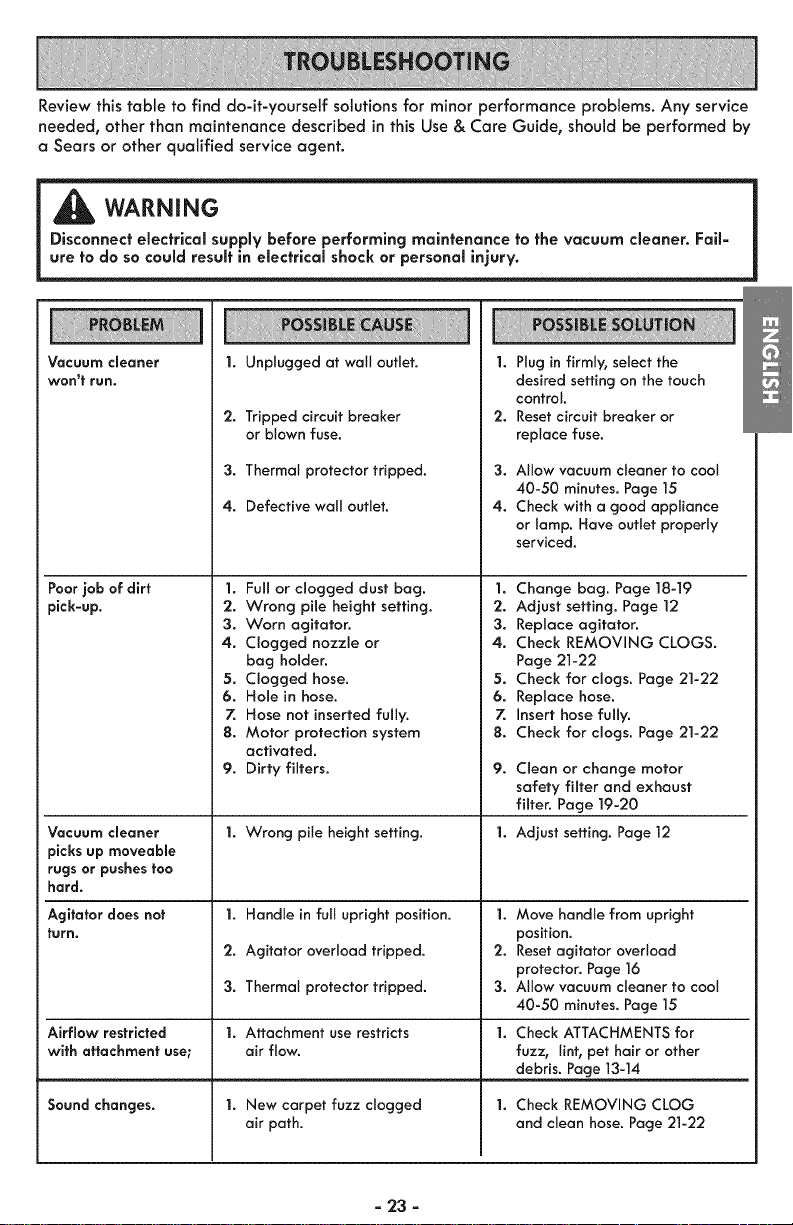
Reviewthistable to find do-it-yourself solutions for minor performance problems. Any service
needed, other than maintenance described inthis Use& Care Guide, should be performed by
a Sears or other qualified service agent.
WARNING
Disconnect electrical supply before performing maintenance to the vacuum cleaner. Fail=
ure to do so could result in electrical shock or personal injury.
Vacuum cleaner
won't run.
Poorjob of dirt
pick-up.
Vacuum cleaner
picks up moveable
rugsor pushes too
hard.
Agitator does not
turn.
Airflow restricted
with attachment use;
Sound changes.
1. Unplugged at wall outlet.
2. Tripped circuit breaker
or blown fuse.
3. Thermal protector tripped.
4. Defective wall outlet.
1. Full or clogged dust bag.
2. Wrong pile height setting.
3. Worn agitator.
4. Clogged nozzle or
bag holder.
5. Clogged hose.
6. Hole in hose.
7. Hose not inserted fully.
8. Motor protection system
activated.
9. Dirty filters.
1. Wrong pile height setting.
I. Handle in full upright position.
2. Agitator over(oad tripped.
3. Therma( protector tripped.
1. Attachment use restricts
air flow.
1. New carpet fuzz clogged
air path.
iii _i ;i!=iiiiii_ii)iiiiiiii_iiiiiii_iiiiiii;i;i!iiii!;!iiii::i:iiiYiiiiiiiitiiii!iiiii!iiiii!iiiiiiiiiiiii_;iiiiii:_:_:ii!iiiii;iii!iiiii;;
|. Plug in firmly, select the
desired setting on the touch
control.
2. Resetcircuit breaker or
replace fuse.
3. Allow vacuum cleaner to cool
40-50 minutes. Page 15
4. Check with a good appliance
or lamp. Have outlet properly
serviced.
1. Change bag. Page 18-19
2. Adjust setting. Page 12
3. Replace agitator.
4. Check REMOVING CLOGS.
Page 21-22
5. Check for clogs. Page 21-22
6. Replace hose.
7. Insert hose fully.
8. Check for clogs. Page 21-22
9.
Clean or change motor
safety filter and exhaust
filter. Page ]9-20
1. Adjust setting. Page 12
1. Move handle from upright
position.
2. Resetagitator overload
protector. Page 16
3. Allow vacuum cleaner to cool
40-50 minutes. Page 15
Check ATTACHMENTS for
fuzz, lint, pet hair or other
debris. Page 13-14
Check REMOVING CLOG
and clean hose. Page 21-22
=23 =
Vacuum Cleaner Help Line:
1-877-531-7321
8:00am-5:00pm EST,M-F
(U.S.A. and Canada)
Master Protection Agreements
Congratulations on making a smart purchase. Your new Kenmore® product is designed
and manufactured for years of dependable operation. But like all products, it may re-
quire preventive maintenance or repair from time to time. That's when having a Master
Protection Agreement can save you money and aggravation.
The Master Protection Agreement also helps extend the life of your new product. Here's
what the Agreement _ includes:
[] Parts and labor needed to help keep products operating properly under normal use,
not just defects. Our coverage goes well beyond the product warranty. No de-
ductibles, no functional failure excluded from coverage-- real protection.
[] Expert service by a force of more than 10,000 authorized Sears service technicians,
which means someone you can trust witl be working on your product.
[] Unlimited service calls and nationwide service, as often as you want us, whenever
you wont us.
[] "No-lemon" guarantee - replacement of your covered product if four or more prod-
uct failures occur within twelve months.
[] Product replacement if your covered product can't be fixed.
[] Annual Preventive Maintenance Check at your request - no extra charge.
[] Fast help by phone - we call it Rapid Resolution - phone support from a Sears rep-
resentative on all products. Think of us as a "talking Use & Care Guide."
[] Power surge protection against electrical damage due to power fluctuations.
[] $250 Food Loss Protection annually for any food spoilage that is the result of me-
chanical failure of any covered refrigerator or freezer.
[] Rental reimbursement if repair of your covered product takes longer than promised.
[] 10% discount off the regular price of any non-covered repair service and related in-
stalled parts.
Once you purchase the Agreement, a simple phone calt is atl that it takes for you to
schedule service. You can call anytime day or night, or schedule a service appointment
online.
The Master Protection Agreement isa risk free purchase. If you cancel for any reason
during the product warranty period, we wilt provide a fult refund. Or, a prorated refund
anytime after the product warranty period expires. Purchase your Master Protection
Agreement today!
Some limltations and exclusions apply. For prices and additional information in the
U.S.A. call 1-800-827-6655.
Coverage in Canada varies on some items. For full details call Sears Canada at 1-800-
361-6665.
Sears Instaffafion Service
For Sears professional installation of home appliances, garage door openers, water
heaters, and other major home items, in the U.S.A. or Canada call 1-800-4-MY-HOME®.
- 24 -
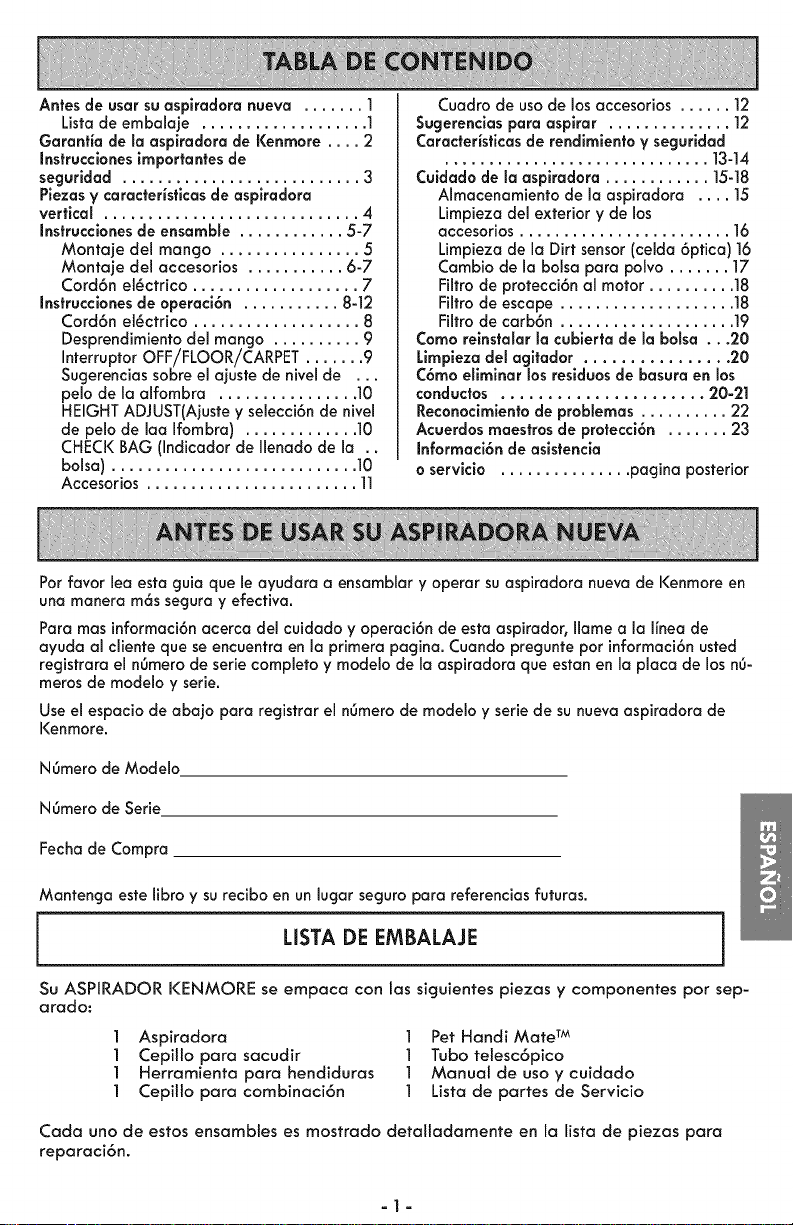
Antes de usar su aspiradora nueva ....... 1
Lista de embalaje ................... 1
Garantia de la asplradora de Kenmore .... 2
Instruccbnes importantes de
segurldad ........................... 3
Piezas y caracteristlcas de asplradora
vertical ............................. 4
Instrucclanes de ensamble ............ 5-7
Montaje del mango ................ 5
Montaje del accesorios ........... 6-7
Cord6n el_ctrico ................... 7
Instrucclones de operaci6n ........... 8-12
Cord6n el_ctrico ................... 8
Desprendimiento del mango .......... 9
Interruptor OFF/FLOOR/CARPET ....... 9
Sugerencias sabre el ajuste de nivel de ...
pelo de la alfombra ................ 10
HEIGHT ADJUST(Ajuste y selecci6n de nivel
de pelo de laa Ifombra) ............. 10
CHECK BAG (Indicador de Ilenado de la ..
balsa) ............................ 10
Accesorios ........................ ll
Cuadro de usade los accesorios ...... 12
Sugerenclaspara asplrar .............. ]2
Caracteristicasde rendlmlento y seguridad
.............................. ]3-]4
Cuidadode la asplradora ............ 15-18
Almacenamiento de la aspiradora .... 15
Limpieza del exterior y de los
accesorios ........................ 16
Limpieza de la Dirt sensor(celda 6ptica) 16
Cambio de la balsa para polvo ....... 17
Filtro de protecci6n al motor .......... 18
Filfro de escape .................... 18
Filtro de carb6n .................... 19
Coma relnstaIar la cublerta de la balsa ...20
Limpleza del agltador ................ 20
C6mo ellminar los residuos de basura en los
conductas ...................... 20-21
Recanocimienta de problemas .......... 22
Acuerdos maestrosde protecci6n ....... 23
Informaci6n de asistencia
o servicia ............... pagina posterior
Parfavor lea esta guia que le ayudara a ensamblar y operar suaspiradora nuevade Kenmoreen
una manera m6s seguray efecfiva.
Paramas informaci6nacerca del cuidado y operaci6n de esta aspirador, Ilame a la Ifneade
ayuda al cliente que seencuentra en la primera pagina. Cuando pregunte par informaci6nusted
registrara el nOmerode seriecompleto y modelo de la aspiradora que estanen la placa de los n6-
meros de modelo y serie.
Use el espacio de abajo para registrar el n6mero de mode[o y serie de su nuevaaspiradora de
Kenmore.
N6mero de Mode[o
N6mero de Serie
Fechade Compra
Mantenga este fibro y su recibo en un [ugar seguropara referencias futuras.
L[STA DE EMBALAJE
]
Su ASPIRADOR KENMORE se empaca con los siguientes piezas y componentes par sep-
arado:
l Aspiradora l Pet Handi Mate TM
l Cepi[lo para sacudir l Tuba telesc6pico
l Herramienta para hendiduras l Manual de usa y cuidado
] Cepilto para combinaci6n ] Lista de partes de Servicio
Cada uno de estos ensambtes es mostrado detaltadamente en la lista de piezas para
reparaci6n.
-1-
Linea de ayuda de Aspiradoras:
1-877-531-7321
8:00am-5:00pm EST,M-F
(U.S.A. and Canada)
Garanfia limitada de un a_o
Siesta aspiradora fatla por un defecto en sus materiales o fabricaci6n en el perrodo de
un a_o desde la fecha de compra, cuando se instala, maneja y mantiene siguiendo
todas las instrucciones incluidas con el producto, devolverta a cualquier tienda Sears,
Sears Parts & Repair Center (Centro de Reparaciones y Piezas Sears) u a otro
distribuidor Kenmore para que reparen el aparato de forma gratuita.
Siesta aspiradora se utiJiza para otros fines que no sea uso familiar privado, esta
garantra es v61ida solamente durante 90 dras desde la fecha de compra.
Estagaranfia cubre exclusivamente los defectos de materiales y fabricaci6n. Sears NO
pagar6:
1. Los elementos desechabtes que puedan desgastarse con un uso normal, incluyendo
sin car6cter excluyente, fittros, correas, 16mparas y bolsas.
2. A un t_cnico det servicio t_cnico para que ense_e al usuario a instatar, manejar o
mantener correctamente et producto.
3. A un t_cnico del servicio t_cnico para limpiar o mantener este producto.
4. Da_os o averfa de este producto si no se ha instalado, rnanejado o mantenido
siguiendo todas las instrucciones incluidas con el producto.
5. Da_os o averra de este producto originados pot accidente, abuso, uso incorrecto u
uso det producto para otros fines distintos de los indicados.
6. Da_os o averra de este producto causados pot el uso de detergentes, limpiadores,
productos qu_micos o utensilios diferentes a los recomendados en todas las
instrucciones que se incluyen con el producto.
Z Da_os o aver_a de las piezas o sistemas causados pot modificaciones no
autorizadas que se hayan hecho a este producto.
Lirnitaci6n de responsabilidad de las garantias impffcltas; limitaci6n de remedios
El 6nico y exclusivo remedio def cliente bajo esta garantra limitada ser6 la reparaci6n
del producto seg6n Io indicado en este documento. Las garantras impffcitas, incluyendo
las garantras de comerciabiJidad o idoneidad para un prop6sito espec_fico, se limitan a
un a_o o el perbdo m6s corto permitido pot la ley. Sears no set6 responsable pot
da_os incidentales ni consecuenciales. AIgunos estados o provincias no permiten la
exclusi6n o limitaci6n de da_os incidentales o consecuenciales, ni limitaciones en la
duraci6n de las garant_as impffcitas de comerciabiiidad o idoneidad, pot Io que estas
exclusiones o limitaciones podrran no apticar en su caso.
Esta garantfa aptica solamente cuando esta aspiradora se utiliza en Estados Unidos o
Canad6.
Esta garantfa le otorga derechos legales especrficos, y usted podrra tenet otros
derechos que varran en funci6n de cada estado.
Sears, Brands Management Corporation., Hoffman Estates, IL 60179
Sears Canada Inc., Toronto, Ontario, Canada MSB 2C3
a2a
Lea todas las instrucciones en este manual antes de armar o usar su aspiradora.
ADVERTENCIA I
Su seguridad esmuy importante para nosotros. Para reduck el riesgo de incendlo,choque el_ctrica,
lesi6n corporal o dafios al utillzar su aspiradara, act6e de acuerda con las precaucionesb6sicasde se=
guridad, entre elias:
Use su aspiradora solamente como se
describe en este manual. Use sotamente
con los accesorios recomendados por
Sears.
Desconecte la fuente de electricidod
antes de hacer el servicio o limpiar el
6rea de! cepitto. La fatta de hacer esto
puede resuttar en el s6bito arranque del
cepillo. Cousando lesiones personales
por partes en movimiento.
No deje Io aspirodora cuondo est6
enchufada. Desenchufe del
tomocorriente cuando no est6 en uso y
antes de hacer et servicio.
Para reducir et riesgo de choque
et_ctrico - No la use afuera o sobre
superficies mojadas.
No permita que se la usecomo un
juguete. Ponga especial atenci6n cuando
es usada pot o cerca de nifios.
No la use con un cord6n o clavija
dafiados. Si la aspirodora no est6
trabajando como debe, se la ha dejado
caer, dafiado, dejada afuera, o
volteada en et agua, ret6rnela a un
Centro de Servicio Sears.
No la jale o arrastre del cord6n, use el
cord6n como una manija, cierre una
puerto sobre et cord6n, o tire del
cord6n alrededor de bordes afilados o
esquinos. No pose la aspiradora sobre
et cord6n. Mantenga et cord6n lejos de
superficies calientes.
No desenchufe tirando del cord6n. Para
desenchufar, tome la clavija, no el
cord6n.
No tome la cl.aviia o la aspiradora con
las manos mojaaas.
No ponga ning6n objeto en las
aberturas.
No la use con ninguna abertura
bloqueada; mante'ngata Libre de polvo,
hilachas, pelo, y cualquier cosa que
pueda reducir la circulaci6n del aire.
GUARDE ESTAS
Mantenga el pelo, ropas sueltas, dedos,
y todoslas partes del cuerpo lejos de
aberturas y partes en movimiento.
Apague todos los controles antes de
desenchufar.
Use cuidado extra cuondo limpie
escaleras. No la ponga sobre siltas,
mesas, etc. Mant_ngala sobre el piso.
No use la aspiradora para levantar
ffquidos inflamables o combustibles
(gasolina, fluido de limpiar, perfumes,
etc.), o la use en 6teas donde puedan
estar presentes. Los vapores de estas
substoncias pueden crear un peligro de
incendio o explosi6n.
No levante nada que est_ ardiendo o
echando humo, tal como cigarritlos,
f6sforos, o cenizas catientes.
No use la aspiradora sin la bolsa de
polvo y/o filtros en su lugar.
Siempre cambie la bolsa de polvo
despu6s de limpiar ta alfombra,
limpiadores o refrescantes, polvos, y
polvo fino. Estos productos obstruyen los
fittros, reducen ta circulaci6n del aire y
pueden causar dofio a to aspiradora. La
falta en cambiar Io bolsa de polvo
puede causar dafio permanente a la
aspiradora.
No use la aspiradora para levantar
objetos duros afitados, peque_os
juguetes, alfileres, sujetapapeles, etc.
El[os pueden dafiar la aspiradora o la
boisa de polvo.
Desenchufe antes de conectar el Pet
Handi Mate TM
Usted es responsable de estar seguro
de que su aspiradora no es usada pot
alguien incapoz de operarla
correctamente.
INSTRUCCIONES
Elarmado y usosegurode suaspiradora sonsuresponsabilidad.Estaaspiradora ha sido dise-
5ada exclusivamente para usodom_stico. Leaeste Manual del propietario detenidamente, pues
contiene informaci6nimportantesobre seguridad y uso. Estaguia contiene informaci6nsobre
=3=
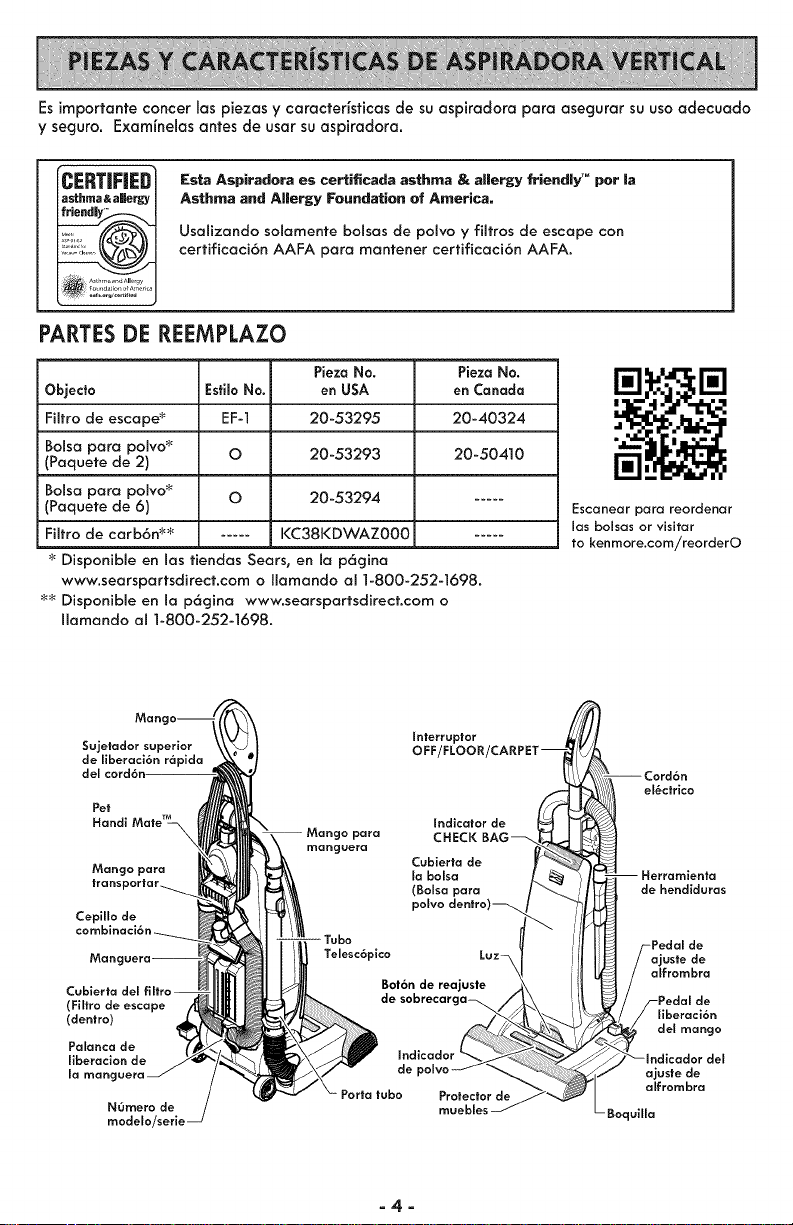
Esimportanteconcerlaspiezasycaracterfsficasdesuaspkadoraparaasegurarsuusaadecuado
yseguro.Examfnelasantesdeusarsuaspkadora.
ICERTiFiED
|asthma & aJJerk]
Esta Aspiradera es certificada asthma & allergy friendly TM per la
Asthma and Allergy Foundation of America,
UsaJizando solamente balsas de polvo y fiJtros de escape con
certificaci6n AAFA para mantener certificaci6n AAFA.
PARTESDE REEMPLAZO
Pieza No.
Objedo EsfiloNo. en USA
Filtro de escape _ EF-1 20-53295
Bolsa para poivo _ O 20-53293
(Paquete de 2)
Bolsa para polvo _ O 20-53294
(Paquete de 6)
Filtro de carb6n _'_; ..... KC38KDWAZ000
Disponible en las fiendas Sears, en la p6gina
www.searspartsdirect.com o Ilamando al 1-800-252-1698.
_; Disponible en Jap6gina www.searspartsdirect.com o
Ilamando al 1-800-252-1698.
Pieza No.
en Canada
20-40324
20-50410
Escanear para reordenar
las bolsas or visitar
to kenmore.com/reorderO
Sujetador superior
de liberaci6n r6pida
del
Pet
Handl
Mango para
|ran. _
Cepillo de
manguera
Man_ Telesc6plco
(Filtro de escape
(dentro)
Palanca de
llberacion de
la mangl
NOmero de
modelo/serie
Interruplor
OFF
indicator de
CHECK BAG
Cubierfo de
la bolsa
(Bolsa para
polvo denfro)_
Bot6n de reajuste
de
de
Profecfor de
muebles
_ Cord6n
el_cfrico
i
alfrombra
- Boquilla
=4=
Porfavorpongaatenci6nespeciala los cuadros que le alertaran de posiblespeligros
Advertencla: Esteinformaci6n le alertar6 de peligro de fuego, choques el_ctricos,
quemadas y lesiones. Culdaclo: Esteinformaci6n le alertara de peligros como lesiones
y daffos de propiedad.
ADVERTENCIA
Peligro de lesi6n personal y da_o al pro=
ducto
No conecle la asplradora hasta que
termine de ormarla. De 1ocontrario
podria causar un choque el_clrlco o
lesi6n corporal.
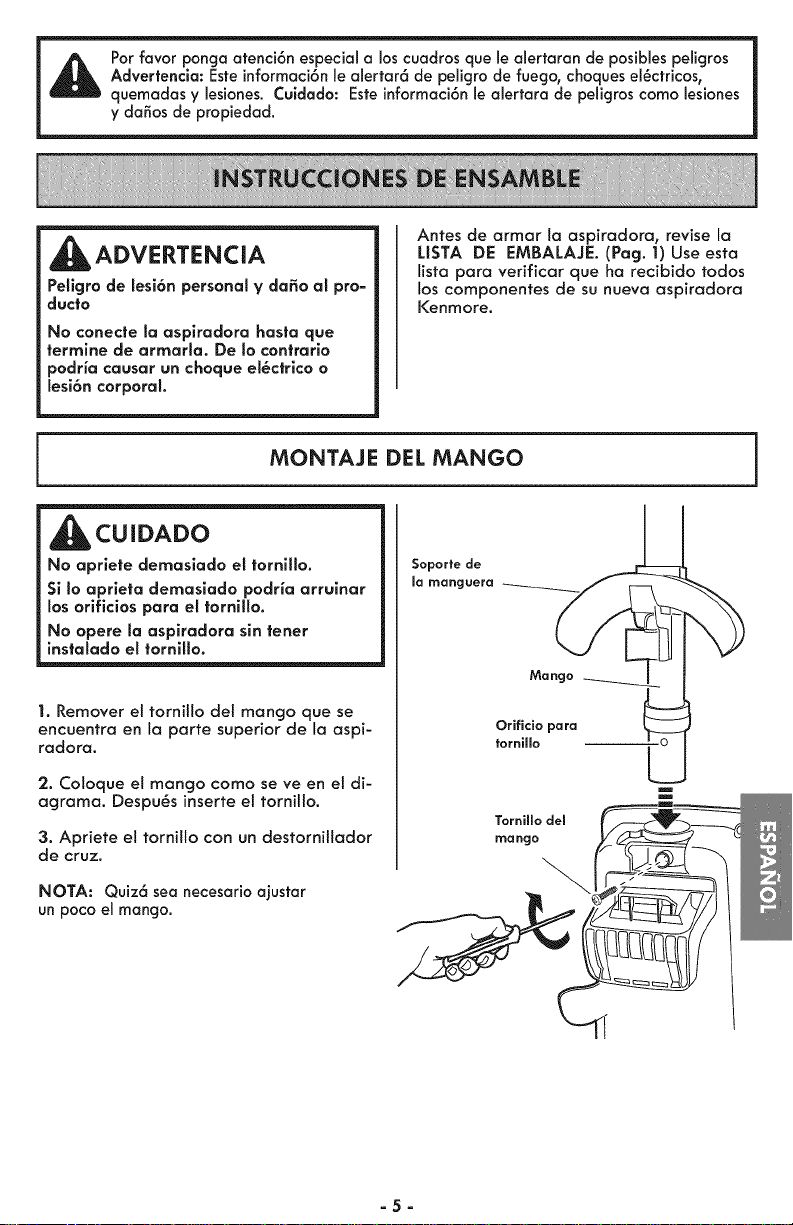
Antes de armar la aspiradora, revise la
LISTA DE EMBALAJE. (Pag. 1) Use esta
lista para verificar que ha recibido todos
los componentes de su nueva aspiradora
I<enmore.
MONTAJE DEL MANGO
CUIDADO
No apriete demasiado el tornillo.
Si Io aprleta demasiado podHa arrulnar
los orlflclos para el tornillo.
No opere la aspiradora sin tener
instalado el tornillo.
1. Remover et tornillo del mango que se
encuentra en la porte superior de la aspi-
radora.
2. Coloque el mango como se ve en el di-
agrama. Despu_s inserte el tornillo.
3. Apriete el tornillo con un destorniltador
de cruz.
NOTA: Quiz6 sea necesario ajustar
un pocoel mango.
Soporfe de
la manguera
Mango
Orificio para
fornillo
Tornillo del
mango
=5=
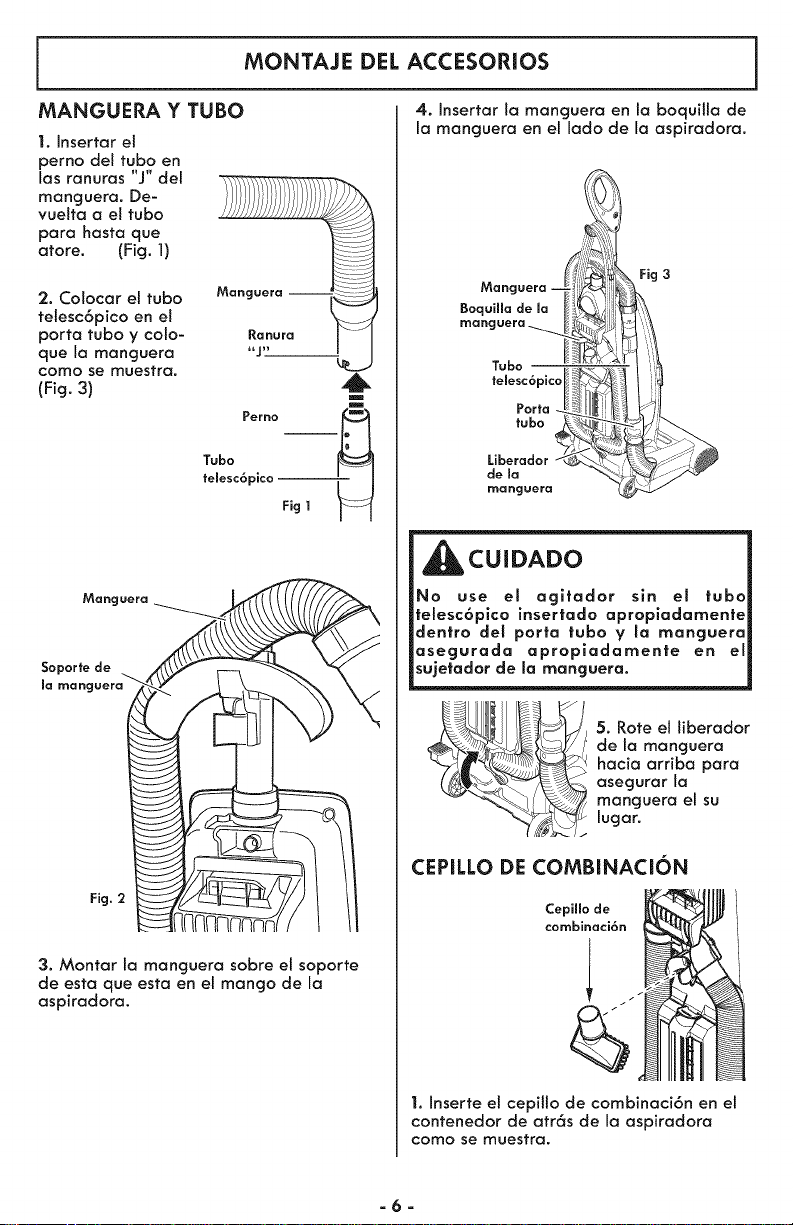
MONTAJE DEL ACCESORIOS
MANGUERA Y TUBO
1. Insertar el
perno del tubo en
las ranuras "J" del
manguera. De-
vuelta a el tubo
para basra que
atore. (Fig. 1)
2. Colocar e! tubo
telesc6pico en el
porta tubo y colo-
que la manguera
como se muestra.
(Fig. 3)
,6
m
m
Tubo Perno _
femesc6pico
Fig1
Manguera _-_ L
so or,e
la manguera_ / \ _ __
3. Montar la manguera sobre el soporte
de esta que esta en el mango de la
aspiradora.
4. Insertar la manguera en la boquilla de
la manguera en el lado de la aspiradora.
Fig 3
Tubo
telesc6picoI
de ma
manguera
_CUIDADO
No use el agltador sin et tuba
felesc6pico insertado apropladamente
dentro del porto tuba y la manguera
asegurada apropiadamente en el
sujetador de la manguera.
5. Rote el liberador
de la manguera
hacia arriba para
asegurar la
manguera el su
lugar.
CEPILLO DE COMBINACION
Cepillo de
combinaci6n
1. Inserte el cepilto de combinaci6n en el
contenedor de atr6s de la aspiradora
como se muestra.
-6-
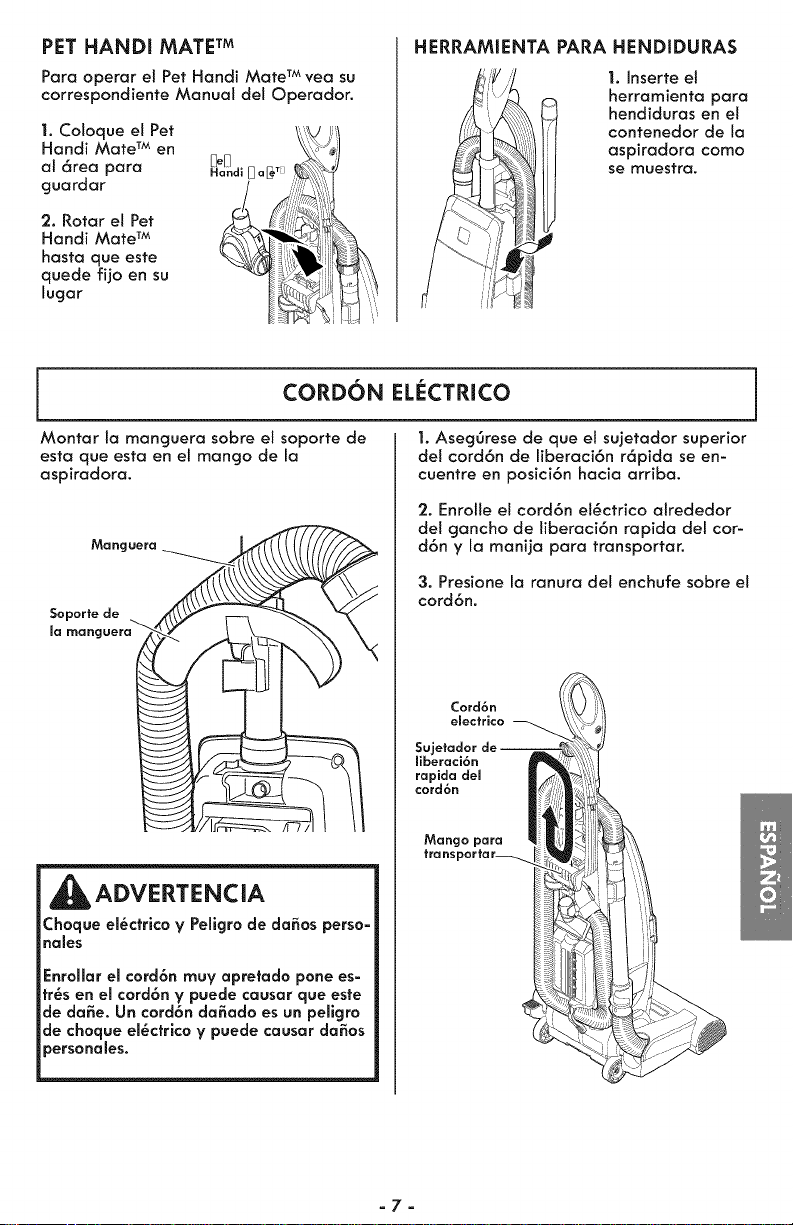
PET HANDI MATE TM
Para operar el Pet Handi Mate TM vea su
correspondiente Manual del Operador.
1. Coloque el Pet
Handi Mate TM en
al 6rea para _.d_ _a_ Tj
guardar
2. Rotor el Pet
Handi Mate TM
hasta que este
quede fijo en su
lugar
HERRAMIENTA PARA HENDIDURAS
1. Inserte et
herramienta para
hendiduras en el
contenedor de la
aspiradora como
se muesfra.
CORDON EL_:CTRICO
Montar la manguera sobre el soporte de
esta que esta en el mango de la
aspiradora.
Manguera- _ _..._
la manguera_ _ __
ADVERTENCIA
Choque el_cfrico y Peligro de dodos perso=
holes
Enrollar el cord6n muy apretado pone es-
fr_s en el cord6n y puede cousar que este
de dose. Un cord6n da_ado es un pellgro
de choque el_cfrico y puede cousor dodos
3ersonoles.
1. Aseg6rese de que el sujetador superior
del cord6n de liberaci6n r6pida se en-
cuentre en posici6n hacia arriba.
2. Enrolle el cord6n et_ctrico alrededor
de! gancho de liberaci6n rapida del car-
d6n y la manija para transportar.
3. Presione la ranura del enchufe sabre el
cord6n.
Cord6n
electrico
Sujetador de J
ffberaci6n
rapida del
cord6n
Mango para
fro nsporta r_
=7=
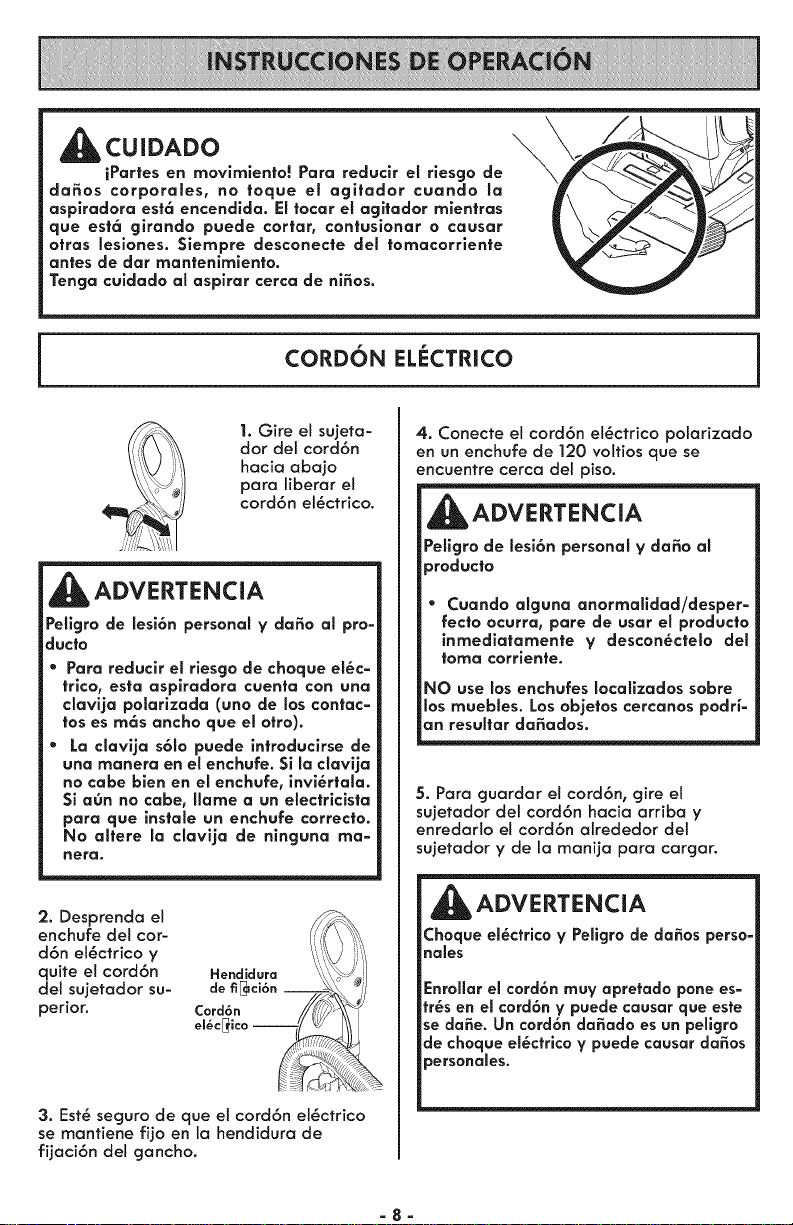
CUIDADO
iPartes en movimiento! Para reduclr et riesgo de
da_os corporaEes, no toque el agitador cuando ta
aspiradora est6 encendida. Eltocar el agitador mientras
que est6 girando puede cortar, contusionar o causar
otras lesiones. $iempre desconecte del tomacorrlente
antes de dar mantenlmlento.
Tonga culdado al asplrar cerca de ni_os.
l
CORDON EL_:CTRICO
J
1. Gire el sujeta-
dor dei cord6n
hacia abajo
para liberar et
cord6n el_ctrico.
_ADVERTENCIA
Petlgrode lesi6n personal y da_o al pro-
ducto
* Para reducir el rlesgo de choque else=
trlco, esta asplradora cuenta con una
davija polarizada (uno de los contac=
tos es rn6s ancho que el otto).
* La clavija s61o puede introducirse de
una rnanera en el enchufe. Si la clavija
no cabe bien en el enchufe, invi_rtala.
Si aOn no cabe, Ilame a un electricista
para que instale un enchufe correcto.
No attere la davlja de ninguna rna=
hera.
2. Desprenda el
enchufe del cor-
d6n el_ctrico y
quite et cord6n
del sujetador su-
perior.
3. Est_ seguro de que el cord6n el_ctrico
se mantiene fijo en la hendidura de
fijaci6n del gancho.
4. Conecte el cord6n el_ctrico polarizado
en un enchufe de 120 voltios que se
encuentre cerca del piso.
ADVERTENCIA
PeHgrode lesi6n personal ¥ da_o al
_roducto
Cuando alguna anormalidad/desper=
recto ocurra, pare de usar el producto
inmediatamente V descon_ctelo dot
toma corriente.
NO use losenchufes Iocatizados sobre
los muebles. Los objetos cercanos podH=
an resultar da_ados.
5. Para guardar el cord6n, gire et
sujetador dei cord6n hacia arriba y
enredarlo el cord6n alrededor del
sujetador y de la manija para cargar.
ADVERTENCIA
Choque el_ctrico ¥ PeHgrode da_os perso-
hales
Enrollar el cord6n muy apretado pone es-
tr_s en el cord6n ¥ puede causar que este
se da_e. Un cord6n da_ado es un peffgro
de choque el_ctrico y puede causar da_os
_ersonales.
=8=
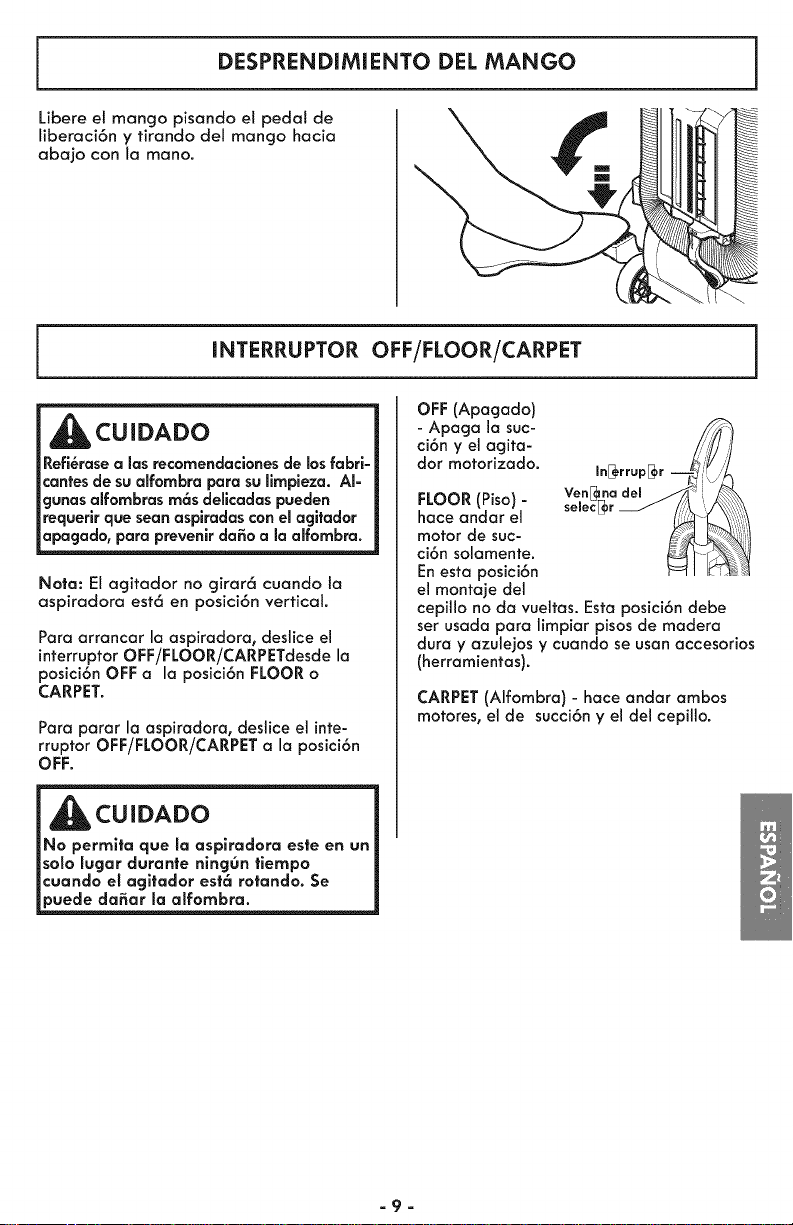
DESPRENDIMIENTO DEL MANGO
Libere el mango pisando el pedal de
liberaci6n y tirando del mango hacia
abajo con la mano.
INTERRUPTOR OFF/FLOOR/CARPET
CUIDADO
Refl_rasealas recomendaclones de losfabrl-
cantesde sualfombra para sullmpleza. AI-
gunas alfombrasm6s dellcadaspueden
requerlrque sean aspiradascon elagltador
apagado, para prevenir da_oa la alfombra.
Nota: El acjitador no cjirar6 cuando la
aspiradora est6 en posici6n vertical.
Para arrancar la aspiradora, deslice el
interruptorOFF/FLOOR/CARPETdesde la
posici6n OFF a la posici6n FLOORo
CARPET.
Para parar la ospiradora, deslice el inte-
rruptor OFF/FLOOR/CARPET a la posici6n
OFF.
m
CUIDADO
_No permlta que la asplradora este en un
_solo lugar durante ning0n tlempo
_cuando el agltador est6 rotando. Se
puede da_ar la alfombra.
OFF (Apacjado)
- Apacja la suc-
ci6n y el acjita-
dot motorizado.
FLOOR (Piso)-
hace andar el
motor de suc-
ci6n solamente.
Enesta posici6n
el monta]e del
cepillo no da vueltas. Esta posici6n debe
set usada para limpiar pisos de madera
dura y azule]os y cuando se usan accesorios
(herramientas).
CARPET(Alfombra) - hace andar ambos
motores, el de succi6n y el del cepillo.
aga
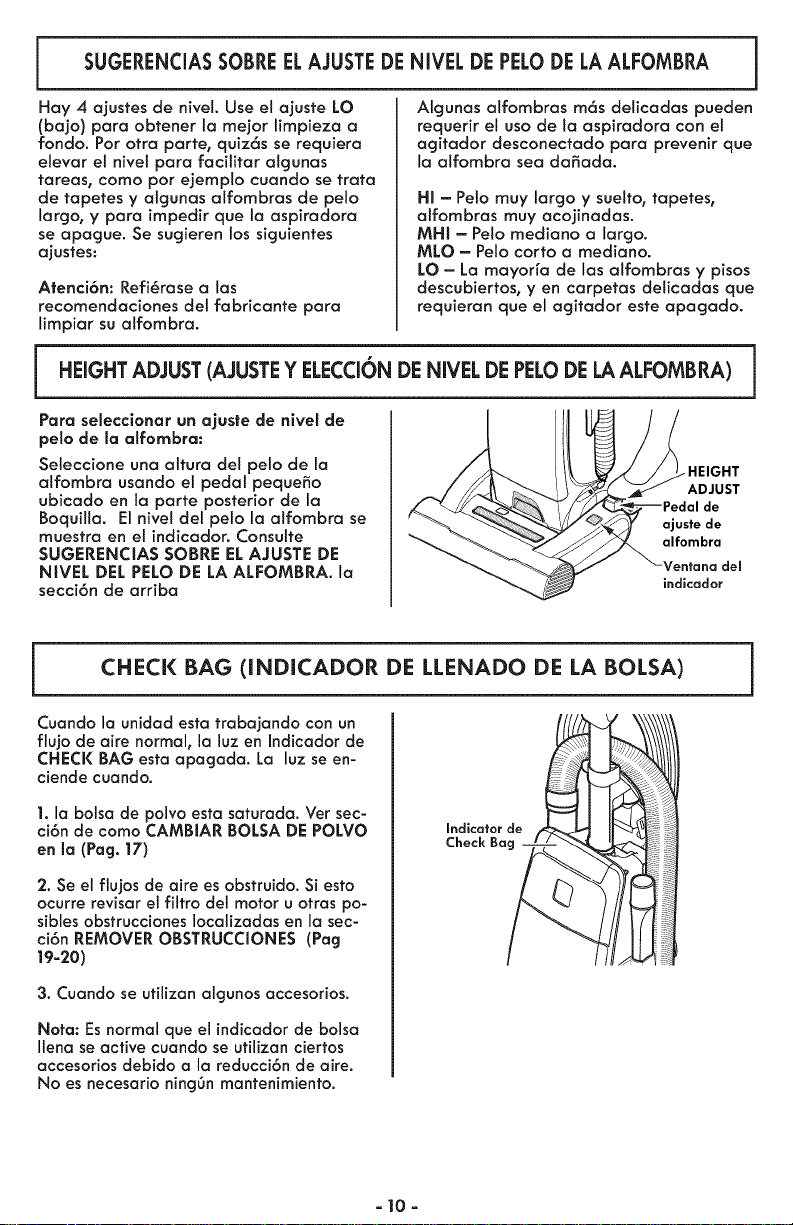
SUGERENCIASSOBREELAJUSTEDENIVELDEPELODELAALFOMBRA
Hay 4 ajustes de nivet. Use el ajuste LO
(bajo) para obtener la mejor limpieza a
rondo. Pot otra parte, qWz6s se requiera
elevar el nivel para facititar algunas
tareas, como por ejemplo cuando se trata
de tapetes y algunas alfombras de pelo
largo, y para impedir que la aspiradora
se apague. Se sugieren los siguientes
ajustes:
Atenci6n: Refi_rase a las
recomendaciones del fabricante para
limpiar su alfombra.
Algunas atfombras m6s deticadas pueden
requerir et uso de la aspiradora con el
agitador desconectado para prevenir que
la alfombra sea dafiada.
HI - Pelo muy largo y suelto, tapetes,
alfombras muy acojinadas.
MHI - Pelo mediano a largo.
MLO - Pelo corto a mediano.
LO - La mayorra de las alfombras y pisos
descubiertos, yen carpetas delicadas que
requieran que el agitador este apagado.
HEIGHT ADJUST(AJUSTEY ELECCIONDE NIVEL DE PELODELAALFOMBRA) i
Para seleccionar un ajuste de nivel de
pelo de la alfombra:
Seleccione una altura del pelo de la
alfombra usando el pedal pequefio
ubicado en la parte posterior de la
Boquilla. El nivel del peto la alfombra se
muestra en el indicador. Consulte
SUGERENCIAS SOBRE ELAJUSTE DE
NIVEL DEL PELODE LA ALFOMBRA. la
secci6n de arriba
-HEIGHT
ADJUST
de
ajuste de
alfombra
Ventana del
indicador
CHECK BAG (INDICADOR DE LLENADO DE LA BOLSA)
Cuando la unidad esta trabajando con un
flujo de aire normal, la luz en Indicador de
CHECK BAG esta apagada. La luz se en-
ciende cuando.
1. la bolsa de polvo esta saturada. Ver sec-
ci6n de como CAMBIAR BOLSA DE POLVO
en la (Pag. 17)
2. Se el flujos de aire es obstruido. Si esto
ocurre revisar el filtro del motor u otras po-
sibles obstrucciones Iocalizadas en la sec-
ci6n REMOVER OBSTRUCCIONES (Pag
19-20)
3. Cuando se utilizon algunos accesorios.
Nora: Esnormal que el indicador de bolsa
Ilena se active cuando se utilizan ciertos
occesorios debido a la reducci6n de aire.
No es necesario ning6n mantenimiento.
Indicator de
Check Ba___l
a10 a
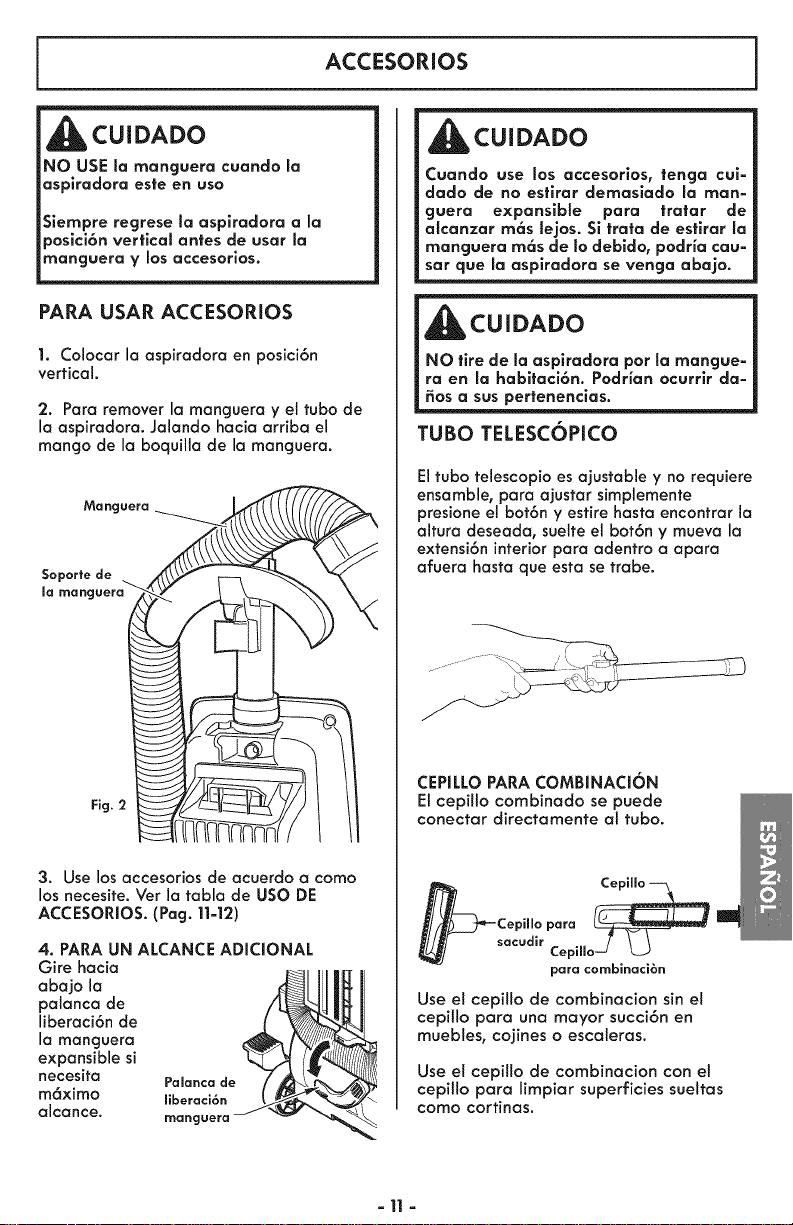
ACCESORIOS
d_hbCU! DADO
NO USE la manguera cuando la
asplradora este en usa
Siempre regrese la aspiradora a la
posici6n vertical antes de usar la
manguera y los accesorlas.
PARA USAR ACCESORIOS
1. Colocar la aspiradora en posici6n
vertical.
2. Para remover la manguera y el tuba de
la aspiradora. Jalando hacia arriba el
mango de la boquilla de la manguera.
Manguera _ _'_ __
Soportede __ _
la rnanguera_ __
3. Use los accesorios de acuerdo a coma
los necesite. Ver la tabla de usa DE
ACCESORIOS. (Pag. 11-12)
4. PARA UN ALCANCE ADICIONAL
Gire hacia
o o,o,o
paianca de
liberaci6n de
la manguera
expansible si
necesita
m6ximo
alcance.
m_
CUIDADO
Cuando use los accesorios, tenga cui-
dado de no estirar demasiado la man-
guera expansible para tratar de
alcanzar m6s lejos. Si trata de estirar la
manguera m6s de to debido, podHa cau-
sat que la asplradora se venga abajo.
_CUIDADO
NO tire de la asplradora par la mangue-
ra en la habltaci6n. Podrian ocurrlr da-
_os a sus pertenenclas.
TUBO TELESCOPICO
El tuba telescopio es ajustable y no requiere
ensamble, para ajustar simpiemente
presione el bot6n y esfire hasta encontrar la
altura deseada, suelte el bot6n y mueva la
extensi6n interior para adentro a apara
afuera hasta que esta se trabe.
CEPILLO PARA COMBINACI6N
El cepillo combinado se puede
conectar directamente al tuba.
_Cepillo
para
_sacudir Cepilloj L_J
para cornbinacibn
Use et cepiilo de combinacion sin et
cepit!o para una mayor succi6n en
muebles, cojines o escaleras.
Use el cepillo de combinacion con et
cepiilo para limpiar superficies sueltas
como cortinas.
-11 -
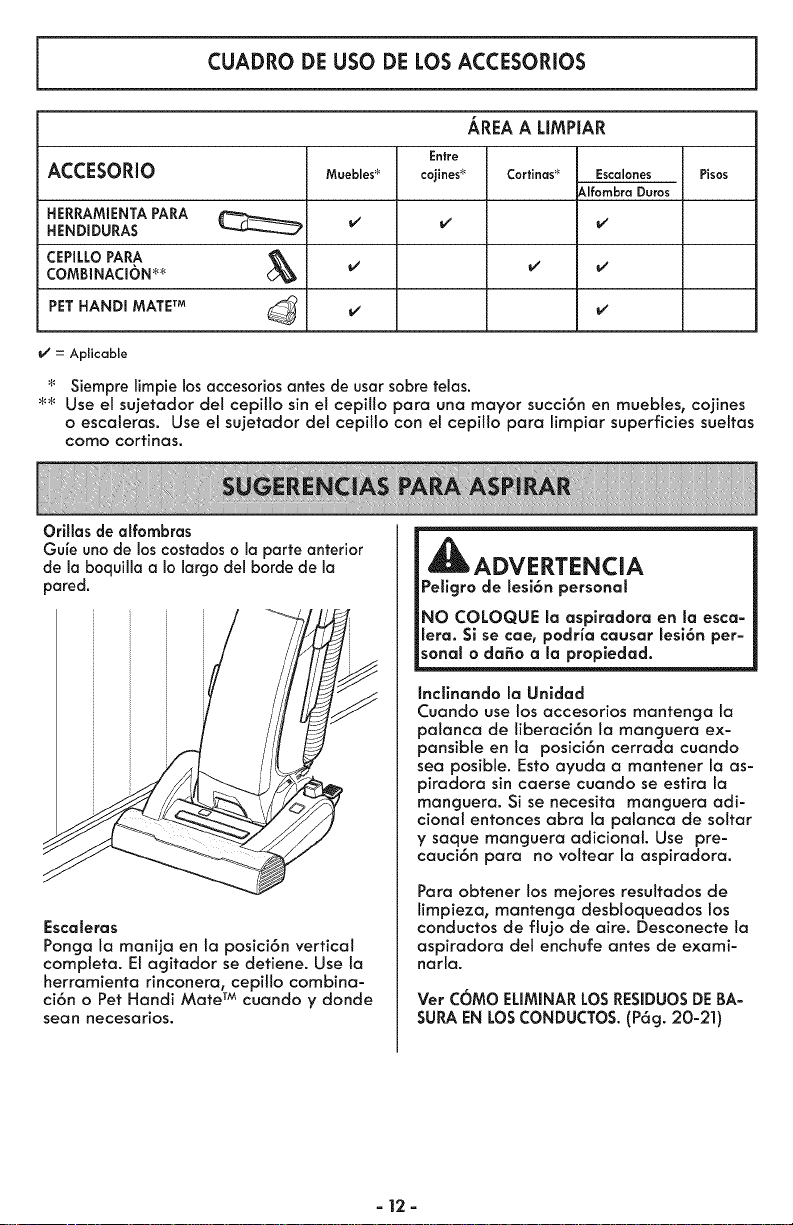
CUADRO DE USO DE LOS ACCESORIOS
AREAA LIMPIAR
ACCESORIO
HERRAMIENTAPARA
HENDIDURAS
CEPILLOPAPA
COMBINACI(bN_
PETHANDI MATETM
Entre
cojines _
Muebles_
v"
v'
Cortinas_
= Aplicable
Escalones
_lfombra Duros
Pisos
Siempre limpie los accesorios antes de usar sabre telas.
_ Use el sujetador del cepillo sin eI cepilto para una mayor succi6n en muebles, cojines
o escaleras. Use el sujetador del cepilto con el cepilto para limpiar superficies sueltas
como cortinas.
Orillas de alfombras
Gufe uno de los costados o la parte anterior
de la boquilla a Io largo del borde de la
pared.
Escaleras
Ponga la manija en ia posici6n vertical
compteta. El agitador se detiene. Use la
herramienta rinconera, cepillo combina-
ci6n o Pet Handi Mate TM cuando y donde
sean necesarios.
ADVERTENCIA
Pellgro de lesi6n personal
NO COLOQUE la aspiradora en la esca-
lera. Si se cae, podria causar lesi6n per=
sonal o da_o a la propledad.
IncEnando la Unidad
Cuando use los accesorios mantenga la
palanca de liberaci6n la manguera ex-
pansible en la posici6n cerrada cuando
sea posible. Esto ayuda a mantener la as-
piradora sin caerse cuando se estira la
manguera. Si se necesita manguera adi-
cional entonces abra la palanca de soltar
y saque manguera adicional. Use pre-
cauci6n para no voltear la aspiradora.
Para obtener los mejores resultados de
limpieza, mantenga desbloqueados los
conductos de flujo de aire. Desconecte la
aspiradora del enchufe antes de exami-
narla.
Ver COMO ELIMINARLOSRESIDUOSDEBA-
SURAENLOSCONDUCTOS.(P6g. 20-21)
= 12=
SISTEMA DE PROTECCION
DE MOTOR
1. Protector Termal - Succi6n del Motor
Esta aspiradoro tiene un protector termal
que se ajusta autom6ticamente para
proteger a ta aspiradora dei
sobrecalentamiento. Si una obstrucci6n
impide el flujo normal de aire at motor, el
protector termat apaga et motor
autom6ticamente para permitir que el
motor se enfr[e a fin de evitar posibles
da_os a la aspiradora.
2. Protector Termai- Motores del agltador
Esta aspiradora esta equipada con
protectores de sobre catentamiento en los
motores del agitador que se activan
autom6ticamente para la protecci6n de
los motores. Estos protectores
desconectan de toda corriente et_ctrica a
los motores autom6ticamente cuando
existe un sobrecalentamiento. Esto
permite que los motores se enfr[en y que
no se vayan a fundir o sufrir un
desperfecto.
Para correglr el problema: Si esto ocurre,
apague la aspiradora y desenchufe et
cord6n det tomacorriente para permifir
que la aspiradora se enfr[e y que el
protector termal se reajuste.
CUIDADO
Siempre regrese la aspiradora a la
posici6n vertical antes de usar la
manguera y los accesorlos. La falla de
este es el resultado del sobre
calentamiento de los motores del
agltador. Estopuede causar que el
)rotector termal se active.
Busque y saque las obstrucclones o
camble la bolsa, si es necesario. Examine
tambi_n y reemplace cualquler filtro
obstruido. Espereaproxlmadamente 40=
50 mlnutos y enchufe la aspiradora V
prenderla para ver sl el V61vula de paso
se ha reajustado.
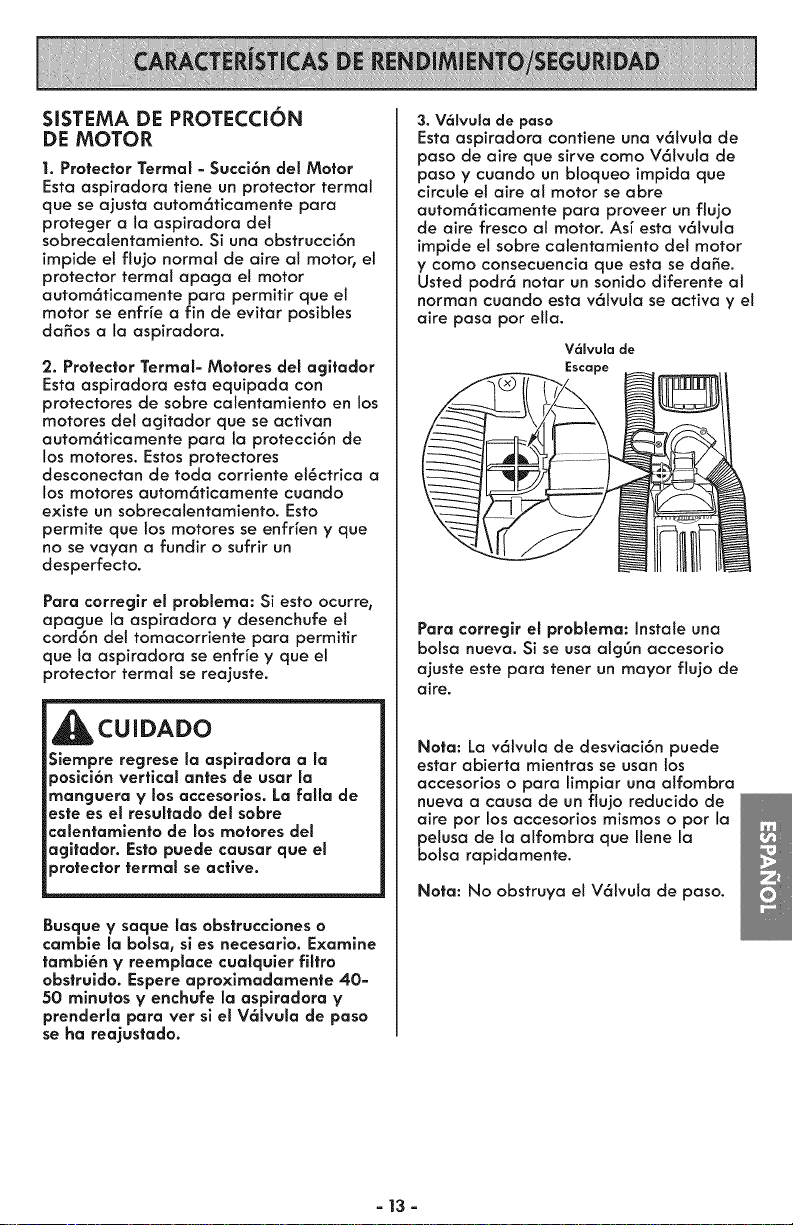
3. V6SvuSade paso
Esta aspiradora contiene una v61vuta de
paso de aire que sirve como V61vula de
paso y cuando un bloqueo impida que
circule el aire ai motor se abre
autom6ticamente para proveer un flu]o
de aire fresco aI motor. As[ esta v61vuta
impide el sobre calentamiento del motor
y como consecuencia que esta se dame.
Usted podr6 notar un sonido diferente at
norman cuando esta v61vula se activa y el
aire pasa par ella.
V61vula de
Escape
Para corregir el problema: Instate una
bolsa nueva. Si se usa alg6n accesorio
ajuste este para tenet un mayor flujo de
aire.
Nota: La v61vula de desviaci6n puede
estar abierta mientras se usan los
accesorios o para limpiar una alfombra
nueva a causa de un flujo reducido de
aire por los accesorios mismos o par la
peiusa de la alfombra que Ilene la
bolsa rapidamente.
Nota: No obstruya el V61vula de paso.
- 13 -
ADVERTENCIA
Peligro de choque el_ctrico o lesi6n cor-
poral
Desconecte la unidad antes de limpiarla
o darle servicio. De Io contrario podr_a
producirse un choque el_ctrlco o causar
lesi6n corporal sl ta asplradora arranca
de manera imprevlsta.
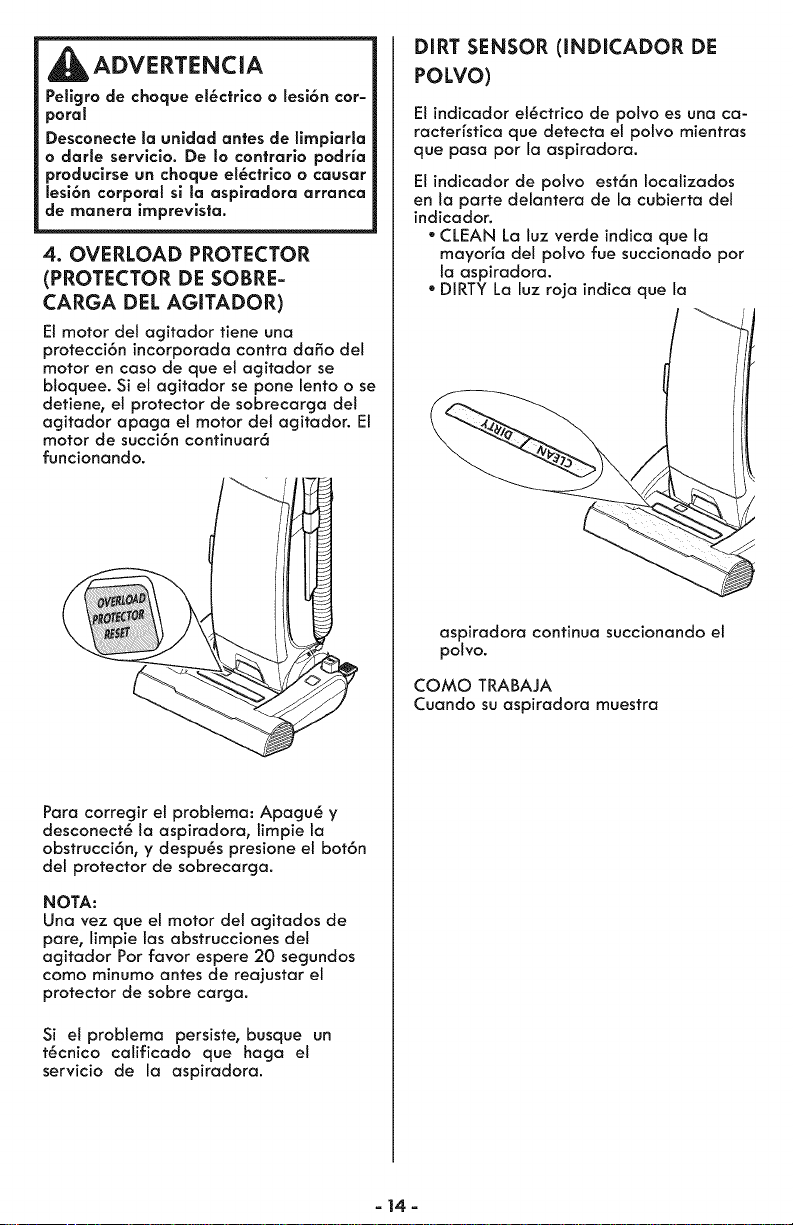
4. OVERLOAD PROTECTOR
(PROTECTOR DE SOBRE-
CARGA DEL AGITADOR)
El motor del agitador tiene una
protecci6n incorporada contra daSo del
motor en caso de que et agitador se
btoquee. Si el agitador se pone lento o se
detiene, el protector de sobrecarga del
agitador apaga el motor del agitador. El
motor de succi6n continuar6
funcionando.
Para corregir el problema: Apagu@ y
desconect_ ta aspiradora, limpie la
obstrucci6n, y despu_s presione el bot6n
del protector de sobrecarga.
NOTA:
Una vez que e! motor det agitados de
pare, limpie las abstrucciones det
agitador Por favor espere 20 segundos
como minumo antes de reajustar el
protector de sobre carga.
Si el probtema persiste, busque un
t_cnico calificado que haga el
servicio de la aspiradora.
DiRT SENSOR (INDICADOR DE
POLVO)
Elindicador el_ctrico de polvo es una ca-
racterfstica que detecta el polvo mientras
que pasa por la aspiradora.
Elindicador de potvo est6n Iocalizados
en la parte delantera de la cubierta del
indicador.
- CLEAN La luz verde indica que la
mayorfa del polvo fue succionado pot
la aspiradora.
* DIRTY La luz roja indica que la
aspiradora continua succionando el
polvo.
COMO TRABAJA
Cuando su aspiradora muestra
- 14-
Siga siempre todas las instrucciones de
seguridad antes de efectuar el
mantenimiento a su aspiradora.
ADVERTENCIA
Pellgro de choque el_ctrlco o lesi6n
corporal
Desconecte la unldad antes de efectuar
et mantenimiento a su aspiradora. De Io
contrario podria producirse un choque
el_ctrico o causar lesi6n corporal sl la
asplradora arranca de manera impre-
vista.
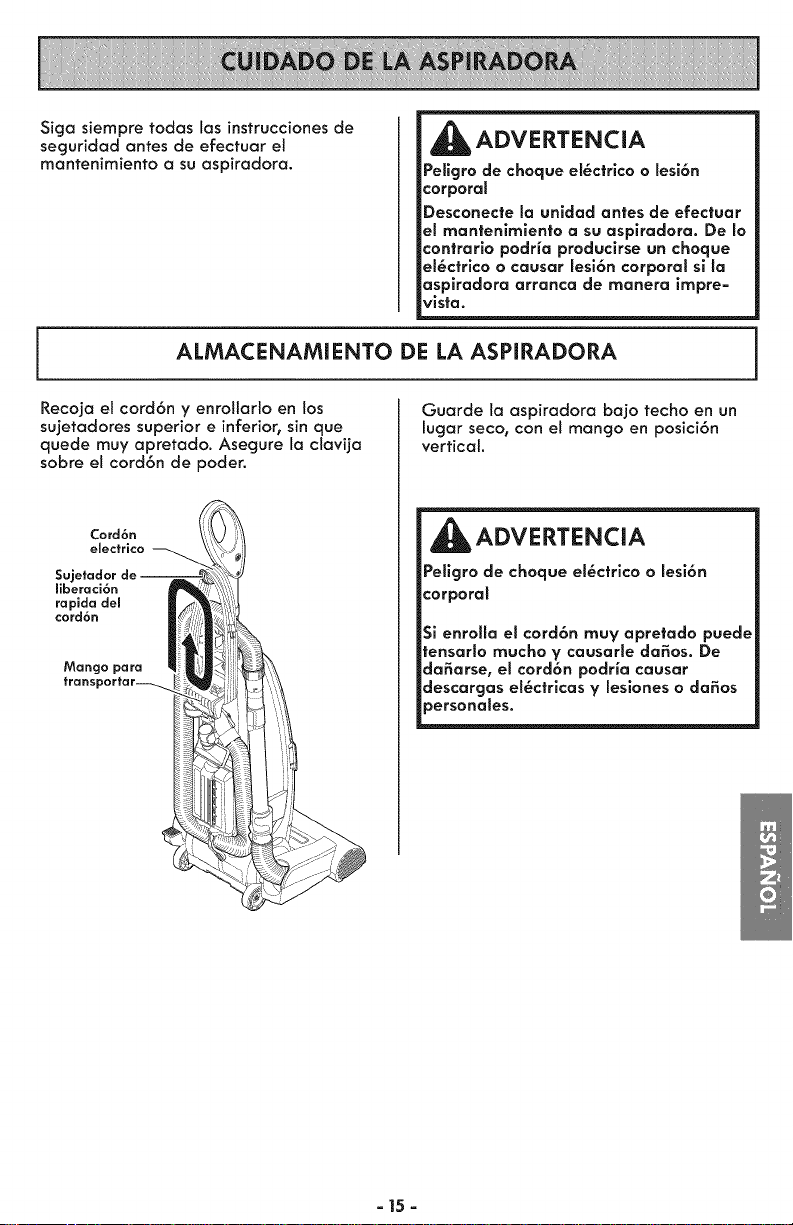
ALMACENAMIENTO DE LA ASPIRADORA
Recoja el cord6n y enrotlarlo en los
sujetadores superior e inferior_sin que
quede muy apretado. Asegure la clavija
sobre el cord6n de poder.
Cord6n
electrico
Sujetador de J
ffberaci6n
rapida del
cord6n
Mango para
transportar--_.
Guarde la aspiradora ba]o techo en un
lugar seco, con el mango en posici6n
vertical.
_ADVERTENCiA
Pellgro de choque el_ctrlco o lesi6n
corporal
Si enrolla el cord6n muy apretado puede
tensarlo mucho y causarle da_os. De
da_arse, el cord6n podria causar
descargas el_ctrlcas y leslones o da_os
personales.
a15a
LIMPIEZA DEL EXTERIOR Y DE LOS ACCESORIOS
1. Desconecte el cord6n el_ctrico de la
clavija de la pared. NO rocie agua sobre
la aspiradora.
2. Para limpiar el exterior 6 reducir la
est6tica y la acumulaci6n de polvo limpi6
con un trapo suave y limpio, que ha sido
exprimido despu6s de remojar en una
soluci6n de agua y detergente Ifquido
ligero. Seque el exterior con un trapo
seco despu6s de limpiar.
Lave los accesorios en agua tibia jabo-
nosa, enjuague y deje secar al aire. No
los lave en lavadora de platos.
CUIDADO
No use los accesorios si estan mojados.
Los accesorios que se utilicen en 6teas
suclas, debajo del refrigerador, no
deben usarse en otras superficies sin
antes set lavados. PodHan dejar mar-
ca$.
i
LIMPIEZA DE LAS CELDAS OPTICAS
PARA LIMPIAR LAS CELDAS
OPTICA$
Los 6pticos del indicador de potvo
consiste en dos celdas 6pticas
Iocalizadas dentro del compartimiento
para la bolsa. De vez en cuando es
necesario limpiar las dos cetdas 6pticas
para que funcionen a su capacidad
m6xima.
CeSda
6ptica
Se recomienda limpiar las celdas 6pticas:
* Cuando se enciende continuamente la
luz roja.
* Cuando se adhieren la tierra o el
polvo en las celdas 6pticas.
* Cuando se cambia la bolsa para
polvo.
Para limpiar el indicador, limpi6 Io con un
trapo suave y seco. Nunca use
detergentes o ffquidos porque ellos
pueden ensuciar m6s r6pido las cetdas
6pticas y ser6 necesario limpiarlas m6s
pronto de Io normal. Se alcanza el
compartimiento para el indicador de
polvo abriendo la cubierta de polvo y
quitando la bolsa para polvo.
- 16 -
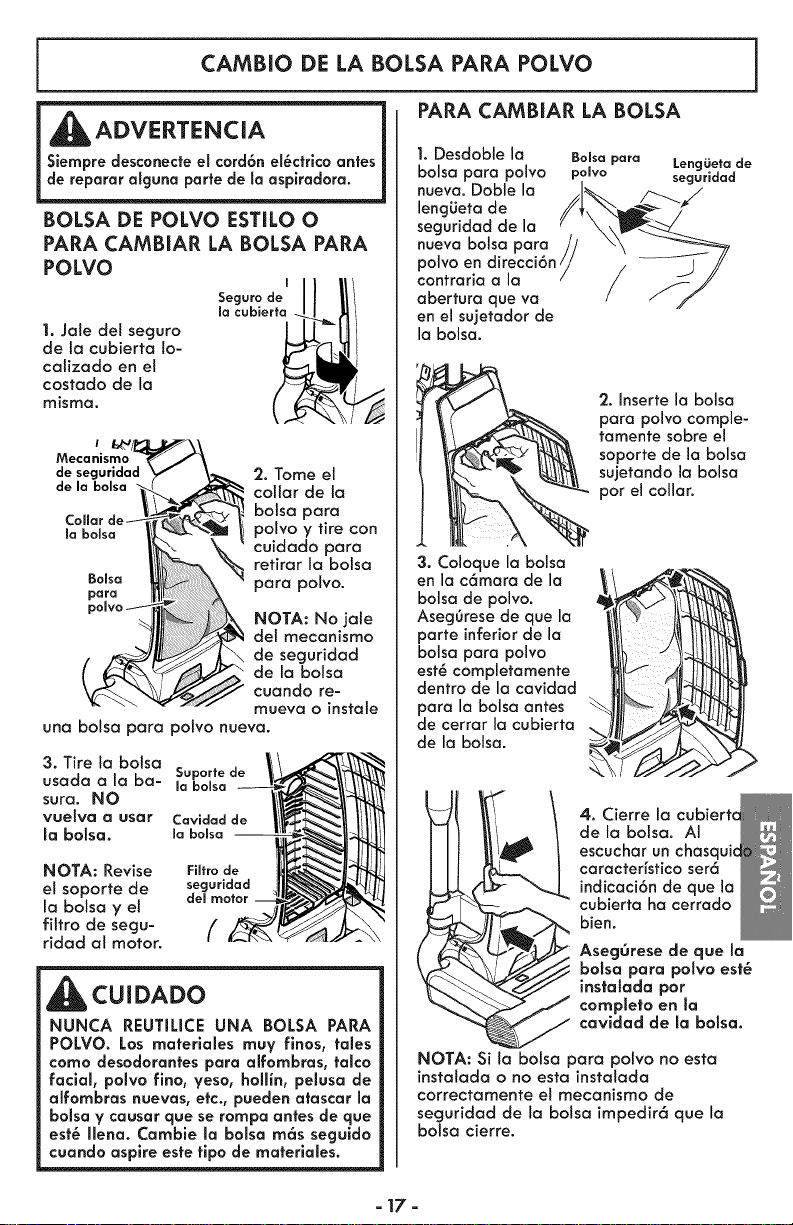
CAMBIO DE LA BALSA PARA POLVO
PARA CAMBIAR LA BALSA
ADVERTENCIA
Siempredesconecteel cord6n ei6ctrlcoantes
de reparar alguna portede Jaaspiradora.
BOLSA DE POLVO ESTILO O
PARA CAMBIAR LA BOLSA PARA
POLVO
1. Jate del seguro
de la cubierta !o-
caJizado en el
costado de la
misma.
I
Seguro de
la cubierfo
i
Mecanismo
de seguridad
de la bolsa
Bo_so
pora
2. Tome el
collar de ia
botsa para
polvo y tire con
cuidado para
retirar la balsa
para polvo.
NOTA: No jale
dei mecanismo
de seguridad
de la balsa
cuando re-
mueva o instate
una balsa para polvo nueva.
3. Tire la botsa
usada a la ba-
sura. NO
vue_va _ user
Jabolsa.
Cavidad de
la bolso --
NOTA: Revise Filtro de
el soporte de seguridad
la balsa y el del motor
filtro de segu- //
ridad at motor.
CUIDADO
NUNCA REUTILICE UNA BOLSA PARA
POLVO. Los materlales muy finos, tales
coma desodorantes para alfombras, talco
facial, polvo fino, veso, hollin, pelusa de
alfombras nuevas, etc., pueden atascar Ja
bolsa Y causar que se rompa antes de que
est6 IJena. Camble la bolsa m6s seguido
cuando aspire este fipo de materiales.
1. Desdoble ia
balsa para poivo
nueva. Doble la
lengiJeta de
seguridad de la
nueva balsa para
polvo en direcci6n /
contraria a la
abertura que va
en el sujetador de
la balsa.
BoJsa para LencjLietode
polvo seguridad
3. Coloque la balsa
en la c6mara de la
balsa de polvo.
Aseg6rese de que la
porte inferior de la
balsa para polvo
est6 completamente
dentro de la cavidad
para la balsa antes
de cerrar la cubierta
de la balsa.
2. Jnsertela balsa
para polvo comple-
_ tamente sabre ei
soporte de la balsa
sujetando la balsa
par el collar.
4. Cierre la
de la balsa. AI
,_ escuchar un chasquic
caracteHstico ser6
indicaci6n de que la
cubierta ha cerrado
bien.
AsegOrese de que la
boJsapara poivo est6
instatada por
completo en la
cavidad de Ja balsa.
NOTA: Si ta balsa para polvo no esta
instaJada o no esta instaJada
correctamente eI mecanismo de
seguridad de la balsa impedir6 que la
balsa cierre.
- 17-
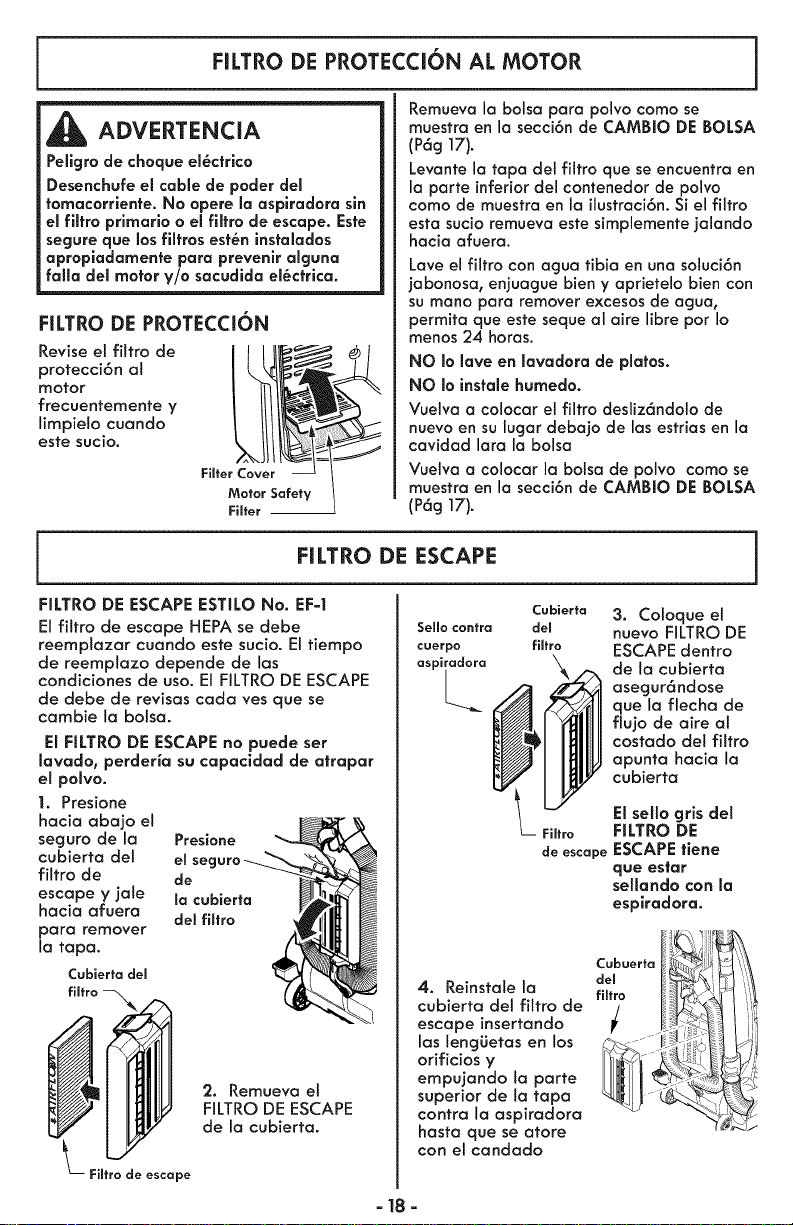
FILTRO DE PROTECCI6N AL MOTOR
ADVERTENCIA
Peligro de choque el_cfrico
Desenchufe el cable de poder del
fomacorriente. No opere la asplradora sin
el filtro prlmarlo o el filtro de escape. Esfe
segure que los filtros est_n instalados
apropiodamenfe paro prevenir alguno
folio del motor y/o sacudida el_cfrica.
FILTRO DE PROTECCION
Revise el fittro de
protecci6n al
motor
frecuentemente y
limpieto cuando
este sucio.
Remueva la bolsa para polvo coma se
muestra en la secci6n de CAMBIO DE BOLSA
(P6g 17).
Levante la tapa del filtro que se encuentra en
la parte inferiordel contenedor de pelvo
coma de muestra en la ilustraci6n.Si el filtro
esta sucio remueva estesimplemente jalando
hacia afuera.
Lave el filtro con agua tibia en una soluci6n
jabonosa, enjuague bien y aprietelo bien con
sumano para remover excesos de agua,
permita que este seque al aire libre pot Io
menos 24 horas.
NO Io lave en lavadora de platos.
NO Io instole humedo.
Vuelva a colocar el filtro desliz6ndolo de
nuevo en su lugar debajo de las estrias en la
cavidad lara la bolsa
Vuelva a colocar la bolsa de polvo como se
muestra en la secci6n de CAMBIO DE BOLSA
(Pag 17).
FILTRO DE ESCAPE
FILTRO DE ESCAPE ESTILO No. EF=I
El filtro de escape HEPA se debe
reemptazar cuando este sucio. El tiempo
de reemptazo depende de las
condiciones de uso. El RLTRO DE ESCAPE
de debe de revisas cada ves que se
cambie la bolsa.
El FILTRO DE ESCAPE no puede ser
lavado, perdeHa su capacldad de atrapar
el polvo.
1. Presione
hacia abajo el
seguro de la Presione
cubierta del el
filtro de de
escape y jale la cubierta
hacia afuera del fiffro
para remover
la tapa.
Cubierta dem
2. Remueva el
FiLTRO DE ESCAPE
de la cubierta.
Fiffro de escape
Cubierfa
SeHo contra del
cuerpo filtro
aspiradora
L__
Fimtro
de escape
4. Reinstale la
cubierta del filtro de
escape insertando
las lengL_etas en los
orificios y
empujando la parte
superior de la tapa
contra la aspiradora
hasta que se atore
con el candado
=18 =
3. Coloque el
nuevo FILTRO DE
ESCAPE dentro
de la cubierta
asegur6ndose
que la flecha de
flujo de aire al
costado del fittro
apunta hacia la
cubierta
Elsello gris det
FILTRO DE
ESCAPEtlene
que estar
sellando con la
esplradora.
Cubuerfa
del
fiffro
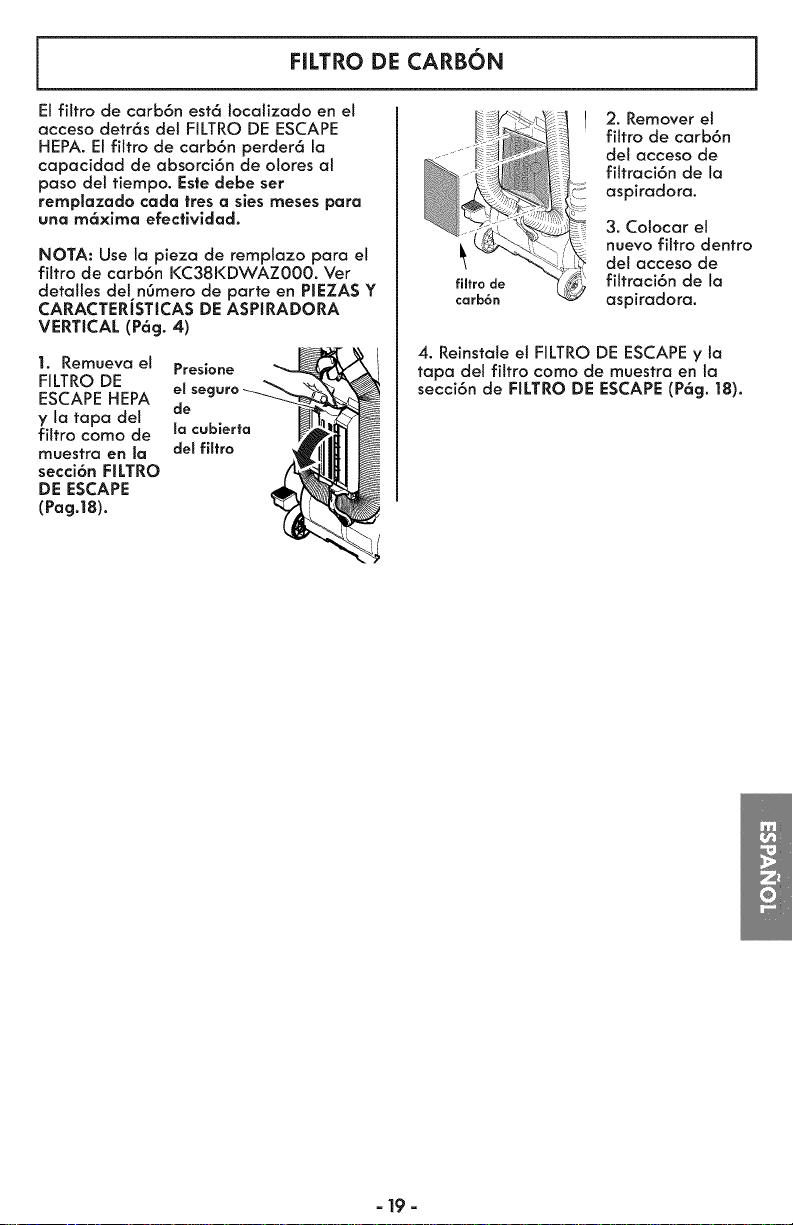
FILTRO DE CARBON
El fittro de carb6n est6 localizado en el
acceso detr6s del FILTRO DE ESCAPE
HEPA. El filtro de carb6n perder6 la
capacidad de absorci6n de olores al
paso del tiempo. Estedebe set
remplazado cada ires a siesmeses para
una m6xima efectividad.
NOTA: Use la pieza de remplazo para el
filtro de carb6n KC38KDWAZ000. Ver
detatles del n6mero de parte en PIEZAS Y
CARACTERJSTICAS DE ASPIRADORA
VERTICAL (P6g. 4)
1. Remueva el Presione
FILTRO DE el seguro
ESCAPE HEPA
y la tapa del de
filtro como de la cubierta
muestra en Ja del filtro
secci6n FILTRO
DE ESCAPE
(Pag.18).
filtro de
carb6n
! 2. Remover el
filtro de carb6n
del acceso de
filtraci6n de la
aspiradora.
3. Cotocar el
nuevo fittro dentro
del acceso de
filtraci6n de la
aspiradora.
4. Reinstale el FILTRO DE ESCAPEy ta
tapa del filtro como de muestra en la
secci6n de FILTRO DE ESCAPE (P6g. 18).
- 19 -
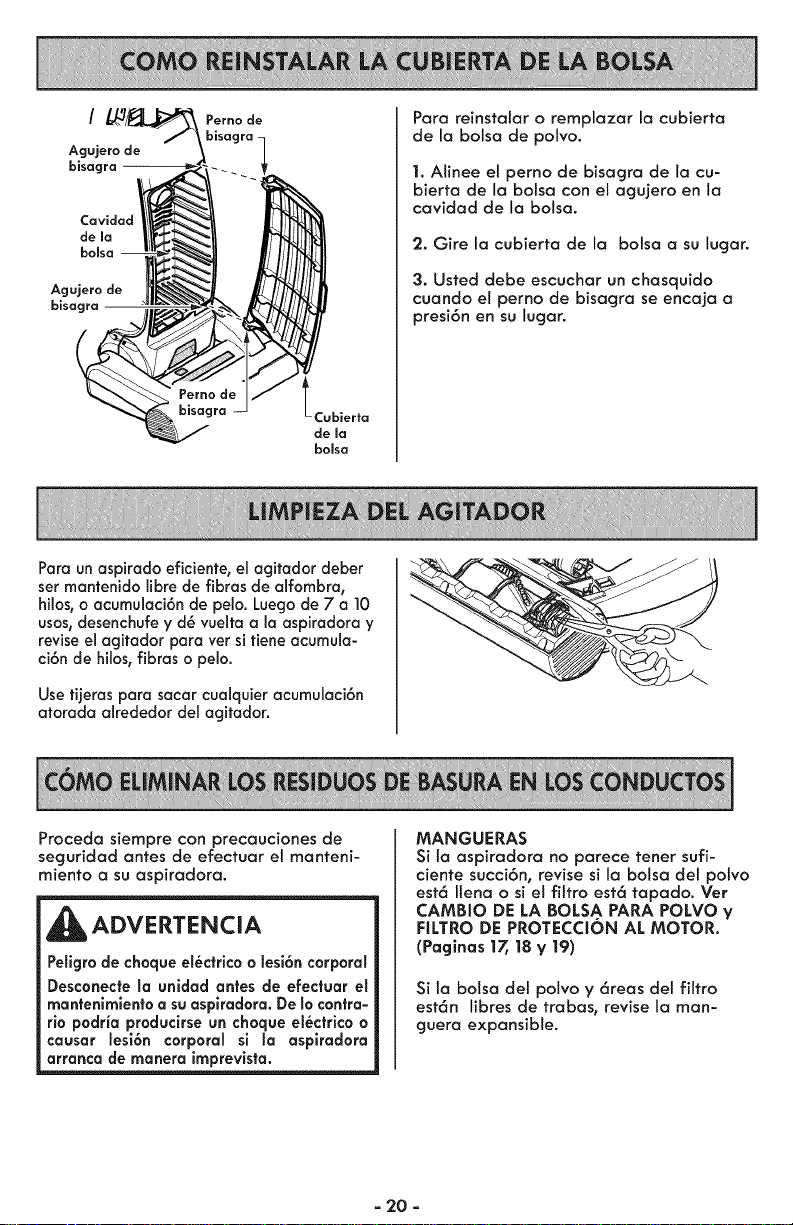
/
Agujero de
bisacJ
Agujero de
bisagra
Perno de
Cubierta
de ma
bolsa
Para reinstalar o remplazar la cubierta
de la balsa de polvo.
1. Alinee et perno de bisagra de la cu-
bierta de la bolsa con el agujero en la
cavidad de la bolsa.
2. Gire la cubierta de la balsa a su lugar.
3. Usted debe escuchar un chasquido
cuando et perno de bisagra se encaja a
presi6n en su lugar.
Para un aspirado eficiente, el agitador deber
ser mantenido libre de fibras de alfombra,
hilos_o acumulaci6n de pelo. Luego de 7 a 10
usos, desenchufe y d_ vuelta a la aspiradora y
revise el agitador para ver si tiene acumula-
ci6n de hilos, fibras o pelo.
Usetijeras para sacar cualquier acumulaci6n
atorada akededor de1agitador.
Proceda siempre con precauciones de
seguridad antes de efectuar el manteni-
miento a su aspiradora.
ADVERTENCIA
Pellgro de choque el_ctrlco o lesi6n corporal
Desconecte la unidad antes de efectuar el
mantenimlento a su asplradora. De Io contra-
rio podria producirse un choque el_ctrlco o
causar lesi6n corporal sl la aspiradora
arranca de manera imprevista.
MANGUERAS
Si la aspiradora no parece tener sufi-
ciente succi6n, revise sila bolsa del polvo
est6 Itena o si el filtro est6 tapado. Ver
CAMBIO DE LA BOLSA PARA POLVO y
FILTRO DE PROTECCION AL MOTOR.
(Paginas 17,18 y 19)
Si ta balsa del potvo y 6reas del filtro
est6n libres de trabas, revise la man-
guera expansible.
- 20 -
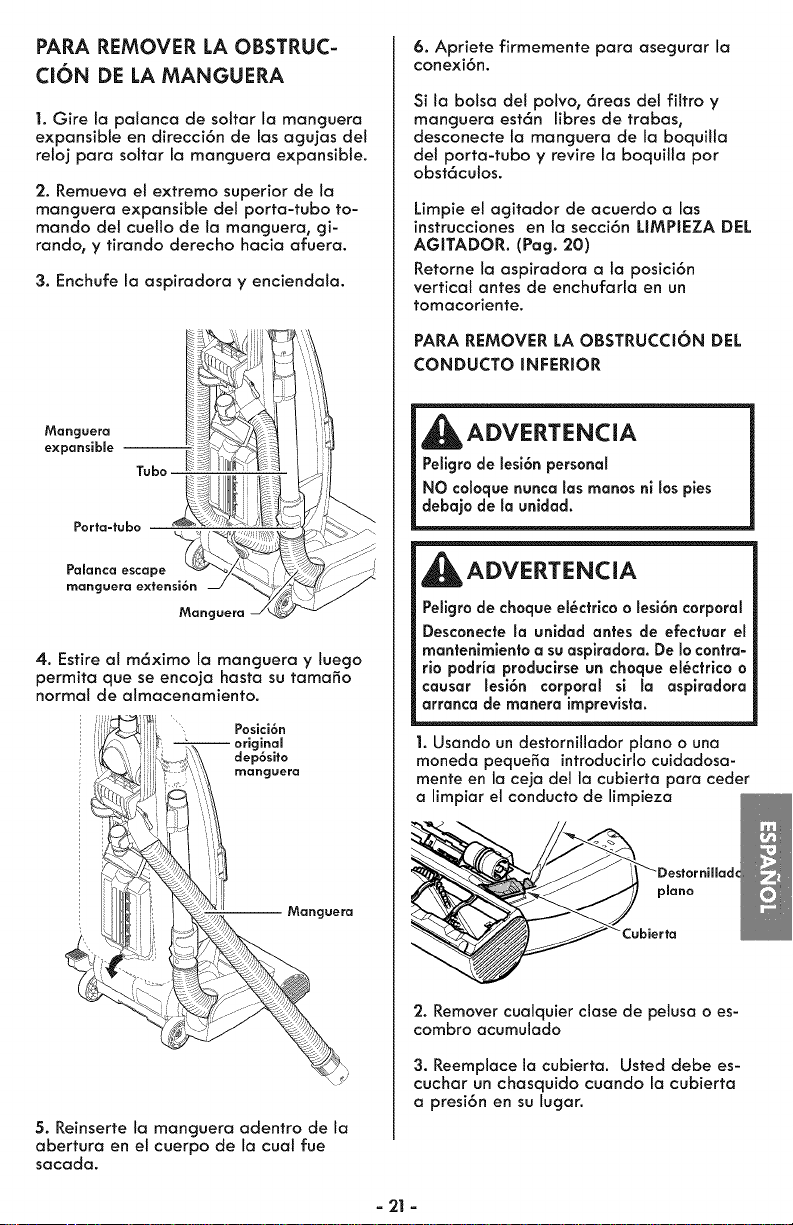
PARA REMOVER LA OBSTRUC-
CION DE LA MANGUERA
1. Gire la palanca de sottar la manguera
expansible en direcci6n de las acjujas del
reloj para soltar la monguera expansible.
2. Remueva el extremo superior de la
manguera expansible det porta-tubo to-
mando del cuetto de la manguera, gi-
rando, y tirando derecho hacia afuera.
3. Enchufe la aspiradora y enciendala.
Manguera
expansible --
Tuba _-
Porta-tubo
Palanca escape
manguera extensi6n
Mangaera
4. Estireal m6ximo la manguera y luego
permita que se encoja hasta su tamo_o
normal de almacenomiento.
Posici6n
original
dep6sito
rnangaera
--Manguera
5. Reinserte la manguera adentro de la
abertura en el cuerpo de la cual rue
sacada.
6. Apriete firmemente para asegurarla
conexi6n.
Si la bolsa del polvo, 6reas det filtro y
manguera est6n libres de trabas,
desconecte la manguera de la boquitla
det porta-tubo V revire la boquilla pot
obst6culos.
Limpie et agitador de acuerdo alas
instrucciones en la secci6n LIMPIEZA DEL
AGITADOR. (Pag. 20)
Retome la aspiradora a la posici6n
vertical antes de enchufarla en un
tomacoriente.
PARA REMOVER LA OBSTRUCCI6N DEL
CONDUCTO INFERIOR
Peligrodechoque el_ctricoo lesi6n corporal
Desconecte la unidad antes de efectuar el
mantenimlento a suasplradora. De Iocontra-
rio podria producirse un choque el6ctrlco o
causar lesi6n corporal si la aspiradora
arranca de manera imprevista.
1.Usando un destornillador piano o una
moneda pequefia introducirlocuidadosa-
mente en la ceja del la cubierta para ceder
a limpiar el conducto de limpieza
2. Remover cualquier clase de pelusa o es-
combro acumulado
3. Reemplace la cubierta. Usted debe es-
cuchar un chasquido cuando la cubierta
a presi6n en su lugar.
- 21-
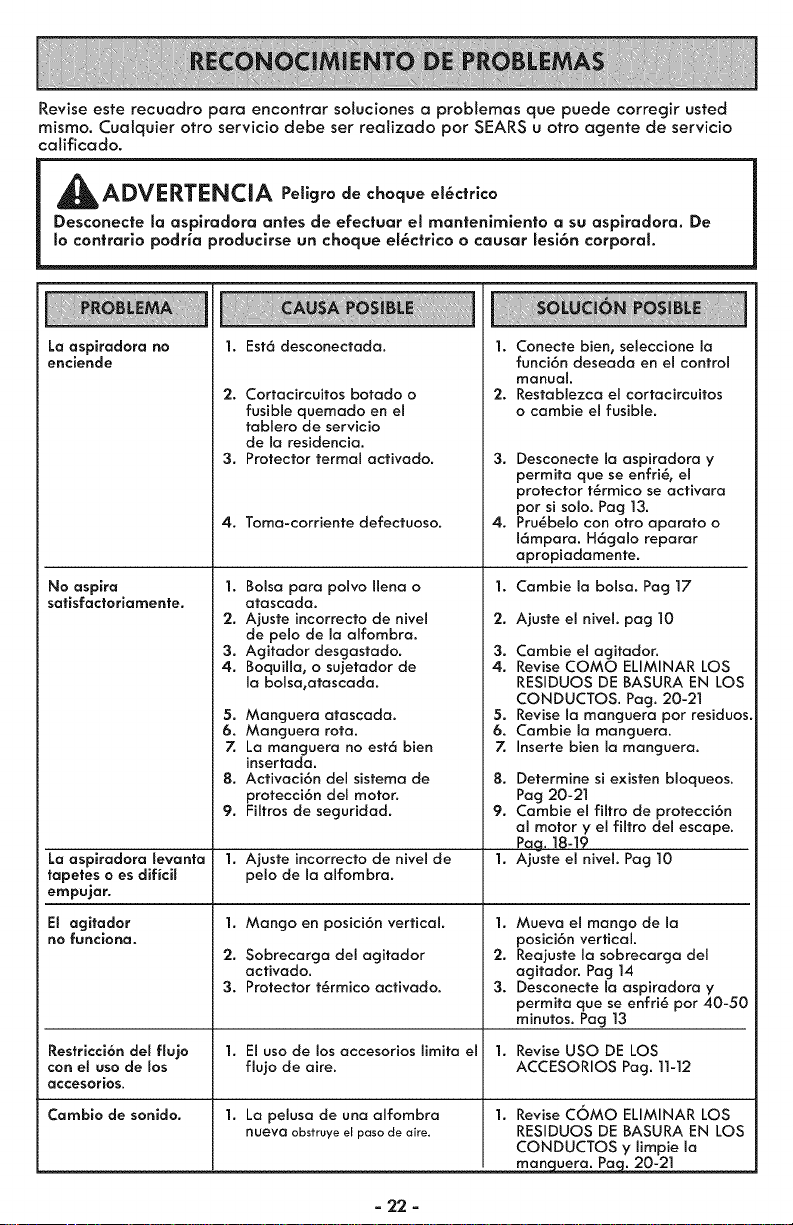
Revise este recuadro para encontrar soluciones a problemas que puede corregir usted
mismo. Cualquier otro servicio debe ser realizado par SEARS u otro agente de servicio
calificado.
ADVERTENCIA Peligro de choque et_ctrlco
Desconecte la aspiradora antes de efectuar el mantenimiento a su aspiradora. De
Io contrarlo podHa produclrse un choque el_ctrlco o causar lesi6n corporal.
La aspiradora no
enciende
1. Est6 desconectada.
2. Cortacircuitos bofado o
fusible quemado en el
fablero de servicio
de Io residencia.
3. Protector termal acfivado.
4. Toma-corrienfe defectuoso.
No aspira 1.
satisfactoriamente.
La aspiradora levanta
tapetes o es dificiJ
empujar.
El agitador
no funciona.
Bolsa para polvo Ilena o
afascada.
2. Ajuste incorrecfo de nivel
de pelo de la alfombra.
3. Agifador desgasfado.
4. Boquilla0 o sujefador de
la bolsa,afascada.
5. Manguera atascada.
6. Manguera rofa.
7. La manguera no esf6 bien
insertada.
8. Acfivaci6n del sisfema de
protecci6n del motor.
9. Filfros de seguridad.
1.
Ajusfe incorrecto de nivel de
pelo de la alfombra.
1. Mango en posici6n vertical.
2. Sobrecarga del agifador
acfivado.
3. Protector t_rmico activado.
1. Conecte bien, seleccione la
funci6n deseada en el control
manual.
2. Resfablezca el corfacircuifos
o cambie el fusible.
3. Desconecfe la aspiradora y
permifa que se enfri_, el
protector f_rmico se acfivara
por si solo. Pag ]3.
4. Pru_belo con otto aparato o
16mpara. H6galo reparar
apropiadamenfe.
1. Cambie la bolsa. Pag 17
2. Ajusfe el nivel, pag 10
3. Combie e! agitador.
4. Revise COMO ELIMINAR LOS
RESIDUOS DE BASURA EN LOS
CONDUCTOS. Pag. 20-21
5. Revise la manguera por residuos.
6. Cambie la manguera.
7. Inserfe bien la manguera.
8. Determine si exisfen bloqueos.
Pog 20-21
9. Cambie el filtro de profecci6n
al motor y el filfro del escape.
Pag. ]8-]9
1. Ajusfe el nivel. Pag 10
1. Mueva el mango de la
posici6n vertical.
2. Reajusfe la sobrecarga del
agitador. Pag 14
3. Desconecte la aspiradora y
permita que se enfri_ por 40-50
minufos. Pag ]3
Restricci6n del flujo 1. El uso de los accesorios limifa el 1. Revise usa DE LOS
con el uso de los flujo de aire. ACCESORIOS Pag. 11-12
accesorios.
Cambio de sonido. 1. La pelusa de una alfombra
nueva obstruye el paso de aire.
1. Revise COMO ELIMINAR LOS
RESIDUOS DE BASURA EN LOS
CONDUCTOS y limpie la
. rnang_9_ Pa_ 20-21
- 22 -
| =877=531 =7321
8:00am-5:00pm EST,M-F
(U.S.A. and Canada)
Acuerdos Maestros de Protecci6n
Enhorabuena por hacer una compra inteligente. Su nuevo producto Kenmore® est6 dise_ado y fa-
bricado para ofrecerle a_os de funcionamiento confiable. Pero al igual que todos los productos pue-
den precisar un mantenimiento preventivo o alguna reparaci6n de vez en cuando. Por este motivo,
tener un Acuerdo Maestro de Protecci6n puede ahorrarle dinero e inconvenientes.
El Acuerdo Maestro de Protecci6n tambi_n le ayuda a prolongar la vida Otil de su nuevo producto.
A continuaci6n indicamos Io que el Acuerdo _ incluye:
[] Partes y mano de obra necesarios para ayudar a que estos productos funcione co-
rrectamente bajo condicionales normales de usa, no simplemente defectos. Nuestra
cobertura va mucho m6s all6 de la garanfia del producto. Ning6n deducible_ ninguna
averra funcional queda excluida de ta cobertura- protecci6n real
[] Servlclo experto ofrecido por una tista de m6s de 10.000 t_cnlcos autorlzados del ser-
vlclo t_cnlco de Sears, Io que significa que alguien en quien usted puede confiar estar6
trabajando en su producto.
[] NOmero iHmltado de flamadas al servlclo t_cnlco y servlclo en toda la naci6n, tan
continuo como usted nos Io solicite, sin importar donde est,.
[] Garanfia serla de sustltuci6n del producto. La sustituci6n de su producto cubierto sise
producen cuatro o m6s aver_as en doce meses.
[] Susfituci6n del producto pot otro nuevo sisu producto cubierto no puede repararse.
[] Revlsi6n V mantenlmlento anual prevenfivo siempre que Io desee y sincargo atguno.
[] Ayuda r6plda por tel_fono - Nosotros Io Iiamamos Resoluci6n r6plda. Soporte telef6-
nico de unrepresentante de Sears en todos los productos. Piense en nosotros como un
"manual de uso y cuidado".
[] Protecci6n contra subldas de tensi6n que provoquen daSos el_ctricos causados pot
las fluctuaciones de la corriente.
[] $250 de protecci6n contra la p_rdlda de allmentos anualmente en caso de que se es-
tropee algOn alimento como resultado de una averra mec6nica de cualquier congela-
dot o refrigerador cubierto.
[] Reembolso del alquiler si la reparaci6n de su producto cubierto toma m6s tiempo del
prometido.
[] 10% de descuento en el precio regular de cualquier servicio de reparaci6n no cubierto
y de las piezas instaladas relacionadas.
Una vez que compre el Acuerdo, s61obastar6 una simple llamada telef6nica para que pueda pro-
gramar un servicio.Puede Hamar a cualquier hora del d_ao de la noche, o concertar una cita de
servicio en I_nea.
El Acuerdo maestro de protecci6n es una compra libre de riesgos. Si por cualquier raz6n cancela
durante el per_odo de garant_a del producto, le devolveremos todo el dinero. O, un reembolso pro-
rrateado despu_s del per_odo de vencimiento de la garanHa, iCompre su Acuerdo maestro hoy!
Apllcan algunas limitaciones y exdusiones. Para precios y m6s informaci6n en EE.UU.,
flame al 1-800-827-6655.
La cobertura en Canad6 var_a en algunos art_culos. Para obtener todos los detaHes, flame
a Sears Canada al 1-800-361-6665.
Serviclo de insta_aci6n de Sears
Para la instalaci6n profesionai pot parte de Sears de electrodom_sticos, abridores de puer-
tas de garajes, calentadores de agua y otros arHculos principaies para el hogar, en EE.UU.
o Canad6 Ilame al 1-800-4-MY_HOME®.
- 23 -

Your Home
For troubleshooting, product manuals and expert advice:
managemylife
www.managernylife.corn
For repair - in your home - of all major brand appliances,
lawn and garden equipment, or heating and cooling systems,
no matter who made it, no matter who sold it!
For the replacement parts, accessories and
owner's manuals that you need to do=it-yourself.
For Sears professionaJ installation of home appliances
and items like garage door openers and water heaters.
1=800-4=MY=HOME ® ca, anytime, day or night
(1-800-469-4663) (U.S.A. and Canada)
www.sears.com www.sears.ca
Our Home
i_::: For repair of carry-in items like vacuums, lawn equipment,
and electronics, call anytime for the location of the nearest
Sears Parts & Repair Service Center
1"800"88"1222 (U.S.A.) 1"800"469"4663 (Canada)
www,sears.com www.sears,ca
TopurchaseaprotectionagreementonaproductservicedbySears:
1-8oo-827-66ss/usA)1-8oo-361-686s/Canada/
, Para pedirservicio de reparaci6n. Au Canada pour service enMcfrangais:
a domiciJio,y paraordenar pmezas: I=800=LE=FOYER
' 1=888=SU=HOGAR® (1-800-533-6937)
www. ea s.c i
www.sears.com
® Registered Trademark / TMTrademark of KCD IP, LLC in the United States, or Sears Brands, LLC in other countries
® Marca Registrada / TMMarca de F_,brica de KCD JP, LLC en Estados Unidos, o Sears Brands, LLC in otros paises
MCMarque de commerce / ME)Marque d_posee de Sears Brands, LLC