Owner 's Manual for Refrigerator
INTRODUCTION
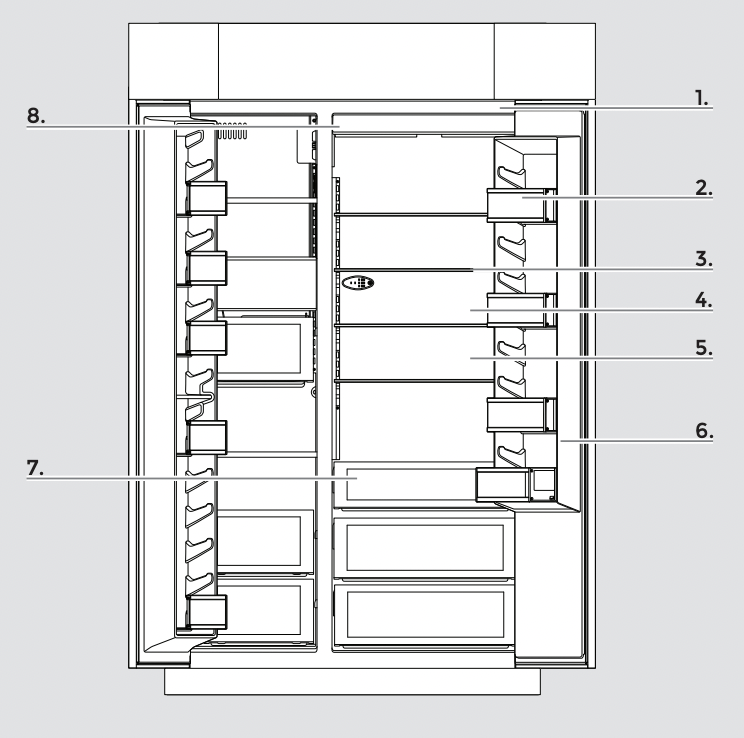
PRODUCT FEATURES
1. Fully Integrated and Flush Design with Articulating Hinge
Creates an integrated appearance with custom cabinetry without exposed hinges or trim pieces.
2. Adjustable Door Bins with Metal Accents
Refrigerator and freezer door bins can be positioned to accommodate a variety of container sizes.
3. Adjustable Elegance Shelving
Glass shelves, accented with brushed aluminum, make foods and beverages appear to float, allowing more light to fill the interior.
4. Obsidian Interior
Satisfies consumer’s desire to make a design statement with an exclusive color among luxury refrigerators on the market.
5. Multi-Point LED Theater Lighting
Minimizes shadows and evenly distributes light throughout the refrigerator, crisper and freezer.
6. 90°/110° Door Stop Lighting
Position Limits the opening angle of a refrigerator to either 90° or 110°.
7. Soft, Auto-Close Crisper Drawers
Provide smooth operation by rolling open even when fully loaded, and feature an innovative auto-close design that pulls the drawer closed.
Electronic Controls with LED Display
Allow independent control of refrigerator and freezer temperatures with an integrated design that is easy-to-clean and responds to touch for easy operation.
8. Water Filter Indicator (On Some Models)
The water filter indicator, located on the control panel, will help you know when to change the water filter.
A replacement water filter should be ordered when “Order Filter” is displayed. It is recommended that you replace the filter when “Replace Filter” is displayed or when water flow to your water dispenser and/or ice maker decreases noticeably. See "Changing the Water Filter” later in this section.
After changing the water filter, press and hold FILTER RESET for 3 seconds until the "Order Filter” or “Replace Filter” indicator light disappears

USING THE CONTROLS
IMPORTANT:
■ The refrigerator control adjusts the refrigerator compartment temperature. The freezer control adjusts the freezer compartment temperature.
■ Wait 24 hours after you turn on the refrigerator before you put food into it. If you add food before the refrigerator has cooled completely, your food may spoil.
NOTE: Adjusting the refrigerator and freezer controls to a lower (colder) setting will not cool the compartments any faster.
■ If the temperature is too warm or too cold in the refrigerator or freezer, first check the air vents to be sure they are not blocked before adjusting the controls.
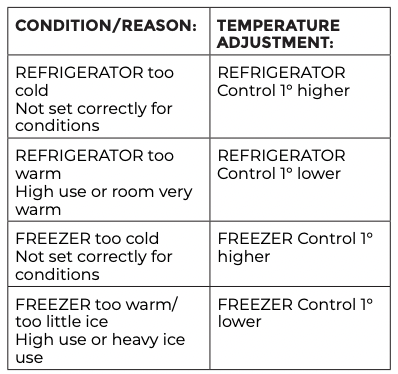
■ The preset settings should be correct for normal household usage. The controls are set correctly when milk or juice is as cold as you like and when ice cream is firm.
■ The actual temperature may differ from the display when a door is open for an extended period of time
NOTE: The factory recommended set points are 0°F (-18°C) for the freezer and 37°F (3°C) for the refrigerator.
1. Turning Refrigerator On and Viewing Set Points
■ Press the Cooling (ON/OFF) touch pad.
NOTE:
■ After the refrigerator is turned on, the Over Temperature audio alarm and indicator light may activate every 1¹⁄₂ hours until the refrigerator and freezer temperatures are below 48°F (9°C) and 15°F (-9°C), respectively, or until the alarm is turned off. To turn off the audio alarm and indicator light, see “Master Alarm Reset.”
■ The Cooling ON/OFF touch pad on the control panel shuts down refrigerator functions such as cooling, lighting, fans and compressors. To turn the power off completely, use the power ON/OFF switch located behind the top grille. See “Power On/Off Switch.”
2. Viewing the Celsius Temperatures
■ Press the F/C touch pad. To redisplay degrees Fahrenheit, press F/C again.
NOTE: If the freezer temperature is below zero, the negative sign next to the freezer display will light up. This is normal.
3. Adjusting Controls
NOTE: Wait at least 24 hours between adjustments. Recheck the temperatures before other adjustments are made.
To Adjust Set Point Temperatures:
■ Press the refrigerator or freezer PLUS (+) or MINUS (-) touch pad until the desired temperature is reached.
■ Press the Set To Recommended touch pad to reset the set points to the factory recommended temperatures.
NOTE: The set point range for the freezer is -5°F to 3°F (-21°C to -16°C). The set point range for the refrigerator is 34°F to 42°F (1°C to 6°C).
4. Water Filter Indicator and Reset
See “Water Filter Indicator” section.
5. Max Cool
The Max Cool feature assists with periods of heavy ice usage, full grocery loads, or temporarily warm room temperatures.
■ Press MAX COOL to turn on the Max Cool feature. The Max Cool indicator light will remain on for 24 hours unless manually turned off.
NOTE: The temperature display will remain at 34°F (1°C) and -5°F (-21°C) for the refrigerator and freezer compartments, respectively, while the Max Cool feature is enabled. After 24 hours, the refrigerator returns to the previous temperature set points.
6. Alarm Functions
Master Alarm Reset
Pressing Alarm Reset once will turn off the audio alarm and indicator light. The audio alarm will not sound again for the current condition that caused the alarm until a new condition occurs or until a Master Alarm Reset is performed.
A Master Alarm Reset can be performed by pressing Cooling (ON/ OFF) twice or by turning the power to the refrigerator off and on again. See “Power On/Off Switch.” After performing a Master Alarm Reset, the indicator light will reactivate if the condition that caused the alarm is still present. See “Over Temperature,”Call Service,” or “Door Open.
Door Open
The Door Open indicator light will flash, an alarm will sound and the interior lights will turn off when a door has been open for longer than 10 minutes. When the door is closed, the audio alarm will reset and turn off, but the Door Open indicator light will continue to flash until the temperature is equal to or below 45°F (7°C) and 15°F (-9°C) for the refrigerator and freezer compartments, respectively.
NOTE: To deactivate the audio alarm and indicator light, see “Master Alarm Reset.”
Over Temperature
IMPORTANT: If the Over Temperature Alarm activates, your food may spoil. See the “Power Interruptions.” Minimize door openings until temperatures return to normal.
The Over Temperature feature is designed to let you know when either the refrigerator temperature rises above 48°F (9°C) or the freezer temperature rises above 15°F (-9°C) for longer than 1¹⁄₂ hours. The audio alarm will shut off automatically when the temperature returns to normal, but the indicator light will continue to flash until the Alarm is pressed to let you know that an over temperature condition has occurred.
If the over temperature condition is still present when an Over Temperature Reset is performed, the indicator light will continue to reactivate every 1¹⁄₂ hours until refrigerator and freezer temperatures are below 48°F (9°C) and 15°F (-9°C), respectively.
NOTE: The audio alarm will be disabled for subsequent occurrences of over temperature alarm condition. To enable the audio alarm, see Master Alarm Reset.
7. Sabbath Mode
The Sabbath Mode feature is designed for the traveler or for those whose religious observances require turning off the lights and ice maker. By selecting this feature, the temperature set points and Deli Pan settings remain unchanged, the ice maker will be disabled and the interior lights will turn off. For most efficient refrigerator operation, it is recommended to exit the Sabbath Mode when it is no longer required.
To fully activate Sabbath Mode, you must follow the instructions below for both the control panel and dispenser panel (on some models).
IMPORTANT: If you do not activate Sabbath Mode in both ways listed below, some functions you wish to disable will remain active.
CONTROL PANEL
In Sabbath Mode, the temperature set points remain unchanged and the interior lights turn off.
■ Press SABBATH MODE to turn on Sabbath Mode.
■ Press SABBATH MODE again to turn off Sabbath Mode.
GETTING STARTED
CLEAN BEFORE USING
After you remove all of the packaging materials, clean the inside of your refrigerator before using it. See the cleaning instructions in “Refrigerator Care.”
Important information to know about glass shelves and covers: Do not clean glass shelves or covers with warm water when they are cold. Shelves and covers may break if exposed to sudden temperature changes or impact, such as bumping. Tempered glass is designed to shatter into many small, pebble-size pieces. This is normal. Glass shelves and covers are heavy. Use both hands when removing them to avoid dropping.
WATER SUPPLY REQUIREMENTS
Read all directions before you begin.
IMPORTANT:
- When your refrigerator was installed, the water connection from the water source should have been connected to your refrigerator. If your refrigerator is not connected to a water source, see “Connect to Water Line” in the Installation Instructions. If you have any questions about your water connection, see “Troubleshooting” or call a licensed, qualified plumber.
- If you turn the refrigerator on before the water line is connected, turn the ice maker Off. See “Ice Maker and Storage Bin.”
- All installations must meet local plumbing code requirements.
- Connect to potable water supply only.
Do not use with water that is microbiologically unsafe or of unknown quality without adequate disinfection before or after the system. Systems certified for cyst reduction may be used on disinfected waters that may contain filterable cysts.
WATER PRESSURE
A cold water supply with water pressure between 30 and 120 psi (207 and 827 kPa) is required to operate the water dispenser and ice maker. If you have questions about your water pressure, see “Troubleshooting” or call a licensed, qualified plumber.
NOTE: If the water pressure is less than what is required, the flow of water from the water dispenser could decrease or ice cubes could be hollow or irregular shaped. If you have questions about your water pressure, call a licensed, qualified plumber.
REVERSE OSMOSIS WATER SUPPLY
IMPORTANT: The pressure of the water supply coming out of a reverse osmosis system going to the water inlet valve of the refrigerator needs to be between 30 and 120 psi (207 and 827 kPa).
If a reverse osmosis water filtration system is connected to your cold water supply, the water pressure to the reverse osmosis system needs to be a minimum of 40 psi (276 kPa).
If the water pressure to the reverse osmosis system is less than 40 psi (276 kPa):
- Check to see whether the sediment filter in the reverse osmosis system is blocked. Replace the filter if necessary.
- Allow the storage tank on the reverse osmosis system to refill after heavy usage.
- If your refrigerator has a water filter, it may further reduce the water pressure when used in conjunction with a reverse osmosis system. Remove the water filter. See “Water Filtration System.”
If you have questions about your water pressure, call a licensed, qualified plumber.
WATER SYSTEM PREPARATION
Please read before using the water system. Follow the directions specific to your model.
STYLE 1 (DISPENSER MODELS)
IMPORTANT: After connecting the refrigerator to a water source or replacing the water filter, follow the steps below to make sure that the water system is properly cleaned. This will flush air from the filter and water dispensing system, and prepare the water filter for use.
Do not use with water that is microbiologically unsafe or of unknown quality without adequate disinfection before or after the system. Systems certified for cyst reduction may be used on disinfected waters that may contain filterable cysts.
NOTE: If your model has a base grille filter system, make sure the base grille filter is properly installed and the cap is in the horizontal position.
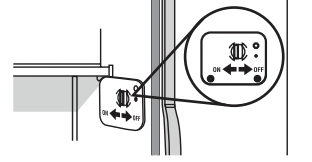
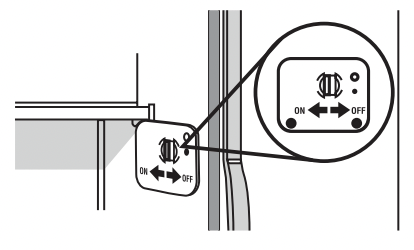
- Open the freezer door and turn off the ice maker. The On/ Off switch is located on the top right side of the freezer compartment. Move the switch to the OFF (right) setting as shown.
2. Use a sturdy container to depress and hold the water dispenser lever for 5 seconds, and then release it for 5 seconds. Repeat until water begins to flow. Once water begins to flow, continue depressing and releasing the dispenser lever (5 seconds on, 5 seconds off) until a total of 3 gal. (12 L) has been dispensed. This will flush air from the filter and water dispensing system and prepare the water filter for use. Additional flushing may be required in some households.
NOTE: As air is cleared from the system, water may spurt out of the dispenser.
3. Open the freezer door and turn on the ice maker. Move the switch to the ON (left) position.
NOTE:
- Allow 24 hours to produce the first batch of ice.
- Discard the first three batches of ice produced.
- Allow 3 days to completely fill ice container.
- Depending on your model, you may want to select the maximum ice feature to increase the production of ice.
STYLE 2 (NON-DISPENSER MODELS)
IMPORTANT: After connecting the refrigerator to a water source or replacing the water filter, fill and discard two full containers of ice to prepare the water filter for use, before using the ice.
NOTE: If your model has a base grille filter system, make sure the base grille filter is properly installed and the cap is in the horizontal position.
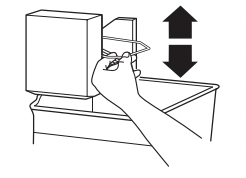
- Turn on the ice maker. Lower the wire shutoff arm as shown. Please refer to “Ice Maker and Storage Bin” for further instructions on the operation of your ice maker.
NOTES:
- Allow 24 hours to produce the first batch of ice.
- Allow 3 days to completely fill ice container.
- Depending on your model, you may want to select the maximum ice feature to increase the production of ice.
INSTALL PRODUCE PRESERVER (ON SOME MODELS)
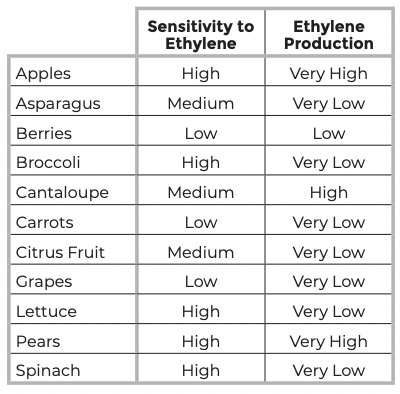
The produce preserver absorbs ethylene to slow the ripening process of many produce items. As a result, certain produce items will stay fresh longer.
Ethylene production and sensitivity varies depending on the type of fruit or vegetable. To preserve freshness, it is best to separate produce with sensitivity to ethylene from fruits that produce moderate to high amounts of ethylene.
INSTALLING THE PRODUCE PRESERVER
CAUTION: IRRITANT MAY IRRITATE EYES AND SKIN. DANGEROUS FUMES FORM WHEN MIXED WITH OTHER PRODUCTS. Do not mix with cleaning products containing ammonia, bleach or acids. Do not get in eyes, on skin or clothing. Do not breathe dust. Keep out of reach of children.
FIRST AID TREATMENT: Contains potassium permanganate. If swallowed, call a Poison Control Center or doctor immediately. Do not induce vomiting. If in eyes, rinse with water for 15 minutes. If on skin, rinse with water.
- Wash the interior of a crisper drawer with a solution of mild dish soap and warm water, and dry thoroughly.
- Find the package containing the Produce Preserver inside the refrigerator, and install the Produce Preserver into the crisper drawer according to the instructions provided in the package.
INSTALLING THE STATUS INDICATOR (ON SOME MODELS)
The Produce Preserver comes with a status indicator, which should be activated and installed at the same time the pouch is installed.
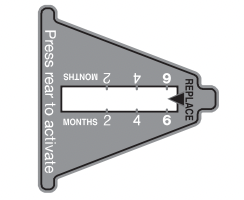
- Place the indicator face-down on a firm, flat surface.
- Apply pressure to the bubble on the back of the indicator until the bubble pops to activate the indicator.
- Slide open the cap on the Produce Preserver housing.
- Place the indicator in the top of the housing facing outward.
- Slide the cap closed, and check that the indicator is visible through the rectangular hole in the cap..
NOTE: The cap will not easily close if the indicator’s rear bubble has not been popped.
REFRIGERATOR USE
If the supply cord is damaged, it must be replaced by the manufacturer or its service agent or a similar qualified person. Do not use a cord that shows cracks or abrasion damage along its length or at either the plug or connection end.
WARNING Electrical Shock Hazard Plug into a grounded 3 prong outlet. Do not remove ground prong. Do not use an adapter. Do not use an extension cord. Failure to follow these instructions can result in death, �re, or electrical shock.
WARNING Explosion Hazard Keep flammable materials and vapors, such as gasoline, away from refrigerator. Failure to do so can result in death, explosion, or fire.
POWER ON/OFF SWITCH
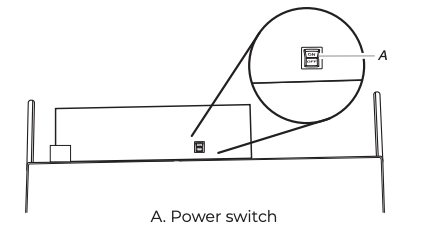
If you need to turn the power to your refrigerator On or Off, you must remove the top grille assembly to access the power switch. Turn the power to the refrigerator Off when cleaning your refrigerator.
INTEGRATED INSTALLATION - FULL HEIGHT / ARMOIRE MACHINE COMPARTMENT COVER
To install the grille panel to the refrigerator:
- Slide the upper and lower slots in each bracket onto the mounting pins extending upward from the top of the refrigerator.
- Push the grille panel forward to fully engage the spring clips and fasten the grille panel.
TO REMOVE THE GRILLE PANEL FROM THE REFRIGERATOR:
- Open the door(s).
- Place both hands under the grille panel, grasping the bottom edge between your fingers and thumbs.
- Pull the grille panel straight out until the grille stops. Then, lift up on the grille panel to remove.
TURN POWER ON OR OFF:
- Remove the top grille panel.
- Press Power switch to the ON or OFF position.
- Replace top grille.
IMPORTANT: Be sure the power switch is set to the ON position after cleaning refrigerator or changing light bulbs.
WATER AND ICE DISPENSERS (ON SOME MODELS)
IMPORTANT:
■ After connecting the refrigerator to a water source or replacing the water filter, flush the water system. Use a sturdy container to depress and hold the water dispenser lever for 5 seconds, then release it for 5 seconds. Repeat until water begins to flow. Once water begins to flow, continue depressing and releasing the dispenser lever (5 seconds on, 5 seconds off) until a total of 3 gal. (12 L) has been dispensed. This will flush air from the filter and water dispensing system, and prepare the water filter for use. Additional flushing may be required in some households.
NOTE: As air is cleared from the system, water may spurt out of the dispenser.
■ Allow 24 hours for the refrigerator to cool down and chill water.
■ Allow 24 hours to produce the first batch of ice. Discard the first three batches of ice produced.
■ The dispensing system will not operate when the freezer door is open.
■ Depending on your model, your water and ice dispensers may have one or more of the following features: a dispenser tray, a special light that turns on when you use the dispenser, or a lock option to avoid unintentional dispensing.
WATER DISPENSER
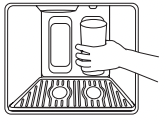
To Dispense Water:
- Press a sturdy glass against the water dispenser pad.
NOTES:
- While dispensing water and for 3 seconds after dispensing has stopped, the digital display will show how many ounces of water have been dispensed.
- To switch from ounces to cups, press and hold ICE and LOCK at the same time until the dispenser beeps after 3 seconds. To switch from cups to liters, press and hold the buttons for another seconds. To switch back to ounces, repeat the process a third time.
2. Remove the glass to stop dispensing.
NOTE: Water may have an off-flavor if you do not use the dispenser periodically. Dispense enough water every week to maintain a fresh supply.
ICE DISPENSER
Ice dispenses from the ice maker storage bin in the freezer when the dispenser pad is pressed. The dispensing system will not operate when the freezer door is open. To turn off the ice maker, see “Ice Maker and Storage Bin.”Your ice maker can produce both crushed and cubed ice. The display screen reads “CRUSHED” or “CUBED,” indicating which type is selected. To change the setting, press the ICE button before dispensing ice.
For crushed ice, cubes are crushed before being dispensed. This may cause a slight delay when dispensing crushed ice. Noise from the ice crusher is normal, and pieces of ice may vary in size. When changing from crushed to cubed, a few ounces of crushed ice will be dispensed along with the first cubes.
To Dispense Ice:
1. Press the button to select the desired type of ice.
WARNING Cut Hazard Use a sturdy glass when dispensing ice. Failure to do so can result in cuts.
2. Press a sturdy glass against the ice dispenser pad. Hold the glass close to the dispenser opening so ice does not fall outside of the glass.
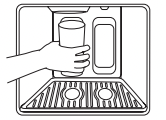
IMPORTANT: You do not need to apply a lot of pressure to the pad in order to activate the ice dispenser. Pressing hard will not make the ice dispense faster or in greater quantities.
3. Remove the glass to stop dispensing.
NOTE: Ice may continue to dispense for up to 10 seconds after removing the glass from the pad. The dispenser may continue to make noise for a few seconds after dispensing.
DISPENSER TRAY (ON SOME MODELS)
Some models have a tra y at the bottom of the dispenser area. The tray is designed to catch small spills and is removable for easy emptying and cleaning.
NOTE: There is no drain in the tray.
DISPENSER LIGHT (ON SOME MODELS)
When you use the dispenser, the light will automatically turn on. If you want the light to be on continuously, you may choose either ON or AUTO.
ON: Press LIGHT to turn the dispenser light on.
AUTO: Press LIGHT a second time to select AUTO mode. The dispenser light will automatically adjust to become brighter as the room brightens and dimmer as the room darkens.
OFF: Press LIGHT a third time to turn the dispenser light off.
The dispenser lights are LEDs that cannot be changed. If it appears that your dispenser lights are not working, be sure that the light sensor is not blocked (in AUTO mode). See "Troubleshooting” for more information.
WATER FILTER STATUS LIGHT
The water filter status light and display screen help you know when to change your water filter. Press the FILTER button to check the status of your water filter.
If the filter is new:
You must press FILTER to view the filter’s status. For a few seconds, the status light will be blue and the display screen will show what percentage of your filter’s life remains.
If it is almost time to change the filter:
The status light will automatically illuminate and will remain on, appearing yellow. The words "ORDER FILTER” will appear on the display screen. Press FILTER to see what percentage of your filter’s life remains. You should order the appropriate replacement filter. See "Accessories.”
If it is time to change the filter:
The status light will remain on, changing to red. The words “REPLACE FILTER” and “HOLD BUTTON TO RESET” will appear on the display screen until the filter has been changed and the status light has been reset.
To reset the water filter status light:
After changing the filter, reset the status light by pressing and holding the FILTER button for 3 seconds. The status light will blink red and change to blue, and then turn off when the system is reset.
TO TURN THE ICE MAKER ON/OFF:
The On/Off switch is located on the top right side of the freezer compartment.
1. To turn the ice maker on, slide the control to the ON (left) position.
NOTE: Your ice maker has an automatic shutoff. The ice maker sensors will automatically stop ice production, but the control will remain in the ON (left) position.
2. To manually turn the ice maker off, slide the control to the OFF (right) position.
USING THE ICE MAKER WITHOUT A WATER FILTER
You can operate the ice maker without a water filter. Your ice will not be filtered.
1. Remove the filter by pressing the eject button and pulling on the cap. See “Changing the Water Filter” earlier in this section.
2. Remove the cap by turning it counterclockwise until it stops.
IMPORTANT: Do not discard the cap. It is part of your refrigerator. Keep the cap to use with the replacement filter.
3. With the cap in a horizontal position, insert the cap into the base grille until it stops.
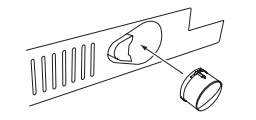
4. Turn the cap counterclockwise until the cap slips into the attachment slot. Then, turn the cap clockwise until it is in a horizontal position.
NOTE: The cap will not be even with the base grille.
CARE AND CLEANING
ICE MAKER AND STORAGE BIN (ON SOME MODELS - ACCESSORY)
IMPORTANT: Flush the water system before turning on the ice maker. See “Water and Ice Dispensers.” Allow 24 hours to produce the first batch of ice. Discard the first three batches of ice produced. Allow 3 days to completely fill the ice container.
STYLE 1
To Turn the Ice Maker On/Off:
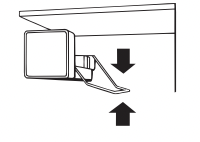
The On/Off switch for the ice maker is a wire shutoff arm located on the side of the ice maker.
1. To turn the ice maker on, simply lower the wire shutoff arm.
NOTE: Your ice maker has an automatic shutoff. As ice is made, the ice cubes will fill the ice storage bin and the ice cubes will raise the wire shutoff arm to the OFF (arm up) position.
2. To manually turn the ice maker off, lift the wire shutoff arm to the OFF (arm up) position, and listen for the click to make sure the ice maker will not continue to operate.
TO REMOVE AND REPLACE THE ICE BIN:
1. Flip up the covering panel.
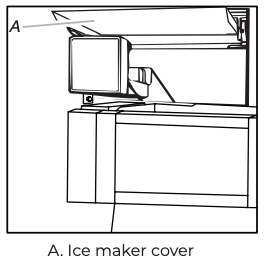
2. Lift the wire shutoff arm so it clicks into the OFF (up) position. Ice can still be dispensed, but no more can be made.
3. Lift up the front of the storage bin and pull the ice bin forward.
4. Replace the bin by pushing it in all the way or the dispenser will not work. Push the wire shutoff arm down to the ON position to restart ice production. Make sure the door is closed tightly
TO REMOVE AND REPLACE THE ICE STORAGE BIN:
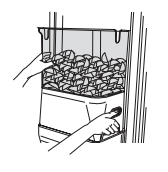
1. Hold the base of the storage bin with both hands and press the release button to lift the storage bin up and out.
NOTE: It is not necessary to turn the ice maker control to the OFF (right) position when removing the storage bin. The sensor cover (“flipper door”) on the left wall of the freezer stops the ice maker from producing ice if the door is open or the storage bin is removed.
2. Replace the storage bin on the door and push down to make sure it is securely in place.
CLEAN THE ICE STORAGE BIN
NOTE: It is normal for ice to stick together in the ice bin. Ice may be dispensed or used more frequently which will break up the ice. It is recommended that the ice container be emptied and cleaned as needed.
To clean the ice storage bin:
- Empty the ice container. Use warm water to melt the ice if necessary. NOTE: Do not use anything sharp to break up the ice in the bin or bucket. This can cause damage to the ice container and the dispenser mechanism.
- Wash ice bin with a mild detergent, rinse well and dry thoroughly. Do not use harsh or abrasive cleaners or solvents.
REMEMBER:
- Allow 24 hours to produce the first batch of ice. Allow 3 days to completely fill ice container.
- Discard the first three batches of ice produced to avoid impurities that may be flushed out of the system.
- The quality of your ice will be only as good as the quality of the water supplied to your ice maker.
- Avoid connecting the ice maker to a softened water supply.
- Water softener chemicals (such as salt) can damage parts of the ice maker and lead to poor quality ice. If a softened water supply cannot be avoided, make sure the water softener is operating properly and is well maintained.
- It is normal for the ice cubes to be attached at the corners. They will break apart easily.
- For Style 1 ice maker, do not force the wire shutoff arm up or down.
- Do not store anything on top of the ice maker or in the ice storage bin/bucket.
WATER FILTRATION SYSTEM
Do not use with water that is microbiologically unsafe or of unknown quality without adequate disinfection before or after the system. Systems certified for cyst reduction may be used on disinfected waters that may contain filterable cysts.
WATER FILTER INDICATOR (ON SOME MODELS)
The water filter indicator, located on the control panel, will help you know when to change the water filter.
A new water filter should display a reading of 99%. The reading in the display will decrease as the filter life is used. A replacement water filter should be ordered when “Order Filter” is displayed. It is recommended that you replace the filter when “Change Filter” is displayed or when water flow to your water dispenser and/or ice maker decreases noticeably. See “Changing the Water Filter” later in this section.
NOTE: Dispenser models have a filter reset on the freezer compartment door. Non-Dispenser models have a Good/Order Filter/Replace Filter indicator.
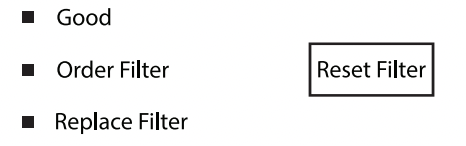
After changing the water filter, press and hold RESET for2 seconds until the status display changes to 99%.
CHANGING THE WATER FILTER
The water filter is located in the base grille below the freezer compartment door. It is not necessary to remove the base grille to remove the filter.
- Remove the filter by pressing the eject button and pulling straight out on the filter cap.
NOTES:
- Avoid twisting the cap when removing the filter because this could cause the cap to come off. If this occurs, replace the cap and pull the filter straight out.
- There will be water in the filter. Some spilling may occur.
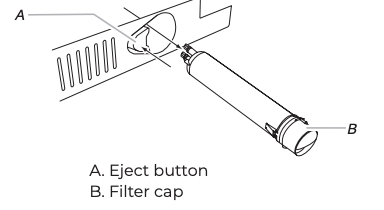
2. Remove the cap by turning it counterclockwise until it stops.
IMPORTANT: Do not discard the cap. It is part of your refrigerator. Keep the cap to use with the replacement filter.
3. Align the ridge on the cap with the arrow on the new filter and turn the cap until it snaps into place.
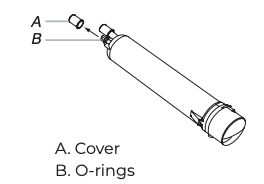
4. Remove the covers from the O-rings. Be sure the O-rings are still in place after the covers are removed.
5. Place the cap (removed in Step 2) on the new filter. Align the ridge on the cap with the arrow on the filter. Turn the cap clockwise until it snaps into place.
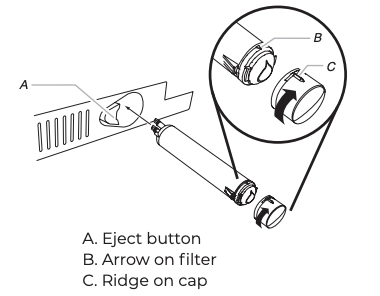
6. Push the new filter into the opening in the base grille. As the filter is inserted, the eject button will depress. The eject button will pop back out when the filter is fully engaged.
7. Pull gently on the cap to check that the filter is securely in place.
8. Flush the water system. Depending on your model, see “Water and Ice Dispensers” or “Ice Maker and Storage Bin.”
REFRIGERATOR SHELVES
Important information to know about glass shelves and covers: Do not clean glass shelves or covers with warm water when they are cold. Shelves and covers may break if exposed to sudden temperature changes or impact, such as bumping. Tempered glass is designed to shatter into many small, pebble-size pieces. This is normal. Glass shelves and covers are heavy. Use both hands when removing them to avoid dropping.
The shelves in your refrigerator are adjustable to meet your individual storage needs.
Storing similar food items together in your refrigerator and adjusting the shelves to fit different heights of items will make finding the exact item you want easier. It will also reduce the amount of time the refrigerator door is open and help save energy.
SHELVES AND SHELF FRAMES
To remove and replace a shelf/frame:
- Remove the shelf by tilting it up at the front and lifting it out of the shelf supports. Pull shelf straight out.
- Reposition the shelf supports in the desired location. Check that they are level and firmly inserted in the support rails.
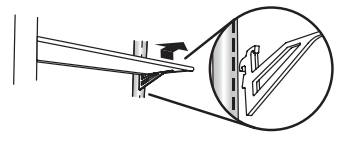
3. Place the back of the shelf in the shelf supports.
4. Lower the front of the shelf and make sure that it is in position.
TEMPERATURE CONTROLLED DELI DRAWER
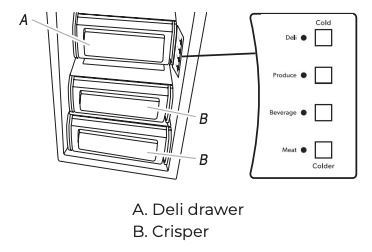
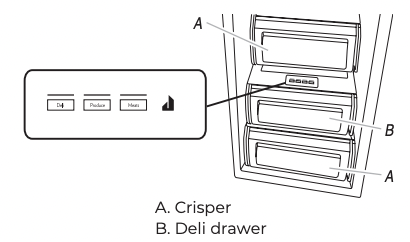
The control for the deli drawer adjusts the temperature of the drawer. Cold air flows into the drawer through the air duct between the freezer and the refrigerator. Adjusting the control allows more or less cold air through the air duct.
ADJUST THE TEMPERATURE (DISPENSER MODELS)
- Choose a setting based on the item to be stored in the pan.
- Push the button that corresponds to that setting.
- The indicator light for that setting will illuminate to verify that the pan is ready to be loaded.
STYLE 1
STYLE 2
REMOVE AND REPLACE THE TOP COVER
- Remove food from Ingredient Care Center cover. Pull drawer out about 4” (10.16 cm). Reach under the glass shelf with both hands and lift gently upward until back of shelf is free. Tilt the shelf at an angle and remove the shelf from the refrigerator. Be sure not to bump the glass.
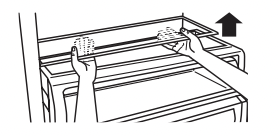
2. Replace the cover by holding the glass shelf firmly with both hands. Tilt the shelf at an angle and position it above the support rails. Place shelf gently on support rails on side wall.
MEAT STORAGE GUIDE
Store most meat in original wrapping as long as it is airtight and moisture-proof. Rewrap if necessary. See the following chart for storage times. When storing meat longer than the times given, freeze the meat.
Fresh fish or shellfish ........................ use same day as purchased
Chicken, ground beef, variety meat (liver, etc.)................ 1-2 days
Cold cuts, steaks/roasts .................................... 3-5 days
Cured meats ..........................................................7-10 days
Leftovers - Cover leftovers with plastic wrap, aluminum foil, or plastic containers with tight lids.
CRISPER AND COVERS
TO REMOVE AND REPLACE THE CRISPERS:
- Slide the crisper drawer straight out to the stop. Lift the front of the drawer with one hand while supporting the bottom of the drawer with your other hand and slide the drawer out the rest of the way.
- To replace the crisper drawer, place the drawer onto slides and push the drawer back until securely in position.
- Test the crisper drawer to make sure it has been replaced properly.
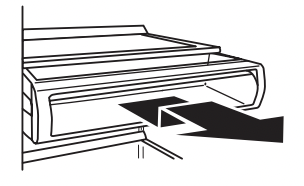
TO CLEAN CRISPER COVERS:
- To clean the top crisper cover, remove the Ingredient Care Center located above it.
- To clean the bottom crisper cover, first remove the top crisper drawer.
WINE RACK
TO REMOVE AND REPLACE THE WINE RACK:
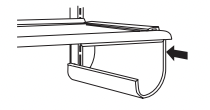
- Remove the rack by pulling it straight out from the shelf.
- Replace the rack by sliding it in between the shelf and the wall of the refrigerator.
FREEZER SHELF
TO REMOVE AND REPLACE THE SHELF:
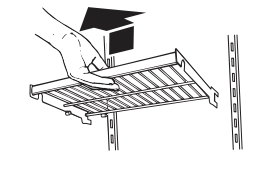
- Remove the shelf by lifting it up and pulling it straight out.
- Replace the shelf by putting it over the supports and lowering it into place.
FROZEN FOOD STORAGE GUIDE
Storage times will vary according to the quality and type of food, the type of packaging or wrap used (should be airtight and moisture-proof), and the storage temperature. Ice crystals inside a sealed package are normal. This simply means that moisture in the food and air inside the package have condensed, creating ice crystals.
Put no more unfrozen food into the freezer than will freeze within 24 hours (no more than 2 to 3 lbs of food per cubic foot [907-1,350 g per 28 L] of freezer space). Leave enough space in the freezer for air to circulate around packages. Be sure to leave enough room for the door to close tightly.
For more information on preparing food for freezing, check a freezer guide or reliable cookbook.
REPLACING THE PRODUCE PRESERVER
The disposable packets should be replaced every 6 months or when the status indicator changes completely from white to red.
To order replacements, see “Accessories” in the User Instructions or User Guide.
- Remove the used packets from the produce preserver housing.
- Remove the used status indicator
- Install the replacement packets and status indicator using the instructions included in the package.
FREEZER BASKET
The freezer basket can be used to store bags of frozen fruits and vegetables that may slide off freezer shelves.
TO REMOVE AND REPLACE THE FREEZER BASKET:
- Pull the basket straight out to the stop.
- Lift the front of the basket and slide it out the rest of the way.
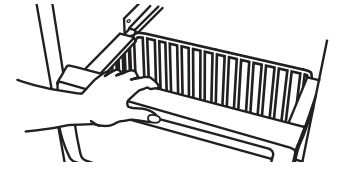
3. Replace the basket by positioning it on the side wall guide rails. Lift the basket front slightly while pushing it past the guide rail stops and slide basket in the rest of the way
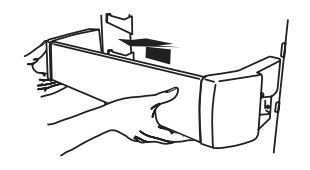
DOOR BINS
Large door bins hold gallon containers and the smaller door bins hold 2-liter bottles. The door bins are adjustable and removable for easy cleaning and adjusting.
GALLON DOOR BIN
To install the gallon door bin:
NOTE: The gallon door bin can only be placed on the lower door support.
- Position gallon door bin above lowest door adjustment slot.
- Push down to secure bin.
- Adjust other bins, as necessary, to allow for milk or beverage container height.
DOOR BINS
To remove and replace the door bins:
- Remove the bin by lifting it up and pulling it out.
- Replace the bin by sliding it in above the desired support and pushing it down until it stops.
CLEANING
Both the refrigerator and freezer sections defrost automatically. However, clean both sections about once a month to avoid build-up of odors. Wipe up spills immediately.
TO CLEAN YOUR REFRIGERATOR:
- Remove the top grille. See “Power On/Off Switch.”
- Press power switch to OFF.
- Remove all removable parts from inside, such as shelves, crispers, etc.
- Hand wash, rinse, and dry removable parts and interior surfaces thoroughly. Use a clean sponge or soft cloth and a mild detergent in warm water.
- Do not use abrasive or harsh cleaners such as window sprays, scouring cleansers, flammable fluids, cleaning waxes, concentrated detergents, bleaches or cleansers containing petroleum products on plastic parts, interior and door liners or gaskets. Do not use paper towels, scouring pads, or other harsh cleaning tools. These can scratch or damage materials.
- To help remove odors, you can wash interior walls with a mixture of warm water and baking soda (2 tbs to 1 qt [26 g to 0.95 L] of water).
5. Wash stainless steel and painted metal exteriors with a clean sponge or soft cloth and a mild detergent in warm water. Do not use abrasive or harsh cleaners, or cleaners containing chlorine. Dry thoroughly with a soft cloth.
6. Clean the condenser coils located behind the top grille ventilation panel regularly. Coils may need to be cleaned as often as every other month. This may help save energy.
- Use a vacuum cleaner with an extended attachment to clean the condenser coils when they are dusty or dirty.
7. Press the power switch to ON.
8. Replace the top grille. See “Power On/Off Switch.”
LIGHTS
The lights in both the refrigerator and freezer compartments are LEDs which do not need to be replaced. If the lights do not illuminate when the door is opened, call 1-800-536-6247 for assistance or service.
POWER INTERRUPTIONS
If the power will be out for 24 hours or less, keep the door or doors closed (depending on your model) to help food stay cold and frozen.
If the power will be out for more than 24 hours, do one of the following:
- Remove all frozen food and store it in a frozen food locker.
- Place 2 lbs (907 g) of dry ice in the freezer for every cubic foot (28 L) of freezer space. This will keep the food frozen for 2 to 4 days.
- If neither a food locker nor dry ice is available, consume or can perishable food at once.
REMEMBER: A full freezer stays cold longer than a partially filled one. A freezer full of meat stays cold longer than a freezer full of baked goods. If you see that food contains ice crystals, it may be refrozen, although the quality and flavor may be affected. If the condition of the food is poor, dispose of it.
VACATION CARE
IF YOU CHOOSE TO TURN THE REFRIGERATOR OFF BEFORE YOU LEAVE:
1. Remove all food from the refrigerator.
2. If your refrigerator has an automatic ice maker:
- Turn off the water supply to the ice maker at least one day ahead of time.
- When the last load of ice drops, raise the wire shutoff arm to the OFF (up) position.
3. Depending on your model, turn the Thermostat Control (or Refrigerator Control) to OFF. See “Using the Controls.”
4. Clean refrigerator, wipe it, and dry well.
5. Tape rubber or wood blocks to the tops of both doors to prop them open far enough for air to get in. This stops odor and mold from building up.
TROUBLESHOOTING
REFRIGERATOR OPERATION
NOTE: Try the solutions suggested here first in order to avoid the cost of an unnecessary service call.
THE REFRIGERATOR WILL NOT OPERATE
WARNING Electrical Shock Hazard Plug into a grounded 3 prong outlet. Do not remove ground prong. Do not use an adapter. Do not use an extension cord. Failure to follow these instructions can result in death, �re, or electrical shock.
■ Power cord unplugged? Plug into a grounded 3 prong outlet.
■ Is outlet working? Plug in a lamp to see if the outlet is working.
■ Household fuse blown or circuit breaker tripped? Replace the fuse or reset the circuit breaker. If the problem continues, call an electrician.
■ Are controls on? Make sure the refrigerator controls are on. See “Using the Controls.”
■ Is refrigerator defrosting? Your refrigerator will regularly run an automatic defrost cycle. Recheck in 30 minutes to see if it is operating.
■ New installation? Allow 24 hours following installation for the refrigerator to cool completely.
NOTE: Adjusting the temperature controls to the coldest setting will not cool either compartment more quickly.
THE MOTOR SEEMS TO RUN TOO MUCH
Your new refrigerator may run longer than your old one due to its high-efficiency compressor and fans. The unit may run even longer if the room is warm, a large food load is added, doors are opened often, or if the doors have been left open.
THE REFRIGERATOR IS NOISY
Refrigerator noise has been reduced over the years. Due to this reduction, you may hear intermittent noises from your new refrigerator that you did not notice from your old model. Below are listed some normal sounds with an explanation.
- Buzzing - heard when the water valve opens to fill the ice maker
- Pulsating - fans/compressor adjusting to optimize performance
- Rattling - flow of refrigerant, water line, or from items placed on top of the refrigerator
- Sizzling/Gurgling - water dripping on the heater during defrost cycle
- Popping - contraction/expansion of inside walls, especially during initial cool-down
- Water running - may be heard when water melts during the defrost cycle and runs into the drain pan
- Creaking/Cracking - occurs as ice is being ejected from the ice maker mold.
THERE IS NO AUDIBLE DOOR OPEN ALARM
Has the door been open less than 10 minutes?
The door open alarm will only flash when the door has been open for 10 minutes. The audible alarm will sound the first time the door is left open for more than 10 minutes. Subsequent door open alarms will only flash. You must reset the audible alarm each time. See “Using the Controls.”
THE DOORS WILL NOT CLOSE COMPLETELY
- Door blocked open? Move food packages away from door.
- Bin or shelf in the way? Push bin or shelf back in the correct position.
THE DOORS ARE DIFFICULT TO OPEN
■ Are the gaskets dirty or sticky? Clean gaskets with mild soap and warm water
THE LIGHTS DO NOT WORK
- Is the refrigerator in Sabbath mode? See "Using the Controls.”
- Has the door been open more than 10 minutes? See “Using the Controls.”
TEMPERATURE AND MOISTURE
TEMPERATURE IS TOO WARM
- New installation? Allow 24 hours following installation for the refrigerator to cool completely.
- Door(s) opened often or left open? Allows warm air to enter refrigerator. Minimize door openings and keep doors fully closed.
- Large load of food added? Allow several hours for refrigerator to return to normal temperature.
- Controls set correctly for the surrounding conditions? Adjust the controls a setting colder. Check temperature in 24 hours. See "Using the Controls.”
- Refrigerator not cooling? For models with digital controls, turn the refrigerator off and then on to reset. If this does not correct the problem, call for service.
- Air vents blocked? Remove any item from in front of the air vents.
THERE IS INTERIOR MOISTURE BUILDUP
NOTE: Some moisture buildup is normal.
- Humid room? Contributes to moisture buildup.
- Door(s) opened often or left open? Allows humid air to enter refrigerator. Minimize door openings and keep doors fully closed.
ICE AND WATER
THE ICE MAKER IS NOT PRODUCING ICE OR NOT ENOUGH ICE
- Refrigerator connected to a water supply and the supply shutoff valve turned on? Connect refrigerator to water supply and turn water shutoff valve fully open.
- Kink in the water source line? A kink in the line can reduce water flow. Straighten the water source line.
- Ice maker turned on? Make sure wire shutoff arm or switch (depending on model) is in the ON position.
- New installation? Wait 24 hours after ice maker installation for ice production to begin. Wait 72 hours for full ice production.
- Large amount of ice recently removed? Allow 24 hours for ice maker to produce more ice. Ice cube jammed in the ice maker ejector arm? Remove ice from the ejector arm with a plastic utensil.
- Reverse osmosis water filtration system connected to your cold water supply? This can decrease water pressure. See "Water Supply Requirements” in either the Installation Instruction booklet or the Use & Care Guide.
THE ICE CUBES ARE HOLLOW OR SMALL
NOTE: This is an indication of low water pressure.
- Water shutoff valve not fully open? Turn the water shutoff valve fully open.
- Kink in the water source line? A kink in the line can reduce water flow. Straighten the water source line.
- Reverse osmosis water filtration system connected to your cold water supply? This can decrease water pressure. See “Water Supply Requirements.”
- Questions remain regarding water pressure? Call a licensed, qualified plumber.
ICE IS STICKING TOGETHER IN THE ICE STORAGE BIN
- It is normal for frost to be on top of the ice storage bin due to normal opening and closing of the freezer.
- It is normal for ice to stick together when it is not dispensed or used frequently. It is recommended that the ice storage bin be emptied and cleaned as needed. See “Ice Maker and Storage Bin.”
OFF-TASTE, ODOR OR GRAY COLOR IN THE ICE
- New plumbing connections? New plumbing connections can cause discolored or off-flavored ice.
- Ice stored too long? Discard ice. Wash ice bin. Allow 24 hours for ice maker to make new ice.
- Odor transfer from food? Use airtight, moisture proof packaging to store food.
- Are there minerals (such as sulfur) in the water? A water filter may need to be installed to remove the minerals.
- Is there a water filter installed on the refrigerator? Gray or dark discoloration in ice indicates that the water filtration system needs additional flushing.
THE ICE DISPENSER WILL NOT OPERATE PROPERLY
- Freezer door closed completely? Close the door firmly. If it does not close completely, see “The doors will not close completely.”
- Ice bin installed correctly? Be sure the ice bin is firmly in position.
- New installation? Wait 24 hours after ice maker installation for ice production to begin. Wait 72 hours for full ice production.
- Ice stuck in the delivery chute? Use a plastic utensil to clear the delivery chute.
- Has the wrong ice been added to the bin? Use only cubes produced by the current ice maker.
- Has the ice melted around the auger metal spiral) in the ice bin? Empty the ice container. Use warm water to melt the ice if necessary
WARNING Cut Hazard Use a sturdy glass when dispensing ice. Failure to do so can result in cuts.
- Is the ice dispenser stalling while dispensing “crushed” ice? Change the ice button from “crushed” to “cubed.” If cubed ice dispenses correctly, depress the button for “crushed” ice and begin dispensing again.
- Has the dispenser arm been held in too long? Ice will stop dispensing when the arm is held in too long. Wait 3 minutes for dispenser motor to reset before using again.
THE WATER DISPENSER WILL NOT OPERATE PROPERLY
- Freezer door closed completely? Close the door firmly. If it does not close completely, see “The doors will not close completely.”
- Refrigerator connected to a water supply and the supply shutoff valve turned on? Connect refrigerator to water supply and turn water shutoff valve fully open.
- Is the water pressure at least 30 psi kPa)? The water pressure to the home determines the flow from the dispenser. See “Water Supply Requirements.”
- Kink in the home water source line? Straighten the water source line.
- New installation? Flush and fill the water system.
- Water filter installed on the refrigerator? The filter may be clogged or incorrectly installed.
- Is a reverse osmosis water filtration system connected to your cold water supply? See "Water Supply Requirements” in either the Installation Instructions or the Use & Care Guide.
WATER IS LEAKING FROM THE DISPENSER
NOTE: One or two drops of water after dispensing is normal.
- Glass not being held under the dispenser long enough? Hold the glass under the dispenser 2 to 3 seconds after releasing the dispenser lever.
- New installation? Flush the water system. See “Prepare the Water System” or “Water and Ice Dispensers.”
- Recently changed water filter? Flush the water system. See “Prepare the Water System” or “Water and Ice Dispensers.”
THE DISPENSER WATER IS NOT COOL ENOUGH
NOTE: Water from the dispenser is chilled to only 50°F (10°C).
- New installation? Allow 24 hours after installation for the water supply to cool completely.
- Recently dispensed large amount of water? Allow 24 hours for water supply to cool completely.
- Water not been recently dispensed? The first glass of water may not be cool. Discard the first glass of water.
- Refrigerator connected to a cold water pipe? Make sure the refrigerator is connected to a cold water pipe. See “Water Supply Requirements.”