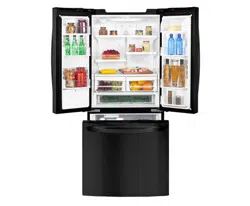
LFD20786**
GM-F208J*NP
GM-F208J*NM
P/No. MFL67700805
www.lg.com
OWNER’S MANUAL
BOTTOM FREEZER
REFRIGERATOR
Please read this manual carefully before operating
your set and retain it for future reference.
ENGLISH
ESPAÑOL
MANUAL DE USUARIO
REFRIGERADOR
CON CONGELADOR INFERIOR
Lea detenidamente este manual antes de empezar
a utilizar el refrigerador y guárdelo como referencia
para el futuro.
Model Name/Nombre de Modelo **=color number/número de color
Rev-1.
1
Important Safety Instructions 2-3
Requirements for Ground Connection 3
Parts and Features 4
Refrigerator Installation 5-12
Unpacking 5
Installation 5
Ho
w to remove and Install the
Refrigerator Doors, handle and drawers 6-11
Leveling and Door Alignment 12
Using your Refrigerator 13-20
Adjusting Control Settings 13-14
Automatic Icemaker 15
Food Storage Guide 16
Refrigerator Section
Water Dispenser 17
Refrigerator Shelves 18
Humidity Controlled Crisper 19
Glide ‘N’ Serve 19
Door Bins 20
Dairy Bin 20
Freezer Section
Durabase 20
Durabase Divider 20
Pullout Drawer 20
Water filter 21-24
Care and cleaning
25-26
General cleaning tips 25
Connecting the Water Line 27-29
Troubleshooting Guide 83-03
Warranty 39-40
Smart Diagnosis
41
TABLE OF CONTENTS
2
This manual contains several important safety notices. Always read and obey all of the following safety messages.
This is the safety alert symbol. This symbol is a warning to potential dangers that could cause death, injury
or damage to you, others or the product. All safety messages will follow after this warning symbol and the
word “DANGER”, “CAUTION” or “WARNING”. These words mean:
You may be killed or suffer fatal damage if you do not follow instructions.
You may be killed or seriously injured if you do not follow instructions.
Indicates a potentially hazardous situation which, if not avoided, may result in minor injury
or damage to the product.
All safety messages inform you of potential danger, advise you on how to reduce the risk of injury and tell you what
can occur if the instructions are not followed.
To reduce the risk of fire, electrical shock or personal
injury, the following precaution measures should be
followed:
ţNEVER disconnect the refrigerator by pulling the
power cord, always grip the plug firmly and disconnect
it directly from the outlet.
ţImmediately repair or replace all faulty or damaged
service cables. Do not use cords that have cracks or
abrasion damage on the length of the cord or on the
plug.
ţWhen moving your refrigerator, take care not to roll
over the electrical cord.
ţDO NOT store or use gasoline or other combustible
liquids or vapors in proximity with this or any other
electrical appliance.
ţDO NOT store, use on it or in proximity, explosive and
/or flammable propellant substances such as; gasoli-
ne, aerosol cans or other combustible liquids or vap-
ors in this or any other electrical appliance.
ţ
Keep your fingers away from areas in which they
can become caught, such as the doors, hinge
s and
cabinets. Be careful closing the doors when children
are near.
ţ
Unplug the refrigerator before cleaning or repairing.
NOTE: We strongly recommend that any repair
services be performed by a qualified professional.
ţBefore replacing a burned-out light bulb, unplug the
refrigerator or shut down the circuit breaker to avoid
contact with a live wire (the bulb could break while
being replaced). NOTE: Setting the control to the OFF
position does not disconnect the power from the light
bulb circuit.
ţDo not keep bottles in the freezer compartment, they
could explode after freezing and cause damage.
ţFor your safety, this product should be properly
grounded. Have a qualified professional check the
electrical circuit and outlet to ensure a proper ground
connection.
ţRead all instructions before utilizing the product. Utilize
this product only as explicitly expressed in this guide.
ţOnce the refrigerator is operating, avoid touching cold
surfaces of the freezer with damp or wet hands; the
skin could become adhered to these surfaces.
ţIn refrigerators with an automatic ice dispenser, avoid
contact with moving parts of the ejector mechanism
or with the heating mechanism that discharges the
cubes. DO NOT place your fingers or hands in the
ice dispenser mechanism while the refrigerator is
connected.
ţDO NOT refreeze foods which have already thawed.
The Department of Agriculture of the United States, in
your Bulletin of Home and Gardens No. 69 establishes
that:
“...You can refreeze food that has thawed if they contain
ice crystals or are cold and below 40 °F (4 °C)”.
“...Ground beef, perishable food or seafood that is
discolored or has an unpleasant odor should not be
frozen or consumed. Consumption of melted ice cream
should also be avoided. If the odor or color of food is
questionable, discard it. The food may be dangerous to
consume”.
“Partial thawing or refreezing reduces the quality of the
food, especially fruit, vegetables and prepared meals.
The quality of red meat is less affected than other foods.
Use refrozen products as soon as possible in order to
maintain their quality”.
KEEP THESE INSTRUCTIONS
IMPORTANT SAFETY INSTRUCTIONS
SAFETY MESSAGES
WARNING
DANGER
WARNING
CAUTION
3
This appliance is not intended for use by children, persons with physical or mental disabilities, persons with reduced
sensory or mental capacity, or persons with lack of experience or know-how, unless they have supervision or instruction
in relation to the use of the appliance by the person responsible for their safety. Children should be supervised to
assure that they do not play with the appliance.
Children becoming trapped or suffocated is not
a problem of the past. Discarded and abandoned
refrigerators are a hazard, even if they remain there
“for just a few days”. If you would like to dispose of
your old refrigerator, please follow the instructions
below to prevent any accidents.
BEFORE DISPOSING YOUR REFRIGERATOR
OR FREEZER WHEN NO LONGER IN USE:
ţ Remove the doors.
ţ Leave the shelves in place so that children
cannot easily become stuck in them.
Your old refrigerator may have a cooling system that
uses CFC’s (chlorofluorocarbons). CFC affects the
stratospheric layer of the ozone.
If you decide to throw out your old refrigerator, ensure
that CFC contaminants are properly disposed of by a
qualified professional. If you intentionally remove the
CFC refrigerant, you could be subject to fines or prison
in accordance with environmental legislation in effect.
IMPORTANT: Attentively read the following.
TO CONNECT ELECTRICITY
WARNING
ELECTRICAL SHOCK HAZARD
FOR YOUR PERSONAL SAFETY, this appliance must
be properly grounded. Have a qualified electrician
check your wall outlet to ensure that the plug is
grounded properly.
RECOMMENDED GROUNDING METHOD
Your refrigerator must always be plugged to its own
outlet which is adequately grounded. The energy current
should only be 115 V ~ 60 Hz, 127 V ~ 60 Hz or 220 V~
50/60 Hz, AC (according to the National rating type).
with a 15 A fuse for voltages between 115 and 127 V or
10 A to 220 V independent voltage protection system
from the main supply of your home. (The electrical
installation must be verified by a qualified technician).
This provides the best performance and prevents an
overload which could cause a fire from the overheating
of the cables.
Do not use an extension cable. It is your responsibility
and obligation to replace two-prong outlets with that of
an adequately grounded three-prong outlet.
Do not, under any circumstance, cut or extract the third
prong from the plug.
NOTE: Before installation, cleaning or replacing light
bulbs, you must disconnect the appliance from the
power source. When
finished, plug the appliance back in
and adjust the thermostat to the desired position.
USE OF EXTENSION CABLES
We do not recommend the use of extension cables.
However, if you still choose to utilize an extension cable,
it is absolutely necessary that it is listed in the UL (in
the United States) or CSA (in Canada), that it supports
three-pronged plugs and that the electrical current
support a 15 A fuse for voltages between 115 and 127 V
or 10 A to 220 V. (Verify the electric specification of
your country.) The use of an extension cable will
increase the amount of space needed behind the
refrigerator.
WARNING
REPLACING ELECTRICAL CABLE
If the power cord is damaged, it must be replaced by
our service center or qualified LG technician to avoid
any risk.
CAUTION
DANGER:
CHILDREN MAY BECOME TRAPPED
CFC DISPOSAL
REQUIREMENTS FOR GROUND CONNECTION
WARNING
DO NOT USE MECHANICAL DEVICES
Do not use mechanical devices or other means to
accelerate the defrosting process, only those recom-
mended by the manufacturer.
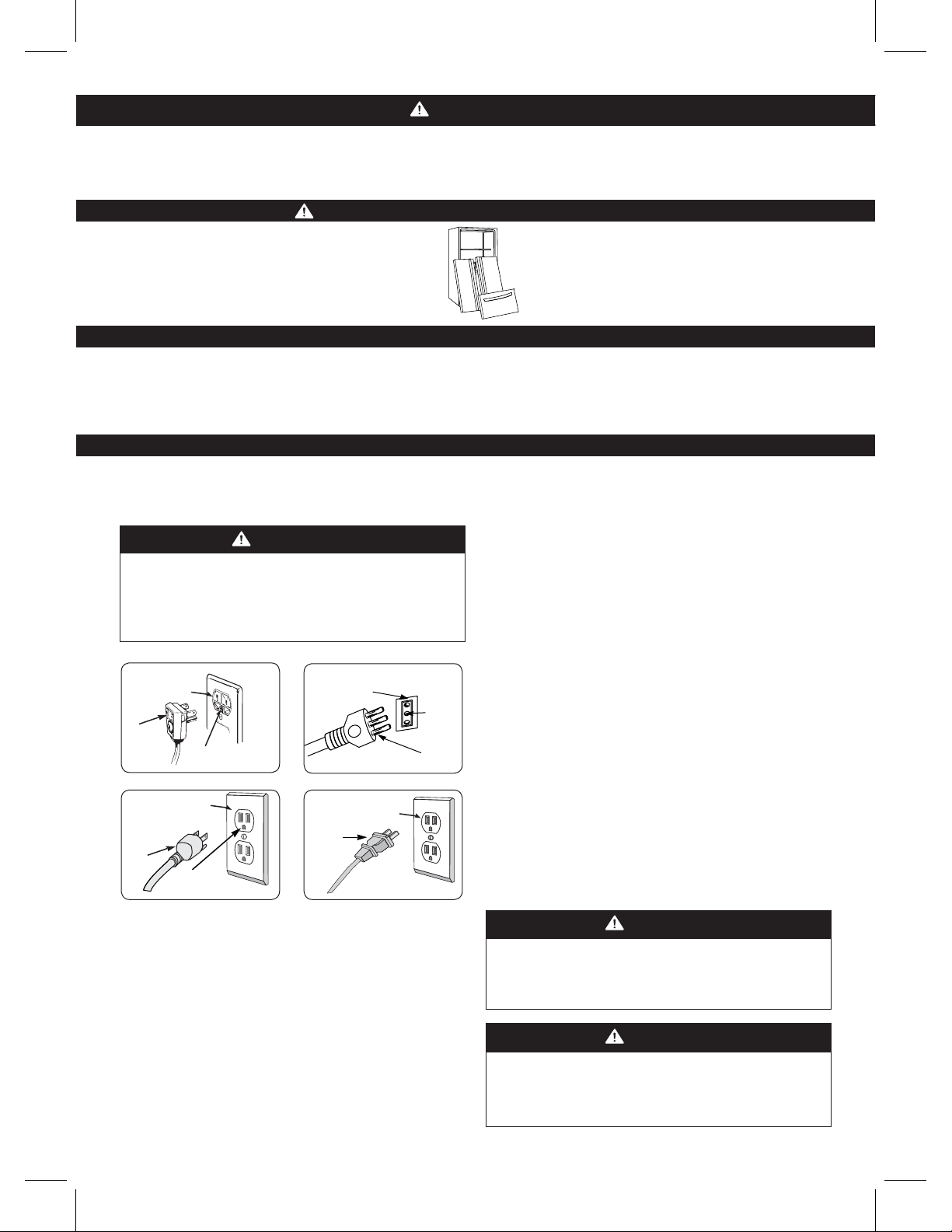
Type 1 Type 2
3 prong 3 prong Ensure
grounding type wall grounding type wall proper
receptacle. receptacle. ground
exists
before
use.
3 prong
grounding 3 prong
plug Ensure proper grounding
ground exists before use. plug
Type 3 Type 4
3 prong 2 prong
grounding type wall grounding type wall
receptacle. receptacle.
3 prong 2 prong
grounding grounding
plug
Ensure proper Ensure proper
ground exists before use. ground exists before use.
It is recommended that a separate circuit
be used for this appliance, as well as a receptacle that
cannot be disconnected with a switch.
4
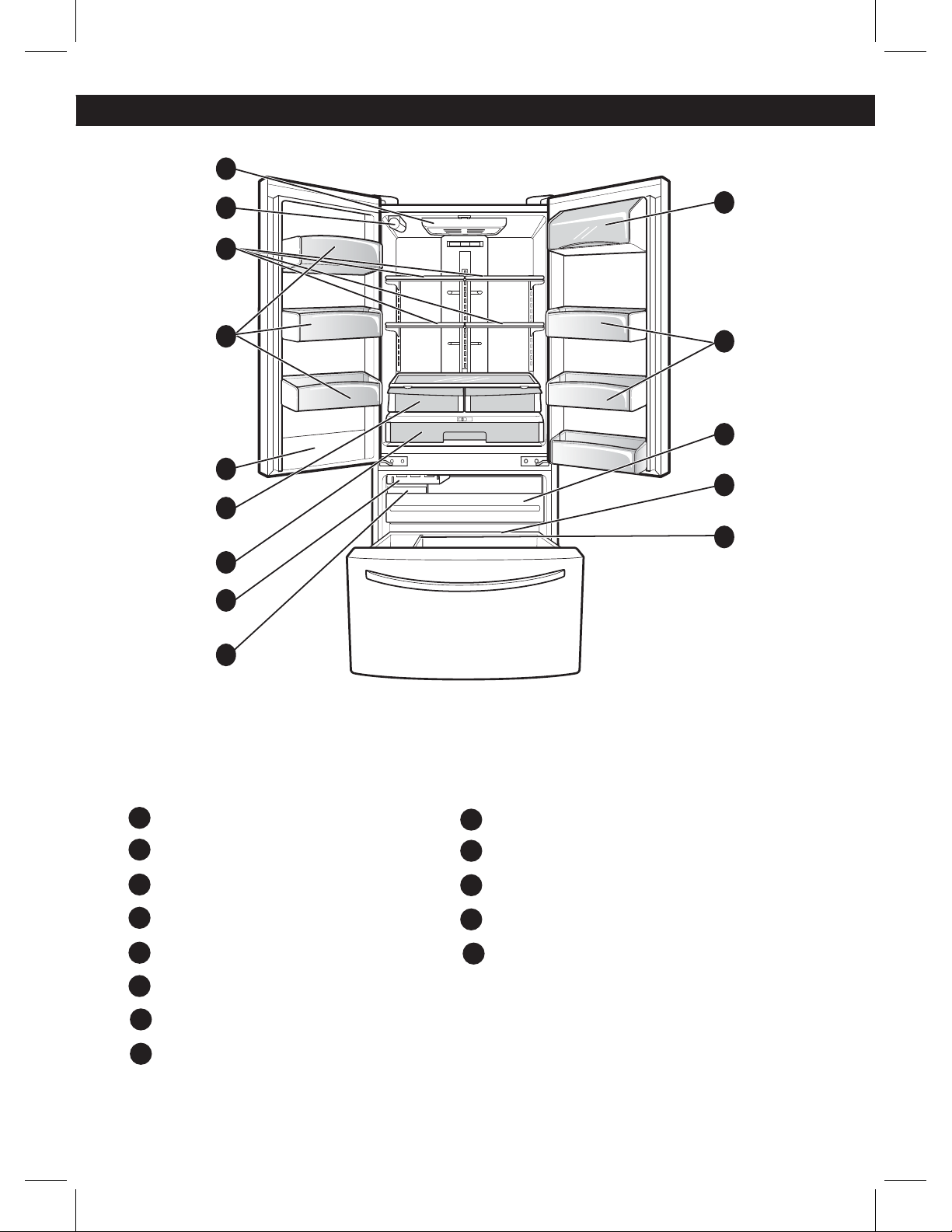
PARTS AND FEATURES
Read this section to familiarize yourself with the parts and features of your new refrigerator.
NOTE: This guide covers different models. Your refrigerator could have some or all of the features and parts listed
below. The location of some of the parts may not correspond to that of your model.
Refrigerator Light
Water Filter
Refrigerator Shelves
Modular Door Binsr
Humidity Controlled Crisper
Glide ‘N’ Serve
Automatic Icemaker
Ice Bin
Pullout Drawer
Durabaser
Durabase Divider
Dairy Bin
Water Tank Cover
* On some models
A
B
C
H
F
G
E
D
I
J
K
L
A
B
D
M
C
E
F
G
H
L
D
I
J
K
M
5
REFRIGERATOR INSTALLATION
WARNING
EXCESSIVE WEIGHT HAZARD
Use the assistance of two or more persons to move or
install the refrigerator. Not following these instructions
may cause injury to the back and other parts of the
body.
UNPACKING
Before installing your refrigerator, remove any tape
“This appliance is intended to be used in household and
similar applications such as:
-Staff kitchen areas in shops, offices and other working
environments; farms houses and by clients in hotel, mo-
tels and others residential type environments.
-Bed and breakfast type environments; catering and si-
milar non-reatil applications.”
or temporary stickers. Do not remove any stickers
that feature warnings, the model serial number or the
technical label of the product located on the back of the
refrigerator.
To remove adhesive tape residue, rub it well with your
fingers and a little liquid detergent. Clean with warm
water and let dry.
Do not use sharp instruments, rubbing alcohol, flammable
liquids or abrasive cleaning products to remove the
adhesive
tape or glue. These products can damage the
surface of your refrigerator. For more information, see
the section on “Important Safety Instructions”.
The shelves come already installed in their factory
position. Remove the shelves and replace them
according to your spacing needs.
Moving Your Refrigerator:
Your refrigerator is extremely heavy. Make sure you
protect the floor when moving your refrigerator for
cleaning or servicing. Always pull your refrigerator
straight out when moving it. Do not shift from side
to side or “walk” the refrigerator when attempting to
move it as this can cause damage to the floor.
WARNING
EXPLOSION HAZARD
Keep all flammable materials and vapors (such as
gasoline) away from the refrigerator. Not following
these instructions may cause death, explosion or fire
INSTALLATION
1. Avoid placing the unit near heat sources, direct
sunlight, or humidity.
2. To avoid vibration, the unit should be leveled. If needed,
adjust the leveling screws to compensate for an
unleveled floor. The front should be slightly taller than
the rear to ensure that the doors close properly. The
leveling screws can easily be turned by slightly tilting
the front of the refrigerator, turning the leveling screws
clockwise (
) to raise it and counter-clockwise
(
) to lower it.
3. Install the refrigerator in an area between 55 °F
(13 °C) and 110 °F (43 °C). If the surrounding temperature
is lower or higher than previously mentioned, it can
adversely affect the unit.
CAUTION: Avoid placing the unit near heat
sources, direct sunlight or humidity.
ONCE INSTALLED
1. Carefully clean your refrigerator and remove and dust
accumulated during shipping.
2. Install accessories such as the ice bin, door racks,
shelves, etc., in their proper places. These are already
packed to prevent any possible damage during
shipping.
3. Leave your refrigerator on for 2 to 3 hours before
storing food inside. Verify that there is a flow of cold air
in the freezer compartment to ensure proper cooling.
Your refrigerator is now re
ady for use.
WARNING:
ţTake care when working with the hinges, base cover
and stops, etc. You may injure yourself.
ţDO not place your hands or any tools in the air vents,
the base cover or in the bottom of the refrigerator. This
may cause injury or electrical shock.
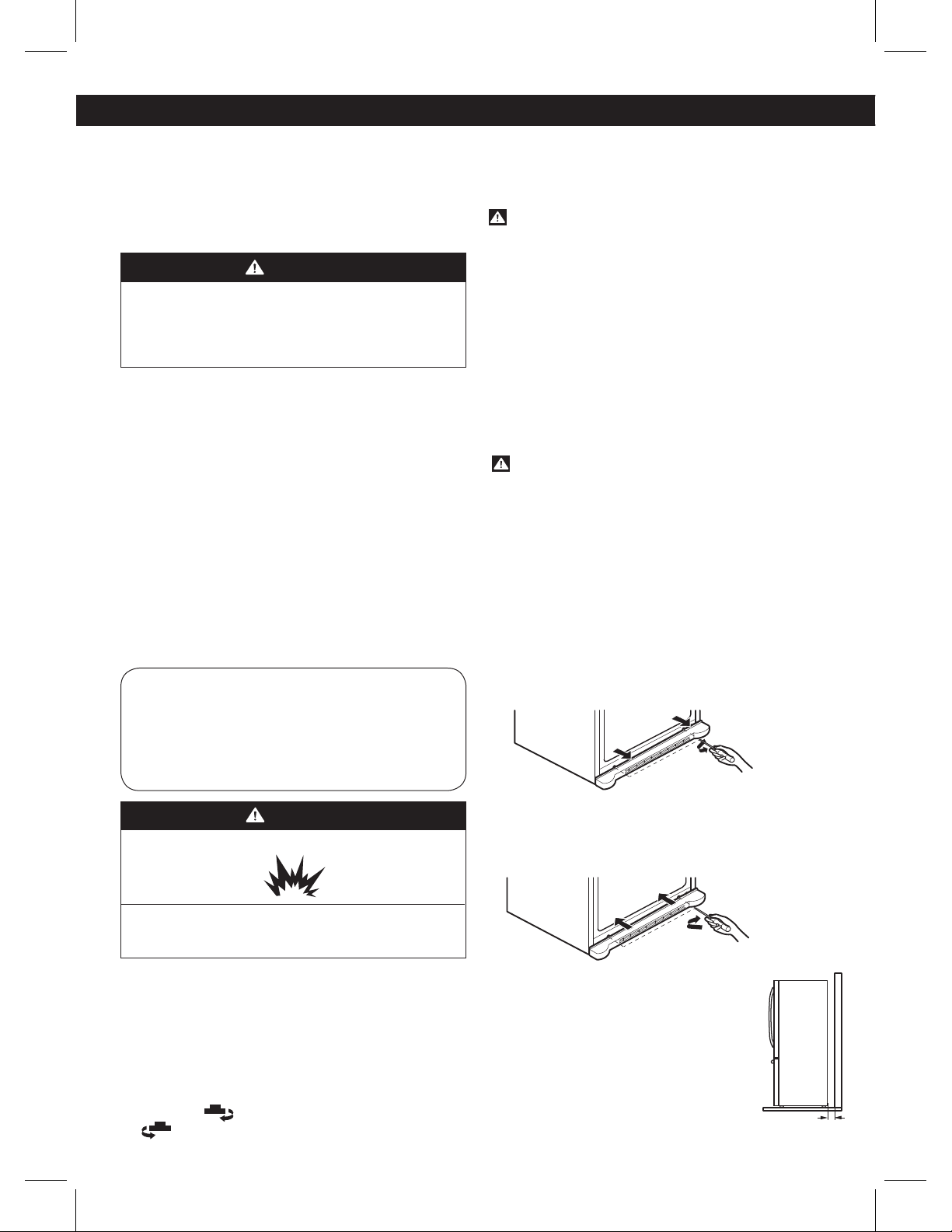
INSTALLATION OF BASE GRILLE
Uninstalling or Replacing the Base Grille
1. Remove the 2 screws from the bottom front part of
your refrigerator (see Figure A).
2. Take off the cover.
Figure A
Installing the Base Grille
1. Align the bottom cover and place in position. Insert
the 2 screws and twist in place (see Figure B).
Figure B
Keep a Proper Distance from Adjacent
Objects
Please keep the refrigerator at an adequate
distance from other objects. Insufficient
spacing can reduce the refrigerator’s
freezing efficiency and increase electricity
consumption.
(5.08 cm) 2”
6
HOW TO REMOVE AND INSTALL THE REFRIGERATOR DOORS
For moving the refrigerator through a house door, it might be necessary to remove refrigerator and freezer door
handles.
NOTE: Removing the doors is always recommended when it is necessary to move the refrigerator through a narrow
opening. If it is necessary to remove the handles, follow the directions below.
TOOLS YOU MIGHT NEED OR USE
3/8 in (10 mm)
1/4 in (6 mm)
Hex Socket Wrench Phillips Screwdriver Flat Head Screwdriver Allen Wrench
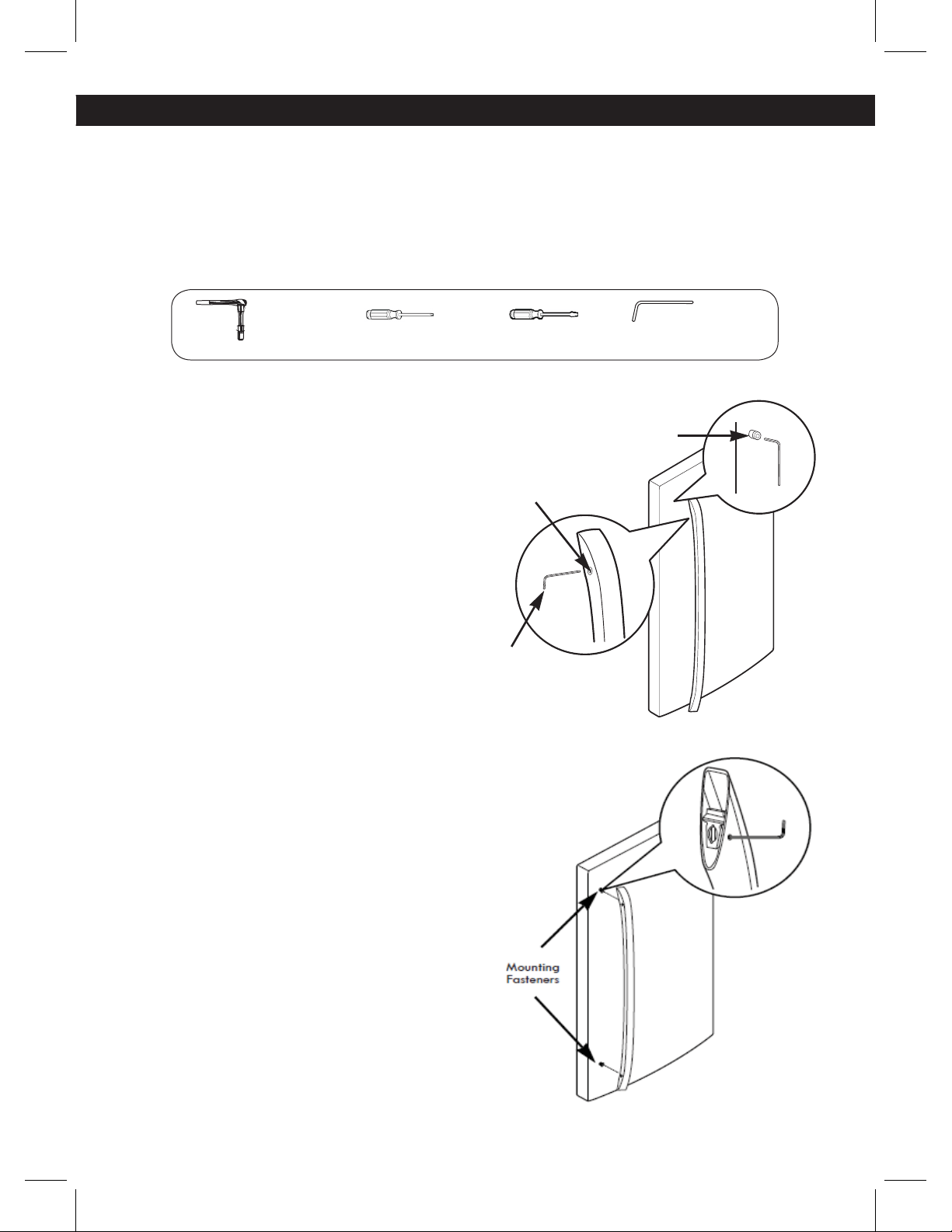
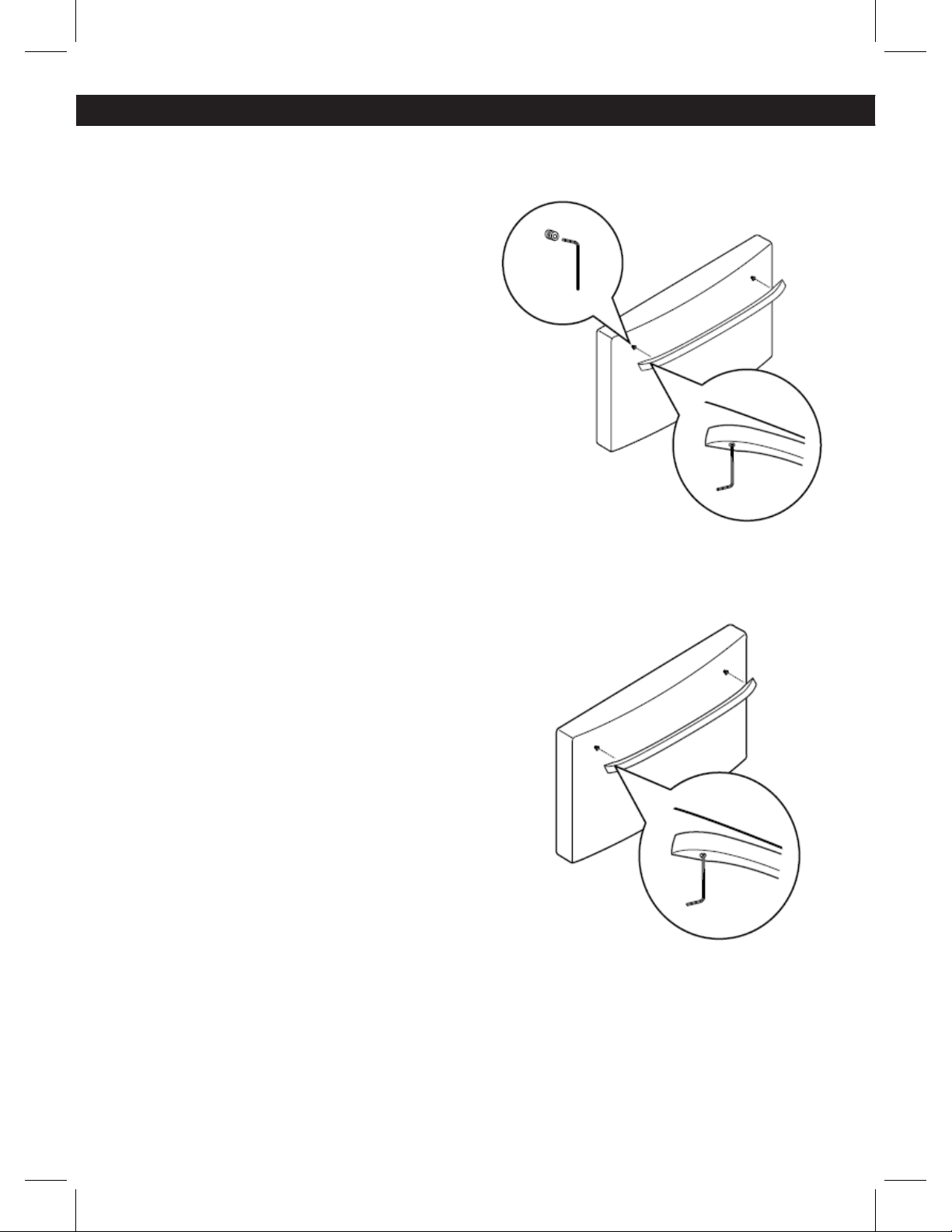
HOW TO REMOVE REFRIGERATOR DOOR HANDLE
NOTE: Handle appearance may vary from
illustrations on this page.
Removing Refrigerator Handle
Loosen the set screws with a 3/32 in (2,5 mm). Allen
wrench and remove the handle.
NOTE: If the handle mounting fasteners need to be
tightened or removed, use a 1/4 in (6,4 mm). Allen
wrench.
HOW TO REPLACE REFRIGERATOR DOOR HANDLE
NOTE: Handle appearance may vary from
illustrations on this page.
Replacing Refrigerator Door Handle
Place the handle on the door by fitting the handle
footprints over the mounting fasteners and tightening
the set screws with a 3/32 in (2,5 mm) Allen wrench.
NOTE: If the handle mounting fasteners need to be
tightened or removed, use a
¼ in. Allen wrench.
REFRIGERATOR INSTALLATION
Mounting
Fasteners
Set Screw
Allen
Wrench
1/4 in (6 mm)
3/32 in (2,5 mm)
7
REFRIGERATOR INSTALLATION
NOTE: Removing the doors is always recommended when it is necessary to move the refrigerator through a narrow
opening. If it is necessary to remove the handles, follow the directions below.
HOW TO REMOVE FREEZER DOOR HANDLE
NOTE: Handle appearance may vary from illustrations on
this page.
Removing Freezer Drawer Handle
Loosen the set screws located on the lower side of the
handle with a 1/8 in (3,1 mm). Allen wrench and remove
the handle.
NOTE: If the handle mounting fasteners need to be
tightened or removed, use a 1/4 in (6,4 mm). Allen
wrench.
HOW TO REPLACE FREEZER DOOR HANDLE
NOTE: Handle appearance may vary from illustrations on
this page.
Replacing Freezer Drawer Handle
Place the handle on the door by fitting the handle
footprints over the mounting fasteners and tightening
the set screws with a 1/8 in (3,1 mm). Allen wrench.
NOTE:
If the handle mounting fasteners need to be
tightened or removed, use a 1/4 in (6,4 mm). Allen
wrench
8
REMOVING AND REPLACING
REFRIGERATOR DOORS
WARNING
Excessive Weight Hazard:
Use two or more people to remove and install the
refrigerator doors. Failure to do so can result in back
or other injury.
WARNING
Electrical Shock Hazard
ţDisconnect the electrical supply to the refrigerator
before installing. Failure to do so could result in
serious injury or death.
ţ%POPUQVUIBOETGFFUPSPUIFSPCKFDUTJOUPUIFBJS
vents or bottom of the refrigerator. You may be
injured or receive an electrical shock.
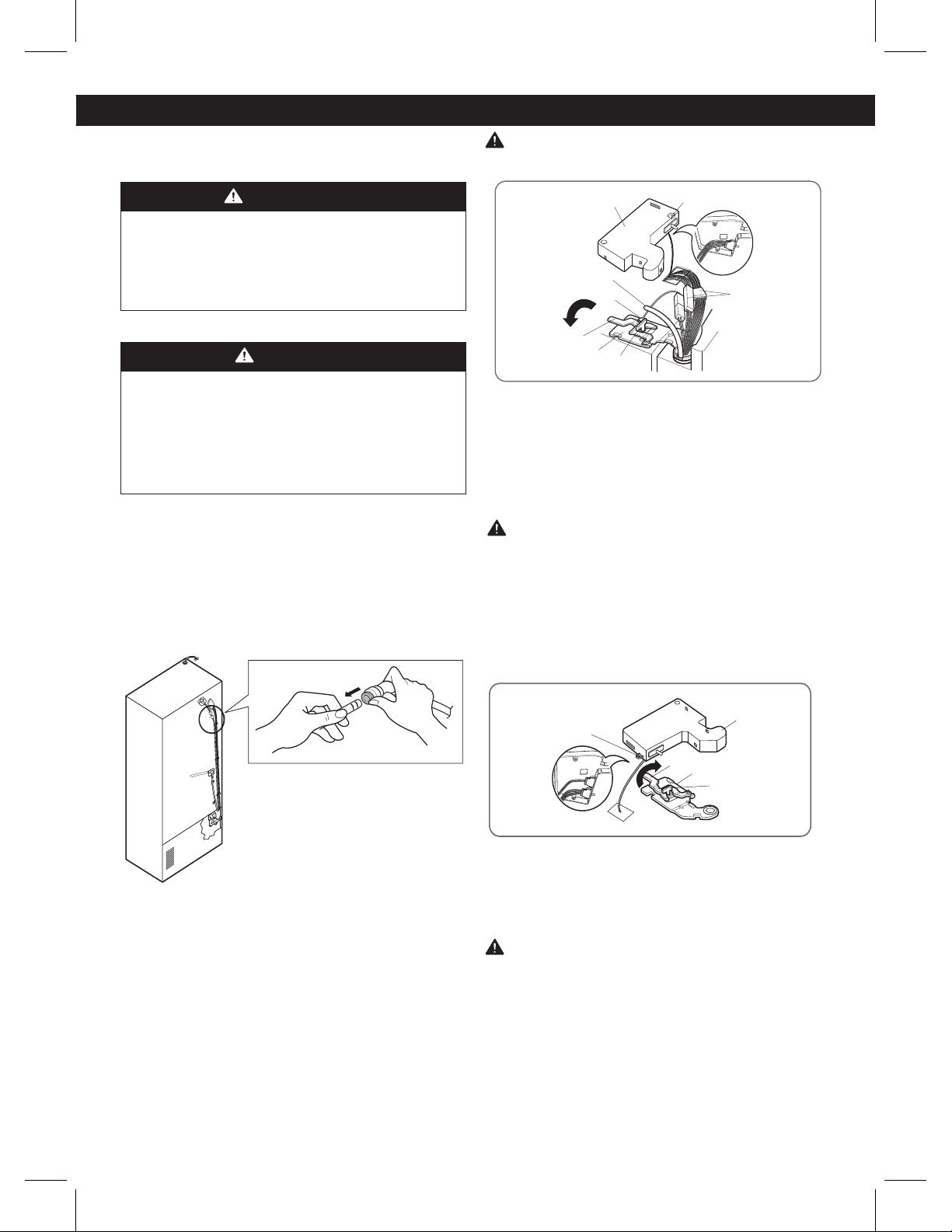
To remove the left refrigerator door:
On the back of the refrigerator, pull the water tube out of
the collet fitting on the connector by pressing the fitting
release ring (see picture below).
CAUTION: Before you begin, remove food and bins
from the doors.
1. Open the door. Remove the top hinge cover screw (1).
Lift up the cover (2).
2. Remove the cover.
3. Pull out the tube (3).
4. Disconnect all wire harnesses (4).
5. Remove the grounding screw (5).
6. Rotate hinge lever (6) counterclockwise. Lift the top
hinge (7) free of the hinge lever latch (8).
CAUTION: When lifting the hinge free of the latch,
be careful that the door does not fall forward.
7. Lift the door from the middle hinge pin and remove
the door.
8. Place the door, inside facing up, on a non-scratching
surface.
To remove the right refrigerator door:
1. Open the door. Remove the top hinge cover screw (1).
Lift up the cover (2).
2. Remove the cover.
3. Rotate the hinge lever (3) clockwise. Lift the top hinge
(4) free of the hinge lever latch (5).
CAUTION: When lifting the hinge free of the latch, be
careful that the door does not fall forward.
4. Lift the door from the middle hinge pin and remove
the door.
5. Place the door, inside facing up, on a non-scratching
surface.
(1)
(2)
(4)
(3)
(6)
(7)
(8)
(5)
(1)
(2)
(3)
(4)
(5)
REFRIGERATOR INSTALLATION
9
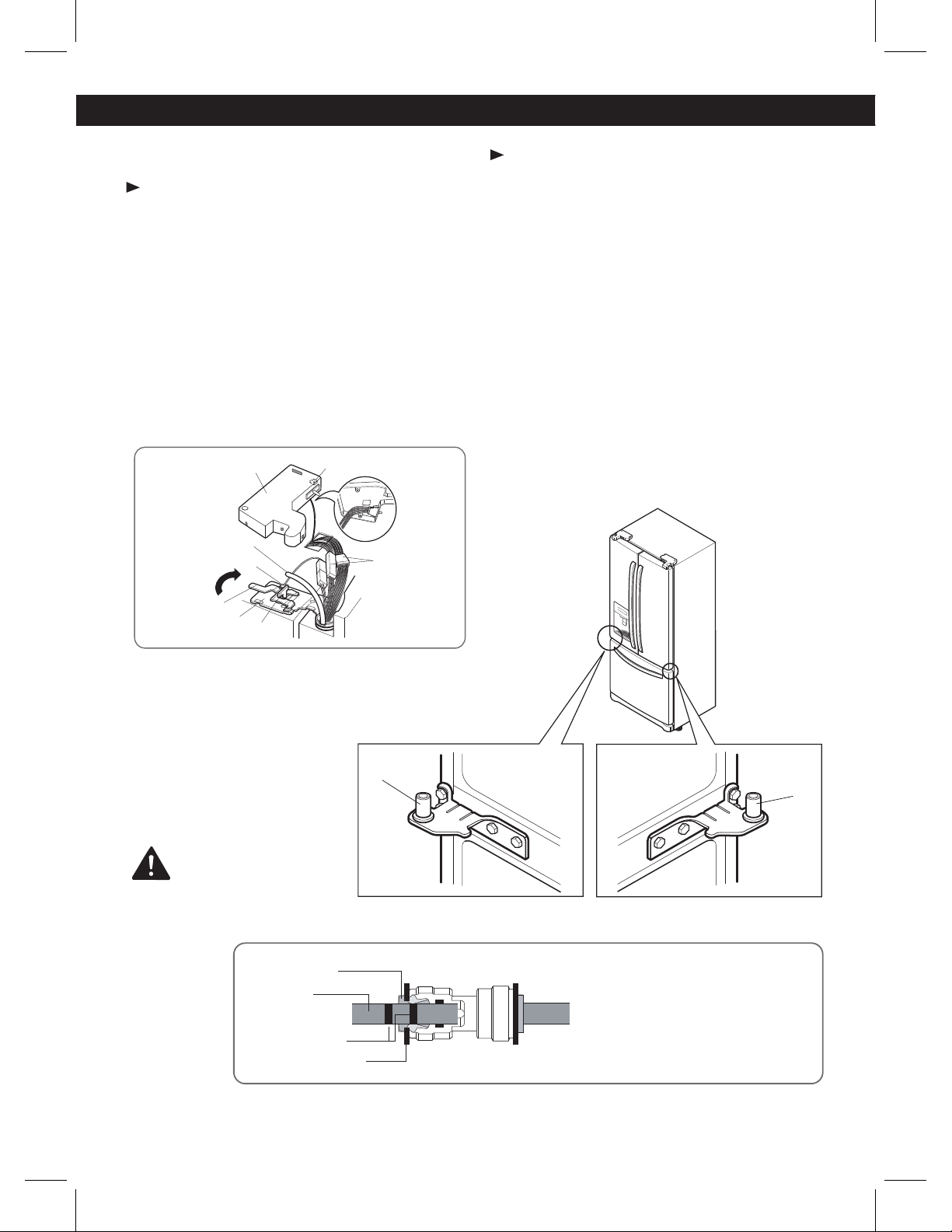
Reinstalling the Refrigerator Door
Left Door
1. Lower the door onto middle hinge pin (10).
2. Fit top hinge (7) over hinge lever latch (8) and into
place. Rotate lever (6) clockwise to secure hinge.
3. Install the grounding screw (5) and connect the two
wire harnesses (4).
4. Push the water tube (3) located at the top of the left
door into the hole beside the left hinge on the top of
the cabinet until it exits through the back.
5. Insert the water supply tube (3) into the connector
until you see only one scale mark. Fully insert the tube
over 5/8 in. (15 mm).
6. Hook tabs on left side of hinge cover (1) under the
edge of the top hinge (7) and position the cover in
place. Insert and tighten the cover screw (1).
CAUTION
Right Door
1. Lower the door onto middle hinge pin (9).
2. Fit top hinge (4) over hinge lever latch (5) and into
place. Rotate lever (3) counterclockwise to secure
hinge.
3. Hook the tabs on right side of hinge cover (2) under
the edge of the top hinge (4) and position the cover in
place. Insert and tighten the cover screw (1).
REFRIGERATOR INSTALLATION
(1)
(2)
(4)
(3)
(6)
(7)
(8)
(5)
After inserting, pull the tube to
make sure that it is secure and
reinsert the clip.
Tube
Scale Mark
Collet
Clip
(9)
(10)
10
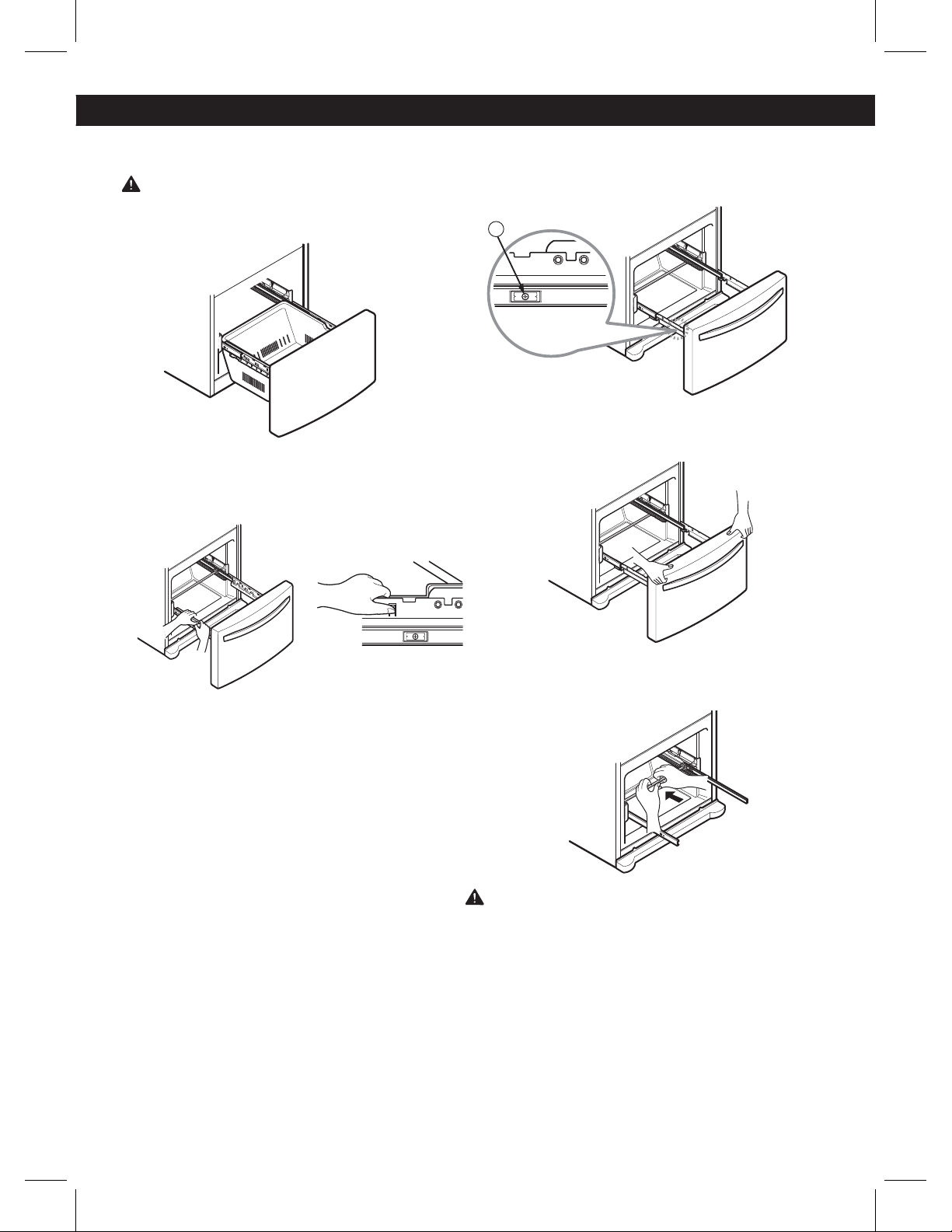
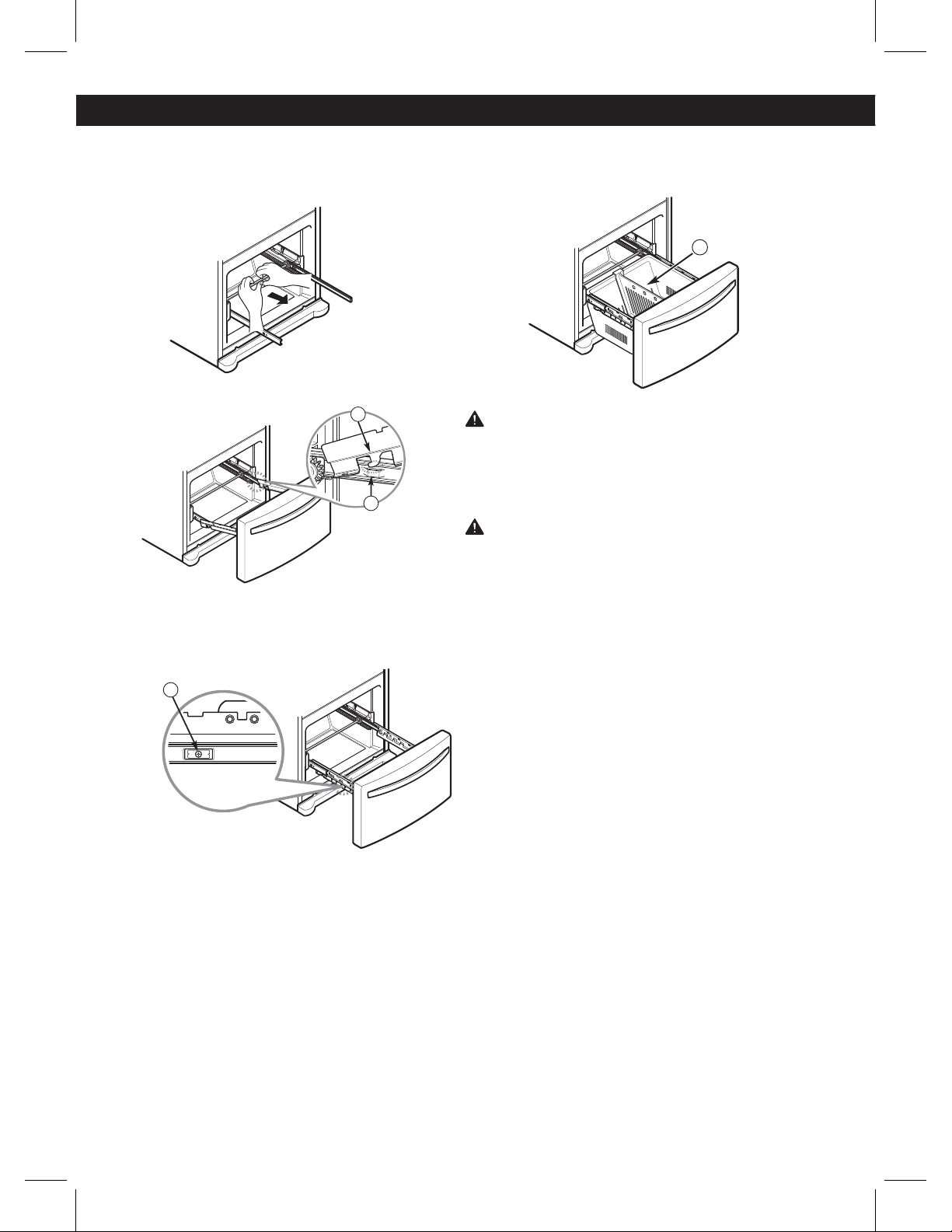
HOW TO REMOVE THE FREEZER DRAWER
WARNING: Use two or more people to remove and
install the freezer drawer. Failure to do so can result in
back or other injury.
Press the tabs on each of the rail covers and lift them up
to separate from the rail assembly.
Remove the screws (2) of the rail on both sides.
Grasp the drawer on each side and pull it up to separate
it from the rails.
With both hands, hold the center bar and push it in to
allow both rails to slide in simultaneously.
CAUTION: Do not hold the handle when removing or
replacing the drawer. The handle may come off and it
could cause personal injury.
2
REFRIGERATOR INSTALLATION
11
HOW TO REPLACE THE FREEZER DRAWER
With both hands, pull out the center bar until the rail
is fully extended.
Hook the door support into the rail tabs on both sides.
Lower the drawer into its final position and tighten the
screws (3) .
With the drawer pulled out to full extension, insert the
lower basket (4) in the rail assembly.
WARNING: If the Durabase divider is removed, there is
enough open space for children or pets to crawl inside.
To prevent accidental child and pet entrapment or
suffocation risk, DO NOT allow them to touch or go
near the freezer drawer.
WARNING: DO NOT step or sit down on freezer
drawer.
REFRIGERATOR INSTALLATION
T
2
1
3
4
12
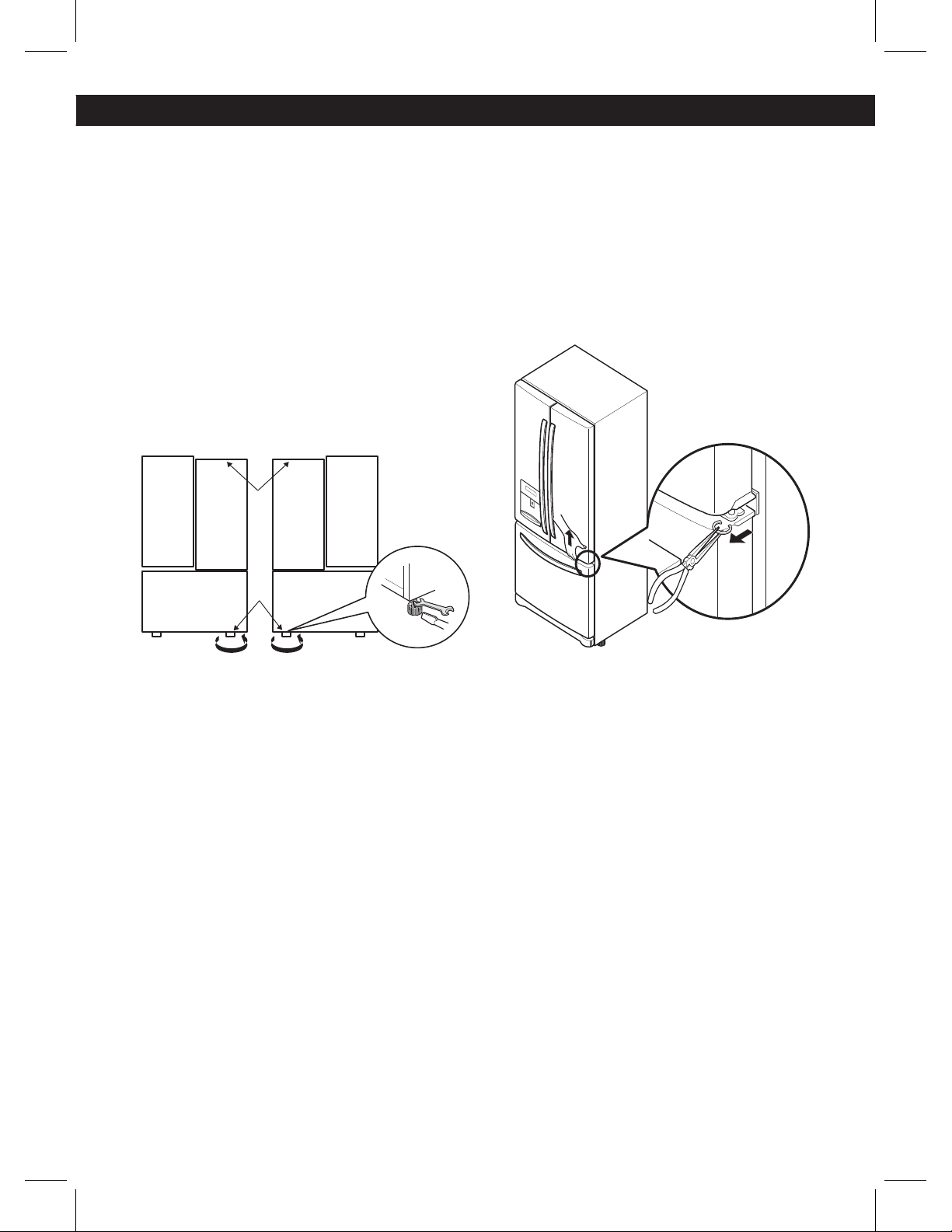
LEVELING AND DOOR ALIGNMENT
Leveling
After installing, plug the refrigerator’s power cord into a 3-prong
grounded outlet and push the refrigerator into the final position.
Your refrigerator has two front leveling legs—one on the right
and one on the left. Adjust the legs to alter the tilt from front-
to-back or side-to-side. If your refrigerator seems unsteady, or
you want the doors to close more easily, adjust the refrigerator’s
tilt using the instructions below:
NOTE: Tools Required: 11/16 in (18 mm) wrench or flat blade
screwdriver.
1. Turn the leveling leg to the left to raise that side of the
refrigerator or to the right to lower it. It may take several turns of
the leveling leg to adjust the tilt of the refrigerator.
NOTE: Having someone push backward against the top of the
refrigerator takes some weight off of the leveling legs. This
makes it easier to adjust the legs.
2. Open both doors again and check to make sure that they
close easily. If the doors do not close easily, tilt the refrigerator
slightly more to the rear by turning both leveling legs to the
left. It may take several more turns, and you should turn both
leveling legs the same amount.
NOTE: Your refrigerator is uniquely designed with two fresh food
doors. Either door can be opened or closed independently of
the other. You may have to exert slight pressure on the doors to
get them to close completely.
Door Alignment
If the space between your doors is uneven, follow the
instructions below to align the doors:
1. With one hand, lift up the
door that you would like to
raise at the middle hinge.
2. With your other hand, use pliers to insert snap ring as
shown.
3. Insert additional snap rings until the doors are aligned.
(Three snap rings are provided with the refrigerator in the
Use & Care Guide packet.)
REFRIGERATOR INSTALLATION
13
SETTING THE CONTROLS
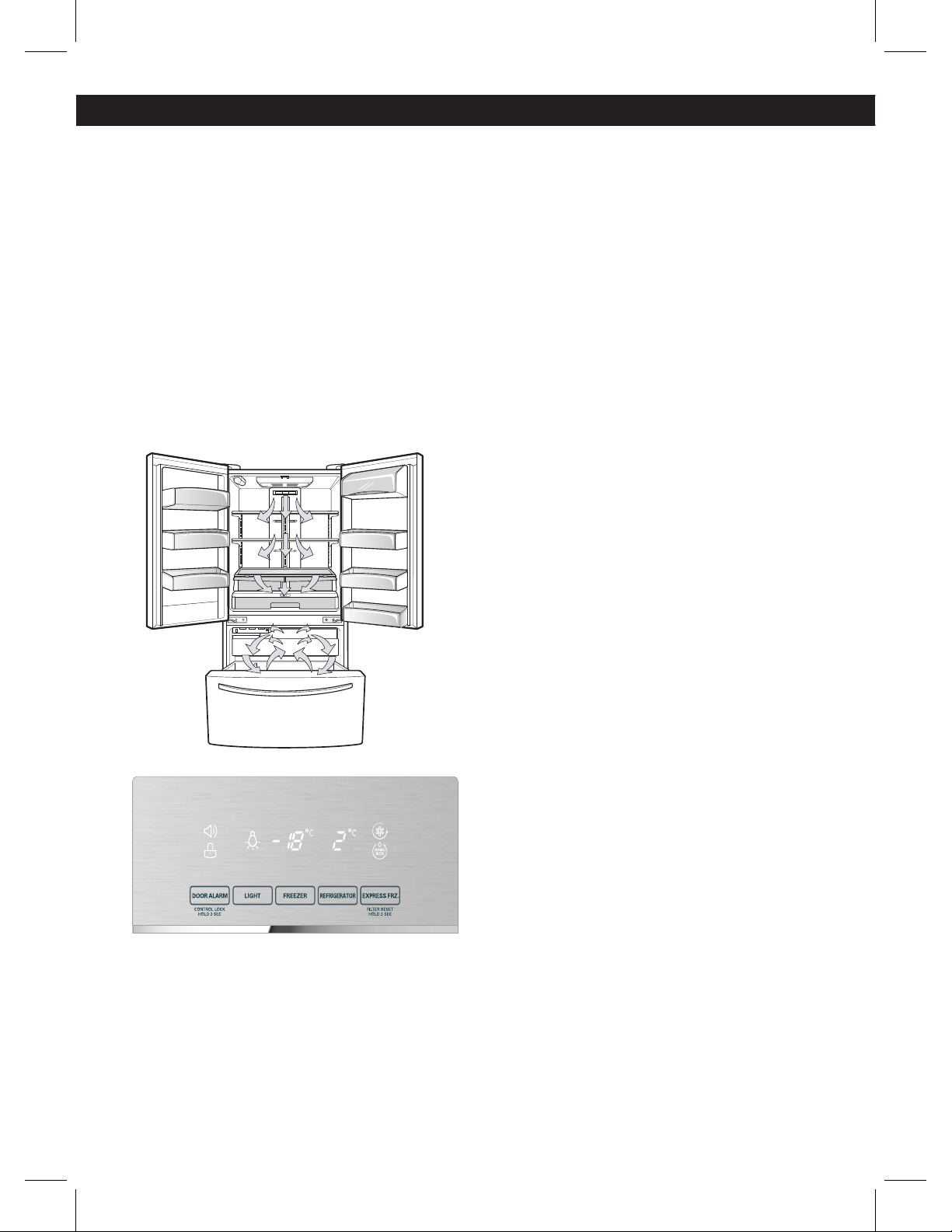
AIRFLOW
The refrigerator control functions as the thermostat for
the entire appliance (refrigerator and freezer sections).
The colder the setting, the longer the compressor will
run to keep the temperature colder. The freezer control
adjusts the cold air flow from the freezer to the refrigerator.
Setting the freezer control to a lower temperature keeps
more cold air in the freezer compartment to make it
colder.
Cold air circulates from the freezer to the fresh food
section and back again through air vents in the wall
dividing the two sections. Be sure not to block vents while
packing your refrigerator. Doing so will restrict airflow and
may cause the refrigerator temperature to become too
warm or cause interior moisture buildup. (See air flow
diagram below.)
Temperature
ţThe Refrigerator Temp Control ranges from 33°F to
46°F (0°C to 8°C). Press the Refrigerator button to
cycle through the available temperature settings one
increment at a time.
ţThe Freezer Temp Control range is from -6°F to 8°F
(-21°C to -13°C). Press the Freezer button to cycle through
the available temperature settings one increment at a
time.
NOTE: When changing control settings, wait 24 hours
before making additional adjustments. The controls are
set correctly when milk or juice is as cold as you would
like and when ice cream is firm. If the temperature in
either compartment is too cold or too warm, change the
setting one increment at a time. Wait 24 hours for the
change to stabilize before adjusting again.
Dispenser
Some dripping may occur after dispensing water. Hold
your cup beneath the dispenser for a few seconds after
dispensing to catch all of the drops.
NOTE: The dispenser will not work if any door is left open
or if the control lock is engaged.
Express Frz
ţWhen you press the Express Frz button, the Express Frz
graphic will illuminate in the display and will continue for
24 hours. The function will automatically shut off after
24 hours.
ţYou can stop this function manually by touching the
button one more time.
ţThis function increases both ice making and freezing
capabilities.
Water Filter Reset
When the water filter indicator turns on, you have to
change the water filter. After changing the water filter,
press and hold the Express Frz (Filter Reset) button for
three seconds to turn the indicator light off. You need to
change the water filter approximately every six months.
Light
Press the Light button to turn the light on and off. When
dispensing water, a light underneath the water switch will
illuminate.
USING YOUR REFRIGERATOR
14
USING YOUR REFRIGERATOR
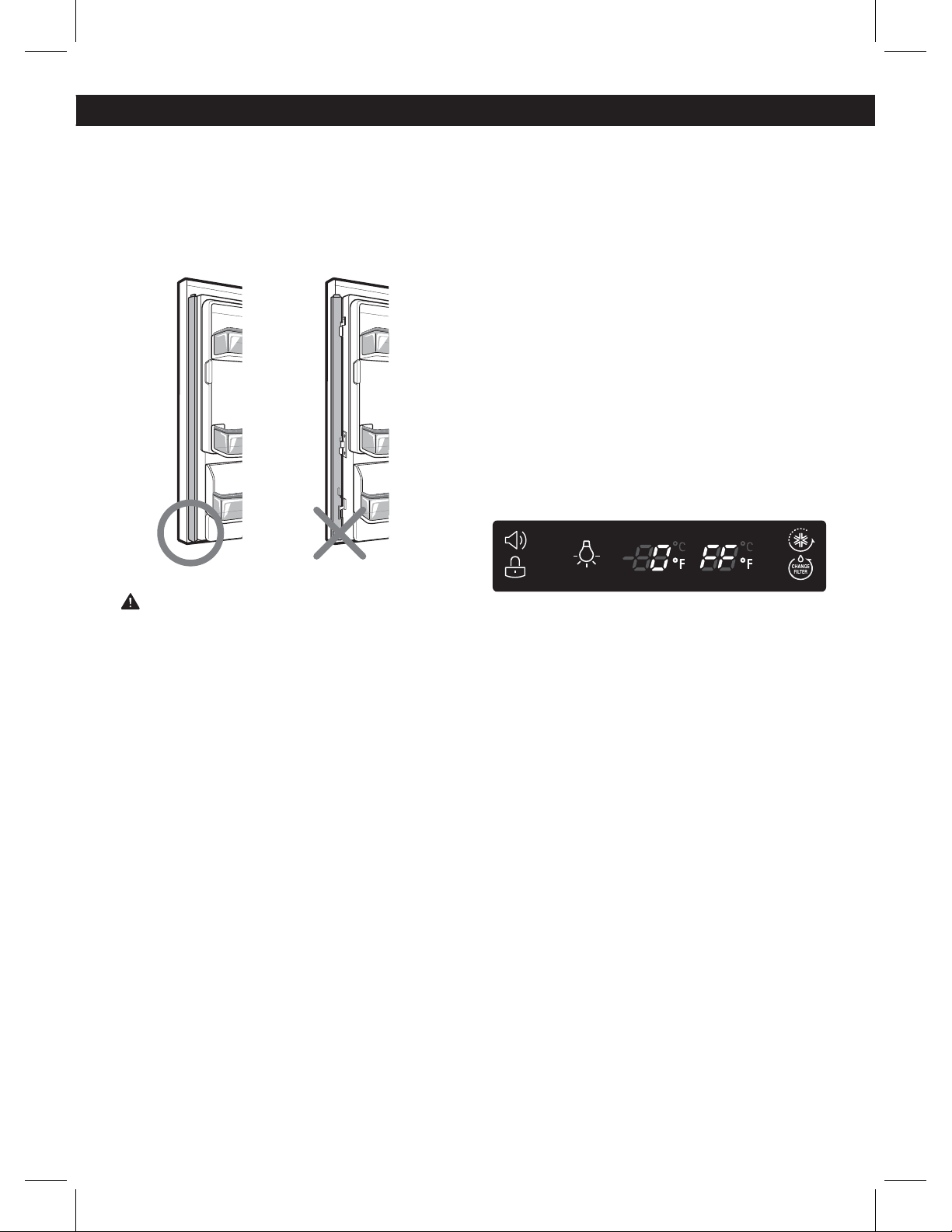
Articulating Mullion
This feature is a metal strip attached to the left door that
articulates (rotates) 90 degrees as the door is closed,
forming a mullion (base) for the left and right door
gaskets to seal against.
Caution When Closing the Door
CAUTION
To reduce the risk of scratching the door or breaking the
door mullion, please make sure that the refrigerator door
mullion is always folded in.
Door Alarm
ţ8IFOQPXFSJTDPOOFDUFEUPUIFSFGSJHFSBUPSUIFEPPS
alarm is initially set to ON. When you press the Door
Alarm button, the display will change to OFF and the
Door Alarm function will deactivate.
ţ8IFOFJUIFS UIF SFGSJHFSBUPSPS UIFGSFF[FSEPPSJTMFGU
open for more than 60 seconds, the alarm tone will
sound to let you know that the door is open.
ţ8IFOZPVDMPTFUIFEPPSUIFEPPSBMBSNXJMMTUPQ
Control Lock
ţ8IFOQPXFSJTJOJUJBMMZDPOOFDUFEUPUIFSFGSJHFSBUPSUIF
Lock function is off.
ţ*GZPVXBOU UPBDUJWBUFUIF -PDLGVODUJPOUP MPDL PUIFS
buttons, press and hold the Door Alarm button for three
seconds or more. The Lock icon will display and the Lock
function is now enabled.
ţ8IFOUIF-PDLGVODUJPO JTBDUJWBUFEOPPUIFSCVUUPOT
will work. The dispenser pad is also deactivated.
ţ5PEJTBCMF UIF-PDLGVODUJPOQSFTTBOEIPMEUIF %PPS
Alarm button for approximately three seconds.
Demo Mode (For Store Use Only)
The Demo Mode disables all cooling in the refrigerator
and freezer sections to conserve energy while on display
in a retail store. When activated, OFF will display on the
control panel.
To deactivate:
With either refrigerator door opened, press and hold the
Refrigerator and Express Frz buttons at the same time
for five seconds. The control panel will beep and the
temperature settings will display to confirm that Demo
Mode is deactivated. Use the same procedure to activate
the Demo Mode.
15
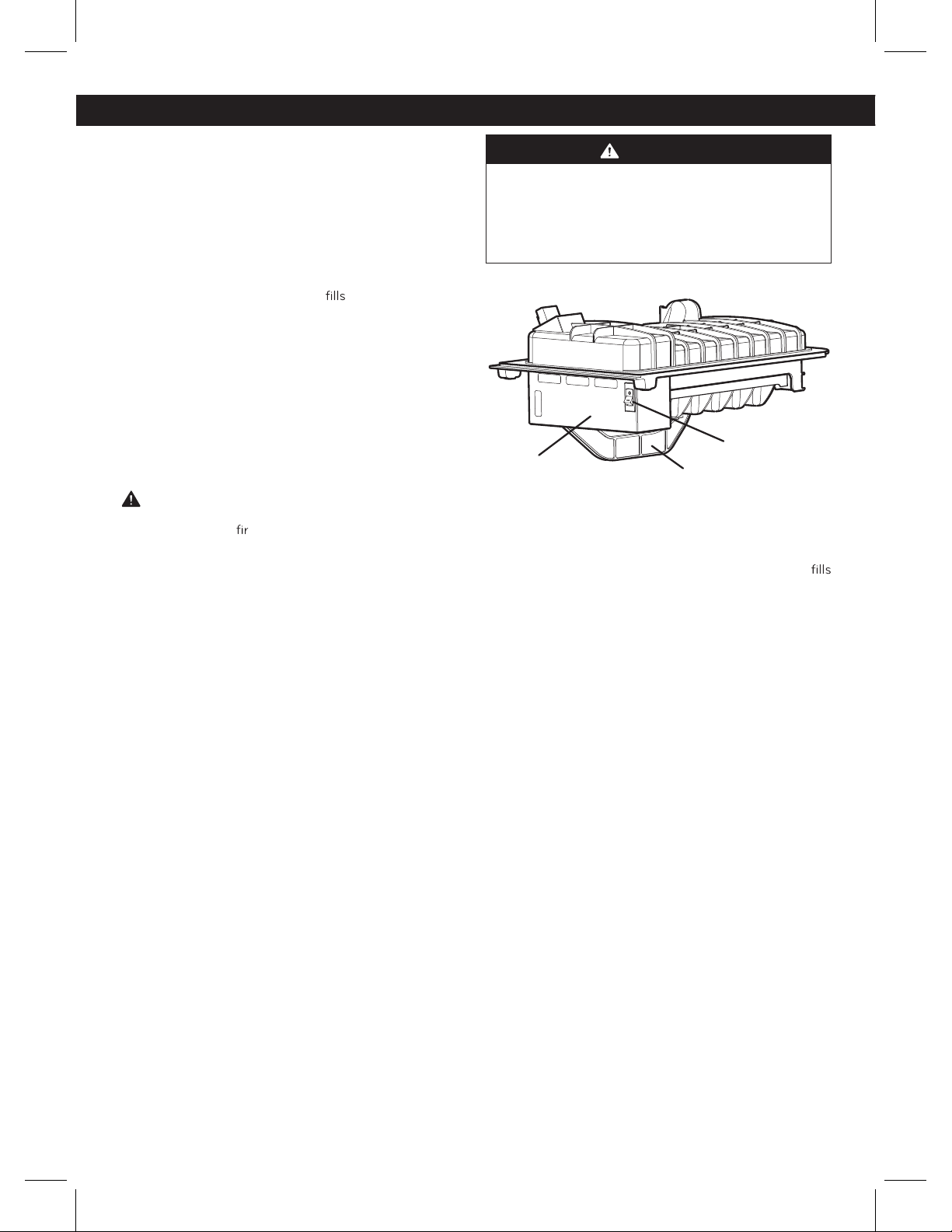
AUTOMATIC ICEMAKER
The icemaker will produce approximately 80-100 cubes
in a 24-hour period, depending on freezer compartment
temperature, room temperature, number of door
openings and other operating conditions.
ţ*U takes about 12 to 24 hours for a newly installed
refrigerator to begin making ice. Wait 72 hours for full
ice production to occur.
ţ*ce making stops when the bin
to the lever of the
feeler arm.
ţTo turn off the automatic icemaker, set the icemaker
switch to OFF (O). To turn on the automatic icemaker, set
the switch to ON (I).
ţ5IFXBUFSQSFTTVSFNVTUCFCFUXFFOBOEQTJ
or 0,14 and 0,83 MPa on models without a water filter
and between 40 and 120 or 0,28 and 0,83 MPa psi
on models with a water filter to produce the normal
amount and size of ice cubes.
CAUTION
ţ5Irow away the
st few batches of ice (about 24
cubes). This is also necessary if the refrigerator has not
been used for a long time.
ţ/ever store beverage cans or other items in the ice bin
for the purpose of rapid cooling. Doing so may damage
the icemaker or the containers may burst.
ţ/ever use thin crystal glass or crockery to collect ice.
Such containers may chip or break resulting in glass
fragments in the ice.
WHEN YOU SHOULD SET THE ICEMAKER
POWER SWITCH TO OFF (O)
ţ8IFO the water supply will be shut off for several hours.
ţ8IFO the ice bin is removed for more than one or two
minutes.
ţ8IFO the refrigerator will not be used for several days.
NOTE: The ice bin should be emptied when the icemaker
ON/OFF switch is turned to the OFF position.
WARNING
Personal Injury Hazard
DO NOT place fingers or hands on the automatic ice
making mechanism while the refrigerator is plugged
in.
NORMAL SOUNDS YOU MAY HEAR
ţ5IF icemaker water valve will buzz as the icemaker
with water. If the power switch is in the ON (I) position, it
will buzz even if it has not yet been hooked up to water.
To stop the buzzing, move the power switch to OFF (O).
NOTE: Keeping the power switch in the ON (I) position
before the water line is connected can damage the
icemaker.
ţYou will hear the sound of cubes dropping into the bin
and water running in the pipes as the icemaker refills.
PREPARING FOR VACATION
Set the icemaker power switch to OFF (O) and shut off
the water supply to the refrigerator.
NOTE: The ice bin should be emptied anytime the
icemaker ON/OFF switch is turned to the OFF (O)
position.
If the ambient temperature will drop below freezing, have
a qualified technician drain the water supply system to
prevent serious property damage due to flooding caused
by ru
ptured water lines or connections.
Feeler Arm
Power Switch
Icemaker
(sensor)
USING YOUR REFRIGERATOR
16
FOOD STORAGE GUIDE
Wrap or store food in the refrigerator in airtight and
moisture-proof material unless otherwise noted. This
prevents food odor and taste transfer throughout the
refrigerator. For dated products, check date code to
ensure freshness.
Items
Butter or
margarine
Cheese
Milk
Eggs
Fruit
Leafy
vegetables
Vegetables with skins
(carrots, peppers)
Fish
How to
Keep opened butter in
a covered dish or closed
compartment. When
storing an extra supply,
wrap in freezer packaging
and freeze.
Store in the original
wrapping until you are
ready to use it. Once
opened, rewrap tightly in
plastic wrap or aluminum
foil.
Wipe milk cartons. For
best storage, place milk
on interior shelf.
Store in original carton on
interior
shelf, not on door
shelf.
Do not wash or hull the
fruit until it is ready to be
used. Sort and keep fruit
in its original container,
in a crisper, or store in a
completely closed paper
bag on a refrigerator
shelf.
Remove store wrapping
and trim or tear off
bruised and discolored
areas. Wash in cold water
and drain. Place in plastic
bag or plastic container
and store in crisper.
Place in plastic bags or
plastic container and
store in crisper.
Store fresh fish and
shellfish in the freezer
section if they are not
being consumed the
same day of purchase.
It is recommended to
consume fresh fish and
shellfish the same day
purchased.
Leftovers Cover leftovers with
plastic wrap, aluminum
foil, or plastic containers
with tight lids.
STORING FROZEN FOOD
NOTE: Check a freezer guide or a reliable cookbook for
further information about preparing food for freezing or
food storage times.
Freezing
Your freezer will not quick-freeze a large quantity of food.
Do not put more unfrozen food into the freezer than will
freeze within 24 hours, no more than 2 to 3 lbs. of
food per cubic foot ( 1 to 1,5 kg of food per each 30
liters ) of freezer space. Leave enough space in the
freezer for air to circulate around packages. Be careful
to leave enough room at the front so the door can
close tightly.
Storage times will vary according to the quality and type
of food, the type of packaging or wrap used (how airtight
and moisture-proof) and the storage temperature.
Ice
crystals inside a sealed package are normal. This simply
means that moisture in the food and air inside the
package have condensed, creating ice crystals.
NOTE: Allow hot foods to cool at room temperature for
30 minutes, then package and freeze. Cooling hot foods
before freezing saves energy.
Packaging
Successful freezing depends on correct packaging.
When you close and seal the package, it must not allow
air or moisture in or out. If it does, you could have food
odor and taste transfer throughout the refrigerator and
could also dry out frozen food.
Packaging recommendations:
ţ3JHJE plastic containers with
lids
ţStraight-sided canning/freezing jars
ţ)eavy-duty aluminum foil
ţ1MBstic-coated paper
ţ/POQFSNeable plastic wraps
freezer-grade self-sealing plastic bags
Follow package or container instructions for proper
freezing methods.
Do not use
ţ#read wrappers
ţ/POQPMyethylene plastic containers
ţContainers without tight lids
ţWax paper or wax-coated freezer wrap
ţ5IJO semi-permeable wrap
CAUTION: Do not keep beverage cans or plastic food
containers in the freezer compartment. They may break
or burst if they freeze.
USING YOUR REFRIGERATOR
17
REFRIGERATOR SECTION
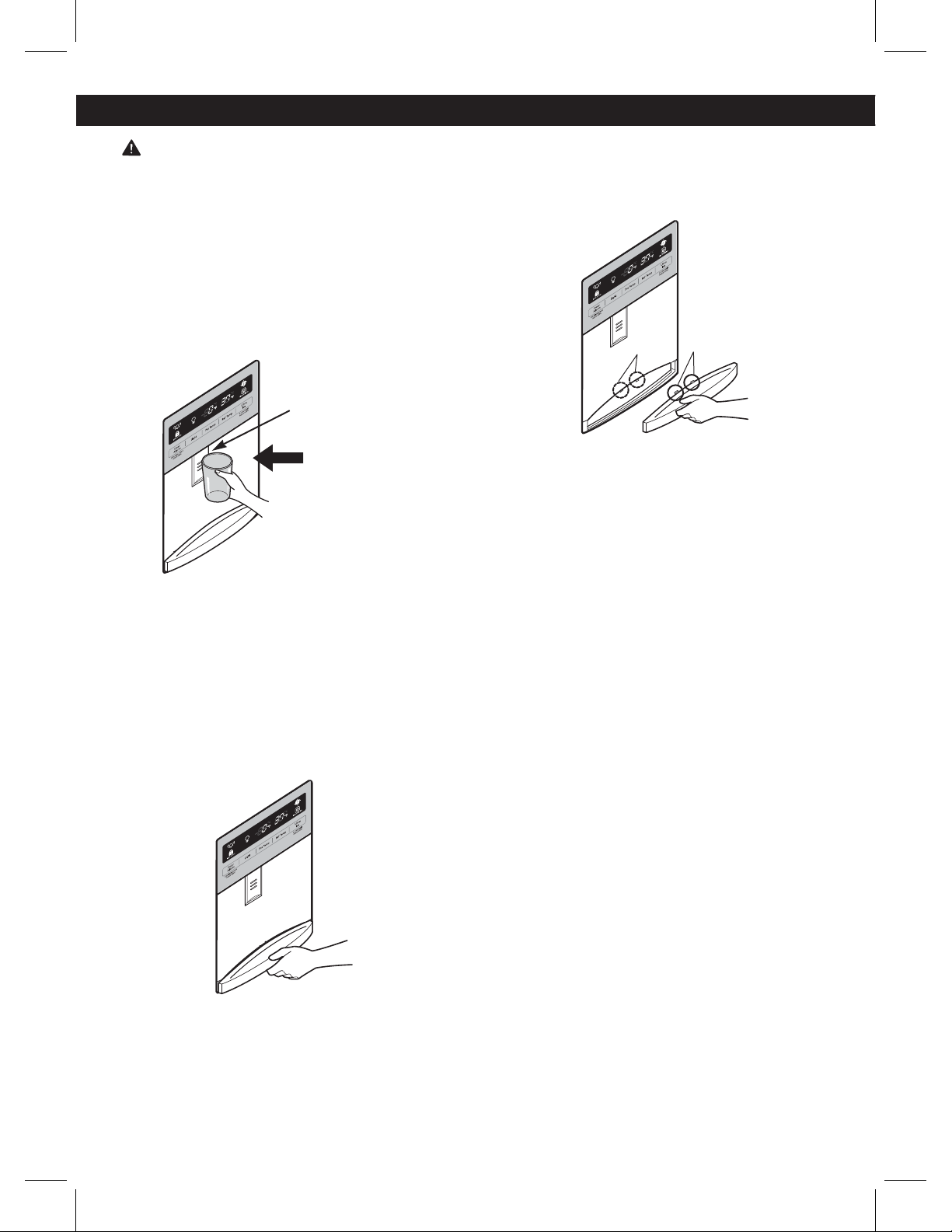
WATER DISPENSER
To dispense cold water, push on the dispenser switch
with a glass.
Some dripping may occur after dispensing. Hold your
cup beneath the dispenser for a few seconds after
dispensing to catch all of the drops.
WATER TRAY
To remove the tray, press down on either of the front
corners and pull out.
NOTE: There is no drain beneath the tray. You may need
to empty the tray of any liquid that collects in it.
To replace the tray, slightly tilt up the front of the tray and
snap the tabs into the holes.
Dispenser Switch
Push
Tabs
Holes
USING YOUR REFRIGERATORUSING YOUR REFRIGERATOR
WARNING: DO NOT STORE ELECTRCAL
APPLIANCES, do not use electrical appliances inside
the food storage compartment, unless they are
recommended by the manufacturer.
18
USING YOUR REFRIGERATOR
REFRIGERATOR SHELVES
The shelves in your refrigerator are adjustable to meet
your individual storage needs. Your model may have
glass or wire shelves.
Adjusting the shelves to fit different heights of items will
make finding the exact item you want easier. Doing so
will also reduce the amount of time the refrigerator door
is open which will save energy.
IMPORTANT: Do not clean glass shelves with warm water
while they are cold. Shelves may break if exposed to
sudden temperature changes or impact.
CAUTION: Glass shelves are heavy. Use special care
when removing them.
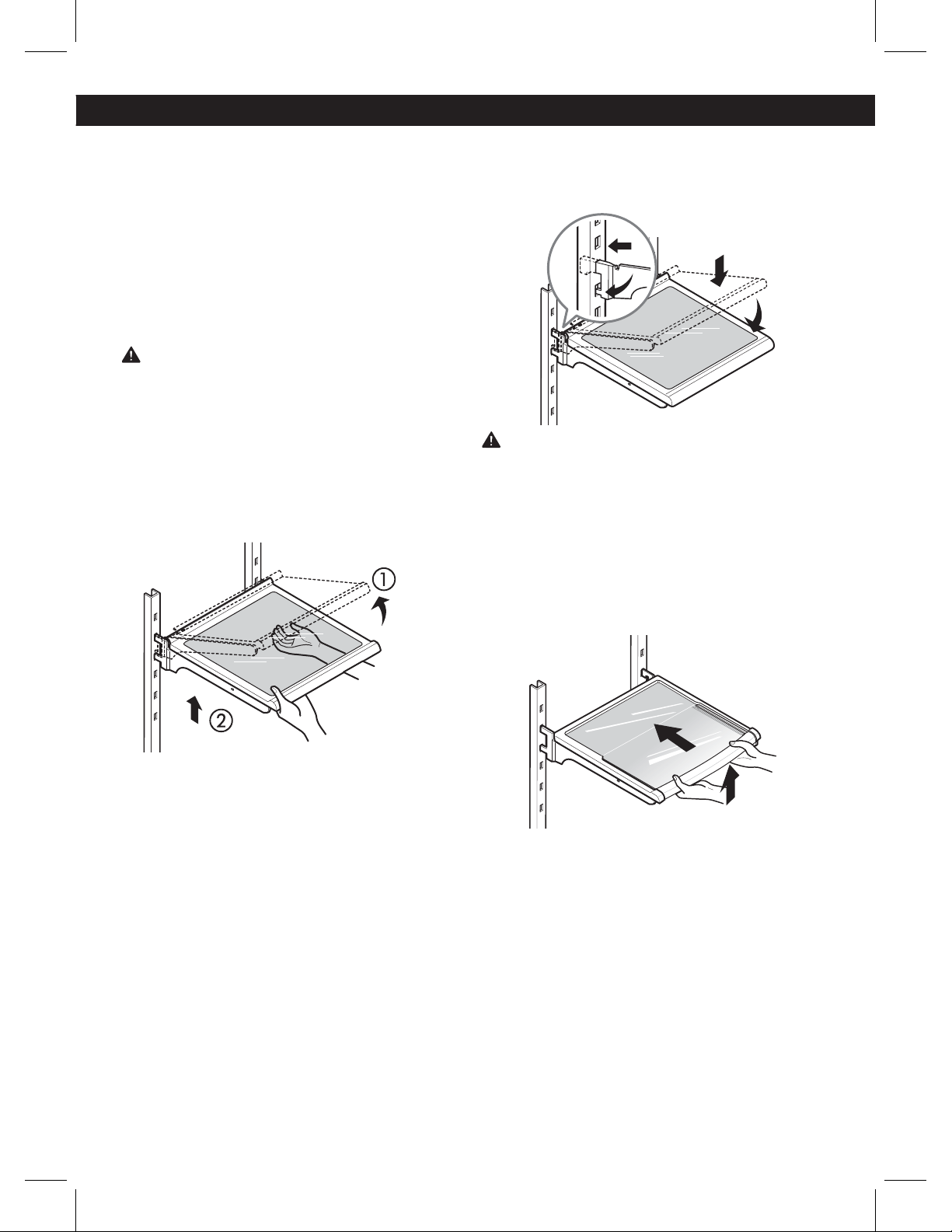
Adjusting Shelves (Cantilever)
Remove shelves from the shipping position and replace
shelves in the position you want.
To remove a shelf—Tilt up the front of the shelf in
the direction of (1) and lift it in the direction of (2). Pull
the shelf out.
To reinstall a shelf—Tilt the front of the shelf up and
guide the shelf hooks into the slots at a desired height.
Then, lower the front of the shelf so that the hooks drop
into the slots.
CAUTION: Make sure that shelves are level from one
side to the other. Failure to do so may result in the shelf
falling or spilling food.
Folding Shelf (on some models)
You can store taller items, such as a gallon container
or bottles, by simply pushing the front half of the shelf
underneath the back half of the shelf. Pull the front of
the shelf toward you to return to a full shelf.
19
HUMIDITY CONTROLLED CRISPER
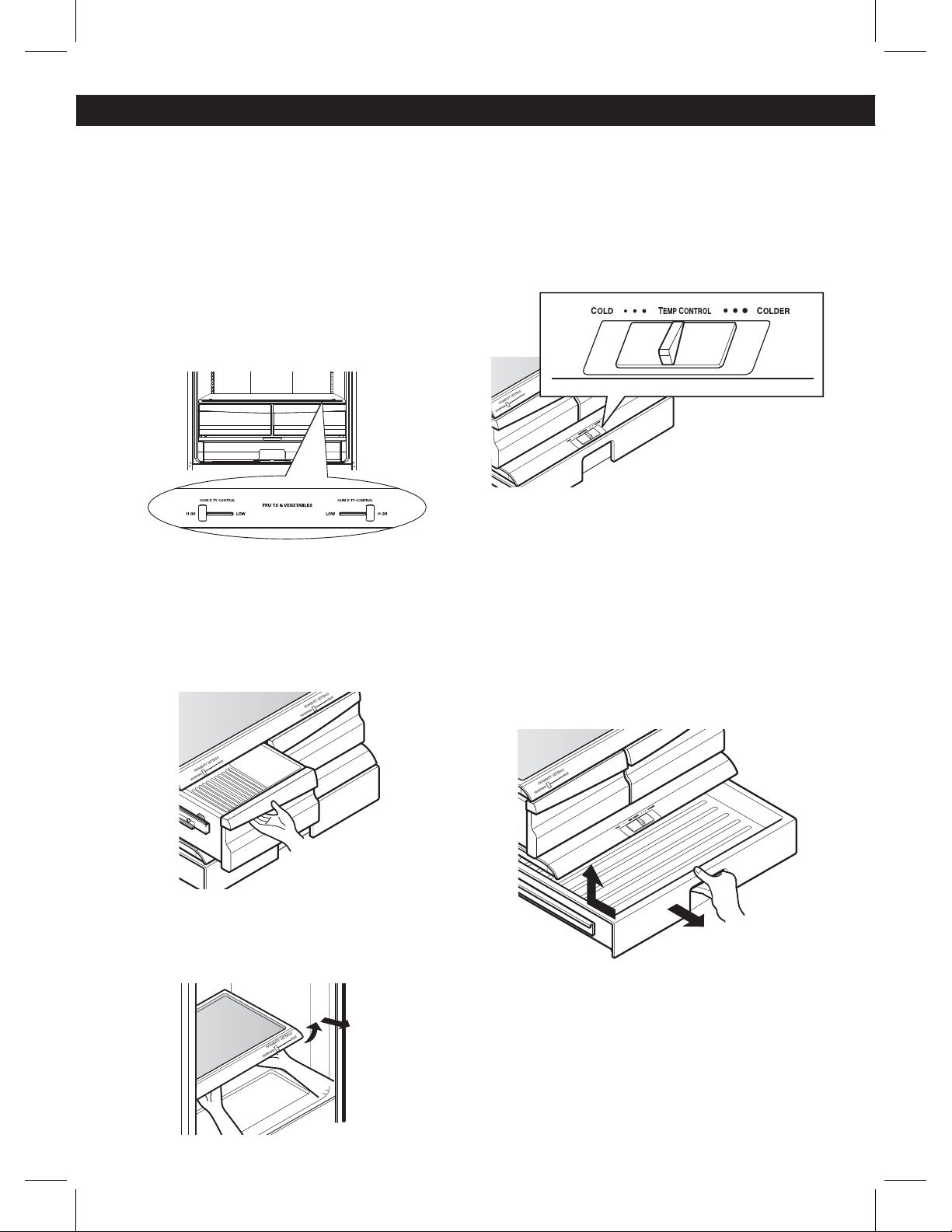
The crispers provide fresher tasting fruit and
vegetables by letting you easily control humidity
inside the drawer.
You can control the amount of humidity in the
moisture-sealed crispers by adjusting the control
to any setting between HIGH and LOW.
ţ)*() keeps moist air in the crisper for best
storage of fresh, leafy vegetables.
ţ-08 lets moist air out of the crisper for best
storage of fruit.
Removing and installing the humidity controlled crisper
1. To remove, pull the drawer out to full extension.
2. Lift the front of the crisper up, then pull it straight out.
3. To install, slightly tilt up the front, insert the drawer into
the frame and push it back into place.
Removing the glass
1. Lift up the glass under the crisper cover.
2. Pull the glass up and out.
NOTE: Pantry drawer not shown for clarity.
GLIDE ‘N’ SERVE
The Glide ‘N’ Serve provides storage space with a
variable temperature control that keeps the compartment
colder than the refrigerator temperature. This drawer can
be used for large party trays, deli items, or beverages.
NOTE: It is not recommended that this drawer be used
for fruits and vegetables.
Glide ‘N’ Serve Control
The control regulates the air temperature in the drawer.
Set the control level to COLD to provide normal
refrigerator temperature. Use the COLDER setting for
meats or other deli items.
NOTE: Cold air directed to the Glide ‘N’ Serve can
decrease the refrigerator temperature. It may be
necessary to adjust the refrigerator temperature.
To remove and replace Glide ‘N’ Serve
1. To remove, pull the drawer out to full extension.
2. Lift the front of the crisper up, then pull it straight out.
3. To install, slightly tilt up the front, insert the drawer into
the frame and push it back into place.
USING YOUR REFRIGERATOR
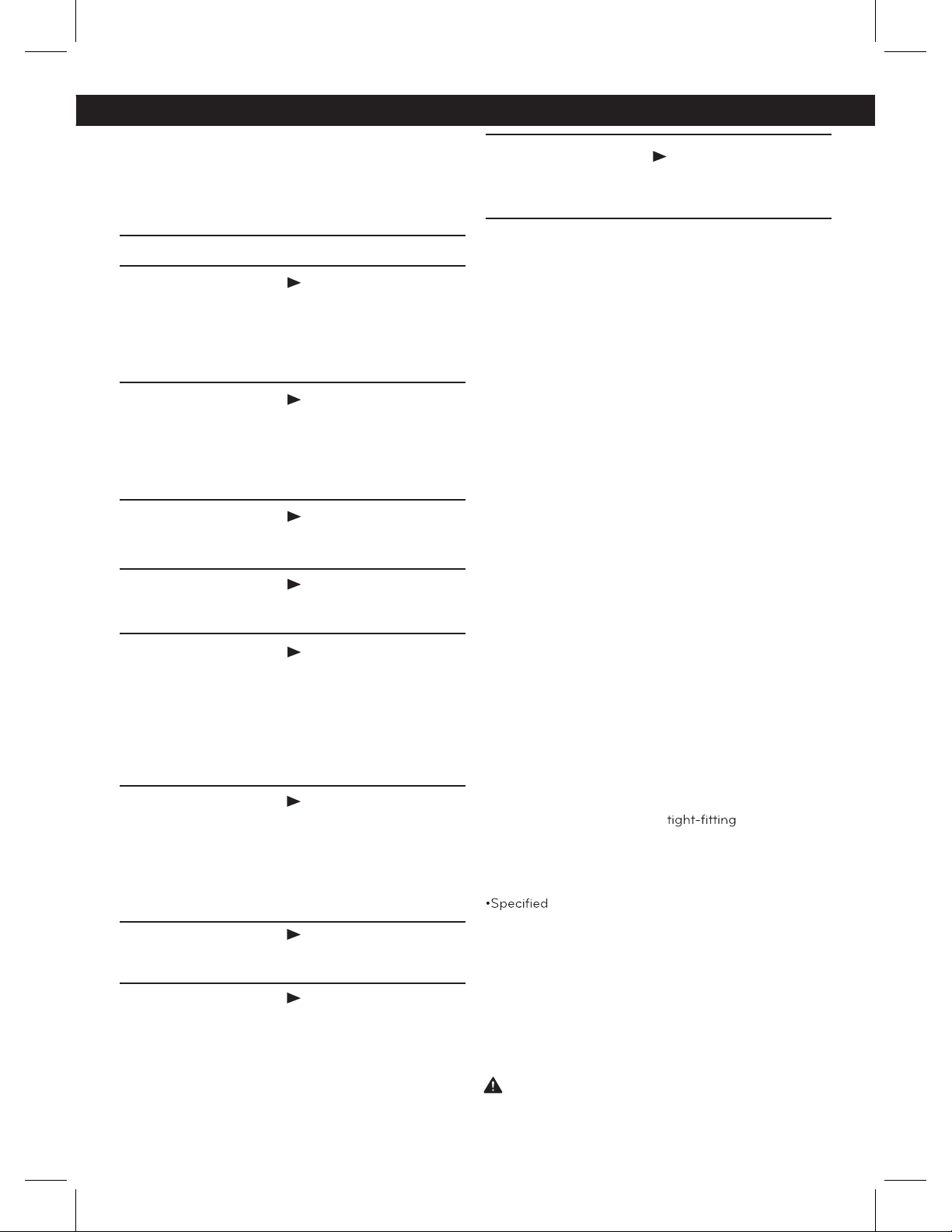
I I
I
I
I I
I
20
USING YOUR REFRIGERATOR
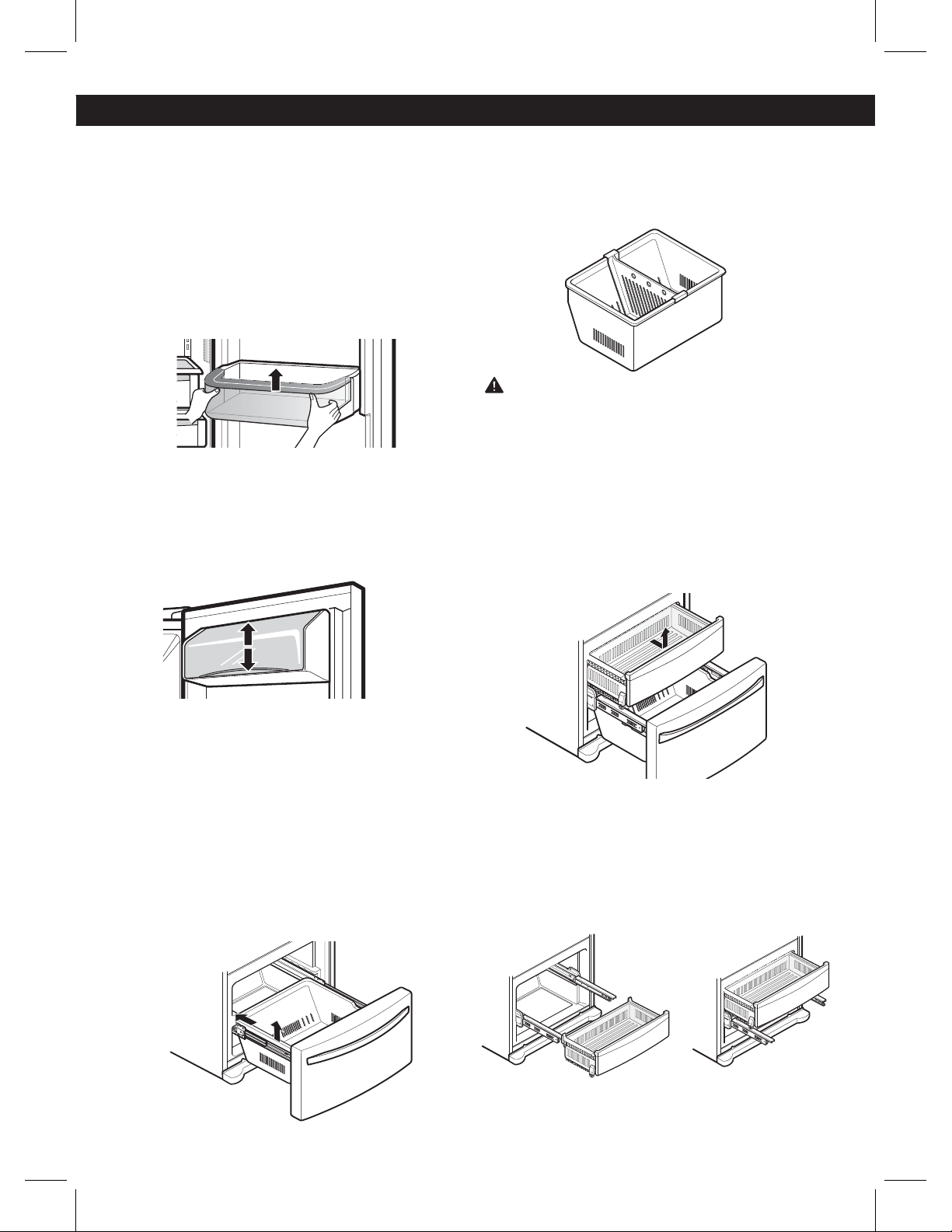
DOOR BIN
The door bins are removable for easy cleaning and
adjustment.
1. To remove the bin, simply lift the bin up and pull
straight out.
2. To replace the bin, slide it in above the desired
support and push down until it snaps into place.
NOTE: Some bins may vary in appearance and will
only fit in one location.
DAIRY BIN
1. To remove the dairy bin, simply lift it and pull
straight out.
2. To replace the dairy bin, slide it into place and
push down until it stops.
NOTE: The dairy bin will only fit in the top space on
the right-hand door.
DURABASE
1. To remove the Durabase, push it to the back as
much as possible. Tilt up the front of the Durabase
and pull straight out.
2. To replace, insert the Durabase in the rail
assembly.
DURABASE DIVIDER
The Durabase divider allows you to organize the
Durabase area into sections. It can be adjusted
from side to side to accommodate items of
different sizes.
WARNING: If the Durabase divider is removed,
there is enough open space for children or pets
to crawl inside. To prevent accidental child and
pet entrapment or suffocation risk, DO NOT allow
children or pets to touch or go near the drawer
PULLOUT DRAWER
1. To remove, pull the drawer out to full extension.
Lift the front of the drawer up and then pull it
straight out.
2. To replace, slightly tilt up the front of the drawer,
insert the drawer into the frame, and push the
drawer back into place.
21
WATER FILTER
It is recommended that you replace the water filter:
ţ"QQroximately every 6 months.
ţ8IFO the water
er indicator
turns on.
ţ8IFO the water dispenser
output decreases.
ţ8IFO the ice cubes are smaller
than normal.
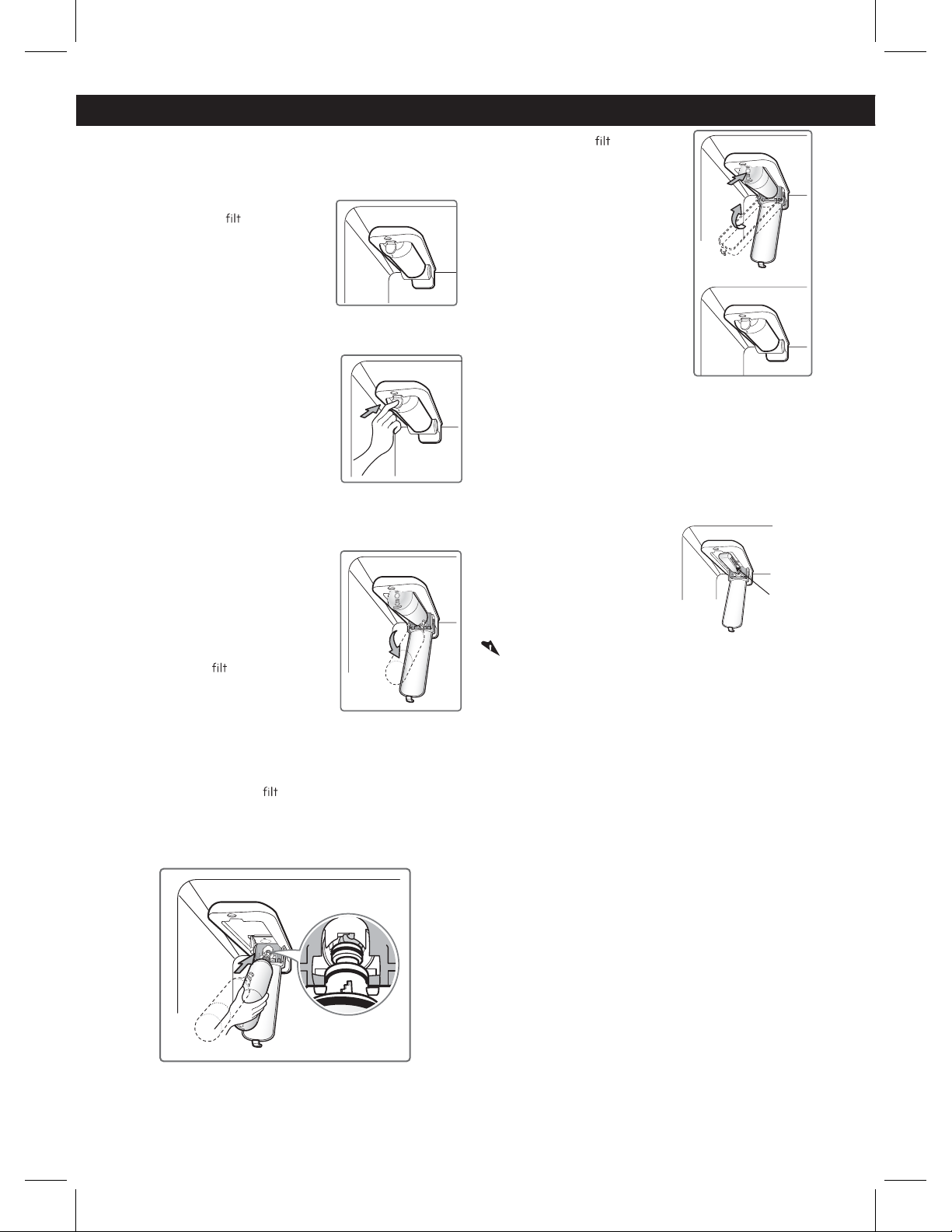
1. Remove the old water filter.
ţLower or remove the top left
shelf to allow the water filter to
rotate all the way down.
ţPress the push button to open
the water filter cover.
NOTE: Replacing the water filter
causes a small amount of water
(around 1 oz. or 25 cc) to drain.
Before pushing the button to open
the water filter cover, place a cup
under the front end of the cover
to collect any leaking water.
Hold the water filter upright,
once itis removed, to prevent any
remaining water from spilling out
of the water filter.
ţPull the water
er downward and
pull out. Make sure to rotate the
filter down completely before
pulling it out of the manifold hole.
2. Replace with a new water filter.
ţTake the new water
er out of its packaging
and
remove the protective cover from the o-rings. With water
filter tabs in the horizontal position, push the new water
filter into the manifold hole until it stops.
ţRotate the water
er up into
position and close the cover.
The cover will click when closed
correctly.
3. After the water filter is replaced, dispense 2.5 gallons
(9 liters) of water (flush for approximately 5 minutes) to
remove trapped air and contaminates from the system.
Do not dispense the entire 2.5 gallon (9 liters)
amount continuously. Depress and release the
dispenser pad for cycles of 30 seconds ON and 60
seconds OFF.
4. Water Filter Bypass Plug
Keep the water filter
bypass plug. You MUST
use the water filter bypass
plug when a replacement
water filter cartridge is not
available.
CAUTION: DO NOT operate refrigerator without water
filter or water filter plug installed.
NOTE: To purchase replacement water filter cartridges,
visit your local appliance dealer or parts distributor.
You can also call USA 1-800-243-0000
CANADA 1-888-542-2623 (24 hours per day/
7 days per week).
The replacement water filter cartridge’s part
number is ADQ36006101.
Water Filter
Bypass Plug
WATER FILTER
22
WATER FILTER
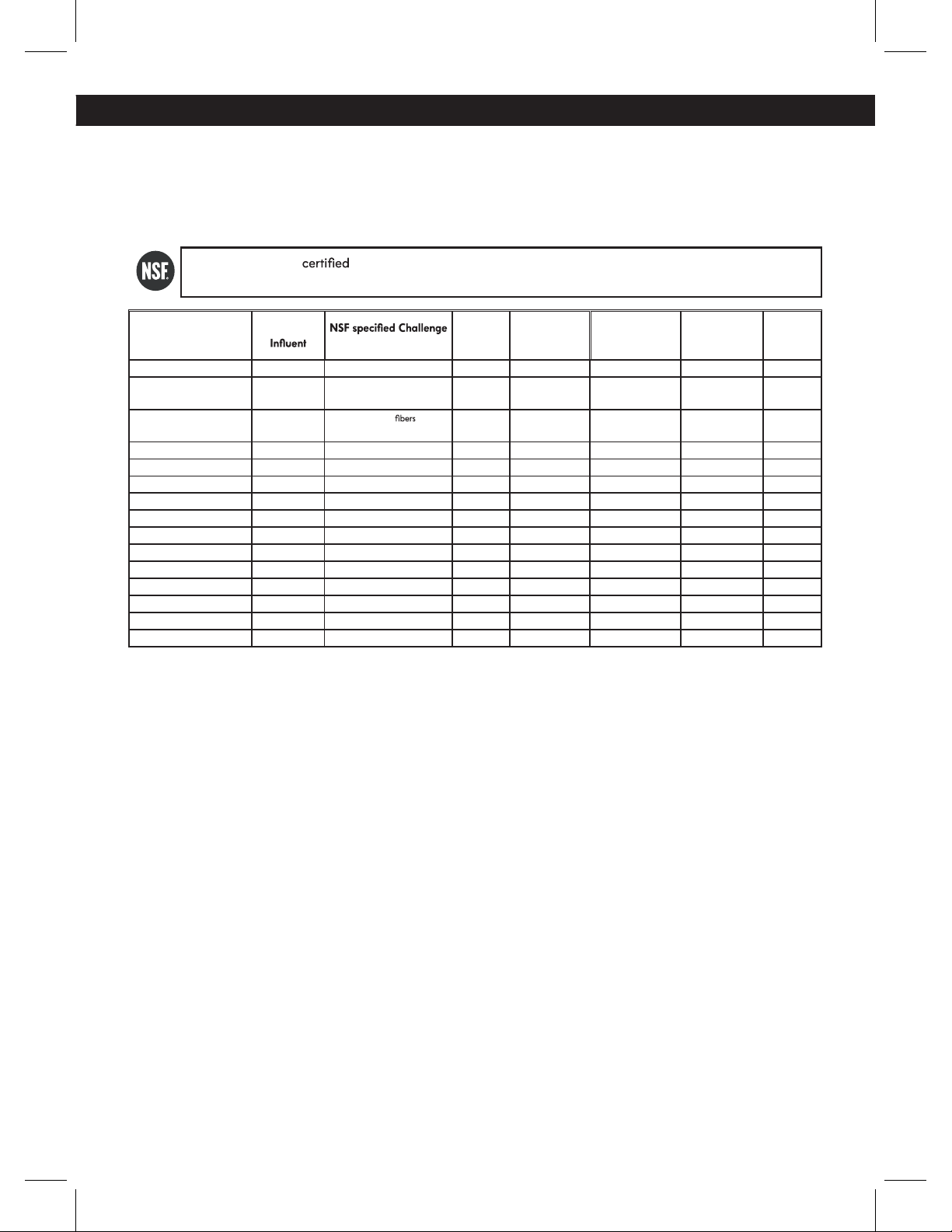
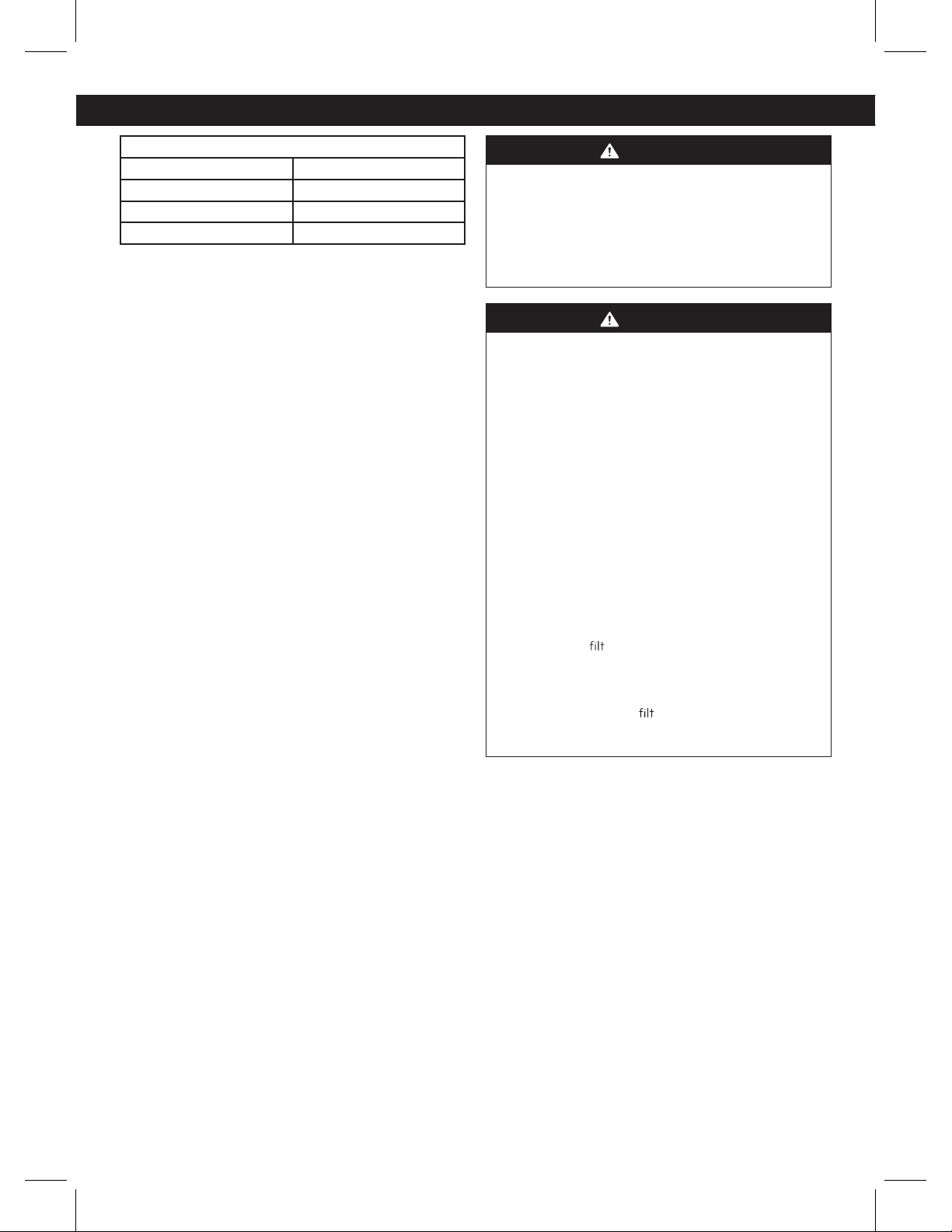
Performance Data Sheet
The concentration of the indicated substances in water entering the system was reduced to a concentration
less than or equal to the permissible limit for water leaving the system as specified in NSF/ANSI Standard
42 and Standard 53.
* Based on the use of Cryptosporidium parvum oocysts
System tested and by NSF International against NSF/ANSI Standard 42 and Standard 53 for the
reduction of substances listed below.
Contaminant Reduction
Average
Concentration
Avg %
Reduction
Average
Product Water
Concentration
Max Permissible
Product Water
Concentration
NSF Reduction
Requirements
NSF Test
Report
Chlorine Taste and Odor 2.1 mg/L 2.0 mg/L ± 10% 97.2% 0.06 mg/L N/A 50% J-00049247
Nominal Particulate Class I, ,
.5 to < 1.0 m
5,600,000
pts/mL
At least 10,000 particles/mL 98.7% 73,000 pts/ml N/A 5% J-00049282
Asbestos 190 MFL
107 to 108 MFL;
greater
than 10 m in length
>99% < 1 MFL N/A 99% J-0004928
Atrazine 0.0094 mg/L 0.009 mg/L ± 10% 94.7% 0.00005 mg/L 0.003 mg/L N/A J-00049293
Benzene 0.016 mg/L 0.015 mg/L ± 10% 96.7% 0.005 mg/L 0.005 mg/L N/A J-00049300
Carbofuran 0.08 mg/L 0.08 mg/L ± 10% 98.1% 0.002 mg/L 0.04 mg/L N/A J-00049294
Lindane 0.002 mg/L 0.002 mg/L ± 10% 98.2% 0.00004 mg/L 0.0002 mg/L N/A J-00051975
P-Dichlorobenzene 0.22 mg/L 0.225 mg/L ± 10% 99.8% 0.0005 mg/L 0.075 mg/L N/A J-00049298
Toxaphene 0.014 mg/L 0.015 mg/L ± 10% 93% 0.001 mg/L 0.003 mg/L N/A J-00049302
2,4-D 0.213 mg/L 0.210 mg/L ± 10% 95.2% 0.009 mg/L 0.07 mg/L N/A J-00049284
Lead pH @6.5 0.150 mg/L 0.15 mg/L ± 10% >99.3% 0.001 mg/L 0.010 mg/L N/A J-00051974
Lead pH @8.5 0.150 mg/L 0.15 mg/L ± 10% >99.3% 0.001 mg/L 0.010 mg/L N/A J-00049277
Mercury @ pH 6.5 0.0059 mg/L 0.006 mg/L ± 10% 96.1 0.0002 mg/L 0.002 mg/L N/A J-00053886
Mercury @ pH 8.5 0.0058 mg/L 0.006 mg/L ± 10% 90.1 0.0006 mg/L 0.002 mg/L N/A J-00051972
Cyst* 120,000 cysts/L Minimum 50,000 cysts/L 99.99% <1 cyst/L N/A 99.95% J-00049281
23
Application Guidelines/Water Supply Parameters
Service Flow 0.5 gpm (1.9 lpm)
Water Supply Potable Water
Water Pressure 40-120 psi (0,28 - 0,83 MPa)
Water Temperature 33°F - 100°F (0.6°C - 38°C)
It is essential that the manufacturer’s recommended
installation, maintenance and water filter replacement
requirements be carried out for the product to perform
as advertised.
NOTE: While the testing was performed under standard
laboratory conditions, actual performance may vary.
Replacement Cartridge: ADQ36006101
For estimated costs of replacement elements
please call USA 1-800-243-0000 CANADA 1-888-
542-2623 (24 hours per day/7 days per week)
or visit our website at www.lg.com
3M is a trademark of 3M Company.
NSF is a trademark of NSF International.
© 2009 3M Company. All rights reserved.
WARNING
To reduce the risk associated with ingestion
of contaminants: Do not use with water that is
microbiologically unsafe or of unknown quality without
adequate disinfection before and after of the system.
Systems certified for cyst reduction may be used on
disinfected water that may contain filterable cysts. EPA
Establishment Number 10350-MN-005
CAUTION
To reduce the risk associated with property damage
due to water leakage:
ţ Read and follow the Water Filter instructions before
installation and use of this system.
ţ Installation and use MUST comply with all state and
local plumbing codes.
ţ Do not install if water pressure exceeds 120 psi (0,83
MPa). Contact a plumbing professional if you are
uncertain of how to check your water pressure.
ţ Do not install where water hammer conditions may
occur. If water hammer conditions exist, you must
install a water hammer arrester. Contact a plumbing
professional if you are uncertain of how to check for
this condition.
ţ Do not install on hot water supply lines.
The maximum operating water temperature of this
water filter system is 100°F (38°C).
ţ Protect water
er from freezing. Do not operate
refrigerator in ambient conditions below
55°F (12.7°C). Drain water filter when storing unit in
temperatures below 40°F (4.4°C).
ţ The disposable water
er must be replaced every
six months, at the rated capacity, or if a noticeable
reduction in flow rate occurs.
WATER FILTER
24
WATER FILTER
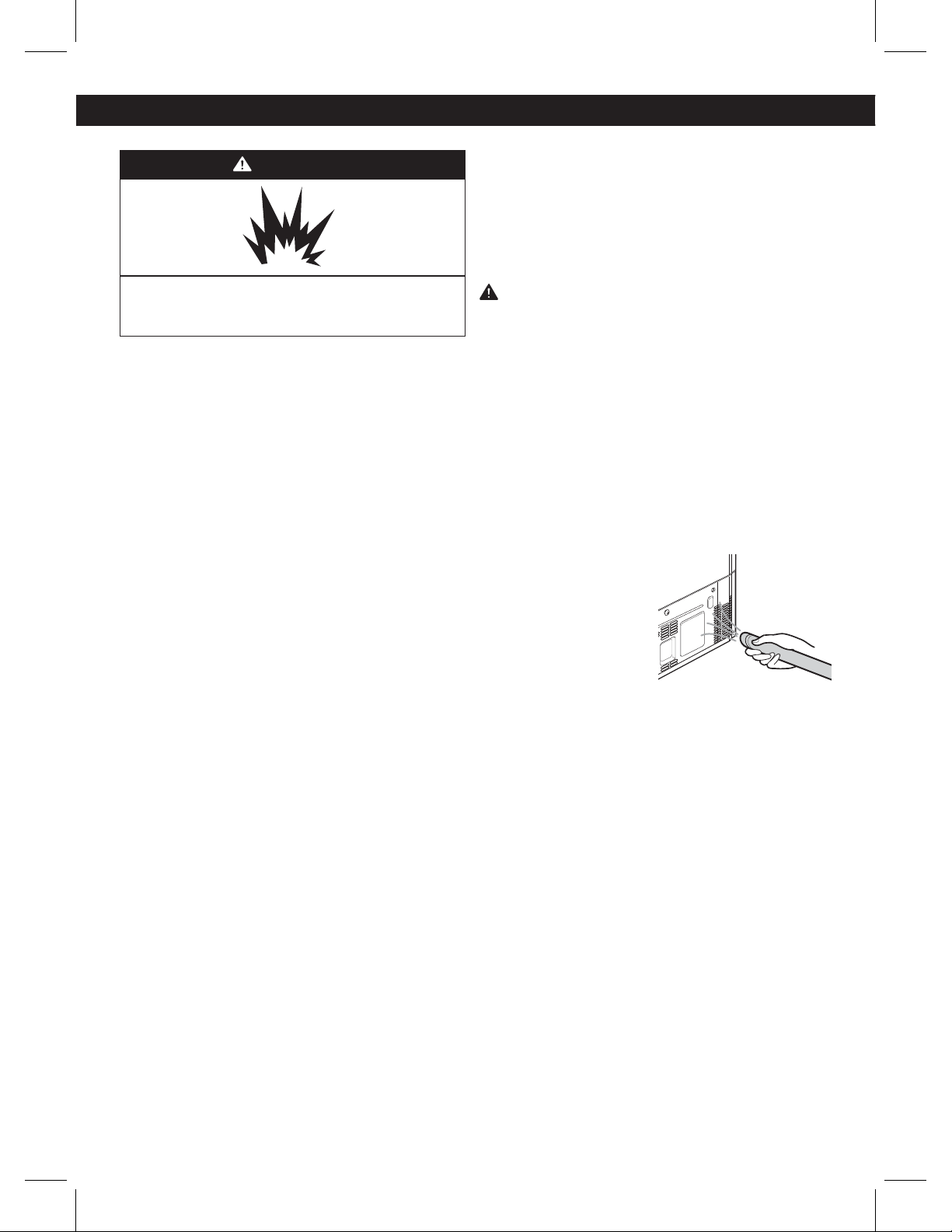
State of California
Department of Public Health
Water Treatment Device
Certificate Number
Date Issued: December 15, 2009
Trademark/Model Designation
Replacement Elements
-908102
ADQ36006101-S
ADQ36006101
Manufacturer:
Cuno Inc.
The water treatment device(s) listed on this certificate have met the testing requirements pursuant to Section
116830 of the Health and Safety Code for the following health related contaminants:
sotsebsAstsyC
Lead
Mercury
2,4-D Reduction
Atrazine
Benzene
Carbofuran
Lindane
p-Dichlorobenzene
Toxaphene
Microbiological Contaminants and Turbidity
Inorganic/Radiological Contaminants
Organic Contaminants
200 gal
Rated Service Capacity:
0.5 gpm
Rated Service Flow:
Conditions of Certification:
25
WARNING
Explosion Hazard
Use non-flammable cleaner. Failure to do so can result
in fire, explosion, or death.
Both the refrigerator and freezer sections defrost
automatically; however, clean both sections about once a
month to prevent odors. Wipe up spills immediately.
GENERAL CLEANING TIPS
ţ6OQMVHSFGSJHFSBUPSPSEJTDPOOFDUQPXFS
ţ3FNPWFBMMSFNPWBCMFQBSUTTVDIBTTIFMWFTDSJTQFST
etc. Refer to sections in Using Your Refrigerator for
removal instructions.
ţ6TFBDMFBOTQPOHFPSTPGUDMPUIBOEBNJMEEFUFSHFOU
in warm water. Do not use abrasive or harsh cleaners.
ţ)BOEXBTISJOTFBOEESZBMMTVSGBDFTUIPSPVHIMZ
ţ1MVHJOSFGSJHFSBUPSPSSFDPOOFDUQPXFS
EXTERIOR
Waxing external painted metal surfaces helps provide
rust protection. Do not wax plastic parts. Wax painted
metal surfaces at least twice a year using appliance wax
(or auto paste wax). Apply wax with a clean, soft cloth.
For products with a stainless steel exterior, use a clean
sponge or soft cloth and a mild detergent in warm water.
Do not use abrasive or harsh cleaners. Dry thoroughly
with a soft cloth.
INSIDE WALLS (allow freezer to warm up so the cloth
will not stick)
To help remove odors, you can wash the inside of the
refrigerator with a mixture of baking soda and warm
water. Mix 2 tablespoons of baking soda to 1 quart of
water (26 g soda to 1 liter water.) Be sure the baking soda
is completely dissolved so it does not scratch the
surfaces of the refrigerator.
CAUTION: While cleaning the inside, do not spray
water.
DOOR LINERS AND GASKETS
Use a clean sponge or soft cloth and a mild detergent
in warm water. Do not use cleaning waxes, concentrated
detergents, bleaches, or cleaners containing petroleum
on plastic refrigerator parts.
PLASTIC PARTS (Covers and Panels)
Use a clean sponge or soft cloth and a mild detergent
in warm water. Do not use window sprays, abrasive
cleansers, or flammable fluids. These can scratch or
damage the material.
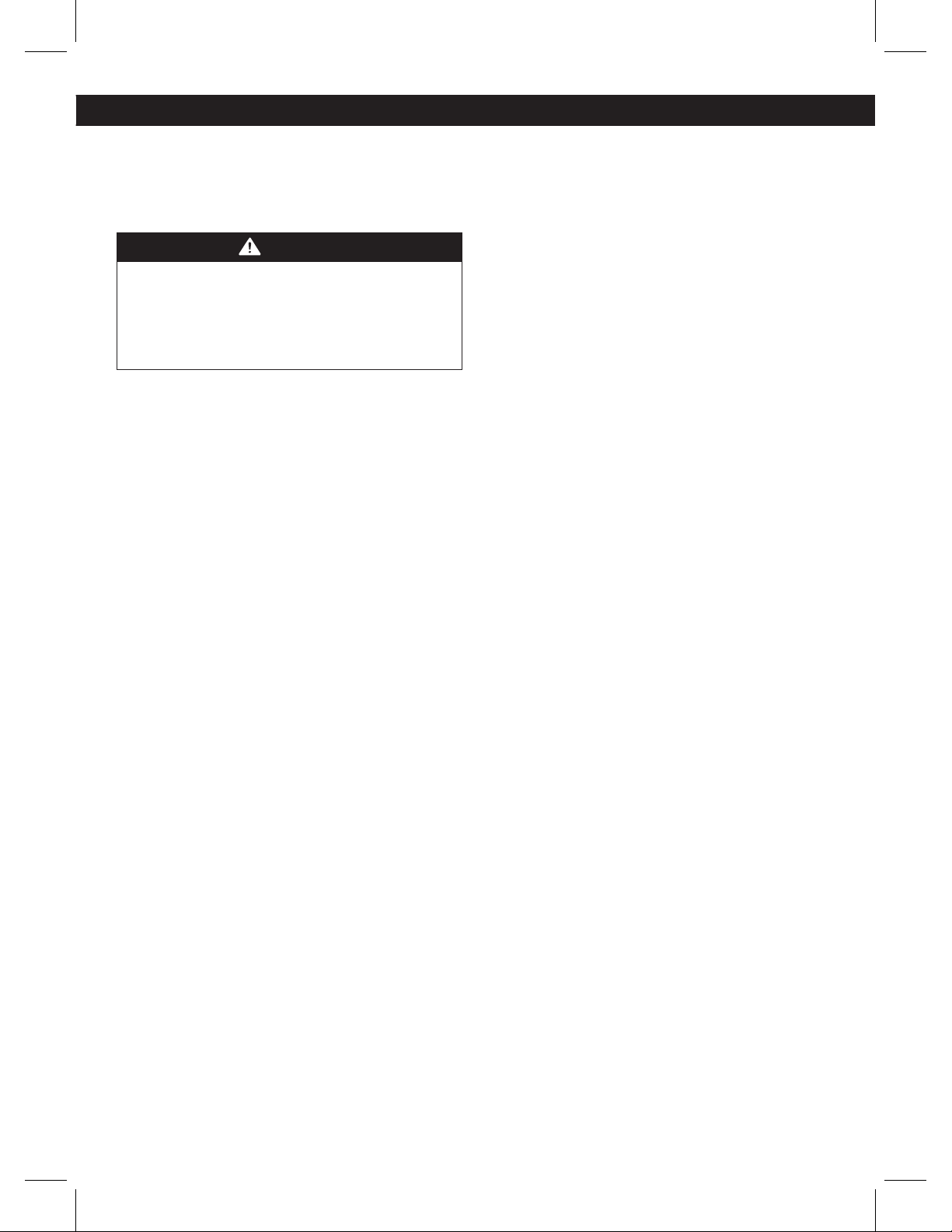
CONDENSER COILS
Use a vacuum cleaner
with an attachment
to clean the condenser
cover and vents. Do not
remove the panel covering
the condenser coil area.
CARE AND CLEANNING
26
POWER INTERRUPTIONS
1. If the power will be out for 24 hours or less, keep all
refrigerator doors closed to help foods stay cold and
frozen.
2. If the power will be out for more than 24 hours, remove
all frozen food and store it in a frozen food locker.
WHEN YOU GO ON VACATION
If you choose to leave the refrigerator on while you are
away, follow these steps to prepare your refrigerator
before you leave.
1. Use up any perishables and freeze other items.
2. Turn off the icemaker and empty the ice bin.
If you choose to turn the refrigerator off before you leave,
follow these steps.
1. Remove all food from the refrigerator.
2. Depending on your model, set the thermostat control
(refrigerator control) to OFF. See the Setting the Controls
section.
3. Clean the refrigerator, wipe it and dry well.
4. Tape rubber or wood blocks to the tops of both doors
to prop them open far enough for air to get in. This stops
odor and mold from building up.
WHEN YOU MOVE
When you are moving your refrigerator to a new home,
follow these steps to prepare it for the move.
1. Remove all food from the refrigerator and pack all
frozen food in dry ice.
2. Unplug the refrigerator.
3. Clean, wipe and dry thoroughly.
4. Take out all removable parts, wrap them well and tape
them together so they do not shift and rattle during the
move. Refer to the Using your Refrigerator section for
removable instructions.
5. Depending on the model, raise the front of the
refrigerator so it rolls easier
OR screw in the leveling legs
all the way so they do not scrape the floor. See the Door
Closing section.
6. Tape the doors shut and tape the power cord to the
refrigerator cabinet.
When you get to your new home, put everything back
and refer to the Refrigerator Installation section for
preparation instructions.
CARE AND CLEANNING
NOTE: All refrigerators use LED lighting in refrigerator
and freezer, for this reason must be replaced by a
qualified service technician.
REPLACING REFRIGERATOR AND FREEZER LIGHTS
WARNING
ELECTRICAL SHOCK HAZARD
Before replacing a burned-out light bulb, either
unplug the refrigerator or turn off power at the circuit
breaker or fuse box.
NOTE: Moving the control to the OFF position does
not remove power to the light circuit.
27
BEFORE START
The water source is not guaranteed by the refrigerator
manufacturer. Follow instructions carefully in order to
reduce damage.
Air located inside the water pipes can cause hammering
or tapping causing damage to the inner pipes or water
spillage in the inside of the refrigerator. Call a qualified
plumber to fix such hammering on the connections
before installing the water pipe.
To avoid burn damage or such, never connect refrigerator
to hot water pipes.
If you are to use the refrigerator before connecting it
to the water source, make sure the ice maker is the off
position.
Never attempt to install the ice maker pipes in areas
where room temperature is below freezing point.
When using any electrical device (like a drill) during
the installation, make sure device is doubly isolated or
making ground to prevent risk of electrical surge or
discharge.
All installations should be done considering local water
and drainage requirements.
ţ If an inverted osmosis water filtration system is
connected to the cold water source, the water hose
installation is not assured or guaranteed by the
refrigerator or automated ice maker manufacturer.
Follow the next instructions carefully to minimize costly
water related damages.
ţ When having an inverted osmosis water filtration
system connected to the cold-water flow, the water
pressure for such system must be at least between
40-60 PSI (0,28 MPa ~ 0,41 MPa), less than 2~3 sec
to fill a cup of 7 oz. capacity. (0,2 L).
ţ If the inverted osmosis water filtration system pressure
is less than 21 PSI (0,14 MPa), more than 4 sec to fill
a cup of 7 oz. capacity (0,2L):
a) Identify if the sediments filter in the inverted osmosis
system is being blocked. Replace filter if necessary.
b) Allow inverted osmosis system storage tank to refill
after extensive usage.
c) Call a qualified plumber if the inverted osmosis water
pressure problem continues.
REQUIREMENTS
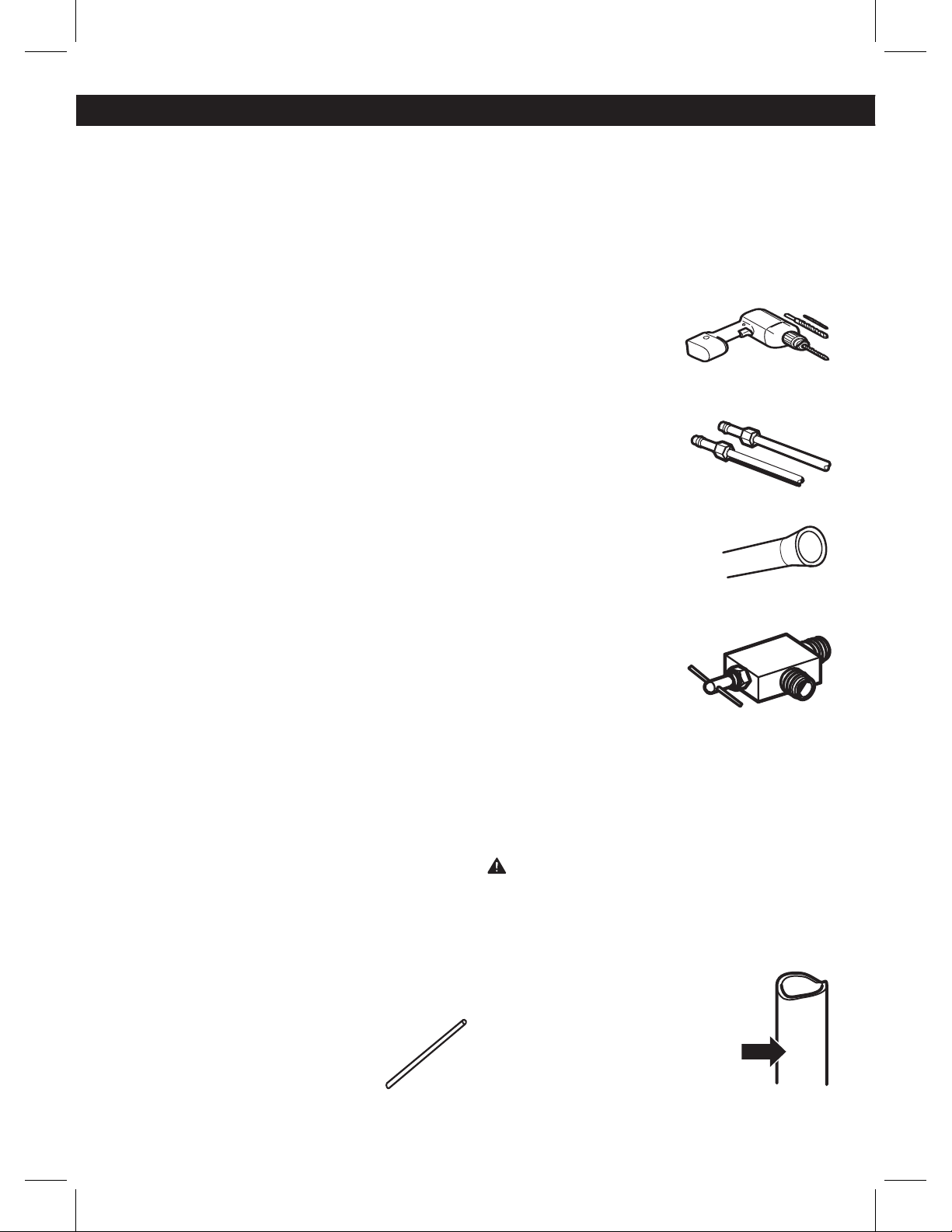
ţ 1/4” (6,0 mm) in diameter copper pipe to
connect refrigerator to the water pipe. Make
sure both terminals are cut in
squared manner.
To determine how much pipe material is needed,
measures the distances between the valves located
behind the refrigerator and the source of water and add
to that 8 feet (2,4 m). Make sure there is sufficient pipe
material to allow the free movement of the refrigerator
from the wall
ţ A cold water source. Water pressure should be between
0,14 and 0,83 MPa or 20 and 120 PSI for models not
containing water filter and between 0,28 and 0,83
MPa or 40 and 120 PSI for models containing water
filter.
ţ A drill.
ţ Adjustable 1/2” (13,0 mm) key.
ţ Flat and Phillips style (star) screwdriver.
ţ Two 1/4” (6,0 mm) diameter
compression nuts with two
sides to connect the copper
pipe to the refrigerator valve.
If your current copper pipe has some reduction on the
ends, it will be necessary to get and
adaptor (found in hardware stores)
to connect the water line to the
refrigerator. It is al
so possible to cut
such reductions with a pipe cutter and
use the compression connections mentioned above.
ţ Bypass valve to connect to
the cold water line. The valve
must have a water opening
with an interior 5/32” (3,46
mm) diameter in the cold-
water connection point. These
valves can be located in any cold-water connection
package. Before buying make sure such valve meets
local standards and requirements.
INSTALLATION INSTRUCTIONS
Install the valve to the pipe that you use to drink water.
(Connect only to a potable water source).
WARNING: Connect to potable water supply only.
1. CLOSE THE MAIN WATER SOURCE
Open the nearest water faucet to let water flow and
empty pipes.
2. SELECT THE LOCATION OF THE
VALVE
Select the location of the valve that will
provide a better access. It is best to
connect to a vertical pipeline. When
connecting to a horizontal pipeline is
necessary, make the connection in the
lateral or upper area instead of the
lower area to prevent accumulation of
sediment.
CONNECTING THE WATER LINE
28
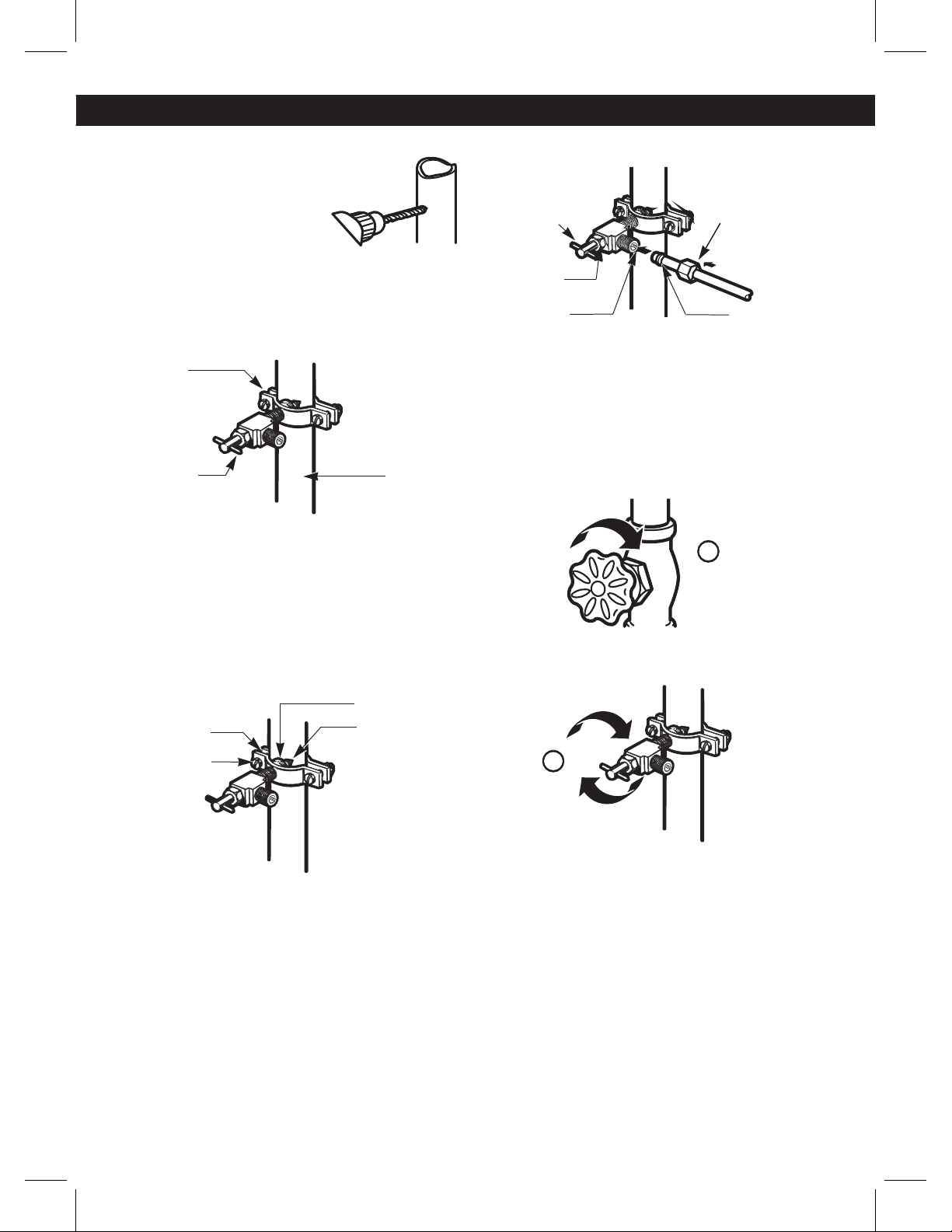
3. DRILL A HOLE FOR THE VALVE
Drill a 1/4” (6,35 mm) diameter
hole in the water pipeline.
Remove jagged edges produces
after perforation. Make sure
water does not reach the drill.
Not performing the 1/4” (6,35
mm) perforation can lead to a
low or smaller ice production.
4. TIGHTEN THE VALVE
Tight the valve into the cold water pipeline with a tube
trap.
Pipe Clamp
Saddle Type Vertical Cold
Shutoff Valve Water Pipe
NOTE: Codes for 248 CMR pipelines of the state of
Massachusetts must be attached to the connection.
Valves of this type are banned in Massachusetts. Call an
authorized plumber.
5. TIGHTEN THE TRAP
Tighten the trap until the sealing ring begins to grow.
NOTE: Make sure it is not too tight, this can break the
pipe.
Washer
Pipe Clamp Inlet End
Clamp Screw
6. PLACE THE PIPELINE
Place the pipeline between the cold water pipe and the
refrigerator. Place it through a hole in the wall or floor
(behind the refrigerator or next to the cabinet) as close
to the wall as possible.
NOTE: Make sure there is a sufficient amount of extra
pipeline 8 feet (244 mm) coiled up three times with a
10” (25 cm) in diameter to allow free movement of the
refrigerator from the wall after installation was made.
7. CONNECT PIPELINE TO VALVE
Place the compression nut and the copper pipe ferule at
the end of the pipe and connect to the valve. Make sure
the pipe is completely inserted into the valve. Tighten
nut carefully.
S
addle Type
Shutoff Valve Compression Nut
Packing Nut
Outlet Valve Ferule (sleeve)
NOTE: Codes for 248 CMR pipelines of the state of
Massachusetts must be attached to the connection.
Valves of this type are banned in Massachusetts. Call an
authorized plumber.
8. DRAIN THE PIPE
Open the main water source (1) and drain the pipe until
water comes out clear.
Allow water flow from the bypass valve (2) and close after
draining 1/4 of a gallon (1L) of water.
9. CONNECT PIPE TO REFRIGERATOR
NOTES:
ţ Before making connection to refrigerator, make sure
it is not connected to any energy source. If your
refrigerator does not have a water filter, it is advised
to install one.
ţ If your water source contains sand or related particles
that can travel to the valve,
install a water filter near the
refrigerator.
IMPORTANT: Never use old or used hoses. Always use
new ones to have a better use and experience. Connect
always to a potable water source to avoid security and
health issues.
1
2
CONNECTING THE WATER LINE
29
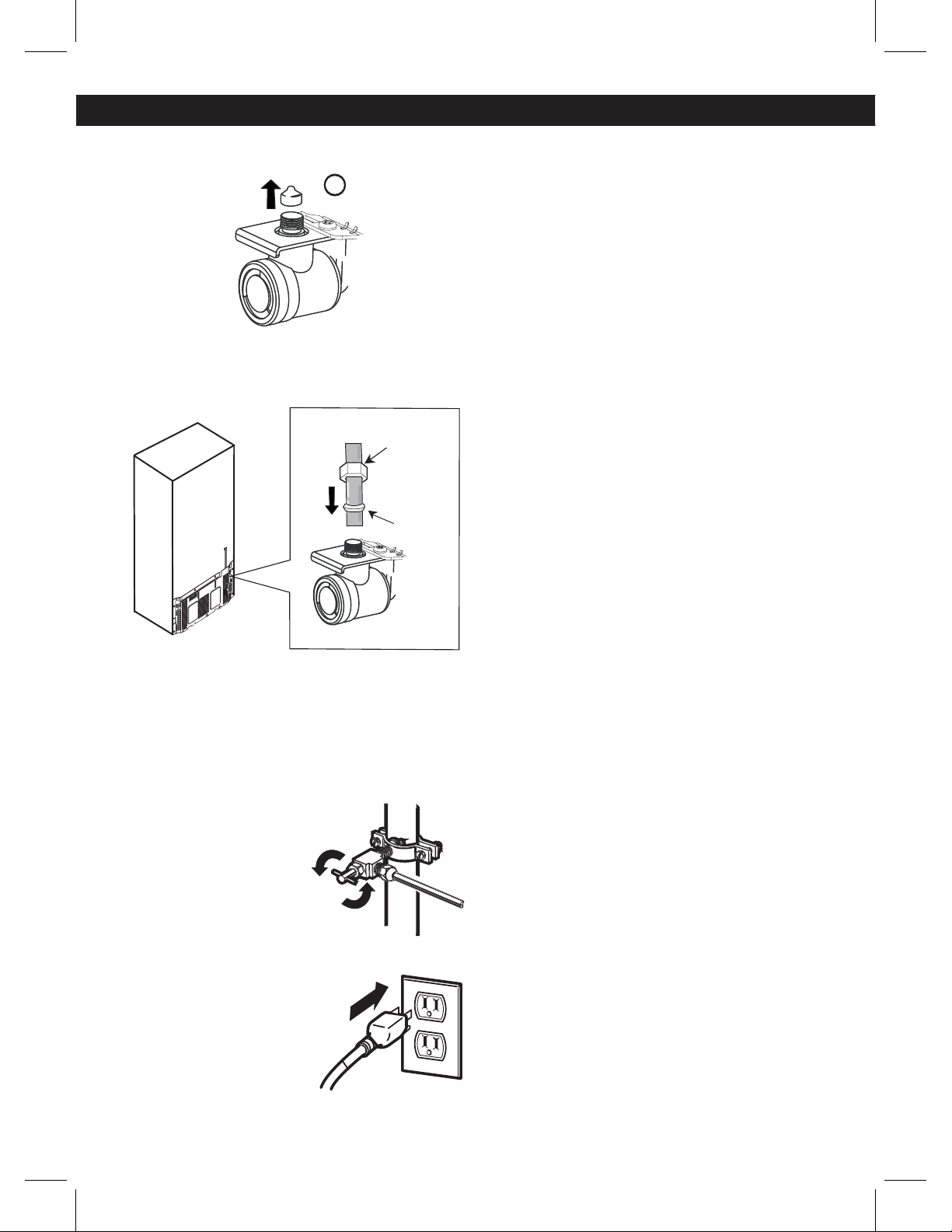
ţ Remove the ring plug (1) from the valve located at the
top of such device.
ţ Place compression nut and the ferule at the end of the
pipeline. Insert pipeline into the connection valve as far
as possible. Hold tightly while holding pipeline.
Compression
Nut 1/4”
(6,35 mm)
Ferule
Hold on to the pipe from the handles or grabbers located
behind the refrigerator, loosing first the bolt holding the
handle. Afterwards, insert pipe into the hole and tighten
bolt to finalize.
10. OPEN THE BYPASS VALVE
Tighten all connections
containing leaks. Place access
cover back on compressor.
11. CONNECT TO REFRIGERATOR
Fix pipeline in a way that it does
not vibrate on the refrigerator or
wall. Push refrigerator against
wall.
12. TURN ICE MAKER ON
Turn ice maker switch into the ON position. Ice maker
will start only after reaching its operating temperature
of 15 °F (-9 °C) or less. It will automatically begin the ice
production if switch is located in the ON position.
1
TROUBLESHOOTING GUIDE
Image just for
reference.
30
TROUBLESHOOTING GUIDE
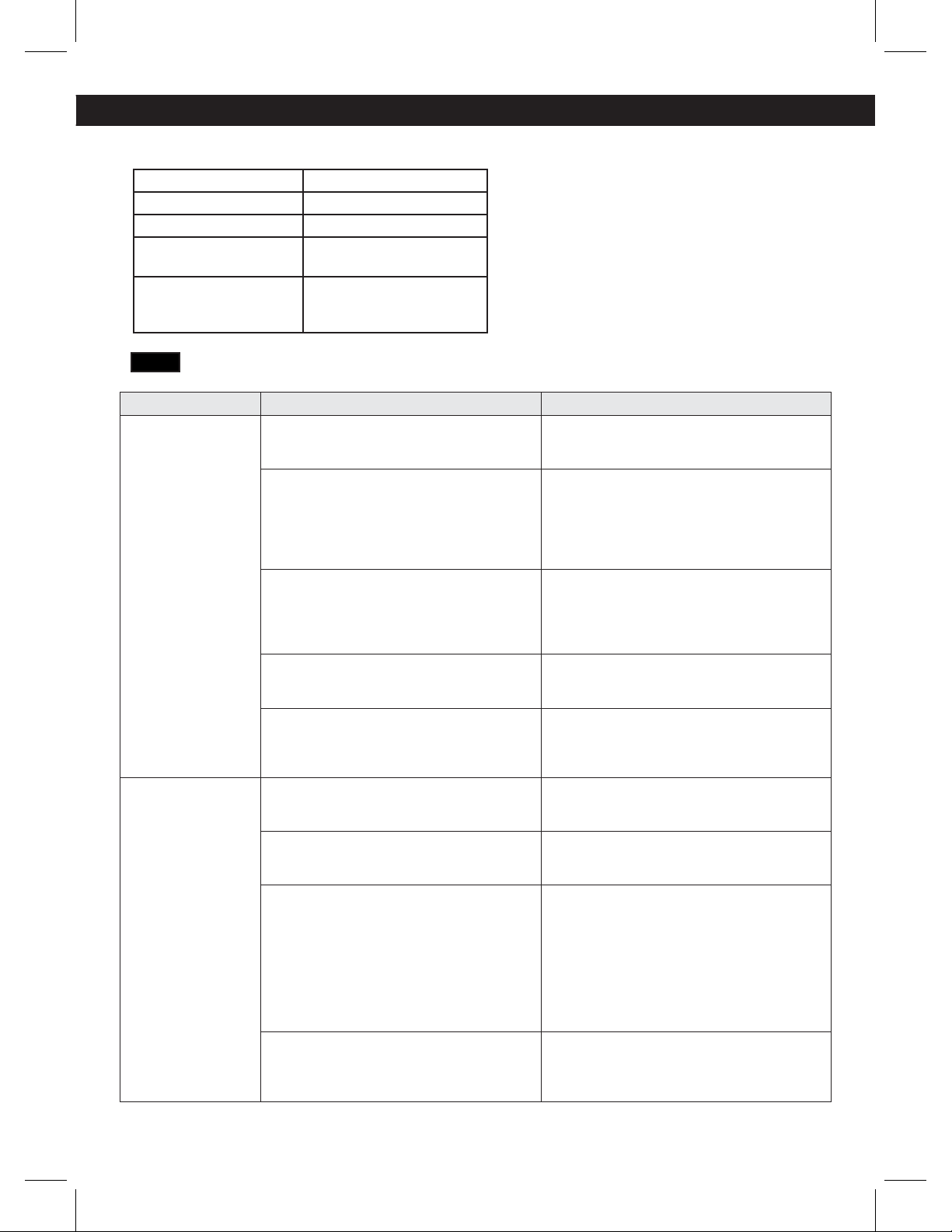
Before conducting troubleshooting, make sure that the following basic requirements are met:
Service Flow 0.5 gpm (1.9 lpm)
Water Supply Potable Water
Water Pressure 40-120 psi (0,28 - 0,83 MPa)
Operating Ambient
Temperature Limits
55°F - 110°F (13°C - 43°C)
Electrical Ratings
115 or 127 Volts, AC and
fused at 15 A or 10 A to 220
Volts.
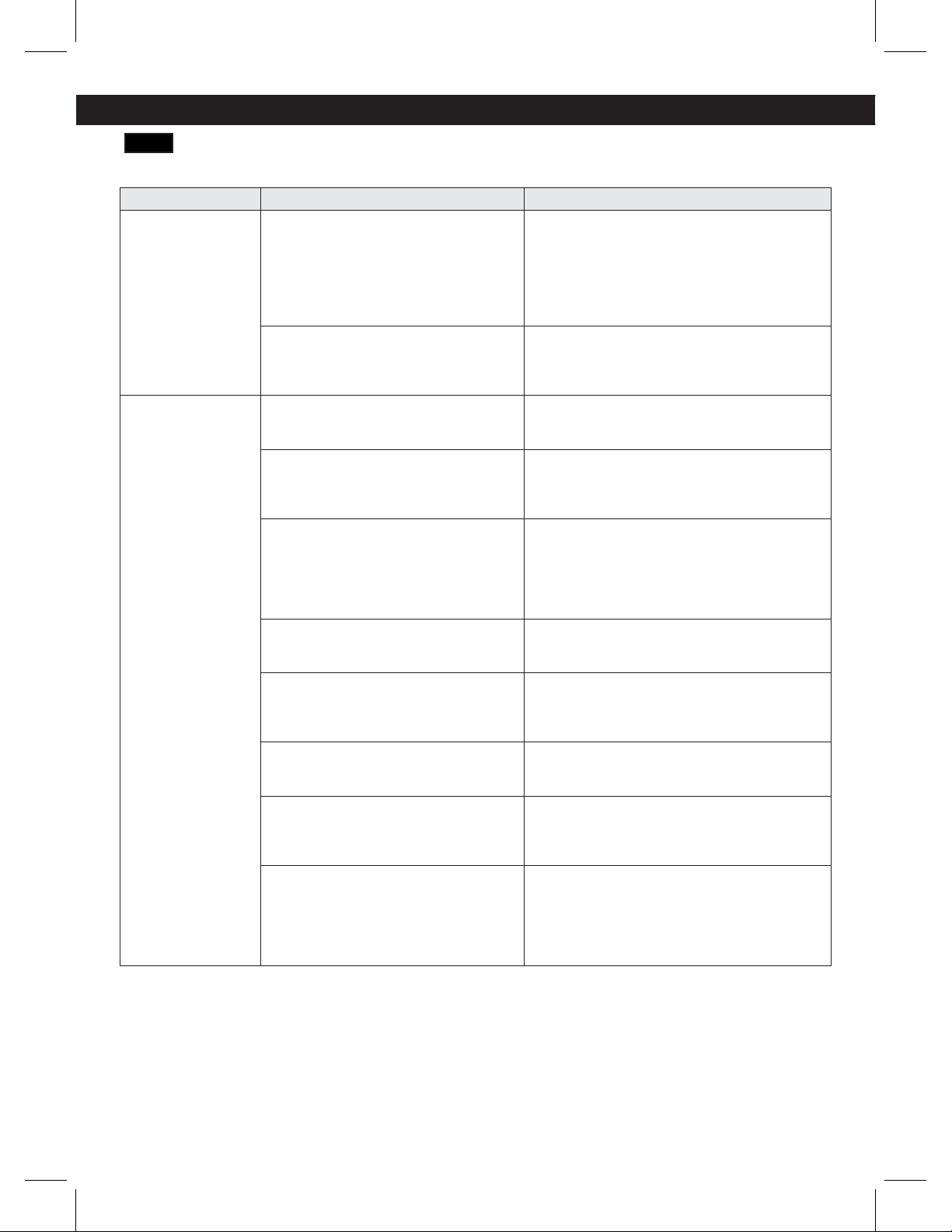
COOLING
Problem Possible Causes Solutions
Refrigerator and
Freezer section
are not cooling.
The refrigerator control is set to OFF (some
models).
Turn the control ON. Refer to the Setting the
Controls section for proper temperature
settings.
Refrigerator is set to Demo Mode. Demo Mode allows the lights and control
display to work normally while disabling
cooling to save energy while on the
showroom floor. Refer to the Setting the
Controls section for instructions on how to
disable Demo Mode.
Refrigerator is in the defrost cycle. During the defrost cycle, the temperature
of each compartment may raise slightly.
Wait 30 minutes and confirm the proper
temperature has been restored once the
defrost cycle has completed.
Refrigerator was recently installed. It may take up to 24 hours for each
compartment to reach the desired
temperature.
Refrigerator was recently relocated. If the refrigerator was stored for a long period
of time or moved on its side, it is necessary
for the refrigerator to stand upright for 24
hours before connecting it to power.
Cooling System
runs too much.
Refrigerator is replacing an older model. Modern refrigerators require more operating
time but use less energy due to more efficient
technology.
Refrigerator was recently plugged in or
power restored.
The refrigerator will take up to 24 hours to
cool completely.
Door opened often or a large amount of
food / hot food was added.
Adding food and opening the door warms
the refrigerator, requiring the compressor to
run longer in order to cool the refrigerator
back down. In order to conserve energy,
try to get everything you need out of the
refrigerator at once, keep food organized so
it is easy to find, and close the door as soon
as the food is removed. (Refer to the Food
Storage Guide.)
Doors are not closed completely. Firmly push the doors shut. If they will not
shut all the way, see the Doors will not close
completely or pop open section in Parts &
Features Troubleshooting.
31
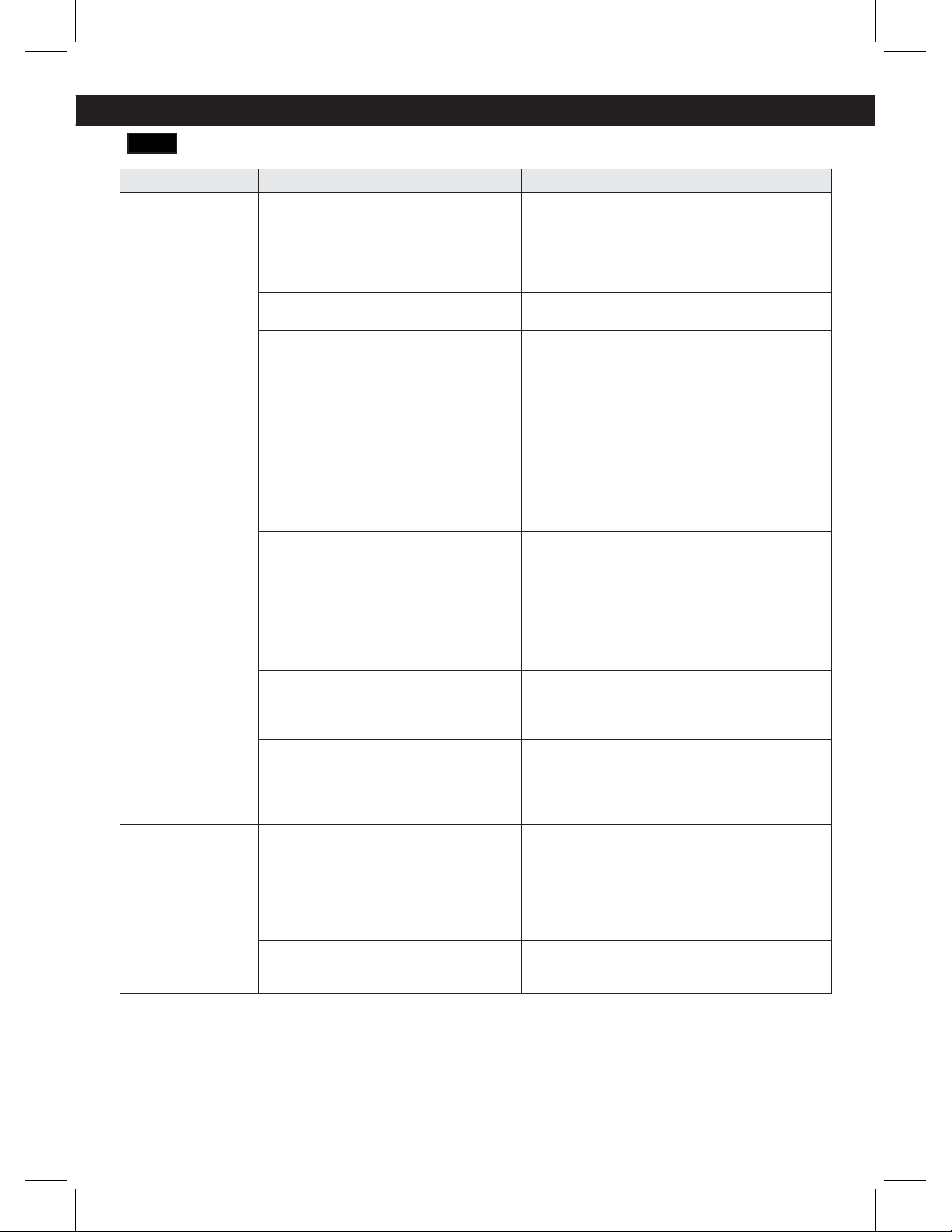
COOLING
Problem Possible Causes Solutions
Refrigerator is installed in a hot location. The compressor will run longer under warm
conditions. At normal room temperatures
70°F (21°C) expect your compressor to run
about 40% to 80% of the time. Under warmer
conditions, expect it to run even more often.
The refrigerator should not be operated above
110°F (43°C ).
Condenser / back cover is clogged. Use a vacuum cleaner with an attachment to
clean the condenser cover and vents. Do not
remove the panel covering the condenser coil
area.
Refrigerator or
Freezer section is
too warm.
Refrigerator was recently installed. It may take up to 24 hours for each
compartment to reach the desired
temperature.
Air vents are blocked. Rearrange items to allow air to flow throughout
the compartment. Refer to the Airflow
diagram in the Using Your Refrigerator
section.
Doors are opened often or for long
periods of time.
When the doors are opened often or for long
periods of time, warm, humid air enters the
compartment. This raises the temperature
and moisture level within the compartment.
To lessen the effect, reduce the frequency
and duration of door openings.
Unit is installed in a hot location. The refrigerator should not be operated in
temperatures above 110F (43°C ).
A large amount of food or hot food was
added to either compartment.
Adding food warms the compartment requiring
the cooling system to run. Allowing hot food to
cool to room temperature before putting it in
the refrigerator will reduce this effect.
Doors not closed correctly. See the Doors will not close correctly or pop
open section in Parts & Features Troubleshooting.
Temperature control is not set correctly. If the temperature is too warm, adjust the control
one increment at a time and wait for the
temperature to stabilize. Refer to the Setting
the Controls section for more information.
Defrost cycle has recently completed. During the defrost cycle, the temperature of
each compartment may raise slightly and
condensation may form on the back wall.
Wait 30 minutes and confirm the proper
temperature has been restored once the
defrost cycle has completed.
TROUBLESHOOTING GUIDE
32
TROUBLESHOOTING GUIDE
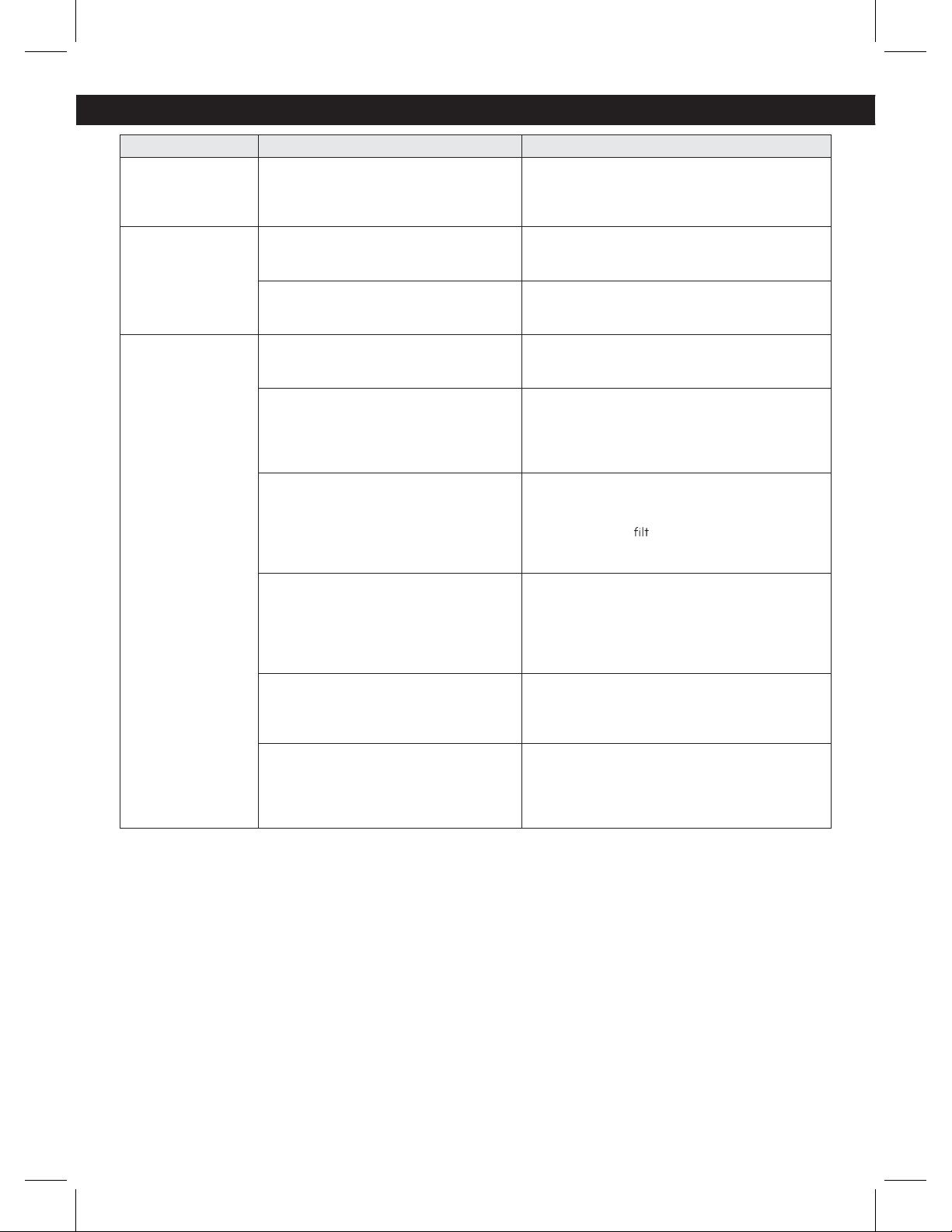
COOLING/ ICE & WATER
Problem Possible Causes Solutions
Interior moisture
buildup.
Doors are opened often or for long
periods of time.
When the doors are opened often or for long
periods of time, warm, humid air enters the
compartment. This raises the temperature and
moisture level within the compartment. To
lessen the effect, reduce the frequency and
duration of door openings.
Doors not closed correctly. See the Doors will not close correctly section in
the Troubleshooting section.
Weather is humid. Humid weather allows additional moisture to
enter the compartments when the doors are
opened leading to condensation or frost.
Maintaining a reasonable level of humidity in
the home will help to control the amount of
moisture that can enter the compartments.
Defrost cycle recently completed. During the defrost cycle, the temperature of
each compartment may raise slightly and
condensation may form on the back wall.
Wait 30 minutes and confirm that the proper
temperature has been restored once the defrost
cycle has completed.
Food is not packaged correctly. Food stored uncovered or unwrapped, and damp
containers can lead to moisture accumulation
within each compartment. Wipe all containers
dry and store food in sealed packaging to
prevent condensation and frost.
Food is freezing
in the refrigerator
compartment.
Food with high water content was placed
near an air vent.
Rearrange items with high water content away
from air vents.
Refrigerator temperature control is set
incorrectly.
If the temperature is too cold, adjust the control
one increment at a time and wait for the
temperature to stabilize. Refer to the Setting the
Controls section for more information.
Refrigerator is installed in a cold location. When the refrigerator is operated in temperature
below 41°F (5°C), food can freeze in the
refrigerator compartment. The refrigerator
should not be operated in temperature below
55°F (13°C).
Frost or ice
crystals form
on frozen food
(outside of
package).
Door is opened frequently or for long
periods of time.
When the doors are opened often or for long
periods of time, warm, humid air enters the
compartment. This raises the temperature
and moisture level within the compartment.
Increased moisture will lead to frost and
condensation. To lessen the effect, reduce the
frequency and duration of door openings.
Door is not closing properly Refer to the Doors will not close correctly or pop
open section in the Troubleshooting section.
33
REFRIGERATOR CARE AND CLEANING
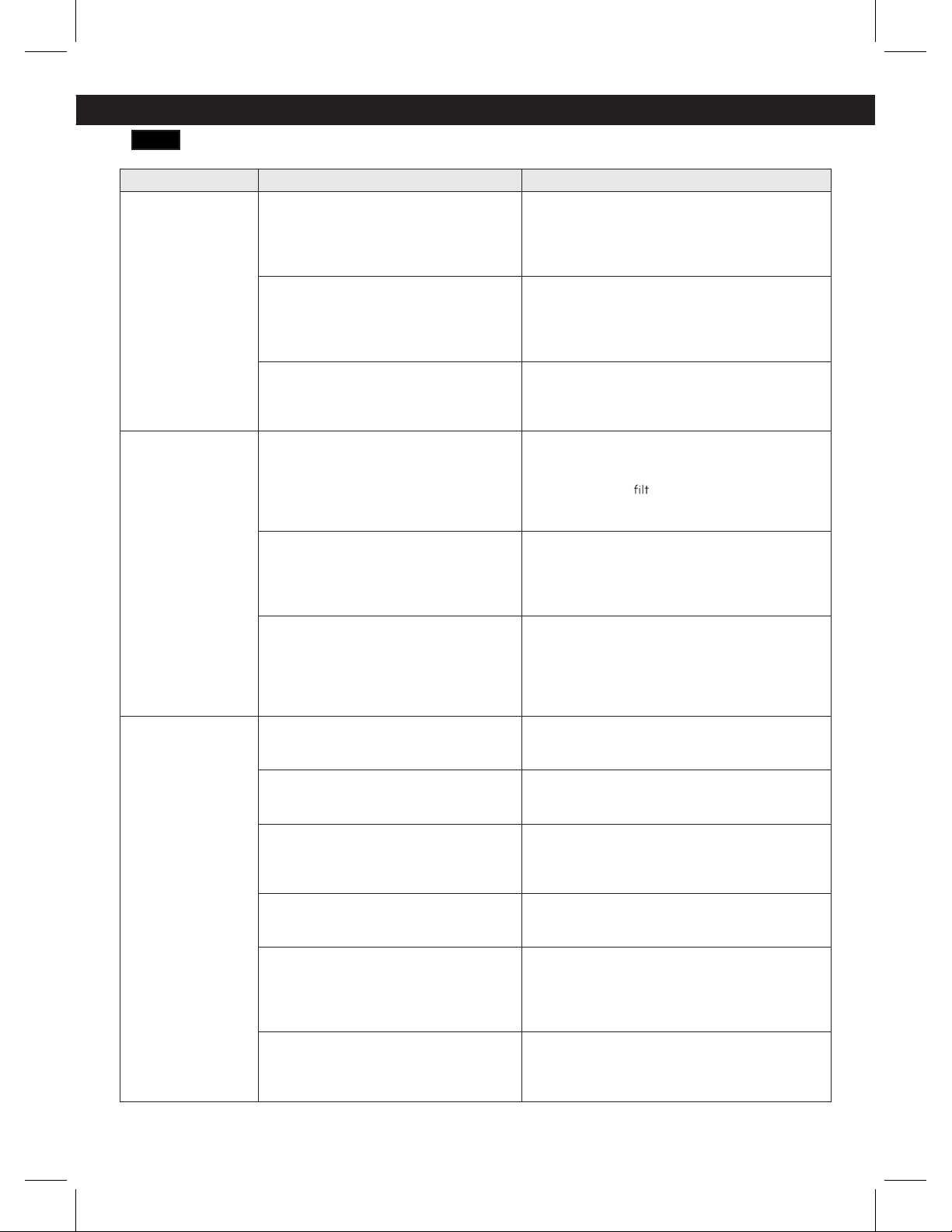
Problem Possible Causes Solutions
Refrigerator or
Freezer section is
too cold.
Incorrect temperature control settings. If the temperature is too cold, adjust the control
one increment at a time and wait for the
temperature to stabilize. Refer to the Setting the
Controls section for more information.
Frost or ice
crystals on
frozen food
(inside of sealed
package).
Condensation from food with a high
water content has frozen inside of the
food package.
This is normal for food items with a high water
content.
Food has been left in the freezer for a
long period of time.
Do not store food items with high water content
in the freezer for a long period of time.
Icemaker is not
making enough
ice.
Demand exceeds ice storage capacity. The icemaker will produce approximately 100
cubes in a 24 hour period.
House water supply is not connected,
valve is not turned on fully, or valve is
clogged.
Connect the refrigerator to a cold water supply
with adequate pressure and turn the water
shutoff valve fully open.
If the problem persists, it may be necessary to
contact a plumber.
Water filter has been exhausted. It is recommended that you replace the water
filter:
ţ"QQroximately every six months.
ţ8IFO the water
er indicator turns on.
ţ8IFO the water dispenser output decreases.
ţ8IFO the ice cubes are smaller than normal.
Low house water supply pressure.
The water pressure must be between 20 and 120
psi or 0,14 and 0,83 Mpa on models without a
water filter and between 40 and 120 psi or 0,28
Mpa and 0,83 MPa on models with a water filter.
If the problem persists, it may be necessary to
contact a plumber.
Reverse Osmosis filtration system is
used.
Reverse osmosis filtration systems can reduce
the water pressure below the minimum amount
and result in icemaker issues. (Refer to Water
Pressure section.)
Tubing connecting refrigerator to house
supply valve is kinked.
The tubing can kink when the refrigerator is
moved during installation or cleaning resulting
in reduced water flow. Straighten or repair the
water supply line and arrange it to prevent future
kinks.
TROUBLESHOOTING GUIDE
34
TROUBLESHOOTING GUIDE
ICE & WATER
Problem Possible Causes Solutions
Icemaker is not
making enough ice
(continued).
Doors are opened often or for long
periods of time.
If the doors of the unit are opened often, ambient
air will warm the refrigerator which will prevent
the unit from maintaining the set temperature.
Lowering the refrigerator temperature can help,
as well as not opening the doors as frequently.
Doors are not closed completely. If the doors are not properly closed, ice
production will be affected. See the Doors will
not close completely or pop open section in
Parts & Features Troubleshooting for more
information.
The temperature setting for the freezer
is too warm.
The recommended temperature for the freezer
compartment for normal ice production is
0°F. If the freezer temperature is warmer,
ice production will be affected.
Dispensing water
slowly.
Water filter has been exhausted. It is recommended that you replace the water
filter:
ţ"QQroximately every six months.
ţ8IFO the water
er indicator turns on.
ţ8IFO the water dispenser output decreases.
ţ8IFO the ice cubes are smaller than normal.
Reverse osmosis filtration system is used. Reverse osmosis filtration systems can reduce
the water pressure below the minimum amount
and result in icemaker issues.
If the problem persists, it may be necessary to
contact a plumber.
Low house water supply pressure.
Icemaker is not
making ice.
Refrigerator was recently installed or
icemaker recently connected.
It may take up to 24 hours for each compartment
to reach the desired temperature and for the
icemaker to begin making ice.
Icemaker not turned on. Locate the icemaker ON/OFF switch and confirm
that it is in the ON (I) position.
The ice detecting sensor is obstructed. Foreign substances or frost on the ice-detecting
sensor can interrupt ice production. Make sure
that the sensor area is clean at all times for
proper operation.
The refrigerator is not connected to a
water supply or the supply shutoff valve
is not turned on.
Connect refrigerator to the water supply and turn
the water shutoff valve fully open.
Icemaker shutoff (arm or sensor)
obstructed.
If your icemaker is equipped with an ice shutoff
arm, make sure that the arm moves freely. If your
icemaker is equipped with the electronic ice
shutoff sensor, make sure that there is a clear
path between the two sensors.
Reverse osmosis water filtration system
is connected to your cold water supply.
Reverse osmosis filtration systems can reduce
the water pressure below the minimum amount
and result in icemaker issues. (Refer to the Water
Pressure section.)
The water pressure must be between 20 and 120
psi or 0,14 and 0,83 Mpa on models without a
water filter and between 40 and 120 psi or 0,28
Mpa and 0,83 MPa on models with a water filter.
If the problem persists, it may be necessary to
contact a plumber.
35
Problem Possible Causes Solutions
Icemaker is not
making ice.
Refrigerator was recently installed or
icemaker recently connected.
It may take up to 24 hours for each compartment
to reach the desired temperature and for the
icemaker to begin making ice.
Icemaker not turned on. Locate the icemaker ON/OFF switch and confirm
that it is in the ON (I) position.
The ice detecting sensor is obstructed. Foreign substances or frost on the ice-detecting
sensor can interrupt ice production. Make sure
that the sensor area is clean at all times for
proper operation.
The refrigerator is not connected to a
water supply or the supply shutoff valve is
not turned on.
Connect refrigerator to the water supply and turn
the water shutoff valve fully open.
Icemaker shutoff (arm or sensor)
obstructed.
If your icemaker is equipped with an ice shutoff
arm, make sure that the arm moves freely. If your
icemaker is equipped with the electronic ice
shutoff senso
r, make sure that there is a clear
path between the two sensors.
Reverse osmosis water filtration system
is connected to your cold water supply.
Reverse osmosis filtration systems can reduce
the water pressure below the minimum amount
and result in icemaker issues. (Refer to the Water
Pressure section.)
Not dispensing
water.
New installation or water line recently
connected.
Dispense 2.5 gallons (9 liters) of water (flush for
approximately 5 minutes) to remove trapped
air and contaminates from the system.
Do not dispense the entire 2.5 gallon (9 liters)
amount continuously. Depress and release the
dispenser pad for cycles of 30 seconds ON and
60 seconds OFF.
The dispenser panel is locked. Press and hold the Control Lock button for
three seconds to unlock the control panel and
dispenser.
The dispenser is not set for water
dispensing.
The dispenser can be set for ice or water. Make
certain that the control panel is set for the proper
operation. Press the Ice/Water Select button on
the control panel.
Refrigerator or freezer doors are not
closed properly.
Water will not dispense if any of the refrigerator
doors are left open.
Water filter has been recently removed or
replaced.
After the water filter is replaced, dispense 2.5
gallons of water (flush for approximately
5 minutes) to remove trapped air and
contaminates from the system. Do not dispense
the entire 2.5 gallon (9 liters) amount
continuously. Depress and release the dispenser
pad for cycles of 30 seconds ON and 60
seconds OFF.
Tubing connecting refrigerator to house
supply valve is kinked.
The tubing can kink when the refrigerator is
moved during installation or cleaning resulting
in reduced water flow. Straighten or repair the
water supply line and arrange it to prevent future
kinks.
The house water supply is not connected,
the valve is not turned on fully, or
the
valve is clogged.
Connect refrigerator to the water supply and turn
the water shutoff valve fully open.
If the problem persists, it may be necessary to
contact a plumber.
TROUBLESHOOTING GUIDE
36
TROUBLESHOOTING GUIDE
Problem Possible Causes Solutions
Ice has bad taste
or odor.
Water supply contains minerals such as
sulfur.
A water filter may need to be installed to
eliminate taste and odor problems.
NOTE: In some cases, a filter may not help. It
may not be possible to remove all minerals /
odor / taste in all water supplies.
Icemaker was recently installed. Discard the first few batches of ice to avoid
discolored or bad tasting ice.
Ice has been stored for too long. Ice that has been stored for too long will shrink,
become cloudy, and may develop a stale taste.
Throw away old ice and make a new supply.
The food has not been stored properly in
either compartment.
Rewrap the food. Odors may migrate to the ice if
food is not wrapped properly.
The interior of the refrigerator needs to
be cleaned.
See the Care and Cleaning section for more
information.
The ice storage bin needs to be cleaned. Empty and wash the bin (discard old cubes).
Make sure that the bin is completely dry before
reinstalling it.
Dispensing warm
water.
Refrigerator was recently installed. Allow 24 hours after installation for the water
storage tank to cool completely.
The water dispenser has been used
recently and the storage tank was
exhausted.
Depending on your specific model, the water
storage capacity will range from approximately
10 to 30 oz (0,3 to 0,9 liters).
Dispenser has not been used for several
hours.
If the dispenser has not been used for several
hours, the first glass dispensed may be warm.
Discard the first 10 oz (0,3 liters).
Refrigerator is connected to the hot
water supply.
Make sure that the refrigerator is connected to a
cold water pipe.
WARNING: Connecting the refrigerator to a
hot water line may damage the icemaker.
Water has bad
taste or odor.
Water supply contains minerals such as
sulfur.
A water filter may need to be installed to
eliminate taste and odor problems.
Water filter has been exhausted. It is recommended that you replace the water
filter:
ţ"QQroximately every 6 months.
ţ8IFO the water
er indicator turns on.
ţ8IFO the water dispenser output decreases.
ţ8IFO the ice cubes are smaller than normal.
Refrigerator was recently installed. Dispense 2.5 gallons (9 liters) of water (flush for
approximately 5 minutes) to remove trapped
air and contaminates from the system.
Do not dispense the entire 2.5 gallon (9 liters)
amount continuously. Depress and release
the dispenser pad for cycles of 30 seconds
ON and 60 seconds OFF.
Icemaker is
making too much
ice.
Icemaker shutoff (arm/sensor) is
obstructed.
Empty the ice bin. If your icemaker is equipped
with an ice shutoff arm, make sure that the arm
moves freely. If your icemaker is equipped with
the electronic ice shutoff sensor, make sure that
there is a clear path between the two sensors.
Reinstall the ice bin and wait 24 hours to confirm
proper operation.
37
NOISE
Problem Possible Causes Solutions
Clicking
The defrost control will click when the
automatic defrost cycle begins and ends.
The thermostat control (or refrigerator
control on some models) will also click
when cycling on and off.
Normal Operation
Rattling
Rattling noises may come from the flow
of refrigerant, the water line on the back
of the unit, or items stored on top of or
around the refrigerator.
Normal Operation
Refrigerator is not resting solidly on the
floor.
Floor is weak or uneven or leveling legs need to
be adjusted. See the Door Alignment section.
Refrigerator with linear compressor was
jarred while running.
Normal Operation
Whooshing
Evaporator fan motor is circulating air
through the refrigerator and freezer
compartments.
Normal Operation
Air is being forced over the condenser by
the condenser fan.
Normal Operation
Gurgling
Refrigerant flowing through the cooling
system.
Normal Operation
Popping
Contraction and expansion of the inside
walls due to changes in temperature.
Normal Operation
Sizzling
Water dripping on the defrost heater
during a defrost cycle.
Normal Operation
Vibrating
If the side or back of the refrigerator is
touching a cabinet or wall, some of the
normal vibrations may make an audible
sound.
To eliminate the noise, make sure that the sides
and back cannot vibrate against any wall or
cabinet.
Dripping
Water running into the drain pan during
the defrost cycle.
Normal Operation
Pulsating or High-
Pitched Sound
Your refrigerator is designed to run
more efficiently to keep your food items
at the desired temperature. The high
efficiency compressor may cause your
new refrigerator to run longer than
your old one, but it is still more energy
efficient than previous models. While
the refrigerator is running, it is normal to
hear a pulsating or high-pitched sound.
Normal Operation
TROUBLESHOOTING GUIDE
38
PARTS & FEATURES
Problem Possible Causes Solutions
Doors will not
close correctly or
pop open.
Food packages are blocking the door
open.
Rearrange food containers to clear the door and
door shelves.
Ice bin, crisper cover, pans, shelves, door
bins, or baskets are out of position.
Push bins all the way in and put crisper cover,
pans, shelves and baskets into their correct
positions. See the Using Your Refrigerator
section for more information.
The doors were removed during product
installation and not properly replaced.
Remove and replace the doors according to the
Removing and Replacing Refrigerator Handles
and Doors section.
Refrigerator is not leveled properly. See Door Alignment in the Refrigeration
Installation section to level refrigerator.
Doors are difficult
to open.
The gaskets are dirty or sticky. Clean the gaskets and the surfaces that they
touch. Rub a thin coat of appliance polish or
kitchen wax on the gaskets after cleaning.
Door was recently closed. When you open the door, warmer air enters the
refrigerator. As the warm air cools, it can create
a vacuum. If the door is hard to open, wait one
minute to allow the air pressure to equalize, then
see if it opens more easily.
Refrigerator
wobbles or seems
unstable.
Leveling legs are not adjusted properly. Refer to the Leveling and Door Alignment
section.
Floor is not level. It may be necessary to add shims under the
leveling legs or rollers to complete installation.
Lights do not
work.
LED interior lighting failure. The refrigerator compartment lamp is LED
interior lighting, and service should be
performed by a qualified technician. Refer to
the Light Bulb Replacement section.
TROUBLESHOOTING GUIDE
39
WARRANTY
LG ELECTRONICS U.S.A., INC.
LG REFRIGERATOR LIMITED WARRANTY - U.S.A.
Should your LG Refrigerator (“Product”) fail due to a defect in materials or workmanship under normal home use, during
the warranty period set forth below, LG will at its option repair or replace the product. This limited warranty is valid only to
the original retail purchaser of the product and applies only when purchased and used within the United States including
U.S. Territories. Proof of original retail purchase is required to obtain warranty service under this limited warranty.
Noises associated with normal operation and failure to follow instructions found in the use and care and installation guides or
operating the unit in an unsuitable environment will not be covered under this warranty.
Replacement products and parts are warranted for the remaining portion of the original warranty period or ninety (90) days,
whichever is greater.
Replacement products and parts may be new or remanufactured.
THIS WARRANTY IS IN LIEU OF ANY OTHER WARRANTY, EXPRESS OR IMPLIED, INCLUDING WITHOUT LIMITATION,
ANY WARRANTY OF MERCHANTABILITY OR FITNESS FOR A PARTICULAR PURPOSE. TO THE EXTENT ANY IMPLIED
WARRANTY IS REQUIRED BY LAW, IT IS LIMITED IN DURATION TO THE EXPRESS WARRANTY PERIOD ABOVE. NEITHER
THE MANUFACTURER NOR ITS U.S. DISTRIBUTOR SHALL BE LIABLE FOR ANY INCIDENTAL, CONSEQUENTIAL, INDIRECT,
SPECIAL, OR PUNITIVE DAMAGES OF ANY NATURE, INCLUDING WITHOUT LIMITATION, LOST REVENUES OR PROFITS,
OR ANY OTHER DAMAGE WHETHER BASED IN CONTRACT, TORT, OR OTHERWISE. Some states do not allow the exclusion
or limitation of incidental or consequential damages or limitations on how long an implied warranty lasts, so the above exclusion
or limitation may not apply to you. This warranty gives you specific legal rights and you may also have other rights that vary from
state to state.
THIS LIMITED WARRANTY DOES NOT COVER:
1. Service trips to deliver, pick up, install, or repair the
product; instruct the customer on operation of the
product; repair or replace fuses or correct wiring or
plumbing, or correction of unauthorized repairs/
installation.
2. Failure of product to perform during power failures and
interruptions or inadequate electrical service.
3. Damage caused by leaky or broken water pipes, frozen
water pipes, restricted drain lines, inadequate or
interrupted water supply or inadequate supply of air.
4. Damage resulting from operating the product in a
corrosive atmosphere or contrary to the instructions
outlined in the product owner’s manual.
5. Damage to the product caused by accidents, pests and
vermin, lightning, wind, fire, floods, or acts of God.
6. Damage resulting from misuse, abuse, improper
installation, repair, or maintenance. Improper repair
includes use of parts not approved or specified by LG.
7. Damage or failure caused by unauthorized modification
or alteration, or if it is used for other than the intended
purpose, or any water leakage where the unit was not
properly installed.
8. Damage or failure caused by incorrect electrical current,
voltage, or plumbing codes, commercial or industrial
use, or use of accessories, components, or consumable
cleaning products that are not approved by LG.
9. Damage caused by transportation and handling,
including scratches, dents, chips, and/or other damage
to the finish of your product, unless such damage
results from defects in materials or workmanship and
is reported within one (1) week of delivery (Call: 1-800-
243-0000).
10. Damage or missing items to any display, open box,
discounted, or refurbished product.
11. Products with original serial numbers that have been
removed, altered, or can not be readily determined.
Model and Serial numbers, along with original retail
sales receipt, are required for warranty validation.
12. Increases in utility costs and additional utility
expenses.
13. Replacement of light bulbs, filters, or any consumable
parts.
14. Repairs when your product is used in other than normal
and usual household use (e.g. commercial use, offices,
and recreational facilities) or contrary to the instructions
outlined in the product owner’s manual.
15. Costs associated with removal of your product from your
home for repairs.
16. The removal and reinstallation of the product if it is
installed in an inaccessible location or is not installed
in accordance with published installation instructions,
including LG’s owner’s and installation manuals.
17. Shelves, door bins, drawers, handles, accessories, and
other parts besides those that were originally included
with this particular model.
The cost of repair or replacement under these excluded circumstances shall be borne by the consumer.
For complete warranty details and customer assistance,
please call or visit our website:
Call 1-800-243-0000 (24 hours a day, 365 days a year) and
select the appropriate option from the menu, or visit our website
at www.lg.com
Or by mail: LG Customer Information Center:
P. O. Box 240007, 201 James Record Road Huntsville, Alabama
35813
ATTN: CIC
Write your warranty information below:
Product Registration Information:
Model:
Serial Number:
Date of Purchase:
Refrigerator/Freezer Sealed System (Compressor, Condenser, and Evaporator only)
One (1) year from the date of original
retail purchase
One (1) year from the date of original
retail purchase
Seven (7) years from the date of
original retail purchase
Parts and Labor
(internal/functional parts only)
Parts and Labor Parts only
(Consumer will be charged for labor).
40
WARRANTY
LG ELECTRONICS CANADA, INC.
LG REFRIGERATOR LIMITED WARRANTY - Canada
WARRANTY: Should your LG Refrigerator (“Product”) fail due to a defect in material or workmanship under normal home use during
the warranty period set forth below, LG Canada will at its option repair or replace the Product upon receipt of proof of original retail
purchase.
This warranty is valid only to the original retail purchaser of the product and applies only to a Product distributed in Canada by LG
Canada or an authorized Canadian distributor thereof. The warranty only applies to Products located and used within Canada.
Noises associated with normal operation and failure to follow instructions found in the use and care and installation guides or
operating the unit in an unsuitable environment will not be covered under this warranty.
Replacement products and parts are warranted for the remaining portion of the original warranty period or ninety (90) days,
whichever is greater.
Replacement products and parts may be new or remanufactured.
LG Authorized Service Center warranties their repair work for thirty (30) days.
LG CANADA’S SOLE LIABILITY IS LIMITED TO THE WARRANTY SET OUT ABOVE. EXCEPT AS EXPRESSLY PROVIDED
ABOVE, LG CANADA MAKES NO AND HEREBY DISCLAIMS ALL OTHER WARRANTIES AND CONDITIONS RESPECTING THE
PRODUCT, WHETHER EXPRESS OR IMPLIED, INCLUDING, BUT NOT LIMITED TO, ANY IMPLIED WARRANTY OR CONDITION
OF MERCHANTABILITY OR FITNESS FOR A PARTICULAR PURPOSE, AND NO REPRESENTATIONS SHALL BE BINDING ON
LG CANADA. LG CANADA DOES NOT AUTHORIZE ANY PERSON TO CREATE OR ASSUME FOR IT ANY OTHER WARRANTY
OBLIGATION OR LIABILITY IN CONNECTION WITH THE PRODUCT. TO THE EXTENT THAT ANY WARRANTY OR CONDITION
IS IMPLIED BY LAW, IT IS LIMITED TO THE EXPRESS WARRANTY PERIOD ABOVE. LG CANADA, THE MANUFACTURER OR
DISTRIBUTOR SHALL NOT BE LIABLE FOR ANY INCIDENTAL, CONSEQUENTIAL, SPECIAL, DIRECT OR INDIRECT DAMAGES,
LOSS OF GOODWILL, LOST PROFITS, PUNITIVE OR EXEMPLARY DAMAGES OR ANY OTHER DAMAGE, WHETHER ARISING
DIRECTLY OR INDIRECTLY FROM ANY CONTRACTUAL BREACH, FUNDAMENTAL OR OTHERWISE, OR FROM ANY ACTS OR
OMISSIONS, TORT, OR OTHERWISE. This warranty gives you specific legal rights. You may have other rights which may vary
from province to province depending on applicable provincial laws. Any term of this warranty that negates or varies any implied
condition or warranty under provincial law is severable where it conflicts with provincial law without affecting the remainder of
this warranty’s terms.
THIS LIMITED WARRANTY DOES NOT COVER:
1. Service trips to deliver, pick up, install, or repair the product;
instruct the customer on operation of the product; repair or
replace fuses or correct wiring or plumbing, or correction of
unauthorized repairs/installation.
2. Failure of product to perform during power failures and
interruptions or inadequate electrical service.
3. Damage caused by leaky or broken water pipes, frozen water
pipes, restricted drain lines, inadequate or interrupted water
supply or inadequate supply of air.
4. Damage resulting from operating the product in a corrosive
atmosphere or contrary to the instructions outlined in the
product owner’s manual.
5. Damage to the product caused by accidents, pests and vermin,
lightning, wind, fire, floods, or acts of God.
6. Damage resulting from misuse, abuse, improper installation,
repair, or maintenance. Improper repair includes use of parts not
approved or specified by LG.
7. Damage or failure caused by unauthorized modification or
alteration, or if it is used for other than the intended purpose, or
any water leakage where the unit was not properly installed.
8. Damage or failure caused by incorrect electrical current, voltage,
or plumbing codes, commercial or industrial use, or use of
accessories, components, or consumable cleaning products that
are not approved by LG.
9. Damage caused by transportation and handling, including
scratches, dents, chips, and/or other damage to the finish
of your product, unless such damage results from defects in
materials or workmanship and is reported within one (1) week of
delivery (Call: 1-800-243-0000).
10. Damage or missing items to any display, open box, discounted,
or refurbished product.
11. Products with original serial numbers that have been removed,
altered, or can not be readily determined. Model and Serial
numbers, along with original retail sales receipt, are required for
warranty validation.
12. Increases in utility costs and additional utility expenses.
13. Replacement of light bulbs, filters, or any consumable parts.
14. Repairs when your product is used in other than normal
and usual household use (e.g. commercial use, offices, and
recreational facilities) or contrary to the instructions outlined in
the product owner’s manual.
15. Costs associated with removal of your product from your home
for repairs.
16. The removal and reinstallation of the product if it is installed in
an inaccessible location or is not installed in accordance with
published installation instructions, including LG’s owner’s and
installation manuals.
17. Shelves, door bins, drawers, handles, accessories, and other
parts besides those that were originally included with this
particular model.
The cost of repair or replacement under these excluded circumstances shall be borne by the consumer.
For complete warranty details and
customer assistance, please call or visit
our website: Call 1-888-542-2623 (24 hours
a day, 365 days a year) and select the
appropriate option from the menu, or visit our
website at www.lg.com
Write your warranty information below:
Product Registration Information:
Model:
Serial Number:
Date of Purchase:
Refrigerator/Freezer
WARRANTY PERIOD: (Note: If the original date of purchase can not be verified, the warranty
will begin sixty (60) days from the date of manufacture).
Sealed System (Compressor, Condenser, and Evaporator only)
One (1) year from the date of original
retail purchase
One (1) year from the date of original
retail purchase
Seven (7) years from the date of
original retail purchase
Parts and Labor
(internal/functional parts only)
Parts and Labor Parts only
(Consumer will be charged for labor).
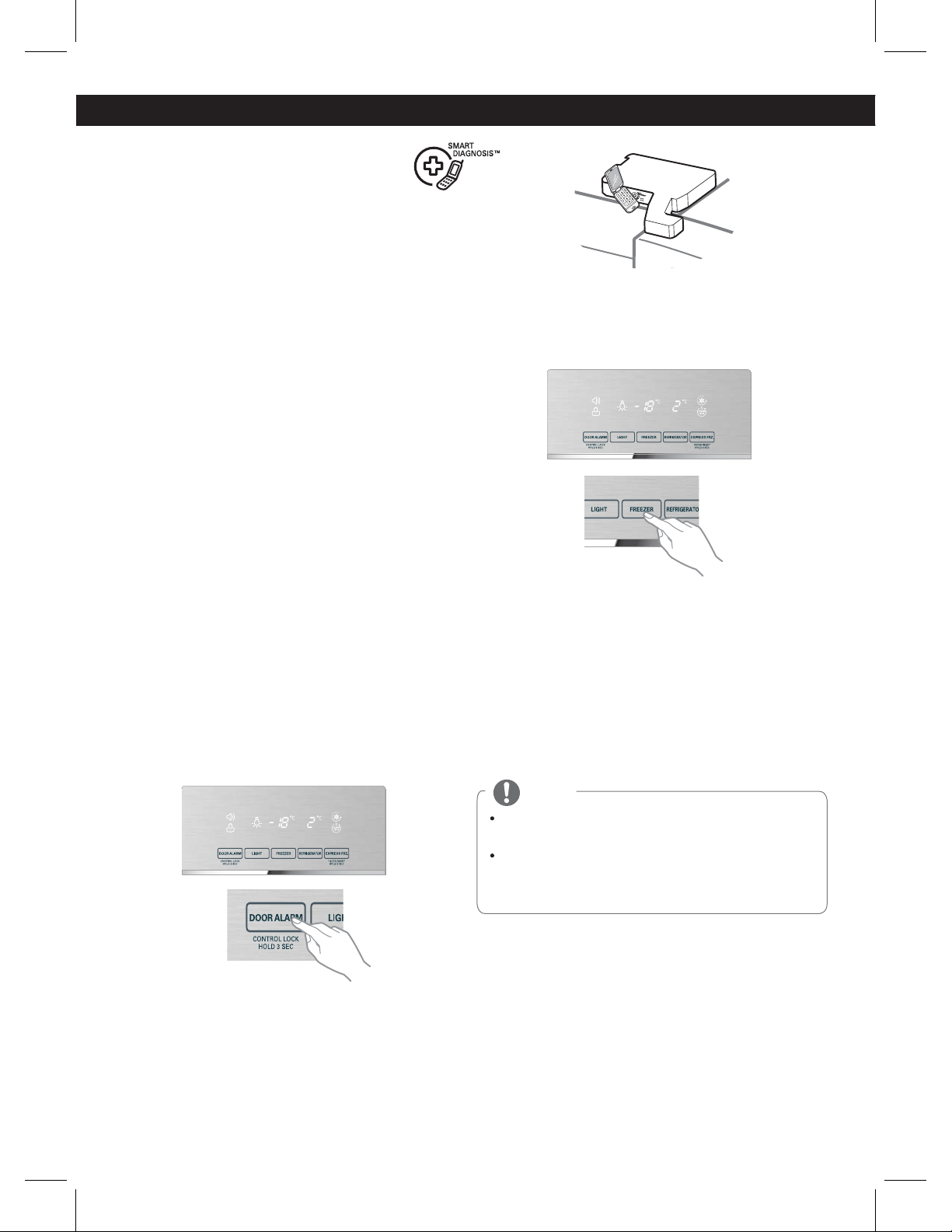
41
Should you experience any problems with your
refrigerator, it has the capability of transmitting
data via your telephone to the LG service center.
This gives you the capability of speaking directly
to our trained specialists. The specialist records
the data transmitted from your machine and
uses it to analyze the issue, providing a fast and
effective diagnosis.
If you experience problems with your refrigera-
tor, call 1-800-243-0000. Only use the Smart
Diagnosis feature when instructed to do so by
the LG call center agent. The transmission
sounds that you will hear are normal and sound
similar to a fax machine.
Smart Diagnosis cannot be activated unless
your refrigerator is connected to power. If your
refrigerator is unable to turn on, then trouble-
shooting must be done without using Smart
Diagnosis.
SMART DIAGNOSIS
(In some models).
Using Smart Diagnosis
First, call 1-800-243-0000. Only use the Smart
Diagnosis feature when instructed to do so by
the LG call center agent.
1. Lock the display. To lock the display, press and
hold the Lock button for three seconds. (If the
display has been locked for over five minutes,
you must deactivate the lock and then ractive it.)
2. Open the right refrigerator door.
3. Hold the mouthpiece of your phone in front of
the speaker that is located on the right hinge of
the refrigerator door, when instructed to do so
by the call center.
4. Press and hold the Freezer Temperature
button for three seconds while continuing to
hold your phone to the speaker.
5. After you hear three beeps, release the Free-
zer Temperature button.
6. Keep the phone in place until the tone trans-
mission has finished. This takes about 15
seconds, and the display will count down the
time. Once the countdown is over and the
tones have stopped, resume your conversation
with the specialist, who will then be able to
assist you in using the information transmitted
for analysis.
NOTE
For best results, do not move the phone while the
tones are being transmitted.
If the call center agent is not able to get an
accurate recording of the data, you may be asked
to try again.
SMART DIAGNOSIS
1-800-243-0000
1-888-865-3026
1-888-542-2623
USA, Consumer User
USA, Commercial User
CANADA
LG Customer Information Center
www.lg.com
Register your Product Online!