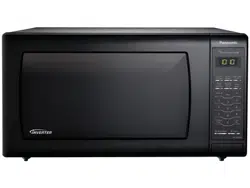
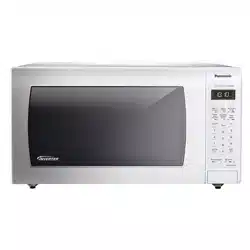
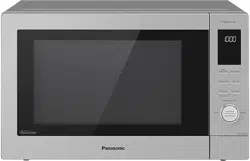
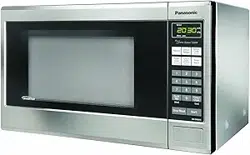
Unpack oven, remove all packing material and examine the oven for any damage such as dents, broken door latches or cracks in the door. Notify dealer immediately if oven is damaged. DO NOT install if oven is damaged.
Placement of Oven
1. The oven must be placed on a flat, stable surface. Place the front surface of the door 3 inches (7.6 cm) or more from the counter top edge to avoid accidental tipping of the microwave oven during normal use. For proper operation, the oven must have sufficient airflow. Allow 3 inches (7.6 cm) of space on both sides of the oven and 1 inch (2.5 cm) of space on top of the oven.
DO NOT block air vents. If they are blocked during operation, the oven may overheat and be damaged.
DO NOT place oven near a hot, damp surface such as a gas or electric range, sink, or dishwasher.
DO NOT operate oven when room humidity is excessive.
2. This oven is manufactured for household use only. It is not approved or tested for mobile vehicle, marine, or commercial use.
Installation
DO NOT block air vents. If they are blocked during operation, the oven may overheat. If the oven overheats, a thermal safety device will turn the oven off. The oven will remain inoperable until it has cooled.
WARNING: IMPROPER USE OF THE GROUNDING PLUG CAN RESULT IN A RISK OF ELECTRIC SHOCK. Consult a qualified electrician or service person if the grounding instructions are not completely understood, or if doubt exists as to whether the appliance is properly grounded. If it is necessary to use an extension cord, use only a three-wire extension cord that has a three-prong polarized grounding plug, and a three-slot receptacle that will accept the plug of the appliance. The marked rating of the extension cord should be equal to or greater than the electrical rating of the appliance.
Grounding Instructions THIS APPLIANCE MUST BE GROUNDED:
In the event of an electrical short circuit, grounding reduces the risk of electric shock by providing an escape wire for the electric current. This appliance is equipped with a cord having a grounding wire with a grounding plug
The plug must be plugged into an outlet that is properly installed and grounded.
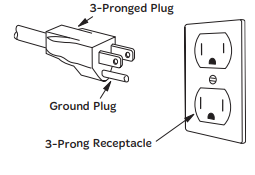
Plug into properly installed and grounded three-prong outlet.
DO NOT remove ground prong.
DO NOT use an adapter.
Power Supply
A short power-supply cord is provided to reduce the risks resulting from becoming entangled in or tripping over a longer cord.
Longer cord sets or extension cords are available and may be used if care is exercised in their use. DO NOT let cord hang over edge of a table or counter.
If a long cord or extension cord is used,
the marked electrical rating of the cord set or extension cord should be at least as great as the electrical rating of the appliance,
the extension cord must be a grounding-type three-wire cord, and
the longer cord should be arranged so that it will not drape over the countertop or tabletop where it can be pulled on by children or tripped over accidentally.
Wiring Requirements
The oven must be operated on a SEPARATE CIRCUIT. No other appliance should share the circuit with the microwave oven. If it does, the branch circuit fuse may blow or the circuit breaker may trip. The oven must be plugged into at least a 20 A, 120 V, 60 Hz GROUNDED OUTLET. Where a standard two-prong outlet is encountered, it is the personal responsibility and obligation of the consumer to have it replaced with a properly grounded threeprong outlet. The VOLTAGE used must be the same as specified on this microwave oven (120 V, 60 Hz). Using a higher voltage is dangerous and may result in a fire or oven damage. Using a lower voltage will cause slow cooking. Panasonic is NOT responsible for any damages resulting from the use of the oven with any voltage other than specified.
TV / RADIO / WIRELESS EQUIPMENT INTERFERENCE
This product has been tested and found to comply with the limits for Microwave Oven , pursuant to Part 18 of the FCC Rules. This product can radiate radio frequency energy, which could cause interference to such products as radio, TV, baby monitor, cordless phone, Bluetooth, wireless router, etc., which can be confirmed by turning this product off and on. If present, the user is encouraged to try to correct by taking one or more of the following countermeasures:
Increase the spacing distance between the microwave oven and other product receiving the interference.
If possible, use a properly installed receiver antenna and/or reorient the receiving antenna of the other product receiving the interference.
Plug the microwave oven into a different outlet from the other product receiving the interference.
Clean door and sealing surfaces of the oven. (See Care and Cleaning of Your Microwave Oven)
Food Preparation
Follow these Safety Precautions when cooking in your oven.
IMPORTANT Proper cooking depends upon the power, the time setting and quantity of food. If you use a smaller portion than recommended but cook at the time for the recommended portion, fire could result.
1) HOME CANNING / STERILIZING / DRYING FOODS / SMALL QUANTITIES OF FOODS
DO NOT use your oven for home canning. Your oven cannot maintain the food at the proper canning temperature. The food may be contaminated and then spoil.
DO NOT use the microwave oven to sterilize objects (baby bottles, etc.). It is difficult to keep the oven at the high temperature needed for sterilization.
DO NOT dry meats, herbs, fruits or vegetables in your oven. Small quantities of food or foods with low moisture content can dry out, scorch or catch on fire if overheated.
2) POPCORN Popcorn may be popped in a microwave oven corn popper. Microwave popcorn that pops in its own package is also available. Follow popcorn manufacturers’ directions and use a brand suitable for the cooking power of your microwave oven.
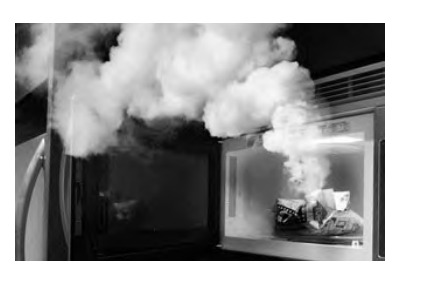
CAUTION: When using pre-packaged microwave popcorn, you can follow recommended package instructions or use the Popcorn pad (refer to page 11). Otherwise, the popcorn may not pop adequately or may ignite and cause a fire. Never leave the oven unattended when popping popcorn. Allow the popcorn bag to cool before opening, and always open the bag facing away from your face and body to prevent steam burns.
3) DEEP FAT FRYING
DO NOT deep fat fry in your microwave oven. Cooking oils may burst into flames and may cause damage to the oven and may result in burns. Microwave utensils may not withstand the temperature of the hot oil, and can shatter or melt.
4) FOODS WITH NONPOROUS SKINS
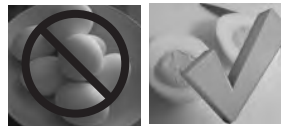
DO NOT COOK / REHEAT WHOLE EGGS, WITH OR WITHOUT THE SHELL. Steam buildup in whole eggs may cause them to explode, and possibly damage the oven or cause injury. Reheating SLICED hard-boiled eggs and cooking SCRAMBLED eggs is safe.
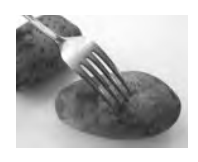
Potatoes, apples, whole squash and sausages are examples of foods with nonporous skins. These types of foods must be pierced before microwave cooking to prevent them from exploding. CAUTION: Cooking dry or old potatoes can cause fire.
5) GLASS TRAY / COOKING CONTAINERS / FOIL
Cooking containers get hot during microwaving. Heat is transferred from the HOT food to the container and the Glass Tray. Use pot holders when removing containers from the oven or when removing lids or plastic wrap covers from cooking containers, to avoid burns.
The Glass Tray will get hot during cooking. It should be allowed to cool before handling or before paper products, such as paper plates or microwave popcorn bags, are placed in the oven for microwave cooking.
When using foil in the oven, allow at least 1-inch (2.5 cm) of space between foil and interior oven walls or door.
Dishes with metallic trim should not be used, as arcing may occur.
6) PAPER TOWELS / CLOTHS
DO NOT use paper towels or cloths that contain a synthetic fiber woven into them. The synthetic fiber may cause the towel to ignite. Use paper toweling under supervision.
7) BROWNING DISHES / OVEN COOKING BAGS
Browning dishes or grills are designed for microwave cooking only. Always follow instructions provided by the manufacturer. DO NOT preheat browning dish more than six minutes.
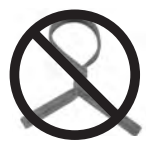
If an oven cooking bag is used for microwave cooking, prepare according to package directions. DO NOT use a wire twist-tie to close bag. Instead use plastic ties, cotton string or a strip cut from the open end of the bag.
8) THERMOMETERS
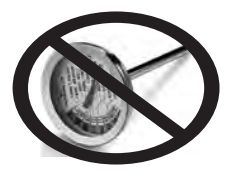
DO NOT use a conventional meat thermometer in your oven. Arcing may occur. Microwave safe thermometers are available for both meat and candy.
9) BABY FORMULA / BABY FOOD
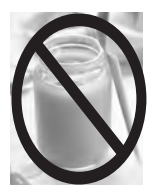
DO NOT heat baby formula or baby food in the microwave oven. The glass jar or surface of the food may appear warm while the interior can be so hot as to burn the infant’s mouth and esophagus.
10) REHEATING PASTRY PRODUCTS
When reheating pastry products, check temperatures of any fillings before eating. Some foods have fillings, which heat faster and can be extremely hot, while the surface remains warm to the touch (for example, jelly donuts).
11) GENERAL OVEN USAGE GUIDELINES
DO NOT use the oven for any purpose other than the preparation of food.
Location of Controls
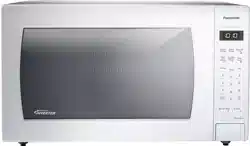
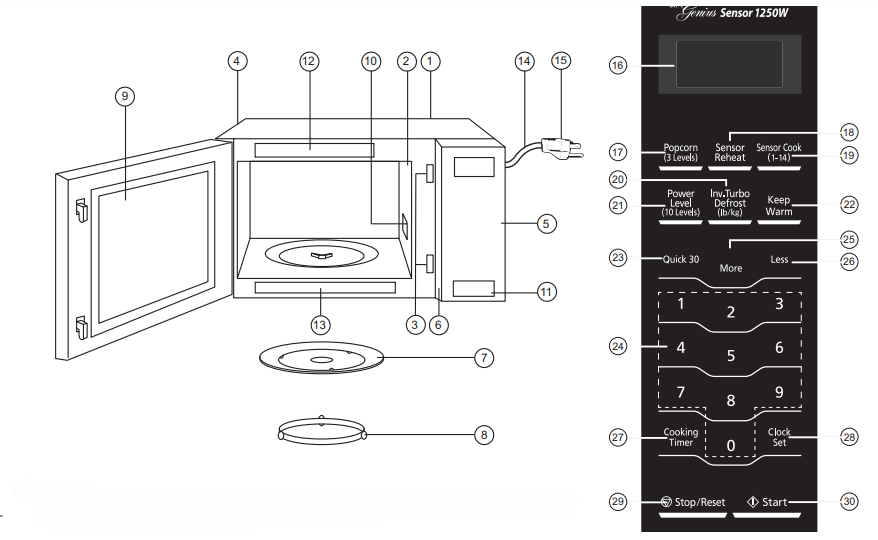
The control panels of NN-SN936B/SN936W/SN946B/SN946W/SN736B/ 30 SN736W have same key layout.
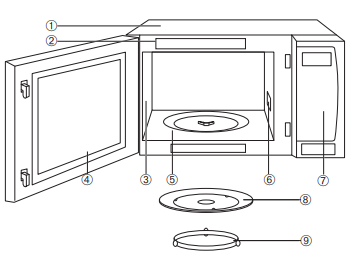
External Air Vent
Internal Air Vent
Door Safety Lock System
Exhaust Air Vent
Control Panel
Identification Plate
Glass Tray
Roller Ring
Heat/Vapor Barrier Film (do not remove)
Waveguide Cover (do not remove)
Door Release Button
Warning label
Menu label
Power Supply Cord
Power Supply Plug
Display Window
Popcorn Pad (See page 11)
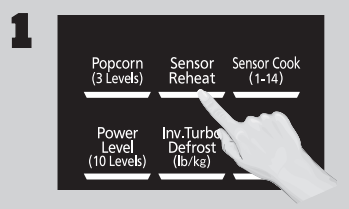
Sensor Reheat Pad (See page 13)
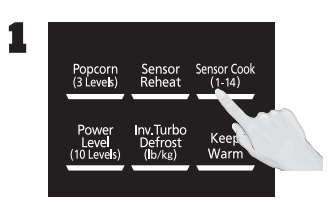
Sensor Cook Pad (See page 13)
Inverter Turbo Defrost Pad (See page 12)
Power level Pad (See page 8)
Keep Warm Pad (See page 11)
Quick 30 Pad (See page 11)
Number Pads
More Pad (See page 11, 13)
Less Pad (See page 11, 13)
Cooking Timer Pad (See page 9-10)
Clock Set Pad (See page 8)
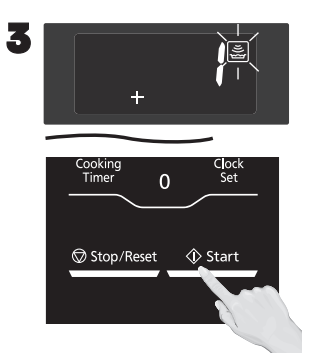
Stop/Reset Pad Before cooking: One tap clears all your instructions. During cooking: one tap temporarily stops the cooking process. Another tap cancels all your instructions, and time of day or colon appears in the display window.
Start Pad After cooking program setting, one tap allows oven to begin functioning. If door is opened or Stop/Reset Pad is pressed once during oven operation, Start.
Beep Sound:
When a pad is pressed correctly, a beep will be heard. If a pad is pressed and no beep is heard, the unit did not or cannot accept the instruction. When operating, the oven will beep twice between programmed stages. At the end of any complete program, the oven will beep 5 times.
NOTE:
If no operation after cooking program setting, 6 minutes later, the oven will automatically cancel the cooking program. The display will return to clock or colon display.
NOTE:
The illustration is for reference only.
Operation
Using the Microwave for the First Time
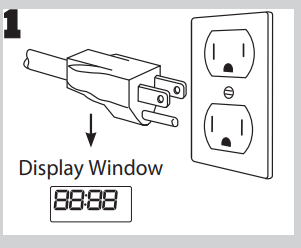
1. Plug into a properly grounded electrical outlet.
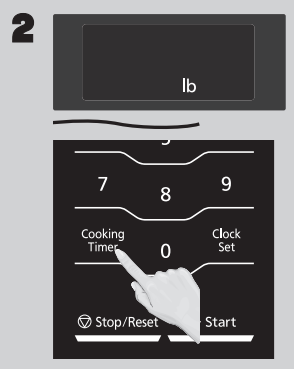
2. Press Start once, then Press Timer/Clock/Less to cycle between the weight system, Metric (g/kg) or Imperial (oz/lb).
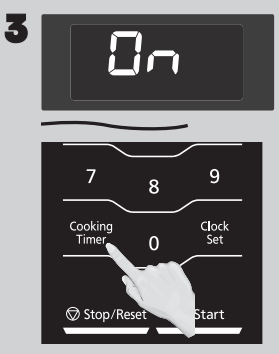
3. Press Start once, then Press Timer/Clock/Less to cycle between the Beep on or Beep off.
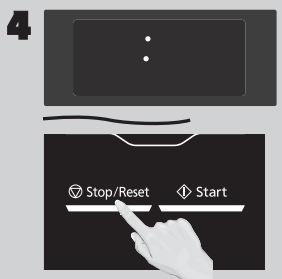
4. Press Stop/Reset to confirm; a colon (:) will appear in the display window. NOTES: These choices can be selected only when you plug-in the oven.
Setting the Clock
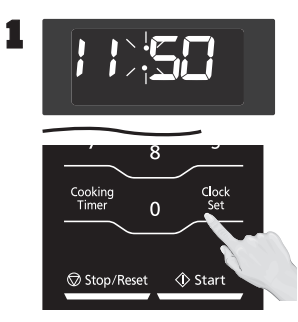
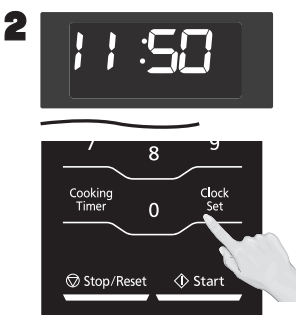
1. With the oven NOT cooking, press Timer/Clock/Less twice; the colon will blink. Enter time of day using the Number pads.
2. Press Timer/Clock/Less to finish setting and the colon (:) will stop blinking.
NOTES:
To reset the clock, repeat steps.
The clock will retain the time of day as long as the oven is plugged in and electricity is supplied.
The clock is a 12-hour display.
Oven will not operate while colon (:) is flashing.
Setting the Child Safety Lock
1. When the time of day appears in the display, press Start three times; “ ” will appear in the display
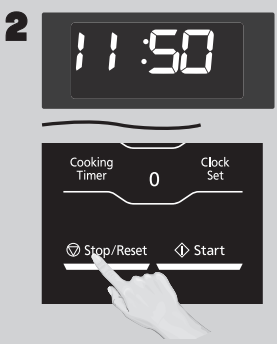
2. Press Stop/Reset three times; the display will return to the time of the day and Child Lock will be cancelled.
NOTES:
This feature prevents the electronic operation of the oven until cancelled. It does not lock the door.
To set or cancel child safety lock, Start or Stop/Reset pad must be pressed 3 times within 10 seconds.
You can set Child Lock feature when the display shows a colon or time of day.
Cooking
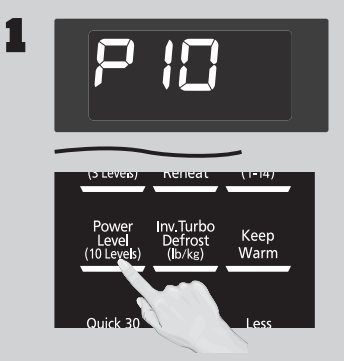
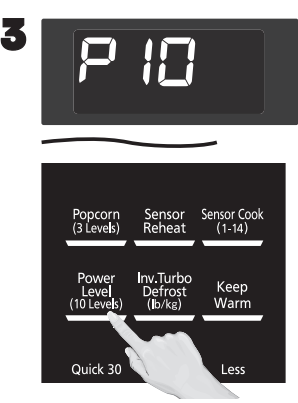
1. If cooking at high power (10), skip to step 2. Press Power Level until the desired power level appears in the display. P10 is the highest and P1 is the lowest.
once: P10 (HIGH)
twice:P9
3 times: P8
4 times: P7 (MED-HIGH)
5 times: P6 (MEDIUM)
6 times: P5
7 times: P4
8 times: P3 (MED-LOW)/ DEFROST
9 times: P2
10 times: P1 (LOW)
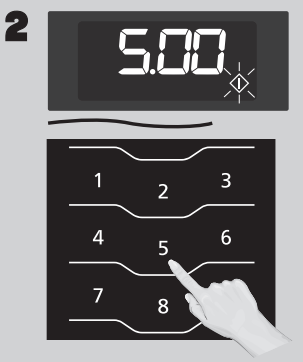
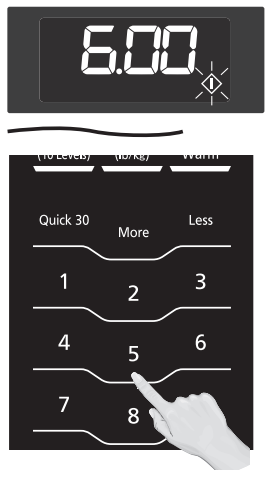
2. Set Cooking Time using the Number pads. P10 (HIGH) has max. cooking time of 30 minutes. For other power levels, the max. time is 99 minutes, 99 seconds.
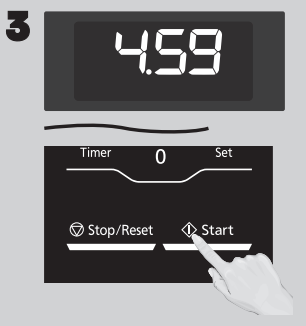
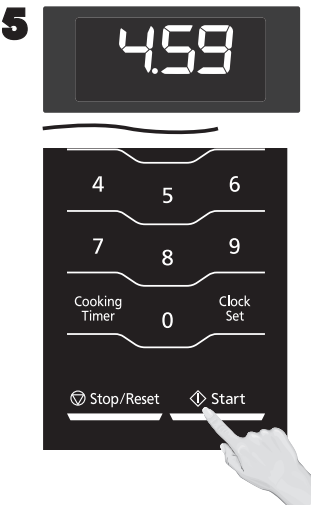
3. Press Start; the cooking will start and the time will count down in the display. At the end of cooking, five beeps will sound.
NOTES:
For reheating, use P10 (HIGH) for liquids, P7 (MED-HIGH) for most foods, and P6 (MEDIUM) for dense foods.
For defrosting, use P3 (MED-LOW).
DO NOT OVERCOOK: This oven requires less time to cook than older units. Overcooking will cause food to dry out and may cause a fire. A microwave oven’s cooking power tells you the amount of microwave power available for cooking
Stage Cooking: For more than one stage of cooking, repeat steps 1 and 2 for each stage of cooking before pressing Start. The maximum number of stages for cooking is three. When operating, two beeps will sound between each stage. Five beeps will sound at the end of the entire sequence. Automatic function (such as sensor cook/reheat, popcorn and inverter turbo defrost) can not be used with 3 stage cooking.
Setting the Timer
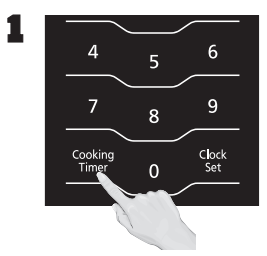
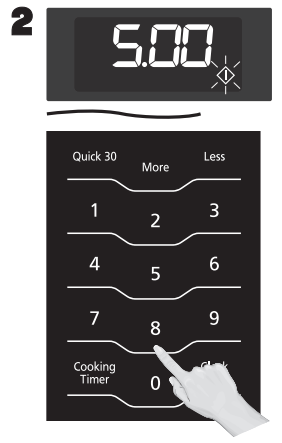
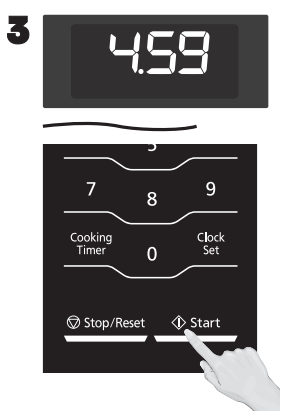
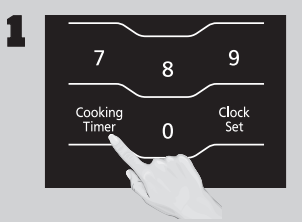
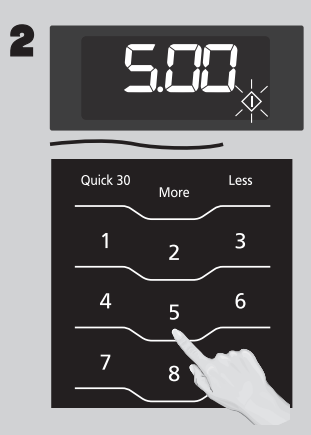
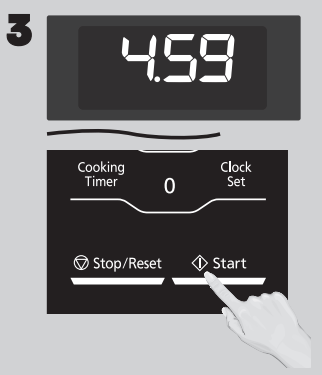
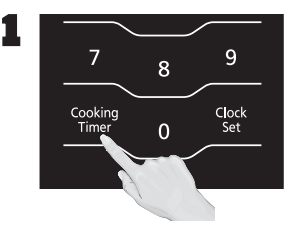
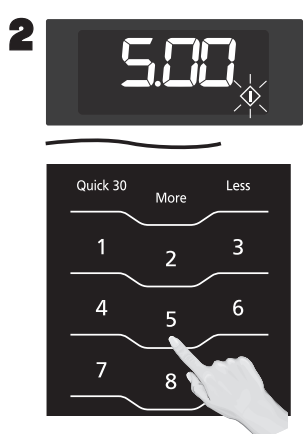
1. This feature allows you to program the oven as a kitchen timer. Press Cooking Timer once.
2. Set desired amount of time using Number pads (up to 99 minutes, 99 seconds)
3. Press Start. The timer will count down without cooking and beep five times when done
Caution: If oven lamp is lit while using the timer feature with door closed, the oven is NOT set properly; STOP OVEN IMMEDIATELY and re-read instructions.
Setting a Standing Time
1. Some recipes call for a standing time after cooking. To do this, repeat steps 1 and 2 in the Cooking section on previous page. Then press Timer/Clock/ Less.
2. Set desired amount of stand time using Number pads (up to 99 minutes, 99 seconds).
3. Press Start. The timer will start and then beep twice at the end of cooking time (the beginning of standing time). Five beeps will sound when standing time is done.
Setting a Delayed Start
1. The start time can be delayed to start cooking at a later time. To do this, first press Cooking Timer.
2. Enter the desired delay time (up to 99 minutes, 99 seconds) using the Number pads.
3. Press Power Level until the desired power level appears in the display. P10 is the highest and P1 is the lowest.
4. Set Cooking Time using the Number pads (see previous page for maximum times).
5. Press Start; the delay time will count down, then cooking will begin. At the end of cooking, five beeps will sound.
NOTES:
When each stage finishes, the oven will beep twice. At the end of the program, the oven will beep five times.
If the oven door is opened during Stand Time, Kitchen Timer or Delay Time, the time on the display will continue to count down.
Stand Time and Delay start cannot be programmed before any automatic function (such as sensor cook/reheat, popcorn and inverter turbo defrost). This is to prevent the starting temperature of food from rising.
When using Standing time or Delay Start, it’s up to 2 power stages.
Quick 30 (Set or add cooking time in 30 seconds increments)
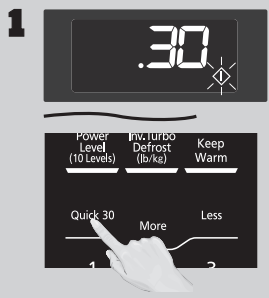
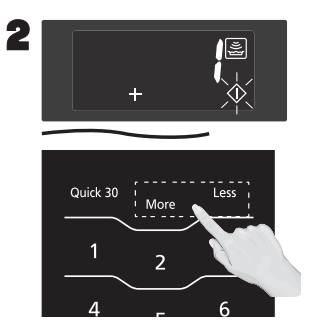
1. Press Quick 30/More until the desired cooking time (up to 5 minutes) appears in the display. Power Level is pre-set at P10.
2. Press Start; the cooking will start and the time will count down in the display. At the end of cooking, five beeps will sound.
NOTES:
If desired, you can use other power levels. Select desired power level before pressing Quick 30/More.
After setting the time by Quick 30/More pad, you cannot use the Number Pads.
Quick 30/More pad can also be used to add more time during manual cooking.
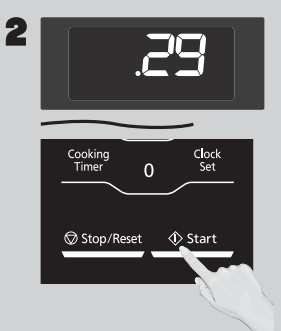
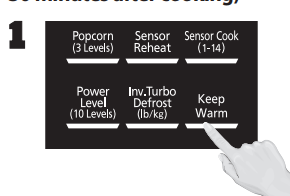
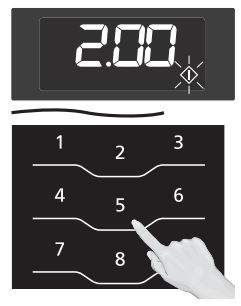
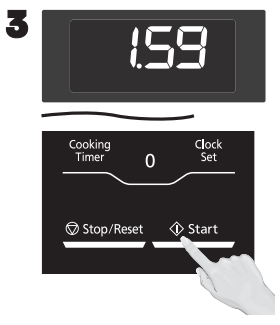
Keep Warm (Will keep food warm for up to 30 minutes after cooking)
Press Keep Warm.
Set warming time using Number pads, up to 30 minutes. This example shows two minutes.
Press Start; the cooking will start and the time will count down in the display. At the end of cooking, five beeps will sound.
NOTES: Keep Warm can be set as the final stage after cook time has been manually entered. It cannot be used with sensor or auto features.
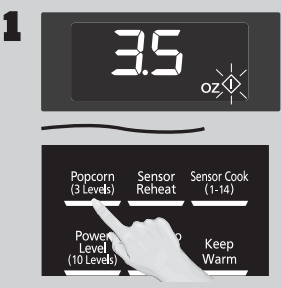
Popcorn (Example: To pop 3.5 oz (99 g). of popcorn)
1. Press Popcorn until the desired size appears in the display. Once for 3.5 oz (99 g), twice for 3.0 oz (85 g), or three times for 1.75 oz (50 g).
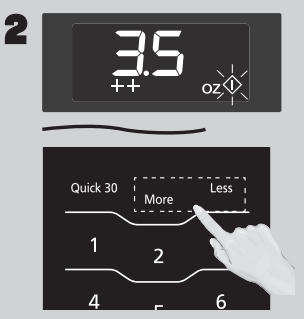
2. If desired, press Quick 30/More once to add 10 seconds or twice to add 20 seconds. Press Timer/Clock/Less once to subtract 10 seconds or twice to subtract 20 seconds.
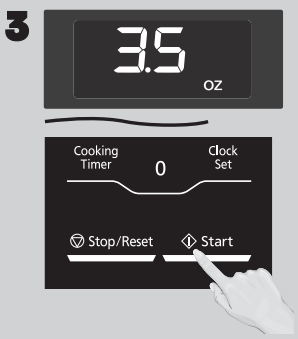
3. Press Start; After several seconds, cooking time appears in the display window and begins to count down.
NOTES:
Pop one bag at a time.
Place bag in oven according to manufacturers’ directions.
Start with popcorn at room temperature.
Allow popped corn to sit unopened for a few minutes.
Open bag carefully to prevent burns, because steam will escape.
Do not reheat unpopped kernels or reuse bag.
If popcorn is of a different weight than listed, follow instructions on popcorn package.
Never leave the oven unattended.
If popping slows to 2 to 3 seconds between pops, stop oven. Overcooking can burn popcorn or cause fire.
When popping multiple bags one right after the other, the cooking time may vary slightly. This does not affect the popcorn results.
Inverter Turbo Defrost
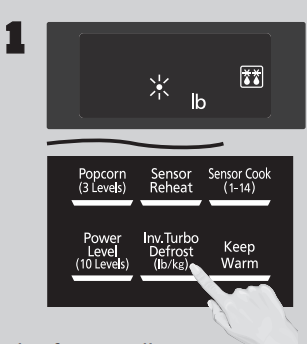
1. This feature allows you to defrost foods such as meat, poultry and seafood, simply by entering the weight. Press Inverter Turbo Defrost.
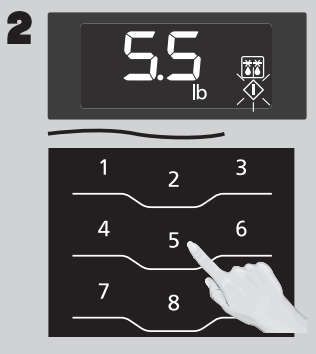
2. Enter weight of the food using the Number pads
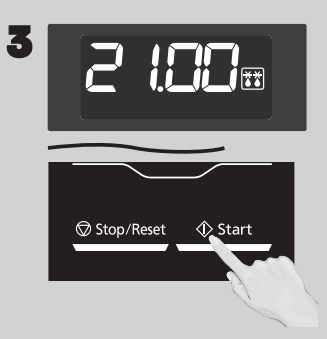
3. Press Start. Defrosting will start. Larger weight foods will cause a signal midway through defrosting. If two beeps sound, turn over and/or rearrange foods.
NOTE: The maximum weight for Inverter Turbo Defrost is 6 lbs. (3 kg).
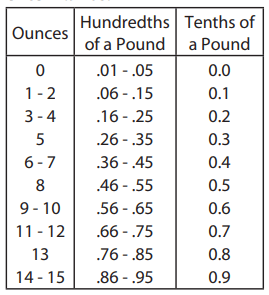
Conversion: Follow the chart to convert ounces or hundredths of a pound into tenths of a pound. To use Inverter Turbo Defrost, enter the weight of the food in pounds (1.0) and tenths of a pound (0.1). If a piece of meat weighs 1.95 lbs or 1 lb 14 oz, enter 1.9 lbs.
Defrosting Tips & Techniques
Preparation For Freezing:
Freeze meats, poultry, and fish in packages with only one or two layers of food. Place wax paper between layers.
Package in heavy-duty plastic wraps, bags (labeled “For Freezer”), or freezer paper.
Remove as much air as possible.
Seal securely, date, and label.
To Defrost:
Remove wrapper. This helps moisture to evaporate. Juices from food can get hot and cook the food.
Set food in microwave safe dish.
Place roasts fat-side down. Place whole poultry breast-side down.
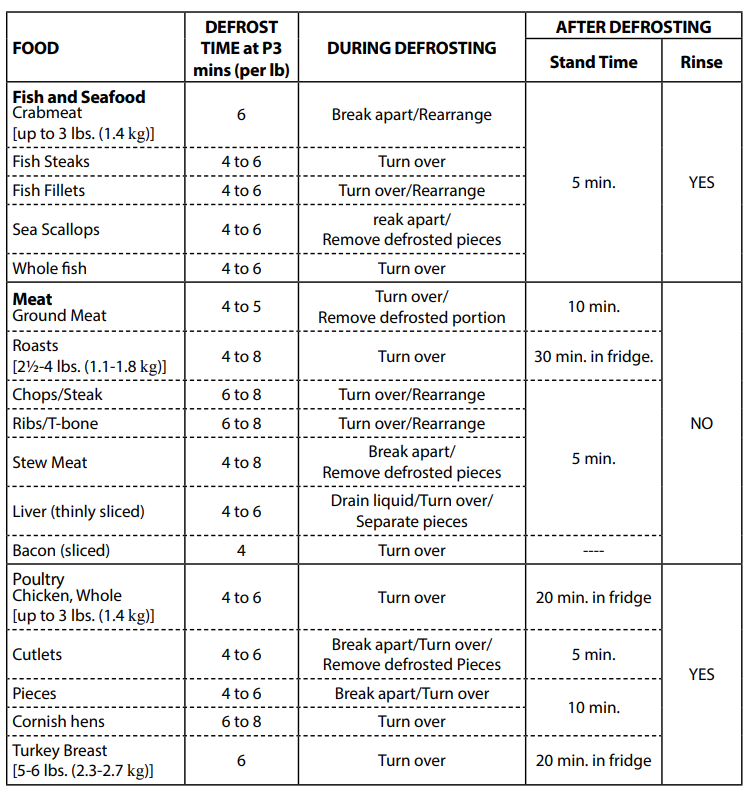
Select power and minimum time so that items will be underdefrosted.
Drain liquids during defrosting.
Turn over (invert) items during defrosting.
After Defrosting:
Large items may be icy in the center. Defrosting will complete during Standing Time.
Let stand, covered, following stand time directions
Rinse foods indicated in the chart.
Items which have been layered should be rinsed separately or have a longer stand time.
Sensor Reheat
1. Press Sensor Reheat.
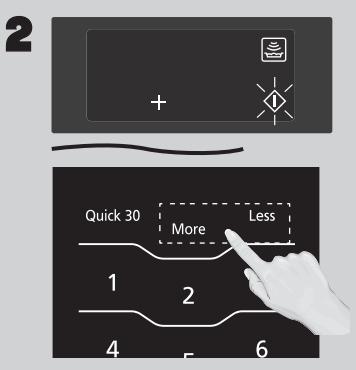
2. If desired, press Quick 30/More to add 20% more time than suggested. Press Timer/Clock/ Less to subtract 20% cooking time.
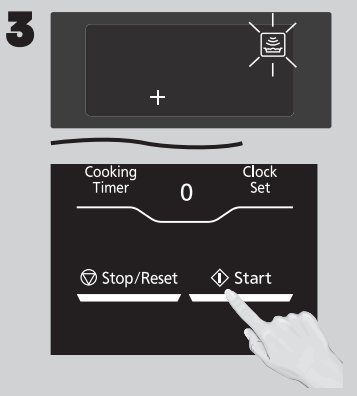
3. Press Start. Reheating is complete when five beeps sound.
NOTES:
After having used the Sensor Reheat feature a few times, you may decide you would prefer your food cooked to a different doneness – that is why you would utilize the More/Less pads.
When steam is detected by the Genius Sensor and two beeps sound, the remaining cooking time will appear in the display.
Casseroles: Add three to four tablespoons of liquid, cover with lid or vented plastic wrap. Stir when time appears in the display window.
Canned foods: Empty contents into casserole dish or serving bowl, cover dish with lid or vented plastic wrap. After reheating, let stand for a few minutes.
Plate of food: Arrange food on plate; top with butter, gravy, etc. Cover with lid or vented plastic wrap. After reheating, let stand for a few minutes.
DO NOT USE SENSOR REHEAT:
To reheat bread and pastry products. Use manual power and time for these foods.
For raw or uncooked foods.
If oven cavity is warm.
For beverages.
For frozen foods.
Sensor Cook
1. Press Sensor Cook until the number corresponding to the desired food appears in the display (see chart on the next page).
2. If desired, press Quick 30/More to add 20% more time than suggested. Press Timer/Clock/ Less to subtract 20% cooking time.
3. Press Start. Cooking is complete when five beeps sound.
NOTES:
After having used the Sensor Cook feature a few times, you may decide you would prefer your food cooked to a different doneness – that is why you would utilize the More/Less pads
When steam is detected by the Genius Sensor and two beeps sound, the remaining cooking time will appear in the display.
Automatic features are provided for your convenience. If results are not suitable to your individual preference, or if serving size is other than what is listed, please refer to manual cooking
For the best results with the GENIUS SENSOR, follow these recommendations:
BEFORE Reheating/Cooking:
The room temperature surrounding the oven should be below 95° F (35° C).
Food weight should exceed 4 oz. (110 g).
Be sure the glass tray, the outside of the cooking containers and the inside of the microwave oven are dry before placing food in the oven. Residual beads of moisture turning into steam can mislead the sensor.
Cover food with lid, or with vented plastic wrap. Never use tightly sealed plastic containers—they can prevent steam from escaping and cause food to overcook.
DURING Reheating/Cooking:
DO NOT open the oven door until two beeps sound and cooking time appears in the display. Doing so will cause inaccurate cooking since the steam from food is no longer contained within the oven cavity. Once the cooking time begins to count down, the oven door may be opened to stir, turn or rearrange foods.
AFTER Reheating/Cooking:
All foods should have a standing time.
Care and Cleaning of Your Microwave Oven
Please see below and the following page for particular cleaning instructions for each section of the oven.
BEFORE CLEANING: Unplug oven at wall outlet. If outlet is inaccessible, leave oven door open while cleaning.
AFTER CLEANING: Be sure to place the Roller Ring and the Glass Tray in the proper position and press Stop/Reset Pad to clear the Display.
Outside oven surfaces: Clean with a damp cloth. To prevent damage to the operating parts inside the oven, water should not be allowed to seep into ventilation openings.
Label: Do not remove. Wipe with a damp cloth.
Inside the Oven: Wipe with a damp cloth after using. Mild detergent may be used if needed. Do not use harsh detergents or abrasives.
Oven Door: Wipe with a soft dry cloth when steam accumulates inside or around the outside of the oven door. During cooking, especially under high humidity conditions, steam is given off from the food. (Some steam will condense on cooler surfaces, such as the oven door. This is normal.) Inside surface is covered with a heat and vapor barrier film. Do not remove.
Oven Cavity Floor: Clean the bottom surface of the oven with mild detergent, water or window cleaner, and dry.
Wave Guide Cover: Do not remove Wave Guide Cover. It is important to keep cover clean in the same manner as the inside of the oven.
Control Panel: The Control Panel is covered with a removable protective film to prevent scratches during shipping. Small bubbles may appear under this film, so if this is the case, remove by applying masking or clear tape to an exposed corner and pull gently. If the Control Panel becomes wet, clean it with a soft dry cloth. Do not use harsh detergents or abrasives.
Glass Tray: Remove and wash in warm soapy water or in a dishwasher.
Roller Ring: Roller Ring may be washed in mild soapy water or dishwasher. These areas should be kept clean to avoid excessive noise
IT IS IMPORTANT TO KEEP THE OVEN CLEAN AND DRY. FOOD RESIDUE AND CONDENSATION MAY CAUSE RUSTING OR ARCING AND DAMAGE TO THE OVEN. AFTER USE, WIPE DRY ALL SURFACES, INCLUDING VENT OPENINGS, OVEN SEAMS, AND UNDER GLASS TRAY.
Before Requesting Service
See below before calling for service, as most problems can easily be remedied by following these simple solutions:
Problem
Solution
The oven causes TV interference.
Some radio, TV, Wi-Fi, cordless telephone, baby monitor, blue tooth or other wireless equipment interference might occur when you cook with the microwave oven. This interference is similar to the interference caused by small appliances such as mixers, vacuums, blow dryers, etc. It does not indicate a problem with your oven.
Steam accumulates on oven door and warm air comes from the oven vents.
During cooking, steam and warm air are given off from the food. Most of the steam and warm air are removed from the oven by the air which circulates in the oven cavity. However, some steam will condense on cooler surfaces such as the oven door. This is normal. After use, the oven should be wiped dry (see page 16).
Oven will not turn on.
The oven is not plugged in securely or needs to be reset; remove plug from outlet, wait ten seconds and re-insert.
Main circuit breaker or main fuse is tripped; reset main circuit breaker or replace main fuse.
There is a problem with the outlet; plug another appliance into the outlet to check if it is working.
Oven will not start cooking.
The door is not completely closed; close the oven door securely.
Start was not pressed after programming; press Start.
Another program is already entered into the oven; press Stop/Reset to cancel the previous program and enter new program.
The program is not correct; program again according to the Operating Instructions.
Stop/Reset has been pressed accidentally; program oven again.
The Glass Tray wobbles.
The Glass Tray is not positioned properly on the Roller Ring or there is food under the Roller Ring; take out Glass Tray and Roller Ring. Wipe with a damp cloth and reset Roller Ring and Glass Tray properly.
When the oven is operating, there is noise coming from the Glass Tray.
The Roller Ring and oven bottom are dirty; clean these parts according to Care and Cleaning of Your Microwave Oven (see page 16).
The word “ ” appears in the display.
The CHILD SAFETY LOCK was activated by pressing Start three times; Deactivate CHILD SAFETY LOCK by pressing Stop/Reset three times.
The oven stops cooking and “H00“, “H97” or “H98” appears in the display
The oven’s power supply has failed; please contact an authorized Service Center (see next page).

 ” will appear in the display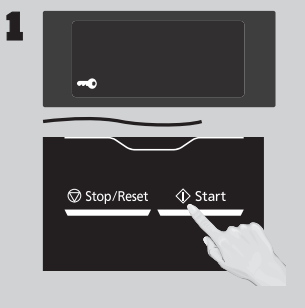
 ” appears in the display.