Quick Start Guide
Your Molekule
01
Touch Screen
PECO-Filter
Pre-Filter
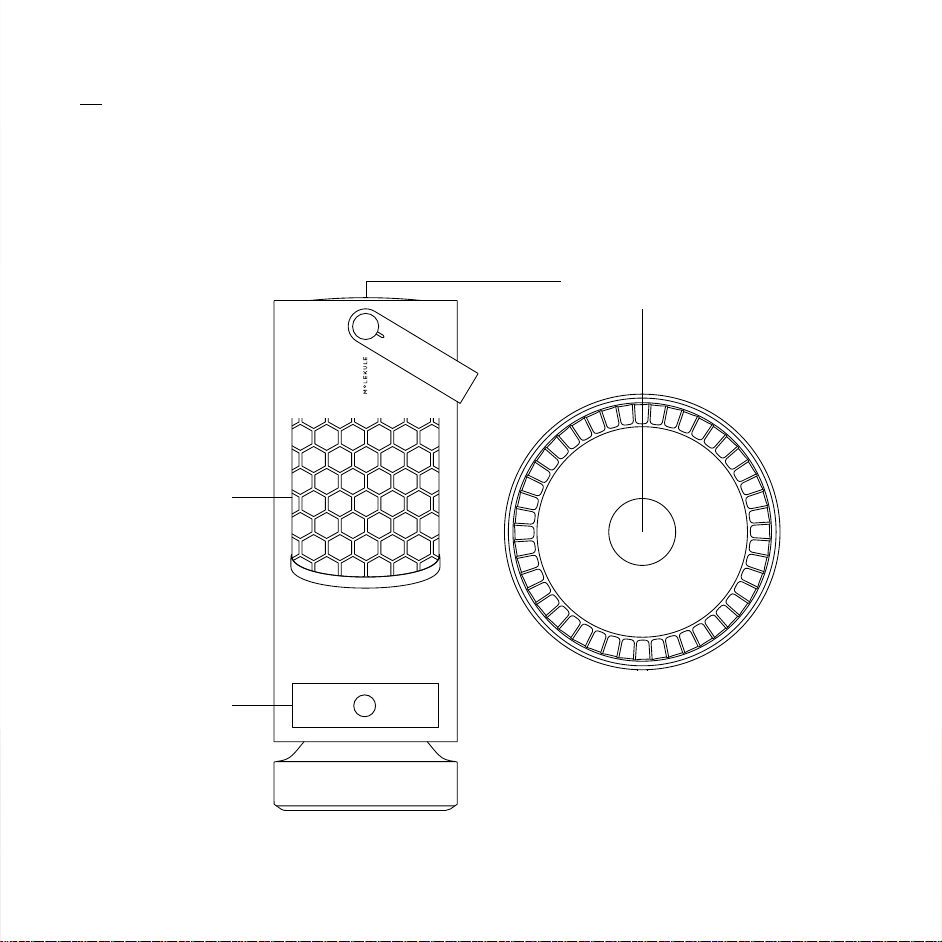
Your Molekule
01
Touch Screen
PECO-Filter
Pre-Filter

Setting Up
02
Download the Molekule app to your phone and set it up using the same email
used to purchase your Molekule device.
Unwrap the power cord and insert into the bottom of your device.
Plug the cord into an outlet and follow the on-screen steps on top of the
Molekule. To pair the device to your phone, make sure you’re within 15 feet
of the unit.
Select your preferences and mode on the device’s touch screen or from your
app and you’re done. Molekule will perform an Initial Clean Up that could take
up to 50 minutes.
03
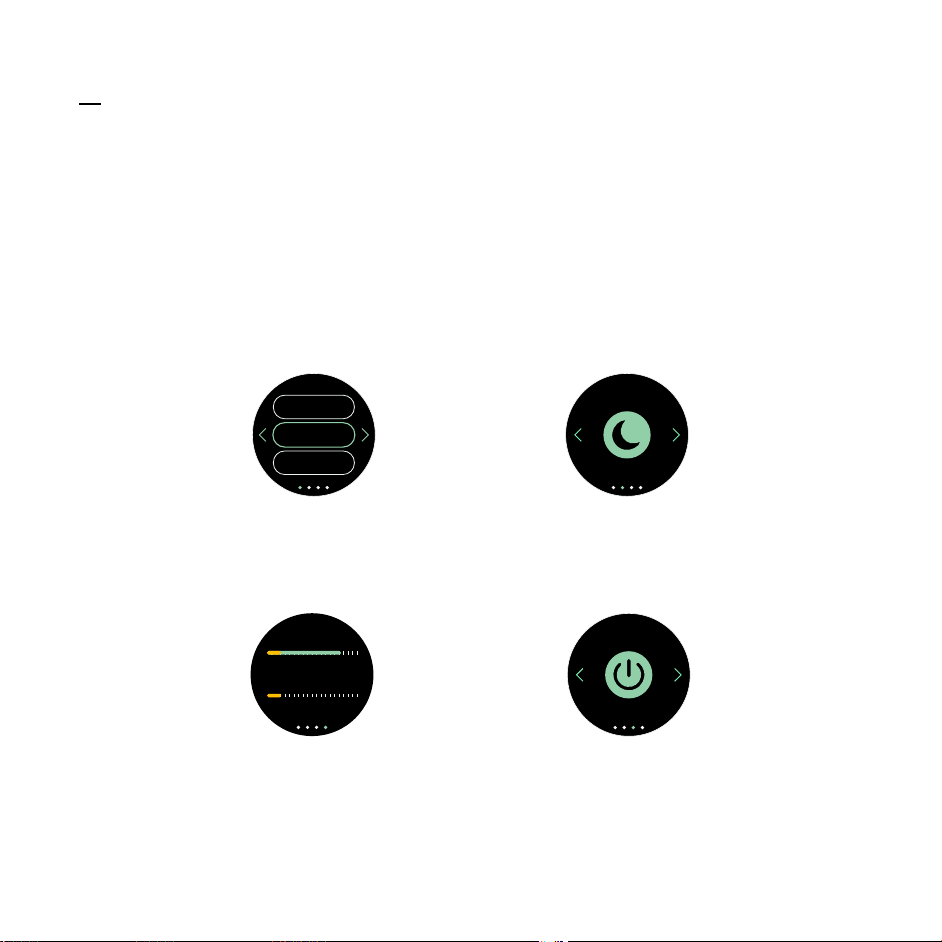
Tap once to wake up the touch screen and twice to access the menu. Swipe left and
right to switch between the four menu items.
Device Menu
Filter Status
(WiFi only)
PECO
Pre
sFilter
Standby
Dark ModeMode Selector
Auto
Silent
Boost
4
Note:
Connecting Molekule to WiFi will enable filter status indicators on the device
and in the app. This will let you keep track of when your Molekule needs its
filters replaced.
Setting Up
02
Download the Molekule app to your phone and set it up using the same email
used to purchase your Molekule device.
Unwrap the power cord and insert into the bottom of your device.
Plug the cord into an outlet and follow the on-screen steps on top of the
Molekule. To pair the device to your phone, make sure you’re within 15 feet
of the unit.
Select your preferences and mode on the device’s touch screen or from your
app and you’re done. Molekule will perform an Initial Clean Up that could take
up to 50 minutes.
03
Tap once to wake up the touch screen and twice to access the menu. Swipe left and
right to switch between the four menu items.
Device Menu
Filter Status
(WiFi only)
PECO
Pre
sFilter
Standby
Dark ModeMode Selector
Auto
Silent
Boost
4
Note:
Connecting Molekule to WiFi will enable filter status indicators on the device
and in the app. This will let you keep track of when your Molekule needs its
filters replaced.

04
Modes
Auto
This mode takes your inputs, like room size, to identify the ideal airflow
for your device. The fan speed will be set at a consistent level to
maintain optimal air quality.
Boost
In Boost Mode, the device runs at its maximum speed. Use this mode
when you’re in need of a strong clean, like after dusting and cleaning
the house.
Silent
You Molekule will be whisper quiet in Silent Mode. Even as the
speed of air flowing through the device is reduced, it still cleans the
air thoroughly.
Dark
Mode
Dark Mode turns off the Molekule light—great for light-sensitive
people. Since the PECO-Filter needs that light to break down
pollutants, we recommend only using Dark Mode when necessary.
Once Dark Mode is turned off and the light comes back on, captured
pollutants will then be eliminated.
Once started, your device performs the Initial Clean Up, adapting its cleaning
cycle based on your needs and the size of your room. This calibration ensures your
Molekule works as efficiently as possible no matter what room you place it in.
As with any product, your device uses new plastics and materials in its
manufacture. We do all we can to minimize off-gassing from these materials,
yet there may be a noticeable smell during the first 24-48 hours of use, which
is safe and expected. After this initial settling period, unpleasant smells should
significantly subside. At that point, your filters have reached full effectiveness.
Initial Clean Up
05
06
Clean air offers an entirely new experience. We’re so used to breathing indoor air that
can be up to five times more polluted than outdoor air that we forget what it feels like
to breathe clean, healthy air. Our customers report feeling their congestion lift and
their home smelling ‘crisp’ and ‘clean’. Once the pollutants you’re used to breathing
are no longer present, you can have a whole new impression of the indoors. What
does clean air feel like to you?
The Feeling of Crisp, Clean Air

04
Modes
Auto
This mode takes your inputs, like room size, to identify the ideal airflow
for your device. The fan speed will be set at a consistent level to
maintain optimal air quality.
Boost
In Boost Mode, the device runs at its maximum speed. Use this mode
when you’re in need of a strong clean, like after dusting and cleaning
the house.
Silent
You Molekule will be whisper quiet in Silent Mode. Even as the
speed of air flowing through the device is reduced, it still cleans the
air thoroughly.
Dark
Mode
Dark Mode turns off the Molekule light—great for light-sensitive
people. Since the PECO-Filter needs that light to break down
pollutants, we recommend only using Dark Mode when necessary.
Once Dark Mode is turned off and the light comes back on, captured
pollutants will then be eliminated.
Once started, your device performs the Initial Clean Up, adapting its cleaning
cycle based on your needs and the size of your room. This calibration ensures your
Molekule works as efficiently as possible no matter what room you place it in.
As with any product, your device uses new plastics and materials in its
manufacture. We do all we can to minimize off-gassing from these materials,
yet there may be a noticeable smell during the first 24-48 hours of use, which
is safe and expected. After this initial settling period, unpleasant smells should
significantly subside. At that point, your filters have reached full effectiveness.
Initial Clean Up
05
06
Clean air offers an entirely new experience. We’re so used to breathing indoor air that
can be up to five times more polluted than outdoor air that we forget what it feels like
to breathe clean, healthy air. Our customers report feeling their congestion lift and
their home smelling ‘crisp’ and ‘clean’. Once the pollutants you’re used to breathing
are no longer present, you can have a whole new impression of the indoors. What
does clean air feel like to you?
The Feeling of Crisp, Clean Air

After two decades of research and development, a fundamentally new approach to
air purification has arrived at your home.
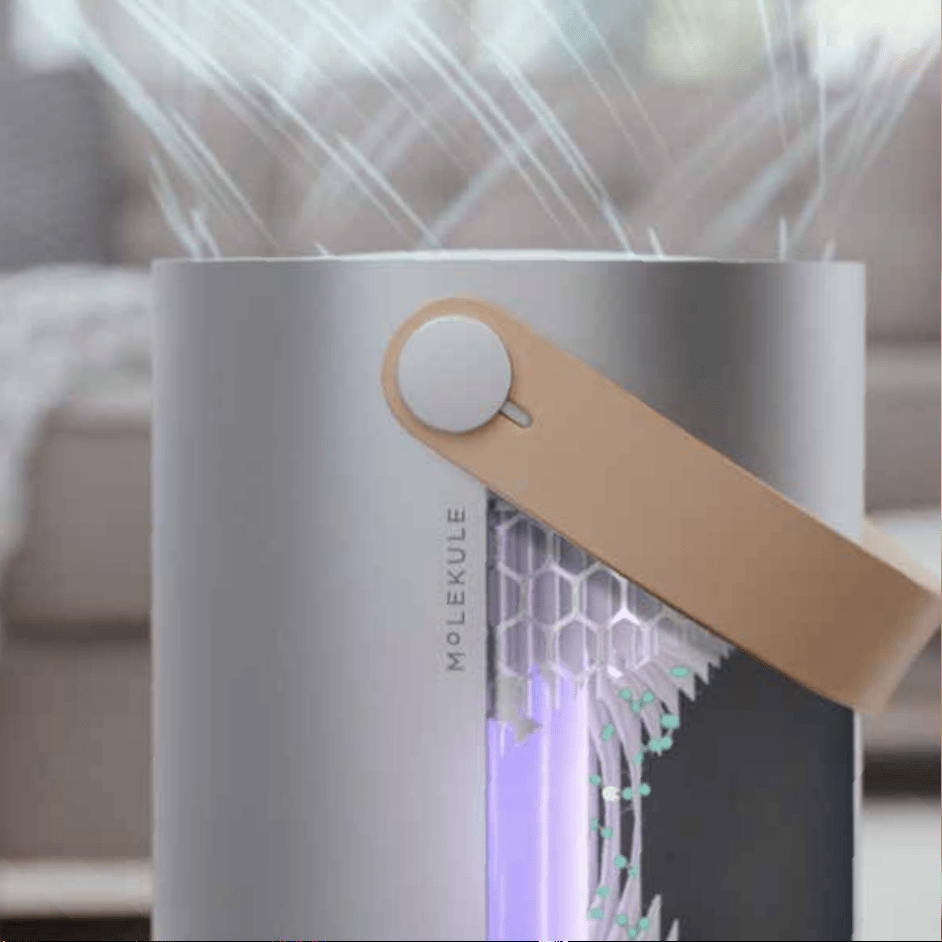
The technology inside your Molekule is called Photo Electrochemical Oxidation
(PECO) and works at the molecular level to eliminate indoor air pollution. Our
process works by shining light on a specially coated PECO-Filter. This creates
a catalytic reaction on the surface of the filter that breaks down and destroys
pollutants as they pass through our PECO-Filter. We have improved the efficiency
of this process dramatically so that we can destroy pollutants of any size,
including the most microscopic VOCs (airborne chemicals).
Molekule works on the full spectrum of indoor air pollutants like allergens, mold,
bacteria, viruses, and airborne chemicals (VOCs) to fully eliminate them from the
air in your home. PECO is also the only air purification technology that has been
shown to destroy airborne viruses.
If you are sensitive to air quality due to allergies, asthma or other conditions, pay
attention to your nasal and eye symptoms over time.
How Molekule Works
07
After two decades of research and development, a fundamentally new approach to
air purification has arrived at your home.
The technology inside your Molekule is called Photo Electrochemical Oxidation
(PECO) and works at the molecular level to eliminate indoor air pollution. Our
process works by shining light on a specially coated PECO-Filter. This creates
a catalytic reaction on the surface of the filter that breaks down and destroys
pollutants as they pass through our PECO-Filter. We have improved the efficiency
of this process dramatically so that we can destroy pollutants of any size,
including the most microscopic VOCs (airborne chemicals).
Molekule works on the full spectrum of indoor air pollutants like allergens, mold,
bacteria, viruses, and airborne chemicals (VOCs) to fully eliminate them from the
air in your home. PECO is also the only air purification technology that has been
shown to destroy airborne viruses.
If you are sensitive to air quality due to allergies, asthma or other conditions, pay
attention to your nasal and eye symptoms over time.
How Molekule Works
07
Molekule Filter Replacements
Filters
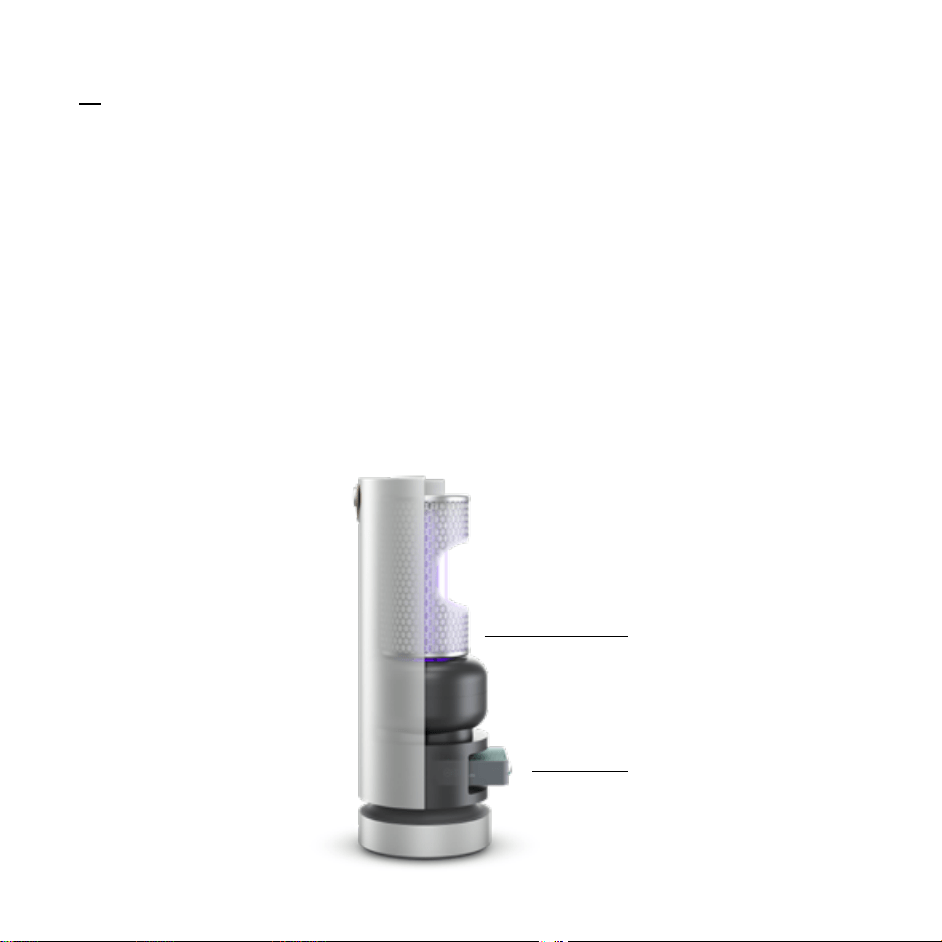
Molekule uses two filters at once: A carbon Pre-Filter and a PECO-Filter.
The Pre-Filter captures larger particles like dust and pet hair, while
carbon catches and slows down VOCs on their way to the PECO-Filter.
The PECO-Filter is coated with our proprietary catalyst that breaks
down VOCs, bacteria, viruses, and other pollutants at a molecular level
when activated by UV-A light.
08
Filter Replacement
To keep your device running as efficiently as possible, the Pre-Filter should
be replaced every three months, and the PECO-Filter should be replaced
every six months. The extra Pre-Filter that comes with your device will get
you to the six-month mark. You can also track your filter life in the Molekule
app—just reset the filter status in the app after you change out a filter and
it’ll count down from there.
How Do Auto-Refills Work?
Molekule ships with three filters: two Pre-Filters and one PECO-Filter. Our
simple filter auto-refills will help ensure you have clean air when you need it.
Filters are automatically shipped to your doorstep for one flat rate every six
months. To manage your auto-refills, including updating your shipping and
payment information, go to account.molekule.com and log in using the email
address you used to purchase your device on molekule.com. If you purchased
your device from a retailer or other outlet, contact Customer Service at
https://molekule.com/contact or (855) 999-9069 (Mon-Sun 8am-5pm PT) to
create an account.
PECO-Filter
(2x year)
Pre-Filter
(4x year)

Molekule Filter Replacements
Filters
Molekule uses two filters at once: A carbon Pre-Filter and a PECO-Filter.
The Pre-Filter captures larger particles like dust and pet hair, while
carbon catches and slows down VOCs on their way to the PECO-Filter.
The PECO-Filter is coated with our proprietary catalyst that breaks
down VOCs, bacteria, viruses, and other pollutants at a molecular level
when activated by UV-A light.
08
Filter Replacement
To keep your device running as efficiently as possible, the Pre-Filter should
be replaced every three months, and the PECO-Filter should be replaced
every six months. The extra Pre-Filter that comes with your device will get
you to the six-month mark. You can also track your filter life in the Molekule
app—just reset the filter status in the app after you change out a filter and
it’ll count down from there.
How Do Auto-Refills Work?
Molekule ships with three filters: two Pre-Filters and one PECO-Filter. Our
simple filter auto-refills will help ensure you have clean air when you need it.
Filters are automatically shipped to your doorstep for one flat rate every six
months. To manage your auto-refills, including updating your shipping and
payment information, go to account.molekule.com and log in using the email
address you used to purchase your device on molekule.com. If you purchased
your device from a retailer or other outlet, contact Customer Service at
https://molekule.com/contact or (855) 999-9069 (Mon-Sun 8am-5pm PT) to
create an account.
PECO-Filter
(2x year)
Pre-Filter
(4x year)
Replacing Your Filters
09
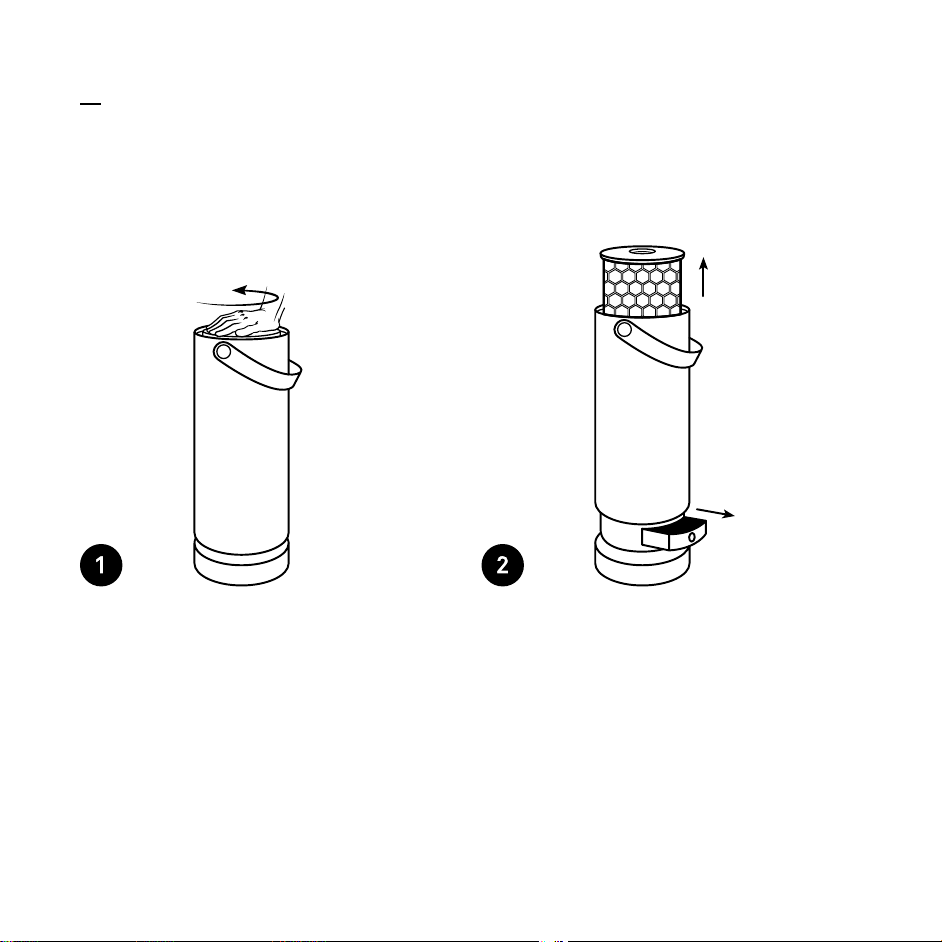
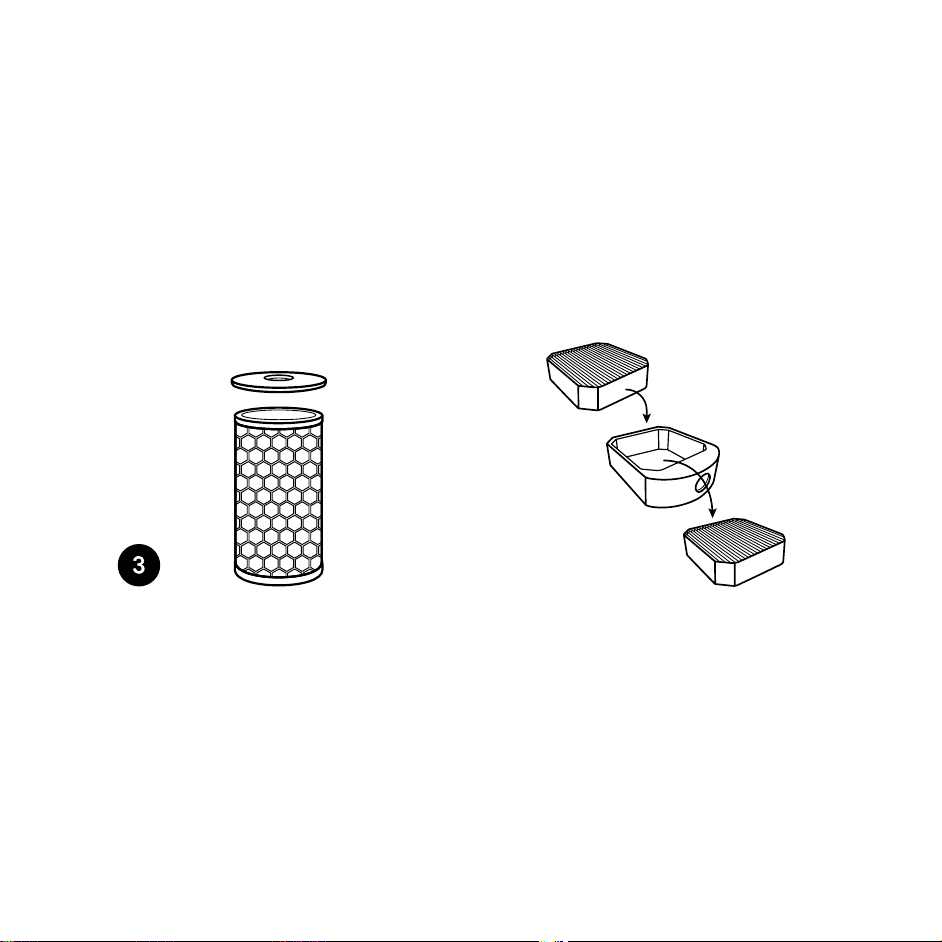
Open the device by placing your
hands on the top, push down on
the filter cabinet, and rotate the
inner lid counter clockwise.
PECO-Filter: Lift the lid to pull it
out of the device. Pop the lid off
the old PECO-Filter.
Pre-Filter: Slide the Pre-Filter
drawer out from the bottom of the
device.
To replace the PECO-Filter:
Remove any packaging and attach
the lid of the device to the top of
your new PECO-Filter.
To replace the Pre-Filter:
Remove the old Pre-Filter from
its drawer and discard it.
Remove any packaging from your
new Pre-Filter and place it inside
the drawer with text right-side
up. Slide the drawer back into
the Molekule.
Replacing Your Filters
09
Open the device by placing your
hands on the top, push down on
the filter cabinet, and rotate the
inner lid counter clockwise.
PECO-Filter: Lift the lid to pull it
out of the device. Pop the lid off
the old PECO-Filter.
Pre-Filter: Slide the Pre-Filter
drawer out from the bottom of the
device.
To replace the PECO-Filter:
Remove any packaging and attach
the lid of the device to the top of
your new PECO-Filter.
To replace the Pre-Filter:
Remove the old Pre-Filter from
its drawer and discard it.
Remove any packaging from your
new Pre-Filter and place it inside
the drawer with text right-side
up. Slide the drawer back into
the Molekule.
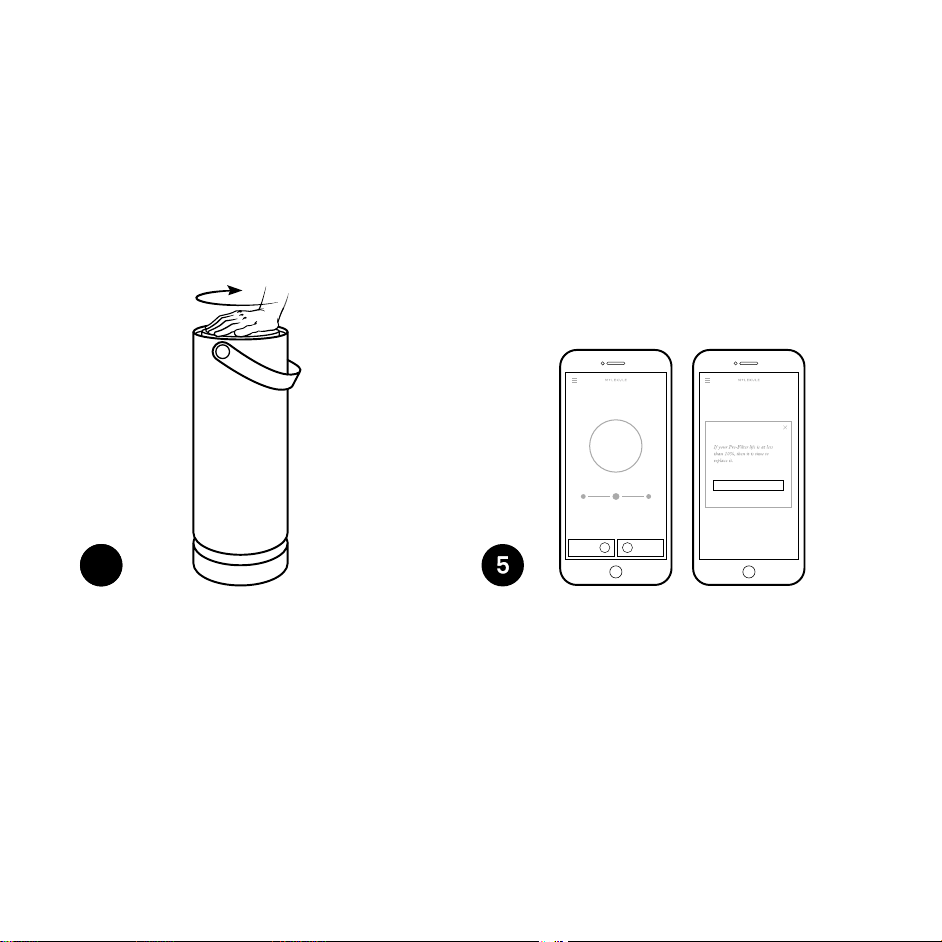
Go to the Molekule app and tap
the filter status indicator to reset
your filter status.
Push down the filter cabinet, then
rotate the inner lid clockwise to
close the device. You’re all set.
Pre-Filter
10% 10%
Maintaining
Clean Air
PECO-Filter
Auto BoostSilent
Confirm Replacement
Get the Most from Your Molekule
Need Some Help?
10
11
For more guidance and FAQs visit molekule.com/help
Email us at support@molekule.com
Call us at 1-855-999-9069
Where should I place my Molekule?
While your Molekule will continue to work in any room, placing it in a central
location and on a raised surface will help you maximize its benefits. At night, put
Molekule close to your bed for a clean, healthy sleep breathing zone.
Should I run my Molekule 24/7?
For continuous, fresh, clean air, we suggest running your Molekule on Auto Mode.
Good news is that your Auto Mode only uses 35 Watts—equivalent to a small light
bulb. If you do turn your Molekule off, it’ll run an Initial Clean Up upon restart.
4

Go to the Molekule app and tap
the filter status indicator to reset
your filter status.
Push down the filter cabinet, then
rotate the inner lid clockwise to
close the device. You’re all set.
Pre-Filter
10% 10%
Maintaining
Clean Air
PECO-Filter
Auto BoostSilent
Confirm Replacement
Get the Most from Your Molekule
Need Some Help?
10
11
For more guidance and FAQs visit molekule.com/help
Email us at support@molekule.com
Call us at 1-855-999-9069
Where should I place my Molekule?
While your Molekule will continue to work in any room, placing it in a central
location and on a raised surface will help you maximize its benefits. At night, put
Molekule close to your bed for a clean, healthy sleep breathing zone.
Should I run my Molekule 24/7?
For continuous, fresh, clean air, we suggest running your Molekule on Auto Mode.
Good news is that your Auto Mode only uses 35 Watts—equivalent to a small light
bulb. If you do turn your Molekule off, it’ll run an Initial Clean Up upon restart.
4

Safety Precautions & Warnings
12
To avoid injury, keep fingers clear of Pre-Filter opening when pushing down the
outer tube. For that reason, avoid operating the unit with two people at the
same time.
Keep all fingers away from the center opening of the lid when pressing down.
Never place any objects on top of the unit.
Do not place the unit directly below a shelf and other objects that might hinder
the exiting air flow. Never cover vents while the unit is running.
Avoid dropping the device or placing it on an uneven or potentially unstable
location. To help ensure stable placement of the device and limit risk of tipping,
place it only on stable, flat floor surfaces and make sure the cable is fully inserted
into the cable release opening.
Do not insert or drop any foreign objects or liquids into the device. If either
happens, immediately unplug the device and contact customer service.
Do not alter, clean or tinker with the Pre-Filter or PECO-Filter. Changes or damage
to the Pre-Filter or PECO-Filter may interfere with proper operation.
Do not clean the device with any liquid cleaning agents or water. These items
pose a fire, electric shock or injury risk. The device should only be cleaned using a
dry cloth.
Do not operate any device with a damaged power cord or plug. Contact Molekule
for a replacement cord.
Do not run the power cord under carpeting or cover the cord with throw rugs,
runners or similar coverings. Do not route the cord under furniture or appliances.
Keep the cord away from high-traffic areas to avoid a tripping hazard.
BC

Safety Precautions & Warnings
12
To avoid injury, keep fingers clear of Pre-Filter opening when pushing down the
outer tube. For that reason, avoid operating the unit with two people at the
same time.
Keep all fingers away from the center opening of the lid when pressing down.
Never place any objects on top of the unit.
Do not place the unit directly below a shelf and other objects that might hinder
the exiting air flow. Never cover vents while the unit is running.
Avoid dropping the device or placing it on an uneven or potentially unstable
location. To help ensure stable placement of the device and limit risk of tipping,
place it only on stable, flat floor surfaces and make sure the cable is fully inserted
into the cable release opening.
Do not insert or drop any foreign objects or liquids into the device. If either
happens, immediately unplug the device and contact customer service.
Do not alter, clean or tinker with the Pre-Filter or PECO-Filter. Changes or damage
to the Pre-Filter or PECO-Filter may interfere with proper operation.
Do not clean the device with any liquid cleaning agents or water. These items
pose a fire, electric shock or injury risk. The device should only be cleaned using a
dry cloth.
Do not operate any device with a damaged power cord or plug. Contact Molekule
for a replacement cord.
Do not run the power cord under carpeting or cover the cord with throw rugs,
runners or similar coverings. Do not route the cord under furniture or appliances.
Keep the cord away from high-traffic areas to avoid a tripping hazard.
BC

WARNING: To reduce the risk of fire or electric shock, do not use this device with
any solid-state speed control device.
When replacing filters, be sure to reinstall both the Pre-Filter Carrier and Top Cover
as previously installed. The Pre-Filter Carrier houses the Pre-Filter. The Top Cover is
the removable lid at the top of the device which seals and supports the PECO-Filter.
Fuse Safety:
This product employs overload protection via a fuse integrated into the plug.
A blown fuse indicates an overload or short-circuit situation. If the fuse blows,
unplug the product from the outlet. Replace the fuse by following the Fuse
Replacement Instructions on the next page and check the product. If the
replacement fuse blows, a short-circuit may be present. In that event please
contact Molekule at support@molekule.com or call us at 1-855-999-9069.
Fuse Replacement Instructions:
Grasp plug and remove from the electrical outlet.
Do not unplug by pulling on cord.
Open the fuse access cover by sliding the tab toward the plug’s prongs.
Remove fuse carefully. Push the fuse toward the prongs and pry upward
from the cord-end to free the fuse.
Close the fuse access cover by sliding the tab away from prongs.
To prevent risk of fire, replace fuse only with 5A Amp, 125 Volt fuse.

WARNING: To reduce the risk of fire or electric shock, do not use this device with
any solid-state speed control device.
When replacing filters, be sure to reinstall both the Pre-Filter Carrier and Top Cover
as previously installed. The Pre-Filter Carrier houses the Pre-Filter. The Top Cover is
the removable lid at the top of the device which seals and supports the PECO-Filter.
Fuse Safety:
This product employs overload protection via a fuse integrated into the plug.
A blown fuse indicates an overload or short-circuit situation. If the fuse blows,
unplug the product from the outlet. Replace the fuse by following the Fuse
Replacement Instructions on the next page and check the product. If the
replacement fuse blows, a short-circuit may be present. In that event please
contact Molekule at support@molekule.com or call us at 1-855-999-9069.
Fuse Replacement Instructions:
Grasp plug and remove from the electrical outlet.
Do not unplug by pulling on cord.
Open the fuse access cover by sliding the tab toward the plug’s prongs.
Remove fuse carefully. Push the fuse toward the prongs and pry upward
from the cord-end to free the fuse.
Close the fuse access cover by sliding the tab away from prongs.
To prevent risk of fire, replace fuse only with 5A Amp, 125 Volt fuse.

Molekule warrants that for a period of one year from shipment, the Product will be free from defects in
materials and workmanship under normal use in accordance with the documentation provided with the
Product. In the event of a defect, visit Molekule at molekule.com/contact for return instructions.
Molekule’s sole obligation under this warranty will be at its option to repair or replace the Product and
the replaced product will be warranted for the remaining period of the original warranty. Replacement
products may contain new or refurbished parts. This warranty does not apply to Products damaged by
misuse, accident, electrical disturbance or normal wear and tear. The Product is not designed for or
warranted against damage from use in areas subject to extreme temperature, excessive moisture, or other
inherently hazardous environments. ALL IMPLIED WARRANTIES OF MERCHANTABILITY OR FITNESS FOR
A PARTICULAR PURPOSE ARE LIMITED TO THE DURATION OF THIS WARRANTY. EXCEPT FOR THE LIMITED
EXPRESS WARRANTIES SET FORTH ABOVE, MOLEKULE DISCLAIMS ALL OTHER EXPRESS OR IMPLIED
WARRANTIES OR CONDITIONS. Some jurisdictions do not allow limitations on how long an implied warranty
lasts, so the above limitations may not apply to you. This warranty gives you specific legal rights, and you
may also have other rights which vary by jurisdiction.
13
Limited Warranty Information
14
Patents
© Molekule Inc. 2017. All Rights Reserved.
Molekule’s technology is covered by multiple U.S. and foreign patents.
For patent information, go to molekule.com/legal#patents

Molekule warrants that for a period of one year from shipment, the Product will be free from defects in
materials and workmanship under normal use in accordance with the documentation provided with the
Product. In the event of a defect, visit Molekule at molekule.com/contact for return instructions.
Molekule’s sole obligation under this warranty will be at its option to repair or replace the Product and
the replaced product will be warranted for the remaining period of the original warranty. Replacement
products may contain new or refurbished parts. This warranty does not apply to Products damaged by
misuse, accident, electrical disturbance or normal wear and tear. The Product is not designed for or
warranted against damage from use in areas subject to extreme temperature, excessive moisture, or other
inherently hazardous environments. ALL IMPLIED WARRANTIES OF MERCHANTABILITY OR FITNESS FOR
A PARTICULAR PURPOSE ARE LIMITED TO THE DURATION OF THIS WARRANTY. EXCEPT FOR THE LIMITED
EXPRESS WARRANTIES SET FORTH ABOVE, MOLEKULE DISCLAIMS ALL OTHER EXPRESS OR IMPLIED
WARRANTIES OR CONDITIONS. Some jurisdictions do not allow limitations on how long an implied warranty
lasts, so the above limitations may not apply to you. This warranty gives you specific legal rights, and you
may also have other rights which vary by jurisdiction.
13
Limited Warranty Information
14
Patents
© Molekule Inc. 2017. All Rights Reserved.
Molekule’s technology is covered by multiple U.S. and foreign patents.
For patent information, go to molekule.com/legal#patents

FCC Statement
15
This device complies with part 15 of the FCC Rules. Operation is subject to the following two conditions:
(1) This device may not cause harmful interference, and (2) this device must accept any interference
received, including interference that may cause undesired operation. NOTE: This equipment has been
tested and found to comply with the limits for a Class B digital device, pursuant to part 15 of the FCC Rules.
These limits are designed to provide reasonable protection against harmful interference in a residential
installation. This equipment generates, uses and can radiate radio frequency energy and, if not installed
and used in accordance with the instructions, may cause harmful interference to radio communications.
However, there is no guarantee that interference will not occur in a particular installation. If this equipment
does cause harmful interference to radio or television reception, which can be determined by turning
the equipment off and on, the user is encouraged to try to correct the interference by one or more of the
following measures:
_ Reorient or relocate the receiving antenna.
_ Increase the separation between the equipment and receiver.
_ Connect the equipment into an outlet on a circuit different from that to which the receiver is connected.
_ Consult the dealer or an experienced radio/TV technician for help.
Changes or modifications not expressly approved by the party responsible for compliance could void the
user’s authority to operate the equipment.
Responsible party: Molekule Inc. 1184 Harrison Street, San Francisco, CA 94103
Phone Number: +1 (855) 999-9069

FCC Statement
15
This device complies with part 15 of the FCC Rules. Operation is subject to the following two conditions:
(1) This device may not cause harmful interference, and (2) this device must accept any interference
received, including interference that may cause undesired operation. NOTE: This equipment has been
tested and found to comply with the limits for a Class B digital device, pursuant to part 15 of the FCC Rules.
These limits are designed to provide reasonable protection against harmful interference in a residential
installation. This equipment generates, uses and can radiate radio frequency energy and, if not installed
and used in accordance with the instructions, may cause harmful interference to radio communications.
However, there is no guarantee that interference will not occur in a particular installation. If this equipment
does cause harmful interference to radio or television reception, which can be determined by turning
the equipment off and on, the user is encouraged to try to correct the interference by one or more of the
following measures:
_ Reorient or relocate the receiving antenna.
_ Increase the separation between the equipment and receiver.
_ Connect the equipment into an outlet on a circuit different from that to which the receiver is connected.
_ Consult the dealer or an experienced radio/TV technician for help.
Changes or modifications not expressly approved by the party responsible for compliance could void the
user’s authority to operate the equipment.
Responsible party: Molekule Inc. 1184 Harrison Street, San Francisco, CA 94103
Phone Number: +1 (855) 999-9069
Please Recycle
v.6.0