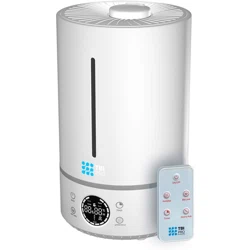
User manual 4L Ultrasonic Humidifier
Specifications
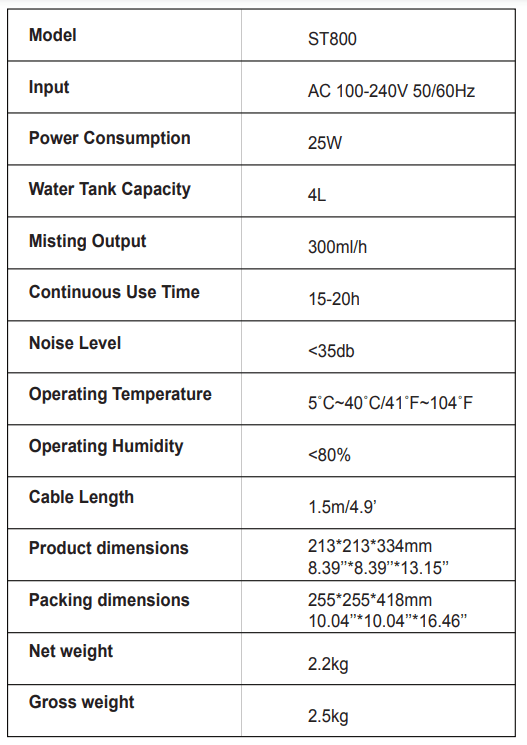
Feature
- Simple white texture and innovative design
- Open water tank and easy to clean
- Floating sense technique to avoid water leaking
- Humidity adjustable mode 4.Adjustable humidity mode
- Three adjustable mist settings
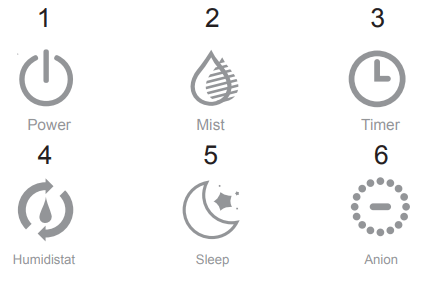
After plugging in the power supply, the machine enters the standby state with a sound “beep”, and the standby power rate is not exceeding 10w.
1. Power
Press this button to turn on the machine with a sound “beep”. The default low-grade fog, the low light bright white light, the display screen automatically displays the current environment humidity, bright white light.
Press this button again to turn off the machine with a sound “beep”.
2.Mist
Press this button to adjust the default low-grade fog to mid-range, and press again to high. For each gear selection, the display screen indicates different bright white light.
3. Timer
Press this button to enter the timer mode. You can set time from 1H to 12H and the step is 1H. After setting the required time, the humidifier will automatically enter the timer work mode with the time number flickering for three times. After 12H, press this button again and exit the timer mode. The corresponding time on the display screen and the unit symbol "H" will show a white light, which will not be displayed if not in timer mode.
4. Humidistat
Press this button to adjust the humidity which is from 45-90% and the step is 5%. After selecting the desired humidity, the value on the display screen will blink for 3 seconds to enter the automatic constant wet mode. Because of the environment and distance, there is an error between the displayed degree and the actual degree which is about 5 degrees.
5. Sleep
Press this button to enter sleep mode. And then the sign of sleep mode lights up, the brightness of display screen becomes half dark, the fog is automatically changed into middle-grade and humidity to 65% at humidity mode. Press this button again to cancel the sleep mode and go back to the settings before. The fog quantitative is changed into high-grade.
6. Anion
Press this button to release a lot of negative ions which could clean the air and keep you fresh. The negative ions can clearly settle the particles which are small to 0.01 micrometers and effectively remove odors achieve the purpose of antimicrobial sterilization.
7. Water shortage protection
When the water tank is short of water, the buzzer will alarm for three times. And then the humidifier enters the standby state and the display screen will show the water shortage icon.
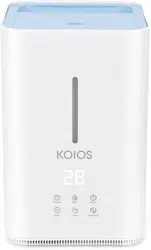
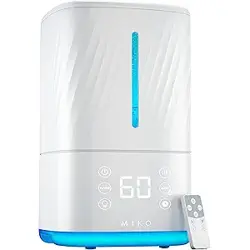
Product diagram
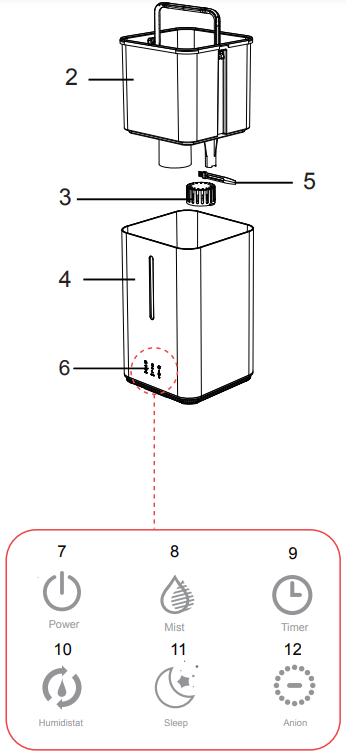
- Top cover
- Water tank
- filter
- Base
- Brush
- Display screen
- Power
- Mist
- Timer
- Humidistat
- Sleep
- Anion
How to use
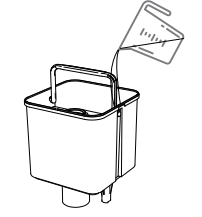
1. Put forward water tank to add water or directly add water to the tank;
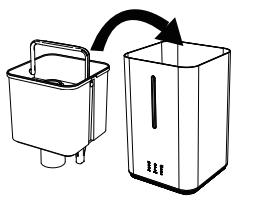
2. Put the water tank into the base;
3. Then cover up the top cover;
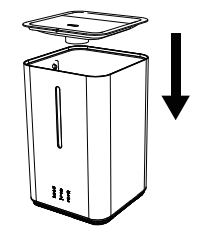
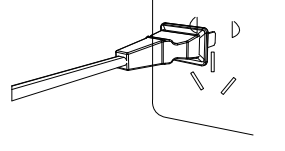
4. Plug in the power supply and press the power button to turn on the humidifier.
Cleaning of the humidifier
- To ensure the best performance of the humidifier, the water sink and tank of the humidifier need to be cleaned regularly and suggest cleaning every five days to prevent the transducer and filter from gathering dirt.
- Please turn off the power and unplug the humidifier when cleaning. And please unplug by holding the plug, not by pulling the power cord.
- Do not use chemical solvents, gasoline, polishing powder and other substances to clean the surface of the machine. Do not use cleaner to clean the humidifier; it is best to be cleaned with clean water.
- Please use soft cloth to clean different parts of the humidifier. If there is dirt you can't remove, please use 60 degrees hot water to melt the citric acid (the proportion of water and citric acid is 10mL: 1g) and pour it into the dirt, soak for about five minutes, then use the brush to wash dirt, until it is removed.
- Unload the filter from the water tank and soak it into white vinegar for about 15 minutes. Then gently shake dozens of times and clean it with clean water. The filter is the same as a new one.
- Please replace the water in the water tank regularly and keep the humidifier clean. When the humidifier is not used for a long time, please clean all parts and place it in a dry place after drying.
Cautions
- Please do not pull plug with wet hand to avoid electric shock.
- Please do not disassemble, repair and reform this product.
- Please do not touch the atomizer with your hand when turning on.
- The power cord shall not be damaged or tied, nor shall it be pressed. Please do not change the power cord without authorization. If the power cord is damaged, you need a professional to repair it.
- Please do not separate the water tank from the base when it is working and do not touch the water and parts in the base.
- This machine is only used indoors.
- Please unplug when there is a thunderstorm or if it is not used for a long time.
- Please do not let children and people who have reduced or impaired physical or mental capabilities use the humidifier.
- Please do not flip the product in the working state to avoid burning the electronic components.
Frequently Asked Questions
|
Problem
|
Reason
|
Solution
|
| The lamp is not brightthere is no wind and no fog |
1.The plug is not plugged in
2.The power cord is damaged
|
1. Check the plug and connect
2. Send to repair center
|
| Power indicator light Wind without fog or no wind blows out |
1.The tank without water
2.The atomizer or fan is damaged
|
1. Add water to the tank
2.Send to repair center
|
| The spray of fog smelled bad |
New product or tank is not clean |
Clean the tank or replace the water |
| The fog amount is too small |
The atomizer gathers dirt |
Clean the atomizer |
| "E1/HH" appears on the display |
- No water in tank, then "E1/HH" appears on the display
- If you add water, but "E1/HH" still appears on the display, may be caused by the following reasons:
- After cleaning the thimble, it may be not installed in the appropriate location.
- The silicone baffle at outlet of water tank is blocked by impurities
- The water tank may be not put in the right location.
- The brush stuck the water tank, which leads to the water tank is not stable.
- The bracket of the water valve is not put in the right location.
|
Please adjust the humidifier according to the reasons. |
Product care
- The new product will have a slight odour which will automatically remove after using for three or four times.
- Use on a stable, flat, and level surface. Keep the area clean and dry.
- Do not use in anywhere near the hot surface.
- Do not put humidifier in the vents and as far as possible away from electronic equipment.
- Use only fresh and clean water. Do not use warm or hot water. Do not over-fill the water tank
- Do not add water through the mist outlet. Dry the body with soft and clean cloth and avoid damage to the machine.
- When room temperature is below zero, pour all water out of the tank and avoid damage to the machine.
- Unplug the product when moving, cleaning, adding water and pouring water out of the tank.
- When the machine is working, do not open the top cover and touch the wind wheel by your hand, nor can you put the hard object into the machine from the top cover, so as not to cause problems.