
OWNER’S MANUAL
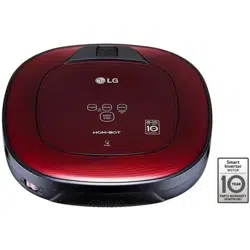
HOM-BOT
www.lg.com
MFL67680072
Copyright © 2017 LG Electronics Inc. All Rights Reserved.

TABLE OF CONTENTS
BEFORE USING
3
4
9
10
12
14
15
16
Features
Safety Precautions
Included with Product
Parts
Button Functions
Display Status
Before Starting
Overview
METHOD OF USE
17
18
19
20
23
24
26
28
29
30
31
32
34
55
Installing the Home Station
Turning the Robot Cleaner On/Off
How to Start and Stop Cleaning
Charging the Battery
Using Magnetic Wall Strips
Choosing a Cleaning Mode
Auxiliary Cleaning Modes
Setting the Clock
Scheduling Cleaning
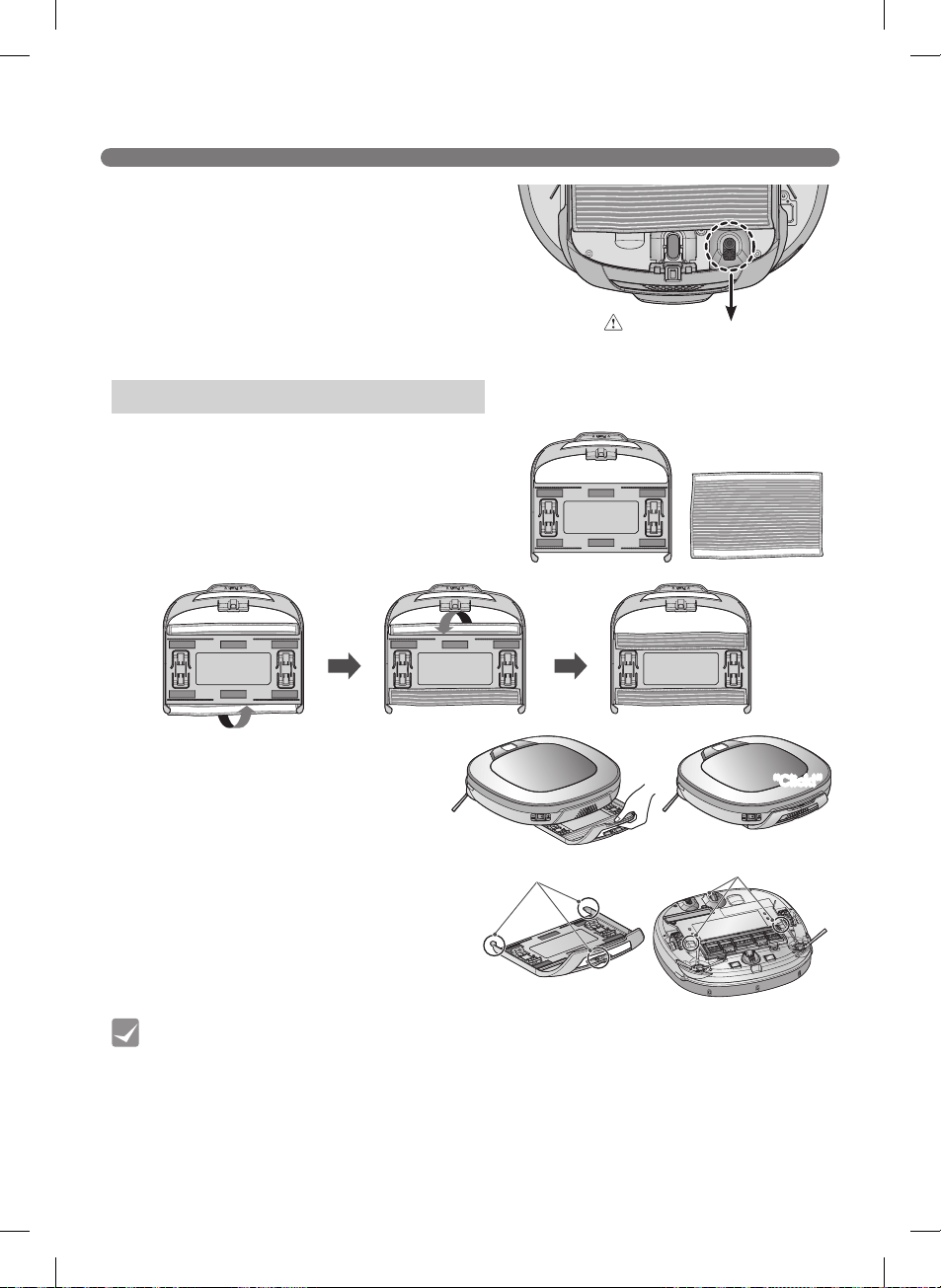
Mop Cleaning (on some models)
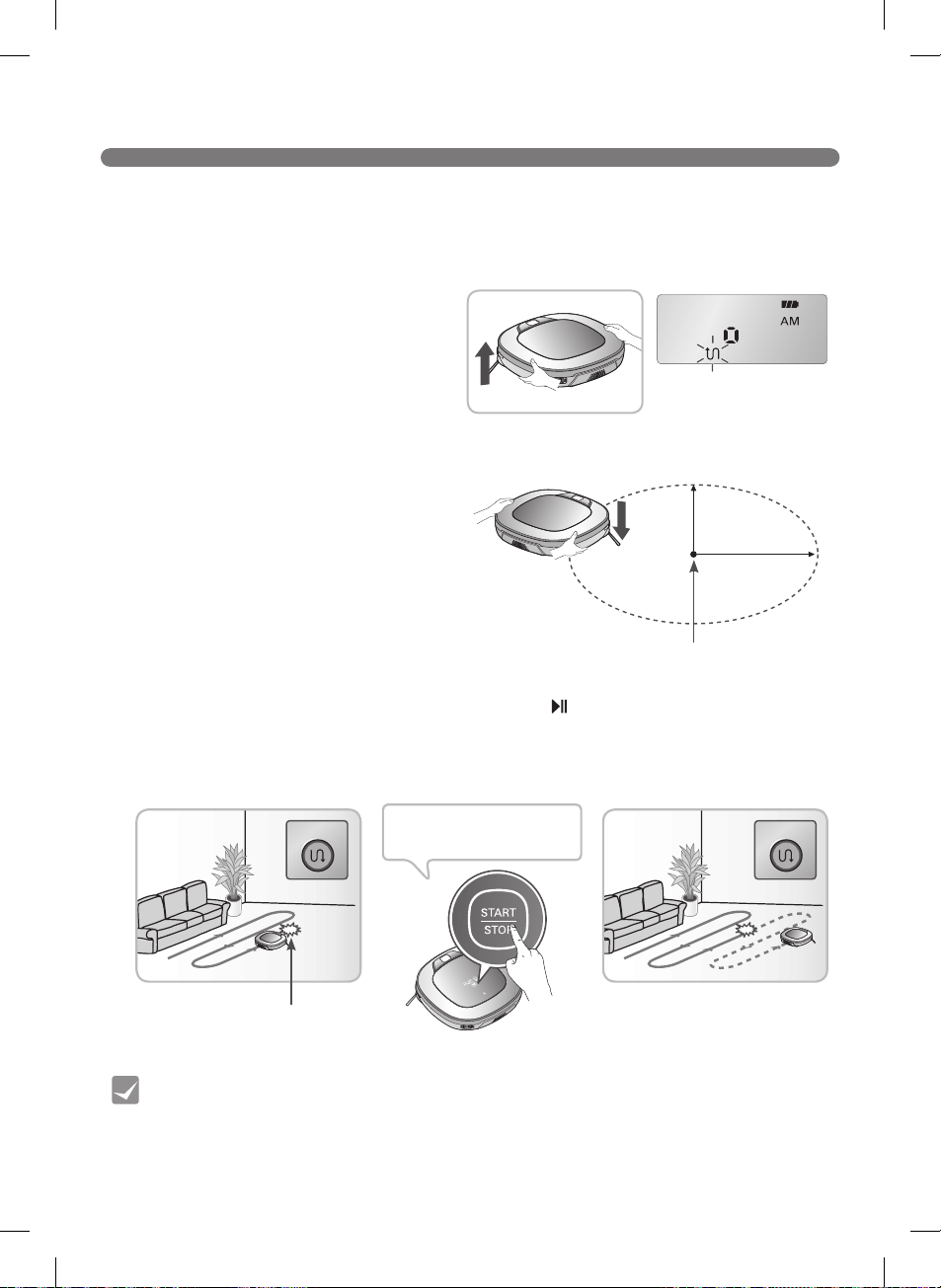
Location Search Function
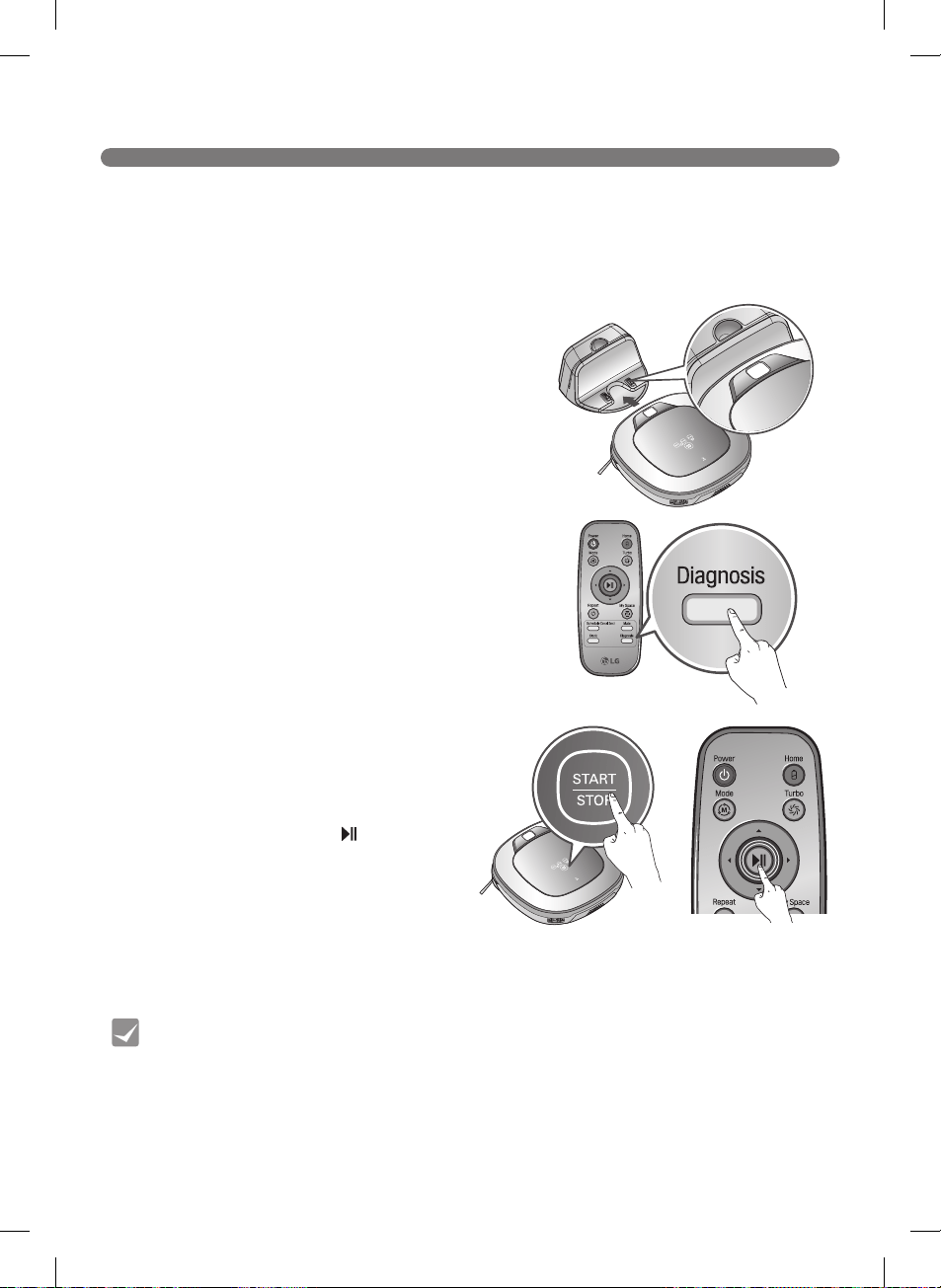
Smart Diagnosis™
Smart Application Function
Product Info Initialization
MAINTENANCE
56
57
58
59
60
61
Cleaning the
Dust Bin
Cleaning the Dust Bin Filter
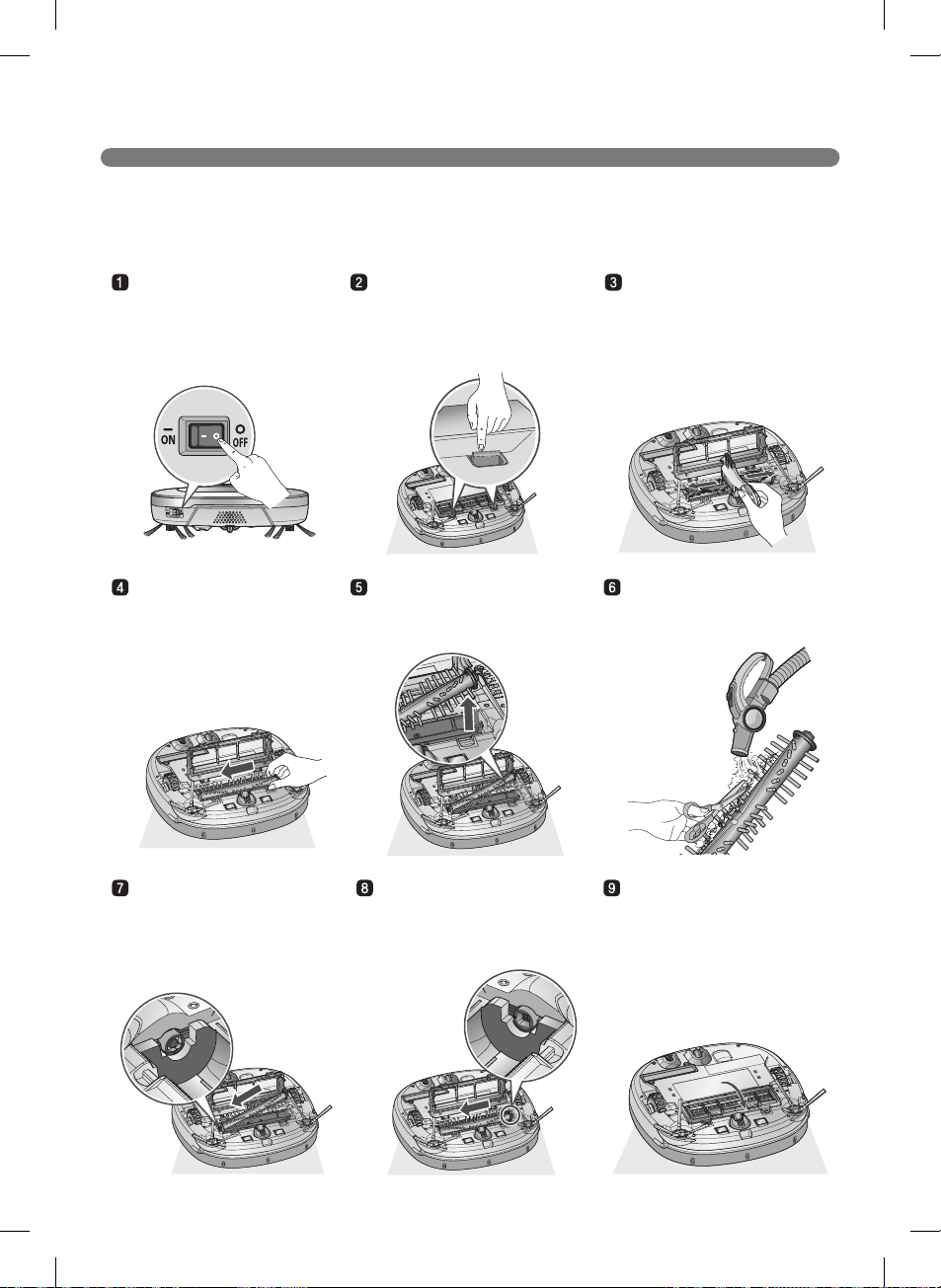
Cleaning the Brush
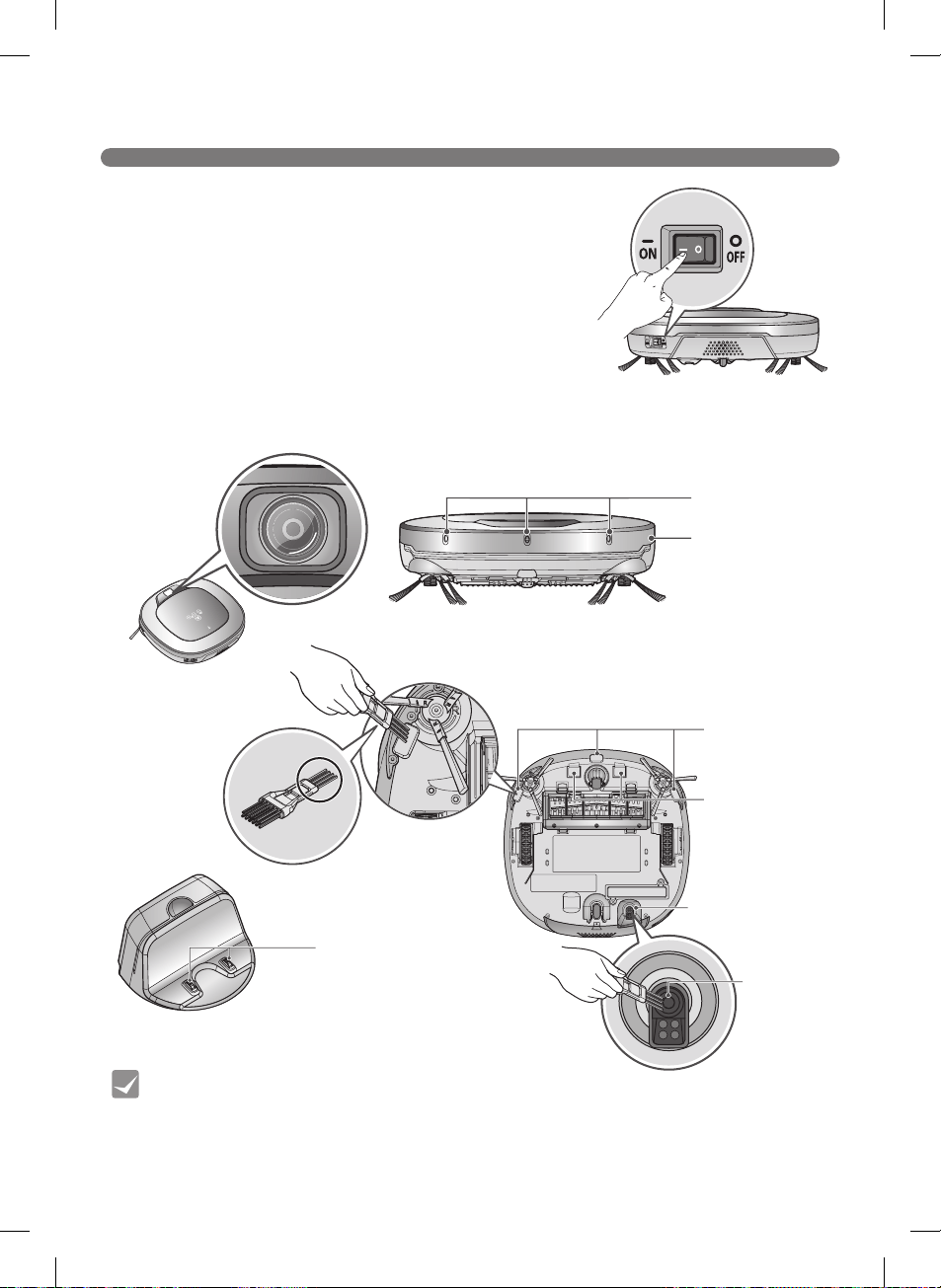
Cleaning the Sensor/Charging Terminal
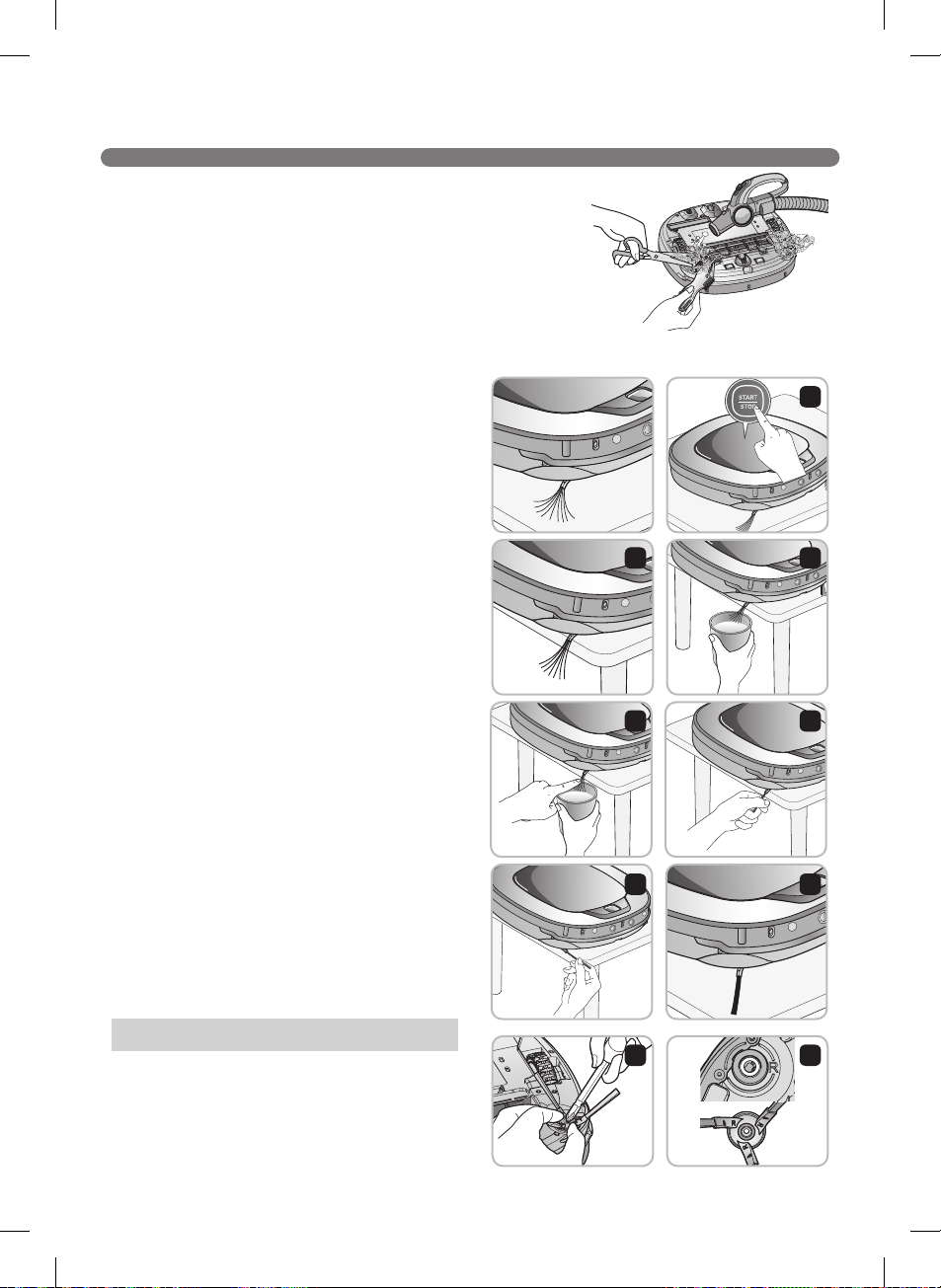
Cleaning the Side Brush
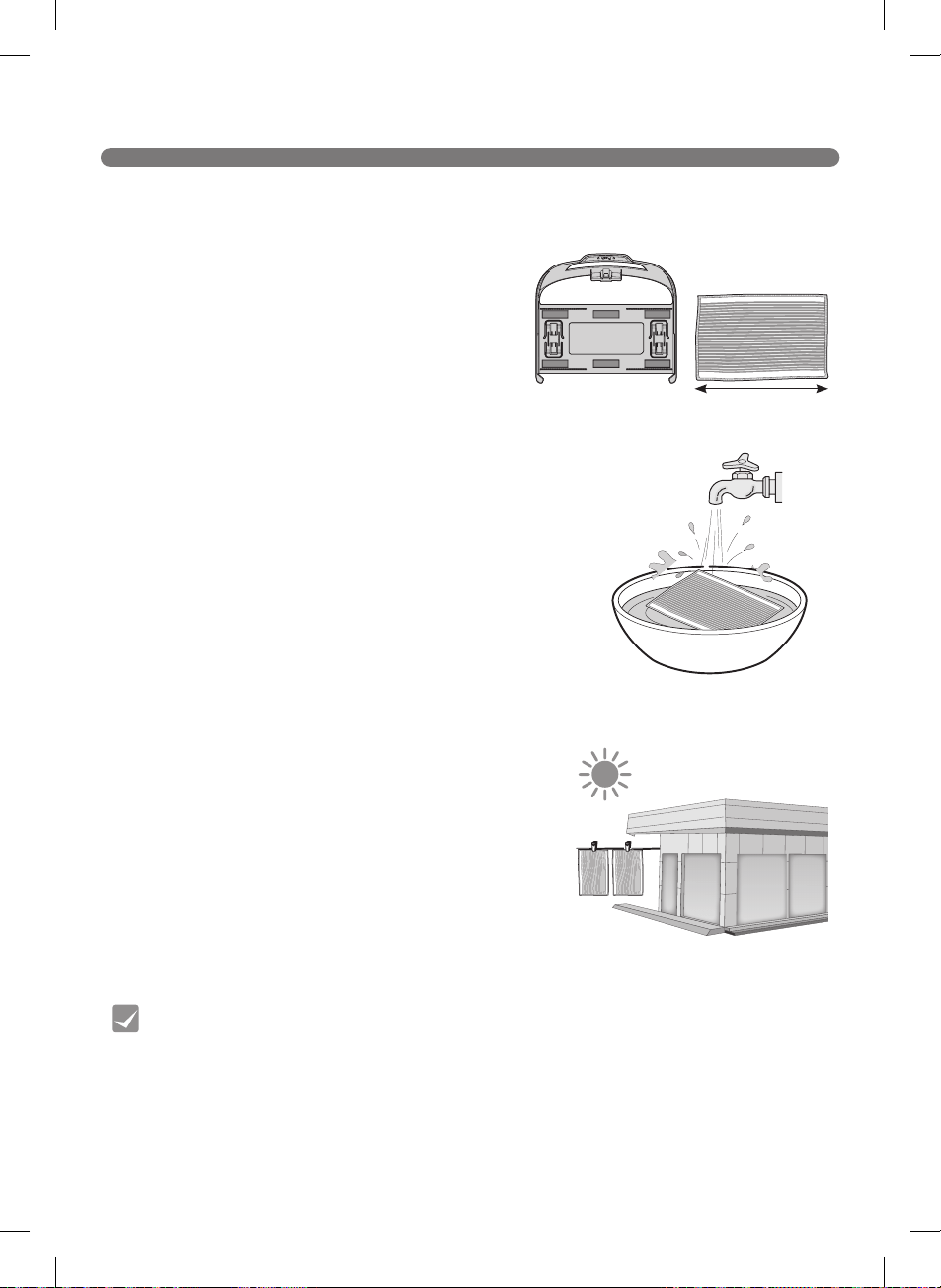
Cleaning the Ultra Microfiber Mop
(on some models)
ADDITIONAL INFORMATION
62
65
Troubleshooting
Before Calling for Service
REFERENCE
66
68
69
Product Specifications
Reference Items
Performance Testing (IEC 62929 Standard)
WARRANTY
70
LG Robot Cleaner WARRANTY
3
FEATURES
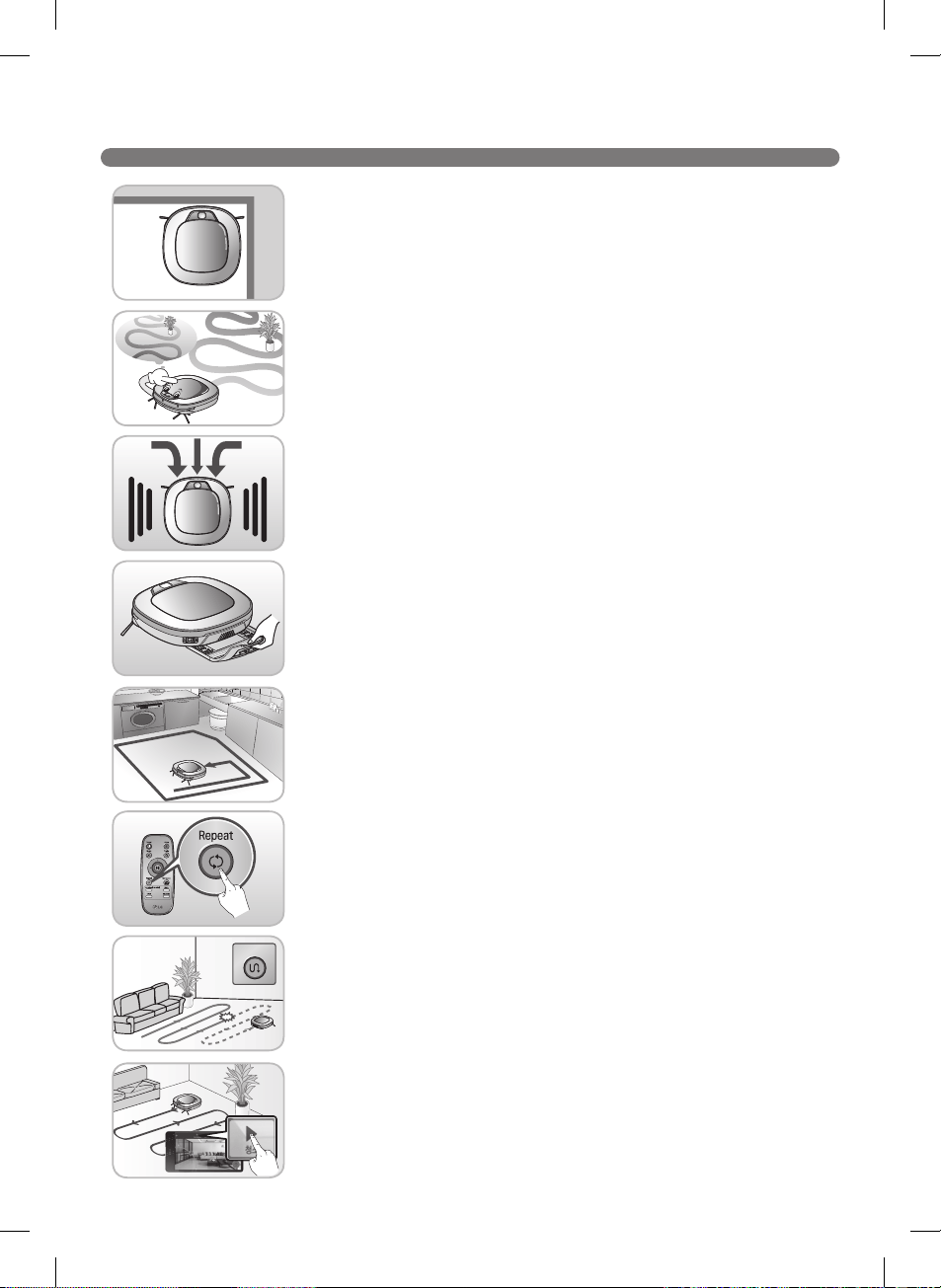
Corner Master
Learning Mode
Turbo Mode
Drawer Mop Plate (on some models)
My Space Mode
Repeat Cleaning
Location Search Function
LG Smart ThinQ Smartphone Application
Zigzag
Cleaning
Cl
l
le
e
e
e
e
4
SAFETY PRECAUTIONS
This guide contains many important safety messages. Always read and obey all safety messages.
Read all instructions before using.
SAVE THESE INSTRUCTIONS
IMPORTANT SAFETY INSTRUCTIONS
WARNING
1. This appliance can be used by children aged
8 years and above and persons with reduced
physical, sensory or mental capabilities or
lack of experience and knowledge if they
have been given supervision or instruction
concerning use of the appliance in a safe way
and understand the hazards involved. Children
shall not play with the appliance. Cleaning and
user maintenance must not be performed by
children without supervision.
2. Children should be supervised to ensure that
they do not play with the appliance.
3. If the supply cord is damaged, it must be
replaced by an LG Electronics Service Agent
in order to avoid a potential hazard.
Basic Safety Precautions
After reading this manual, please keep it in an easily accessible location.
This is the safety alert symbol. This symbol alerts you to potential hazards that can
result in property damage and/or serious bodily harm or death.
Indicates a hazardous situation which, if not avoided, could result in death or
serious injury.
Indicates a hazardous situation which, if not avoided, could result in minor or
moderate injury.
WARNING
CAUTION
5
SAFETY PRECAUTIONS
WARNING
•For your safety, do not remove the battery
from the Robot Cleaner. If you need to
replace the battery of the Robot Cleaner,
take it to the nearest authorized LG
Electronics service center or dealer for
assistance.
•Make sure the power cord of the home
station is not crushed under a heavy
object or damaged by contact with sharp
objects.
Do not use product if power cord or
plug is damaged. Take the product to an
authorized LG Electronics service center.
•Do not place the home station and/or the
Robot Cleaner near a heating device.
•Do not alter the power plug. Do not cut or
remove the grounding prong.
•Do not touch the power plug with wet
hands.
•Have servicing performed by authorized
service personnel using only identical
replacement parts. This will ensure that
the safety of the product is maintained.
•Never use the Robot Cleaner with a battery
and/or home station from any other
product than the Robot Cleaner.
•Do not use the Robot Cleaner when
candles or fragile objects are placed on
theoor.
•Always use a dedicated power outlet with
a 10 amp rating.
If multiple appliances are connected to an
outlet simultaneously, they can generate
enough heat to cause a re.
•When pulling out the home station power
plug, always pull it out by grabbing the
plug, not the cord. When pulling out the
power plug, do not touch the prongs with
yourngers.
To reduce the risk of explosion, re, death, electric shock, or injury to persons when
using this product, follow basic safety precautions, including the following.
1) Place the cords from other appliances out of the area to be cleaned.
2) Do not operate the vacuum in a room where an infant or child is sleeping.
3) Do not operate the vacuum in an area where there are lit candles or fragile objects
on the oor to be cleaned.
4) Do not operate the vacuum in a room that has lit candles on furniture that the
vacuum may accidentally hit or bump into.
5) Do not allow children to sit on the vacuum.
6) Do not use the vacuum on a wet surface.
6
SAFETY PRECAUTIONS
WARNING
•Do not allow children or pets to play with
or rest upon the Robot Cleaner at any
time. Do not use the Robot Cleaner while
an object is hanging from it.
•Keep gasoline, thinners, or other
ammablematerials,detergents,
shampoos, or other foaming agents,
and drinking water away from the Robot
Cleaner.
•Do not insert any part of the body, such as
a hand or foot, below the brush or wheels
of the Robot Cleaner while in use.
•Do not operate the Robot Cleaner on
narrow and high furniture such as a
wardrobe, refrigerator, desk, table, etc.
•Donotactivatethedeviceonaoorthat
has more than a 10 degree incline.
•Turn the power supply off immediately
if any abnormal sound, odor or smoke
is generated from the Robot Cleaner.
Remove the Robot Cleaner from the home
station and turn off the main switch on the
rear side of the unit.
•Do not leave children or pets near the
Robot Cleaner unsupervised.
•Do not repair or replace any parts or
attempt any servicing other than as
described in this manual. Service should
beperformedbyaqualiedtechnician.
•A coin cell battery on the mainboard of
the Robot Cleaner cannot be replaced by
the user. Used cells must be disposed of
properly.
•This product is intended for indoor,
domestic use and should not be used in
mobile or commercial locations, such as
workshops, garages, indoor swimming
pools, etc.
•This product contains chemicals known to
the State of California to cause cancer and
birth defects or reproductive harm.
WASH HANDS AFTER HANDLING.
•Do not allow children or pets to play with
or eat the Magnetic Wall strip at any time.
To reduce the risk of explosion, re, death, electric shock, or injury to persons when
using this product, follow basic safety precautions, including the following.
7
SAFETY PRECAUTIONS
CAUTION
•Frequently empty the dust bin and keep it
clean.
The dust collected in the dust bin can trigger
allergies and may contain harmful insects. it
should be cleaned after each use.
•Only use the Robot Cleaner indoors.
Using it outdoors can cause product failure and
irreparable damage to the unit.
•Close the cover of the dust bin on the main
unit before use.
•DO NOT use the Robot Cleaner around a
banister, staircase or any other dangerous
place.
•In rare cases, the Robot Cleaner’s brush
can damage carpet. If this happens,
immediately stop the cleaning operation.
When a carpet has long tassels, the tassels
can be damaged.
•Do not let the main unit and charging
terminal of the home station come into
contact with metallic objects.
•Do not put water, detergent, etc. into or
onto the Robot Cleaner.
If liquids get inside of the Robot Cleaner, turn
off the power supply and call for service.
•Do not drop the Robot Cleaner or subject it
to strong impacts.
•Do not expose the Robot Cleaner to
temperatures lower than 23°F (-5°C) for a
long period of time.
•Removeanycablesorstringfromtheoor
before use.
Cable or string can get tangled in the wheels
of the Robot Cleaner and cause product failure
or cause another appliance to tip over or be
disconnected.
•Do not place the Robot Cleaner on a table
or other elevated surface while it is on.
•Do not allow the Robot Cleaner to sweep up
liquids, blades, thumb tacks, sharp objects
or ashes, hot or cold.
•Do not put sharp objects into the opening
of the Robot Cleaner’s ultrasonic sensors.
•Do not use the Robot Cleaner when the
dust bin is completely full.
•Iftheooriswetorhaswetspots,wipe
them up before using the Robot Cleaner. Do
not use the Robot Cleaner on a wet surface.
•Attach the mop so that it does not block the
lower camera sensor.
•Turn off the power switch to save energy
when the Robot Cleaner is not in use for
long periods. Turn on the power switch just
prior to resuming use.
• Prevent unintentional starting. Ensure the
switch is in the off-position before connecting
to the battery pack, picking up or carrying the
appliance. Carrying the appliance with your
ngerontheswitchorenergizinganappliance
that has the switch on invites accidents.
To reduce the risk of injury to persons, malfunction, or damage to the product or
property when using this product, follow basic precautions, including the following.
8
SAFETY PRECAUTIONS
in.mm
Tip
CAUTION
•Disconnect the battery pack from the
appliance before making any adjustments,
changing accessories, or storing the
appliance. Such preventive safety
measures reduce the risk of starting the
appliance accidentally.
•When the robot cleaner is operating, it may
hit a chair leg, desk leg, table leg or other
narrow pieces of furniture.
For quicker and better cleaning, place dining
chairs on top of the dining table.
•Rechargeonlywiththechargerspeciedby
Robot Cleaner provided by LG Electronics.
A charger that is suitable for one type of
batterypackmaycreateariskofrewhen
used with another battery pack.
•Useappliancesonlywithspecically
designed battery packs for Robot Cleaner
provided by LG Electronics. Use of any
other battery packs may create a risk of
injuryandre.
(
※
Discharging Range : -4 – 140°F (-20 – 60°C)
Charging Range : 32 – 140°F (0 – 60°C)
•When battery pack is not in use, keep it
away from other metal objects, like paper
clips, coins, keys, nails, screws or other
small metal objects, that can make a
connection from one terminal to another.
Shorting the battery terminals together may
causeburnsorare.
•Under abusive conditions, liquid may be
ejected from the battery; avoid contact.
Ifcontactaccidentallyoccurs,ushwith
water. If liquid contacts eyes, seek medical
help.
Liquid ejected from the battery may cause
irritation or burns.
•Do not use a battery pack or appliance
thatisdamagedormodied.Damaged
ormodiedbatteriesmayexhibit
unpredictablebehaviorresultinginre,
explosion or risk of injury.
•Do not expose a battery pack or appliance
toreorexcessivetemperature.Exposure
toreortemperatureabove265°F(130°C)
may cause explosion.
•NOTE: Close doors to rooms that are not to
be cleaned. Robot cleaner may cross over
low thresholds.
9
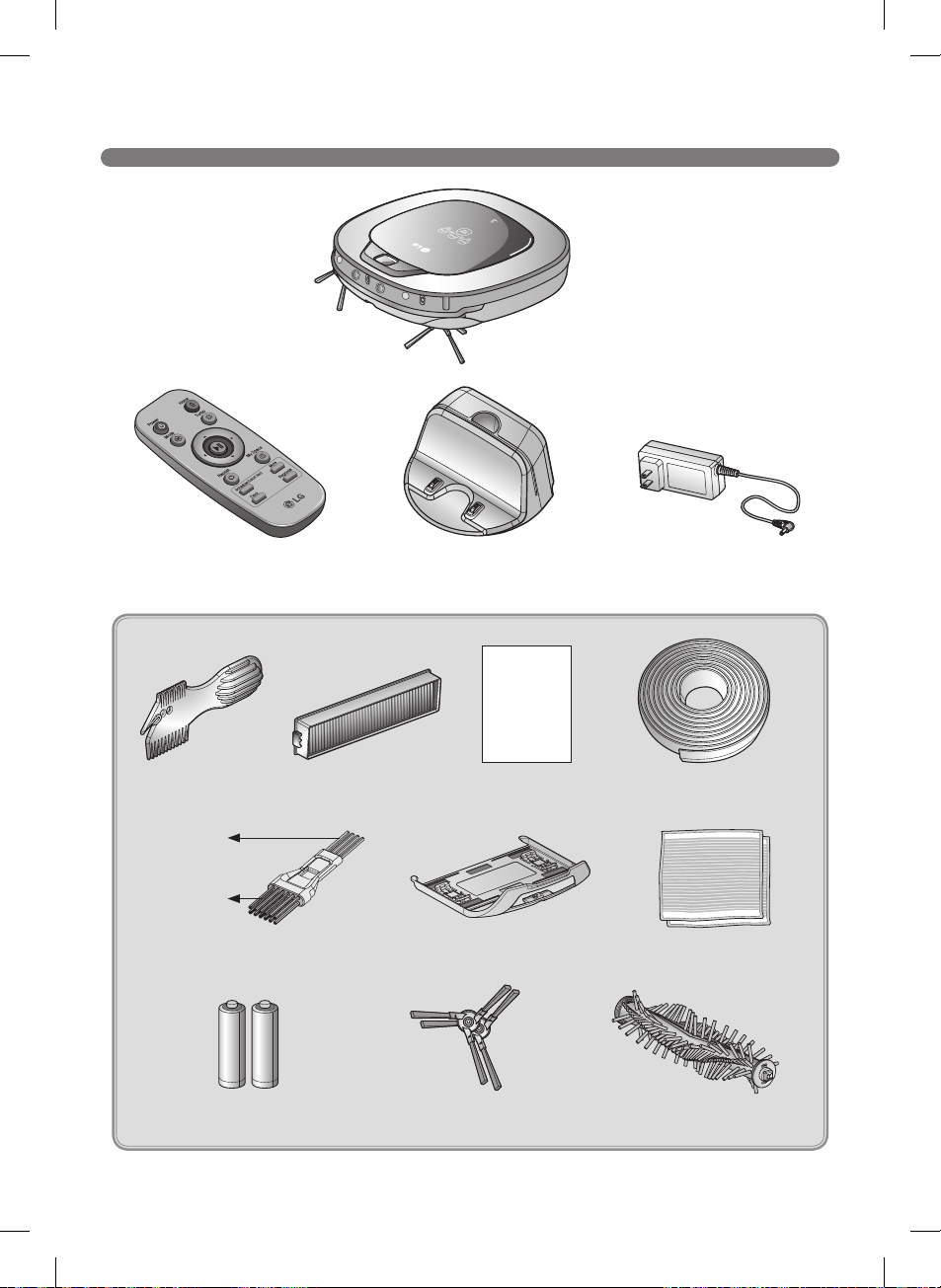
INCLUDED WITH PRODUCT
s
Home station
Robot Cleaner
Remote controller
Adapter
Manual
10
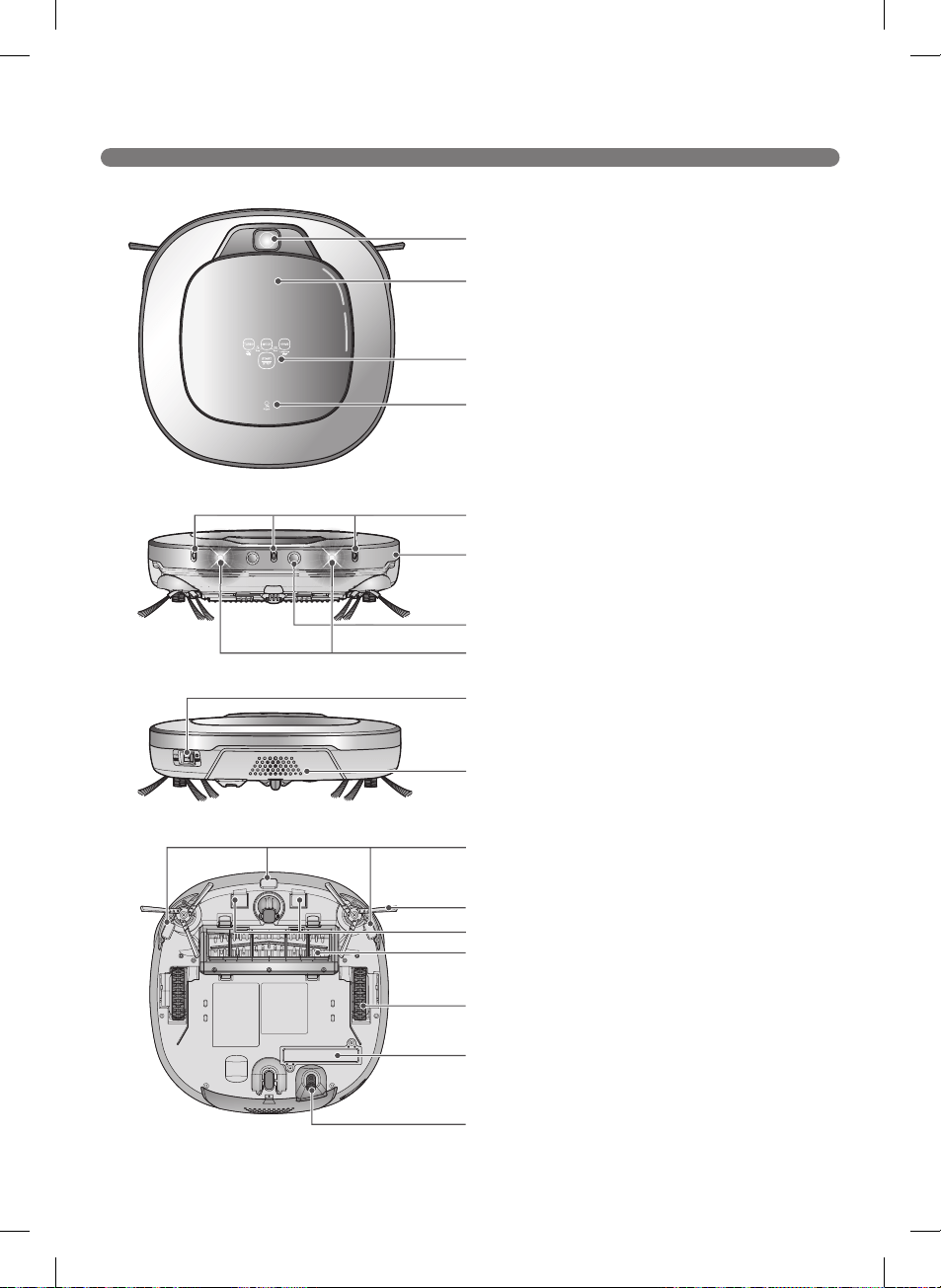
PARTS - ROBOT CLEANER
Appearance may vary depending on model.
Top view
Front view
Rear view
Bottom view
11
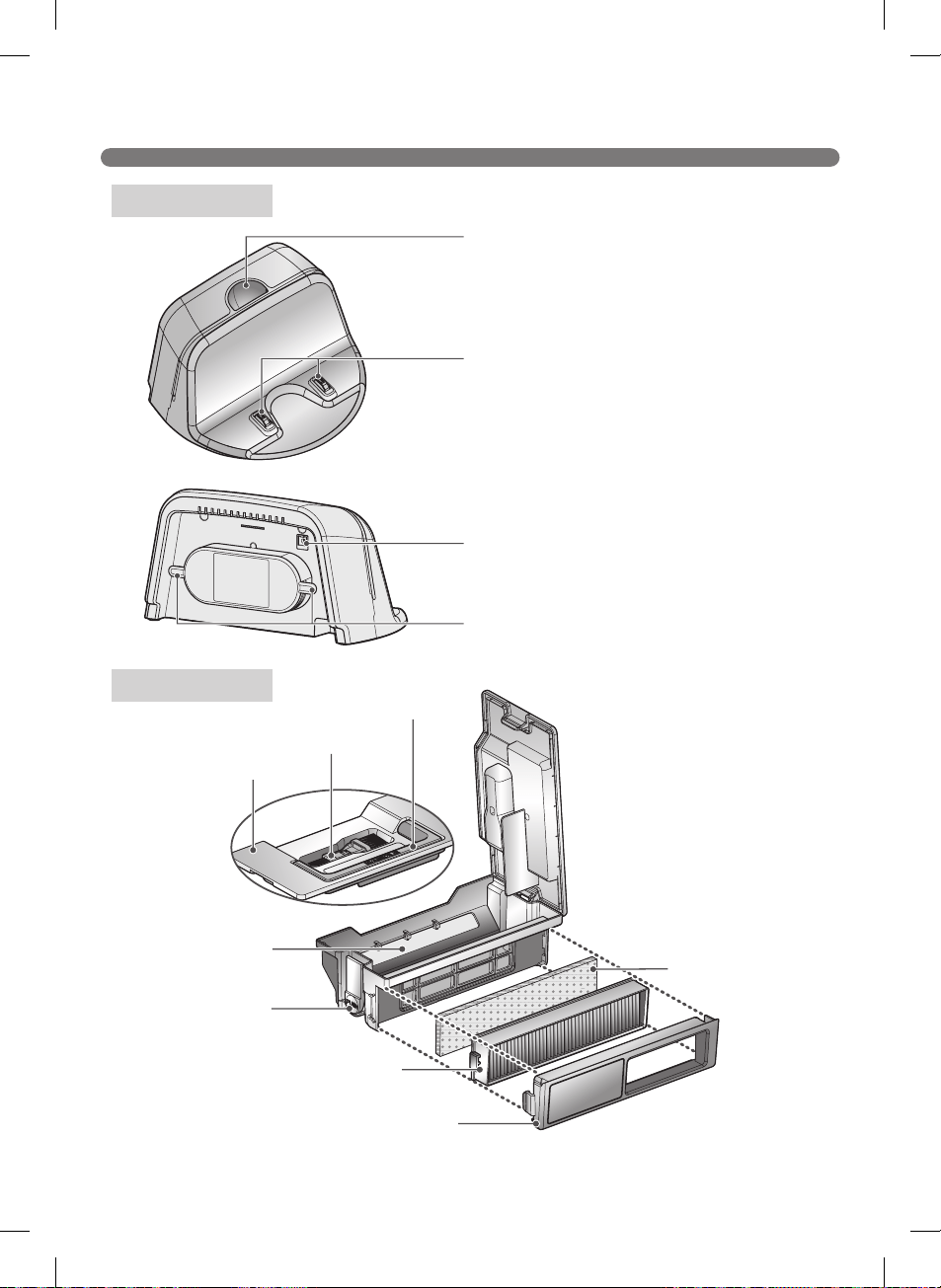
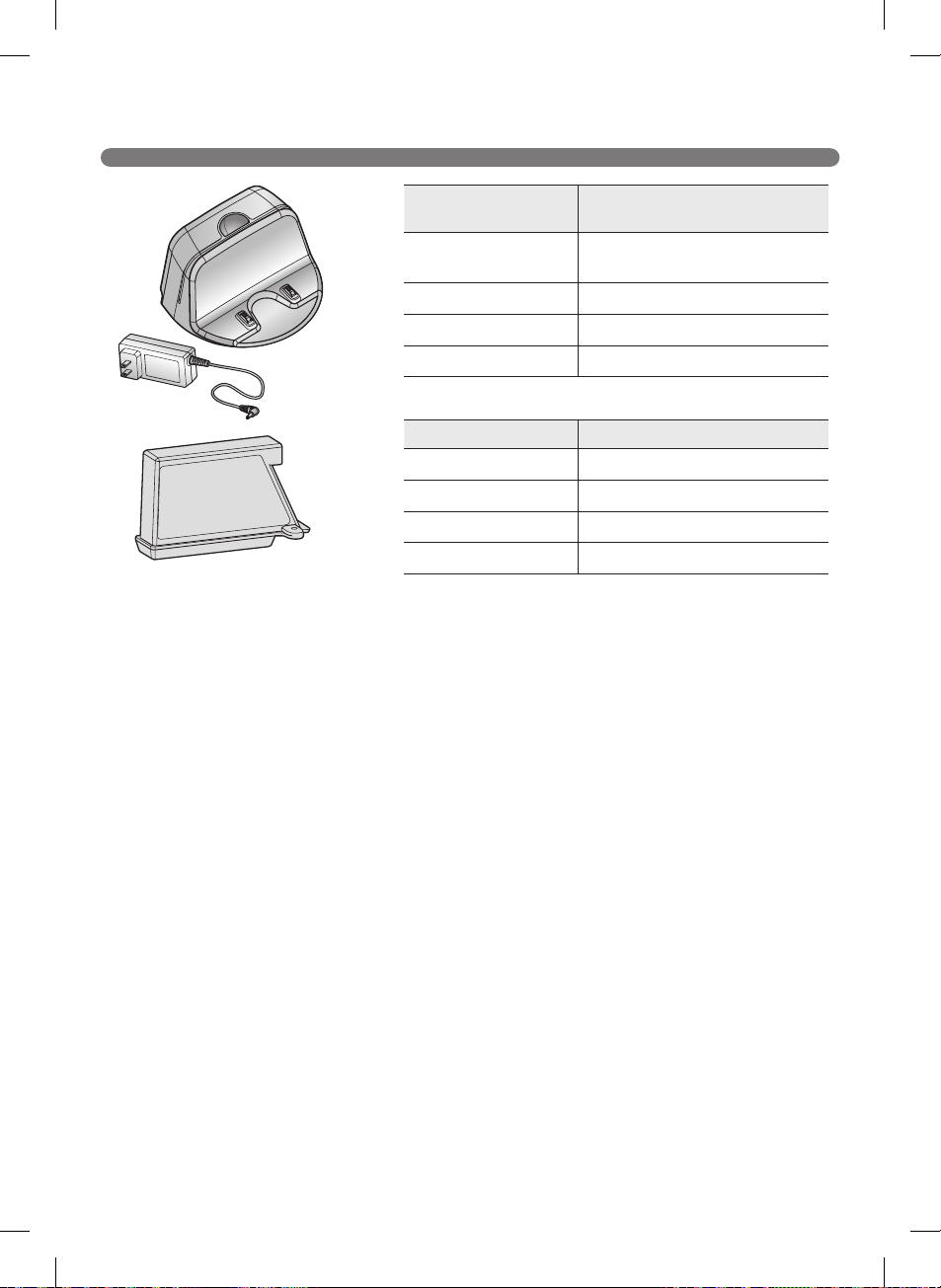
PARTS – HOME STATION / DUST BIN
Appearance may vary depending on model.
Home station
Dust bin
12
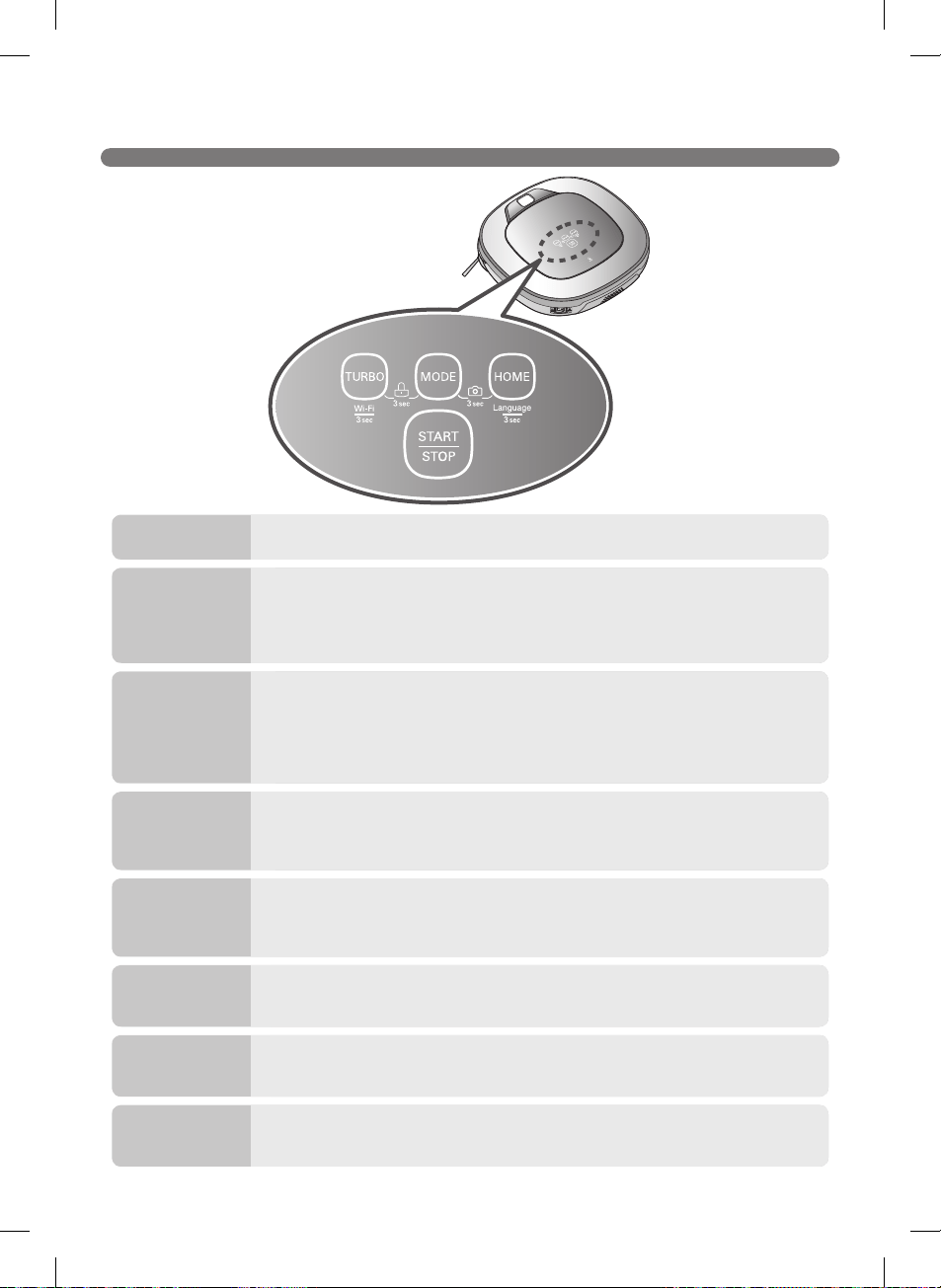
BUTTON FUNCTIONS – ROBOT CLEANER
TURBO
MODE
HOME
Control Lock
Language
Change
START/STOP
Front camera
On/OFF
Product
registration
(Wi-Fi)
13
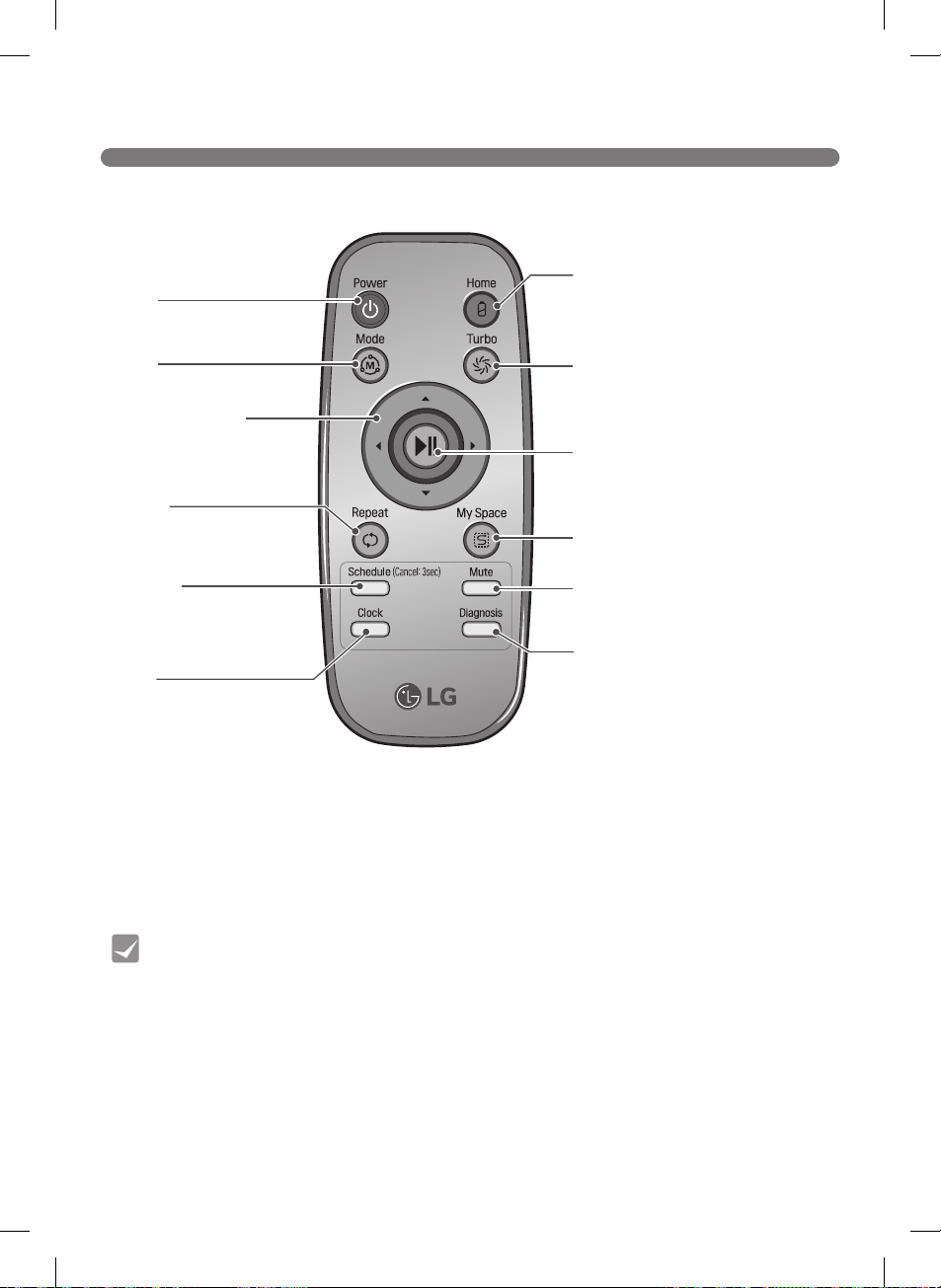
BUTTON FUNCTIONS – REMOTE
Tip
Power
Home
Turbo
Start/Stop button
My Space
Mute
Diagnosis
Mode
Directional button
Repeat
Clock
Schedule
14
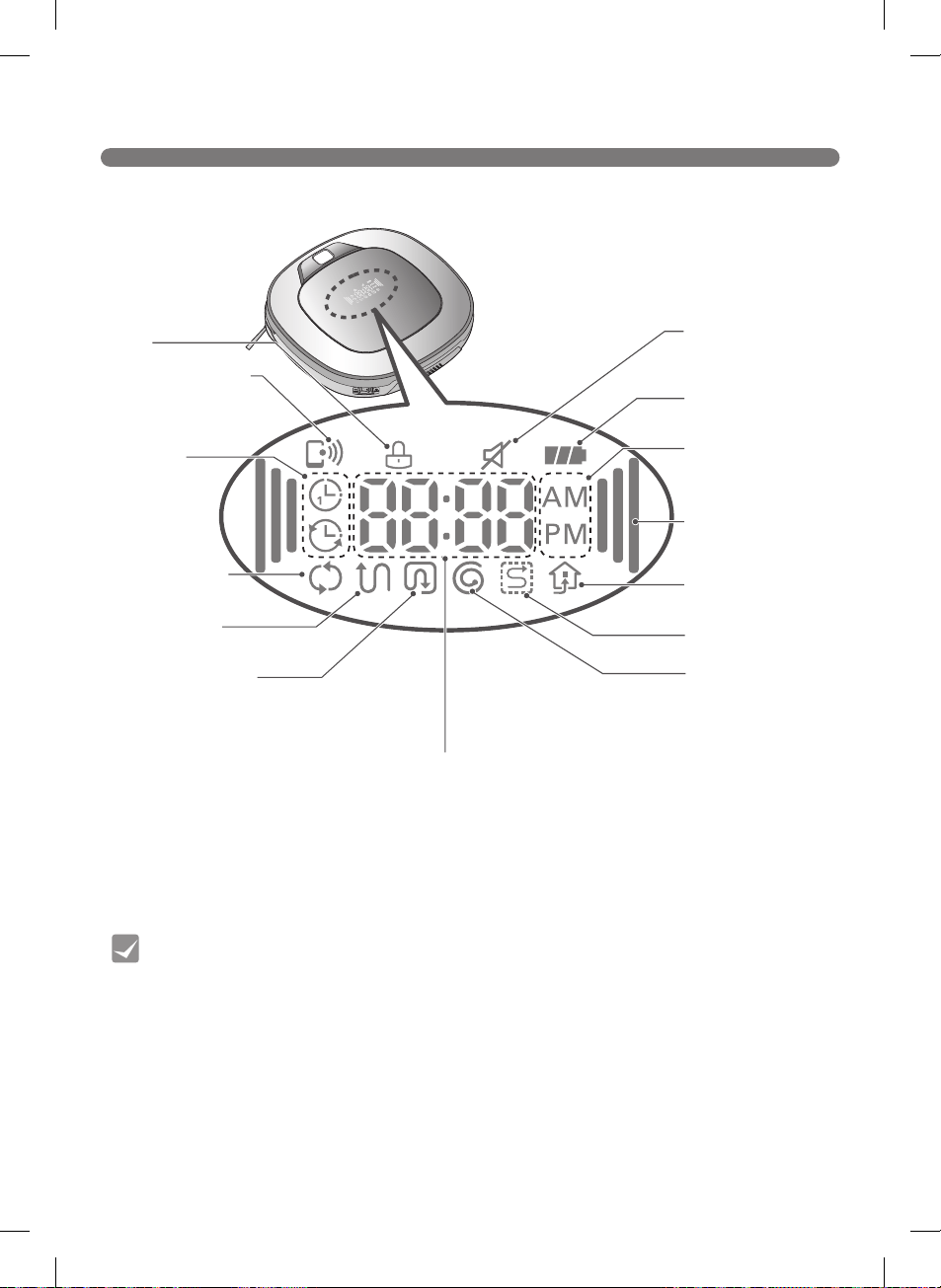
DISPLAY STATUS
Tip
Lock
Mute
Battery level
AM/PM
Turbo
Homing
My Space cleaning
Spot cleaning
Time display
Repeat cleaning
Zigzag cleaning
Cell by Cell cleaning
Schedule
Remote connection
15
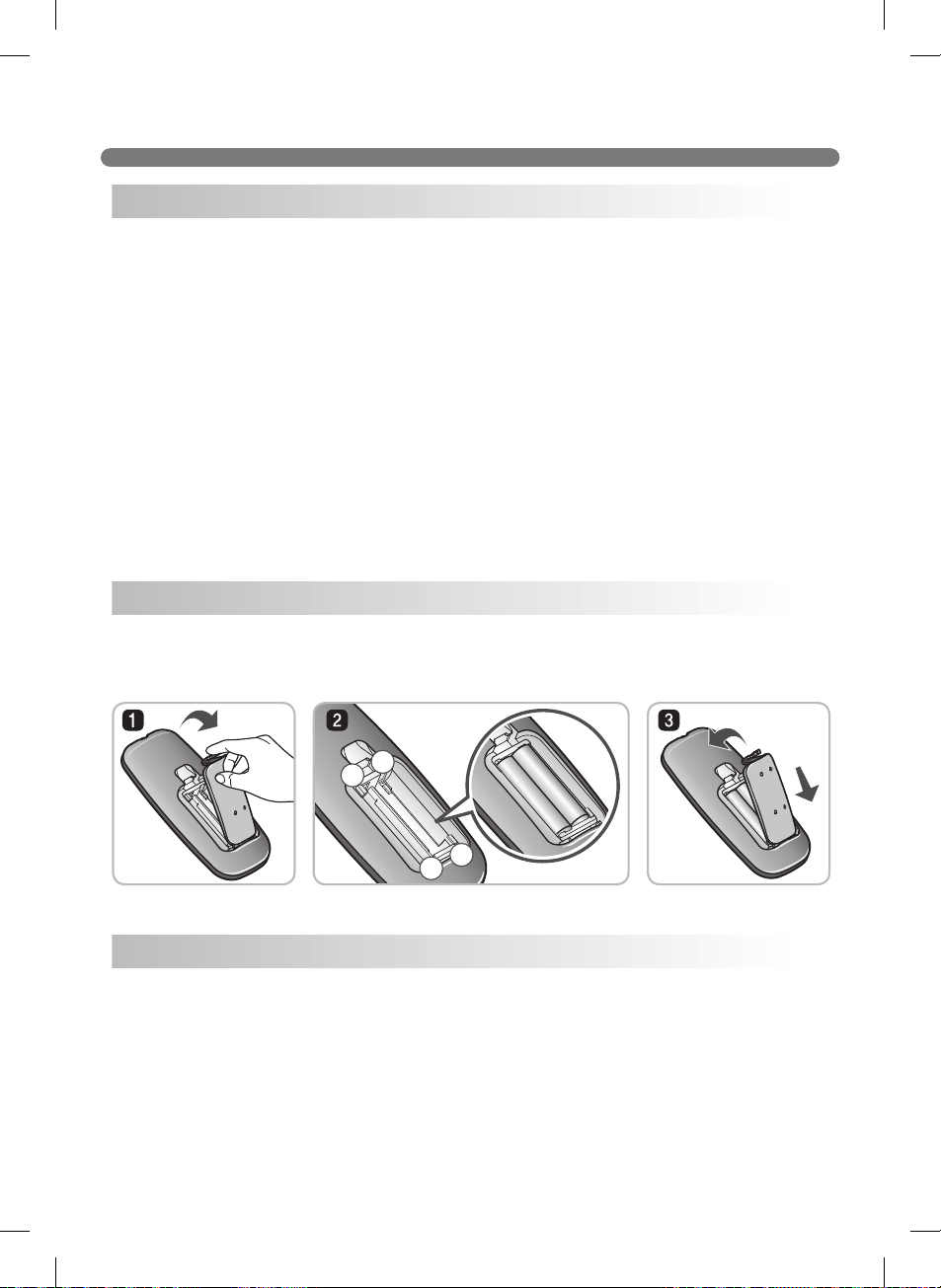
BEFORE STARTING
in.
mm
in.mm
ftm
Before Cleaning
Loading the Remote's Batteries
Precautions while Using the Remote
–
+
+
–
–
+
+
–
–
+
+
–
16
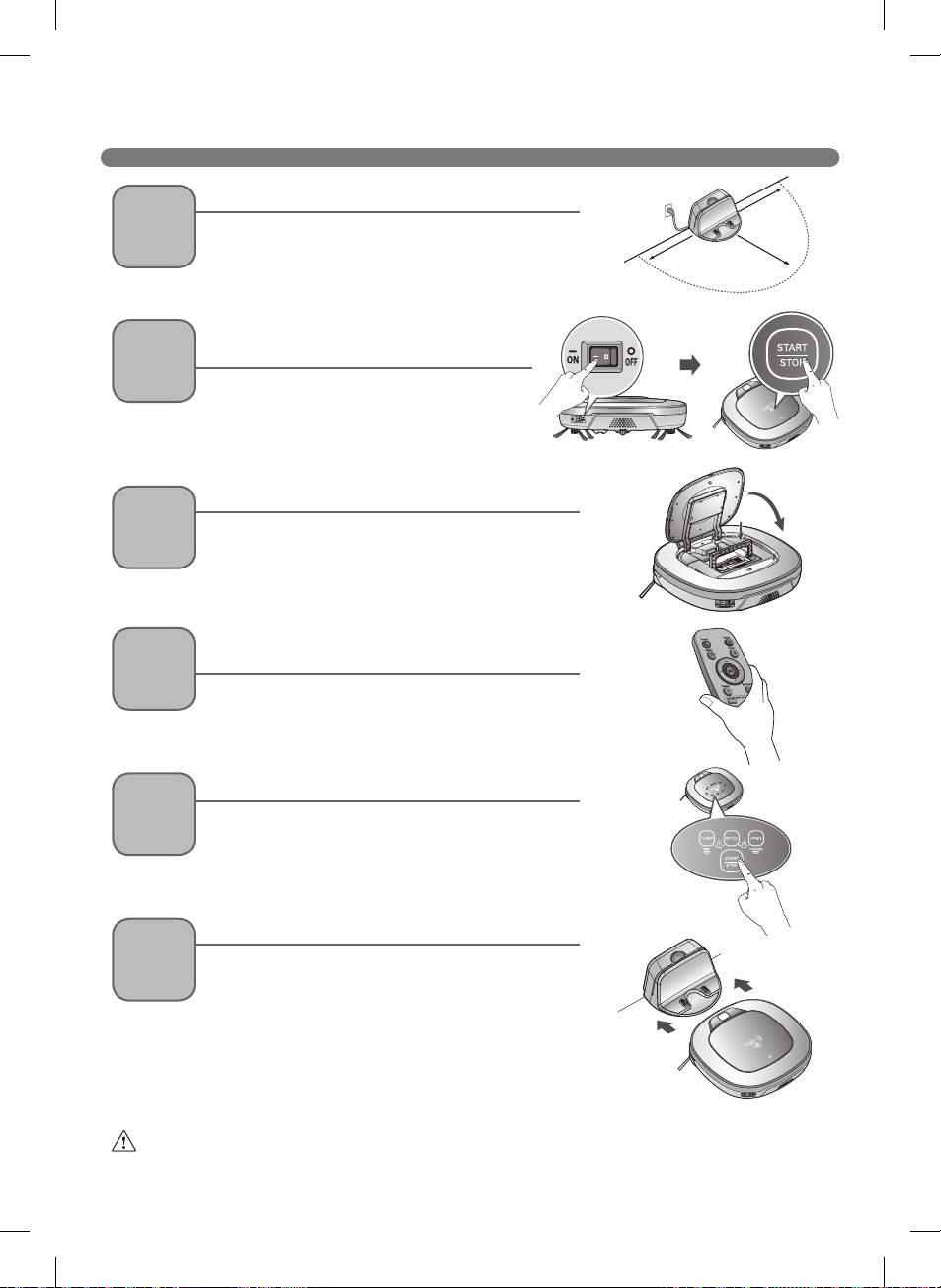
OVERVIEW
Warning If the Robot Cleaner is operated with the dust bin compartment lid left open, it
can cause personal injury or serious damage to the product.
1
Install the home station. (p17)
2
Turn on the power supply of the Robot
Cleaner. (p18)
3
Check the dust bin.
5
Start cleaning. (p19)
6
Automatic charge. (p20-22)
4
Select the desired cleaning mode and options.
(p24-29)
ft.m)
ft.m)
ft.m)
17
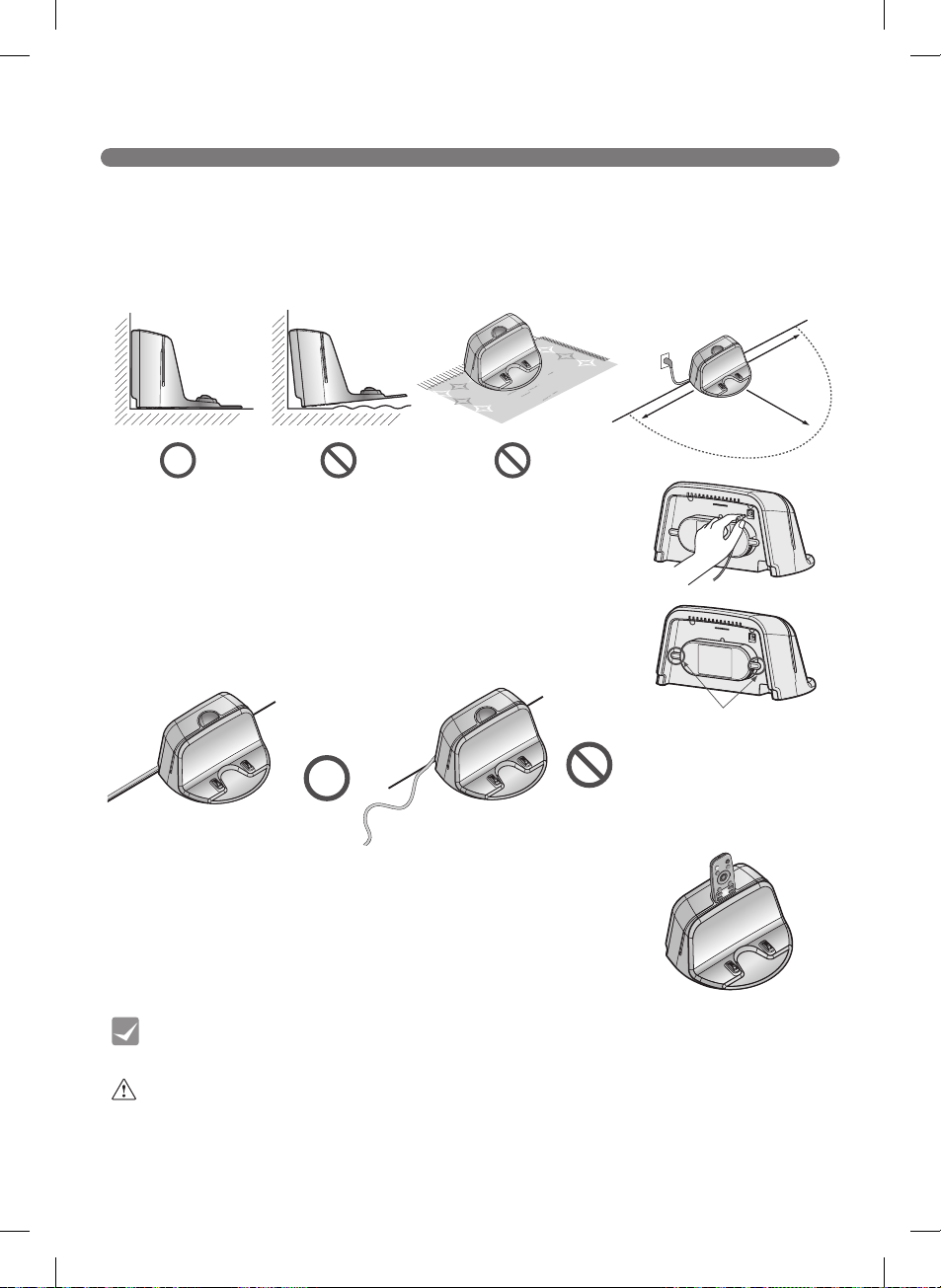
INSTALLING THE HOME STATION
ft.m
ft.m)
Warning Do not operate the Robot Cleaner if the home station has a damaged cord
or plug, if it is not working properly, or if it has been damaged or dropped. To
avoid electrical hazards, the cord must be replaced by LG Electronics, Inc. or a
qualified service person.
Tip
ft. m)
ft. m)
ft. m)
18
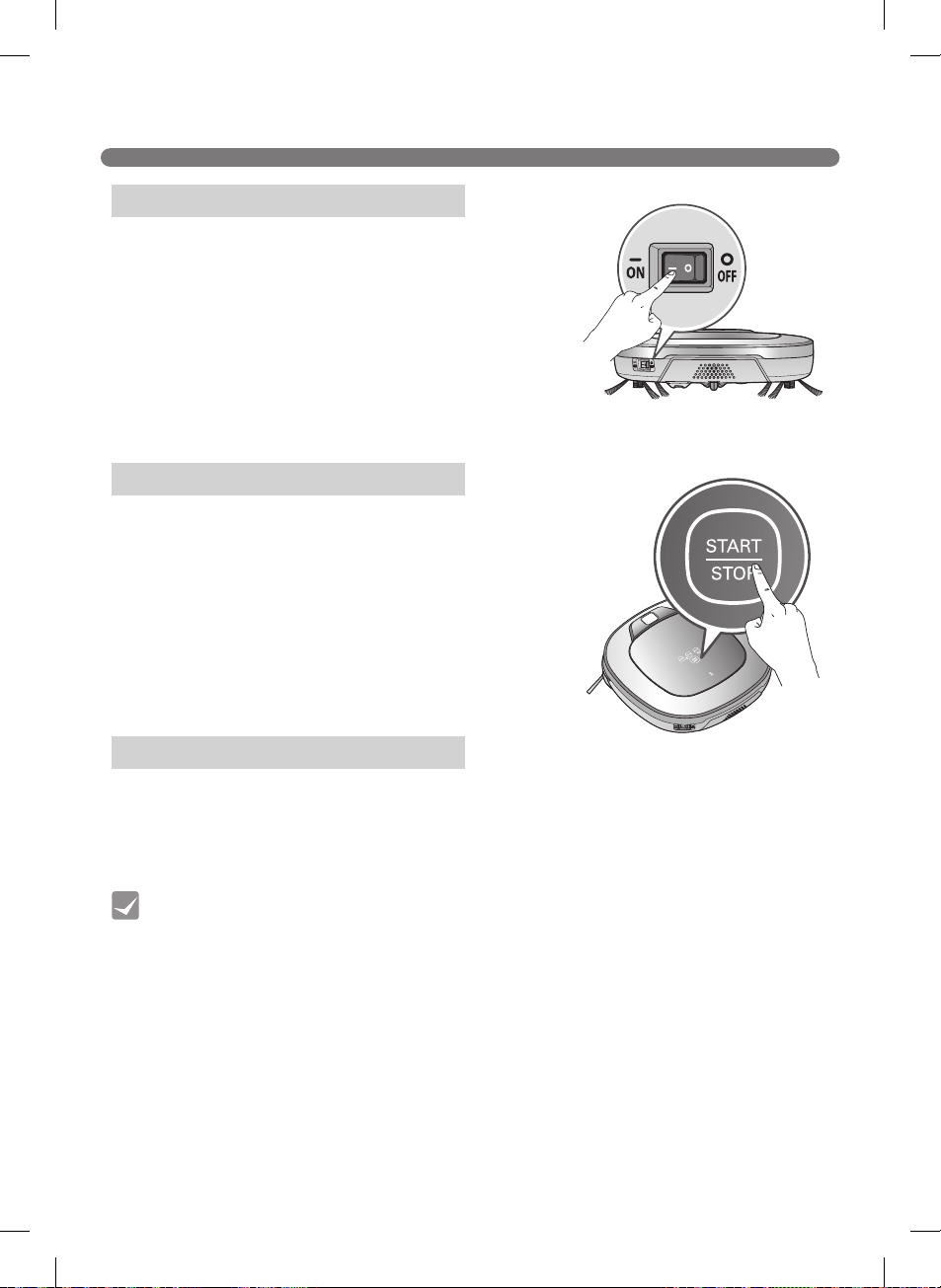
TURNING THE ROBOT CLEANER ON/OFF
※
※
※
Turning On the Main Power Supply
Turning On from Standby Mode
Turning Off the Power Supply
Tip
19
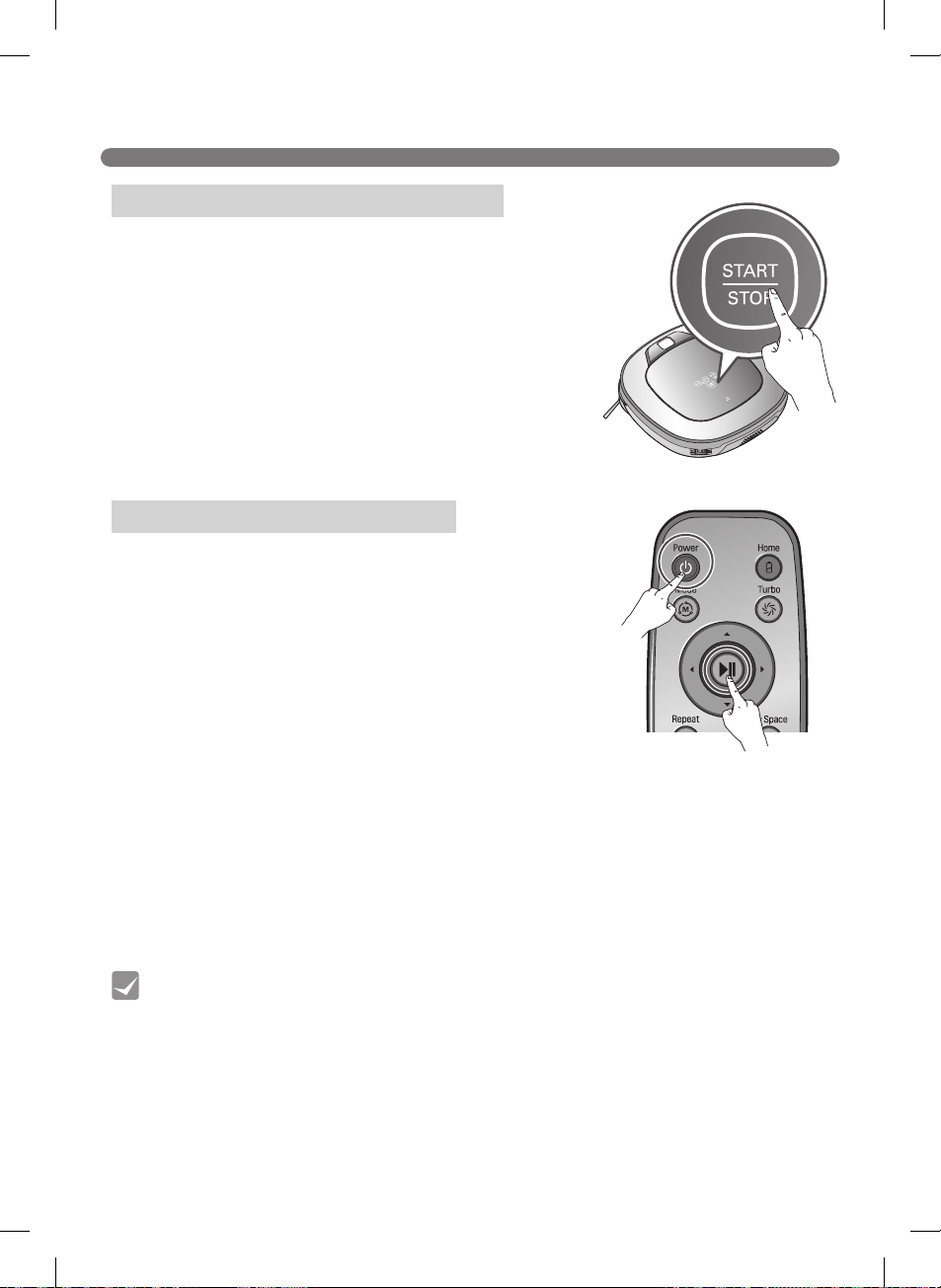
HOW TO START AND STOP CLEANING
in.mm
Tip
※
※
※
in.cm
Using the Robot Cleaner's Buttons
Using the Remote
20
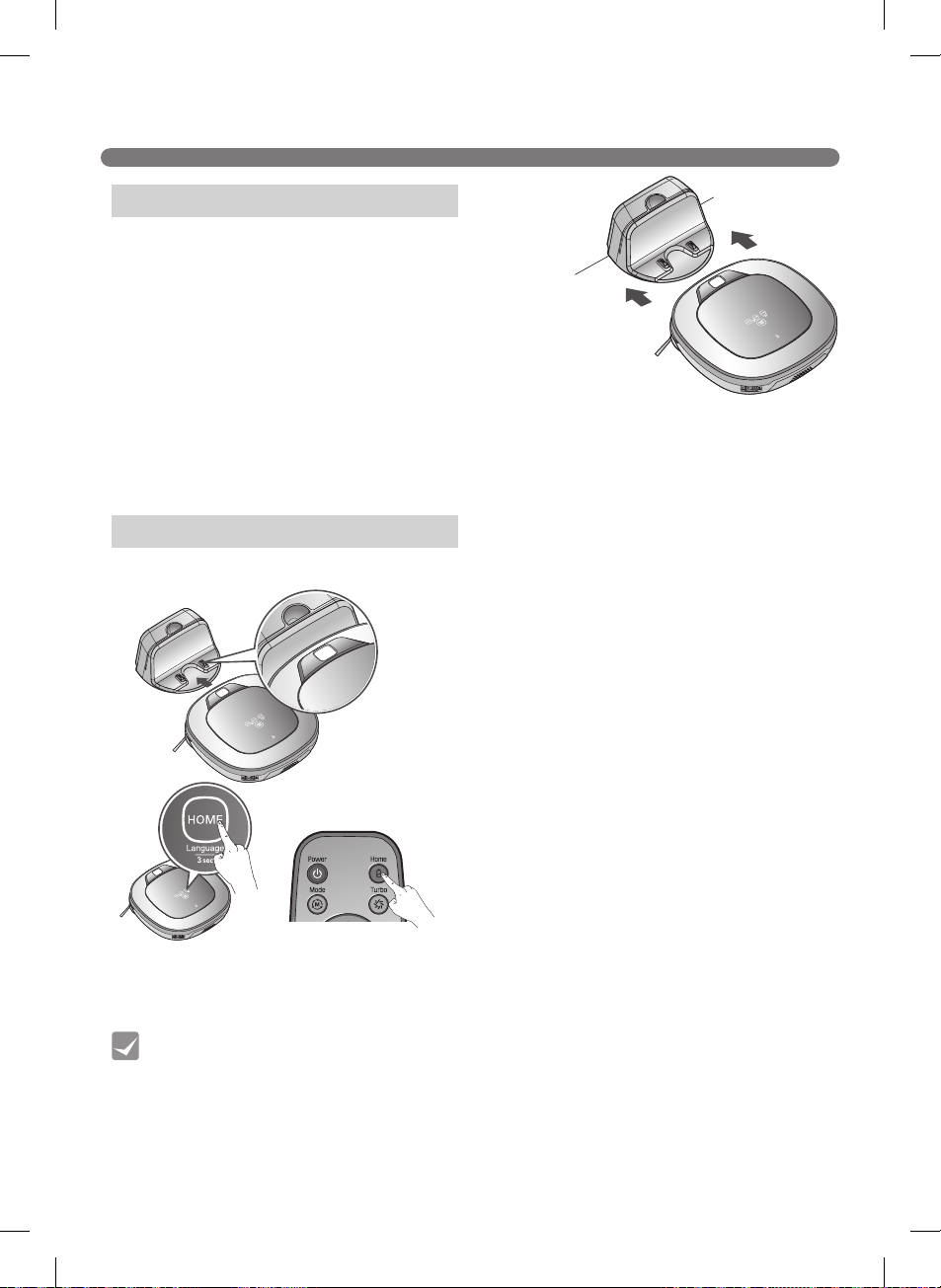
CHARGING THE BATTERY
※
※
The power switch has to be in the ON position in order for the
Robot Cleaner to charge at the home station. If the switch is
OFF, an error message sounds.
※
※
※
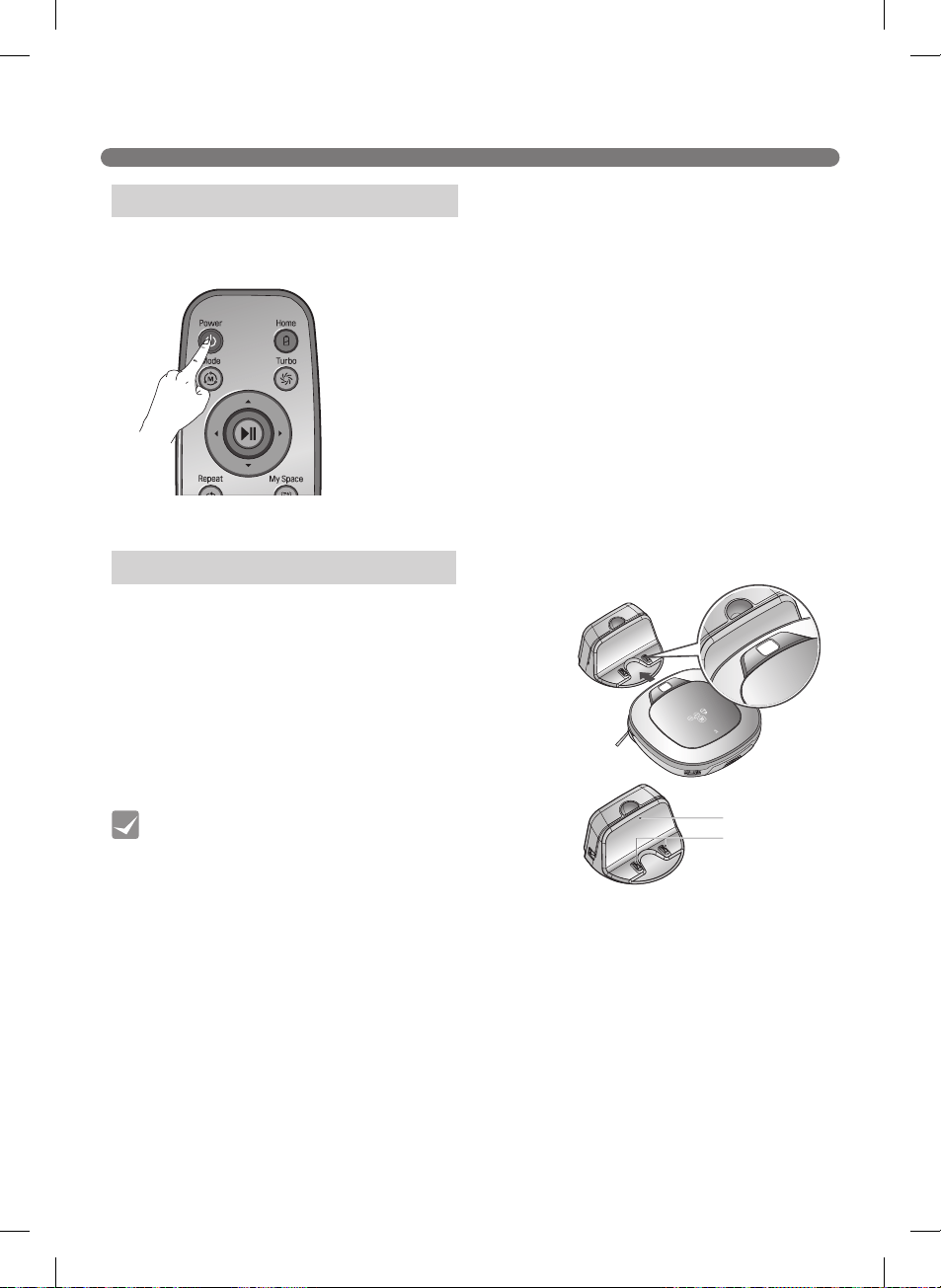
Method 1.
※
The main power switch must be in the
ON position in order for the Robot
Cleaner to charge. An error message is
heard if the power switch is in the OFF
position while mounted to the home
station.
Method 2.
Automatic Charging
Manual Charging
Tip
※
If the Robot Cleaner did not start cleaning from the home station or if the Robot Cleaner is manually
charged by pressing the Home button, it may take slightly longer to find the home station.
※
in.cm
21
CHARGING THE BATTERY
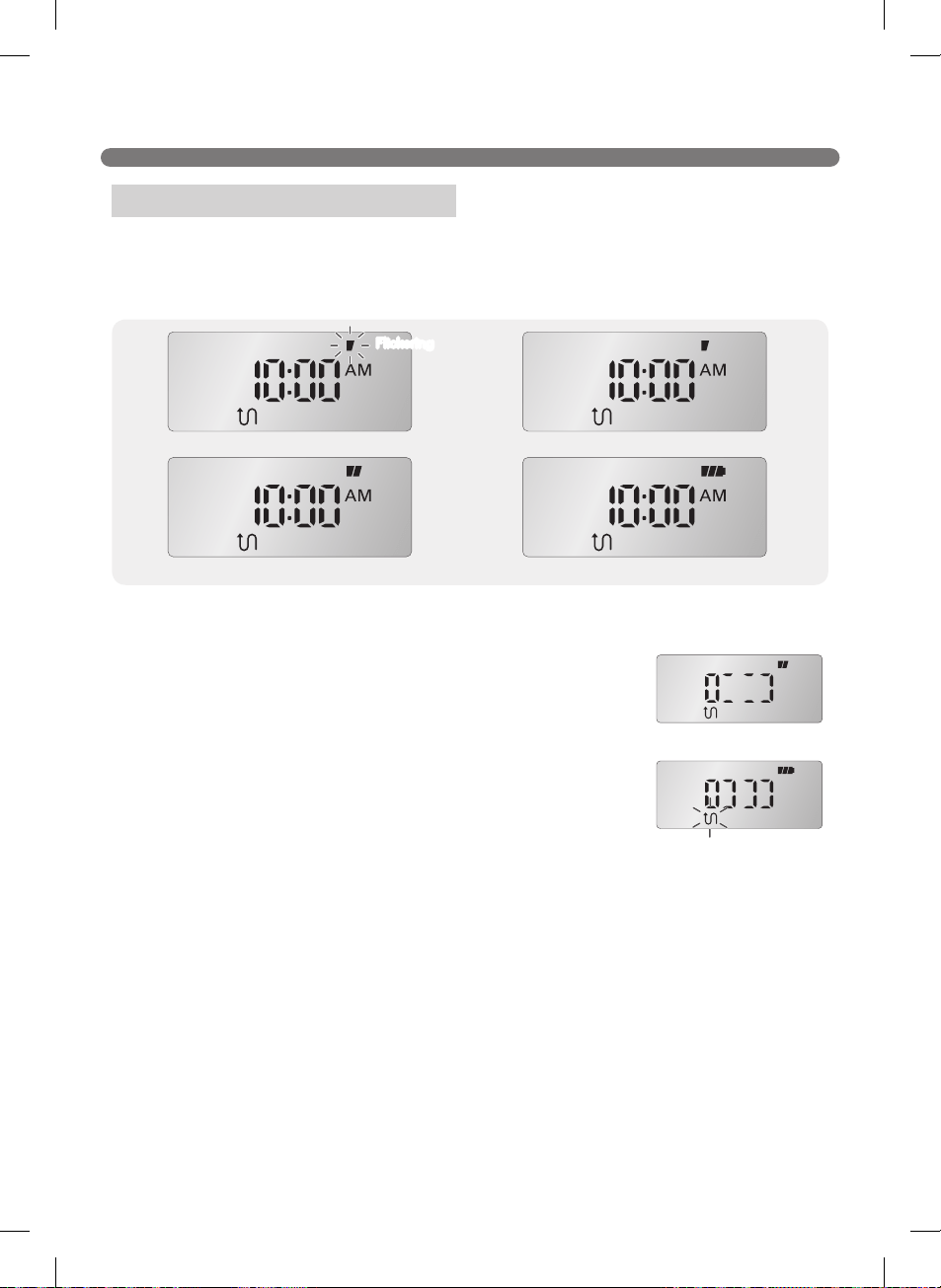
※
Battery Level Indicator
22
CHARGING THE BATTERY
Check 1:
Tip
If the Battery is Not Charging
Step 1.
※
After recharging is complete, press the Power button
on the remote to use the Robot Cleaner.
Energy Saving Charging Mode
23
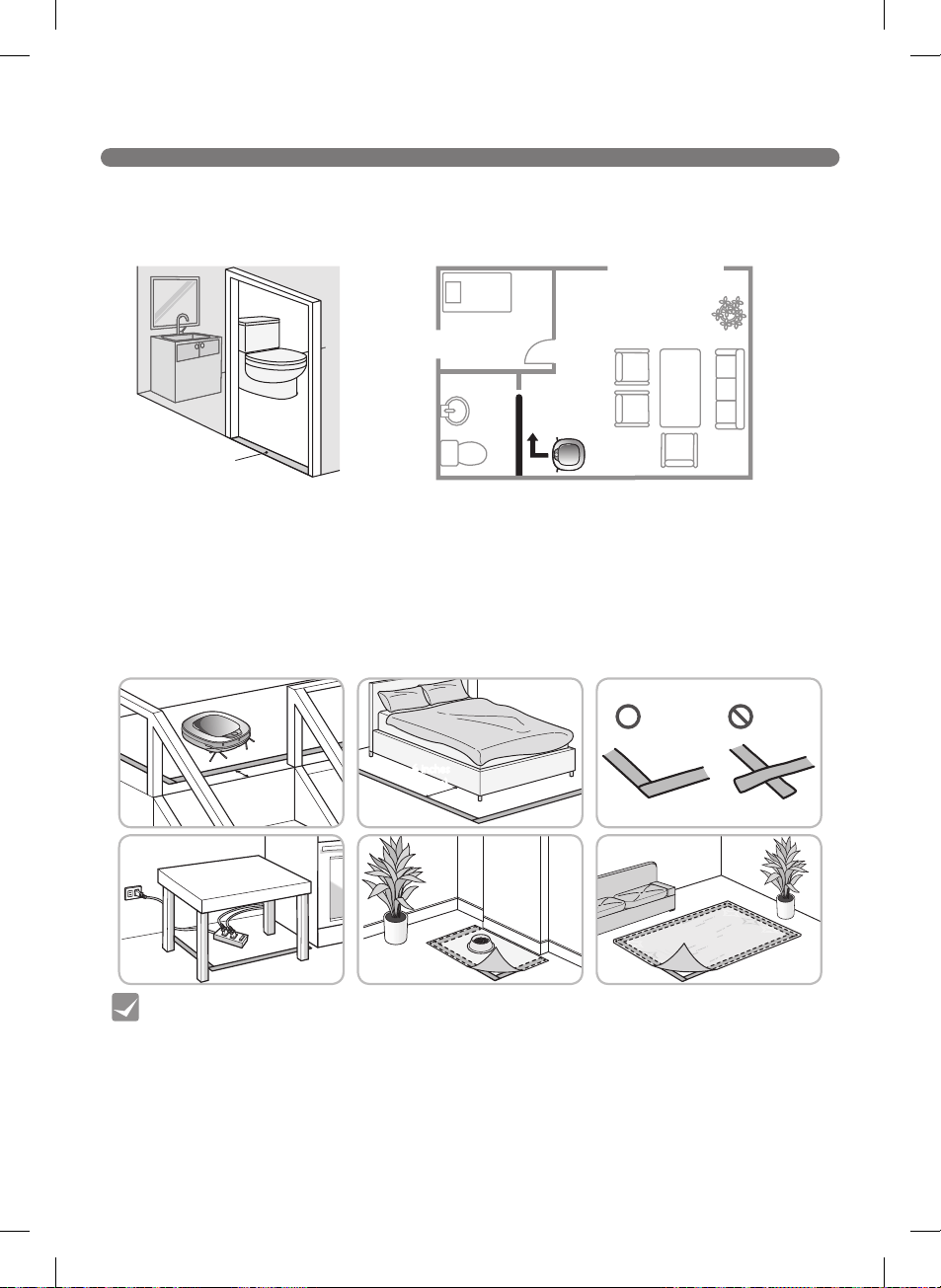
USING MAGNETIC WALL STRIPS
※
※
※
Use the strips:
6 inches
(15 cm)
6 inches
(15 cm)
6 inches
(15 cm)
Tip
24
CHOOSING A CLEANING MODE
Tip
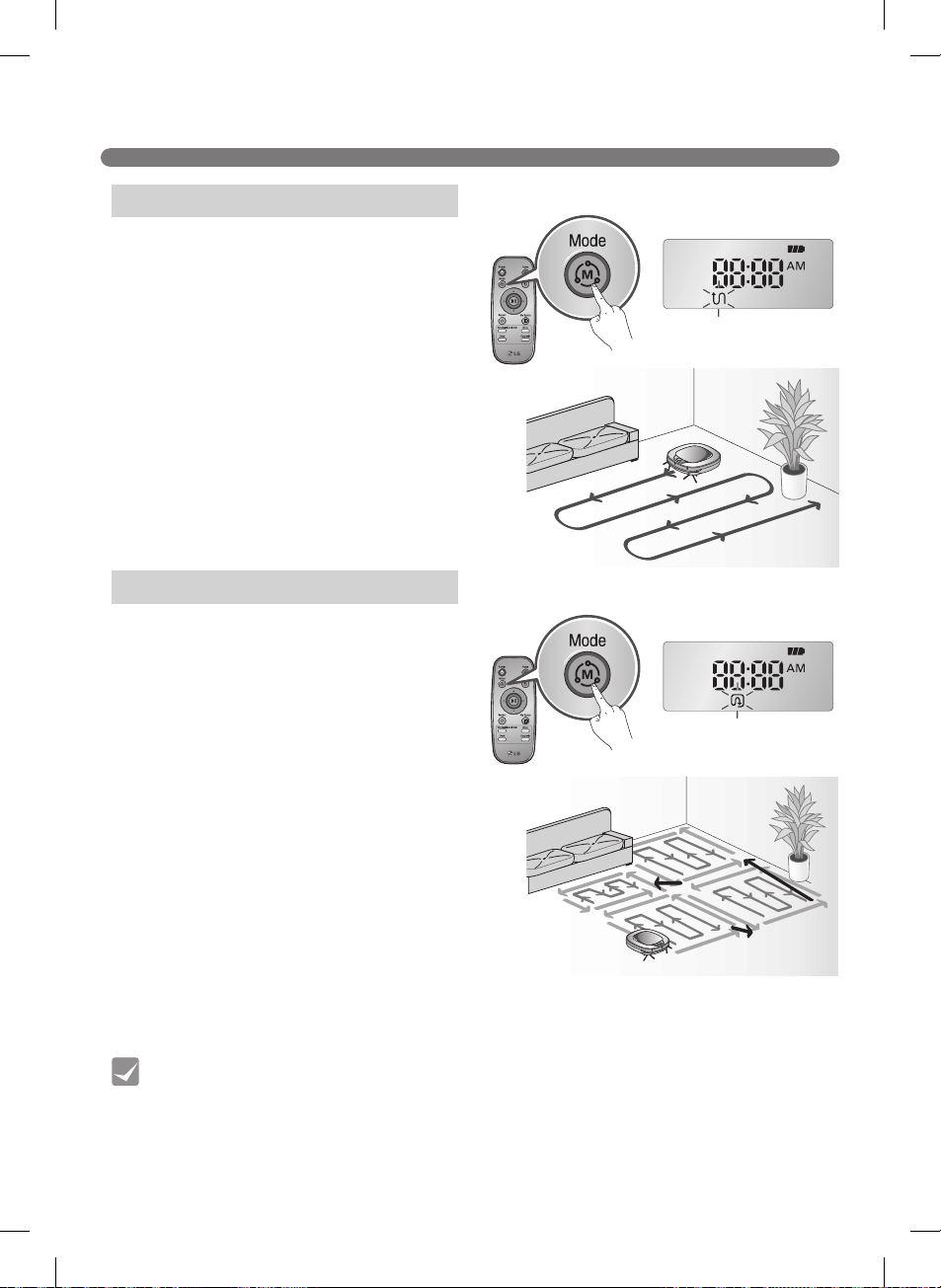
Selecting the Zigzag Mode
※
Selecting the Cell by Cell Mode
Stage One
ft.ft.m
m
Stage Two
Zigzag Cleaning
Cell by Cell Cleaning
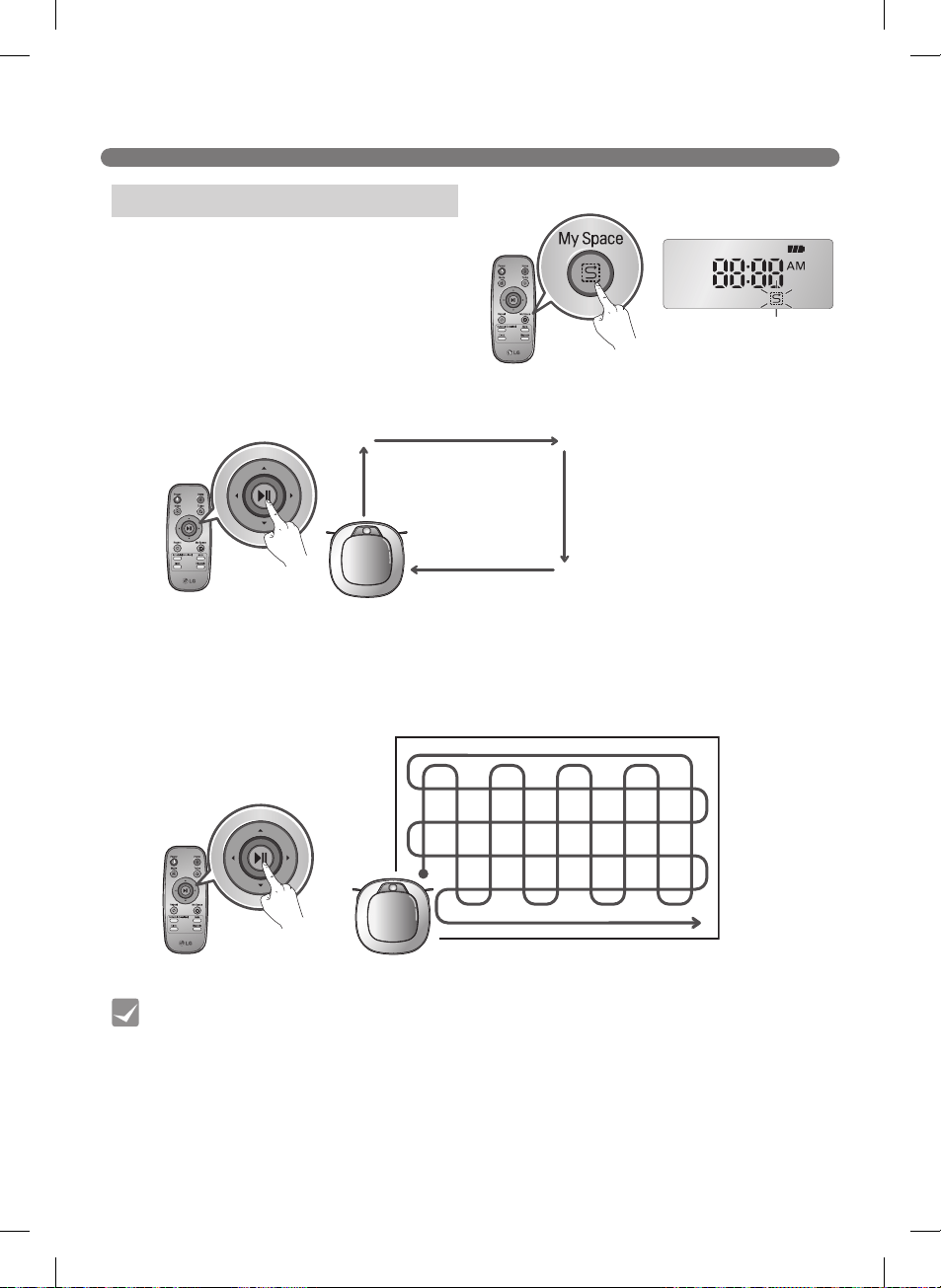
25
CHOOSING A CLEANING MODE
Selecting the My Space Mode
※
ft.m
Tip
My Space
My Space Cleaning
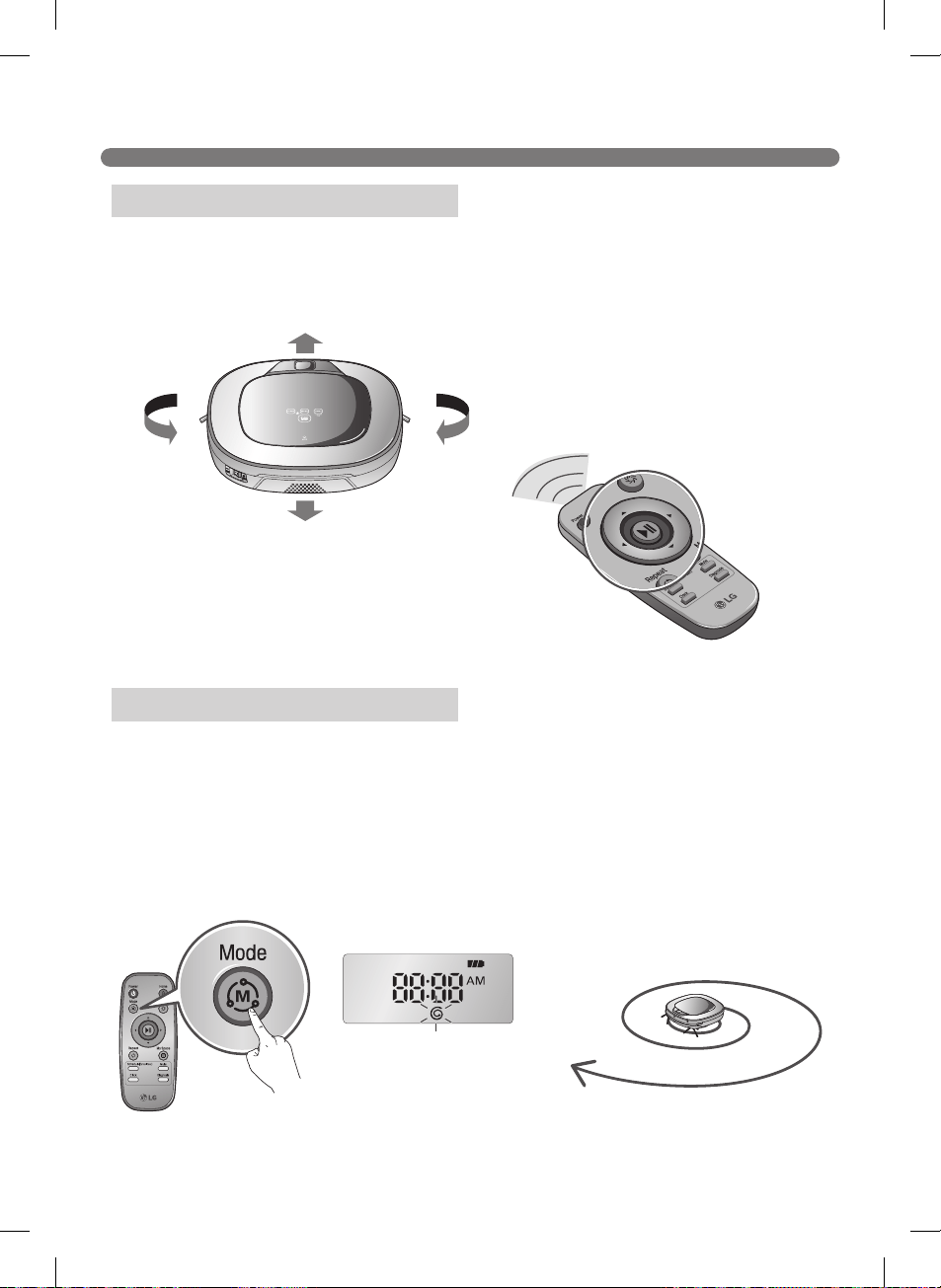
26
AUXILIARY CLEANING MODES
ftm
Starting Spot Mode
※
Manual Cleaning
Spot Cleaning
It stops at the original position after
completing the cleaning(takes 4~5 min.).
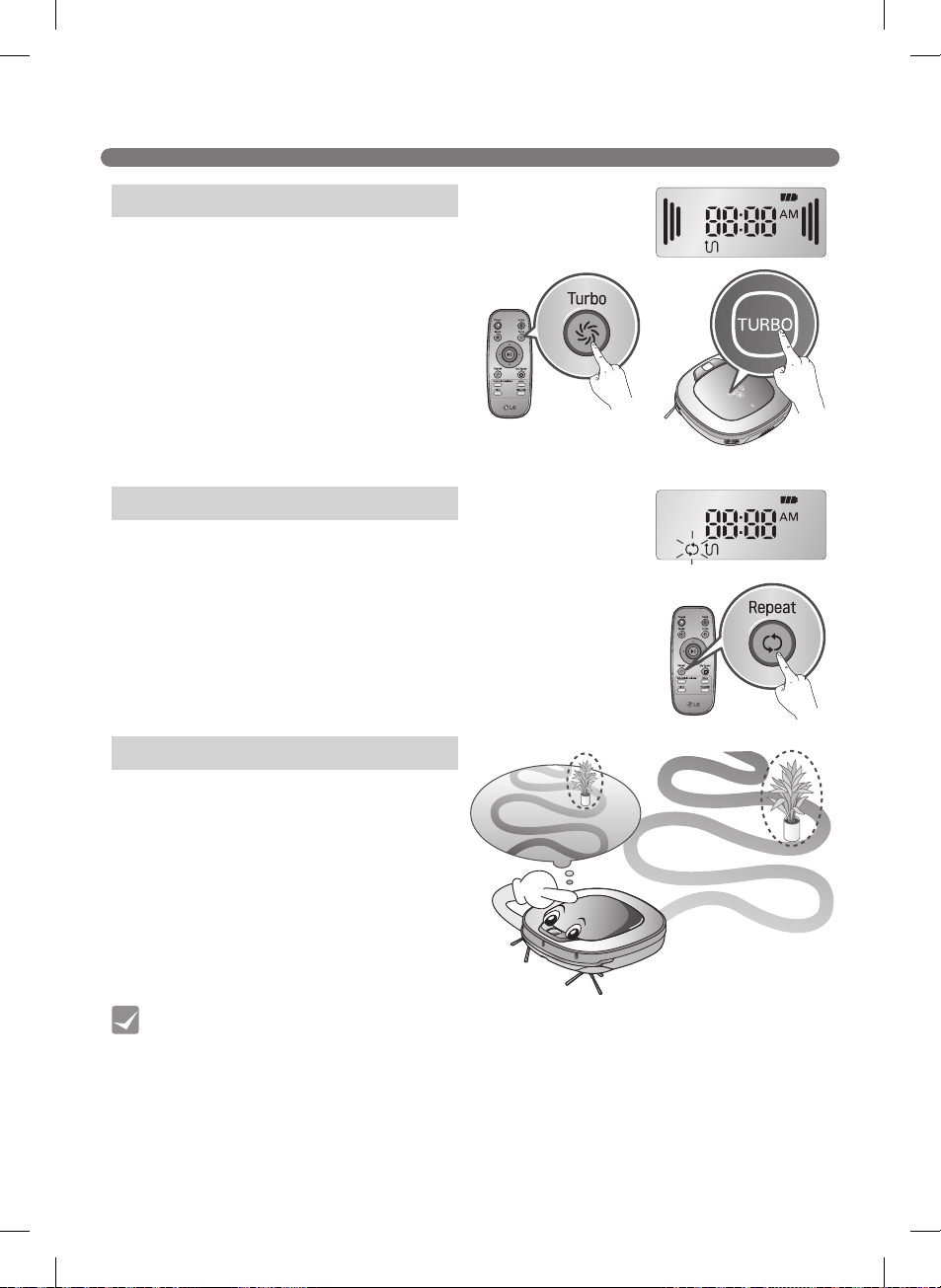
27
AUXILIARY CLEANING MODES
Tip
Selecting Turbo Mode
※
Turbo Mode (Floor Master Function)
Selecting the Repeat Mode
※
Turbo Mode
Repeat Mode
Learning Mode
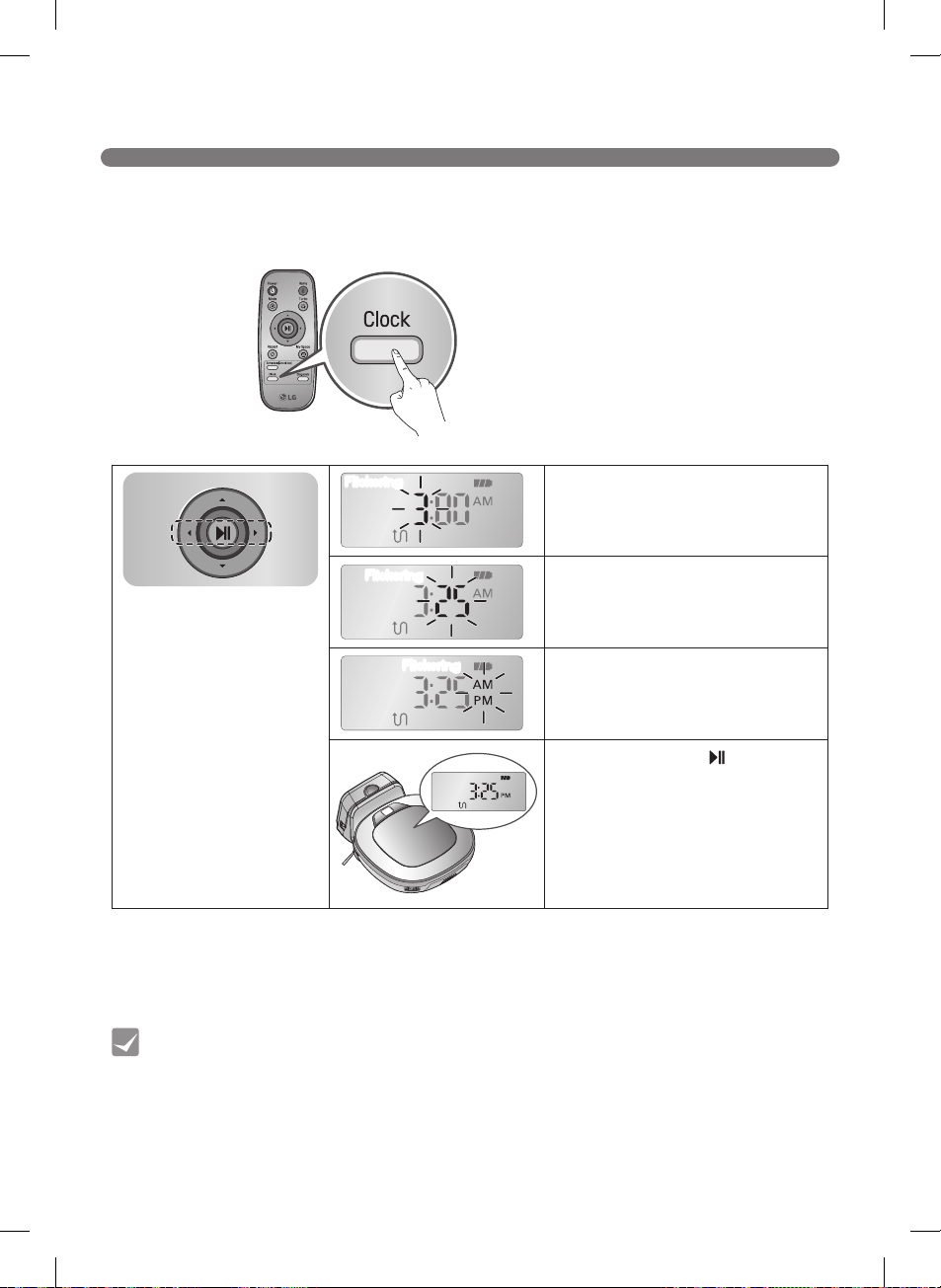
28
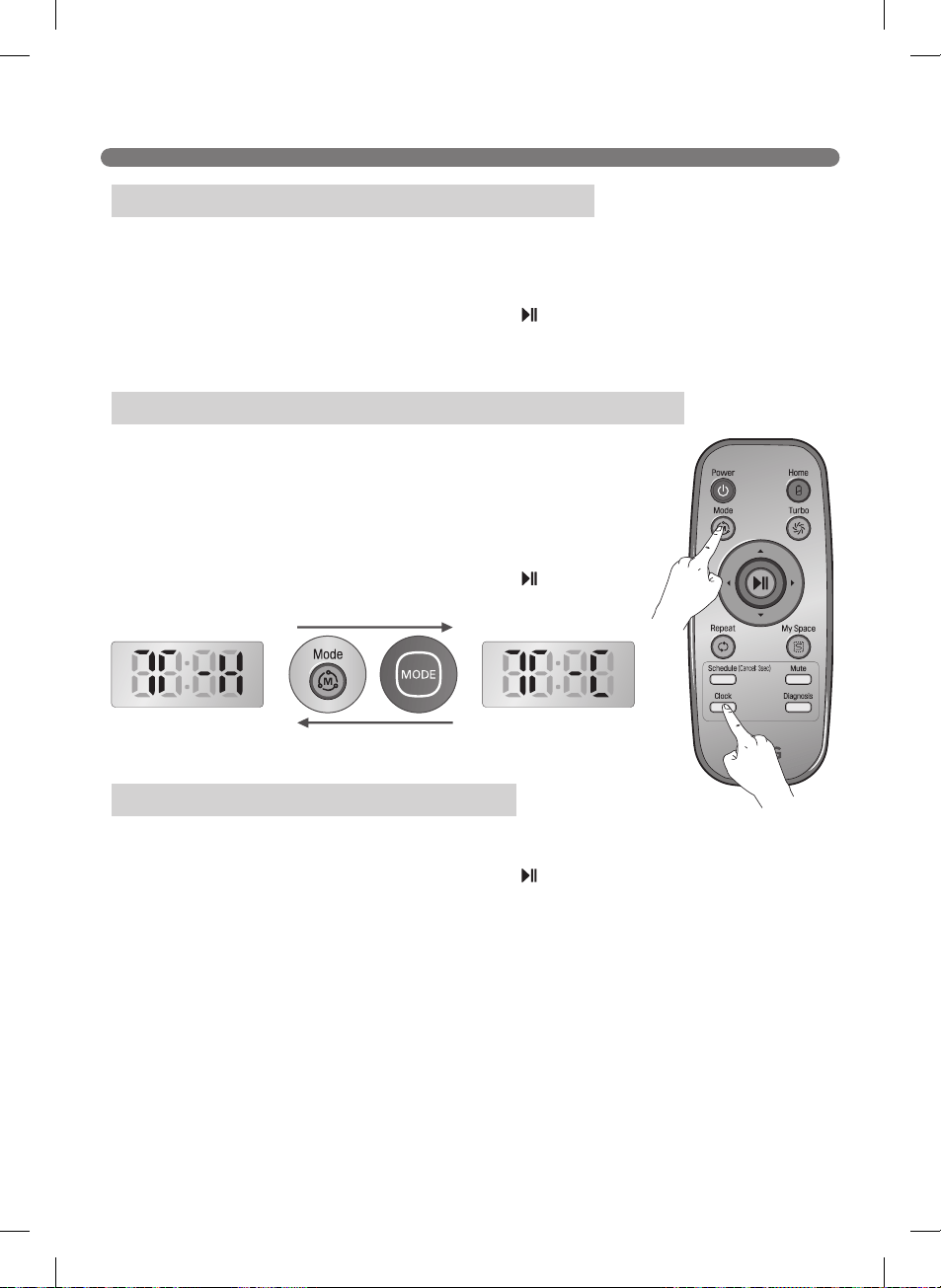
SETTING THE CLOCK
Tip
s
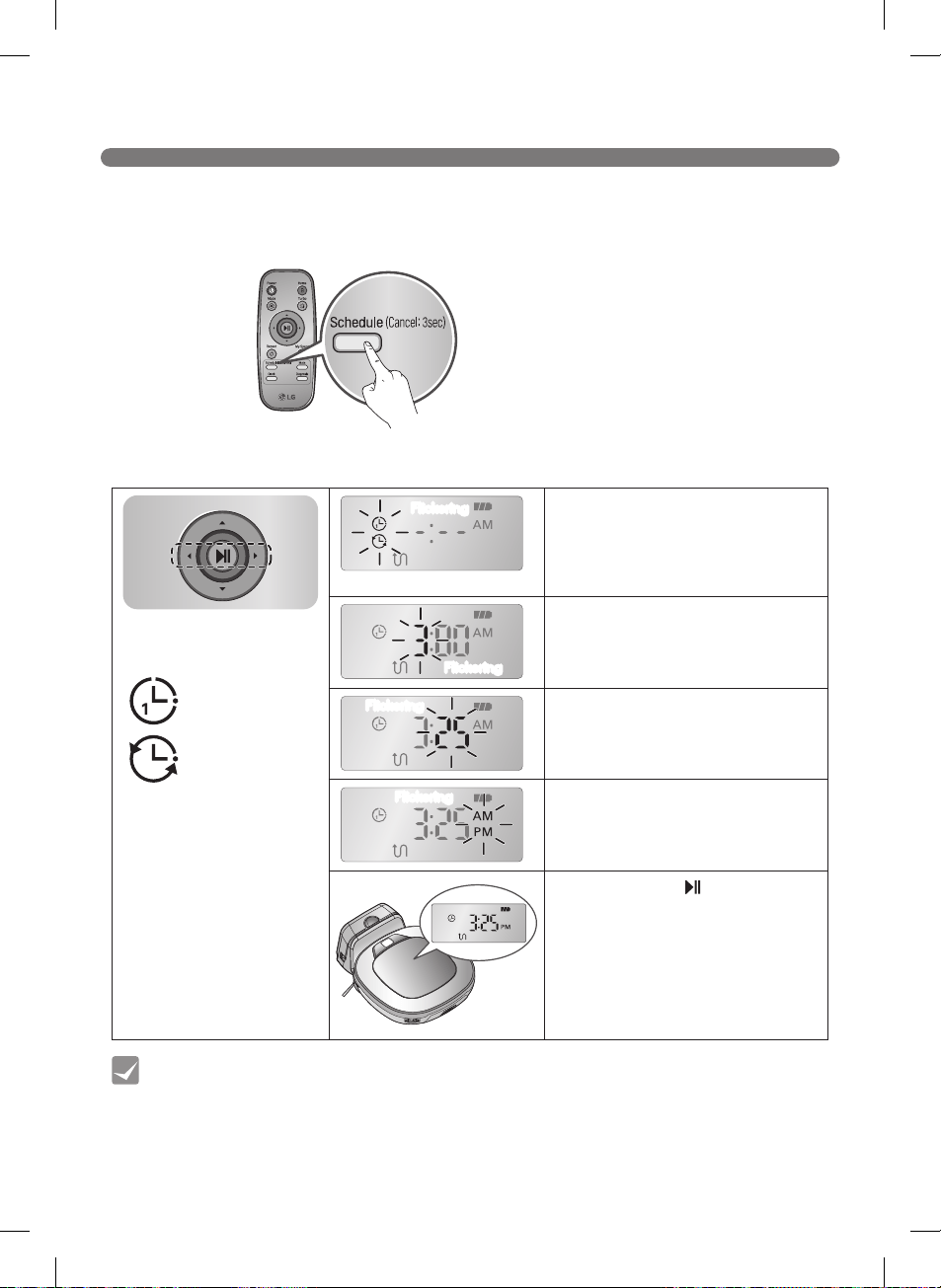
29
SCHEDULING CLEANING
Tip
s
30
MOP CLEANING (on some models)
Tip
※
Caution
Mounting the Mop and Mop Plate
31
LOCATION SEARCH FUNCTION
Tip
※
Manual Relocation
※
※
ft.m
※
Zigzag Zigzag
Zigzag Zigzag
m
m
32
SMART DIAGNOSIS™
Tip
※
Smart Diagnosis is only possible when the Robot
Cleaner is attached to the home station.
※
If the Mop Plate is attached, the process will not be
activated.
※
After the Smart Diagnosis voice message,
the Robot Cleaner will start recharging after
1 minute.
※
If an error is detected with any of the
sensors while in Smart Diagnosis, a voice
message will announce, and the unit will not
return to the home station.
※
During Smart Diagnosis, the Robot Cleaner moves about within a 1
3
/8 ft. (50 cm) radius. So,
make sure no objects are in the way within a 3
1
/4 ft. (1 m) radius around the home station, before
starting Smart Diagnosis.
33
SMART DIAGNOSIS™
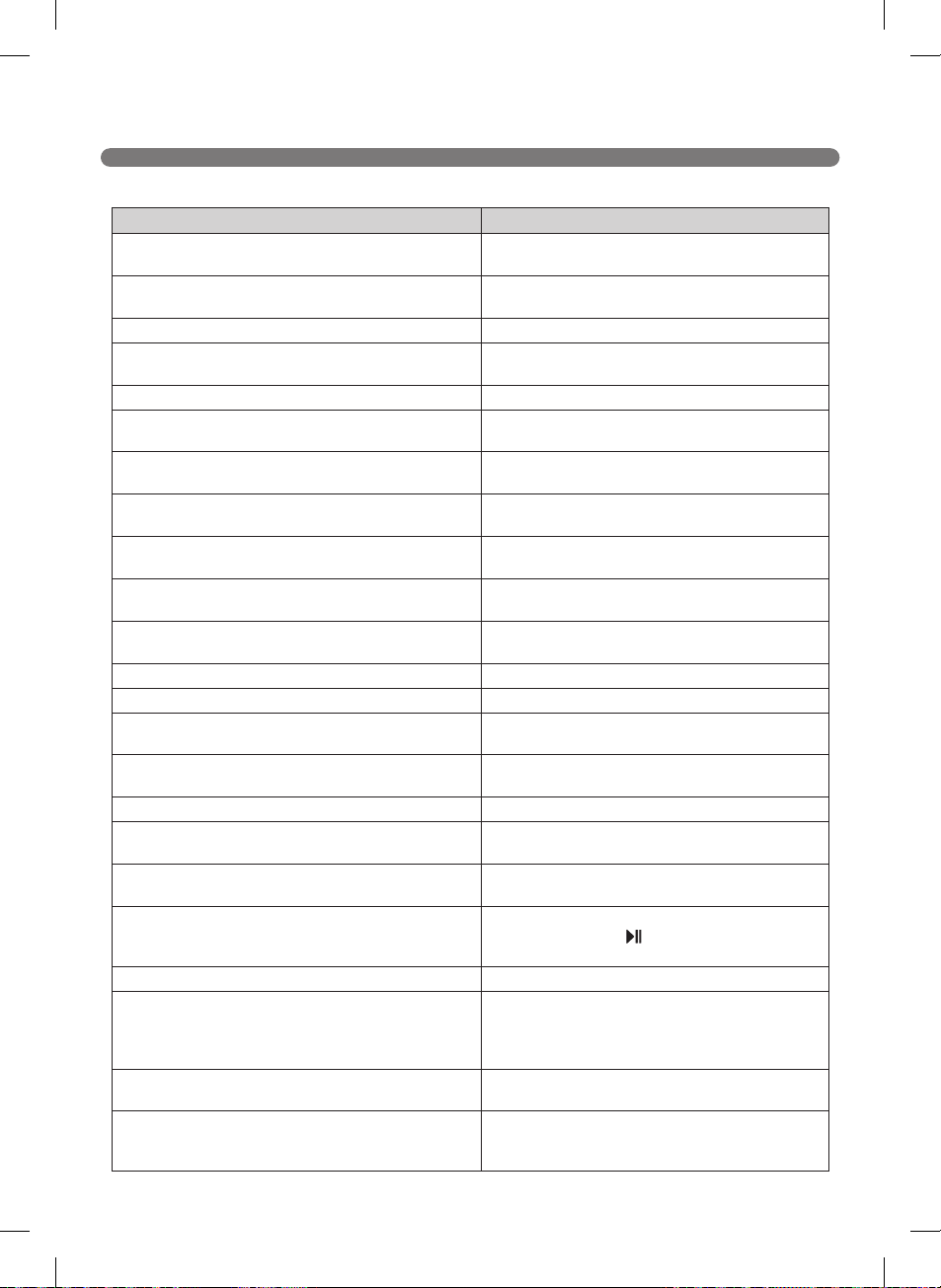
Voice message Solution
Robot Cleaner Smart Diagnosis will be started. Please step
away and clear around 1 meter around the home station.
ft.m
Smart Diagnosis can start when it is being charged. Please
dock Robot Cleaner to the home station to charge.
No defect found during diagnosis.
Diagnosis mode cannot be operated due to a low battery.
Please try again after the battery is charged.
Please check if the dust bin is installed with the filter.
Charging cannot be done due to a problem in infrared
sensor.
Charging cannot be done due to a problem in ultrasonic
sensor.
Charging cannot be done due to a problem in the cliff
detection sensors on the bottom. Please clean the sensors.
Please wipe the lower camera sensor on the right bottom
of the Robot Cleaner.
Please wipe the obstacle detecting sensor window on the
left and right side of the Robot Cleaner.
A problem has been found on the Gyro Sensor.
Please check for dirt on the left wheel.
Please check for dirt on the right wheel.
A problem has been found on the left wheel sensor.
A problem has been found on the right wheel sensor.
Please check the brushes for obstructions.
A problem has been found in the suction motor.
A problem has been found in the acceleration sensor.
In order to listen to the Smart Diagnosis result again, please
press the charging button. To stop, please press the stop
button.
Smart Diagnosis mode will be turned off.
Please try Smart Diagnosis again after turning the main
power switch off and on from the back of Robot Cleaner.
If the problem continues, please contact LG Electronics
customer care.
Smart Diagnosis mode cannot be operated with mop plate
being attached. Please try again after removing it.
Smart Diagnosis has failed to operate. Please try it again
after turning off and on the main power switch on the back
of the Robot Cleaner.
34
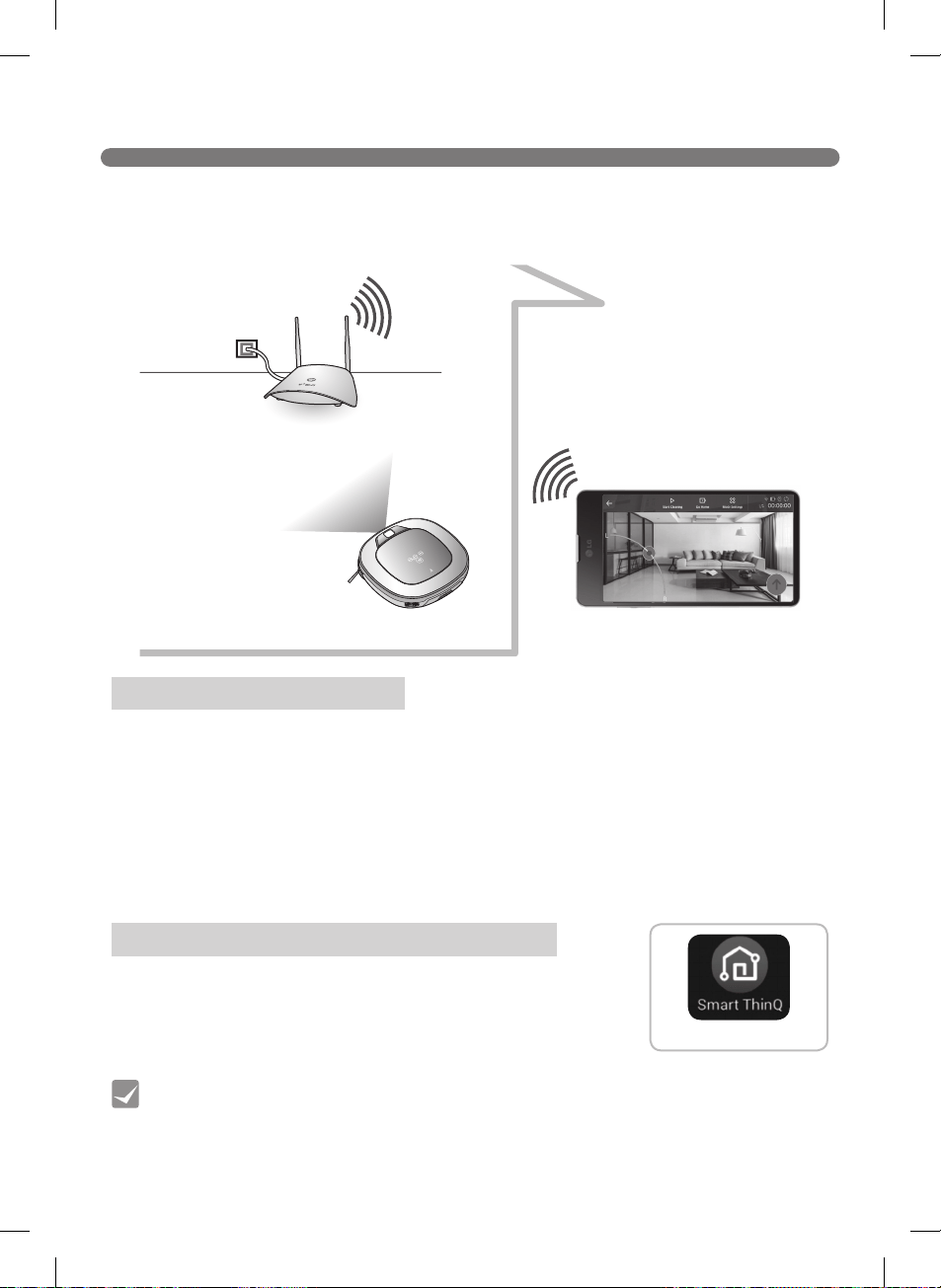
SMART APPLICATION FUNCTION
• HomeView, HomeGuard, Cleaning Diary, Schedule Cleaning, Smart Diagnosis
Recommended Specifications
※
※
Application Requirements
Installing the LG Smart ThinQ Application
Smart ThinQ
Tip
35
SMART APPLICATION FUNCTION
※
※
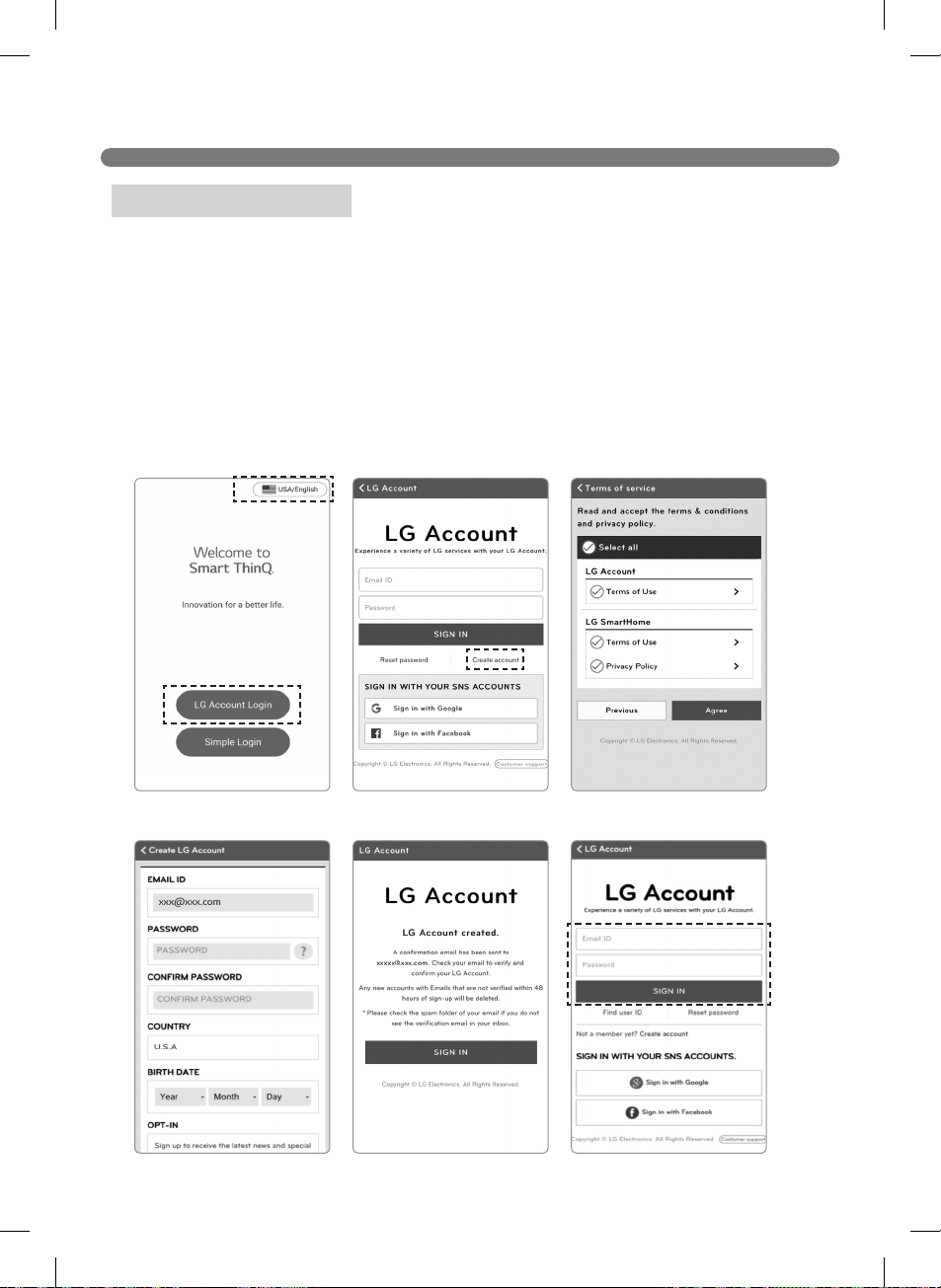
Creating an Account
36
SMART APPLICATION FUNCTION
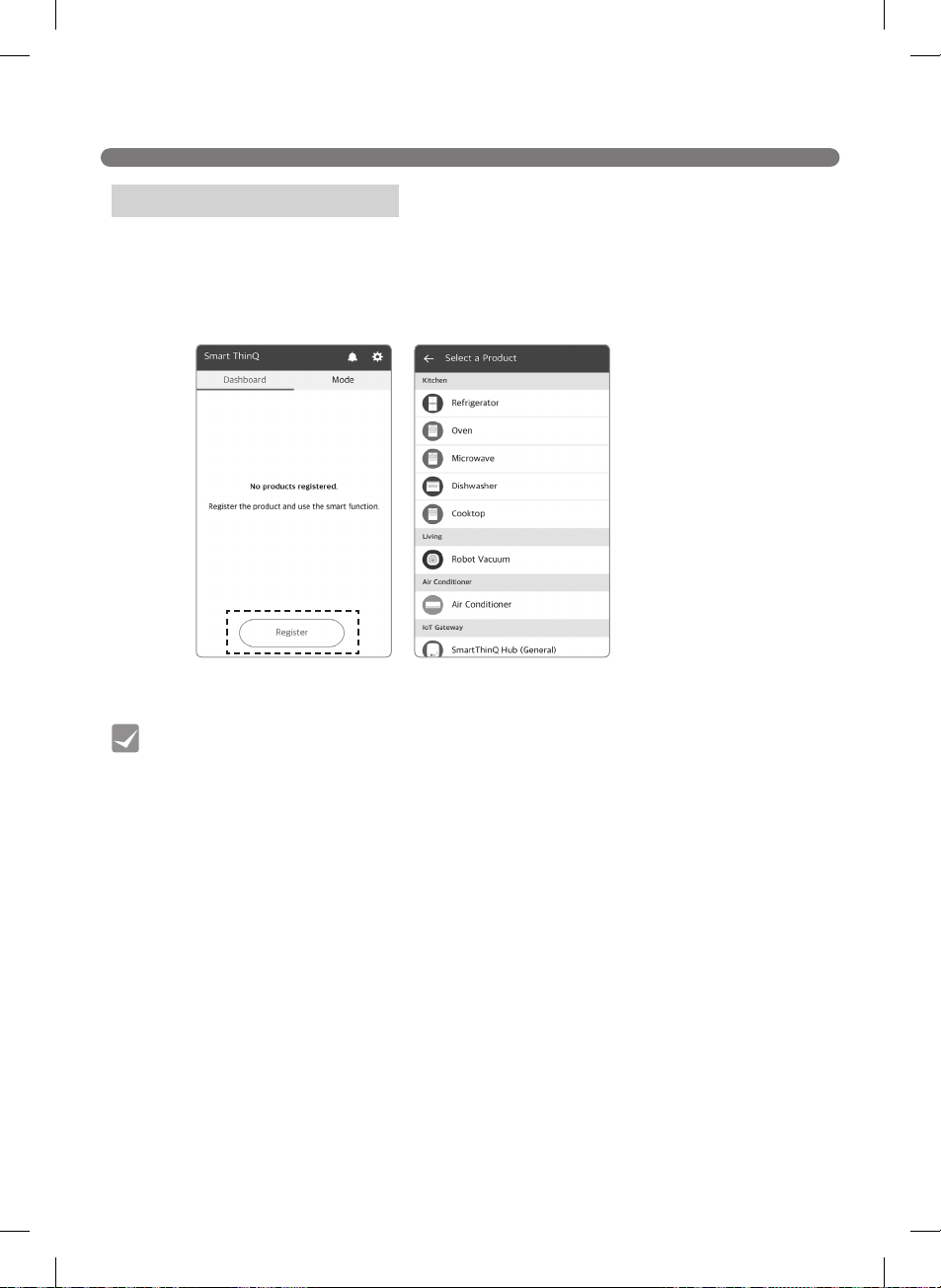
1. Registering the Product
Tip
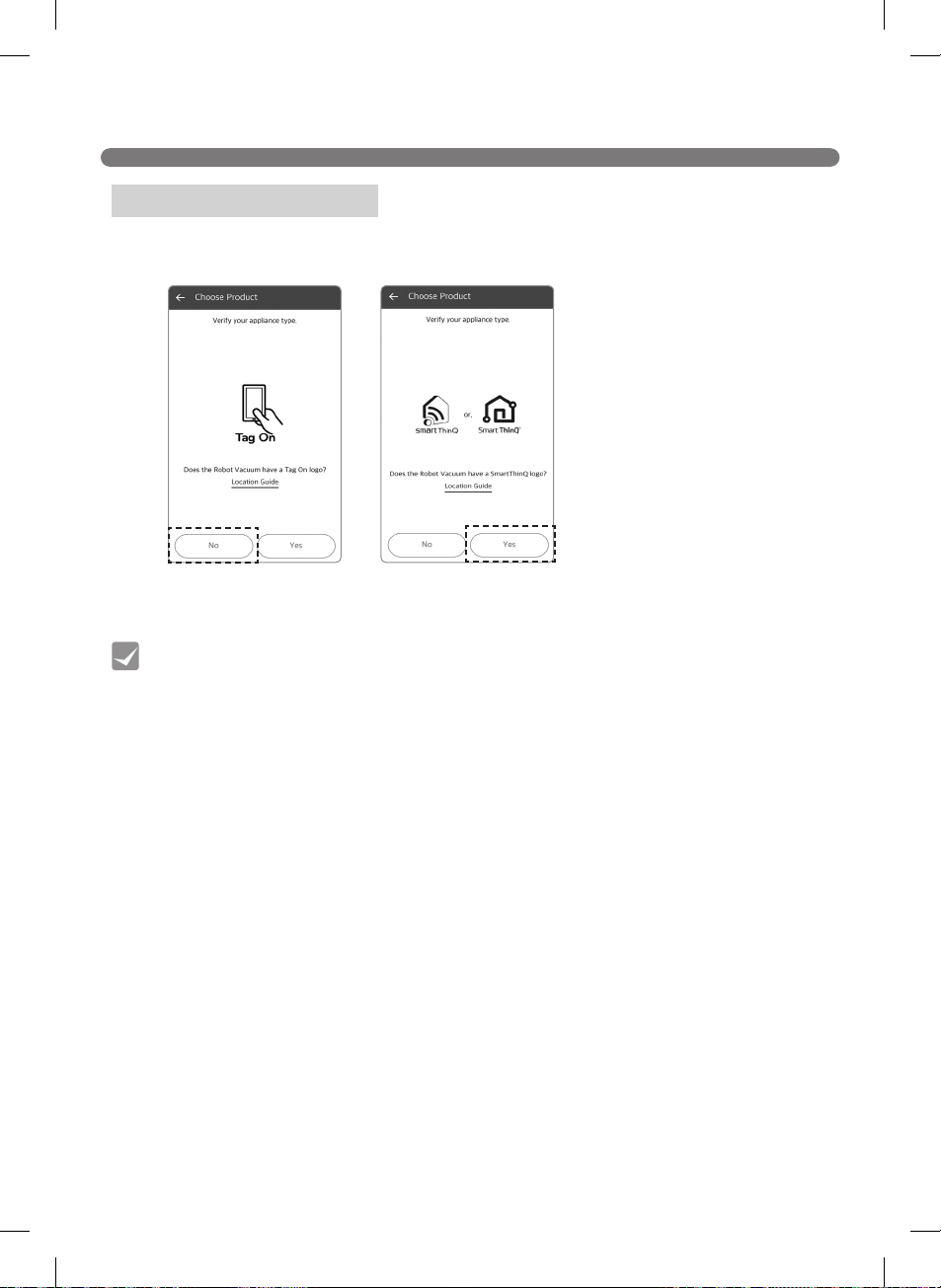
37
SMART APPLICATION FUNCTION
2. Verifying the Product
Tip

38
SMART APPLICATION FUNCTION
3. Connecting to the Network (Android)
Tip
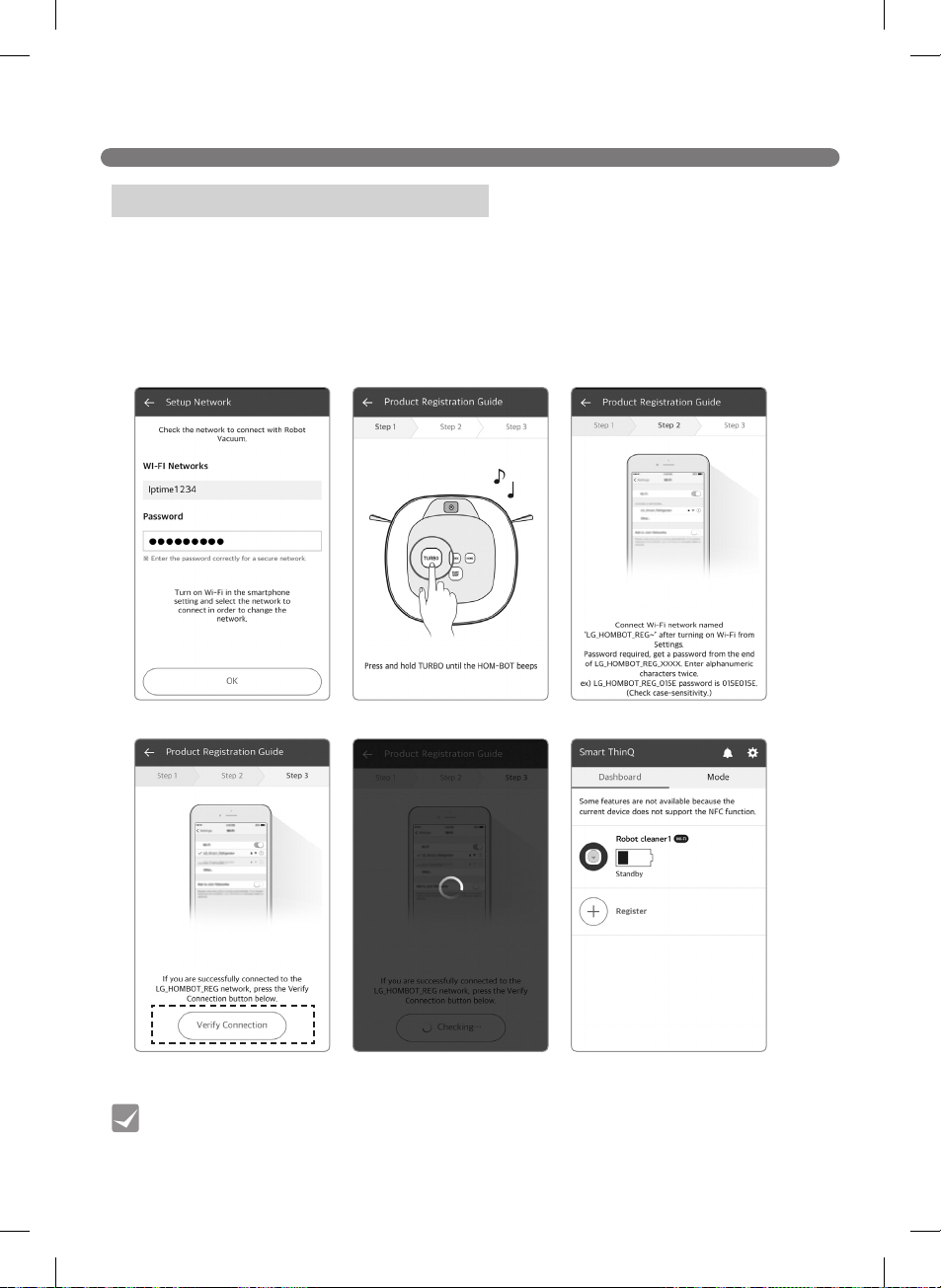
39
SMART APPLICATION FUNCTION
2. Connecting to the Network (iOS)
Tip
40
SMART APPLICATION FUNCTION
Application Startup Screen
Mode Menu
Menu
HomeView
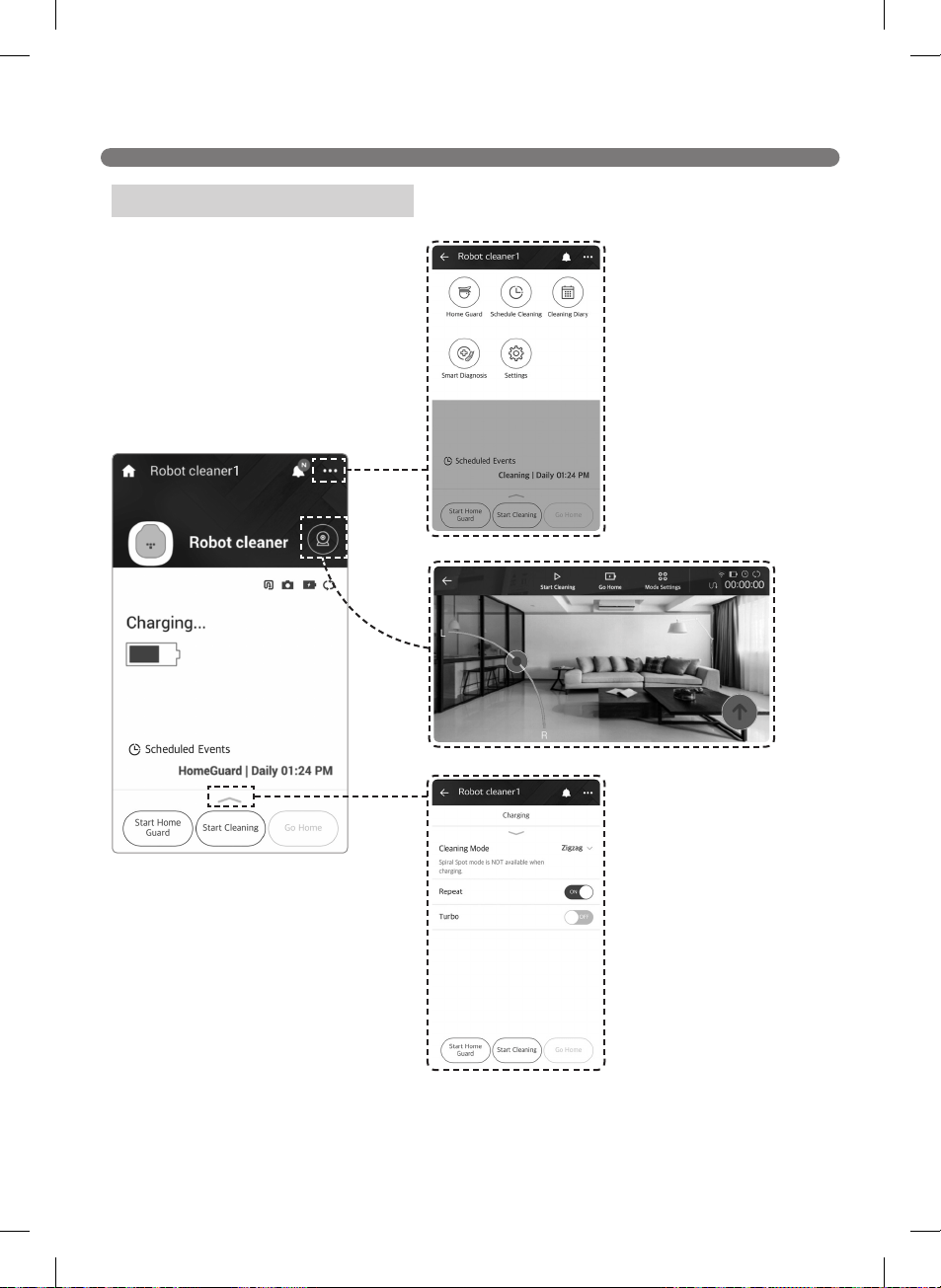
41
SMART APPLICATION FUNCTION
Application Startup Screen
Menu
Mode Menu
HomeView
42
SMART APPLICATION FUNCTION
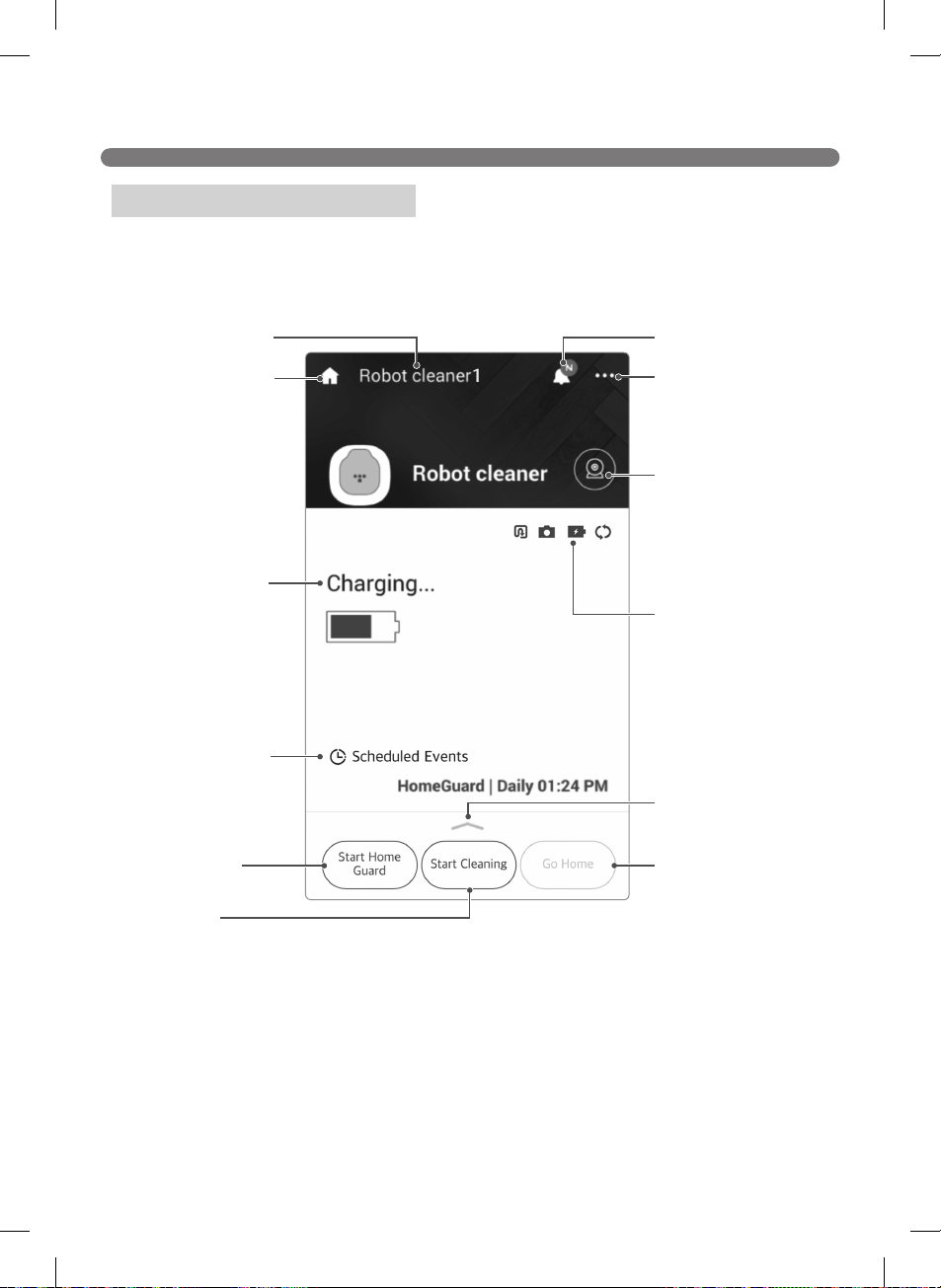
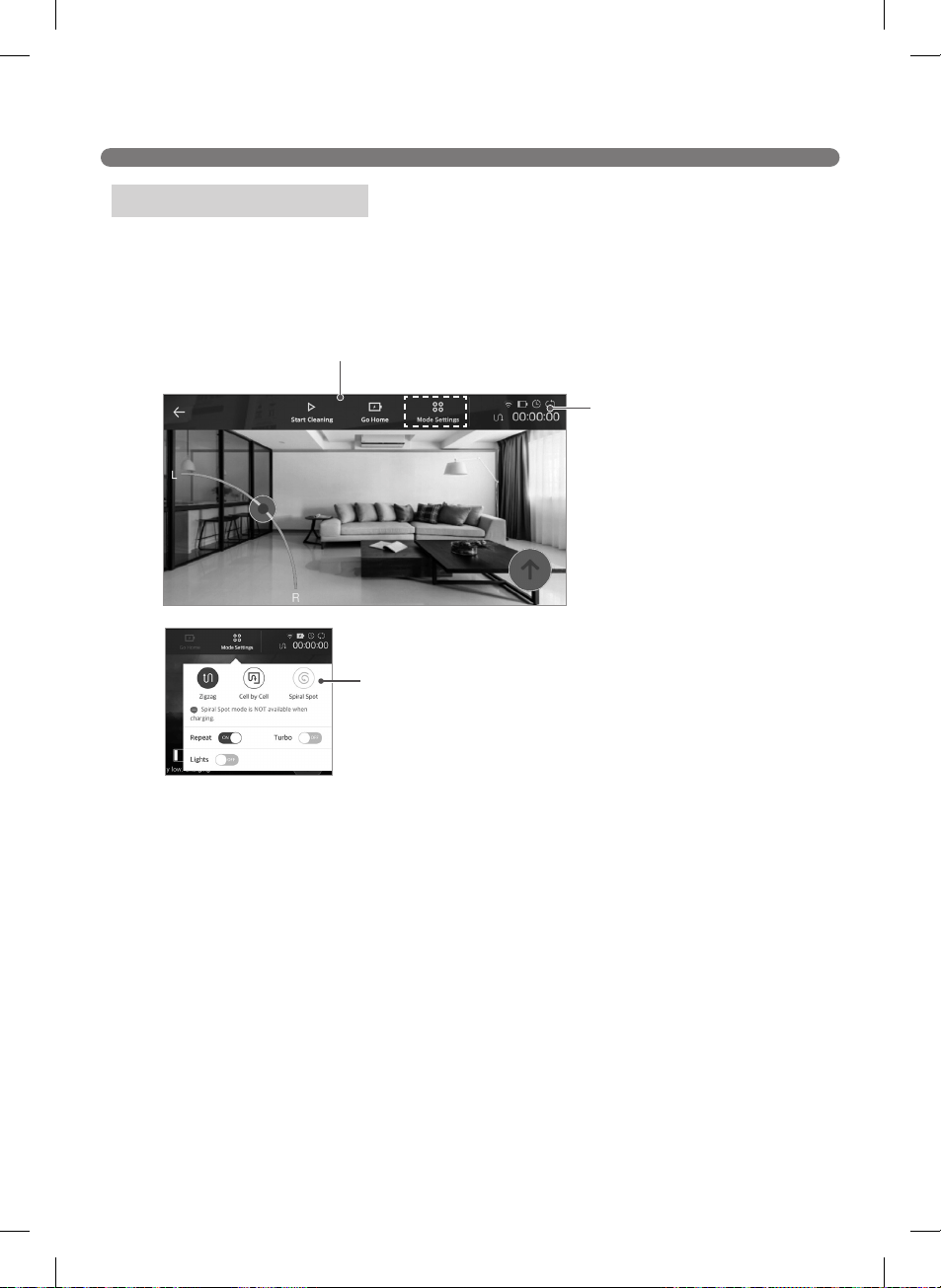
The HomeView Screen
HomeView main menu
Status icons
Mode setting
43
SMART APPLICATION FUNCTION
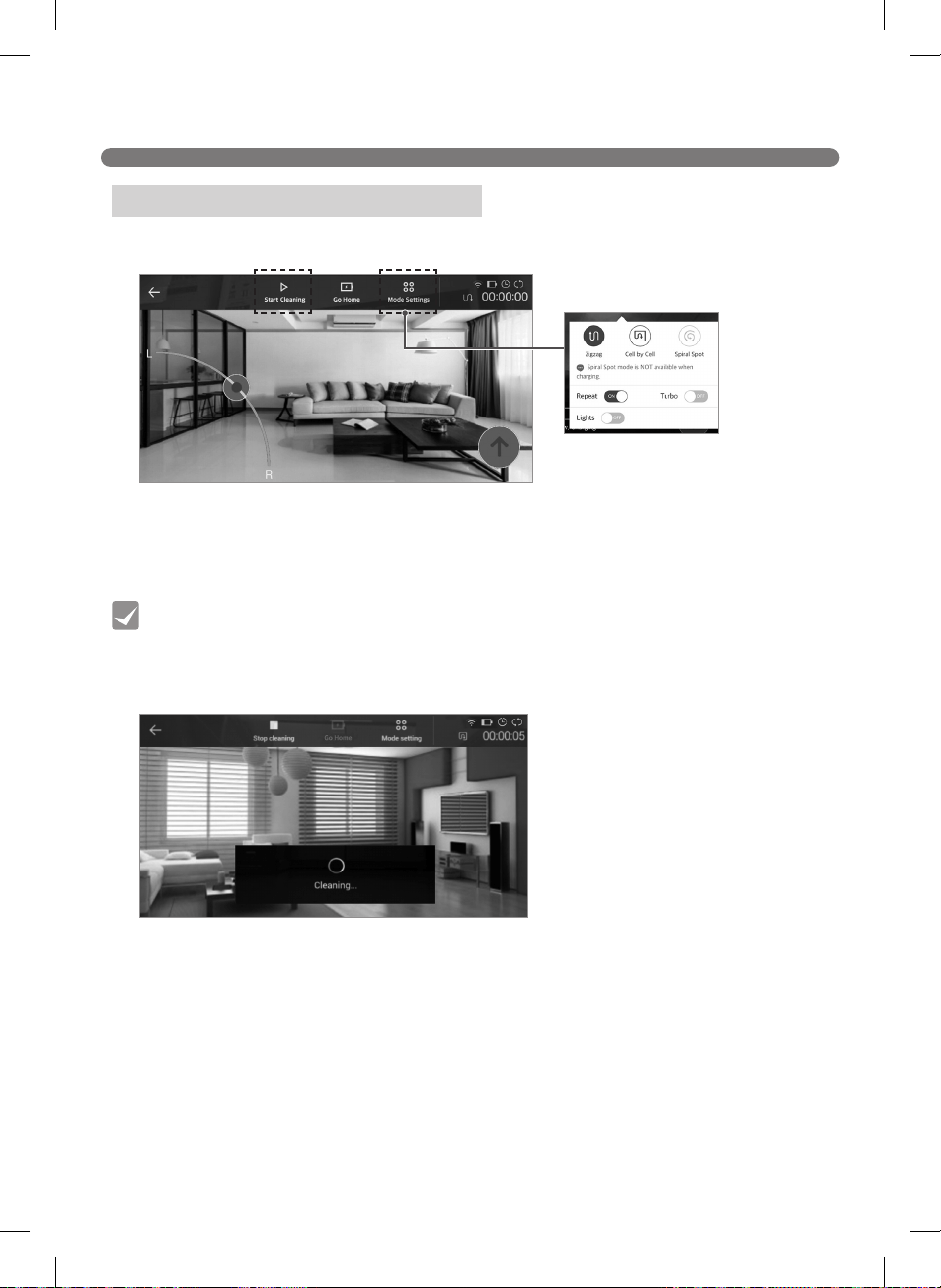
Starting Cleaning from HomeView
Tip
44
SMART APPLICATION FUNCTION
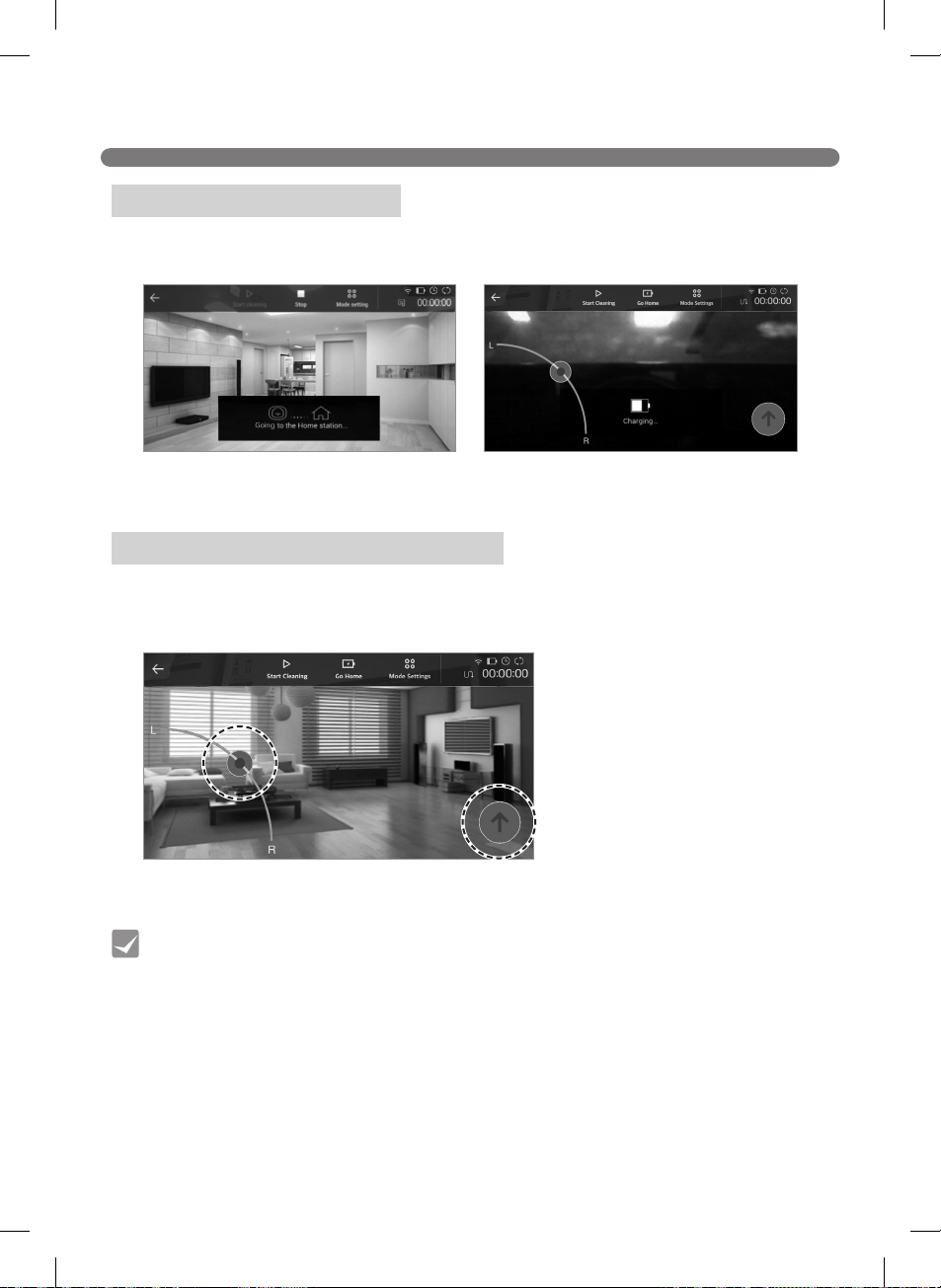
Charging from HomeView
Operating Manually from HomeView
Tip
45
SMART APPLICATION FUNCTION
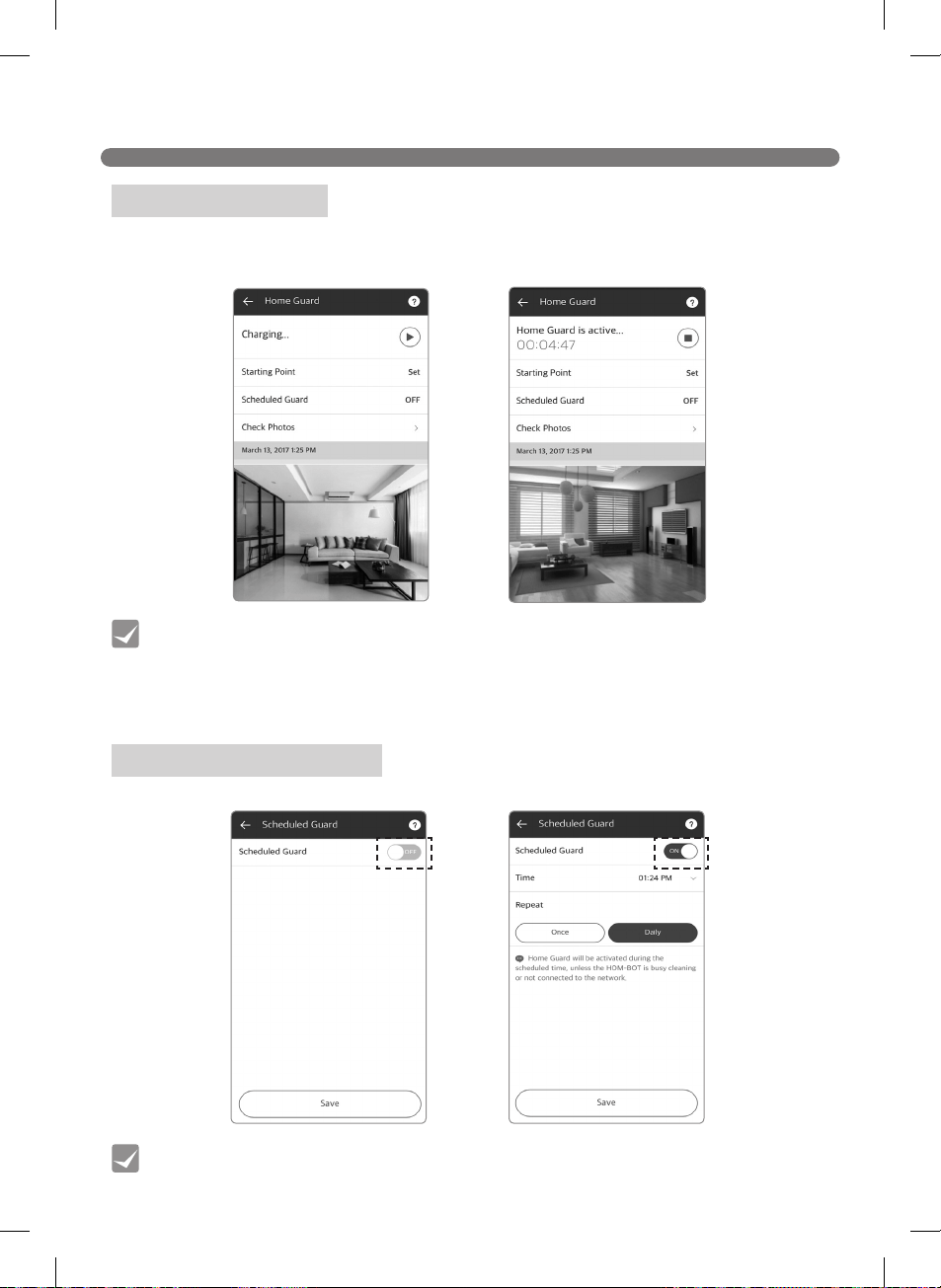
Using HomeGuard
Scheduling HomeGuard
Tip
Tip
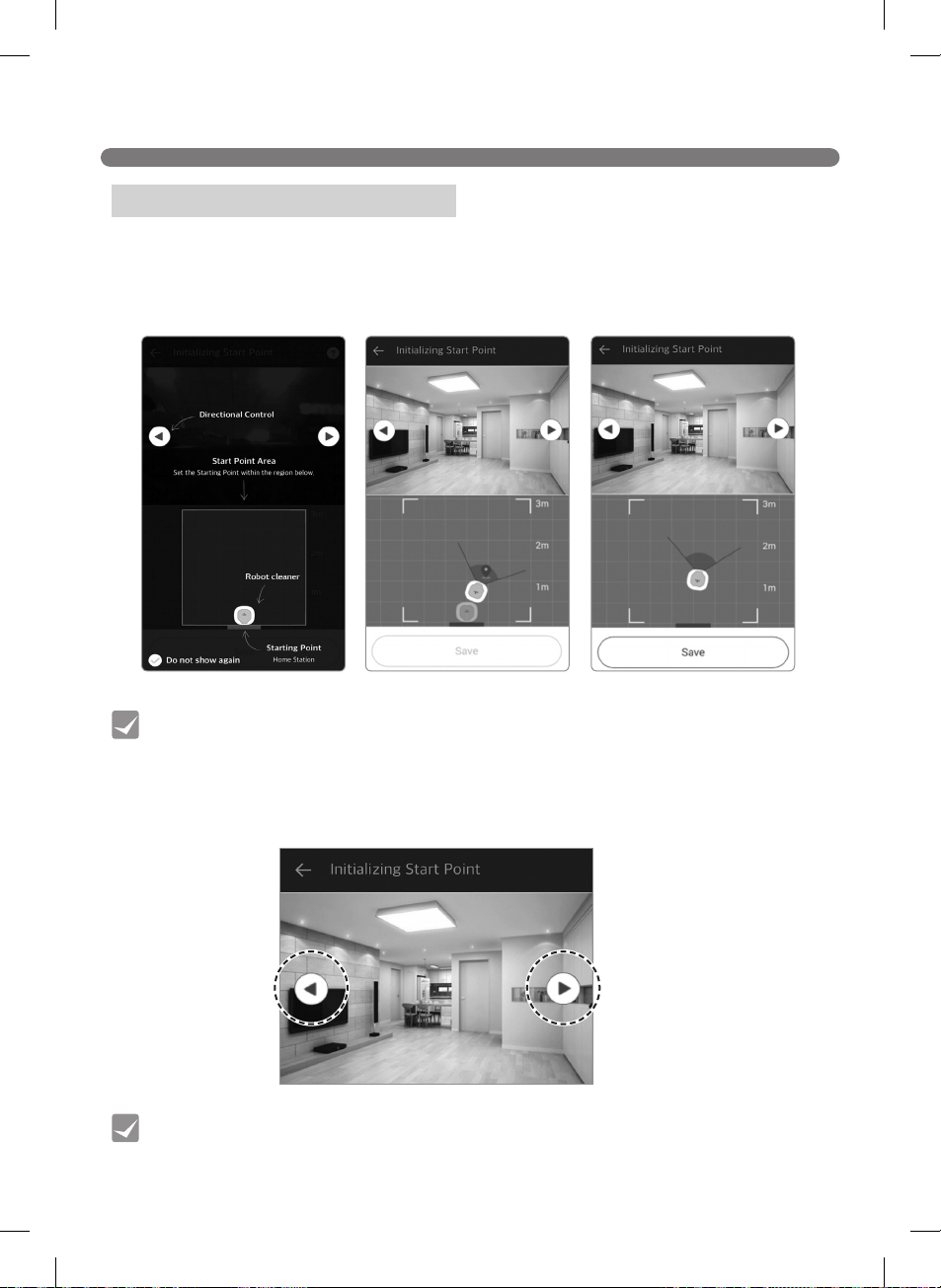
46
SMART APPLICATION FUNCTION
Setting a HomeGuard Location
Tip
Tip
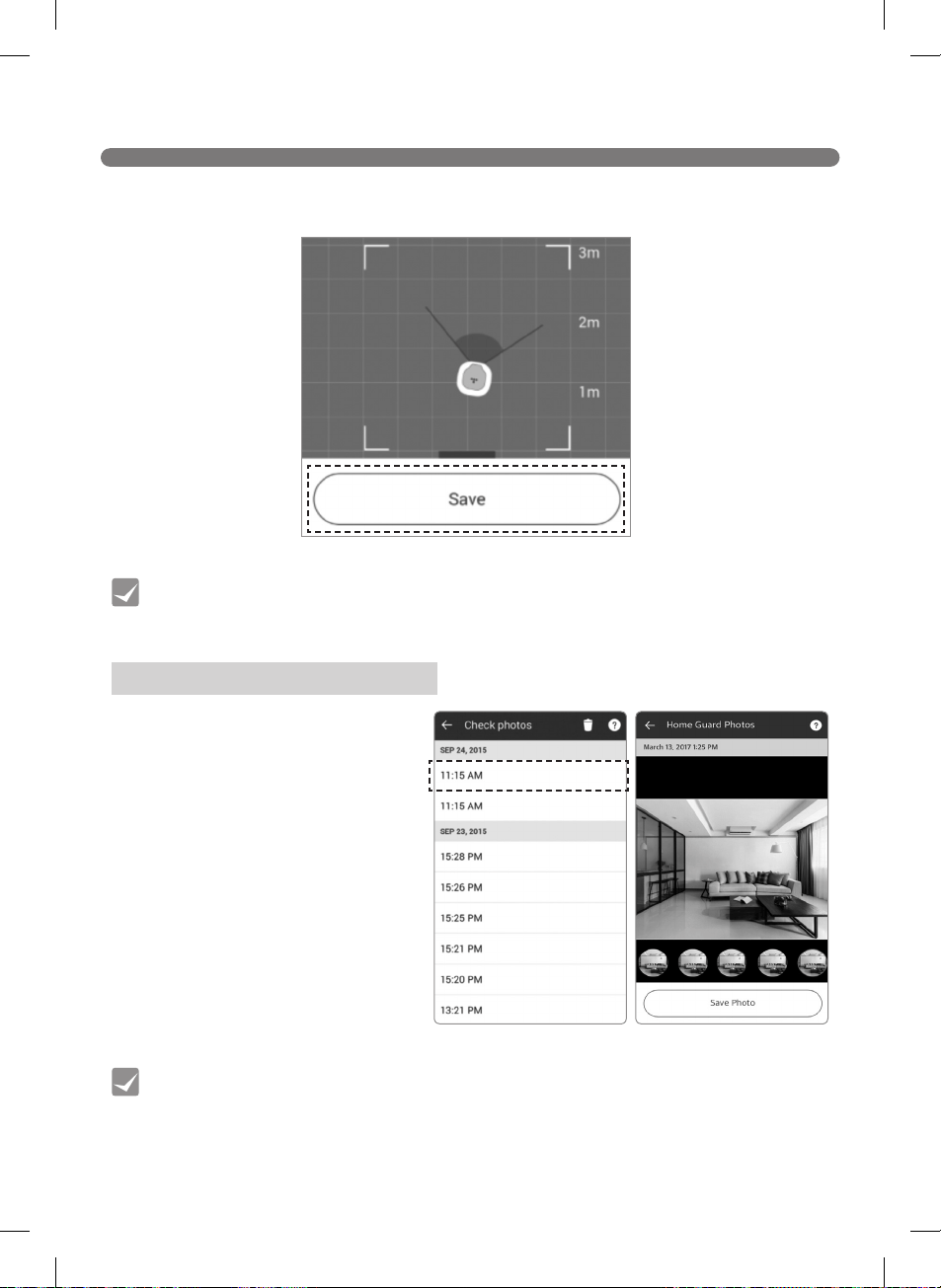
47
SMART APPLICATION FUNCTION
Checking HomeGuard Photos
Tip
Tip
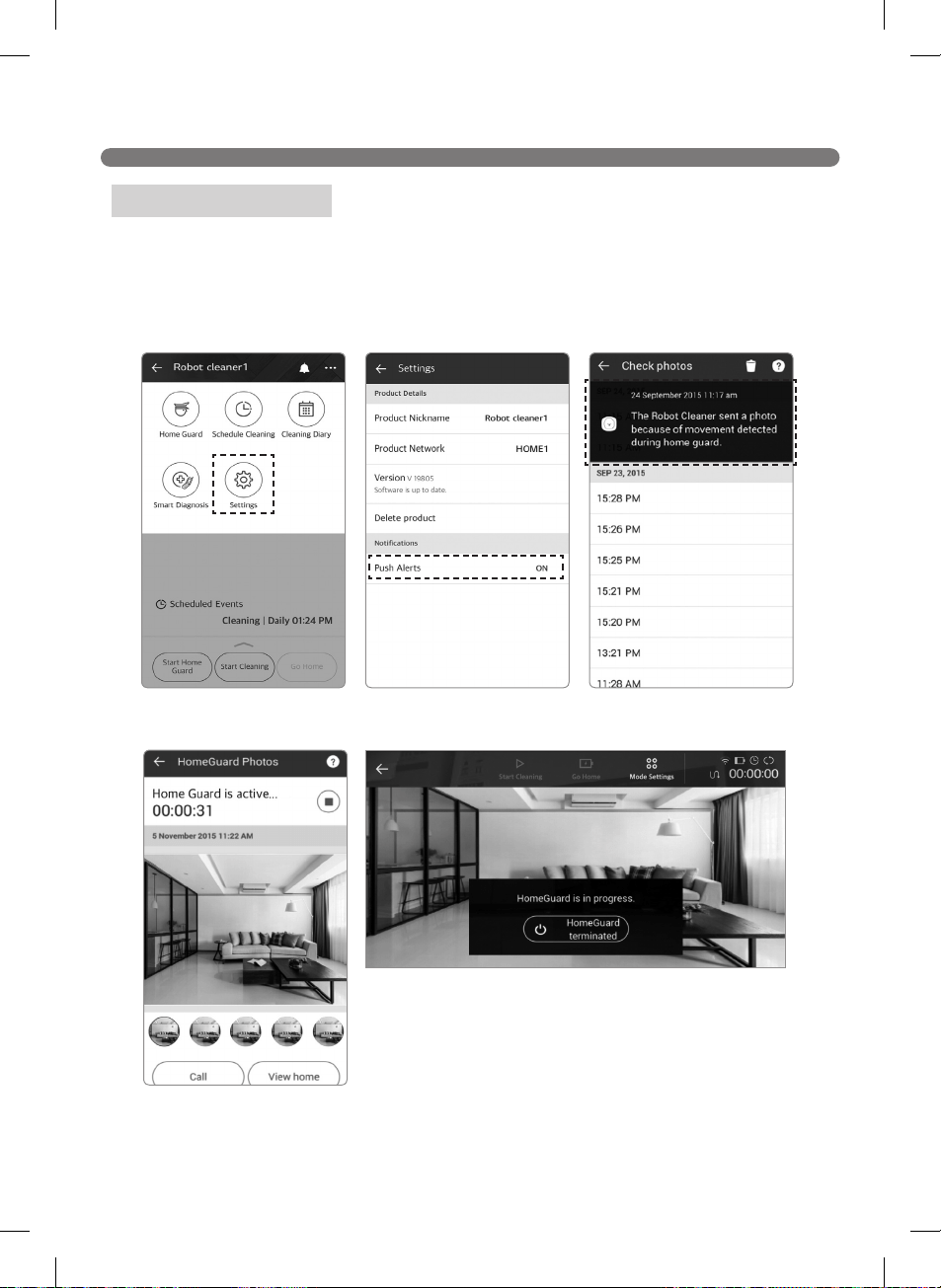
48
SMART APPLICATION FUNCTION
HomeGuard Alerts
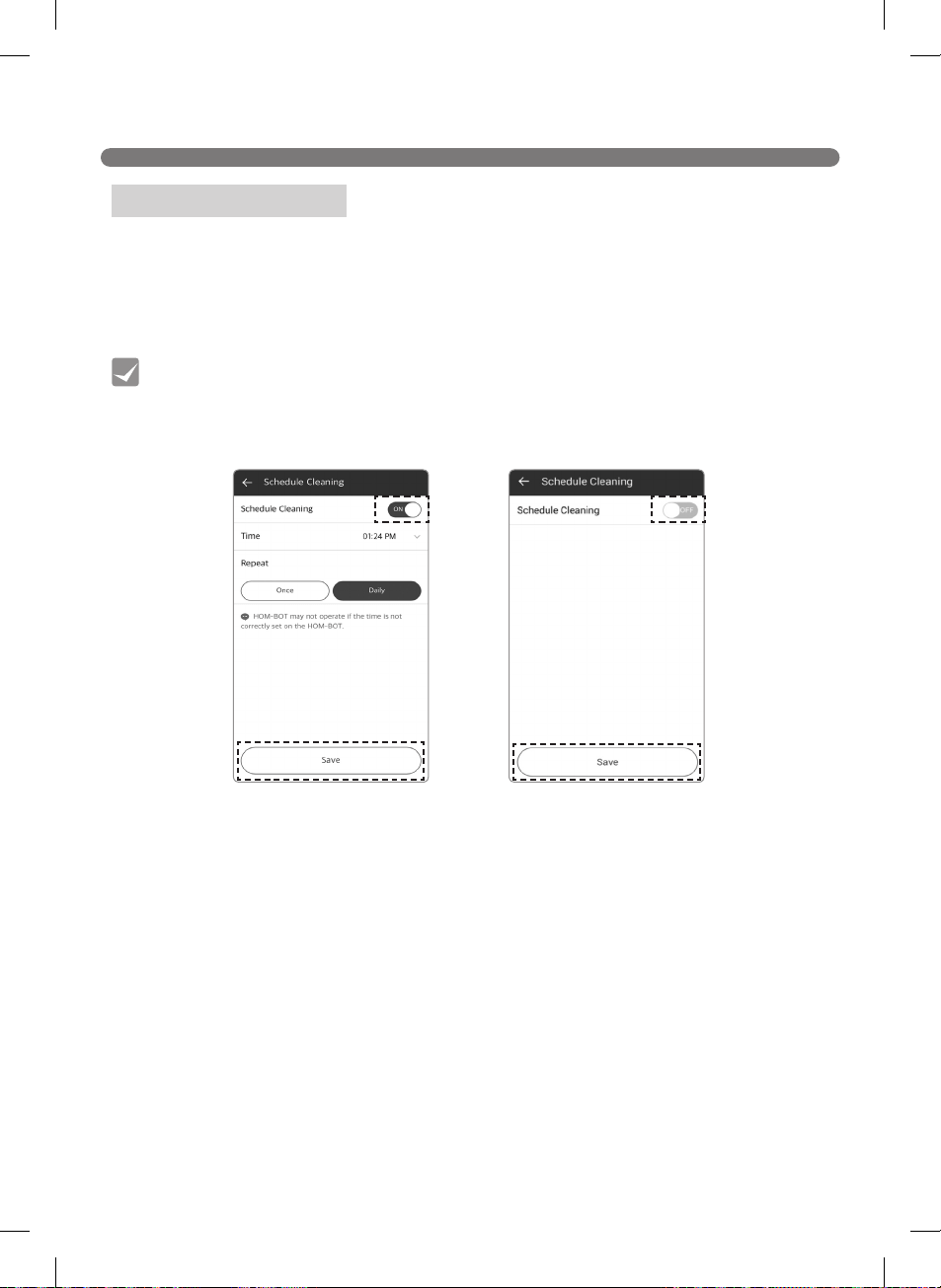
49
SMART APPLICATION FUNCTION
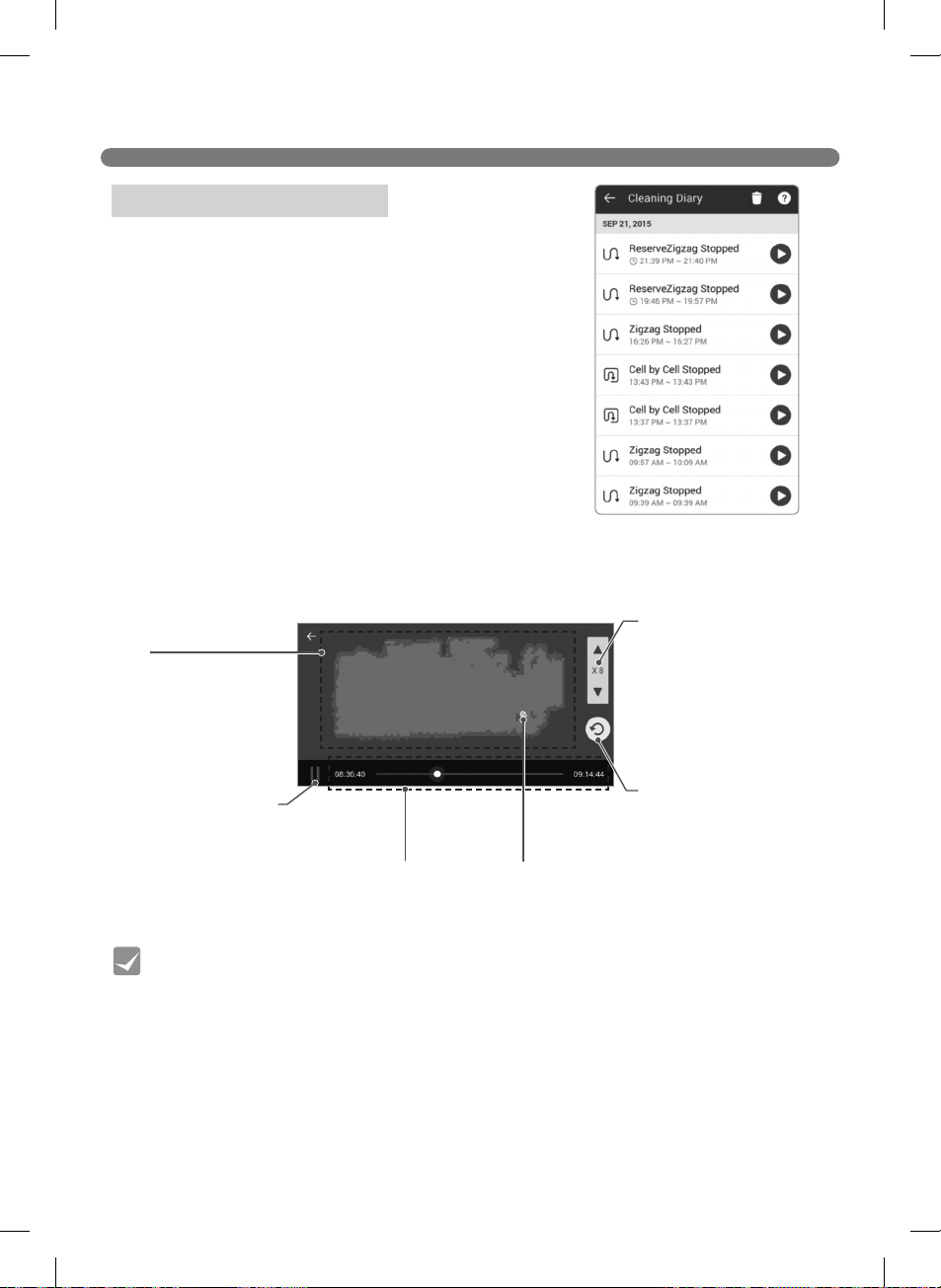
Scheduling Cleaning
Tip
50
SMART APPLICATION FUNCTION
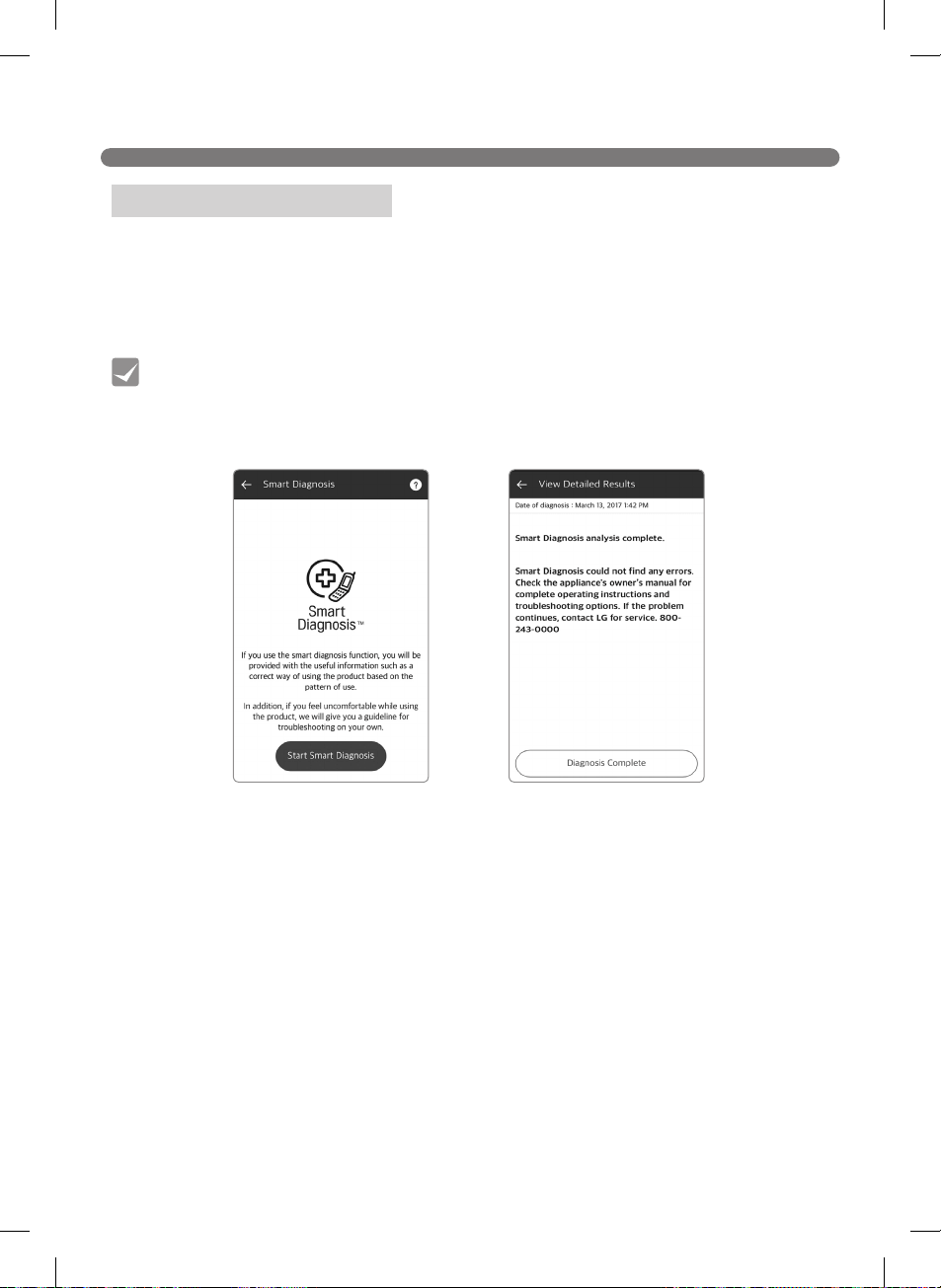
Using the Cleaning Diary
Map
Playback / Stop button
of cleaning animation
Time of starting/
cleaning completion.
Robot Cleaner location
Controlling the playback
speed
Rotate Map
(Eg.) After recharging, Zigzag finished
(Eg.) Zigzag Stopped
Tip
51
SMART APPLICATION FUNCTION
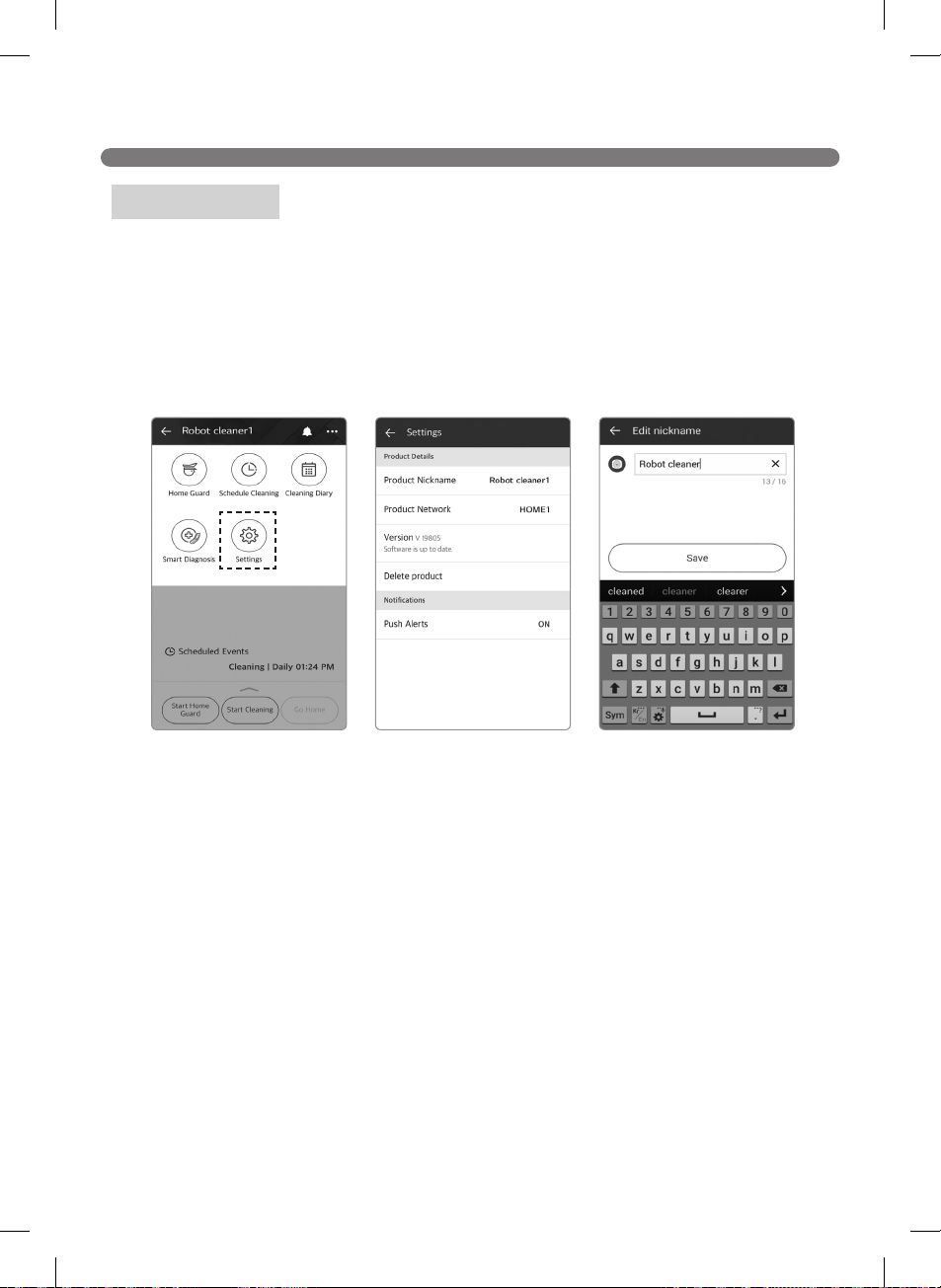
Using Smart Diagnosis™
Tip
52
SMART APPLICATION FUNCTION
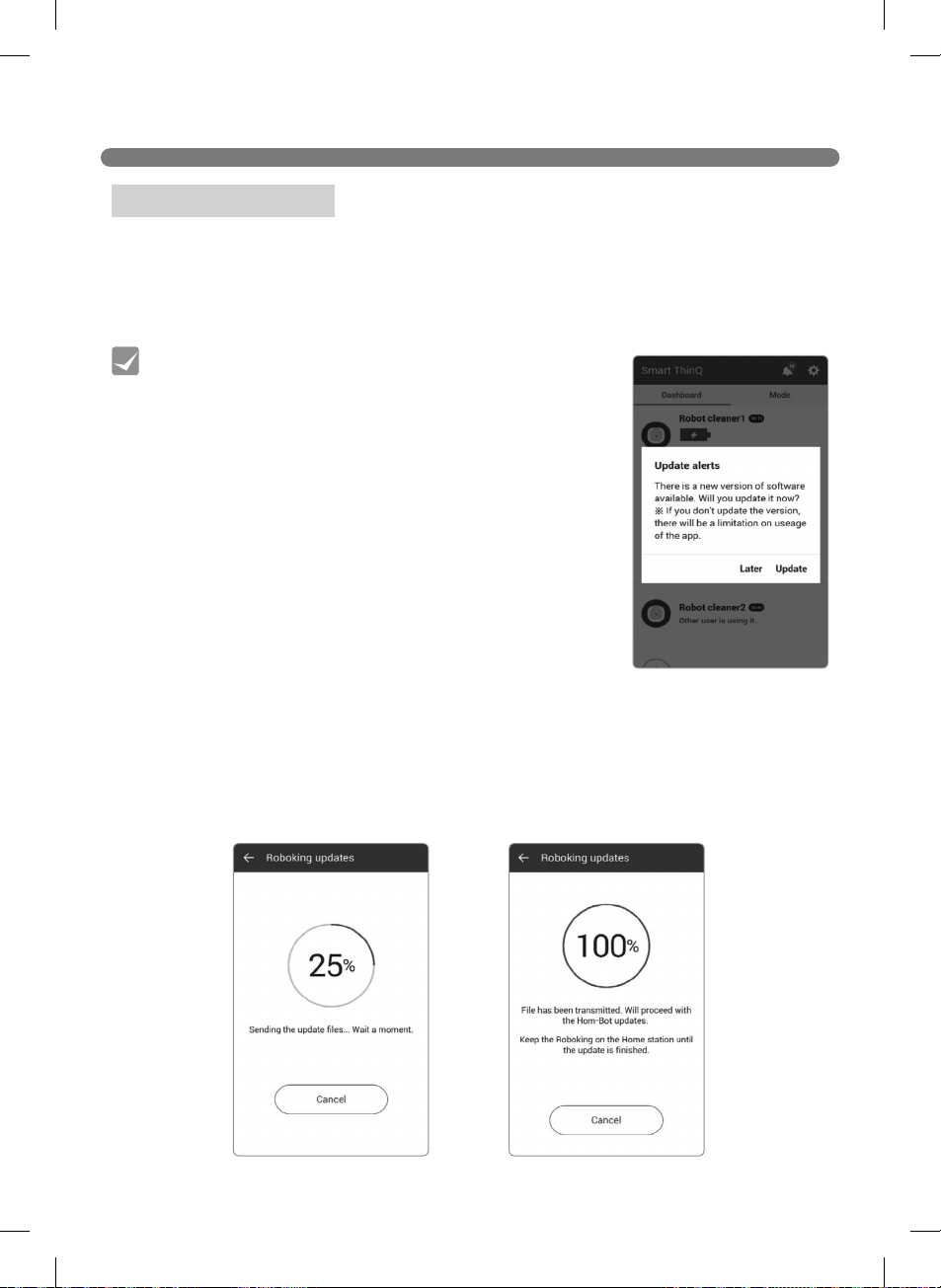
Setting Menu
53
SMART APPLICATION FUNCTION
Updating Software
Tip
54
SMART APPLICATION FUNCTION
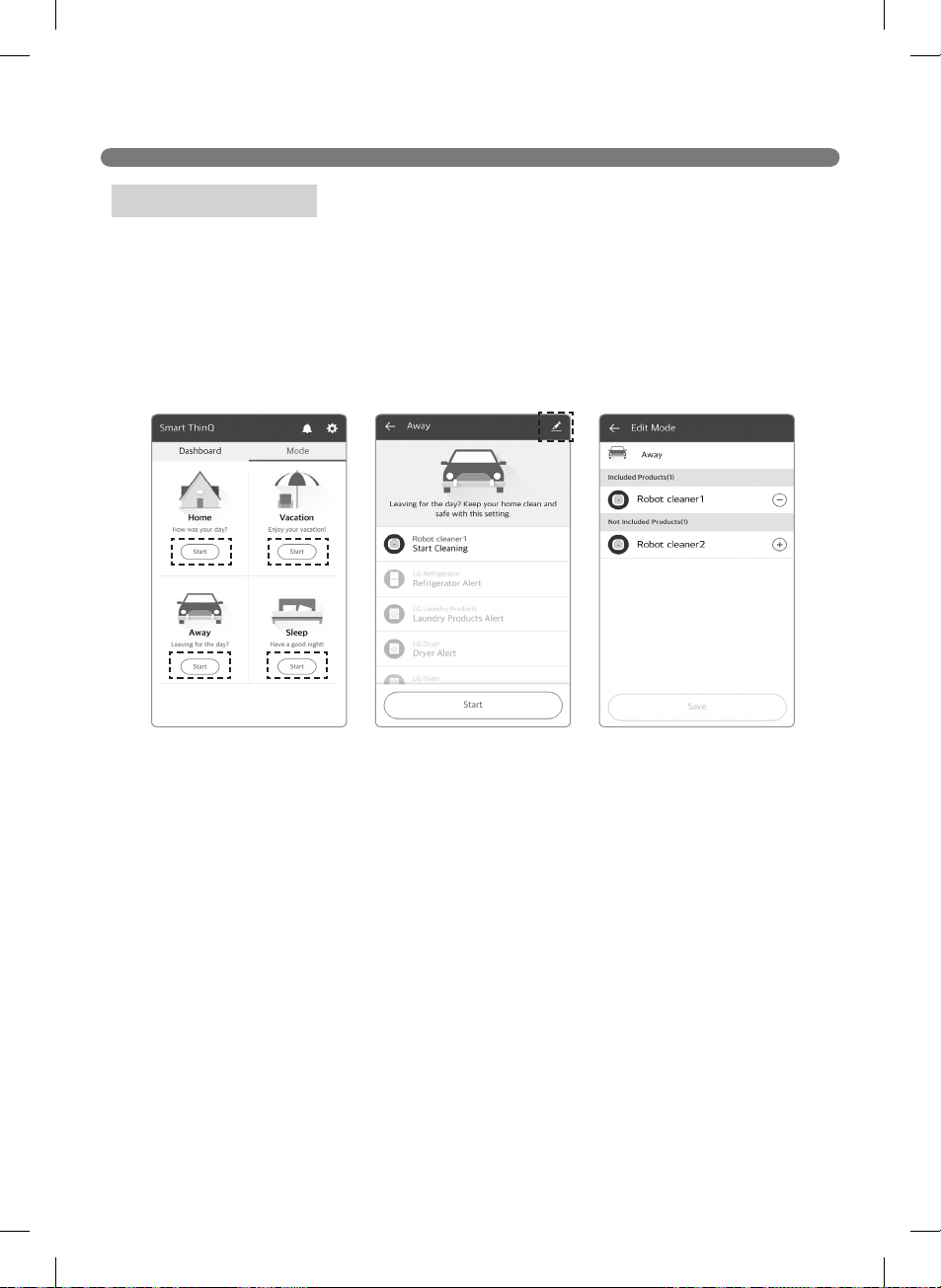
Operating Modes
※
55
PRODUCT INFO INITIALIZATION
※
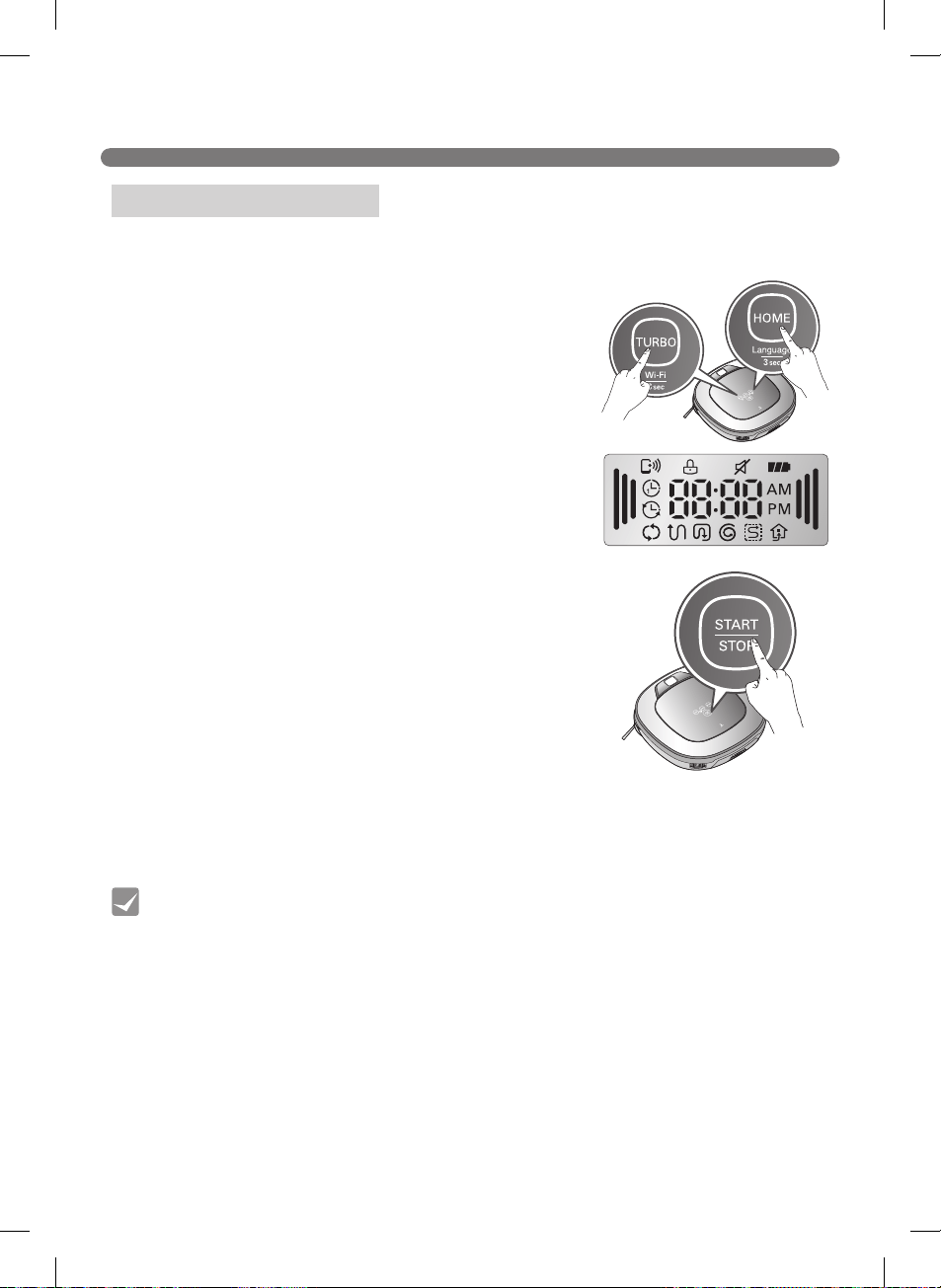
Initializing Product Info
Tip
56
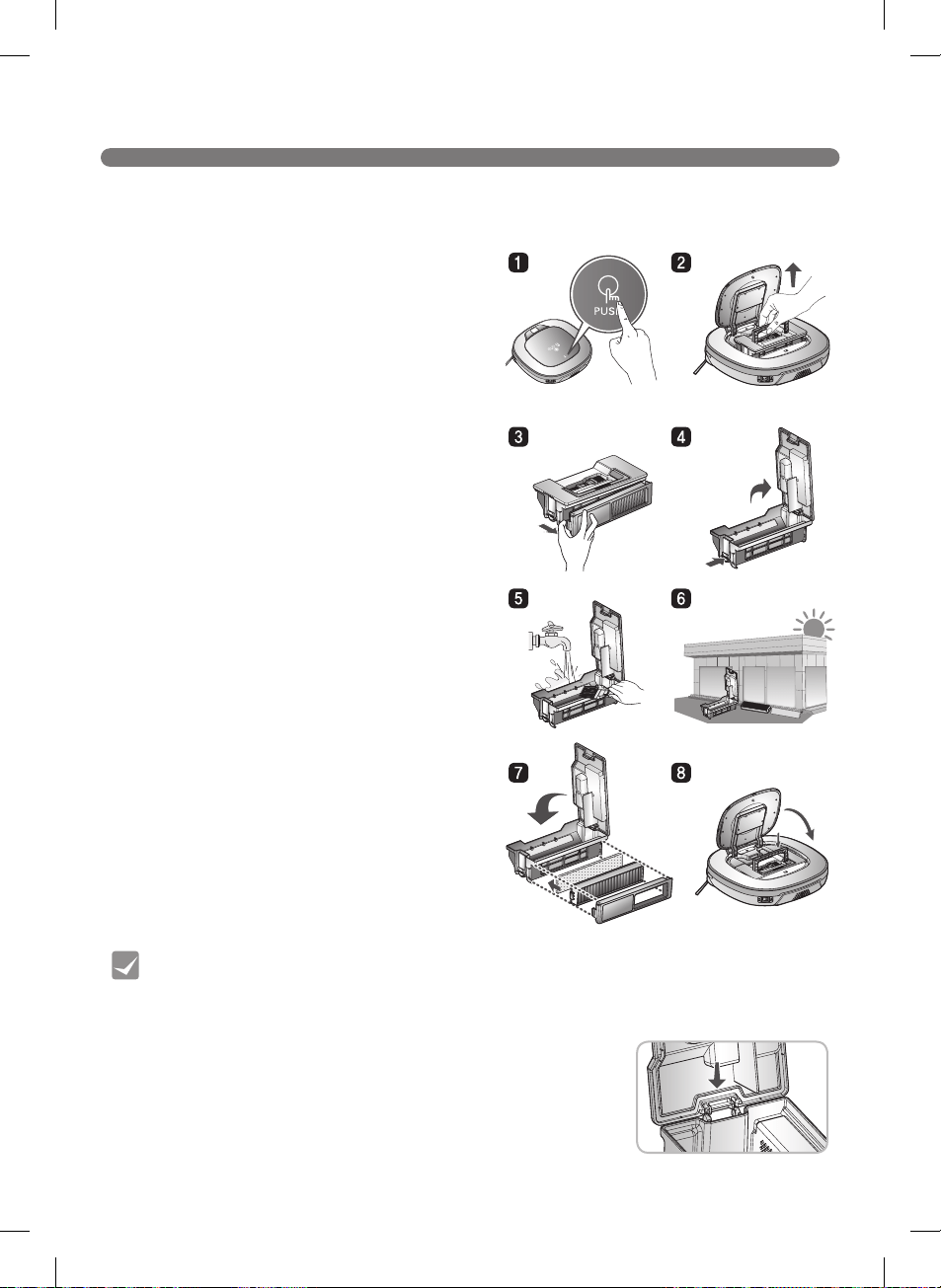
CLEANING THE DUST BIN
Tip
※
※
※
57
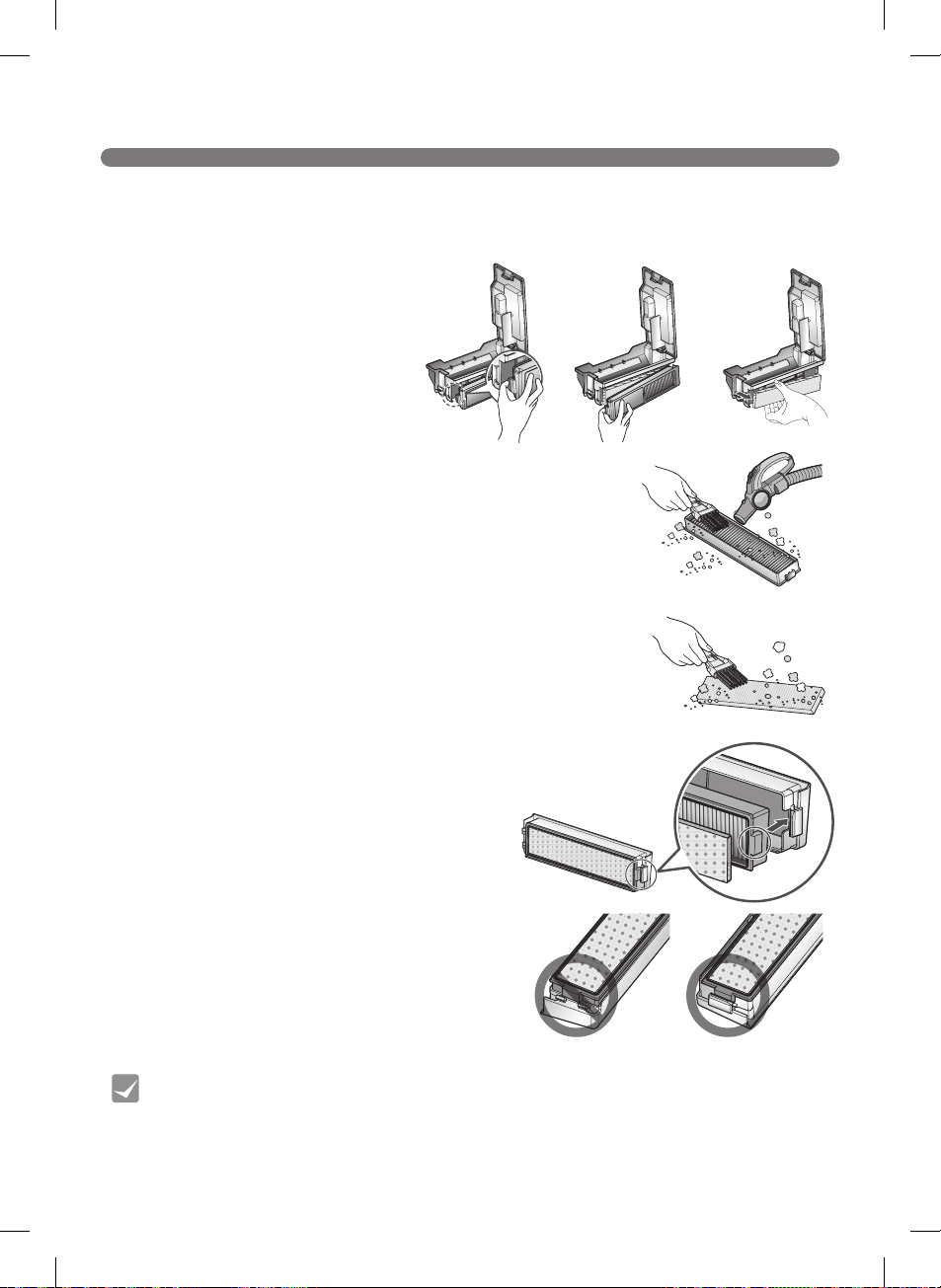
CLEANING THE DUST BIN FILTER
※
※
※
Tip
58
CLEANING THE BRUSH
※
※
Before turning over the main unit, lay a soft cloth on the floor and remove the Dust Bin.
Otherwise, the main unit can get scratched and dust will fall from the Dust Bin.
59
CLEANING THE SENSORS/CHARGING TERMINALS
※
Make sure to remove the dust bin before rotating the main
body. Otherwise, the dust in the dust bin may fall out.
Tip
60
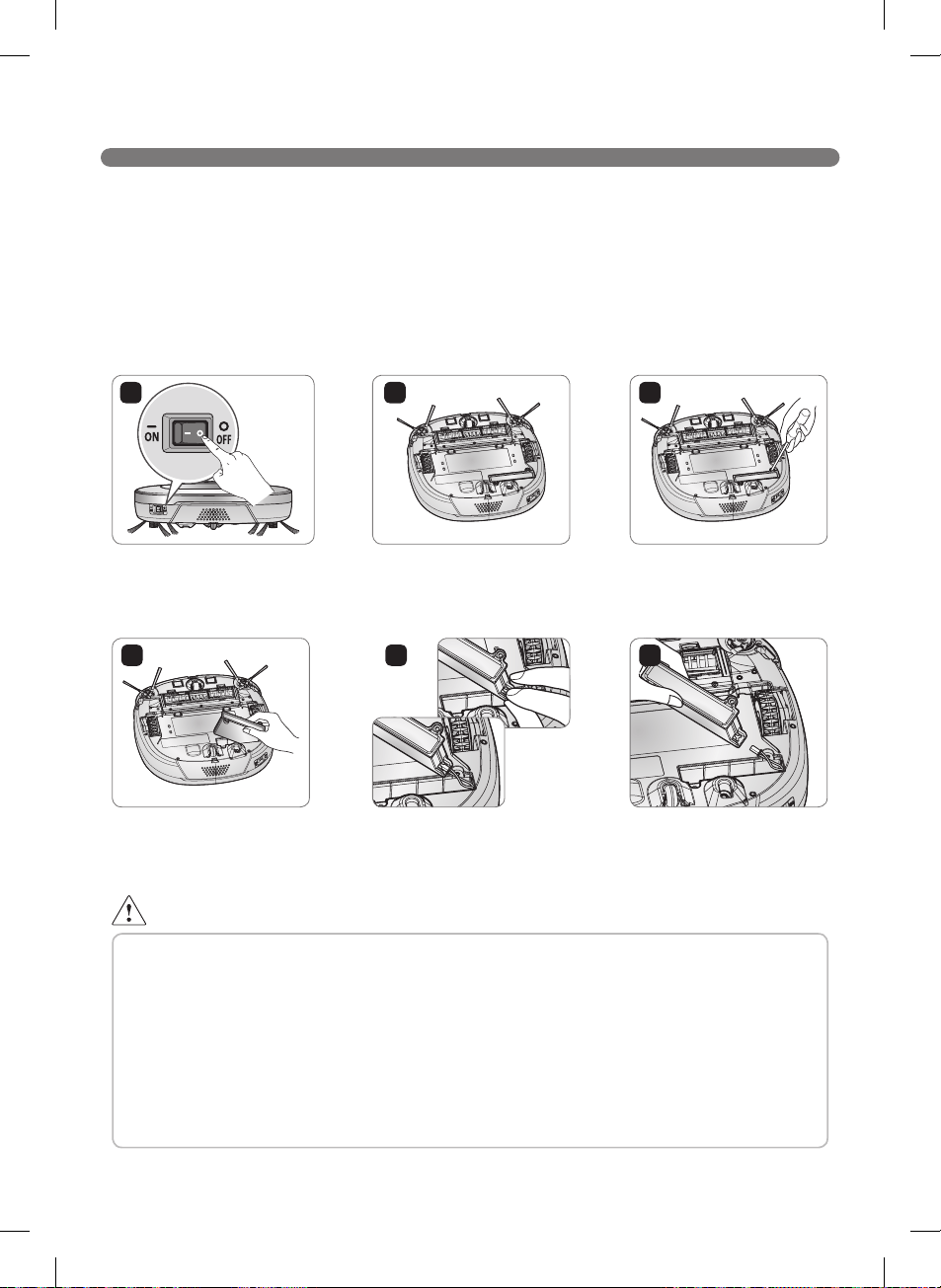
CLEANING THE SIDE BRUSH
Side Brush Maintenance
1
3
5
7
2
2
4
6
1
61
CLEANING THE ULTRA MICROFIBER MOP (on some models)
※
Tip
mm
62
TROUBLESHOOTING
※
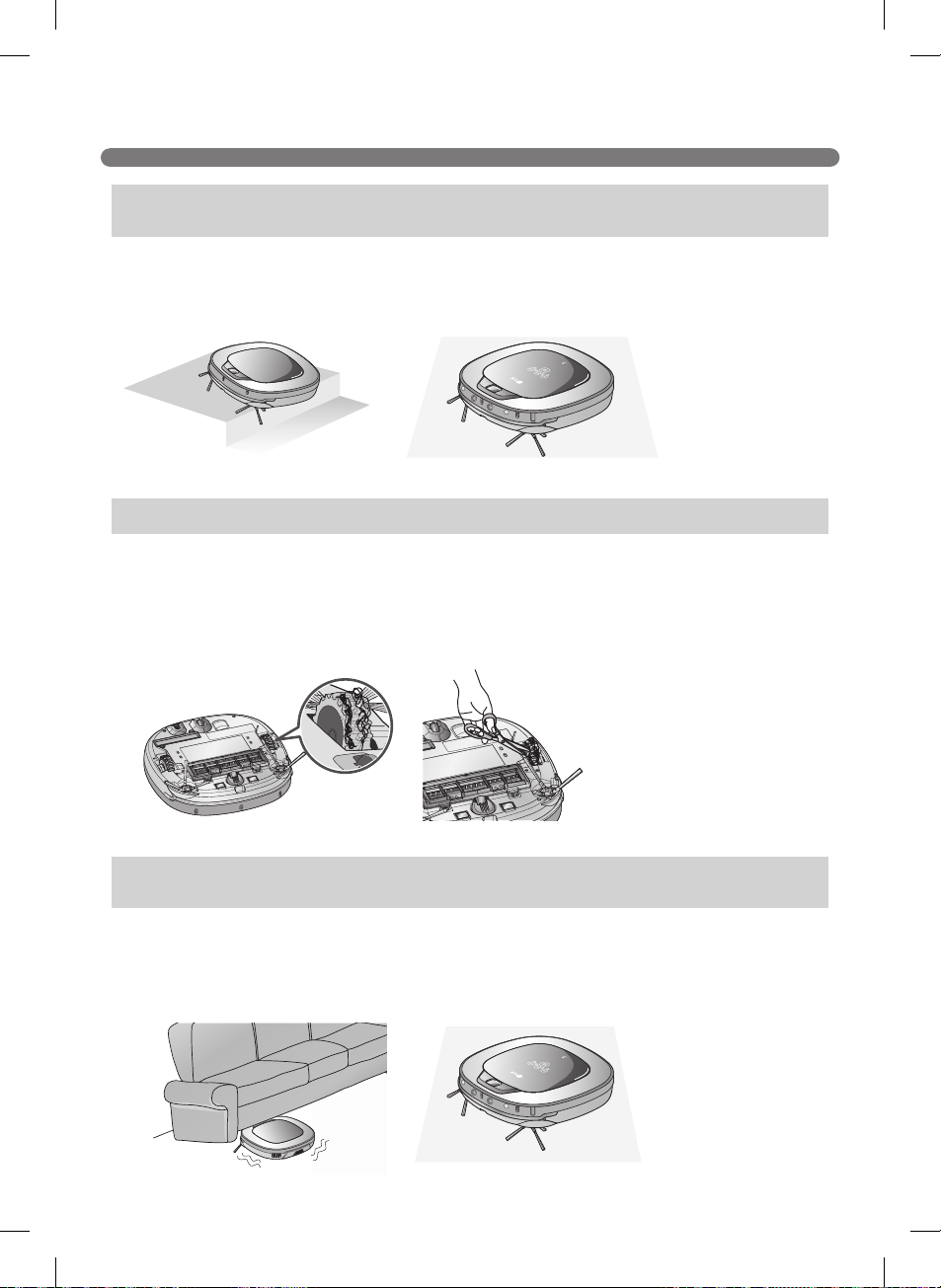
Please make sure to remove the dust bin before turning over the main body.
Otherwise, the dust in the dust bin may fall out.
"The wheels are not touching the floor. Please move Robot Cleaner
onto flat floor."
"Please remove foreign material on the left/right wheel."
"Robot Cleaner cannot continue cleaning. Please check the area
around Robot Cleaner."
63
TROUBLESHOOTING
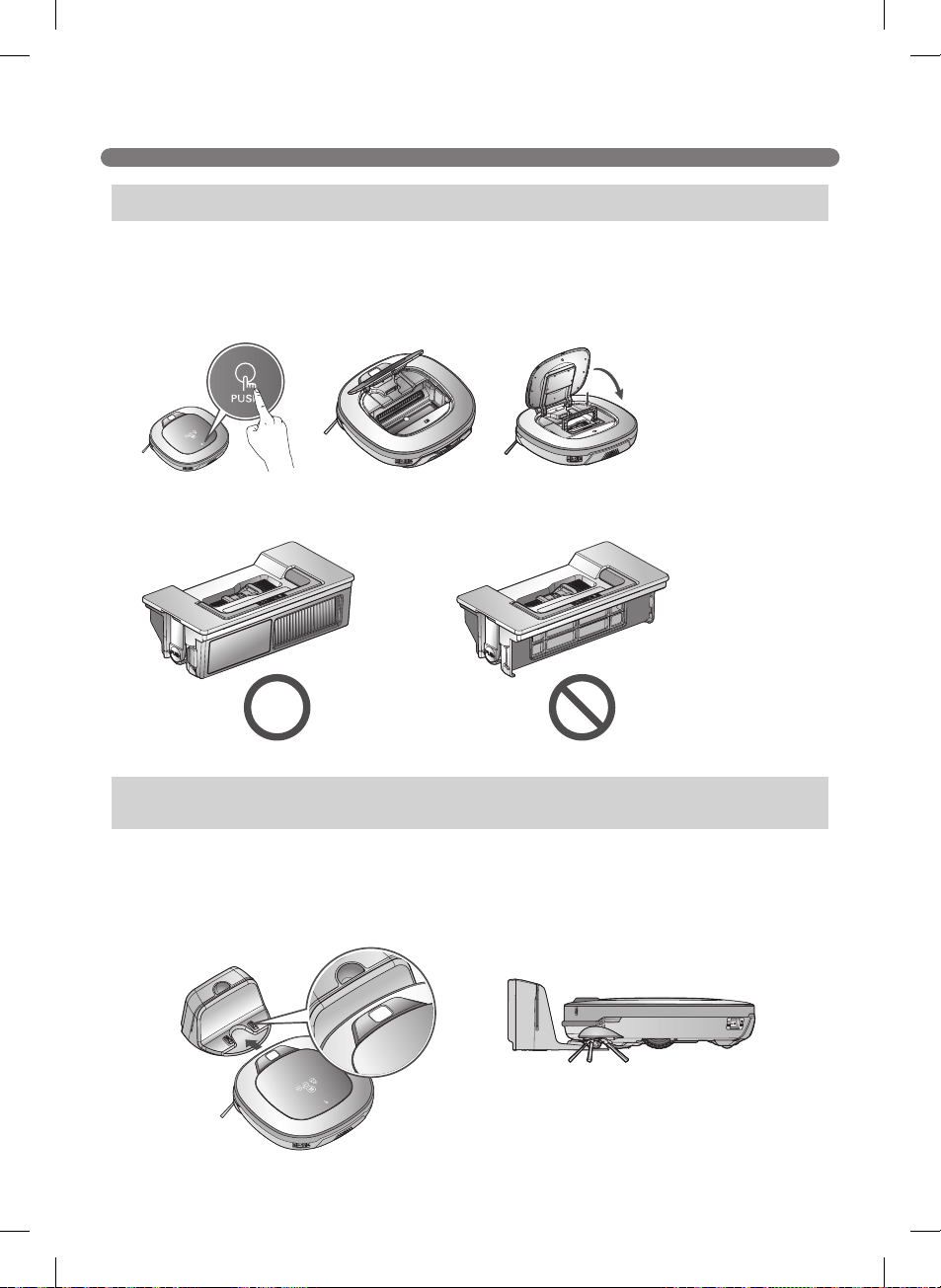
"Please check if the dust bin is installed with the filter."
"Battery is low. Please move Robot Cleaner onto the home station to
charge."

64
TROUBLESHOOTING
※
※
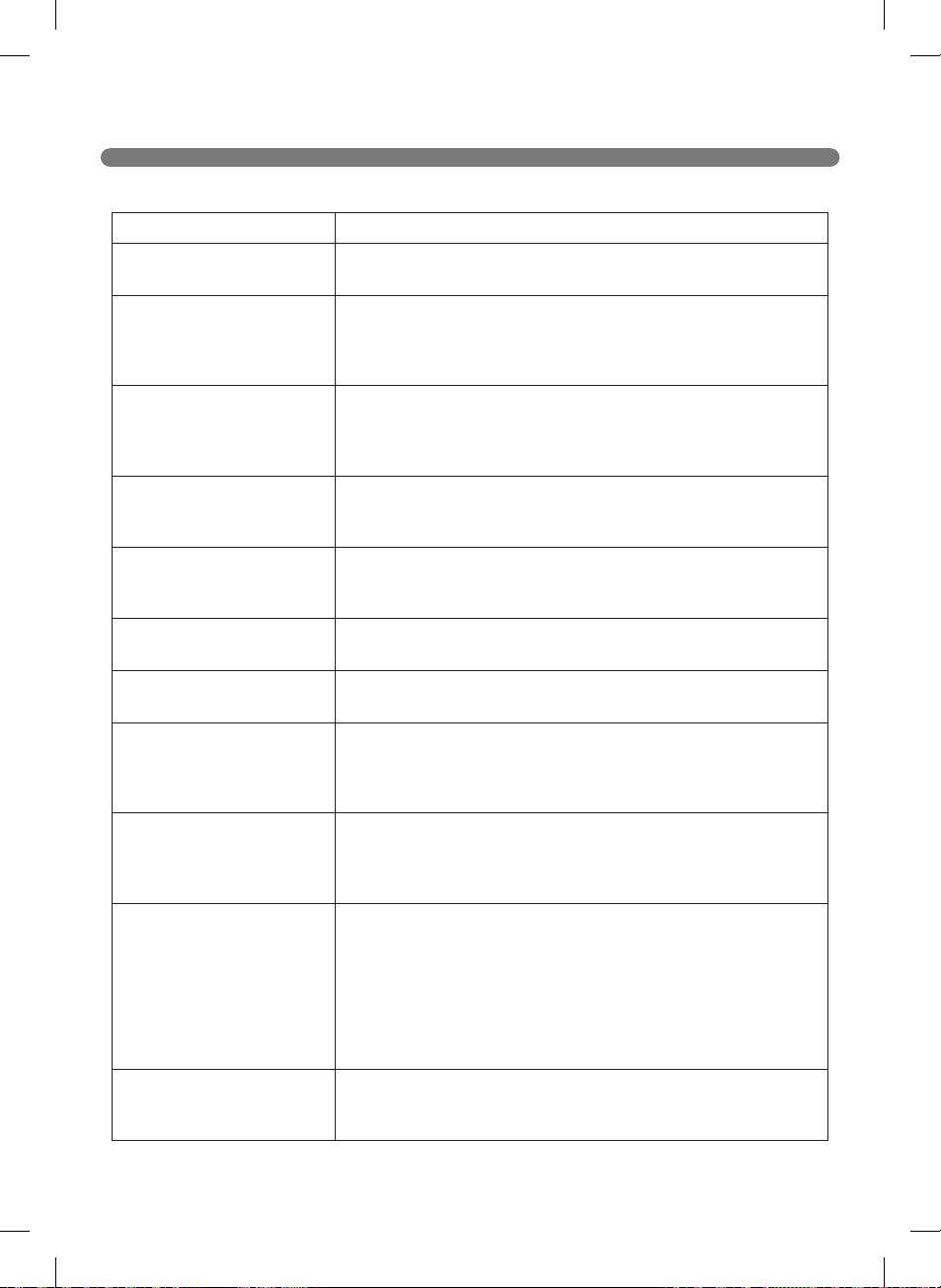
Before turning over the main unit, remove the Dust Bin.
Otherwise, it will cause dust to fall from the Dust Bin.
"Please remove foreign material from the brushes on the bottom."
1 2 3
45
65
BEFORE CALLING FOR SERVICE
Problem Solutions
s
s
s
s
s
s
s
s
s
s
s
s
s
s
s
s
s
s
s
m
s
s
s
s
s
s
66
PRODUCT SPECIFICATIONS
Item/Model
External Dimensions
inchinchinch
mmmmmm)
Weight
lbkg)
Power Consumption
W
Battery (Fully Charging)
V
Traveling Velocity
inch/smm/s
Use Time
Charging Time
Main Functions
Wireless LAN module Specifications
Model
Frequency Range
MHz
Output Power (Max)
dBm
dBm
dBm
dBm
※
FCC Notice (For transmitter module contained in this product)
67
PRODUCT SPECIFICATIONS
Item/Model Home Station (VR650)
EPS : ADS-30FSA-17 17030EPCU
External Dimensions
inchinchinch
mmmmmm)
Rating
V~Hz
Output Voltage/Current
VA
Power Consumption
W
Item/Model Battery(EAC62218205)
Type
Rating
VmAhcells
Charging temperature
˚C
Number of Batteries
EA
FCC RF Radiation Exposure Statement
68
REFERENCE ITEMS
Open Source Software Notice
Removing / Refitting the Battery Pack
1 3
4 5 6
2
WARNING
Risk of fire, explosion, electric shock, or malfunction.
69
PERFORMANCE TESTING (IEC 62929 Standard)
※
※
Dust Removal Test - Box (Hard Floor & Carpet)
Dust Removal Test - Straight Line (Hard Floor & Carpet)
Autonomous Navigation/Coverage Test
70
LG Robot Cleaner WARRANTY
LG Electronics Inc. will repair or replace your product, at LG’s option, if it proves to be defective in
material or workmanship under personal household use, during the warranty period set forth below,
effective from the date of original consumer purchase of the product. This limited warranty is good
only to the original purchaser of the product and effective only when used in U.S.A. and Canada.
* Manufacturing Locations : LG Electronics Inc. 84, Wanam-ro, Seongsan-gu, Changwon-si,
Gyeongsangnam-do, 642-713, KOREA
WARRANTY PERIOD: HOW SERVICE IS HANDLED:
1 Year
From the date of the
original purchase
Any part of the Robot Cleaner which fails due to a defect in materials
or workmanship. During this full 1 Year warranty, LG will also provide,
free of charge, all labor and shop service to replace the defective part.
Inverter motor : 10 year warranty (Suction motor)
THIS WARRANTY IS IN LIEU OF ANY OTHER WARRANTIES, EXPRESS OR IMPLIED,
INCLUDING WITHOUT LIMITATION, ANY WARRANTY OF MERCHANTABILITY OR
FITNESS FOR A PARTICULAR PURPOSE. TO THE EXTENT ANY IMPLIED WARRANTY IS
REQUIRED BY LAW, IT IS LIMITED IN DURATION TO THE EXPRESS WARRANTY PERIOD
ABOVE. LG WILL NOT BE LIABLE FOR ANY CONSEQUENTIAL, INDIRECT, OR INCIDENTAL
DAMAGES OF ANY KIND, INCLUDING LOST REVENUES OR PROFITS, IN CONNECTION
WITH THE PRODUCT. SOME STATES DO NOT ALLOW LIMITATION ON HOW LONG AN
IMPLIED WARRANTY LASTS OR THE EXCLUSION OF INCIDENTAL OR CONSEQUENTIAL
DAMAGES, SO THE ABOVE LIMITATIONS OR EXCLUSIONS MAY NOT APPLY TO YOU.
This warranty covers only defects in material and workmanship.
LGE will NOT pay for:
1. Expendable items that can wear out, including, but not limited to, filters and belts.
2. A service technician to instruct the user in correct product assembly, operation or
maintenance.
3. A service technician to clean or maintain this product.
4. Damage to or failure of this product if it is not assembled, operated or maintained according
to all instructions supplied with this product.
5. Damage to or failure of this product resulting from accident, abuse, misuse or use for other
than its intended purpose.
6. Damage to or failure of this product caused by the use of detergents, cleaners, chemicals or
utensils other than those recommended in all instructions supplied with this product.
7. Damage to or failure of parts or systems resulting from unauthorized modifications made to
this product.
This warranty is extended to the original purchaser for products purchased for home use within the
U.S.A. In Alaska, the warranty excludes the cost of shipping or service calls to your home.
Some states do not allow the exclusion or limitation of incidental or consequential damages, so this
exclusion or limitation may not apply to you. This warranty gives you specific legal rights, and you may
also have other rights which vary from states to states. To know what your legal rights are, consult your
local or state consumer affairs or your state’s Attorney General.
CUSTOMER ASSISTANCE INFORMATION:
To Prove Warranty Coverage
Retain your Sales Receipt to prove date of purchase.
A copy of your Sales Receipt must be submitted at the time warranty service is
provided.
To Obtain Nearest Authorized
Service Center or Sales Dealer,
or to Obtain Product, Customer,
or Service Assistance
Call 1-800-243-0000 (Phone answered 24 hours - 365 days a year) and choose
the appropriate prompt from the menu; or visit our website at:
http://us.lgservice.com. (In Canada- Call 1-888-542-2623,
website http://ca.lgservice.com)

71
MEMO