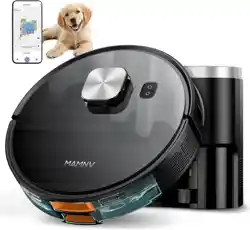
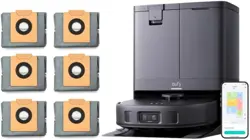
MAMNV D13S MAX Robot Vacuum and Mop, 11500 Pa Suction, 3-in-1 Robotic Vacuum with Smart LiDAR Navigation

Product's Documents

Below are documents related to this product, you can read online or download:
D13S MAX photo

1. Overview

The MAMNV D13S MAX is a 3-in-1 robotic vacuum cleaner with mopping functionality. It uses LiDAR navigation for mapping and path planning and includes a self-emptying base station.

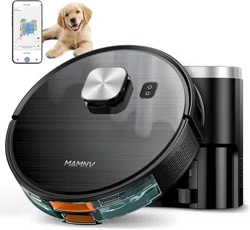
MAMNV D13S MAX Robot Vacuum and Mop, front view on a hardwood floor.

Key components include the robot unit, a dust collection station (base), a combination water and dust tank, side brushes, a rolling brush, mop pads, and filters.

2. Features and Specifications

2.1 Core Features

  • 3-in-1 Cleaning: Vacuums, sweeps, and mops simultaneously.
  • Suction Power: 11500 Pa maximum suction.
  • Navigation: Smart LiDAR navigation for precision laser mapping.
  • Self-Emptying: Automatically empties dustbin into the base station. The base has a capacity for up to 70 days of debris.
  • Runtime: Up to 160 minutes per charge.
  • Control Methods: Mobile app, Amazon Alexa, Google Assistant voice control.
  • Multi-Floor Mapping: Creates and saves maps for different floors.
  • No-Go Zones & Virtual Walls: Set restricted areas within the app.
  • Carpet Auto-Boost: Automatically increases suction power when transitioning to carpeted surfaces.
Diagram showing the 3-in-1 functionality: vacuum, sweep, and mop with the 230ml+240ml dust and water tank combo.

2.2 Technical Specifications

  • Brand: MAMNV
  • Model Name: D13S MAX Robot Vacuum and Mop
  • Color: Black
  • Product Dimensions (Robot): 12.59" L x 12.59" W x 3.82" H
  • Dustbin Capacity (Robot): 230 ml
  • Water Tank Capacity: 240 ml
  • Base Station Dust Capacity: 3.5 Liters
  • Battery: Included, rechargeable.
  • Voltage: 110 Volts (AC)
  • Filter Type: Triple-stage filtration (Foam, HEPA, Sponge)
  • Included Components: Robot, Dust Collection Station, Combination Water Tank & Dustbin, 5 Dust Bags, 1 Rolling Brush, 2 Side Brushes, Mop Holder, 2 Mop Pads, 2 Filters, User Manual, FQA, App Connection Guide.

3. Setup and Installation

  1. Unpack: Remove all components from the packaging.
  2. Charge the Robot: Place the robot on the charging contacts of the base station. Ensure the power cord is connected to the base and a wall outlet. The robot's indicators will show charging status.
  3. Prepare the Base Station: Place the base station against a wall, on a level surface, with at least 3 feet of clearance on each side and 5 feet in front. Insert a dust bag into the base.
  4. Install Accessories: Attach the side brushes to the bottom of the robot. Install the rolling brush and filter into the dustbin compartment. For mopping, attach the mop holder and a damp mop pad.
  5. Power On: Press the power button on the robot or use the base station to turn it on.
Image showing all items included in the box: robot, base station, brushes, mop pads, filters, and manuals.

4. Use Guide

4.1 Initial Mapping Run

  1. Clear the floor of obstacles like cables, small toys, and loose rugs.
  2. Ensure the robot is fully charged.
  3. Start a cleaning cycle via the physical button on the robot or the mobile app. For the first run, it is recommended to start from the base station.
  4. The robot will leave its base and use LiDAR to scan and create a map of your home. Allow it to complete a full cycle without interruption.
Graphic illustrating LiDAR navigation creating a detailed map of a home floor plan.

4.2 Using the Mobile App

The app is the primary control center for the vacuum.

  • Connection: Download the companion app. Follow the in-app guide to connect the robot to your Wi-Fi network.
  • Map Management: View the saved map. You can label rooms, set No-Go Zones, and create Virtual Walls.
  • Scheduling: Set daily or weekly cleaning schedules for the entire home or specific rooms.
  • Custom Routines: Create sequences like "Clean Kitchen then Living Room" or activate zone cleaning for specific spots.
  • Cleaning Modes: Select suction power (Quiet, Standard, Max) and water flow for mopping.
Smartphone screen showing the robot's app interface with controls for mapping, scheduling, and room selection.

4.3 Voice Control

Once linked via the app, you can use voice commands with Amazon Alexa or Google Assistant. Examples include:

  • "Alexa, ask [Robot Name] to start cleaning."
  • "Hey Google, tell [Robot Name] to go back to charge."
  • "Alexa, ask [Robot Name] to clean the kitchen."

4.4 Manual Controls

The robot has physical buttons (typically on top) for basic functions like Start/Pause, Send Home, and Spot Cleaning.

4.5 Mopping Function

  1. Fill the attached water tank with clean water. Do not add cleaning solutions unless specified as compatible in the manual.
  2. Attach a damp mop pad to the mop holder.
  3. In the app, select a mopping or vacuum & mop mode. The mop pad will automatically lift when the robot detects carpet (if the feature is enabled).
  4. After use, remove and rinse the mop pad. Empty and dry the water tank.

4.6 Self-Emptying Process

After a cleaning cycle, the robot will return to the base. The base station will automatically activate, emptying the robot's dustbin into the sealed dust bag inside the base. An indicator on the base may show when the bag is full and needs replacement.

Robot vacuum docked at its self-emptying base station.

5. Maintenance

5.1 Regular Cleaning

  • Dustbin (Robot): Empty after each cleaning cycle if not using self-emptying, or as needed.
  • Rolling Brush: Remove and clear any wrapped hair or debris weekly.
  • Side Brushes: Check for damage and remove tangled hair.
  • Filters: Tap out dust regularly. Wash the foam filter with water as needed and let it dry completely before reinstalling. Replace HEPA filters as recommended.
  • Sensors & Charging Contacts: Wipe clean with a dry cloth.
  • Wheels: Remove any debris that impedes movement.

5.2 Base Station Maintenance

  • Dust Bag: Replace when full (the base or app will notify you). The base holds up to 70 days of debris.
  • Wipe the exterior and the robot docking area.

5.3 Water Tank and Mop Pad

  • Empty and rinse the water tank after each mopping session.
  • Wash the mop pad after use and allow it to dry.

6. Troubleshooting

  • Robot won't start: Ensure it is charged. Check if the power switch is on. Confirm it is properly docked on the charging contacts.
  • Robot is stuck: Clear the area of obstacles. Check if wheels or brushes are jammed.
  • Poor navigation or missing areas: Ensure LiDAR sensor on top is clean and unobstructed. Clear reflective surfaces or very dark floors that may interfere with LiDAR. Remap the area.
  • App connection failed: Ensure your smartphone is connected to the correct 2.4GHz Wi-Fi network. Restart the robot and your router. Re-pair the device in the app.
  • Suction power is weak: Check and empty the dustbin. Clean the filters and clear any blockages in the air path or rolling brush.
  • Self-emptying not working: Ensure the base is plugged in and the dust bag is correctly installed and not full. Check for blockages in the robot's dustbin inlet or the base's suction path.
  • Error sounds/indicators: Refer to the specific error code in the manual or app help section.

7. Safety Information

  • Use only the provided power adapter and base station.
  • This is a 110V product. Using it with other voltages may require a converter and could void the warranty.
  • Keep the robot and base away from water and wet surfaces (except for the intended mopping function).
  • Do not place the base station in a confined space or block its sensors.
  • Keep loose cables, clothing, and small objects off the floor to prevent entanglement.
  • Supervise the robot around pets and children.
  • For maintenance, always turn the robot off and disconnect it from the charger.
Diagram showing the robot's safety features: cliff sensors to prevent falls and obstacle avoidance.

Reference file: MAMNV D13S MAX Robot Vacuum and Mop, 11500 Pa Suction, 3-in-1 Robotic Vacuum with Smart LiDAR Navigation

Specifications

Indexed Terms: Robot Vacuum

MAMNV D13S MAX Questions and Answers

See other models: D13S MAX MFR01 W05 BR151