DailyClean

1
2
3
4
5
6

empty page before TOC

English 6
Français (Canada) 23

English
Introduction
Congratulations on your purchase and
welcome to Philips! To fully benefit from the
support that Philips offers, register your
product at www.philips.com/welcome.
IMPORTANT
SAFEGUARDS
READ ALL INSTRUCTIONS BEFORE USE
When using electrical products, especially when children are
present, basic safety precautions should always be followed,
including the following:
DANGERS
To reduce the risk of electrocution:
-
Keep the charger away from water.
-
Do not place or store product where it can fall or be pulled
into a tub or sink.
-
Do not place in or drop into water or other liquid.
-
Do not immerse the charger in water or any other liquid.
-
Do not use while bathing.
-
Do not reach for a product that has fallen into water. Unplug
immediately.
-
After cleaning, make sure the charger is completely dry
before you connect it to the mains.
6
English

WARNINGS
To reduce the risk of burns, electrocution, fire or injury to
persons:
1 Do not clean the brush head, the handle or the charger in the
dishwasher.
2 Do not use attachments other than those recommended by
the manufacturer.
3 Do not plug into an outlet with a voltage other than specified
on the bottom of the product. This product is designed to
operate within a range of 100 to 240volts. Voltage converters
do not warrant voltage compatibility.
4 Never force the plug into an outlet; if the plug does not easily
fit into the outlet, discontinue use.
5 Discontinue use if the product appears damaged in any way
(brush head, handle or charger, etc.).
6 The power cord cannot be replaced. If the power cord is
damaged, discard the charger.
7 Always have the charger replaced with one of the original
type in order to avoid a hazard.
8 Keep the cord away from heated surfaces.
9 Do not use the base charger outdoors.
10 Do not use the charger if dropped into water.
11 This product contains no user-serviceable parts. Refer to
‘Warranty and support’ if the product no longer works
properly or needs repair.
12 Keep the Philips Sonicare out of direct sunlight.
13 Use this product only for its intended use as described in this
document or as recommended by your dental professional.
7
English

14 This product is not intended for use by persons (including
children) with reduced physical, sensory, or mental
capabilities, or lack of experience and knowledge, unless
they have been given supervision or instruction concerning
use of the appliance by a person responsible for their safety.
15 Children should be supervised to ensure that they do not
play with the product.
16 Philips Sonicare is a personal care device and is not intended
for use on multiple patients in a dental office or institution.
17 The product is not intended to be repaired by service
personnel in case of failure or component defect (unit can be
thrown away).
18 For connection to a supply not in the U.S.A., use a charger of
the proper configuration for the power outlet.
19 This appliance has only been designed for cleaning teeth,
gums and tongue. Do not use it for any other purpose. Stop
using the appliance and contact your doctor if you
experience any discomfort or pain.
20Avoid direct contact with products that contain essential oils
or coconut oil. Contact may result in bristle tufts dislodging.
21 If your toothpaste includes peroxide, baking soda or other
bicarbonate (common in whitening toothpastes), thoroughly
clean your brush head and handle with soap and water after
each use. Otherwise plastic cracking may occur.
MEDICAL WARNINGS
1 Consult your dental professional before you use this product
if you have had oral or gum surgery in the previous 2 months.
2 Contact your dental professional if excessive bleeding occurs
after using this product or bleeding continues to occur after 1
week of use.
8
English

3 Discontinue use of this product and contact a
physician/dentist if discomfort or pain is experienced.
4 This product complies with the safety standards for
electromagnetic devices. If you have a pacemaker or other
implanted device, contact your physician or the device
manufacturer prior to use.
5 Consult your physician if you have other medical concerns.
SAVE THESE
INSTRUCTIONS
Intended Use
DailyClean series power toothbrushes are
intended to remove adherent plaque and food
debris from the teeth to reduce tooth decay
and improve and maintain oral health.
DailyClean series power toothbrushes are
intended for consumer home use. Use by
children should be with adult supervision.
Electromagnetic fields (EMF)
This Philips appliance complies with all
standards regarding electromagnetic fields
(EMF). If handled properly and according to
the instructions in this user manual, the
appliance is safe to use based on scientific
evidence available today.
Your Philips Sonicare toothbrush
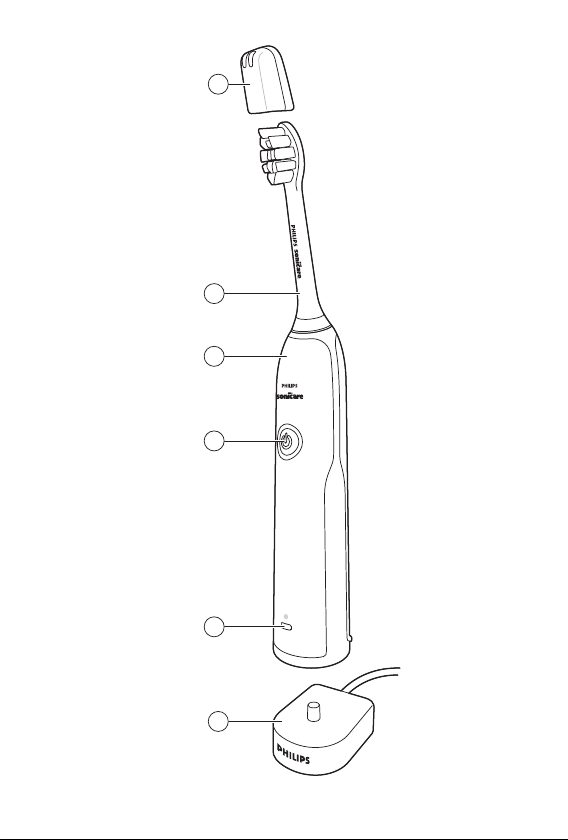
1 Hygienic travel cap
2 Brush head
3 Handle
9
English
4 Power on/off button
5 Battery level indicator
6 Charger
Note: The content of the box may vary based
on the model purchased.
Getting started
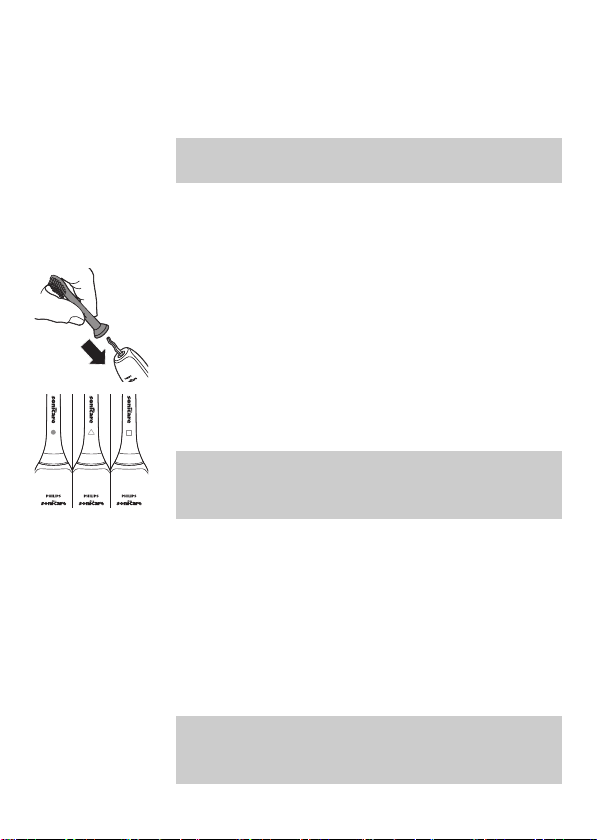
Attaching the brush head
1 Align the brush head so the bristles point in
the same direction as the front of the
handle.
2 Firmly press the brush head down onto the
metal shaft until it stops.
Note: Philips Sonicare brush heads are
imprinted with icons to easily identify your
brush head.
Charging your Philips Sonicare
1 Plug the charger into a live electrical outlet.
2 Place the handle on the charger.
-
The light of the battery level indicator
flashes and the appliance beeps twice.
This indicates that the toothbrush is
charging.
Note: It can take up to 24 hours to fully charge
the battery, but you can use the Philips
Sonicare toothbrush before it is fully charged.
10
English
Using your Philips Sonicare toothbrush
Brushing instructions
1 Wet the bristles and apply a small amount
of toothpaste.
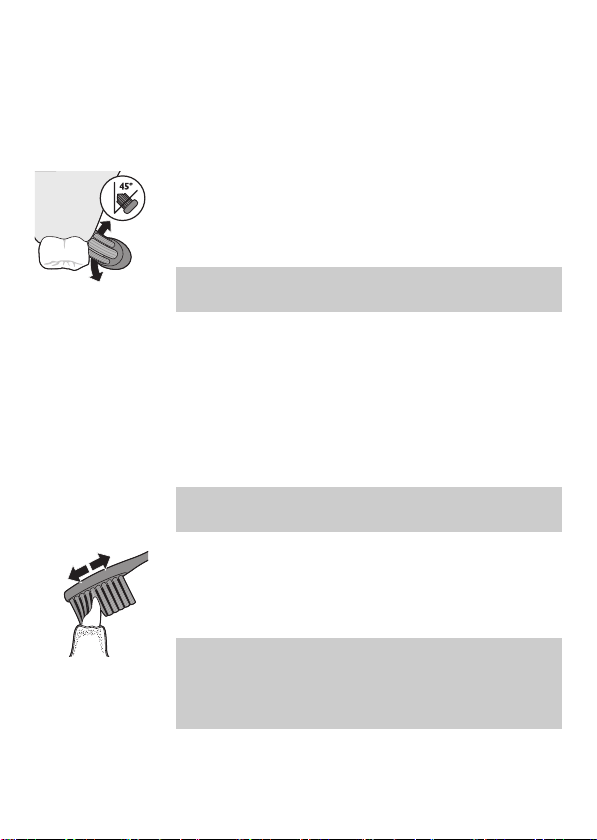
2 Place the toothbrush bristles against the
teeth at a slight angle (45 degrees), pressing
firmly to make the bristles reach the
gumline or slightly beneath the gumline.
Note: Keep the center of the brush in
contact with the teeth at all times.
3 Press the power on/off button to turn on
the Philips Sonicare.
4 Gently keep the bristles placed on the teeth
and in the gumline. Brush your teeth with
small back and forth motion so the bristles
reach between the teeth. Continue this
motion throughout your brushing cycle.
Note: The bristles should slightly flare. Do
not scrub.
5 To clean the inside surfaces of the front
teeth, tilt the brush handle semi-upright
and make several vertical overlapping
brushing strokes on each tooth.
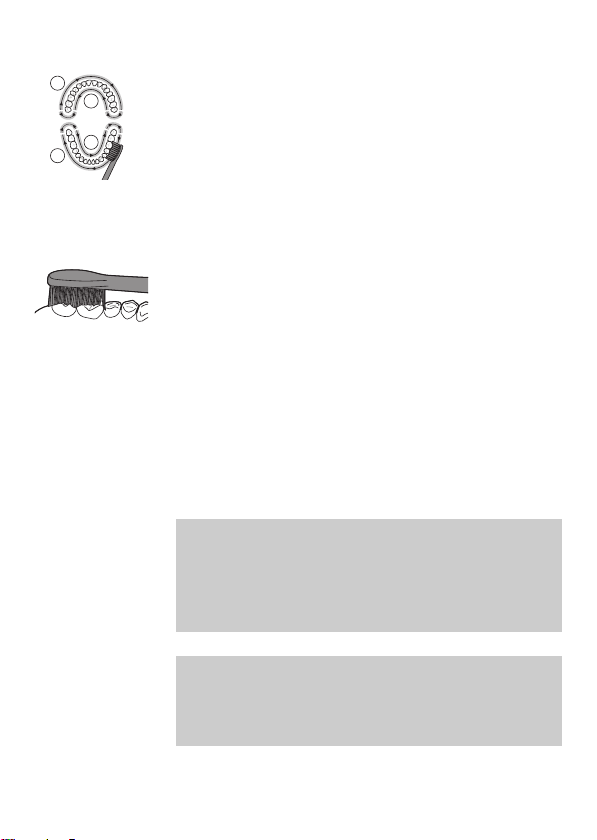
Note: To make sure you brush evenly
throughout the mouth, divide your mouth
into 4 sections using the Quadpacer feature
(see chapter ‘Features’).
11
English
2
4
3
1
6 Begin brushing in section 1 (outside upper
teeth) and brush for 30 seconds before you
move to section 2 (inside upper teeth).
Continue brushing in section 3 (outside
lower teeth) and brush for 30 seconds
before you move to section 4 (inside lower
teeth).
7 After you have completed the brushing
cycle, you can spend additional time
brushing the chewing surfaces of your teeth
and areas where staining occurs. You can
also brush your tongue, with the toothbrush
turned on or off, as you prefer.
Your Philips Sonicare toothbrush is safe to
use on:
-
Braces (brush heads wear out sooner when
used on braces)
-
Dental restorations (fillings, crowns,
veneers)
Note: Ensure that braces or dental restorations
are properly adhered and not compromised. If
not, braces or dental restorations may be
damaged when they come into contact with
the brush head.
Note: When the Philips Sonicare toothbrush is
used in clinical studies, the handle should be
fully charged and the Easy-start feature
deactivated.
12
English

Battery status (when handle is not on charger)
This Philips Sonicare toothbrush is designed to
provide at least 28 brushing sessions, each
session lasting 2 minutes. The battery level
indicator shows the battery status when you
complete the 2-minute brushing session, or
when you pause the Philips Sonicare
toothbrush for 30 seconds while brushing by
pressing the power on/off button.
Brushing
sessions
Battery
status color
Light Beeps
28-6 Green Solid -
5-2 Orange Flashing 3 beeps
1 Orange Flashing 2 sets of 5
beeps
Note: When the battery is completely empty,
the Philips Sonicare toothbrush turns off. Place
the Philips Sonicare toothbrush on the charger
to charge it.
Note: To keep the battery fully charged at all
times, you may keep your Philips Sonicare
toothbrush on the charger when not in use.
Features
Intensities (specific types only)
Your power toothbrush gives you the option to
choose between low and high intensity.
13
English

Note: When you use the toothbrush for the
first time, the default setting is the low
intensity.
-
Press the power button once to turn on the
toothbrush.
-
Press a second time within 2 seconds to
change the intensity.
-
Press a third time within 2 seconds to
pause.
After 2 seconds of brushing, pressing the
power button again will also pause the
toothbrush.
Smartimer
The Smartimer indicates that your brushing
cycle is complete by automatically turning off
the toothbrush at the end of the brushing
cycle.
Dental professionals recommend brushing no
less than 2 minutes twice a day.
Note: If you press the power on/off button
after you started the brushing cycle, the
toothbrush will pause. After a pause of 30
seconds, the Smartimer resets.
Easy-start
The Easy-start feature gently increases power
over the first 14 brushings to help you get used
to brushing with the Philips Sonicare
toothbrush. This Philips Sonicare toothbrush
comes with the Easy-start feature activated.
14
English

Activating or deactivating Easy-start
1 Put the handle on the plugged-in charger.
2 Press and hold the power on/off button
while the handle remains on the charger.
3 Keep the power on/off button pressed until
you hear a single short beep (after 2
seconds).
4 Release the power on/off button.
-
Triple tone of low-med-high means the
Easy-start feature has been activated.
-
Triple tone of high-med-low means the
Easy-start feature has been deactivated.
Note: Each of the first 14 brushings must last at
least 1 minute to move through the Easy-start
ramp-up cycle properly.
Note: Use of the Easy-start feature beyond the
initial ramp-up period is not recommended
and reduces the effectiveness of the Philips
Sonicare toothbrush in removing plaque.
Note: To achieve clinical efficacy, Easy-start
needs to be deactivated.
Quadpacer
2
4
3
1
The Quadpacer is an interval timer that has a
short beep and pause to remind you to brush
the 4 sections of your mouth evenly and
thoroughly. This Philips Sonicare toothbrush
comes with the Quadpacer feature activated.
15
English
Charger confirmation
The handle beeps and vibrates briefly when it
is placed on the charger base. This Philips
Sonicare toothbrush comes with the charger
confirmation feature activated.
Cleaning
You should clean your Philips Sonicare
toothbrush regularly to remove toothpaste
and other residue. Failure to clean your Philips
Sonicare toothbrush may result in an
unhygienic product and damage to it may
occur.
Warning: Do not clean brush heads, the
handle or the charger in the dishwasher.
Warning: Do not clean with boiling hot
water.
Toothbrush handle
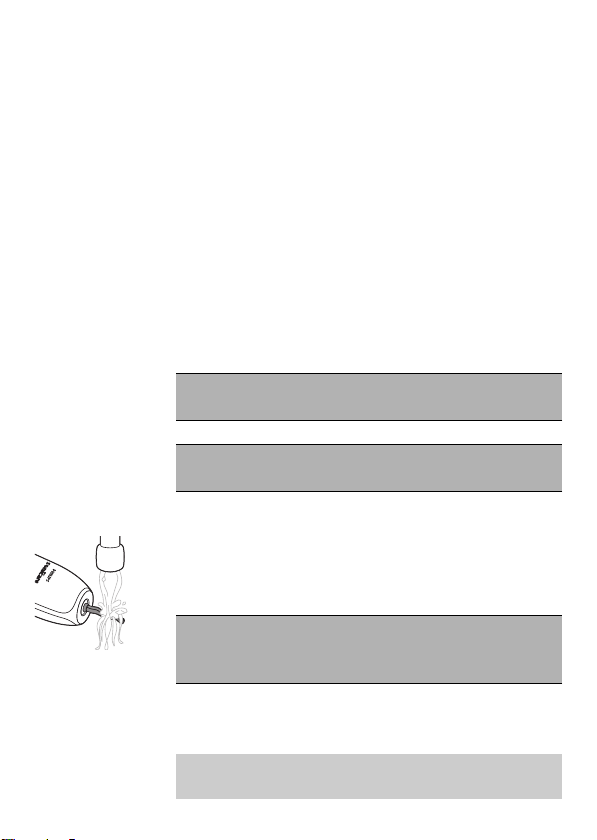
1 Remove the brush head and rinse the metal
shaft area with warm water. Make sure you
remove any residual toothpaste.
Caution: Do not push on the rubber seal on
the metal shaft with sharp objects, as this
may cause damage.
2 Wipe the entire surface of the handle with a
damp cloth.
Note: Do not tap the handle on the sink to
remove excess water.
16
English

Brush head
1 Rinse the brush head and bristles after each
use.
2 Remove the brush head from the handle
and rinse the brush head connection with
warm water at least once a week. Rinse the
travel cap as often as needed.
Charger
1 Unplug the charger before you clean it.
2 Wipe the surface of the charger with a
damp cloth.
Storage
If you are not going to use the product for a
long time, unplug it, clean it (see chapter
'Cleaning') and store it in a cool and dry place
away from direct sunlight.
Replacement
Brush head
Replace Philips Sonicare brush heads every 3
months to achieve optimal results. Use only
Philips Sonicare replacement brush heads.
Disposal
-
This appliance contains a rechargeable
battery which must be disposed of properly.
17
English

-
Contact your local town or city officials for
battery disposal information. You can also
call 1-800-8-BATTERY or visit
www.rbrc.com for battery drop-off
locations.
-
For assistance, visit our website
www.philips.com/support or call
1-800-243-3050 toll free.
Removing the rechargeable battery
Warning: Only remove the rechargeable
battery when you discard the appliance.
Make sure the battery is completely empty
when you remove it.
Warning: Please note that this process is
not reversible.
To remove the rechargeable battery, you need
a towel or cloth, a hammer and a flat-head
(standard) screwdriver. Observe basic safety
precautions when you follow the procedure
outlined below. Be sure to protect your eyes,
hands, fingers, and the surface on which you
work.
1 To deplete the rechargeable battery of any
charge, remove the handle from the
charger, turn on the Philips Sonicare
toothbrush and let it run until it stops.
Repeat this step until you can no longer
turn on the Philips Sonicare toothbrush.
18
English
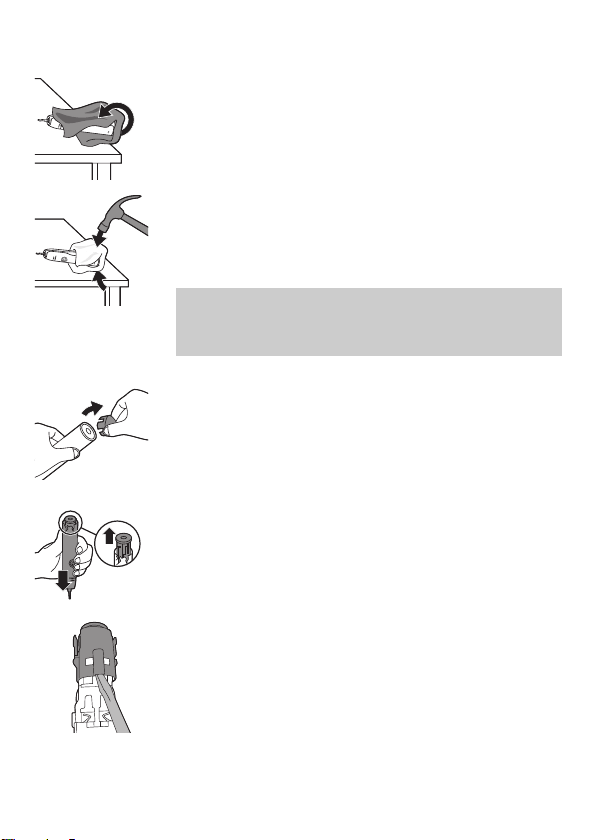
2 Remove and discard the brush head. Cover
the entire handle with a towel or cloth.
3 Hold the top of the handle with one hand
and strike the handle housing 0.5inch
above the bottom end. Strike firmly with a
hammer on all 4 sides to eject the end cap.
Note: You may have to hit on the end
several times to break the internal snap
connections.
4 Remove the end cap from the toothbrush
handle. If the end cap does not release
easily from the housing, repeat step 3 until
the end cap is released.
5 Holding the handle upside down, press the
shaft down on a hard surface. If the internal
components do not easily release from the
housing, repeat step 3 until the internal
components are released.
6 Remove the inner assembly from the
housing by fully inserting a small flat-head
screwdriver into the slot opposite the circuit
board and pry until it comes apart.
19
English
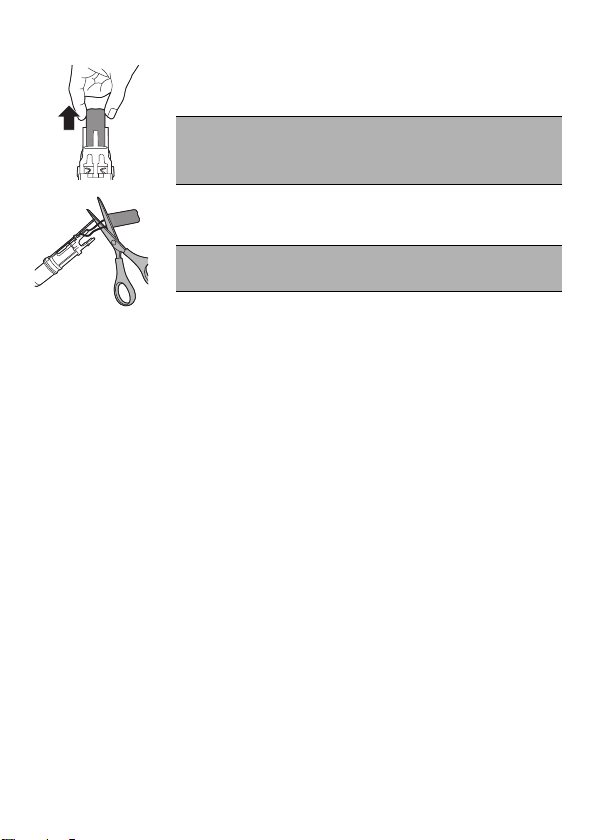
7 Grab the battery and pull it out of the
internal assembly.
Caution: Be aware of the sharp edges of
the battery tabs so as to avoid injury to
your fingers.
8 Cut the battery wires from the circuit board
close to the battery.
Caution: Do not cut the two wires at the
same time.
9 Cover the battery contacts with tape to
prevent any electrical short from residual
battery charge. The rechargeable battery
can now be recycled and the rest of the
product discarded appropriately.
Warranty and support
Philips warrants its products for two years
after the date of purchase. Defects due to
faulty materials and workmanship will be
repaired or replaced at Philips’ expense
provided that convincing proof of purchase in
the qualifying period is provided. Philips
recommends use of genuine Sonicare brush
heads for optimal performance. Use of other
brush heads may damage your Sonicare
toothbrush and limit your warranty protection.
Contact our Consumer Care Center at
1-800-682-7664 (North America), outside
North America contact your local Philips
Consumer Care Center. Internet information:
www.sonicare.com (North America) or
20
English

www.philips.com/support (outside North
America).
WARRANTY EXCLUSIONS
What is not covered under warranty:
-
Brush heads.
-
Damage caused by use of unauthorized
replacement parts or unauthorized brush
heads.
-
Damage caused by misuse, abuse, neglect,
alterations or unauthorized repair.
-
Normal wear and tear, including chips,
scratches, abrasions, discoloration or fading.
IMPLIED WARRANTIES
ANY IMPLIED WARRANTIES, INCLUDING
IMPLIED WARRANTIES OF MERCHANTABILITY
AND FITNESS FOR A PARTICULAR PURPOSE,
SHALL BE LIMITED TO THE DURATION OF THE
EXPRESS WARRANTIES SET FORTH ABOVE. IN
SOME STATES LIMITATIONS ON DURATION
OF IMPLIED WARRANTIES DO NOT APPLY.
LIMITATION OF REMEDIES
IN NO EVENT SHALL PHILIPS OR ANY OF ITS
AFFILIATED OR SUBSIDIARY COMPANIES BE
LIABLE FOR ANY SPECIAL, INCIDENTAL OR
CONSEQUENTIAL DAMAGES BASED UPON
BREACH OF WARRANTY, BREACH OF
CONTRACT, NEGLIGENCE, TORT, OR ANY
OTHER LEGAL THEORY. SUCH DAMAGES
INCLUDE, WITHOUT LIMITATION, LOSS OF
SAVINGS OR REVENUE; LOSS OF PROFIT;
LOSS OF USE; THE CLAIMS OF THIRD PARTIES
21
English

INCLUDING, WITHOUT LIMITATION, DENTISTS
AND DENTAL HYGIENISTS; AND COST OF ANY
SUBSTITUTE EQUIPMENT OR SERVICES.
SOME STATES DO NOT ALLOW THE
EXCLUSION OR LIMITATION OF INCIDENTAL
OR CONSEQUENTIAL DAMAGES.
22
English

Français (Canada)
Introduction
Félicitations pour votre achat et bienvenue
dans l'univers Philips! Pour profiter pleinement
des avantages de l'assistance Philips,
enregistrez votre produit à l'adresse
www.philips.com/welcome.
MISES EN GARDE
IMPORTANTES
LISEZ TOUTES LES INSTRUCTIONS AVANT D’UTILISER
L’APPAREIL
Lorsque vous utilisez des appareils électriques, surtout en
présence d'enfants, suivez toujours les mesures de sécurité
fondamentales, notamment:
DANGER
Pour éviter tout risque d’électrocution:
-
Gardez le chargeur à l’écart de l’eau.
-
Ne placez ni ne rangez le produit à un endroit où il peut
tomber dans une baignoire ou un évier.
-
Ne placez pas et n'échappez pas le produit dans de l'eau ou
tout autre liquide.
-
Ne plongez pas le chargeur dans l’eau ou dans tout autre
liquide.
-
N'utilisez pas l'appareil pendant que vous prenez un bain.
-
Ne touchez pas le produit s’il est tombé dans l’eau.
Débranchez immédiatement l’appareil de la prise de courant.
23
Français (Canada)

-
Après l’avoir nettoyé, assurez-vous que le chargeur est
complètement sec avant de le brancher sur une prise
secteur.
AVERTISSEMENTS
Pour éviter tout risque de brûlure, d’électrocution, d’incendie ou
d’accident:
1 Ne mettez jamais la tête de brosse, le manche ou le chargeur
au lave-vaisselle.
2 N'utilisez pas d'autres accessoires que ceux recommandés
par le fabricant.
3 Ne branchez pas le produit sur une prise de courant dont la
tension est autre que celle indiquée sous le produit. Ce
produit est conçu pour fonctionner à des tensions comprises
entre 100 et 240volts. Les convertisseurs de tension ne
garantissent pas la compatibilité de tension.
4 Ne branchez jamais de force la fiche sur une prise de courant.
Si la fiche ne s’y insère pas facilement, n’utilisez pas
l’appareil.
5 Cessez d’utiliser le produit si vous constatez que l’un de ses
composants (tête de brosse, manche, chargeur, etc.) est
endommagé de quelque façon que ce soit.
6 Il est impossible de remplacer le cordon d’alimentation. Si le
cordon d’alimentation est endommagé, vous devez mettre le
chargeur au rebut.
7 Remplacez toujours le chargeur par un chargeur de même
type pour éviter tout accident.
8 Tenez le cordon d'alimentation à l'écart des surfaces
chauffantes.
9 N’utilisez pas le chargeur à l’extérieur.
10 N’utilisez pas le chargeur s’il est tombé dans l’eau.
24
Français (Canada)

11 Ce produit ne contient aucune pièce réparable par
l'utilisateur. Reportez-vous à «Garantie et assistance» si le
produit ne fonctionne pas correctement ou s'il doit être
réparé.
12 N’exposez pas la brosse à dents PhilipsSonicare à la lumière
directe du soleil.
13 Ce produit doit être utilisé uniquement aux fins décrites dans
le présent document ou conformément aux
recommandations de votre dentiste.
14 Ce produit ne doit pas être utilisé par des personnes
(incluant des enfants) ayant des capacités physiques,
sensorielles ou mentales réduites ou n'ayant pas l'expérience
et les connaissances nécessaires, à moins qu'elles ne soient
sous la surveillance d'une personne responsable de leur
sécurité ou qu'elles aient reçu de cette personne des
directives concernant l'utilisation du produit.
15 Les enfants doivent être surveillés pour s'assurer qu'ils ne
s'amusent pas avec le produit.
16 La PhilipsSonicare est un appareil prévu pour des soins
personnels et ne doit pas être utilisée par plusieurs patients
dans les cabinets ou établissements dentaires.
17 Il n’est pas prévu que du personnel qualifié puisse réparer le
produit en cas de panne ou de composants défectueux
(l’unité peut être mise au rebut).
18 Pour effectuer un branchement sur une prise hors des États-
Unis, utilisez un chargeur dont la configuration convient à la
prise de courant.
19 Cet appareil a seulement été conçu pour nettoyer les dents,
les gencives et la langue. N’utilisez jamais cet appareil à
d’autres fins. Cessez l’utilisation de l’appareil et
communiquez avec votre médecin si vous ressentez un
inconfort ou de la douleur.
25
Français (Canada)

20Évitez le contact direct avec les produits contenant des
huiles essentielles et de l’huile de coco. Le contact avec ces
produits pourrait déloger les touffes de soie.
21 Si votre dentifrice contient du peroxyde d’hydrogène, du
bicarbonate de soude ou tout autre bicarbonate (commun
dans les dentifrices à action blanchissante), veillez à bien
nettoyer la tête de brossage et le manche avec de l’eau et du
savon après chaque utilisation. Dans le cas contraire, le
plastique pourrait se fissurer.
MISES EN GARDE
D’ORDRE MÉDICAL
MISES EN GARDE D'ORDRE MÉDICAL
1 Consultez votre dentiste avant d'utiliser ce produit si vous
avez subi une chirurgie buccale ou gingivale au cours des
2derniers mois.
2 Consultez votre dentiste si vos gencives saignent
anormalement après vous être brossé les dents avec ce
produit ou si le saignement persiste après 1semaine
d'utilisation.
3 Si vous ressentez de la douleur en utilisant ce produit,
consultez votre dentiste.
4 Ce produit est conforme aux normes de sécurité relatives aux
appareils électromagnétiques. Si vous avez un stimulateur
cardiaque ou tout autre dispositif implanté, consultez votre
médecin ou le fabricant du dispositif implanté avant d'utiliser
cet appareil.
5 Pour toute autre question d'ordre médical, consultez votre
médecin.
26
Français (Canada)

CONSERVEZ CES
INSTRUCTIONS
Utilisation prévue
Les brosses à dents électriques de la gamme
DailyClean sont conçues pour enlever la
plaque et les résidus alimentaires des dents
afin de réduire les caries et améliorer et
maintenir la santé bucco-dentaire. Les brosses
à dents électriques de la gamme DailyClean
sont destinées à un usage domestique. Les
enfants doivent utiliser cet appareil sous la
supervision d’un adulte.
Action des champs électromagnétiques
(CEM)
Cet appareil Philips est conforme à toutes les
normes en matière de champs
électromagnétiques (CEM). Cette appareil
répond aux règles de sécurité établies sur la
base des connaissances scientifiques actuelles
s’il est manipulé correctement et
conformément aux instructions de ce mode
d’emploi.
Votre brosse à dents Philips Sonicare
1 Capuchon de protection hygiénique
2 Tête de brosse
3 Manche
4 Bouton marche/arrêt
5 Témoin de niveau de batterie
27
Français (Canada)
6 Chargeur
Remarque: Le contenu de la boîte peut varier
selon le modèle acheté.
Préparation
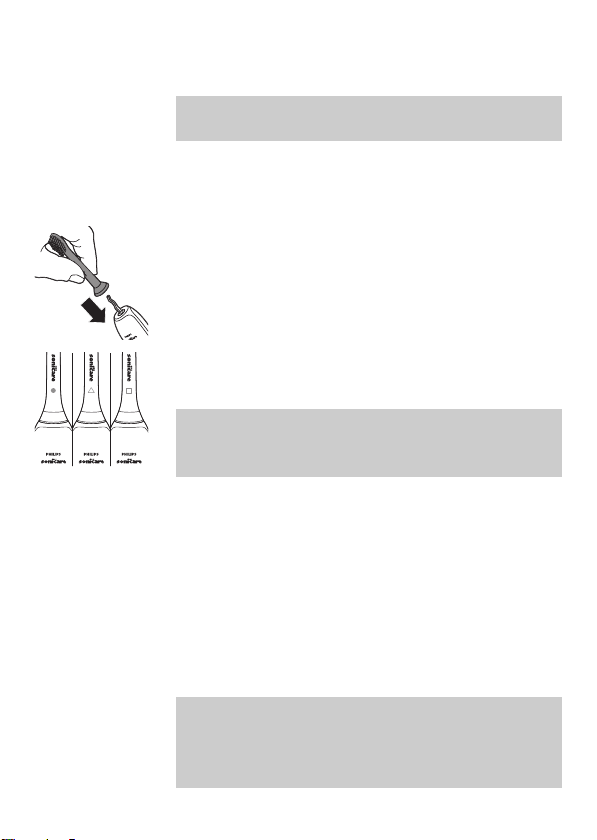
Fixation de la tête de brosse
1 Alignez la tête de brosse afin que les soies
soient dans le même axe que l'avant du
manche.
2 Pressez fermement la tête de brosse sur la
tige de métal jusqu'à ce qu'elle s'arrête.
Remarque: Les têtes de brosse
PhilipsSonicare comportent des icônes pour
une identification facile.
Chargement de votre brosse à dents Philips Sonicare
1 Branchez le chargeur sur une prise
électrique alimentée.
2 Placez le manche dans le chargeur.
-
Le voyant de l'indicateur de charge de la
batterie clignote et l'appareil émet deux
signaux sonores. Cela signifie que la
brosse à dents est en charge.
Remarque: Une charge complète peut
prendre jusqu'à 24heures, mais vous pouvez
utiliser la brosse à dents Philips Sonicare avant
qu'elle ne soit complètement chargée.
28
Français (Canada)
Utilisation de votre brosse à dents Philips
Sonicare
Directives de brossage
1 Mouillez les soies de la brosse et
appliquez-y une petite quantité de
dentifrice.
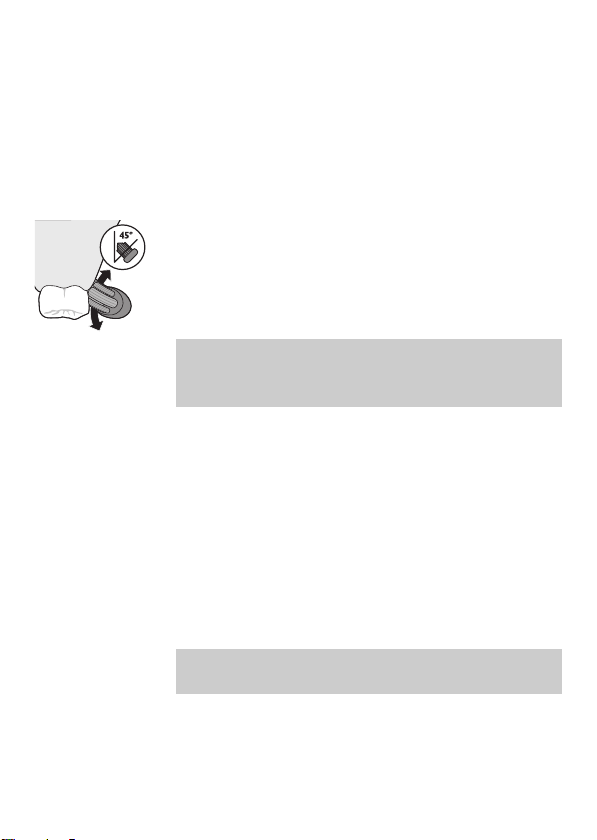
2 Placez les soies de la tête de brosse sur les
dents, légèrement de biais (45degrés), en
appuyant fermement pour qu'elles
touchent les gencives ou se placent
légèrement sous les gencives.
Remarque: Maintenez en permanence le
centre de la brosse en contact avec les
dents.
3 Appuyez sur le bouton marche/arrêt pour
mettre l’appareil PhilipsSonicare en
marche.
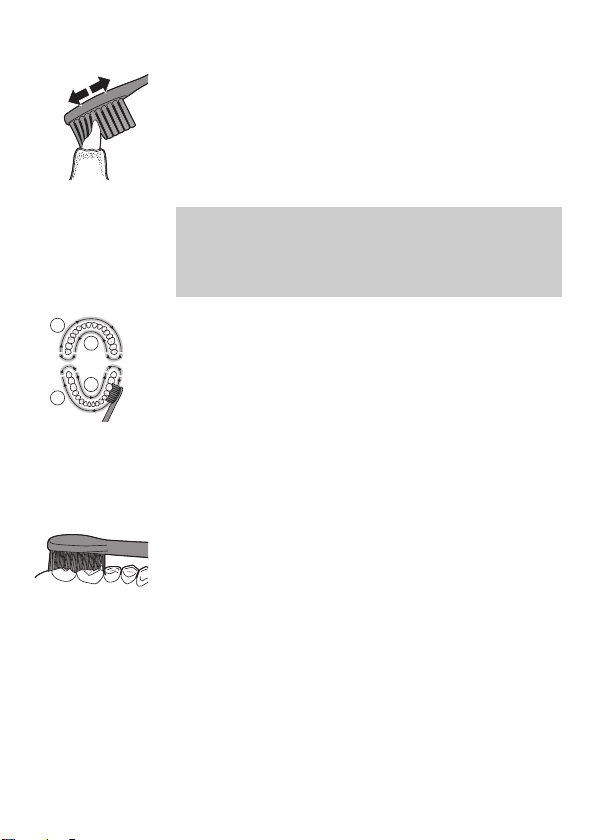
4 Maintenez les soies sur les dents et dans le
sillon gingival. Brossez-vous les dents en
faisant un léger mouvement de va-et-vient,
de sorte que les soies atteignent les
espaces interdentaires. Continuez ce
mouvement pendant tout le cycle de
brossage.
Remarque: Les soies doivent légèrement
s'évaser. Ne frottez pas.
29
Français (Canada)
5 Pour nettoyer la surface intérieure des
dents avant, inclinez le manche de la brosse
à dents en position intermédiaire et
effectuez plusieurs mouvements de brosse
verticaux sur chaque dent, en prenant soin
de les faire se chevaucher.
Remarque: Pour assurer un brossage
uniforme, divisez votre bouche en
4sections à l'aide de la fonctionQuadpacer
(voir le chapitre«Caractéristiques»).
2
4
3
1
6 Brossez chaque section pendant
30secondes: commencez par la section1
(dents de la mâchoire supérieure, à
l'extérieur), suivie de la section2 (dents de
la mâchoire supérieure, à l'intérieur), puis de
la section3 (dents de la mâchoire inférieure,
à l'extérieur) et enfin de la section4 (dents
de la mâchoire inférieure, à l'intérieur).
7 Une fois le cycle de brossage terminé, vous
pouvez consacrer du temps supplémentaire
au brossage de la surface de mastication
des dents et insister sur les zones propices
aux taches. Vous pouvez également brosser
votre langue avec la brosse à dents en
marche ou arrêtée.
Votre brosse à dentsPhilipsSonicare est
compatible avec:
-
les appareils orthodontiques (les têtes de
brosse s’useront plus rapidement dans ce
cas),
-
les restaurations dentaires (obturations,
couronnes, facettes).
30
Français (Canada)

Remarque: Assurez-vous que les appareils
orthodontiques ou les restaurations dentaires
sont correctement collés et non fragilisés. Si ce
n'est pas le cas, les appareils orthodontiques
ou les restaurations dentaires peuvent être
endommagés lorsqu'ils entrent en contact
avec la tête de brosse.
Remarque: Lorsque la brosse à dents Philips
Sonicare est utilisée dans le cadre d'études
cliniques, le manche doit être complètement
chargé et la fonction Easy-start désactivée.
Niveau de la pile (lorsque le manche n’est pas placé
sur le chargeur)
Cette brosse à dents Philips Sonicare est
conçue pour permettre 28sessions de
brossage minimum, chaque session durant
2minutes. L'indicateur de niveau charge
indique l'état de la batterie à la fin de la
session de brossage de 2minutes ou lorsque
vous mettez en pause la brosse à dents Philips
Sonicare pendant 30secondes pendant le
brossage en appuyant sur le bouton
marche/arrêt.
Sessions de
brossage
Couleur
d'état de la
batterie
Voyant Signaux
sonores
28-6 Vert Fixe -
5-2 Orange Clignotant 3signaux
sonores
31
Français (Canada)

1 Orange Clignotant 2fois
5signaux
sonores
Remarque: Lorsque la batterie est
complètement vide, la brosse à dents Philips
Sonicare s'éteint. Placez la brosse à dents
Philips Sonicare sur le chargeur pour la
charger.
Remarque: Pour que la batterie reste chargée
en permanence, vous pouvez laisser votre
brosse à dents Philips Sonicare sur le chargeur
lorsque vous ne l'utilisez pas.
Caractéristiques
Intensité (certains modèles seulement)
Votre brosse à dents électrique vous donne la
possibilité de choisir entre une faible et une
forte intensité.
Remarque: Quand vous utilisez la brosse à
dents pour la première fois, le réglage par
défaut est la faible intensité.
-
Allumez la brosse à dents en appuyant une
fois sur le bouton.
-
Appuyez une deuxième fois dans
les2 secondes pour modifier l’intensité.
-
Appuyez une troisième fois dans
les2 secondes pour mettre en pause.
32
Français (Canada)

Après2 secondes de brossage, appuyer des
nouveau sur le bouton d’alimentation permet
aussi de mettre la brosse à dents en pause.
FonctionSmartimer
La fonctionSmartimer indique que le cycle de
brossage est terminé en arrêtant
automatiquement la brosse à dents à la fin du
cycle.
Les dentistes recommandent un brossage d'au
moins 2minutes deux fois par jour.
Remarque: Si vous appuyez sur le bouton
marche/arrêt après avoir lancé le cycle de
brossage, la brosse à dents se met en pause.
Après une pause de 30secondes, la
fonctionSmartimer se réinitialise.
FonctionEasy-start
La fonction Easy-start augmente
progressivement la puissance lors des
14premiers brossages pour vous permettre de
vous habituer à la brosse à dents Philips
Sonicare. La fonctionEasy-start est activée par
défaut sur la brosse à dents Philips Sonicare.
Activation et désactivation de la fonction
Easy-Start
1 Placez le manche sur le chargeur branché.
2 Maintenez le bouton marche/arrêt enfoncé
pendant que le manche est sur le chargeur.
3 Maintenez le bouton marche/arrêt enfoncé
jusqu’à ce que vous entendiez un bref
signal sonore (après 2secondes).
33
Français (Canada)

4 Relâchez le bouton marche/arrêt.
-
Trois signaux sonores d’intensité faible à
élevée signifient que la fonction Easy-
Start a été activée.
-
Trois signaux sonores d’intensité élevée
à faible signifient que la fonction Easy-
Start a été activée.
Remarque: Au cours des 14premières
utilisations, chaque cycle de brossage doit
durer au moins 1minute pour que la
fonctionEasy-start se déroule correctement.
Remarque: Il est recommandé de ne pas
dépasser la période initiale d'utilisation de la
fonction Easy-start, au risque de réduire
l'efficacité de la PhilipsSonicare à éliminer la
plaque dentaire.
Remarque: Pour que la brosse atteigne une
efficacité clinique, la fonction Easy-Start doit
être désactivée.
Fonction Quadpacer
2
4
3
1
La fonctionQuadpacer est un minuteur à
intervalles qui émet un bref signal sonore et
suspend le cycle pour vous rappeler de
brosser les 4sections de votre bouche de
manière uniforme et efficace. La
fonctionQuadpacer est activée par défaut sur
la brosse à dents Philips Sonicare.
34
Français (Canada)
Confirmation du chargeur
Le manche émet un signal sonore et vibre
brièvement lorsqu'il est placé sur le chargeur.
La fonctionde confirmation de charge est
activée par défaut sur la brosse à dents Philips
Sonicare.
Nettoyage
Vous devez nettoyer votre brosse à dents
Philips Sonicare régulièrement pour enlever le
dentifrice et autres résidus. Si vous ne
nettoyez pas votre brosse à dents Philips
Sonicare, vous risquez d'endommager votre
produit et de le rendre non hygiénique.
Avertissement : Ne mettez ni les têtes de
brosse, ni le manche, ni le chargeur au lave-
vaisselle.
Avertissement : Ne nettoyez pas votre
brosse à dents avec de l’eau bouillante.
Manche de la brosse à dents
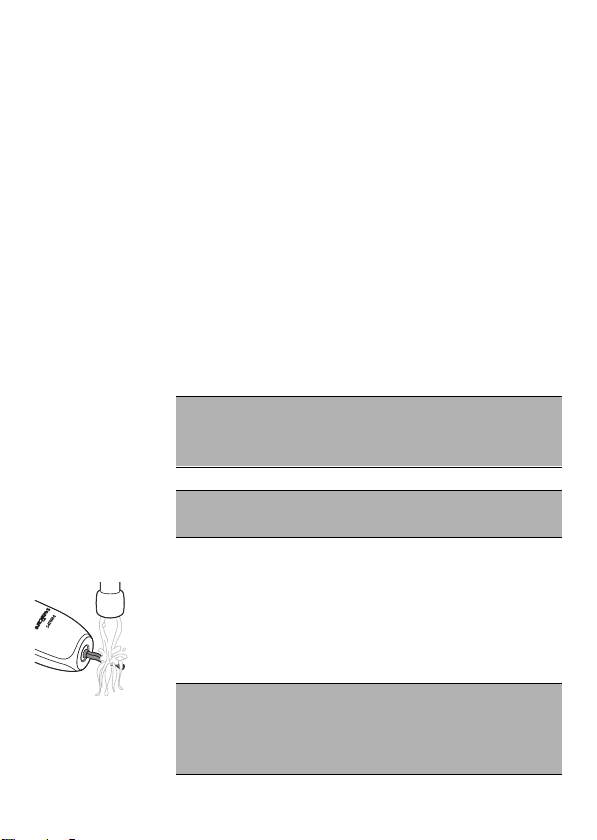
1 Retirez la tête de brosse et rincez la zone
de la tige en métal avec de l'eau tiède.
Veillez à éliminer tous les résidus de
dentifrice.
Attention : Ne poussez pas sur le joint
d'étanchéité en caoutchouc de la tige en
métal avec un objet pointu, car vous pourriez
l'endommager.
35
Français (Canada)
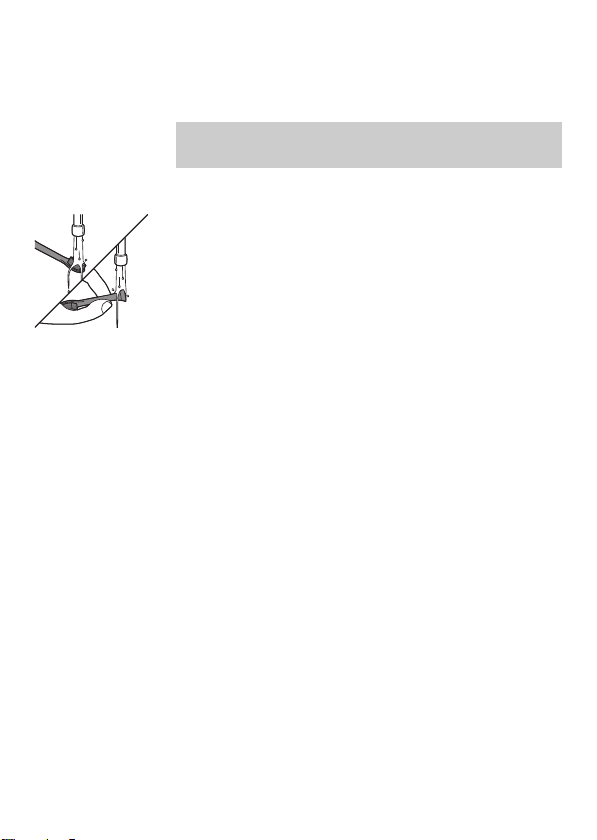
2 Nettoyez tout le manche à l'aide d'un
chiffon humide.
Remarque: Ne tapez pas le manche sur l’évier
pour retirer l’excès d’eau.
Tête de brosse
1 Rincez la tête de brosse et les soies après
chaque utilisation.
2 Retirez la tête de brosse du manche et
rincez la base de la tête de brosse à l'eau
chaude au moins une fois par semaine.
Rincez le capuchon de protection aussi
souvent que nécessaire.
Chargeur
1 Débranchez le chargeur avant de le
nettoyer.
2 Nettoyez la surface du chargeur à l'aide
d'un chiffon humide.
Rangement
Si vous ne comptez pas utiliser le produit
pendant une longue période, débranchez-le,
nettoyez-le (voir le chapitre «Nettoyage») et
rangez-le dans un endroit frais et sec, à l'abri
de la lumière directe du soleil.
Remplacement
Tête de brosse
Pour obtenir des résultats optimaux,
remplacez les têtes de brosse Philips Sonicare
au moins tous les 3mois. Utilisez
36
Français (Canada)
exclusivement des têtes de brosse de
rechange Philips Sonicare.
Mise au rebut
-
Cet appareil contient une pile rechargeable
qui doit être mise au rebut de façon
appropriée.
-
Communiquez avec les responsables
locaux de votre ville pour obtenir des
renseignements. Vous pouvez également
appeler le 1-800-8-BATTERY ou visiter le
site www.rbrc.com pour connaître les
emplacements où vous pouvez mettre la
pile au rebut.
-
Pour obtenir de l’aide, visitez le siteWeb
www.philips.com/support ou appelez le
numéro gratuit 1-800-243-3050.
Retrait de la pile rechargeable
Avertissement: Ne retirez la pile rechargeable
que lorsque vous mettez l'appareil au rebut.
Veillez à ce que la pile soit totalement
déchargée avant de la retirer.
Avertissement : Veuillez noter que ce
processus n’est pas réversible.
Pour retirer la batterie rechargeable,
munissez-vous d'une serviette ou d'un tissu,
d'un marteau et d'un tournevis à tête plate
(standard).Respectez les mesures de sécurité
élémentaires lorsque vous suivez la procédure
ci-dessous. Veillez à protéger vos yeux, vos
37
Français (Canada)
mains et vos doigts, ainsi que la surface sur
laquelle vous travaillez.
1 Pour décharger la batterie rechargeable,
retirez le manche du chargeur, allumez la
brosse à dentsPhilips Sonicare et laissez-la
fonctionner jusqu'à ce qu'elle s'éteigne.
Répétez cette opération jusqu'à ce que la
brosse à dents Philips Sonicare ne s'allume
plus.
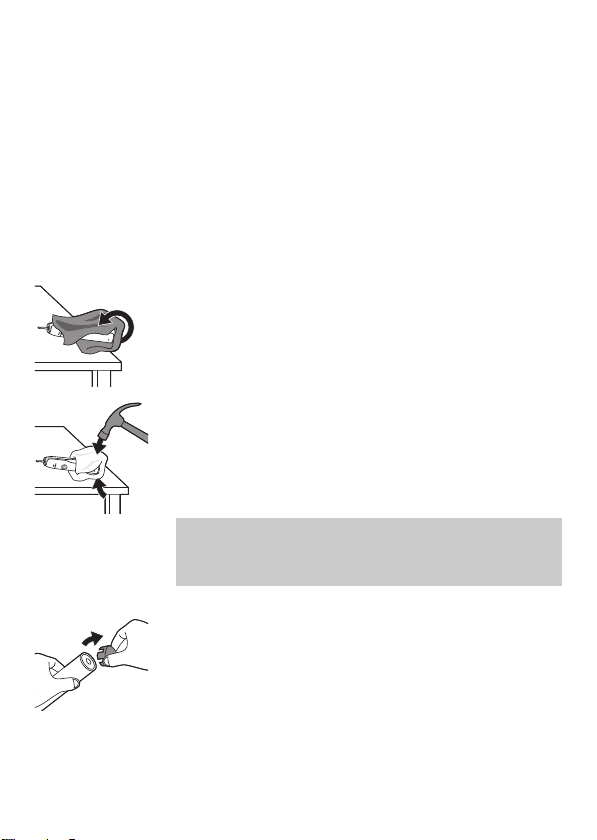
2 Retirez et jetez la tête de brosse. Recouvrez
l'ensemble du manche avec une serviette
ou un tissu.
3 Tenez le haut du manche d’une main et
frappez le boîtier du manche 1cm environ
au-dessus de l’extrémité basse. Frappez
fermement avec un marteau sur les 4côtés
pour éjecter le capuchon.
Remarque: Il sera peut-être nécessaire de
frapper la partie inférieure à plusieurs
reprises pour libérer les fermoirs internes.
4 Retirez le capuchon du manche de la
brosse à dents. Si le capuchon ne se
détache pas facilement du boîtier, répétez
l'étape3 jusqu'à ce que le capuchon soit
libéré.
38
Français (Canada)
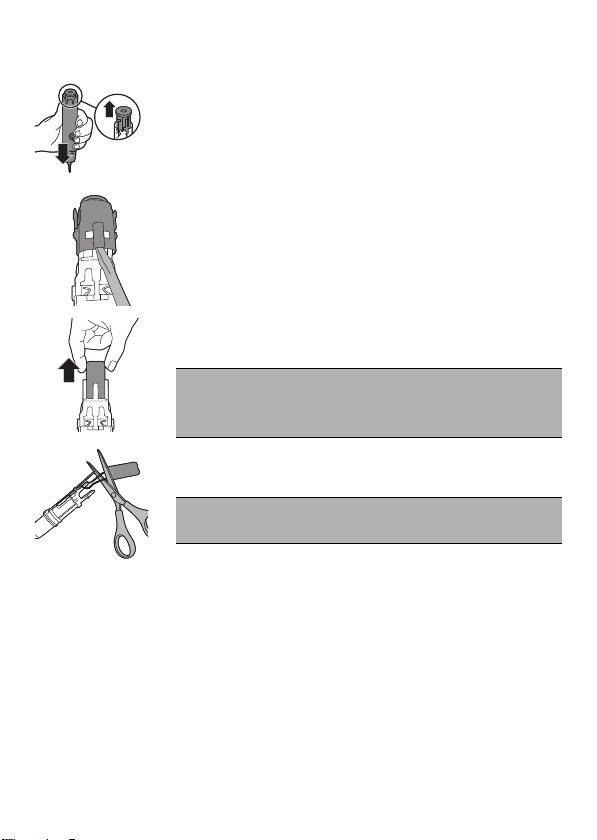
5 En tenant le manche à l'envers, appuyez
l'axe contre une surface rigide. Si les
composants internes ne se détachent pas
facilement du boîtier, répétez l'étape3
jusqu'à ce qu'ils soient libérés.
6 Retirez l'assemblage interne du boîtier en
insérant complètement un petit tournevis à
tête plate dans la fente opposée au circuit
imprimé et soulevez jusqu'à ce qu'il soit
séparé.
7 Saisissez la batterie et retirez-la de
l'assemblage interne.
Attention : Prenez garde de ne pas vous
blesser aux doigts avec les bords
tranchants des languettes de la batterie.
8 Coupez les fils de la batterie du circuit
imprimé à proximité de la batterie.
Attention : Ne coupez pas les deux fils en
même temps.
9 Couvrez les contacts de la batterie avec de
l’adhésif pour éviter tout court-circuit
électrique par la charge résiduelle de la
batterie. La batterie rechargeable peut
maintenant être recyclée et le reste du
produit peut être mis au rebut.
Garantie et assistance
Philips garantit ses produits pendant deux ans
à compter de la date d'achat. À sa discrétion,
Philips réparera tout défaut de matériel ou de
39
Français (Canada)

main-d'œuvre ou remplacera tout appareil
défectueux si une preuve d'achat peut être
présentée durant la période de garantie. Pour
des performances optimales, Philips
recommande d'utiliser exclusivement des têtes
de brosse Sonicare. L'utilisation d'autres têtes
de brosse peut endommager votre brosse à
dents Sonicare et limiter votre protection sous
garantie. Si vous êtes en Amérique du Nord,
appelez le centre de service à la clientèle au
1-800-682-7664. Sinon, communiquez avec le
centre de service à la clientèle Philips de votre
pays. Sites Web: www.sonicare.com
(Amérique du Nord) ou
www.philips.com/support (autres pays).
EXCLUSIONS DE GARANTIE
Ce qui n'est pas couvert par la garantie:
-
Les têtes de brosse.
-
Les dommages causés par l'utilisation de
pièces de rechange ou les têtes de brosse
non autorisées.
-
Les dommages causés par une mauvaise
utilisation, un usage abusif, de la négligence
ou encore des modifications ou réparations
non autorisées.
-
L'usure normale, incluant les ébréchures, les
égratignures, les abrasions, la décoloration
ou l'affadissement des couleurs.
GARANTIES IMPLICITES
TOUTES LES GARANTIES IMPLICITES, Y
COMPRIS LES GARANTIES IMPLICITES LIÉES À
40
Français (Canada)

LA QUALITÉ MARCHANDE ET À
L'ADAPTATION À UN USAGE PARTICULIER,
SONT LIMITÉES À LA DURÉE DES GARANTIES
EXPRESSES ÉNONCÉES DANS LA PRÉSENTE
GARANTIE LIMITÉE. CERTAINS ÉTATS
N'AUTORISANT PAS LES RESTRICTIONS DE
DURÉE RELATIVES AUX GARANTIES
IMPLICITES, LES RESTRICTIONS CI-DESSUS
NE S'APPLIQUENT PAS FORCÉMENT À VOTRE
CAS.
RESTRICTION DES RECOURS
NI LA SOCIÉTÉ PHILIPS ORAL HEALTHCARE,
INC. NI AUCUNE DE SES SOCIÉTÉS ASSOCIÉES
OU FILIALES NE POURRONT ÊTRE TENUES
RESPONSABLES DES DOMMAGES
SPÉCIFIQUES, ACCESSOIRES OU INDIRECTS
RÉSULTANT D'UNE RUPTURE DE GARANTIE,
D'UNE RUPTURE DE CONTRAT, DE
NÉGLIGENCE, D'UNE FAUTE DÉLICTUELLE OU
DE TOUTE AUTRE THÉORIE LÉGALE. DE TELS
DOMMAGES COMPRENNENT, SANS S'Y
LIMITER, UNE PERTE D'ÉCONOMIES OU DE
REVENU, UNE PERTE DE PROFIT, UNE
INTERRUPTION D'UTILISATION, LES
REVENDICATIONS DE TIERS, Y COMPRIS,
SANS S'Y LIMITER, LES DENTISTES ET
HYGIÉNISTES DENTAIRES, AINSI QUE LE COÛT
D'ÉQUIPEMENT OU DE SERVICES DE
REMPLACEMENT. CERTAINS ÉTATS NE
RECONNAISSANT PAS L'EXCLUSION OU LA
LIMITATION DES DOMMAGES ACCESSOIRES
OU INDIRECTS, LES RESTRICTIONS OU
41
Français (Canada)

EXCLUSIONS CI-DESSUS NE S'APPLIQUENT
PAS FORCÉMENT À VOTRE CAS.
42
Français (Canada)

www.philips.com/Sonicare
©2018 Koninklijke Philips N.V. (KPNV). All rights reserved.
Philips and the Philips shield are trademarks of KPNV.
Sonicare and the Sonicare logo are trademarks
of Philips Oral Healthcare, LLC and/or KPNV.
©2018 Koninklijke Philips N.V. (KPNV). Tous droits réservés.
Philips et le blason Philips sont des marques de commerce de
KPNV.
Sonicare et le logo Sonicare sont des marques de commerce
de Philips Oral Healthcare, LLC et (ou) KPNV.
4235.021.7586.1 (12/19/2018)
>75 % recycled paper
>75 % papier recyclé