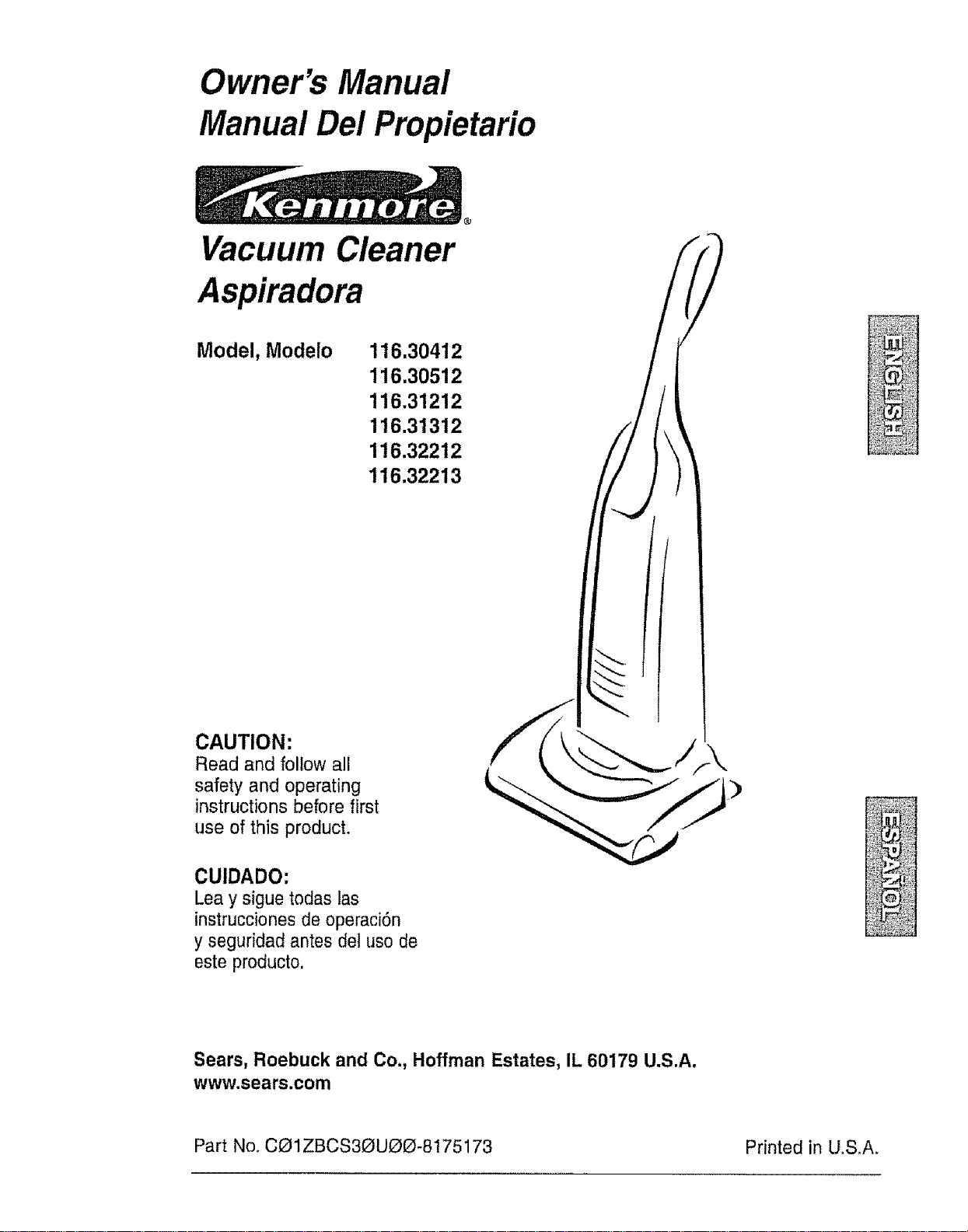
Owner's Manual
Manual Del Propietario
Vacuum Cleaner
Aspiradora
Model, Modelo 116.30412
116.30512
116.31212
116.31312
116.32212
116.32213
CAUTION:
Read and follow all
safety and operating
instructions before first
use of this product.
CUIDADO:
Lea y sigue todas las
instrucciones de operaci6n
y seguridad antes del uso de
este producto,
)
Sears, Roebuck and Co., Hoffman Estates, IL 60179 U.S.A.
www.sears.com
Part No. CO1ZBCS3OU_O-8175173 Printed in U.SA.
Before Using Your New Vacuum ....... 2
Kenmore Vacuum Cleaner Warranty.,, 2
Important Safety Instructions ......... 3
Parts and Features ................... 4
Assembly Instructions .............. 5-6
Operating Instructions ............... 6
Pile Height Selection and Setting .......... 7
Carpet/Bare Roor Selector ............ 7
Re{easing the Handle ................. 8
ON/OFF Switch .....................8
Attachments ...................... 8-10
Attachment Use Chart .................... 10
Vacuuming Tips ..................... 11
PerformanceFeatures ............. 11-12
Vacuum Cleaner Care ................. 13
Vacuum Storage ......................... 13
Cleaning Exterior and Attachments ..... 13
Dust Bag Changing .................... 14
Filter Changing .................... 15
Belt Changing and Agitator Cleaning • • "J6-18
Clog Removal ...................... 19
Light Bulb Changing ................... 20
Agitator Servicing ...................2!
Agitator Assembly .................. 2t
Troubleshooting ..................... 2 2
Requesting Assistance Or Service ,., 2.3
Please read this guido. It will help you assemble and operate your new Kenmore vacuum in
the safest and most effective way.
For more information about vacuum cleaner care and operation, call your nearest Sears store.
You will need the complete model and serial numbers when requesting information, Your vacu-
um's model and serial numbers are located on the Model and Serial Number Plate.
Use the space below to record the model number and serial number of your new Kenmore
vacuum.
Model No.
Serial No.
Date of Purchase
Keep this book and your sales check (receipt) in a safe place for future reference.
LIMITED ONEYEAR WARRANTY ON KENMORE VACUUM CLEANER
This warranty is for one year from the date of purchase, and includes only private household
vacuum cleaner use. During the warranty year, when this vacuum cleaner is operated and
maintained according to the owner's manual instructions, Sears will repair any defects in
material or workmanship free of charge.
This warranty excludes vacuum bags, belts, light bulbs, and filters, which are expendable parts
and become worn during normal use.
For warranty service, return this vacuum cleaner to the nearest Sears Service Center in
the United States.
This warranty applies only while this product is in use in the United States° This warranty gives
you specific legal rights, and you may also have other rights which vary from state to state.
Sears, Roebuck and Co., D1817 WA, Hoffman Estates, IL 60179
WARNING
Your safety is important to us. To reduce the risk of fire, electrical shock,
injury to persons or damage when using your vacuum cleaner, follow basic
safety precautions including the following:
Read this manual before assembling or
using your vacuum cleaner.
Use your cleaner only as described in
this manual. Use only with Sears recom-
mended attachments,
To reduce the risk of electrical shock -
Do not use outdoors or on wet sur-
face&
Disconnect electrical supply before any
servicing or cleaning. Failure to do so
could result in electrical shock or per-
sonal injury.
Always turn cleaner off before unplug-
ging.
Do not unplug by pulling on cord. To
unplug, grasp the plug, not the cord.
Do not use with damaged cord or plug
If cleaner is not working as it should,
has been dropped, damaged, left out-
doors, or dropped into water, return it to
a Sears Service Center,
Do not pull or carry by cord, use cord
as a handle, close door on cord, or pull
cord around sharp edges or corners.
Do not run cleaner over cord, Keep cord
away from heated surface&
Do not leave cleaner when plugged in.
Unplug from outlet when not in use and
before servicing_
Do not allow to be used as a toy. Close
attention is necessary when used by or
near children.
Do not handle plug or cleaner with wet
hands,
Do not put any objects into openings.
Do not use with any opening blocked;
keep free of dust, lint, hair and anything
that may reduce air flow..
Keep hair, loose clothing, fingers, and
al! parts of body away from openings
and moving parts.
Do not use cleaner without dust bag
and/or filters in place.
Always change the dust bag after vacu-
uming carpet cleaners or freshener,
powders and fine dust° These products
clog the bag, reduce airflow and can
cause the bag to burst. Failure to
change bag could cause permanent
damage to the cleaner.
Do not use the cleaner to pick up sharp
hard objects, small toys, pins, paper
clips, etco They may damage the cleam
er or dust bag.
Do not pick up anything that is burning
or smoking, such as cigarettes, match-
es, or hot ashes.
Do not use cleaner to pick up flamma-
ble or combustible liquids (gasoline,
cleaning fluids, perfumes, etc,), or use
in areas where they may be present.
The fumes from these substances can
create a fire hazard or explosion.
Use extra care when cleaning on stairs.
Do not put on chairs, tables, etc. Keep
on floor.
You are responsible for making sure
that your vacuum cleaner is not used by
anyone unable to operate it properly.
SAVE THESE INSTRUCTIONS
Proper assembly and safe use of your vacuum cleaner are your responsibilities.. Your
cleaner is intended only for household use, Read this Owner's Manual carefully for
important use and safety information, This guide contains safety statements under
warning and caution symbols. Please pay special attention to these boxes and follow
any instructions given_ WARNING statements alert you to such dangers as fire, elec-
trical shock, burns and personal injury. CAUTION statements alert you to such dan-
gers as personal injury and/or property damage.
I I I /t I I '

It is important to know your vacuum cleaner's parts and features to assure its proper and
safe use° Review these before using your cleaner.
Item
DustBag
Headlight Bulb
Motor Safety Filter
Quick Release
Lower
Carry
Crevice
Tool
Wan
Dusting
Combination
Brush
Handle
Release
Pedal
Model/Serial
Numbers
Stretch Hose
Motor
Protector
Agitator
(Underneath)
Spare Belt
(Underneath Nozzle Cover,
Behind Helgh tAdjust Assembly)
EXTENSION HOSE KITS
SOME MODELS
Bonus Hose
4
E WARNING
Electrical Shock Hazard
Do not plug into the electrical sup-
ply until the assembly is complete,
Failure to do so could result in elec-
trical shock or injury.
Before assembling vacuum, check the
PACKING LIST on the cover of the separate
Repair Parts List, Use this list to verify that
you have received all the components of
your new Kenmore vacuum°
Remove the tape located below the dust
covedfilter cover on the motor case_
Tape
Attach
stretch hose
end to noz-
zle as
shown.
HANDLE ASSEMBLY
Remove the screw located just below the
top edge of the back of the vacuum°
Position the handle as shown in the illustra-
tion below.
Slide the handle into the opening at the top
of the vacuum.
Insert the screw so it passes through the
handle intothe vacuum_
Begin to tighten the screw with your finger&
it may be necessary to adjust the handle
slightly_
Usinga
screw-
driver,
tighten
the
screw.
CAUTION
Do not overtighten.
Overtightening could strip the
screw holes.
Do not operate the cleaner without
the screw in place,
CORD ASSEMBLY
Make sure the quick release upper cord
hook is in the upright position, Remove
the wire tie from the power cord,
Lock the cord
into place by
forcing it into the
locking notch on
the body of the
quick release
upper cord hook
as shown, This
helps keep the
power cord out
from under the
vacuum cleaner
agitator_
Power
Cord
Wrap the power cord around the upper
and lower cord hooks and lock the power
cord plug onto the power cord.
Upper Cord
Hook
Power
Lower
Cord
Hook_
HOW TO START
Qutck Release
er Cord
k
1. Turn the
quick
release
upper cord
hook to
either side
and down to
release the
power cord.
2. Release the power cord plug from the
power cord and pull the cord off the quick
release upper cord hook. Check to be
sure the power cord is still locked into the
lock in the quick release upper cord hook°
3. Check to see if the cleaner has bag
installed, See DUST BAG CHANGING.
NOTE: To reduce the risk of electric
shock, this vacuum cleaner has a polar-
ized plug, one blade is wider than the
other. This plug will fit in a polarized outlet
only one way, If the plug does not fit fully
in the outlet, reverse the plug. If it still
does not fit, contact a qualified technician
to install the proper outlet. Do not change
the plug in any way.
4. Plug the polarized power cord into a
120 Volt outlet located near the floor.
Personal Injury and Product Damage
Hazard
• DO NOT plug in if switch is in the ON
position. Personal injury or damage
could result.
• DO NOT useoutlets above counters,
Damage to items in surrounding area
could occur,
! .....................................
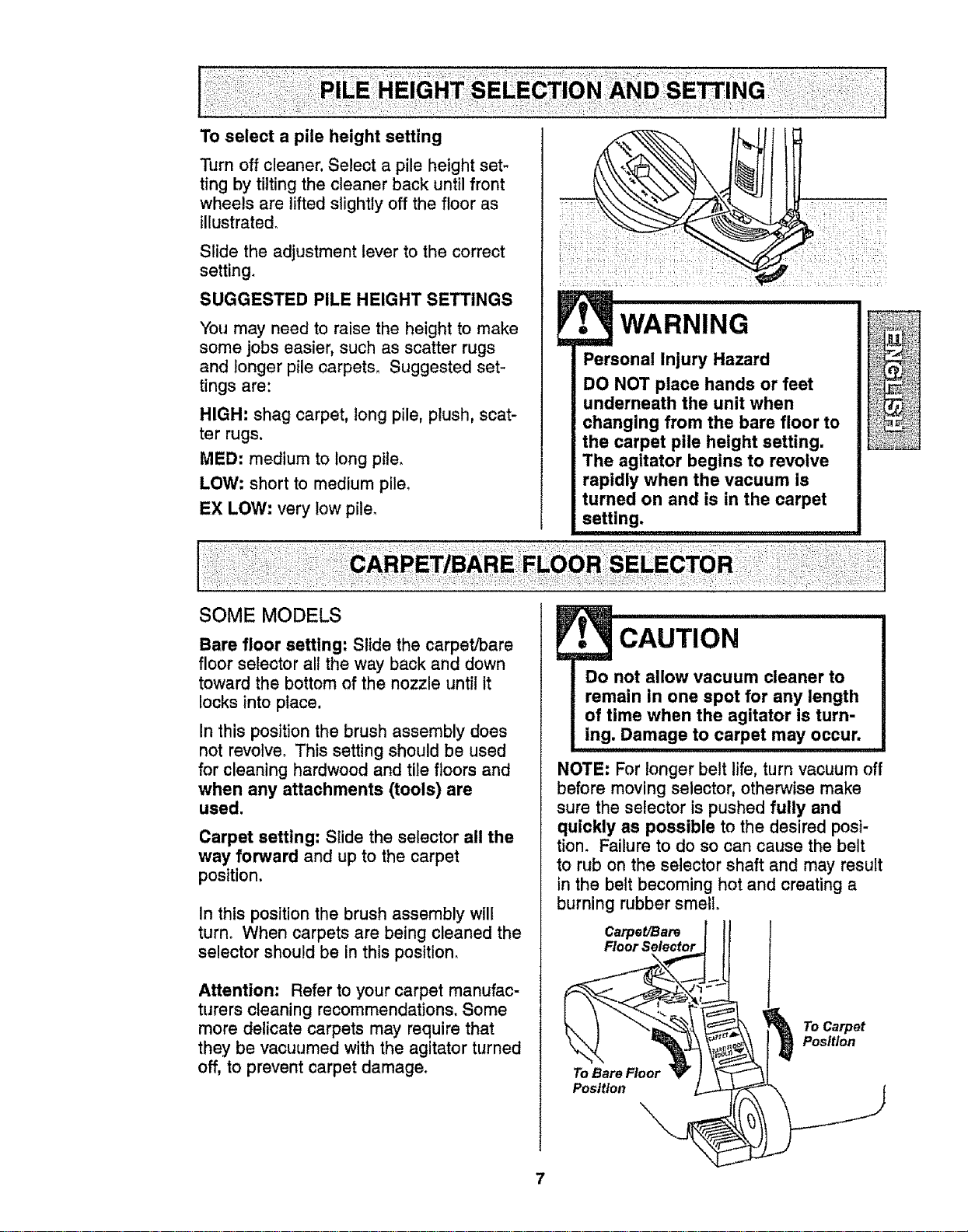
Turn off cleaner. Select a pile height set-
ting by tilting the cleaner back until front
wheels are lifted slightly off the floor as
illustrated_
Slide the adjustment lever to the correct
setting.
SUGGESTED PILE HEIGHT SETTINGS
You may need to raise the height to make
some jobs easier, such as scatter rugs
and longer pile carpets. Suggested set-
tings are:
HIGH: shag carpet, long pile, plush, scat-
ter rugs.
MED: medium to tong pile.
LOW: short to medium pile,
EX LOW: very low pile_
• WARNING
Personal Injury Hazard
DO NOT place hands or feet
underneath the unit when
changing from the bare floor to
the carpet pile height setting,
The agitator begins to revolve
rapidly when the vacuum is
turned on and is in the carpet
setting.
SOME MODELS
Bare floor setting: Slide the carpeVbare
floor selector all the way back and down
toward the bottom of the nozzle until it
locks into place.
In this position the brush assembly does
not revolve. This setting should be used
for cleaning hardwood and tile floors and
when any attachments (tools) are
used.
Carpet setting: Slide the selector all the
way forward and up to the carpet
position.
In this position the brush assembly will
turn. When carpets are being cleaned the
selector should be in this position.
Attention: Refer to your carpet manufac-
turers cleaning recommendations. Some
more delicate carpets may require that
they be vacuumed with the agitator turned
off, to prevent carpet damage.
cAUTIoN
Do not allow vacuum cleaner to
remain in one spot for any length
of time when the agitator is turn-
ing. Damage to carpet may occur.
NOTE: For longer belt life, turn vacuum off
before moving selector, otherwise make
sure the selector is pushed fully and
quickly as possible to the desired posi-
tion. Failure to do so can cause the belt
to rub on the selector shaft and may result
in the belt becoming hot and creating a
burning rubber smell.
Carpet/Bare
Floor Selector
To Carpet
Position
To Bare Floor
Position
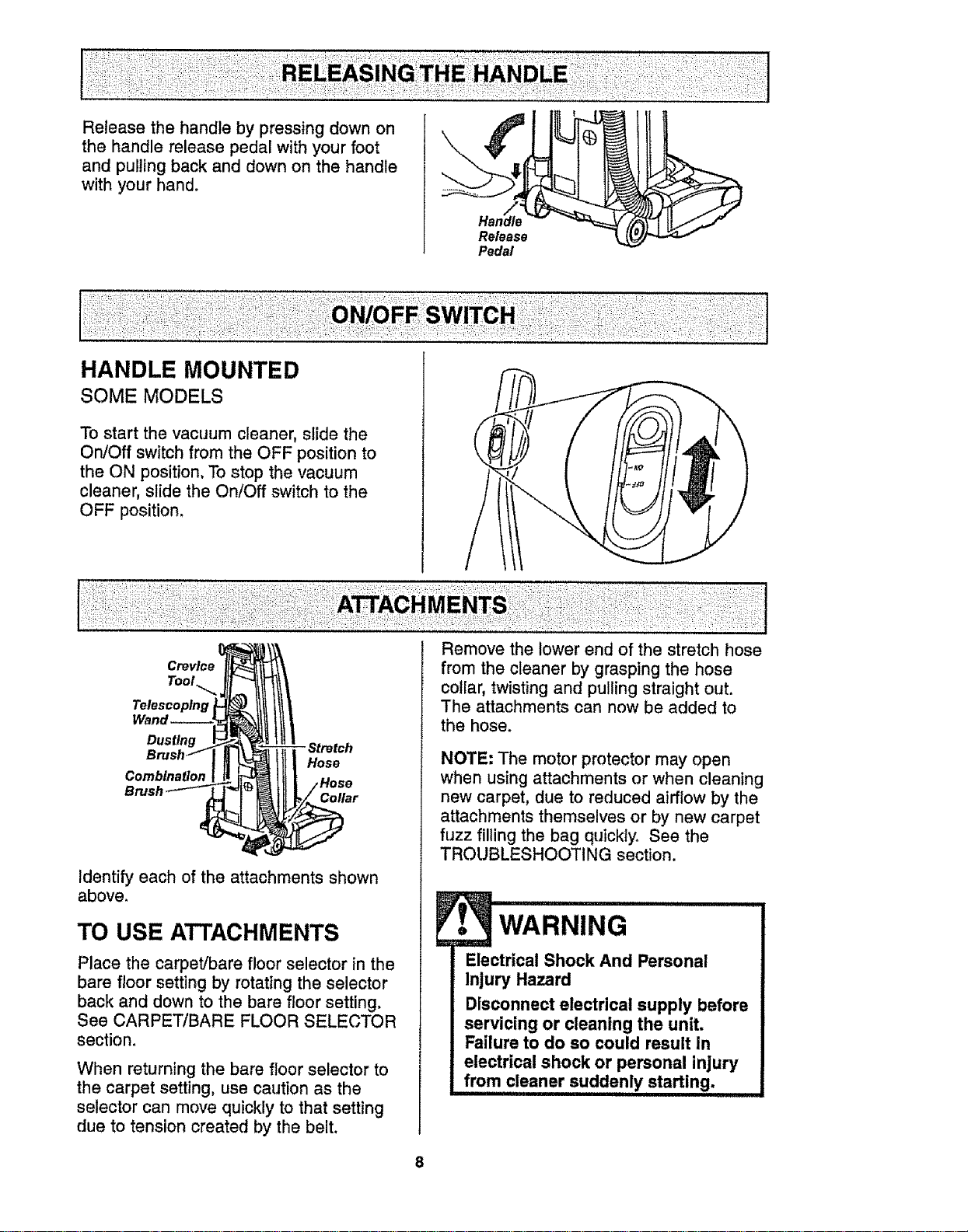
Release the handle by pressing down on
the handle release pedal with your foot
and pulling back and down on the handle
with your hand.
HANDLE MOUNTED
SOME MODELS
Release
Pedal
To start the vacuum cleaner, slide the
On/Off switch from the OFF position to
the ON position. To stop the vacuum
cleaner, slide the On/Off switch to the
OFF position.
Tool._
Telescoping
Dusting
Combination
Hose
Collar
Identify each of the attachments shown
above.
TO USE ATTACHMENTS
Place the carpet/bare floor selector in the
bare floor setting by rotating the selector
back and down to the bare floor setting.
See CARPET/BARE FLOOR SELECTOR
section.
When returning the bare floor selector to
the carpet setting, use caution as the
selector can move quickly to that setting
due to tension created by the belt.
Remove the lower end of the stretch hose
from the cleaner by grasping the hose
collar, twisting and pulling straight out.
The attachments can now be added to
the hose.
NOTE: The motor protector may open
when using attachments or when cleaning
new carpet, due to reduced airflow by the
attachments themselves or by new carpet
fuzz filling the bag quickly° See the
TROUBLESHOOTING section.
wARNING .............
Electrical Shock And Personal
Injury Hazard
Disconnect electrical supply before
servicing or cleaning the unit.
Failure to do so could result in
electrical shock or personal injury
8
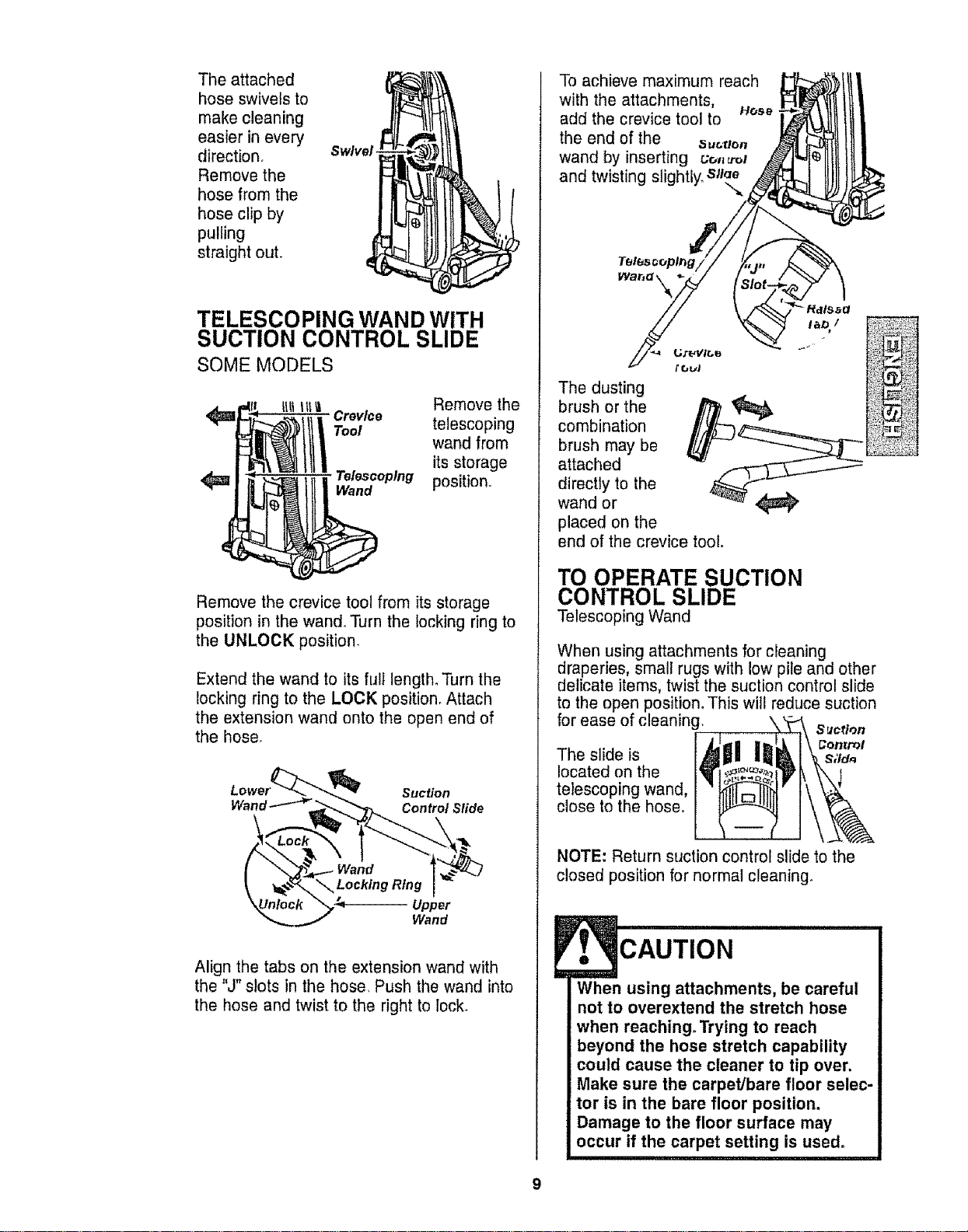
The attached
hose swivels to
make cleaning
easier in every
direction.
Remove the
hose from the
hose clip by
pulling
straight out.
Swivel
TELESCOPING WAND WITH
SUCTION CONTROL SLIDE
SOME MODELS
Remove the
trey/co telescoping
Tool
wand from
its storage
Telescoping position,,
Wand
Remove the crevice tool from its storage
position in the wand. Turn the locking ring to
the UNLOCK position.
Extend the wand to its full length°Turn the
locking ring to the LOCK position, Attach
the extension wand onto the open end of
the hose.
Suclion
Wand _ _- Con trol Slide
Wand
Z_---_Upper
Wand
Align the tabs on the extension wand with
the "J" slots in the hose. Push the wand into
the hose and twist to the right to lock.
To achieve maximum reach
with the attachments,
add the crevice tool to Hose
the end of the _._,.o.
wand by inserting uo._ot
and twisting slightly, sure
The dusting
brush or the
combination
brush may be
attached
directly to the
wand or
placed on the
end of the crevice tool.
TO OPERATE SUCTION
CONTROL SLIDE
Telescoping Wand
When using attachments for cleaning
draperies, small rugs with low pile and other
delicate items, twist the suclion control slide
to the open position, This will reduce suction
for ease of cleaning_
S_lction
...... I L,'_I llt',,_ 1\ Control
• nesl_oels ljllgll I_!_1 '_ S,'ld,,
located on the 1_1_'/_%_.1"_ k \\ 1
telescoping wand, I _'' t\
close to the hose, _ ]\_
NOTE: Return suction control slide to the
closed position for normal cleaning.
CAUTION
When using attachments, be careful
not to overextend the stretch hose
when reaching. Trying to reach
beyond the hose stretch capability
could cause the cleaner to tip over.
Make sure the carpet/bare floor selec-
tor is in the bare floor position.
Damage to the floor surface may
occur if the carpet setting is used.
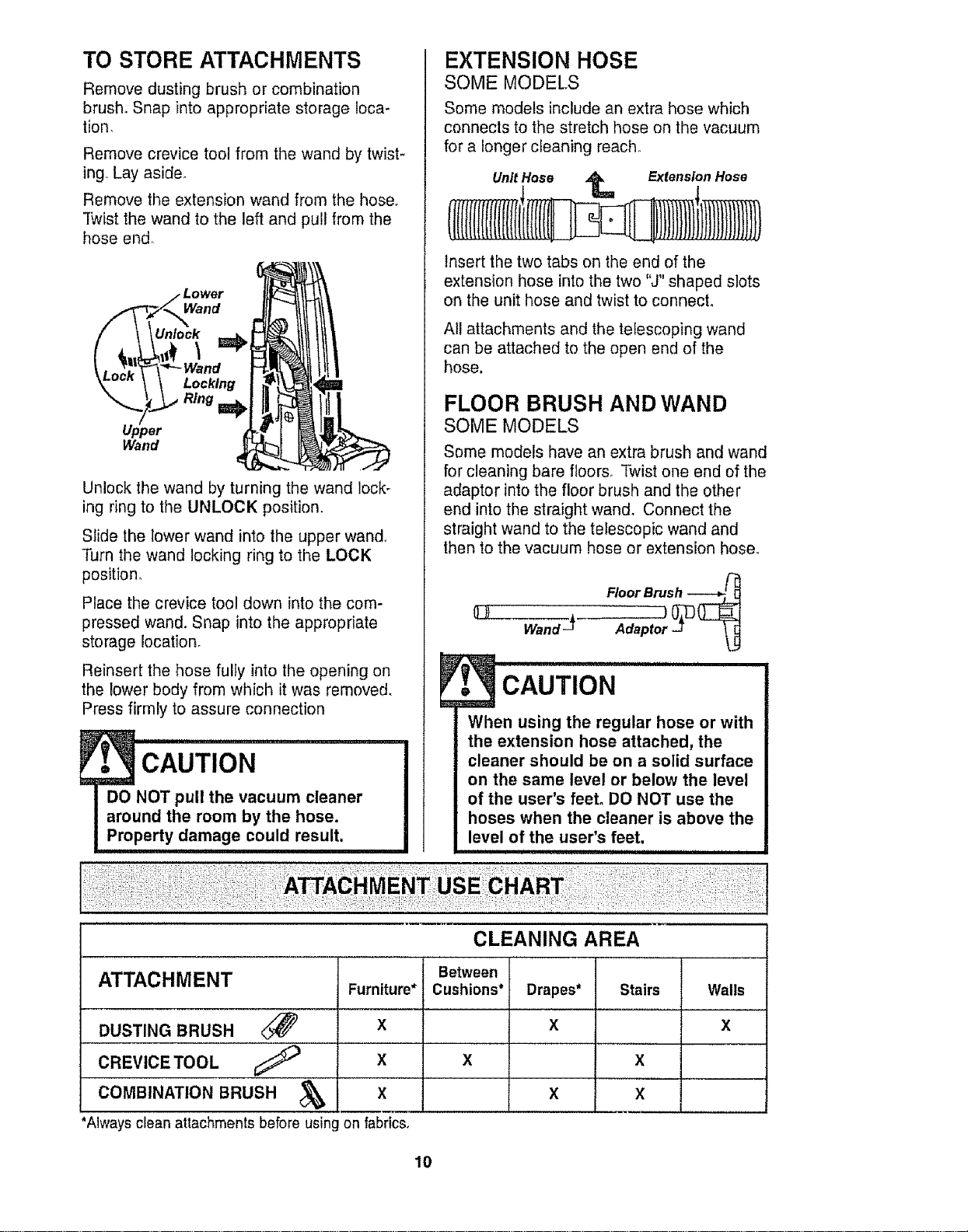
TO STORE ATTACHMENTS
Remove dusting brush or combination
brush. Snap into appropriate storage loca-
tion,
Remove crevice tool from the wand by twist-
ing.,Lay aside°
Remove the extension wand from the hose.
Twist the wand to the left and pull from the
hose end.
Wand
Unlock _ i
Unlock the wand by turning the wand lock-
ing ring to the UNLOCK position,
Locking
Ring I_
Upper
Wand
Slide the lower wand into the upper wand_
Turn the wand locking ring to the LOCK
position°
Place the crevice tool down into the com-
pressed wand. Snap into the appropriate
storage location,
Reinsert the hose fully into the opening on
the lower body from which it was removed,
Press firmly to assure connection
EXTENSION HOSE
SOME MODELS
Some models include an extra hose which
connects to the stretch hose on the vacuum
for a longer cleaning reach,,
Unit Hose _ Extension Hose
Insert the two tabs on the end of the
extension hose into the two "J" shaped slots
on the unit hose and twist to connect°
All attachments and the telescoping wand
can be attached to the open end of the
hose.
FLOOR BRUSH AND WAND
SOME MODELS
Some models have an extra brush and wand
for cleaning bare floors° Twist one end of the
adaptor into the floor brush and the other
end into the straight wand, Connect the
straight wand to the telescopic wand and
then to the vacuum hose or extension hose.
Floor Brush _
CAUTION ...................
When using the regular hose or with
the extension hose attached, the
cleaner should be on a solid surface
on the same level or below the level
of the user's feet. DO NOT use the
hoses when the cleaner is above the
level of the user's feet.
CLEANING AREA
Between
ATTACHMENT Furniture* Cushions* Drapes* Stairs Walls
DUSTING BRUSH _ X X X
COMBINATION BRUSH _ X X X
*Always clean attachments before usingon fabrics,
10
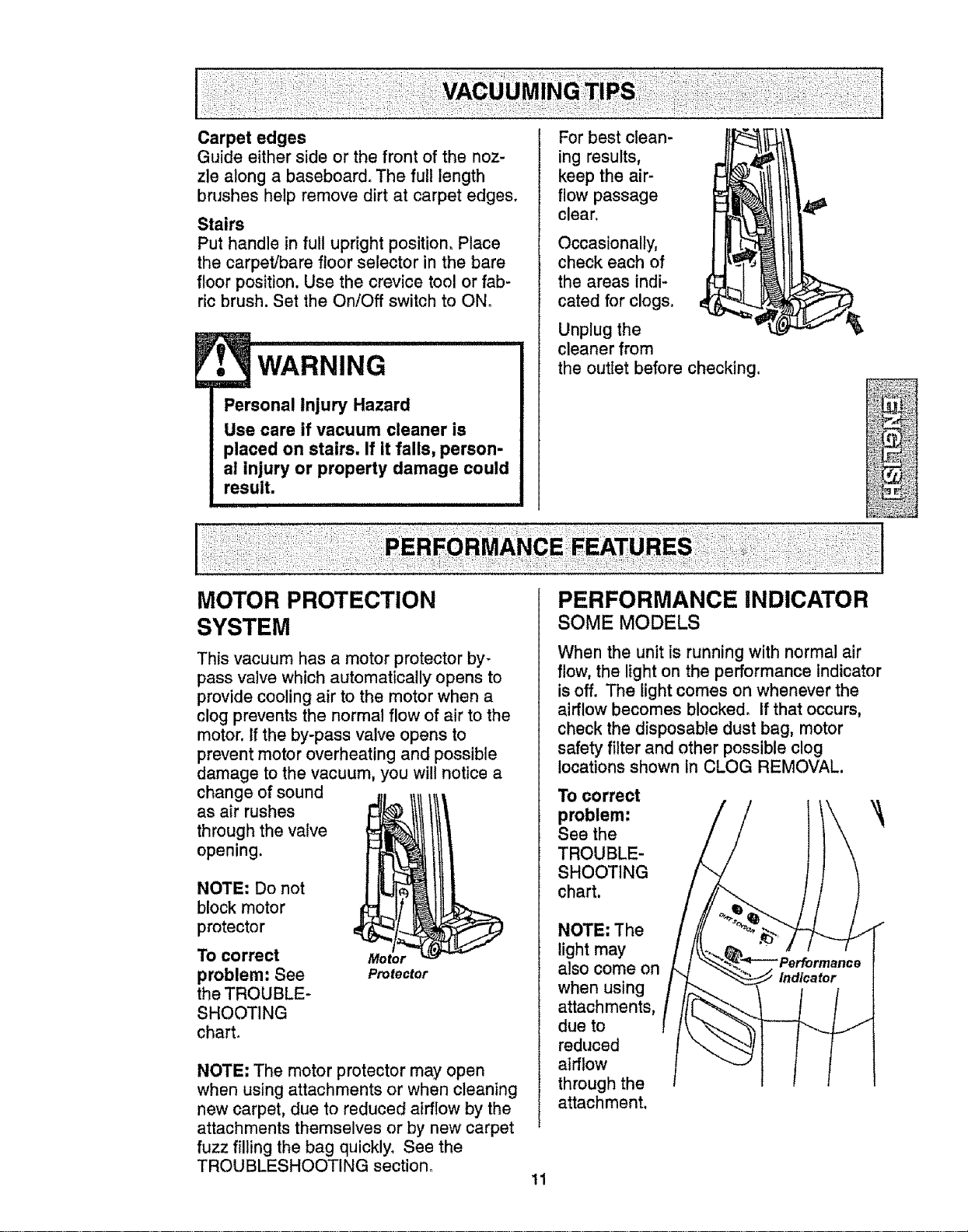
Carpet edges
Guide either side or the front of the noz-
zle along a baseboard. The full length
brushes help remove dirt at carpet edges.
Stairs
Put handle in full upright position_ Place
the carpet/bare floor selector in the bare
floor position. Use the crevice tool or fab-
ricbrush. Set the On!Off switch to ON.
Personal Injury Hazard
Use care if vacuum cleaner is
placed on stairs. If it falls, person-
al injury or property damage could
result.
For best clean-
ing results,
keep the air-
flow passage
clear.
Occasionally,
check each of
the areas indi-
cated for clogs.
Unplug the
cleaner from
the outlet before checking.
MOTOR PROTECTION
SYSTEM
This vacuum has a motor protector by-
pass valve which automatically opens to
provide cooling air to the motor when a
clog prevents the normal flow of air to the
motor. If the by-pass valve opens to
prevent motor overheating and possible
damage to the vacuum, you will notice a
change of sound
as air rushes
through the valve
opening.
NOTE: Do not
block motor
protector
To correct
problem: See
the TROUBLE-
SHOOTING
chart.
Protector
NOTE: The motor protector may open
when using attachments or when cleaning
new carpet, due to reduced airflow by the
attachments themselves or by new carpet
fuzz filling the bag quickly, See the
TROUBLESHOOTING section°
PERFORMANCE INDICATOR
SOME MODELS
When the unit is running with normal air
flow, the light on the performance indicator
is off. The light comes on whenever the
airflow becomes blocked. If that occurs,
check the disposable dust bag, motor
safety filter and other possible clog
locations shown In CLOG REMOVAL
To correct
problem:
See the
TROUBLE-
SHOOTING
chart.
NOTE: The
light may
also come on
when using
attachments,
due to
reduced
airflow
through the
attachment.
11
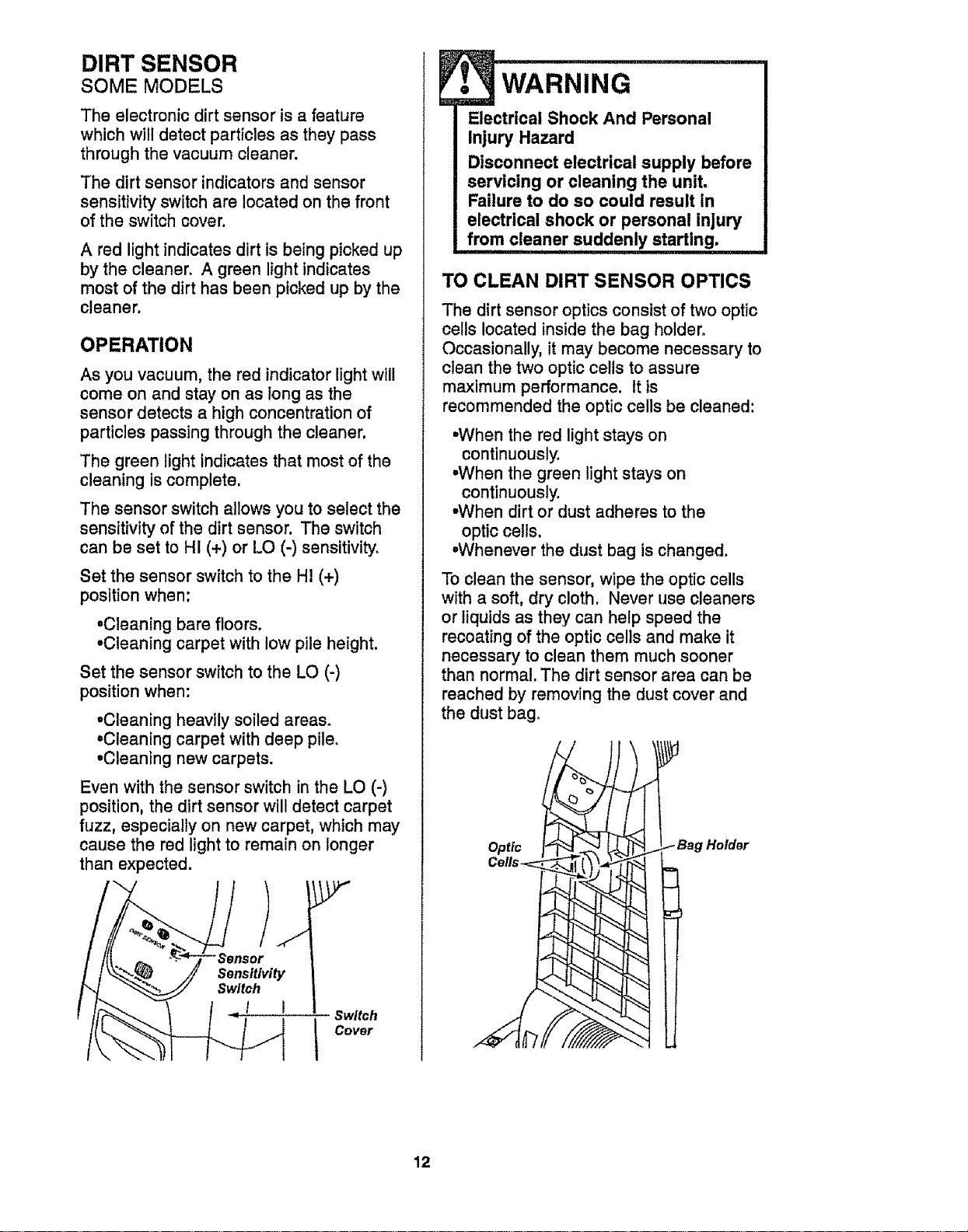
DIRT SENSOR
SOME MODELS
The electronic dirt sensor is a feature
which will detect particles as they pass
through the vacuum cleaner.
The dirt sensor indicators and sensor
sensitivity switch are located on the front
of the switch cover.
A red light indicates dirt is being picked up
by the cleaner. A green light indicates
most of the dirt has been picked up by the
cleaner.
OPERATION
As you vacuum, the red indicatorlight will
come on and stay on as long as the
sensor detects a high concentration of
particles passing through the cleaner.
The green light indicates that most of the
cleaning is complete.
The sensor switch allows you to select the
sensitivity of the dirt sensor. The switch
can be set to HI (+) or LO (-) sensitivity°
Set the sensor switch to the HI (+)
position when:
•Cleaning bare floors.
•Cleaning carpet with low pile height.
Set the sensor switch to the LO (-)
position when:
•Cleaning heavily soiled areas°
•Cleaning carpet with deep pile,
•Cleaning new carpets.
Even with the sensor switch in the LO (-)
position, the dirt sensor will detect carpet
fuzz, especially on new carpet, which may
cause the red light to remain on longer
than expected.
Sensitivity
Switch
1 I
Switch
Cover
i,i,
WARNING
Electrical Shock And Personal
Injury Hazard
Disconnect electrical supply before
servicing or cleaning the unit,
Failure to do so could result in
electrical shock or personal injury
from cleaner suddenly starting.
TO CLEAN DIRT SENSOR OPTICS
The dirt sensor optics consist of two optic
cells located inside the bag holder.
Occasionally, it may become necessary to
clean the two optic ceils to assure
maximum performance. It is
recommended the optic cells be cleaned:
•When the red light stays on
continuously.
•When the green light stays on
continuously.
•When dirt or dust adheres to the
optic ceils.
•Whenever the dust bag is changed.
To clean the sensor, wipe the optic cells
with a soft, dry cloth. Never use cleaners
or liquids as they can help speed the
recoating of the optic cells and make it
necessary to clean them much sooner
than normal. The dirt sensor area can be
reached by removing the dust cover and
the dust bag_
Optic
Cells-.=
Holder
12
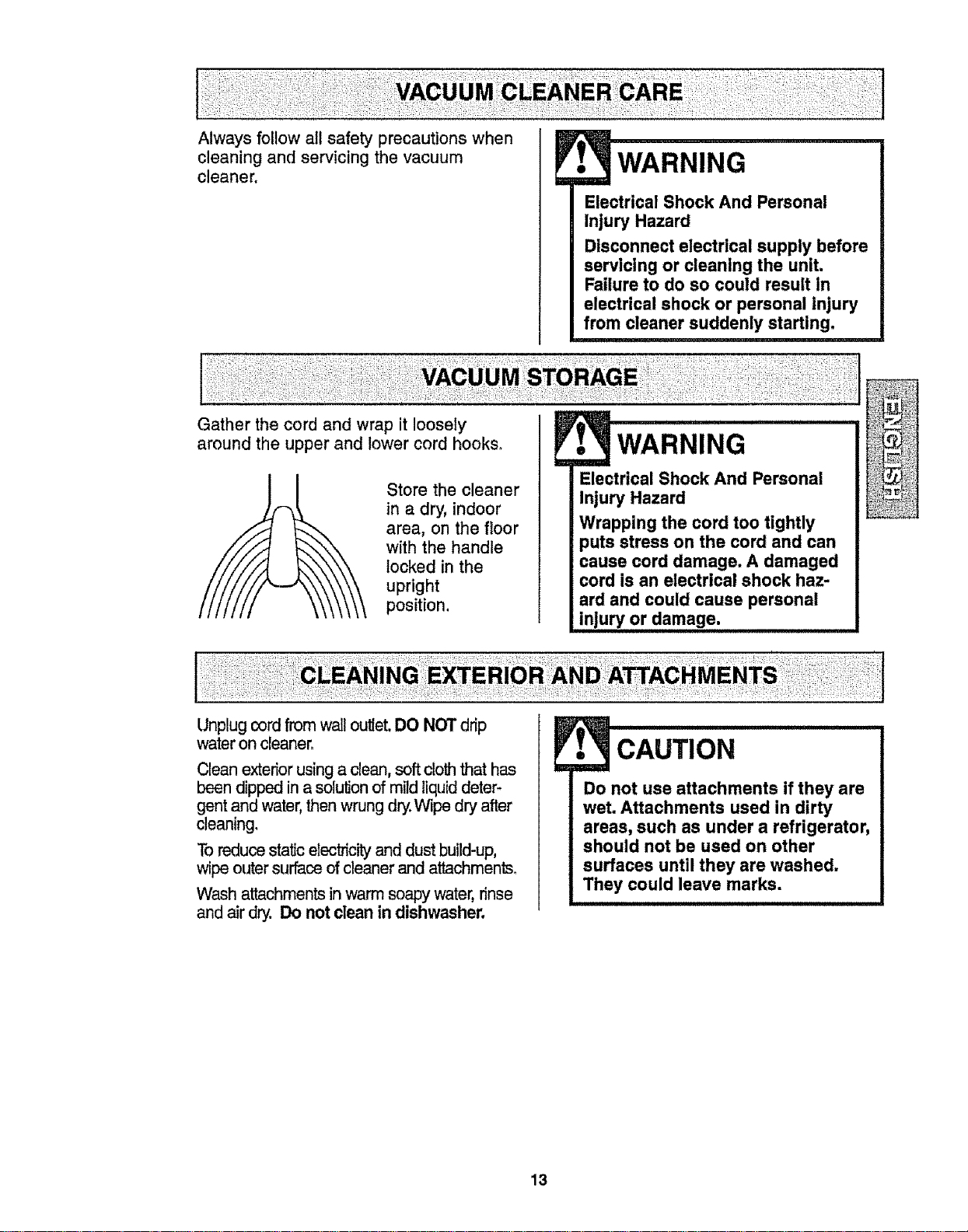
Always follow all safety precautions when
cleaning and servicing the vacuum
cleaner.
Gather the cord and wrap it loosely
around the upper and lower cord hooks_
• WARNING
Electrical Shock And Personal
Injury Hazard
Disconnect electrical supply before
servicing or cleaning the unit.
Failure to do so could result In
electrical shock or personal injury
from cleaner suddenly starting.
Store the cleaner
in a dry, indoor
area, on the floor
with the handle
locked in the
upright
position,
wARNING ......................
Electrical Shock And Personal
Injury Hazard
Wrapping the cord too tightly
puts stress on the cord and can
cause cord damage. A damaged
cord is an electrical shock haz-
ard and could cause personal
injury or damage.
Unplug cordfrom wail outlet.DO NOT drip
wateron cleaner_
Clean exteriorusing a clean, softcloththat has
been dipped in a solution of mild liquiddeter-
gent and water,then wrung dry.Wipe dry after
cleaning.
Toreduce stal_celectricityand dust build-up,
wipe outer surface of cleaner and attachments°
Wash attachments in warm soapy water, rinse
and airdry. Do not clean in dishwasher.
. CAuT,ON
Do not use attachments if they are
wet. Attachments used in dirty
areas, such as under a refrigerator,
should not be used on other
surfaces until they are washed.
They could leave marks.
13
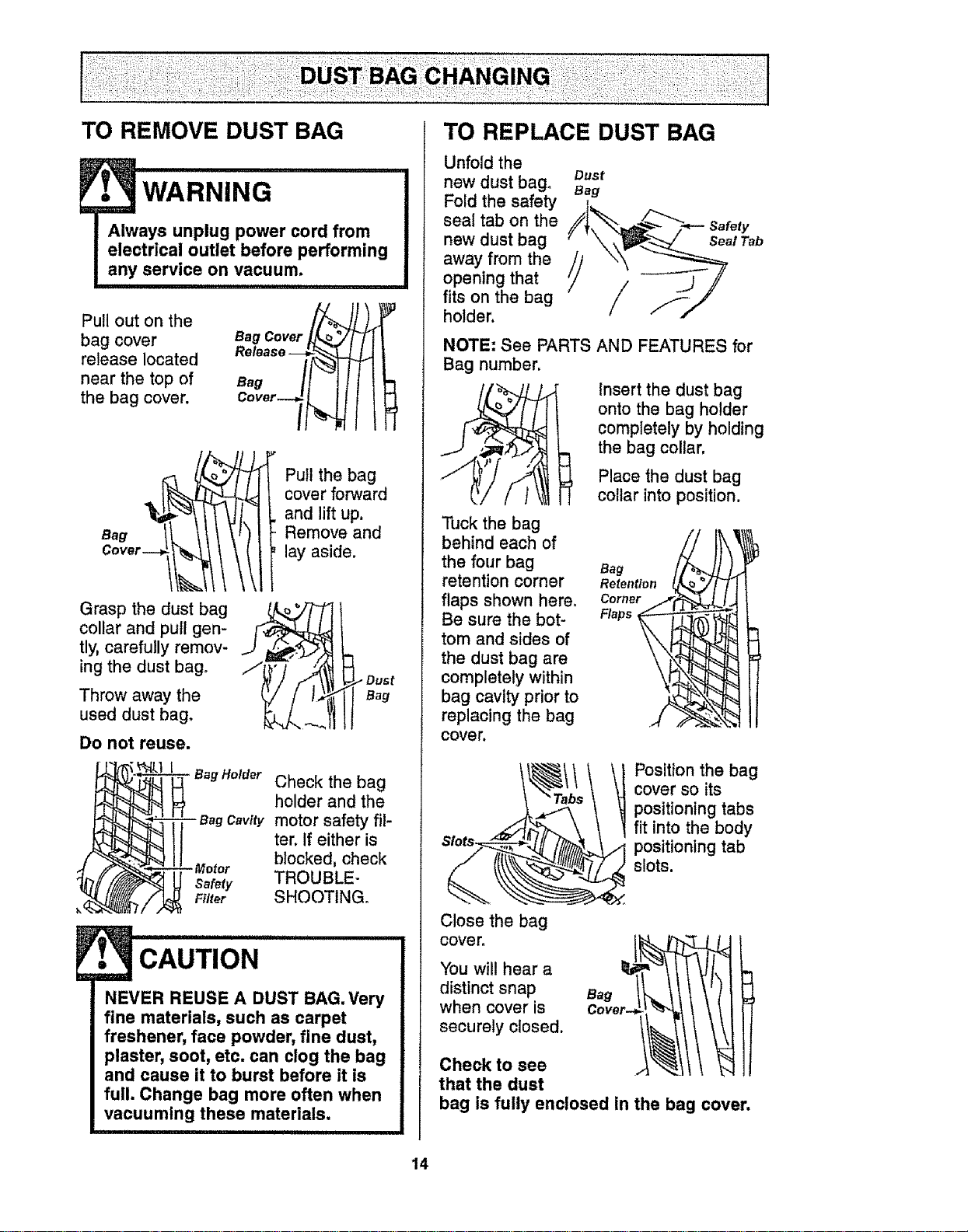
TO REMOVE DUST BAG TO REPLACE DUST BAG
• WARNING
Always unplug power cord from
electrical outlet before performing
any service on vacuum.
Pull out on the
bag cover
release located
near the top of
the bag cover.
Bag Cover
Release--__
Bag /!1t
C°ver_7_
Grasp the dust bag
collar and pull gen-
tly, carefully remov-
ing the dust bag,
Throw away the
used dust bag.
Do not reuse.
Pull the bag
cover forward
and lift up,
Remove and
lay aside.
Bag
BagHolder Check the bag
holder and the
cavitymotor safety fil-
ter. If either is
blocked, check
safety TROUBLE-
Filter SHOOTING.
CAUTION
NEVER REUSE A DUST BAG. Very
fine materials, such as carpet
freshener, face powder, fine dust,
plaster, soot, etc. can clog the bag
and cause it to burst before it is
full. Change bag more often when
vacuuming these materials.
Unfold the
newdust bag_ oust
Bag
Fold the safety
seal tab on the
new dust bag
away from the //
opening that
Y
fits on the bag
holder,
Seal Tab
NOTE: See PARTS AND FEATURES for
Bag number,
Insert the dust bag
onto the bag holder
completely by holding
the bag collar,
Tuck the bag
behind each of
the four bag
retention corner
flaps shown here,
Be sure the bot-
tom and sides of
the dust bag are
completely within
bag cavity prior to
replacing the bag
cover.
Place the dust bag
collar into position.
Retention
Slots_
Close the bag
cover.
Positionthe bag
cover so its
positioning tabs
fit into the body
positioning tab
slots.
You will hear a
distinct snap
when cover is
securely closed.
Bag
Check to see AL_II / !
that the dust
bag is fully enclosed in the bag cover.
14
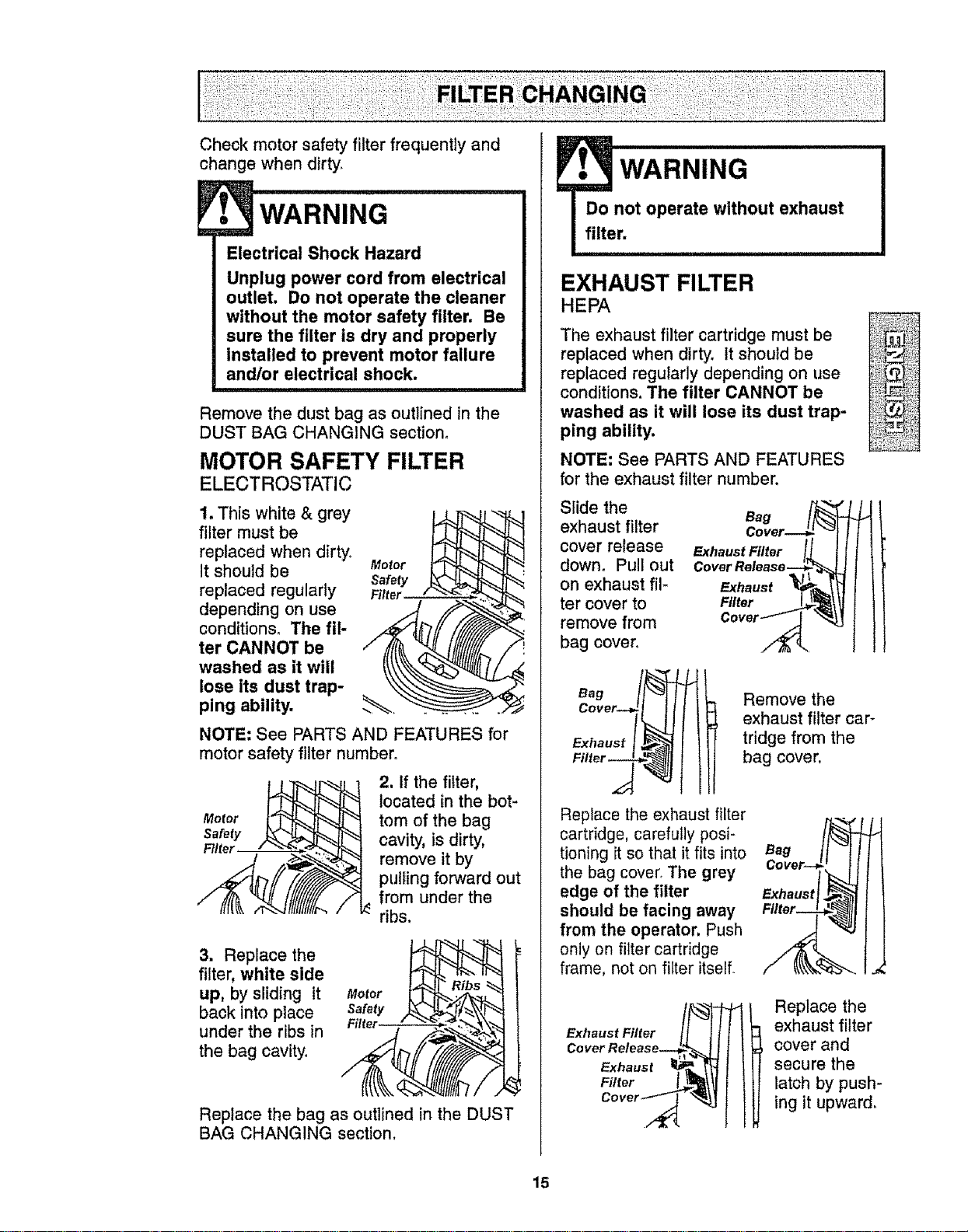
Check motor safety filter frequently and
change when dirty.
WARNING
Electrical Shock Hazard
Unplug power cord from electrical
outlet. Do not operate the cleaner
without the motor safety filter. Be
sure the filter is dry and properly
installed to prevent motor failure
and/or electrical shock.
Remove the dust bag as outlined in the
DUST BAG CHANGING section.
MOTOR SAFETY FILTER
ELECTROSTATIC
1. This white & grey
filter must be
replaced when dirty°
It should be
replaced regularly
depending on use
conditions. The fil-
ter CANNOT be
washed as it will
lose its dust trap-
ping ability,
Motor
NOTE: See PARTS AND FEATURES for
motor safety filter number°
2. If the filter,
located in the bot-
tom of the bag
cavity, is dirty,
remove it by
pulling forward out
from under the
ribs.
3. Replace the
filter, white side
up, by sliding it
back into place
under the ribs in
the bag cavity°
Replace the bag as outlined in the DUST
BAG CHANGING section.
WARNING
Do not operate without exhaust
filter.
EXHAUST FILTER
HEPA
The exhaust filter cartridge must be
replaced when dirty. It should be
replaced regularly depending on use
conditions. The filter CANNOT be
washed as it will lose its dust trap-
ping ability.
NOTE: See PARTS AND FEATURES
for the exhaust filter number,
Slide the
exhaust filter
cover release
down. Pull out
on exhaust fil-
ter cover to
remove from
bag cover°
Bag
Cover--_
Exhaust Filter _
Cover Release-
Exhaust
Filter
Cover /
Filler --_
Replace the exhaust filter
cartridge, carefully posi-
tioning it so that it fits into
the bag cover° The grey
edge of the filter
should be facing away
from the operator. Push
only on filter cartridge
frame, not on filter itself.
Remove the
exhaust filter car-
tridge from the
bag cover,
Bag
Exhaust
Exhaust Filter /_
Cover Release_= '1_J_
Exhaust l_-
Cover ,._ "_._
Replace the
exhaust filter
cover and
secure the
latch by push-
ing it upward.
15
• WARNING
Electrical Shock Or Personal Injury
Hazard
Disconnect electrical supply before
servicing or cleaning the unit.
Failure to do so could result in
electrical shock or personal injury
from cleaner suddenly starting.
Frequently check and remove hair, string
and lint build-up in the brush area, If
build-up becomes excessive, follow the
steps below.
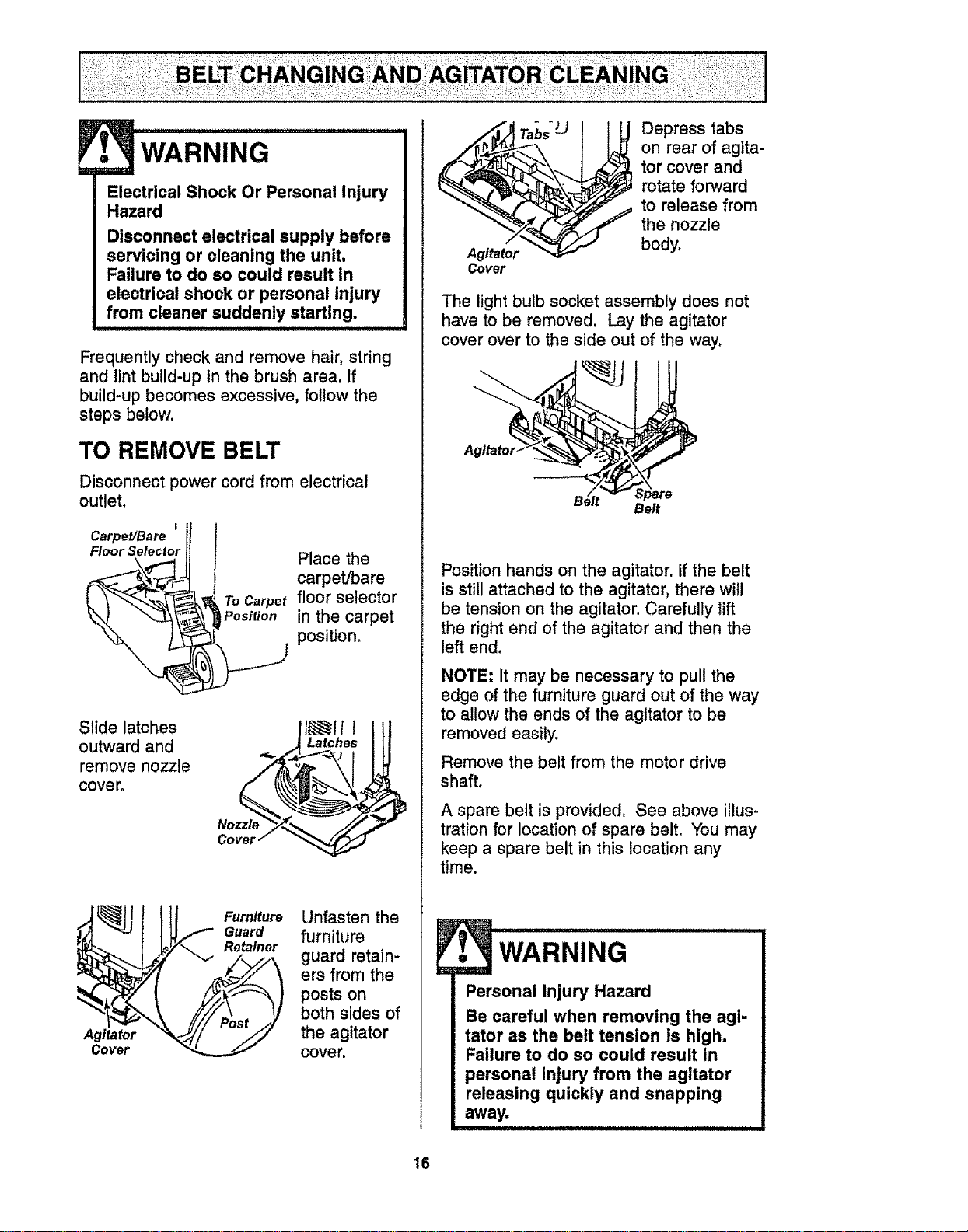
TO REMOVE BELT
Disconnect power cord from electrical
outlet.
I
Carpet/Bare
Floor Selector
t Place the
carpet/bare
To Carpetfloor selector
Position in the carpet
J position_
Slide latches
outward and
remove nozzle
cover,
.,_ Latches
Noz_
Cover /
Agitator
Cover
Furniture
Guard
Retainer
Unfasten the
furniture
guard retain-
ers from the
posts on
both sides of
the agitator
cover.
Agitator
Cover
Depress tabs
on rear of agita-
tor cover and
rotate forward
to release from
the nozzle
body.
The light bulb socket assembly does not
have to be removed. Lay the agitator
cover over to the side out of the way,
A
B_lt _'_ upare
.... Belt
Position hands on the agitator, If the belt
is still attached to the agitator, there will
be tension on the agitator. Carefully lift
the right end of the agitator and then the
left end.
NOTE: It may be necessary to pull the
edge of the furniture guard out of the way
to allow the ends of the agitator to be
removed easily.
Remove the belt from the motor drive
shaft.
A spare belt is provided, See above illus-
trationfor location of spare belt. You may
keep a spare belt in this location any
time.
• wARNING
Personal Injury Hazard
Be careful when removing the agi-
tator as the belt tension is high.
Failure to do so could result in
personal injury from the agitator
releasing quickly and snapping
away.
16
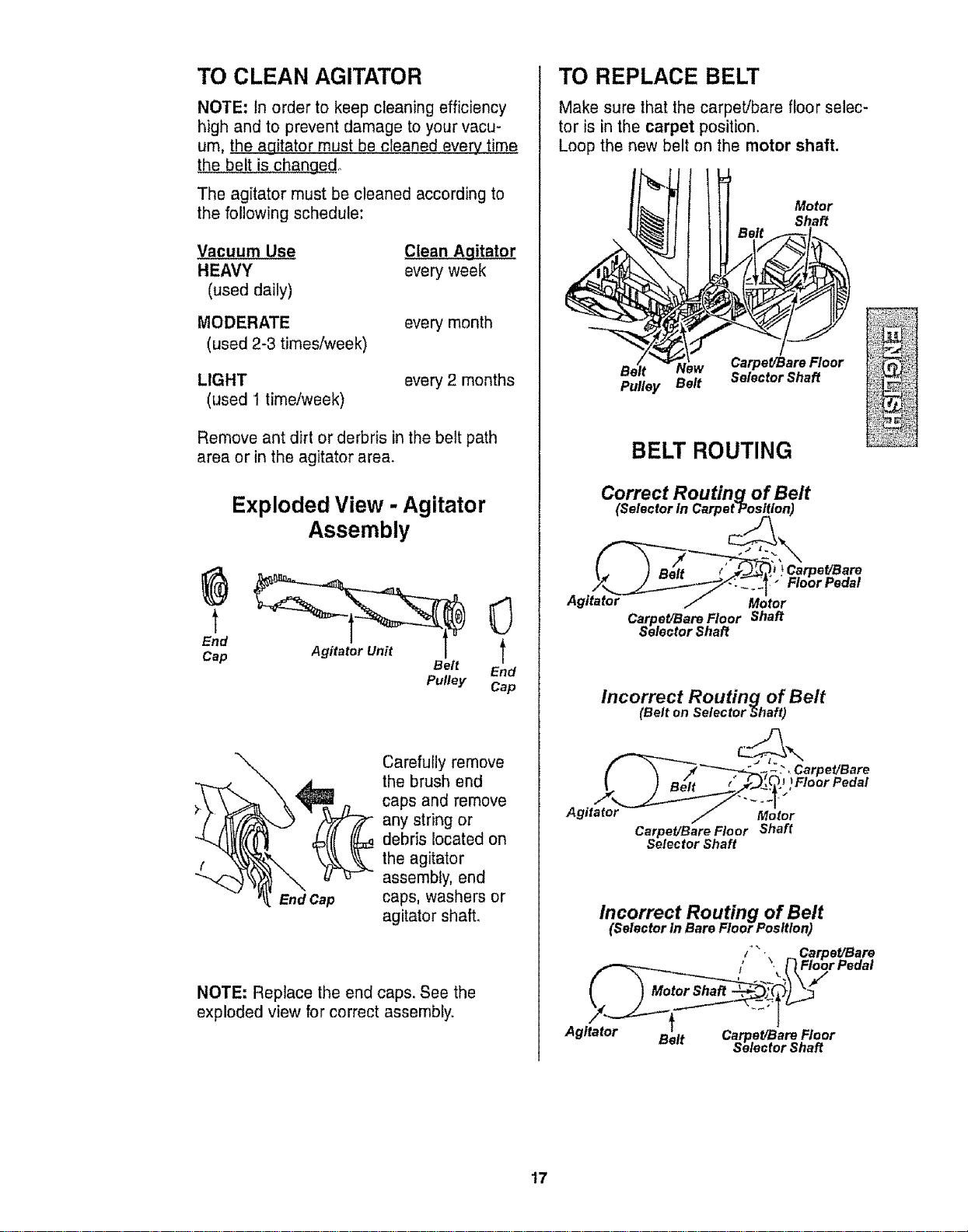
TO CLEAN AGITATOR
NOTE: In order to keep cleaning efficiency
high and to prevent damage to your vacu-
um, the agitator must be cleaned every time
the belt is changed,
The agitator must be cleaned according to
the following schedule:
Vacuum Use
HEAVY
(used daily)
MODERATE
(used 2-3 times/week)
_itator
every week
every month
LIGHT
(used 1 time/week)
every 2 months
Remove ant dirt or derbris inthe belt path
area or in the agitator area.
Exploded View - Agitator
Assembly
End l
Cap Belt
End
Pulley Cap
End Cap
Carefully remove
the brush end
caps and remove
any string or
debris located on
the agitator
assembly, end
caps, washers or
agitator shaft,
NOTE: Replace the end caps. See the
exploded view for correct assembly,
TO REPLACE BELT
Make sure that the carpeVbare floor selec-
tor is in the carpet position.
Loop the new belt on the motor shaft.
Motor
Shaft
Carpet/Bare Floor
Pulley Belt Selector Shaft
BELT ROUTING
Correct Routing of Belt
(Selector In Carpet-Position)
Agitato_
[__.Carpet[Bare
t-mor Pedal
Motor
Carpet/Bare Floor Shaft
Selector Shaft
Incorrect Routing of Belt
(Belt on Selector Shaft)
_'_--7_._ .; _." . Carpet/Bare
Agit_tto_J "-M_ior
Carpet/Bare Floor Shaft
Selector Shaft
Incorrect Routing of Belt
(Selector In Bare Floor Position)
_" 'B
/ ,_ Carpe_ are
/' , [] Fioor Pedai
Agitator _,,l_ Ca et/Bare Floor
.... _sr_electorShaft
17
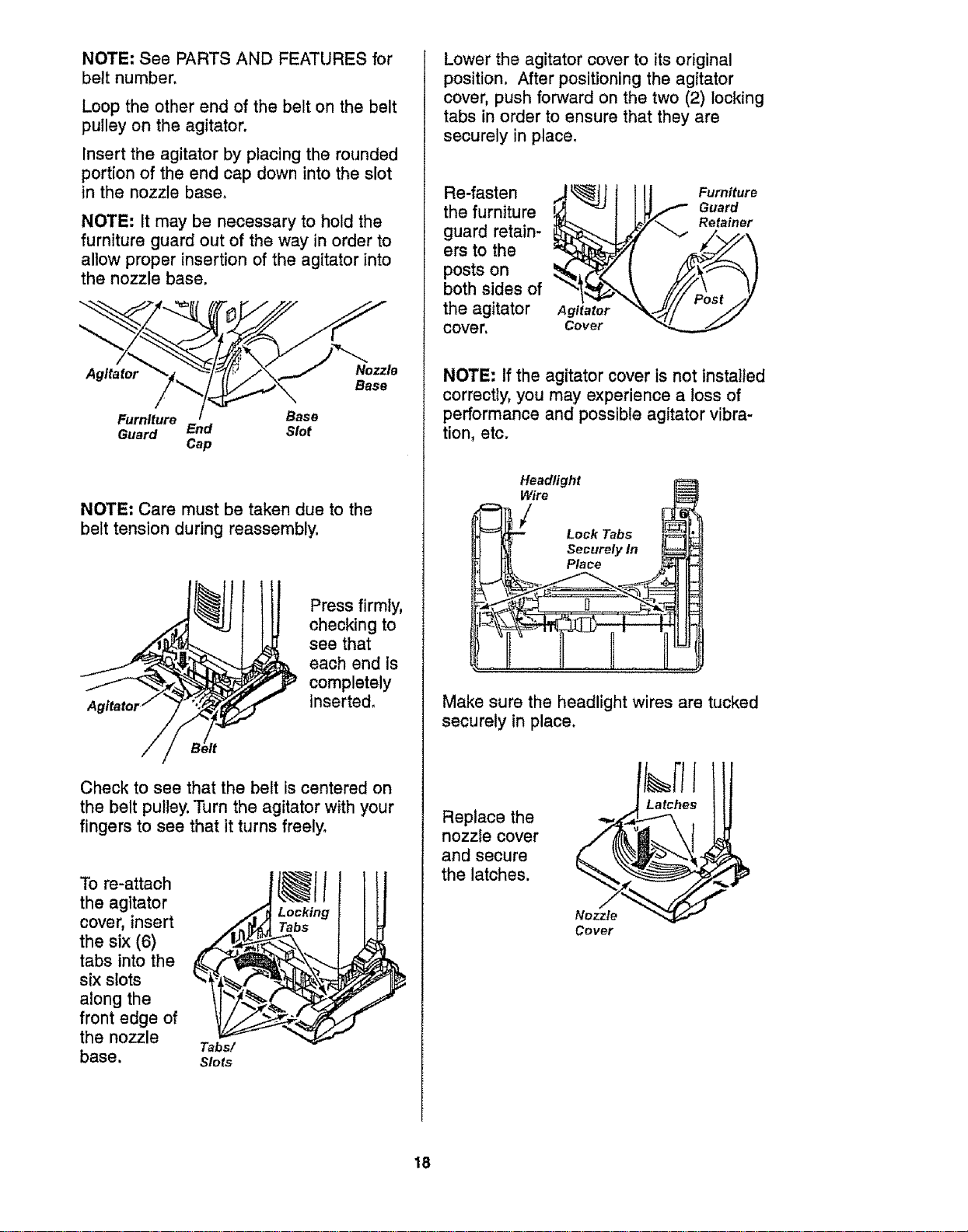
NOTE: See PARTS AND FEATURES for
belt number.
Loop the other end of the belt on the belt
pulley on the agitator.
Insert the agitator by placing the rounded
portion of the end cap down into the slot
in the nozzle base,
NOTE= It may be necessary to hold the
furniture guard out of the way in order to
allow proper insertion of the agitator into
the nozzle base,
Agitator Nozzle
Base
Furniture Base
Guard End Slot
Cap
NOTE= Care must be taken due to the
belt tension during reassembly.
Press firmly,
checking to
see that
each end is
completely
inserted.
Check to see that the belt is centered on
the belt pulley. Turn the agitator with your
fingers to see that it turns freely°
To re-attach
the agitator _
cover, insert
the six (6)
tabs into the _-.._;_
six slots
along the
front edge of
the nozzle
Tabs/
base. Slots
Locking
Tabs
Lower the agitator cover to its original
position, After positioning the agitator
cover, push forward on the two (2) locking
tabs in order to ensure that they are
securely in place.
Re-fasten
the furniture
guard retain-
ers to the
posts on
both sides of
the agitator
cover.
Agitator
Cover
Furniture
Guard
Retainer
NOTE: If the agitator cover is not installed
correcly, you may experience a toss of
performance and possible agitator vibra-
tion, etc.
Headlight
Lock Tabs
_ Securely ln _
lJ It1[ Place _- _
Make sure the headlight wires are tucked
securely in place.
Replace the
nozzle cover
and secure
the latches.
Nozzle
Cover
18
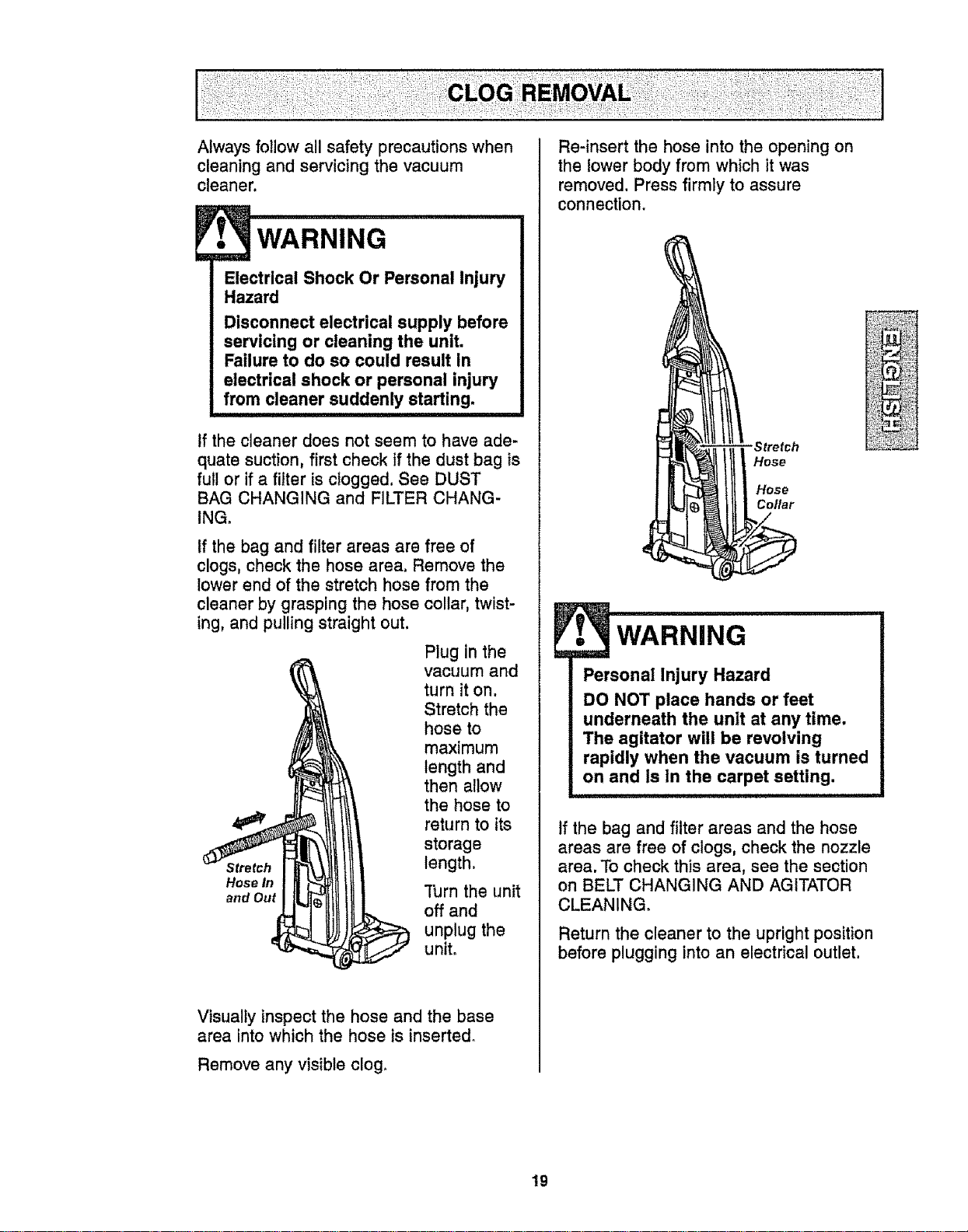
Always follow all safety precautions when
cleaning and servicing the vacuum
cleaner.
• WARNING
Electrical Shock Or Personal Injury
Hazard
Disconnect electrical supply before
servicing or cleaning the unit.
Failure to do so could result in
electrical shock or personal injury
from cleaner suddenly starting.
tf the cleaner does not seem to have ade-
quate suction, first check If the dust bag is
full or if a filter is clogged. See DUST
BAG CHANGING and FILTER CHANG-
ING_
If the bag and filter areas are free of
clogs, check the hose area. Remove the
lower end of the stretch hose from the
cleaner by grasping the hose collar, twist-
ing, and pulling straight out.
Plug in the
vacuum and
turn it on.
Stretch the
hose to
maximum
length and
then allow
the hose to
return to its
storage
Stretch length,
Hose In
and Out "['urnthe unit
off and
unplug the
unit.
Visually inspect the hose and the base
area into which the hose is inserted°
Remove any visible clog.
Re-insert the hose into the opening on
the lower body from which it was
removed. Press firmly to assure
connection.
Stretch
Hose
Hose
Collar
• WARNING
Personal Injury Hazard
DO NOT place hands or feet
underneath the unit at any time.
The agitator will be revolving
rapidly when the vacuum is turned
on and Is in the carpet setting.
If the bag and filter areas and the hose
areas are free of clogs, check the nozzle
area. To check this area, see the section
on BELT CHANGING AND AGITATOR
CLEANING,
Return the cleaner to the upright position
before plugging into an electrical cutlet.
19
wARNING
Electrical Shock Or Personal Injury
Hazard
Disconnect electrical supply before
servicing or cleaning the unit.
Failure to do so could result in
electrical shock or personal injury
from cleaner suddenly starting.
i
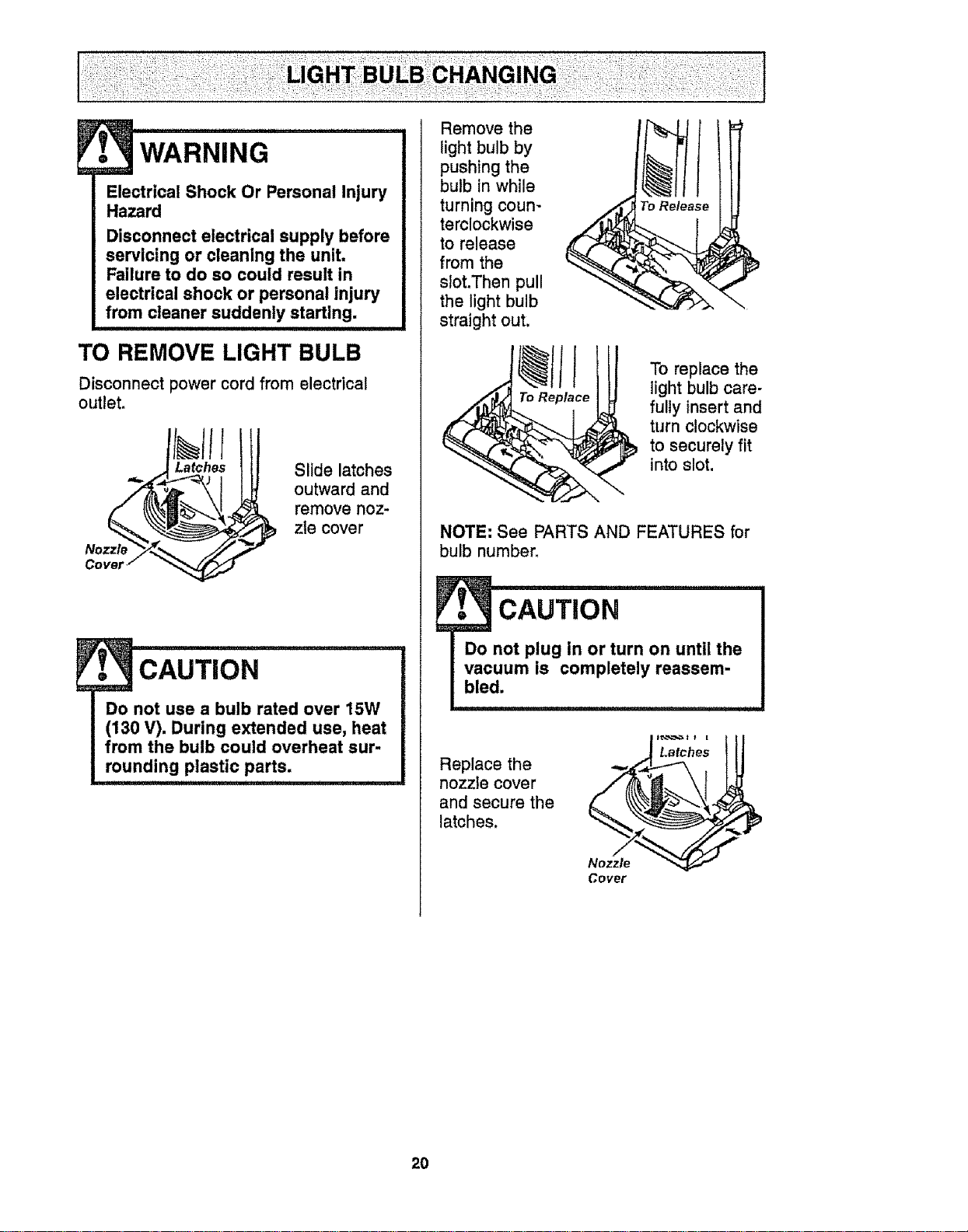
TO REMOVE LIGHT BULB
Disconnect power cord from electrical
outlet.
Nozz_
Slide latches
outward and
remove noz-
zle cover
CAUTION
Do not use a bulb rated over 15W
(130 V). During extended use, heat
from the bulb could overheat sur-
rounding plastic parts.
Remove the
light bulb by
pushing the
bulb in while
turning coun-
terclockwise
to release
from the
slot.Then pull
the light bulb
straight out.
To Release
To replace the
light bulb care-
fully insert and
turn clockwise
to securely fit
into slot.
NOTE: See PARTS AND FEATURES for
bulb number.
Replace the
nozzle cover
and secure the
latches.
Cover
20
• WARNING
Electrical Shock Or Personal Injury
Hazard
Disconnect electrical supply before
servicing or cleaning the unit.
Failure to do so could result in
electrical shock or personal Injury
from cleaner suddenly starting.
........... i iii1,1111 ii i , ,,i
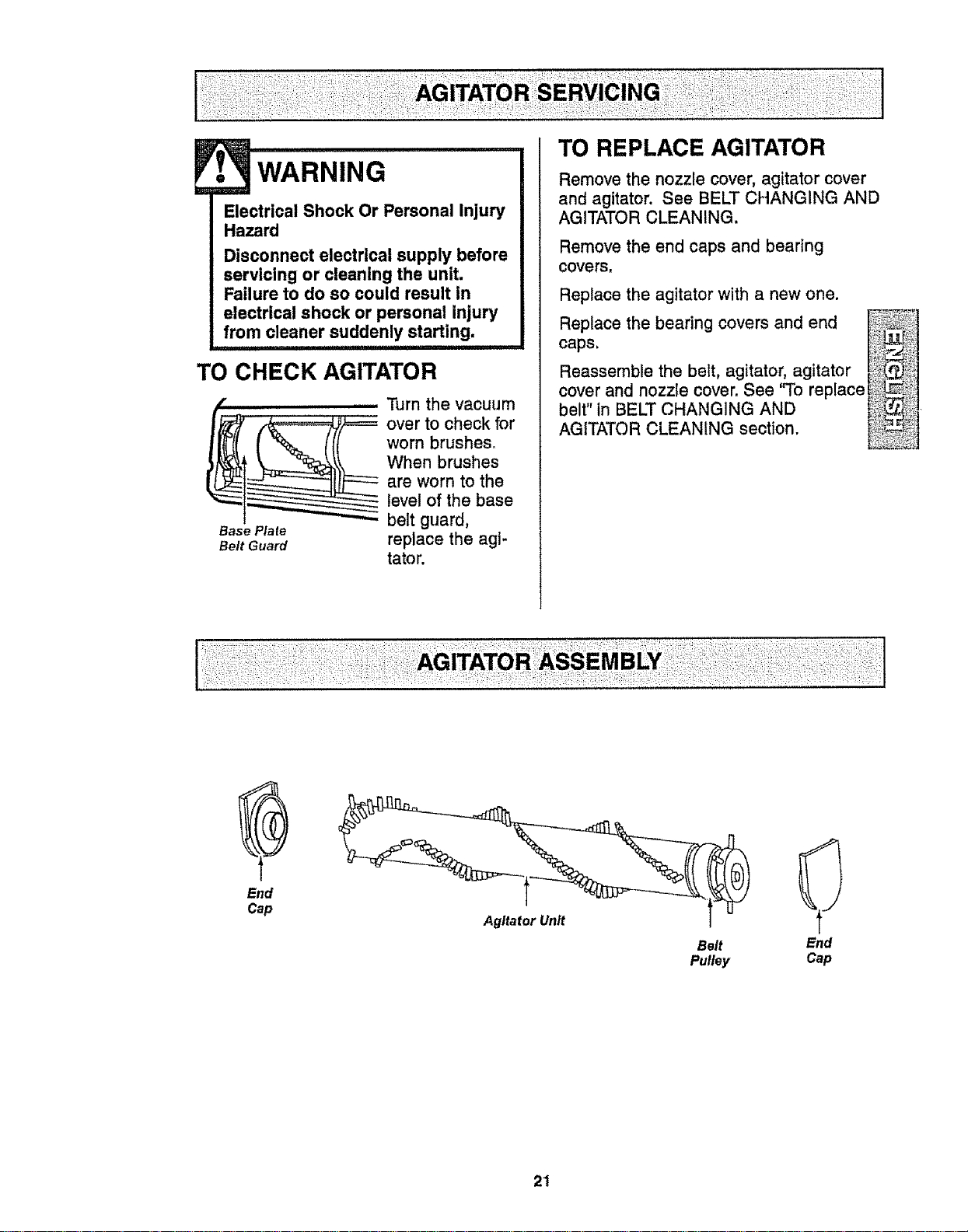
TO CHECK AGITATOR
...............Turn the vacuum
__ ver to check for
worn brushes,
When brushes
are worn to the
level of the base
Base Plate belt guard,
Belt Guard replace the agi-
tator.
TO REPLACE AGITATOR
Remove the nozzle cover, agitator cover
and agitator. See BELT CHANGING AND
AGITATOR CLEANING,
Remove the end caps and bearing
covers,
Replace the agitator with a new one.
Replace the bearing covers and end
caps,
Reassemble the belt, agitator, agitator
cover and nozzle cover, See 'qb replace_ i1
belt" in BELT CHANGING AND _,
AGITATOR CLEANING section. _ _,
End
Cap
Belt
Pulley
End
Cap
21
LESH
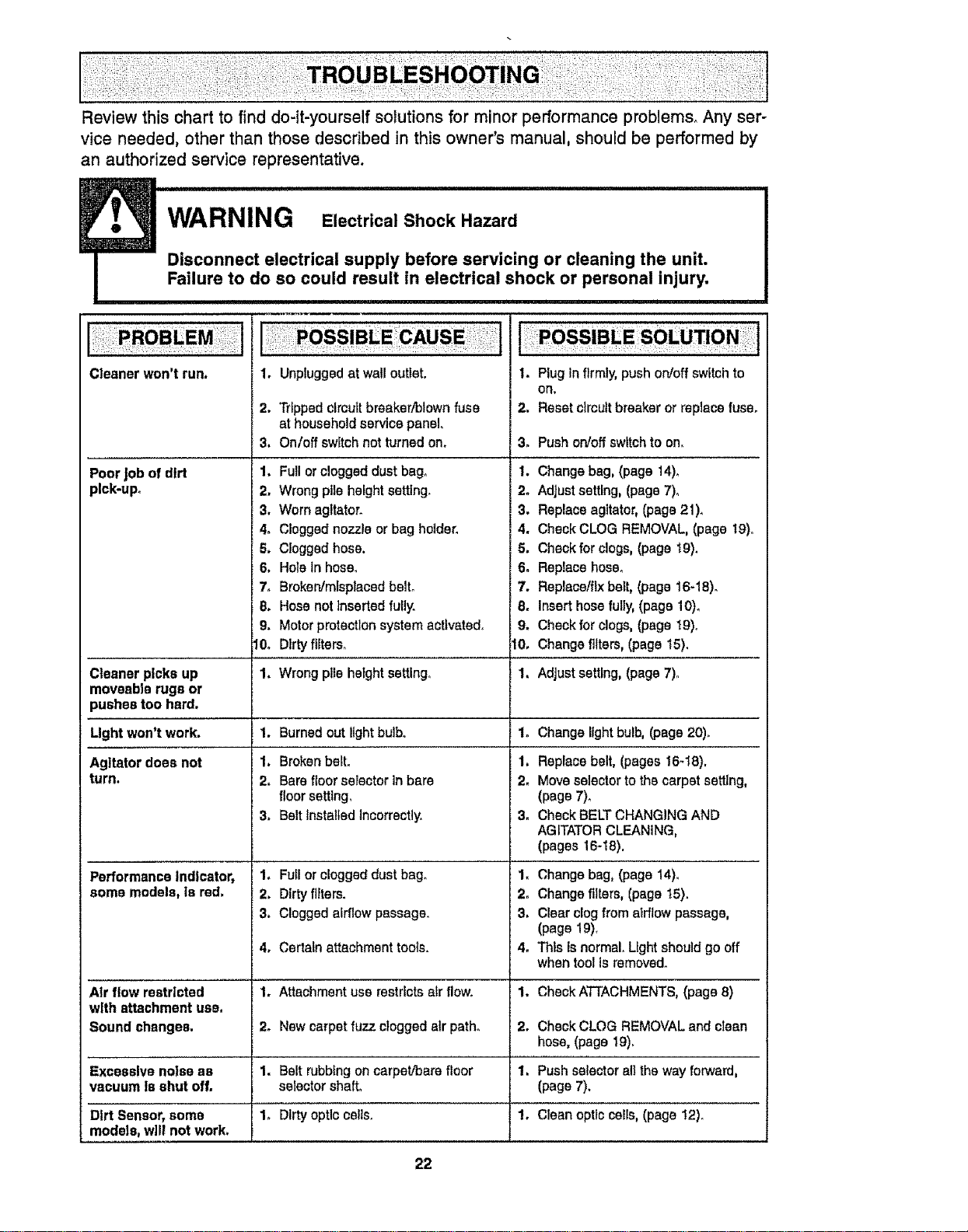
Review this chart to find do-it-yourself solutions for minor performance problems. Any ser-
vice needed, other than those described in this owner's manual, should be performed by
an authorized service representative.
_ _ WARNING ElectricalShockHazard
Disconnect electrical supply before servicing or cleaning the unit.
Failure to do so could result in electrical shock or personal injury.
' I I '
Cleaner won't run.
1. Unpluggedat wall outlet.
2. Tripped clrcutt breaker/blown fuse
at household service panel.
3. Onloff switch not turned on.
Poor job of dirt 1. Full or clogged dustbag°
pick-up. 2. Wrong pt_eheight setting.
3. Worn agltatoro
4. Clogged nozzle or bag holder.
5. Clogged hose.
6. Hole in hose_
Cleaner picks up
moveable rugs or
pushes too hard.
Light won't work.
Agitatordoes not
turn.
PerformanceIndicator,
some models,is red.
Air flow restrlcted
with attachment use.
Sound changes.
Excessive noise as
vacuum is shut off.
Dirt Sensor, some
models, wilt not work.
7_
8.
9.
10,
Broken/mfsplacadbelto 7.
Hosenotinsertedfully. 8,
Motorprotectionsystemactivated, 9.
Dirtyftlterso 10.
1. Plug in firmly, push on/off switch to
Oll,
2. Reset ctrcutt breaker or replace fuse.
3. Push on!off switch to on.
I. Change bag, (page 14).
2. Adjust setting, (page 7).
3. Replace agitator, (page 21).
4. Check CLOG REMOVAL, (page 19).
5. Check for clogs, (page t9).
6. Replace hose.
Replace/fix belt, (page 16-18).
Insert hose fully, (page 10)_
Check forclogs, (page 19).
Change filters,(page 15).
Wrong pile hetght setting° 1.
1. Burned out light bulbo
1. Broken belt.
2. Bare floor selector In bare
floorsetting,
3. Belt Installed incorrectly.
1.
1.
2.
3.
1. Full or clogged dust bag.
2. Dirty filters.
3. Clogged airflow passage.
4o Certatn attachment tools,
1. Attachment use restricts alr flow.
2o New carpet fuzz clogged atr path°
1. Belt rubbtng on carpet/bare floor
selector shaft°
1o [)lrty optic cells.
Adjust setting, (page 7).
Change light bulb, (page 20).
Replace belt, (pages 16_18).
Move selector to the carpet setting,
(page 7).
Check BELT CHANGING AND
AGITATOR CLEANING,
(pages 16-18).
1. Change bag, (page 14).
2. Change filters, (page t5).
3. Clear clog from airflow passage,
(page 19).
4. This is normal° Light should go off
when tool Is removed.
1. CheckA'FTACHMENTS, (page 8)
2. Check CLOG REMOVAL end clean
hose, (page 19),
1. Push selector all the way fon,_ard,
(page 7).
1. Clean optic cells, (page 12).
22
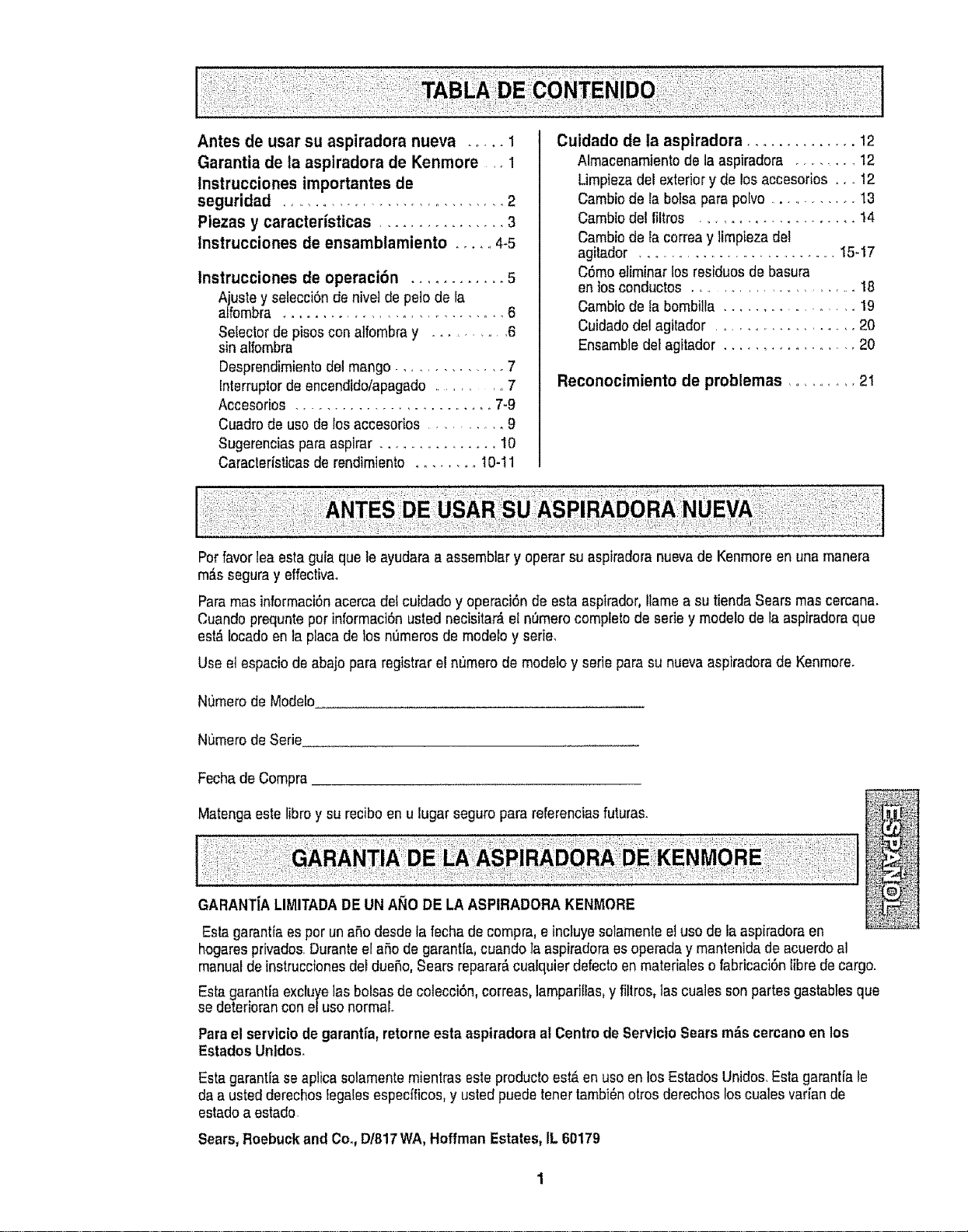
Antes de usar su aspiradora nueva ..... 1
Garantia de la aspiradora de Kenmore ,, 1
Instrucciones importantes de
seguridad ............................. 2
Piezas y caracteristicas ................ 3
tnstrucciones de ensamblamiento ...... 4-5
Instrucciones de operaci6n ............ 5
Ajuste y setecci6nde nivet de pe]o de ra
alfombra ...... ...................... 6
Selector depisoscon atfombray ......... 6
sin alfombra
Desprendimientodel mango ............. 7
Interruptorde encendido/apagado........... 7
Accesorios ......................... 7-9
Cuadrode uso de los accesofios .......... 9
Sugerencias paraaspirar ............... t0
Caraclerfsticasde rendimiento ........ 10-11
Cuidado de la aspiradora .............. 12
Almacenamientode la aspiradora ........ 12
Umpieza del exteriory de los accesorios .... 12
Cambio de la botsa para polvo ........... 13
Cambio del filtros ............. ....... 14
Cambio de la correay limpieza del
agitador ............................ 15-17
C6mo eliminar los rssiduos de basura
en Iosconductos ........................ 18
Cambio de la bombilla ................. 19
Cuidadodel agitador ................... 20
Ensamble detagitador .................. 20
Reconocimiento de problemas ........... 21
Perfavor lea esta guia que le ayudara aassembtar y operar su aspiradora nuevade Kenmoreen una manera
m#,sseguray effectiv&
Para masinformaci6nacerca dotcuidado y operaci6nde esta aspirador, Ilamea su tienda Sears mas cercana.
Cuandoprequntepor informaci6n usted necisitar_ e!nt_merocompletode serie y modelo de la aspiradoraque
est#,lecado en la placade los numeros de modeloy eerie.
Use etespacio de abajo para registrar el n[_merode modeloy sefie para su nuevaaspiradorade Kenmore.
Numero deMode[o
N0mero deSerie
Fecha deCompra
Matenga estelibro y su reciboen u lugar seguro para referenciasfuturas.
GARANTIALIMITADADE UN At_ODE LA ASPIRADORA KENMORE
Esta garantiaes por unaBodesde la fecha de compra,e inc]uyesotamente etuso de la aspiradora en
hogaresprivados.Duranteel aBode garantia, cuando laaspiradoraes operada y mantenidade acuerdoal
manualde instruccionesdel dueSo,Sears reparar&cualquier defectoenmateriales o fabricaci6nfibre decargo.
Esta garantia exduyelas bolsas de colecci6n,correas, lamparillas,y fillros, tas cualessonpartesgastablesque
se deteriorancon eluso normal.
Para el servicio de garantia, retorne esta aspiradora al Centrode Servlcio Searsm_s cercanoen los
Estados Unldos.
Esta garantfaseaplica solamentemientras este producto est_en usoen los Estados Unidos.Esta garantJale
da a usted derechoslegalesespecfficos, y usted puede toner tambi6notrosderechos loscuales varian de
estado aestado.
Sears, Roebuckand Co., D/817WA, Hoffman Estates,IL 60179
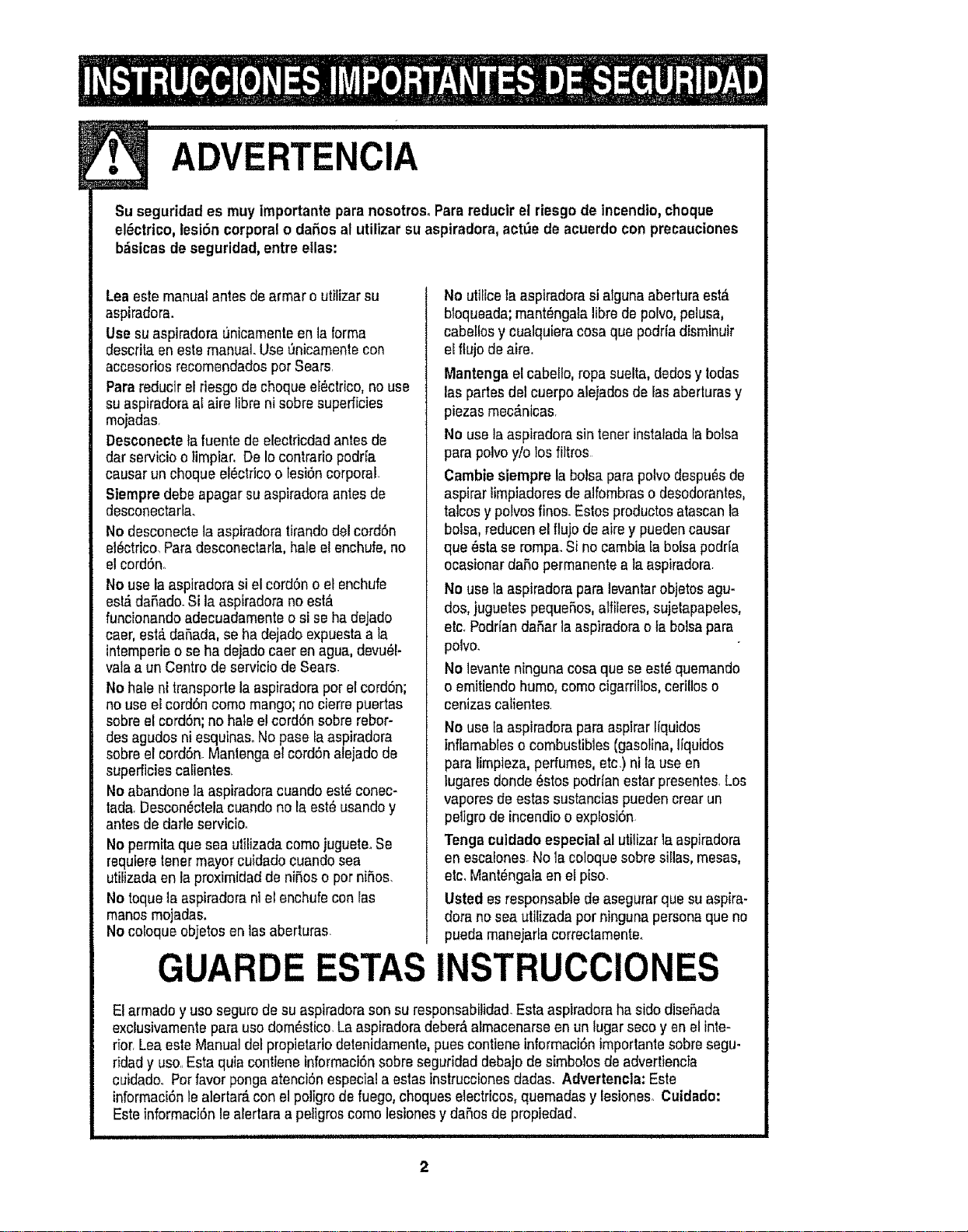
ADVERTENCIA
Su seguridad es muy importantepara nosotrosoParareducir el riesgo de lncendio,choque
el_ctrico,lesiSn corporal o daP,osal utilizar su aspiradora,actt_ede acuerdo con precauciones
bdsicasde seguridad,entre elias:
Leaeste manualantes de armar outifizarsu
aspiradora.
Use su aspiradora unicamenteen la forma
descrita en este manual.Use_nicamente con
accesoriosrecomendadospor Sears.
Para reducir elriesgo de choque ef_ctrico,no use
su aspiradoraal airs libra nisobresuperficies
mojadasr
Desconectela fuente de electricdadantes de
dar ssrvicio o limpiar. De Iocontrario podr[a
causar un choque el6ctricoo lesi6ncorporal.
Siempredebe apagar suaspiradoraantes de
desconectarla.
No desconecte laaspiradoratirando del cord6n
ei_ctrico.Paradesconectarla, hale el enchufe,no
etcord6n,.
No use laaspiradorasi el cordSno el enchufe
est&daSado.Si la aspiradora no est&
funcionando adecuadamente osi se ha dejado
caer, est_ daSada,se ha dejado expuestaa ta
intemperieo se ha dejadocaer en agua,devu_l-
vala a un Centro de serviciode Sears.
No hale nitransports la aspiradorapor el cord6n;
no use elcordSncomo mango; nocierre puertas
sobreel cord6n;no hale el cord6n sobre rebor-
desagudos ni esquinas. Nopaso la aspiradora
sobreel eord6n.Manlenga el cord6n alejadode
superficiescalientes.
No abandons la aspiradoracuando est_ conec-
tada. Descon_ctelacuandono la est_usandoy
antes dedarle eervicio°
No permita quesea ulilizadacomo juguete°Se
requiere tonermayor cuidado cuandosea
utilizada enla proximidad de niSoso pot niSos.
No toquela aspiradora ni elenchufe con las
manos mojadas,
No coloque objetos enlas aberturas.
No utilicela aspiradorasi aiguna abertura est,.
bloqueada;mant_ngala libra depobo, pelusa,
cabetlosy cualquieracosa que podriadisminuir
el flujo deairs,
Mantenga elcabello, ropa suelta, dodosy lodas
las partes del cuerpoalejados de lasaberluras y
plazas mec_nicas
No usela aspiradora sin tenerinstalada la bolsa
para polvoy/o los filtros
Cambie siempre la bolsa parapobo despu_sde
asp!rat limpiadores dealfombraso desodorantes,
tabos y pobos finos. Estosproductos atascanla
bolsa, reducen elflujo de airs y puedencausar
qua _stase rompa.Si no cambiala bolsa podda
ocasionar daSopermanentsa la aspiradora.
No useta aspiradorapara levantarobjetos agu-
dos, juguetespequeSos,alfileres,sujetapapeles,
etc. PodriandaSar laaspiradorao ia bolsapara
polvo.
No levanteninguna cosa que se est,, quemando
o emitiendo humo,como cigarriltos,cerillos o
cenizas calientes.
No usela aspiradorapara aspirar liquidos
inffamableso combustibles(gaeolina,Ifquidos
para timpieza,perfumes, eta,)ntla use en
tugares donde_stos podrlan estar presentes,Los
vapores deestas sustancias puedencrear un
peligro de incendioo explosi6n.
Tonga culdado especialal utilizar la aspiradora
en escalones.No lacoloque sobresiflas, mesas,
etc. Mant_ngala enel piso.
Usted esresponsable deaseg_rar qua suaspira-
dora no seautilizada pot ninguna personaque no
pueda manejadacorrectamente.
GUARDE ESTAS INSTRUCClONES
El armado y uso segurode su aspiradorason su responsabilidad.Esta aspiradora ha sido diseSada
exclusivamentepara uso dom_stico.La aspiradora deber_,almacenarse enun lugar secoyen el inte-
rior,Lea este Manual delpropietariodetenidamente, pusscontiene informaci6n importantesobresegu-
ridad y uso.,Esta quia contiene informaci6nsobre seguridaddebajo de simbolos deadvertiencia
cuidado. Potfavor ponga atenci6nespecial a estasinstruccionesdadas. Advertencla: Este
informaci6nle alertar_,con el poligrode fuego,choques electricos,quemadas y lesiones, Cuidado:
Este informaciSnle alertaraa peligroscomo lesiones y dahesde propiedad_
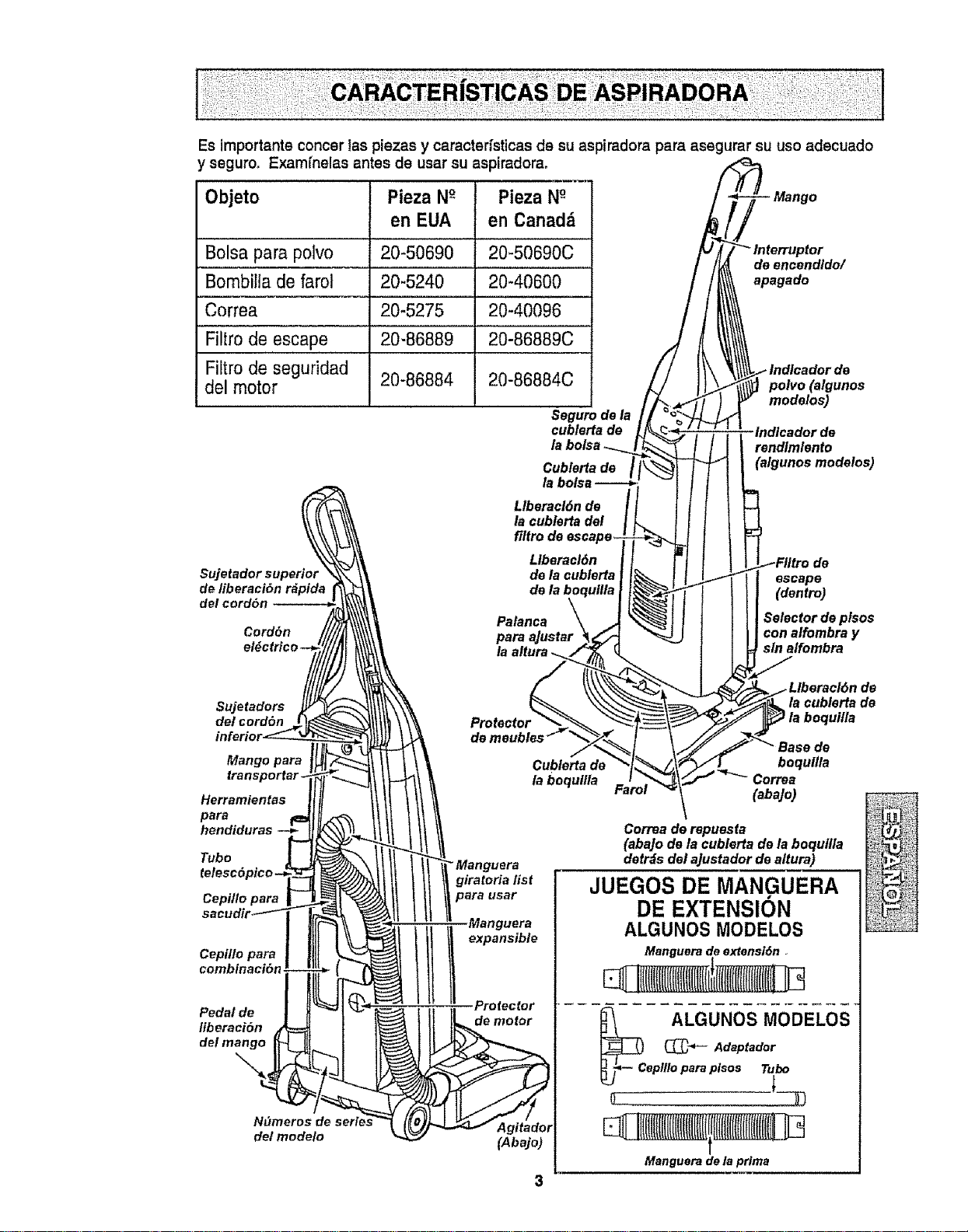
Esimportanteconcer1aspiezasycaracterfsttcasdesuaspiradoraparaasegurarsuuseadecuado
yseguro,Examfnelasantesdeusarsuaspiradora.
Objeto Pieza NO Pieza N°-
en EUA en Canadd
Bolsa para polvo
Bombilla de farol
Correa
Filtro de escape
Filtro de seguridad
del motor
20-50690 20-50690C
20-5240 20-40600
20-5275 20-40096
20-86889 20-86889C
20-86884 20-86884C
Seguro de la
cublerta de
Cublerfa de I
de eneendldo/
apagado
polyp (algunos
modelos)
Indicador de
rendlmlento
(algunos modelos)
Sujetador superior
de liberaci6n r&pida
del cord6n
Cord6n
Llberacl6n de
la cublerta del
filtro de
Llberacl6n
de la cublerta
de
Palanca
para aJustar
la altura ..
escape
(dentro)
Selector de ptsos
con alfombra y
sin alfombra
det cord6n
Mango para
Herramientas
para
hendiduras --_
Tube
Cepi/le para
Manguera
giratoria fist
para usar
sacudir_'_"_ . _ Manguera
combinacibn
Pedal de Profector
liberaei6n
del mango
I
N_meros
det modelo (Abajo)
Cublerta de
la boqullla
de
la cublerta de
la boquilla
de
boqulita
Correa
(aba]o)
Correa de repuesfa
(aba]o de la cublerta de la boqullla
detrds del a]ustador de altura)
JUEGOS DE MANGUERA
DE EXTENSION
ALGUNOS MODELOS
Manguerade extensl6n .
__C AL+GGUNOSMODELOS
Adaptador
epllloparaplsos Tu_
L
Manguerade taprima
ADVERTENCIA
Peligro dechoque el_ctrico
No conecte la aspfradorahasta qua tar-
mine de armada, De Io contrarlo podrfa
causar un choque el_ctrico o lesi6n corpo.
raL
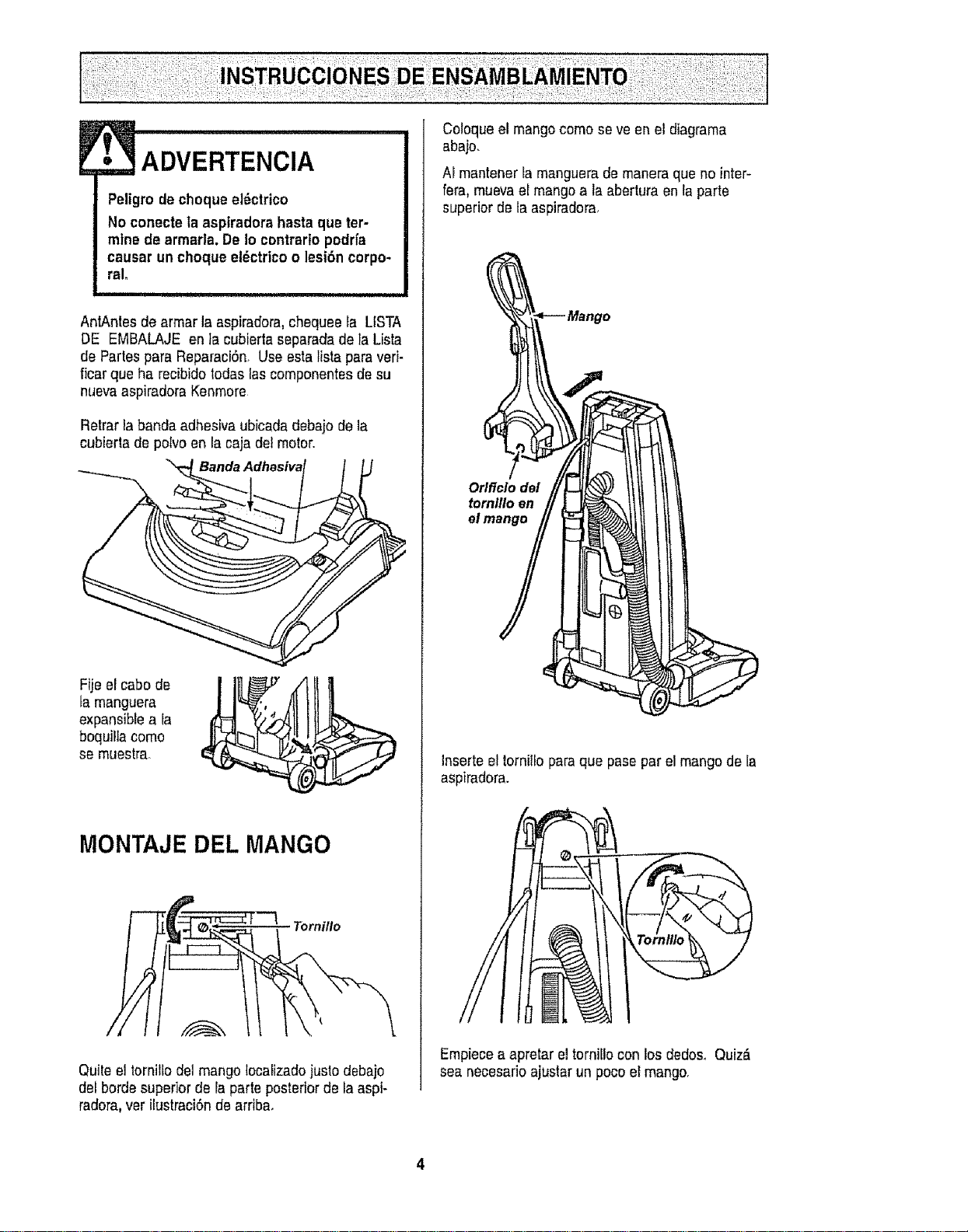
AntAntes de armar la aspiradora,chequee la LtSTA
DE EMBALAJE en ]a cubierta separadade faLista
de Partes para ReparaciSn, Use estaHstapara veri-
ficar qua ha recibido todas lascomponentes desu
nueva aspiradoraKenmore
Retrar labanda adhesiva ubicadadebajo de la
cubierta de porvoen la caja detmotor.
Fije el cabo de
tamanguera
expansibEea la
boquilla como
se muestra.
MONTAJE DEL MANGO
Tornillo
Quile el tornillodel mango localizadojusto debajo
del borde superior de la parte posterior de la aspi-
radora,ver ilustraci6nde arriba.
!
Coloque el mangocomo seve en el diagrama
abaio.
Af mantener fa manguerado maneraqua no inter-
fera, muevael mangoa la abertura en Ia parte
superior de la aspiradora,
Orlflclo del
tornlllo en
Inserte el tornilfo paraqua pase par el mangode la
aspiradora.
Empiecea apretar el torniilo con los dodos° Quiz_
sea necesarioajustar un pocoel mango,
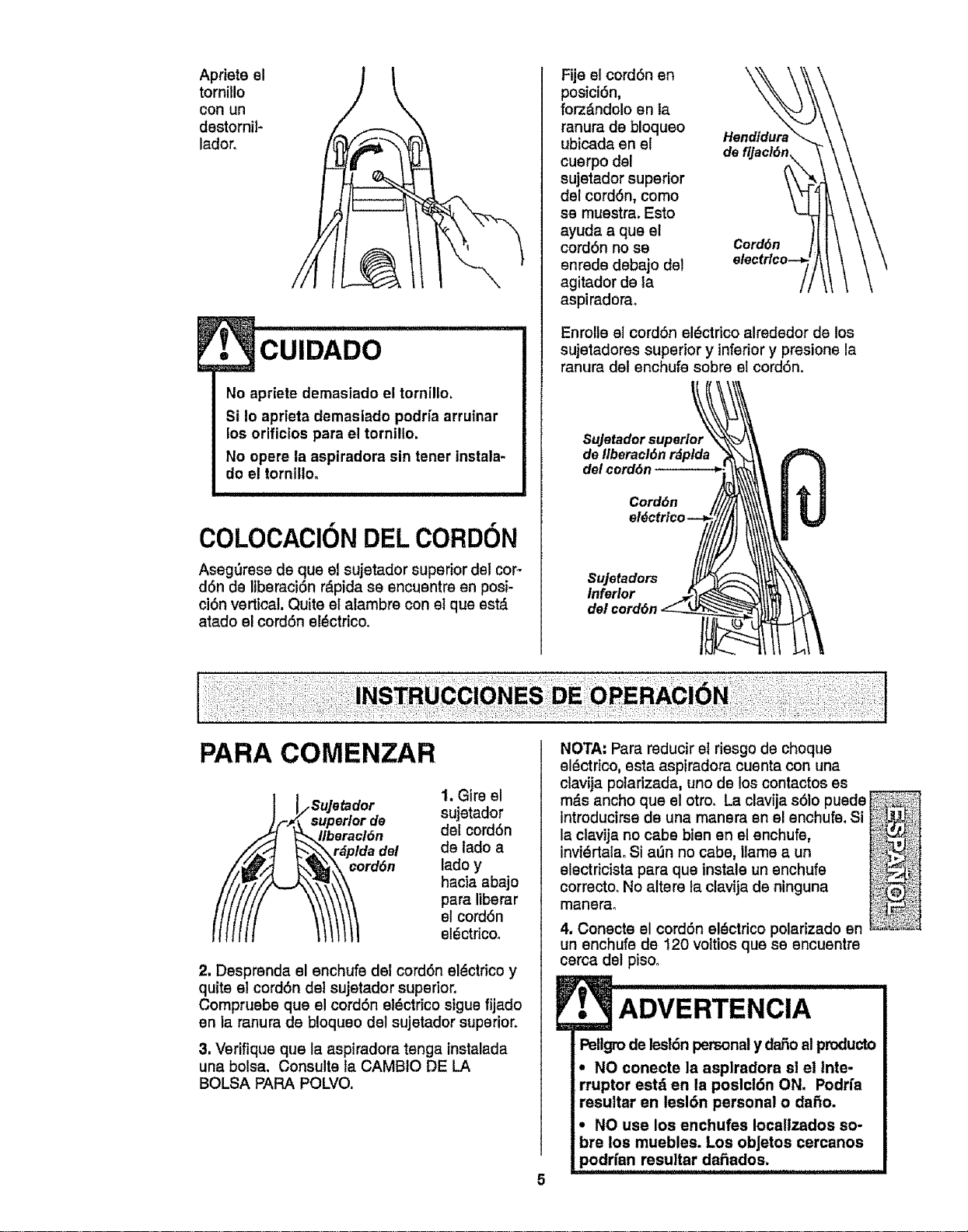
Aprieteel
tornillo
conun
destornil-
lador.
cuIDADO
No apriete demaslado el tornillo,
Si Io aprieta demaslado podria arruinar
los orifictos para el tornillo,
No opere la aspiradora sin tener tnstala-
do el tornilio,
COLOCACION DEL CORDON
Aseg_rese de que el sujetador superior del cor-
don de IlbemciOn r&pida se encuentre en posi-
ciOn vertical. Quite el alambre con et que est_i.
atado el cordon el_ctrico.
Fije el cordon en
posici0n,
forz_ndolo en la
ranura de bisques
ubicada en el
cuerpo del
sujetador superior
del cordon, come
se muestra. Esto
ayuda a que el
cordon no se
enrede debajo del
agitador de la
aspiradorao
Hendidur_
de
Cord6n
Enrolls el cordon el_ctrico alrsdedor de los
sujetadores superior y inferior y presione la
ranura del enchufe sobre el cord6n.
Sujetador superior
de IlberaclOn rdplda
del cord6n
Cord6n
Inferior
PARA COMENZAR
_o Su]etad°r
uperlor de
eraclOn
Ida del
rdOn
1. Glre el
sujetador
del cordon
de lade a
lade y
hacia abajo
para llberar
el cordon
eldctrico.
2. Desprenda el enchufe del cordon eldctrico y
quite el cordon del sujetador superior.
Compruebe que el cordon eldctrico sigue iliads
en la ranura de bisques del sujetador superior.
3. Verifique que la aspiradora tenga instalada
una bolsa. Consulte ta CAMBIO DE LA
BOLSA PARA POLVO.
NOTA: Para reducir et riesgo de cheque
eldctrico, esta aspiradora cuenta con una
clavija polarizada, uno de los contactos es
rods ancho que el otro. La clavija s0to puede
introducirsede una manera en el enchufe, Si
la clavija no cabs bienen el enchufs,
invi_rtalao Si a_n no cabs, llame a un
electricista para que tnstale un enchufe
corrects. No alters la clavija de ninguna
manerao
4. Conecte el cordon eldctrico polarizado en
un enchufe de 120 voltios que se encuentre
cerca del pisoo
ADVERTENCIA
Pellgrode leslOnpersonaly dar3oal products
• NO conecte la asplradora sl el Inte-
rrupter estd en la poslctOn ON. Podrfa
resultar en lesion personal o daOo.
• NO use los enchufes Iocaltzados so-
bre los muebles. Los obJetos cercanos
podrisn resultar decades.
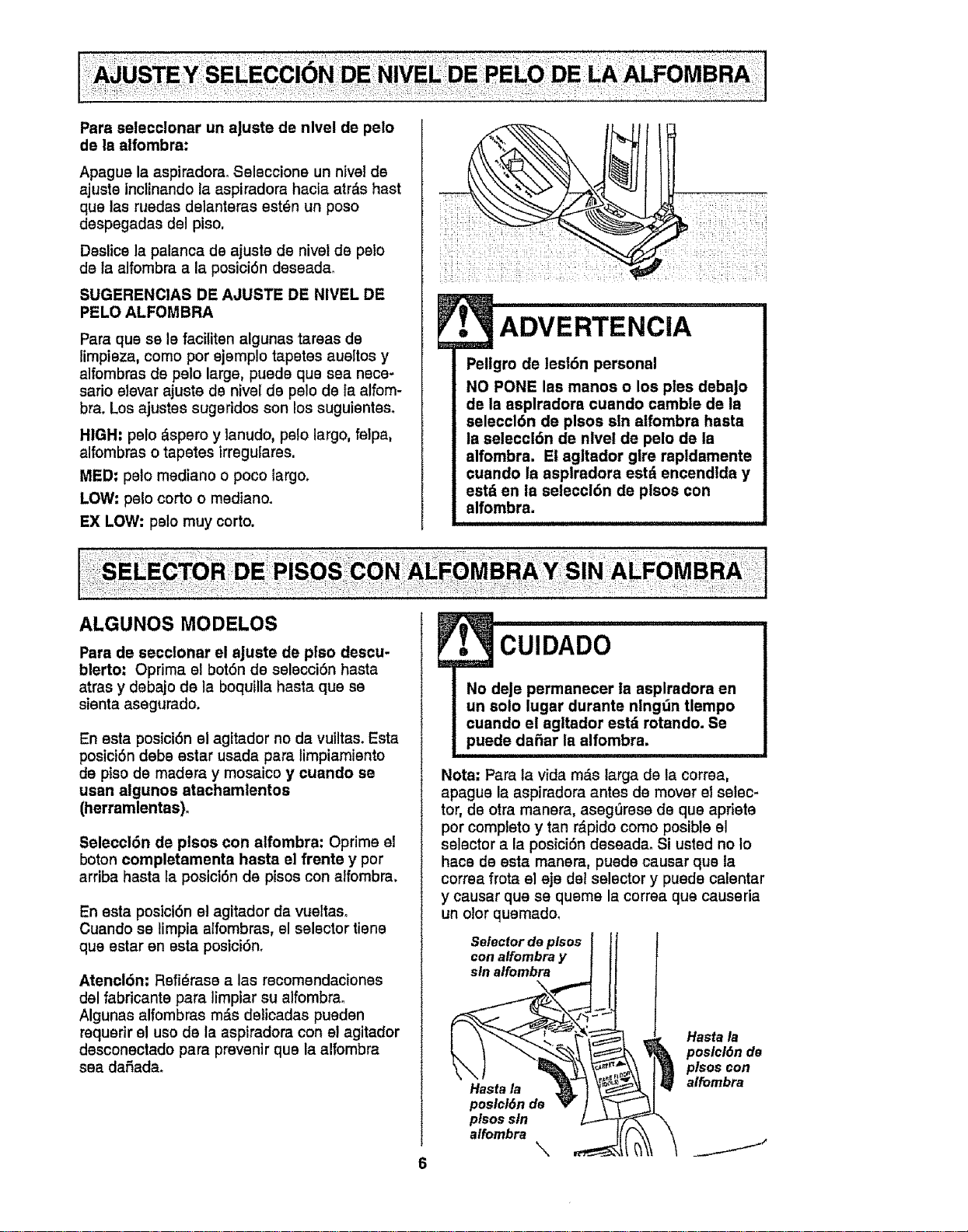
Pars selecclonar un aJuste de nlvel de pelo
de la alfombra:
Apague la aspiradom. Seleccione un nivel de
ajuste inclinando la aspiradora hacia atr_,s hast
que las ruedas delanteras est_n un poso
despegadas del piso.
Deslice la palanca de ajuste de nivel de pelo
de la alfombra a la posici6n deseada.
SUGERENCIAS DE AJUSTE DE NIVEL DE
PELO ALFOMBRA
Para qua sele faciliten algunas tareas de
limpieza, como por ejemplo tapetes aueltos y
alfombras de pelo large, puede qua sea nece-
sario elevar ajuste de nivel de pelo de ta alfom-
bra. Los ajustes sugeridos son los suguientes.
HIGH" pelo _.spero y tanudo, pslo largo, felpa,
alfombras o tapetes irregulares.
MED: pelo mediano o poco largo.
LOW: pelo corto o mediano.
EX LOW: pelo muy corto.
/ _i_.: ;_.__i_i.;_:_i;_'_Ii_:
:_ ::!;;_:;iii;iIi_!i
ADVERTENCiA
Pellgro de lesl6n personal
NO PONE las manos o los pies debaJo
de Is asplradora cuando camble de la
seleccl6n de plsos sin a|fombra hasta
la seleccl6n de nlvel de pelo de la
alfombra. El agltador gtre rapldamente
cuando ia asplradora estd encendlda y
estd en ia seleccl6n de plsos con
alfombra.
Para de secclonar el aJuste de ptso descu-
blerto: Oprima el bot6n de selecci6n hasta
atras y debajo de la boquilla hasta qua se
sienta asegurado.
En esta posici6n el agitador no da vuiltas. Esta
posici6n debe estar usada pars limpiamiento
de piso de madam y mosaico y cuando se
usan aigunos atachamlentos
(herramlentas).
Saleccl6n de plsos con alfombra: Oprima el
boton completamenta hasta el frente y por
arriba hasta la posici6n de pisos con alfombra,
En esta posici6n et agitador da vueltaso
Cuando se limpia alfombras, el selector tiene
qua estar en esta posici6n.
Atencl6n: Refi6mse alas recomendaciones
del fabricante para limpiar su alfombra.
Algunae alfombras m&s deticadas pueden
requerir el uso de la aspiradora con el agitador
desconectado para preventr qua la alfombra
sea dafiada_
CUlDADO
No deJe permanecer ia asplradora en
un solo lugar durante nlng_n tlempo
cuando el agitador est_ rotando. Se
puede dafiar la alfombra.
Nota: Pars fa vida m_.slarga de la correa,
apague la aspiradora antes de mover el selec-
tor, de otra manera, aseg0rese de qua apriete
por completo y tan r_pido como posible el
selector a la posici6n deseada° Si usted no Io
hace de esta manera, puede causar qua la
correa frota el eje det selector y pueda calentar
y causar qua se queme la correa qua causeria
un olor quemado.
Selector de plsos
con alfombra y
sin alfombra
Hastala
poslcl6nde
plsossin
alfombra
\
Hasta la
poslcl6n de
plsos con
alfombra
j J"
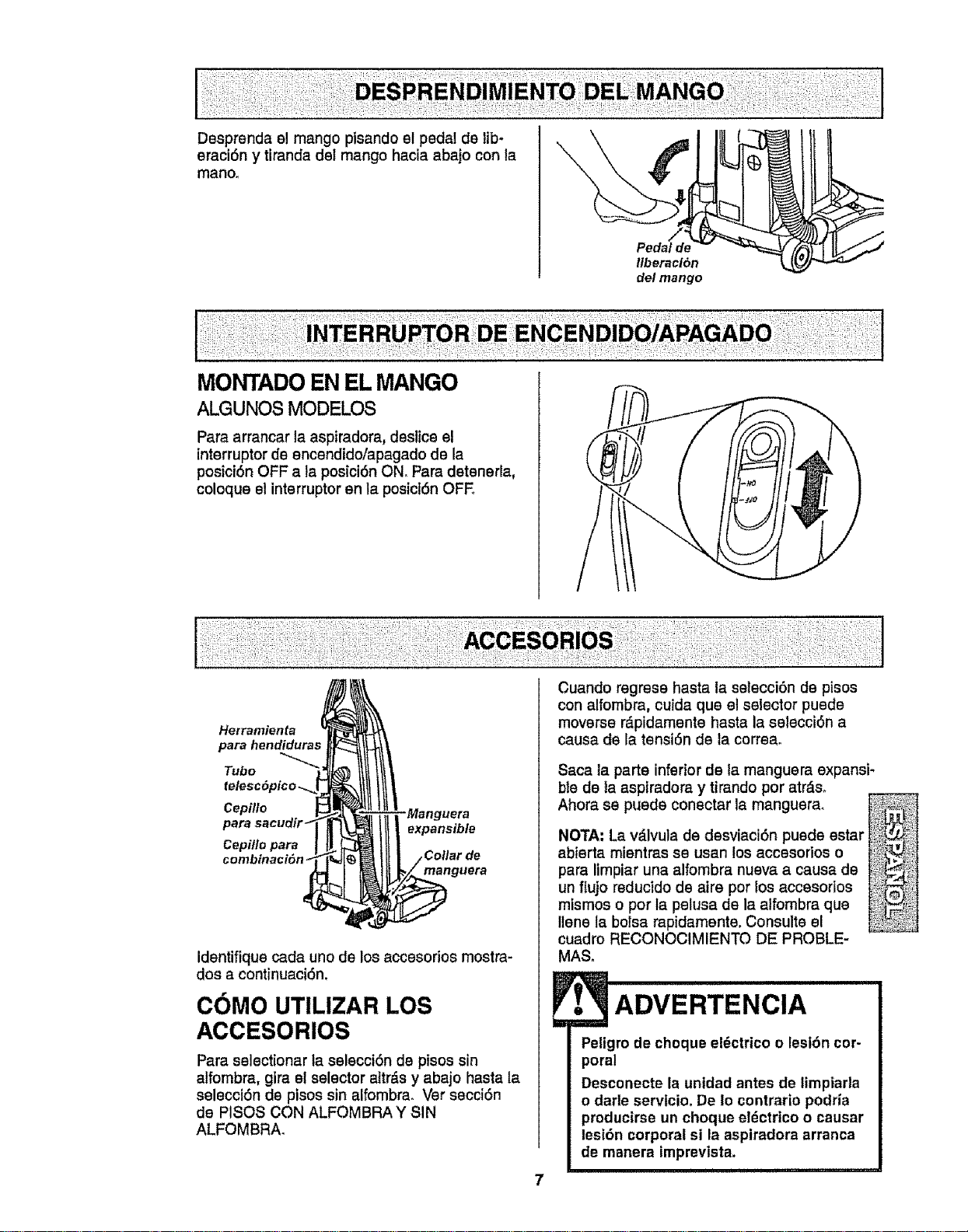
Dssprenda el mango pisando el pedal de lib-
eraci6n y tiranda del mango hacia abajo con la
mano.
Pedal de
liberaei6n
del mango
MONTADO EN EL MANGO
ALGUNOS MODELOS
Para arrancar la aspiradora, dsstice el
interruptor de encendido/apagado de la
posiciSn OFF a la posici6n ON. Para detenerla,
coloque el interruptor en la posicI6n OFE
Herramienfa
para hendiduras
Tubo
Cepfllo -Manguera
para expansible
Cepiflo para
;ollar de
manguera
Idsntifique cada uno de los accesorios mostra-
dos a continuaci6n,
COMO UTILIZAR LOS
ACCESORIOS
Para selectionar la selecci6n de pisos sin
alfombra, gira el selector altr_,sy abajo hasta la
seleccidn de pisos sin alfombra. Vet secci6n
de PISOS CON ALFOMBRA Y SIN
ALFOMBRA.
Cuando regress hasta la selecci6n de pisos
con alfombra, cuida que el selector puede
moverse rdpidamente hasta la selscci6n a
causa de la tensi6n de la correa.
Saca la parts inferior de ta manguera expansi-
ble de la aspiradora y tirando por atrds.
Ahora ss puede conectar la manguera.
NOTA: La vdlvula de desviaciSn puede estar
abierta mientras se usan los accesodos o
para limpiar una alfombra nueva a causa de
un fIujo reducido de airs pot los accssorlos
mismos o por la pelusa de la alfombra que
Ilene la bolsa rapidamente. Consults el
cuadro RECONOCIMIENTO DE PROBLE-
MAS.
ADVERTENCIA
Peligro de choque el_ctrico o lesi6n cor-
poral
Desconecte la unidad antes de limpiarla
o darle servtcio. De Io contrario podHa
producirse un choque et_ctrtco o causar
lesi6n corporal si la aspiradora arranca
de manera imprevista.
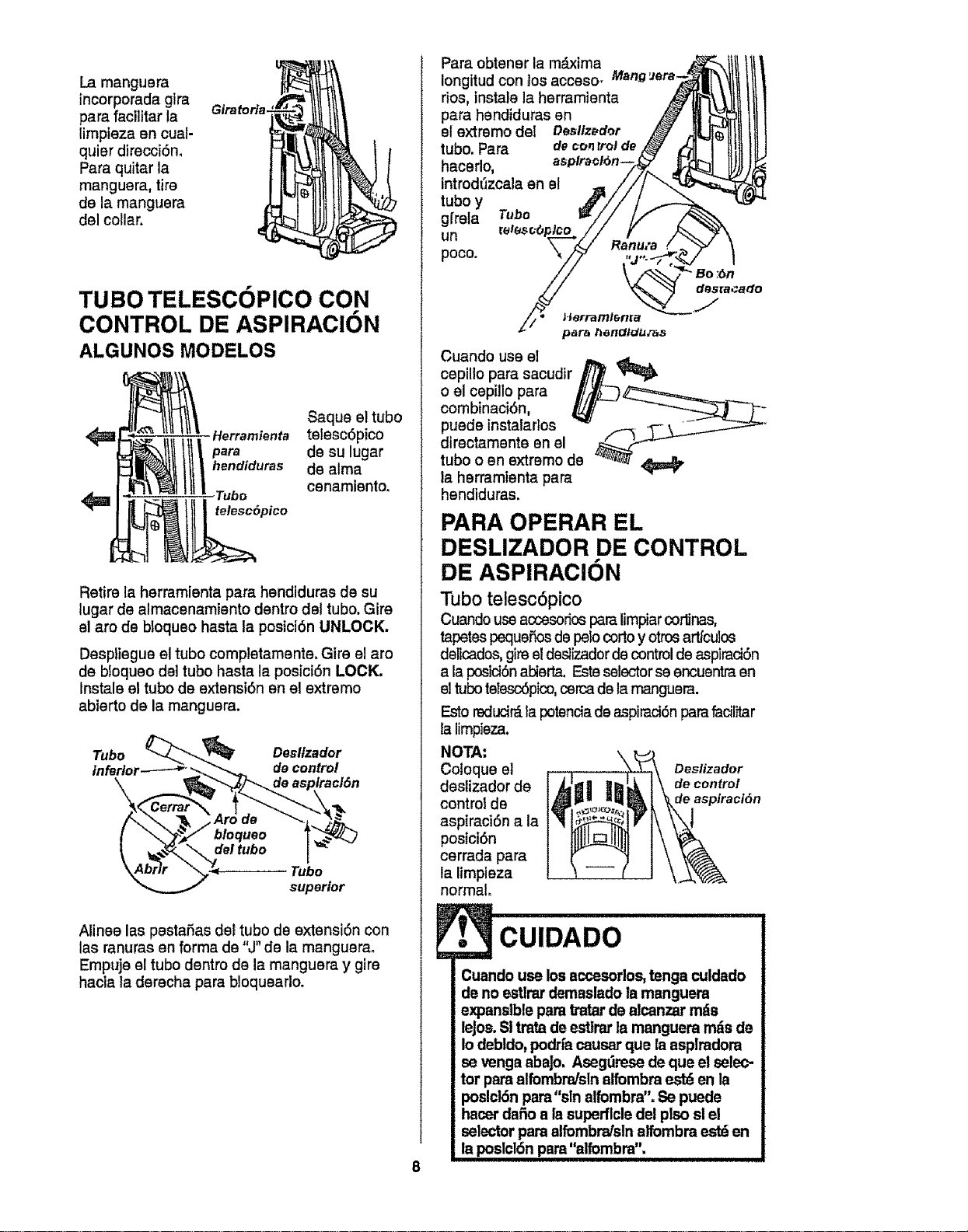
La mangusra
incorporada gira
pars facilitar la
limpieza en cuat-
quisr dirscci6n.
Pars quitar la
manguera, tire
de la manguera
dsl collar.
Giratoria.
TUBO TELESCOPICO CON
CONTROL DE ASPIRACION
ALGUNOS MODELOS
Saqus el tubo
Herramienta tetesc6pico
hendiduras de alma
Tubo csnamisnto.
telesc6pico
Retire la herramienta pars hendiduras de su
lugar de almacsnamtento dentro dsl tubo. Gire
el aro ds bloqueo hasta la posici6n UNLOCK,
Despliegue el tubo completamsnte. Girs el aro
de bloqueo dsl tubo hasta la posici6n LOCK.
Instals el tubo de extensi6n en el extrsms
abierto de la manguera.
Tubo Desltzador
InfeHo_ decontrol
\
Tubo
superior
Alines las pestafias dsl tubo de extensi6n con
las ranuras en forms de "J" de la manguerao
Empujs el tubo dentro de la manguera y gire
hacia la dsrecha para bloquearlo.
Pars obtener la m_ixima
Iongitud con _osacceso_ Mang'Jera-
dos, instals la herramienta
pars hsndiduras en
el extremo del Desllz_dor
tubo. Pars d_conrrolde
hacerlo,
introd_zcala en el
tubo y
gfrela Tube
un
poco.
Cuando uss el
cspillo para sacudir
o el cepillo pars
combinaci6n,
puede instalarlos
directamente en el
tubo o en extremo de
la hsrramisnta pars
hendiduras.
PARA OPERAR EL
DESLIZADOR DE CONTROL
DE ASPIRACION
Tubo telesc6pico
Cuando use aosesoriosparalimpiarcortinas,
tapetss pequefios de pelocorto y otros artfculos
delicados, gire eldestizadorde controlde aspiraciOn
a la posiciOnabierta. Esteselector seencuentra en
el tuboteles_ptco, cercade la manguera.
Esto redud_ la potenciade aspirad6n para fadlitar
la limpisza.
NOTA: \
Co]oque e] Deslizador
dsslizador de decontrol
control de deaspiraci6n
aspiraci6n a la
posici6n
cerrada pars
la limpieza
normal.
oo
Cuando use los accesorlos,tenga c_Jldado
de no estlrardemaslado la manguera
expansible para tratar ds alcanzar rods
leJss.SItrata de estlrarla manguera m_s ds
Io debldo, podffa causar que la asplradora
se venga abajo. Asegdrese de que el selec-
tor parealfombndsln alfombra est_ en la
poslclSnpara"sln alfombra". Se pueds
hscer dafio a la superflcledel plso sl el
selector pars alfombrafslnalfombra estden
la poslcldn pam"alfombra".
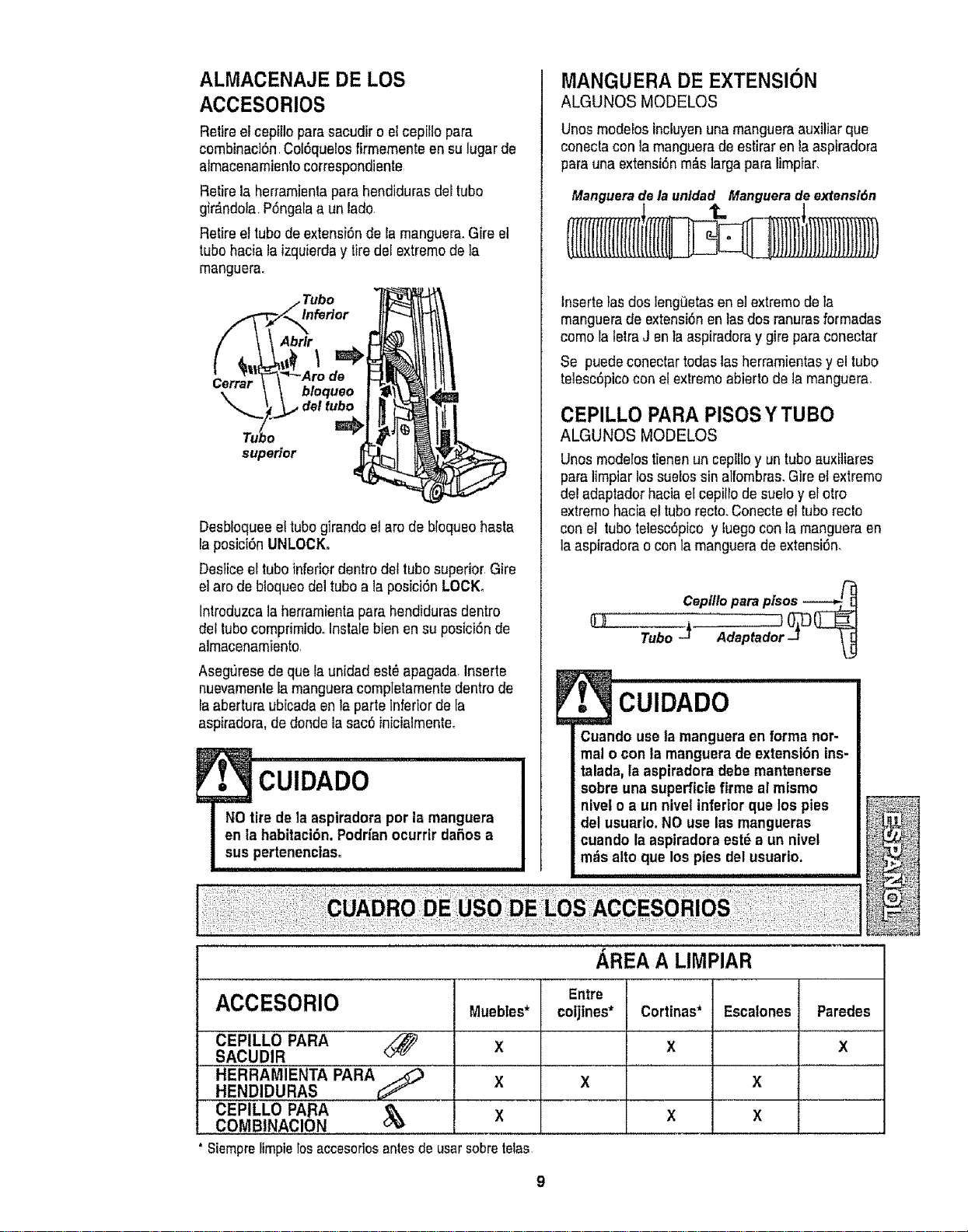
ALMACENAJE DE LOS
ACCESORIOS
Retire eleepillo parasacudir o elcepil!opare
combinaci6n.Cot6quelosfirmemente en sulugar de
almacenamientocorrespondiente
Retire la herramientapara hendidurasdel tubo
glr_ndola P6ngafaa un lado
Retire eltubode extensi6nde la manguera.Gire el
tubohaciala izquierday tiredefextremode la
manguera.
Inferior
Abrlr
Cerrar
bloqueo
,del tubo
superior
Desbloqueeeltubogirando el arc de bloqueohasta
la posici6nUNLOCK.
Desticeel tubo inferiordentrodel tubosuperior.Gire
el are debtoqueodel tubo ala posici6n LOCK°
Introduzcala herramientapara hendidurasdentro
det tubocomprimidooInstalebien en su posici6n de
almacenamiento
AsegtJresede quela unidad est_apagada.Inserte
nuevamenlela mangueracompletamentedentro de
la aberturaubicadaen taparte inferiorde la
aspiradora, dedonde la sac6inicialmente.
MANGUERA DE EXTENSION
ALGUNOS MODELOS
Unos modelosincluyenuna mangueraauxiliar que
conectacon la manguerade estirar en laaspiradora
para una extensi6nm_s largapara limpiar.
Manguerade launldad Manguerade extensl6n
i t. 1
Inserte lasdos leng_etasen e]extremode ta
manguerade extensi6nen las dos ranurasformadas
como laletraJ en la aspiradoray gire paraconectar
Se puedeconectar todas lasherramientasy el tubo
telesc6picoconel extremoabierto de la manguera.
CEPILLO PARA PISOSYTUBO
ALGUNOS MODELOS
Unos modelostienenun cepilloy un tubo auxiliares
pare limpiarlos suelos sinalfombras.Gire el extreme
del adaptadorhacia el cepillode sueloy el otro
extremehaciael tuborecto.Conecteel tubo recto
conel tubotelesc6pico y luego conta mangueraen
la aspiradorao con lamanguerade extensi6n.
Ceptllopareplsos ------___
Tubo -J Adaptador-J __
CUIDADO
Cuando usela manguera en forma nor-
mal o con la manguera de extensi6n ins-
talada,la aspiradora debe mantenerse
sobre una superficiefirme al mismo
nivel o a un nivel inferiorque los pies
del usuario. NO use las mangueras
cuando la aspiradora est_ a un nivet
mdsalto que los pies del usuario.
AREA A LIMPIAR
I
ACCESORIO
CEPILLO PARA <_
SACUDIR
HERRAMIENTA PARA_
HENDIDURAS
CEPILLO PARA
COMBINACION
Siemprelimpielosaccesofiosantesde usarsobretelas
Muebles*
X
X
X
Entre
coljtnes*
X
Cortinas*
X
X
Escalones
X
X
Paredes
X
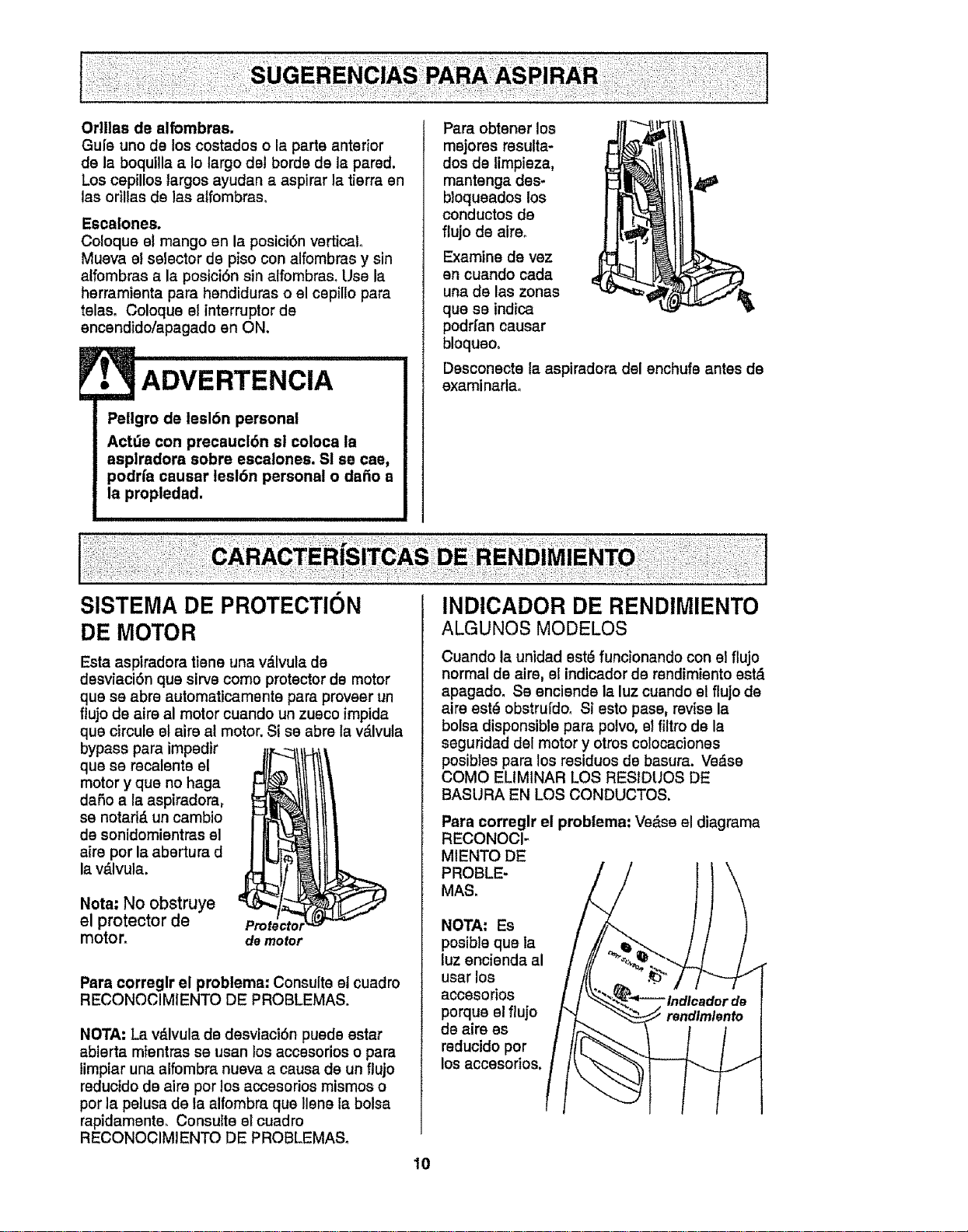
Orlilas de alfombras,
Gule uno de los costados o la parts anterior
de la boquilla a Io largo del bords de la pared.
Los cepillos largos ayudan a aspirer la tierra en
las odltas de las alfombras,
Escalones.
Coloque st mango an la postci6n vertical
Mueva el selector de piso con alfombras y sin
alfombras a la posici6n sin alfombras_ Use la
herramienta pare hendiduras o el cepillo para
telas. Coloque el intarruptor de
encendido/apagado en ON.
Pellgro de lesl6n personal
Actde con precaucl6n sl coloca la
asplrsdora sobre escalones. SI se cae,
podrfa causer lesl6n personal o dafio a
la propledad,
Pars obtener los
mejorss resulta-
dos de limpieza,
mantenga des*
bloqueados los
conductos de
flujo de airs.
Examine de vez
an cuando cada
una de las zonas
que se indica
podri'an causar
bloqueo.
Dssconecte la aspiradora del enchufe antes de
exami nadao
SISTEMA DE PROTECTION
DE MOTOR
Esta aspiradora tiene una v_.lvula de
dssviacidn qua sirvs como protector de motor
qua sa abre automaticamente para proveer un
ftujo de airs al motor cuanclo un zueco impida
qua circule el airs al motor. Si se abre la v&lvula
bypass para impsdir
qua se recalente el
motor y qua no haga
dafio a la aspiradora,
se notad_, un cambio
de sonidomisntras el
airs por la abertura d
la v_lvula.
Nota: No obstruye
el protector de
motor.
de motor
Psra correglr el problema: Consults el cuadro
RECONOCIMIENTO DE PROBLEMAS,
NOTA: La v_lvula de desviacidn pueds estar
abierta mientras se usan los accessrios o para
limpiar una alfombra nueva a causa de un ftujo
reductdo de airs por los accesorios mismos o
por la pelusa de la alfombra qua liens la bolsa
rapidamente_ Consutte el cuadro
RECONOCIMIENTO DE PROBLEMASo
INDICADOR DE RENDIMIENTO
ALGUNOS MODELOS
Cuando la unidad est6 funcionando con el flujo
normal de airs, el indicadorde rendimiento est,.
apagado. Ss enciende la luz cuando et flujo de
airs est_ obstruldo, Si esto pase, revise la
bolsa disponsible para polvo, el filtro de la
seguridad del motor y otros colocaciones
posibles pars los residuos de basura. Ve_.se
COMO ELIMtNAR LOS RESIDUOS DE
BASURA EN LOS CONDUCTOS,
Pars correglr el problema: Verse el diagrams
RECONOCI=
MIENTO DE
PROBLE-
MAS,
NOTA: Es
posibJeque la
luzencisndaal
usar los
acceso dos
porque el flujo
de airs es
rsducido por
los accesorios.
10
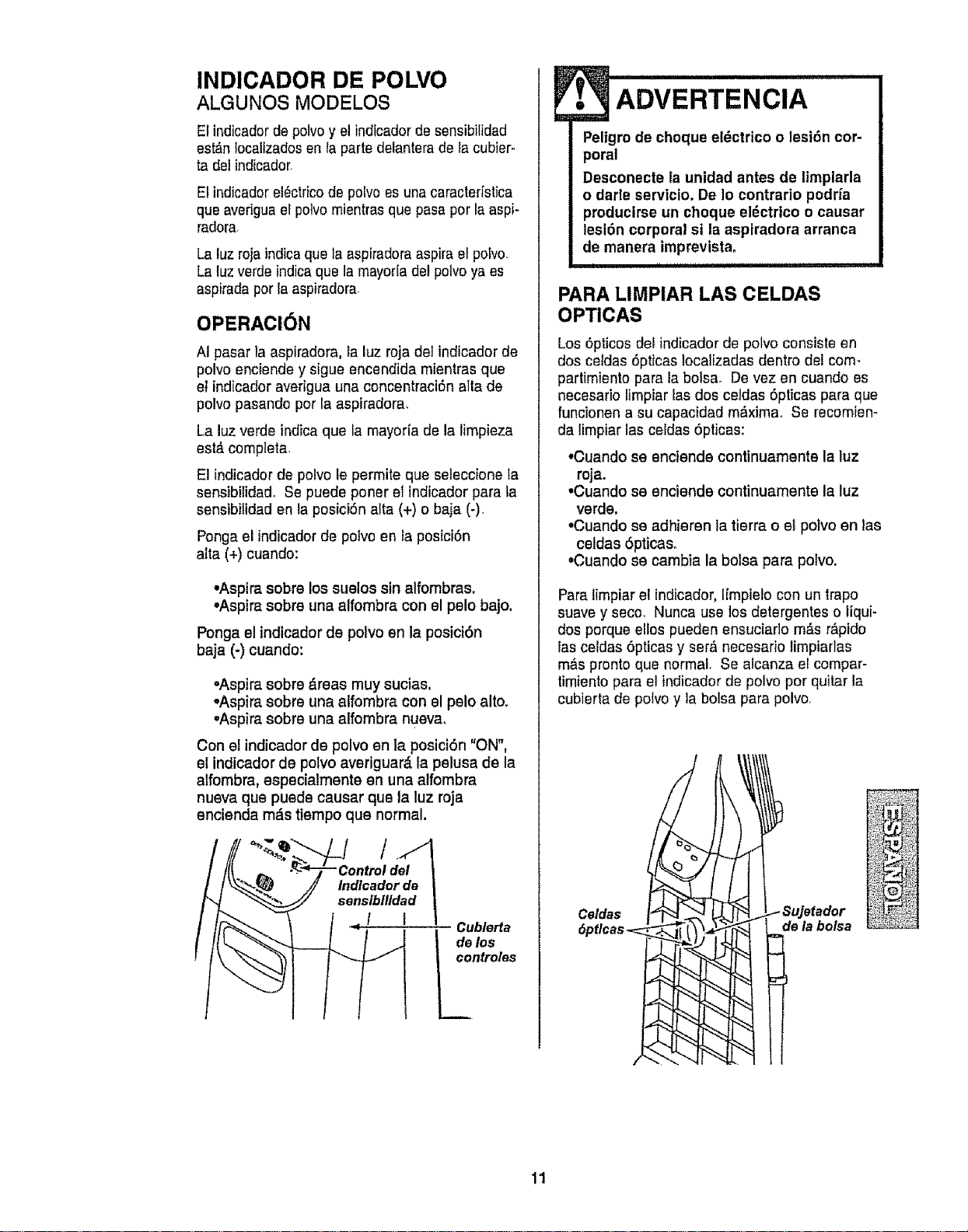
INDICADOR DE POLVO
ALGUNOS MODELOS
El indicadorde polvoy el indicadorde sensibilidad
est_n tocalizadosen la parts delanterade la cubier-
ta del indicador,
El indicadorel_ctricode polvo es unacaracterfstica
qua averiguael potvomientrasque pasaper la aspi-
radora
La luz roja indicaque la aspiradora aspira el potvo,
La luzverde indica que la mayorla det polvoya es
aspirada porla aspiradora
OPERACI6N
AI pasar la aspiradora, la luz roja del indicadorde
polvo enciende y sigue encendida mientras que
el indicador averigua una concentraciSn alia de
polvo pasando por la aspiradora,
La luz verde indica que la mayoria de la limpieza
est_ compteta
El indicador de polvo le permite que seteccione la
sensibilidado Se puede poner el indicador para ta
sensibilidad en ta posici6n alta (+) o baja (-)
Ponga el indicadorde polvo en la posici6n
alia (+) cuando:
•Aspira sobre los suelos sin alfombras,
•Aspira sobre una alfombra con el pelo bajo,
Ponga el indicador de potvo en la posiciOn
baja (-) cuando:
•Aspira sobre &reas muy sucias.
oAspira sobre una atfombra con el pelo alto,
oAspira sobre una alfombra nueva,
Con el indicador de polvo en la posici6n "ON",
el indicador de polvo averiguar_ la pelusa de la
alfombra, especialmente en una alfombra
nueva que pueds causar que ta luz roja
encienda mds tiempo que normal.
Indlcadorde I
sens/lbllld_! Cublerta
t deln°t_les
?_
• ADVERTENcIA
Peltgro de choque eldctrico o lesidn cor-
poral
Desconecte la unidad antes de limplarla
o darle servicio. De Io contrario podrfa
producirse un choque el_ctrico o causar
lesi6n corporal si la aspiradora arranca
de manera imprevlsta.
PARA LIMPIAR LAS CELDAS
OPTICAS
Los 6pticos del indicadorde polvo consists en
dos celdas 6pticas localizadas dentro del com-
partimiento para la bolsao De vez en cuando es
necesario limpiar las dos cetdas 6pticas para que
funcionen a su capacidad m_,ximao Se recomien-
da limpiar las celdas 6pticas:
•Cuando se enciende continuamente la luz
roja.
•Cuando se enciende continuamente la luz
verde.
•Cuando se adhieren la tierra o el polvo en las
celdas 6pticas_
•Cuando se cambla la bolsa para polvo.
ParaIimpiar e! indicador,Ifmpielo con un trapo
suave y seco, Nunca use los detergentes o tiqui-
dos porque silos pueden ensuciar]o m_s r&pido
las celdas 6pticas y ser& necesario limpiarlas
m_,spronto qua normal, Se alcanza el compar-
timiento para el indicadorde polvo por quitar la
cubierta de polvoy la bolsa para polvo,
Celdas
6ptlcas ;_i (__,=
SuJetador
de la bolsa
11
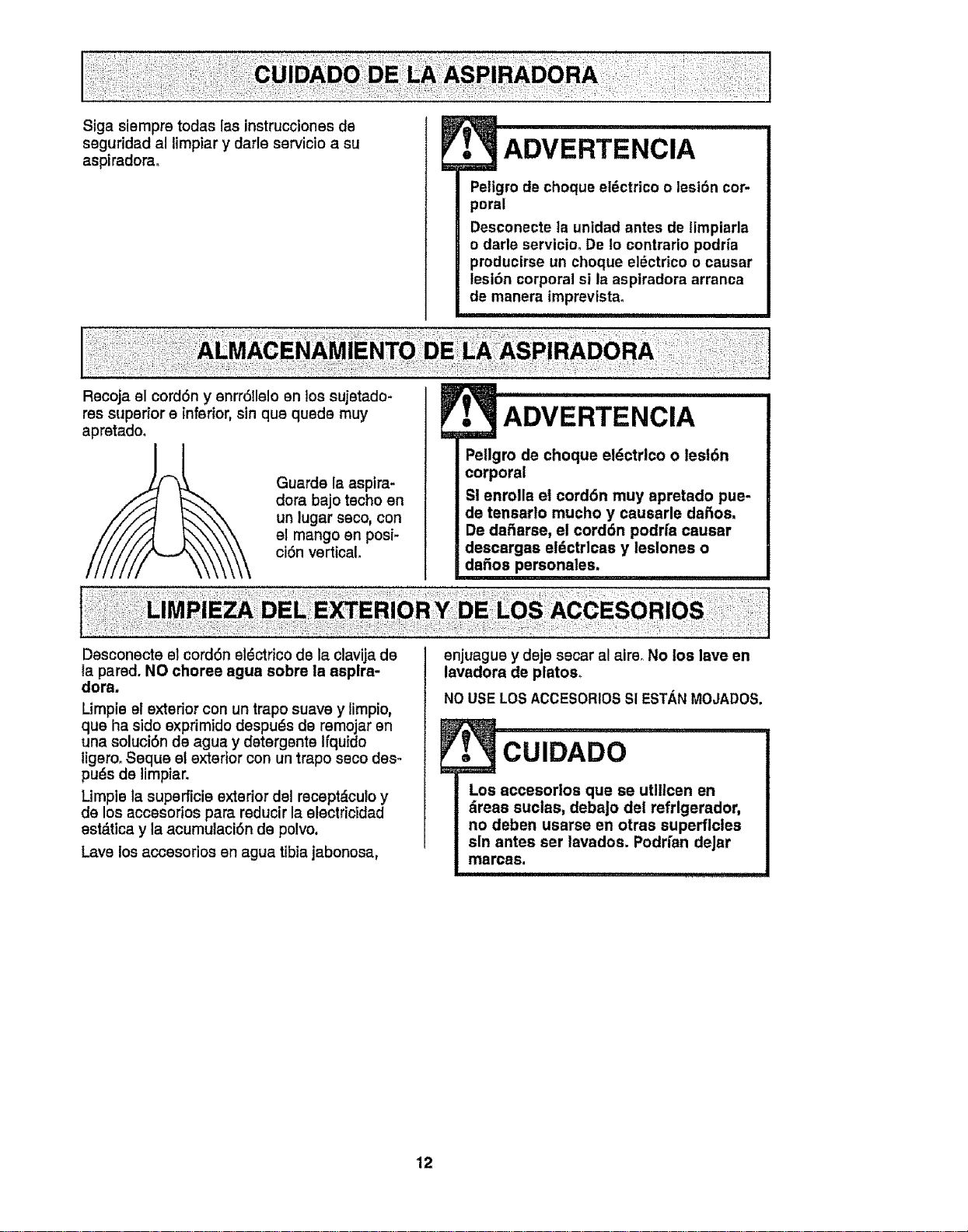
Siga siempre todas las instrucciones de
seguridad al limpiar y darle servicio a su
aspiradorao
Recoja el cord6n y enrr611eloen los sujetado-
ADVERTENClA
Peligro de cheque el_ctrico o lesi6n cor-
poral
Desconecte la unidad antes de timpiarla
o darle servicio, De Io contrario podrfa
producirse un cheque eldctrico o causar
lesi6n corporal sl la aspiradora arranca
de manera imprevista,
res superior e inferior, sin qua quede muy
apretado.
I
Guards la asptra-
dora bajo techo on
un lugar saco, con
el mango en posi-
ciOn vertical,
ADVERTENCIA
Pellgro de cheque eldctrlco o lesl6n
corporal
Si enrolla et cord6n muy apretado pus-
de tensarlo mucho y causarle dafios,
De dafiarse, el corddn podrfa causar
descargas el_ctrlcas y leslones o
dafios personales.
Desconecte el cord6n el_ctrico de la clavija de
la pared. NO choree agua sobre la asplra-
dora.
Limpie el exterior con un trapo suave y limpio,
qua ha side exprimido despuds de remojar on
una soluci6n de agua y detergents Ifquido
ligero. Seque el exterior con un trapo seco des-
puds de limpiar.
Limple la superficie exterior dsl recept_culo y
de los accesorios para reducir la electricidad
est_tica y la acumulaci6n de polvo.
Lava los accesorios en agua tibia jabonosa,
enjuague y deje secar al airs, No los lave en
lavadora de plates,
NOUSE LOSACCESORIOSSI ESTANMOJADOS,
. CUIDADO
Los accesortos qua se utlllcen en
_reas suclas, debajo del refrlgerador,
no deben usarse en otras superficies
sin antes ser lavados. Podrfan deJar
marcas.
................ i ..........
12
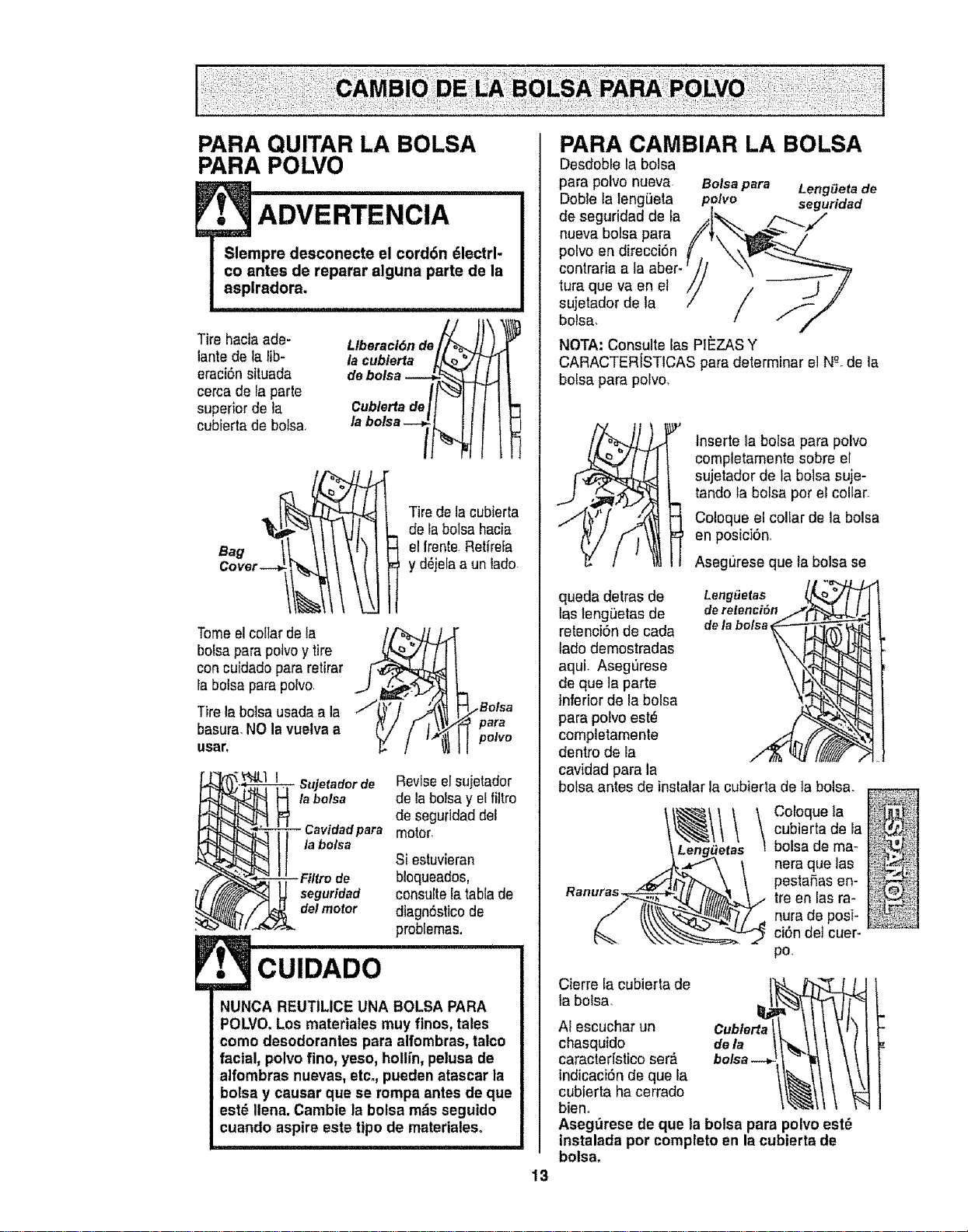
PARA QUITAR LA BOLSA
PARA POLVO
ADVERTENCIA
Tire haciaade-
lantede la lib-
eraci6nsituada
cerca de [aparle
superior de la
cubierta de bolsa,
I
Tire de lacubierta
de la bolsa hacia
el frente Retirefa
y d_jela aun lado.
Tome elcollar de la
bolsaparapolvoy tire
con cuidadopara retirar
la bolsa parapolvo
Tire la botsausada a la /
basura,NO la vuelva a
usar,
.Bolsa
para
polvo
Sujetador de Reviseel sujetador
la bolsa dela bolsa y elfiltro
de segufidad del
Cavidadpara motor,
la bolsa
Si estuvieran
bloqueados,
seguridad consultetatabla de
de/motor diagn6sticode
problemas.
CUIDADO
NUNCA REUTILICE UNA BOLSA PARA
POLVO. Los materiales muy finos, tales
como desodorantes para alfombras, talco
facial, polvo fino, yeso, hotlin, pelusa de
alfombras nuevas, etc., pueden atascar la
bolsa y causar que se rompa antes de que
est_ Ilena. Cambie la bolsa mds seguido
cuando aspire este tipo de materiales.
,i ii iiiiii i, i I
13
PARA CAMBIAR LA BOLSA
Desdoble la bolsa
para polvo nueva Bolsa para Long,eta de
Dobte ta lengiJeta polvo seguridad
de seguridad de la .,[_. /--_ f/
polvo en direcci6n _/, _-\_"_
contraria a la aber- r J/ _._ _.,._.,_
tura que va en et // z _._ //
sujetador de ta / / _.,_
bolsa. / / /
NOTA: Consulte las PIEZAS Y
CARACTER[STICAS para determinar el N_-ode la
boisa para polvo.
lnserte la bolsa para polvo
completamente sobre el
sujetador de la bolsa suje-
tando la bolsa por el collar,
Coloque el collar de la bolsa
en posici6n,
Asegt_rese que la bolsa se
queda detras de LengiJetas
las leng_etas de deretenci6n
retenci6n de cada dela bolsa,
tado demostradas
aqui. Aseg=Jrese
de que la parts
inferior de la bolsa
para potvoeste
completamente
dentro de la
cavidad para la
bolsa antes de instalar la cubieda de ]a bolsa.
Ranuras__ai
Coloque la
cubierta de la
bolsa de ma-
nora que las
pestafias en-
tre en las ra-
nura de posi-
ci6n det cuer-
po.
Cierre la cubierta de
la bolsa,
AI escuchar un
chasquido
caracteristico serb.
indicaci6n de que la
cubierta ha cerrado
bien°
Aseg_rese de que la bolsa para polvo est_
tnstalada por completo en la cubierta de
bolsa.
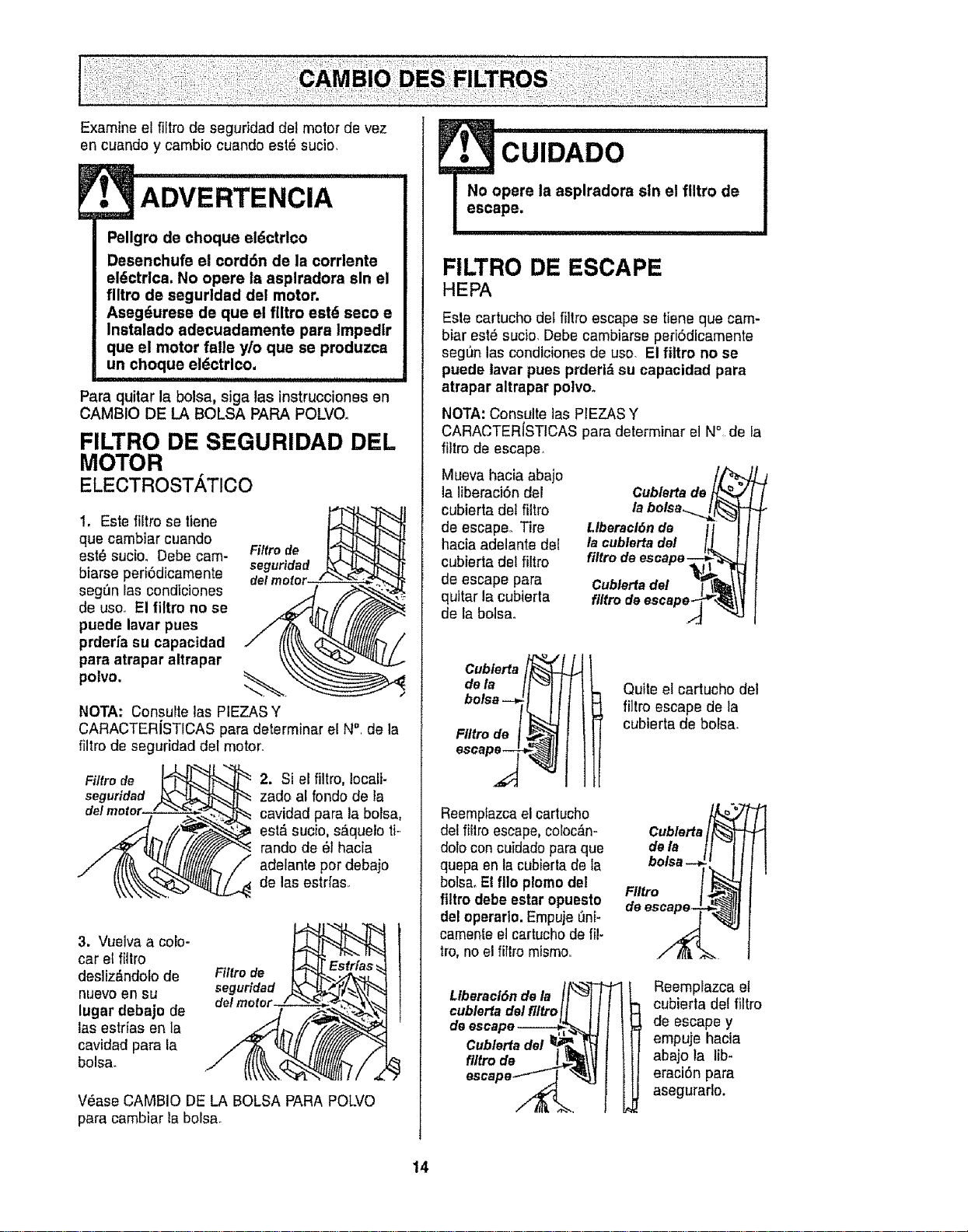
Examine el fi[trode segufidad det motor de vez
en cuando y cambio cuando es18sucio,
• ADVERTENcIA
Pellgro de choque eldctrlco
Desenchufe et cord6n de la corrlente
el_ctrlca, No opere Is asplradora sin el
filtro de segurtdad del motor.
Aseg_urese de qua el flltro estd seco e
Instalado adecuadamente para Impedlr
que el motor falle y/o que se produzca
un choque el(_ctrlco.
Para quitar la bolsa, siga las instruccionesen
CAMBIO DE LA BOLSA PARA POLVO.
FILTRO DE SEGURIDAD DEL
MOTOR
ELECTROSTATICO
!, Este filtro se tiene
qua cambiar cuando
est_ sucio, Debe cam- Filtro de
biarse peri6dicamente seguridad
seg_n las condiciones
de usoo El flltro no se
puede lavar pues
prderfa su capacidad
para atrapar altrapar
polvo, ._'___.
NOTA: Consulte las PIEZAS Y
CARACTERJSTICAS para determinar et N° de la
filtro de seguridad dal motor.
Filtro de
seguridad
2. Si el filtro, Iocali-
zado al rondo de Ia
cavidad para la bolsa,
est& sucio, s_quelo ti-
rando de 61hacia
adelante pot debaio
de las estrfas.
3. Vuelva a coJo-
car el fitlro
desliz_ndolo de
nuevo en su
lugar debajo de
las estfias an la
cavidad para la
bolsa.
Filtro de
seguridad
V_ase CAMBIO DE LA BOLSA PARA POLVO
para cambiar Ia bolsa_
•_ CUIDADO
No opera la asplradora sin el flltro de
escape.
i
FILTRO DE ESCAPE
HEPA
Esta cartucho del filtro escape se tisne qua cam-
biar est_ sucio, Debe cambiarss peri6dicamente
seg[_n las condiciones de use. El filtro no se
puede lavar pues prderi_ su capacidad para
atrapar altrapar polvo°
NOTA: Consuite las PIEZAS Y
CARACTER(STICAS para determinar el N°, de Ia
fiitrode escape.
Mueva hac[a abajo
la liberaci6n del
cubierta del filtro
de escaper Tire
hacia adelante del
cubierta det filtro
de escape para
quitar la cubierta
de la botsao
Cublertade
la bolsa._l _j
Llberacldnde li -J l
I. oub_o.,del IL lI
filtrodeescape--_,__]
Cublerta del _ _\ \|
,eesoo 02"
:/:o_JFI,
FIItro de [ ,_
Reemptazcael cartucho
del fiilro escape,coloc_n-
dolo con cuidado paraqus
quepa en la cubiertade la
bolsa. Elfllo plomodel
fittro debe estar opuesto
del operaflo. Empuje L_n[-
camente el cartucho de _-
tro, no el fitlro mismo,,
Quite el cartucho del
_tro escape de la
cubierta de bolsa.
Cublerta_
dela
bolsa-_
FIItro
deescape-
,Oeroo,,.,e,oI It L
_,blo,_adel_l_olj iI / I I-t
Reemplazca el
cubierta del filtro
de escape y
empuje hacia
abajo la tib-
eraciSn para
asegurarlo.
14
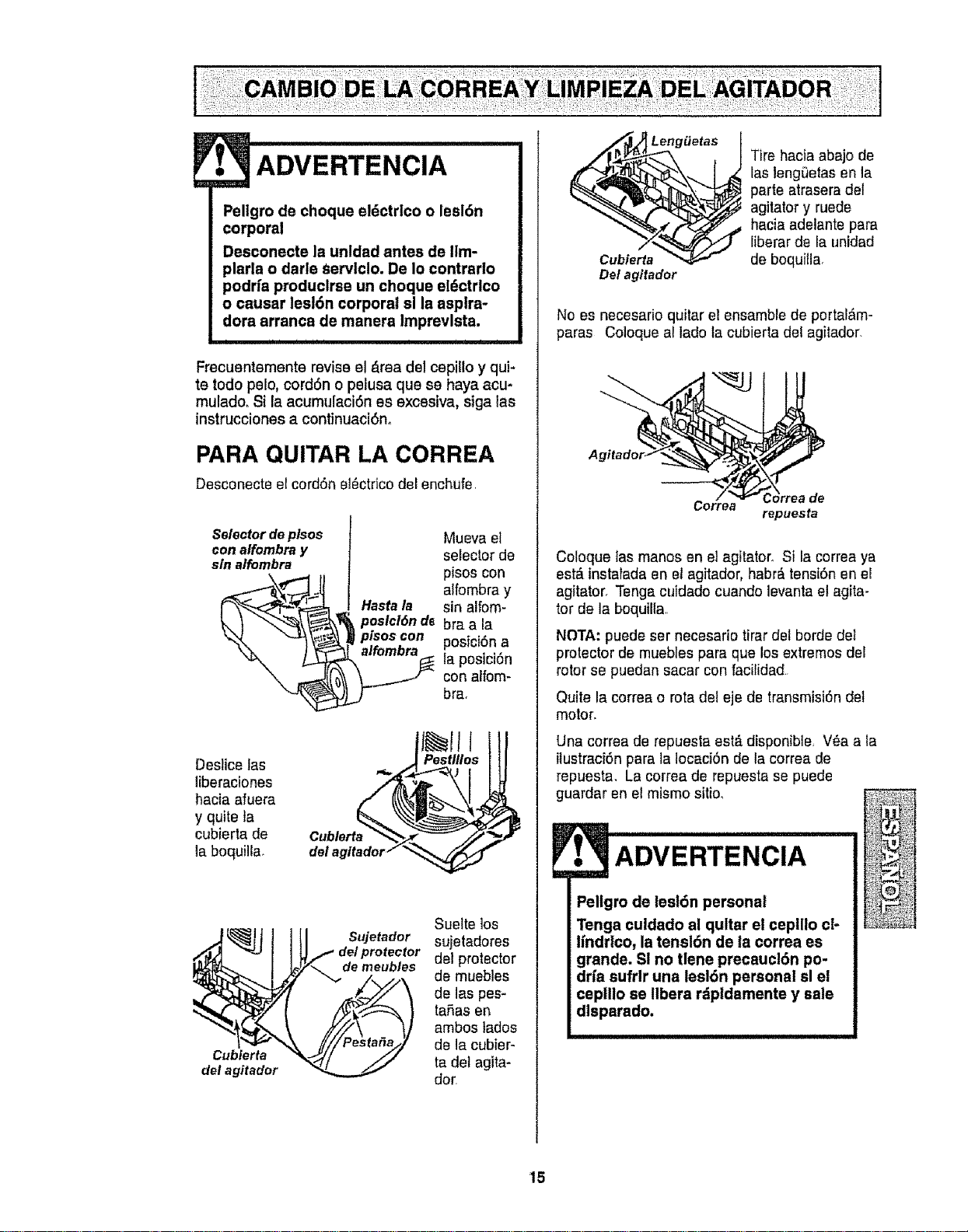
Leng_etas
[
ADVERTENCIA
Pellgro de choque eldctrlco o lesi6n
corporal
Desconecte la unldad antes de IIm-
plarla o darle Servlclo. De Io contrario
podrfa produclrse un choque eldctrlco
o causar lesl6n corporal sl la asplra-
dora arranca de manera Imprevlsta.
J i I
Frecuentemente revise el #,readel cepillo y qui-
te todo pelo, cord6n o pelusa que se haya acu-
mulado, $i la acumulaci6n es excesiva, siga tas
instrucciones a continuaci6no
PARA QUITAR LA CORREA
Desconecte el cord6n el_ctricodel enchufe
Selectordep/sos
con alfombray
sin a/fombra
_ posici6n de
Mueva el
selector de
pisos con
alfombra y
sin alfom-
bra a la
posici6na
la posici6n
con alfom-
bra,
Destice las
Iiberaciones
hacia afuera
y quite la
cubierta de
la boquilta,
Cubierta
del agitador
Sujetador
de meubles
Suelte los
sujetadores
del protector
de muebles
de las pes-
taSas en
ambos tados
de la cubier-
ta det agita-
dor,
Cubierta
Del agltador
Tire hacia abajo de
las lengi3etas en la
parte atrasera det
agitator y ruede
hacia adelante pars
liberar de la unidad
de boquilla,
No es necesario quitar el ensamble de portal,m-
paras Coloque al lado la cubierta del agitador,
/ _ Cdrreade
Correa
repuesfa
Coloque tas manos en el agitator Si la correa ya
est_ instalada en el agitador, habr_ tensi6n en el
agitator, Tenga cuidado cuando levanta el agita-
tor de la boquilla
NOTA: puedeser necesario tirar del horde del
protector de muebles pars que los extremos del
rotor se puedan sacar con facilidad
Quite la correa o rots de! eje de transmisi6n del
motor.
Una correa de repuesta est#Ldisponible, V_a a la
itustraci6n pars la locaci6n de la correa de
repuesta, La correa de repuesta se puede
guardar en el mismo sitio,
ADvERTENcIA
Peligro de leel6n personal
Tenga cuidado al qultar el cepillo cl-
_ifndrlco, la tensl6n de la correa es
grands. SI no tlene precaucl6n po-
drfa sufrlr una lesl6n personal sl el
ceplllo se llbera rdpldamente y sale
dlsparado.
15
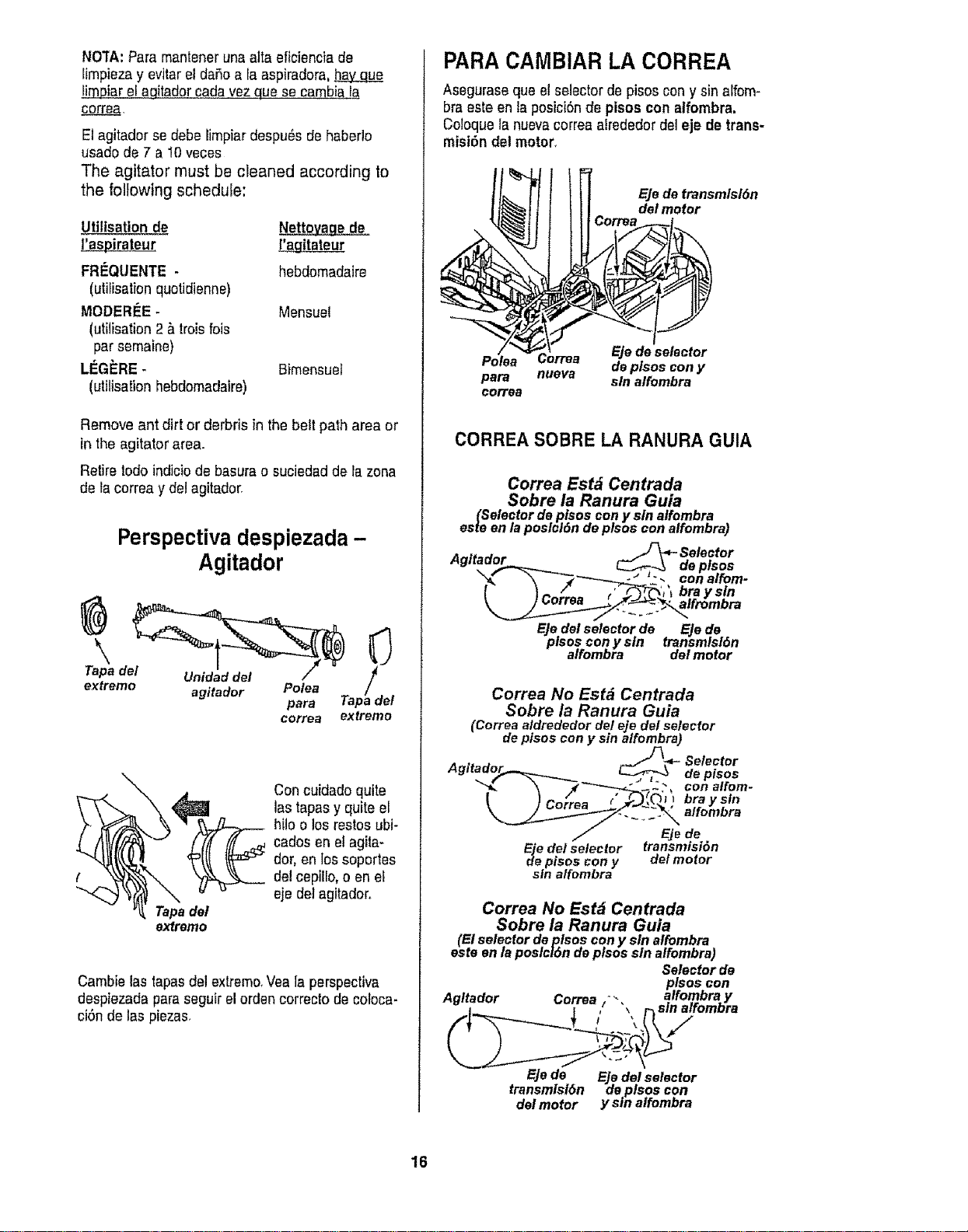
NOTA:Paremantenerunaaltaeficienciade
[impiezay ev]tarel daSoa la aspiradora,
fimpiar el agitadorcada vez qua se cambia la
corre_,
E1agitador se debe limpiardespu_s de haberlo
usado de 7 a I0 veces
The agitator must be cleaned according to
the following schedule:
Utiltsation de
l!aspirateur
FRI_QUENTE -
(utifisation quotidienne)
MODERIEE-
(utilisation 2 _ troisfois
par semaine)
LI_G_RE -
(utilisation hebdomadaire)
Nettovage de
[_gitateur
hebdomadaire
Mensuel
Bimensuet
Remove ant dirt or derbris inthe belt path area or
in the agitator area.
Retire lode indiciode basurao suciedad de tazone
de tacorrea y del agitador.
Perspectiva despiezada -
\
Tapa del
extreme
Agitador
Unidad del /" _/adel
agitador Polea
para Tap
correa extreme
\
Concuidadoquite
lastapesyquiteel
hilo o los restosubi-
cedesen el agita-
dor, en lossoportes
delcepiIIo,eenei
eje de] agitador,.
Tapedel
extreme
Cambie las tapaedel extreme.Vea ]a perspective
despiezada pareseguir elorden correcto decoloca-
ci6n de las plazas.
PARA CAMBIAR LA CORREA
Asegurase qua el selector de pisos cony sin alfom-
braeste en la posici6nde pisos con alfombra,
Coloque la nuevacorrea alrededor del eje de trans-
misi6n del motor.
Eje de transmlsl6n
del motor
Ejedeselector
Polea deplsos cony
para nueva sin alfombra
corre_
CORREA SOBRE LA RANURA GUIA
Correa Est_ Centrada
Sobre la Ranura Guia
(Selectordeptsoscon y sin alfombra
esmen laposlcl6ndeplsos conalfombra)
A .. . J-_- Selector
gtraoor C-"_,_..\ deplsos
_'_f _'_---"'_ _'--._J _"_ con alfom-
_ f= /_'__ -'/_ bra ysln
Corrsa _ •
EJedelselector de Eje de
plsos conysln transmlsl6n
alfombra del motor
Correa No Estd Centrada
Sobre la Ranura Guia
(Correaaldrededordeleje del selector
depisos cony sin alfombra)
_JJ-_,._- Selector
Agitado_,_____....._ _-_.3 de pisos
_*L \ ,f_---_.?.: ?, con atfom-
I ) Cot/re _ / _-"J,O_ t braysin
_f :_._,_, alfombra
Eje de
geedel selector transmfst6n
pisos con y del motor
sin alfombra
Correa No Est,_ Centrada
Sobre la Ranura Guia
(Elselectordeplsos con y sin alfombra.
este en lapostcl6ndeplsossin alfombra)
Selectorde
Agltador Correa,/'.,\ _illnf_b_Yra
Ejede Eje delselector
transmlsl6n deplsoe con
del motor y sin alfombra
16
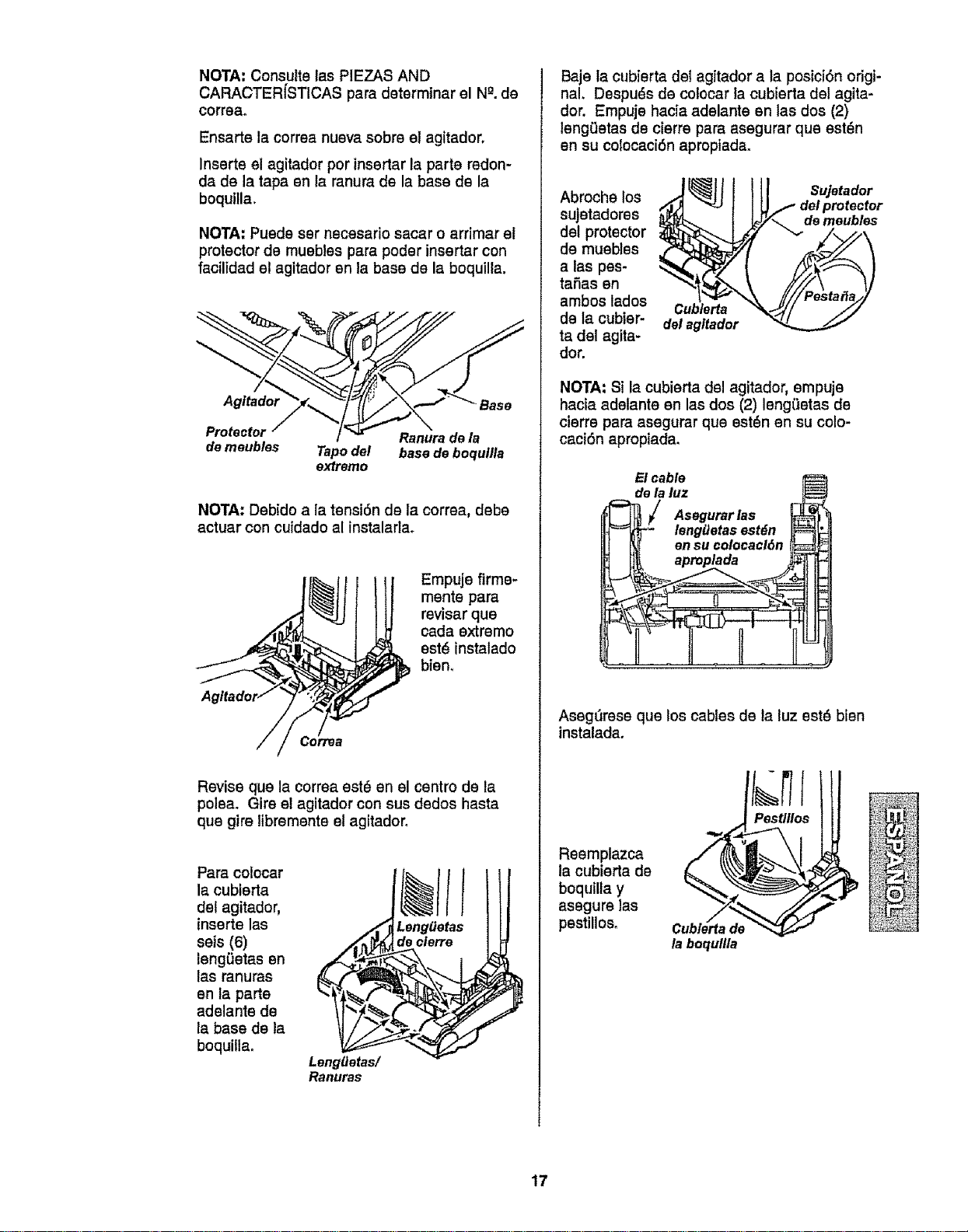
NOTA: Consutte las PIEZAS AND
CARACTER[STICAS para determinar el N_.de
correa.
Ensarte la correa nueva sobre el agitador,
Inserte el agitador por insertar la parte redon-
da de la tapa en ta ranura de la base de la
boqutlla.
NOTA: Puede ser necesario sacar o arrimar el
protector de muebles para poder insertar con
facilidad el agitador en la base de la boquilla.
Agftador Base
Protector Ranura de ia
de meubles Tapo del bass de boqullla
extremo
NOTA: Debido a la tensi6n de la correa, debe
actuar con cuidado al instalarlao
_._j Empuje firme-
mente para
revisar que
cada extremo
estd instalado
Age/tad _ bien.
or
Revise que la correa est_ en el centro de la
polea. Gire el agitador con sus dedos hasta
que gire libremente el agitador.
Para colocar
la cubierta
del agitador,
inserte las
seis (6)
leng_etas en
las ranuras
en ta parte
adelante de
la base de la
boquilla.
LenglJetas/
Ranuras
Leng_etas
declerre
Baje la cubierta del agitador a la posici6n origi-
nal. Despuds de cotocar la cubierta del agita-
dor. Empuje hacia adelante en las dos (2)
lengL_etasde cierre para asegurar que est_n
en su colocaci6n apropiada.
Abroche los
sujetadores
del protector
de muebles
a las pes-
taSas en
ambos lados
de la cubier-
ta del agita-
dot.
Cublerta
del agttador
Sujetador
del protector
de meubles
NOTA: Si la cubierta del agitador, empuje
hacia adelante en las dos (2) leng(_etas de
cierre para asegurar que est_n en su colo-
caci6n apropiada.
Elcable
delaluz t_
J Asegu rles
_t_" leng_etas est_n _
_ en su colocacl6n _
Aseg(Jrese que los cables de la luz est_ bien
instalada.
Reemplazca
la cubierta de
boquilla y
asegure las
pestillos.
Cublerta de
la boquflla
17
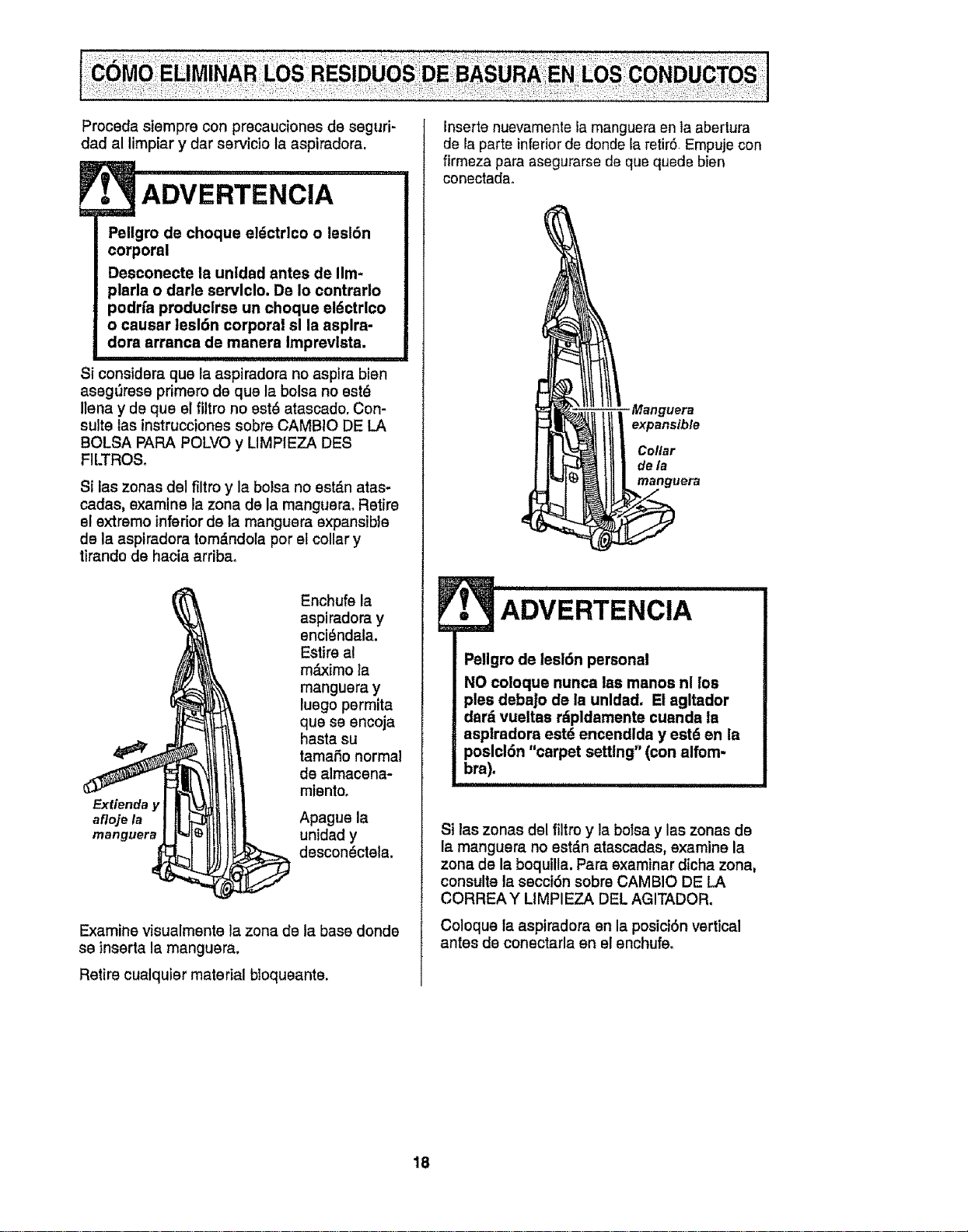
Proceda siempre con precauciones de seguri-
dad al limpiar y dar servicio la aspiradora,
[.,3
Pellgro de choque el_ctrlco o lesldn
corporal
Desconecte la untdad antes de IIm-
plarla o darle servlclo. De Io contrarlo
podrfa produclrse un choque eldctrlco
o causar lesl6n corporal sl la asplra-
dora arranca de manera Imprevlsta.
Si considera qua la aspiradora no asptra bien
asegl_resa primero de qua la bolsa no est_
llena y de qua el filtro no est_ atascado. Con-
suite las instruccionee sobre CAMBIO DE LA
BOLSA PAPA POLVO y LIMPIEZA DES
FILTROSo
Si las zonas del filtro y la bolsa no est&n atas-
cadas, examine la zona de la rnanguera, Retire
el extremo inferior de la manguera expansible
de la aspiradora tom_.ndoia por el collar y
tirando de hacia arribao
Enchufe la
aspiradora y
enci_ndala.
Estire a!
m,_ximo la
manguera y
luego permita
que se encoja
hasta su
tamafio normal
de almacena-
mientoo
Extienda y
afloje la Apague la
rnanguera unidad y
descon_ctela.
Examine visualmente la zona de ta base donde
se inserta la manguera,
Retire cualquier material bloqueante.
Inserte nuevamente la manguera enta abertura
de la parte inferiorde donde la retirS, Empuje con
firmeza para asegurarse de qua quede bien
conectada,
Manguera
expansible
Collar
de la
manguera
111iii i I
• ADVERTENClA
Pellgro de lesl6n personal
NO coloque nunca las manos nl los
pies debajo de la unldad. El agltador
dar_ vueltas rdpldamente cuanda la
asptradora estd encendida y est6 en la
poslcl6n "carpet setting" (con alfom-
bra).
Si las zonas del filtro y la botsa y las zonas de
la manguera no est&n atascadas, examine la
zona de la boquilla. Para examinar dicha zona,
consulte la eecci6n sobre CAMBIO DE LA
CORREA Y LIMPI EZA DEL AGITADOR.
Coloque la aspiradora en la posici6n vertical
antes de conectarla en el enchufe,
18
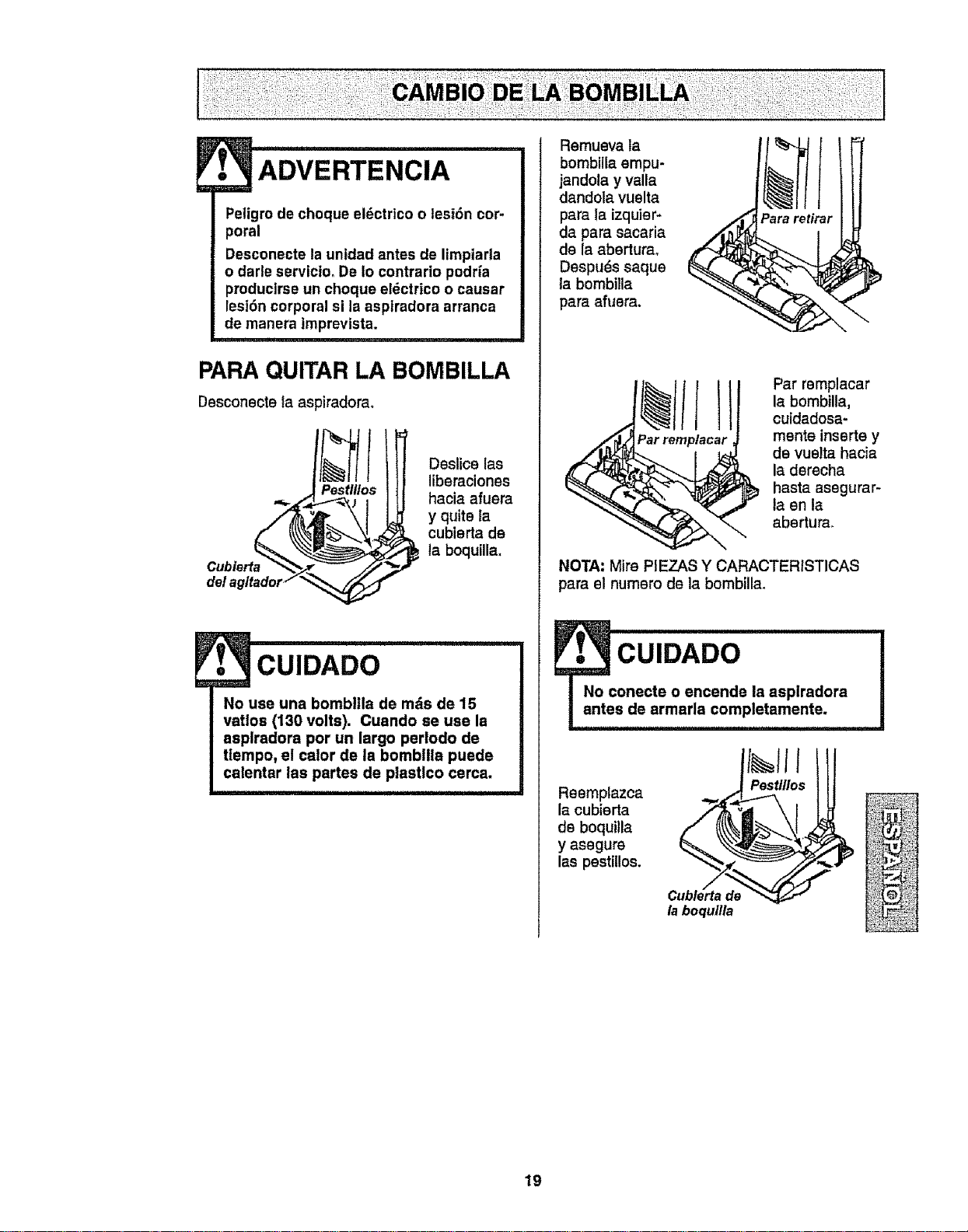
ADVERTENCIA
Peligro de choque el_ctrico o lesi6n cor-
poral
Desconecte la untdad antes de limpiarla
o darle servicio, De Io contrario podria
producirse un choque eldctrico o causar
lesi6n corporal si la asplradora arranca
de manera Imprevista.
I J
PARAQUITAR LA BOMBILLA
Desconecte la aspiradora.
Pestlllos
Deslice las
liberaciones
hacia afusra
y quite la
cublerta de
la boquilla.
CUIDADO
No use una bombltla de mds de 15
vatlos (130 volts). Cuando se use la
asplradora por un largo perlodo de
tlempo, el calor de la bombllla puede
calentar las partes de plastlco cerca,
Remueva la
bombilla empu-
jandola y valla
dandola vuelta
para la izquier-
da para sacaria
de la aberturao
Despu_s saque
la bombiila
para afuera.
Para retirar
Par remplacar
la bombilla,
cuidadosa-
mente inserts y
de vuelta hacia
la derecha
hasta asegurar-
la en la
abertura,
NOTA: Mire PIEZAS Y CARACTERISTICAS
para el numero de la bombilla.
cu DAoO
onecte o encende Is aspiradora
s de armada completamente.
Reemplazca
la cubierta
de boquitla
y asegure
las pestiUos.
la boqullta
19

_ ii ,,1111ii i ii ,
ADVERTENCIA
Peligro de choque el6ctrlco o lesl6n
corporal
Desconecte la unldad antes de llm-
plarla o darle servtclo. De Io contrario
podrla produclrse un choque el_ctrico
o cauear leei6n corporal el la asplra-
dora arranca de manera Imprevlsta.
PARA EXAMINAR EL
AGITADOR
Protectordela correa
de lap/aca de/a base
Coloque la aeptradora
con la base hacia
arriba para revisar si
los cepilloe estdn en
malas condiciones.
Cuando los cepillos
est_n gastados al
nivel del protector de
la placa de base,
reemplazca el
agitador.
Quite la cubiarta de la boquilXa, lacubierta del
agitador y el agitador. V6ase CAMBIO DE LA
CORREAY LIMPIEZA DEL AGITADOR.
Quite las tapas del extremo y las cubiartas de
los cojinetes.
Reemplazca el agitador con un nuevo.
Reemplazca las cubiertas de los cojinetes y las
tapas det extremo,
Rearms la correa, el agitador, la cubierta del
agitader y la cubierta de la boquilla. V_ase
CAMBIO DE LA CORREAY LIMPIEZA DEL
CEPILLO.
Tapadel
extremo
agltador Polea
para
correa
Tapadel
extreme
20
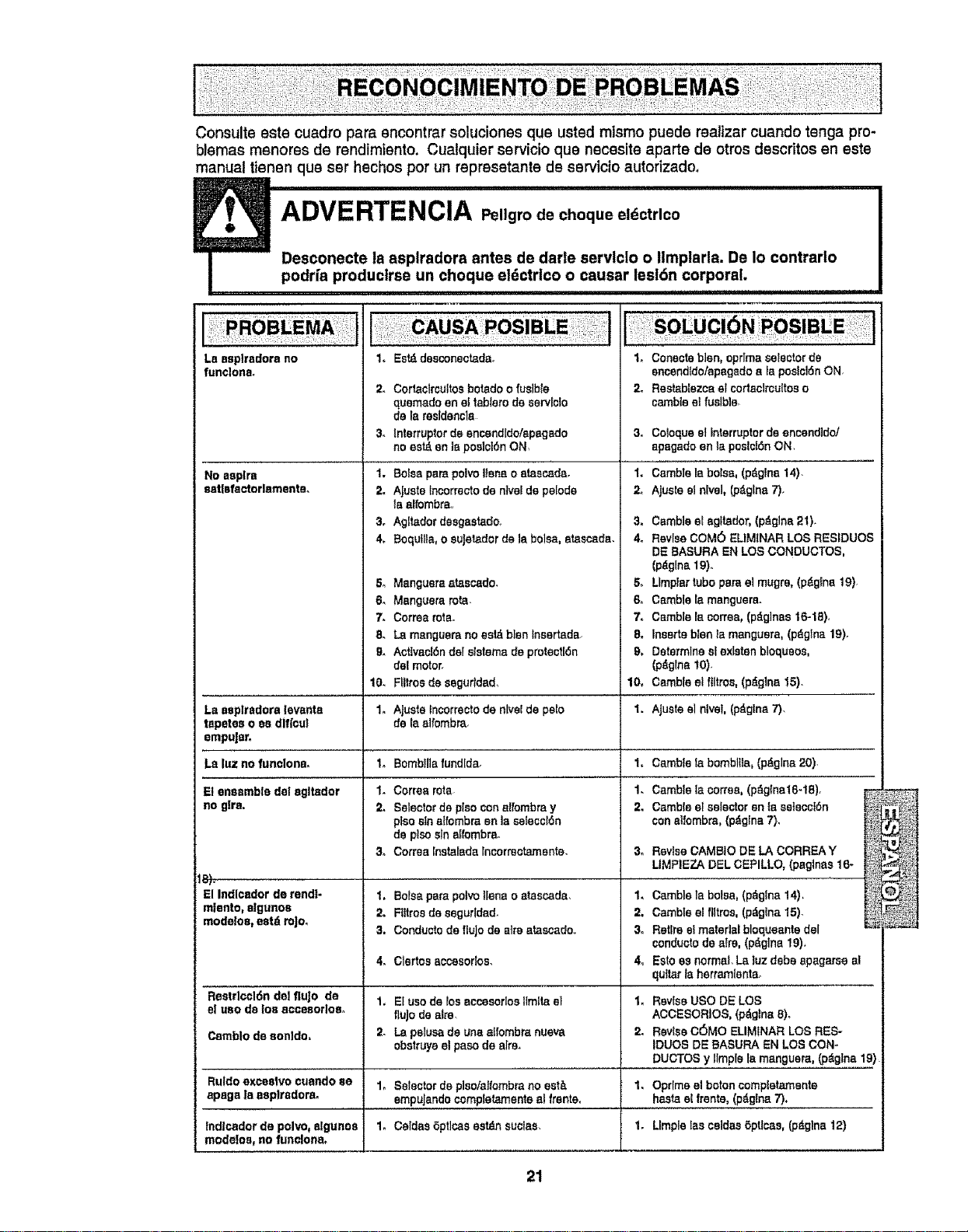
Consults sate cuadro para encontrar soluciones qua usted raisins puede realizer cuando tenga pro-
blemas menores de rendimiento. Cualquier servicio qua necesite sparta de otros descritos en este
manual tienen qua ser hechos per un represetante de servicio autorizado,
ADVERTENCIA Pellgrodechequeeldctrlco
Desconecte la asplradora antes de darle servlclo o Itmplarla. De Io contrarlo
podrfa produclrse un cheque eldctrico o causar lesl6n corporal.
La ssplrsdora no
funclona.
No aeplra
aat|sfactorlemente,
La seplradora lsvents
tapetes o es dlflou!
empu|sto
Laluznofunolons.
El ensemble de! egltador
no glre.
El Indloador de rendi-
relents, algunos
modeloe, estd roJo.
2.
3_
1.
2_
3_
4,
54
6_
7.
8.
&
10.
1.
In
1.
2.
3_
Es_ desconectada.
Cortaclrcultos botado o fusible
quemado en et tablsro ds 8srvlcto
de Is rssldsncls
!nterrupter de encendldolepagado
no est_ en Ispee]cl6n ON,
Balsaparepolvolienso staacada.
AIUBtBlncorrecto de nlvel de pslods
fa alfombra.,
Aglt_dor desgsalaffo,
BoqulIts, o suJetador de Is bolsa, alasc_da.
1. Conects blen, oprlma selector de
encendidotspsgsdo a fa poslctdn ON.
2, Rastablezca el cortactrcuiteso
cambleelfusible.
3_
I.
2.
&
4,
Manguera atascado. &
Manguem rata. &
Cortes rata° 7_
La mangusra no est_ blanlnsertada, 8.
Actlvac!6ndelslatemede protsotI6n 9,
del motor.
Flllrosds seguridsd,
Ajusts lnsorrscto de nLvelde pe[o
de I8 albmbra.
10,
1.
1,
1,
2.
3_
1.
2,
3o
Bombilis fundlds,
Corrss rots
Selector de plea con alfombra y
plsesinalfombra en Is salacct6n
de plsosln affombra.
Cortes Instafeda lncorreotamente.
1. Betas pare pslvo liens o atascada,
2. Filtrosde segurlded-
3. Conductsds fiuJodo airs atascado
Coloquael interrupterde encendldot
apagadoen la poslci6nON.
ramble Is balsa, (p_glna 14)-
Ajusls el nlvel, (pdglns 7).
Camb]sel agltador, (pdglna 21).
Revise COM6 ELIMtNAR LOS RESIDUES
DE BASURA EN LOS CONDUCTOS,
(pdglna 19),.
Llmplar tube pars el mugre, (pdglna 19).
Csmbie Is.manguera.
Camble le cortes, (p_glnas 16-1B).
Inserts blen la manguera, (p_glna 19).
Determine sf exlsten bloqueos,
(p_gfns I0).
Cambls el ftltros, (p_gina 15).
Ajuste el nlval, (pdglne 7),
Csmbls la bomblIIa, (p_glna 20).
Csmbie lacortes,(p_glna16-1B),
Cambte elselectoran laselecct6n
con aIIombrs,(p#,gIna7).
Revise GAMBle DE LA CORREAY
LIMPIEZA DEL CEPILLO, (paginss16-
ramble ls boles, (p_gtna 14),
Cambla a! ftltms,(pdg_na I5).
Retire el material bloquaanla del
conductsde airs, (p_glna 19),
Es!o es normal. La Iuz dabs apagarse _.1
quttar Is herrarnlsnts°
4. Clertos accesodo& 4_
Reslrlcct6n del fluJo de 1, Et usede foe accesorlos llmlta el 1, Revise use DE LOS
el use de los acceaorlos, flujo de alto ACCESORtOS, (pdglna 8)_
Csmblo de sonldo, 2. La pslusa de una alfombra nueva 2. Revise C(SMO ELIMINAR LOS RES-
obstruys el paso de sirs. IDUOS DE BASURA EN LOS CON-
DUCTOS y IlmpIe la manguara, (p_glna 19)
Ruldo exceslvo cusndo se 1, Selectorde plsotalfombrano eat& 1. Oprlms el baton complatamsnte
apsga Is asplrsdora, empujando completamente sl frente, hasla el frente, (pdglna 7),
lndlcador de polvo_algunss 1. Csldas 6prices sstdn suclss. 1. Llmpla Ias caldaa 6ptlcas, (pdglna 12)
mode!oa_ no funclone.
21

]
For
repair of major brand appliances in your own home...
no matter who made it, no matter who sold it!
1-800-4-MY-HOME ® Anytime, day or night
(1-800-469-4663) (U.S°A and Canada)
www.eears.com
www°sears,ca
For repair of carry-in products like vacuums, lawn equipment, and
electronics, call for the nearest Sears Parts and Repair Center.
1-800-488-1222 Anytime, day or night (US A only)
www.sears.com
For the replacement parts, accessories and owner's manuals
that you need to do-it-yourself, call Sears PartsDirectS_!
1-800-366-PART 6 a,m. - t 1 p.m, 7 days a week
(1-800-366-7278) (U_S.A.only)
www.sears.com/partsdirect
To purchase or inquire about a Sears Service Agreement
or Sears Maintenance Agreement:
1-800-827-6655 (U.S.A,) 1-800-361-6665 (Canada)
7 a.m, - 5 p_m.,CST, Men. - Sat 9 a me- 8 p,m EST, M - F,4 p m Sat.
Para pedir servicio de reparaci6n a Au Canada pour service en frangais:
domicilio, y para ordenar piezas: 1.800.LE-FOYER Mc
1-888-SU-HOGAR s_ (1-800-533-6937)
(1-888-784-6427) www,sears.ca
,,HomeCentral
@Sears, Roebuck and Co,
® RegisleredTrademark/TMTrademark/ s,_ServiceMarkof Sears,RoebuckandCo
® MarcaRegislrada/ "r_Marcade F_bricat suMarcadeServictode Sears,RoebuckandCo
M,c MD
Marquede commerce/ Marqued6pos6ede Sears,RoebuckandCo