1. Overview
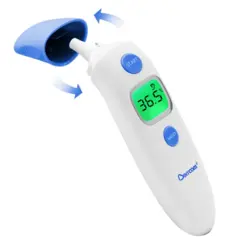
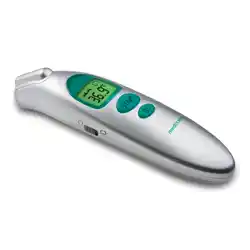
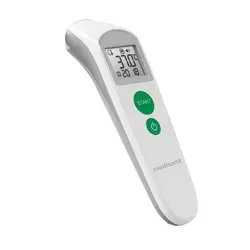
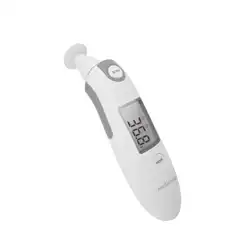
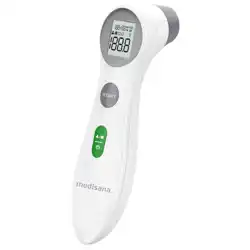
The Berrcom Forehead and Ear Digital Thermometer is a non-contact infrared thermometer designed for measuring body temperature. It is suitable for babies, children, and adults.

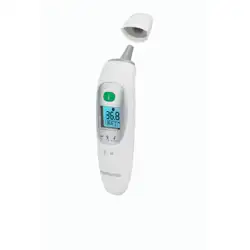
The device features an automatic measuring mode switch: forehead temperature measurement when the cover is closed, and ear temperature measurement when the cover is opened. It has a backlit LED display for easy reading.
2. Features and Specifications
2.1 Key Features
- Dual Measurement Modes: Automatically switches between forehead and ear temperature measurement based on the probe cover position.
- Non-Contact Operation: Measures temperature from a distance of 3-5 cm from the forehead.
- Fast Measurement: Provides a reading in approximately 1 second.
- Fever Alarm: Alerts the user when a fever temperature is detected.
- Unit Selection: Temperature can be displayed in degrees Celsius (°C) or Fahrenheit (°F).
- Backlit LED Display: Facilitates reading in low-light conditions.
- Automatic Shutdown: Powers off automatically after 30 seconds of inactivity to conserve battery life.
- Medical Accuracy: The device is designed to meet medical accuracy standards.

2.2 Technical Specifications
- Brand: Berrcom
- Model Name/Number: B0FNW9Y8YF / ET005-EU-25CN
- Age Range: Baby, Kid, Adult
- Measurement Range: Up to 50°C
- Accuracy: ±0.1°C (0.2°F)
- Response Time: 1 second
- Display Type: LED
- Power Source: 2 x AAA batteries
- Special Features: Alarm, Auto Off
- Outer Material: Plastic
- Certification: CE
- Item Length: 15.7 cm
3. What's in the Box
- Berrcom Forehead and Ear Digital Thermometer
Note: Batteries may need to be purchased separately.
4. Use Guide
4.1 Preparation and Important Notes
- Ensure the measurement area (forehead or ear canal) is clean, dry, and free of sweat, grease, or hair. Wipe the area if necessary to ensure accuracy.
- Keep the thermometer's probe lens clean. A dirty lens may affect measurement accuracy.
- Allow the person being measured to acclimate to the indoor environment for at least 30 minutes before taking a temperature.
- For consistent results, always measure the same site (forehead or ear) under similar conditions.

4.2 Measuring Forehead Temperature
- Ensure the protective cover over the probe is closed. The device will automatically be in forehead mode.
- Hold the thermometer perpendicular to the forehead, aiming at the center.
- Position the thermometer approximately 3-5 cm (1-2 inches) away from the skin surface.
- Press the measurement button. The device will beep and the temperature will be displayed on the LED screen within 1 second.
- The backlight will illuminate for easy reading. A fever alarm will sound if a high temperature is detected.
4.3 Measuring Ear Temperature
- Gently open the protective cover to expose the probe. The device will automatically switch to ear measurement mode.
- For an accurate reading, gently pull the ear upward and backward (for adults) or straight back (for children) to straighten the ear canal.
- Carefully insert the probe tip into the ear canal, ensuring a snug fit.
- Press the measurement button. The reading will be displayed on the screen.
- After use, close the protective cover to keep the probe clean and return the device to forehead mode.

4.4 Understanding the Display and Indicators
The LED display shows the measured temperature. Icons on the interface (as seen in the product images) may indicate the following:
- Temperature Value: The primary numerical reading.
- Unit Indicator: Shows °C or °F.
- Fever Alarm Icon: Likely appears alongside the reading if a fever-level temperature is detected.
- Backlight: Illuminates the display during and after measurement.
Refer to the icons on your specific device for exact indications.
4.5 Switching Temperature Units (°C/°F)
The method for switching between Celsius and Fahrenheit is not detailed in the provided source. Please refer to the device's physical buttons or any separate quick-start guide that may have been included for this function.
4.6 Auto Shutdown
The thermometer will automatically power off after approximately 30 seconds of inactivity to save battery power.
5. Care and Maintenance
- Cleaning: Wipe the exterior of the thermometer with a soft, slightly damp cloth. Do not immerse the device in water or other liquids. Ensure the probe lens is clean and dry.
- Storage: Store the thermometer in a clean, dry place at room temperature. Keep the protective cover closed when not in use.
- Batteries: Replace the 2 x AAA batteries when the display becomes dim or the device stops functioning. Remove batteries if the thermometer will not be used for an extended period.
- Do Not: Disassemble, expose to extreme temperatures or direct sunlight for prolonged periods, or use abrasive cleaners.
6. Troubleshooting
- No Display: Check that the batteries are correctly installed and have sufficient charge. Replace if necessary.
- Inconsistent or Inaccurate Readings:
- Ensure the measurement site is clean, dry, and unobstructed.
- Clean the probe lens gently with a soft, dry cloth.
- Ensure you are using the correct mode (forehead vs. ear) and following the proper distance (3-5 cm for forehead).
- Allow the device and the person to stabilize at room temperature.
- Device Does Not Turn On: Confirm battery orientation is correct. Try a fresh set of batteries.
- Fever Alarm Sounds Unexpectedly: Verify the measurement technique. A high ambient room temperature or direct exposure to heat sources can affect the reading. Retake the temperature following the correct procedure.