1. Overview
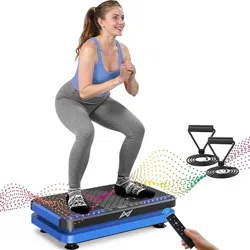
The GLYLF Vibration Plate Exercise Machine is a full-body workout device designed for home use. It uses vibration technology to stimulate muscles, promote circulation, and support fitness goals such as weight management and lymphatic drainage.

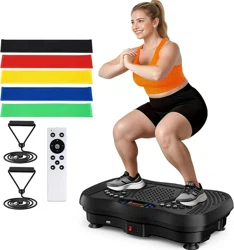
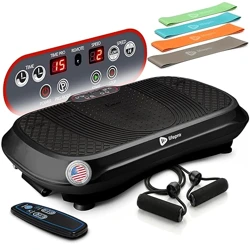
Key components include the vibration platform, an LED control panel, a remote control, resistance bands, and pull ropes.
2. Safety Information
WARNING: Read all instructions before use. Failure to follow safety guidelines may result in injury.
- Maximum User Weight: 450 lbs (204 kg). Do not exceed this limit.
- Medical Conditions: Consult a physician before use if you are pregnant, have a pacemaker, have undergone recent surgery, or have any medical condition affecting balance, bones, or joints.
- Usage Surface: Place the machine on a firm, level, non-slip surface. Ensure the anti-noise suction cups are properly engaged.
- Footwear: Use barefoot or with non-slip socks. Do not use with regular shoes.
- Supervision: Keep children and pets away from the machine during operation.
- Start Slowly: Begin with low vibration levels and short sessions to allow your body to adapt.
3. Product Specifications
| Brand | GLYLF |
|---|
| Item Weight | 6.35 Kilograms |
|---|
| Color | Black |
|---|
| Material | Plastic |
|---|
| Product Dimensions | 20.5"D x 12.2"W x 4.7"H |
|---|
| Maximum Weight Capacity | 450 lbs (204 kg) |
|---|
4. Features and Components

4.1 Vibration Platform
- Platform Surface: Features a magnetic stone design for a soothing foot massage during use.
- Motor: Quiet operation motor with anti-noise suction cups to minimize vibration transfer to the floor.
- Base: Sturdy construction with suction cups for stability.
4.2 Control Panel (LED Display)
Located on the front of the platform. The display shows:
- Time: Countdown timer for your workout session.
- Speed: Current vibration speed level (1-130).
- Mode: Indicates the selected automatic program (P1-P5) or manual mode.
4.3 Remote Control
Allows wireless operation of the machine. Functions typically include power on/off, mode selection, speed adjustment, and timer setting.
4.4 Workout Modes
- Manual Mode: User manually sets the vibration speed (130 adjustable levels).
- Automatic Modes (P1-P5): Five pre-programmed workout routines that automatically vary speed and intensity.
4.5 Included Accessories
- Resistance Bands: 5 bands of varying resistance for upper and lower body strength exercises.
- Pull Ropes: 2 ropes for rowing and pulling exercises.
- Bluetooth Connectivity: Allows you to connect a smartphone to play music through the machine's speakers (if equipped) or your own audio device.
5. Setup and Installation
- Unpacking: Remove all components from the box. Check contents against the packing list.
- Placement: Choose a firm, flat surface in a clear area with at least 2-3 feet of space on all sides.
- Stability Check: Press down on the platform to ensure the suction cups engage with the floor. The machine should not slide.
- Power Connection: Plug the power cord into a standard wall outlet. Ensure the cord is not a tripping hazard.
- Remote Control: Insert batteries into the remote control (battery type not specified in source).
NOTE: The product HTML indicates a video titled "The video guides you through product setup." Refer to this video on the product page for visual guidance.
6. Use Guide

6.1 Basic Operation
- Starting: Step onto the platform, placing your feet shoulder-width apart near the edges. Hold onto a stable support if needed for balance.
- Power On: Press the power button on the remote control or control panel.
- Select Mode: Use the remote to choose an automatic program (P1-P5) or manual mode.
- Adjust Speed: In manual mode, use the +/- buttons to set a comfortable speed level (start with level 10-30).
- Set Timer: Use the timer buttons to set your desired workout duration. A 10-minute session is a common starting point.
- Begin Workout: Maintain a slight bend in your knees. You can stand still, perform gentle squats, lunges, or other static poses.
- Using Accessories: Attach resistance bands to the provided anchors or use pull ropes for added upper body work.
- Power Off: After the timer ends or when finished, step off and turn off the machine using the remote.
6.2 Sample Exercises
- Basic Stand: Stand upright, knees soft, core engaged. Focus on balance.
- Calf Raises: Raise and lower your heels while holding the vibration.
- Mini Squats: Perform shallow squats, keeping your back straight.
- Arm Curls: Use the resistance bands while standing on the plate to perform bicep curls.
- Seated Use: Sit on a stable chair placed behind the machine and place your feet on the platform.
NOTE: The product page includes multiple customer videos (e.g., "Vibration Plate Exercise Machine", "Honest Review of Vibration Plate") demonstrating various exercises and routines. These can provide practical visual examples.
6.3 Bluetooth Music Connection
- Enable Bluetooth on your smartphone or audio device.
- Search for available devices. Select "GLYLF Vibration Plate" or a similar name from the list.
- Once paired, play music from your device. The audio will play through the machine's speakers (if available) to help maintain exercise rhythm.
7. Care and Maintenance
- Cleaning: Wipe the platform surface with a damp cloth. Do not use abrasive cleaners or immerse the unit in water.
- Storage: Due to its lightweight design (6.35 kg), the machine can be moved and stored upright in a closet or against a wall.
- Inspection: Periodically check the power cord, suction cups, and platform for any signs of wear or damage.
- Accessories: Store resistance bands and ropes in a cool, dry place away from sharp objects.
8. Troubleshooting
| Problem | Possible Cause | Solution |
|---|
| Machine does not turn on | Power cord not connected.
Remote control batteries dead. | Check power outlet and connection.
Replace remote control batteries. |
| Excessive noise or vibration | Machine not on a level surface.
Suction cups not engaged. | Move to a firm, flat surface.
Lift and re-place the unit to engage suction cups. |
| Remote control not working | Out of range or obstructed.
Batteries installed incorrectly. | Stand closer to the machine (within 15 feet).
Check battery polarity and replace if needed. |
| Bluetooth won't connect | Bluetooth not enabled on device.
Device already paired to another speaker. | Enable Bluetooth and search again.
Disconnect other devices and retry pairing. |
9. Warranty Information
The product information specifies a "Warranty Description: 1". This indicates a 1-year warranty from the manufacturer, GLYLF. For specific warranty terms, service details, or to make a claim, contact the seller or manufacturer through your point of purchase (e.g., Amazon order details).