1. Overview
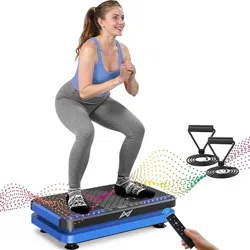
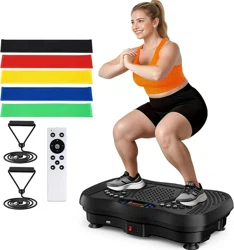
The AXV Vibration Plate is a fitness platform designed for whole-body vibration exercise. It uses a vibrating platform to stimulate muscles, increase blood flow, and support various fitness and wellness goals. The machine is compact and suitable for home use.

2. Features and Specifications
2.1 Physical Specifications
- Brand: AXV
- Item Weight: 9.23 Kilograms
- Primary Materials: Metal, Plastic, Rubber
- Design: Compact, ergonomic shell with anti-slip coating on the platform.
2.2 Functional Features
- Adjustable Vibration Speed: Offers a range from level 1 to 120.
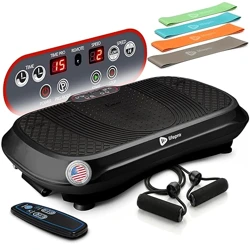
- LED Display: Shows workout time, current speed, and estimated calories burned.
- Remote Control: Allows for wireless operation and adjustment of settings.
- Multiple Exercise Modes: Provides a variety of pre-set vibration patterns.
- Included Accessories: Comes with two resistance bands for upper and lower body exercises.
- Magnet Health Massage Function: A feature designed for therapeutic use.
3. Safety Information
Before using the vibration plate, read all instructions. Consult with a physician before beginning any new exercise program, especially if you have pre-existing health conditions, are pregnant, or have a pacemaker or other implanted medical device.
- Use the machine only on a stable, level, and non-slip surface.
- Ensure there is adequate clearance around the machine during use.
- Do not exceed the maximum user weight limit (if specified in packaging materials).
- Wear appropriate, secure footwear or use barefoot on the anti-slip surface.
- Start with lower vibration speeds to allow your body to adapt.
- Keep the power cord away from the platform and your feet to prevent tripping.
- This product is intended for adult use.
4. Setup and Installation
- Unpack all components from the box, including the main platform, power cord, remote control, resistance bands, and user manual.
- Place the vibration plate on a firm, flat floor surface.
- Ensure the unit is not touching walls or furniture.
- Plug the power cord into a standard electrical outlet. The machine is ready for use.
- Familiarize yourself with the location of the control panel and the remote control functions.
5. Use Guide
5.1 Basic Operation
- Step onto the platform, ensuring your feet are positioned comfortably and securely.
- Use the power button on the control panel or remote to turn the unit on.
- The LED display will illuminate.
- Use the speed increase (+) or decrease (-) buttons to select your desired vibration intensity. Begin at a low speed (e.g., 10-20).
- Use the mode button (if available) to cycle through different vibration programs.
- Use the timer button to set your desired workout duration.
- To stop, press the power button. The platform will cease vibrating.
- Step off carefully.
5.2 Exercise Positions
The machine can be used in various positions:
- Standing: Basic stance for full-body vibration.
- Sitting: Place a sturdy chair on the platform and sit for a lower-body focused session.
- Lunge or Squat Position: For targeting leg muscles.
- With Resistance Bands: Attach bands to the provided anchors (if present) or hold them to incorporate upper body strength training.
5.3 Remote Control
The included remote control duplicates the main functions (Power, Speed, Timer, Mode) for convenience. Ensure the remote has batteries installed and is pointed towards the unit's sensor.
5.4 Recommended Usage
Start with sessions of 10-15 minutes per day. As your body adapts, you can gradually increase duration and vibration speed. Consistency is more important than lengthy sessions.
6. Care and Maintenance
- Cleaning: Wipe the platform surface with a damp cloth. Do not use abrasive cleaners or pour liquids directly onto the unit. Unplug before cleaning.
- Storage: Due to its compact size and weight, the unit can be moved and stored upright in a closet or against a wall. Use caution when lifting.
- Inspection: Periodically check the power cord for damage and ensure all parts are secure.
- Do not attempt to disassemble or repair the unit yourself.
7. Troubleshooting
- Unit does not turn on: Check that the power cord is securely plugged into both the outlet and the machine.
- No vibration: Ensure the speed is set above zero. Try increasing the speed setting.
- Remote control not working: Check or replace the batteries. Ensure you are within range and pointing the remote at the unit.
- Unusual noise or smell: Stop using the unit immediately, unplug it, and contact customer support.