1. Overview
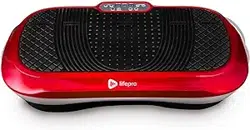
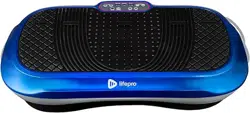
The ZENY Vibration Plate Exercise Machine is a whole-body workout platform designed for home use. It uses vibration technology to stimulate muscles and is intended for weight loss, toning, and wellness exercises.

Key components include the main vibration platform, a remote control, an LED display, and detachable resistance bands.
2. Product Features and Specifications
2.1 Physical Specifications
- Product Dimensions: 26.8"D x 15"W x 5.3"H
- Item Weight: 24.16 Pounds
- Material: Acrylonitrile Butadiene Styrene (ABS) shell
- Color Options: Red, Black, White
- Maximum User Weight: 220 lb (100 kg)
2.2 Technical Features
- Adjustable Vibration Speed: 99 levels, adjustable from 1 to 99 RPM.
- Controls: Remote control and touch controls.
- Display: LED display showing time and speed.
- Power Source: Corded Electric.
- Bluetooth Connectivity: Connect to smart devices.
- Included Accessories: Two detachable resistance bands (loop bands).
- Operation: Quiet operation mode.
- Safety Features: Anti-static and anti-overload device.

3. Safety Information
- This equipment has a maximum user weight limit of 220 pounds (100 kg). Do not exceed this limit.
- Consult with a physician before starting any exercise program, especially if you have pre-existing health conditions, are pregnant, or are taking medication.
- Ensure the machine is placed on a stable, flat, and level surface before use. Do not use on uneven or slippery surfaces.
- Keep hands, feet, and loose clothing away from moving parts and the platform's edges during operation.
- Do not use the machine if it appears damaged or operates abnormally.
- This product is intended for indoor, home use only.
- Keep children and pets away from the machine during operation.
- Use the provided handle strap or maintain a firm grip on a stable support when first using the machine to maintain balance.
4. Setup and Installation
The machine requires minimal assembly. It is delivered mostly assembled.
- Unpacking: Remove all packaging materials. Check the contents against the "What's in the box" list.
- Placement: Place the vibration plate on a firm, flat surface in a clear area. Ensure there is at least 2-3 feet of clearance on all sides.
- Power: Plug the power cord into a standard 110-120V electrical outlet.
- Remote Control: Insert batteries into the remote control (battery type not specified in source).
- Accessories: Attach the resistance bands to the provided hooks on the machine if desired for upper body workouts.

5. Control Panel and Operation Guide
5.1 LED Display and Controls
The main unit features an LED display and touch controls. The remote control provides duplicate functions for convenience.
- LED Display: Shows the current speed level (1-99) and workout timer.
- Power Button: Turns the machine on and off.
- Speed/Settings Buttons: Increase (▲) or decrease (▼) the vibration speed level.
- Timer/Mode Button: Sets the workout duration or switches operation modes.
5.2 Starting a Workout
- Step onto the platform, placing your feet shoulder-width apart near the center. You may hold the strap handle for balance.
- Press the Power button on the machine or remote control.
- Use the Speed buttons to select a low starting speed (e.g., level 10-20).
- Allow your body to adjust to the vibration for 30-60 seconds.
- Gradually increase the speed to your desired intensity.
- You can stand upright, assume a slight squat, or perform other exercises as outlined in the workout guide.
- To stop, gradually reduce the speed to the lowest level and press the Power button.
- Step off carefully once the platform has stopped moving.

6. Workout Guide
The vibration plate can be used for various exercises. Begin with short sessions (5-10 minutes) and gradually increase duration as you become accustomed.
6.1 Basic Stances
- Standing: Stand straight with knees slightly bent. Engage your core muscles.
- Squat Position: Lower into a shallow squat to engage leg and glute muscles more intensely.
- Lunge Stance: Place one foot forward and one foot back to target legs individually.
6.2 Using Resistance Bands
The included loop bands can be used for upper body exercises while standing on the plate.
- Secure the bands to the hooks on the front of the machine.
- Hold the bands in your hands while standing on the platform.
- Perform exercises like bicep curls, shoulder presses, or chest flies against the band's resistance while the plate vibrates.

6.3 Suggested Routine for Beginners
- Warm-up: Stand on the plate at speed level 10-15 for 2 minutes.
- Work Phase: Increase to level 25-35. Alternate between standing and a slight squat position every 60 seconds for 5 minutes.
- Cool-down: Reduce speed to level 10 and stand for 2 minutes.
- Total Time: 9 minutes. Perform 3-4 times per week.
7. Bluetooth Connectivity
The machine can connect to your smart device via Bluetooth, primarily for audio playback through its integrated speaker.
- Ensure the machine is powered on.
- On your smartphone or tablet, go to Bluetooth settings.
- Look for a device named similar to "ZENY Vibration Plate" and select it to pair.
- Once connected, audio from your device will play through the machine's speaker.
Note: The source HTML does not specify if Bluetooth is used for anything other than audio.
8. Care and Maintenance
- Cleaning: Wipe the platform and frame with a soft, damp cloth. Do not use abrasive cleaners or spray liquids directly onto the machine. Ensure it is unplugged before cleaning.
- Storage: Due to its compact design, the machine can be stored upright in a closet or against a wall when not in use. Ensure the power cord is neatly wrapped.
- Inspection: Periodically check the power cord for damage and ensure all parts are secure.
- Moving: Lift the machine to move it. Do not drag it across the floor, as this may damage the feet or the floor surface.
9. Troubleshooting
| Problem | Possible Cause | Solution |
|---|---|---|
| Machine does not power on. | Power cord not connected. Outlet not working. | Check power connection. Try a different outlet. |
| No vibration when turned on. | Speed set to minimum (level 1). Internal fault. | Increase speed using controls. Unplug, wait 60 seconds, and retry. If problem persists, contact support. |
| Remote control not working. | Dead batteries. Out of range. | Replace remote batteries. Stand closer to the machine (within 15 feet). |
| Excessive noise or shaking. | Machine on uneven surface. Loose internal part. | Place on a firm, level surface. If noise continues, discontinue use and contact support. |
| Bluetooth won't connect. | Device not in pairing mode. Interference. | Ensure machine is on. Restart your smart device's Bluetooth. |
10. Warranty and Support
The product information indicates a warranty description of "1". This typically means a 1-year limited warranty. For specific warranty terms, service, or technical support:
- Refer to the manual included in the box for detailed warranty information and contact details.
- Contact the seller (ZENY Direct) through your Amazon purchase history for support related to your order.
Note: No specific customer support phone number, email, or website is provided in the source HTML.