Aspiron Cordless Handheld Vacuum
Model: AS-CA038
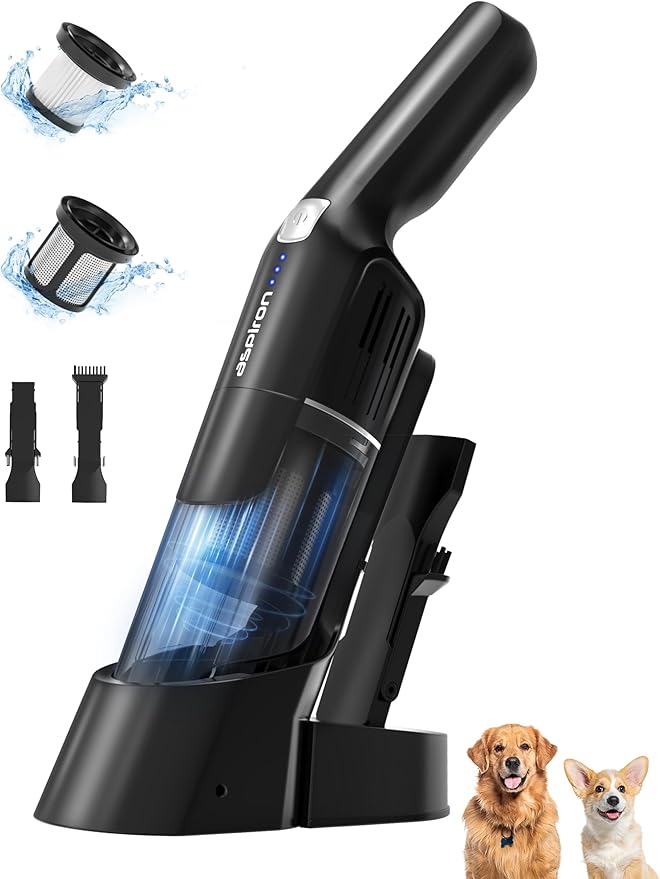
24KPA Powerful Car Vacuum | 2-Speed | Wireless Charger | Portable Rechargeable Cleaner
TABLE OF CONTENTS
QUICK START GUIDE
- Connect the vacuum to power for first-time activation.
- Fully charge the battery using the dock or cable.
- Attach the desired brush head or crevice tool.
- Press the power button and select suction mode.
SAFETY SYMBOLS LEGEND
- ⚠️ Warning: Risk of injury or damage.
- ⚠️ Caution: Possible hazard if ignored.
- 📘 Note: Important information or tip.
1. Safety Information & Warnings
- Use only with 110V outlets. Do not use with higher voltage without a converter.
- Keep away from water and wet surfaces.
- Do not vacuum hot ashes, liquids, or flammable materials.
- Unplug when not in use and before cleaning or maintenance.
- Keep hair, clothing, and fingers away from moving parts.
2. Package Contents
- Aspiron Cordless Handheld Vacuum (Model AS-CA038)
- Charging Dock
- Charging Cable
- 2-in-1 Brush Head
- Crevice Tool
- Washable HEPA Filter (installed)
- User Manual
3. Product Overview
Labeled Parts:
- Power Button
- Mode Selector (Standard / Max)
- 500ml Dust Cup
- HEPA Filter
- Brush Head Attachment
- Charging Port
- Charging Dock Connector
4. Specifications
- Suction Power: 15,000Pa (Standard) / 24,000Pa (Max)
- Battery Type: Lithium-ion
- Runtime: 25 min (Standard) / 13 min (Max)
- Charge Time: 4–5 hours
- Dust Capacity: 500ml
- Weight: 1.9 lbs
- Dimensions: 7" L x 3.9" W x 10" H
- Voltage: 110V
5. Getting Started
5.1 Initial Activation
For first-time use, connect the vacuum to a power source to activate the battery.
5.2 Battery Charging (Two Methods)
Method A: Place vacuum on charging dock.
Method B: Plug charging cable directly into vacuum.
5.3 Attaching Brush Heads
Align brush head or crevice tool with the slot and push until it clicks into place.
6. Operation
6.1 Power On/Off
Press the power button once to turn on. Press again to turn off.
6.2 Selecting Suction Mode
Press the mode button to toggle between Standard (15,000Pa) and Max (24,000Pa).
6.3 Using the 2-in-1 Brush Head
Ideal for carpets, blankets, keyboards, and upholstery.
6.4 Using the Crevice Tool
Use for tight spaces like sofa crevices, car seats, and corners.
7. Maintenance & Cleaning
7.1 Emptying the Dust Cup
Press the release button and remove the dust cup. Empty debris into trash.
7.2 Cleaning the Washable HEPA Filter
Remove filter, rinse under water, and air dry completely before reinstalling.
7.3 Replacing the Filter
Replacement HEPA Filter: B0FXWVMMSZ
7.4 Cleaning Brush Heads
Remove hair and debris from brush rollers. Wipe with a damp cloth if needed.
8. Battery & Charging
8.1 Charging via Docking Station
Place vacuum on dock until indicator light turns solid.
8.2 Charging via Direct Cable
Plug cable into vacuum and power source.
8.3 Battery Runtime
Up to 25 minutes in Standard mode, 13 minutes in Max mode.
8.4 Full Charge Time
Approximately 4–5 hours from empty.
9. Troubleshooting Guide
| Issue | Solution |
|---|
| Vacuum won’t turn on | Charge battery fully. Ensure first-time activation. |
| Weak suction | Empty dust cup. Clean or replace filter. |
| Battery not charging | Check power connection. Try both charging methods. |
| Brush head not attached | Align properly and push until click. |
10. Care & Storage
- Store in a cool, dry place.
- Keep away from direct sunlight and heat sources.
- Remove battery if storing for extended periods.
- Use only Aspiron-approved accessories.
11. Warranty Information
Aspiron provides a limited 1-year warranty from date of purchase. Contact Aspiron Official Store for support.
12. Compliance & Technical Details
- Voltage: 110V (for U.S. use)
- Dimensions: 7"L x 3.9"W x 10"H
- Weight: 1.9 lbs
- Model Number: AS-CA038
- UPC: 779604130313, 779657326442
- ASIN: B0FGPHYG6X