1. Overview
The Lamicall VHEP03 is a portable, cordless electric tire inflator designed for inflating car, motorcycle, and bicycle tires, as well as sports balls. It features a digital pressure gauge, multiple inflation modes, an auto-shutoff function, and an integrated LED light.

2. Package Contents
- Tire Inflator ×1
- Anti-scratch Silicone Covers ×2
- Schrader-Presta Valve Adapter ×1
- Needle Valve Adapter ×1
- Air Tube ×1
- Special Fuse ×1
Ensure all items are present before use.
3. Product Specifications
- Model: VHEP03
- Brand: Lamicall
- Maximum Pressure: 150 PSI
- Air Flow: 20 L/min (20 LPM)
- Power Source: Rechargeable Battery & 12V DC Car Socket (Cigarette Lighter)
- Charging Input: 5V/2A USB-C
- USB Output: 5V/2A USB-A (for use as a power bank)
- Dimensions: 160 x 46 x 68 mm (6.3 x 1.8 x 2.7 in)
- Weight: 452 g
- Material: Aluminum Alloy
- Hose Length: 30 cm (11.8 in)
4. Features and Controls
4.1 Physical Components
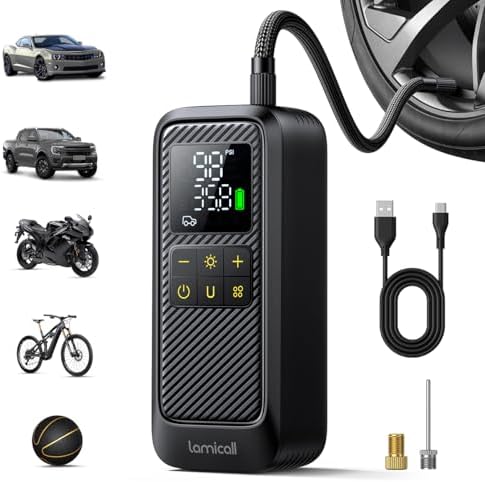
- Digital Display Screen: Shows target pressure, current pressure, and selected unit.
- Function (MODE) Button: Cycles through five inflation modes: Car, Motorcycle, Bicycle, Ball, and Custom.
- Unit (U) Button: Cycles through four pressure units: PSI, BAR, KPA, KG/CM².
- + / - Buttons: Adjust the target pressure value in Custom mode.
- Power/Start Button: Powers the device on and starts the inflation process.
- LED Light Button: Cycles through three light modes: Constant, Flashing, SOS.
- USB-C Charging Port: For recharging the internal battery.
- USB-A Output Port: For charging external devices (e.g., phones).
- 12V DC Input Port: For connecting to a car's cigarette lighter socket.
- 360° Rotating Air Nozzle: Connects to the hose for flexible positioning.
- Heat-Resistant Air Hose: 30 cm long, threaded connection.
4.2 Key Features
- Fast Inflation: High-precision aluminum alloy cylinder for efficient inflation (up to 5x faster than some models). Can inflate a car tire from 28 to 36 PSI in under 1 minute.
- Auto Shutoff: Automatically stops inflation when the preset target pressure is reached.
- Pressure Memory: Remembers your last set pressure in Custom mode.
- High-Precision Gauge: Accuracy within ±0.1 PSI.
- Dual Power Modes: Operate via internal battery or directly from a 12V car socket.
- Power Bank Function: The USB-A port can charge mobile devices.
- Emergency LED Light: Three modes provide illumination in dark conditions.
5. Use Guide
5.1 Charging the Inflator
- Connect a 5V/2A USB-C charger and cable to the USB-C port on the inflator.
- Plug the charger into a wall outlet. The display may illuminate to indicate charging.
- Charge fully before first use. Recharge when the battery indicator is low.
Note: When using the 12V DC car socket mode, ensure your vehicle's engine is running to avoid draining the car battery.
5.2 Selecting the Correct Adapter and Attaching the Hose
- Identify the valve type on your item:
- Schrader Valve: Standard on most car and motorcycle tires. Use the main nozzle directly.
- Presta Valve: Common on bicycles. Screw the Presta valve adapter onto the valve first, then attach the inflator nozzle.
- Needle Valve: For sports balls and inflatables. Attach the needle valve adapter to the hose.
- Screw the air hose firmly onto the inflator's output port.
- Attach the appropriate adapter to the other end of the hose if needed.
5.3 Setting the Target Pressure
- Press the Power button to turn on the device.
- Press the Function (MODE) button to select the appropriate preset:
- Car: Default target ~36 PSI.
- Motorcycle: Default target ~36 PSI.
- Bicycle: Default target ~65 PSI.
- Ball: Default target ~8 PSI.
- Custom (C): Allows manual pressure setting.
- In Custom Mode, use the + and - buttons to set your desired target pressure.
- Press the Unit (U) button to select your preferred pressure unit (PSI, BAR, KPA, KG/CM²).
5.4 Inflating a Tire
- Remove the valve cap from the tire.
- Firmly press the inflator nozzle (or adapter) onto the tire valve. Ensure it is seated straight to prevent air leaks.
- The digital screen will show the current tire pressure.
- Press and hold the Power/Start button to begin inflation.
- The inflator will run and automatically stop when the target pressure is reached.
- Check the pressure on the display. If needed, you can repeat the process to add more air.
- Disconnect the nozzle from the valve and replace the valve cap.
Tip: For more accurate reading, inflate in short bursts and check the pressure periodically, especially for small-volume tires like bicycles.
5.5 Using the LED Light
Press the LED button on the top of the unit to cycle through the modes: Constant Light → Flashing → SOS → Off. Useful for illuminating the tire valve in low-light conditions.
5.6 Using as a Power Bank
Connect a USB cable from the inflator's USB-A output port to your device (e.g., smartphone) to provide emergency power. Ensure the inflator has sufficient battery charge.
6. Safety and Maintenance
- Read all instructions before use.
- Do not operate the inflator continuously for more than 10 minutes. Allow it to cool down between uses to prevent overheating.
- Keep the air vents on the inflator clear of obstructions.
- Do not use the inflator to inflate any item beyond its maximum recommended pressure.
- Store the inflator and accessories in a cool, dry place.
- Use the included anti-scratch silicone covers on the inflator body to prevent damage.
- Check the hose and connectors for damage before each use.
- When using the 12V car socket, ensure the vehicle is in a well-ventilated area and the engine is running.
- This product contains a lithium-ion battery. Do not disassemble, short-circuit, or expose to extreme heat or fire.
7. Troubleshooting
| Problem |
Possible Cause |
Solution |
| Inflator does not turn on. |
Battery is depleted. |
Recharge via USB-C or connect to a 12V car socket with the engine running. |
| Inflation stops immediately or is very slow. |
Battery power is low. Loose connection to valve. |
Recharge the battery. Ensure the nozzle is firmly and straightly attached to the valve. |
| Pressure reading is inaccurate or display shows zero. |
Leak at valve connection. Sensor error. |
Re-seat the nozzle on the valve. Turn the inflator off and on again. |
| Inflator gets very hot. |
Extended continuous use. |
Turn off and allow to cool for at least 20 minutes. |
| Auto-shutoff does not work. |
Target pressure not set correctly. |
Ensure you are in the correct mode and have set a target pressure. Manually monitor pressure and stop the pump. |
8. Warranty and Support
For product support or warranty inquiries, please contact the manufacturer, Lamicall. Refer to the documentation included with your purchase for specific warranty terms and contact information.