Overview
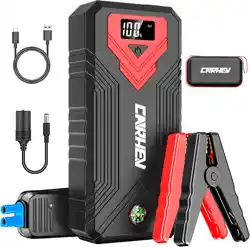
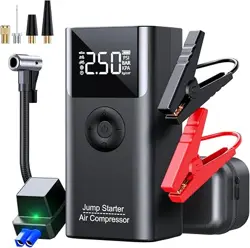
The CARHEV JS-06 is a portable jump starter power bank designed to start vehicles with discharged 12V batteries. It also functions as a power bank for USB devices and an emergency LED light.

Key capabilities include:
- Starting petrol engines up to 8.0L and diesel engines up to 8.0L.
- Providing a peak current of 4500A.
- Charging mobile devices via USB ports.
- Functioning as an LED flashlight.
Safety Information
Read all instructions before use. Incorrect use can lead to property damage, personal injury, or battery explosion.
Important Warnings
- This device is for 12V lead-acid batteries only. Do not use for 24V systems or dry-cell batteries.
- Ensure the vehicle's battery voltage is 12V before connecting.
- Do not use the device if it is damaged, wet, or shows signs of swelling.
- Keep away from children, fire, and heat sources.
- Do not disassemble, puncture, or short-circuit the unit.
- Only use the provided charging cable to recharge the jump starter.
- Before jump-starting, ensure the jump starter's battery level is above 50%.
- Connect and disconnect clamps in the correct order as specified in the instructions.
Package Contents
- CARHEV Jump Starter Power Bank (Model JS-06)
- Smart Jump Starter Cables
- USB-C Charging Cable
- Portable Storage Bag
- User Manual (Multilingual, English not guaranteed)

Product Features and Components

Main Unit
- Intelligent Display: Shows battery level and status.
- Power Button: Turns the unit on/off and cycles LED light modes.
- LED Flashlight: Located on the front. Offers three modes: steady light, flashing, and SOS.
- USB Output Ports: Two ports: one QC3.0 (9V/2A) for fast charging and one standard (5V/2A).
- USB-C Input Port: For recharging the jump starter's internal battery.
- 12V Output Port: For connecting the jump starter cables.
- Buzzer: Provides audible alerts for status and errors.
Jump Starter Cables
- Heavy-duty, insulated cables with robust clamps.
- Clamps are marked with Red (+) and Black (-).
- Integrated safety circuitry with ten protection systems (e.g., reverse polarity, over-current, short-circuit).
Charging the Jump Starter
Before first use and periodically, the internal battery must be charged.
- Use the provided USB-C cable.
- Connect the USB-C end to the input port on the jump starter.
- Connect the USB-A end to a standard 5V wall charger or computer USB port.
- The intelligent display will show the charging progress. Charging is complete when the display shows 100%.
Maintenance Tip: If the device will not be used for a long period (2-3 months), recharge it fully to maintain battery health.
Using the Jump Starter
Pre-Start Checklist
- Check the jump starter's battery level is above 50%.
- Turn off the vehicle's ignition and all electronics (lights, radio, etc.).
- Ensure the vehicle is in Park (automatic) or Neutral (manual) with the parking brake engaged.
- Identify the positive (+) and negative (-) terminals on the vehicle's dead battery.

Connection Procedure
- Plug the jump starter cable connector firmly into the 12V output port on the jump starter unit.
- Connect the RED positive (+) clamp to the positive (+) terminal of the vehicle's dead battery.
- Connect the BLACK negative (-) clamp to a solid, unpainted metal part of the engine block or chassis, away from the battery and fuel lines. This is the grounding point.
- Double-check all connections are secure and correct.
Starting the Vehicle
- Press the power button on the jump starter to turn it on. The display will activate.
- Wait a few moments for the device to recognize the connection.
- Enter the vehicle and start the engine as normal. Do not crank for more than 3-5 seconds at a time.
- If the engine does not start immediately, wait 20-30 seconds before attempting again.
Disconnection Procedure
Immediately after the vehicle starts:
- Turn off the jump starter by pressing the power button.
- Remove the BLACK negative (-) clamp from the vehicle's grounding point.
- Remove the RED positive (+) clamp from the vehicle's battery terminal.
- Unplug the cable connector from the jump starter unit.
Using as a Power Bank
- Turn on the jump starter by pressing the power button.
- Connect your mobile device (phone, tablet, etc.) to one of the USB output ports using your own USB cable.
- The device will begin charging. The QC3.0 port provides faster charging for compatible devices.
- When finished, disconnect your device.
Using the LED Light
Press the power button repeatedly to cycle through the LED light modes:
- First Press: Turns on the unit and activates steady flashlight mode.
- Second Press: Changes to flashing/strobe mode.
- Third Press: Changes to SOS emergency signal mode.
- Fourth Press: Turns the unit off.
Specifications
- Model: JS-06
- Peak Current: 4500A
- Rated Voltage: 12V DC
- Battery Capacity: 16800mAh
- Battery Type: Lithium-Ion
- Engine Compatibility: Up to 8.0L Petrol / 8.0L Diesel
- USB Outputs: QC3.0 (9V/2A), Standard (5V/2A)
- Input: 5V via USB-C
- Operating Temperature: -20°C to 60°C
- Ingress Protection: IP65 (Dust and water jet resistant)
- Weight: 770g
Troubleshooting
- Jump starter does not turn on: The internal battery may be depleted. Recharge the unit.
- Vehicle does not start:
- Ensure clamps are connected securely in the correct order.
- Check the jump starter's battery level is above 50%.
- The vehicle's problem may not be the battery (e.g., starter motor, fuel).
- Wait for the jump starter to cool down if it has been used repeatedly.
- Error indicator or buzzer sounds: The safety protection may be activated. Check for reverse polarity, short circuits, or excessive heat. Disconnect and reconnect correctly.
- USB device not charging: Ensure the jump starter is turned on. Try a different USB cable or port.
Care and Storage
- Store in the provided storage bag in a cool, dry place.
- Keep the unit away from moisture and direct sunlight.
- Recharge fully every 2-3 months during long-term storage.
- Clean with a dry cloth. Do not use liquids or solvents.
Warranty and Support
The product includes a 2-year technical support period. For assistance, contact the seller or manufacturer through the Amazon platform where the product was purchased. Customer service aims to respond within 24 hours.