1. Overview
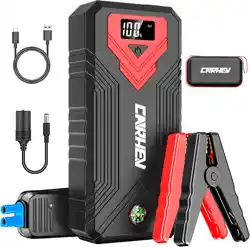
The CARHEV 6000A Jump Starter Power Pack is a portable 12V device designed to start vehicles with discharged batteries. It also functions as a power bank for USB devices and includes an emergency LED light.
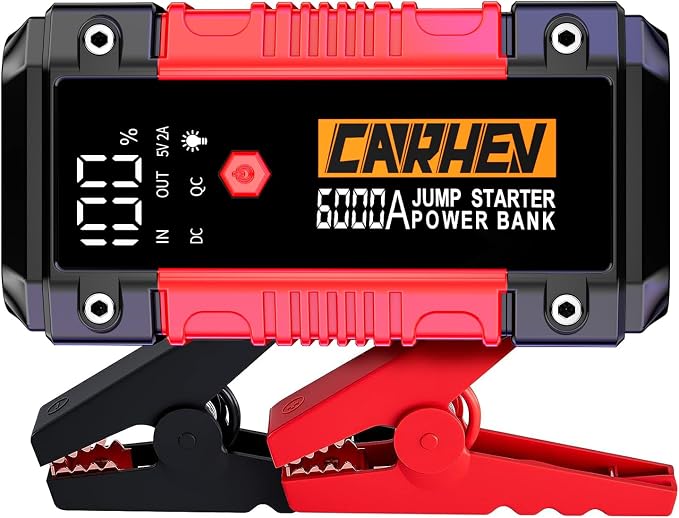
Key capabilities:
- Jump-start 12V vehicles with gasoline engines up to 10.0L or diesel engines up to 10.0L.
- Provide portable power via USB Quick Charge 3.0 and standard USB ports.
- Serve as an emergency light source with multiple modes.
2. Package Contents
- CARHEV Jump Starter Power Pack (main unit)
- Smatr Jump Cables (clamps)
- USB Charger Cable
- Storage Case
- User Manual (multi-language)

3. Product Features
3.1. Jump Starter Function
- Peak Current: 6000 Amps.
- Compatible Vehicles: Cars, Motorcycles, Tractors, Trucks, UTVs, Snowmobiles, ATVs, Scooters, Vans, RVs, Watercraft.
- Engine Support: Up to 10.0L gasoline or 10.0L diesel engines.

3.2. Power Bank Function
- USB Outputs: Two ports.
- Quick Charge 3.0 (9V/2A)
- Standard USB (5V/2A)
- Battery Capacity: 26800 mAh Lithium-ion.
- Can charge phones, tablets, and other USB devices.
3.3. LED Emergency Light
- Modes: Flashlight, Strobe Light, SOS Light.
- Suitable for camping, outdoor activities, and emergencies.

3.4. Display and Controls
- Digital LCD Screen: Shows remaining battery percentage.
- Provides a clear visual indication of power status.
3.5. Safety and Protection
- Intelligent safety system with 8 types of protection.
- Smart jump cables with excellent conductivity.
- Audible buzzer and visual indicators for correct/incorrect operation.
- Operating Temperature: -20°C to 60°C.
- Ingress Protection: IP65 rated shell resists rain, dust, and impacts.
4. Specifications
| Specification | Detail |
|---|---|
| Brand | CARHEV |
| Model / Part Number | JS-05 |
| Battery Type | Lithium Ion |
| Battery Capacity | 26800 Milliamp Hours (mAh) |
| Output Voltage | 12 Volts |
| Peak Current | 6000 Amps |
| USB Outputs | QC 3.0 (9V/2A), Standard (5V/2A) |
| Ingress Protection | IP65 |
5. Use Guide
5.1. Charging the Jump Starter
- Connect the provided USB charger cable to the jump starter's charging port.
- Plug the other end into a standard USB power adapter (not included) or a computer USB port.
- The LCD screen will indicate the charging progress. Charge fully before first use and after each use.
Maintenance Tip: If the jump starter will not be used for a long time, recharge it every 2-3 months to maintain battery health.
5.2. Jump-Starting a Vehicle
Safety First: Ensure the jump starter's battery level is above 50% before attempting to start a vehicle. Read all safety instructions in the manual before proceeding.
- Turn off the vehicle's ignition and all electrical accessories (lights, radio, etc.).
- Connect the Smatr Jump Cables to the jump starter's output port.
- Identify the vehicle battery's positive (+) and negative (-) terminals.
- Connect the red clamp to the positive (+) terminal of the vehicle battery.
- Connect the black clamp to a clean, unpainted metal part of the vehicle's engine block or chassis (a solid ground), away from the battery and fuel lines.
- Ensure connections are secure and cables are not near moving engine parts.
- Turn on the jump starter (refer to its specific power button).
- Wait a few moments, then attempt to start the vehicle. Crank for no more than 3-5 seconds at a time.
- Once the vehicle starts, turn off the jump starter.
- Disconnect the clamps in the reverse order: Black (ground) clamp first, then Red (positive) clamp.
- Disconnect the cables from the jump starter.

5.3. Using as a Power Bank
- Ensure the jump starter is charged.
- Connect your device (phone, tablet) to the jump starter using your own USB cable.
- Plug the cable into either the Quick Charge 3.0 port (for compatible devices) or the standard USB port.
- The device should begin charging. The LCD screen will show the jump starter's remaining power.
5.4. Using the LED Light
- Locate the light control button on the jump starter.
- Press the button repeatedly to cycle through the modes: Flashlight (steady) -> Strobe -> SOS.
- Press and hold the button (or follow device-specific instructions) to turn the light off.
6. Safety Information & Warnings
- Read the entire manual before use.
- Do not use the jump starter to charge or jump-start non-12V batteries.
- Do not disassemble, puncture, or incinerate the unit.
- Keep away from children, fire, heat, and water (despite IP65 rating, avoid submersion).
- Ensure correct polarity when connecting clamps. Reverse polarity may trigger the safety protection and audible alarm.
- Do not touch the clamps together while the unit is on.
- Store in the provided case in a cool, dry place.
- The device contains a lithium-ion battery. Follow local regulations for disposal or recycling.
7. Troubleshooting
| Issue | Possible Cause / Solution |
|---|---|
| Jump starter does not turn on. | Battery may be depleted. Recharge the unit fully. |
| Vehicle does not start. |
|
| Audible alarm sounds during jump-start. | Indicates incorrect operation (e.g., reverse polarity, poor connection). Turn off unit, disconnect clamps, and check connections. |
| USB device does not charge. |
|
8. Warranty and Support
CARHEV provides a 2-year warranty and technical support for this product.
If you encounter any issues or have questions:
- Refer to this manual and the included multi-language user guide first.
- Contact CARHEV customer service. The product listing states the team aims to reply within 24 hours.
Manufacturer: CARHEV