Overview
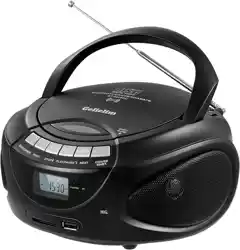
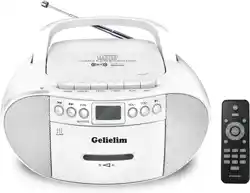
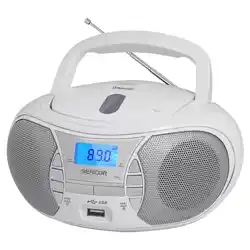
The Gelielim Cassette Tape Player Bluetooth Boombox is a multi-function audio device. It combines a cassette tape player/recorder, an AM/FM/SW radio, a Bluetooth speaker, and a media player for USB drives and TF (MicroSD) cards. It is designed for portable use with a built-in handle and can be powered by AC wall outlet or batteries.
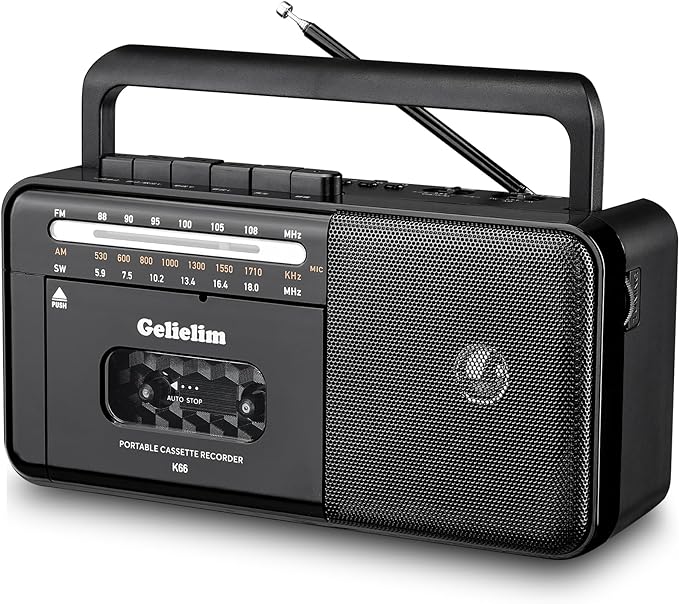
Key components visible on the unit include:
- Cassette tape compartment door.
- Large tuning dial and frequency scale for radio.
- Control knobs for volume, tuning, and mode selection.
- Front-facing speaker grille.
- Carrying handle on the top.
- Retractable antenna on the side.
Features and Specifications
Audio Playback
- Cassette Player: Plays standard audio cassette tapes.
- Cassette Recorder: Built-in microphone for recording to blank tapes from external sounds or the built-in radio.
- Bluetooth: Wireless audio streaming from compatible devices like smartphones, tablets, and laptops.
- Digital Media Playback: Supports MP3 audio files from USB flash drives and TF (MicroSD) cards.
- Radio: AM, FM, and Shortwave (SW) bands.
- FM: 88 - 108 MHz
- AM: 530 - 1710 kHz
- SW: 5.9 - 18.0 MHz
Audio Output
- Built-in Speaker: 8W stereo speaker system.
- Headphone Jack: 3.5mm output for private listening.
Power
- AC Power: Operates using the included power cord.
- Battery Power: Portable operation using 4 x D Cell batteries (not included).
Physical Specifications
- Dimensions: 10.23 x 4.53 x 5.12 inches.
- Weight: 1.2 Kilograms.
- Color Options: Black or White.

What's in the Box
- Gelielim Cassette Player Boombox
- AC Power Cord
- User's Manual (this document)
Note: Batteries are not included.
Use Guide
Powering the Device
Using AC Power
- Connect the included AC power cord to the DC input port on the back or side of the boombox.
- Plug the other end into a standard wall outlet.
- The device is now ready for use.

Using Batteries
- Open the battery compartment cover on the bottom or back of the unit.
- Insert 4 x D Cell batteries, observing the correct polarity (+/-) markings inside the compartment.
- Close the battery compartment cover securely.
Playing Cassette Tapes
- Press the EJECT or open the cassette door to access the compartment.
- Insert a cassette tape with the exposed tape facing forward and towards you. The side you wish to play should be facing outward.
- Close the compartment door firmly.
- Use the MODE selector knob or button to choose the "TAPE" function.
- Press the PLAY button (usually indicated by a triangle icon) to begin playback.
- Use the VOLUME knob to adjust the sound level.
- Press STOP to halt playback. Press FF (Fast Forward) or REW (Rewind) to navigate the tape.
Using the Radio
- Fully extend the retractable antenna to improve reception.
- Use the MODE selector to choose "AM", "FM", or "SW".
- Turn the large TUNING knob to scroll through frequencies. The selected frequency is shown on the dial.
- Fine-tune for the clearest signal. The antenna position may need adjustment for optimal clarity.
- Adjust volume using the VOLUME knob.

Recording to a Cassette Tape
- Insert a blank or erasable cassette tape into the compartment.
- Select your desired audio source:
- To record from the built-in microphone, ensure the area is quiet.
- To record from the radio, tune to your desired station.
- To record from an external source (like Bluetooth or USB), ensure it is playing.
- Press the RECORD button (often red, and may require pressing PLAY simultaneously). The tape will begin recording.
- Press STOP to end the recording session.
Using Bluetooth
- Set the MODE selector to "BT" or "Bluetooth". The unit will enter pairing mode, and an indicator light may blink.
- On your smartphone or other Bluetooth device, open the Bluetooth settings.
- Search for available devices and select "Gelielim" or a similar name from the list.
- Once connected, the indicator light will become steady. You can now play audio from your device through the boombox.
- Control playback (play, pause, skip) from your connected device.
Playing from USB or TF Card
- Insert a USB flash drive (into the USB port) or a TF/MicroSD card (into the TF card slot) containing MP3 files.
- Set the MODE selector to "USB" or "TF".
- Playback should start automatically. Use the boombox's PLAY/PAUSE, NEXT, and PREVIOUS buttons to control playback.
Using Headphones
Plug a standard 3.5mm audio plug from your headphones into the EARPHONE jack on the unit. This will mute the internal speakers.

Care and Maintenance
- Clean the exterior with a soft, dry cloth. Do not use abrasive cleaners or solvents.
- Keep the device away from excessive heat, moisture, and direct sunlight.
- To clean the tape head (for optimal cassette playback), use a commercially available cassette head cleaner.
- If not using batteries for an extended period, remove them from the compartment to prevent potential leakage and damage.
- Store cassette tapes in their cases in a cool, dry place.
Troubleshooting
No Power:
- Ensure the AC power cord is securely connected at both ends if using wall power.
- If using batteries, confirm they are fresh, correctly inserted, and the compartment is closed.
Cassette Tape Won't Play:
- Ensure the tape is inserted correctly.
- The tape may be damaged or have reached its end. Try a different tape.
- Ensure the mode is set to "TAPE".
Poor Radio Reception:
- Fully extend the antenna.
- Move the unit to a different location, preferably near a window.
- Adjust the antenna's angle.
Bluetooth Won't Connect:
- Ensure the boombox is in Bluetooth mode and in pairing state.
- Move your Bluetooth device closer to the boombox.
- Turn Bluetooth off and on again on your device, and delete old pairings before retrying.
No Sound from USB/TF Card:
- Ensure the drive or card is properly inserted.
- Confirm the audio files are in MP3 format.
- Try a different USB drive or TF card.