Yewrich LT-BT2105 AM FM Radio with Best Reception, Bluetooth Speaker Portable Radio

Product's Documents

Below are documents related to this product, you can read online or download:

Overview

The Yewrich AM/FM Bluetooth Portable Radio is a compact audio device that functions as both a traditional AM/FM radio and a Bluetooth speaker. It is designed for use in various settings such as the home, kitchen, office, or outdoors.

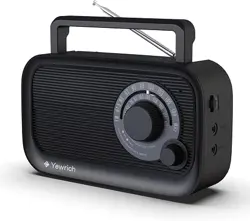
Front view of the Yewrich AM/FM Bluetooth Portable Radio in black, showing the speaker grille, tuning knob, and handle.

Key attributes include:

  • Model: YR-2105 / LT-BT2105
  • Dimensions: 8.65" L x 2.95" W x 5.03" H
  • Weight: 1.36 lbs (0.45 kg)
  • Enclosure Material: ABS Plastic

Features and Specifications

Audio Features

  • Tuner Technology: AM/FM with Digital Signal Processing (DSP).
  • Frequency Range:
    • FM: 87.5 - 108 MHz
    • AM: 520 - 1710 kHz
  • Bluetooth: Version 2.0 for wireless audio streaming from compatible devices (phones, tablets, laptops).
  • Speaker: Built-in precision speaker with a maximum output power of 3 Watts.
  • Headphone Jack: 3.5mm output for private listening.
Graphic highlighting the radio's Bluetooth connectivity feature.

Power Sources

  • AC Power: Uses the included power adapter (AC Input: 120V/60Hz).
  • Battery Power: Operates on 4 x AA batteries (1.5V each, not included).
  • Power Consumption: 3W.

Important: Remove batteries when using AC power. Disconnect the AC plug during thunderstorms.

Physical Controls and Indicators

  • Large Tuning Knob: For selecting AM/FM stations.
  • Retractable Antenna: Extends to improve FM reception.
  • Carrying Handle: Integrated for portability.
  • LED Indicator: Shows power and operational status.
  • Control Buttons/Knobs: Expected to include Power, Volume, and Mode selection (for switching between Radio and Bluetooth).
Image showing the side or top of the radio, highlighting the large tuning knob and other controls.

Use Guide

Initial Setup

  1. Unpacking: Confirm the package contains the radio and a power adapter.
  2. Power Choice:
    • For indoor use, plug the power adapter into the radio's DC input and a 120V wall outlet.
    • For portable use, open the battery compartment on the back and insert 4 AA batteries, observing the correct polarity (+/-).

Listening to AM/FM Radio

  1. Press the Power button to turn on the radio.
  2. Ensure the Mode is set to "Radio" (AM/FM).
  3. Fully extend the retractable antenna for best FM reception.
  4. Turn the large Tuning Knob to browse through stations. The frequency will change audibly as you tune.
  5. Adjust the Volume knob to your preferred listening level.
  6. For optimal AM reception, try rotating the radio's position.

Using the Bluetooth Speaker

  1. Press the Power button to turn on the radio.
  2. Press the Mode button until the Bluetooth indicator light flashes, signifying it is in pairing mode.
  3. On your smartphone, tablet, or other Bluetooth-enabled device, go to the Bluetooth settings menu.
  4. Select "YR-2105" or a similar identifier from the list of available devices.
  5. Once connected, the indicator light will become steady. You can now play audio from your device through the radio's speaker.
  6. Use your device or the radio's Volume knob to control the sound level.
The radio being used outdoors, demonstrating its portability.

Using the Headphone Jack

Plug a standard 3.5mm audio cable from your headphones into the headphone jack on the radio. This will typically mute the internal speaker.

Care and Maintenance

  • Cleaning: Wipe the exterior with a soft, dry cloth. Do not use liquid cleaners.
  • Water Resistance: This radio is not waterproof. Keep it away from moisture and liquids.
  • Batteries: Remove batteries if the radio will not be used for an extended period to prevent leakage and corrosion.
  • Service: Do not open the back cabinet. There are no user-serviceable parts inside. Refer to warranty for service needs.
  • Storage: Store in a cool, dry place.
Warning graphic emphasizing that the radio is not waterproof.

Troubleshooting

  • No Power:
    • Check that the AC power adapter is firmly connected to the radio and the wall outlet.
    • If using batteries, ensure they are fresh, correctly inserted, and the compartment is closed securely.
  • Poor Radio Reception:
    • Fully extend the antenna and adjust its angle.
    • Move the radio to a different location, preferably near a window for FM.
    • For AM, try rotating the radio itself.
    • Ensure you are within the broadcast range of the station.
  • Bluetooth Won't Connect:
    • Ensure the radio is in Bluetooth pairing mode (flashing indicator).
    • On your device, turn Bluetooth off and on again, then search for devices.
    • Move your device closer to the radio (within 33 feet/10 meters).
    • Disconnect or "forget" the radio from your device's Bluetooth list and try pairing again.
  • No Sound or Distorted Sound:
    • Check the volume level on both the radio and your Bluetooth device.
    • Ensure headphones are not plugged in.
    • If using Bluetooth, check the audio output settings on your source device.

Compliance and Safety

  • This product is designed for use with 120V AC power outlets. Use outside the United States may require a voltage converter.
  • Use only the provided power adapter.
  • Disconnect the AC power plug during lightning storms or when unused for long periods.
  • Keep away from heat sources and open flames.
  • The product contains no user-serviceable parts. Refer all servicing to qualified personnel.

Reference file: Yewrich LT-BT2105 AM FM Radio with Best Reception, Bluetooth Speaker Portable Radio

Specifications

Yewrich LT-BT2105 Questions and Answers