Gelielim KT-3B Portable Cassette Player, Cassette Tape Player AM/FM Radio,Casette Tape Recorder

Product's Documents

Below are documents related to this product, you can read online or download:

1. Overview

The Gelielim Portable Cassette Player is a multifunction audio device that combines a cassette tape player/recorder with an AM/FM radio. It is designed for portable use and can be powered by either an AC adapter or batteries.

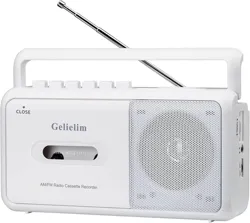
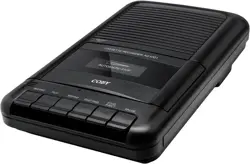
Front view of the Gelielim Portable Cassette Player showing the speaker grille, cassette compartment, and control knobs.

Key components visible on the unit include a built-in speaker, cassette compartment door, control knobs for volume and tuning, a carrying handle, and a telescopic antenna.

2. Features & Specifications

2.1 Audio Playback & Recording

  • Cassette Player: Plays standard audio cassette tapes.
  • Cassette Recorder: Records audio from the built-in microphone, radio, or an external source via the auxiliary input. Requires a blank, recordable tape.
  • Built-in Speaker: A single 6W, 8-ohm speaker provides audio output.
  • Headphone Jack: A 3.5mm port for private listening with wired headphones.
Close-up of the cassette compartment and playback/record buttons.

2.2 AM/FM Radio

  • FM Band: 88 MHz to 108 MHz.
  • AM Band: 530 kHz to 1710 kHz.
  • Reception: Features a telescopic antenna and a DSP chip for improved signal clarity.
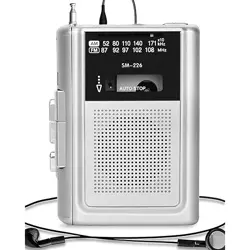
Display highlighting the AM/FM radio tuner and frequency dial.

2.3 Power Options

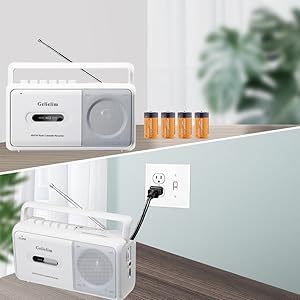
  • AC Power: Operates using the included power adapter (120V).
  • Battery Power: Operates using 4 x C-cell batteries (not included).
Image showing the battery compartment location on the back or side of the unit.

2.4 Physical Specifications

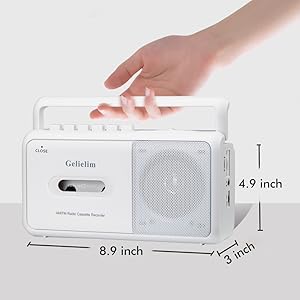
  • Dimensions: 8.94 x 2.99 x 4.92 inches (L x W x H).
  • Weight: Approximately 1.1 lbs (0.5 kg).
  • Handle: Integrated carrying handle for portability.
Side view of the cassette player showing its compact size and carrying handle.

3. Use Guide

3.1 Initial Setup

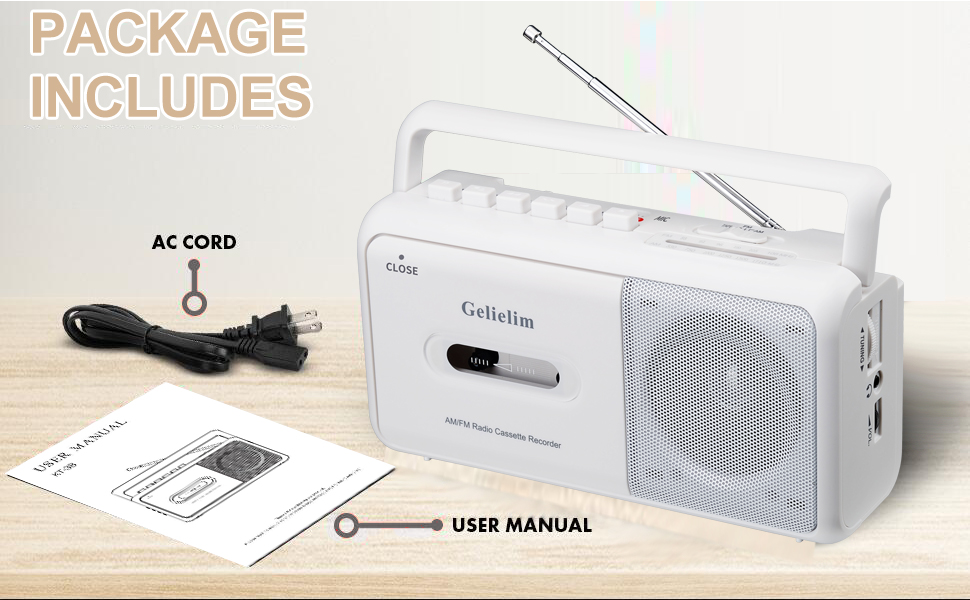
  1. Unpack the unit, power adapter, and user manual.
  2. Choose your power source:
    • For AC power, connect the included adapter to the DC input port on the unit and plug it into a 120V wall outlet.
    • For battery power, open the battery compartment on the back, insert 4 C-cell batteries observing the correct polarity (+/-), and close the compartment.
Package contents including the cassette player, power cord, and user manual.

3.2 Playing a Cassette Tape

  1. Press the EJECT or OPEN button to open the cassette compartment door.
  2. Insert a cassette tape with the exposed tape facing down and towards the playback head. The label should face outward.
  3. Close the compartment door firmly.
  4. Ensure the FUNCTION switch is set to TAPE.
  5. Press the PLAY button to begin playback.
  6. Use the VOLUME knob to adjust the sound level. Use the TONE knob (if present) to adjust bass/treble.
  7. Press STOP to halt playback. Press EJECT to remove the tape.

3.3 Using the AM/FM Radio

  1. Set the FUNCTION switch to RADIO.
  2. Set the BAND switch to either AM or FM.
  3. Fully extend the telescopic antenna for best reception, especially for FM.
  4. Turn the TUNING knob slowly to find a station. The tuning indicator on the dial will show the selected frequency.
  5. Adjust the VOLUME knob as needed.

3.4 Recording Audio

Note: You must use a blank, recordable cassette tape. Recording over a pre-recorded tape will erase the original content.

  1. To record from the microphone: Insert a blank tape. Set the function to TAPE. Press the RECORD button (often simultaneously with the PLAY button). Speak towards the built-in microphone on the unit.
  2. To record from the radio: Tune to the desired radio station. Insert a blank tape. Set the function to TAPE. Press the RECORD and PLAY buttons together.
  3. Press the STOP button to end recording.

3.5 Using Headphones

Plug a standard 3.5mm audio plug from your headphones into the EARPHONE jack. This will mute the internal speaker. Adjust volume using the unit's volume knob.

Close-up of the 3.5mm headphone jack on the side of the unit.

4. Care & Maintenance

  • Clean the exterior with a soft, dry cloth. Do not use abrasive cleaners or solvents.
  • Keep the unit away from excessive heat, moisture, and direct sunlight.
  • If not using batteries for an extended period, remove them to prevent potential leakage and damage.
  • To clean the cassette tape head (if playback quality degrades), use a commercially available cassette head cleaning kit following its instructions.
  • Store cassette tapes in their cases in a cool, dry place.

5. Troubleshooting

  • No power: Check that the AC adapter is securely connected or that batteries are correctly installed and not depleted.
  • Cassette does not play: Ensure the tape is inserted correctly. The tape may be damaged or the tape head may need cleaning.
  • Poor radio reception: Fully extend the antenna. Move the unit to a different location, away from large metal objects or electronic interference.
  • Recording does not work: Verify you are using a blank, recordable tape. Ensure the record tab on the cassette is intact (not broken out).
  • Distorted sound: Reduce the volume level. Check if the tape is worn or damaged.
  • Unit does not respond to buttons: Turn the unit off and disconnect power/batteries for one minute, then reconnect.

6. Warranty & Support

The product is covered by a 12-month limited warranty from the date of purchase. The manufacturer offers a 30-day money-back guarantee and 24/7 customer service.

For support: Contact the seller, Gelielim US, through your Amazon purchase history or the seller's store page on Amazon.com.

Reference file: Gelielim KT-3B Portable Cassette Player, Cassette Tape Player AM/FM Radio,Casette Tape Recorder

Specifications

Gelielim KT-3B Questions and Answers

See other models: K66