Retekess FF9225A TR604 AM FM Radio,Portable Radio Plug in Wall High/Low Tone Mode

Product's Documents

Below are documents related to this product, you can read online or download:
FF9225A photo

Overview

The Retekess TR604 is a portable AM/FM analog radio. It is designed for simple operation with large, easy-to-use controls. The radio can be powered by three D-cell batteries or an included AC power cable, making it suitable for both indoor and outdoor use.

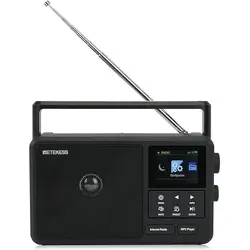
Front view of the Retekess TR604 AM/FM radio showing the speaker grille, large tuning dial, and control knobs.

Package Contents

  • Retekess TR604 Radio
  • AC Power Cable
  • English User Manual

Note: D-cell batteries are not included.

Features and Controls

Front and Top Panel

  • Carry Handle: For easy portability.
  • Speaker Grille: Covers the built-in 2W speaker.
  • Tuning Dial: A large, clear analog dial for selecting AM or FM frequencies.
  • Volume Knob: Large knob to adjust audio level.
  • Tuning Knob: Large knob for tuning to radio stations.
  • Band Switch: Selects between AM and FM bands.
  • Tone Switch: Toggles between High and Low tone modes.
  • Telescopic Antenna: A 23.62-inch (60 cm) antenna for improving FM reception. Rotate and extend for best signal.

Side and Rear Panel

  • 3.5mm Earphone Jack: For private listening with standard headphones (not included).
  • DC Power Input: Socket for connecting the included AC power cable.
  • Battery Compartment: Holds three D-cell batteries (not included). The compartment is located on the back of the unit.

Use Guide

Powering the Radio

The radio can be operated using two different power sources.

Using Batteries

  1. Open the battery compartment cover on the back of the radio.
  2. Insert three D-cell batteries, observing the correct polarity (+/-) markings inside the compartment.
  3. Close the cover securely.

Important Safety Note: If you wish to use battery power while the AC cable is connected, you must first unplug the AC power cable from the back of the radio.

Using AC Power

  1. Plug the included AC power cable into the DC power input socket on the back of the radio.
  2. Plug the other end into a standard 110V AC wall outlet.

Listening to the Radio

  1. Power On: Turn the Volume knob clockwise. You will hear a click and the radio will turn on.
  2. Select Band: Use the Band switch to select either AM or FM.
  3. Improve Reception:
    • For FM: Fully extend the telescopic antenna. Rotate the antenna and reposition the radio for the clearest signal.
    • For AM: The radio uses an internal magnetic antenna. Rotate the entire radio to find the position with the best reception.
  4. Tune to a Station: Slowly turn the large Tuning knob until the pointer on the dial aligns with your desired station frequency. Fine-tune for the clearest sound.
  5. Adjust Volume: Turn the Volume knob to your preferred listening level.
  6. Adjust Tone: Use the Tone switch to select between High and Low sound modes based on your preference.
  7. Private Listening: Plug a standard 3.5mm headphone into the earphone jack. This will mute the internal speaker.
  8. Power Off: Turn the Volume knob fully counter-clockwise until you hear a click.

Specifications

  • Model: TR604 (FF9225A)
  • Bands: AM, FM
  • Frequency Range: AM: 520-1710 kHz, FM: 87-108 MHz
  • Power Supply: 3 x D-cell batteries (not included) or AC 110V via included cable
  • Speaker Output: 2W
  • Earphone Jack: 3.5mm standard
  • Antenna: Telescopic rod antenna (FM), Internal magnetic antenna (AM)
  • Dimensions: 8.66" L x 5.71" H x 2.44" W (22.0 x 14.5 x 6.2 cm)
  • Weight: 1.65 lbs (0.75 kg) without batteries

Care and Maintenance

  • Keep the radio dry and away from excessive heat or humidity.
  • Clean the exterior with a soft, dry cloth. Do not use liquid cleaners.
  • Remove batteries if the radio will not be used for an extended period to prevent potential leakage and damage.
  • Use only the provided AC power adapter. Using an incorrect adapter may damage the radio.

Troubleshooting

  • No Power (Battery Mode): Check that batteries are correctly installed and not depleted. Ensure the AC power cable is disconnected from the radio.
  • No Power (AC Mode): Ensure the power cable is firmly connected to both the radio and the wall outlet.
  • Poor FM Reception: Fully extend the telescopic antenna. Move the radio to a different location, preferably near a window.
  • Poor AM Reception: Rotate the radio to find the best signal direction. Avoid placing it near large metal objects or electronic devices.
  • No Sound from Speaker (Headphones Work): Ensure headphones are fully unplugged from the earphone jack.
  • Distorted Sound: Reduce the volume level. Check the battery level if operating on battery power.

Reference file: Retekess FF9225A TR604 AM FM Radio,Portable Radio Plug in Wall High/Low Tone Mode

Specifications

Retekess FF9225A Questions and Answers

See other models: PR13 TR101 TR624 TR107 PR15