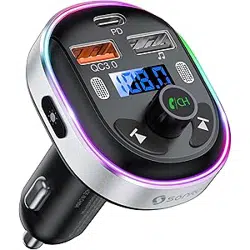
Overview
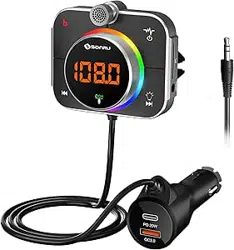
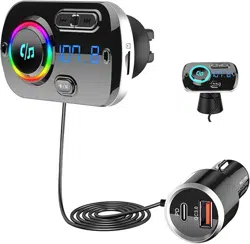
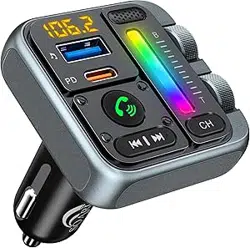
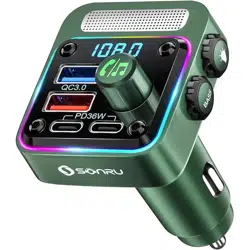
The SONRU Bluetooth FM Transmitter is a car adapter that allows you to stream audio from your Bluetooth-enabled devices or a TF (MicroSD) card through your car's FM radio. It also features dual fast-charging USB ports and hands-free calling capabilities.
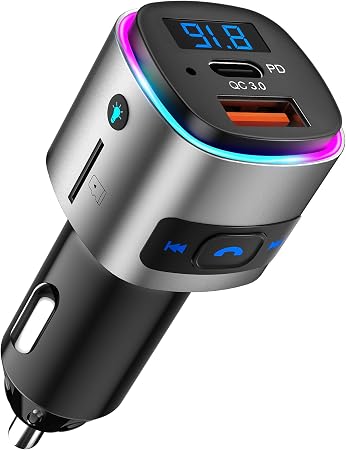
The device plugs into your vehicle's 12V DC cigarette lighter socket.
Features
Audio Playback & Connectivity
- Bluetooth 5.3: Provides a fast and stable wireless connection for audio streaming from compatible devices like smartphones and tablets.
- TF Card Playback: Supports audio playback from a MicroSD (TF) card with a capacity of up to 32GB.
- FM Transmission: Broadcasts audio to your car's stereo system on a selectable FM frequency.

Charging
- Dual Fast Charging Ports:
- One USB-C PD (Power Delivery) port with up to 30W output.
- One USB-A QC3.0 (Quick Charge 3.0) port with up to 18W output.
- Allows simultaneous high-speed charging of two devices.

Hands-Free Calling & Voice Assistant
- Built-in Microphone: Enables hands-free phone calls.
- CVC 8.0 Noise Cancellation: Reduces background noise and echo for clearer call audio.
- Voice Assistant Support: Allows you to activate Siri (iOS) or Google Assistant (Android) via a button press for voice commands.
Other Features
- LED Display: Shows the selected FM frequency and other status information.
- Multi-Color Lights: Features seven selectable LED accent colors.
- Safety Protections: Includes safeguards against over-heating, over-current, over-voltage, and short-circuit.

Use Guide
Initial Setup and Installation
- Insert the transmitter firmly into your vehicle's 12V cigarette lighter socket.
- Turn on your vehicle's ignition or start the engine to power the transmitter. The LED display will light up.
- Turn on your car's FM radio.
Pairing a Bluetooth Device
- On the transmitter, press and hold the multifunction button until the LED display shows "PAIR" or the Bluetooth icon flashes.
- On your smartphone or audio device, go to the Bluetooth settings menu.
- Select "SONRU" or a similar name from the list of available devices to pair. No password is typically required.
- Once connected, you will hear an audible confirmation.
Setting the FM Frequency
- Press the frequency adjustment buttons (typically labeled "CH-" and "CH+") on the transmitter to cycle through available FM frequencies (e.g., 87.5 MHz - 108.0 MHz).
- Choose a frequency that is not being used by a strong local radio station. A clear frequency will have minimal to no static.
- Tune your car's FM radio to the exact same frequency you selected on the transmitter.
Playing Audio
Via Bluetooth:
- Ensure your paired device is within range and connected.
- Start playing audio (music, podcast, audiobook) on your device. The audio will stream through your car speakers.
- Use your device's volume controls or your car stereo's volume knob to adjust the sound level.
Via TF Card:
- Insert a MicroSD card (formatted with MP3 audio files) into the TF card slot on the transmitter.
- The transmitter should automatically detect the card and begin playback. Use the play/pause or track skip buttons on the transmitter to control playback.
- Note: If a TF card is inserted, the Bluetooth function may be disabled until the card is removed.
Making and Receiving Calls
- When a call comes in, audio will pause, and you will hear the ringtone through your car speakers.
- Press the multifunction/call button on the transmitter once to answer the call.
- Speak normally. The built-in microphone with noise cancellation will pick up your voice.
- Press the multifunction/call button again to end the call. Audio playback will typically resume.
- To make a call, use your phone's voice dial feature or press the voice assistant button to activate Siri/Google Assistant and give a voice command (e.g., "Call John").
Using the Charging Ports
- Plug your device's charging cable into either the USB-C PD port or the USB-A QC3.0 port.
- Charging will begin automatically. The ports support fast charging protocols for compatible devices.
- You can charge two devices at the same time.
Specifications
- Model: BC41
- Brand: SONRU
- Bluetooth Version: 5.3
- Charging Output: PD 30W (USB-C) / QC3.0 18W (USB-A)
- Input Voltage: 12V DC (Vehicle Socket)
- Supported TF Card: MicroSD, up to 32GB
- Audio Output: Stereo via FM Transmission
- Noise Cancellation: CVC 8.0
- Dimensions: 1.7" L x 1.3" W x 2.7" H
- Weight: 1.1 Ounces
- Color: Silver
Troubleshooting
- No Sound / Static:
- Ensure the FM frequency on the transmitter matches the frequency tuned on your car radio exactly.
- Change to a different, unused FM frequency on both the transmitter and your car radio.
- Check that the transmitter is fully inserted into the power socket.
- Bluetooth Won't Connect:
- Ensure the transmitter is in pairing mode (LED flashing).
- Remove the TF card if one is inserted, as it may take priority.
- Delete "SONRU" from your phone's Bluetooth paired devices list and try pairing again.
- Device Not Charging:
- Try a different charging cable.
- Ensure your vehicle's accessory power socket is active (ignition may need to be on).
- The device may not support the fast-charging protocol; it will charge at a standard speed.
- Poor Call Quality:
- Ensure you are speaking in the direction of the transmitter's built-in microphone.
- Reduce background noise in the vehicle if possible (e.g., close windows).
Safety Information
- Heating: The device may become warm during fast charging. Ensure it has adequate ventilation and do not cover it.
- Wireless Interference: May experience interference with other nearby wireless devices or strong FM radio stations.
- Privacy: This product contains a built-in microphone. Be aware of your local laws regarding recording and privacy.
- For safe driving, set your FM frequency and pair your device before you start driving. Use voice commands or the transmitter's buttons to control functions while driving, avoiding handling your phone.