IGERESS WP6932 Indoor Air Quality Monitor Detector Accurate Testing Formaldehyde

Product's Documents

Below are documents related to this product, you can read online or download:
WP6932 photo

1. Product Overview

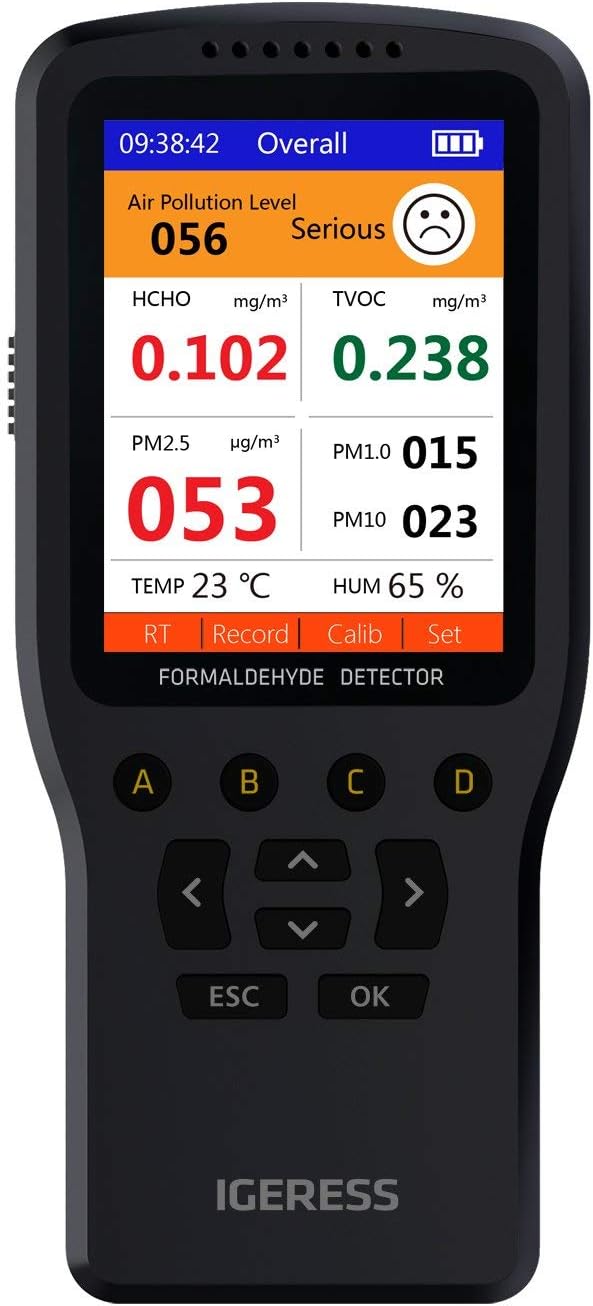
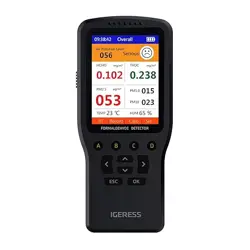
IGERESS Indoor Air Quality Monitor showing a black rectangular device with a large LCD screen displaying air quality readings.

The IGERESS Indoor Air Quality Monitor is a portable device designed to measure and display key indoor air quality parameters. It provides real-time readings to help you assess your living environment.

The monitor is equipped with multiple sensors to detect the following:

  • Formaldehyde (HCHO)
  • Total Volatile Organic Compounds (TVOC)
  • Particulate Matter (PM1.0, PM2.5, PM10)
  • Air Temperature
  • Relative Humidity

The device features a 7-inch LCD screen for clear data visualization, an audible alarm, and a color-coded interface to indicate risk levels.

2. Features and Specifications

2.1 Key Features

  • Multifunctional Monitoring: Simultaneously detects HCHO, TVOC, PM levels, temperature, and humidity.
  • Visual and Audible Alerts: The screen changes color and an audible alarm sounds when readings exceed safe thresholds.
  • Real-Time Display: A large 7-inch LCD screen shows current readings and air quality levels.
  • Portable Design: Compact and lightweight for easy placement in different rooms.
  • Simple Operation: Controlled via four function keys.

2.2 Technical Specifications

Parameter Specification
Model WP6930S / WP6932
Display 7-inch LCD Screen
Power Source Rechargeable Lithium Battery (1500mAh)
Input Power 5V / 1A (via charging cable)
Charging Time Approximately 4 hours
Formaldehyde (HCHO) Range 0 - 1.999 mg/m³
TVOC Range 0 - 9.999 mg/m³
PM1.0/PM2.5/PM10 Range 0 - 999 μg/m³
Temperature Range 0 - 50 °C
Humidity Range 20% - 90% RH
Operating Humidity 20% to 90%
Upper Temperature Rating 90 Degrees Celsius
Sensor Type Electrochemical (HCHO), TVOC, Laser Scattering (PM)
Alarm Type Audible and Visual (Screen Color Change)
Product Dimensions (L x W x H) 14.7 cm x 6.6 cm x 2 cm
Product Weight 170.5 grams
Enclosure Material ABS Plastic
Color Black

3. Components and Layout

3.1 Front Panel

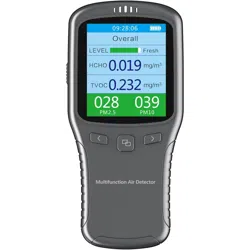
  • LCD Display: Shows numerical readings, air quality level indicators, and unit labels.
  • Function Keys (4 buttons): Located below the screen for navigating menus, adjusting settings, and switching display modes.

3.2 Side/Rear Panel

  • Sensor Inlets: Vents for air intake for the particulate matter and gas sensors.
  • Charging Port: Micro-USB or USB-C port (as per model) for connecting the provided charging cable.
  • Speaker: For the audible alarm.

4. Initial Setup and Use

4.1 Charging the Device

  1. Connect the provided charging cable to the charging port on the monitor.
  2. Plug the other end into a standard 5V/1A USB power adapter or computer port.
  3. The device may display a charging indicator. A full charge takes approximately 4 hours.
  4. Disconnect the cable once charging is complete.

4.2 Powering On/Off

Press and hold the power button (typically one of the four function keys) for 2-3 seconds to turn the device on or off.

4.3 Placement for Accurate Reading

  • Place the monitor on a stable, flat surface in the area you wish to test.
  • Ensure the sensor inlets are not obstructed by objects, walls, or curtains.
  • Keep the device away from direct airflow from vents, fans, or windows during measurement, as this can affect sensor readings.
  • For best results when testing for formaldehyde or TVOC, close doors and windows and allow the device to measure for at least 15 minutes to stabilize.

5. Operating Instructions

Understanding the Display

The main screen displays all measured values simultaneously. Each parameter is shown with its numerical value and unit (e.g., mg/m³, μg/m³, °C, %RH).

The background color of the display or specific indicators will change to reflect the overall air quality level:

  • Green: Good - All parameters within safe ranges.
  • Yellow: Moderate - One or more parameters are elevated.
  • Red: Poor - One or more parameters exceed safe thresholds, triggering the audible alarm.

Using the Function Keys

The four buttons allow you to:

  • Switch between different display views or data pages.
  • Enter the settings menu to adjust parameters like alarm thresholds or unit preferences (if configurable).
  • Scroll through options within menus.
  • Confirm selections.
  • Mute or acknowledge an active alarm.

Refer to the on-screen prompts for specific key functions.

Alarm System

When the concentration of HCHO, TVOC, or PM exceeds the preset safety limit:

  1. The device will emit a continuous or intermittent beep.
  2. The screen color will change to red (or a warning color).
  3. The numerical value for the exceeding parameter will typically flash or be highlighted.

To silence the audible alarm temporarily, press any button. The visual warning will remain until levels return to a safe range.

Initial Setup and Calibration

  1. Charge the Device: Connect the provided USB cable to the monitor and a standard USB power adapter (5V/1A) or computer port to fully charge the internal battery before first use.
  2. Power On: Press and hold the power button to turn on the device.
  3. Initial Calibration: For accurate readings, the device should be calibrated before its first use and periodically thereafter. Follow the on-screen prompts or refer to the manual for the calibration procedure. This typically involves placing the device in a clean, well-ventilated area for a period to establish a baseline.

Taking Measurements

  1. Place the monitor in the area you wish to test (e.g., bedroom, living room, office, car). Ensure it is on a stable, flat surface.
  2. Allow the device to run for at least 5 minutes to stabilize and provide accurate readings. Air circulation around the device is necessary.
  3. Use the 10-key interface to navigate the menu. You can view:
    • Overall Interface: Displays all key parameters (HCHO, TVOC, PM2.5, Temp, Hum) simultaneously.
    • Individual Parameter Screens: Navigate to view detailed readings and historical data charts for specific metrics like HCHO or PM2.5 over time.
    • Settings Menu: Access options for alarm thresholds, unit settings, data logging intervals, and device calibration.
  4. The color screen will show numerical values. Pay attention to any on-screen warnings or audible alarms indicating high pollution levels.

Data Logging and Chart View

The device can record air quality data over a user-defined period. To use this feature:

  1. Access the data logging mode from the main menu.
  2. Set the desired logging interval (e.g., every minute, every 10 minutes).
  3. Start the logging session. The device will store the data internally.
  4. After the session, you can navigate to the chart view to see graphical trends of HCHO, TVOC, Temperature, or PM2.5 levels over the recorded time.
6. Care and Maintenance

  • Cleaning: Wipe the exterior with a soft, dry cloth. Do not use liquid cleaners, aerosols, or abrasive materials. Do not allow moisture to enter the sensor vents.
  • Sensor Care: Keep the sensor inlets free of dust and lint. Avoid using the device in extremely dusty environments for prolonged periods.
  • Calibration: The sensors are calibrated at the factory. The device does not support user calibration.
  • Storage: If storing for an extended period, charge the battery to approximately 50% and store in a cool, dry place.
  • Battery: For optimal battery life, avoid completely draining the battery regularly. Recharge when the low battery indicator appears.

7. Troubleshooting

Issue Possible Cause & Solution
Device does not turn on. Battery may be depleted. Connect to the charger and allow it to charge for at least 30 minutes before attempting to power on.
Readings are unstable or fluctuate wildly. The device may be in a high airflow area. Move it to a more stable location away from vents, fans, or drafts. Allow 15-20 minutes for readings to stabilize in a new environment.
Alarm sounds frequently without obvious cause. Check for local sources of pollution (cleaning products, cooking, smoking, new furniture). Ensure the device is not placed near these sources. Ventilate the room and observe if readings decrease.
Screen is blank but device is powered. Check the screen brightness setting in the menu (if adjustable). Ensure the device is not in a sleep mode; press any button to wake it.
PM readings are consistently high. This may accurately reflect indoor dust, pet dander, or outdoor pollution ingress. Check and clean/change HVAC filters. Reduce activities that generate dust.
Device fails to charge. Try a different USB cable and power adapter. Ensure the charging port is free of debris.

8. Safety Information

  • This device is for indoor, non-professional use to provide trend indications of air quality. It is not a precision scientific instrument.
  • Readings can be influenced by temperature, humidity, and other environmental factors.
  • Do not use the device in explosive or hazardous atmospheres.
  • Do not disassemble, modify, or attempt to repair the device. There are no user-serviceable parts inside.
  • Keep the device away from water and other liquids.
  • Use only the provided or manufacturer-recommended charger and cable.
  • If you suspect a gas leak based on the monitor's readings or other signs (e.g., smell of gas), evacuate the area immediately and contact your gas utility provider or emergency services from a safe location. Do not rely solely on this monitor for gas leak detection.


Reference file: IGERESS WP6932 Indoor Air Quality Monitor Detector Accurate Testing Formaldehyde

Specifications

IGERESS WP6932 Questions and Answers

See other models: WP6912